Southwing S L ASTO Bluetooth Hands-free Car Kit User Manual
Southwing S.L. Bluetooth Hands-free Car Kit
Users Manual
FCC Statement
The changes or modifications not expressly approved by the party responsible for compliance
could void the user’s authority to operate the equipment.
User Information
This device complies with part 15 of FCC Rules. Operation is subject to the following two
conditions:
(1)This device may not cause harmful interference, and
(2)This device must accept any interference received, including interference that
may cause undesired operation.
To comply with FCC RF exposure requirement, this device and its antenna
must not be co-located or operating in the conjunction with any other
antenna or transmitter.
The Bluetooth word mark and logos are owned by the Bluetooth SIG, Inc. and any
use of such marks here is under license. Other trademarks and trade names are
those of their respective owners.
Bluetooth Hands-free Car Kit Bluetooth your safety
Rev. 0.3 (2005/8/10)
Introduction
The Bluetooth Hands-free Car kit is base on Bluetooth wireless technology
connects to a compatible phone without wires. It is easily convert your
mobile phone communication into this in-car solution, talking through its
build-in high quality speaker and microphone. This hands-free in-car device
providing fast and reliable transmission of voice.
**1. If your Bluetooth mobile phone only supports Headset profile
without Hands-free profile, the product only is with the
function of call answering.
The following pages of this user manual focus on how to use this product.
Overview
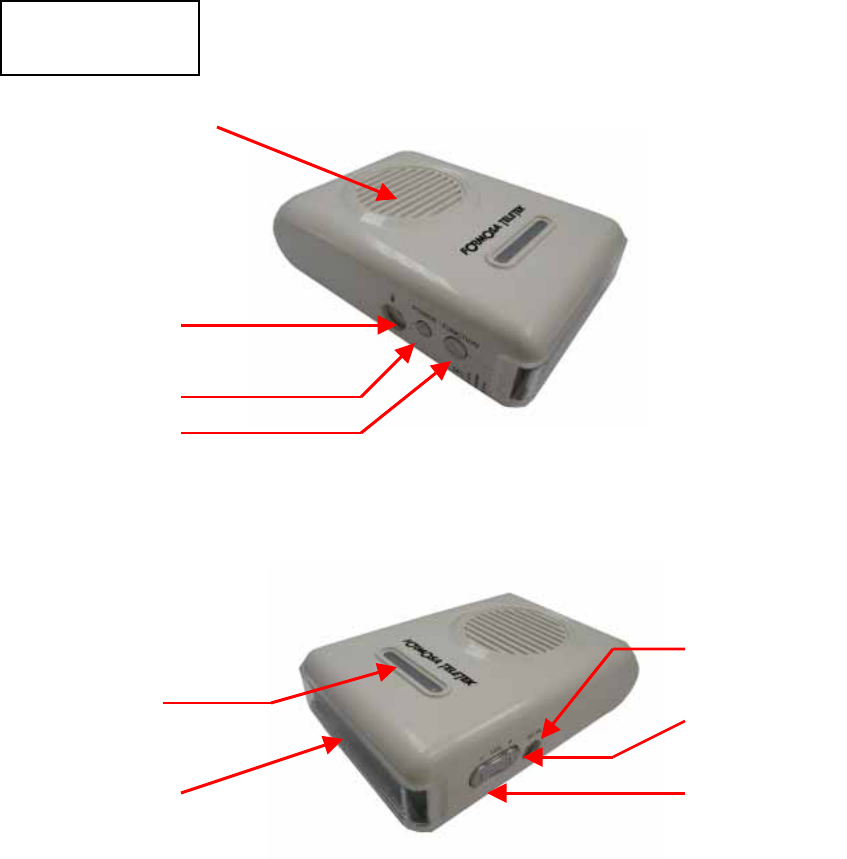
Speaker
Talk Button
Power Button
External
Microphone
DC input
LCD
LED Indicator
V
ol (-)
V
ol (+)
Start
Setup
1. Assembly and Power on
Using Vehicle Power Adapter
1. Make the vehicle power adapter connect to 12Vdc of cigarette lighter, the
red LED lights on first, then blue LED lights for 2 seconds. After that, the car
kit enters standby mode and the blue LED flashes once per 3 seconds.
2. “Welcome” appears on the LCD screen.
Using Rechargeable Battery
You could use hands-free function of this product by using 3 pcs of
AAA batteries when leaving the car environment.
1. Put 3 pcs of AAA battery into this product. Pay more attention for the
polarity of battery.
2. Press and hold the “Power button” until the red LED is on and the blue LED
lights for 2 seconds later. Then the car kit enters the standby mode, and the
blue LED flashes once per 3 seconds.
3. “Welcome” appears on the LCD screen.
How to charge for the battery?
Please follow the steps as below to charge your batteries.
1. Put 3 pcs of AAA battery into this product. Pay more attentions for the
polarity of battery.
2. Please charge the batteries by using the vehicle power adapter attached in
the package.
3. When charging complete, the LCD will show .
Note:1. Please do not use the non-rechargeable batteries into this
product to charge, this maybe make the product damaged. 請
2. Pair the Bluetooth car kit with your mobile phone
You pair the car kit with the phone by adding it to the paired list in your phone.
Then the two devices recognize each other and make the connection when
using at the next time.
1. In the disconnection mode, press and hold the “Talk button” until the blue

LED flashes once per second, the LCD will show ”LCD: PIN1234”.
** When you press and hold the “Talk button”, you will hear 2 beeps
of “hi-lo”. You need to continuously press the “Talk button” until
the blue LED flashes, it means that it enters the pairing mode.
** The pairing mode will be held for 3 minutes to let you pair the car
kit with the phone.
2. Please refer to the manual of your Bluetooth mobile phone, enable the
Bluetooth function and search the new Bluetooth devices within the range
of 5 meters.
3. “BT Car Kit” appears in the paired list of you phone. Select it and enter the
pin-code “1234” in the phone.
4. Press and hold the “Talk button” to leave the paring mode during pairing.
** 1. You need to pair the car kit with your phone, then you just can
make the connection.
2. The car kit will enter the pairing mode automatically when first
using.
3. You only need to pair the car kit with your phone when you ue
this product at first time.
Daily Use
1. Power on
1. Make the vehicle power adapter connect to 12Vdc of the cigarette
lighter in the car, the red LED lights on first, then blue LED lights for 2
seconds. After that, the car kit enters standby mode and the blue LED
flashes once per 3 seconds.
“Welcome” appears on the LCD screen.
2. When using the batteries, press and hold the “Power button” until the
red LED is on and the blue LED lights for 2 seconds later. Then the blue
LED flashes once per 3 seconds.
“Welcome” appears on the LCD screen.
2. Connection/Disconnection
Connection:
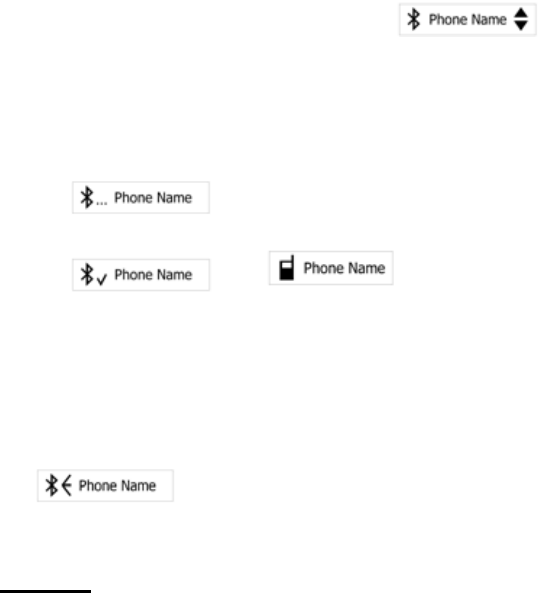
1. Every time you re-start your car kit, press the “Power button” then enter
the paired list of the car kit; Press the “Power button” again to leave the
paired list. The LCD will show .
2. Select the phone number you would like to link from the paired list by
pressing the “Vol(-)” or “Vol(+)” button.
3. Press “Talk button” to make the connection, then the LCD will show
; When the connection is compete, the LCD will show
Æ .
Disconnection:
In the connection mode, press the “Power button” to terminate the
connection between the car kit and your phone. The LCD will show
.
3. Calls
Answer a coming call
1. When incoming call, the car kit rings, and the LCD will show the phone
number or user name of the call.
2. Press the main button to answer the call.
3. You can answer the coming call by your phone for your privacy. The
voice remains on the phone. According to the phone user guide to
transfer the voice to the car kit.
Terminate a call
Press the “Talk button” during the talking mode to terminate the call.
Reject a coming call
1. When incoming call, the car kit rings, and the LCD will show the phone
number or user name of the call.
2. Press the “Talk” button to reject the call.
Making a call
When the car kit is connected to your phone, make a call by using

your phone in the normal way.
‧
Making a voice dialing
If your phone supports voice dialing, and it is activated, you can use this
feature with this car kit.
1. Refer to the phone user guide to enable the voice commands on your
phone;
2. In standby mode, briefly press the “Vol(-)” button. Wait for the tone that
indicates you can say the name as you recorded on your phone.
Redialing
During the standby mode, long press the “Vol(+)” button to redial the last
call.
** No all the Bluetooth phones successfully support Redialing and
Reject a coming call function.
Transfer a call
For privacy, you can transfer a current call directly to your phone. Press the
“Power” button to transfer the call to your phone; press the “ Power”
button again to transfer the call to the car kit.
** No all the Bluetooth phones support this feature. If it is the
case with your phone, pressing the main button may end the
call and not transfer it to the phone.
4. Adjusting the Volume
1. To increase the volume, press the “Vol(+)” button in talking mode.
2. To decrease the volume, press the “Vol(-)” button in talking mode.-
5. Mute
Press and hold the “Vol(-)” or “Vol(+)” to enable mute function in during
talking mode.
6. Power off
Press and hold the “Power button” to turn off the power of the car kit in the
standby mode when using AAA batteries.