Spectec Computer WLAN-11B-G SDIO Wireless Lan Card User Manual user s guid 2005 12 29 NOTE FCC indd
Spectec Computer Co., Ltd SDIO Wireless Lan Card user s guid 2005 12 29 NOTE FCC indd
Contents
- 1. User Manual 1
- 2. User Manual 2
User Manual 2
10
Wireless/Internet Speed Dial
< Click
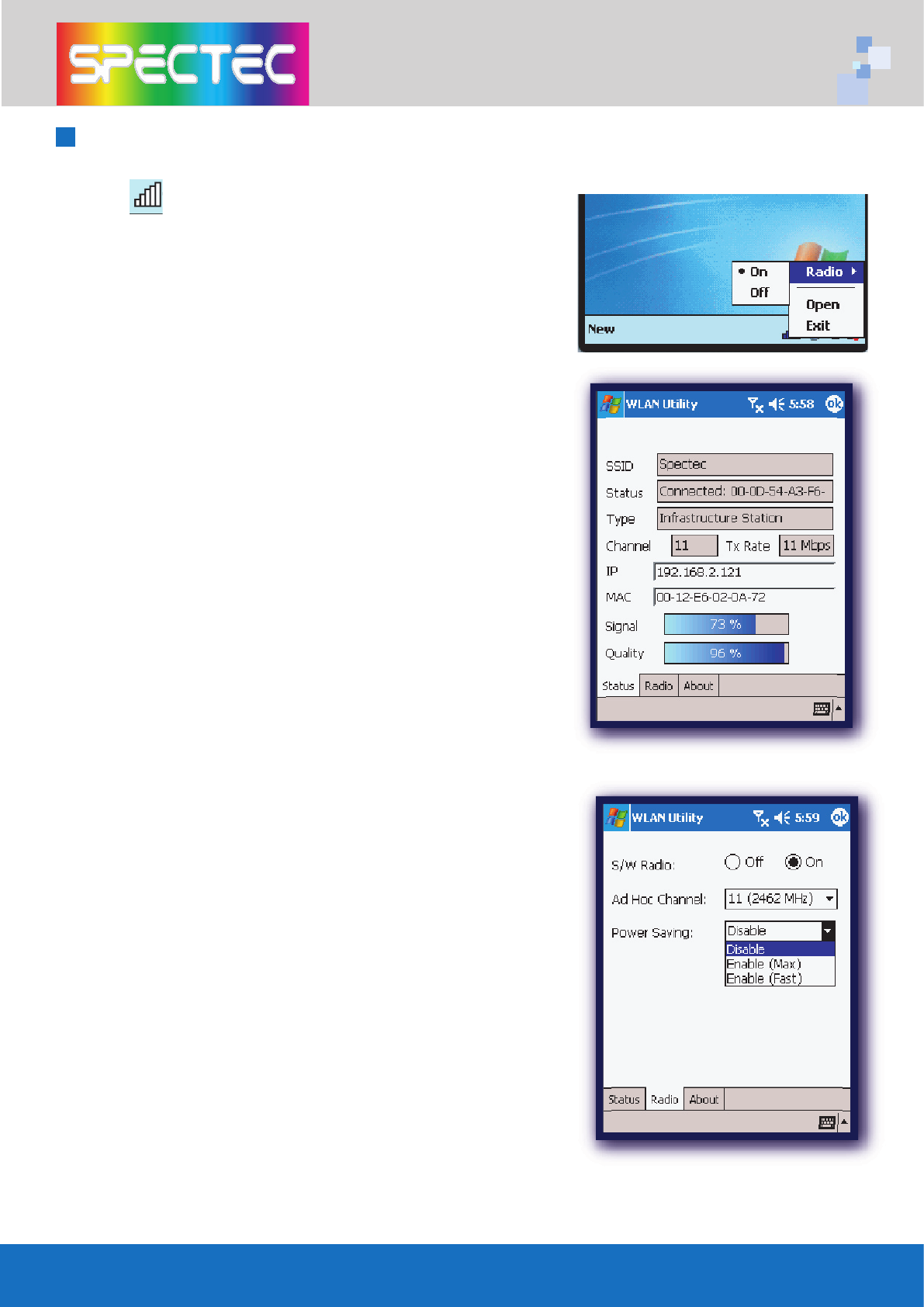
1. Make quick changes to the wireless card
On/Off
function.
2.
“Open”
to go directly to WLAN Utility screen
for more information.
WLAN Utility has 3 features
(Status/Radio/About):
*Status
- Shows SSID, IP Address, Mac Address,
Signal Strength, and Signal Quality
information.
*Radio
-
Enable/Disable
Wi-Fi card and Power
Saving mode selections.
< Click
On
enables wireless network functions.
< Click
Off
disables wireless network functions.
<
Ad Hoc Channel:
Select ad hoc channels
(1~11).
Power Saving:
< Disable:
No power saving.
< Enable (Max):
Maximum power saving. May
affect download speed.
< Enable (Fast):
No affect on the download
speed (recommend).
11
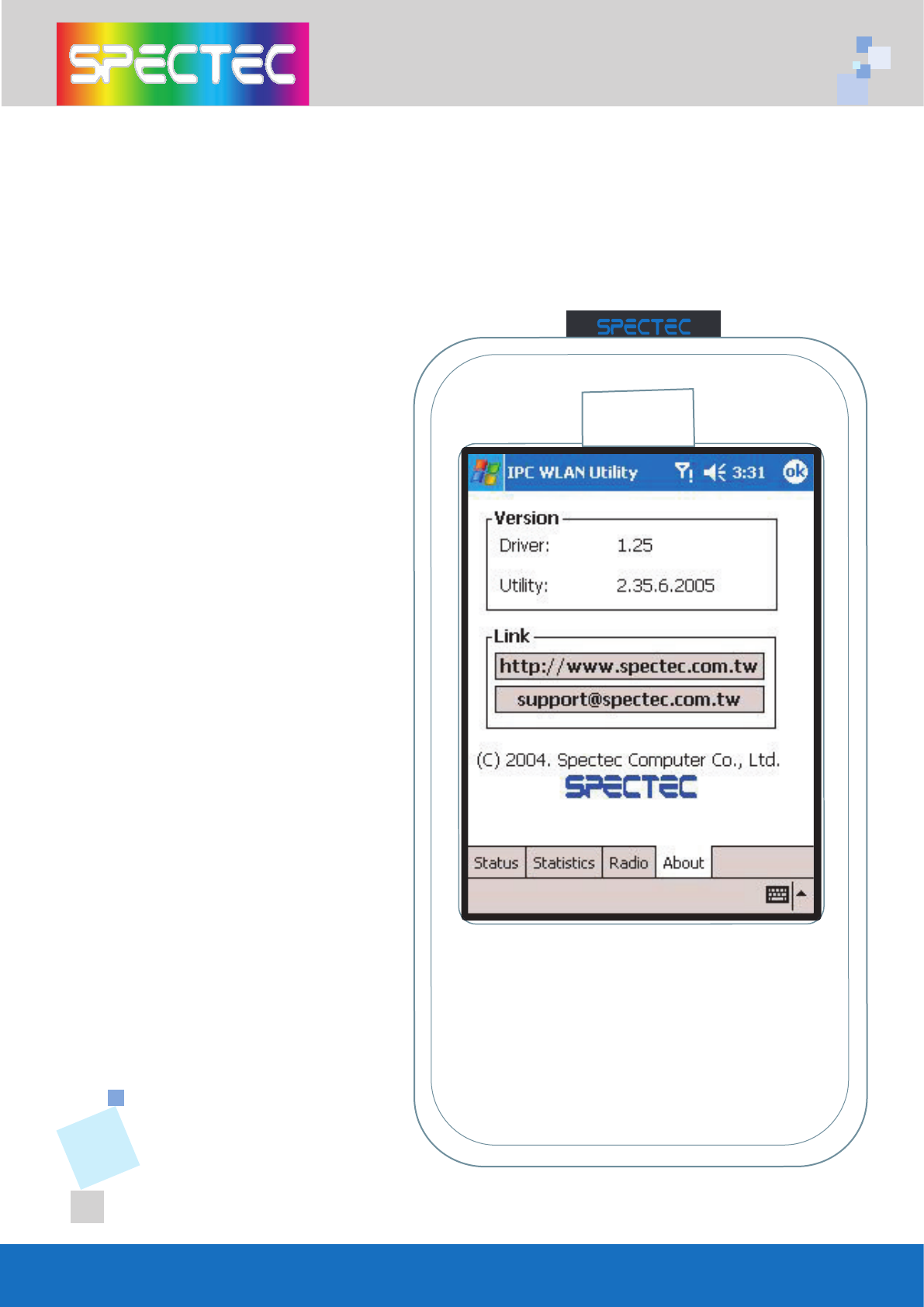
*About --
Shows SPECTEC
connections info.
<
Driver:
Current version of
driver you installed.
<
Utility:
Current version of
utility you installed.
<
SPECTEC Web Site:
http//:www.spectec.com.tw
<
Technical Support:
support@spectec.com.tw
WLAN-11b
802.11b
TM
www.spectec.com.tw
WLAN-11b
802. 11b
TM
www.spectec.com.tw
12
<
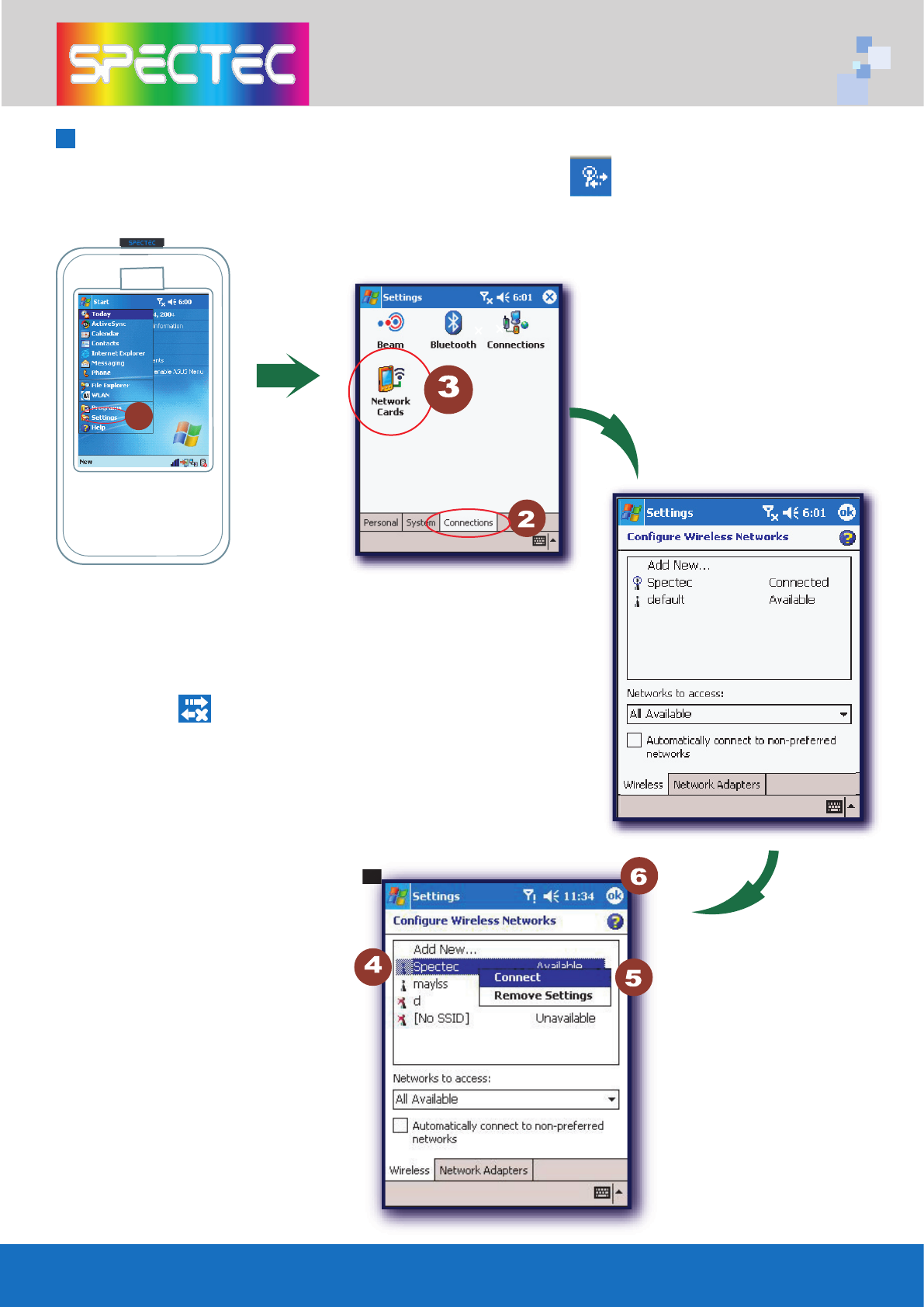
From
Start Menu/Settings/
Connections/Network Cards,
select icon for a pull-down
menu. Click
Settings
to go into
the
Settings/Connections
window.
<
Click and hold Connect for
2
seconds, then click
OK.
All
available network selections will
available network selections will
appear.
To Select Networks Manually
After inserting Mini SDIO WLAN card into PDA, if the icon does not appear on the
upper window, the network may be connected manually.
1
13
CD info
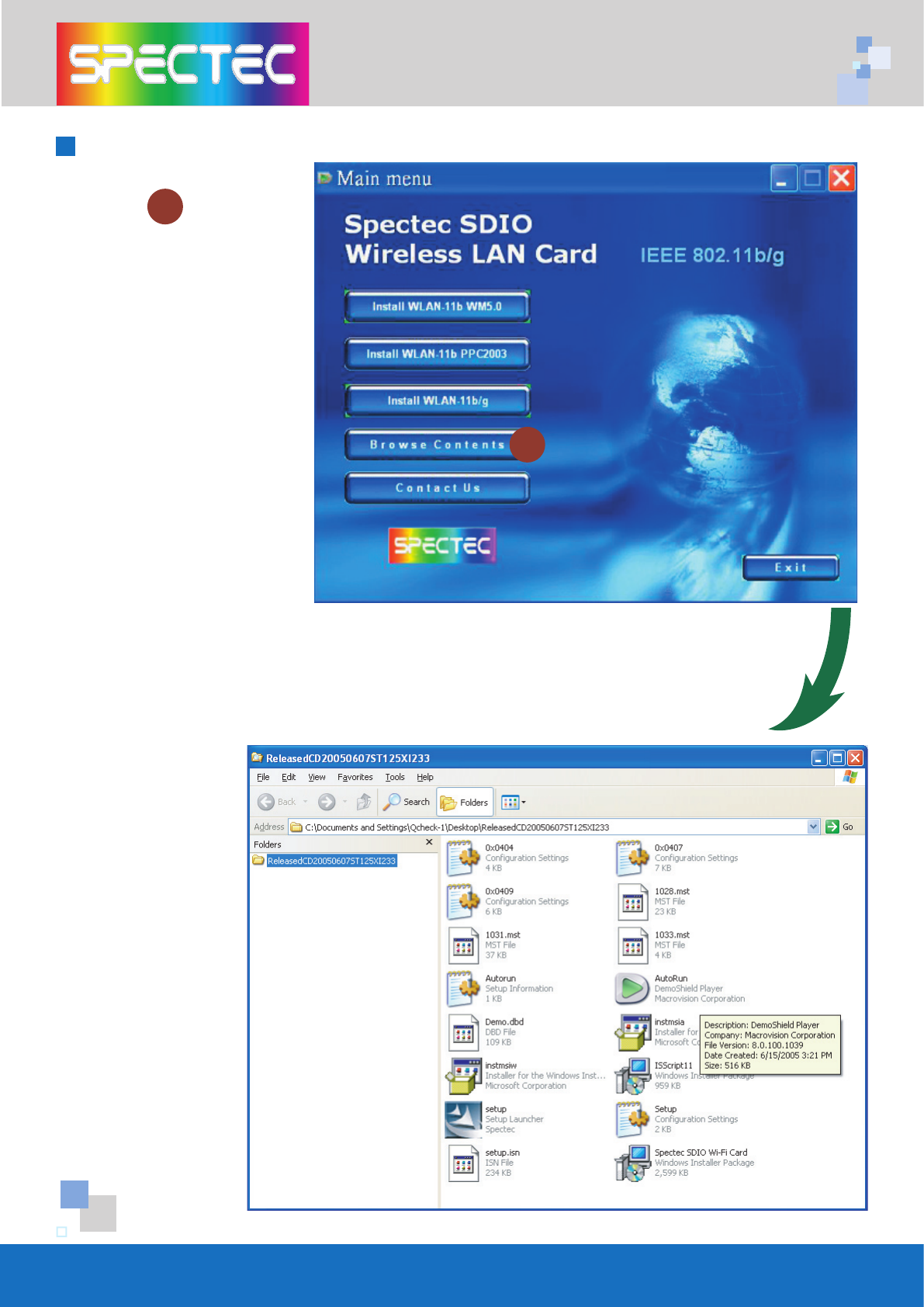
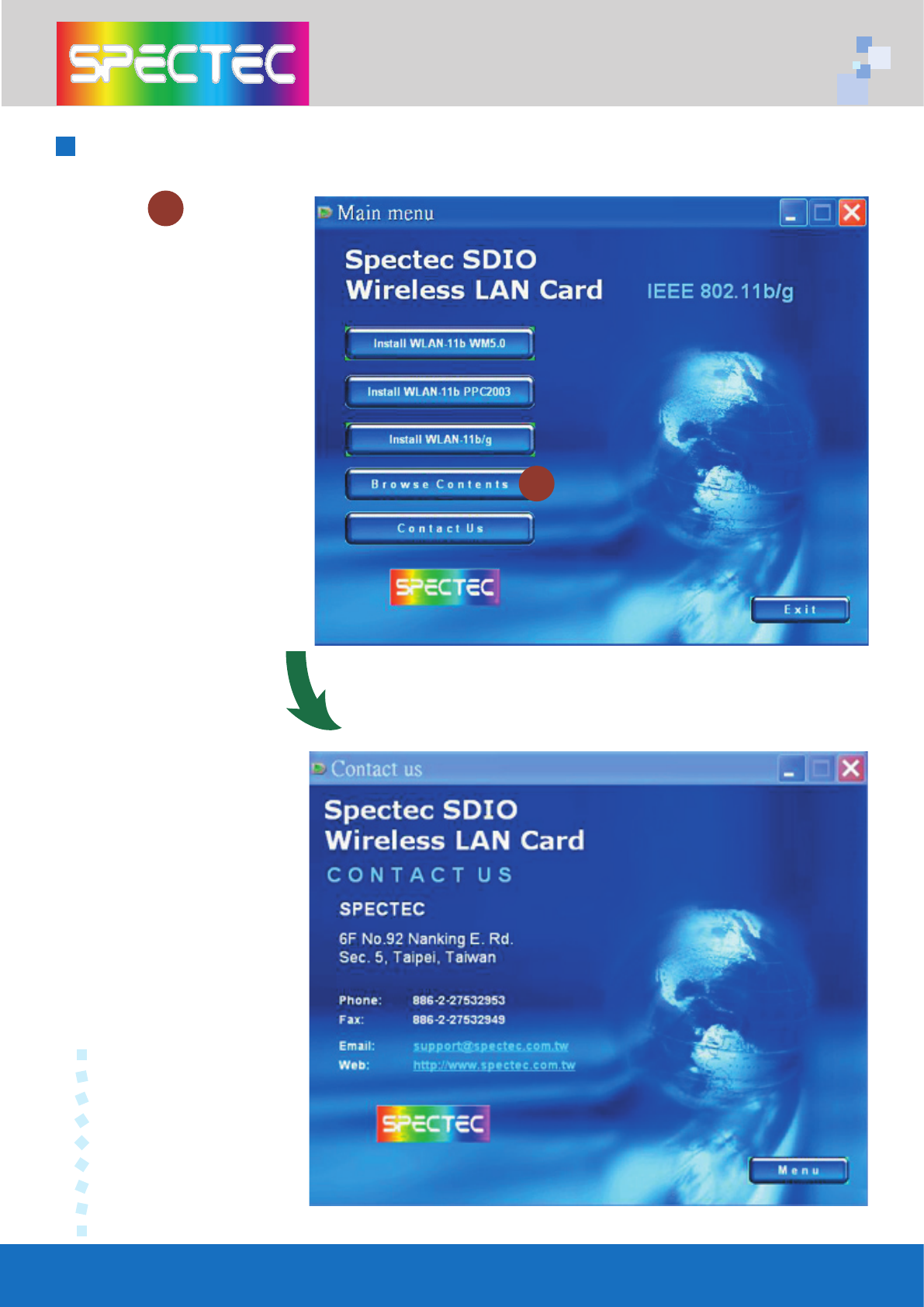
< Click
Browse Contents
button to review
all the files on CD
1
< Review all the files list on CD
1
14
Contact Us
< Click
Contact Us
button to review
our information.
1
Contact Information
1
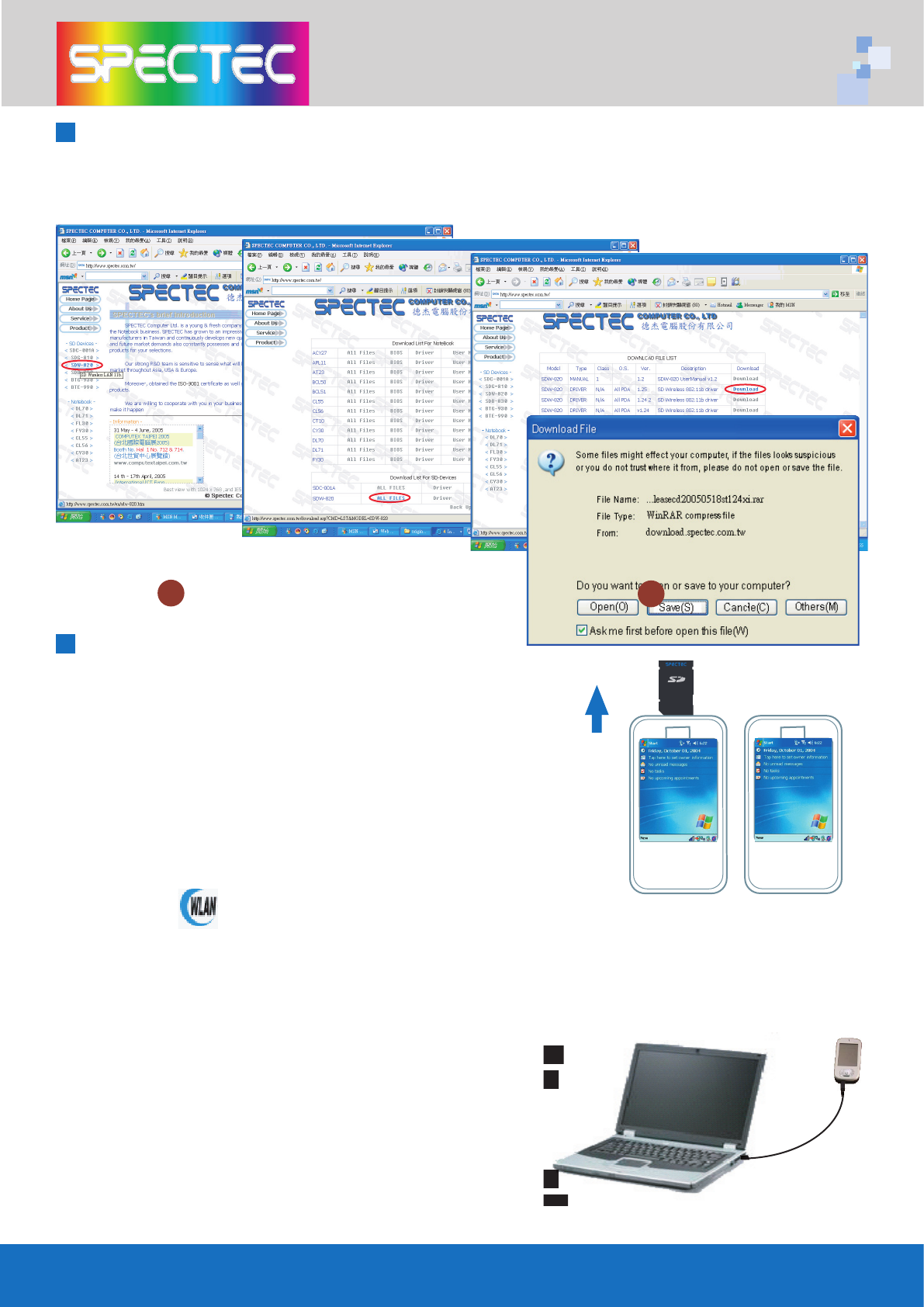
Download the newest SD Device, please go to SPECTEC website:
http://www.spectec.com.tw
1.
Driver (cab fi le)
Take out the WLAN card, click
“reset”
, connect computer
thr
ough
Microsoft Active Sync
,
download Driver cab fi le
copy to any list of PDA,
click
Yes
to
fi nish install.
2.
Utility (.exe install)
a. Cconnect
Active Sync
to PC
b. Copy
Utility 235.exe
to
myDevice/windows/startmenu/programs
c. The icon will show up in
Program.
3.
Auto run:
a. dowload compress fi le:
ReleasedCD20050625ST
125n235-2.rar
b. connect
Active Sync
to PC
c. Decompress fi le - ReleasedCD20050625ST125n235-2.rar
c. Decompress fi le - ReleasedCD20050625ST125n235-2.rar
d. The Autorun menu will show up (please see P2~P5
d. The Autorun menu will show up (please see P2~P5
Installation steps)
4
.
User Manul download (Adobe PDF)
Please go to
the addreess -
http://www.adobe.com/
http://www.adobe.com/
products/acrobat/readstep2.html to download free
products/acrobat/readstep2.html to download free
Adobe Reader software
Click
Save
1
How to Upgrade Software
15
How to Install Software
1
WLAN-11b
802.11b
TM
www.spectec.com.tw
16
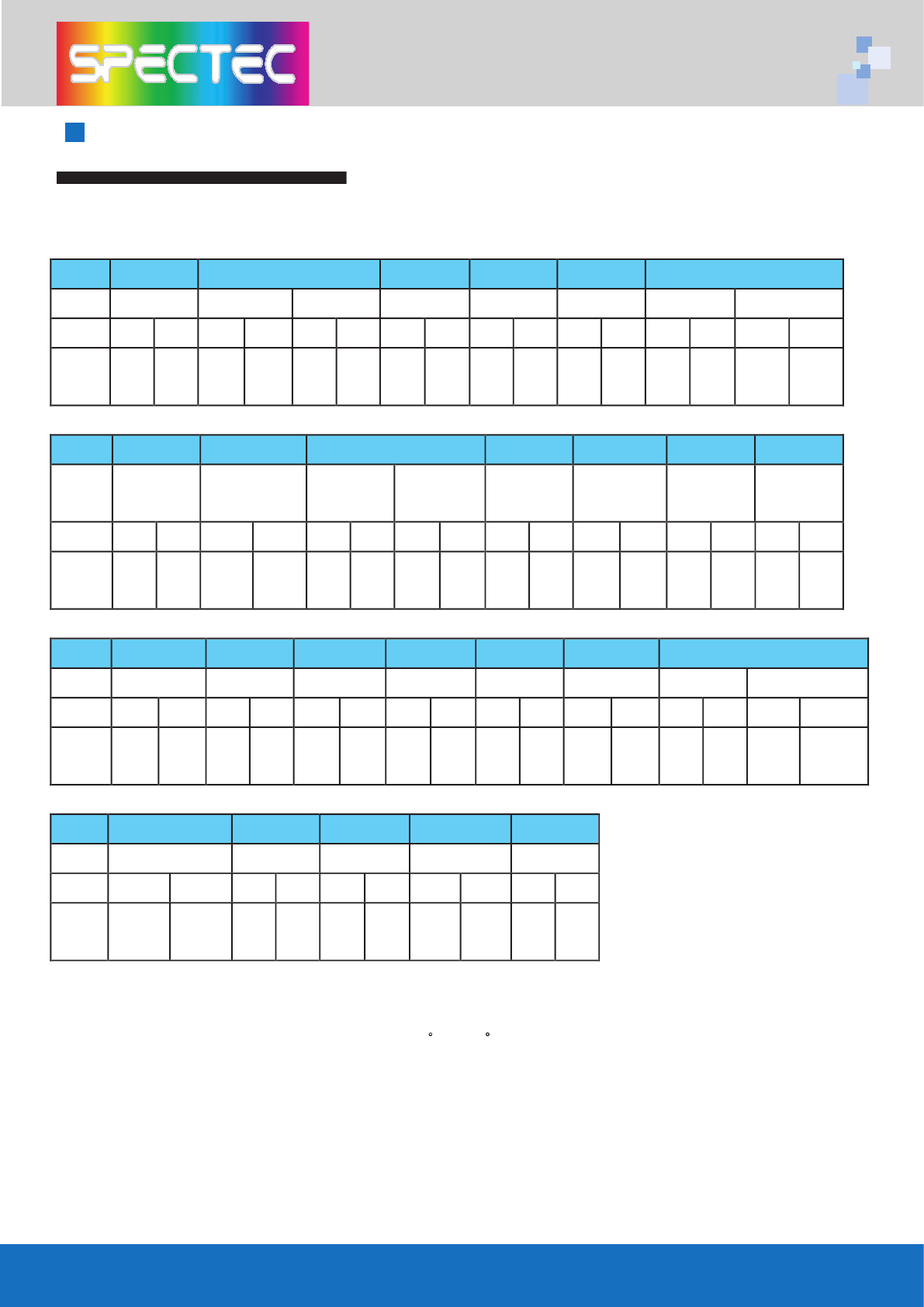
AP Compatibility List
Test condition and test environment
DUT: WLAN-11b
* Measurements: mbps RX: Receiver TX: Sender
* Test Environment : Night without Raining C ~ 32
C
Distance from 5m ~ 30m
* Collect data tool : Windows CE Platform Builder 5.0 performance monitor tool
* Test Environment : Night without Raining C ~ 32
Vendor Accton ASUS Atheros BENQ BELKIN Buffalo
Model IG 2004W WL-500b WL-530g AR5002AP AWL700 F5D7230 AG54 WLA-L11G-L
Rate TX RX TX RX TX RX TX RX TX RX TX RX TX RX TX RX
Auto
Rate
1.55 2.62 1.71 2.88 1.49 2.43 1.61 2.84 1.67 2.39 1.59 2.43 1.61 2.82 1.66 2.90
Vendor Cisco Corega DLink Gemtek Interepoch Intersil Linksys
Model AP1220 WLBARGP DLink624 DLink724 WX-1500
series
IWE-1100A ISL39300 WRK 54G
Rate TX RX TX RX TX RX TX RX TX RX TX RX TX RX TX RX
Auto
Rate
1.67 2.87 1.67 2.67 1.63 2.80 1.63 2.80 1.61 2.44 1.60 2.44 1.70 2.91 1.64 2.78
Vendor Maxim OriNoCo PCI Proxim RAYTAC SMC 3Com
Model WAP-G54A AP-200 BLW-04gm AP 600 DS2400 WBR14-G XJACK AP2000
Rate TX RX TX RX TX RX TX RX TX RX TX RX TX RX TX RX
Auto
Rate
1.63 2.89 1.56 2.73 1.63 2.80 1.63 2.79 1.64 2.67 1.67 2.43 1.60 2.78 1.68 2.78
Vendor Synnex MSI AboCom SENAO ZERO ONE
Model LM-WCAS3040 RG54G2 WB104k NL-2511SR+ AF411W
Rate TX RX TX RX TX RX TX RX TX RX
Auto
Rate
1.59 2.77 1.60 2.65 1.69 2.87 1.66 2.49 1.54 2.69

Frequently Ask Question
Q: After installing the CD-ROM, how many fi les will be installed onto the device?
A: After installation, some dll fi les are installed in
My Device\Windows,
and the
WLAN Utility
in
Programs.
However, these fi les are quite small, and total about
300 KB.
Q: How do I temporarily stop the wireless/internet connection?
A: You can click on the
“Off”
button in
WLAN Utility.
When all 5 blue bars are
white, Wi-Fi is disabled. Selecting the
“On”
setting will reconnect you to the
internet.
Q: What do the 5 bars from “WLAN Utility” indicate?
A: These 5 bars show the strength of the signals. More blue bars indicate stronger
signals, while all white bars indicate no connection.
Q: Why can’t I browse the web page even though the card has an IP address?
A: When connecting to the internet with a weak signal, CRC may have too many
errors to allow viewing a web page. Please try your connection around strong
signals.
Q: Can your Wi-Fi card be used for internet phone such as Skype?
A: Yes, our Wi-Fi card can be used with Skype software. We suggest to use in an
empty fi eld, and with wired headphones for better results.
17

Warranty
hank you for your purchase of our product. For Spectec’s quality service,
please read the following for your rights.
1. Warranty period is 1 year, starting from the date of original purchase.
Please provide original purchase receipt with purchase date when
inquiring for service.
2. This product has passed all quality control and AP tests for quality
assurance. We suggest to use it with the AP list, and other accepted
industry-standard equipments.
3. If the damage is resulted from product design, defects in material or
poor workmanship, we will repair or exchange your product.
4. This warranty does not cover failures resulted from accidents, misuse,
abuse, neglect, mishandling, misapplication, alteration, faulty
installation, improper maintenance, power line surge, lightning
damage, modifi cation, serviced by anyone other than an Authorized
Servicer, or other natural causes.
5. This warranty does not cover failures caused by products not
supplied by the warrantor.

CAREFULLY READ THE FOLLOWING TERMS AND CONDITIONS BEFORE USING THIS PRODUCT. IT CONTAINS SOFTWARE,
THE USE OF WHICHIS LICENSED BY SPECTEC, Co., Ltd., TO ITS CUSTOMERS FOR THEIR USE ONLY AS SET FORTH BELOW.
IF YOU DO NOT AGREE TO THE TERMS AND CONDITIONS OF THIS AGREEMENT, DO NOT USE THE SOFTWARE. USING
ANY PART OF THE SOFTWARE INDICATES THE ACCEPTANCE OF THESE TERMS.
LICENSE: SPECTEC grants you a nonexclusive license to use the accompanying software program(s) (the
“Software”) subject to the terms and restrictions set forth in this License Agreement. You are not permitted to lease,
rent, distribute or sublicense the Software or to use the Software in a time-sharing arrangement or in any other
unauthorized manner. Further, no license is granted to you in the human readable code of the Software (source
code). Except as provided below, this License Agreement does not grant you any rights to patents, copyrights,
trade secrets, trademarks, or any other rights in respect to the Software.
The Software is licensed to be used on any workstation or any network server owned by or leased to you, provided
that the Software is used only in connection with a SPECTEC adapter. You may reproduce and provideone (1)
copy of the Software and supporting documentation for each such workstation or network server on which the
Software is used as permitted hereunder. Otherwise, the Software and supporting documentation may be copied
only as essential for backup or archive purposes in support of your use of the Software as permitted hereunder.
You must reproduce and include all copyright notices and any other proprietary rights notices appearing on the
Software and the supporting documentation on any copies that you make.
NO ASSIGNMENT; NO REVERSE ENGINEERING: You may not transfer or assign the Software and/or this License
Agreement to another party without the prior written consent of SPECTEC. If such consent is given and you transfer
or assign the Software and/or this License Agreement, then you must, at the same time, either transfer any copies
of the Software as well as the supporting documentation to the same party or destroy any such materials not
transferred. Except as set forth above, you may not transfer or assignthe Software or your rights under this License
Agreement. Modifi cation, reverse engineering, reverse compiling, or disassembly of the Software is expressly
prohibited.
TRADE SECRETS; TITLE: You acknowledge and agree that the structure, sequence, and organization of the Software
are the valuable trade secrets of SPECTEC and its suppliers. You agree to hold such trade secrets in confi dence.
You further acknowledge and agree that ownership of, and title to, the Software and all subsequent copies
thereof, regardless of the form or media, are held by SPECTEC and its suppliers.
TERM AND TERMINATION: This license will expire ten (10) years from the date that you fi rst use the Software, if it is
not earlier terminated. You may terminate it at any time by destroying the Software and Documentation together
with all copies and merged portions in any form. It will also terminate immediately if you fail to comply with any
term or condition of this License Agreement. Upon such termination, you agree to destroy the Software and
documentation, together with all copies and merged portions in any form.
GOVERNING LAW: This License Agreement shall be governed by the laws of the State of California as such laws
are applied to agreements entered into and to be performed entirely within California between California
residents and by the laws of the United States. You agree that the United Nations Convention on Contracts for the
International Sale of Goods (1980) is hereby excluded.
LIMITED WARRANTY; LIMITATION OF LIABILITY: All warranties and limitations of liability applicable to the Software are
as stated on the Limited Warranty Card or in the product manual accompanying the Software. Such warranties
and limitations of liability are incorporated herein in their entirety by this reference.
SEVERABILITY: In the event any provision of this License Agreement is found to be invalid, illegal or unenforceable,
the validity, legality and enforceability of any of the remaining provisions shall not in any way be affected or
impaired and a valid, legal and enforceable provision of similar intent and economic impact shall be substituted
therefor.
ENTIRE AGREEMENT: This License Agreement sets forth the entire understanding and agreement between you and
SPECTEC and may be amended only in a writing signed by both parties.
Spectec Computer Co., Ltd.
6F No. 92, Nanking E. Rd. Sec. 5, Taipei, Taiwan, R.O.C.
Tel: 886-2-2753-2953
Fax: 886-2-2753-2949
Fax: 886-2-2753-2497
www.spectec.com.tw
spectec@spectec.com.tw
spectec@ms17.hinet.net
License Aggreement
SDW-821 SDIO WLAN-11b/g Card
Specifi cations
Network Standard Support: IEEE 802.11b/g
Network Architectures: Infrastructure, Ad-Hoc
Data Rates:
< 802.11g: 6, 9, 12, 18, 24, 36, 48, 54 Mbps
< 802.11b: 1, 2, 5.5, 11 Mbps
Modulation Techniques: BPSK, QPSK, 16QAM, 64QAM, CCK,
OFDM, DSSS
Receiver Sensitivity:
< 802.11g: 73~91 dBm
< 802.11b: 89~97 dBm
Power Consumption: Avg. Operating 138mA
Supply Voltage: I/O: 3.0 - 3.6 Vdc
Operating Temperature: 0.C to +70.C; <95% humidity
Host Interface: SDIO
OS Support: Microsoft Windows CE 4.2, 5.0 ,Windows
Mobile 2003 or above (for PPC & Smartphone) /
Linux V2.4.18 on samsung 2410/2440
Dimension: 38.3 x 24 x 2.1 mm
*All specifi cations are subject to change without prior notice
WLAN-11b/g
SDIO
WLAN
Card
www.spectec.com.tw

NOTE: The changes or modifi cations not expressly approved by the party responsible for
compliance could void the user’s authority to operate the equipment.
To comply with the FCC RF exposure compliance requirements, this device and its antenna
must not to be co-located or operating to conjunction with any other antenna or transmitter.
FCC INFORMATION
The Federal Communication Commission Radio Frequency Interference Statement
includes the following paragraph:
The equipment has been tested and found to comply with the limits for a Class B
Digital Device, pursuant to part 15 of the FCC Rules. These limits are designed to pro-
vide reasonable protection against harmful interference in a residential installation.
This equipment generates, uses and can radiate radio frequency energy and, if not
installed and used in accordance with the instruction, may cause harmful interference
to radio communication. However, there is no grantee that interference will not occur
in a particular installation. If this equipment dose cause harmful interference to radio or
television reception, which can be determined by turning the equipment off and on,
the user is encouraged to try to correct the interference by one or more of the follow-
ing measures:
--Reorient or relocate the receiving antenna.
--Increase the separation between the equipment and receiver.
--Connect the equipment into an outlet on a circuit different from that to which the
receiver is connected.
--Consult the dealer or an experienced radio/TV technician for help.
This device complies with Part 15 of the FCC Rules. Operation is subject to the following
two conditions: (1) this device may not cause harmful interference, and (2) this device
must accept any interference received, including interference that may cause undersired
operation.
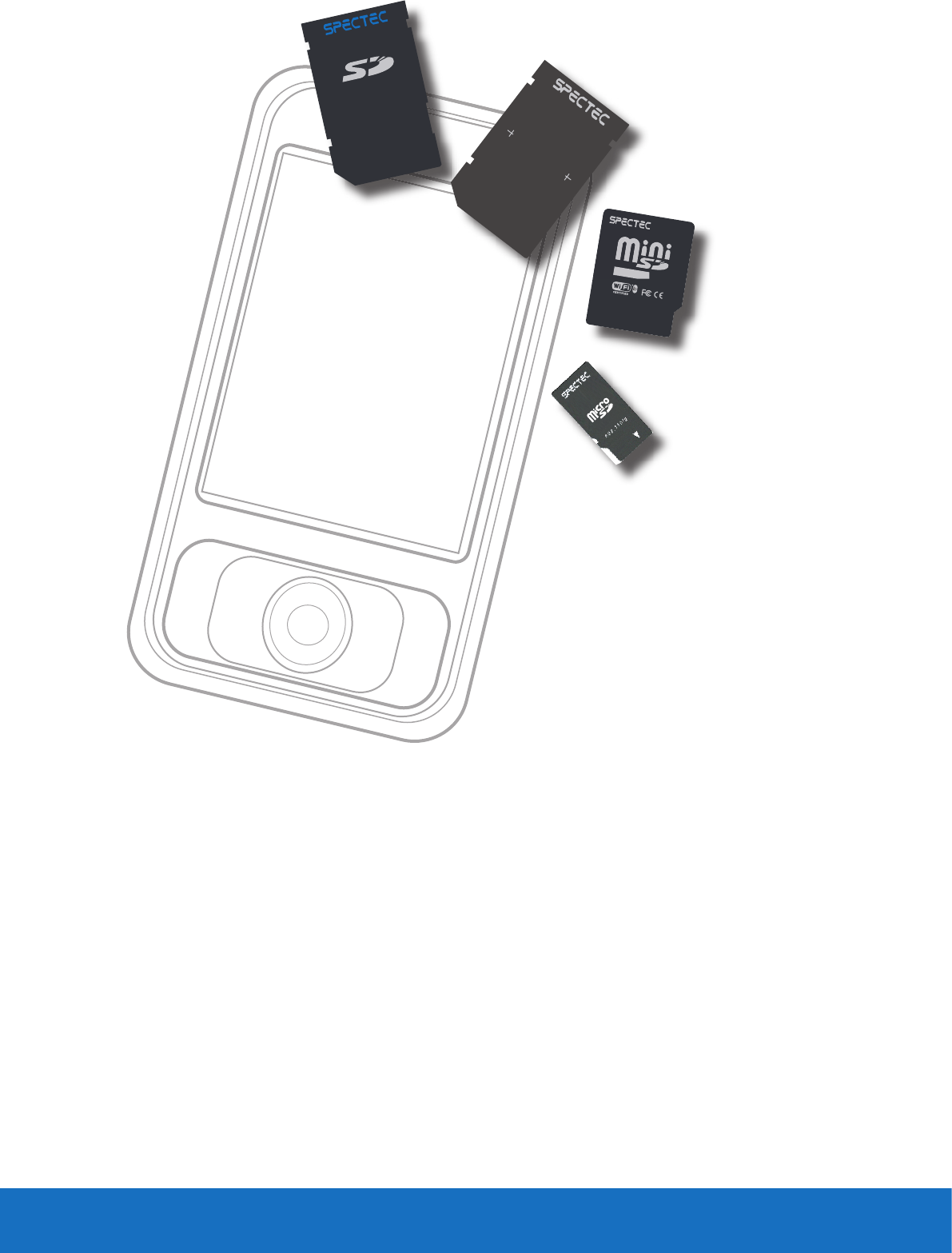
Thank You for Purchasing Spectec’s Products
www.spectec.com.tw
S
pectec Computer Co.,
Ltd.
WLAN-11b
802.11b
TM
www.spectec.com.tw
WLAN-11b
0012E6000506
FCC ID:S2YMINIWLAN11B
WLAN-11b
WLAN-11b/g
SDIO WLAN Card
www.spectec.com.tw