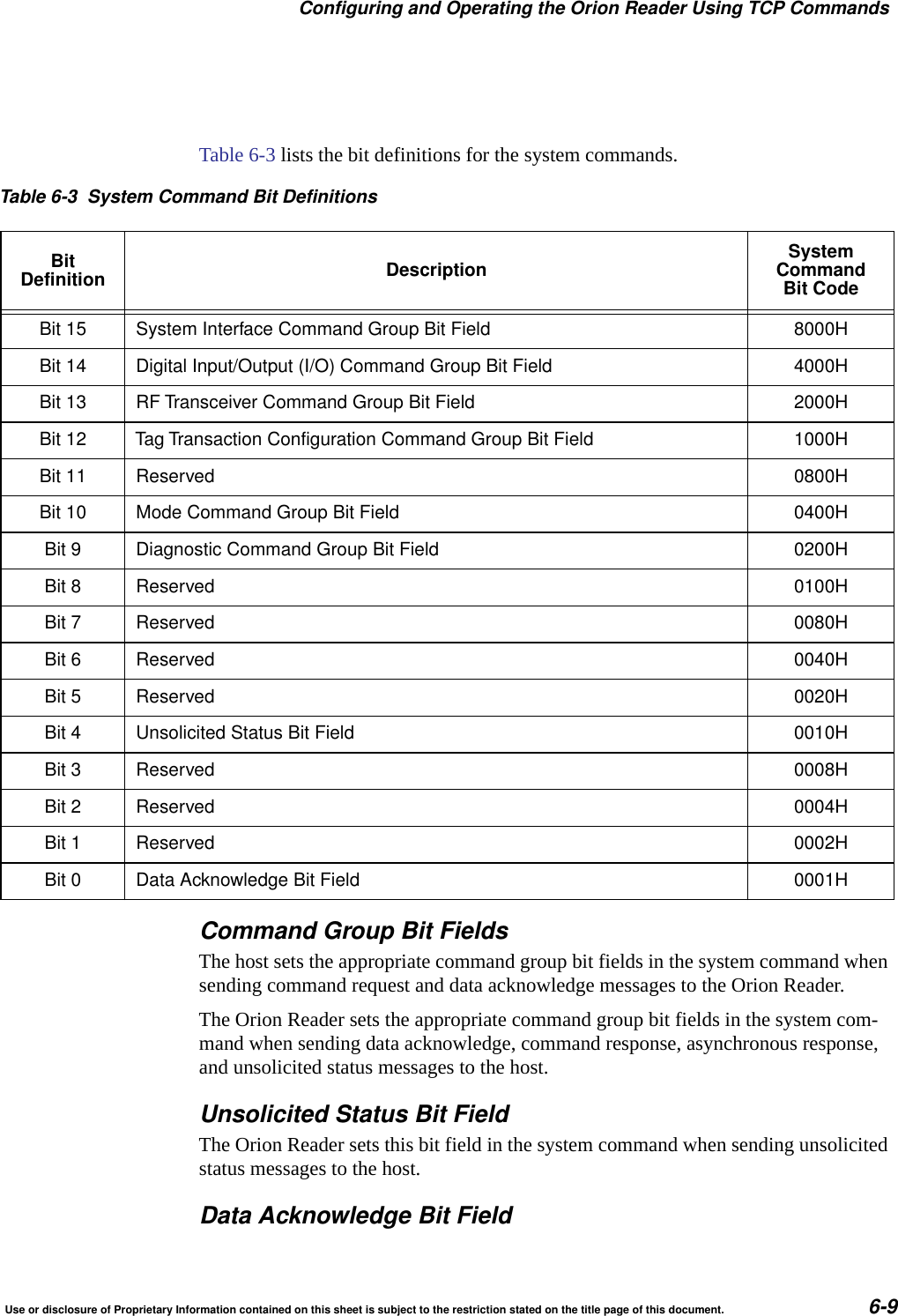
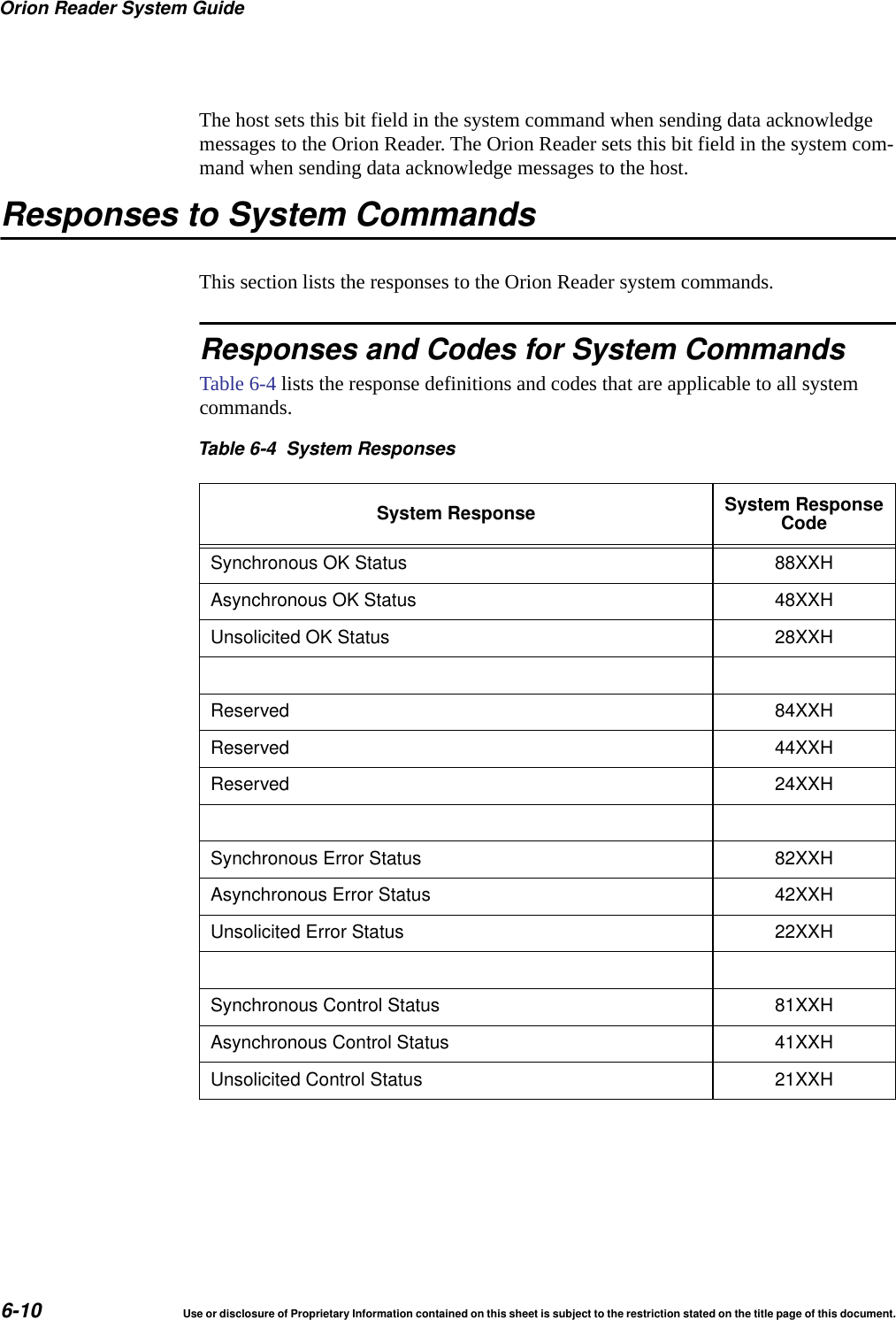
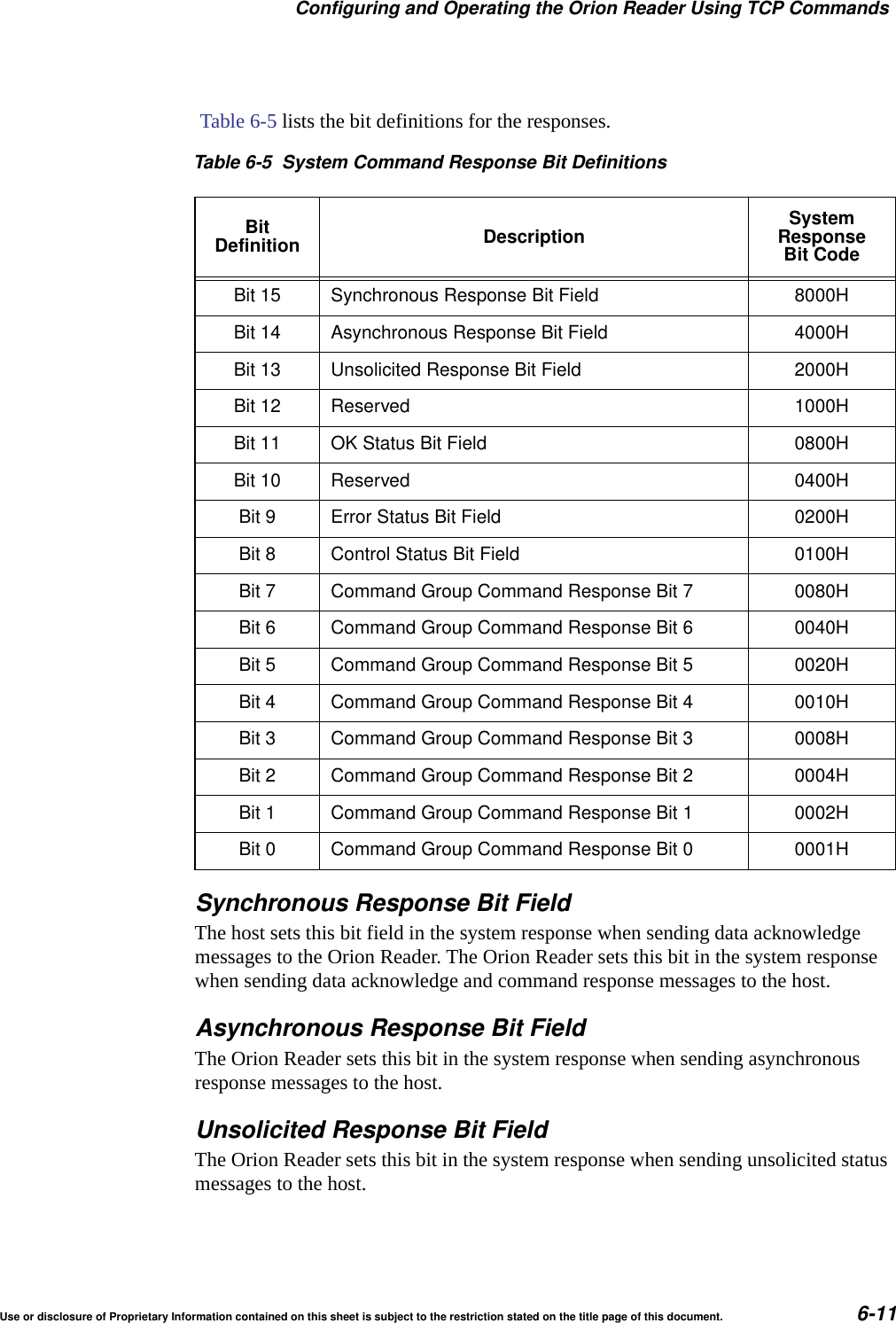
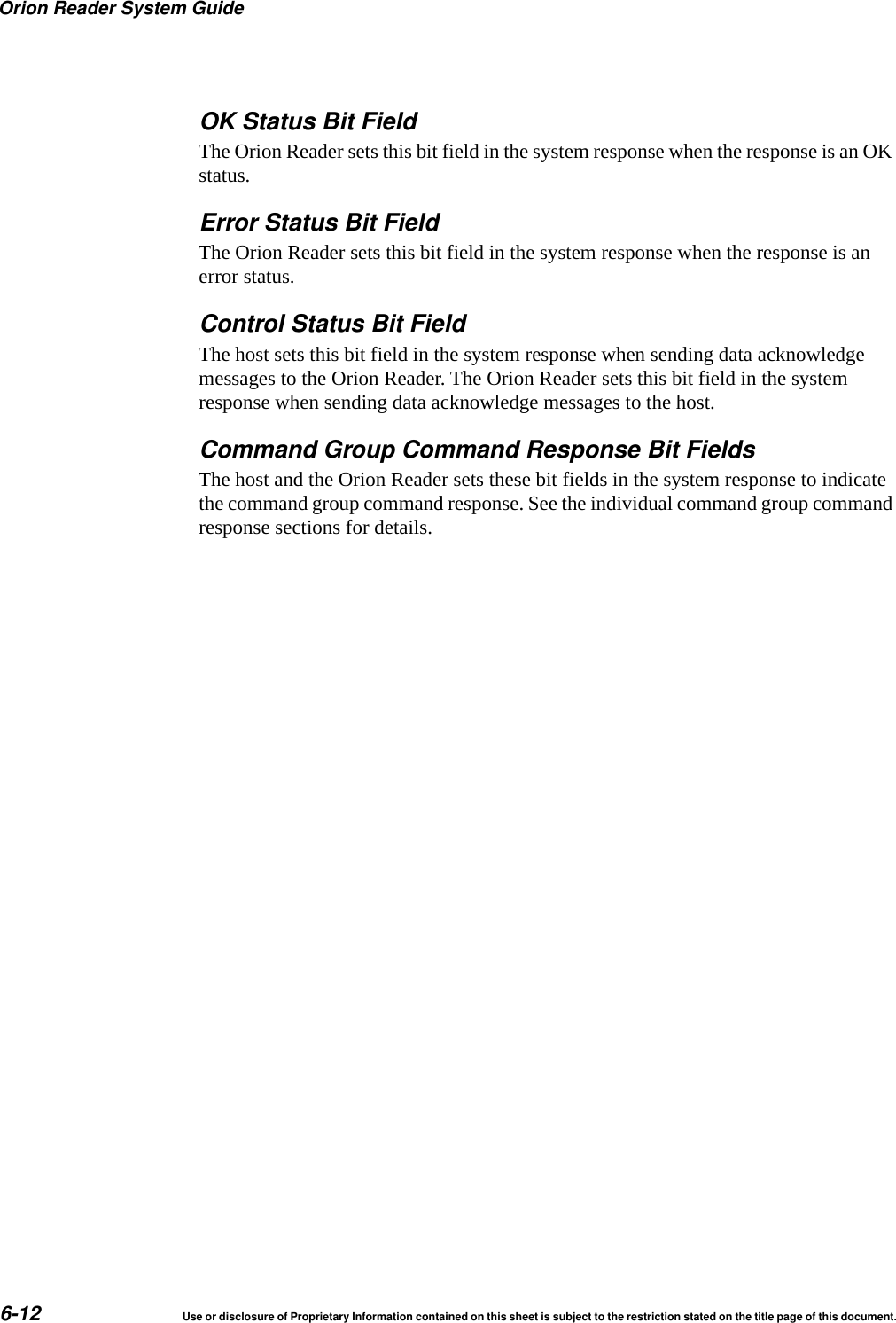
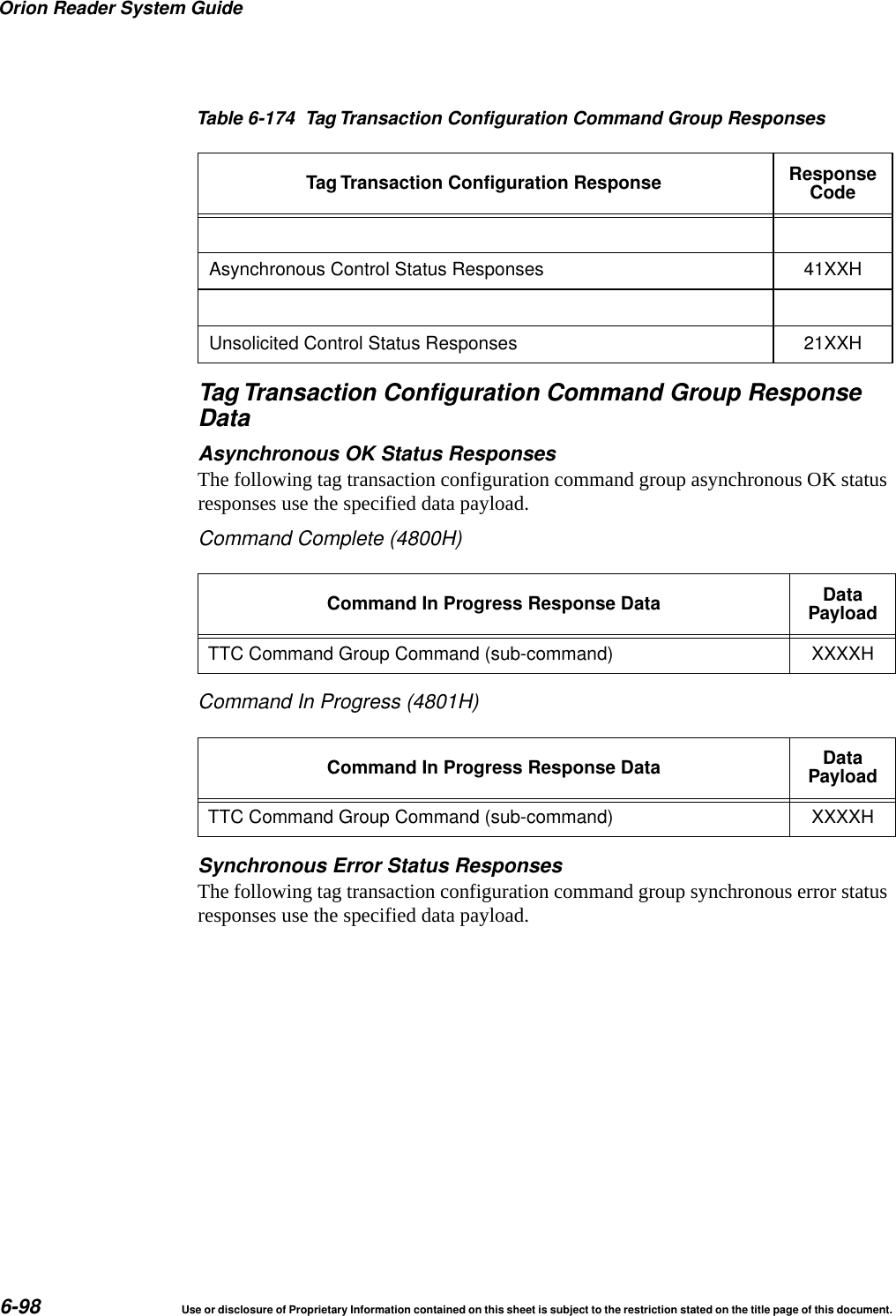
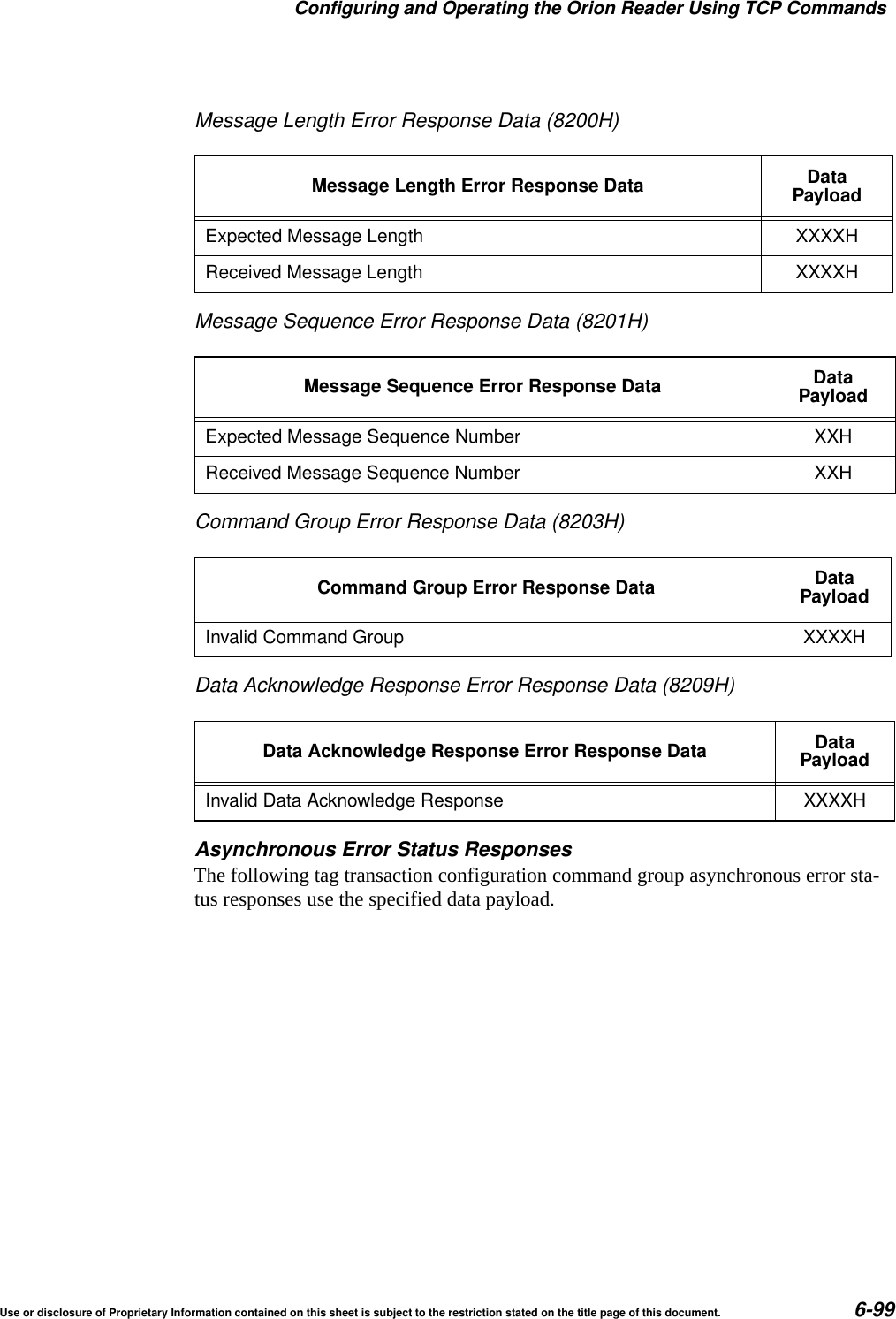
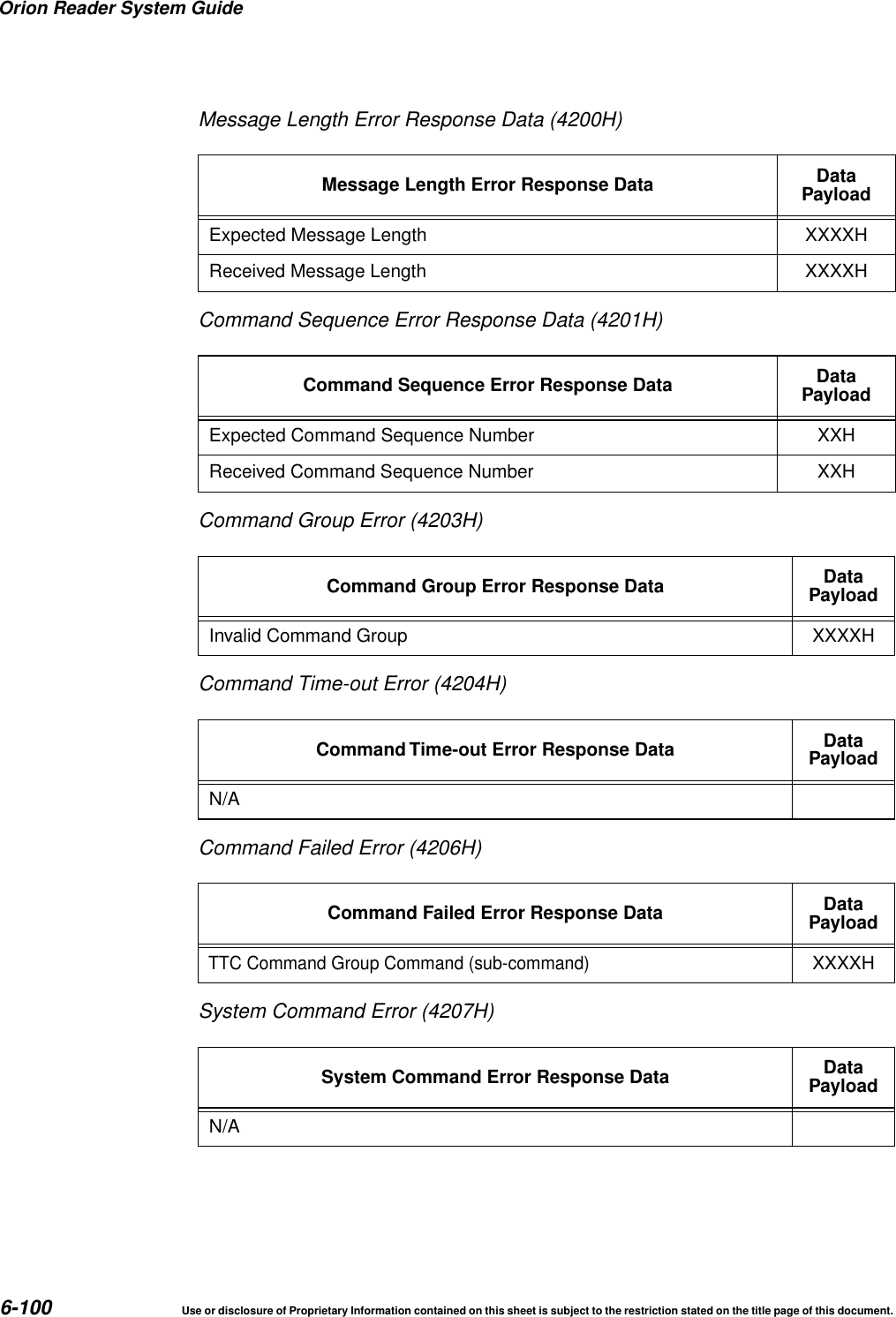
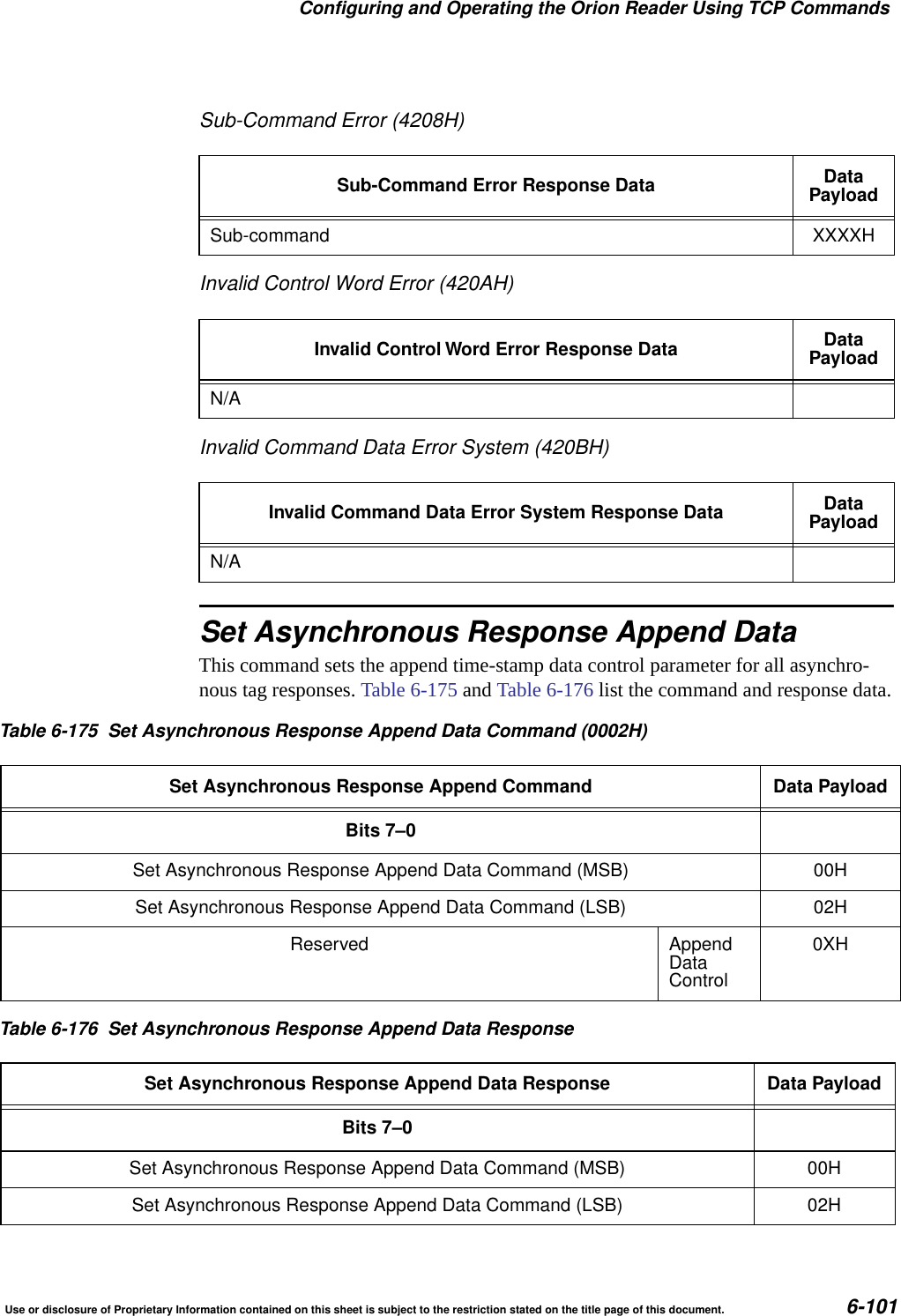
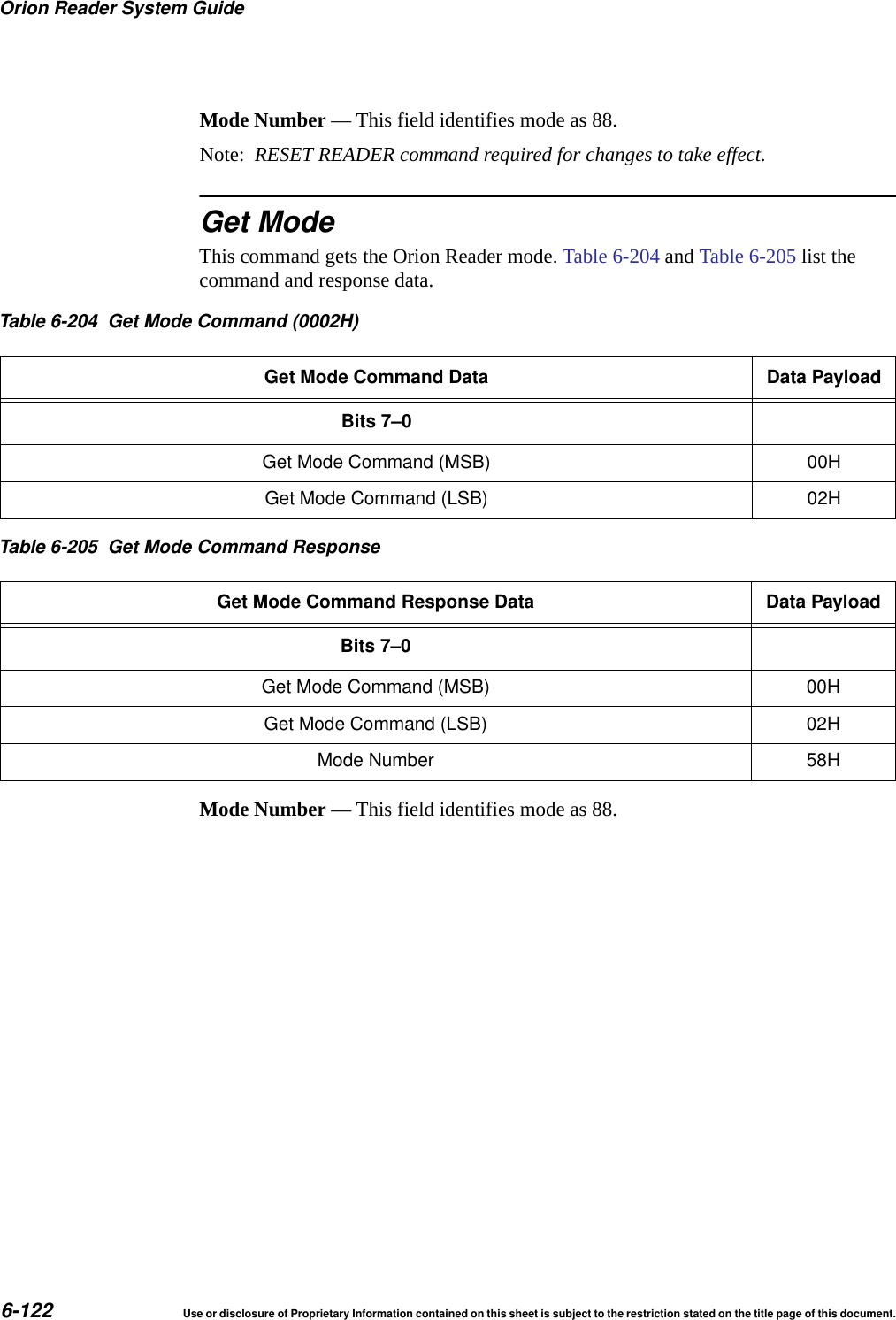
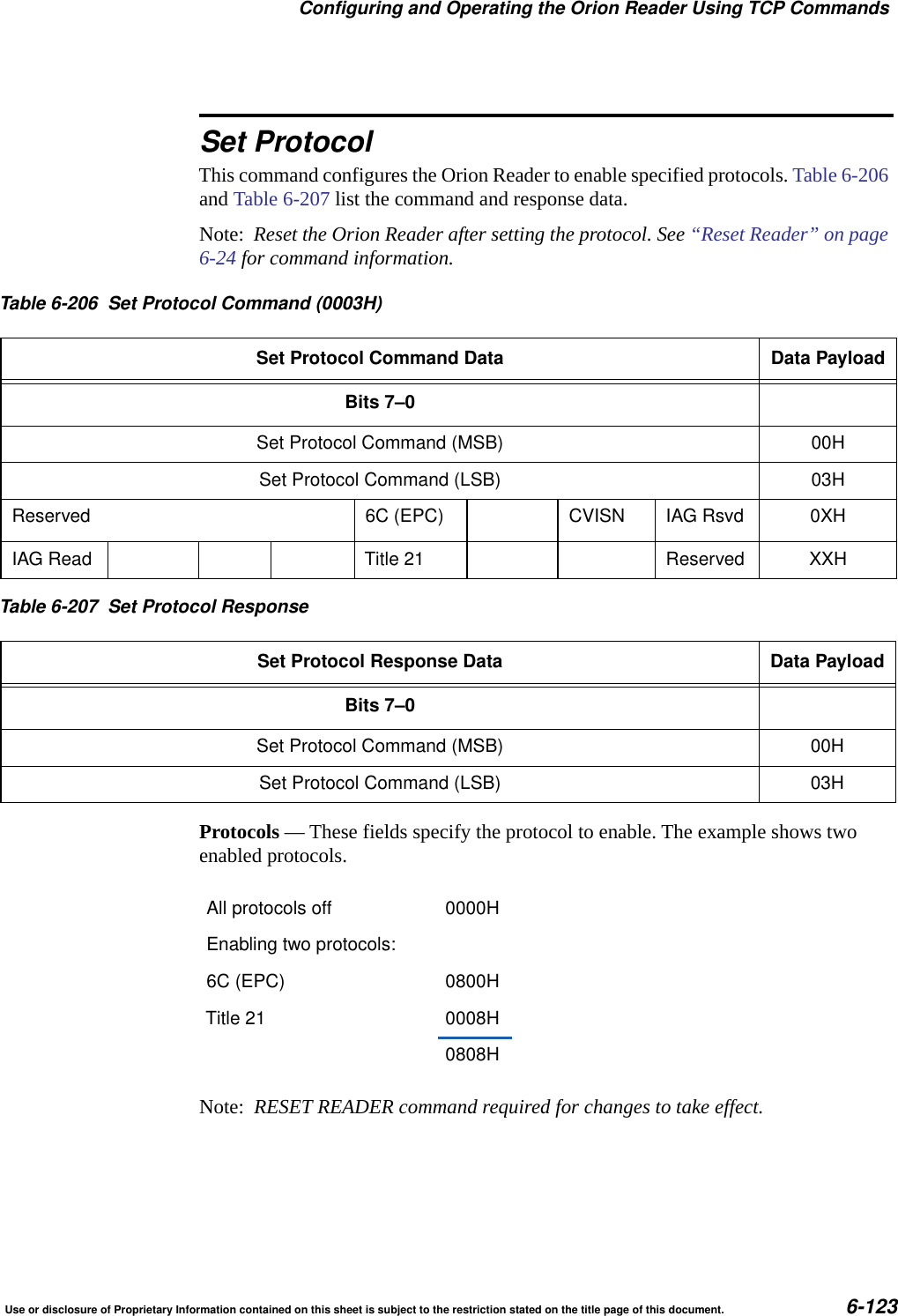
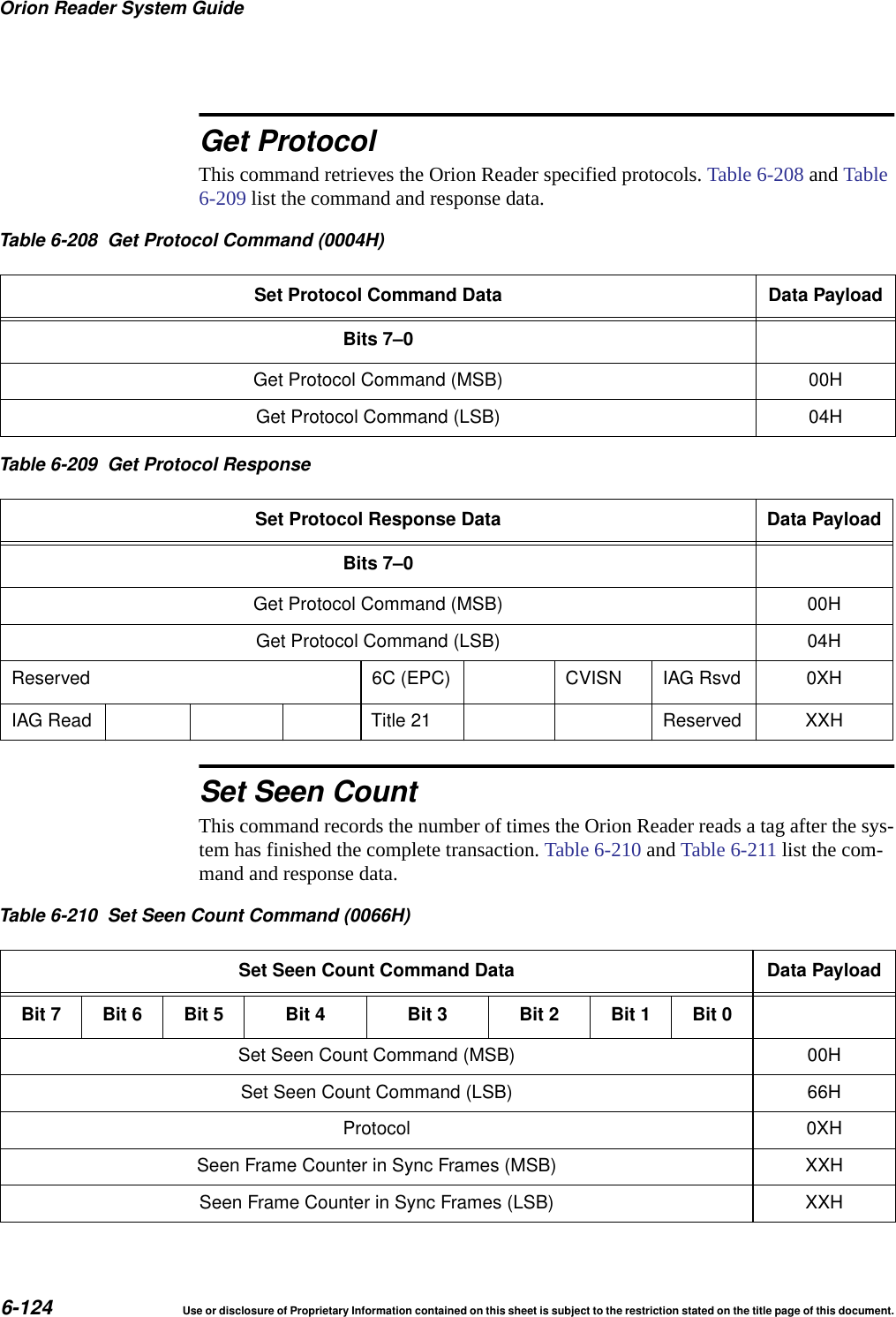
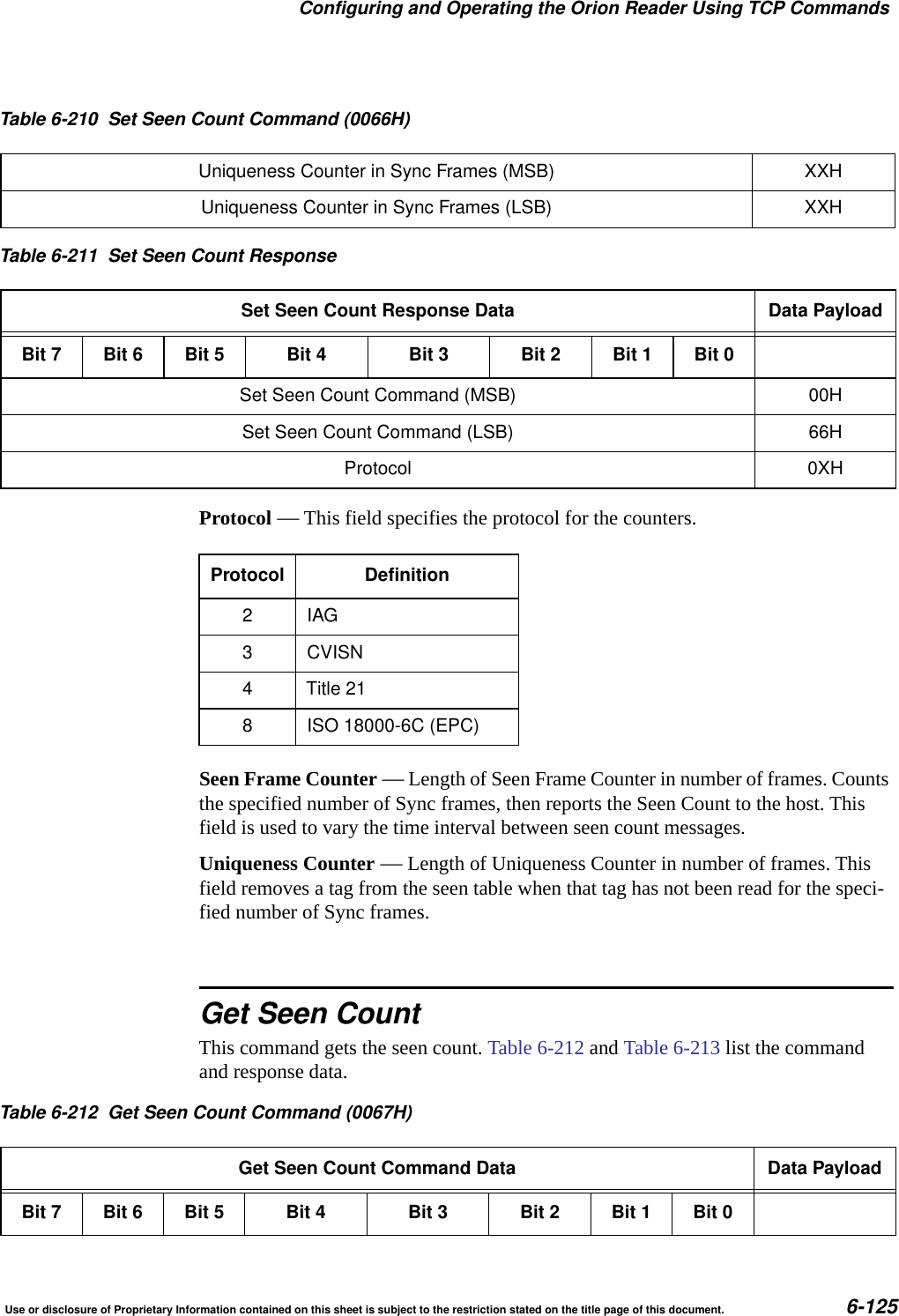
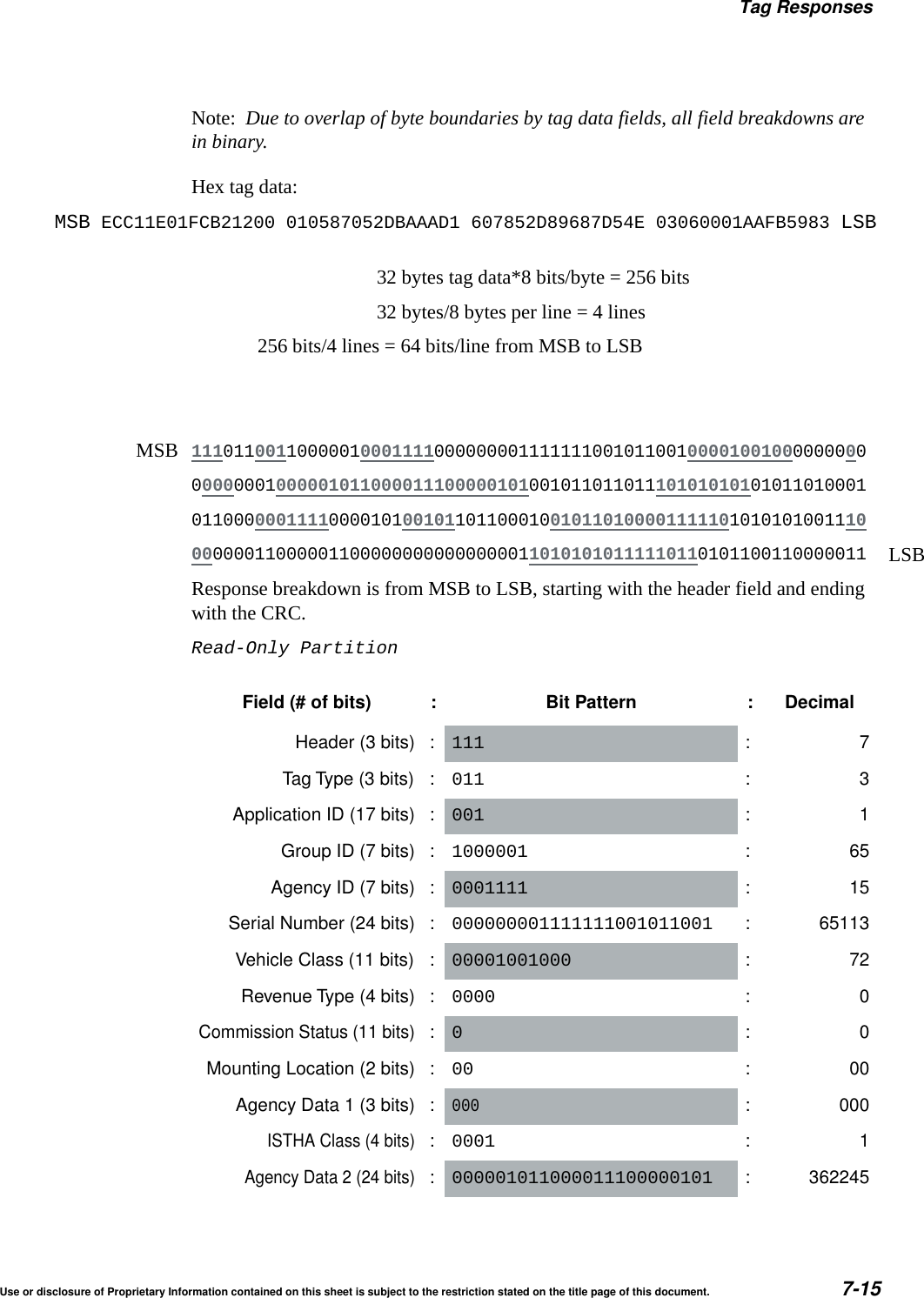
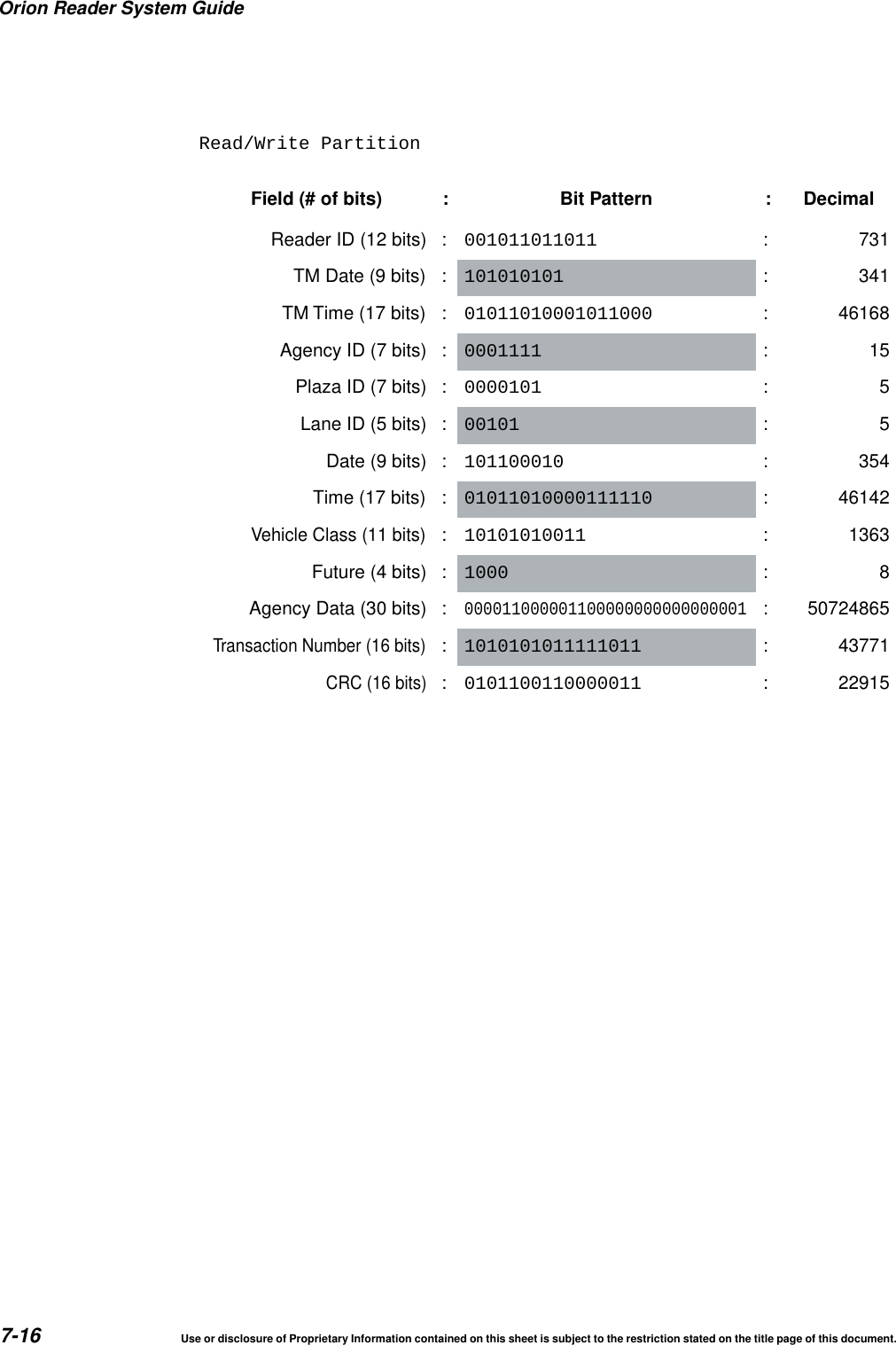
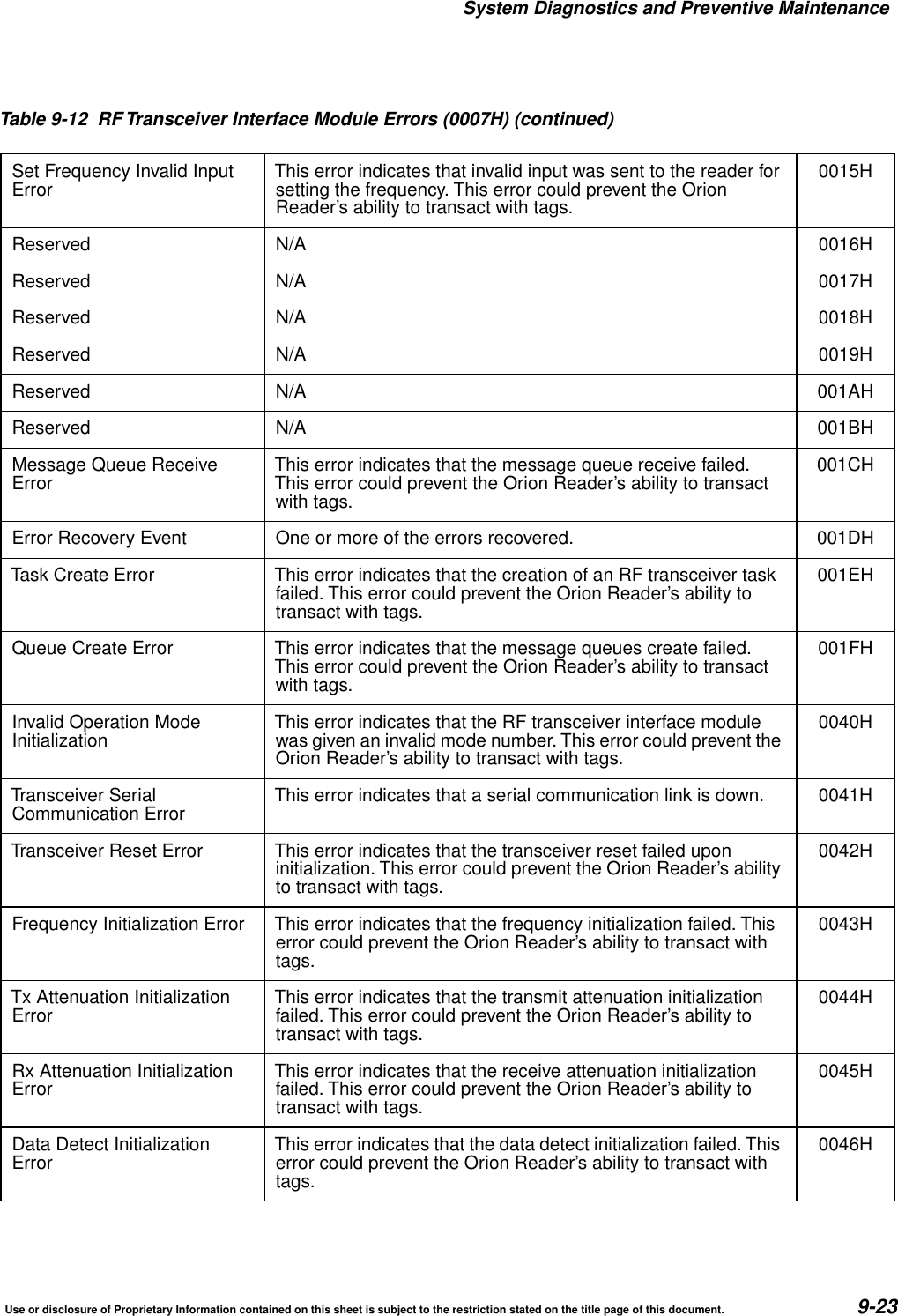
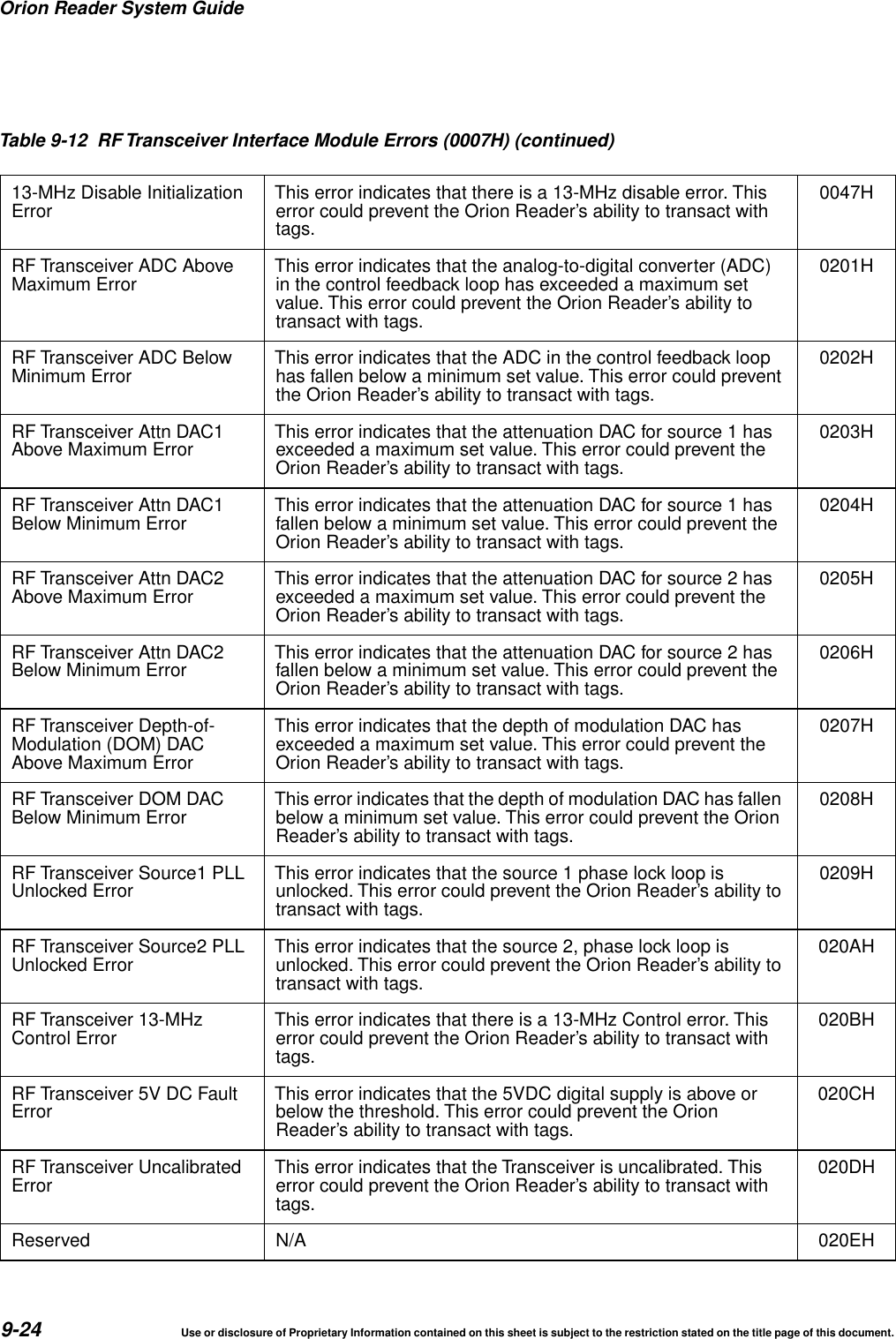
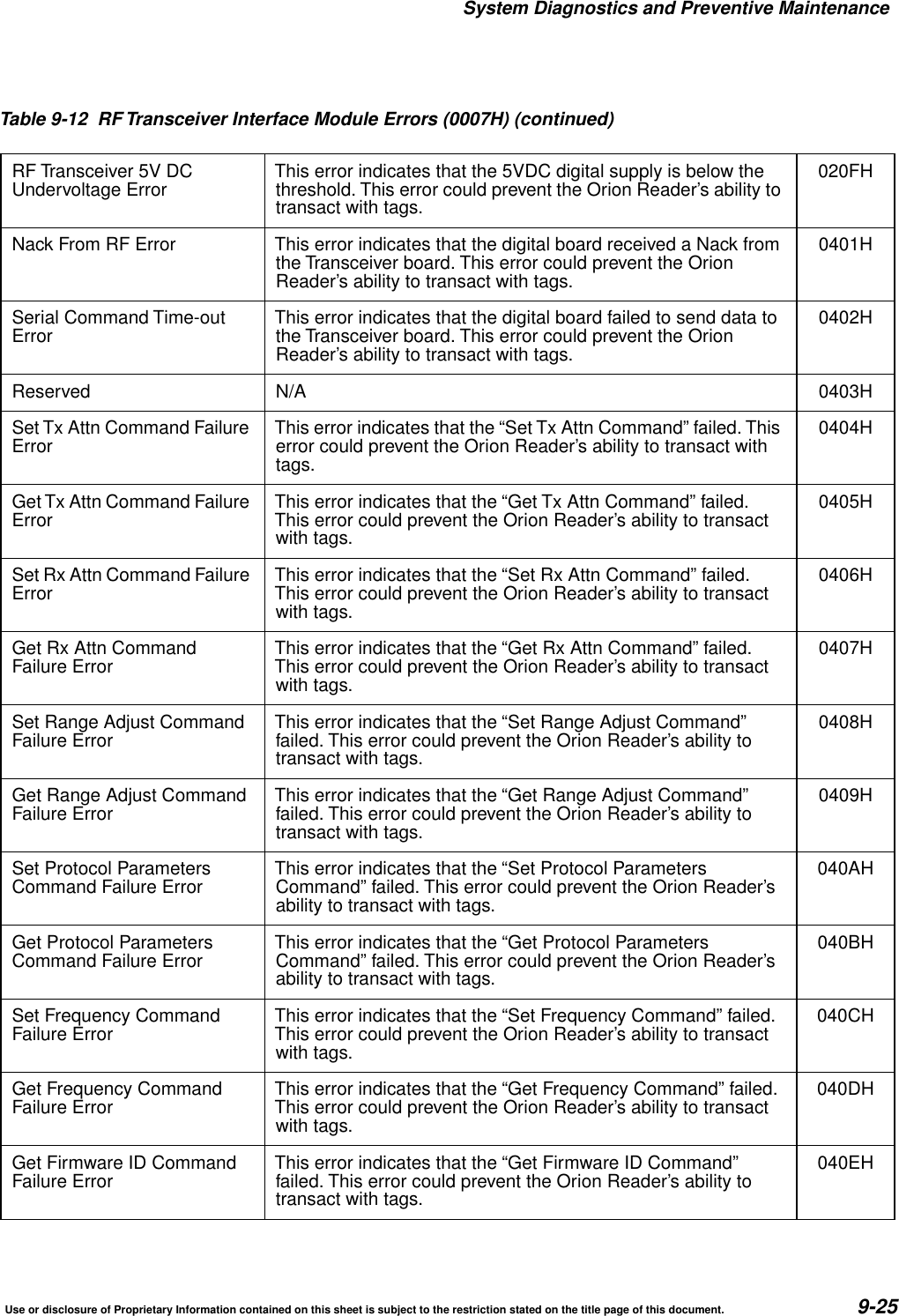
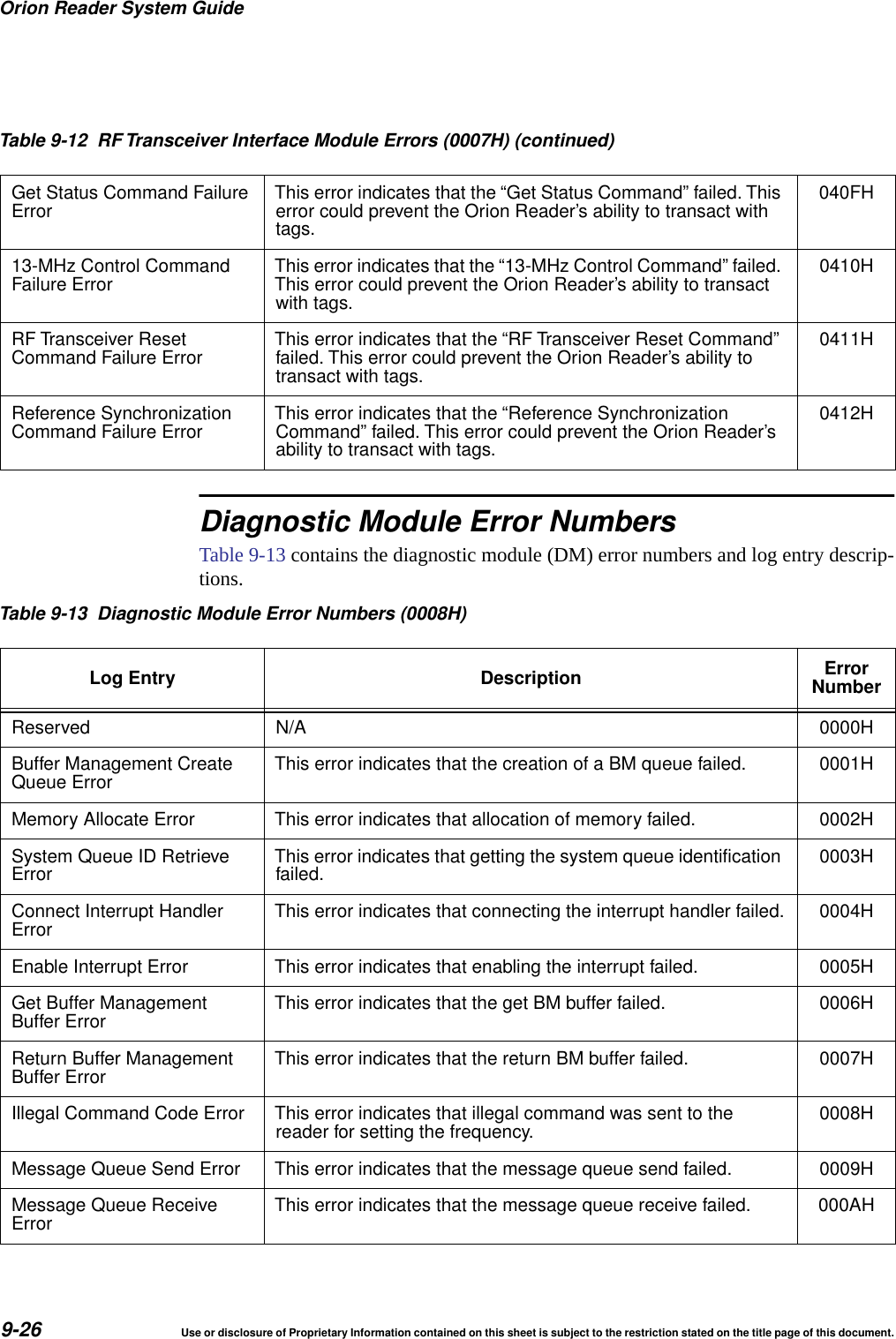
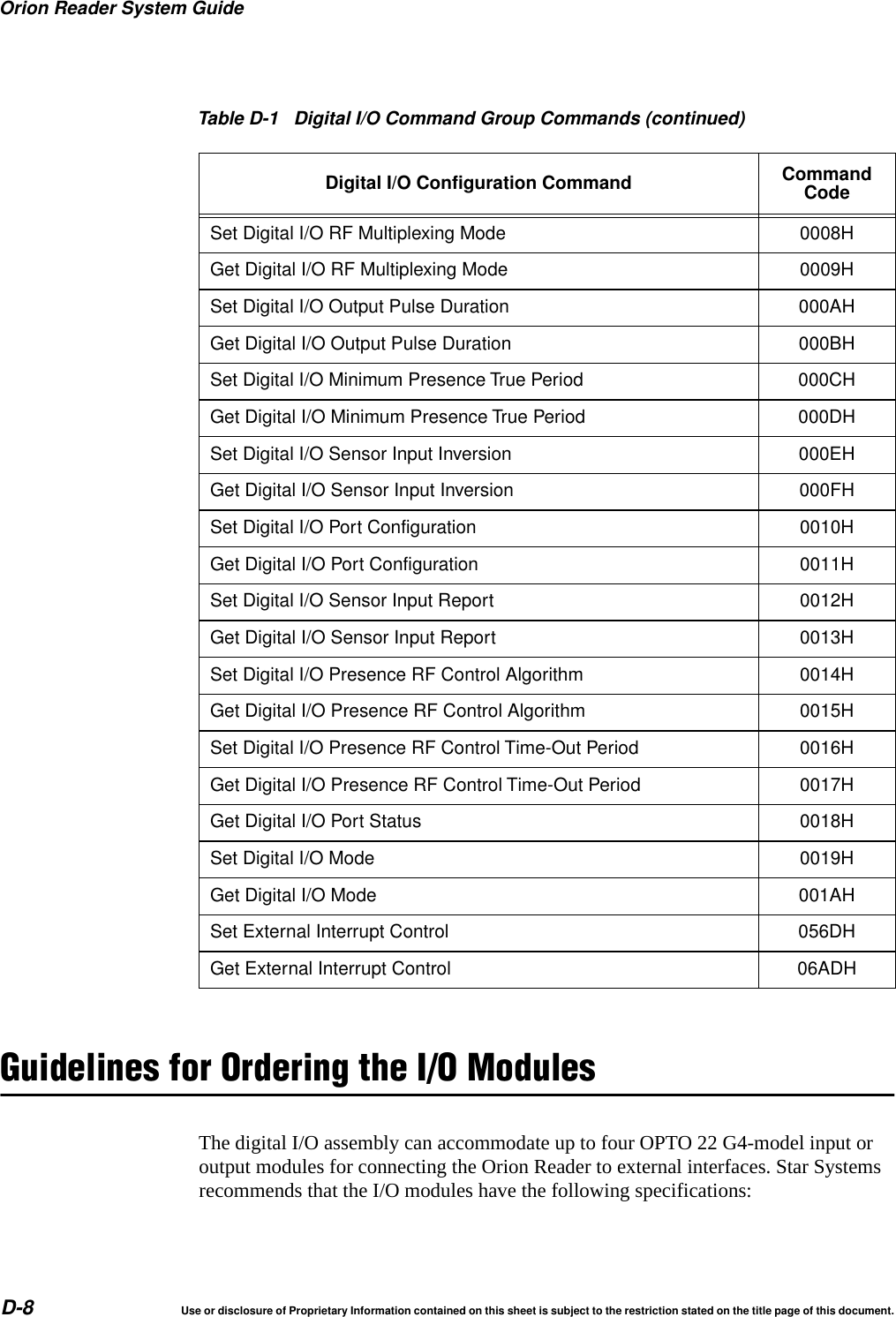
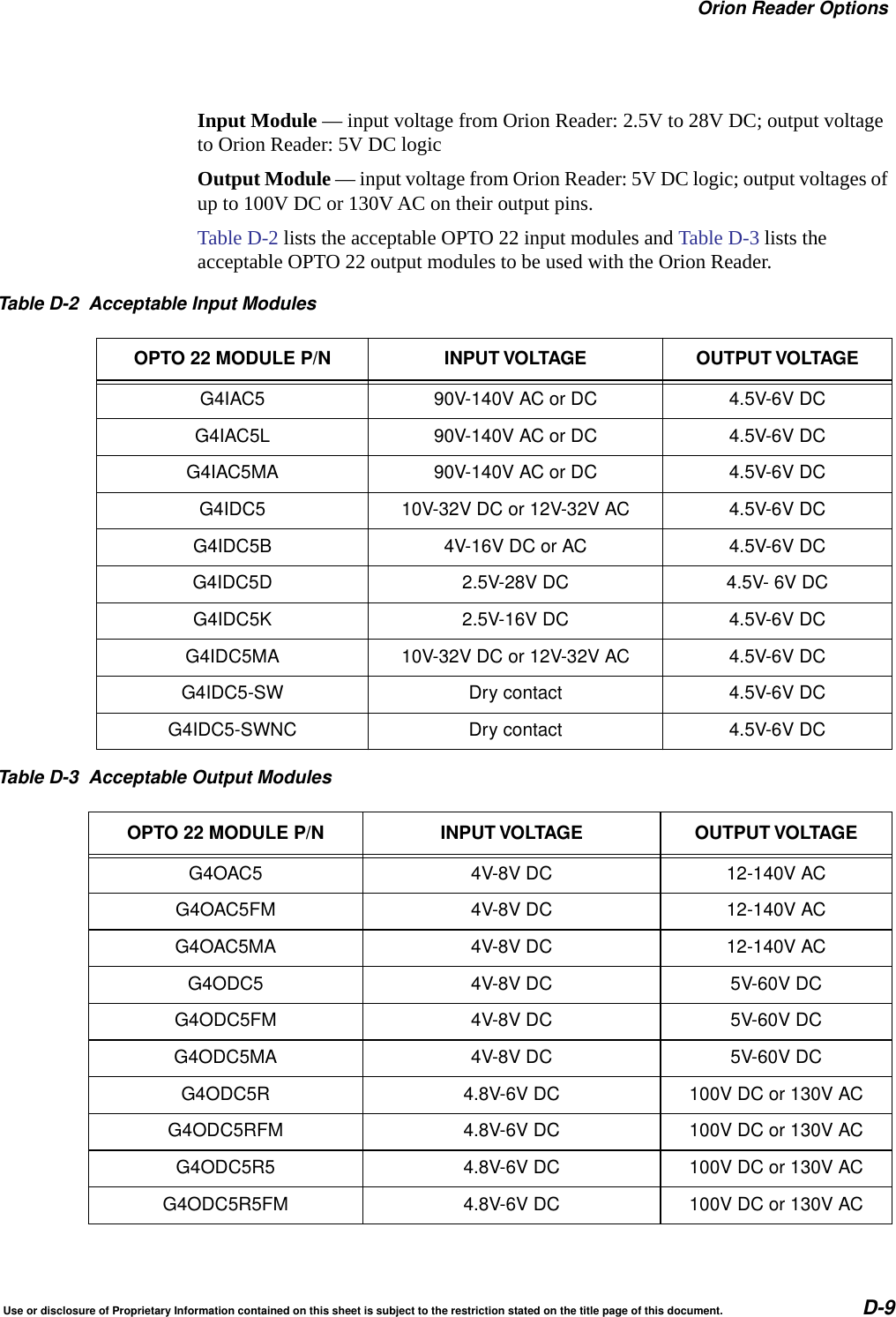
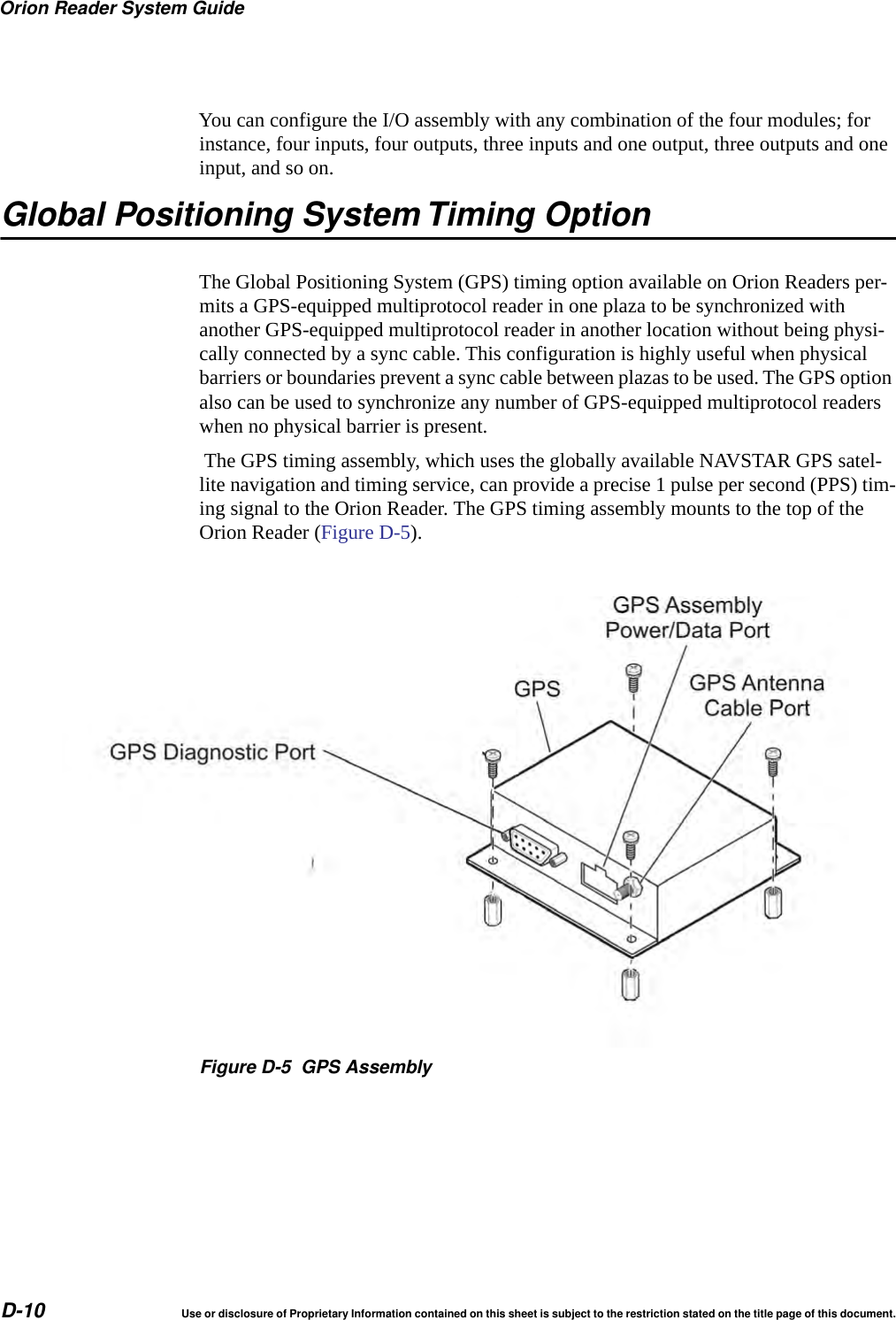
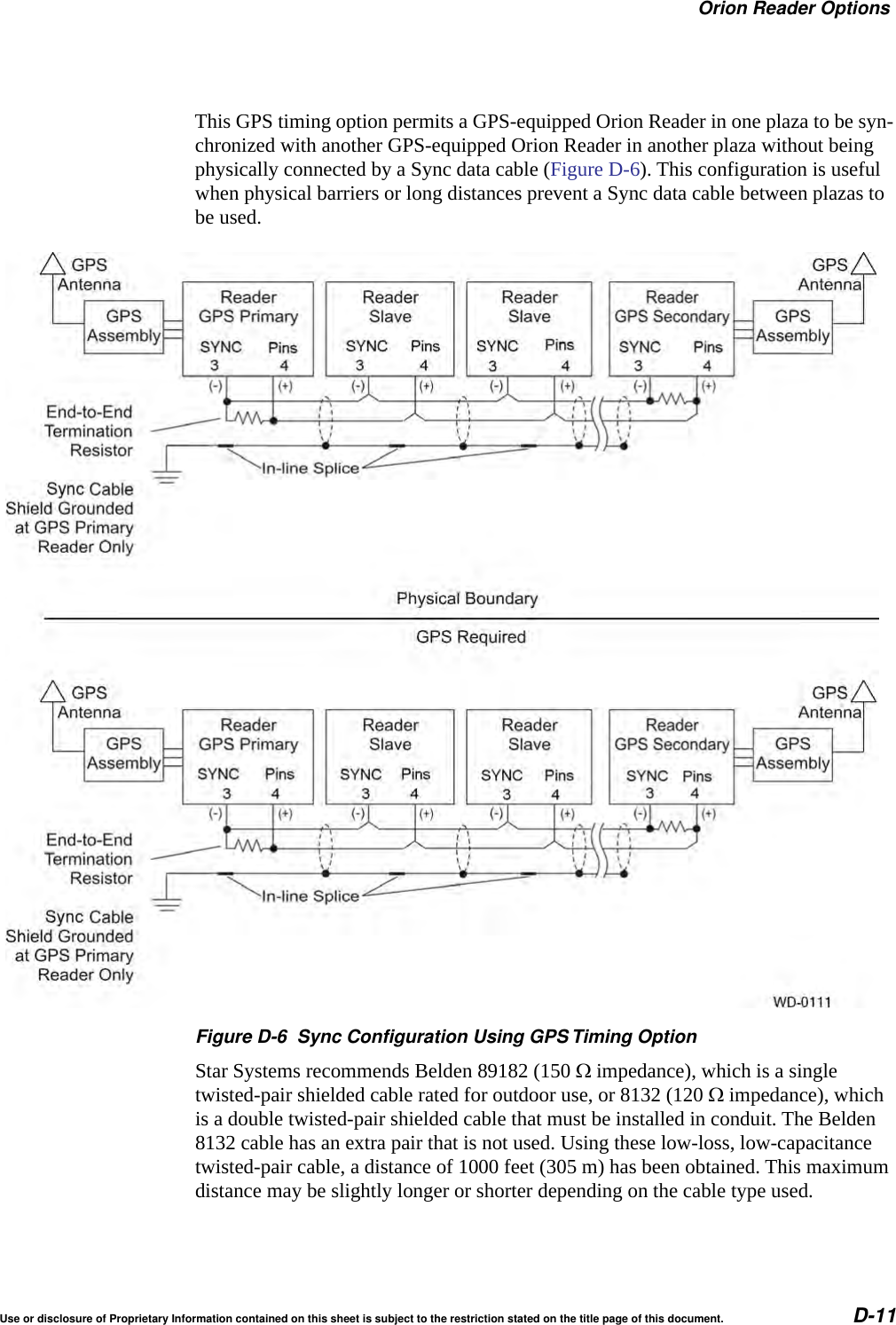
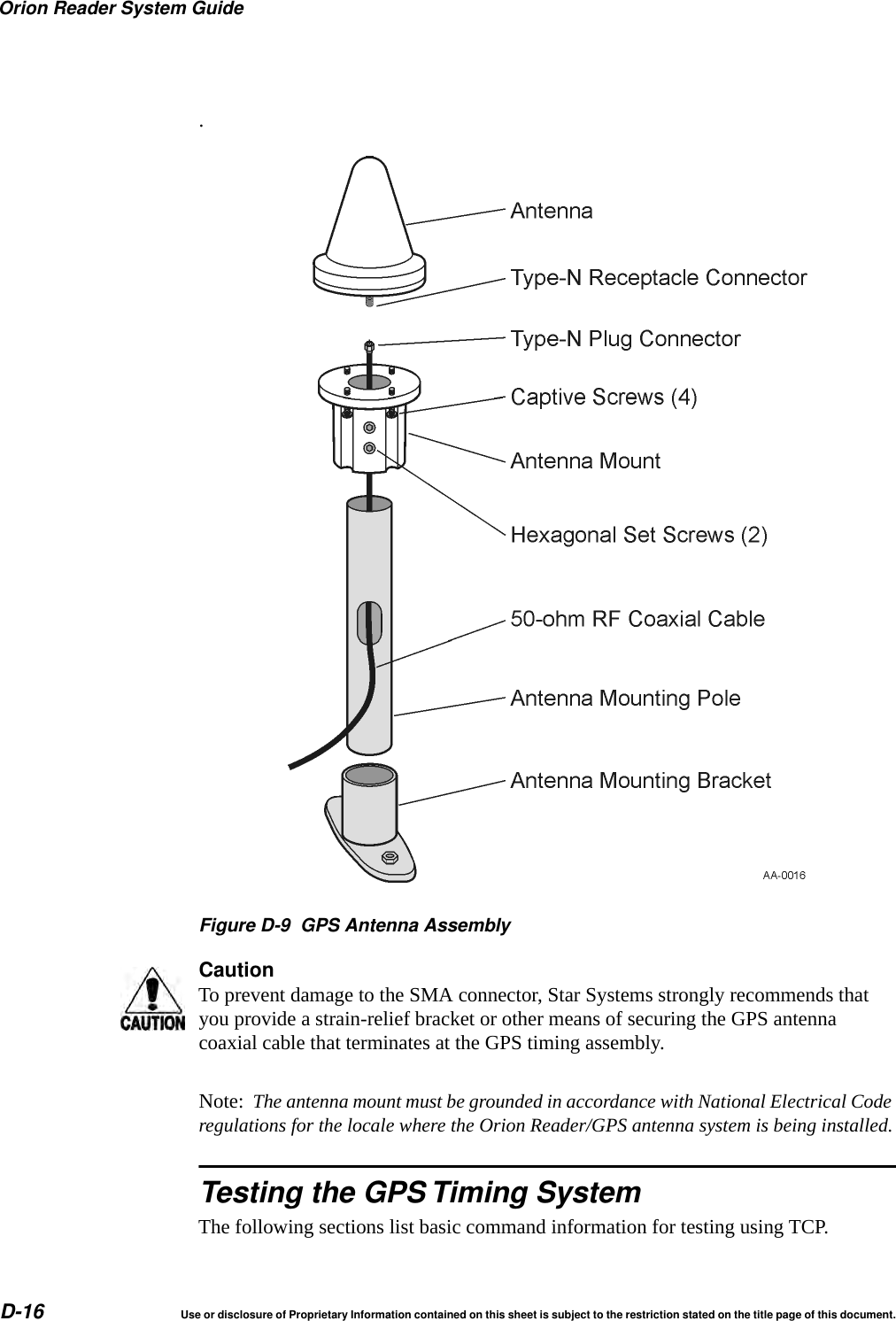
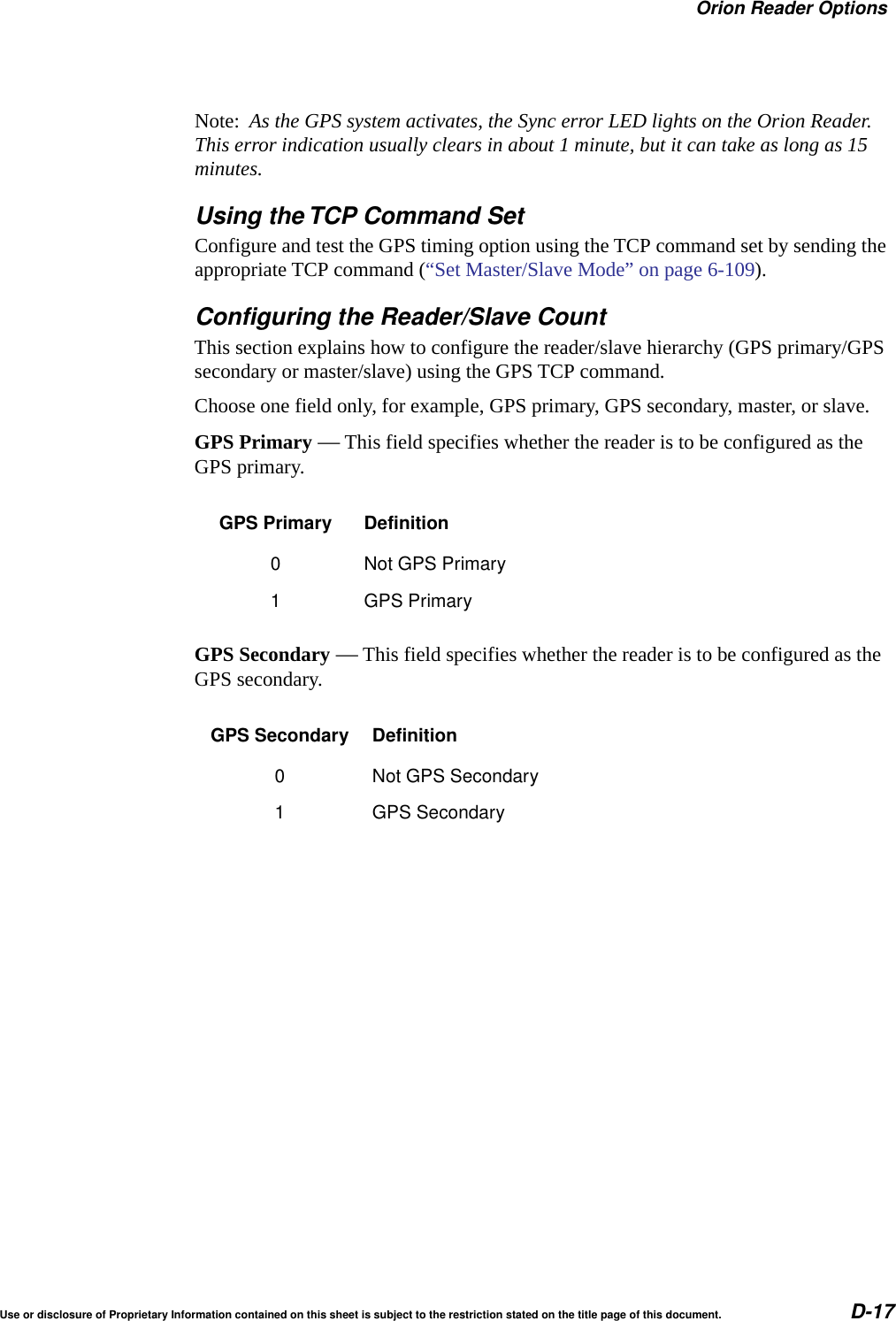
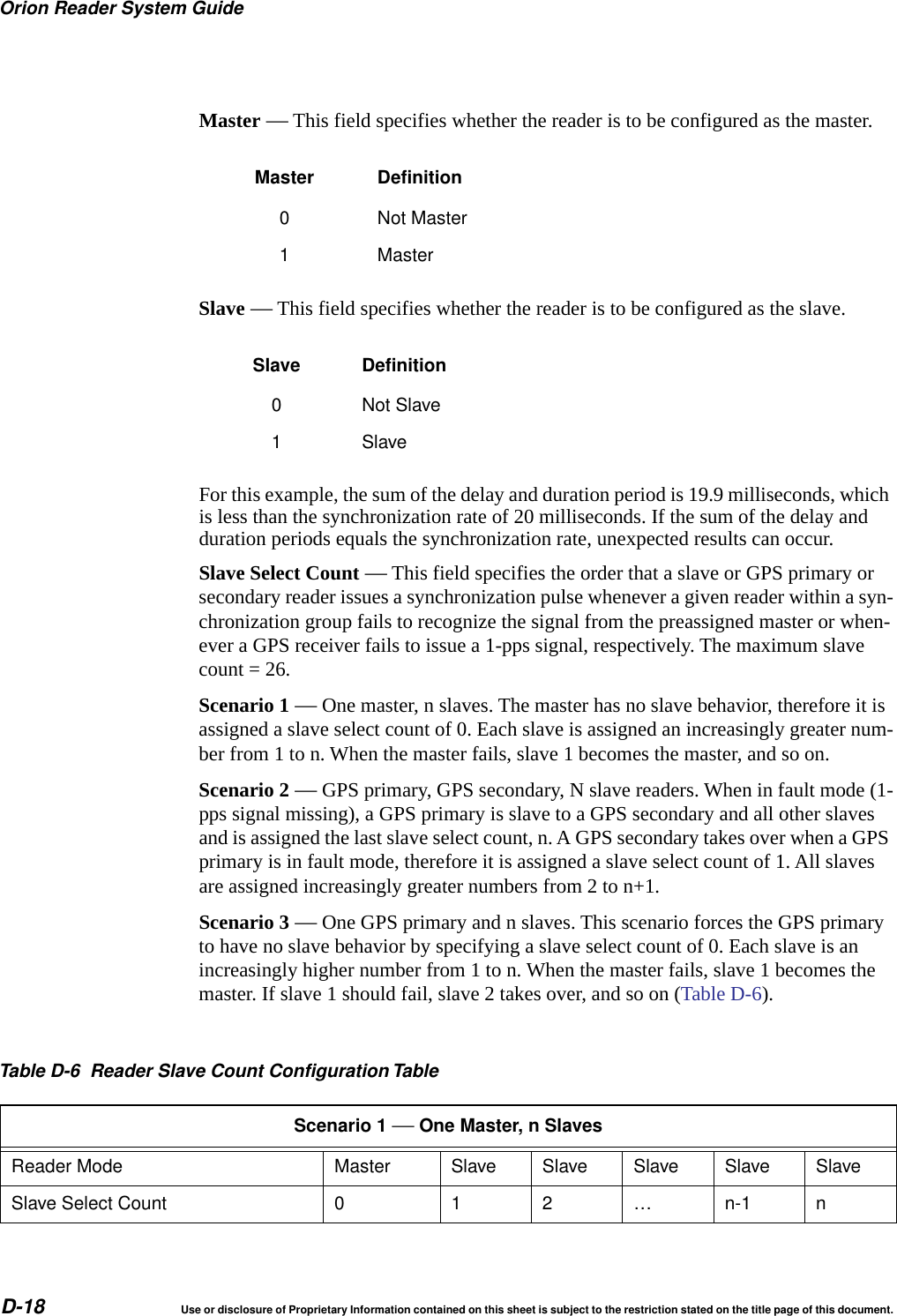
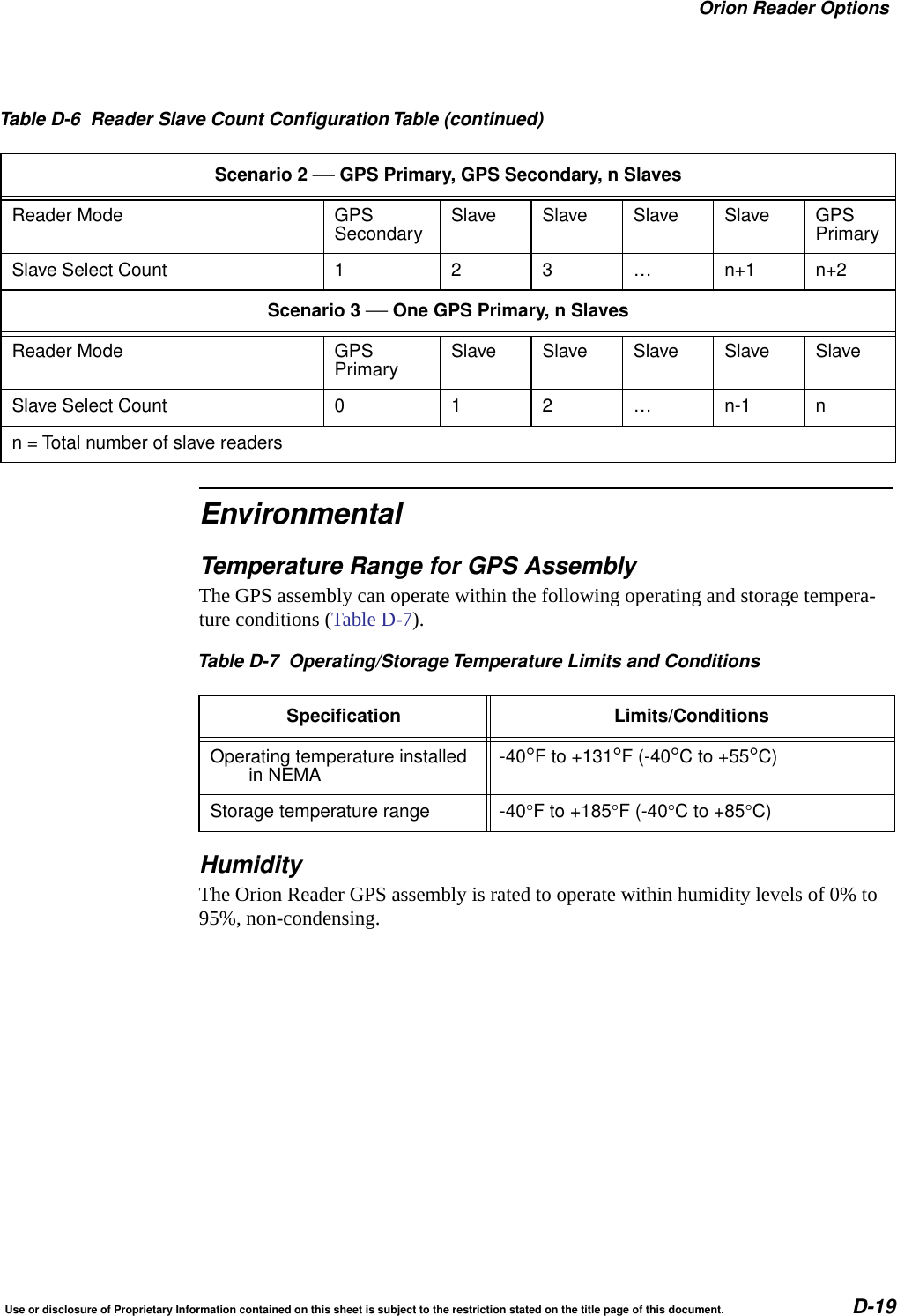
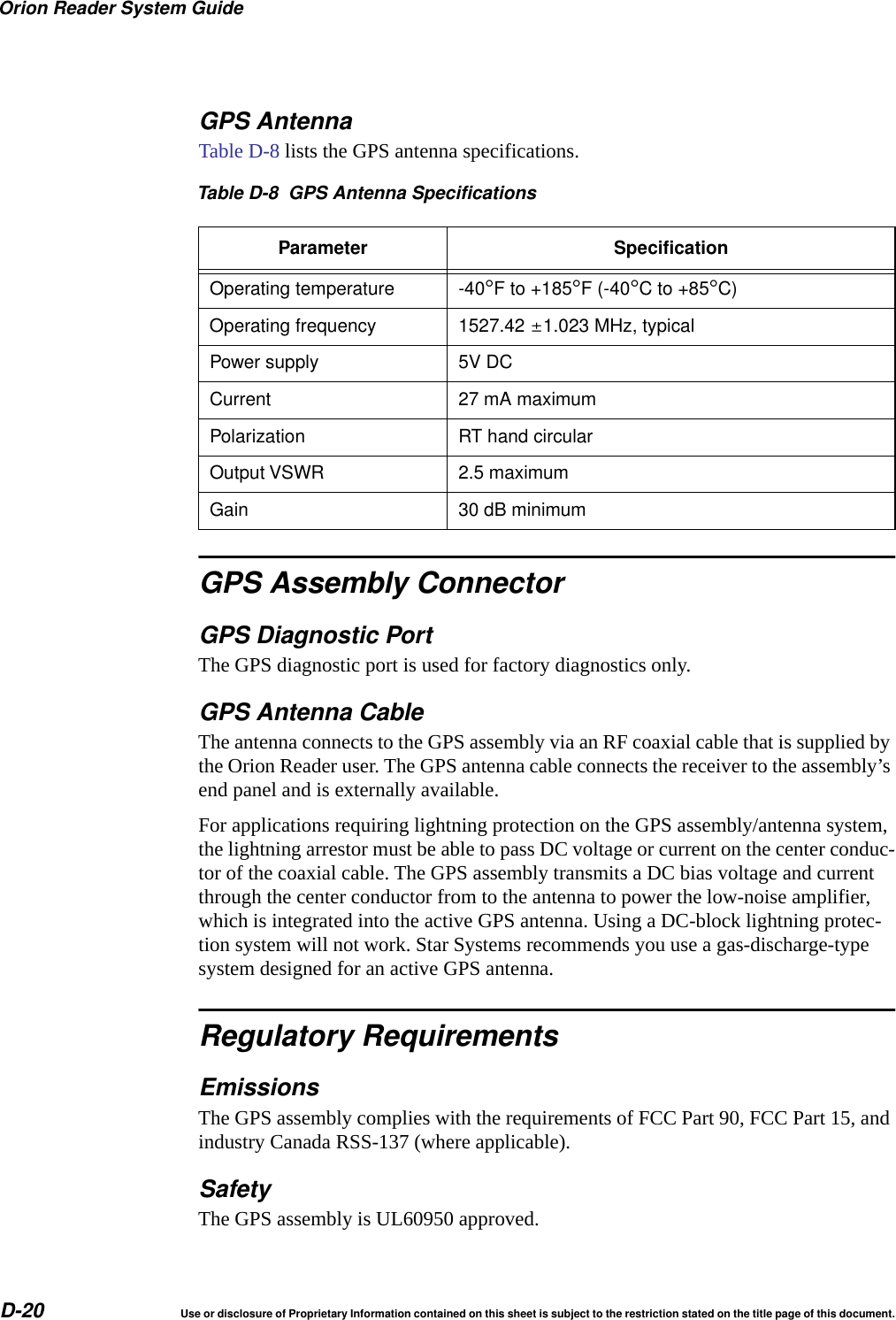
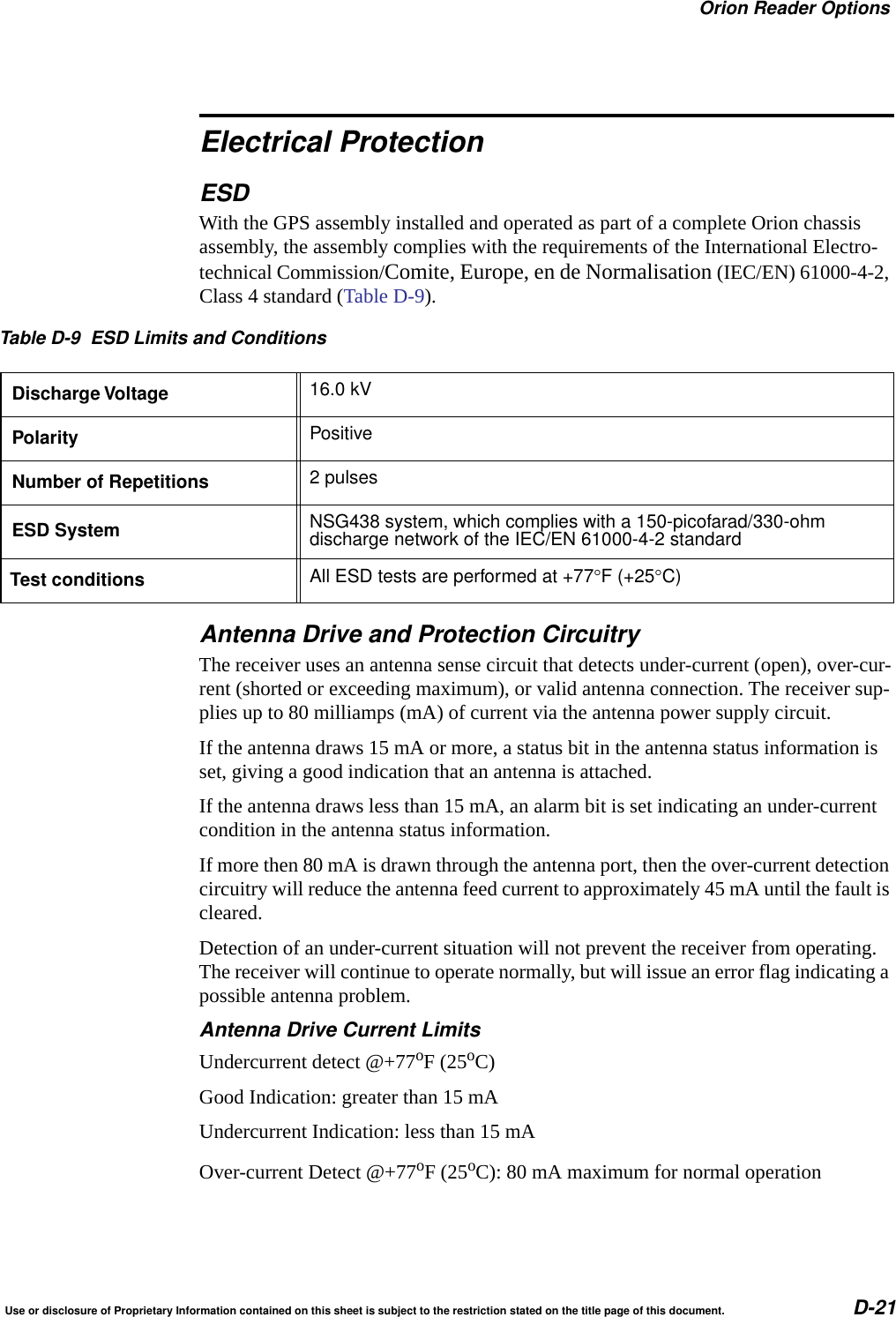
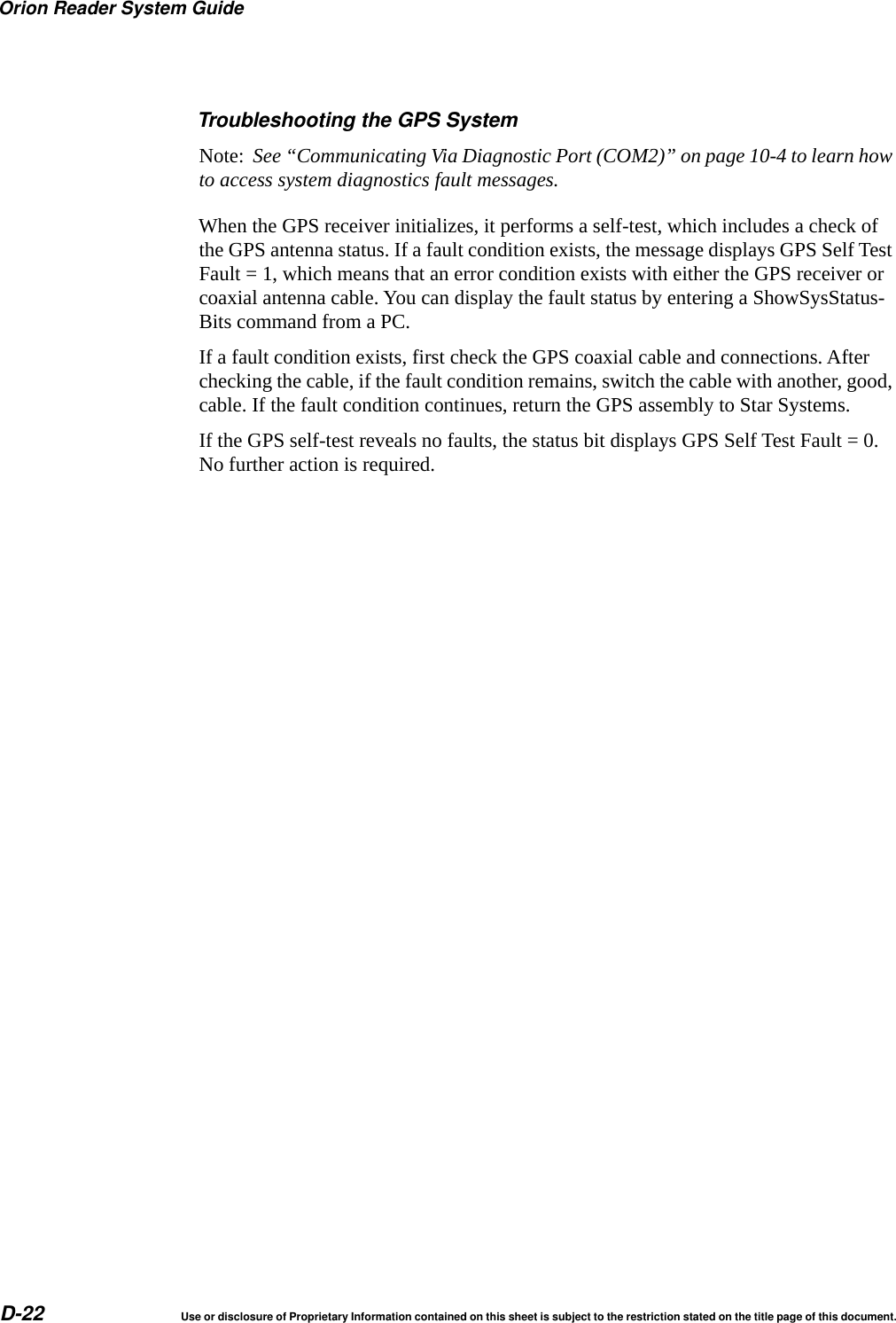
Star Systems ORION Location & Monitoring Transmitter User Manual

Star Systems International Limited Location & Monitoring Transmitter

Users Manual

Orion® Reader System GuideStar Systems International, Ltd.August 2014P/N 16-0024-001
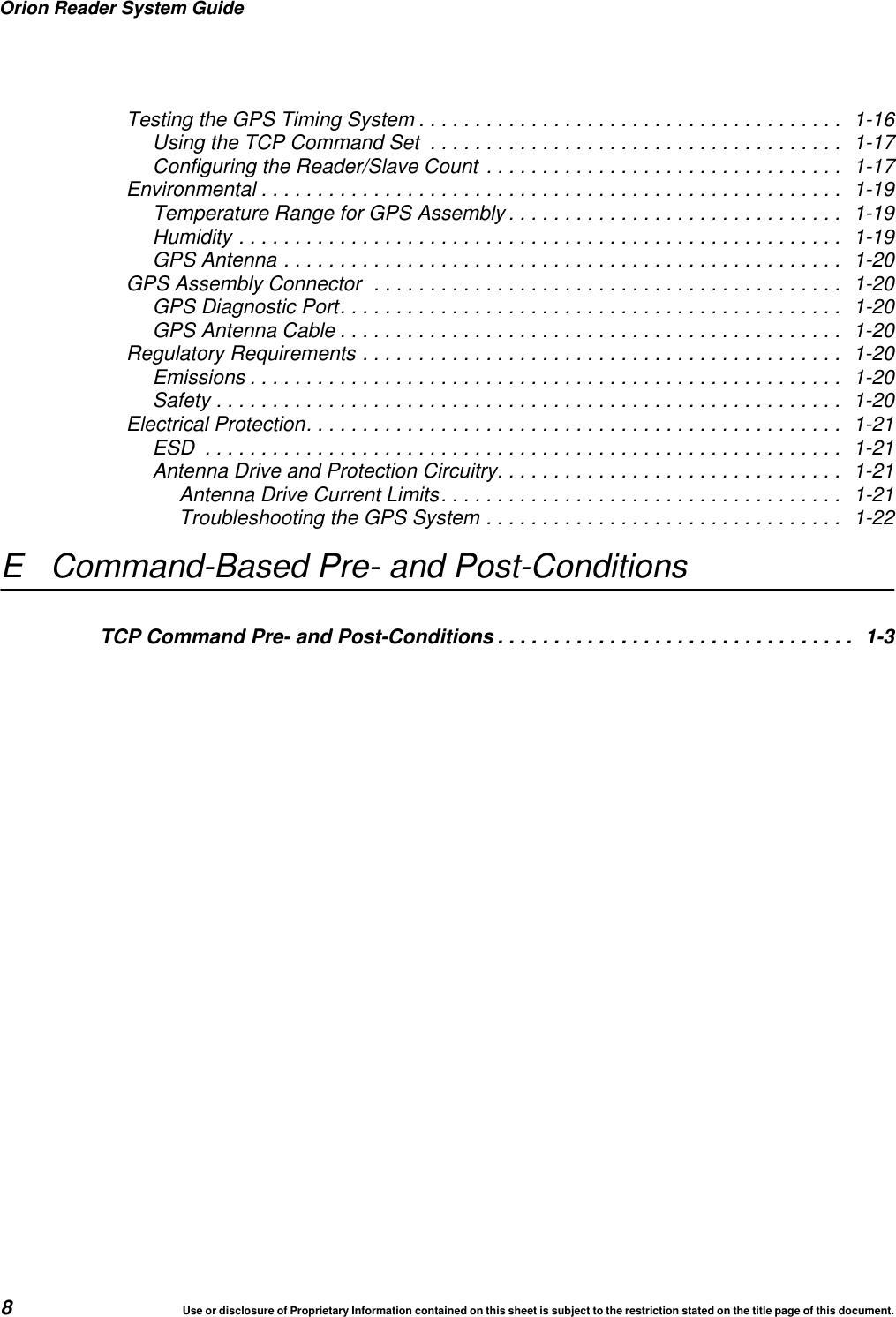
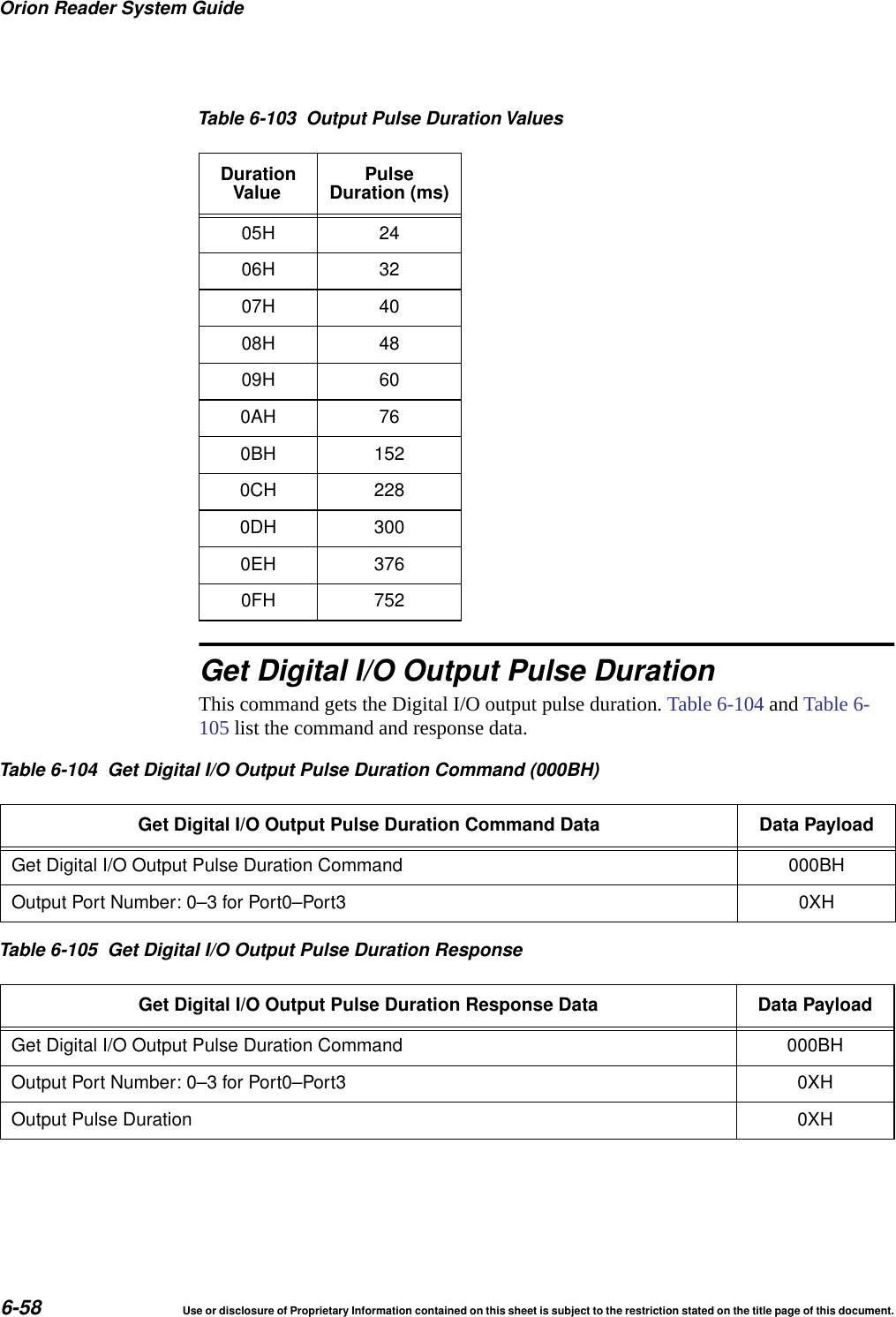
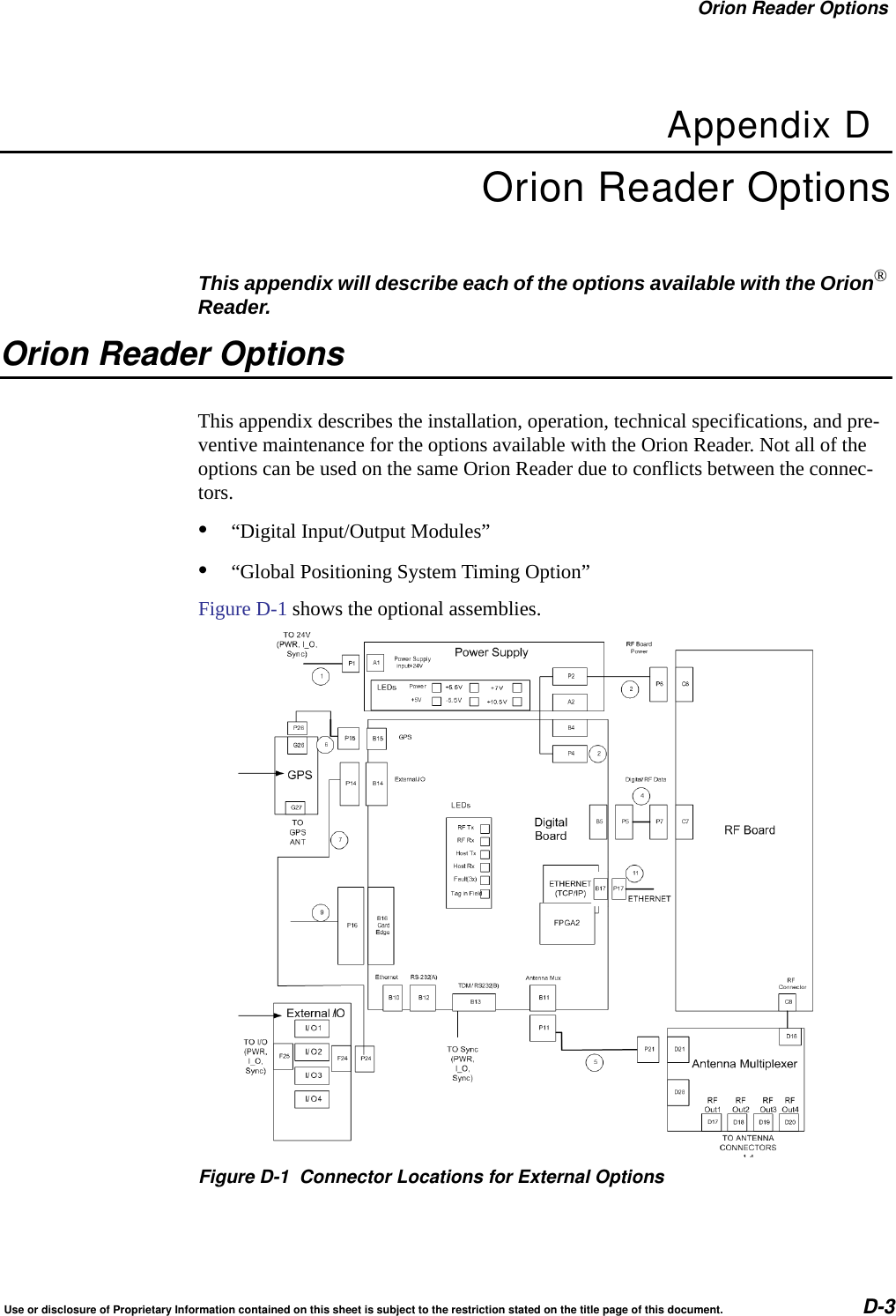
Use or disclosure of Proprietary Information contained on this sheet is subject to the restriction stated on the title page of this document. 1Health Limits for Orion® Reader Using External Antenna (902 to 921.5 MHz). . . 1-4Limites d’innocuité du lecteur OrionMD utilisé avec une antenne externe(902 à 921,5 MHz) .................................................... 1-5Purpose of the Guide................................................. 1-3Intended Audience ................................................... 1-3Guide Topics........................................................ 1-3Typographical Conventions Used in this Manual .......................... 1-5Assessing and Formulating a Site Plan.................................. 2-3Preparing the Installation Site.......................................... 2-3Site Preparation Checklist ............................................ 2-3Components Checklist ............................................... 2-4Task Checklist ...................................................... 2-4Where to Mount the Components....................................... 2-4Overhead Gantry Mount ............................................. 2-5Overpass Mount ................................................... 2-6Cantilever Arm Mount ............................................... 2-7Open Road Tolling Gantry............................................ 2-8Orion Reader Components ............................................ 3-3Orion Reader Features................................................ 3-4External Device Connectors .......................................... 3-4.............................................................. 3-4Power Supply................................................. 3-5Selecting a Power Supply ....................................... 3-5Connecting the Orion Reader to Power Supply ....................... 3-6Sync .......................................................... 3-7External Digital Input/Output Connector ............................... 3-8Connecting to Antenna ............................................ 3-8Connecting to Host Computer .................................... 3-9Ethernet Connector for TCP Communications........................ 3-9Connecting to Additional System Components......................... 3-10Diagnostic Communications Connector (COM2) ..................... 3-10Diagnostic Test Port Internal Connector ........................... 3-11Global Positioning System Connector ............................. 3-11Installing the Reader System Components .............................. 3-11Mounting the Toll Antenna in an Overhead Location ...................... 3-12Starting the Orion Reader ............................................ 3-14
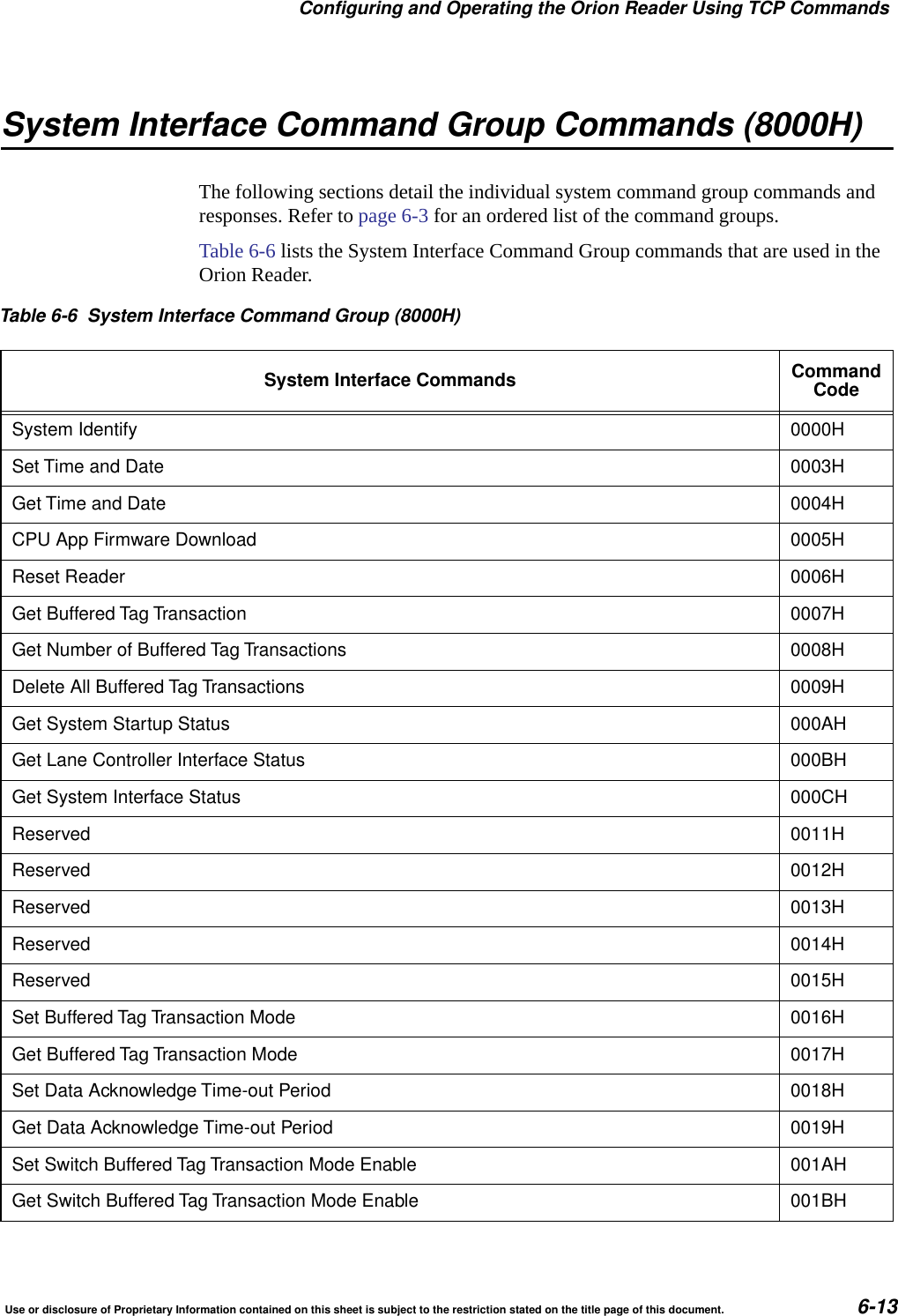
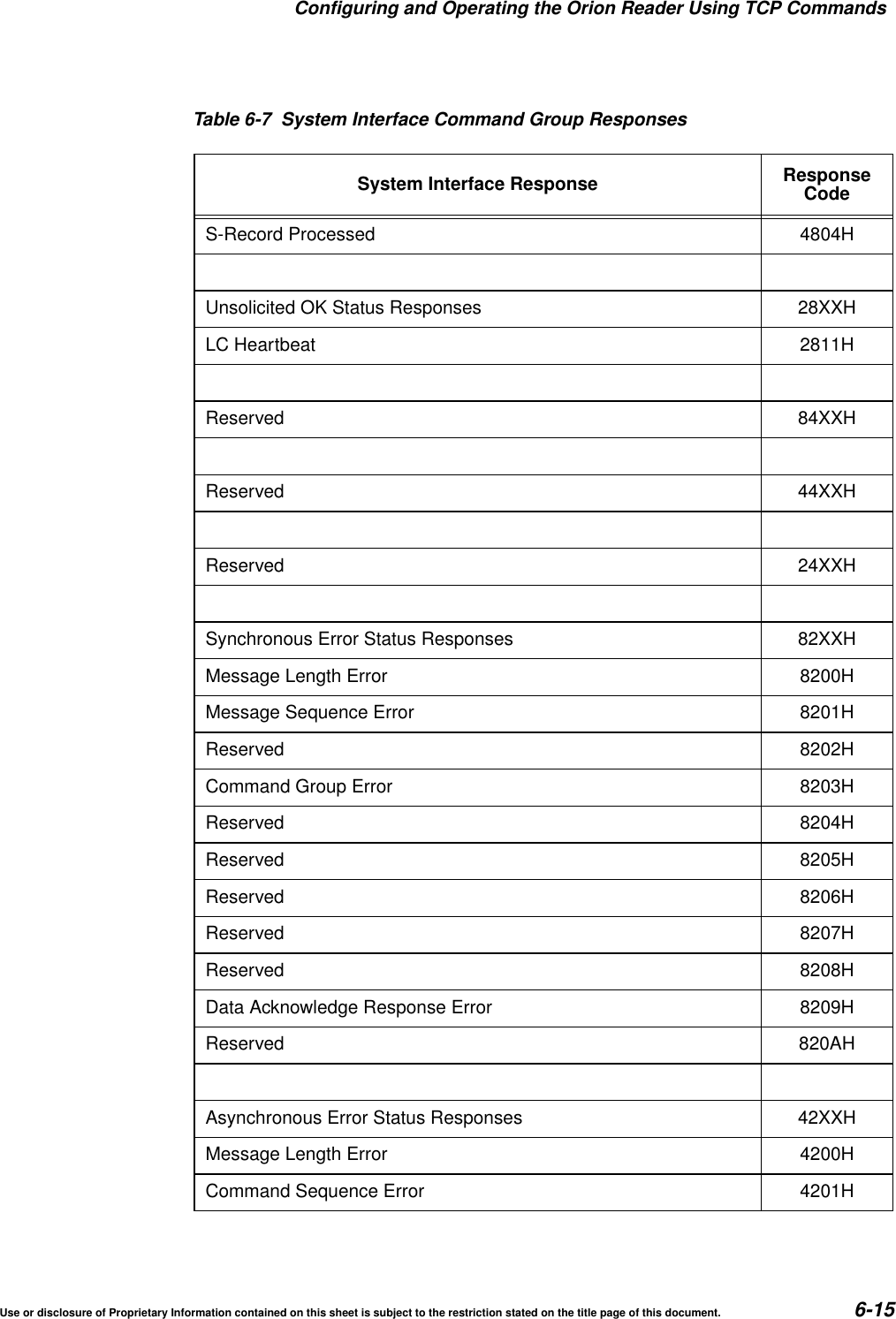
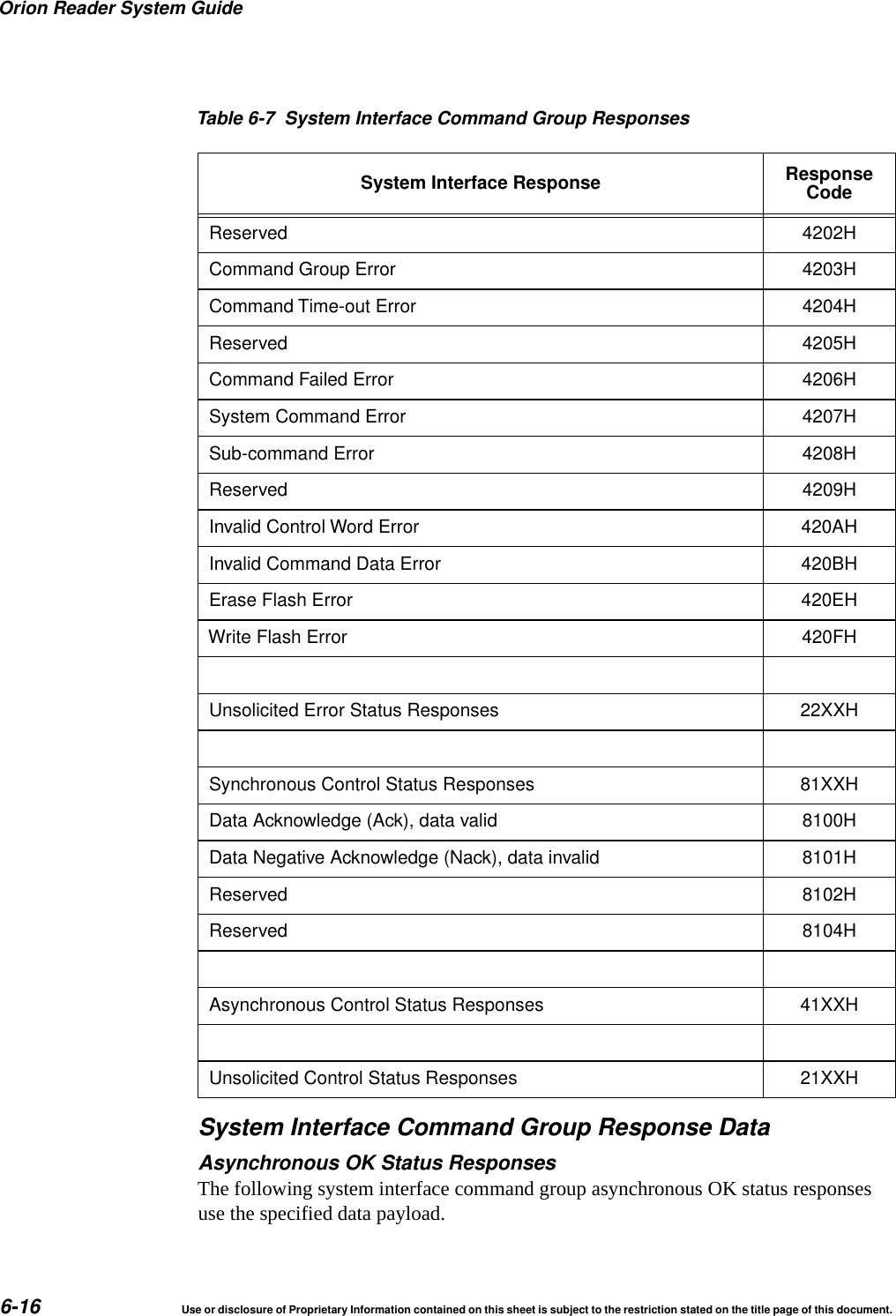
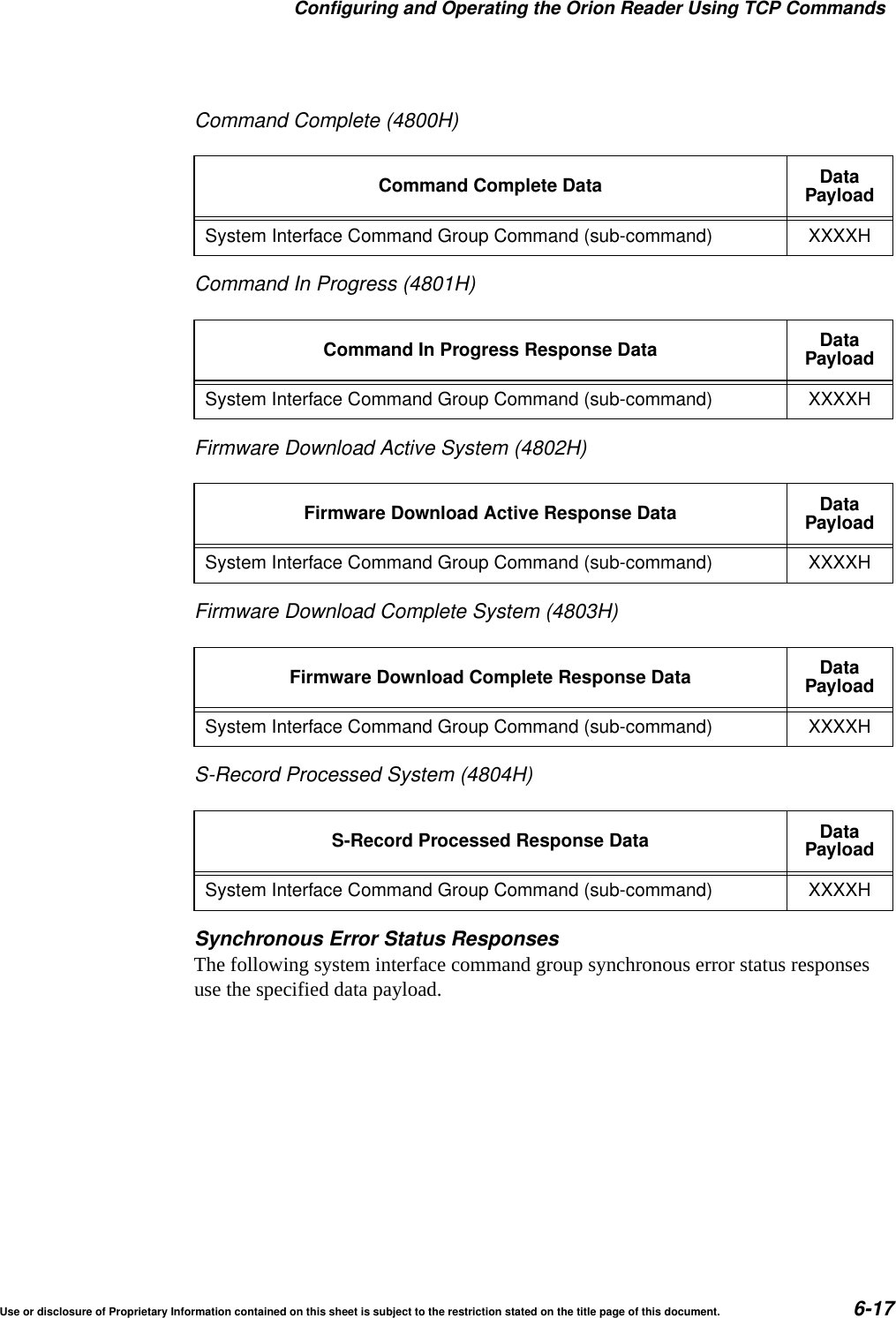
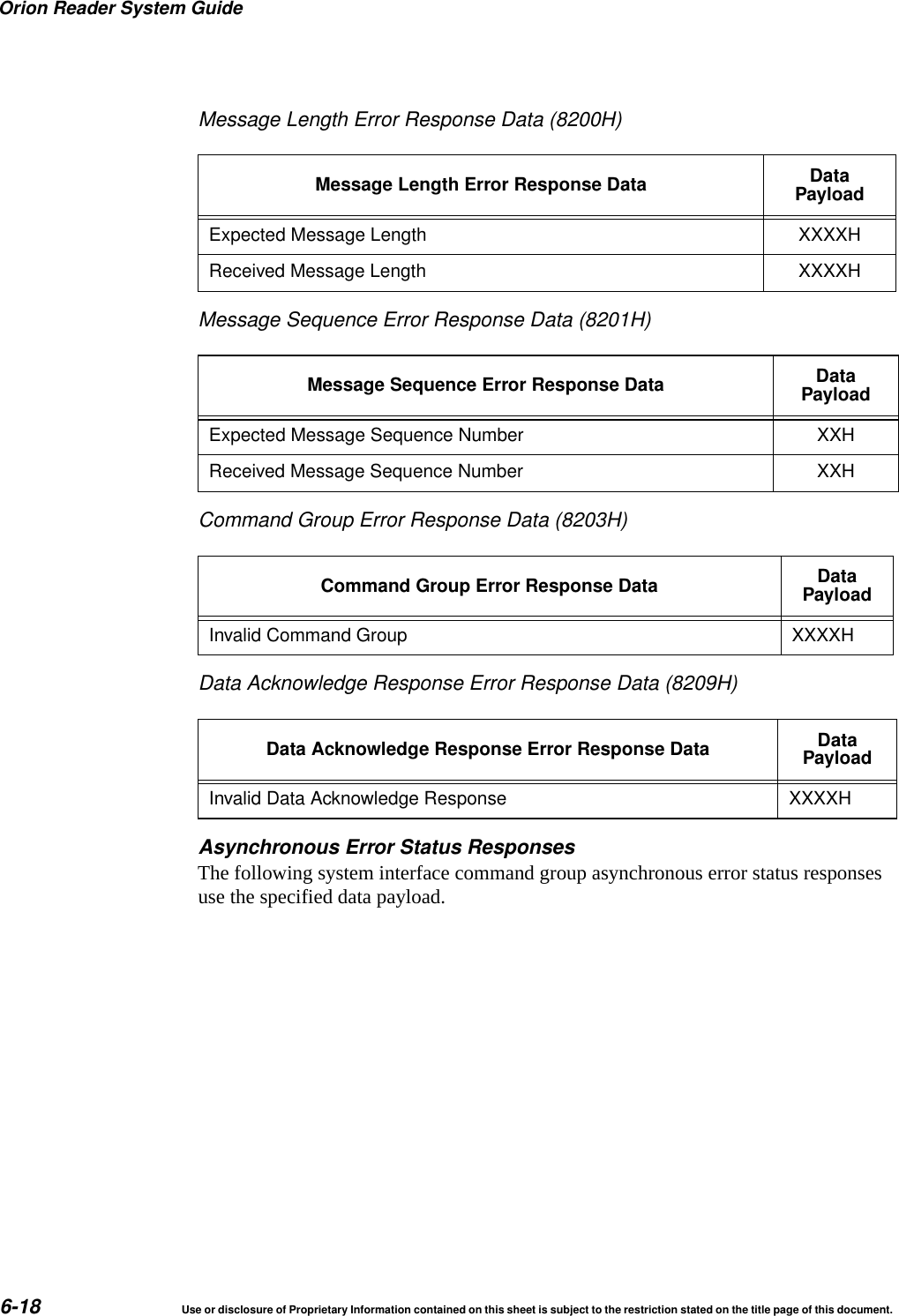
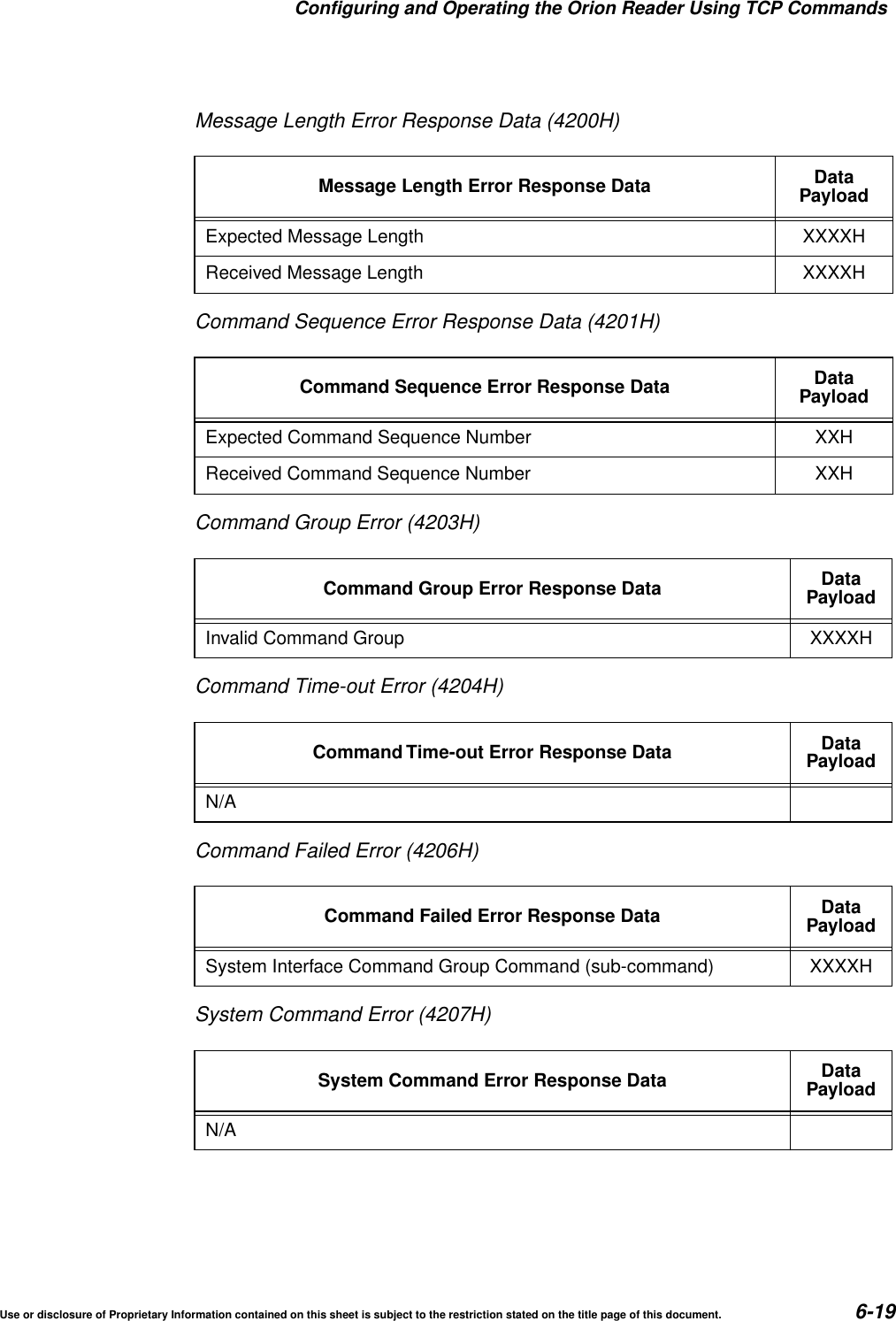
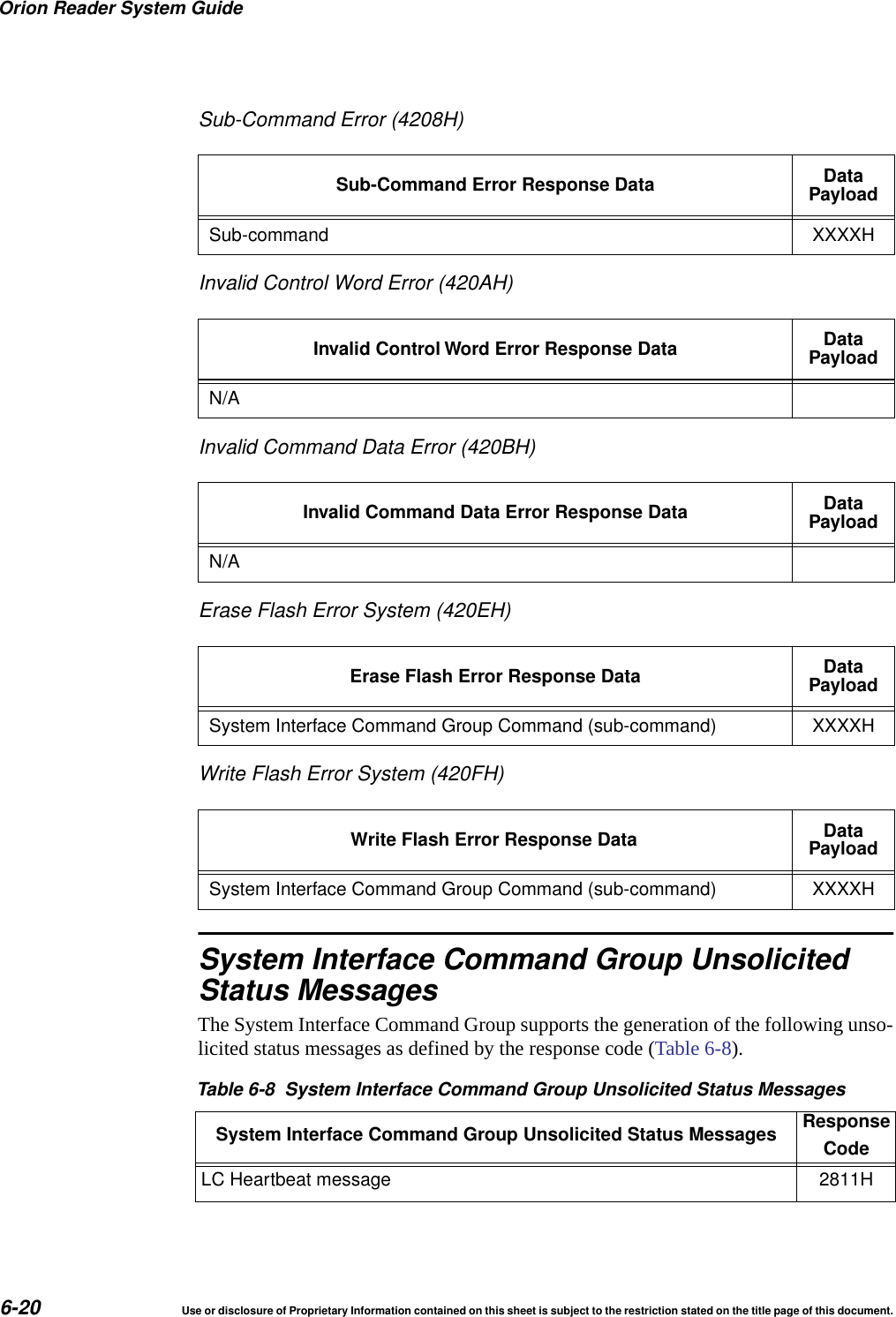
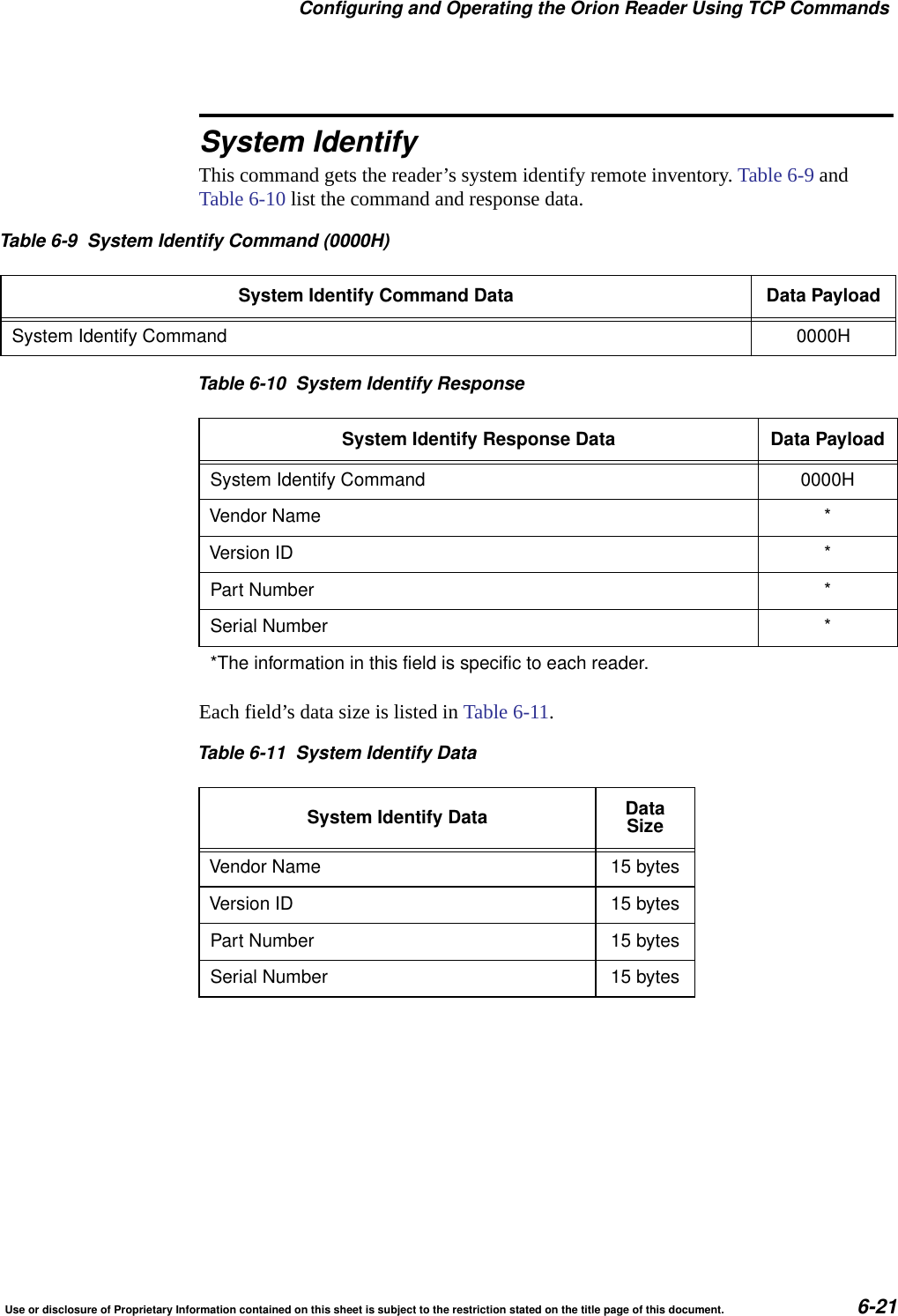
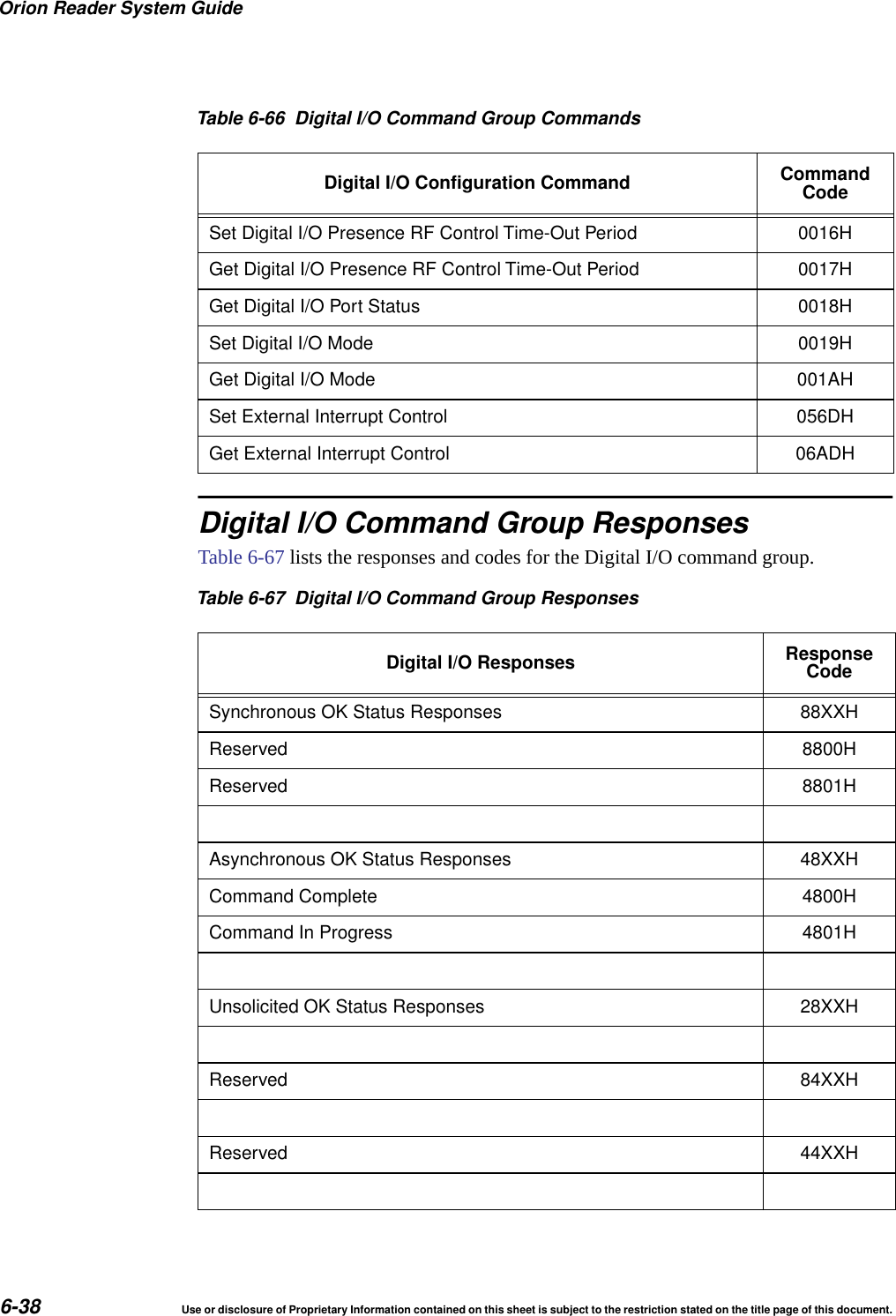
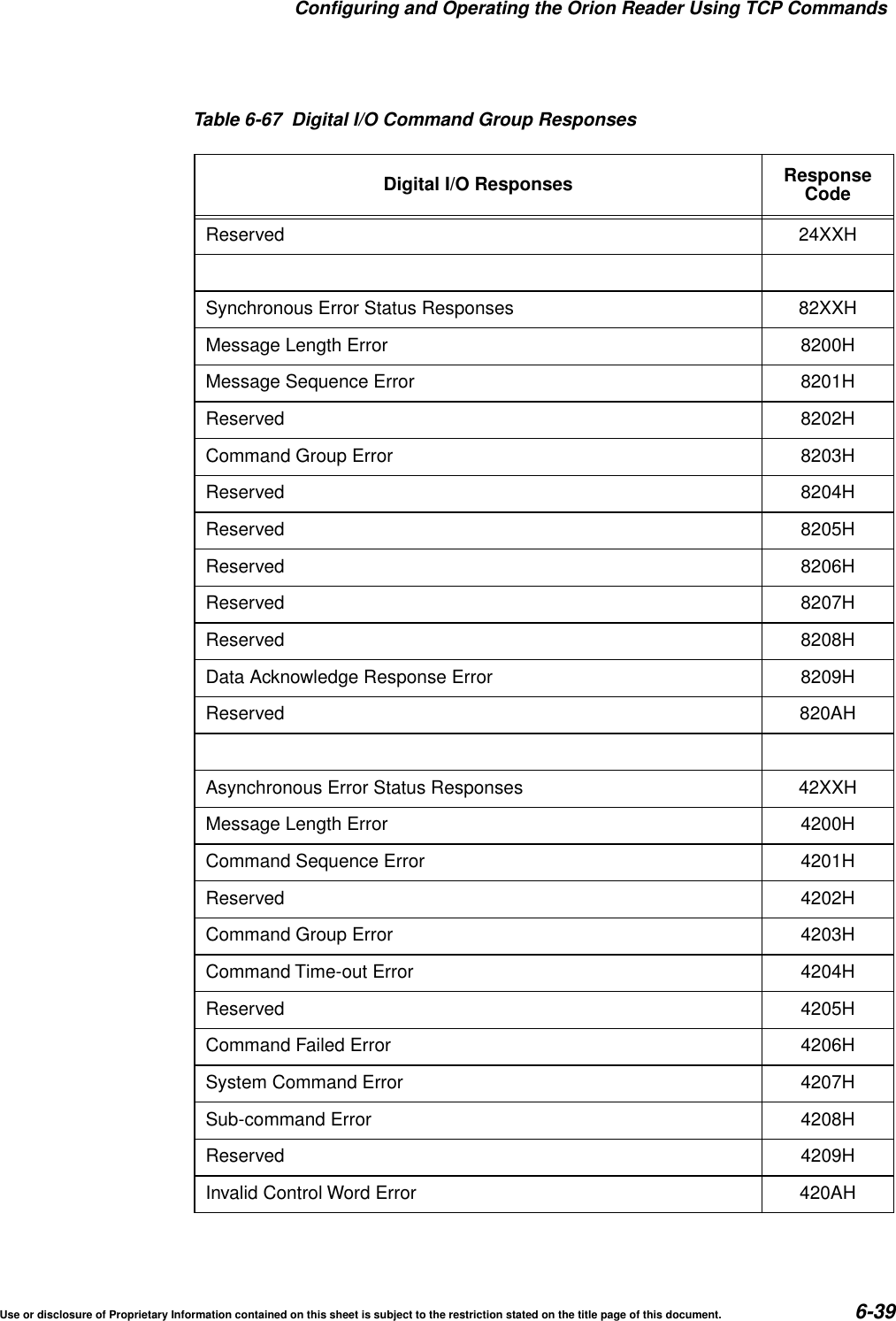
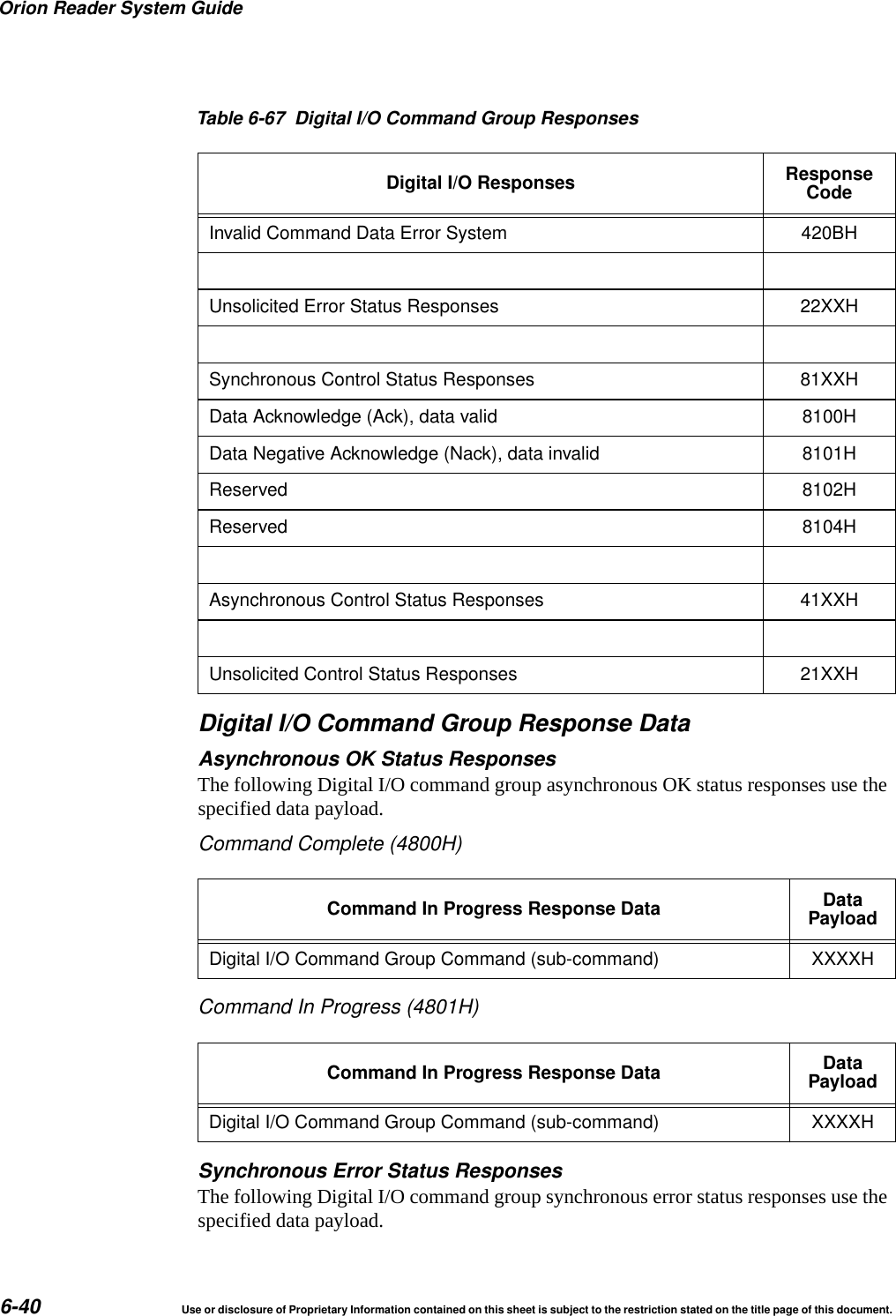
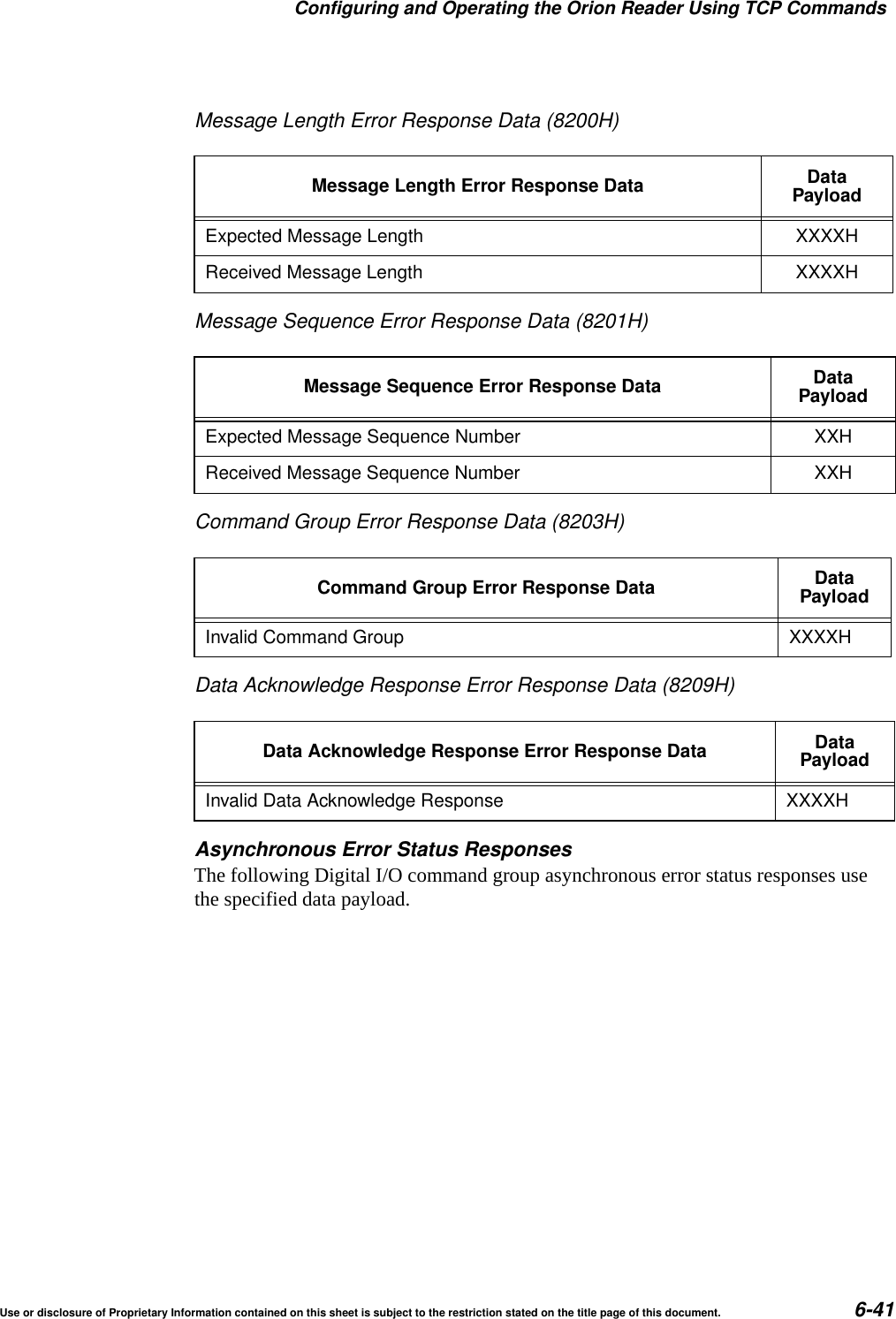
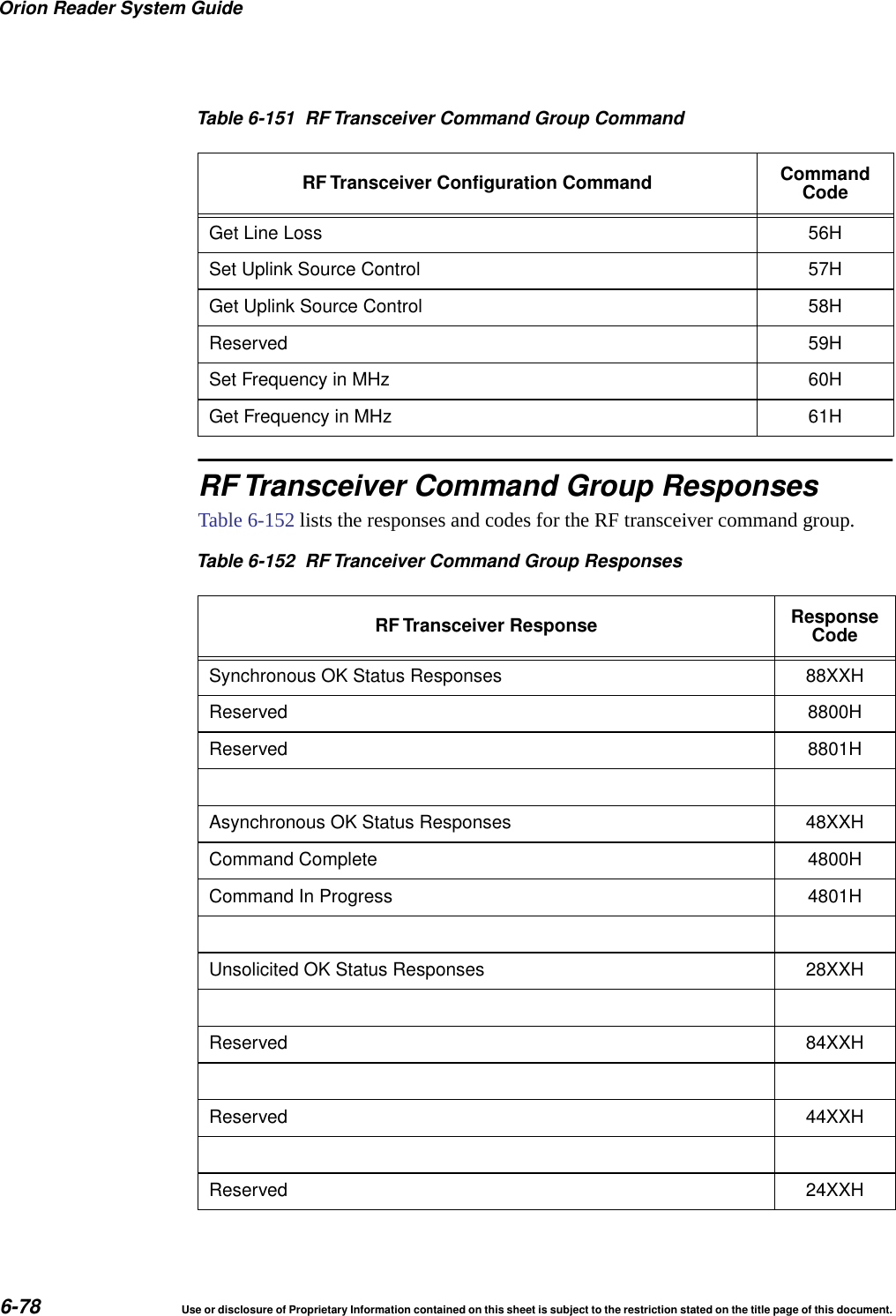
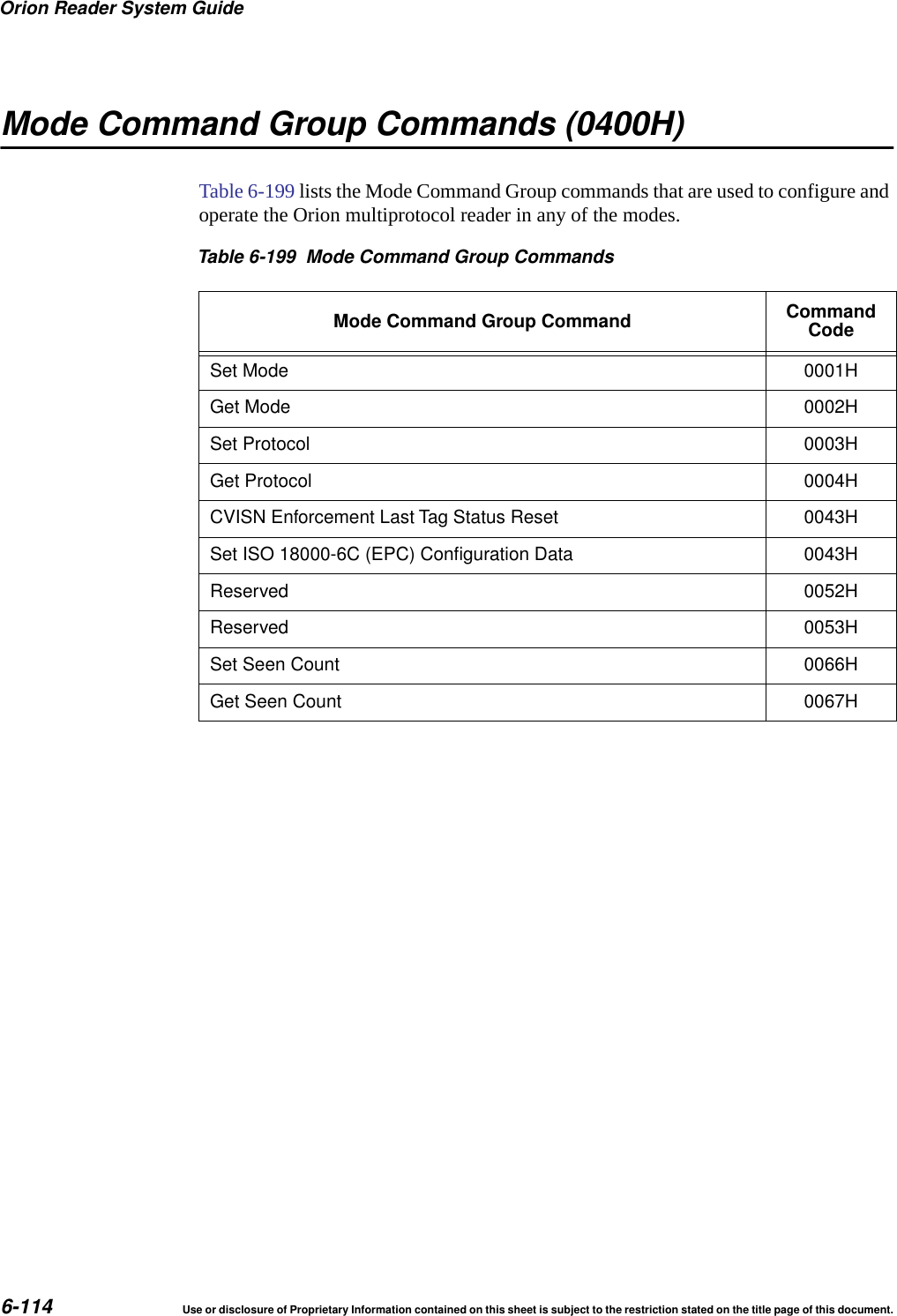
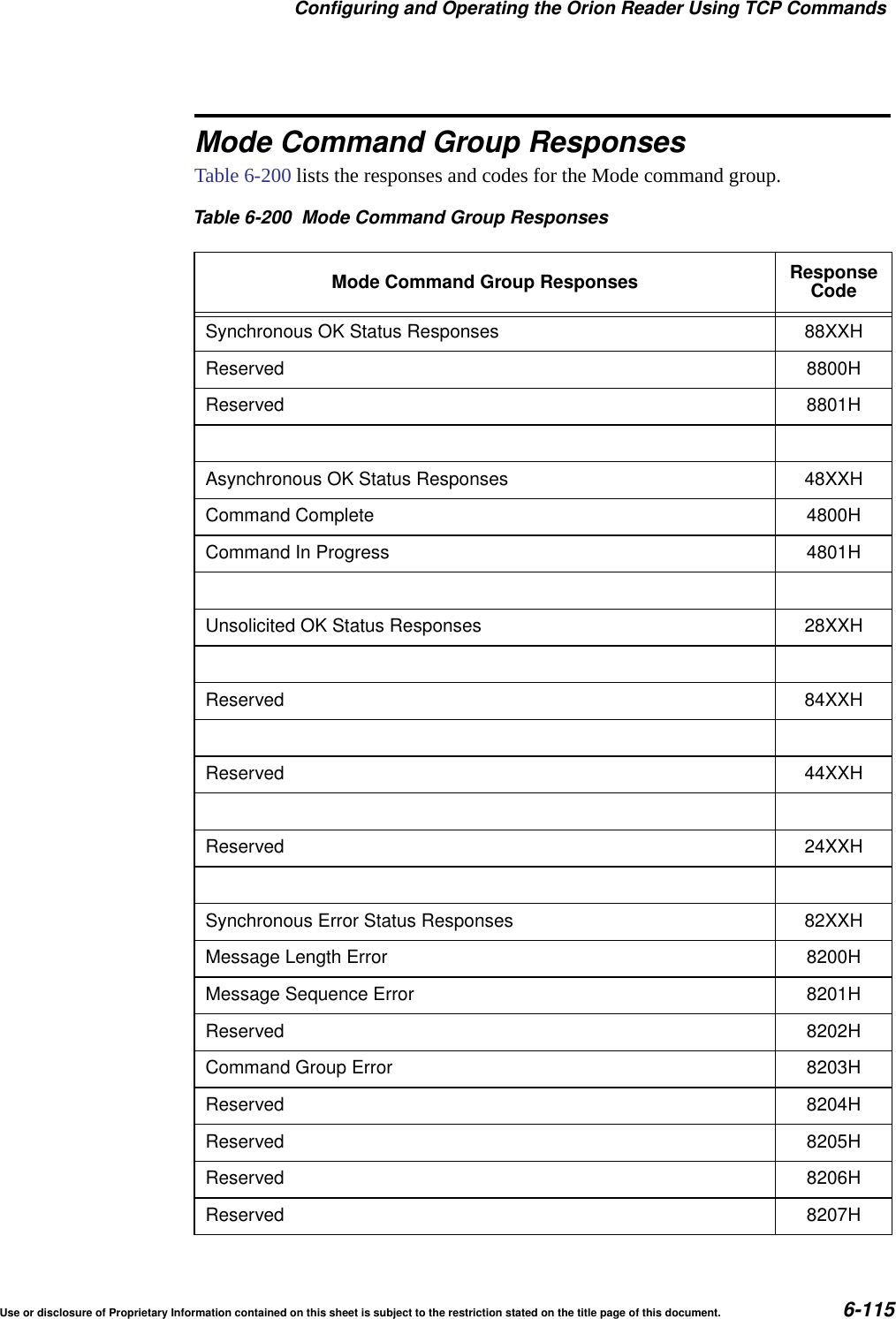
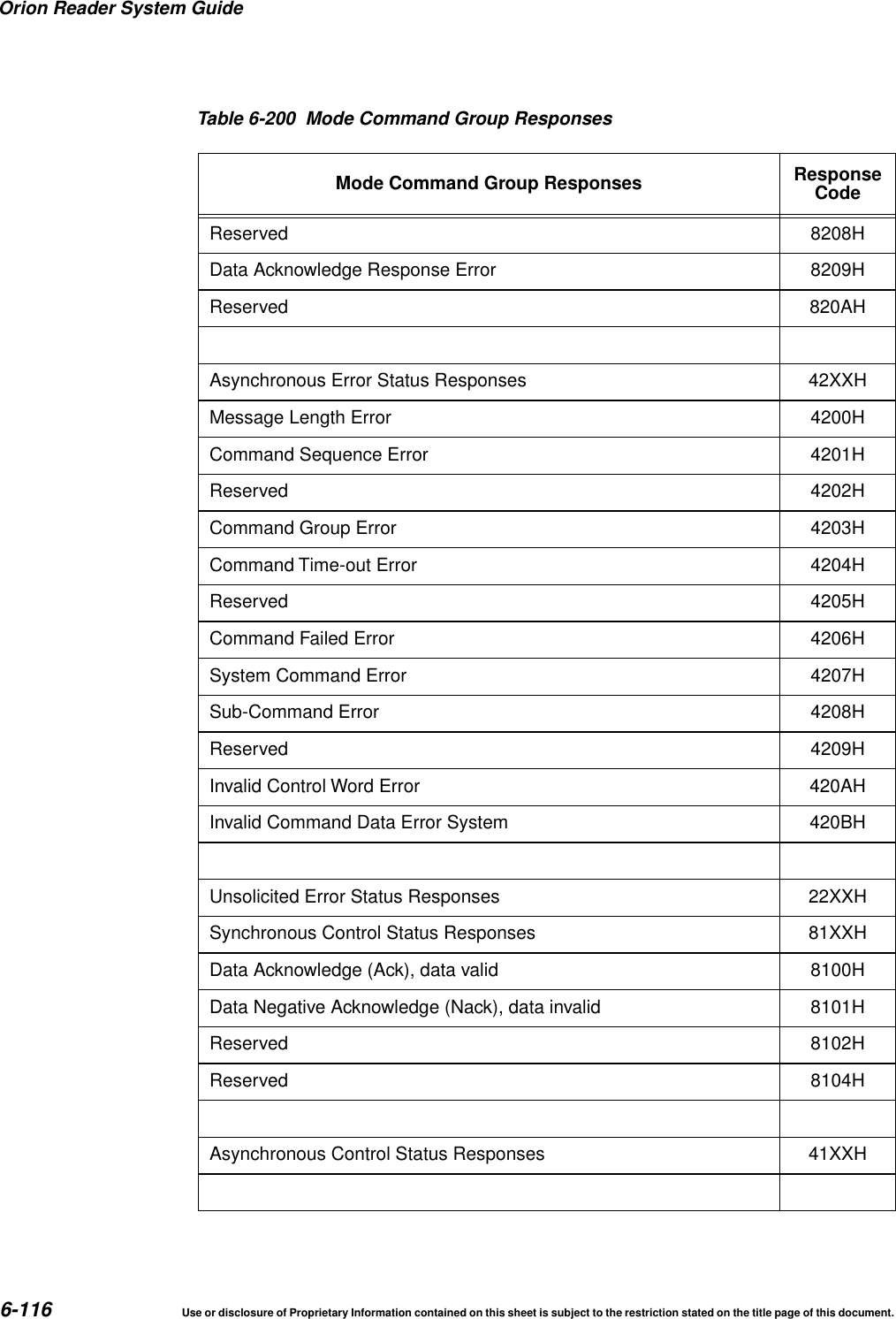
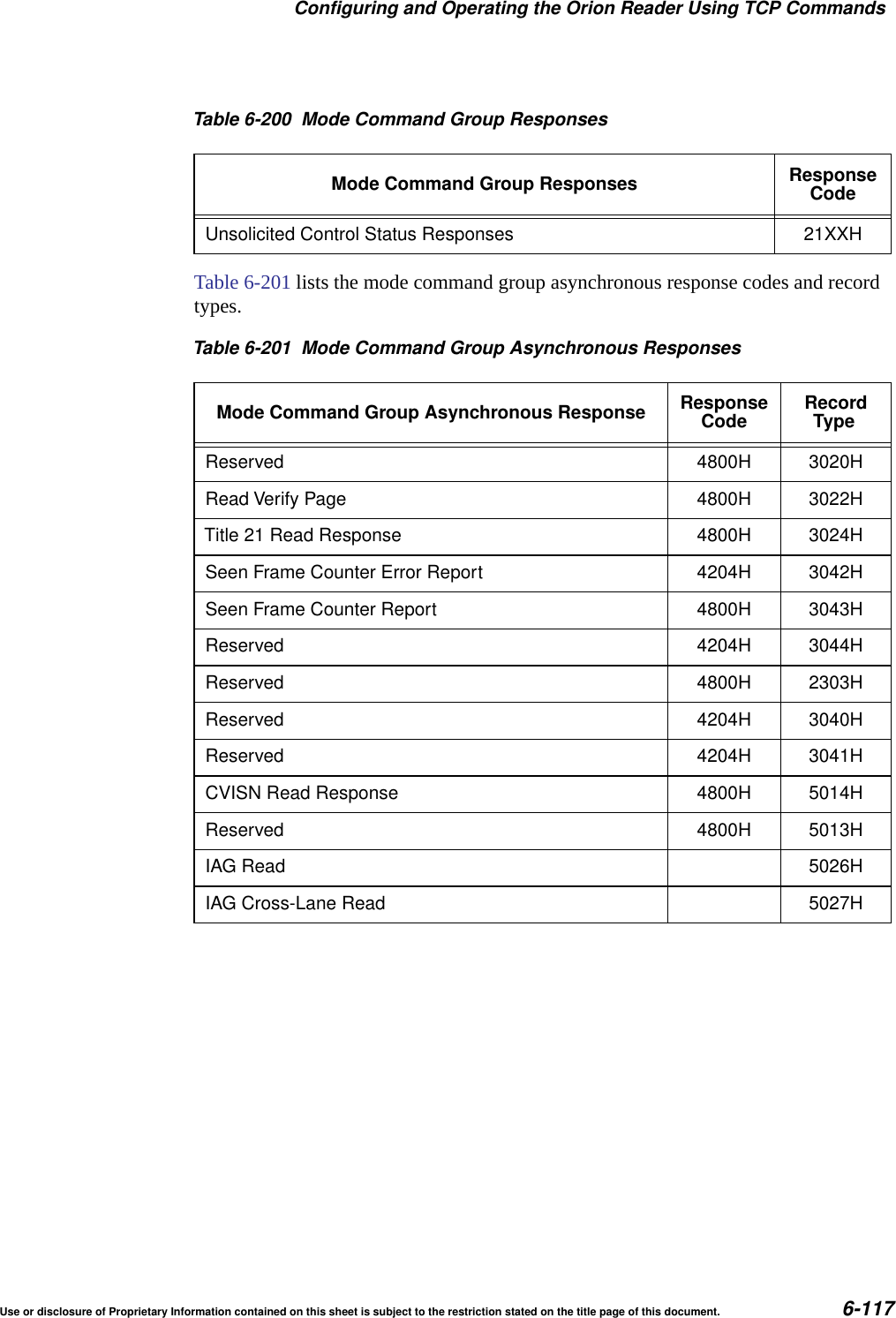
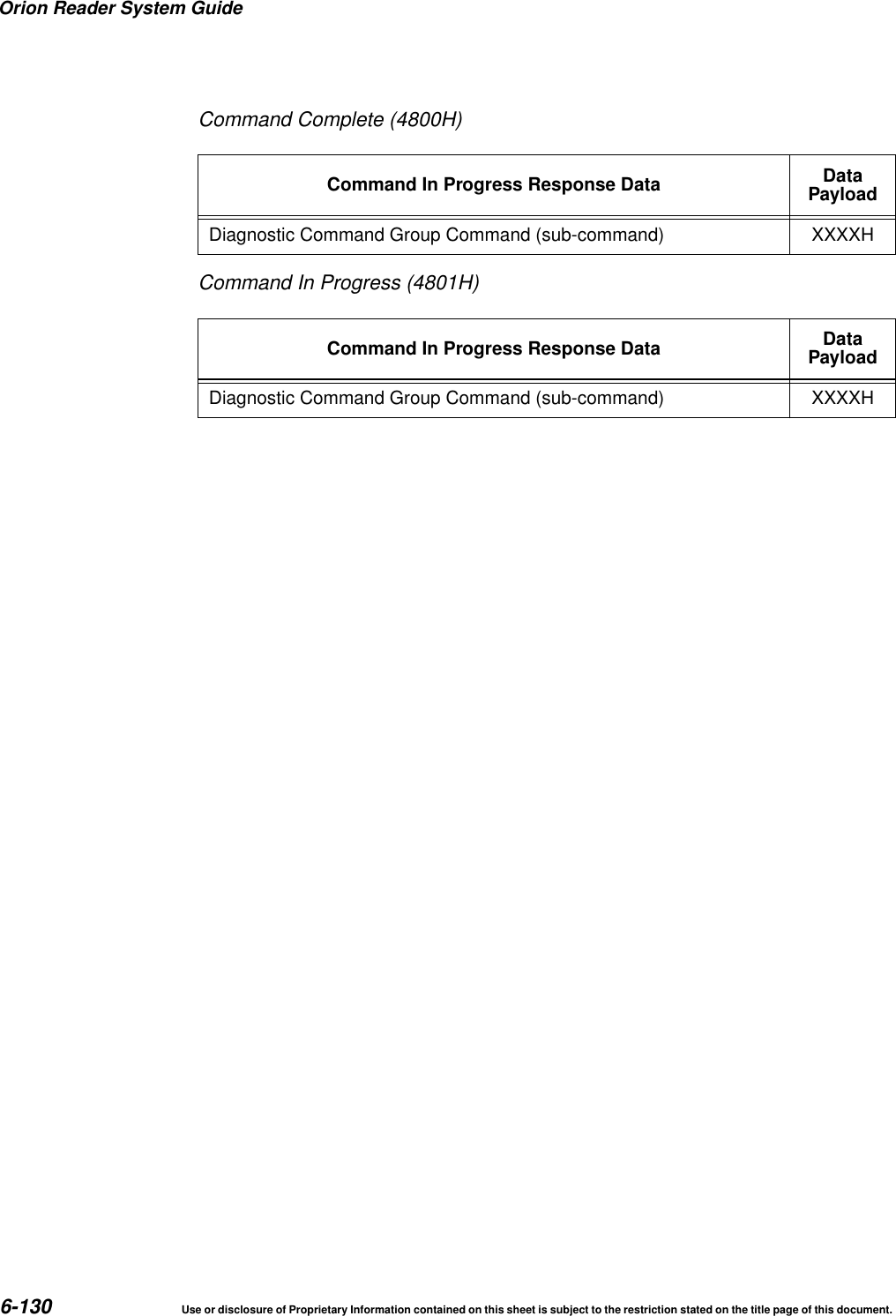
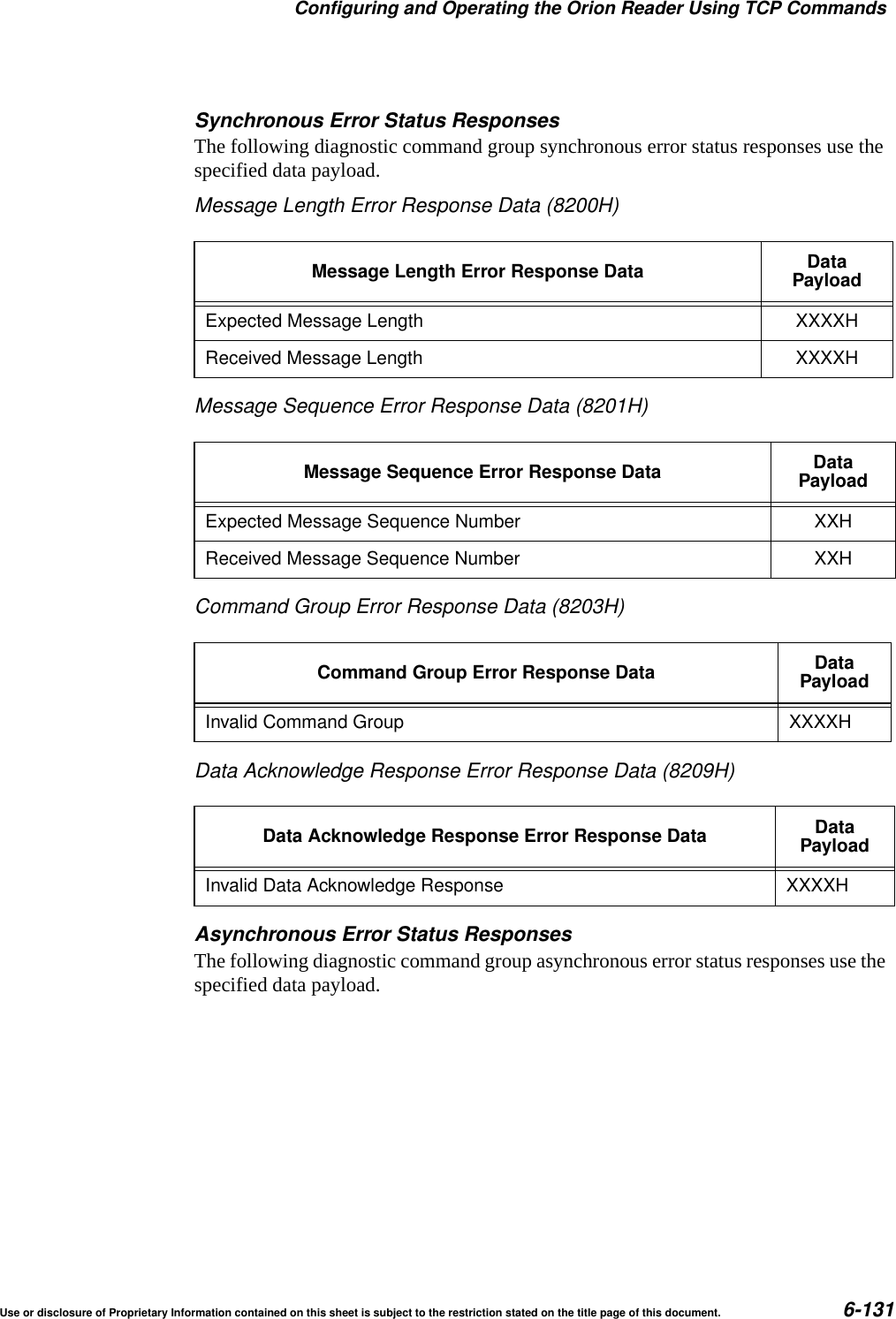
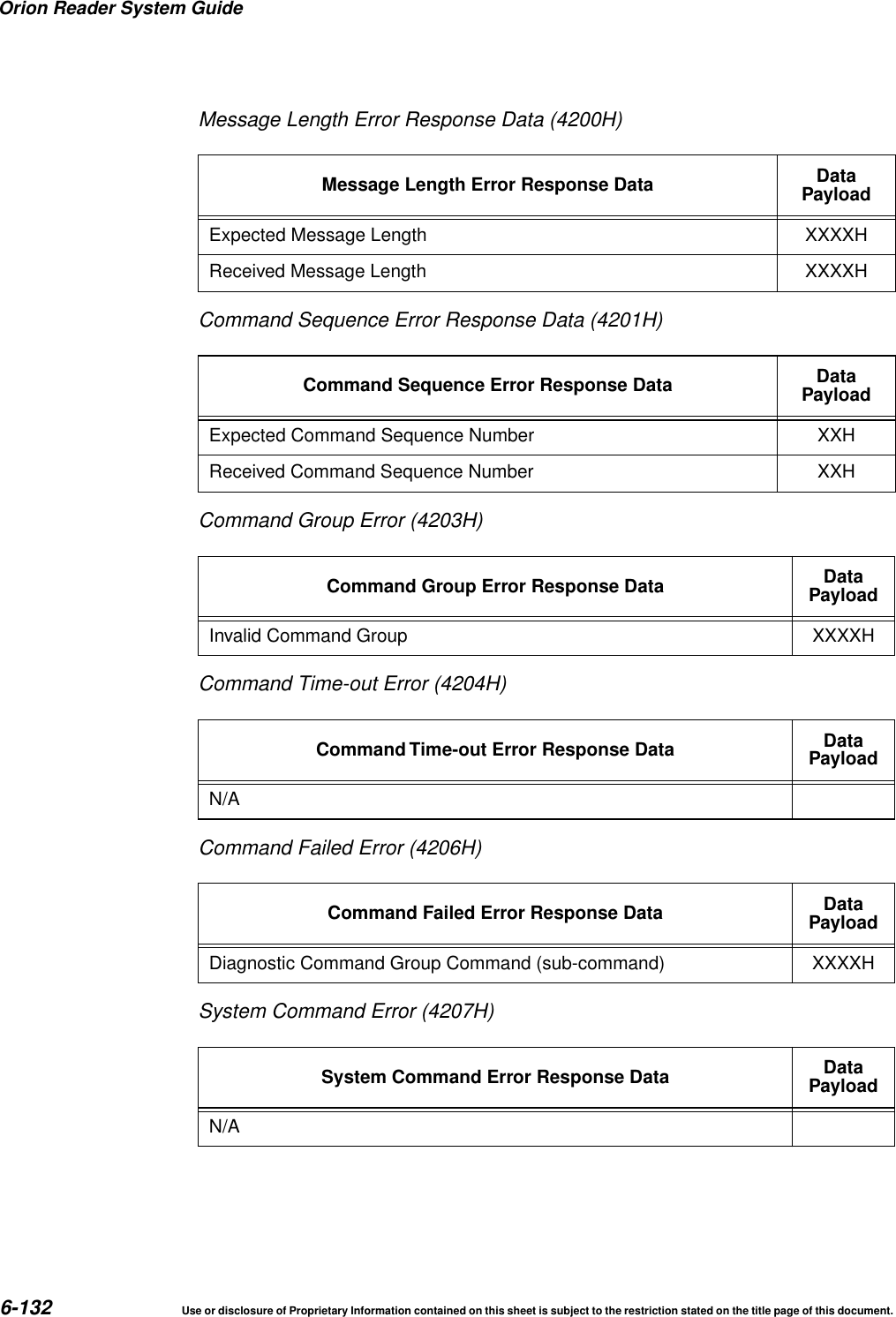
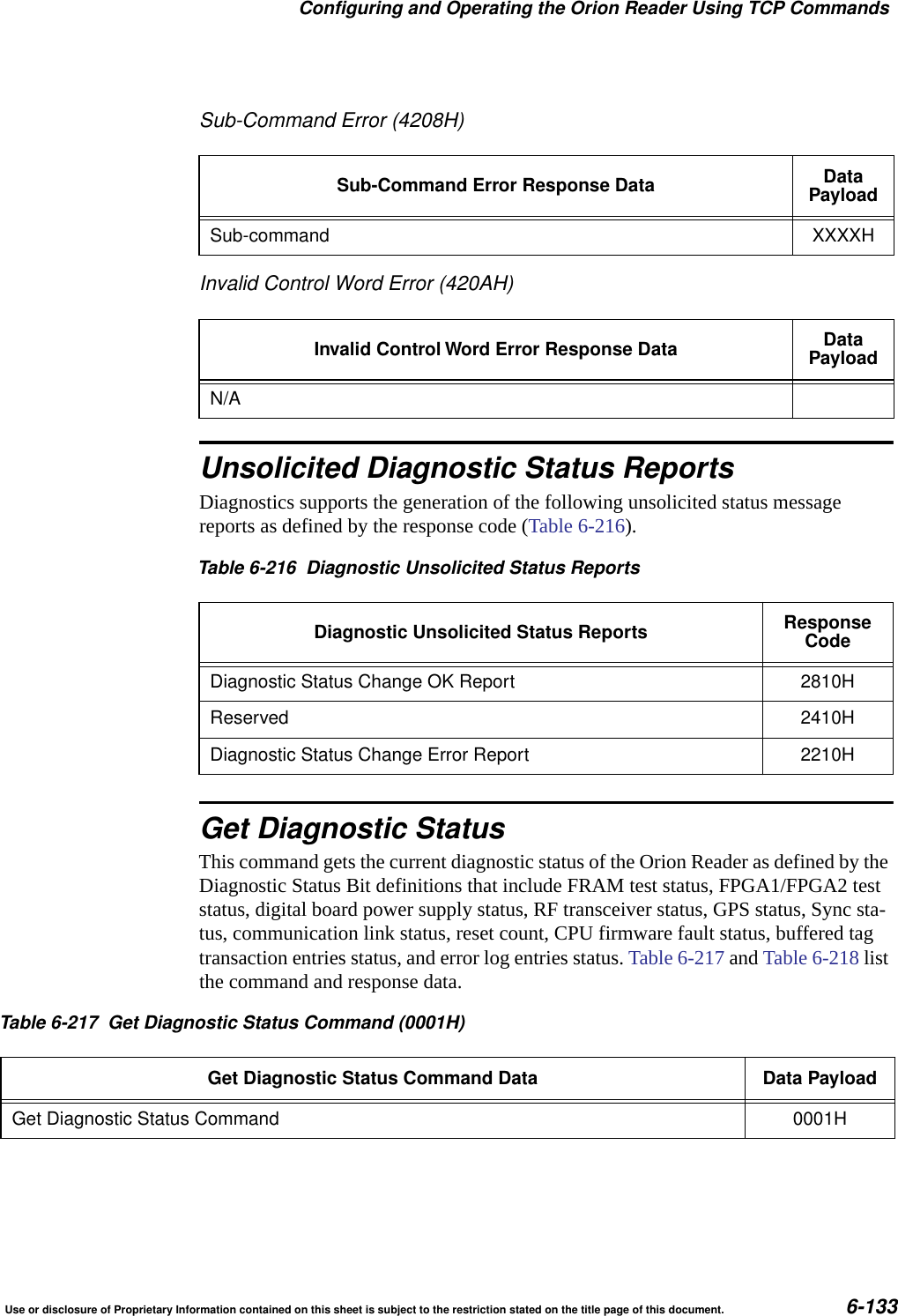
Orion Reader System Guide2Use or disclosure of Proprietary Information contained on this sheet is subject to the restriction stated on the title page of this document.Resetting the Orion Reader.......................................... 3-14Software Information ................................................. 4-3TCP Command and Response Conventions.............................. 4-3Lane Controller Heartbeat Controls .................................. 4-4Sequence Number Controls ........................................ 4-4Data Acknowledge Controls ........................................ 4-7Use of Data Acknowledge Controls by Host and Orion Reader .......... 4-8Communication Between Orion Reader and Host ......................... 5-3TCP/IP Fast Ethernet Connection ...................................... 5-3TCP/IP Fast Ethernet Communications Protocol .......................... 5-4Command Request Message ....................................... 5-4Data Acknowledge Message ....................................... 5-5Command Response Message ..................................... 5-5Asynchronous Response Message .................................. 5-5Unsolicited Status Message ........................................ 5-5Chapter Organization................................................. 6-3Operating the Orion Reader in Mode 88 ................................. 6-4Working with Mode 88............................................... 6-4System Commands .................................................. 6-6Command Group Bit Fields ........................................ 6-9Unsolicited Status Bit Field......................................... 6-9Data Acknowledge Bit Field ........................................ 6-9Responses to System Commands ..................................... 6-10Responses and Codes for System Commands........................... 6-10Synchronous Response Bit Field ................................... 6-11Asynchronous Response Bit Field .................................. 6-11Unsolicited Response Bit Field..................................... 6-11OK Status Bit Field .............................................. 6-12Error Status Bit Field............................................. 6-12Control Status Bit Field........................................... 6-12Command Group Command Response Bit Fields ...................... 6-12System Interface Command Group Commands (8000H) ................... 6-13System Interface Command Group Responses .......................... 6-14System Interface Command Group Response Data .................... 6-16Asynchronous OK Status Responses ............................. 6-16Synchronous Error Status Responses............................. 6-17Asynchronous Error Status Responses ............................ 6-18System Interface Command Group Unsolicited Status Messages ............ 6-20System Identify ................................................... 6-21Set Time and Date ................................................ 6-22Get Time and Date ................................................ 6-23
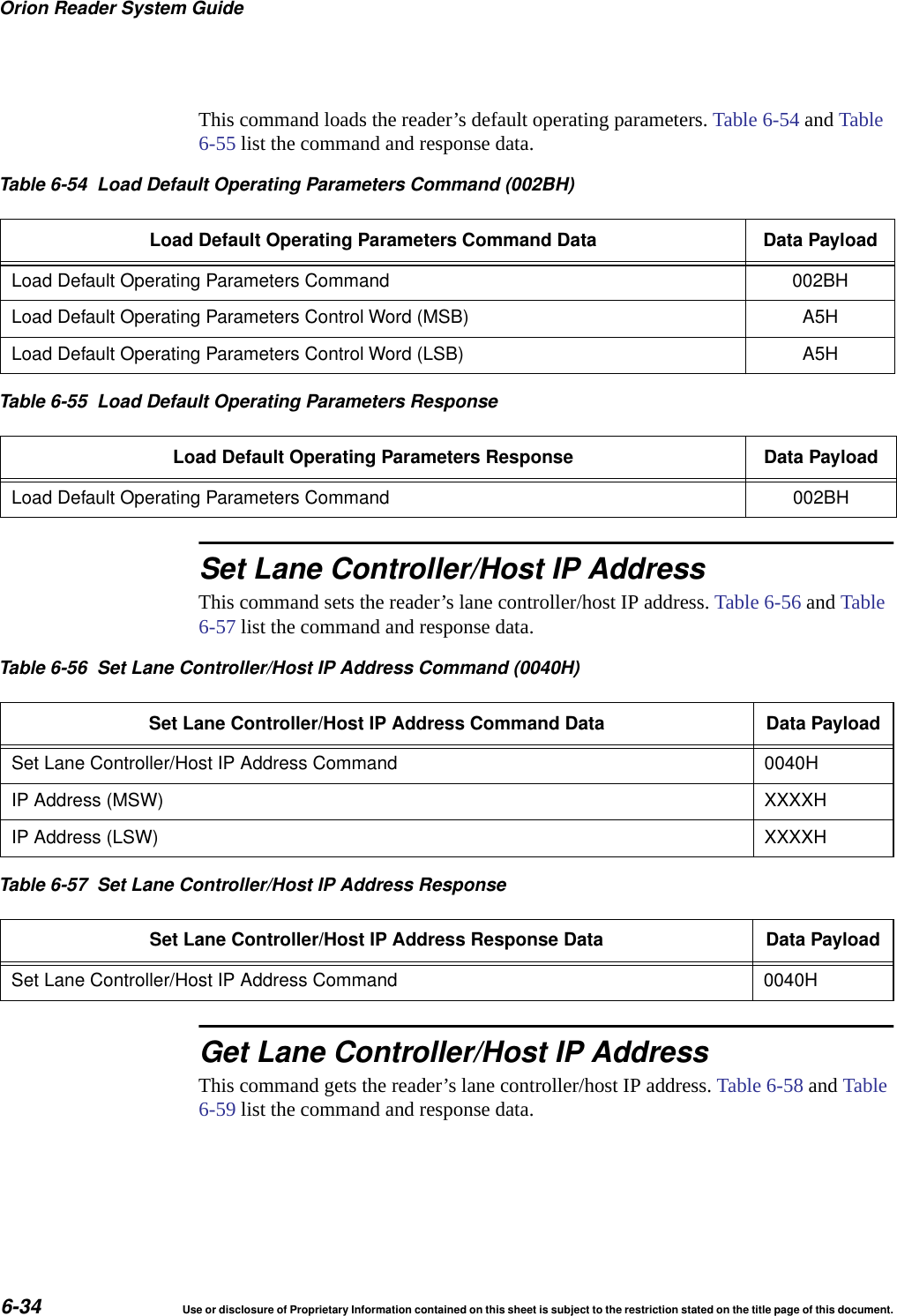
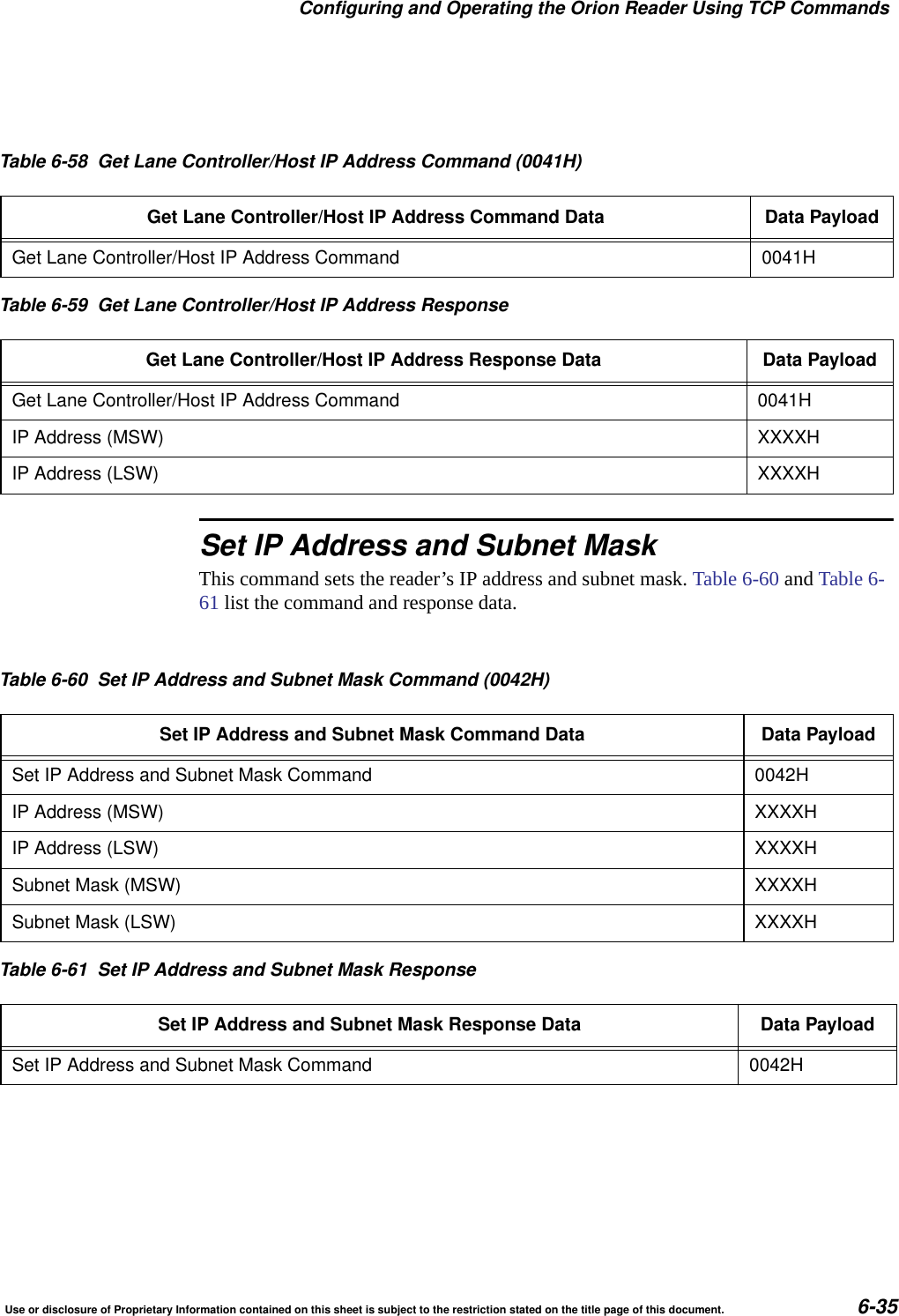
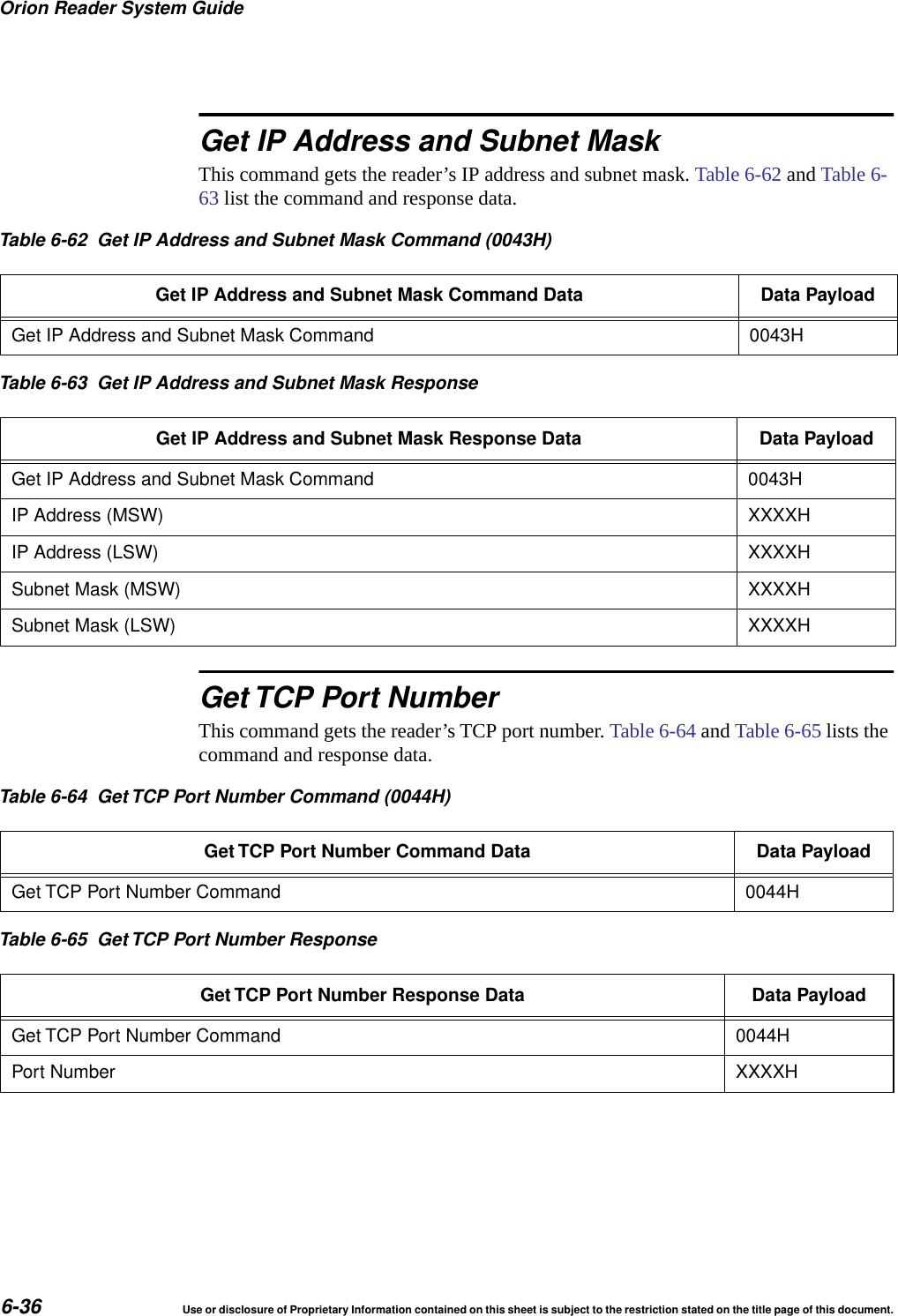
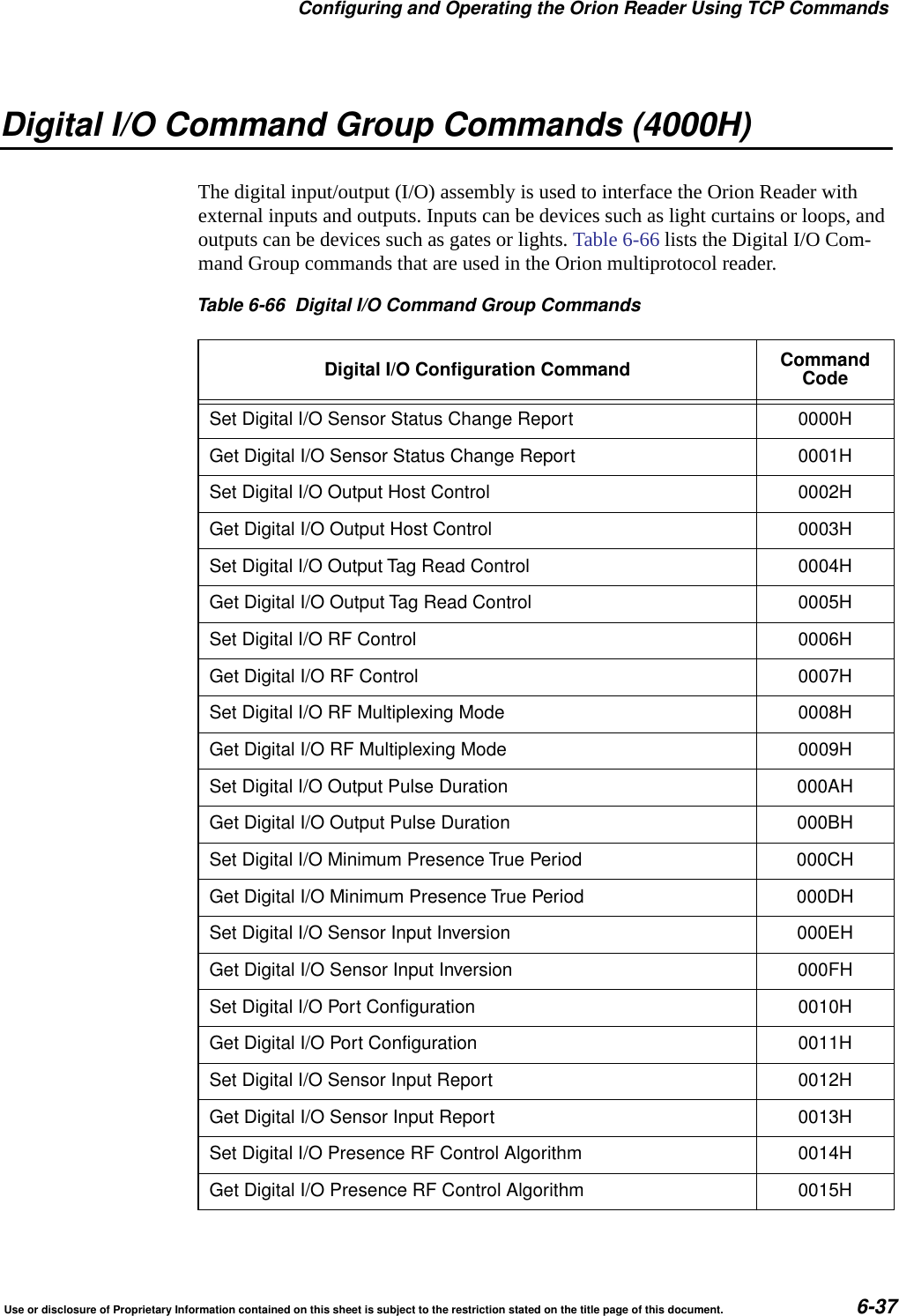
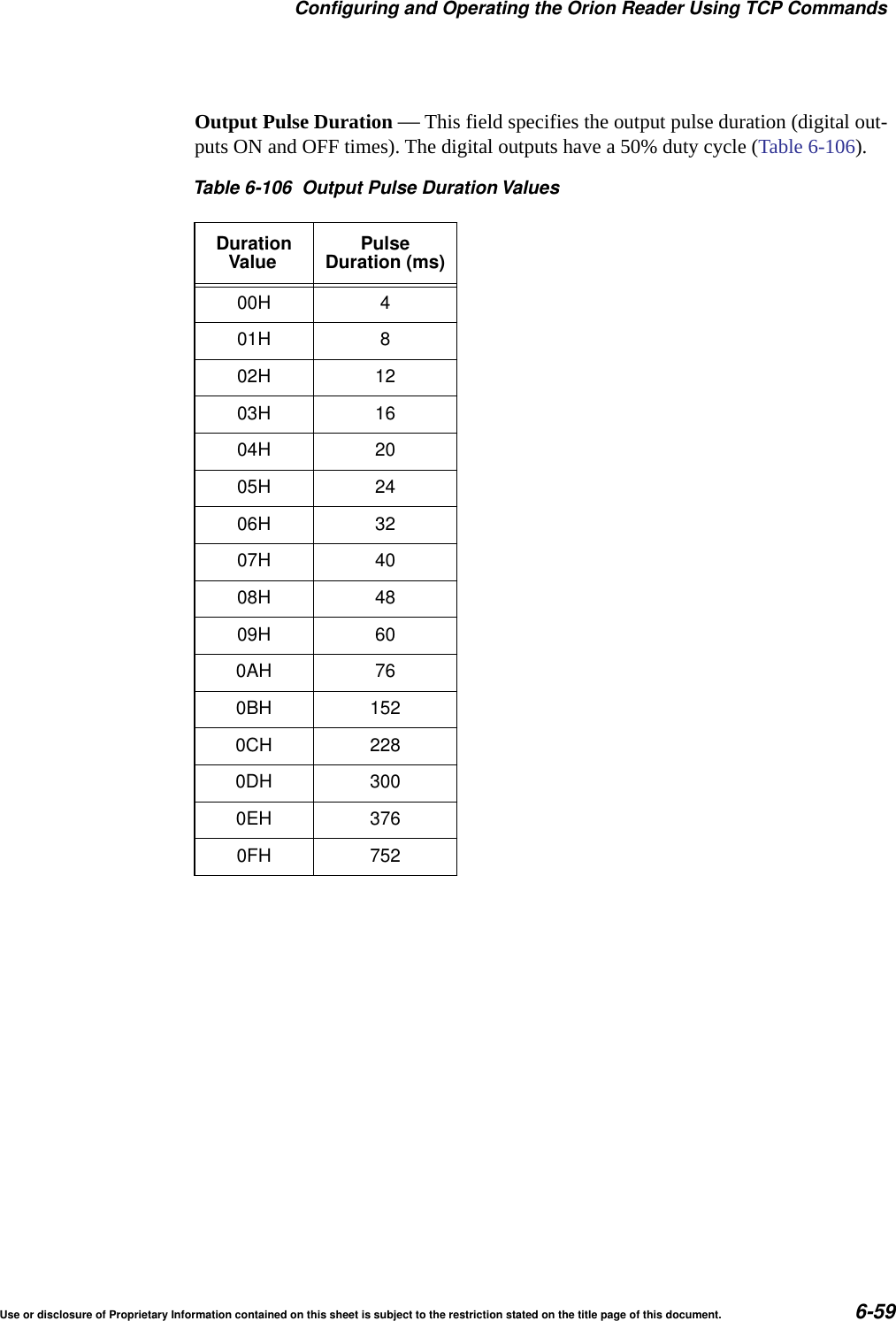
Use or disclosure of Proprietary Information contained on this sheet is subject to the restriction stated on the title page of this document. 3CPU App Firmware Download........................................ 6-23Reset Reader .................................................... 6-24Get Buffered Tag Transaction ........................................ 6-24Get Number of Buffered Tag Transactions .............................. 6-25Delete All Buffered Tag Transactions .................................. 6-26Get System Startup Status .......................................... 6-26Get Lane Controller Interface Status................................... 6-27Get System Interface Status ......................................... 6-27Set Buffered Tag Transaction Mode ................................... 6-27Get Buffered Tag Transaction Mode ................................... 6-28Set Data Acknowledge Time-out Period ................................ 6-28Communication Protocols......................................... 6-29Get Data Acknowledge Time-out Period ................................ 6-29Set Switch Buffered Tag Transaction Mode Enable ....................... 6-30Get Switch Buffered Tag Transaction Mode Enable ....................... 6-30FPGA Firmware Download .......................................... 6-32CPU Boot Firmware Download ....................................... 6-32Get System Serial Number .......................................... 6-32Get Firmware Version Numbers ...................................... 6-33Load Default Operating Parameters ................................... 6-33Set Lane Controller/Host IP Address................................... 6-34Get Lane Controller/Host IP Address .................................. 6-34Set IP Address and Subnet Mask ..................................... 6-35Get IP Address and Subnet Mask ..................................... 6-36Get TCP Port Number .............................................. 6-36Digital I/O Command Group Commands (4000H) ......................... 6-37Digital I/O Command Group Responses ................................ 6-38Digital I/O Command Group Response Data .......................... 6-40Asynchronous OK Status Responses ............................. 6-40Synchronous Error Status Responses............................. 6-40Asynchronous Error Status Responses ............................ 6-41Digital I/O Asynchronous Reports ..................................... 6-43Sensor Status Change Report ..................................... 6-43Sensor Input Report ............................................. 6-45Set Digital I/O Sensor Status Change Report ............................ 6-46Get Digital I/O Sensor Status Change Report............................ 6-47Set Digital I/O Output Host Control .................................... 6-48Get Digital I/O Output Host Control .................................... 6-51Set Digital I/O Output Tag Read Control ................................ 6-52Get Digital I/O Output Tag Read Control................................ 6-52Set Digital I/O RF Control ........................................... 6-53Get Digital I/O RF Control ........................................... 6-55Set Digital I/O RF Multiplexing Mode................................... 6-55Get Digital I/O RF Multiplexing Mode .................................. 6-56Set Digital I/O Output Pulse Duration .................................. 6-57Get Digital I/O Output Pulse Duration .................................. 6-58Set Digital I/O Minimum Presence True Period........................... 6-60
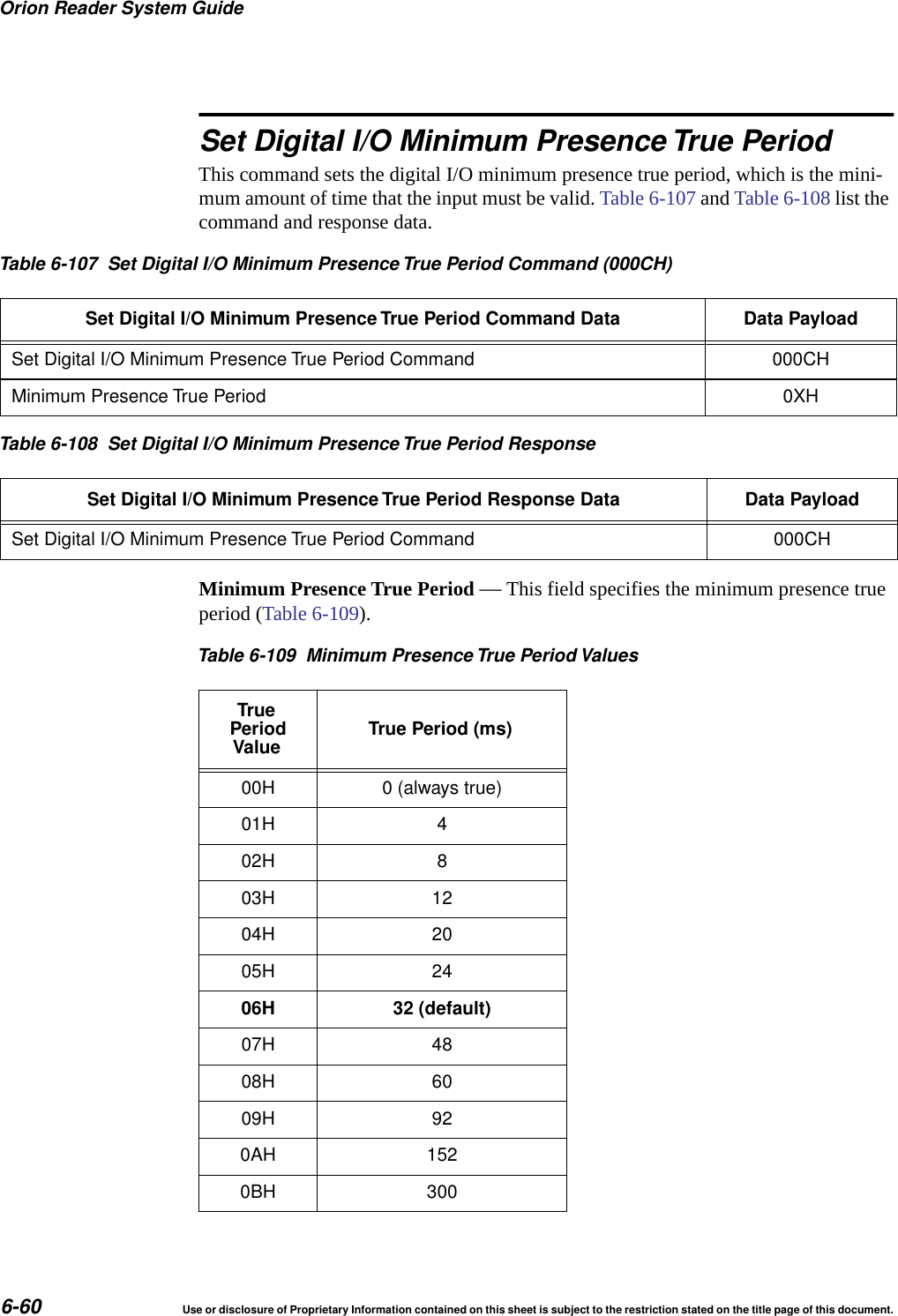
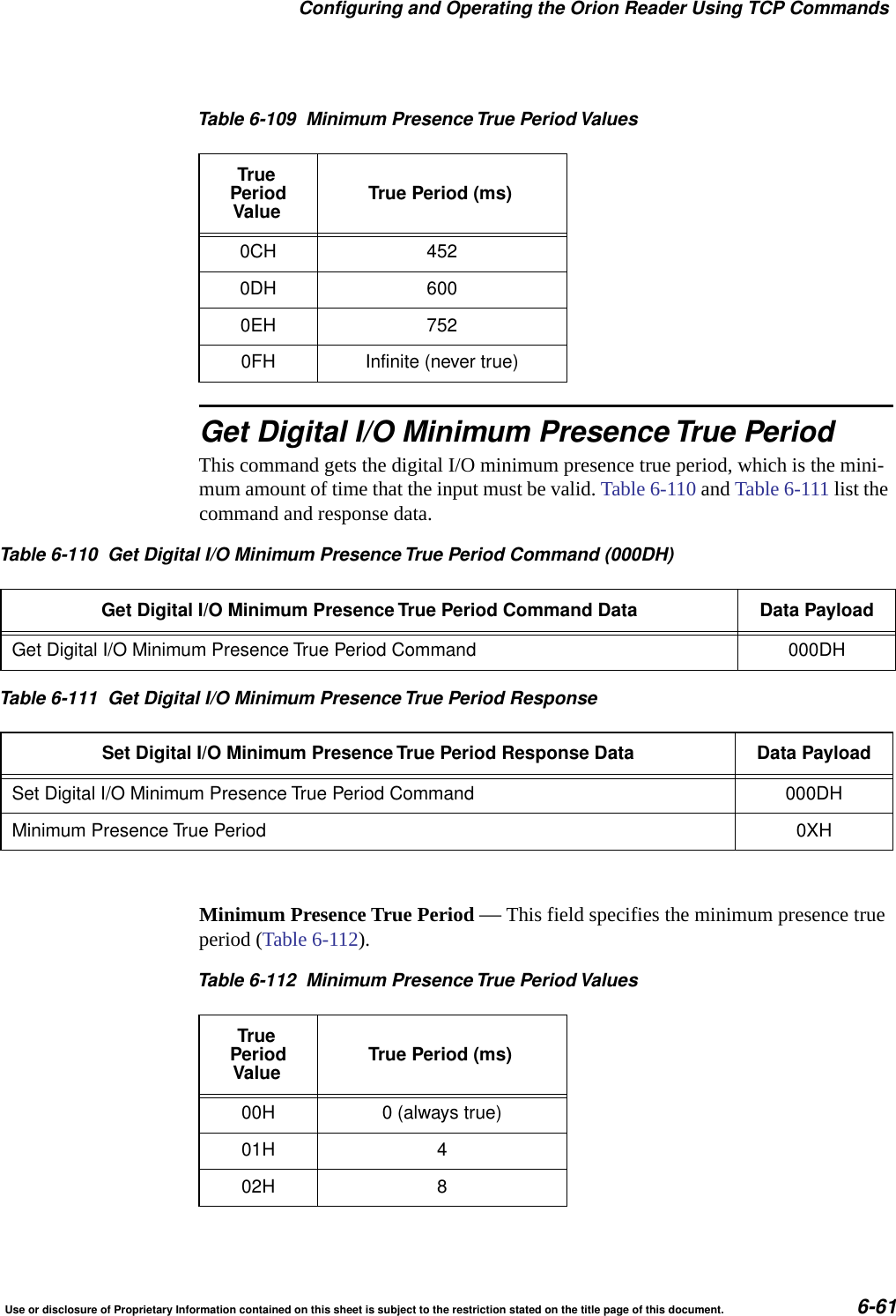
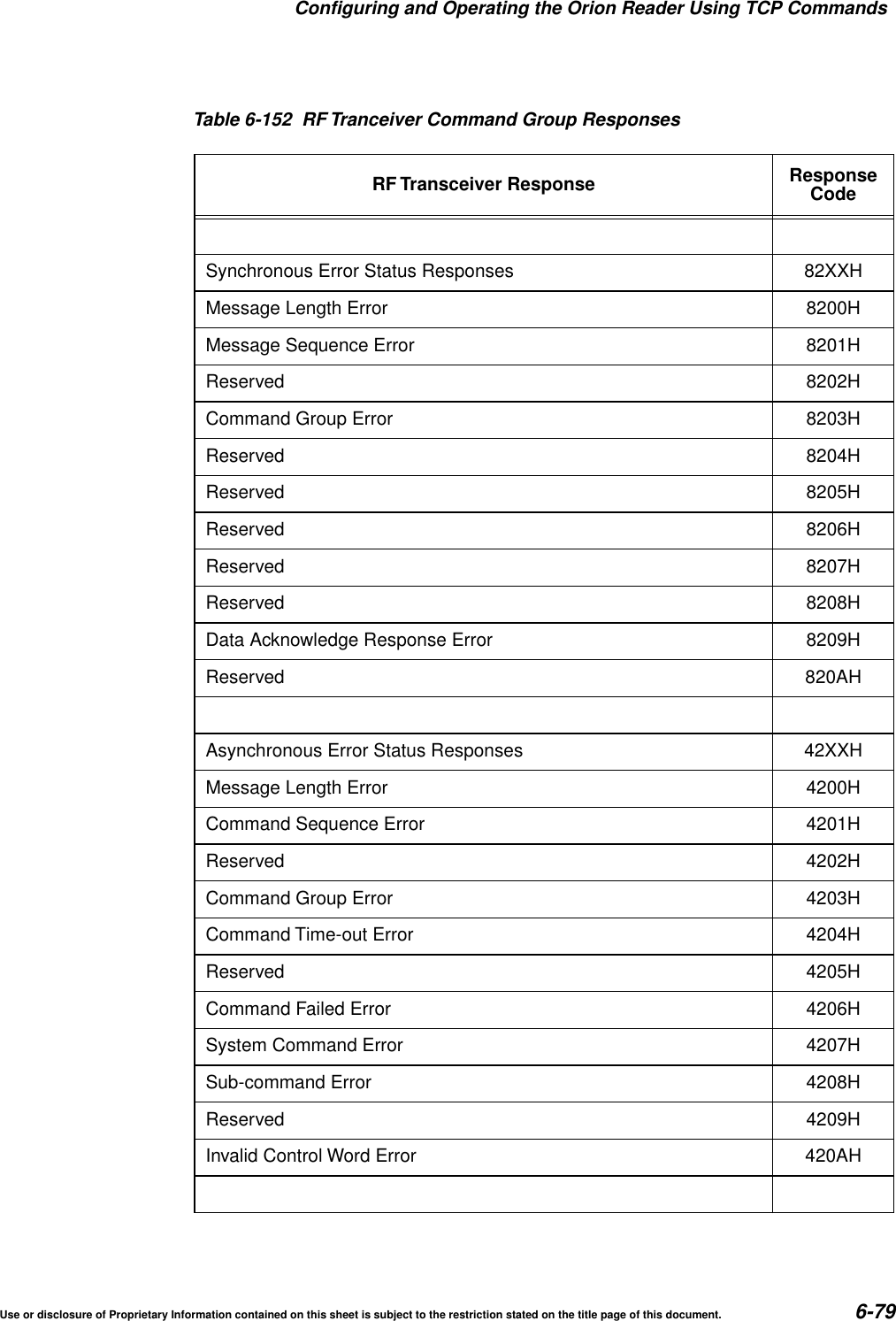
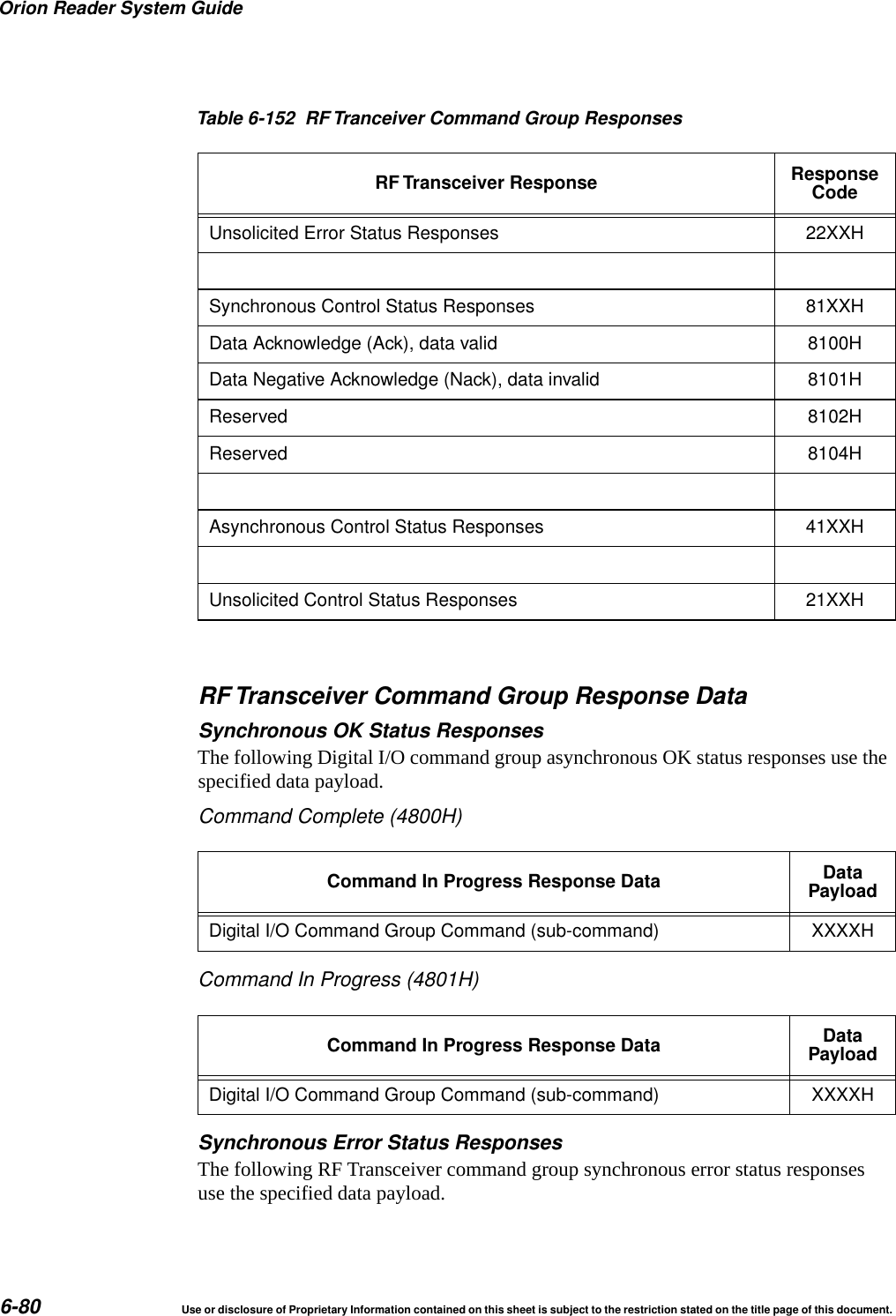
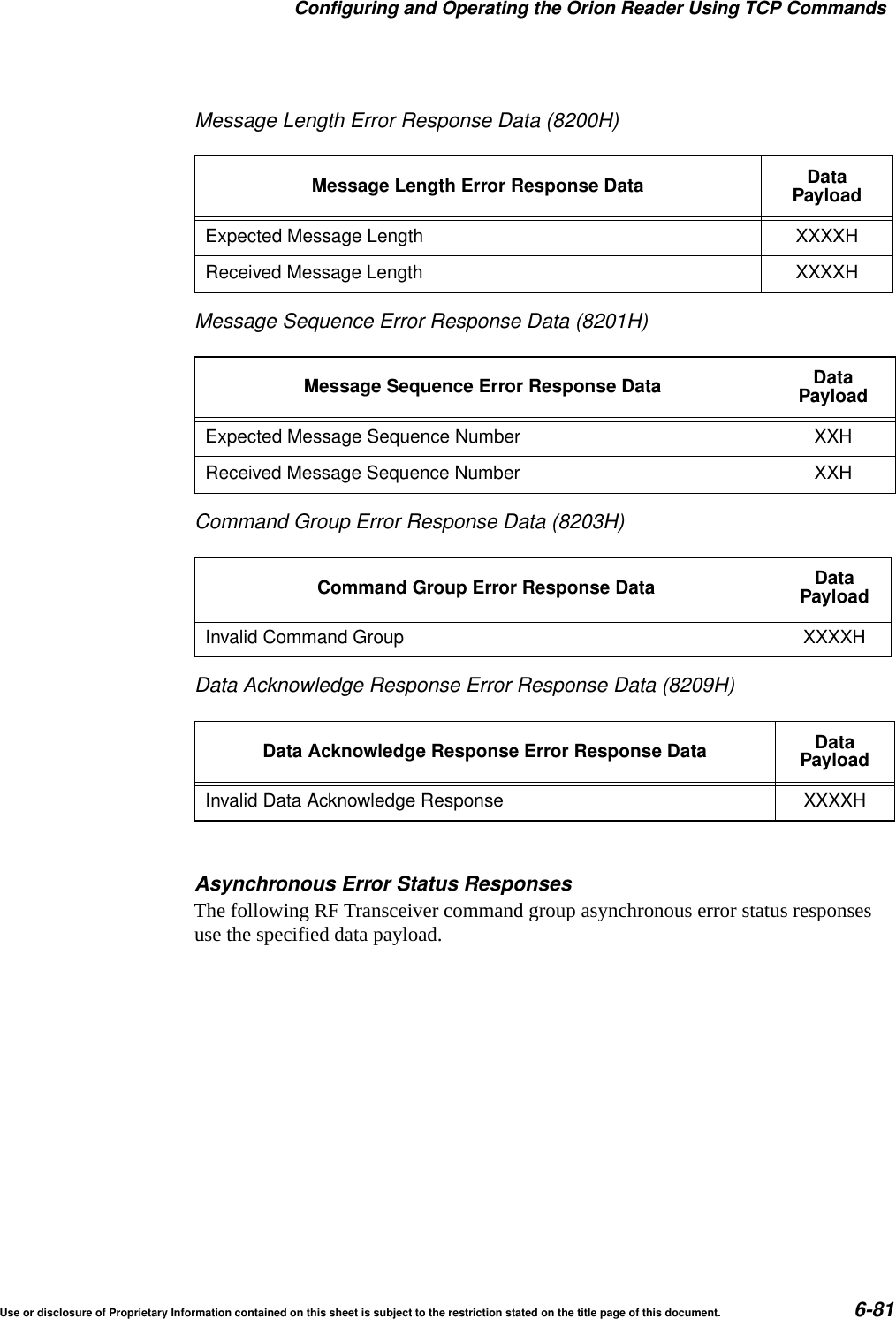
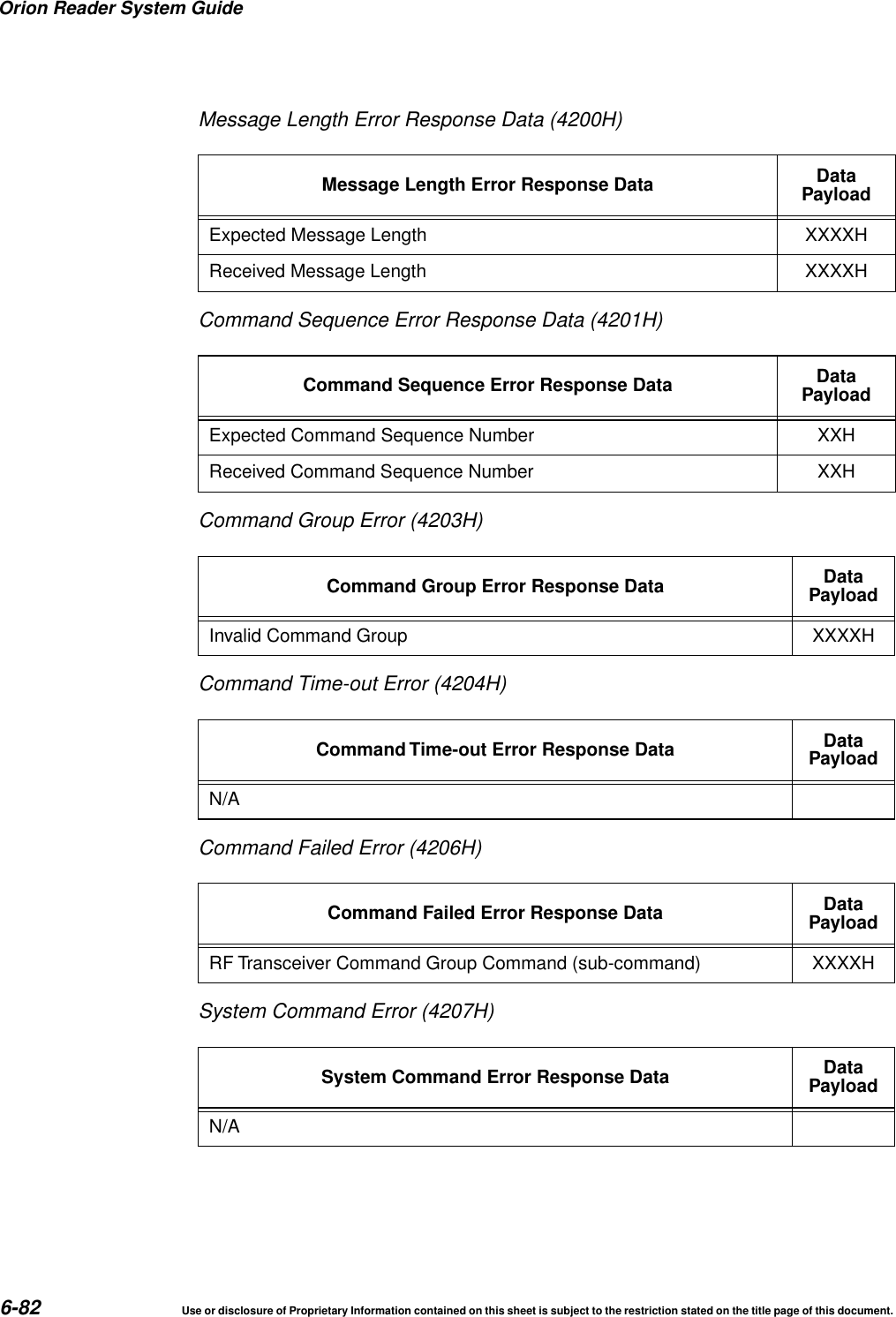
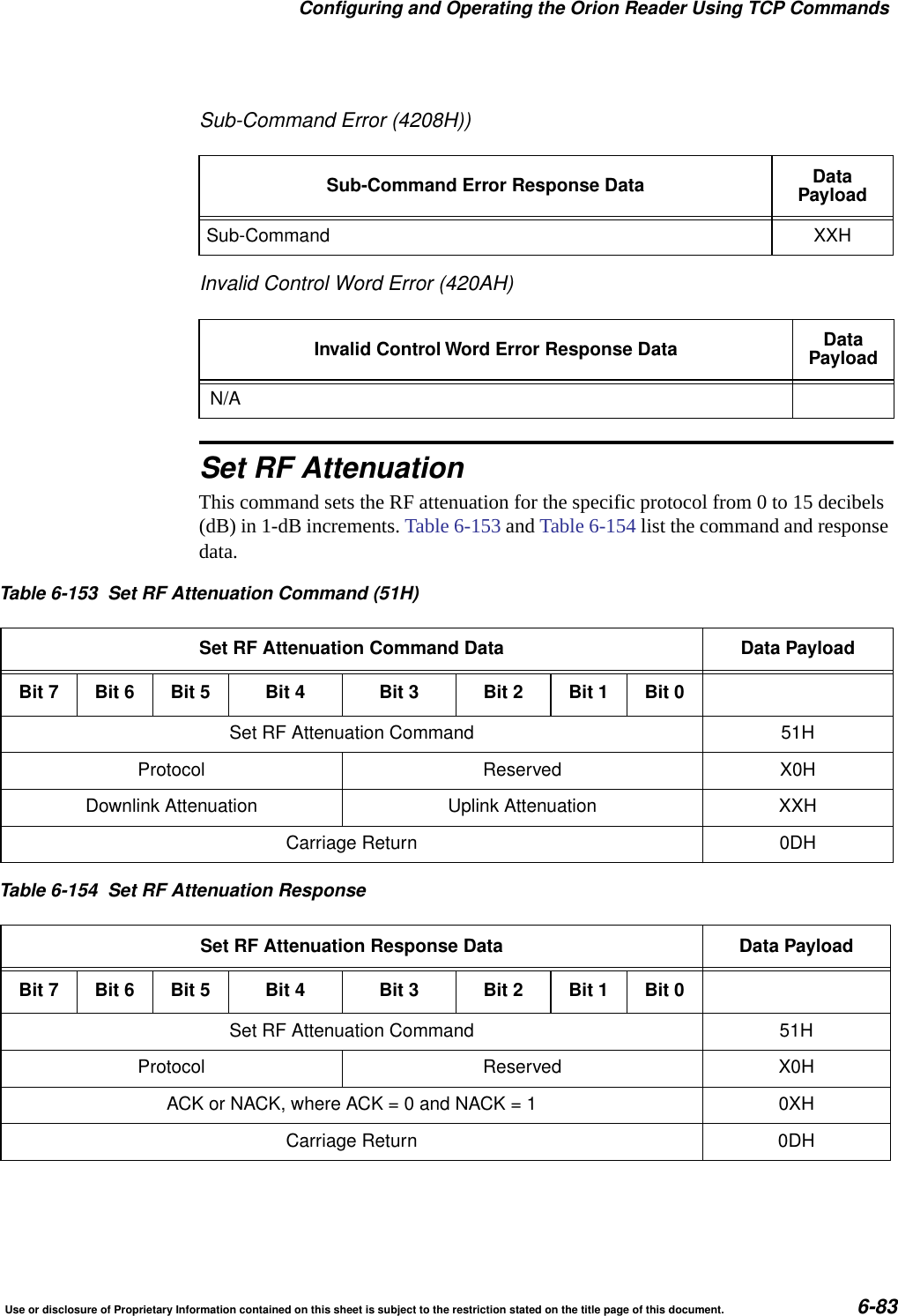
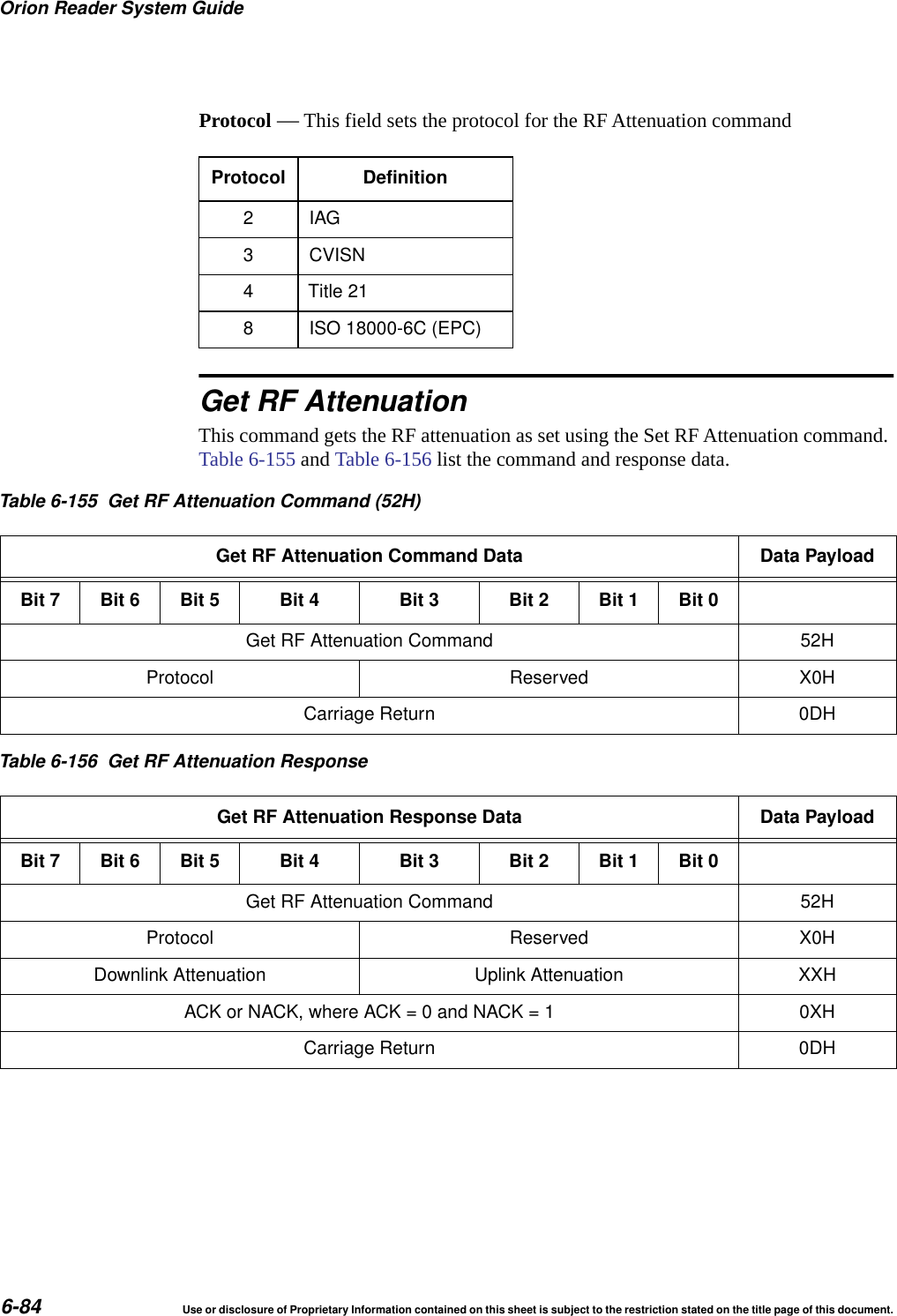
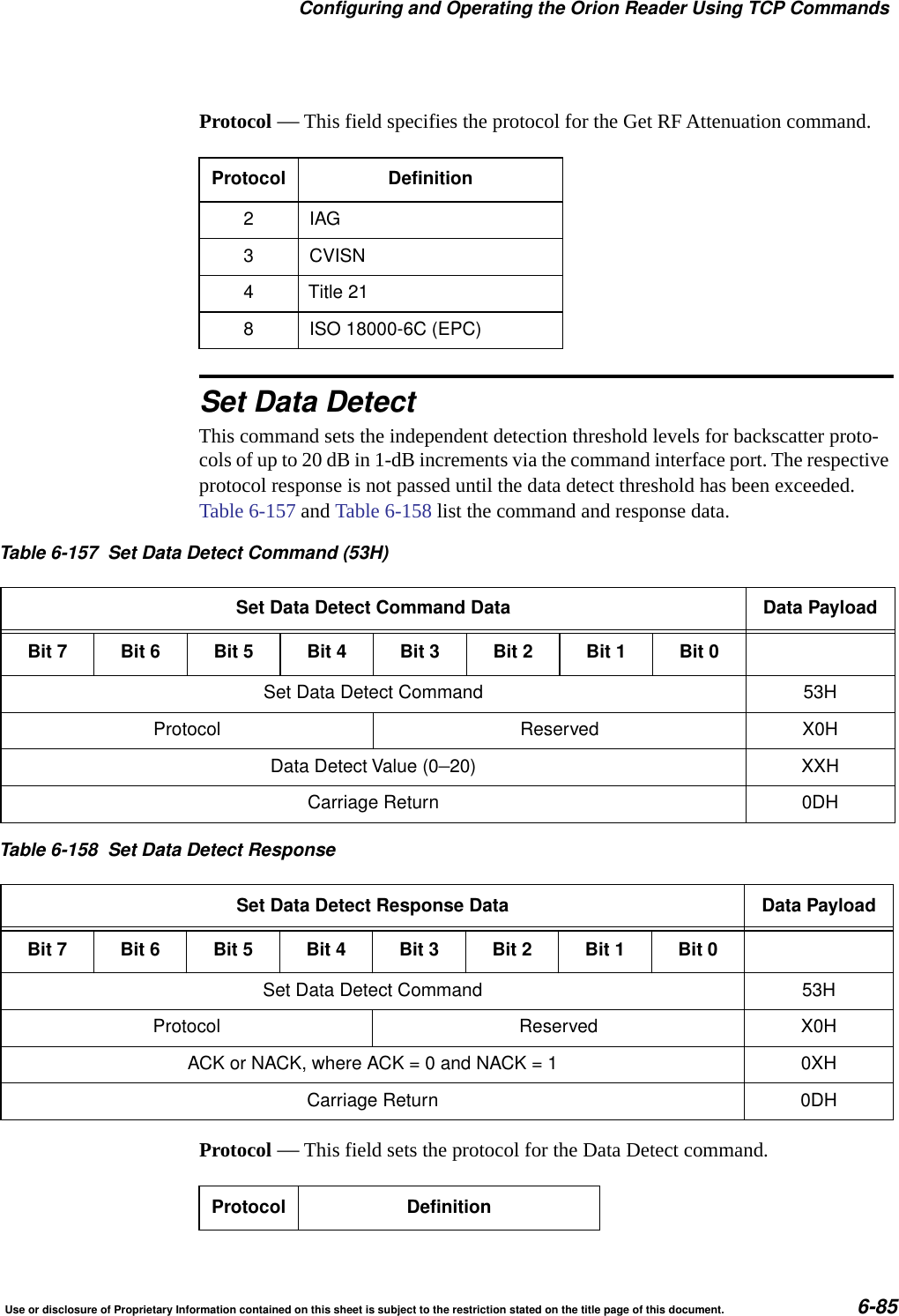
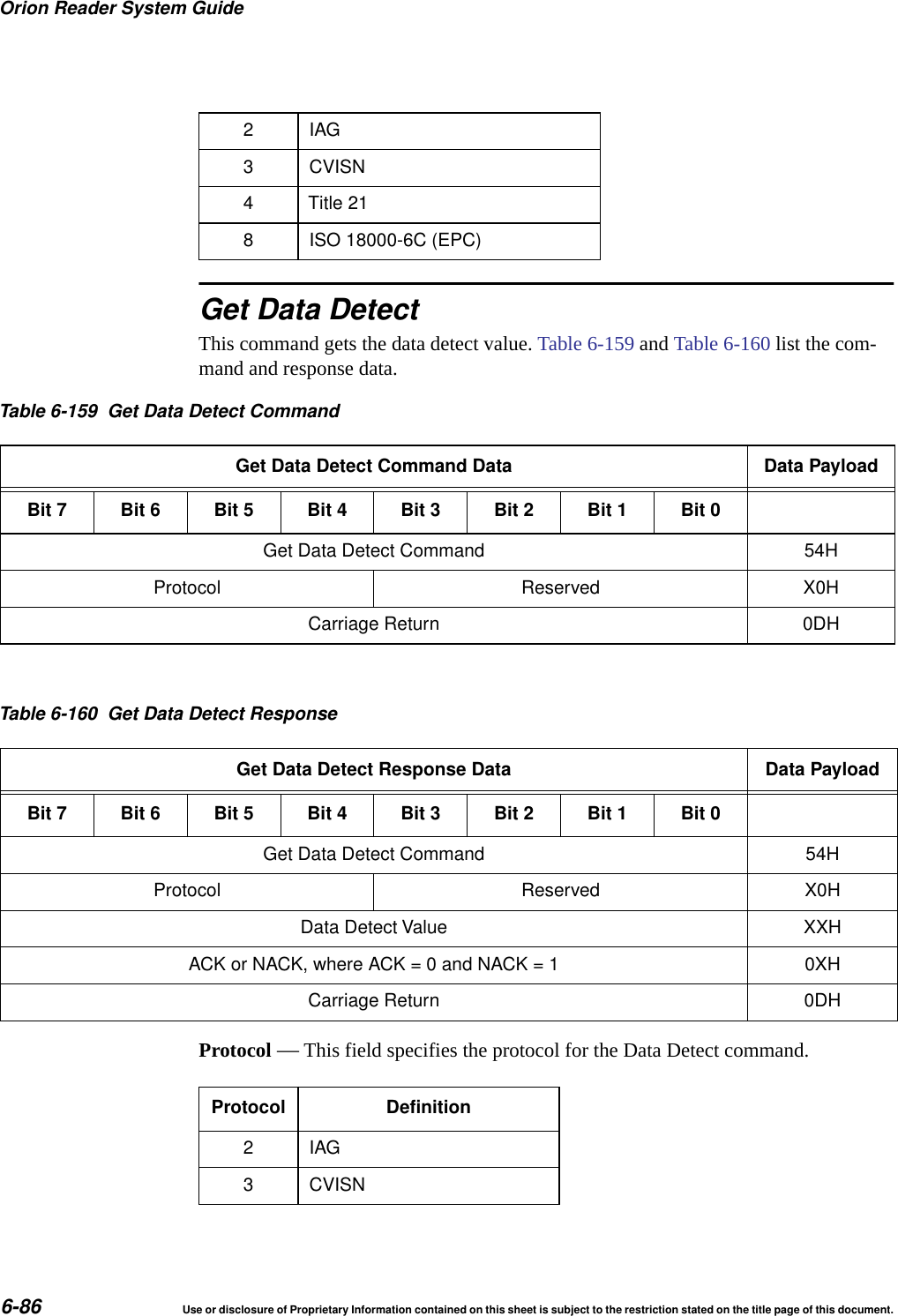
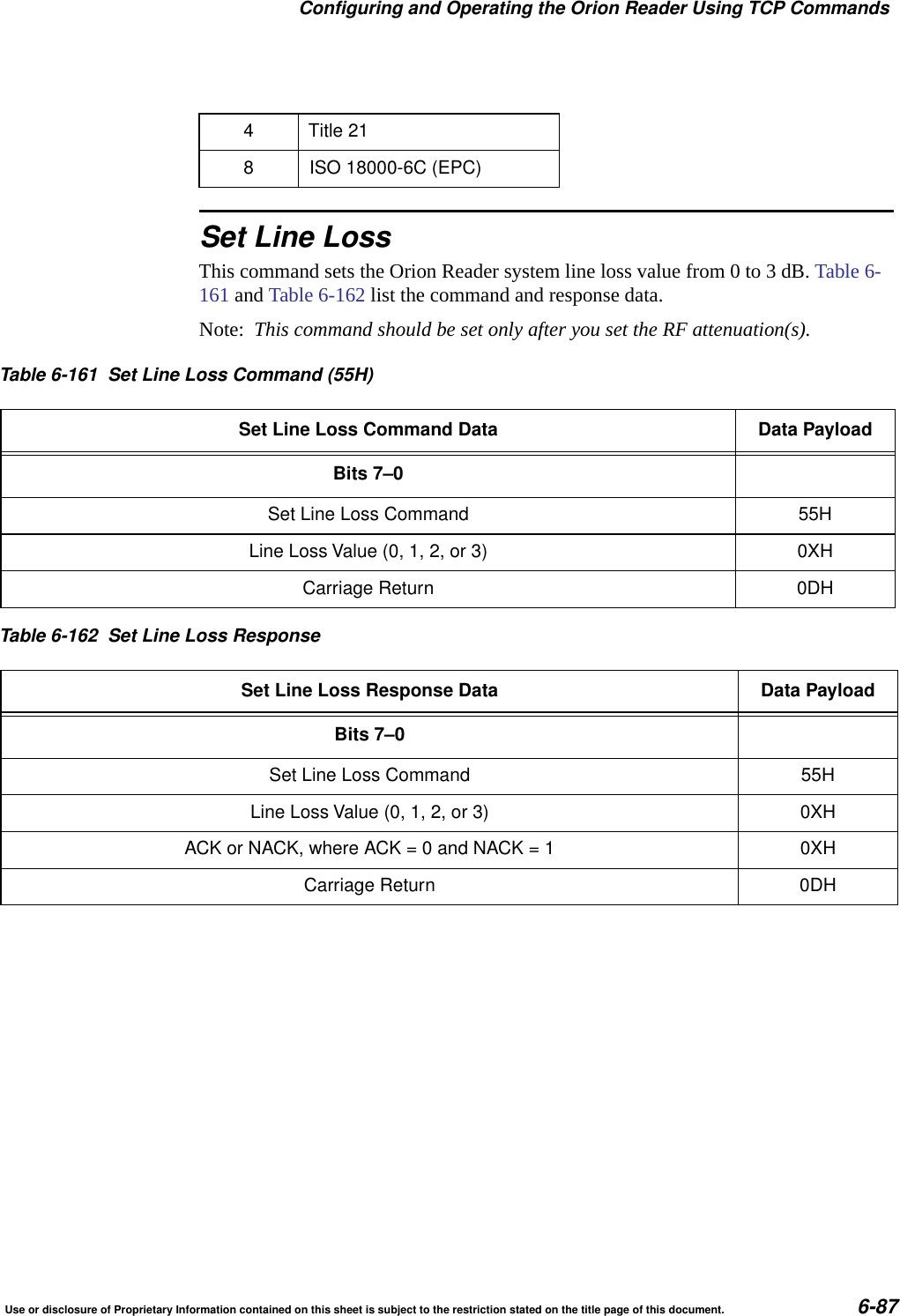
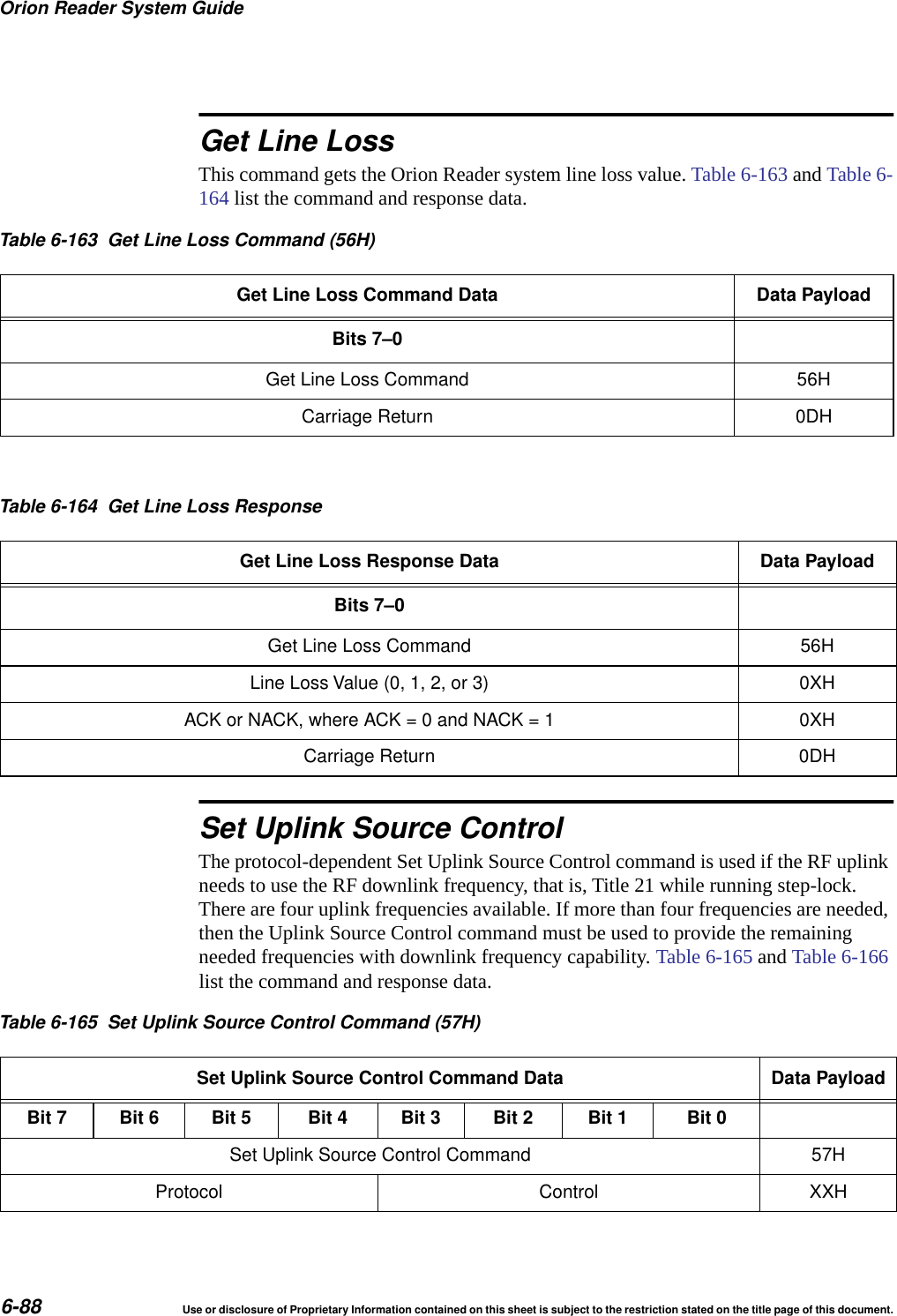
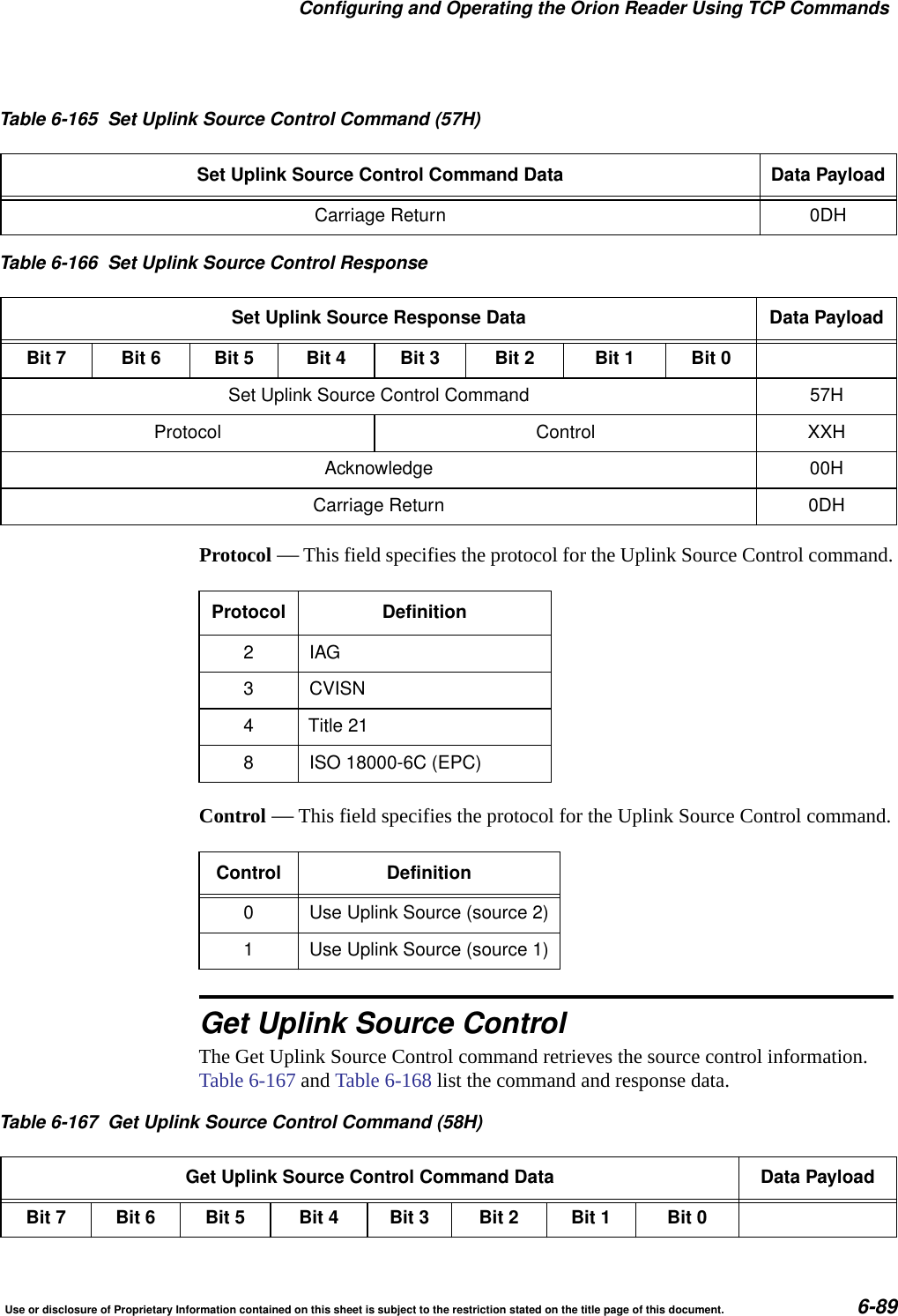
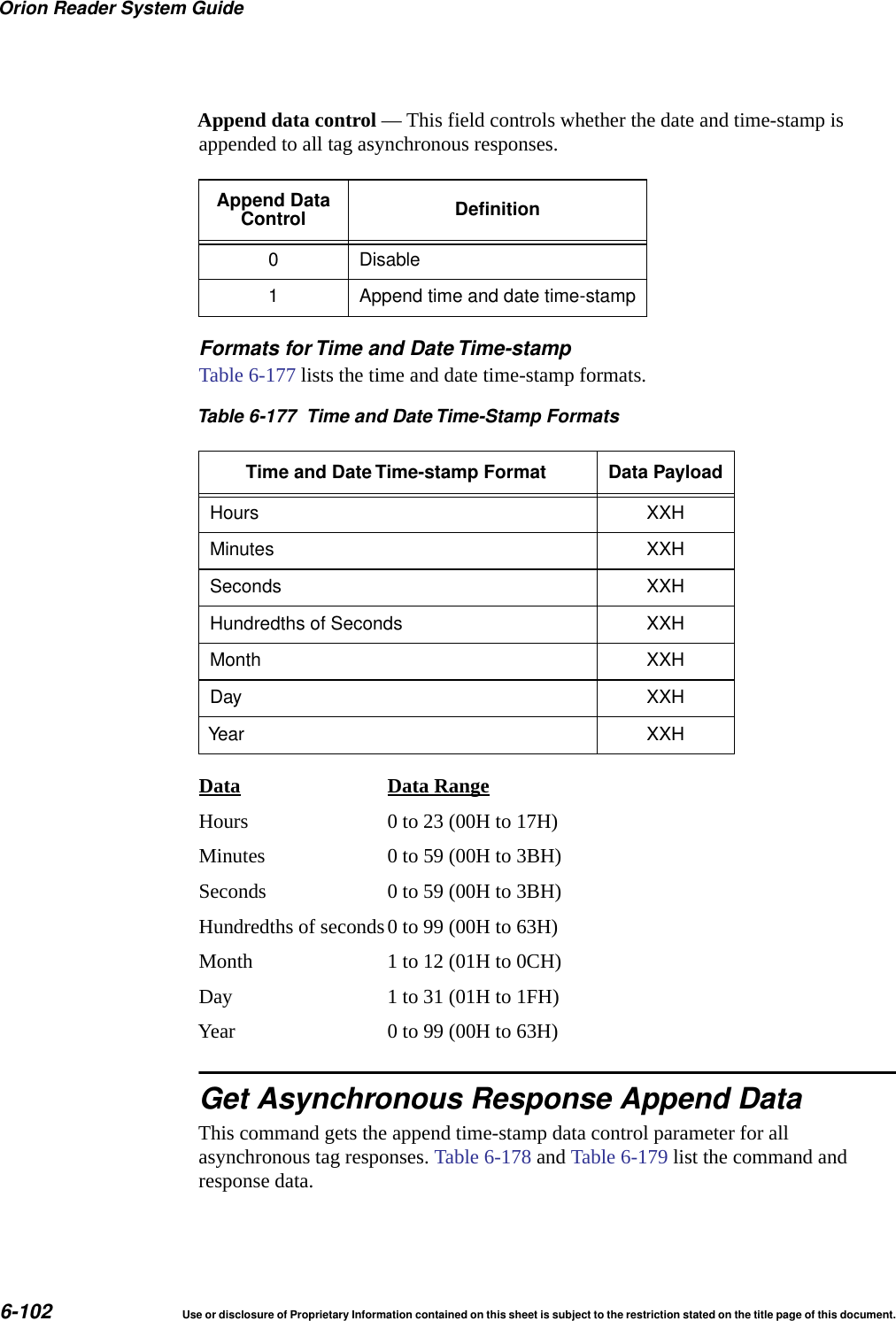
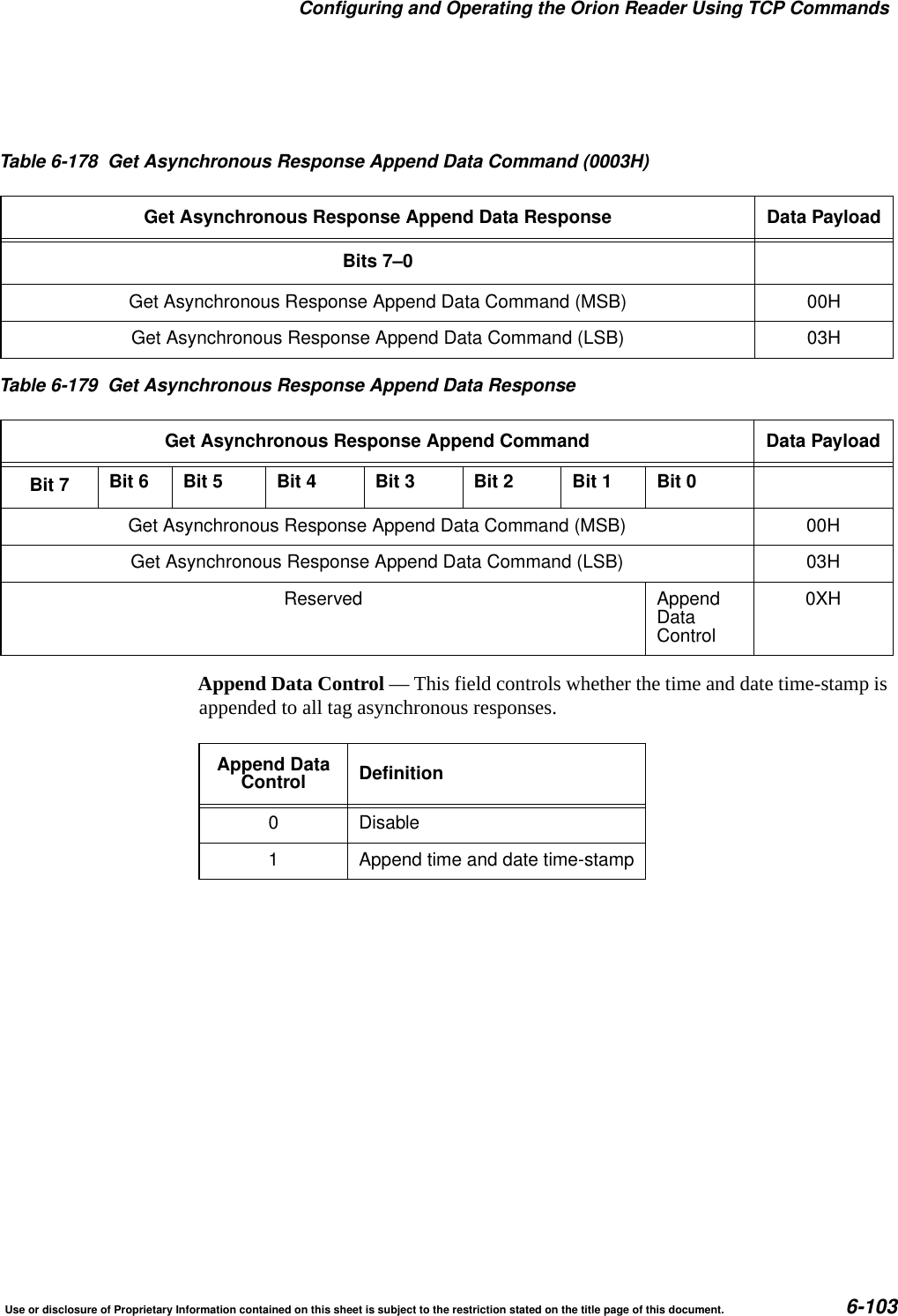
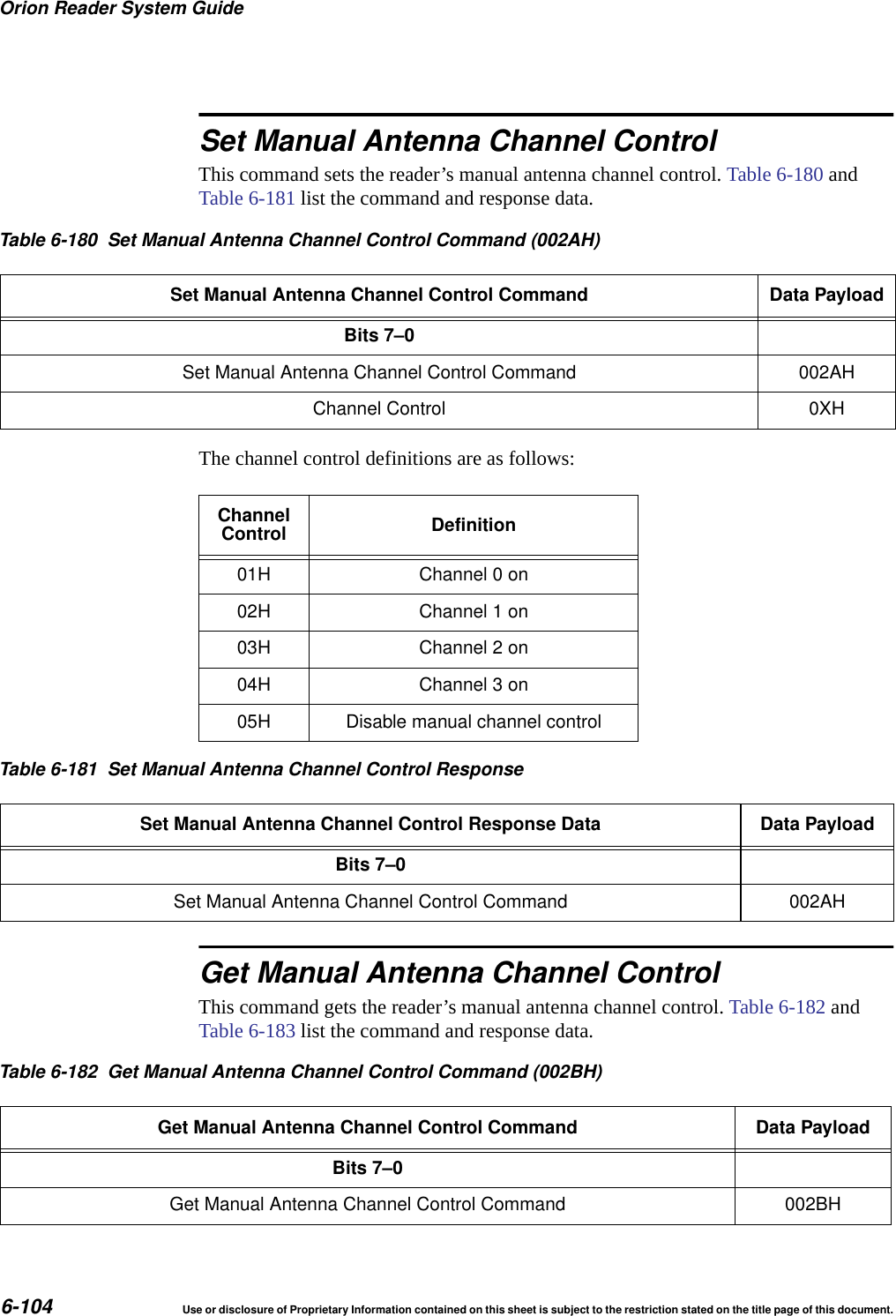
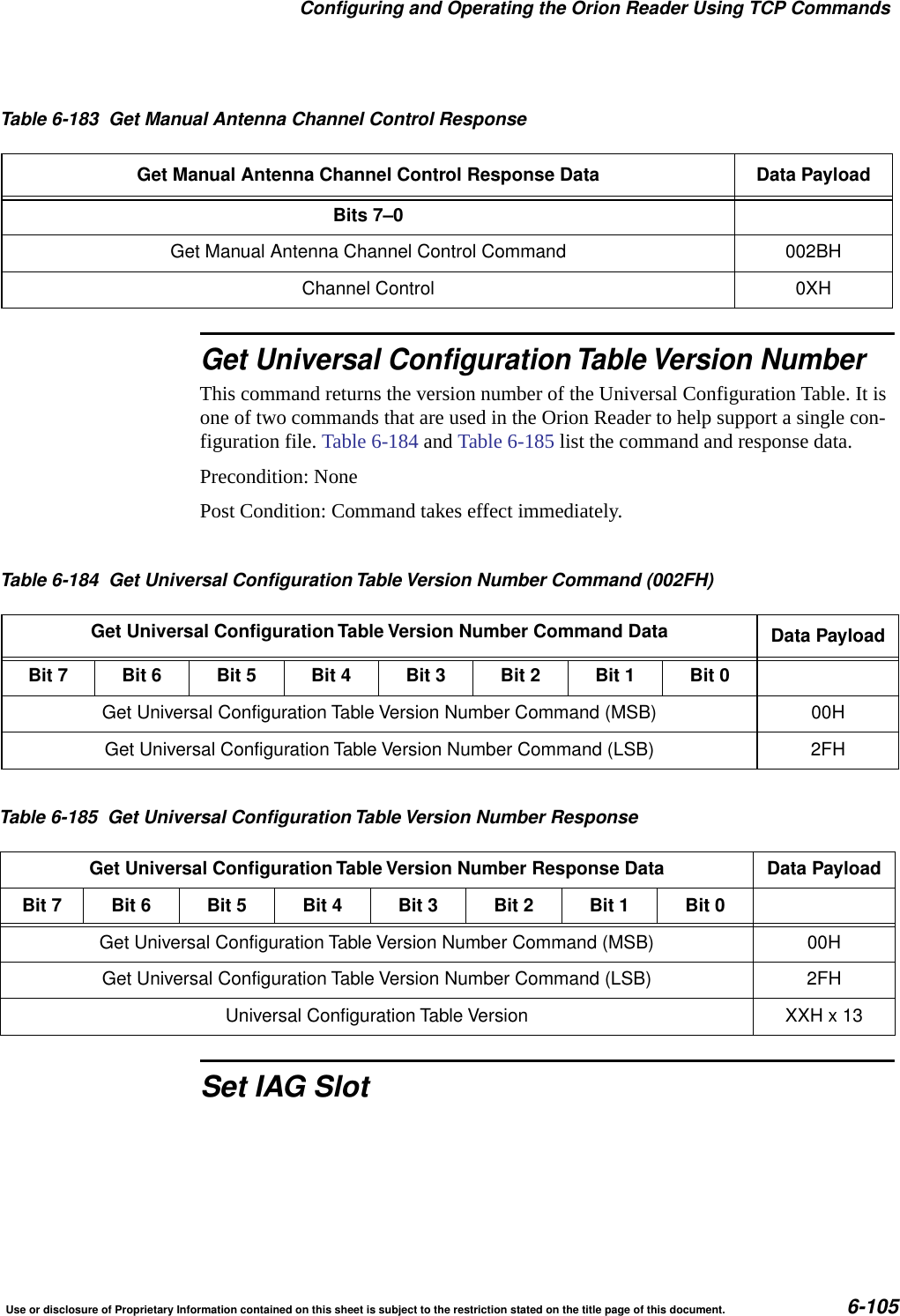
Orion Reader System Guide4Use or disclosure of Proprietary Information contained on this sheet is subject to the restriction stated on the title page of this document.Get Digital I/O Minimum Presence True Period .......................... 6-61Set Digital I/O Sensor Input Inversion .................................. 6-62Get Digital I/O Sensor Input Inversion.................................. 6-63Set Digital I/O Port Configuration ..................................... 6-63Get Digital I/O Port Configuration ..................................... 6-64Set Digital I/O Sensor Input Report .................................... 6-66Get Digital I/O Sensor Input Report.................................... 6-66Set Digital I/O Presence RF Control Algorithm ........................... 6-66Get Digital I/O Presence RF Control Algorithm ........................... 6-67Set Digital I/O Presence RF Control Time-out Period ...................... 6-69Get Digital I/O Presence RF Control Time-out Period...................... 6-70Get Digital I/O Port Status ........................................... 6-71Set Digital I/O Mode ............................................... 6-73Get Digital I/O Mode ............................................... 6-73Set External Interrupt Control ........................................ 6-74Get External Interrupt Control ........................................ 6-76RF Transceiver Command Group Commands (2000H) .................... 6-77RF Transceiver Command Group Responses ........................... 6-78RF Transceiver Command Group Response Data...................... 6-80Synchronous OK Status Responses .............................. 6-80Synchronous Error Status Responses............................. 6-80Asynchronous Error Status Responses ............................ 6-81Set RF Attenuation ................................................ 6-83Get RF Attenuation ................................................ 6-84Set Data Detect ................................................... 6-85Get Data Detect................................................... 6-86Set Line Loss..................................................... 6-87Get Line Loss .................................................... 6-88Set Uplink Source Control ........................................... 6-88Get Uplink Source Control........................................... 6-89Set Frequency in MHz ............................................. 6-90Get Frequency in MHz ............................................. 6-93Tag Transaction Configuration Command GroupCommands (1000H) ................................................. 6-95Tag Transaction Configuration Command Group Responses................ 6-96Tag Transaction Configuration Command Group Response Data.......... 6-98Asynchronous OK Status Responses ............................. 6-98Synchronous Error Status Responses............................. 6-98Asynchronous Error Status Responses ............................ 6-99Set Asynchronous Response Append Data ............................ 6-101Formats for Time and Date Time-stamp .......................... 6-102Get Asynchronous Response Append Data ............................ 6-102Set Manual Antenna Channel Control................................. 6-104Get Manual Antenna Channel Control ................................ 6-104Get Universal Configuration Table Version Number ...................... 6-105Set IAG Slot..................................................... 6-105
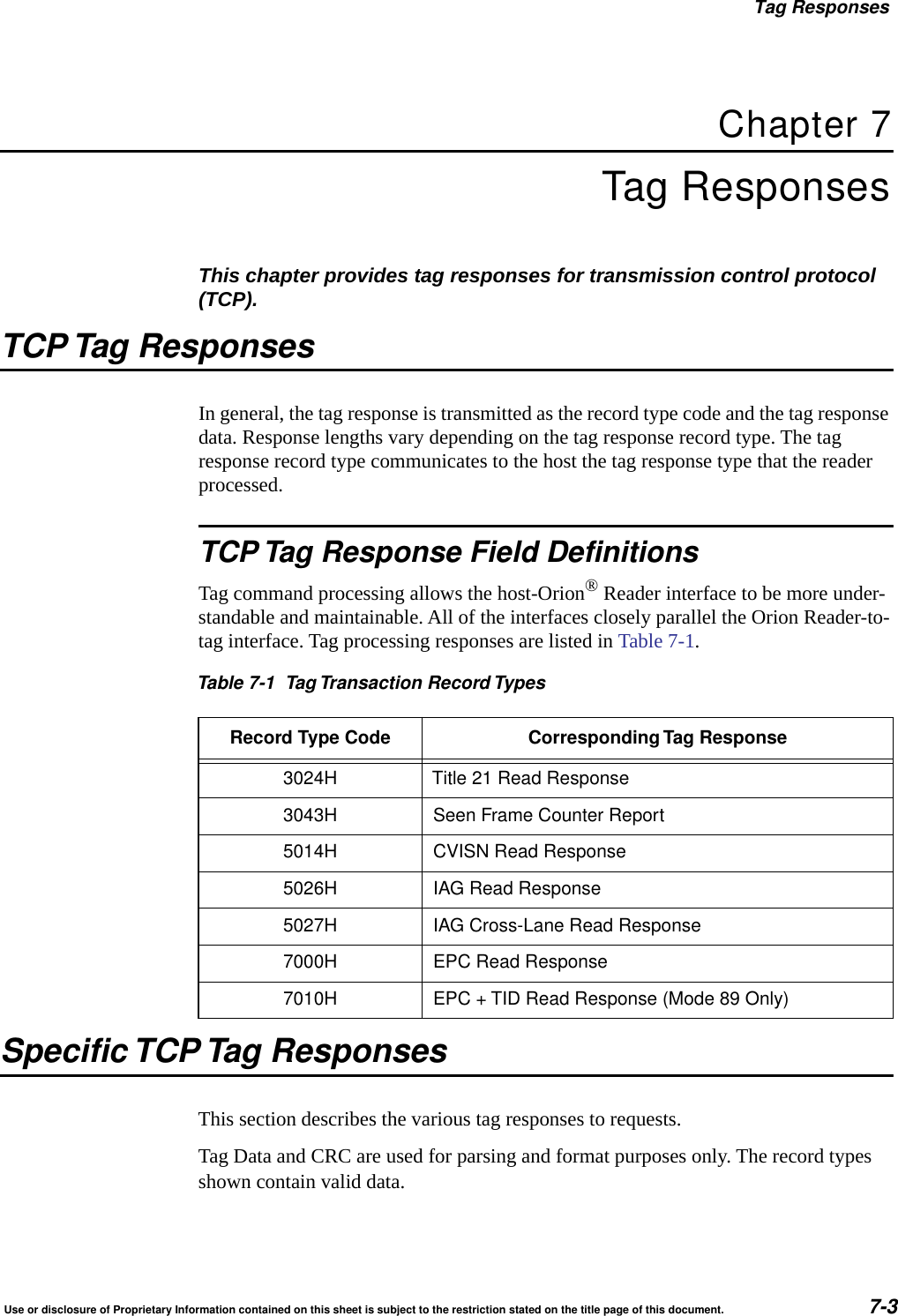
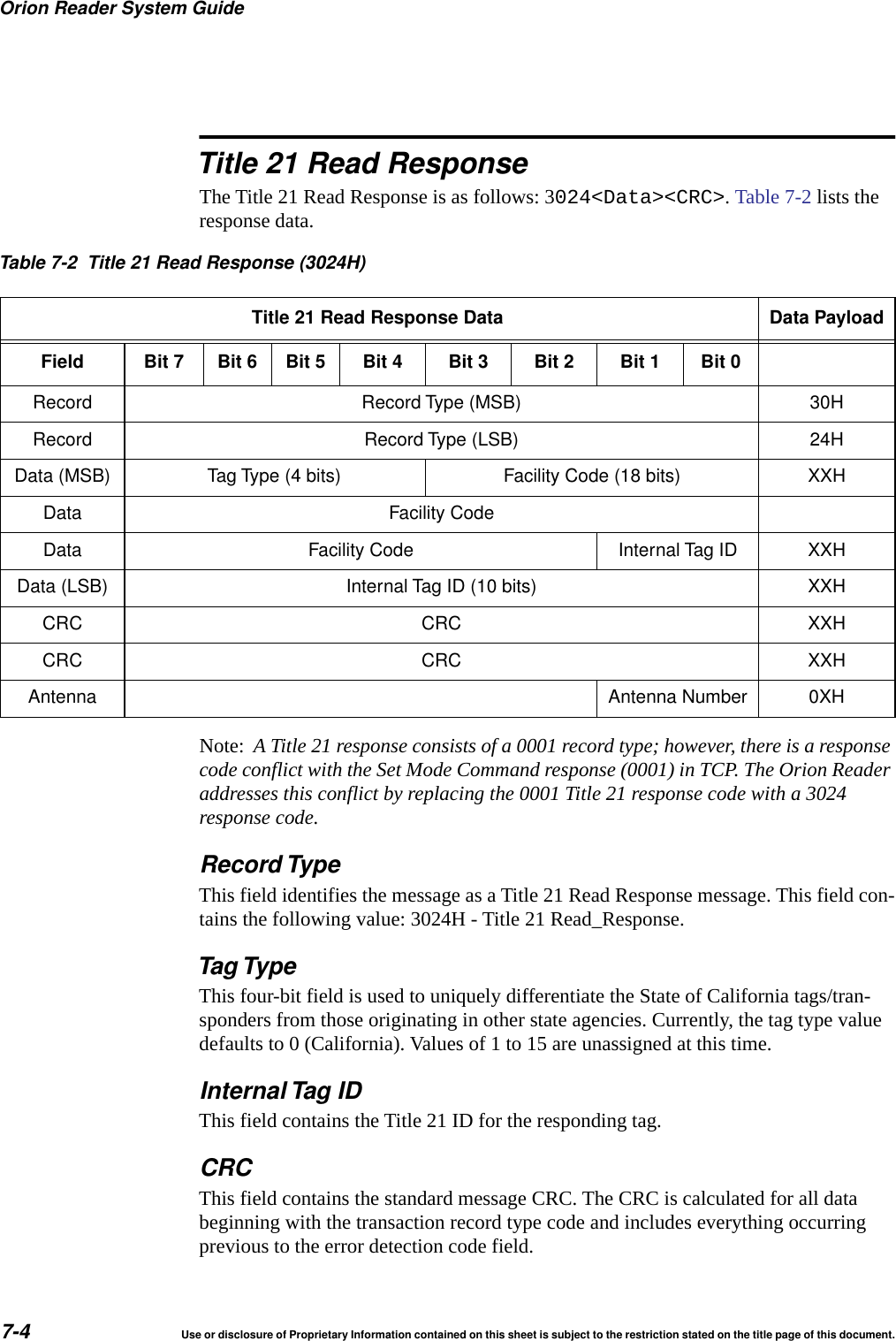
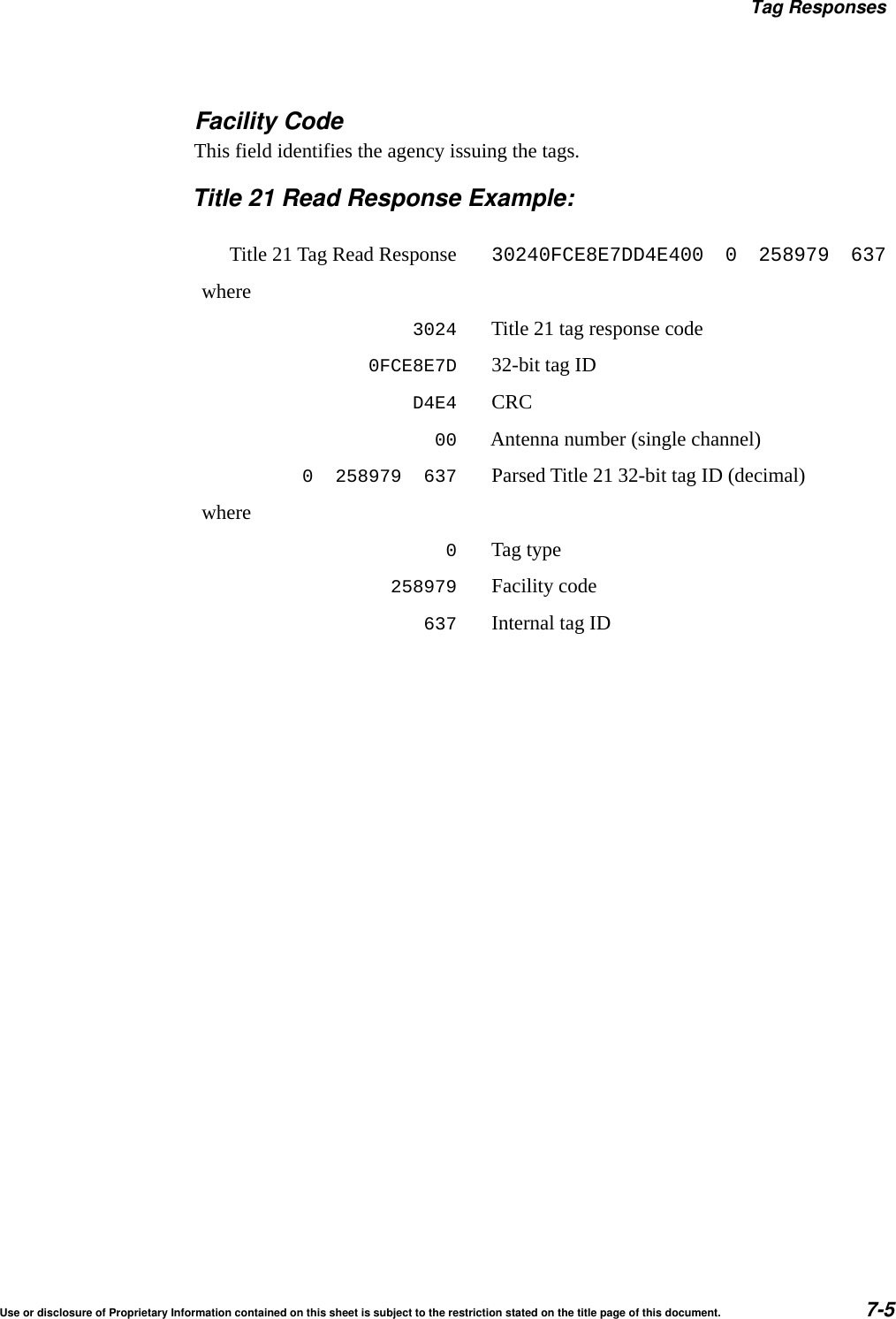
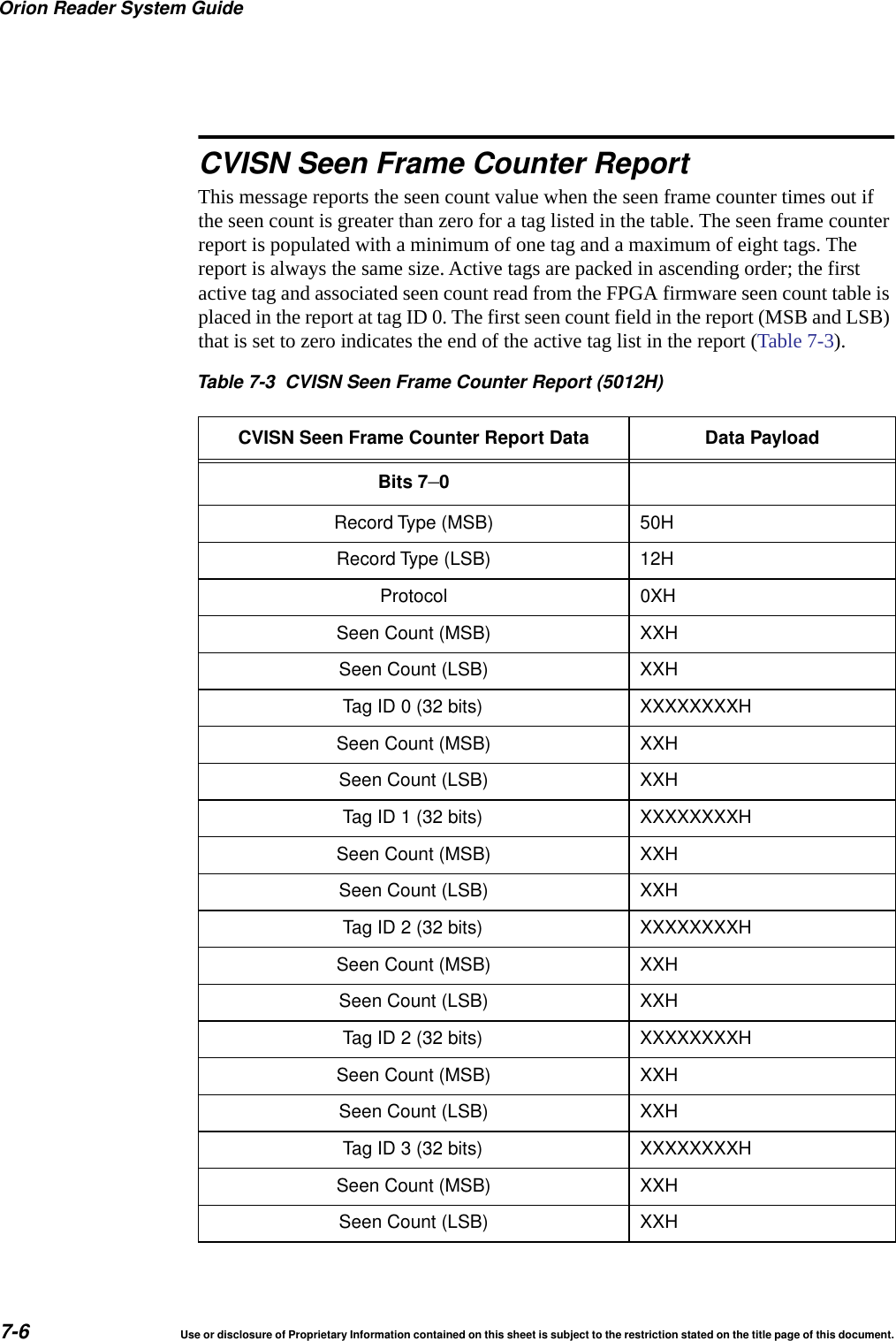
Use or disclosure of Proprietary Information contained on this sheet is subject to the restriction stated on the title page of this document. 5Get IAG Slot .................................................... 6-106Set Secondary Tag Sequence....................................... 6-107Get Secondary Tag Sequence ...................................... 6-108Set Master/Slave Mode ............................................ 6-109Get Master/Slave Mode............................................ 6-112Mode Command Group Commands (0400H)............................ 6-114Mode Command Group Responses .................................. 6-115Mode Command Group Response Data............................. 6-118Asynchronous OK Status Responses ............................ 6-118Synchronous Error Status Responses............................ 6-118Asynchronous Error Status Responses ........................... 6-119Set Mode ....................................................... 6-121Get Mode....................................................... 6-122Set Protocol..................................................... 6-123Get Protocol..................................................... 6-124Set Seen Count .................................................. 6-124Get Seen Count.................................................. 6-125Diagnostic Command Group Commands (0200H) ....................... 6-127Diagnostic Command Group Responses .............................. 6-127Diagnostic Command Group Response Data......................... 6-129Asynchronous OK Status Responses ............................ 6-129Synchronous Error Status Responses............................ 6-131Asynchronous Error Status Responses ........................... 6-131Unsolicited Diagnostic Status Reports ................................ 6-133Get Diagnostic Status ............................................. 6-133Diagnostic Status Bit Definitions................................... 6-135Get Diagnostic Interface Status...................................... 6-138Get Error Log.................................................... 6-138Get Number of Error Logs .......................................... 6-139Clear Error Logs ................................................. 6-139TCP Tag Responses.................................................. 7-3TCP Tag Response Field Definitions ................................... 7-3Specific TCP Tag Responses .......................................... 7-3Title 21 Read Response ............................................. 7-4Record Type .................................................... 7-4Tag Type....................................................... 7-4Internal Tag ID .................................................. 7-4CRC .......................................................... 7-4Facility Code .................................................... 7-5Title 21 Read Response Example: ................................... 7-5CVISN Seen Frame Counter Report .................................... 7-6Seen Frame Counter Report .......................................... 7-8CVISN Read Response.............................................. 7-8IAG Read Response ................................................ 7-9
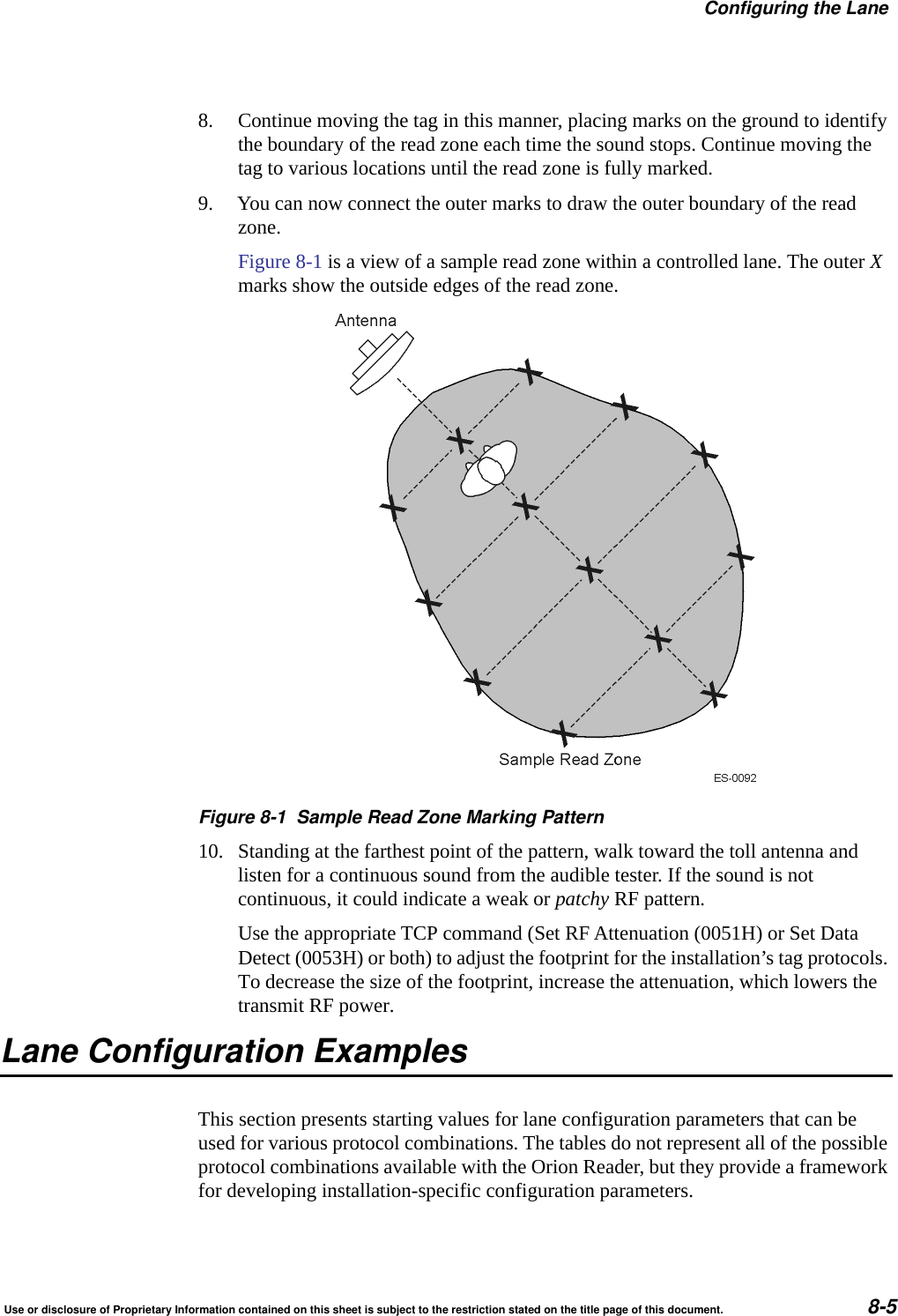
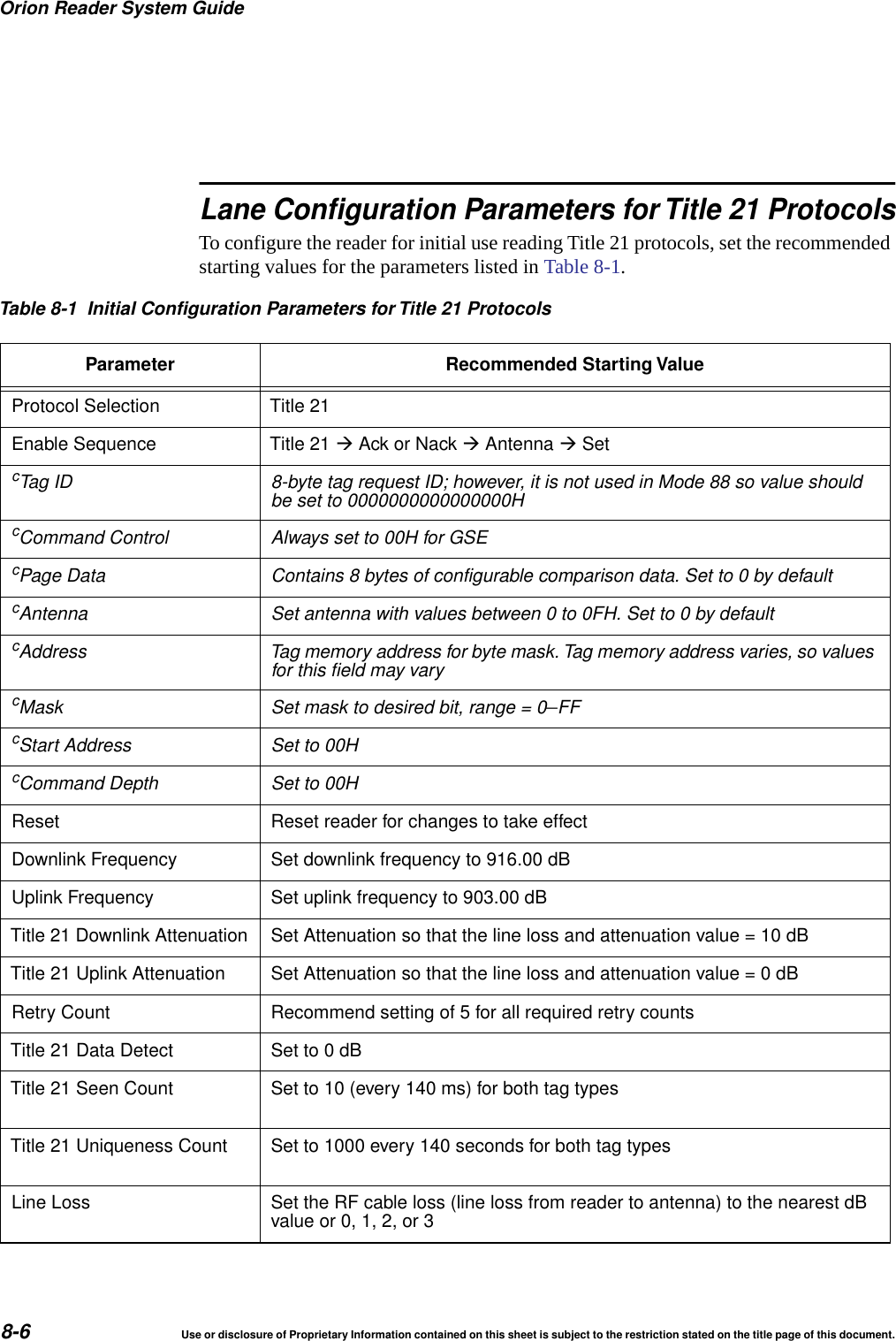
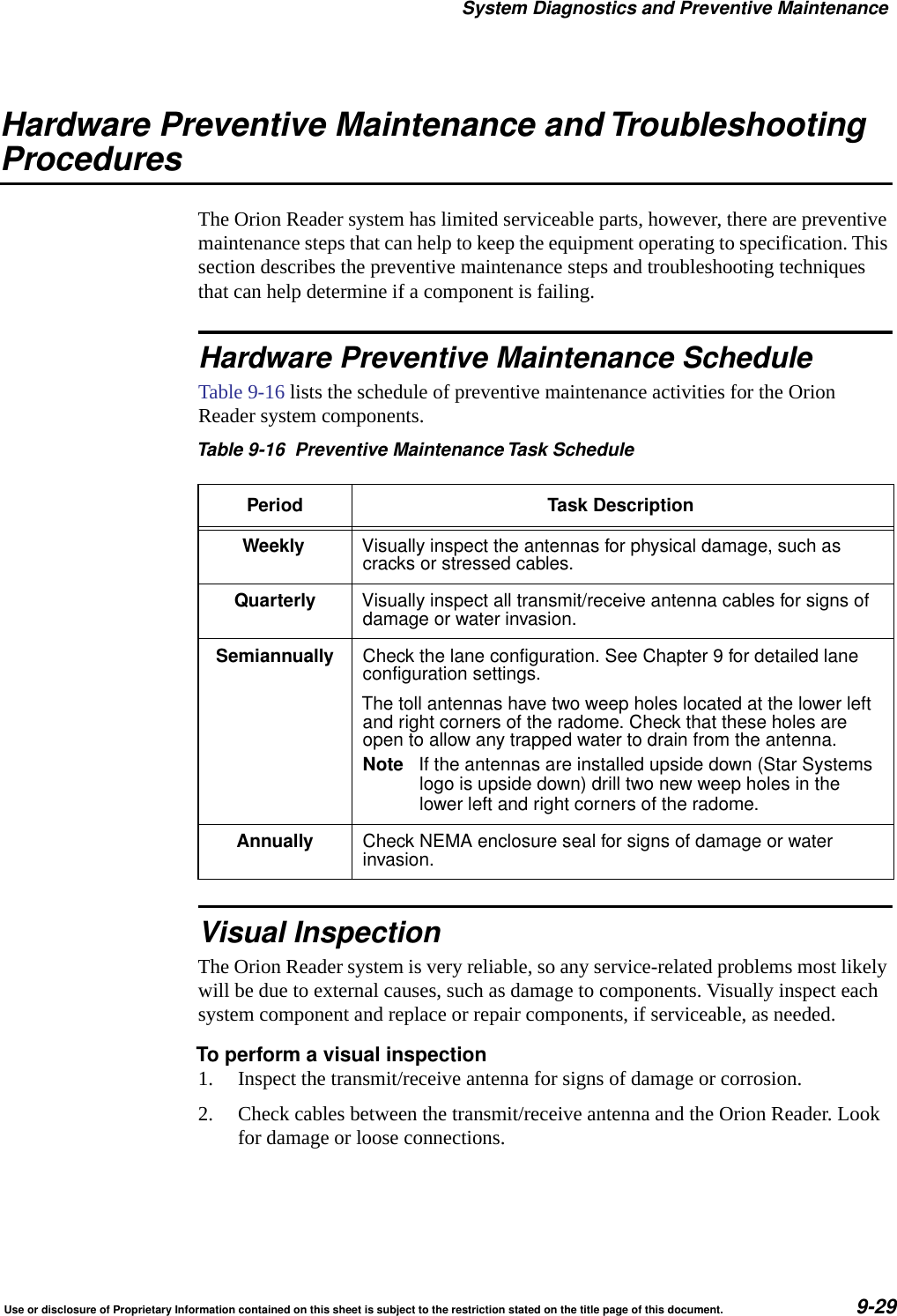
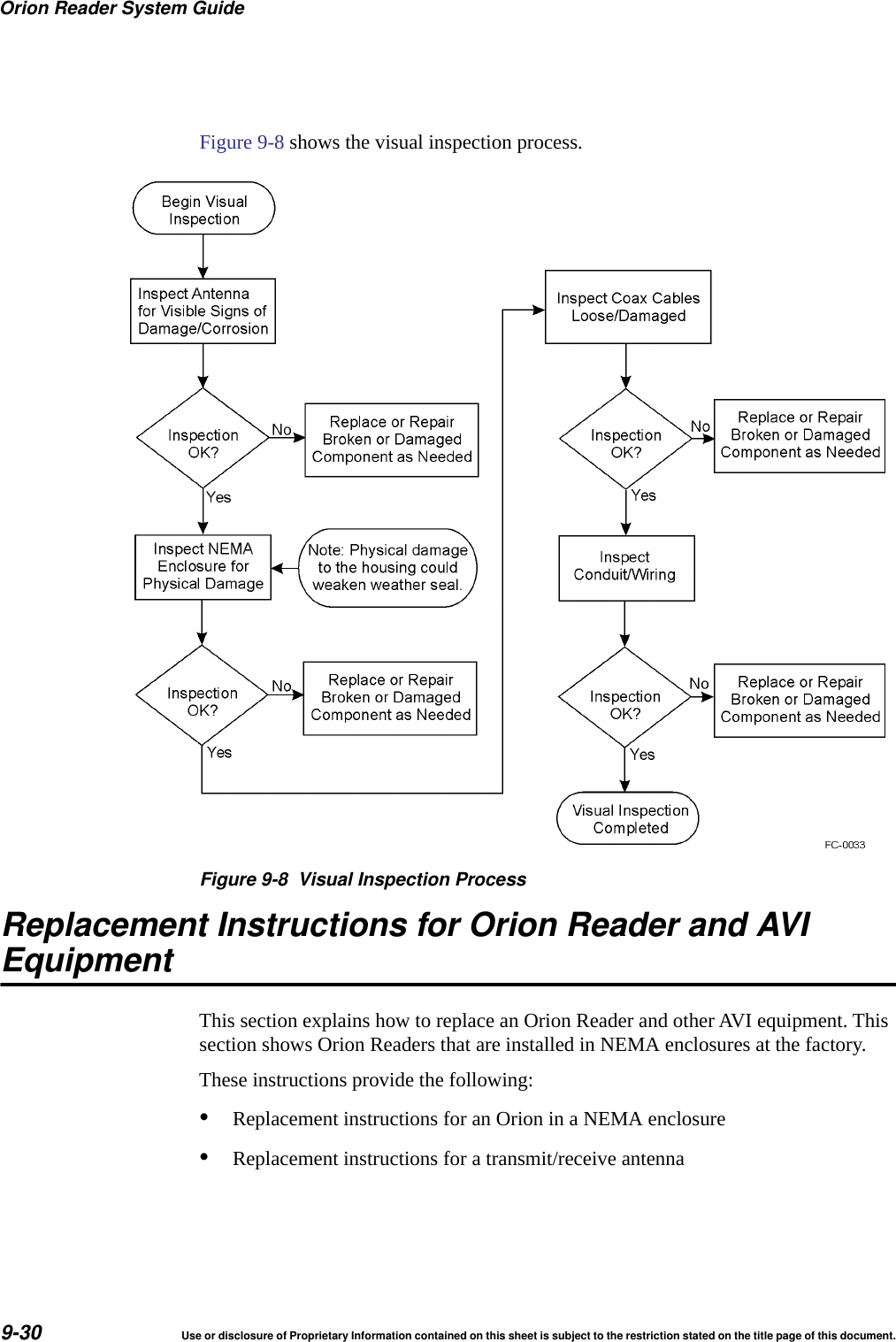
Orion Reader System Guide6Use or disclosure of Proprietary Information contained on this sheet is subject to the restriction stated on the title page of this document.IAG Cross-Lane Read Response ..................................... 7-13IAG Cross-Lane Read Response Example ......................... 7-14Why You Need to Configure a Lane ..................................... 8-3Marking the Read Zone ............................................... 8-3Required Supplies .................................................. 8-4Guidelines ........................................................ 8-4Lane Configuration Examples ......................................... 8-5Lane Configuration Parameters for Title 21 Protocols....................... 8-6Error Indicators ..................................................... 9-3Troubleshooting Guidelines ........................................... 9-4Communicating Via Diagnostic Port (COM2) ............................. 9-4Diagnostic COM2 Port Pin Assignments................................. 9-5Starting the Terminal Emulation Software................................ 9-5Diagnostic Commands ............................................... 9-8bootChange...................................................... 9-10Power Cycling the Orion Reader...................................... 9-11Error Log Reference  System Initialization Module Errors .................................... 9-15Lane Controller Interface Module Errors ................................ 9-15System Interface Module Errors ...................................... 9-17Mode Interface Module Error Numbers ................................. 9-18Tag Interface Module Error Numbers .................................. 9-18Sync Module Error Numbers ......................................... 9-20GPS Module Error Numbers ......................................... 9-20RF Transceiver Interface Module Error Numbers ......................... 9-21Diagnostic Module Error Numbers .................................... 9-26Tag Buffer Module Error Numbers .................................... 9-27Digital Input/Output Module Error Numbers ............................. 9-28Hardware Preventive Maintenance and Troubleshooting Procedures ........ 9-28Hardware Preventive Maintenance Schedule ............................ 9-29Visual Inspection .................................................. 9-29Replacement Instructions for Orion Reader and AVI Equipment ............ 9-30Replacing a Transmit/Receive Antenna on aGantry .......................................................... 9-31Preventive Maintenance Schedule ..................................... 9-33Removal and Replacement Procedures ................................ 9-33Transmit/Receive Antenna .......................................... 9-33
Use or disclosure of Proprietary Information contained on this sheet is subject to the restriction stated on the title page of this document. 7Removal ...................................................... 9-33Replacement................................................... 9-34Antenna Cable.................................................... 9-34Removal ...................................................... 9-34Replacement................................................... 9-34.................................................................. 9-34A Acronyms and GlossaryAcronyms and Glossary .............................................. 1-3B Hardware InterfacesHardware Interfaces.................................................. 1-3Communications ................................................... 1-4TCP/IP Fast Ethernet Connection .................................. 1-4Sync/COM1 Port................................................. 1-5External Digital Input/Output Connector ............................... 1-5C System Technical SpecificationsComponent Specifications ............................................ 1-3Orion Reader...................................................... 1-3Toll Antenna ...................................................... 1-3Environmental Specifications ....................................... 1-4D Orion Reader OptionsOrion Reader Options ................................................ 1-3Digital Input/Output Modules .......................................... 1-4Required Components/Tools.......................................... 1-4Installation/Mounting/Grounding of the Reader............................ 1-5Testing the Digital I/O Components Using TCP Commands.................. 1-7Guidelines for Ordering the I/O Modules ................................. 1-8Global Positioning System Timing Option .............................. 1-10GPS Power and Data Connector ................................... 1-12Before Installing the GPS Antenna .................................... 1-13Required Components/Tools......................................... 1-14GPS Timing Assembly Mounting...................................... 1-14GPS Antenna Mounting............................................. 1-14
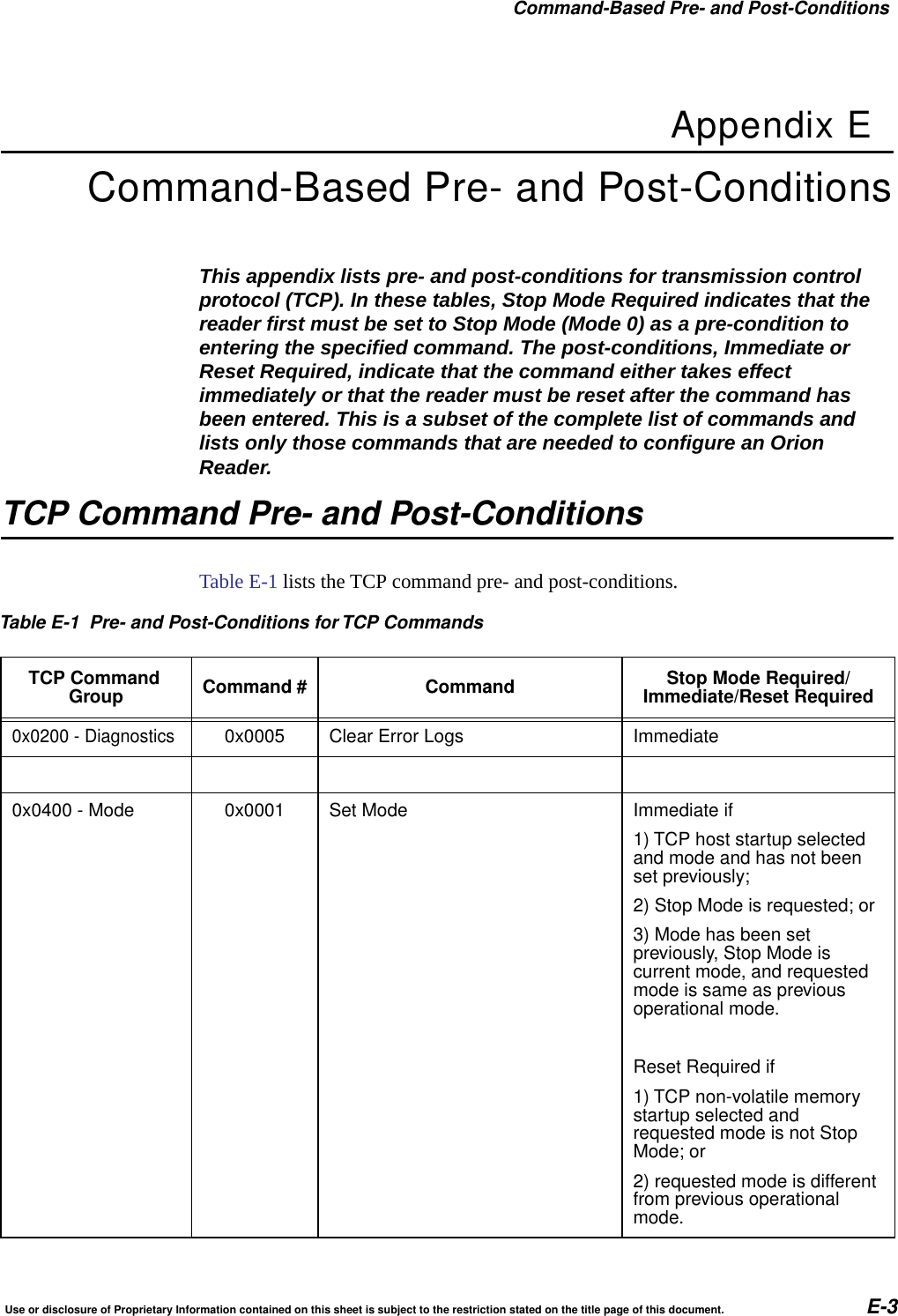
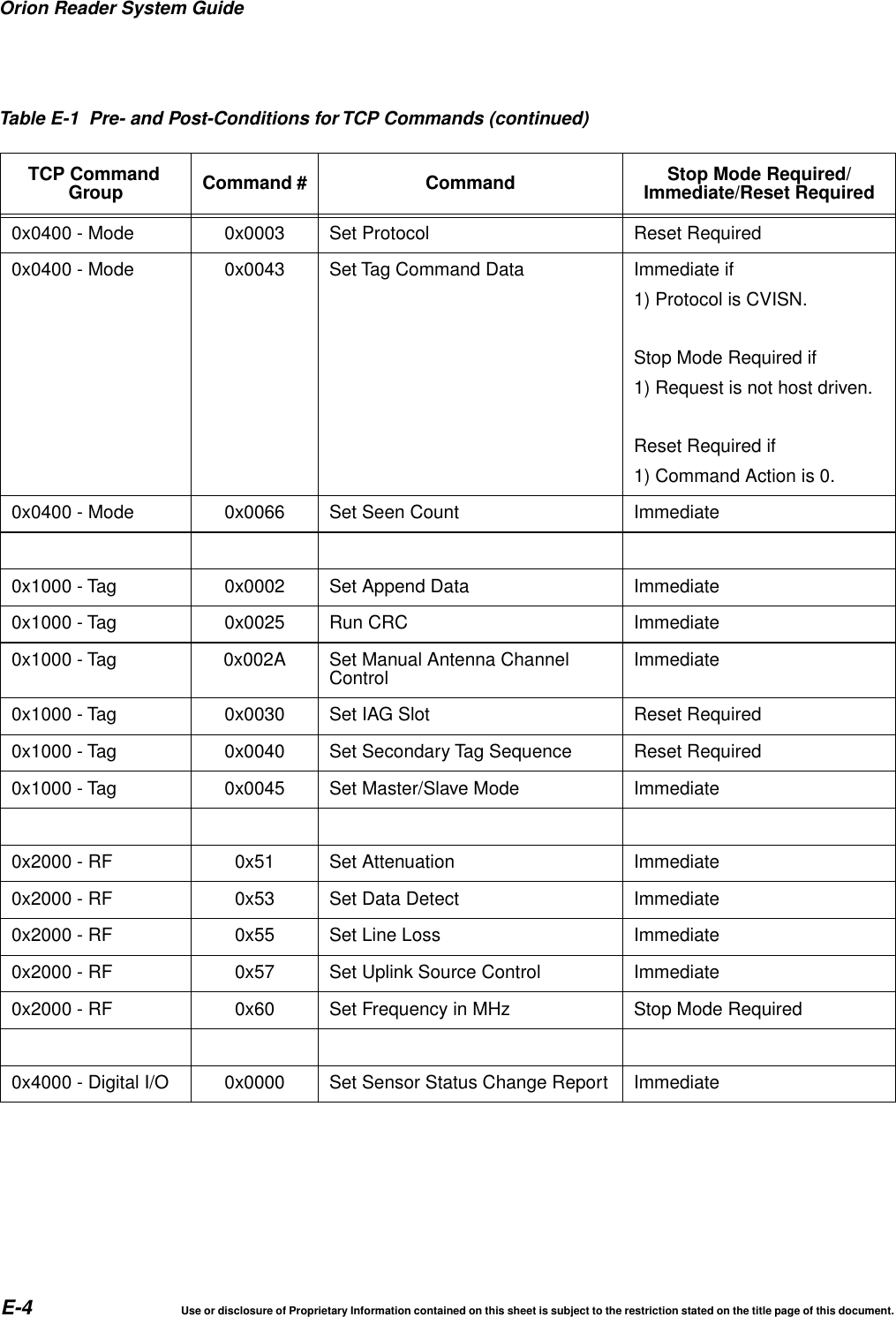
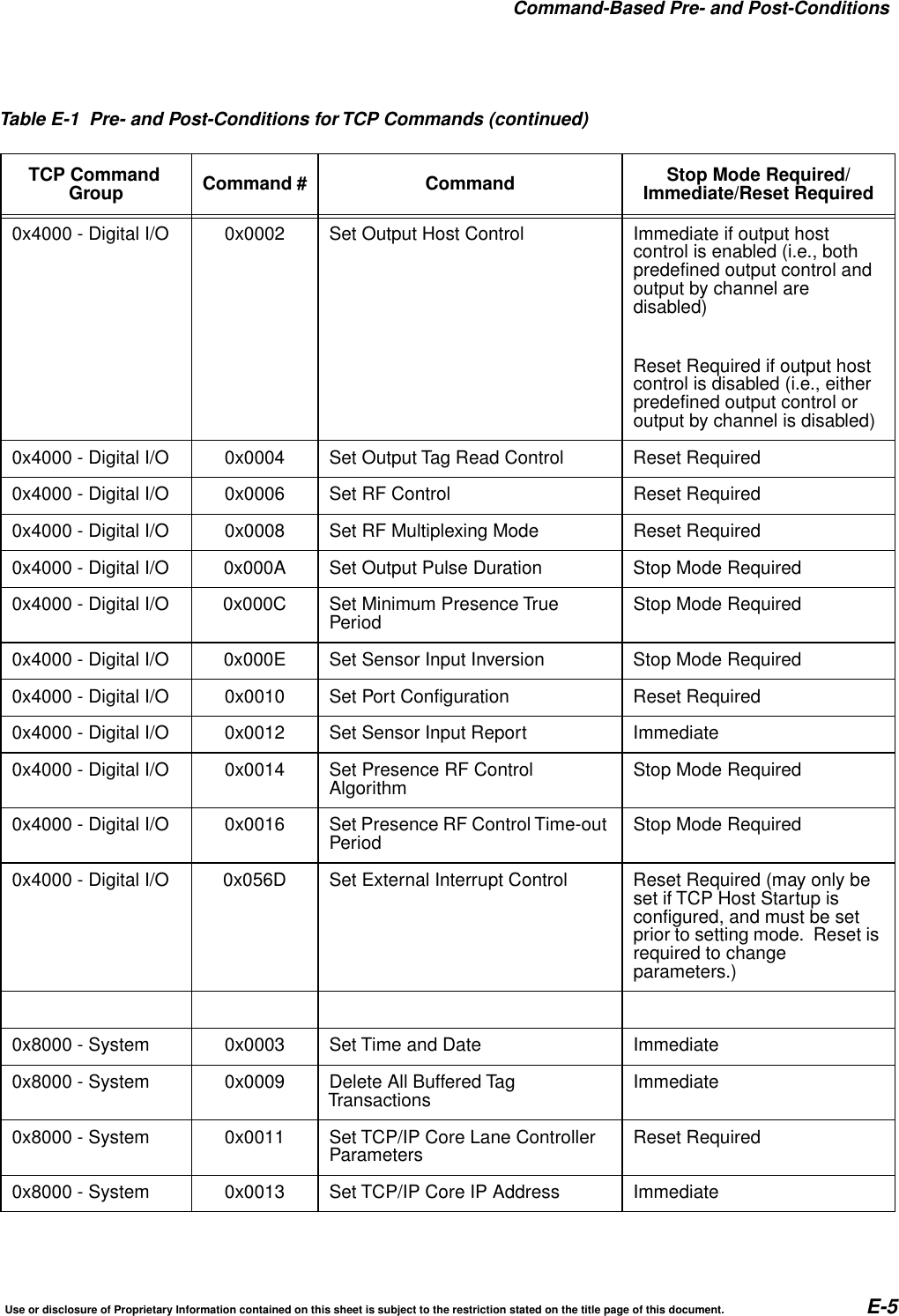
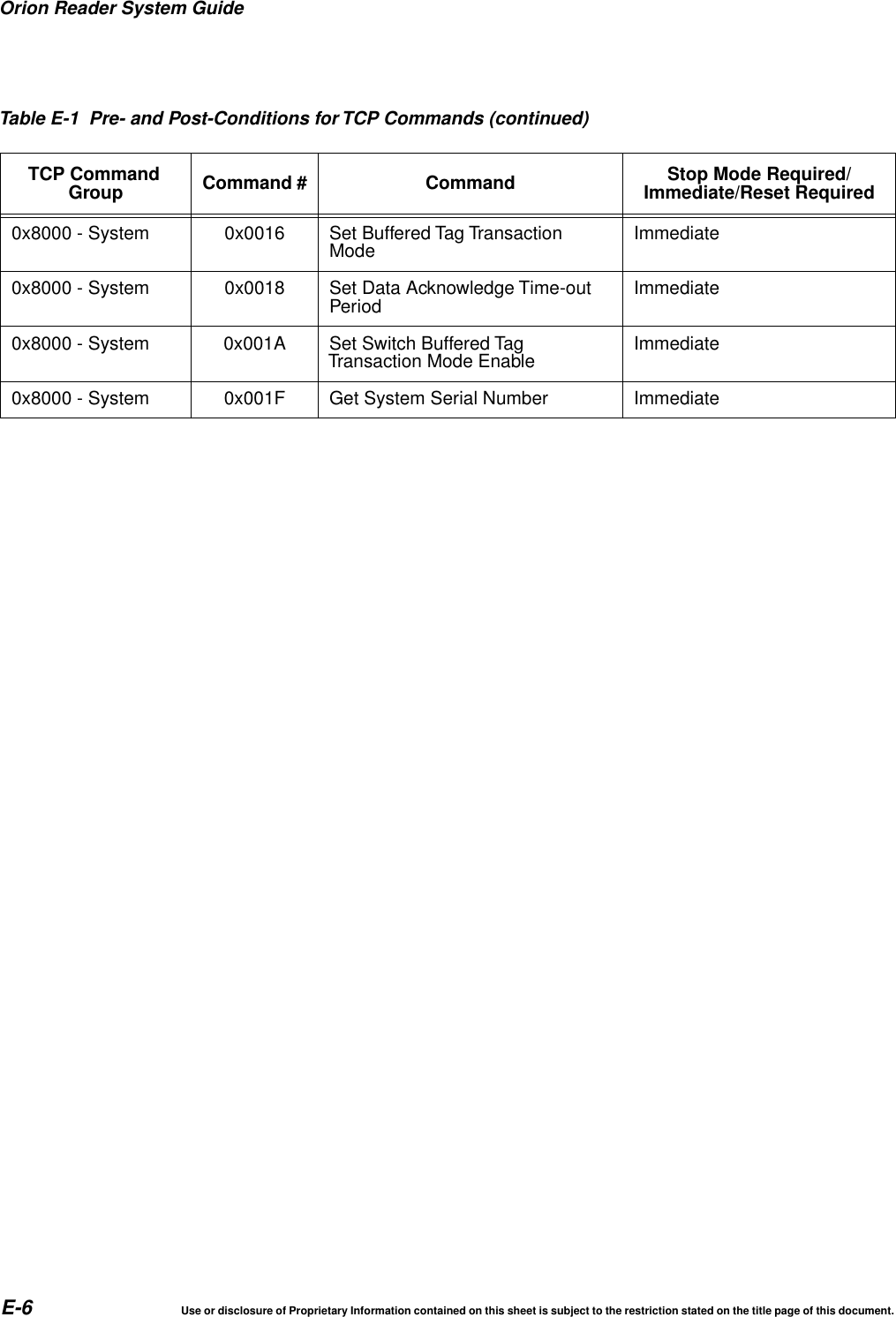
Orion Reader System Guide8Use or disclosure of Proprietary Information contained on this sheet is subject to the restriction stated on the title page of this document.Testing the GPS Timing System ...................................... 1-16Using the TCP Command Set ..................................... 1-17Configuring the Reader/Slave Count ................................ 1-17Environmental .................................................... 1-19Temperature Range for GPS Assembly .............................. 1-19Humidity ...................................................... 1-19GPS Antenna .................................................. 1-20GPS Assembly Connector .......................................... 1-20GPS Diagnostic Port............................................. 1-20GPS Antenna Cable ............................................. 1-20Regulatory Requirements ........................................... 1-20Emissions ..................................................... 1-20Safety ........................................................ 1-20Electrical Protection................................................ 1-21ESD ......................................................... 1-21Antenna Drive and Protection Circuitry............................... 1-21Antenna Drive Current Limits.................................... 1-21Troubleshooting the GPS System ................................ 1-22E Command-Based Pre- and Post-ConditionsTCP Command Pre- and Post-Conditions ................................ 1-3
© 2014 Orion Reader System Guide. All rights reserved. Contents are subject to change. Printed in the U.S.A.For further information, contact:
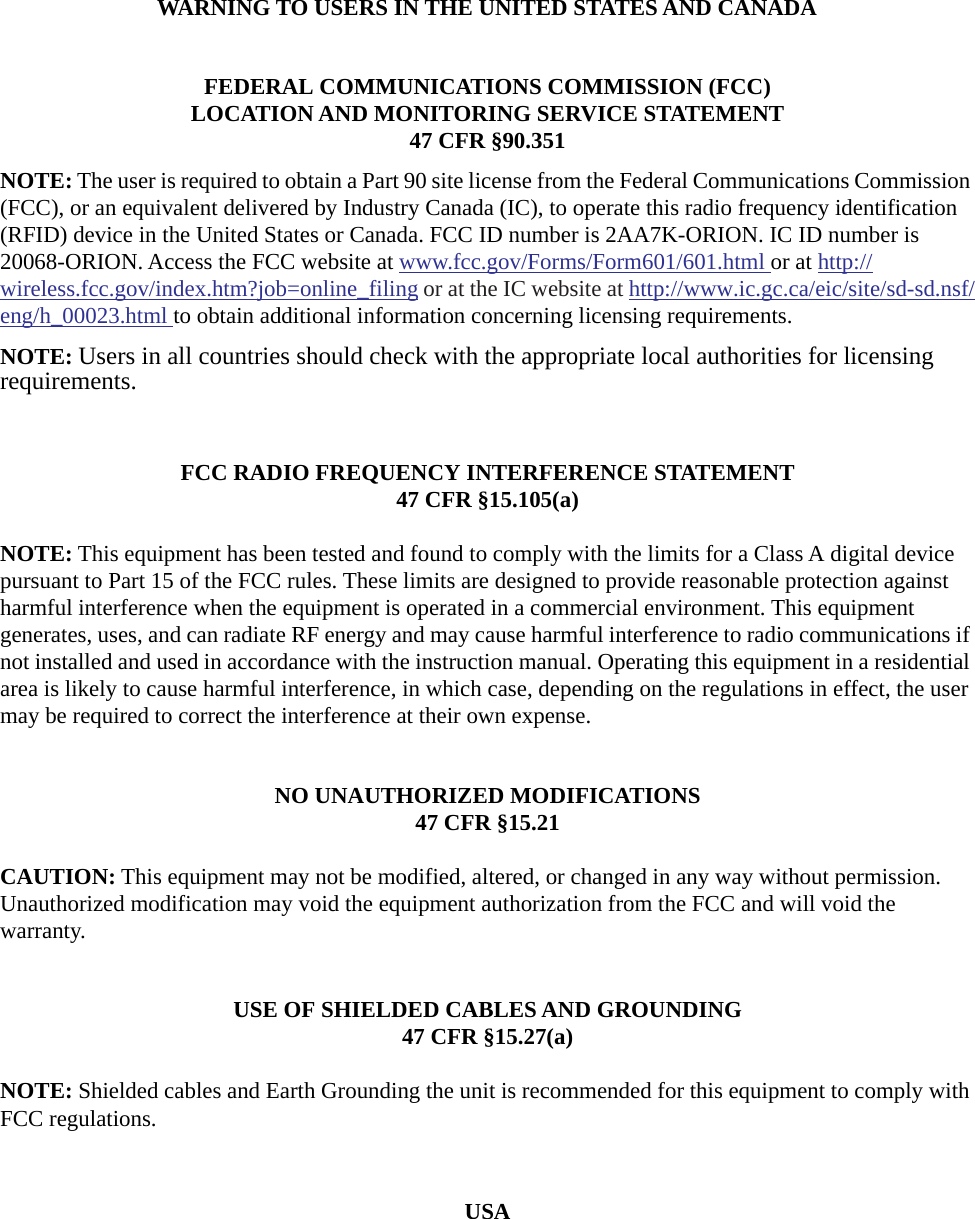
WARNING TO USERS IN THE UNITED STATES AND CANADAFEDERAL COMMUNICATIONS COMMISSION (FCC)LOCATION AND MONITORING SERVICE STATEMENT47 CFR §90.351NOTE: The user is required to obtain a Part 90 site license from the Federal Communications Commission (FCC), or an equivalent delivered by Industry Canada (IC), to operate this radio frequency identification (RFID) device in the United States or Canada. FCC ID number is 2AA7K-ORION. IC ID number is 20068-ORION. Access the FCC website at www.fcc.gov/Forms/Form601/601.html or at http://wireless.fcc.gov/index.htm?job=online_filing or at the IC website at http://www.ic.gc.ca/eic/site/sd-sd.nsf/eng/h_00023.html to obtain additional information concerning licensing requirements.NOTE: Users in all countries should check with the appropriate local authorities for licensing requirements.FCC RADIO FREQUENCY INTERFERENCE STATEMENT47 CFR §15.105(a)NOTE: This equipment has been tested and found to comply with the limits for a Class A digital device pursuant to Part 15 of the FCC rules. These limits are designed to provide reasonable protection against harmful interference when the equipment is operated in a commercial environment. This equipment generates, uses, and can radiate RF energy and may cause harmful interference to radio communications if not installed and used in accordance with the instruction manual. Operating this equipment in a residential area is likely to cause harmful interference, in which case, depending on the regulations in effect, the user may be required to correct the interference at their own expense.NO UNAUTHORIZED MODIFICATIONS47 CFR §15.21CAUTION: This equipment may not be modified, altered, or changed in any way without permission. Unauthorized modification may void the equipment authorization from the FCC and will void the warranty.USE OF SHIELDED CABLES AND GROUNDING47 CFR §15.27(a)NOTE: Shielded cables and Earth Grounding the unit is recommended for this equipment to comply with FCC regulations.USA
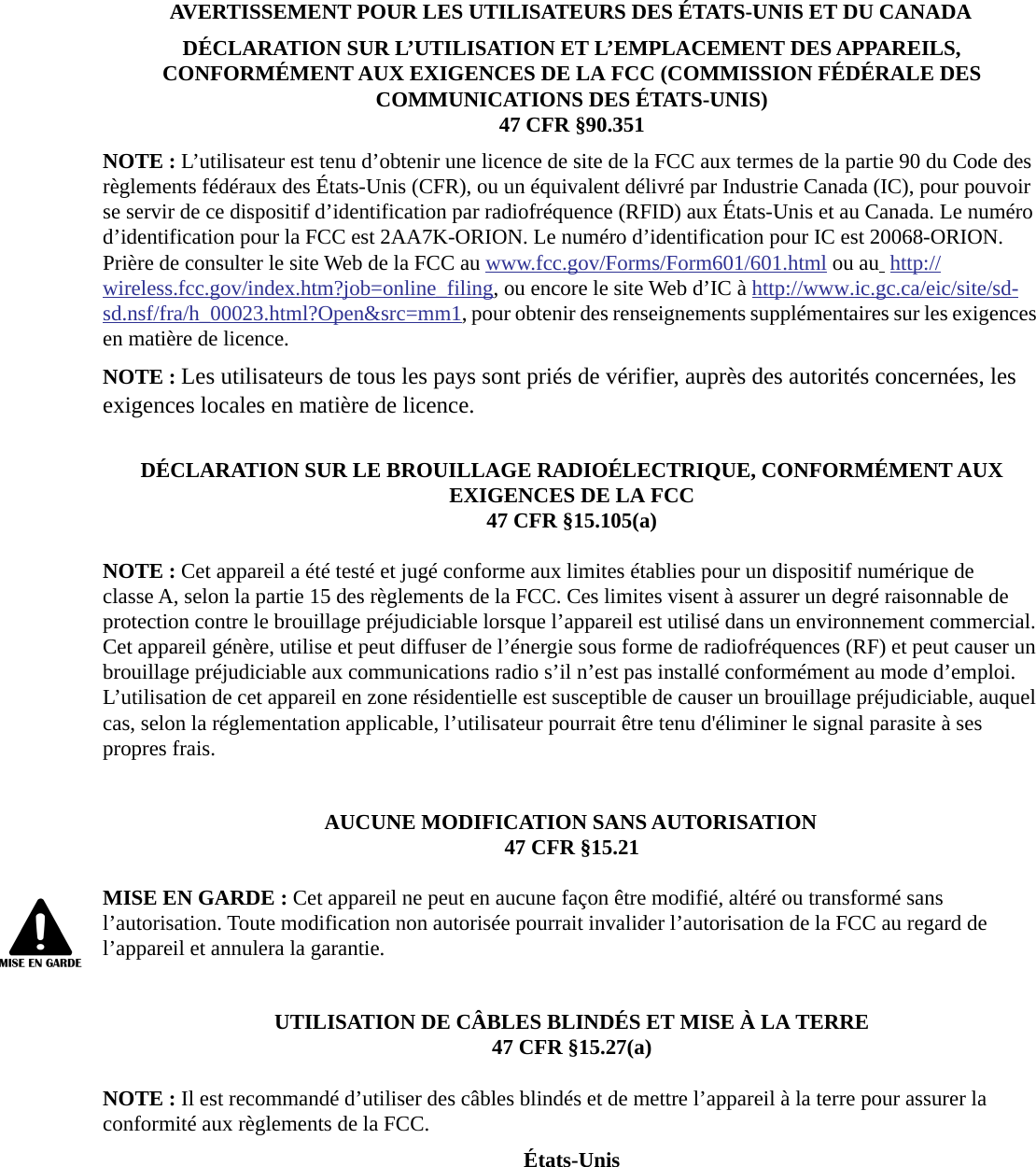
AVERTISSEMENT POUR LES UTILISATEURS DES ÉTATS-UNIS ET DU CANADADÉCLARATION SUR L’UTILISATION ET L’EMPLACEMENT DES APPAREILS, CONFORMÉMENT AUX EXIGENCES DE LA FCC (COMMISSION FÉDÉRALE DES COMMUNICATIONS DES ÉTATS-UNIS)47 CFR §90.351NOTE : L’utilisateur est tenu d’obtenir une licence de site de la FCC aux termes de la partie 90 du Code des règlements fédéraux des États-Unis (CFR), ou un équivalent délivré par Industrie Canada (IC), pour pouvoir se servir de ce dispositif d’identification par radiofréquence (RFID) aux États-Unis et au Canada. Le numéro d’identification pour la FCC est 2AA7K-ORION. Le numéro d’identification pour IC est 20068-ORION. Prière de consulter le site Web de la FCC au www.fcc.gov/Forms/Form601/601.html ou au  http://wireless.fcc.gov/index.htm?job=online_filing, ou encore le site Web d’IC à http://www.ic.gc.ca/eic/site/sd-sd.nsf/fra/h_00023.html?Open&src=mm1, pour obtenir des renseignements supplémentaires sur les exigences en matière de licence.NOTE : Les utilisateurs de tous les pays sont priés de vérifier, auprès des autorités concernées, les exigences locales en matière de licence.DÉCLARATION SUR LE BROUILLAGE RADIOÉLECTRIQUE, CONFORMÉMENT AUX EXIGENCES DE LA FCC47 CFR §15.105(a)NOTE : Cet appareil a été testé et jugé conforme aux limites établies pour un dispositif numérique de classe A, selon la partie 15 des règlements de la FCC. Ces limites visent à assurer un degré raisonnable de protection contre le brouillage préjudiciable lorsque l’appareil est utilisé dans un environnement commercial. Cet appareil génère, utilise et peut diffuser de l’énergie sous forme de radiofréquences (RF) et peut causer un brouillage préjudiciable aux communications radio s’il n’est pas installé conformément au mode d’emploi. L’utilisation de cet appareil en zone résidentielle est susceptible de causer un brouillage préjudiciable, auquel cas, selon la réglementation applicable, l’utilisateur pourrait être tenu d'éliminer le signal parasite à ses propres frais.AUCUNE MODIFICATION SANS AUTORISATION47 CFR §15.21MISE EN GARDE : Cet appareil ne peut en aucune façon être modifié, altéré ou transformé sans l’autorisation. Toute modification non autorisée pourrait invalider l’autorisation de la FCC au regard de l’appareil et annulera la garantie.UTILISATION DE CÂBLES BLINDÉS ET MISE À LA TERRE47 CFR §15.27(a)NOTE : Il est recommandé d’utiliser des câbles blindés et de mettre l’appareil à la terre pour assurer la conformité aux règlements de la FCC.États-Unis
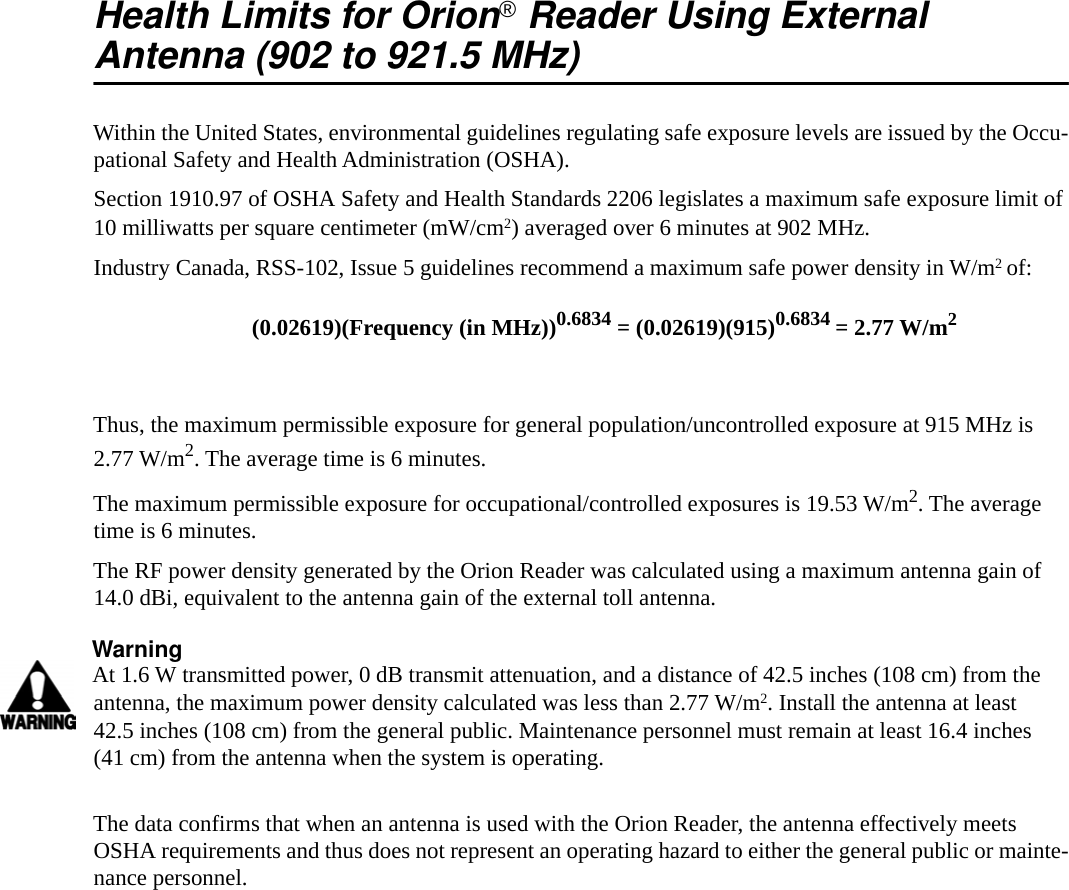
Health Limits for Orion®Reader Using ExternalAntenna (902 to 921.5 MHz)Within the United States, environmental guidelines regulating safe exposure levels are issued by the Occu-pational Safety and Health Administration (OSHA).Section 1910.97 of OSHA Safety and Health Standards 2206 legislates a maximum safe exposure limit of 10 milliwatts per square centimeter (mW/cm2) averaged over 6 minutes at 902 MHz.Industry Canada, RSS-102, Issue 5 guidelines recommend a maximum safe power density in W/m2 of:Thus, the maximum permissible exposure for general population/uncontrolled exposure at 915 MHz is 2.77 W/m2. The average time is 6 minutes.The maximum permissible exposure for occupational/controlled exposures is 19.53 W/m2. The average time is 6 minutes.The RF power density generated by the Orion Reader was calculated using a maximum antenna gain of 14.0 dBi, equivalent to the antenna gain of the external toll antenna.WarningAt 1.6 W transmitted power, 0 dB transmit attenuation, and a distance of 42.5 inches (108 cm) from the antenna, the maximum power density calculated was less than 2.77 W/m2. Install the antenna at least 42.5 inches (108 cm) from the general public. Maintenance personnel must remain at least 16.4 inches (41 cm) from the antenna when the system is operating.The data confirms that when an antenna is used with the Orion Reader, the antenna effectively meets OSHA requirements and thus does not represent an operating hazard to either the general public or mainte-nance personnel.(0.02619)(Frequency (in MHz))0.6834 = (0.02619)(915)0.6834 = 2.77 W/m2
Limites d’innocuité du lecteur OrionMD utilisé avec uneantenne externe (902 à 921,5 MHz)Aux États-Unis, les directives environnementales concernant les niveaux d’exposition acceptables sont émises par l’OSHA (Occupational Safety and Health Administration).L’article 1910.97 de la norme de santé et de sécurité 2206 de l’OSHA fixe la limite d’exposition acceptable à une moyenne de 10 milliwatts par centimètre carré (mW/cm2) sur une période de 6 minutes à 902 MHz. Les normes de l’Industrie Canada, CNR-102, 5e édition recommandent de ne pas dépasser la densité de puis-sance suivante, exprimée en W/m2 :Ainsi, le niveau maximal d’exposition permis pour la population générale et les situations d’exposition non contrôlée à 915 MHz est de 2,77 W/m2 en moyenne sur une période de 6 minutes.Le niveau maximal d’exposition permis dans un cadre professionnel ou contrôlé est de19,53W/m2 en moyenne sur une période de 6 minutes.La densité de puissance des RF générées par le lecteur Orion a été calculée pour un gain d’antenne maximal de 14,0 dBi, soit l’équivalent du gain de l’antenne de péage universelle.Mise en gardeAvec une puissance transmise de 1,6 W et une atténuation de transmission de 0 dB, la densité de puissance maximale calculée à 42,5 pouces (108 cm) de l’antenne était inférieure à 2,77 W/m2. Par mesure de précau-tion, installer l’antenne à au moins 42,5 pouces (108 cm) de la population générale. Le personnel d’entre-tien doit se tenir à au moins 16,4 pouces (41 cm) de l’antenne lorsque le système est en cours d’utilisation.Les données confirment que l’utilisation de l’toll antenna ou d’une antenne équivalente avec le lecteur multi-protocole Orion répond aux exigences de l’OSHA et ne présente pas de danger lié à son utilisation, que ce soit pour la population générale ou le personnel d’entretien.(0,02619)(Fréquence (en MHz))0,6834 =(0,02619)(915)0,6834 =2,77 W/m2
Orion Reader System Guide6Use or disclosure of Proprietary Information contained on this sheet is subject to the restriction stated on the title page of this document.
1Before You Begin
Before You BeginUse or disclosure of Proprietary Information contained on this sheet is subject to the restriction stated on the title page of this document. 1-3Chapter 1 Orion Reader System GuideBefore You BeginThis chapter provides an overview of the Orion® Reader System Guide.Purpose of the GuideThis Orion® Reader System Guide provides detailed information about the reader sys-tem, including site installation and planning, troubleshooting, and preventive mainte-nance tasks, as well as a detailed list of the reader software commands and diagnostic and hardware interface information for developing your customized application soft-ware. Also included is an appendix that describes the optional assemblies available with the Orion system.Intended AudienceThe intended audience for this guide is those personnel responsible for installing, con-figuring, operating, and maintaining the Orion Reader.Guide TopicsThis system guide presents the following information.Chapter 1 –BeforeYou Begin This chapter provides an overview of the system guide aswell as related documents, typographical conventions, andlicensing requirements.Chapter 2 –Developing the Orion ReaderSystem Site Plan This chapter discusses factors to be considered whendeveloping the site plan in preparation for installing the OrionReader system equipment.Chapter 3 –Installing the Orion Reader This chapter describes the Orion Reader and instructs theuser in installing the Orion Reader system.Chapter 4 –Software Information This chapter provides transmission control protocol (TCP)software-related information for the Orion Reader.Chapter 5 –Communication Protocols This chapter describes the TCP communications viaEthernet for the Orion Reader.Chapter 6 –Configuring and Operating theOrion Reader Using TCP Commands This chapter describes the Orion Reader mode and TCPcommands that are used to configure and operate thereader. This chapter also contains system commands andresponses that are needed to develop host software for theTCP command set.
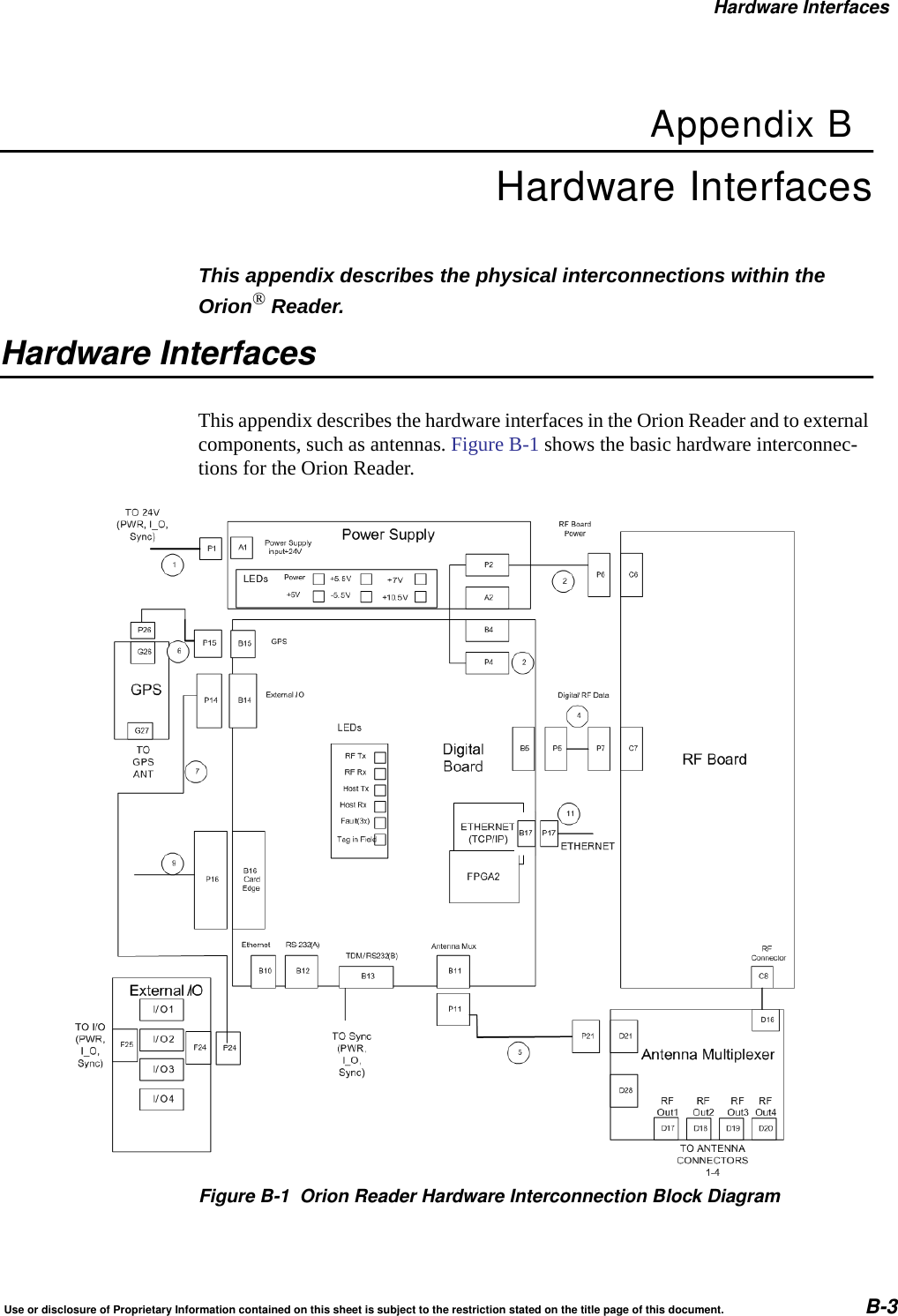
Orion Reader System Guide1-4 Use or disclosure of Proprietary Information contained on this sheet is subject to the restriction stated on the title page of this document.Chapter 7 –Tag Responses This chapter provides tag responses for transmission controlprotocol (TCP)Chapter 8 –Configuring the Lane This chapter provides information on the importance of lanetuning for optimum automatic vehicle identification (AVI)system performance. This chapter also describes the OrionReader functions and features that can assist you in tuningan AVI lane.Chapter 9 –System Diagnostics andPreventive Maintenance This chapter provides information on error messages,troubleshooting, preventive maintenance schedule, visualinspection, Orion Reader repair, removal and replacementprocedures, and technical support.Appendix A –Acronyms and Glossary This appendix defines the acronyms and terms used in thissystem guide.Appendix B –Hardware Interfaces This appendix describes the physical interconnections withinan Orion Reader system.Appendix C –System TechnicalSpecifications This appendix provides reference specifications for theOrion Reader system components.Appendix D –Reader System Options This appendix describes the options available with the OrionReader system.Appendix E –Command-Based Pre- andPost Conditions This appendix lists the pre- and post-conditions for TCPcommands.Index This index provides an alphabetical listing of the systemguide topics.
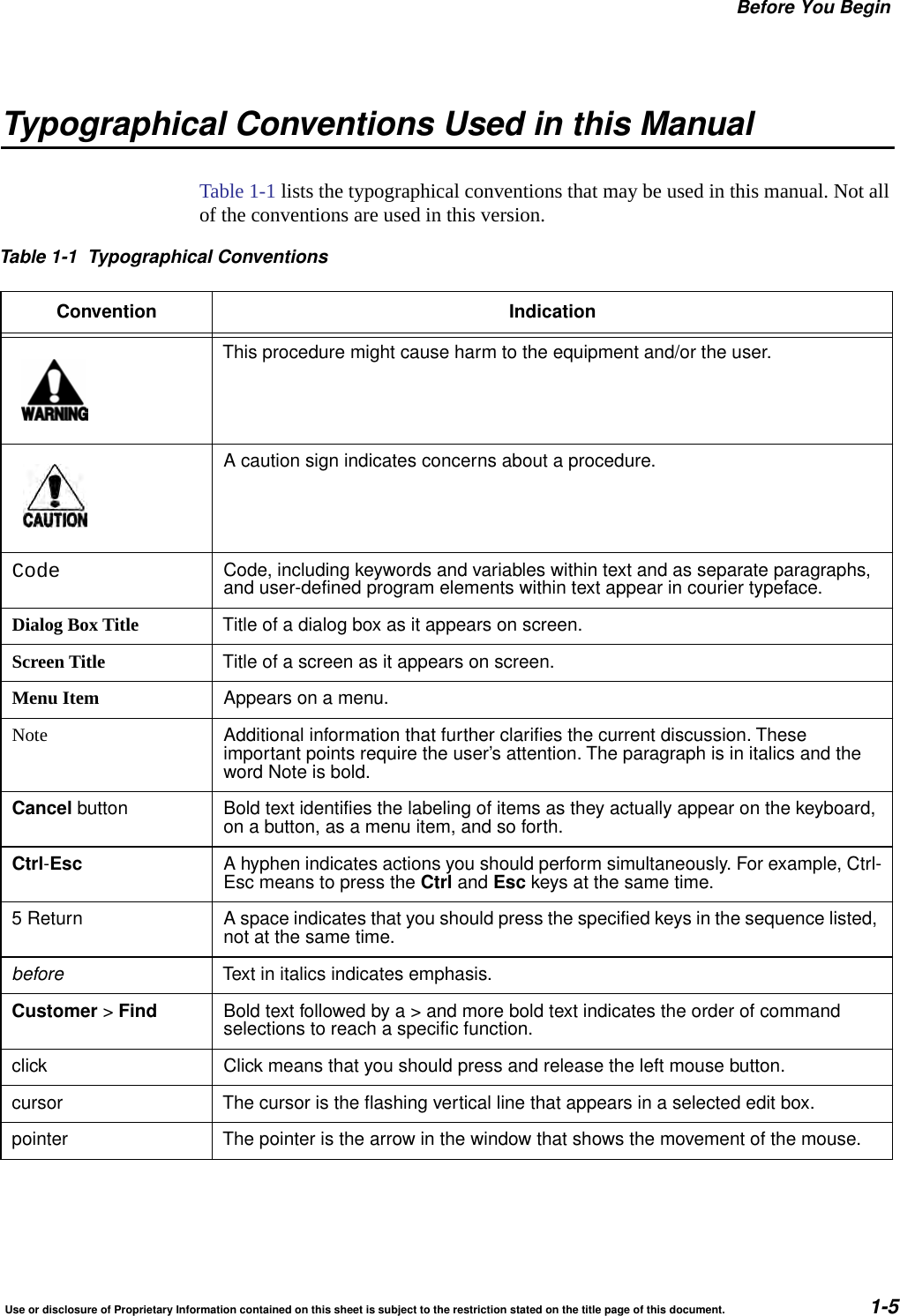
Before You BeginUse or disclosure of Proprietary Information contained on this sheet is subject to the restriction stated on the title page of this document. 1-5Typographical Conventions Used in this ManualTable 1-1 lists the typographical conventions that may be used in this manual. Not all of the conventions are used in this version.Table 1-1 Typographical ConventionsConvention IndicationThis procedure might cause harm to the equipment and/or the user.A caution sign indicates concerns about a procedure.Code Code, including keywords and variables within text and as separate paragraphs,and user-defined program elements within text appear in courier typeface.Dialog Box Title Title of a dialog box as it appears on screen.Screen Title Title of a screen as it appears on screen.Menu Item Appears on a menu.Note Additional information that further clarifies the current discussion. Theseimportant points require the user’s attention. The paragraph is in italics and theword Note is bold.Cancel button Bold text identifies the labeling of items as they actually appear on the keyboard,on a button, as a menu item, and so forth.Ctrl-Esc A hyphen indicates actions you should perform simultaneously. For example, Ctrl-Esc means to press the Ctrl and Esc keys at the same time.5 Return A space indicates that you should press the specified keys in the sequence listed,not at the same time.before Text in italics indicates emphasis.Customer >Find Bold text followed by a > and more bold text indicates the order of commandselections to reach a specific function.click Click means that you should press and release the left mouse button.cursor The cursor is the flashing vertical line that appears in a selected edit box.pointer The pointer is the arrow in the window that shows the movement of the mouse.
Orion Reader System Guide1-6 Use or disclosure of Proprietary Information contained on this sheet is subject to the restriction stated on the title page of this document.
2Developing the Installation Site Plan
Developing the Installation Site PlanUse or disclosure of Proprietary Information contained on this sheet is subject to the restriction stated on the title page of this document. 2-3Chapter 2Developing the Installation Site PlanThis chapter provides guidelines for the following tasks: •Assessing and formulating the site plan•Preparing the site•Choosing locations to mount the system components•Determining electrical and communications requirementsAssessing and Formulating a Site PlanYou will need to perform a general geographic RF site survey to check for RF noise sources near the automatic vehicle identification (AVI) installation.You will need to formulate a frequency plan for each plaza. Each reader has two fre-quencies: downlink (reader-to-tag communications) and uplink (tag-to-reader responses). An Orion Reader deployed for use in the U.S. uses the following fre-quency ranges:•Downlink: 911.75 to 919.75 MHz, adjustable in 0.25 MHz steps•Uplink: 902.25 to 903.75 MHz and 910.00 to 921.50 MHz, adjustable in 0.25 MHz steps. Actual frequency range is protocol dependent.1Consult with the Star Systems engineer or other systems integrator assisting with the installation of the Orion Readers.Preparing the Installation SitePrepare the site according to the design parameters determined by your system inte-grator.Site Preparation ChecklistComplete the following tasks, depending on the individual site.1. The above frequency ranges are in the location monitoring service band.Acquire a construction license.Acquire a Federal Communications Commission (FCC) license.
Orion Reader System Guide2-4 Use or disclosure of Proprietary Information contained on this sheet is subject to the restriction stated on the title page of this document.You will need to determine if Sync is required in your installation. If Sync is required, then you may need to wire the installation for Sync configuration. Chapter 9 contains detailed Sync information. You can also use a GPS option if hardwiring is not an option. See Appendix D for more information on the GPS timing assembly option.Components ChecklistEnsure you have the following components available for the installation:Orion Reader(s)One toll antenna for each laneAll optional equipment to the basic Orion Reader. Appendix D lists the optionalequipment that can be used with the Orion Reader.Task ChecklistThe following checklist summarizes the installation procedure. Instructions for each task are provided in the “Mounting the Orion Reader” section in Chapter 3.Where to Mount the ComponentsThe location for mounting the components is designated in the site installation plan. Many AVI site layouts are similar.The Orion Reader can be installed in a housing along with the host computer or lane controller.Acquire an environmental assessment permit.Ensure that you have assembled all the lights, buzzers, and vehicle detectorsthat will interface with the Orion Reader system.Ensure that you have software for a desktop or laptop computer to interface withthe Orion Reader firmware.Pull communications, coaxial, and power cables through outdoor-grade conduit.Ensure that construction work required for mounting the equipment iscompleted.Ensure that 120V AC service is available.Install Orion Reader (and any options).Connect power cable from power supply to Orion Reader.Install antenna(s) and connect them to Orion Reader.
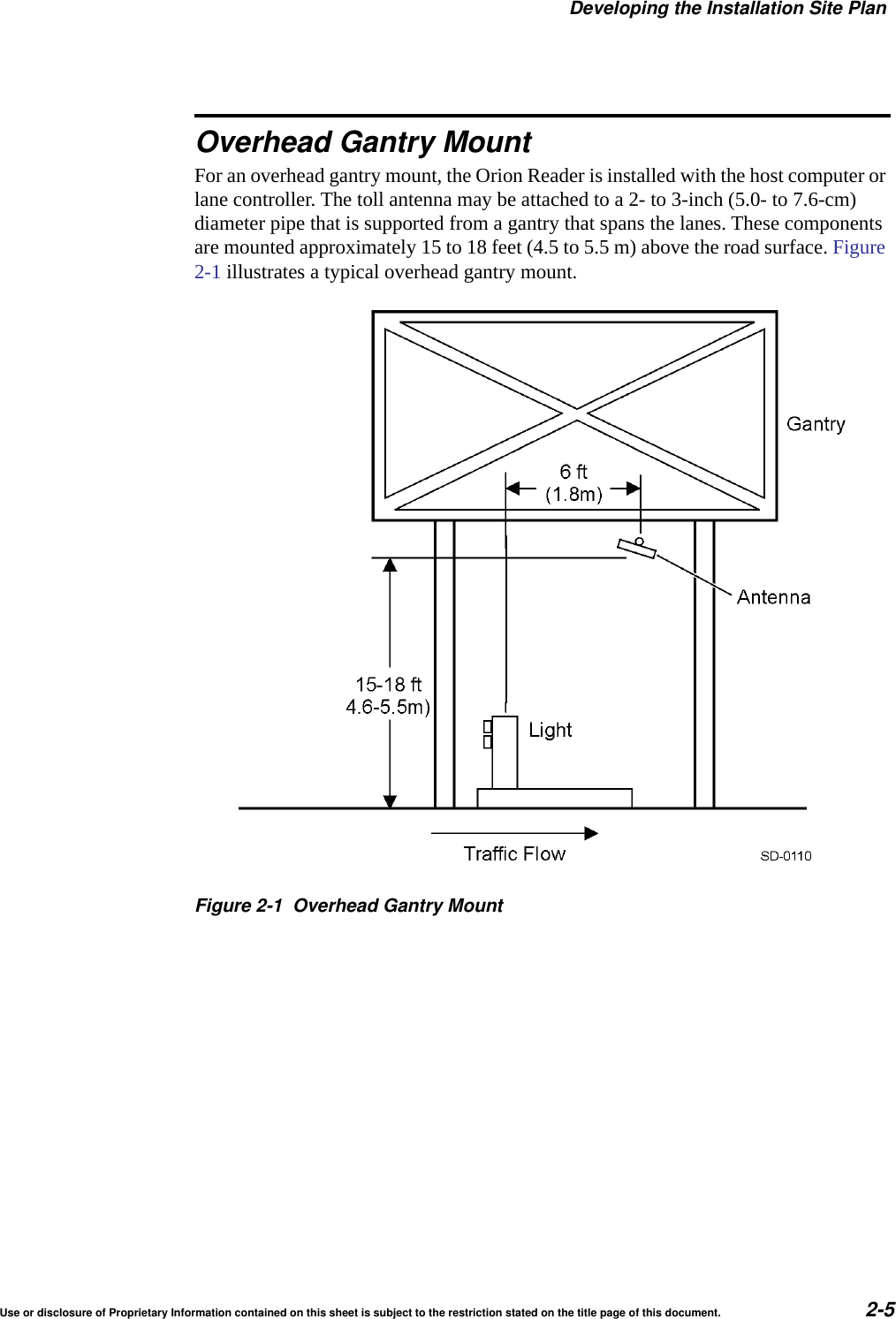
Developing the Installation Site PlanUse or disclosure of Proprietary Information contained on this sheet is subject to the restriction stated on the title page of this document. 2-5Overhead Gantry MountFor an overhead gantry mount, the Orion Reader is installed with the host computer or lane controller. The toll antenna may be attached to a 2- to 3-inch (5.0- to 7.6-cm) diameter pipe that is supported from a gantry that spans the lanes. These components are mounted approximately 15 to 18 feet (4.5 to 5.5 m) above the road surface. Figure 2-1 illustrates a typical overhead gantry mount.Figure 2-1 Overhead Gantry Mount
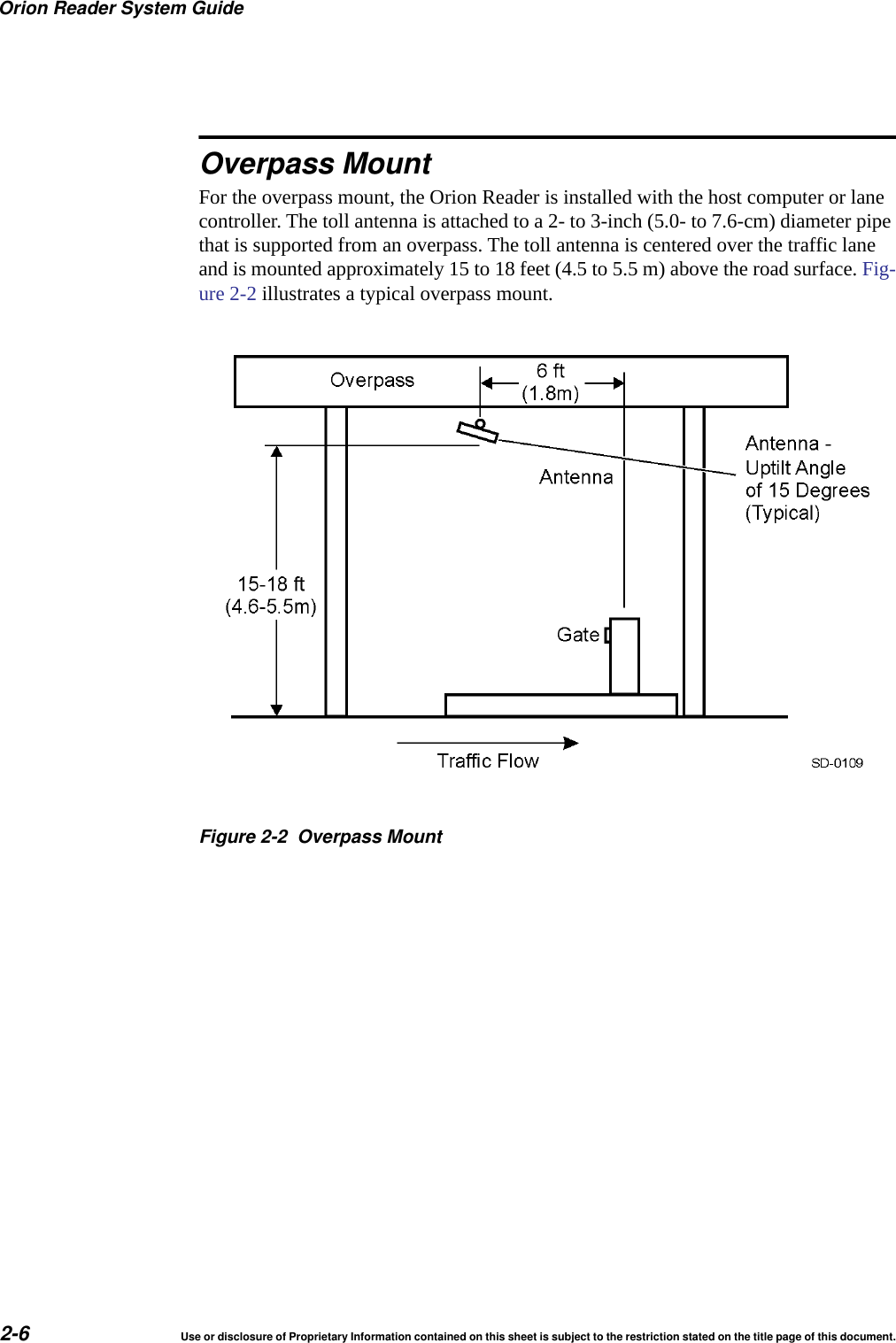
Orion Reader System Guide2-6 Use or disclosure of Proprietary Information contained on this sheet is subject to the restriction stated on the title page of this document.Overpass MountFor the overpass mount, the Orion Reader is installed with the host computer or lane controller. The toll antenna is attached to a 2- to 3-inch (5.0- to 7.6-cm) diameter pipe that is supported from an overpass. The toll antenna is centered over the traffic lane and is mounted approximately 15 to 18 feet (4.5 to 5.5 m) above the road surface. Fig-ure 2-2 illustrates a typical overpass mount.Figure 2-2 Overpass Mount
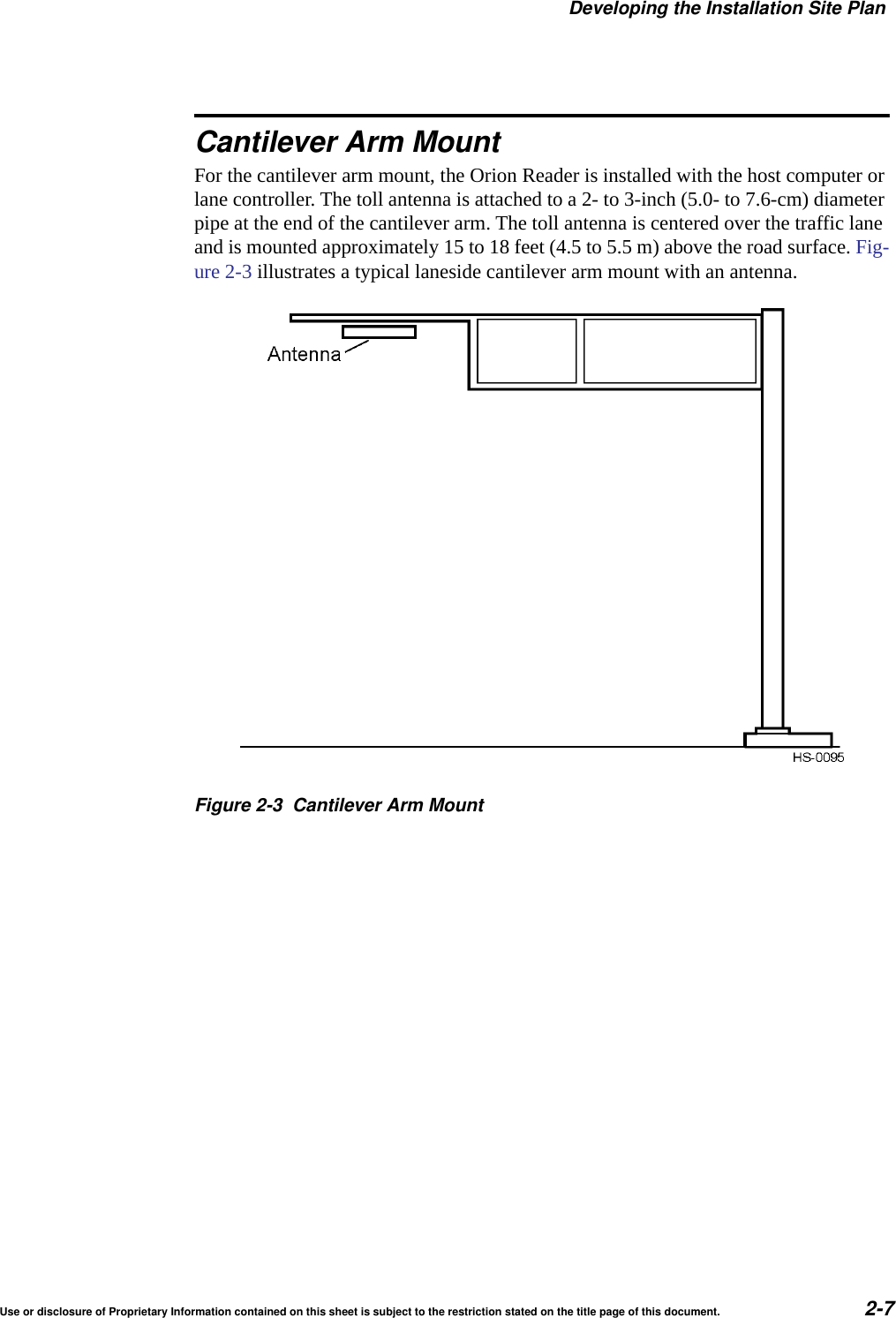
Developing the Installation Site PlanUse or disclosure of Proprietary Information contained on this sheet is subject to the restriction stated on the title page of this document. 2-7Cantilever Arm MountFor the cantilever arm mount, the Orion Reader is installed with the host computer or lane controller. The toll antenna is attached to a 2- to 3-inch (5.0- to 7.6-cm) diameter pipe at the end of the cantilever arm. The toll antenna is centered over the traffic lane and is mounted approximately 15 to 18 feet (4.5 to 5.5 m) above the road surface. Fig-ure 2-3 illustrates a typical laneside cantilever arm mount with an antenna.Figure 2-3 Cantilever Arm Mount
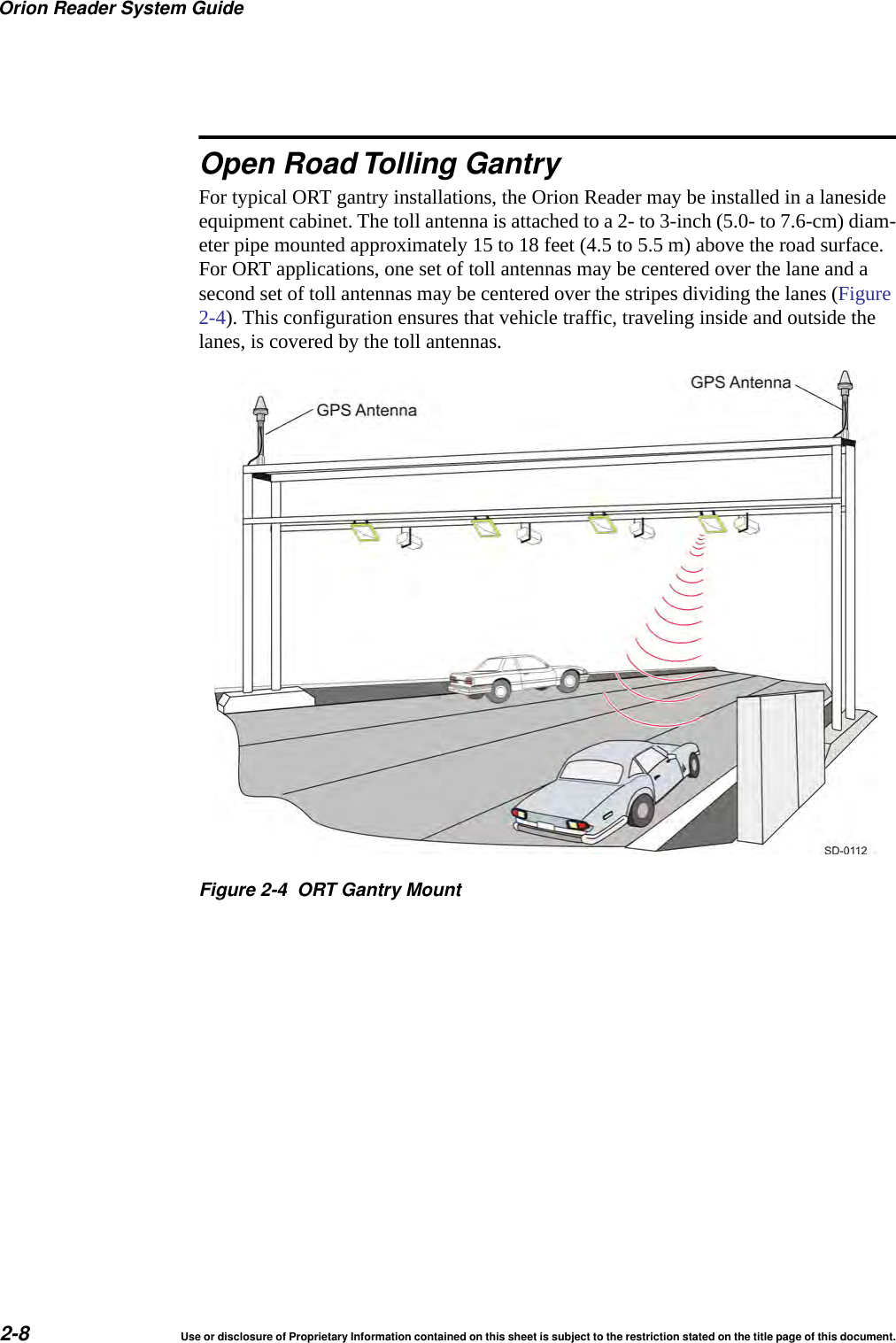
Orion Reader System Guide2-8 Use or disclosure of Proprietary Information contained on this sheet is subject to the restriction stated on the title page of this document.Open Road Tolling GantryFor typical ORT gantry installations, the Orion Reader may be installed in a laneside equipment cabinet. The toll antenna is attached to a 2- to 3-inch (5.0- to 7.6-cm) diam-eter pipe mounted approximately 15 to 18 feet (4.5 to 5.5 m) above the road surface. For ORT applications, one set of toll antennas may be centered over the lane and a second set of toll antennas may be centered over the stripes dividing the lanes (Figure 2-4). This configuration ensures that vehicle traffic, traveling inside and outside the lanes, is covered by the toll antennas. Figure 2-4 ORT Gantry Mount
3Installing the Orion Reader
Installing the Orion ReaderUse or disclosure of Proprietary Information contained on this sheet is subject to the restriction stated on the title page of this document. 3-3Chapter 3Installing the Orion ReaderThis chapter describes the Orion® Reader system and provides instructions for installing the Orion Reader system.Orion Reader ComponentsStar Systems’ Orion Reader is an integrated, multiprotocol 915-MHz radio frequency identification (RFID) reader system that includes an RF transceiver board and proces-sor in a single assembly.The Orion Reader is suitable for a wide variety of automatic vehicle identification applications, including airport ground transportation management systems, parking, secure access, and rail applications.The Orion Reader can be installed in a cabinet with a host computer or onsite lane controller, or alone in a NEMA enclosure.The Orion Reader transmits and receives signals through a single antenna.The Orion Reader is capable of reading tags of any of the following protocols in a given installation:•ISO 18000-6C (EPC)•California Title 21•Interagency Group (IAG)•CVISN (ASTM Draft 6)CautionWhere multiple tag protocols are used in the same installation, an Orion Reader operating in Mode 88 is capable of reading any combination of the protocols; how-ever, no more than two protocols should be used for high speed operations.
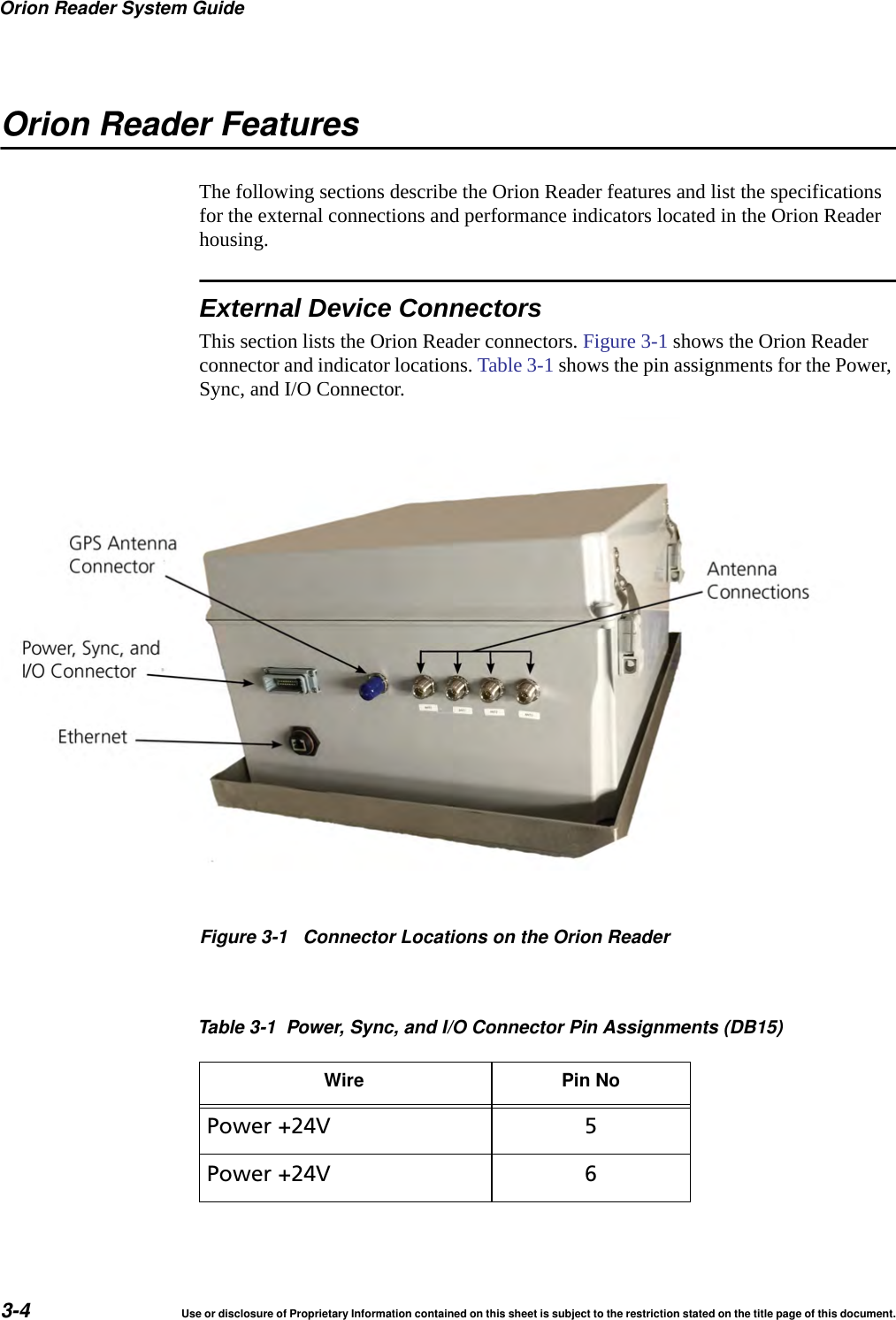
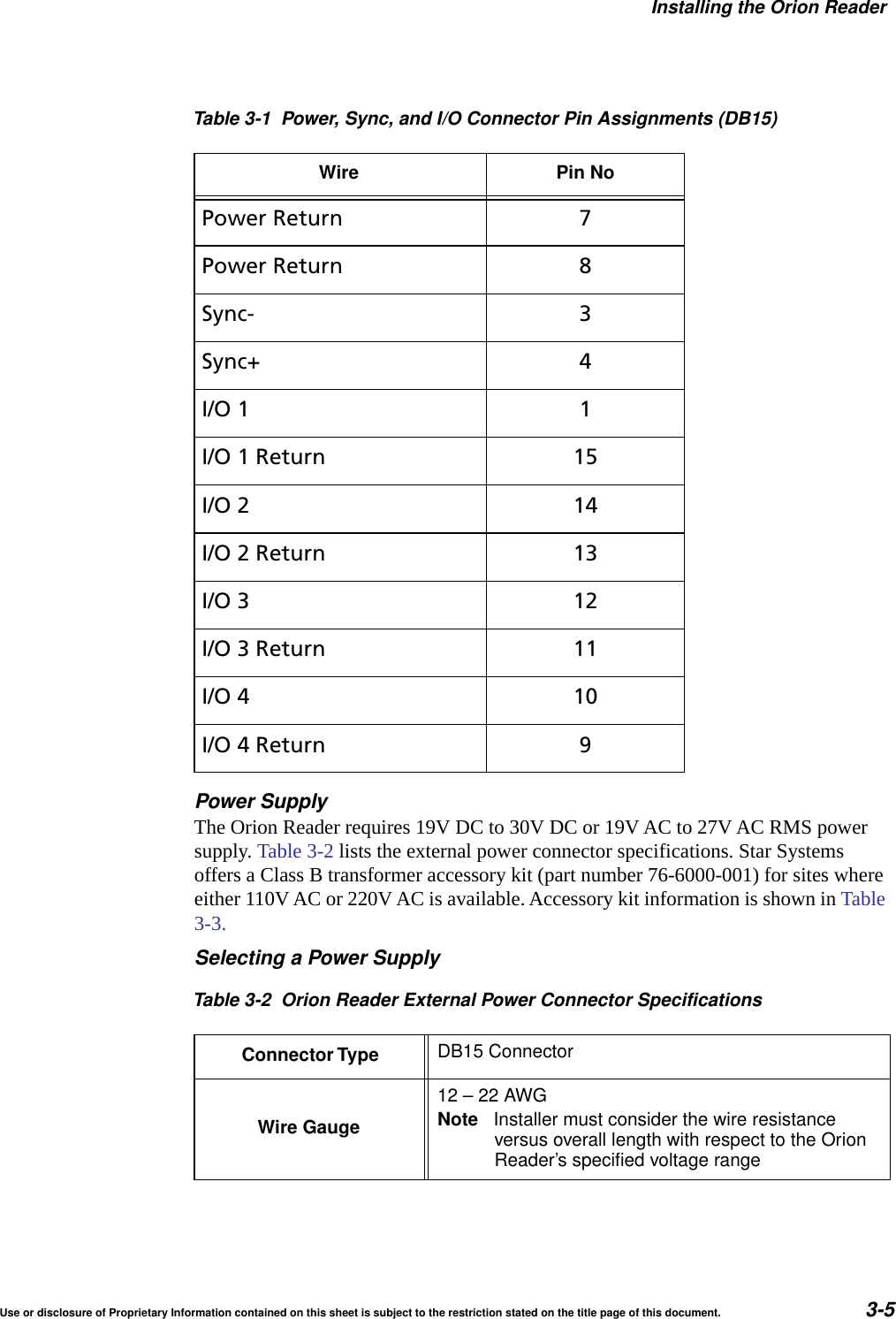
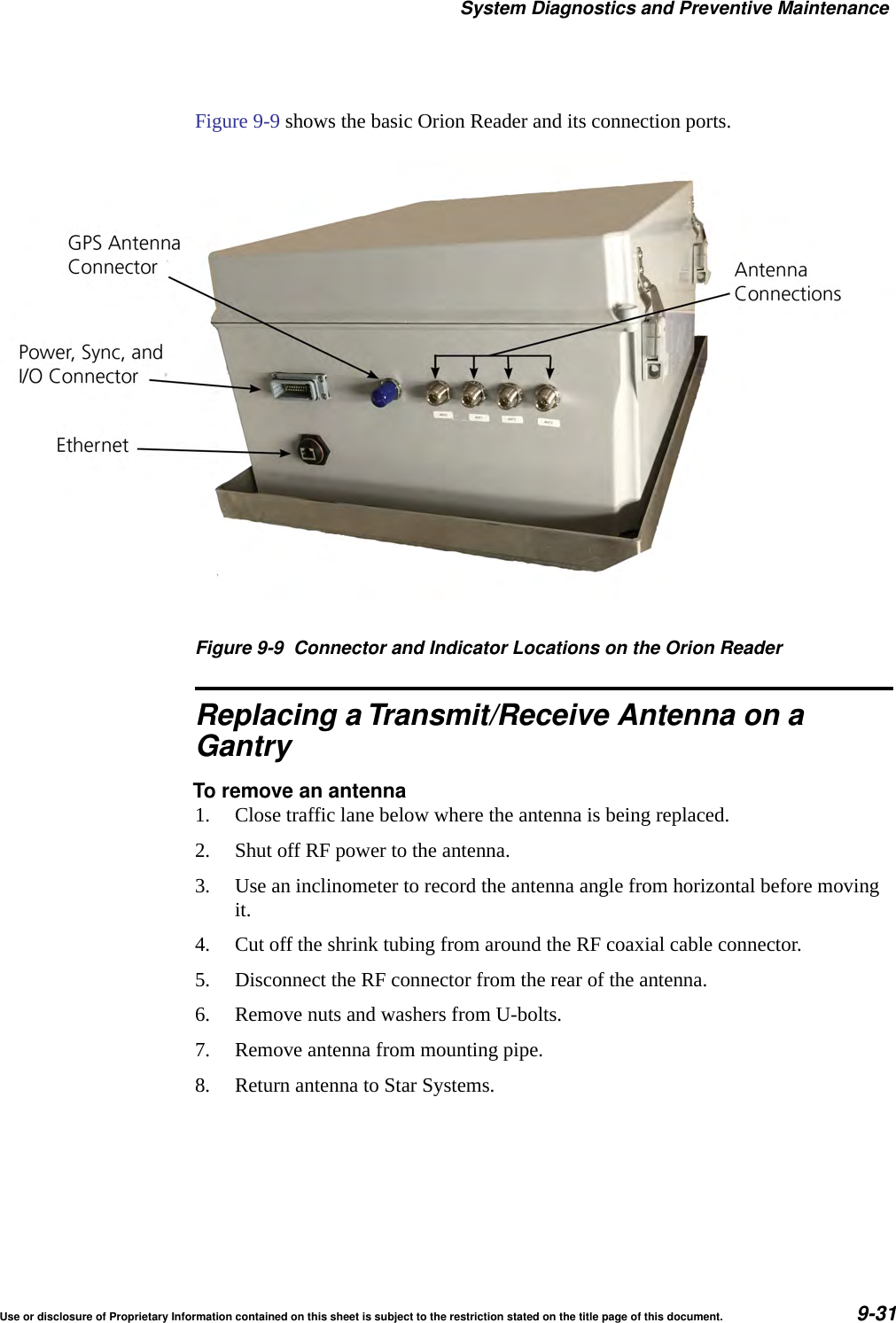
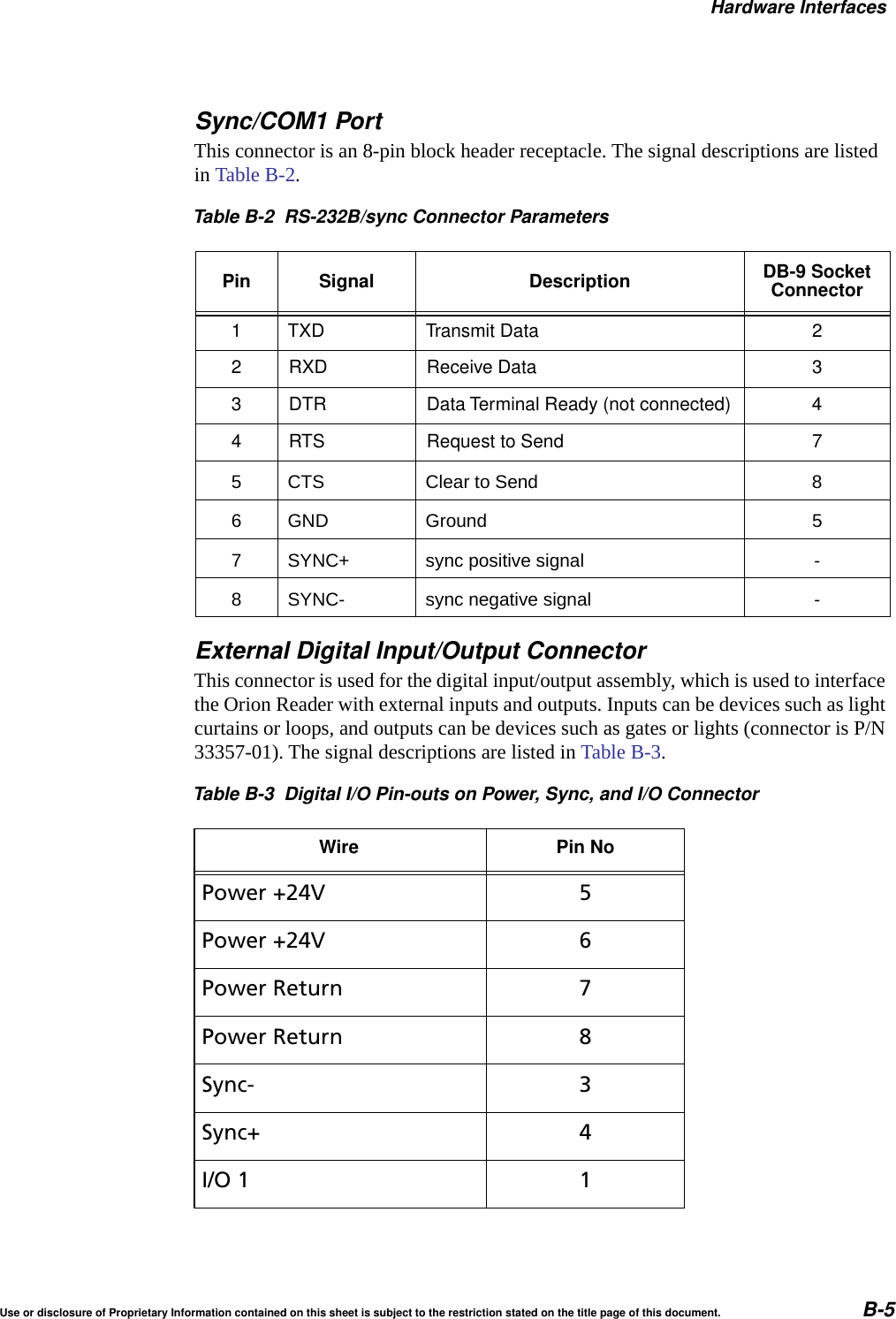
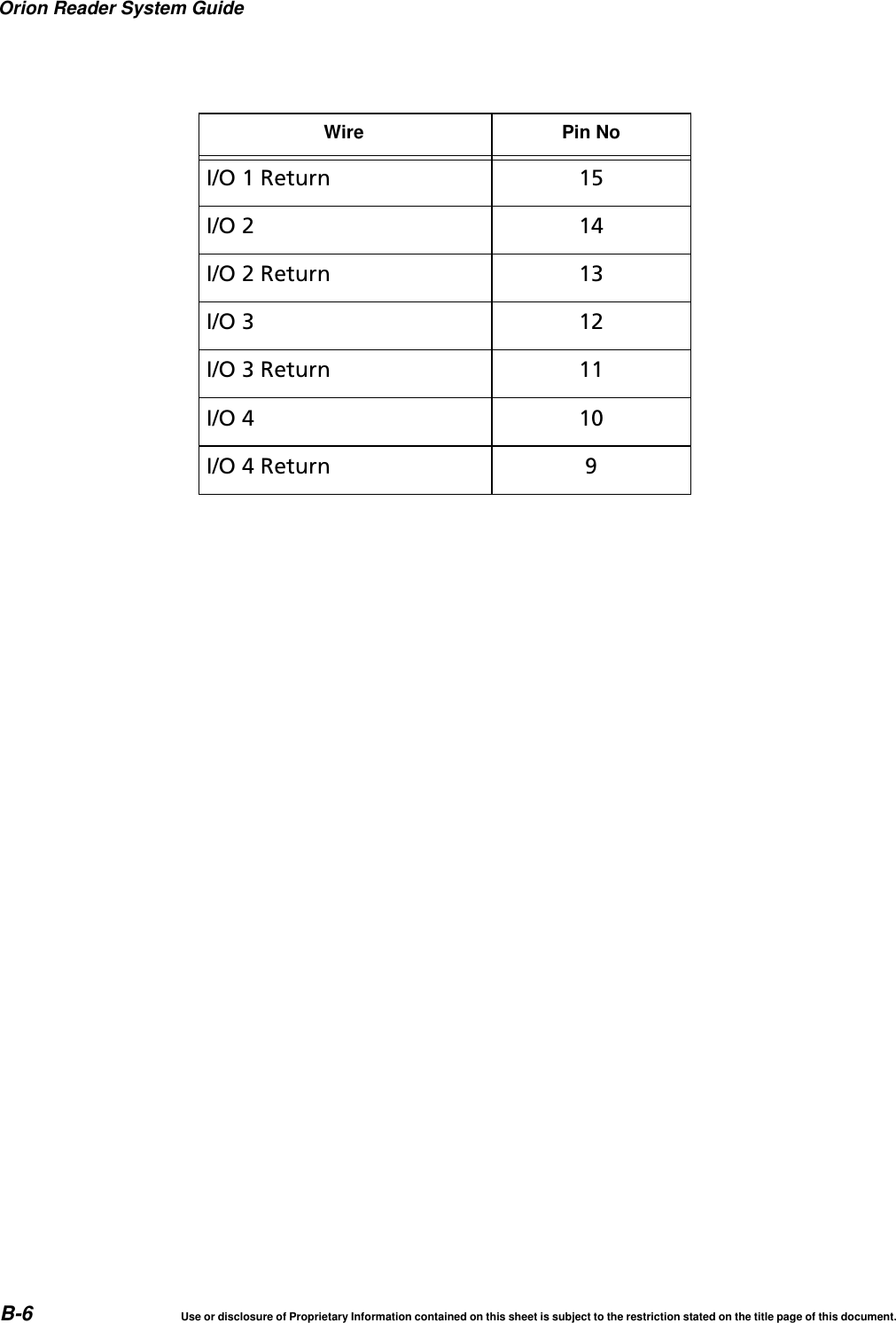
Orion Reader System Guide3-4 Use or disclosure of Proprietary Information contained on this sheet is subject to the restriction stated on the title page of this document.Orion Reader FeaturesThe following sections describe the Orion Reader features and list the specifications for the external connections and performance indicators located in the Orion Reader housing.External Device ConnectorsThis section lists the Orion Reader connectors. Figure 3-1 shows the Orion Reader connector and indicator locations. Table 3-1 shows the pin assignments for the Power, Sync, and I/O Connector. Figure 3-1 Connector Locations on the Orion ReaderTable 3-1 Power, Sync, and I/O Connector Pin Assignments (DB15)Wire Pin NoPower +24V 5Power +24V 6
Installing the Orion ReaderUse or disclosure of Proprietary Information contained on this sheet is subject to the restriction stated on the title page of this document. 3-5Power SupplyThe Orion Reader requires 19V DC to 30V DC or 19V AC to 27V AC RMS power supply. Table 3-2 lists the external power connector specifications. Star Systems offers a Class B transformer accessory kit (part number 76-6000-001) for sites where either 110V AC or 220V AC is available. Accessory kit information is shown in Table 3-3.Selecting a Power SupplyPower Return 7Power Return 8Sync- 3Sync+ 4I/O 1 1I/O 1 Return 15I/O 2 14I/O 2 Return 13I/O 3 12I/O 3 Return 11I/O 4 10I/O 4 Return 9Table 3-2 Orion Reader External Power Connector SpecificationsConnector Type DB15 ConnectorWire Gauge12–22AWGNote Installer must consider the wire resistanceversus overall length with respect to the OrionReader’s specified voltage rangeTable 3-1 Power, Sync, and I/O Connector Pin Assignments (DB15)Wire Pin No
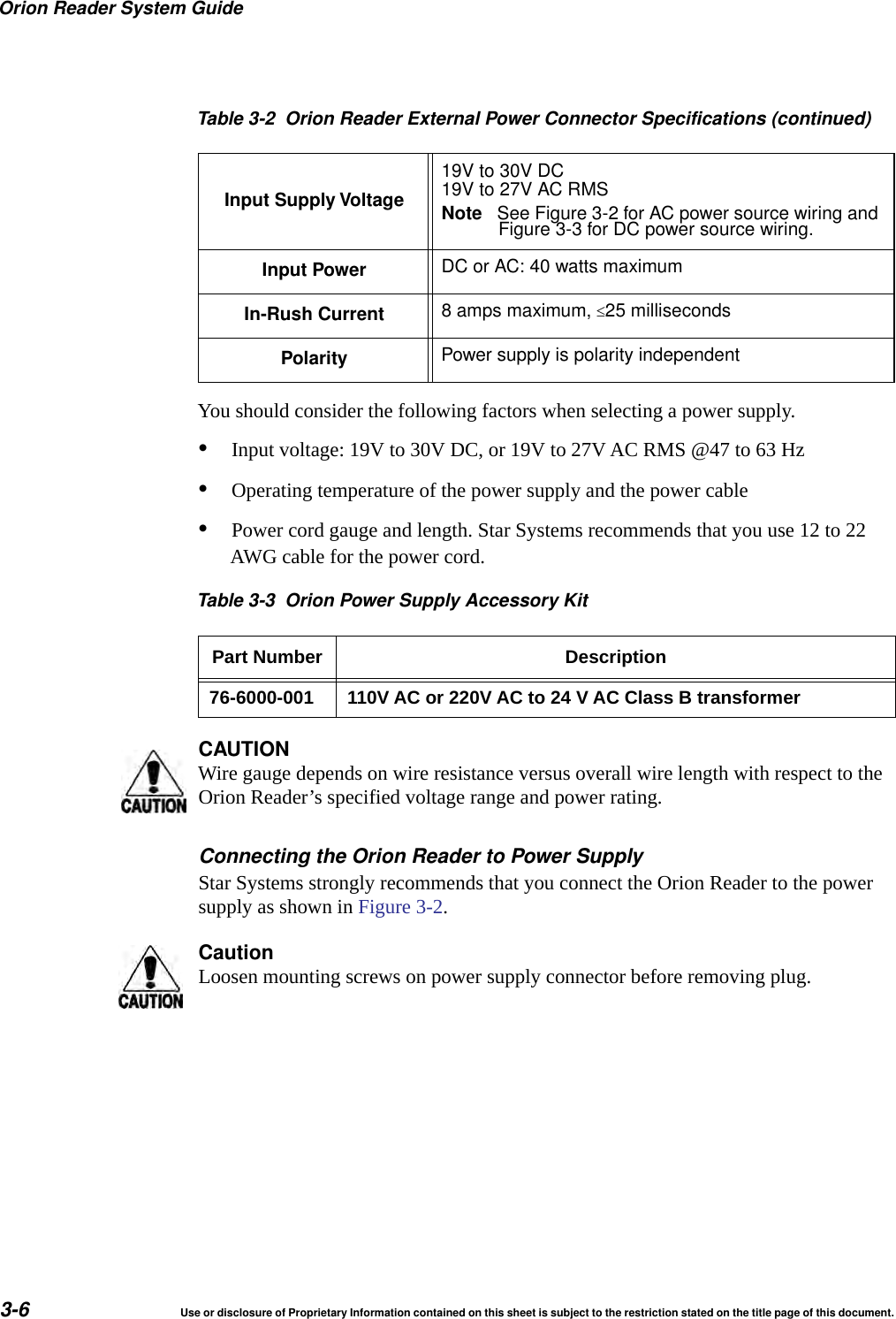
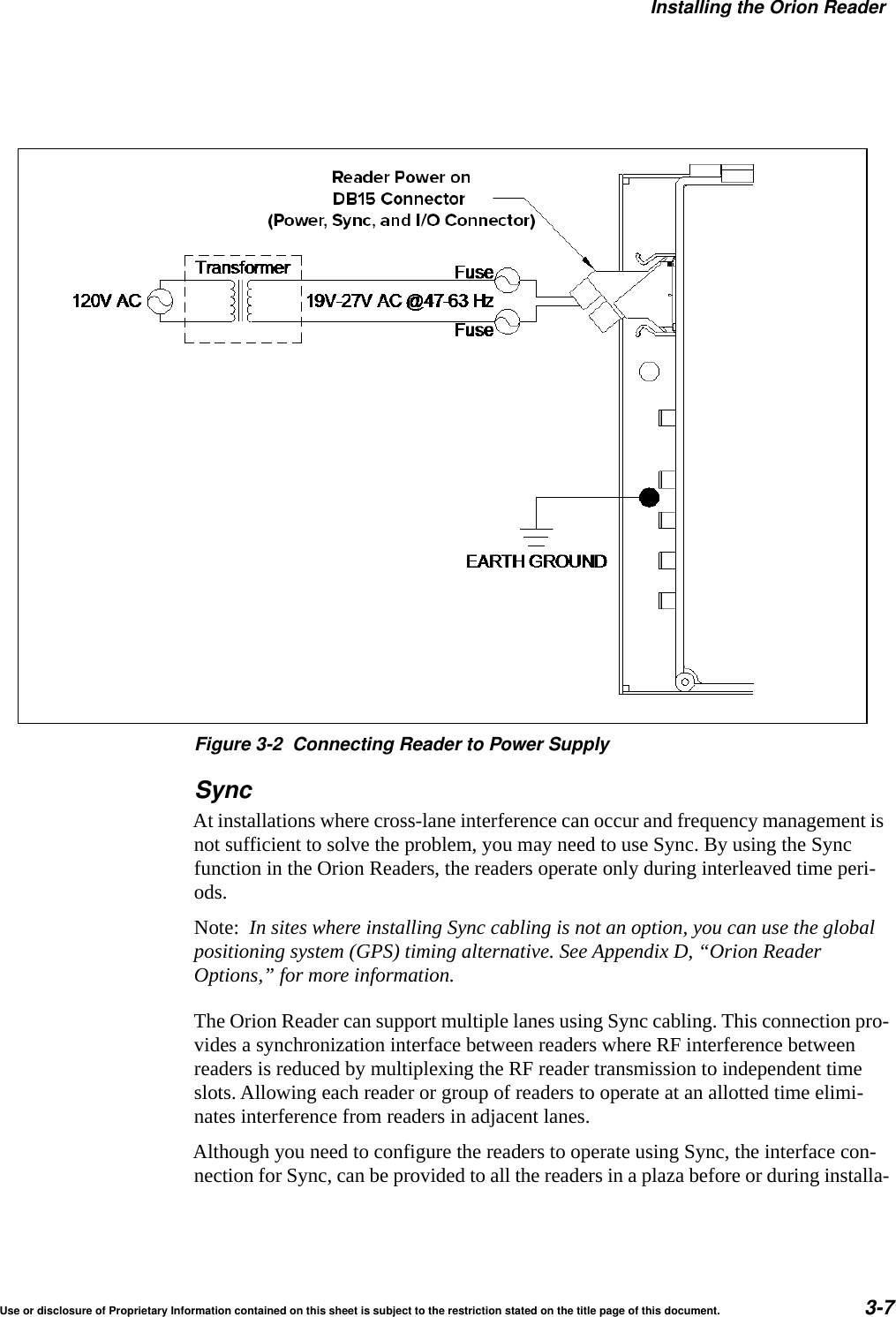
Orion Reader System Guide3-6 Use or disclosure of Proprietary Information contained on this sheet is subject to the restriction stated on the title page of this document.You should consider the following factors when selecting a power supply.•Input voltage: 19V to 30V DC, or 19V to 27V AC RMS @47 to 63 Hz •Operating temperature of the power supply and the power cable•Power cord gauge and length. Star Systems recommends that you use 12 to 22 AWG cable for the power cord.Table 3-3 Orion Power Supply Accessory KitPart Number Description76-6000-001 110V AC or 220V AC to 24 V AC Class B transformerCAUTIONWire gauge depends on wire resistance versus overall wire length with respect to the Orion Reader’s specified voltage range and power rating.Connecting the Orion Reader to Power SupplyStar Systems strongly recommends that you connect the Orion Reader to the power supply as shown in Figure 3-2.CautionLoosen mounting screws on power supply connector before removing plug.Input Supply Voltage19V to 30V DC19V to 27V AC RMSNote See Figure 3-2 for AC power source wiring andFigure 3-3 for DC power source wiring.Input Power DC or AC: 40 watts maximumIn-Rush Current 8 amps maximum, 25 millisecondsPolarity Power supply is polarity independentTable 3-2 Orion Reader External Power Connector Specifications (continued)
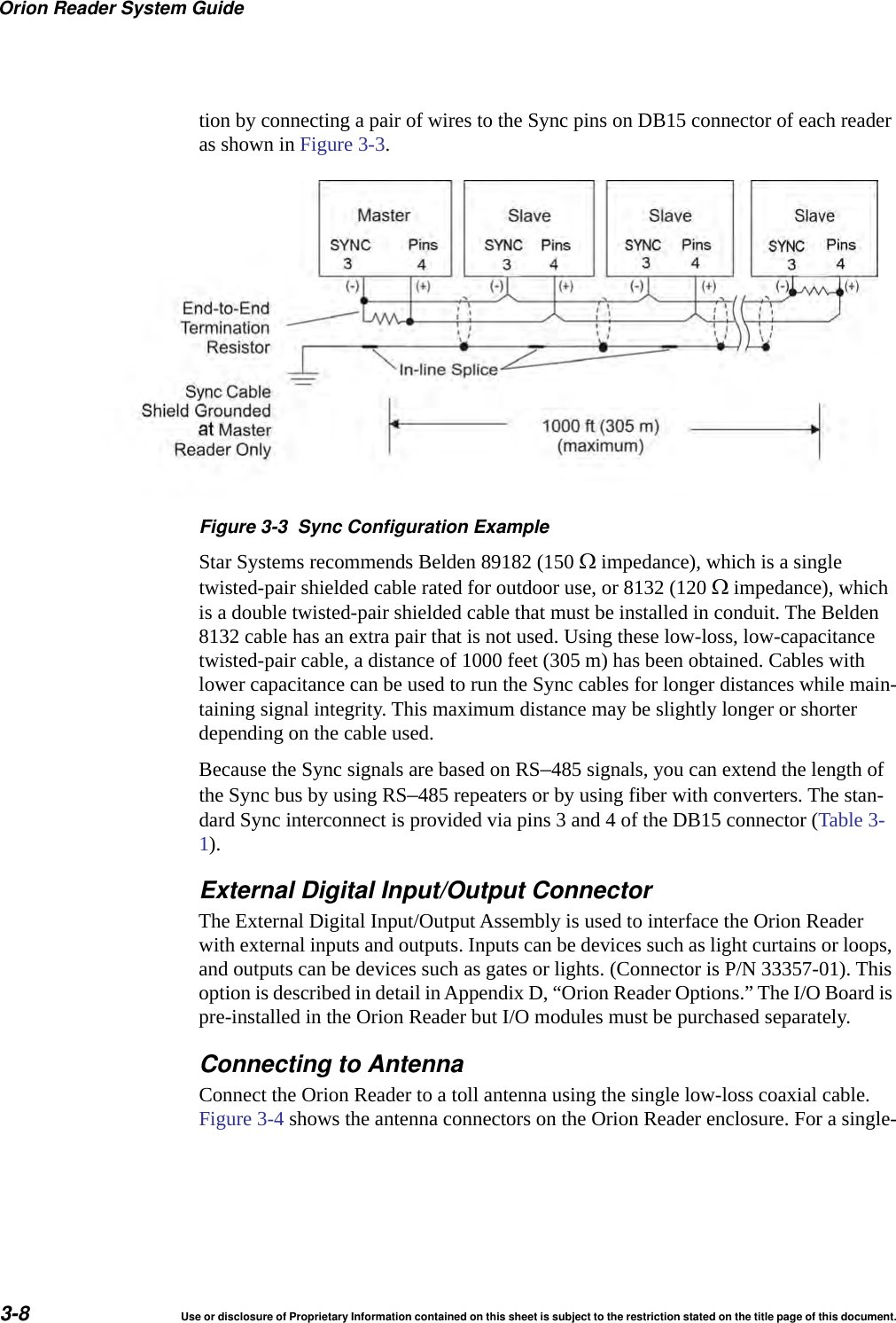
Installing the Orion ReaderUse or disclosure of Proprietary Information contained on this sheet is subject to the restriction stated on the title page of this document. 3-7Figure 3-2 Connecting Reader to Power SupplySyncAt installations where cross-lane interference can occur and frequency management is not sufficient to solve the problem, you may need to use Sync. By using the Sync function in the Orion Readers, the readers operate only during interleaved time peri-ods.Note:  In sites where installing Sync cabling is not an option, you can use the global positioning system (GPS) timing alternative. See Appendix D, “Orion Reader Options,” for more information.The Orion Reader can support multiple lanes using Sync cabling. This connection pro-vides a synchronization interface between readers where RF interference between readers is reduced by multiplexing the RF reader transmission to independent time slots. Allowing each reader or group of readers to operate at an allotted time elimi-nates interference from readers in adjacent lanes.Although you need to configure the readers to operate using Sync, the interface con-nection for Sync, can be provided to all the readers in a plaza before or during installa-
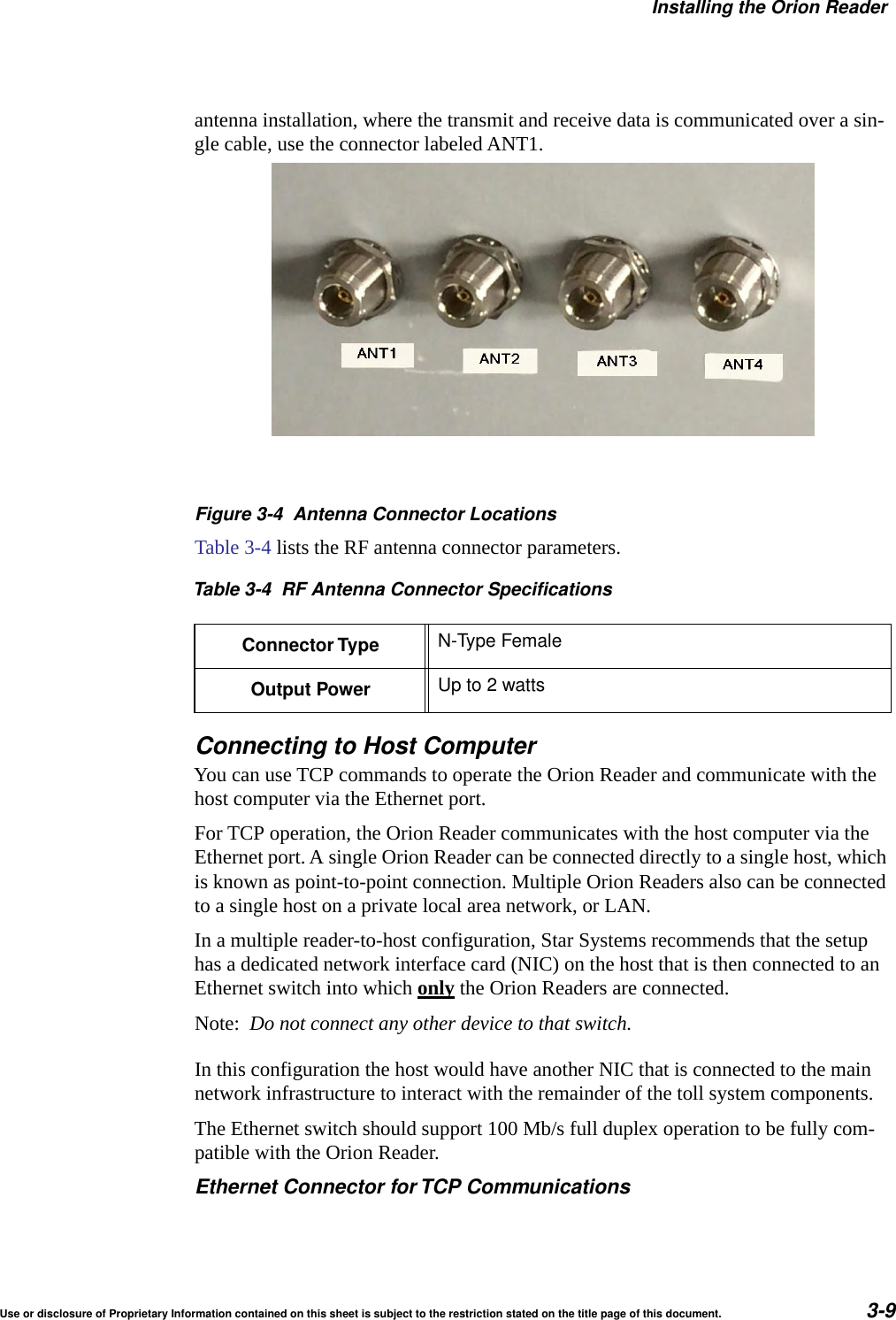
Orion Reader System Guide3-8 Use or disclosure of Proprietary Information contained on this sheet is subject to the restriction stated on the title page of this document.tion by connecting a pair of wires to the Sync pins on DB15 connector of each reader as shown in Figure 3-3. Figure 3-3 Sync Configuration ExampleStar Systems recommends Belden 89182 (150  impedance), which is a single twisted-pair shielded cable rated for outdoor use, or 8132 (120  impedance), which is a double twisted-pair shielded cable that must be installed in conduit. The Belden 8132 cable has an extra pair that is not used. Using these low-loss, low-capacitance twisted-pair cable, a distance of 1000 feet (305 m) has been obtained. Cables with lower capacitance can be used to run the Sync cables for longer distances while main-taining signal integrity. This maximum distance may be slightly longer or shorter depending on the cable used.Because the Sync signals are based on RS–485 signals, you can extend the length of the Sync bus by using RS–485 repeaters or by using fiber with converters. The stan-dard Sync interconnect is provided via pins 3 and 4 of the DB15 connector (Table 3-1).External Digital Input/Output ConnectorThe External Digital Input/Output Assembly is used to interface the Orion Reader with external inputs and outputs. Inputs can be devices such as light curtains or loops, and outputs can be devices such as gates or lights. (Connector is P/N 33357-01). This option is described in detail in Appendix D, “Orion Reader Options.” The I/O Board is pre-installed in the Orion Reader but I/O modules must be purchased separately.Connecting to AntennaConnect the Orion Reader to a toll antenna using the single low-loss coaxial cable. Figure 3-4 shows the antenna connectors on the Orion Reader enclosure. For a single-
Installing the Orion ReaderUse or disclosure of Proprietary Information contained on this sheet is subject to the restriction stated on the title page of this document. 3-9antenna installation, where the transmit and receive data is communicated over a sin-gle cable, use the connector labeled ANT1.Figure 3-4 Antenna Connector LocationsTable 3-4 lists the RF antenna connector parameters.Connecting to Host ComputerYou can use TCP commands to operate the Orion Reader and communicate with the host computer via the Ethernet port.For TCP operation, the Orion Reader communicates with the host computer via the Ethernet port. A single Orion Reader can be connected directly to a single host, which is known as point-to-point connection. Multiple Orion Readers also can be connected to a single host on a private local area network, or LAN.In a multiple reader-to-host configuration, Star Systems recommends that the setup has a dedicated network interface card (NIC) on the host that is then connected to an Ethernet switch into which only the Orion Readers are connected. Note:  Do not connect any other device to that switch.In this configuration the host would have another NIC that is connected to the main network infrastructure to interact with the remainder of the toll system components.The Ethernet switch should support 100 Mb/s full duplex operation to be fully com-patible with the Orion Reader.Ethernet Connector forTCP CommunicationsTable 3-4 RF Antenna Connector SpecificationsConnector Type N-Type FemaleOutput Power Up to 2 watts
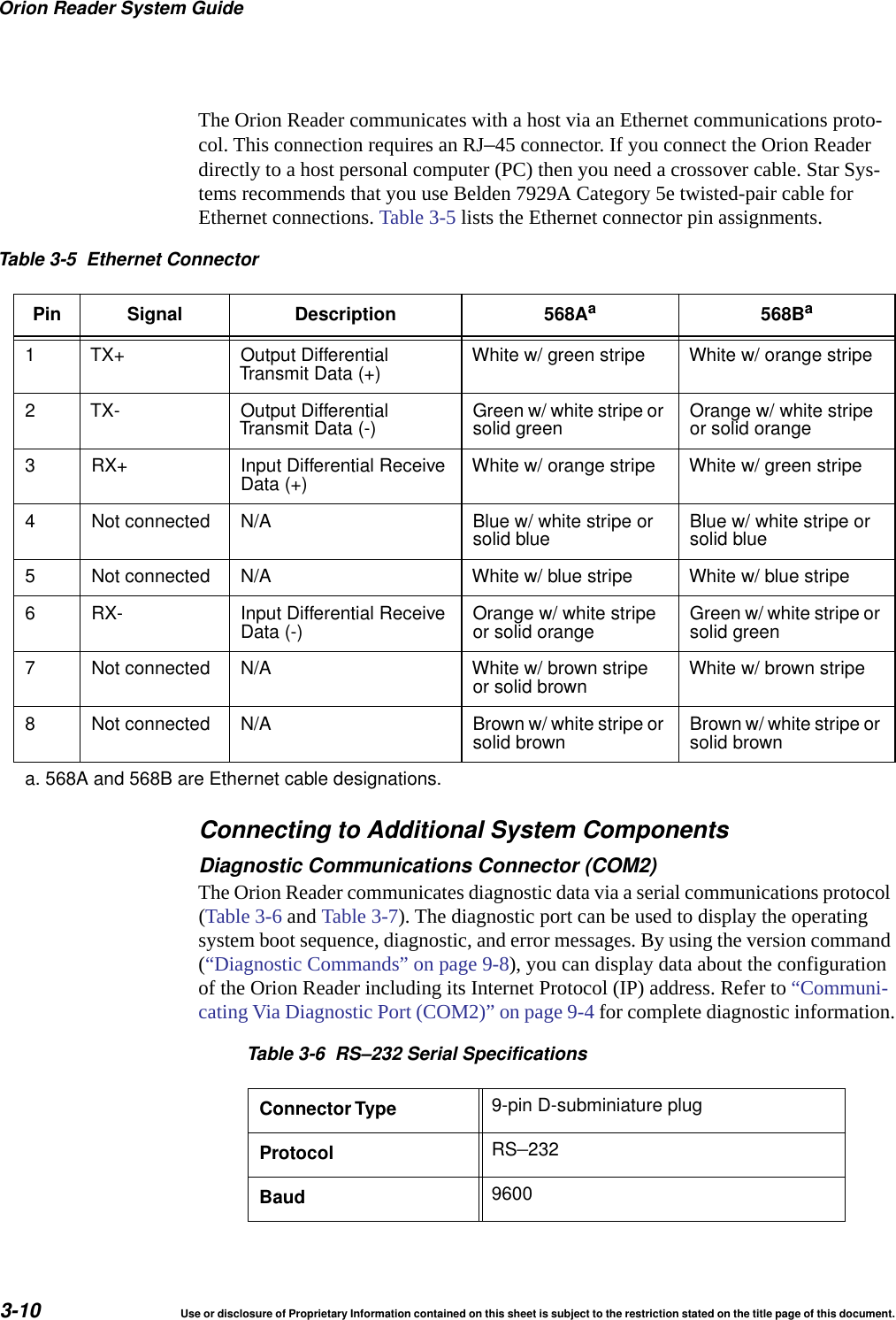
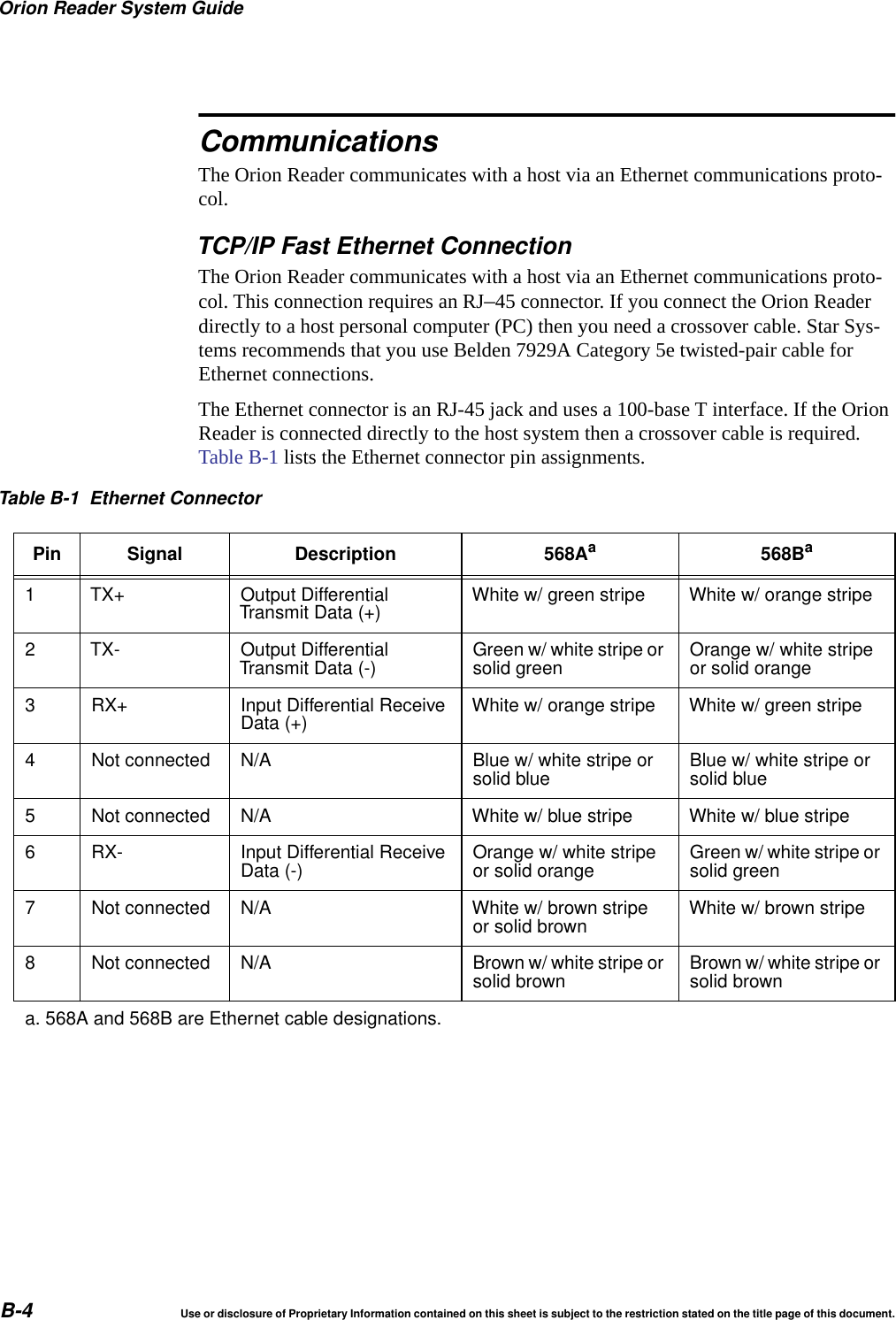
Orion Reader System Guide3-10 Use or disclosure of Proprietary Information contained on this sheet is subject to the restriction stated on the title page of this document.The Orion Reader communicates with a host via an Ethernet communications proto-col. This connection requires an RJ–45 connector. If you connect the Orion Reader directly to a host personal computer (PC) then you need a crossover cable. Star Sys-tems recommends that you use Belden 7929A Category 5e twisted-pair cable for Ethernet connections. Table 3-5 lists the Ethernet connector pin assignments.Connecting to Additional System ComponentsDiagnostic Communications Connector (COM2)The Orion Reader communicates diagnostic data via a serial communications protocol (Table 3-6 and Table 3-7). The diagnostic port can be used to display the operating system boot sequence, diagnostic, and error messages. By using the version command (“Diagnostic Commands” on page 9-8), you can display data about the configuration of the Orion Reader including its Internet Protocol (IP) address. Refer to “Communi-cating Via Diagnostic Port (COM2)” on page 9-4 for complete diagnostic information.Table 3-5 Ethernet ConnectorPin Signal Description 568Aa568Ba1 TX+ Output DifferentialTransmit Data (+) White w/ green stripe White w/ orange stripe2 TX- Output DifferentialTransmit Data (-) Green w/ white stripe orsolid green Orange w/ white stripeor solid orange3 RX+ Input Differential ReceiveData (+) White w/ orange stripe White w/ green stripe4 Not connected N/A Blue w/ white stripe orsolid blue Blue w/ white stripe orsolid blue5 Not connected N/A White w/ blue stripe White w/ blue stripe6 RX- Input Differential ReceiveData (-) Orange w/ white stripeor solid orange Green w/ white stripe orsolid green7 Not connected N/A White w/ brown stripeor solid brown White w/ brown stripe8 Not connected N/A Brown w/ white stripe orsolid brown Brown w/ white stripe orsolid browna. 568A and 568B are Ethernet cable designations.Table 3-6 RS–232 Serial SpecificationsConnector Type 9-pin D-subminiature plugProtocol RS–232Baud 9600
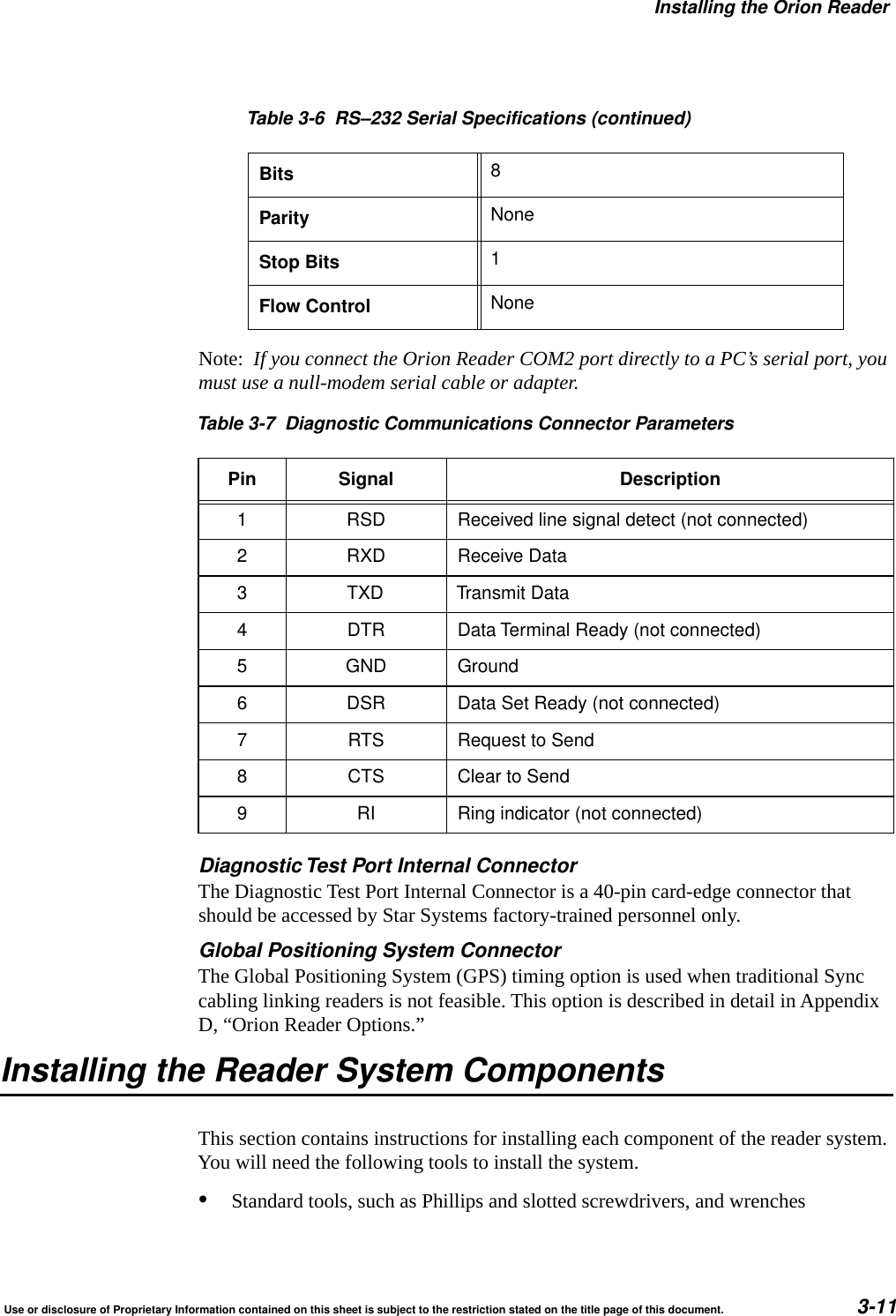
Installing the Orion ReaderUse or disclosure of Proprietary Information contained on this sheet is subject to the restriction stated on the title page of this document. 3-11Note:  If you connect the Orion Reader COM2 port directly to a PC’s serial port, you must use a null-modem serial cable or adapter.Diagnostic Test Port Internal ConnectorThe Diagnostic Test Port Internal Connector is a 40-pin card-edge connector that should be accessed by Star Systems factory-trained personnel only.Global Positioning System ConnectorThe Global Positioning System (GPS) timing option is used when traditional Sync cabling linking readers is not feasible. This option is described in detail in Appendix D, “Orion Reader Options.”Installing the Reader System ComponentsThis section contains instructions for installing each component of the reader system. You will need the following tools to install the system.•Standard tools, such as Phillips and slotted screwdrivers, and wrenchesBits 8Parity NoneStop Bits 1Flow Control NoneTable 3-7 Diagnostic Communications Connector ParametersPin Signal Description1 RSD Received line signal detect (not connected)2 RXD Receive Data3 TXD Transmit Data4 DTR Data Terminal Ready (not connected)5 GND Ground6 DSR Data Set Ready (not connected)7 RTS Request to Send8 CTS Clear to Send9 RI Ring indicator (not connected)Table 3-6 RS–232 Serial Specifications (continued)
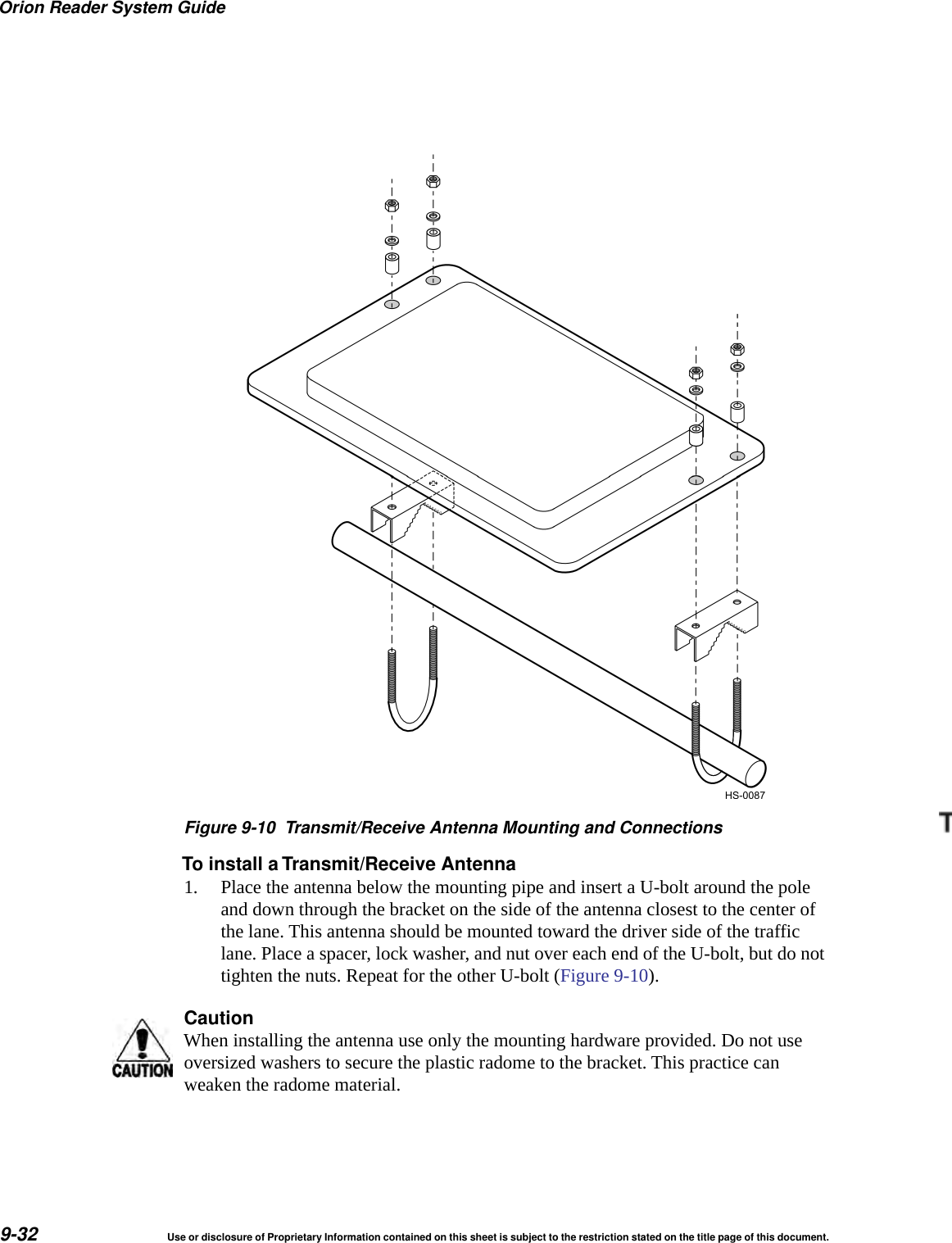
Orion Reader System Guide3-12 Use or disclosure of Proprietary Information contained on this sheet is subject to the restriction stated on the title page of this document.•Hydraulic lift or ladder for installing antennas•Torque wrench for securing antenna connections•Inclinometer or angle finder for measuring antenna angles•Multimeter, Fluke 87 or equivalent for measuring electrical signalsNote:  Chapter 9, “Configuring the Lane,” lists additional equipment required for configuring lanes to optimize system performance.Mounting the Toll Antenna in an Overhead LocationFor most overhead installations, the toll antenna is mounted on a 2- to 3-inch (5.0- to 7.6-cm) diameter pipe to accommodate various angles for lane configuring. Star Sys-tems provides a mounting kit that includes the following hardware:•Antenna•Two U-bolts with hex nuts•Two brackets•Spacers•Lock washers•Fender washers (may not be included in your accessory kit)•One 1.0-inch (2.5 cm) length of 1.1-inch (2.8-cm) diameter heat-shrink tubing
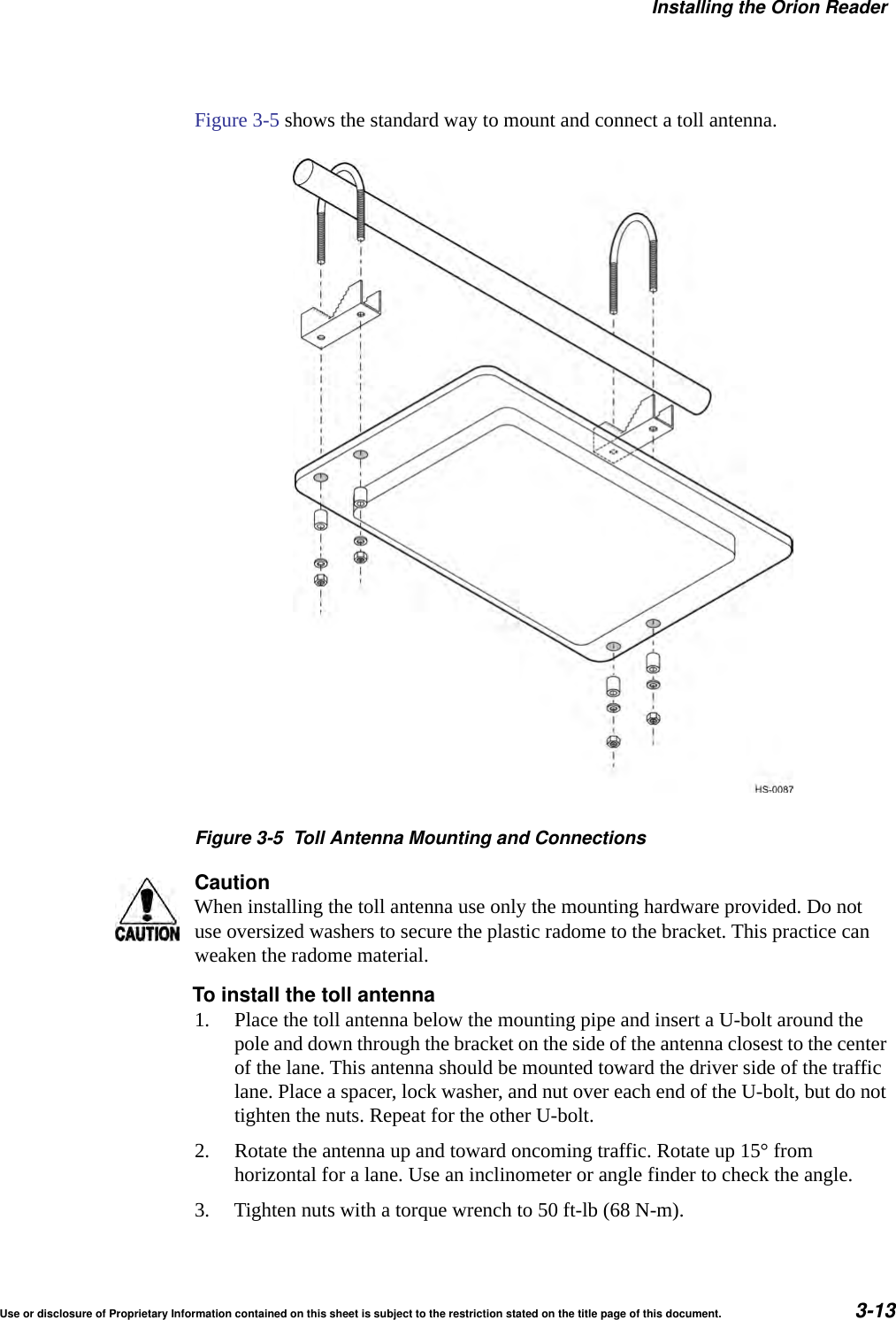
Installing the Orion ReaderUse or disclosure of Proprietary Information contained on this sheet is subject to the restriction stated on the title page of this document. 3-13Figure 3-5 shows the standard way to mount and connect a toll antenna.Figure 3-5 Toll Antenna Mounting and ConnectionsCautionWhen installing the toll antenna use only the mounting hardware provided. Do not use oversized washers to secure the plastic radome to the bracket. This practice can weaken the radome material.To install the toll antenna1. Place the toll antenna below the mounting pipe and insert a U-bolt around the pole and down through the bracket on the side of the antenna closest to the center of the lane. This antenna should be mounted toward the driver side of the traffic lane. Place a spacer, lock washer, and nut over each end of the U-bolt, but do not tighten the nuts. Repeat for the other U-bolt.2. Rotate the antenna up and toward oncoming traffic. Rotate up 15° from horizontal for a lane. Use an inclinometer or angle finder to check the angle.3. Tighten nuts with a torque wrench to 50 ft-lb (68 N-m).
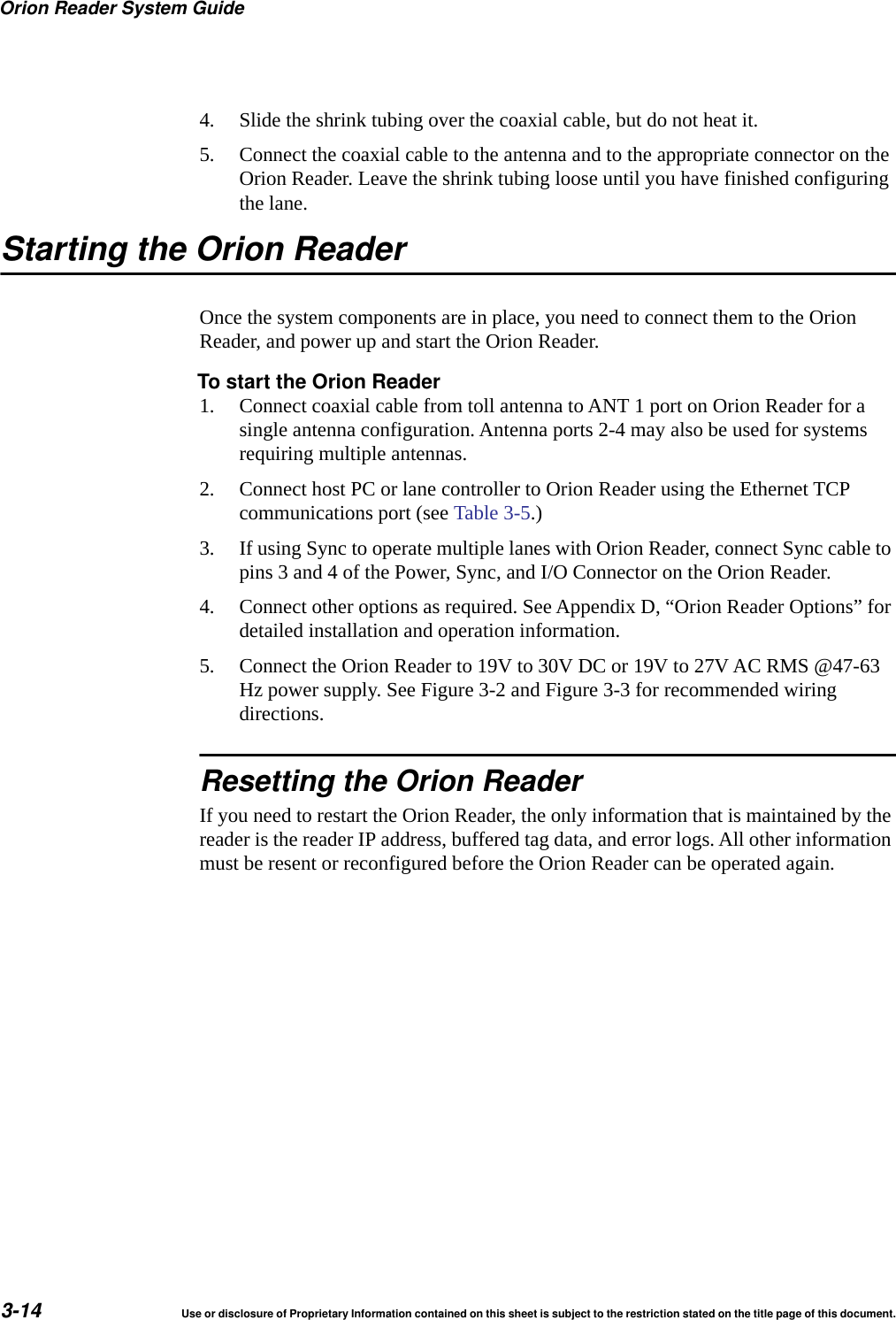
Orion Reader System Guide3-14 Use or disclosure of Proprietary Information contained on this sheet is subject to the restriction stated on the title page of this document.4. Slide the shrink tubing over the coaxial cable, but do not heat it.5. Connect the coaxial cable to the antenna and to the appropriate connector on the Orion Reader. Leave the shrink tubing loose until you have finished configuring the lane.Starting the Orion ReaderOnce the system components are in place, you need to connect them to the Orion Reader, and power up and start the Orion Reader.To start the Orion Reader1. Connect coaxial cable from toll antenna to ANT 1 port on Orion Reader for a single antenna configuration. Antenna ports 2-4 may also be used for systems requiring multiple antennas.2. Connect host PC or lane controller to Orion Reader using the Ethernet TCP communications port (see Table 3-5.) 3. If using Sync to operate multiple lanes with Orion Reader, connect Sync cable to pins 3 and 4 of the Power, Sync, and I/O Connector on the Orion Reader.4. Connect other options as required. See Appendix D, “Orion Reader Options” for detailed installation and operation information.5. Connect the Orion Reader to 19V to 30V DC or 19V to 27V AC RMS @47-63 Hz power supply. See Figure 3-2 and Figure 3-3 for recommended wiring directions.Resetting the Orion ReaderIf you need to restart the Orion Reader, the only information that is maintained by the reader is the reader IP address, buffered tag data, and error logs. All other information must be resent or reconfigured before the Orion Reader can be operated again.
4General Software Information
General Software InformationUse or disclosure of Proprietary Information contained on this sheet is subject to the restriction stated on the title page of this document. 4-3Chapter 4General Software InformationThis chapter provides transmission control protocol (TCP) information for the Orion® Reader.Software InformationThis chapter presents various software-related topics arranged in alphabetical order by subject. In addition to this chapter, refer to Chapter 5, “Communication Protocols,” and Chapter 6, “Configuring and Operating the Orion Reader Using TCP Com-mands,” for more information.The Orion Reader operates using TCP commands. This chapter presents TCP com-mand information.TCP Command and Response ConventionsThe Orion Reader implements TCP command requests, data acknowledgments, com-mand responses, asynchronous responses, and unsolicited status messages as required for configuration and operation. The messages are listed in Table 4-1.Note:  Throughout this chapter, host or host system refers to a host personal computer (PC) or lane controller.Table 4-1 TCP Command MessagesMessage DescriptionCommand request The host initiates and uses these messages to request the Orion Reader to performspecific actions.Data acknowledge The Orion Reader initiates and uses these messages to signal the reception ofcommand request messages received from the host. Additionally, the host initiatesand uses data acknowledge messages to signal the receipt of command response,asynchronous response, and unsolicited status messages from the Orion Reader.Command response The Orion Reader initiates these messages in response to specific commandrequest messages received from the host.Asynchronousresponse The Orion Reader optionally initiates these messages in response to specificcommand request messages received from the host.Unsolicited status The Orion Reader initiates and uses these messages to inform the host aboutspecific status conditions in the Orion Reader.
Orionl Reader System Guide4-4 Use or disclosure of Proprietary Information contained on this sheet is subject to the restriction stated on the title page of this document.Lane Controller Heartbeat ControlsAfter the Lane Controller or host connects to the Orion Reader via TCP/IP, the Orion Reader sends the LC Heartbeat message (unsolicited OK status message format) to the Lane Controller or host every 10 seconds.On receiving the LC Heartbeat message from the Orion Reader, the Lane Controller or host sends the appropriate data acknowledge message to the Orion Reader. If the Lane Controller or host does not acknowledge this message after three times, the Orion Reader closes the connection. Figure 4-1 shows the Orion Reader LC heartbeat con-trols in detail.Figure 4-1 Orion Reader LC Heartbeat ControlsSequence Number ControlsThe Orion Reader implements message sequence numbers (MSN) and command sequence numbers (CSN) in all of the message types (e.g., command request, data acknowledge, command response, asynchronous response, and unsolicited status). All transmitted messages, except for the data acknowledge message, increment the MSN and CSN. The host and the Orion Reader must implement independent transmit and receive counters for both the MSNs and the CSNs. The transmit counters are used in generating the transmitted messages, and the receive counters are used in the received message out-of-sequence error checking. An out-of-sequence error indicates that a message was missed.Note:  CSNs are checked and generated by the reader for the System Interface Command Group only. For all other command groups the reader ignores host-generated CSNs, and the reader does not implement CSNs on any reader-generated message. The host should ignore CSNs on all messages from the reader for all command groups except for the System Interface Command Group.With the exception of received data acknowledge messages, the Orion Reader per-forms automatic MSN and CSN resynchronizations on all received messages that are out-of-sequence. Upon receiving an out-of-sequence MSN, the Orion Reader sets the receive MSN counter to the out-of-sequence MSN plus one. Similarly, upon receiving an out-of-sequence CSN, the Orion Reader sets the receive CSN counter to the out-of-sequence CSN plus one.The host MSNs independently track the number of messages sent to the Orion Reader
General Software InformationUse or disclosure of Proprietary Information contained on this sheet is subject to the restriction stated on the title page of this document. 4-5and the Orion Reader MSNs independently track the number of messages sent to the host. These MSNs are used on the receiving end to determine if a message has been missed.The host CSNs for each command group independently track the number of command request messages sent to the Orion Reader. The Orion Reader CSNs for each com-mand group independently track the number of command response, asynchronous response, and unsolicited status messages sent to the host. These CSNs are used on the receiving end to determine if the appropriate message as specified above has been missed.The host and the Orion Reader use software communication sequence number con-trols as defined in the following paragraphs.The Orion Reader sends data acknowledge, command response, asynchronous response, and unsolicited status messages to the host with MSNs starting at zero and incremented by one for each message sent, except for the data acknowledge message. Additionally, the CSNs for each command group start at zero and are incremented by one for each command response, asynchronous response, and unsolicited status mes-sage sent. Figure 4-2 and Figure 4-3 provide details on the sequence number controls.The host receives data acknowledge, command response, asynchronous response, and unsolicited status messages from the Orion Reader and checks that the MSNs and CSNs are correct for all received message types except for the data acknowledge mes-sage.The Orion Reader receives command request messages and data acknowledge mes-sages from the host and checks that the MSNs and CSNs are correct for all command request messages received. The Orion Reader performs automatic MSN and CSN resynchronizations on all received command request messages that are out-of-sequence. Currently, the CSN resynchronizations are not fully supported.If the Orion Reader detects either a message sequence error or command sequence error, the Orion Reader sends the appropriate error message to the host that includes the expected and received sequence numbers and then continues processing the received message. Currently the message sequence error and command sequence error messages are not fully supported.
Orionl Reader System Guide4-6 Use or disclosure of Proprietary Information contained on this sheet is subject to the restriction stated on the title page of this document.Figure 4-2 Orion Reader Sequence Number Controls
General Software InformationUse or disclosure of Proprietary Information contained on this sheet is subject to the restriction stated on the title page of this document. 4-7Figure 4-3 Orion Reader Sequence Number Controls (cont’d.)Data Acknowledge ControlsThe Orion Reader initiates and uses data acknowledge messages to signal the recep-tion of command request messages received from the host. Additionally, the host initi-ates and uses data acknowledge messages to signal the receipt of command response, asynchronous response, and unsolicited status messages from the Orion Reader.
Orionl Reader System Guide4-8 Use or disclosure of Proprietary Information contained on this sheet is subject to the restriction stated on the title page of this document.After receiving command request messages from the host, the Orion Reader sends data acknowledge, command response, asynchronous response, and unsolicited status messages to the host.After receiving command response, asynchronous response, and unsolicited status messages from the Orion Reader, the host sends data acknowledge messages to the Orion Reader. Use of Data Acknowledge Controls by Host and Orion ReaderThe host and the Orion Reader use software communication data acknowledge con-trols as defined here.•The host sends command request messages to the Orion Reader.•The host receives data acknowledge messages, or a data acknowledge time-out occurs for each command request message sent to the Orion Reader.•The host receives command response, asynchronous response, and unsolicited sta-tus messages from the Orion Reader, and sends data acknowledge messages for these message types.•The Orion Reader receives command request messages from the host and sends data acknowledge, command response, asynchronous response, and unsolicited status messages to the host.•The Orion Reader receives data acknowledge messages, or a data acknowledge time-out occurs for each command response, asynchronous response, and unsolic-ited status messages sent to the host.For more details on the Orion Reader Data Acknowledge Controls, see Figure 4-4.
General Software InformationUse or disclosure of Proprietary Information contained on this sheet is subject to the restriction stated on the title page of this document. 4-9Figure 4-4 Orion Reader Data Acknowledge Controls
Orionl Reader System Guide4-10 Use or disclosure of Proprietary Information contained on this sheet is subject to the restriction stated on the title page of this document.
5Communication Protocols
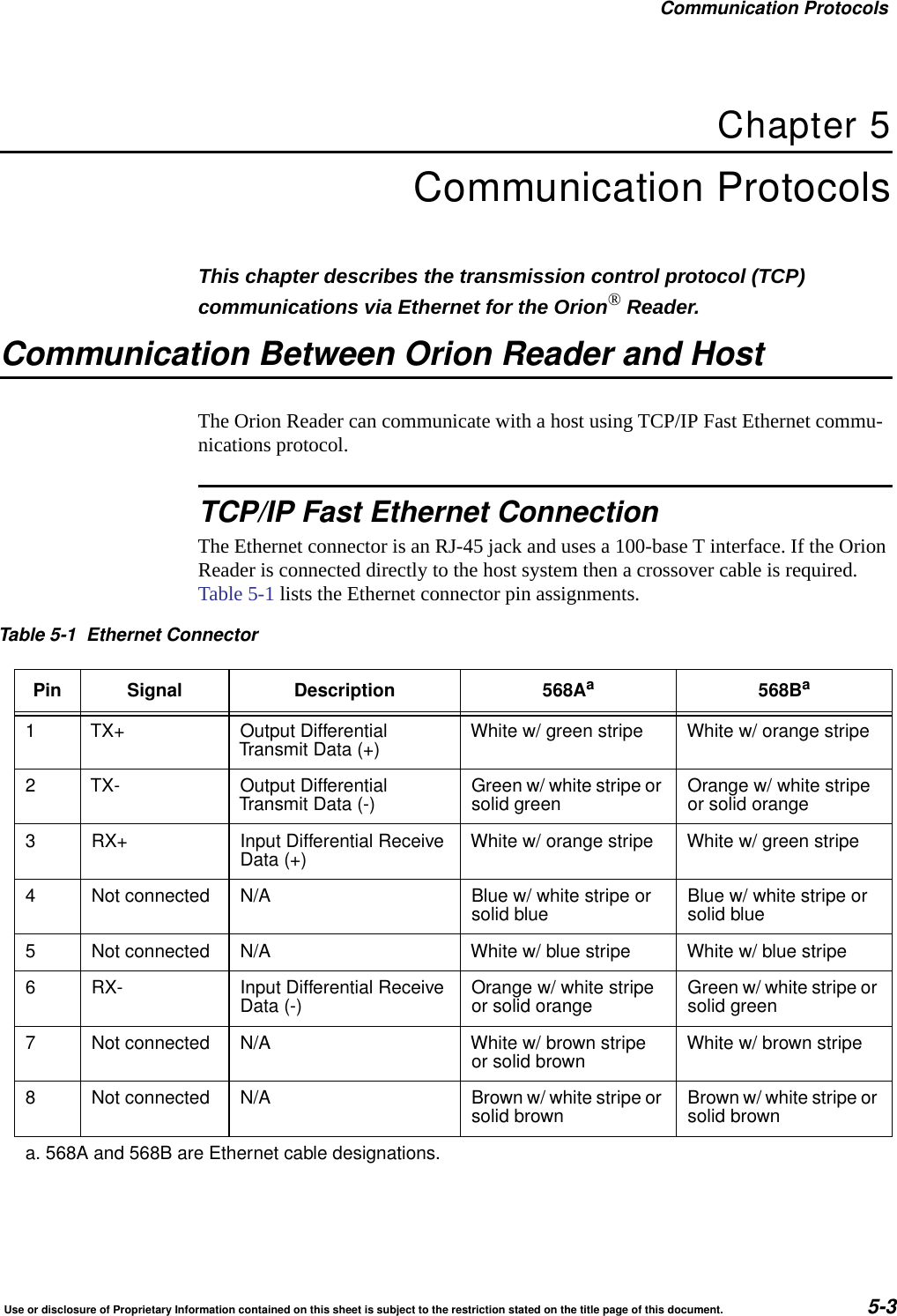
Communication ProtocolsUse or disclosure of Proprietary Information contained on this sheet is subject to the restriction stated on the title page of this document. 5-3Chapter 5Communication ProtocolsThis chapter describes the transmission control protocol (TCP) communications via Ethernet for the Orion® Reader.Communication Between Orion Reader and HostThe Orion Reader can communicate with a host using TCP/IP Fast Ethernet commu-nications protocol.TCP/IP Fast Ethernet ConnectionThe Ethernet connector is an RJ-45 jack and uses a 100-base T interface. If the Orion Reader is connected directly to the host system then a crossover cable is required. Table 5-1 lists the Ethernet connector pin assignments.Table 5-1 Ethernet ConnectorPin Signal Description 568Aa568Ba1 TX+ Output DifferentialTransmit Data (+) White w/ green stripe White w/ orange stripe2 TX- Output DifferentialTransmit Data (-) Green w/ white stripe orsolid green Orange w/ white stripeor solid orange3 RX+ Input Differential ReceiveData (+) White w/ orange stripe White w/ green stripe4 Not connected N/A Blue w/ white stripe orsolid blue Blue w/ white stripe orsolid blue5 Not connected N/A White w/ blue stripe White w/ blue stripe6 RX- Input Differential ReceiveData (-) Orange w/ white stripeor solid orange Green w/ white stripe orsolid green7 Not connected N/A White w/ brown stripeor solid brown White w/ brown stripe8 Not connected N/A Brown w/ white stripe orsolid brown Brown w/ white stripe orsolid browna. 568A and 568B are Ethernet cable designations.
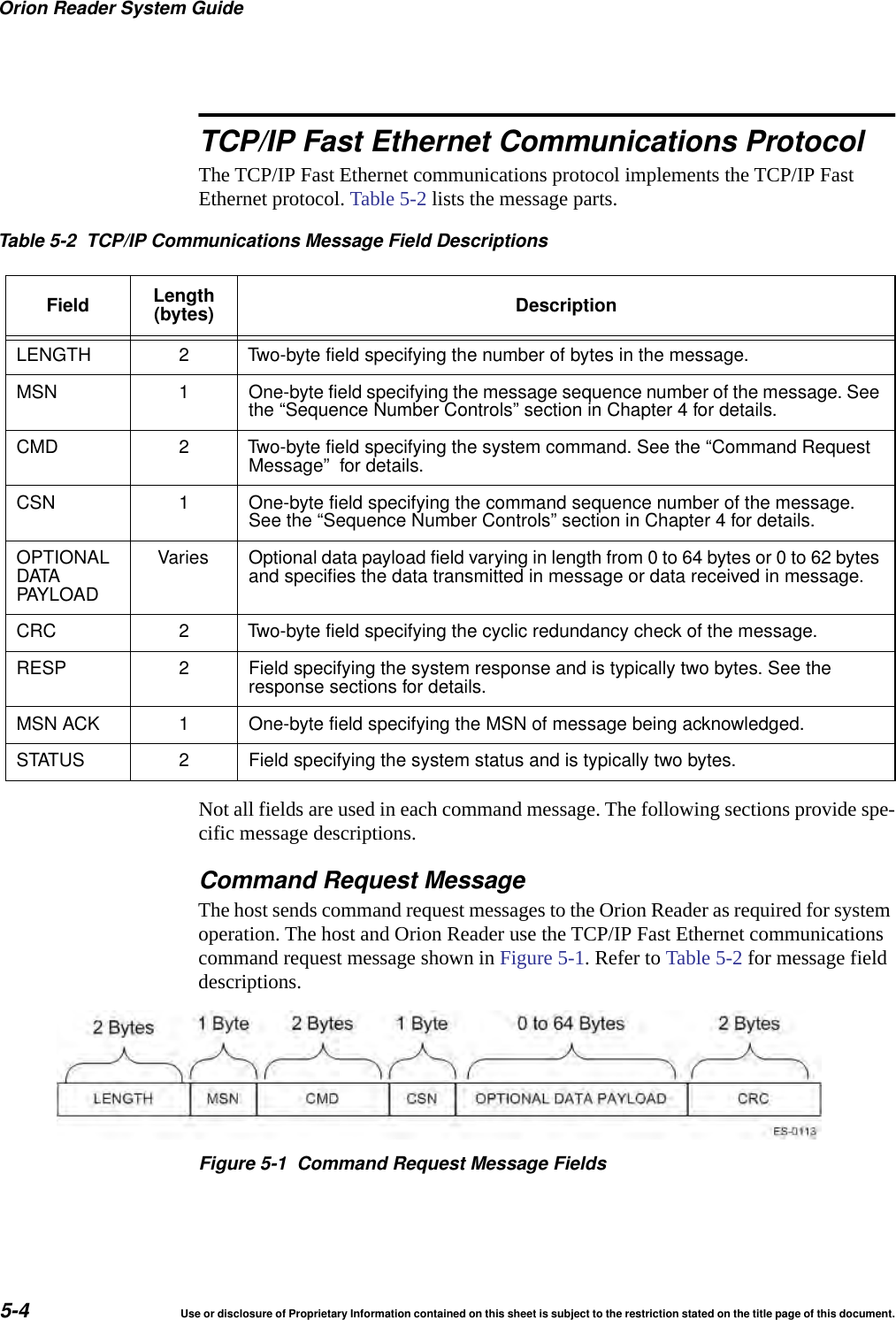
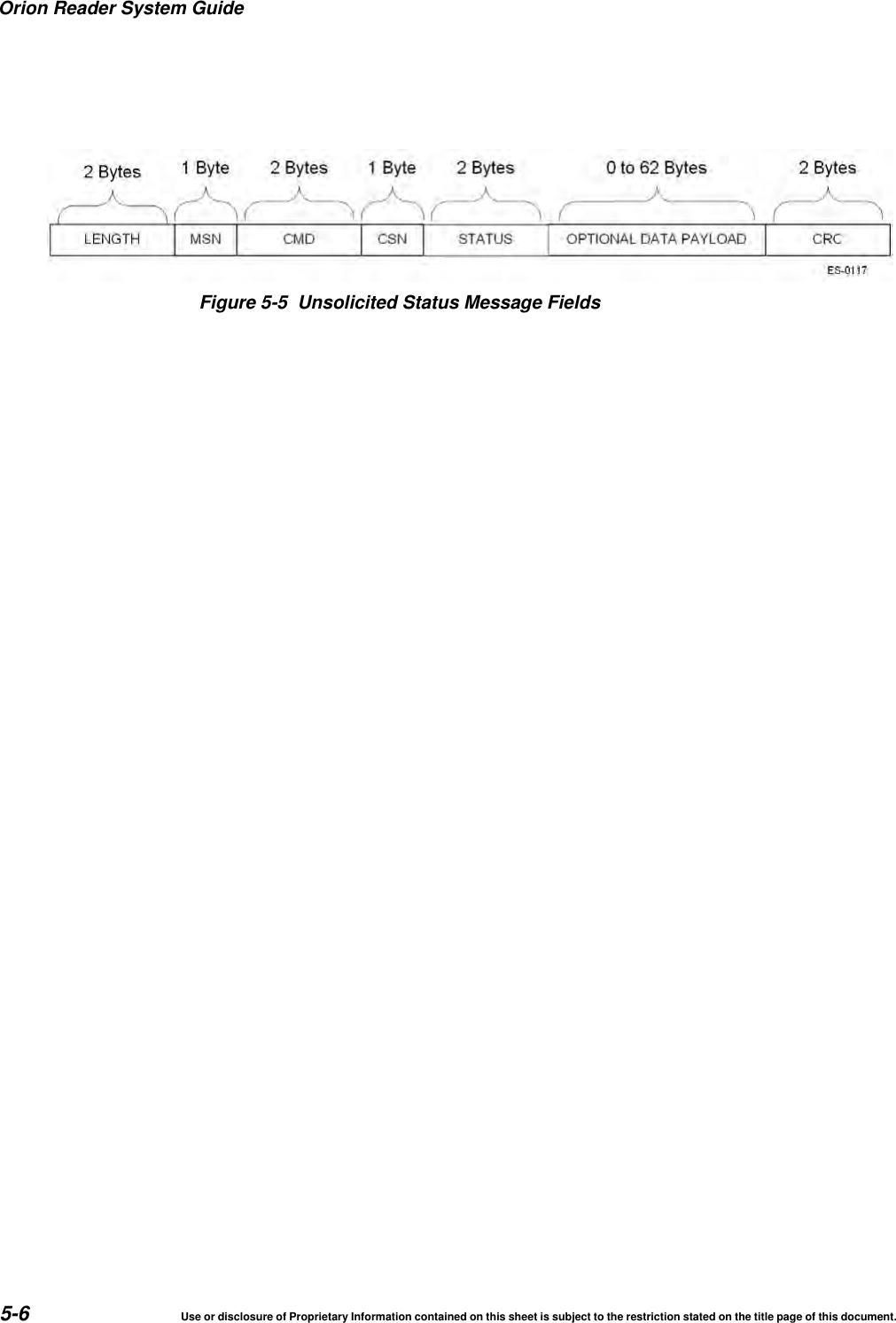
Orion Reader System Guide5-4 Use or disclosure of Proprietary Information contained on this sheet is subject to the restriction stated on the title page of this document.TCP/IP Fast Ethernet Communications ProtocolThe TCP/IP Fast Ethernet communications protocol implements the TCP/IP Fast Ethernet protocol. Table 5-2 lists the message parts.Not all fields are used in each command message. The following sections provide spe-cific message descriptions.Command Request MessageThe host sends command request messages to the Orion Reader as required for system operation. The host and Orion Reader use the TCP/IP Fast Ethernet communications command request message shown in Figure 5-1. Refer to Table 5-2 for message field descriptions.Figure 5-1 Command Request Message FieldsTable 5-2 TCP/IP Communications Message Field DescriptionsField Length(bytes) DescriptionLENGTH 2 Two-byte field specifying the number of bytes in the message.MSN 1 One-byte field specifying the message sequence number of the message. Seethe “Sequence Number Controls” section in Chapter 4 for details.CMD 2 Two-byte field specifying the system command. See the “Command RequestMessage” for details.CSN 1 One-byte field specifying the command sequence number of the message.See the “Sequence Number Controls” section in Chapter 4 for details.OPTIONALDATAPAYLOADVaries Optional data payload field varying in length from 0 to 64 bytes or 0 to 62 bytesand specifies the data transmitted in message or data received in message.CRC 2 Two-byte field specifying the cyclic redundancy check of the message.RESP 2 Field specifying the system response and is typically two bytes. See theresponse sections for details.MSN ACK 1 One-byte field specifying the MSN of message being acknowledged.STATUS 2 Field specifying the system status and is typically two bytes.
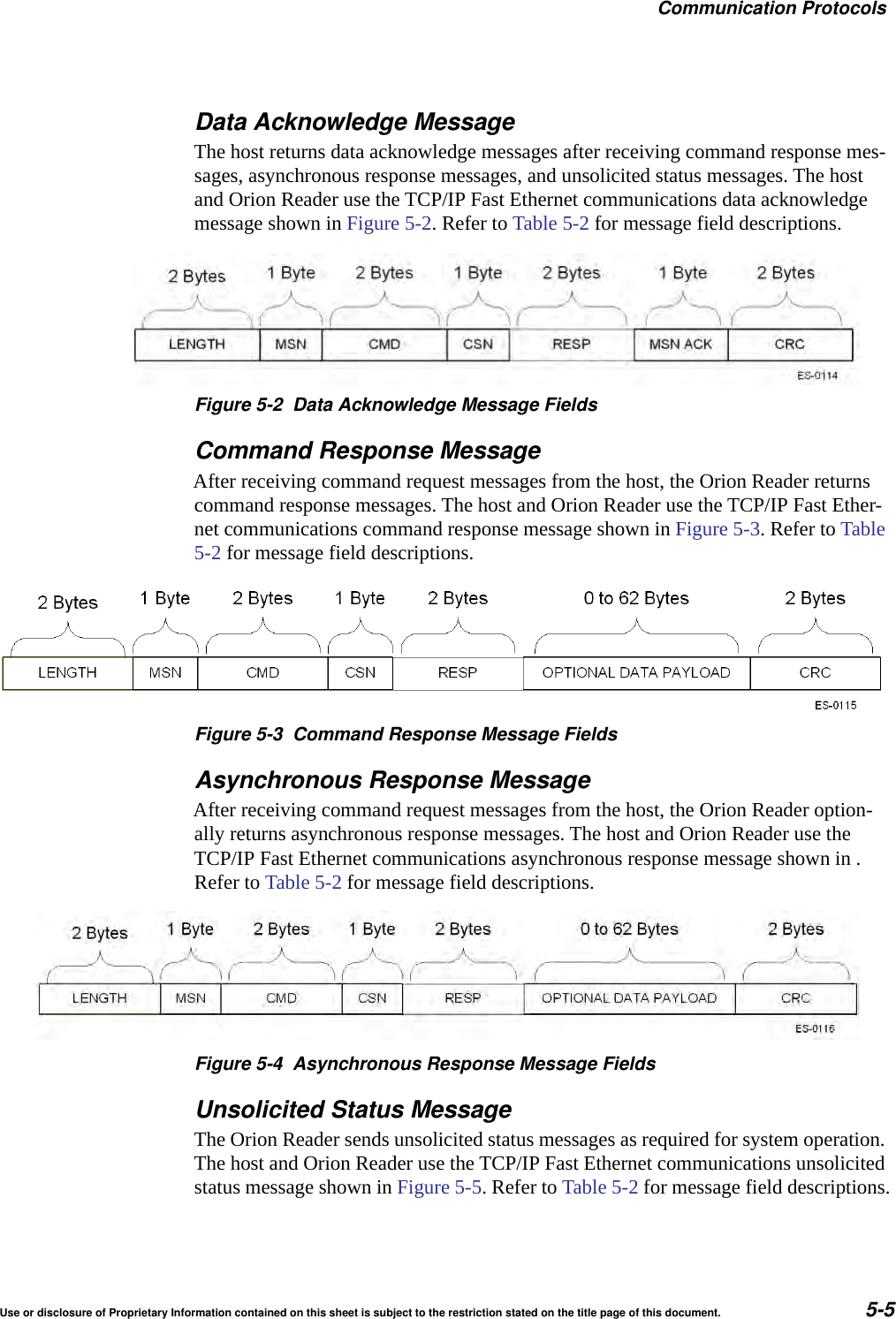
Communication ProtocolsUse or disclosure of Proprietary Information contained on this sheet is subject to the restriction stated on the title page of this document. 5-5Data Acknowledge MessageThe host returns data acknowledge messages after receiving command response mes-sages, asynchronous response messages, and unsolicited status messages. The host and Orion Reader use the TCP/IP Fast Ethernet communications data acknowledge message shown in Figure 5-2. Refer to Table 5-2 for message field descriptions.Figure 5-2 Data Acknowledge Message FieldsCommand Response MessageAfter receiving command request messages from the host, the Orion Reader returns command response messages. The host and Orion Reader use the TCP/IP Fast Ether-net communications command response message shown in Figure 5-3. Refer to Table 5-2 for message field descriptions.Figure 5-3 Command Response Message FieldsAsynchronous Response MessageAfter receiving command request messages from the host, the Orion Reader option-ally returns asynchronous response messages. The host and Orion Reader use the TCP/IP Fast Ethernet communications asynchronous response message shown in . Refer to Table 5-2 for message field descriptions.Figure 5-4 Asynchronous Response Message FieldsUnsolicited Status MessageThe Orion Reader sends unsolicited status messages as required for system operation. The host and Orion Reader use the TCP/IP Fast Ethernet communications unsolicited status message shown in Figure 5-5. Refer to Table 5-2 for message field descriptions.
Orion Reader System Guide5-6 Use or disclosure of Proprietary Information contained on this sheet is subject to the restriction stated on the title page of this document.Figure 5-5 Unsolicited Status Message Fields
6Configuring and Operating the OrionReader Using TCP Commands
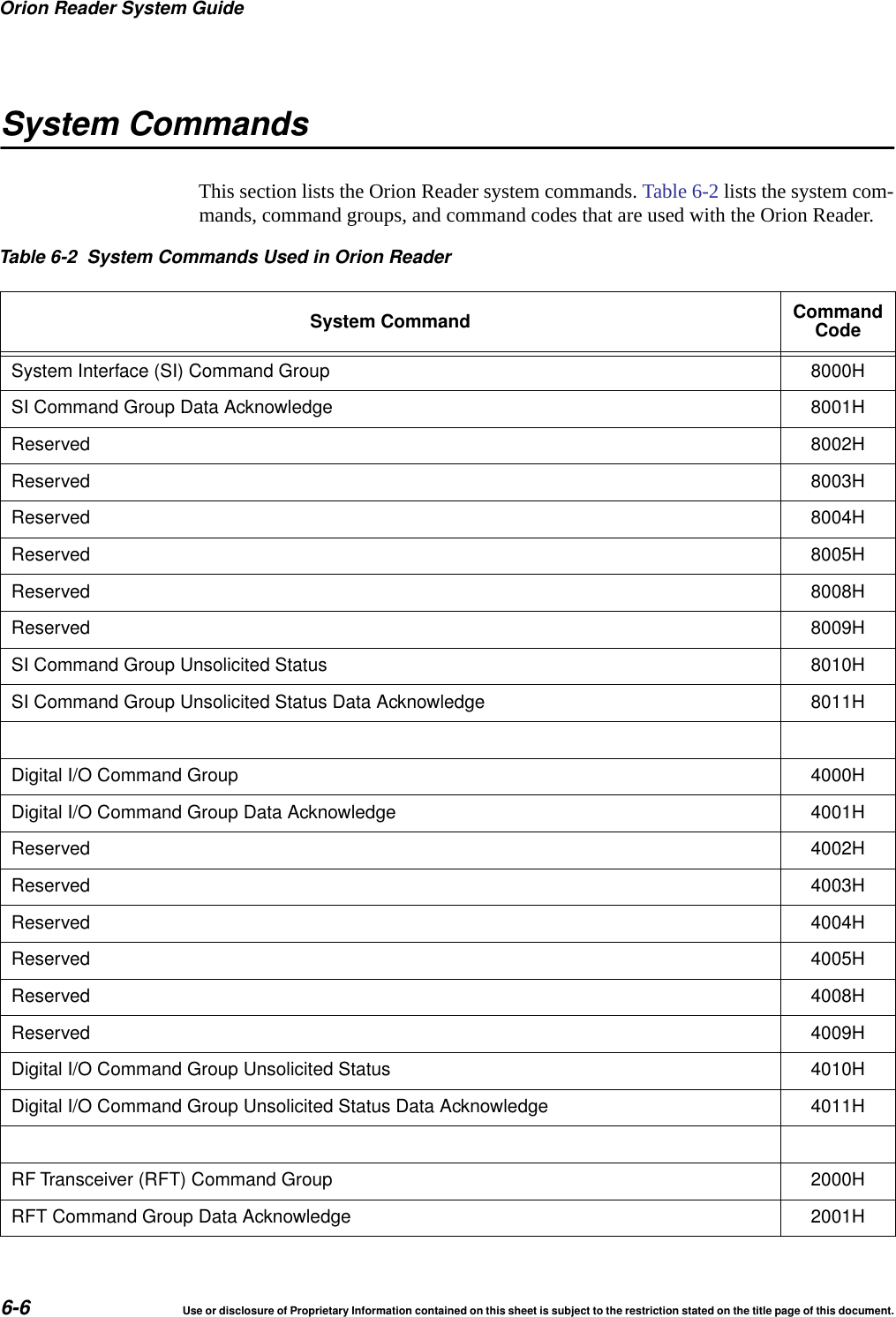
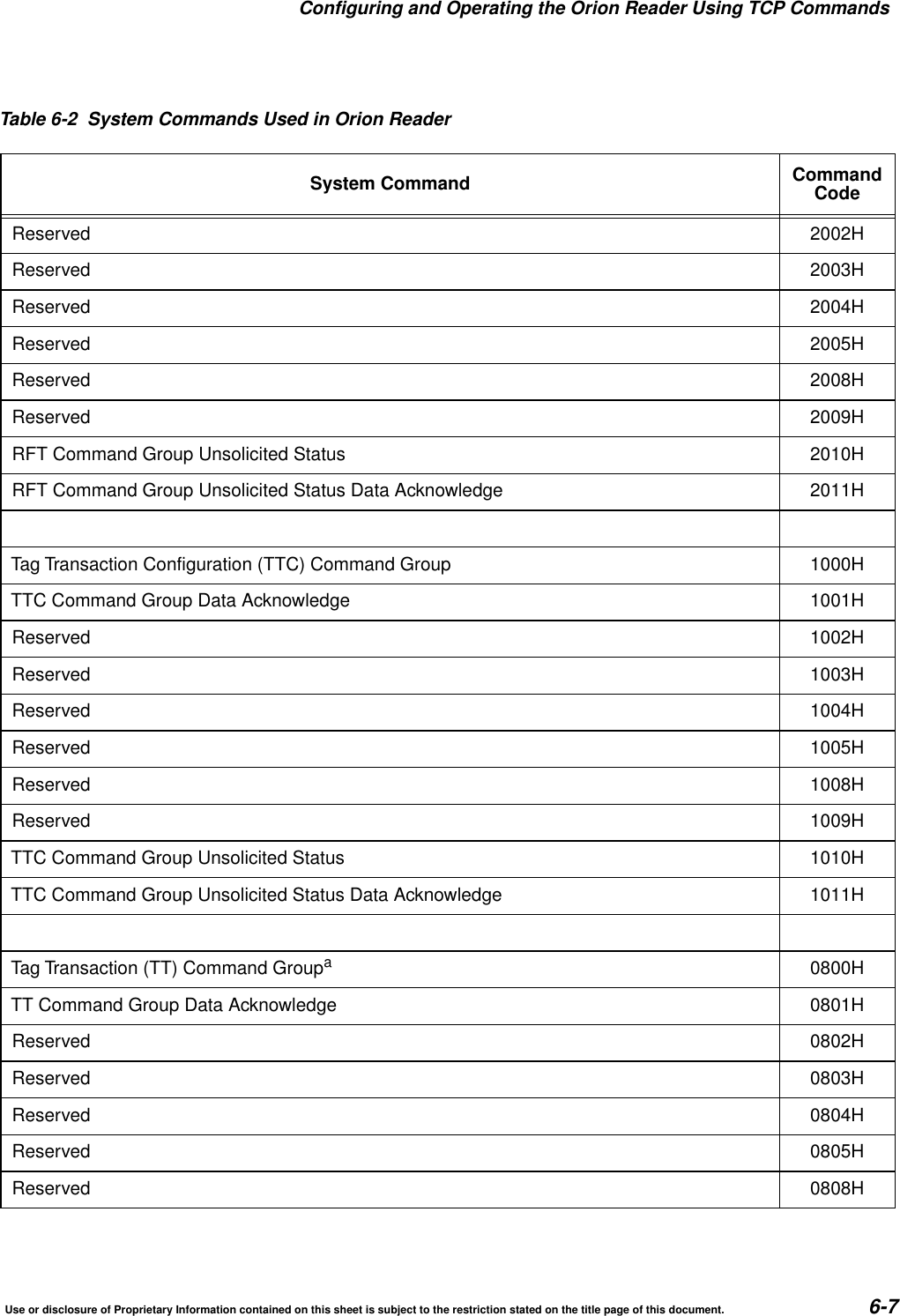
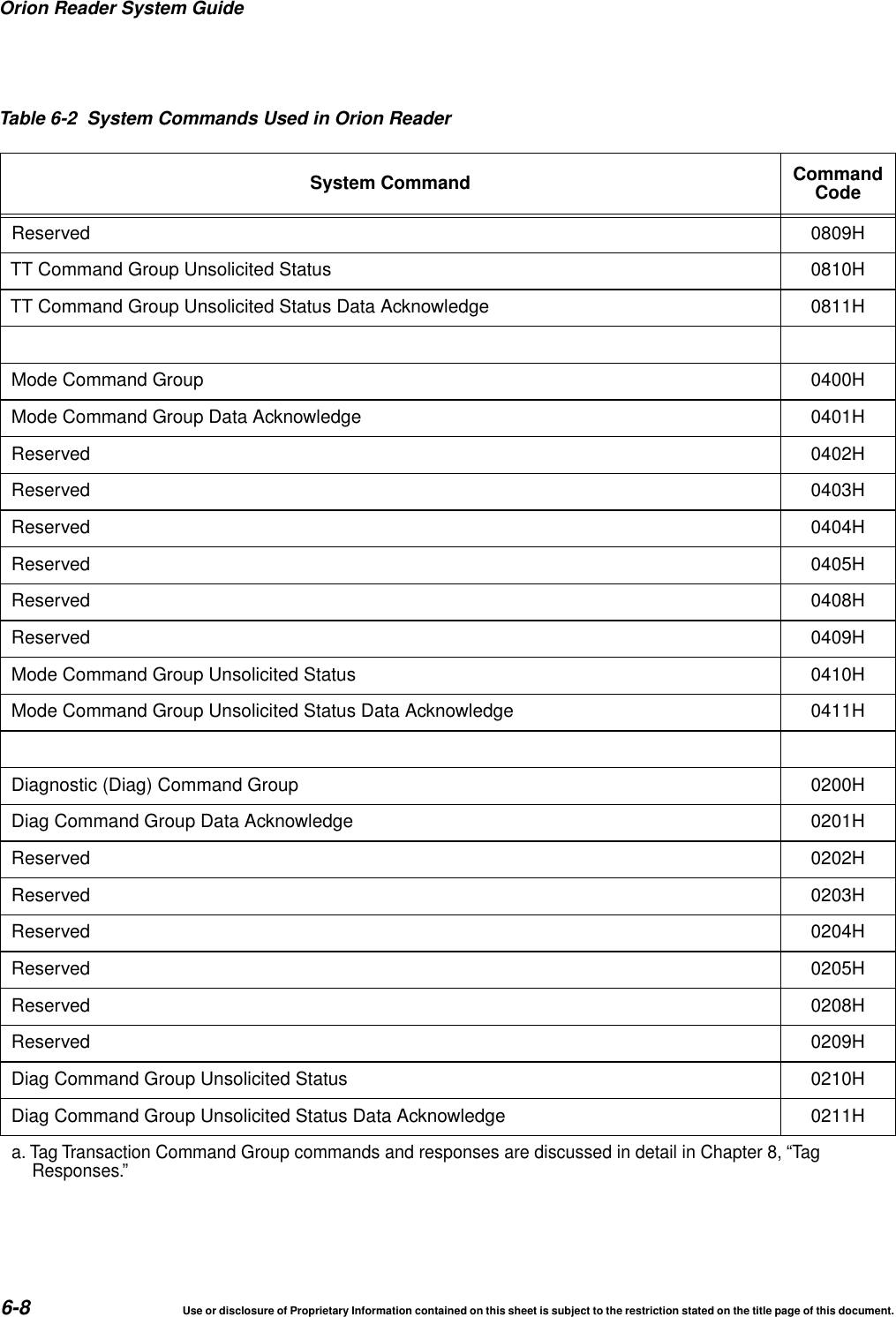
Configuring and Operating the Orion Reader Using TCP CommandsUse or disclosure of Proprietary Information contained on this sheet is subject to the restriction stated on the title page of this document. 6-3Chapter 6Configuring and Operating the Orion ReaderUsing TCP CommandsThis chapter describes the Orion® Reader mode and commands that are used to configure and operate the reader. This chapter also contains system commands and responses that are needed to develop host software for the TCP command set.Chapter OrganizationThe Orion Reader is controlled through mode settings, which configure the reader for specific applications. The Orion Reader starts in Mode 0, Stop Mode, and must be changed to another mode as needed for a specific application.This chapter first lists the operating mode to show what TCP-based command opera-tions are available with this Orion Reader application.The remainder of the chapter provides a complete listing of system commands and responses that are required to develop host interface software for configuring the Orion Reader. The system commands are divided into system command groups:“System Interface Command Group Commands (8000H)” on page 6-13“Digital I/O Command Group Commands (4000H)” on page 6-37“RF Transceiver Command Group Commands (2000H)” on page 6-77“Tag Transaction Configuration Command Group Commands (1000H)” on page 6-95“Mode Command Group Commands (0400H)” on page 6-114“Diagnostic Command Group Commands (0200H)” on page 6-127Information for each of these command groups is grouped in the following manner:•One table that lists the system command group commands•One table that lists the system command group responses•A series of tables that present system command group response data•A full set of commands that are used to set an Orion Reader function and obtain data resulting from that function within the specific system command group
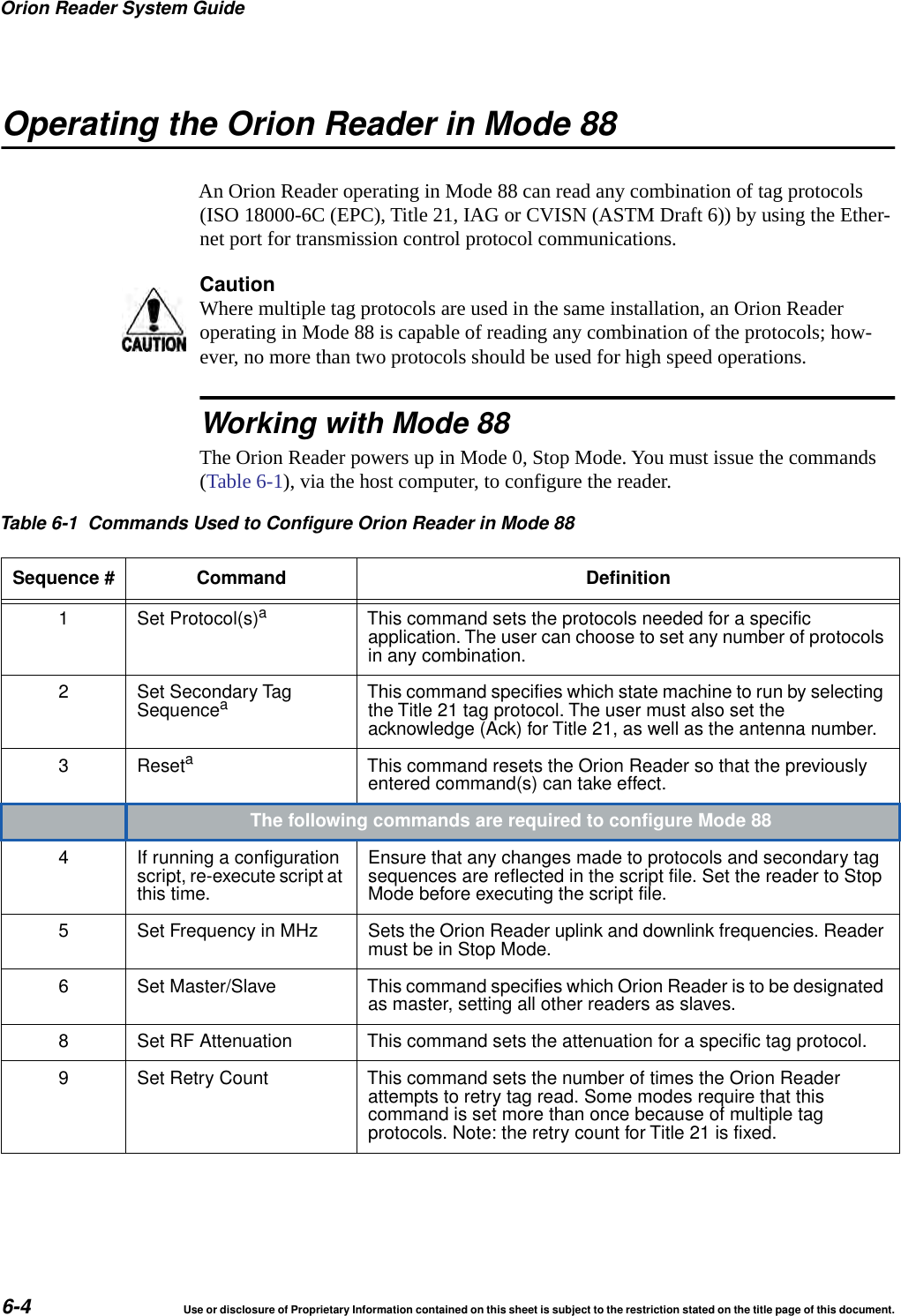
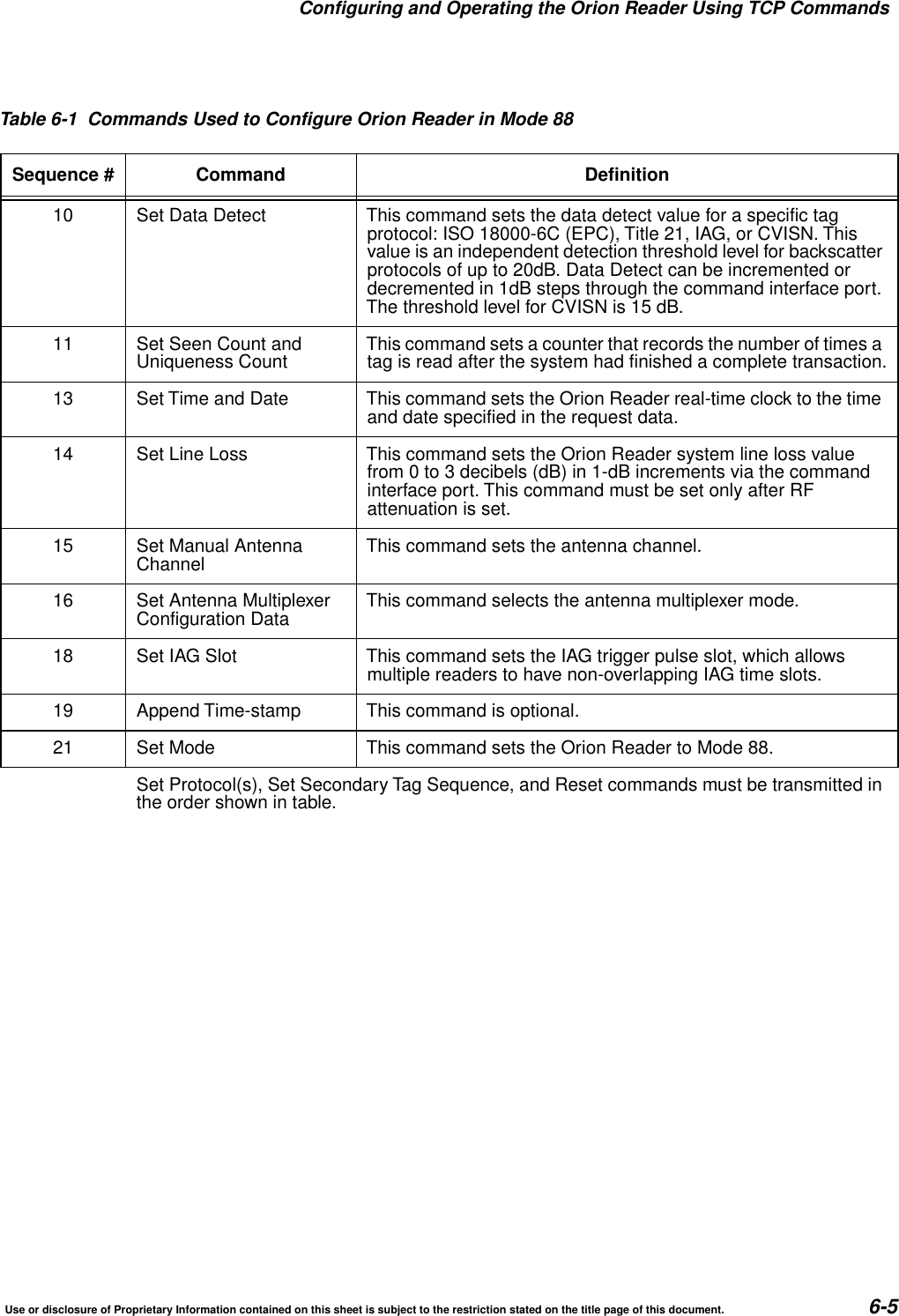
Orion Reader System Guide6-4 Use or disclosure of Proprietary Information contained on this sheet is subject to the restriction stated on the title page of this document.Operating the Orion Reader in Mode 88An Orion Reader operating in Mode 88 can read any combination of tag protocols (ISO 18000-6C (EPC), Title 21, IAG or CVISN (ASTM Draft 6)) by using the Ether-net port for transmission control protocol communications.CautionWhere multiple tag protocols are used in the same installation, an Orion Reader operating in Mode 88 is capable of reading any combination of the protocols; how-ever, no more than two protocols should be used for high speed operations. Working with Mode 88The Orion Reader powers up in Mode 0, Stop Mode. You must issue the commands (Table 6-1), via the host computer, to configure the reader.Table 6-1 Commands Used to Configure Orion Reader in Mode 88Sequence # Command Definition1 Set Protocol(s)aThis command sets the protocols needed for a specificapplication. The user can choose to set any number of protocolsin any combination.2 Set Secondary TagSequenceaThis command specifies which state machine to run by selectingthe Title 21 tag protocol. The user must also set theacknowledge (Ack) for Title 21, as well as the antenna number.3 ResetaThis command resets the Orion Reader so that the previouslyentered command(s) can take effect.The following commands are required to configure Mode 884 If running a configurationscript, re-execute script atthis time.Ensure that any changes made to protocols and secondary tagsequences are reflected in the script file. Set the reader to StopMode before executing the script file.5 Set Frequency in MHz Sets the Orion Reader uplink and downlink frequencies. Readermust be in Stop Mode.6 Set Master/Slave This command specifies which Orion Reader is to be designatedas master, setting all other readers as slaves.8 Set RF Attenuation This command sets the attenuation for a specific tag protocol.9 Set Retry Count This command sets the number of times the Orion Readerattempts to retry tag read. Some modes require that thiscommand is set more than once because of multiple tagprotocols. Note: the retry count for Title 21 is fixed.
Configuring and Operating the Orion Reader Using TCP CommandsUse or disclosure of Proprietary Information contained on this sheet is subject to the restriction stated on the title page of this document. 6-510 Set Data Detect This command sets the data detect value for a specific tagprotocol: ISO 18000-6C (EPC), Title 21, IAG, or CVISN. Thisvalue is an independent detection threshold level for backscatterprotocols of up to 20dB. Data Detect can be incremented ordecremented in 1dB steps through the command interface port.The threshold level for CVISN is 15 dB.11 Set Seen Count andUniqueness Count This command sets a counter that records the number of times atag is read after the system had finished a complete transaction.13 Set Time and Date This command sets the Orion Reader real-time clock to the timeand date specified in the request data.14 Set Line Loss This command sets the Orion Reader system line loss valuefrom 0 to 3 decibels (dB) in 1-dB increments via the commandinterface port. This command must be set only after RFattenuation is set.15 Set Manual AntennaChannel This command sets the antenna channel.16 Set Antenna MultiplexerConfiguration Data This command selects the antenna multiplexer mode.18 Set IAG Slot This command sets the IAG trigger pulse slot, which allowsmultiple readers to have non-overlapping IAG time slots.19 Append Time-stamp This command is optional.21 Set Mode This command sets the Orion Reader to Mode 88.Set Protocol(s), Set Secondary Tag Sequence, and Reset commands must be transmitted inthe order shown in table.Table 6-1 Commands Used to Configure Orion Reader in Mode 88Sequence # Command Definition
Orion Reader System Guide6-6 Use or disclosure of Proprietary Information contained on this sheet is subject to the restriction stated on the title page of this document.System CommandsThis section lists the Orion Reader system commands. Table 6-2 lists the system com-mands, command groups, and command codes that are used with the Orion Reader.Table 6-2 System Commands Used in Orion ReaderSystem Command CommandCodeSystem Interface (SI) Command Group 8000HSI Command Group Data Acknowledge 8001HReserved 8002HReserved 8003HReserved 8004HReserved 8005HReserved 8008HReserved 8009HSI Command Group Unsolicited Status 8010HSI Command Group Unsolicited Status Data Acknowledge 8011HDigital I/O Command Group 4000HDigital I/O Command Group Data Acknowledge 4001HReserved 4002HReserved 4003HReserved 4004HReserved 4005HReserved 4008HReserved 4009HDigital I/O Command Group Unsolicited Status 4010HDigital I/O Command Group Unsolicited Status Data Acknowledge 4011HRF Transceiver (RFT) Command Group 2000HRFT Command Group Data Acknowledge 2001H
Configuring and Operating the Orion Reader Using TCP CommandsUse or disclosure of Proprietary Information contained on this sheet is subject to the restriction stated on the title page of this document. 6-7Reserved 2002HReserved 2003HReserved 2004HReserved 2005HReserved 2008HReserved 2009HRFT Command Group Unsolicited Status 2010HRFT Command Group Unsolicited Status Data Acknowledge 2011HTag Transaction Configuration (TTC) Command Group 1000HTTC Command Group Data Acknowledge 1001HReserved 1002HReserved 1003HReserved 1004HReserved 1005HReserved 1008HReserved 1009HTTC Command Group Unsolicited Status 1010HTTC Command Group Unsolicited Status Data Acknowledge 1011HTag Transaction (TT) Command Groupa0800HTT Command Group Data Acknowledge 0801HReserved 0802HReserved 0803HReserved 0804HReserved 0805HReserved 0808HTable 6-2 System Commands Used in Orion ReaderSystem Command CommandCode
Orion Reader System Guide6-8 Use or disclosure of Proprietary Information contained on this sheet is subject to the restriction stated on the title page of this document.Reserved 0809HTT Command Group Unsolicited Status 0810HTT Command Group Unsolicited Status Data Acknowledge 0811HMode Command Group 0400HMode Command Group Data Acknowledge 0401HReserved 0402HReserved 0403HReserved 0404HReserved 0405HReserved 0408HReserved 0409HMode Command Group Unsolicited Status 0410HMode Command Group Unsolicited Status Data Acknowledge 0411HDiagnostic (Diag) Command Group 0200HDiag Command Group Data Acknowledge 0201HReserved 0202HReserved 0203HReserved 0204HReserved 0205HReserved 0208HReserved 0209HDiag Command Group Unsolicited Status 0210HDiag Command Group Unsolicited Status Data Acknowledge 0211Ha. Tag Transaction Command Group commands and responses are discussed in detail in Chapter 8, “TagResponses.”Table 6-2 System Commands Used in Orion ReaderSystem Command CommandCode
Configuring and Operating the Orion Reader Using TCP CommandsUse or disclosure of Proprietary Information contained on this sheet is subject to the restriction stated on the title page of this document. 6-9Table 6-3 lists the bit definitions for the system commands.Command Group Bit FieldsThe host sets the appropriate command group bit fields in the system command when sending command request and data acknowledge messages to the Orion Reader.The Orion Reader sets the appropriate command group bit fields in the system com-mand when sending data acknowledge, command response, asynchronous response, and unsolicited status messages to the host.Unsolicited Status Bit FieldThe Orion Reader sets this bit field in the system command when sending unsolicited status messages to the host.Data Acknowledge Bit FieldTable 6-3 System Command Bit DefinitionsBitDefinition Description SystemCommandBit CodeBit 15 System Interface Command Group Bit Field 8000HBit 14 Digital Input/Output (I/O) Command Group Bit Field 4000HBit 13 RF Transceiver Command Group Bit Field 2000HBit 12 Tag Transaction Configuration Command Group Bit Field 1000HBit 11 Reserved 0800HBit 10 Mode Command Group Bit Field 0400HBit 9 Diagnostic Command Group Bit Field 0200HBit 8 Reserved 0100HBit 7 Reserved 0080HBit 6 Reserved 0040HBit 5 Reserved 0020HBit 4 Unsolicited Status Bit Field 0010HBit 3 Reserved 0008HBit 2 Reserved 0004HBit 1 Reserved 0002HBit 0 Data Acknowledge Bit Field 0001H
Orion Reader System Guide6-10 Use or disclosure of Proprietary Information contained on this sheet is subject to the restriction stated on the title page of this document.The host sets this bit field in the system command when sending data acknowledge messages to the Orion Reader. The Orion Reader sets this bit field in the system com-mand when sending data acknowledge messages to the host.Responses to System CommandsThis section lists the responses to the Orion Reader system commands.Responses and Codes for System CommandsTable 6-4 lists the response definitions and codes that are applicable to all system commands.Table 6-4 System ResponsesSystem Response System ResponseCodeSynchronous OK Status 88XXHAsynchronous OK Status 48XXHUnsolicited OK Status 28XXHReserved 84XXHReserved 44XXHReserved 24XXHSynchronous Error Status 82XXHAsynchronous Error Status 42XXHUnsolicited Error Status 22XXHSynchronous Control Status 81XXHAsynchronous Control Status 41XXHUnsolicited Control Status 21XXH
Configuring and Operating the Orion Reader Using TCP CommandsUse or disclosure of Proprietary Information contained on this sheet is subject to the restriction stated on the title page of this document. 6-11 Table 6-5 lists the bit definitions for the responses.Synchronous Response Bit FieldThe host sets this bit field in the system response when sending data acknowledge messages to the Orion Reader. The Orion Reader sets this bit in the system response when sending data acknowledge and command response messages to the host.Asynchronous Response Bit FieldThe Orion Reader sets this bit in the system response when sending asynchronous response messages to the host.Unsolicited Response Bit FieldThe Orion Reader sets this bit in the system response when sending unsolicited status messages to the host.Table 6-5 System Command Response Bit DefinitionsBitDefinition Description SystemResponseBit CodeBit 15 Synchronous Response Bit Field 8000HBit 14 Asynchronous Response Bit Field 4000HBit 13 Unsolicited Response Bit Field 2000HBit 12 Reserved 1000HBit 11 OK Status Bit Field 0800HBit 10 Reserved 0400HBit 9 Error Status Bit Field 0200HBit 8 Control Status Bit Field 0100HBit 7 Command Group Command Response Bit 7 0080HBit 6 Command Group Command Response Bit 6 0040HBit 5 Command Group Command Response Bit 5 0020HBit 4 Command Group Command Response Bit 4 0010HBit 3 Command Group Command Response Bit 3 0008HBit 2 Command Group Command Response Bit 2 0004HBit 1 Command Group Command Response Bit 1 0002HBit 0 Command Group Command Response Bit 0 0001H
Orion Reader System Guide6-12 Use or disclosure of Proprietary Information contained on this sheet is subject to the restriction stated on the title page of this document.OK Status Bit FieldThe Orion Reader sets this bit field in the system response when the response is an OK status.Error Status Bit FieldThe Orion Reader sets this bit field in the system response when the response is an error status.Control Status Bit FieldThe host sets this bit field in the system response when sending data acknowledge messages to the Orion Reader. The Orion Reader sets this bit field in the system response when sending data acknowledge messages to the host.Command Group Command Response Bit FieldsThe host and the Orion Reader sets these bit fields in the system response to indicate the command group command response. See the individual command group command response sections for details.
Configuring and Operating the Orion Reader Using TCP CommandsUse or disclosure of Proprietary Information contained on this sheet is subject to the restriction stated on the title page of this document. 6-13System Interface Command Group Commands (8000H)The following sections detail the individual system command group commands and responses. Refer to page 6-3 for an ordered list of the command groups.Table 6-6 lists the System Interface Command Group commands that are used in the Orion Reader.Table 6-6 System Interface Command Group (8000H)System Interface Commands CommandCodeSystem Identify 0000HSet Time and Date 0003HGet Time and Date 0004HCPU App Firmware Download 0005HReset Reader 0006HGet Buffered Tag Transaction 0007HGet Number of Buffered Tag Transactions 0008HDelete All Buffered Tag Transactions 0009HGet System Startup Status 000AHGet Lane Controller Interface Status 000BHGet System Interface Status 000CHReserved 0011HReserved 0012HReserved 0013HReserved 0014HReserved 0015HSet Buffered Tag Transaction Mode 0016HGet Buffered Tag Transaction Mode 0017HSet Data Acknowledge Time-out Period 0018HGet Data Acknowledge Time-out Period 0019HSet Switch Buffered Tag Transaction Mode Enable 001AHGet Switch Buffered Tag Transaction Mode Enable 001BH
Orion Reader System Guide6-14 Use or disclosure of Proprietary Information contained on this sheet is subject to the restriction stated on the title page of this document.System Interface Command Group ResponsesTable 6-7 lists the responses and codes for the system interface command group.FPGA Firmware Download 001CHCPU Boot Firmware Download 001DHReserved 001EHGet System Serial Number 001FHGet Firmware Version Numbers 0021HReserved 0022H to0029HLoad Default Operating Parameters 002BHSet Lane Controller/Host IP Address 0040HGet Lane Controller/Host IP Address 0041HSet IP Address and Subnet Mask 0042HGet IP Address and Subnet Mask 0043HGet TCP Port Number 0044HTable 6-6 System Interface Command Group (8000H)System Interface Commands CommandCodeTable 6-7 System Interface Command Group Responses System Interface Response ResponseCodeSynchronous OK Status Responses 88XXHReserved 8800HReserved 8801HAsynchronous OK Status Responses 48XXHCommand Complete 4800HCommand In Progress 4801HFirmware Download Active 4802HFirmware Download Complete 4803H
Configuring and Operating the Orion Reader Using TCP CommandsUse or disclosure of Proprietary Information contained on this sheet is subject to the restriction stated on the title page of this document. 6-15S-Record Processed 4804HUnsolicited OK Status Responses 28XXHLC Heartbeat 2811HReserved 84XXHReserved 44XXHReserved 24XXHSynchronous Error Status Responses 82XXHMessage Length Error 8200HMessage Sequence Error 8201HReserved 8202HCommand Group Error 8203HReserved 8204HReserved 8205HReserved 8206HReserved 8207HReserved 8208HData Acknowledge Response Error 8209HReserved 820AHAsynchronous Error Status Responses 42XXHMessage Length Error 4200HCommand Sequence Error 4201HTable 6-7 System Interface Command Group Responses System Interface Response ResponseCode
Orion Reader System Guide6-16 Use or disclosure of Proprietary Information contained on this sheet is subject to the restriction stated on the title page of this document.System Interface Command Group Response DataAsynchronous OK Status ResponsesThe following system interface command group asynchronous OK status responses use the specified data payload.Reserved 4202HCommand Group Error 4203HCommand Time-out Error 4204HReserved 4205HCommand Failed Error 4206HSystem Command Error 4207HSub-command Error 4208HReserved 4209HInvalid Control Word Error 420AHInvalid Command Data Error 420BHErase Flash Error 420EHWrite Flash Error 420FHUnsolicited Error Status Responses 22XXHSynchronous Control Status Responses 81XXHData Acknowledge (Ack), data valid 8100HData Negative Acknowledge (Nack), data invalid 8101HReserved 8102HReserved 8104HAsynchronous Control Status Responses 41XXHUnsolicited Control Status Responses 21XXHTable 6-7 System Interface Command Group Responses System Interface Response ResponseCode
Configuring and Operating the Orion Reader Using TCP CommandsUse or disclosure of Proprietary Information contained on this sheet is subject to the restriction stated on the title page of this document. 6-17Command Complete (4800H)Command In Progress (4801H)Firmware Download Active System (4802H)Firmware Download Complete System (4803H)S-Record Processed System (4804H)Synchronous Error Status ResponsesThe following system interface command group synchronous error status responses use the specified data payload.Command Complete Data DataPayloadSystem Interface Command Group Command (sub-command) XXXXHCommand In Progress Response Data DataPayloadSystem Interface Command Group Command (sub-command) XXXXHFirmware Download Active Response Data DataPayloadSystem Interface Command Group Command (sub-command) XXXXHFirmware Download Complete Response Data DataPayloadSystem Interface Command Group Command (sub-command) XXXXHS-Record Processed Response Data DataPayloadSystem Interface Command Group Command (sub-command) XXXXH
Orion Reader System Guide6-18 Use or disclosure of Proprietary Information contained on this sheet is subject to the restriction stated on the title page of this document.Message Length Error Response Data (8200H)Message Sequence Error Response Data (8201H)Command Group Error Response Data (8203H)Data Acknowledge Response Error Response Data (8209H)Asynchronous Error Status ResponsesThe following system interface command group asynchronous error status responses use the specified data payload.Message Length Error Response Data DataPayloadExpected Message Length XXXXHReceived Message Length XXXXHMessage Sequence Error Response Data DataPayloadExpected Message Sequence Number XXHReceived Message Sequence Number XXHCommand Group Error Response Data DataPayloadInvalid Command Group XXXXHData Acknowledge Response Error Response Data DataPayloadInvalid Data Acknowledge Response XXXXH
Configuring and Operating the Orion Reader Using TCP CommandsUse or disclosure of Proprietary Information contained on this sheet is subject to the restriction stated on the title page of this document. 6-19Message Length Error Response Data (4200H)Command Sequence Error Response Data (4201H)Command Group Error (4203H)Command Time-out Error (4204H)Command Failed Error (4206H)System Command Error (4207H)Message Length Error Response Data DataPayloadExpected Message Length XXXXHReceived Message Length XXXXHCommand Sequence Error Response Data DataPayloadExpected Command Sequence Number XXHReceived Command Sequence Number XXHCommand Group Error Response Data DataPayloadInvalid Command Group XXXXHCommand Time-out Error Response Data DataPayloadN/ACommand Failed Error Response Data DataPayloadSystem Interface Command Group Command (sub-command) XXXXHSystem Command Error Response Data DataPayloadN/A
Orion Reader System Guide6-20 Use or disclosure of Proprietary Information contained on this sheet is subject to the restriction stated on the title page of this document.Sub-Command Error (4208H)Invalid Control Word Error (420AH)Invalid Command Data Error (420BH)Erase Flash Error System (420EH)Write Flash Error System (420FH)System Interface Command Group UnsolicitedStatus MessagesThe System Interface Command Group supports the generation of the following unso-licited status messages as defined by the response code (Table 6-8).Table 6-8 System Interface Command Group Unsolicited Status MessagesSystem Interface Command Group Unsolicited Status Messages ResponseCodeLC Heartbeat message 2811HSub-Command Error Response Data DataPayloadSub-command XXXXHInvalid Control Word Error Response Data DataPayloadN/AInvalid Command Data Error Response Data DataPayloadN/AErase Flash Error Response Data DataPayloadSystem Interface Command Group Command (sub-command) XXXXHWrite Flash Error Response Data DataPayloadSystem Interface Command Group Command (sub-command) XXXXH
Configuring and Operating the Orion Reader Using TCP CommandsUse or disclosure of Proprietary Information contained on this sheet is subject to the restriction stated on the title page of this document. 6-21System IdentifyThis command gets the reader’s system identify remote inventory. Table 6-9 and Table 6-10 list the command and response data. Each field’s data size is listed in Table 6-11.Table 6-9 System Identify Command (0000H)System Identify Command Data Data PayloadSystem Identify Command 0000HTable 6-10 System Identify ResponseSystem Identify Response Data Data PayloadSystem Identify Command 0000HVendor Name *Version ID *Part Number *Serial Number **The information in this field is specific to each reader.Table 6-11 System Identify DataSystem Identify Data DataSizeVendor Name 15 bytesVersion ID 15 bytesPart Number 15 bytesSerial Number 15 bytes
Orion Reader System Guide6-22 Use or disclosure of Proprietary Information contained on this sheet is subject to the restriction stated on the title page of this document.Set Time and DateThe Set Time and Date command sets the Orion Reader real-time clock to the time and date specified in the request data.The data associated with the Set Time and Date defines the format of the time and date (Table 6-12). You can modify and read this data at any time. This field is used with the tag read parameters to append time and date to any response to the host system. The Orion Reader has a battery-backed clock. Table 6-13 lists the response data.Data Data RangeHours 0 to 23 (00H to 17H)Minutes 0 to 59 (00H to 3BH)Seconds 0 to 59 (00H to 3BH)Hundredths of seconds0 to 99 (00H to 63H)Month 1 to 12 (01H to 0CH)Day 1 to 31 (01H to 1FH)Year 0 to 99 (00H to 63H)Table 6-12 Set Time and Date Command (0003H)Set Time and Data Command Data Data PayloadSet Time and Date Command 0003HHours XXHMinutes XXHSeconds XXHHundredths of Seconds XXHMonth XXHDay XXHYear XXHTable 6-13 Set Time and Date ResponseSet Time and Date Response Data Data PayloadSet Time and Date Response 0003H
Configuring and Operating the Orion Reader Using TCP CommandsUse or disclosure of Proprietary Information contained on this sheet is subject to the restriction stated on the title page of this document. 6-23Get Time and DateThe Get Time and Date command requests the current time and date that is set on the Orion Reader real-time clock. The data associated with the Get Time and Date defines the format of the time and date (Table 6-14). You can modify and read this data at any time. This field is used with the tag read parameters to append time and date to any response to the host system. Table 6-15 lists the response data.CPU App Firmware DownloadThis command downloads the reader’s CPU application firmware. Table 6-16 and Table 6-17 list the command data and response.Table 6-14 Get Time and Date Command (0004H)Get Time and Date Command Data Data PayloadGet Time and Date Command 0004HTable 6-15 Get Time and Date ResponseGet Time and Date Response Data Data PayloadGet Time and Date Command 0004HHours XXHMinutes XXHSeconds XXHHundredths of Seconds XXHMonth XXHDay XXHYear XXHTable 6-16 CPU App Firmware Download Command (0005H)CPU App Firmware Download Command Data Data PayloadCPU App Firmware Download Command 0005HTable 6-17 CPU App Firmware Download ResponseCPU App Firmware Download Response Data Data PayloadCPU App Firmware Download Command 0005H
Orion Reader System Guide6-24 Use or disclosure of Proprietary Information contained on this sheet is subject to the restriction stated on the title page of this document.Reset ReaderThe Reset Reader command initializes a power-up state (based on the nonvolatile set-tings) of all of the Orion Reader parameters and starts the Orion Reader power-on diagnostics. Table 6-18 and Table 6-19 list the command and response data.When the Orion Reader is reset, the reader IP address, buffered tags, and error log are maintained, all other information must be resent or reconfigured before the Orion Reader can be operated again.Get Buffered Tag TransactionThis command gets a specific buffered tag transaction from the reader. Table 6-20 and Table 6-21 list the command and response data.Table 6-18 Reset Reader Command (0006H)Reset Reader Command Data Data PayloadReset Reader Command 0006HReset Reader Control Word A5A5HTable 6-19 Reset Reader ResponseReset Reader Response Data Data PayloadReset Reader Command 0006HTable 6-20 Get Buffered Tag Transaction Command (0007H)Get Buffered Tag Transaction Command Data Data PayloadGet Buffered Tag Transaction Command 0007HBuffered Tag Transaction Number (MSW) XXXXHBuffered Tag Transaction Number (LSW) XXXXH
Configuring and Operating the Orion Reader Using TCP CommandsUse or disclosure of Proprietary Information contained on this sheet is subject to the restriction stated on the title page of this document. 6-25The Buffered Tag Transaction Number field specifies the number of the buffered tag transactions to be retrieved. The data values for this field range from 01H to 0FFFFFFFFH.The Buffered Tag Transaction Data field contains the buffered tag transaction response data that has a maximum byte length of 57.Get Number of Buffered Tag TransactionsThis command gets the number of buffered tag transactions that are stored in the reader. Table 6-22 and Table 6-23 list the command and response data.The buffered tag transaction overflow status is returned as 0 for no overflow or 1 for overflow. The Number of Buffered Tag Transactions field specifies the current num-ber of buffered tag transactions. The data values for this field range from 0H to 0FFFFFFFFH. Using the TCP command set, the Orion Reader can store up to 500,000 tag IDs in the buffer and the buffered tag information is saved upon reader reset. The data values for this field range from 0H to 0FFFFFFFFH.Table 6-21 Get Buffered Tag Transaction ResponseGet Buffered Tag Transaction Response Data Data PayloadGet Buffered Tag Transaction Command 0007HBuffered Tag Transaction Number (MSW) XXXXHBuffered Tag Transaction Number (LSW) XXXXHBuffered Tag Transaction DataTable 6-22 Get Number of Buffered Tag Transactions Command (0008H)Get Number of Buffered Tag Transactions Command Data Data PayloadGet Number of Buffered Tag Transactions Command 0008HTable 6-23 Get Number of Buffered Tag Transactions Response DataGet Number of Buffered Tag Transactions Response Data Data PayloadGet Number of Buffered Tag Transactions Command 0008HNumber of Buffered Tag Transactions (MSW) XXXXHNumber of Buffered Tag Transactions (LSW) XXXXHBuffered Tag Transaction Overflow Status:0=nooverflow,1=overflowXXH
Orion Reader System Guide6-26 Use or disclosure of Proprietary Information contained on this sheet is subject to the restriction stated on the title page of this document.Delete All Buffered Tag TransactionsThis command deletes all buffered tag transactions stored in the reader. Table 6-24 and Table 6-25 list the command and response data.Get System Startup StatusThis command gets the Orion Reader system startup status. Table 6-26 and Table 6-27 list the command and response data.Table 6-24 Delete All Buffered Tag Transactions Command (0009H)Delete All Buffered Tag Transactions Command Data Data PayloadDelete All Buffered Tag Transactions Command 0009HDelete All Buffered Tag Transactions Control Word A5A5HTable 6-25 Delete All Buffered Tag Transactions ResponseDelete All Buffered Tag Transactions Response Data Data PayloadDelete All Buffered Tag Transactions Command 0009HTable 6-26 Get System Startup Status Command (000AH)Get System Startup Status Command Data Data PayloadGet System Startup Status Command 000AHTable 6-27 Get System Startup Status ResponseGet System Startup Status Response Data Data PayloadGet System Startup Status Command 000AHSystem Startup Module Number (System Initialization) XXXXHSystem Timer Initialization Status Error Number XXXXHSystem BMU Initialization Status Error Number XXXXHSystem Queue Create Status Error Number XXXXHSystem Task Create Status Error Number XXXXH
Configuring and Operating the Orion Reader Using TCP CommandsUse or disclosure of Proprietary Information contained on this sheet is subject to the restriction stated on the title page of this document. 6-27Get Lane Controller Interface StatusThis command gets the status of the reader’s lane controller interface software. Table 6-28 and Table 6-29 list the command and response data.Get System Interface StatusThis command gets the status of the reader’s system interface software. Table 6-30 and Table 6-31 list the command and response data.Set Buffered Tag Transaction ModeThis command sets the buffered tag transaction mode in the reader. The mode control byte can be set to 0 for real-time mode or 1 for buffered mode. Table 6-32 and Table Table 6-28 Get Lane Controller Interface Status Command (000BH)Get Lane Controller Interface Status Command Data Data PayloadGet Lane Controller Interface Status Command 000BHTable 6-29 Get Lane Controller Interface Status ResponseGet Lane Controller Interface Status Response Data Data PayloadGet Lane Controller Interface Status Command 000BHModule Number XXXXHError Number XXXXHTable 6-30 Get System Interface Status Command (000CH)Get System Interface Status Command Data Data PayloadGet System Interface Status Command 000CHTable 6-31 Get System Interface Status ResponseGet System Interface Status Response Data Data PayloadGet System Interface Status Command 000CHModule Number XXXXHError Number XXXXH
Orion Reader System Guide6-28 Use or disclosure of Proprietary Information contained on this sheet is subject to the restriction stated on the title page of this document.6-33 list the command and response data.Get Buffered Tag Transaction ModeThis command gets the buffered tag transaction mode from the reader. The mode con-trol byte is returned as 0 for real-time mode or 1 for buffered mode. Table 6-34 and Table 6-35 list the command and response data.Set Data Acknowledge Time-out PeriodThis command sets the reader’s data acknowledge time-out period in milliseconds. Table 6-36 and Table 6-37 list the command and response data.Table 6-32 Set Buffered Tag Transaction Mode Command (0016H)Set Buffered Tag Transaction Mode Command Data Data PayloadSet Buffered Tag Transaction Command 0016HMode Control Byte: 0 = Real-Time Mode, 1 = Buffered Mode XXHTable 6-33 Set Buffered Tag Transaction Mode ResponseSet Buffered Tag Transaction Mode Response Data Data PayloadSet Buffered Tag Transaction Command 0016HTable 6-34 Get Buffered Tag Transaction Mode Command (0017H)Get Buffered Tag Transaction Mode Command Data Data PayloadGet Buffered Tag Transaction Command 0017HTable 6-35 Get Buffered Tag Transaction Mode Response DataGet Buffered Tag Transaction Mode Response Data Data PayloadGet Buffered Tag Transaction Command 0017HMode Control Byte: 0 = Real-Time Mode, 1 = Buffered Mode XXHTable 6-36 Set Acknowledge Time-out Period Command (0018H)Set Data Acknowledge Time-out Period Command Data Data PayloadSet Data Acknowledge Time-out Period Command 0018HCommunication Protocol XXH
Configuring and Operating the Orion Reader Using TCP CommandsUse or disclosure of Proprietary Information contained on this sheet is subject to the restriction stated on the title page of this document. 6-29Communication ProtocolsTable 6-38 lists the communication protocols that can be returned by the response.Get Data Acknowledge Time-out PeriodThis command gets the data acknowledge time-out period from the reader. Table 6-39 and Table 6-40 list the command and response data.Time-out Period in ms (MSB) XXHTime-out Period in ms (LSB) XXHTable 6-37 Set Acknowledge Time-out Period ResponseSet Data Acknowledge Time-out Period Response Data Data PayloadSet Data Acknowledge Time-out Period Command 0018HCommunication Protocol XXHTable 6-36 Set Acknowledge Time-out Period Command (0018H)Table 6-38 Set Acknowledge Time-Out Period Communication ProtocolsCommunication Protocol Data CodeTCP/IP Communication 01HSerial Communication 02HSerial Debug Communication 03HTable 6-39 Get Acknowledge Time-Out Period Command (0019H)Get Data Acknowledge Time-out Period Command Data Data PayloadGet Data Acknowledge Time-out Period Command 0019HCommunication Protocol XXHTable 6-40 Get Acknowledge Time-out Period Response DataGet Data Acknowledge Time-out Period Response Data Data PayloadGet Data Acknowledge Time-out Period Command 0019HCommunication Protocol XXHTime-out Period in ms (MSB) XXH
Orion Reader System Guide6-30 Use or disclosure of Proprietary Information contained on this sheet is subject to the restriction stated on the title page of this document.Table 6-41 lists the response protocols.Set Switch Buffered Tag Transaction Mode EnableThis command sets the switch buffered tag transaction mode enable in the reader. The enable control byte is returned as 0 for disabled or 1 for enabled. Table 6-42 and Table 6-43 list the command and response data.Get Switch Buffered Tag Transaction Mode EnableThis command gets the switch buffered tag transaction mode enable from the reader. The enable control byte is returned as 0 for disabled or 1 for enabled. Table 6-44 and Table 6-45 list the command and response data.Time-out Period in ms (LSB) XXHTable 6-40 Get Acknowledge Time-out Period Response DataTable 6-41 Get Acknowledge Time-out Period Communication ProtocolsCommunication Protocol Data CodeTCP/IP Communication 01HSerial Communication 02HSerial Debug Communication 03HTable 6-42 Set Switch Buffered Tag Transaction Mode Enable Command (001AH)Set Switch BufferedTag Transaction Mode Enable Command Data Data PayloadSet Switch Buffered Tag Transaction Mode Enable Command 001AHEnable Control Byte: 0 = Disabled, 1 = Enabled XXHTable 6-43 Set Switch Buffered Tag Transaction Mode Enable ResponseSet Switch BufferedTag Transaction Mode Enable Response Data Data PayloadSet Switch Buffered Tag Transaction Mode Enable Command 001AHTable 6-44 Get Switch Buffered Tag Transaction Mode Enable Command (001BH)Get Switch BufferedTag Transaction Mode Enable Command DataData PayloadGet Switch Buffered Tag Transaction Mode Enable Command 001BH
Configuring and Operating the Orion Reader Using TCP CommandsUse or disclosure of Proprietary Information contained on this sheet is subject to the restriction stated on the title page of this document. 6-31Table 6-45 Get Switch Buffered Tag Transaction Mode Enable ResponseGet Switch BufferedTag Transaction Mode Enable Response DataData PayloadGet Switch Buffered Tag Transaction Mode Enable Command 001BHEnable Control Byte: 0 = Disabled, 1 = Enabled XXH
Orion Reader System Guide6-32 Use or disclosure of Proprietary Information contained on this sheet is subject to the restriction stated on the title page of this document.FPGA Firmware DownloadThis command downloads the reader’s FPGA firmware. Table 6-46 and Table 6-47 list the command and response data.CPU Boot Firmware DownloadThis command downloads the reader’s CPU boot firmware. Table 6-48 and Table 6-49 list the command and response data.Get System Serial NumberThis command gets the reader’s serial number. Table 6-50 and Table 6-51 list the command and response data.Table 6-46 FPGA Firmware Download Command (001CH)FPGA Firmware Download Command DataData PayloadFPGA Firmware Download Command 001CHTable 6-47 FPGA Firmware Download ResponseFPGA Firmware Download Response DataData PayloadFPGA Firmware Download Command 001CHTable 6-48 CPU Boot Firmware Download Command (001DH)CPU Boot Firmware Download Command DataData PayloadCPU Boot Firmware Download Command 001DHTable 6-49 CPU Boot Firmware Download ResponseCPU Boot Firmware Download Response DataData PayloadCPU Boot Firmware Download Command 001DHTable 6-50 Get System Serial Number Command (001FH)Get System Serial Number Command DataData PayloadGet System Serial Number Command 001FH
Configuring and Operating the Orion Reader Using TCP CommandsUse or disclosure of Proprietary Information contained on this sheet is subject to the restriction stated on the title page of this document. 6-33Get Firmware Version NumbersThis command gets the reader’s firmware version numbers. Table 6-52 and Table 6-53 list the command and response data.Load Default Operating ParametersTable 6-51 Get System Serial Number ResponseGet System Serial Number Response DataData PayloadGet System Serial Number Command 001FHSerial Number Data: 15 bytesTable 6-52 Get Firmware Version Numbers Command (0021H)Get Firmware Version Numbers Command Data Data PayloadGet Firmware Version Numbers Command 0021HTable 6-53 Get Firmware Version Numbers ResponseGet Firmware Version Numbers Response Data Data PayloadGet Firmware Version Numbers Command 0021HDigital Board Central Processing Unit (CPU) Boot Firmware Version Number (MSW) XXXXHDigital Board CPU Boot Firmware Version Number (LSW) XXXXHDigital Board CPU Application Firmware Version Number (MSW) XXXXHDigital Board CPU Application Firmware Version Number (LSW) XXXXHDigital Board FPGA1 Firmware Version Number (MSW) XXXXHDigital Board FPGA1 Firmware Version Number (LSW) XXXXHDaughter Board FPGA2 Firmware Version Number (MSW) XXXXHDaughter Board FPGA2 Firmware Version Number (LSW) XXXXHRF Transceiver FPGA Firmware Version Number (MSW) XXXXHRF Transceiver FPGA Firmware Version Number (LSW) XXXXH
Orion Reader System Guide6-34 Use or disclosure of Proprietary Information contained on this sheet is subject to the restriction stated on the title page of this document.This command loads the reader’s default operating parameters. Table 6-54 and Table 6-55 list the command and response data.Set Lane Controller/Host IP AddressThis command sets the reader’s lane controller/host IP address. Table 6-56 and Table 6-57 list the command and response data.Get Lane Controller/Host IP AddressThis command gets the reader’s lane controller/host IP address. Table 6-58 and Table 6-59 list the command and response data.Table 6-54 Load Default Operating Parameters Command (002BH)Load Default Operating Parameters Command Data Data PayloadLoad Default Operating Parameters Command 002BHLoad Default Operating Parameters Control Word (MSB) A5HLoad Default Operating Parameters Control Word (LSB) A5HTable 6-55 Load Default Operating Parameters ResponseLoad Default Operating Parameters Response Data PayloadLoad Default Operating Parameters Command 002BHTable 6-56 Set Lane Controller/Host IP Address Command (0040H)Set Lane Controller/Host IP Address Command Data Data PayloadSet Lane Controller/Host IP Address Command 0040HIP Address (MSW) XXXXHIP Address (LSW) XXXXHTable 6-57 Set Lane Controller/Host IP Address ResponseSet Lane Controller/Host IP Address Response Data Data PayloadSet Lane Controller/Host IP Address Command 0040H
Configuring and Operating the Orion Reader Using TCP CommandsUse or disclosure of Proprietary Information contained on this sheet is subject to the restriction stated on the title page of this document. 6-35Set IP Address and Subnet MaskThis command sets the reader’s IP address and subnet mask. Table 6-60 and Table 6-61 list the command and response data.Table 6-58 Get Lane Controller/Host IP Address Command (0041H)Get Lane Controller/Host IP Address Command Data Data PayloadGet Lane Controller/Host IP Address Command 0041HTable 6-59 Get Lane Controller/Host IP Address ResponseGet Lane Controller/Host IP Address Response Data Data PayloadGet Lane Controller/Host IP Address Command 0041HIP Address (MSW) XXXXHIP Address (LSW) XXXXHTable 6-60 Set IP Address and Subnet Mask Command (0042H)Set IP Address and Subnet Mask Command Data Data PayloadSet IP Address and Subnet Mask Command 0042HIP Address (MSW) XXXXHIP Address (LSW) XXXXHSubnet Mask (MSW) XXXXHSubnet Mask (LSW) XXXXHTable 6-61 Set IP Address and Subnet Mask ResponseSet IP Address and Subnet Mask Response Data Data PayloadSet IP Address and Subnet Mask Command 0042H
Orion Reader System Guide6-36 Use or disclosure of Proprietary Information contained on this sheet is subject to the restriction stated on the title page of this document.Get IP Address and Subnet MaskThis command gets the reader’s IP address and subnet mask. Table 6-62 and Table 6-63 list the command and response data.Get TCP Port NumberThis command gets the reader’s TCP port number. Table 6-64 and Table 6-65 lists the command and response data.Table 6-62 Get IP Address and Subnet Mask Command (0043H)Get IP Address and Subnet Mask Command Data Data PayloadGet IP Address and Subnet Mask Command 0043HTable 6-63 Get IP Address and Subnet Mask ResponseGet IP Address and Subnet Mask Response Data Data PayloadGet IP Address and Subnet Mask Command 0043HIP Address (MSW) XXXXHIP Address (LSW) XXXXHSubnet Mask (MSW) XXXXHSubnet Mask (LSW) XXXXHTable 6-64 Get TCP Port Number Command (0044H)Get TCP Port Number Command Data Data PayloadGet TCP Port Number Command 0044HTable 6-65 Get TCP Port Number ResponseGet TCP Port Number Response Data Data PayloadGet TCP Port Number Command 0044HPort Number XXXXH
Configuring and Operating the Orion Reader Using TCP CommandsUse or disclosure of Proprietary Information contained on this sheet is subject to the restriction stated on the title page of this document. 6-37Digital I/O Command Group Commands (4000H)The digital input/output (I/O) assembly is used to interface the Orion Reader with external inputs and outputs. Inputs can be devices such as light curtains or loops, and outputs can be devices such as gates or lights. Table 6-66 lists the Digital I/O Com-mand Group commands that are used in the Orion multiprotocol reader.Table 6-66 Digital I/O Command Group CommandsDigital I/O Configuration Command CommandCodeSet Digital I/O Sensor Status Change Report 0000HGet Digital I/O Sensor Status Change Report 0001HSet Digital I/O Output Host Control 0002HGet Digital I/O Output Host Control 0003HSet Digital I/O Output Tag Read Control 0004HGet Digital I/O Output Tag Read Control 0005HSet Digital I/O RF Control 0006HGet Digital I/O RF Control 0007HSet Digital I/O RF Multiplexing Mode 0008HGet Digital I/O RF Multiplexing Mode 0009HSet Digital I/O Output Pulse Duration 000AHGet Digital I/O Output Pulse Duration 000BHSet Digital I/O Minimum Presence True Period 000CHGet Digital I/O Minimum Presence True Period 000DHSet Digital I/O Sensor Input Inversion 000EHGet Digital I/O Sensor Input Inversion 000FHSet Digital I/O Port Configuration 0010HGet Digital I/O Port Configuration 0011HSet Digital I/O Sensor Input Report 0012HGet Digital I/O Sensor Input Report 0013HSet Digital I/O Presence RF Control Algorithm 0014HGet Digital I/O Presence RF Control Algorithm 0015H
Orion Reader System Guide6-38 Use or disclosure of Proprietary Information contained on this sheet is subject to the restriction stated on the title page of this document.Digital I/O Command Group ResponsesTable 6-67 lists the responses and codes for the Digital I/O command group.Set Digital I/O Presence RF Control Time-Out Period 0016HGet Digital I/O Presence RF Control Time-Out Period 0017HGet Digital I/O Port Status 0018HSet Digital I/O Mode 0019HGet Digital I/O Mode 001AHSet External Interrupt Control 056DHGet External Interrupt Control 06ADHTable 6-67 Digital I/O Command Group ResponsesDigital I/O Responses ResponseCodeSynchronous OK Status Responses 88XXHReserved 8800HReserved 8801HAsynchronous OK Status Responses 48XXHCommand Complete 4800HCommand In Progress 4801HUnsolicited OK Status Responses 28XXHReserved 84XXHReserved 44XXHTable 6-66 Digital I/O Command Group CommandsDigital I/O Configuration Command CommandCode
Configuring and Operating the Orion Reader Using TCP CommandsUse or disclosure of Proprietary Information contained on this sheet is subject to the restriction stated on the title page of this document. 6-39Reserved 24XXHSynchronous Error Status Responses 82XXHMessage Length Error 8200HMessage Sequence Error 8201HReserved 8202HCommand Group Error 8203HReserved 8204HReserved 8205HReserved 8206HReserved 8207HReserved 8208HData Acknowledge Response Error 8209HReserved 820AHAsynchronous Error Status Responses 42XXHMessage Length Error 4200HCommand Sequence Error 4201HReserved 4202HCommand Group Error 4203HCommand Time-out Error 4204HReserved 4205HCommand Failed Error 4206HSystem Command Error 4207HSub-command Error 4208HReserved 4209HInvalid Control Word Error 420AHTable 6-67 Digital I/O Command Group ResponsesDigital I/O Responses ResponseCode
Orion Reader System Guide6-40 Use or disclosure of Proprietary Information contained on this sheet is subject to the restriction stated on the title page of this document.Digital I/O Command Group Response DataAsynchronous OK Status ResponsesThe following Digital I/O command group asynchronous OK status responses use the specified data payload.Command Complete (4800H)Command In Progress (4801H)Synchronous Error Status ResponsesThe following Digital I/O command group synchronous error status responses use the specified data payload.Invalid Command Data Error System 420BHUnsolicited Error Status Responses 22XXHSynchronous Control Status Responses 81XXHData Acknowledge (Ack), data valid 8100HData Negative Acknowledge (Nack), data invalid 8101HReserved 8102HReserved 8104HAsynchronous Control Status Responses 41XXHUnsolicited Control Status Responses 21XXHCommand In Progress Response Data DataPayloadDigital I/O Command Group Command (sub-command) XXXXHCommand In Progress Response Data DataPayloadDigital I/O Command Group Command (sub-command) XXXXHTable 6-67 Digital I/O Command Group ResponsesDigital I/O Responses ResponseCode
Configuring and Operating the Orion Reader Using TCP CommandsUse or disclosure of Proprietary Information contained on this sheet is subject to the restriction stated on the title page of this document. 6-41Message Length Error Response Data (8200H)Message Sequence Error Response Data (8201H)Command Group Error Response Data (8203H)Data Acknowledge Response Error Response Data (8209H)Asynchronous Error Status ResponsesThe following Digital I/O command group asynchronous error status responses use the specified data payload.Message Length Error Response Data DataPayloadExpected Message Length XXXXHReceived Message Length XXXXHMessage Sequence Error Response Data DataPayloadExpected Message Sequence Number XXHReceived Message Sequence Number XXHCommand Group Error Response Data DataPayloadInvalid Command Group XXXXHData Acknowledge Response Error Response Data DataPayloadInvalid Data Acknowledge Response XXXXH
Orion Reader System Guide6-42 Use or disclosure of Proprietary Information contained on this sheet is subject to the restriction stated on the title page of this document.Message Length Error Response Data (4200H)Command Sequence Error Response Data (4201H)Command Group Error (4203H)Command Time-out Error (4204H)Command Failed Error (4206H)System Command Error (4207H)Message Length Error Response Data DataPayloadExpected Message Length XXXXHReceived Message Length XXXXHCommand Sequence Error Response Data DataPayloadExpected Command Sequence Number XXHReceived Command Sequence Number XXHCommand Group Error Response Data DataPayloadInvalid Command Group XXXXHCommand Time-out Error Response Data DataPayloadN/ACommand Failed Error Response Data DataPayloadDigital I/O Command Group Command (sub-command) XXXXHSystem Command Error Response Data DataPayloadN/A
Configuring and Operating the Orion Reader Using TCP CommandsUse or disclosure of Proprietary Information contained on this sheet is subject to the restriction stated on the title page of this document. 6-43Sub-Command Error (4208H)Invalid Control Word Error (420AH)Invalid Command Data Error (420BH)Digital I/O Asynchronous ReportsThe Digital I/O supports the generation of the following asynchronous response mes-sage reports as defined by the transaction record type code (Table 6-68).Sensor Status Change ReportThis Digital I/O report is generated when a sensor detects a presence change and that sensor is configured to generate a report (Table 6-69).Sub-Command Error Response Data DataPayloadSub-command XXXXHInvalid Control Word Error Response Data DataPayloadN/AInvalid Command Data Error Response Data DataPayloadN/ATable 6-68 Digital I/O Asynchronous ReportsDigital I/O Asynchronous Report Type CodeSensor Status Change Report 3050HSensor Input Report 3051HTable 6-69 Sensor Status Change ReportSensor Status Change Report Data PayloadSensor Status Change Report Transaction Record Type 3050HPort Configuration 0XHPort number Reporting Status Change: 0–3 for Port0–Port 3 0XHPort Status 0XH
Orion Reader System Guide6-44 Use or disclosure of Proprietary Information contained on this sheet is subject to the restriction stated on the title page of this document.Port Configuration — This field specifies the digital port input/output configuration. In Table 6-70, INPUT = 0 and OUTPUT = 1.Port Status — This field specifies the digital port status. In Table 6-71, LOW = 0 and HIGH = 1.Table 6-70 Port ConfigurationConfigurationValue Digital Port 3 Digital Port 2 Digital Port 1 Digital Port 000H INPUT INPUT INPUT INPUT01H INPUT INPUT INPUT OUTPUT02H INPUT INPUT OUTPUT INPUT03H INPUT INPUT OUTPUT OUTPUT04H INPUT OUTPUT INPUT INPUT05H INPUT OUTPUT INPUT OUTPUT06H INPUT OUTPUT OUTPUT INPUT07H INPUT OUTPUT OUTPUT OUTPUT08H OUTPUT INPUT INPUT INPUT09H OUTPUT INPUT INPUT OUTPUT0AH OUTPUT INPUT OUTPUT INPUT0BH OUTPUT INPUT OUTPUT OUTPUT0CH OUTPUT OUTPUT INPUT INPUT0DH OUTPUT OUTPUT INPUT OUTPUT0EH OUTPUT OUTPUT OUTPUT INPUT0FH OUTPUT OUTPUT OUTPUT OUTPUTTable 6-71 Port StatusStatus Value Digital Port 3 Digital Port 2 Digital Port 1 Digital Port 000H LOW LOW LOW LOW01H LOW LOW LOW HIGH02H LOW LOW HIGH LOW03H LOW LOW HIGH HIGH
Configuring and Operating the Orion Reader Using TCP CommandsUse or disclosure of Proprietary Information contained on this sheet is subject to the restriction stated on the title page of this document. 6-45Sensor Input ReportThis digital I/O report generates when a sensor detects a vehicle presence but no valid tag read occurs (Table 6-72).Port Configuration — This field specifies the digital port input/output configuration. In Table 6-73, INPUT = 0 and OUTPUT = 1.04H LOW HIGH LOW LOW05H LOW HIGH LOW HIGH06H LOW HIGH HIGH LOW07H LOW HIGH HIGH HIGH08H HIGH LOW LOW LOW09H HIGH LOW LOW HIGH0AH HIGH LOW HIGH LOW0BH HIGH LOW HIGH HIGH0CH HIGH HIGH LOW LOW0DH HIGH HIGH LOW HIGH0EH HIGH HIGH HIGH LOW0FH HIGH HIGH HIGH HIGHTable 6-71 Port StatusStatus Value Digital Port 3 Digital Port 2 Digital Port 1 Digital Port 0Table 6-72 Sensor Input ReportSensor Input Report Data PayloadSensor Input Report Transaction Record Type 3051HPort Configuration 0XHPort Number Reporting Missed Tag Read: 0–3 for Port0–Port3 0XHTable 6-73 Port ConfigurationConfigurationValue Digital Port 3 Digital Port 2 Digital Port 1 Digital Port 000H INPUT INPUT INPUT INPUT01H INPUT INPUT INPUT OUTPUT
Orion Reader System Guide6-46 Use or disclosure of Proprietary Information contained on this sheet is subject to the restriction stated on the title page of this document.Set Digital I/O Sensor Status Change ReportThis command sets the digital I/O sensor status change report mask. Table 6-74 and Table 6-75 list the command and response data. 02H INPUT INPUT OUTPUT INPUT03H INPUT INPUT OUTPUT OUTPUT04H INPUT OUTPUT INPUT INPUT05H INPUT OUTPUT INPUT OUTPUT06H INPUT OUTPUT OUTPUT INPUT07H INPUT OUTPUT OUTPUT OUTPUT08H OUTPUT INPUT INPUT INPUT09H OUTPUT INPUT INPUT OUTPUT0AH OUTPUT INPUT OUTPUT INPUT0BH OUTPUT INPUT OUTPUT OUTPUT0CH OUTPUT OUTPUT INPUT INPUT0DH OUTPUT OUTPUT INPUT OUTPUT0EH OUTPUT OUTPUT OUTPUT INPUT0FH OUTPUT OUTPUT OUTPUT OUTPUTTable 6-73 Port ConfigurationConfigurationValue Digital Port 3 Digital Port 2 Digital Port 1 Digital Port 0Table 6-74 Set Digital I/O Sensor Status Change Report Command (0000H)Set Digital I/O Sensor Status Change Report Data Data PayloadSet Digital I/O Sensor Status Change Report 0000HSensor Status Change Report Mask 0XHTable 6-75 Set Digital I/O Sensor Status Change Report ResponseSet Digital I/O Sensor Status Change Report Response Data Data PayloadSet Digital I/O Sensor Status Change Report Command 0000H
Configuring and Operating the Orion Reader Using TCP CommandsUse or disclosure of Proprietary Information contained on this sheet is subject to the restriction stated on the title page of this document. 6-47Sensor Status Change Report Mask — This field specifies the sensor inputs that are monitored for status change and associated sensor status change report generation. In Table 6-76, OFF = 0 and ON = 1.Get Digital I/O Sensor Status Change ReportThis command gets the digital I/O sensor status change report mask. Table 6-77 and Table 6-78 list the command and response data. Table 6-76 Sensor Status Change Report Mask ValuesMaskValue Sensor Input 3 Sensor Input 2 Sensor Input 1 Sensor Input 000H OFF OFF OFF OFF01H OFF OFF OFF ON02H OFF OFF ON OFF03H OFF OFF ON ON04H OFF ON OFF OFF05H OFF ON OFF ON06H OFF ON ON OFF07H OFF ON ON ON08H ON OFF OFF OFF09H ON OFF OFF ON0AH ON OFF ON OFF0BH ON OFF ON ON0CH ON ON OFF OFF0DH ON ON OFF ON0EH ON ON ON OFF0FH ON ON ON ONTable 6-77 Get Digital I/O Sensor Status Change Report Command (0001H)Get Digital I/O Sensor Status Change Report Data Data PayloadGet Digital I/O Sensor Status Change Report 0001H
Orion Reader System Guide6-48 Use or disclosure of Proprietary Information contained on this sheet is subject to the restriction stated on the title page of this document.Sensor Status Change Report Mask — This field specifies the sensor inputs that are monitored for status change and associated sensor status change report generation. In Table 6-79, OFF = 0 and ON = 1.Set Digital I/O Output Host ControlTable 6-78 Get Digital I/O Sensor Status Change Report ResponseGet Digital I/O Sensor Status Change Report Response Data Data PayloadGet Digital I/O Sensor Status Change Report Command 0001HSensor Status Change Report Mask 0XHTable 6-79 Sensor Status Change Report Mask ValuesMaskValue Sensor Input 3 Sensor Input 2 Sensor Input 1 Sensor Input 000H OFF OFF OFF OFF01H OFF OFF OFF ON02H OFF OFF ON OFF03H OFF OFF ON ON04H OFF ON OFF OFF05H OFF ON OFF ON06H OFF ON ON OFF07H OFF ON ON ON08H ON OFF OFF OFF09H ON OFF OFF ON0AH ON OFF ON OFF0BH ON OFF ON ON0CH ON ON OFF OFF0DH ON ON OFF ON0EH ON ON ON OFF0FH ON ON ON ON
Configuring and Operating the Orion Reader Using TCP CommandsUse or disclosure of Proprietary Information contained on this sheet is subject to the restriction stated on the title page of this document. 6-49This command sets the digital I/O outputs that the host controls. Table 6-80 and Table 6-81 list the command and response data. Output Control — This field specifies the digital outputs that the host controls. In Table 6-82, OFF = 0 and ON = 1. Table 6-80 Set Digital I/O Output Host Control Command (0002H)Set Digital I/O Output Host Control Data Data PayloadSet Digital I/O Output Host Control Command 0002HOutput Control 0XHTable 6-81 Set Digital I/O Output Host Control ResponseSet Digital I/O Output Host Control Response Data Data PayloadSet Digital I/O Output Host Control Command 0002HTable 6-82 Output Control ValuesControlValue OutputControl 3 OutputControl 2 OutputControl 1 OutputControl 000H OFF OFF OFF OFF01H OFF OFF OFF ON02H OFF OFF ON OFF03H OFF OFF ON ON04H OFF ON OFF OFF05H OFF ON OFF ON06H OFF ON ON OFF07H OFF ON ON ON08H ON OFF OFF OFF09H ON OFF OFF ON0AH ON OFF ON OFF0BH ON OFF ON ON0CH ON ON OFF OFF0DH ON ON OFF ON0EH ON ON ON OFF
Orion Reader System Guide6-50 Use or disclosure of Proprietary Information contained on this sheet is subject to the restriction stated on the title page of this document.Note:  RESET READER command required to set output host control, but not required if only asserting outputs.0FH ON ON ON ONTable 6-82 Output Control ValuesControlValue OutputControl 3 OutputControl 2 OutputControl 1 OutputControl 0
Configuring and Operating the Orion Reader Using TCP CommandsUse or disclosure of Proprietary Information contained on this sheet is subject to the restriction stated on the title page of this document. 6-51Get Digital I/O Output Host ControlThis command gets the digital I/O outputs that the host controls. Table 6-83 and Table 6-84 list the command and response data. Output Control — This field specifies the digital outputs that the host controls. In Table 6-85, OFF = 0 and ON = 1. Table 6-83 Get Digital I/O Output Host Control Command (0003H)Get Digital I/O Output Host Control Data Data PayloadGet Digital I/O Output Host Control Command 0003HTable 6-84 Get Digital I/O Output Host Control ResponseGet Digital I/O Output Host Control Response Data Data PayloadGet Digital I/O Output Host Control Command 0003HOutput Control 0XHTable 6-85 Output Control ValuesControlValue OutputControl 3 OutputControl 2 OutputControl 1 OutputControl 000H OFF OFF OFF OFF01H OFF OFF OFF ON02H OFF OFF ON OFF03H OFF OFF ON ON04H OFF ON OFF OFF05H OFF ON OFF ON06H OFF ON ON OFF07H OFF ON ON ON08H ON OFF OFF OFF09H ON OFF OFF ON0AH ON OFF ON OFF0BH ON OFF ON ON0CH ON ON OFF OFF
Orion Reader System Guide6-52 Use or disclosure of Proprietary Information contained on this sheet is subject to the restriction stated on the title page of this document.Set Digital I/O Output Tag Read ControlThis command sets the digital I/O outputs that are controlled by a good tag read. Table 6-86 and Table 6-87 list the command and response data. Note:  RESET READER command required for changes to take effect.Get Digital I/O Output Tag Read ControlThis command gets the digital I/O outputs that are controlled by a good tag read. Table 6-88 and Table 6-89 list the command and response data. 0DH ON ON OFF ON0EH ON ON ON OFF0FH ON ON ON ONTable 6-85 Output Control ValuesControlValue OutputControl 3 OutputControl 2 OutputControl 1 OutputControl 0Table 6-86 Set Digital I/O Output Tag Read Control Command (0004H)Set Digital I/O Output Tag Read Control Command Data Data PayloadSet Digital I/O Output Tag Read Control Command 0004HTable 6-87 Set Digital I/O Output Tag Read Control ResponseSet Digital I/O Output Tag Read Control Response Data Data PayloadSet Digital I/O Output Tag Read Control Command 0004HTable 6-88 Get Digital I/O Output Tag Read Control Command (0005H)Get Digital I/O Output Tag Read Control Command Data Data PayloadGet Digital I/O Output Tag Read Control Command 0005HTable 6-89 Get Digital I/O Output Tag Read Control ResponseGet Digital I/O Output Tag Read Control Response Data Data PayloadGet Digital I/O Output Tag Read Control Command 0005H
Configuring and Operating the Orion Reader Using TCP CommandsUse or disclosure of Proprietary Information contained on this sheet is subject to the restriction stated on the title page of this document. 6-53Output Control — This field specifies the digital outputs that are controlled by a good tag read. In Table 6-90, OFF = 0 and ON = 1.Set Digital I/O RF ControlOutput Control 0XHTable 6-89 Get Digital I/O Output Tag Read Control ResponseGet Digital I/O Output Tag Read Control Response Data Data PayloadTable 6-90 Output Control ValuesControlValue OutputControl 3 OutputControl 2 OutputControl 1 OutputControl 000H OFF OFF OFF OFF01H OFF OFF OFF ON02H OFF OFF ON OFF03H OFF OFF ON ON04H OFF ON OFF OFF05H OFF ON OFF ON06H OFF ON ON OFF07H OFF ON ON ON08H ON OFF OFF OFF09H ON OFF OFF ON0AH ON OFF ON OFF0BH ON OFF ON ON0CH ON ON OFF OFF0DH ON ON OFF ON0EH ON ON ON OFF0FH ON ON ON ON
Orion Reader System Guide6-54 Use or disclosure of Proprietary Information contained on this sheet is subject to the restriction stated on the title page of this document.This command sets the digital I/O RF control mode. Table 6-91 and Table 6-92 list the command and response data. RF Control Mode — This field specifies the RF control mode.Note:  RESET READER command required for changes to take effect.Table 6-91 Set Digital I/O RF Control Command (0006H)Set Digital I/O RF Control Command Data Data PayloadSet Digital I/O RF Control Command 0006HRF Control Mode 0XHTable 6-92 Set Digital I/O RF Control ResponseSet Digital I/O RF Control Response Data Data PayloadSet Digital I/O RF Control Command 0006HMode Value RF Control Mode00H RF controlled by sensor01H RF on continuously
Configuring and Operating the Orion Reader Using TCP CommandsUse or disclosure of Proprietary Information contained on this sheet is subject to the restriction stated on the title page of this document. 6-55Get Digital I/O RF ControlThis command gets the digital I/O RF control mode. Table 6-93 and Table 6-94 list the command and response data. RF Control Mode — This field specifies the RF control mode.Set Digital I/O RF Multiplexing ModeThis command sets the digital I/O RF multiplexing mode. Table 6-95 and Table 6-96 list the command and response data. Table 6-93 Get Digital I/O RF Control Command (0007H)Get Digital I/O RF Control Command Data Data PayloadGet Digital I/O RF Control Command 0007HTable 6-94 Get Digital I/O RF Control ResponseGet Digital I/O RF Control Response Data Data PayloadGet Digital I/O RF Control Command 0007HRF Control Mode 0XHMode Value RF Control Mode00H RF controlled by sensor01H RF on continuouslyTable 6-95 Set Digital I/O RF Multiplexing Mode Command (0008H)Set Digital I/O RF Multiplexing Mode Command Data Data PayloadSet Digital I/O RF Multiplexing Mode Command 0008HRF Multiplexing Mode 0XHTable 6-96 Set Digital I/O RF Multiplexing Mode ResponseSet Digital I/O RF Multiplexing Mode Response Data Data PayloadSet Digital I/O RF Multiplexing Mode Command 0008H
Orion Reader System Guide6-56 Use or disclosure of Proprietary Information contained on this sheet is subject to the restriction stated on the title page of this document.RF Multiplexing Mode — This field specifies the RF multiplexing mode (Table 6-97).Note:  RESET READER command required for changes to take effect.Get Digital I/O RF Multiplexing ModeThis command gets the digital I/O RF multiplexing mode. Table 6-98 and Table 6-99 list the command and response data. RF Multiplexing Mode — This field specifies the RF multiplexing mode (Table 6-100).Table 6-97 RF Multiplexing Mode ValuesMode Value RF Multiplexing Mode00H No RF multiplexing01H One-channel multiplexing (channel 0)03H Two-channel multiplexing (channels 0 and 1)0CH Two-channel multiplexing (channels 2 and 3)07H Three-channel multiplexing (channels 0, 1, and 2)0FH Four-channel multiplexing (channels 0, 1, 2, and 3)Table 6-98 Get Digital I/O RF Multiplexing Mode Command (0009H)Get Digital I/O RF Multiplexing Mode Command Data Data PayloadGet Digital I/O RF Multiplexing Mode Command 0009HTable 6-99 Get Digital I/O RF Multiplexing Mode ResponseSet Digital I/O RF Multiplexing Mode Response Data Data PayloadSet Digital I/O RF Multiplexing Mode Command 0009HRF Multiplexing Mode 0XHTable 6-100 RF Multiplexing Mode ValuesMode Value RF Multiplexing Mode00H No RF multiplexing01H One-channel multiplexing (channel 0)
Configuring and Operating the Orion Reader Using TCP CommandsUse or disclosure of Proprietary Information contained on this sheet is subject to the restriction stated on the title page of this document. 6-57Set Digital I/O Output Pulse DurationThis command sets the Digital I/O output pulse duration. Table 6-101 and Table 6-102 list the command and response data. Output Pulse Duration — This field specifies the output pulse duration (digital out-puts ON and OFF times). The digital outputs have a 50% duty cycle (Table 6-103).03H Two-channel multiplexing (channels 0 and 1)0CH Two-channel multiplexing (channels 2 and 3)07H Three-channel multiplexing (channels 0, 1, and 2)0FH Four-channel multiplexing (channels 0, 1, 2, and 3)Table 6-100 RF Multiplexing Mode ValuesMode Value RF Multiplexing ModeTable 6-101 Set Digital I/O Output Pulse Duration Command (000AH)Set Digital I/O Output Pulse Duration Command Data Data PayloadSet Digital I/O Output Pulse Duration Command 000AHOutput Port Number: 0–3 for Port0–Port3 0XHOutput Pulse Duration 0XHTable 6-102 Set Digital I/O Output Pulse Duration ResponseSet Digital I/O Output Pulse Duration Response Data Data PayloadSet Digital I/O Output Pulse Duration Command 000AHTable 6-103 Output Pulse Duration ValuesDurationValue PulseDuration (ms)00H 401H 802H 1203H 1604H 20
Orion Reader System Guide6-58 Use or disclosure of Proprietary Information contained on this sheet is subject to the restriction stated on the title page of this document.Get Digital I/O Output Pulse DurationThis command gets the Digital I/O output pulse duration. Table 6-104 and Table 6-105 list the command and response data. 05H 2406H 3207H 4008H 4809H 600AH 760BH 1520CH 2280DH 3000EH 3760FH 752Table 6-103 Output Pulse Duration ValuesDurationValue PulseDuration (ms)Table 6-104 Get Digital I/O Output Pulse Duration Command (000BH)Get Digital I/O Output Pulse Duration Command Data Data PayloadGet Digital I/O Output Pulse Duration Command 000BHOutput Port Number: 0–3 for Port0–Port3 0XHTable 6-105 Get Digital I/O Output Pulse Duration ResponseGet Digital I/O Output Pulse Duration Response Data Data PayloadGet Digital I/O Output Pulse Duration Command 000BHOutput Port Number: 0–3 for Port0–Port3 0XHOutput Pulse Duration 0XH
Configuring and Operating the Orion Reader Using TCP CommandsUse or disclosure of Proprietary Information contained on this sheet is subject to the restriction stated on the title page of this document. 6-59Output Pulse Duration — This field specifies the output pulse duration (digital out-puts ON and OFF times). The digital outputs have a 50% duty cycle (Table 6-106).Table 6-106 Output Pulse Duration ValuesDurationValue PulseDuration (ms)00H 401H 802H 1203H 1604H 2005H 2406H 3207H 4008H 4809H 600AH 760BH 1520CH 2280DH 3000EH 3760FH 752
Orion Reader System Guide6-60 Use or disclosure of Proprietary Information contained on this sheet is subject to the restriction stated on the title page of this document.Set Digital I/O Minimum Presence True PeriodThis command sets the digital I/O minimum presence true period, which is the mini-mum amount of time that the input must be valid. Table 6-107 and Table 6-108 list the command and response data. Minimum Presence True Period — This field specifies the minimum presence true period (Table 6-109).Table 6-107 Set Digital I/O Minimum Presence True Period Command (000CH)Set Digital I/O Minimum PresenceTrue Period Command Data Data PayloadSet Digital I/O Minimum Presence True Period Command 000CHMinimum Presence True Period 0XHTable 6-108 Set Digital I/O Minimum Presence True Period ResponseSet Digital I/O Minimum PresenceTrue Period Response Data Data PayloadSet Digital I/O Minimum Presence True Period Command 000CHTable 6-109 Minimum Presence True Period ValuesTruePeriodValue True Period (ms)00H 0 (always true)01H 402H 803H 1204H 2005H 2406H 32 (default)07H 4808H 6009H 920AH 1520BH 300
Configuring and Operating the Orion Reader Using TCP CommandsUse or disclosure of Proprietary Information contained on this sheet is subject to the restriction stated on the title page of this document. 6-61Get Digital I/O Minimum Presence True PeriodThis command gets the digital I/O minimum presence true period, which is the mini-mum amount of time that the input must be valid. Table 6-110 and Table 6-111 list the command and response data. Minimum Presence True Period — This field specifies the minimum presence true period (Table 6-112).0CH 4520DH 6000EH 7520FH Infinite (never true)Table 6-109 Minimum Presence True Period ValuesTruePeriodValue True Period (ms)Table 6-110 Get Digital I/O Minimum Presence True Period Command (000DH)Get Digital I/O Minimum PresenceTrue Period Command Data Data PayloadGet Digital I/O Minimum Presence True Period Command 000DHTable 6-111 Get Digital I/O Minimum Presence True Period ResponseSet Digital I/O Minimum PresenceTrue Period Response Data Data PayloadSet Digital I/O Minimum Presence True Period Command 000DHMinimum Presence True Period 0XHTable 6-112 Minimum Presence True Period ValuesTruePeriodValue True Period (ms)00H 0 (always true)01H 402H 8
Orion Reader System Guide6-62 Use or disclosure of Proprietary Information contained on this sheet is subject to the restriction stated on the title page of this document.Set Digital I/O Sensor Input InversionThis command sets the digital I/O sensor input inversion. Table 6-113 and Table 6-114 list the command and response data. The logic true inversion is in relationship with the OPTO22 digital input.03H 1204H 2005H 2406H 32 (default)07H 4808H 6009H 920AH 1520BH 3000CH 4520DH 6000EH 7520FH Infinite (never true)Table 6-112 Minimum Presence True Period ValuesTruePeriodValue True Period (ms)Table 6-113 Set Digital I/O Sensor Input Inversion Command (000EH)Set Digital I/O Sensor Input Inversion Command Data Data PayloadSet Digital I/O Sensor Input Inversion Command 000EHLogic True Inversion: 0 = normal logic true,1=invertedlogic true 0XHTable 6-114 Set Digital I/O Sensor Input Inversion Command ResponseSet Digital I/O Sensor Input Inversion Response Data Data PayloadSet Digital I/O Sensor Input Inversion Command 000EH
Configuring and Operating the Orion Reader Using TCP CommandsUse or disclosure of Proprietary Information contained on this sheet is subject to the restriction stated on the title page of this document. 6-63Get Digital I/O Sensor Input InversionThis command gets the digital I/O sensor input inversion. Table 6-115 and Table 6-116 list the command and response data. The logic true inversion is in relationship with the OPTO22 digital input.Set Digital I/O Port ConfigurationThis command configures the digital I/O ports. Table 6-117 and Table 6-118 list the command and response data. Table 6-115 Get Digital I/O Sensor Input Inversion Command (000FH)Get Digital I/O Sensor Input Inversion Command Data Data PayloadGet Digital I/O Sensor Input Inversion Command 000FHTable 6-116 Get Digital I/O Sensor Input Inversion ResponseGet Digital I/O Sensor Input Inversion Response Data Data PayloadGet Digital I/O Sensor Input Inversion Command 000FHLogic True Inversion: 0 = normal logic true,1=invertedlogic true 0XHTable 6-117 Set Digital I/O Port Configuration Command (0010H)Set Digital I/O Port Configuration Command Data Data PayloadSet Digital I/O Port Configuration Command 0010HPort Configuration 0XHTable 6-118 Set Digital I/O Port Configuration ResponseSet Digital I/O Port Configuration Response Data Data PayloadSet Digital I/O Port Configuration Command 0010H
Orion Reader System Guide6-64 Use or disclosure of Proprietary Information contained on this sheet is subject to the restriction stated on the title page of this document.Port Configuration — This field specifies the digital port input/output configuration. In Table 6-119, INPUT = 0 and OUTPUT = 1.Note:  RESET READER command required for changes to take effect.Get Digital I/O Port ConfigurationThis command gets the digital I/O port configuration settings. Table 6-120 and Table 6-121 list the command and response data. Table 6-119 Digital I/O Port Configuration ValuesConfigurationValue Digital Port 3 Digital Port 2 Digital Port 1 Digital Port 000H INPUT INPUT INPUT INPUT01H INPUT INPUT INPUT OUTPUT02H INPUT INPUT OUTPUT INPUT03H INPUT INPUT OUTPUT OUTPUT04H INPUT OUTPUT INPUT INPUT05H INPUT OUTPUT INPUT OUTPUT06H INPUT OUTPUT OUTPUT INPUT07H INPUT OUTPUT OUTPUT OUTPUT08H OUTPUT INPUT INPUT INPUT09H OUTPUT INPUT INPUT OUTPUT0AH OUTPUT INPUT OUTPUT INPUT0BH OUTPUT INPUT OUTPUT OUTPUT0CH OUTPUT OUTPUT INPUT INPUT0DH OUTPUT OUTPUT INPUT OUTPUT0EH OUTPUT OUTPUT OUTPUT INPUT0FH OUTPUT OUTPUT OUTPUT OUTPUTTable 6-120 Get Digital I/O Port Configuration Command (0011H)Get Digital I/O Port Configuration Command Data Data PayloadGet Digital I/O Port Configuration Command 0011H
Configuring and Operating the Orion Reader Using TCP CommandsUse or disclosure of Proprietary Information contained on this sheet is subject to the restriction stated on the title page of this document. 6-65Port Configuration — This field specifies the digital port input/output configuration. In Table 6-122, INPUT = 0 and OUTPUT = 1.Table 6-121 Set Digital I/O Port Configuration ResponseGet Digital I/O Port Configuration Response Data Data PayloadGet Digital I/O Port Configuration Command 0011HPort Configuration 0XHTable 6-122 Digital I/O Port Configuration ValuesConfigurationValue Digital Port 3 Digital Port 2 Digital Port 1 Digital Port 000H INPUT INPUT INPUT INPUT01H INPUT INPUT INPUT OUTPUT02H INPUT INPUT OUTPUT INPUT03H INPUT INPUT OUTPUT OUTPUT04H INPUT OUTPUT INPUT INPUT05H INPUT OUTPUT INPUT OUTPUT06H INPUT OUTPUT OUTPUT INPUT07H INPUT OUTPUT OUTPUT OUTPUT08H OUTPUT INPUT INPUT INPUT09H OUTPUT INPUT INPUT OUTPUT0AH OUTPUT INPUT OUTPUT INPUT0BH OUTPUT INPUT OUTPUT OUTPUT0CH OUTPUT OUTPUT INPUT INPUT0DH OUTPUT OUTPUT INPUT OUTPUT0EH OUTPUT OUTPUT OUTPUT INPUT0FH OUTPUT OUTPUT OUTPUT OUTPUT
Orion Reader System Guide6-66 Use or disclosure of Proprietary Information contained on this sheet is subject to the restriction stated on the title page of this document.Set Digital I/O Sensor Input ReportThis command sets the digital I/O sensor input report mask. Table 6-123 and Table 6-124 list the command and response data. Get Digital I/O Sensor Input ReportThis command gets the digital I/O sensor input report mask. Table 6-125 and Table 6-126 list the command and response data. Set Digital I/O Presence RF Control AlgorithmTable 6-123 Set Digital I/O Sensor Input Report Command (0012H)Set Digital I/O Sensor Input Report Command Data Data PayloadSet Digital I/O Sensor Input Report Command 0012HSensor Input Report Mask: 0 = reports disabled, 1 = reports enabled 0XHTable 6-124 Set Digital I/O Sensor Input Report ResponseSet Digital I/O Sensor Input Report Response Data Data PayloadSet Digital I/O Sensor Input Report Command 0012HTable 6-125 Get Digital I/O Sensor Input Report Command (0013H)Get Digital I/O Sensor Input Report Command Data Data PayloadGet Digital I/O Sensor Input Report Command 0013HTable 6-126 Set Digital I/O Sensor Input Report ResponseGet Digital I/O Sensor Input Report Response Data Data PayloadGet Digital I/O Sensor Input Report Command 0013HSensor Input Report Mask: 0 = reports disabled, 1 = reports enabled 0XH
Configuring and Operating the Orion Reader Using TCP CommandsUse or disclosure of Proprietary Information contained on this sheet is subject to the restriction stated on the title page of this document. 6-67This command sets the digital I/O presence RF control algorithm. Table 6-127 and Table 6-128 list the command and response data.RF Control Algorithm — This field specifies the trigger for RF de-assertion.Get Digital I/O Presence RF Control AlgorithmThis command gets the digital I/O presence RF control algorithm. Table 6-129 and Table 6-130 list the command and response data.Table 6-127 Set Digital I/O Presence RF Control Algorithm Command (0014H)Set Digital I/O Presence RF Control Algorithm Command Data Data PayloadSet Digital I/O Presence RF Control Algorithm Command 0014HRF Control Algorithm 0XHTable 6-128 Set Digital I/O Presence RF Control Algorithm ResponseSet Digital I/O RF Control Response Data Data PayloadSet Digital I/O Presence RF Control Algorithm Command 0014HControl Value RF Power Off00H On time-out only01H Time-out or good tag read02H Time-out or presence falseTable 6-129 Get Digital I/O Presence RF Control Algorithm Command (0015H)Get Digital I/O Presence RF Control Algorithm Command Data Data PayloadGet Digital I/O Presence RF Control Algorithm Command 0015HTable 6-130 Get Digital I/O Presence RF Control Algorithm ResponseGet Digital I/O RF Control Response Data Data PayloadGet Digital I/O Presence RF Control Algorithm Command 0015HRF Control Algorithm 0XH
Orion Reader System Guide6-68 Use or disclosure of Proprietary Information contained on this sheet is subject to the restriction stated on the title page of this document.RF Control Algorithm — This field specifies the trigger for RF de-assertion.Control Value RF Power Off00H On time-out only01H Time-out or good tag read02H Time-out or presence false
Configuring and Operating the Orion Reader Using TCP CommandsUse or disclosure of Proprietary Information contained on this sheet is subject to the restriction stated on the title page of this document. 6-69Set Digital I/O Presence RF Control Time-outPeriodThis command sets the digital I/O presence RF control time-out period. Table 6-131 and Table 6-132 list the command and response data. RF Assertion Duration — This field specifies the RF assertion duration (time-out period) (Table 6-133).Table 6-131 Set Digital I/O Presence RF Control Time-out Period Command (0016H)Set Digital I/O Presence RF ControlTime-out PeriodCommand Data Data PayloadSet Digital I/O Presence RF Control Time-out Period Command 0016HRF Assertion Duration 0XHTable 6-132 Set Digital I/O Presence RF Control Time-out Period ResponseSet Digital I/O Presence RF ControlTime-out PeriodResponse Data Data PayloadSet Digital I/O Presence RF Control Time-out Period Command 0016HTable 6-133 RF Assertion Duration ValuesDurationValue Assertion Duration (ms)00H 0 (always true)01H 2002H 3203H 6004H 9205H 15206H 300 (factory setting)07H 45208H 60009H 7520AH 1500
Orion Reader System Guide6-70 Use or disclosure of Proprietary Information contained on this sheet is subject to the restriction stated on the title page of this document.Get Digital I/O Presence RF Control Time-outPeriodThis command gets the digital I/O presence RF control time-out period. Table 6-134 and Table 6-135 list the command and response data. RF Assertion Duration — This field specifies the RF assertion duration (time-out period) (Table 6-136).0BH 30000CH 60000DH 120000EH 240000FH Infinite (never true)Table 6-133 RF Assertion Duration ValuesDurationValue Assertion Duration (ms)Table 6-134 Get Digital I/O Presence RF Control Time-out Period Command (0017H)Get Digital I/O Presence RF ControlTime-out PeriodCommand Data Data PayloadGet Digital I/O Presence RF Control Time-out Period Command 0017HTable 6-135 Get Digital I/O Presence RF Control Time-out Period Response)Get Digital I/O Presence RF ControlTime-out PeriodResponse Data Data PayloadGet Digital I/O Presence RF Control Time-out Period Command 0017HRF Assertion Duration 0XHTable 6-136 RF Assertion Duration ValuesDurationValue Assertion Duration (ms)00H 0 (always true)01H 2002H 32
Configuring and Operating the Orion Reader Using TCP CommandsUse or disclosure of Proprietary Information contained on this sheet is subject to the restriction stated on the title page of this document. 6-71Get Digital I/O Port StatusThis command gets the digital I/O port configuration and status. Table 6-137 and Table 6-138 list the command and response data. 03H 6004H 9205H 15206H 300 (factory setting)07H 45208H 60009H 7520AH 15000BH 30000CH 60000DH 120000EH 240000FH Infinite (never true)Table 6-136 RF Assertion Duration ValuesDurationValue Assertion Duration (ms)Table 6-137 Get Digital I/O Port Status Command (0018H)Get Digital I/O Port Status Command Data Data PayloadGet Digital I/O Port Status Command 0018HTable 6-138 Get Digital I/O Port Status ResponseGet Digital I/O Port Status Response Data Data PayloadGet Digital I/O Port Status Command 0018HPort Configuration 0XHPort Status 0XH
Orion Reader System Guide6-72 Use or disclosure of Proprietary Information contained on this sheet is subject to the restriction stated on the title page of this document.Port Configuration — This field specifies the digital port input/output configuration. In Table 6-139, INPUT = 0 and OUTPUT = 1.Port Status — This field specifies the digital port status. In Table 6-140, LOW = 0 and HIGH = 1.Table 6-139 Port Configuration ValuesConfigurationValue Digital Port 3 Digital Port 2 Digital Port 1 Digital Port 000H INPUT INPUT INPUT INPUT01H INPUT INPUT INPUT OUTPUT02H INPUT INPUT OUTPUT INPUT03H INPUT INPUT OUTPUT OUTPUT04H INPUT OUTPUT INPUT INPUT05H INPUT OUTPUT INPUT OUTPUT06H INPUT OUTPUT OUTPUT INPUT07H INPUT OUTPUT OUTPUT OUTPUT08H OUTPUT INPUT INPUT INPUT09H OUTPUT INPUT INPUT OUTPUT0AH OUTPUT INPUT OUTPUT INPUT0BH OUTPUT INPUT OUTPUT OUTPUT0CH OUTPUT OUTPUT INPUT INPUT0DH OUTPUT OUTPUT INPUT OUTPUT0EH OUTPUT OUTPUT OUTPUT INPUT0FH OUTPUT OUTPUT OUTPUT OUTPUTTable 6-140 Port Status ValuesStatus Value Digital Port 3 Digital Port 2 Digital Port 1 Digital Port 000H LOW LOW LOW LOW01H LOW LOW LOW HIGH02H LOW LOW HIGH LOW03H LOW LOW HIGH HIGH04H LOW HIGH LOW LOW
Configuring and Operating the Orion Reader Using TCP CommandsUse or disclosure of Proprietary Information contained on this sheet is subject to the restriction stated on the title page of this document. 6-73Set Digital I/O ModeThis command sets the digital I/O start and stop modes. Table 6-141 and Table 6-142 list the command and response data. Get Digital I/O Mode05H LOW HIGH LOW HIGH06H LOW HIGH HIGH LOW07H LOW HIGH HIGH HIGH08H HIGH LOW LOW LOW09H HIGH LOW LOW HIGH0AH HIGH LOW HIGH LOW0BH HIGH LOW HIGH HIGH0CH HIGH HIGH LOW LOW0DH HIGH HIGH LOW HIGH0EH HIGH HIGH HIGH LOW0FH HIGH HIGH HIGH HIGHTable 6-140 Port Status ValuesStatus Value Digital Port 3 Digital Port 2 Digital Port 1 Digital Port 0Table 6-141 Set Digital I/O Mode Command (0019H)Set Digital I/O Mode Command Data Data PayloadSet Digital I/O Mode Command 0019HDigital I/O Mode: 0 = stop, 1 = start 0XHTable 6-142 Set Digital I/O Mode ResponseSet Digital I/O Mode Response Data Data PayloadSet Digital I/O Mode Command 0019H
Orion Reader System Guide6-74 Use or disclosure of Proprietary Information contained on this sheet is subject to the restriction stated on the title page of this document.This command gets the digital I/O mode. Table 6-143 and Table 6-144 list the com-mand and response data.Set External Interrupt ControlThis command sets the external interrupt control for the digital I/O devices. Table 6-145 and Table 6-146 list the command and response data. Polarity — used to establish the polarity of the external interruptTable 6-143 Get Digital I/O Mode Command (001AH)Get Digital I/O Mode Command Data Data PayloadGet Digital I/O Mode Command 001AHTable 6-144 Get Digital I/O Mode ResponseGet Digital I/O Mode Response Data Data PayloadGet Digital I/O Mode Command 001AHDigital I/O Mode: 0 = stop, 1 = start 0XHTable 6-145 Set External Interrupt Control Command (056DH)Set External Interrupt Control Command Data Data PayloadBits 7–0Set External Interrupt Control Command 05HCommand (continued) 6DHLead time XXHLead time (continued) XXHLag time XXHLag time (continued) XXHPolarity XXHEvent Mode XXHBit Value Event Type0 Positive polarity (default)
Configuring and Operating the Orion Reader Using TCP CommandsUse or disclosure of Proprietary Information contained on this sheet is subject to the restriction stated on the title page of this document. 6-75Event Mode — specifies type of eventLead and Lag Times — equal to 10 milliseconds multiplied by the decimal equiva-lent of the data payloadChanging the polarity for a light curtain using the Set External Interrupt Control com-mand after the polarity has been initially established requires that two digital I/O com-mand group commands be sent prior to using the Set External Interrupt Control command. Issue the commands in the order shown in Table 6-147.When issuing these commands, ensure that the Digital I/O mode is stopped and the sensor input inversion command is set to inverted.Note:  RESET READER command required for changes to take effect.1 Negative polarityBit Value Event TypeEvent Mode Command Data Data PayloadBit 7 Bit 6 Bit 5 Bit 4 Bit 3 Bit 2 Bit 1 Bit 0Reserved SecondcarentryenableNo tagreadenableLightcurtainentryenableLightcurtainexitenableLagtimertime-outenableXXHTable 6-146 Set External Interrupt Control ResponseSet External Interrupt Control Response Data Data PayloadBits 7–0Set External Interrupt Control Command 05HCommand (continued) 6DHTable 6-147 Digital I/O CommandsDigital I/O Commands Command CodeSet Digital I/O Mode 0019HSet Digital I/O Sensor Input Inversion 000EH
Orion Reader System Guide6-76 Use or disclosure of Proprietary Information contained on this sheet is subject to the restriction stated on the title page of this document.Get External Interrupt ControlThis command gets the external interrupt control for the digital I/O devices. Table 6-148 and Table 6-149 list the command and response data.Table 6-150 lists the light curtain asynchronous responses.Table 6-148 Get External Interrupt Control Command (06ADH)Get External Interrupt Control Command Data Data PayloadBits 7–0Get External Interrupt Control Command 06HCommand (continued) ADHTable 6-149 Get External Interrupt Control ResponseGet External Interrupt Control Response Data Data PayloadBits 7–0Get External Interrupt Control Command 06HCommand (continued) ADHLead time XXHLead time (continued) XXHLag time XXHLag time (continued) XXHPolarity XXHEvent Mode XXHTable 6-150 Light Curtain Asynchronous Response (8003H)Light Curtain Asynchronous Response Data Data PayloadBits 7–0Record Type (MSB) 80HRecord Type (LSB) 03HEvent XXH
Configuring and Operating the Orion Reader Using TCP CommandsUse or disclosure of Proprietary Information contained on this sheet is subject to the restriction stated on the title page of this document. 6-77Event — This field specifies the event type.RF Transceiver Command Group Commands (2000H)Table 6-151 lists the RF Transceiver Command Group commands that are used in the Orion multiprotocol reader.Hour XXHMinute XXHSecond XXHHundredths of Seconds XXHMonth XXHDay XXHYear XXHTable 6-150 Light Curtain Asynchronous Response (8003H)FieldValue Event Type01H Lag timer time-out02H Light curtain exit04H Light curtain entry08H No tag read10H Second car entryTable 6-151 RF Transceiver Command Group CommandRF Transceiver Configuration Command CommandCodeSet Attenuation 51HGet Attenuation 52HSet Data Detect 53HGet Data Detect 54HSet Line Loss 55H
Orion Reader System Guide6-78 Use or disclosure of Proprietary Information contained on this sheet is subject to the restriction stated on the title page of this document.RF Transceiver Command Group ResponsesTable 6-152 lists the responses and codes for the RF transceiver command group.Get Line Loss 56HSet Uplink Source Control 57HGet Uplink Source Control 58HReserved 59HSet Frequency in MHz 60HGet Frequency in MHz 61HTable 6-152 RF Tranceiver Command Group ResponsesRF Transceiver Response ResponseCodeSynchronous OK Status Responses 88XXHReserved 8800HReserved 8801HAsynchronous OK Status Responses 48XXHCommand Complete 4800HCommand In Progress 4801HUnsolicited OK Status Responses 28XXHReserved 84XXHReserved 44XXHReserved 24XXHTable 6-151 RF Transceiver Command Group CommandRF Transceiver Configuration Command CommandCode
Configuring and Operating the Orion Reader Using TCP CommandsUse or disclosure of Proprietary Information contained on this sheet is subject to the restriction stated on the title page of this document. 6-79Synchronous Error Status Responses 82XXHMessage Length Error 8200HMessage Sequence Error 8201HReserved 8202HCommand Group Error 8203HReserved 8204HReserved 8205HReserved 8206HReserved 8207HReserved 8208HData Acknowledge Response Error 8209HReserved 820AHAsynchronous Error Status Responses 42XXHMessage Length Error 4200HCommand Sequence Error 4201HReserved 4202HCommand Group Error 4203HCommand Time-out Error 4204HReserved 4205HCommand Failed Error 4206HSystem Command Error 4207HSub-command Error 4208HReserved 4209HInvalid Control Word Error 420AHTable 6-152 RF Tranceiver Command Group ResponsesRF Transceiver Response ResponseCode
Orion Reader System Guide6-80 Use or disclosure of Proprietary Information contained on this sheet is subject to the restriction stated on the title page of this document.RF Transceiver Command Group Response DataSynchronous OK Status ResponsesThe following Digital I/O command group asynchronous OK status responses use the specified data payload.Command Complete (4800H)Command In Progress (4801H)Synchronous Error Status ResponsesThe following RF Transceiver command group synchronous error status responses use the specified data payload.Unsolicited Error Status Responses 22XXHSynchronous Control Status Responses 81XXHData Acknowledge (Ack), data valid 8100HData Negative Acknowledge (Nack), data invalid 8101HReserved 8102HReserved 8104HAsynchronous Control Status Responses 41XXHUnsolicited Control Status Responses 21XXHCommand In Progress Response Data DataPayloadDigital I/O Command Group Command (sub-command) XXXXHCommand In Progress Response Data DataPayloadDigital I/O Command Group Command (sub-command) XXXXHTable 6-152 RF Tranceiver Command Group ResponsesRF Transceiver Response ResponseCode
Configuring and Operating the Orion Reader Using TCP CommandsUse or disclosure of Proprietary Information contained on this sheet is subject to the restriction stated on the title page of this document. 6-81Message Length Error Response Data (8200H)Message Sequence Error Response Data (8201H)Command Group Error Response Data (8203H)Data Acknowledge Response Error Response Data (8209H)Asynchronous Error Status ResponsesThe following RF Transceiver command group asynchronous error status responses use the specified data payload.Message Length Error Response Data DataPayloadExpected Message Length XXXXHReceived Message Length XXXXHMessage Sequence Error Response Data DataPayloadExpected Message Sequence Number XXHReceived Message Sequence Number XXHCommand Group Error Response Data DataPayloadInvalid Command Group XXXXHData Acknowledge Response Error Response Data DataPayloadInvalid Data Acknowledge Response XXXXH
Orion Reader System Guide6-82 Use or disclosure of Proprietary Information contained on this sheet is subject to the restriction stated on the title page of this document.Message Length Error Response Data (4200H)Command Sequence Error Response Data (4201H)Command Group Error (4203H)Command Time-out Error (4204H)Command Failed Error (4206H)System Command Error (4207H)Message Length Error Response Data DataPayloadExpected Message Length XXXXHReceived Message Length XXXXHCommand Sequence Error Response Data DataPayloadExpected Command Sequence Number XXHReceived Command Sequence Number XXHCommand Group Error Response Data DataPayloadInvalid Command Group XXXXHCommand Time-out Error Response Data DataPayloadN/ACommand Failed Error Response Data DataPayloadRF Transceiver Command Group Command (sub-command) XXXXHSystem Command Error Response Data DataPayloadN/A
Configuring and Operating the Orion Reader Using TCP CommandsUse or disclosure of Proprietary Information contained on this sheet is subject to the restriction stated on the title page of this document. 6-83Sub-Command Error (4208H))Invalid Control Word Error (420AH)Set RF AttenuationThis command sets the RF attenuation for the specific protocol from 0 to 15 decibels (dB) in 1-dB increments. Table 6-153 and Table 6-154 list the command and response data. Sub-Command Error Response Data DataPayloadSub-Command XXHInvalid Control Word Error Response Data DataPayloadN/ATable 6-153 Set RF Attenuation Command (51H)Set RF Attenuation Command Data Data PayloadBit 7 Bit 6 Bit 5 Bit 4 Bit 3 Bit 2 Bit 1 Bit 0Set RF Attenuation Command 51HProtocol Reserved X0HDownlink Attenuation Uplink Attenuation XXHCarriage Return 0DHTable 6-154 Set RF Attenuation ResponseSet RF Attenuation Response Data Data PayloadBit 7 Bit 6 Bit 5 Bit 4 Bit 3 Bit 2 Bit 1 Bit 0Set RF Attenuation Command 51HProtocol Reserved X0HACK or NACK, where ACK = 0 and NACK = 1 0XHCarriage Return 0DH
Orion Reader System Guide6-84 Use or disclosure of Proprietary Information contained on this sheet is subject to the restriction stated on the title page of this document.Protocol — This field sets the protocol for the RF Attenuation commandGet RF AttenuationThis command gets the RF attenuation as set using the Set RF Attenuation command. Table 6-155 and Table 6-156 list the command and response data. Protocol Definition2IAG3 CVISN4 Title 218 ISO 18000-6C (EPC)Table 6-155 Get RF Attenuation Command (52H)Get RF Attenuation Command Data Data PayloadBit 7 Bit 6 Bit 5 Bit 4 Bit 3 Bit 2 Bit 1 Bit 0Get RF Attenuation Command 52HProtocol Reserved X0HCarriage Return 0DHTable 6-156 Get RF Attenuation ResponseGet RF Attenuation Response Data Data PayloadBit 7 Bit 6 Bit 5 Bit 4 Bit 3 Bit 2 Bit 1 Bit 0Get RF Attenuation Command 52HProtocol Reserved X0HDownlink Attenuation Uplink Attenuation XXHACK or NACK, where ACK = 0 and NACK = 1 0XHCarriage Return 0DH
Configuring and Operating the Orion Reader Using TCP CommandsUse or disclosure of Proprietary Information contained on this sheet is subject to the restriction stated on the title page of this document. 6-85Protocol — This field specifies the protocol for the Get RF Attenuation command.Set Data DetectThis command sets the independent detection threshold levels for backscatter proto-cols of up to 20 dB in 1-dB increments via the command interface port. The respective protocol response is not passed until the data detect threshold has been exceeded. Table 6-157 and Table 6-158 list the command and response data. Protocol — This field sets the protocol for the Data Detect command.Protocol Definition2IAG3 CVISN4 Title 218 ISO 18000-6C (EPC)Table 6-157 Set Data Detect Command (53H)Set Data Detect Command Data Data PayloadBit 7 Bit 6 Bit 5 Bit 4 Bit 3 Bit 2 Bit 1 Bit 0Set Data Detect Command 53HProtocol Reserved X0HData Detect Value (0–20) XXHCarriage Return 0DHTable 6-158 Set Data Detect ResponseSet Data Detect Response Data Data PayloadBit 7 Bit 6 Bit 5 Bit 4 Bit 3 Bit 2 Bit 1 Bit 0Set Data Detect Command 53HProtocol Reserved X0HACK or NACK, where ACK = 0 and NACK = 1 0XHCarriage Return 0DHProtocol Definition
Orion Reader System Guide6-86 Use or disclosure of Proprietary Information contained on this sheet is subject to the restriction stated on the title page of this document.Get Data DetectThis command gets the data detect value. Table 6-159 and Table 6-160 list the com-mand and response data. Protocol — This field specifies the protocol for the Data Detect command.2IAG3 CVISN4 Title 218 ISO 18000-6C (EPC)Table 6-159 Get Data Detect CommandGet Data Detect Command Data Data PayloadBit 7 Bit 6 Bit 5 Bit 4 Bit 3 Bit 2 Bit 1 Bit 0Get Data Detect Command 54HProtocol Reserved X0HCarriage Return 0DHTable 6-160 Get Data Detect ResponseGet Data Detect Response Data Data PayloadBit 7 Bit 6 Bit 5 Bit 4 Bit 3 Bit 2 Bit 1 Bit 0Get Data Detect Command 54HProtocol Reserved X0HData Detect Value XXHACK or NACK, where ACK = 0 and NACK = 1 0XHCarriage Return 0DHProtocol Definition2IAG3 CVISN
Configuring and Operating the Orion Reader Using TCP CommandsUse or disclosure of Proprietary Information contained on this sheet is subject to the restriction stated on the title page of this document. 6-87Set Line LossThis command sets the Orion Reader system line loss value from 0 to 3 dB. Table 6-161 and Table 6-162 list the command and response data.Note:  This command should be set only after you set the RF attenuation(s).4 Title 218 ISO 18000-6C (EPC)Table 6-161 Set Line Loss Command (55H)Set Line Loss Command Data Data PayloadBits 7–0Set Line Loss Command 55HLine Loss Value (0, 1, 2, or 3) 0XHCarriage Return 0DHTable 6-162 Set Line Loss ResponseSet Line Loss Response Data Data PayloadBits 7–0Set Line Loss Command 55HLine Loss Value (0, 1, 2, or 3) 0XHACK or NACK, where ACK = 0 and NACK = 1 0XHCarriage Return 0DH
Orion Reader System Guide6-88 Use or disclosure of Proprietary Information contained on this sheet is subject to the restriction stated on the title page of this document.Get Line LossThis command gets the Orion Reader system line loss value. Table 6-163 and Table 6-164 list the command and response data. Set Uplink Source ControlThe protocol-dependent Set Uplink Source Control command is used if the RF uplink needs to use the RF downlink frequency, that is, Title 21 while running step-lock. There are four uplink frequencies available. If more than four frequencies are needed, then the Uplink Source Control command must be used to provide the remaining needed frequencies with downlink frequency capability. Table 6-165 and Table 6-166 list the command and response data.Table 6-163 Get Line Loss Command (56H)Get Line Loss Command Data Data PayloadBits 7–0Get Line Loss Command 56HCarriage Return 0DHTable 6-164 Get Line Loss ResponseGet Line Loss Response Data Data PayloadBits 7–0Get Line Loss Command 56HLine Loss Value (0, 1, 2, or 3) 0XHACK or NACK, where ACK = 0 and NACK = 1 0XHCarriage Return 0DHTable 6-165 Set Uplink Source Control Command (57H)Set Uplink Source Control Command Data Data PayloadBit 7 Bit 6 Bit 5 Bit 4 Bit 3 Bit 2 Bit 1 Bit 0Set Uplink Source Control Command 57HProtocol Control XXH
Configuring and Operating the Orion Reader Using TCP CommandsUse or disclosure of Proprietary Information contained on this sheet is subject to the restriction stated on the title page of this document. 6-89Protocol — This field specifies the protocol for the Uplink Source Control command.Control — This field specifies the protocol for the Uplink Source Control command.Get Uplink Source ControlThe Get Uplink Source Control command retrieves the source control information. Table 6-167 and Table 6-168 list the command and response data.Carriage Return 0DHTable 6-166 Set Uplink Source Control ResponseSet Uplink Source Response Data Data PayloadBit 7 Bit 6 Bit 5 Bit 4 Bit 3 Bit 2 Bit 1 Bit 0Set Uplink Source Control Command 57HProtocol Control XXHAcknowledge 00HCarriage Return 0DHTable 6-165 Set Uplink Source Control Command (57H)Set Uplink Source Control Command Data Data PayloadProtocol Definition2IAG3 CVISN4 Title 218 ISO 18000-6C (EPC)Control Definition0 Use Uplink Source (source 2)1 Use Uplink Source (source 1)Table 6-167 Get Uplink Source Control Command (58H)Get Uplink Source Control Command Data Data PayloadBit 7 Bit 6 Bit 5 Bit 4 Bit 3 Bit 2 Bit 1 Bit 0
Orion Reader System Guide6-90 Use or disclosure of Proprietary Information contained on this sheet is subject to the restriction stated on the title page of this document.Protocol — This field specifies the protocol for the Source Control commandControl — This field specifies the Uplink Source.Set Frequency in MHzNote:  Set the reader to Stop Mode 0 before issuing the Set Frequency in MHz com-mand.Get Uplink Source Control Command 58HProtocol Control XXHCarriage Return 0DHTable 6-167 Get Uplink Source Control Command (58H)Get Uplink Source Control Command Data Data PayloadTable 6-168 Get Uplink Source Control ResponseGet Uplink Source Control Response Data Data PayloadBit 7 Bit 6 Bit 5 Bit 4 Bit 3 Bit 2 Bit 1 Bit 0Get Uplink Source Control Command 58HProtocol Control XXHAcknowledge 00HCarriage Return 0DHProtocol Definition2IAG3 CVISN4 Title 218 ISO 18000-6C (EPC)Control Definition0 Uplink Source (source 2)1 Uplink Source (source 1)
Configuring and Operating the Orion Reader Using TCP CommandsUse or disclosure of Proprietary Information contained on this sheet is subject to the restriction stated on the title page of this document. 6-91This command is used to set the RF frequency of source 1 (downlink) and source2 (uplink). Table 6-169 and Table 6-170 list the command and response data. Source — This field sets the source for the RF Frequency Control.Frequency Control — Two-byte word to set frequency in 250-kHz steps starting at 800MHz. Examples of frequency settings are listed here.Table 6-169 Set Frequency in MHz Command (60H)Set Frequency in MHz Command Data Data PayloadBit 7 Bit 6 Bit 5 Bit 4 Bit 3 Bit 2 Bit 1 Bit 0Set Frequency in MHz Command 60HReserved Source 0XHFrequency Control MSB XXHFrequency Control LSB XXHCarriage Return 0DHTable 6-170 Set Frequency in MHz RresponseSet Frequency in MHz Response Data Data PayloadBit 7 Bit 6 Bit 5 Bit 4 Bit 3 Bit 2 Bit 1 Bit 0Set Frequency in MHz Command 60HReserved Source 0XHAcknowledge 00HCarriage Return 0DHProtocol Definition0 Source 11 Source 2Setting Frequency0118H 870.00 MHz0198H 902.00 MHz
Orion Reader System Guide6-92 Use or disclosure of Proprietary Information contained on this sheet is subject to the restriction stated on the title page of this document.0199H 902.25 MHz01E8H 922.00 MHz
Configuring and Operating the Orion Reader Using TCP CommandsUse or disclosure of Proprietary Information contained on this sheet is subject to the restriction stated on the title page of this document. 6-93Get Frequency in MHzThis command is used to get the RF frequency of source 1 (downlink) and source2 (uplink). Table 6-171 and Table 6-172 list the command and response data.Source — This field sets the source for the RF Frequency ControlFrequency Control — Two-byte word to set frequency in 250-kHz steps starting with 0000H at 800MHz. Examples of frequency settings are listed here.Table 6-171 Get Frequency in MHz Command (61H)Get Frequency in MHz Command Data Data PayloadBit 7 Bit 6 Bit 5 Bit 4 Bit 3 Bit 2 Bit 1 Bit 0Get Frequency in MHz Command 61HReserved Source 0XHCarriage Return 0DHTable 6-172 Get Frequency in MHz ResponseGet Frequency in MHz Response Data Data PayloadBit 7 Bit 6 Bit 5 Bit 4 Bit 3 Bit 2 Bit 1 Bit 0Get Frequency in MHz Command 61HReserved Source 0XHFrequency Control MSB XXHFrequency Control LSB XXHAcknowledge 00HCarriage Return 0DHProtocol Definition0 Source 11 Source 2Setting Frequency0118H 870.00 MHz0198H 902.00 MHz
Orion Reader System Guide6-94 Use or disclosure of Proprietary Information contained on this sheet is subject to the restriction stated on the title page of this document.Allowable Frequency Ranges by Protocol — There are permitted frequency ranges that are protocol-dependent. When operating within North America, the following are the approved defaulted uplink frequencies:MIN_UL_FREQ1  902.25 MHzMAX_UL_FREQ1  903.75 MHzMIN_UL_FREQ2  910.00 MHzMAX_UL_FREQ2  921.50 MHzThe downlink frequencies are protocol-dependent and are set to an allowable mini-mum and maximum range. The frequency range combinations of protocols must be set within these allowable frequency ranges.IAG/CVSN MIN_FREQ 914.75 MHzIAG/CVSN MAX_FREQ 916.75 MHzT21 MIN_FREQ  912.75 MHzT21 MAX_FREQ  918.75 MHz0199H 902.25 MHz01E8H 922.00 MHz
Configuring and Operating the Orion Reader Using TCP CommandsUse or disclosure of Proprietary Information contained on this sheet is subject to the restriction stated on the title page of this document. 6-95Tag Transaction Configuration Command GroupCommands (1000H)Table 6-173 lists the Tag Transaction Configuration Command Group commands that are used in the Orion multiprotocol reader.Table 6-173 Tag Transaction Configuration Command Group CommandsTag Transaction Configuration Command CommandCodeReserved 0000H to0001HSet Asynchronous Response Append Data 0002HGet Asynchronous Response Append Data 0003HReserved 004H to0024HSet Manual Antenna Channel Control 002AHGet Manual Antenna Channel Control 002BHGet Configuration Table Version Number Command 002FHSet IAG Slot 0030HGet IAG Slot 0031HSet Secondary Tag Sequence 0040HGet Secondary Tag Sequence 0041HSet Master/Slave Mode 0045HGet Master/Slave Mode 0046HReserved 0047H to0049H
Orion Reader System Guide6-96 Use or disclosure of Proprietary Information contained on this sheet is subject to the restriction stated on the title page of this document.Tag Transaction Configuration Command GroupResponsesTable 6-174 lists the responses and codes for the Tag Transaction Configuration com-mand group.Table 6-174 Tag Transaction Configuration Command Group ResponsesTag Transaction Configuration Response ResponseCodeSynchronous OK Status Responses 88XXHReserved 8800HReserved 8801HAsynchronous OK Status Responses 48XXHCommand Complete 4800HCommand In Progress 4801HUnsolicited OK Status Responses 28XXHReserved 84XXHReserved 44XXHReserved 24XXHSynchronous Error Status Responses 82XXHMessage Length Error 8200HMessage Sequence Error 8201HReserved 8202HCommand Group Error 8203HReserved 8204HReserved 8205H
Configuring and Operating the Orion Reader Using TCP CommandsUse or disclosure of Proprietary Information contained on this sheet is subject to the restriction stated on the title page of this document. 6-97Reserved 8206HReserved 8207HReserved 8208HData Acknowledge Response Error 8209HReserved 820AHAsynchronous Error Status Responses 42XXHMessage Length Error 4200HCommand Sequence Error 4201HMessage Queue Full Error 4202HCommand Group Error 4203HCommand Time-out Error 4204HCommand Nack Error 4205HCommand Failed Error 4206HSystem Command Error 4207HSub-Command Error 4208HData Acknowledge Time-out Error 4209HInvalid Control Word Error 420AHInvalid Command Data Error System 420BHUnsolicited Error Status Responses 22XXHSynchronous Control Status Responses 81XXHData Acknowledge (Ack), data valid 8100HData Negative Acknowledge (Nack), data invalid 8101HReserved 8102HReserved 8104HTable 6-174 Tag Transaction Configuration Command Group ResponsesTag Transaction Configuration Response ResponseCode
Orion Reader System Guide6-98 Use or disclosure of Proprietary Information contained on this sheet is subject to the restriction stated on the title page of this document.Tag Transaction Configuration Command Group ResponseDataAsynchronous OK Status ResponsesThe following tag transaction configuration command group asynchronous OK status responses use the specified data payload.Command Complete (4800H)Command In Progress (4801H)Synchronous Error Status ResponsesThe following tag transaction configuration command group synchronous error status responses use the specified data payload.Asynchronous Control Status Responses 41XXHUnsolicited Control Status Responses 21XXHCommand In Progress Response Data DataPayloadTTC Command Group Command (sub-command) XXXXHCommand In Progress Response Data DataPayloadTTC Command Group Command (sub-command) XXXXHTable 6-174 Tag Transaction Configuration Command Group ResponsesTag Transaction Configuration Response ResponseCode
Configuring and Operating the Orion Reader Using TCP CommandsUse or disclosure of Proprietary Information contained on this sheet is subject to the restriction stated on the title page of this document. 6-99Message Length Error Response Data (8200H)Message Sequence Error Response Data (8201H)Command Group Error Response Data (8203H)Data Acknowledge Response Error Response Data (8209H)Asynchronous Error Status ResponsesThe following tag transaction configuration command group asynchronous error sta-tus responses use the specified data payload.Message Length Error Response Data DataPayloadExpected Message Length XXXXHReceived Message Length XXXXHMessage Sequence Error Response Data DataPayloadExpected Message Sequence Number XXHReceived Message Sequence Number XXHCommand Group Error Response Data DataPayloadInvalid Command Group XXXXHData Acknowledge Response Error Response Data DataPayloadInvalid Data Acknowledge Response XXXXH
Orion Reader System Guide6-100 Use or disclosure of Proprietary Information contained on this sheet is subject to the restriction stated on the title page of this document.Message Length Error Response Data (4200H)Command Sequence Error Response Data (4201H)Command Group Error (4203H)Command Time-out Error (4204H)Command Failed Error (4206H)System Command Error (4207H)Message Length Error Response Data DataPayloadExpected Message Length XXXXHReceived Message Length XXXXHCommand Sequence Error Response Data DataPayloadExpected Command Sequence Number XXHReceived Command Sequence Number XXHCommand Group Error Response Data DataPayloadInvalid Command Group XXXXHCommand Time-out Error Response Data DataPayloadN/ACommand Failed Error Response Data DataPayloadTTC Command Group Command (sub-command)XXXXHSystem Command Error Response Data DataPayloadN/A
Configuring and Operating the Orion Reader Using TCP CommandsUse or disclosure of Proprietary Information contained on this sheet is subject to the restriction stated on the title page of this document. 6-101Sub-Command Error (4208H)Invalid Control Word Error (420AH)Invalid Command Data Error System (420BH)Set Asynchronous Response Append DataThis command sets the append time-stamp data control parameter for all asynchro-nous tag responses. Table 6-175 and Table 6-176 list the command and response data.Sub-Command Error Response Data DataPayloadSub-command XXXXHInvalid Control Word Error Response Data DataPayloadN/AInvalid Command Data Error System Response Data DataPayloadN/ATable 6-175 Set Asynchronous Response Append Data Command (0002H)Set Asynchronous Response Append Command Data PayloadBits 7–0Set Asynchronous Response Append Data Command (MSB) 00HSet Asynchronous Response Append Data Command (LSB) 02HReserved AppendDataControl0XHTable 6-176 Set Asynchronous Response Append Data ResponseSet Asynchronous Response Append Data Response Data PayloadBits 7–0Set Asynchronous Response Append Data Command (MSB) 00HSet Asynchronous Response Append Data Command (LSB) 02H
Orion Reader System Guide6-102 Use or disclosure of Proprietary Information contained on this sheet is subject to the restriction stated on the title page of this document.Append data control — This field controls whether the date and time-stamp is appended to all tag asynchronous responses.Formats forTime and Date Time-stampTable 6-177 lists the time and date time-stamp formats.Data Data RangeHours 0 to 23 (00H to 17H)Minutes 0 to 59 (00H to 3BH)Seconds 0 to 59 (00H to 3BH)Hundredths of seconds0 to 99 (00H to 63H)Month 1 to 12 (01H to 0CH)Day 1 to 31 (01H to 1FH)Year 0 to 99 (00H to 63H)Get Asynchronous Response Append DataThis command gets the append time-stamp data control parameter for all asynchronous tag responses. Table 6-178 and Table 6-179 list the command and response data.Append DataControl Definition0 Disable1 Append time and date time-stampTable 6-177 Time and Date Time-Stamp FormatsTime and Date Time-stamp Format Data PayloadHours XXHMinutes XXHSeconds XXHHundredths of Seconds XXHMonth XXHDay XXHYear XXH
Configuring and Operating the Orion Reader Using TCP CommandsUse or disclosure of Proprietary Information contained on this sheet is subject to the restriction stated on the title page of this document. 6-103Append Data Control — This field controls whether the time and date time-stamp is appended to all tag asynchronous responses.Table 6-178 Get Asynchronous Response Append Data Command (0003H)Get Asynchronous Response Append Data Response Data PayloadBits 7–0Get Asynchronous Response Append Data Command (MSB) 00HGet Asynchronous Response Append Data Command (LSB) 03HTable 6-179 Get Asynchronous Response Append Data ResponseGet Asynchronous Response Append Command Data PayloadBit 7 Bit 6 Bit 5 Bit 4 Bit 3 Bit 2 Bit 1 Bit 0Get Asynchronous Response Append Data Command (MSB) 00HGet Asynchronous Response Append Data Command (LSB) 03HReserved AppendDataControl0XHAppend DataControl Definition0 Disable1 Append time and date time-stamp
Orion Reader System Guide6-104 Use or disclosure of Proprietary Information contained on this sheet is subject to the restriction stated on the title page of this document.Set Manual Antenna Channel ControlThis command sets the reader’s manual antenna channel control. Table 6-180 and Table 6-181 list the command and response data.The channel control definitions are as follows:Get Manual Antenna Channel ControlThis command gets the reader’s manual antenna channel control. Table 6-182 and Table 6-183 list the command and response data.Table 6-180 Set Manual Antenna Channel Control Command (002AH)Set Manual Antenna Channel Control Command Data PayloadBits 7–0Set Manual Antenna Channel Control Command 002AHChannel Control 0XHChannelControl Definition01H Channel 0 on02H Channel 1 on03H Channel 2 on04H Channel 3 on05H Disable manual channel controlTable 6-181 Set Manual Antenna Channel Control ResponseSet Manual Antenna Channel Control Response Data Data PayloadBits 7–0Set Manual Antenna Channel Control Command 002AHTable 6-182 Get Manual Antenna Channel Control Command (002BH)Get Manual Antenna Channel Control Command Data PayloadBits 7–0Get Manual Antenna Channel Control Command 002BH
Configuring and Operating the Orion Reader Using TCP CommandsUse or disclosure of Proprietary Information contained on this sheet is subject to the restriction stated on the title page of this document. 6-105Get Universal Configuration Table Version NumberThis command returns the version number of the Universal Configuration Table. It is one of two commands that are used in the Orion Reader to help support a single con-figuration file. Table 6-184 and Table 6-185 list the command and response data.Precondition: NonePost Condition: Command takes effect immediately.Set IAG SlotTable 6-183 Get Manual Antenna Channel Control ResponseGet Manual Antenna Channel Control Response Data Data PayloadBits 7–0Get Manual Antenna Channel Control Command 002BHChannel Control 0XHTable 6-184 Get Universal ConfigurationTable Version Number Command (002FH)Get Universal Configuration Table Version Number Command Data Data PayloadBit 7 Bit 6 Bit 5 Bit 4 Bit 3 Bit 2 Bit 1 Bit 0Get Universal Configuration Table Version Number Command (MSB) 00HGet Universal Configuration Table Version Number Command (LSB) 2FHTable 6-185 Get Universal ConfigurationTable Version Number ResponseGet Universal Configuration Table Version Number Response Data Data PayloadBit 7 Bit 6 Bit 5 Bit 4 Bit 3 Bit 2 Bit 1 Bit 0Get Universal Configuration Table Version Number Command (MSB) 00HGet Universal Configuration Table Version Number Command (LSB) 2FHUniversal Configuration Table Version XXH x 13
Orion Reader System Guide6-106 Use or disclosure of Proprietary Information contained on this sheet is subject to the restriction stated on the title page of this document.The Set IAG Slot Command configures the downlink values used with IAG modes. Table 6-186 and Table 6-187 list the command and response data.Slot — The value of the downlink slot for setting up the IAG sequence, the value can be 1, 2, or 3. 1 = Downlink on slots 1 and 42 = Downlink on slots 2 and 5 3 = Downlink on slots 3 and 6Get IAG SlotThe Get IAG Slot command returns the downlink values used with IAG modes. Table 6-188 and Table 6-189 list the command and response data.Table 6-186 Set IAG Slot Command (0030H)Set IAG Slot Command Data Data PayloadBits 7–0Set IAG Slot Command (MSB) 00HSet IAG Slot Command (LSB) 30HSlot 0XHTable 6-187 Set IAG Slot ResponseSet IAG Slot Response Data Data PayloadBits 7–0Set IAG Slot Command (MSB) 00HSet IAG Slot Command (LSB) 30HTable 6-188 Get IAG Slot Command (0031H)Get IAG Slot Command Data Data PayloadBits 7–0Get IAG Slot Command (MSB) 00HGet IAG Slot Command (LSB) 31H
Configuring and Operating the Orion Reader Using TCP CommandsUse or disclosure of Proprietary Information contained on this sheet is subject to the restriction stated on the title page of this document. 6-107Slot — The value of the downlink slot for setting up the IAG sequence, the value can be 1, 2, or 3. 1 = Slots 1 and 42 = Slots 2 and 53 = Slots 3 and 6Set Secondary Tag SequenceThe Set Secondary Tag Sequence Command specifies which tag sequence to run, which allows the user to select from a set of protocols and the respective Ack/No Ack. Table 6-190 and Table 6-191 list the command and response data.Table 6-189 Get IAG Slot Command Data ResponseGet IAG Slot Response Data Data PayloadBits 7–0Get IAG Slot Command (MSB) 00HGet IAG Slot Command (LSB) 31HSlot 0XHTable 6-190 Set Secondary Tag Sequence Command (0040H)Set Secondary Tag Sequence Command Data Data PayloadBit 7 Bit 6 Bit 5 Bit 4 Bit 3 Bit 2 Bit 1 Bit 0Set Secondary Tag Sequence Command (MSB) 00HSet Secondary Tag Sequence Command (LSB) 40HReserved 00HProtocol ID Configuration ID XXHAntenna Number 0XHTable 6-191 Set Secondary Tag Sequence ResponseSet Secondary Tag Sequence Response Data Data PayloadBits 7–0Set Secondary Tag Sequence Command (MSB) 00HSet Secondary Tag Sequence Command (LSB) 40H
Orion Reader System Guide6-108 Use or disclosure of Proprietary Information contained on this sheet is subject to the restriction stated on the title page of this document.Protocol — This field sets the protocol for the secondary tag sequence.Configuration ID — This field sets the configuration ID for IT2200 and Title 21 pro-tocols.Antenna Number — This field specifies the antenna number, which ranges from 0 to 03H.Note:  Reset the Orion Reader after setting the secondary tag sequence. See “Reset Reader” on page 6-24 for command information.Get Secondary Tag SequenceThe Get Secondary Tag Sequence Command retrieves the tag sequence. Table 6-192 and Table 6-193 list the command and response data.Protocol Definition4 Title 21Configuration ID Definition0NoAck1AckTable 6-192 Get Secondary Tag Sequence Command (0041H)Get Secondary Tag Sequence Command Data Data PayloadBits 7–0Get Secondary Tag Sequence Command (MSB) 00HGet Secondary Tag Sequence Command (LSB) 41HProtocol ID 0XHAntenna Number 0XHTable 6-193 Get Secondary Tag Sequence ResponseGet Secondary Tag Sequence Response Data Data PayloadBit 7 Bit 6 Bit 5 Bit 4 Bit 3 Bit 2 Bit 1 Bit 0Get Secondary Tag Sequence Command (MSB) 00HGet Secondary Tag Sequence Command (LSB) 41H
Configuring and Operating the Orion Reader Using TCP CommandsUse or disclosure of Proprietary Information contained on this sheet is subject to the restriction stated on the title page of this document. 6-109Protocol — This field gets the protocol for the secondary tag sequence.Configuration ID — This field gets the configuration ID for IT2200 and Title 21 protocols.Antenna Number — This field gets the antenna number, which ranges from 0 to 03H.Set Master/Slave ModeThe Set Master/Slave Mode Command specifies which reader to set as master, which then enables all other readers as slaves. Table 6-194 and Table 6-195 list the command and response data.Reserved 00HProtocol ID Configuration ID XXHAntenna Number 0XHTable 6-193 Get Secondary Tag Sequence ResponseGet Secondary Tag Sequence Response Data Data PayloadProtocol Definition4 Title 21Configuration ID Definition0NoAck1AckTable 6-194 Set Master/Slave Mode Command (0045H)Set Master/Slave Mode Command Data Data PayloadBit 7 Bit 6 Bit 5 Bit 4 Bit 3 Bit 2 Bit 1 Bit 0Set Master/Slave Mode Command (MSB) 00HSet Master/Slave Mode Command (LSB) 45HReserved GPSPrimary GPSSecondary Master Slave 0XHSlave Select Count XXH
Orion Reader System Guide6-110 Use or disclosure of Proprietary Information contained on this sheet is subject to the restriction stated on the title page of this document.Mode — This field sets the protocol for the secondary tag sequence.Note:  *Select only one mode from this list.Choose one field only, for example, GPS primary, GPS secondary, master, or slave.GPS Primary — This field specifies whether the reader is to be configured as the GPS primary.GPS Secondary — This field specifies whether the reader is to be configured as the GPS secondary.Master — This field specifies whether the reader is to be configured as the master.Table 6-195 Set Master/Slave Mode ResponseSet Master/Slave Mode Response Data Data PayloadBits 7–0Set Master/Slave Mode Command (MSB) 00HSet Master/Slave Mode Command (LSB) 45HMode* Data PayloadSlave 01Master 02GPS Secondary 04GPS Primary 08GPS Primary Definition0 Not GPS Primary1 GPS PrimaryGPS Secondary Definition0 Not GPS Secondary1 GPS SecondaryMaster Definition
Configuring and Operating the Orion Reader Using TCP CommandsUse or disclosure of Proprietary Information contained on this sheet is subject to the restriction stated on the title page of this document. 6-111Slave — This field specifies whether the reader is to be configured as the slave.For this example, the sum of the delay and duration period is 19.9 milliseconds, which is less than the synchronization rate of 20 milliseconds. If the sum of the delay and duration periods equals the synchronization rate, unexpected results can occur.Slave Select Count — This field specifies the order that a slave or GPS primary or secondary reader issues a synchronization pulse whenever a given reader within a syn-chronization group fails to recognize the signal from the preassigned master or when-ever a GPS receiver fails to issue a 1-pps signal, respectively. The maximum slave count = 26.Scenario 1 — One master, n slaves. The master has no slave behavior, therefore it is assigned a slave select count of 0. Each slave is assigned an increasingly greater num-ber from 1 to n. When the master fails, slave 1 becomes the master, and so on.Scenario 2 — GPS primary, GPS secondary, N slave readers. When in fault mode (1-pps signal missing), a GPS primary is slave to a GPS secondary and all other slaves and is assigned the last slave select count, n. A GPS secondary takes over when a GPS primary is in fault mode, therefore it is assigned a slave select count of 1. All slaves are assigned increasingly greater numbers from 2 to n+1.Scenario 3 — One GPS primary and n slaves. This scenario forces the GPS primary to have no slave behavior by specifying a slave select count of 0. Each slave is an increasingly higher number from 1 to n. When the master fails, slave 1 becomes the master. If slave 1 should fail, slave 2 takes over, and so on (Table 6-196).0 Not Master1 MasterSlave Definition0 Not Slave1 SlaveTable 6-196 Reader Slave ConfigurationTableScenario 1 —One Master, n SlavesReader Mode Master Slave Slave Slave Slave SlaveSlave Select Count 0 1 2 … n-1 nScenario 2 —GPS Primary, GPS Secondary, n SlavesReader Mode GPSSecondary Slave Slave Slave Slave GPSPrimarySlave Select Count 1 2 3 … n+1 n+2
Orion Reader System Guide6-112 Use or disclosure of Proprietary Information contained on this sheet is subject to the restriction stated on the title page of this document.Get Master/Slave ModeThe Get Master/Slave Mode Command retrieves the reader that is set as master. Table 6-197 and Table 6-198 list the command and response data.Mode — This field sets the protocol for the secondary tag sequence.Scenario 3 —One GPS Primary, n SlavesReader Mode GPSPrimary Slave Slave Slave Slave SlaveSlave Select Count 0 1 2 … n-1 nn = Total number of slave readersTable 6-196 Reader Slave ConfigurationTableTable 6-197 Get Master/Slave Mode Command (0046H)Get Master/Slave Mode Command Data Data PayloadBits 7–0Get Master/Slave Mode Command (MSB) 00HGet Master/Slave Mode Command (LSB) 46HTable 6-198 Get Master/Slave Mode Response DataGet Master/Slave Mode Response Data Data PayloadBit 7 Bit 6 Bit 5 Bit 4 Bit 3 Bit 2 Bit 1 Bit 0Get Master/Slave Mode Command (MSB) 00HGet Master/Slave Mode Command (LSB) 46HReserved GPSPrimary GPSSecondary Master Slave 0XHSlave Select Count XXHMode* Data PayloadSlave 01Master 02GPS Secondary 04GPS Primary 08
Configuring and Operating the Orion Reader Using TCP CommandsUse or disclosure of Proprietary Information contained on this sheet is subject to the restriction stated on the title page of this document. 6-113Note:  *Select only one mode from this list.
Orion Reader System Guide6-114 Use or disclosure of Proprietary Information contained on this sheet is subject to the restriction stated on the title page of this document.Mode Command Group Commands (0400H)Table 6-199 lists the Mode Command Group commands that are used to configure and operate the Orion multiprotocol reader in any of the modes.Table 6-199 Mode Command Group CommandsMode Command Group Command CommandCodeSet Mode 0001HGet Mode 0002HSet Protocol 0003HGet Protocol 0004HCVISN Enforcement Last Tag Status Reset 0043HSet ISO 18000-6C (EPC) Configuration Data 0043HReserved 0052HReserved 0053HSet Seen Count 0066HGet Seen Count 0067H
Configuring and Operating the Orion Reader Using TCP CommandsUse or disclosure of Proprietary Information contained on this sheet is subject to the restriction stated on the title page of this document. 6-115Mode Command Group ResponsesTable 6-200 lists the responses and codes for the Mode command group.Table 6-200 Mode Command Group ResponsesMode Command Group Responses ResponseCodeSynchronous OK Status Responses 88XXHReserved 8800HReserved 8801HAsynchronous OK Status Responses 48XXHCommand Complete 4800HCommand In Progress 4801HUnsolicited OK Status Responses 28XXHReserved 84XXHReserved 44XXHReserved 24XXHSynchronous Error Status Responses 82XXHMessage Length Error 8200HMessage Sequence Error 8201HReserved 8202HCommand Group Error 8203HReserved 8204HReserved 8205HReserved 8206HReserved 8207H
Orion Reader System Guide6-116 Use or disclosure of Proprietary Information contained on this sheet is subject to the restriction stated on the title page of this document.Reserved 8208HData Acknowledge Response Error 8209HReserved 820AHAsynchronous Error Status Responses 42XXHMessage Length Error 4200HCommand Sequence Error 4201HReserved 4202HCommand Group Error 4203HCommand Time-out Error 4204HReserved 4205HCommand Failed Error 4206HSystem Command Error 4207HSub-Command Error 4208HReserved 4209HInvalid Control Word Error 420AHInvalid Command Data Error System 420BHUnsolicited Error Status Responses 22XXHSynchronous Control Status Responses 81XXHData Acknowledge (Ack), data valid 8100HData Negative Acknowledge (Nack), data invalid 8101HReserved 8102HReserved 8104HAsynchronous Control Status Responses 41XXHTable 6-200 Mode Command Group ResponsesMode Command Group Responses ResponseCode
Configuring and Operating the Orion Reader Using TCP CommandsUse or disclosure of Proprietary Information contained on this sheet is subject to the restriction stated on the title page of this document. 6-117Table 6-201 lists the mode command group asynchronous response codes and record types.Unsolicited Control Status Responses 21XXHTable 6-201 Mode Command Group Asynchronous ResponsesMode Command Group Asynchronous Response ResponseCode RecordTypeReserved 4800H 3020HRead Verify Page 4800H 3022HTitle 21 Read Response 4800H 3024HSeen Frame Counter Error Report 4204H 3042HSeen Frame Counter Report 4800H 3043HReserved 4204H 3044HReserved 4800H 2303HReserved 4204H 3040HReserved 4204H 3041HCVISN Read Response 4800H 5014HReserved 4800H 5013HIAG Read 5026HIAG Cross-Lane Read 5027HTable 6-200 Mode Command Group ResponsesMode Command Group Responses ResponseCode
Orion Reader System Guide6-118 Use or disclosure of Proprietary Information contained on this sheet is subject to the restriction stated on the title page of this document.Mode Command Group Response DataAsynchronous OK Status ResponsesThe following mode command group asynchronous OK status responses use the spec-ified data payload.Command Complete (4800H)Command In Progress (4801H)Synchronous Error Status ResponsesThe following mode command group synchronous error status responses use the spec-ified data payload.Command In Progress Response Data DataPayloadMode Command Group Command (sub-command) XXXXHCommand In Progress Response Data DataPayloadMode Command Group Command (sub-command) XXXXH
Configuring and Operating the Orion Reader Using TCP CommandsUse or disclosure of Proprietary Information contained on this sheet is subject to the restriction stated on the title page of this document. 6-119Message Length Error Response Data (8200H)Message Sequence Error Response Data (8201H)Command Group Error Response Data (8203H)Data Acknowledge Response Error Response Data (8209H)Asynchronous Error Status ResponsesThe following mode command group asynchronous error status responses use the specified data payload.Message Length Error Response Data DataPayloadExpected Message Length XXXXHReceived Message Length XXXXHMessage Sequence Error Response Data DataPayloadExpected Message Sequence Number XXHReceived Message Sequence Number XXHCommand Group Error Response Data DataPayloadInvalid Command Group XXXXHData Acknowledge Response Error Response Data DataPayloadInvalid Data Acknowledge Response XXXXH
Orion Reader System Guide6-120 Use or disclosure of Proprietary Information contained on this sheet is subject to the restriction stated on the title page of this document.Message Length Error Response Data (4200H)Command Sequence Error Response Data (4201H)Command Group Error (4203H)Command Time-out Error (4204H)Command Failed Error (4206H)System Command Error (4207H)Message Length Error Response Data DataPayloadExpected Message Length XXXXHReceived Message Length XXXXHCommand Sequence Error Response Data DataPayloadExpected Command Sequence Number XXHReceived Command Sequence Number XXHCommand Group Error Response Data DataPayloadInvalid Command Group XXXXHCommand Time-out Error Response Data DataPayloadN/ACommand Failed Error Response Data DataPayloadMode Command Group Command (sub-command) XXXXHSystem Command Error Response Data DataPayloadN/A
Configuring and Operating the Orion Reader Using TCP CommandsUse or disclosure of Proprietary Information contained on this sheet is subject to the restriction stated on the title page of this document. 6-121Sub-Command Error (4208H)Invalid Control Word Error (420AH)Invalid Command Data Error (420BH)Set ModeThis command sets the Orion Reader to mode 88. Table 6-202 and Table 6-203 list the command and response data.Sub-Command Error Response Data DataPayloadSub-command XXXXHInvalid Control Word Error Response Data DataPayloadN/AInvalid Command Data Error Response Data DataPayloadN/ATable 6-202 Set Mode Command (0001H)Set Mode Command Data Data PayloadBits 7–0Set Mode Command (MSB) 00HSet Mode Command (LSB) 01HMode Number 58HTable 6-203 Set Mode ResponseSet Mode Command Response Data Data PayloadBits 7–0Set Mode Command (MSB) 00HSet Mode Command (LSB) 02HMode Number 58H
Orion Reader System Guide6-122 Use or disclosure of Proprietary Information contained on this sheet is subject to the restriction stated on the title page of this document.Mode Number — This field identifies mode as 88.Note:  RESET READER command required for changes to take effect.Get ModeThis command gets the Orion Reader mode. Table 6-204 and Table 6-205 list the command and response data.Mode Number — This field identifies mode as 88.Table 6-204 Get Mode Command (0002H)Get Mode Command Data Data PayloadBits 7–0Get Mode Command (MSB) 00HGet Mode Command (LSB) 02HTable 6-205 Get Mode Command ResponseGet Mode Command Response Data Data PayloadBits 7–0Get Mode Command (MSB) 00HGet Mode Command (LSB) 02HMode Number 58H
Configuring and Operating the Orion Reader Using TCP CommandsUse or disclosure of Proprietary Information contained on this sheet is subject to the restriction stated on the title page of this document. 6-123Set ProtocolThis command configures the Orion Reader to enable specified protocols. Table 6-206 and Table 6-207 list the command and response data.Note:  Reset the Orion Reader after setting the protocol. See “Reset Reader” on page 6-24 for command information.Protocols — These fields specify the protocol to enable. The example shows two enabled protocols.Note:  RESET READER command required for changes to take effect.Table 6-206 Set Protocol Command (0003H)Set Protocol Command Data Data PayloadBits 7–0Set Protocol Command (MSB) 00HSet Protocol Command (LSB) 03HReserved 6C (EPC) CVISN IAG Rsvd 0XHIAG Read Title 21 Reserved XXHTable 6-207 Set Protocol ResponseSet Protocol Response Data Data PayloadBits 7–0Set Protocol Command (MSB) 00HSet Protocol Command (LSB) 03HAll protocols off 0000HEnabling two protocols:6C (EPC) 0800HTitle 21 0008H0808H
Orion Reader System Guide6-124 Use or disclosure of Proprietary Information contained on this sheet is subject to the restriction stated on the title page of this document.Get ProtocolThis command retrieves the Orion Reader specified protocols. Table 6-208 and Table 6-209 list the command and response data.Set Seen CountThis command records the number of times the Orion Reader reads a tag after the sys-tem has finished the complete transaction. Table 6-210 and Table 6-211 list the com-mand and response data.Table 6-208 Get Protocol Command (0004H)Set Protocol Command Data Data PayloadBits 7–0Get Protocol Command (MSB) 00HGet Protocol Command (LSB) 04HTable 6-209 Get Protocol ResponseSet Protocol Response Data Data PayloadBits 7–0Get Protocol Command (MSB) 00HGet Protocol Command (LSB) 04HReserved 6C (EPC) CVISN IAG Rsvd 0XHIAG Read Title 21 Reserved XXHTable 6-210 Set Seen Count Command (0066H)Set Seen Count Command Data Data PayloadBit 7 Bit 6 Bit 5 Bit 4 Bit 3 Bit 2 Bit 1 Bit 0Set Seen Count Command (MSB) 00HSet Seen Count Command (LSB) 66HProtocol 0XHSeen Frame Counter in Sync Frames (MSB) XXHSeen Frame Counter in Sync Frames (LSB) XXH
Configuring and Operating the Orion Reader Using TCP CommandsUse or disclosure of Proprietary Information contained on this sheet is subject to the restriction stated on the title page of this document. 6-125Protocol — This field specifies the protocol for the counters.Seen Frame Counter — Length of Seen Frame Counter in number of frames. Counts the specified number of Sync frames, then reports the Seen Count to the host. This field is used to vary the time interval between seen count messages.Uniqueness Counter — Length of Uniqueness Counter in number of frames. This field removes a tag from the seen table when that tag has not been read for the speci-fied number of Sync frames.Get Seen CountThis command gets the seen count. Table 6-212 and Table 6-213 list the command and response data.Uniqueness Counter in Sync Frames (MSB) XXHUniqueness Counter in Sync Frames (LSB) XXHTable 6-211 Set Seen Count ResponseSet Seen Count Response Data Data PayloadBit 7 Bit 6 Bit 5 Bit 4 Bit 3 Bit 2 Bit 1 Bit 0Set Seen Count Command (MSB) 00HSet Seen Count Command (LSB) 66HProtocol 0XHTable 6-210 Set Seen Count Command (0066H)Protocol Definition2IAG3 CVISN4 Title 218 ISO 18000-6C (EPC)Table 6-212 Get Seen Count Command (0067H)Get Seen Count Command Data Data PayloadBit 7 Bit 6 Bit 5 Bit 4 Bit 3 Bit 2 Bit 1 Bit 0
Orion Reader System Guide6-126 Use or disclosure of Proprietary Information contained on this sheet is subject to the restriction stated on the title page of this document.Protocol — This field specifies the protocol for the counters.Seen Frame Counter — Length of Seen Frame Counter in number of frames. Counts the specified number of Sync frames, then reports the Seen Count to the host. This field is used to vary the time interval between seen count messages.Uniqueness Counter — Length of Uniqueness Counter in number of frames. This field removes a tag from the seen table when that tag has not been read for the speci-fied number of Sync frames.Get Seen Count Command (MSB) 00HGet Seen Count Command (LSB) 67HProtocol 0XHTable 6-213 Get Seen Count ResponseGet Seen Count Response Data Data PayloadBit 7 Bit 6 Bit 5 Bit 4 Bit 3 Bit 2 Bit 1 Bit 0Get Seen Count Command (MSB) 00HGet Seen Count Command (LSB) 67HProtocol 0XHSeen Frame Counter in Sync Frames (MSB) XXHSeen Frame Counter in Sync Frames (LSB) XXHUniqueness Counter in Sync Frames (MSB) XXHUniqueness Counter in Sync Frames (LSB) XXHTable 6-212 Get Seen Count Command (0067H)Protocol Definition2IAG3 CVISN4 Title 218 ISO 18000-6C (EPC)
Configuring and Operating the Orion Reader Using TCP CommandsUse or disclosure of Proprietary Information contained on this sheet is subject to the restriction stated on the title page of this document. 6-127Diagnostic Command Group Commands (0200H)Table 6-214 lists the Diagnostic Command Group commands that are used in the Orion multiprotocol reader.Diagnostic Command Group ResponsesTable 6-215 lists the responses and codes for the Diagnostic Command Group.Table 6-214 Diagnostic Command Group CommandsDiagnostic Command CommandCodeGet Diagnostic Status 0001HGet Diagnostic Interface Status 0002HGet Error Log 0003HGet Number of Error Logs 0004HClear Error Logs 0005HReserved 0006HReserved 0007HTable 6-215 Diagnostic Command Group ResponsesDiagnostic Response ResponseCodeSynchronous OK Status Responses 88XXHReserved 8800HReserved 8801HAsynchronous OK Status Responses 48XXHCommand Complete 4800HCommand In Progress 4801HUnsolicited OK Status Responses 28XXHDiagnostic Status Change OK Report 2810H
Orion Reader System Guide6-128 Use or disclosure of Proprietary Information contained on this sheet is subject to the restriction stated on the title page of this document.Reserved 84XXHReserved 44XXHReserved 24XXHReserved 2410HSynchronous Error Status Responses 82XXHMessage Length Error 8200HMessage Sequence Error 8201HReserved 8202HCommand Group Error 8203HReserved 8204HReserved 8205HReserved 8206HReserved 8207HReserved 8208HData Acknowledge Response Error 8209HReserved 820AHAsynchronous Error Status Responses 42XXHMessage Length Error 4200HCommand Sequence Error 4201HReserved 4202HCommand Group Error 4203HCommand Time-out Error 4204HTable 6-215 Diagnostic Command Group ResponsesDiagnostic Response ResponseCode
Configuring and Operating the Orion Reader Using TCP CommandsUse or disclosure of Proprietary Information contained on this sheet is subject to the restriction stated on the title page of this document. 6-129Diagnostic Command Group Response DataAsynchronous OK Status ResponsesThe following diagnostic command group asynchronous OK status responses use the specified data payload.Reserved 4205HCommand Failed Error 4206HSystem Command Error 4207HSub-Command Error 4208HReserved 4209HInvalid Control Word Error 420AHUnsolicited Error Status Responses 22XXHDiagnostic Status Change Error Report 2210HSynchronous Control Status Responses 81XXHData Acknowledge (Ack), data valid 8100HData Negative Acknowledge (Nack), data invalid 8101HReserved 8102HReserved 8104HAsynchronous Control Status Responses 41XXHUnsolicited Control Status Responses 21XXHTable 6-215 Diagnostic Command Group ResponsesDiagnostic Response ResponseCode
Orion Reader System Guide6-130 Use or disclosure of Proprietary Information contained on this sheet is subject to the restriction stated on the title page of this document.Command Complete (4800H)Command In Progress (4801H)Command In Progress Response Data DataPayloadDiagnostic Command Group Command (sub-command) XXXXHCommand In Progress Response Data DataPayloadDiagnostic Command Group Command (sub-command) XXXXH
Configuring and Operating the Orion Reader Using TCP CommandsUse or disclosure of Proprietary Information contained on this sheet is subject to the restriction stated on the title page of this document. 6-131Synchronous Error Status ResponsesThe following diagnostic command group synchronous error status responses use the specified data payload.Message Length Error Response Data (8200H)Message Sequence Error Response Data (8201H)Command Group Error Response Data (8203H)Data Acknowledge Response Error Response Data (8209H)Asynchronous Error Status ResponsesThe following diagnostic command group asynchronous error status responses use the specified data payload.Message Length Error Response Data DataPayloadExpected Message Length XXXXHReceived Message Length XXXXHMessage Sequence Error Response Data DataPayloadExpected Message Sequence Number XXHReceived Message Sequence Number XXHCommand Group Error Response Data DataPayloadInvalid Command Group XXXXHData Acknowledge Response Error Response Data DataPayloadInvalid Data Acknowledge Response XXXXH
Orion Reader System Guide6-132 Use or disclosure of Proprietary Information contained on this sheet is subject to the restriction stated on the title page of this document.Message Length Error Response Data (4200H)Command Sequence Error Response Data (4201H)Command Group Error (4203H)Command Time-out Error (4204H)Command Failed Error (4206H)System Command Error (4207H)Message Length Error Response Data DataPayloadExpected Message Length XXXXHReceived Message Length XXXXHCommand Sequence Error Response Data DataPayloadExpected Command Sequence Number XXHReceived Command Sequence Number XXHCommand Group Error Response Data DataPayloadInvalid Command Group XXXXHCommand Time-out Error Response Data DataPayloadN/ACommand Failed Error Response Data DataPayloadDiagnostic Command Group Command (sub-command) XXXXHSystem Command Error Response Data DataPayloadN/A
Configuring and Operating the Orion Reader Using TCP CommandsUse or disclosure of Proprietary Information contained on this sheet is subject to the restriction stated on the title page of this document. 6-133Sub-Command Error (4208H)Invalid Control Word Error (420AH)Unsolicited Diagnostic Status ReportsDiagnostics supports the generation of the following unsolicited status message reports as defined by the response code (Table 6-216).Get Diagnostic StatusThis command gets the current diagnostic status of the Orion Reader as defined by the Diagnostic Status Bit definitions that include FRAM test status, FPGA1/FPGA2 test status, digital board power supply status, RF transceiver status, GPS status, Sync sta-tus, communication link status, reset count, CPU firmware fault status, buffered tag transaction entries status, and error log entries status. Table 6-217 and Table 6-218 list the command and response data.Sub-Command Error Response Data DataPayloadSub-command XXXXHInvalid Control Word Error Response Data DataPayloadN/ATable 6-216 Diagnostic Unsolicited Status ReportsDiagnostic Unsolicited Status Reports ResponseCodeDiagnostic Status Change OK Report 2810HReserved 2410HDiagnostic Status Change Error Report 2210HTable 6-217 Get Diagnostic Status Command (0001H)Get Diagnostic Status Command Data Data PayloadGet Diagnostic Status Command 0001H
Orion Reader System Guide6-134 Use or disclosure of Proprietary Information contained on this sheet is subject to the restriction stated on the title page of this document.Table 6-218 Get Diagnostic Status ResponseGet Diagnostic Status Response Data Data PayloadGet Diagnostic Status Command 0001HDiagnostic Status (MSB) XXHDiagnostic Status XXHDiagnostic Status XXHDiagnostic Status XXHDiagnostic Status XXHDiagnostic Status XXHDiagnostic Status XXHDiagnostic Status (LSB) XXH
Configuring and Operating the Orion Reader Using TCP CommandsUse or disclosure of Proprietary Information contained on this sheet is subject to the restriction stated on the title page of this document. 6-135Diagnostic Status Bit DefinitionsTable 6-219 lists the bit definitions for the diagnostic status response.Table 6-219 Diagnostic Status Bit DefinitionsBit Diagnostic Status Bit Definition63 Reserved62 Reserved61 Reserved60 Reserved59 Reserved58 FRAM test status, where 0 = OK, 1 = error57 FRAM data storage test status, where 0 = OK, 1 = error56 Reserved55 Reserved54 Reserved53 Reserved52 Reserved51 Reserved50 FPGA1 test status, where 0 = OK, 1 = error49 FPGA2 test status, where 0 = OK, 1 = error48 Power supply status, where 0 = OK, 1 = error47 Digital board overvoltage error, where0=noerror, 1 = error46 Digital board undervoltage error, where0=noerror, 1 = error45 Reserved44 Reserved43 RF transceiver ADC above maximum error, where0=noerror, 1 = error42 RF transceiver ADC below minimum error, where0=noerror, 1 = error41 RF transceiver ATTN DAC1 above maximum error, where0=noerror, 1 = error40 RF transceiver ATTN DAC1 below minimum error, where0=noerror, 1 = error39 RF transceiver ATTN DAC2 above maximum error, where0=noerror, 1 = error38 RF transceiver ATTN DAC2 below minimum error, where0=noerror, 1 = error
Orion Reader System Guide6-136 Use or disclosure of Proprietary Information contained on this sheet is subject to the restriction stated on the title page of this document.37 RF transceiver DOM DAC above maximum error, where0=noerror, 1 = error36 RF transceiver DOM DAC below minimum error, where0=noerror, 1 = error35 RF transceiver source1 PLL unlocked error, where0=noerror, 1 = error34 RF transceiver source2 PLL unlocked error, where0=noerror, 1 = error33 RF transceiver uncalibrated error, where0=noerror, 1 = error32 RF transceiver 5VDC overvoltage error, where0=noerror, 1 = error31 RF transceiver 5VDC undervoltage error, where0=noerror, 1 = error30-23 Reserved22 GPS T-RAIM alarm set, where 0 = alarm not set, 1 = alarm set21 GPS self-test fault, where0=nofault,1=fault20 GPS power-on fault, where0=nofault,1=fault19 Sync two masters error, where0=noerror, 1 = error18 Sync master-slave error, where0=noerror, 1 = error17 Sync clock error, where0=noerror, 1 = error16 GPS window error, where0=noerror, 1 = error15 GPS one-PPS error, where0=noerror, 1 = error14 GPS communication link status, where 0 = link up, 1 = link down13 Serial communication link status, where 0 = link up, 1 = link down12 TCP/IP communication link status, where 0 = link up, 1 = link down11 Serial debug communication link status, where 0 = link up, 1 = link down10 RF transceiver communication link status, where 0 = link up, 1 = link down9 Reserved8 Reserved7 Reset count (MSB)6 Reset count5 Reset count4 Reset count (LSB)3 CPU firmware fault, where0=nofault,1=faultTable 6-219 Diagnostic Status Bit DefinitionsBit Diagnostic Status Bit Definition
Configuring and Operating the Orion Reader Using TCP CommandsUse or disclosure of Proprietary Information contained on this sheet is subject to the restriction stated on the title page of this document. 6-1372 Reserved1 Buffered tag transaction entries, where0=noentries, 1 = entries0 Error log entries, where0=noentries, 1 = entriesTable 6-219 Diagnostic Status Bit DefinitionsBit Diagnostic Status Bit Definition
Orion Reader System Guide6-138 Use or disclosure of Proprietary Information contained on this sheet is subject to the restriction stated on the title page of this document.Get Diagnostic Interface StatusThis command gets the reader’s current diagnostic interface software status. Table 6-220 and Table 6-221 list the command and response data.Get Error LogThis command gets the error log. The error log lists the errors in chronological order. Table 6-222 and Table 6-223 list the command and response data.Table 6-220 Get Diagnostic Interface Status Command (0002H)Get Diagnostic Interface Status Command Data Data PayloadGet Diagnostic Interface Status Command 0002HTable 6-221 Get Diagnostic Interface Status ResponseGet Diagnostic Interface Status Response Data Data PayloadGet Diagnostic Interface Status Command 0002HModule Number XXXXHError Number XXXXHTable 6-222 Get Error Log Command (0003H)Get Error Log Command Data Data PayloadGet Error Log Command 0003HError Log Number XXXXHTable 6-223 Get Error Log ResponseGet Error Log Response Data Data PayloadGet Error Log Command 0003HError log number XXXXHModule number XXXXHError number XXXXHTime stamp: hours XXHTime stamp: minutes XXH
Configuring and Operating the Orion Reader Using TCP CommandsUse or disclosure of Proprietary Information contained on this sheet is subject to the restriction stated on the title page of this document. 6-139Get Number of Error LogsThis command gets the number of error logs. The error log overflow status is returned as 0 for no overflow or 1 for overflow. Table 6-224 and Table 6-225 list the command and response data..Clear Error LogsThis command clears entries from the error log. Table 6-226 and Table 6-227 list the command and response dataTime stamp: seconds XXHTime stamp: hundredths of seconds XXHTime stamp: month XXHTime stamp: day XXHTime stamp: year XXHTable 6-223 Get Error Log ResponseGet Error Log Response Data Data PayloadTable 6-224 Get Number Error Logs Command (0004H)Get Number of Error Logs Command Data Data PayloadGet Number of Error Logs Command 0004HTable 6-225 Get Number Error Logs ResponseGet Number of Error Logs Response Data Data PayloadGet Number of Error Logs Command 0004HNumber of error logs XXXXHError log overflow status, where0=nooverflow,1=overflow XXHTable 6-226 Clear Error Logs Command (0005H)Clear Error Logs Command Data Data PayloadClear Error Logs Command 0005HClear Error Logs Control Word A5A5H
Orion Reader System Guide6-140 Use or disclosure of Proprietary Information contained on this sheet is subject to the restriction stated on the title page of this document.Table 6-227 Clear Error Logs ResponseClear Error Logs Response Data Data PayloadClear Error Logs Command 0005H
7Tag Responses
Tag ResponsesUse or disclosure of Proprietary Information contained on this sheet is subject to the restriction stated on the title page of this document. 7-3Chapter 7Tag ResponsesThis chapter provides tag responses for transmission control protocol (TCP).TCP Tag ResponsesIn general, the tag response is transmitted as the record type code and the tag response data. Response lengths vary depending on the tag response record type. The tag response record type communicates to the host the tag response type that the reader processed.TCP Tag Response Field DefinitionsTag command processing allows the host-Orion® Reader interface to be more under-standable and maintainable. All of the interfaces closely parallel the Orion Reader-to-tag interface. Tag processing responses are listed in Table 7-1.Specific TCP Tag ResponsesThis section describes the various tag responses to requests.Tag Data and CRC are used for parsing and format purposes only. The record types shown contain valid data.Table 7-1 Tag Transaction Record TypesRecord Type Code Corresponding Tag Response3024H Title 21 Read Response3043H Seen Frame Counter Report5014H CVISN Read Response5026H IAG Read Response5027H IAG Cross-Lane Read Response7000H EPC Read Response7010H EPC + TID Read Response (Mode 89 Only)
Orion Reader System Guide7-4 Use or disclosure of Proprietary Information contained on this sheet is subject to the restriction stated on the title page of this document.Title 21 Read ResponseThe Title 21 Read Response is as follows: 3024<Data><CRC>. Table 7-2 lists the response data.Note:  A Title 21 response consists of a 0001 record type; however, there is a response code conflict with the Set Mode Command response (0001) in TCP. The Orion Reader addresses this conflict by replacing the 0001 Title 21 response code with a 3024 response code.Record TypeThis field identifies the message as a Title 21 Read Response message. This field con-tains the following value: 3024H - Title 21 Read_Response.Tag TypeThis four-bit field is used to uniquely differentiate the State of California tags/tran-sponders from those originating in other state agencies. Currently, the tag type value defaults to 0 (California). Values of 1 to 15 are unassigned at this time.Internal Tag IDThis field contains the Title 21 ID for the responding tag.CRCThis field contains the standard message CRC. The CRC is calculated for all data beginning with the transaction record type code and includes everything occurring previous to the error detection code field.Table 7-2 Title 21 Read Response (3024H)Title 21 Read Response Data Data PayloadField Bit 7 Bit 6 Bit 5 Bit 4 Bit 3 Bit 2 Bit 1 Bit 0Record Record Type (MSB) 30HRecord Record Type (LSB) 24HData (MSB) Tag Type (4 bits) Facility Code (18 bits) XXHData Facility CodeData Facility Code Internal Tag ID XXHData (LSB) Internal Tag ID (10 bits) XXHCRC CRC XXHCRC CRC XXHAntenna Antenna Number 0XH
Tag ResponsesUse or disclosure of Proprietary Information contained on this sheet is subject to the restriction stated on the title page of this document. 7-5Facility CodeThis field identifies the agency issuing the tags.Title 21 Read Response Example:Title 21 Tag Read Response30240FCE8E7DD4E400  0  258979  637where3024 Title 21 tag response code0FCE8E7D 32-bit tag IDD4E4 CRC00 Antenna number (single channel)0  258979  637 Parsed Title 21 32-bit tag ID (decimal)where0Tag type258979 Facility code637 Internal tag ID
Orion Reader System Guide7-6 Use or disclosure of Proprietary Information contained on this sheet is subject to the restriction stated on the title page of this document.CVISN Seen Frame Counter ReportThis message reports the seen count value when the seen frame counter times out if the seen count is greater than zero for a tag listed in the table. The seen frame counter report is populated with a minimum of one tag and a maximum of eight tags. The report is always the same size. Active tags are packed in ascending order; the first active tag and associated seen count read from the FPGA firmware seen count table is placed in the report at tag ID 0. The first seen count field in the report (MSB and LSB) that is set to zero indicates the end of the active tag list in the report (Table 7-3).Table 7-3 CVISN Seen Frame Counter Report (5012H)CVISN Seen Frame Counter Report Data Data PayloadBits 7–0Record Type (MSB) 50HRecord Type (LSB) 12HProtocol 0XHSeen Count (MSB) XXHSeen Count (LSB) XXHTag ID 0 (32 bits) XXXXXXXXHSeen Count (MSB) XXHSeen Count (LSB) XXHTag ID 1 (32 bits) XXXXXXXXHSeen Count (MSB) XXHSeen Count (LSB) XXHTag ID 2 (32 bits) XXXXXXXXHSeen Count (MSB) XXHSeen Count (LSB) XXHTag ID 2 (32 bits) XXXXXXXXHSeen Count (MSB) XXHSeen Count (LSB) XXHTag ID 3 (32 bits) XXXXXXXXHSeen Count (MSB) XXHSeen Count (LSB) XXH
Tag ResponsesUse or disclosure of Proprietary Information contained on this sheet is subject to the restriction stated on the title page of this document. 7-7Tag ID 4 (32 bits) XXXXXXXXHSeen Count (MSB) XXHSeen Count (LSB) XXHTag ID 5 (32 bits) XXXXXXXXHSeen Count (MSB) XXHSeen Count (LSB) XXHTag ID 6 (32 bits) XXXXXXXXHSeen Count (MSB) XXHSeen Count (LSB) XXHTag ID 7 (32 bits) XXXXXXXXHTable 7-3 CVISN Seen Frame Counter Report (5012H)
Orion Reader System Guide7-8 Use or disclosure of Proprietary Information contained on this sheet is subject to the restriction stated on the title page of this document.Seen Frame Counter ReportThis message is use to report the value of the Seen Count when the Seen Frame Counter times out and if the Seen Count is greater than zero. The Seen Frame Counter Response is as follows: 3043<Data><CRC> Table 7-4 lists the response data.Protocol — This field specifies the protocol for the counters.CVISN Read ResponseThe CVISN Read Response format is as follows: 5014<Data><CRC>. Table 7-5 lists the response data.Table 7-4 Seen Frame Counter Report (3043H)Seen Frame Counter Report Data PayloadField Bits 7–0Record Record Type (MSB) 30HRecord Record Type (LSB) 43HData Protocol 0XHData Seen Count (MSB) XXHData Seen Count (LSB) XXHAntenna Antenna 0XHProtocol Definition2IAG3 CVISN4 Title 218 ISO 18000-6C (EPC)Table 7-5 CVISN Read Response (5014H)CVISN Read Response Data Data PayloadField Bits 7–0Record Record Type (MSB) 50HRecord Record Type (LSB) 14H
Tag ResponsesUse or disclosure of Proprietary Information contained on this sheet is subject to the restriction stated on the title page of this document. 7-9The valid tags are set to 0 for tag not in frame slot and 1 for tag in frame slot. The tran-sponder message is the high-order nibble and the message type tag is the low-order nibble. This byte is passed with each tag but currently is not used. The transponder ID tag is the identifier read from the tag. There may be one to four tags read for a given response. A read with no transponder ID tags is not forwarded to the host. The reader also presents a tag’s CRC to the host as part of the response in the CRC field.IAG Read ResponseData Valid Tag 1 0000H/0001HData Valid Tag 2 0000H/0001HData Valid Tag 3 0000H/0001HData Valid Tag 4 0000H/0001HData Transponder Message and Message Type Tag 1 (not used) XXHData Transponder ID Tag 1 XXXX.XXXXHCRC CRC Tag 1 XXXXHData Tag Type Indicator (Toll Tag = 01H) XXHData Transponder Message and Message Type Tag 2 (not used) XXHData Transponder ID Tag 2 XXXX.XXXXHCRC CRC Tag 2 XXXXHData Tag Type Indicator (Toll Tag = 01H) XXHData Transponder Message and Message Type Tag 3 (not used) XXHData Transponder ID Tag 3 XXXX.XXXXHCRC CRC Tag 3 XXXXHData Tag Type Indicator (Toll Tag = 01H) XXHData Transponder Message and Message Type Tag 4 (not used) XXHData Transponder ID Tag 4 XXXX.XXXXHCRC CRC Tag 4 XXXXHData Tag Type Indicator (Toll Tag = 01H) XXHAntenna Antenna Number XXHTable 7-5 CVISN Read Response (5014H) (continued)
Orion Reader System Guide7-10 Use or disclosure of Proprietary Information contained on this sheet is subject to the restriction stated on the title page of this document.The IAG Read Response format is as follows: 5026<Data><CRC>. Table 7-6 lists the response data.Table 7-6 IAG Read Response Data Parameters (5026H)IAG Read Response DataPayloadField Bit 7 Bit 6 Bit 5 Bit 4 Bit 3 Bit 2 Bit 1 Bit 0Record Record Type (MSB) 50HRecord Record Type (LSB) 26HRead Only PartitionData Header (3 bits) Tag Type (3 bits) App ID (3 bits) XXHData App ID Group ID (7 bits) XXHData Agency ID (7 bits) Ser Num XXHData Serial Number (24 bits) XXHData Serial Number XXHData Serial Number V. Class XXHData Vehicle Class (11 bits) XXHData Vehicle Class Revenue Type (4 bits) C. S. M. L. XXHData M. L. Agency Data 1 (3 bits) ISTHA Class (4 bits) XXHData Agency Data 2 (24 bits) XXHData Agency Data 2 XXHData Agency Data 2 XXHRead/Write PartitionData Reader ID (12 bits) XXHData Reader ID TM Date (9 bits) XXHData TM Date TM Time (17 bits) XXHData TM Time XXHData TM Time Agency ID (7 bits) XXHData Agency ID Plaza ID (7) XXHData Plaza ID Lane ID (5 bits) XXHData Lane ID Data (9 bits) XXH
Tag ResponsesUse or disclosure of Proprietary Information contained on this sheet is subject to the restriction stated on the title page of this document. 7-11IAG Read Response Example#5026ECC11E01FCB21200010587052DBAAAD1607852D89687D54E03060001AAFB5983whereNote:  Due to overlap of byte boundaries by tag data fields, all further data break-down will be in binary.Hex tag data:MSB ECC11E01FCB21200 010587052DBAAAD1 607852D89687D54E 03060001AAFB5983 LSB32 bytes tag data*8 bits/byte = 256 bits 32 bytes/8 bytes per line = 4 lines256 bits/4 lines = 64 bits/line from MSB to LSBData Date Time (17 bits) XXHData Time XXHData Time Vehicle Class (11 bits) XXHData Vehicle Class Future (4 bits) XXHData Future Agency Data (30 bits) XXHData Agency Data XXHData Agency Data XXHData Agency Data XXHData Transaction Number (16 bits) XXHData Transaction Number XXHCRC CRC XXHCRC CRC XXHAntenna AntennaTable 7-6 IAG Read Response Data Parameters (5026H) (continued)IAG Read Response DataPayloadField Bit 7 Bit 6 Bit 5 Bit 4 Bit 3 Bit 2 Bit 1 Bit 05026 IAG Read Record Type, 2 bytes in hexMSB
Orion Reader System Guide7-12 Use or disclosure of Proprietary Information contained on this sheet is subject to the restriction stated on the title page of this document.1110110011000001000111100000000111111100101100100001001000000000 0000000100000101100001110000010100101101101110101010101011010001 0110000001111000010100101101100010010110100001111101010101001110 0000001100000110000000000000000110101010111110110101100110000011Response breakdown is from MSB to LSB, starting with the header field and ending with the CRC.Read-Only PartitionRead/Write PartitionField (# of bits) : Bit Pattern : DecimalHeader (3 bits) : 111 :7Tag Type (3 bits) : 011 :3Application ID (3 bits) : 001 :1Group ID (7 bits) : 1000001 :65Agency ID (7 bits) : 0001111 :15Serial Number (24 bits) : 000000001111111001011001 : 65113Vehicle Class (11 bits) : 00001001000 :72Revenue Type (4 bits) : 0000 :0Commission Status (1 bit) : 0:0Mounting Location (2 bits) : 00 :00Agency Data 1 (3 bits) : 000 : 000ISTHA Class (4 bits) : 0001 :1Agency Data 2 (24 bits) : 000001011000011100000101 : 362245Field (# of bits) : Bit Pattern : DecimalReader ID (12 bits) : 001011011011 : 731TM Date (9 bits) : 101010101 : 341TM Time (17 bits) : 01011010001011000 : 46168Agency ID (7 bits) : 0001111 :15Plaza ID (7 bits) : 0000101 :5Lane ID (5 bits) : 00101 :5Date (9 bits) : 101100010 : 354LSB
Tag ResponsesUse or disclosure of Proprietary Information contained on this sheet is subject to the restriction stated on the title page of this document. 7-13IAG Cross-Lane Read ResponseThe IAG Cross-Lane Read Response format is as follows: 5027<Data><CRC>. Table 7-7 lists the response data.Time (17 bits) : 01011010000111110 : 46142Vehicle Class (11 bits) : 10101010011 : 1363Future (4 bits) : 1000 :8Agency Data (30 bits) :000011000001100000000000000001: 50724865Transaction Number (16 bits):1010101011111011 : 43771CRC (16 bits) : 0101100110000011 : 22915Table 7-7 IAG Cross-Lane Read Response (5027H)IAG Cross-Lane Read Response DataPayloadField Bit 7 Bit 6 Bit 5 Bit 4 Bit 3 Bit 2 Bit 1 Bit 0Record Record Type (MSB) 50HRecord Record Type (LSB) 27HRead-Only PartitionData Header (3 bits) Tag Type (3 bits) App. ID (3 bits) XXHData App ID Group ID (7 bits) XXHData Agency ID (7 bits) Ser Num XXHData Serial Number (24 bits) XXHData Serial Number XXHData Serial Number V. Class XXHData Vehicle Class (11 bits) XXHData Vehicle Class Revenue Type (4 bits) C. S. M. L XXHData M. L. Agency Data 1 (3 bits) ISTHA Class (4 bits) XXHData Agency Data 2 (24 bits) XXHData Agency Data 2 XXHData Agency Data 2 XXHRead/Write Partition
Orion Reader System Guide7-14 Use or disclosure of Proprietary Information contained on this sheet is subject to the restriction stated on the title page of this document.IAG Cross-Lane Read Response ExampleThe IAG Cross-Lane Read Response example is#5027ECC11E01FCB21200010587052DBAAAD1607852D89687D54E03060001AAFB5983whereData Reader ID (12 bits) XXHData Reader ID TM Date (9 bits) XXHData TM Date TM Time (17 bits) XXHData TM Time XXHData TM Time Agency ID (7 bits) XXHData Agency ID Plaza ID (7) XXHData Plaza ID Lane ID (5 bits) XXHData Lane ID Date (9 bits) XXHData Date Time (17 bits) XXHData Time XXHData Time Vehicle Class (11 bits) XXHData Vehicle Class Future (4 bits) XXHData Future Agency Data (30 bits) XXHData Agency Data XXHData Agency Data XXHData Agency Data XXHData Transaction Number (16 bits) XXHData Transaction Number XXHCRC CRC XXHCRC CRC XXHAntenna Antenna NumberTable 7-7 IAG Cross-Lane Read Response (5027H) (continued)IAG Cross-Lane Read Response DataPayloadField Bit 7 Bit 6 Bit 5 Bit 4 Bit 3 Bit 2 Bit 1 Bit 05027 IAG Cross-Lane Read Record Type, 2 bytes in hex
Tag ResponsesUse or disclosure of Proprietary Information contained on this sheet is subject to the restriction stated on the title page of this document. 7-15Note:  Due to overlap of byte boundaries by tag data fields, all field breakdowns are in binary.Hex tag data:MSB ECC11E01FCB21200 010587052DBAAAD1 607852D89687D54E 03060001AAFB5983 LSB32 bytes tag data*8 bits/byte = 256 bits 32 bytes/8 bytes per line = 4 lines256 bits/4 lines = 64 bits/line from MSB to LSB1110110011000001000111100000000111111100101100100001001000000000 000000010000010110000111000001010010110110111010101010101101000101100000011110000101001011011000100101101000011111010101010011100000001100000110000000000000000110101010111110110101100110000011Response breakdown is from MSB to LSB, starting with the header field and ending with the CRC.Read-Only PartitionField (# of bits) : Bit Pattern : DecimalHeader (3 bits) : 111 :7Tag Type (3 bits) : 011 :3Application ID (17 bits) : 001 :1Group ID (7 bits) : 1000001 :65Agency ID (7 bits) : 0001111 :15Serial Number (24 bits) : 000000001111111001011001 : 65113Vehicle Class (11 bits) : 00001001000 :72Revenue Type (4 bits) : 0000 :0Commission Status (11 bits):0:0Mounting Location (2 bits) : 00 :00Agency Data 1 (3 bits) :000: 000ISTHA Class (4 bits):0001 :1Agency Data 2 (24 bits):000001011000011100000101 : 362245MSBLSB
Orion Reader System Guide7-16 Use or disclosure of Proprietary Information contained on this sheet is subject to the restriction stated on the title page of this document.Read/Write PartitionField (# of bits) : Bit Pattern : DecimalReader ID (12 bits) : 001011011011 : 731TM Date (9 bits) : 101010101 : 341TM Time (17 bits) : 01011010001011000 : 46168Agency ID (7 bits) : 0001111 :15Plaza ID (7 bits) : 0000101 :5Lane ID (5 bits) : 00101 :5Date (9 bits) : 101100010 : 354Time (17 bits) : 01011010000111110 : 46142Vehicle Class (11 bits):10101010011 : 1363Future (4 bits) : 1000 :8Agency Data (30 bits) :000011000001100000000000000001: 50724865Transaction Number (16 bits):1010101011111011 : 43771CRC (16 bits):0101100110000011 : 22915
8Configuring the Lane
Configuring the LaneUse or disclosure of Proprietary Information contained on this sheet is subject to the restriction stated on the title page of this document. 8-3Chapter 8Configuring the LaneThis chapter provides information on the importance of lane tuning for optimum automatic vehicle identification (AVI) system performance. This chapter also describes the Orion® Reader functions and features that can assist you in tuning an AVI lane.Why You Need to Configure a LaneLane configuration optimizes the radio frequency (RF) characteristics and signal tim-ing of an AVI-equipped toll lane to maximize the performance prescribed by the lane’s traffic requirements. Typically, consideration of these factors is necessary for each individual lane, although in some installations it may be possible to identify broader solutions, then apply these solutions to certain classes of lanes having similar charac-teristics, followed by additional fine adjustment on an individual lane-by-lane basis. This process is necessitated by the radio link, which is subject to varying factors such as:•Lane type•Geometry of fixed objects near the capture zone•Interference from external sources•Adjacent lane interference•Natural non-homogeneity of RF field strength within the ideal capture zone•Varying tag environmentsThese factors may vary within an installation and from lane to lane within the same plaza.The tag protocol types used at an installation play a significant role in configur-ing the lanes for operation. Knowing the appropriate factors and available tools is nec-essary for the set-up and troubleshooting of AVI lanes.Marking the Read ZoneThe area where the Orion Reader reads tags at the current RF range is called the read zone. The antenna pattern, or read zone, of the Orion Reader would look roughly like a pear-shaped balloon if you were able to see it. When installing the toll antenna, you should first mark the unit’s read zone using the RF range set at the factory-default maximum.If two toll antennas are installed near each other, Star Systems recommends that you
Orion Reader System Guide8-4 Use or disclosure of Proprietary Information contained on this sheet is subject to the restriction stated on the title page of this document.fine-tune each reader for the ideal read zone before connecting it permanently to sense input/sense output and communications cables.Required SuppliesYou need the following supplies to mark the read zone:•Test tags, supplied by the Star Systems dealer or distributor•Audible circuit tester and 9V DC battery for circuit tester power as described in the section•Piece of chalk or roll of tape•Plastic or wooden yardstick for tags•Vinyl electrical tape or hook-and-loop materialGuidelinesNote:  Using test tags that are not mounted to vehicles give a general idea of the read pattern, but the pattern will vary somewhat when actual vehicles with tags are tested. Final adjustments must be made with tags properly mounted on a variety of vehicles.To mark the read zone1. Turn on continuous RF power using the #6411 command.2. Secure the test tag to the end of the yardstick using electrical tape or hook-and-loop material. Be sure the tag polarization (horizontal or vertical alignment) matches that of the toll antenna.3. Stand directly in front of and about 5 feet (1.5 m) away from the overhead toll antenna. Hold the stick so that the tag is positioned at a height and angle consistent with a tag installed on a vehicle. The audible tester sounds upon tag read. If the tester does not sound, try a different tag. If the tester still does not sound, verify that the tester is working correctly and retest the tag.Note:  If you hold the test tag in your hand, your hand absorbs the RF signal and the test results are not accurate.4. Mark the spot with chalk or tape.5. Move to the left until the sound stops and mark the ground with chalk or tape at the location of the tag when the sound stopped.6. Return to the center and then move to the right until the sound stops and mark the ground with chalk or tape at the location of the tag when the sound stopped.7. Return to the center and step backward 2 feet (0.6 m) and repeat steps 5 through 7.
Configuring the LaneUse or disclosure of Proprietary Information contained on this sheet is subject to the restriction stated on the title page of this document. 8-58. Continue moving the tag in this manner, placing marks on the ground to identify the boundary of the read zone each time the sound stops. Continue moving the tag to various locations until the read zone is fully marked.9. You can now connect the outer marks to draw the outer boundary of the read zone.Figure 8-1 is a view of a sample read zone within a controlled lane. The outer X marks show the outside edges of the read zone.Figure 8-1 Sample Read Zone Marking Pattern10. Standing at the farthest point of the pattern, walk toward the toll antenna and listen for a continuous sound from the audible tester. If the sound is not continuous, it could indicate a weak or patchy RF pattern.Use the appropriate TCP command (Set RF Attenuation (0051H) or Set Data Detect (0053H) or both) to adjust the footprint for the installation’s tag protocols. To decrease the size of the footprint, increase the attenuation, which lowers the transmit RF power.Lane Configuration ExamplesThis section presents starting values for lane configuration parameters that can be used for various protocol combinations. The tables do not represent all of the possible protocol combinations available with the Orion Reader, but they provide a framework for developing installation-specific configuration parameters.
Orion Reader System Guide8-6 Use or disclosure of Proprietary Information contained on this sheet is subject to the restriction stated on the title page of this document.Lane Configuration Parameters for Title 21 ProtocolsTo configure the reader for initial use reading Title 21 protocols, set the recommended starting values for the parameters listed in Table 8-1.Table 8-1 Initial Configuration Parameters for Title 21 ProtocolsParameter Recommended Starting ValueProtocol Selection Title 21Enable Sequence Title 21 Ack or Nack Antenna SetcTag ID 8-byte tag request ID; however, it is not used in Mode 88 so value shouldbe set to 0000000000000000HcCommand Control Always set to 00H for GSEcPage Data Contains 8 bytes of configurable comparison data. Set to 0 by defaultcAntenna Set antenna with values between 0 to 0FH. Set to 0 by defaultcAddress Tag memory address for byte mask. Tag memory address varies, so valuesfor this field may varycMask Set mask to desired bit, range = 0–FFcStart Address Set to 00HcCommand Depth Set to 00HReset Reset reader for changes to take effectDownlink Frequency Set downlink frequency to 916.00 dBUplink Frequency Set uplink frequency to 903.00 dBTitle 21 Downlink Attenuation Set Attenuation so that the line loss and attenuation value = 10 dBTitle 21 Uplink Attenuation Set Attenuation so that the line loss and attenuation value=0dBRetry Count Recommend setting of 5 for all required retry countsTitle 21 Data Detect Set to 0 dBTitle 21 Seen Count Set to 10 (every 140 ms) for both tag typesTitle 21 Uniqueness Count Set to 1000 every 140 seconds for both tag typesLine Loss Set the RF cable loss (line loss from reader to antenna) to the nearest dBvalue or 0, 1, 2, or 3
9System Diagnostics andPreventive Maintenance
System Diagnostics and Preventive MaintenanceUse or disclosure of Proprietary Information contained on this sheet is subject to the restriction stated on the title page of this document. 9-3Chapter 9System Diagnostics andPreventive MaintenanceThis chapter provides information on diagnosing problems with the Orion® Reader components and schedule and instructions for preventive maintenance.Error IndicatorsThe Orion Reader has light-emitting diodes (LED) that display operational functions and error conditions. Figure 9-1 shows the LED locations.Note:  The NEMA box must be open in order to view the Operational LEDs.Figure 9-1 Operational LEDsTable 9-1 describes the LED indications.Table 9-1 Operational LED Indicator DescriptionsOperational LED DescriptionThree fault indication LEDsFaultLED 0 FaultLED 1 FaultLED 2 Failure Mode●●●Microprocessor resetting●●❍Power supply failure●❍●Transceiver failure
Orion Reader System Guide9-4 Use or disclosure of Proprietary Information contained on this sheet is subject to the restriction stated on the title page of this document.Troubleshooting GuidelinesThe Orion Reader is very reliable, so any service-related problems will most likely be due to external causes, such as damage to components. Visually inspect each system component and replace or repair components as needed.To perform a visual inspection1. Make sure all component connectors are secure.2. Make sure that the antenna is connected to the Orion Reader.3. Make sure the Orion Reader is powered up by checking the Orion Reader Power LEDs. The NEMA Box must be open.4. Make sure the Orion Reader is communicating with the lane controller/host system by checking operational/fault LEDs.5. Review diagnostic commands and responses by accessing diagnostic port (COM2). The NEMA Box must be open.Communicating Via Diagnostic Port (COM2)You can check the Orion Reader diagnostics by connecting a personal computer (PC) ●❍❍Sync/GPS failure❍●●No communication with lane controller/host system❍●❍Other failure❍❍●Data in buffer❍❍❍No failureHOST_TX Orion Reader communicating with hostHOST_RX Host communicating with Orion ReaderTAG_IN_FLD Orion Reader is transacting with tag. LED lit whenOrion Reader receives correctly decoded tagmessage including correct CRC for message. TheLED is lit for 250 ms following a tag transaction.RF_RX RF uplink signal onRF_TX RF downlink signal onNote All FAULT LEDs light red.Table 9-1 Operational LED Indicator Descriptions (continued)Operational LED Description
System Diagnostics and Preventive MaintenanceUse or disclosure of Proprietary Information contained on this sheet is subject to the restriction stated on the title page of this document. 9-5to the Orion Reader COM2 port using a serial null-modem cable. This cable crosses over the transmit and receive pins, which allows you to communicate with the Orion Reader. The COM2 port is located inside the NEMA box.Once you have connected the PC to the Orion Reader, you need to configure the ter-minal emulation software.Diagnostic COM2 Port Pin AssignmentsThis connector is a DB9 subminiature plug.Starting the Terminal Emulation SoftwareYou can use a PC and any terminal emulation software to enter the host commands to retrieve diagnostic information. The following procedures show examples using Hyper Terminal™, an application included with Microsoft Windows. Most terminal emulation applications have a similar sequence for launching.Note:  In this hyperterminal selection, COM1 refers to the PC communications port.To start the terminal emulation software1. At the command prompt, type your terminal emulation start command, or if using Windows Hyper Terminal, select: Programs>Accessories>Hyperterm and press ENTER.The application displays the Connection Description dialog box as shown in Figure 9-2.Table 9-2 Diagnostic Communications Connector ParametersPin Signal Description1 RSD Received line signal detect (not connected)2 RXD Receive Data3 TXD Transmit Data4 DTR Data Terminal Ready (not connected)5 GND Ground6 DSR Data Set Ready (not connected)7 RTS Request to Send8 CTS Clear to Send9 RI Ring indicator (not connected)
Orion Reader System Guide9-6 Use or disclosure of Proprietary Information contained on this sheet is subject to the restriction stated on the title page of this document.Figure 9-2 Connection Description Dialog Box2. Enter a name for the session (e.g. myCOM1) and click OK.The application displays the Phone Number dialog box as shown in Figure 9-3.Figure 9-3 Phone Number Dialog Box3. From the Connect using pull-down list, choose the COM1 option (or whichever com port on the PC to which the RS–232 cable is attached) and click OK.The application displays the COM1 Properties dialog box as shown in
System Diagnostics and Preventive MaintenanceUse or disclosure of Proprietary Information contained on this sheet is subject to the restriction stated on the title page of this document. 9-7Figure 9-4.Figure 9-4 COM1 Properties Dialog Box4. In the pull-down list on the COM1 Properties dialog box, choose the following settings:•Bits per second: 9600 baud•Data bits: 8 •Parity: None•Stop bits: 1•Flow control: None5. Click OK.The application displays the myCOM1 - Hyper Terminal main screen as shown in Figure 9-5.
Orion Reader System Guide9-8 Use or disclosure of Proprietary Information contained on this sheet is subject to the restriction stated on the title page of this document..Figure 9-5 Hyper Terminal Main Screen6. Press ENTER several times to get a flashing cursor prompt (– > _ ).You can enter any of the diagnostic commands as listed in Table 9-3. Diagnostic CommandsThe Orion Reader uses the commands outlined in this section to help you diagnose problems between the host and Orion Reader (Table 9-3).Table 9-3 Diagnostic CommandsDiagnostic Command Command Descriptionversion Used to display the VxWorks version information and theboot line parameters. The Orion Reader’s IP addressand subnet mask are shown after the “e=” string.bootChange Used to change the boot line parameters including theOrion Reader’s IP address and subnet mask. See the“bootChange” section for details.
System Diagnostics and Preventive MaintenanceUse or disclosure of Proprietary Information contained on this sheet is subject to the restriction stated on the title page of this document. 9-9Note:  All diagnostic host commands are case sensitive.ShowErrorLog Scrolls the error log in chronological order.ClearErrorLog Clears all entries in the error log.ShowSysStatusBits Shows the status bits for error conditions in the OrionReader.Table 9-3 Diagnostic Commands
Orion Reader System Guide9-10 Use or disclosure of Proprietary Information contained on this sheet is subject to the restriction stated on the title page of this document.bootChangeThis section describes each line of the bootChange command and provides associated usage.Press Enter if you do not want to change an entry. To clear an entry on a line, type a “.” (period). To change a line, type what is needed, then press Enter. On the “inet on ethernet (e)” line, enter the Orion Reader’s IP address and subnet mask in the form xxx.xxx.xxx.xxx.yyyyyyyy where xxx.xxx.xxx.xxx is the Orion Reader’s IP address in decimal format and yyyyyyyy is the Orion Reader’s subnet mask in hexadecimal format. Note:  If the Orion Reader’s IP address and subnet mask are not entered in the format as shown, the Orion Reader’s Ethernet communications may not work. When you have finished entering the bootChange, the screen displays the following information:boot device Required, must be motfec0processor number Required, must be 0host name Required, must be lcHostfile name Not required, should be left as is or blankinet on ethernet (e) !Mandatory: Orion Reader’s IP address and subnet mask must be of theform xxx.xxx.xxx.xxx:yyyyyyyyinet on backplane (b) Not required, should be left as is or blankhost inet (h) Required, should be set to IP address of host computergateway inet (g) Not required, should be left as is or blankuser (u) Not required, should be left as is or blankftp password (pw)(blank = use rsh) Not required, should be left as is or blankflags (f) Required, should be 0x0target name (tn) Not required, should be left as is or blankstartup script (s) Not required, should be left blankother (o) Not required, should be left as is or blank
System Diagnostics and Preventive MaintenanceUse or disclosure of Proprietary Information contained on this sheet is subject to the restriction stated on the title page of this document. 9-11Power Cycling the Orion ReaderIf the Orion Reader stops communicating with the host system and does not respond to the RESET READER (0006H) command, try power cycling the reader.To power cycle the reader1. Display the version by typing version. This provides the IP addresses for the Orion Reader.2. Display the error log by typing ShowErrorLog. Using the Hyper Terminal, save the error log to a file by selecting Capture Text... from the Transfer drop-down menu (Figure 9-6). The Capture feature in the menu bar at the bottom of the screen darkens to show text is captured.boot device motfec0processor number 0host name lcHostfile nameinet on ethernet (e) 10.3.11.96:ffff0000inet on backplane (b)host inet (h) 10.3.11.94gateway inet (g)user (u)ftp password (pw)(blank = use rsh)flags (f) 0x0target name (tn)startup script (s)other (o)
Orion Reader System Guide9-12 Use or disclosure of Proprietary Information contained on this sheet is subject to the restriction stated on the title page of this document.Figure 9-6 Capture Text FeatureStop or pause the error log capture by selecting Capture Text... from the Transfer drop-down menu by selecting Stop or Pause from the Capture Text... feature (Figure 9-7).
System Diagnostics and Preventive MaintenanceUse or disclosure of Proprietary Information contained on this sheet is subject to the restriction stated on the title page of this document. 9-13Figure 9-7 Stop or Pause Text Capture3. Display the error condition status bits by typing ShowSysStatusBits.4. Disconnect Power.5. Reconnect Power. Error Log ReferenceThis section lists all the error log messages that can occur in the Orion Reader system. Table 9-4 lists the Orion Reader software module numbers for reference.Table 9-4 Software Module NumbersSoftware Module ModuleNumberSystem Initialization Module 0000H
Orion Reader System Guide9-14 Use or disclosure of Proprietary Information contained on this sheet is subject to the restriction stated on the title page of this document.Note:  Only those software module error logs that are currently being used in the Orion Reader are listed here.Lane Controller Interface Module 0001HSystem Interface Module 0002HMode Interface Module 0003HTag Interface Module 0004HSync Module 0005HGlobal Positioning System (GPS) Module 0006HRadio Frequency (RF) Transceiver Interface Module 0007HDiagnostic Module 0008HReserved 0009HTag Buffer Module 000AHReserved 000BHReserved 000CHDigital I/O (DIO) Module 000DHTable 9-4 Software Module Numbers (continued)
System Diagnostics and Preventive MaintenanceUse or disclosure of Proprietary Information contained on this sheet is subject to the restriction stated on the title page of this document. 9-15System Initialization Module ErrorsTable 9-5 contains the system initialization module (MSIM) error numbers and log entry descriptions.Lane Controller Interface Module ErrorsTable 9-6 contains the lane controller interface module (LCIM) error numbers and log entry descriptions.Table 9-5 System Initialization Module Errors (0000H)Log Entry Description ErrorNumberReserved N/A 0000HTimer Initialization Error This error indicates that the system timer initialization failed.This error could prevent the Orion Reader’s ability to transactwith tags.0001HBuffer Management (BM)Initialization Error This error indicates that the BM system initialization failed. Thiserror could prevent the Orion Reader’s ability to transact withtags.0002HTag Buffer Initialization Error This error indicates that the tag buffer module initializationfailed. 0003HSystem Queue Create Error This error indicates that the creation of one or more systemmessage queues failed. This error could prevent the OrionReader’s ability to transact with tags.0004HSystem Task Create Error This error indicates that the creation of one or more systemtasks failed. This error could prevent the Orion Reader’s abilityto transact with tags.0005HSystem Security Error This error indicates that the system security was violated. Thiserror could prevent the Orion Reader’s ability to transact withtags.0006HError Recovery Event One or more of the errors recovered. 0007HTable 9-6 Lane Controller Interface Module Errors (0001H)Log Entry Description ErrorNumberReserved N/A 0000HSaved SysComMsgsInitialization Error This error indicates that the system communication messagebuffer initialization failed. This error could prevent the OrionReader’s ability to transact with tags.0001H
Orion Reader System Guide9-16 Use or disclosure of Proprietary Information contained on this sheet is subject to the restriction stated on the title page of this document.Buffer Management CreateQueue Error This error indicates that the creation of the LCI BM queuefailed. This error could prevent the Orion Reader’s ability totransact with tags.0002HBuffer Management NotInitialized Error This error indicates that BM is not initialized. This error couldprevent the Orion Reader’s ability to transact with tags. 0003HReserved N/A 0004HSystem Serial Device Error This error indicates that the initialization of the system serialport failed. 0005HSystem Message Queue FullError This error indicates that the LC Message Queue is full. Thiserror could prevent the Orion Reader’s ability to transact withtags.0006HGet Buffer ManagementBuffer Error This error indicates that the get BM buffer failed. This errorcould prevent the Orion Reader’s ability to transact with tags. 0007HMessage Queue Send Error This error indicates that the message queue send failed. Thiserror could prevent the Orion Reader’s ability to transact withtags.0008HReserved N/A 0009HMessage Queue ReceiveError This error indicates that the message queue receive failed.This error could prevent the Orion Reader’s ability to transactwith tags.000AHReturn Buffer ManagementBuffer Error This error indicates that the return BM buffer failed. This errorcould prevent the Orion Reader’s ability to transact with tags. 000BHReserved N/A 000CHReserved N/A 000DHReserved N/A 000EHReserved N/A 000FHTag Buffer Write Error This error indicates that tag data failed to be written into the tagbuffering location in flash memory. 0010HTag Buffer Overflow Error This error indicates that there is a tag buffer overflow. 0011HTag Buffer State Not IdleError This error indicates that the tag buffering runtime state is notidle. 0012HSerial Communication LinkError This error indicates that the serial communication link is down. 0013HTCP/IP Communication LinkError This error indicates that the TCP/IP communication link isdown. This error could prevent the Orion Reader’s ability totransact with tags.0014HReserved N/A 0015HError Recovery Event One or more of the errors recovered. 0016HTable 9-6 Lane Controller Interface Module Errors (0001H) (continued)
System Diagnostics and Preventive MaintenanceUse or disclosure of Proprietary Information contained on this sheet is subject to the restriction stated on the title page of this document. 9-17System Interface Module ErrorsTable 9-7 contains the system interface module (SIM) error numbers and log entry descriptions.Table 9-7 System Interface Module Errors (0002H)Log Entry Description ErrorNumberReserved N/A 0000HBuffer Management CreateQueue Error This error indicates that the creation of the SI BM queue failed.This error could prevent the Orion Reader’s ability to transactwith tags.0001HBuffer Management NotInitialized Error This error indicates that BM is not initialized. This error couldprevent the Orion Reader’s ability to transact with tags. 0002HMessage Queue ReceiveError This error indicates that the message queue receive failed.This error could prevent the Orion Reader’s ability to transactwith tags.0003HReturn Buffer ManagementBuffer Error This error indicates that the return BM buffer failed. This errorcould prevent the Orion Reader’s ability to transact with tags. 0004HGet Buffer ManagementBuffer Error This error indicates that the get BM buffer failed. This errorcould prevent the Orion Reader’s ability to transact with tags. 0005HMessage Queue Send Error This error indicates that the message queue send failed. Thiserror could prevent the Orion Reader’s ability to transact withtags.0006HTag Buffer Read Error This error indicates that tag data failed to be read from the tagbuffering location in flash memory. 0007HTag Buffer Overflow Error This error indicates that there is a tag buffer overflow. 0008HErase Tag Buffers Error Tags in the Tag Buffer location in Flash failed to erased. 0009HErase Entire Tag BufferSpace Error This error indicates that erase entire tag buffers flash spacefailed. 000AHWait For Tag Buffer Idle StateTime-out Error This error indicates that the wait for tag buffering runtime idlestate, timed out. 000BHReserved N/A 000CHError Recovery Event One or more of the errors recovered. 000DH
Orion Reader System Guide9-18 Use or disclosure of Proprietary Information contained on this sheet is subject to the restriction stated on the title page of this document.Mode Interface Module Error NumbersTable 9-8 contains the mode interface module (MIM) error numbers and log entry descriptions.Table 9-8 Mode Interface Module Errors (0003H)Log Entry Description ErrorNumberReserved N/A 0000HPrior Required ConfigurationNot Set Error This error indicates that not all required configurationparameters are set for the system to be able to start running inthe requested mode. This error could prevent the OrionReader’s ability to transact with tags.0001HReserved N/A 0002HError Recovery Event One or more of the errors recovered. 0003HTag Interface Module Error NumbersTable 9-9 contains the tag interface module (TIM) error numbers and log entry descriptions.Table 9-9 Tag Interface Module Errors (0004H)Log Entry Description ErrorNumberReserved N/A 0000HTIM System Error This error indicates that a system call failed. This error couldprevent the Orion Reader’s ability to transact with tags. 0001HFPGA1 Not Ready Error This error indicates that the FPGA1 is not ready. This errorcould prevent the Orion Reader’s ability to transact with tags. 0002HRF Transceiver Not ReadyError This error indicates that the RF Transceiver is not ready. Thiserror could prevent the Orion Reader’s ability to transact withtags.0003HFPGA1 Memory Test Error This error indicates that the FPGA1 memory test failed. Thiserror could prevent the Orion Reader’s ability to transact withtags.0004HFPGA2 Memory Test Error This error indicates that the FPGA2 memory test failed. Thiserror could prevent the Orion Reader’s ability to transact withtags.0005HQueue Message Error This error indicates that the source of the message is invalid.This error could prevent the Orion Reader’s ability to transactwith tags.0006HReserved N/A 0007H
System Diagnostics and Preventive MaintenanceUse or disclosure of Proprietary Information contained on this sheet is subject to the restriction stated on the title page of this document. 9-19TagTransaction ConfigurationCommand Error This error indicates that an invalid tag transaction configurationcommand was sent to the reader. This error could prevent theOrion Reader’s ability to transact with tags.0008HTag Transaction SequenceCommand Error This error indicates that an invalid tag transaction sequencecommand was sent to the reader. This error could prevent theOrion Reader’s ability to transact with tags.0009HReserved N/A 000AHReserved N/A 000BHReserved N/A 000CHReserved N/A 000DHReserved N/A 000EHReserved N/A 000FHBuffer Management CreateQueue Error This error indicates that the creation of a BM queue failed. Thiserror could prevent the Orion Reader’s ability to transact withtags.0010HGet Buffer ManagementBuffer Error This error indicates that the get BM buffer failed. This errorcould prevent the Orion Reader’s ability to transact with tags. 0011HReturn Buffer ManagementBuffer Error This error indicates that the return BM buffer failed. This errorcould prevent the Orion Reader’s ability to transact with tags. 0012HGet System QueueIdentification (ID) Error This error indicates that getting the system queue identificationfailed. This error could prevent the Orion Reader’s ability totransact with tags.0013HError Recovery Event One or more of the errors recovered. 0014HProduct ID Error This error indicates that the Orion Reader was set to anunsupported protocol. 0015HQueue Create Error This error indicates that the message queues create failed. Thiserror could prevent the Orion Reader’s ability to transact withtags.0016HTask Create Error This error indicates that the creation of a tag interface taskfailed. This error could prevent the Orion Reader’s ability totransact with tags.0017HReserved N/A 0018HReserved N/A 0019HTag Interface ModuleConfiguration InitializationErrorThis error indicates that the tag interface configurationinitialization failed. This error could prevent the Orion Reader’sability to transact with tags.001AHTable 9-9 Tag Interface Module Errors (0004H) (continued)
Orion Reader System Guide9-20 Use or disclosure of Proprietary Information contained on this sheet is subject to the restriction stated on the title page of this document.Sync Module Error NumbersTable 9-10 contains the Sync module (SM) error numbers and log entry descriptions.GPS Module Error Numbers Table 9-11 contains the GPS module (GPSM) error numbers and log entry descriptions.Table 9-10 Sync Module Errors (0005H)Log Entry Description ErrorNumberReserved N/A 0000HSync Two Masters Error This error indicates that two readers are configured as masters. 0001HSync Master Slave Error This error indicates that a reader, configured as a slave, doesnot detect the master. 0002HSync Clock Error This error indicates that a Sync clock error occurred. 0003HGPS Window Error This error indicates that a GPS window error occurred. 0004HGPS One-PPS Error This error indicates that the one-pulse per second failed. 0005HSync Two Masters ErrorRecovery Event This event indicates that the two masters error, recovered. 0006HSync Master Slave ErrorRecovery Event This event indicates that the master slave error, recovered. 0007HSync Clock Error RecoveryEvent This event indicates that the Sync clock error, recovered. 0008HGPS Window Error RecoveryEvent This event indicates that the GPS Window error, recovered 0009HGPS One PPS ErrorRecovery Event This event indicates that the one-pulse per second, recovered. 000AHTable 9-11 GPS Module Errors (0006H)Log Entry Description ErrorNumberReserved N/A 0000HGPS Communication LinkError This error indicates that the communication with the GPSmodule is down. 0001HGPS T-RAIM Alarm Set Event This error indicates that the T-RAIM algorithm of the GPSmodule failed. 0002H
System Diagnostics and Preventive MaintenanceUse or disclosure of Proprietary Information contained on this sheet is subject to the restriction stated on the title page of this document. 9-21RF Transceiver Interface Module Error Numbers Table 9-12 contains the RF transceiver interface module (RFTIM) error numbers and log entry descriptions.GPS Self-Test Failed Event This error indicates that the self-test of the GPS module failed. 0003HGPS Power On Failure Event This error indicates that the GPS module failed the power ontest. 0004HGPS Auto Survey FailureEvent This error indicates that the auto survey failed. 0005HGPS Communication LinkError Recovery Event This event indicates that GPS Communication link, recovered. 0006HGPS T-RAIM Alarm Set ErrorRecovery Event This event indicates that T-RAIM alarm cleared. 0007HGPS Self-Test FailedRecovery Event This event indicates that self-test error cleared. 0008HGPS Power-On FailureRecovery Event This event indicates that self-test error cleared. 0009HGPS Auto Survey FailureRecovery Event This event indicates that the auto survey failure cleared. 000AHTable 9-11 GPS Module Errors (0006H) (continued)Table 9-12 RF Transceiver Interface Module Errors (0007H)Log Entry Description ErrorNumberReserved N/A 0000HBuffer Management CreateQueue Error This error indicates that the creation of a BM queue failed. Thiserror could prevent the Orion Reader’s ability to transact withtags.0001HMemory Allocate Error This error indicates that the Memory allocation failed. This errorcould prevent the Orion Reader’s ability to transact with tags. 0002HSystem Queue ID RetrieveError This error indicates that getting the system queue identificationfailed. This error could prevent the Orion Reader’s ability totransact with tags.0003HSerial SMC Open Error This error indicates that opening the serial SMC failed. Thiserror could prevent the Orion Reader’s ability to transact withtags.0004HConnect Interrupt HandlerError This error indicates that connecting the interrupt handler failed.This error could prevent the Orion Reader’s ability to transactwith tags.0005H
Orion Reader System Guide9-22 Use or disclosure of Proprietary Information contained on this sheet is subject to the restriction stated on the title page of this document.Enable Interrupt Error This error indicates that enabling the interrupt failed. This errorcould prevent the Orion Reader’s ability to transact with tags. 0006HI/O Semaphore Create Error This error indicates that creating the I/O semaphore failed. Thiserror could prevent the Orion Reader’s ability to transact withtags.0007HNon-volatile Random AccessMemory (NVRAM)Configuration Data RetrieveErrorThis error indicates that retrieving configuration data fromNVRAM failed. This error could prevent the Orion Reader’sability to transact with tags.0008HNVRAM Configuration DataCorrupt Error This error indicates that the configuration data in NVRAM iscorrupt. This error could prevent the Orion Reader’s ability totransact with tags.0009HNVRAM Configuration DataWrite Error This error indicates that writing configuration data to NVRAMfailed. This error could prevent the Orion Reader’s ability totransact with tags.000AHRF Transceiver Reset Error This error indicates that the transceiver reset failed. This errorcould prevent the Orion Reader’s ability to transact with tags. 000BHRF Heartbeat Task CreateError This error indicates that the creation of the heartbeat taskfailed. This error could prevent the Orion Reader’s ability totransact with tags.000CHGet Buffer ManagementBuffer Error This error indicates that the get BM buffer failed. This errorcould prevent the Orion Reader’s ability to transact with tags. 000DHReturn Buffer ManagementBuffer Error This error indicates that the return BM buffer failed. This errorcould prevent the Orion Reader’s ability to transact with tags. 000EHSerial Command Code Error This error indicates that an invalid command was received.This error could prevent the Orion Reader’s ability to transactwith tags.000FHMessage Queue Send Error This error indicates that the message queue send failed. Thiserror could prevent the Orion Reader’s ability to transact withtags.0010HSet Tx Attenuation (Attn)Invalid Input Error This error indicates that invalid input was sent to the reader forsetting the Tx Attn. This error could prevent the Orion Reader’sability to transact with tags.0011HSet Rx Attn Invalid Input Error This error indicates that invalid input was sent to the reader forsetting the Rx Attn. This error could prevent the Orion Reader’sability to transact with tags.0012HSet Range Adjust InvalidInput Error This error indicates that invalid input was sent to the reader forsetting the Range Adjust. This error could prevent the OrionReader’s ability to transact with tags.0013HSet Protocol ParametersInvalid Input Error This error indicates that invalid input was sent to the reader forsetting the protocol parameters. This error could prevent theOrion Reader’s ability to transact with tags.0014HTable 9-12 RF Transceiver Interface Module Errors (0007H) (continued)
System Diagnostics and Preventive MaintenanceUse or disclosure of Proprietary Information contained on this sheet is subject to the restriction stated on the title page of this document. 9-23Set Frequency Invalid InputError This error indicates that invalid input was sent to the reader forsetting the frequency. This error could prevent the OrionReader’s ability to transact with tags.0015HReserved N/A 0016HReserved N/A 0017HReserved N/A 0018HReserved N/A 0019HReserved N/A 001AHReserved N/A 001BHMessage Queue ReceiveError This error indicates that the message queue receive failed.This error could prevent the Orion Reader’s ability to transactwith tags.001CHError Recovery Event One or more of the errors recovered. 001DHTask Create Error This error indicates that the creation of an RF transceiver taskfailed. This error could prevent the Orion Reader’s ability totransact with tags.001EHQueue Create Error This error indicates that the message queues create failed.This error could prevent the Orion Reader’s ability to transactwith tags.001FHInvalid Operation ModeInitialization This error indicates that the RF transceiver interface modulewas given an invalid mode number. This error could prevent theOrion Reader’s ability to transact with tags.0040HTransceiver SerialCommunication Error This error indicates that a serial communication link is down. 0041HTransceiver Reset Error This error indicates that the transceiver reset failed uponinitialization. This error could prevent the Orion Reader’s abilityto transact with tags.0042HFrequency Initialization Error This error indicates that the frequency initialization failed. Thiserror could prevent the Orion Reader’s ability to transact withtags.0043HTx Attenuation InitializationError This error indicates that the transmit attenuation initializationfailed. This error could prevent the Orion Reader’s ability totransact with tags.0044HRx Attenuation InitializationError This error indicates that the receive attenuation initializationfailed. This error could prevent the Orion Reader’s ability totransact with tags.0045HData Detect InitializationError This error indicates that the data detect initialization failed. Thiserror could prevent the Orion Reader’s ability to transact withtags.0046HTable 9-12 RF Transceiver Interface Module Errors (0007H) (continued)
Orion Reader System Guide9-24 Use or disclosure of Proprietary Information contained on this sheet is subject to the restriction stated on the title page of this document.13-MHz Disable InitializationError This error indicates that there is a 13-MHz disable error. Thiserror could prevent the Orion Reader’s ability to transact withtags.0047HRF Transceiver ADC AboveMaximum Error This error indicates that the analog-to-digital converter (ADC)in the control feedback loop has exceeded a maximum setvalue. This error could prevent the Orion Reader’s ability totransact with tags.0201HRF Transceiver ADC BelowMinimum Error This error indicates that the ADC in the control feedback loophas fallen below a minimum set value. This error could preventthe Orion Reader’s ability to transact with tags.0202HRF Transceiver Attn DAC1Above Maximum Error This error indicates that the attenuation DAC for source 1 hasexceeded a maximum set value. This error could prevent theOrion Reader’s ability to transact with tags.0203HRF Transceiver Attn DAC1Below Minimum Error This error indicates that the attenuation DAC for source 1 hasfallen below a minimum set value. This error could prevent theOrion Reader’s ability to transact with tags.0204HRF Transceiver Attn DAC2Above Maximum Error This error indicates that the attenuation DAC for source 2 hasexceeded a maximum set value. This error could prevent theOrion Reader’s ability to transact with tags.0205HRF Transceiver Attn DAC2Below Minimum Error This error indicates that the attenuation DAC for source 2 hasfallen below a minimum set value. This error could prevent theOrion Reader’s ability to transact with tags.0206HRF Transceiver Depth-of-Modulation (DOM) DACAbove Maximum ErrorThis error indicates that the depth of modulation DAC hasexceeded a maximum set value. This error could prevent theOrion Reader’s ability to transact with tags.0207HRF Transceiver DOM DACBelow Minimum Error This error indicates that the depth of modulation DAC has fallenbelow a minimum set value. This error could prevent the OrionReader’s ability to transact with tags.0208HRF Transceiver Source1 PLLUnlocked Error This error indicates that the source 1 phase lock loop isunlocked. This error could prevent the Orion Reader’s ability totransact with tags.0209HRF Transceiver Source2 PLLUnlocked Error This error indicates that the source 2, phase lock loop isunlocked. This error could prevent the Orion Reader’s ability totransact with tags.020AHRF Transceiver 13-MHzControl Error This error indicates that there is a 13-MHz Control error. Thiserror could prevent the Orion Reader’s ability to transact withtags.020BHRF Transceiver 5V DC FaultError This error indicates that the 5VDC digital supply is above orbelow the threshold. This error could prevent the OrionReader’s ability to transact with tags.020CHRF Transceiver UncalibratedError This error indicates that the Transceiver is uncalibrated. Thiserror could prevent the Orion Reader’s ability to transact withtags.020DHReserved N/A 020EHTable 9-12 RF Transceiver Interface Module Errors (0007H) (continued)
System Diagnostics and Preventive MaintenanceUse or disclosure of Proprietary Information contained on this sheet is subject to the restriction stated on the title page of this document. 9-25RF Transceiver 5V DCUndervoltage Error This error indicates that the 5VDC digital supply is below thethreshold. This error could prevent the Orion Reader’s ability totransact with tags.020FHNack From RF Error This error indicates that the digital board received a Nack fromthe Transceiver board. This error could prevent the OrionReader’s ability to transact with tags.0401HSerial Command Time-outError This error indicates that the digital board failed to send data tothe Transceiver board. This error could prevent the OrionReader’s ability to transact with tags.0402HReserved N/A 0403HSet Tx Attn Command FailureError This error indicates that the “Set Tx Attn Command” failed. Thiserror could prevent the Orion Reader’s ability to transact withtags.0404HGet Tx Attn Command FailureError This error indicates that the “Get Tx Attn Command” failed.This error could prevent the Orion Reader’s ability to transactwith tags.0405HSet Rx Attn Command FailureError This error indicates that the “Set Rx Attn Command” failed.This error could prevent the Orion Reader’s ability to transactwith tags.0406HGet Rx Attn CommandFailure Error This error indicates that the “Get Rx Attn Command” failed.This error could prevent the Orion Reader’s ability to transactwith tags.0407HSet Range Adjust CommandFailure Error This error indicates that the “Set Range Adjust Command”failed. This error could prevent the Orion Reader’s ability totransact with tags.0408HGet Range Adjust CommandFailure Error This error indicates that the “Get Range Adjust Command”failed. This error could prevent the Orion Reader’s ability totransact with tags.0409HSet Protocol ParametersCommand Failure Error This error indicates that the “Set Protocol ParametersCommand” failed. This error could prevent the Orion Reader’sability to transact with tags.040AHGet Protocol ParametersCommand Failure Error This error indicates that the “Get Protocol ParametersCommand” failed. This error could prevent the Orion Reader’sability to transact with tags.040BHSet Frequency CommandFailure Error This error indicates that the “Set Frequency Command” failed.This error could prevent the Orion Reader’s ability to transactwith tags.040CHGet Frequency CommandFailure Error This error indicates that the “Get Frequency Command” failed.This error could prevent the Orion Reader’s ability to transactwith tags.040DHGet Firmware ID CommandFailure Error This error indicates that the “Get Firmware ID Command”failed. This error could prevent the Orion Reader’s ability totransact with tags.040EHTable 9-12 RF Transceiver Interface Module Errors (0007H) (continued)
Orion Reader System Guide9-26 Use or disclosure of Proprietary Information contained on this sheet is subject to the restriction stated on the title page of this document.Diagnostic Module Error NumbersTable 9-13 contains the diagnostic module (DM) error numbers and log entry descrip-tions.Get Status Command FailureError This error indicates that the “Get Status Command” failed. Thiserror could prevent the Orion Reader’s ability to transact withtags.040FH13-MHz Control CommandFailure Error This error indicates that the “13-MHz Control Command” failed.This error could prevent the Orion Reader’s ability to transactwith tags.0410HRF Transceiver ResetCommand Failure Error This error indicates that the “RF Transceiver Reset Command”failed. This error could prevent the Orion Reader’s ability totransact with tags.0411HReference SynchronizationCommand Failure Error This error indicates that the “Reference SynchronizationCommand” failed. This error could prevent the Orion Reader’sability to transact with tags.0412HTable 9-12 RF Transceiver Interface Module Errors (0007H) (continued)Table 9-13 Diagnostic Module Error Numbers (0008H)Log Entry Description ErrorNumberReserved N/A 0000HBuffer Management CreateQueue Error This error indicates that the creation of a BM queue failed. 0001HMemory Allocate Error This error indicates that allocation of memory failed. 0002HSystem Queue ID RetrieveError This error indicates that getting the system queue identificationfailed. 0003HConnect Interrupt HandlerError This error indicates that connecting the interrupt handler failed. 0004HEnable Interrupt Error This error indicates that enabling the interrupt failed. 0005HGet Buffer ManagementBuffer Error This error indicates that the get BM buffer failed. 0006HReturn Buffer ManagementBuffer Error This error indicates that the return BM buffer failed. 0007HIllegal Command Code Error This error indicates that illegal command was sent to thereader for setting the frequency. 0008HMessage Queue Send Error This error indicates that the message queue send failed. 0009HMessage Queue ReceiveError This error indicates that the message queue receive failed. 000AH
System Diagnostics and Preventive MaintenanceUse or disclosure of Proprietary Information contained on this sheet is subject to the restriction stated on the title page of this document. 9-27Tag Buffer Module Error Numbers Table 9-14 contains the tag buffer module (TBM) error numbers and log entry descriptions.WatchDog Create Error This error indicates that creation of a watchdog timer failed. 000BHWatchDog Start Error This error indicates that starting a watchdog timer failed. 000CHPower On or Reset Event This error indicates that a power on or reset event occurred.This error could prevent the Orion Reader’s ability to transactwith tags.000DHPower Supply Fault Error This error indicates that a power supply fault occurred. Thiserror could prevent the Orion Reader’s ability to transact withtags.000EHDigital Board OverVoltageError This error indicates that an overvoltage fault occurred on thedigital board power supply. This error could prevent the OrionReader’s ability to transact with tags.000FHDigital Board UnderVoltageError This error indicates that an undervoltage fault occurred on thedigital board power supply. This error could prevent the OrionReader’s ability to transact with tags.0010HReserved N/A 0011HPower Supply Fault StatusError This error indicates that an invalid power supply fault occurred.This error could prevent the Orion Reader’s ability to transactwith tags.0012HPower Supply Fault SourceError This error indicates that an erroneous power supply faultoccurred. This error could prevent the Orion Reader’s ability totransact with tags.0013HError Recovery Event One or more of the errors recovered. 0014HTable 9-13 Diagnostic Module Error Numbers (0008H) (continued)Table 9-14 Tag Buffer Module Errors (000AH)Log Entry Description ErrorNumberReserved N/A 0000HTag Buffer Threshold Error This error indicates that there is a tag buffer threshold error. 0001HError Recovery Event One or more of the errors recovered. 0002H
Orion Reader System Guide9-28 Use or disclosure of Proprietary Information contained on this sheet is subject to the restriction stated on the title page of this document.Digital Input/Output Module Error Numbers Table 9-15 contains the digital input/output module (DIOM) error numbers and log entry descriptions.Table 9-15 Digital I/O Module Errors (000DH)Log Entry Description ErrorNumberReserved N/A 0000HDIOM Task Create Error This error indicates that the creation of the digital I/O taskfailed. This error could prevent the Orion Reader’s ability totransact with tags.0001HBuffer Management CreateQueue Error This error indicates that the creation of a BM queue failed. Thiserror could prevent the Orion Reader’s ability to transact withtags.0002HGet Buffer ManagementBuffer Error This error indicates that the get BM buffer failed. This errorcould prevent the Orion Reader’s ability to transact with tags. 0003HReturn Buffer ManagementBuffer Error This error indicates that the return BM buffer failed. This errorcould prevent the Orion Reader’s ability to transact with tags. 0004HDIOM Synchronization Error This error indicates that there is a synchronization error. Thiserror could prevent the Orion Reader’s ability to transact withtags.0005HMessage Queue Create Error This error indicates that the message queues create failed.This error could prevent the Orion Reader’s ability to transactwith tags.0006HMessage Queue Send Error This error indicates that the message queue send failed. Thiserror could prevent the Orion Reader’s ability to transact withtags.0007HMessage Queue ReceiveError This error indicates that the message queue receive failed.This error could prevent the Orion Reader’s ability to transactwith tags.0008HDIOM Invalid ConfigurationError This error indicates that there is an invalid configurationcommand error. This error could prevent the Orion Reader’sability to transact with tags.0009HDIOM Event Error This error indicates that there is an invalid event error. 000AHDIOM Synchronization ErrorRecovery Event One or more of the synchronization errors recovered. 000BHError Recovery Event One or more of the errors recovered. 000CH
System Diagnostics and Preventive MaintenanceUse or disclosure of Proprietary Information contained on this sheet is subject to the restriction stated on the title page of this document. 9-29Hardware Preventive Maintenance and TroubleshootingProceduresThe Orion Reader system has limited serviceable parts, however, there are preventive maintenance steps that can help to keep the equipment operating to specification. This section describes the preventive maintenance steps and troubleshooting techniques that can help determine if a component is failing.Hardware Preventive Maintenance ScheduleTable 9-16 lists the schedule of preventive maintenance activities for the Orion Reader system components.Visual InspectionThe Orion Reader system is very reliable, so any service-related problems most likely will be due to external causes, such as damage to components. Visually inspect each system component and replace or repair components, if serviceable, as needed.To perform a visual inspection1. Inspect the transmit/receive antenna for signs of damage or corrosion.2. Check cables between the transmit/receive antenna and the Orion Reader. Look for damage or loose connections.Table 9-16 Preventive MaintenanceTask SchedulePeriod Task DescriptionWeekly Visually inspect the antennas for physical damage, such ascracks or stressed cables.Quarterly Visually inspect all transmit/receive antenna cables for signs ofdamage or water invasion.Semiannually Check the lane configuration. See Chapter 9 for detailed laneconfiguration settings.The toll antennas have two weep holes located at the lower leftand right corners of the radome. Check that these holes areopen to allow any trapped water to drain from the antenna.Note If the antennas are installed upside down (Star Systemslogo is upside down) drill two new weep holes in thelower left and right corners of the radome.Annually Check NEMA enclosure seal for signs of damage or waterinvasion.
Orion Reader System Guide9-30 Use or disclosure of Proprietary Information contained on this sheet is subject to the restriction stated on the title page of this document.Figure 9-8 shows the visual inspection process.Figure 9-8 Visual Inspection ProcessReplacement Instructions for Orion Reader and AVIEquipmentThis section explains how to replace an Orion Reader and other AVI equipment. This section shows Orion Readers that are installed in NEMA enclosures at the factory.These instructions provide the following:•Replacement instructions for an Orion in a NEMA enclosure•Replacement instructions for a transmit/receive antenna
System Diagnostics and Preventive MaintenanceUse or disclosure of Proprietary Information contained on this sheet is subject to the restriction stated on the title page of this document. 9-31Figure 9-9 shows the basic Orion Reader and its connection ports.Figure 9-9 Connector and Indicator Locations on the Orion ReaderReplacing a Transmit/Receive Antenna on aGantryTo remove an antenna1. Close traffic lane below where the antenna is being replaced.2. Shut off RF power to the antenna.3. Use an inclinometer to record the antenna angle from horizontal before moving it.4. Cut off the shrink tubing from around the RF coaxial cable connector.5. Disconnect the RF connector from the rear of the antenna.6. Remove nuts and washers from U-bolts.7. Remove antenna from mounting pipe.8. Return antenna to Star Systems.
Orion Reader System Guide9-32 Use or disclosure of Proprietary Information contained on this sheet is subject to the restriction stated on the title page of this document.Figure 9-10 Transmit/Receive Antenna Mounting and ConnectionsTo install a Transmit/Receive Antenna1. Place the antenna below the mounting pipe and insert a U-bolt around the pole and down through the bracket on the side of the antenna closest to the center of the lane. This antenna should be mounted toward the driver side of the traffic lane. Place a spacer, lock washer, and nut over each end of the U-bolt, but do not tighten the nuts. Repeat for the other U-bolt (Figure 9-10).CautionWhen installing the antenna use only the mounting hardware provided. Do not use oversized washers to secure the plastic radome to the bracket. This practice can weaken the radome material.
System Diagnostics and Preventive MaintenanceUse or disclosure of Proprietary Information contained on this sheet is subject to the restriction stated on the title page of this document. 9-332. Rotate the antenna up and toward oncoming traffic. Rotate up 15° from horizontal for a dedicated lane or 10° up for a mixed-use lane. Use an inclinometer or angle finder to check the angle.3. Tighten nuts with a torque wrench to 50 ft-lb (68 N-m).4. Slide the shrink tubing over the coaxial cable, but do not heat it.5. Connect the coaxial cable to the antenna. Heat the shrink tubing at the back of the antenna after configuring the lane.Preventive Maintenance ScheduleTable 9-17 lists the schedule of preventive maintenance activities for the Orion Reader components.Removal and Replacement ProceduresThis section outlines the procedures to remove or replace the Orion Reader compo-nents.Transmit/Receive AntennaRemovalTo remove a transmit/receive antenna1. Switch off power to the Orion Reader and disconnect the antenna from the port.2. Remove shrink tubing covering connector.3. Disconnect the antenna cable from the antenna.4. Check the antenna mounting angle using an inclinometer and record the angle. Also, note the position of any spacers on the mounting bracket.5. Remove the nuts holding the mounting bracket U-bolts, then remove the antenna.6. When lane tuning is complete, use a heat gun to shrink the tubing covering the antenna cable connections.Table 9-17 Preventive Maintenance SchedulePeriod Task DescriptionWeekly Visually inspect the antennas and NEMA enclosure for physicaldamage such as cracks or stressed cables.Quarterly Visually inspect all antenna and cables entering NEMAenclosure for signs of damage or water invasion.Semiannually Check the lane configuration. See Chapter 9, “Configuring theLane.”
Orion Reader System Guide9-34 Use or disclosure of Proprietary Information contained on this sheet is subject to the restriction stated on the title page of this document.ReplacementTo install a replacement antenna1. Position the new antenna along the mounting pipe.2. Insert the U-bolts through the mounting brackets and secure with lock washers and nuts. Replace any spacers in the same position as before.3. Set the antenna mounting angle to match the original antenna.4. Tighten the mounting nuts to 50 ft-lb (68 N-m).5. Put a length of heat shrink tubing over the antenna cable and connect the cable to the antenna.6. Connect the RF cable to the Orion Reader.7. Check the lane tuning.8. When lane tuning is complete, use a heat gun to shrink the tubing covering the antenna cable connection.Antenna CableRemovalTo remove an antenna cable1. Switch off power to the Orion Reader.2. Disconnect the antenna cable from the Orion Reader antenna port.3. Remove antenna cable from installation site. Because each installation may differ (e.g., cabling may be located inside or alongside mounting pipes), detailed removal instructions are not provided here.ReplacementTo install a replacement antenna cable1. Route the new antenna cable between the antenna and Orion Reader as needed.2. Connect the new cable to the Orion Reader at the antenna port.3. Place a piece of heat shrink tubing over the antenna cable.4. Connect the cable to the antenna.5. Switch on power to the Orion Reader.6. Check the lane tuning.7. When lane tuning is complete, heat the shrink tubing covering the antenna cable connector.
AAcronyms and Glossary
Acronyms and GlossaryUse or disclosure of Proprietary Information contained on this sheet is subject to the restriction stated on the title page of this document. A-3Appendix AAcronyms and GlossaryAcronyms and GlossaryAAamp(s)A/V audio/visualAC alternating currentACK acknowledge (data valid)ADC analog-to-digital converterantenna passive device that converts RF energy into magnetic energy (RF signal)APP applicationASCII American Standard Code for Information InterchangeAVI automatic vehicle identificationAWG American Wire GaugeBbackscatter portion of an RF signal that is modulated by a tag and radiated back to the readerbaud measure of number of bits per second of a digital signal; for example, 9600 baud = 9600 bits per secondBCM buffer control modebit The smallest unit of information, consisting of a 0 or 1, that is formed from a binary digitbyte binary character; for example, one 8-bit ASCII characterCCCentigradecm centimeter(s)
Orion Reader System GuideA-4 Use or disclosure of Proprietary Information contained on this sheet is subject to the restriction stated on the title page of this document.CMD commandcommand data set that is recognized by the receiving device as intending to elicit a specific responseCPU central processing unitCR carriage returnCRC cyclic redundancy checkcrossover cable Ethernet cable equivalent of a null modem for serial cables. The crossover cable is used so that two systems that use the same transmit and receive pins on the RJ-45 con-nector can communicate.CS commission statusCSN command sequence numberCTRL controlCTS clear to sendCVISN Commercial Vehicle Information Systems and Networks application, an ASTM Draft 6 SpecificationCW continuous waveDDAC digital-to-analog converterdata information that is processed by a computing deviceDC direct currentdB decibel(s)dBidecibel(s), referencing isotropic radiatorDIAG diagnostic (command)DIO digital input/outputDIOM digital input/output moduleDL downlinkDLL dynamic link libraryDM diagnostic moduleDOM depth of modulationDSR data set ready
Acronyms and GlossaryUse or disclosure of Proprietary Information contained on this sheet is subject to the restriction stated on the title page of this document. A-5DTR data terminal readyEECP error correcting protocolEEPROM electrically erasable programmable read-only memoryeom end of messageEPC electronic product codeERR errorESD electrostatic dischargeETC electronic toll collectionEthernet family of computer networking technologies for local area network (LAN) and larger networksFffrequencyFFarenheitFCC Federal Communications Commissionfield physical area/space in which a tag can be read by the reader; also, an element of a data record/frame, for example, division within a tag's data frameFIFO first-in, first-outFPGA field programmable gate-arrayframe consecutive bits of data in memory that are read and written as a groupfrequency bands range of RF frequencies assigned for transmission by an RF deviceft foot or feetftp file transfer protocolGGantenna gain referenced to an isotropic radiatorGgiga (109)Gen Ack general acknowledgmentGHz gigahertz
Orion Reader System GuideA-6 Use or disclosure of Proprietary Information contained on this sheet is subject to the restriction stated on the title page of this document.GND groundGPS global positioning systemGPSM GPS moduleGSE group select equalsHhex hexadecimalhexadecimal base 16 numbering system that uses the characters 0 through 9 and A through F to rep-resent the digits 0 through 15HH hourshh hundredths of secondshost device, generally a computer, that is connected to reader system components through the communications portHz hertzIIC Industry CanadaI/O Input/outputIAG Interagency GroupID identification; for example, encoded information unique to a particular tag, or an FCC identifier numberIEC/EN International Electrotechnical Commission/Comite, Europe, en de NormalisationIHL Internet protocol header lengthin inch(es)interface connection point for communications with another deviceIP Internet protocolISTHA Illinois State Toll Highway AuthorityKkkilo (103)kg kilogram(s)
Acronyms and GlossaryUse or disclosure of Proprietary Information contained on this sheet is subject to the restriction stated on the title page of this document. A-7kHz kilohertzLLuniqueness counter timing featureLAN local area networklane controller device that is used to integrate all activity that occurs in a toll lanelb pound(s)LC lane controllerLCD liquid crystal displayLCIM lane controller interface moduleLED light-emitting diodeLF line feedLSB least significant byteLSW least significant wordMsmicrosecond(s)mmeter(s)Mmillion (106)mA milliamp(s)MB megabyte(s)message combination of fields, frames, and pages as required by the system to transmit or receive associated command and response data to and from the reader and host com-puterMHz megahertzmilli one-thousandth (10-3)MIM mode interface moduleML mounting locationmode method of operationMPI multiprotocol interrogator
Orion Reader System GuideA-8 Use or disclosure of Proprietary Information contained on this sheet is subject to the restriction stated on the title page of this document.MPR multiprotocol readerms millisecondsMSB most significant byteMSIM system initialization moduleMSW most significant wordmW milliwatt(s)NN-m Newton-meter(s)NACK negative acknowledgeNEMA National Electrical Manufacturers AssociationNIC network interface cardnull modem a communications cable that allows you to connect to another PC or serial device using modem protocol.NVRAM non-volatile random access memoryOORT open road tollingOSHA Occupational Safety and Health AdministrationPPantenna input powerP/N part numberPC personal computerPLL phase-lock loopPPS pulse-per-secondprotocol specified convention for the format of data messages communicated between devicespw passwordPWA printed wiring assembly
Acronyms and GlossaryUse or disclosure of Proprietary Information contained on this sheet is subject to the restriction stated on the title page of this document. A-9Rread process of acquiring data from a device, for example, from a tag or from computer memoryreader controlled interrogating device capable of acquiring data from a device, for example, acquiring and interrupting data from a tagread zone physical area in which a tag can be read by the reader systemRESP responseRF radio frequencyRFID radio frequency identificationRFTIM RF transceiver interface moduleRI ring indicatorRMS root-mean-squareRSD received line signal detectRTS request to sendRX receive dataRXD receive dataSssecond(s)S/N serial numberSA source addressS-record an S-record file consists of a sequence of specially formatted ASCII character strings. An S-record is less than or equal to 78 bytes.seq sequenceSer Num serial numberSI system interface (command)SIM system interface moduleSL step-lockSM sync moduleSMA sub-miniature A connectorr
Orion Reader System GuideA-10 Use or disclosure of Proprietary Information contained on this sheet is subject to the restriction stated on the title page of this document.SMC serial management controllerSN serial numbersom start of messagestep-lock a specific method of synchronizing RFID signals to eliminate or reduce the effect of interference among colocated RFID readerssync refers to the synchronization of multiple readers in proximity of each othersystem a reader, RF module, antenna, and tag, which are described by the general application and interfaces with each other and any connected devices that are defined as being outside the systemTtag small, self-contained device acting as an identifying transponderTBM tag buffer moduleTCP transmission control protocolTIM tag interface moduleTitle 21 state of California code of regulations, Chapter 16, Title 21, which is the standard used for AVI/DSRC (digital short-range communications) protocolTM traffic managementtoll any application of the system equipment wherein the equipment is used to assist in the orderly collection of money in exchange for the passage of a vehicle through a partic-ular installation pointT-RAIM Timing-Receiver Autonomous Integrity Monitoringtransponder a tagTX transmit dataTXD transmit datasom start of message step-lock a specific method of synchronizing RFID signals to eliminate or reduce the effect of interference among colocated RFID readerssystem a reader, RF module, antenna, and tag, which are described by the general application and interfaces with each other and any connected devices that are defined as being outside the system
Acronyms and GlossaryUse or disclosure of Proprietary Information contained on this sheet is subject to the restriction stated on the title page of this document. A-11Ttag small, self-contained device acting as an identifying transponderTCP transmission control protocolTBM tag buffer moduleTDM time-division multiplexing, used in this document to refer to the use of time-division multiplexing of multiple readers in proximity of each other.TDMM TDM moduleTIM tag interface moduleTitle 21 state of California code of regulations, Chapter 16, Title 21, which is the standard used for AVI/DSRC (digital short-range communications) protocolTM traffic managementtoll any application of the system equipment wherein the equipment is used to assist in the orderly collection of money in exchange for the passage of a vehicle through a partic-ular installation pointT-RAIM Timing-Receiver Autonomous Integrity Monitoringtransponder a tagTX transmit dataTXD transmit data
Orion Reader System GuideA-12 Use or disclosure of Proprietary Information contained on this sheet is subject to the restriction stated on the title page of this document.UUL uplinkVVvolt(s)V. Class vehicle classVCC voltage controlled currentVer version (software)WWwatt(s)
BHardware Interfaces
Hardware InterfacesUse or disclosure of Proprietary Information contained on this sheet is subject to the restriction stated on the title page of this document. B-3Appendix BHardware InterfacesThis appendix describes the physical interconnections within the Orion® Reader.Hardware InterfacesThis appendix describes the hardware interfaces in the Orion Reader and to external components, such as antennas. Figure B-1 shows the basic hardware interconnec-tions for the Orion Reader.Figure B-1 Orion Reader Hardware Interconnection Block Diagram
Orion Reader System GuideB-4 Use or disclosure of Proprietary Information contained on this sheet is subject to the restriction stated on the title page of this document.CommunicationsThe Orion Reader communicates with a host via an Ethernet communications proto-col.TCP/IP Fast Ethernet ConnectionThe Orion Reader communicates with a host via an Ethernet communications proto-col. This connection requires an RJ–45 connector. If you connect the Orion Reader directly to a host personal computer (PC) then you need a crossover cable. Star Sys-tems recommends that you use Belden 7929A Category 5e twisted-pair cable for Ethernet connections.The Ethernet connector is an RJ-45 jack and uses a 100-base T interface. If the Orion Reader is connected directly to the host system then a crossover cable is required. Table B-1 lists the Ethernet connector pin assignments.Table B-1 Ethernet ConnectorPin Signal Description 568Aa568Ba1 TX+ Output DifferentialTransmit Data (+) White w/ green stripe White w/ orange stripe2 TX- Output DifferentialTransmit Data (-) Green w/ white stripe orsolid green Orange w/ white stripeor solid orange3 RX+ Input Differential ReceiveData (+) White w/ orange stripe White w/ green stripe4 Not connected N/A Blue w/ white stripe orsolid blue Blue w/ white stripe orsolid blue5 Not connected N/A White w/ blue stripe White w/ blue stripe6 RX- Input Differential ReceiveData (-) Orange w/ white stripeor solid orange Green w/ white stripe orsolid green7 Not connected N/A White w/ brown stripeor solid brown White w/ brown stripe8 Not connected N/A Brown w/ white stripe orsolid brown Brown w/ white stripe orsolid browna. 568A and 568B are Ethernet cable designations.
Hardware InterfacesUse or disclosure of Proprietary Information contained on this sheet is subject to the restriction stated on the title page of this document. B-5Sync/COM1 PortThis connector is an 8-pin block header receptacle. The signal descriptions are listed in Table B-2.External Digital Input/Output ConnectorThis connector is used for the digital input/output assembly, which is used to interface the Orion Reader with external inputs and outputs. Inputs can be devices such as light curtains or loops, and outputs can be devices such as gates or lights (connector is P/N 33357-01). The signal descriptions are listed in Table B-3.Table B-3 Digital I/O Pin-outs on Power, Sync, and I/O ConnectorTable B-2 RS-232B/sync Connector ParametersPin Signal Description DB-9 SocketConnector1 TXD Transmit Data 22 RXD Receive Data 33 DTR Data Terminal Ready (not connected) 44 RTS Request to Send 75 CTS Clear to Send 86 GND Ground 57 SYNC+ sync positive signal -8 SYNC- sync negative signal -Wire Pin NoPower +24V 5Power +24V 6Power Return 7Power Return 8Sync- 3Sync+ 4I/O 1 1
Orion Reader System GuideB-6 Use or disclosure of Proprietary Information contained on this sheet is subject to the restriction stated on the title page of this document.I/O 1 Return 15I/O 2 14I/O 2 Return 13I/O 3 12I/O 3 Return 11I/O 4 10I/O 4 Return 9Wire Pin No
CSystem Technical Specifications
System Technical SpecificationsC-3CSystem Technical SpecificationsThis appendix provides reference specifications for the Orion® Reader components.Component SpecificationsThis appendix describes the engineering specifications for the reader components. This appendix does not include specifications for reader options, those are described in Appendix D, “Options.”Orion ReaderThe reader environmental specifications are listed in Table C-1.Toll AntennaA toll antenna should meet the specifications as follows:•Operates in the location and monitoring service band (902 to 928 MHz).•Optimum radiation pattern — Virtually no side or back lobes help to confine antenna coverage to a single lane.•Weatherproof — Each antenna is housed in a radome made of materials with Table C-1 Orion Reader Environmental SpecificationsEnvironment SpecificationShock 10 G, sawtooth pulse @11ms durationVibration 5-20 Hz: 0.1 inch; peak to peak20-200 Hz: 2 G peakNote No more than 2-dB tag-in-box sensitivity degradationunder the vibration conditions on all 3 axisTemperature range Storage temperature range: –40C to +85CHumidity 0% to 95% noncondensing over all temperatures.
Orion Reader System GuideC-4 Use or disclosure of Proprietary Information contained on this sheet is subject to the restriction stated on the title page of this document.favorable electrical characteristics and resistance to ultraviolet radiation.•Bandpass filtering helps to attenuate interference from other RF sources.Environmental SpecificationsThe toll antenna can withstand the environmental tolerances shown in Table C-2.Table C-2 Antenna Environmental TolerancesEnvironment SpecificationDust NEMA pub 250-1991, Sec. 6.5, page 18Rain NEMA pub 250-1991, Sec. 6.4, page 17 and Sec. 6.7, page19Corrosionresistance NEMA pub 250-1991, Sec. 6.9, page 20Shock 5 G ½-sine pulse, 10 ms duration, 3 axesVibration 0.5 Grms 10-500 HzTemperature range -40F to +167F (-40Cto+75C)Humidity 100% condensing
DOrion Reader Options
Orion Reader OptionsUse or disclosure of Proprietary Information contained on this sheet is subject to the restriction stated on the title page of this document. D-3Appendix DOrion Reader OptionsThis appendix will describe each of the options available with the Orion® Reader.Orion Reader OptionsThis appendix describes the installation, operation, technical specifications, and pre-ventive maintenance for the options available with the Orion Reader. Not all of the options can be used on the same Orion Reader due to conflicts between the connec-tors.•“Digital Input/Output Modules” •“Global Positioning System Timing Option” Figure D-1 shows the optional assemblies.Figure D-1 Connector Locations for External Options
Orion Reader System GuideD-4 Use or disclosure of Proprietary Information contained on this sheet is subject to the restriction stated on the title page of this document.Digital Input/Output ModulesThe digital input/output (I/O) assembly is used to interface the Orion Reader with external inputs and outputs. Inputs can be devices such as light curtains or loops, and outputs can be devices such as gates or lights.The digital I/O circuit board can accommodate up to four OPTO 22 G4-model input or output modules and screw terminal connectors for connecting the Orion Reader to external interfaces. These modules are optional.Presence detectors (loop detectors, wheel detectors, infrared/laser lights) can be installed through the input sense circuits to turn on the Orion Reader when an object is detected approaching the reading range.Output functions such as traffic lights, cameras, signs and gates may be controlled through the reader’s status output circuits.The output modules are controlled by 5V signals from the Orion Reader. The output modules support voltages up to 100V DC or 130V AC on their output pins. The input module outputs a 5V signal to the Orion Reader. The input modules recommended by Star Systems use from 2.5V to 28V DC.The OPTO 22 input/output modules are not supplied with the digital I/O assembly. Go to www.opto22.com for a listing of input and output modules.CautionThe Orion Reader digital I/O port is not surge protected, therefore Star Systems strongly recommends that only OPTO 22 modules be used to configure any external I/O device that will be controlled through the digital I/O port. DO NOT connect any external device directly to the digital I/O port.Damage to the Orion Reader caused by power surges or spikes linked to incorrect use of the digital I/O port will void the reader warranty.Required Components/ToolsBefore installing the digital I/O assembly and modules, make sure you have the neces-sary components.•Digital I/O Kit ( P/N 77-6000-001). Here is a parts list for the kit:•Phillips head screwdriver for installing the I/O assembly and modules to the Orion Reader.Quantity Description1 Mounting rack for OPTO modules4 #6-32 x 1/4 inch Phillips screw
Orion Reader OptionsUse or disclosure of Proprietary Information contained on this sheet is subject to the restriction stated on the title page of this document. D-5•Assortment of 14-22 AWG wires to connect modules to mounting rack.Installation/Mounting/Grounding of the ReaderConnect the stainless steel backplate used to mount the NEMA enclosure to earth ground using a ground cable and stake. Follow the National Electric Code for light-ning protection for the locale where you are installing the Orion Reader. Figure D-2 shows an example of a site installation using a NEMA enclosure.Figure D-2 Sample NEMA Enclosure InstallationCautionTo protect the Orion Reader, attach the mounting plate to the ground cable. To ensure that the mounting structure and NEMA enclosure housing the Orion Reader are sufficiently grounded, have a licensed electrician certify the grounding system.If you install the backplate on a mounting pole or other assembly that is sufficiently grounded to earth, and all of the surfaces are good conductors, you may not need to use a grounding cable.Tighten the mounting hardware to 50 ft-lb (68 N/m) to ensure that the box will sustain vibration requirements.
Orion Reader System GuideD-6 Use or disclosure of Proprietary Information contained on this sheet is subject to the restriction stated on the title page of this document.To Mount the Digital I/O Modules on the Orion Reader1. Place the Digital I/O Module (Figure D-3) on the Orion Reader.Figure D-3 Digital I/O Modules on Orion Reader2. Insert I/O module(s) into assembly and tighten mounting screw at top of module.Figure D-4 shows sample wiring schematic for digital I/O Input 1.
Orion Reader OptionsUse or disclosure of Proprietary Information contained on this sheet is subject to the restriction stated on the title page of this document. D-7Figure D-4 Example of Digital I/O Input 1Testing the Digital I/O Components Using TCPCommandsTo test the digital I/O components using TCP commands, send the applicable TCP commands listed in Table D-1.Table D-1 Digital I/O Command Group CommandsDigital I/O Configuration Command CommandCodeSet Digital I/O Sensor Status Change Report 0000HGet Digital I/O Sensor Status Change Report 0001HSet Digital I/O Output Host Control 0002HGet Digital I/O Output Host Control 0003HSet Digital I/O Output Tag Read Control 0004HGet Digital I/O Output Tag Read Control 0005HSet Digital I/O RF Control 0006HGet Digital I/O RF Control 0007H
Orion Reader System GuideD-8 Use or disclosure of Proprietary Information contained on this sheet is subject to the restriction stated on the title page of this document.Guidelines for Ordering the I/O ModulesThe digital I/O assembly can accommodate up to four OPTO 22 G4-model input or output modules for connecting the Orion Reader to external interfaces. Star Systems recommends that the I/O modules have the following specifications:Set Digital I/O RF Multiplexing Mode 0008HGet Digital I/O RF Multiplexing Mode 0009HSet Digital I/O Output Pulse Duration 000AHGet Digital I/O Output Pulse Duration 000BHSet Digital I/O Minimum Presence True Period 000CHGet Digital I/O Minimum Presence True Period 000DHSet Digital I/O Sensor Input Inversion 000EHGet Digital I/O Sensor Input Inversion 000FHSet Digital I/O Port Configuration 0010HGet Digital I/O Port Configuration 0011HSet Digital I/O Sensor Input Report 0012HGet Digital I/O Sensor Input Report 0013HSet Digital I/O Presence RF Control Algorithm 0014HGet Digital I/O Presence RF Control Algorithm 0015HSet Digital I/O Presence RF Control Time-Out Period 0016HGet Digital I/O Presence RF Control Time-Out Period 0017HGet Digital I/O Port Status 0018HSet Digital I/O Mode 0019HGet Digital I/O Mode 001AHSet External Interrupt Control 056DHGet External Interrupt Control 06ADHTable D-1 Digital I/O Command Group Commands (continued)Digital I/O Configuration Command CommandCode
Orion Reader OptionsUse or disclosure of Proprietary Information contained on this sheet is subject to the restriction stated on the title page of this document. D-9Input Module — input voltage from Orion Reader: 2.5V to 28V DC; output voltage to Orion Reader: 5V DC logicOutput Module — input voltage from Orion Reader: 5V DC logic; output voltages of up to 100V DC or 130V AC on their output pins.Table D-2 lists the acceptable OPTO 22 input modules and Table D-3 lists the acceptable OPTO 22 output modules to be used with the Orion Reader.Table D-2 Acceptable Input ModulesOPTO 22 MODULE P/N INPUT VOLTAGE OUTPUT VOLTAGEG4IAC5 90V-140V AC or DC 4.5V-6V DCG4IAC5L 90V-140V AC or DC 4.5V-6V DCG4IAC5MA 90V-140V AC or DC 4.5V-6V DCG4IDC5 10V-32V DC or 12V-32V AC 4.5V-6V DCG4IDC5B 4V-16V DC or AC 4.5V-6V DCG4IDC5D 2.5V-28V DC 4.5V- 6V DCG4IDC5K 2.5V-16V DC 4.5V-6V DCG4IDC5MA 10V-32V DC or 12V-32V AC 4.5V-6V DCG4IDC5-SW Dry contact 4.5V-6V DCG4IDC5-SWNC Dry contact 4.5V-6V DCTable D-3 Acceptable Output ModulesOPTO 22 MODULE P/N INPUT VOLTAGE OUTPUT VOLTAGEG4OAC5 4V-8V DC 12-140V ACG4OAC5FM 4V-8V DC 12-140V ACG4OAC5MA 4V-8V DC 12-140V ACG4ODC5 4V-8V DC 5V-60V DCG4ODC5FM 4V-8V DC 5V-60V DCG4ODC5MA 4V-8V DC 5V-60V DCG4ODC5R 4.8V-6V DC 100V DC or 130V ACG4ODC5RFM 4.8V-6V DC 100V DC or 130V ACG4ODC5R5 4.8V-6V DC 100V DC or 130V ACG4ODC5R5FM 4.8V-6V DC 100V DC or 130V AC
Orion Reader System GuideD-10 Use or disclosure of Proprietary Information contained on this sheet is subject to the restriction stated on the title page of this document.You can configure the I/O assembly with any combination of the four modules; for instance, four inputs, four outputs, three inputs and one output, three outputs and one input, and so on. Global Positioning System Timing OptionThe Global Positioning System (GPS) timing option available on Orion Readers per-mits a GPS-equipped multiprotocol reader in one plaza to be synchronized with another GPS-equipped multiprotocol reader in another location without being physi-cally connected by a sync cable. This configuration is highly useful when physical barriers or boundaries prevent a sync cable between plazas to be used. The GPS option also can be used to synchronize any number of GPS-equipped multiprotocol readers when no physical barrier is present. The GPS timing assembly, which uses the globally available NAVSTAR GPS satel-lite navigation and timing service, can provide a precise 1 pulse per second (PPS) tim-ing signal to the Orion Reader. The GPS timing assembly mounts to the top of the Orion Reader (Figure D-5).Figure D-5 GPS Assembly
Orion Reader OptionsUse or disclosure of Proprietary Information contained on this sheet is subject to the restriction stated on the title page of this document. D-11This GPS timing option permits a GPS-equipped Orion Reader in one plaza to be syn-chronized with another GPS-equipped Orion Reader in another plaza without being physically connected by a Sync data cable (Figure D-6). This configuration is useful when physical barriers or long distances prevent a Sync data cable between plazas to be used. Figure D-6 Sync Configuration Using GPS Timing OptionStar Systems recommends Belden 89182 (150  impedance), which is a single twisted-pair shielded cable rated for outdoor use, or 8132 (120  impedance), which is a double twisted-pair shielded cable that must be installed in conduit. The Belden 8132 cable has an extra pair that is not used. Using these low-loss, low-capacitance twisted-pair cable, a distance of 1000 feet (305 m) has been obtained. This maximum distance may be slightly longer or shorter depending on the cable type used.
Orion Reader System GuideD-12 Use or disclosure of Proprietary Information contained on this sheet is subject to the restriction stated on the title page of this document.Star Systems recommends using the cable shielding and grounding scheme shown in Figure D-7 to reduce the risk of electromagnetic interference disrupting or damaging the Sync circuitry in the Orion Reader.GPS Power and Data ConnectorFigure D-7 shows the power and data connector and Table D-4 lists the connector pin assignments and descriptions.Figure D-7 GPS Assembly Power/Data ConnectorTable D-4GPS Assembly Connector Pin Assignments and Signal DescriptionsPin Signal Description1 TXD1 Transmit data (3V logic)2 RXD1 Receive commands (3V logic)3 Not connected N/A4 1 PPS 1 pulse-per-second output5 Ground Signal and power common6 Not connected N/A7 Not connected N/A8 Not connected N/A9 GPS receiver and antenna power +5V10 Not connected N/A
Orion Reader OptionsUse or disclosure of Proprietary Information contained on this sheet is subject to the restriction stated on the title page of this document. D-13The GPS antenna mounts outside the plaza structure (Figure D-8). The antenna con-nects to the GPS assembly with a coaxial cable.Figure D-8 Example of GPS Used to Connect Separate Parking SitesBefore Installing the GPS AntennaBefore installing the GPS for the toll plaza, you need to ensure that the antenna will be visible to GPS satellites. You should choose an antenna location that has clear, 360-degree visibility to the sky.Once you are sure that the antenna reception will be unobstructed, you can begin installing the antenna. Make sure you have the following Star Systems-supplied items:GPS kit ( P/N 23-5000-001 or 23-6000-001) consists of the items listed in Table D-5:Table D-5 Global Positioning System Accessory Kit ContentsQuantity Description1 Global positioning system assembly1 Active GPS antenna1 GPS power/data cable4 #6-32 x 3/8 inch stand-off4 #6-32 x 1/4 inch Phillips screw
Orion Reader System GuideD-14 Use or disclosure of Proprietary Information contained on this sheet is subject to the restriction stated on the title page of this document.Required Components/ToolsOnce you are sure that the antenna reception will be unobstructed, you can begin installing the antenna. Make sure you have the following -supplied items:•GPS timing accessory kit (GPS assembly, power/data cable, antenna, and mount-ing hardware,  P/N 19100-02)You need the following additional equipment and tools to complete the installation:•Fifty-ohm antenna coaxial cable with attenuation loss of less than 12 dB @1.575 GHz.Note:  Maximum cable length is determined by cable attenuation loss. Installer should calculate the cable loss for the specific cable being used.•Pole/pipe mounting hardware (e.g., anchor bolts)•Length of 1 1/4-inch (3.175 cm) Schedule 40 pipe (stainless steel, aluminum, or galvanized steel) to be used for antenna pole•Cable terminating/crimping tools•Torque-limiting wrench (in-lb range)•Standard set of tools (screwdrivers, pliers, wrenches) for fastening the GPS assembly to the Orion Reader.•Special tools for installing the GPS antenna at site, for example, impact hammer for drilling into concrete, if needed.You can order additional GPS antennas (P/N 20015-01) from Star Systems.GPS Timing Assembly Mounting1. Screw the four standoffs into the mounting holes of the Orion Reader as shown in Figure D-5.2. Place the GPS assembly on the standoffs and secure with the Phillips screws provided in the kit.CautionTighten the standoffs and mounting screws until snug. Do not overtighten.3. Connect the GPS assembly to the reader with the power/data cable provided in the GPS assembly kit.GPS Antenna Mounting
Orion Reader OptionsUse or disclosure of Proprietary Information contained on this sheet is subject to the restriction stated on the title page of this document. D-15Note:  The GPS antenna installation must comply with applicable structural and building codes for the locale where it is being installed.1. Select a location for the GPS antenna that provides maximum visibility to the sky.2. Secure the antenna pole mounting hardware to the site structure.3. Connect the antenna pole to the mounting hardware.4. Insert the RF coaxial cable up through the inside of the mounting pipe and connect the cable to the antenna using a Type-N plug connector.Refer to Figure D-9 when assembling the antenna components.You also can cut a 1-inch (2.54-cm) wide by 2-inch (5.1-cm) long slot in the side of the mounting pipe (Figure D-9). Star Systems recommends this procedure for installing the RF coaxial cable when it cannot be pulled through the bottom of the pipe.5. Pull the cable up through the pipe bottom or slot and terminate it at the antenna port.Note:  If you choose to use a different mounting pole material than the 1-¼ inch (3.175 cm) Schedule 40 pipe, the pole material should have a nominal outside diame-ter of 1.66 inches (4.2 cm). Proper material selection for the field installation is left to the system installers.6. Slip the antenna mount over the coaxial cable.7. Screw the Type-N plug connector onto the type-N antenna receptacle connector and tighten until snug.8. Connect the mount to the antenna by tightening the four captive screws until snug.9. Push the antenna-mount assembly onto the antenna pipe or pole and tighten the hex-head set screws on the antenna mount.10. Connect the antenna to the Orion Reader at the GPS antenna cable port (Figure D-5). Tighten this SMA connector to 10 in-lb.
Orion Reader System GuideD-16 Use or disclosure of Proprietary Information contained on this sheet is subject to the restriction stated on the title page of this document..Figure D-9 GPS Antenna AssemblyCautionTo prevent damage to the SMA connector, Star Systems strongly recommends that you provide a strain-relief bracket or other means of securing the GPS antenna coaxial cable that terminates at the GPS timing assembly.Note:  The antenna mount must be grounded in accordance with National Electrical Code regulations for the locale where the Orion Reader/GPS antenna system is being installed.Testing the GPS Timing SystemThe following sections list basic command information for testing using TCP.
Orion Reader OptionsUse or disclosure of Proprietary Information contained on this sheet is subject to the restriction stated on the title page of this document. D-17Note:  As the GPS system activates, the Sync error LED lights on the Orion Reader. This error indication usually clears in about 1 minute, but it can take as long as 15 minutes.Using the TCP Command SetConfigure and test the GPS timing option using the TCP command set by sending the appropriate TCP command (“Set Master/Slave Mode” on page 6-109).Configuring the Reader/Slave CountThis section explains how to configure the reader/slave hierarchy (GPS primary/GPS secondary or master/slave) using the GPS TCP command.Choose one field only, for example, GPS primary, GPS secondary, master, or slave.GPS Primary — This field specifies whether the reader is to be configured as the GPS primary.GPS Secondary — This field specifies whether the reader is to be configured as the GPS secondary.GPS Primary Definition0 Not GPS Primary1 GPS PrimaryGPS Secondary Definition0 Not GPS Secondary1 GPS Secondary
Orion Reader System GuideD-18 Use or disclosure of Proprietary Information contained on this sheet is subject to the restriction stated on the title page of this document.Master — This field specifies whether the reader is to be configured as the master.Slave — This field specifies whether the reader is to be configured as the slave.For this example, the sum of the delay and duration period is 19.9 milliseconds, which is less than the synchronization rate of 20 milliseconds. If the sum of the delay and duration periods equals the synchronization rate, unexpected results can occur.Slave Select Count — This field specifies the order that a slave or GPS primary or secondary reader issues a synchronization pulse whenever a given reader within a syn-chronization group fails to recognize the signal from the preassigned master or when-ever a GPS receiver fails to issue a 1-pps signal, respectively. The maximum slave count = 26.Scenario 1 — One master, n slaves. The master has no slave behavior, therefore it is assigned a slave select count of 0. Each slave is assigned an increasingly greater num-ber from 1 to n. When the master fails, slave 1 becomes the master, and so on.Scenario 2 — GPS primary, GPS secondary, N slave readers. When in fault mode (1-pps signal missing), a GPS primary is slave to a GPS secondary and all other slaves and is assigned the last slave select count, n. A GPS secondary takes over when a GPS primary is in fault mode, therefore it is assigned a slave select count of 1. All slaves are assigned increasingly greater numbers from 2 to n+1.Scenario 3 — One GPS primary and n slaves. This scenario forces the GPS primary to have no slave behavior by specifying a slave select count of 0. Each slave is an increasingly higher number from 1 to n. When the master fails, slave 1 becomes the master. If slave 1 should fail, slave 2 takes over, and so on (Table D-6).Master Definition0 Not Master1 MasterSlave Definition0 Not Slave1 SlaveTable D-6 Reader Slave Count ConfigurationTableScenario 1 —One Master, n SlavesReader Mode Master Slave Slave Slave Slave SlaveSlave Select Count 0 1 2 … n-1 n
Orion Reader OptionsUse or disclosure of Proprietary Information contained on this sheet is subject to the restriction stated on the title page of this document. D-19EnvironmentalTemperature Range for GPS AssemblyThe GPS assembly can operate within the following operating and storage tempera-ture conditions (Table D-7).HumidityThe Orion Reader GPS assembly is rated to operate within humidity levels of 0% to 95%, non-condensing.Scenario 2 —GPS Primary, GPS Secondary, n SlavesReader Mode GPSSecondary Slave Slave Slave Slave GPSPrimarySlave Select Count 1 2 3 … n+1 n+2Scenario 3 —One GPS Primary, n SlavesReader Mode GPSPrimary Slave Slave Slave Slave SlaveSlave Select Count 0 1 2 … n-1 nn = Total number of slave readersTable D-6 Reader Slave Count ConfigurationTable (continued)Table D-7 Operating/Storage Temperature Limits and ConditionsSpecification Limits/ConditionsOperating temperature installedin NEMA -40°F to +131°F (-40°Cto+55°C)Storage temperature range -40F to +185F (-40Cto+85C)
Orion Reader System GuideD-20 Use or disclosure of Proprietary Information contained on this sheet is subject to the restriction stated on the title page of this document.GPS AntennaTable D-8 lists the GPS antenna specifications.GPS Assembly ConnectorGPS Diagnostic PortThe GPS diagnostic port is used for factory diagnostics only.GPS Antenna CableThe antenna connects to the GPS assembly via an RF coaxial cable that is supplied by the Orion Reader user. The GPS antenna cable connects the receiver to the assembly’s end panel and is externally available.For applications requiring lightning protection on the GPS assembly/antenna system, the lightning arrestor must be able to pass DC voltage or current on the center conduc-tor of the coaxial cable. The GPS assembly transmits a DC bias voltage and current through the center conductor from to the antenna to power the low-noise amplifier, which is integrated into the active GPS antenna. Using a DC-block lightning protec-tion system will not work. Star Systems recommends you use a gas-discharge-type system designed for an active GPS antenna.Regulatory RequirementsEmissionsThe GPS assembly complies with the requirements of FCC Part 90, FCC Part 15, and industry Canada RSS-137 (where applicable).SafetyThe GPS assembly is UL60950 approved.Table D-8 GPS Antenna SpecificationsParameter SpecificationOperating temperature -40°F to +185°F (-40°Cto+85°C)Operating frequency 1527.42 ±1.023 MHz, typicalPower supply 5V DCCurrent 27 mA maximumPolarization RT hand circularOutput VSWR 2.5 maximumGain 30 dB minimum
Orion Reader OptionsUse or disclosure of Proprietary Information contained on this sheet is subject to the restriction stated on the title page of this document. D-21Electrical ProtectionESDWith the GPS assembly installed and operated as part of a complete Orion chassis assembly, the assembly complies with the requirements of the International Electro-technical Commission/Comite, Europe, en de Normalisation (IEC/EN) 61000-4-2, Class 4 standard (Table D-9).Antenna Drive and Protection CircuitryThe receiver uses an antenna sense circuit that detects under-current (open), over-cur-rent (shorted or exceeding maximum), or valid antenna connection. The receiver sup-plies up to 80 milliamps (mA) of current via the antenna power supply circuit. If the antenna draws 15 mA or more, a status bit in the antenna status information is set, giving a good indication that an antenna is attached. If the antenna draws less than 15 mA, an alarm bit is set indicating an under-current condition in the antenna status information. If more then 80 mA is drawn through the antenna port, then the over-current detection circuitry will reduce the antenna feed current to approximately 45 mA until the fault is cleared. Detection of an under-current situation will not prevent the receiver from operating. The receiver will continue to operate normally, but will issue an error flag indicating a possible antenna problem.Antenna Drive Current LimitsUndercurrent detect @+77oF (25oC)Good Indication: greater than 15 mAUndercurrent Indication: less than 15 mAOver-current Detect @+77oF (25oC): 80 mA maximum for normal operationTable D-9 ESD Limits and ConditionsDischarge Voltage 16.0 kVPolarity PositiveNumber of Repetitions 2 pulsesESD System NSG438 system, which complies with a 150-picofarad/330-ohmdischarge network of the IEC/EN 61000-4-2 standardTest conditions All ESD tests are performed at +77F (+25C)
Orion Reader System GuideD-22 Use or disclosure of Proprietary Information contained on this sheet is subject to the restriction stated on the title page of this document.Troubleshooting the GPS SystemNote:  See “Communicating Via Diagnostic Port (COM2)” on page 10-4 to learn how to access system diagnostics fault messages.When the GPS receiver initializes, it performs a self-test, which includes a check of the GPS antenna status. If a fault condition exists, the message displays GPS Self Test Fault = 1, which means that an error condition exists with either the GPS receiver or coaxial antenna cable. You can display the fault status by entering a ShowSysStatus-Bits command from a PC.If a fault condition exists, first check the GPS coaxial cable and connections. After checking the cable, if the fault condition remains, switch the cable with another, good, cable. If the fault condition continues, return the GPS assembly to Star Systems.If the GPS self-test reveals no faults, the status bit displays GPS Self Test Fault = 0. No further action is required.
ECommand-Based Pre- and Post-Conditions
Command-Based Pre- and Post-ConditionsUse or disclosure of Proprietary Information contained on this sheet is subject to the restriction stated on the title page of this document. E-3Appendix ECommand-Based Pre- and Post-ConditionsThis appendix lists pre- and post-conditions for transmission control protocol (TCP). In these tables, Stop Mode Required indicates that the reader first must be set to Stop Mode (Mode 0) as a pre-condition to entering the specified command. The post-conditions, Immediate or Reset Required, indicate that the command either takes effect immediately or that the reader must be reset after the command has been entered. This is a subset of the complete list of commands and lists only those commands that are needed to configure an Orion Reader.TCP Command Pre- and Post-ConditionsTable E-1 lists the TCP command pre- and post-conditions.Table E-1 Pre- and Post-Conditions for TCP CommandsTCP CommandGroup Command # Command Stop Mode Required/Immediate/Reset Required0x0200 - Diagnostics0x0005 Clear Error Logs Immediate0x0400 - Mode 0x0001 Set Mode Immediate if1) TCP host startup selectedand mode and has not beenset previously;2) Stop Mode is requested; or3) Mode has been setpreviously, Stop Mode iscurrent mode, and requestedmode is same as previousoperational mode.Reset Required if1) TCP non-volatile memorystartup selected andrequested mode is not StopMode; or2) requested mode is differentfrom previous operationalmode.
Orion Reader System GuideE-4 Use or disclosure of Proprietary Information contained on this sheet is subject to the restriction stated on the title page of this document.0x0400 - Mode 0x0003 Set Protocol Reset Required0x0400 - Mode 0x0043 Set Tag Command Data Immediate if1) Protocol is CVISN.Stop Mode Required if1) Request is not host driven.Reset Required if1) Command Action is 0.0x0400 - Mode 0x0066 Set Seen Count Immediate0x1000 - Tag 0x0002 Set Append Data Immediate0x1000 - Tag 0x0025 Run CRC Immediate0x1000 - Tag 0x002A Set Manual Antenna ChannelControl Immediate0x1000 - Tag 0x0030 Set IAG Slot Reset Required0x1000 - Tag 0x0040 Set Secondary Tag Sequence Reset Required0x1000 - Tag 0x0045 Set Master/Slave Mode Immediate0x2000 - RF 0x51 Set Attenuation Immediate0x2000 - RF 0x53 Set Data Detect Immediate0x2000 - RF 0x55 Set Line Loss Immediate0x2000 - RF 0x57 Set Uplink Source Control Immediate0x2000 - RF 0x60 Set Frequency in MHz Stop Mode Required0x4000 - Digital I/O 0x0000 Set Sensor Status Change Report ImmediateTable E-1 Pre- and Post-Conditions for TCP Commands (continued)TCP CommandGroup Command # Command Stop Mode Required/Immediate/Reset Required
Command-Based Pre- and Post-ConditionsUse or disclosure of Proprietary Information contained on this sheet is subject to the restriction stated on the title page of this document. E-50x4000 - Digital I/O 0x0002 Set Output Host Control Immediate if output hostcontrol is enabled (i.e., bothpredefined output control andoutput by channel aredisabled)Reset Required if output hostcontrol is disabled (i.e., eitherpredefined output control oroutput by channel is disabled)0x4000 - Digital I/O 0x0004 Set Output Tag Read Control Reset Required0x4000 - Digital I/O 0x0006 Set RF Control Reset Required0x4000 - Digital I/O 0x0008 Set RF Multiplexing Mode Reset Required0x4000 - Digital I/O 0x000A Set Output Pulse Duration Stop Mode Required0x4000 - Digital I/O 0x000C Set Minimum Presence TruePeriod Stop Mode Required0x4000 - Digital I/O 0x000E Set Sensor Input Inversion Stop Mode Required0x4000 - Digital I/O 0x0010 Set Port Configuration Reset Required0x4000 - Digital I/O 0x0012 Set Sensor Input Report Immediate0x4000 - Digital I/O 0x0014 Set Presence RF ControlAlgorithm Stop Mode Required0x4000 - Digital I/O 0x0016 Set Presence RF Control Time-outPeriod Stop Mode Required0x4000 - Digital I/O 0x056D Set External Interrupt Control Reset Required (may only beset if TCP Host Startup isconfigured, and must be setprior to setting mode. Reset isrequired to changeparameters.)0x8000 - System 0x0003 Set Time and Date Immediate0x8000 - System 0x0009 Delete All Buffered TagTransactions Immediate0x8000 - System 0x0011 Set TCP/IP Core Lane ControllerParameters Reset Required0x8000 - System 0x0013 Set TCP/IP Core IP Address ImmediateTable E-1 Pre- and Post-Conditions for TCP Commands (continued)TCP CommandGroup Command # Command Stop Mode Required/Immediate/Reset Required
Orion Reader System GuideE-6 Use or disclosure of Proprietary Information contained on this sheet is subject to the restriction stated on the title page of this document.0x8000 - System 0x0016 Set Buffered Tag TransactionMode Immediate0x8000 - System 0x0018 Set Data Acknowledge Time-outPeriod Immediate0x8000 - System 0x001A Set Switch Buffered TagTransaction Mode Enable Immediate0x8000 - System 0x001F Get System Serial Number ImmediateTable E-1 Pre- and Post-Conditions for TCP Commands (continued)TCP CommandGroup Command # Command Stop Mode Required/Immediate/Reset Required
I-1 Use or disclosure of Proprietary Information contained on this sheet is subject to the restriction listed on the title page of this document.CCOM 1 properties dialog box, 9-7Command group 9reader system configuration#984NYY SET TDM AS MASTER OR SLAVE, 1-17Command-based pre- and post-conditions, AI1200-emulation, 1-6Command-based pre- and post-conditions, UDP, 1-3Communicating via COM2 port, 9-4Communicating via diagnostic port (COM2), 9-4CommunicationsTCP/IP Fast Ethernet connection, 5-3TCP/IP Fast Ethernet protocol 5-4TCP/IP Fast Ethernet protocol message fields, 5-4Component specificationsOrion Reader, 1-3Toll Antenna 1-3Toll Antenna, 1-3ComponentsToll antenna environmental specifications, 1-4Components checklist 2-4optional equipment, 2-4Configuring a lanemarking read zone 8-3guidelines, 8-4required supplies, 8-4purpose, 8-3Configuring and operatingchapter organization, 6-3tag transaction configuration group commandsset time-division parameterssecondary or slave select countscenario 1, 6-111, 1-18scenario 2, 6-111, 1-18scenario 3, 6-111, 1-18secondary or slave select count, 6-111, 1-18TCP commandsdiagnostic command group commands (0200H) 6-127clear error logs, 6-139get diagnostic interface status, 6-138get diagnostic status, 6-133get error log, 6-138get number of error logs, 6-139response data, 6-129responses, 6-127unsolicited diagnostic status reports, 6-133digital I/O command responses, 6-38digital I/O group commands (4000H) 6-37digital I/O asynchronous reportssensor input report, 6-45sensor status change report, 6-43digital I/O asynchronous reports, 6-43get digital I/O minimum presence true period, 6-61get digital I/O mode, 6-73get digital I/O output host control, 6-51get digital I/O output pulse duration, 6-58get digital I/O output tag read control, 6-52get digital I/O port configuration, 6-64get digital I/O port status, 6-71get digital I/O presence RF control algorithm, 6-67get digital I/O presence RF control time-out period, 6-70get digital I/O RF control, 6-55get digital I/O RF multiplexing mode, 6-56get digital I/O sensor input inversion, 6-63get digital I/O sensor input report, 6-66get digital I/O sensor status change report, 6-47get external interrupt control, 6-76set digital I/O minimum presence true period, 6-60set digital I/O mode, 6-73set digital I/O output host control, 6-48set digital I/O output pulse duration, 6-57set digital I/O output tag read control, 6-52set digital I/O port configuration, 6-63set digital I/O presence RF control algorithm, 6-66set digital I/O presence RF control time-out period, 6-69set digital I/O RF control, 6-53set digital I/O RF multiplexing mode, 6-55set digital I/O sensor input inversion, 6-62set digital I/O sensor input report, 6-66set digital I/O sensor status change report, 6-46set external interrupt control, 6-74mode command group commands (0400H) 6-114get mode, 6-122get protocol, 6-124get seen count, 6-125response data, 6-118responses, 6-115set mode, 6-121set protocol, 6-123set seen count, 6-124RF transceiver group commands (2000H) 6-77get data detect, 6-86get frequency in MHz, 6-93get line loss, 6-88get RF attenuation, 6-84get uplink source control, 6-89RF transceiver command group response data, 6-80RF transceiver command group responses, 6-78set data detect, 6-85set frequency in MHz, 6-90set line loss, 6-87set RF attenuation, 6-83set uplink source control, 6-88
Orion Reader System GuideI-2system command bit definitions, 6-9system command response bit definitions, 6-11system command responses, 6-10system commands, 6-6system interface command responses, 6-14system interface commands, 6-13system interface group commands (8000H)boot firmware download, 6-32CPU firmware download, 6-23delete all buffered tag transactions, 6-26FPGA firmware download, 6-32get buffered tag transaction mode, 6-28get buffered tag transaction, 6-24get data acknowledge time-out period, 6-29get firmware version numbers, 6-33get lane controller interface status, 6-27get number of buffered tag transactions, 6-25get switch buffered tag transaction mode enable, 6-30get system interface status, 6-27get system serial number, 6-32get system startup status, 6-26get time and date, 6-23load default operating parameters, 6-33reset reader, 6-24set buffered tag transaction mode, 6-27set data acknowledge time-out period, 6-28set switch buffered tag transaction mode enable, 6-30set time and date, 6-22system identify, 6-21tag transaction configuration group commands (1000H) 6-95formats for time and date, 6-102get asynchronous response append data, 6-102get IAG slot, 6-106get manual antenna channel control, 6-104get master/slave mode, 6-112get secondary tag sequence, 6-108get SeGo table version number, 6-104get synchronization timing parameters, 6-114response data, 6-98responses, 6-96run check tag, 6-104set asynchronous response append data, 6-101set IAG slot, 6-105set manual antenna control, 6-104set master/slave mode, 6-109set secondary tag sequence, 6-107connection description dialog box, 9-6Cross-lane interferencesync 3-7Sync configuration example, 3-8Ddiagnostic COM2 portpin assignments, 9-5diagnostic commands 9-8bootChange details, 9-10bootChange, 9-8check tag operationAI1200-emulation 9-28ClearErrorLog, 9-9error log reference 9-13diagnostic module, 9-26digital I/O module, 9-28GPS module, 9-20lane controller interface module, 9-15mode interface module, 9-18RF transceiver module, 9-21software module numbers, 9-13system initialization module, 9-15system interface module, 9-17tag buffer module, 9-27tag interface module, 9-18ShowErrorLog, 9-9ShowSysStatusBits, 9-9version, 9-8EError log reference, 9-13FFormulating site plan, 2-3Gglobal positioning system timingbefore you install, 1-13connector pin-outs, 1-12GPS antenna mounting, 1-13power and data connector, 1-12GPS antenna assemblymounting, 1-14GPS timing assemblymounting, 1-14GPS timing assembly, 1-10Guide purpose, 1-3Guide topics, 1-3HHardware interfacesantenna multiplexer/CRC connector, 1-5digital I/O connector, 1-5external digital input/output connector, 1-5TDM/COM1 port, 1-5Hardware replacement instructions 9-30transmit/receive antenna on traditional gantry, 9-31Health limits, 1-4
I-3 Use or disclosure of Proprietary Information contained on this sheet is subject to the restriction listed on the title page of this document.Hyper Terminal main screen, 9-8Iinstallation 3-11Installation instructions 3-12Intended audience, 1-3LLane configurationexamples, 8-5parameters for Title 21/SeGo protocols, 8-6OOperating the reader in Mode 88, 6-4Orion Reader Optionssee also GPS timing, 1-3Orion Reader optionsantenna multiplexerpreventive maintenance, 1-4digital I/O assembly 1-4digital I/O modulesordering guidelines, 1-8digital input/output assembly 1-4testing with UDP commands, 1-7digital input/output assembly, 1-3global positioning system timing 1-10global positioning system timing, 1-3GPS timing assemblyenvironmental specifications, 1-19testing with UDP commands, 1-16NEMA 4X enclosureinstallationinstallation/mounting, 1-5NEMA 4X enclosure, 1-3see also digital I/O assembly, 1-3PPerforming geographic RF site survey, 2-3phone number dialog box, 9-6Preparing the installation sitesite preparation checklist, 2-3Preventive maintenance schedule 9-29, 9-33quarterly, 9-33semiannually, 9-33weekly, 9-33RReader componentsinstallationConnecting Reader to Host Systemfull duplex operation, 3-9network interface card, 3-9NIC, 3-9point-to-point, 3-9Reader featuresexternal device connectorsAC power supply, 3-6COM1 connector, 3-9diagnostic communications connector, 3-10diagnostic test port connector, 3-11digital I/O connector, 3-8digital input/output connector, 3-8Ethernet connector, 3-9global positioning system connector, 3-11GPS connector, 3-11power supply specifics, 3-4RS-232B/Sync connector, 3-9selecting a power supply, 3-5Sync connector, 3-9sync connector, 3-9external device connectors, 3-4Reader features, 3-4Reader features,external device connectorsRF antenna connectors, 3-7Reader protocolsIAG, 3-3see also Inter-Agency Group, 3-3Title 21, 3-3Reader system components, 3-3Reader System installationglobal positioning system, 2-4mounting the componentscantilever arm mount, 2-7open road tolling gantry mount, 2-8overhead gantry mount, 2-5overpass mount, 2-6Removal/replacement proceduresantenna cable, 9-34transmit/receive antenna, 9-33removal/replacement procedures 9-33SSoftware informationData acknowledge controls, 4-7Orion Reader TCP 4-3Orion Reader TCP messagesasynchronous response, 4-3Orion Reader TCP messages, 4-3TCP sequence number controls, 4-4Starting terminal emulation software, 9-5Starting the reader, 3-14Sync configurationcable grounding, 1-12cable shielding, 1-12optimum signal fidelity, 1-12
Orion Reader System GuideI-4System diagnosticserror indicators, 9-3power cycling the Orion reader, 9-11troubleshooting guidelines, 9-3Ttask checklist, 2-4TCP tag responses 7-3IAG cross-lane read response 7-13example, 7-14read response, Title 21fields, 7-4read response, Title 21, 7-4SeGo streamlined read, 7-3tag command fields, 7-3TCP/IP Fast Ethernet protocolmessagesasynchronous response, 5-5command request, 5-4command response, 5-5data acknowledge, 5-5unsolicited status, 5-5technical support 9-34Toll Antenna, 1-3Typographical conventions, 1-5UUS FCC license statement, 1-2VVisual inspection, 9-29WWarningminimum safe distance for maintenance personnel, 1-4Working with Mode 88, 6-4

Navigation menu