Stell Audio couture AUDIOPILLAR BLUETOOTH SPEAKER User Manual

Stellé Audio couture LLC BLUETOOTH SPEAKER Users Manual

Users Manual

1AUDIO PILLAR®QUICK START GUIDE
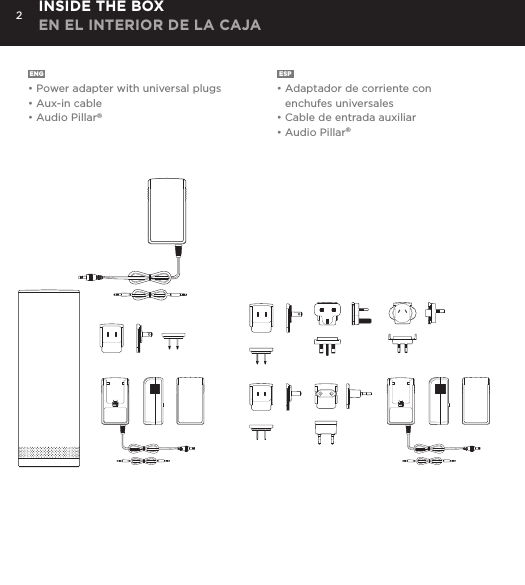
2ENG• Power adapter with universal plugs• Aux-in cable• Audio Pillar®ESP• Adaptador de corriente con enchufes universales• Cable de entrada auxiliar• Audio Pillar®INSIDE THE BOX EN EL INTERIOR DE LA CAJA
3ENGLISTENPlay your music wirelessly through any Bluetooth®-enabled device or connect to your music device via a 3.5mm stereo input cable (included). TALKUtilize the speakerphone capabilities  for hands-free conversations. TRAVELWith the Lithium-ion rechargeable battery you don’t need to worry about being connected for 15 hours* and with a universal power adapter (included) you are free to travel the world (100-240V AC, 50+60Hz). *15 hours of continuous play between charges at normal volume. ADORNFind the right Audio Pillar® to complement your décor.FOR THE TECHIE IN YOUYour new 2.1 stereo system includes proprietary (1.5”) acoustic drivers (stereo pair) and a 3” subwoofer, a universal power supply 100-240V AC, 50-60Hz, built-in microphone for Speakerphone capabilities and a Bluetooth® wireless range of up to 50 feet.ESPESCUCHEEscuche su música preferida de forma inalámbrica a través de cualquier dispositivo activado para Bluetooth® o conéctelo a su equipo de música mediante un cable de entrada para estéreo de 3.5 mm (incluido). HABLEAproveche la función de altavoz para conversaciones de manos libres.VIAJECon la batería recargable de litio-ión, durante 15 horas* no tendrá que preocuparse por estar conectado, y con un adaptador de corriente universal (incluido), puede viajar a cualquier lugar del mundo (100-240V c.a., 50-60Hz).*15 horas de reproducción continua entre carga y carga a un volumen normal.ÚSELO COMO OBJETO DECORATIVOEscoja el Audio Pillar® adecuado para complementar la decoración de su espacio.PARA LOS FANÁTICOS DE  NUEVAS TECNOLOGÍASSu nuevo sistema de estéreo 2.1 incluye controladores acústicos (1.5”) patentados (par por estéreo) y un subwoofer de 3”, un suministro eléctrico universal de 100-240V c.a., 50-60Hz, micrófono integrado para la función de altavoz y un rango inalámbrico para Bluetooth® de hasta más de 15 m.
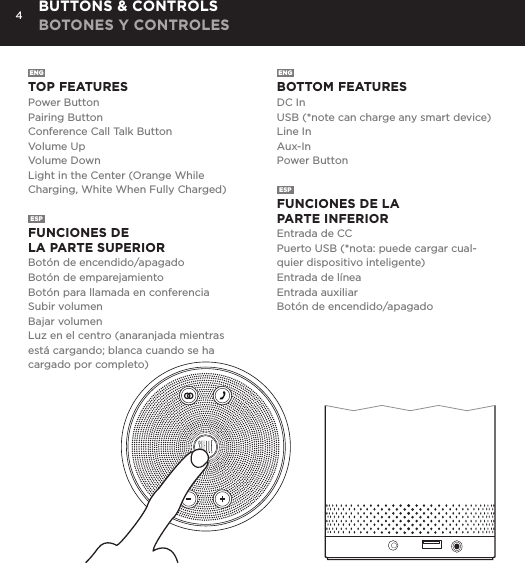
4ENGTOP FEATURESPower ButtonPairing ButtonConference Call Talk ButtonVolume UpVolume DownLight in the Center (Orange While Charging, White When Fully Charged)ESPFUNCIONES DE  LA PARTE SUPERIORBotón de encendido/apagadoBotón de emparejamientoBotón para llamada en conferenciaSubir volumenBajar volumenLuz en el centro (anaranjada mientras está cargando; blanca cuando se ha cargado por completo)ENGBOTTOM FEATURESDC InUSB (*note can charge any smart device)Line InAux-InPower ButtonESPFUNCIONES DE LA  PARTE INFERIOREntrada de CCPuerto USB (*nota: puede cargar cual-quier dispositivo inteligente)Entrada de líneaEntrada auxiliarBotón de encendido/apagadoBUTTONS & CONTROLS BOTONES Y CONTROLES
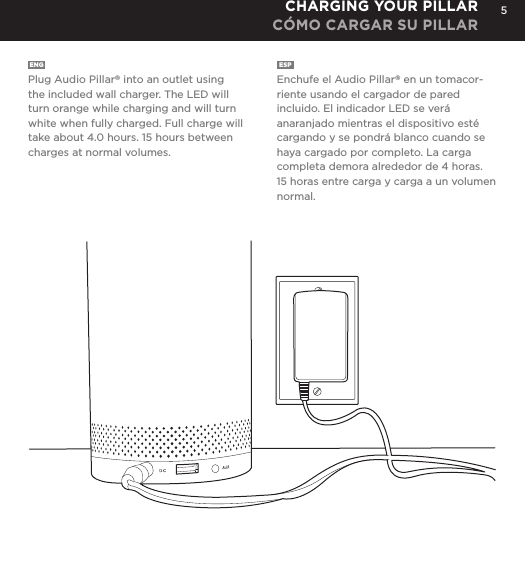
5ENG  Plug Audio Pillar® into an outlet using the included wall charger. The LED will turn orange while charging and will turn white when fully charged. Full charge will take about 4.0 hours. 15 hours between charges at normal volumes.ESP  Enchufe el Audio Pillar® en un tomacor-riente usando el cargador de pared incluido. El indicador LED se verá anaranjado mientras el dispositivo esté cargando y se pondrá blanco cuando se haya cargado por completo. La carga completa demora alrededor de 4 horas. 15 horas entre carga y carga a un volumen normal.CHARGING YOUR PILLARCÓMO CARGAR SU PILLAR
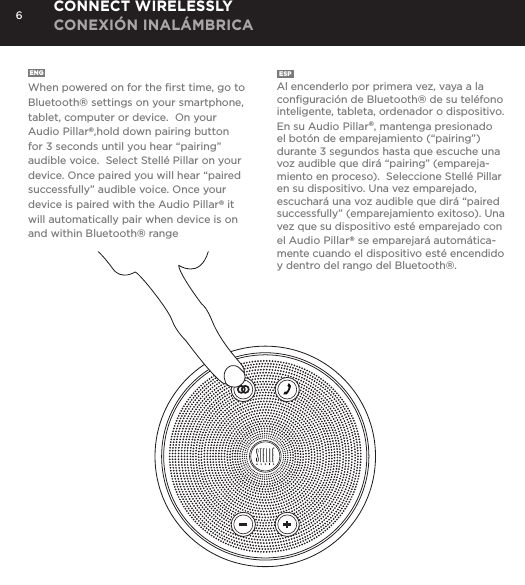
6ENG  When powered on for the first time, go to Bluetooth® settings on your smartphone, tablet, computer or device.  On your Audio Pillar®,hold down pairing button for 3 seconds until you hear “pairing” audible voice.  Select Stellé Pillar on your device. Once paired you will hear “paired successfully” audible voice. Once your device is paired with the Audio Pillar® it will automatically pair when device is on and within Bluetooth® rangeESP  Al encenderlo por primera vez, vaya a la configuración de Bluetooth® de su teléfono inteligente, tableta, ordenador o dispositivo.  En su Audio Pillar®, mantenga presionado el botón de emparejamiento (“pairing”) durante 3 segundos hasta que escuche una voz audible que dirá “pairing” (empareja-miento en proceso).  Seleccione Stellé Pillar en su dispositivo. Una vez emparejado, escuchará una voz audible que dirá “paired successfully” (emparejamiento exitoso). Una vez que su dispositivo esté emparejado con el Audio Pillar® se emparejará automática-mente cuando el dispositivo esté encendido y dentro del rango del Bluetooth®.CONNECT WIRELESSLY CONEXIÓN INALÁMBRICA
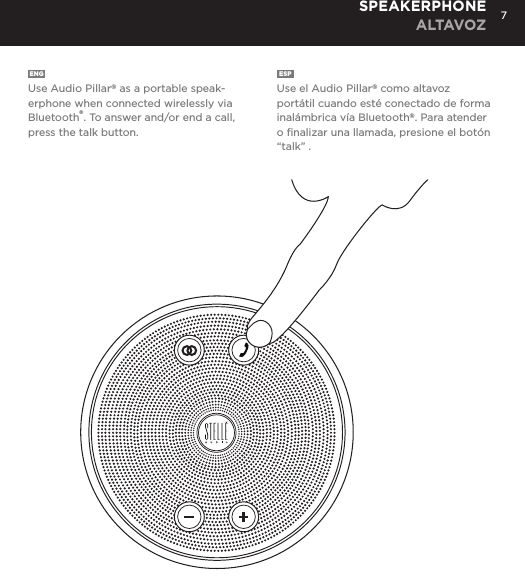
7ENGUse Audio Pillar® as a portable speak-erphone when connected wirelessly via Bluetooth®. To answer and/or end a call, press the talk button. ESPUse el Audio Pillar® como altavoz portátil cuando esté conectado de forma inalámbrica vía Bluetooth®. Para atender o finalizar una llamada, presione el botón“talk” .SPEAKERPHONE ALTAVOZ
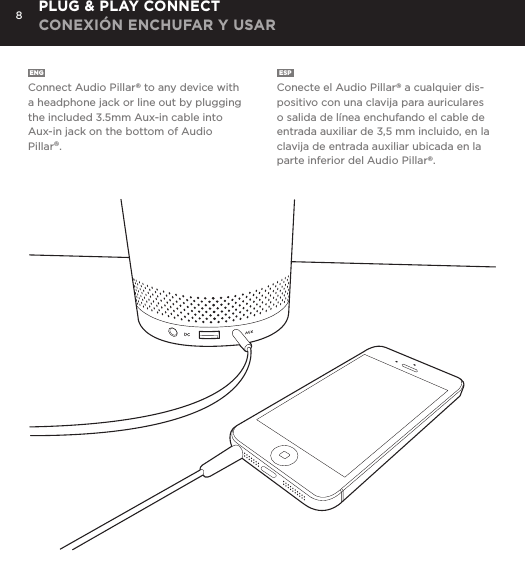
8ENG  Connect Audio Pillar® to any device with a headphone jack or line out by plugging the included 3.5mm Aux-in cable into Aux-in jack on the bottom of Audio Pillar®. ESP  Conecte el Audio Pillar® a cualquier dis-positivo con una clavija para auriculares o salida de línea enchufando el cable de entrada auxiliar de 3,5 mm incluido, en la clavija de entrada auxiliar ubicada en la parte inferior del Audio Pillar®. PLUG & PLAY CONNECT CONEXIÓN ENCHUFAR Y USAR
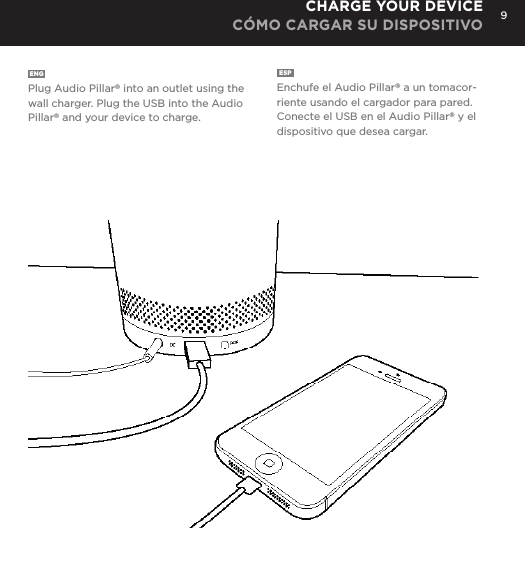
9ENG  Plug Audio Pillar® into an outlet using the wall charger. Plug the USB into the Audio Pillar® and your device to charge.ESP  Enchufe el Audio Pillar® a un tomacor-riente usando el cargador para pared. Conecte el USB en el Audio Pillar® y el dispositivo que desea cargar.CHARGE YOUR DEVICE CÓMO CARGAR SU DISPOSITIVO
10 SAFETY INFORMATION INFORMACIÓN SOBRE SEGURIDADENGWARNINGPlease read these safety warnings and cautions carefully to  ensure your personal safety and prevent property damage.FIRE AND ELECTRIC SHOCK HAZARDBattery/Charger Hazard• Do not dispose of your Stellé Audio PillarTM Speaker in a fire.   The battery could explode causing injury or death.• Only charge the battery in accordance with the user instructions   supplied with the Stellé Audio PillarTM Speaker.• Do not attempt to disassemble Stellé Audio PillarTM Speaker charger or    force open the built-in battery because this may result in electric shock.• Do not charge the Stellé Audio PillarTM Speaker in damp areas or in extremely high    or low temperatures because this could result in electric shock.• Do not clean the Stellé Audio PillarTM Speaker when it is being charged.    Always unplug the charger first before cleaning the Stellé Audio PillarTM Speaker.Automobile Accident Hazard• Do not leave or store the Stellé Audio PillarTM Speaker or any of its accessories    near or over your automobile’s air bag because serious injury may result when an    air bag deploys.CAUTION• Do not use abrasive cleaners to clean your Stellé Audio PillarTM Speaker because    this could cause scratches and damage.  • Do not bring your Stellé Audio PillarTM Speaker in to contact with any sharp objects    because this could cause scratches and damage.• Do not insert anything into your Stellé Audio PillarTM unless otherwise specified in the    user instructions. This may damage the internal components.• Do not attempt to repair, modify, or disassemble your Stellé Audio PillarTM Speaker      yourself, it does not contain any user- serviceable components.
11ESPADVERTENCIALea detenidamente estas advertencias y precauciones de seguridad para proteger su seguridad personal y evitar daños materiales.PELIGRO DE INCENDIO Y ELECTROCHOQUEPeligros relativos a la batería y al cargador• No arroje su Parlante Stellé Audio PillarTM al fuego. La batería podría explotar yocasionar lesiones o la muerte.• Cargue la batería únicamente de acuerdo con las instrucciones para el usuario que sesuministran con el Parlante Stellé Audio PillarTM.• No intente desarmar el cargador del Parlante Stellé Audio PillarTM ni abrir por la fuerza labatería integrada, ya que podría sufrir un electrochoque.• No cargue el Parlante Stellé Audio PillarTM en ambientes húmedos o con temperaturas extremadamente altas o bajas, ya que podría sufrir un electrochoque.• No limpie el Parlante Stellé Audio PillarTM mientras se está cargando. Siempre desen-chufe primero el cargador antes de limpiar el Parlante Stellé Audio PillarTM.Peligro de accidente automovilístico• No deje ni guarde el Parlante Stellé Audio PillarTM ni ninguno de sus accesorios cerca oencima del airbag de su automóvil, ya que podría causar lesiones de gravedad en caso de inflarse.FCC Warning:• This device complies with Part 15 of the FCC Rules. Operation is subject to the following two conditions: (1) this device may not cause harmful interference, and (2) this device must accept any interference received, including interference that may cause undesired operation.Changes or modifications not expressly approved by the party responsible for compliancecould void the user's authority to operate the equipment.NOTE: This equipment has been tested and found to comply with the limits for aClass B digital device, pursuant to Part 15 of the FCC Rules. These limits aredesigned to provide reasonable protection against harmful interference in a
12 SAFETY INFORMATION INFORMACIÓN SOBRE SEGURIDADresidential installation. This equipment generates, uses and can radiate radiofrequency energy and, if not installed and used in accordance with theinstructions, may cause harmful interference to radio communications. However,there is no guarantee that interference will not occur in a particular installation.If this equipment does cause harmful interference to radio or television reception,which can be determined by turning the equipment off and on, the user isencouraged to try to correct the interference by one or more of the followingmeasures:-- Reorient or relocate the receiving antenna.-- Increase the separation between the equipment and receiver.-- Connect the equipment into an outlet on a circuit differentfrom that to which the receiver is connected.-- Consult the dealer or an experienced radio/TV technician for help.The device has been evaluated to meet general RF exposure requirement. The device can be used in portable exposure condition without restriction.IC Caution:RSS-Gen Issue 3 December 2010"&"CNR-Gen 3e éditionDécembre 2010:- English: This device complies with Industry Canada licence-exempt RSS standard(s). Operation is subject to the following two conditions: (1) This device may not cause interference, and (2) This device must accept any interference, including interference that may cause undesired operation of the device.- French:Le présentappareilestconforme aux CNR d'Industrie Canada applicables aux appareils radio exempts de licence. L'exploitationestautorisée aux deux conditions suivantes: (1) l'appareil ne doit pas produire de brouillage, et (2) l'utilisateur de l'appareildoit accepter tout brouillageradioélectriquesubi, mêmesi le brouillageest susceptible d'encompromettre le fonctionnement.
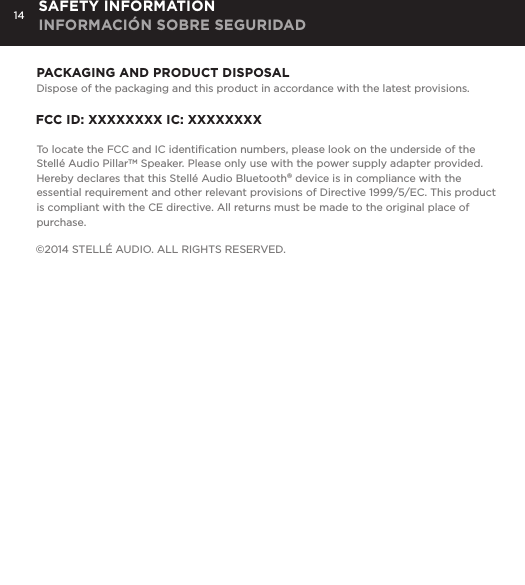
14 SAFETY INFORMATION INFORMACIÓN SOBRE SEGURIDADPACKAGING AND PRODUCT DISPOSALDispose of the packaging and this product in accordance with the latest provisions.FCC ID: XXXXXXXX IC: XXXXXXXXTo locate the FCC and IC identification numbers, please look on the underside of the Stellé Audio PillarTM Speaker. Please only use with the power supply adapter provided. Hereby declares that this Stellé Audio Bluetooth® device is in compliance with the essential requirement and other relevant provisions of Directive 1999/5/EC. This product is compliant with the CE directive. All returns must be made to the original place of purchase.©2014 STELLÉ AUDIO. ALL RIGHTS RESERVED.
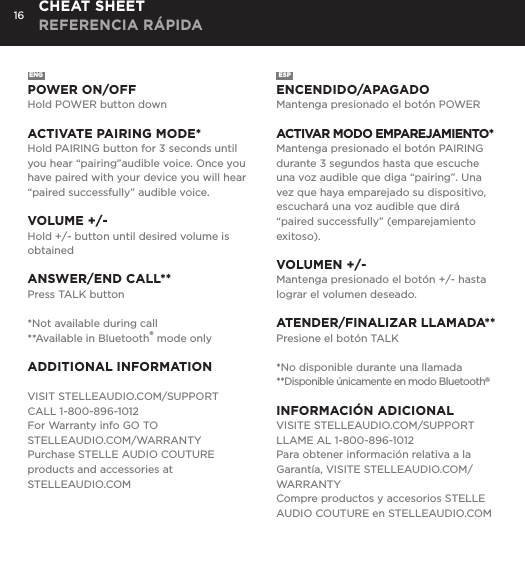
16ENGPOWER ON/OFFHold POWER button downACTIVATE PAIRING MODE*Hold PAIRING button for 3 seconds until you hear “pairing”audible voice. Once you have paired with your device you will hear “paired successfully” audible voice.VOLUME +/-Hold +/- button until desired volume is obtainedANSWER/END CALL**Press TALK button *Not available during call**Available in Bluetooth® mode onlyADDITIONAL INFORMATIONVISIT STELLEAUDIO.COM/SUPPORTCALL 1-800-896-1012For Warranty info GO TO  STELLEAUDIO.COM/WARRANTYPurchase STELLE AUDIO COUTURE products and accessories at   STELLEAUDIO.COMESPENCENDIDO/APAGADOMantenga presionado el botón POWERACTIVAR MODO EMPAREJAMIENTO*Mantenga presionado el botón PAIRING durante 3 segundos hasta que escuche una voz audible que diga “pairing”. Una vez que haya emparejado su dispositivo, escuchará una voz audible que dirá “paired successfully” (emparejamiento exitoso).VOLUMEN +/-Mantenga presionado el botón +/- hasta lograr el volumen deseado.ATENDER/FINALIZAR LLAMADA**Presione el botón TALK*No disponible durante una llamada**Disponible únicamente en modo Bluetooth®INFORMACIÓN ADICIONALVISITE STELLEAUDIO.COM/SUPPORTLLAME AL 1-800-896-1012Para obtener información relativa a la Garantía, VISITE STELLEAUDIO.COM/WARRANTYCompre productos y accesorios STELLE AUDIO COUTURE en STELLEAUDIO.COMCHEAT SHEET REFERENCIA RÁPIDA

Navigation menu