Suncon Toys Industry 60202 Wireless Remote Control Toy Transmitter User Manual users manual

Suncon Toys Industry Ltd Wireless Remote Control Toy Transmitter users manual

users manual

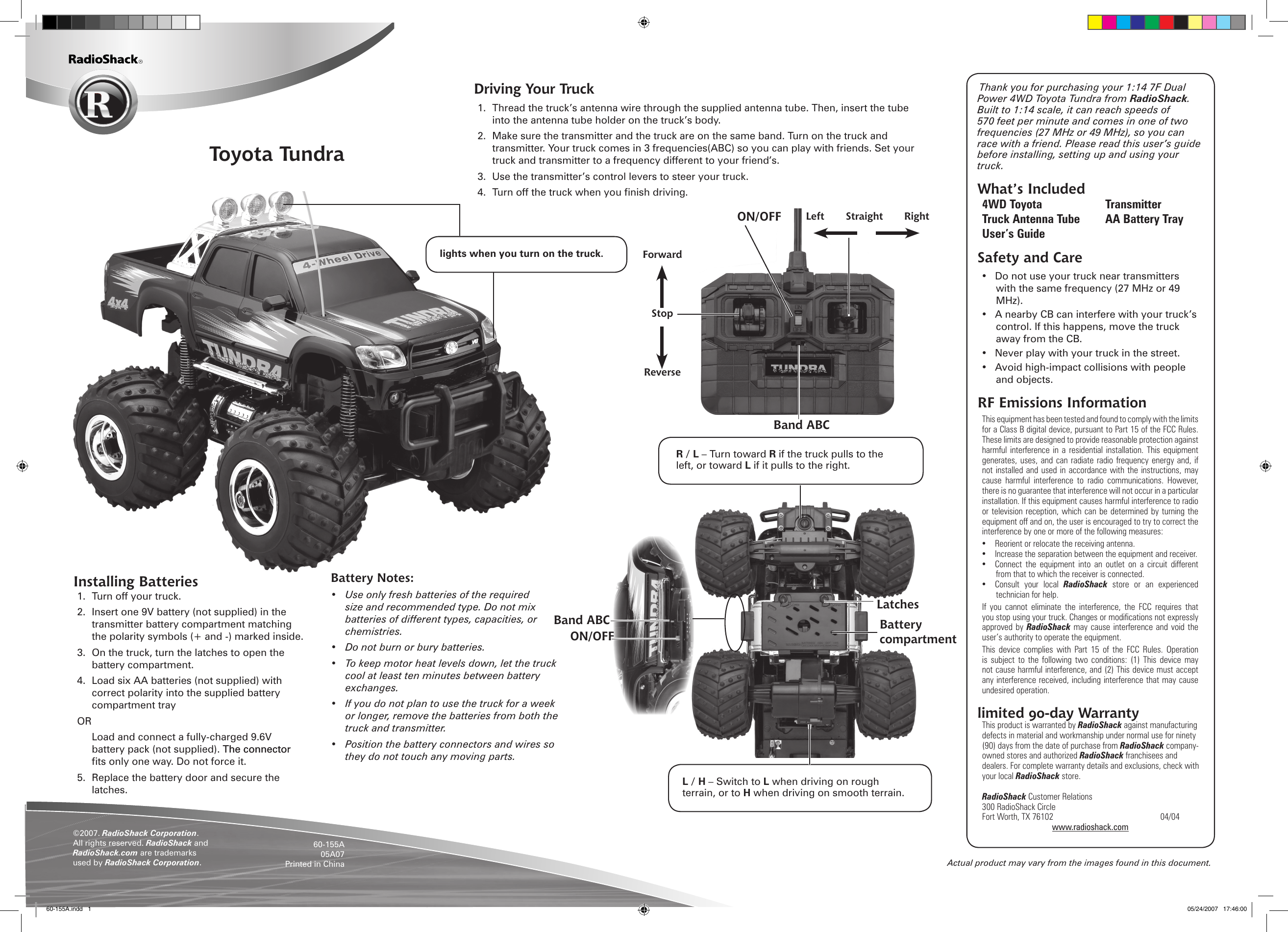
Actual product may vary from the images found in this document.Toyota Tundra©2007. RadioShack Corporation. All rights reserved. RadioShack and RadioShack.com are trademarks used by RadioShack Corporation. 60-155A05A07Printed in ChinaInstalling Batteries1.  Turn off your truck. 2.  Insert one 9V battery (not supplied) in the transmitter battery compartment matching the polarity symbols (+ and -) marked inside.3.  On the truck, turn the latches to open the battery compartment. 4.  Load six AA batteries (not supplied) with correct polarity into the supplied battery compartment trayOR  Load and connect a fully-charged 9.6V battery pack (not supplied). The connectorThe connector ts only one way. Do not force it.5.  Replace the battery door and secure the latches.Battery Notes:•  Use only fresh batteries of the required size and recommended type. Do not mix batteries of different types, capacities, or chemistries.•  Do not burn or bury batteries.•  To keep motor heat levels down, let the truck cool at least ten minutes between battery exchanges.•  If you do not plan to use the truck for a week or longer, remove the batteries from both the truck and transmitter. •  Position the battery connectors and wires so they do not touch any moving parts.Thank you for purchasing your 1:14 7F Dual Power 4WD Toyota Tundra from RadioShack. Built to 1:14 scale, it can reach speeds of 570 feet per minute and comes in one of two frequencies (27 MHz or 49 MHz), so you can race with a friend. Please read this user’s guide before installing, setting up and using your truck.What’s Included4WD Toyota  Transmitter Truck Antenna Tube  AA Battery TrayUser’s GuideSafety and Care•  Do not use your truck near transmitters with the same frequency (27 MHz or 49 MHz).•  A nearby CB can interfere with your truck’s control. If this happens, move the truck away from the CB.•  Never play with your truck in the street.•  Avoid high-impact collisions with people and objects.RF Emissions InformationThis equipment has been tested and found to comply with the limits for a Class B digital device, pursuant to Part 15 of the FCC Rules. These limits are designed to provide reasonable protection against harmful  interference  in  a  residential  installation.  This  equipment generates, uses, and can radiate  radio  frequency energy  and,  if not installed and  used in accordance  with the instructions,  may cause  harmful  interference  to  radio  communications.  However, there is no guarantee that interference will not occur in a particular installation. If this equipment causes harmful interference to radio or television reception,  which can be  determined by turning  the equipment off and on, the user is encouraged to try to correct the interference by one or more of the following measures: •  Reorient or relocate the receiving antenna. •  Increase the separation between the equipment and receiver. •  Connect  the  equipment  into  an  outlet  on  a  circuit  different from that to which the receiver is connected. •  Consult  your  local  RadioShack  store  or  an  experienced technician for help. If  you  cannot  eliminate  the  interference,  the  FCC  requires  that you stop using your truck. Changes or modications not expressly approved by  RadioShack  may cause  interference and  void  the user’s authority to operate the equipment. This  device  complies  with  Part  15  of  the  FCC  Rules.  Operation is  subject  to  the following  two  conditions:  (1)  This  device  may not cause harmful interference, and (2) This device must accept any interference received, including interference that may cause undesired operation.  limited 90-day WarrantyThis product is warranted by RadioShack against manufacturing defects in material and workmanship under normal use for ninety (90) days from the date of purchase from RadioShack company-owned stores and authorized RadioShack franchisees and dealers. For complete warranty details and exclusions, check with your local RadioShack store.RadioShack Customer Relations300 RadioShack CircleFort Worth, TX 76102      04/04www.radioshack.comForwardStopReverseLeft  Straight  RightBattery compartmentLatchesR / L – Turn toward R if the truck pulls to the left, or toward L if it pulls to the right.L / H – Switch to L when driving on rough terrain, or to H when driving on smooth terrain.Band ABCMake sure the transmmitter andd the vechicle are on the samme band.lights when you turn on the truck.ON/OFFON/OFFBand ABCDriving Your Truck1.  Thread the truck’s antenna wire through the supplied antenna tube. Then, insert the tube into the antenna tube holder on the truck’s body.2.  Make sure the transmitter and the truck are on the same band. Turn on the truck and transmitter. Your truck comes in 3 frequencies(ABC) so you can play with friends. Set your truck and transmitter to a frequency different to your friend’s.3.  Use the transmitter’s control levers to steer your truck.4.  Turn off the truck when you nish driving.60-155A.indd   1 05/24/2007   17:46:00

Navigation menu