Superior Electronics R100TLQ Room Monitor Transmitter User Manual MI RM R100 xxxQ 181119x

Superior Electronics Corporation Room Monitor Transmitter MI RM R100 xxxQ 181119x

User manual

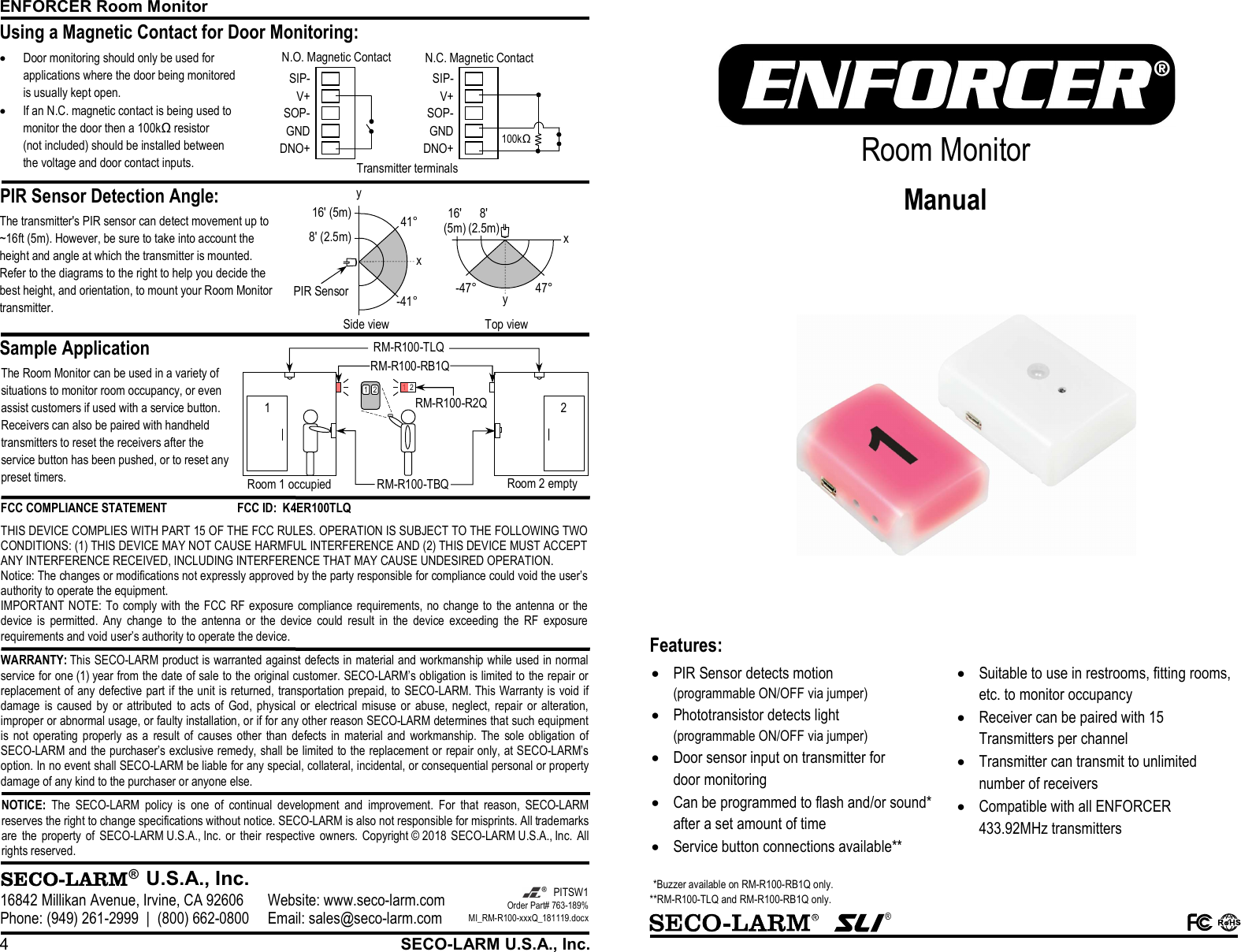
ENFORCER Room Monitor 4  SECO-LARM U.S.A., Inc. PIR Sensor Detection Angle:      Sample Application Using a Magnetic Contact for Door Monitoring:   ®  U.S.A., Inc. 16842 Millikan Avenue, Irvine, CA 92606 Website: www.seco-larm.com Phone: (949) 261-2999  |  (800) 662-0800 Email: sales@seco-larm.com  PITSW1 Order Part# 763-189% MI_RM-R100-xxxQ_181119.docx  NOTICE: The  SECO-LARM  policy  is  one  of  continual  development  and  improvement.  For  that  reason,  SECO-LARM reserves the right to change specifications without notice. SECO-LARM is also not responsible for misprints. All trademarks are  the  property  of  SECO-LARM U.S.A., Inc.  or  their  respective  owners.  Copyright © 2018 SECO-LARM U.S.A., Inc.  All rights reserved.  WARRANTY: This SECO-LARM product is warranted against defects in material and workmanship while used in normal service for one (1) year from the date of sale to the original customer. SECO-LARM’s obligation is limited to the repair or replacement of any defective part if the unit is returned, transportation prepaid, to SECO-LARM. This Warranty is void if damage  is  caused by  or attributed  to  acts  of  God,  physical  or  electrical  misuse  or  abuse,  neglect,  repair  or  alteration, improper or abnormal usage, or faulty installation, or if for any other reason SECO-LARM determines that such equipment is  not  operating properly as  a  result  of  causes  other  than defects in  material and  workmanship. The  sole  obligation of SECO-LARM and the purchaser’s exclusive remedy, shall be limited to the replacement or repair only, at SECO-LARM’s option. In no event shall SECO-LARM be liable for any special, collateral, incidental, or consequential personal or property damage of any kind to the purchaser or anyone else. FCC COMPLIANCE STATEMENT  FCC ID:  K4ER100TLQ THIS DEVICE COMPLIES WITH PART 15 OF THE FCC RULES. OPERATION IS SUBJECT TO THE FOLLOWING TWO CONDITIONS: (1) THIS DEVICE MAY NOT CAUSE HARMFUL INTERFERENCE AND (2) THIS DEVICE MUST ACCEPT ANY INTERFERENCE RECEIVED, INCLUDING INTERFERENCE THAT MAY CAUSE UNDESIRED OPERATION. Notice: The changes or modifications not expressly approved by the party responsible for compliance could void the user’s authority to operate the equipment. IMPORTANT NOTE: To comply with the FCC RF exposure compliance requirements,  no change to  the antenna  or the device  is  permitted.  Any  change  to  the  antenna  or  the  device  could  result  in  the  device  exceeding  the  RF  exposure requirements and void user’s authority to operate the device. Transmitter terminals 100kΩ DNO+GNDSOP-V+SIP-DNO+GNDSOP-V+SIP-N.O. Magnetic Contact  N.C. Magnetic Contact The Room Monitor can be used in a variety of situations to monitor room occupancy, or even assist customers if used with a service button. Receivers can also be paired with handheld transmitters to reset the receivers after the service button has been pushed, or to reset any preset timers. The transmitter's PIR sensor can detect movement up to ~16ft (5m). However, be sure to take into account the height and angle at which the transmitter is mounted. Refer to the diagrams to the right to help you decide the best height, and orientation, to mount your Room Monitor transmitter. 16' (5m)8' (2.5m)x Side view 41° -41° PIR Sensor x Top view y -47°47° 8' (2.5m) 16' (5m) y  Door monitoring should only be used for applications where the door being monitored is usually kept open.  If an N.C. magnetic contact is being used to monitor the door then a 100kΩ resistor (not included) should be installed between the voltage and door contact inputs. RM-R100-R2Q RM-R100-RB1Q 1 2 RM-R100-TBQ RM-R100-TLQ 1 2 Room 1 occupied Room 2 empty 1  2    ®    Room Monitor Manual  Features:   PIR Sensor detects motion (programmable ON/OFF via jumper)  Phototransistor detects light (programmable ON/OFF via jumper)  Door sensor input on transmitter for door monitoring  Can be programmed to flash and/or sound* after a set amount of time  Service button connections available**  Suitable to use in restrooms, fitting rooms, etc. to monitor occupancy  Receiver can be paired with 15 Transmitters per channel  Transmitter can transmit to unlimited number of receivers  Compatible with all ENFORCER 433.92MHz transmitters  *Buzzer available on RM-R100-RB1Q only. **RM-R100-TLQ and RM-R100-RB1Q only.
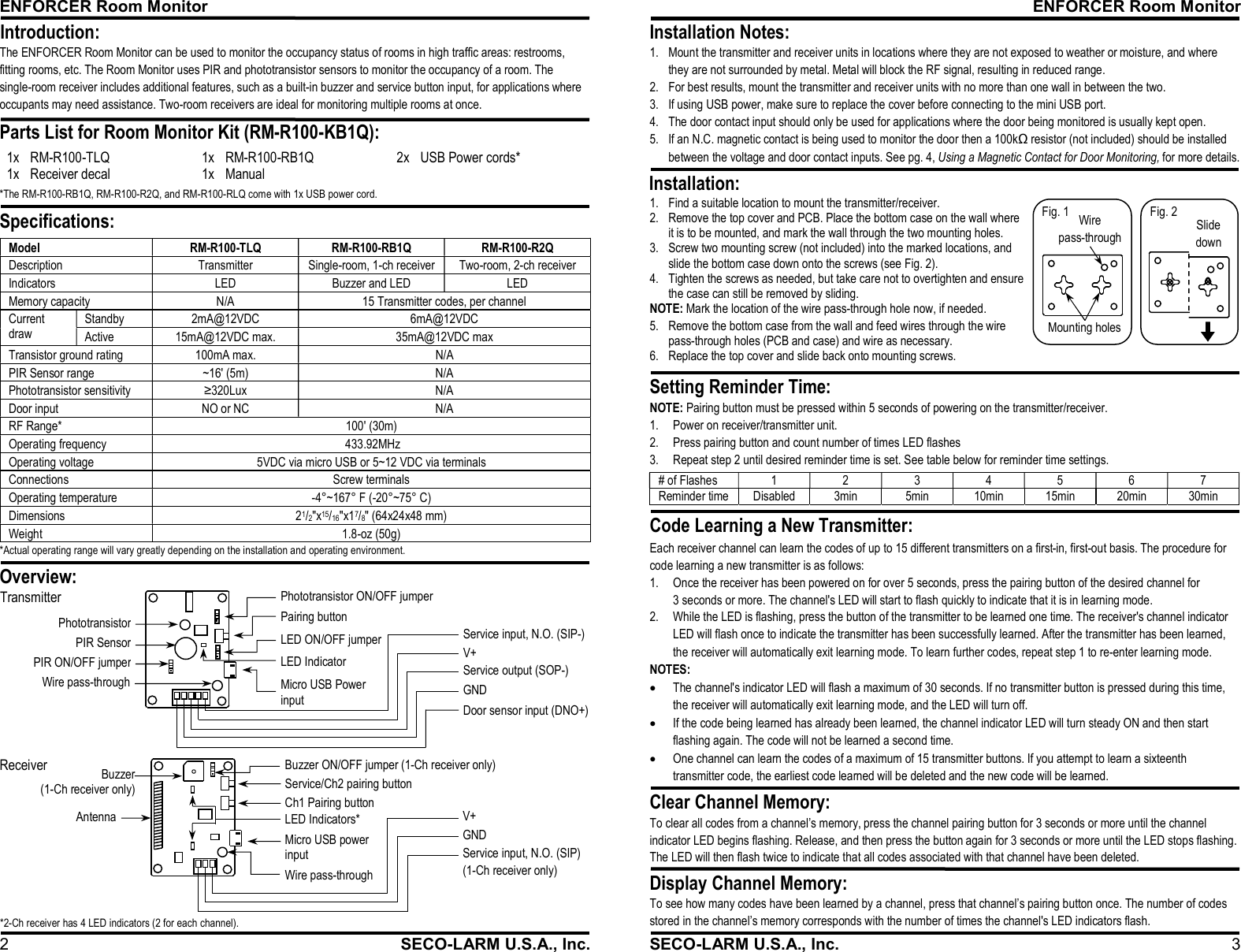
ENFORCER Room Monitor 2  SECO-LARM U.S.A., Inc. The ENFORCER Room Monitor can be used to monitor the occupancy status of rooms in high traffic areas: restrooms, fitting rooms, etc. The Room Monitor uses PIR and phototransistor sensors to monitor the occupancy of a room. The single-room receiver includes additional features, such as a built-in buzzer and service button input, for applications where occupants may need assistance. Two-room receivers are ideal for monitoring multiple rooms at once. 1x RM-R100-TLQ 1x RM-R100-RB1Q 2x USB Power cords* 1x Receiver decal 1x Manual   *The RM-R100-RB1Q, RM-R100-R2Q, and RM-R100-RLQ come with 1x USB power cord. Model  RM-R100-TLQ  RM-R100-RB1Q  RM-R100-R2Q Description  Transmitter  Single-room, 1-ch receiver  Two-room, 2-ch receiver Indicators  LED  Buzzer and LED  LED Memory capacity  N/A  15 Transmitter codes, per channel Current draw Standby  2mA@12VDC  6mA@12VDC Active  15mA@12VDC max.  35mA@12VDC max Transistor ground rating  100mA max.  N/A PIR Sensor range  ~16' (5m)  N/A Phototransistor sensitivity  ≥320Lux  N/A Door input  NO or NC  N/A RF Range*  100' (30m) Operating frequency   433.92MHz Operating voltage  5VDC via micro USB or 5~12 VDC via terminals Connections  Screw terminals Operating temperature  -4°~167° F (-20°~75° C) Dimensions  21/2"x15/16"x17/8" (64x24x48 mm)  Weight  1.8-oz (50g)  Specifications:  Introduction:  Parts List for Room Monitor Kit (RM-R100-KB1Q):                           Overview:  Pairing button Micro USB Power input PIR SensorPhototransistorLED Indicator Phototransistor ON/OFF jumper Door sensor input (DNO+)GND Service output (SOP-)  V+ Service input, N.O. (SIP-) LED ON/OFF jumper  PIR ON/OFF jumperTransmitter  Wire pass-throughService/Ch2 pairing button Ch1 Pairing button Micro USB power input  LED Indicators* Antenna Buzzer (1-Ch receiver only) GND Service input, N.O. (SIP)  (1-Ch receiver only) V+ Buzzer ON/OFF jumper (1-Ch receiver only) Receiver *2-Ch receiver has 4 LED indicators (2 for each channel). Wire pass-through  *Actual operating range will vary greatly depending on the installation and operating environment. ENFORCER Room Monitor SECO-LARM U.S.A., Inc.  3 Setting Reminder Time:  Clear Channel Memory:  Display Channel Memory:  Installation Notes:  Installation:              NOTE: Pairing button must be pressed within 5 seconds of powering on the transmitter/receiver. 1. Power on receiver/transmitter unit. 2. Press pairing button and count number of times LED flashes 3. Repeat step 2 until desired reminder time is set. See table below for reminder time settings. To clear all codes from a channel’s memory, press the channel pairing button for 3 seconds or more until the channel indicator LED begins flashing. Release, and then press the button again for 3 seconds or more until the LED stops flashing. The LED will then flash twice to indicate that all codes associated with that channel have been deleted. To see how many codes have been learned by a channel, press that channel’s pairing button once. The number of codes stored in the channel’s memory corresponds with the number of times the channel's LED indicators flash. # of Flashes 1 2 3 4 5 6 7 Reminder time Disabled 3min 5min 10min 15min 20min 30min  1. Mount the transmitter and receiver units in locations where they are not exposed to weather or moisture, and where they are not surrounded by metal. Metal will block the RF signal, resulting in reduced range. 2. For best results, mount the transmitter and receiver units with no more than one wall in between the two. 3. If using USB power, make sure to replace the cover before connecting to the mini USB port. 4. The door contact input should only be used for applications where the door being monitored is usually kept open. 5. If an N.C. magnetic contact is being used to monitor the door then a 100kΩ resistor (not included) should be installed between the voltage and door contact inputs. See pg. 4, Using a Magnetic Contact for Door Monitoring, for more details.Each receiver channel can learn the codes of up to 15 different transmitters on a first-in, first-out basis. The procedure for code learning a new transmitter is as follows: 1. Once the receiver has been powered on for over 5 seconds, press the pairing button of the desired channel for 3 seconds or more. The channel's LED will start to flash quickly to indicate that it is in learning mode. 2. While the LED is flashing, press the button of the transmitter to be learned one time. The receiver's channel indicator LED will flash once to indicate the transmitter has been successfully learned. After the transmitter has been learned, the receiver will automatically exit learning mode. To learn further codes, repeat step 1 to re-enter learning mode. NOTES:  The channel's indicator LED will flash a maximum of 30 seconds. If no transmitter button is pressed during this time, the receiver will automatically exit learning mode, and the LED will turn off.  If the code being learned has already been learned, the channel indicator LED will turn steady ON and then start flashing again. The code will not be learned a second time.  One channel can learn the codes of a maximum of 15 transmitter buttons. If you attempt to learn a sixteenth transmitter code, the earliest code learned will be deleted and the new code will be learned. Code Learning a New Transmitter: Mounting holes Wire pass-through Fig. 1 1. Find a suitable location to mount the transmitter/receiver. 2. Remove the top cover and PCB. Place the bottom case on the wall where it is to be mounted, and mark the wall through the two mounting holes. 3. Screw two mounting screw (not included) into the marked locations, and slide the bottom case down onto the screws (see Fig. 2). 4. Tighten the screws as needed, but take care not to overtighten and ensure the case can still be removed by sliding. NOTE: Mark the location of the wire pass-through hole now, if needed. 5. Remove the bottom case from the wall and feed wires through the wire pass-through holes (PCB and case) and wire as necessary. 6. Replace the top cover and slide back onto mounting screws. Slide down Fig. 2

Navigation menu