Swissvoice EPURETAM ePure TAM User Manual

Swissvoice HK Ltd. ePure TAM

User Manual

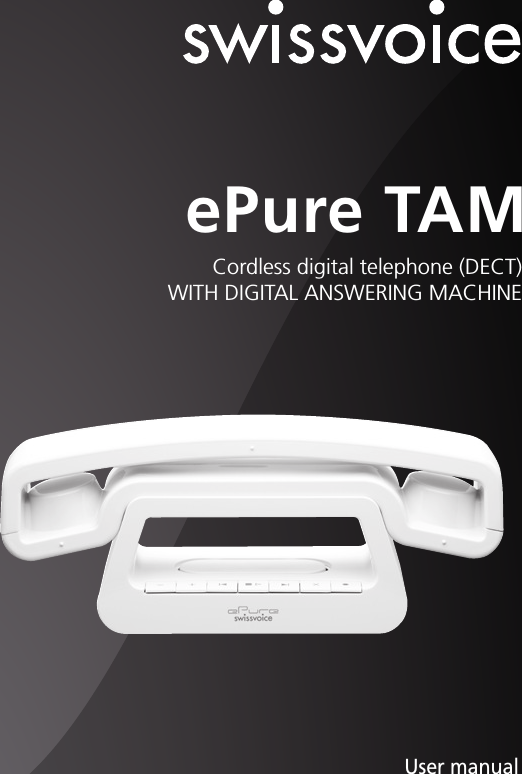
Cordless digital telephone (DECT)WITH DIGITAL ANSWERING MACHINEePure TAMUser manualPhoto may differ from the actual product.
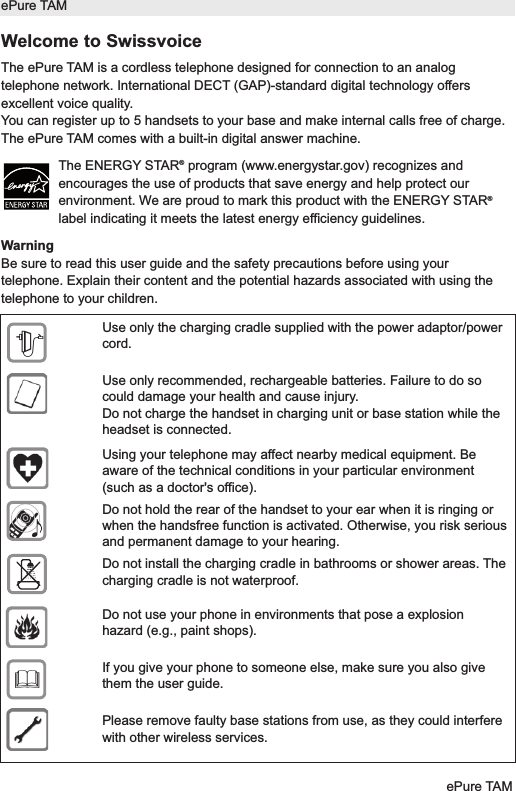
Welcome to SwissvoiceThe ePure TAM is a cordless telephone designed for connection to an analogtelephone network. International DECT (GAP)-standard digital technology offersexcellent voice quality.You can register up to 5 handsets to your base and make internal calls free of charge.The ePure TAM comes with a built-in digital answer machine.The ENERGY STAR®program (www.energystar.gov) recognizes andencourages the use of products that save energy and help protect ourenvironment. We are proud to mark this product with the ENERGY STAR®label indicating it meets the latest energy efficiency guidelines.WarningBe sure to read this user guide and the safety precautions before using yourtelephone. Explain their content and the potential hazards associated with using thetelephone to your children.ePure TAMePure TAMUse only the charging cradle supplied with the power adaptor/powercord.Use only recommended, rechargeable batteries. Failure to do socould damage your health and cause injury.Do not charge the handset in charging unit or base station while theheadset is connected.Using your telephone may affect nearby medical equipment. Beaware of the technical conditions in your particular environment(such as a doctor's office).Do not hold the rear of the handset to your ear when it is ringing orwhen the handsfree function is activated. Otherwise, you risk seriousand permanent damage to your hearing.Do not install the charging cradle in bathrooms or shower areas. Thecharging cradle is not waterproof.Do not use your phone in environments that pose a explosionhazard (e.g., paint shops).If you give your phone to someone else, make sure you also givethem the user guide.Please remove faulty base stations from use, as they could interferewith other wireless services.$ƒ
ContentsKeys 2Display symbols 3Range / Location 3Battery advice 4Insert the battery 4Connecting the phone 5Set date and time 5Set language 5Making a call 6Redial 7PBX operation 8Paging – Locate mislaid handsets 8Phonebook 8Direct memory 9Calls list and caller ID (CID) operation 9Call Waiting 13Extending the ePure TAM 13Making a call with several call partners 14Personal settings 15Advanced settings 16Answer machine 17Appendix 21ePure TAMePure TAM 1
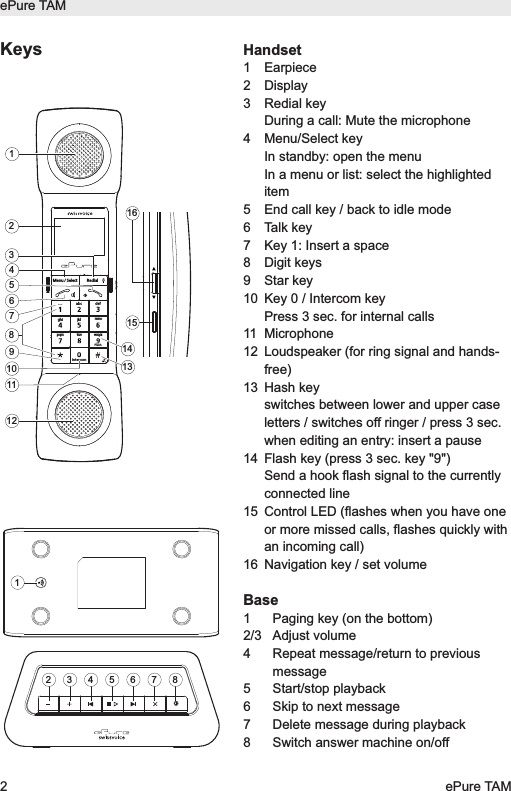
ePure TAM2ePure TAMHandset 1 Earpiece2 Display3 Redial keyDuring a call: Mute the microphone4 Menu/Select keyIn standby: open the menuIn a menu or list: select the highlighteditem  5  End call key / back to idle mode6 Talk key 7 Key 1: Insert a space8 Digit keys 9 Star key10 Key 0 / Intercom keyPress 3 sec. for internal calls11 Microphone12  Loudspeaker (for ring signal and hands-free)13 Hash key switches between lower and upper caseletters / switches off ringer / press 3 sec.when editing an entry: insert a pause14 Flash key (press 3 sec. key "9")Send a hook flash signal to the currentlyconnected line15  Control LED (flashes when you have oneor more missed calls, flashes quickly withan incoming call)16 Navigation key / set volumeBase1 Paging key (on the bottom)2/3 Adjust volume4 Repeat message/return to previousmessage5 Start/stop playback6 Skip to next message7 Delete message during playback8 Switch answer machine on/offMenu / SelectIntercomRedialFlashabc defghi jkl mnopqrs tuv wxyz16151413123458126111079Keys12 3 4 5 6 7 8
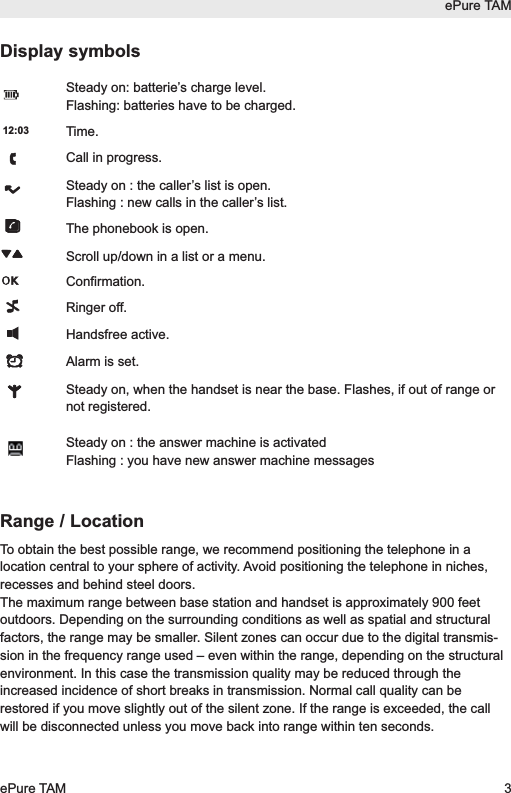
Display symbolsSteady on: batterie’s charge level.Flashing: batteries have to be charged.Time.Call in progress.Steady on : the caller’s list is open.Flashing : new calls in the caller’s list.The phonebook is open.Scroll up/down in a list or a menu.Confirmation.Ringer off.Handsfree active.Alarm is set.Steady on, when the handset is near the base. Flashes, if out of range ornot registered.Steady on : the answer machine is activatedFlashing : you have new answer machine messagesRange / LocationTo obtain the best possible range, we recommend positioning the telephone in alocation central to your sphere of activity. Avoid positioning the telephone in niches,recesses and behind steel doors.The maximum range between base station and handset is approximately 900 feetoutdoors. Depending on the surrounding conditions as well as spatial and structuralfactors, the range may be smaller. Silent zones can occur due to the digital transmis-sion in the frequency range used – even within the range, depending on the structuralenvironment. In this case the transmission quality may be reduced through theincreased incidence of short breaks in transmission. Normal call quality can berestored if you move slightly out of the silent zone. If the range is exceeded, the callwill be disconnected unless you move back into range within ten seconds.12:03ePure TAMePure TAM 3
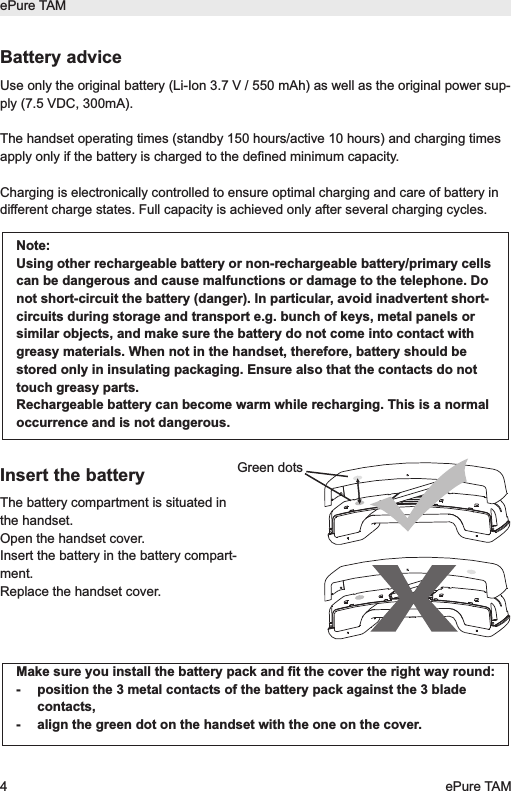
ePure TAM4ePure TAMBattery adviceUse only the original battery (Li-Ion 3.7 V / 550 mAh) as well as the original power sup-ply (7.5 VDC, 300mA). The handset operating times (standby 150 hours/active 10 hours) and charging timesapply only if the battery is charged to the defined minimum capacity.Charging is electronically controlled to ensure optimal charging and care of battery indifferent charge states. Full capacity is achieved only after several charging cycles.Insert the batteryThe battery compartment is situated inthe handset.Open the handset cover. Insert the battery in the battery compart-ment.Replace the handset cover.Note:Using other rechargeable battery or non-rechargeable battery/primary cellscan be dangerous and cause malfunctions or damage to the telephone. Donot short-circuit the battery (danger). In particular, avoid inadvertent short-circuits during storage and transport e.g. bunch of keys, metal panels orsimilar objects, and make sure the battery do not come into contact withgreasy materials. When not in the handset, therefore, battery should bestored only in insulating packaging. Ensure also that the contacts do nottouch greasy parts.Rechargeable battery can become warm while recharging. This is a normaloccurrence and is not dangerous.Make sure you install the battery pack and fit the cover the right way round:-  position the 3 metal contacts of the battery pack against the 3 bladecontacts,-  align the green dot on the handset with the one on the cover.Green dots
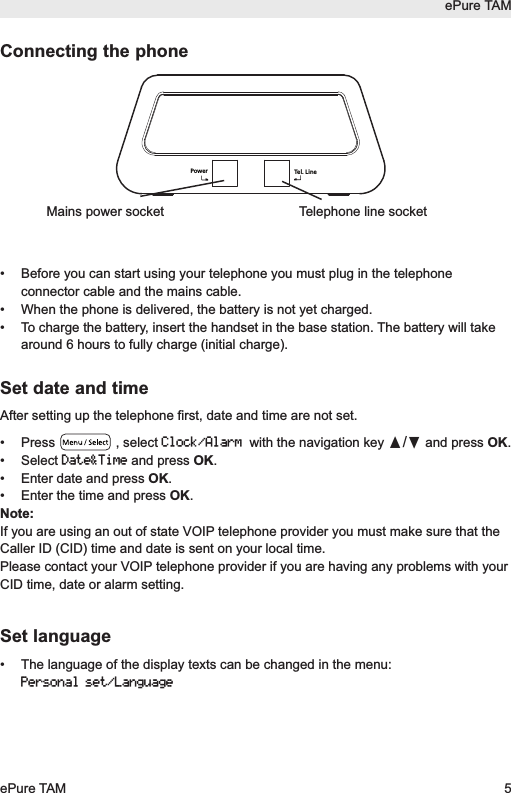
ePure TAMePure TAM 5Connecting the phone• Before you can start using your telephone you must plug in the telephoneconnector cable and the mains cable.•  When the phone is delivered, the battery is not yet charged.•  To charge the battery, insert the handset in the base station. The battery will takearound 6 hours to fully charge (initial charge).Set date and timeAfter setting up the telephone first, date and time are not set.• Press , select Clock/Alarmwith the navigation key π/†and press OK. • Select Date&Timeand press OK. • Enter date and press OK.• Enter the time and press OK.Note:If you are using an out of state VOIP telephone provider you must make sure that theCaller ID (CID) time and date is sent on your local time.Please contact your VOIP telephone provider if you are having any problems with yourCID time, date or alarm setting.Set language• The language of the display texts can be changed in the menu:Personal set/LanguageTel. LinePowerTelephone line socketMains power socket
Making a call• Dial the desired number using the keypad.• Press the Talk key .End the callPress the End call key.Receiving a call• Incoming calls are signalled by a ring tone and a quick flashing of the control LEDon the handset. • Press the Talk key and conduct your conversation.End the callPress the End call key.Switch ringer offWhen a call is coming in, press and hold the  key for approx. 3 seconds. Theringer is switched off for this call.Mute handset microphonePress  to deactivate the microphone in your handset during a call. Press the key again to reactivate the microphone.Set speaker/loudspeaker volumeYou can adjust the speaker/loudspeaker volume during a conversation.Set the desired volume using the navigation key π/†.Switch handset off•  Press and hold the End call key (approx. 5 sec).•  Press and hold again the End call key to reactivate the handset.Calls cannot be made if the battery is almost discharged or the handset isout of range of the base station.RedialePure TAM6ePure TAM
Set alarm• Press  , select Clock/Alarmusing the navigation key π/†and pressOK.• Select Set alarmusing the navigation key π/†and press OK.•  Select the desired alarm function (e.g. On once), enter the alarm time and pressOK.Set alarm tone• Press  , select Clock/Alarmusing the navigation key π/†and pressOK.• Select Alarm toneusing the navigation key π/†and press OK.•  Select the desired alarm melody and press OK.The activated alarm is displayed in standby mode by  .The alarm sounds for 60 seconds or can be deactivated immediately by pressingany key. Note:If you are using an out of state VOIP telephone provider you must make sure that theCaller ID (CID) time and date is sent on your local time.Please contact your VOIP telephone provider if you are having any problems with yourCID time, date or alarm setting.RedialThe Redial list contains up to 10 entries.•  Press  and select the desired entry using the navigation key π/†.• Press the Talk key.Edit redial list•  Open the Redial list, press OK.You have the following options:- Save Number– Add number to the phonebook.- Delete entry– Delete the entry.- Delete All– Delete the entire redial list.RedialePure TAMePure TAM 7
PBX operationYour telephone is designed for use in the analogue telephone network and can beoperated on a PBX that supports DTMF dialling and flash signalling. To enter the R key(e.g. needed to establish a connection) press key  for 3 sec.You can adjust the flash/recall time for key R (see chapter "Advanced settings").Paging – Locate mislaid handsetsAll registered handsets ring for one minute, when the Page key on the base ispressed. To stop the ring press the End call key on the handset or the Page keyon the base.PhonebookYou can store up to 100 names and numbers in the phonebook on each handset.Digits / CharactersDifferent characters are printed on each key. The entries in the phonebook are sortedalphabetically.Key #Change from upper case to lower case letters (ABC/abc).Press 3 sec. to insert a pause inside a phone number (“P” appears).Key 1Insert a space.Add new entries in the phonebook• Press  , select Phonebookand press OK.• Select New entryand press OK.• Enter the desired name and press the navigation key π/†for further inputoptions.• Press OK to save the entry.Edit phonebook• Press  , select Phonebookand press OK.• Select View entryand press OK.• Select the desired entry using the navigation key π/†or enter the first letter ofthe name.• Press the Talk key to call the number.ePure TAM8ePure TAM
ePure TAMePure TAM 9In the phonebook menu you have the following options:- New entry- View entry- Delete all- Direct mem- Call a programmed direct memory number.- PB Transfer– Copy phonebook to another handset.Direct memoryPhone numbers from the phone book can be assigned to numerical keys 1 to 9.Programming direct memory keys• Press  , select Phonebookand press OK.• Select Direct memand press OK.•  Select the desired memory key and press OK twice.• Select Addand press OK.•  Select the desired entry from the phonebook using the navigation key π/†andpress OK.Calling a direct memory numberTo call a direct memory number, press the corresponding key for approx. 3 seconds.The programed number is called.Calls list and caller ID (CID) operationGetting to know your new telephoneIMPORTANT: Subscription to Caller ID (CID)/Call Waiting ID services from your LocalPhone Company is required for using the Caller ID/Call Waiting ID features of ePureTAM. Your new ePure TAM telephone gives you the ultimate in cordless telephonesound quality with the luxury of Caller ID and Call Waiting ID.Some key features are:•  50 name and number Caller ID/Call Waiting ID memory (Call List)•  100 name and number programmable memory (Phonebook)Unlike regular telephones, your cordless telephone does not work during powerfailures. We do not recommend that you use a cordless telephone as the only phone inyour residence.
INTRODUCTION to CALLER ID and CALL WAITING IDThe ePure TAM Caller ID/Calling Waiting ID devices allow you to take advantage of theCaller identification delivery service offered by your Local Telephone Company. Formore information, you can refer to the following Questions and Answers table:QUESTIONSWhat is Caller ID? What is Caller Waiting ID?How does Caller ID and Callwaiting ID work?Who provides CallerID service?How can I activate myCaller ID?Receiving a new callThe control LED on the side of the handset flashes when you have one or moremissed calls in the calls list. The calls list can contain up to 50 entries.•  When you receive a new call, the call information is stored in the calls list and thesystem displays the caller's information sent by the telephone company, called aCall Record. The Call Record consists of the following information:a. The caller’s telephone numberePure TAM10 ePure TAMANSWERSCaller ID is a device that identifies the calling partybefore you answer a call. This device can be used toscreen unwanted calls and eliminate harassmentfrom annoying calls.Call Waiting ID is a device that can also identifies thecall waiting party before you answer a call.When used with Caller ID/Call Waiting service, theCaller ID/Call Waiting ID device displays the name (ifavailable), and the telephone number (if available) ofthe person calling before you answer your telephone.Your local telephone company. However, not all localtelephone companies provide Caller ID service.Please call you local phone company to confirm thatthe service is available before you install the device.For your Caller ID unit to function, you must firstarrange with your local telephone company to haveCaller ID/Call Waiting ID service installed on you line.There is an extra charge added to your monthlytelephone bill for this service.Before using this unit, please read instruction manualcarefully.
b. The caller’s name (if in the phonebook)c. The date and time of the call•  If there are no call records, the display shows “Empty” when pressing thenavigation key π(when opening the calls list).Note:If you are using an out of state VOIP telephone provider you must make sure that theCaller ID (CID) time and date is sent on your local time.This may also affect the alarm setting in your phone. Please contact your VOIP telephone provider if you are having any problems with yourCID time, date or alarm setting.Call a number from the calls lists• Open the calls list by pressing the navigation key π.• Select the desired entry using the navigation key π/†.• Press the Talk key to call the number.or • press OK and select a function from the list.View an entry in the calls list•  Open the calls list by pressing the navigation key π.•  If there is a new call(s), the new call(s) will be displayed first.•  Select the desired entry using the navigation key π/†.•  You can now see the details of the entry (date and time when the missed call camein) in the 3rd line ot the display.•  Press  to exit the calls list.Note: If no button is pressed within 20 seconds, the display will automatically return tostandby mode.To use this function, the caller's number must be transmitted (FSK). Contactyour telephone company for further information.If the caller's number is suppressed, only Withholdis displayed. The call isnot entered in the call list.ePure TAMePure TAM 11
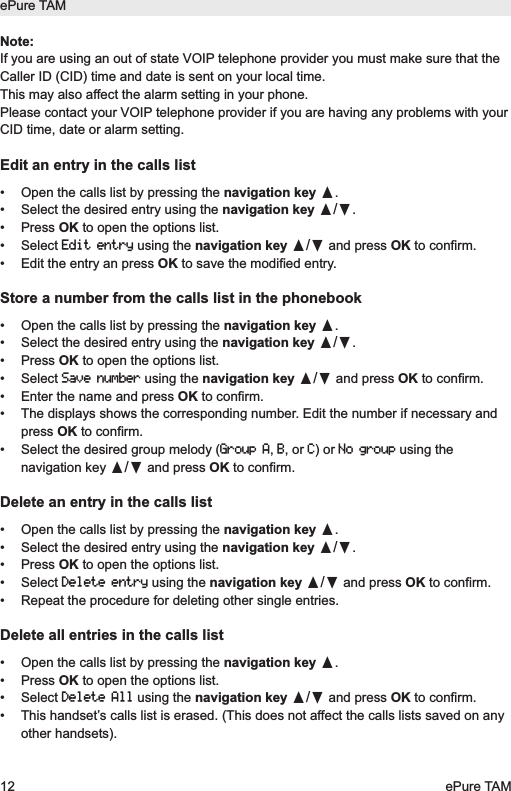
Note:If you are using an out of state VOIP telephone provider you must make sure that theCaller ID (CID) time and date is sent on your local time.This may also affect the alarm setting in your phone. Please contact your VOIP telephone provider if you are having any problems with yourCID time, date or alarm setting.Edit an entry in the calls list•  Open the calls list by pressing the navigation key π.•  Select the desired entry using the navigation key π/†.• Press OK to open the options list.• Select Edit entryusing the navigation key π/†and press OK to confirm.•  Edit the entry an press OK to save the modified entry.Store a number from the calls list in the phonebook•  Open the calls list by pressing the navigation key π.•  Select the desired entry using the navigation key π/†.• Press OK to open the options list.• Select Save numberusing the navigation key π/†and press OK to confirm.•  Enter the name and press OK to confirm.•  The displays shows the corresponding number. Edit the number if necessary andpress OK to confirm.•  Select the desired group melody (Group A, B, or C) or No groupusing thenavigation key π/†and press OK to confirm.Delete an entry in the calls list•  Open the calls list by pressing the navigation key π.•  Select the desired entry using the navigation key π/†.• Press OK to open the options list.• Select Delete entryusing the navigation key π/†and press OK to confirm.•  Repeat the procedure for deleting other single entries.Delete all entries in the calls list•  Open the calls list by pressing the navigation key π.• Press OK to open the options list.• Select Delete Allusing the navigation key π/†and press OK to confirm.•  This handset’s calls list is erased. (This does not affect the calls lists saved on anyother handsets).ePure TAM12 ePure TAM
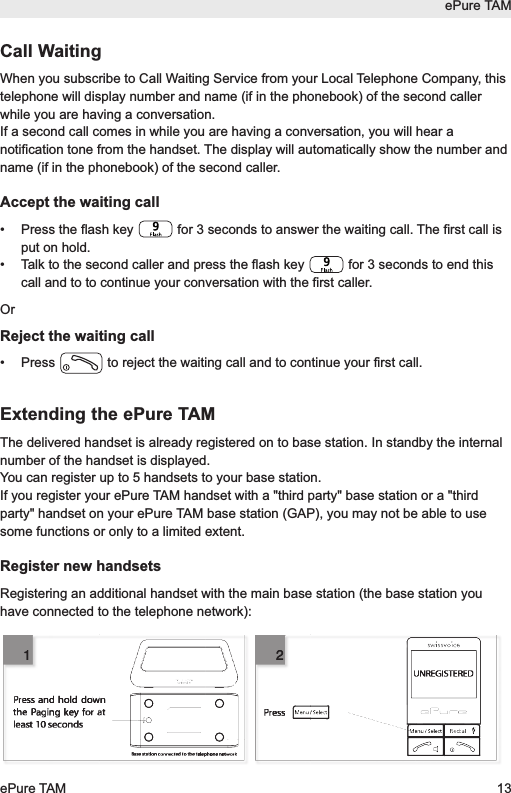
ePure TAMePure TAM 13Call WaitingWhen you subscribe to Call Waiting Service from your Local Telephone Company, thistelephone will display number and name (if in the phonebook) of the second callerwhile you are having a conversation.If a second call comes in while you are having a conversation, you will hear anotification tone from the handset. The display will automatically show the number andname (if in the phonebook) of the second caller.Accept the waiting call•  Press the flash key  for 3 seconds to answer the waiting call. The first call isput on hold.•  Talk to the second caller and press the flash key  for 3 seconds to end thiscall and to to continue your conversation with the first caller.OrReject the waiting call•  Press  to reject the waiting call and to continue your first call.Extending the ePure TAMThe delivered handset is already registered on to base station. In standby the internalnumber of the handset is displayed.You can register up to 5 handsets to your base station.If you register your ePure TAM handset with a "third party" base station or a "thirdparty" handset on your ePure TAM base station (GAP), you may not be able to usesome functions or only to a limited extent.Register new handsetsRegistering an additional handset with the main base station (the base station youhave connected to the telephone network):UNREGISTEREDBase station connected to the telephone networkPressPress and hold down the Paging key for at least 10 seconds2112
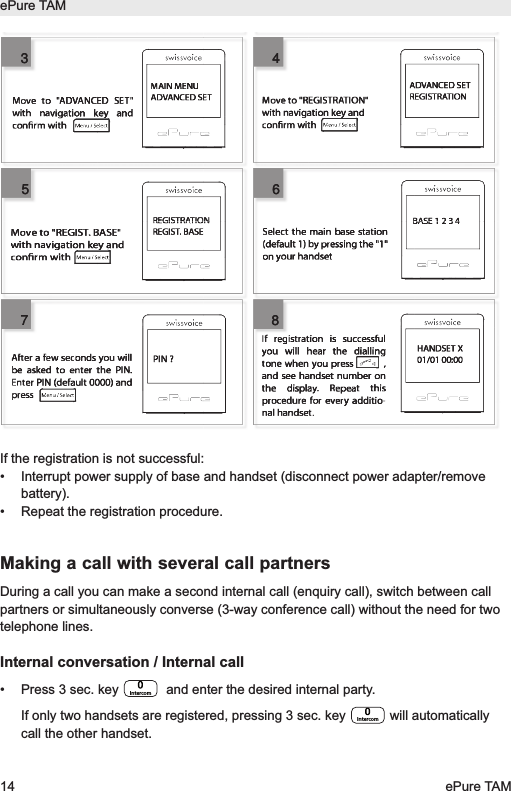
If the registration is not successful:• Interrupt power supply of base and handset (disconnect power adapter/removebattery).• Repeat the registration procedure.Making a call with several call partnersDuring a call you can make a second internal call (enquiry call), switch between callpartners or simultaneously converse (3-way conference call) without the need for twotelephone lines.Internal conversation / Internal call• Press 3 sec. key  and enter the desired internal party. If only two handsets are registered, pressing 3 sec. key  will automaticallycall the other handset.IntercomIntercomePure TAM14 ePure TAMMAIN MENUADVANCED SETADVANCED SETREGISTRATIONREGISTRATIONREGIST. BASEMove to "REGIST. BASE"with navigation key andconrm withBASE 1 2 3 4HANDSET X01/01 00:00If registration is successful you will hear the dialling tone when you press          , and see handset number on the display. Repeat this procedure for every additio-nal handset. PIN ?After a few seconds you will be asked to enter the PIN. Enter PIN (default 0000) and pressMove to "ADVANCED SET" with navigation key and conrm with Select the main base station (default 1) by pressing the "1" on your handsetMove to "REGISTRATION" with navigation key and conrm with 345678345678
If you receive an external call while you are on the phone to an internal call partner,you will hear an incoming call alert. End the internal call by pressing the End call key.Press the Talk key. You are connected to the external party.Call transfer to another handsetYou are conducting an external call and you want to transfer it to another handset.•  Press 3 sec. key  .•  Enter the desired number.•  When the internal party responds press the End call key to transfer the call to theother party. ConferenceYou are conducting an external call.•  Call another internal party (see above).•  The internal party answers.•  Press 3 sec. key  to start a conference call. If one of the handsets pressesthe End call key, the other handset will be connected to the external call.Personal settings• Press  , select Personal setand press OK.• Select a function from the list using the navigation key π/†and press OK.-Handset tone- Ring volume- Ring melody- Group melody- Key tone- Every time a key is pressed, a brief beep is heard.- First ring- This handset doesn't ring until the second ring (the first one iswithheld). -Handset name- To better distinguish between handsets, you can give eachhandset a name.-Auto pick-up-  Just pick up the handset from the base to answer a call (withoutpressing any key).-Auto hang-up- Just hang up the handset to end a call.-Language-Room monitor- You need two handset to use this function. Place one of thehandsets in the room you wish to monitor. Enable the function at that handset.You can then establish a connection to this handset from a second handset andmonitor the room acoustically. Dialling the internal phone number of the handsetIntercomIntercomePure TAMePure TAM 15
placed in the room starts room monitoring. Room monitoring is stopped again byeither putting the phone down or pressing the Talk key.Advanced settings• Press  , select Advanced setand press OK.• Select a function from the list using the navigation key π/†and press OK.-Recall Time– Select the recall time (flash time) for the analogue networkfunctionalities in your country.-Dial Mode– Tone: Normal dialling procedure on analog lines. Pulse: May berequired for connecting older telephone systems. Please refer to the relevantdocumentation.-Call barring– Use this function to ban certain phone numbers from beingdialled. The call barring numbers must be entered separately for each handset.You can specify bar calls to up to 4 numbers each comprising up to 4 digits. Allphone numbers whose first digits match the specified numbers will be barred.-Baby call– Use this function to store a set phone number that will be dialledautomatically when any key (except the End call key) is pressed. You must enterthe desired call number.-Registration- Accessory handsets must be registered to the base station.-Unregister–  Select the handset you want to deregister.-PIN– You can modify the PIN code (0000 on delivery).-Reset unit-Prefix- Detect digit- If the first digits of a number you are calling are identical tothe digits stored, they will be suppressed.- Prefix num.- The prefix number can be 5 digits long. The stored digits areadded in front of the phone number when dialling (with a dialling pause).-Intrusion- Enabling this function allows you to link in handsets to the call madewith another handset.-ECO Mode– When ECO Mode is set to ON, the handset’s power transmission isregulated and a radiation reduction is achieved when it is near the base station.ePure TAM16 ePure TAM
Answer machineYour ePure TAM features an integrated digital answer machine with a max. recordingcapacity of 30 minutes. You can operate your answer machine from the base and fromany handset registered to the base. On delivery an outgoing message for each mode(Answer & Recand Answer only) is pre-recorded. The answer machine is ready touse.Activate/deactivate the answer machine (from the base)Press key  on the base station to switch the answer machine on or off.The LED under key - lights up when the answer machine is activated-  doesn’t light up when the answer machine is deactivated-  flashes when you have new message(s) on the answer machineOperating the answer machine (from the base)If you have new messages, the LED under key  is flashing. The messages are played back beginning with the most recent.•  Press  to start playback.•  During playback the following options are available:Key FunctionActivate/deactivate answer machineRepeat message/return to previous messageSkip to next messageStart/end playbackDelete message during playback/ Adjust volumeDelete all old messages (from the base)Impossible during playback. Press and hold key  to delete all old messages.  Activate/deactivate the answer machine (from the handset)• Press  , select Answ Machineand press OK.• Select Answ On/Offand press OK.ePure TAMePure TAM 17
• Select Onor Offusing the navigation keys π/†and press OK.is displayed when the answer machine is switched on. •  You must now select the desired operating mode and record a personal outgoingmessage:Record a personal outgoing message• Press  , select Answ Machineand press OK.• Select Answer Modeand press OK.• Select Answer & Rec(the caller can leave a message) or Answer only(the callercannot leave a message) and press OK.• Select Personalizedand press OK.• Select Record messand press OK.•  Speak your outgoing message into the handset microphone. Your personaloutgoing messages can be 1 minute long (max.).• Press OK to end recording. The recorded personal outgoing message is playedback.Operating the answer machine (from the handset)If you have new messages on your answer machine the symbol  flashes. Themessages are played back beginning with the most recent and over the handset loud-speaker (the handset loudspeaker activates automatically).• Press  , select Answ Machineand press OK.• Select Playand press OK.•  Press the End call key  to end playback.  During playback:• Press OK to open the Optionsmenu.The following options are available:• Repeat– repeat the message• Next message– skip to next message• Prev message– return to previous message-  To restore the standard outgoing message, select Answer & Recor Answeronlyfollowed by Predefinedand press OK.-  To listen to an outgoing message, select Answer & Recor Answer onlyfollowed by Playand press OK. The outgoing message is played back.-  To delete a personal outgoing message, select Answer & Recor Answeronlyfollowed by Deleteand press OK.ePure TAM18 ePure TAM
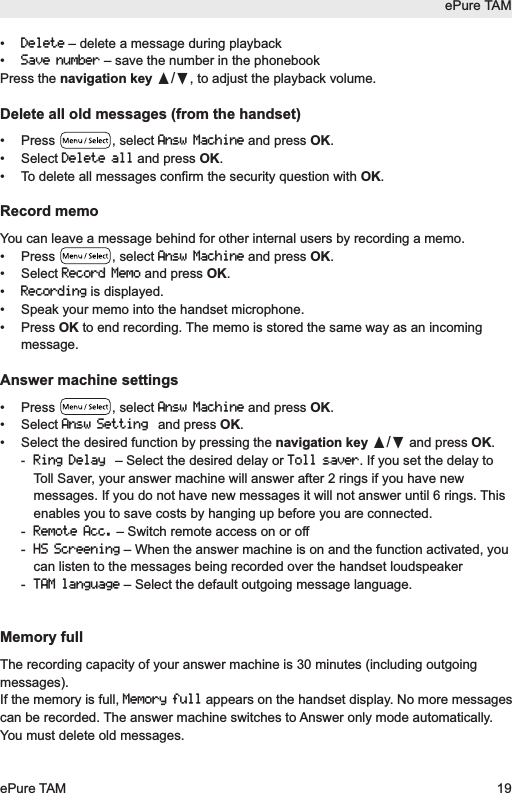
• Delete– delete a message during playback• Save number– save the number in the phonebookPress the navigation key π/†, to adjust the playback volume.Delete all old messages (from the handset)• Press  , select Answ Machineand press OK.• Select Delete alland press OK.•  To delete all messages confirm the security question with OK.Record memoYou can leave a message behind for other internal users by recording a memo.• Press  , select Answ Machineand press OK.• Select Record Memoand press OK.• Recordingis displayed.•  Speak your memo into the handset microphone.• Press OK to end recording. The memo is stored the same way as an incomingmessage.Answer machine settings• Press  , select Answ Machineand press OK.• Select Answ Settingand press OK.•  Select the desired function by pressing the navigation key π/†and press OK.-Ring Delay– Select the desired delay or Toll saver. If you set the delay toToll Saver, your answer machine will answer after 2 rings if you have newmessages. If you do not have new messages it will not answer until 6 rings. Thisenables you to save costs by hanging up before you are connected.- Remote Acc.– Switch remote access on or off- HS Screening– When the answer machine is on and the function activated, youcan listen to the messages being recorded over the handset loudspeaker- TAM language– Select the default outgoing message language.Memory fullThe recording capacity of your answer machine is 30 minutes (including outgoingmessages).If the memory is full, Memory fullappears on the handset display. No more messagescan be recorded. The answer machine switches to Answer only mode automatically.You must delete old messages.ePure TAMePure TAM 19
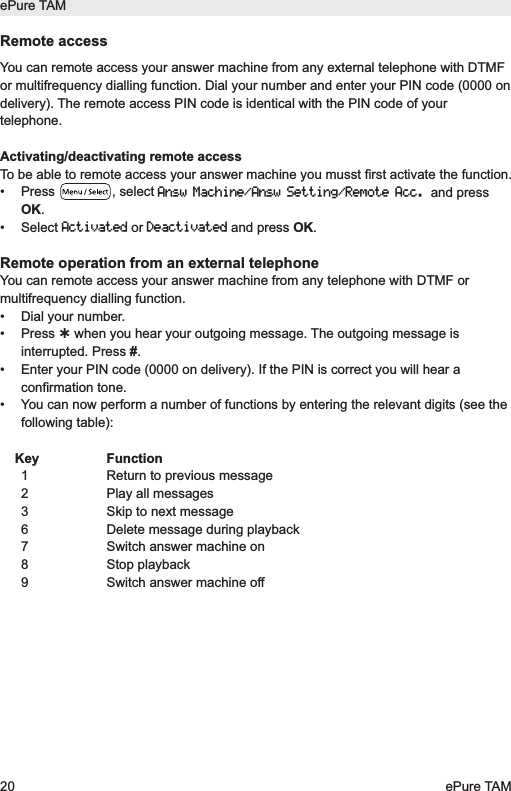
Remote accessYou can remote access your answer machine from any external telephone with DTMFor multifrequency dialling function. Dial your number and enter your PIN code (0000 ondelivery). The remote access PIN code is identical with the PIN code of yourtelephone.Activating/deactivating remote accessTo be able to remote access your answer machine you musst first activate the function.• Press  , select Answ Machine/Answ Setting/Remote Acc.and pressOK.• Select Activatedor Deactivatedand press OK.Remote operation from an external telephoneYou can remote access your answer machine from any telephone with DTMF ormultifrequency dialling function.•  Dial your number.• Press when you hear your outgoing message. The outgoing message isinterrupted. Press #.•  Enter your PIN code (0000 on delivery). If the PIN is correct you will hear aconfirmation tone.•  You can now perform a number of functions by entering the relevant digits (see thefollowing table):Key Function1  Return to previous message2  Play all messages3  Skip to next message6  Delete message during playback7  Switch answer machine on8 Stop playback9  Switch answer machine offePure TAM20 ePure TAM
AppendixUsing Internet/cable telephone adapters on an analog portWhen using an analog telephone on the analog connection of an Internet or cabletelephone adapter, not all the described features (in particular calling line display) mayfunction in the same way as with a standard analog telephone line. This does notcause the ePure TAM to malfunction.Several factors can cause a failure of specific features to function:•  The Internet/cable telephony provider may not provide the function on itsInternet/cable telephony connection.•  The adapter used to convert Internet/cable telephony to analog telephony (usuallysupplied by the provider) may not forward the functions to connected telephones ormay forward them in a non-analog format.If this happens, please check the ePure TAM on an analog fixed line and/or contactyour Internet/cable telephony provider.Industry Canada CertificationOperation is subject to the following two conditions (1) this device may not causeinterference, and (2) this device must accept any interference, including interferencethat may cause undesired operation of the device.NOTICE: The Industry Canada label identifies certified equipment. This certificationmeans that the equipment meets certain telecommunications network, protective,operational and safety requirements as prescribed in the appropriate TerminalEquipment Technical Requirements document(s). The Department does not guaranteethe equipment will operate to the user’s satisfaction.Before installing this equipment, users should ensure that it is permissible to beconnected to the facilities of the local telecommunications company. The equipmentmust also be installed using an acceptable method of connection. The customer shouldbe aware that compliance with the above conditions may not prevent degradation ofservice in some situations.Repairs to certified equipment should be coordinated by a representative designatedby the supplier. Any repairs or alterations made by the user to this equipment, orequipment malfunctions, may give the telecommunications company cause to requestthe user to disconnect the equipment. Users should ensure for their own protectionthat the electrical ground connections of the power utility, telephone lines and internalmetallic water pipe system, if present, are connected together. This precaution may beparticularly important in rural areas.NOTE: Users should not attempt to make such connections themselves, but shouldePure TAMePure TAM 21
contact the appropriate electric inspection authority, or electrician, as appropriate.This product meets the applicable Industry Canada technical specifications.The Ringer Equivalence Number is an indication of the maximum number of devicesallowed to be connected to a telephone interface. The termination of an interface mayconsist of any combination of devices subject only to the requirement that the sum ofthe RENs of all devices does not exceed five.This Class B digital apparatus complies with Canadian ICES-003.FCC / ACTA InformationWarning: Changes or modifications to this unit not expressly approved by SwissvoiceInc. could void the FCC authority to operate the equipment. This includes the additionof any external antenna device.This equipment complies with Part 68 of the FCC rules and the requirements adoptedby the ACTA.On the bottom of the base station is a label that contains, among other information, aproduct identifier in the format US:AAAEQ##TXXXX. If requested, this number must beprovided to the telephone company.A plug and jack used to connect this equipment to the premises wiring and telephonenetwork must comply with the applicable FCC Part 68 rules and requirements adoptedby the ACTA. A compliant telephone cord and modular plug is provided with this pro-duct. It is designed to be connected to a compatible modular jack that is also com-pliant. See installation instructions for details.The REN is used to determine the number of devices that may be connected to atelephone line. Excessive RENs on a telephone line may result in the devices notringing in response to an incoming call. In most but not all areas, the sum of RENsshould not exceed five (5.0). To be certain of the number of devices that may beconnected to a line, as determined by the total RENs, contact the local telephonecompany. The REN for this product is part of the product identifier that has the formatUS:AAAEQ##TXXXX. The digits represented by ## are the REN without a decimalpoint. For this product the FCC Registration number is [US: L29W400BEPURETAM]indicates the REN would be 0.0.A copy of the supplier's Declaration of Conformity (SDoC) is available at this Internetaddress: www.swissvoice.netIf this equipment causes harm to the telephone network, the telephone company willnotify you in advance, that temporary discontinuance of service may be required. But ifadvance notice isn’t practical, the telephone company will notify the customer as soonas possible. Also, you will be advised of your right to file a complaint with the FCC ifyou believe it is necessary.The telephone company may make changes in its facilities, equipment, operations orprocedures that could affect the operation of the equipment.If this happens the telephone company will provide advance notice in order for you toePure TAM22 ePure TAM
make necessary modifications to maintain uninterrupted service. If you experiencetrouble with this telephone system, disconnect it from the network until the problem hasbeen corrected or until you are sure that the equipment is not malfunctioning.If trouble is experienced with this equipment [US: L29W400BEPURETAM], for repair orwarranty information, please contact Support at Swissvoice Inc.C/O KVB Partners Inc. 60 Broad Street Suite 3502New York NY 10004 Tel: 1-866-8238920Fax: 1-866-8238920. If the equipment is causing harm to the telephone network, the telephone companymay request that you disconnect the equipment until the problem is resolved. Thisequipment is of a type that is not intended to be repaired by the Customer (user).This telephone system may not be used on coin service provided by the telephonecompany. Connection to party line service is subject to state tariffs. Contact the statepublic utility commission, public service commission or corporation commission forinformation. Privacy of communications may not be ensured when using this phone.If your home has specially wired alarm equipment connected to the telephone line,ensure the installation of this equipment does not disable your alarm equipment. If youhave questions about what will disable alarm equipment, consult your telephonecompany or a qualified installer.If the telephone company requests information on what equipment is connected totheir lines, inform them of:a) The ringer equivalence number [0.0B]b) The USOC jack required [RJ11C]c) Facility Interface Codes (“FIC”) [02LS2]d) Service Order Codes (“SOC”) [9.0Y]e) The FCC Registration Number [US: L29W400BEPURETAM]FCC Part 15This device complies with part 15 of the FCC Rules. Operation is subject to thefollowing two conditions: (1) This device may not cause harmful interference, and (2) this device must acceptany interference received, including interference that may cause undesiredoperation.Changes or modifications not expressly approved by the party responsible for com-pliance could void the user's authority to operate the equipment.Note: This equipment has been tested and found to comply with the limits for aClass B digital device, pursuant to part 15 of the FCC Rules. These limits aredesigned to provide reasonable protection against harmful interference in aresidential installation. This equipment generates, uses and can radiate radioePure TAMePure TAM 23
frequency energy and, if not installed and used in accordance with the instructions,may cause harmful interference to radio communications. However, there is noguarantee that interference will not occur in a particular installation. If thisequipment does cause harmful interference to radio or television reception, whichcan be determined by turning the equipment off and on, the user is encouraged totry to correct the interference by one or more of the following measures: - Reorient or relocate the receiving antenna. - Increase the separation between the equipment and receiver. - Connect the equipment into an outlet on a circuit different from that to which thereceiver is connected. - Consult the dealer or an experienced radio/TV technician for help.Privacy of communications may not be ensured when using this telephone!Some cordless telephones operate at frequencies that may cause interference tonearby TVs and VCRs. To minimize or prevent such interference, the base of thecordless telephone should not be placed near or on top of a TV or VCR. Ifinterference is experienced, move the cordless telephone further away from the TVor VCR. This will often reduce, or eliminate, interference.Operating near 2.4GHz electrical appliances may cause interference. Move awayfrom the electrical appliances.Notice for Direct Inward Dialing ("DID")ALLOWING THIS EQUIPMENT TO BE OPERATED IN SUCH A MANNER AS TO NOTPROVIDE FOR PROPER ANSWER SUPERVISION IS A VIOLATION OF PART 68 OFTHE FCC‘S RULES.Notice to Hearing Aid Wearers:This phone system is compatible with inductively coupled hearing aids.CAUTION:To comply with FCC RF exposure requirements, the base unit should be installed withits antenna located at 20 cm or more from persons .1. This equipment is hearing aid compatible as defined by the FCC in 47 CFR-Section68.316.2. Environment — do not place the unit in a room where the temperature is less than -20°C or greater than 50°C. Allow 10 cm (4") clearance around theunit for proper ventilation. Avoid excessive smoke, dust, mechanical vibration,shock, or direct sunlight.3. Medical — consult the manufacturer of any personal medical devices, such aspacemakers or hearing aids, to determine if they are adequately shielded fromexternal RF (radio frequency) energy. (The unit operates in the frequency range of1920MHz-1930MHz, and the power output level can range 0.04 watts to 0.25watts.) Do not use the unit in health care facilities if any regulations posted in theePure TAM24 ePure TAM
area instruct you not to do so. Hospitals or health care facilities may be usingequipment that could be sensitive to external RF (radio frequency) energy.4.  Routine care — wipe the unit with a soft cloth. Do not use benzine, thinner, or anyabrasive powder. When you leave the unit unused for a long period of time, unplugthe AC adaptor from the outlet.5. If there is any trouble — disconnect the unit from the telephone line and connect aknown working phone. If the known working phone operates properly, have yourunit repaired by a Factory Service center or other Authorized Servicer. If the knownworking phone does not operate properly, consult your telephone company.When you hold the phone to your ear, noise might be heard in your Hearing Aid.Some Hearing Aids are not adequately shielded from external RF (radiofrequency) energy. If noise occurs, use an optional headset accessory or thespeakerphone option (if applicable) when using this phone. Consult with youraudiologist or Hearing Aid manufacturer about the availability of Hearing Aidswhich provide adequate shielding to RF energy commonly emitted by digitaldevices.Power Outage:In the event of a power outage, your cordless telephone will not operate. The cordlesstelephone requires electricity for operation. You should have a telephone that does notrequire electricity available for use during power outages.Notice:The installation of the base unit should allow at least 8 inches between the base andpersons to be in compliance with FCC RF exposure guidelines. For body worn operation, the portable part (handset) has been tested and meets FCCRF exposure guidelines. Use with an accessory that contains metal parts may notensure compliance with FCC RF exposure guidelines.IMPORTANT SAFETY INSTRUCTIONSBefore using your telephone equipment, basic safety instructions should always befollowed to reduce the risk of fire, electric shock and injury to persons, including thefollowing:1.  Read and understand all instructions.2.  Follow all warnings and instructions marked on the product.3.  Unplug this product from the wall telephone jack and power outlet before cleaning.Do not use liquid cleaners or aerosol cleaners. Use damp cloth for cleaning.4.  The telephone is for indoor use in dry locations.5. The maximum ambient operating temperature is 50 °C. In order to avoid over-heating, do not cover the telephone.6. Do not use this product near water, for example, near a bath tub, wash bowl,ePure TAMePure TAM 25
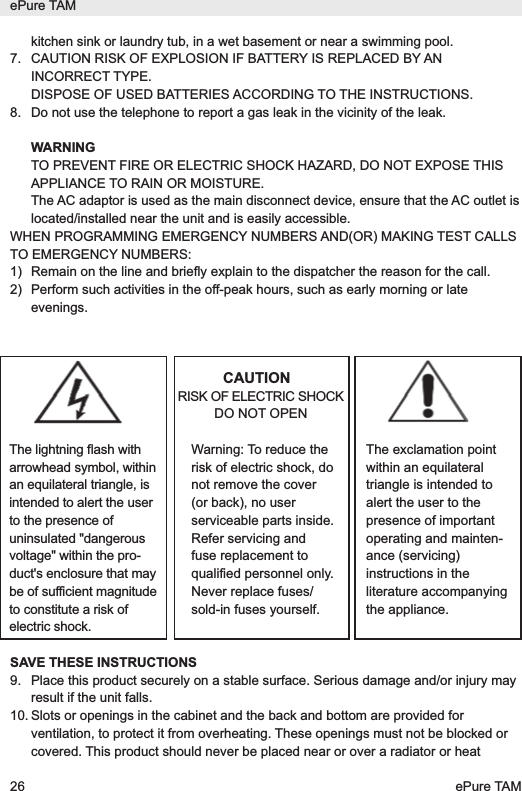
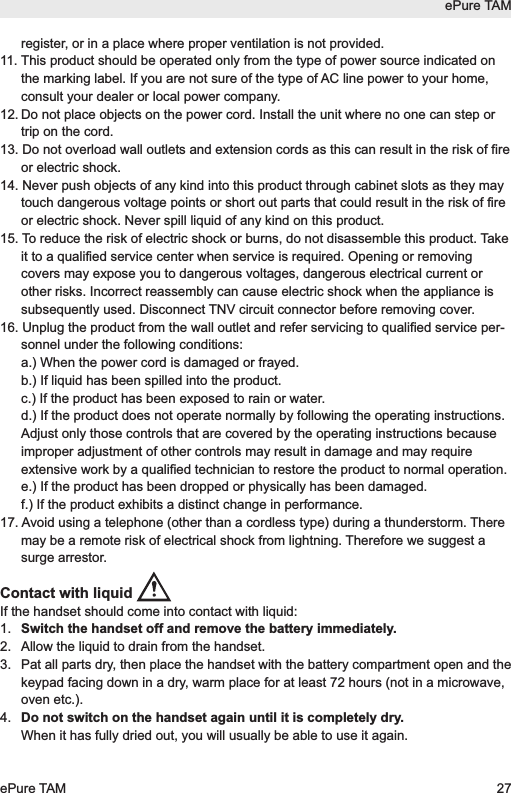
kitchen sink or laundry tub, in a wet basement or near a swimming pool.7. CAUTION RISK OF EXPLOSION IF BATTERY IS REPLACED BY ANINCORRECT TYPE.DISPOSE OF USED BATTERIES ACCORDING TO THE INSTRUCTIONS.8. Do not use the telephone to report a gas leak in the vicinity of the leak.WARNINGTO PREVENT FIRE OR ELECTRIC SHOCK HAZARD, DO NOT EXPOSE THISAPPLIANCE TO RAIN OR MOISTURE.The AC adaptor is used as the main disconnect device, ensure that the AC outlet islocated/installed near the unit and is easily accessible.WHEN PROGRAMMING EMERGENCY NUMBERS AND(OR) MAKING TEST CALLSTO EMERGENCY NUMBERS:1)  Remain on the line and briefly explain to the dispatcher the reason for the call. 2)  Perform such activities in the off-peak hours, such as early morning or lateevenings.CAUTIONRISK OF ELECTRIC SHOCKDO NOT OPENSAVE THESE INSTRUCTIONS9. Place this product securely on a stable surface. Serious damage and/or injury mayresult if the unit falls.10. Slots or openings in the cabinet and the back and bottom are provided forventilation, to protect it from overheating. These openings must not be blocked orcovered. This product should never be placed near or over a radiator or heatePure TAM26 ePure TAMThe lightning flash witharrowhead symbol, withinan equilateral triangle, isintended to alert the userto the presence ofuninsulated "dangerousvoltage" within the pro-duct's enclosure that maybe of sufficient magnitudeto constitute a risk ofelectric shock.Warning: To reduce therisk of electric shock, donot remove the cover(or back), no userserviceable parts inside.Refer servicing andfuse replacement toqualified personnel only.Never replace fuses/sold-in fuses yourself.The exclamation pointwithin an equilateraltriangle is intended toalert the user to thepresence of importantoperating and mainten-ance (servicing)instructions in theliterature accompanyingthe appliance.
register, or in a place where proper ventilation is not provided.11. This product should be operated only from the type of power source indicated onthe marking label. If you are not sure of the type of AC line power to your home,consult your dealer or local power company.12. Do not place objects on the power cord. Install the unit where no one can step ortrip on the cord.13. Do not overload wall outlets and extension cords as this can result in the risk of fireor electric shock.14. Never push objects of any kind into this product through cabinet slots as they maytouch dangerous voltage points or short out parts that could result in the risk of fireor electric shock. Never spill liquid of any kind on this product.15. To reduce the risk of electric shock or burns, do not disassemble this product. Takeit to a qualified service center when service is required. Opening or removingcovers may expose you to dangerous voltages, dangerous electrical current orother risks. Incorrect reassembly can cause electric shock when the appliance issubsequently used. Disconnect TNV circuit connector before removing cover.16. Unplug the product from the wall outlet and refer servicing to qualified service per-sonnel under the following conditions:a.) When the power cord is damaged or frayed.b.) If liquid has been spilled into the product.c.) If the product has been exposed to rain or water.d.) If the product does not operate normally by following the operating instructions.Adjust only those controls that are covered by the operating instructions becauseimproper adjustment of other controls may result in damage and may requireextensive work by a qualified technician to restore the product to normal operation.e.) If the product has been dropped or physically has been damaged.f.) If the product exhibits a distinct change in performance.17. Avoid using a telephone (other than a cordless type) during a thunderstorm. Theremay be a remote risk of electrical shock from lightning. Therefore we suggest asurge arrestor.Contact with liquid If the handset should come into contact with liquid:1.  Switch the handset off and remove the battery immediately.2.  Allow the liquid to drain from the handset.3.  Pat all parts dry, then place the handset with the battery compartment open and thekeypad facing down in a dry, warm place for at least 72 hours (not in a microwave,oven etc.).4.  Do not switch on the handset again until it is completely dry.When it has fully dried out, you will usually be able to use it again.ePure TAMePure TAM 27
CareYour telephone is a sophisticated product in terms of design and construction, andshould therefore be handled with care.To clean the telephone, wipe first with an antistatic cloth or a damp, soft leather clothand then dry using a dry cloth.Recycling (environmental protection)At the end of the product's life cycle, the telephone must not be disposed of innormal domestic waste. Please take it to a collection point for processingelectrical and electronic equipment: see symbol on the product, in the usermanual and/or packaging.Some materials used in this product can be recycled if you take it to a recycling depot.By recycling parts or raw materials from used products you will be making an importantcontribution to environmental protection. Please contact your local authority if yourequire information about collection points in your neighbourhood.BATTERY SAFETY PRECAUTIONSTo reduce the risk of fire, injury or electric shock, and to properly dispose of batteries,please read and understand the following instructions.BATTERY MUST BE RECYCLED OR DISPOSED OF PROPERLY. DO NOT DISPOSEOF IN MUNICIPAL WASTE.1.  Only use the batteries specified for use with this product.2.  DO NOT USE NICKEL CADMIUM OR NICKEL METAL HYDRIDE BATTERIES, ormix batteries of different sizes or from different manufacturers in this product. DONOT USE NONRECHARGEABLE BATTERIES.3.  Do not dispose of the batteries in a fire; the cells may explode. Do not exposebatteries to water. Check with local codes for special disposal instructions.4.  Do not open or mutilate the batteries. Released electrolyte is corrosive and maycause damage to the eyes or skin. The electrolyte may be toxic if swallowed.5.  Exercise care in handling the batteries in order not to short the batteries with con-ducting materials such as rings, bracelets, and keys. The batteries or conductingmaterial may overheat and cause burns or fire.6.  Charge the batteries provided with, or identified for use with, this product only inaccordance with the instructions and limitations specified in the user’s manual. Donot attempt to charge the batteries with any means other than that specified in theusers manual. 7.  Periodically clean the charge contacts on both the charger and handset.ePure TAM28 ePure TAM
Service (Customer Care)If you face any issue with your cordless phone, please first visit our websitewww.swissvoice.net /epure, FAQ section.  The most current issues are describedand this will help you to solve your trouble.If after having visited our FAQ you are still facing this issue, and for any Customer Carewarranty service, product operation information or problem resolution, please call : Tollfree : 1-866-8238920 or send an email to helpline@swissvoice.netEnd-user limited warrantyThis product is covered by a one year limited warranty. Any repair replacement or warranty service, and all questions about this productshould be directed to: 1-866-8238920.This limited, non-transferable warranty is provided to the original buyer/end-consumer("you") for systems, handsets and accessories (collectively, "Product") provided bySwissvoice Inc. Swissvoice Inc. warrants to you that at the date of purchase, the Product is free ofdefects in workmanship and materials and the software included in the Product willperform in substantial compliance to its program specifications.1. WARRANTY PERIODThe Product warranty period is one (1) year from the original date of purchase by you.Proof of purchase (e.g., sales slip or invoice) must be provided with any Productreturned during the warranty period. Batteries supplied with the Products arewarranted to be free from defects at the time of purchase only.2. EXCLUSIVE REMEDYSwissvoice Inc. entire liability and your exclusive remedy if the Product is defective inmaterials or workmanship during the warranty period and is returned shall be that theProduct will be repaired or replaced as set forth in Section 4 below. Reconditionedreplacement components, parts or materials may be used in the replacement or repair.Data in the memory of the Product may be lost during repair.3. THIS LIMITED WARRANTY DOES NOT COVER AND IS VOID WITHRESPECT TO THE FOLLOWING:–  Cosmetic damage, physical damage to the surface of the Product, including,without limitation, breakage, cracks, dents, scratches or adhesive marks on theLCD screen or outside casing of the Product.–  Products which have been repaired, maintained or modified (including the antenna)by anyone other than Swissvoice Inc. or a Swissvoice Inc.-approved repair facility,or that have been improperly installed.–  Cost of installation, removal or reinstallation.ePure TAMePure TAM 29
–  Damage due to any telephone, electronic, hardware or software program, network,Internet or computer malfunctions, failures, or difficulties of any kind, includingwithout limitation, server failure or incomplete, incorrect, garbled or delayedcomputer transmissions.–  Equipment and components not manufactured, supplied or authorized by Swiss-voice Inc.–  Modification of the Product's components, or operation of the Product in an unsuit-able environment or in a manner for which it is not intended, including but notlimited to failures or defects caused by misuse, abuse, accidents, physical damage,abnormal operation, improper handling or storage, neglect, alterations,unauthorized installation, removal or repairs, failure to follow instructions, problemscaused by the carrier's network coverage, exposure to fire, water or excessivemoisture or dampness, floods, or extreme changes in climate or temperature, actsof God, riots, acts of terrorism, spills of food or liquids, viruses or other softwareflaws introduced into the Product or other acts which are not the fault of SwissvoiceInc. and which the Product is not specified to tolerate, including damage caused bymishandling or blown fuses.–  Products which have had warranty stickers, electronic serial number and/or serialnumber label removed, altered, rendered illegible or fraudulently applied to otherequipment.–  Signal reception problems (unless caused by defect in material or workmanship inthe Product).–  Products operated outside published maximum ratings.–  Performance of the Products when used in combination with other products orequipment not manufactured, supplied or authorized by Swissvoice Inc.–  Consumables (such as batteries and fuses).–  Payments for labor or service to representatives or service centers not authorizedto perform product maintenance by Swissvoice Inc.–  Loss of data.–  Testing and examination discloses that the alleged defect or malfunction in the Pro-duct does not exist.This warranty does not cover customer education, instruction, installation or removal,set up adjustments, problems related to service(s) provided by a carrier or otherservice provider, and/or signal reception problems. Swissvoice Inc. shall not beresponsible for software, firmware, information, or memory data contained in, storedon, or integrated with any Products returned for repair, whether under warranty or not.This warranty is valid only in the country in which it is purchased (i.e., the United Statesof America or Canada respectively, but not both).USE WITH ACCESSORIES NOT SUPPLIED BY SWISSVOICE INC. OR NOT  OTHER -WISE EXPRESSLY AUTHORIZED BY SWISSVOICE INC. MAY VOID WARRANTY.ePure TAM30 ePure TAM
4. WARRANTY CLAIM PROCEDUREAll warranty claims must be made by notifying Swissvoice Inc. prior to the expiration ofthe warranty period. Swissvoice Inc.'s obligation to provide warranty support shall notextend past the end of the warranty period, except that any product repaired orreplaced during the warranty period shall continue to be warranted for the balance ofsuch warranty period or thirty (30) days, whichever is greater.If you want to learn more about Swissvoice Service or for Support on your Swissvoicephone, visit our web site at http://www.swissvoice.netSupport service will be provided for you by accessing the toll free customer servicenumber: 1-866-8238920.5. LIMITATION OF WARRANTYSwissvoice Inc. makes no warranty or representation that the software in the Productswill meet your requirements or will work in combination with any hardware or app-lications software products provided by third parties, that the operation of the softwarewill be uninterrupted or error free, or that all defects in the software products will becorrected.6. LIMITATION ON REMEDIES; NO CONSEQUENTIAL OR OTHERDAMAGESYour exclusive remedy for any breach of this limited warranty is as set forth above.Except for any refund elected by Swissvoice Inc., YOU ARE NOT ENTITLED TO ANYDAMAGES, INCLUDING BUT NOT LIMITED TO CONSEQUENTIAL DAMAGES, if theProduct does not meet the limited warranty and, to the maximum extent allowed byapplicable law, even if any remedy fails of its essential purpose. The terms below("Exclusion of Incidental, Consequential and Certain Other Damages") are alsoincorporated into this limited warranty.Some states/jurisdictions/provinces do not allow the exclusion or limitation of incidentalor consequential damages, so the above limitation or exclusion may not apply to you.This limited warranty gives you specific legal rights. You may have others which varyfrom state/jurisdiction/province to state/jurisdiction/province.7. DISCLAIMER OF WARRANTIESSWISSVOICE INC. AND ITS SUPPLIERS PROVIDE THE PRODUCT AND SUPPORTSERVICES (IF ANY) AS IS AND WITH ALL FAULTS. THE LIMITED WARRANTY IS INLIEU OF ANY OTHER EXPRESS WARRANTIES (IF ANY) CREATED BY ANYDOCUMENTATION OR PACKAGING EXCEPT FOR THE LIMITED WARRANTY, ANDTO THE MAXIMUM EXTENT PERMITTED BY APPLICABLE LAW IS IN LIEU OF ANYIMPLIED OR STATUTORY WARRANTIES, INCLUDING, BUT NOT LIMITED TO, THEIMPLIED WARRANTIES OF MERCHANTABILITY AND FITNESS FOR A PAR-TICULAR PURPOSE, OF ACCURACY OR COMPLETENESS OR RESPONSES, OFePure TAMePure TAM 31
RESULTS, OF WORKMANLIKE EFFORT, OF LACK OF VIRUSES AND OF LACK OFNEGLIGENCE, ALL WITH REGARD TO THE PRODUCT, AND THE PROVISION OFOR FAILURE TO PROVIDE SUPPORT SERVICES. ALSO, THERE IS NOWARRANTY OR CONDITION OF TITLE, QUIET ENJOYMENT, QUIETPOSSESSION, OR CORRESPONDENCE TO DESCRIPTION ORNONINFRINGEMENT WITH REGARD TO THE PRODUCT.Some states/jurisdictions/provinces do not allow limitations on how long an impliedwarranty lasts or the exclusion or limitation of incidental or consequential damages, sothe above exclusions or limitations may not apply to you. If an implied warranty orcondition is created by your state/ province and federal or state/provincial law prohibitsdisclaimer of it, you also have an implied warranty or condition, BUT ONLY AS TODEFECTS DISCOVERED DURING THE PERIOD OF THIS LIMITED WARRANTY(ONE YEAR). AS TO ANY DEFECTS DISCOVERED AFTER THE ONE YEARPERIOD, THERE IS NO WARRANTY OR CONDITION OF ANY KIND.This limited warranty gives you specific legal rights, and you may also have other rightswhich vary from state to state/province to province. In no event shall Swissvoice Inc.'sliability exceed the cost of repairing or replacing defective Products as provided herein,and any such liabilities will terminate upon expiration of the warranty period.Any supplements or updates to the Product or the software in the Product, includingwithout limitation, any (if any) software fixes or upgrades or bug fixes provided to youafter the expiration of the one year limited warranty period are not covered by anywarranty or condition, express, implied or statutory.8. EXCLUSION OF INCIDENTAL, CONSEQUENTIAL AND CERTAINOTHER DAMAGESTO THE MAXIMUM EXTENT PERMITTED BY APPLICABLE LAW, IN NO EVENTSHALL SWISSVOICE INC., SELLER OR THEIR SUPPLIERS BE LIABLE FOR ANYSPECIAL, INCIDENTAL, INDIRECT, OR CONSEQUENTIAL DAMAGESWHATSOEVER (INCLUDING, BUT NOT LIMITED TO, DAMAGES FOR LOSS OFPROFITS OR CONFIDENTIAL OR OTHER INFORMATION, FOR BUSINESSINTERRUPTION, FOR PERSONAL INJURY, FOR LOSS OF PRIVACY, FOR FAILURETO MEET ANY DUTY INCLUDING OF GOOD FAITH OR OF REASONABLE CARE,FOR NEGLIGENCE, AND FOR ANY OTHER PECUNIARY OR OTHER LOSSWHATSOEVER) ARISING OUT OF OR IN ANY WAY RELATED TO THE USE OF ORINABILITY TO USE THE PRODUCT, THE PROVISION OF OR FAILURE TO PRO-VIDE SUPPORT SERVICES, OR OTHERWISE UNDER OR IN CONNECTION WITHANY PROVISION OF THIS LIMITED WARRANTY, EVEN IN THE EVENT OF THEFAULT, TORT (INCLUDING NEGLIGENCE), STRICT LIABILITY, BREACH OF CON-TRACT OR BREACH OF WARRANTY OF SWISSVOICE INC. OR SELLER OR ANYSUPPLIER, AND EVEN IF SWISSVOICE INC. OR SELLER OR ANY SUPPLIER HASBEEN ADVISED OF THE POSSIBILITY OF SUCH DAMAGES. REPAIR ORePure TAM32 ePure TAM
REPLACEMENT, AS PROVIDED UNDER THE WARRANTY, IS YOUR SOLE ANDEXCLUSIVE REMEDY FOR BREACH OF THE LIMITED WARRANTY.9. LIMITATION OF LIABILITY AND REMEDIESNOTWITHSTANDING ANY DAMAGES THAT YOU MIGHT INCUR FOR ANYREASON WHATSOEVER (INCLUDING, WITHOUT LIMITATION, ALL DAMAGESREFERENCED ABOVE AND ALL DIRECT OR GENERAL DAMAGES), THE ENTIRELIABILITY OF SWISSVOICE INC., SELLER AND ANY OF THEIR SUPPLIERSUNDER ANY PROVISION OF THIS LIMITED WARRANTY AND YOUR EXCLUSIVEREMEDY FOR ALL OF THE FOREGOING (EXCEPT FOR ANY REMEDY OF REPAIROR REPLACEMENT ELECTED BY SWISSVOICE INC. OR SELLER OR SUPPLIERWITH RESPECT TO ANY BREACH OF THE LIMITED WARRANTY) SHALL BELIMITED TO THE GREATER OF THE AMOUNT ACTUALLY PAID BY YOU FOR THEPRODUCT OR FIVE DOLLARS ($5.00 USD/CAN).THE FOREGOING LIMITATIONS, EXCLUSIONS AND DISCLAIMERS SHALL APPLYTO THE MAXIMUM EXTENT PERMITTED BY APPLICABLE LAW, EVEN IF ANYREMEDY FAILS ITS ESSENTIAL PURPOSE.10. GOVERNING LAWIf this Product was purchased in the United States of America this limited warranty willbe governed by the laws of Texas, and exclude the United Nations Convention on Con-tracts for the International Sale of Goods. If this Product was purchased in Canada thislimited warranty will be governed by the laws of the Province of Ontario and the federallaws of Canada applicable therein, and exclude the United Nations Convention onContracts for the International Sale of Goods.If you want to learn more about Swissvoice Service or for Support on your Swissvoicephone, visit our web site at http://www.swissvoice.net or send an email to helpline@swissvoice.netor please call 1-866-8238920.Issued bySwissvoice SA1, chemin des Mûriers, CH-1170 Aubonne© Swissvoice SA 2013All rights reserved.Subject to availability.Rights of modifications reserved.Product attributes subject to change.ePure TAMePure TAM 33
We reserve the right, to make changes without notice in equipment design and/orcomponents.20406963us_ba_a0SV 20406963© Copyright 2013Requirements for CS-03:This product meets the applicable Industry Canada technical specifications. RSS (Category I Equipment):This device complies with Industry Canada license-exempt RSS standard(s).Operation is subject to the following two conditions:(1) this device may not cause interference, and(2) this device must accept any interference, including interference that may causeundesired operation of the device.This Class B digital apparatus complies with Canadian ICES-003.Under Industry Canada regulations, this radio transmitter may only operate using anantenna of a type and maximum (or lesser) gain approved for the transmitter by Indus-try Canada. To reduce potential radio interference to other users, the antenna type andits gain should be so chosen that the equivalent isotropically radiated power (eirp) isnot more than that necessary for successful communication.ePure TAM34 ePure TAM
Cordless analogue telephone (DECT)WITH DIGITAL ANSWERING MACHINEePure TAMUser manualIssued bySwissvoice SA1, chemin des Mûriers, CH-1170 Aubonne© Swissvoice SA 2013All rights reserved.Subject to availability.Rights of modifications reserved without notice in equipment design and/or components.Product attributes subject to change.www.swissvoice.net20406963us_ba_a0SV 20406963© Copyright 2013 Photo may differ from the actual product.Product attributes subject to change.We reserve the right, to make changes without notice in equipment design and/or components.

Navigation menu