Swissvoice EPURETAM ePure TAM User Manual
Swissvoice HK Ltd. ePure TAM
User Manual
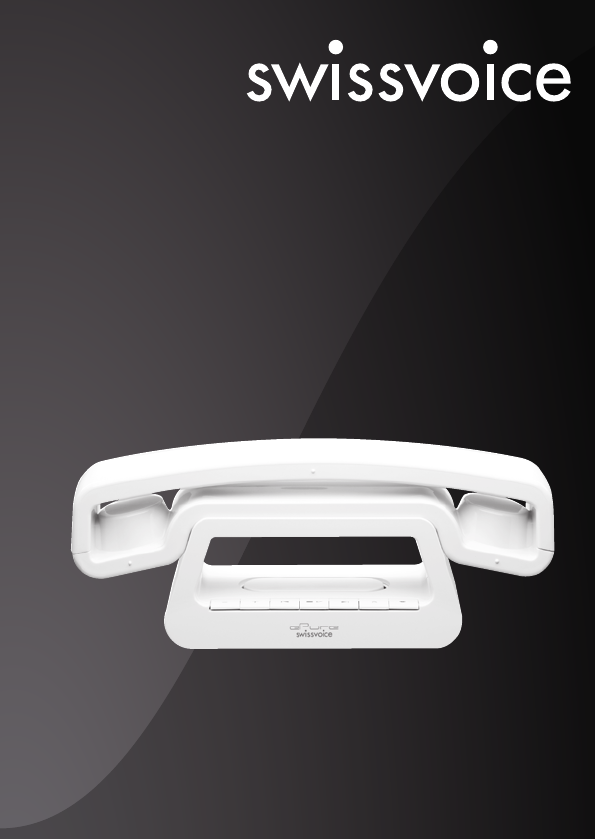
Cordless digital telephone (DECT)
WITH DIGITAL ANSWERING MACHINE
ePure TAM
User manual
Photo may differ from the actual product.
Welcome to Swissvoice
The ePure TAM is a cordless telephone designed for connection to an analog
telephone network. International DECT (GAP)-standard digital technology offers
excellent voice quality.
You can register up to 5 handsets to your base and make internal calls free of charge.
The ePure TAM comes with a built-in digital answer machine.
The ENERGY STAR®program (www.energystar.gov) recognizes and
encourages the use of products that save energy and help protect our
environment. We are proud to mark this product with the ENERGY STAR®
label indicating it meets the latest energy efficiency guidelines.
Warning
Be sure to read this user guide and the safety precautions before using your
telephone. Explain their content and the potential hazards associated with using the
telephone to your children.
ePure TAM
ePure TAM
Use only the charging cradle supplied with the power adaptor/power
cord.
Use only recommended, rechargeable batteries. Failure to do so
could damage your health and cause injury.
Do not charge the handset in charging unit or base station while the
headset is connected.
Using your telephone may affect nearby medical equipment. Be
aware of the technical conditions in your particular environment
(such as a doctor's office).
Do not hold the rear of the handset to your ear when it is ringing or
when the handsfree function is activated. Otherwise, you risk serious
and permanent damage to your hearing.
Do not install the charging cradle in bathrooms or shower areas. The
charging cradle is not waterproof.
Do not use your phone in environments that pose a explosion
hazard (e.g., paint shops).
If you give your phone to someone else, make sure you also give
them the user guide.
Please remove faulty base stations from use, as they could interfere
with other wireless services.
$
ƒ

Contents
Keys 2
Display symbols 3
Range / Location 3
Battery advice 4
Insert the battery 4
Connecting the phone 5
Set date and time 5
Set language 5
Making a call 6
Redial 7
PBX operation 8
Paging – Locate mislaid handsets 8
Phonebook 8
Direct memory 9
Calls list and caller ID (CID) operation 9
Call Waiting 13
Extending the ePure TAM 13
Making a call with several call partners 14
Personal settings 15
Advanced settings 16
Answer machine 17
Appendix 21
ePure TAM
ePure TAM 1
ePure TAM
2ePure TAM
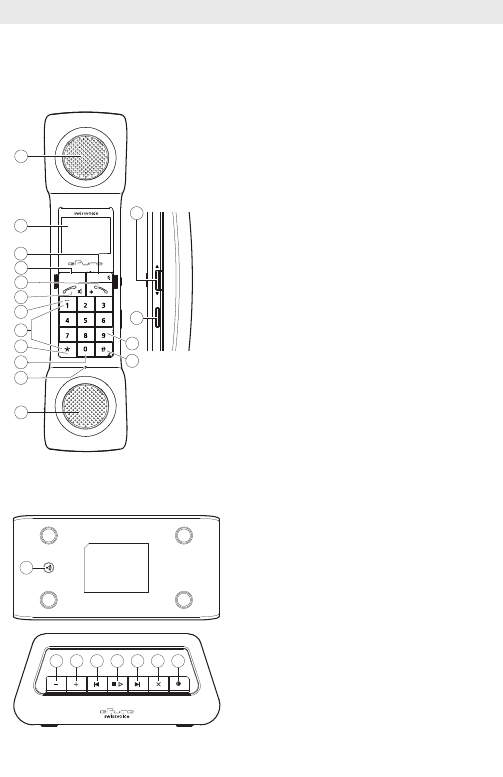
Handset
1 Earpiece
2 Display
3 Redial key
During a call: Mute the microphone
4 Menu/Select key
In standby: open the menu
In a menu or list: select the highlighted
item
5 End call key / back to idle mode
6 Talk key
7 Key 1: Insert a space
8 Digit keys
9 Star key
10 Key 0 / Intercom key
Press 3 sec. for internal calls
11 Microphone
12 Loudspeaker (for ring signal and hands-
free)
13 Hash key
switches between lower and upper case
letters / switches off ringer / press 3 sec.
when editing an entry: insert a pause
14 Flash key (press 3 sec. key "9")
Send a hook flash signal to the currently
connected line
15 Control LED (flashes when you have one
or more missed calls, flashes quickly with
an incoming call)
16 Navigation key / set volume
Base
1 Paging key (on the bottom)
2/3 Adjust volume
4 Repeat message/return to previous
message
5 Start/stop playback
6 Skip to next message
7 Delete message during playback
8 Switch answer machine on/off
Menu / Select
Intercom
Redial
Flash
abc def
ghi jkl mno
pqrs tuv wxyz
16
15
14
13
1
2
3
4
5
8
12
6
11
10
7
9
Keys
1
2 3 4 5 6 7 8

Display symbols
Steady on: batterie’s charge level.
Flashing: batteries have to be charged.
Time.
Call in progress.
Steady on : the caller’s list is open.
Flashing : new calls in the caller’s list.
The phonebook is open.
Scroll up/down in a list or a menu.
Confirmation.
Ringer off.
Handsfree active.
Alarm is set.
Steady on, when the handset is near the base. Flashes, if out of range or
not registered.
Steady on : the answer machine is activated
Flashing : you have new answer machine messages
Range / Location
To obtain the best possible range, we recommend positioning the telephone in a
location central to your sphere of activity. Avoid positioning the telephone in niches,
recesses and behind steel doors.
The maximum range between base station and handset is approximately 900 feet
outdoors. Depending on the surrounding conditions as well as spatial and structural
factors, the range may be smaller. Silent zones can occur due to the digital transmis-
sion in the frequency range used – even within the range, depending on the structural
environment. In this case the transmission quality may be reduced through the
increased incidence of short breaks in transmission. Normal call quality can be
restored if you move slightly out of the silent zone. If the range is exceeded, the call
will be disconnected unless you move back into range within ten seconds.
12:03
ePure TAM
ePure TAM 3
ePure TAM
4ePure TAM
Battery advice
Use only the original battery (Li-Ion 3.7 V / 550 mAh) as well as the original power sup-
ply (7.5 VDC, 300mA).
The handset operating times (standby 150 hours/active 10 hours) and charging times
apply only if the battery is charged to the defined minimum capacity.
Charging is electronically controlled to ensure optimal charging and care of battery in
different charge states. Full capacity is achieved only after several charging cycles.
Insert the battery
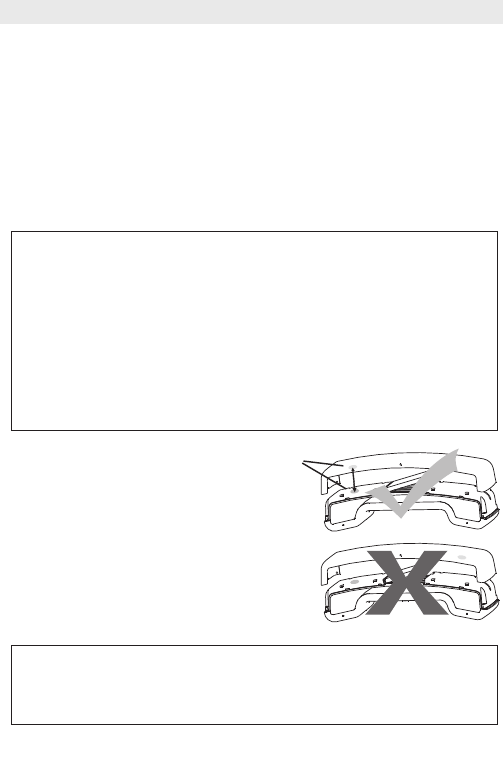
The battery compartment is situated in
the handset.
Open the handset cover.
Insert the battery in the battery compart-
ment.
Replace the handset cover.
Note:
Using other rechargeable battery or non-rechargeable battery/primary cells
can be dangerous and cause malfunctions or damage to the telephone. Do
not short-circuit the battery (danger). In particular, avoid inadvertent short-
circuits during storage and transport e.g. bunch of keys, metal panels or
similar objects, and make sure the battery do not come into contact with
greasy materials. When not in the handset, therefore, battery should be
stored only in insulating packaging. Ensure also that the contacts do not
touch greasy parts.
Rechargeable battery can become warm while recharging. This is a normal
occurrence and is not dangerous.
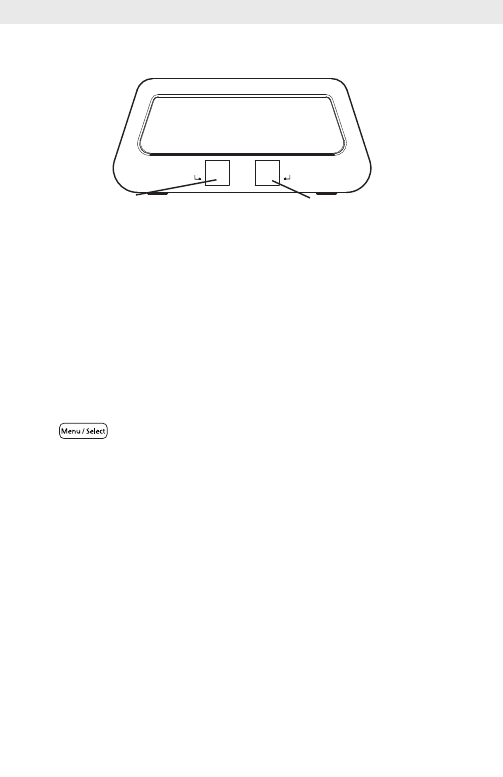
Make sure you install the battery pack and fit the cover the right way round:
- position the 3 metal contacts of the battery pack against the 3 blade
contacts,
- align the green dot on the handset with the one on the cover.
Green dots
ePure TAM
ePure TAM 5
Connecting the phone
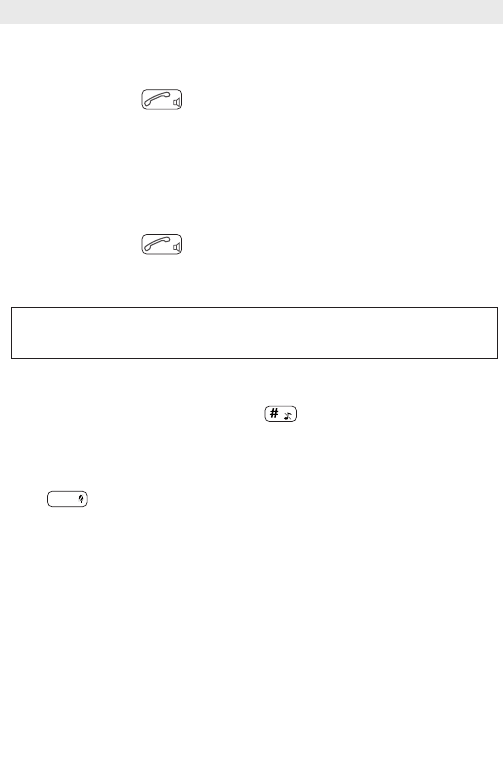
• Before you can start using your telephone you must plug in the telephone
connector cable and the mains cable.
• When the phone is delivered, the battery is not yet charged.
• To charge the battery, insert the handset in the base station. The battery will take
around 6 hours to fully charge (initial charge).
Set date and time
After setting up the telephone first, date and time are not set.
• Press , select
Clock/Alarm
with the navigation key π/†and press OK.
• Select
Date&Time
and press OK.
• Enter date and press OK.
• Enter the time and press OK.
Note:
If you are using an out of state VOIP telephone provider you must make sure that the
Caller ID (CID) time and date is sent on your local time.
Please contact your VOIP telephone provider if you are having any problems with your
CID time, date or alarm setting.
Set language
• The language of the display texts can be changed in the menu:
Personal set/Language
Tel. Line
Power
Telephone line socketMains power socket
Making a call
• Dial the desired number using the keypad.
• Press the Talk key .
End the call
Press the End call key.
Receiving a call
• Incoming calls are signalled by a ring tone and a quick flashing of the control LED
on the handset.
• Press the Talk key and conduct your conversation.
End the call
Press the End call key.
Switch ringer off
When a call is coming in, press and hold the key for approx. 3 seconds. The
ringer is switched off for this call.
Mute handset microphone
Press to deactivate the microphone in your handset during a call.
Press the key again to reactivate the microphone.
Set speaker/loudspeaker volume
You can adjust the speaker/loudspeaker volume during a conversation.
Set the desired volume using the navigation key π/†.
Switch handset off
• Press and hold the End call key (approx. 5 sec).
• Press and hold again the End call key to reactivate the handset.
Calls cannot be made if the battery is almost discharged or the handset is
out of range of the base station.
Redial
ePure TAM
6ePure TAM

Set alarm
• Press , select
Clock/Alarm
using the navigation key π/†and press
OK.
• Select
Set alarm
using the navigation key π/†and press OK.
• Select the desired alarm function (e.g. On once), enter the alarm time and press
OK.
Set alarm tone
• Press , select
Clock/Alarm
using the navigation key π/†and press
OK.
• Select
Alarm tone
using the navigation key π/†and press OK.
• Select the desired alarm melody and press OK.
The activated alarm is displayed in standby mode by .
The alarm sounds for 60 seconds or can be deactivated immediately by pressing
any key.
Note:
If you are using an out of state VOIP telephone provider you must make sure that the
Caller ID (CID) time and date is sent on your local time.
Please contact your VOIP telephone provider if you are having any problems with your
CID time, date or alarm setting.
Redial
The Redial list contains up to 10 entries.
• Press and select the desired entry using the navigation key π/†.
• Press the Talk key.
Edit redial list
• Open the Redial list, press OK.
You have the following options:
- Save Number
– Add number to the phonebook.
- Delete entry
– Delete the entry.
- Delete All
– Delete the entire redial list.
Redial
ePure TAM
ePure TAM 7
PBX operation
Your telephone is designed for use in the analogue telephone network and can be
operated on a PBX that supports DTMF dialling and flash signalling. To enter the R key
(e.g. needed to establish a connection) press key for 3 sec.
You can adjust the flash/recall time for key R (see chapter "Advanced settings").
Paging – Locate mislaid handsets
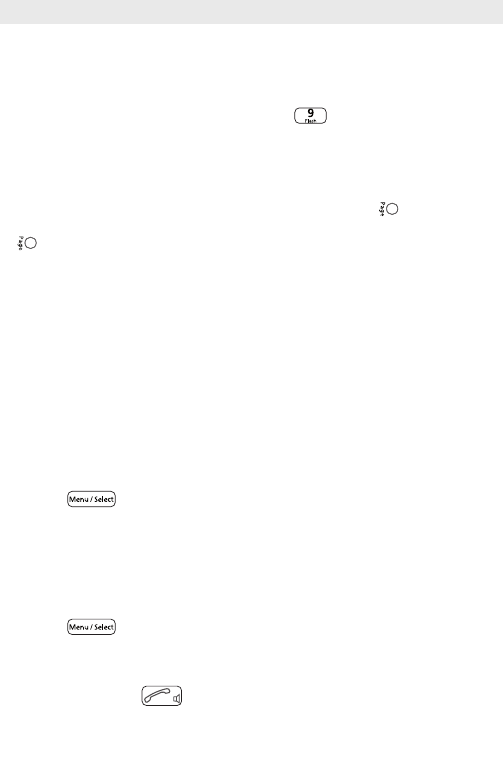
All registered handsets ring for one minute, when the Page key on the base is
pressed. To stop the ring press the End call key on the handset or the Page key
on the base.
Phonebook
You can store up to 100 names and numbers in the phonebook on each handset.
Digits / Characters
Different characters are printed on each key. The entries in the phonebook are sorted
alphabetically.
Key #Change from upper case to lower case letters (ABC/abc).
Press 3 sec. to insert a pause inside a phone number (“P” appears).
Key 1Insert a space.
Add new entries in the phonebook
• Press , select
Phonebook
and press OK.
• Select
New entry
and press OK.
• Enter the desired name and press the navigation key π/†for further input
options.
• Press OK to save the entry.
Edit phonebook
• Press , select
Phonebook
and press OK.
• Select
View entry
and press OK.
• Select the desired entry using the navigation key π/†or enter the first letter of
the name.
• Press the Talk key to call the number.
ePure TAM
8ePure TAM

ePure TAM
ePure TAM 9
In the phonebook menu you have the following options:
- New entry
- View entry
- Delete all
- Direct mem
- Call a programmed direct memory number.
- PB Transfer
– Copy phonebook to another handset.
Direct memory
Phone numbers from the phone book can be assigned to numerical keys 1 to 9.
Programming direct memory keys
• Press , select
Phonebook
and press OK.
• Select
Direct mem
and press OK.
• Select the desired memory key and press OK twice.
• Select
Add
and press OK.
• Select the desired entry from the phonebook using the navigation key π/†and
press OK.
Calling a direct memory number
To call a direct memory number, press the corresponding key for approx. 3 seconds.
The programed number is called.
Calls list and caller ID (CID) operation
Getting to know your new telephone
IMPORTANT: Subscription to Caller ID (CID)/Call Waiting ID services from your Local
Phone Company is required for using the Caller ID/Call Waiting ID features of ePure
TAM. Your new ePure TAM telephone gives you the ultimate in cordless telephone
sound quality with the luxury of Caller ID and Call Waiting ID.
Some key features are:
• 50 name and number Caller ID/Call Waiting ID memory (Call List)
• 100 name and number programmable memory (Phonebook)
Unlike regular telephones, your cordless telephone does not work during power
failures. We do not recommend that you use a cordless telephone as the only phone in
your residence.

INTRODUCTION to CALLER ID and CALL WAITING ID
The ePure TAM Caller ID/Calling Waiting ID devices allow you to take advantage of the
Caller identification delivery service offered by your Local Telephone Company. For
more information, you can refer to the following Questions and Answers table:
QUESTIONS
What is Caller ID?
What is Caller Waiting ID?
How does Caller ID and Call
waiting ID work?
Who provides Caller
ID service?
How can I activate my
Caller ID?
Receiving a new call
The control LED on the side of the handset flashes when you have one or more
missed calls in the calls list. The calls list can contain up to 50 entries.
• When you receive a new call, the call information is stored in the calls list and the
system displays the caller's information sent by the telephone company, called a
Call Record. The Call Record consists of the following information:
a. The caller’s telephone number
ePure TAM
10 ePure TAM
ANSWERS
Caller ID is a device that identifies the calling party
before you answer a call. This device can be used to
screen unwanted calls and eliminate harassment
from annoying calls.
Call Waiting ID is a device that can also identifies the
call waiting party before you answer a call.
When used with Caller ID/Call Waiting service, the
Caller ID/Call Waiting ID device displays the name (if
available), and the telephone number (if available) of
the person calling before you answer your telephone.
Your local telephone company. However, not all local
telephone companies provide Caller ID service.
Please call you local phone company to confirm that
the service is available before you install the device.
For your Caller ID unit to function, you must first
arrange with your local telephone company to have
Caller ID/Call Waiting ID service installed on you line.
There is an extra charge added to your monthly
telephone bill for this service.
Before using this unit, please read instruction manual
carefully.
b. The caller’s name (if in the phonebook)
c. The date and time of the call
• If there are no call records, the display shows “
Empty
” when pressing the
navigation key π(when opening the calls list).
Note:
If you are using an out of state VOIP telephone provider you must make sure that the
Caller ID (CID) time and date is sent on your local time.
This may also affect the alarm setting in your phone.
Please contact your VOIP telephone provider if you are having any problems with your
CID time, date or alarm setting.
Call a number from the calls lists
• Open the calls list by pressing the navigation key π.
• Select the desired entry using the navigation key π/†.
• Press the Talk key to call the number.
or
• press OK and select a function from the list.
View an entry in the calls list
• Open the calls list by pressing the navigation key π.
• If there is a new call(s), the new call(s) will be displayed first.
• Select the desired entry using the navigation key π/†.
• You can now see the details of the entry (date and time when the missed call came
in) in the 3rd line ot the display.
• Press to exit the calls list.
Note: If no button is pressed within 20 seconds, the display will automatically return to
standby mode.
To use this function, the caller's number must be transmitted (FSK). Contact
your telephone company for further information.
If the caller's number is suppressed, only
Withhold
is displayed. The call is
not entered in the call list.
ePure TAM
ePure TAM 11

Note:
If you are using an out of state VOIP telephone provider you must make sure that the
Caller ID (CID) time and date is sent on your local time.
This may also affect the alarm setting in your phone.
Please contact your VOIP telephone provider if you are having any problems with your
CID time, date or alarm setting.
Edit an entry in the calls list
• Open the calls list by pressing the navigation key π.
• Select the desired entry using the navigation key π/†.
• Press OK to open the options list.
• Select
Edit entry
using the navigation key π/†and press OK to confirm.
• Edit the entry an press OK to save the modified entry.
Store a number from the calls list in the phonebook
• Open the calls list by pressing the navigation key π.
• Select the desired entry using the navigation key π/†.
• Press OK to open the options list.
• Select
Save number
using the navigation key π/†and press OK to confirm.
• Enter the name and press OK to confirm.
• The displays shows the corresponding number. Edit the number if necessary and
press OK to confirm.
• Select the desired group melody (
Group A
,
B
, or
C
) or
No group
using the
navigation key π/†and press OK to confirm.
Delete an entry in the calls list
• Open the calls list by pressing the navigation key π.
• Select the desired entry using the navigation key π/†.
• Press OK to open the options list.
• Select
Delete entry
using the navigation key π/†and press OK to confirm.
• Repeat the procedure for deleting other single entries.
Delete all entries in the calls list
• Open the calls list by pressing the navigation key π.
• Press OK to open the options list.
• Select
Delete All
using the navigation key π/†and press OK to confirm.
• This handset’s calls list is erased. (This does not affect the calls lists saved on any
other handsets).
ePure TAM
12 ePure TAM
ePure TAM
ePure TAM 13
Call Waiting
When you subscribe to Call Waiting Service from your Local Telephone Company, this
telephone will display number and name (if in the phonebook) of the second caller
while you are having a conversation.
If a second call comes in while you are having a conversation, you will hear a
notification tone from the handset. The display will automatically show the number and
name (if in the phonebook) of the second caller.
Accept the waiting call
• Press the flash key for 3 seconds to answer the waiting call. The first call is
put on hold.
• Talk to the second caller and press the flash key for 3 seconds to end this
call and to to continue your conversation with the first caller.
Or
Reject the waiting call
• Press to reject the waiting call and to continue your first call.
Extending the ePure TAM
The delivered handset is already registered on to base station. In standby the internal
number of the handset is displayed.
You can register up to 5 handsets to your base station.
If you register your ePure TAM handset with a "third party" base station or a "third
party" handset on your ePure TAM base station (GAP), you may not be able to use
some functions or only to a limited extent.
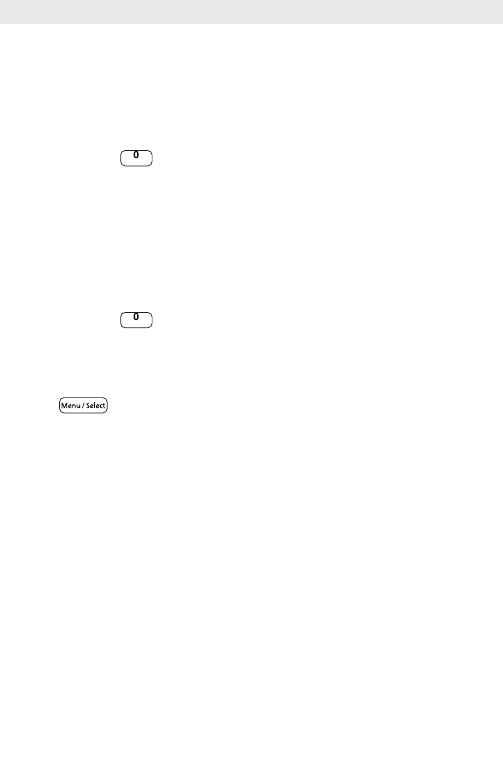
Register new handsets
Registering an additional handset with the main base station (the base station you
have connected to the telephone network):
UNREGISTERED
Base station connected to the telephone network
Press
Press and hold down
the Paging key for at
least 10 seconds
2
1
12
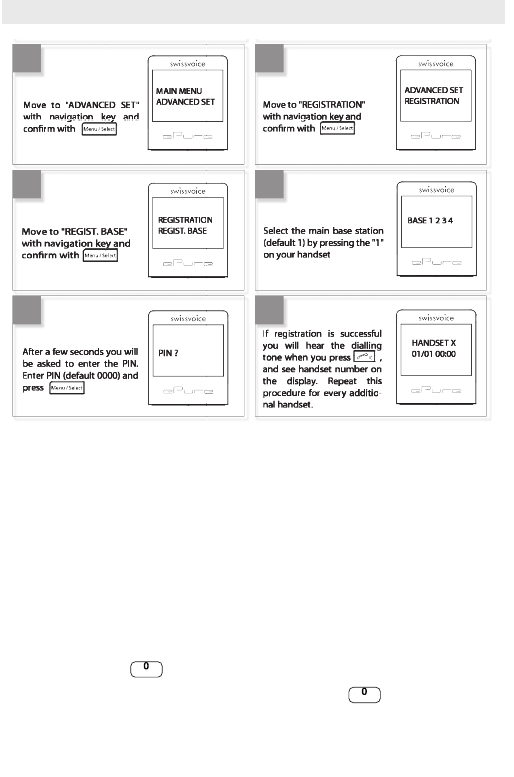
If the registration is not successful:
• Interrupt power supply of base and handset (disconnect power adapter/remove
battery).
• Repeat the registration procedure.
Making a call with several call partners
During a call you can make a second internal call (enquiry call), switch between call
partners or simultaneously converse (3-way conference call) without the need for two
telephone lines.
Internal conversation / Internal call
• Press 3 sec. key and enter the desired internal party.
If only two handsets are registered, pressing 3 sec. key will automatically
call the other handset.
Intercom
Intercom
ePure TAM
14 ePure TAM
MAIN MENU
ADVANCED SET
ADVANCED SET
REGISTRATION
REGISTRATION
REGIST. BASE
Move to "REGIST. BASE"
with navigation key and
conrm with
BASE 1 2 3 4
HANDSET X
01/01 00:00
If registration is successful
you will hear the dialling
tone when you press ,
and see handset number on
the display. Repeat this
procedure for every additio-
nal handset.
PIN ?
After a few seconds you will
be asked to enter the PIN.
Enter PIN (default 0000) and
press
Move to "ADVANCED SET"
with navigation key and
conrm with
Select the main base station
(default 1) by pressing the "1"
on your handset
Move to "REGISTRATION"
with navigation key and
conrm with
34
56
78
34
56
78
If you receive an external call while you are on the phone to an internal call partner,
you will hear an incoming call alert. End the internal call by pressing the End call key.
Press the Talk key. You are connected to the external party.
Call transfer to another handset
You are conducting an external call and you want to transfer it to another handset.
• Press 3 sec. key .
• Enter the desired number.
• When the internal party responds press the End call key to transfer the call to the
other party.
Conference
You are conducting an external call.
• Call another internal party (see above).
• The internal party answers.
• Press 3 sec. key to start a conference call. If one of the handsets presses
the End call key, the other handset will be connected to the external call.
Personal settings
• Press , select
Personal set
and press OK.
• Select a function from the list using the navigation key π/†and press OK.
-Handset tone
- Ring volume
- Ring melody
- Group melody
- Key tone
- Every time a key is pressed, a brief beep is heard.
- First ring
- This handset doesn't ring until the second ring (the first one is
withheld).
-Handset name
- To better distinguish between handsets, you can give each
handset a name.
-Auto pick-up
- Just pick up the handset from the base to answer a call (without
pressing any key).
-Auto hang-up
- Just hang up the handset to end a call.
-Language
-Room monitor
- You need two handset to use this function. Place one of the
handsets in the room you wish to monitor. Enable the function at that handset.
You can then establish a connection to this handset from a second handset and
monitor the room acoustically. Dialling the internal phone number of the handset
Intercom
Intercom
ePure TAM
ePure TAM 15

placed in the room starts room monitoring. Room monitoring is stopped again by
either putting the phone down or pressing the Talk key.
Advanced settings
• Press , select
Advanced set
and press OK.
• Select a function from the list using the navigation key π/†and press OK.
-Recall Time
– Select the recall time (flash time) for the analogue network
functionalities in your country.
-Dial Mode
– Tone: Normal dialling procedure on analog lines. Pulse: May be
required for connecting older telephone systems. Please refer to the relevant
documentation.
-Call barring
– Use this function to ban certain phone numbers from being
dialled. The call barring numbers must be entered separately for each handset.
You can specify bar calls to up to 4 numbers each comprising up to 4 digits. All
phone numbers whose first digits match the specified numbers will be barred.
-Baby call
– Use this function to store a set phone number that will be dialled
automatically when any key (except the End call key) is pressed. You must enter
the desired call number.
-Registration
- Accessory handsets must be registered to the base station.
-Unregister
– Select the handset you want to deregister.
-PIN
– You can modify the PIN code (0000 on delivery).
-Reset unit
-Prefix
- Detect digit
- If the first digits of a number you are calling are identical to
the digits stored, they will be suppressed.
- Prefix num.
- The prefix number can be 5 digits long. The stored digits are
added in front of the phone number when dialling (with a dialling pause).
-Intrusion
- Enabling this function allows you to link in handsets to the call made
with another handset.
-ECO Mode
– When ECO Mode is set to ON, the handset’s power transmission is
regulated and a radiation reduction is achieved when it is near the base station.
ePure TAM
16 ePure TAM
Answer machine
Your ePure TAM features an integrated digital answer machine with a max. recording
capacity of 30 minutes. You can operate your answer machine from the base and from
any handset registered to the base. On delivery an outgoing message for each mode
(
Answer & Rec
and
Answer only
) is pre-recorded. The answer machine is ready to
use.
Activate/deactivate the answer machine (from the base)
Press key on the base station to switch the answer machine on or off.
The LED under key
- lights up when the answer machine is activated
- doesn’t light up when the answer machine is deactivated
- flashes when you have new message(s) on the answer machine
Operating the answer machine (from the base)
If you have new messages, the LED under key is flashing.
The messages are played back beginning with the most recent.
• Press to start playback.
• During playback the following options are available:
Key Function
Activate/deactivate answer machine
Repeat message/return to previous message
Skip to next message
Start/end playback
Delete message during playback
/ Adjust volume
Delete all old messages (from the base)
Impossible during playback. Press and hold key to delete all old messages.
Activate/deactivate the answer machine (from the handset)
• Press , select
Answ Machine
and press OK.
• Select
Answ On/Off
and press OK.
ePure TAM
ePure TAM 17
• Select
On
or
Off
using the navigation keys π/†and press OK.
is displayed when the answer machine is switched on.
• You must now select the desired operating mode and record a personal outgoing
message:
Record a personal outgoing message
• Press , select
Answ Machine
and press OK.
• Select
Answer Mode
and press OK.
• Select
Answer & Rec
(the caller can leave a message) or
Answer only
(the caller
cannot leave a message) and press OK.
• Select
Personalized
and press OK.
• Select
Record mess
and press OK.
• Speak your outgoing message into the handset microphone. Your personal
outgoing messages can be 1 minute long (max.).
• Press OK to end recording. The recorded personal outgoing message is played
back.
Operating the answer machine (from the handset)
If you have new messages on your answer machine the symbol flashes. The
messages are played back beginning with the most recent and over the handset loud-
speaker (the handset loudspeaker activates automatically).
• Press , select
Answ Machine
and press OK.
• Select
Play
and press OK.
• Press the End call key to end playback.
During playback:
• Press OK to open the
Options
menu.
The following options are available:
•
Repeat
– repeat the message
•
Next message
– skip to next message
•
Prev message
– return to previous message
- To restore the standard outgoing message, select
Answer & Rec
or
Answer
only
followed by
Predefined
and press OK.
- To listen to an outgoing message, select
Answer & Rec
or
Answer only
followed by
Play
and press OK. The outgoing message is played back.
- To delete a personal outgoing message, select
Answer & Rec
or
Answer
only
followed by
Delete
and press OK.
ePure TAM
18 ePure TAM

•
Delete
– delete a message during playback
•
Save number
– save the number in the phonebook
Press the navigation key π/†, to adjust the playback volume.
Delete all old messages (from the handset)
• Press , select
Answ Machine
and press OK.
• Select
Delete all
and press OK.
• To delete all messages confirm the security question with OK.
Record memo
You can leave a message behind for other internal users by recording a memo.
• Press , select
Answ Machine
and press OK.
• Select
Record Memo
and press OK.
•
Recording
is displayed.
• Speak your memo into the handset microphone.
• Press OK to end recording. The memo is stored the same way as an incoming
message.
Answer machine settings
• Press , select
Answ Machine
and press OK.
• Select
Answ Setting
and press OK.
• Select the desired function by pressing the navigation key π/†and press OK.
-Ring Delay
– Select the desired delay or
Toll saver
. If you set the delay to
Toll Saver, your answer machine will answer after 2 rings if you have new
messages. If you do not have new messages it will not answer until 6 rings. This
enables you to save costs by hanging up before you are connected.
-
Remote Acc.
– Switch remote access on or off
-
HS Screening
– When the answer machine is on and the function activated, you
can listen to the messages being recorded over the handset loudspeaker
-
TAM language
– Select the default outgoing message language.
Memory full
The recording capacity of your answer machine is 30 minutes (including outgoing
messages).
If the memory is full,
Memory full
appears on the handset display. No more messages
can be recorded. The answer machine switches to Answer only mode automatically.
You must delete old messages.
ePure TAM
ePure TAM 19

Remote access
You can remote access your answer machine from any external telephone with DTMF
or multifrequency dialling function. Dial your number and enter your PIN code (0000 on
delivery). The remote access PIN code is identical with the PIN code of your
telephone.
Activating/deactivating remote access
To be able to remote access your answer machine you musst first activate the function.
• Press , select
Answ Machine/Answ Setting/Remote Acc.
and press
OK.
• Select
Activated
or
Deactivated
and press OK.
Remote operation from an external telephone
You can remote access your answer machine from any telephone with DTMF or
multifrequency dialling function.
• Dial your number.
• Press when you hear your outgoing message. The outgoing message is
interrupted. Press #.
• Enter your PIN code (0000 on delivery). If the PIN is correct you will hear a
confirmation tone.
• You can now perform a number of functions by entering the relevant digits (see the
following table):
Key Function
1 Return to previous message
2 Play all messages
3 Skip to next message
6 Delete message during playback
7 Switch answer machine on
8 Stop playback
9 Switch answer machine off
ePure TAM
20 ePure TAM

Appendix
Using Internet/cable telephone adapters on an analog port
When using an analog telephone on the analog connection of an Internet or cable
telephone adapter, not all the described features (in particular calling line display) may
function in the same way as with a standard analog telephone line. This does not
cause the ePure TAM to malfunction.
Several factors can cause a failure of specific features to function:
• The Internet/cable telephony provider may not provide the function on its
Internet/cable telephony connection.
• The adapter used to convert Internet/cable telephony to analog telephony (usually
supplied by the provider) may not forward the functions to connected telephones or
may forward them in a non-analog format.
If this happens, please check the ePure TAM on an analog fixed line and/or contact
your Internet/cable telephony provider.
Industry Canada Certification
Operation is subject to the following two conditions (1) this device may not cause
interference, and (2) this device must accept any interference, including interference
that may cause undesired operation of the device.
NOTICE: The Industry Canada label identifies certified equipment. This certification
means that the equipment meets certain telecommunications network, protective,
operational and safety requirements as prescribed in the appropriate Terminal
Equipment Technical Requirements document(s). The Department does not guarantee
the equipment will operate to the user’s satisfaction.
Before installing this equipment, users should ensure that it is permissible to be
connected to the facilities of the local telecommunications company. The equipment
must also be installed using an acceptable method of connection. The customer should
be aware that compliance with the above conditions may not prevent degradation of
service in some situations.
Repairs to certified equipment should be coordinated by a representative designated
by the supplier. Any repairs or alterations made by the user to this equipment, or
equipment malfunctions, may give the telecommunications company cause to request
the user to disconnect the equipment. Users should ensure for their own protection
that the electrical ground connections of the power utility, telephone lines and internal
metallic water pipe system, if present, are connected together. This precaution may be
particularly important in rural areas.
NOTE: Users should not attempt to make such connections themselves, but should
ePure TAM
ePure TAM 21

contact the appropriate electric inspection authority, or electrician, as appropriate.
This product meets the applicable Industry Canada technical specifications.
The Ringer Equivalence Number is an indication of the maximum number of devices
allowed to be connected to a telephone interface. The termination of an interface may
consist of any combination of devices subject only to the requirement that the sum of
the RENs of all devices does not exceed five.
This Class B digital apparatus complies with Canadian ICES-003.
FCC / ACTA Information
Warning: Changes or modifications to this unit not expressly approved by Swissvoice
Inc. could void the FCC authority to operate the equipment. This includes the addition
of any external antenna device.
This equipment complies with Part 68 of the FCC rules and the requirements adopted
by the ACTA.
On the bottom of the base station is a label that contains, among other information, a
product identifier in the format US:AAAEQ##TXXXX. If requested, this number must be
provided to the telephone company.
A plug and jack used to connect this equipment to the premises wiring and telephone
network must comply with the applicable FCC Part 68 rules and requirements adopted
by the ACTA. A compliant telephone cord and modular plug is provided with this pro-
duct. It is designed to be connected to a compatible modular jack that is also com-
pliant. See installation instructions for details.
The REN is used to determine the number of devices that may be connected to a
telephone line. Excessive RENs on a telephone line may result in the devices not
ringing in response to an incoming call. In most but not all areas, the sum of RENs
should not exceed five (5.0). To be certain of the number of devices that may be
connected to a line, as determined by the total RENs, contact the local telephone
company. The REN for this product is part of the product identifier that has the format
US:AAAEQ##TXXXX. The digits represented by ## are the REN without a decimal
point. For this product the FCC Registration number is [US: L29W400BEPURETAM]
indicates the REN would be 0.0.
A copy of the supplier's Declaration of Conformity (SDoC) is available at this Internet
address: www.swissvoice.net
If this equipment causes harm to the telephone network, the telephone company will
notify you in advance, that temporary discontinuance of service may be required. But if
advance notice isn’t practical, the telephone company will notify the customer as soon
as possible. Also, you will be advised of your right to file a complaint with the FCC if
you believe it is necessary.
The telephone company may make changes in its facilities, equipment, operations or
procedures that could affect the operation of the equipment.
If this happens the telephone company will provide advance notice in order for you to
ePure TAM
22 ePure TAM

make necessary modifications to maintain uninterrupted service. If you experience
trouble with this telephone system, disconnect it from the network until the problem has
been corrected or until you are sure that the equipment is not malfunctioning.
If trouble is experienced with this equipment [US: L29W400BEPURETAM], for repair or
warranty information, please contact Support at
Swissvoice Inc.
C/O KVB Partners Inc. 60 Broad Street Suite 3502
New York NY 10004
Tel: 1-866-8238920
Fax: 1-866-8238920.
If the equipment is causing harm to the telephone network, the telephone company
may request that you disconnect the equipment until the problem is resolved. This
equipment is of a type that is not intended to be repaired by the Customer (user).
This telephone system may not be used on coin service provided by the telephone
company. Connection to party line service is subject to state tariffs. Contact the state
public utility commission, public service commission or corporation commission for
information. Privacy of communications may not be ensured when using this phone.
If your home has specially wired alarm equipment connected to the telephone line,
ensure the installation of this equipment does not disable your alarm equipment. If you
have questions about what will disable alarm equipment, consult your telephone
company or a qualified installer.
If the telephone company requests information on what equipment is connected to
their lines, inform them of:
a) The ringer equivalence number [0.0B]
b) The USOC jack required [RJ11C]
c) Facility Interface Codes (“FIC”) [02LS2]
d) Service Order Codes (“SOC”) [9.0Y]
e) The FCC Registration Number [US: L29W400BEPURETAM]
FCC Part 15
This device complies with part 15 of the FCC Rules. Operation is subject to the
following two conditions:
(1) This device may not cause harmful interference, and (2) this device must accept
any interference received, including interference that may cause undesired
operation.
Changes or modifications not expressly approved by the party responsible for com-
pliance could void the user's authority to operate the equipment.
Note: This equipment has been tested and found to comply with the limits for a
Class B digital device, pursuant to part 15 of the FCC Rules. These limits are
designed to provide reasonable protection against harmful interference in a
residential installation. This equipment generates, uses and can radiate radio
ePure TAM
ePure TAM 23

frequency energy and, if not installed and used in accordance with the instructions,
may cause harmful interference to radio communications. However, there is no
guarantee that interference will not occur in a particular installation. If this
equipment does cause harmful interference to radio or television reception, which
can be determined by turning the equipment off and on, the user is encouraged to
try to correct the interference by one or more of the following measures:
- Reorient or relocate the receiving antenna.
- Increase the separation between the equipment and receiver.
- Connect the equipment into an outlet on a circuit different from that to which the
receiver is connected.
- Consult the dealer or an experienced radio/TV technician for help.
Privacy of communications may not be ensured when using this telephone!
Some cordless telephones operate at frequencies that may cause interference to
nearby TVs and VCRs. To minimize or prevent such interference, the base of the
cordless telephone should not be placed near or on top of a TV or VCR. If
interference is experienced, move the cordless telephone further away from the TV
or VCR. This will often reduce, or eliminate, interference.
Operating near 2.4GHz electrical appliances may cause interference. Move away
from the electrical appliances.
Notice for Direct Inward Dialing ("DID")
ALLOWING THIS EQUIPMENT TO BE OPERATED IN SUCH A MANNER AS TO NOT
PROVIDE FOR PROPER ANSWER SUPERVISION IS A VIOLATION OF PART 68 OF
THE FCC‘S RULES.
Notice to Hearing Aid Wearers:
This phone system is compatible with inductively coupled hearing aids.
CAUTION:
To comply with FCC RF exposure requirements, the base unit should be installed with
its antenna located at 20 cm or more from persons .
1. This equipment is hearing aid compatible as defined by the FCC in 47 CFR-Section
68.316.
2. Environment — do not place the unit in a room where the temperature is less than
-20°C or greater than 50°C. Allow 10 cm (4") clearance around the
unit for proper ventilation. Avoid excessive smoke, dust, mechanical vibration,
shock, or direct sunlight.
3. Medical — consult the manufacturer of any personal medical devices, such as
pacemakers or hearing aids, to determine if they are adequately shielded from
external RF (radio frequency) energy. (The unit operates in the frequency range of
1920MHz-1930MHz, and the power output level can range 0.04 watts to 0.25
watts.) Do not use the unit in health care facilities if any regulations posted in the
ePure TAM
24 ePure TAM

area instruct you not to do so. Hospitals or health care facilities may be using
equipment that could be sensitive to external RF (radio frequency) energy.
4. Routine care — wipe the unit with a soft cloth. Do not use benzine, thinner, or any
abrasive powder. When you leave the unit unused for a long period of time, unplug
the AC adaptor from the outlet.
5. If there is any trouble — disconnect the unit from the telephone line and connect a
known working phone. If the known working phone operates properly, have your
unit repaired by a Factory Service center or other Authorized Servicer. If the known
working phone does not operate properly, consult your telephone company.
When you hold the phone to your ear, noise might be heard in your Hearing Aid.
Some Hearing Aids are not adequately shielded from external RF (radio
frequency) energy. If noise occurs, use an optional headset accessory or the
speakerphone option (if applicable) when using this phone. Consult with your
audiologist or Hearing Aid manufacturer about the availability of Hearing Aids
which provide adequate shielding to RF energy commonly emitted by digital
devices.
Power Outage:
In the event of a power outage, your cordless telephone will not operate. The cordless
telephone requires electricity for operation. You should have a telephone that does not
require electricity available for use during power outages.
Notice:
The installation of the base unit should allow at least 8 inches between the base and
persons to be in compliance with FCC RF exposure guidelines.
For body worn operation, the portable part (handset) has been tested and meets FCC
RF exposure guidelines. Use with an accessory that contains metal parts may not
ensure compliance with FCC RF exposure guidelines.
IMPORTANT SAFETY INSTRUCTIONS
Before using your telephone equipment, basic safety instructions should always be
followed to reduce the risk of fire, electric shock and injury to persons, including the
following:
1. Read and understand all instructions.
2. Follow all warnings and instructions marked on the product.
3. Unplug this product from the wall telephone jack and power outlet before cleaning.
Do not use liquid cleaners or aerosol cleaners. Use damp cloth for cleaning.
4. The telephone is for indoor use in dry locations.
5. The maximum ambient operating temperature is 50 °C. In order to avoid over-
heating, do not cover the telephone.
6. Do not use this product near water, for example, near a bath tub, wash bowl,
ePure TAM
ePure TAM 25
kitchen sink or laundry tub, in a wet basement or near a swimming pool.
7. CAUTION RISK OF EXPLOSION IF BATTERY IS REPLACED BY AN
INCORRECT TYPE.
DISPOSE OF USED BATTERIES ACCORDING TO THE INSTRUCTIONS.
8. Do not use the telephone to report a gas leak in the vicinity of the leak.
WARNING
TO PREVENT FIRE OR ELECTRIC SHOCK HAZARD, DO NOT EXPOSE THIS
APPLIANCE TO RAIN OR MOISTURE.
The AC adaptor is used as the main disconnect device, ensure that the AC outlet is
located/installed near the unit and is easily accessible.
WHEN PROGRAMMING EMERGENCY NUMBERS AND(OR) MAKING TEST CALLS
TO EMERGENCY NUMBERS:
1) Remain on the line and briefly explain to the dispatcher the reason for the call.
2) Perform such activities in the off-peak hours, such as early morning or late
evenings.
CAUTION
RISK OF ELECTRIC SHOCK
DO NOT OPEN
SAVE THESE INSTRUCTIONS
9. Place this product securely on a stable surface. Serious damage and/or injury may
result if the unit falls.
10. Slots or openings in the cabinet and the back and bottom are provided for
ventilation, to protect it from overheating. These openings must not be blocked or
covered. This product should never be placed near or over a radiator or heat
ePure TAM
26 ePure TAM
The lightning flash with
arrowhead symbol, within
an equilateral triangle, is
intended to alert the user
to the presence of
uninsulated "dangerous
voltage" within the pro-
duct's enclosure that may
be of sufficient magnitude
to constitute a risk of
electric shock.
Warning: To reduce the
risk of electric shock, do
not remove the cover
(or back), no user
serviceable parts inside.
Refer servicing and
fuse replacement to
qualified personnel only.
Never replace fuses/
sold-in fuses yourself.
The exclamation point
within an equilateral
triangle is intended to
alert the user to the
presence of important
operating and mainten-
ance (servicing)
instructions in the
literature accompanying
the appliance.

register, or in a place where proper ventilation is not provided.
11. This product should be operated only from the type of power source indicated on
the marking label. If you are not sure of the type of AC line power to your home,
consult your dealer or local power company.
12. Do not place objects on the power cord. Install the unit where no one can step or
trip on the cord.
13. Do not overload wall outlets and extension cords as this can result in the risk of fire
or electric shock.
14. Never push objects of any kind into this product through cabinet slots as they may
touch dangerous voltage points or short out parts that could result in the risk of fire
or electric shock. Never spill liquid of any kind on this product.
15. To reduce the risk of electric shock or burns, do not disassemble this product. Take
it to a qualified service center when service is required. Opening or removing
covers may expose you to dangerous voltages, dangerous electrical current or
other risks. Incorrect reassembly can cause electric shock when the appliance is
subsequently used. Disconnect TNV circuit connector before removing cover.
16. Unplug the product from the wall outlet and refer servicing to qualified service per-
sonnel under the following conditions:
a.) When the power cord is damaged or frayed.
b.) If liquid has been spilled into the product.
c.) If the product has been exposed to rain or water.
d.) If the product does not operate normally by following the operating instructions.
Adjust only those controls that are covered by the operating instructions because
improper adjustment of other controls may result in damage and may require
extensive work by a qualified technician to restore the product to normal operation.
e.) If the product has been dropped or physically has been damaged.
f.) If the product exhibits a distinct change in performance.
17. Avoid using a telephone (other than a cordless type) during a thunderstorm. There
may be a remote risk of electrical shock from lightning. Therefore we suggest a
surge arrestor.
Contact with liquid
If the handset should come into contact with liquid:
1. Switch the handset off and remove the battery immediately.
2. Allow the liquid to drain from the handset.
3. Pat all parts dry, then place the handset with the battery compartment open and the
keypad facing down in a dry, warm place for at least 72 hours (not in a microwave,
oven etc.).
4. Do not switch on the handset again until it is completely dry.
When it has fully dried out, you will usually be able to use it again.
ePure TAM
ePure TAM 27

Care
Your telephone is a sophisticated product in terms of design and construction, and
should therefore be handled with care.
To clean the telephone, wipe first with an antistatic cloth or a damp, soft leather cloth
and then dry using a dry cloth.
Recycling (environmental protection)
At the end of the product's life cycle, the telephone must not be disposed of in
normal domestic waste. Please take it to a collection point for processing
electrical and electronic equipment: see symbol on the product, in the user
manual and/or packaging.
Some materials used in this product can be recycled if you take it to a recycling depot.
By recycling parts or raw materials from used products you will be making an important
contribution to environmental protection. Please contact your local authority if you
require information about collection points in your neighbourhood.
BATTERY SAFETY PRECAUTIONS
To reduce the risk of fire, injury or electric shock, and to properly dispose of batteries,
please read and understand the following instructions.
BATTERY MUST BE RECYCLED OR DISPOSED OF PROPERLY. DO NOT DISPOSE
OF IN MUNICIPAL WASTE.
1. Only use the batteries specified for use with this product.
2. DO NOT USE NICKEL CADMIUM OR NICKEL METAL HYDRIDE BATTERIES, or
mix batteries of different sizes or from different manufacturers in this product. DO
NOT USE NONRECHARGEABLE BATTERIES.
3. Do not dispose of the batteries in a fire; the cells may explode. Do not expose
batteries to water. Check with local codes for special disposal instructions.
4. Do not open or mutilate the batteries. Released electrolyte is corrosive and may
cause damage to the eyes or skin. The electrolyte may be toxic if swallowed.
5. Exercise care in handling the batteries in order not to short the batteries with con-
ducting materials such as rings, bracelets, and keys. The batteries or conducting
material may overheat and cause burns or fire.
6. Charge the batteries provided with, or identified for use with, this product only in
accordance with the instructions and limitations specified in the user’s manual. Do
not attempt to charge the batteries with any means other than that specified in the
users manual.
7. Periodically clean the charge contacts on both the charger and handset.
ePure TAM
28 ePure TAM

Service (Customer Care)
If you face any issue with your cordless phone, please first visit our website
www.swissvoice.net /epure, FAQ section. The most current issues are described
and this will help you to solve your trouble.
If after having visited our FAQ you are still facing this issue, and for any Customer Care
warranty service, product operation information or problem resolution, please call : Toll
free : 1-866-8238920 or send an email to helpline@swissvoice.net
End-user limited warranty
This product is covered by a one year limited warranty.
Any repair replacement or warranty service, and all questions about this product
should be directed to: 1-866-8238920.
This limited, non-transferable warranty is provided to the original buyer/end-consumer
("you") for systems, handsets and accessories (collectively, "Product") provided by
Swissvoice Inc.
Swissvoice Inc. warrants to you that at the date of purchase, the Product is free of
defects in workmanship and materials and the software included in the Product will
perform in substantial compliance to its program specifications.
1. WARRANTY PERIOD
The Product warranty period is one (1) year from the original date of purchase by you.
Proof of purchase (e.g., sales slip or invoice) must be provided with any Product
returned during the warranty period. Batteries supplied with the Products are
warranted to be free from defects at the time of purchase only.
2. EXCLUSIVE REMEDY
Swissvoice Inc. entire liability and your exclusive remedy if the Product is defective in
materials or workmanship during the warranty period and is returned shall be that the
Product will be repaired or replaced as set forth in Section 4 below. Reconditioned
replacement components, parts or materials may be used in the replacement or repair.
Data in the memory of the Product may be lost during repair.
3. THIS LIMITED WARRANTY DOES NOT COVER AND IS VOID WITH
RESPECT TO THE FOLLOWING:
– Cosmetic damage, physical damage to the surface of the Product, including,
without limitation, breakage, cracks, dents, scratches or adhesive marks on the
LCD screen or outside casing of the Product.
– Products which have been repaired, maintained or modified (including the antenna)
by anyone other than Swissvoice Inc. or a Swissvoice Inc.-approved repair facility,
or that have been improperly installed.
– Cost of installation, removal or reinstallation.
ePure TAM
ePure TAM 29

– Damage due to any telephone, electronic, hardware or software program, network,
Internet or computer malfunctions, failures, or difficulties of any kind, including
without limitation, server failure or incomplete, incorrect, garbled or delayed
computer transmissions.
– Equipment and components not manufactured, supplied or authorized by Swiss-
voice Inc.
– Modification of the Product's components, or operation of the Product in an unsuit-
able environment or in a manner for which it is not intended, including but not
limited to failures or defects caused by misuse, abuse, accidents, physical damage,
abnormal operation, improper handling or storage, neglect, alterations,
unauthorized installation, removal or repairs, failure to follow instructions, problems
caused by the carrier's network coverage, exposure to fire, water or excessive
moisture or dampness, floods, or extreme changes in climate or temperature, acts
of God, riots, acts of terrorism, spills of food or liquids, viruses or other software
flaws introduced into the Product or other acts which are not the fault of Swissvoice
Inc. and which the Product is not specified to tolerate, including damage caused by
mishandling or blown fuses.
– Products which have had warranty stickers, electronic serial number and/or serial
number label removed, altered, rendered illegible or fraudulently applied to other
equipment.
– Signal reception problems (unless caused by defect in material or workmanship in
the Product).
– Products operated outside published maximum ratings.
– Performance of the Products when used in combination with other products or
equipment not manufactured, supplied or authorized by Swissvoice Inc.
– Consumables (such as batteries and fuses).
– Payments for labor or service to representatives or service centers not authorized
to perform product maintenance by Swissvoice Inc.
– Loss of data.
– Testing and examination discloses that the alleged defect or malfunction in the Pro-
duct does not exist.
This warranty does not cover customer education, instruction, installation or removal,
set up adjustments, problems related to service(s) provided by a carrier or other
service provider, and/or signal reception problems. Swissvoice Inc. shall not be
responsible for software, firmware, information, or memory data contained in, stored
on, or integrated with any Products returned for repair, whether under warranty or not.
This warranty is valid only in the country in which it is purchased (i.e., the United States
of America or Canada respectively, but not both).
USE WITH ACCESSORIES NOT SUPPLIED BY SWISSVOICE INC. OR NOT OTHER -
WISE EXPRESSLY AUTHORIZED BY SWISSVOICE INC. MAY VOID WARRANTY.
ePure TAM
30 ePure TAM

4. WARRANTY CLAIM PROCEDURE
All warranty claims must be made by notifying Swissvoice Inc. prior to the expiration of
the warranty period. Swissvoice Inc.'s obligation to provide warranty support shall not
extend past the end of the warranty period, except that any product repaired or
replaced during the warranty period shall continue to be warranted for the balance of
such warranty period or thirty (30) days, whichever is greater.
If you want to learn more about Swissvoice Service or for Support on your Swissvoice
phone, visit our web site at http://www.swissvoice.net
Support service will be provided for you by accessing the toll free customer service
number: 1-866-8238920.
5. LIMITATION OF WARRANTY
Swissvoice Inc. makes no warranty or representation that the software in the Products
will meet your requirements or will work in combination with any hardware or app-
lications software products provided by third parties, that the operation of the software
will be uninterrupted or error free, or that all defects in the software products will be
corrected.
6. LIMITATION ON REMEDIES; NO CONSEQUENTIAL OR OTHER
DAMAGES
Your exclusive remedy for any breach of this limited warranty is as set forth above.
Except for any refund elected by Swissvoice Inc., YOU ARE NOT ENTITLED TO ANY
DAMAGES, INCLUDING BUT NOT LIMITED TO CONSEQUENTIAL DAMAGES, if the
Product does not meet the limited warranty and, to the maximum extent allowed by
applicable law, even if any remedy fails of its essential purpose. The terms below
("Exclusion of Incidental, Consequential and Certain Other Damages") are also
incorporated into this limited warranty.
Some states/jurisdictions/provinces do not allow the exclusion or limitation of incidental
or consequential damages, so the above limitation or exclusion may not apply to you.
This limited warranty gives you specific legal rights. You may have others which vary
from state/jurisdiction/province to state/jurisdiction/province.
7. DISCLAIMER OF WARRANTIES
SWISSVOICE INC. AND ITS SUPPLIERS PROVIDE THE PRODUCT AND SUPPORT
SERVICES (IF ANY) AS IS AND WITH ALL FAULTS. THE LIMITED WARRANTY IS IN
LIEU OF ANY OTHER EXPRESS WARRANTIES (IF ANY) CREATED BY ANY
DOCUMENTATION OR PACKAGING EXCEPT FOR THE LIMITED WARRANTY, AND
TO THE MAXIMUM EXTENT PERMITTED BY APPLICABLE LAW IS IN LIEU OF ANY
IMPLIED OR STATUTORY WARRANTIES, INCLUDING, BUT NOT LIMITED TO, THE
IMPLIED WARRANTIES OF MERCHANTABILITY AND FITNESS FOR A PAR-
TICULAR PURPOSE, OF ACCURACY OR COMPLETENESS OR RESPONSES, OF
ePure TAM
ePure TAM 31

RESULTS, OF WORKMANLIKE EFFORT, OF LACK OF VIRUSES AND OF LACK OF
NEGLIGENCE, ALL WITH REGARD TO THE PRODUCT, AND THE PROVISION OF
OR FAILURE TO PROVIDE SUPPORT SERVICES. ALSO, THERE IS NO
WARRANTY OR CONDITION OF TITLE, QUIET ENJOYMENT, QUIET
POSSESSION, OR CORRESPONDENCE TO DESCRIPTION OR
NONINFRINGEMENT WITH REGARD TO THE PRODUCT.
Some states/jurisdictions/provinces do not allow limitations on how long an implied
warranty lasts or the exclusion or limitation of incidental or consequential damages, so
the above exclusions or limitations may not apply to you. If an implied warranty or
condition is created by your state/ province and federal or state/provincial law prohibits
disclaimer of it, you also have an implied warranty or condition, BUT ONLY AS TO
DEFECTS DISCOVERED DURING THE PERIOD OF THIS LIMITED WARRANTY
(ONE YEAR). AS TO ANY DEFECTS DISCOVERED AFTER THE ONE YEAR
PERIOD, THERE IS NO WARRANTY OR CONDITION OF ANY KIND.
This limited warranty gives you specific legal rights, and you may also have other rights
which vary from state to state/province to province. In no event shall Swissvoice Inc.'s
liability exceed the cost of repairing or replacing defective Products as provided herein,
and any such liabilities will terminate upon expiration of the warranty period.
Any supplements or updates to the Product or the software in the Product, including
without limitation, any (if any) software fixes or upgrades or bug fixes provided to you
after the expiration of the one year limited warranty period are not covered by any
warranty or condition, express, implied or statutory.
8. EXCLUSION OF INCIDENTAL, CONSEQUENTIAL AND CERTAIN
OTHER DAMAGES
TO THE MAXIMUM EXTENT PERMITTED BY APPLICABLE LAW, IN NO EVENT
SHALL SWISSVOICE INC., SELLER OR THEIR SUPPLIERS BE LIABLE FOR ANY
SPECIAL, INCIDENTAL, INDIRECT, OR CONSEQUENTIAL DAMAGES
WHATSOEVER (INCLUDING, BUT NOT LIMITED TO, DAMAGES FOR LOSS OF
PROFITS OR CONFIDENTIAL OR OTHER INFORMATION, FOR BUSINESS
INTERRUPTION, FOR PERSONAL INJURY, FOR LOSS OF PRIVACY, FOR FAILURE
TO MEET ANY DUTY INCLUDING OF GOOD FAITH OR OF REASONABLE CARE,
FOR NEGLIGENCE, AND FOR ANY OTHER PECUNIARY OR OTHER LOSS
WHATSOEVER) ARISING OUT OF OR IN ANY WAY RELATED TO THE USE OF OR
INABILITY TO USE THE PRODUCT, THE PROVISION OF OR FAILURE TO PRO-
VIDE SUPPORT SERVICES, OR OTHERWISE UNDER OR IN CONNECTION WITH
ANY PROVISION OF THIS LIMITED WARRANTY, EVEN IN THE EVENT OF THE
FAULT, TORT (INCLUDING NEGLIGENCE), STRICT LIABILITY, BREACH OF CON-
TRACT OR BREACH OF WARRANTY OF SWISSVOICE INC. OR SELLER OR ANY
SUPPLIER, AND EVEN IF SWISSVOICE INC. OR SELLER OR ANY SUPPLIER HAS
BEEN ADVISED OF THE POSSIBILITY OF SUCH DAMAGES. REPAIR OR
ePure TAM
32 ePure TAM

REPLACEMENT, AS PROVIDED UNDER THE WARRANTY, IS YOUR SOLE AND
EXCLUSIVE REMEDY FOR BREACH OF THE LIMITED WARRANTY.
9. LIMITATION OF LIABILITY AND REMEDIES
NOTWITHSTANDING ANY DAMAGES THAT YOU MIGHT INCUR FOR ANY
REASON WHATSOEVER (INCLUDING, WITHOUT LIMITATION, ALL DAMAGES
REFERENCED ABOVE AND ALL DIRECT OR GENERAL DAMAGES), THE ENTIRE
LIABILITY OF SWISSVOICE INC., SELLER AND ANY OF THEIR SUPPLIERS
UNDER ANY PROVISION OF THIS LIMITED WARRANTY AND YOUR EXCLUSIVE
REMEDY FOR ALL OF THE FOREGOING (EXCEPT FOR ANY REMEDY OF REPAIR
OR REPLACEMENT ELECTED BY SWISSVOICE INC. OR SELLER OR SUPPLIER
WITH RESPECT TO ANY BREACH OF THE LIMITED WARRANTY) SHALL BE
LIMITED TO THE GREATER OF THE AMOUNT ACTUALLY PAID BY YOU FOR THE
PRODUCT OR FIVE DOLLARS ($5.00 USD/CAN).
THE FOREGOING LIMITATIONS, EXCLUSIONS AND DISCLAIMERS SHALL APPLY
TO THE MAXIMUM EXTENT PERMITTED BY APPLICABLE LAW, EVEN IF ANY
REMEDY FAILS ITS ESSENTIAL PURPOSE.
10. GOVERNING LAW
If this Product was purchased in the United States of America this limited warranty will
be governed by the laws of Texas, and exclude the United Nations Convention on Con-
tracts for the International Sale of Goods. If this Product was purchased in Canada this
limited warranty will be governed by the laws of the Province of Ontario and the federal
laws of Canada applicable therein, and exclude the United Nations Convention on
Contracts for the International Sale of Goods.
If you want to learn more about Swissvoice Service or for Support on your Swissvoice
phone, visit our web site at http://www.swissvoice.net
or send an email to helpline@swissvoice.net
or please call 1-866-8238920.
Issued by
Swissvoice SA
1, chemin des Mûriers, CH-1170 Aubonne
© Swissvoice SA 2013
All rights reserved.
Subject to availability.
Rights of modifications reserved.
Product attributes subject to change.
ePure TAM
ePure TAM 33

We reserve the right, to make changes without notice in equipment design and/or
components.
20406963us_ba_a0
SV 20406963
© Copyright 2013
Requirements for CS-03:
This product meets the applicable Industry Canada technical specifications.
RSS (Category I Equipment):
This device complies with Industry Canada license-exempt RSS standard(s).
Operation is subject to the following two conditions:
(1) this device may not cause interference, and
(2) this device must accept any interference, including interference that may cause
undesired operation of the device.
This Class B digital apparatus complies with Canadian ICES-003.
Under Industry Canada regulations, this radio transmitter may only operate using an
antenna of a type and maximum (or lesser) gain approved for the transmitter by Indus-
try Canada. To reduce potential radio interference to other users, the antenna type and
its gain should be so chosen that the equivalent isotropically radiated power (eirp) is
not more than that necessary for successful communication.
ePure TAM
34 ePure TAM

Cordless analogue telephone (DECT)
WITH DIGITAL ANSWERING MACHINE
ePure TAM
User manual
Issued by
Swissvoice SA
1, chemin des Mûriers, CH-1170 Aubonne
© Swissvoice SA 2013
All rights reserved.
Subject to availability.
Rights of modifications reserved without notice in equipment
design and/or components.
Product attributes subject to change.
www.swissvoice.net
20406963us_ba_a0
SV 20406963
© Copyright 2013
Photo may differ from the actual product.
Product attributes subject to change.
We reserve the right, to make changes without notice in
equipment design and/or components.