SynapSense 1259 Wireless subfloor differential pressure and temperature sensor node. User Manual Subfloor EZ Node Hardware Installation Guide

SynapSense Corporation Wireless subfloor differential pressure and temperature sensor node. Subfloor EZ Node Hardware Installation Guide

Users Manual
       Subfloor EZ Node  Hardware Installation Guide Version 1.0
Subfloor EZ Node Hardware Installation Guide Version 1.0   ii     SynapSense Subfloor EZ Node Hardware Installation Guide © 2006 – 2015 SynapSense Corporation.  All Rights Reserved  This documentation is protected by United States and international copyright and other intellectual and industrial property laws. It is solely owned by SynapSense Corporation and its licensors and is distributed under a restrictive license.  This  product,  or  any  portion  thereof,  may  not  be  used,  copied,  modified,  reverse  assembled,  reverse compiled, reverse engineered, distributed, or redistributed in any form by any means without the prior written authorization of SynapSense Corporation.  RESTRICTED RIGHTS: Use, duplication, or disclosure by the U.S. Government is subject to restrictions of FAR 52.227-14(g) (2)(6/87) and FAR 52.227-19(6/87), or DFAR 252.227-7015 (b)(6/95) and DFAR 227.7202-3(a), and any and all similar and successor legislation and regulation.  SynapSense Corporation 340 Palladio Parkway, Suite 530 Folsom, CA 95630 Tel:  (916) 294-0110 Fax:  (916) 294-0270 Web:  www.SynapSense.com
Subfloor EZ Node Hardware Installation Guide Version 1.0   iii    Trademarks SynapSense®,  the  SynapSense  logo  and  SynapSoft™  are  registered  trademarks  or  trademarks  of  SynapSense Corporation.  All third-party brand and product names are the trademarks of their respective owners and are used solely for informational purposes. Disclaimer This documentation is provided “as is” without warranty of any kind, either expressed or implied, including but not limited to, the implied warranties of merchantability or fitness for a particular purpose. This documentation might include technical inaccuracies or other errors. Corrections and improvements might be incorporated in new versions of the documentation. SynapSense does not assume any liability arising out of the application or use of any products or services and specifically disclaims any and all liability, including without limitation consequential or incidental damages. SynapSense  products  are  not  designed  for  use  in  life  support  appliances,  devices,  or  other  systems  where malfunction  can  reasonably  be  expected  to  result  in  significant  personal  injury  to  the  user,  or  as  a  critical component in any life support device or system whose failure to perform can be reasonably expected to cause the failure of the life support device or system, or to affect its safety or effectiveness. SynapSense customers using or selling these products for use in such applications do so at their own risk and agree to fully indemnify and hold SynapSense and its officers, employees, subsidiaries, affiliates, and distributors harmless against all claims, costs, damages, and expenses, and reasonable attorney fees arising out of, directly or indirectly, any claim of personal injury or death associated with such unintended or unauthorized use, even if such claim alleges that SynapSense was negligent regarding the design or manufacture of its products. SynapSense  reserves  the  right  to  make  corrections,  modifications,  enhancements,  improvements,  and  other changes to its products or services at any time and to discontinue any product or service without notice. Customers should obtain  the latest relevant information  before placing orders and  should verify that  such information is current and  complete.  All products  are sold subject  to SynapSense  Corporation's terms and conditions of sale supplied at the time of order acknowledgment or sale. SynapSense  does  not  warrant  or  represent  that  any  license,  either  express  or  implied,  is  granted  under  any SynapSense patent right, copyright, mask work right, or other SynapSense intellectual property right relating to any combination, machine, or process in which SynapSense products or services are used.  Information published by SynapSense regarding third-party products or services does not constitute a license from SynapSense to use such products or services or a warranty or endorsement thereof.  Use of such information may require a license from a third party under the patents or other intellectual property of the third party, or a license from SynapSense under the patents or other intellectual property of SynapSense. Regulatory Information Notice to Users: This equipment has been tested and found to comply with the limits for Class B digital device, pursuant to Part 15 of the FCC rules.  These limits are designed to provide reasonable protection against harmful interference in a residential  installation.  This  equipment  generates,  uses,  and  can  radiate  radio  frequency  energy  and,  if  not installed and used in accordance with the instructions, may cause harmful interference to radio communications. However, there is no guarantee that interference will not occur in a particular installation.  If the equipment does cause harmful interference to radio or television reception, which can be determined by turning the equipment off and on, the user is encouraged to try to correct the interference by one or more of the following measures:  Reorient or relocate the receiving antenna.  Increase the separation between the equipment and the receiver.  Plug the equipment into an outlet on a circuit different from that which the receiver is plugged.  Consult the  dealer or an experienced radio/TC technician  for help.  This product works using a radio frequency, so use on an airplane may be restricted due to interference.
Subfloor EZ Node Hardware Installation Guide Version 1.0   iv    FCC Statement: This device complies with part 15 of the FCC Rules.  Operation is subject to the following two conditions: (1) This device may not cause harmful interference, and (2) this device must accept any interference received, including interference that may cause undesired operation.  Changes or modifications not expressly approved by the party responsible for compliance could void the user's authority to operate the equipment.  The antenna(s) used for this transmitter must not be co-located or operating in conjunction with any other antenna or transmitter. CE Statement: This equipment has been tested and found to comply with the limits of the European Council Directive on the approximation of the law of the member states relating to electromagnetic compatibility (89/336/EEC) according to EN 55022 Class B. Industry Canada Equipment Notice: The  Industry  Canada  certification  identifies  certified  equipment.  This  certification  means  that  the  equipment meets certain telecommunications network protective, operational and safety requirements as prescribed in the appropriate Terminal Equipment Technical Document(s).  The Department does not guarantee the equipment will operate to the user's satisfaction.  Before installing this equipment, users should ensure that it is permissible to be connected to the facilities of the local telecommunications company.  The equipment must also be installed using an acceptable method of connection.  The customer should be aware that compliance with the above conditions may not prevent degradation of service in some situations.  Repairs to certified equipment should be coordinated by a representative designated by the supplier.  Any repairs or alterations made by the user to this equipment, or equipment malfunctions, may give the telecommunications company cause to request the user to disconnect the equipment. This device complies with Industry Canada license-exempt RSS standard(s). Operation is subject to the following two  conditions:  (1)  this  device  may  not  cause  interference,  and  (2)  this  device  must  accept  any  interference, including interference that may cause undesired operation of the device. Le  présent  appareil  est  conforme  aux  CNR  d'Industrie  Canada  applicables  aux  appareils  radio  exempts  de  licence. L'exploitation est autorisée aux deux conditions suivantes : (1) l'appareil ne doit pas produire de brouillage, et (2) l'appareil doit accepter tout brouillage radioélectrique subi, même si le brouillage est susceptible d'en compromettre le fonctionnement. Users should ensure, for their own protection, that the electrical ground connectors of the power utility, telephone lines  and  internal  metallic  water  pipe  system,  if  present,  are  connected  together.  This  presentation  may  be particularly important in rural areas. Caution:  Users  should  not  attempt  to  make  such  connections  themselves,  but  should  contact  the  appropriate electric inspection authority or electrician, as appropriate. Warranty Information Limited One Year Warranty Our company warrants  that for one year from the  date of purchase, it  will replace this product if found to be defective  in  materials  or  workmanship.  For  a  prompt,  no  charge  replacement  of  equivalent  product,  contact technical support at support@synapsense.com or by phone. This  replacement  is  the  company's  sole  obligation  under  this  warranty.  SynapSense  Corporation  will  not  be responsible  for any  incidental or  consequential  damages  or for  any  loss  arising in  connection with  the  use or inability  to  use  this  product.  Some  states/provinces  do  not  allow  the  exclusion  or  limitation  of  incidental  or consequential damages, so the above limitation or exclusion may not apply to you.  This warranty excludes defects or damage due to misuse, abuse, or neglect.  This warranty gives you specific legal rights, and you may also have other rights, which vary from state to state/province to province.  Technical Support Center
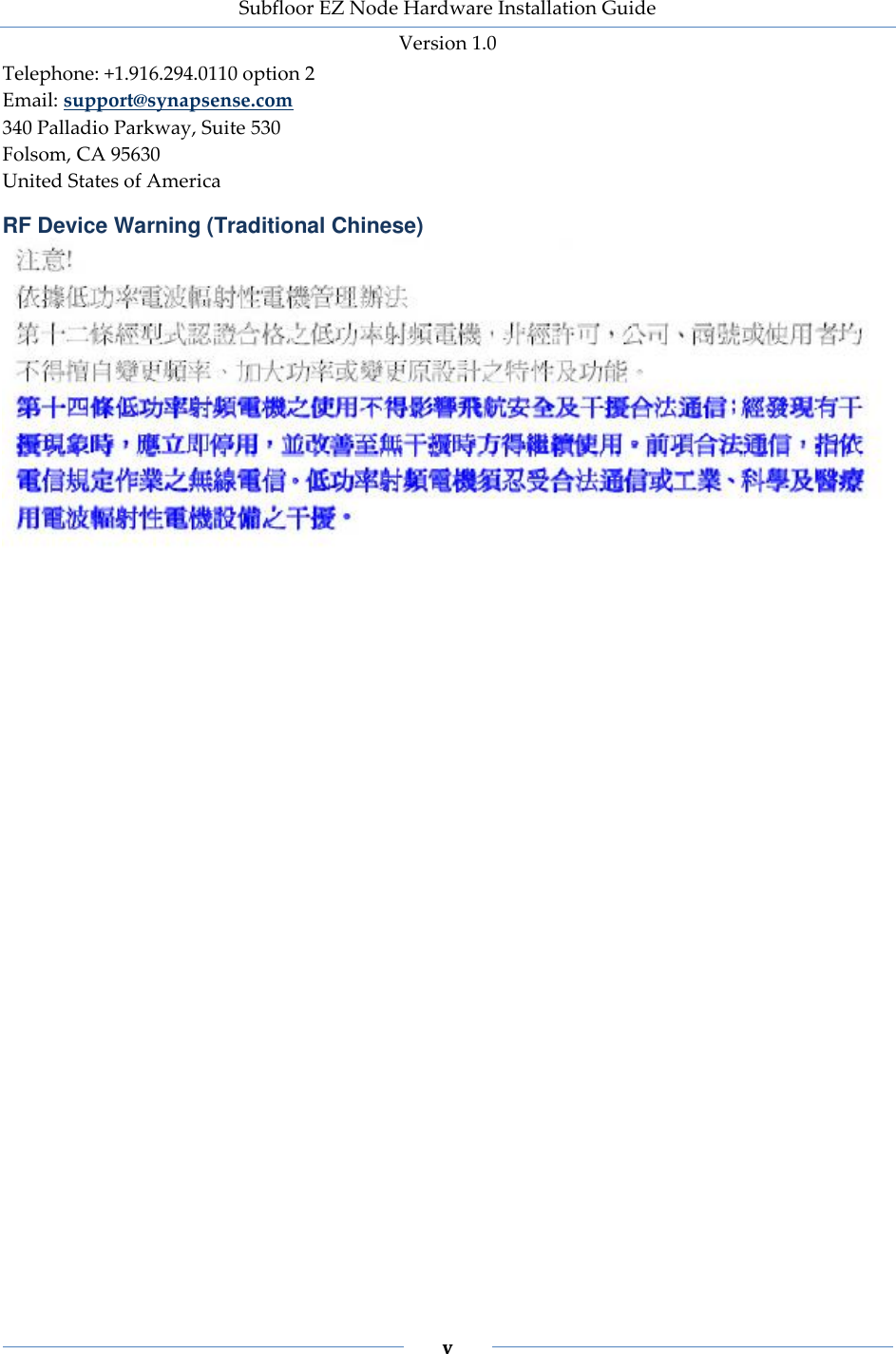
Subfloor EZ Node Hardware Installation Guide Version 1.0   v    Telephone: +1.916.294.0110 option 2 Email: support@synapsense.com 340 Palladio Parkway, Suite 530 Folsom, CA 95630 United States of America RF Device Warning (Traditional Chinese)
Subfloor EZ Node Hardware Installation Guide Version 1.0   vi           Status: Review Version: 1.0 Release Date:  Changes from previous version (n/a): Baseline document created.
Subfloor EZ Node Hardware Installation Guide Version 1.0   vii    Table of Contents Introduction ........................................................................................................................... 1 Overview ................................................................................................................................................... 2 About this Installation Guide.................................................................................................................. 2 Document Conventions ....................................................................................................................... 2 Document References........................................................................................................................... 3 Warnings and Precautions .................................................................................................................. 3 Getting Started ...................................................................................................................... 5 Required Hardware .................................................................................................................................. 6 Required Software .................................................................................................................................... 8 Required Tools and Materials ................................................................................................................. 8 Installing Subfloor EZ Nodes ............................................................................................. 9 General Installation Guidelines ............................................................................................................ 10 Installation Process Flow ....................................................................................................................... 10 Preparing to Install the Subfloor EZ Node Hardware ....................................................................... 11 Subfloor EZ Node Placement ............................................................................................................ 11 Installing the Subfloor EZ Node ........................................................................................................... 12 Cabinet and Subfloor Installation ..................................................................................................... 13 Validating and Commissioning the Subfloor EZ Node Installation ................................................ 15 Subfloor EZ Node LED Status Lights .............................................................................................. 16 Inspecting the Installation ..................................................................................................................... 17 Appendix A – Maintenance .............................................................................................. 18 Battery Replacement .............................................................................................................................. 18 Replacing a Subfloor EZ Node Diffuser Hose .................................................................................... 18 Appendix B – Technical Support and Return Material Authorization .................... 20 Technical Support ................................................................................................................................... 20 Return Material Authorization ............................................................................................................. 20
   1      CHAPTER 1. Introduction This chapter provides an overview of the Subfloor EZ Node hardware, introduces this installation guide, and lists general warnings and precautions.  In this chapter:  Overview  About this Installation Guide  Warnings and Precautions
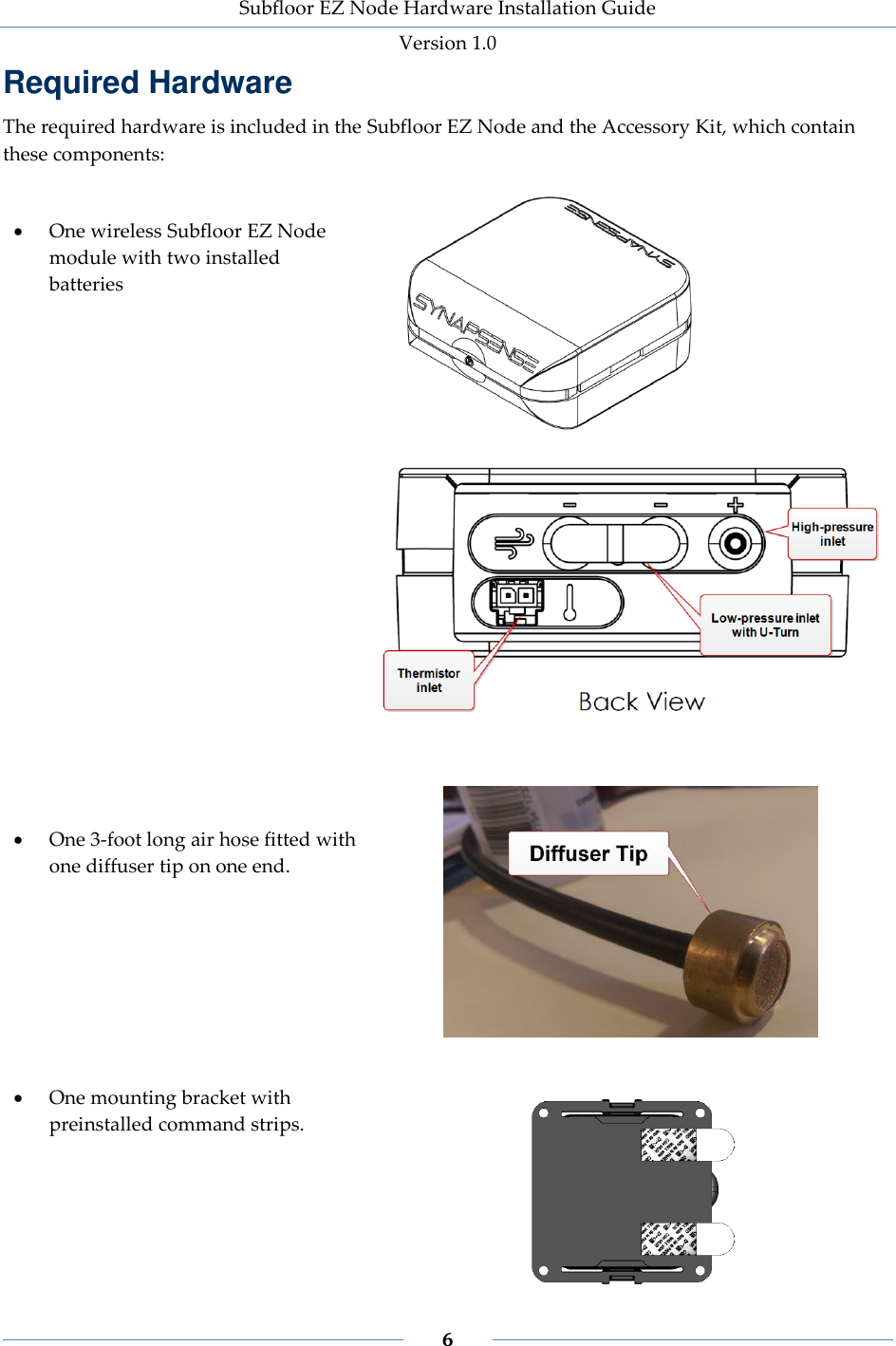
Subfloor EZ Node Hardware Installation Guide Version 1.0   2    Overview The Subfloor EZ Node is a wireless sensor that measures subfloor temperature and pressure differences between the data center room and its subfloor cavities. The Subfloor EZ Node contains:  A high-pressure (positive) barb and a high-pressure air hose fitted with a diffuser, which is placed in the subfloor.  Two low-pressure (negative) barbs connected to each other by a U-turn (a short hose bent in a “U” shape), which allows the node to sense low pressure internal to the unit. If necessary, you can remove the U-turn and attach a hose to the center barb to sense low pressure away from the node.  A thermistor connected to the node via a harness. This allows the node to sense temperature away from the node. Once  installed  and  operational,  the  node  transmits  temperature  and  air  pressure  data  to  the  Web Console. Combined with data  collected from other Subfloor EZ  Nodes located throughout the data center,  operators  use  this  information  to  adjust  fan  speeds  and  relocate  perforated  tiles  to  increase CRAC/CRAH efficiency.  About this Installation Guide This document provides guidelines and instructions for installing SynapSense® Subfloor EZ Nodes to designated service companies or the customer. The intended audience for this document consists of customers or partners of SynapSense Corporation, SynapSense installers, and SynapSense installation teams. SynapSense “Tier 1” training is highly recommended for installation engineers and others who are installing SynapSense hardware or closely involved with the installation of data center optimization equipment.  Document Conventions Table 1 defines the style conventions used throughout this document. Table 1 – Installation Guide Style Conventions Item Description Bold and Blue Used for anything a user types, clicks, presses, or taps, for example, Click OK Note: Exceptions to the rule and other important information will be set off with this note style  Denotes a warning
Subfloor EZ Node Hardware Installation Guide Version 1.0   3    Item Description  Denotes a safety warning of a physical or electrical nature  Document References The documents  listed  in  this  section affect the activities  in  this  document.  Refer  to  the appropriate document for user-specific information.  Web Console™ User Guide  MapSense™ User Guide  Active Control™ User Guide  SynapSense Software Installation Guide Warnings and Precautions The following warnings and precautions pertain to Subfloor EZ Node installations. Failure to adhere to warnings and precautions could result in physical injury or damage to equipment, which may void the warranty.  Warning: Data centers may pose a risk of hearing loss. Use appropriate ear protection prior to entry into high-noise areas.  Warning: When performing subfloor work in a data center, be careful not to stress, crush, pull, or disconnect wiring and hoses running underneath electrical and data cables, leak detectors, etc. (including fire alarm/suppression systems).   Warning:  Subfloor  work  poses  significant  trip/fall  hazards  and  eye  hazards  from airflow-borne  debris.  Eye  protection  must  be worn at all  times  when removing  or replacing floor tiles and when working in or around areas with removed tiles.  Safety Warning: Installation of this equipment must be in accordance with local and national electrical codes.  Safety Warning: This product contains Lithium metal primary cell batteries, which are  NOT  rechargeable.  Recharging  can  cause  battery  leakage  or  cause  the  safety release  vent  to  open.  Inadvertent  charging  can  occur  if  battery  installation  is backwards. Dispose of batteries appropriately after use.   Safety Warning: Lithium metal batteries may pose a fire, explosion, or burn hazard if misused. Do not open batteries, dispose of in fire, heat above 100° C (212° F), expose contents to water, recharge, put in backwards, or mix with used or other battery types as this may cause the batteries to explode or leak and cause personal injury.  Safety Warning:  Lithium metal  batteries must be properly packed and shipped in accordance with transportation standards.
Subfloor EZ Node Hardware Installation Guide Version 1.0   4     Safety  Warning: Do not touch  any  electrical  or computer/server equipment  in  the data  center  without  approval  from  data  center  operators  (including  loose  cables, pushcarts, and terminals).
   5      CHAPTER 2. Getting Started This chapter lists the hardware, software, tools, and additional material requirements for installing Subfloor EZ Nodes. In this chapter:  Required Hardware  Required Software  Required Tools and Materials
Subfloor EZ Node Hardware Installation Guide Version 1.0   6    Required Hardware The required hardware is included in the Subfloor EZ Node and the Accessory Kit, which contain these components:    One wireless Subfloor EZ Node module with two installed batteries       One 3-foot long air hose fitted with one diffuser tip on one end.       One mounting bracket with preinstalled command strips.
Subfloor EZ Node Hardware Installation Guide Version 1.0   7       Cable ties, 24” thermistor harness, mounting bracket (not shown)   PLACE LOW-PRESSURE DIFFUSER IN STILL AIR. Warning: The Subfloor EZ Node contains a low-pressure sensor internal to the unit, but if  a  client  needs  to  have  the  U-turn  hose  replaced  by  an  external  hose,  make  sure  to position the low-pressure diffuser (-) in an area of still air. Rapidly moving air provides incorrect pressure readings. Keep diffuser at least one foot away from server fan airflow, holes in the subfloor, or perforated floor tiles.  PLACE HIGH-PRESSURE DIFFUSER AWAY FROM OBSTRUCTIONS. Warning:  Position  the  high-pressure  (+)  diffuser  away  from  air  turbulence  in  the subfloor cavity (for example, large cable bundles, electrical boxes, wall outside corners, bends or edges, and concrete support columns).  BE CAREFUL WHEN REMOVING HOSES FROM A PRESSURE NODE. Warning: Hose connections on the Subfloor EZ Node are brittle, particularly in subfloor cavities  or  cold  aisles  where  chilled  air  is  present.  See  Replacing  a  Subfloor  EZ  Node Diffuser Hose on page 18 for more information.
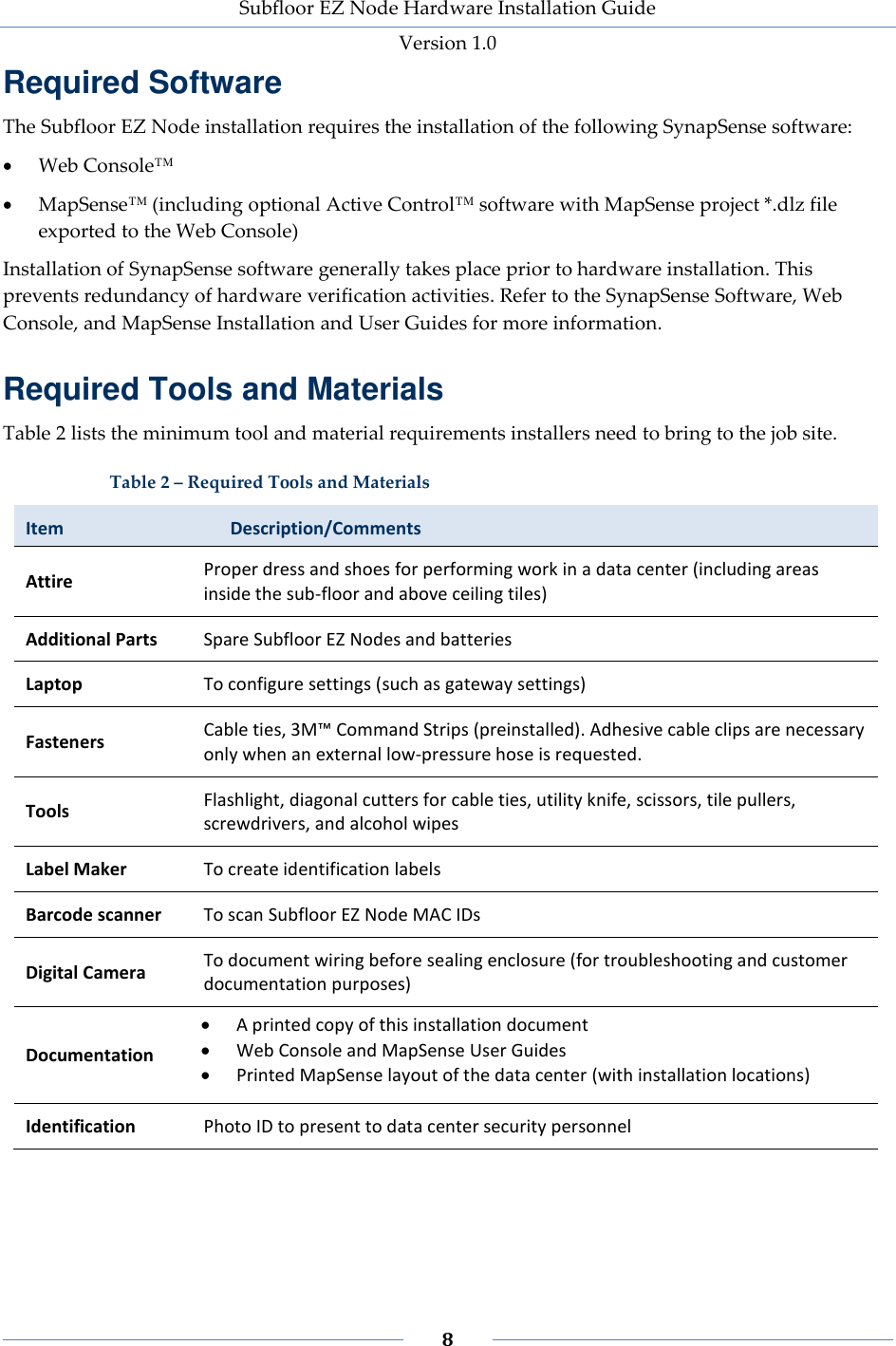
Subfloor EZ Node Hardware Installation Guide Version 1.0   8    Required Software The Subfloor EZ Node installation requires the installation of the following SynapSense software:  Web Console™  MapSense™ (including optional Active Control™ software with MapSense project *.dlz file exported to the Web Console) Installation of SynapSense software generally takes place prior to hardware installation. This prevents redundancy of hardware verification activities. Refer to the SynapSense Software, Web Console, and MapSense Installation and User Guides for more information. Required Tools and Materials Table 2 lists the minimum tool and material requirements installers need to bring to the job site. Table 2 – Required Tools and Materials Item   Description/Comments Attire Proper dress and shoes for performing work in a data center (including areas inside the sub-floor and above ceiling tiles) Additional Parts Spare Subfloor EZ Nodes and batteries Laptop To configure settings (such as gateway settings) Fasteners Cable ties, 3M™ Command Strips (preinstalled). Adhesive cable clips are necessary only when an external low-pressure hose is requested. Tools Flashlight, diagonal cutters for cable ties, utility knife, scissors, tile pullers, screwdrivers, and alcohol wipes Label Maker To create identification labels  Barcode scanner To scan Subfloor EZ Node MAC IDs Digital Camera To document wiring before sealing enclosure (for troubleshooting and customer documentation purposes) Documentation  A printed copy of this installation document  Web Console and MapSense User Guides  Printed MapSense layout of the data center (with installation locations) Identification Photo ID to present to data center security personnel
     CHAPTER 3. Installing Subfloor EZ Nodes This chapter describes general guidelines and specific procedures for installing Subfloor EZ Nodes. In this chapter:  General Installation Guidelines  Installation Process Flow  Preparing to Install the Subfloor EZ Node Hardware  Installing Subfloor EZ Nodes Kits  Validating and Commissioning the Subfloor EZ Node Installation  Inspecting the Installation
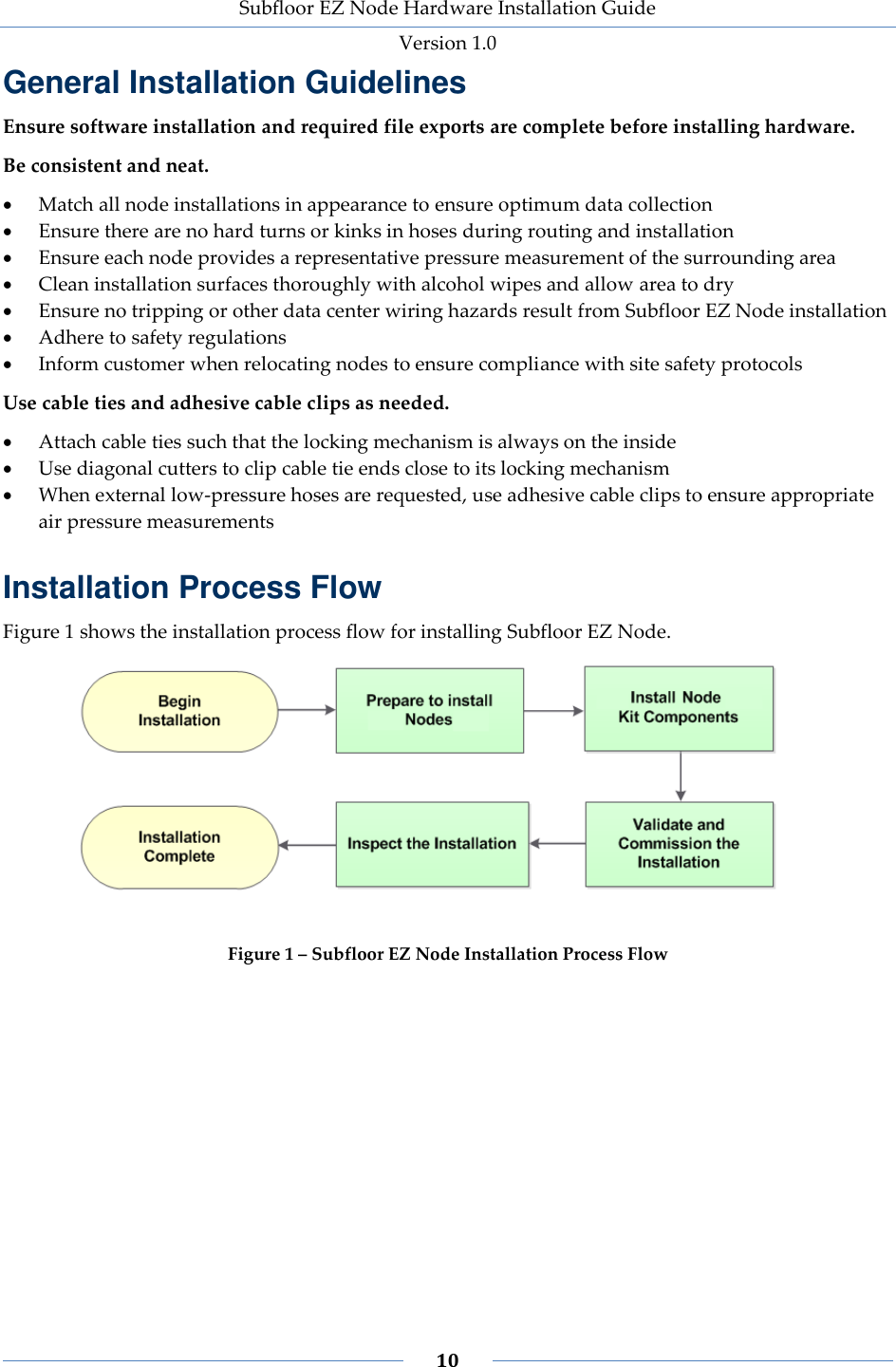
Subfloor EZ Node Hardware Installation Guide Version 1.0   10    General Installation Guidelines Ensure software installation and required file exports are complete before installing hardware. Be consistent and neat.  Match all node installations in appearance to ensure optimum data collection   Ensure there are no hard turns or kinks in hoses during routing and installation  Ensure each node provides a representative pressure measurement of the surrounding area  Clean installation surfaces thoroughly with alcohol wipes and allow area to dry  Ensure no tripping or other data center wiring hazards result from Subfloor EZ Node installation  Adhere to safety regulations  Inform customer when relocating nodes to ensure compliance with site safety protocols Use cable ties and adhesive cable clips as needed.  Attach cable ties such that the locking mechanism is always on the inside  Use diagonal cutters to clip cable tie ends close to its locking mechanism  When external low-pressure hoses are requested, use adhesive cable clips to ensure appropriate air pressure measurements Installation Process Flow Figure 1 shows the installation process flow for installing Subfloor EZ Node.  Figure 1 – Subfloor EZ Node Installation Process Flow
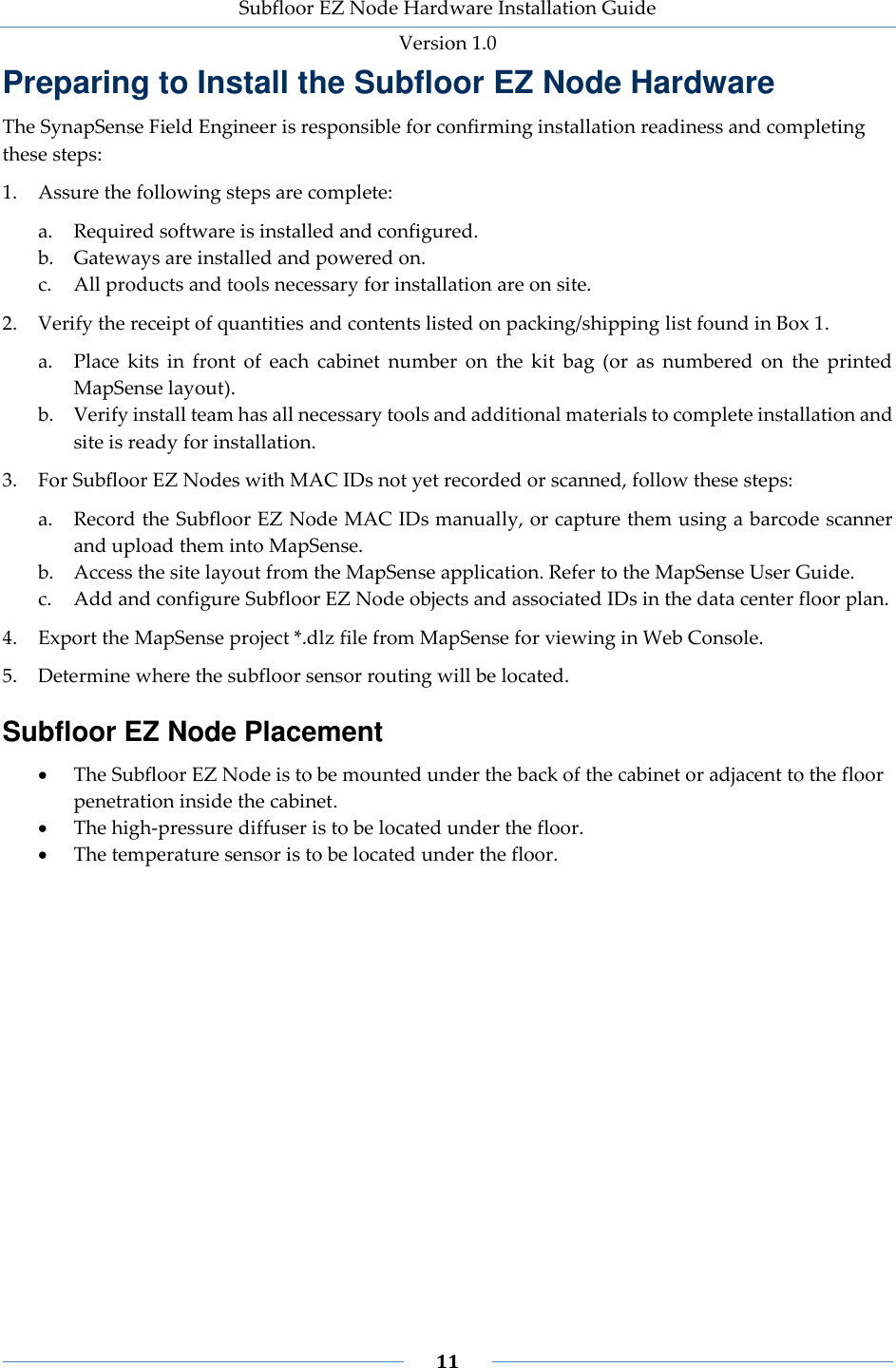
Subfloor EZ Node Hardware Installation Guide Version 1.0   11    Preparing to Install the Subfloor EZ Node Hardware The SynapSense Field Engineer is responsible for confirming installation readiness and completing these steps: 1. Assure the following steps are complete: a. Required software is installed and configured. b. Gateways are installed and powered on. c. All products and tools necessary for installation are on site. 2. Verify the receipt of quantities and contents listed on packing/shipping list found in Box 1. a. Place  kits  in  front  of  each  cabinet  number  on  the  kit  bag  (or  as  numbered  on  the  printed MapSense layout). b. Verify install team has all necessary tools and additional materials to complete installation and site is ready for installation. 3. For Subfloor EZ Nodes with MAC IDs not yet recorded or scanned, follow these steps: a. Record the Subfloor EZ Node MAC IDs manually, or capture them using a barcode scanner and upload them into MapSense. b. Access the site layout from the MapSense application. Refer to the MapSense User Guide. c. Add and configure Subfloor EZ Node objects and associated IDs in the data center floor plan.  4. Export the MapSense project *.dlz file from MapSense for viewing in Web Console. 5. Determine where the subfloor sensor routing will be located. Subfloor EZ Node Placement  The Subfloor EZ Node is to be mounted under the back of the cabinet or adjacent to the floor penetration inside the cabinet.  The high-pressure diffuser is to be located under the floor.  The temperature sensor is to be located under the floor.
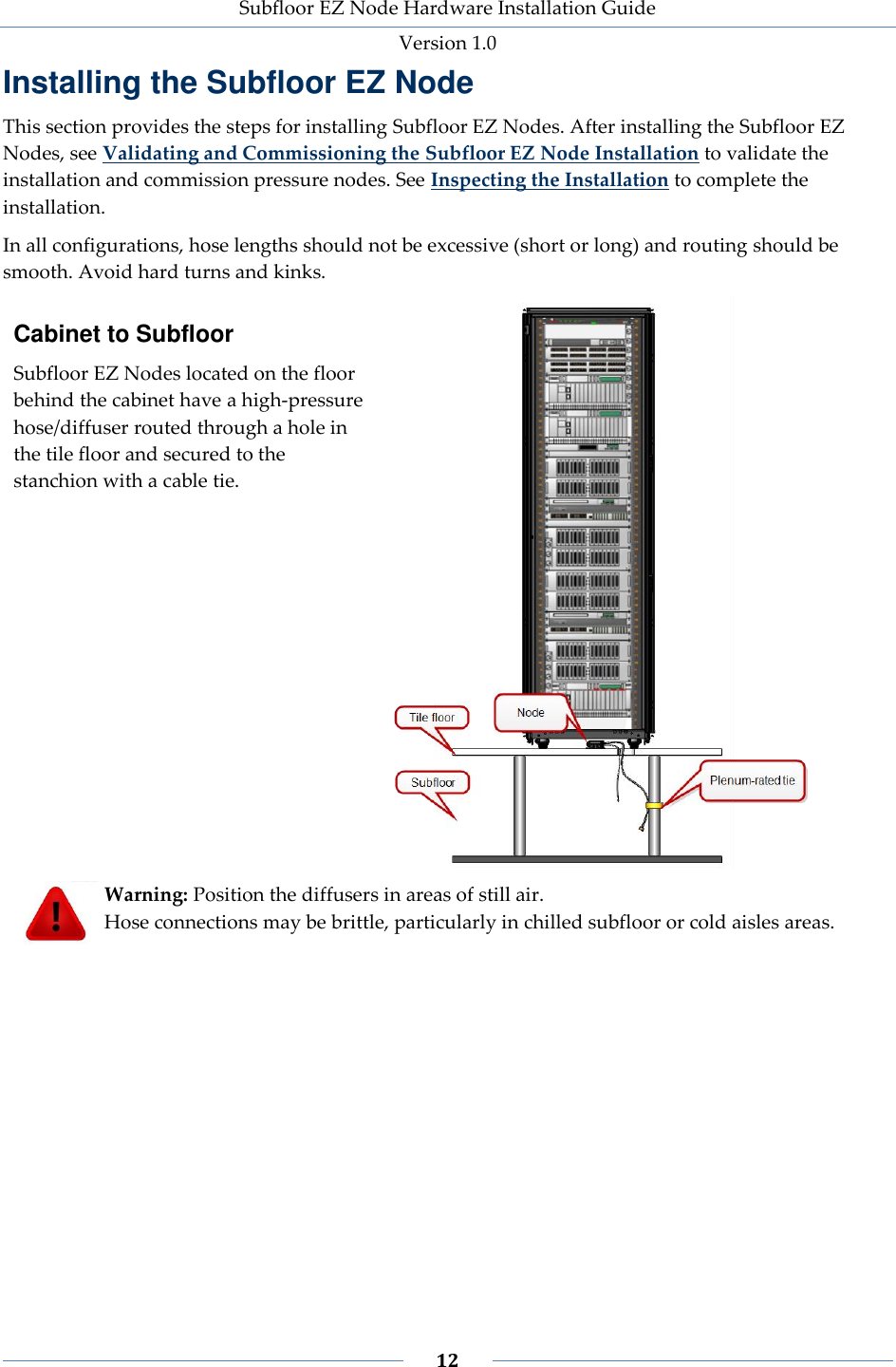
Subfloor EZ Node Hardware Installation Guide Version 1.0   12    Installing the Subfloor EZ Node This section provides the steps for installing Subfloor EZ Nodes. After installing the Subfloor EZ Nodes, see Validating and Commissioning the Subfloor EZ Node Installation to validate the installation and commission pressure nodes. See Inspecting the Installation to complete the installation.   In all configurations, hose lengths should not be excessive (short or long) and routing should be smooth. Avoid hard turns and kinks. Cabinet to Subfloor  Subfloor EZ Nodes located on the floor behind the cabinet have a high-pressure hose/diffuser routed through a hole in the tile floor and secured to the stanchion with a cable tie.   Warning: Position the diffusers in areas of still air.  Hose connections may be brittle, particularly in chilled subfloor or cold aisles areas.
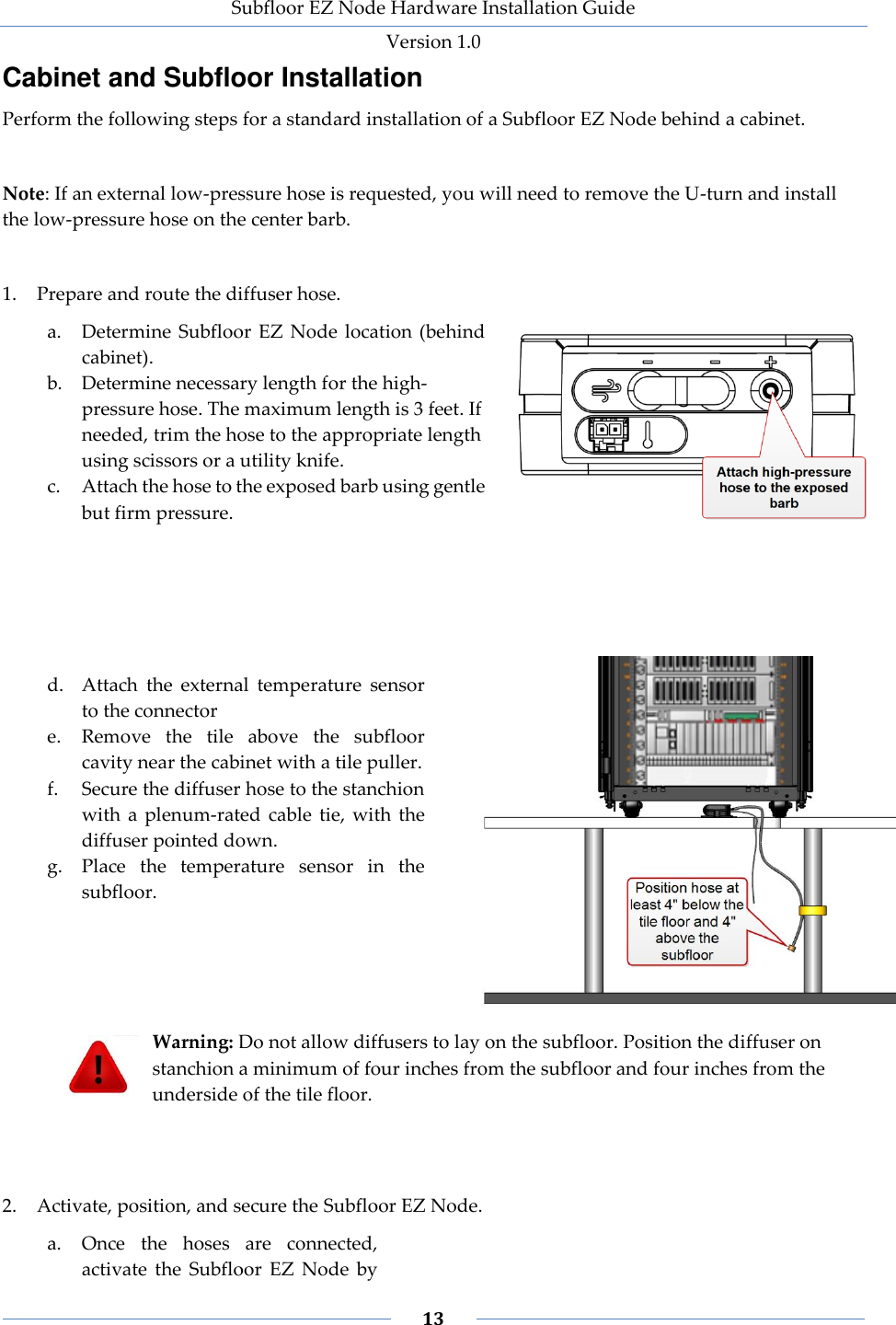
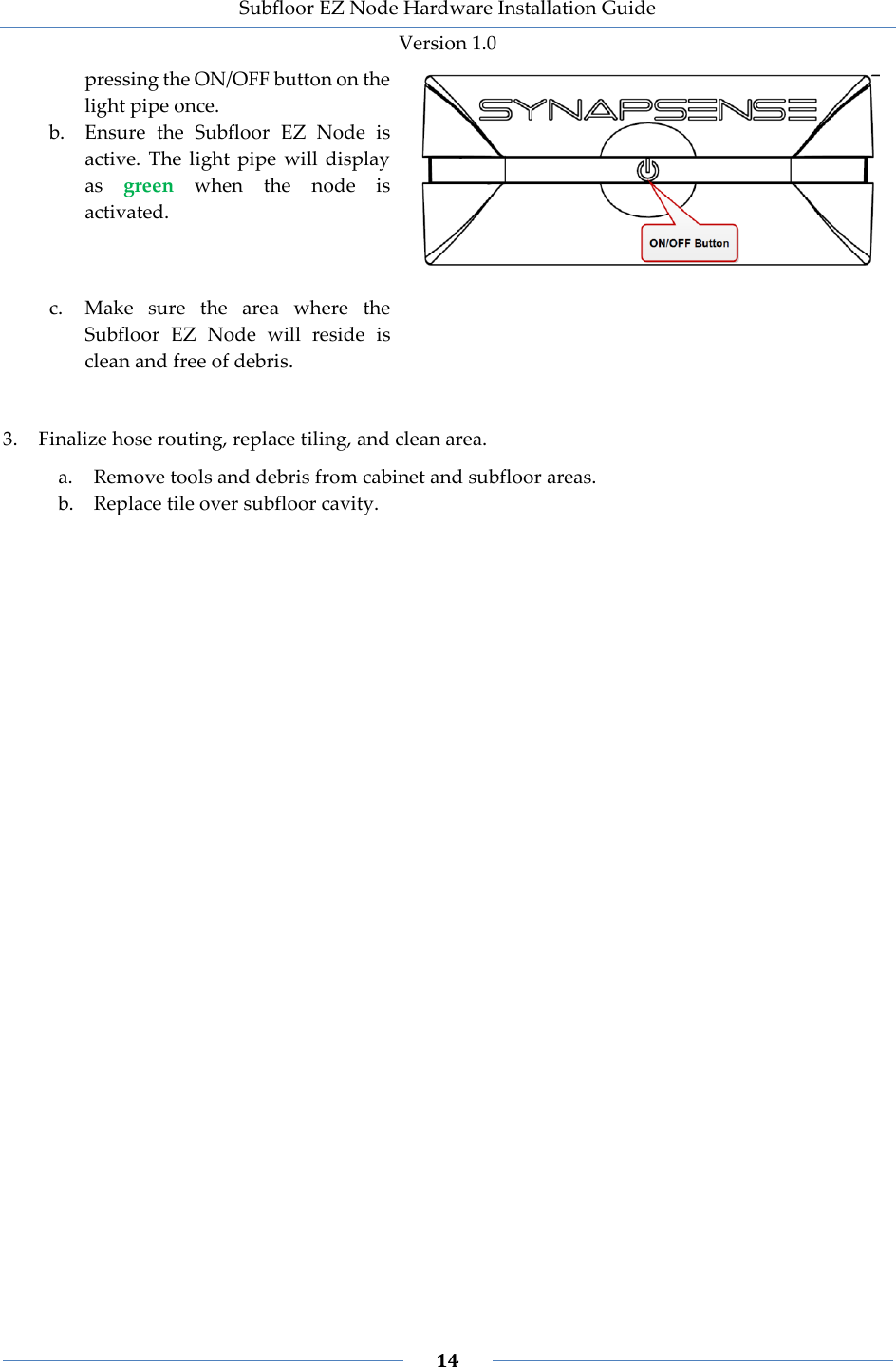
Subfloor EZ Node Hardware Installation Guide Version 1.0   13    Cabinet and Subfloor Installation Perform the following steps for a standard installation of a Subfloor EZ Node behind a cabinet.  Note: If an external low-pressure hose is requested, you will need to remove the U-turn and install the low-pressure hose on the center barb.  1. Prepare and route the diffuser hose. a. Determine  Subfloor  EZ  Node  location (behind cabinet). b. Determine necessary length for the high-pressure hose. The maximum length is 3 feet. If needed, trim the hose to the appropriate length using scissors or a utility knife.  c. Attach the hose to the exposed barb using gentle but firm pressure.      d. Attach  the  external  temperature  sensor to the connector e. Remove  the  tile  above  the  subfloor cavity near the cabinet with a tile puller.  f. Secure the diffuser hose to the stanchion with  a  plenum-rated  cable  tie,  with  the diffuser pointed down. g. Place  the  temperature  sensor  in  the subfloor.      Warning: Do not allow diffusers to lay on the subfloor. Position the diffuser on stanchion a minimum of four inches from the subfloor and four inches from the underside of the tile floor.    2. Activate, position, and secure the Subfloor EZ Node. a. Once  the  hoses  are  connected, activate  the  Subfloor  EZ  Node  by
Subfloor EZ Node Hardware Installation Guide Version 1.0   14    pressing the ON/OFF button on the light pipe once. b. Ensure  the  Subfloor  EZ  Node  is active.  The  light  pipe  will display as  green  when  the  node  is activated.  c. Make  sure  the  area  where  the Subfloor  EZ  Node  will  reside  is clean and free of debris.    3. Finalize hose routing, replace tiling, and clean area. a. Remove tools and debris from cabinet and subfloor areas. b. Replace tile over subfloor cavity.
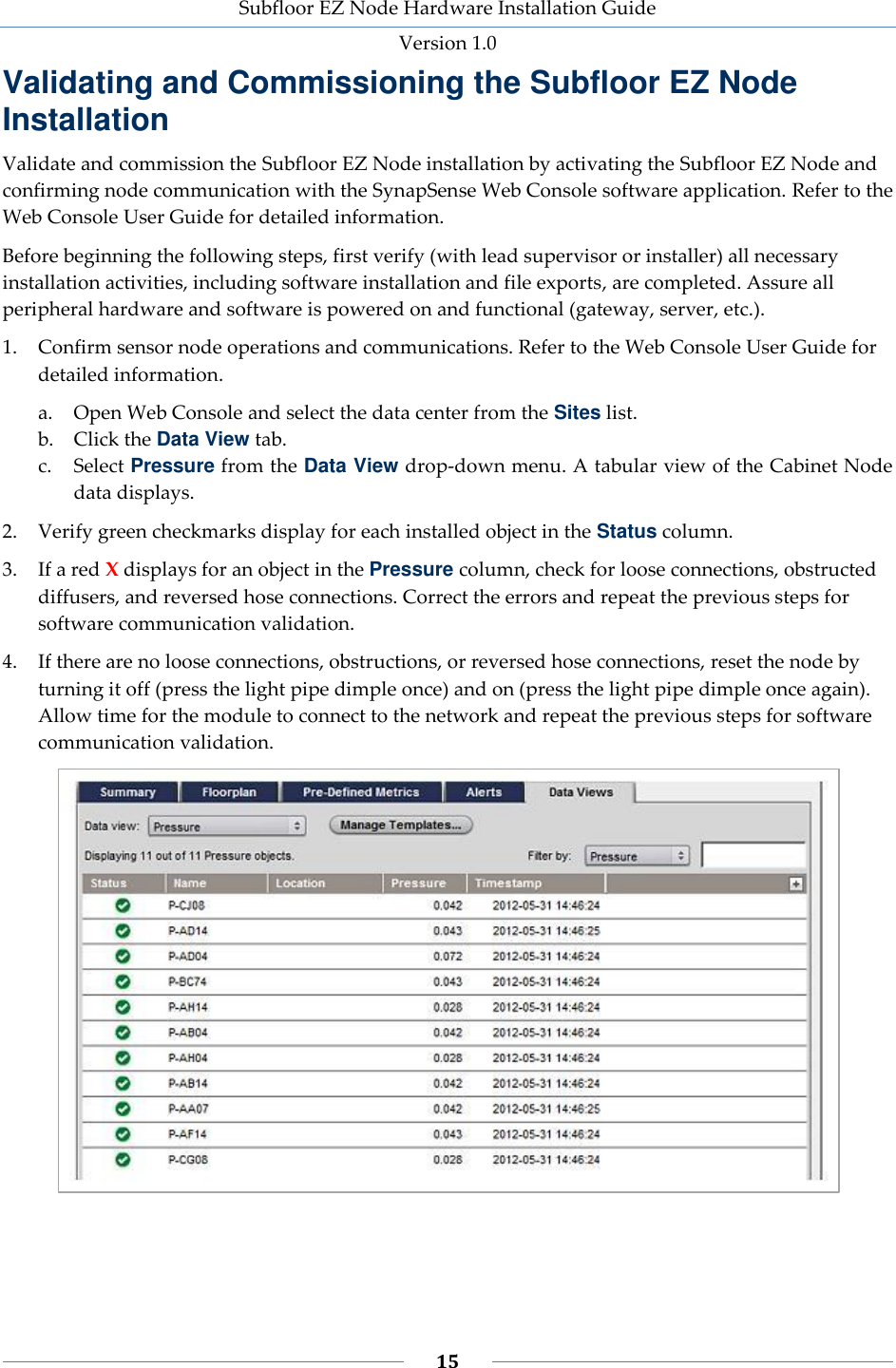
Subfloor EZ Node Hardware Installation Guide Version 1.0   15    Validating and Commissioning the Subfloor EZ Node Installation Validate and commission the Subfloor EZ Node installation by activating the Subfloor EZ Node and confirming node communication with the SynapSense Web Console software application. Refer to the Web Console User Guide for detailed information. Before beginning the following steps, first verify (with lead supervisor or installer) all necessary installation activities, including software installation and file exports, are completed. Assure all peripheral hardware and software is powered on and functional (gateway, server, etc.). 1. Confirm sensor node operations and communications. Refer to the Web Console User Guide for detailed information. a. Open Web Console and select the data center from the Sites list. b. Click the Data View tab. c. Select Pressure from the Data View drop-down menu. A tabular view of the Cabinet Node data displays. 2. Verify green checkmarks display for each installed object in the Status column.  3. If a red X displays for an object in the Pressure column, check for loose connections, obstructed diffusers, and reversed hose connections. Correct the errors and repeat the previous steps for software communication validation.  4. If there are no loose connections, obstructions, or reversed hose connections, reset the node by turning it off (press the light pipe dimple once) and on (press the light pipe dimple once again). Allow time for the module to connect to the network and repeat the previous steps for software communication validation.
Subfloor EZ Node Hardware Installation Guide Version 1.0   16    Subfloor EZ Node LED Status Lights A light pipe located on the front of the Subfloor EZ Node provides a means to turn the unit on and off and to provide status.   To power the unit on, push and hold the button for more than 1 second. The light pipe toggles between white and magenta. As the unit is connecting to the network, the light pipe will display as follows:  When the unit is looking for the network, it blinks red every 2 seconds.  When the unit is time synchronizing, it blinks green every 2 seconds.  When the unit is joining the network and performing a security handshake, it blinks  yellow every 2 seconds. When the unit is in the on state, press the button quickly to display the status on the LED lights.  When green displays for 3 seconds, the unit is connected to the network and is reporting.  When cyan displays for 3 seconds, the unit is in sleep mode. Push and hold of the button for more than 1 second (but less than 3 seconds) to reset the unit. The light pipe will display as blue while you press the button. Push and a hold for more than 3 seconds to turn the unit off. The light pipe will toggle between magenta and blue five times as the unit powers off.
Subfloor EZ Node Hardware Installation Guide Version 1.0   17    Inspecting the Installation Inspect the installation to ensure appropriate sensor placement and a clean installation area.  1. Verify sensor placement.  All node and diffuser installations are positioned consistently  Diffuser placement in the subfloor   Cable ties and clips do not interfere with fans or bind or rub against surfaces 2. Clear the installation area.  Remove all debris and tools from the data center floor  Replace all floor tiles and close all cabinet doors  Properly discard all packaging, snipped cable tie ends, etc.
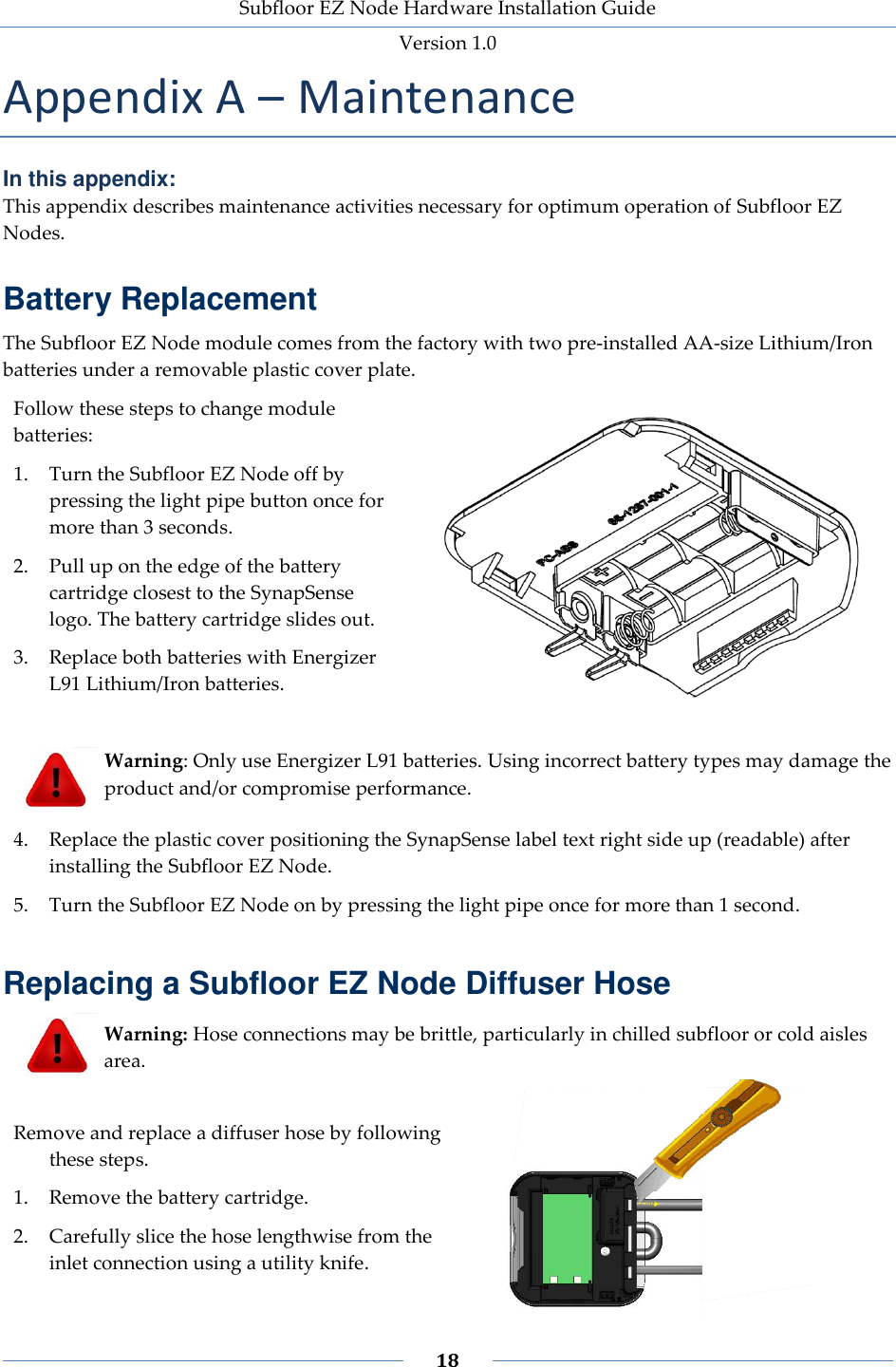
Subfloor EZ Node Hardware Installation Guide Version 1.0   18    Appendix A – Maintenance In this appendix: This appendix describes maintenance activities necessary for optimum operation of Subfloor EZ Nodes. Battery Replacement The Subfloor EZ Node module comes from the factory with two pre-installed AA-size Lithium/Iron batteries under a removable plastic cover plate. Follow these steps to change module batteries: 1. Turn the Subfloor EZ Node off by pressing the light pipe button once for more than 3 seconds.  2. Pull up on the edge of the battery cartridge closest to the SynapSense logo. The battery cartridge slides out.  3. Replace both batteries with Energizer L91 Lithium/Iron batteries.     Warning: Only use Energizer L91 batteries. Using incorrect battery types may damage the product and/or compromise performance. 4. Replace the plastic cover positioning the SynapSense label text right side up (readable) after installing the Subfloor EZ Node.  5. Turn the Subfloor EZ Node on by pressing the light pipe once for more than 1 second.  Replacing a Subfloor EZ Node Diffuser Hose  Warning: Hose connections may be brittle, particularly in chilled subfloor or cold aisles area.  Remove and replace a diffuser hose by following these steps. 1. Remove the battery cartridge. 2. Carefully slice the hose lengthwise from the inlet connection using a utility knife.
Subfloor EZ Node Hardware Installation Guide Version 1.0   19    3. Peel and remove the hose from the inlet connection. 4. Clean any debris from the inlet. 5. Attach new diffuser hose.
Subfloor EZ Node Hardware Installation Guide Version 1.0   20    Appendix B – Technical Support and Return Material Authorization This appendix describes how to contact Technical Support, open a Technical Support Case, and receive a Return Material Authorization (RMA) to return a SynapSense product for replacement. Not all problems will result in a RMA. Technical Support For all technical support issues, contact SynapSense Technical Support: Tel: (916) 294-0110, option 2 Email: support@SynapSense.com  Web: http://www.SynapSense.com Opening a Technical Support Case Follow these steps to open a Technical Support Case 1. Search the SynapSense Knowledge Base at  http://www.synapsense.com/  (click Support Login at the top of the page). a. Login using your email and password.  b. Search the knowledgebase for the symptom. If the knowledgebase solution does not resolve the issue, enter a Technical Support Case. 2. Describe the following information: a. Symptoms or how to reproduce the problem. b. Damage to the product, such as dropping or exposure to condensing humidity. c. Attempted measures to resolve the problem. d. How long has it been in service? Include all information regarding the device history:  “Dead” on arrival?  Failed upon initial installation?  Failed after initial install, but nothing changed with the unit.  Failed upon some subsequent action (moved, redeployed, SMOTA, etc.). e. Part number (underside of most nodes). f. Serial number (underside of most nodes), typically beginning with PR or AM. g. MAC ID (on the exposed barcode label). h. Quantity. Return Material Authorization SynapSense products carry a one year warranty from date of purchase and have a low failure rate and most  customer  inquiries  result  in  a  solution  without  returning  the  product.  It  is  important  to SynapSense to provide a high quality product; therefore, all failures are taken seriously and we ask that all damaged or non-functional products be returned for root cause analysis. When it is necessary to return a damaged or defective product, a Return Material Authorization (RMA) is  required.  Returns  are  only  accepted  with  an accompanying RMA number issued  by SynapSense Technical Support.
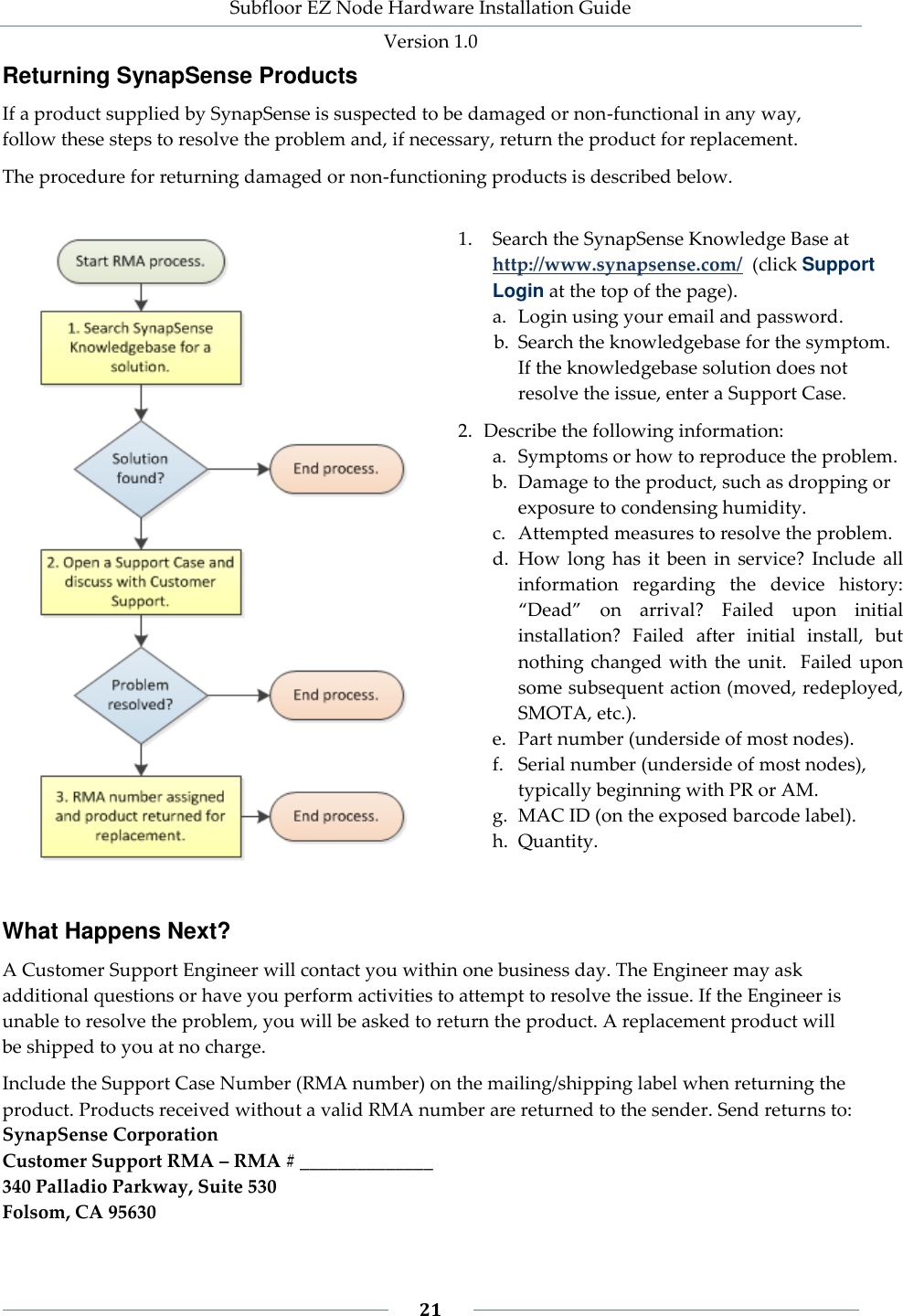
Subfloor EZ Node Hardware Installation Guide Version 1.0   21    Returning SynapSense Products If a product supplied by SynapSense is suspected to be damaged or non-functional in any way, follow these steps to resolve the problem and, if necessary, return the product for replacement.  The procedure for returning damaged or non-functioning products is described below.   1. Search the SynapSense Knowledge Base at  http://www.synapsense.com/  (click Support Login at the top of the page). a. Login using your email and password.  b. Search the knowledgebase for the symptom.  If the knowledgebase solution does not resolve the issue, enter a Support Case. 2. Describe the following information: a. Symptoms or how to reproduce the problem. b. Damage to the product, such as dropping or exposure to condensing humidity. c. Attempted measures to resolve the problem. d. How  long  has it  been  in  service?  Include  all information  regarding  the  device  history:  “Dead”  on  arrival?  Failed  upon  initial installation?  Failed  after  initial  install,  but nothing changed with the  unit.   Failed upon some subsequent action (moved, redeployed, SMOTA, etc.). e. Part number (underside of most nodes). f. Serial number (underside of most nodes), typically beginning with PR or AM. g. MAC ID (on the exposed barcode label). h. Quantity. What Happens Next? A Customer Support Engineer will contact you within one business day. The Engineer may ask additional questions or have you perform activities to attempt to resolve the issue. If the Engineer is unable to resolve the problem, you will be asked to return the product. A replacement product will be shipped to you at no charge. Include the Support Case Number (RMA number) on the mailing/shipping label when returning the product. Products received without a valid RMA number are returned to the sender. Send returns to: SynapSense Corporation Customer Support RMA – RMA # ______________ 340 Palladio Parkway, Suite 530 Folsom, CA 95630

Navigation menu