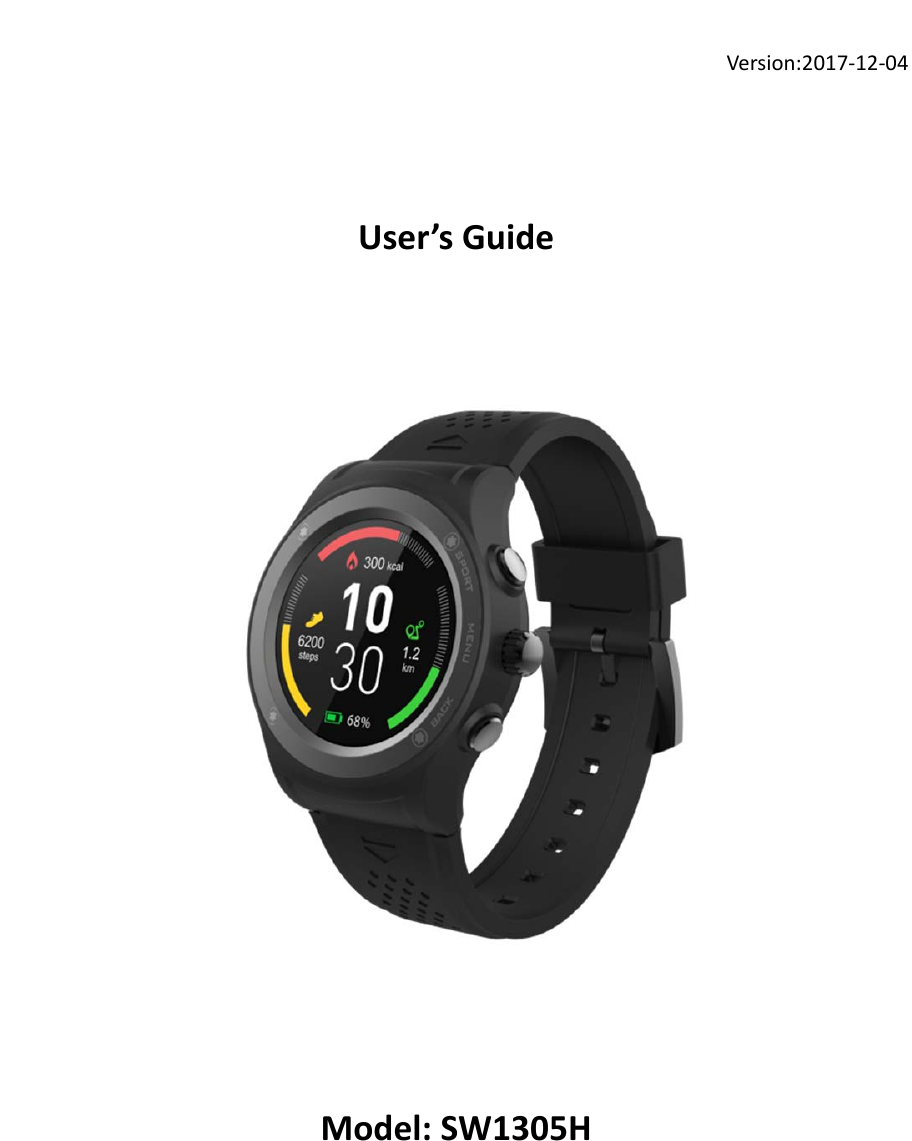
Synergy Technologies SW1305H Smart Watch User Manual

Synergy Technologies Limited Smart Watch

User Manual

Version:2017‐12‐04User’sGuideModel:SW1305H
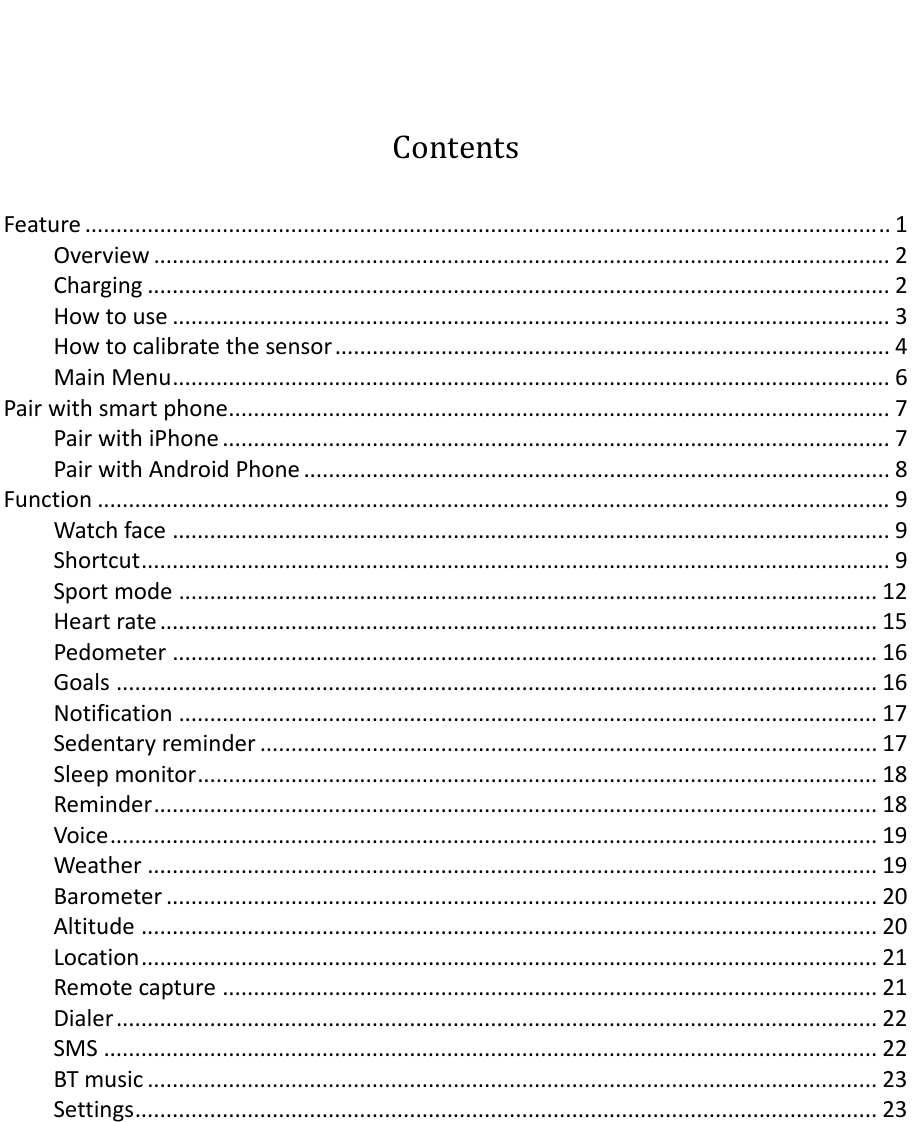
ContentsFeature.................................................................................................................................1Overview......................................................................................................................2Charging.......................................................................................................................2Howtouse...................................................................................................................3Howtocalibratethesensor.........................................................................................4MainMenu...................................................................................................................6Pairwithsmartphone..........................................................................................................7PairwithiPhone...........................................................................................................7PairwithAndroidPhone..............................................................................................8Function...............................................................................................................................9Watchface...................................................................................................................9Shortcut........................................................................................................................9Sportmode................................................................................................................12Heartrate...................................................................................................................15Pedometer.................................................................................................................16Goals..........................................................................................................................16Notification................................................................................................................17Sedentaryreminder...................................................................................................17Sleepmonitor.............................................................................................................18Reminder....................................................................................................................18Voice...........................................................................................................................19Weather.....................................................................................................................19Barometer..................................................................................................................20Altitude......................................................................................................................20Location......................................................................................................................21Remotecapture.........................................................................................................21Dialer..........................................................................................................................22SMS............................................................................................................................22BTmusic.....................................................................................................................23Settings.......................................................................................................................23
1Feature 1.3‐inchIPSfullscreendisplay Multi‐SportMode(Running,Walking,Hiking,Biking,IndoorRun&TrailRun) Trackyoursportperformance ProvidecomprehensiveGPSlocation DigitalCrownintegrated,rotateittochangethemenueasily Built‐inHRsensor,monitoryourheartrateandsetyourheartratezone Built‐inaltimeter,barometer&temperature Monitoryourdailyactivityandsleep Built‐insedentaryreminder Synchronizephonebook,answerorrejectcallsfromyourwrist DisplaySMS,emails,calendareventsandsocialmediaactivity Smartwake‐up,raiseorshakeyourarmtowakeupthedevice Remotecontrolmusicplayback,remotecapturephotoonyourSmartphone Built‐inloudspeakerandMicrophone Built‐in350mAhLi‐polybattery,upto5‐7daysstandbytime/9hoursonGPSmode FullycompatiblewithiOS7oraboveandAndroid4.4orabove Differentdesignstylesforyourdifferentoccasionsandpreferences
2Overview  SmartWatch1. MIC2. Barometersensor3. Touchscreen4. ShortcutkeyforSportmode5. Digitalcrown6. Powerbutton7. Speaker8. Heartratesensor9. POGO‐PinChargingterminalsPOGO‐PinCharger10. POGO‐Pin11. Micro‐USBportCharging IfyouuseaPowerAdaptor(Notincluded),PowerAdaptorcurrentis:5V,500mA. Ittakes2‐hourstofullychargethesmartwatch,pleasefollowstepsbelowtocharge.1.Putthechargingcradlebeneaththewatch.MakesurethePOGO‐pinsonthecradlefitcorrectlyontothechargingterminalsonthebackofsmartwatch.2.ConnectthechargingcradlewiththeUSBcable3.PlugthebigendoftheUSBcabletoapowersource
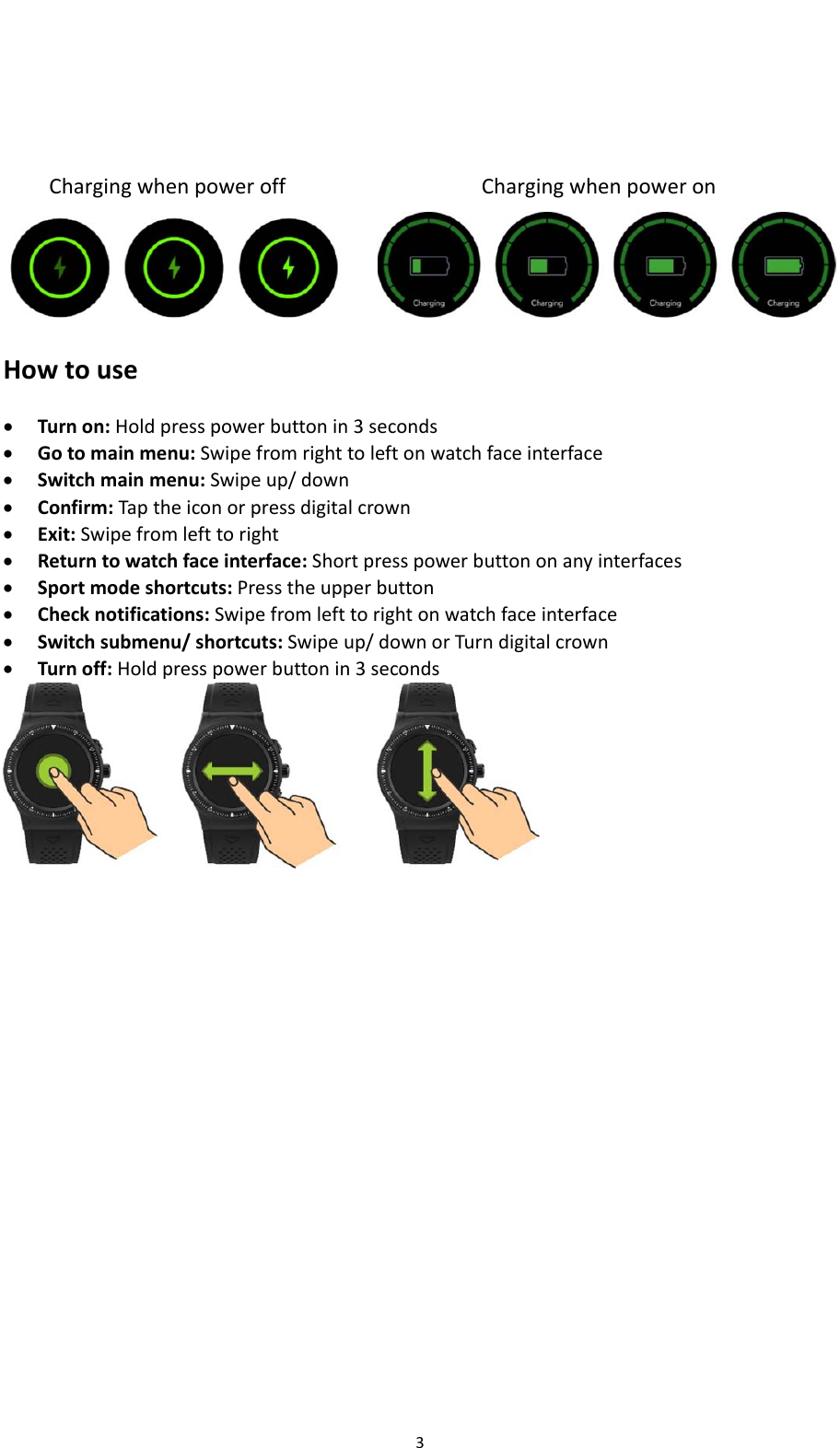
3ChargingwhenpoweroffChargingwhenpoweron Howtouse Turnon:Holdpresspowerbuttonin3seconds Gotomainmenu:Swipefromrighttoleftonwatchfaceinterface Switchmainmenu:Swipeup/down Confirm:Taptheiconorpressdigitalcrown Exit:Swipefromlefttoright Returntowatchfaceinterface:Shortpresspowerbuttononanyinterfaces Sportmodeshortcuts:Presstheupperbutton Checknotifications:Swipefromlefttorightonwatchfaceinterface Switchsubmenu/shortcuts:Swipeup/downorTurndigitalcrown Turnoff:Holdpresspowerbuttonin3seconds
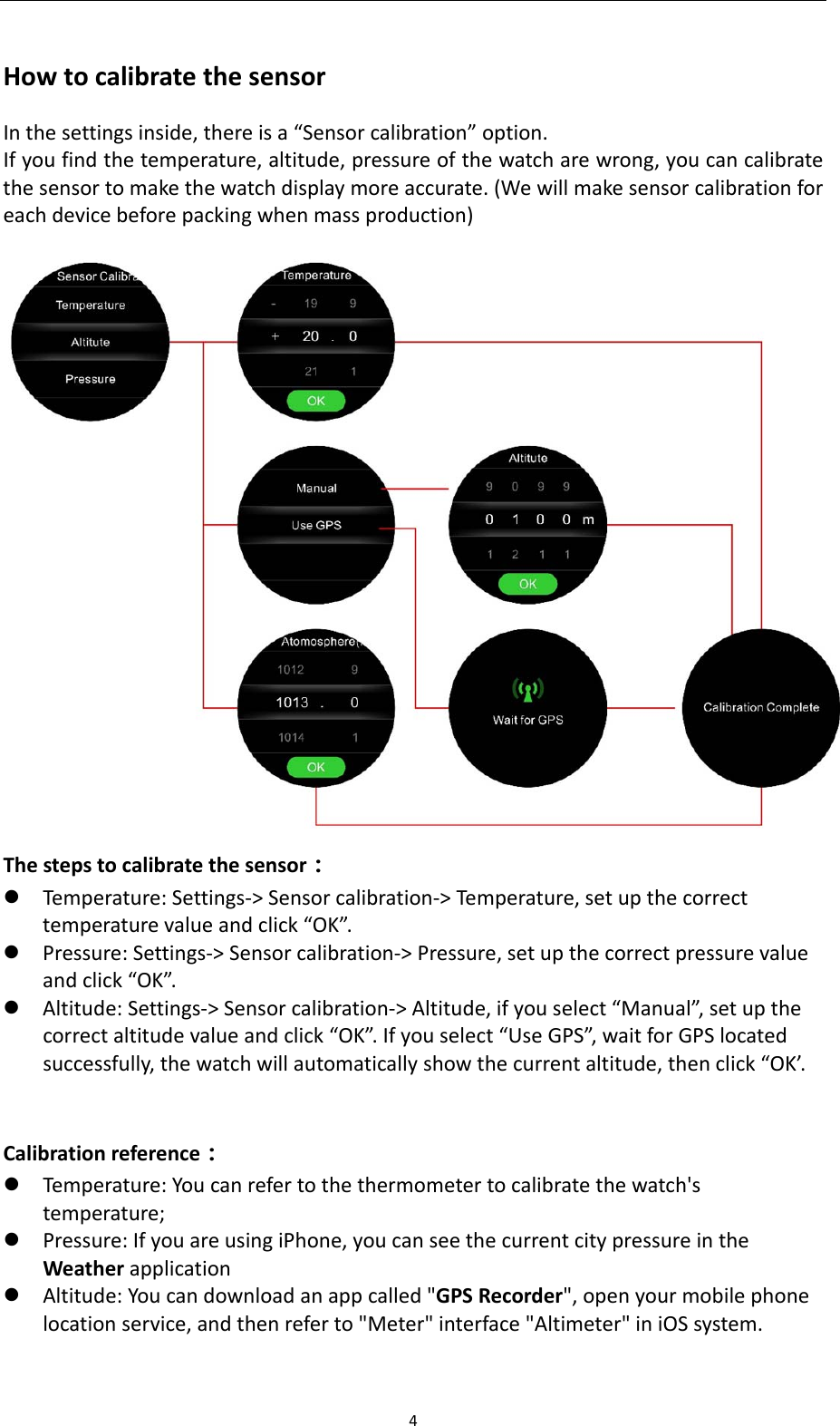
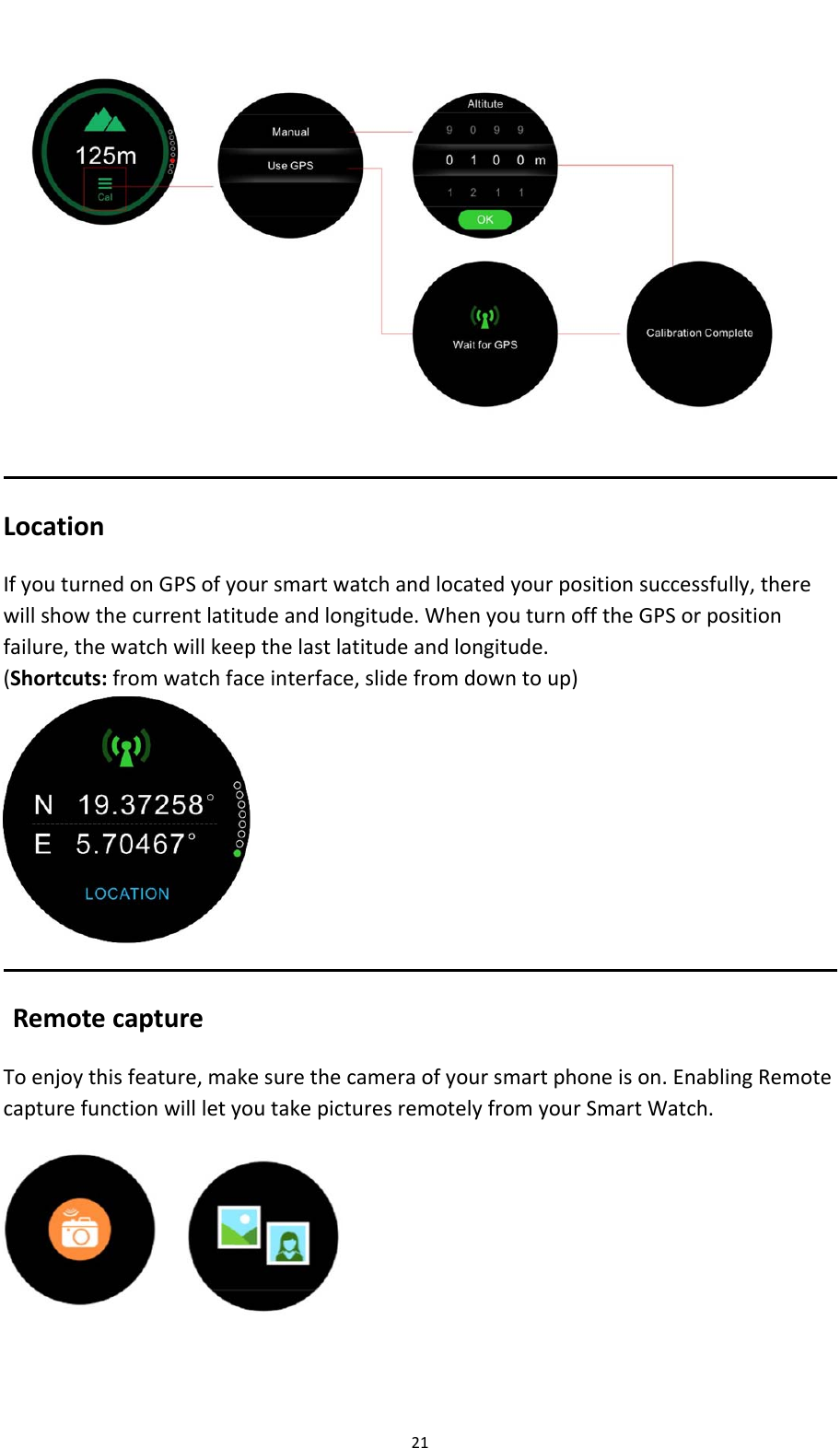
4HowtocalibratethesensorInthesettingsinside,thereisa“Sensorcalibration”option.Ifyoufindthetemperature,altitude,pressureofthewatcharewrong,youcancalibratethesensortomakethewatchdisplaymoreaccurate.(Wewillmakesensorcalibrationforeachdevicebeforepackingwhenmassproduction) Thestepstocalibratethesensor: Temperature:Settings‐>Sensorcalibration‐>Temperature,setupthecorrecttemperaturevalueandclick“OK”. Pressure:Settings‐>Sensorcalibration‐>Pressure,setupthecorrectpressurevalueandclick“OK”. Altitude:Settings‐>Sensorcalibration‐>Altitude,ifyouselect“Manual”,setupthecorrectaltitudevalueandclick“OK”.Ifyouselect“UseGPS”,waitforGPSlocatedsuccessfully,thewatchwillautomaticallyshowthecurrentaltitude,thenclick“OK’.Calibrationreference: Temperature:Youcanrefertothethermometertocalibratethewatch'stemperature; Pressure:IfyouareusingiPhone,youcanseethecurrentcitypressureintheWeatherapplication Altitude:Youcandownloadanappcalled"GPSRecorder",openyourmobilephonelocationservice,andthenreferto"Meter"interface"Altimeter"iniOSsystem.
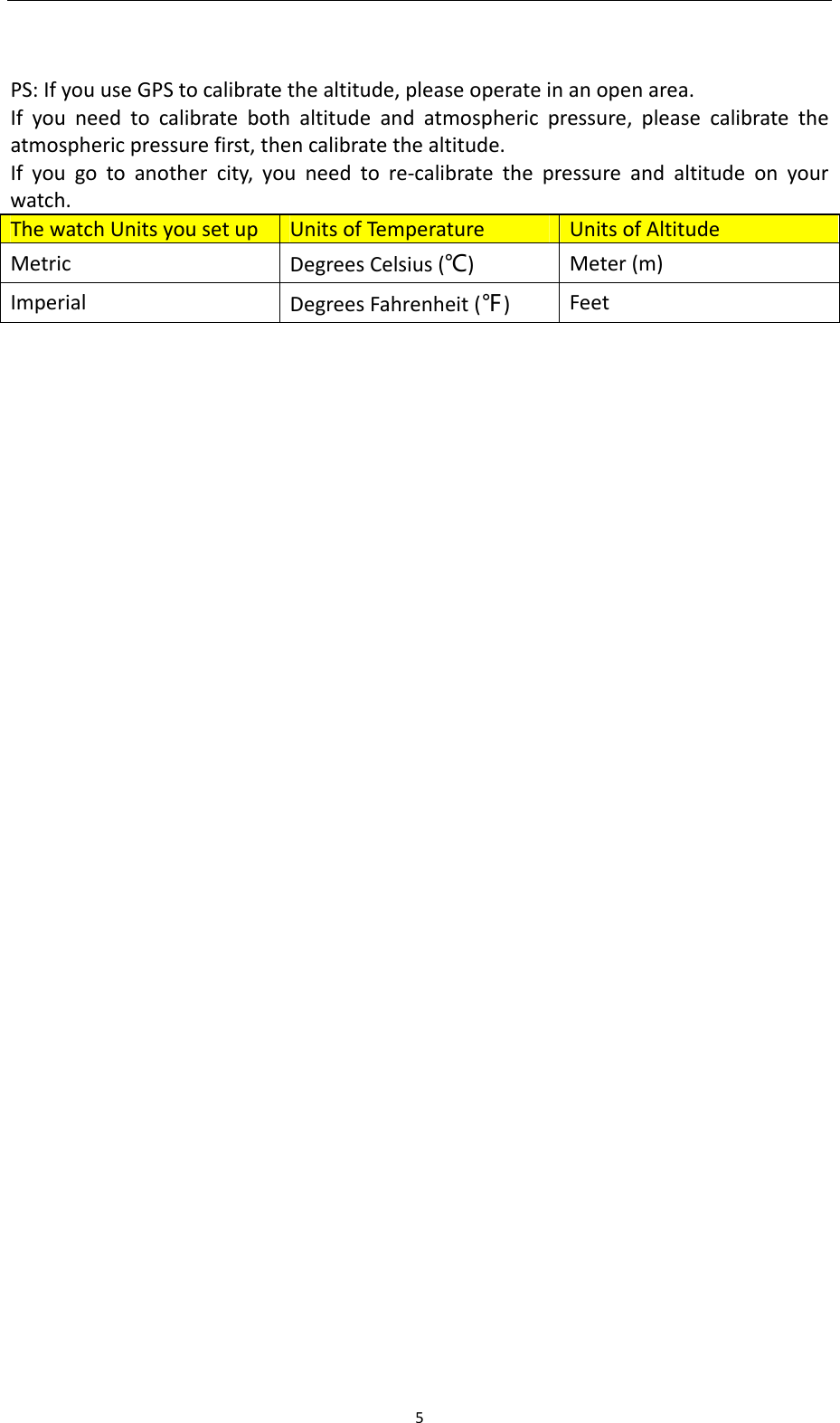
5 PS:IfyouuseGPStocalibratethealtitude,pleaseoperateinanopenarea.Ifyouneedtocalibratebothaltitudeandatmosphericpressure,pleasecalibratetheatmosphericpressurefirst,thencalibratethealtitude.Ifyougotoanothercity,youneedtore‐calibratethepressureandaltitudeonyourwatch.ThewatchUnitsyousetupUnitsofTempe ratureUnitsofAltitudeMetricDegreesCelsius(℃)Meter(m)ImperialDegreesFahrenheit(℉)Feet
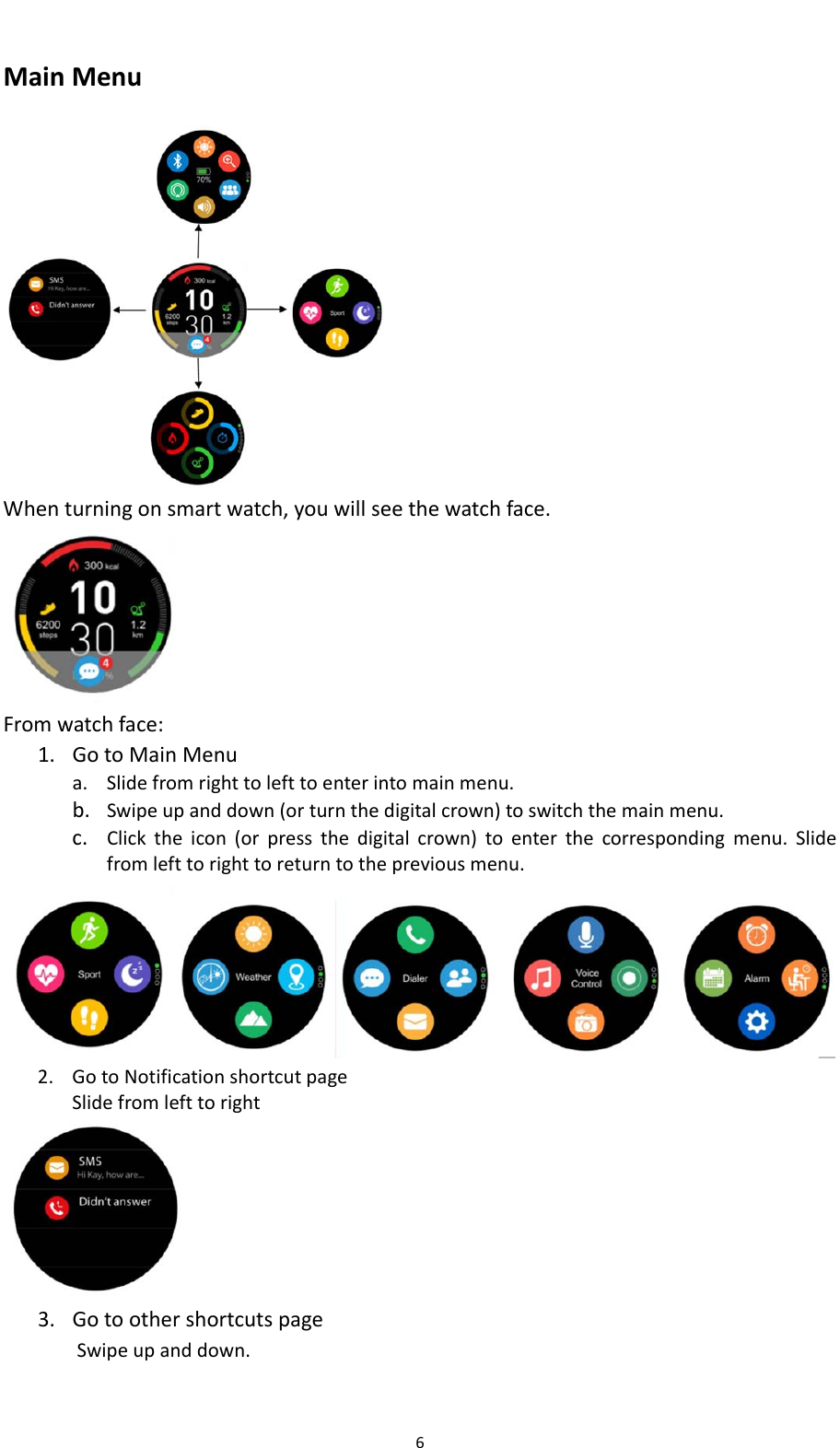
6MainMenu Whenturningonsmartwatch,youwillseethewatchface. Fromwatchface:1. GotoMainMenua. Slidefromrighttolefttoenterintomainmenu.b. Swipeupanddown(orturnthedigitalcrown)toswitchthemainmenu.c. Clicktheicon(orpressthedigitalcrown)toenterthecorrespondingmenu.Slidefromlefttorighttoreturntothepreviousmenu.2. GotoNotificationshortcutpageSlidefromlefttoright 3. GotoothershortcutspageSwipeupanddown.
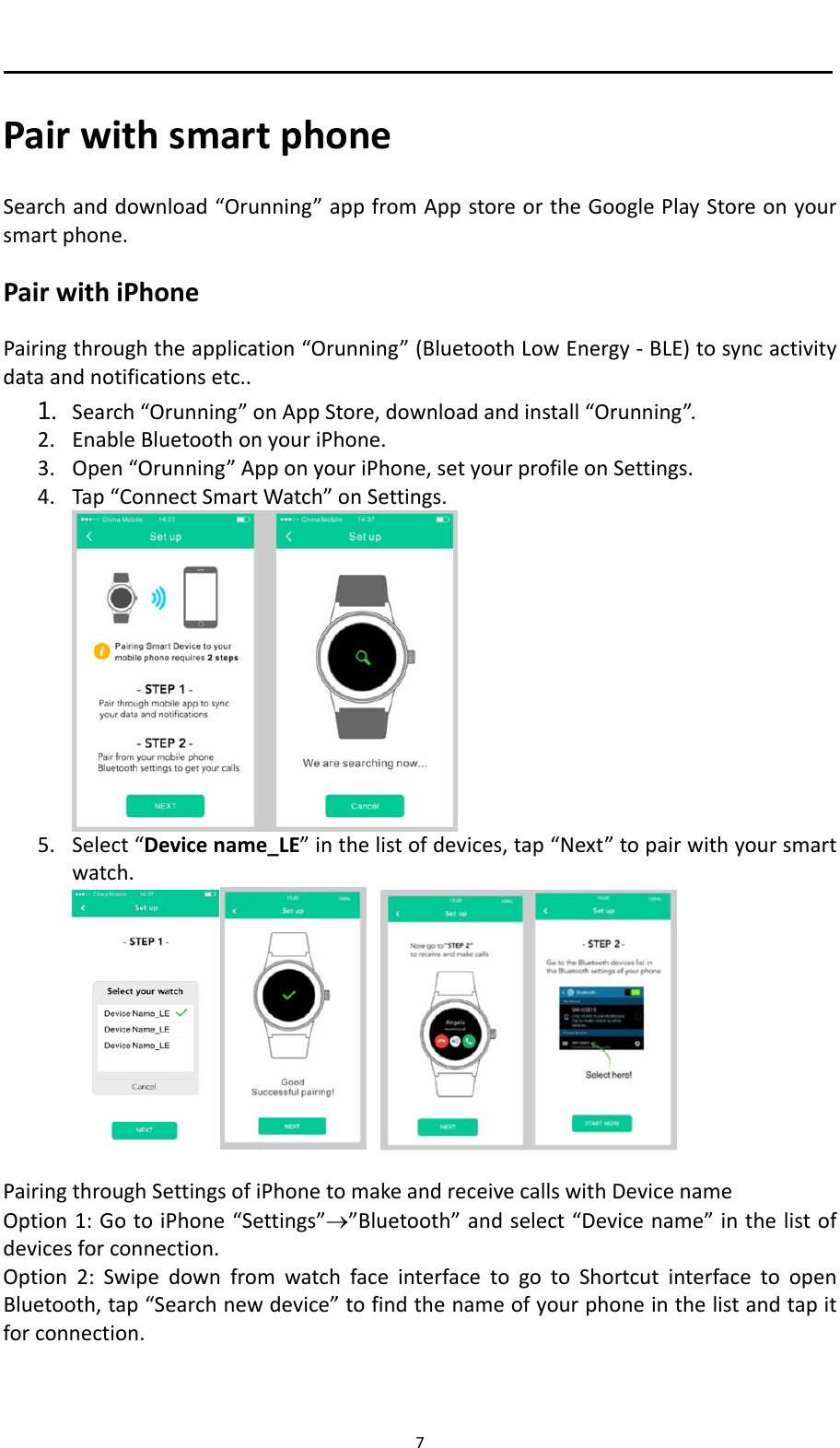
7 PairwithsmartphoneSearchanddownload“Orunning”appfromAppstoreortheGooglePlayStoreonyoursmartphone.PairwithiPhonePairingthroughtheapplication“Orunning”(BluetoothLowEnergy‐BLE)tosyncactivitydataandnotificationsetc..1. Search“Orunning”onAppStore,downloadandinstall“Orunning”.2. EnableBluetoothonyouriPhone.3. Open“Orunning”ApponyouriPhone,setyourprofileonSettings.4. Tap“ConnectSmartWatch”onSettings.5. Select“Devicename_LE”inthelistofdevices,tap“Next”topairwithyoursmartwatch.PairingthroughSettingsofiPhonetomakeandreceivecallswithDevicenameOption1:GotoiPhone“Settings””Bluetooth”andselect“Devicename”inthelistofdevicesforconnection.Option2:SwipedownfromwatchfaceinterfacetogotoShortcutinterfacetoopenBluetooth,tap“Searchnewdevice”tofindthenameofyourphoneinthelistandtapitforconnection.
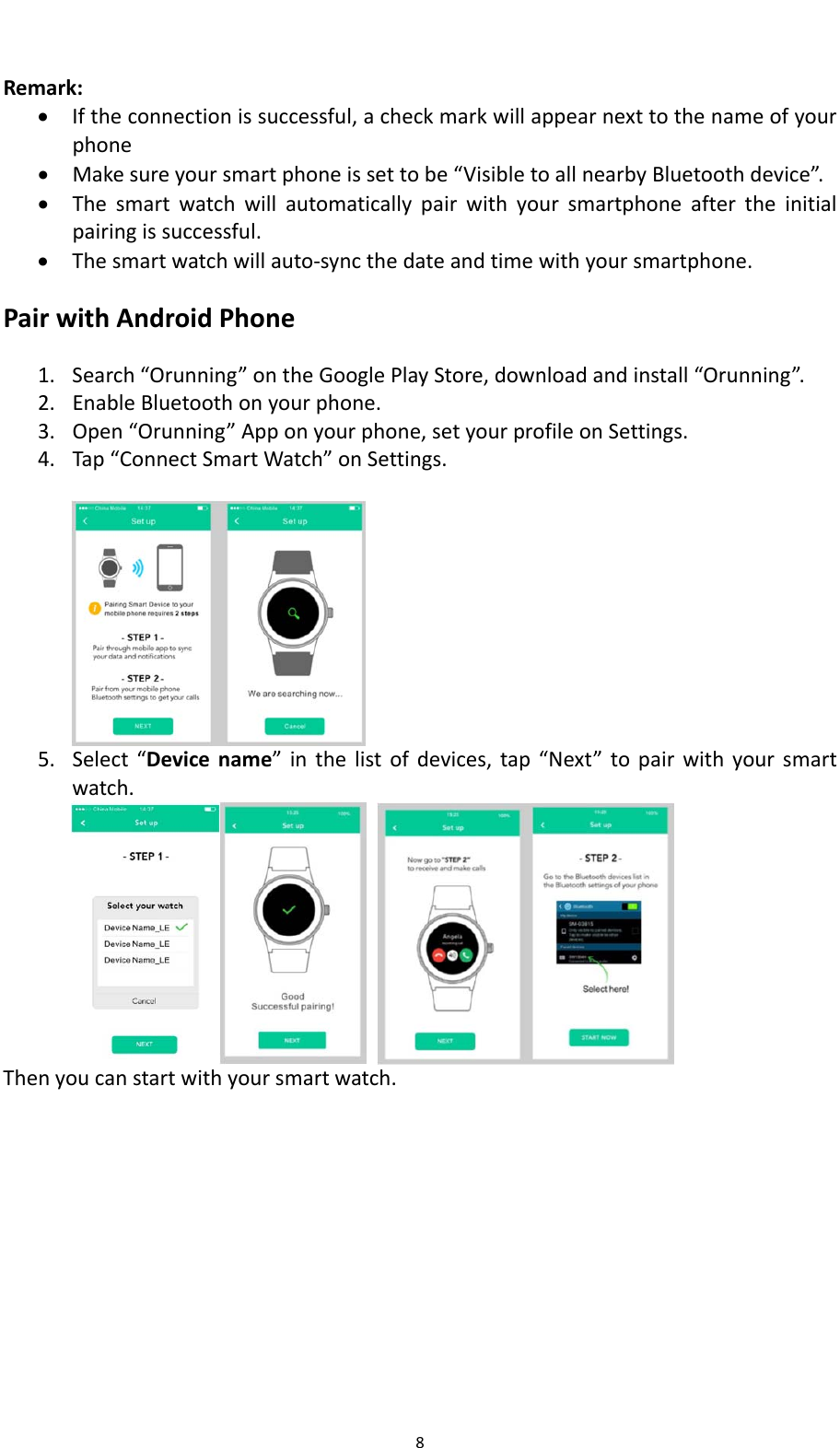
8Remark: Iftheconnectionissuccessful,acheckmarkwillappearnexttothenameofyourphone Makesureyoursmartphoneissettobe“VisibletoallnearbyBluetoothdevice”. Thesmartwatchwillautomaticallypairwithyoursmartphoneaftertheinitialpairingissuccessful. Thesmartwatchwillauto‐syncthedateandtimewithyoursmartphone.PairwithAndroidPhone1. Search“Orunning”ontheGooglePlayStore,downloadandinstall“Orunning”.2. EnableBluetoothonyourphone.3. Open“Orunning”Apponyourphone,setyourprofileonSettings.4. Tap“ConnectSmartWatch”onSettings.5. Select“Devicename”inthelistofdevices,tap“Next”topairwithyoursmartwatch.Thenyoucanstartwithyoursmartwatch.
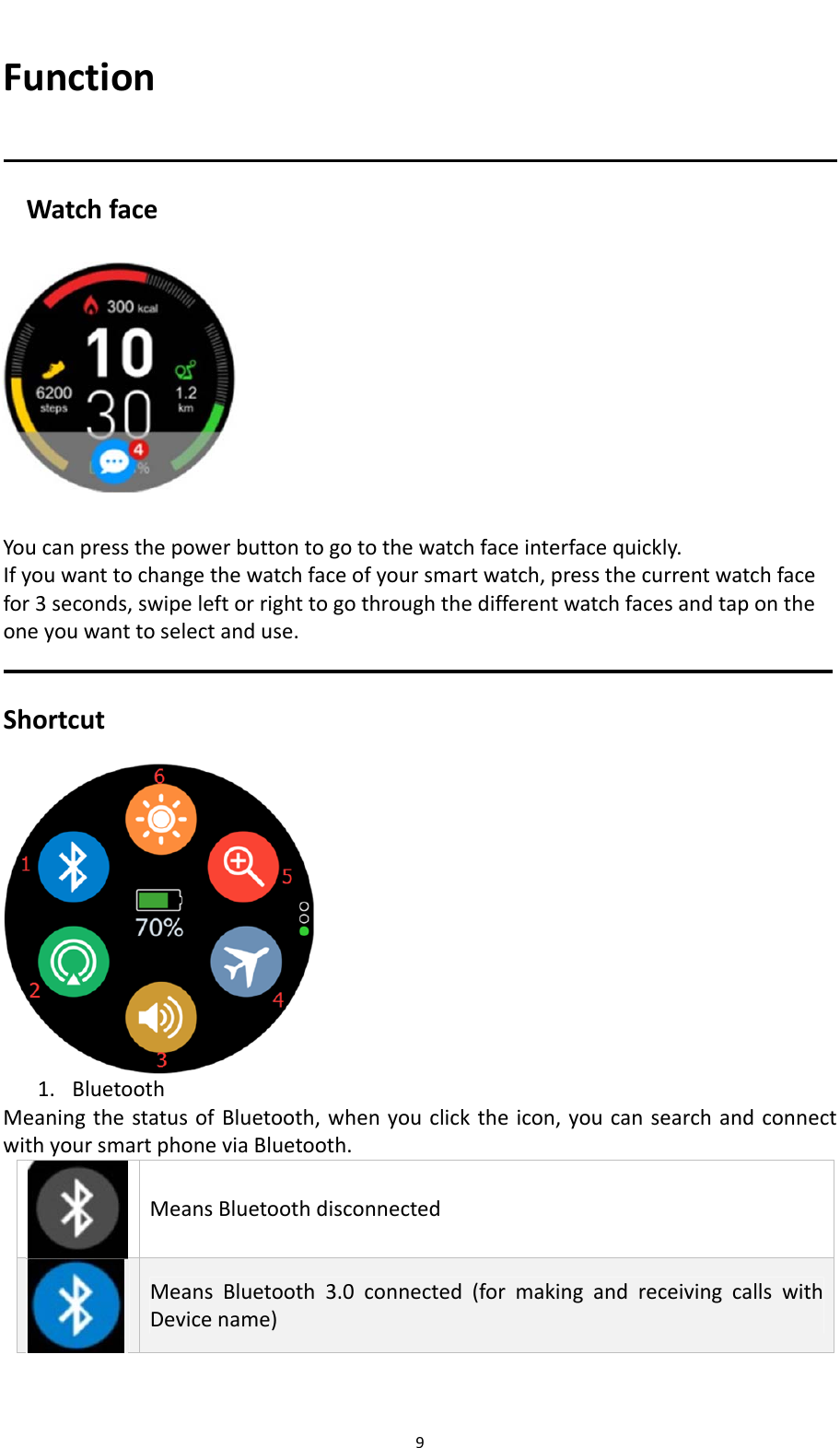
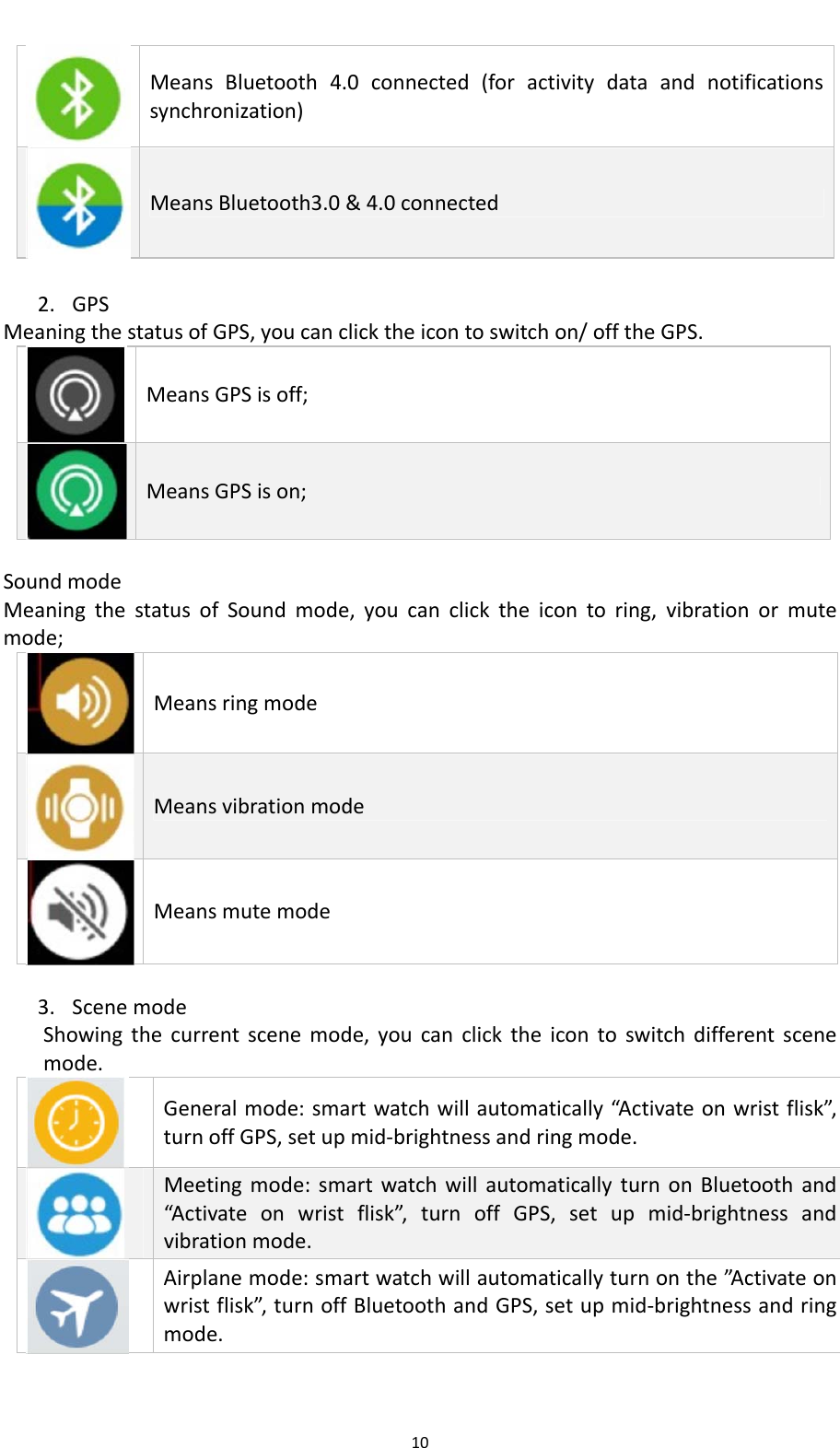
9FunctionWatchface   Youcanpressthepowerbuttontogotothewatchfaceinterfacequickly.Ifyouwanttochangethewatchfaceofyoursmartwatch,pressthecurrentwatchfacefor3seconds,swipeleftorrighttogothroughthedifferentwatchfacesandtapontheoneyouwanttoselectanduse.Shortcut 1. BluetoothMeaningthestatusofBluetooth,whenyouclicktheicon,youcansearchandconnectwithyoursmartphoneviaBluetooth.MeansBluetoothdisconnectedMeansBluetooth3.0connected(formakingandreceivingcallswithDevicename)
10MeansBluetooth4.0connected(foractivitydataandnotificationssynchronization)MeansBluetooth3.0&4.0connected 2. GPSMeaningthestatusofGPS,youcanclicktheicontoswitchon/offtheGPS.MeansGPSisoff;MeansGPSison;SoundmodeMeaningthestatusofSoundmode,youcanclicktheicontoring,vibrationormutemode;MeansringmodeMeansvibrationmodeMeansmutemode3. ScenemodeShowingthecurrentscenemode,youcanclicktheicontoswitchdifferentscenemode.Generalmode:smartwatchwillautomatically“Activateonwristflisk”,turnoffGPS,setupmid‐brightnessandringmode.Meetingmode:smartwatchwillautomaticallyturnonBluetoothand“Activateonwristflisk”,turnoffGPS,setupmid‐brightnessandvibrationmode.Airplanemode:smartwatchwillautomaticallyturnonthe”A c t i v a t e onwristflisk”,turnoffBluetoothandGPS,setupmid‐brightnessandringmode.
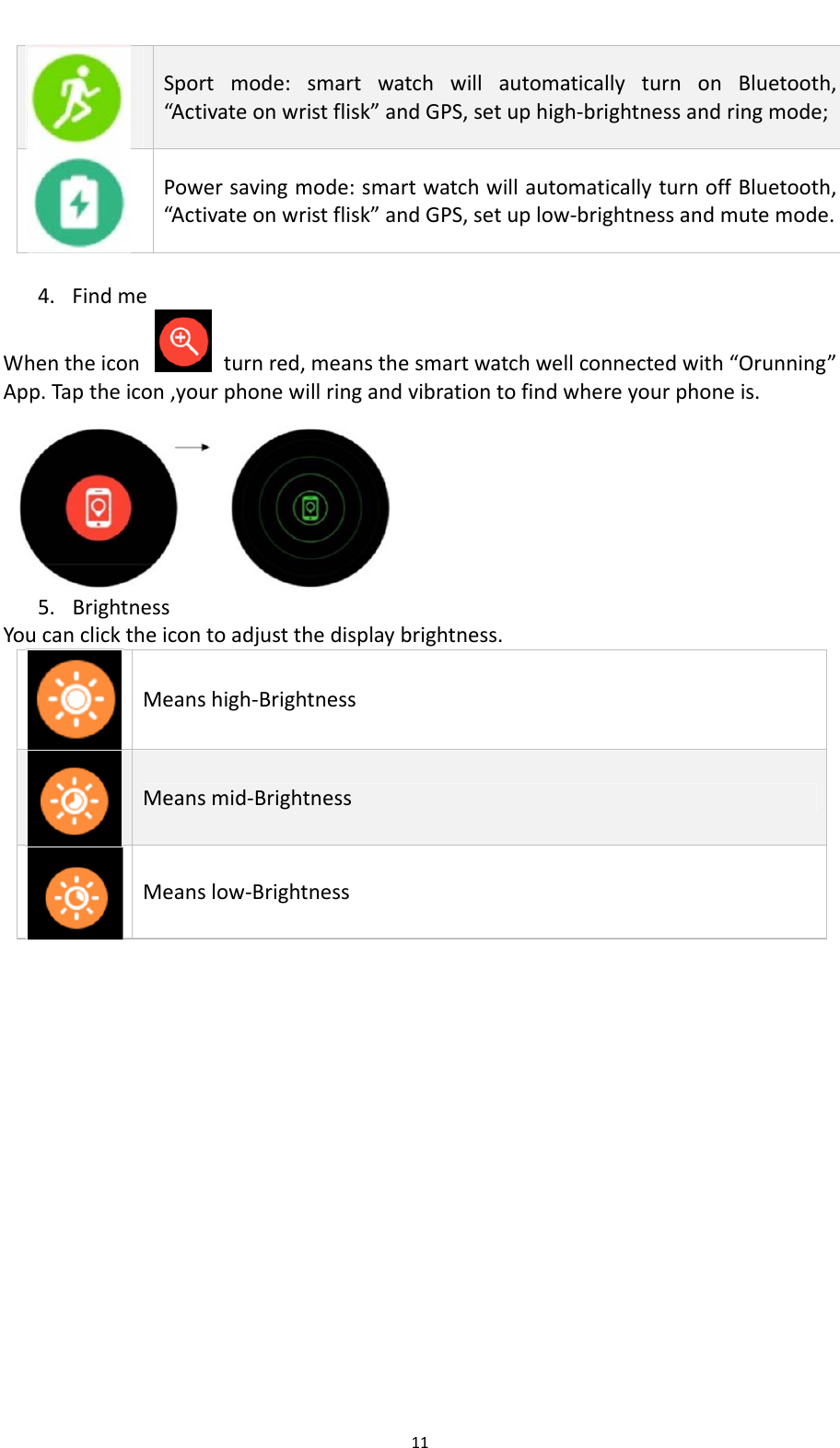
11Sportmode:smartwatchwillautomaticallyturnonBluetooth,“Activateonwristflisk”andGPS,setuphigh‐brightnessandringmode;Powersavingmode:smartwatchwillautomaticallyturnoffBluetooth,“Activateonwristflisk”andGPS,setuplow‐brightnessandmutemode.4. FindmeWhentheiconturnred,meansthesmartwatchwellconnectedwith“Orunning”App.Taptheicon,yourphonewillringandvibrationtofindwhereyourphoneis. 5. BrightnessYoucanclicktheicontoadjustthedisplaybrightness.Meanshigh‐BrightnessMeansmid‐BrightnessMeanslow‐Brightness
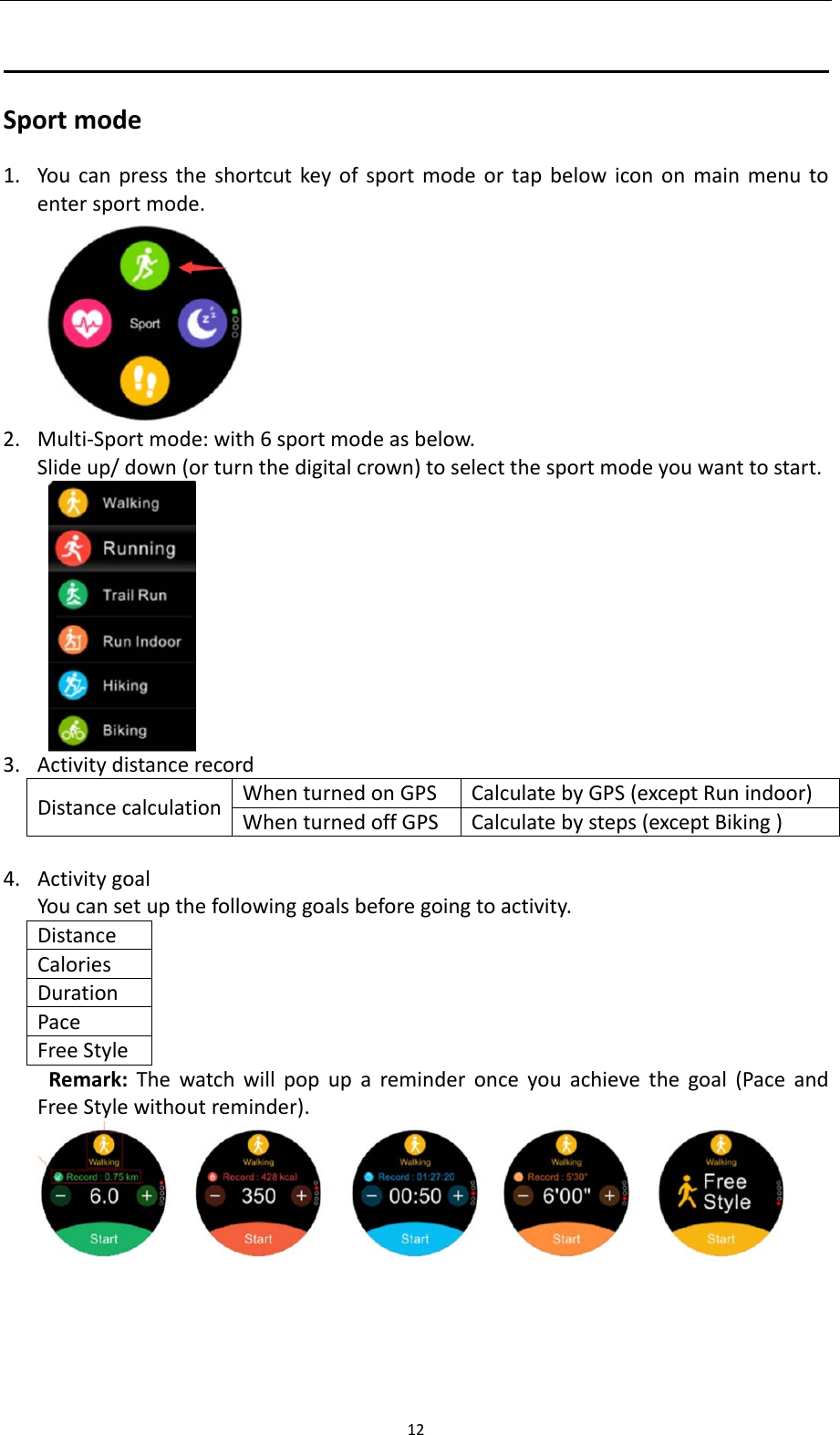
12Sportmode1. Youcanpresstheshortcutkeyofsportmodeortapbelowicononmainmenutoentersportmode.2. Multi‐Sportmode:with6sportmodeasbelow.Slideup/down(orturnthedigitalcrown)toselectthesportmodeyouwanttostart.3. ActivitydistancerecordDistancecalculationWhenturnedonGPSCalculatebyGPS(exceptRunindoor)WhenturnedoffGPSCalculatebysteps(exceptBiking)4. ActivitygoalYoucansetupthefollowinggoalsbeforegoingtoactivity.DistanceCaloriesDurationPaceFreeStyleRemark:Thewatchwillpopupareminderonceyouachievethegoal(PaceandFreeStylewithoutreminder).
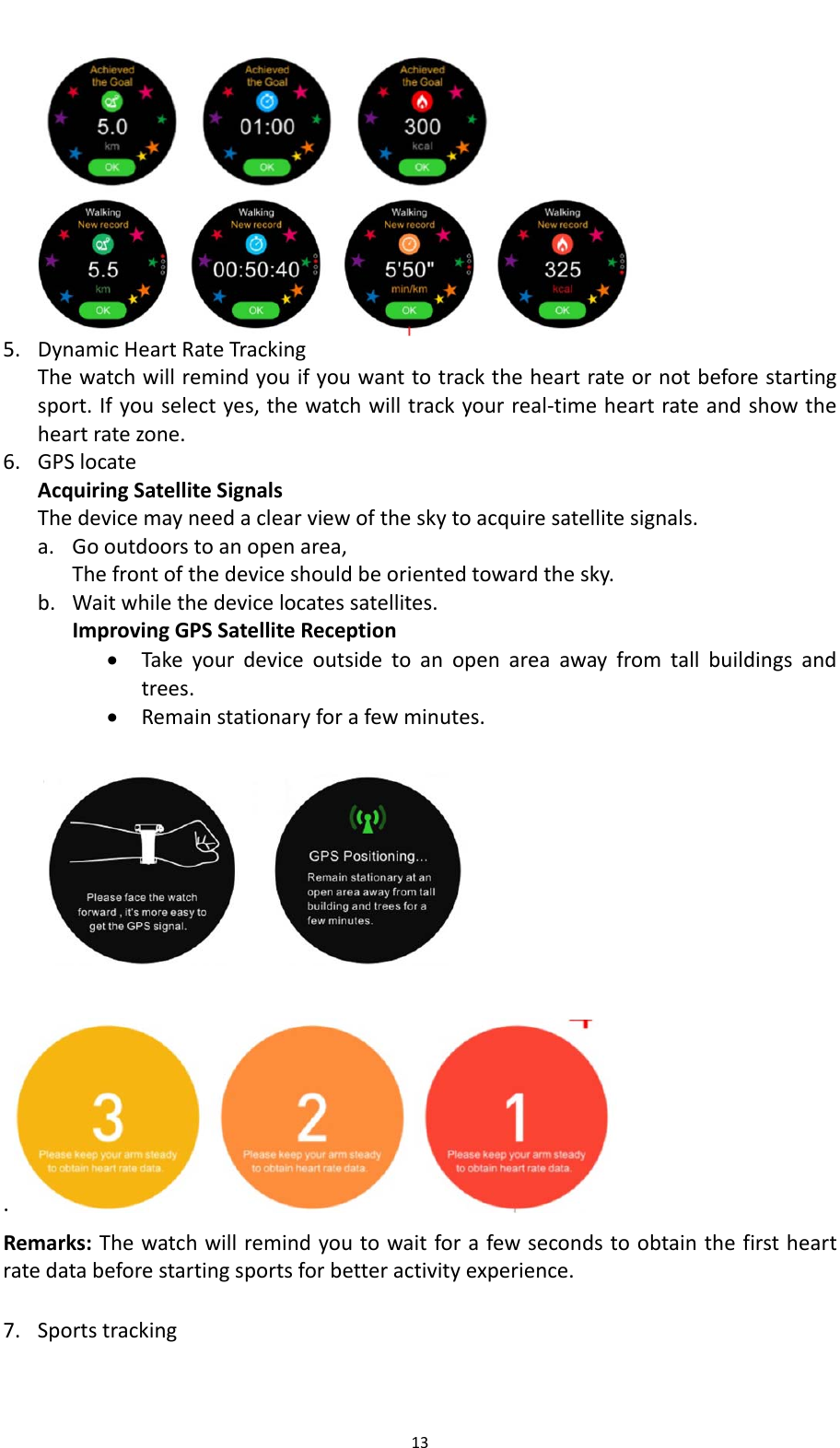
135. DynamicHeartRateTrackingThewatchwillremindyouifyouwanttotracktheheartrateornotbeforestartingsport.Ifyouselectyes,thewatchwilltrackyourreal‐timeheartrateandshowtheheartratezone.6. GPSlocateAcquiringSatelliteSignalsThedevicemayneedaclearviewoftheskytoacquiresatellitesignals.a. Gooutdoorstoanopenarea,Thefrontofthedeviceshouldbeorientedtowardthesky.b. Waitwhilethedevicelocatessatellites.ImprovingGPSSatelliteReception Takeyourdeviceoutsidetoanopenareaawayfromtallbuildingsandtrees. Remainstationaryforafewminutes.  . Remarks:Thewatchwillremindyoutowaitforafewsecondstoobtainthefirstheartratedatabeforestartingsportsforbetteractivityexperience. 7. Sportstracking
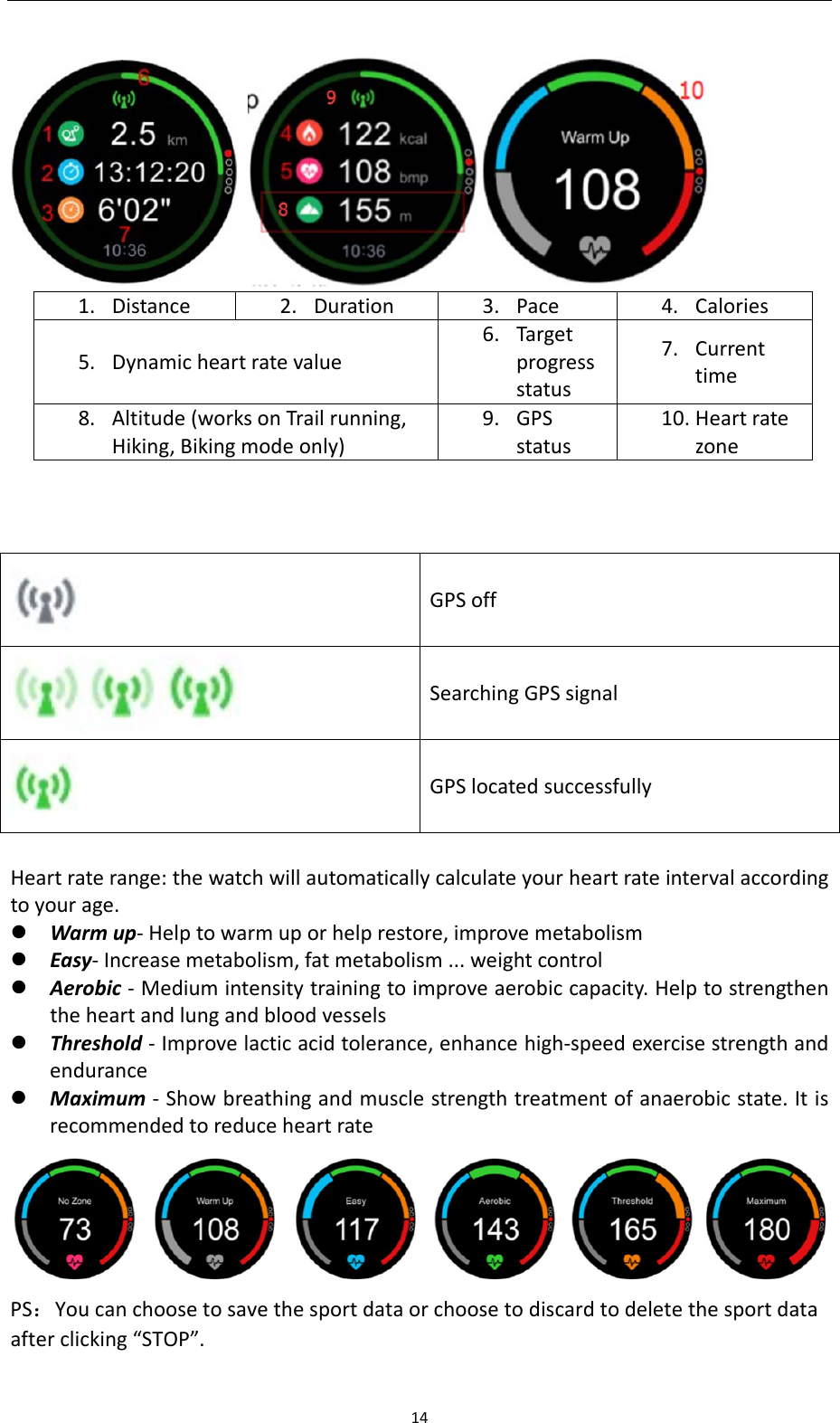
14  1. Distance2. Duration3. Pace4. Calories5. Dynamicheartratevalue6. Targetprogressstatus7. Currenttime8. Altitude(worksonTrailrunning,Hiking,Bikingmodeonly)9. GPSstatus10. Heartratezone    GPSoff SearchingGPSsignal GPSlocatedsuccessfully Heartraterange:thewatchwillautomaticallycalculateyourheartrateintervalaccordingtoyourage. Warmup‐Helptowarmuporhelprestore,improvemetabolism Easy‐Increasemetabolism,fatmetabolism...weightcontrol Aerobic‐Mediumintensitytrainingtoimproveaerobiccapacity.Helptostrengthentheheartandlungandbloodvessels Threshold‐Improvelacticacidtolerance,enhancehigh‐speedexercisestrengthandendurance Maximum‐Showbreathingandmusclestrengthtreatmentofanaerobicstate.ItisrecommendedtoreduceheartratePS:Youcanchoosetosavethesportdataorchoosetodiscardtodeletethesportdataafterclicking“STOP”.
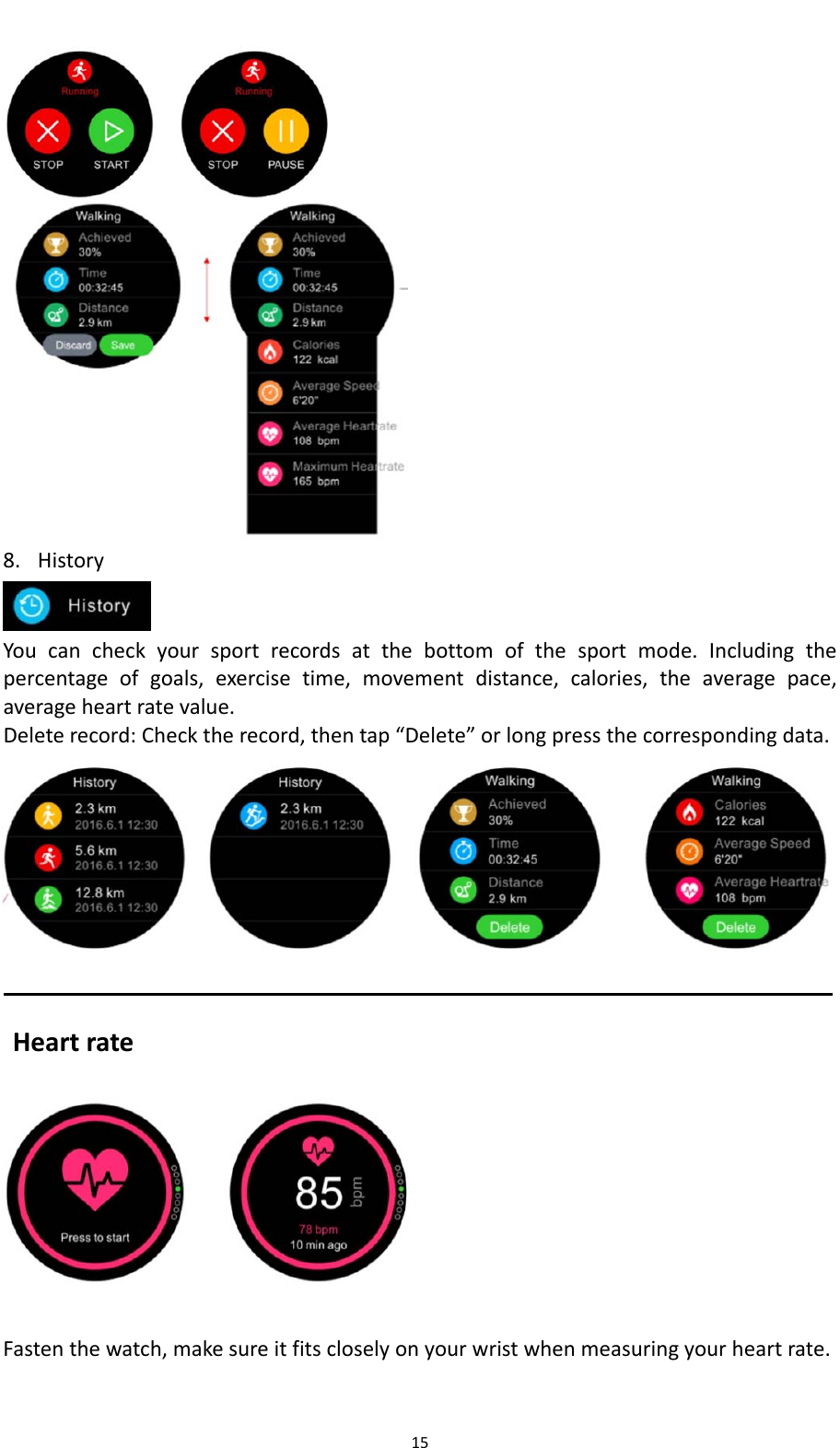
15   8. History Youcancheckyoursportrecordsatthebottomofthesportmode.Includingthepercentageofgoals,exercisetime,movementdistance,calories,theaveragepace,averageheartratevalue.Deleterecord:Checktherecord,thentap“Delete”orlongpressthecorrespondingdata. HeartrateFastenthewatch,makesureitfitscloselyonyourwristwhenmeasuringyourheartrate.
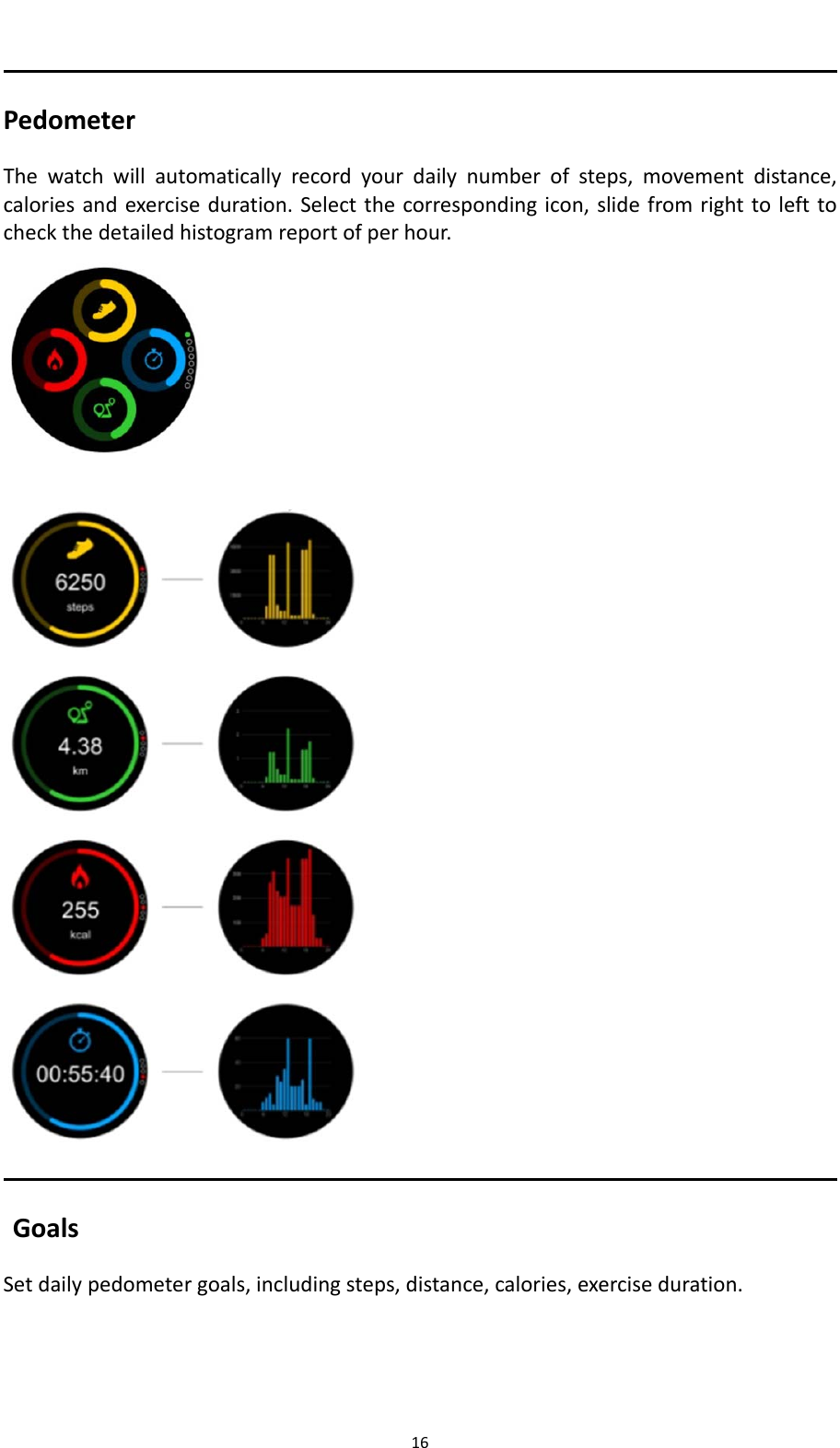
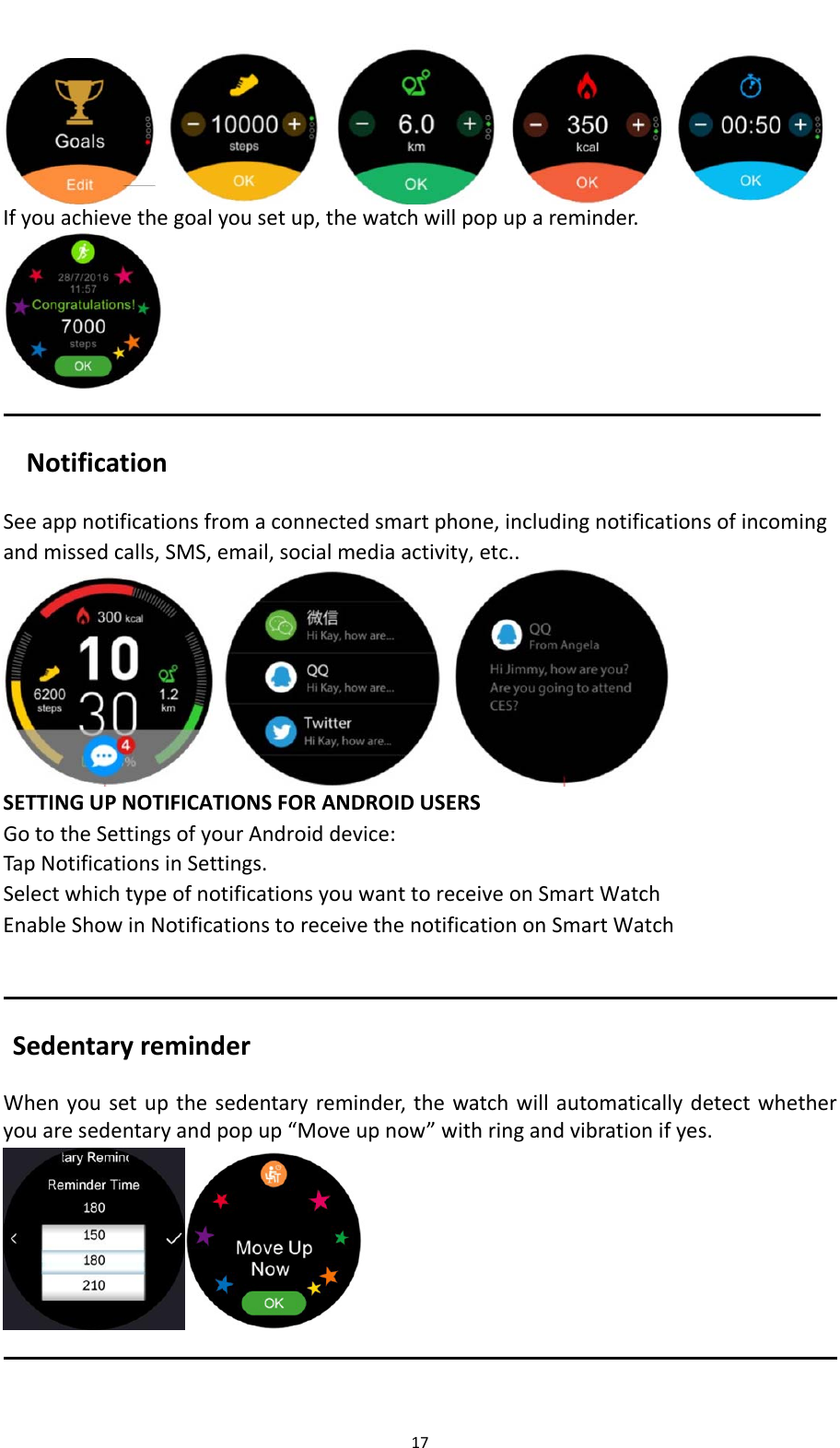
16PedometerThewatchwillautomaticallyrecordyourdailynumberofsteps,movementdistance,caloriesandexerciseduration.Selectthecorrespondingicon,slidefromrighttolefttocheckthedetailedhistogramreportofperhour.   GoalsSetdailypedometergoals,includingsteps,distance,calories,exerciseduration.
17 Ifyouachievethegoalyousetup,thewatchwillpopupareminder.NotificationSeeappnotificationsfromaconnectedsmartphone,includingnotificationsofincomingandmissedcalls,SMS,email,socialmediaactivity,etc..   SETTINGUPNOTIFICATIONSFORANDROIDUSERSGototheSettingsofyourAndroiddevice:TapNotificationsinSettings.SelectwhichtypeofnotificationsyouwanttoreceiveonSmartWatchEnableShowinNotificationstoreceivethenotificationonSmartWatchSedentaryreminderWhenyousetupthesedentaryreminder,thewatchwillautomaticallydetectwhetheryouaresedentaryandpopup“Moveupnow”withringandvibrationifyes. 
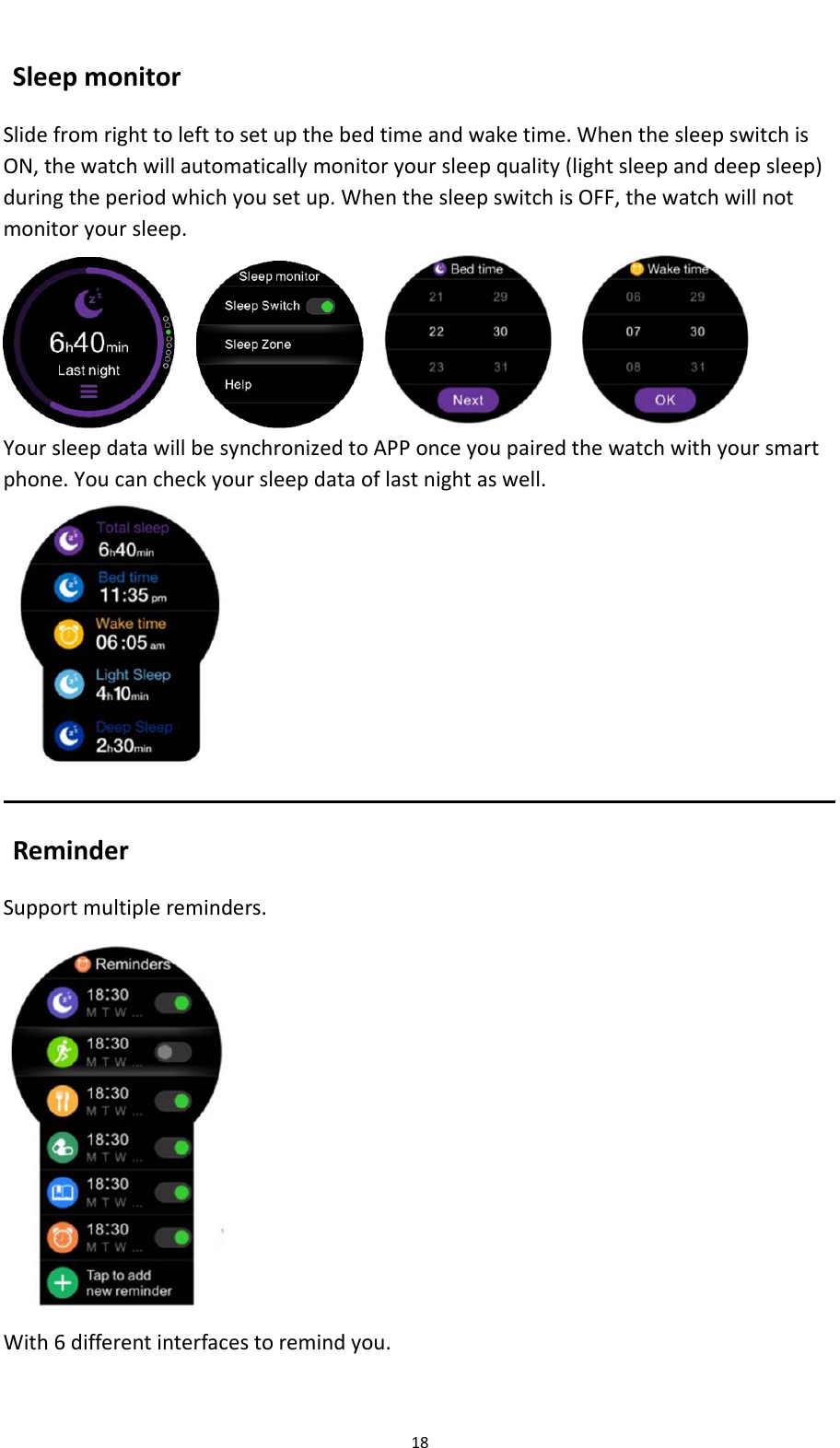
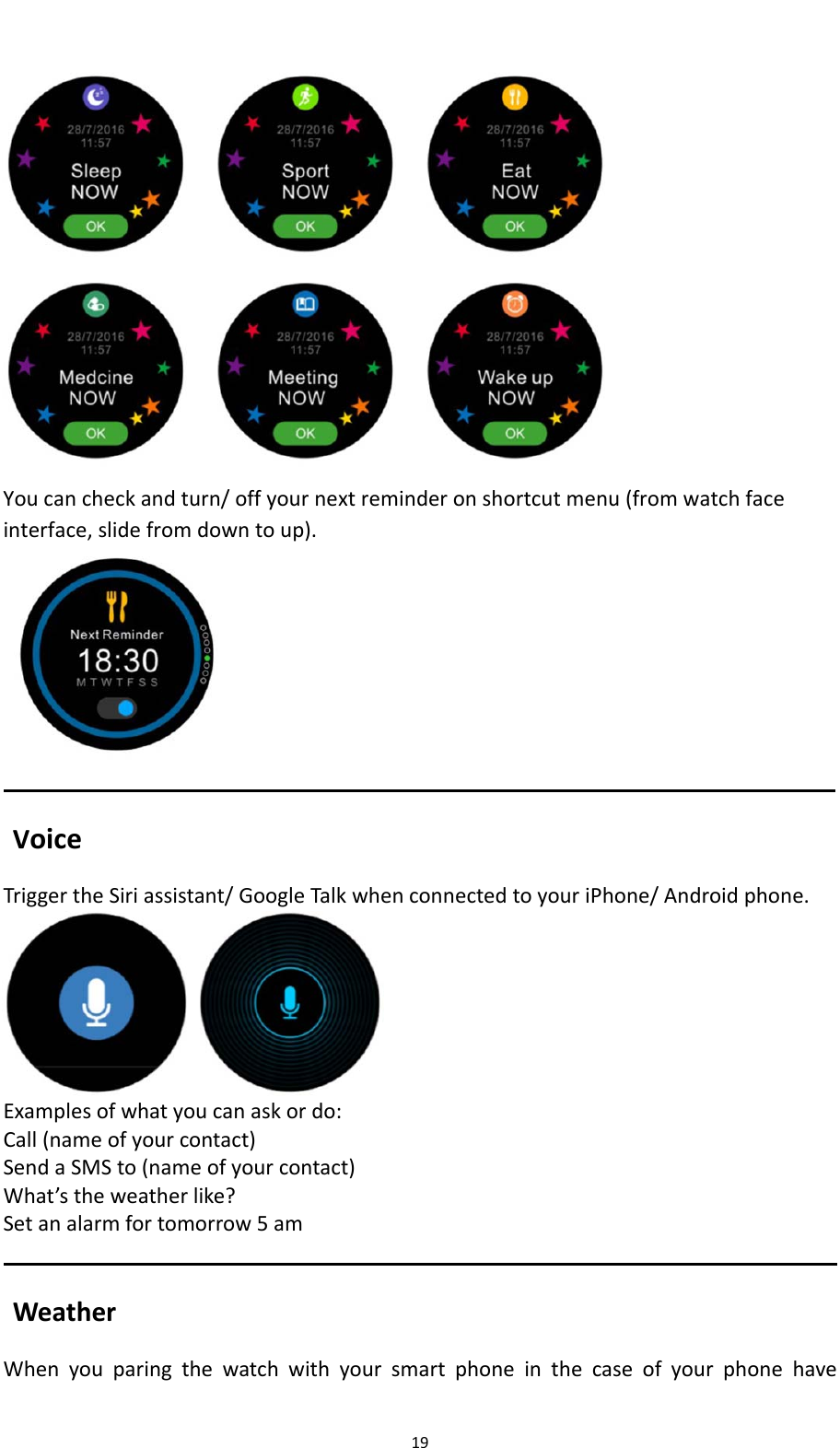
18SleepmonitorSlidefromrighttolefttosetupthebedtimeandwaketime.WhenthesleepswitchisON,thewatchwillautomaticallymonitoryoursleepquality(lightsleepanddeepsleep)duringtheperiodwhichyousetup.WhenthesleepswitchisOFF,thewatchwillnotmonitoryoursleep.   YoursleepdatawillbesynchronizedtoAPPonceyoupairedthewatchwithyoursmartphone.Youcancheckyoursleepdataoflastnightaswell.ReminderSupportmultiplereminders.With6differentinterfacestoremindyou.
19Youcancheckandturn/offyournextreminderonshortcutmenu(fromwatchfaceinterface,slidefromdowntoup). VoiceTriggertheSiriassistant/GoogleTalkwhenconnectedtoyouriPhone/Androidphone.Examplesofwhatyoucanaskordo:Call(nameofyourcontact)SendaSMSto(nameofyourcontact)What’stheweatherlike?Setanalarmfortomorrow5amWeatherWhenyouparingthewatchwithyoursmartphoneinthecaseofyourphonehave
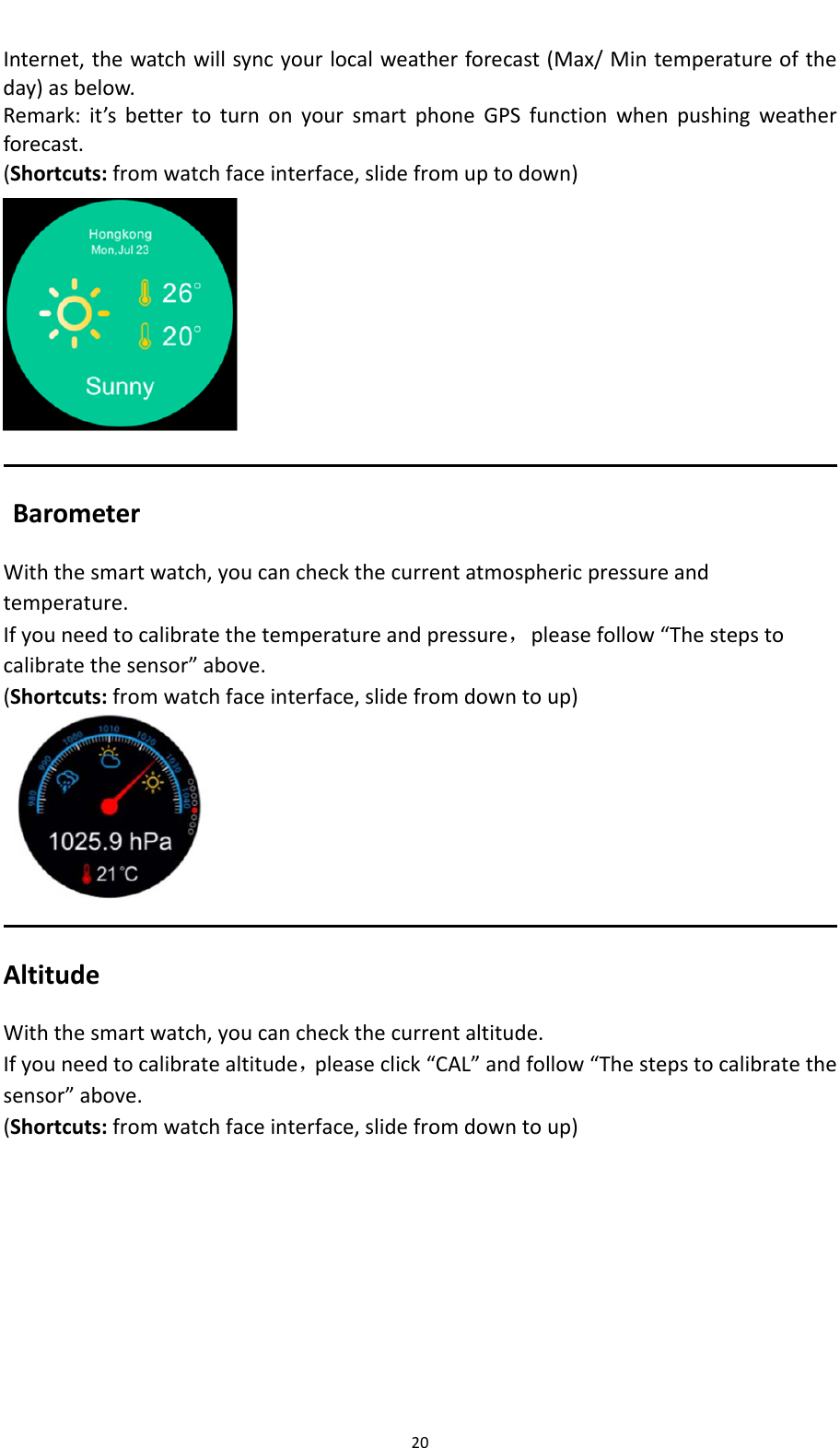
20Internet,thewatchwillsyncyourlocalweatherforecast(Max/Mintemperatureoftheday)asbelow.Remark:it’sbettertoturnonyoursmartphoneGPSfunctionwhenpushingweatherforecast.(Shortcuts:fromwatchfaceinterface,slidefromuptodown)BarometerWiththesmartwatch,youcancheckthecurrentatmosphericpressureandtemperature.Ifyouneedtocalibratethetemperatureandpressure,pleasefollow“Thestepstocalibratethesensor”above.  (Shortcuts:fromwatchfaceinterface,slidefromdowntoup)AltitudeWiththesmartwatch,youcancheckthecurrentaltitude.Ifyouneedtocalibratealtitude,pleaseclick“CAL”andfollow“Thestepstocalibratethesensor”above.(Shortcuts:fromwatchfaceinterface,slidefromdowntoup)
21LocationIfyouturnedonGPSofyoursmartwatchandlocatedyourpositionsuccessfully,therewillshowthecurrentlatitudeandlongitude.WhenyouturnofftheGPSorpositionfailure,thewatchwillkeepthelastlatitudeandlongitude.(Shortcuts:fromwatchfaceinterface,slidefromdowntoup)RemotecaptureToenjoythisfeature,makesurethecameraofyoursmartphoneison.EnablingRemotecapturefunctionwillletyoutakepicturesremotelyfromyourSmartWatch.
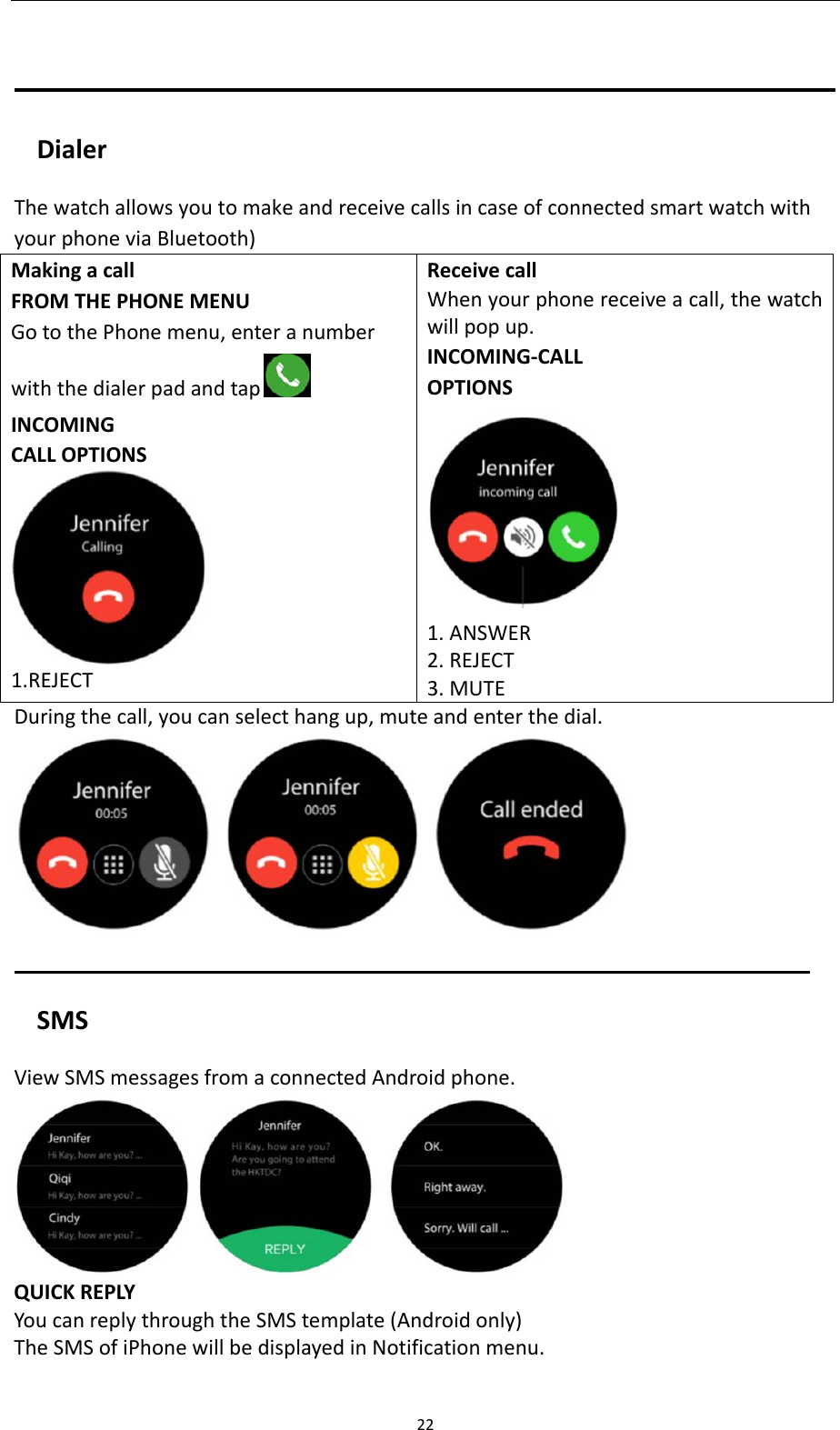
22DialerThewatchallowsyoutomakeandreceivecallsincaseofconnectedsmartwatchwithyourphoneviaBluetooth)MakingacallFROMTHEPHONEMENUGotothePhonemenu,enteranumberwiththedialerpadandtap INCOMINGCALLOPTIONS1.REJECTReceivecallWhenyourphonereceiveacall,thewatchwillpopup.INCOMING‐CALLOPTIONS1.ANSWER2.REJECT3.MUTEDuringthecall,youcanselecthangup,muteandenterthedial.SMSViewSMSmessagesfromaconnectedAndroidphone. QUICKREPLYYoucanreplythroughtheSMStemplate(Androidonly)TheSMSofiPhonewillbedisplayedinNotificationmenu.
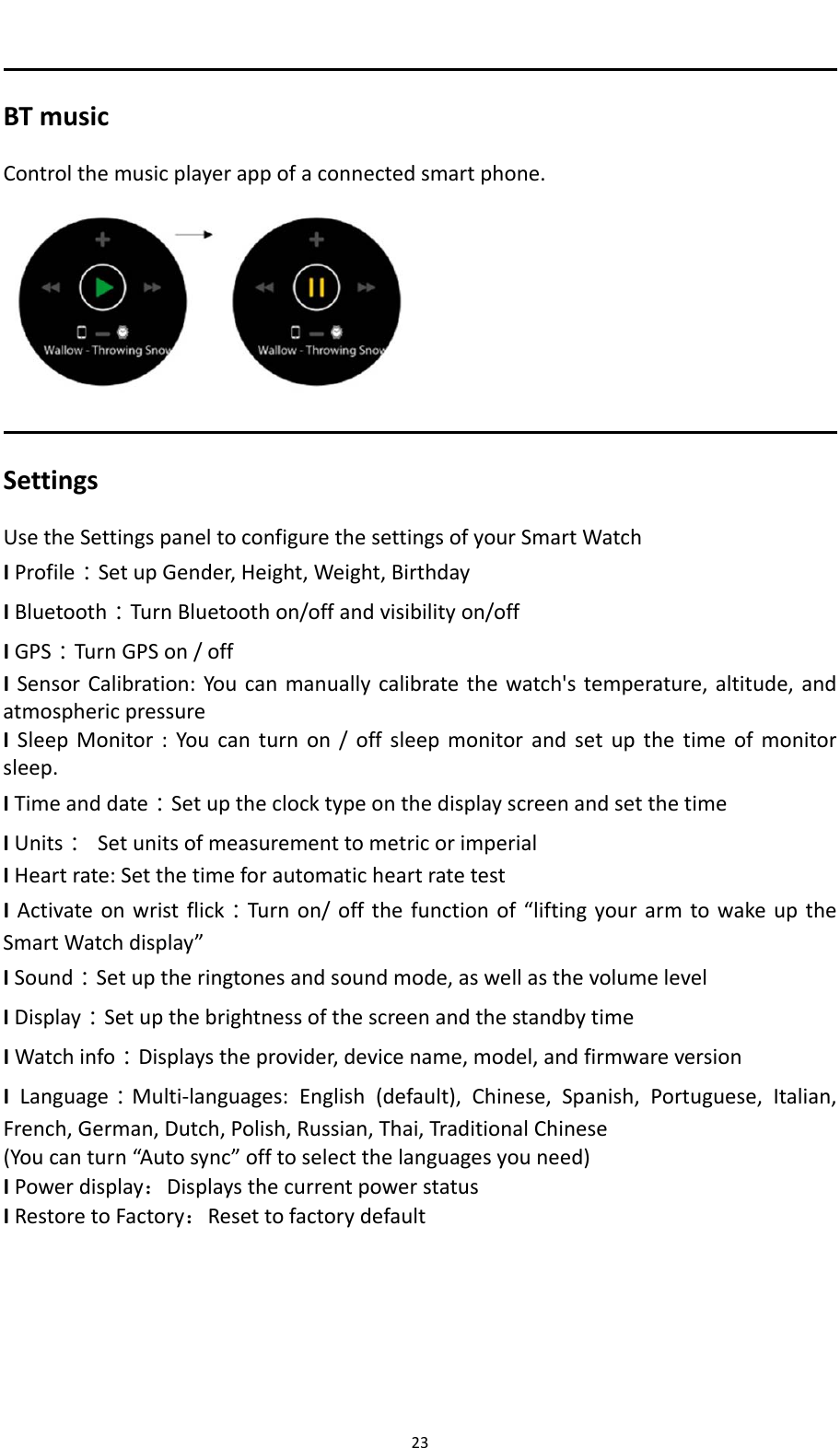
23BTmusicControlthemusicplayerappofaconnectedsmartphone.SettingsUsetheSettingspaneltoconfigurethesettingsofyourSmartWatchIProfile:SetupGender,Height,Weight,BirthdayIBluetooth:TurnBluetoothon/offandvisibilityon/offIGPS:TurnGPSon/offISensorCalibration:Youcanmanuallycalibratethewatch'stemperature,altitude,andatmosphericpressureISleepMonitor:Youcanturnon/offsleepmonitorandsetupthetimeofmonitorsleep.ITimeanddate:SetuptheclocktypeonthedisplayscreenandsetthetimeIUnits:SetunitsofmeasurementtometricorimperialIHeartrate:SetthetimeforautomaticheartratetestIActivateonwristflick:Turnon/offthefunctionof“liftingyourarmtowakeuptheSmartWatchdisplay”ISound:Setuptheringtonesandsoundmode,aswellasthevolumelevelIDisplay:SetupthebrightnessofthescreenandthestandbytimeIWatchinfo:Displaystheprovider,devicename,model,andfirmwareversionILanguage:Multi‐languages:English(default),Chinese,Spanish,Portuguese,Italian,French,German,Dutch,Polish,Russian,Thai,TraditionalChinese(Youcanturn“Autosync”offtoselectthelanguagesyouneed)IPowerdisplay:DisplaysthecurrentpowerstatusIRestoretoFactory:Resettofactorydefault
FCC Statement This equipment has been tested and found to comply with the limits for a Class B digital device, pursuant to part 15 of the FCC rules. These limits are designed to provide reasonable protection against harmful interference in a residential installation. This equipment generates, uses and can radiate radio frequency energy and, if not installed and used in accordance with the instructions, may cause harmful interference to radio communications. However, there is no guarantee that interference will not occur in a particular installation. If this equipment does cause harmful interference to radio or television reception, which can be determined by turning the equipment off and on, the user is encouraged to try to correct the interference by one or more of the following measures: -Reorient or relocate the receiving antenna. -Increase the separation between the equipment and receiver. -Connect the equipment into an outlet on a circuit different from that to which the receiver is connected. -Consult the dealer or an experienced radio/TV technician for help. To assure continued compliance, any changes or modifications not expressly approved by the party. Responsible for compliance could void the user’s authority to operate this equipment. (Example- use only shielded interface cables when connecting to computer or peripheral devices). This equipment complies with Part 15 of the FCC Rules. Operation is subject to the following two conditions:     (1) This device may not cause harmful interference, and (2) This device must accept any interference received, including interference that may cause undesired operation.     RF warning statement: The device has been evaluated to meet general RF exposure requirement. The device can be used in portable exposure condition without restriction.

Navigation menu