Synergy Technologies SW1305H Smart Watch User Manual
Synergy Technologies Limited Smart Watch
User Manual
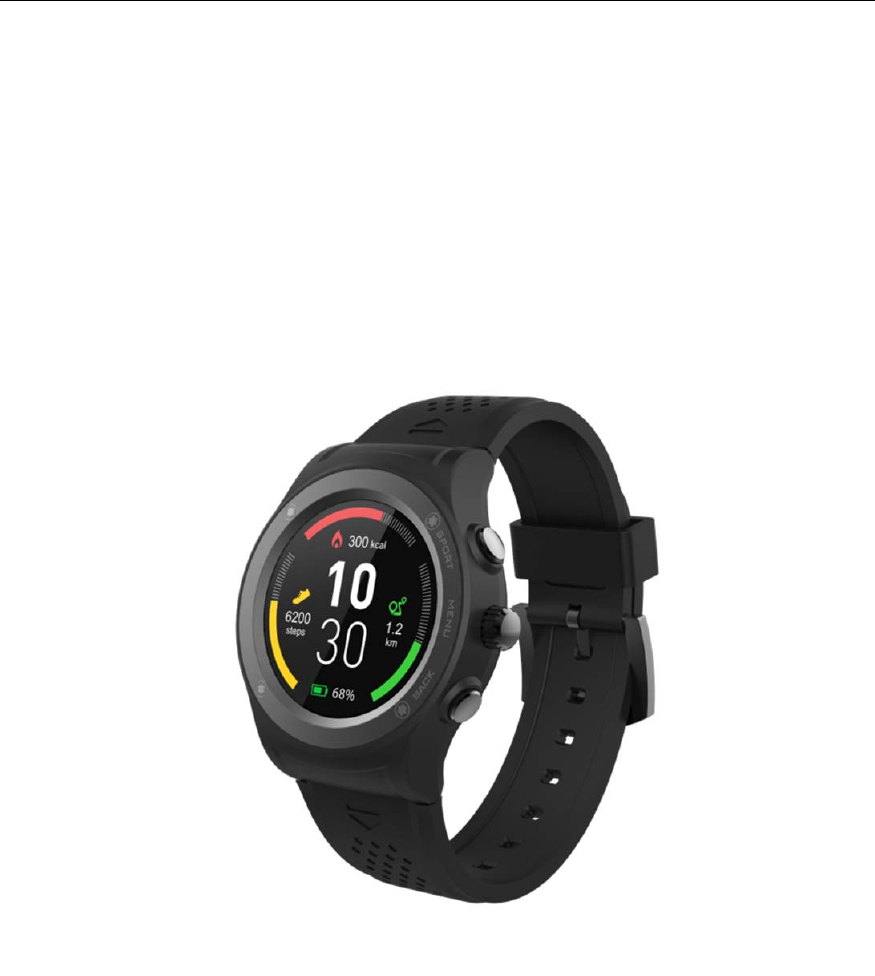
Version:2017‐12‐04
User’sGuide
Model:SW1305H

Contents
Feature.................................................................................................................................1
Overview......................................................................................................................2
Charging.......................................................................................................................2
Howtouse...................................................................................................................3
Howtocalibratethesensor.........................................................................................4
MainMenu...................................................................................................................6
Pairwithsmartphone..........................................................................................................7
PairwithiPhone...........................................................................................................7
PairwithAndroidPhone..............................................................................................8
Function...............................................................................................................................9
Watchface...................................................................................................................9
Shortcut........................................................................................................................9
Sportmode................................................................................................................12
Heartrate...................................................................................................................15
Pedometer.................................................................................................................16
Goals..........................................................................................................................16
Notification................................................................................................................17
Sedentaryreminder...................................................................................................17
Sleepmonitor.............................................................................................................18
Reminder....................................................................................................................18
Voice...........................................................................................................................19
Weather.....................................................................................................................19
Barometer..................................................................................................................20
Altitude......................................................................................................................20
Location......................................................................................................................21
Remotecapture.........................................................................................................21
Dialer..........................................................................................................................22
SMS............................................................................................................................22
BTmusic.....................................................................................................................23
Settings.......................................................................................................................23

1
Feature
1.3‐inchIPSfullscreendisplay
Multi‐SportMode(Running,Walking,Hiking,Biking,IndoorRun&TrailRun)
Trackyoursportperformance
ProvidecomprehensiveGPSlocation
DigitalCrownintegrated,rotateittochangethemenueasily
Built‐inHRsensor,monitoryourheartrateandsetyourheartratezone
Built‐inaltimeter,barometer&temperature
Monitoryourdailyactivityandsleep
Built‐insedentaryreminder
Synchronizephonebook,answerorrejectcallsfromyourwrist
DisplaySMS,emails,calendareventsandsocialmediaactivity
Smartwake‐up,raiseorshakeyourarmtowakeupthedevice
Remotecontrolmusicplayback,remotecapturephotoonyourSmartphone
Built‐inloudspeakerandMicrophone
Built‐in350mAhLi‐polybattery,upto5‐7daysstandbytime/9hoursonGPSmode
FullycompatiblewithiOS7oraboveandAndroid4.4orabove
Differentdesignstylesforyourdifferentoccasionsandpreferences
2
Overview
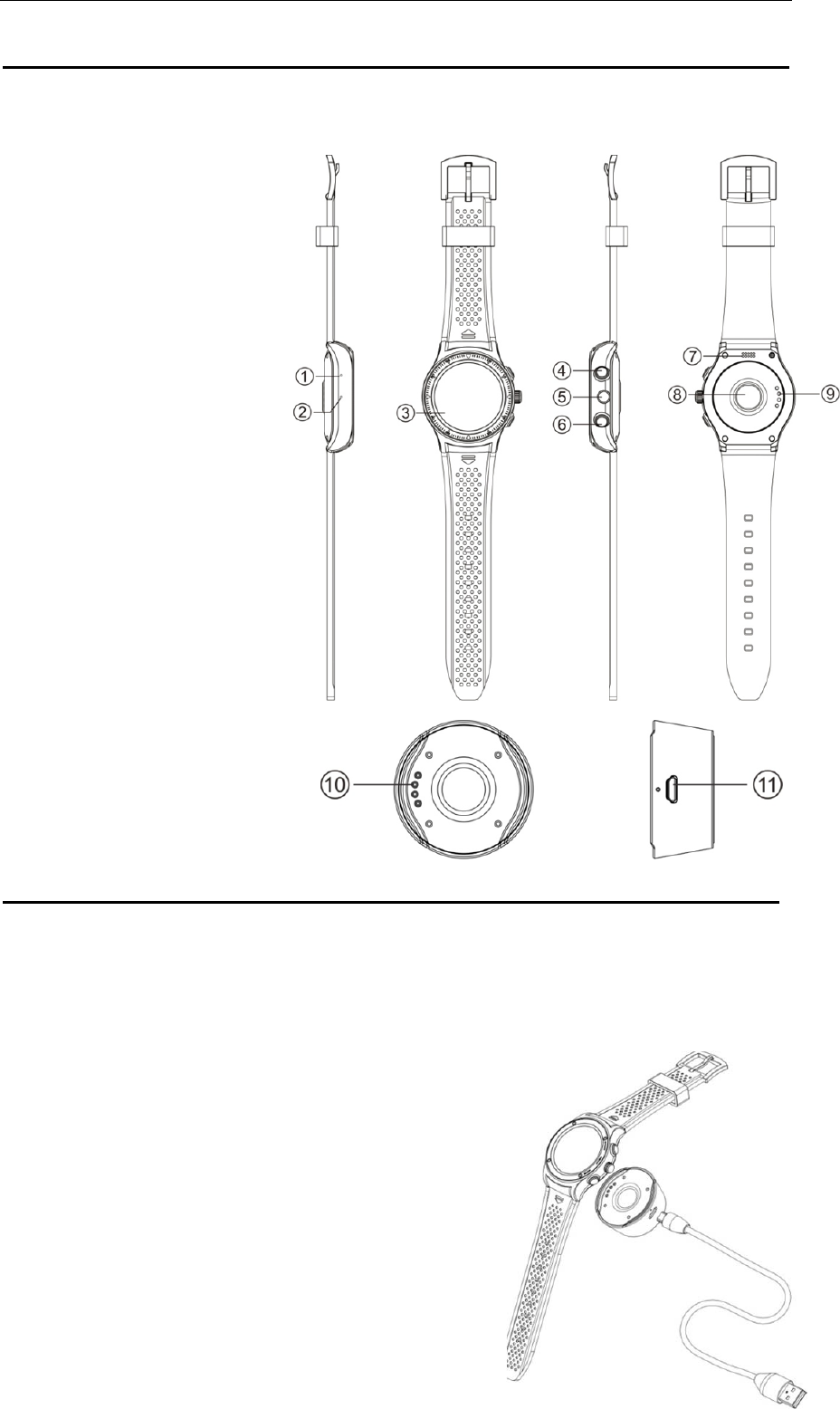
SmartWatch
1.
MIC
2.
Barometersensor
3.
Touchscreen
4.
ShortcutkeyforSportmode
5.
Digitalcrown
6.
Powerbutton
7.
Speaker
8.
Heartratesensor
9.
POGO‐PinChargingterminals
POGO‐PinCharger
10.
POGO‐Pin
11.
Micro‐USBport
Charging
IfyouuseaPowerAdaptor(Notincluded),PowerAdaptorcurrentis:5V,500mA.
Ittakes2‐hourstofullychargethesmartwatch,pleasefollowstepsbelowtocharge.
1.Putthechargingcradlebeneaththewatch.Make
surethePOGO‐pinsonthecradlefitcorrectlyontothe
chargingterminalsonthebackofsmartwatch.
2.ConnectthechargingcradlewiththeUSBcable
3.PlugthebigendoftheUSBcabletoapowersource
3
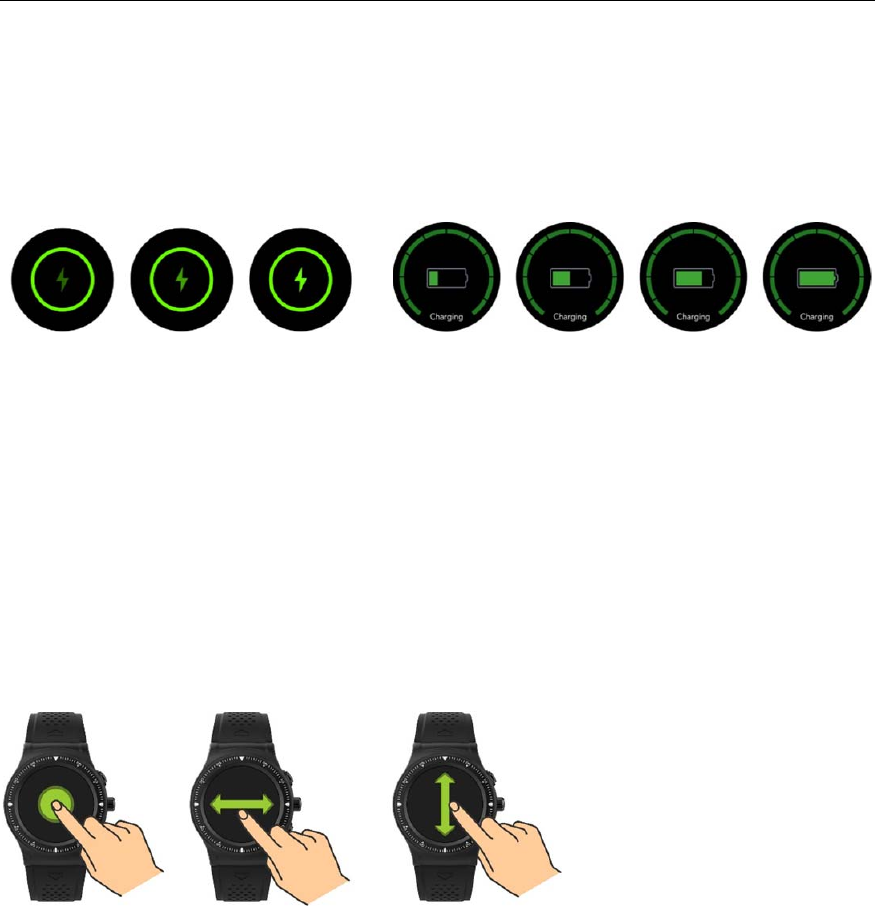
ChargingwhenpoweroffChargingwhenpoweron
Howtouse
Turnon:Holdpresspowerbuttonin3seconds
Gotomainmenu:Swipefromrighttoleftonwatchfaceinterface
Switchmainmenu:Swipeup/down
Confirm:Taptheiconorpressdigitalcrown
Exit:Swipefromlefttoright
Returntowatchfaceinterface:Shortpresspowerbuttononanyinterfaces
Sportmodeshortcuts:Presstheupperbutton
Checknotifications:Swipefromlefttorightonwatchfaceinterface
Switchsubmenu/shortcuts:Swipeup/downorTurndigitalcrown
Turnoff:Holdpresspowerbuttonin3seconds
4
Howtocalibratethesensor
Inthesettingsinside,thereisa“Sensorcalibration”option.
Ifyoufindthetemperature,altitude,pressureofthewatcharewrong,youcancalibrate
thesensortomakethewatchdisplaymoreaccurate.(Wewillmakesensorcalibrationfor
eachdevicebeforepackingwhenmassproduction)
Thestepstocalibratethesensor:
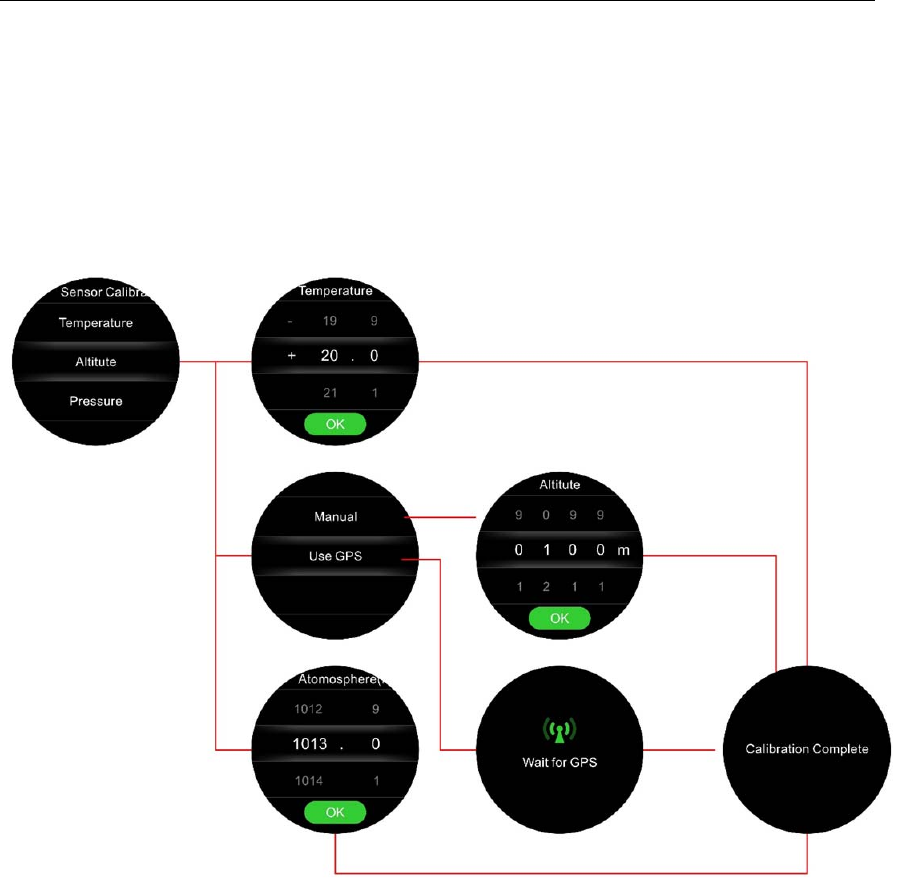
Temperature:Settings‐>Sensorcalibration‐>Temperature,setupthecorrect
temperaturevalueandclick“OK”.
Pressure:Settings‐>Sensorcalibration‐>Pressure,setupthecorrectpressurevalue
andclick“OK”.
Altitude:Settings‐>Sensorcalibration‐>Altitude,ifyouselect“Manual”,setupthe
correctaltitudevalueandclick“OK”.Ifyouselect“UseGPS”,waitforGPSlocated
successfully,thewatchwillautomaticallyshowthecurrentaltitude,thenclick“OK’.
Calibrationreference:
Temperature:Youcanrefertothethermometertocalibratethewatch's
temperature;
Pressure:IfyouareusingiPhone,youcanseethecurrentcitypressureinthe
Weatherapplication
Altitude:Youcandownloadanappcalled"GPSRecorder",openyourmobilephone
locationservice,andthenreferto"Meter"interface"Altimeter"iniOSsystem.

5
PS:IfyouuseGPStocalibratethealtitude,pleaseoperateinanopenarea.
Ifyouneedtocalibratebothaltitudeandatmosphericpressure,pleasecalibratethe
atmosphericpressurefirst,thencalibratethealtitude.
Ifyougotoanothercity,youneedtore‐calibratethepressureandaltitudeonyour
watch.
ThewatchUnitsyousetupUnitsofTempe ratureUnitsofAltitude
MetricDegreesCelsius(℃)Meter(m)
ImperialDegreesFahrenheit(℉)Feet
6
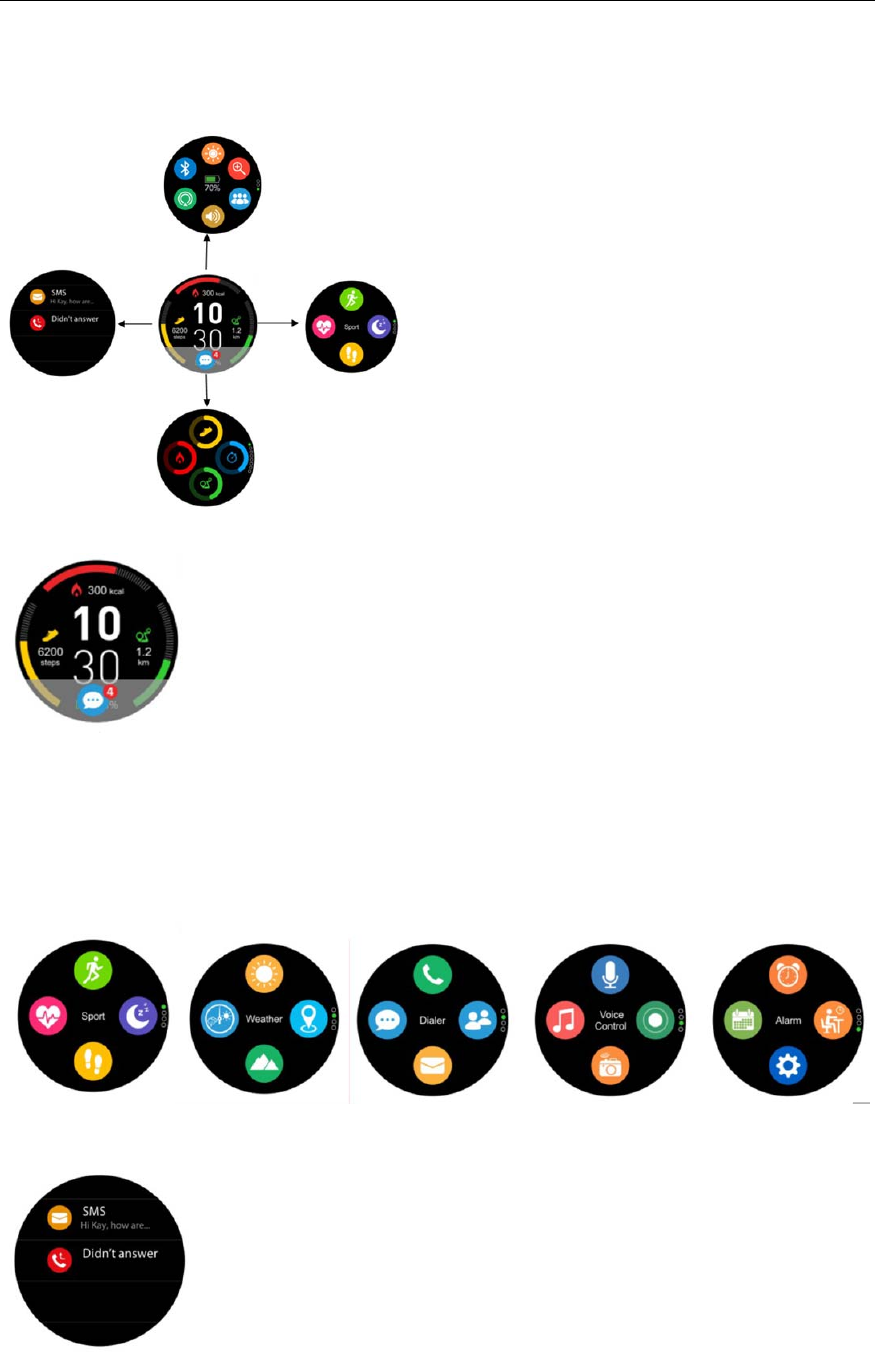
MainMenu
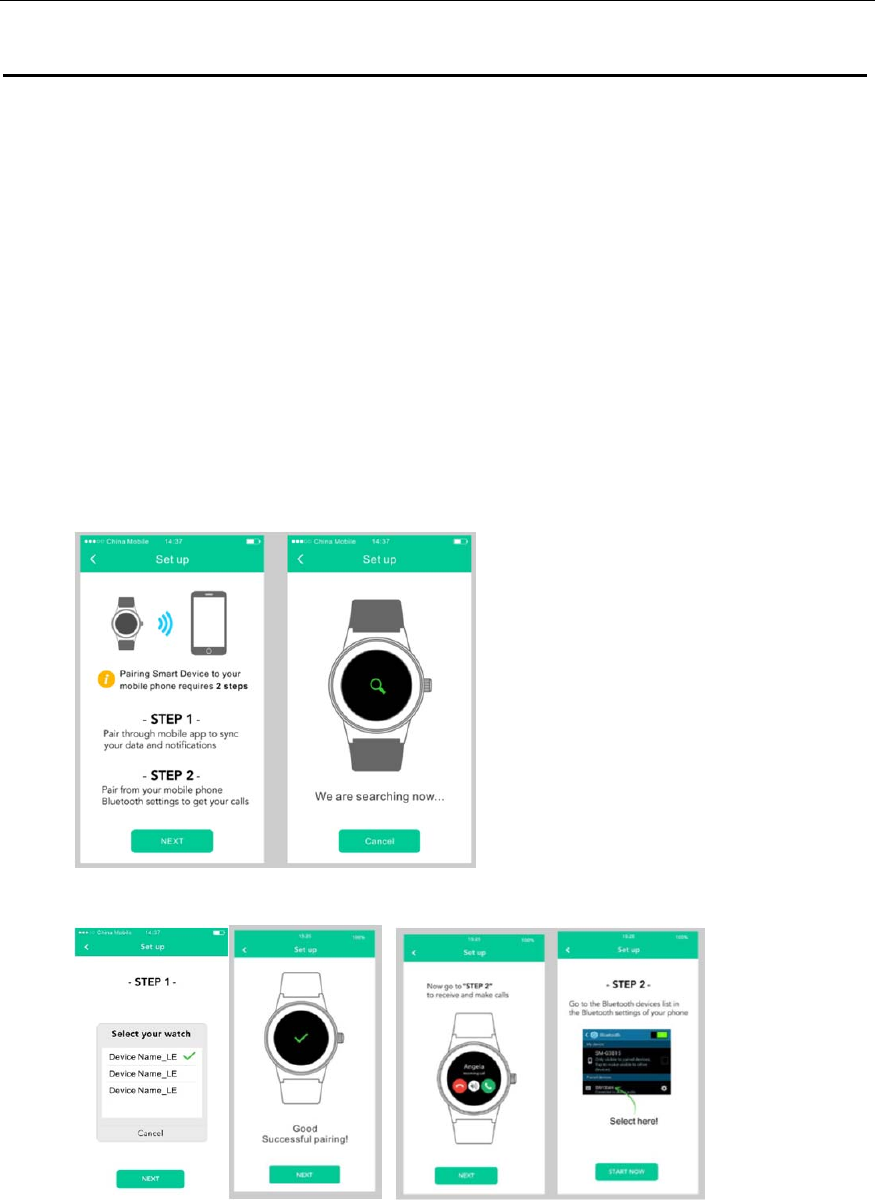
Whenturningonsmartwatch,youwillseethewatchface.
Fromwatchface:
1. GotoMainMenu
a. Slidefromrighttolefttoenterintomainmenu.
b.
Swipeupanddown(orturnthedigitalcrown)toswitchthemainmenu.
c.
Clicktheicon(orpressthedigitalcrown)toenterthecorrespondingmenu.Slide
fromlefttorighttoreturntothepreviousmenu.
2. GotoNotificationshortcutpage
Slidefromlefttoright
3. Gotoothershortcutspage
Swipeupanddown.
7
Pairwithsmartphone
Searchanddownload“Orunning”appfromAppstoreortheGooglePlayStoreonyour
smartphone.
PairwithiPhone
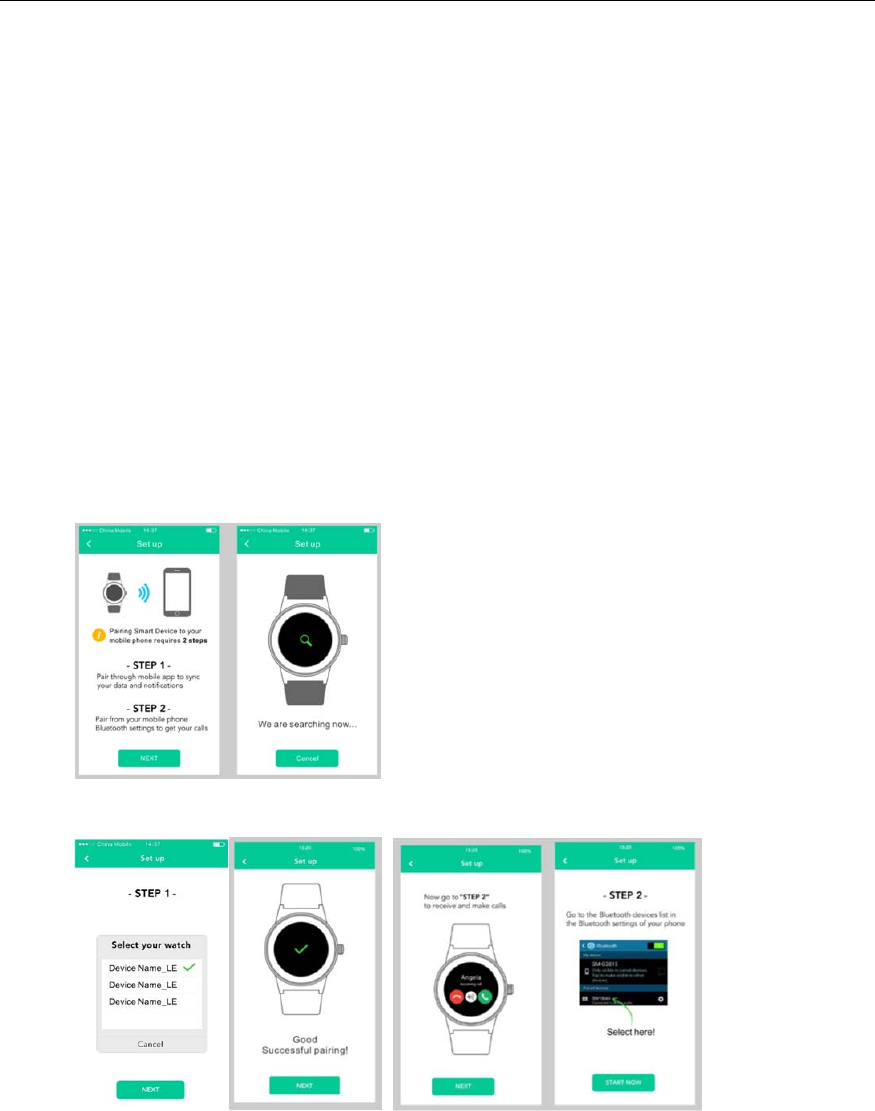
Pairingthroughtheapplication“Orunning”(BluetoothLowEnergy‐BLE)tosyncactivity
dataandnotificationsetc..
1. Search“Orunning”onAppStore,downloadandinstall“Orunning”.
2. EnableBluetoothonyouriPhone.
3. Open“Orunning”ApponyouriPhone,setyourprofileonSettings.
4. Tap“ConnectSmartWatch”onSettings.
5. Select“Devicename_LE”inthelistofdevices,tap“Next”topairwithyoursmart
watch.
PairingthroughSettingsofiPhonetomakeandreceivecallswithDevicename
Option1:GotoiPhone“Settings””Bluetooth”andselect“Devicename”inthelistof
devicesforconnection.
Option2:SwipedownfromwatchfaceinterfacetogotoShortcutinterfacetoopen
Bluetooth,tap“Searchnewdevice”tofindthenameofyourphoneinthelistandtapit
forconnection.
8
Remark:
Iftheconnectionissuccessful,acheckmarkwillappearnexttothenameofyour
phone
Makesureyoursmartphoneissettobe“VisibletoallnearbyBluetoothdevice”.
Thesmartwatchwillautomaticallypairwithyoursmartphoneaftertheinitial
pairingissuccessful.
Thesmartwatchwillauto‐syncthedateandtimewithyoursmartphone.
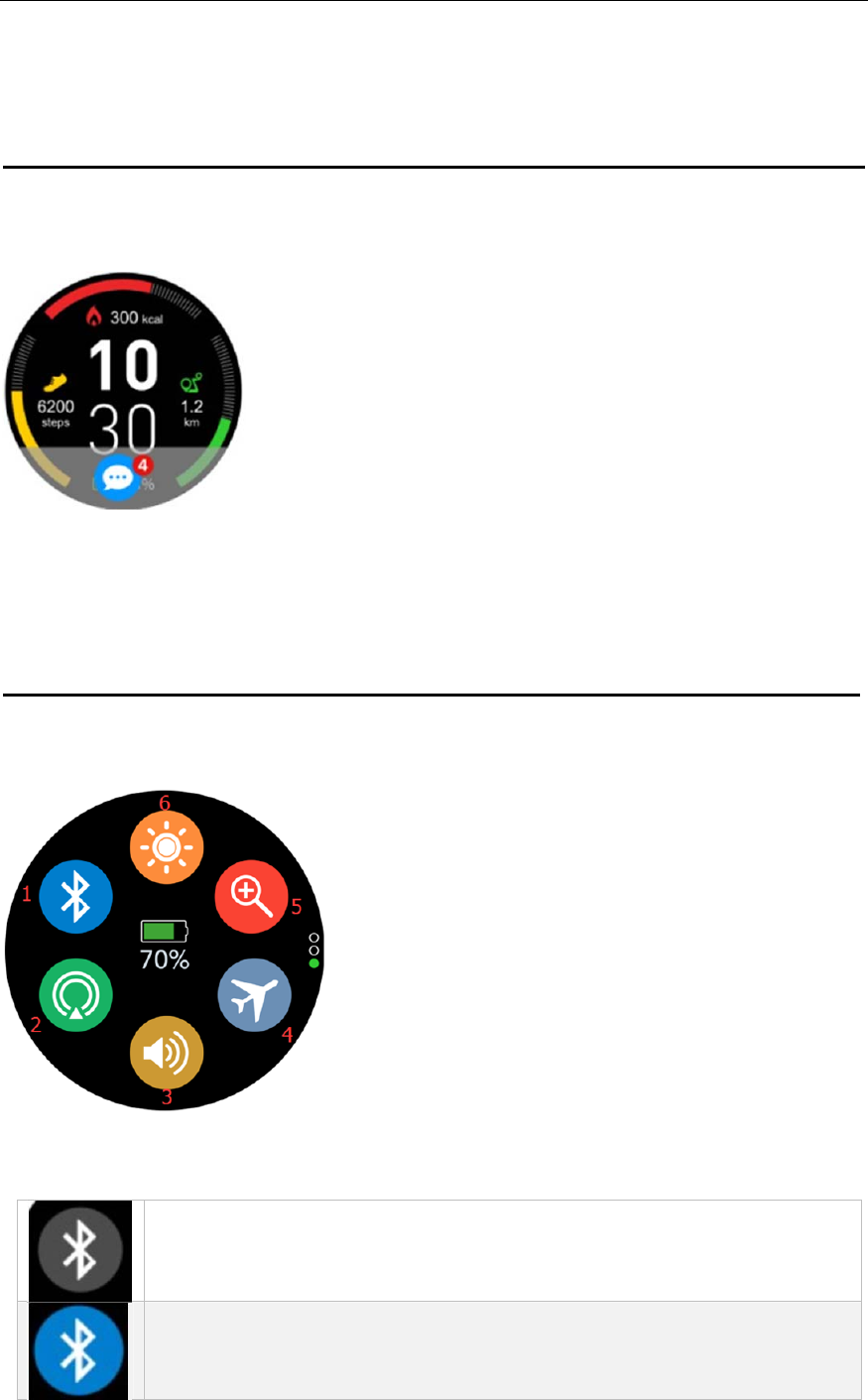
PairwithAndroidPhone
1. Search“Orunning”ontheGooglePlayStore,downloadandinstall“Orunning”.
2. EnableBluetoothonyourphone.
3. Open“Orunning”Apponyourphone,setyourprofileonSettings.
4. Tap“ConnectSmartWatch”onSettings.
5. Select“Devicename”inthelistofdevices,tap“Next”topairwithyoursmart
watch.
Thenyoucanstartwithyoursmartwatch.
9
Function
Watchface
Youcanpressthepowerbuttontogotothewatchfaceinterfacequickly.
Ifyouwanttochangethewatchfaceofyoursmartwatch,pressthecurrentwatchface
for3seconds,swipeleftorrighttogothroughthedifferentwatchfacesandtaponthe
oneyouwanttoselectanduse.
Shortcut
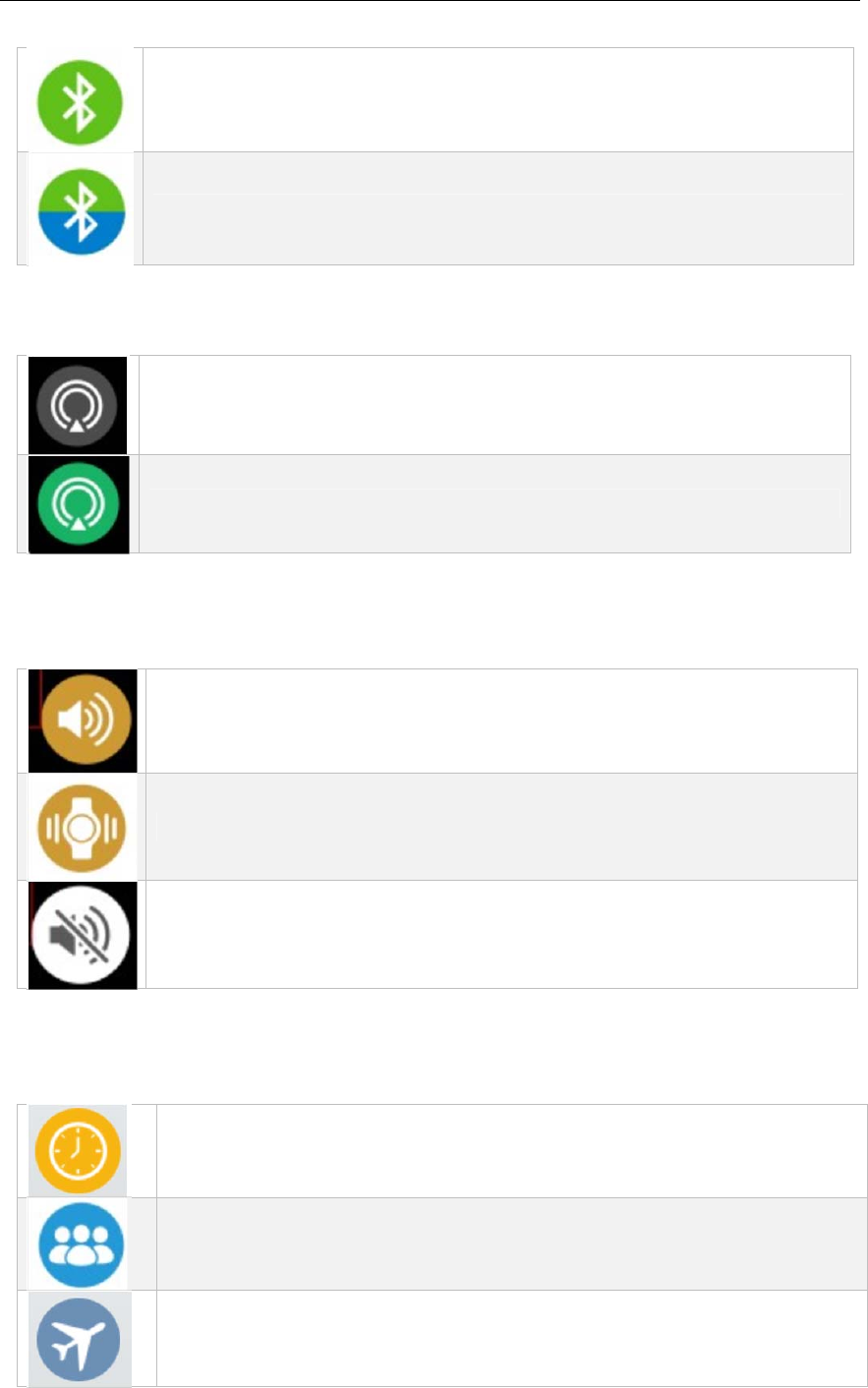
1. Bluetooth
MeaningthestatusofBluetooth,whenyouclicktheicon,youcansearchandconnect
withyoursmartphoneviaBluetooth.
MeansBluetoothdisconnected
MeansBluetooth3.0connected(formakingandreceivingcallswith
Devicename)
10
MeansBluetooth4.0connected(foractivitydataandnotifications
synchronization)
MeansBluetooth3.0&4.0connected
2. GPS
MeaningthestatusofGPS,youcanclicktheicontoswitchon/offtheGPS.
MeansGPSisoff;
MeansGPSison;
Soundmode
MeaningthestatusofSoundmode,youcanclicktheicontoring,vibrationormute
mode;
Meansringmode
Meansvibrationmode
Meansmutemode
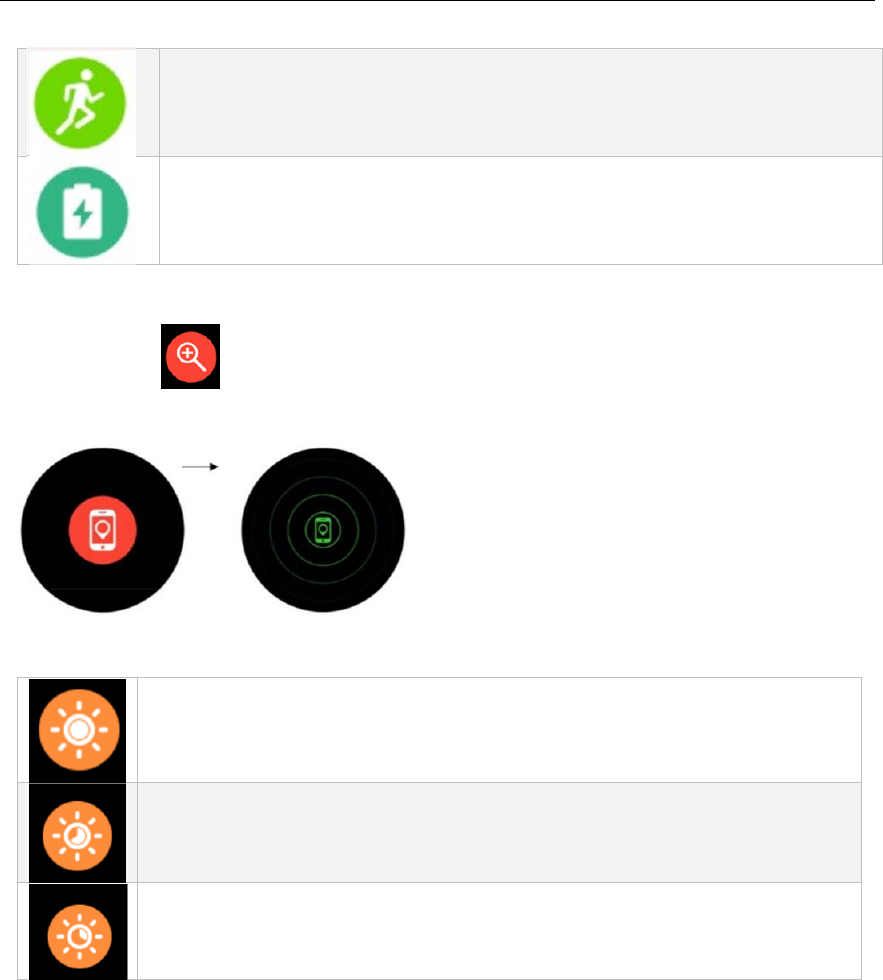
3. Scenemode
Showingthecurrentscenemode,youcanclicktheicontoswitchdifferentscene
mode.
Generalmode:smartwatchwillautomatically“Activateonwristflisk”,
turnoffGPS,setupmid‐brightnessandringmode.
Meetingmode:smartwatchwillautomaticallyturnonBluetoothand
“Activateonwristflisk”,turnoffGPS,setupmid‐brightnessand
vibrationmode.
Airplanemode:smartwatchwillautomaticallyturnonthe”A c t i v a t e on
wristflisk”,turnoffBluetoothandGPS,setupmid‐brightnessandring
mode.
11
Sportmode:smartwatchwillautomaticallyturnonBluetooth,
“Activateonwristflisk”andGPS,setuphigh‐brightnessandringmode;
Powersavingmode:smartwatchwillautomaticallyturnoffBluetooth,
“Activateonwristflisk”andGPS,setuplow‐brightnessandmutemode.
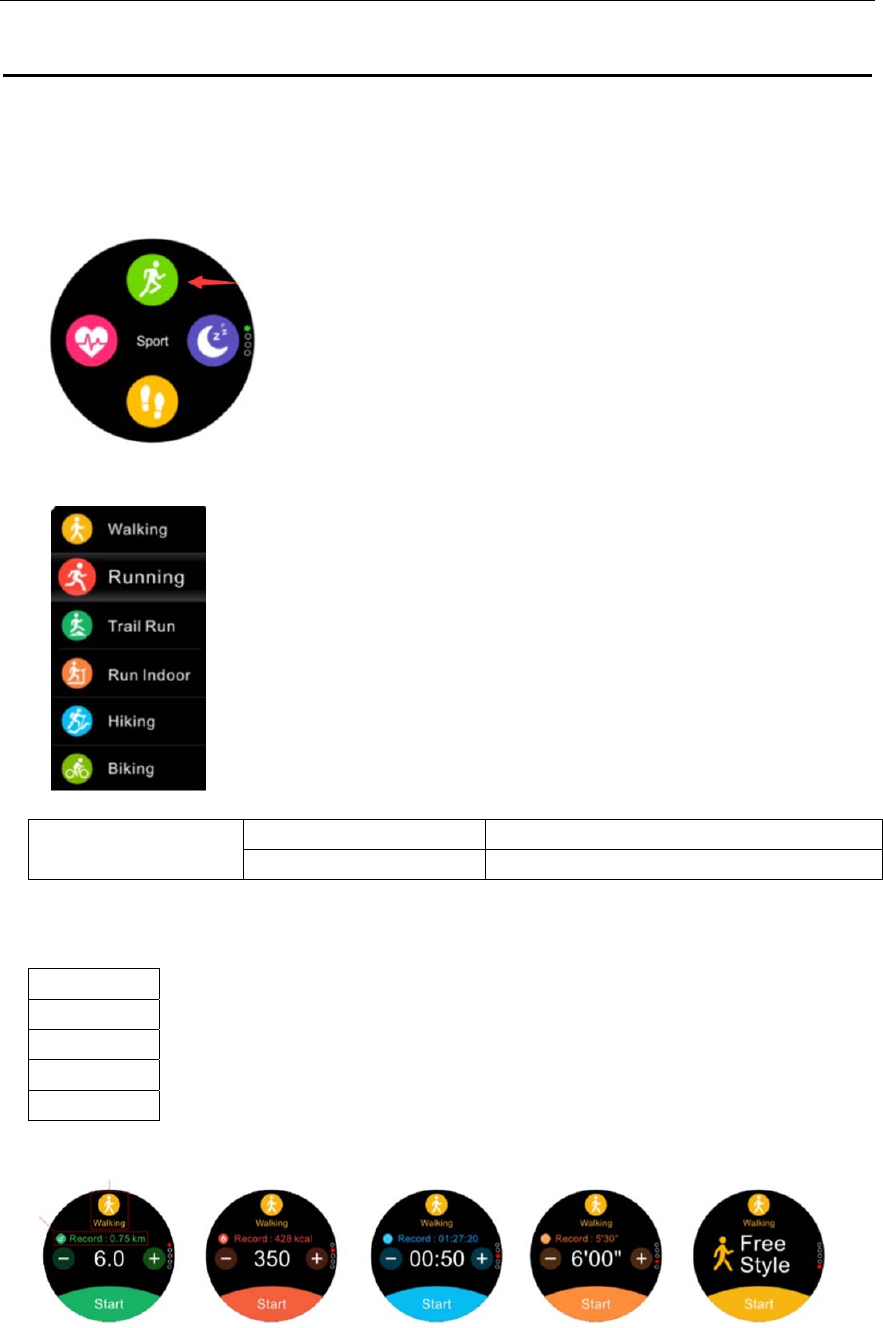
4. Findme
Whentheiconturnred,meansthesmartwatchwellconnectedwith“Orunning”
App.Taptheicon,yourphonewillringandvibrationtofindwhereyourphoneis.
5. Brightness
Youcanclicktheicontoadjustthedisplaybrightness.
Meanshigh‐Brightness
Meansmid‐Brightness
Meanslow‐Brightness
12
Sportmode
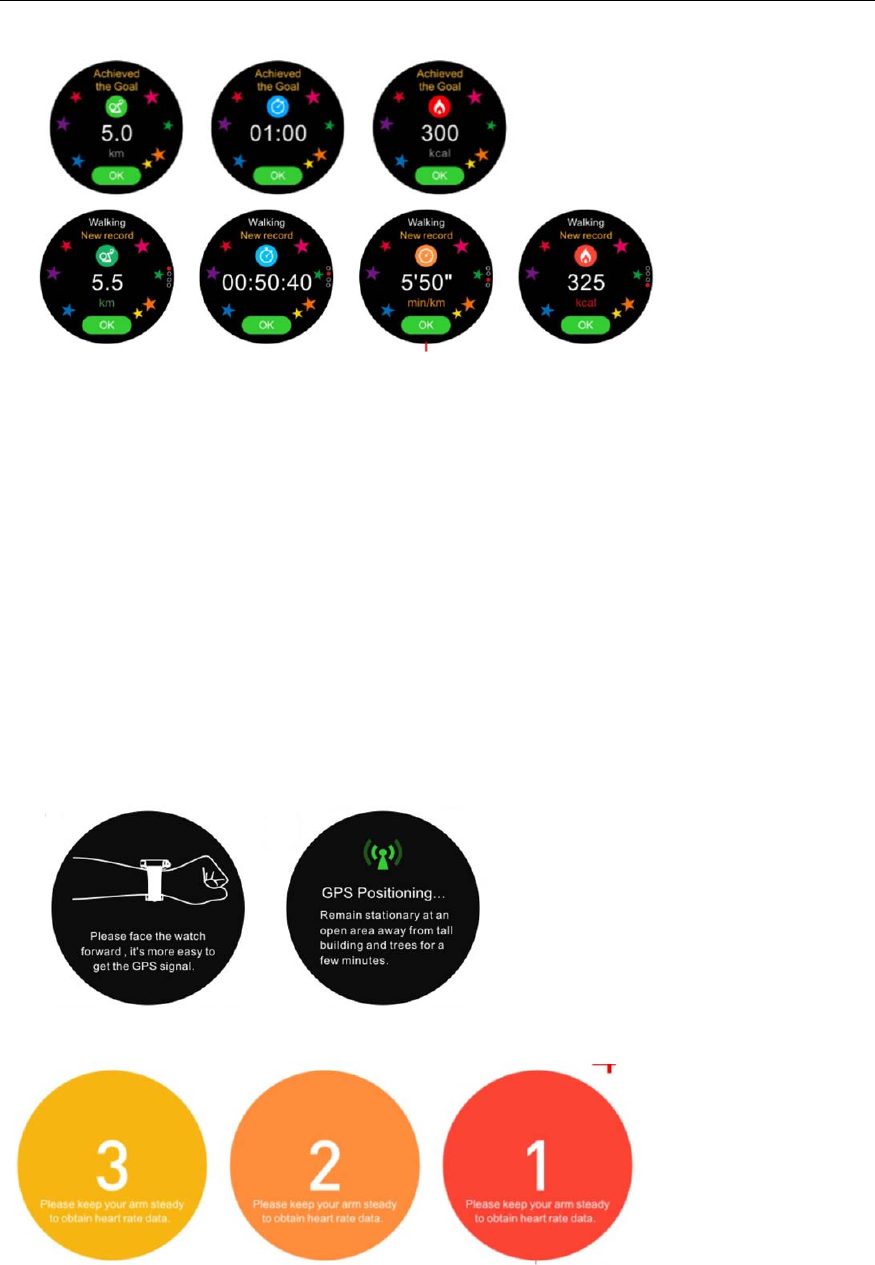
1. Youcanpresstheshortcutkeyofsportmodeortapbelowicononmainmenuto
entersportmode.
2. Multi‐Sportmode:with6sportmodeasbelow.
Slideup/down(orturnthedigitalcrown)toselectthesportmodeyouwanttostart.
3. Activitydistancerecord
DistancecalculationWhenturnedonGPSCalculatebyGPS(exceptRunindoor)
WhenturnedoffGPSCalculatebysteps(exceptBiking)
4. Activitygoal
Youcansetupthefollowinggoalsbeforegoingtoactivity.
Distance
Calories
Duration
Pace
FreeStyle
Remark:Thewatchwillpopupareminderonceyouachievethegoal(Paceand
FreeStylewithoutreminder).
13
5. DynamicHeartRateTracking
Thewatchwillremindyouifyouwanttotracktheheartrateornotbeforestarting
sport.Ifyouselectyes,thewatchwilltrackyourreal‐timeheartrateandshowthe
heartratezone.
6. GPSlocate
AcquiringSatelliteSignals
Thedevicemayneedaclearviewoftheskytoacquiresatellitesignals.
a. Gooutdoorstoanopenarea,
Thefrontofthedeviceshouldbeorientedtowardthesky.
b. Waitwhilethedevicelocatessatellites.
ImprovingGPSSatelliteReception
Takeyourdeviceoutsidetoanopenareaawayfromtallbuildingsand
trees.
Remainstationaryforafewminutes.
.
Remarks:Thewatchwillremindyoutowaitforafewsecondstoobtainthefirstheart
ratedatabeforestartingsportsforbetteractivityexperience.
7. Sportstracking
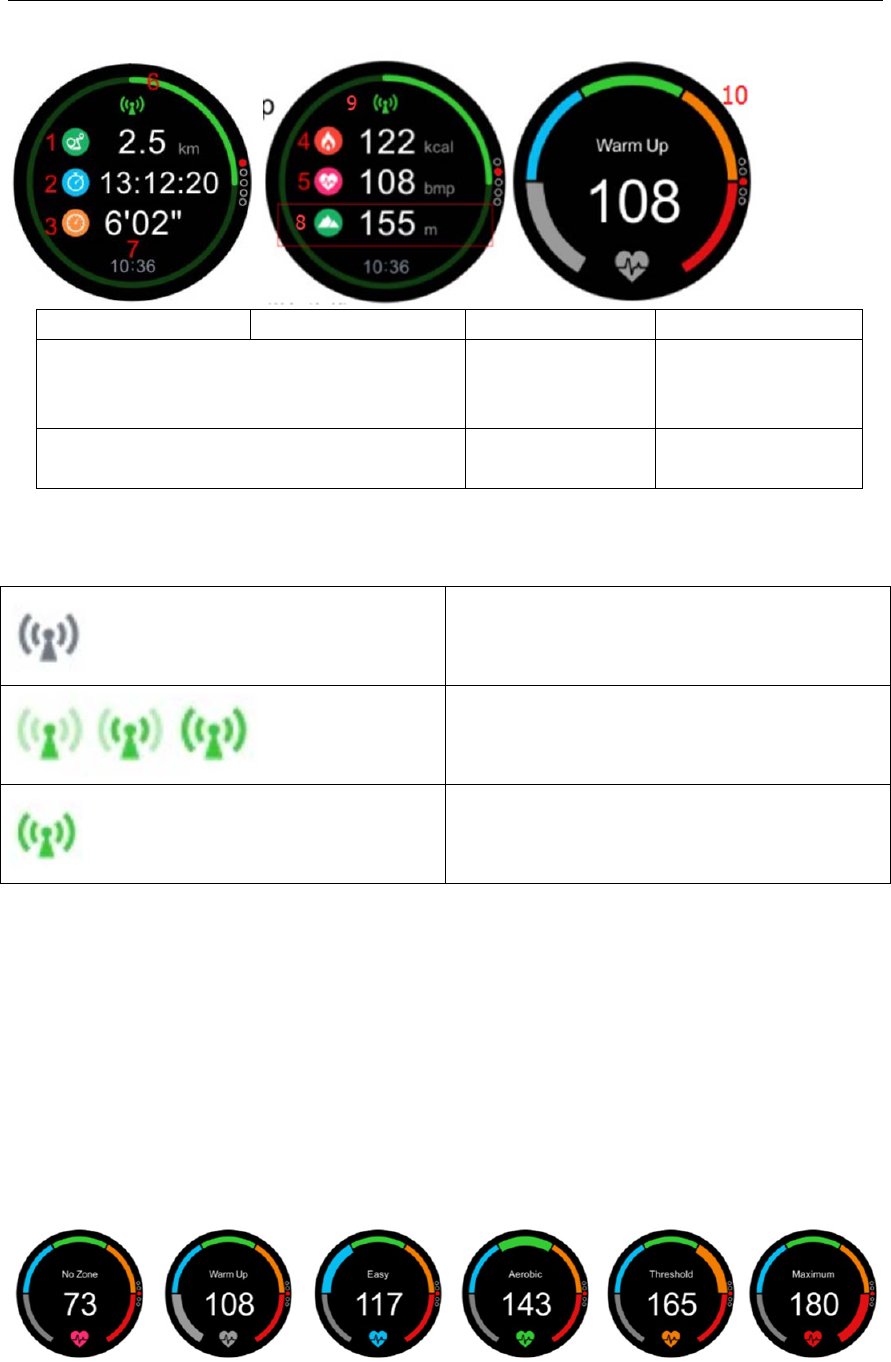
14
1. Distance2. Duration3. Pace4. Calories
5. Dynamicheartratevalue
6. Target
progress
status
7. Current
time
8. Altitude(worksonTrailrunning,
Hiking,Bikingmodeonly)
9. GPS
status
10. Heartrate
zone
GPSoff
SearchingGPSsignal
GPSlocatedsuccessfully
Heartraterange:thewatchwillautomaticallycalculateyourheartrateintervalaccording
toyourage.
Warmup‐Helptowarmuporhelprestore,improvemetabolism
Easy‐Increasemetabolism,fatmetabolism...weightcontrol
Aerobic‐Mediumintensitytrainingtoimproveaerobiccapacity.Helptostrengthen
theheartandlungandbloodvessels
Threshold‐Improvelacticacidtolerance,enhancehigh‐speedexercisestrengthand
endurance
Maximum‐Showbreathingandmusclestrengthtreatmentofanaerobicstate.Itis
recommendedtoreduceheartrate
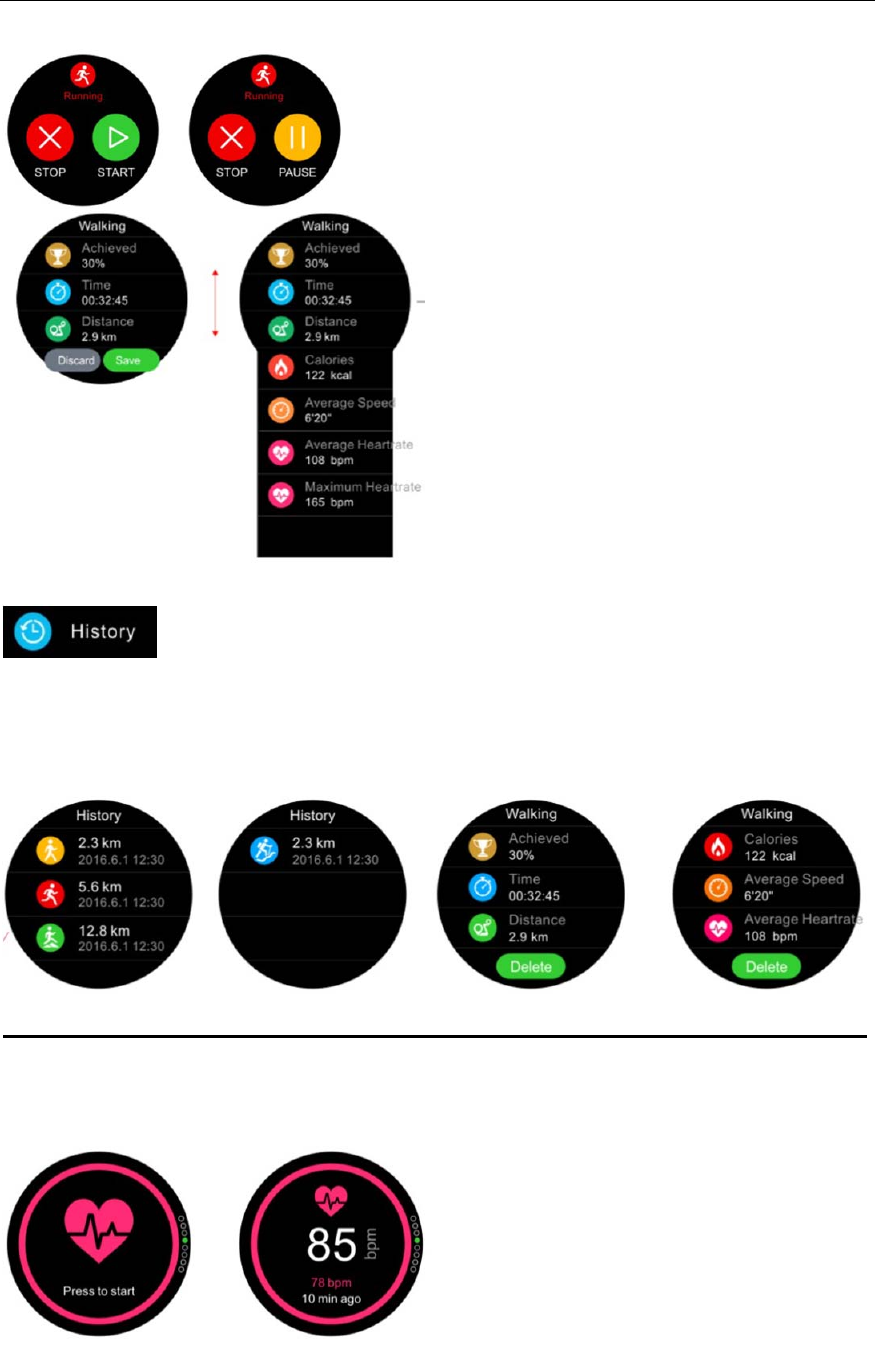
PS:Youcanchoosetosavethesportdataorchoosetodiscardtodeletethesportdata
afterclicking“STOP”.
15
8. History
Youcancheckyoursportrecordsatthebottomofthesportmode.Includingthe
percentageofgoals,exercisetime,movementdistance,calories,theaveragepace,
averageheartratevalue.
Deleterecord:Checktherecord,thentap“Delete”orlongpressthecorrespondingdata.
Heartrate
Fastenthewatch,makesureitfitscloselyonyourwristwhenmeasuringyourheartrate.
16
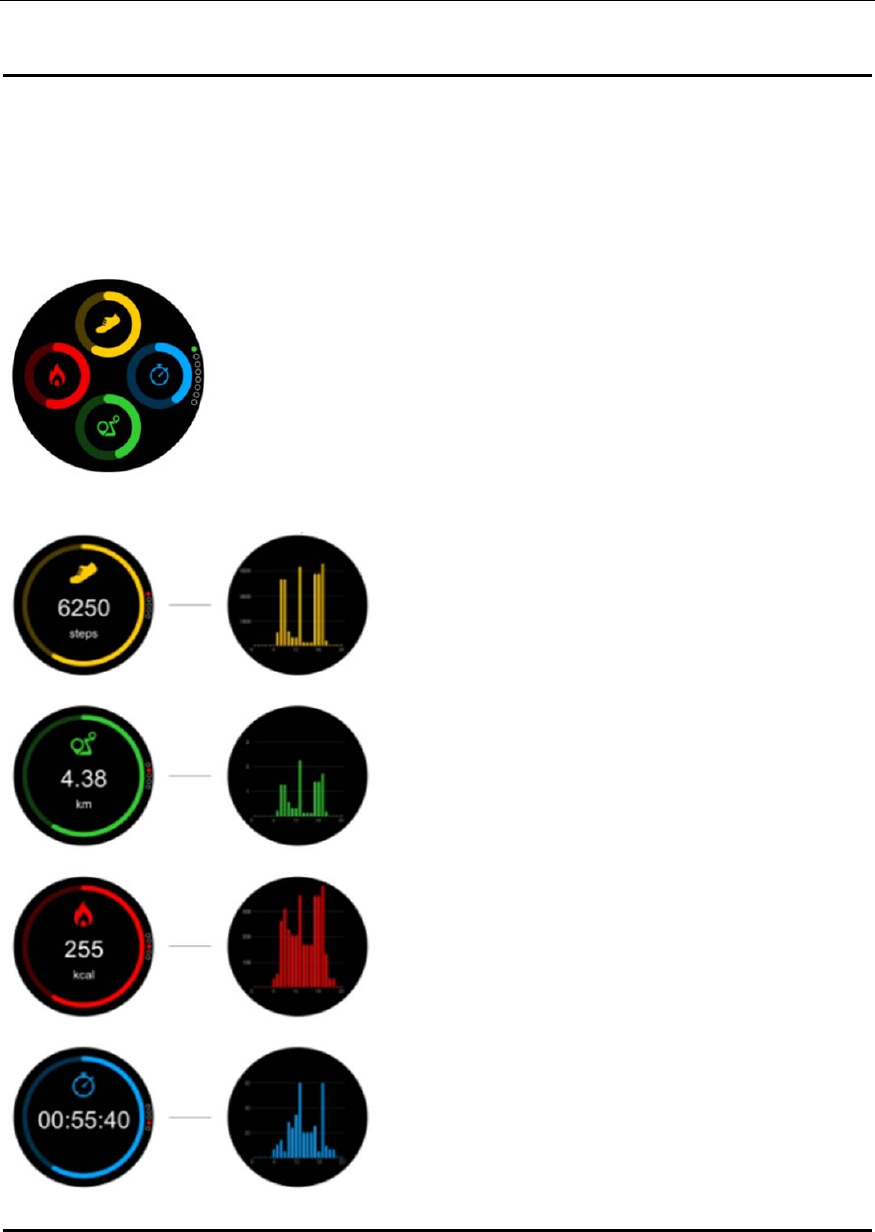
Pedometer
Thewatchwillautomaticallyrecordyourdailynumberofsteps,movementdistance,
caloriesandexerciseduration.Selectthecorrespondingicon,slidefromrighttoleftto
checkthedetailedhistogramreportofperhour.
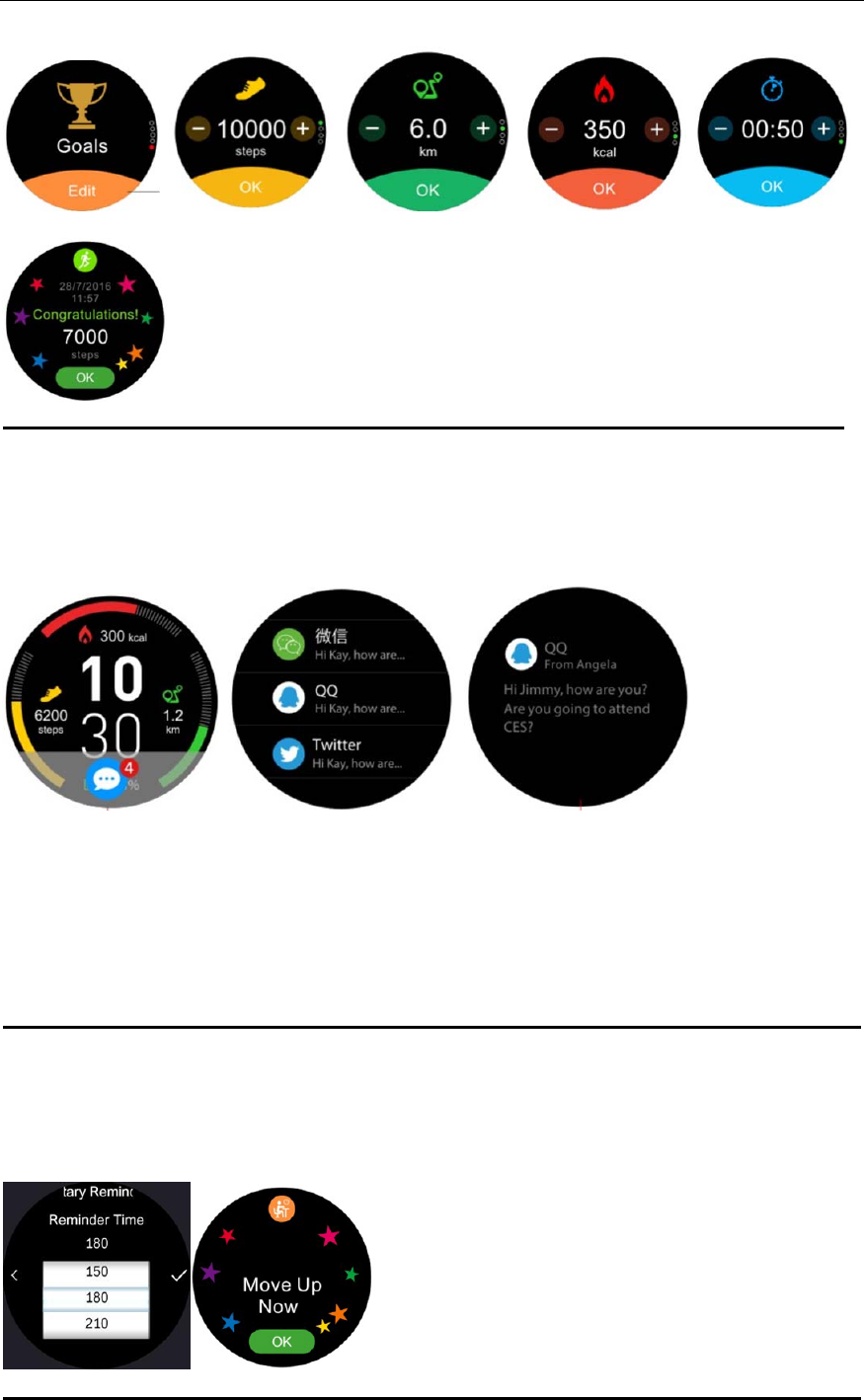
Goals
Setdailypedometergoals,includingsteps,distance,calories,exerciseduration.
17
Ifyouachievethegoalyousetup,thewatchwillpopupareminder.
Notification
Seeappnotificationsfromaconnectedsmartphone,includingnotificationsofincoming
andmissedcalls,SMS,email,socialmediaactivity,etc..
SETTINGUPNOTIFICATIONSFORANDROIDUSERS
GototheSettingsofyourAndroiddevice:
TapNotificationsinSettings.
SelectwhichtypeofnotificationsyouwanttoreceiveonSmartWatch
EnableShowinNotificationstoreceivethenotificationonSmartWatch
Sedentaryreminder
Whenyousetupthesedentaryreminder,thewatchwillautomaticallydetectwhether
youaresedentaryandpopup“Moveupnow”withringandvibrationifyes.
18
Sleepmonitor
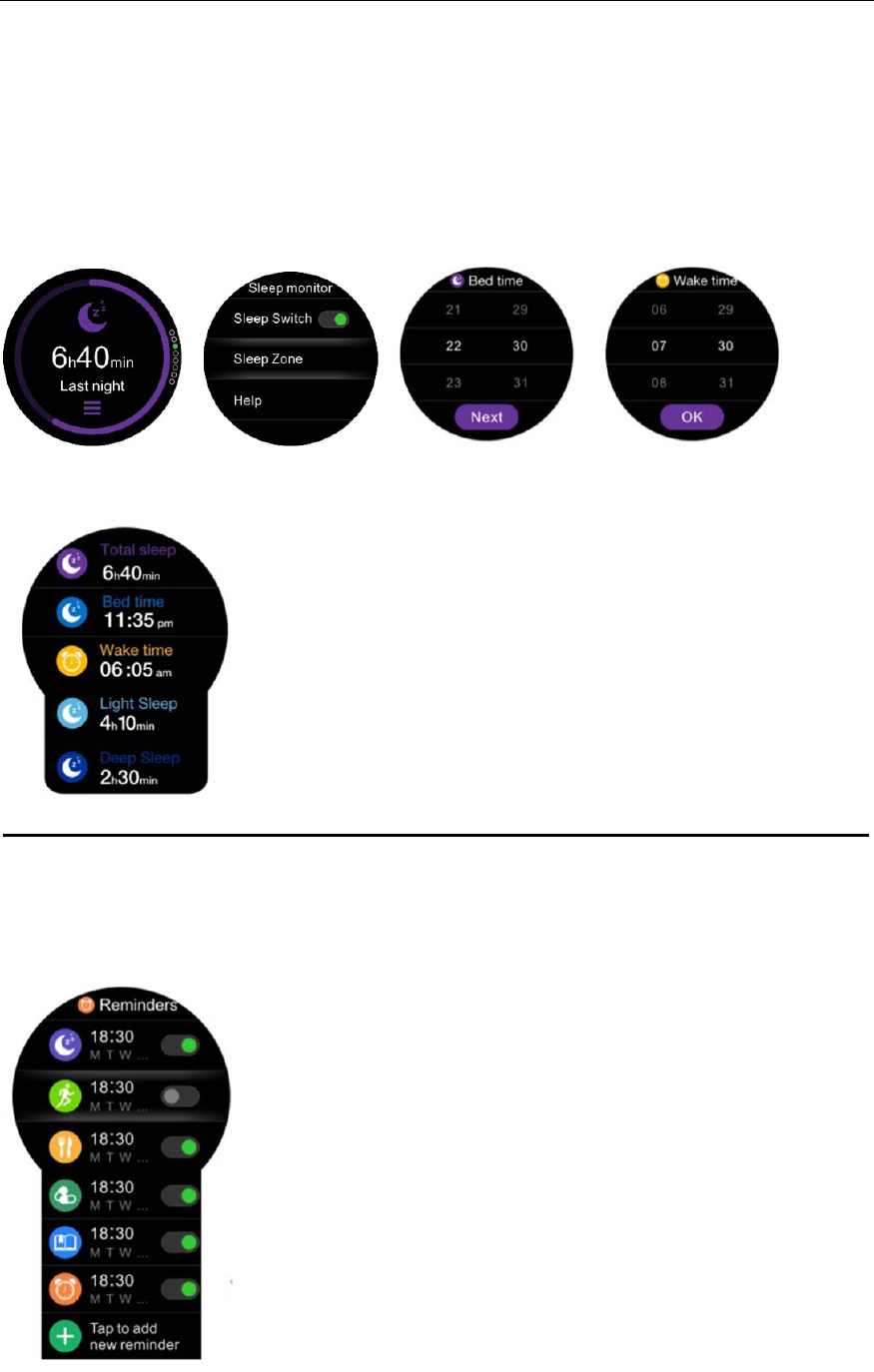
Slidefromrighttolefttosetupthebedtimeandwaketime.Whenthesleepswitchis
ON,thewatchwillautomaticallymonitoryoursleepquality(lightsleepanddeepsleep)
duringtheperiodwhichyousetup.WhenthesleepswitchisOFF,thewatchwillnot
monitoryoursleep.
YoursleepdatawillbesynchronizedtoAPPonceyoupairedthewatchwithyoursmart
phone.Youcancheckyoursleepdataoflastnightaswell.
Reminder
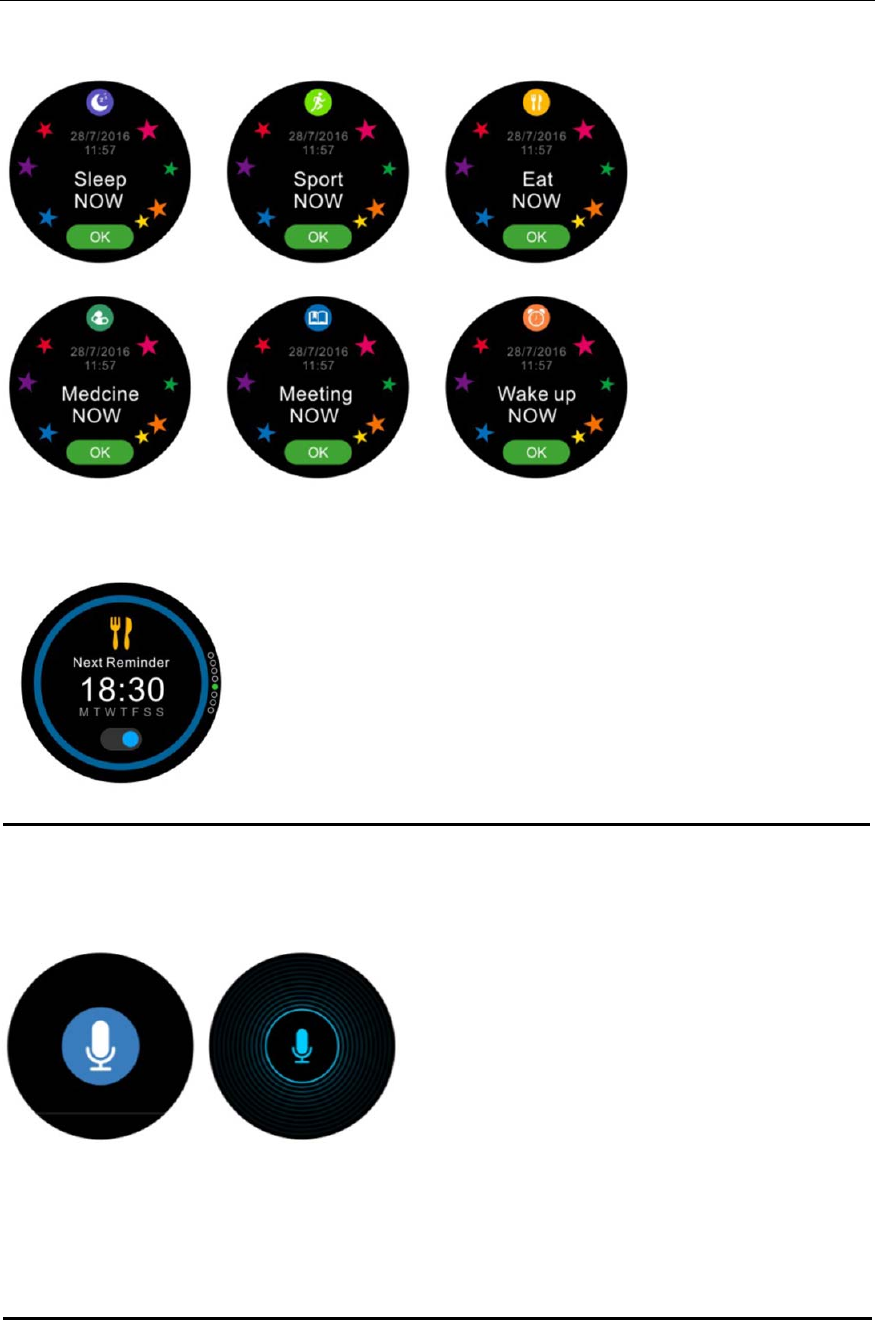
Supportmultiplereminders.
With6differentinterfacestoremindyou.
19
Youcancheckandturn/offyournextreminderonshortcutmenu(fromwatchface
interface,slidefromdowntoup).
V
oice
TriggertheSiriassistant/GoogleTalkwhenconnectedtoyouriPhone/Androidphone.
Examplesofwhatyoucanaskordo:
Call(nameofyourcontact)
SendaSMSto(nameofyourcontact)
What’stheweatherlike?
Setanalarmfortomorrow5am
Weather
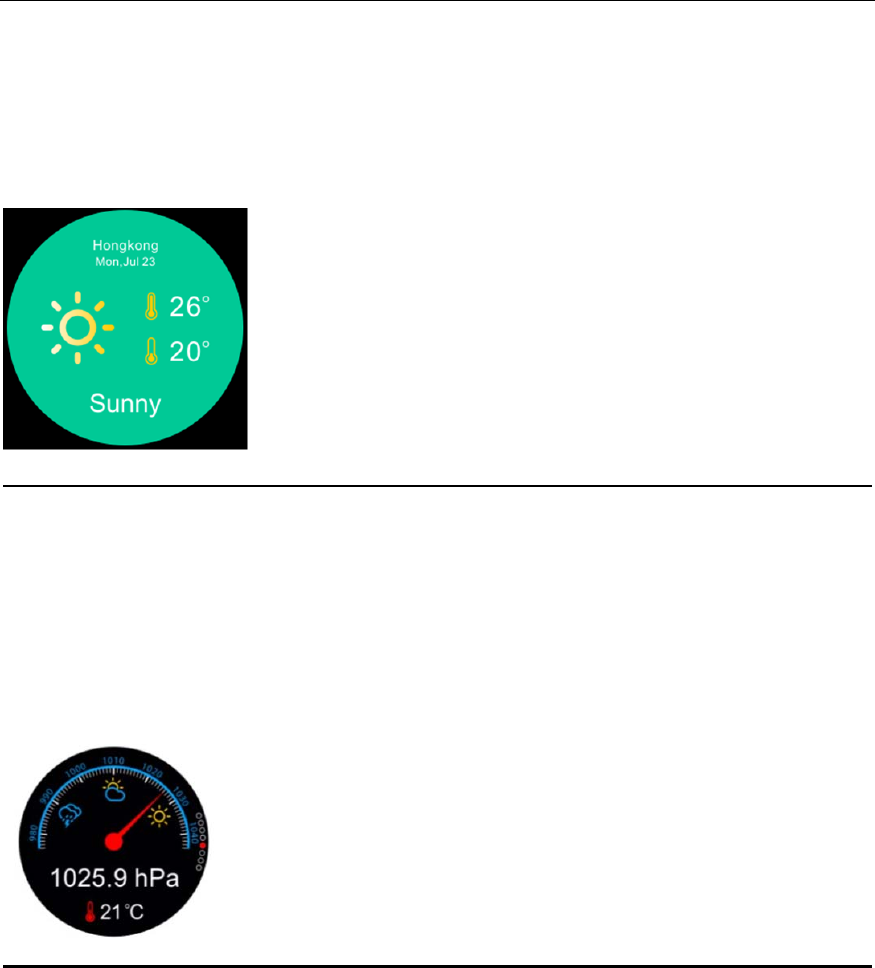
Whenyouparingthewatchwithyoursmartphoneinthecaseofyourphonehave
20
Internet,thewatchwillsyncyourlocalweatherforecast(Max/Mintemperatureofthe
day)asbelow.
Remark:it’sbettertoturnonyoursmartphoneGPSfunctionwhenpushingweather
forecast.
(Shortcuts:fromwatchfaceinterface,slidefromuptodown)
Barometer
Withthesmartwatch,youcancheckthecurrentatmosphericpressureand
temperature.
Ifyouneedtocalibratethetemperatureandpressure,pleasefollow“Thestepsto
calibratethesensor”above.
(Shortcuts:fromwatchfaceinterface,slidefromdowntoup)
Altitude
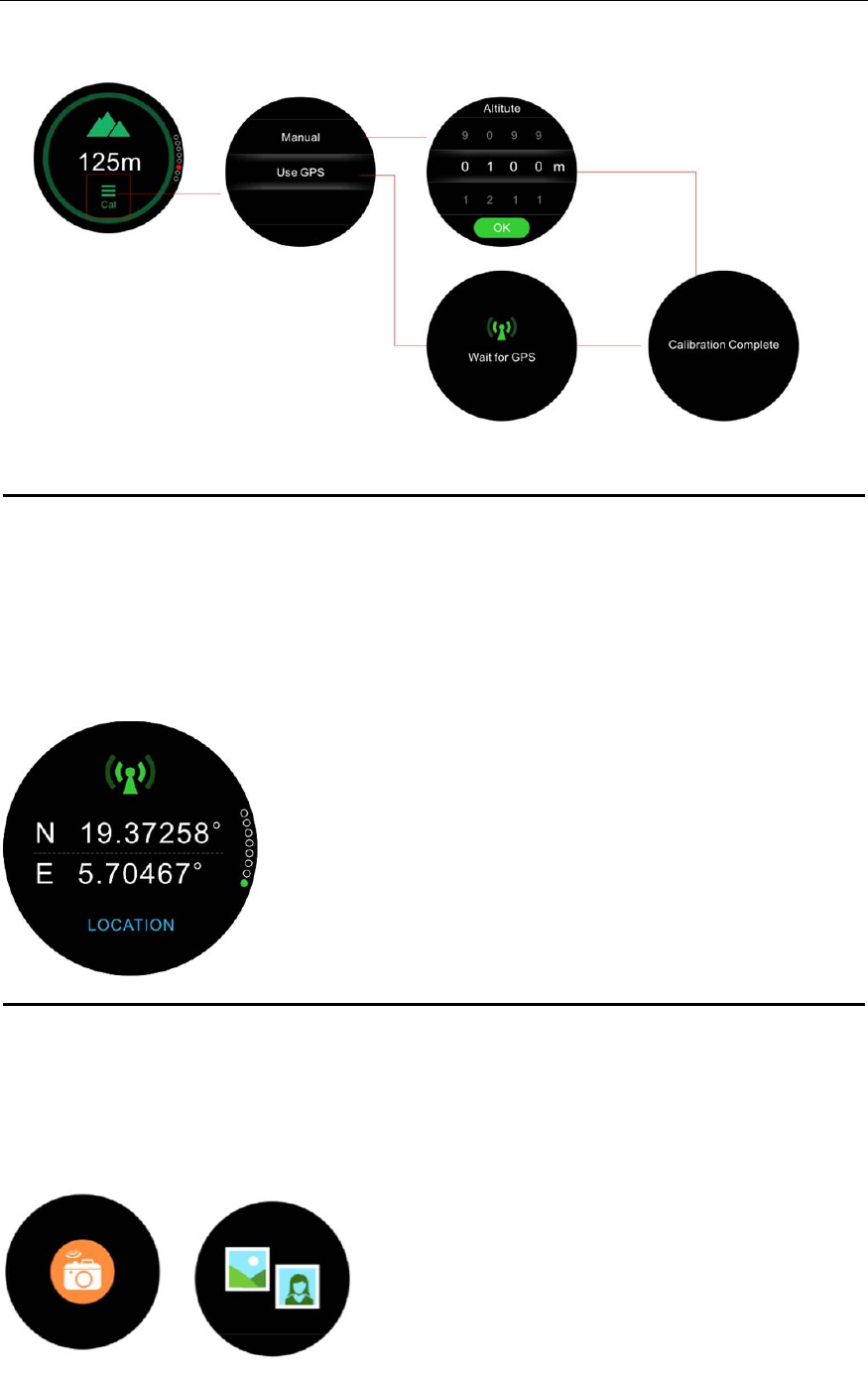
Withthesmartwatch,youcancheckthecurrentaltitude.
Ifyouneedtocalibratealtitude,pleaseclick“CAL”andfollow“Thestepstocalibratethe
sensor”above.
(Shortcuts:fromwatchfaceinterface,slidefromdowntoup)
21
Location
IfyouturnedonGPSofyoursmartwatchandlocatedyourpositionsuccessfully,there
willshowthecurrentlatitudeandlongitude.WhenyouturnofftheGPSorposition
failure,thewatchwillkeepthelastlatitudeandlongitude.
(Shortcuts:fromwatchfaceinterface,slidefromdowntoup)
Remotecapture
Toenjoythisfeature,makesurethecameraofyoursmartphoneison.EnablingRemote
capturefunctionwillletyoutakepicturesremotelyfromyourSmartWatch.
22
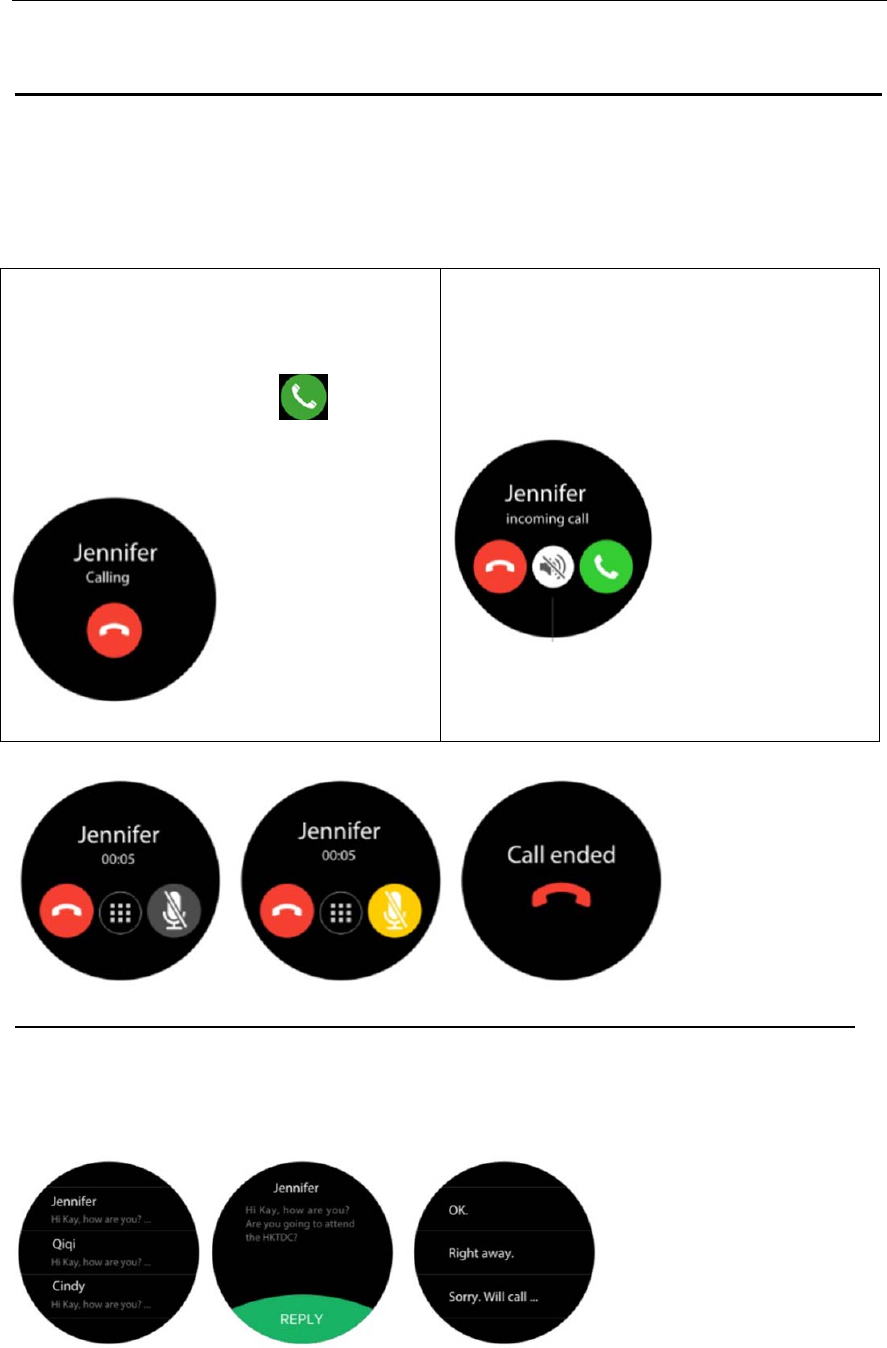
Dialer
Thewatchallowsyoutomakeandreceivecallsincaseofconnectedsmartwatchwith
yourphoneviaBluetooth)
Makingacall
FROMTHEPHONEMENU
GotothePhonemenu,enteranumber
withthedialerpadandtap
INCOMING
CALLOPTIONS
1.REJECT
Receivecall
Whenyourphonereceiveacall,thewatch
willpopup.
INCOMING‐CALL
OPTIONS
1.ANSWER
2.REJECT
3.MUTE
Duringthecall,youcanselecthangup,muteandenterthedial.
SMS
ViewSMSmessagesfromaconnectedAndroidphone.
QUICKREPLY
YoucanreplythroughtheSMStemplate(Androidonly)
TheSMSofiPhonewillbedisplayedinNotificationmenu.
23
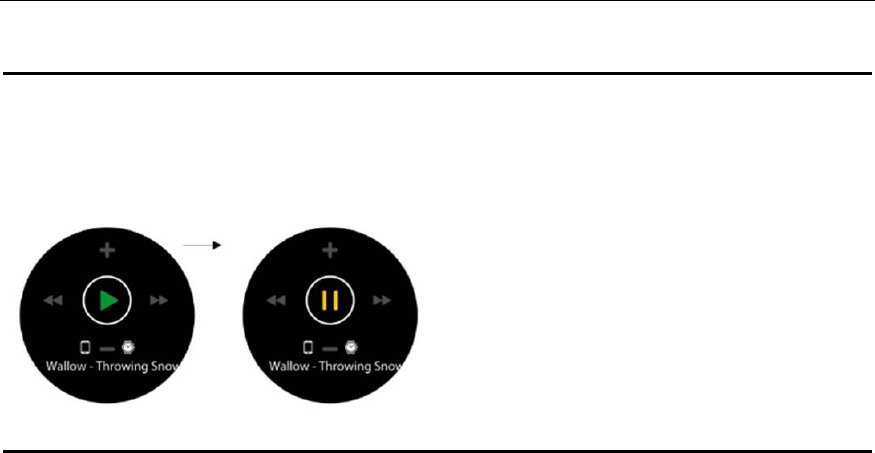
BTmusic
Controlthemusicplayerappofaconnectedsmartphone.
Settings
UsetheSettingspaneltoconfigurethesettingsofyourSmartWatch
IProfile:SetupGender,Height,Weight,Birthday
IBluetooth:TurnBluetoothon/offandvisibilityon/off
IGPS:TurnGPSon/off
ISensorCalibration:Youcanmanuallycalibratethewatch'stemperature,altitude,and
atmosphericpressure
ISleepMonitor:Youcanturnon/offsleepmonitorandsetupthetimeofmonitor
sleep.
ITimeanddate:Setuptheclocktypeonthedisplayscreenandsetthetime
IUnits:Setunitsofmeasurementtometricorimperial
IHeartrate:Setthetimeforautomaticheartratetest
IActivateonwristflick:Turnon/offthefunctionof“liftingyourarmtowakeupthe
SmartWatchdisplay”
ISound:Setuptheringtonesandsoundmode,aswellasthevolumelevel
IDisplay:Setupthebrightnessofthescreenandthestandbytime
IWatchinfo:Displaystheprovider,devicename,model,andfirmwareversion
ILanguage:Multi‐languages:English(default),Chinese,Spanish,Portuguese,Italian,
French,German,Dutch,Polish,Russian,Thai,TraditionalChinese
(Youcanturn“Autosync”offtoselectthelanguagesyouneed)
IPowerdisplay:Displaysthecurrentpowerstatus
IRestoretoFactory:Resettofactorydefault
FCC Statement
This equipment has been tested and found to comply with the limits for a Class B
digital device, pursuant to part 15 of the FCC rules. These limits are designed to
provide reasonable protection against harmful interference in a residential installation.
This equipment generates, uses and can radiate radio frequency energy and, if not
installed and used in accordance with the instructions, may cause harmful interference
to radio communications. However, there is no guarantee that interference will not
occur in a particular installation. If this equipment does cause harmful interference to
radio or television reception, which can be determined by turning the equipment off
and on, the user is encouraged to try to correct the interference by one or more of the
following measures:
-Reorient or relocate the receiving antenna.
-Increase the separation between the equipment and receiver.
-Connect the equipment into an outlet on a circuit different from that to which the
receiver is connected.
-Consult the dealer or an experienced radio/TV technician for help.
To assure continued compliance, any changes or modifications not expressly
approved by the party.
Responsible for compliance could void the user’s authority to operate this
equipment. (Example- use only shielded interface cables when connecting to
computer or peripheral devices).
This equipment complies with Part 15 of the FCC Rules. Operation is subject to
the following two conditions:
(1) This device may not cause harmful interference, and
(2) This device must accept any interference received, including interference that
may cause undesired operation.
RF warning statement:
The device has been evaluated to meet general RF exposure requirement.
The device can be used in portable exposure condition without restriction.