Sys Link Technology AC-B01 Auto Charger with Bluetooth User Manual Manual AC B01
Sys-Link Technology Co.,Ltd Auto Charger with Bluetooth Manual AC B01
User Manual
User manual
Thank you for your choose Auto Charger with Bluetooth Series Charger, in order to let you easily experience the product, we
are equipped with detailed instructions, you can obtain the relevant product introduction, using methods such as knowledge,
please read the instructions carefully before you use the machine, if there is a misprint translation errors or do please understand.
1.Warnings
Storeatroomtemperatureenvironmentandtheuseofthisproduct.
Donotexposethisproductintherainordampenvironment;
Donotthrow,avoidthedamagecausedbyfalling.
Pleasedonotdisassemblebyrepairandtransformtheproduct;
Built‐inlithiumbatteryproducts,pleasedonotarbitrarilydiscardedorsetonfire,lestcausedanger!
2.WarmPrompt
a.Failure,pleaseimmediatelyshutoffthepowerswitch,pullouttheplug,preventdamageofcomponents
b.whendistancetoofarorhaveamasktoomuchthebluetootheasytodisconnect,pleaseavoidintime.
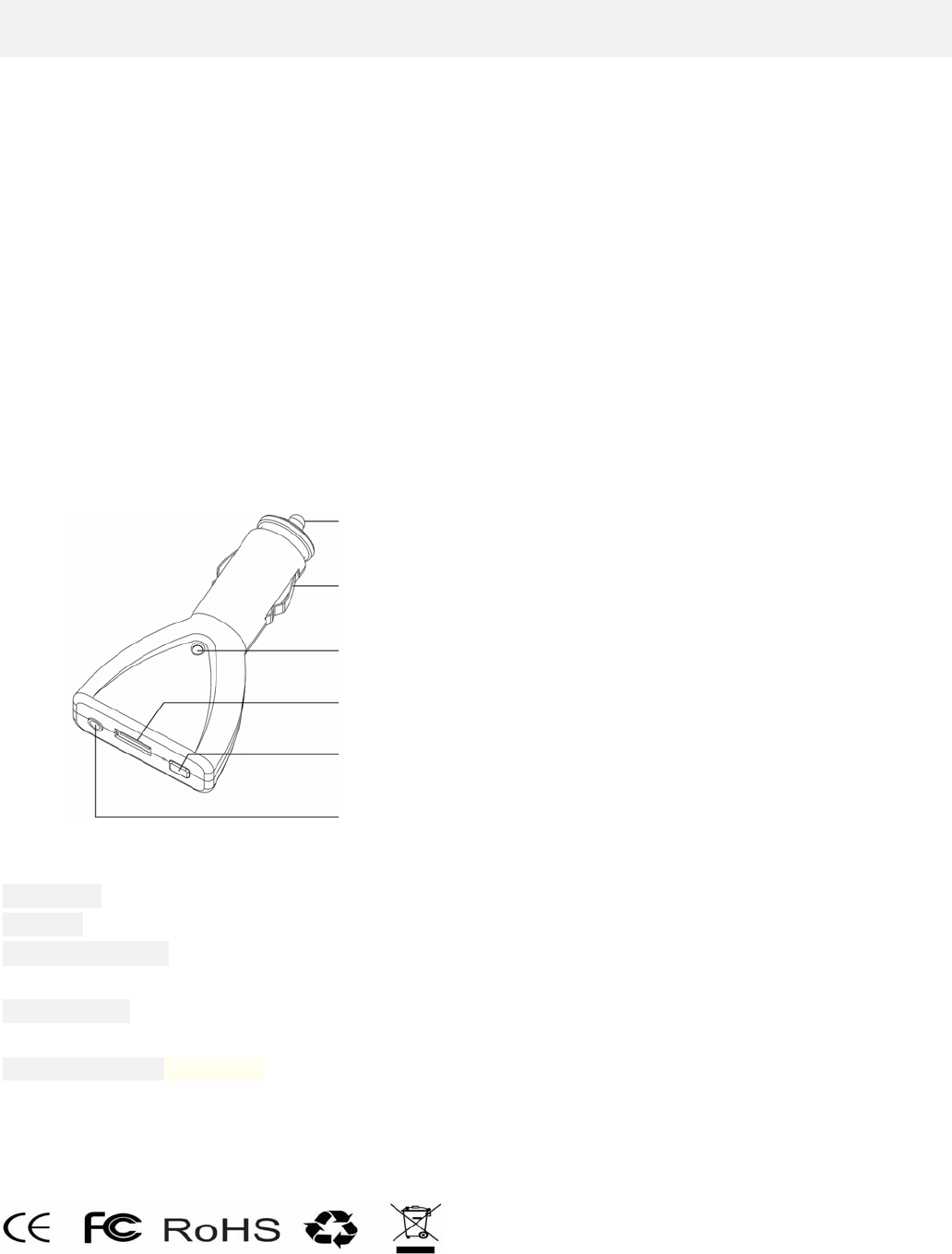
3.Appearanceandfunctionkeys
4.Productparameters
PartNumber:AC‐B01
Bluetooth:CSRBluetoothV2.1+EDR
TransmittingDistance:≤10M(DuetoenvironmentalfactorsandconnecttoBluetoothdevicesvary)
InputChargingVoltage:DC10V‐32V
OUTPUTPOWER:DC5V/2A
OUTPUTAUDIO
RequencyResponse:60Hz‐15KHz`
SNR::≥76dB
Dimension::92*48*20mm
Weight:31g
FCCID:2ABH2AC‐B01
5.Packing&Accessory
1.AutoChargerwithBluetooth……………….x1
2.3.5audioline……………………………..…..x1
3.Manual/warrantycard……………………..…x1
INPUT DC+
INPUTDC‐
INPUTDC+
THEPOWERANDBIUETOOHSTATUSLAMP
OUTPUTDC5V
SWITCH/HF
AUDIOOUT
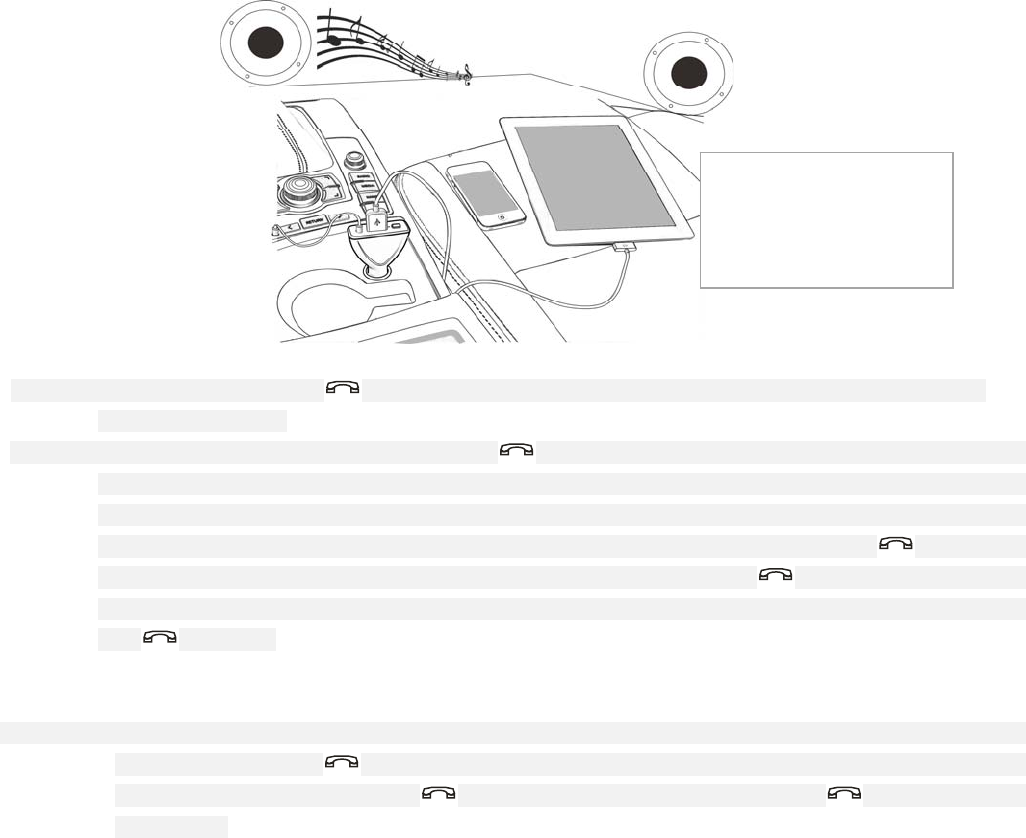
6.ConnectionDiagram
7.Functionalspecifications
On:connecttheunitpower,orlongpress" "thestereosendsout"beep,beep"ofthebootprompt,thebluetoothindicatorlight
flashingatthesametime.
Onthebluetoothconnectivity,powersupply,doubleclickonthe"",themachineenterintothesearchmatchingstate,thebluetooth
indicatorlightflash,abluetoothdevicecansearchtothemachine,clickonthematch,afterthesuccessoftheconnection,the
bluetoothindicatorlightflash,slowthestereowillsendduahintsound.Within10minutesafterthepowertoopenthe
bluetoothspeakersfindanybluetoothequipmentwillautomaticallyshutdownalsocanbelongpress" "manualclose
bluetooth.Ifthenexttoconnectagainneedtoelectricalcommissioningorlongpress" "boot,thismachineisbackto
leaguefinalequipmentfunction;Aftersuccessfulconnectionofequipmenttoopenthebluetoothautomaticallyconnectedor
click" "connection.
Warmprompt:iftheconnectionfails,pleaseshutdownorrestarttore‐enterthesearchmatches.
Afterthesuccessofthebluetoothmusicplayback:bluetoothconnectivity,equipmentcanplaymusicdirectly.
Hands‐freecalls:bluetoothstereowithmobilephoneaftertheconnectionissuccessful,whenthecallerid,thestereosendsout"beep"
prompttone;Accordingto" "answeringthephone/longaccordingtoreject,canreplacemobilephonetalkingtoeach
other,andthenaccordingtotheendof" "hangupthephonecall,alsocanbelongpress" "toredialthebottom
numberphone.
Charger:insertthecarpowerelectricitylongredlight,nomatterthebluetoothstandbyorshutdownstatecanbeoutput5v/2achargefor
otherdevices
8.Compatibility
Wireless:equippedwithBLUETOOTH2.1+EDR,ormoreadvancedversionsoftheequipment,BLUETOOTHV2.1+EDRincludesthe
followingagreement:A2DP,AVRCP,HFP
9.Service
1.Accordingtotheinstructionsundernormaluse,asaresultoftheproductitselfqualityproblem,sincetheupgradedateenjoyoneyear
freewarrantyserviceorreplacement.
Note:AUDIOLINE,carend
oftheLINEIN/AUXatthe
otherendconnectAC‐B
01AUDIOOUT
FCC Information and Copyright
This equipment has been tested and found to comply with the limits for a Class B digital device,
pursuant to part 15 of the FCC Rules.
These limits are designed to provide reasonable protection against harmful interference in a residential
installation. This equipment generates,
uses and can radiate radio frequency energy and, if not installed and used in accordance with the
instructions, may cause harmful interference
to radio communications. However, there is no guarantee that interference will not occur in a particular
installation. If this equipment does
cause harmful interference to radio or television reception, which can be determined by turning the
equipment off and on, the user is
encouraged to try to correct the interference by one or more of the following measures:
—Reorient or relocate the receiving antenna.
—Increase the separation between the equipment and receiver.
—Connect the equipment into an outlet on a circuit different from that to which the receiver is
connected.
—Consult the dealer or an experienced radio/TV technician for help.
This device complies with part 15 of the FCC Rules. Operation is subject to the
following two conditions:
(1)This device may not cause harmful interference, and
(2) this device must accept any interference received, including interference that may
cause undesired operation.
changes or modifications not expressly approved by the party responsible for compliance could
void the user's authority to operate the equipment.
This equipment complies with FCC radiation exposure limits set forth for an uncontrolled
environment .The device has been evaluated to meet general RF exposure requirement.
The device can be used in portable exposure condition without restriction.