TAIDOC TECHNOLOGY 3109ABEM2 BLOOD PRESSURE MONITOR User Manual Ideal BP Manual July07
TAIDOC TECHNOLOGY CORP. BLOOD PRESSURE MONITOR Ideal BP Manual July07
Users Manual

INSTRUCTION MANUAL
Model BPM 0001
PLEASE READ
BEFORE USE
*NOTE: The system is intended for information purposes only, for expert advice make
sure to consult a healthcare professional. Any instructions for change in treatment
and health related information or advice should only be made directly with a
healthcare professional. The IDEAL LIFE BP-MANAGER™ is a non-invasive
blood pressure monitor intended for the measurement of systolic (SBP) and
diastolic (DBP) blood pressure and heart rate (HR or pulse rate) using the
oscillometric technique. The IDEAL LIFE BP-MANAGER™ is used as an aid
to monitoring blood pressure in adults (individuals aged 18 and older)
in a non-clinical environment such as in the home. Results are
displayed on the IDEAL LIFE BP-MANAGER™ screen. The IDEAL LIFE
BP-MANAGER™ should not be used on infants or children.
Contraindications for Use: The end user of this device should not
have common arrhythmias, such as atrial or ventricular
premature beats or atrial fibrillation.
Version 2.0 Jan 2009 *Picture may vary from actual product
Easy and Affordable Solutions
for Better Health™
M A N A G E M E N T S Y S T E M
Blood Pressure
IDEAL LIFE
BP-Manager™
Ideal BP Manual Jan09:Ideal BP Manual July07 8/4/09 9:48 AM Page 1

IDEAL LIFE BP-Manager™
2
Table of Contents
© 2009 - 001 IDEAL LIFE INC. All rights reserved. IDEAL LIFE is a registered trademark in the United States for weight scales,
blood glucose meters, blood pressure cuffs and meters, heart monitors. IDEAL LIFE BODY MANAGER, IDEAL LIFE BP MANAGER,
IDEAL LIFE GLUCO MANAGER, IDEAL LIFE POD, REALIZING THE VISION OF A BETTER TOMORROW, Leveraging the Power of
Communication, Real time health and wellness information on demand, wireless remote health and wellness management, and
Solutions for better healthcare through advanced communication technology, The IDEAL LIFE Interactive Communication
Technology Platform, the IDEAL LIFE Information Management System, and the IDEAL LIFE Health & Wellness Solution are all
proprietary trademarks of IDEAL LIFE INC. Contents are covered by one issued U.S. patent and one or more U.S. patents
pending. Manufactured for and Distributed by IDEAL LIFE INC., Toronto ON M4P 1G8, and made in Taiwan and China. Products
may vary from pictures shown.
Table of Contents
TABLE OF CONTENTS 2
INTRODUCTION 3
CONTENTS 4
REQUIREMENTS 5
!WARNINGS!6
IDEAL LIFE Pod™
LOCATION/INTERFERANCE 7
BEFORE YOU START 8
Your IDEAL LIFE BP-Manager™ 8
Your IDEAL LIFE Pod™ 9
INSTALLATION 10
Connecting Your
IDEAL LIFE Pod™ 10
Using an RJ11 Jack 10
Back-up Batteries 11
Powering Up Your
IDEAL LIFE BP-Manager™ 11
First Time Power Up
and Registration 12
SUGGESTIONS BEFORE TAKING
A MEASUREMENT 13
HOW TO APPLY THE ARM CUFF 13
Applying the Pressure Cuff 14
HOW TO TAKE A PROPER
MEASUREMENT 15
FUNCTIONS 16
Main Screen 16
Taking Your Blood Pressure
Measurement 17
Error Display 18
Looking at Previously
Taken Readings 19
Looking at Messages 20
Looking at Graphics 21
Users 22
Select User 22
Add/Remove User 23
CARE AND MAINTENANCE 25
SPECIFICATIONS 26
IDEAL LIFE BP-Manager™ 26
IDEAL LIFE Pod™ 26
FCC STATEMENT 27
CUSTOMER INFORMATION 28
SERVICE REQUIREMENTS 29
Ideal BP Manual Jan09:Ideal BP Manual July07 8/4/09 9:48 AM Page 2

Introduction
Instruction Manual 3
Introduction
Thank you for purchasing the IDEAL LIFE BP-MANAGER™, or BPM 0001 and IDEAL LIFE POD™, or ILP
0001. This completely automatic system measures your blood pressure and pulse rate, captures
subjective information and manages everything automatically so that you can better mange your
blood pressure with your care provider. Your measurement reading is clearly displayed on a large
screen on the IDEAL LIFE BP-Manager™ after each measurement, and later stored for a more detailed
analysis in the form of tables for easy viewing and graphs for easy interpretation. Your new IDEAL LIFE
BP-Manager™ uses the oscillometric method of blood pressure measurement, detecting your blood’s
movement through your brachial artery and converting the movements into a digital reading. An
oscillometric monitor does not need a stethoscope so the monitor is simple to use.
The IDEAL LIFE BPM 0001 BP-Manager™ is a non-invasive blood pressure monitor intended fro the
measurement of systolic (SBP) and diastolic (DBP) blood pressure and heart rate (HR or pulse rate)
using the oscillometric technique. The IDEAL LIFE BP-Manager™ is used as an aid to monitoring
blood pressure in adults (individuals aged 18 and older) in a non-clinical environment such as in the
home. Results are displayed on the IDEAL LIFE BP-Manager™ screen. The IDEAL LIFE BP-Manager™
should not be used on infants or children. Contraindications for Use: The end user of this device
should not have common arrhythmias, such as atrial or ventricular premature beats or atrial
fibrillation.
Please read this instruction manual thoroughly. For proper interpretation
of pressure measurements, make sure to consult a physician.
The IDEAL LIFE BP-Manager™ can be used alone to automatically measure
your blood pressure.
If you would like to transmit blood pressure information for display on a
personal computer, the optional IDEAL LIFE Pod™ can be purchased.
Instructions for Use for the IDEAL LIFE BP-Manager™ and for the
IDEAL LIFE Pod™ are included in this Instruction manual.
**Warning: This system is not recommended for use on infants and is not
intended for and should not be used to try to measure the blood pressure of
infants and children (anyone under the age of 18) as it may not be accurate
and/or relied upon.
Ideal BP Manual Jan09:Ideal BP Manual July07 8/4/09 9:48 AM Page 3
Contents
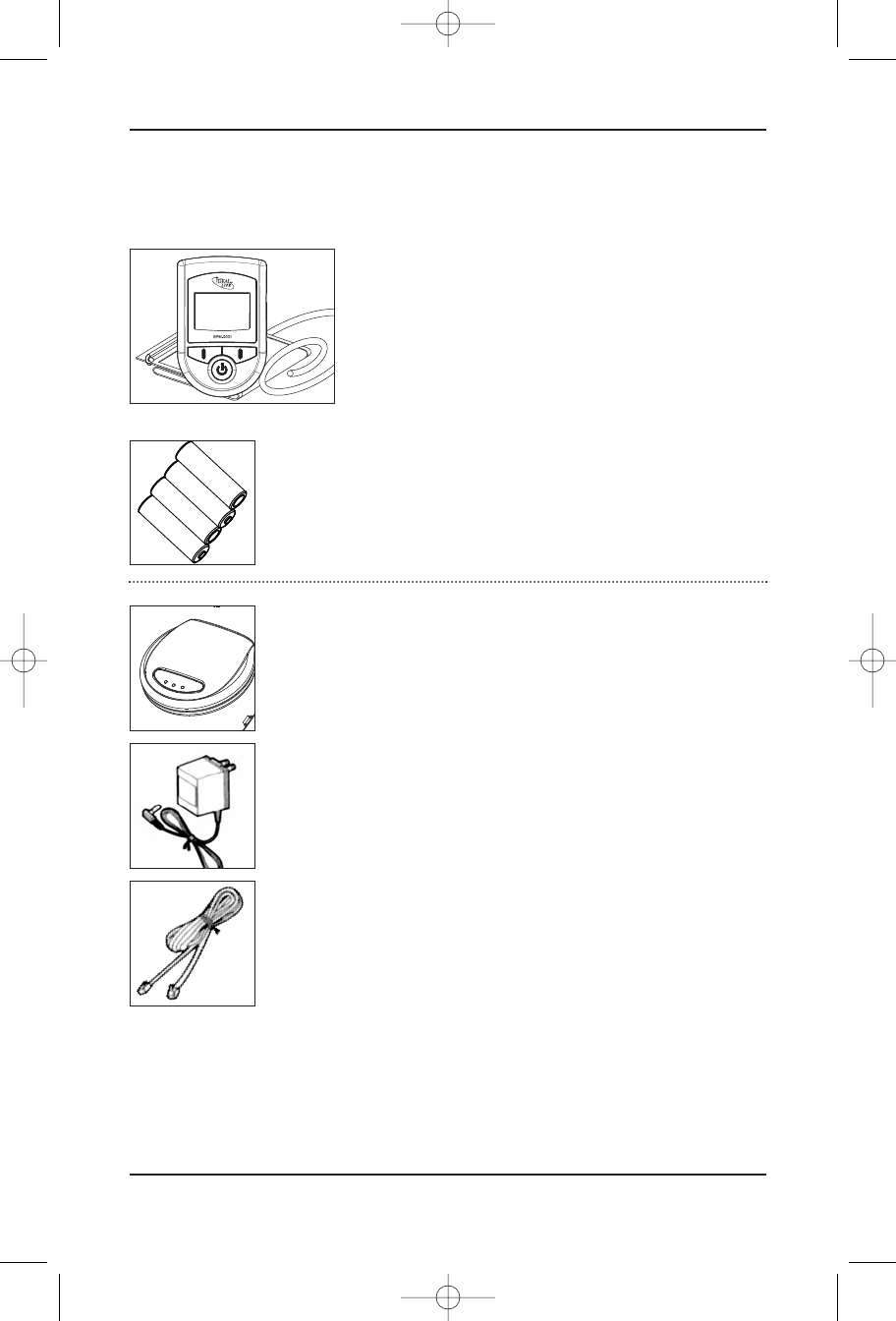
For Respective Products, make sure your package includes the following items:
BPM 0001
IDEAL LIFE
BP-MANAGER™
4X“AA” RECHARGEABLE BATTERIES FOR YOUR
IDEAL LIFE BP-MANAGER™
ILP 0001 IDEAL LIFE POD™
(*An optional accessory, sold separately)
AC ADAPTER
TELEPHONE LINE CORD
Contents
IDEAL LIFE BP-Manager™
4
Sys
Dia
Pul
128
85
64
Ideal BP Manual Jan09:Ideal BP Manual July07 8/4/09 9:48 AM Page 4
Requirements
Instruction Manual 5
Requirements
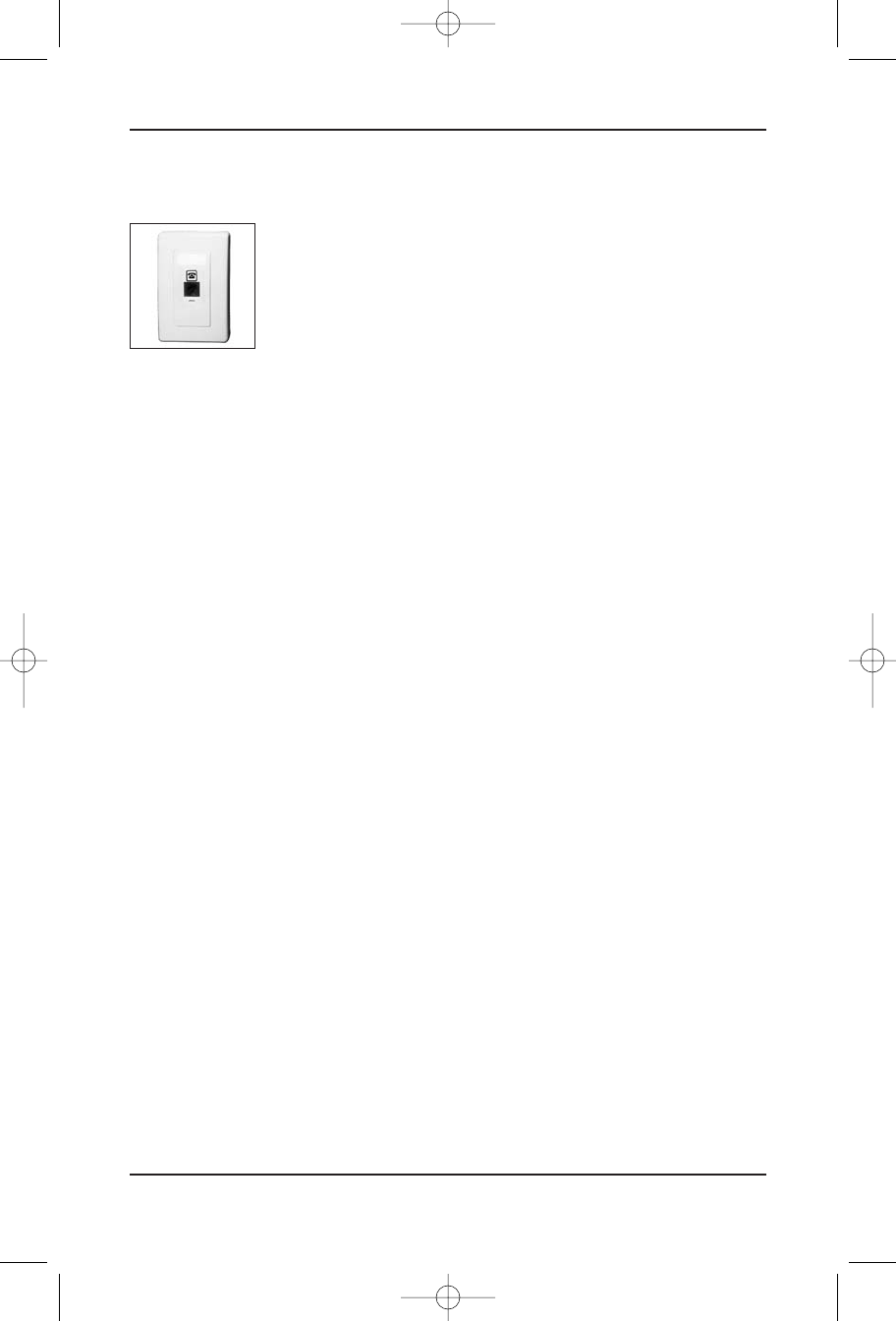
MODULAR JACK REQUIREMENTS
When using your IDEAL LIFE BP-Manager™ with an IDEAL LIFE Pod™, you will
need an RJ11 type modular jack, which is the most common type of phone
jack and might look like the one pictured here. If you don’t have a modular
jack, call your local phone company to find out how to get one installed.
ADDITIONAL BATTERIES
You may wish to use rechargeable batteries in your IDEAL LIFE Manager™. The IDEAL LIFE Pod™ is
equipped to recharge batteries.
Ideal BP Manual Jan09:Ideal BP Manual July07 8/4/09 9:48 AM Page 5

!Warnings!
To assure the correct use of the product basic safety measures should always be followed including
the precautions listed below:
•Read all the information in the instruction manual and any other literature included in the box
before using the unit.
•Follow the instructions of your healthcare provider.
•Contact your physician for specific information about your blood pressure.
•Operate the unit only as intended. Do not use for any other purpose.
•The IDEAL LIFE BPM 0001 BP-Manager™ is a non-invasive blood pressure monitor intended for the
measurement of systolic (SBP) and diastolic (DBP) blood pressure and heart rate (HR or pulse
rate) using the oscillometric technique. The IDEAL LIFE BP-Manager™ is used as an aid to
monitoring blood pressure in adults (individuals aged 18 and older) in a non-clinical environment
such as in the home. Results are displayed on the IDEAL LIFE BP-Manager™ screen. The IDEAL
LIFE BP-Manager™ should not be used on infants or children. Contraindications for Use: The end
user of this device should not have common arrhythmias, such as atrial or ventricular premature
beats or atrial fibrillation.
•This system is not recommended for use on infants and is not intended for and should not be
used to try to measure the blood pressure of infants and children (anyone under the age of 18) as
it may not be accurate and/or relied upon.
•Changes or modifications not approved by IDEAL LIFE INC. may affect the proper functioning of
this product. No recalibration or verification is needed, as the accuracy of the cuff-pressure
transducers/indicators is valid for the life of the product. The system might not meet its
performance specifications if stored or used outside the specified temperature and humidity
ranges detailed below. Do not disassemble or attempt to repair the unit or components. In the
event of malfunction, call IDEAL LIFE™ directly as instructed below.
•Blood pressure measurements determined with this device are equivalent to those obtained by a
trained observer using the cuff/stethoscope auscultation method within the limits prescribed by
the American National Standard, Electronic or automated sphygmomanometers. A report of
clinical performance study findings that used the fourth Korotkoff sign to determine overall
efficacy are available upon written request with proof of purchase.
For any questions or comments, please call an IDEAL LIFE customer
representative at 1-888-IDEAL-41 (888-433-2541).
!Warnings!
IDEAL LIFE BP-Manager™
6
Ideal BP Manual Jan09:Ideal BP Manual July07 8/4/09 9:48 AM Page 6
IDEAL LIFE Pod™
Location/Interferance
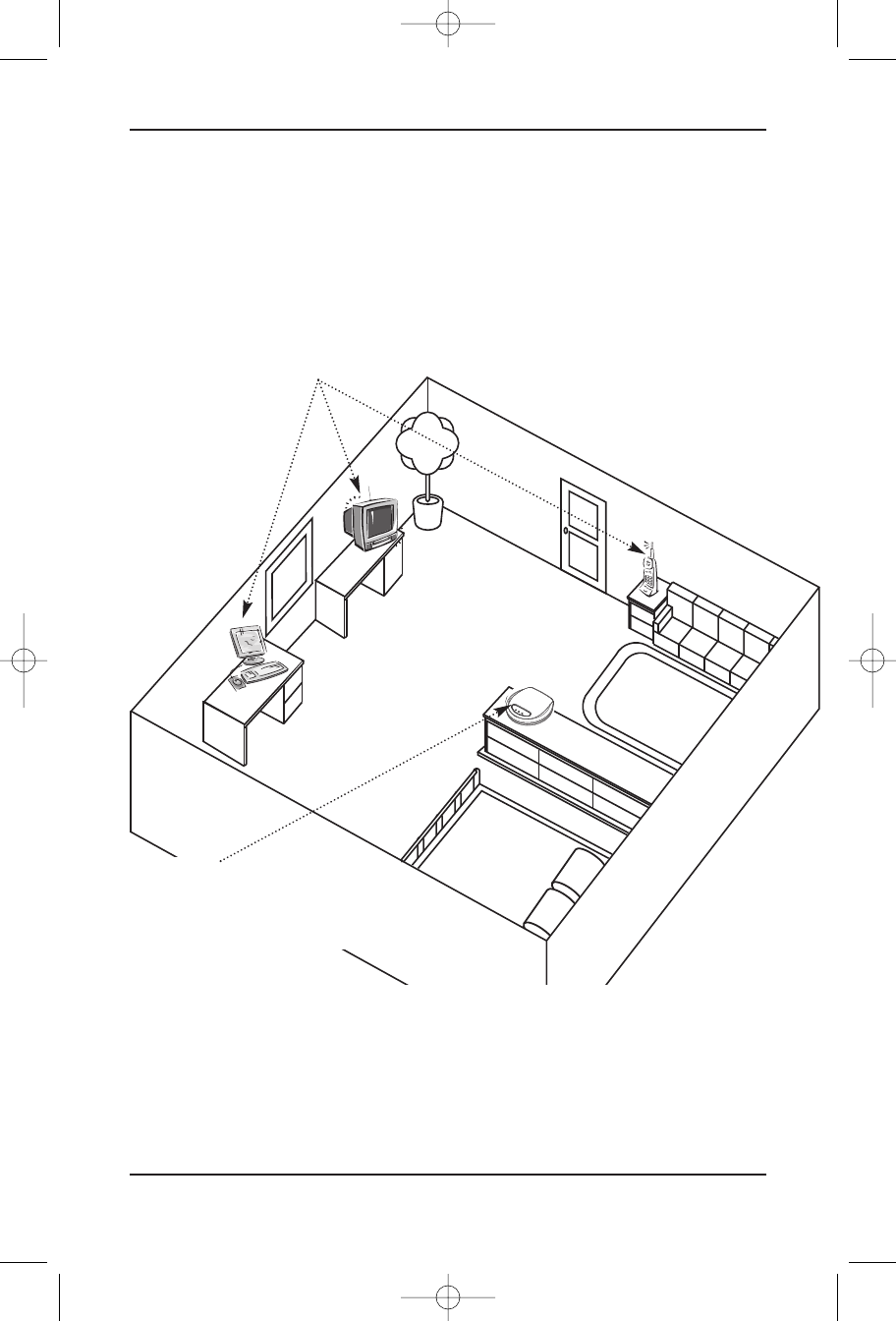
When using an IDEAL LIFE Pod™ to communicate information from your IDEAL LIFE BP-Manager™,
wireless radio waves are used. For maximum distance and interference-free operation, the
recommended IDEAL LIFE Pod™ location is:
Note:
While using an IDEAL LIFE Pod™, the telephone line will be in use. If the telephone line is in use
before using the your IDEAL LIFE Pod™ and you wish to use the your IDEAL LIFE Pod™ while the
telephone line is being used, the unit will not be able to make a connection and will store the
information in your IDEAL LIFE BP-Manager™ for later transmission.
IDEAL LIFE Pod™ Location/Interferance
Instruction Manual 7
•In a HIGH and CENTRAL
location with no obstructions
such as walls
•Away from electrical appliances such as a TV, personal computer
or a cordless phone
Ideal BP Manual Jan09:Ideal BP Manual July07 8/4/09 9:48 AM Page 7
Before You Start
To assure the correct use of the product basic safety measures should always be followed including
the precautions listed below:
•Read all information in the instruction manual and any other literature included in the box before
using the unit.
•Follow the instructions of your healthcare provider.
•Contact your physician for specific information about your blood pressure.
•Operate the unit only as intended. Do not use for any other purpose.
•This product is intended for information purposes only. It is not intended for diagnostic purposes
and is not intended and should not be used on infants or children (anyone under the age of 18).
•This is not a clinical device, but a tool for information purposes only.
•Changes or modifications not approved by IDEAL LIFE INC. may affect the proper functioning of
this product. Do not disassemble or attempt to repair the unit or components.
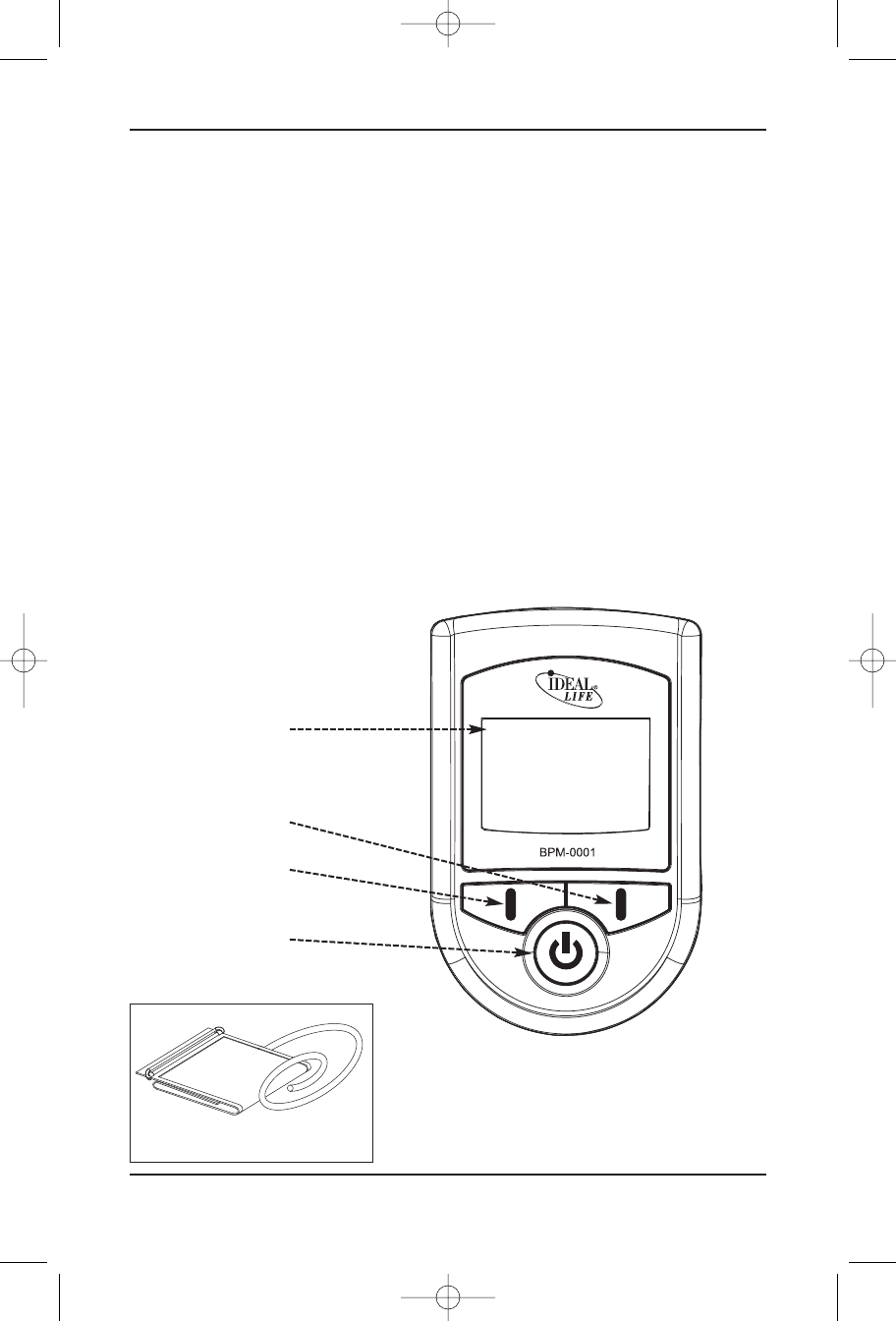
Your IDEAL LIFE
BP-Manager™
REMEMBER: You can stop the inflation
or deflation process anytime by pressing
any button.
Sys
Dia
Pul
128
85
64
Before You Start
IDEAL LIFE BP-Manager™
8
Display
Right “Soft”
Button
Left “Soft” Button
START/ESCAPE
Button
Upper Arm Cuff
Ideal BP Manual Jan09:Ideal BP Manual July07 8/4/09 9:48 AM Page 8
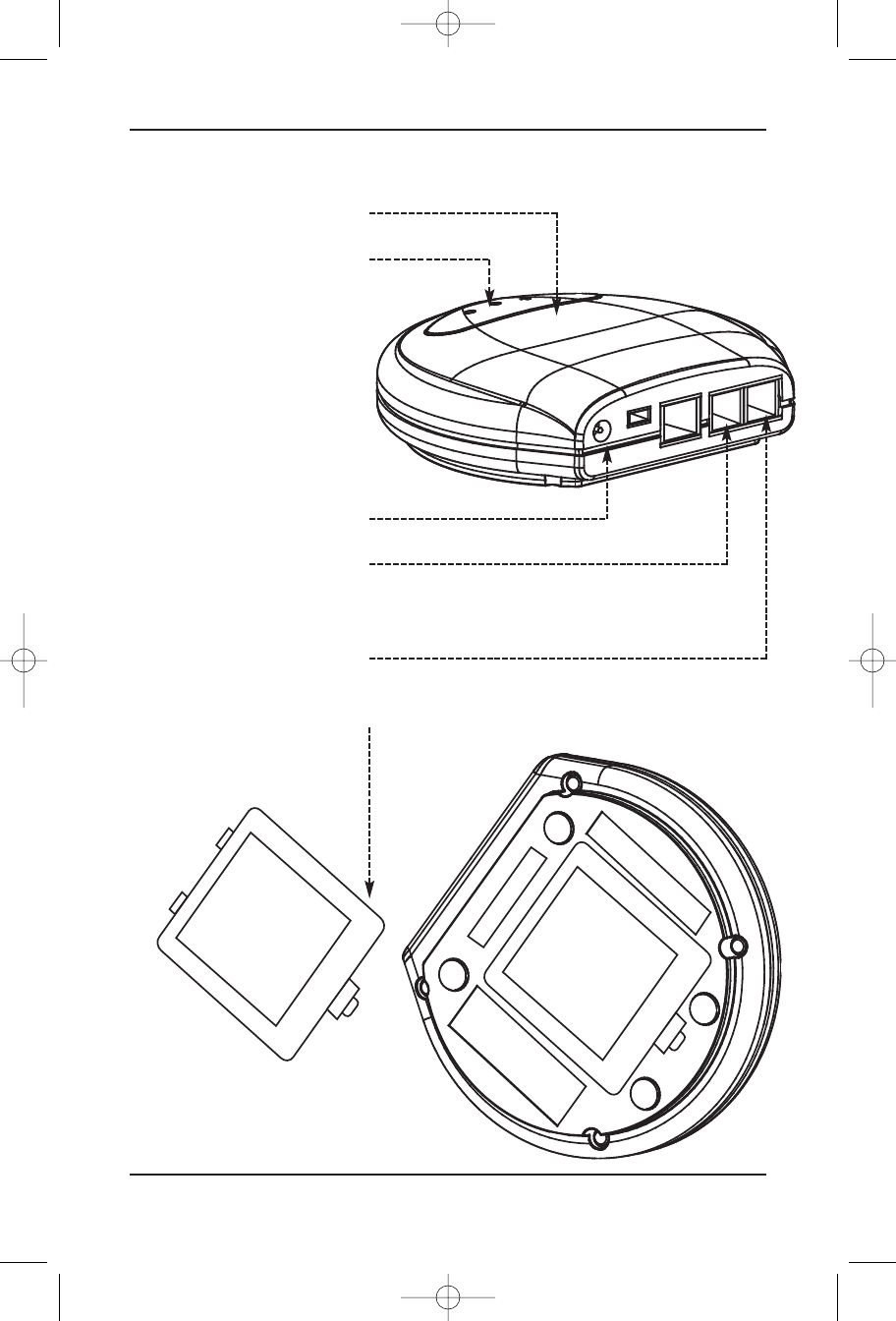
Your IDEAL LIFE Pod™
(*An optional accessory, sold separately)
Before You Start
Instruction Manual 9
Power button
LED Display
AC Adapter Jack
Telephone line cord RJ11
Jack For Telephone
Connection
Telephone line cord RJ11
Jack For Line Connection
Battery Cover
Ideal BP Manual Jan09:Ideal BP Manual July07 8/4/09 9:48 AM Page 9
Installation
! FOR YOUR IDEAL LIFE Pod™ !
Connecting your IDEAL LIFE Pod™
USING AN RJ11 JACK
CAUTION!
•Unplug phone cord from wall before installing, plugging in an external power source, or changing
batteries.
•Never install telephone wiring during a lightning storm.
•Never touch uninsulated telephone wire or terminals, unless the telephone line has been
disconnected at the network interface.
•Use caution when installing or modifying telephone lines.
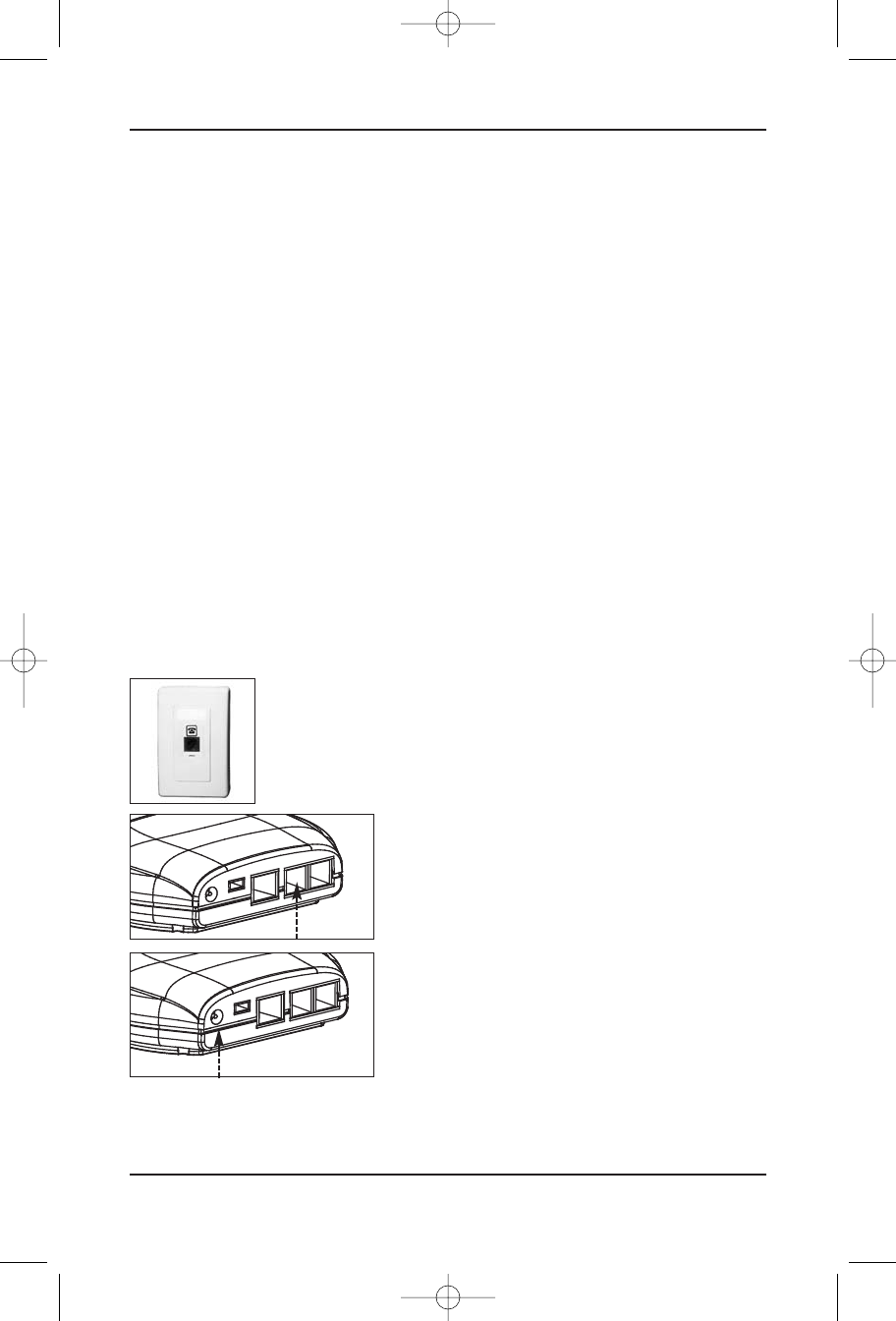
Plug one end of the telephone line cord (provided) into the jack on the back of your IDEAL LIFE Pod™
marked LINE.
Note: The IDEAL LIFE Pod™ is designed not to draw power from the
batteries when the AC adapter is in use.
Plug the other end of the telephone line cord (provided)
into a modular wall jack.
If you wish to use the same modular wall jack for your
IDEAL LIFE Pod™ and your telephone, connect the telephone
line cord from your telephone into the jack on the back of
your IDEAL LIFE Pod™ marked PHONE.
Connect the small end of the power supply into the power
AC jack on the back of the IDEAL LIFE Pod™ marked
POWER. Plug the other end into an AC power outlet.
Your IDEAL LIFE Pod™ will automatically power up once it is
plugged in to an AC power outlet.
Installation
IDEAL LIFE BP-Manager™
10
Ideal BP Manual Jan09:Ideal BP Manual July07 8/4/09 9:48 AM Page 10
USING AN RJ45 JACK
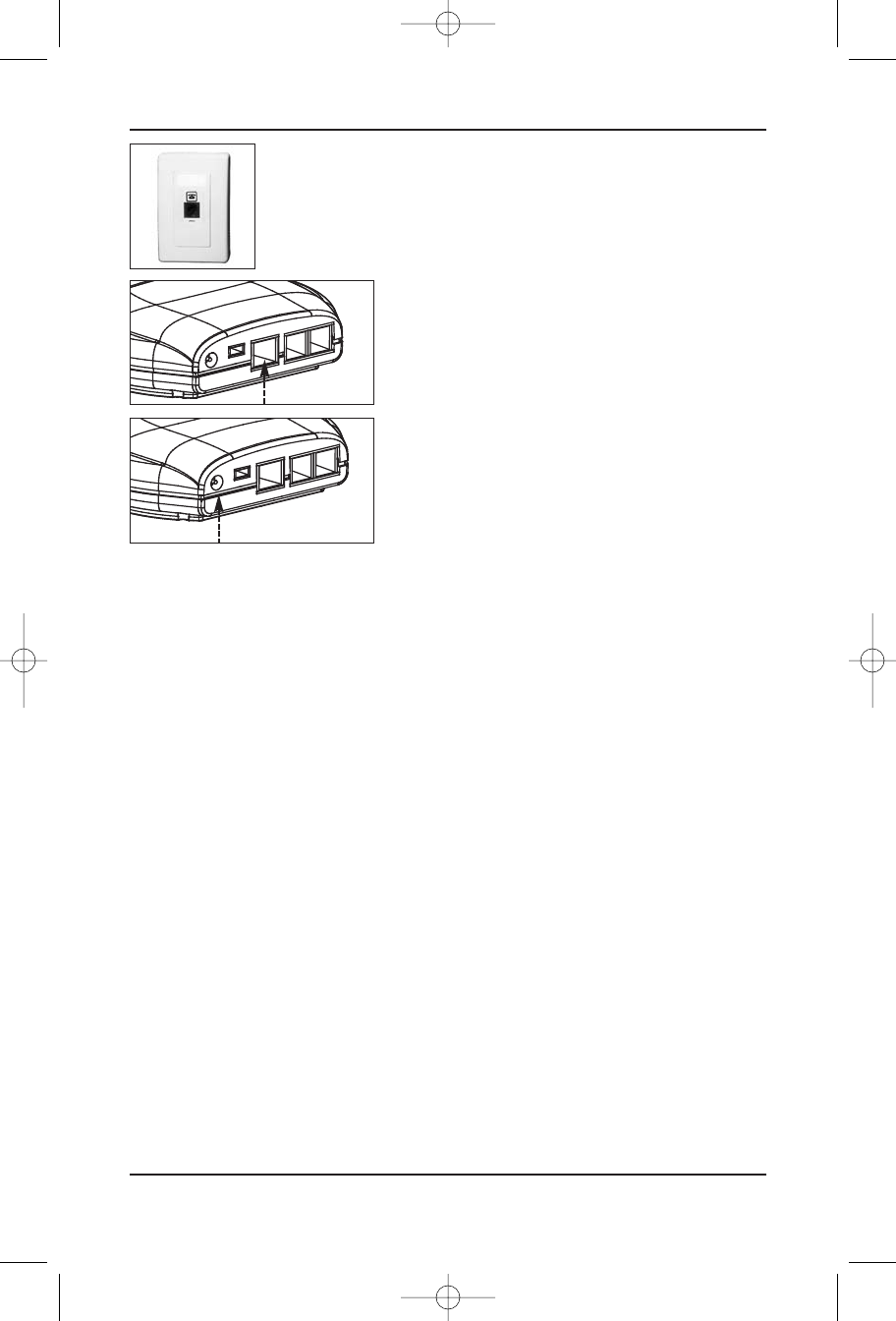
Plug one end of the Ethernet cord (not provided) into a modular RJ45
wall jack.
Plug the other end of the Ethernet cord (not provided) into
the RJ45 jack on the back of your IDEAL LIFE Pod™.
Connect the small end of the power supply into the power
AC jack on the back of the IDEAL LIFE Pod™ marked
POWER. Plug the other end into an AC power outlet.
Your IDEAL LIFE Pod™ will automatically power up once it is
plugged in to an AC power outlet.
RECHARGING BATTERIES WITH YOUR IDEAL LIFE POD™:
•Remove the battery compartment door on the bottom of your IDEAL LIFE Pod™ by pushing gently
in the direction shown on the battery cover.
•Place the rechargeable batteries as marked.
•Replace the battery compartment door and push the compartment door shut in the opposite
direction shown on the battery cover.
•When using rechargeable batteries with your IDEAL LIFE BP-Manager™, simply place them in your
IDEAL LIFE Pod™ for 10 hours to recharge when battery status is low as indicated on your IDEAL
LIFE BP-Manager™
Powering UpYour IDEAL LIFE BP-Manager™
INSTALLING THE BATTERIES (INCLUDED)
•Remove the battery compartment door on your IDEAL LIFE BP-Manager™ by lifting the battery door
using the notch
•Place the batteries as instructed on the device
•Replace the battery compartment door and click into place
Note:
Replacing the battery does not affect previous test results stored in memory of the meter. However,
Installation
Instruction Manual 11
Ideal BP Manual Jan09:Ideal BP Manual July07 8/4/09 9:48 AM Page 11
the time and date settings may need to be updated if batteries are not in the device for an extended
period of time. Use only new batteries of the required size and the recommended type. For best
performance and the longest life, alkaline batteries are recommended. Do not mix different type, date or
brand name batteries together. Be sure to follow the instructions when installing the batteries. Since
batteries can leak Chemicals that damages electronic parts, leaving the battery in the housing for a long
period without using the device may damage the main unit. Please remove the batteries if you are not
going to use the device for an extended period of time (i.e., 3 months or more).The batteries should be
kept away from small children as they pose a choking hazard. If swallowed, promptly see a doctor for help.
FIRST TIME POWER UP AND ACTIVATION WHEN USING AN
IDEAL LIFE POD™ (*an optional accessory, sold separately)
To use the IDEAL LIFE BP-Manager™ with your IDEAL LIFE Pod™ you must call an IDEAL LIFE customer
representative to activate. Make sure to call IDEAL LIFE before you begin. Then make sure that the
IDEAL LIFE Pod™ is connected to a telephone line cord and RJ11 jack, (or an Ethernet cord and RJ45
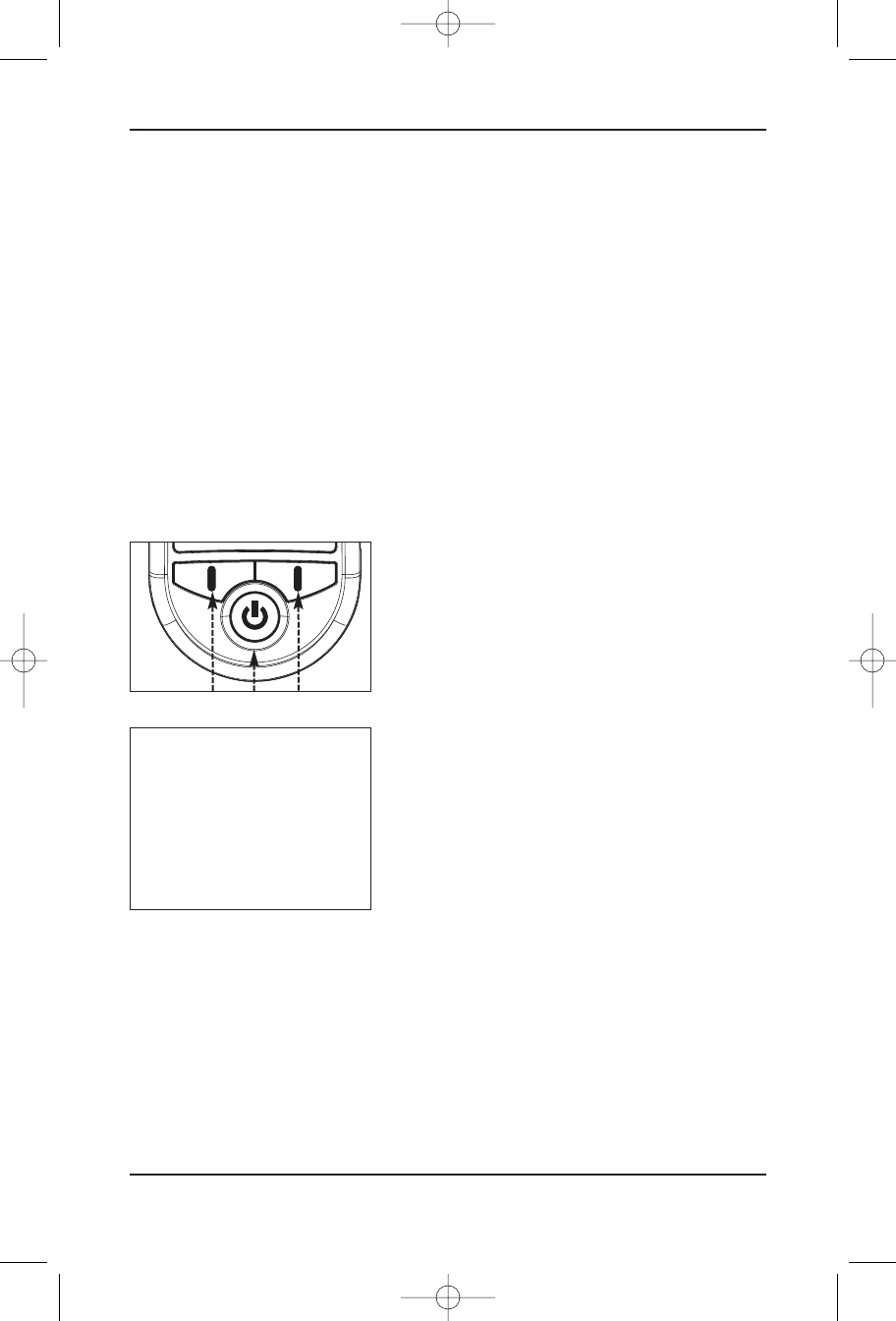
jack) and “Powered ON”! Hold down any button on your
IDEAL LIFE BP-Manager™ for 3 seconds to Power up.
READ THROUGH THE IDEAL LIFE INC. TERMS
AND CONDITIONS FIRST, THEN PROCEED
AND FOLLOW THE PROMPTS ON THE
SCREEN AS SHOWN HERE:
First select the appropriate language using the buttons labeled
and OK.
Then Answer the question on the following screen regarding
terms and conditions using the YES and NO labeled buttons.
To gain full advantage of all the features your IDEAL LIFE BP-Manager™ has to offer, using an IDEAL LIFE
Pod™ is recommended. To ensure that your IDEAL LIFE BP-Manager™ and IDEAL LIFE Pod™ are setup
properly you will need to call IDEAL LIFE directly to activate your system. You should ensure that the steps
are followed correctly, you should first setup your IDEAL LIFE Pod™, power it up, and then begin the steps
of powering up your IDEAL LIFE BP-Manager™. During your activation call with IDEAL LIFE, an IDEAL LIFE
customer representative will verify your IDEAL LIFE BP-Manager™ and IDEAL LIFE Pod™ ID numbers. and
you will be ready to take full advantage of all your IDEAL LIFE BP-Manager™ has to offer. For a detailed
description of all the features and functions continue to the FUNCTIONS section of this manual.
Installation
IDEAL LIFE BP-Manager™
12
LANGUAGE
ENGLISH
ESPANOL
FRANCAIS
OK
Ideal BP Manual Jan09:Ideal BP Manual July07 8/4/09 9:48 AM Page 12

Suggestions Before Taking A
Measurement
•Avoid eating, smoking, and exercising for 30 minutes before taking a measurement. Rest at least
15 minutes before taking a measurement.
•Stress raises blood pressure. Avoid taking measurements during stressful times.
•Remove tight-fitting clothing from your left arm.
•Measurements should be taken in a quiet place.
•Sit in a chair with your feet flat on the floor. Rest your left arm on a table so that the cuff is at
the same level as your heart.
•Remain still and do not speak during the measurement.
•It is recommended that a record of your blood pressure and pulse readings be brought to your
physician on a regular basis, as a single measurement does not provide an accurate indication of
your true blood pressure.
•It is recommended that you take and record several readings over a period of time, measuring
your blood pressure at the same time each day for consistency.
•If you are taking multiple readings consecutively, you should wait 2-3 minutes between
measurements. The wait time allows the arteries to return to the condition prior to taking the
blood pressure measurement. You may need to increase the wait time depending on your
individual physical characteristics.
CAUTION: Blood pressure recording can be affected by the position of the
subject, his/her physiologic condition, and other factors.
Suggestions Before Taking A Measurement
Instruction Manual 13
Ideal BP Manual Jan09:Ideal BP Manual July07 8/4/09 9:49 AM Page 13
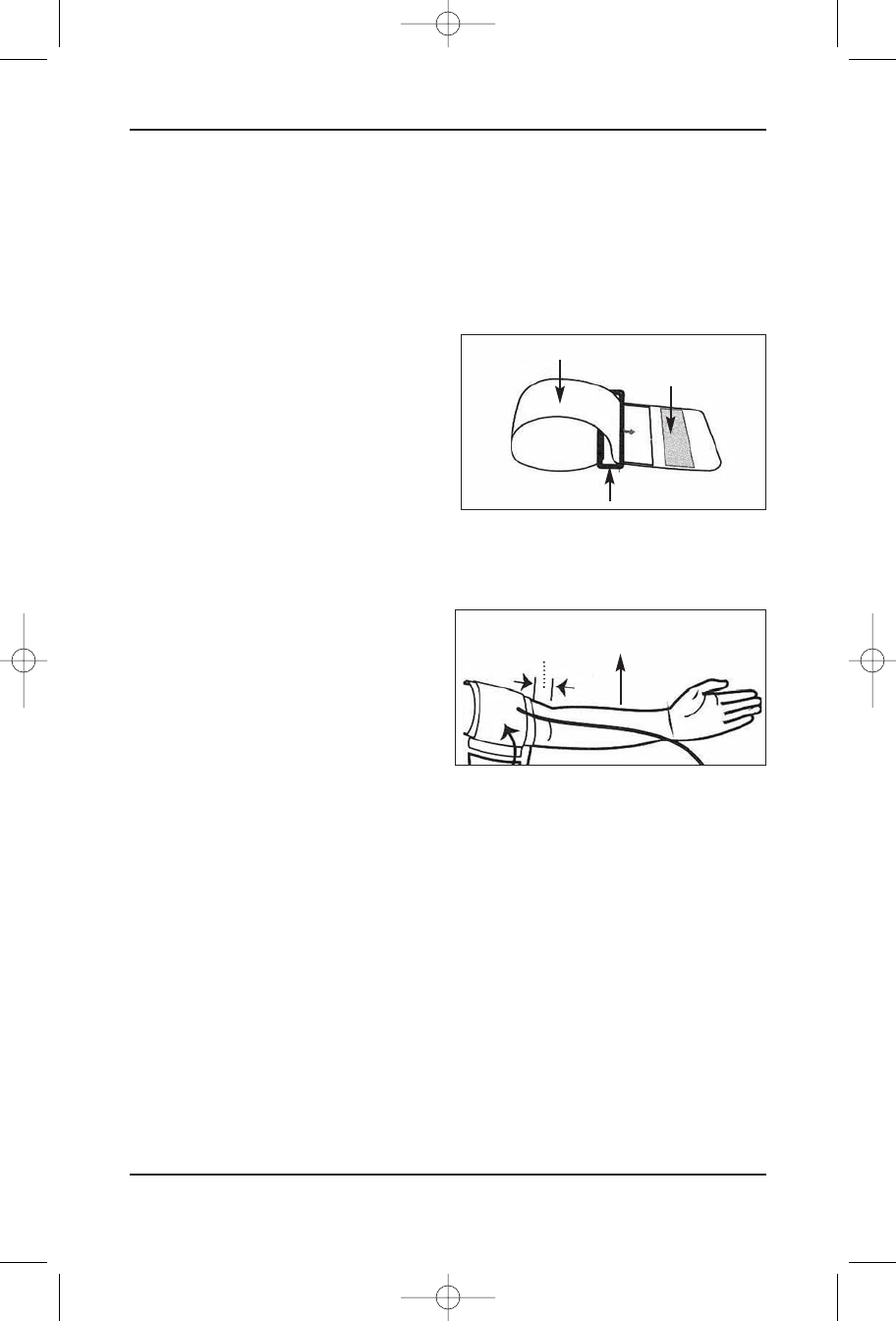
How To Apply The Arm Cuff
Your IDEAL LIFE BP-Manager™ applies the Oscillometric method to measure human systolic/diastolic
blood pressure and heart rate. All values are shown on the LCD monitor.
Applying the Pressure Cuff
STEP 1
Connect the Air Plug to the Air Jack at the side of
the monitor.
STEP 2
Assemble the cuff as shown in the figure. The
smooth cloth is on the inside of the cuff loop.
STEP 3
Hold your left arm in front of you with your palm facing up. Pull your arm through the cuff loop.
STEP 4
The edge of the cuff should be approximately
0.3 to 1.2 inches (2cm to 3cm) above your
elbow. Align the tubing over the main arteries on
the inside of your arm.
STEP 5
When the cuff is positioned correctly, pull the end of the cuff to tighten the cuff snugly around your
upper arm. You should be able to fit your index finger between the cuff and your arm.
STEP 6
Press the hook material firmly against the pile material. The top and bottom edges of the cuff should
be tightened evenly around your arm.
How To Apply The Arm Cuff
IDEAL LIFE BP-Manager™
14
Pile Sided Material
Sewn Hook Material
D-Ring
0.3 to 1.2 inches
(2cm to 3cm) Main Arteries
Ideal BP Manual Jan09:Ideal BP Manual July07 8/4/09 9:49 AM Page 14
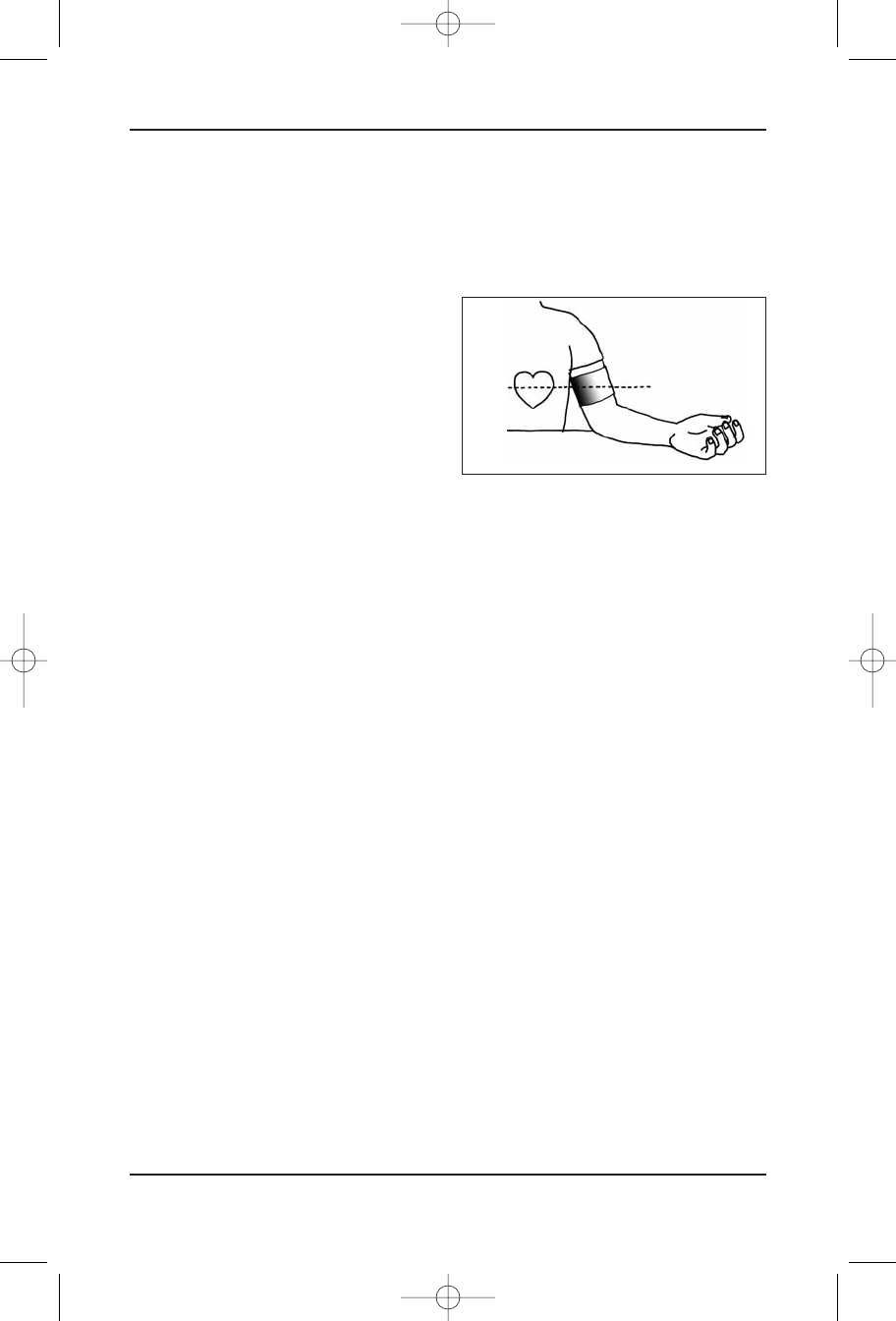
How To Take A Proper
Measurement
Please sit or lie down for at least 5-10 minues before measuring. Perform measurement while sitting.
STEP 1
Place your elbow on a table or other object. Relax
your hand with he palm facing up.
STEP 2
Make sure the pressure cuff is at the same level
as your heart. This is extremely important for the
accuracy of the results. Higher or lower positions will give deviations from the true value.
How To Apply The Arm Cuff
Instruction Manual 15
Ideal BP Manual Jan09:Ideal BP Manual July07 8/4/09 9:49 AM Page 15
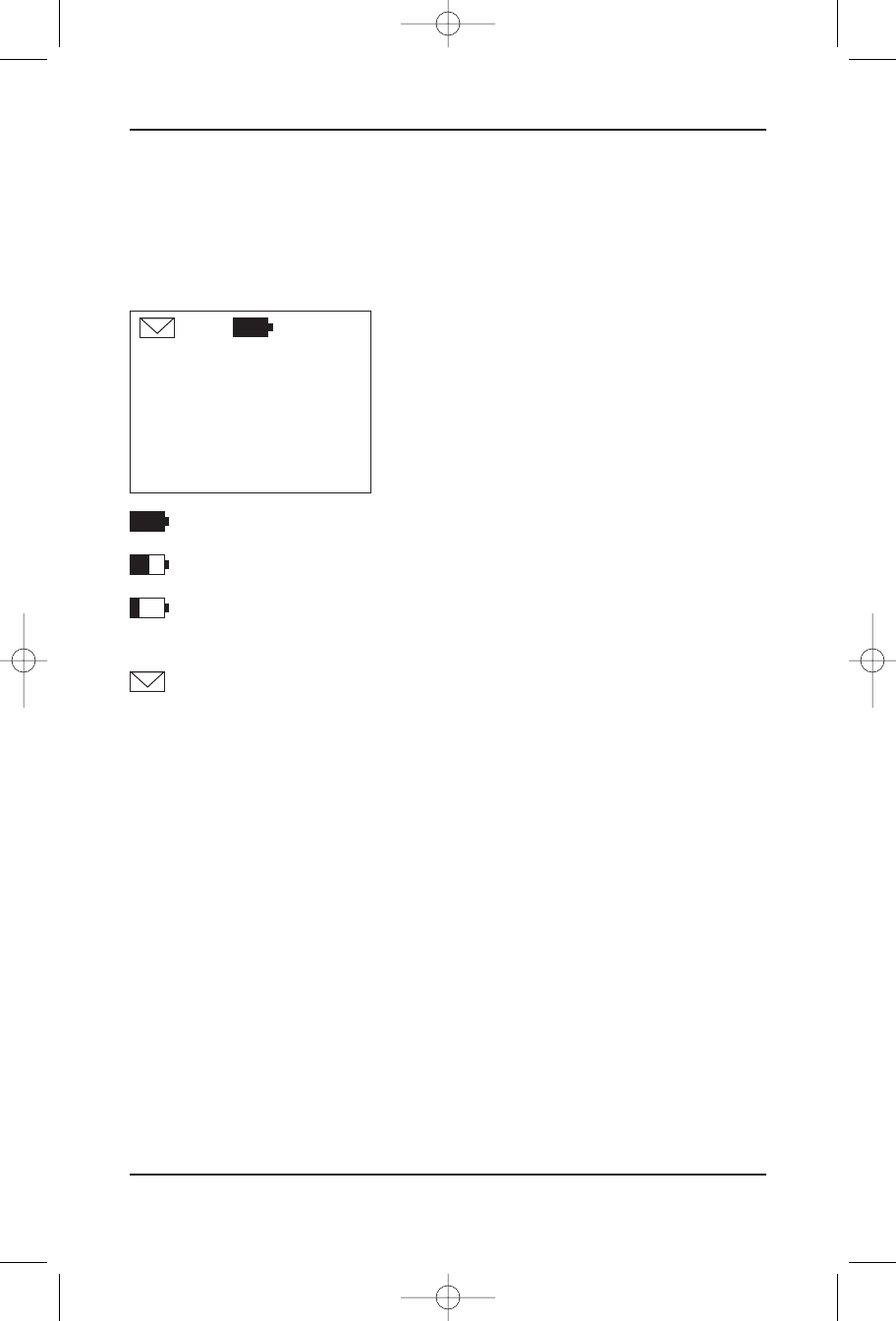
Functions
(when using the IDEAL LIFE POD™,
an optional accessory sold separately)
Main Screen
The Main Screen is your default screen. This is where you
will be directed to after completing functions and where
you will find status indicators for the functioning of your
IDEAL LIFE BP-Manager™.
In the upper middle portion of the display you will find a
battery icon, displaying power status of your IDEAL LIFE
BP-Manager™
Indicates full power
Indicates power is getting low, you should change your batteries
Indicates that your blood pressure measuring function has been turned off.
Replace your batteries immediately.
If you have unread messages, you will see an envelope icon on the upper left corner of the display.
Functions
IDEAL LIFE BP-Manager™
16
IDEAL LIFE
MENU
Ideal BP Manual Jan09:Ideal BP Manual July07 8/4/09 9:49 AM Page 16
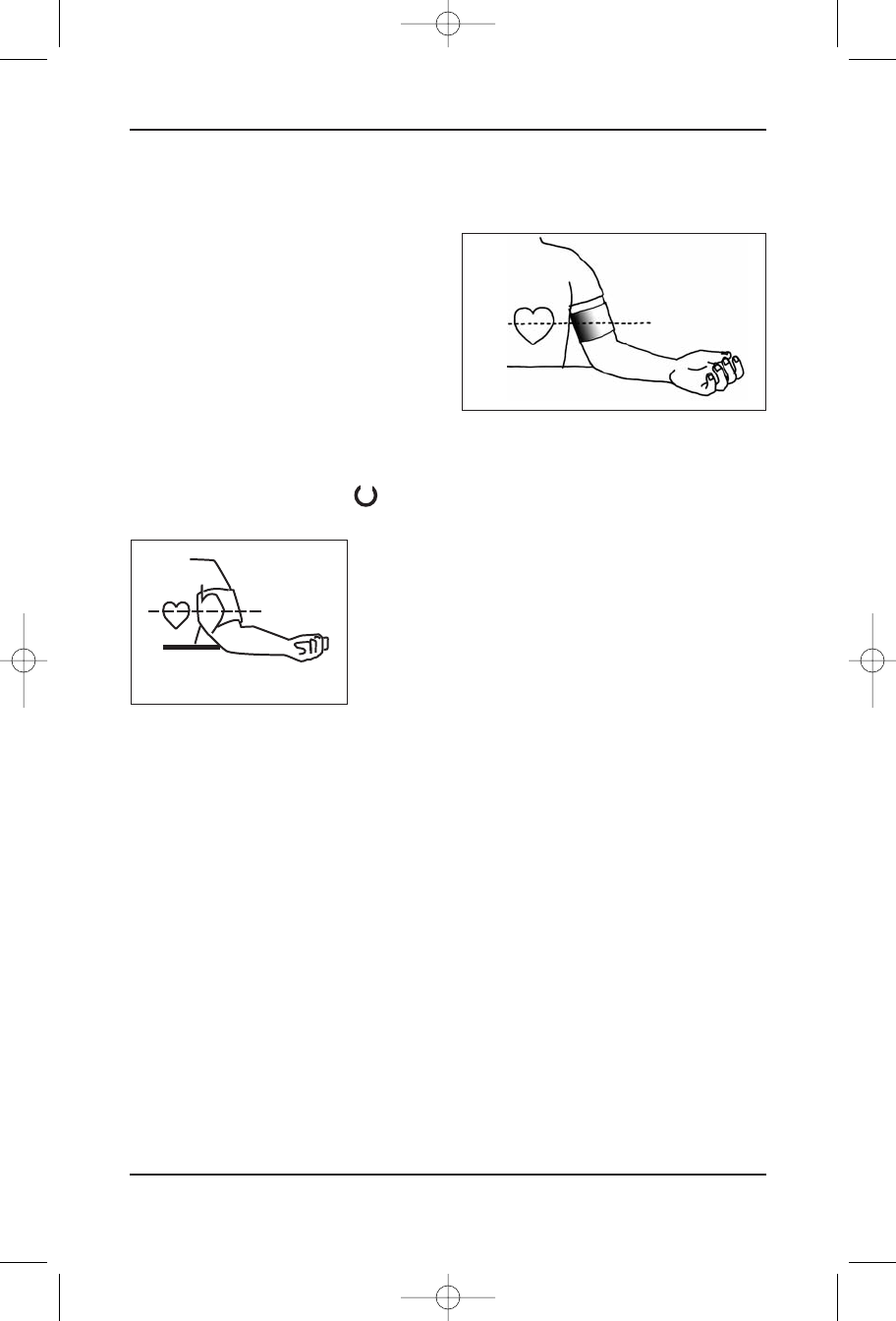
Taking Your Blood Pressure Measurement
Please sit or lie down for at least 5-10 minues before measuring. Perform measurement while sitting.
STEP 1
Place your elbow on a table or other object. Relax
your hand with he palm facing up.
STEP 2
Make sure the pressure cuff is at the same level
as your heart. This is extremely important for the
accuracy of the results. Higher or lower positions will give deviations from the true value.
From the default screen, press the " " button located in the center of the key pad to continue.
A graphic will appear to show the correct placement of the cuff
on the arm.
Your IDEAL LIFE BP-Manager™ will begin to inflate automatically.
Do not talk or move during the measurement.
The cuff will quickly inflate to the appropriate level and will
get tighter around your arm. If the cuff becomes too tight, press
any button to stop the unit from inflating and then re-wrap the cuff, leaving a little more room
between the cuff and your arm.
! You can stop the inflation/deflation at any time by pressing any button on
your IDEAL LIFE BP-Manager™ !
When the measurement is complete, the cuff will automatically deflate releasing the cuff’s air
pressure. Your IDEAL LIFE BP-Manager™ will then display your reading automatically, and begin to
communicate when you are using your IDEAL LIFE Pod™. Your IDEAL LIFE BP-Manager™ will notify you
on the bottom of the display as to the status of your connection. Connection times may vary
depending on many factors. Your reading will always be stored in your meter memory for local lookup.
After displaying your reading and automatically communicating the information, your meter will
automatically return to the default screen before going to sleep mode. Each time your IDEAL LIFE
BP-Manager™ communicates successfully to IDEA LIFE through your IDEAL LIFE Pod™ the time and
date are set to ensure reliable date and time stamping of all readings.
Functions
Instruction Manual 17
I
Ideal BP Manual Jan09:Ideal BP Manual July07 8/4/09 9:49 AM Page 17

ERROR DISPLAY
An error will be displayed for the following:
•Noise, movement or talking during a measurement.
•Inadequate pressure for cuff inflation due to movement or talking during measurement.
•Cuff improperly applied (too tight, too loose, improper position).
•Other factors may also cause an error to display.
NOTE: If you receive an error, wait 2-3 minutes and retake your
measurement. If you still receive an error, wait for the unit to go into sleep
mode, then try again and retake your measurement. If you continually
receive the same error after repeated usage, call an IDEAL LIFE customer
representative at: 1-888-IDEAL-41 (888-433-2541).
Functions
IDEAL LIFE BP-Manager™
18
Ideal BP Manual Jan09:Ideal BP Manual July07 8/4/09 9:49 AM Page 18

LOOKING AT PREVIOUSLY TAKEN READINGS
Your IDEAL LIFE BP-Manager™ will store up to 575 of your latest readings.
Press Menu to view the feature list.
SCROLL to highlight READINGS (it should already be
highlighted as it is the first line item in the list).
Press SELECT to enter your selection.
You can now scroll through your readings, screen by screen
using the NEXT (and BACK) buttons.
If you have less than one page full of readings or have
reached your final screen you can press the button labeled
EXIT to return to the MENU section (Remember you can
always press the START/ESCAPE button to return to the
default screen).
Functions
Instruction Manual 19
MENU
READINGS
MESSAGES
GRAPHICS
USERS
SCROLL SELECT
DATE SYS DIA PUL
0210 120 82 71
0209 122 84 70
0208 118 84 70
0208 120 82 71
0207 118 82 73
NEXT
DATE SYS DIA PUL
0206 120 85 70
0205 122 84 70
0204 121 83 72
0203 123 85 75
0202 120 82 71
BACK NEXT
Ideal BP Manual Jan09:Ideal BP Manual July07 8/4/09 9:49 AM Page 19

Looking at Messages
Your IDEAL LIFE BP-Manager™ is equipped for 2-way, interactive communication when using an IDEAL LIFE
Pod™. Messages can be sent remotely to your IDEAL LIFE BP-Manager™ and responded to directly. When
messages are transmitted to your IDEAL LIFE BP-Manager™, they are stored for automatic display before
your next blood glucose measurement. If you have unread messages in memory, there will be an
ENVELOPE icon located on the upper left corner of the default screen. You can also read any unread
messages in the MESSAGES section for later response.
•Press Menu to view the feature list.
•SCROLL to highlight MESSAGES.
•Press SELECT to enter your selection.
Messages will be displayed in order of time received
(oldest first). Responding to messages automatically stores
them for later transmission and automatically scrolls to the
next message if there is more than one unread message in
your IDEAL LIFE BP-Manager™.
There are 2 types of messages. The type of question will dictate the button labels. Simply press
the desired button shown on the screen.
For Example:
Free text messages allow for 2 possible responses, and are
displayed on one screen and may look like this:
Multiple Choice messages allowing for up to 6 possible responses are displayed on 2 screens, and
may look like this:
Functions
IDEAL LIFE BP-Manager™
20
f: DAUGHTER
s: DINNER
When do you
want to go
to dinner?
NEXT
s: DINNER
7:00 PM
7:30 PM
8:00 PM
9:00 PM
SCROLL SELECT
f: SELF
s: KIDS
Reminder:
Pick up kids
at 4:00 PM.
OK
MENU
READINGS
MESSAGES
GRAPHICS
USERS
SCROLL SELECT
Ideal BP Manual Jan09:Ideal BP Manual July07 8/4/09 9:49 AM Page 20
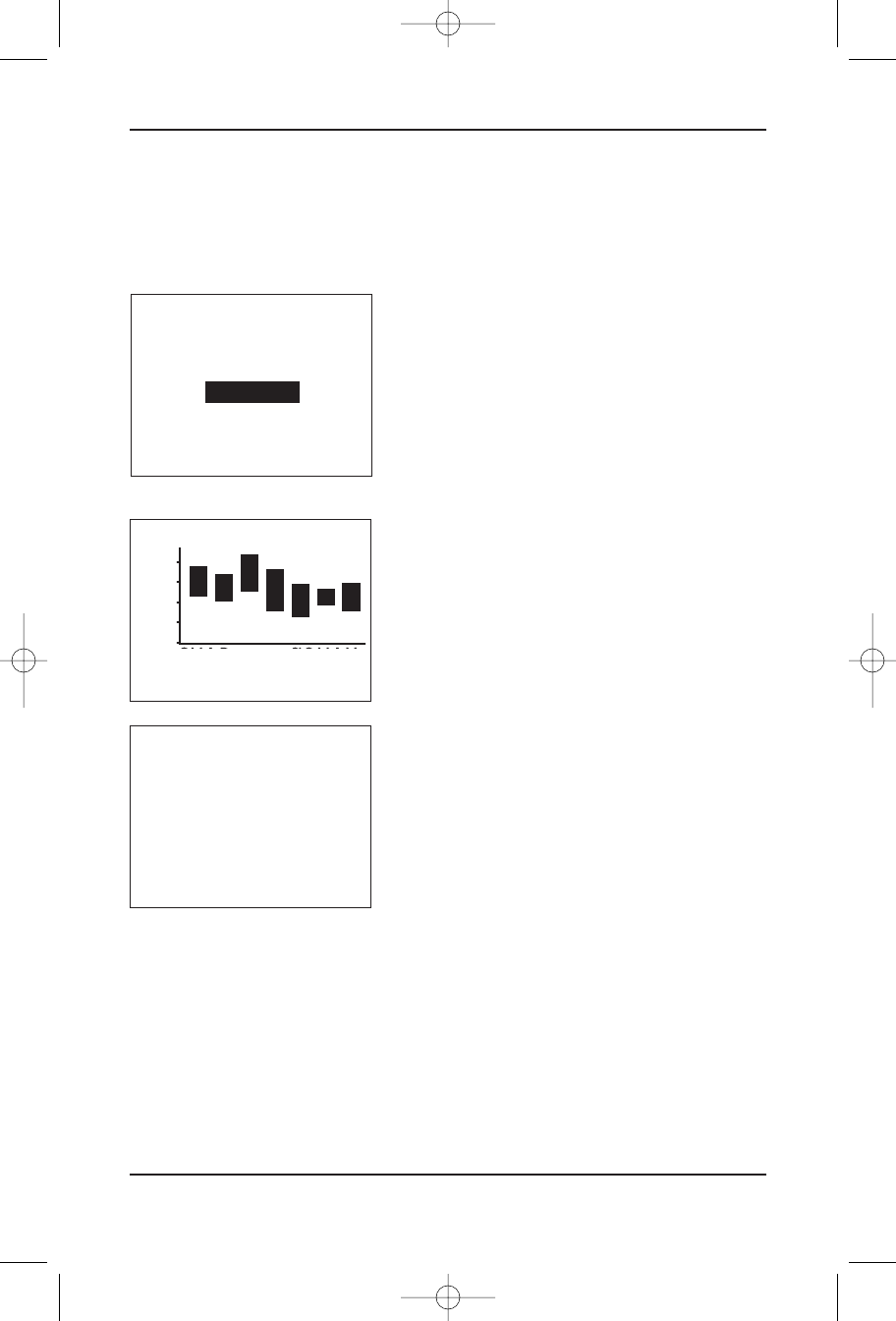
Looking at Graphics
When using an IDEAL LIFE Pod™, your IDEAL LIFE BP-Manager™ will store different types of graphics
downloaded from the IDEAL LIFE website. (All the graphics can be altered through the IDEAL LIFE
website, refer to www.ideallifeonline.com for details).
Press Menu to view the feature list.
•SCROLL to highlight GRAPHICS.
•Press SELECT to enter your selection.
•You can now scroll through your graphics screen by screen
using the button labeled NEXT. While scrolling through screens,
you can always go to the previous screen by pressing the button
labeled BACK.
If you have only one graphic in memory, or have reached
your final screen you can press the button labeled EXIT to
return to the MENU section (Remember you can always
press the START/ESCAPE button to return to the default
screen).
Functions
Instruction Manual 21
MENU
READINGS
MESSAGES
GRAPHICS
USERS
SCROLL SELECT
BACK EXIT
☺
LATEST SYS/DIA
180
150
120
90
60
09 JAN – 09 JAN
BACK NEXT
Ideal BP Manual Jan09:Ideal BP Manual July07 8/4/09 9:49 AM Page 21

Users
The USERS section allows you to set-up your IDEAL LIFE BP-Manager™ with an option to allow 2 users
to use the same device.
SELECT USER
•Press Menu to view the feature list.
•SCROLL to highlight USERS
•Press SELECT to enter your selection.
Using the Scroll and SELECT buttons, select the SELECT USER
option. When more than one user is setup in the device, the
SELECT USER function allows an individual to switch the
current user selected in the device. When selecting SELECT
USER, if only one user is selected in the device it will display
the current user in the device. If there are multiple users in
setup in the device, using the SCROLL and SELECT buttons a
user can switch between USER 1 and USER 2
Selecting USER 1 will set the device to USER 1. Selecting
USER 2 will set the device to USER 2.
Functions
IDEAL LIFE BP-Manager™
22
MENU
READINGS
MESSAGES
GRAPHICS
USERS
SCROLL SELECT
USERS
SELECT USER
ADD/REMOVE USER
SCROLL SELECT
SELECT USER
USER 1
USER 2
SCROLL SELECT
Ideal BP Manual Jan09:Ideal BP Manual July07 8/4/09 9:49 AM Page 22

ADD/REMOVE USER
•Press Menu to view the feature list.
•SCROLL to highlight USERS
•Press SELECT to enter your selection.
•Press SCROLL to highlight ADD/REMOVE USER.
•Press SELECT to enter your selection.
When there is only one user setup in the device, the ADD USER function will be initiated.
Press the YES button to add an additional user in the
device. The next screen will walk the new user through the
user setup process. Press the NO button to exit the ADD
USER function and return the user to the main USERS
options screen.
When there are two users setup in the device, the REMOVE USER function will be initiated.
Functions
Instruction Manual 23
MENU
READINGS
MESSAGES
GRAPHICS
USERS
SCROLL SELECT
USERS
SELECT USER
ADD/REMOVE USER
SCROLL SELECT
ADD USER?
NO YES
Ideal BP Manual Jan09:Ideal BP Manual July07 8/4/09 9:49 AM Page 23

Using the SCROLL and SELECT buttons, a user can be
removed from the device. Selecting EXIT will take the user to
the USER options screen. When selecting a particular USER,
as for example REMOVE USER 2 (as shown in the example
below), that particular use will be displayed requiring a
confirmation to remove from the device.
Pressing NO will return the user to the USER options screen.
SELECTING YES will display an hour glass while the device
removes the selected USER from the device. When complete,
the device will return to the default screen.
Functions
IDEAL LIFE BP-Manager™
24
REMOVE USER
REMOVE USER 1
REMOVE USER 2
EXIT
SCROLL SELECT
REMOVE USER 2
NO YES
Ideal BP Manual Jan09:Ideal BP Manual July07 8/4/09 9:49 AM Page 24

Care and Maintenance
To maintain your IDEAL LIFE BP-Manager™ in the best condition, and protect the unit from damage,
you should follow the directions listed below.
•Clean the monitor with a soft dry cloth. You may also use an alcohol swab to wipe
the cuff and meter clean. Do not use any abrasive or volatile cleaners. Never immerse the unit or
any components in water.
•Store the IDEAL LIFE BP-Manager™ in a safe and dry location. Do not
fold the cuff and tubing tightly. Do not subject the monitor to extreme hot or cold temperatures,
humidity and direct sunlight.
•Avoid subjecting the IDEAL LIFE BP-Manager™ to strong shocks, such
as dropping the unit on the floor.
•Remove the batteries if the unit will not be used for three months or longer. Always
replace the batteries with new ones at the same time.
•Use the IDEAL LIFE BP-Manager™ consistent with instructions
provided in this manual. Use only authorized parts and accessories.
Care and Maintenance
25
Instruction Manual
Ideal BP Manual Jan09:Ideal BP Manual July07 8/4/09 9:49 AM Page 25

Specifications
IDEAL LIFE BP-Manager™
Model: BPM 0001 IDEAL LIFE BP-Manager™
Display: LCD Digital Display
Measurement Range: Pressure: 30-280 mmHg, Pulse: 40-200 Pulses per minute
Accuracy / Calibration: Pressure: +/- 3 mmHg, Pulse: +/- 4%
Inflation: Automatic by electronic pump
Deflation: Linear Valve
Rapid Air Release: Linear Valve
Pressure Detections: Pressure transducer
Measurement Method: Oscillometric method
Pulse Wave Detections: By peaks of waveform
Power Source: 4 “AA” alkaline batteries
Battery Life: battery life is approx. 3 months depending on usage
Operating Temperature/Humidity: 50°F to 104°F (10°C to 40°C)/Below 85% relative humidity
Meter Storage Temperature/Humidity -4°F to 140°F (-20°C to 60°C)/Below 95% relative humidity
Console Weight: Approx. 270g without batteries
Outer Dimensions: Approx. 110 mm Width x 130 mm Depth x 78 mm Height
Cuff Dimensions: Approx. 140 mm Width x 480 mm Length
Note: these specifications, to improve performance, are subject to change without notice.
IDEAL LIFE Pod™
(*An optional accessory, sold separately)
Model: ILP 0001 IDEAL LIFE Pod™
Display: 3 LED’s
Power Source: AC adapter
Operating Temperature/Humidity: 50°F to 104°F (10°C to 40°C)/Below 85% relative humidity
Storage Temperature/Humidity 23°F to 122°F (-5°C to 50°C)/Below 90% relative humidity
Console Weight: Approx. 142 g without batteries
Outer Dimensions: Approx. 120 mm Width x 105 mm Depth x 30 mm Height
Note: These specifications are subject to change without notice.
Specifications
IDEAL LIFE BP-Manager™
26
Ideal BP Manual Jan09:Ideal BP Manual July07 8/4/09 9:49 AM Page 26

FCC Statement
Federal Communications Commission
(FCC) Statement
This device complies with Part 15 of the FCC Rules. Operation is subject to the following two
conditions:
1) this device may not cause harmful interference, and
2) this device must accept any interference received, including interference that may cause
undesired operation of the device.
You are cautioned that changes or modifications not expressly approved by the part responsible for
compliance could void the user’s authority to operate the equipment.
This equipment has been tested and found to comply with the limits for a Class B digital device,
pursuant to part 15 of the FCC rules. These limits are designed to provide reasonable protection
against harmful interference in a residential installation. This equipment generates, uses and can
radiate radio frequency energy and, if not installed and used in accordance with the instructions, may
cause harmful interference to radio communications. However, there is no guarantee that interference
will not occur in a particular installation. If this equipment does cause harmful interference to radio
or television reception, which can be determined by turning the equipment off and on, the user is
encouraged to try to correct the interference by one or more of the following measures:
•Reorient or relocate the receiving antenna.
•Increase the separation between the equipment and receiver.
•Connect the equipment into an outlet on a circuit different from that to which the receiver is
connected.
•Consult the dealer or an experienced radio/TV technician for help.
FCC RF Radiation Exposure Statement:
This equipment complies with FCC radiation exposure limits set forth for an uncontrolled environment.
End users must follow the specific operating instructions for satisfying RF exposure compliance. This
transmitter must not be co-located or operating in conjunction with any other antenna or transmitter.
FCC Statement
Instruction Manual 27
Ideal BP Manual Jan09:Ideal BP Manual July07 8/4/09 9:49 AM Page 27

Service Requirements
In the event of equipment malfunction, all repairs should be performed by our Company or an
authorized agent. It is the responsibility of users requiring service to report the need for service to
our Company or to one of our authorized agents. Please refer to the location you purchased or
received your equipment for details of where service can be facilitated through.
Service Requirements
Instruction Manual 29
Ideal BP Manual Jan09:Ideal BP Manual July07 8/4/09 9:49 AM Page 29

Notes
IDEAL LIFE BP-Manager™
30
Ideal BP Manual Jan09:Ideal BP Manual July07 8/4/09 9:49 AM Page 30

Notes
Instruction Manual 31
Ideal BP Manual Jan09:Ideal BP Manual July07 8/4/09 9:49 AM Page 31

© 2009 - 001 IDEAL LIFE INC. All rights reserved. IDEAL LIFE is a registered trademark in the United States for weight
scales, blood glucose meters, blood pressure cuffs and meters, heart monitors. IDEAL LIFE BODY MANAGER, IDEAL LIFE BP
MANAGER, IDEAL LIFE GLUCO MANAGER, IDEAL LIFE POD, REALIZING THE VISION OF A BETTER TOMORROW, Leveraging the
Power of Communication, Real time health and wellness information on demand, wireless remote health and wellness
management, and Solutions for better healthcare through advanced communication technology, The IDEAL LIFE Interactive
Communication Technology Platform, the IDEAL LIFE Information Management System, and the IDEAL LIFE Health &
Wellness Solution are all proprietary trademarks of IDEAL LIFE INC. Contents are covered by one issued U.S. patent and
one or more U.S. patents pending. Manufactured for and Distributed by IDEAL LIFE INC., Toronto ON M4P 1G8, and made
in Taiwan and China. Products may vary from pictures shown.
IDEAL LIFE INC.
55 Eglinton Avenue East, Suite 808, Toronto ON M4P 1G8
Between 9:00 am and 5:00 pm (EST): Tel 416-489-1494 Fax: 416-489-3009 www.IDEALLIFEonline.com
Our 24 hour customer support line is available at: 1-888-433-2541
At all other times, you should contact your healthcare professional for assistance.
Ideal BP Manual Jan09:Ideal BP Manual July07 8/4/09 9:49 AM Page 32