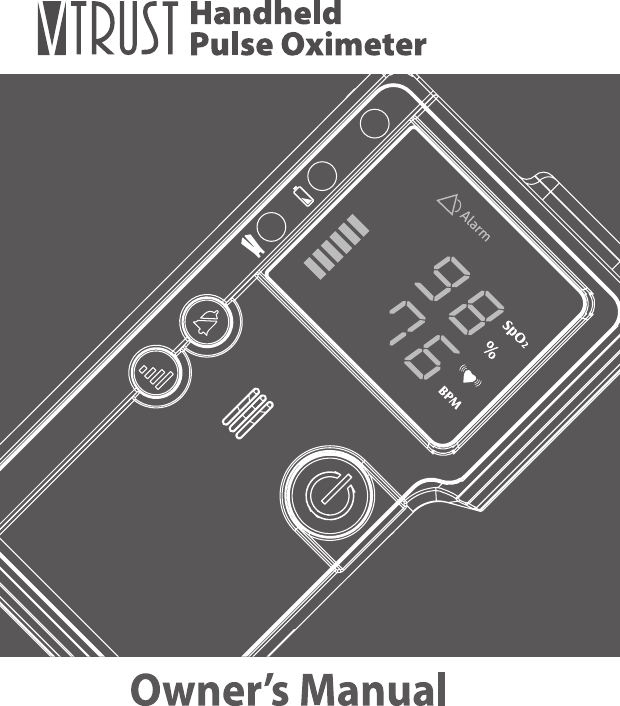
TAIDOC TECHNOLOGY 8201BEM2 Handheld Pulse Oximeter User Manual

TAIDOC TECHNOLOGY CORP. Handheld Pulse Oximeter Users Manual

Users Manual

Ver 2.0 12, 2013311-8201000-XXXOwner’s Manual
4About the ManualThe precautions, warnings and notes throughout this manual are very important. Please read this entire manual carefully before using the V-TRUST Handheld Pulse Oximeter.The information in the manual has been carefully checked and is believed to be accurate.
5Handheld Pulse OximeterTable of ContentSAFETY INFORMATION     06Warnings     06Cautions   07INTRODUCTION   08Intended Use    08General Description    08Principle of Measurement  08Meter Appearance and Key Function  09Content of the System    11BEFORE USE    12Battery Replacement    12Connecting the Probe    13Power On/Off  13Set up the Oximeter    14Power On Self-Test   19OPERATION   20DATA TRANSMISSION VIA BLUETOOTH    23CLEANING THE OXIMETER    25TROUBLESHOOTING   26SYMBOL INFORMATION    28SPECIFICATION     29
6SAFETY INFORMATIONWarning● Federal law (USA) restricts this device to sale by or on the order of a physician.● Do not use the oximeter in an MRI environment.● The use of accessories, probes, and cables other than those listed in this manual may result in increased emission and/ or decreased immunity of the device.● The oximeter is intended only as an adjunct in subject assessment. It must be used in conjugation with other methods of assessing clinical signs and symptoms.● Explosion Hazard: Do not use the oximeter in an explosive atmosphere.● If subjects’ monitoring sites have trauma, disability or  other medical status that make inaccurate results, operators should consult doctors before use.● Use probe manufactured by manufacturer. Using other manufacturers’ probes may cause improper oximeter performance. Also, do not use a damaged probe.● When a system fault occurs, the subject will no longer be monitored.● The oximeter has to measure the pulse  properly to  obtain accurate SpO2  measurement.  Blood  flow  restrictors  (e.g.,  blood  pressure cuffs) may  hinder pulse measurements. Remove  any  objects  that may hinder the performance of the oximeter.
7Handheld Pulse OximeterCautions● The oximeter is not an apnea monitor.● The oximeter determines the percentage of arterial oxygen saturation of functional hemoglobin. Significant levels of dysfunctional hemoglobin such as carboxyhemoglobin or methemoglobin may affect the accuracy of the measurement.● Cardiogreen and intravascular dyes, depending on the concentration, may affect the accuracy of SpO2 measurements. ● The performance of the oximeter might be affected by the presence of a debrillator.● The  oximeter  may  not  work  on  all subjects. If you are  unable  to achieve stable readings, discontinue use.● The  oximeter  has  monition  tolerant  software  that  minimizes  the likelihood of motion artifact being misinterpreted as good pulse quality. In some circumstances, however, the oximeter may still interpret motion  as good  pulse quality. Minimize  subject motion as much as possible.●  Verify  that  all  visible  indicators  illuminate  during  the  startup (initialization) sequence, if  any  indicator  is  not  lit  do  not  use  the oximeter. Please contact your agent for help.● Do not immerse the oximeter or  probes in  liquid to clean, and also do not expose them to excessive moisture or liquids.● Do not use caustic or abrasive cleaning agents on the oximeter or probes.● Do not mix new and old batteries at the same time. It may cause the batteries to leak. Disposed of batteries properly.● Batteries  might leak  chemicals if unused  for a  long period of  time. Remove the batteries if the oximeter is going to be stored for more than one month.● Batteries may leak or explode if used or disposed of improperly.● The  oximeter  is  a  precision  electronic  instrument  and  must  be repaired by trained personnel only.● Follow local governing ordinances and recycling instructions regards disposal or recycling of the device and device components.
8INTRODUCTION►Intended for UseThe V-TRUST Handheld Pulse Oximeter is indicated for use in measuring and displaying functional  oxygen saturation  of  arterial hemoglobin  (SpO2) and  pulse rate. It is intended for patients during no-motion condition. The oximeter is suitable for use in hospital and clinical sites. This device is indicated for non-invasive spot checking or continuous monitoring.►General DescriptionThe oximeter is a digital handheld that displays numerical values for blood oxygen saturation. It provides visual alarm for medium priority conditions. The range of the peak wavelengths and maximum optical output power of the light emitted by the oximeter probe and the reading result can be especially useful to clinicians.The oximeter with reusable SpO2 probe accessories operates on battery power for up to 40 hours. The oximeter requires no routine calibration or maintenance other than replacement of alkaline batteries. When the batteries are low, the indicator will blink to warn users to replace the batteries.►Principle of Measurement The V-TRUST Handheld Pulse Oximeter determines functional oxygen saturation of arterial hemoglobin (SpO2) by measuring the absorption of red and infrared light passing through perfused tissue. Changes in absorption caused by the pulsation of blood in the vascular bed are used to determine oxygen saturation and pulse rate.
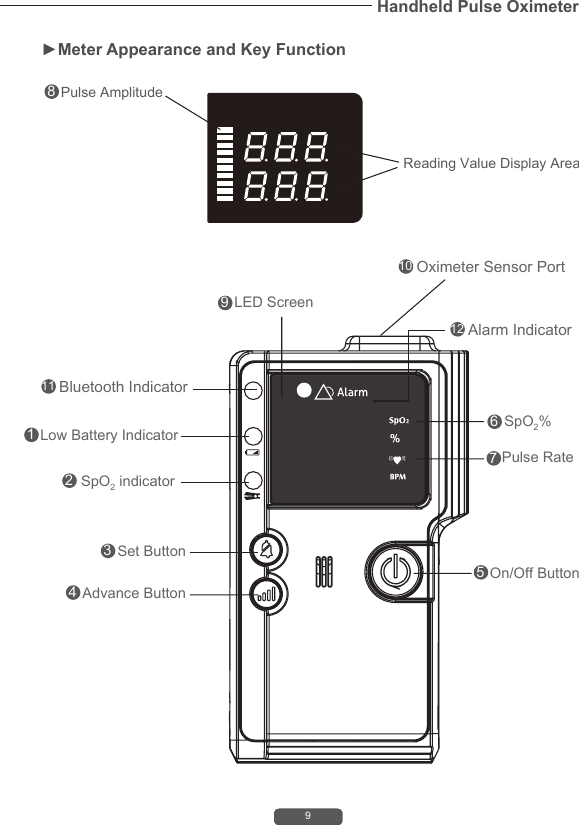
9Handheld Pulse Oximeter►Meter Appearance and Key Function Reading Value Display Area12349106758 Pulse Amplitude8Low Battery IndicatorSpO2 indicatorLED Screen Set Button Advance ButtonOn/Off ButtonSpO2%Pulse RateOximeter Sensor Port12 Alarm Indicator11 Bluetooth Indicator
101. Low Battery IndicatorRed light appears when power is insufcient to the oximeter.   2. SpO2 IndicatorRed light appears when probe disconnects from oximeter. Green light appears when nger insert probe sensor from oximeter. 3. Set Button Is used to set up settings.4. Advance Button (Bluetooth Key)Is used to review status. For Bluetooth transmission, press and hold the Advance Button (Bluetooth key) for 3 seconds to enter pairing mode. 5. On/Off ButtonIs used to turn on or turn off the oximeter by pressing On/Off button. 6. SpO2 %The measurement result of oxygen saturation in percentage.7.   Pulse RateThe measurement result of pulse rate.8. Pulse AmplitudeThe strength of the signal is detected by the oximeter.9. LED ScreenDisplay measurement results.10. Oximeter Sensor Port Connect the probe and the oximeter.11. Bluetooth Indicator (for TD-8201B only)Blue light appears when turn on bluetooth.12. Alarm IndicatorRed light appears when oxygen saturation value upper or below the setting ranges.
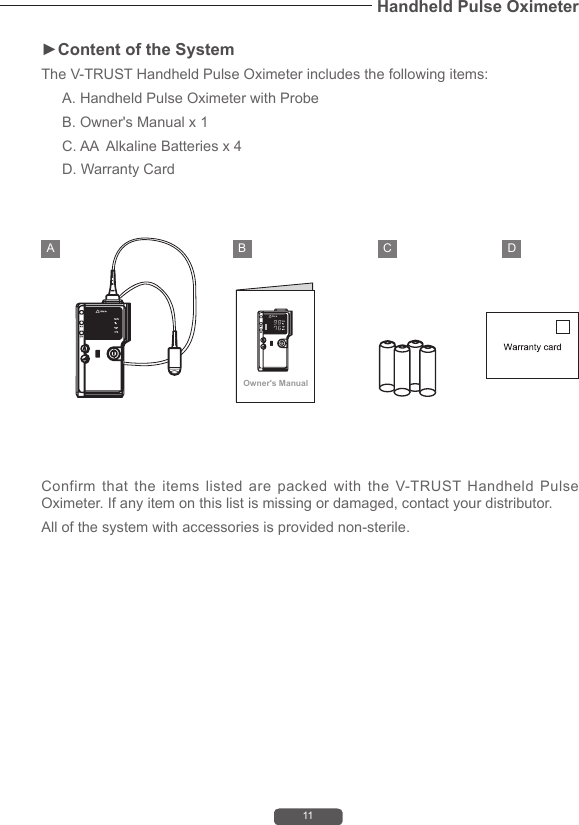
11Handheld Pulse Oximeter►Content of the SystemThe V-TRUST Handheld Pulse Oximeter includes the following items:A. Handheld Pulse Oximeter with ProbeB. Owner's Manual x 1C. AA  Alkaline Batteries x 4D. Warranty CardConfirm that the items listed are packed with the V-TRUST Handheld Pulse Oximeter. If any item on this list is missing or damaged, contact your distributor. All of the system with accessories is provided non-sterile.Owner's ManualA B C D
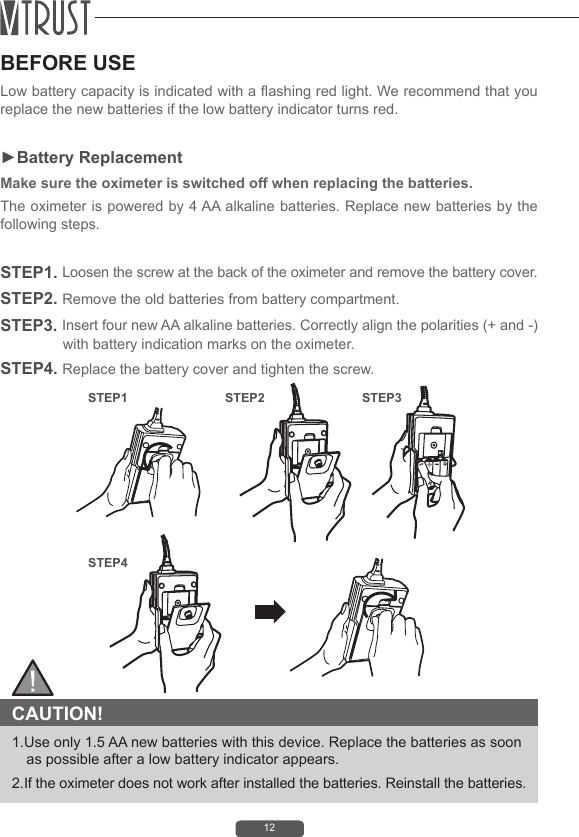
12BEFORE USELow battery capacity is indicated with a ashing red light. We recommend that you replace the new batteries if the low battery indicator turns red.►Battery ReplacementMake sure the oximeter is switched off when replacing the batteries.The oximeter is powered by 4 AA alkaline batteries. Replace new batteries by the following steps. STEP1. Loosen the screw at the back of the oximeter and remove the battery cover.STEP2. Remove the old batteries from battery compartment.STEP3. Insert four new AA alkaline batteries. Correctly align the polarities (+ and -) with battery indication marks on the oximeter.STEP4. Replace the battery cover and tighten the screw.  CAUTION! 1.Use only 1.5 AA new batteries with this device. Replace the batteries as soon as possible after a low battery indicator appears. 2.If the oximeter does not work after installed the batteries. Reinstall the batteries.STEP1STEP4STEP2 STEP3
13Handheld Pulse Oximeter►Connecting the ProbeConnect the probe to the top of the oximeter as shown below. Make sure that the probe is rmly plugged into the oximeter.►Power On/Off• Turn on the oximeter by pressing and releasing the   button.• Turn off the oximeter by pressing and holding the   button for about 3 seconds.Spo2%BPMNOTEPlease make sure to connect the probe properly. If not, the SpO2 indicator will light up with reminding voice while the probe fell off.
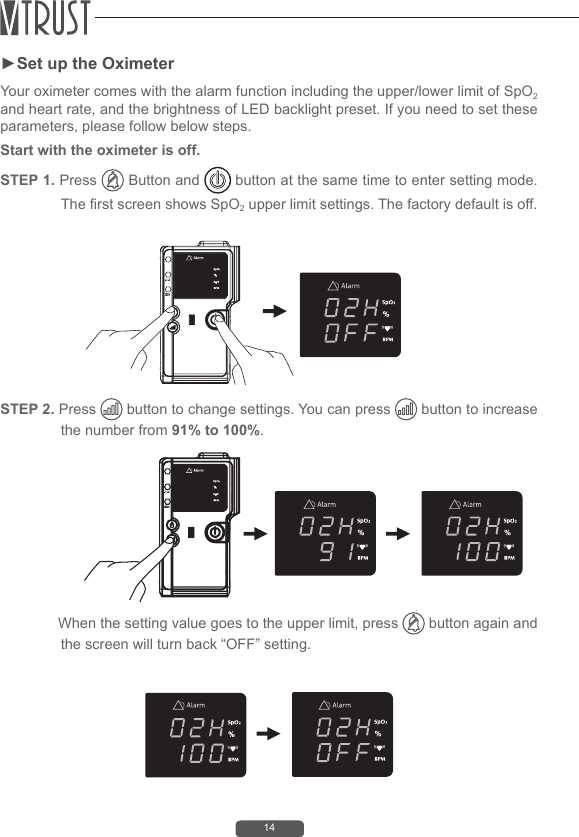
14►Set up the OximeterYour oximeter comes with the alarm function including the upper/lower limit of SpO2 and heart rate, and the brightness of LED backlight preset. If you need to set these parameters, please follow below steps.Start with the oximeter is off. STEP 1. Press   Button and   button at the same time to enter setting mode. The rst screen shows SpO2 upper limit settings. The factory default is off.STEP 2. Press   button to change settings. You can press   button to increase the number from 91% to 100%.              When the setting value goes to the upper limit, press   button again and the screen will turn back “OFF” setting.
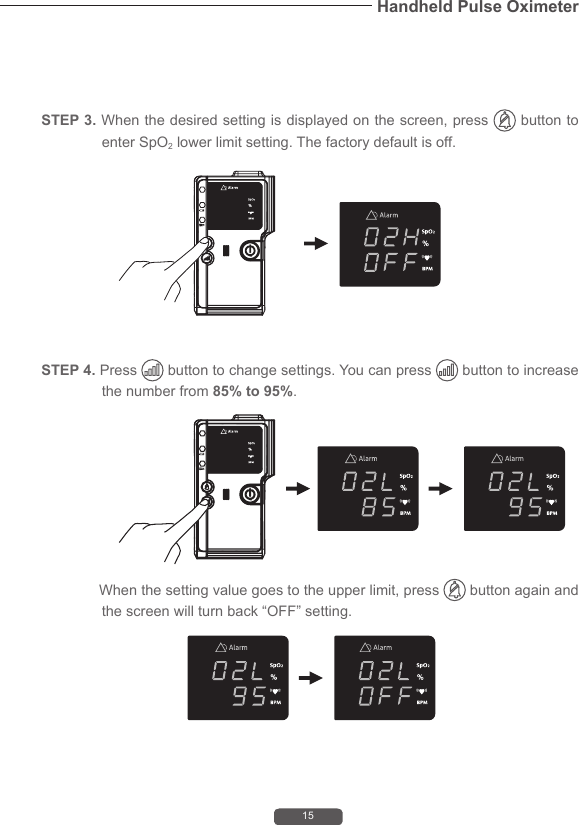
15Handheld Pulse Oximeter              When the setting value goes to the upper limit, press   button again and the screen will turn back “OFF” setting.STEP 4. Press   button to change settings. You can press   button to increase the number from 85% to 95%.STEP 3. When the desired setting is displayed on the screen, press   button to enter SpO2 lower limit setting. The factory default is off.
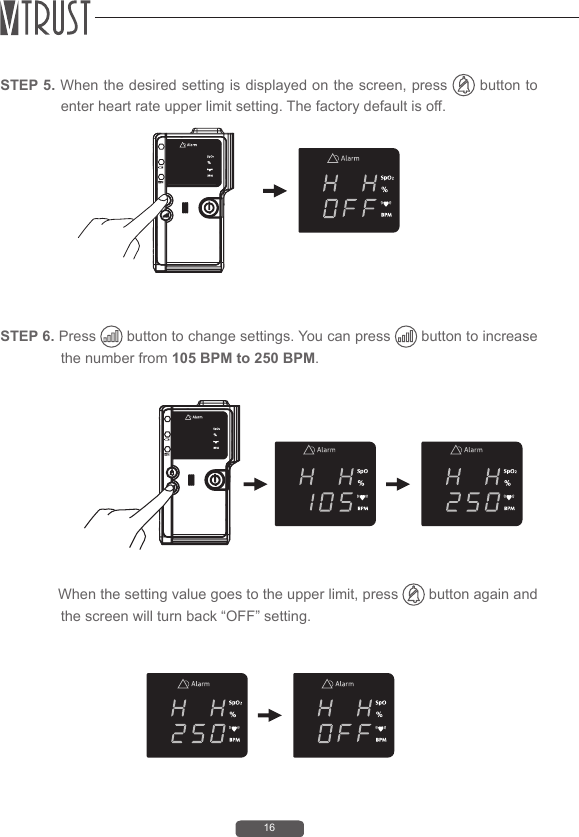
16STEP 6. Press   button to change settings. You can press   button to increase the number from 105 BPM to 250 BPM.              When the setting value goes to the upper limit, press   button again and the screen will turn back “OFF” setting.STEP 5. When the desired setting is displayed on the screen, press   button to enter heart rate upper limit setting. The factory default is off.
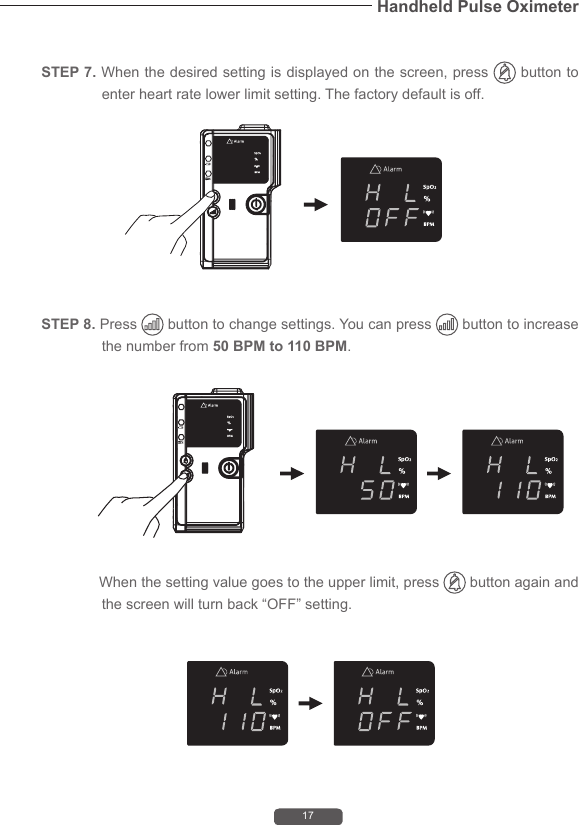
17Handheld Pulse OximeterSTEP 8. Press   button to change settings. You can press   button to increase the number from 50 BPM to 110 BPM.              When the setting value goes to the upper limit, press   button again and the screen will turn back “OFF” setting.STEP 7. When the desired setting is displayed on the screen, press   button to enter heart rate lower limit setting. The factory default is off.
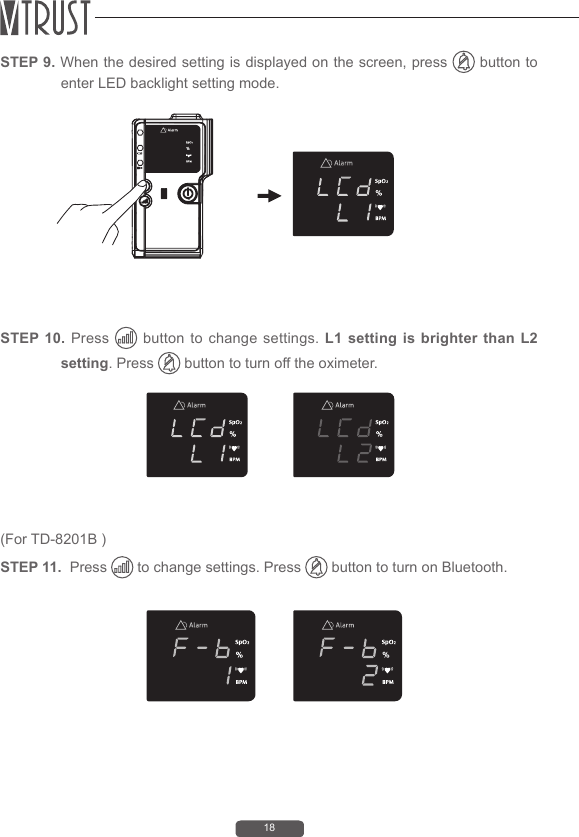
18STEP 10. Press   button to change settings. L1 setting is brighter than L2 setting. Press   button to turn off the oximeter.(For TD-8201B ) STEP 11.  Press   to change settings. Press   button to turn on Bluetooth. STEP 9. When the desired setting is displayed on the screen, press   button to enter LED backlight setting mode.
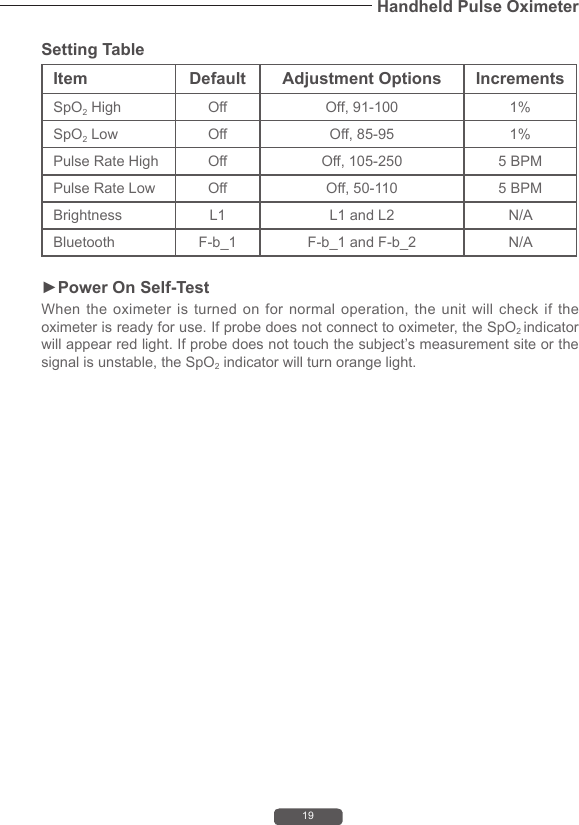
19Handheld Pulse OximeterSetting TableItem Default Adjustment Options IncrementsSpO2 High Off Off, 91-100 1%SpO2 Low Off Off, 85-95 1%Pulse Rate High Off Off, 105-250 5 BPMPulse Rate Low Off Off, 50-110 5 BPMBrightness L1 L1 and L2 N/ABluetooth  F-b_1  F-b_1 and F-b_2 N/A►Power On Self-TestWhen the oximeter is turned on for normal operation, the unit will check if the oximeter is ready for use. If probe does not connect to oximeter, the SpO2 indicator will appear red light. If probe does not touch the subject’s measurement site or the signal is unstable, the SpO2 indicator will turn orange light.
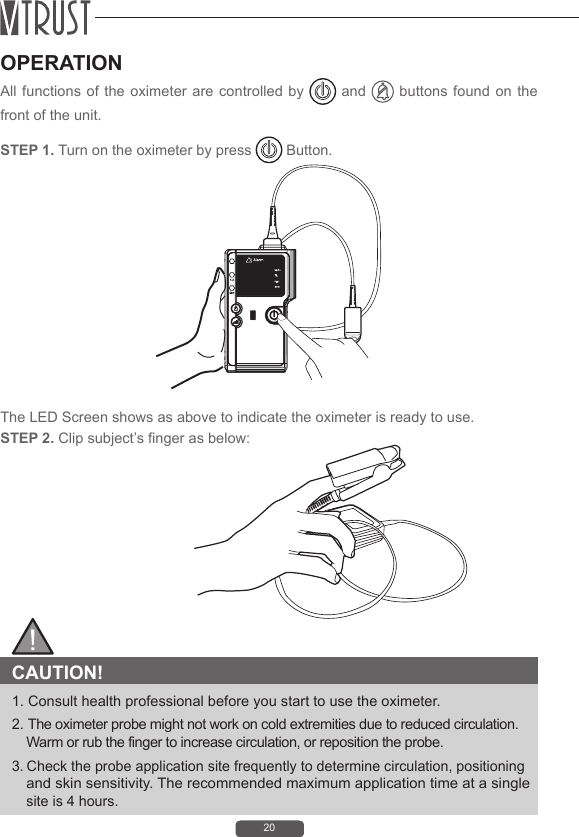
20OPERATIONAll functions of the oximeter are controlled by   and   buttons found on the front of the unit.STEP 1. Turn on the oximeter by press   Button.STEP 2. Clip subject’s nger as below:The LED Screen shows as above to indicate the oximeter is ready to use. CAUTION! 1. Consult health professional before you start to use the oximeter.2. The oximeter probe might not work on cold extremities due to reduced circulation. Warm or rub the finger to increase circulation, or reposition the probe.3. Check the probe application site frequently to determine circulation, positioning and skin sensitivity. The recommended maximum application time at a single site is 4 hours.
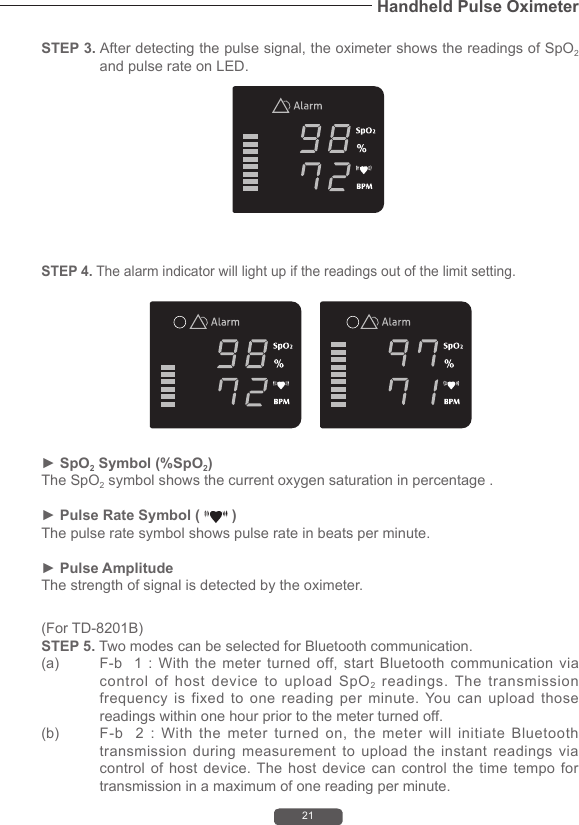
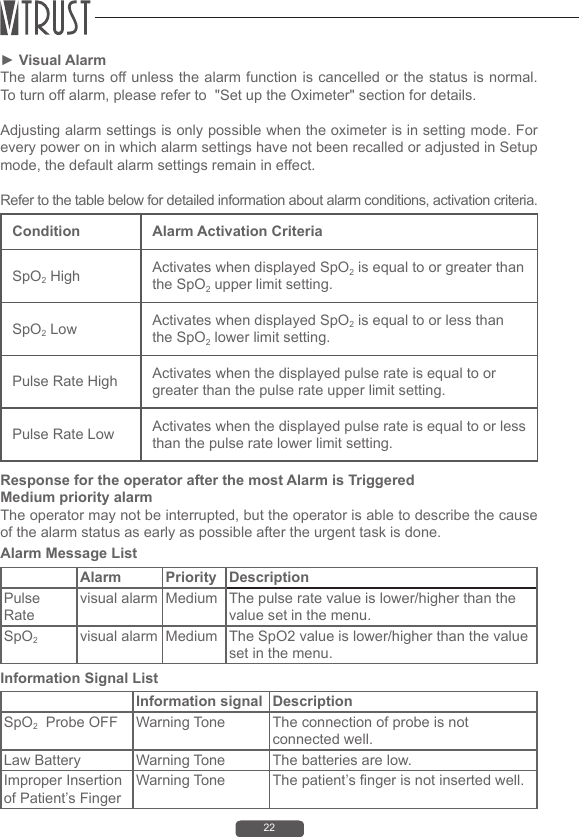
21Handheld Pulse OximeterSTEP 3. After detecting the pulse signal, the oximeter shows the readings of SpO2 and pulse rate on LED.(For TD-8201B)STEP 5. Two modes can be selected for Bluetooth communication. (a)  F-b   1 :  With  the  meter turned  off, start  Bluetooth  communication  via control of host device to upload SpO2 readings. The transmission frequency is fixed to one reading per minute. You can upload those readings within one hour prior to the meter turned off.   (b)  F-b    2  :  With  the  meter  turned  on,  the  meter  will  initiate  Bluetooth transmission during measurement to upload the instant readings via control of host device. The host device can control the time tempo for transmission in a maximum of one reading per minute.  STEP 4. The alarm indicator will light up if the readings out of the limit setting.► SpO2 Symbol (%SpO2)The SpO2 symbol shows the current oxygen saturation in percentage .► Pulse Rate Symbol (   )The pulse rate symbol shows pulse rate in beats per minute. ► Pulse AmplitudeThe strength of signal is detected by the oximeter.
22► Visual Alarm The alarm turns off unless the alarm function is cancelled or the status is normal. To turn off alarm, please refer to  "Set up the Oximeter" section for details.Adjusting alarm settings is only possible when the oximeter is in setting mode. For every power on in which alarm settings have not been recalled or adjusted in Setup mode, the default alarm settings remain in effect.Refer to the table below for detailed information about alarm conditions, activation criteria.Condition Alarm Activation CriteriaSpO2 High Activates when displayed SpO2 is equal to or greater than the SpO2 upper limit setting.SpO2 Low Activates when displayed SpO2 is equal to or less than the SpO2 lower limit setting.Pulse Rate High Activates when the displayed pulse rate is equal to or greater than the pulse rate upper limit setting.Pulse Rate Low Activates when the displayed pulse rate is equal to or less than the pulse rate lower limit setting.Response for the operator after the most Alarm is TriggeredMedium priority alarmThe operator may not be interrupted, but the operator is able to describe the cause of the alarm status as early as possible after the urgent task is done.Alarm Message ListInformation Signal ListAlarm Priority DescriptionPulse Ratevisual alarm Medium The pulse rate value is lower/higher than the value set in the menu.SpO2  visual alarm Medium The SpO2 value is lower/higher than the value set in the menu.Information signal DescriptionSpO2  Probe OFF Warning Tone The connection of probe is not connected well.Law Battery Warning Tone The batteries are low.Improper Insertion of Patient’s FingerWarning Tone The patient’s finger is not inserted well.
23Handheld Pulse OximeterDATA TRANSMISSION VIA BLUETOOTHYou can transmit your SpO2 and pulse rate data from the meter to your device (e.g. smart phone, tablet, PC…) via Bluetooth. Please contact your local customer service or place of purchase for assistance.Please note that you must complete the pairing between meter and Bluetooth receiver before transmitting data.1. With  the meter  off, press and  hold the Advance  Button (Bluetooth  key) for  3 seconds. The meter enters pairing mode.2. Turn on the Bluetooth function of your device so that it can begin searching for the meter. When the name of the meter appears on the pairing list, select and add it to the list.3. On your device, the meter will be shown as a paired device, suggesting successful pairing.* For Android  system,  it’s suggested to  turn off  the  meter  while the  meter is  in pairing mode. And then turn it on again to accelerate the speed for connection.Bluetooth indicator on the blood glucose monitor:BLUETOOTH INDICATOR STATUSFlash Fast The meter is pairing and connecting.Lit Solid The connection is established. The meter is transmitting data now.NOTE(a)F-b  1 : With the meter turned off, start Bluetooth communication via control of host device to upload SpO2 readings. The transmission frequency is fixed to one reading per minute. You can upload those readings within one hour prior to the meter turned off.   (b)F-b  2 : With the meter turned on, the meter will initiate Bluetooth transmission during measurement to upload the instant readings via control of host device. The host device can control the time tempo for transmission in a maximum of one reading per minute.
24MOBILE PHONE COMPATIBILITY ISSUESThe Bluetooth functionality is implemented in different ways by the various mobile phone manufacturers.Unfortunately, in some mobile phone models, even with Bluetooth functionality, they may be compatible only with certain types of devices. If a problem occurs in the connection between your mobile phone and the blood glucose monitor, or if you are uncertain regarding your mobile phone’s Bluetooth capabilities, please consult your mobile phone manual or contact your local customer service for assistance.WARNING: • While the meter is in transmission mode, it will be unable to perform a test.• Make sure your device has the Bluetooth function turned on and the meter is within the receiving range before transmitting the data.
25Handheld Pulse OximeterCLEANING THE OXIMETERCleaning oximeter  is just  as important  as  proper  use.  For surface-cleaning  and disinfecting the oximeter and reusable SpO2 probes we recommend the following procedures:► Turn off the oximeter before cleaning.► Wipe exposed surfaces with a soft or a pad moistened with a mild detergent solution or medical alcohol (70% isopropyl alcohol solution).► Clean your oximeter whenever you see any type of soil, dirt or obstruction in it.► Ensure that no dirt or blood is on the optical components.► SpO2 probes can be cleaned and disinfected with same solutions. Let the probe dry before using it again. The rubber inside of the SpO2 probe belongs to medical rubber, which has no toxin and no harmful to the skin of human being.► Replace the batteries timely when battery indication is low. Please follow the law of the local government to deal with used batteries.► Remove the batteries inside the battery cassette if the oximeter will not be operating for a long time.► It is recommended that the oximeter should be kept in a dry environment anytime. A wet ambient might affect its lifetime and even might damage the oximeter.► Caution:  Do not spray, pour, or spill any liquid on the oximeters, their accessories, switches or openings.
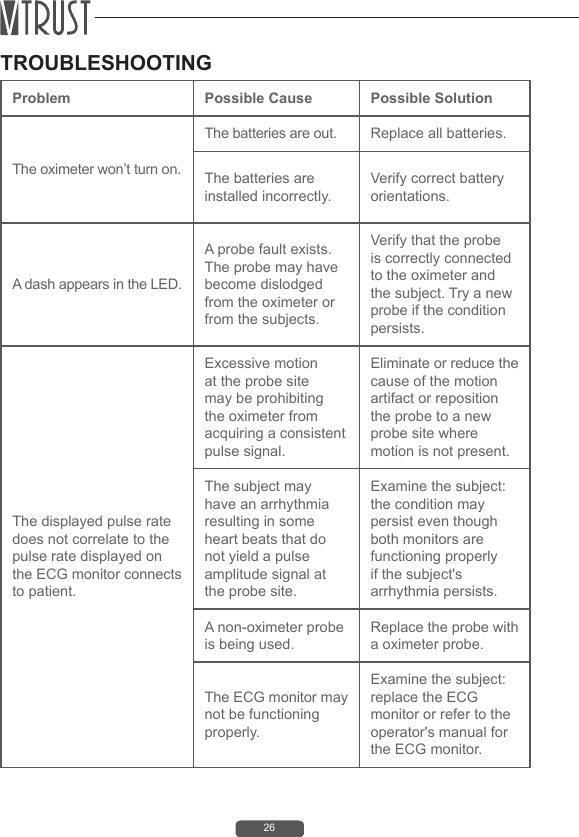
26TROUBLESHOOTINGProblem Possible Cause Possible SolutionThe oximeter won’t turn on.The batteries are out. Replace all batteries.The batteries are installed incorrectly.Verify correct battery orientations. A dash appears in the LED.A probe fault exists. The probe may have become dislodged from the oximeter or from the subjects.Verify that the probe is correctly connected to the oximeter and the subject. Try a new probe if the condition persists.The displayed pulse rate does not correlate to the pulse rate displayed on the ECG monitor connects to patient.Excessive motion at the probe site may be prohibiting the oximeter from acquiring a consistent pulse signal.Eliminate or reduce the cause of the motion artifact or reposition the probe to a new probe site where motion is not present.The subject may have an arrhythmia resulting in some heart beats that do not yield a pulse amplitude signal at the probe site.Examine the subject:the condition may persist even though both monitors are functioning properly if the subject's arrhythmia persists.A non-oximeter probe is being used.Replace the probe with a oximeter probe.The ECG monitor may not be functioning properly.Examine the subject: replace the ECG monitor or refer to the operator's manual for the ECG monitor.
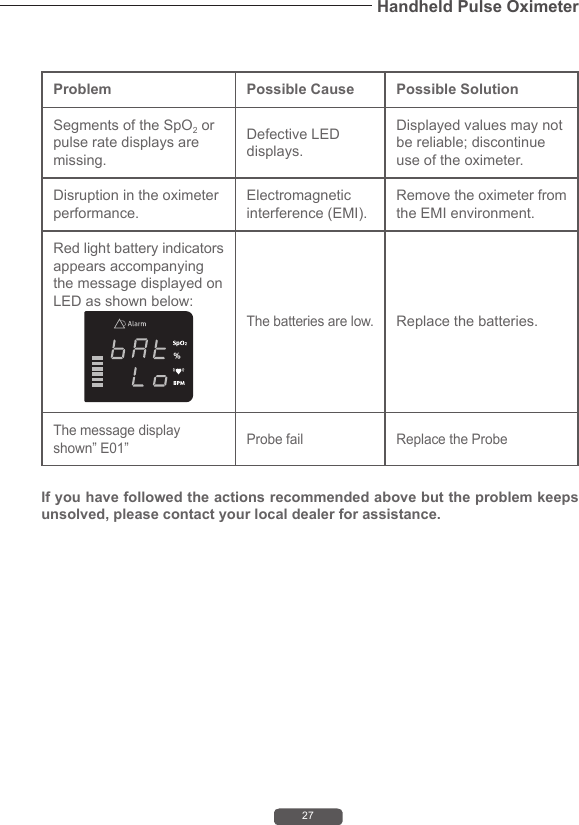
27Handheld Pulse OximeterProblem Possible Cause Possible SolutionSegments of the SpO2 or pulse rate displays are missing.Defective LED displays.Displayed values may not be reliable; discontinue use of the oximeter. Disruption in the oximeter performance.Electromagnetic interference (EMI).Remove the oximeter from the EMI environment.Red light battery indicators appears accompanying the message displayed on LED as shown below:The batteries are low.Replace the batteries.The message display shown” E01” Probe fail Replace the Probe If you have followed the actions recommended above but the problem keeps unsolved, please contact your local dealer for assistance.
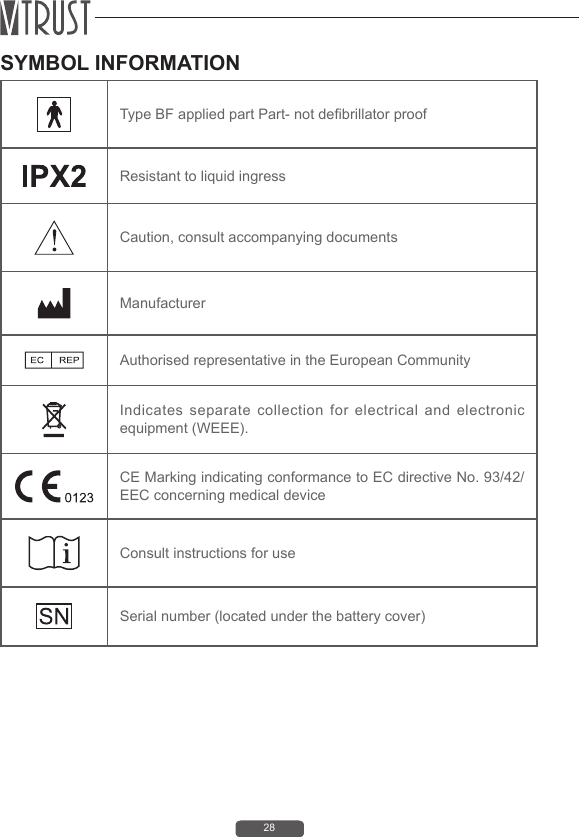
28SYMBOL INFORMATIONType BF applied part Part- not debrillator proof Resistant to liquid ingressCaution, consult accompanying documentsManufacturerAuthorised representative in the European CommunityIndicates separate collection for electrical and electronic  equipment (WEEE).CE Marking indicating conformance to EC directive No. 93/42/EEC concerning medical deviceConsult instructions for useSerial number (located under the battery cover)
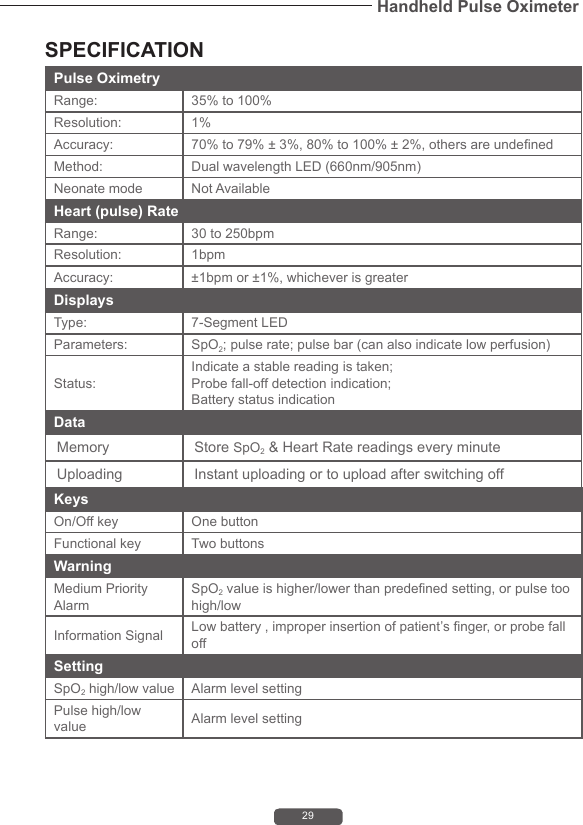
29Handheld Pulse OximeterSPECIFICATIONPulse Oximetry Range:  35% to 100%Resolution:  1%Accuracy:  70% to 79% ± 3%, 80% to 100% ± 2%, others are undenedMethod:  Dual wavelength LED (660nm/905nm)Neonate mode Not AvailableHeart (pulse) RateRange:  30 to 250bpmResolution:  1bpmAccuracy: ±1bpm or ±1%, whichever is greaterDisplaysType:  7-Segment LEDParameters:  SpO2; pulse rate; pulse bar (can also indicate low perfusion)Status: Indicate a stable reading is taken; Probe fall-off detection indication; Battery status indicationData  Memory  Store SpO2 & Heart Rate readings every minuteUploading Instant uploading or to upload after switching offKeysOn/Off key One buttonFunctional key Two buttonsWarningMedium Priority AlarmSpO2 value is higher/lower than predened setting, or pulse too high/lowInformation Signal Low battery , improper insertion of patient’s nger, or probe fall off SettingSpO2 high/low value Alarm level settingPulse high/low value Alarm level setting
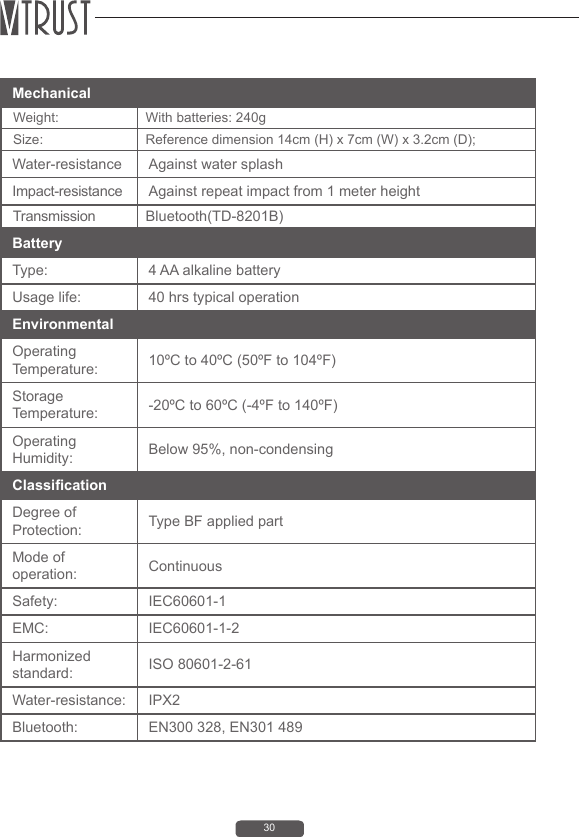
30Battery Type:  4 AA alkaline batteryUsage life:  40 hrs typical operationEnvironmental Operating Temperature:  10ºC to 40ºC (50ºF to 104ºF)Storage Temperature:  -20ºC to 60ºC (-4ºF to 140ºF)Operating Humidity:  Below 95%, non-condensingClassicationDegree of Protection:  Type BF applied partMode of operation: ContinuousSafety:  IEC60601-1EMC: IEC60601-1-2Harmonized standard:  ISO 80601-2-61Water-resistance: IPX2Bluetooth:   EN300 328, EN301 489Mechanical  Weight:  With batteries: 240g Size:  Reference dimension 14cm (H) x 7cm (W) x 3.2cm (D); Water-resistance Against water splashImpact-resistance Against repeat impact from 1 meter height Transmission Bluetooth(TD-8201B)
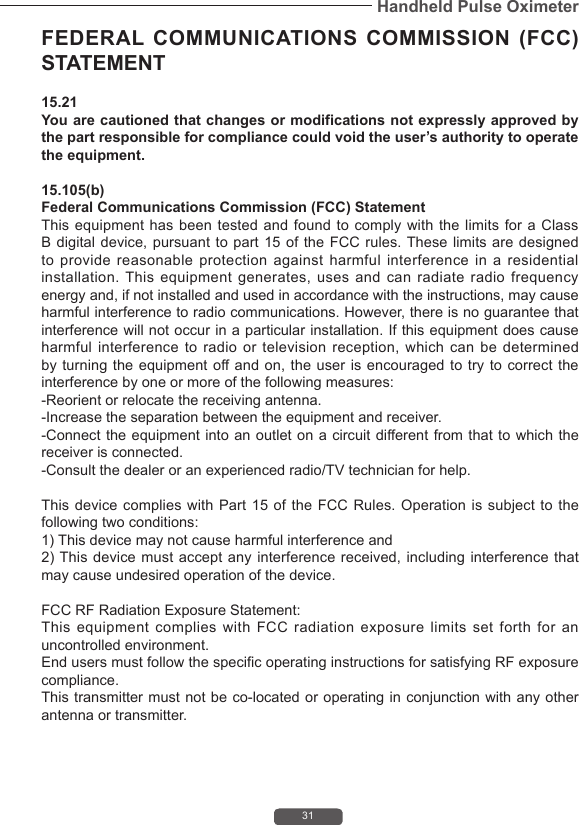
31Handheld Pulse OximeterFEDERAL COMMUNICATIONS COMMISSION (FCC) STATEMENT 15.21 You are cautioned that changes or modifications not expressly approved by the part responsible for compliance could void the user’s authority to operate the equipment. 15.105(b) Federal Communications Commission (FCC) Statement This equipment has been tested and found to comply with the limits for a Class B digital device, pursuant to part 15 of the FCC rules. These limits are designed to provide reasonable protection against harmful interference in a residential installation. This equipment generates, uses and can radiate radio frequency energy and, if not installed and used in accordance with the instructions, may cause harmful interference to radio communications. However, there is no guarantee that interference will not occur in a particular installation. If this equipment does cause harmful interference to radio or television reception, which can be determined by turning the equipment off and on, the user is encouraged to try to correct the interference by one or more of the following measures: -Reorient or relocate the receiving antenna. -Increase the separation between the equipment and receiver. -Connect the equipment into an outlet on a circuit different from that to which the receiver is connected. -Consult the dealer or an experienced radio/TV technician for help. This device complies  with Part 15  of  the FCC Rules.  Operation is subject  to  the following two conditions: 1) This device may not cause harmful interference and 2) This device must accept  any interference received, including  interference that may cause undesired operation of the device. FCC RF Radiation Exposure Statement: This equipment complies with FCC radiation exposure limits set forth for an uncontrolled environment. End users must follow the specific operating instructions for satisfying RF exposure compliance. This transmitter must not be co-located or operating in conjunction with any other antenna or transmitter.
MedNet GmbHBorkstraβe 10, 48163 Mϋnster,GermanyB1-7F., No. 127, Wugong 2nd Rd., Wugu Dist., New Taipei City 248, Taiwan (R.O.C.)www.vtrustmed.com

Navigation menu