TON ELECTRONICS TECHNOLOGY TK210 Wireless GPS Car Alarm User Manual TK210 V2 0 201110
TOPTEN ELECTRONICS TECHNOLOGY LIMITED Wireless GPS Car Alarm TK210 V2 0 201110
Users manual

Wireless
GPS Car Alarm System
USER MANUAL
(Model: TK210)
GUANGZHOU TOPTEN ELECTRONICS FACTORY
Address: 20/F, Tower B, Gaoke Building, Tianhe North Road, Guangzhou, China.
Tel: (+86)20-38351400, 38351401 Fax: (+86)20-38351400
Website:http://www.t10.cn Email: sales@t10.cn
Version 2.0
(Date: Oct., 2011)
T
O
P
T
ll
::
TT
KK
212
0
)
EN
UU
AA
LL

TK210 GPS Car Alarm Website: http://www.GPScaralarm.com User Manual
Page 1
CONTENT
Preface ....................................................................................................................................2
I. Features & Functions ...........................................................................................................3
II. How to Operate it ................................................................................................................4
SMS Command Format...................................................................................................4
Authorize the Alert-received Mobile.................................................................................4
Change User Password...................................................................................................4
Check the Real Physical Address....................................................................................5
Check the GPS Coordinates by SMS..............................................................................5
Check the location by Google Map’s URL.......................................................................5
Arm/Disarm the System by SMS .....................................................................................6
Arm/Disarm by Phone Calling .........................................................................................6
Stop the Car by SMS .......................................................................................................6
Restore the Stopped Car to Normal Status .....................................................................7
Monitor the Voice around the Car....................................................................................7
Two-way Talking with the Car ..........................................................................................7
Set up Movement Alert ....................................................................................................7
Set up Geo-Fence Alert ...................................................................................................8
Set up Over-speed Alert ..................................................................................................8
Adjust the Vibration Sensor’s Sensitivity .........................................................................9
Turn ON/OFF Sleep Mode...............................................................................................9
Setting for Mute Alarm. ..................................................................................................10
Setting for Odometer......................................................................................................10
Check the IMEI No.........................................................................................................10
Change the Heart-beating Interval. ...............................................................................10
SOS Anti-robbery Alert...................................................................................................11
III. The Setting for GPRS Connection ...................................................................................11
IV. Specifications ...................................................................................................................12
VI. Packing List......................................................................................................................14
VII. Installation.......................................................................................................................15
VIII. Maintenance ..................................................................................................................19
T
........
AA
ll
ee
rr
tt
...........
...
e
n
s
o
r
r
’’
ss
S
S
e
O
.....
...................
.................
...................
..................
O
.....
P
..............
.............
..................
........
........
T
............
s
s
...................
...........
............
EN
................
....................................................
..................................................
................................
....

TK210 GPS Car Alarm Website: http://www.GPScaralarm.com User Manual
Page 2
Preface
TK210 GPS car alarm provides a reliable solution for safeguard & tracking
the vehicle. It has 2 unique functions:
It is specially used to work with the central lock system or ordinary car
alarm system. The user can use the original remote control to
arm/disarm the TK210 for car security.
It has wireless immobilizer, which will lock the engine secretly. In arming
status, even the main unit is destroyed, the car can not be started.
TK210 supports tracking by SMS/GPRS, user can check the car’s real
physical address easily by mobile SMS. It is not only an advanced car security
product, but also a reliable tracker for fleet management.
Read it Firstly:
Please read this manual thoroughly before you use the device; please keep it
for future reference.
Attention:
(1) Please keep the device away from water, humidity, high temperature,
heavy dust or strong magnetism.
(2) Please prepare a valid GSM SIM card (850/900/1800/1900Mhz) in
advance.
Warning:
We strongly suggest user let the professional car electrician to install the
system.
O
l
t t
h
h
o
r
oo
ughugh
P
hh
ll
yy
bb
e
f
T
tt
ii
ss
l
l
ee
e
e
tt
mm
aa
n
a
g
EN
c
a
r
c
c
aa
nn
SS
,,
u
s
ee
rr
cc
aa
nn
c
h
nn
oo
tt
o
n
o
l
yy
aa
nn
E
ee
mm

TK210 GPS Car Alarm Website: http://www.GPScaralarm.com User Manual
Page 3
I. Features & Functions
1. Arm/disarm by SMS remotely, or by the remote controller of original central
lock system or existing car alarm system, or by phone call.
2. Upgrade the ordinary car alarm to GPS alarm system;
3. Check the car’s real physical address(such as city name, street name..) ;
4. Track by mobile SMS to get the coordinates or the Google map’s URL;
5. Live tracking by web-based tracking center via GPRS network;
6. Track on command or by time interval via SMS/GPRS.
7. Cut off engine to stop the car safely by SMS/GPRS;
8. Two-way talking function(optional) & voice monitoring function;
9. Wireless immobilizer which will kill the engine secretly & reliably;
10. Vibration alert, door opening alert and ignition on alert;
11. Power cut-off alert & low power alert;
12. Movement alert;
13. Geo-fence alert (radius range: 0.1~99KM);
14. Over-speed alert (speed range:1~999km/h);
15. SOS button to call for help in case of emergency;
16. Inbuilt 4Mb data logger tostoretheofflineGPSdatawherethereisnoGSM
coverage;
17. Mileage calculation function (=odometer)
18. Built-in rechargeable backup battery; when the car battery is cut off or
damaged, the built-in 580mAH backup battery can work for emergency check,
and the system will send out power failure alert immediately.
19. Two kinds of location information; user can check the GPS latitude, longitude,
speed, direction. If there is no GPS signal, user could also locate the car by
GSM base station code (the GSM operator’s support is needed)
20. Power save design, the power consumption is very low.
21. Strong ability of anti-tamper.Inarmingstatus, theenginewillbelocked,even
the main unit is completely destroyed, there is no way to start the car.
T
gg
gg
ere
T
f
u
n
c
c
t
t
ii
o
o
O
a
a
n
n
g
g
e
e
h
e
e
ll
p
i
n
c
aa
s
s
e
e
tt
oo
ss
t
o
r
ee
tt
h
P
::
00
.
1
~
99
99
K
11
~~
9999
9
k
m
/
oo
ff
T
g
g
;;
K
M
)
;
EN
;
tt
oo
rr
ii
ngg
ff
uu
nn
cc
ee
ss
e
cc
rr
ee
tt
l
y
&&
rr
ee
ll
nn
ii
tt
ii
oo
n
oo
nn
a
l
e
rr
tt
rrr
;;

TK210 GPS Car Alarm Website: http://www.GPScaralarm.com User Manual
Page 4
II. How to Operate it
SMS Command Format
User can send SMS instruction to operate the tracker by any mobile phone,
the format of the instruction is:
User Password(******)+ Control Code(XXX)
The default user password is 111111.
If the user password is changed, user should send the SMS instruction with
the new user password instead of 111111.
XXX is the control code, all the letters must be capital letters
There is no space between the user password & the control instruction.
Authorize the Alert-received Mobile
SMS command: 111111*10 Mobile #1 *20 Mobile #2*
In case of alarm, if user wants to get the alert SMS from the tracker, he/she
needs send the following SMS to program the system firstly, otherwise, the alert
information can not be received correctly.
Example: User sends the SMS 111111*10 13922713571 *20 13711189059 * to the
tracker’s SIM card number, if there is any alert, system will send alert SMS to both of these
two mobiles. In case of SOS alert, the system will only send alert to the mobile #2
Change User Password
SMS command: 111111PSWnnnnnn
This instruction is used to change the user password. The length of the user’s
password is 3~6 digits. Users are suggested to change to the new password in
use.
Example: User sends the SMS “111111PSW12345” to the system SIM card number, and
gets the conf irmed SMS “111111PSW12345” in 3 seconds. It means that the user password
has been changed to 12345.
Remark: Please keep the password deep in mind if it is changed.
T
rr
ee
cc
e
nd
nd
ss
tt
h
ehe
S
M
S
e
r
,
i
f
t
hh
ee
rr
e
e
a
l
O
w
w
a
a
n
n
t
t
s
s
S
MM
SS
t
o
O
pp
rr
o
o
g
i
vv
eded
c
o
rrrr
e
e
c
S
111
1
P
obob
ii
l
e
##
1
1
P
P
P
P
tt
oo
gg
e
t
t
h
e
rr
a
a
m
T
obob
ile
ile
T
*
2
0
M
M
oo
T
T
T
T
T
T
T
T
EN
a
pp
i
t
a
ll
ll
ee
tt
rr
dd
&
tt
h
h
ee
c
oo
nn
tt
rr
oo
TK210 GPS Car Alarm Website: http://www.GPScaralarm.com User Manual
Page 5
Check the Real Physical Address
SMS command: 111111ADD
When user sends this SMS command to the tracker, the tracker will automatically send
back the car’s real physical address (such as city name, street name) to your mobile by SMS.
There is no need for the user to setup any server.
Remark: (1) The GPRS service of the tracker’s SIM card must be activated, and the
correct GPRS setting is needed (refer to the chapter of the setting of GPRS connection),
user can set up the GPRS upload time interval to 0 so as to save the GPRS flow; (2) The
physical address depends on the Google map’s address information. If the place has very
detailed information on Google map, then the physical address by SMS is very detailed.
Check the GPS Coordinates by SMS
SMS command: 111111CHK
This instruction is used to inquiry the vehicle’s location & system’s status.
The system will send back the SMS, includes the similar information, such as
“Car is Armed……”
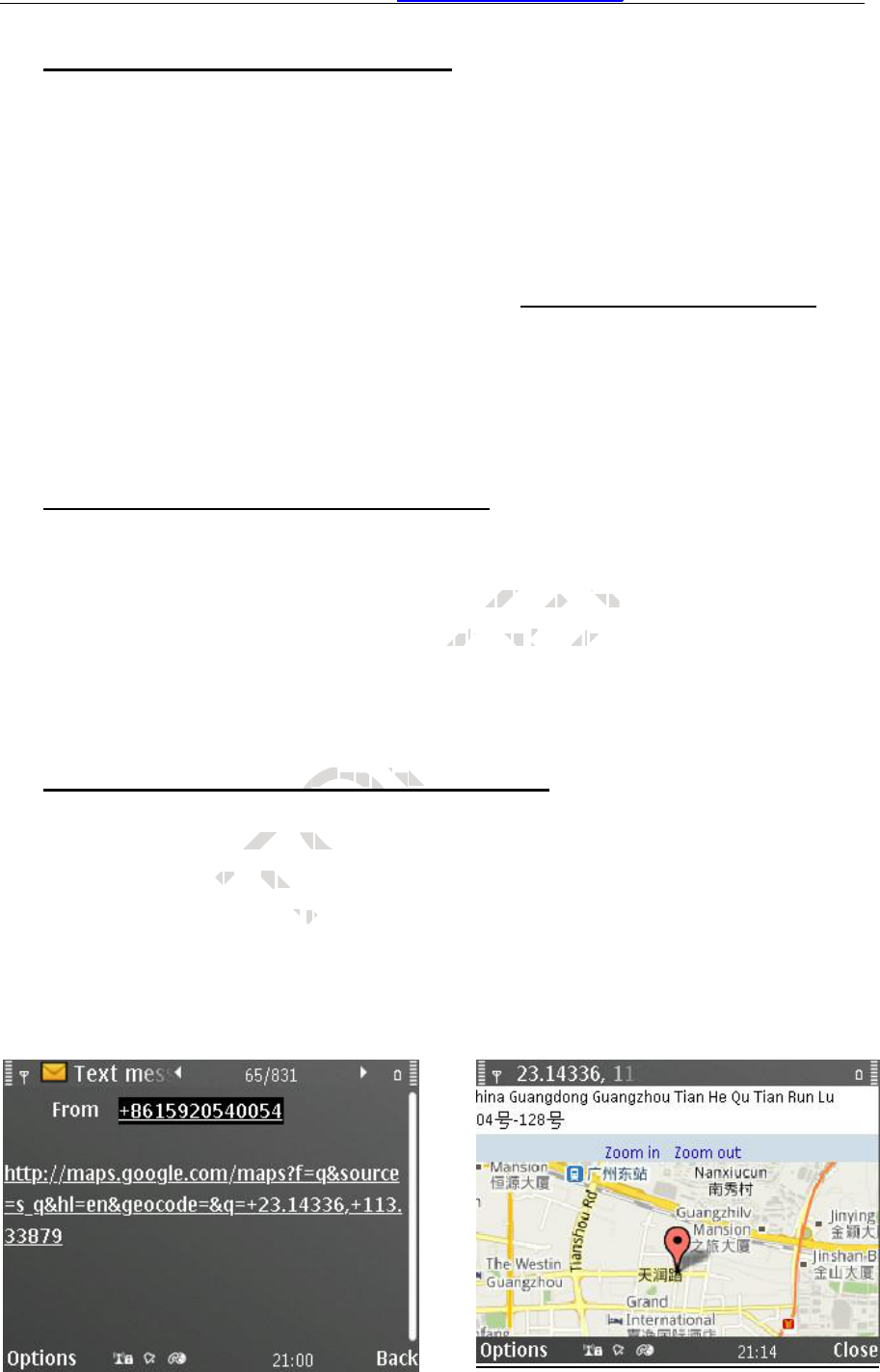
Check the location by Google Map’s URL
SMS command: 111111MAP
The user sends this SMS command to the tracker’s SIM number, the tracker
will automatically send back the SMS including the Google map’s URL, the user
can use smart phone(be able to visit internet) to open the URL link, the car’s
location will be showed on the Google map.
T
111111
1
M
t
t
hh
ii
s
SS
MM
S
c
o
b
a
c
k
k
t
t
h
h
O
yy
GG
yy
oo
O
oo
gg
O
MM
AA
P
o
m
P
ll
ee
M M
ap
P
T
nn
cc
ll
uu
d
EN
cc
lele
’’
s
l
oo
c
c
a
t
ii
oo
nn
&
ee
ss
tt
hh
e
ss
ii
mm

TK210 GPS Car Alarm Website: http://www.GPScaralarm.com User Manual
Page 6
Arm/Disarm the System by SMS
SMS command: 111111ARM
This SMS instruction is used to arm the system
SMS command: 111111DSM
This SMS instruction is used to disarm the system
Arm/Disarm by Phone Calling
User could also use the first alarm-received mobile phone to call the system
SIM card number, so as to arm/disarm the system.
Arm: After hearing several ring tones, if the systems hang up the call
automatically, and call back you, it means that the system is armed.
Disarm: After hearing several ring tones, if the system hangs up the call
automatically, and don’t call back you, it means that the system is disarmed.
Note:
(1) There is no communication fee for this operation, it is a very convenient way to arm
& disarm the system.
(2)The SIM card inside the device must have the function of Caller ID Display.
(3) Only the 1st authorized mobile phone can realize this function.
Stop the Car by SMS
SMS command: 111111STP
This instruction is used to cut off the car’s power supply or fuel supply, so as
to stop the car.
If the car’s speed is less than 30KM/H, the car will be stopped immediately. If
the car’s speed is over 30KM/H, the instruction will not be carried out until the car
is slow down at speed of less than 30KM/H.
In some emergency case, you can send this SMS instruction twice, the car
will be stopped immediately, no matter what the speed is.
Attention: It is very dangerous to stop the car when the vehicle is running at high speed.
We do not take any responsibility to the consequence caused by this action.
T
yy
SS
M
SM
T
11
1
S
S
TT
O
ob
ob
il
il
e
e
pp
P
ee
mm
u
s
t
h
a
ha
v
e
hh
oo
n
e
n
ca
n
T
ii
ss
oo
pp
ee
r
a
t
i
o
t
h
e
f
f
EN
s
t
e
mm
ii
ss
ee
ss
y
sys
tt
ee
mm
hh
aa
nn
g
g
ss
t t
hh
a
t
tt
hh
ee
ss
yy
s
t
e
nn
ii
tt
ii
ss

TK210 GPS Car Alarm Website: http://www.GPScaralarm.com User Manual
Page 7
Restore the Stopped Car to Normal Status
SMS command: 111111RES
This instruction is used to restore the car to normal status after stopping the
car.
It is also used to stop the receiving of SOS alert SMS once the anti-robbery
SOSswitchispresseddown.
Monitor the Voice around the Car
SMS command: 111111MON
This instruction is used to monitor the voice around the car.
After sending out this SMS, the tracker will call back immediately, then, user
can monitor the voice around the car upon picking up the call.
Two-way Talking with the Car
SMS command: 111111MON:Tel
This instruction is used to program the phone number which is used for
carrying out direct monitoring or talking.
User uses this phone number to call the tracker, it will be connected
automatically without driver’s permission. By this way, user can monitor the voice
or talk with the driver freely.
Example: 111111MON:13922713571
Note: If the Tel is the same as the first alarm-received phone (111111*10
Mobile #1*20 Mobile #2*), then this telephone can only be used to carry out
direct monitoring, it can not realize the function arm/disarm by calling any more.
Set up Movement Alert
111111MOV1 to enable the movement alert, the present location is the
center.
111111MOV0 to disable the movement alert
111111MOV
to check the setting of movement alert
If user sends 111111MOV1 to activate the movement alert function, every
time when the system is armed, if the car moves away from the present
T
oo
nn
e
uu
tt
dd
rr
ii
vv
ere
’
s
p
f
r
ee
l
yy
.
3
9
2
O
o
p
n
n
gg
o
r
t
aa
ll
kk
ii
n
e
n
u
n
m
b
ee
rr
t
p
e
e
r
r
m
m
ii
P
TT
ee
TTT
ll
P
P
P
P
rr
oo
gg
rr
aa
mm
t
h
e
gg
..
T
EN
a
c
kk
ii
mm
gg
uu
pp
tt
hh
ee
cc
aa
ll
ll
..

TK210 GPS Car Alarm Website: http://www.GPScaralarm.com User Manual
Page 8
parking point for about 80 meters, the movement alert will be triggered.
Set up Geo-Fence Alert
111111FEN0 Disable the Geo-fence
111111FEN1 Enable the Geo-fence, using the stored setting
111111FEN
Check the setting of geo-fence
111111FEN1(YL:a,XL:b,DL:C)Set up the all the parameters
111111FEN1(YL:a)Setup the latitude separately
111111FEN1(XL:b)Setup the longitude separately
111111FEN1(DL:C)Setup the radius separately
YL:a, a is latitude of the reference point
XL:b, b is the longitude of the reference point
DL:c, c is radius of latitude & longitude, the range of the value is (0-990),
the unit is :100 meters. The range is 0~99000 meters.(0-99KM)
Remark: (1) FEN, XL, YL,DL must be in capital letter.
(2) The Setting will be stored and used all the time.
Example: If the fence’s center coordinate is: latitude:+23.1400, longitude:+113.4500, the
radius is 5KM, then the SMS instruction is:
111111FEN1(YL: +23.1400,XL: +113.4500,DL:50) .
If the vehicle is running across the boundary of the fence, the system will automatically send
out alert SMS.
Set up Over-speed Alert
111111SPD:X x is the speed in KM/H , maximum value is 255M/H
(For example: 111111SPD:120, if the car speed is over 120KM/H, it will
send SMS to warn you)
111111SPD:0 to disable the over-speed alert. It is the default setting
When the over-speed alert function is activated, if the car is running over the
speed limitation, the tracker will send out alert message.
Remark: this function is just for reference, because there might be some
time delay or error in detecting the running car’s real speed by GPS.
T
nn
gg
aa
c
r
o
s
s
O
SS
ii
nn
ss
tt
rr
uu
cc
0
0
,
,
XX
L
:
+
1
1
3
.
44
50
5
ss
tt
hh
ee
bb
ouou
n
P
s
s
t
t
o
o
t
t
t
rr
dd
ii
nn
a
t
e
ii
s
s
:
:
l
a
t
i
t
ii
oo
nn
ii
s
:
0
0
T
99
99
ss
tt
bb
ee
i
n
i
c
a
r
e
r
d
a
n
dand
u
s
e
t
u
de
EN
n
tt
tt
hehe
r
a
nn
gg
ee
o
f
t
h
90009000
mm
e
t
e
rr
ss
((
00
aa
pp
ii
tt
iii
aa
ttt
ll
ll

TK210 GPS Car Alarm Website: http://www.GPScaralarm.com User Manual
Page 9
Adjust the Vibration Sensor’s Sensitivity
111111SHK0
Normal status, when sensor is activated, it will trigger the alarm immediately.
It is the default setting.
111111SHK1
Time-delay status, if the sensor is activated for 3 seconds continuously, it will
trigger the alarm. This setting can avoid some false vibration alarm.
Turn ON/OFF Sleep Mode.
111111SLEEP0 Turn off sleep mode, it is the default setting
111111SLEEP1 Turn ON sleep mode, it is used to save power & GPRS flow.
In this working mode, if the engine is OFF, the system will go into sleep mode
after 3 minutes, the power consumption is very low & GPRS connection is close.
Once there is any vibration, or alarm, or incoming call/SMS, the system will wake
up immediately. In sleep mode, the device will wake up for every one hour, and
report the location by GPRS.
T
O
P
de
de
v
v
T
vv
e
e
ii
nn
cc
oo
m
i
n
g
i
c
e
ww
ii
ll
ll
w
a
k
EN
N
a
uu
ll
tt
ee
dd
tt
oo
s
s
aa
vv
e
e
pp
ee
s
s
y
s
t
ee
mm
w
il
l
g
rr
yy
rr
r
ll
oo
ww
&&
GG
PP
RR
gg
cc
aa
ll
ll
//
SS

TK210 GPS Car Alarm Website: http://www.GPScaralarm.com User Manual
Page10
Setting for Mute Alarm.
111111MUTE:0 The siren will sound if there is alarm, it is the default setting
111111MUTE:1 The siren will not sound if there is alarm, but system will still
send out alarm by GSM network.
Setting for Odometer.
111111ODO: It is used to read the present odometer value.
111111ODO:R It will reset the device’s odometer reading to 00000 & start
calculation from the beginning.
111111ODO:0 It will reset the device’s odometer reading to 00000 & close
the calculation of odometer.
111111ODO:1~999999 It will make the device to start calculation of
odometer from the base value. Example: 111111ODO:38980, then the device will
reset the initial odometer reading as 38980KM & start the calculation again.
Check the IMEI No.
111111REG
This instruction is used to check the GSM module’s IMEI number.
Change the Heart-beating Interval.
111111HRT:1~999
This instruction is used to change the time interval of heart-beating GPRS
data package. The default setting is 3 minutes.
If the GSM networks do not detect the tracker’s activities for a certain time, it
will close the GPRS connection and the device will be offline. User can adjust the
value so as to avoid this situation. Example: 111111HRT:5 (set time interval of
hear-beating as 5 minutes)
T
NN
o.o.
T
ed
t
O
g
P
mm
p
p
l
l
e
e
P
aa
ss
38980
898
K
T
mm
aa
kk
ee
t
he
:
1
1
T
111111
11
O
D
K
M
&
EN
e
rr
rr
eaea
dodo
mm
e
t
e
rr
rr
e
a
de
i
n
dede
vv
ii
cc

TK210 GPS Car Alarm Website: http://www.GPScaralarm.com User Manual
Page 11
SOS Anti-robbery Alert
once the SOS switch is pressed down & hold for at least 2 seconds, the
system will send alarm SMS to the second alert-received mobile & the center
number. User can send command 111111RES to release it.
III. The Setting for GPRS Connection
The GPRS setting is necessary for using the following 2 functions:
(1) Check the car’s real physical address by send 111111ADD
(2) Online tracking service by web-based tracking platform
(www.track800.com or www.topten-track.com )
SMS format: 111111WWWItem (separated by )
Compositive SMS Command for GPRS Setting
(Please kindly noted that the device GPRS ID is the last 14 digits of the IMEI,
you can check it on the sticker on the device or send 111111REG to get it)
User can use one SMS to do all the GPRS setting. For example, if the APN
name is internet, APN user name web and APN password gprs ,GPRSreport
time 3 minutes(=180seconds). Server’s IP: 98.143.144.145, Server’s Port:
8500, then you can do all settings together in one SMS command:
11111WWW:APN:internet,web,gprs;IPN:98.143.144.145;COM:8500;RPT:180;GPRS:1;
IPN:XXX.XXX.XXX.XXX;
This is to set the server’s IP address.
Eg: 111111WWWIPN98.143.144.145
If user wants to use domain name as server, please use DSN instead of IPN
Such as: 111111DSN:www.track800.com;
If user wants to use UDP transmission, please use UDP instead of IPN
Such as: 111111WWW UDP98.143.144.145
COM:XXXX;
This is to set the server’s COM port No.
T
ss
ee
cc
o
n
T
d
d
oo
a
ll
ll
ss
ee
t
t
i
n
g
w
e
O
oo
d
d
o
o
aa
e
r
nn
a
m
e
ww
eb
e
O
dd
s)s)
O
.
SS
ee
g
s
P
e
e
G
G
nn
t t
hh
ee
dee
v
v
i
c
e
ll
ll
tt
hh
e
G
P
a
a
T
PP
RR
SS
S
e
T
GG
P
R
SS
II
DD
i
s
e
o
r
EN
aa
om
N
N
))
aa
tt
eded
b
y
)
ee
ttitti
ngng
E
tt

TK210 GPS Car Alarm Website: http://www.GPScaralarm.com User Manual
Page12
Eg: 111111WWWCOM8500
APN:XXX;
This is to set the APN (access point name). Please use “,” to separate the APN,
APN username & APN password.
Eg: 111111WWWAPNweb.gprs.mtnnigeria.net,web,gprs
RPT:XXX;
This is to set the upload time interval. The unit is second, the value is between
15-999 seconds.
The default setting is 0, the tracker will not upload data but GPRS is online.
Eg: 111111WWWRPT60(Upload time interval is every 60s)
GPRS:0/1;
GPRS:0; is to close down the GPRS;
GPRS:1; is to open the GPRS.
Eg: 111111WWWGPRS1(Open the GPRS connection)
Check the GPRS Settings
111111WWW:
You can send 111111WWW: to check the parameters if you forgot.
Default GPRS Setting
The default GPRS setting is:
Server IP: www.track800.com
Server Port:8500
APN: internet
GPRS report interval: 0
GPRS connection: open
IV. Specifications
T
W
W
T
g
O
WWW:
W
O
O
t
o
cc
h
h
e
c
P
T
PP
R
R
S
EN
SS
cc
on
on
n
e
c
c
tt
ii
oo
TK210 GPS Car Alarm Website: http://www.GPScaralarm.com User Manual
Page13
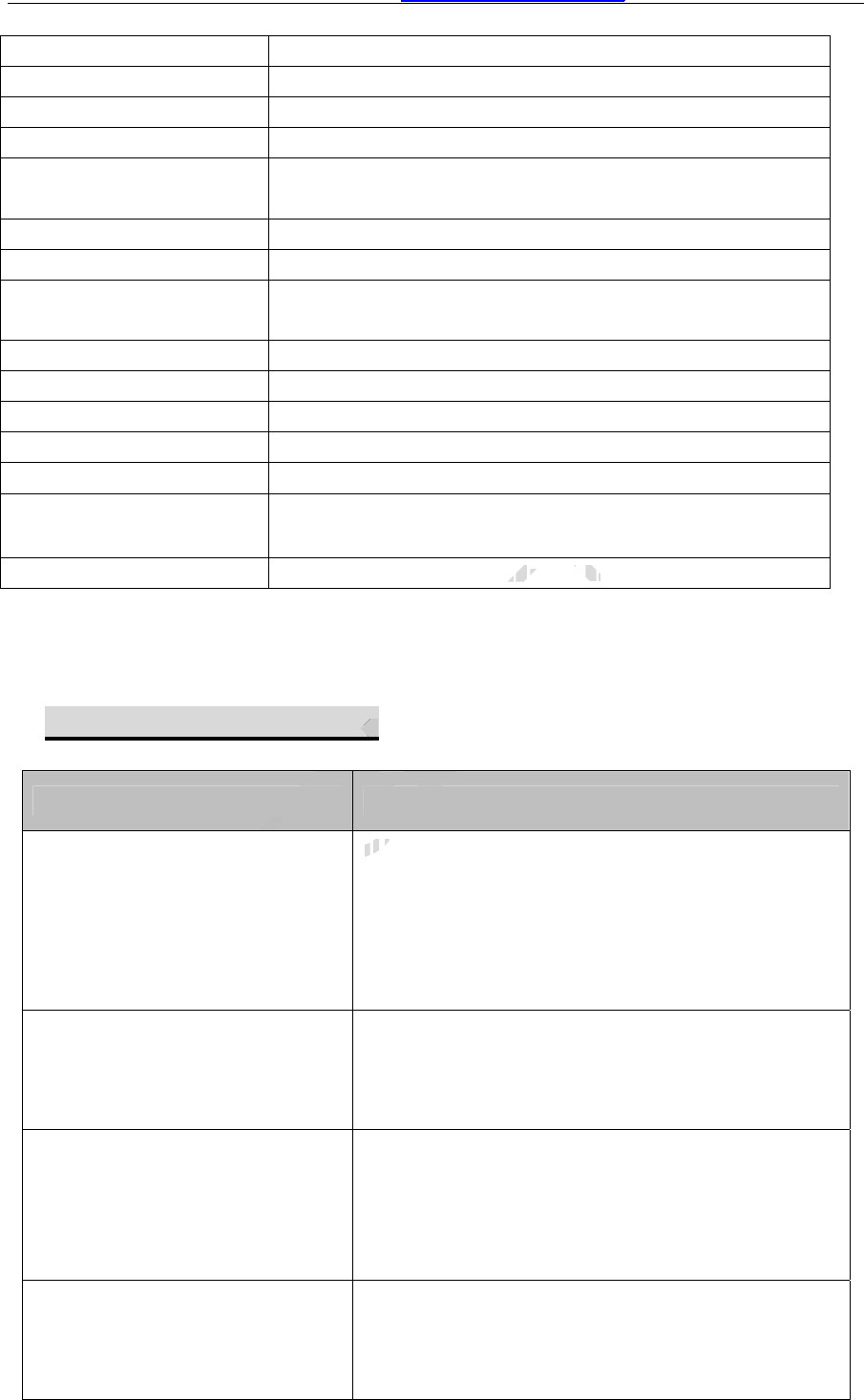
Size of the main unit: 98*64*25 (mm)
Weight of the main unit: 0.1KG
Working temperature: -20 ~ 80
Humidity: 0 ~ 95%
GSM frequencies: Dual-band:900MHz/1800MHz
(or Quad-band: 850MHz/900MHz/1800MHz/1900MHz)
GPS chip: Latest SiRF-Star III chipset
Receiving ways 20 channel
Working frequencies 1575.42Mhz C/AGPS
Receiving sensibility -162db
Positioning accuracy ≤10m (wide-open area)
Speed accuracy ≤0.2M/S (wide-open area)
Positioning mode Auto 2D/3D
Working voltage: 7~35 VDC
Power Consumption: Working mode: <50mA;
Sleep mode: <23mA
Inside Backup battery: Rechargeable 3.7V 580mAh Li-ion battery
V.FAQs & Troubleshooting
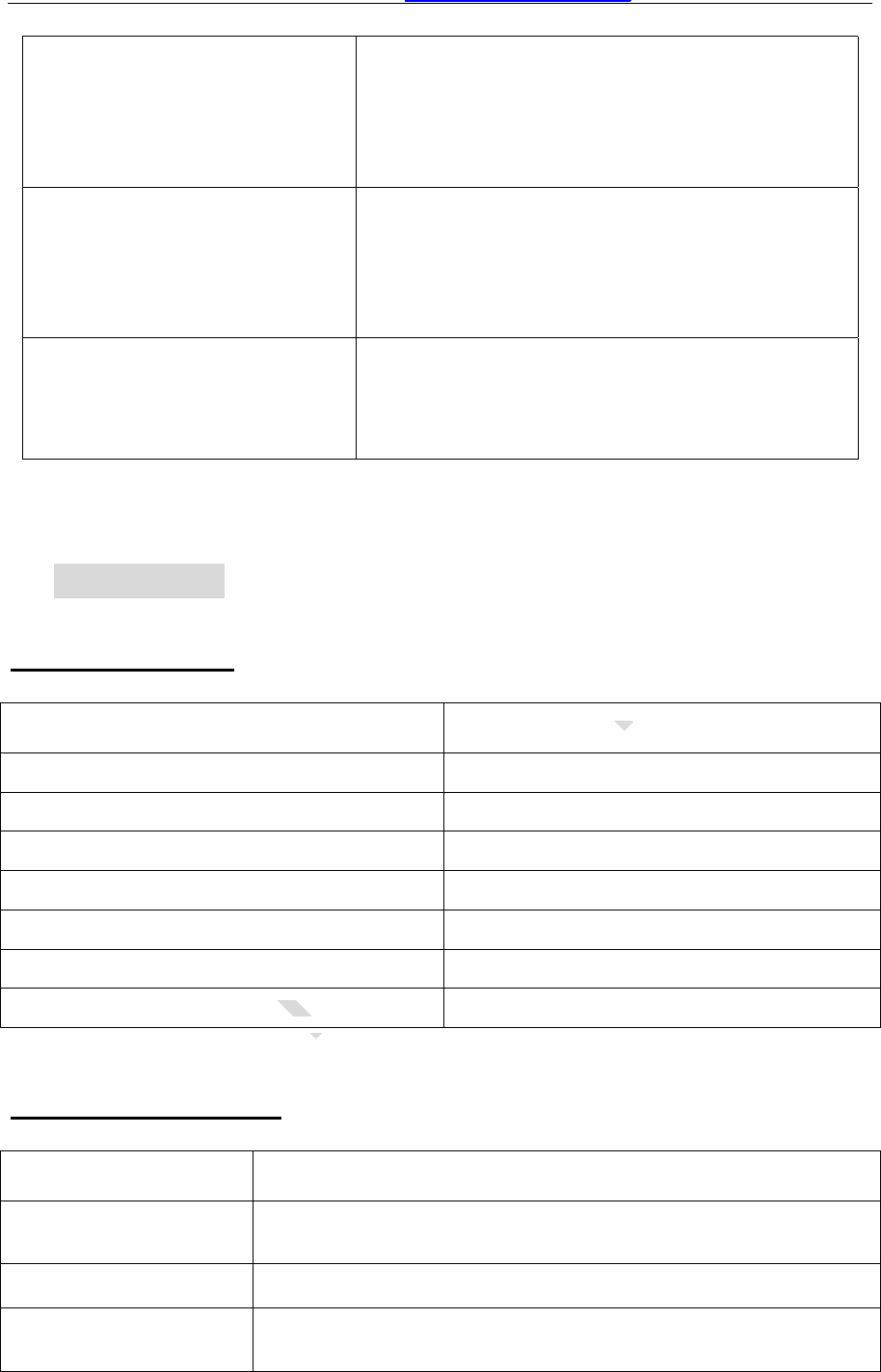
FAQ Troubleshooting
I call the tracker, it does not ring
(1) The GSM SIM card has no credit;
(2) The SIM card is protected by PIN code;
(3) Fix the GSM antenna to open place to test;
(4) The SIM card is placed correctly in the slot;
(5) Check the connection of the GSM antenna, or
change another GSM antenna to test;
I call the tracker, it rings, but it
doesn’t send back response
SMS
(1)The user password is wrong, please use the
correct password or reset the password to test;
(2) Low power, please use outside 12VDC power
supply to power on the unit to test
I can not get the alarm message
(1) The SIM card inside the device has no credit;
(2) The Alert-received mobile number is not
programmed correctly, or the SMS instruction is
not in correct format;
(3) The mailbox of the user’s mobile is full;
I can not get the correct GPS
coordinates or the location is
wrong
(1) Please make sure there is no metal obstacles
above the GPS antenna. Fix the GPS antenna to
open place to test;
(2) Please check the connection of the GPS
T
T
no
t
r
ii
T
O
O
O
O
O
O
O
O
O
O
O
O
O
(
(
11
))
O
O
O
O
P
P
g
P
P
P
P
T
EN
N
88
00
mm
A
hh
LL
ii
-
i
o
n
b
EN
EN
TK210 GPS Car Alarm Website: http://www.GPScaralarm.com User Manual
Page14
antenna;
(3) Chang another GPS antenna to test;
(4) In cloudy condition, it is a little hard to get the
GPS signal, and the GPS coordinate might have
some errors.
I can check the location, but I
can not get the alert SMS when
the car moves
(1) Please setup the system firstly. (authorize
SMS-received mobile number, etc);
(2) In arming status,the device only warn you
once the car moves at about 50 meters away
from the parking place;
Much noise when monitoring
voice
(1) Check the two sides of the MIC wire;
(2) The MIC should be away from the engine,
unit heater, GSM/GPS antenna and other
obstacles
VI.Packing List
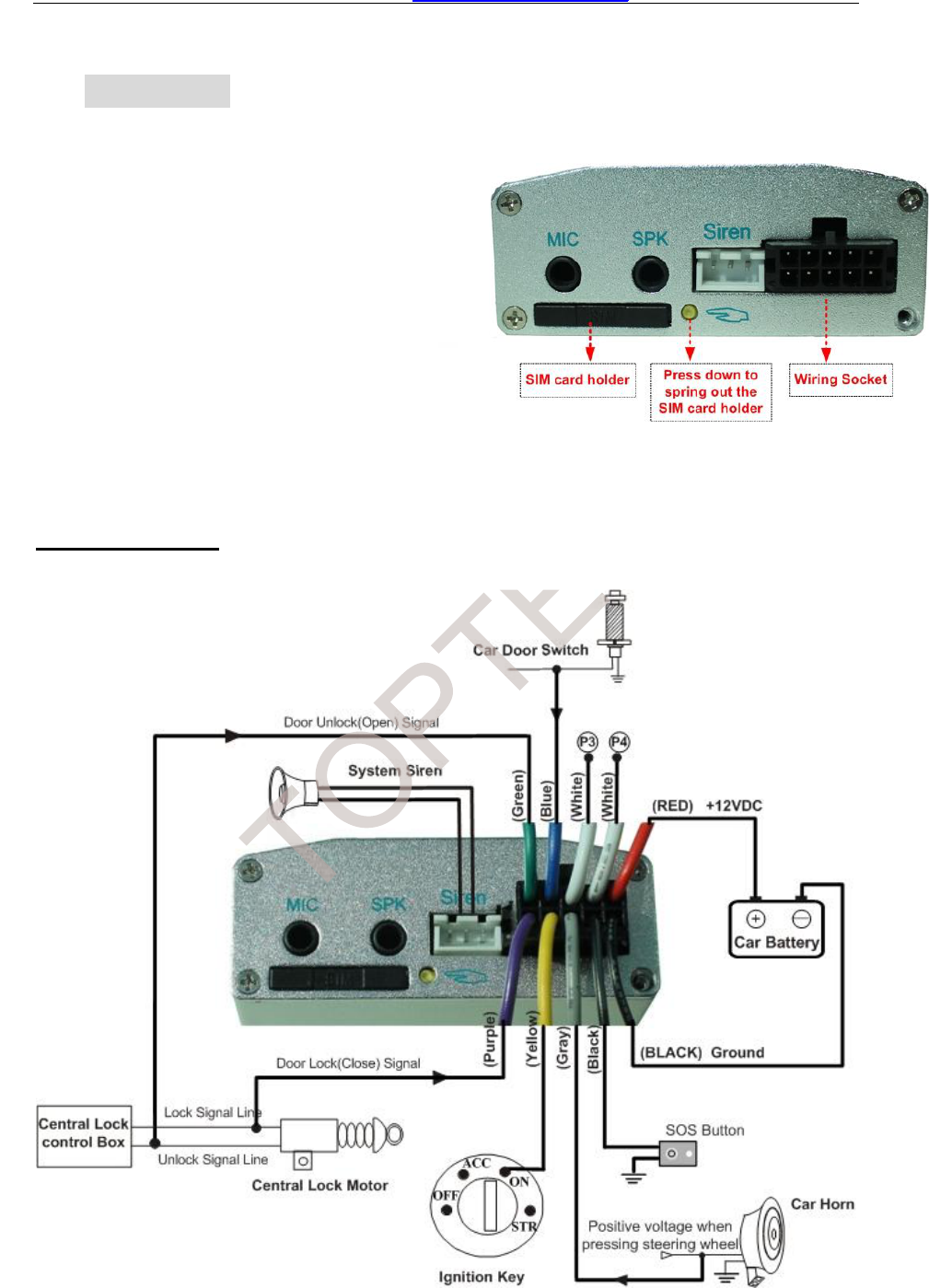
Standard Package
Item name Quantities
Main unit with internal shock sensor 1pcs
GSM antenna 1pcs
GPS antenna 1pcs
Microphone 1pcs
SOS button 1pcs
Wiring harness 1pcs
GSM antenna manufacturer: TOPTEN ELECTRONICS TECHNOLOGY LIMITED
GSM antenna model: GSM-0121001
Note: only antenna sold together with TK210 could be used.
Optional Components
Item name Function
Speaker It is used to carry out 2-way talking, to broadcast the voice to
the car
six-tones siren It will sound when the alarm is triggered
T
T
cturer: T
cturer:
T
T
T
:
O
O
O
O
O
T
O
P
P
P
P
P
P
P
P
P
P
P
P
P
P
P
T
T
T
T
T
T
T
T
EN
QuQu
EN
E
E
TK210 GPS Car Alarm Website: http://www.GPScaralarm.com User Manual
Page15
VII.Installation
Wiring Diagram
EN
Important Notice
(1) Please read the manual carefully before installation and make sure you
understand the installation wiring diagram and the car circuit & wiring firstly. We
strongly advise you to ask professional car electricians to do the installation.
(2) Please prepare a valid GSM card (CDMA card not supported) with Caller
ID Display & GPRS function. And use an ordinary mobile phone to check it is not
PIN-code protected and the SMS has sending & receiving function.
Note: installation for SIM card

TK210 GPS Car Alarm Website: http://www.GPScaralarm.com User Manual
Page17
Please make sure that main unit is powered off, and then use a pin to press
the yellow button, then insert SIM card into the SIM card holder. (Attention): If
you want to take out the SIM card from the main unit, please power off the main
unit firstly, otherwise, it might damage the unit.
Explanation on Installation
(1) IMPORTANT! How to fix the accessories
Fix the Main Unit
Choose a place for the main unit first. Please fix the main unit at a secret
place to avoid being destroyed by theft. Please keep it away from the
high-temperature, humidity or strong magnetic object (such as reversing radar,
alarm). Please fasten it tightly. (Recommended places: under dashboard, under
seat)
Fix the GPS antenna
While fixing the GPS antenna, it is better to place the flat magnetic side
downside. Make sure there are not any metal or shielded obstacles around the
upside of the GPS antenna, so that it can receive the satellite signal from upside
the sky very well, the GPS antenna should be placed at broad & secret place too.
It should be drew straight and kept away from the sound box or speaker.
(Recommended places: Upside & inner part of the driver’s door rim, inside
dashboard, secret place of front windshield, under bumper)
Fix the GSM antenna
Fix the GSM antenna at place where there is no metal shield, so that it can
receive signal very well. And keep it a certain distance from other wireless
equipments. It is better fixed at a secret place so as to avoid tamper. The antenna
is external antenna for the non-standard SMA antenna, max Gian is 3dBi.
Fix the microphone & speaker
T
PSPS
ssttrraaiighgt a
ces: UUppsside
of fr
O
e
, ssootthhaatt
S aanntenna sshho
aannddkkee
P
aa,,iittiiss
nnoottannyymet
ttccaan r
T
s betttteerrto
tal
EN
kkee
eect (suucchh
ppllaaceess::unndederr

TK210 GPS Car Alarm Website: http://www.GPScaralarm.com User Manual
Page18
Please fix the microphone at a secret place nearby the driver place so that it
can pickup the voice clearly, please keep speaker away from the microphone so
as to avoid the echo interference.
Fix the SOS button
The SOS button is already fixed to the wiring harness.
Please fix the SOS button secretly under the left of the dashboard so that
thedrivercaneasily touchitincaseofemergency.
Fix the ACC ignition wire (Yellow line)
Connect the YELLOW line to the ignition key ON position.
Fix the door switch wire (Blue line)
Connect the BLUE line with the side-door switch.
Fix car horn wire (Gray line)
This line is optional installation. You can let it disconnected according to your
car’s situation. It is used to assure that the tracker can detect the illegal intruder
when the system is armed (/disarmed) by central lock signal lines.
T
O
a
r
P
tt
hh
aa
tt
tt
h
h
mm
ee
dd
))
bb
y
y
c
e
n
T
o
o
uu
cc
aa
nn
ll
e
t
i
t
h
e
t
r
aa
c
c
k
k
e
n
t
EN
ss
ww
i
i
tt
c
hh
.
dd
ii
scsc

TK210 GPS Car Alarm Website: http://www.GPScaralarm.com User Manual
Page19
The gray line can also be connected to the positive pole of the direction
lamp.
Fix the power supply wire (Red line and black line)
The tracker is specially designed for normal car which has +12VDC power
supply. Please connect the power supply lines directly to the car’s battery.
For the truck, it is 24VDC power supply, the device can also work on truck,
but the cut-off function can not work. That is to say, the wireless immobilizer and
the 2 white lines will not function.
(2) Check the wiring:
Try to use the double-sticky paper or other material to fix the device. Fasten
tightly the junction point of accessories and wires. Pay attention to insulation and
precaution of water and hot temperature. Please check the installation according
to the wiring diagram.
(3) Check the function
Please check the key functions after installation, such as
--Sending 111111CHK to see if it gets correct location.
--Sending 111111STP to check if the car can be stopped
---Sending 111111MON to check if monitoring is OK
If there is no GSM or GPS signal, please check the connection of the GSM
antenna, or to place it to other place to test; If there is many noise when
monitoring the voice, please fix the microphone away from the speaker or
magnetism; If it can not stop the car, please check the connection of the wireless
immobilizer or the 2 white lines.
VIII.Maintenance
Suggestions
Please let the professional to do the installation & maintenance of the GPS
terminal. If there is any disassembling or repair without our permission, we
keep no responsibility for any loss caused thereafter.
T
MM
oo
r
G
cc
ee
i
t
tt
oo
o
t
h
e
p
l
e
a
s
s
ee
O
cc
h
h
ee
cc
kk
O
N
N
t t
o
c
h
e
cc
k
k
i
f
GG
PSPS
ss
ii
gg
nn
e
P
a
a
f
f
t
t
f
f
e
e
ee
ii
ff
i
t
gg
e
e
tt
s
s
c
ii
f tf t
hh
e
c
a
m
m
T
e
r
i
n
s
tt
aa
ll
ll
a
t
i
o
o
rr
e
EN
a
y
a
tttt
ee
nn
cc
hh
ee
cc
kk
tt
hh
ee
ii
nn
ss
t
t

TK210 GPS Car Alarm Website: http://www.GPScaralarm.com User Manual
Page20
Please keep the terminal in dry place. In case of soaking or leaking water,
contact the local professionals. Do not start the car yourself, or we take no
responsibility for any loss caused thereafter.
When the car is inside buildings, cave, tunnel, or very close to tall buildings, it
is normal that the device might not get GPS signal at that moment.
Please check the balance of the tracker’s SIM card periodically. If there is no
credit in the SIM card, the device can not work normally.
The backup battery. The backup battery can only work for a certain time when
the car battery is temporarily powered off.
If the device can not get GSM signal or GPS signal, please try to check the
connection of the antennas, it might get loosen or damaged. Please try to
exchange to use another good antenna to test.
T
O
P
T
EN

This equipment complies with FCC RF radiation exposure limits set forth for an
uncontrolled environment. This device and its antenna must not be co-located or
operating in conjunction with any other antenna or transmitter.
To comply with FCC RF exposure compliance requirements. The device must be
installed by professional car electrician. The antennas and Microphone and speaker
used for this transmitter must be installed to provide a separation distance of at least 25
cm from all persons (driver and passengers) and must not be co-located or operating in
conjunction with any other antenna or transmitter.”
Changes or modifications not expressly approved by the party responsible for
compliance could void the user's authority to operate the equipment
NOTE: This equipment has been tested and found to comply with the limits for a Class
B digital device, pursuant to Part 15 of the FCC Rules. These limits are designed to
provide reasonable protection against harmful interference in a residential installation.
This equipment generates, uses and can radiate radio frequency energy and, if not
installed and used in accordance with the instructions, may cause harmful
interference to radio communications. However, there is no guarantee that
interference will not occur in a particular installation. If this equipment does cause
harmful interference to radio or television reception, which can be determined by
turning the equipment off and on, the user is encouraged to try to correct the
interference by one or more of the following measures:
-- Reorient or relocate the receiving antenna.
-- Increase the separation between the equipment and receiver.
-- Connect the equipment into an outlet on a circuit different
from that to which the receiver is connected.
-- Consult the dealer or an experienced radio/TV technician for help.
FCC ID: X3U-TK210
Model No.: TK210
Manufacturer: Topten electronics Technology Limited.
This device complies with Part 15 of the FCC Rules.
Operation is subject to the following two conditions: (1) this
device may not cause harmful interference, and (2) this
device must accept any interference received, including
interference that may cause undesired operation.