TYSON BIORESEARCH HT100 Blood Glucose Meter User Manual HT100 B Manual LAY FDA AF004 0027000N 180117
TYSON BIORESEARCH, INC. Blood Glucose Meter HT100 B Manual LAY FDA AF004 0027000N 180117
Contents
- 1. Users Manual_HT100_B
- 2. Users Manual_HT100_C
Users Manual_HT100_B

The Tyson Bio HT100-B Blood Glucose Test Strips give accurate results when the following limitations are observed.
˙Use only capillary whole blood from nger, palm, and forearm.
˙Do not use for testing neonatal blood.
˙Altitude higher than 10745 feet may cause inaccurate results.
˙Severe dehydration and excessive water loss may lead to inaccurate blood glucose test results.
Consult your physician immediately if you believe you are suering from severe dehydration.
˙For single-patient use only and should not be shared.
˙Should not be used to test critically ill patients.
˙Inaccurate results may occur in severely hypotensive individuals or patients in shock.
˙Inaccurate low results may occur for individuals experiencing a hyperglycemic-hyperosmolar state, with or without ketosis.
˙For In vitro diagnostic only.
˙For over the counter use.
˙Alternative site testing should be performed only during steady-state (when glucose is not changing rapidly).
˙Alternative site measurements should never be used to calibrate continuous glucose monitors (CGMs).
˙Alternative site measurements should never be used for insulin dosing calculations.
Limitations
Warning
•This device is not intended for use in healthcare or assisted-use settings such as hospitals, physician
oces, or long-term care facilities because it has not been cleared by FDA for use in these settings,
including for routine assisted testing or as part of glycemic control procedures.
•Use of this device on multiple patients may lead to transmission of Human Immunodeciency Virus (HIV),
Hepatitis C Virus (HCV), Hepatitis B Virus (HBV), or other bloodborne pathogens.

Limitations
Introduction
Important Safety Instructions
About Tyson Bio HT100-B Blood Glucose Monitoring
System About Tyson Bio HT100-B Blood Glucose Meter
About Tyson Bio HT100-B Blood Glucose Meter Display
About Tyson Bio HT100-B Blood Glucose Test Strip Setting
Up Tyson Bio HT100-B Blood Glucose Meter
Installing/Replacing Batteries
Date/Time Setup
Reminder Alarms Setup
HI/LO Alarms Setup
Important Information
Using Tyson Bio HT100-B Code-Calibration Blood Glucose Test Strip
Obtaining a Blood Sample
Applying a Blood Sample
HI and LO Readings
Available Alternate Sites Testing
01
02
03
04
05
06
07
08
08
09
10
11
12
13
14
15
16
Table of Content

17
17
18
19
20
21
21
22
25
27
28
30
32
33
34
34
35
Table of Content
Control Solution
Performing a Control Solution Test
Control Solution Results
Memory Features
View Day Average Results
Exiting the Memory Mode
Transfer Test Results to a Computer
Bluetooth Data Transfer (HT100-B Only)
Cleaning and Disinfection Procedure
Care and Storage
Display Messages
Error Messages
Trouble Shooting
Specications
Meter Storage
Icon Description
Service and Warranty

Introduction
Thank you for choosing Tyson Bio HT100-B Blood Glucose Monitoring System to monitor your blood glucose (sugar) level.
It is accurate, easy to use, and quick in response time. This User Manual contains all information needed to operate and
maintain Tyson Bio HT100-B Blood Glucose Monitoring System. Please read carefully before use.
Tyson Bio HT100-B Blood Glucose meter can be used with:
˙Tyson Bio HT100-B Blood Glucose Test Strip
Intended Use Statement
The Tyson Bio HT100-B Blood Glucose Monitoring System is intended for the quantitative measurement of glucose in fresh
capillary whole blood samples drawn from the ngertips, forearm, or palm. Alterative site testing should be performed
only during steady-state (when glucose is not changing rapidly). Testing is done outside the body (In Vitro diagnostic use).
It is intended for self-testing by people with diabetes at home as an aid to monitor the eectiveness of diabetes control. It
should only be used by a single patient and it should not be shared. It is not indicated for the diagnosis of or screening for
diabetes or for neonatal use.
The Tyson Bio HT100-B Blood Glucose Monitoring System is comprised of the Tyson Bio HT100-B Blood Glucose Meter and
Tyson Bio HT100-B Blood Glucose Test Strip.
01

Important Safety Instructions
˙All parts of the system should be considered potentially infectious and are capable of transmitting blood-borne
pathogens between patients and healthcare professionals.
˙The meter and lancing device are for single person use. Do NOT share them with anyone including other family
members!
˙All parts of the kit are considered biohazardous and can potentially transmit infectious diseases, even after you
have performed cleaning and disinfection.
˙Cleaning Solution and Disinfecting Solution: Clorox Bleach Germicidal Wipes (Clorox Professional Products Company. EPA
Reg. No. 67619-12).
Reference:
˙˙“ FDA Public Health Notication: Use of Fingerstick Devices on More than One Person Poses Risk for Transmitting
Bloodborne Pathogens: Initial Communication” (2010)https://www.fda.gov/MedicalDevices/Safety/AlertsandNotices/
ucm234889.htm
˙“ CDC Clinical Reminder: Use of Fingerstick Devices on More than One Person Poses Risk for Transmitting Blood-borne
Pathogens” (2010) http://www.cdc.gov/injectionsafety/Fingerstick-DevicesBGM.html
˙“ CDC: Infection Prevention during Blood Glucose Monitoring and Insulin Administration” (2010) https://www.cdc.gov/
injectionsafety/blood-glucose-monitoring.html
02

Note: 25-strips & 50-strips are sold separately.
About Tyson Bio HT100-B Blood Glucose Monitoring System
The complete kit contains:
˙HT100-B Blood Glucose Meter
˙HT100-B Blood Glucose Test Strip (10 strips)
˙HT100-B Control Solution Level 2
˙Adjustable Automatic Lancing Device
˙10 Sterile Lancets
˙User Manual
˙Quick Reference Guide
˙Test Strip Package Insert
˙Control Solution Package Insert
˙Log Book
˙Carrying case
03
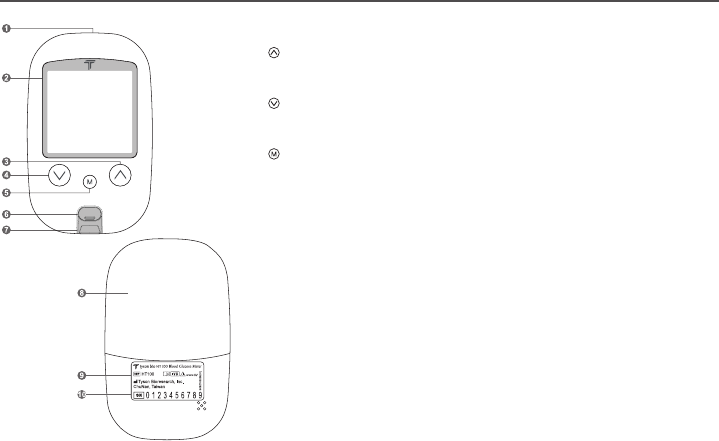
1. Data Port To connect interface cable for data transferring
2. Display To display results in numbers and icons
3. Button Press and hold to enter reminder alarm and HI/LO alarm setup
To adjust numbers and to toggle settings
To browse test results and averages in memory
4. Button Press and hold to enter buzzer setup
To adjust numbers & to toggle settings
To browse test results and averages in memory
5. Button Press and hold to enter the year/date/time setting
To browse Control Solution test results
To turn the meter ON/OFF
6. Strip Ejector Push to eject the test strip
7. Test Port The test strip is inserted here
8. Battery Cover To slide open and close
9. Meter Label Manufacturer information
10.
Serial Numbers
The meter manufacturer serials
About Tyson Bio HT100-B Blood Glucose Meter
04
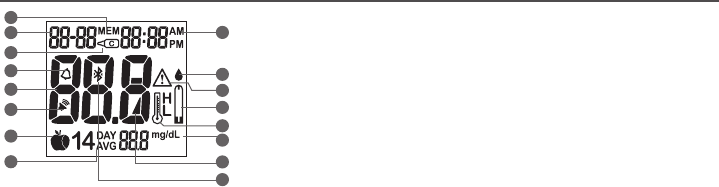
Note: The mg/dL is the standard unit in the United States. Meters used in the United States must be set to read in mg/dL".
About Tyson Bio HT100-B Blood Glucose Meter Display
1. Memory Icon
Memory mode
2. Year/Date
Display year/date
3. Control Solution Icon
Control Solution test mode and Control Solution test result
4. Alarm Icon
Reminder alarm
5. Test Result
Result display
6. Buzzer Icon
When buzzer is ON
7. Meal Indicator Icon
Pre-meal and post-meal
8. 14 day Average
14 day average result
9. Time
Time display
10. Blood Drop Icon
Flashes when the meter is ready to accept your
blood sample to test
11. Warning Icon
Appears when a result is out of range
12. Test Strip Icon
Appears when the meter is ready for a test
13. Temperature Icon
Appears when the meter exceeds normal operating
temperatures
14. Measurement Units
To identify test result units (mg/dL)
15. Battery Icon
Appears when battery power is low
16. Bluetooth icon
When Bluetooth is on
1
8
2
3
4
5
6
714
15
16
13
12
11
10
9
05
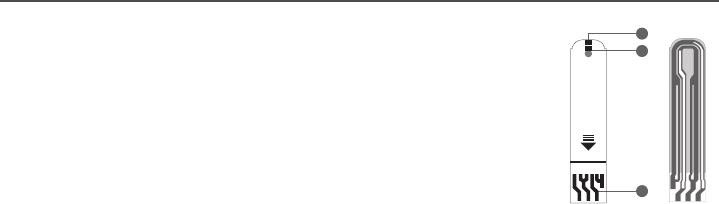
About Tyson Bio HT100-B Blood Glucose Test Strip
Tyson Bio HT100-B Blood Glucose Test Strip is only for Tyson Bio HT100-B Blood Glucose Meter.
Use each strip ONCE ONLY!
A test strip consists of the following parts:
1. Target Area
Where a blood drop or control solution to be applied
2. Conrmation Window
To conrm sucient blood sample and control solution
3. Contact Bar
To be inserted into the test port and to activate the meter (top side up)
1
2
3
top side
06
Blood Glucose Test Strips
HT100
Control Solution Range
Store at 39 ~ 86°F(4 ~ 30°C), 10~90% RH.
Do not refrigerate.
Do not store test strips outside this vial.
Re-cap immediately.
WARNING: Always close cap tightly.
For testing of glucose in capillary whole blood.
Use within 1 months after first opening.
Do not use past the expiration date.
Use Tyson Bio HT100 meter only !
Test Strips
Tyson Bioresearch, Inc.
5F, No. 16 , 18 , 20 , 22 , Kedong 3rd RD. ,
Zhunan Township , Miaoli County 35053 ,
Taiwan (R.O.C.)
Tel : +886-37-585998
Customer Service
U.S.A. +1-800-948-3894
30˚C
4˚CLevel 1: ~ mg/dL
Level 2: ~ mg/dL
Level 3: ~ mg/dL
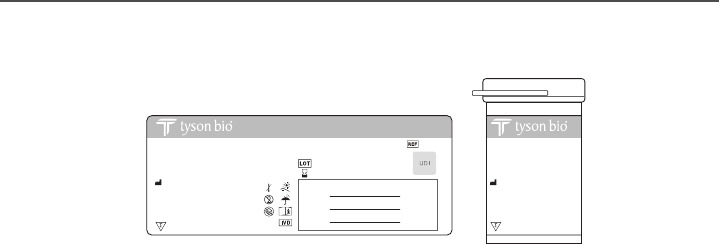
Tyson Bio HT100-B Blood Glucose Test Strip
Test Strip Vial Label Test Strip Vial
Blood Glucose Test Strips
HT100-B
Control Solution Range
Store at 39 ~ 86°F(4 ~ 30°C), 10~90% RH.
Do not refrigerate.
Do not store test strips outside this vial.
Re-cap immediately.
WARNING: Always close cap tightly.
For testing of glucose in capillary whole blood.
HT100-B
Use within 1 months after first opening.
Do not use past the expiration date.
Use Tyson Bio HT100-B meter only !
AL001-0119000N (01) Rev. date: 12/2016
Test Strips
Tyson Bioresearch, Inc.
5F, No. 16 , 18 , 20 , 22 , Kedong 3rd RD. ,
Zhunan Township , Miaoli County 35053 ,
Taiwan (R.O.C.)
Tel : +886-37-585998
Customer Service
U.S.A. +1-800-948-3894
30˚C
4˚CLevel 1: ~ mg/dL
Level 2: ~ mg/dL
Level 3: ~ mg/dL
07
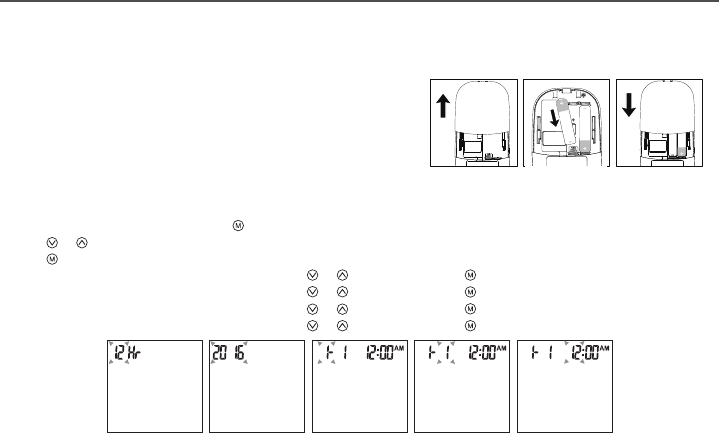
Installing/Replacing Batteries
1. Slide and remove the battery cover (Fig.1).
2. Install batteries with the + and – ends matching indication marks
on the battery compartment (Fig.2).
3. Slide battery cover back into place (Fig.3).
Date/Time Setup
1. When the meter is o, press and hold for 4 seconds to enter this setting mode.
2. Press or to select “24hr” or “12hr”.
3. Press to conrm (Fig.4).
4. The numbers of “year” will appear and ash. Press or to adjust and Press to conrm (Fig.5).
5. The number of “month” will appear and ash. Press or to adjust and press to conrm (Fig.6).
6. The numbers of “date” will appear and ash. Press or to adjust and press to conrm (Fig.7).
7. The numbers of “hour” will appear and ash. Press or to adjust and press to conrm (Fig.8).
3232
Setting Up Tyson Bio HT100-B Blood Glucose Meter
˙Make sure the batteries are properly installed
˙The default is set to January 1st, 0:00
˙Please follow instructions to properly setup the meter
(Fig.2)(Fig.1) (Fig.3)
(Fig.4) (Fig.5) (Fig.6) (Fig.7) (Fig.8)
08
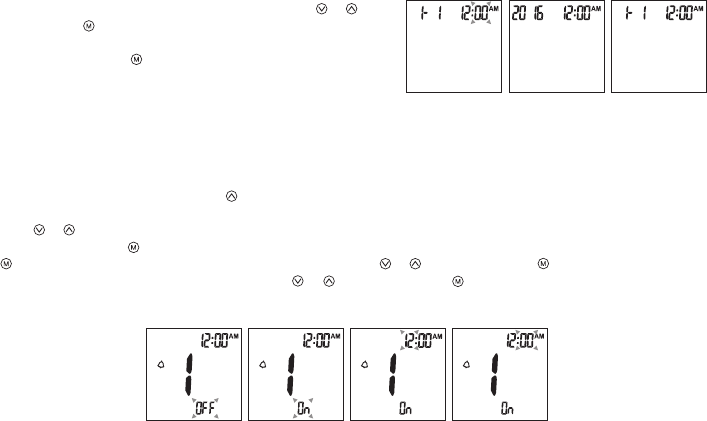
Tyson Bio HT100-B meter provides 4 reminder alarms. All reminder alarms are OFF as default. Please follow these steps to
setup reminder alarms.
1. When the meter is OFF, press and hold for 4 seconds or longer to enter setting.
2. The rst reminder alarm will appear on the display (Fig.12).
3. Press or to select “ON” or “OFF”.
4. If “OFF” is chosen and pressed, the meter will proceed to the next reminder alarm setting. If “ON” is chosen (Fig.13) and
pressed, the number of “hour” will start ashing (Fig.14). Press or to adjust and press to conrm.
5. The numbers of “minutes” will ash (Fig.15). Press or to adjust and press to conrm. The meter will go to the next
reminder alarm setting.
6. Repeat steps 3 to 5 to set the rest of reminder alarms.
8. The numbers of “minute” will appear and ash. Press or to
adjust. Press to conrm (Fig.9).
9. The set date and time will now be displayed on screen
(Fig.10, Fig.11). Press to turn o the meter.
10. The meter date/time setting is complete.
(Fig.9) (Fig.10) (Fig.11)
Reminder Alarms Setup
(Fig.12) (Fig.13) (Fig.14) (Fig.15) 09
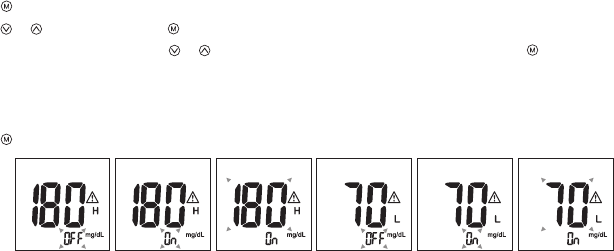
HI/LO Alarms Setup
1. Press to enter the HI alarm setting after completing the reminder alarm setup.
2. Press or to set “ON" and press to conrm. If "OFF" is chosen, the meter will skip this setting (Fig. 16, 17).
3. To change the alarm setting, press or until you reach your desired HI setting and then press to conrm. (Fig.18)
The HI alarm value range is 100 ~ 400mg/dL and the default value is 180mg/dL.
4. Continue to the LO alarm setting (Fig.19), repeat Step 2 and 3 (Fig.20, 21) to conrm or to change LO alarm setting.
The LO alarm value range is 40 ~ 90mg/dL and the default value is 70mg/dL.
5. Press to nish setting and the meter will be turned o.
NOTE:
The hypoglycemic (LO) and hypoglycemic (HI) alarm glucose values should be selected in consultation with your
health care provider.
(Fig.16) (Fig.17) (Fig.18) (Fig.19) (Fig.20) (Fig.21)
10

Before Testing
˙Always keep test strips in the original vial. The vial contains drying agents to protect the test strips from moisture.
˙Tightly close the vial cap immediately after removing a test strip.
˙Use each strip immediately after removing it from the vial.
˙Use each test strip ONCE ONLY.
˙Do not use the test strips or Control Solution beyond the expiration date printed on the package. This may cause
inaccurate results.
˙Do not use the test strips or Control Solution if the package is damaged.
˙Store your test strips and the Control Solutions between 39°F ~ 86°F (4°C ~ 30°C)
Temperature beyond this range can damage test strips and lead to inaccurate results.
˙Any change of medications based on the Tyson Bio HT100-B Blood Glucose Monitoring System results without advices of
a doctor is NOT RECOMMENDED.
˙The lancing device is intended only for single user and should NOT be shared.
˙Users should wash hands thoroughly with soap and water after handling the meter, lancing device, or test strips.
˙Only Tyson Bio HT100-B Test Strip and Control Solution can be used with the Tyson Bio HT100-B Blood Glucose Meter.
Important Information
11
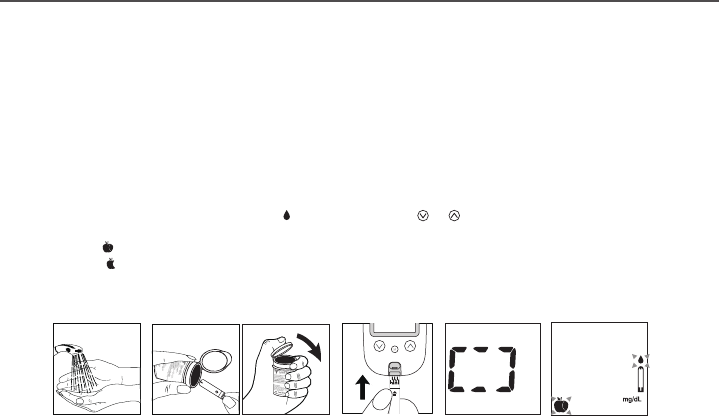
Preparing the Test Strip
You need the following items to test
˙Tyson Bio HT100-B Blood Glucose Meter
˙Tyson Bio HT100-B Blood Glucose Test Strip
˙Adjustable automatic lancing device and sterile lancet
1. Wash hands using soap and warm water. Rinse and dry thoroughly (Fig. 22).
2. Please remove protective wrap completely before opening the vial.
3. Take a test strip from the vial and re-cap immediately (Fig.23).
4. Insert the test strip top side up into the test port (Fig. 24). The meter will be automatically turned on.
5. System checking will appear (Fig.25).
6. A beep will sound and following by a ashing “ ” icon. You can press or to select the meal indicator for
marking the test as (Fig.26):
˙Pre-Meal Test
˙Post-Meal Test
˙No marker as default
7. A blood sample can now be obtained (refer to P.13).
(Fig.25)
(Fig.22) (Fig.23) (Fig.26)
(Fig.24)
Using Tyson Bio HT100 Blood Glucose Test Strip
12
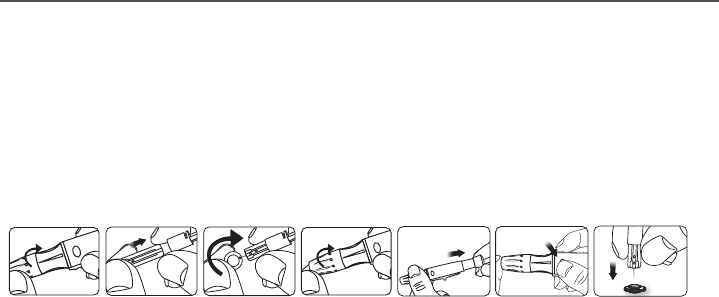
Obtaining a Blood Sample
1. Unscrew the lancing device cap (Fig.27).
2. Place a lancet into the lancing device (Fig.28).
3. Twist and pull to remove the protective lancet cover to expose the sterile needle. Save the cap for later use (Fig.29).
4. Screw the lancing device cap back on. Select the skin penetration depth preferred (Fig.30).
5. Pull the barrel back until you hear a 'click' (Fig.31).
6. Place the lancing device against the nger, palm, or forearm. Press the trigger to obtain a blood sample (Fig.32).
To unload the lancing device
1. After sampling, carefully remove the cap containing the used lancet.
2. Push the exposed tip of the lancet into its Protective Cap (Fig.33).
Slide the Lancet Ejector forward and dispose the used lancet in an appropriate container.
For further instructions please see the insert provided with the lancing device.
CAUTION:
To reduce chances of infection:
˙Lancets are for single usage only.
˙Wash hands thoroughly with soap and water before and after handling the meter, lancing device, and test strips.
˙Please refer to section "Cleaning and Disinfection Procedure" (refer to P.25) for detail instructions of meter
maintenance.
(Fig.27) (Fig.28) (Fig.29) (Fig.30) (Fig.31) (Fig.32) (Fig.33)
13
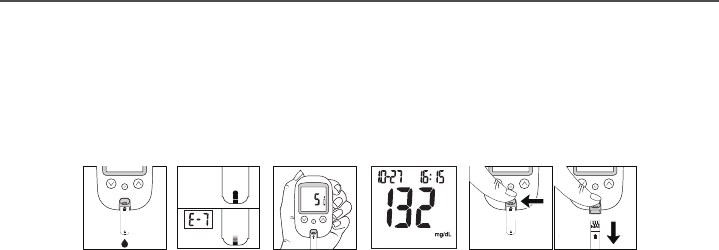
Applying a Blood Sample
SAMPLE MAY BE OBTAINED FROM FINGER, PLAM, OR FOREARM
1. Introduce the tip of the test strip to the drop of blood. Blood sample will be automatically drawn into the test strip
(Fig.34) Discard the rst drop of blood sample to prevent contamination.
2. Hold the tip of the test strip touching the blood drop until the meter beeps.
3. The meter will start to countdown as soon as the blood has completely lled the conrmation window of the test strip.
If applying an insucient blood sample, the error code (E-7) will appear on the display (Fig. 35).
4. The test result will appear on the display in 5 seconds (Fig.36). All results will be automatically stored into the meter
memory (Fig.37).
5. The meter will automatically turn o after 2 minutes.
6. After completing the test, push the strip ejector (Fig.38) or use a tissue paper to remove the test strip.
Normal Glucose Values
Before a meal (fasting) : <100 mg/dL
2 h after a meal: < 140mg/dL.
These ranges were cited from the American Diabetes Association, Classication and Diagnosis of Diabetes, 2017.
Diabetes Care 40(Suppl. 1):S11–S24
Warning:
˙DO NOT point the test strip at anyone when ejecting.
˙Used lancets and test strips are considered bio-hazardous. Dispose of used lancets and test strips in a clinical waste container
(Fig.34)
Sufficient
Blood
Insufficient
Blood
(Fig.35) (Fig.36) (Fig.37) (Fig.38)
14

HI and LO Readings
˙Tyson Bio HT100-B Blood Glucose Meter is designed to display test results between 20 ~ 600 mg/dL.
˙If “HI” (Fig. 39) appears on the display, it indicates the reading is higher than 600 mg/dL.
˙If “LO” (Fig. 40) appears on the display, it indicates the reading is lower than 20 mg/dL.
We suggested the testing procedure should be reviewed and the test should be repeated using a new test strip to reconÿrm
the test result.
(Fig.39) (Fig.40)
15
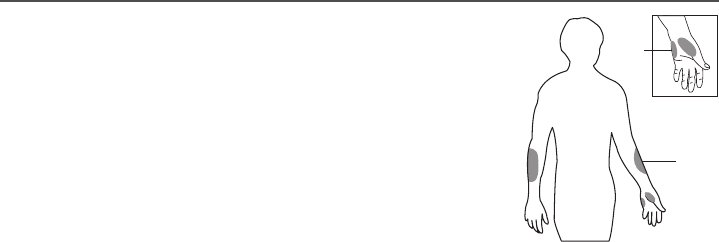
Available Alternate Sites Testing
Palm and Forearm
Tyson Bio HT100-B Blood Glucose Monitoring System provides you alternate sites
testing (AST). This system allows you to test on the palm and the forearm with the
equivalent results to ngertip testing.
Physiological dierences in the circulation between the nger and other test sites may
result in dierences in blood glucose measurements. Changes in blood glucose may be
observed in nger blood samples sooner than blood samples from the alternate sites. If
you are testing for hypoglycemia (low blood glucose), we recommend that you test on
your ngertips.
There are limitations for doing AST.
Please consult your healthcare
professional before you do AST.
AST measurements should not be used to
calibrate continuous glucose monitors
(CGMs).
AST measurements should not be used for
insulin dose calculations.
Forearm
Palm
AST ONLY in the following intervals:
˙In a pre-meal or fasting state
(more than 2 hours since the last meal)
˙Two hours or more after taking insulin
˙Two hours or more after exercise
DO NOT use AST if:
˙You think your blood glucose is low
˙You are unaware of hypoglycemia
˙Your AST results do not match the way you feel
˙You are testing for hyperglycemia
˙Your routine glucose results are often uctuating
16
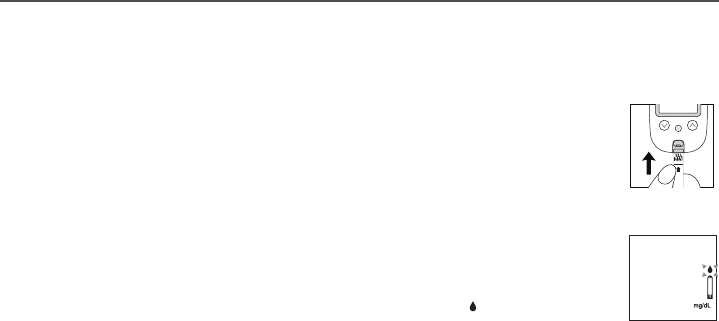
Control Solution
The Control Solution is to ensure that Tyson Bio HT100-B Blood Glucose Monitoring System is working properly and you are
performing a test correctly.
When to Perform a Control Solution Test
1. Be sure of the Control Solution is at a room temperature between 59°F ~ 95°F (15°C ~ 35°C) before
testing.
Control solution that is not at room temperature when tested may cause out of range results.
2. Insert a Tyson Bio HT100-B test strip, top side up, contact bar end rst, into the test port. The meter will
be automatically turned ON (Fig.41).
3. A beep will sound and the system checking will appear followed by a ashing “ ” icon (Fig.42).
Performing a Control Solution Test (Fig.41)
1. You use the meter for the rst time.
2. You use a new vial of test strips.
3. You suspect that the meter or test
strips are not working properly.
4. Your test results are not consistent with how you feel.
5. You think your test result is not accurate.
6. You damage your meter.
7. An advice from your healthcare professional.
Note: Please read the Control Solution package insert for more detail information.
(Fig.42)
17
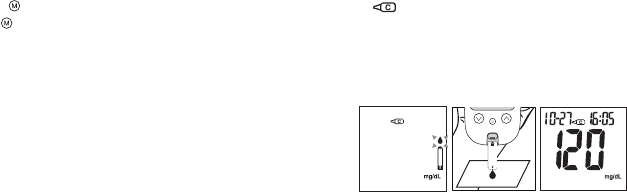
4. Press and hold for 2 seconds to change to the Control Solution test mode. " " will appear on the display
(Fig.43). Press again for 2 seconds and the meter will switch back to the normal testing mode.
5. Discard the rst drop of the Control Solution. Squeeze a small drop on a clean nonabsorbent surface e.g. wax paper
Do not apply the Control Solution to the test strip directly from the bottle because contamination may occur (Fig.44)
6. Introduce the tip of the test strip to the Control Solution drop. The Control Solution will be automatically drawn into
the strip. Hold until the meter beeps. The meter will now start to count down and the Control Solution test result will
appear on the LCD screen (Fig.45).
Caution:
Follow the above instructions when performing a
Control Solution test in order to prevent contamination.
(Fig.45)(Fig.44)
The Tyson Bio HT100-B Blood Glucose Monitoring System is working properly only if the Control Solution test result is within
the specied range printed on the test strip vial. Please repeat the test when the test result is out of range.
Out of range result may be caused by:
˙Incorrect steps while performing the test
˙The Control Solution temperature is lower than 59°F (15°C) or higher than 95°F (35°C)
˙Expired or contaminated Control Solution
˙Expired or contaminated test strips
˙Meter malfunction
Note:
˙The result will not be included in any day average calculation when the Tyson Bio HT100-B Blood Glucose meter is
set in the Control Solution test mode.
˙DO NOT use Tyson Bio HT100-B Blood Glucose meter if the problem persists. Please contact customer service
immediately.
Control Solution Results (Fig.43)
18
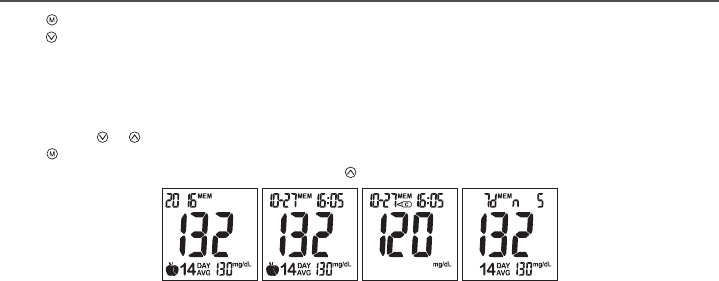
1. Press to turn on the meter when the meter is o.
2. Press to view previous results.
˙“ MEM” icon will be displayed on the top center area.
˙“ Year” will be display on the top left corner (Fig.46).
˙After 1 second “Month-Day” will then be displayed on the top left corner.
˙“ Time” will be displayed on the top right corner (Fig.47).
˙The most recent memory results will be displayed rst.
3. You can press or to scroll forwards and backwards.
4. Press to exit and view the Control Solution test result (Fig.48).
5. When the meter displays the last stored test result, press so the meter will display day average results (Fig.49).
Note:
˙The meter stores 500 results in the memory.
˙When the memory is full, the oldest result will be replaced by the most recent result.
Memory Features
(Fig.46) (Fig.47) (Fig.48) (Fig.49)
19
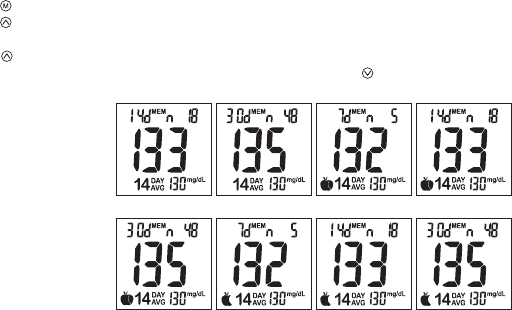
1. Press to turn on the meter.
2. Press button to view day average results.
3. 7/14/30 day average results marked with a no meal/ pre-meal/ post-meal and will be displayed on screen in sequence
when is pressed (Fig.50~ 57).
4. When the meter displays 7 days with no meal status assigned, press button and the meter will change to view
results in memory.
View Day Average Results
(Fig.50) (Fig.51) (Fig.52) (Fig.53)
(Fig.54) (Fig.55) (Fig.56) (Fig.57)
Note:
1. The 7/14/30 day average is calculated from the test results obtained during the last consecutive 7/14/30 day
periods.
2. A result with a temperature warning symbol will NOT be calculated in 7/14/30 day average.
3. “LO” under 20 mg/dL and “HI” over 600 mg/dL readings will NOT be stored in the memory.
20
1. When the meter displays a Control Solution test result, press will turn the meter o.
2. The meter will also be turned o automatically after 2 minutes following the last key pressed.
To Record Your Results
We provide a log book for you to record. Please refer to the log book for details.
Exiting the Memory Mode
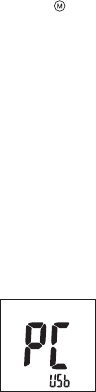
You can use Tyson Bio PC Link to transfer test results to your personal computer. Obtain the required software and cable to
be ordered separately. For order information please call Customer Service or visit website of www.tysonbio.com
1. Follow the instructions provided with software to install the software into your personal computer.
2. Connect the interface cable to a serial port on your computer while the meter is o.
3. Connect the other end of interface cable to the data port located on the side of the meter.
4. The word "PC" will appear on the display indicates that the meter is now in the communication mode (Fig.58)
Transfer Test Results to a Computer
(Fig.58)
21
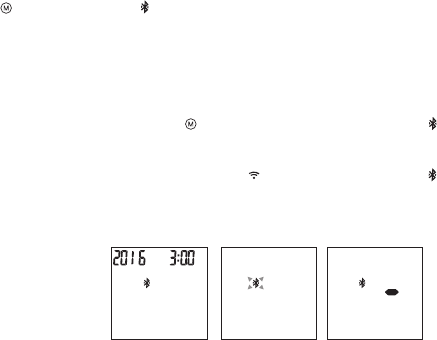
Bluetooth Setup
˙Press to turn on the meter. will appear when HT100-B has been detected (Fig. 59)
˙Bluetooth is OFF by default.
˙Please proceed the following steps.
To Transfer Memory Data
1. When the meter is switched ON, hold for 4 seconds to enter Bluetooth mode. will appear and ash on the meter when
meter is not connected with a mobile device (Fig. 60).
2. Turn on BLE tool APP (with Blood Glucose Test) and Bluetooth on your mobile device.
3. Click “Connect” and select the device shown (ex. TBMTXXXXXXXX) in APP list. stops blinking when
the meter & mobile device is connected.
4. Press the button on APP to transfer data. The meter will display while data are biing transferred (Fig. 61)
Bluetooth Data Transfer (HT100-B Only)
(Fig.59) (Fig.60) (Fig.61)
22
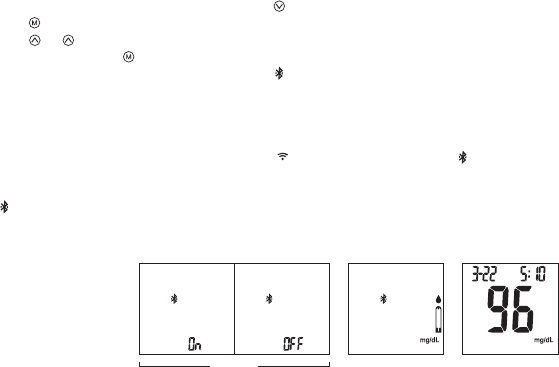
1. When the meter is switched o, press and hold button for 4 seconds to enter setting.
2. Press to conrm Buzzer setting and enter Bluetooth function setting menu.
3. Press or to select Bluetooth “ON” or “OFF” (Fig. 62).
4. Select “ON” and press to conrm and meter will be turned o.
5. Insert a test strip to turn ON the meter (Fig. 63). will blink when the meter is NOT connected with a mobile device.
6. Turn on BLE tool APP (with Blood Glucose Test) and Bluetooth on your mobile device.
Note: Please skip Step 1~4 if Bluetooth feature is already “ON”.
7. Click “Connect” and select the device shown (ex. TBMTXXXXXXXX) in APP list. stops blinking when the meter &
mobile device is connected.
8. Perform your blood glucose test. After testing your blood glucose, the test result will automatically transmit to the APP.
will disappear (Fig. 64).
To Connect via Bluetooth before a Blood Glucose Testing
(Fig.63) (Fig.64)(Fig.62)
23
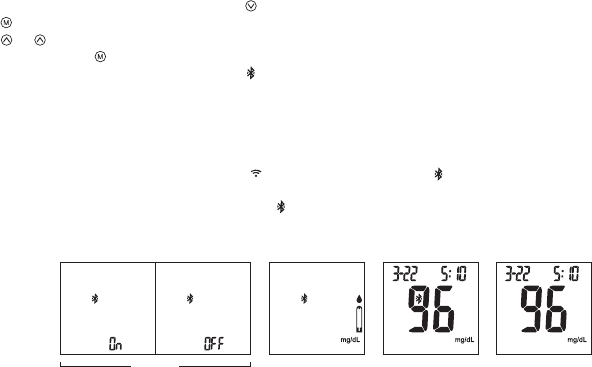
1. When the meter is switched o, press and hold button for 4 seconds to enter setting.
2. Press to conrm Buzzer setting and enter Bluetooth function setting menu.
3. Press or to select Bluetooth “ON” or “OFF” (Fig. 65).
4. Select “ON” and press to conrm and meter will be turned o.
5. Insert a test strip to turn ON the meter (Fig. 66). will blink when the meter is NOT connected with a mobile device.
6. After testing your blood glucose, the test result is shown (Fig. 67). Bluetooth icon is still blinking.
Note: Please skip Step 1~4 if Bluetooth feature is already “ON”.
7. Turn on BLE tool APP (with Blood Glucose Test) and Bluetooth on your mobile device
8. Click “Connect” and select the device shown (ex. TBMTXXXXXXXX) in APP list. stops blinking when the meter &
mobile device is connected.
9. The test result will automatically transmit to the APP. will disappear (Fig. 68).
To Connect via Bluetooth after a Blood Glucose Testing
(Fig.63) (Fig.64)(Fig.62) (Fig.64)
24

Cleaning:
Cleaning removes visible soil, organic material, and most importantly, blood products. Always clean before disinfecting.
The meter should be cleaned whenever it is visibly dirty.
Disinfection:
Disinfection generally refers to the use of chemical and physical agents, such as chemicals, to destroy the potential
inactivity of a material.
The meter should be disinfected periodically, such as twice per week.
Material
Clorox Bleach Germicidal Wipes (Clorox Professional Products Company. EPA Reg. No. 67619-12).
Signs of deterioration
•Performance: The control solution measurements are out of range which is listed on the test strip label.
•Physical: Polymer crazing (thin silver streaks appear), cracking, swelling, dissolving, softing, or becoming brittle,
and the symbols are not clear in LCD display.
If these signs of deterioration are noted, users should stop using meter and contact customer service.
Customer Service
U.S.A. +1-800-948-3894 24 hours a day, 7 days a week Taiwan
Taiwan +886-37-585998 GMT+8, 8:30 ~ 17:30, Monday ~ Friday
Note:
Users should wash hands thoroughly with soap and water after handling the meter, lancing device, or test strips
should be included.
Cleaning and Disinfection Procedure
25
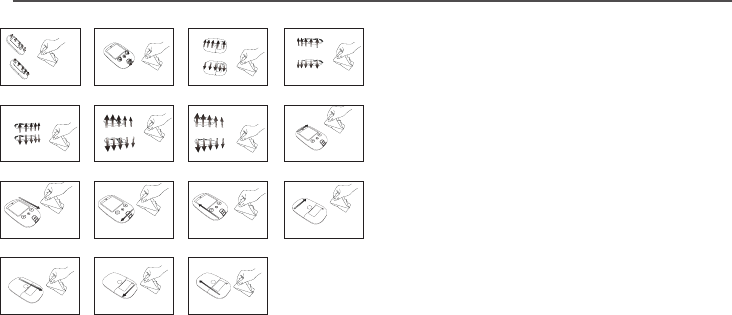
Cleaning:
˙The meter should be cleaned prior to disinfection.
˙Switch the meter OFF.
˙Cleaning solution and disinfecting solution: Clorox Bleach
Germicidal Wipes
˙Use a new cleaning wipe.
˙The meter is cleaned follow by the illustrations
(Step1~Step15).
˙Wipe the entire surface of the meter to clean blood and
other body uids.
˙Please avoid using alcohol or organic solvents in cleaning.
˙Do not immerse the meter in water. Do not allow water or
cleaning uids into the meter, test port, and data port.
Disinfection:
˙Cleaning solution and disinfecting solution: Clorox Bleach
Germicidal Wipes
˙ Use a new disinfection wipe.
˙ The meter is cleaned follow by the illustrations
(Step1~Step15).
˙ Wipe the entire surface of the meter to remove bloodborne
pathogens.
˙ Dispose of the used wipe in a trash bin.
˙ Allow exteriors to remain wet for the 1 minute contact
time.
˙ Wipe surface using a towel and allow to air dry.
Cleaning and Disinfection Procedure
(Step 1) (Step 2) (Step 3) (Step 4)
(Step 5) (Step 6) (Step 7) (Step 8)
(Step 9) (Step 10) (Step 11) (Step 12)
(Step 13) (Step 14) (Step 15)
26

Care and Storage
Please handle the meter with care. Dropping the meter may result in damage.
˙Do not expose the meter, test strips, and the Control Solution to extreme conditions such as high humidity, heat, freezing
cold, or dust.
˙DO NOT STORE IN DIRECT SUNLIGHT OR AREAS WITH HIGH HUMIDITY AND/OR DUST.
˙It is advised that you store all parts of Tyson Bio HT100-B Blood Glucose Monitoring System in the carrying case provided.
27
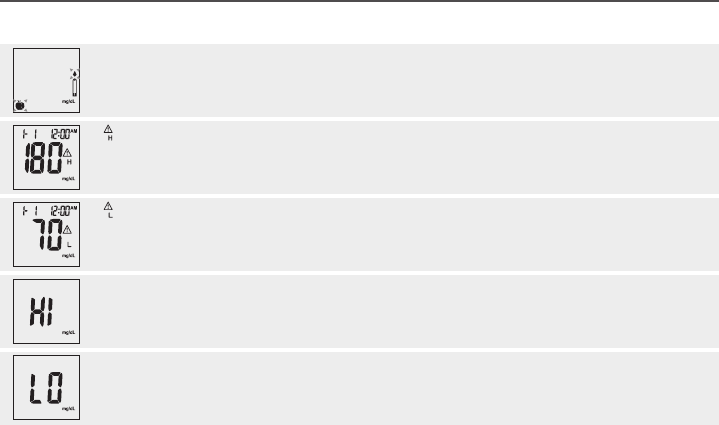
Display Messages
The system is ready to accept a blood sample. Apply a blood sample.
The result is HIGHER than the “HI” alert setting. The default setting is 180 mg/dL and it can be changed
according to 《HI/LO Alarms Setup》
The default setting is 70 mg/dL and it can be changed
according to 《HI/LO Alarms Setup》
The result is LOWER than the “LO” alert setting.
Display Description Action
Test result is HIGHER than 600 mg/dL. Repeat the test by using a new test strip. If the same
message displays again, the result is conrmed to be higher
than the meter test range. Please consult your healthcare
professional immediately for further advice.
Test result is LOWER than 20 mg/dL. Repeat the test by using a new test strip. If the
same message displays again, the result is
conrmed to be lower than the meter test range.
Please consult your healthcare professional
immediately for further advice.
28
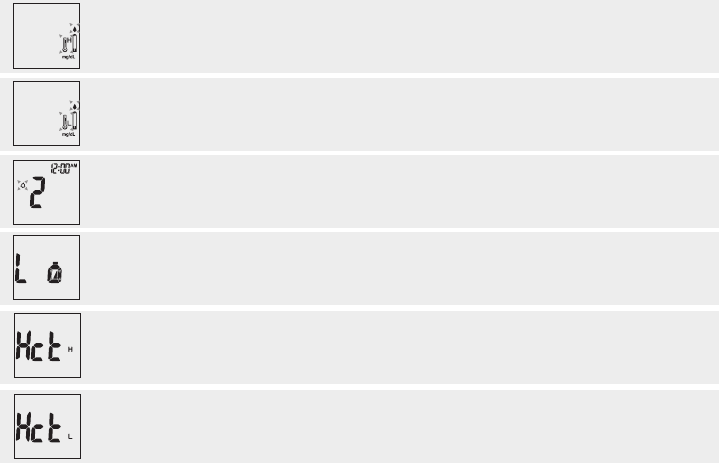
The preset reminder alarm is ringing Press any button to turn o the alarm or wait for the alarm to
be turned o automatically in 30 seconds.
Temperature is TOO HIGH during the test procedure. Large variation may occur between results due to high or
low temperature. Move to an environment
(50°F ~ 104°F or 10°C ~ 40°C) and wait for 30 minutes before
re-testing.
Battery power is LOW. Meter will only provide
proximately 10 more measurements.
Replace with 2 AAA batteries.
1. An error message indicates that the hematocrit of
the blood sample is too low for HT100-B system to
perform a test.
2.Use control solution to check the meter and test
strips.
1.Follow the instructions and try again with a new test strip.
Please contact customer service if the problem persists.
2.Follow the instructions to enter control solution mode, and
try again with a new test strip.
Temperature is TOO LOW during the test procedure. Large variation may occur between results due to high or
low temperature. Move to an environment (50°F ~ 104°F or
10°C ~ 40°C) and wait for 30 minutes before re-testing.
Display Description Action
An error message indicates that the hematocrit of
the hematocrit of the blood sample is too high for
HT100-B system to perform a test.
Follow the instructions and try again with a new test strip.
Please contact customer service if the problem persists.
29
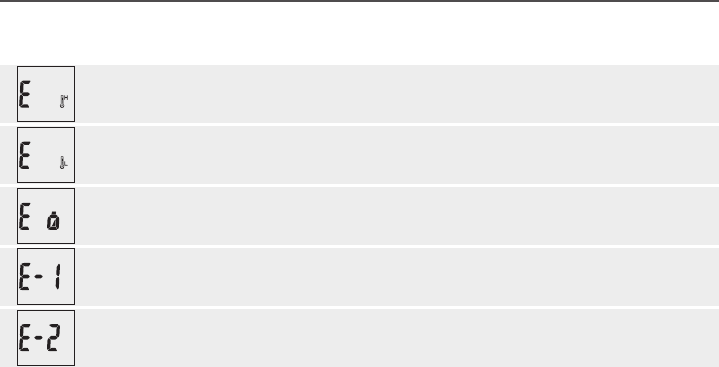
Error Messages
Temperature is TOO HIGH to perform a test. Move to an environment between 50°F ~ 104°F or 10°C
~ 40°C and wait for 30 minutes before re-testing.
Temperature is TOO LOW to perform a test. Move to an environment between 50°F ~ 104°F
or 10°C ~ 40°C and wait for 30 minutes before
re-testing.
Battery power is depleted for further usage. Replace with 2 AAA batteries immediately
An error message indicates a problem with
the test strip or meter.
Review the instructions and try again with a new test strip.
Please contact customer service if the problem persists.
An error message indicates a problem with
the test strip.
Review the instructions and try again with a new test strip.
Please contact customer service if the problem persists.
Display Description Action
30
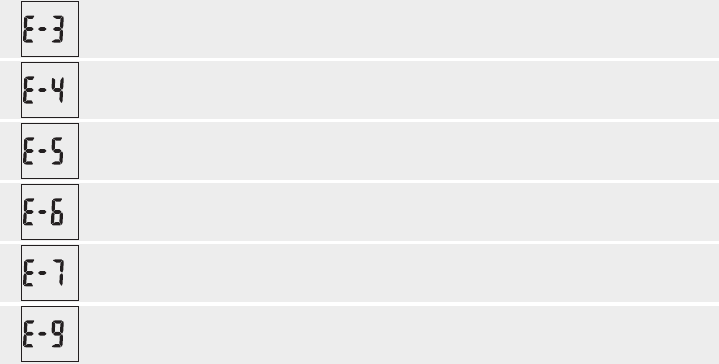
An error message indicates a problem with
the meter.
Remove batteries and wait for 1 minute. Reinstall batteries
to see if meter is working properly. Please contact customer
service if the problem persists.
An error message indicates a problem with
the test strip.
Review the instructions and try again with a new test strip.
Please contact customer service if the problem persists.
An error message indicates a problem with
the meter.
Remove batteries and wait for 1 minute. Reinstall
batteries to see if meter is working properly. Please
contact customer service if the problem persists.
An error message indicates a problem with
the test strip.
Review the instructions and try again with a new test strip.
Please contact customer service if the problem persists.
An error message indicates a problem with
the meter.
Remove batteries and wait for 1 minute. Reinstall
batteries to see if meter is working properly. Please
contact customer service if the problem persists.
An error message indicates insucient
volume of blood sample for the test.
Follow the instructions and try again with a new test strip,
then applying a sucient blood sample to the test strip.
Please contact customer service if the problem persists.
Display Description Action
31
A test strip has not been inserted into the meter
properly.
Review the instructions and re-insert a test strip
correctly.
Defective test strip. Replace with a new test strip.
A test strip remains in the test port for more than 2
minutes before testing.
Review the instructions and re-insert a test strip
correctly.
LCD display on the meter is blank when trying to
perform a test.
Please contact customer services for assistance.
The meter does not function after new batteries are
installed.
Remove batteries and wait for 1 minute. Reinstall
batteries to see if meter is working properly.
Other problems which may occur Action
Trouble Shooting
32
Operation Temperature 50°F ~ 104°F (10°C ~ 40°C)
Operation Humidity 10 ~ 90% RH
Hematocrit 10 ~ 65%
Test Sample Capillary Whole Blood(ngertip, palm, and forearm)
Sample Volume 0.7 µL
Measuring Unit mg/dL
Measuring Range 20 ~ 600 mg/dL
Test Time 5 seconds countdown
Memory Capacity 500 most recent results
Average 7/14/30 days average
External Output USB interface and Bluetooth
Power supply 2 AAA batteries
Battery Life Approximately 1000 tests
Dimension 106L x 66W x 20H mm
Weight 65 g without batteries
Specifications
Note: Please refer to the Test Strip Insert for
the performance of system accuracy and
precision.
The Meter meets the electromagnetic
compatibility requirements as per IEC
60601-1-2:2014 and EN 60601-1-2:2015.
Caution: Do not use the meter close to the
electronic equipment which is a source of
strong electromagnetic radiation, which may
interfere with proper operation of meter.
33
Meter Storage
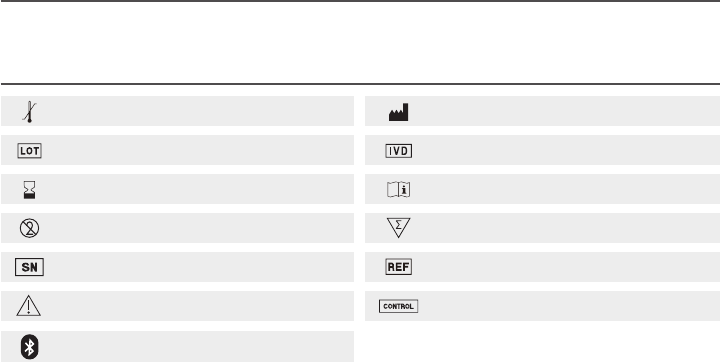
Icon Description
Temperature limitation
Batch code
Use by
Do not reuse
Serial Number
Manufacturer
In vitro diagnostic medical device
Consult instructions for use
Sucient for
Catalogue number
Control
Caution
Bluetooth logo
˙Transport and store at temperature -4°F ~ 122 °F (-20°C ~ 50°C), less than 90% RH.
˙Precision instrument, do not drop or crush when being transported.
34

Note: Please refer to the Test Strip Insert for
the performance of system accuracy and
precision.
The Meter meets the electromagnetic
compatibility requirements as per IEC
60601-1-2:2014 and EN 60601-1-2:2015.
Caution: Do not use the meter close to the
electronic equipment which is a source of
strong electromagnetic radiation, which may
interfere with proper operation of meter.
Service and Warranty
IMPORTANT
˙Tyson Bio HT100-B Blood Glucose Glucose Meter, Tyson Bio HT100-B Test Strip and Tyson Bio HT100-B Control Solution are
in conformity with the CFR, Title 21 and IVDD 98/79/EC.
˙Tyson Bio HT100-B Blood Glucose Monitoring System manufacturer warranty is valid only when used properly with in the
guidelines of this User Manual provided.
˙The Lancing device and Lancets are in conformity with the CFR, Tiltle 21 and MDD 93/42/EEC.
Manufacturer Warranty
˙Tyson Bioresearch Inc. oers 3 years guarantee on this product. Our company shall repair or replace any Tyson Bio
HT100-B Blood Glucose Monitoring System found defective with a new one.
˙This warranty does not apply to the performance of a Tyson Bio HT100-B Blood Glucose Monitoring System that has been
accidentally damaged, altered, misused, tampered with or abused in anyway. In no event shall our company be liable to
the purchaser or any other person for any incidental, consequential, or punitive damages arising from or in anyway
connected with the purchase or operation of Tyson Bio HT100-B Blood Glucose Monitoring System.
˙For manufacturer warranty services, purchaser must contact Tyson Bioresearch, Inc. for help.
35
Notice
Federal Communications Commission (FCC) Statement
15.21
You are cautioned that changes or modications not expressly approved by the part responsible for compliance could void
the user’s authority to operate the equipment.
15.105(b)
This equipment has been tested and found to comply with the limits for a Class B digital device, pursuant to part 15 of the
FCC rules. These limits are designed to provide reasonable protection against harmful interference in a residential
installation. This equipment generates, uses and can radiate radio frequency energy and, if not installed and used in
accordance with the instructions, may cause harmful interference to radio communications. However, there is no guarantee
that interference will not occur in a particular installation. If this equipment does cause harmful interference to radio or
television reception, which can be determined by turning the equipment o and on, the user is encouraged to try to correct
the interference by one or more of the following measures:
˙Reorient or relocate the receiving antenna.
˙Increase the separation between the equipment and receiver.
˙Connect the equipment into an outlet on a circuit dierent from that to which the receiver is connected.
˙Consult the dealer or an experienced radio/TV technician for help.
36
This device complies with Part 15 of the FCC Rules. Operation is subject to the following two conditions:
1. This device may not cause harmful interference and
2. This device must accept any interference received, including interference that may cause undesired operation of the
device.
FCC RF Radiation Exposure Statement:
1. This Transmitter must not be co-located or operating in conjunction with any other antenna or transmitter.
2. This equipment complies with FCC RF radiation exposure limits set forth for an uncontrolled environment.
37
Manufacturer of Blood Glucose Meter, Test Strip and Control Solution
When you call our customer service, please have all components of the product available. This will allow us to answer your
questions with speed and eciency.
Manufacturer of Lancet and Lancing Device
Shandong Lianfa Medical Plastic Products Co., Ltd.
No.1 Shuangshan Sanjian Road 250200 Zhangqiu City, Jinan, Shandong PEOPLE’S REPUBLIC OF CHINA
SteriLance Medical (Suzhou) Inc.
No.68 Litanghe Road,Xiangcheng Suzhou, Jiangsu 215133 P.R.China
Customer Service
U.S.A. +1-800-948-3894 24 hours a day, 7 days a week
Taiwan +886-37-585998 GMT+8, 8:30 ~ 17:30, Monday ~ Friday
Tyson Bioresearch, Inc.
5F., No. 16, 18, 20, 22, Kedong 3rd Rd.,
Zhunan Township, Miaoli County 35053, Taiwan
+886-37-585998 www.tysonbio.com
38