TandD RTR6X WIRELESS CORE TEMPERATURE DATA LOGGER User Manual
TandD Corporation WIRELESS CORE TEMPERATURE DATA LOGGER
TandD >
USERS MANUAL
What is RTR-61?
ɜ Thermo Recorder Push Wireless RTR-61 is a handy-type device which acts both as a thermometer and a
temperature recorder, which has been designed to easily measure and record the internal temperature of
food items and liquid temperature using a needle-type sensor.
ɜ This product has been designed to meet IP64 standards (splash resistant; rated for use in daily life).
RTR-61 measures and records core temperature, which makes it suitable for use in the food production
industry especially temperature management for HACCP.
ɜ The unit incorporates a battery life warning function, which informs the user when it is time to replace the
battery. When the battery power becomes low, all normal operations will stop in order to protect the data.
ɜ The LCD Backlight allows the display to be easily read even in low light. The LCD contrast can also be
easily adjusted for better viewing.
ɜThese units are also designed with special short wave radio functions that when coupled with our
exclusive software set "Push Wireless Communication Set (RTR-61SK)", makes it possible to carry out
wireless communication, allowing for easy and effective management of multiple RTR-61 units.
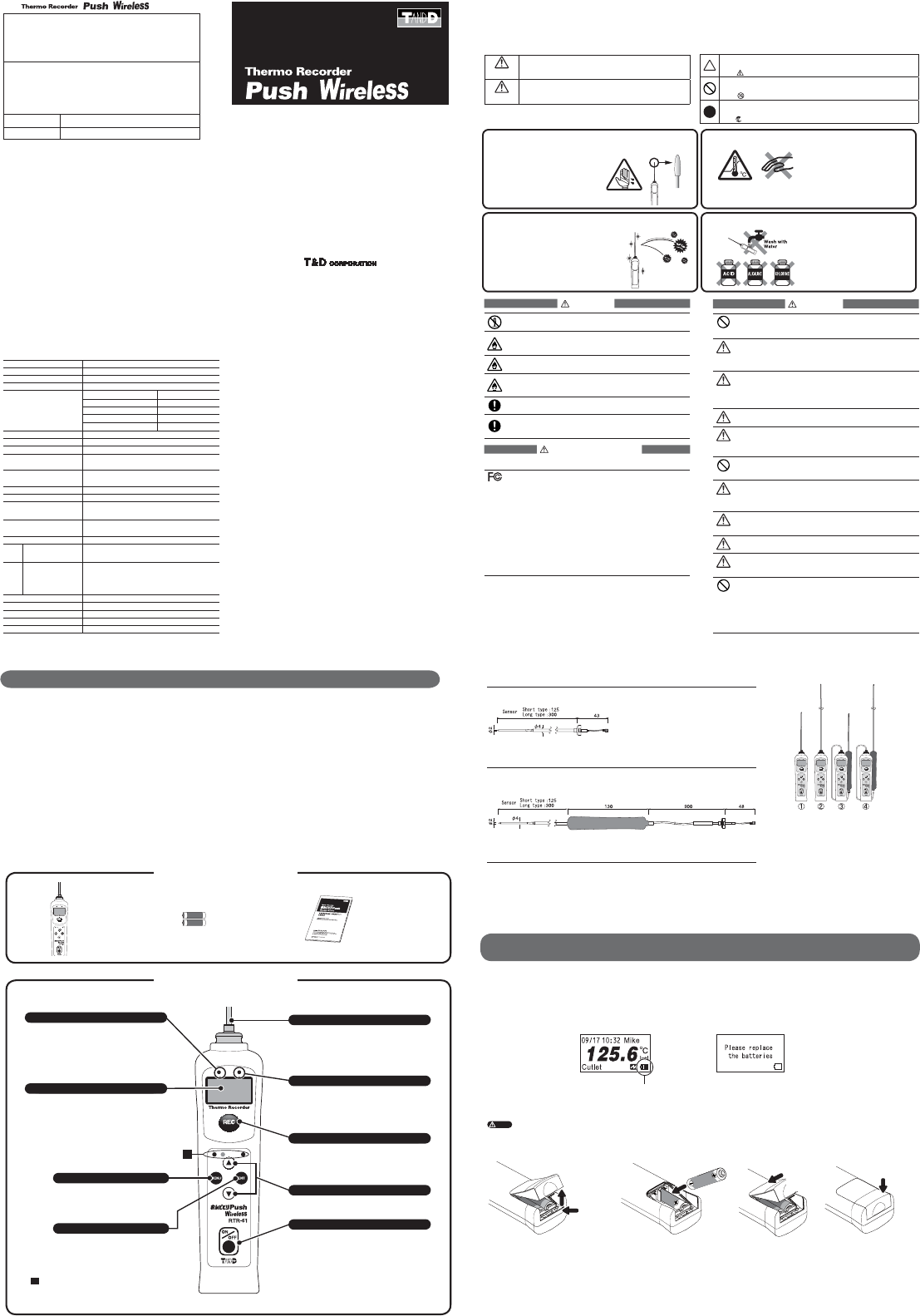
ɡBattery Life Indicator
The battery indicator on the LCD display allows you to view the status of the battery life. If the remaining battery power becomes
zero, a battery replacement message will appear. Once the message appears, please change the battery as soon as possible.
Battery Life
Indicator
A battery replacement message will appear. If the
batteries are further left, LCD display goes blank.
ɡInstalling the Batteries
ŏŐŕņ
-If the LCD display goes blank and batteries are further left unchanged, recorded data may be erased. Please replace the batteries as soon as possible.
-Make sure that the + and – are in the correct direction. If the battery terminals + / - are mistaken and a short occurs, all data stored in the main unit will be erased.
-When opening the battery case to change the batteries, make sure no water or foreign object gets inside the case.
-Make sure to change both batteries at the same time and use two batteries of the same type.
Ӳ Lift up
ӱ Push
Ӳ Push it down
until you hear a
clicking sound
ӱ Insert the top
end of the cover
into the unit
1. 2. 3.
Open the RTR-61 by pushing up on
the bottom of the battery case on
the back of the unit.
Insert 2 AAA alkaline batteries,
making sure that the + and – are in
the correct direction.
(The + of two batteries should face
toward the bottom of the case).
Be sure to securely close the cover until you
hear a clicking sound.
ӱȁInstalling the Batteries
Package of Contents
Read the following for details about battery life and battery installation.
Part Names and Functions
˝
Judgment LED (Red / Green)
ȁȁ ˝Ȥ
The judgment result of temperature
measurement will be shown. Out of Range:
Red LED will fl ash. Within Range: Green LED
will fl ash.
ɖJudgment LED Settings
By changing settings, it is possible to turn ON or OFF the
Judgment LED function.
ɡTemperature Sensor (Optional)
All-in-One Short Type
Ȭunitȇmmȭ
RTR-6110
Short Type Sensor
RTR-6130
Long Type Sensor
Separate Short Type
ȁȁȁȁȁȁȁȁȁ
Ȭunitȇmmȭ
RTR-6210
Short Type Sensor
RTR-6230
Long Type Sensor
ɡRTR-61 Series
ӱRTR-61-110ȇAll-in-One Short Type Set
ȁMain Unit + All-in-One Short Type Sensor
ӲRTR-61-130ȇAll-in-One Long Type Set
ȁ Main Unit + All-in-One Long Type Sensor
ӳRTR-61-210ȇSeparate Short Type Set
ȁ Main Unit + Separate Short Type Sensor
ӴRTR-61-230ȇSeparate Long Type Set
ȁMain Unit + All-in-One Long Type Sensor
*Common Items Included: 2 AAA alkaline batteries
User's Manual (this document)
RTR-61 Main Unit
(Sensor attached)
AAA Alkaline Batteries
(LR03) x 2
User's Manual
Warranty
(this document)
LCD Display
The RTR-61 is designed with a graphic LCD
display with a resolution of 132 X 64 pixels.
ɖBacklight Function
The LCD Backlight makes the display easier to read in low
light conditions.
ɖContrast Adjustment Function
The display contrast can be adjusted here.
<MENU> button
By pressing this button, the Menu will
be displayed. Also, press to return to
the previous window.
<ENT> button
Press to enter the settings menu or
determine the settings.
Optical Communication Area for communication
with the Base Unit (RTR-50 / RTR-5W).
If the unit gets dirty, wipe it with a clean cloth
dipped in alcohol.
Temperature Sensor
As for details about how to remove or change
the sensor, please see the User's Manual that
comes with the sensor you will be using.
Please be careful when handling the
temperature sensor.
PUSH Record LED (Orange)
By pressing the <REC> button, the lamp will
turn on when a temperature measurement is
recorded.
*The recorded object is the temperature at the instant when the
<REC> button is pressed.
<REC> button (Record)
When this button is pressed, the
Temperature, Date / Time, User Name, Item,
and Judgment Result at the time of pressing
are recorded into the RTR-61.
Cursor buttons
(Moving Up and Down)
Press to move the Cursors up and down on
the display.
<ON / OFF> button (Power)
Press to turn on / off the power.
ɖAutomatic Power-OFF Function
If the unit is not used for about fi ve minutes, it will automatically
turn off.
ɖAutomatic Power-ON Function
If a unit is OFF, when wireless or optical communication is
carried out by a Management Operator, that unit will be
automatically turned ON.
ɡProduct Specifi cations
Measurement Item Temperature
Measurement Channels 1 Channel
Measurement Range Ƚ25Ɏȡ 235Ɏ
Temperature Sensor thermistor
Measurement Accuracy
10Ɏոئȁ ȁ:Ⱦ1.5Ɏ130Ɏȡ 150Ɏ : Ⱦ1.0Ɏ
40Ɏȡ 10Ɏ : Ⱦ1.0Ɏ150Ɏȡ 180Ɏ : Ⱦ1.5Ɏ
40Ɏȡ 85Ɏ : Ⱦ0.8Ɏ180Ɏȡ 200Ɏ : Ⱦ2.0Ɏ
85Ɏȡ 110Ɏ : Ⱦ0.5Ɏ ȁȁ200Ɏոષ : Ⱦ2.5Ɏ
110Ɏȡ 130Ɏ : Ⱦ0.8Ɏ
Measurement / Display Resolution 0.1Ɏ
Measuring / Display Interval 0.5sec
Number of Recorded Data 1800 data readings
LCD Display Date and Time / Measured Value / Battery Life Warning
Unit of Temperature (Ɏ/ȌF) / User / Items
Temp. Judgment LED Display Out of Range: Red LED Blink
Within Range: Green LED Blink
Clock Resolution Month / Day / Year / Hour / Minute / Second
Clock Accuracy Within +/- 1 second per day (at 25Ɏ)
Battery AAA Alkaline Batteries (LR03) x 2
(AAA Ni-Cd, Ni-MH Batteries also compatible)
Battery Life About 1 month (when used for PUSH recording every 10
minutes for 16 hours a day)
Interface Wireless Communication / Optical Communication
Optical
Communication Speed
2400bpsȪWhen downloading 1 unit of full data: about 2 minutes and30
secondsȫ
Wireless
Wireless Method
Communication Speed
Wireless Transmission Range
Special Short Wave Radio Type (ARIB STD-T67) Frequency:
426MHz
When downloading 1 unit of full data: about 6 minutes
About 100m (if direct and unobstructed)
Antenna Internal Type
Unit Water Resistance IP64 (dust / splash resistant <rated for use in daily life>)
Dimensions 146.8mm x 40mm x 37.9mm (excluding sensor part)
Unit Weight About 83g (Including 2 AAA batteries; excluding sensor)
Operating Environment Ƚ10Ɏȡ 60Ɏ
ɡSafety Precautions and Instructions ȁ
*Please carefully observe the following safety measures when using our product.
To prevent any loss or damage to our customers, other people and / or property, and to ensure the proper use of our products we ask that before
using our product you carefully read, understand and follow the safety rules and precautions for our products as outlined below.
ȁ
DANGER
Do not take apart, repair or modify the main unit.
This may cause fi re or electrocution.
If any smoke or strange smells are emitted from the unit,
immediately cease using it.
Continued use may cause fi re, electrocution or damage.
Do not use any batteries other than those that are recommended.
It may cause fi re or damage.
If water or a foreign object enters the case, immediately cease using
it.
Continued use may cause fi re, electrocution or damage.
The RTR-61 is a devices to measure temperature.
Do not use this unit for any purpose other than temperature measurement.
Store all batteries, sensors and Thermo Recorder units out of the
reach of children.
It is dangerous to swallow batteries.
ȁ
Wireless Regulations
Radio, EMC and Safety Regulations
This device complies with part 15 of the Federal Communications Commission
(FCC) rules and with RSS-210 of the Industry Canada (IC). Operation is
subject to the following conditions:
(1)This device may not cause harmful interference, and
(2)This device must accept any interference received,
including interference that may cause undesired operation.
Note:
This equipment has been tested and found to comply with the limits for a Class A digital
device, pursuant to part 15 of the FCC Rules. These limits are designed to provide
reasonable protection against harmful interference when the equipment is operated in a
commercial environment. This equipment generates, uses, and can radiate radio frequency
energy and, if not installed and used in accordance with the instruction manual, may cause
harmful interference to radio communications. Operation of this equipment in a residential
area is likely to cause harmful interference in which case the user will be required to correct
the interference at his own expense.
ȁ
CAUTION
We are not responsible for any damage, malfunction or trouble,
whether direct or indirect, caused by the use of our product. Please
be fully aware of this before using our product.
This product has been designed for private or industrial use only. It
is not for use in situations where strict safety precautions are
necessary such as in connection with medical equipment, whether
directly or indirectly.
To prevent damage to the unit from static electricity, remove static
electricity from your body by touching metal around you (door knob,
window frame) before touching the unit.
Static electricity may cause not only damage to the unit, but may cause breaks in
or a loss of data.
Use these units under conditions with an ambient temperature of
-10 to 60Ɏ.
The RTR-61 only becomes water resistant (IP64 splash resistant) if
the temperature sensor has been connected.
Without the sensor connected, the connector part of neither the main unit nor the
temperature sensor is water resistant; make sure not to get wet.
Do not expose the unit to harmful gases or chemicals.
It may cause corrosion and/or other danger to the unit and to people handling the
unit.
Do not drop the unit, or expose the unit to a strong impact. If that
happens to the unit, immediately remove the batteries and stop
using.
Continued use may cause fi re or electrocution.
Battery terminals may provide insuffi cient contact due to age or
vibration.
This may lead to data loss.
Battery life depends on the measurement environment,
communication frequency, recording interval and battery quality.
If the unit will not be used for period of time, for safety reasons
please remove the battery.
If left in the unit, it may leak and lead to malfunctioning.
Do not use or store the unit in places such as listed below:
-Areas exposed to direct sunlight
-Areas exposed to water or high-pressure water fl ow.
-Areas exposed to organic solvents and corrosive gas.
-Areas exposed to strong magnetic fi elds
-Areas exposed to static electricity.
-Areas exposed to fi re or overheating.
-Areas exposed to excessive dust or smoke.
ɡNotices about this User's Manual
- Please read this manual carefully before using the product.
- All rights of this User's Manual belong to T&D Corporation. It is prohibited
to use, duplicate and/or arrange a part or whole of this User's Manual
without the permission of T&D Corporation.
- Please follow the safety precautions carefully. We cannot guarantee nor
are we responsible for safety if this product is used in any manner other
than was intended.
- T&D Corporation accepts no responsibility for any malfunction of and/or
trouble with this product or with your computer that is caused by the
improper handling of this product and will deem such trouble or
malfunction as falling outside the conditions for free repair of the attached
warranty.
- T&D Corporation accepts no responsibility for any result or effects from
using this User's Manual.
- Figures and illustrations in this manual may be slightly simplifi ed and may
differ from the actual product.
- We sincerely hope that the contents of this manual are true and complete.
If you fi nd any information to have been omitted, or if the information within
is confusing or mistaken please contact your retailer or T&D Corporation.
- Please carefully read this User's Manual and Free Repair Warranty.
- The warranty that is included in this User's Manual cannot be reissued, so
please keep it in a safe place.
- This manual has been written using Ɏ as the standard unit of temperature.
ȺExplanation of SymbolsȻ
DANGER
These entries are actions that absolutely under no
circumstance should be taken. The taking of such an action
may cause serious personal physical damage or death.
CAUTION
These entries are actions that if taken may lead to physical
injury or damage to persons or things.
ȺExplanation of Picture SymbolsȻ
Denotes an important warning or caution. Inside or near the symbol will
appear another symbol giving details.
Ȫ EX: ȤBe careful of electrocutionȫ
Denotes a forbidden action. Inside or near the symbol will appear another
symbol giving details.
( EX: Do not use in wet areas.)
Denotes an action that you must take. Inside or near the symbol will
appear another symbol giving details.
( EX: Unplug power plug from outlet)
5652-169 Sasaga Matsumoto, NAGANO Japan 399-0033
Monday to Friday 9:00 – 12:00 / 13:00 – 17:00 excluding company holidays (GMT +9:00 Tokyo Time)
Home Page: http://www.tandd.com/
Wireless Core Temperature Data Logger
User's Manual
© Copyright 2006 T&D Corporation All rights reserved.ȁȁȁȁȁȁȁȁȁȁȁȁȁȁȁȁȁȁȁȁ2007.XX.ȁ1600439XXXX
ȁ
This is printed on recycled paper.
Because the sensor has a sharp tip, there is a
risk of accidentally stabbing people and/or
objects. Do not use the sensor for any purpose
other than measuring the temperature of
objects for which it was designed and store in
a safe place when not in use.
Please be careful when using in
extreme hot or cold environments;
touching the unit may cause burns or
frostbite.
Do NOT touch sensor immediately after measurement
Daily Maintenance
If the unit gets dirty, wipe it with a
clean cloth dipped in alcohol; DO
NOT WASH with WATER.
NEVER use an acid, alkaline, or
chlorine based detergent. This will
cause harm to the electric
components in the unit.
DO NOT POINT THE SENSOR TOWARD HUMANS or
USE IN WAYS OTHER THAN THOSE FOR WHICH THIS
PRODUCT WAS DESIGNED
Before and after using, please clean
to remove any substances attached
to the surface and sterilize the units in
order to prevent the growth of
bacteria.
CAUTION:
EXTREME HOT
& COLD!
DO NOT
TOUCH!
Clean and Sterilize units before and after use
DANGER! Use Safety
Cover
Warranty
Customer's name:
Address:
Phone No.:
Dealer's name:
Address:
Phone No.:
Guarantee period 12 months from date of purchase
Date of purchase
Statement of Limited Warranty
1. This product is warranted to be free from defects in materials and workmanship for a period of one (1) year
following the date of purchase. Should the product fail to operate per specifi cation in normal use during
this period T&D will repair the unit or provide a replacement free of charge. T&D will not accept returns for
any reason other than defects during the warranty period, and will not accept any product that has been
misused, dropped, abused or inappropriately used or mistreated at any time.
2. This warranty is strictly limited to repair or replacement-in-kind for defective product. T&D makes no
other warranty, either express or implied, and will not accept liability beyond the remedies stated herein.
Specifi cally, T&D will not accept liability for direct, indirect, special, consequential or incidental damages
arising from the use of this product.
3. Customers wishing to submit a defective product for repair or replacement during the warranty
period should fi rst contact the dealer from whom it was originally purchased. After receiving a return
authorization the defective product should then be packaged along with a description of the diffi culties
being experienced, proof of purchase and all included accessories and materials, and return it to the
dealer. In the event of diffi culty contacting the original dealer, customers should contact the nearest
authorized T&D sales representative. A list of these can be found on the company' s website, www.tandd.
com, or it can be obtained by contacting TandD US directly.
4. This limited warranty statement gives the customer specifi c legal rights. The customer may also have other
rights which vary from state to state in the United States, from province to province in Canada, and from
country to country elsewhere in the world. To the extent this limited warranty statement is inconsistent with
local law, this statement shall be deemed modifi ed to be consistent with such local law.
5. For further information relating to product repair or replacement, or for other service questions after
the termination of the warranty period, customers should contact their local authorized T&D sales
representative.
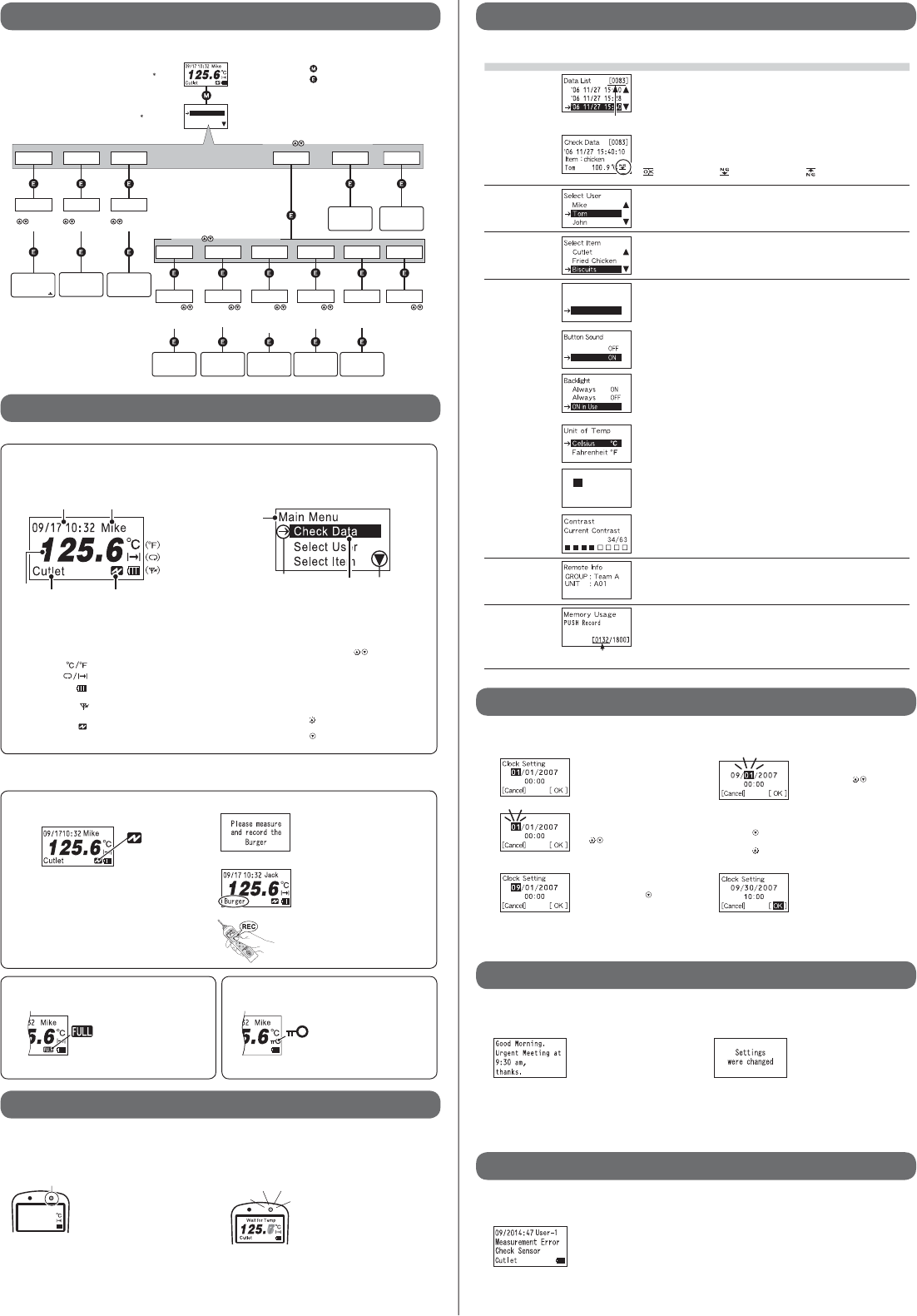
Menu Settings Window Details
Check Data
The 83rd data reading is
highlighted by the cursor.
Data List
All recorded data is displayed in descending order (from the newest to the oldest
data). Specify data by moving cursors and press the <ENT> button to view detailed
information.
Judgment Result
Check Data
Data details (Date/Time of Recorded Data, Measurement Item, User Name,
Temperature, and Judgment Result) can be viewed.
ȤJudgment OKȁȁ ȤLower Limit Error ȁȁ ȤUpper Limit Error
Select User elect and set the User Name of the persons who will measure temperature.
(Up to 63 user names can be registered into an RTR-61 unit.)
Select Item Select and set the Measurement Items.
(Up to 63 items can be registered into an RTR-61 unit.)
Set Operation ŋŶťŨŮŦůŵġōņŅ
Őŏ
ŐŇŇ
Judgment LED
It is possible to turn ON / OFF the blinking of Upper and Lower Limit Judgment
LED.
Button Sound
It is possible to turn ON / OFF the beep which sounds when pressing a button.
Backlight
The Backlight factory default setting for the RTR-61 is "ON in Use", which will
backlight the window for 3 seconds only when in operation. Here you can shift the
setting to "Always ON" or "Always OFF".
Unit of Temp.
Select Fahrenheit [ɋF] or Celsius [Ɏ].
ńŭŰŤŬġŔŦŵŵŪůŨ
10252007
0932
ŜńŢůŤŦŭŞ ŜġŐŌġŞ
Clock Setting
The RTR-61 clock settings can be made here.
(See the following section "How to Make Clock Settings" for details.)
Contrast
It is possible to adjust the contrast of the display.
Remote Info Before carrying out wireless communication, it is necessary for the Management
Operator to register Data Loggers (RTR-61 units) as Remote Units and register
them into Groups. The Group Name and Remote Unit Name can be viewed here
for the RTR-61 unit being used.
Memory Usage
132 of data readings
are recorded.
Each RTR-61 can record and store up to 1,800 of data readings. The number of
stored data can be viewed here.
ӳȁMain Window Names and Functions
See the following for the items displayed in the Top Window and the Main Menu Window.
ɡTop Window
By turning the Power ON, the Top Window will appear.
Following are the main display items and marks that
appear in the Top Window.
Item
Unit
Recording Mode
Current
Temperature
Battery Status
or Wireless
Communication in
Progress
User NameCurrent Date / Time
Remote Mode
Current Temperature : The currently measured temperature will be
displayed.
Item : Up to 12 characters can be entered.
User Name : Up to 8 characters can be entered.
Current Date /Time : Current Time (Month / Date / Hour / Minute)
Unit [ ] : Select from Fahrenheit / Celsius
Recording Mode [ ] : Select from Endless / One Time
Battery Status [ ] : The remaining amount of battery power will
appear.
Wireless Communication in Progress
[] :
While wireless communication is occurring,
this mark will appear.
Remote Mode[ ] : The recording of temperature measurements
is being controlled by wireless
communication.
ɡMain Menu Window
While the Top Window is being displayed, pressing the <MENU>
button on the face of the unit will display the Main Menu.
Cursor Scroll
Title
Highlight
Title: The title of the menu will be displayed
Highlight: The cursor selected item is displayed in white letters on
a black background.
Cursor: Select the item by moving the Cursor up and down by
pressing the arrow buttons < > on the face of the
unit.
Press the <ENT> button on the face of the unit to select
the desired menu.
Press the <MENU> button on the face of the unit to
return to the previous window.
Scroll : The scroll up and down arrows show that data exists
outside of the display area.
ɣȤ Press <> button on the face of the unit to scroll
up.
ɥȤ Press < > button on the face of the unit to scroll
down.
ɡRecorded Temp
(Displayed normally after PUSH Recording)
2ECORDED4EMP
#UTLET
PUSH Record LED "ON"
The recorded temperature is displayed for
about three seconds; after which the unit
returns automatically to the Top Window.
- If the Button Sound has been set to "ON", the unit beeps when recording
temperature.
ӷȁAbout the Message Display
Even when the power is OFF, an automatic Power-ON may occur to display a message.
ӸȁMeasurement Error Messages
If a temperature measurement error occurs, there may be a poor sensor connection. In such a case, an
Error Message will appear.
ӶȁHow to Make Clock Settings
In order to make the clock settings for the RTR-61 unit, please follow the directions as written below.
ӴȁAbout the PUSH Recording Window
This window will appear by pressing the <REC> button on the RTR-61 unit to record temperature.
ɡWait for Temp
(Measuring in progress and waiting for the constant temp)
If the "Wait for Constant Temp Function" has been applied to your RTR-61 unit by the
Management Operator, this message will be displayed while waiting for the temperature
measurement to stabilize.
Do not remove the sensor while "Wait for
Temp" is on display and the PUSH
Record LED is blinking.
- When the "Wait for Constant Temp Function" is active, the temperature will not
be recorded until temperature stabilization has been achieved. Due to this,
after pressing the <REC> button it may take some time before the temperature
is actually recorded.
- If the temperature is not stabilized even after 15 seconds have elapsed,
recording will not be performed and you will be returned to the Top Window.
- If the Button Sound has been set to "ON", the unit beeps both when the "Wait
for Temp" operation has been started and when the temperature has been
recorded.
ӵȁMenu Contents
Details about the Main Menu and the Operational Settings Menu are as follows.
Depending on the settings, some operations are restricted from being carried out by manipulating
the buttons on the unit. Refer to the following for details:
ɡRemote (Remote Mode)
When an RTR-61 unit has been set to "Remote Mode" by the
Management Operator, it is not possible to use the "PUSH
Recording" function without fi rst receiving a "Measurement
Command" from the Operator. Even while the power
is OFF, when an RTR-61 unit receives a "Measurement
Command", the LCD backlight will begin to fl ash and a
beeping sound will notify the user that it is time to carry out
a recording.
To record a measured temperature while in Remote Mode,
please carry out the following procedures:
1. Open the [Clock Setting] window.
2. By pressing the <ENT> button,
"Month" will blink.
By pressing the arrow buttons
< >, the numerical values get
larger or smaller.
3. Press the <ENT> button to
determine the value. Then press
the arrow buttons < > to move
the cursor.
4. By pressing the <ENT> button,
"Day" will blink. By pressing the
arrow buttons < >, the
numerical values get larger or
smaller.
5. Press the <ENT> button to determine the value. After this,
please make all settings in the same way.
Pressing< >ȤMoves the cursor in the order of Month-Day-Year-Hour-
Minute.
Pressing< >ȤMoves the cursor in the order of Minute-Hour-Year-Day-
Month.
6. Finally, move the cursor to the
position of "OK" and press the
<ENT> button to complete the
settings.
- To stop making clock settings at anytime, move the cursor to "Cancel" and
press the <ENT> button.
ɡSettings Change Messages
If any settings changes have been
made via wireless communication
to the RTR-61 unit in use, a
notifi cation message will be
displayed for about two seconds.
After that, you will be automatically
returned to the Top Window.
- Messages will be displayed regardless of any mode settings in the RTR-61.
ɡCreated Messages
The RTR-61 unit can receive any
created message from the
Management Operator. They will
continue to be displayed until the
<ENT> button on the face of the
unit is pressed.
- By making the backlight light up or the beeping sound occur, the user can be
informed that a message has been received.
- Messages can be received regardless of mode settings in the RTR-61.
- Note that there is no message storing function, so messages will not be
redisplayed once you press the <ENT> button.
Check the sensor connection.
ɡFULL when in One-time Mode
1.
Measurement Command
Message example When a Measurement Command is
received, push the <ENT> button on the
face of the unit to return to the Top Window.
*The backlight fl ashing and beeping sound will continue
until the <ENT> button is pressed.
2. Top Window When the display switches to the Top
Window, the specifi ed item will be on
display.
3. Please measure and record the
temperature of the specifi ed item.
This symbol shows that the data
recording capacity is full and no
more new data can be recorded. In
order to carry out recording again,
it is necessary to fi rst download the
recorded data from the RTR-61 to
the manager's computer and then
delete it from the unit.
ɡKey Lock Function
Because the Management Operator
has placed a restriction on carrying
out direct operations using the
RTR-61, only the <REC> and <ON/
OFF> buttons are operable.
- Note that if a Message (see Section ӷ) or a Measurement Command is received from
the Management Operator, the <ENT> button will become operable.
ӲȁOperations Table
This is a table of operations for RTR-61. When using, please refer to the following chart.
ńũŦŤŬġŅŢŵŢġġŜııĹĴŞ
’06 11/27 15:40
NG
ŊŵŦŮȇ
ŕŰŮġġġġġġġ
100 .9
Ɏ
ńŶŵŭŦŵ
ńũŦŤŬġŅŢŵŢ
ŔŦŭŦŤŵġŖŴŦų
ŔŦŭŦŤŵġŊŵŦŮ
ŎŢŪůġŎŦůŶ
4OP7INDOW
-AIN-ENU7INDOW
Ɂ0RESSTHE-%.5BUTTONONTHEFACEOFTHE242UNIT
ɦ4OGETBACKTOTHEPREVIOUSWINDOWPRESSTHE-%.5BUTTON
Ɂ0RESSTHE%.4BUTTONONTHEFACEOFTHE242UNIT
2EMOTE)NFO -EMORY5SAGE
őųŦŴŴġŵũŦ
ġġġġġġġţŶŵŵŰůŴġ
ŵŰġŴŦŭŦŤŵġŢġŖŴŦųįġġ
őųŦŴŴġŵũŦ
ġġġġġġġţŶŵŵŰůŴġ
ŵŰġŔűŦŤŪŧźġŅŢŵŢġġġ
őųŦŴŴġŵũŦ
ġġġġġġġţŶŵŵŰůŴġ
ŵŰġŴŦŭŦŤŵġŢůġŊŵŦŮį
#HECK$ATA
ŔŦŵġŵũŦġŮŰůŵũĭġ
ťŢźĭġźŦŢųĭġũŰŶųġ
ŢůťġŮŪůŶŵŦį
ȺńŢůŤŦŭȻ
*UDGMENT,%$
3ETTINGS7INDOW
"UTTON3OUND
3ETTINGS7INDOW
5NITOF4EMP
3ETTINGS7INDOW
#LOCK3ETTING
3ETTINGS7INDOW
#ONTRAST
3ETTINGS7INDOW
Őŏ
ŐŇŇ
3ETTINGS7INDOW
"ACKLIGHT
]
3ET/PERATION
őųŦŴŴġŵũŦġġġġġġġţŶŵŵŰůŴġŵŰġŴŦŭŦŤŵġŢġŎŦůŶįġ
őųŦŴŴġŵũŦġġġġġġġţŶŵŵŰůŴġŵŰġŴŦŭŦŤŵġŢġŎŦůŶįġ
3ELECT5SER
œŦŮŰŵŦġŊůŧŰ
ňœŐŖő
ŖŏŊŕ
ȇġŏŢŮŦ
ȇġŏŢŮŦ
ŎŦŮŰųźġŖŴŢŨŦġ
őŖŔʼnġœŦŤŰųť
[0000/1800]
ŔŦŭŦŤŵŦťġŊŵŦŮ
ŊŵŦŮȇńŶŵŭŦŵ
ŖűűŦųġȇȁIJĹı
ōŰŸŦųȇȁIJijı
Ɏ
Ɏ
ŕŰŮ
ŪŴġŸŰųŬŪůŨġůŰŸ
őųŦŴŴġŵũŦ
ţŶŵŵŰůŴġ
ŵŰġŴŦŭŦŤŵĻ
Őŏ
ŐŇŇ
]
őųŦŴŴġŵũŦ
ţŶŵŵŰůŴġ
ŵŰġŴŦŭŦŤŵĻ
Ɏ
ȌŇ
]
őųŦŴŴġŵũŦ
ţŶŵŵŰůŴġ
ŵŰġŴŦŭŦŤŵĻ
őųŦŴŴġŵũŦ
ţŶŵŵŰůŴġŵŰġŢťūŶŴŵġ
ŵũŦġŤŰůŵųŢŴŵġŭŦŷŦŭ
łŭŸŢźŴġŐŏ
łŭŸŢźŴġŐŇŇġ
ŐŏġŪůġŶŴŦġ
]
őųŦŴŴġŵũŦ
ţŶŵŵŰůŴġ
ŵŰġŴŦŭŦŤŵĻ
ŋŶťŨŮŦůŵġōņŅ
Őŏ
ŔŦŵŶű
ŃŶŵŵŰůġŔŰŶůť
ŐŇŇ
ŔŦŵŶű
ŖůŪŵġŰŧġŕŦŮű
ńŦŭŴŪŶŴ
Ɏ
ŔŦŵŶű
09 / 30 / 2007
0930
ŃŢŤŬŭŪŨũŵ
łŭŸŢźŴ
ŔŦŵŶű
$ATA,IST 5SER,IST )TEM,IST
3ELECT)TEM
Őŏ
ŔŦŵŶű
ńŭŰŤŬġŔŦŵŵŪůŨ
Compliance Statement
This device complies with part 15 of the FCC rules and RSS-210 rules. Operation is subject to the following
two conditions: (1) This device may not cause harmful interference, and (2) this device
must accept any interference received, including interference that may cause undesired
operation.
Warning to users
The user that changes or modifications not expressly approved by the party responsible
for compliance could void the user’s authority to operate the equipment.