Temco Japan HG40SAN-TBT Bluetooth Stereo Headset User Manual Bluetooth Stereo Headset User Guide V2 0

Temco Japan Co. Ltd. Bluetooth Stereo Headset Bluetooth Stereo Headset User Guide V2 0

Users Manual

        Bluetooth Stereo Headset       User Guide      ISSUE BY: ISSUE Date:
© 2006 Temco Japan Co., Limited All rights in this publication are reserved and no part may be reproduced without the prior written permission of the publisher. The contents of this publication are believed to be correct at the time of going to press, but any information, specifications, products or services mentioned may be modified, supplemented or withdrawn without further notice.  The Stylized TEMCO logos are trademarks owned by Temco Japan Co., Limited or its affiliates.  Bluetooth® and the Bluetooth logos are trademarks owned by Bluetooth SIG. Inc, USA and licensed to Temco Japan Co., Limited.    Made by Temco Japan Co., Limited, a wholly-owned subsidiary of Temco Japan Co., Limited.    Temco Japan Co., Limited declares under our sole responsibility that this product is in conformity with the provisions of the following Council Directives 1999/5/EC. Please dispose of this packaging and product in accordance with the latest guidelines.  Federal Communications Commission (FCC) Statement  15.21 You are cautioned that changes or modifications not expressly approved by the part responsible for compliance could void the user’s authority to operate the equipment.    This device complies with Part 15 of the FCC Rules. Operation is subject to the following two conditions: (1) this device may not cause harmful interference, and (2) this device must accept any interference received, including interference that may cause undesired operation.  These limits are designed to provide reasonable protection against harmful interference in a residential installation. This equipment generates, uses and can radiate radio frequency energy and, if not installed and used in accordance with the instructions, may cause harmful interference to radio communications. However, there is no guarantee that interference will not occur in a particular installation. If this equipment does cause harmful interference to radio or television reception, which can be determined by turning the equipment off and on, the user is encouraged to try to correct the interference by one or more of the following measures:  -Reorient or relocate the receiving antenna. -Increase the separation between the equipment and receiver. -Connect the equipment into an outlet on a circuit different from that to which the receiver is connected. -Consult the dealer or an experienced radio/TV technician for help.  Operation is subject to the following two conditions: 1) this device may not cause interference and 2) this device must accept any interference, including interference that may cause undesired operation of the device.
 FCC RF Radiation Exposure Statement:  This equipment complies with FCC radiation exposure limits set forth for an uncontrolled environment.
Contents Safety Instructions.............................................................................................................................................x   Introduction............................................................................................................................................x   Product  Features  (Bluetooth  Stereo Headset)........................................................................................x   Product  Features  (Audio Adapter)..........................................................................................................x   Product Functions...................................................................................................................................x   What’s  included  in  the Package...................................................................... .......................................x   Description  of  Parts  (Bluetooth  Stereo Headset)..................................................................................x   Description  of  Parts  (Audio Adapter)....................................................................................................x   Changing  From  Earpieces  to Neckband....................................................... .........................................x Wearing  the Headset........................................................................... .................................................x   Charging  the battery..................................................................... ......................................................x Battery Information............................. ................................................................................................x Pairing  Headset  with  Bluetooth  Devices  (Phone, PDA)........................................................................x   Switching  the  Headset ON/OFF............................................................................................................x   Using  the  Headset  to  Make  a Call............................................. ...........................................................x   Using  the  Headset  to  Answer  a Call......................................................................................................x   Using  the  Audio  Adapter  with Headset.................................................................................................x   Switching  the  Audio  Adapter ON/OFF...................................................................................................x   Using  Audio  Adapter  with  Headset  for  Stereo  and  Voice Applications.................................................x   Reconnecting  Audio  Adapter  with Headset..........................................................................................x   Using  Audio  Adapter  for  Handsfree  with  non-Bluetooth Phones.........................................................x Hints  for  Optimum  Audio Transmission................................................................................................x   Optional Items......................................................................................................................................x   Frequently  Asked  Questions
(FAQ).......................................................................................................x
Safety Instructions     Never use the Bluetooth Stereo Headset while driving.      Check  the  laws  and  regulations  on  the  use  of  mobile  phones  in  areas  you intend to use.     Continuous listening of music at high volume may cause hearing defects.     Never touch the electric cord or plug with wet hands and never use force to pull the cord or plug.      When  cleaning,  do  not  use  any  type  of  abrasive  pad,  scouring  powder  or solvents as these may render the finish dull permanently.     Charge the battery for at least 2 hours before using.      Do  not  use  in  places  like  hospitals,  airplanes  etc.  where  use  of  electronic devices is prohibited.     Do not expose components to extremes of sunlight, temperature, moisture or vibrations.
 Introduction   Thank you for purchasing our Bluetooth Stereo Headset.   The  Bluetooth  Stereo  Headset  is  a  high  quality  wireless  audio  device  that  provides users with audio entertainment and voice functions at its best while giving complete freedom from physical wires. It functions as ‘Wireless Stereo Headphone’ when linked to Bluetooth-enabled audio devices such as Mobile Phones, MP3 Players and PCs etc and as ‘ Headset’ with Bluetooth Phones or PC.    For audio devices without Bluetooth functionalities, our unique plug & play Voice Enabled Audio Adapter can be used. We hope you enjoy the unique wireless features provided by TEMCO
 Product Features (Bluetooth Stereo Headset)     CD Quality Sound And High Quality Voice     Supports A2DP SBC, MP3 For Stereo Audio Streaming     Supports Headset Profiles For Operation With Bluetooth Phones     Detachable Microphone     Detachable Earpiece and Neckband     Compact, Rechargeable, High Density Li-Polymer Battery For Long Lasting Play    Product Features (Audio Adapter)     Only Product Of Its Kind To Support Stereo And Voice Functionality     Simple Plug & Play Function – No Driver Software Installation     Supports A2DP And Headset Audio Gateway   Product Functions    Stereo Headphone for Bluetooth Devices Supporting A2DP    (Advanced Audio Distribution Profile) and non-Bluetooth Devices via Audio Adapter    Handsfree Headset for Bluetooth Phones and Wireless Headset (Stereo and voice) for PC using Audio Adapter.
 What’s included in the Package  Charging the battery   Battery Information     Battery Level Indicator : Battery level can be checked by color of LED. When battery level is low, LED flashes red every second.     LED color : During charging - Red,     Charging time : < 3hours (Charging time varies with battery level)     Battery Life : Standby > 200hrs, Audio /Voice Connection : >12 hrs     * Because of its consumable nature, battery life cycle gradually degrades over time. Purchase new battery if battery life has degraded significantly.    * Do not drop battery, subject it to force or disassemble it as it may result in damage or overheating.    * Do not place battery near burner or microwave oven as it may explode.    * Keep away from the reach of children. Can be harmful when damaged battery is used or if placed in the mouth.    * When exposed to battery liquid, clean the exposed area under running water for 1-2 minutes.    * Do not use the battery with other devices as it may cause damage.    * Charge battery for at least 2 hours before use.    Battery can also be charged by connecting Headset or Audio Adapter with AC/DC adapter.
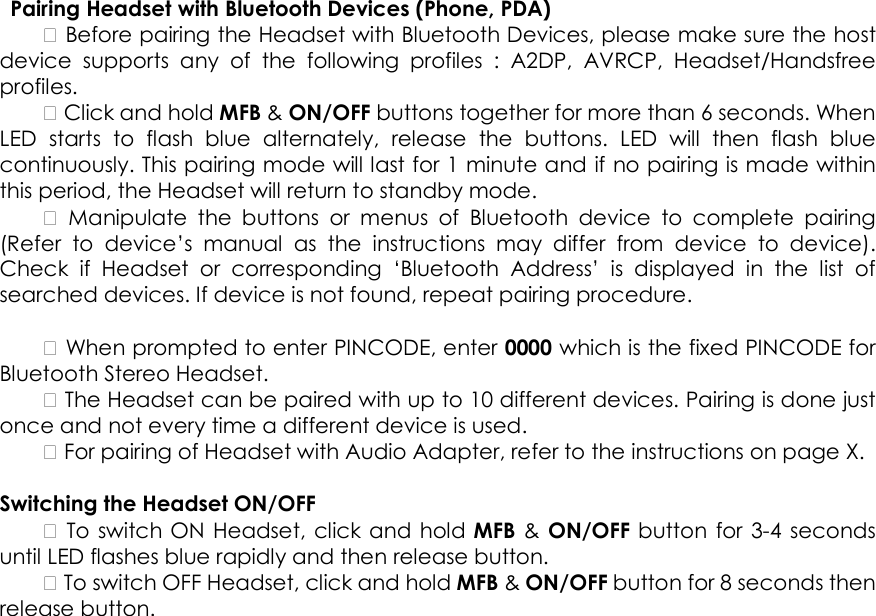
  Pairing Headset with Bluetooth Devices (Phone, PDA)     Before pairing the Headset with Bluetooth Devices, please make sure the host device  supports  any  of  the  following  profiles  :  A2DP,  AVRCP,  Headset/Handsfree profiles.     Click and hold MFB & ON/OFF buttons together for more than 6 seconds. When LED  starts  to  flash  blue  alternately,  release  the  buttons.  LED  will  then  flash  blue continuously. This pairing mode will last for 1 minute and if no pairing is made within this period, the Headset will return to standby mode.      Manipulate  the  buttons  or  menus  of  Bluetooth  device  to  complete  pairing (Refer  to  device’s  manual  as  the  instructions  may  differ  from  device  to  device). Check  if  Headset  or  corresponding  ‘Bluetooth  Address’  is  displayed  in  the  list  of searched devices. If device is not found, repeat pairing procedure.      When prompted to enter PINCODE, enter 0000 which is the fixed PINCODE for Bluetooth Stereo Headset.     The Headset can be paired with up to 10 different devices. Pairing is done just once and not every time a different device is used.     For pairing of Headset with Audio Adapter, refer to the instructions on page X.    Switching the Headset ON/OFF     To switch ON Headset, click and hold MFB &  ON/OFF button  for 3-4 seconds until LED flashes blue rapidly and then release button.     To switch OFF Headset, click and hold MFB & ON/OFF button for 8 seconds then release button.
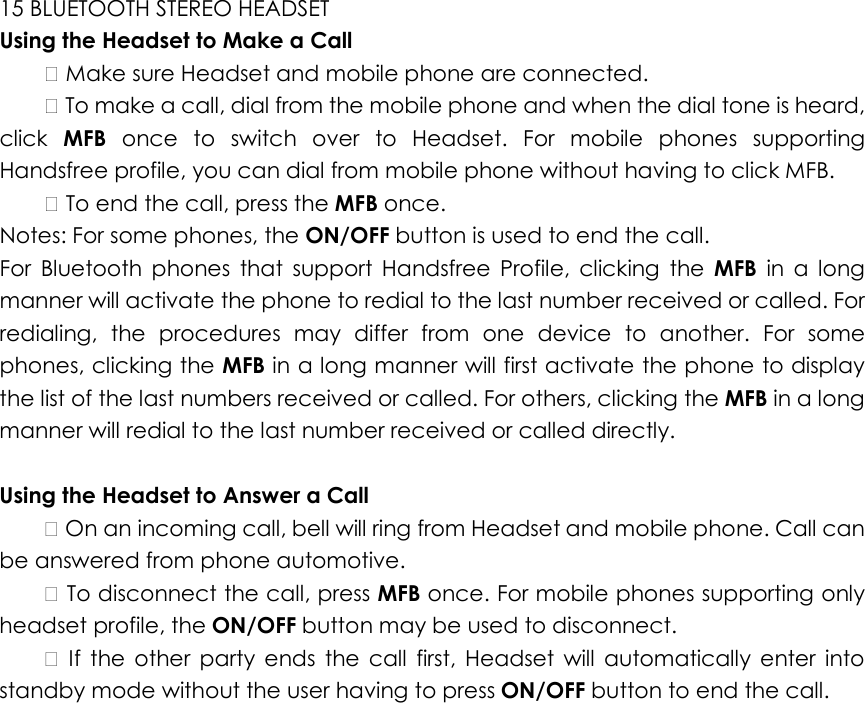
15 BLUETOOTH STEREO HEADSET   Using the Headset to Make a Call     Make sure Headset and mobile phone are connected.     To make a call, dial from the mobile phone and when the dial tone is heard, click  MFB  once  to  switch  over  to  Headset.  For  mobile  phones  supporting Handsfree profile, you can dial from mobile phone without having to click MFB.     To end the call, press the MFB once.   Notes: For some phones, the ON/OFF button is used to end the call.   For  Bluetooth  phones  that  support  Handsfree  Profile,  clicking  the  MFB  in  a  long manner will activate the phone to redial to the last number received or called. For redialing,  the  procedures  may  differ  from  one  device  to  another.  For  some phones, clicking the MFB in a long manner will first activate the phone to display the list of the last numbers received or called. For others, clicking the MFB in a long manner will redial to the last number received or called directly.    Using the Headset to Answer a Call     On an incoming call, bell will ring from Headset and mobile phone. Call can be answered from phone automotive.     To disconnect the call, press MFB once. For mobile phones supporting only headset profile, the ON/OFF button may be used to disconnect.      If  the  other  party  ends  the  call  first,  Headset  will  automatically  enter  into standby mode without the user having to press ON/OFF button to end the call.

Navigation menu