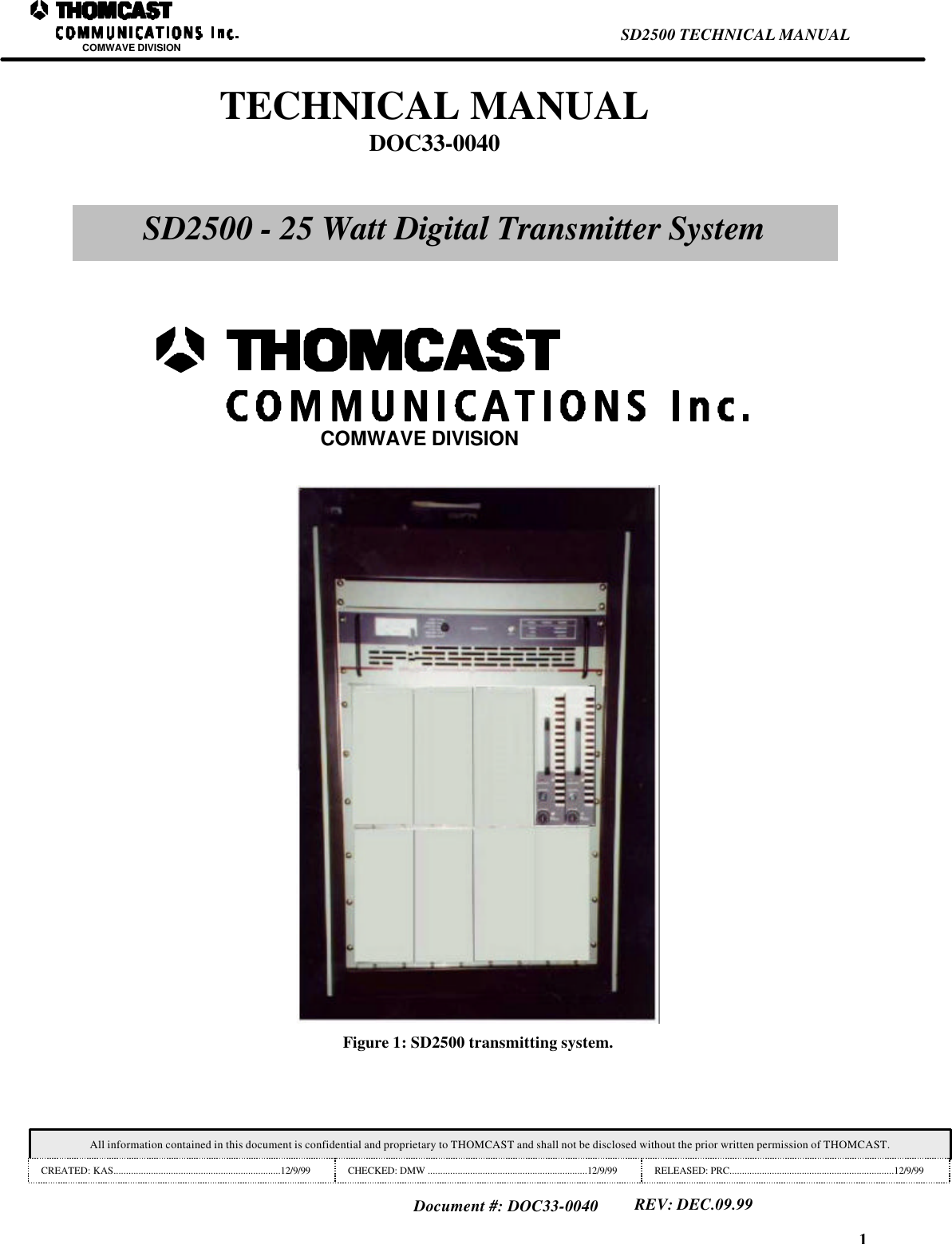
Thomson Broadcast and Multimedia 8BUSD2500B 25 watt digital transmitter system User Manual 33 0040 SD2500 manual

Thomson Broadcast & Multimedia, Inc. 25 watt digital transmitter system 33 0040 SD2500 manual

manual

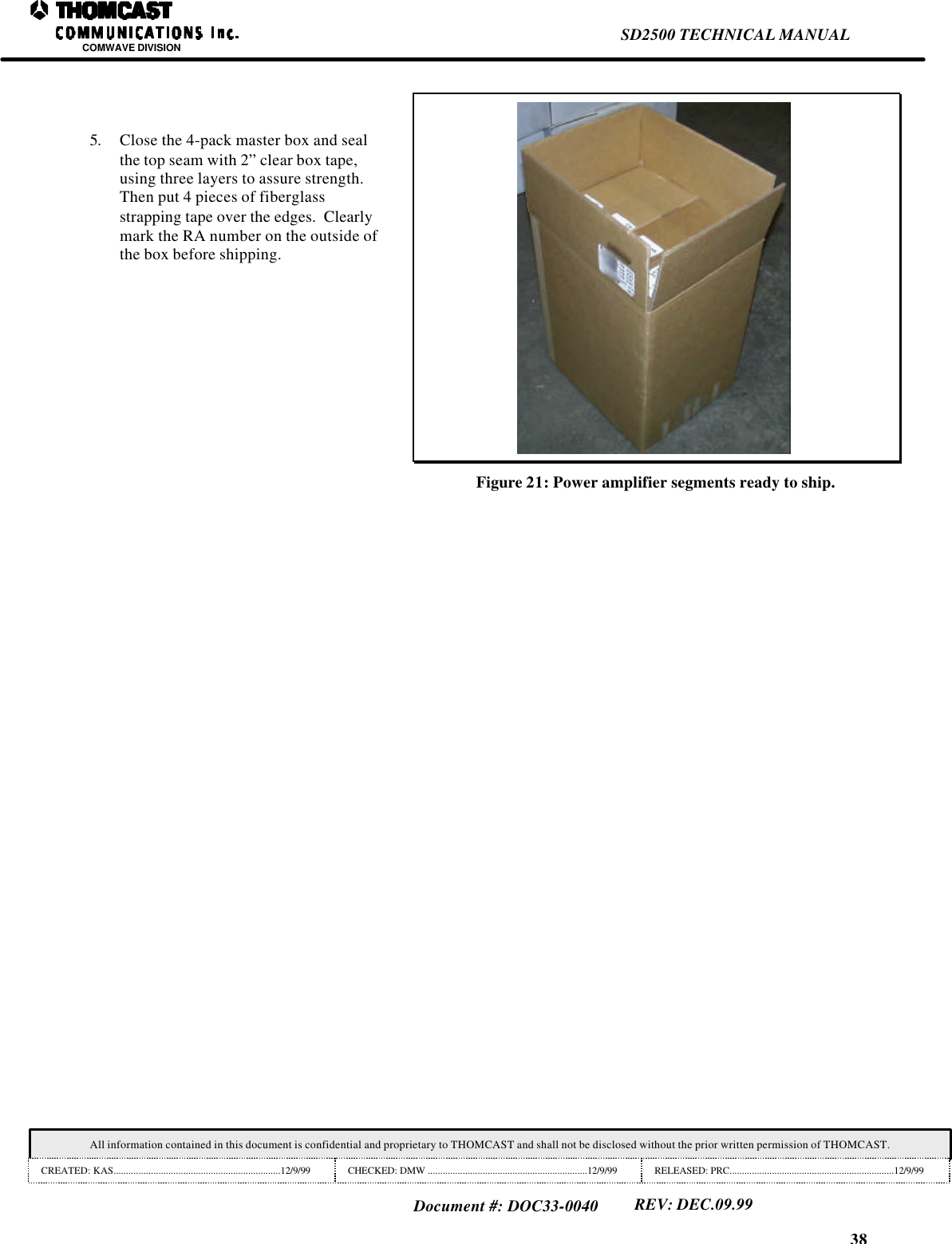
38SD2500 TECHNICAL MANUALCOMWAVE DIVISIONAll information contained in this document is confidential and proprietary to THOMCAST and shall not be disclosed without the prior written permission of THOMCAST.CREATED: KAS...................................................................12/9/99 CHECKED: DMW ................................................................12/9/99 RELEASED: PRC..................................................................12/9/99Document #: DOC33-0040REV: DEC.09.995. Close the 4-pack master box and sealthe top seam with 2” clear box tape,using three layers to assure strength.Then put 4 pieces of fiberglassstrapping tape over the edges.  Clearlymark the RA number on the outside ofthe box before shipping.Figure 21: Power amplifier segments ready to ship.
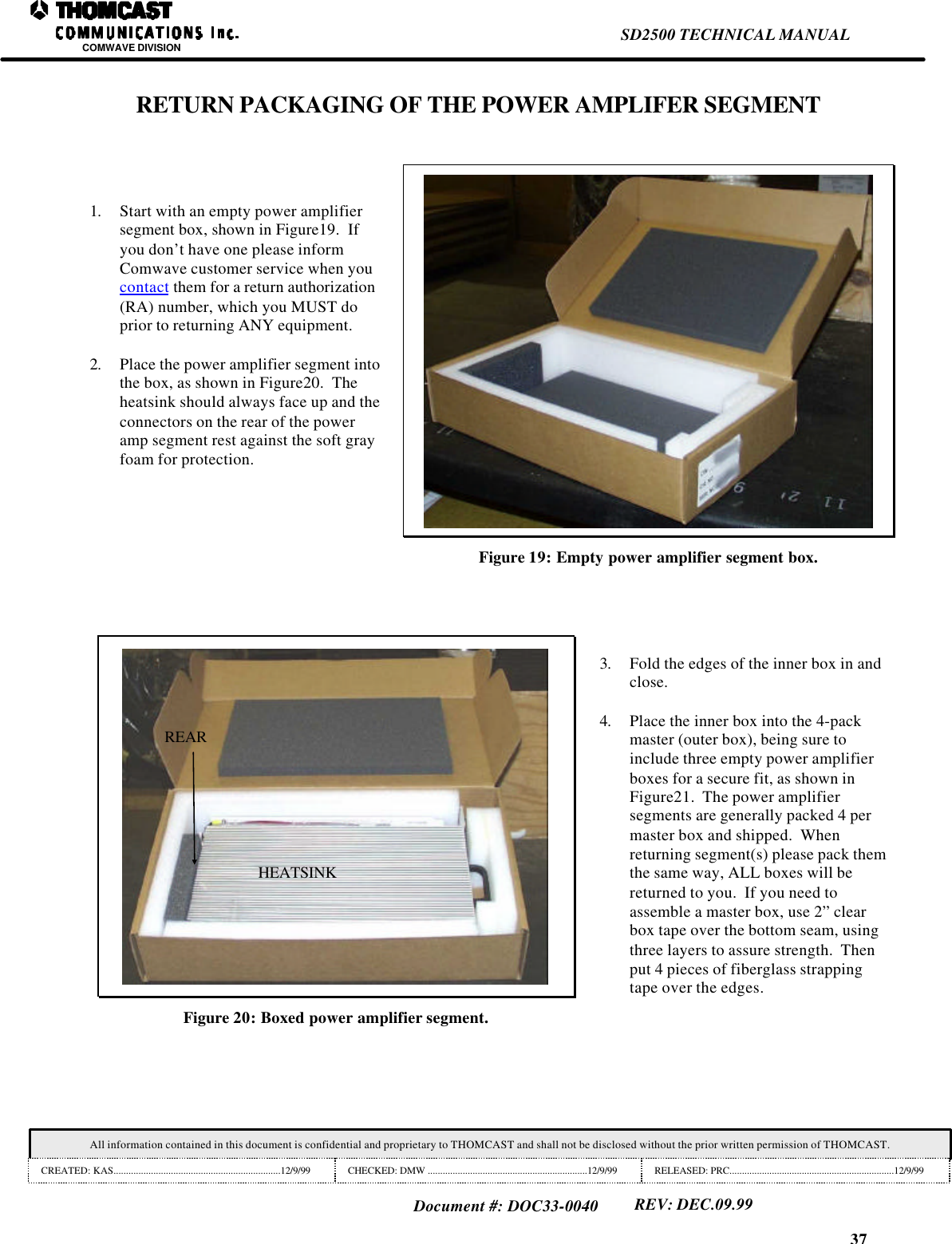
37SD2500 TECHNICAL MANUALCOMWAVE DIVISIONAll information contained in this document is confidential and proprietary to THOMCAST and shall not be disclosed without the prior written permission of THOMCAST.CREATED: KAS...................................................................12/9/99 CHECKED: DMW ................................................................12/9/99 RELEASED: PRC..................................................................12/9/99Document #: DOC33-0040REV: DEC.09.99RETURN PACKAGING OF THE POWER AMPLIFER SEGMENT1. Start with an empty power amplifiersegment box, shown in Figure19.  Ifyou don’t have one please informComwave customer service when youcontact them for a return authorization(RA) number, which you MUST doprior to returning ANY equipment.2. Place the power amplifier segment intothe box, as shown in Figure20.  Theheatsink should always face up and theconnectors on the rear of the poweramp segment rest against the soft grayfoam for protection.Figure 19: Empty power amplifier segment box.HEATSINKREARFigure 20: Boxed power amplifier segment.3. Fold the edges of the inner box in andclose.4. Place the inner box into the 4-packmaster (outer box), being sure toinclude three empty power amplifierboxes for a secure fit, as shown inFigure21.  The power amplifiersegments are generally packed 4 permaster box and shipped.  Whenreturning segment(s) please pack themthe same way, ALL boxes will bereturned to you.  If you need toassemble a master box, use 2” clearbox tape over the bottom seam, usingthree layers to assure strength.  Thenput 4 pieces of fiberglass strappingtape over the edges.
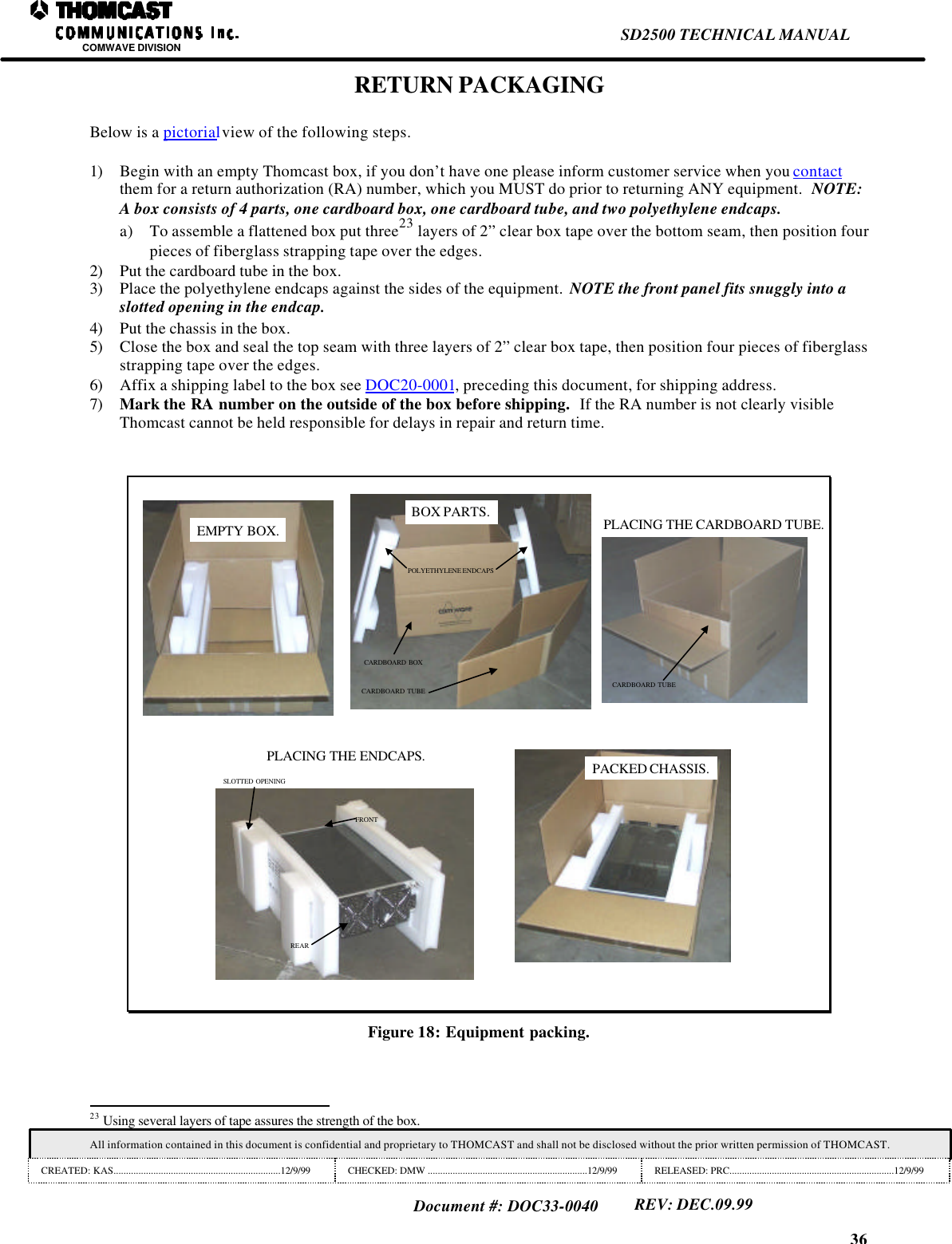
36SD2500 TECHNICAL MANUALCOMWAVE DIVISIONAll information contained in this document is confidential and proprietary to THOMCAST and shall not be disclosed without the prior written permission of THOMCAST.CREATED: KAS...................................................................12/9/99 CHECKED: DMW ................................................................12/9/99 RELEASED: PRC..................................................................12/9/99Document #: DOC33-0040REV: DEC.09.99RETURN PACKAGINGBelow is a pictorial view of the following steps.1) Begin with an empty Thomcast box, if you don’t have one please inform customer service when you contactthem for a return authorization (RA) number, which you MUST do prior to returning ANY equipment.  NOTE:A box consists of 4 parts, one cardboard box, one cardboard tube, and two polyethylene endcaps.a) To assemble a flattened box put three23 layers of 2” clear box tape over the bottom seam, then position fourpieces of fiberglass strapping tape over the edges.2) Put the cardboard tube in the box.3) Place the polyethylene endcaps against the sides of the equipment.  NOTE the front panel fits snuggly into aslotted opening in the endcap.4) Put the chassis in the box.5) Close the box and seal the top seam with three layers of 2” clear box tape, then position four pieces of fiberglassstrapping tape over the edges.6) Affix a shipping label to the box see DOC20-0001, preceding this document, for shipping address.7) Mark the RA number on the outside of the box before shipping.  If the RA number is not clearly visibleThomcast cannot be held responsible for delays in repair and return time.EMPTY BOX.CARDBOARD BOXCARDBOARD TUBEPOLYETHYLENE ENDCAPSBOX PARTS.CARDBOARD TUBEPLACING THE CARDBOARD TUBE.REARFRONTSLOTTED OPENINGPLACING THE ENDCAPS. PACKED CHASSIS.Figure 18: Equipment packing.                                                                23 Using several layers of tape assures the strength of the box.
35SD2500 TECHNICAL MANUALCOMWAVE DIVISIONAll information contained in this document is confidential and proprietary to THOMCAST and shall not be disclosed without the prior written permission of THOMCAST.CREATED: KAS...................................................................12/9/99 CHECKED: DMW ................................................................12/9/99 RELEASED: PRC..................................................................12/9/99Document #: DOC33-0040REV: DEC.09.99CUSTOMER SERVICEDOC20-0001CONTACT INFORMATIONDURING BUSINESS HOURSInquiries may be directed to Thomcast Communications, Comwave Division during business hours, 8 am to 5 pmMonday through Friday.  When the automated attendant answers you will be given the option of dialing your partydirect or speaking with the operator.AFTER BUSINESS HOURSIf you need emergency assistance due to equipment shutdown or malfunction, customer support personnel areavailable 24 hours a day.  Call Thomcast at one of the numbers listed below; when the automated attendant answerspress 6, leave your name, company name, phone number, equipment model number(s), and a brief description of theproblem you’re encountering.  When you hang up the system will automatically page the on-call technician who willthen return your call in a timely manner.  You can listen to the message prompt for other options as well, however,for emergency assistance you MUST use option 6.Thomcast Communications, Comwave DivisionCrestwood Industrial Park, 395 Oakhill RoadMountaintop, PA  187071-800-266-9283 USA & Canada1-570-474-6751 International21 & USA(Please note, as of 12/98, our area code changed from 717 to 570)1-570-474-5469 FAX(Please note, as of 12/98, our area code changed from 717 to 570)COMMENTS/SUGGESTIONSPlease forward comments regarding documentation content and/or layout, or suggestions to improve Thomcastpublications to ksimeone@thomcastcom.com.EQUIPMENT RETURNSIf the equipment requires return for factory service, please follow the guidelines listed.  Thomcast cannot be heldresponsible for damaged equipment received due to improper packing; contact Thomcast with any questions orconcerns.1.  Contact Thomcast: Call Thomcast to report the problem and to  obtain a “Return Authorization”number22 (RA).  This enables accurate tracking and identity of returned equipment for prompt and efficientservice.2.  Obtain packaging materials: Use original boxes and packing materials when returning any equipment.  This willsafeguard against most in-transit damages.  If original boxes and packing materials are not available, contactThomcast to obtain replacement materials prior to shipping, they are provided at a nominal cost.4. Pack equipment: Use original packing materials and directions provided.  Most equipment is packed in a boxwithin another box; this varies with each product.  Double boxing provides maximum protection.Caution:  Do not pack equipment using “PEANUTS” as filler it does NOT provide sufficient protectionduring shipping.  Rough handling by the carrier may cause permanent damage to the equipment.Thomcast cannot be held responsible for damaged equipment received due to improper packing.                                                                21 International calls must dial the country code before the phone number, i.e. 001-570-474-6751.22 If you do not obtain an RA number prior to returning equipment Thomcast cannot be held responsible for delays in repair and return time.
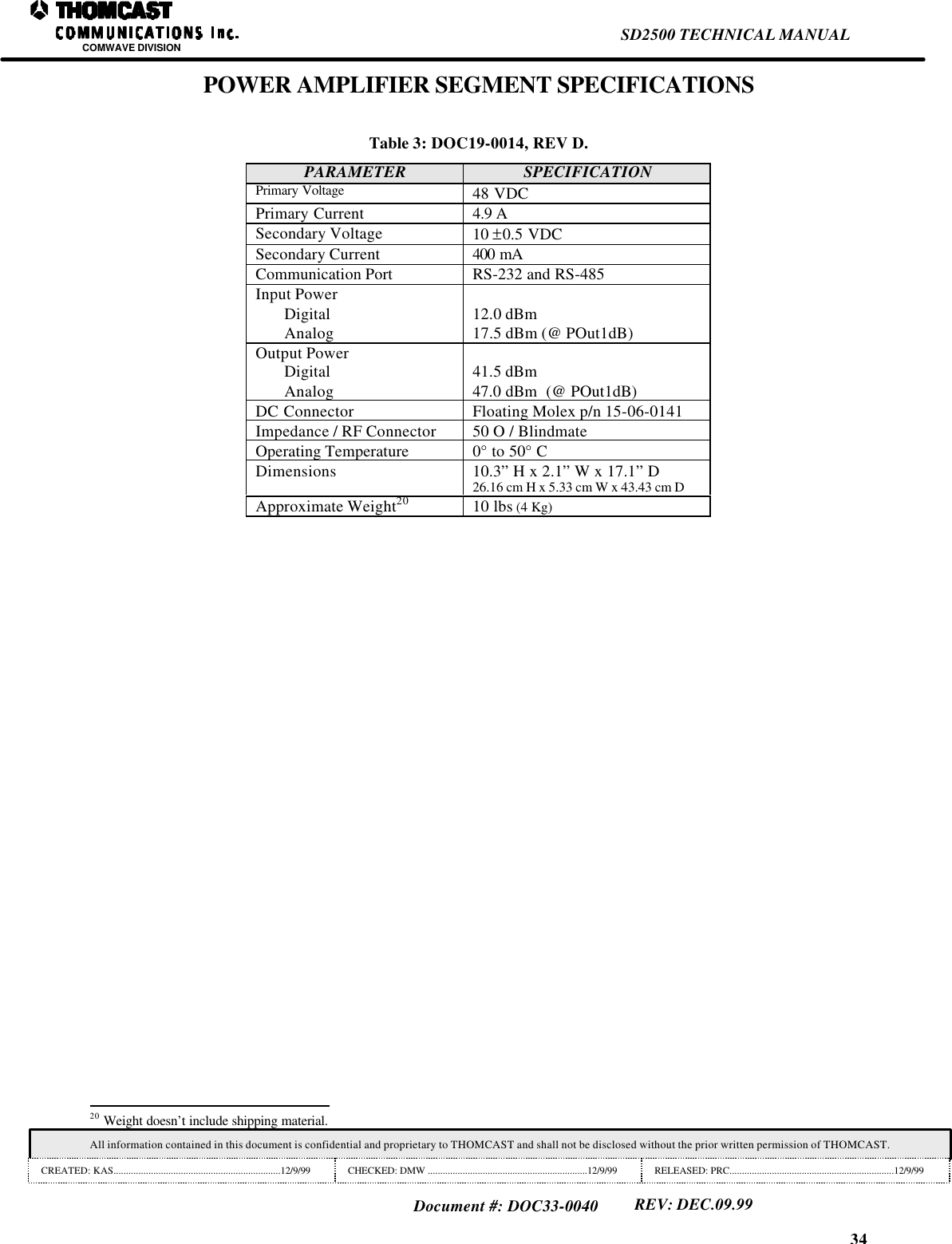
34SD2500 TECHNICAL MANUALCOMWAVE DIVISIONAll information contained in this document is confidential and proprietary to THOMCAST and shall not be disclosed without the prior written permission of THOMCAST.CREATED: KAS...................................................................12/9/99 CHECKED: DMW ................................................................12/9/99 RELEASED: PRC..................................................................12/9/99Document #: DOC33-0040REV: DEC.09.99POWER AMPLIFIER SEGMENT SPECIFICATIONSTable 3: DOC19-0014, REV D.PARAMETER SPECIFICATIONPrimary Voltage 48 VDCPrimary Current 4.9 ASecondary Voltage 10 ±0.5 VDCSecondary Current 400 mACommunication Port RS-232 and RS-485Input PowerDigitalAnalog 12.0 dBm17.5 dBm (@ POut1dB)Output PowerDigitalAnalog41.5 dBm47.0 dBm  (@ POut1dB)DC Connector Floating Molex p/n 15-06-0141Impedance / RF Connector 50 O / BlindmateOperating Temperature 0° to 50° CDimensions 10.3” H x 2.1” W x 17.1” D26.16 cm H x 5.33 cm W x 43.43 cm DApproximate Weight20 10 lbs (4 Kg)                                                                20 Weight doesn’t include shipping material.
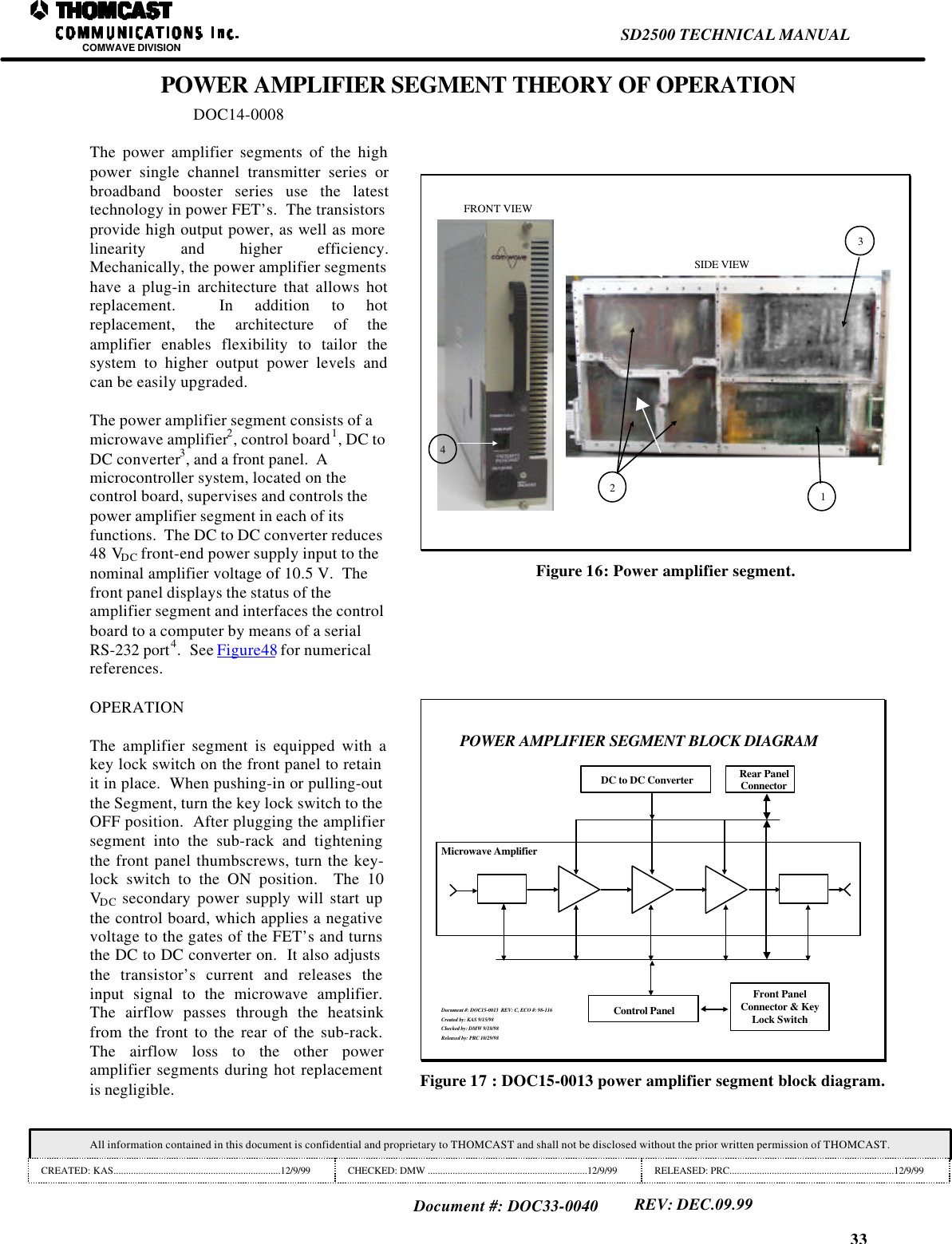
33SD2500 TECHNICAL MANUALCOMWAVE DIVISIONAll information contained in this document is confidential and proprietary to THOMCAST and shall not be disclosed without the prior written permission of THOMCAST.CREATED: KAS...................................................................12/9/99 CHECKED: DMW ................................................................12/9/99 RELEASED: PRC..................................................................12/9/99Document #: DOC33-0040REV: DEC.09.99POWER AMPLIFIER SEGMENT THEORY OF OPERATIONDOC14-0008The power amplifier segments of the highpower single channel transmitter series orbroadband booster series use the latesttechnology in power FET’s.  The transistorsprovide high output power, as well as morelinearity and higher efficiency.Mechanically, the power amplifier segmentshave a plug-in architecture that allows hotreplacement.  In addition to hotreplacement, the architecture of theamplifier enables flexibility to tailor thesystem to higher output power levels andcan be easily upgraded.The power amplifier segment consists of amicrowave amplifier2, control board1, DC toDC converter3, and a front panel.  Amicrocontroller system, located on thecontrol board, supervises and controls thepower amplifier segment in each of itsfunctions.  The DC to DC converter reduces48 VDC front-end power supply input to thenominal amplifier voltage of 10.5 V.  Thefront panel displays the status of theamplifier segment and interfaces the controlboard to a computer by means of a serialRS-232 port4.  See Figure48 for numericalreferences.123FRONT VIEWSIDE VIEW4Figure 16: Power amplifier segment.OPERATIONThe amplifier segment is equipped with akey lock switch on the front panel to retainit in place.  When pushing-in or pulling-outthe Segment, turn the key lock switch to theOFF position.  After plugging the amplifiersegment into the sub-rack and tighteningthe front panel thumbscrews, turn the key-lock switch to the ON position.  The 10VDC secondary power supply will start upthe control board, which applies a negativevoltage to the gates of the FET’s and turnsthe DC to DC converter on.  It also adjuststhe transistor’s current and releases theinput signal to the microwave amplifier.The airflow passes through the heatsinkfrom the front to the rear of the sub-rack.The airflow loss to the other poweramplifier segments during hot replacementis negligible.POWER AMPLIFIER SEGMENT BLOCK DIAGRAMMicrowave AmplifierRear PanelConnectorDC to DC ConverterControl PanelFront PanelConnector & KeyLock SwitchDocument #: DOC15-0013  REV: C, ECO #: 98-116Created by: KAS 9/15/98Checked by: DMW 9/18/98Released by: PRC 10/29/98Figure 17 : DOC15-0013 power amplifier segment block diagram.
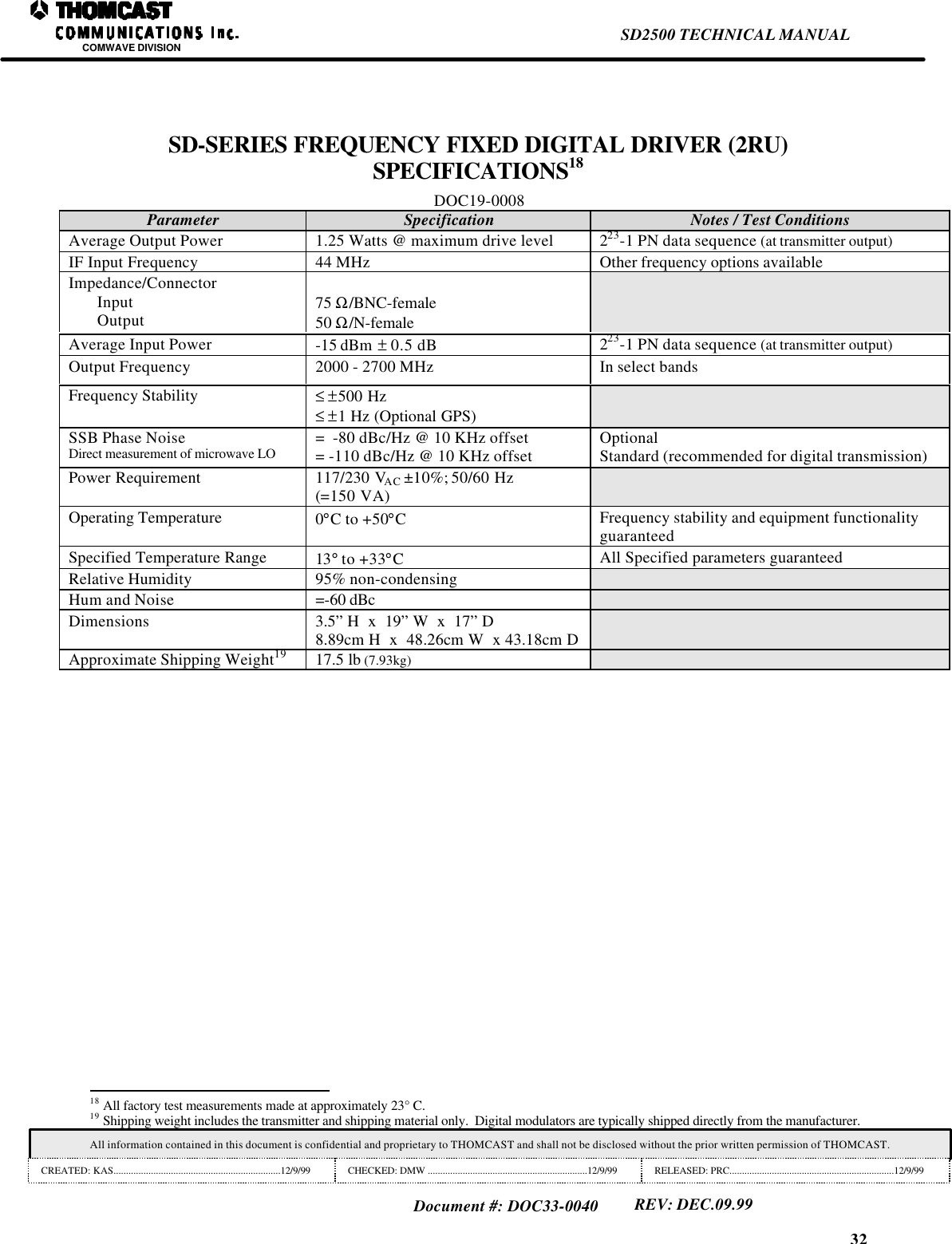
32SD2500 TECHNICAL MANUALCOMWAVE DIVISIONAll information contained in this document is confidential and proprietary to THOMCAST and shall not be disclosed without the prior written permission of THOMCAST.CREATED: KAS...................................................................12/9/99 CHECKED: DMW ................................................................12/9/99 RELEASED: PRC..................................................................12/9/99Document #: DOC33-0040REV: DEC.09.99SD-SERIES FREQUENCY FIXED DIGITAL DRIVER (2RU)SPECIFICATIONS18DOC19-0008Parameter Specification Notes / Test ConditionsAverage Output Power 1.25 Watts @ maximum drive level 223-1 PN data sequence (at transmitter output)IF Input Frequency 44 MHz Other frequency options availableImpedance/ConnectorInputOutput 75 Ω/BNC-female50 Ω/N-femaleAverage Input Power -15 dBm  ± 0.5 dB 223-1 PN data sequence (at transmitter output)Output Frequency 2000 - 2700 MHz In select bandsFrequency Stability ≤ ±500 Hz≤ ±1 Hz (Optional GPS)SSB Phase NoiseDirect measurement of microwave LO =  -80 dBc/Hz @ 10 KHz offset= -110 dBc/Hz @ 10 KHz offset OptionalStandard (recommended for digital transmission)Power Requirement 117/230 VAC ±10%; 50/60 Hz(=150 VA)Operating Temperature 0°C to +50°CFrequency stability and equipment functionalityguaranteedSpecified Temperature Range 13° to +33°CAll Specified parameters guaranteedRelative Humidity 95% non-condensingHum and Noise =-60 dBcDimensions 3.5” H  x  19” W  x  17” D8.89cm H  x  48.26cm W  x 43.18cm DApproximate Shipping Weight19 17.5 lb (7.93kg)                                                                18 All factory test measurements made at approximately 23° C.19 Shipping weight includes the transmitter and shipping material only.  Digital modulators are typically shipped directly from the manufacturer.
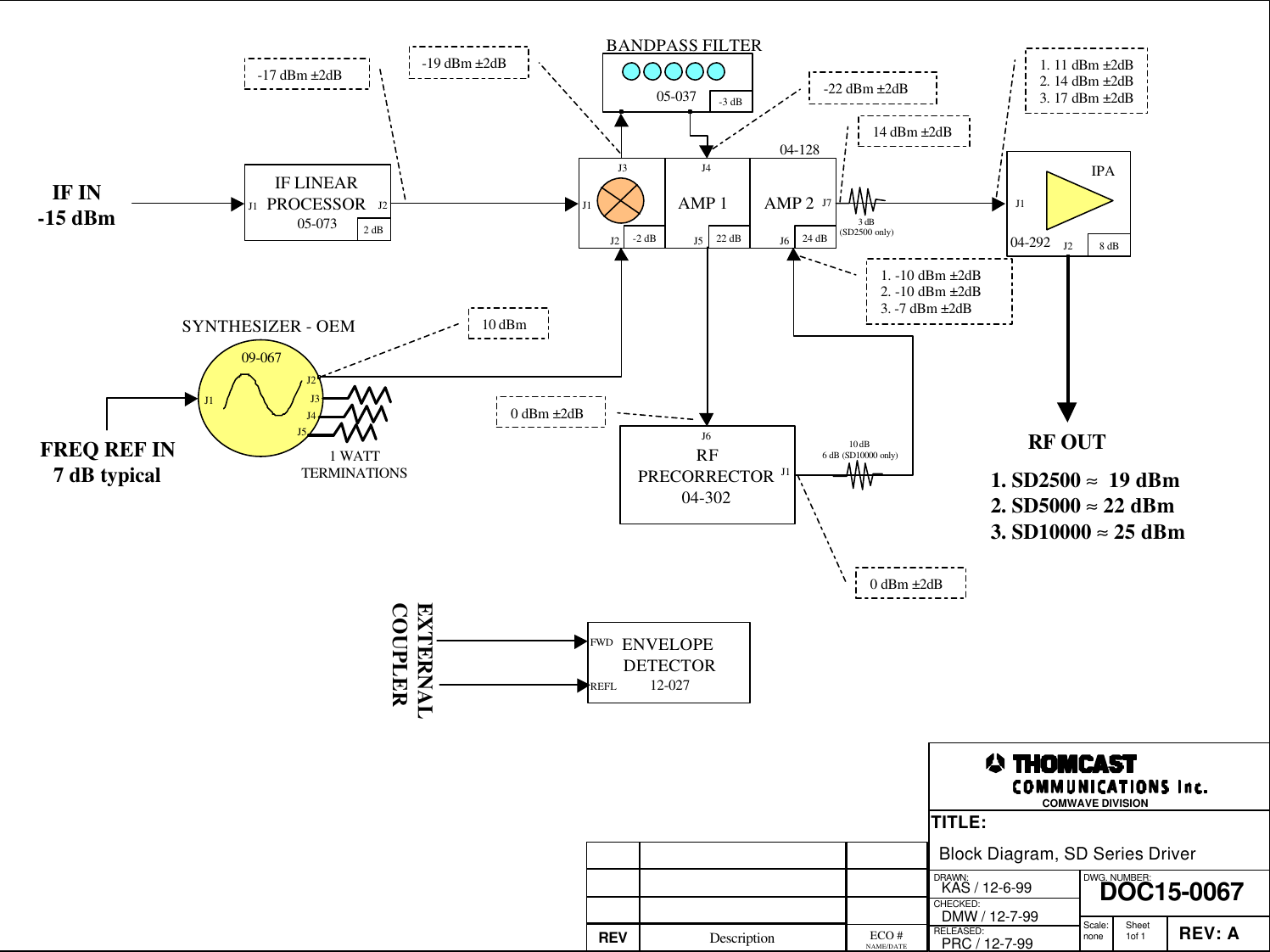
DRAWN:RELEASED:CHECKED:DWG. NUMBER:TITLE:REV: ADOC15-0067Block Diagram, SD Series DriverKAS / 12-6-99PRC / 12-7-99DMW / 12-7-99 Scale:none Sheet1of 1COMWAVE DIVISIONREFLENVELOPE DETECTOR12-027FWDEXTERNALCOUPLERIF IN-15 dBm05-037BANDPASS FILTERJ1J2J1J3 J4J5 J6J7 J1J2IPARF OUTIF LINEARPROCESSOR05-073J2J1J1J5J4J3J21 WATTTERMINATIONSSYNTHESIZER - OEMFREQ REF IN7 dB typical04-12809-067ECO #NAME/DATEDescriptionREV2 dBAMP 1 AMP 2-2 dB 22 dB 24 dB-3 dB8 dB10 dBm1. SD2500 ≈  19 dBm2. SD5000 ≈ 22 dBm3. SD10000 ≈ 25 dBmRFPRECORRECTOR04-3021. 11 dBm ±2dB2. 14 dBm ±2dB3. 17 dBm ±2dB04-2921. -10 dBm ±2dB2. -10 dBm ±2dB3. -7 dBm ±2dB-19 dBm ±2dB-22 dBm ±2dB-17 dBm ±2dB0 dBm ±2dB0 dBm ±2dB10 dB 6 dB (SD10000 only)3 dB(SD2500 only)14 dBm ±2dBJ6
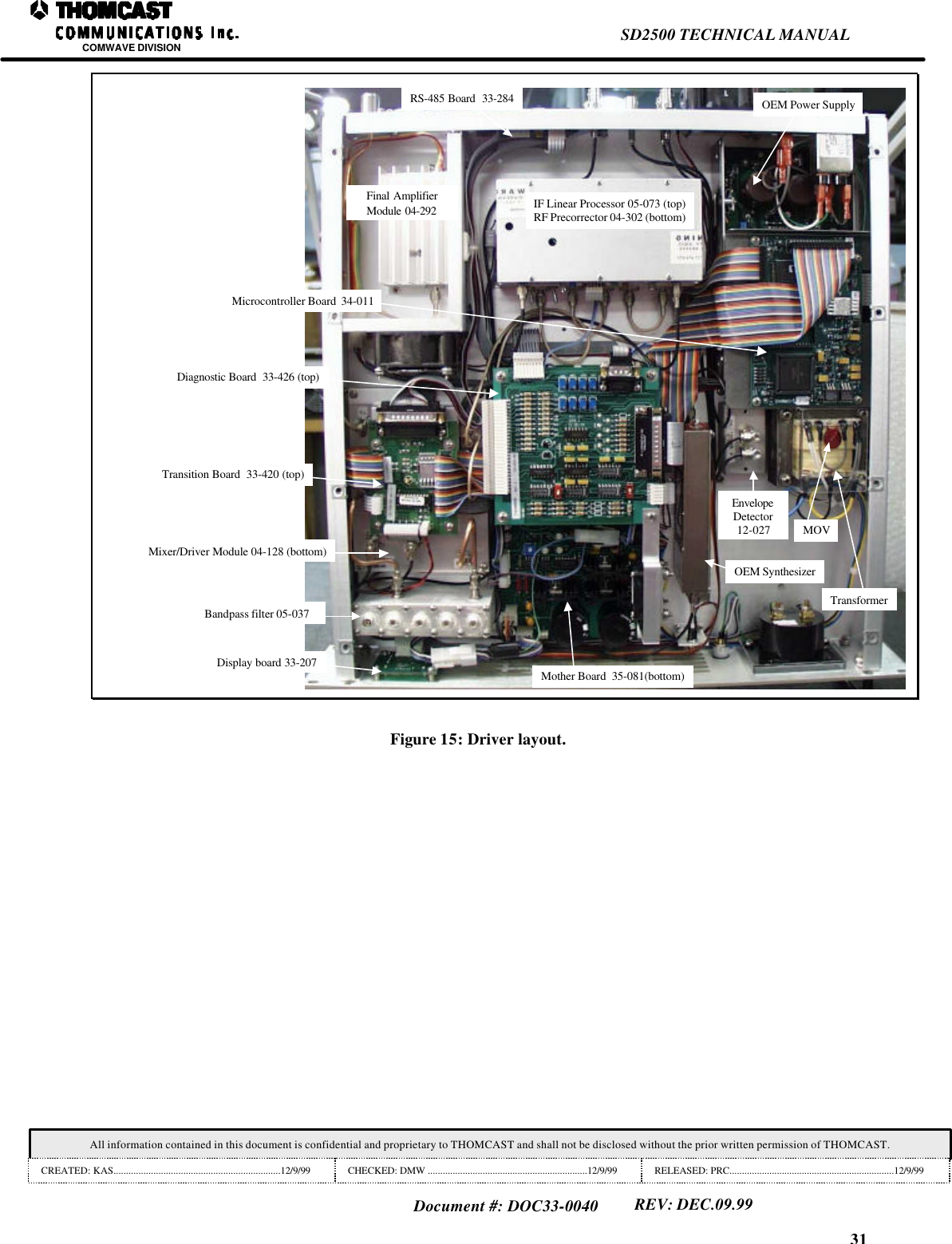
31SD2500 TECHNICAL MANUALCOMWAVE DIVISIONAll information contained in this document is confidential and proprietary to THOMCAST and shall not be disclosed without the prior written permission of THOMCAST.CREATED: KAS...................................................................12/9/99 CHECKED: DMW ................................................................12/9/99 RELEASED: PRC..................................................................12/9/99Document #: DOC33-0040REV: DEC.09.99IF Linear Processor 05-073 (top)RF Precorrector 04-302 (bottom)Final AmplifierModule 04-292Bandpass filter 05-037Display board 33-207RS-485 Board  33-284 OEM Power SupplyMicrocontroller Board  34-011EnvelopeDetector12-027 MOVOEM SynthesizerMother Board  35-081(bottom)Transition Board  33-420 (top)Diagnostic Board  33-426 (top)Mixer/Driver Module 04-128 (bottom)TransformerFigure 15: Driver layout.
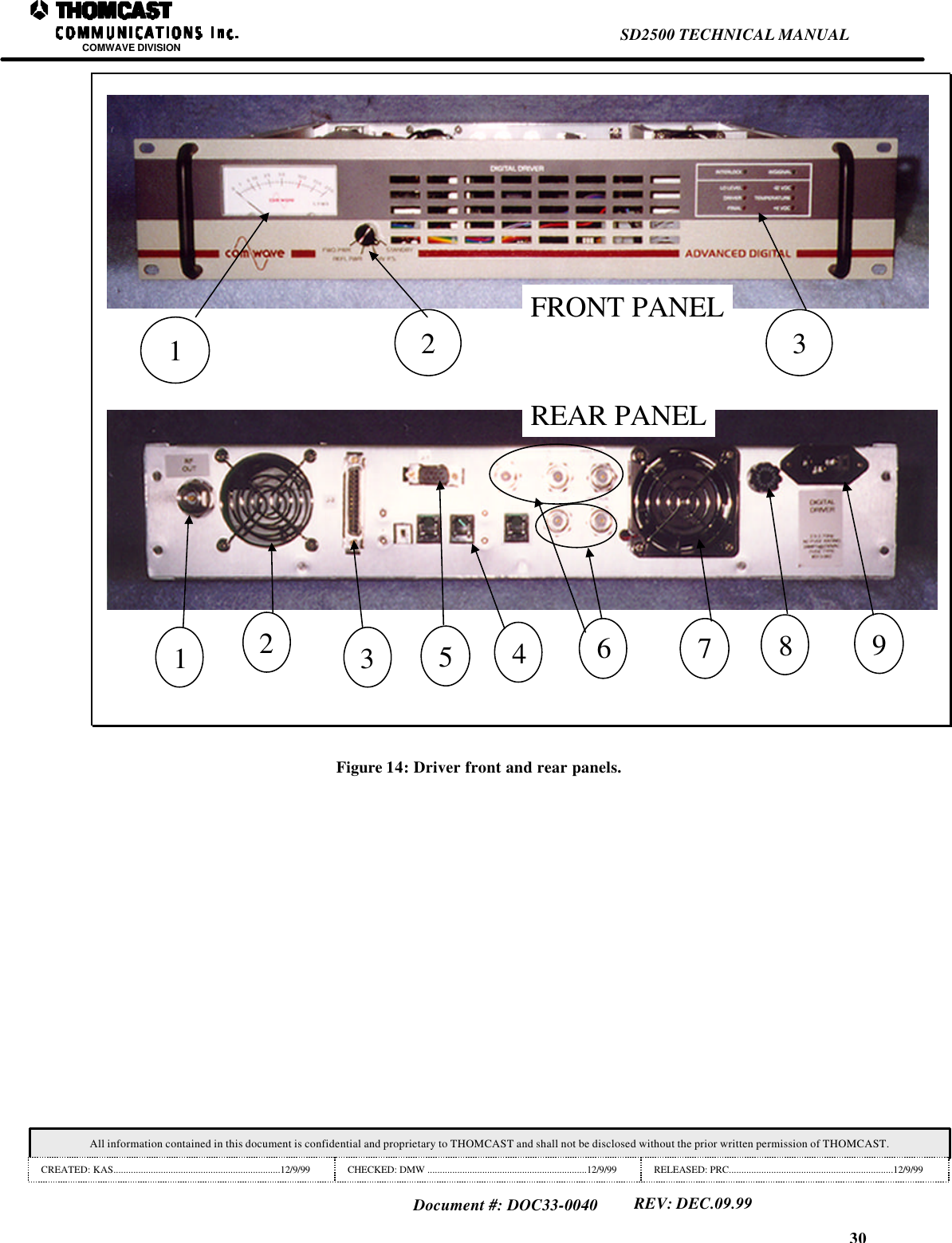
30SD2500 TECHNICAL MANUALCOMWAVE DIVISIONAll information contained in this document is confidential and proprietary to THOMCAST and shall not be disclosed without the prior written permission of THOMCAST.CREATED: KAS...................................................................12/9/99 CHECKED: DMW ................................................................12/9/99 RELEASED: PRC..................................................................12/9/99Document #: DOC33-0040REV: DEC.09.9912 3123456 7 89FRONT PANELREAR PANELFigure 14: Driver front and rear panels.
29SD2500 TECHNICAL MANUALCOMWAVE DIVISIONAll information contained in this document is confidential and proprietary to THOMCAST and shall not be disclosed without the prior written permission of THOMCAST.CREATED: KAS...................................................................12/9/99 CHECKED: DMW ................................................................12/9/99 RELEASED: PRC..................................................................12/9/99Document #: DOC33-0040REV: DEC.09.99The following status monitoring RED LED’s remain OFF during normal operation.  When a failure is detected, theappropriate LED will illuminate RED.  Controlled automatic transmitter shut down is a function of failure severity.Presence of a RED status LED with normal meter readings and/or normal transmitter operation indicates an out oftolerance condition with that circuit.TEMPERATURE: Illuminates RED when internal chassis temperature exceeds 140° Fahrenheit(60° Celsius).  Transmitter shut down occurs.  Allow transmitter to cool.  Transmitter reset can beattempted by rotating the front panel function switch to STANDBY.LO LEVEL: Illuminates RED when the local oscillator loses phase lock.  Transmitter shut downoccurs.DRIVER: Illuminates RED to indicate a failure or an out of tolerance condition with the drivermodule.  Transmitter usually operates at reduced output power.FINAL: Illuminates RED to indicate a failure or an out of tolerance condition with theintermediate power module.  Transmitter usually operates at reduced output power.+11 VDC: Illuminates RED when a failure in the + 11 volt DC main switching power supply or anout of tolerance condition has been detected by the diagnostic and monitoring circuitry.-12 VDC:Illuminates RED when a failure in the -12 VDC gate bias/interlock has been detected.REAR PANEL1. RF OUT: RF output connector (Female N type).2. GRILL: Air outlet vent for cooling.3. J2: Female 25 pin D-Sub connector for diagnostics monitoring.4. ACCESS HOLES: For three phone jack connectors and a termination switch from the RS 485 Board used forcommunication to ComView Network.5. J1: Female nine pin D-Sub connector for system monitoring and control.6. INPUT CONNECTORS (FEMALE BNC’S):IF IN: Input signal from modulator.LO IN: Input signal provided by an external source.  (ONLY USED IN AGILE TRANSMITTER)FREQ REF: Input signal from an external frequency reference source.FWD PWR IN: RF sample from an external coupler.REFL PWR IN: RF sample from an external coupler.7. FAN: A rear mounted DC Fan provides switching power supply cooling.8. FUSE: Main line fuse location (2 amperes).9. AC INPUT: AC Line input power cord connector.
28SD2500 TECHNICAL MANUALCOMWAVE DIVISIONAll information contained in this document is confidential and proprietary to THOMCAST and shall not be disclosed without the prior written permission of THOMCAST.CREATED: KAS...................................................................12/9/99 CHECKED: DMW ................................................................12/9/99 RELEASED: PRC..................................................................12/9/99Document #: DOC33-0040REV: DEC.09.99DIGITAL DRIVER THEORY OF OPERATIONDOC14-0035The digital driver transmitter receives a digitized intermediate frequency signal typically at -15 dBm, which isupconverted to an S-band frequency.  The transmitter is capable of providing an output of 1.25 W average power.  Referto the block diagram for the RF signal path.The IF signal being received is sent to an IF linear processor pre-correcting for frequency response, group delay, anddetection of IF presence.  The IF linear processor output is applied to a mixer/amplifier module where it is mixed with amicrowave local oscillator.  A bandpass filter follows the mixer to prevent out-of-band products from being amplifiedand transmitted.  The filtered mixer/amplifier output drives the first intermediate power amplifier.  Then a microwaveprecorrector module introduces precorrection to reduce amplitude distortions of the power amplifier.  It contains an ALCcircuit for maintaining 100% output power over a +2 dB gain variation.  Both precorrection and ALC can be separatelyturned off by individual switch controls located on the module exterior.  Two more stages of amplification assure thecorrect level for the final intermediate power amplifier.The intermediate power amplifier is a broad band, fixed gain linear amplifier that does not require any tuning.  Anexternal coupler provides a metering sample to an envelope detector for forward and reflected powers through 3 dBisolation attenuators.  The average output power is dependent on the drive level needed by the power amplifier array toachieve rated power.FRONT AND REAR PANEL DESCRIPTIONSRefer to the Figure below for numerical references.FRONT PANEL1. METER: Provides a visual indication of transmitter status and performance of +11 VDC switching powersupply, peak forward power, or reflected power.  The meter is calibrated to display relative measurements.  Thefour-position rotary selector switch controls meter function.2. FUNCTION SWITCH: A four position, user selectable, rotary switch that controls front panel metermonitoring.  The following parameters are selectable for monitoring by the function switch.STANDBY: Disables transmitting.  Power remains applied to all circuits, except the microwaveamplifier modules.  Meter will read approximately 0 %.+ 11 V PS: Provides status of main switching power supply.  Meter reads 100 % indicating properswitching power supply voltage.REFL PWR: Relative reflected power measurement.  Readings of less than 10 % are typical.FWD PWR: Relative forward output power measurement.  100 % meter reading confirms correctoutput power.3. LED’s: Status monitoring LED’s which provide visual indication of operating parameters and internaldiagnostics.  The following status monitoring LED’s illuminate GREEN during normal operation.  Absence ofan LED indicates missing signal or parameter that results in a controlled automatic transmitter shut down.IN SIGNAL: Illuminates GREEN when IF is present or when the bypass switch on themotherboard is in bypass.INTERLOCK: Illuminates GREEN when Interlock Logic conditions are satisfied.  InterlockLogic conditions are satisfied when all Microwave Amplifier Modules have -12 V gate bias.
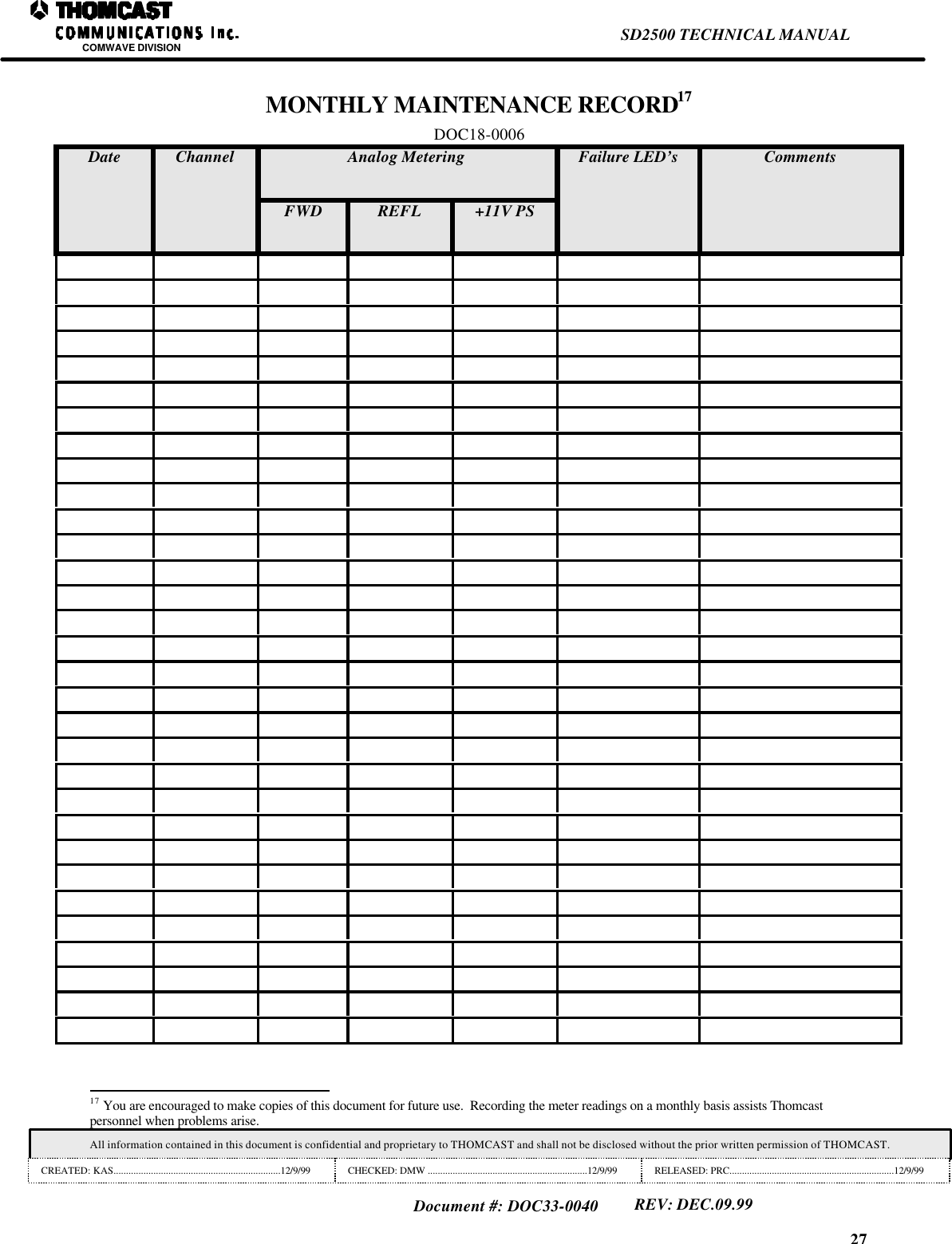
27SD2500 TECHNICAL MANUALCOMWAVE DIVISIONAll information contained in this document is confidential and proprietary to THOMCAST and shall not be disclosed without the prior written permission of THOMCAST.CREATED: KAS...................................................................12/9/99 CHECKED: DMW ................................................................12/9/99 RELEASED: PRC..................................................................12/9/99Document #: DOC33-0040REV: DEC.09.99MONTHLY MAINTENANCE RECORD17DOC18-0006Analog MeteringDate ChannelFWD REFL +11V PSFailure LED’s Comments                                                                17 You are encouraged to make copies of this document for future use.  Recording the meter readings on a monthly basis assists Thomcastpersonnel when problems arise.
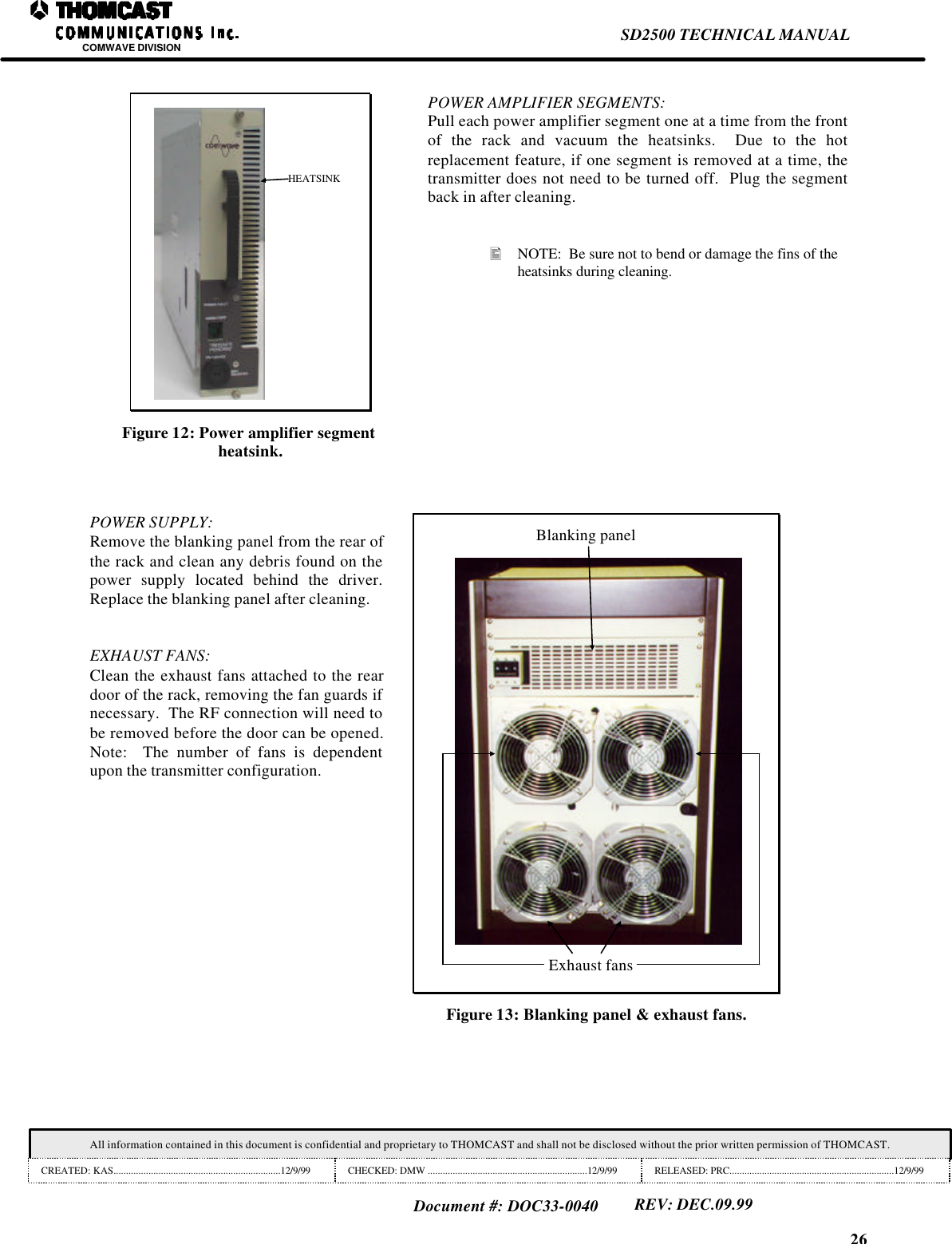
26SD2500 TECHNICAL MANUALCOMWAVE DIVISIONAll information contained in this document is confidential and proprietary to THOMCAST and shall not be disclosed without the prior written permission of THOMCAST.CREATED: KAS...................................................................12/9/99 CHECKED: DMW ................................................................12/9/99 RELEASED: PRC..................................................................12/9/99Document #: DOC33-0040REV: DEC.09.99HEATSINKFigure 12: Power amplifier segmentheatsink.POWER AMPLIFIER SEGMENTS:Pull each power amplifier segment one at a time from the frontof the rack and vacuum the heatsinks.  Due to the hotreplacement feature, if one segment is removed at a time, thetransmitter does not need to be turned off.  Plug the segmentback in after cleaning.• NOTE:  Be sure not to bend or damage the fins of theheatsinks during cleaning.POWER SUPPLY:Remove the blanking panel from the rear ofthe rack and clean any debris found on thepower supply located behind the driver.Replace the blanking panel after cleaning.EXHAUST FANS:Clean the exhaust fans attached to the reardoor of the rack, removing the fan guards ifnecessary.  The RF connection will need tobe removed before the door can be opened.Note:  The number of fans is dependentupon the transmitter configuration.Blanking panelExhaust fansFigure 13: Blanking panel & exhaust fans.
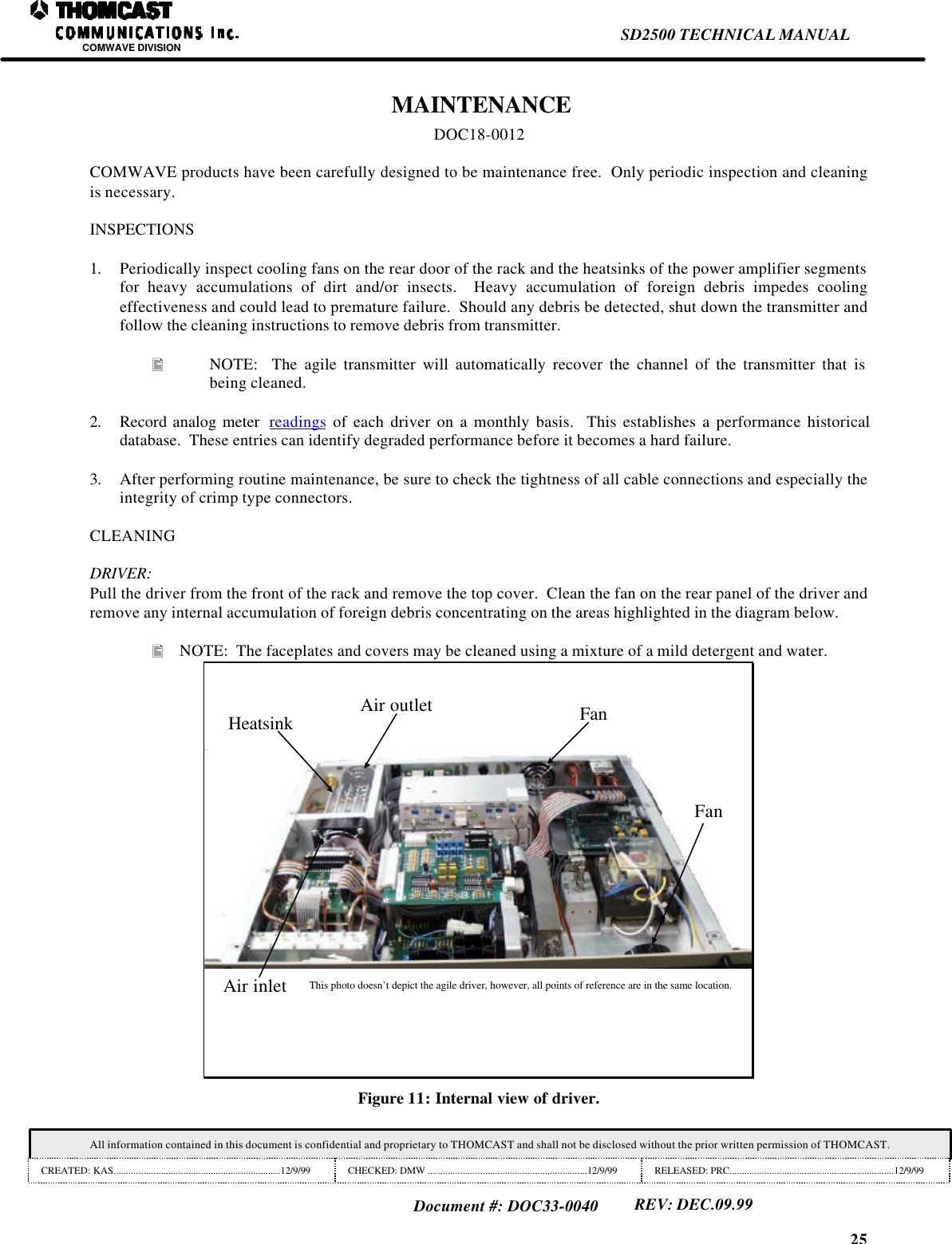
25SD2500 TECHNICAL MANUALCOMWAVE DIVISIONAll information contained in this document is confidential and proprietary to THOMCAST and shall not be disclosed without the prior written permission of THOMCAST.CREATED: KAS...................................................................12/9/99 CHECKED: DMW ................................................................12/9/99 RELEASED: PRC..................................................................12/9/99Document #: DOC33-0040REV: DEC.09.99 MAINTENANCEDOC18-0012COMWAVE products have been carefully designed to be maintenance free.  Only periodic inspection and cleaningis necessary.INSPECTIONS1. Periodically inspect cooling fans on the rear door of the rack and the heatsinks of the power amplifier segmentsfor heavy accumulations of dirt and/or insects.  Heavy accumulation of foreign debris impedes coolingeffectiveness and could lead to premature failure.  Should any debris be detected, shut down the transmitter andfollow the cleaning instructions to remove debris from transmitter.• NOTE:  The agile transmitter will automatically recover the channel of the transmitter that isbeing cleaned.2. Record analog meter  readings of each driver on a monthly basis.  This establishes a performance historicaldatabase.  These entries can identify degraded performance before it becomes a hard failure.3. After performing routine maintenance, be sure to check the tightness of all cable connections and especially theintegrity of crimp type connectors.CLEANINGDRIVER:Pull the driver from the front of the rack and remove the top cover.  Clean the fan on the rear panel of the driver andremove any internal accumulation of foreign debris concentrating on the areas highlighted in the diagram below.• NOTE:  The faceplates and covers may be cleaned using a mixture of a mild detergent and water.Air inletAir outletHeatsinkFanFanThis photo doesn’t depict the agile driver, however, all points of reference are in the same location.Figure 11: Internal view of driver.
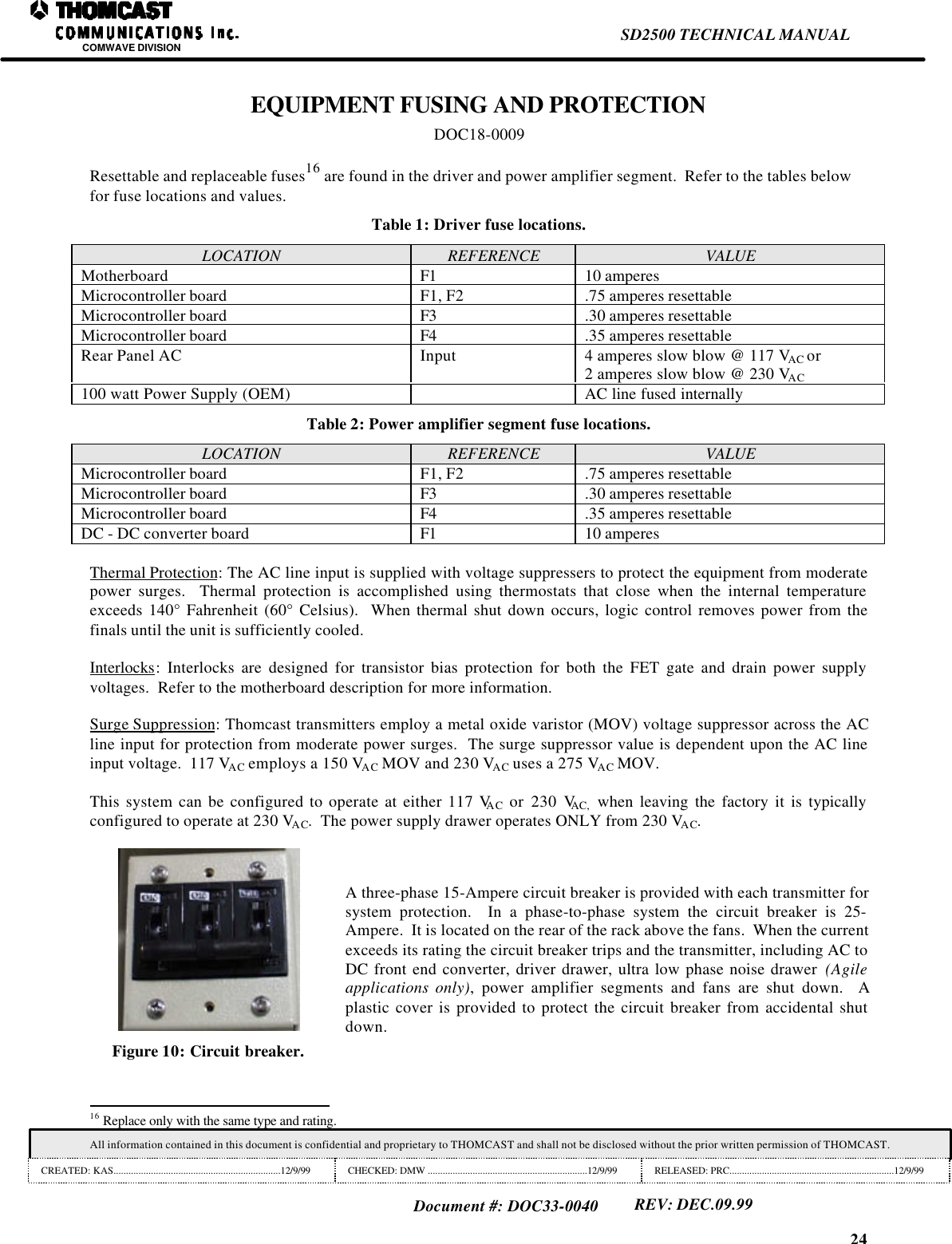
24SD2500 TECHNICAL MANUALCOMWAVE DIVISIONAll information contained in this document is confidential and proprietary to THOMCAST and shall not be disclosed without the prior written permission of THOMCAST.CREATED: KAS...................................................................12/9/99 CHECKED: DMW ................................................................12/9/99 RELEASED: PRC..................................................................12/9/99Document #: DOC33-0040REV: DEC.09.99EQUIPMENT FUSING AND PROTECTIONDOC18-0009Resettable and replaceable fuses16 are found in the driver and power amplifier segment.  Refer to the tables belowfor fuse locations and values.Table 1: Driver fuse locations.LOCATION REFERENCE VALUEMotherboard F1 10 amperesMicrocontroller board F1, F2 .75 amperes resettableMicrocontroller board F3 .30 amperes resettableMicrocontroller board F4 .35 amperes resettableRear Panel AC Input 4 amperes slow blow @ 117 VAC or2 amperes slow blow @ 230 VAC100 watt Power Supply (OEM) AC line fused internallyTable 2: Power amplifier segment fuse locations.LOCATION REFERENCE VALUEMicrocontroller board F1, F2 .75 amperes resettableMicrocontroller board F3 .30 amperes resettableMicrocontroller board F4 .35 amperes resettableDC - DC converter board F1 10 amperesThermal Protection: The AC line input is supplied with voltage suppressers to protect the equipment from moderatepower surges.  Thermal protection is accomplished using thermostats that close when the internal temperatureexceeds 140° Fahrenheit (60° Celsius).  When thermal shut down occurs, logic control removes power from thefinals until the unit is sufficiently cooled.Interlocks: Interlocks are designed for transistor bias protection for both the FET gate and drain power supplyvoltages.  Refer to the motherboard description for more information.Surge Suppression: Thomcast transmitters employ a metal oxide varistor (MOV) voltage suppressor across the ACline input for protection from moderate power surges.  The surge suppressor value is dependent upon the AC lineinput voltage.  117 VAC employs a 150 VAC MOV and 230 VAC uses a 275 VAC MOV.This system can be configured to operate at either 117 VAC or 230 VAC, when leaving the factory it is typicallyconfigured to operate at 230 VAC.  The power supply drawer operates ONLY from 230 VAC.Figure 10: Circuit breaker.A three-phase 15-Ampere circuit breaker is provided with each transmitter forsystem protection.  In a phase-to-phase system the circuit breaker is 25-Ampere.  It is located on the rear of the rack above the fans.  When the currentexceeds its rating the circuit breaker trips and the transmitter, including AC toDC front end converter, driver drawer, ultra low phase noise drawer  (Agileapplications only), power amplifier segments and fans are shut down.  Aplastic cover is provided to protect the circuit breaker from accidental shutdown.                                                                16 Replace only with the same type and rating.
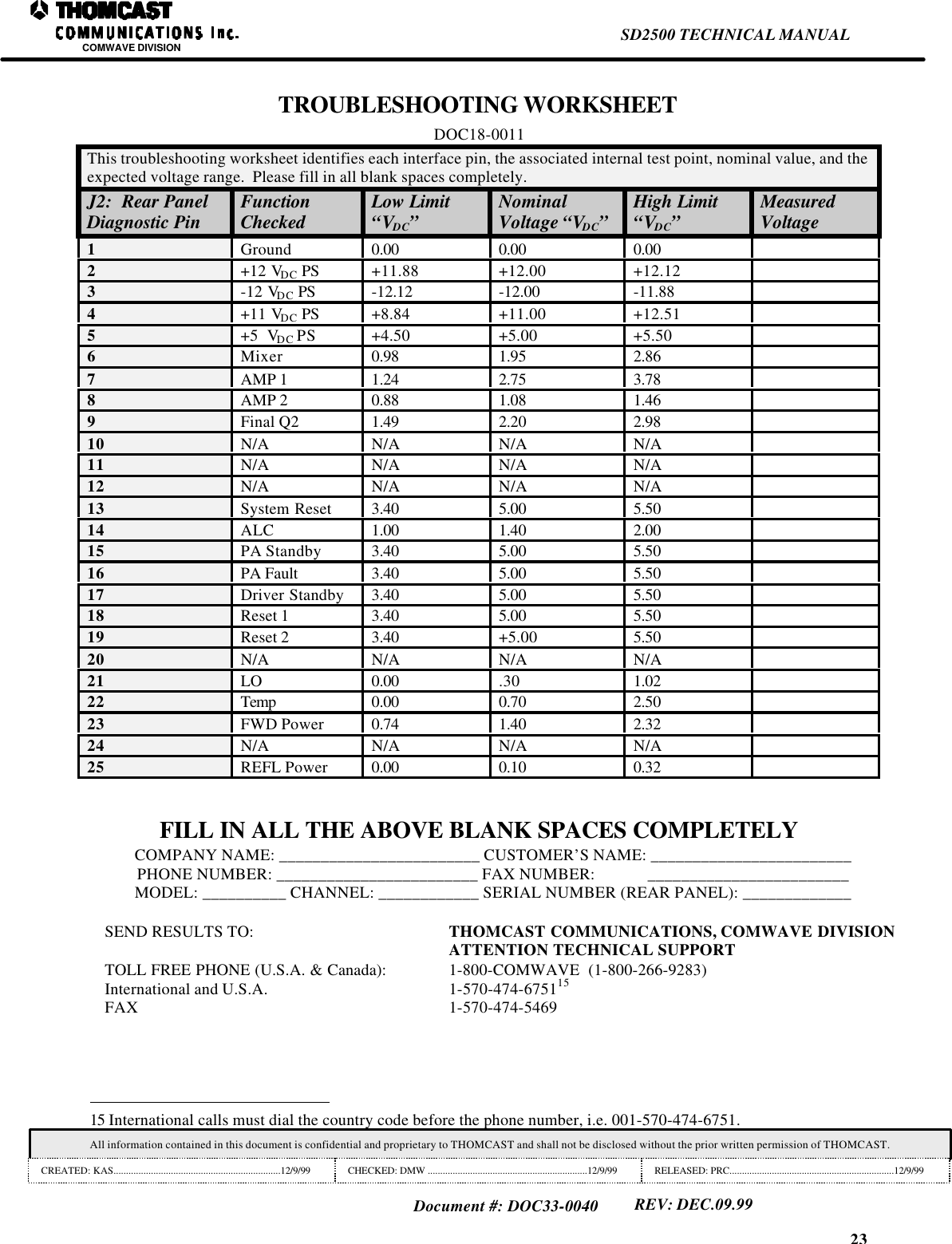
23SD2500 TECHNICAL MANUALCOMWAVE DIVISIONAll information contained in this document is confidential and proprietary to THOMCAST and shall not be disclosed without the prior written permission of THOMCAST.CREATED: KAS...................................................................12/9/99 CHECKED: DMW ................................................................12/9/99 RELEASED: PRC..................................................................12/9/99Document #: DOC33-0040REV: DEC.09.99TROUBLESHOOTING WORKSHEETDOC18-0011This troubleshooting worksheet identifies each interface pin, the associated internal test point, nominal value, and theexpected voltage range.  Please fill in all blank spaces completely.J2:  Rear PanelDiagnostic Pin FunctionChecked Low Limit“VDC”NominalVoltage “VDC”High Limit“VDC”MeasuredVoltage1Ground 0.00 0.00 0.002+12 VDC PS +11.88 +12.00 +12.123-12 VDC PS -12.12 -12.00 -11.884+11 VDC PS +8.84 +11.00 +12.515+5  VDC PS +4.50 +5.00 +5.506Mixer 0.98 1.95 2.867AMP 1 1.24 2.75 3.788AMP 2 0.88 1.08 1.469Final Q2 1.49 2.20 2.9810 N/A N/A N/A N/A11 N/A N/A N/A N/A12 N/A N/A N/A N/A13 System Reset 3.40 5.00 5.5014 ALC 1.00 1.40 2.0015 PA Standby 3.40 5.00 5.5016 PA Fault 3.40 5.00 5.5017 Driver Standby 3.40 5.00 5.5018 Reset 1 3.40 5.00 5.5019 Reset 2 3.40 +5.00 5.5020 N/A N/A N/A N/A21 LO 0.00 .30 1.0222 Temp 0.00 0.70 2.5023 FWD Power 0.74 1.40 2.3224 N/A N/A N/A N/A25 REFL Power 0.00 0.10 0.32FILL IN ALL THE ABOVE BLANK SPACES COMPLETELYCOMPANY NAME: ________________________ CUSTOMER’S NAME: ________________________PHONE NUMBER: ________________________ FAX NUMBER:             ________________________MODEL: __________ CHANNEL: ____________ SERIAL NUMBER (REAR PANEL): _____________SEND RESULTS TO:  THOMCAST COMMUNICATIONS, COMWAVE DIVISIONATTENTION TECHNICAL SUPPORTTOLL FREE PHONE (U.S.A. & Canada): 1-800-COMWAVE  (1-800-266-9283)International and U.S.A. 1-570-474-675115FAX 1-570-474-5469                                                                15 International calls must dial the country code before the phone number, i.e. 001-570-474-6751.
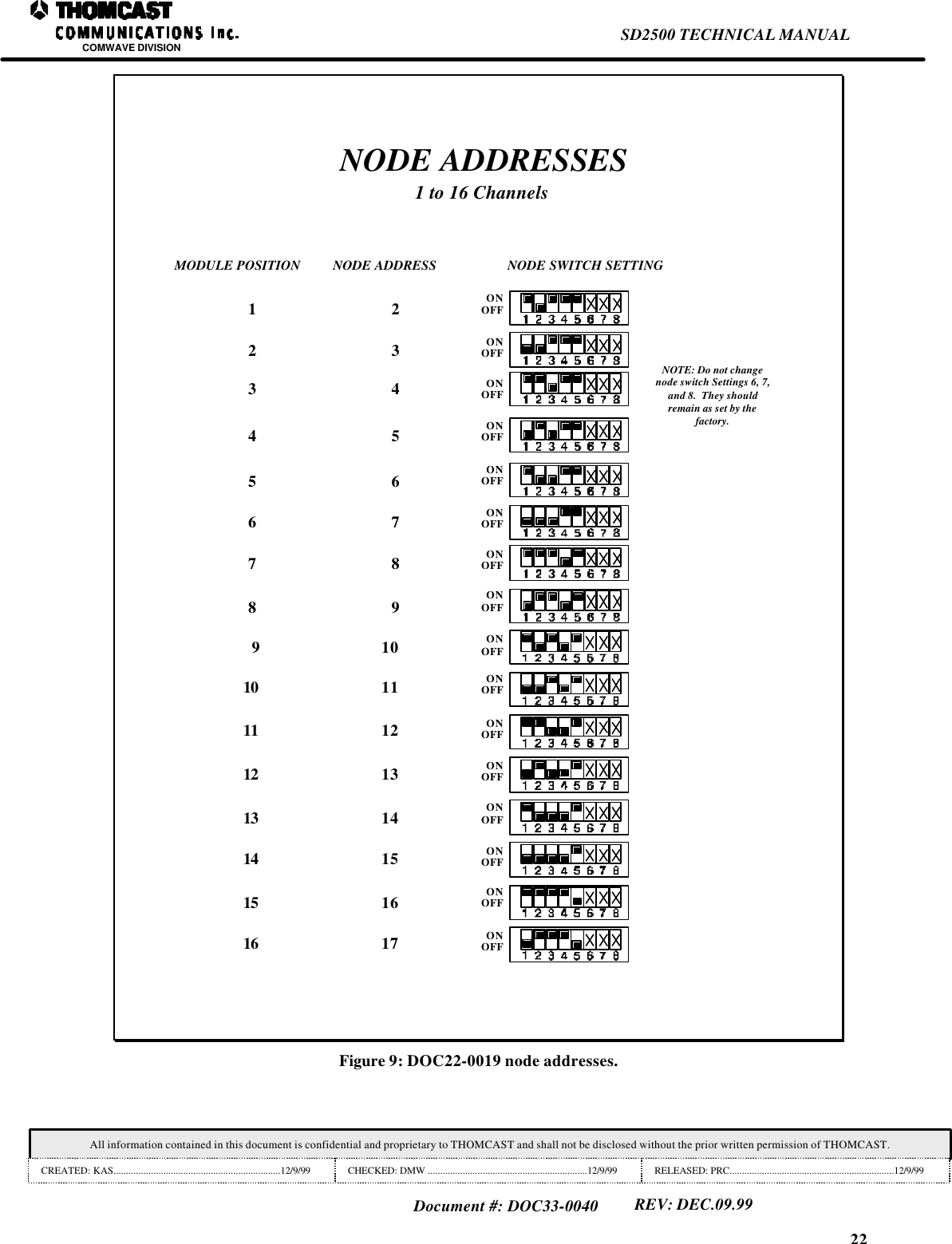
22SD2500 TECHNICAL MANUALCOMWAVE DIVISIONAll information contained in this document is confidential and proprietary to THOMCAST and shall not be disclosed without the prior written permission of THOMCAST.CREATED: KAS...................................................................12/9/99 CHECKED: DMW ................................................................12/9/99 RELEASED: PRC..................................................................12/9/99Document #: DOC33-0040REV: DEC.09.99NODE ADDRESSES1 to 16 ChannelsNOTE: Do not changenode switch Settings 6, 7,and 8.  They shouldremain as set by thefactory.MODULE POSITION NODE ADDRESS NODE SWITCH SETTING1ONOFFONOFFONOFFONOFFONOFFONOFFONOFFONOFFONOFFONOFFONOFFONOFFONOFFONOFFONOFFONOFF223443655 6789789101415161712131110131415161112Figure 9: DOC22-0019 node addresses.
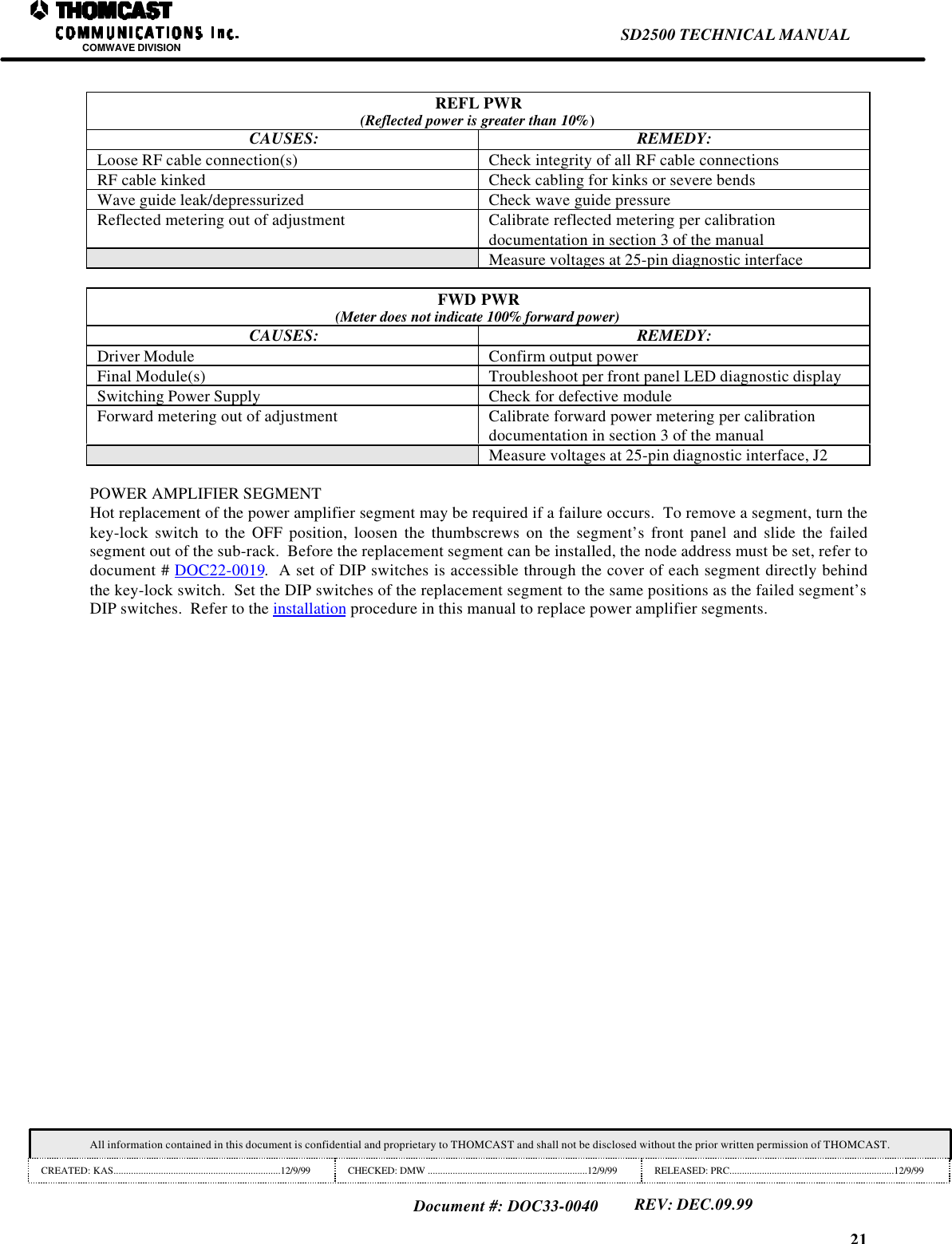
21SD2500 TECHNICAL MANUALCOMWAVE DIVISIONAll information contained in this document is confidential and proprietary to THOMCAST and shall not be disclosed without the prior written permission of THOMCAST.CREATED: KAS...................................................................12/9/99 CHECKED: DMW ................................................................12/9/99 RELEASED: PRC..................................................................12/9/99Document #: DOC33-0040REV: DEC.09.99REFL PWR(Reflected power is greater than 10%)CAUSES: REMEDY:Loose RF cable connection(s) Check integrity of all RF cable connectionsRF cable kinked Check cabling for kinks or severe bendsWave guide leak/depressurized Check wave guide pressureReflected metering out of adjustment Calibrate reflected metering per calibrationdocumentation in section 3 of the manualMeasure voltages at 25-pin diagnostic interfaceFWD PWR(Meter does not indicate 100% forward power)CAUSES: REMEDY:Driver Module Confirm output powerFinal Module(s) Troubleshoot per front panel LED diagnostic displaySwitching Power Supply Check for defective moduleForward metering out of adjustment Calibrate forward power metering per calibrationdocumentation in section 3 of the manualMeasure voltages at 25-pin diagnostic interface, J2POWER AMPLIFIER SEGMENTHot replacement of the power amplifier segment may be required if a failure occurs.  To remove a segment, turn thekey-lock switch to the OFF position, loosen the thumbscrews on the segment’s front panel and slide the failedsegment out of the sub-rack.  Before the replacement segment can be installed, the node address must be set, refer todocument # DOC22-0019.  A set of DIP switches is accessible through the cover of each segment directly behindthe key-lock switch.  Set the DIP switches of the replacement segment to the same positions as the failed segment’sDIP switches.  Refer to the installation procedure in this manual to replace power amplifier segments.
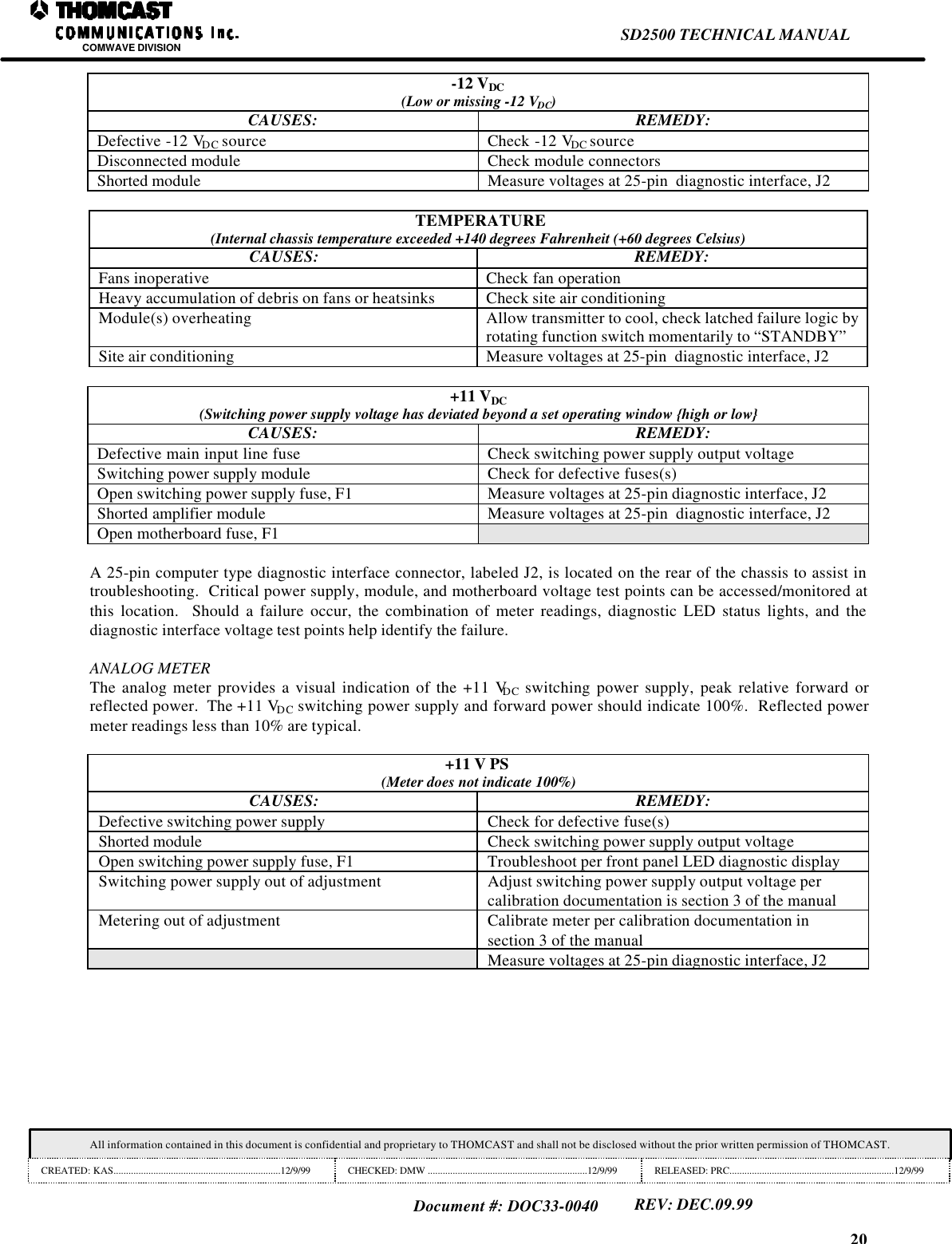
20SD2500 TECHNICAL MANUALCOMWAVE DIVISIONAll information contained in this document is confidential and proprietary to THOMCAST and shall not be disclosed without the prior written permission of THOMCAST.CREATED: KAS...................................................................12/9/99 CHECKED: DMW ................................................................12/9/99 RELEASED: PRC..................................................................12/9/99Document #: DOC33-0040REV: DEC.09.99-12 VDC(Low or missing -12 VDC)CAUSES: REMEDY:Defective -12 VDC source Check -12 VDC sourceDisconnected module Check module connectorsShorted module Measure voltages at 25-pin  diagnostic interface, J2TEMPERATURE(Internal chassis temperature exceeded +140 degrees Fahrenheit (+60 degrees Celsius)CAUSES: REMEDY:Fans inoperative Check fan operationHeavy accumulation of debris on fans or heatsinks Check site air conditioningModule(s) overheating Allow transmitter to cool, check latched failure logic byrotating function switch momentarily to “STANDBY”Site air conditioning Measure voltages at 25-pin  diagnostic interface, J2+11 VDC(Switching power supply voltage has deviated beyond a set operating window {high or low}CAUSES: REMEDY:Defective main input line fuse Check switching power supply output voltageSwitching power supply module Check for defective fuses(s)Open switching power supply fuse, F1 Measure voltages at 25-pin diagnostic interface, J2Shorted amplifier module Measure voltages at 25-pin  diagnostic interface, J2Open motherboard fuse, F1A 25-pin computer type diagnostic interface connector, labeled J2, is located on the rear of the chassis to assist introubleshooting.  Critical power supply, module, and motherboard voltage test points can be accessed/monitored atthis location.  Should a failure occur, the combination of meter readings, diagnostic LED status lights, and thediagnostic interface voltage test points help identify the failure.ANALOG METERThe analog meter provides a visual indication of the +11 VDC switching power supply, peak relative forward orreflected power.  The +11 VDC switching power supply and forward power should indicate 100%.  Reflected powermeter readings less than 10% are typical.+11 V PS(Meter does not indicate 100%)CAUSES: REMEDY:Defective switching power supply Check for defective fuse(s)Shorted module Check switching power supply output voltageOpen switching power supply fuse, F1 Troubleshoot per front panel LED diagnostic displaySwitching power supply out of adjustment Adjust switching power supply output voltage percalibration documentation is section 3 of the manualMetering out of adjustment Calibrate meter per calibration documentation insection 3 of the manualMeasure voltages at 25-pin diagnostic interface, J2
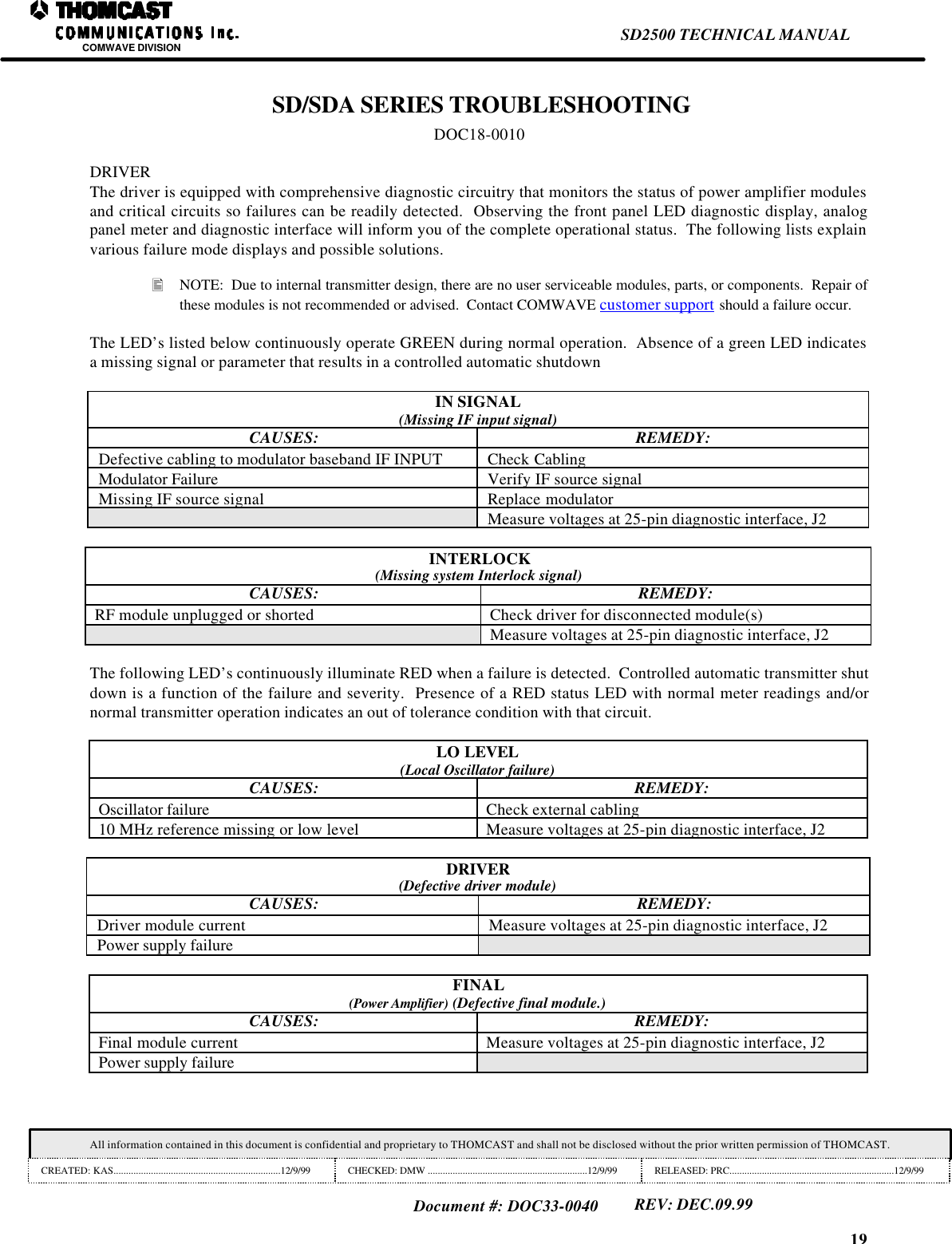
19SD2500 TECHNICAL MANUALCOMWAVE DIVISIONAll information contained in this document is confidential and proprietary to THOMCAST and shall not be disclosed without the prior written permission of THOMCAST.CREATED: KAS...................................................................12/9/99 CHECKED: DMW ................................................................12/9/99 RELEASED: PRC..................................................................12/9/99Document #: DOC33-0040REV: DEC.09.99 SD/SDA SERIES TROUBLESHOOTINGDOC18-0010DRIVERThe driver is equipped with comprehensive diagnostic circuitry that monitors the status of power amplifier modulesand critical circuits so failures can be readily detected.  Observing the front panel LED diagnostic display, analogpanel meter and diagnostic interface will inform you of the complete operational status.  The following lists explainvarious failure mode displays and possible solutions.• NOTE:  Due to internal transmitter design, there are no user serviceable modules, parts, or components.  Repair ofthese modules is not recommended or advised.  Contact COMWAVE customer support should a failure occur.The LED’s listed below continuously operate GREEN during normal operation.  Absence of a green LED indicatesa missing signal or parameter that results in a controlled automatic shutdownIN SIGNAL(Missing IF input signal)CAUSES: REMEDY:Defective cabling to modulator baseband IF INPUT Check CablingModulator Failure Verify IF source signalMissing IF source signal Replace modulatorMeasure voltages at 25-pin diagnostic interface, J2INTERLOCK(Missing system Interlock signal)CAUSES: REMEDY:RF module unplugged or shorted Check driver for disconnected module(s)Measure voltages at 25-pin diagnostic interface, J2The following LED’s continuously illuminate RED when a failure is detected.  Controlled automatic transmitter shutdown is a function of the failure and severity.  Presence of a RED status LED with normal meter readings and/ornormal transmitter operation indicates an out of tolerance condition with that circuit.LO LEVEL(Local Oscillator failure)CAUSES: REMEDY:Oscillator failure Check external cabling10 MHz reference missing or low level Measure voltages at 25-pin diagnostic interface, J2DRIVER(Defective driver module)CAUSES: REMEDY:Driver module current Measure voltages at 25-pin diagnostic interface, J2Power supply failureFINAL(Power Amplifier) (Defective final module.)CAUSES: REMEDY:Final module current Measure voltages at 25-pin diagnostic interface, J2Power supply failure
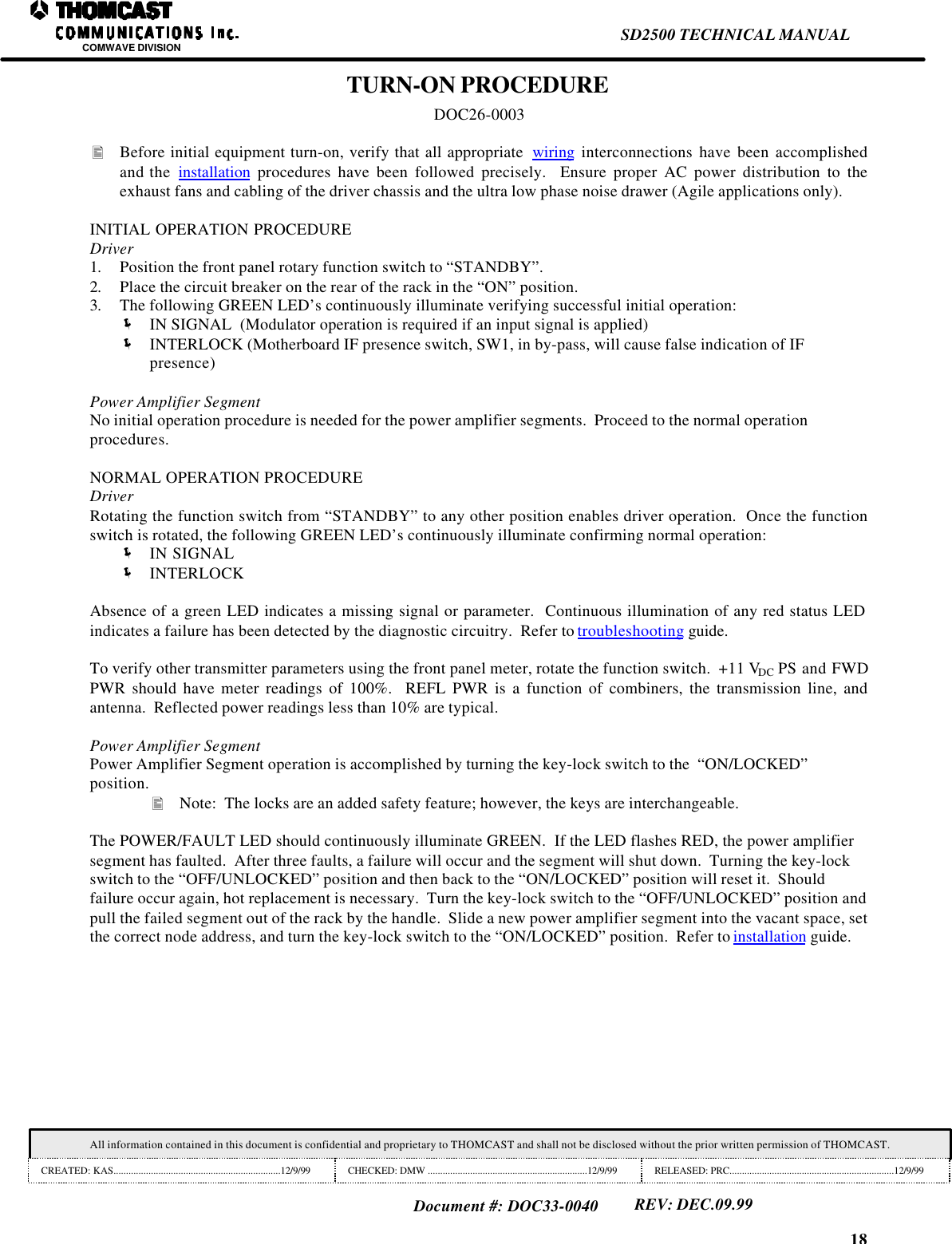
18SD2500 TECHNICAL MANUALCOMWAVE DIVISIONAll information contained in this document is confidential and proprietary to THOMCAST and shall not be disclosed without the prior written permission of THOMCAST.CREATED: KAS...................................................................12/9/99 CHECKED: DMW ................................................................12/9/99 RELEASED: PRC..................................................................12/9/99Document #: DOC33-0040REV: DEC.09.99TURN-ON PROCEDUREDOC26-0003• Before initial equipment turn-on, verify that all appropriate  wiring interconnections have been accomplishedand the  installation procedures have been followed precisely.  Ensure proper AC power distribution to theexhaust fans and cabling of the driver chassis and the ultra low phase noise drawer (Agile applications only).INITIAL OPERATION PROCEDUREDriver1. Position the front panel rotary function switch to “STANDBY”.2. Place the circuit breaker on the rear of the rack in the “ON” position.3. The following GREEN LED’s continuously illuminate verifying successful initial operation:ë IN SIGNAL  (Modulator operation is required if an input signal is applied)ë INTERLOCK (Motherboard IF presence switch, SW1, in by-pass, will cause false indication of IFpresence)Power Amplifier SegmentNo initial operation procedure is needed for the power amplifier segments.  Proceed to the normal operationprocedures.NORMAL OPERATION PROCEDUREDriverRotating the function switch from “STANDBY” to any other position enables driver operation.  Once the functionswitch is rotated, the following GREEN LED’s continuously illuminate confirming normal operation:ë IN SIGNALë INTERLOCKAbsence of a green LED indicates a missing signal or parameter.  Continuous illumination of any red status LEDindicates a failure has been detected by the diagnostic circuitry.  Refer to troubleshooting guide.To verify other transmitter parameters using the front panel meter, rotate the function switch.  +11 VDC PS and FWDPWR should have meter readings of 100%.  REFL PWR is a function of combiners, the transmission line, andantenna.  Reflected power readings less than 10% are typical.Power Amplifier SegmentPower Amplifier Segment operation is accomplished by turning the key-lock switch to the  “ON/LOCKED”position.• Note:  The locks are an added safety feature; however, the keys are interchangeable.The POWER/FAULT LED should continuously illuminate GREEN.  If the LED flashes RED, the power amplifiersegment has faulted.  After three faults, a failure will occur and the segment will shut down.  Turning the key-lockswitch to the “OFF/UNLOCKED” position and then back to the “ON/LOCKED” position will reset it.  Shouldfailure occur again, hot replacement is necessary.  Turn the key-lock switch to the “OFF/UNLOCKED” position andpull the failed segment out of the rack by the handle.  Slide a new power amplifier segment into the vacant space, setthe correct node address, and turn the key-lock switch to the “ON/LOCKED” position.  Refer to installation guide.
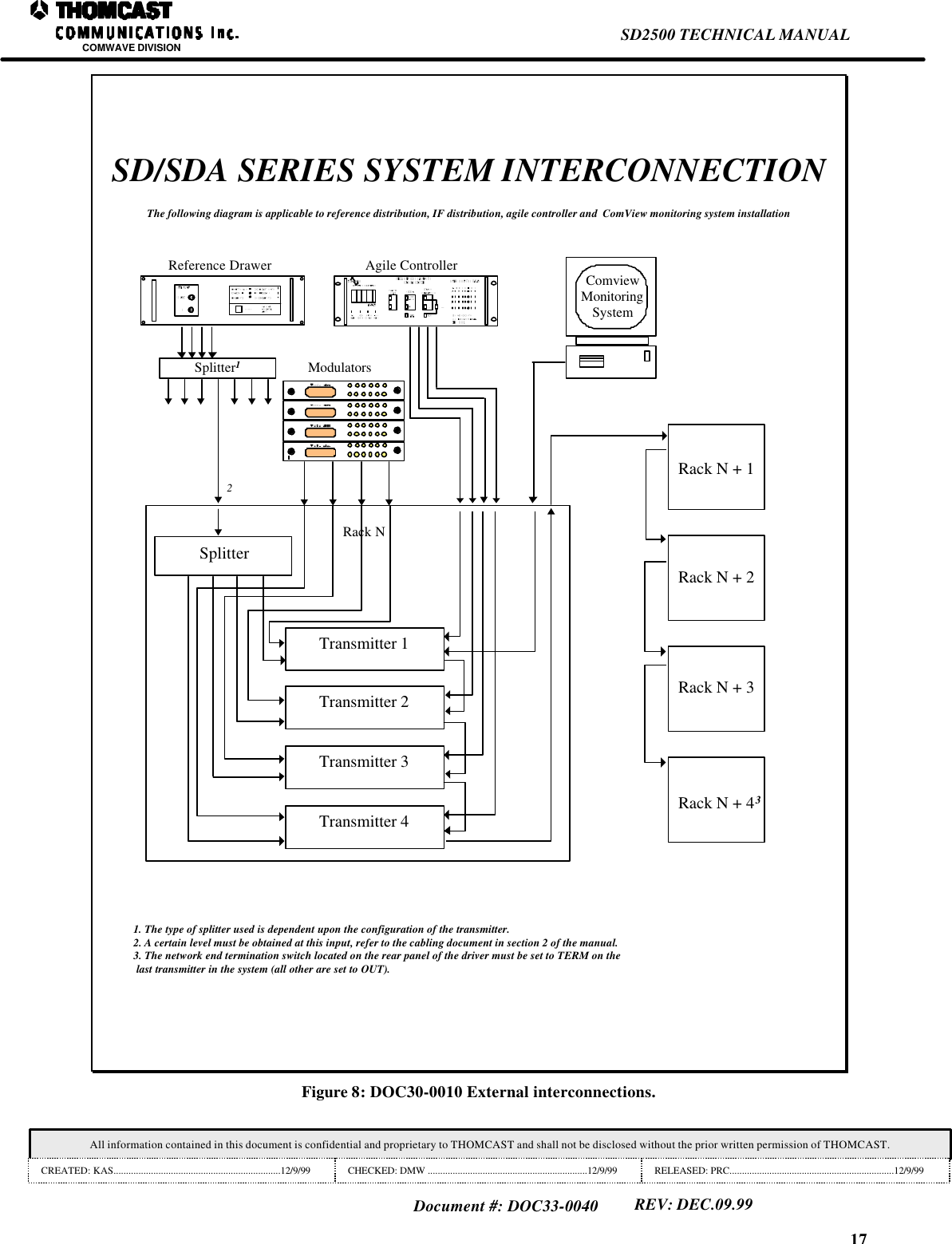
17SD2500 TECHNICAL MANUALCOMWAVE DIVISIONAll information contained in this document is confidential and proprietary to THOMCAST and shall not be disclosed without the prior written permission of THOMCAST.CREATED: KAS...................................................................12/9/99 CHECKED: DMW ................................................................12/9/99 RELEASED: PRC..................................................................12/9/99Document #: DOC33-0040REV: DEC.09.99SD/SDA SERIES SYSTEM INTERCONNECTIONThe following diagram is applicable to reference distribution, IF distribution, agile controller and  ComView monitoring system installationTransmitter 3Transmitter 2Transmitter 1Transmitter 4SplitterRack N2Rack N + 1Rack N + 2Rack N + 3Rack N + 43ModulatorsSplitter1ComviewMonitoringSystemAgile ControllerReference Drawer1. The type of splitter used is dependent upon the configuration of the transmitter.2. A certain level must be obtained at this input, refer to the cabling document in section 2 of the manual.3. The network end termination switch located on the rear panel of the driver must be set to TERM on the last transmitter in the system (all other are set to OUT).Figure 8: DOC30-0010 External interconnections.
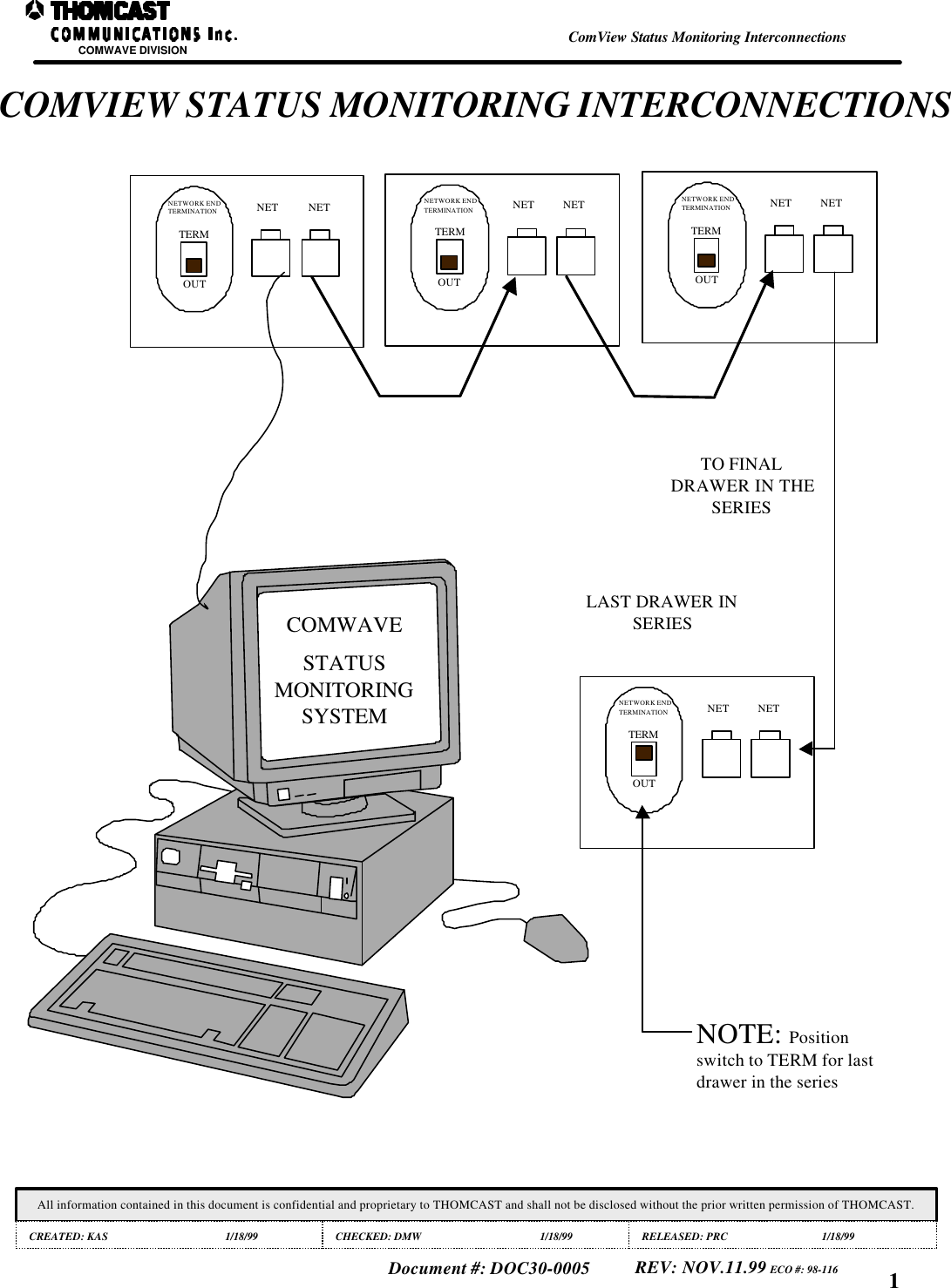
COMWAVE DIVISIONAll information contained in this document is confidential and proprietary to THOMCAST and shall not be disclosed without the prior written permission of THOMCAST.CREATED: KAS 1/18/99 CHECKED: DMW 1/18/99 RELEASED: PRC 1/18/99Document #: DOC30-0005 REV: NOV.11.99 ECO #: 98-116 1COMVIEW STATUS MONITORING INTERCONNECTIONSCOMWAVESTATUSMONITORINGSYSTEMNOTE: Positionswitch to TERM for lastdrawer in the seriesLAST DRAWER INSERIESTO FINALDRAWER IN THESERIESTERMOUTNETWORK ENDTERMINATION NET NETTERMOUTNETWORK ENDTERMINATION NET NETTERMOUTNETWORK ENDTERMINATION NET NETTERMOUTNETWORK ENDTERMINATION NET NETComView Status Monitoring Interconnections
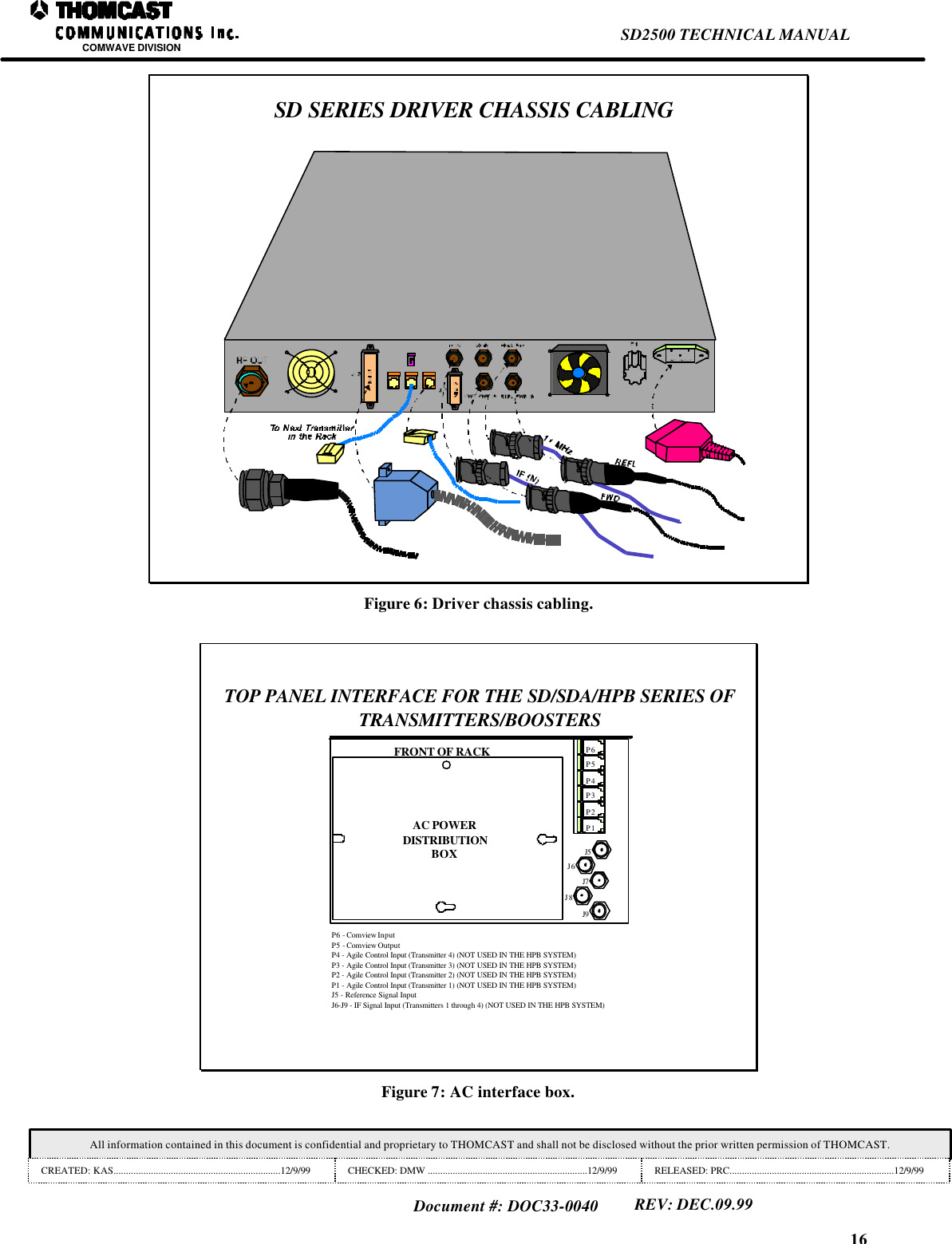
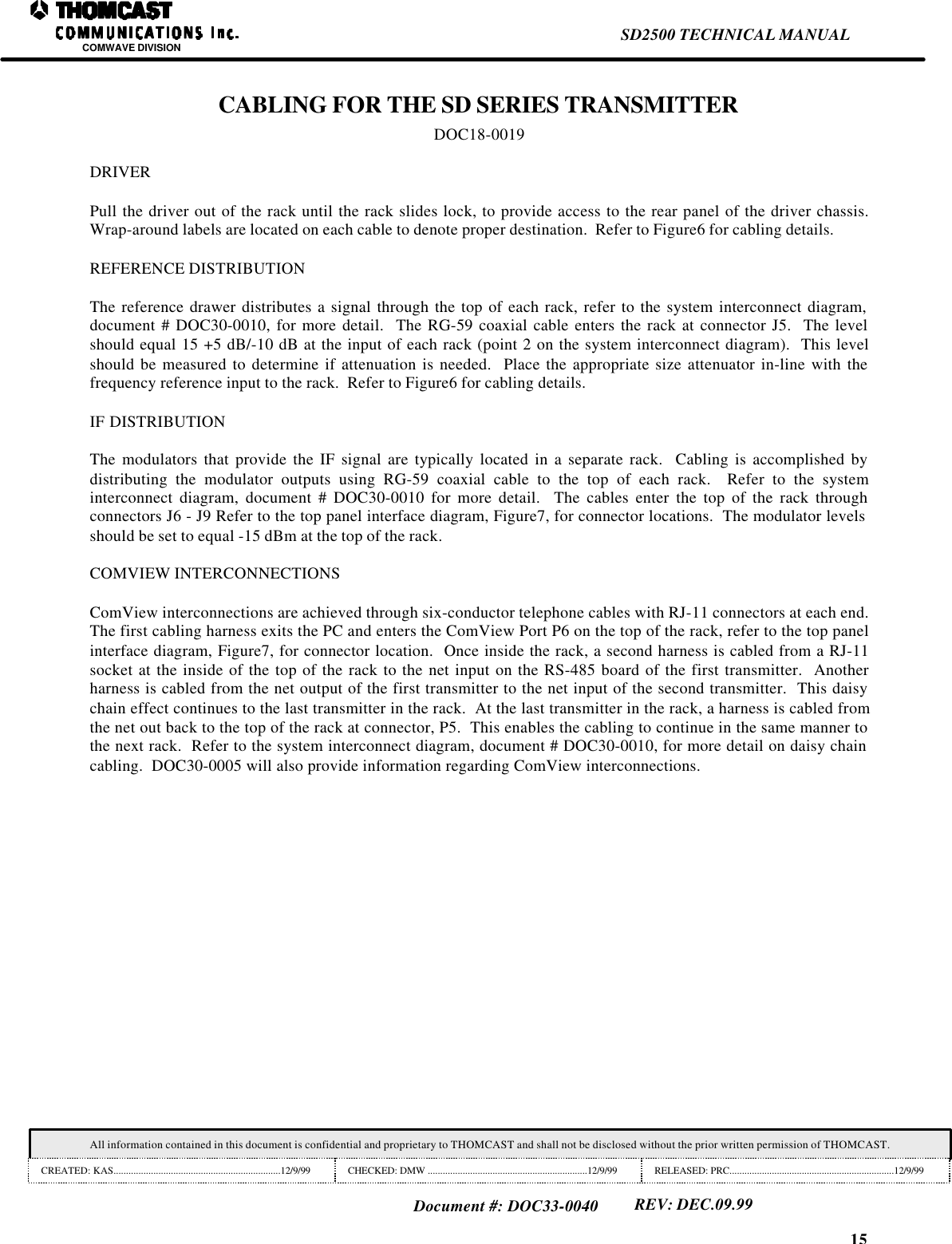
16SD2500 TECHNICAL MANUALCOMWAVE DIVISIONAll information contained in this document is confidential and proprietary to THOMCAST and shall not be disclosed without the prior written permission of THOMCAST.CREATED: KAS...................................................................12/9/99 CHECKED: DMW ................................................................12/9/99 RELEASED: PRC..................................................................12/9/99Document #: DOC33-0040REV: DEC.09.99SD SERIES DRIVER CHASSIS CABLINGFigure 6: Driver chassis cabling.TOP PANEL INTERFACE FOR THE SD/SDA/HPB SERIES OFTRANSMITTERS/BOOSTERSAC POWERDISTRIBUTIONBOXP6P5P4P3P2P1J5J6J7J8J9FRONT OF RACKP6 - Comview InputP5 - Comview OutputP4 - Agile Control Input (Transmitter 4) (NOT USED IN THE HPB SYSTEM)P3 - Agile Control Input (Transmitter 3) (NOT USED IN THE HPB SYSTEM)P2 - Agile Control Input (Transmitter 2) (NOT USED IN THE HPB SYSTEM)P1 - Agile Control Input (Transmitter 1) (NOT USED IN THE HPB SYSTEM)J5 - Reference Signal InputJ6-J9 - IF Signal Input (Transmitters 1 through 4) (NOT USED IN THE HPB SYSTEM)Figure 7: AC interface box.
15SD2500 TECHNICAL MANUALCOMWAVE DIVISIONAll information contained in this document is confidential and proprietary to THOMCAST and shall not be disclosed without the prior written permission of THOMCAST.CREATED: KAS...................................................................12/9/99 CHECKED: DMW ................................................................12/9/99 RELEASED: PRC..................................................................12/9/99Document #: DOC33-0040REV: DEC.09.99CABLING FOR THE SD SERIES TRANSMITTERDOC18-0019DRIVERPull the driver out of the rack until the rack slides lock, to provide access to the rear panel of the driver chassis.Wrap-around labels are located on each cable to denote proper destination.  Refer to Figure6 for cabling details.REFERENCE DISTRIBUTIONThe reference drawer distributes a signal through the top of each rack, refer to the system interconnect diagram,document # DOC30-0010, for more detail.  The RG-59 coaxial cable enters the rack at connector J5.  The levelshould equal 15 +5 dB/-10 dB at the input of each rack (point 2 on the system interconnect diagram).  This levelshould be measured to determine if attenuation is needed.  Place the appropriate size attenuator in-line with thefrequency reference input to the rack.  Refer to Figure6 for cabling details.IF DISTRIBUTIONThe modulators that provide the IF signal are typically located in a separate rack.  Cabling is accomplished bydistributing the modulator outputs using RG-59 coaxial cable to the top of each rack.  Refer to the systeminterconnect diagram, document # DOC30-0010 for more detail.  The cables enter the top of the rack throughconnectors J6 - J9 Refer to the top panel interface diagram, Figure7, for connector locations.  The modulator levelsshould be set to equal -15 dBm at the top of the rack.COMVIEW INTERCONNECTIONSComView interconnections are achieved through six-conductor telephone cables with RJ-11 connectors at each end.The first cabling harness exits the PC and enters the ComView Port P6 on the top of the rack, refer to the top panelinterface diagram, Figure7, for connector location.  Once inside the rack, a second harness is cabled from a RJ-11socket at the inside of the top of the rack to the net input on the RS-485 board of the first transmitter.  Anotherharness is cabled from the net output of the first transmitter to the net input of the second transmitter.  This daisychain effect continues to the last transmitter in the rack.  At the last transmitter in the rack, a harness is cabled fromthe net out back to the top of the rack at connector, P5.  This enables the cabling to continue in the same manner tothe next rack.  Refer to the system interconnect diagram, document # DOC30-0010, for more detail on daisy chaincabling.  DOC30-0005 will also provide information regarding ComView interconnections.
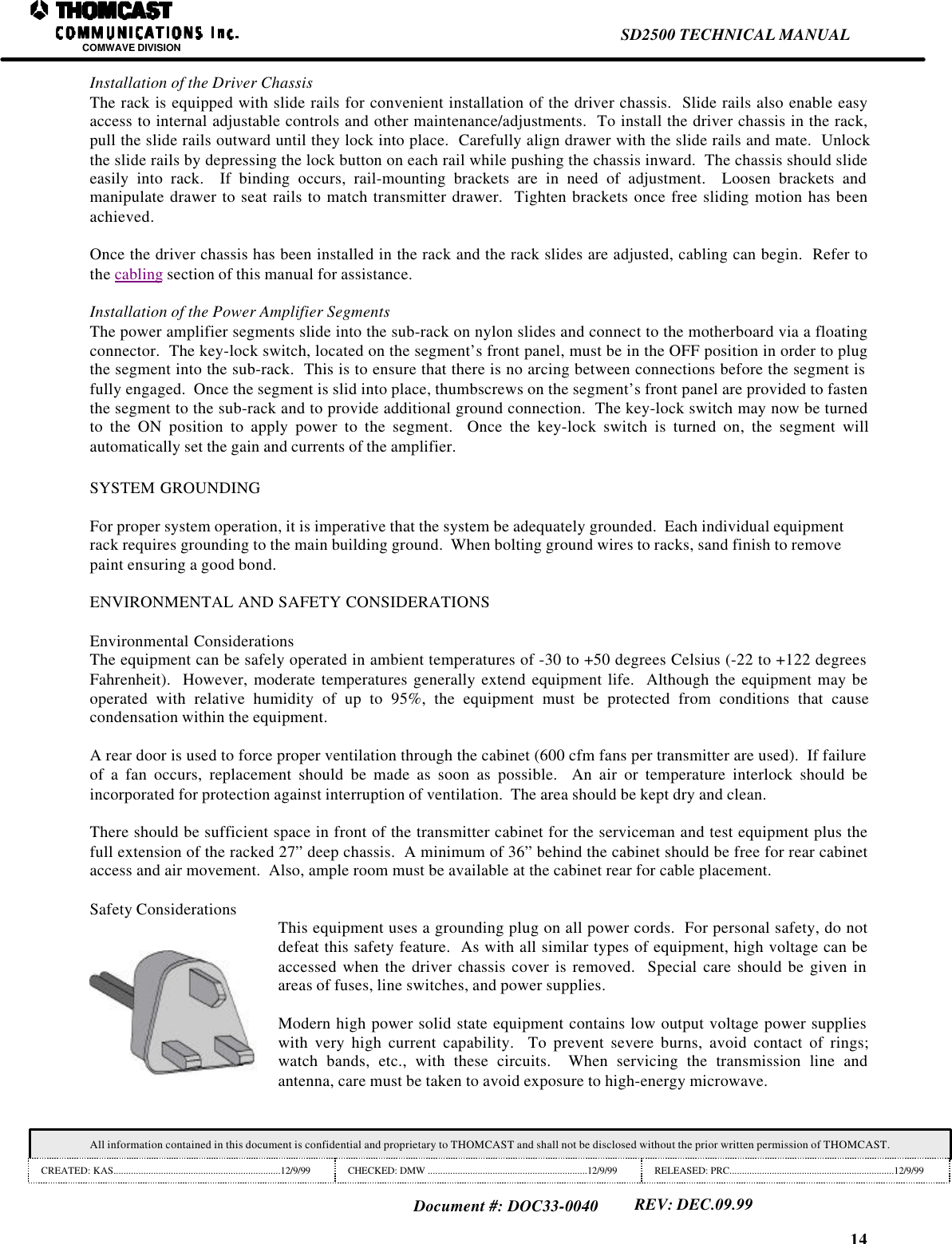
14SD2500 TECHNICAL MANUALCOMWAVE DIVISIONAll information contained in this document is confidential and proprietary to THOMCAST and shall not be disclosed without the prior written permission of THOMCAST.CREATED: KAS...................................................................12/9/99 CHECKED: DMW ................................................................12/9/99 RELEASED: PRC..................................................................12/9/99Document #: DOC33-0040REV: DEC.09.99Installation of the Driver ChassisThe rack is equipped with slide rails for convenient installation of the driver chassis.  Slide rails also enable easyaccess to internal adjustable controls and other maintenance/adjustments.  To install the driver chassis in the rack,pull the slide rails outward until they lock into place.  Carefully align drawer with the slide rails and mate.  Unlockthe slide rails by depressing the lock button on each rail while pushing the chassis inward.  The chassis should slideeasily into rack.  If binding occurs, rail-mounting brackets are in need of adjustment.  Loosen brackets andmanipulate drawer to seat rails to match transmitter drawer.  Tighten brackets once free sliding motion has beenachieved.Once the driver chassis has been installed in the rack and the rack slides are adjusted, cabling can begin.  Refer tothe cabling section of this manual for assistance.Installation of the Power Amplifier SegmentsThe power amplifier segments slide into the sub-rack on nylon slides and connect to the motherboard via a floatingconnector.  The key-lock switch, located on the segment’s front panel, must be in the OFF position in order to plugthe segment into the sub-rack.  This is to ensure that there is no arcing between connections before the segment isfully engaged.  Once the segment is slid into place, thumbscrews on the segment’s front panel are provided to fastenthe segment to the sub-rack and to provide additional ground connection.  The key-lock switch may now be turnedto the ON position to apply power to the segment.  Once the key-lock switch is turned on, the segment willautomatically set the gain and currents of the amplifier.SYSTEM GROUNDINGFor proper system operation, it is imperative that the system be adequately grounded.  Each individual equipmentrack requires grounding to the main building ground.  When bolting ground wires to racks, sand finish to removepaint ensuring a good bond.ENVIRONMENTAL AND SAFETY CONSIDERATIONSEnvironmental ConsiderationsThe equipment can be safely operated in ambient temperatures of -30 to +50 degrees Celsius (-22 to +122 degreesFahrenheit).  However, moderate temperatures generally extend equipment life.  Although the equipment may beoperated with relative humidity of up to 95%, the equipment must be protected from conditions that causecondensation within the equipment.A rear door is used to force proper ventilation through the cabinet (600 cfm fans per transmitter are used).  If failureof a fan occurs, replacement should be made as soon as possible.  An air or temperature interlock should beincorporated for protection against interruption of ventilation.  The area should be kept dry and clean.There should be sufficient space in front of the transmitter cabinet for the serviceman and test equipment plus thefull extension of the racked 27” deep chassis.  A minimum of 36” behind the cabinet should be free for rear cabinetaccess and air movement.  Also, ample room must be available at the cabinet rear for cable placement.Safety Considerations This equipment uses a grounding plug on all power cords.  For personal safety, do notdefeat this safety feature.  As with all similar types of equipment, high voltage can beaccessed when the driver chassis cover is removed.  Special care should be given inareas of fuses, line switches, and power supplies.Modern high power solid state equipment contains low output voltage power supplieswith very high current capability.  To prevent severe burns, avoid contact of rings;watch bands, etc., with these circuits.  When servicing the transmission line andantenna, care must be taken to avoid exposure to high-energy microwave.
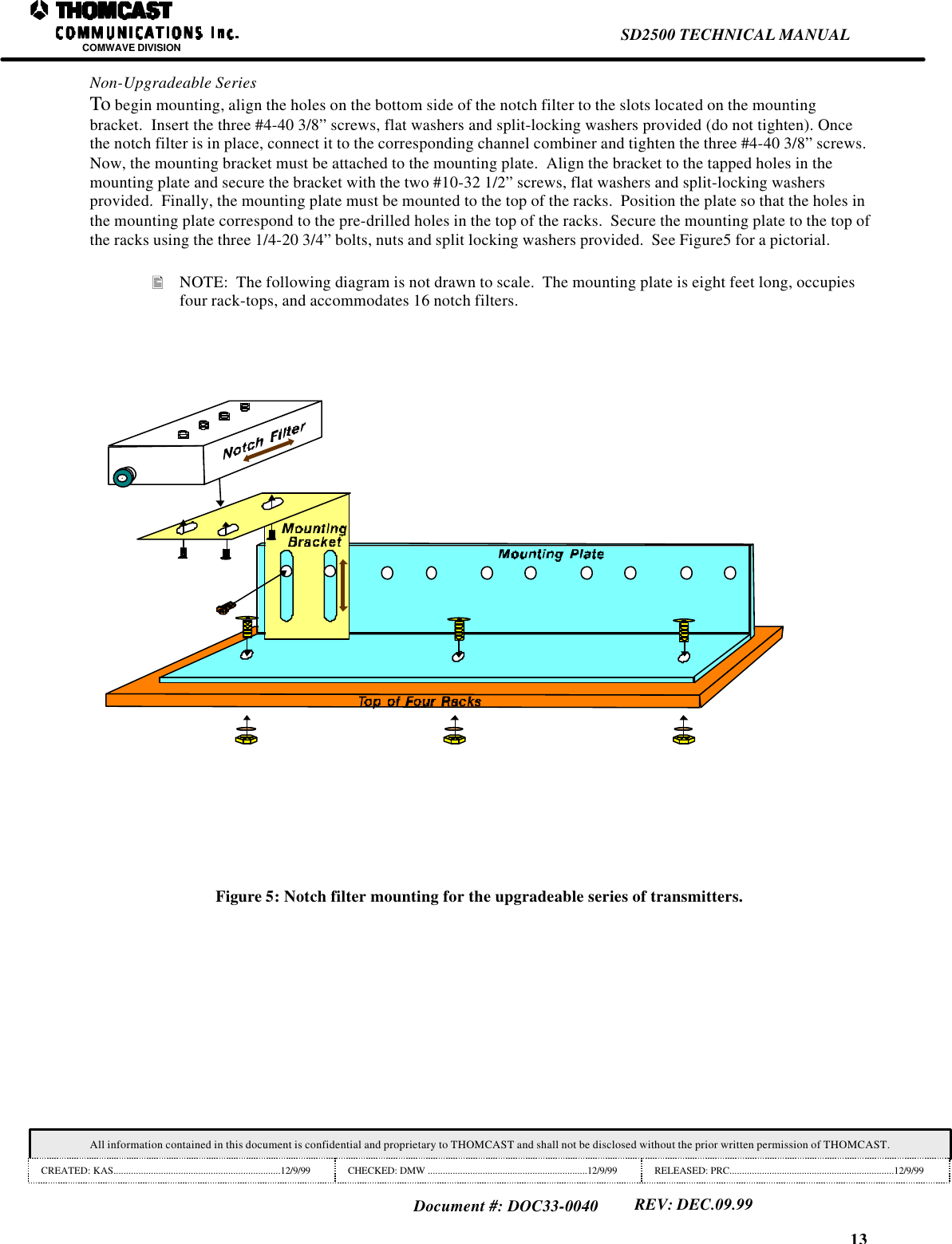
13SD2500 TECHNICAL MANUALCOMWAVE DIVISIONAll information contained in this document is confidential and proprietary to THOMCAST and shall not be disclosed without the prior written permission of THOMCAST.CREATED: KAS...................................................................12/9/99 CHECKED: DMW ................................................................12/9/99 RELEASED: PRC..................................................................12/9/99Document #: DOC33-0040REV: DEC.09.99Non-Upgradeable SeriesTo begin mounting, align the holes on the bottom side of the notch filter to the slots located on the mountingbracket.  Insert the three #4-40 3/8” screws, flat washers and split-locking washers provided (do not tighten). Oncethe notch filter is in place, connect it to the corresponding channel combiner and tighten the three #4-40 3/8” screws.Now, the mounting bracket must be attached to the mounting plate.  Align the bracket to the tapped holes in themounting plate and secure the bracket with the two #10-32 1/2” screws, flat washers and split-locking washersprovided.  Finally, the mounting plate must be mounted to the top of the racks.  Position the plate so that the holes inthe mounting plate correspond to the pre-drilled holes in the top of the racks.  Secure the mounting plate to the top ofthe racks using the three 1/4-20 3/4” bolts, nuts and split locking washers provided.  See Figure5 for a pictorial.• NOTE:  The following diagram is not drawn to scale.  The mounting plate is eight feet long, occupiesfour rack-tops, and accommodates 16 notch filters.Figure 5: Notch filter mounting for the upgradeable series of transmitters.
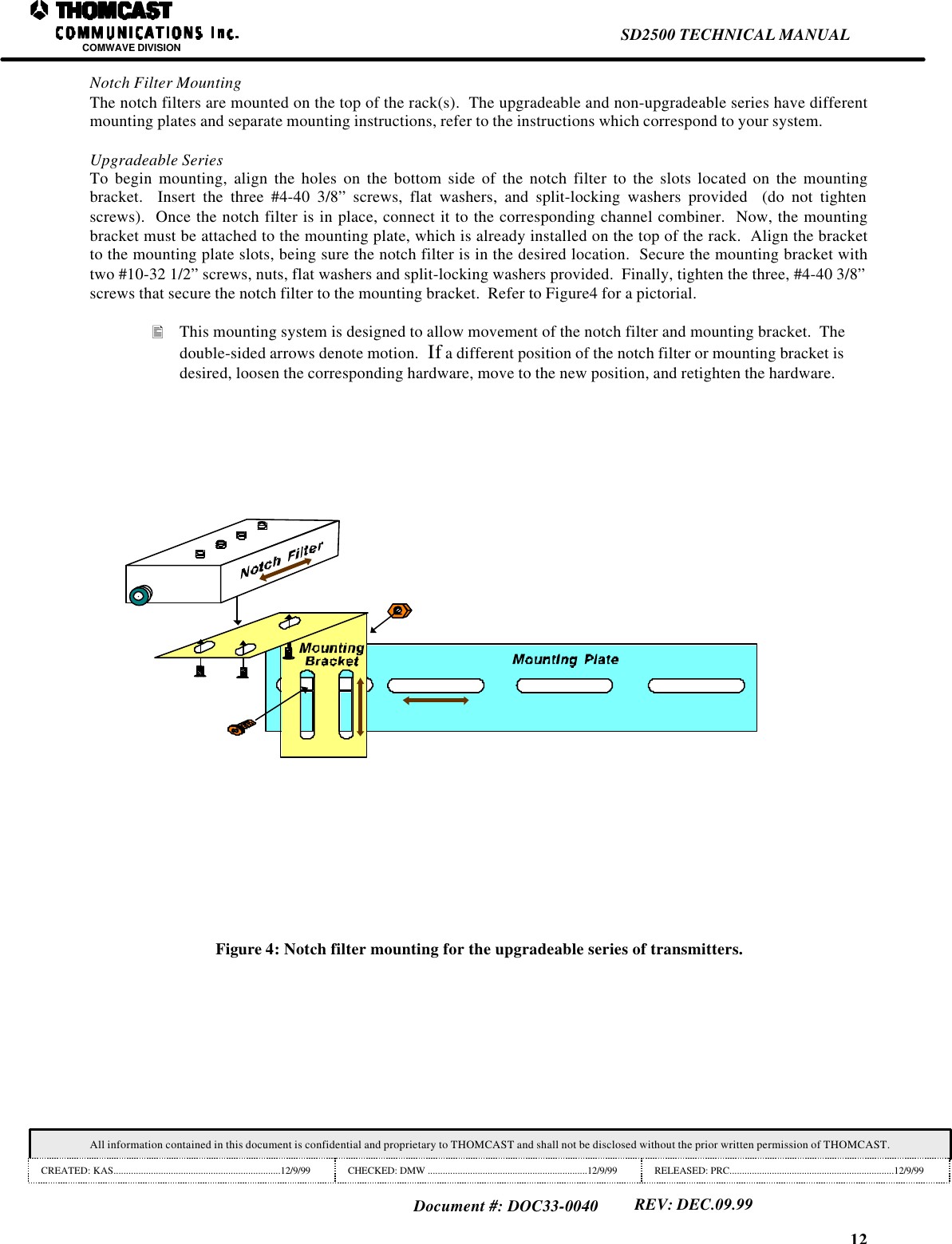
12SD2500 TECHNICAL MANUALCOMWAVE DIVISIONAll information contained in this document is confidential and proprietary to THOMCAST and shall not be disclosed without the prior written permission of THOMCAST.CREATED: KAS...................................................................12/9/99 CHECKED: DMW ................................................................12/9/99 RELEASED: PRC..................................................................12/9/99Document #: DOC33-0040REV: DEC.09.99Notch Filter MountingThe notch filters are mounted on the top of the rack(s).  The upgradeable and non-upgradeable series have differentmounting plates and separate mounting instructions, refer to the instructions which correspond to your system.Upgradeable SeriesTo begin mounting, align the holes on the bottom side of the notch filter to the slots located on the mountingbracket.  Insert the three #4-40 3/8” screws, flat washers, and split-locking washers provided  (do not tightenscrews).  Once the notch filter is in place, connect it to the corresponding channel combiner.  Now, the mountingbracket must be attached to the mounting plate, which is already installed on the top of the rack.  Align the bracketto the mounting plate slots, being sure the notch filter is in the desired location.  Secure the mounting bracket withtwo #10-32 1/2” screws, nuts, flat washers and split-locking washers provided.  Finally, tighten the three, #4-40 3/8”screws that secure the notch filter to the mounting bracket.  Refer to Figure4 for a pictorial.• This mounting system is designed to allow movement of the notch filter and mounting bracket.  Thedouble-sided arrows denote motion.  If a different position of the notch filter or mounting bracket isdesired, loosen the corresponding hardware, move to the new position, and retighten the hardware.Figure 4: Notch filter mounting for the upgradeable series of transmitters.
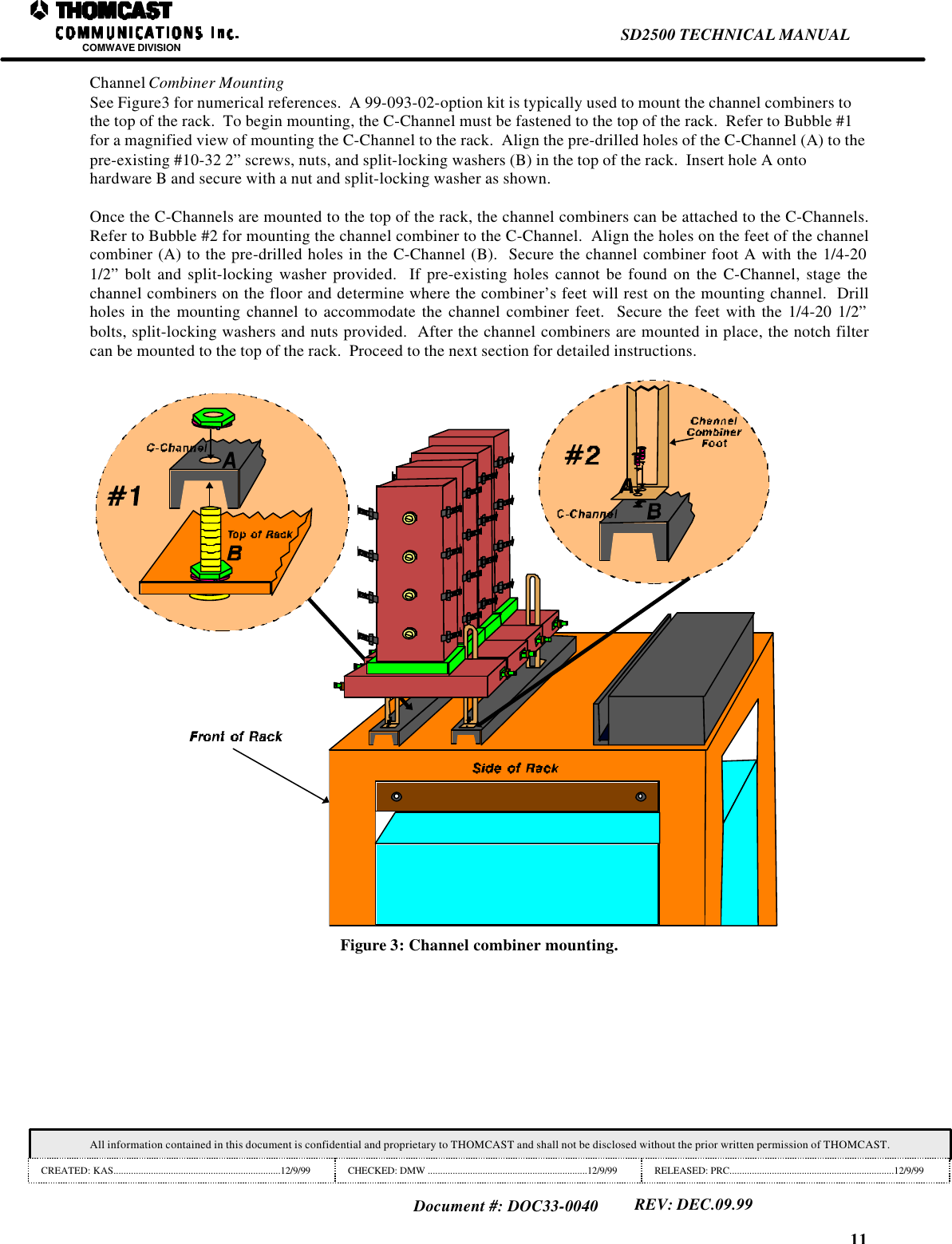
11SD2500 TECHNICAL MANUALCOMWAVE DIVISIONAll information contained in this document is confidential and proprietary to THOMCAST and shall not be disclosed without the prior written permission of THOMCAST.CREATED: KAS...................................................................12/9/99 CHECKED: DMW ................................................................12/9/99 RELEASED: PRC..................................................................12/9/99Document #: DOC33-0040REV: DEC.09.99Channel Combiner MountingSee Figure3 for numerical references.  A 99-093-02-option kit is typically used to mount the channel combiners tothe top of the rack.  To begin mounting, the C-Channel must be fastened to the top of the rack.  Refer to Bubble #1for a magnified view of mounting the C-Channel to the rack.  Align the pre-drilled holes of the C-Channel (A) to thepre-existing #10-32 2” screws, nuts, and split-locking washers (B) in the top of the rack.  Insert hole A ontohardware B and secure with a nut and split-locking washer as shown.Once the C-Channels are mounted to the top of the rack, the channel combiners can be attached to the C-Channels.Refer to Bubble #2 for mounting the channel combiner to the C-Channel.  Align the holes on the feet of the channelcombiner (A) to the pre-drilled holes in the C-Channel (B).  Secure the channel combiner foot A with the 1/4-201/2” bolt and split-locking washer provided.  If pre-existing holes cannot be found on the C-Channel, stage thechannel combiners on the floor and determine where the combiner’s feet will rest on the mounting channel.  Drillholes in the mounting channel to accommodate the channel combiner feet.  Secure the feet with the 1/4-20 1/2”bolts, split-locking washers and nuts provided.  After the channel combiners are mounted in place, the notch filtercan be mounted to the top of the rack.  Proceed to the next section for detailed instructions.Figure 3: Channel combiner mounting.
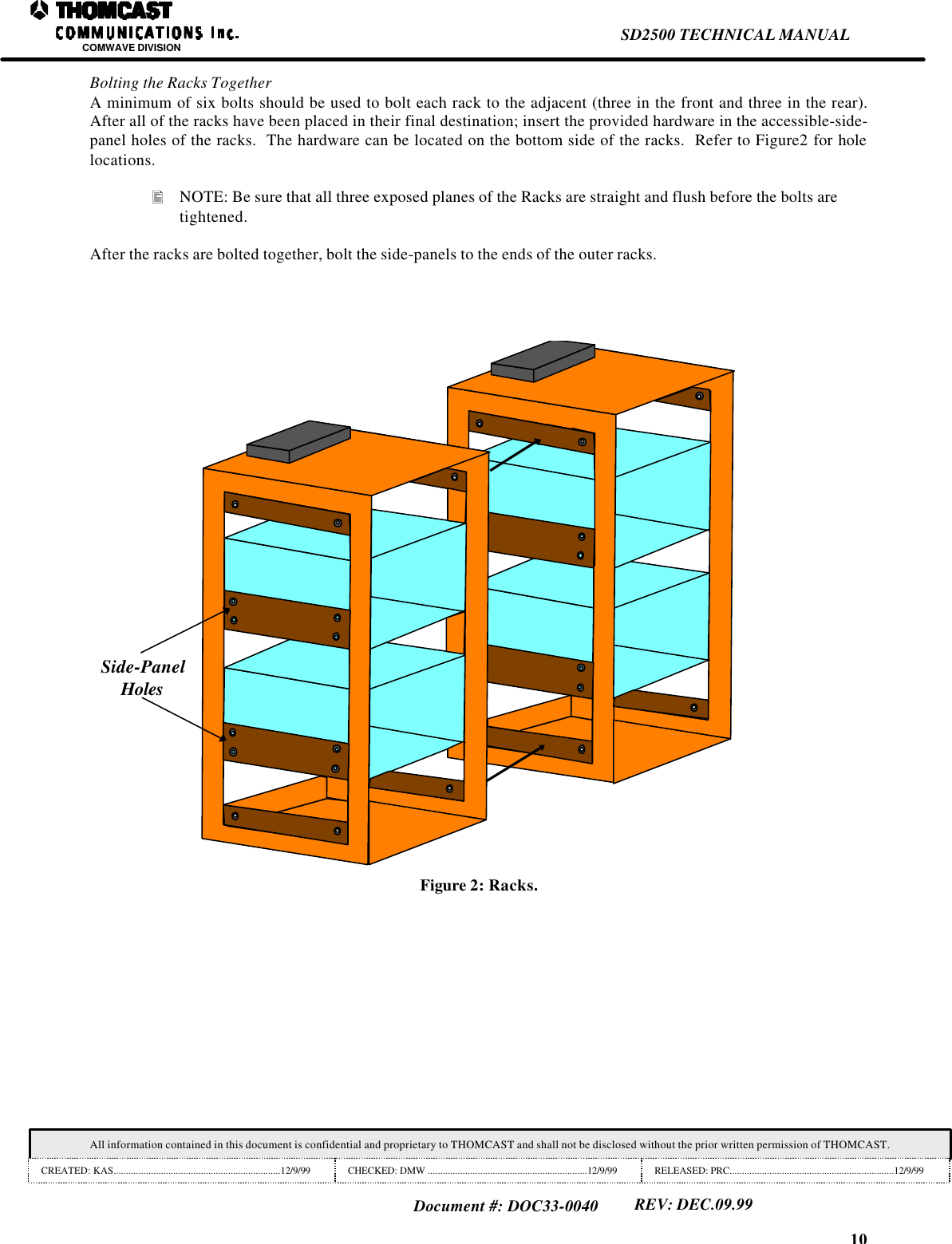
10SD2500 TECHNICAL MANUALCOMWAVE DIVISIONAll information contained in this document is confidential and proprietary to THOMCAST and shall not be disclosed without the prior written permission of THOMCAST.CREATED: KAS...................................................................12/9/99 CHECKED: DMW ................................................................12/9/99 RELEASED: PRC..................................................................12/9/99Document #: DOC33-0040REV: DEC.09.99Bolting the Racks TogetherA minimum of six bolts should be used to bolt each rack to the adjacent (three in the front and three in the rear).After all of the racks have been placed in their final destination; insert the provided hardware in the accessible-side-panel holes of the racks.  The hardware can be located on the bottom side of the racks.  Refer to Figure2 for holelocations.• NOTE: Be sure that all three exposed planes of the Racks are straight and flush before the bolts aretightened.After the racks are bolted together, bolt the side-panels to the ends of the outer racks.Side-PanelHolesFigure 2: Racks.
9SD2500 TECHNICAL MANUALCOMWAVE DIVISIONAll information contained in this document is confidential and proprietary to THOMCAST and shall not be disclosed without the prior written permission of THOMCAST.CREATED: KAS...................................................................12/9/99 CHECKED: DMW ................................................................12/9/99 RELEASED: PRC..................................................................12/9/99Document #: DOC33-0040REV: DEC.09.99INSTALLATION PROCEDUREDOC17-0006UNPACKINGThe racks should remain in their original packing containers until they are placed in the equipment shelter.  Place allracks outside of the shelter sequentially so they can be installed in their proper position.  Packing materials shouldbe removed from the racks inside the equipment shelter as they are being installed.The drivers and power amplifier segments should be removed from their boxes, as they are ready to be installed.Any unused equipment should remain in the original packing box until needed.  As each piece of equipment is beingunpacked, compare the packing list with the contents of the box and check for in-transit damage.  Should anydamage be noted, notify the freight carrier immediately to file a freight claim.  Also, notify Comwave of anydamages or of materials missing from the shipment.  Refer to the customer service document # DOC20-0001 forinformation about contacting Comwave.Please do not discard original packaging material.  It should be returned to Comwave to berecycled.  Be sure to retain several boxes for each type of equipment at the transmitting site.This is to be used in the event the equipment is shipped back to the factory for repairs,upgrades, or modifications to ensure adequate protection.PHYSICAL INSTALLATION:Installation of the Rear DoorInstall the rear door of each transmitter as it is unpacked.  Place the hinged portion of the door over thecorresponding holes in the fan shroud assembly.  Insert the screws provided into the existing rack clips.  Afteradjusting the door position, close and lock the door to ensure proper mechanical operation.AC Power Connections to the Exhaust FansThe exhaust fans located on the rear door of the rack have attached wiring harnesses.  The harnesses must be routedinto the transmitter chassis through a hole in the fan shroud and connected to the AC terminal strip.  The terminalstrip must be accessed before the racks are bolted together.  Verify that the circuit breaker is in the OFF position.Connect the fan harness to the terminal strip.
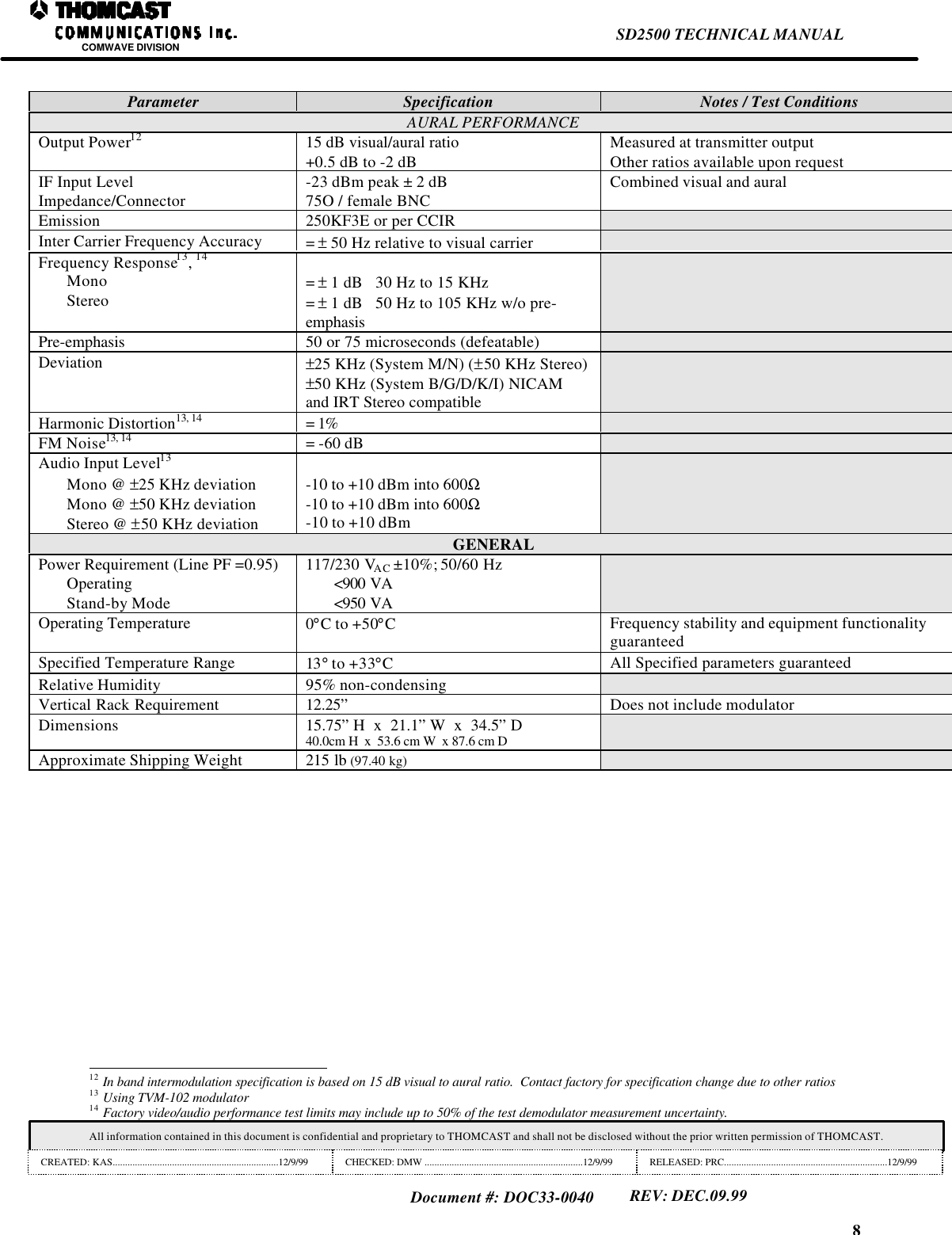
8SD2500 TECHNICAL MANUALCOMWAVE DIVISIONAll information contained in this document is confidential and proprietary to THOMCAST and shall not be disclosed without the prior written permission of THOMCAST.CREATED: KAS...................................................................12/9/99 CHECKED: DMW ................................................................12/9/99 RELEASED: PRC..................................................................12/9/99Document #: DOC33-0040REV: DEC.09.99Parameter Specification Notes / Test ConditionsAURAL PERFORMANCEOutput Power12 15 dB visual/aural ratio+0.5 dB to -2 dBMeasured at transmitter outputOther ratios available upon requestIF Input LevelImpedance/Connector -23 dBm peak ± 2 dB75O / female BNC Combined visual and auralEmission 250KF3E or per CCIRInter Carrier Frequency Accuracy = ± 50 Hz relative to visual carrierFrequency Response13, 14MonoStereo = ± 1 dB   30 Hz to 15 KHz= ± 1 dB   50 Hz to 105 KHz w/o pre-emphasisPre-emphasis 50 or 75 microseconds (defeatable)Deviation ±25 KHz (System M/N) (±50 KHz Stereo)±50 KHz (System B/G/D/K/I) NICAMand IRT Stereo compatibleHarmonic Distortion13, 14 = 1%FM Noise13, 14 = -60 dBAudio Input Level13Mono @ ±25 KHz deviationMono @ ±50 KHz deviationStereo @ ±50 KHz deviation-10 to +10 dBm into 600Ω-10 to +10 dBm into 600Ω-10 to +10 dBmGENERALPower Requirement (Line PF =0.95)OperatingStand-by Mode117/230 VAC ±10%; 50/60 Hz<900 VA<950 VAOperating Temperature 0°C to +50°CFrequency stability and equipment functionalityguaranteedSpecified Temperature Range 13° to +33°CAll Specified parameters guaranteedRelative Humidity 95% non-condensingVertical Rack Requirement 12.25” Does not include modulatorDimensions 15.75” H  x  21.1” W  x  34.5” D40.0cm H  x  53.6 cm W  x 87.6 cm DApproximate Shipping Weight 215 lb (97.40 kg)                                                                12 In band intermodulation specification is based on 15 dB visual to aural ratio.  Contact factory for specification change due to other ratios13 Using TVM-102 modulator14 Factory video/audio performance test limits may include up to 50% of the test demodulator measurement uncertainty.
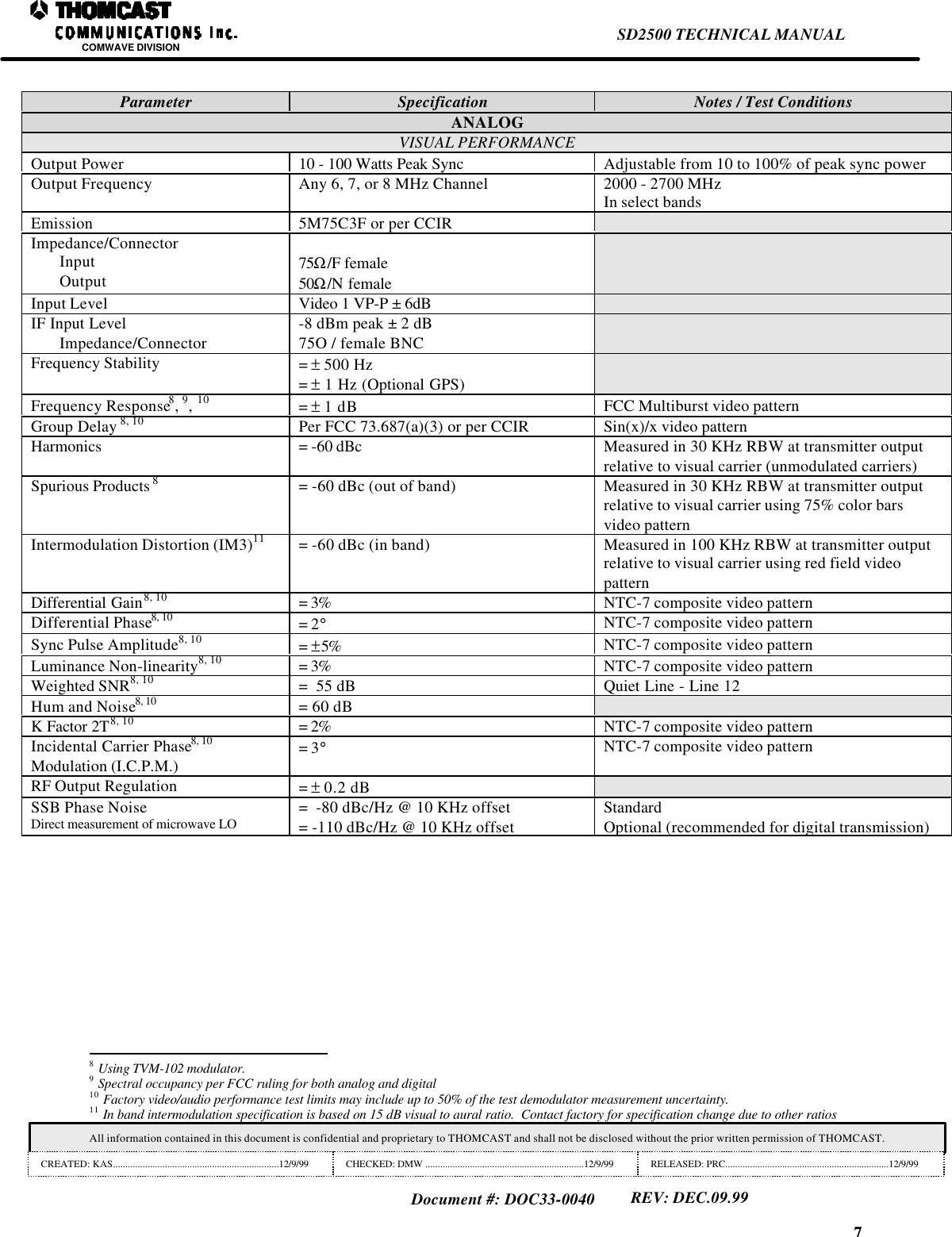
7SD2500 TECHNICAL MANUALCOMWAVE DIVISIONAll information contained in this document is confidential and proprietary to THOMCAST and shall not be disclosed without the prior written permission of THOMCAST.CREATED: KAS...................................................................12/9/99 CHECKED: DMW ................................................................12/9/99 RELEASED: PRC..................................................................12/9/99Document #: DOC33-0040REV: DEC.09.99Parameter Specification Notes / Test ConditionsANALOGVISUAL PERFORMANCEOutput Power 10 - 100 Watts Peak Sync Adjustable from 10 to 100% of peak sync powerOutput Frequency Any 6, 7, or 8 MHz Channel 2000 - 2700 MHzIn select bandsEmission 5M75C3F or per CCIRImpedance/ConnectorInputOutput 75Ω/F female50Ω/N femaleInput Level Video 1 VP-P ± 6dBIF Input LevelImpedance/Connector-8 dBm peak ± 2 dB75O / female BNCFrequency Stability = ± 500 Hz= ± 1 Hz (Optional GPS)Frequency Response8, 9, 10 = ± 1 dB FCC Multiburst video patternGroup Delay 8, 10 Per FCC 73.687(a)(3) or per CCIR Sin(x)/x video patternHarmonics = -60 dBc Measured in 30 KHz RBW at transmitter outputrelative to visual carrier (unmodulated carriers)Spurious Products 8= -60 dBc (out of band) Measured in 30 KHz RBW at transmitter outputrelative to visual carrier using 75% color barsvideo patternIntermodulation Distortion (IM3)11 = -60 dBc (in band) Measured in 100 KHz RBW at transmitter outputrelative to visual carrier using red field videopatternDifferential Gain8, 10 = 3% NTC-7 composite video patternDifferential Phase8, 10 = 2°NTC-7 composite video patternSync Pulse Amplitude8, 10 = ±5% NTC-7 composite video patternLuminance Non-linearity8, 10 = 3% NTC-7 composite video patternWeighted SNR8, 10 =  55 dB Quiet Line - Line 12Hum and Noise8, 10 = 60 dBK Factor 2T8, 10 = 2% NTC-7 composite video patternIncidental Carrier Phase8, 10Modulation (I.C.P.M.) = 3°NTC-7 composite video patternRF Output Regulation = ± 0.2 dBSSB Phase NoiseDirect measurement of microwave LO =  -80 dBc/Hz @ 10 KHz offset= -110 dBc/Hz @ 10 KHz offsetStandardOptional (recommended for digital transmission)                                                                8 Using TVM-102 modulator.9 Spectral occupancy per FCC ruling for both analog and digital10 Factory video/audio performance test limits may include up to 50% of the test demodulator measurement uncertainty.11 In band intermodulation specification is based on 15 dB visual to aural ratio.  Contact factory for specification change due to other ratios
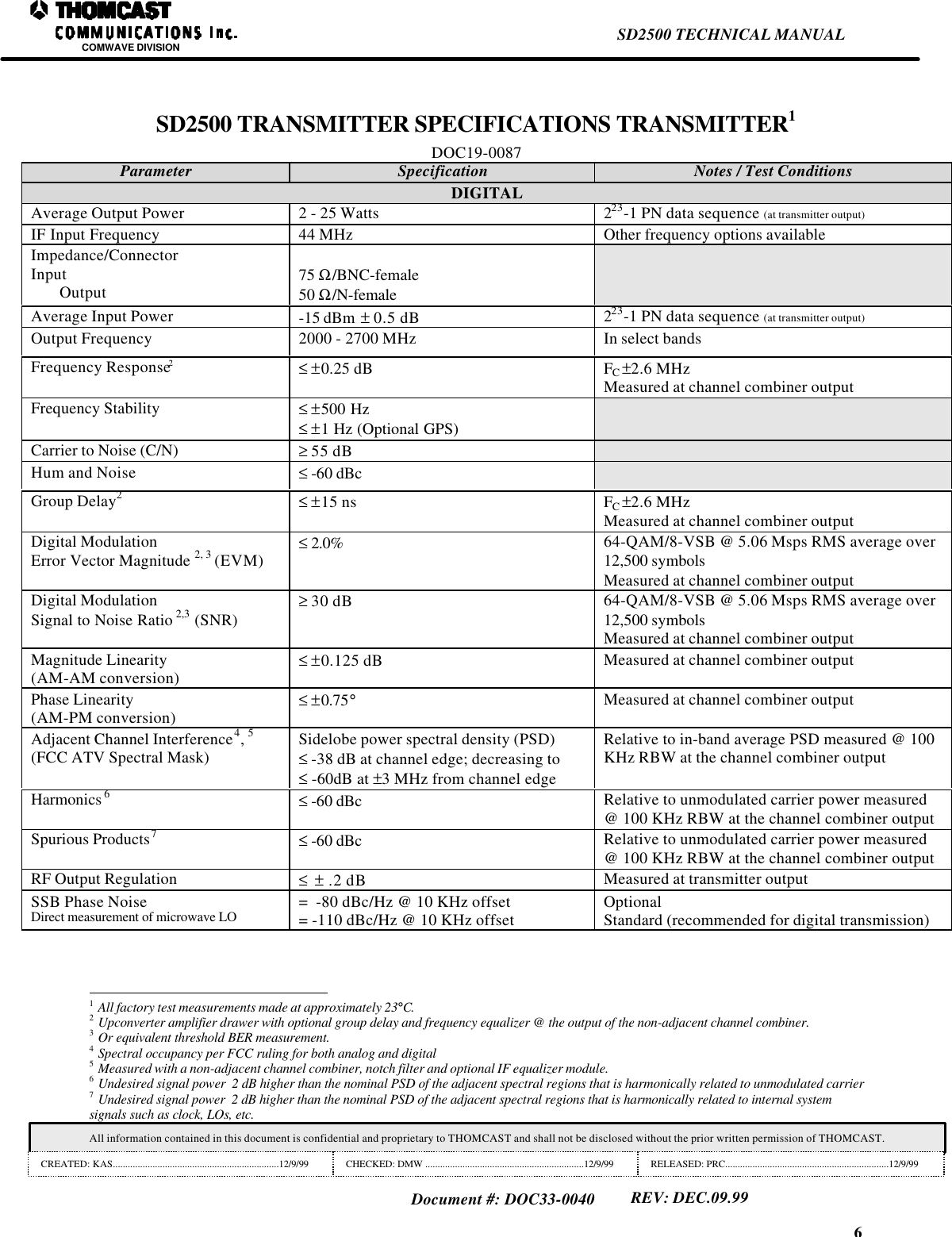
6SD2500 TECHNICAL MANUALCOMWAVE DIVISIONAll information contained in this document is confidential and proprietary to THOMCAST and shall not be disclosed without the prior written permission of THOMCAST.CREATED: KAS...................................................................12/9/99 CHECKED: DMW ................................................................12/9/99 RELEASED: PRC..................................................................12/9/99Document #: DOC33-0040REV: DEC.09.99SD2500 TRANSMITTER SPECIFICATIONS TRANSMITTER1DOC19-0087Parameter Specification Notes / Test ConditionsDIGITALAverage Output Power 2 - 25 Watts 223-1 PN data sequence (at transmitter output)IF Input Frequency 44 MHz Other frequency options availableImpedance/ConnectorInputOutput 75 Ω/BNC-female50 Ω/N-femaleAverage Input Power -15 dBm  ± 0.5 dB 223-1 PN data sequence (at transmitter output)Output Frequency 2000 - 2700 MHz In select bandsFrequency Response2≤ ±0.25 dB FC ±2.6 MHzMeasured at channel combiner outputFrequency Stability ≤ ±500 Hz≤ ±1 Hz (Optional GPS)Carrier to Noise (C/N) ≥ 55 dBHum and Noise ≤ -60 dBcGroup Delay2≤ ±15 ns FC ±2.6 MHzMeasured at channel combiner outputDigital ModulationError Vector Magnitude 2, 3 (EVM) ≤ 2.0% 64-QAM/8-VSB @ 5.06 Msps RMS average over12,500 symbolsMeasured at channel combiner outputDigital ModulationSignal to Noise Ratio 2,3 (SNR) ≥ 30 dB 64-QAM/8-VSB @ 5.06 Msps RMS average over12,500 symbolsMeasured at channel combiner outputMagnitude Linearity(AM-AM conversion) ≤ ±0.125 dB Measured at channel combiner outputPhase Linearity(AM-PM conversion) ≤ ±0.75°Measured at channel combiner outputAdjacent Channel Interference4, 5(FCC ATV Spectral Mask) Sidelobe power spectral density (PSD)≤ -38 dB at channel edge; decreasing to≤ -60dB at ±3 MHz from channel edgeRelative to in-band average PSD measured @ 100KHz RBW at the channel combiner outputHarmonics 6≤ -60 dBc Relative to unmodulated carrier power measured@ 100 KHz RBW at the channel combiner outputSpurious Products7≤ -60 dBc Relative to unmodulated carrier power measured@ 100 KHz RBW at the channel combiner outputRF Output Regulation ≤  ± .2 dB Measured at transmitter outputSSB Phase NoiseDirect measurement of microwave LO =  -80 dBc/Hz @ 10 KHz offset= -110 dBc/Hz @ 10 KHz offset OptionalStandard (recommended for digital transmission)                                                                1 All factory test measurements made at approximately 23°C.2 Upconverter amplifier drawer with optional group delay and frequency equalizer @ the output of the non-adjacent channel combiner.3 Or equivalent threshold BER measurement.4 Spectral occupancy per FCC ruling for both analog and digital5 Measured with a non-adjacent channel combiner, notch filter and optional IF equalizer module.6 Undesired signal power  2 dB higher than the nominal PSD of the adjacent spectral regions that is harmonically related to unmodulated carrier7 Undesired signal power  2 dB higher than the nominal PSD of the adjacent spectral regions that is harmonically related to internal systemsignals such as clock, LOs, etc.
5SD2500 TECHNICAL MANUALCOMWAVE DIVISIONAll information contained in this document is confidential and proprietary to THOMCAST and shall not be disclosed without the prior written permission of THOMCAST.CREATED: KAS...................................................................12/9/99 CHECKED: DMW ................................................................12/9/99 RELEASED: PRC..................................................................12/9/99Document #: DOC33-0040REV: DEC.09.99• NOTE: ALL SPECIFICATIONSCONTAINED WITHIN THISMANUAL ARE SUBJECT TOCHANGE WITHOUT NOTICE.
4SD2500 TECHNICAL MANUALCOMWAVE DIVISIONAll information contained in this document is confidential and proprietary to THOMCAST and shall not be disclosed without the prior written permission of THOMCAST.CREATED: KAS...................................................................12/9/99 CHECKED: DMW ................................................................12/9/99 RELEASED: PRC..................................................................12/9/99Document #: DOC33-0040REV: DEC.09.99MONTHLY MAINTENANCE RECORD --------------------------------------------------------------------------------------------27DOC18-0006------------------------------------------------------------------------------------------------------------------------------27DIGITAL DRIVER THEORY OF OPERATION---------------------------------------------------------------------------------28DOC14-0035------------------------------------------------------------------------------------------------------------------------------28FRONT PANEL-------------------------------------------------------------------------------------------------------------------------------28REAR PANEL---------------------------------------------------------------------------------------------------------------------------------29SD-SERIES FREQUENCY FIXED DIGITAL DRIVER (2RU) SPECIFICATIONS ---------------------------------32DOC19-0008------------------------------------------------------------------------------------------------------------------------------32POWER AMPLIFIER SEGMENT THEORY OF OPERATION------------------------------------------------------------33DOC14-0008------------------------------------------------------------------------------------------------------------------------------33OPERATION -------------------------------------------------------------------------------------------------------------------------------------33POWER AMPLIFIER SEGMENT SPECIFICATIONS ------------------------------------------------------------------------34CUSTOMER SERVICE---------------------------------------------------------------------------------------------------------------------35DOC20-0001------------------------------------------------------------------------------------------------------------------------------35CONTACT INFORMATION -------------------------------------------------------------------------------------------------------------35COMMENTS/SUGGESTIONS-----------------------------------------------------------------------------------------------------------35EQUIPMENT RETURNS ------------------------------------------------------------------------------------------------------------------35RETURN PACKAGING ----------------------------------------------------------------------------------------------------------------------36RETURN PACKAGING OF THE POWER AMPLIFER SEGMENT-----------------------------------------------------37TABLE OF FIGURESFigure 1: SD2500 transmitting system..........................................................................................................................................1Figure 2: Racks...............................................................................................................................................................................10Figure 3: Channel combiner mounting.......................................................................................................................................11Figure 4: Notch filter mounting for the upgradeable series of transmitters.........................................................................12Figure 5: Notch filter mounting for the upgradeable series of transmitters.........................................................................13Figure 6: Driver chassis cabling..................................................................................................................................................16Figure 7: AC interface box............................................................................................................................................................16Figure 8: DOC30-0010 External interconnections...................................................................................................................17Figure 9: DOC22-0019 node addresses......................................................................................................................................22Figure 10: Circuit breaker. ............................................................................................................................................................24Figure 11: Internal view of driver................................................................................................................................................25Figure 12: Power amplifier segment heatsink. ..........................................................................................................................26Figure 13: Blanking panel & exhaust fans.................................................................................................................................26Figure 14: Driver front and rear panels......................................................................................................................................30Figure 15: Driver layout................................................................................................................................................................31Figure 16: Power amplifier segment...........................................................................................................................................33Figure 17 : DOC15-0013 power amplifier segment block diagram. .....................................................................................33Figure 18: Equipment packing.....................................................................................................................................................36Figure 19: Empty power amplifier segment box. ......................................................................................................................37Figure 20: Boxed power amplifier segment...............................................................................................................................37Figure 21: Power amplifier segments ready to ship.................................................................................................................38TABLE OF TABLESTable 1: Driver fuse locations......................................................................................................................................................24Table 2: Power amplifier segment fuse locations.....................................................................................................................24Table 3: DOC19-0014, REV D....................................................................................................................................................34
3SD2500 TECHNICAL MANUALCOMWAVE DIVISIONAll information contained in this document is confidential and proprietary to THOMCAST and shall not be disclosed without the prior written permission of THOMCAST.CREATED: KAS...................................................................12/9/99 CHECKED: DMW ................................................................12/9/99 RELEASED: PRC..................................................................12/9/99Document #: DOC33-0040REV: DEC.09.99TABLE OF CONTENTSTHOMCAST COMMUNICATIONS, COMWAVE DIVISION TWO YEAR LIMITED WARRANTY---------2DOC12-0001------------------------------------------------------------------------------------------------------------------------------- 2SD2500 TRANSMITTER SPECIFICATIONS TRANSMITTER --------------------------------------------------------------6DOC19-0087------------------------------------------------------------------------------------------------------------------------------- 6INSTALLATION PROCEDURE----------------------------------------------------------------------------------------------------------9DOC17-0006------------------------------------------------------------------------------------------------------------------------------- 9UNPACKING-------------------------------------------------------------------------------------------------------------------------------------- 9PHYSICAL INSTALLATION:------------------------------------------------------------------------------------------------------------------- 9Installation of the Rear Door------------------------------------------------------------------------------------------------------------9Upgradeable Series---------------------------------------------------------------------------------------------------------------------- 12SYSTEM GROUNDING-------------------------------------------------------------------------------------------------------------------------14ENVIRONMENTAL AND SAFETY CONSIDERATIONS------------------------------------------------------------------------------------14CABLING FOR THE SD SERIES TRANSMITTER-----------------------------------------------------------------------------15DOC18-0019------------------------------------------------------------------------------------------------------------------------------15DRIVER-----------------------------------------------------------------------------------------------------------------------------------------15REFERENCE DISTRIBUTION -----------------------------------------------------------------------------------------------------------------15IF DISTRIBUTION------------------------------------------------------------------------------------------------------------------------------15COMVIEW INTERCONNECTIONS------------------------------------------------------------------------------------------------------------15TURN-ON PROCEDURE------------------------------------------------------------------------------------------------------------------18DOC26-0003------------------------------------------------------------------------------------------------------------------------------18INITIAL OPERATION PROCEDURE----------------------------------------------------------------------------------------------------------18Driver---------------------------------------------------------------------------------------------------------------------------------------- 18Power Amplifier Segment -------------------------------------------------------------------------------------------------------------- 18NORMAL OPERATION PROCEDURE--------------------------------------------------------------------------------------------------------18Driver---------------------------------------------------------------------------------------------------------------------------------------- 18Power Amplifier Segment -------------------------------------------------------------------------------------------------------------- 18SD/SDA SERIES TROUBLESHOOTING--------------------------------------------------------------------------------------------19DOC18-0010------------------------------------------------------------------------------------------------------------------------------19DRIVER-----------------------------------------------------------------------------------------------------------------------------------------19ANALOG METER ------------------------------------------------------------------------------------------------------------------------ 20POWER AMPLIFIER SEGMENT-------------------------------------------------------------------------------------------------------21TROUBLESHOOTING WORKSHEET ----------------------------------------------------------------------------------------------23DOC18-0011------------------------------------------------------------------------------------------------------------------------------23EQUIPMENT FUSING AND PROTECTION --------------------------------------------------------------------------------------24DOC18-0009------------------------------------------------------------------------------------------------------------------------------24MAINTENANCE------------------------------------------------------------------------------------------------------------------------------25DOC18-0012------------------------------------------------------------------------------------------------------------------------------25INSPECTIONS------------------------------------------------------------------------------------------------------------------------------------25CLEANING------------------------------------------------------------------------------------------------------------------------------------25DRIVER: ------------------------------------------------------------------------------------------------------------------------------------ 25POWER AMPLIFIER SEGMENTS:-------------------------------------------------------------------------------------------------26POWER SUPPLY:------------------------------------------------------------------------------------------------------------------------ 26EXHAUST FANS:------------------------------------------------------------------------------------------------------------------------- 26
2SD2500 TECHNICAL MANUALCOMWAVE DIVISIONAll information contained in this document is confidential and proprietary to THOMCAST and shall not be disclosed without the prior written permission of THOMCAST.CREATED: KAS...................................................................12/9/99 CHECKED: DMW ................................................................12/9/99 RELEASED: PRC..................................................................12/9/99Document #: DOC33-0040REV: DEC.09.99THOMCAST COMMUNICATIONS, COMWAVE DIVISION TWO YEARLIMITED WARRANTYDOC12-0001Thomcast warrants each product of its manufacture to be free from any defect in material and workmanship for aperiod of two years after delivery to, and return by the original purchaser.  No returns, however, will be acceptedunless accompanied by a written factory return authorization.The limit of liability under this warranty shall be to repair or replace any product, or part thereof, which proves to bedefective after inspection by Thomcast with the exception of tubes, semiconductor devices, lamps, fuses orequipment (i.e. modulators) manufactured by others, which are subject to only such loss adjustment as Thomcastmay obtain for the suppliers thereof.This warranty shall not apply to any Thomcast product which has been modified, physically or electrically damaged,or to modules which seals have been broken, or any product which has been subjected to conditions exceeding theapplicable specifications or ratings or improper service techniques.Thomcast will not be liable for any direct or consequential injury, loss or damage incurred through the use, or theinability to use, any Thomcast product.Thomcast reserves the right to make design changes to any Thomcast product without incurring any obligation tomake the same changes to previously purchased units.This warranty is the full extent of the obligation and liability assumed by Thomcast with respect to any and allThomcast products.  Thomcast neither makes, nor authorizes any person to make, any other guarantee or warrantyconcerning Thomcast products.
1SD2500 TECHNICAL MANUALCOMWAVE DIVISIONAll information contained in this document is confidential and proprietary to THOMCAST and shall not be disclosed without the prior written permission of THOMCAST.CREATED: KAS...................................................................12/9/99 CHECKED: DMW ................................................................12/9/99 RELEASED: PRC..................................................................12/9/99Document #: DOC33-0040REV: DEC.09.99Figure 1: SD2500 transmitting system.TECHNICAL MANUALDOC33-0040SD2500 - 25 Watt Digital Transmitter SystemCOMWAVE DIVISION

Navigation menu