Thomson Broadcast and Multimedia 8BUSDA2500C 25 Watt Frequency Agile Digital Transmitter System User Manual 10 0007 ULPN drawer cover

Thomson Broadcast & Multimedia, Inc. 25 Watt Frequency Agile Digital Transmitter System 10 0007 ULPN drawer cover

Contents

Agile synthesizer drawer
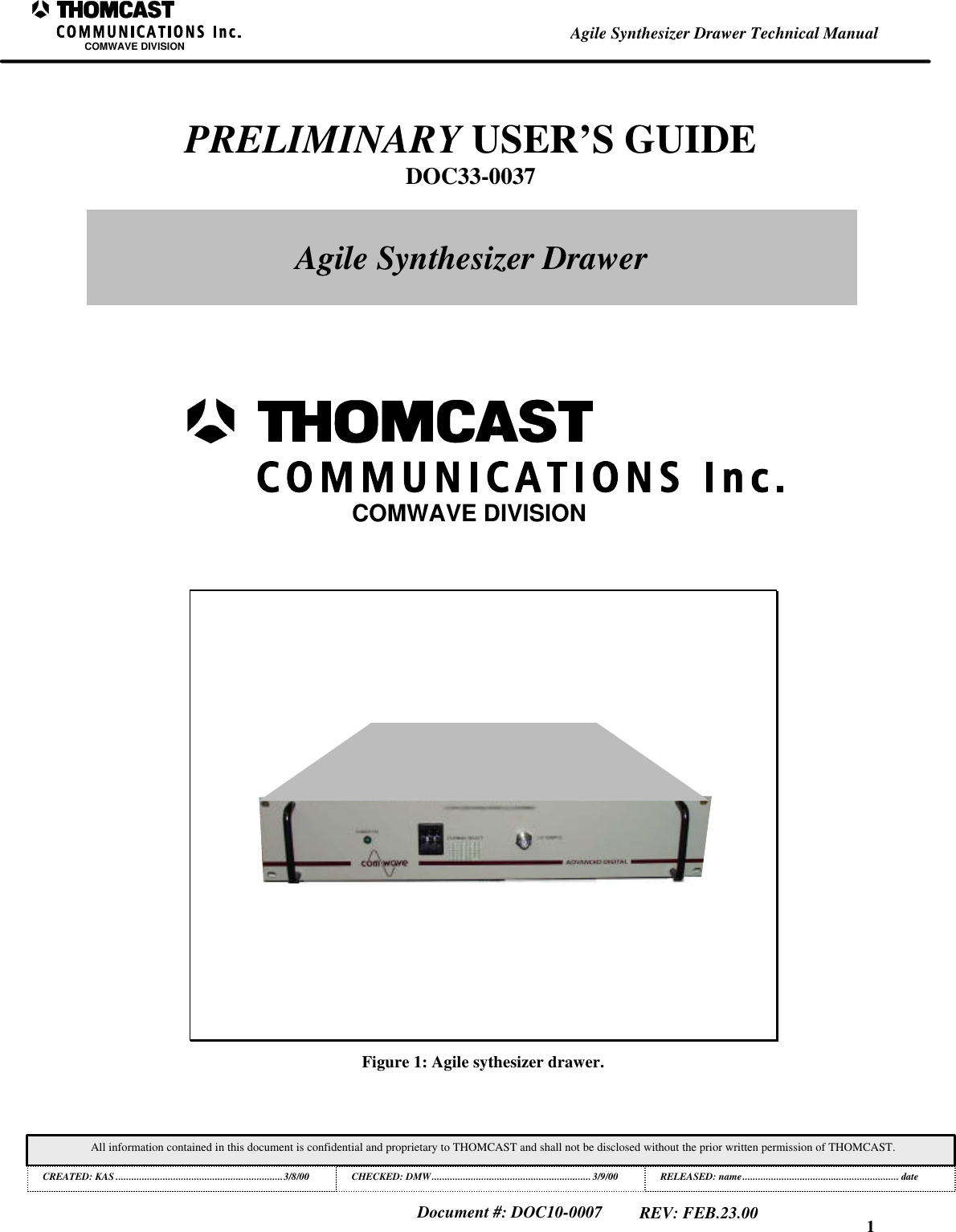
1All information contained in this document is confidential and proprietary to THOMCAST and shall not be disclosed without the prior written permission of THOMCAST.CREATED: KAS ................................................................3/8/00 CHECKED: DMW............................................................. 3/9/00RELEASED: name............................................................ dateDocument #: DOC10-0007REV: FEB.23.00Agile Synthesizer Drawer Technical ManualCOMWAVE DIVISIONFigure 1: Agile sythesizer drawer.COMWAVE DIVISIONPRELIMINARY USER’S GUIDEDOC33-0037Agile Synthesizer Drawer
This is an unpublished work protected by United States copyright laws and is proprietary to Thomcast Communications, Inc.Disclosure, copying, reproduction, merger, translation, modification, enhancement or use by anyone other than authorizedemployees or licensees of Thomcast Communications, Inc. without the prior written consent of Thomcast Communications, Inc. isprohibited.Copyright (c) 2000 Thomcast Communications, Inc.  All rights reservedThis copyright notice should not be construed as evidence of publication.
1Warranty InformationCOMWAVE DIVISIONAll information contained in this document is confidential and proprietary to THOMCAST and shall not be disclosed without the prior written permission of THOMCAST.Document #: DOC12-0001REV: DEC.02.99THOMCAST COMMUNICATIONS, COMWAVE DIVISION TWO YEARLIMITED WARRANTYThomcast warrants each product of its manufacture to be free from any defect in material and workmanship for aperiod of two years after delivery to, and return by the original purchaser.  No returns, however, will be acceptedunless accompanied by a written factory return authorization.The limit of liability under this warranty shall be to repair or replace any product, or part thereof, which proves to bedefective after inspection by Thomcast with the exception of tubes, semiconductor devices, lamps, fuses orequipment (i.e. modulators) manufactured by others, which are subject to only such loss adjustment as Thomcastmay obtain for the suppliers thereof.This warranty shall not apply to any Thomcast product which has been modified, physically or electrically damaged,or to modules which seals have been broken, or any product which has been subjected to conditions exceeding theapplicable specifications or ratings or improper service techniques.Thomcast will not be liable for any direct or consequential injury, loss or damage incurred through the use, or theinability to use, any Thomcast product.Thomcast reserves the right to make design changes to any Thomcast product without incurring any obligation tomake the same changes to previously purchased units.This warranty is the full extent of the obligation and liability assumed by Thomcast with respect to any and allThomcast products.  Thomcast neither makes, nor authorizes any person to make, any other guarantee or warrantyconcerning Thomcast products.
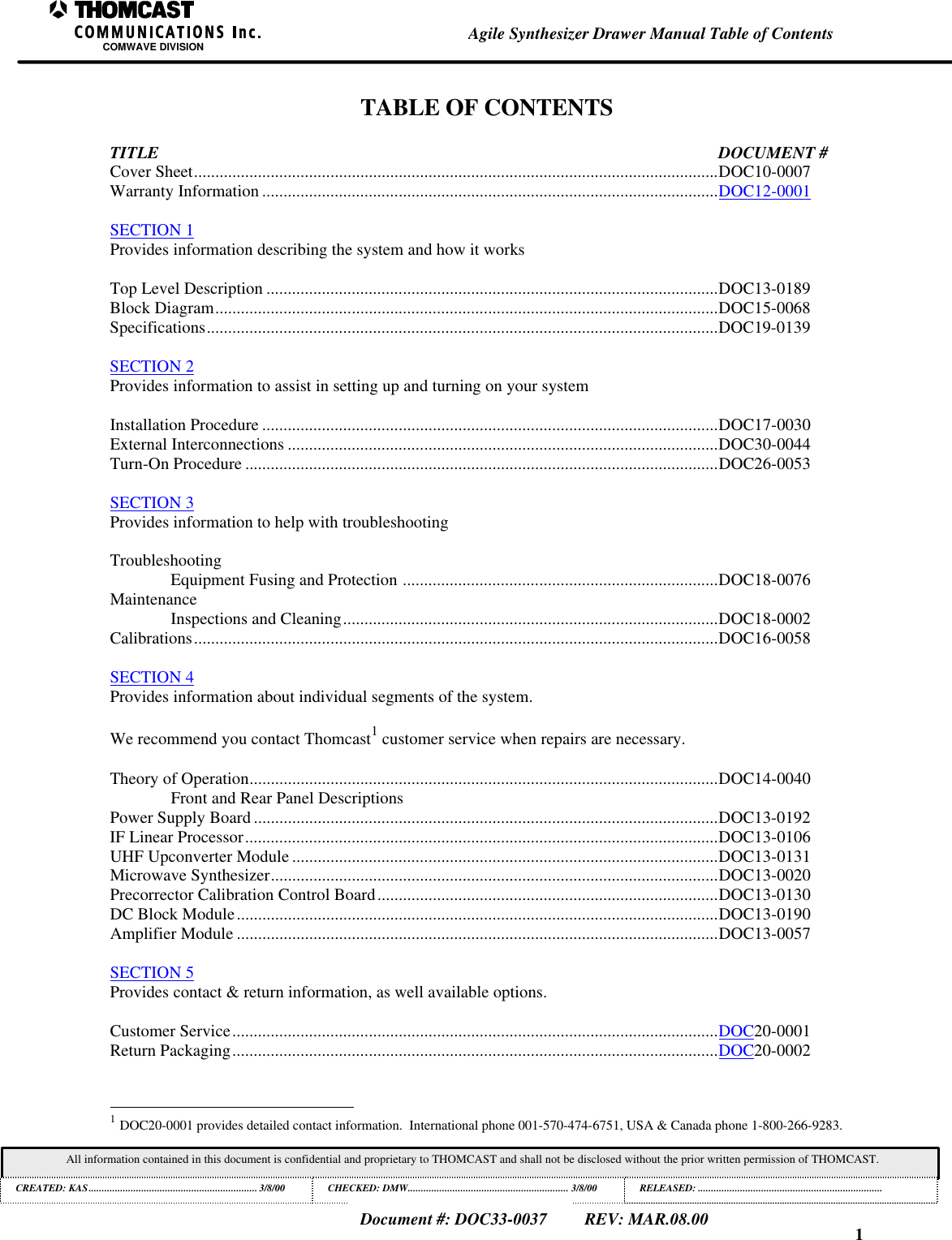
1Agile Synthesizer Drawer Manual Table of ContentsCOMWAVE DIVISIONAll information contained in this document is confidential and proprietary to THOMCAST and shall not be disclosed without the prior written permission of THOMCAST.CREATED: KAS................................................................3/8/00 CHECKED: DMW............................................................. 3/8/00RELEASED:......................................................................Document #: DOC33-0037REV: MAR.08.00TABLE OF CONTENTSTITLE DOCUMENT #Cover Sheet...........................................................................................................................DOC10-0007Warranty Information ...........................................................................................................DOC12-0001SECTION 1Provides information describing the system and how it worksTop Level Description ..........................................................................................................DOC13-0189Block Diagram......................................................................................................................DOC15-0068Specifications........................................................................................................................DOC19-0139SECTION 2Provides information to assist in setting up and turning on your systemInstallation Procedure ...........................................................................................................DOC17-0030External Interconnections .....................................................................................................DOC30-0044Turn-On Procedure ...............................................................................................................DOC26-0053SECTION 3Provides information to help with troubleshootingTroubleshootingEquipment Fusing and Protection ..........................................................................DOC18-0076MaintenanceInspections and Cleaning........................................................................................DOC18-0002Calibrations...........................................................................................................................DOC16-0058SECTION 4Provides information about individual segments of the system.We recommend you contact Thomcast1 customer service when repairs are necessary.Theory of Operation..............................................................................................................DOC14-0040Front and Rear Panel DescriptionsPower Supply Board .............................................................................................................DOC13-0192IF Linear Processor...............................................................................................................DOC13-0106UHF Upconverter Module ....................................................................................................DOC13-0131Microwave Synthesizer.........................................................................................................DOC13-0020Precorrector Calibration Control Board................................................................................DOC13-0130DC Block Module.................................................................................................................DOC13-0190Amplifier Module .................................................................................................................DOC13-0057SECTION 5Provides contact & return information, as well available options.Customer Service..................................................................................................................DOC20-0001Return Packaging..................................................................................................................DOC20-0002                                                          1 DOC20-0001 provides detailed contact information.  International phone 001-570-474-6751, USA & Canada phone 1-800-266-9283.
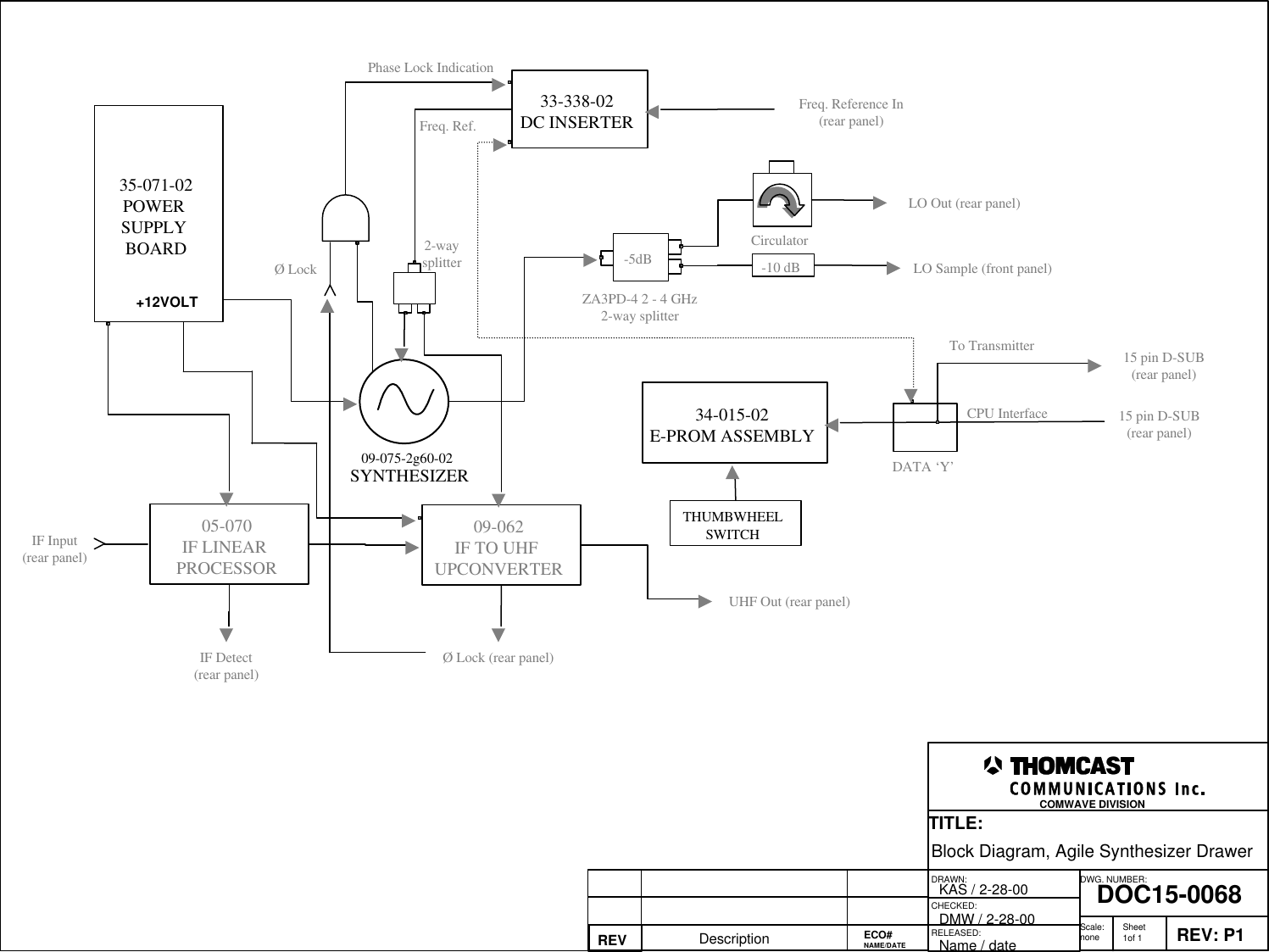
1Agile Synthesizer Drawer Top Level DescriptionCOMWAVE DIVISIONAll information contained in this document is confidential and proprietary to THOMCAST and shall not be disclosed without the prior written permission of THOMCAST.CREATED: KAS ................................................................2/23/00 CHECKED: DMW............................................................. 2/28/00RELEASED: name............................................................ dateDocument #: DOC13-0189REV: FEB.23.00TOP LEVEL DESCRIPTIONThe agile synthesizer drawer is used in conjunction with an agile transmitter. It provides the main local oscillator tothe system. The synthesizer within is capable of being programmed to operate at the frequency necessary to achievethe on-channel S-band carrier. The LO is heterodyned with an IF signal within the transmitter. This mixing actiondetermines what frequency the agile synthesizer drawer will be set at. Referring to the block diagram, which issubsequent to this document, may provide a better understanding of how this drawer operates.
DRAWN:RELEASED:CHECKED:DWG. NUMBER:TITLE:REV: P1DOC15-0068Block Diagram, Agile Synthesizer DrawerKAS / 2-28-00Name / dateREV Description DMW / 2-28-00 Scale:none Sheet1of 1COMWAVE DIVISION ECO#NAME/DATE35-071-02POWER SUPPLY BOARD+12VOLTSYNTHESIZER09-075-2g60-0234-015-02E-PROM ASSEMBLYTHUMBWHEELSWITCH33-338-02DC INSERTERCirculator-5dBDATA ‘Y’ZA3PD-4 2 - 4 GHz2-way splitter15 pin D-SUB(rear panel)15 pin D-SUB(rear panel)-10 dBLO Out (rear panel)Freq. Reference In(rear panel)IF Input(rear panel)LO Sample (front panel)CPU InterfaceTo TransmitterFreq. Ref. Phase Lock IndicationØ Lock05-070IF LINEAR PROCESSOR09-062IF TO UHF UPCONVERTERIF Detect(rear panel)Ø Lock (rear panel)UHF Out (rear panel)2-waysplitter
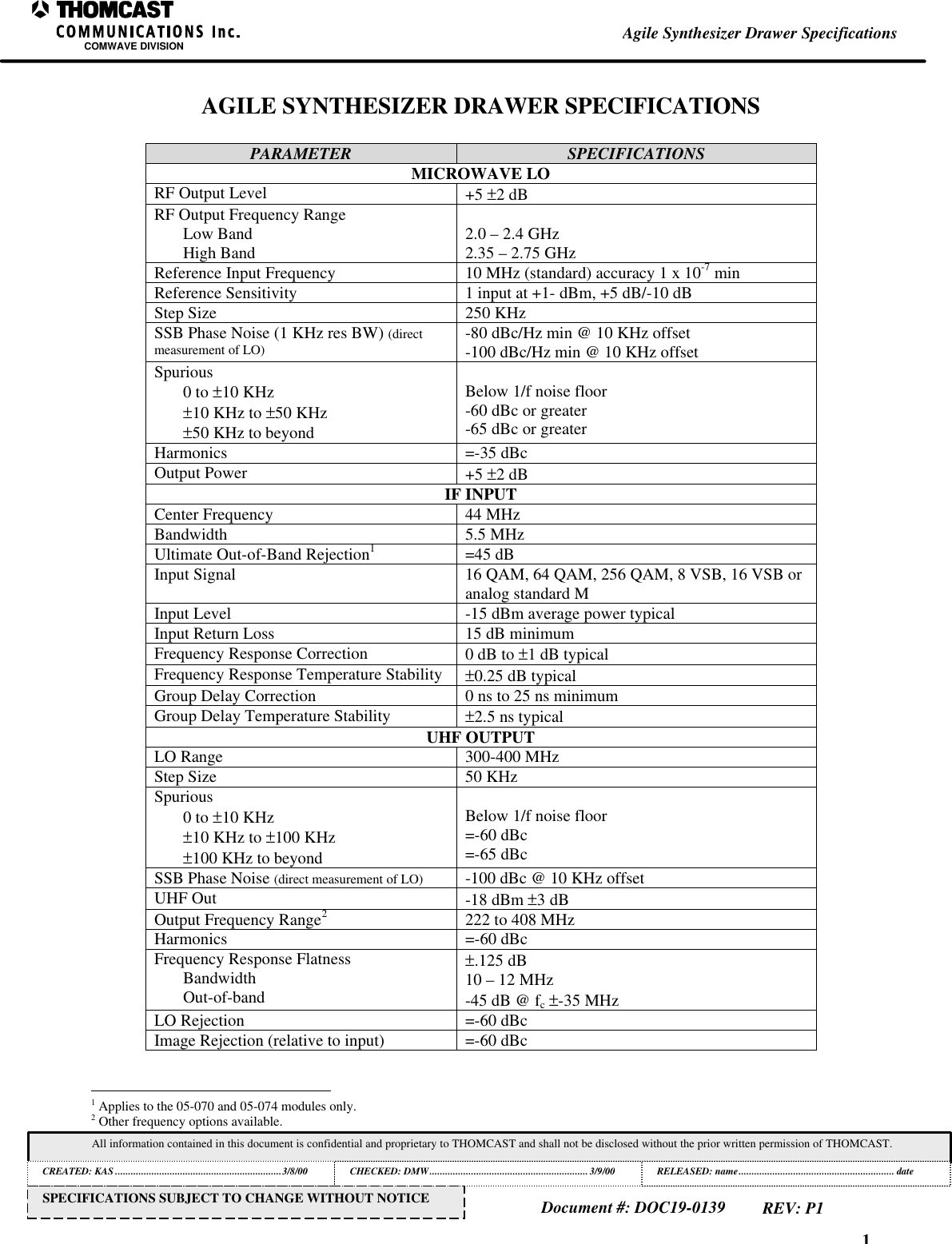
1Agile Synthesizer Drawer SpecificationsCOMWAVE DIVISIONAll information contained in this document is confidential and proprietary to THOMCAST and shall not be disclosed without the prior written permission of THOMCAST.CREATED: KAS ................................................................3/8/00 CHECKED: DMW............................................................. 3/9/00RELEASED: name............................................................ dateDocument #: DOC19-0139REV: P1SPECIFICATIONS SUBJECT TO CHANGE WITHOUT NOTICEAGILE SYNTHESIZER DRAWER SPECIFICATIONSPARAMETER SPECIFICATIONSMICROWAVE LORF Output Level +5 ±2 dBRF Output Frequency RangeLow BandHigh Band 2.0 – 2.4 GHz2.35 – 2.75 GHzReference Input Frequency 10 MHz (standard) accuracy 1 x 10⁻⁷ minReference Sensitivity 1 input at +1- dBm, +5 dB/-10 dBStep Size 250 KHzSSB Phase Noise (1 KHz res BW) (directmeasurement of LO) -80 dBc/Hz min @ 10 KHz offset-100 dBc/Hz min @ 10 KHz offsetSpurious0 to ±10 KHz±10 KHz to ±50 KHz±50 KHz to beyondBelow 1/f noise floor-60 dBc or greater-65 dBc or greaterHarmonics =-35 dBcOutput Power +5 ±2 dBIF INPUTCenter Frequency 44 MHzBandwidth 5.5 MHzUltimate Out-of-Band Rejection1=45 dBInput Signal 16 QAM, 64 QAM, 256 QAM, 8 VSB, 16 VSB oranalog standard MInput Level -15 dBm average power typicalInput Return Loss 15 dB minimumFrequency Response Correction 0 dB to ±1 dB typicalFrequency Response Temperature Stability ±0.25 dB typicalGroup Delay Correction 0 ns to 25 ns minimumGroup Delay Temperature Stability ±2.5 ns typicalUHF OUTPUTLO Range 300-400 MHzStep Size 50 KHzSpurious0 to ±10 KHz±10 KHz to ±100 KHz±100 KHz to beyondBelow 1/f noise floor=-60 dBc=-65 dBcSSB Phase Noise (direct measurement of LO) -100 dBc @ 10 KHz offsetUHF Out -18 dBm ±3 dBOutput Frequency Range2222 to 408 MHzHarmonics =-60 dBcFrequency Response FlatnessBandwidthOut-of-band±.125 dB10 – 12 MHz-45 dB @ fc ±-35 MHzLO Rejection =-60 dBcImage Rejection (relative to input) =-60 dBc                                                          1 Applies to the 05-070 and 05-074 modules only.2 Other frequency options available.
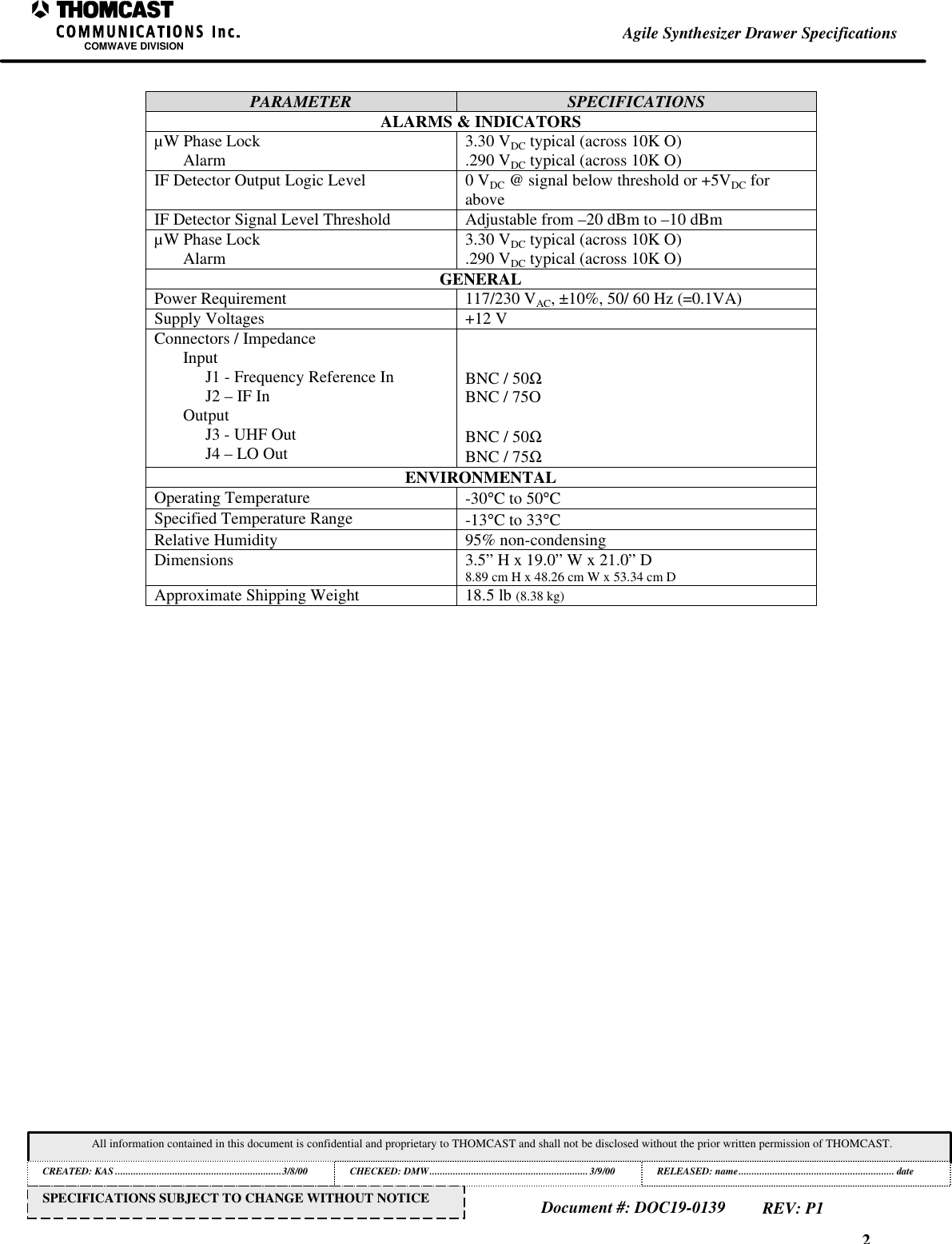
2Agile Synthesizer Drawer SpecificationsCOMWAVE DIVISIONAll information contained in this document is confidential and proprietary to THOMCAST and shall not be disclosed without the prior written permission of THOMCAST.CREATED: KAS ................................................................3/8/00 CHECKED: DMW............................................................. 3/9/00RELEASED: name............................................................ dateDocument #: DOC19-0139REV: P1SPECIFICATIONS SUBJECT TO CHANGE WITHOUT NOTICEPARAMETER SPECIFICATIONSALARMS & INDICATORSµW Phase LockAlarm 3.30 VDC typical (across 10K O).290 VDC typical (across 10K O)IF Detector Output Logic Level 0 VDC @ signal below threshold or +5VDC foraboveIF Detector Signal Level Threshold Adjustable from –20 dBm to –10 dBmµW Phase LockAlarm 3.30 VDC typical (across 10K O).290 VDC typical (across 10K O)GENERALPower Requirement 117/230 VAC, ±10%, 50/ 60 Hz (=0.1VA)Supply Voltages +12 VConnectors / ImpedanceInputJ1 - Frequency Reference InJ2 – IF InOutputJ3 - UHF OutJ4 – LO OutBNC / 50ΩBNC / 75OBNC / 50ΩBNC / 75ΩENVIRONMENTALOperating Temperature -30°C to 50°CSpecified Temperature Range -13°C to 33°CRelative Humidity 95% non-condensingDimensions 3.5” H x 19.0” W x 21.0” D8.89 cm H x 48.26 cm W x 53.34 cm DApproximate Shipping Weight 18.5 lb (8.38 kg)
1Installation Procedure, ChassisCOMWAVE DIVISIONDocument #: DOC17-0030REV: FEB.22.00All information contained in this document is confidential and proprietary to THOMCAST and shall not be disclosed without the prior written permission of THOMCAST.CREATED: KAS................................................................ 5/24/99 CHECKED: PRC ...............................................................10/25/99RELEASED: DMW............................................................10/27/99This is an unpublished work protected by United States copyright laws and is proprietary to Thomcast Communications, Inc.  Disclosure,copying, reproduction, merger, translation, modification, enhancement or use by anyone other than authorized employees or licensees ofThomcast Communications, Inc. without the prior written consent of Thomcast Communications, Inc. is prohibited.Copyright (c) 1999 Thomcast Communications, Inc.  All rights reservedThis copyright notice should not be construed as evidence of publication.PROCEDUREDOC17-0030Chassis Installation ProcedureCOMWAVE DIVISION
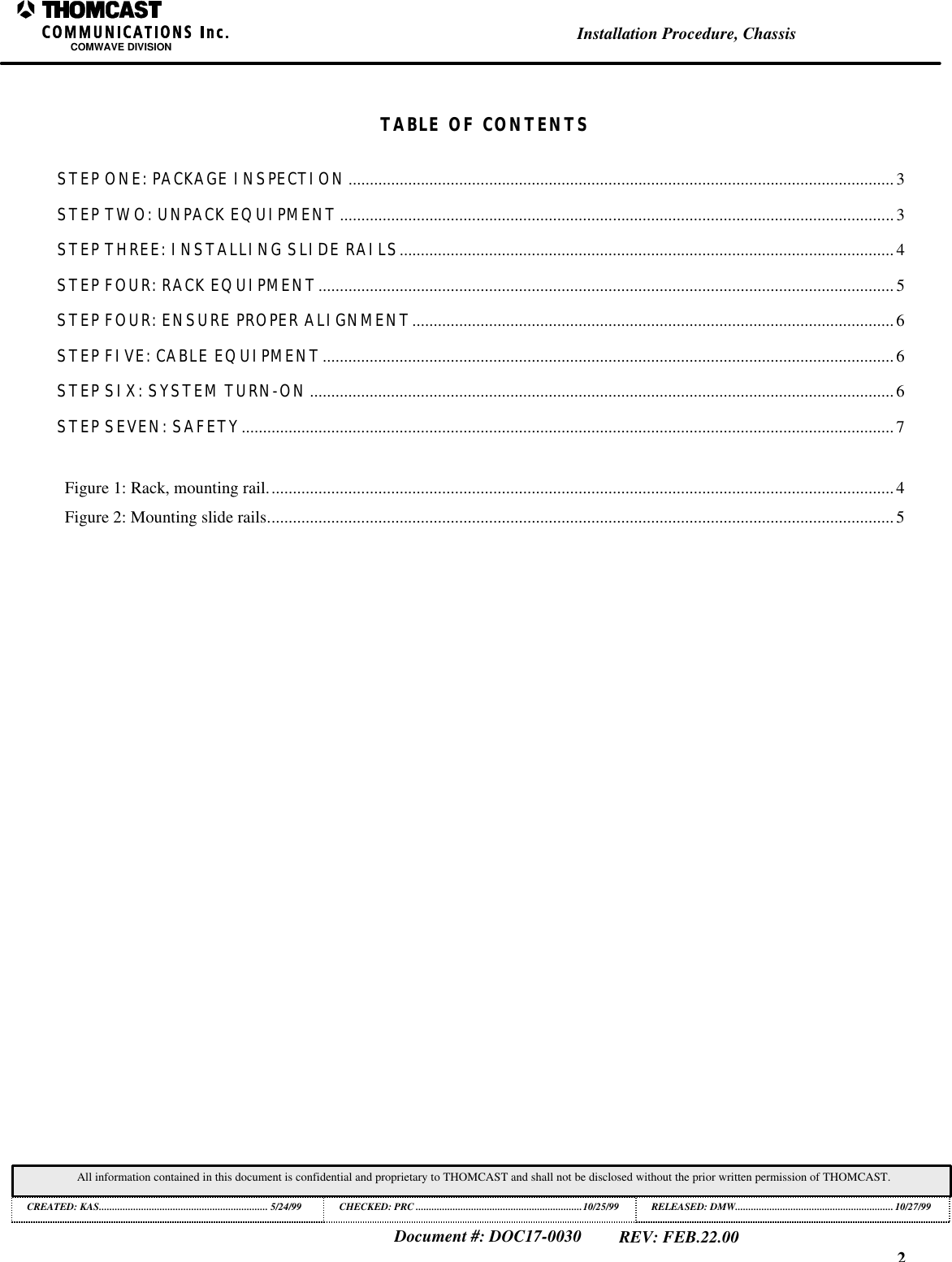
2Installation Procedure, ChassisCOMWAVE DIVISIONDocument #: DOC17-0030REV: FEB.22.00All information contained in this document is confidential and proprietary to THOMCAST and shall not be disclosed without the prior written permission of THOMCAST.CREATED: KAS................................................................ 5/24/99 CHECKED: PRC ...............................................................10/25/99RELEASED: DMW............................................................10/27/99TABLE OF CONTENTSSTEP ONE: PACKAGE INSPECTION................................................................................................................................3STEP TWO: UNPACK EQUIPMENT..................................................................................................................................3STEP THREE: INSTALLING SLIDE RAILS.................................................................................................................... 4STEP FOUR: RACK EQUIPMENT.......................................................................................................................................5STEP FOUR: ENSURE PROPER ALIGNMENT.................................................................................................................6STEP FIVE: CABLE EQUIPMENT......................................................................................................................................6STEP SIX: SYSTEM TURN-ON.........................................................................................................................................6STEP SEVEN: SAFETY.........................................................................................................................................................7Figure 1: Rack, mounting rail...................................................................................................................................................4Figure 2: Mounting slide rails...................................................................................................................................................5
3Installation Procedure, ChassisCOMWAVE DIVISIONDocument #: DOC17-0030REV: FEB.22.00All information contained in this document is confidential and proprietary to THOMCAST and shall not be disclosed without the prior written permission of THOMCAST.CREATED: KAS................................................................ 5/24/99 CHECKED: PRC ...............................................................10/25/99RELEASED: DMW............................................................10/27/99INSTALLATION INSTRUCTIONSKEY: • = informational note• Thomcast equipment operates in temperatures between –30° to 50° C (-22° to 122° F); the optimal operating temperature range is13° to 33° C (55.4° to 91.4° F).  Moderate temperatures generally extend equipment life.• The equipment will operate with a relative humidity of up to 95% but it MUST be protected from conditions that causecondensation.STEP ONE: PACKAGE INSPECTIONPerform a thorough check of ALL parcels.WHY HOW PROBLEMSEnsure arrival of all packages withoutdamage.1. Check the master packing slip to verify receipt of allpackages.2. As shipment is received, inspect each package forobvious damage.If packages are missingor damaged, inform thefreight carrierimmediately to file afreight claim; thennotify a Thomcastrepresentative.1STEP TWO: UNPACK EQUIPMENTWHY HOW PROBLEMSFor placement in existing system.1. Using a utility knife, open and unpack each boxseparately.2. Compare the contents with the packing slip andinspect for in-transit damage.Make note of any discrepancies or damages.If there is a discrepancybetween the packingslip and contents,inform a Thomcastrepresentative1immediately.• Please recycle; however, do not discard all original packing material, save it at the equipment site to use whenreturning items to Thomcast.                                                          1 Detailed contact information is provided in this manual.  International phone 001-570-474-6751, USA & Canada phone 1-800-266-9283.
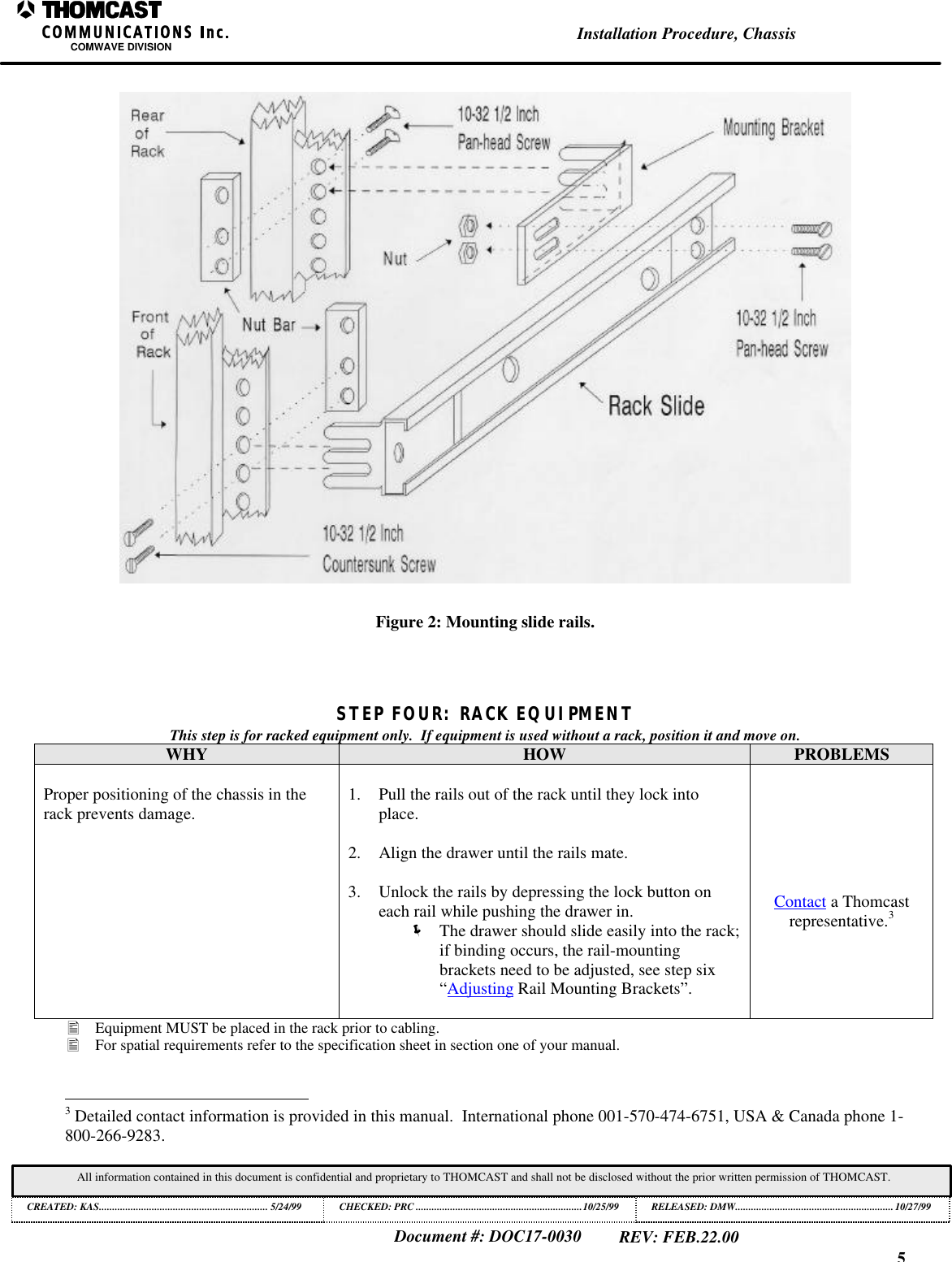
4Installation Procedure, ChassisCOMWAVE DIVISIONDocument #: DOC17-0030REV: FEB.22.00All information contained in this document is confidential and proprietary to THOMCAST and shall not be disclosed without the prior written permission of THOMCAST.CREATED: KAS................................................................ 5/24/99 CHECKED: PRC ...............................................................10/25/99RELEASED: DMW............................................................10/27/99STEP THREE: INSTALLING SLIDE RAILSTypically slide rails are installed before shipping, if so, proceed to the next step.WHY HOW PROBLEMSSlide rails enable easy access to internaladjustable controls and othermaintenance/adjustments.Slide rails are packed and shipped with racks.MOUNTING RAILS:1. Using a #10 flat screwdriver, attach the slides to themounting rail1 within the rack with the providedhardware.  See Figure 1 for the location of themounting rail.  See Figure 2 for directions onmounting the rails.2. Adjust rails if they don’t slide easily into the rack.ADJUSTING RAIL-MOUNTING BRACKETS:Loosen them and manipulate the drawer to seat rails tomatch the rails on the drawer, once free sliding motion isachieved retighten the brackets.Contact a Thomcastrepresentative.21Figure 1: Rack, mounting rail.                                                          2 Detailed contact information is provided in this manual.  International phone 001-570-474-6751, USA & Canada phone 1-800-266-9283.
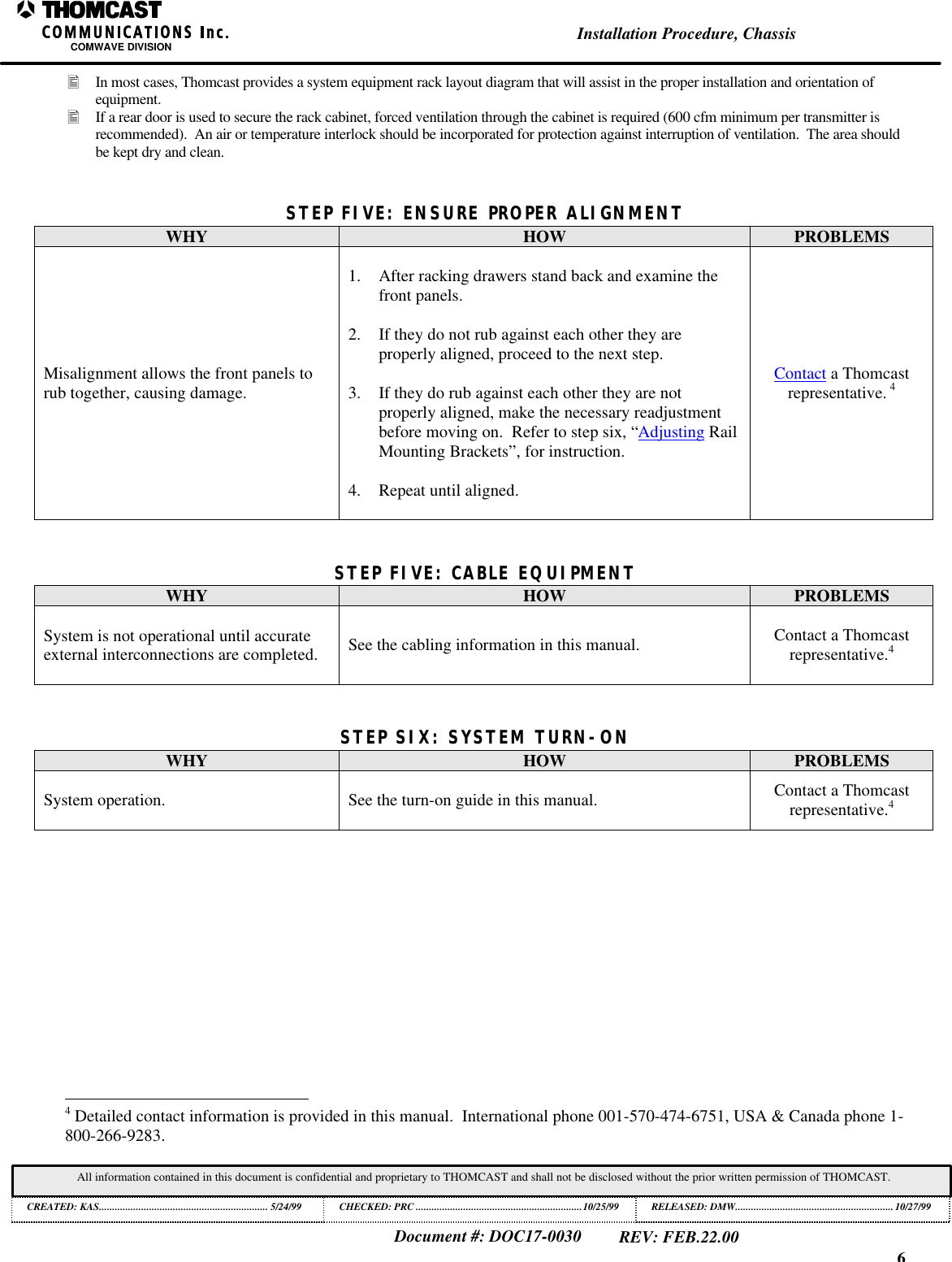
5Installation Procedure, ChassisCOMWAVE DIVISIONDocument #: DOC17-0030REV: FEB.22.00All information contained in this document is confidential and proprietary to THOMCAST and shall not be disclosed without the prior written permission of THOMCAST.CREATED: KAS................................................................ 5/24/99 CHECKED: PRC ...............................................................10/25/99RELEASED: DMW............................................................10/27/99Figure 2: Mounting slide rails.STEP FOUR: RACK EQUIPMENTThis step is for racked equipment only.  If equipment is used without a rack, position it and move on.WHY HOW PROBLEMSProper positioning of the chassis in therack prevents damage. 1. Pull the rails out of the rack until they lock intoplace.2. Align the drawer until the rails mate.3. Unlock the rails by depressing the lock button oneach rail while pushing the drawer in.ë The drawer should slide easily into the rack;if binding occurs, the rail-mountingbrackets need to be adjusted, see step six“Adjusting Rail Mounting Brackets”.Contact a Thomcastrepresentative.3• Equipment MUST be placed in the rack prior to cabling.• For spatial requirements refer to the specification sheet in section one of your manual.                                                          3 Detailed contact information is provided in this manual.  International phone 001-570-474-6751, USA & Canada phone 1-800-266-9283.
6Installation Procedure, ChassisCOMWAVE DIVISIONDocument #: DOC17-0030REV: FEB.22.00All information contained in this document is confidential and proprietary to THOMCAST and shall not be disclosed without the prior written permission of THOMCAST.CREATED: KAS................................................................ 5/24/99 CHECKED: PRC ...............................................................10/25/99RELEASED: DMW............................................................10/27/99• In most cases, Thomcast provides a system equipment rack layout diagram that will assist in the proper installation and orientation ofequipment.• If a rear door is used to secure the rack cabinet, forced ventilation through the cabinet is required (600 cfm minimum per transmitter isrecommended).  An air or temperature interlock should be incorporated for protection against interruption of ventilation.  The area shouldbe kept dry and clean.STEP FIVE: ENSURE PROPER ALIGNMENTWHY HOW PROBLEMSMisalignment allows the front panels torub together, causing damage.1. After racking drawers stand back and examine thefront panels.2. If they do not rub against each other they areproperly aligned, proceed to the next step.3. If they do rub against each other they are notproperly aligned, make the necessary readjustmentbefore moving on.  Refer to step six, “Adjusting RailMounting Brackets”, for instruction.4. Repeat until aligned.Contact a Thomcastrepresentative. 4STEP FIVE: CABLE EQUIPMENTWHY HOW PROBLEMSSystem is not operational until accurateexternal interconnections are completed. See the cabling information in this manual. Contact a Thomcastrepresentative.4STEP SIX: SYSTEM TURN-ONWHY HOW PROBLEMSSystem operation. See the turn-on guide in this manual. Contact a Thomcastrepresentative.4                                                          4 Detailed contact information is provided in this manual.  International phone 001-570-474-6751, USA & Canada phone 1-800-266-9283.
7Installation Procedure, ChassisCOMWAVE DIVISIONDocument #: DOC17-0030REV: FEB.22.00All information contained in this document is confidential and proprietary to THOMCAST and shall not be disclosed without the prior written permission of THOMCAST.CREATED: KAS................................................................ 5/24/99 CHECKED: PRC ...............................................................10/25/99RELEASED: DMW............................................................10/27/99STEP SEVEN: SAFETYWHY HOW PROBLEMSProtection for you and your system.This is a very brief discussion of safetyissues, refer to DOC26-0031 for moredetail.1. This equipment utilizes a groundingplug on all power cords.  Forpersonal safety, do not defeat thissafety feature.2. As with similar types of equipment, high voltage canbe accessed when the chassis cover is removed.Special care should be given in areas of fuses, lineswitches, and power supplies.3. Modern high power solid state equipment contain lowoutput voltage power supplies with very high currentcapability.  To prevent severe burns, avoid contact ofrings, watch bands, etc., with these circuits.4. When servicing the transmission line and antenna, caremust be taken to avoid exposure to high energymicrowave.Contact a Thomcastrepresentative.5                                                          5 Detailed contact information is provided in this manual.  International phone 001-570-474-6751, USA & Canada phone 1-800-266-9283.
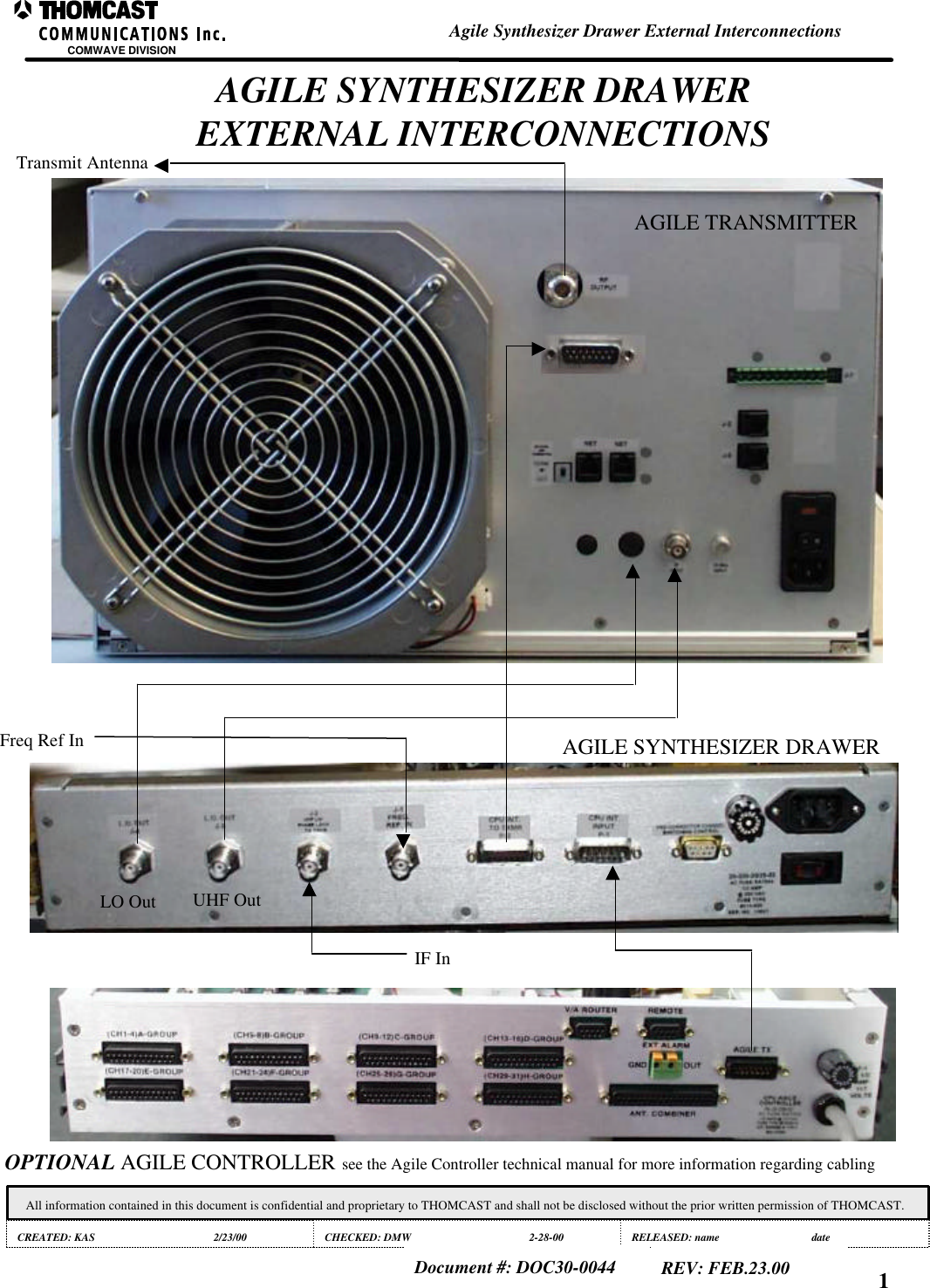
OPTIONAL AGILE CONTROLLER see the Agile Controller technical manual for more information regarding cablingAGILE SYNTHESIZER DRAWERAGILE TRANSMITTERFreq Ref InIF InTransmit AntennaAGILE SYNTHESIZER DRAWEREXTERNAL INTERCONNECTIONSCOMWAVE DIVISIONAgile Synthesizer Drawer External InterconnectionsAll information contained in this document is confidential and proprietary to THOMCAST and shall not be disclosed without the prior written permission of THOMCAST.CREATED: KAS 2/23/00 CHECKED: DMW 2-28-00 RELEASED: name dateDocument #: DOC30-0044 REV: FEB.23.00 1UHF OutLO Out
1COMWAVE DIVISIONAll information contained in this document is confidential and proprietary to THOMCAST and shall not be disclosed without the prior written permission of THOMCAST.CREATED: KAS ................................................................2/23/00 CHECKED: DMW............................................................. 2/28/00RELEASED:......................................................................Document #: DOC26-0053REV: FEB.23.00Turn-On ProcedureTURN-ON PROCEDUREThis section explains the initial turn-on for your chassis and explains normal operation.  Prior to equipment turn-on,verify that all appropriate cabling has been accomplished.Turn on1. Ensure the rear mounted main power ON/OFF switch is in the OFF position.2. Insert the power plug into a power outlet.3. Position the main power switch to ON.4. The front panel LED will continuously illuminate green  verifying successful turn on and normal operation:OperationSelecting the proper operating channel, as discussed below, and having proper interconnections established betweenthis drawer and all accompanying chassis’ enables operation.Channel Selection / Programming:Channel selection is accomplished in two ways, manually or automatically. Both methods are describedbelow.Manual Channel SelectionManual channel selection is done through the use of the front panel thumbwheel switch. The thumbwheelinterfaces with and EPROM board sending a binary coded decimal (BCD) address to the firmware locatedon the board. The EPROM logic then forwards programming information to the synthesizer in the samemanner. Typical programming results in selection of the lowest channel when the thumbwheel switch isrotated to the [01] position. Progression allows channel selection to move upward in 6 MHz1 steps.Agile Controller InterfaceUpon connection of the Agile Controller, the manual channel setting is overridden. A data ‘Y’ is providedon the DC insertion board. This allows a loop though of logic information in the drawer to the RFprecorrector module located in the upconverter plug-in module. The CPU interface sends a BCD address tothe EPROM board containing the channel selection of the transmitter to be backed up. The EPROM boardthen forwards this programming to the synthesizer module.                                                          1 Channel mapping of A1, B1, A2, B2 ….. G4 is typical, international standards are available.
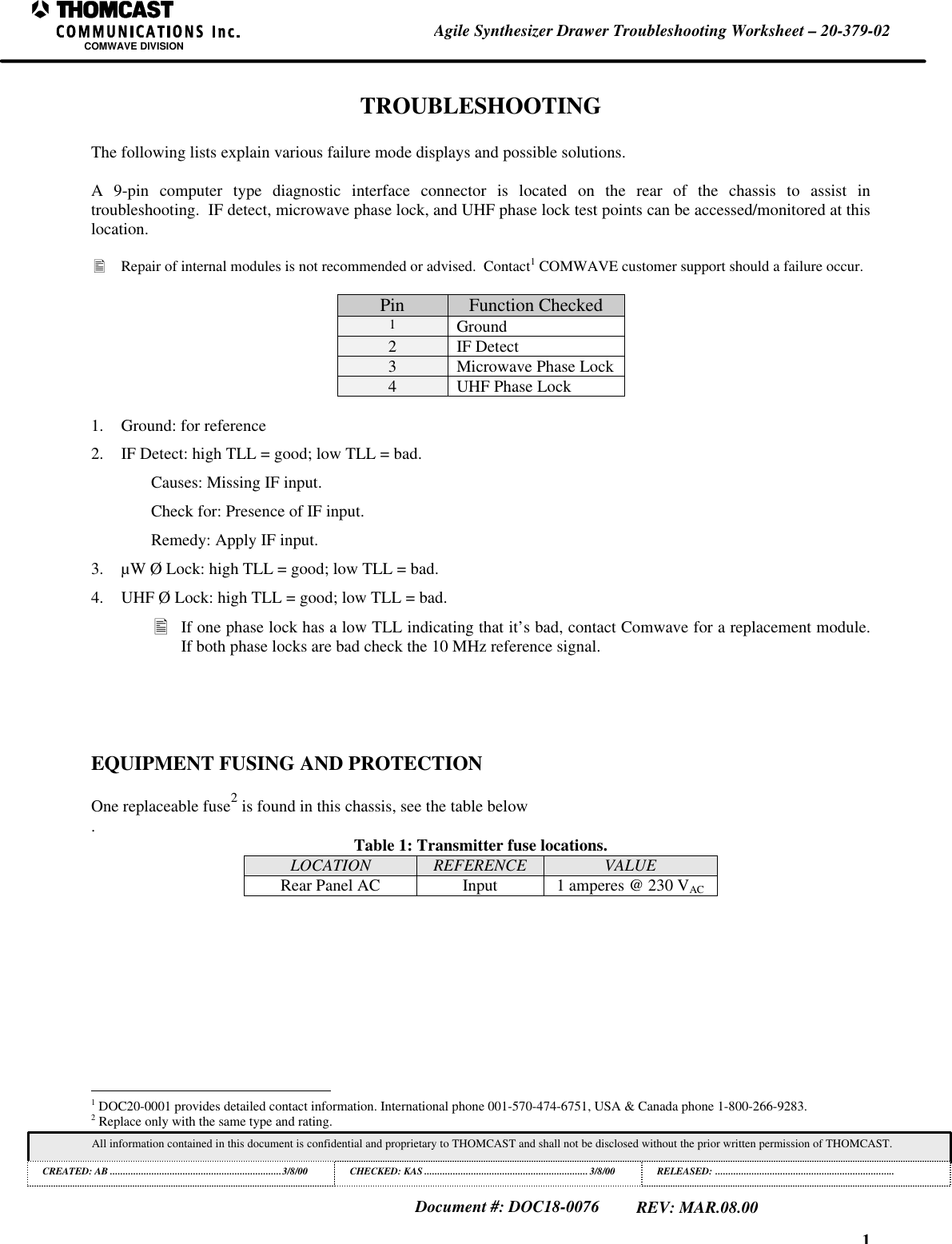
1Agile Synthesizer Drawer Troubleshooting Worksheet – 20-379-02COMWAVE DIVISIONAll information contained in this document is confidential and proprietary to THOMCAST and shall not be disclosed without the prior written permission of THOMCAST.CREATED: AB ..................................................................3/8/00 CHECKED: KAS ...............................................................3/8/00RELEASED: .....................................................................Document #: DOC18-0076REV: MAR.08.00TROUBLESHOOTINGThe following lists explain various failure mode displays and possible solutions.A 9-pin computer type diagnostic interface connector is located on the rear of the chassis to assist introubleshooting.  IF detect, microwave phase lock, and UHF phase lock test points can be accessed/monitored at thislocation.• Repair of internal modules is not recommended or advised.  Contact1 COMWAVE customer support should a failure occur.Pin Function Checked1Ground2IF Detect3Microwave Phase Lock4UHF Phase Lock1. Ground: for reference2. IF Detect: high TLL = good; low TLL = bad.Causes: Missing IF input.Check for: Presence of IF input.Remedy: Apply IF input.3. µW Ø Lock: high TLL = good; low TLL = bad.4. UHF Ø Lock: high TLL = good; low TLL = bad.• If one phase lock has a low TLL indicating that it’s bad, contact Comwave for a replacement module.If both phase locks are bad check the 10 MHz reference signal.EQUIPMENT FUSING AND PROTECTIONOne replaceable fuse2 is found in this chassis, see the table below.Table 1: Transmitter fuse locations.LOCATION REFERENCE VALUERear Panel AC Input 1 amperes @ 230 VAC                                                          1 DOC20-0001 provides detailed contact information. International phone 001-570-474-6751, USA & Canada phone 1-800-266-9283.2 Replace only with the same type and rating.
1Maintenance – Inspections and CleaningCOMWAVE DIVISIONAll information contained in this document is confidential and proprietary to THOMCAST and shall not be disclosed without the prior written permission of THOMCAST.CREATED: KAS ............1/18/99 ECO #: 99-057, 6/14/99 CHECKED: DMW.............................................................1/18/99RELEASED: PRC............................................................. 1/18/99Document #: DOC18-0002REV: FEB.23.00INSPECTIONS AND CLEANINGThomcast products have been carefully designed to be maintenance free.  Only periodic inspection1 andcleaning is necessary.INSPECTIONS1) Inspect heat sinks and/or fans, if applicable, monthly for heavy accumulations of dirt and/or insects.Heavy accumulation of foreign debris impedes cooling effectiveness and could lead to prematurefailure.2) If debris is found:a) Shut down the transmitter/receiverb) Unplug the AC line cordc) Remove the top coverd) Remove debris3) After debris removal:a) Replace the top coverb) Plug the AC line cord inc) Turn on the transmitter/receiverd) Check the tightness of all cable connectionsCLEANINGClean the faceplate and outside cover using a damp non-abrasive cloth with a mixture of a mild detergentand water.                                                          1 If this is a component of a larger system, more in depth maintenance information may be included in the system manual, alwaysverify that ALL steps are followed.
1Calibrations for the Agile Synthesizer Drawer – 20-379COMWAVE DIVISIONAll information contained in this document is confidential and proprietary to THOMCAST and shall not be disclosed without the prior written permission of THOMCAST.CREATED: KAS ................................................................3/8/99 CHECKED: DMW............................................................. 3/8/99RELEASED: name............................................................ dateDocument #: DOC16-0058REV: MAR.08.00CALIBRATIONSSETTING THE MODULE FAULT INDICATOR THRESHOLD:1) Ensure the proper input signal is applied.2) Insert 4dB of attenuation in line with the incoming signal.3) Adjust the corresponding IF detector potentiometer, via the front panel of the module until the DC voltage is onthe border line of being a logic high and a logic low; it is necessary to toggle the logic level between high andlow in order to reach the desired threshold.4) Remove the 4dB of attenuation and ensure that the logic level remains high.
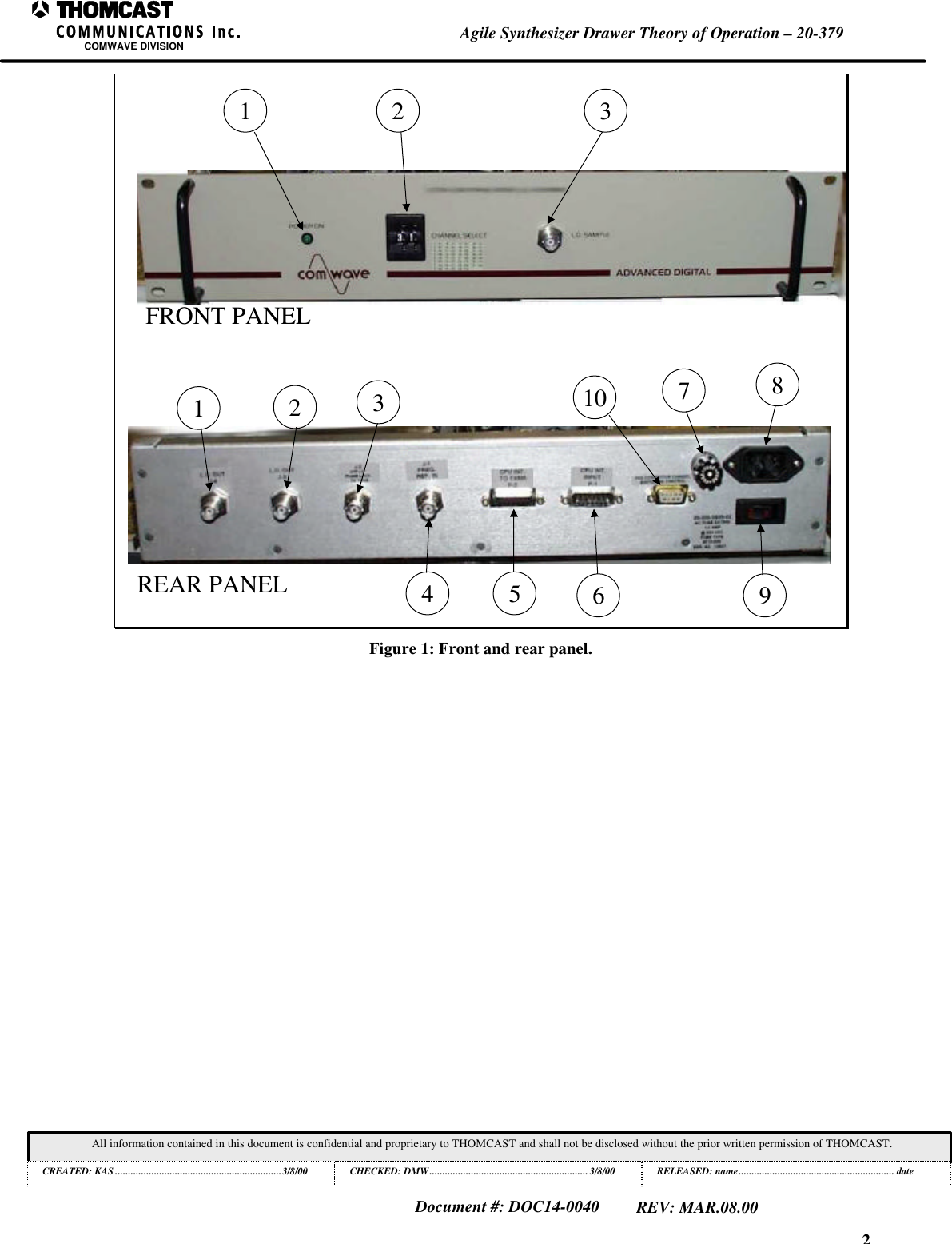
1Agile Synthesizer Drawer Theory of Operation – 20-379COMWAVE DIVISIONAll information contained in this document is confidential and proprietary to THOMCAST and shall not be disclosed without the prior written permission of THOMCAST.CREATED: KAS ................................................................3/8/00 CHECKED: DMW............................................................. 3/8/00RELEASED: name............................................................ dateDocument #: DOC14-0040REV: MAR.08.00AGILE SYNTHESIZER DRAWER THEORY OF OPERATIONThe drawer acts as the local oscillator in agile systems.  It consists of a synthesizer, power supply, EPROM board,precorrector board, DC inserter/power distribution board, circulator, and splitter.It receives a 10 MHz frequency reference signal via the rear panel, which is used as the time base for phase lockingthe internal synthesizer.  The reference signal is routed through the DC inserter board and the signal is split andamplified by hybrid amplifiers. A conditioned reference signal that contains a DC component containinginformation about the phase lock status of the synthesizer is returned to the rear panel.The reference signal is then superimposed onto a DC logic level; a logic high represents a phase locked condition,while a logic low indicates an “out of lock state”1.  A loop through allows the transmitter to utilize the referencesignal for other PLL circuits. Refer to the appropriate sections of the accompanying transmitter manual for detailedinformation.2.FRONT AND REAR PANEL DESCRIPTIONSFront panel:1. POWER INDICATOR LED: Signifies proper operation of the main DC power supply.2. THUMBWHEEL SWITCH: Allows manual channel selection.3. LO SAMPLE: BNC connector provides a test point for measuring the LO at a reduced power level.• Terminate when not in use.Rear panel:1. J4 - LO OUT: BNC connector - output to transmitter; nominal -15 dBm level; use ¼” superflex cable forinterconnection.2. J3 - UHF OUT: BNC connector - output to transmitter; nominal -15 dBm level; use RG58 50ohm type cable forinterconnection.3. J2 – IF IN: BNC connector – input from modulator; nominal -15 dBm level; use RG59 75ohm type cable forinterconnection.4. J1 – FREQ REF IN: BNC connector – input from reference drawer; 5 dBm ±5dB typical; use RG59 75ohm type cablefor interconnection.5. P2 – CPU INTERFACE: 15 pin D-sub connector – output to transmitter.6. P1 – CPU INTERFACE: 15 pin D-sub connector – input from Agile Controller.7. FUSE HOLDER: Holds fuse for protection, see fusing section for fuse size.8. AC ENTRY: AC interface, provides line filtering.9. ON/OFF SWITCH: Interrupts AC power for service.10. 9 PIN DIANOSTICS CONNECTOR.                                                          1 Phase lock status is processed and displayed within the transmitter.2 Manual sections describing DC block, UHF upconverter are recommended.
2Agile Synthesizer Drawer Theory of Operation – 20-379COMWAVE DIVISIONAll information contained in this document is confidential and proprietary to THOMCAST and shall not be disclosed without the prior written permission of THOMCAST.CREATED: KAS ................................................................3/8/00 CHECKED: DMW............................................................. 3/8/00RELEASED: name............................................................ dateDocument #: DOC14-0040REV: MAR.08.001 2 312310 784 5 6 9FRONT PANELREAR PANELFigure 1: Front and rear panel.
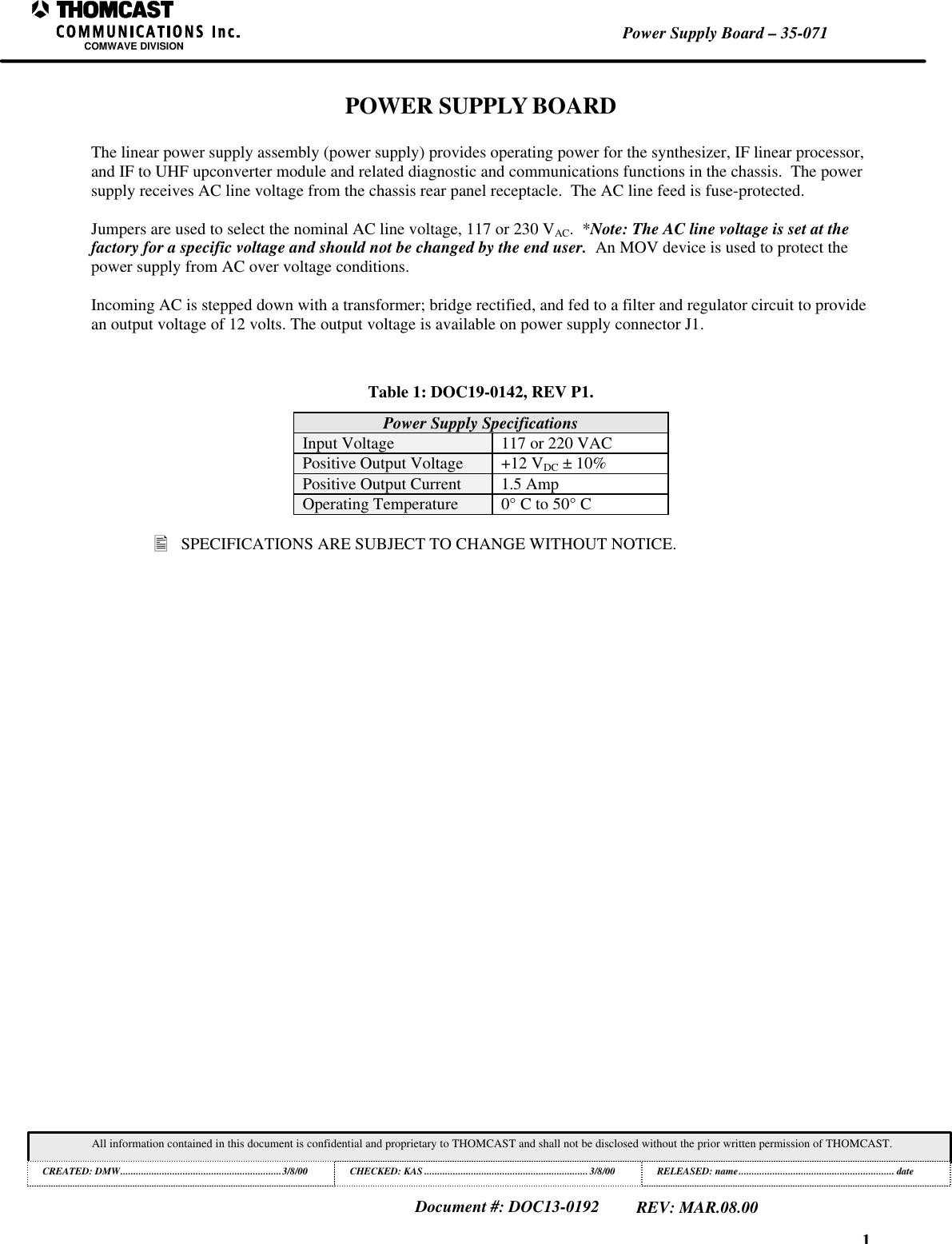
1Power Supply Board – 35-071COMWAVE DIVISIONAll information contained in this document is confidential and proprietary to THOMCAST and shall not be disclosed without the prior written permission of THOMCAST.CREATED: DMW..............................................................3/8/00 CHECKED: KAS ...............................................................3/8/00RELEASED: name............................................................ dateDocument #: DOC13-0192REV: MAR.08.00POWER SUPPLY BOARDThe linear power supply assembly (power supply) provides operating power for the synthesizer, IF linear processor,and IF to UHF upconverter module and related diagnostic and communications functions in the chassis.  The powersupply receives AC line voltage from the chassis rear panel receptacle.  The AC line feed is fuse-protected.Jumpers are used to select the nominal AC line voltage, 117 or 230 VAC.  *Note: The AC line voltage is set at thefactory for a specific voltage and should not be changed by the end user.  An MOV device is used to protect thepower supply from AC over voltage conditions.Incoming AC is stepped down with a transformer; bridge rectified, and fed to a filter and regulator circuit to providean output voltage of 12 volts. The output voltage is available on power supply connector J1.Table 1: DOC19-0142, REV P1.Power Supply SpecificationsInput Voltage 117 or 220 VACPositive Output Voltage +12 VDC ± 10%Positive Output Current 1.5 AmpOperating Temperature 0° C to 50° C• SPECIFICATIONS ARE SUBJECT TO CHANGE WITHOUT NOTICE.
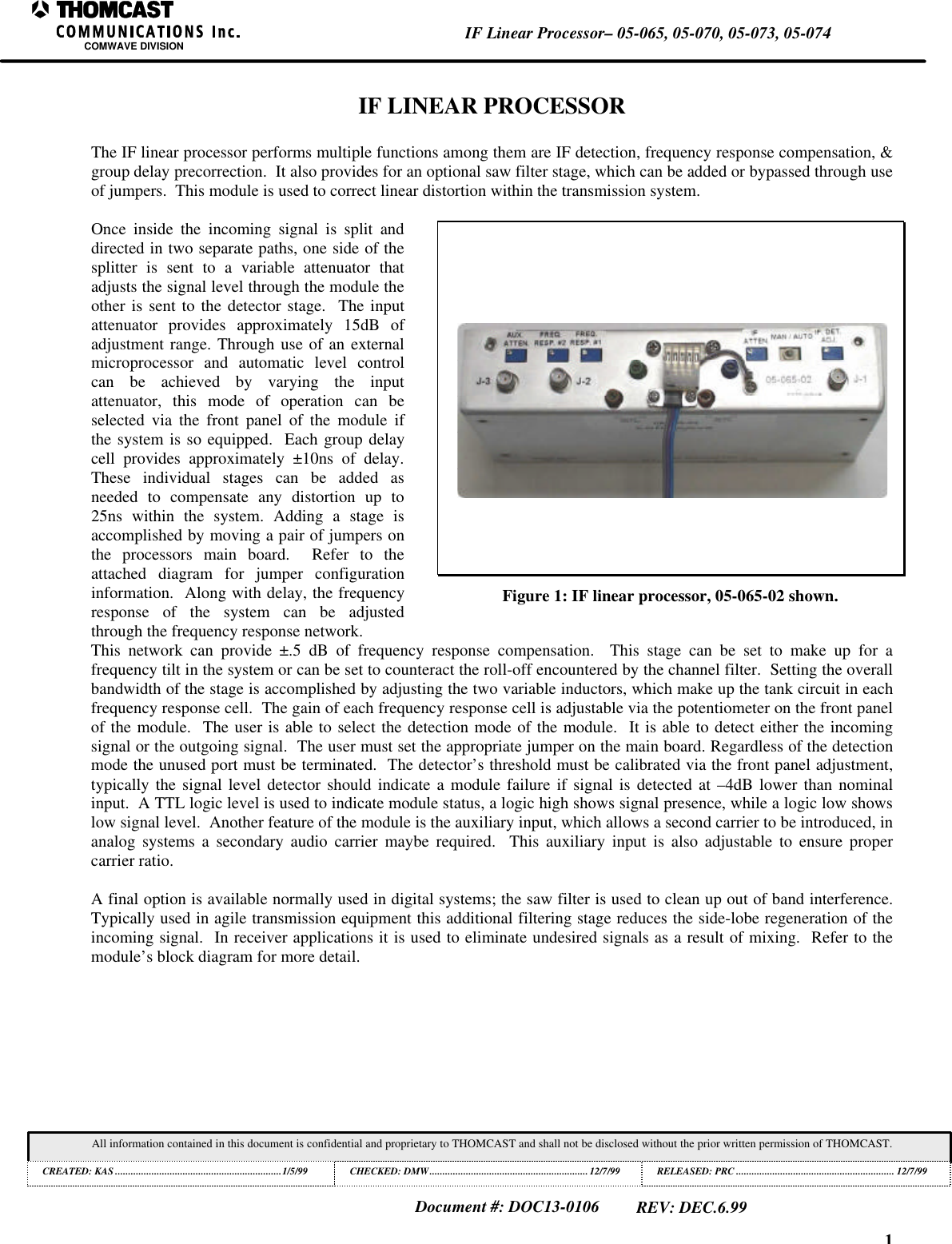
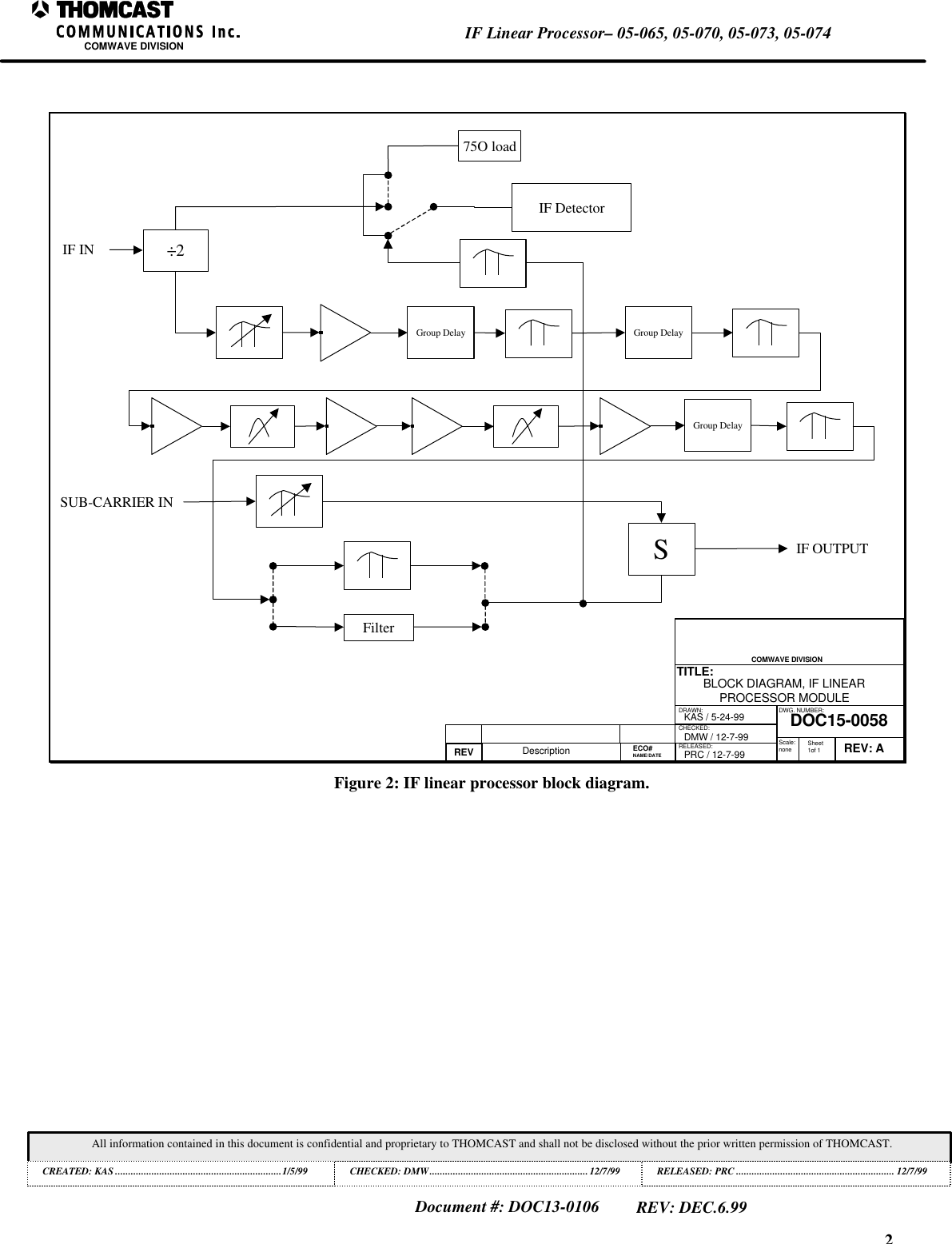
1IF Linear Processor– 05-065, 05-070, 05-073, 05-074COMWAVE DIVISIONAll information contained in this document is confidential and proprietary to THOMCAST and shall not be disclosed without the prior written permission of THOMCAST.CREATED: KAS ................................................................1/5/99 CHECKED: DMW............................................................. 12/7/99RELEASED: PRC............................................................. 12/7/99Document #: DOC13-0106REV: DEC.6.99IF LINEAR PROCESSORThe IF linear processor performs multiple functions among them are IF detection, frequency response compensation, &group delay precorrection.  It also provides for an optional saw filter stage, which can be added or bypassed through useof jumpers.  This module is used to correct linear distortion within the transmission system.Once inside the incoming signal is split anddirected in two separate paths, one side of thesplitter is sent to a variable attenuator thatadjusts the signal level through the module theother is sent to the detector stage.  The inputattenuator provides approximately 15dB ofadjustment range. Through use of an externalmicroprocessor and automatic level controlcan be achieved by varying the inputattenuator, this mode of operation can beselected via the front panel of the module ifthe system is so equipped.  Each group delaycell provides approximately ±10ns of delay.These individual stages can be added asneeded to compensate any distortion up to25ns within the system. Adding a stage isaccomplished by moving a pair of jumpers onthe processors main board.  Refer to theattached diagram for jumper configurationinformation.  Along with delay, the frequencyresponse of the system can be adjustedthrough the frequency response network.Figure 1: IF linear processor, 05-065-02 shown.This network can provide ±.5 dB of frequency response compensation.  This stage can be set to make up for afrequency tilt in the system or can be set to counteract the roll-off encountered by the channel filter.  Setting the overallbandwidth of the stage is accomplished by adjusting the two variable inductors, which make up the tank circuit in eachfrequency response cell.  The gain of each frequency response cell is adjustable via the potentiometer on the front panelof the module.  The user is able to select the detection mode of the module.  It is able to detect either the incomingsignal or the outgoing signal.  The user must set the appropriate jumper on the main board. Regardless of the detectionmode the unused port must be terminated.  The detector’s threshold must be calibrated via the front panel adjustment,typically the signal level detector should indicate a module failure if signal is detected at –4dB lower than nominalinput.  A TTL logic level is used to indicate module status, a logic high shows signal presence, while a logic low showslow signal level.  Another feature of the module is the auxiliary input, which allows a second carrier to be introduced, inanalog systems a secondary audio carrier maybe required.  This auxiliary input is also adjustable to ensure propercarrier ratio.A final option is available normally used in digital systems; the saw filter is used to clean up out of band interference.Typically used in agile transmission equipment this additional filtering stage reduces the side-lobe regeneration of theincoming signal.  In receiver applications it is used to eliminate undesired signals as a result of mixing.  Refer to themodule’s block diagram for more detail.
2IF Linear Processor– 05-065, 05-070, 05-073, 05-074COMWAVE DIVISIONAll information contained in this document is confidential and proprietary to THOMCAST and shall not be disclosed without the prior written permission of THOMCAST.CREATED: KAS ................................................................1/5/99 CHECKED: DMW............................................................. 12/7/99RELEASED: PRC............................................................. 12/7/99Document #: DOC13-0106REV: DEC.6.99DRAWN:RELEASED:CHECKED:DWG. NUMBER:TITLE:REV: ADOC15-0058BLOCK DIAGRAM, IF LINEARPROCESSOR MODULEKAS / 5-24-99PRC / 12-7-99REV Description DMW / 12-7-99 Scale:none Sheet1of 1COMWAVE DIVISION ECO#NAME/DATE÷275O loadIF DetectorGroup DelaySFilterIF OUTPUTSUB-CARRIER INIF INGroup DelayGroup DelayFigure 2: IF linear processor block diagram.
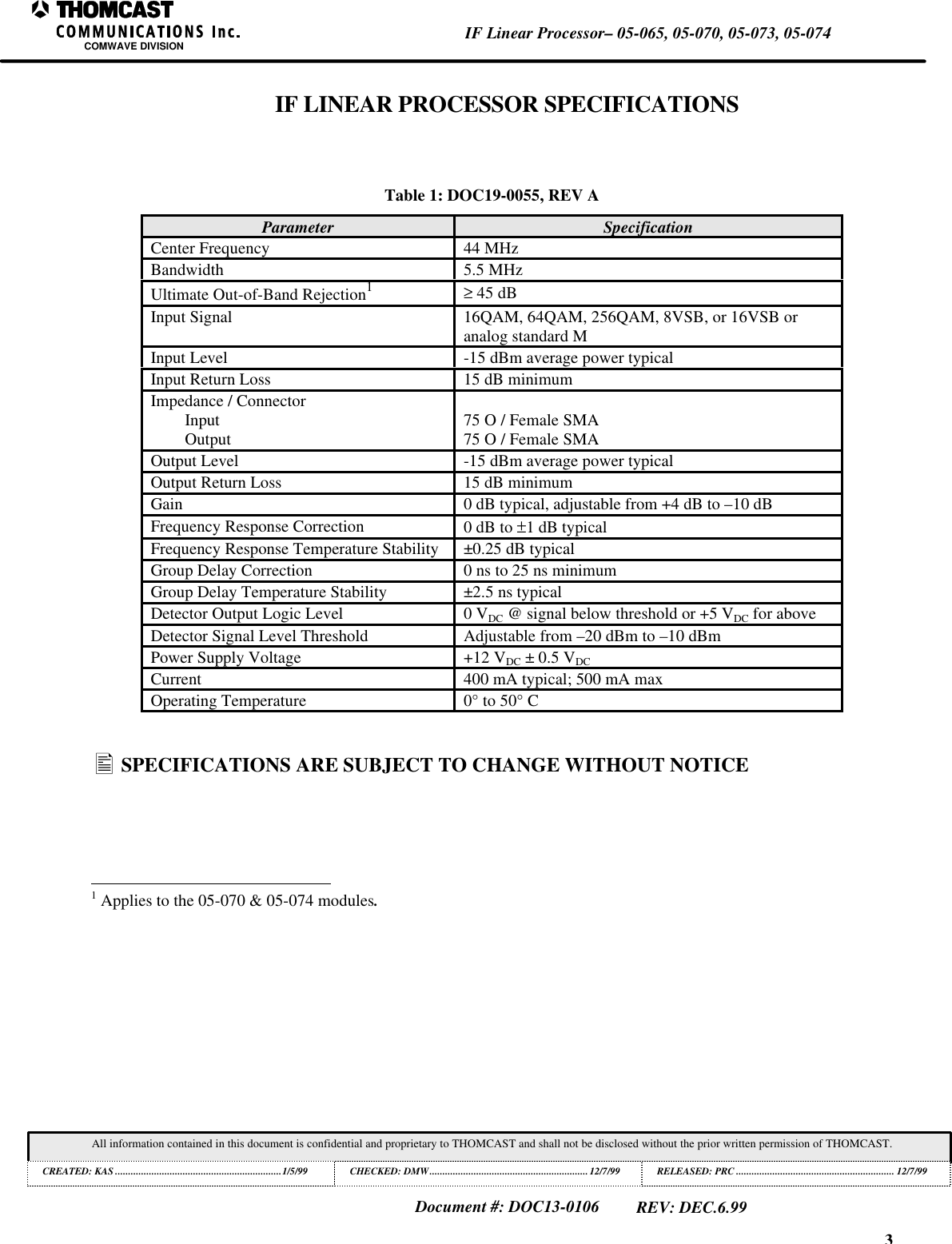
3IF Linear Processor– 05-065, 05-070, 05-073, 05-074COMWAVE DIVISIONAll information contained in this document is confidential and proprietary to THOMCAST and shall not be disclosed without the prior written permission of THOMCAST.CREATED: KAS ................................................................1/5/99 CHECKED: DMW............................................................. 12/7/99RELEASED: PRC............................................................. 12/7/99Document #: DOC13-0106REV: DEC.6.99IF LINEAR PROCESSOR SPECIFICATIONSTable 1: DOC19-0055, REV AParameter SpecificationCenter Frequency 44 MHzBandwidth 5.5 MHzUltimate Out-of-Band Rejection1≥ 45 dBInput Signal 16QAM, 64QAM, 256QAM, 8VSB, or 16VSB oranalog standard MInput Level -15 dBm average power typicalInput Return Loss 15 dB minimumImpedance / ConnectorInputOutput 75 O / Female SMA75 O / Female SMAOutput Level -15 dBm average power typicalOutput Return Loss 15 dB minimumGain 0 dB typical, adjustable from +4 dB to –10 dBFrequency Response Correction 0 dB to ±1 dB typicalFrequency Response Temperature Stability ±0.25 dB typicalGroup Delay Correction 0 ns to 25 ns minimumGroup Delay Temperature Stability ±2.5 ns typicalDetector Output Logic Level 0 VDC @ signal below threshold or +5 VDC for aboveDetector Signal Level Threshold Adjustable from –20 dBm to –10 dBmPower Supply Voltage +12 VDC ± 0.5 VDCCurrent 400 mA typical; 500 mA maxOperating Temperature 0° to 50° C• SPECIFICATIONS ARE SUBJECT TO CHANGE WITHOUT NOTICE                                                          1 Applies to the 05-070 & 05-074 modules.
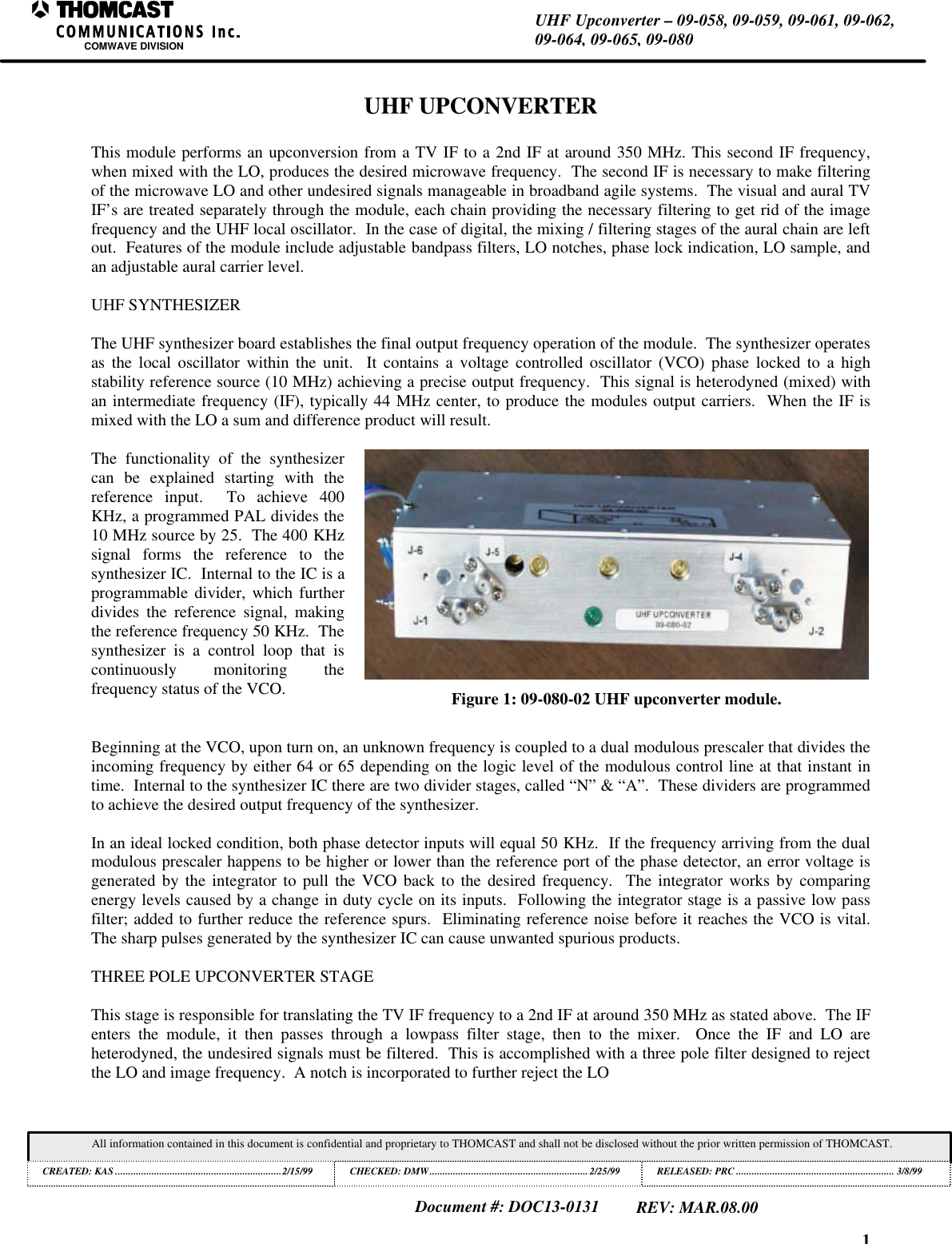
1UHF Upconverter – 09-058, 09-059, 09-061, 09-062,09-064, 09-065, 09-080COMWAVE DIVISIONAll information contained in this document is confidential and proprietary to THOMCAST and shall not be disclosed without the prior written permission of THOMCAST.CREATED: KAS ................................................................2/15/99 CHECKED: DMW............................................................. 2/25/99RELEASED: PRC............................................................. 3/8/99Document #: DOC13-0131REV: MAR.08.00UHF UPCONVERTERThis module performs an upconversion from a TV IF to a 2nd IF at around 350 MHz. This second IF frequency,when mixed with the LO, produces the desired microwave frequency.  The second IF is necessary to make filteringof the microwave LO and other undesired signals manageable in broadband agile systems.  The visual and aural TVIF’s are treated separately through the module, each chain providing the necessary filtering to get rid of the imagefrequency and the UHF local oscillator.  In the case of digital, the mixing / filtering stages of the aural chain are leftout.  Features of the module include adjustable bandpass filters, LO notches, phase lock indication, LO sample, andan adjustable aural carrier level.UHF SYNTHESIZERThe UHF synthesizer board establishes the final output frequency operation of the module.  The synthesizer operatesas the local oscillator within the unit.  It contains a voltage controlled oscillator (VCO) phase locked to a highstability reference source (10 MHz) achieving a precise output frequency.  This signal is heterodyned (mixed) withan intermediate frequency (IF), typically 44 MHz center, to produce the modules output carriers.  When the IF ismixed with the LO a sum and difference product will result.The functionality of the synthesizercan be explained starting with thereference input.  To achieve 400KHz, a programmed PAL divides the10 MHz source by 25.  The 400 KHzsignal forms the reference to thesynthesizer IC.  Internal to the IC is aprogrammable divider, which furtherdivides the reference signal, makingthe reference frequency 50 KHz.  Thesynthesizer is a control loop that iscontinuously monitoring thefrequency status of the VCO. Figure 1: 09-080-02 UHF upconverter module.Beginning at the VCO, upon turn on, an unknown frequency is coupled to a dual modulous prescaler that divides theincoming frequency by either 64 or 65 depending on the logic level of the modulous control line at that instant intime.  Internal to the synthesizer IC there are two divider stages, called “N” & “A”.  These dividers are programmedto achieve the desired output frequency of the synthesizer.In an ideal locked condition, both phase detector inputs will equal 50 KHz.  If the frequency arriving from the dualmodulous prescaler happens to be higher or lower than the reference port of the phase detector, an error voltage isgenerated by the integrator to pull the VCO back to the desired frequency.  The integrator works by comparingenergy levels caused by a change in duty cycle on its inputs.  Following the integrator stage is a passive low passfilter; added to further reduce the reference spurs.  Eliminating reference noise before it reaches the VCO is vital.The sharp pulses generated by the synthesizer IC can cause unwanted spurious products.THREE POLE UPCONVERTER STAGEThis stage is responsible for translating the TV IF frequency to a 2nd IF at around 350 MHz as stated above.  The IFenters the module, it then passes through a lowpass filter stage, then to the mixer.  Once the IF and LO areheterodyned, the undesired signals must be filtered.  This is accomplished with a three pole filter designed to rejectthe LO and image frequency.  A notch is incorporated to further reject the LO
2UHF Upconverter – 09-058, 09-059, 09-061, 09-062,09-064, 09-065, 09-080COMWAVE DIVISIONAll information contained in this document is confidential and proprietary to THOMCAST and shall not be disclosed without the prior written permission of THOMCAST.CREATED: KAS ................................................................2/15/99 CHECKED: DMW............................................................. 2/25/99RELEASED: PRC............................................................. 3/8/99Document #: DOC13-0131REV: MAR.08.00TWO POLE UPCONVERTER STAGE (ANALOG ONLY)This stage is similar to the three pole section.  Differences in the two include a much narrower bandpass filterintended only for passing the aural carrier.  Additionally, the aural carrier may be adjusted in level to set the carrierratio in analog applications.
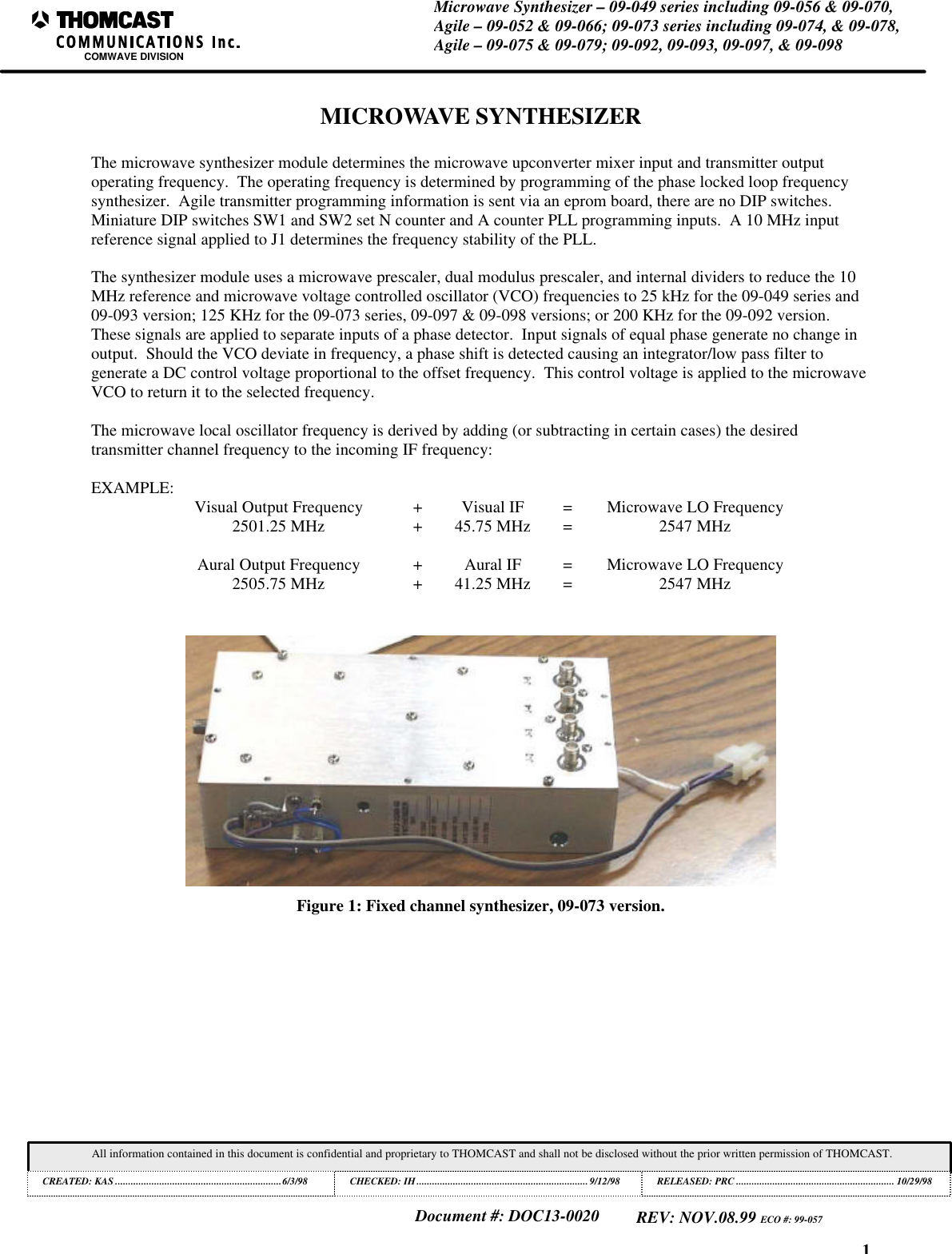
1Microwave Synthesizer – 09-049 series including 09-056 & 09-070,Agile – 09-052 & 09-066; 09-073 series including 09-074, & 09-078,Agile – 09-075 & 09-079; 09-092, 09-093, 09-097, & 09-098COMWAVE DIVISIONAll information contained in this document is confidential and proprietary to THOMCAST and shall not be disclosed without the prior written permission of THOMCAST.CREATED: KAS ................................................................6/3/98 CHECKED: IH..................................................................9/12/98RELEASED: PRC............................................................. 10/29/98Document #: DOC13-0020REV: NOV.08.99 ECO #: 99-057MICROWAVE SYNTHESIZERThe microwave synthesizer module determines the microwave upconverter mixer input and transmitter outputoperating frequency.  The operating frequency is determined by programming of the phase locked loop frequencysynthesizer.  Agile transmitter programming information is sent via an eprom board, there are no DIP switches.Miniature DIP switches SW1 and SW2 set N counter and A counter PLL programming inputs.  A 10 MHz inputreference signal applied to J1 determines the frequency stability of the PLL.The synthesizer module uses a microwave prescaler, dual modulus prescaler, and internal dividers to reduce the 10MHz reference and microwave voltage controlled oscillator (VCO) frequencies to 25 kHz for the 09-049 series and09-093 version; 125 KHz for the 09-073 series, 09-097 & 09-098 versions; or 200 KHz for the 09-092 version.These signals are applied to separate inputs of a phase detector.  Input signals of equal phase generate no change inoutput.  Should the VCO deviate in frequency, a phase shift is detected causing an integrator/low pass filter togenerate a DC control voltage proportional to the offset frequency.  This control voltage is applied to the microwaveVCO to return it to the selected frequency.The microwave local oscillator frequency is derived by adding (or subtracting in certain cases) the desiredtransmitter channel frequency to the incoming IF frequency:EXAMPLE: Visual Output Frequency +Visual IF =Microwave LO Frequency2501.25 MHz +45.75 MHz =2547 MHzAural Output Frequency +Aural IF =Microwave LO Frequency2505.75 MHz +41.25 MHz =2547 MHzFigure 1: Fixed channel synthesizer, 09-073 version.
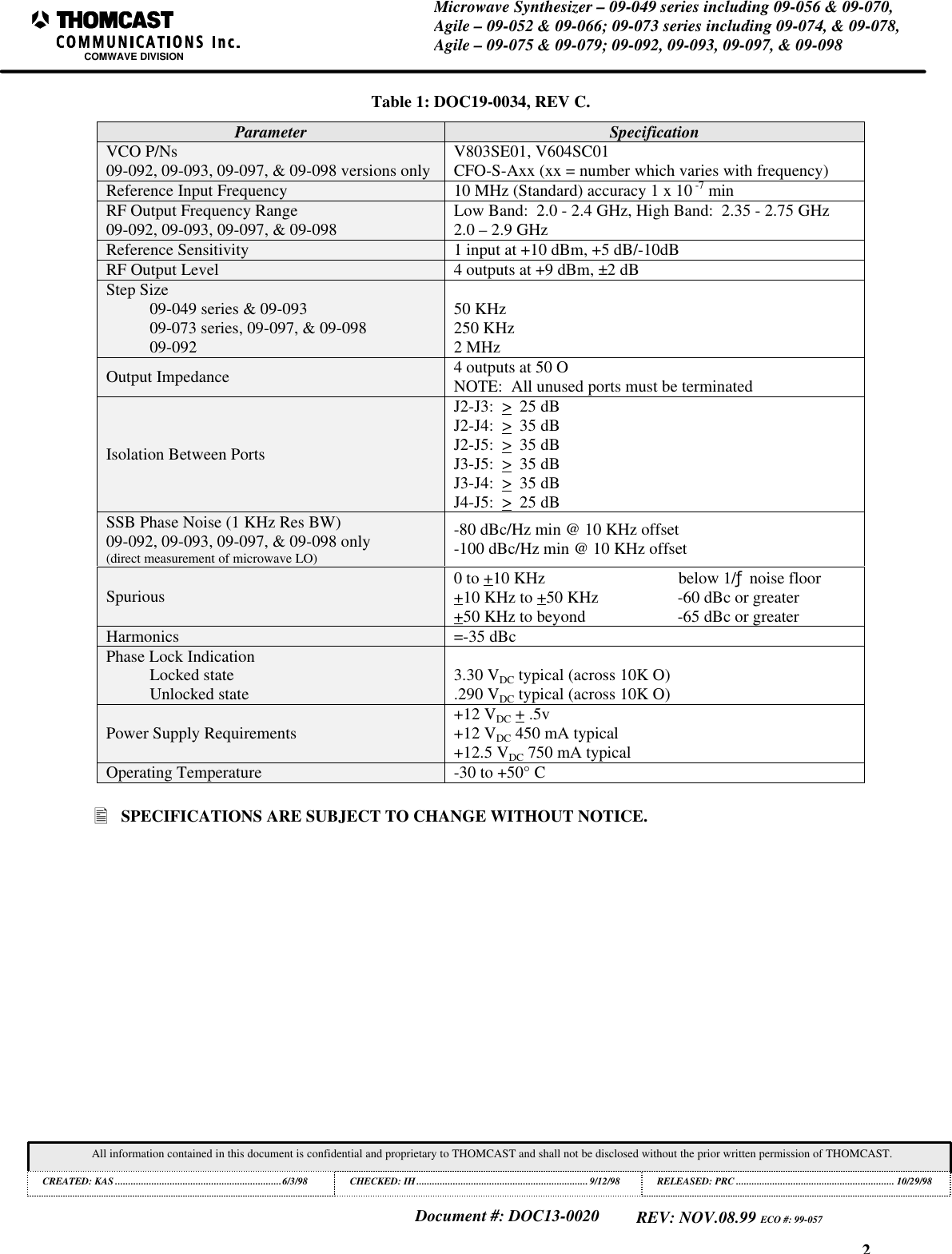
2Microwave Synthesizer – 09-049 series including 09-056 & 09-070,Agile – 09-052 & 09-066; 09-073 series including 09-074, & 09-078,Agile – 09-075 & 09-079; 09-092, 09-093, 09-097, & 09-098COMWAVE DIVISIONAll information contained in this document is confidential and proprietary to THOMCAST and shall not be disclosed without the prior written permission of THOMCAST.CREATED: KAS ................................................................6/3/98 CHECKED: IH..................................................................9/12/98RELEASED: PRC............................................................. 10/29/98Document #: DOC13-0020REV: NOV.08.99 ECO #: 99-057Table 1: DOC19-0034, REV C.Parameter SpecificationVCO P/Ns09-092, 09-093, 09-097, & 09-098 versions only V803SE01, V604SC01CFO-S-Axx (xx = number which varies with frequency)Reference Input Frequency 10 MHz (Standard) accuracy 1 x 10 -7 minRF Output Frequency Range09-092, 09-093, 09-097, & 09-098 Low Band:  2.0 - 2.4 GHz, High Band:  2.35 - 2.75 GHz2.0 – 2.9 GHzReference Sensitivity 1 input at +10 dBm, +5 dB/-10dBRF Output Level 4 outputs at +9 dBm, ±2 dBStep Size09-049 series & 09-09309-073 series, 09-097, & 09-09809-09250 KHz250 KHz2 MHzOutput Impedance 4 outputs at 50 ONOTE:  All unused ports must be terminatedIsolation Between PortsJ2-J3:  >  25 dBJ2-J4:  >  35 dBJ2-J5:  >  35 dBJ3-J5:  >  35 dBJ3-J4:  >  35 dBJ4-J5:  >  25 dBSSB Phase Noise (1 KHz Res BW)09-092, 09-093, 09-097, & 09-098 only(direct measurement of microwave LO)-80 dBc/Hz min @ 10 KHz offset-100 dBc/Hz min @ 10 KHz offsetSpurious 0 to +10 KHz                                below 1/ƒ noise floor+10 KHz to +50 KHz                   -60 dBc or greater+50 KHz to beyond                      -65 dBc or greaterHarmonics =-35 dBcPhase Lock IndicationLocked stateUnlocked state 3.30 VDC typical (across 10K O).290 VDC typical (across 10K O)Power Supply Requirements +12 VDC + .5v+12 VDC 450 mA typical+12.5 VDC 750 mA typicalOperating Temperature -30 to +50° C• SPECIFICATIONS ARE SUBJECT TO CHANGE WITHOUT NOTICE.
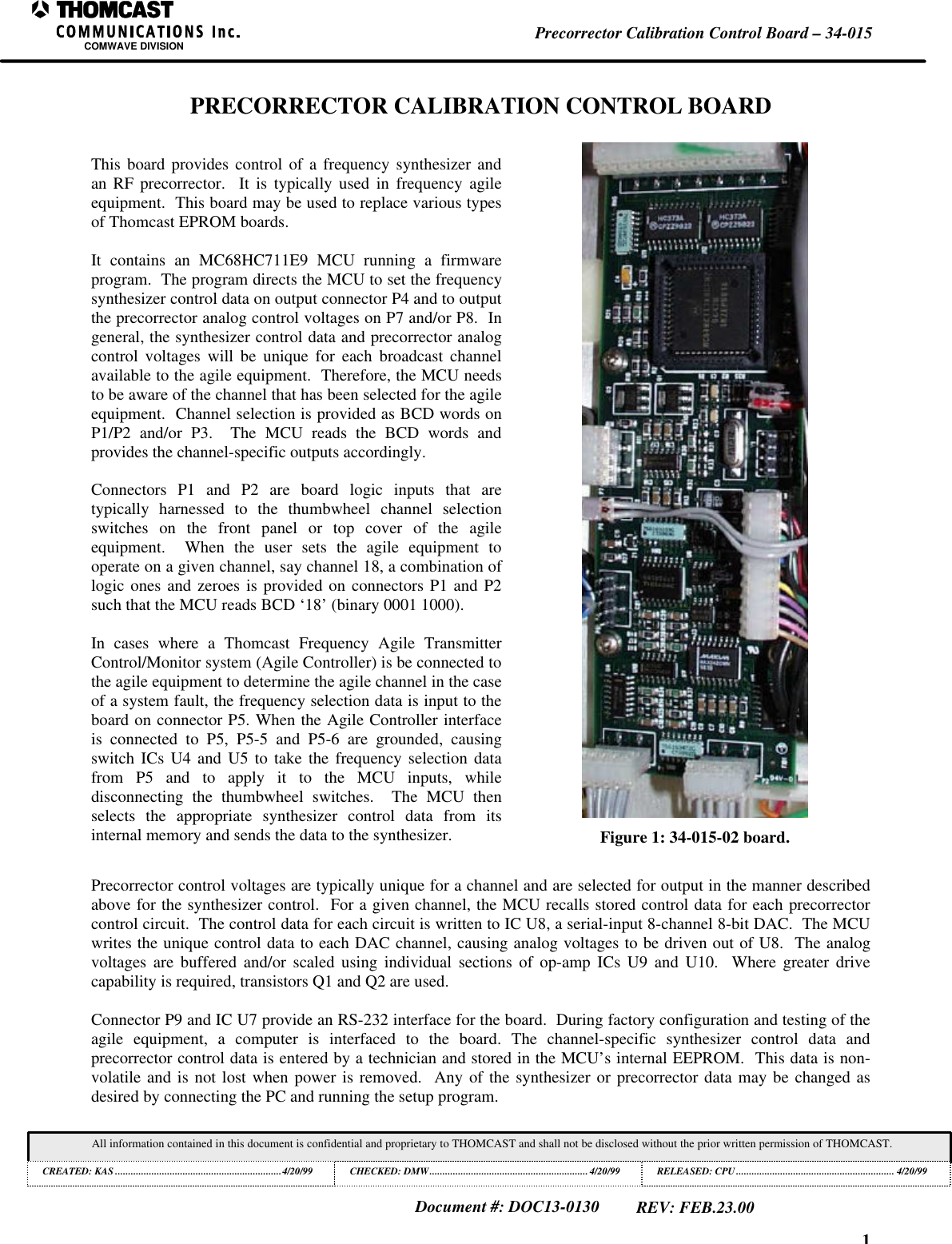
1Precorrector Calibration Control Board – 34-015COMWAVE DIVISIONAll information contained in this document is confidential and proprietary to THOMCAST and shall not be disclosed without the prior written permission of THOMCAST.CREATED: KAS ................................................................4/20/99 CHECKED: DMW............................................................. 4/20/99RELEASED: CPU............................................................. 4/20/99Document #: DOC13-0130REV: FEB.23.00PRECORRECTOR CALIBRATION CONTROL BOARDThis board provides control of a frequency synthesizer andan RF precorrector.  It is typically used in frequency agileequipment.  This board may be used to replace various typesof Thomcast EPROM boards.It contains an MC68HC711E9 MCU running a firmwareprogram.  The program directs the MCU to set the frequencysynthesizer control data on output connector P4 and to outputthe precorrector analog control voltages on P7 and/or P8.  Ingeneral, the synthesizer control data and precorrector analogcontrol voltages will be unique for each broadcast channelavailable to the agile equipment.  Therefore, the MCU needsto be aware of the channel that has been selected for the agileequipment.  Channel selection is provided as BCD words onP1/P2 and/or P3.  The MCU reads the BCD words andprovides the channel-specific outputs accordingly.Connectors P1 and P2 are board logic inputs that aretypically harnessed to the thumbwheel channel selectionswitches on the front panel or top cover of the agileequipment.  When the user sets the agile equipment tooperate on a given channel, say channel 18, a combination oflogic ones and zeroes is provided on connectors P1 and P2such that the MCU reads BCD ‘18’ (binary 0001 1000).In cases where a Thomcast Frequency Agile TransmitterControl/Monitor system (Agile Controller) is be connected tothe agile equipment to determine the agile channel in the caseof a system fault, the frequency selection data is input to theboard on connector P5. When the Agile Controller interfaceis connected to P5, P5-5 and P5-6 are grounded, causingswitch ICs U4 and U5 to take the frequency selection datafrom P5 and to apply it to the MCU inputs, whiledisconnecting the thumbwheel switches.  The MCU thenselects the appropriate synthesizer control data from itsinternal memory and sends the data to the synthesizer. Figure 1: 34-015-02 board.Precorrector control voltages are typically unique for a channel and are selected for output in the manner describedabove for the synthesizer control.  For a given channel, the MCU recalls stored control data for each precorrectorcontrol circuit.  The control data for each circuit is written to IC U8, a serial-input 8-channel 8-bit DAC.  The MCUwrites the unique control data to each DAC channel, causing analog voltages to be driven out of U8.  The analogvoltages are buffered and/or scaled using individual sections of op-amp ICs U9 and U10.  Where greater drivecapability is required, transistors Q1 and Q2 are used.Connector P9 and IC U7 provide an RS-232 interface for the board.  During factory configuration and testing of theagile equipment, a computer is interfaced to the board. The channel-specific synthesizer control data andprecorrector control data is entered by a technician and stored in the MCU’s internal EEPROM.  This data is non-volatile and is not lost when power is removed.  Any of the synthesizer or precorrector data may be changed asdesired by connecting the PC and running the setup program.
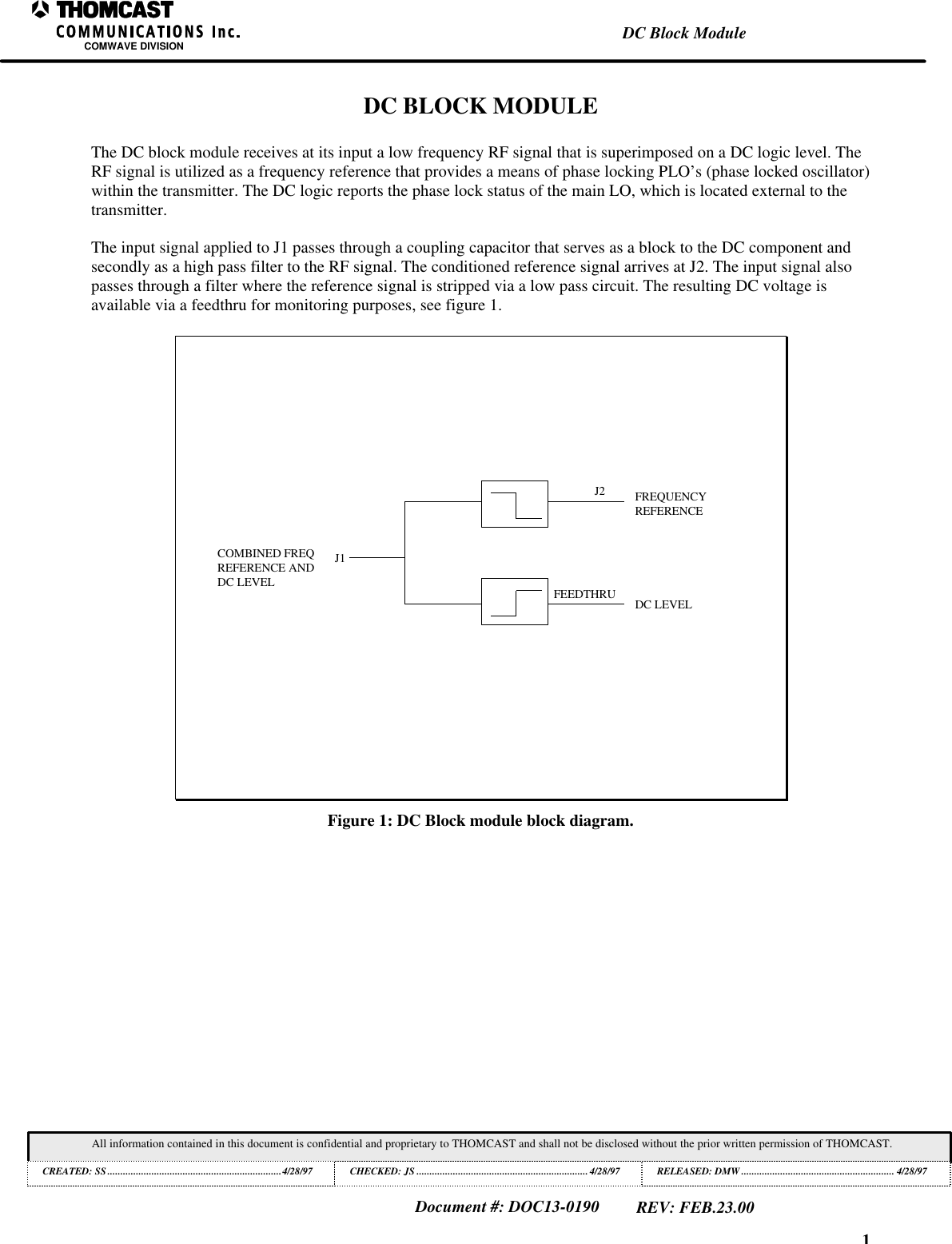
1DC Block ModuleCOMWAVE DIVISIONAll information contained in this document is confidential and proprietary to THOMCAST and shall not be disclosed without the prior written permission of THOMCAST.CREATED: SS...................................................................4/28/97 CHECKED: JS ..................................................................4/28/97RELEASED: DMW........................................................... 4/28/97Document #: DOC13-0190REV: FEB.23.00DC BLOCK MODULEThe DC block module receives at its input a low frequency RF signal that is superimposed on a DC logic level. TheRF signal is utilized as a frequency reference that provides a means of phase locking PLO’s (phase locked oscillator)within the transmitter. The DC logic reports the phase lock status of the main LO, which is located external to thetransmitter.The input signal applied to J1 passes through a coupling capacitor that serves as a block to the DC component andsecondly as a high pass filter to the RF signal. The conditioned reference signal arrives at J2. The input signal alsopasses through a filter where the reference signal is stripped via a low pass circuit. The resulting DC voltage isavailable via a feedthru for monitoring purposes, see figure 1.J1J2FEEDTHRUCOMBINED FREQREFERENCE ANDDC LEVELDC LEVELFREQUENCYREFERENCEFigure 1: DC Block module block diagram.
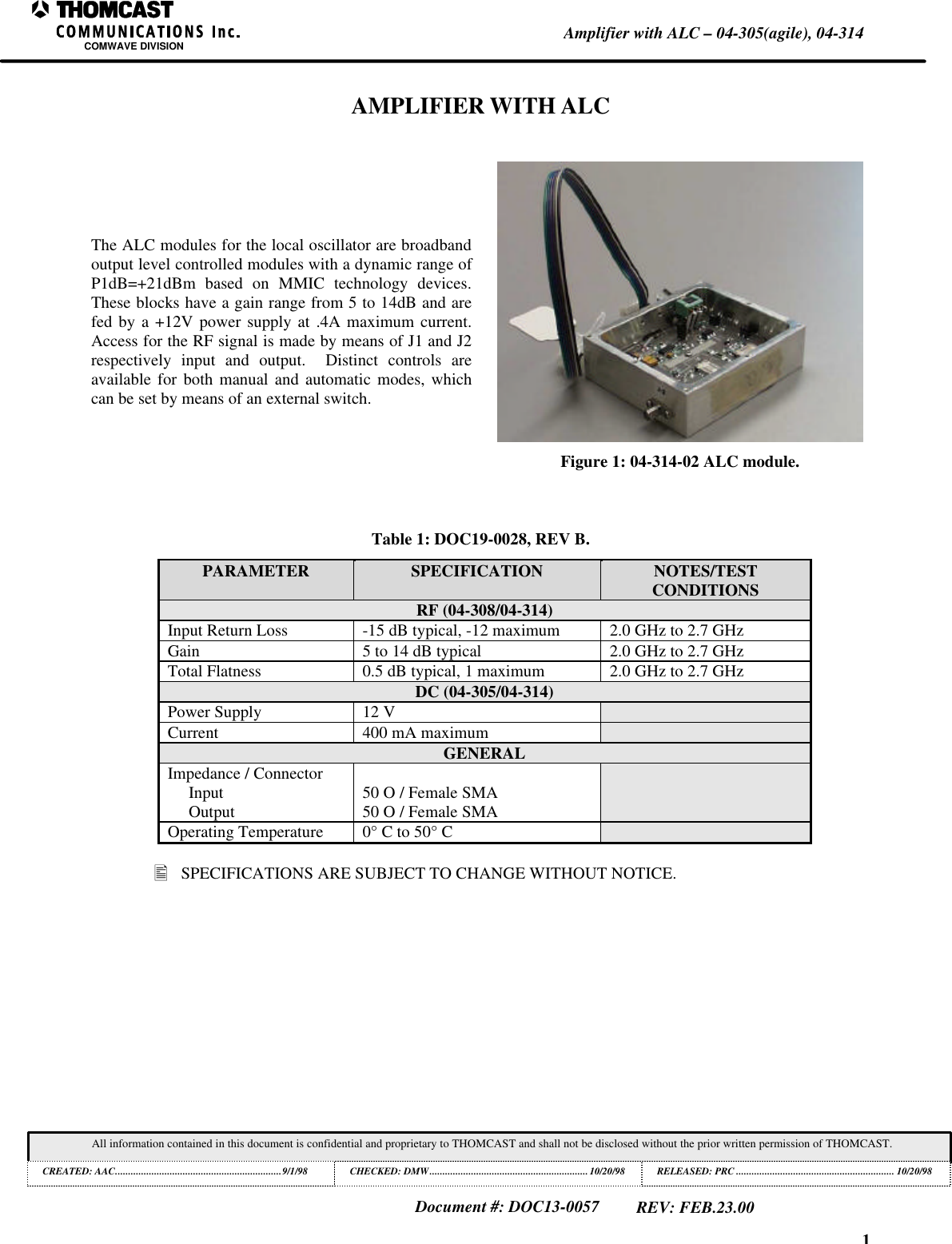
1Amplifier with ALC – 04-305(agile), 04-314COMWAVE DIVISIONAll information contained in this document is confidential and proprietary to THOMCAST and shall not be disclosed without the prior written permission of THOMCAST.CREATED: AAC................................................................9/1/98 CHECKED: DMW.............................................................10/20/98RELEASED: PRC............................................................. 10/20/98Document #: DOC13-0057REV: FEB.23.00AMPLIFIER WITH ALCThe ALC modules for the local oscillator are broadbandoutput level controlled modules with a dynamic range ofP1dB=+21dBm based on MMIC technology devices.These blocks have a gain range from 5 to 14dB and arefed by a +12V power supply at .4A maximum current.Access for the RF signal is made by means of J1 and J2respectively input and output.  Distinct controls areavailable for both manual and automatic modes, whichcan be set by means of an external switch.Figure 1: 04-314-02 ALC module.Table 1: DOC19-0028, REV B.PARAMETER SPECIFICATION NOTES/TESTCONDITIONSRF (04-308/04-314)Input Return Loss -15 dB typical, -12 maximum 2.0 GHz to 2.7 GHzGain 5 to 14 dB typical 2.0 GHz to 2.7 GHzTotal Flatness 0.5 dB typical, 1 maximum 2.0 GHz to 2.7 GHzDC (04-305/04-314)Power Supply 12 VCurrent 400 mA maximumGENERALImpedance / ConnectorInputOutput 50 O / Female SMA50 O / Female SMAOperating Temperature 0° C to 50° C• SPECIFICATIONS ARE SUBJECT TO CHANGE WITHOUT NOTICE.
1Customer ServiceCOMWAVE DIVISIONAll information contained in this document is confidential and proprietary to THOMCAST and shall not be disclosed without the prior written permission of THOMCAST.CREATED: KAS ............5/6/99 ECO #: 99-035, 3/25/99 CHECKED: DMW..............................................................1/18/99 RELEASED: PRC .............................................................. 1/18/99Document #: DOC20-0001REV: FEB.09.00CUSTOMER SERVICECONTACT INFORMATIONDURING BUSINESS HOURSInquiries may be directed to Thomcast Communications, Comwave Division during business hours, 8 am to 5pm Monday through Friday.  When the automated attendant answers you will be given the option of dialingyour party direct or speaking with the operator.AFTER BUSINESS HOURSIf you need emergency assistance due to equipment shutdown or malfunction, customer support personnel areavailable 24 hours a day.  Call Comwave at one of the numbers listed below; when the automated attendantanswers press 6, leave your name, company name, phone number, equipment model number(s), and a briefdescription of the problem you’re encountering.  When you hang up the system will automatically page the on-call technician who will then return your call in a timely manner.  You can listen to the message prompt forother options as well, however, for emergency assistance you MUST use option 6.Thomcast Communications, Comwave DivisionCrestwood Industrial Park, 395 Oakhill RoadMountaintop, PA  187071-800-266-9283 USA & Canada1-570-474-6751 International1 & USA(Please note, as of 12/98, our area code changed from 717 to 570)1-570-474-5469 FAX(Please note, as of 12/98, our area code changed from 717 to 570)COMMENTS/SUGGESTIONSPlease forward comments regarding documentation content and/or layout, or suggestions to improve Comwavepublications to ksimeone@thomcastcom.com.EQUIPMENT RETURNSIf the equipment requires return for factory service, please follow the guidelines listed.  Thomcast cannot beheld responsible for damaged equipment received due to improper packing; contact Thomcast with anyquestions or concerns.1.  Contact Comwave: Call Comwave to report the problem and to obtain a “Return Authorization”number2 (RA).  This enables accurate tracking and identity of returned equipment for prompt and efficientservice.2.  Obtain packaging materials: Use original boxes and packing materials when returning any equipment.This will safeguard against most in-transit damages.  If original boxes and packing materials are not available,contact Thomcast to obtain replacement materials prior to shipping, they are provided at a nominal cost.3. Pack equipment: Use original packing materials and directions provided.  Most equipment is packed in abox within another box; this varies with each product.  Double boxing provides maximum protection.Caution:  Do not pack equipment using “PEANUTS” as filler it does NOT provide sufficient protectionduring shipping.  Rough handling by the carrier may cause permanent damage to the equipment.Thomcast cannot be held responsible for damaged equipment received due to improper packing.                                                          1 International calls must dial the country code before the phone number, i.e. 001-570-474-6751.2 If you do not obtain an RA number prior to returning equipment Thomcast cannot be held responsible for delays in repair and returntime.
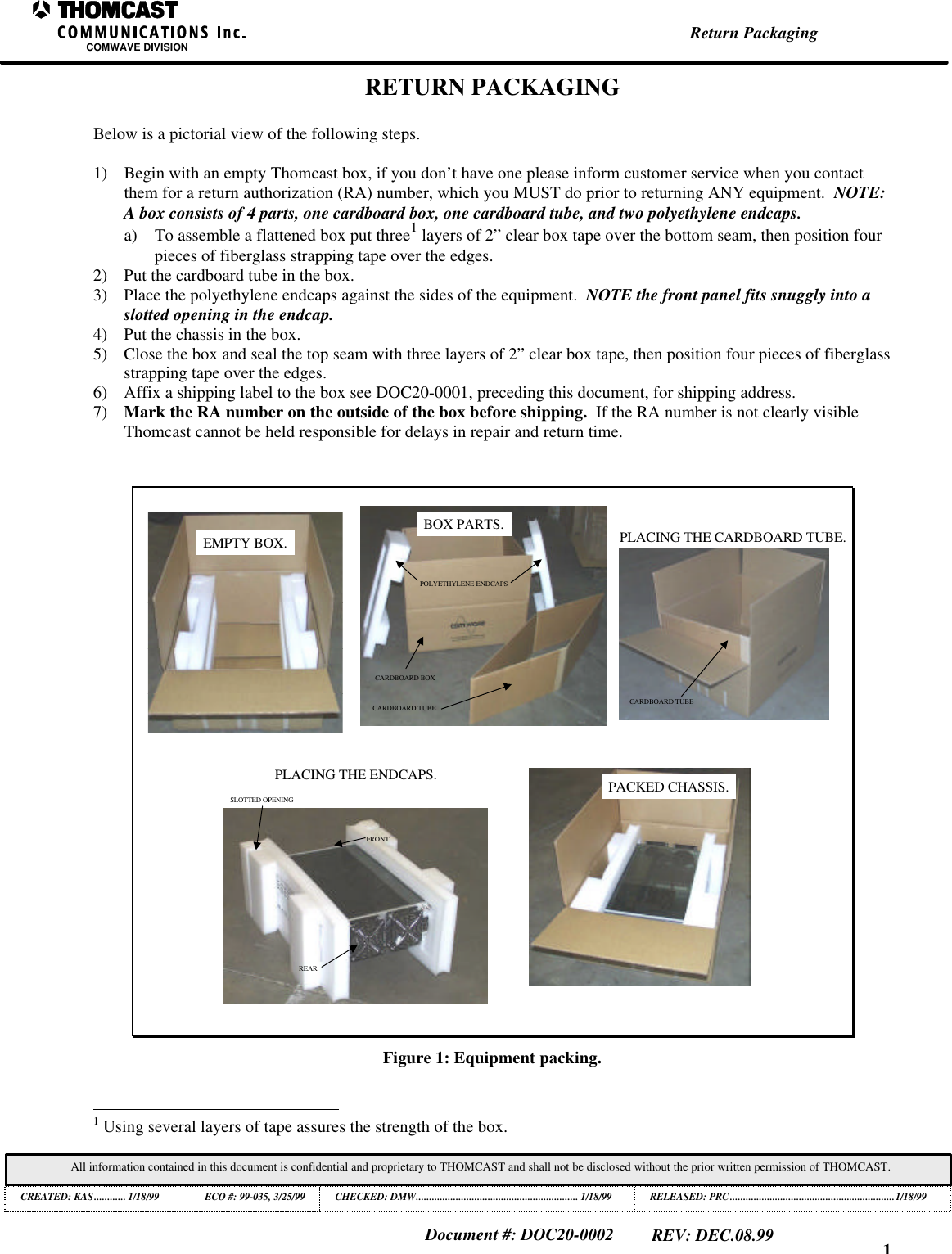
1Return PackagingCOMWAVE DIVISIONAll information contained in this document is confidential and proprietary to THOMCAST and shall not be disclosed without the prior written permission of THOMCAST.CREATED: KAS............ 1/18/99 ECO #: 99-035, 3/25/99 CHECKED: DMW............................................................. 1/18/99RELEASED: PRC..............................................................1/18/99Document #: DOC20-0002REV: DEC.08.99RETURN PACKAGINGBelow is a pictorial view of the following steps.1) Begin with an empty Thomcast box, if you don’t have one please inform customer service when you contactthem for a return authorization (RA) number, which you MUST do prior to returning ANY equipment.  NOTE:A box consists of 4 parts, one cardboard box, one cardboard tube, and two polyethylene endcaps.a) To assemble a flattened box put three1 layers of 2” clear box tape over the bottom seam, then position fourpieces of fiberglass strapping tape over the edges.2) Put the cardboard tube in the box.3) Place the polyethylene endcaps against the sides of the equipment.  NOTE the front panel fits snuggly into aslotted opening in the endcap.4) Put the chassis in the box.5) Close the box and seal the top seam with three layers of 2” clear box tape, then position four pieces of fiberglassstrapping tape over the edges.6) Affix a shipping label to the box see DOC20-0001, preceding this document, for shipping address.7) Mark the RA number on the outside of the box before shipping.  If the RA number is not clearly visibleThomcast cannot be held responsible for delays in repair and return time.EMPTY BOX.CARDBOARD BOXCARDBOARD TUBEPOLYETHYLENE ENDCAPSBOX PARTS.CARDBOARD TUBEPLACING THE CARDBOARD TUBE.REARFRONTSLOTTED OPENINGPLACING THE ENDCAPS. PACKED CHASSIS.Figure 1: Equipment packing.                                                          1 Using several layers of tape assures the strength of the box.

Navigation menu