Thousandshores Technology EB06 Bluetooth receiver User Manual
Shenzhen Thousandshores Technology Co., Ltd. Bluetooth receiver
User Manual
Bluetooth receiver
EB06
User Guide
Introduction:
Thanks for choosing our mini Bluetooth receiver. This device allows you to hear the phone music
and call not just from car radio,but also from home speaker. Because of its special structure.
Once two parts hooked up and plugged into car cigarette, its charging will start automatically,
also it can others devices at the same time, The Fully charged 2.5 hours, it will provide10 hours
working time. To have a better experience, please read this instruction carefully.
Packing Contents:
Mini Bluetooth receiver
User Guide
Warranty card
Features:
Mini Bluetooth Receiver with music streaming and hands-free function
With built-in Microphone, echo and noise canceling technology supplies high quality call
communication
Adopts Bluetooth 4.0 Technology. Not just let you enjoy the crystal sounds but also long
Bluetooth working distance and low power consumption
Free from any charging cable, just plug the 3.5mm audio head into USB adapter
Built-in 300mAh battery provides up to 10 hours working time
With 4.8A dual USB car charger to charge others device
Compatible with most Bluetooth enabled devices like smart phones, tablets or MP3
Specifications:
Bluetooth Version: V4.0
Bluetooth ID:EB06
Bluetooth Frequency range: 2.402-2.480GHz
Bluetooth Distance: 8 meters
EQ Mode: Stereo
Battery Capacity:300mAh
Charging time: 2.5 hours
Talking time: about 8 hours
Music playing time: about 10 hours
Size: 95(L)*33.4(D) mm
Microphone: ∮4.0*1.5mm
Working Interface: 3.5mm Aux-in
Material: ABS shell + PC lens + Alumina ring
Compatibility:
This device can be paired as a hands-free kit with any compatible Bluetooth enabled
devices. Each time can only connected with one Bluetooth device.
Precautions:
Please read all safety instruction warnings carefully before using this product.
Improper use of this product may result in damage to this or attached products. To
ensure the products work well, please never use this in the following conditions:
1.Moist or underwater conditions.
2.Conditions near heater or high-temperature service.
3.Conditions with direct and strong sunshine,
4.Conditions with apt falling
5.Never dismantle the product without due permission, otherwise it may nullify the
warranty clause.
Appearance:
Operation Instructions
Using the music playing function:
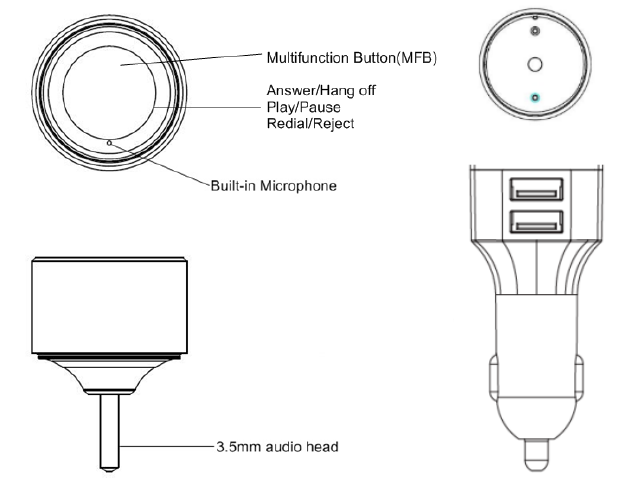
1. Plug the Bluetooth receiver 3.5mm head into your vehicle’s FM radio or home
speaker auxiliary port.
2. Long press and hold on the button for 3 seconds, the Blue and Red LED light
begins to flash and prompt with “Power on”
3. Turn on your Bluetooth enabled devices and search new device named “EB06”,
then pair with this unit, The Blue LED light is on after connecting.
4. Turn on your music then you can enjoy the crystal audio sounds.
5. Press MFB once to Play/Pause if you need it.
Using the hands-free function:
1. Press MFB once to Answer/Hang off the phone call when there is incoming call.
2. Press MFB and hold 2 seconds to reject the phone call.
3. Press MFB twice to redial the last phone call.
4. Press MFB and hold 2 seconds to active Siri (only iOS), release when the beep is
heard.
5. Press MFB and hold 2 seconds during conversation so as to hear the call with the
EB06 or the Phone.
Charging the Bluetooth Receiver
1. When the battery power is low, the relative prompt will appear and its status will
also display on your phone (iSO/Android).
2. It starts the charging when two parts hooked, plug the device into car cigarette,

! Cautious: This device can’t work while charging.
Quick Guide:
Power on Press MFB and hold for 3 seconds untilflashing and
prompting you with "Power on"
Power off Press MFB and hold for 3 seconds until prompt "Power off"
Play/Pause music Press MFB once during music playing
Answer call Press MFB once when there is incoming call
End call Press MFB once during call
Redial call Press MFB twice
Ignore call Press MFB and hold for 2 seconds during call, release when
the beep is heard
Activate Siri Press MFB and hold for 2 seconds, release when the beep is
heard
Switch phone calls between
EB06and Phone Press MFB and hold for 2 seconds during conversation
Hold current call & answer the
coming call Press MFB twice during conversation
Standby Switch to Power off automatically after 10 minutes no
pairing