Tiinlab Acoustic Technology LYXQEJ02JY Mi Bluetooth Neckband Earphones Basic User Manual 15 LYXQEJ02JY UserMan

Tiinlab Acoustic Technology (Shenzhen) Co., Ltd. Mi Bluetooth Neckband Earphones Basic 15 LYXQEJ02JY UserMan

15_LYXQEJ02JY UserMan

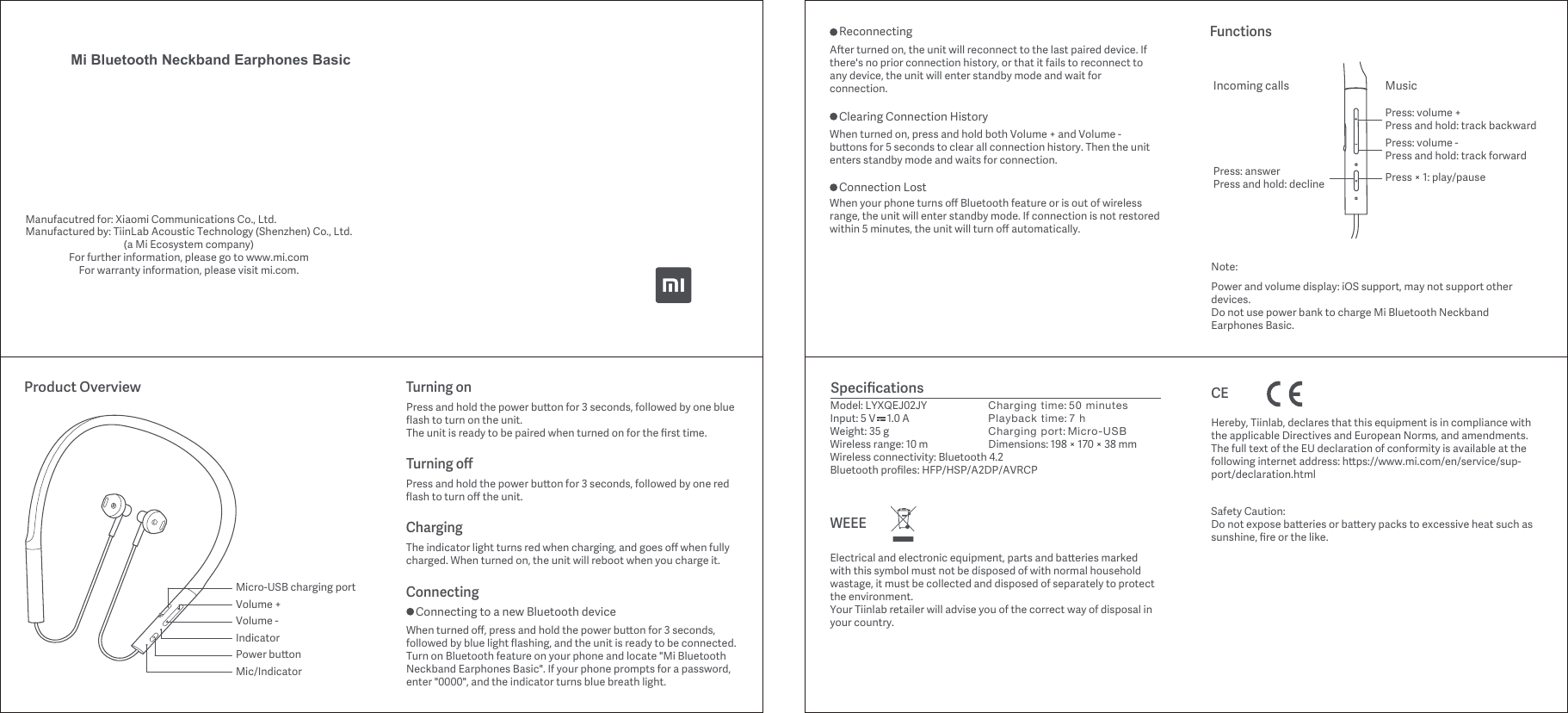
Mi Bluetooth Neckband Earphones BasicManufacutred for: Xiaomi Communications Co., Ltd. Manufactured by: TiinLab Acoustic Technology (Shenzhen) Co., Ltd.(a Mi Ecosystem company)For further information, please go to www.mi.comFor warrantyinformation, please visit mi.com.Micro-USB charging portVolume +Volume -Power buonIndicatorMic/IndicatorChargingThe indicator light turns red when charging, and goes off when fully charged. When turned on, the unit will reboot when you charge it. Turning offPress and hold the power buon for 3 seconds, followed by one red flash to turn off the unit.Turning onPress and hold the power buon for 3 seconds, followed by one blue flash to turn on the unit.The unit is ready to be paired when turned on for the first time.When turned off, press and hold the power buon for 3 seconds, followed by blue light flashing, and the unit is ready to be connected. Turn on Bluetooth feature on your phone and locate "Mi Bluetooth Neckband Earphones Basic". If your phone prompts for a password, enter "0000", and the indicator turns blue breath light.Product OverviewConnectingConnecting to a new Bluetooth deviceSpecificationsModel: LYXQEJ02JYInput: 5 V     1.0 AWeight: 35 gWireless range: 10 mWireless connectivity: Bluetooth 4.2Bluetooth profiles: HFP/HSP/A2DP/AVRCPCharging time: 50 minutesPlayback time: 7 hCharging port: Micro-USBDimensions: 198 × 170 × 38 mmNote:Power and volume display: iOS support, may not support other devices.Do not use power bank to charge Mi Bluetooth Neckband Earphones Basic.FunctionsAer turned on, the unit will reconnect to the last paired device. If there's no prior connection history, or that it fails to reconnect to any device, the unit will enter standby mode and wait for connection.ReconnectingWhen turned on, press and hold both Volume + and Volume - buons for 5 seconds to clear all connection history. Then the unit enters standby mode and waits for connection. Clearing Connection HistoryWhen your phone turns off Bluetooth feature or is out of wireless range, the unit will enter standby mode. If connection is not restored within 5 minutes, the unit will turn off automatically.Connection LostPress: answerPress and hold: declineIncoming calls MusicPress: volume -Press and hold: track forwardPress: volume +Press and hold: track backwardPress × 1: play/pauseWEEEElectrical and electronic equipment, parts and baeries marked with this symbol must not be disposed of with normal household wastage, it must be collected and disposed of separately to protect the environment.Your Tiinlab retailer will advise you of the correct way of disposal in your country.CESafety Caution:Do not expose baeries or baery packs to excessive heat such as sunshine, fire or the like.Hereby, Tiinlab, declares that this equipment is in compliance with the applicable Directives and European Norms, and amendments. The full text of the EU declaration of conformity is available at the following internet address: hps://www.mi.com/en/service/sup-port/declaration.html
FCC Warning: FCC ID: 2AN5MLYXQEJ02JY Changes or modifications not expressly approved by the party responsible for compliance could void the user’s authority to operate the equipment.    This device complies with Part 15 of the FCC Rules. Operation is subject to the following two conditions: (1) this device may not cause harmful interference, and (2) this device must accept any interference received, including interference that may cause undesired operation.    This equipment has been tested and found to comply with the limits for a Class B digital device, pursuant to Part 15 of the FCC Rules. These limits are designed to provide reasonable protection against harmful interference in a residential installation. This equipment generates, uses and can radiate radio frequency energy and, if not installed and used in accordance with the instructions, may cause harmful interference to radio communications. However, there is no guarantee that interference will not occur in a particular installation. If this equipment does cause harmful interference to radio or television reception, which can be determined by turning the equipment off and on, the user is encouraged to try to correct the interference by one or more of the following measures: -- Reorient or relocate the receiving antenna. -- Increase the separation between the equipment and receiver. -- Connect the equipment into an outlet on a circuit different from that to which the receiver is connected. -- Consult the dealer or an experienced radio/TV technician for help.    This device complies with FCC RF radiation exposure limits set forth for an uncontrolled environment. This transmitter must not be co-located or operating in conjunction with any other antenna or transmitter

Navigation menu