Tonika Electronics Technology TA-304B Bluetooth Speaker User Manual USER manual

Tonika Electronics Technology (Shenzhen) Co., Ltd. Bluetooth Speaker USER manual

Manual

Size: 148.5(W) x 210(H)mm (A5)TOWER SPEAKER SYSTEM WITH BLUETOOTH® WIRELESS TECHNOLOGYTOWER SPEAKER SYSTEM WITH BLUETOOTH® WIRELESS TECHNOLOGYModel: TA-304BPLEASE READ BEFORE OPERATING THIS EQUIPMENT.Owner's Manual
1
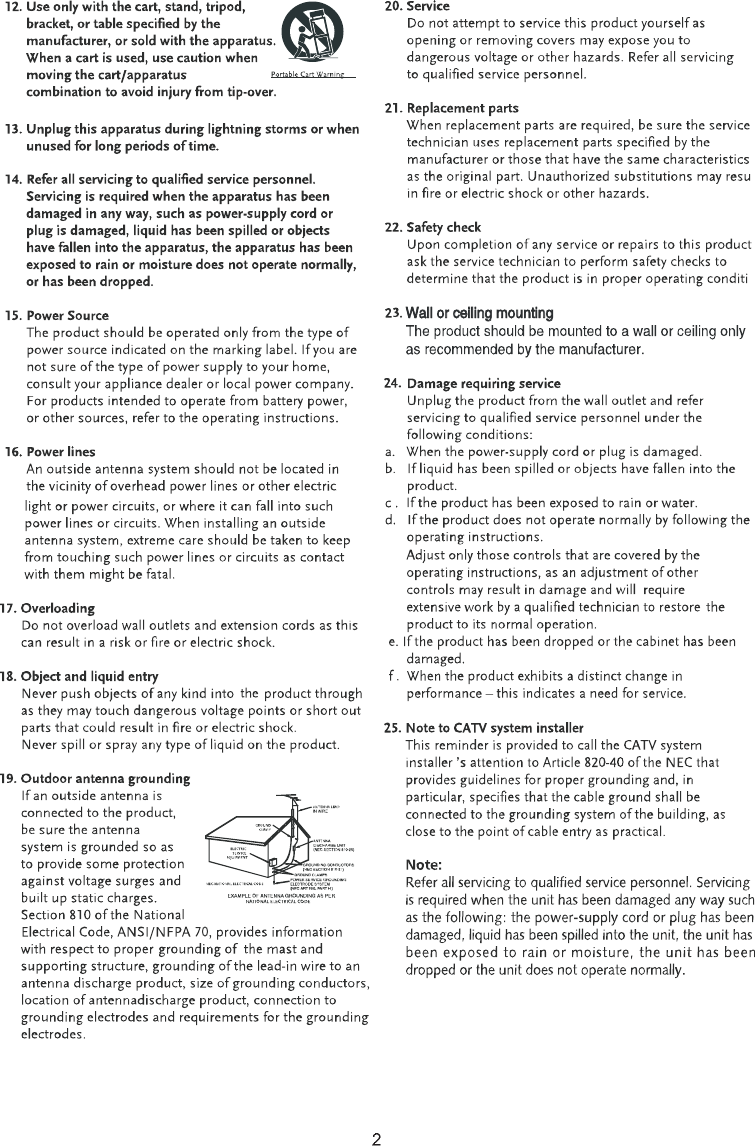
324156 Insert the small plug from the supplied AC/DC         Adaptor to the DC IN Jack on the unit. Insert the         AC/DC adaptor to a wall outlet having AC 100-240V~,        50/60Hz .TO DC IN JACKTo Wall OutletNOTE: This AC/DC Adaptor is intended to be correctly              orientated in a vertical or floor mount position.2. Wooden Baseas the figures above.
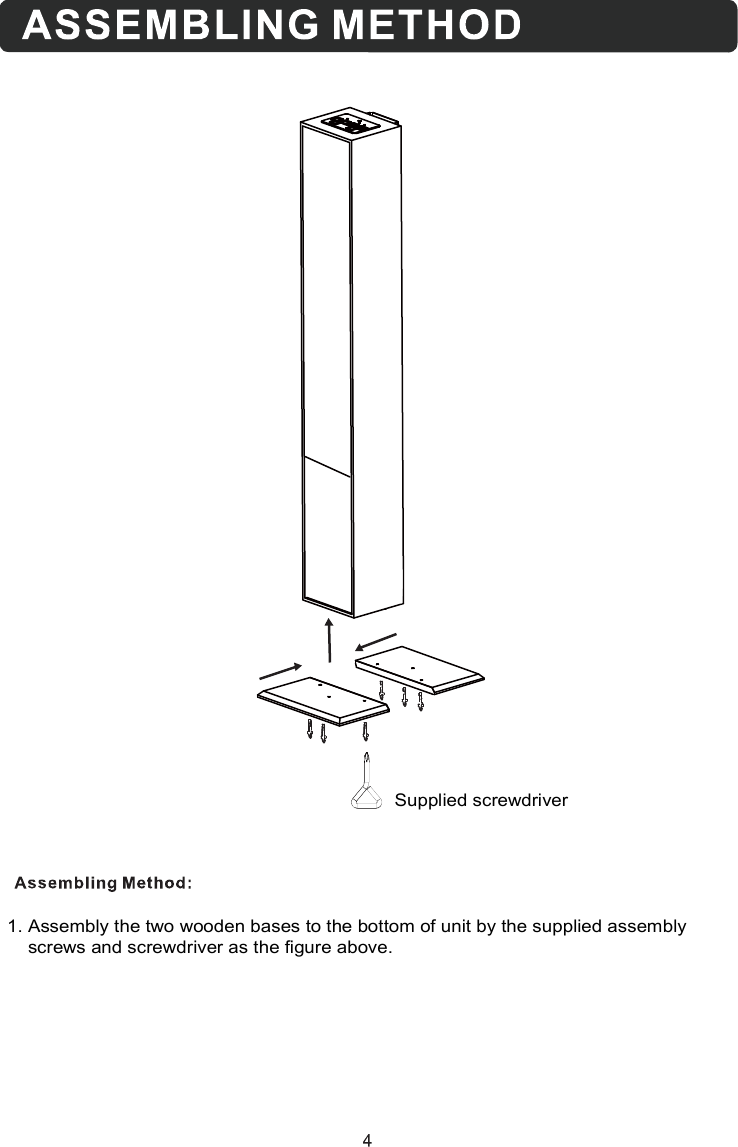
1. Assembly the two wooden bases to the bottom of unit by the supplied assembly    screws and screwdriver as the figure above. Supplied screwdriver
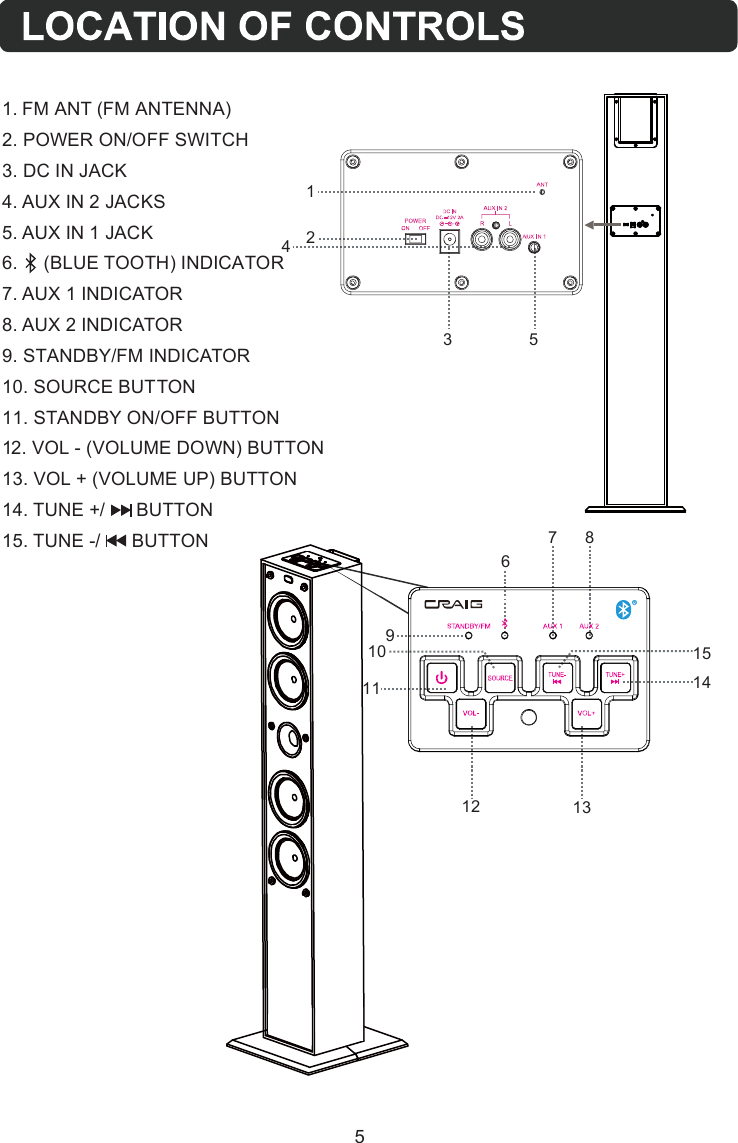
1091112 1314156781241. FM ANT (FM ANTENNA)2. POWER ON/OFF SWITCH3. DC IN JACK4. AUX IN 2 JACKS5. AUX IN 1 JACK7. AUX 1 INDICATOR8. AUX 2 INDICATOR9. STANDBY/FM INDICATOR10. SOURCE BUTTON11. STANDBY ON/OFF BUTTON12. VOL - (VOLUME DOWN) BUTTON13. VOL + (VOLUME UP) BUTTON14. TUNE +/      BUTTON15. TUNE -/      BUTTON53 56.     (BLUE TOOTH) INDICATOR
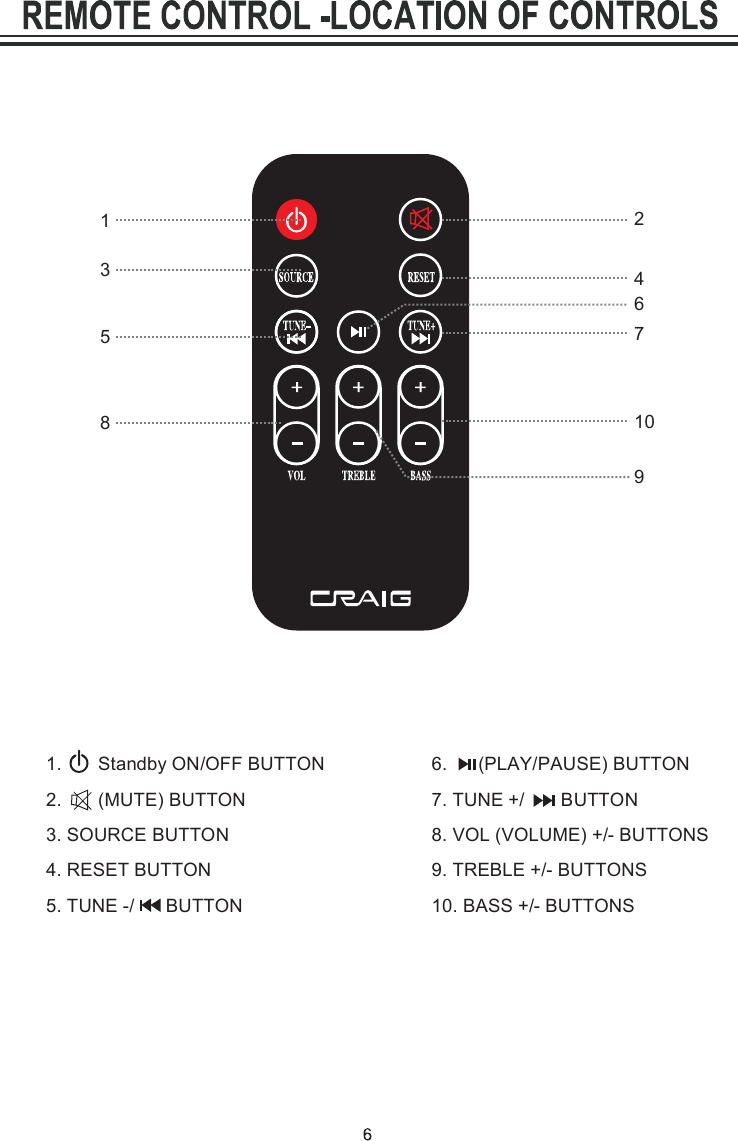
1.       Standby ON/OFF BUTTON 2.       (MUTE) BUTTON 3. SOURCE BUTTON 4. RESET BUTTON 5. TUNE -/      BUTTON8. VOL (VOLUME) +/- BUTTONS 9. TREBLE +/- BUTTONS 10. BASS +/- BUTTONS6.      (PLAY/PAUSE) BUTTON7. TUNE +/       BUTTON21538764109
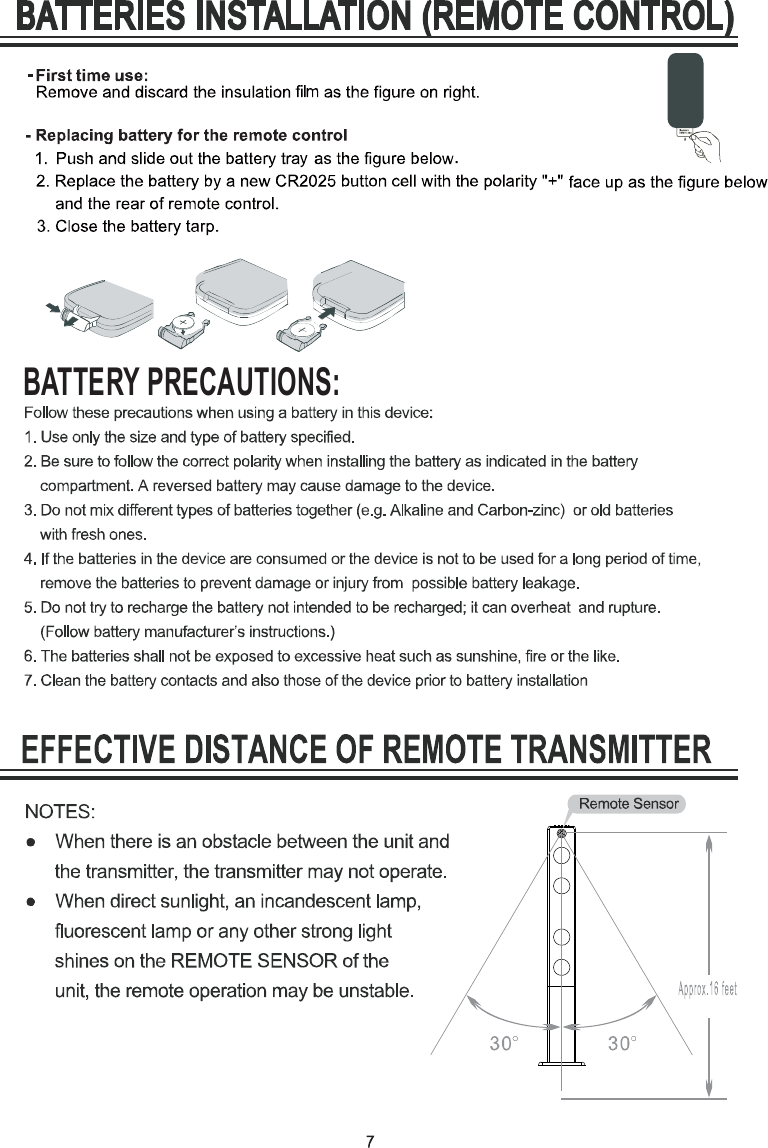
BATTERY PRECAUTIONS:
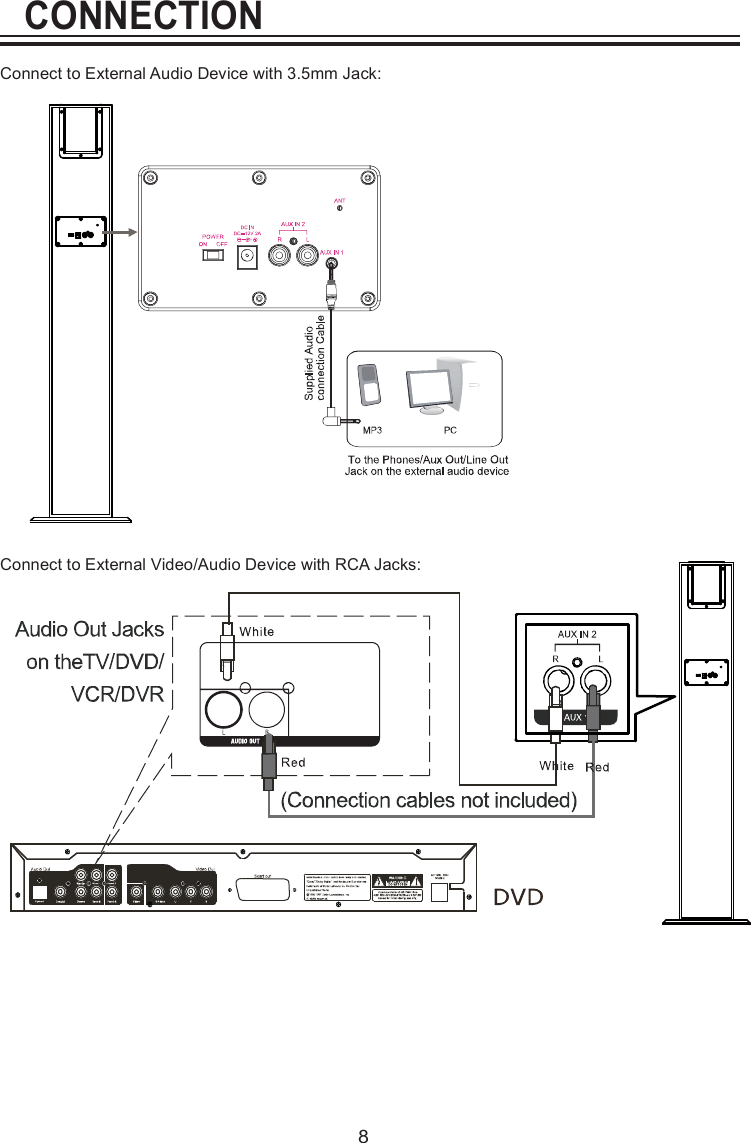
CONNECTION8Connect to External Audio Device with 3.5mm Jack:Connect to External Video/Audio Device with RCA Jacks:
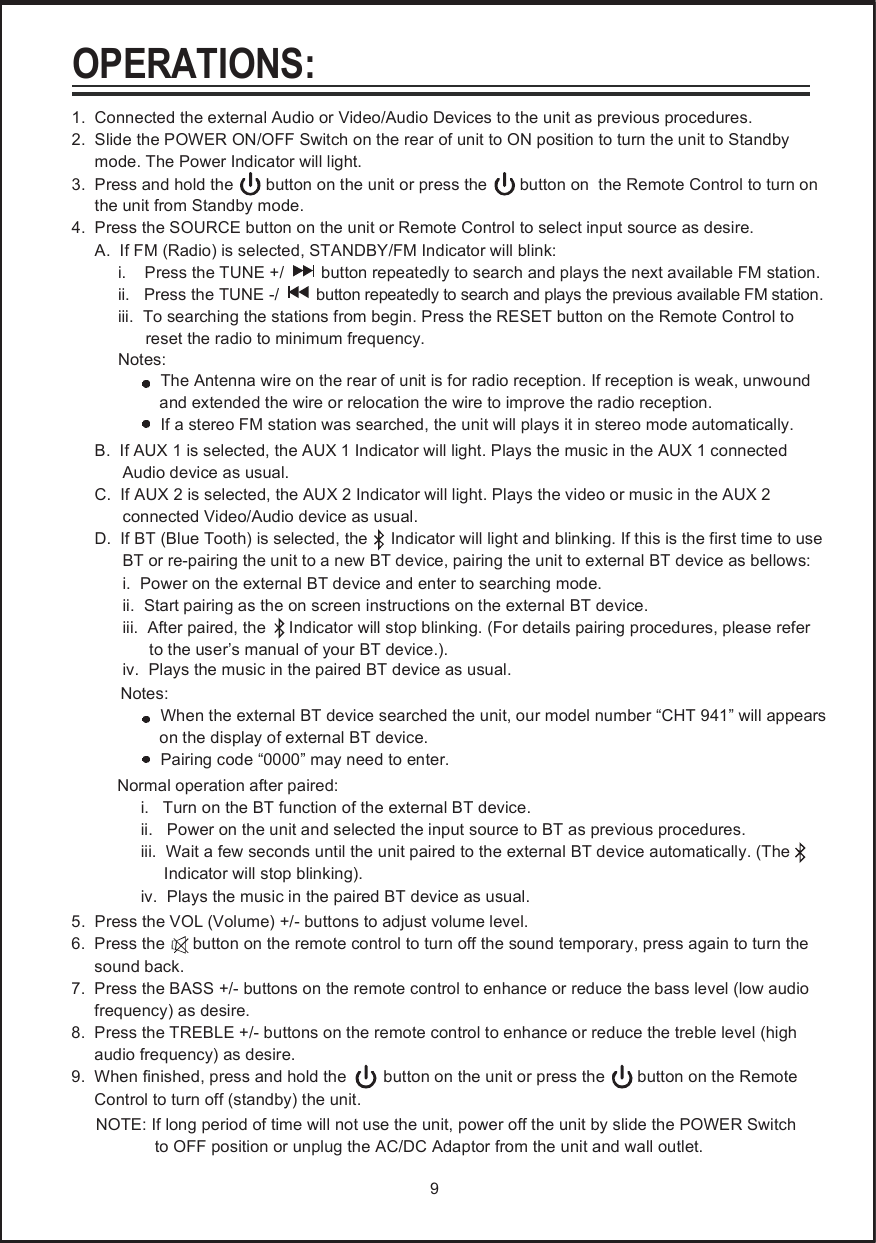
1.  Connected the external Audio or Video/Audio Devices to the unit as previous procedures.2.  Slide the POWER ON/OFF Switch on the rear of unit to ON position to turn the unit to Standby      mode. The Power Indicator will light.3.  Press and hold the       button on the unit or press the       button on  the Remote Control to turn on       the unit from Standby mode.4.  Press the SOURCE button on the unit or Remote Control to select input source as desire.     A.  If FM (Radio) is selected, STANDBY/FM Indicator will blink:          i.    Press the TUNE +/        button repeatedly to search and plays the next available FM station.          ii.   Press the TUNE -/        button repeatedly to search and plays the previous available FM station.          iii.  To searching the stations from begin. Press the RESET button on the Remote Control to                 reset the radio to minimum frequency.          Notes:The Antenna wire on the rear of unit is for radio reception. If reception is weak, unwound                    and extended the wire or relocation the wire to improve the radio reception.                If a stereo FM station was searched, the unit will plays it in stereo mode automatically.     B.  If AUX 1 is selected, the AUX 1 Indicator will light. Plays the music in the AUX 1 connected            Audio device as usual.     C.  If AUX 2 is selected, the AUX 2 Indicator will light. Plays the video or music in the AUX 2            connected Video/Audio device as usual.     D.  If BT (Blue Tooth) is selected, the     Indicator will light and blinking. If this is the first time to use            BT or re-pairing the unit to a new BT device, pairing the unit to external BT device as bellows:           i.  Power on the external BT device and enter to searching mode.            ii.  Start pairing as the on screen instructions on the external BT device.            iii.  After paired, the     Indicator will stop blinking. (For details pairing procedures, please refer                 to the user’s manual of your BT device.).      Notes:               When the external BT device searched the unit, our model number “CHT 941” will appears                     on the display of external BT device.               Pairing code “0000” may need to enter.      Normal operation after paired:           i.   Turn on the BT function of the external BT device.           ii.   Power on the unit and selected the input source to BT as previous procedures.           iii.  Wait a few seconds until the unit paired to the external BT device automatically. (The                  Indicator will stop blinking).           iv.  Plays the music in the paired BT device as usual.5.  Press the VOL (Volume) +/- buttons to adjust volume level.6.  Press the      button on the remote control to turn off the sound temporary, press again to turn the      sound back.7.  Press the BASS +/- buttons on the remote control to enhance or reduce the bass level (low audio      frequency) as desire.8.  Press the TREBLE +/- buttons on the remote control to enhance or reduce the treble level (high      audio frequency) as desire.9.  When finished, press and hold the        button on the unit or press the       button on the Remote      Control to turn off (standby) the unit.      NOTE: If long period of time will not use the unit, power off the unit by slide the POWER Switch                   to OFF position or unplug the AC/DC Adaptor from the unit and wall outlet. 9OPERATIONS:iv.  Plays the music in the paired BT device as usual.
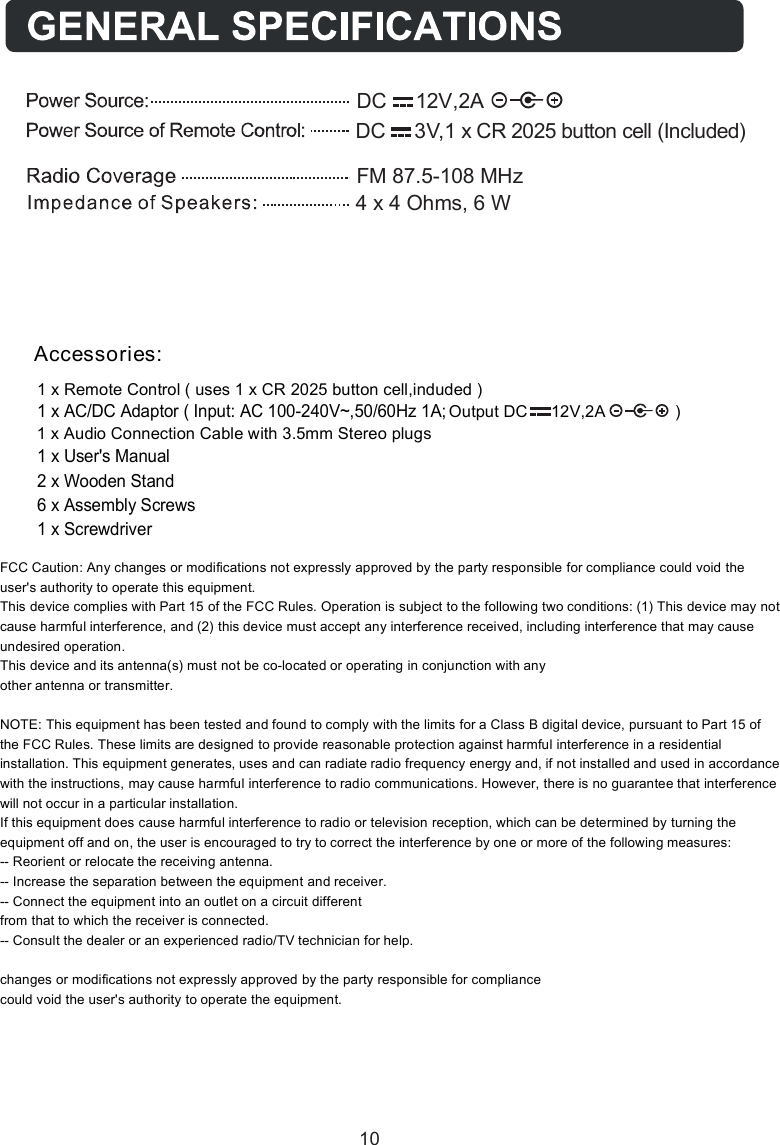
1 x Remote Control ( uses 1 x CR 2025 button cell,induded )A               )2,V21     CD tuptuO1 x Audio Connection Cable with 3.5mm Stereo plugs1 x User's Manual 2 x Wooden Stand6 x Assembly Screws 1 x Screwdriver1 x AC/DC Adaptor ( Input: AC 100-240V~,50/60Hz 1A;Accessories:FM 87.5-108 MHzDC     12V,2A4 x 4 Ohms, 6 WDC     3V,1 x CR 2025 button cell (Included)10FCC Caution: Any changes or modifications not expressly approved by the party responsible for compliance could void the user's authority to operate this equipment. This device complies with Part 15 of the FCC Rules. Operation is subject to the following two conditions: (1) This device may not cause harmful interference, and (2) this device must accept any interference received, including interference that may cause undesired operation. This device and its antenna(s) must not be co-located or operating in conjunction with any  other antenna or transmitter.  NOTE: This equipment has been tested and found to comply with the limits for a Class B digital device, pursuant to Part 15 of the FCC Rules. These limits are designed to provide reasonable protection against harmful interference in a residential installation. This equipment generates, uses and can radiate radio frequency energy and, if not installed and used in accordance with the instructions, may cause harmful interference to radio communications. However, there is no guarantee that interference will not occur in a particular installation. If this equipment does cause harmful interference to radio or television reception, which can be determined by turning the equipment off and on, the user is encouraged to try to correct the interference by one or more of the following measures: -- Reorient or relocate the receiving antenna. -- Increase the separation between the equipment and receiver. -- Connect the equipment into an outlet on a circuit different from that to which the receiver is connected. -- Consult the dealer or an experienced radio/TV technician for help.  changes or modifications not expressly approved by the party responsible for compliance could void the user's authority to operate the equipment.
Size: 148.5(W) x 210(H)mm (A5)Craig warrants this product to be free from manufacturing defects in material andworkmanship under normal use for a period of 90 days from date of purchase. If serviceis required, please return the product to the store where it was purchased for exchange;or, pack the unit in the original packing material with all accessories if applicable, a copyof your sales receipt and a Cashier’s check or Money Order for $12.00 (to cover shippingand handling costs) payable to Craig Electronics Inc. For consumers in Canada, pleasemake sure that the cashier check or money order is redeemable through a U.S. bank.Ship your product freight pre-paid. Your unit will be repaired, replaced or if the unit cannot be repaired or replaced, a refund will be forwarded to you within four weeks of receiptof your unit. Please ship your unit to:Craig Electronics Inc.1160 NW 163 DriveMiami, Fl 33169This warranty is void if the product has been: a) Used in a commercial application or rental. b) Damaged through misuse, negligence, or abuse. c) Modified or repaired by anyone other than an authorized Craig service center. d) Damaged because it is improperly connected to any other equipment.Note: This warranty does not cover: a) Ordinary adjustments as outlined in the Owner’s Manual which can be performed by the customer. b) Damage to equipment not properly connected to the product. c) Any cost incurred in shipping the product for repair. d) Damage to the product not used in the USA.This warranty is not transferable and only applies to the original purchase. Any implied warranties, including the warranty of merchantability, are limited in duration to the period of this expressed warranty and no warranty whether expressed or implied shall apply to the product thereafter.Under no circumstance shall Craig be liable for any loss or consequential damage arising out of the use of this product. This warranty gives specific legal rights. However, you may have other rights which may vary from state to state. Some states do not allow limitations on implied warranties or exclusion of consequential damage. Therefore, these restrictions may not apply to you.To Obtain Service on your Productemail:service@craigelectronics.comPrinted in China  CHT941_WC_E0FG1_V0USLIMITED WARRANTY

Navigation menu