Trine Access Technology 018-1 Mini-Transmitter User Manual 017TDC Instructions

Trine Access Technology Mini-Transmitter 017TDC Instructions

EUT User Manual

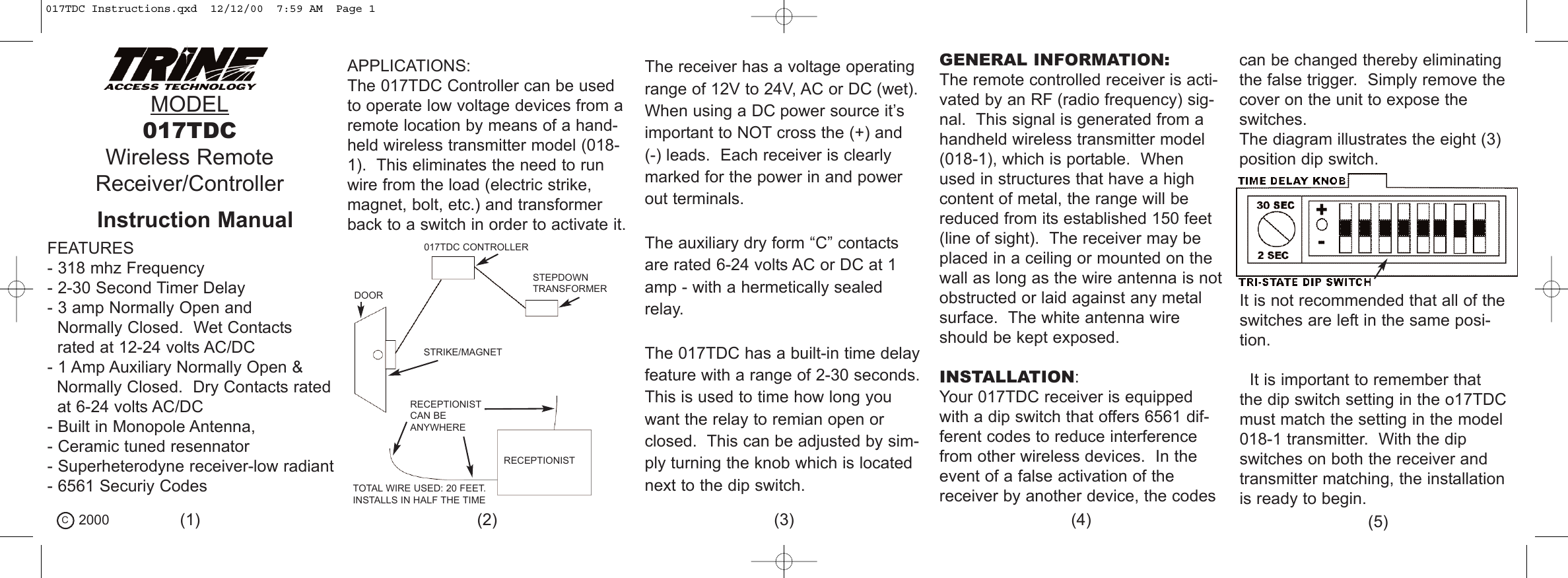
MODEL017TDCWireless RemoteReceiver/ControllerFEATURES- 318 mhz Frequency- 2-30 Second Timer Delay- 3 amp Normally Open andNormally Closed.  Wet Contacts rated at 12-24 volts AC/DC- 1 Amp Auxiliary Normally Open &Normally Closed.  Dry Contacts ratedat 6-24 volts AC/DC- Built in Monopole Antenna, - Ceramic tuned resennator- Superheterodyne receiver-low radiant- 6561 Securiy CodesAPPLICATIONS:The 017TDC Controller can be usedto operate low voltage devices from aremote location by means of a hand-held wireless transmitter model (018-1).  This eliminates the need to runwire from the load (electric strike,magnet, bolt, etc.) and transformerback to a switch in order to activate it.DOORSTEPDOWNTRANSFORMER017TDC CONTROLLERSTRIKE/MAGNETRECEPTIONISTRECEPTIONISTCAN BEANYWHERETOTAL WIRE USED: 20 FEET.INSTALLS IN HALF THE TIMEThe receiver has a voltage operatingrange of 12V to 24V, AC or DC (wet).When using a DC power source it’simportant to NOT cross the (+) and (-) leads.  Each receiver is clearlymarked for the power in and powerout terminals.The auxiliary dry form “C” contactsare rated 6-24 volts AC or DC at 1amp - with a hermetically sealedrelay.The 017TDC has a built-in time delayfeature with a range of 2-30 seconds.This is used to time how long youwant the relay to remian open orclosed.  This can be adjusted by sim-ply turning the knob which is locatednext to the dip switch.GENERAL INFORMATION:The remote controlled receiver is acti-vated by an RF (radio frequency) sig-nal.  This signal is generated from ahandheld wireless transmitter model (018-1), which is portable.  Whenused in structures that have a highcontent of metal, the range will bereduced from its established 150 feet(line of sight).  The receiver may beplaced in a ceiling or mounted on thewall as long as the wire antenna is notobstructed or laid against any metalsurface.  The white antenna wireshould be kept exposed.INSTALLATION:Your 017TDC receiver is equippedwith a dip switch that offers 6561 dif-ferent codes to reduce interferencefrom other wireless devices.  In theevent of a false activation of thereceiver by another device, the codescan be changed thereby eliminatingthe false trigger.  Simply remove thecover on the unit to expose theswitches.The diagram illustrates the eight (3)position dip switch.It is not recommended that all of theswitches are left in the same posi-tion.It is important to remember thatthe dip switch setting in the o17TDCmust match the setting in the model018-1 transmitter.  With the dipswitches on both the receiver andtransmitter matching, the installationis ready to begin.C2000 (1) (2) (3) (4) (5)Instruction Manual017TDC Instructions.qxd  12/12/00  7:59 AM  Page 1
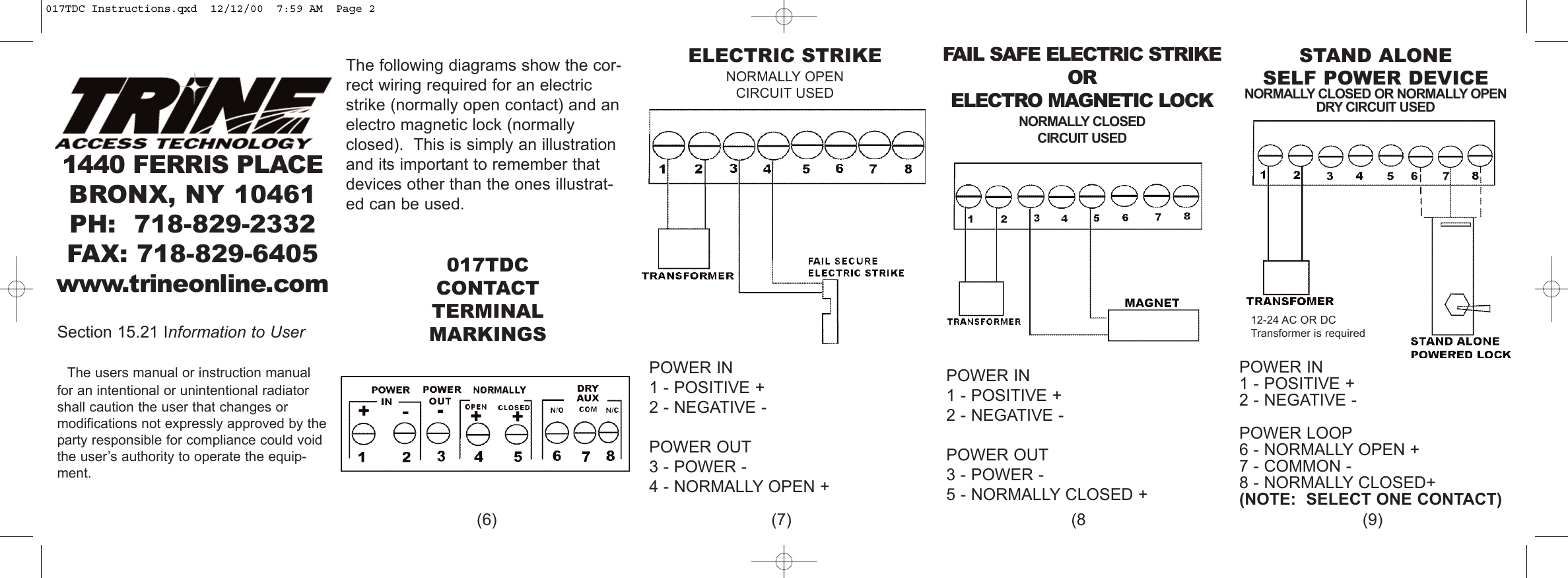
ELECTRIC STRIKENORMALLY OPENCIRCUIT USEDSTAND ALONESELF POWER DEVICENORMALLY CLOSED OR NORMALLY OPENDRY CIRCUIT USEDPOWER IN 1 - POSITIVE +2 - NEGATIVE -POWER OUT3 - POWER -4 - NORMALLY OPEN +POWER IN1 - POSITIVE +2 - NEGATIVE -POWER LOOP6 - NORMALLY OPEN +7 - COMMON -8 - NORMALLY CLOSED+(NOTE:  SELECT ONE CONTACT)The following diagrams show the cor-rect wiring required for an electricstrike (normally open contact) and anelectro magnetic lock (normallyclosed).  This is simply an illustrationand its important to remember thatdevices other than the ones illustrat-ed can be used.017TDCCONTACT TERMINALMARKINGSFAIL SAFE ELECTRIC STRIKEOR ELECTRO MAGNETIC LOCKNORMALLY CLOSEDCIRCUIT USEDPOWER IN1 - POSITIVE +2 - NEGATIVE -POWER OUT3 - POWER -5 - NORMALLY CLOSED +(6) (7) (8 (9)12-24 AC OR DCTransformer is required1440 FERRIS PLACEBRONX, NY 10461PH: 718-829-2332FAX: 718-829-6405www.trineonline.comSection 15.21 Information to UserThe users manual or instruction manualfor an intentional or unintentional radiatorshall caution the user that changes or modifications not expressly approved by theparty responsible for compliance could voidthe user’s authority to operate the equip-ment.017TDC Instructions.qxd  12/12/00  7:59 AM  Page 2

Navigation menu