Unfors RaySafe 8603022 DoseAware Base Station User Manual
Unfors RaySafe AB DoseAware Base Station
Contents
- 1. user manual
- 2. user manual manager
user manual

DoseAware Base Station
Package
INSTRUCTIONS FOR USE
Document version 1.2
English
Philips Healthcare 9896 002 16623
1
2
3
4
5
6
7
8
9
10
11
12
13
14
15
16
17
18
19
20
21
22
23
24
25
26
27
28
29
30
31
32
33
34
35
36
37
38
39
40
41
42
43
44
45
46
47
48
49
50
51
52
53
54
55
56
57
58
59
60

Published by Philips Medical Systems Nederland B.V.
Philips Medical Systems Nederland B.V. reserves the right to
make changes to both this document and to the product it
describes. Product specifications are subject to change without
notice. Nothing contained within this document is intended as
any offer, warranty, promise or contractual condition, and must
not be taken as such.
© Koninklijke Philips Electronics N.V. 2009
All Rights are reserved. Reproduction in whole or in part in any
form or by any means, electrical, mechanical or otherwise is
prohibited without the written consent of the copyright holder.
Issue Number 9896 002 16623
Philips Medical Systems Nederland B.V.
Veenpluis 4-6
5684 PC Best
The Netherlands
Unauthorized copying of this publication may not only infringe
copyright but also reduce the ability of Philips Medical Systems
to provide accurate and up-to-date information to users.
Non-Philips product names may be trademarks of their
respective owners.
Published in The Netherlands.
0-2 DoseAware Base Station Package Document version 1.2
Philips Healthcare 9896 002 16623 0900a44780045a3a
1
2
3
4
5
6
7
8
9
10
11
12
13
14
15
16
17
18
19
20
21
22
23
24
25
26
27
28
29
30
31
32
33
34
35
36
37
38
39
40
41
42
43
44
45
46
47
48
49
50
51
52
53
54
55
56
57
58
59
60

Contents
Introduction..............................................................................................1 1-1
1.1 About the DoseAware System.................................................... 1-1
1.2 About these Instructions for Use................................................ 1-2
1.3 Intended use of the DoseAware System ................................... 1-3
1.4 Compatibility............................................................................ 1-4
1.5 Compliance............................................................................... 1-5
1.6 Training.................................................................................... 1-5
1.7 System requirements.................................................................. 1-6
1.8 Other user manuals.................................................................... 1-6
Safety.........................................................................................................2 2-1
2.1 Important safety directions........................................................ 2-1
2.2 Electrical safety.......................................................................... 2-2
2.3 Mechanical safety....................................................................... 2-3
2.4 Explosion safety......................................................................... 2-3
2.5 Fire safety.................................................................................. 2-3
2.6 Electrostatic discharge (ESD)..................................................... 2-4
2.7 Electromagnetic Compatibility (EMC)...................................... 2-5
2.7.1 Mobile phones and similar RF equipment ................ 2-6
2.8 Modality specific safety.............................................................. 2-7
2.9 Network safety, security and privacy.......................................... 2-8
2.10 Toxic or hazardous substances and elements.............................. 2-9
2.11 Equipment label overview.......................................................... 2-10
DoseAware Base Station Package Document version 1.2 Contents 0-3
Philips Healthcare 9896 002 16623
1
2
3
4
5
6
7
8
9
10
11
12
13
14
15
16
17
18
19
20
21
22
23
24
25
26
27
28
29
30
31
32
33
34
35
36
37
38
39
40
41
42
43
44
45
46
47
48
49
50
51
52
53
54
55
56
57
58
59
60

Using the Base Station............................................................................3 3-1
3.1 Introduction.............................................................................. 3-1
3.2 Getting started........................................................................... 3-2
3.2.1 Starting the wall mounted Base Station........................ 3-2
3.2.2 Starting the MCS mounted Base Station...................... 3-3
3.3 Base Station features.................................................................. 3-3
3.3.1 Online view – view current dose rates
.................................................................................... 3-4
3.3.2 Walk-Up view – view detailed dose data .......... 3-7
3.3.3 Base Station Settings view............................................ 3-11
3.4 Shutting down the Base Station................................................. 3-16
3.4.1 Shutting down a wall mounted Base Station................ 3-16
3.4.2 Shutting down an MCS mounted Base Station............ 3-16
Using DoseView.......................................................................................4 4-1
4.1 Introduction to DoseView......................................................... 4-1
4.2 Getting started with DoseView.................................................. 4-2
4.3 Home Toolbar overview............................................................ 4-3
4.4 PDM panel................................................................................ 4-5
4.4.1 PDM information........................................................ 4-5
4.4.2 Dose information......................................................... 4-6
4.4.3 Selection summary....................................................... 4-6
4.4.4 Change PDM options.................................................. 4-7
4.5 View dose graph........................................................................ 4-12
4.6 View dose table.......................................................................... 4-14
4.7 Specify password and language................................................... 4-15
Using the PDM.........................................................................................5 5-1
5.1 Introduction.............................................................................. 5-1
5.2 Getting started........................................................................... 5-1
Contents
0-4 Contents DoseAware Base Station Package Document version 1.2
Philips Healthcare 9896 002 16623 0900a44780045a3a
1
2
3
4
5
6
7
8
9
10
11
12
13
14
15
16
17
18
19
20
21
22
23
24
25
26
27
28
29
30
31
32
33
34
35
36
37
38
39
40
41
42
43
44
45
46
47
48
49
50
51
52
53
54
55
56
57
58
59
60

Using the Cradle......................................................................................6 6-1
6.1 Introduction.............................................................................. 6-1
6.2 Getting started........................................................................... 6-2
Maintenance..............................................................................................7 7-1
7.1 Calibrating the Base Station screen............................................ 7-1
7.2 Cleaning and disinfection.......................................................... 7-1
7.2.1 Cleaning...................................................................... 7-1
7.2.2 Disinfection................................................................. 7-2
Troubleshooting.......................................................................................8 8-1
8.1 Base Station............................................................................... 8-1
8.2 DoseView and Cradle................................................................ 8-1
Product disposal.......................................................................................9 9-1
9.1 Introduction.............................................................................. 9-1
9.2 Passing the system on to another user........................................ 9-1
9.3 Final disposal of the system........................................................ 9-2
9.4 Fitting, removing, and disposing of batteries.............................. 9-3
Technical data..........................................................................................10 10-1
10.1 PDM radiology ........................................................................ 10-1
10.2 PDM memory........................................................................... 10-2
10.3 Base Station memory................................................................. 10-2
10.4 Dose data transfer from PDM to Base Station........................... 10-2
10.5 PDM and Base Station/DoseView memories............................. 10-3
10.6 Time management.................................................................... 10-4
Contents
DoseAware Base Station Package Document version 1.2 Contents 0-5
Philips Healthcare 9896 002 16623
1
2
3
4
5
6
7
8
9
10
11
12
13
14
15
16
17
18
19
20
21
22
23
24
25
26
27
28
29
30
31
32
33
34
35
36
37
38
39
40
41
42
43
44
45
46
47
48
49
50
51
52
53
54
55
56
57
58
59
60

10.7 Technical Specifications............................................................. 10-4
10.7.1 Radio communication.................................................. 10-4
10.7.2 Base Station................................................................ 10-4
10.7.3 PDM........................................................................... 10-5
10.7.4 Cradle.......................................................................... 10-5
10.8 Security and privacy requirements.............................................. 10-6
Contents
0-6 Contents DoseAware Base Station Package Document version 1.2
Philips Healthcare 9896 002 16623 0900a44780045a3a
1
2
3
4
5
6
7
8
9
10
11
12
13
14
15
16
17
18
19
20
21
22
23
24
25
26
27
28
29
30
31
32
33
34
35
36
37
38
39
40
41
42
43
44
45
46
47
48
49
50
51
52
53
54
55
56
57
58
59
60
Introduction
About the DoseAware System
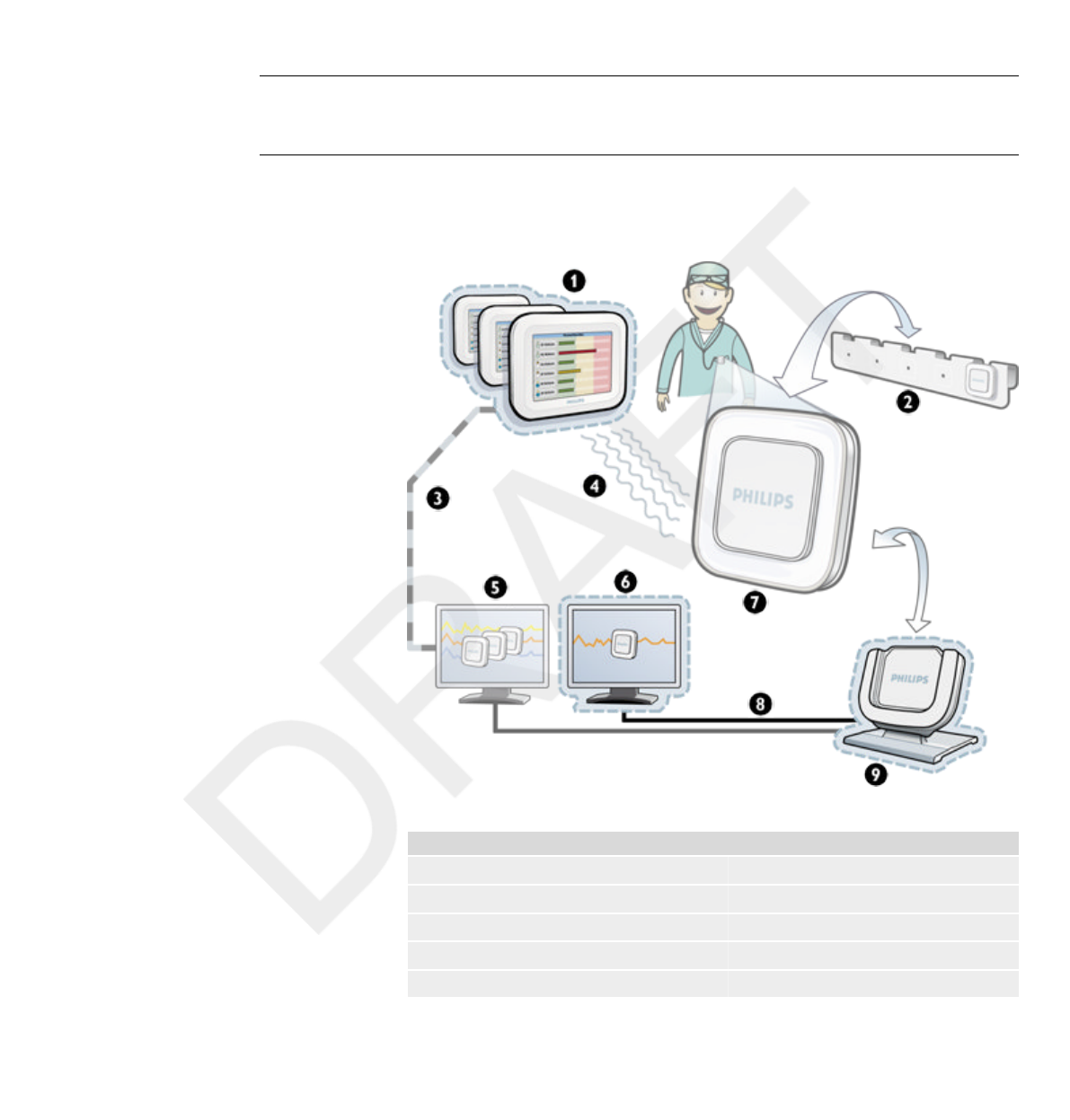
Figure 1.1 DoseAware System overview with Base Station Package components highlighted
Legend
1 Base Station 2 PDM rack
3 Ethernet 4 Radio
5 Dose Manager 6 Dose View
7 PDM 8 USB
9 Cradle
1
1.1
DoseAware Base Station Package Document version 1.2 Introduction 1-1
Philips Healthcare 9896 002 16623
1
2
3
4
5
6
7
8
9
10
11
12
13
14
15
16
17
18
19
20
21
22
23
24
25
26
27
28
29
30
31
32
33
34
35
36
37
38
39
40
41
42
43
44
45
46
47
48
49
50
51
52
53
54
55
56
57
58
59
60

The DoseAware System can contain the following components:
•Personal Dose Meter (PDM)
• Base Stations (display unit)
• DoseView (computer software)
• Dose Manager (computer software)
• Cradle (dock station used to connect PDMs and computer)
• PDM Rack (PDM storage)
The Base Station Package consists of:
• Base Station, power adaptor, MCS bracket and wall mount kit
• DoseView (CD)
• User manual (CD)
• Cradle, USB cable
About these Instructions for Use
These Instructions for Use are intended to assist users in the safe and
effective operation of the product described.
Before attempting to operate the product, you must read these Instructions
for Use, noting and strictly observing all WARNINGS and CAUTION
notices.
Pay special attention to all the information given and procedures described
in the Safety section.
A WARNING alerts you to a potential serious outcome, adverse event or safety
hazard. Failure to observe a warning may result in death or serious injury to the
operator or patient.
A CAUTION alerts you to where special care is necessary for the safe and effective
use of the product. Failure to observe a caution may result in minor or moderate
personal injury or damage to the product or other property, and possibly in a remote
risk of more serious injury, and/or cause environmental pollution.
Notes highlight unusual points as an aid to an operator.
1.2
WARNING
CAUTION
NOTE
1.2 About these Instructions for Use
1-2 Introduction DoseAware Base Station Package Document version 1.2
Philips Healthcare 9896 002 16623 0900a44780045a3a
1
2
3
4
5
6
7
8
9
10
11
12
13
14
15
16
17
18
19
20
21
22
23
24
25
26
27
28
29
30
31
32
33
34
35
36
37
38
39
40
41
42
43
44
45
46
47
48
49
50
51
52
53
54
55
56
57
58
59
60

These Instructions for Use describe the most extensive configuration of the
product, with the maximum number of options and accessories. Not every
function described may be available on your product.
These Instructions for Use describe the Base Station Package. In order to get
an immediate hands-on experience of the Base Station
Package, we recommended that you interact with the Base Station,
DoseView, and Cradle in parallel to reading these Instructions for Use.
Intended use of the DoseAware System
This Philips product is intended to be installed, used and operated only in
accordance with the safety procedures and operating instructions given in
these Instructions for Use for the purpose for which it was designed. The
purpose for which the product is intended is given below. However, nothing
stated in these Instructions for Use reduces users’ responsibilities for sound
clinical judgment and best clinical procedure.
The DoseAware System is an electronic X-ray dose monitoring system. The
intended use is to improve the awareness of people who work with or are in
the presence of X-Ray imaging equipment, about their occupational dose
(also known as staff dose).
The awareness focuses on:
•a graphical visualization of the real-time staff dose rate while working
with X-Ray equipment in examination rooms during medical procedures;
• instant access to historical staff dose for reporting and analysis purposes.
The benefits of the DoseAware System are to:
• make people aware of their received staff dose during clinical work with
X-ray imaging equipment;
• instantly visualize the result of reducing measures of occupational
dose by, for example, changing a person’s position in the examination room.
1.3
Intended use of the DoseAware System 1.3
DoseAware Base Station Package Document version 1.2 Introduction 1-3
Philips Healthcare 9896 002 16623
1
2
3
4
5
6
7
8
9
10
11
12
13
14
15
16
17
18
19
20
21
22
23
24
25
26
27
28
29
30
31
32
33
34
35
36
37
38
39
40
41
42
43
44
45
46
47
48
49
50
51
52
53
54
55
56
57
58
59
60

The DoseAware System may not be used as a legal staff dose recording
solution. The DoseAware System is not intended for patient use.
•Do not expose the PDMs in direct X-ray beam. They are designed to be exposed to
scattered radiation only.
•The Dose Manager, DoseView, Cradle and PDM Rack are not intended to be used
inside examination rooms.
•The DoseAware product is not a replacement for a TLD (ThermoLuminescent
Dosimeter) or similar product.
Installation, use and operation of this DoseAware System is subject to the
law in the jurisdiction(s) in which the DoseAware System is being used.
Operators must only install, use and operate the DoseAware System in such
ways as do not conflict with applicable laws, or regulations, which have the
force of law.
Uses of the Allura CV20 for purposes other than those intended and Uses of
the DoseAware System for purposes other than those intended and expressly
stated by the manufacturer, as well as incorrect use or operation, may relieve
the manufacturer (or his agent) from all or some responsibility for resultant
non-compliance, damage or injury.
Compatibility
The product described in this manual should not be used in combination
with other products or components unless such other products or
components are expressly recognized as compatible by Philips Healthcare.
(A list of such products and components is available from the manufacturer.)
NOTES
1.4
1.4 Compatibility
1-4 Introduction DoseAware Base Station Package Document version 1.2
Philips Healthcare 9896 002 16623 0900a44780045a3a
1
2
3
4
5
6
7
8
9
10
11
12
13
14
15
16
17
18
19
20
21
22
23
24
25
26
27
28
29
30
31
32
33
34
35
36
37
38
39
40
41
42
43
44
45
46
47
48
49
50
51
52
53
54
55
56
57
58
59
60

Changes and/or additions to the product should only be carried out by
Philips Medical Systems or by third parties expressly authorized by Philips
Medical Systems to do so. Such changes and/or additions must comply with
all applicable laws and regulations that have the force of law within the
jurisdiction(s) concerned, and with best engineering practice.
Changes and/or additions to the product that are carried out by persons without the
appropriate training and/or using unapproved spare parts may lead to the Philips
Medical Systems warranty being voided. As with all complex technical products,
maintenance by persons not appropriately qualified and/or using unapproved spare
parts carries serious risks of damage to the product and of personal injury.
Compliance
The Philips DoseAware System complies with relevant international and
national standards and laws. Information on compliance will be supplied on
request by your local Philips Medical Systems representative, or by the
manufacturer.
Training
Users of this product must have received adequate training on its safe and
effective use before attempting to operate the product described in these
Instructions for Use. Training requirements for this type of device will vary
from country to country. Users must make sure they receive adequate
training in accordance with local laws or regulations.
If you require further information about training in the use of this product,
please contact your local Philips Medical Systems representative.
Alternatively, contact the manufacturer.
WARNING
1.5
1.6
Compliance 1.5
DoseAware Base Station Package Document version 1.2 Introduction 1-5
Philips Healthcare 9896 002 16623
1
2
3
4
5
6
7
8
9
10
11
12
13
14
15
16
17
18
19
20
21
22
23
24
25
26
27
28
29
30
31
32
33
34
35
36
37
38
39
40
41
42
43
44
45
46
47
48
49
50
51
52
53
54
55
56
57
58
59
60

System requirements
DoseView has the following system requirements:
•Operating systems: Windows Vista or Windows XP
• .NET 3.0
• At least one USB port available
• At least 1 GB of system memory available
• At least 40 GB hard drive with at least 15 GB of memory available
• Recommended screen resolution at least 1024 x 768
Other user manuals
• Dose Manager is described in a separate user manual, which can be found
on the CD delivered in the box together with the Dose Manager package.
• The PDMs are described in the PDM Quick Guide, a leaflet that is
delivered in the box together with the PDM.
1.7
1.8
1.7 System requirements
1-6 Introduction DoseAware Base Station Package Document version 1.2
Philips Healthcare 9896 002 16623 0900a44780045a3a
1
2
3
4
5
6
7
8
9
10
11
12
13
14
15
16
17
18
19
20
21
22
23
24
25
26
27
28
29
30
31
32
33
34
35
36
37
38
39
40
41
42
43
44
45
46
47
48
49
50
51
52
53
54
55
56
57
58
59
60

Safety
Important safety directions
If the DoseAware system is not functioning correct or damage is visible,
inform a Philips service engineer, which will take appropriate actions in
order not to harm personnel or patients.
Handle the hardware and software with care. Make sure that the hardware
and software is used and stored in a secured environment to prevent
unauthorized access.
Maintenance & faults
Do not use the product for any application until you are sure that the user routine-
checks have been satisfactorily completed, and that the periodic maintenance of the
product is up to date. If any part of the product is known (or suspected) to be
defective or wrongly adjusted, DO NOT USE the product until a repair has been
made. Operation of the product with defective or wrongly adjusted components could
expose the user or the patient to radiation or other safety hazards. This could lead to
fatal or other serious personal injury, or to clinical misdiagnosis/clinical mistreatment.
Safety awareness
Do not use the product for any application until you have read, understood and know
all the safety information, safety procedures and emergency procedures contained in
this Safety section. Operation of the product without a proper awareness of how to
use it safely could lead to fatal or other serious personal injury. It could also lead to
clinical misdiagnosis/clinical mistreatment.
2
2.1
WARNING
WARNING
DoseAware Base Station Package Document version 1.2 Safety 2-1
Philips Healthcare 9896 002 16623
1
2
3
4
5
6
7
8
9
10
11
12
13
14
15
16
17
18
19
20
21
22
23
24
25
26
27
28
29
30
31
32
33
34
35
36
37
38
39
40
41
42
43
44
45
46
47
48
49
50
51
52
53
54
55
56
57
58
59
60

Adequate training
•Do not use the product for any application until you have received adequate and
proper training in its safe and effective operation. If you are unsure of your ability
to operate this product safely and effectively, DO NOT USE IT. Operation of this
product without proper and adequate training could lead to fatal or other serious
personal injury. It could also lead to clinical misdiagnosis/clinical mistreatment.
•Do not operate the product with patients unless you have an adequate
understanding of its capabilities and functions. Using this product without such an
understanding may compromise its effectiveness and/or reduce the safety of the
patient, you and others.
Safety devices
Never attempt to remove, modify, override or frustrate any safety device on the
product. Interfering with safety devices could lead to fatal or other serious personal
injury.
Intended use and compatibility
Do not use the product for any purpose other than those for which it is intended. Do
not use the product with products other than that which Philips Medical Systems
recognizes as compatible. Operation of the product for unintended purposes, or with
incompatible products, could lead to fatal or other serious injury. It could also lead to
clinical misdiagnosis/clinical mistreatment.
Electrical safety
Do not remove covers or cables from this product. Dangerous electrical voltages are
present within this product. Removing covers or cables could lead to serious or fatal
personal injury.
WARNINGS
WARNING
WARNING
2.2
WARNING
2.2 Electrical safety
2-2 Safety DoseAware Base Station Package Document version 1.2
Philips Healthcare 9896 002 16623 0900a44780045a3a
1
2
3
4
5
6
7
8
9
10
11
12
13
14
15
16
17
18
19
20
21
22
23
24
25
26
27
28
29
30
31
32
33
34
35
36
37
38
39
40
41
42
43
44
45
46
47
48
49
50
51
52
53
54
55
56
57
58
59
60

Covers or cables should only be removed by qualified and authorized service
personnel. Use this product in rooms or areas that comply with all
applicable laws (or regulations having the force of law) concerning electrical
safety for this type of product.
Electrically isolate this product from the mains electrical supply before
cleaning, disinfecting or sterilizing it.
Mechanical safety
Do not remove covers from this product. Removing covers could lead to serious or
fatal personal injury.
Covers should only be removed by qualified and authorized service
personnel. In this context, qualified means those legally permitted to work
on this type of medical electrical product in the jurisdiction(s) in which the
product is being used, and authorized means those authorized by the user of
the product.
Explosion safety
•Do not use this product in the presence of explosive gases or vapors, such as
certain anesthetic gases.
•Do not use flammable or potentially explosive disinfecting sprays.
•Use of this product in an environment for which it was not designed can lead to
fire or explosion.
Fire safety
Use of electrical product in an environment for which it was not
designed can lead to fire or explosion.
2.3
WARNING
2.4
WARNINGS
2.5
Mechanical safety 2.3
DoseAware Base Station Package Document version 1.2 Safety 2-3
Philips Healthcare 9896 002 16623
1
2
3
4
5
6
7
8
9
10
11
12
13
14
15
16
17
18
19
20
21
22
23
24
25
26
27
28
29
30
31
32
33
34
35
36
37
38
39
40
41
42
43
44
45
46
47
48
49
50
51
52
53
54
55
56
57
58
59
60

Fire regulations for the type of medical area being used should be fully
applied, observed and enforced. Fire extinguishers should be available for
both electrical and non-electrical fires.
Only use extinguishers on electrical or chemical fires, which are specifically labeled
for those purposes. Using water or other liquids on an electrical fire can lead to fatal
or other serious personal injury.
If it is safe to do so, attempt to isolate the product from electrical and other
supplies before attempting to fight a fire. This will reduce the risk of electric
shocks.
Electrostatic discharge (ESD)
•Always wait at least ten seconds after the product is switched OFF before switching
the product back to ON.
•Always use proper static procedures, protection, and product prior to opening and
during handling of this product. This product contains components that are
electrostatic sensitive. Failure to use ESD procedures may cause damage to these
components. Such damage to components is not covered by Philips warranties.
Connections to sensitive parts are identified by the ESD warning symbol as
shown.
ESD can amount to a significant voltage, which may cause damage to PCBs
or other system components.
WARNING
2.6
CAUTIONS
2.6 Electrostatic discharge (ESD)
2-4 Safety DoseAware Base Station Package Document version 1.2
Philips Healthcare 9896 002 16623 0900a44780045a3a
1
2
3
4
5
6
7
8
9
10
11
12
13
14
15
16
17
18
19
20
21
22
23
24
25
26
27
28
29
30
31
32
33
34
35
36
37
38
39
40
41
42
43
44
45
46
47
48
49
50
51
52
53
54
55
56
57
58
59
60

ESD damage is cumulative and may not be apparent at first, as indicated by
a hard failure, but can cause degraded performance. Therefore, always use
proper ESD handling procedures. ESD can result from low humidity
conditions, use of electrical equipment on carpeting, linens, and clothing.
Electromagnetic Compatibility (EMC)
This Philips product complies with relevant international and national laws
and standards on EMC (electromagnetic compatibility) for this type of
product when used as intended. Such laws and standards define both the
permissible electromagnetic emission levels from equipment and its required
immunity to electromagnetic interference from external sources.
Other electronic products exceeding the limits defined in such EMC
standards could, under unusual circumstances, affect the operation of the
product.
•Medical electrical products need special precautions regarding EMC, and
need to be installed and put into service according to EMC information
provided in the accompanying documents.
• The use of accessories and cables other than those specified may result in
increased emission or decreased immunity levels.
• The product should not be used adjacent to or stacked with other
products and that if adjacent or stacked use is necessary, it should be
observed to verify normal operation.
This equipment is intended for use in a hospital environment. Operation in
other than hospital environments may compromise electromagnetic
compatibility.
The Base Station and PDM comply with part 15 of the FCC Rules.
Operation is subject to the following conditions: (1) This device may not
cause harmful interference, and (2) this device must accept any interference
received, including interference that may cause undesired operation.
Changes or modifications to the equipment not expressly approved by the
party responsible for compliance could void the user’s authority to operate
the equipment.
2.7
Electromagnetic Compatibility (EMC) 2.7
DoseAware Base Station Package Document version 1.2 Safety 2-5
Philips Healthcare 9896 002 16623
1
2
3
4
5
6
7
8
9
10
11
12
13
14
15
16
17
18
19
20
21
22
23
24
25
26
27
28
29
30
31
32
33
34
35
36
37
38
39
40
41
42
43
44
45
46
47
48
49
50
51
52
53
54
55
56
57
58
59
60

This device complies with Industry Canada license-exempt RSS standard(s).
Operation is subject to the following two conditions: (1) This device may
not cause interference, and (2) this device must accept any interference,
including interference that may cause undesired operation of the device.
Le présent appareil est conforme aux CNR d'Industrie Canada applicables aux
appareils radio exempts de licence. L'exploitation est autorisée aux deux
conditions suivantes : (1) l'appareil ne doit pas produire de brouillage, et (2)
l'utilisateur de l'appareil doit accepter tout brouillage radioélectrique subi, même
si le brouillage est susceptible d'en compromettre le fonctionnement.
This class A digital apparatus complies with Canadian ICES-003.
Cet appareil numérique de la classe A est conforme à la norme NMB-003 du
Canada.
The Base Station and PDM have been tested and found to comply with the
limits for a Class A digital device, pursuant to part 15 of the FCC Rules.
These limits are designed to provide reasonable protection against harmful
interference when the equipment is operated in a commercial environment.
This equipment generates, uses, and can radiate radio frequency energy and,
if not installed and used in accordance with the instruction manual, may
cause harmful interference to radio communications. Operation of this
equipment in a residential area is likely to cause harmful interference in
which case the user will be required to correct the interference at his own
expense.
Mobile phones and similar RF equipment
The DoseAware system is intended for use in the electromagnetic
environment in which radiated RF disturbances are controlled.
Portable and mobile RF communications can affect medical electrical equipment. Use
caution when using such communication devices within the specified range of medical
electrical devices.
2.7.1
CAUTION
2.7 Electromagnetic Compatibility (EMC)
2-6 Safety DoseAware Base Station Package Document version 1.2
Philips Healthcare 9896 002 16623 0900a44780045a3a
1
2
3
4
5
6
7
8
9
10
11
12
13
14
15
16
17
18
19
20
21
22
23
24
25
26
27
28
29
30
31
32
33
34
35
36
37
38
39
40
41
42
43
44
45
46
47
48
49
50
51
52
53
54
55
56
57
58
59
60

The customer or the user of the DoseAware system can help prevent
electromagnetic interference by maintaining a minimum distance between
portable and mobile RF communications equipment (transmitters) and the
DoseAware system as recommended below, according to the maximum
output power of the communications equipment:
•A minimum distance of 20 cm between a PDM and a mobile phone or
regular electronic device (e.g. a computer).
• A minimum distance of 50 cm between a PDM and a medical device or
intended radiator (e.g. a wireless router).
These guidelines may not apply in all situations. Electromagnetic propagation is
affected by absorption and reflection from structures, objects and people.
Modality specific safety
During communication between the Base Station and PDMs, personal data is
transmitted in open air.
Be careful when using a PDM while being near a patient and make sure that
the PDM does not fall or comes in contact with other equipment (such as a
catheter) to endanger the procedure.
Do not move a PDM to an unknown environment (for example another
hospital). If you are visiting unknown environments, there is a risk that
personal data is registered there. For correct registration of staff dose data,
only use the PDM within designated environment.
Philips Medical Systems declares that all CE marked DoseAware products
incorporating Radio and Telecoms Terminal Equipment functionality are in
compliance with the essential requirements and other relevant provisions of
Directive 1999/5/EC.
NOTE
2.8
WARNING
Modality specific safety 2.8
DoseAware Base Station Package Document version 1.2 Safety 2-7
Philips Healthcare 9896 002 16623
1
2
3
4
5
6
7
8
9
10
11
12
13
14
15
16
17
18
19
20
21
22
23
24
25
26
27
28
29
30
31
32
33
34
35
36
37
38
39
40
41
42
43
44
45
46
47
48
49
50
51
52
53
54
55
56
57
58
59
60

Network safety, security and privacy
Customer Role in the Product Security Partnership
We recognize that the security of Philips Medical Systems products is an
important part of your facility's security-in depth strategy. However, these
benefits can only be realized if you implement a comprehensive, multi-
layered strategy (including policies, processes, and technologies) to protect
information and systems from external and internal threats.
Following industry-standard practice, your strategy should address physical
security, operational security, procedural security, risk management, security
policies, and contingency planning. The practical implementation of
technical security elements varies by site and may employ a number of
technologies, including firewalls, virus-scanning software, authentication
technologies, etc.
As with any computer-based system, protection must be provided such that
firewalls and/or other security devices are in place between the medical
system and any externally accessible systems.
The USA Veterans Administration has developed a widely used Medical
Device Isolation Architecture for this purpose. Such perimeter and network
defenses are essential elements in a comprehensive medical device security
strategy.
For our product security policy statement and additional information, see
the Philips Medical Systems product security website at:
2.9
2.9 Network safety, security and privacy
2-8 Safety DoseAware Base Station Package Document version 1.2
Philips Healthcare 9896 002 16623 0900a44780045a3a
1
2
3
4
5
6
7
8
9
10
11
12
13
14
15
16
17
18
19
20
21
22
23
24
25
26
27
28
29
30
31
32
33
34
35
36
37
38
39
40
41
42
43
44
45
46
47
48
49
50
51
52
53
54
55
56
57
58
59
60

http://www.healthcare.philips.com/main/support/productsecurity
Toxic or hazardous substances and elements
The following table details the toxic or hazardous substances and elements
which are present in the DoseAware systems.
Toxic or hazardous substances and elements
DoseAware
component
Lead (Pb) Mercury (Hg) Cadmium (Cd) Hexavalent
Chromium (Cr6+)
Polybrominated
Biphenyls (PBB)
Polybrominated
Diphenyl Ethers
(PBDE)
Base Station O O O O O O
PDM O O O O O O
O: Indicates that this toxic or hazardous substance contained in all of the homogeneous materials for this part is
below the limit requirement in SJ/T11363–2006.
Perchlorate materials
In this product, perchlorate material is present in lithium coin cells and/or
batteries. Special handling may apply for these materials, for more
information, go to:
www.dtsc.ca.gov/hazardouswaste/perchlorate
REACH Declaration
REACH requires Philips Healthcare (PH) to provide chemical content
information for Substances of Very High Concern (SVHC) if they are
present above 0.1% of the product weight. Components within electric and
electronic equipment may contain phthalates above the threshold (e.g. bis(2-
ethyl(hexyl)phthalate), CAS nr.: 117-81-7). The SVHC list is updated on a
regular basis. Therefore, refer to the following Philips REACH website for
the most up-to-date list of products containing SVHC above the threshold:
http://www.philips.com/about/sustainability/reach.page
China RoHS Hazardous Substances Declaration
For information, please see the Philips Medical Systems product
sustainability website at:
2.10
Toxic or hazardous substances and elements 2.10
DoseAware Base Station Package Document version 1.2 Safety 2-9
Philips Healthcare 9896 002 16623
1
2
3
4
5
6
7
8
9
10
11
12
13
14
15
16
17
18
19
20
21
22
23
24
25
26
27
28
29
30
31
32
33
34
35
36
37
38
39
40
41
42
43
44
45
46
47
48
49
50
51
52
53
54
55
56
57
58
59
60
http://www.healthcare.philips.com/main/about/Sustainability
Equipment label overview
This section describes the DoseAware product labels and their locations.
Some of the information (such as frequency, type, date of manufacture, and other
markings) on the labels for your DoseAware product may vary from the examples
shown below.
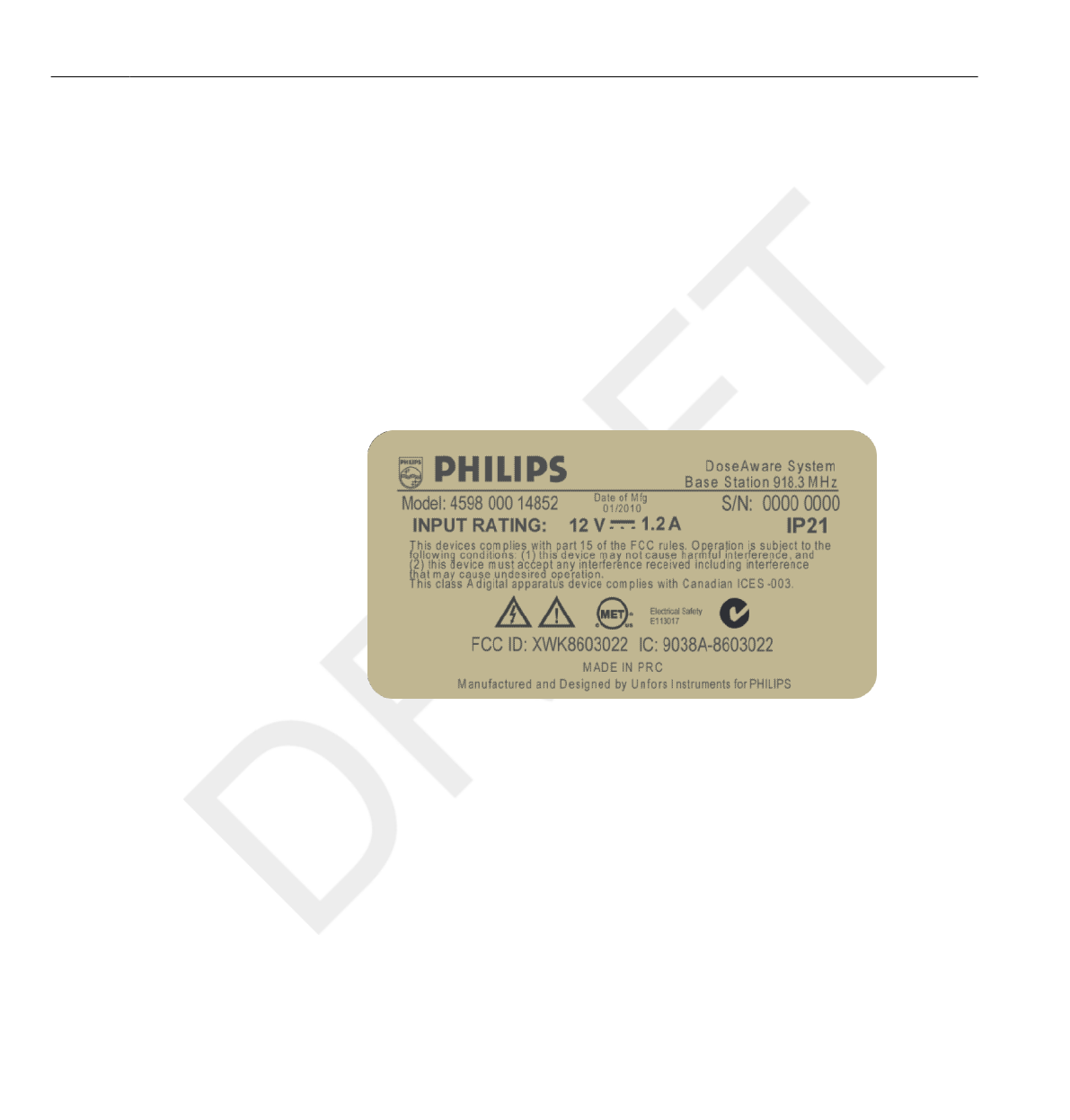
Base Station product label
The following Base Station product label is located on the rear side of the
Base Station.
Figure 2.1 Base Station label
Base station product label for products sold in the EU
The following Base Station product label is located on the rear side of the
Base Station for products sold in European Union (EU) countries.
2.11
NOTE
2.11 Equipment label overview
2-10 Safety DoseAware Base Station Package Document version 1.2
Philips Healthcare 9896 002 16623 0900a44780045a3a
1
2
3
4
5
6
7
8
9
10
11
12
13
14
15
16
17
18
19
20
21
22
23
24
25
26
27
28
29
30
31
32
33
34
35
36
37
38
39
40
41
42
43
44
45
46
47
48
49
50
51
52
53
54
55
56
57
58
59
60
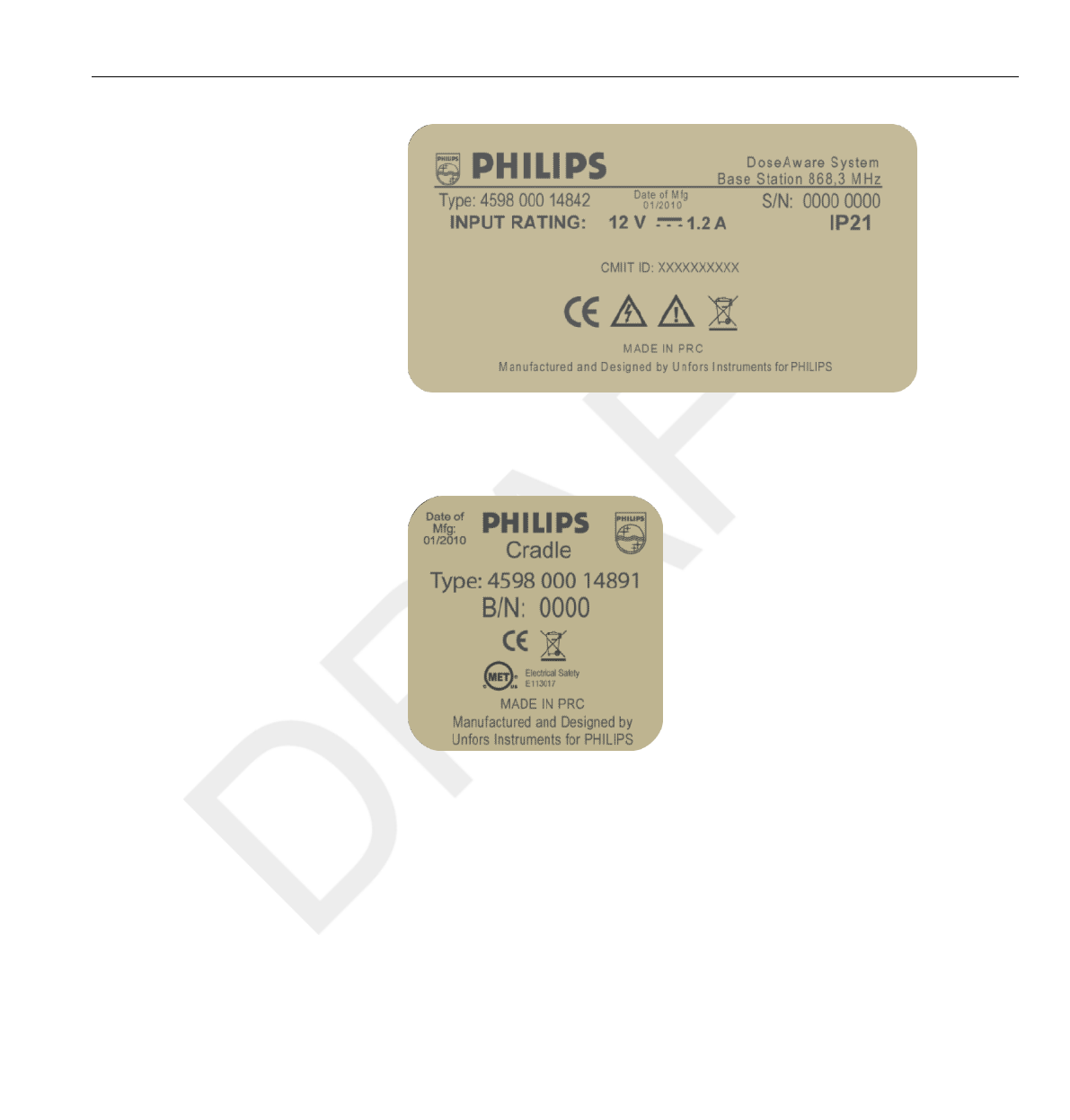
Figure 2.2 Base Station label for products sold in the EU
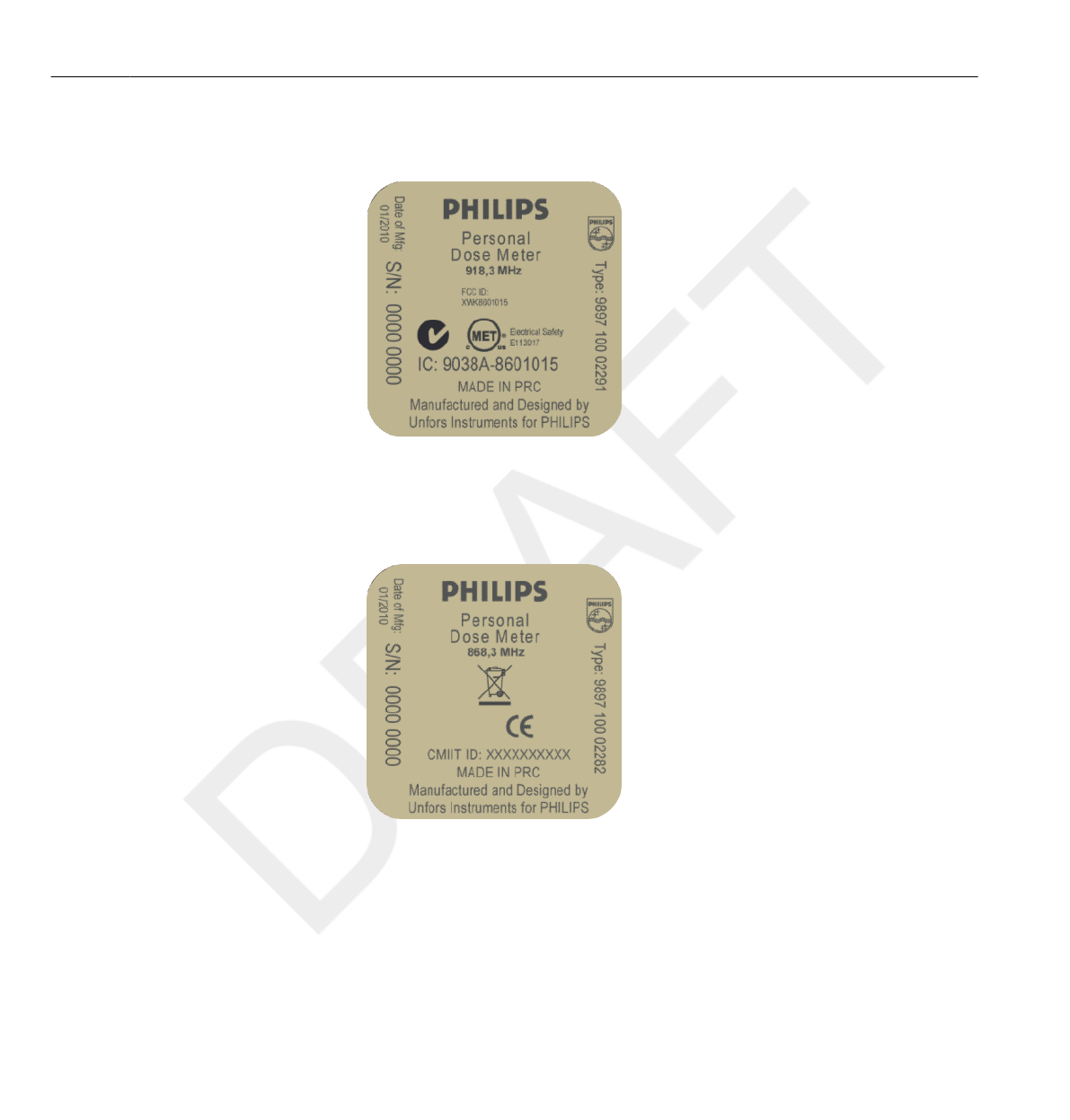
Cradle product label
The Cradle product label is located on the bottom of the Cradle.
Figure 2.3 Cradle label
Equipment label overview 2.11
DoseAware Base Station Package Document version 1.2 Safety 2-11
Philips Healthcare 9896 002 16623
1
2
3
4
5
6
7
8
9
10
11
12
13
14
15
16
17
18
19
20
21
22
23
24
25
26
27
28
29
30
31
32
33
34
35
36
37
38
39
40
41
42
43
44
45
46
47
48
49
50
51
52
53
54
55
56
57
58
59
60
PDM product label
The following PDM product label is located on the rear side of the PDM.
Figure 2.4 PDM label
PDM product label for products sold in the EU
The following PDM product label is located on the rear side of the PDM
for products sold in European Union (EU) countries.
Figure 2.5 PDM label for products sold in the EU
2.11 Equipment label overview
2-12 Safety DoseAware Base Station Package Document version 1.2
Philips Healthcare 9896 002 16623 0900a44780045a3a
1
2
3
4
5
6
7
8
9
10
11
12
13
14
15
16
17
18
19
20
21
22
23
24
25
26
27
28
29
30
31
32
33
34
35
36
37
38
39
40
41
42
43
44
45
46
47
48
49
50
51
52
53
54
55
56
57
58
59
60
Using the Base Station
Introduction
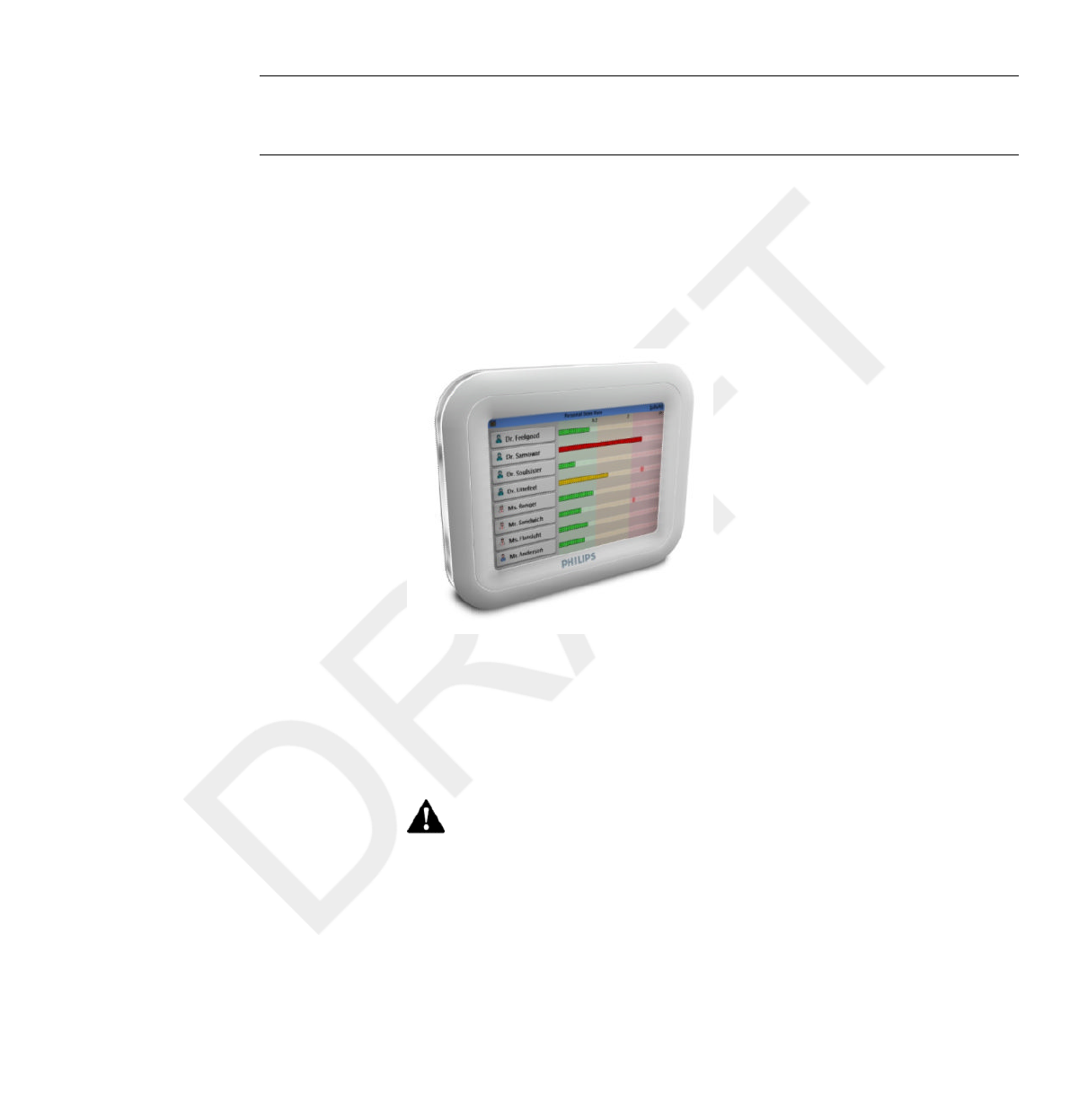
The Base Station is the display unit in the DoseAware System. It
communicates wireless with PDMs within radio range in order to collect,
present and store PDM dose data.
The distance from which the Base Station detects a PDM depends on the
settings that the service engineer made during the installation. If several Base
Stations are installed close to each other, the Base Station detects PDMs that
are located within a few meters. Otherwise the Base Station will detect
PDMs from longer distances.
Do not start up the product unless you and all other users present have read, fully
understood and know all the safety information and emergency procedures given in
the Safety section of these Instructions for Use. Operation of the product without
having read, understood and knowing all the safety information and procedures in the
Safety section could lead to fatal or other serious personal injury, clinical
misdiagnosis, or clinical mistreatment.
3
3.1
WARNING
DoseAware Base Station Package Document version 1.2 Using the Base Station 3-1
Philips Healthcare 9896 002 16623
1
2
3
4
5
6
7
8
9
10
11
12
13
14
15
16
17
18
19
20
21
22
23
24
25
26
27
28
29
30
31
32
33
34
35
36
37
38
39
40
41
42
43
44
45
46
47
48
49
50
51
52
53
54
55
56
57
58
59
60

Getting started
Starting the wall mounted Base Station
1Connect the output connector of the power adaptor to the back of the Base
Station, if needed.
2Connect the input connector to an AC electrical outlet socket.
This will switch on the Base Station.
First a Philips start up screen will be displayed for a few seconds and after 30
seconds the system is ready to use. The Online View will display a
maximum of 8 PDMs at a time. Only PDMs that are in range of the Base
Station will be displayed.
The Base Station screen is a touch screen. Operate the Base Station by
tapping buttons and graphs on the screen.
PDMs are shown on a first come first serve principle (see “reserved slots menu” in
section “Admin Settings menu” on page 3-12). PDMs that are not shown in the
Online View still measure and store dose data.
•Do not cover the Base Station to prevent excessive temperatures.
•Be careful when moving other equipment in the vicinity of the Base Station.
3.2
3.2.1
NOTE
WARNINGS
3.2 Getting started
3-2 Using the Base Station DoseAware Base Station Package Document version 1.2
Philips Healthcare 9896 002 16623 0900a44780045a3a
1
2
3
4
5
6
7
8
9
10
11
12
13
14
15
16
17
18
19
20
21
22
23
24
25
26
27
28
29
30
31
32
33
34
35
36
37
38
39
40
41
42
43
44
45
46
47
48
49
50
51
52
53
54
55
56
57
58
59
60

Starting the MCS mounted Base Station
1Switch on the X-ray system and the Base Station will automatically switch on.
First a Philips start up screen will be displayed for a few seconds and after 30
seconds the system is ready to use.
The Online View will display a maximum of 8 PDMs at a time. Only
PDMs that are in range of the Base Station will be displayed.
The Base Station screen is a touch screen. Operate the Base Station by
tapping buttons and graphs on the screen.
PDMs are shown on a first come first serve principle (see “reserved slots menu” in
section “Admin Settings menu” on page 3-12. PDMs that are not shown in the Online
View still measure and store dose data.
2Position the Base Station similar to the other monitors in the MCS as much
as possible.
•Do not cover the Base Station to prevent excessive temperatures.
•Be careful when moving the MCS or other equipment because the Base
Station may stick out and can be hit.
Base Station features
The Base Station offers:
•An Online View (see section “Online view
– view current dose rates ” on page 3-4 where you can:
• view current Personal Dose Rate information for several PDMs at a
time.
• access the Walk-Up View by tapping the |Displayed Name| tag
button of that PDM in the Online View.
3.2.2
NOTE
WARNINGS
3.3
Base Station features 3.3
DoseAware Base Station Package Document version 1.2 Using the Base Station 3-3
Philips Healthcare 9896 002 16623
1
2
3
4
5
6
7
8
9
10
11
12
13
14
15
16
17
18
19
20
21
22
23
24
25
26
27
28
29
30
31
32
33
34
35
36
37
38
39
40
41
42
43
44
45
46
47
48
49
50
51
52
53
54
55
56
57
58
59
60
• A Walk-Up View (see section “Walk-Up view
– view detailed dose data ” on page 3-7 ) where you can view
historical dose data for a PDM chosen from the OnLine View.
•A Base Station Settings View (see section “Base Station Settings view” on
page 3-11 ) for administrator settings.
See the “Technical Data” chapter for technical details about how the Base
Station displays dose data. In addition, the Base Station:
• Serves as an interim storage for the PDMs’ dose data to be further
analyzed in the optional Dose Manager application.
• Is provided with a USB port for dose data download to USB memory (see
the Dose Manager Package user manual).
When the Base Station memory is full, the oldest data will be overwritten with newer
data. For storage capacity examples, see section “Base Station memory” on page
10-2.
Online view – view current dose rates
Figure 3.1 The Online View
NOTE
3.3.1
3.3 Base Station features
3-4 Using the Base Station DoseAware Base Station Package Document version 1.2
Philips Healthcare 9896 002 16623 0900a44780045a3a
1
2
3
4
5
6
7
8
9
10
11
12
13
14
15
16
17
18
19
20
21
22
23
24
25
26
27
28
29
30
31
32
33
34
35
36
37
38
39
40
41
42
43
44
45
46
47
48
49
50
51
52
53
54
55
56
57
58
59
60
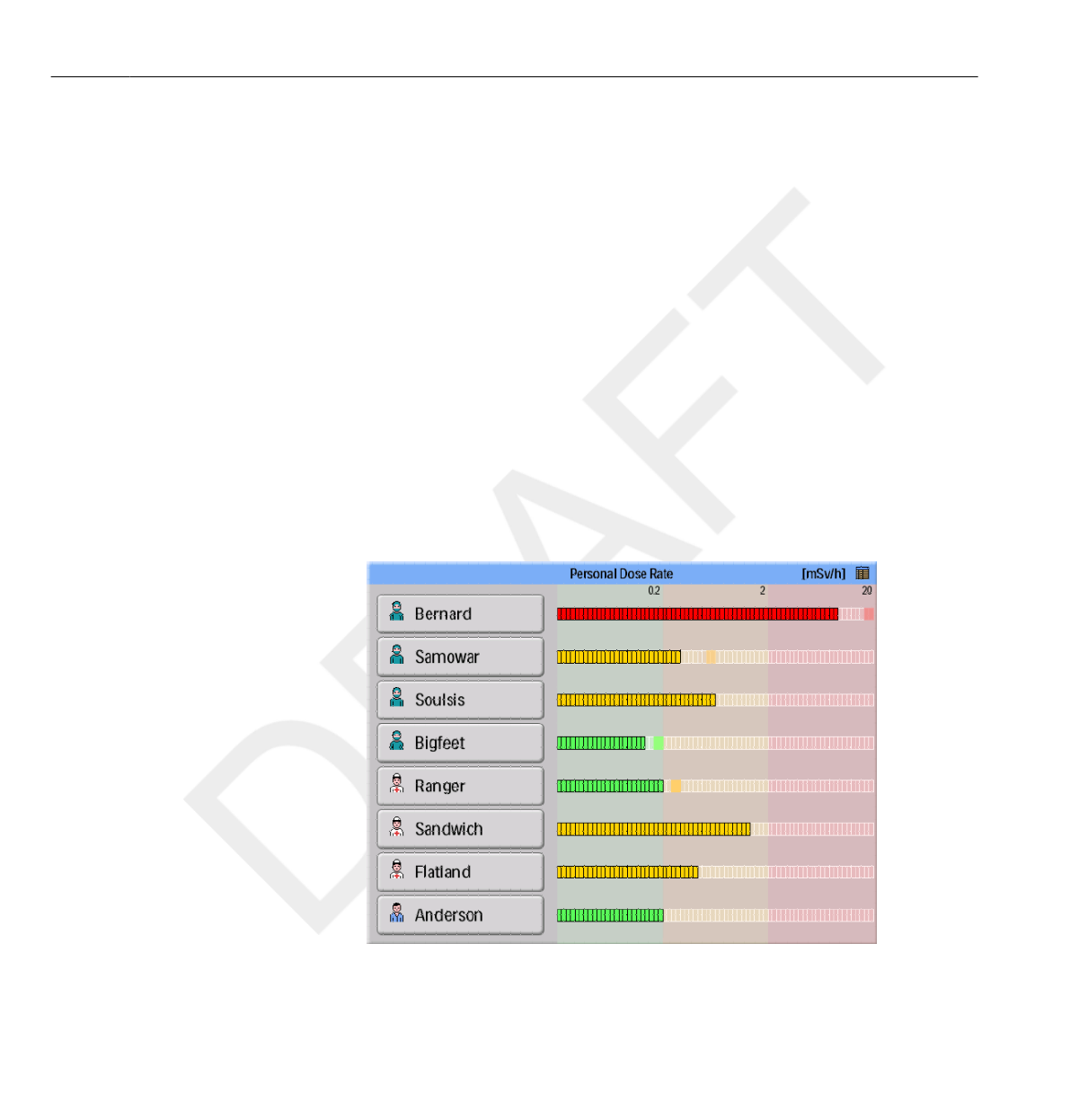
The Online View displays the current personal dose rates and peak dose rate
indicators, for up to 8 PDMs within range of the Base Station.
PDMs are shown on a first come first serve principle (see “reserved slots
menu” in section “Admin Settings menu” on page 3-12). PDMs that are not shown in
the Online View still measure and store dose data.
The icon in the upper right corner gives you access to the Base Station
settings view (see section “Base Station Settings view” on page 3-11).
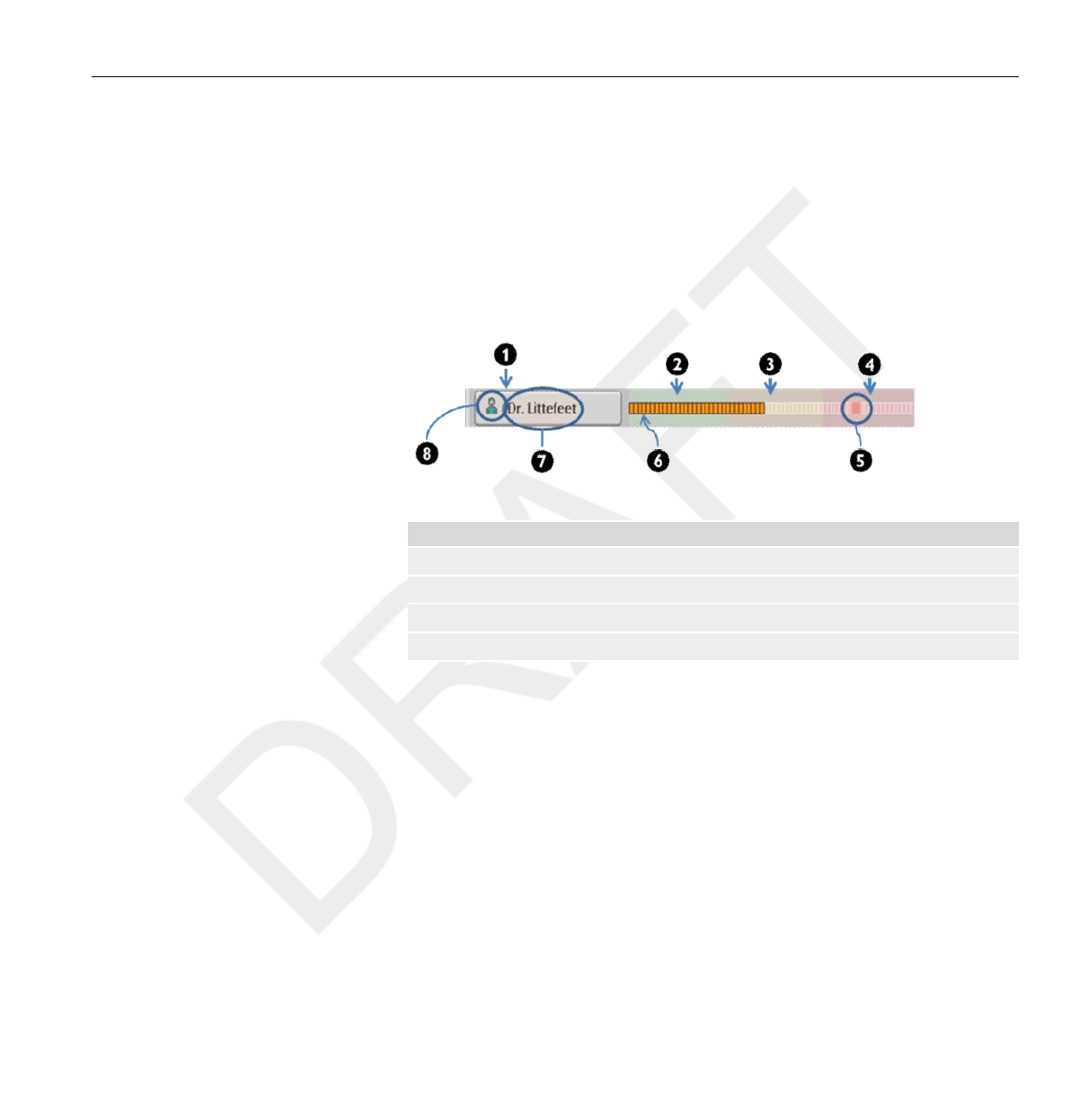
Figure 3.2 The online view elements
Legend
1 Walk-up View access button 2 Scale green zone
3 Scale yellow zone 4 Scale red zone
5 Peak Dose Rate indication 6 Scale Block
7 Displayed Name 8 Displayed Symbol
NOTE
Base Station features 3.3
DoseAware Base Station Package Document version 1.2 Using the Base Station 3-5
Philips Healthcare 9896 002 16623
1
2
3
4
5
6
7
8
9
10
11
12
13
14
15
16
17
18
19
20
21
22
23
24
25
26
27
28
29
30
31
32
33
34
35
36
37
38
39
40
41
42
43
44
45
46
47
48
49
50
51
52
53
54
55
56
57
58
59
60

The| Displayed Name| button identifies the PDMs. It may be truncated on
the button due to lack of space.
By tapping the| Displayed Name| button of a PDM, you will enter the Walk-
Up View of that PDM.
The dose rate scale is divided in three zones:
•Green zone indicates good working habits. Proper actions have been
taken to avoid exposure for unnecessary radiation.
• Yellow zone indicates higher doses, which can be
acceptable for shorter periods of time, for example if you need to stand
closer to the patient during a procedure. If you are exposed to radiation in
the yellow zone frequently, you need to take actions to minimize the dose
exposure.
• Red zone dose indications should not occur during normal procedures. If
you are exposed to radiation in the red zone, you need to take actions to
minimize the dose exposure.
When a PDM moves out of range of the Base Station, its button will remain
visible in the Online View for two minutes. The button will then remain
grayed out for another eight minutes before it
disappears. This feature allows people to temporarily leave the room without
loosing their position in the list. When a button is grayed out, it is not
possible to access the Walk-Up View.
If no PDM has been within range of the Base Station for 30 minutes, the
Online View will enter screen saver mode. In screen saver mode the Base
Station displays a black screen. The Base Station screen starts up when a
PDM connects to the Base Station or when the user taps the screen.
3.3 Base Station features
3-6 Using the Base Station DoseAware Base Station Package Document version 1.2
Philips Healthcare 9896 002 16623 0900a44780045a3a
1
2
3
4
5
6
7
8
9
10
11
12
13
14
15
16
17
18
19
20
21
22
23
24
25
26
27
28
29
30
31
32
33
34
35
36
37
38
39
40
41
42
43
44
45
46
47
48
49
50
51
52
53
54
55
56
57
58
59
60
Walk-Up view – view detailed dose data
Figure 3.3 Personal Dose Meter Information panel
Enter the Walk-Up View of a PDM by tapping the |Displayed Name|
button of that PDM in the Online View. On the left hand side of the Walk-
Up View a Personal Dose Meter Info panel is displayed (see figure above). It
displays:
•Full Name
•Displayed Name - the name that is displayed in the Base Station Online
View
•Clinical Role - Doctor, Nurse, Technician or Other
•PDM Position - Head, Torso, Hand, Belly, Leg or Other
•PDM - a unique ID per PDM
•Battery status
•2-4 blocks indicate normal use.
• 1 block indicates that you need to change the battery.
•The PDM’s date and time
3.3.2
Base Station features 3.3
DoseAware Base Station Package Document version 1.2 Using the Base Station 3-7
Philips Healthcare 9896 002 16623
1
2
3
4
5
6
7
8
9
10
11
12
13
14
15
16
17
18
19
20
21
22
23
24
25
26
27
28
29
30
31
32
33
34
35
36
37
38
39
40
41
42
43
44
45
46
47
48
49
50
51
52
53
54
55
56
57
58
59
60
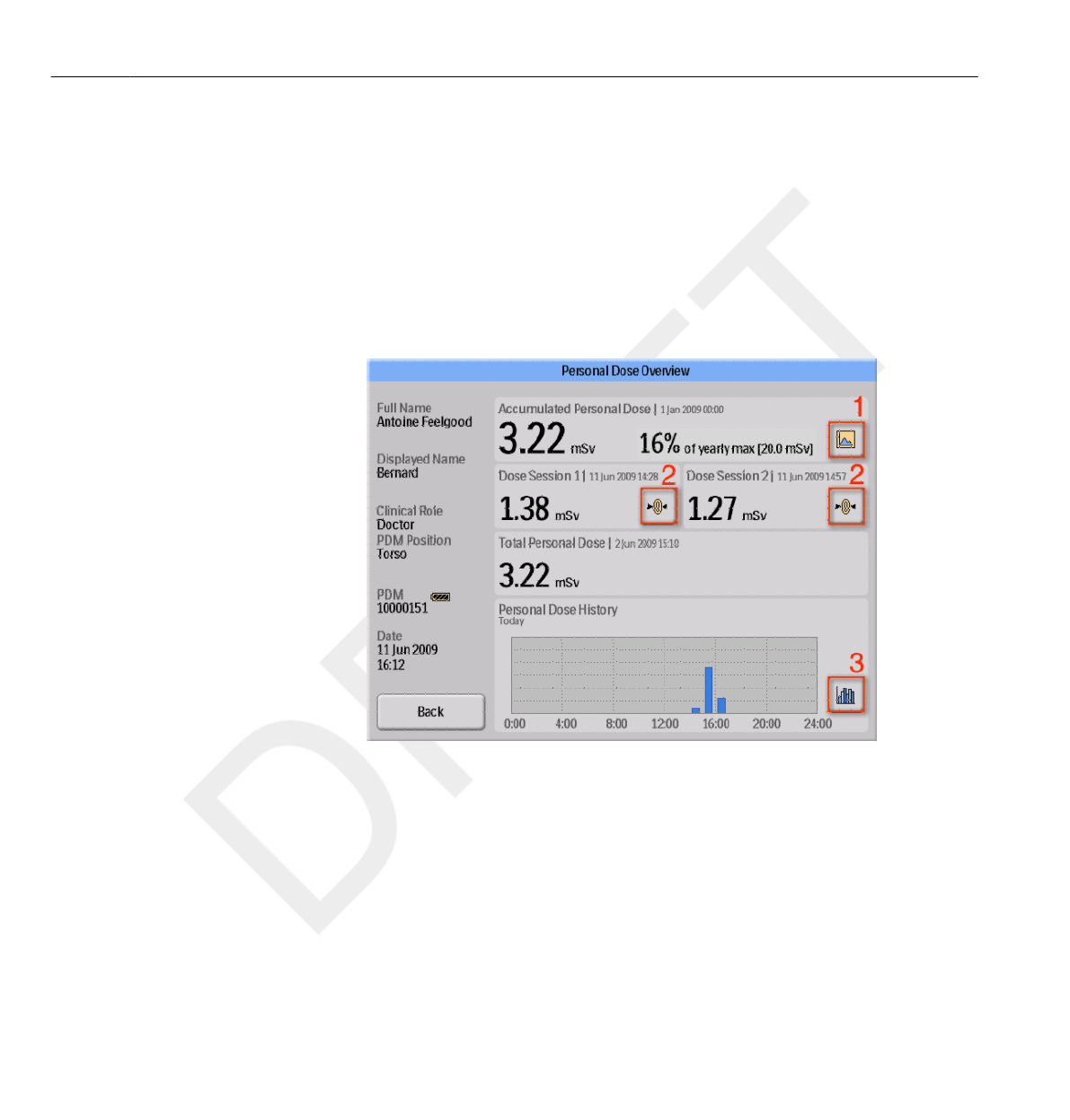
The Walk-Up View also consists of the Personal Dose Overview (see
section “Personal Dose Overview” on page 3-8), which is the default Walk-
Up view. It has two sub views:
•the Annual Personal Dose view (see section “Annual Personal Dose” on
page 3-9)
• the Personal Dose History view (see section “Personal Dose History” on
page 3-10)
Personal Dose Overview
Figure 3.4 The Personal Dose Overview view
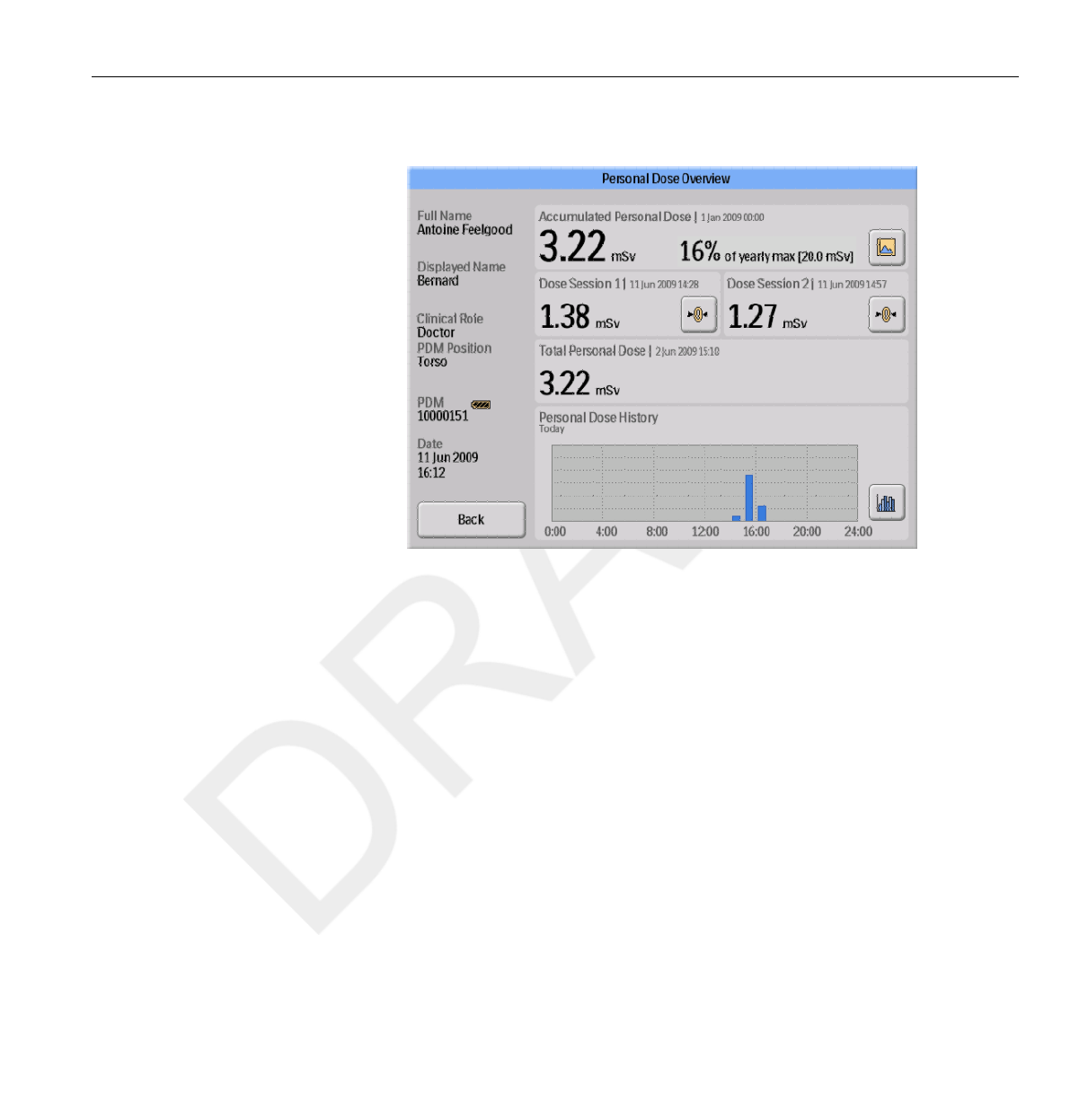
When you enter the Walk-Up View you will see the following information:
•The Accumulated Personal Dose since January 1st of the current year, or
since last reset. This value is also shown as a percentage of the yearly max
dose.
• Access to the Annual Personal Dose sub view (1), see section “Annual
Personal Dose” on page 3-9.
• Dose Session 1 and 2 values, date and time. Use the Dose Sessions to
measure dose for specific time spans, for example a specific procedure or a
working day. The value shows the accumulated dose for a session since
3.3 Base Station features
3-8 Using the Base Station DoseAware Base Station Package Document version 1.2
Philips Healthcare 9896 002 16623 0900a44780045a3a
1
2
3
4
5
6
7
8
9
10
11
12
13
14
15
16
17
18
19
20
21
22
23
24
25
26
27
28
29
30
31
32
33
34
35
36
37
38
39
40
41
42
43
44
45
46
47
48
49
50
51
52
53
54
55
56
57
58
59
60
last Dose Session reset, measured in Sv. Use the reset buttons (2) to
reset a Dose Session to zero. Information about dose session reset will
appear as an event in Dose Manager.
•Total Personal Dose since the last Dose History reset.
• The current day’s Personal Dose History graph. You can also access
the Personal Dose History sub view (3), see section “Personal Dose
History” on page 3-10.
Annual Personal Dose
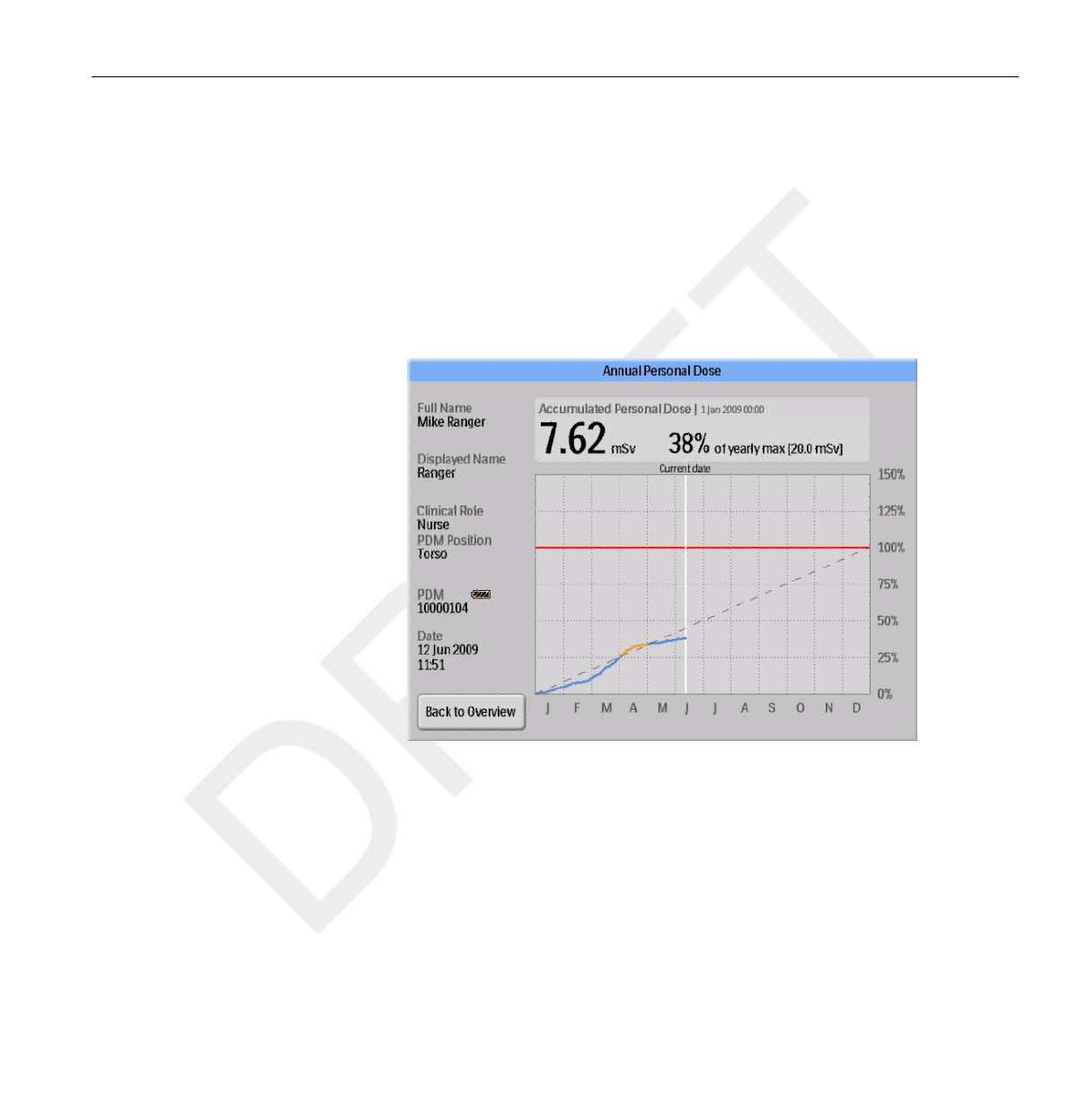
Figure 3.5 The Annual Personal Dose view
In this screen you can find the following information:
•Today’s date (white line).
• Annual dose limit (red line). Set this value in DoseView or Dose
Manager, see section “Change PDM options” on page 4-7.
Base Station features 3.3
DoseAware Base Station Package Document version 1.2 Using the Base Station 3-9
Philips Healthcare 9896 002 16623
1
2
3
4
5
6
7
8
9
10
11
12
13
14
15
16
17
18
19
20
21
22
23
24
25
26
27
28
29
30
31
32
33
34
35
36
37
38
39
40
41
42
43
44
45
46
47
48
49
50
51
52
53
54
55
56
57
58
59
60
• The annual dose limit distributed over the full year (dashed line). As long
as the accumulated dose stays below this value, the annual dose limit will
not be exceeded for the full year.
•Accumulated dose in relation to the annual dose limit for the current
year (blue/orange line). When the accumulated dose exceeds the
distributed annual dose limit, the color will change from blue
to orange in order to alert the user to take actions.
Personal Dose History
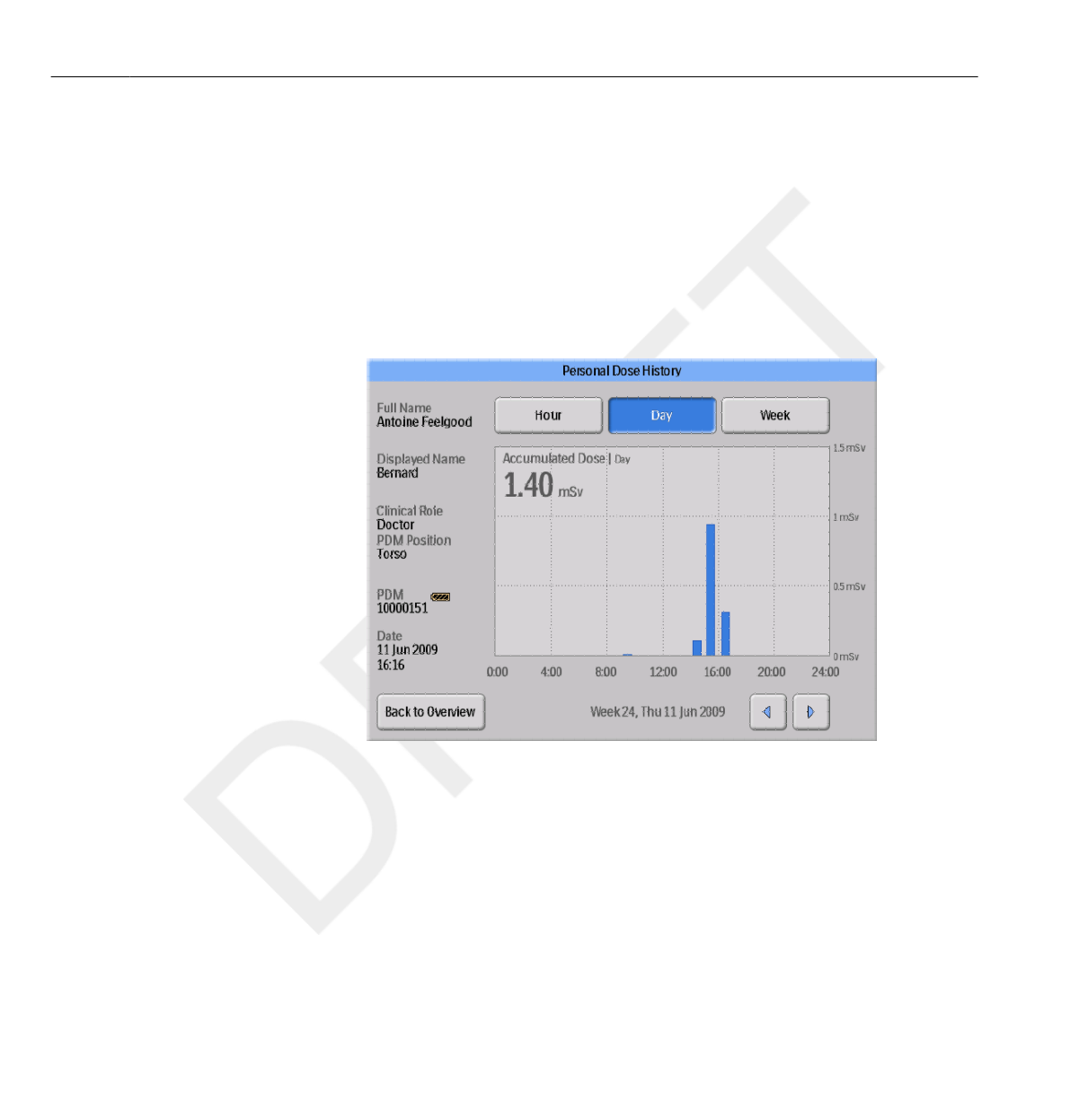
Figure 3.6 The Personal Dose History view, with Day selected
In this view, you can view Hour, Day and Week overviews by tapping the
respective buttons on top of the screen.
In the Hour time span you can view a Dose Rate graph spanning ½ hours.
Each data point in the graph represents the maximum dose rate during the
surrounding 15 seconds.
3.3 Base Station features
3-10 Using the Base Station DoseAware Base Station Package Document version 1.2
Philips Healthcare 9896 002 16623 0900a44780045a3a
1
2
3
4
5
6
7
8
9
10
11
12
13
14
15
16
17
18
19
20
21
22
23
24
25
26
27
28
29
30
31
32
33
34
35
36
37
38
39
40
41
42
43
44
45
46
47
48
49
50
51
52
53
54
55
56
57
58
59
60

In the Day/Week time spans you can view accumulated dose value bars.
Each bar represents the accumulated dose during one/four hours,
respectively. Within the Day and Week time spans, tapping a dose bar in
the diagram will zoom into the larger underlying time scale (that is Week ->
Day and Day -> Hour).
Within each time span (Hour/Day/Week) you can step forward and
backward in time with the arrow buttons on the bottom of the screen. By
pressing and holding the arrow buttons you will scroll along the time axis
within the chosen zoom level.
Switching between Hour, Day and Week will set the view to the current date and time.
In the upper left corner of the chart, the value of the Accumulated Dose
during the chosen time span is visible.
Base Station Settings view
The Base Station Settings View is where administrators configure the Base
Station. Follow the instructions below to enter the Base Station Settings View:
1Tap the| Settings| menu symbol in the upper right corner of the Online View.
2Enter configuration values by tapping the buttons in the respective menus
In the lower part of Base Station Settings, the Base Station ID/serial number
and the software version is displayed. This information can be used as
assistance for support issues
NOTE
3.3.3
Base Station features 3.3
DoseAware Base Station Package Document version 1.2 Using the Base Station 3-11
Philips Healthcare 9896 002 16623
1
2
3
4
5
6
7
8
9
10
11
12
13
14
15
16
17
18
19
20
21
22
23
24
25
26
27
28
29
30
31
32
33
34
35
36
37
38
39
40
41
42
43
44
45
46
47
48
49
50
51
52
53
54
55
56
57
58
59
60
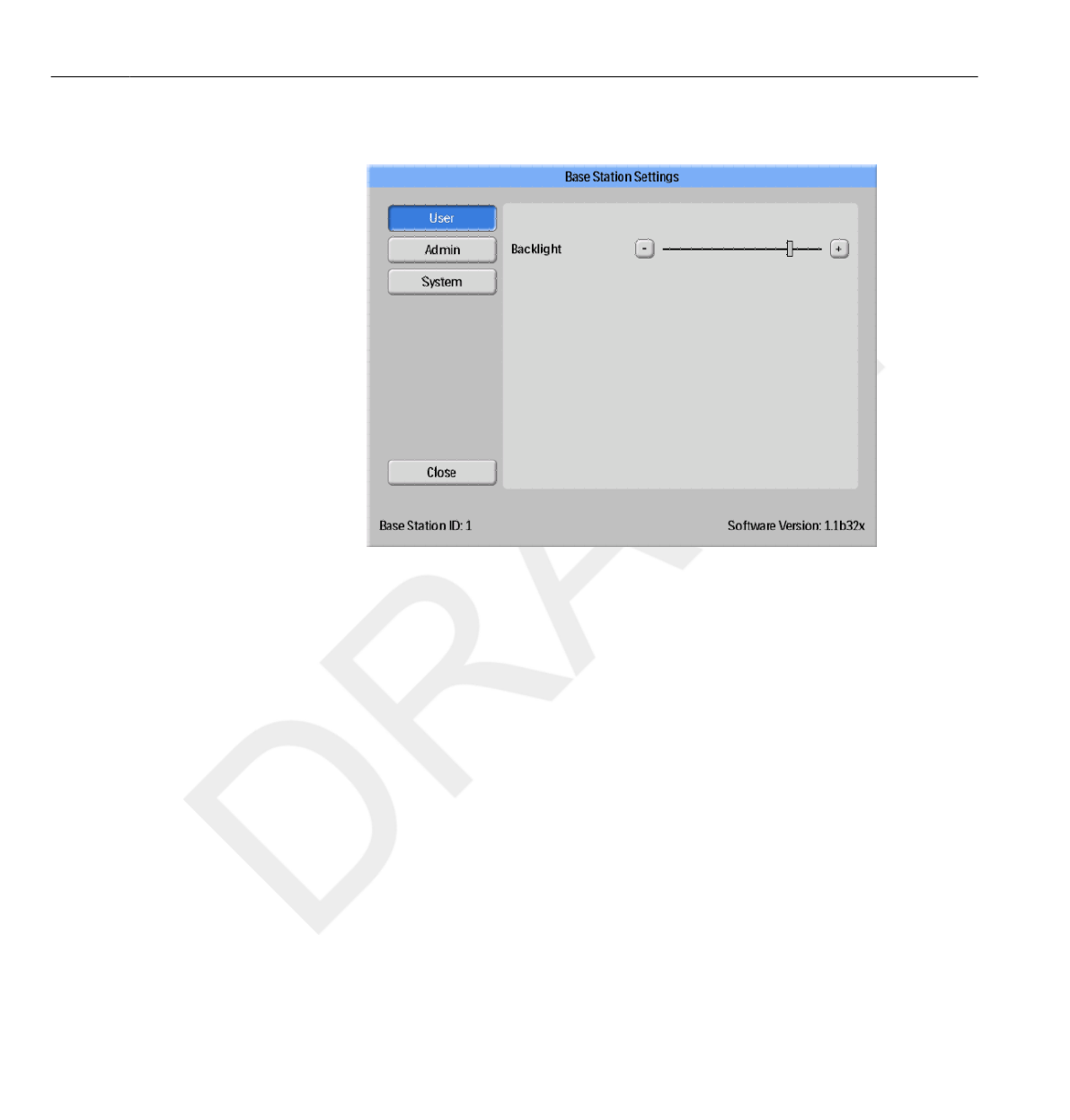
User Settings menu
Figure 3.7 The User Settings menu
The User Settings menu consists of one screen.
Adjust the backlight level of the screen by moving the bar horizontally. This
change will take effect immediately.
Admin Settings menu
The Admin Settings menu consists of four screens. Access
these screens by tapping the arrow buttons in the lower right corner
of each screen.
Base Station Name and Base Station Location menu
Enter name and location of the Base Station (see figure below). This
information is used to identify the Base Station so that it can be detected in
Dose Manager.
3.3 Base Station features
3-12 Using the Base Station DoseAware Base Station Package Document version 1.2
Philips Healthcare 9896 002 16623 0900a44780045a3a
1
2
3
4
5
6
7
8
9
10
11
12
13
14
15
16
17
18
19
20
21
22
23
24
25
26
27
28
29
30
31
32
33
34
35
36
37
38
39
40
41
42
43
44
45
46
47
48
49
50
51
52
53
54
55
56
57
58
59
60
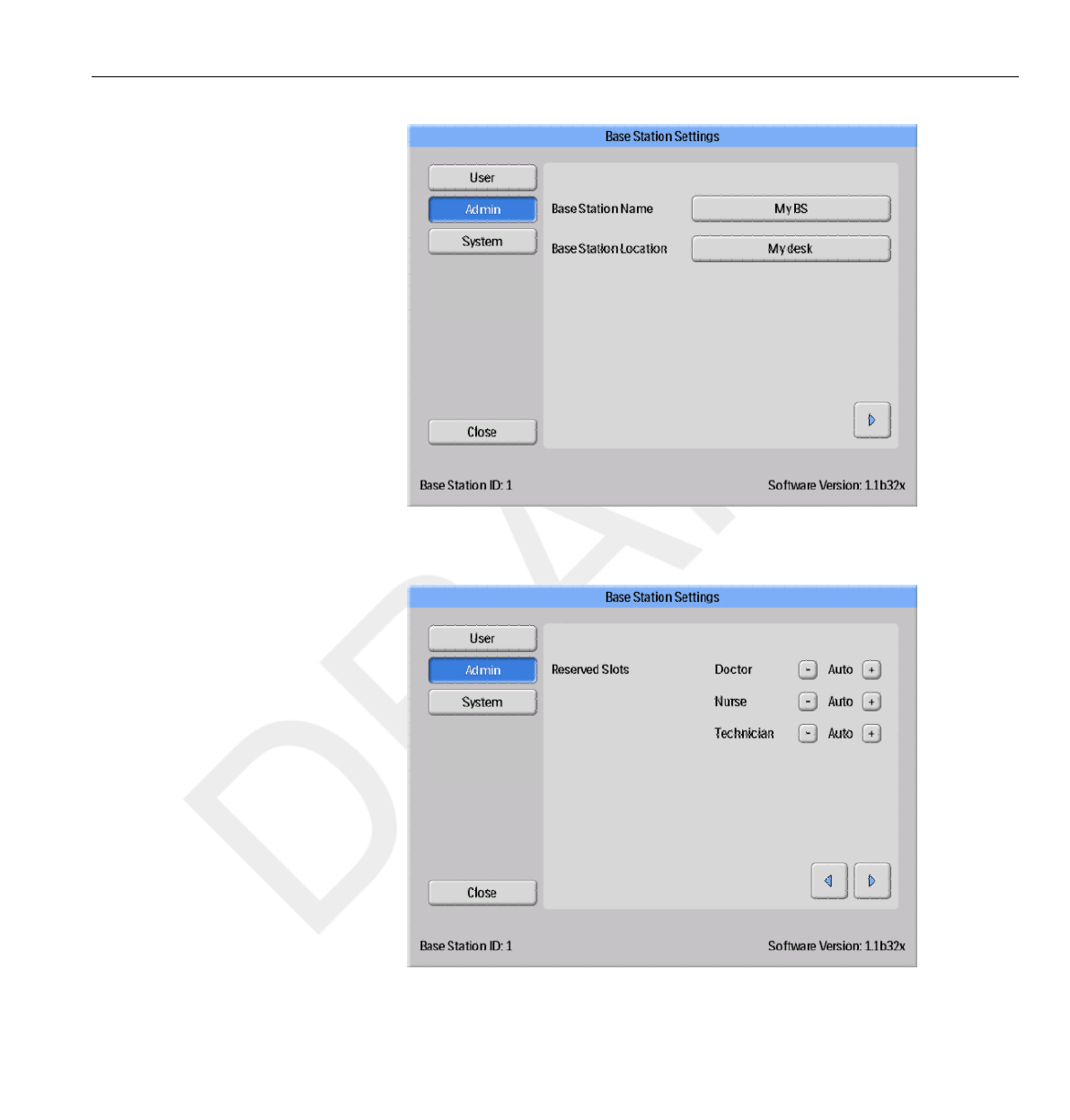
Figure 3.8 The Base Station Name and Base Station Location menu
Reserved Slots menu
Figure 3.9 The Reserved Slots menu
Base Station features 3.3
DoseAware Base Station Package Document version 1.2 Using the Base Station 3-13
Philips Healthcare 9896 002 16623
1
2
3
4
5
6
7
8
9
10
11
12
13
14
15
16
17
18
19
20
21
22
23
24
25
26
27
28
29
30
31
32
33
34
35
36
37
38
39
40
41
42
43
44
45
46
47
48
49
50
51
52
53
54
55
56
57
58
59
60
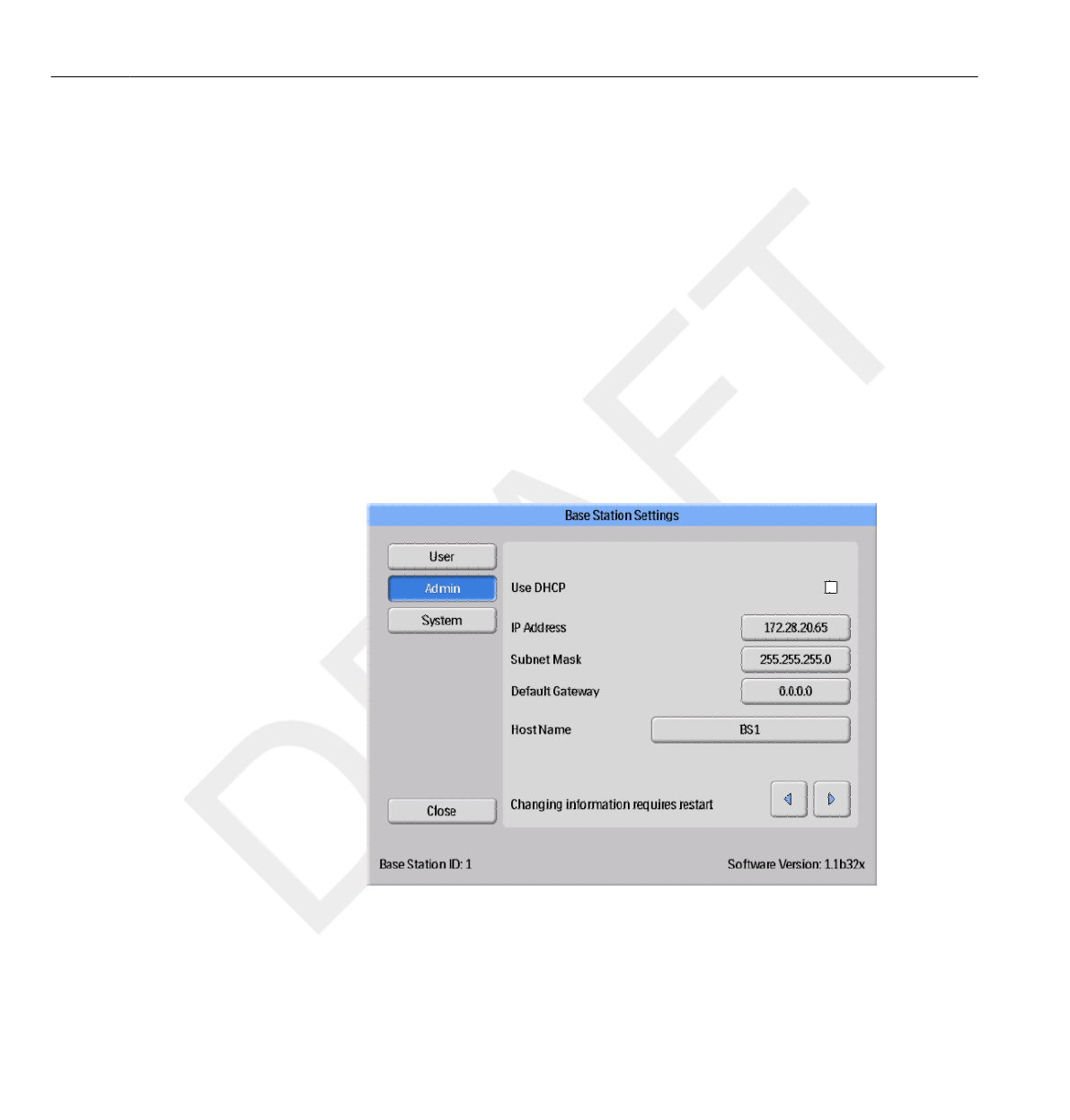
This is an optional setting, which you can use to reserve a number of slots in
the Online View for the clinical
roles Doctor, Nurse and Technician (see figure above).
If you, for example, have reserved three slots for Doctors but the Base
Station detects only one, there will be two empty slots before the first Nurse
appears.
If you want to reserve slots for Nurses, you also have to reserve slots for
Doctors. If you want to reserve slots for Technicians, you also have to
reserve slots for Doctors and Nurses.
The default behavior “Auto” is first-come, first-served, which means that
PDMs will appear on the screen in the order the Base Station detects them,
sorted after their clinical role. This is the recommended setting.
Network Setup menu
Figure 3.10 The Network setup menu
Configure the network connection between the Base Station and the Dose
Manager (see figure above). You might have to contact the local IT
department to receive the IP address.
3.3 Base Station features
3-14 Using the Base Station DoseAware Base Station Package Document version 1.2
Philips Healthcare 9896 002 16623 0900a44780045a3a
1
2
3
4
5
6
7
8
9
10
11
12
13
14
15
16
17
18
19
20
21
22
23
24
25
26
27
28
29
30
31
32
33
34
35
36
37
38
39
40
41
42
43
44
45
46
47
48
49
50
51
52
53
54
55
56
57
58
59
60
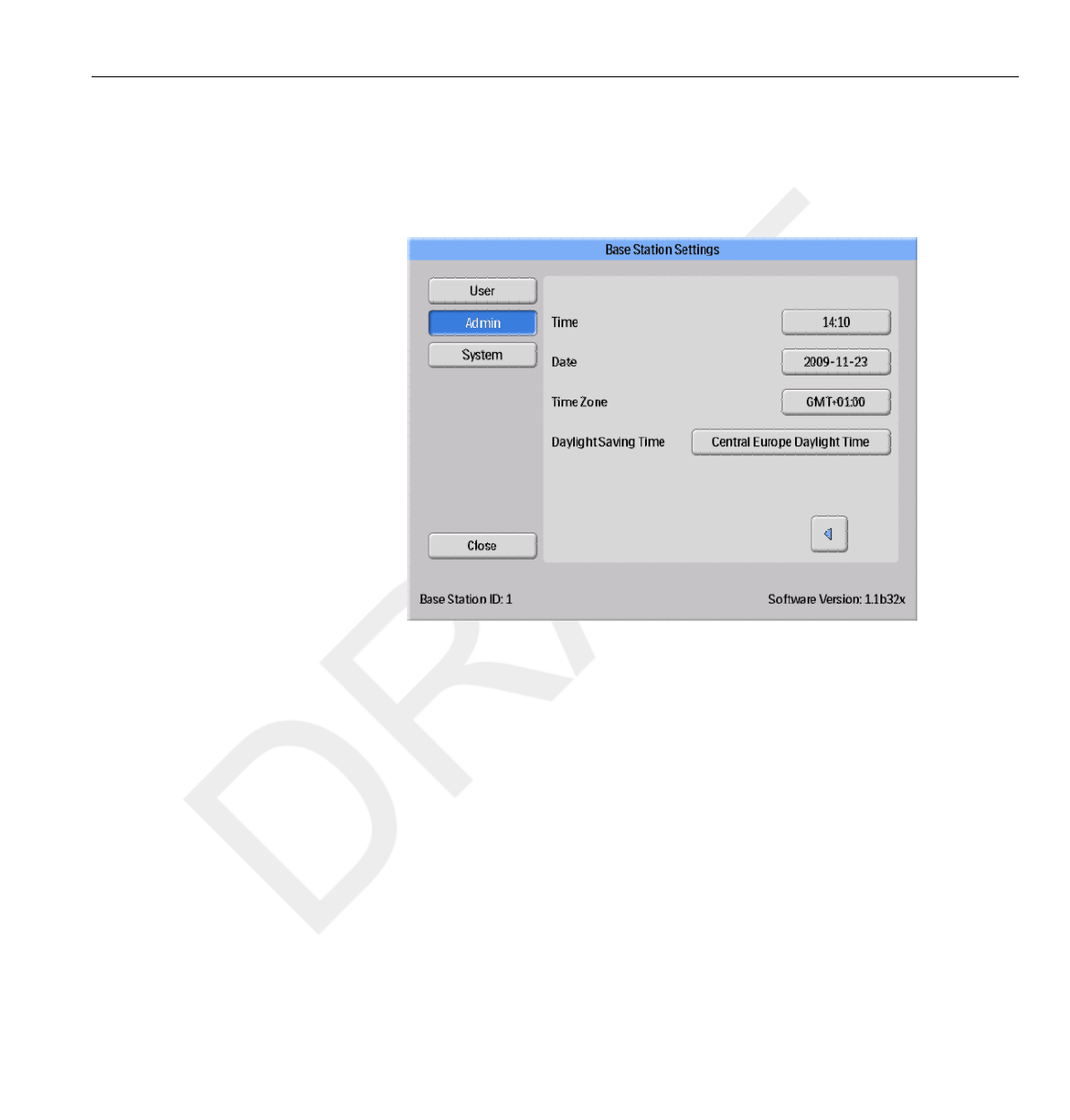
If you change this information, the Base Station requires a restart.
Network setup is only applicable if you are using Dose Manager.
Time and Date menu
Figure 3.11 The Time and Date menu
Set time, date, time zone and manage daylight saving time for the Base
Station (see figure above).
For daylight saving time, you can select to manage it manually or by
selecting a daylight settings region for your time zone. The possible regions
available for daylight saving time are different depending on your current
time zone.
If you choose to manage daylight saving time manually, you can choose to
set it to wintertime (+0 hours) or summer time (+1 hours). If a region is
selected, the change between winter/summer time will be done automatically.
System Settings menu
This menu is intended for service and is described in a separate service manual.
NOTE
Base Station features 3.3
DoseAware Base Station Package Document version 1.2 Using the Base Station 3-15
Philips Healthcare 9896 002 16623
1
2
3
4
5
6
7
8
9
10
11
12
13
14
15
16
17
18
19
20
21
22
23
24
25
26
27
28
29
30
31
32
33
34
35
36
37
38
39
40
41
42
43
44
45
46
47
48
49
50
51
52
53
54
55
56
57
58
59
60

Shutting down the Base Station
Shutting down a wall mounted Base Station
•Unplug the power adaptor.
Shutting down an MCS mounted Base Station
• Switch off the X-ray system and the Base Station will be switched off.
3.4
3.4.1
3.4.2
3.4 Shutting down the Base Station
3-16 Using the Base Station DoseAware Base Station Package Document version 1.2
Philips Healthcare 9896 002 16623 0900a44780045a3a
1
2
3
4
5
6
7
8
9
10
11
12
13
14
15
16
17
18
19
20
21
22
23
24
25
26
27
28
29
30
31
32
33
34
35
36
37
38
39
40
41
42
43
44
45
46
47
48
49
50
51
52
53
54
55
56
57
58
59
60
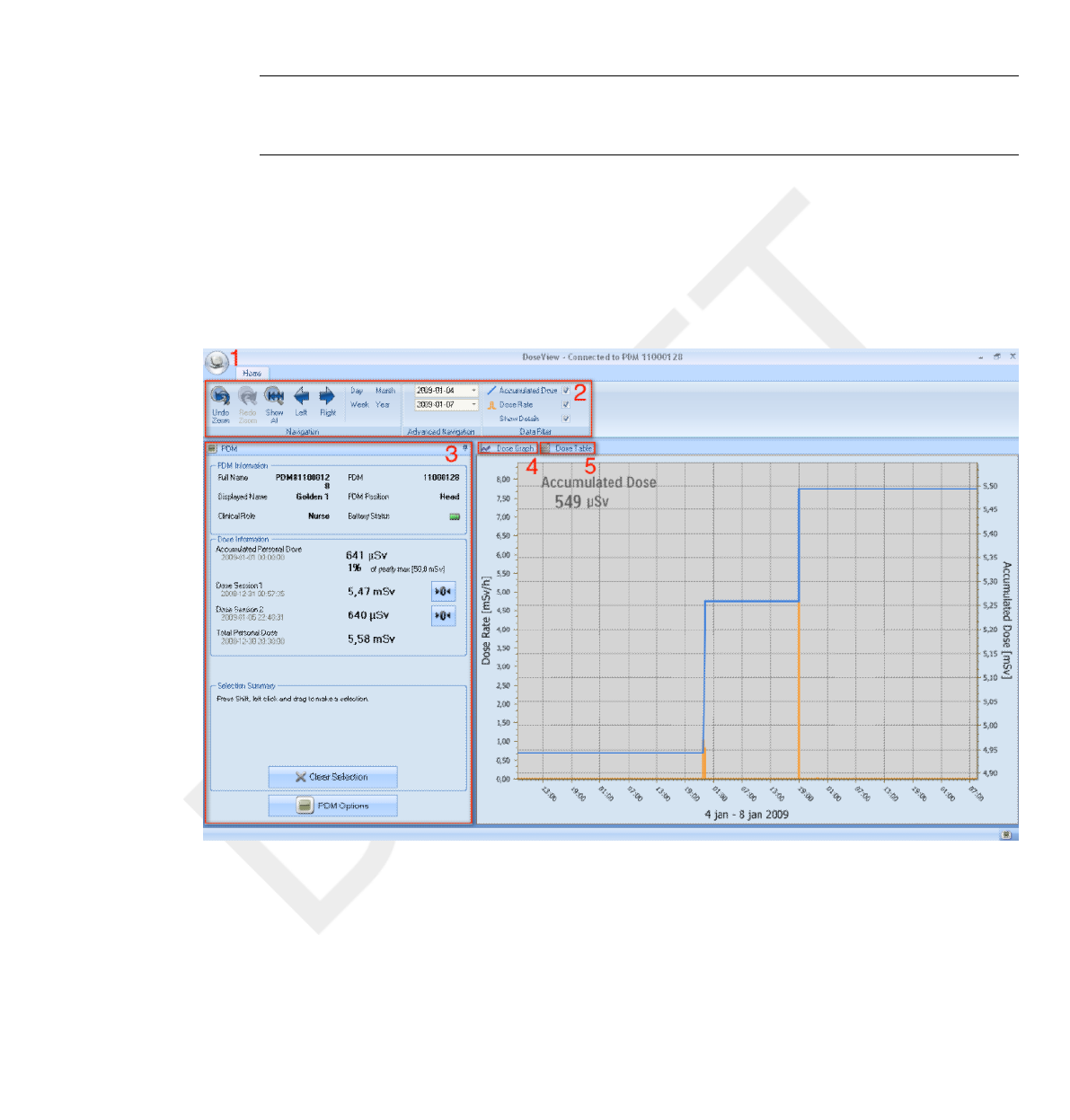
Using DoseView
Introduction to DoseView
The DoseView application lets you, for one PDM at a time:
•View the PDM’s dose history.
• Change the PDM options, for example full name and displayed name.
Figure 4.1 DoseView overview
4
4.1
DoseAware Base Station Package Document version 1.2 Using DoseView 4-1
Philips Healthcare 9896 002 16623
1
2
3
4
5
6
7
8
9
10
11
12
13
14
15
16
17
18
19
20
21
22
23
24
25
26
27
28
29
30
31
32
33
34
35
36
37
38
39
40
41
42
43
44
45
46
47
48
49
50
51
52
53
54
55
56
57
58
59
60

The following items are available when you start DoseView:
Table 4.1 DoseView information
Item Description
1 Application menu Access the DoseView options dialog,
see section “Specify password
and language” on page 4-15.
2 Home toolbar Access tools to navigate in dose graphs and
dose tables, see section “Home Toolbar
overview” on page 4-3.
3 PDM panel Show and manage options for a PDM that
is placed in a Cradle. You can only access
and change PDM options when the PDM is
in a Cradle, see section “PDM panel” on
page 4-5.
4 Dose graph View the dose history as a graph,
see section “View dose graph” on page
4-12.
5 Dose table View the dose history as a table,
see section “View dose table” on page 4-14.
Getting started with DoseView
Do not connect the Cradle to the computer unless DoseView and the Cradle driver
are installed on the computer.
Follow the steps below to get started with DoseView:
1Start the DoseView application.
2Connect a Cradle to your computer’s USB port.
3Put a PDM in the Cradle.
Within a few seconds, DoseView will detect the PDM. This is indicated at
the top of the DoseView window by a note “Connected to PDM
100001158”, where PDM 100001158 is an example of a PDM ID.
DoseView will start loading the PDM dose history. This may take up
to a few minutes. You can follow the progress on the progress bar at the
bottom of the DoseView window.
4.2
NOTE
4.2 Getting started with DoseView
4-2 Using DoseView DoseAware Base Station Package Document version 1.2
Philips Healthcare 9896 002 16623 0900a44780045a3a
1
2
3
4
5
6
7
8
9
10
11
12
13
14
15
16
17
18
19
20
21
22
23
24
25
26
27
28
29
30
31
32
33
34
35
36
37
38
39
40
41
42
43
44
45
46
47
48
49
50
51
52
53
54
55
56
57
58
59
60
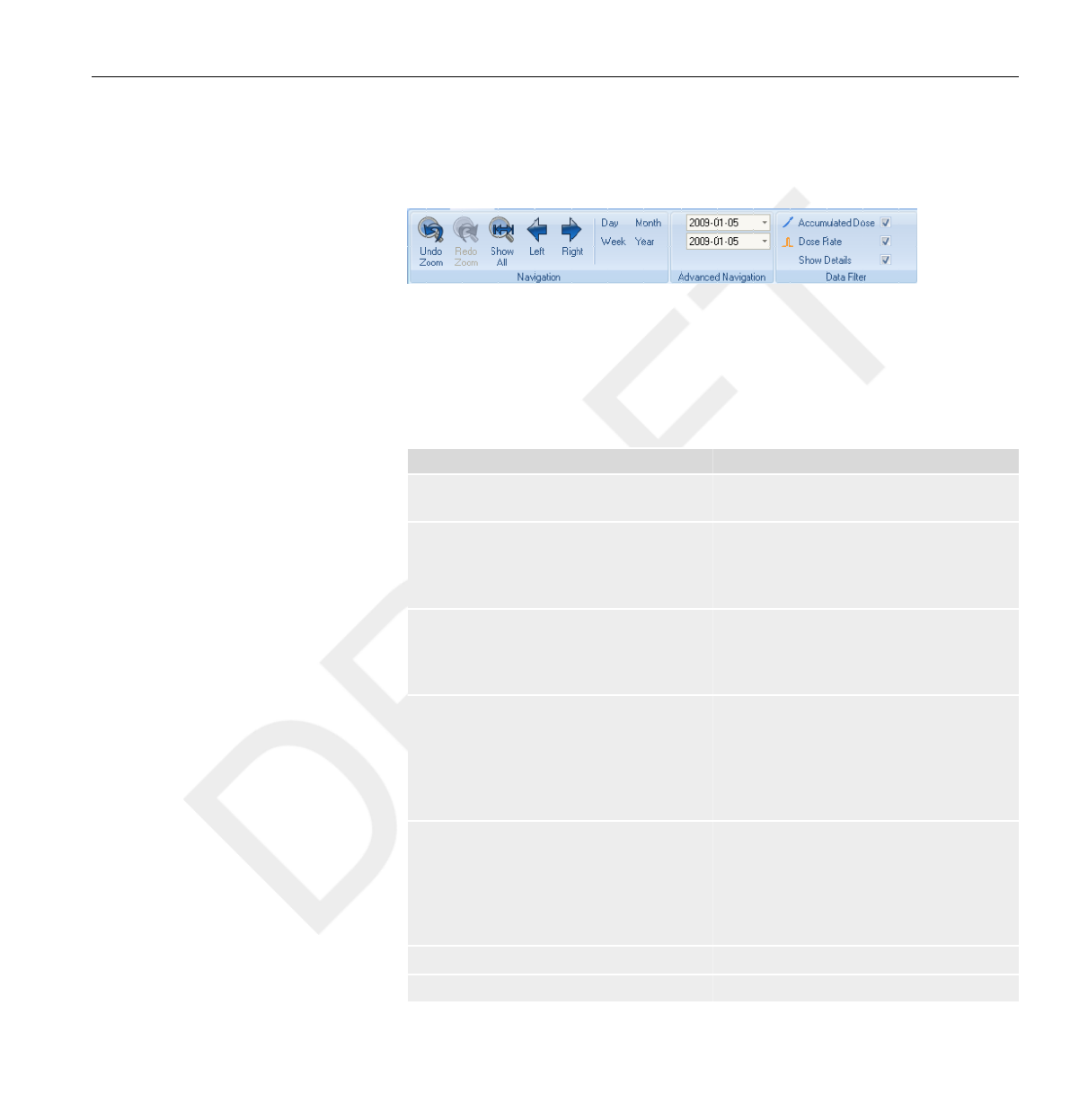
Home Toolbar overview
Figure 4.2 Home toolbar
The home toolbar is where you find tools to navigate in dose graphs and
dose tables.
The following items are available in the home toolbar:
Table 4.2 Navigation Group — access tools for dose history navigation
Function Description
Undo zoom button Move one step back in a sequence of zoom
actions, showing the last selected time range.
Redo zoom button Move one step forward in a sequence of
zoom actions, showing the time range that
was selected before the last undo zoom
action.
Show all button Show all available data for the selected
PDM. The time range will start the first date
any PDM begun to measure dose and stop
the last date any PDM was synchronized.
Left button Shift the time range one step backward. If
you have selected year/month/week/day,
the time range will move one year/month/
week/day backward. If you have selected
another time range, the time range will
move approximately 10% backward.
Right button Shift the time range one step forward. If
you have selected year/month/week/day,
the time range will move one year/month/
week/day forward. If you have selected
another time range, the time range will
move approximately 10% forward.
Day button View dose history for the current day.
Week button View dose history for the current week.
4.3
Home Toolbar overview 4.3
DoseAware Base Station Package Document version 1.2 Using DoseView 4-3
Philips Healthcare 9896 002 16623
1
2
3
4
5
6
7
8
9
10
11
12
13
14
15
16
17
18
19
20
21
22
23
24
25
26
27
28
29
30
31
32
33
34
35
36
37
38
39
40
41
42
43
44
45
46
47
48
49
50
51
52
53
54
55
56
57
58
59
60

Function Description
Month button View dose history for the current month.
Year button View dose history for the current year.
Table 4.3 Advanced Navigation Group
Function Description
Start time button The viewed time range start day.
End time button The viewed time range end day.
Table 4.4 Data Filter Group — select which information is visible in the
graph
Function Description
Accumulated dose check box Show/hide the accumulated dose in the
graph.
Dose rate check box Show/hide the dose rate in the dose graph.
Show details check box Checked: The graphs will display dose rate
samples for every second, where such data
is available.
Unchecked: the graphs will display mean
dose rate values per hour.
4.3 Home Toolbar overview
4-4 Using DoseView DoseAware Base Station Package Document version 1.2
Philips Healthcare 9896 002 16623 0900a44780045a3a
1
2
3
4
5
6
7
8
9
10
11
12
13
14
15
16
17
18
19
20
21
22
23
24
25
26
27
28
29
30
31
32
33
34
35
36
37
38
39
40
41
42
43
44
45
46
47
48
49
50
51
52
53
54
55
56
57
58
59
60
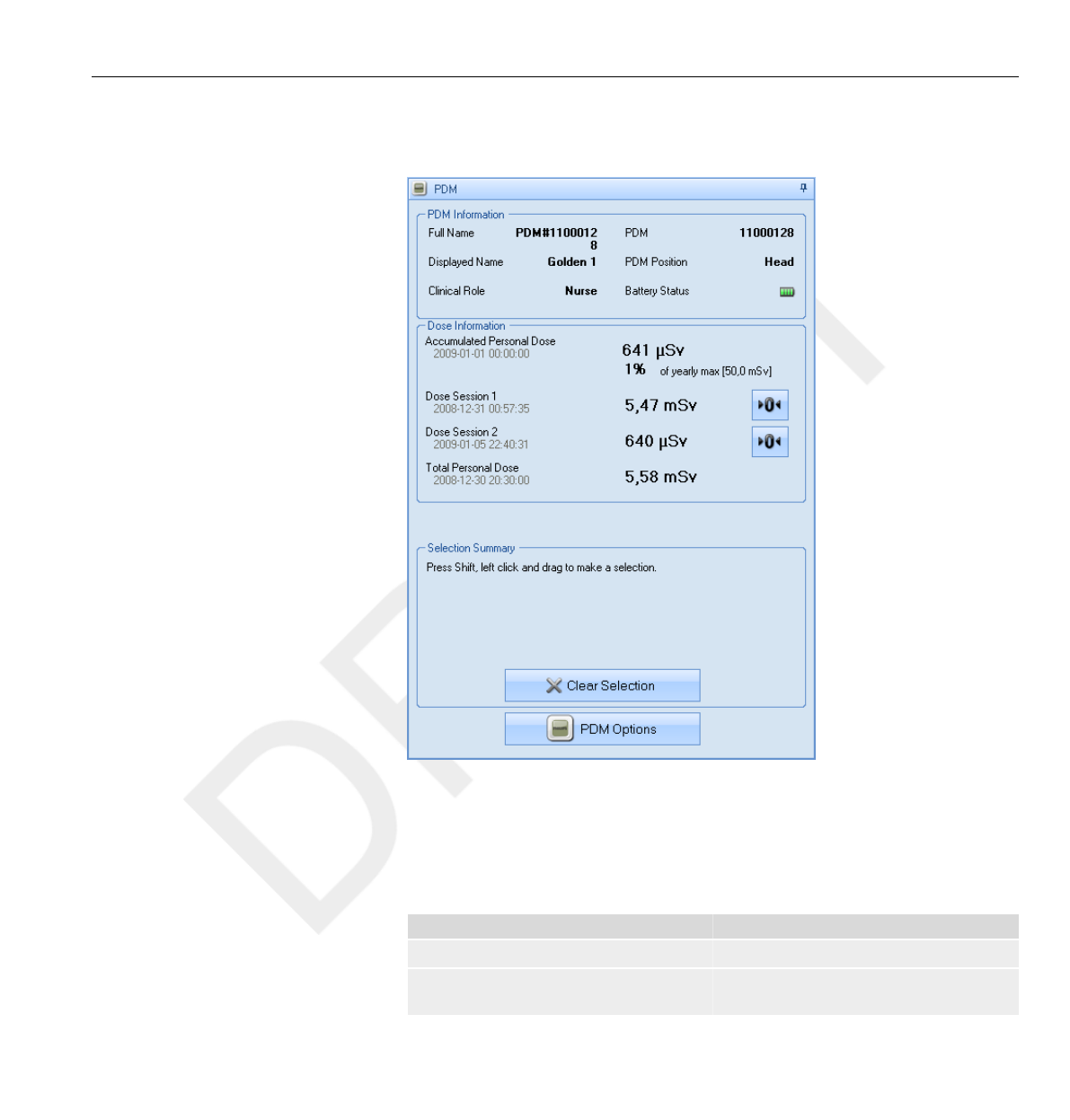
PDM panel
Figure 4.3 PDM panel
PDM information
The following information is visible when a PDM is placed in the Cradle:
Table 4.5 PDM information
Item Description
Full name Full name of the person using the PDM.
Displayed name The name that is displayed in the Base
Station Online View.
4.4
4.4.1
PDM panel 4.4
DoseAware Base Station Package Document version 1.2 Using DoseView 4-5
Philips Healthcare 9896 002 16623
1
2
3
4
5
6
7
8
9
10
11
12
13
14
15
16
17
18
19
20
21
22
23
24
25
26
27
28
29
30
31
32
33
34
35
36
37
38
39
40
41
42
43
44
45
46
47
48
49
50
51
52
53
54
55
56
57
58
59
60

Item Description
Clinical role One of Doctor, Nurse, Technician or Other.
PDM A unique PDM serial number.
PDM position One of Head, Torso, Hand, Belly, Leg or
Other.
Battery status The PDM's battery status:
•Green: normal use.
•Yellow: normal use.
•Red: the PDM need to be replaced in 4-6
months at normal use.
•Crossed battery: there is no battery left.
The PDM does not measure radiation
and will not communicate with Base
Stations.
Dose information
Table 4.6 Dose information
Item Description
Accumulated personal dose The PDM’s total dose measured this year
or since last reset, measured in Sv.
Percentage of annual dose The PDM's accumulated annual dose
measured this year or since last manual
reset, measured in Sv.
Dose Session 1 and 2 Trip meter for dose values. The
accumulated dose for a session since last
Dose Session reset, measured in Sv. You
can also reset these values. See NOTE
below.
Total personal dose The total dose exposure for a PDM since
last dose history reset.
Dose session reset done in DoseView will not appear as an event in Dose Manager.
Selection summary
View a summary of the dose data selection you might have done either in
the dose table or in the dose graph (see section “View dose graph” on page
4-12 and section “View dose table” on page 4-14). You can also clear the
contents of the selection summary field by tapping clear selection.
4.4.2
NOTE
4.4.3
4.4 PDM panel
4-6 Using DoseView DoseAware Base Station Package Document version 1.2
Philips Healthcare 9896 002 16623 0900a44780045a3a
1
2
3
4
5
6
7
8
9
10
11
12
13
14
15
16
17
18
19
20
21
22
23
24
25
26
27
28
29
30
31
32
33
34
35
36
37
38
39
40
41
42
43
44
45
46
47
48
49
50
51
52
53
54
55
56
57
58
59
60
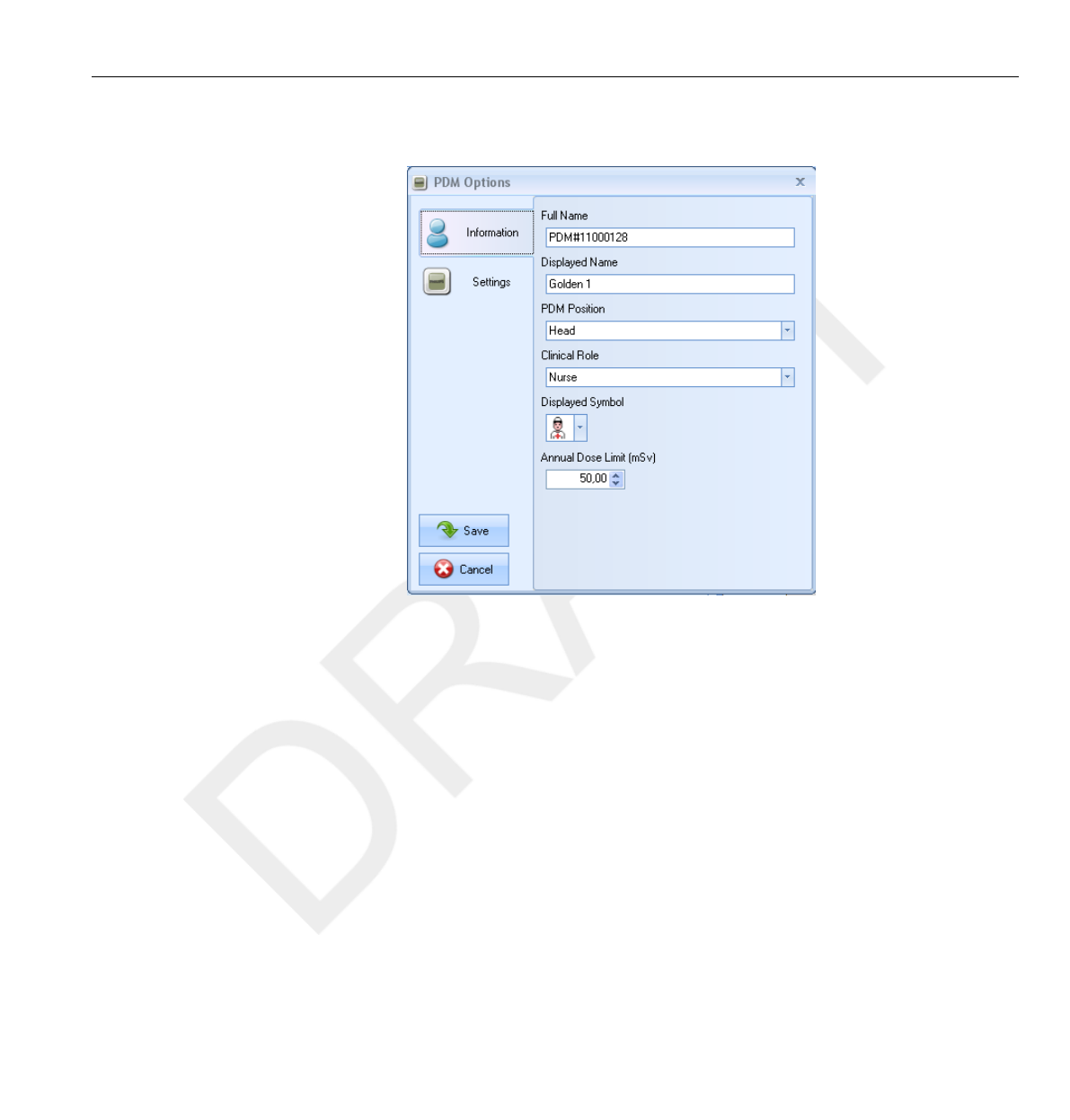
Change PDM options
Figure 4.4 PDM options dialog box 1
4.4.4
PDM panel 4.4
DoseAware Base Station Package Document version 1.2 Using DoseView 4-7
Philips Healthcare 9896 002 16623
1
2
3
4
5
6
7
8
9
10
11
12
13
14
15
16
17
18
19
20
21
22
23
24
25
26
27
28
29
30
31
32
33
34
35
36
37
38
39
40
41
42
43
44
45
46
47
48
49
50
51
52
53
54
55
56
57
58
59
60
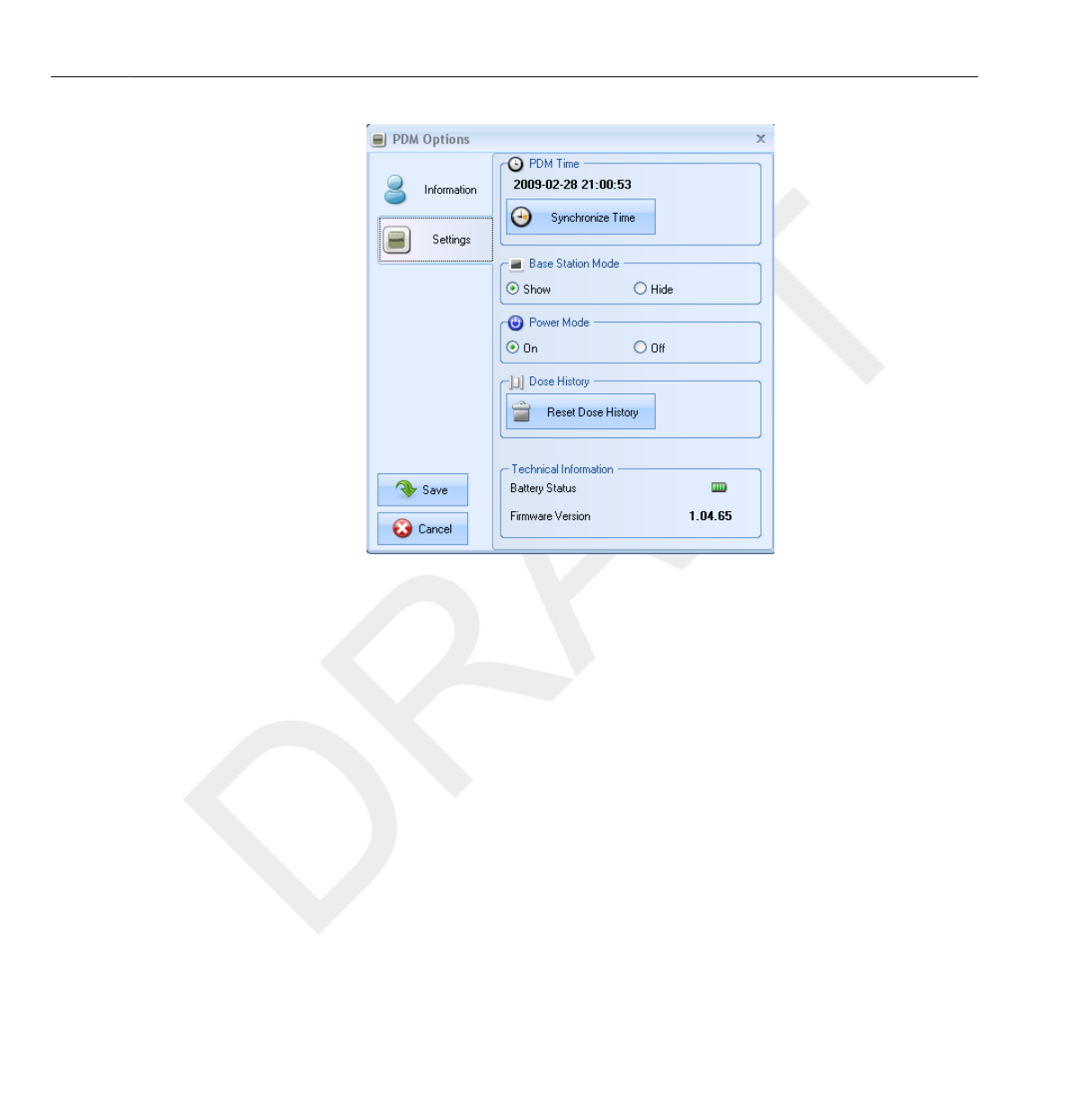
Figure 4.5 PDM options dialog box 2
Follow the instructions below to change PDM options:
1Make sure that a Cradle is connected to your computer’s USB port.
2Insert a PDM in the Cradle.
The computer will detect the PDM automatically and the
PDM information will appear in DoseView.
3Access the PDM options dialog by clicking the| PDM options| (see figure
above).
The PDM options dialog consists of two tabs as shown below.
If a password has been set (seesection “Specify password and language” on page
4-15 ), access to the PDM options dialog box will be password protected.
NOTE
4.4 PDM panel
4-8 Using DoseView DoseAware Base Station Package Document version 1.2
Philips Healthcare 9896 002 16623 0900a44780045a3a
1
2
3
4
5
6
7
8
9
10
11
12
13
14
15
16
17
18
19
20
21
22
23
24
25
26
27
28
29
30
31
32
33
34
35
36
37
38
39
40
41
42
43
44
45
46
47
48
49
50
51
52
53
54
55
56
57
58
59
60
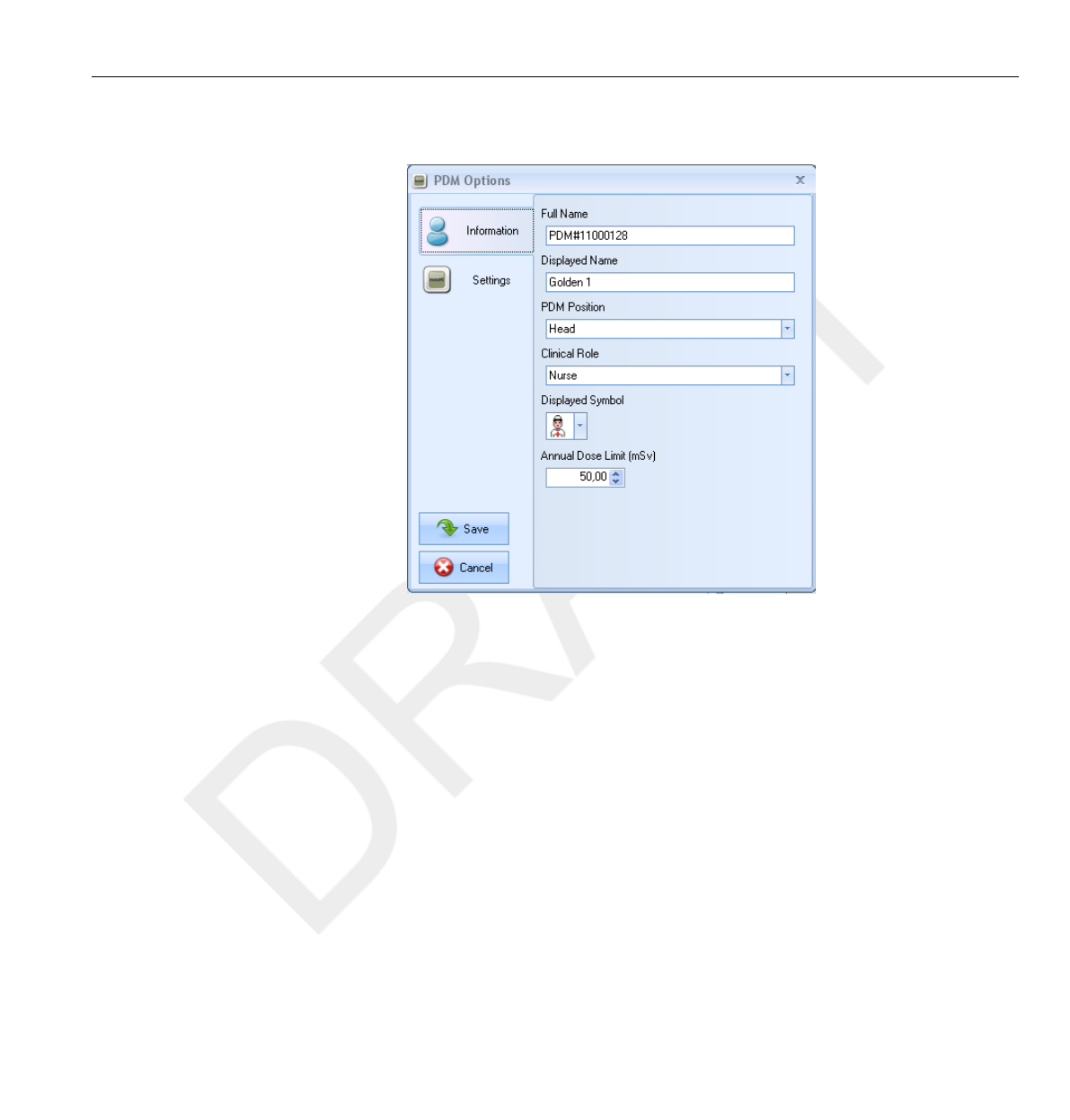
PDM options
Figure 4.6 PDM Options Dialog Box — Information
In the Information tab you can:
•Edit PDM information (full name, displayed name, PDM position,
clinical role, and annual dose limit value, see section “Walk-Up view
– view detailed dose data ” on page 3-7) and select
a displayed symbol, which is displayed in the Base Station interface. The
displayed name is used to identify a PDM in the Base Station. The name
is limited to 16 characters. However, in the Base Station’s online view,
the displayed name may be truncated.
The dose measurement for a PDM depends on factors such as where on the body the
PDM is positioned and if x-ray protection devices (for example a lead
apron) that shield the PDM measurements are used. These factors need to be
considered for the annual dose limit.
NOTE
PDM panel 4.4
DoseAware Base Station Package Document version 1.2 Using DoseView 4-9
Philips Healthcare 9896 002 16623
1
2
3
4
5
6
7
8
9
10
11
12
13
14
15
16
17
18
19
20
21
22
23
24
25
26
27
28
29
30
31
32
33
34
35
36
37
38
39
40
41
42
43
44
45
46
47
48
49
50
51
52
53
54
55
56
57
58
59
60
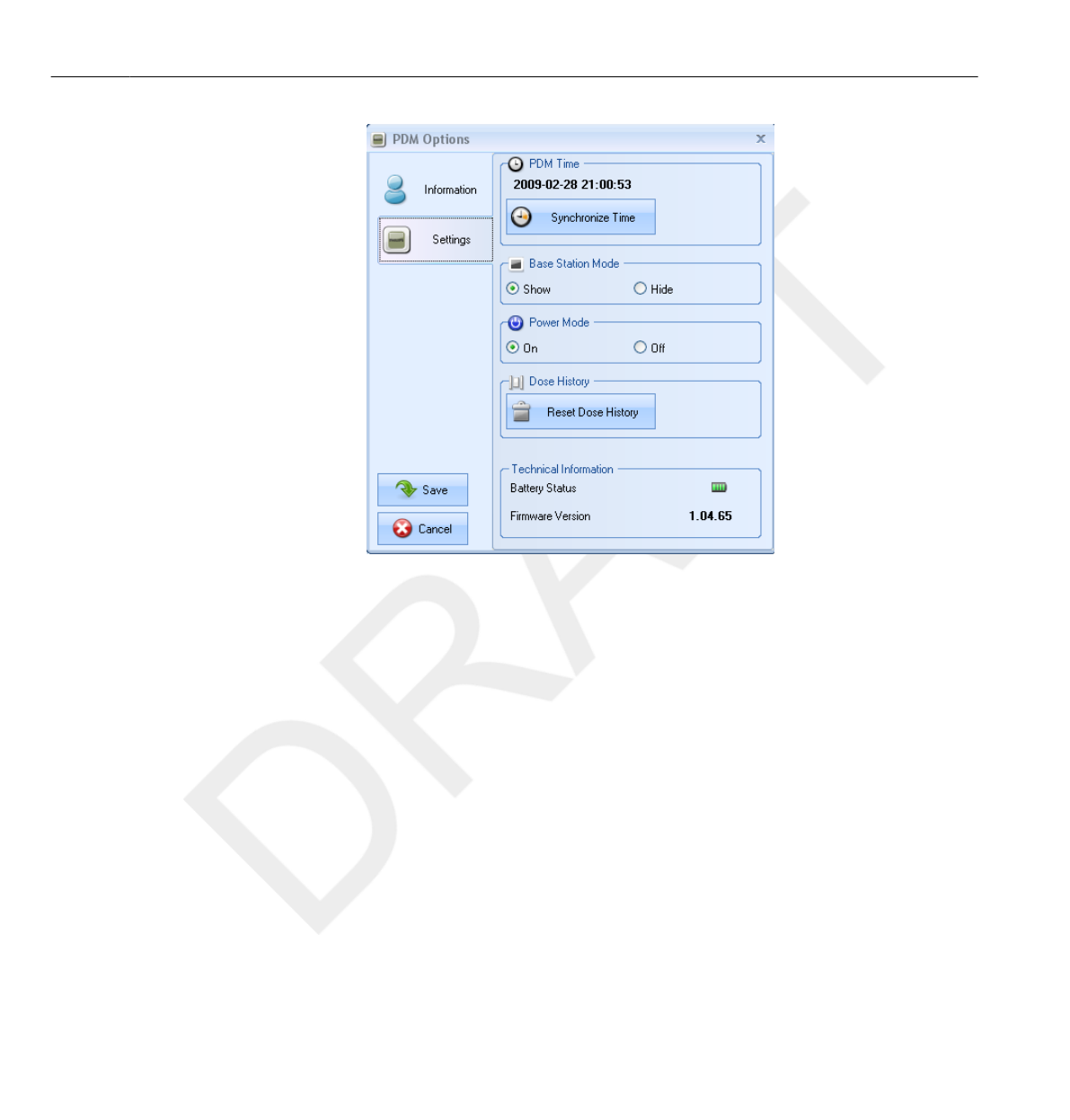
Figure 4.7 PDM Options dialog box — Settings
In the Settings tab you can:
•Set Base Station Mode to Show/Hide, which makes the PDM to be shown/
not shown on a Base Station.
•Turn Power Mode On/Off, which puts the PDM in operating or power
saving mode. In operating mode, communication with Base Stations will
take place and registration of dose data will occur. In power saving mode
no communication with Base Stations will take place and no registration
of dose data will occur.
• Reset the PDM’s Dose History — This will permanently delete the
PDM’s entire dose data.
• View Battery Status and Firmware Version.
• View and synchronize the PDM’s clock with the computer’s clock.
4.4 PDM panel
4-10 Using DoseView DoseAware Base Station Package Document version 1.2
Philips Healthcare 9896 002 16623 0900a44780045a3a
1
2
3
4
5
6
7
8
9
10
11
12
13
14
15
16
17
18
19
20
21
22
23
24
25
26
27
28
29
30
31
32
33
34
35
36
37
38
39
40
41
42
43
44
45
46
47
48
49
50
51
52
53
54
55
56
57
58
59
60

Make sure that the computer’s clock is correct, otherwise the dose history data will
be shifted in time and therefore not accurate anymore.
•If you need to change hour-portion of time, the dose history will have to be
reset. This is done automatically; you just need to confirm the action. When you
synchronize PDM’s time the internal clock will be synchronized to the same time as
the host PC, including the Windows time zone settings. If you are using multiple
PDMs, it is important to synchronize time for the PDMs with the same PC, because
they will have the same time reference.
• If you need to change the time backwards to where there is dose history stored,
the dose history will have to be reset. This is done automatically; you just need to
confirm the action
•The synchronization takes immediate effect and you do not need to press the
|Save| button.
WARNING
NOTES
PDM panel 4.4
DoseAware Base Station Package Document version 1.2 Using DoseView 4-11
Philips Healthcare 9896 002 16623
1
2
3
4
5
6
7
8
9
10
11
12
13
14
15
16
17
18
19
20
21
22
23
24
25
26
27
28
29
30
31
32
33
34
35
36
37
38
39
40
41
42
43
44
45
46
47
48
49
50
51
52
53
54
55
56
57
58
59
60
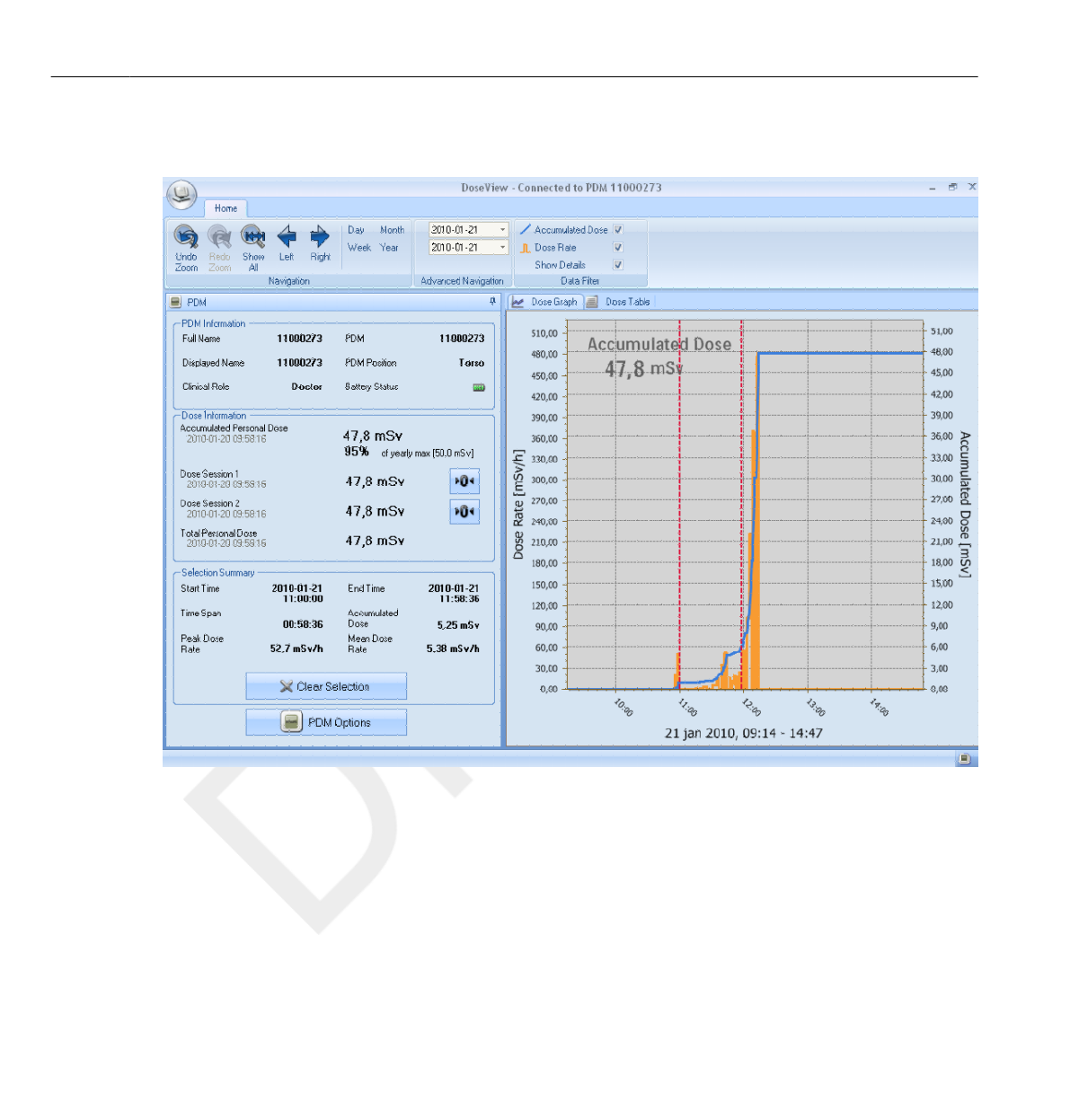
View dose graph
Figure 4.8 Dose graph with selection (vertical red dotted lines)
4.5
4.5 View dose graph
4-12 Using DoseView DoseAware Base Station Package Document version 1.2
Philips Healthcare 9896 002 16623 0900a44780045a3a
1
2
3
4
5
6
7
8
9
10
11
12
13
14
15
16
17
18
19
20
21
22
23
24
25
26
27
28
29
30
31
32
33
34
35
36
37
38
39
40
41
42
43
44
45
46
47
48
49
50
51
52
53
54
55
56
57
58
59
60

Use the data filter panel in the home menu toolbar to select which
information to be visible in the graph:
•Accumulated Dose graph – blue graph
• Dose Rate graph – orange graph, displays dose rate samples for every
second, where such data is available
• Show details
• Checked: The graphs will display dose rate samples for every second,
where such data is available.
• Unchecked: the graphs will display mean dose rate values per hour
The graphs are covering a time span that you choose, either:
• From the Advanced Navigation panel.
• From the Navigation panel.
• Or by left-clicking and dragging in the graph (zooming).
You can also select a time span to be summarized in the Selection Summary
field of the PDM panel. Make a selection by shift-left-clicking and dragging
in the graph. Two red, dotted vertical lines in the graph will indicate the
selected time span. The Selection Summary field will provide information
about start time, end time, time span, accumulated dose, peak dose rate and
mean dose rate.
View dose graph 4.5
DoseAware Base Station Package Document version 1.2 Using DoseView 4-13
Philips Healthcare 9896 002 16623
1
2
3
4
5
6
7
8
9
10
11
12
13
14
15
16
17
18
19
20
21
22
23
24
25
26
27
28
29
30
31
32
33
34
35
36
37
38
39
40
41
42
43
44
45
46
47
48
49
50
51
52
53
54
55
56
57
58
59
60
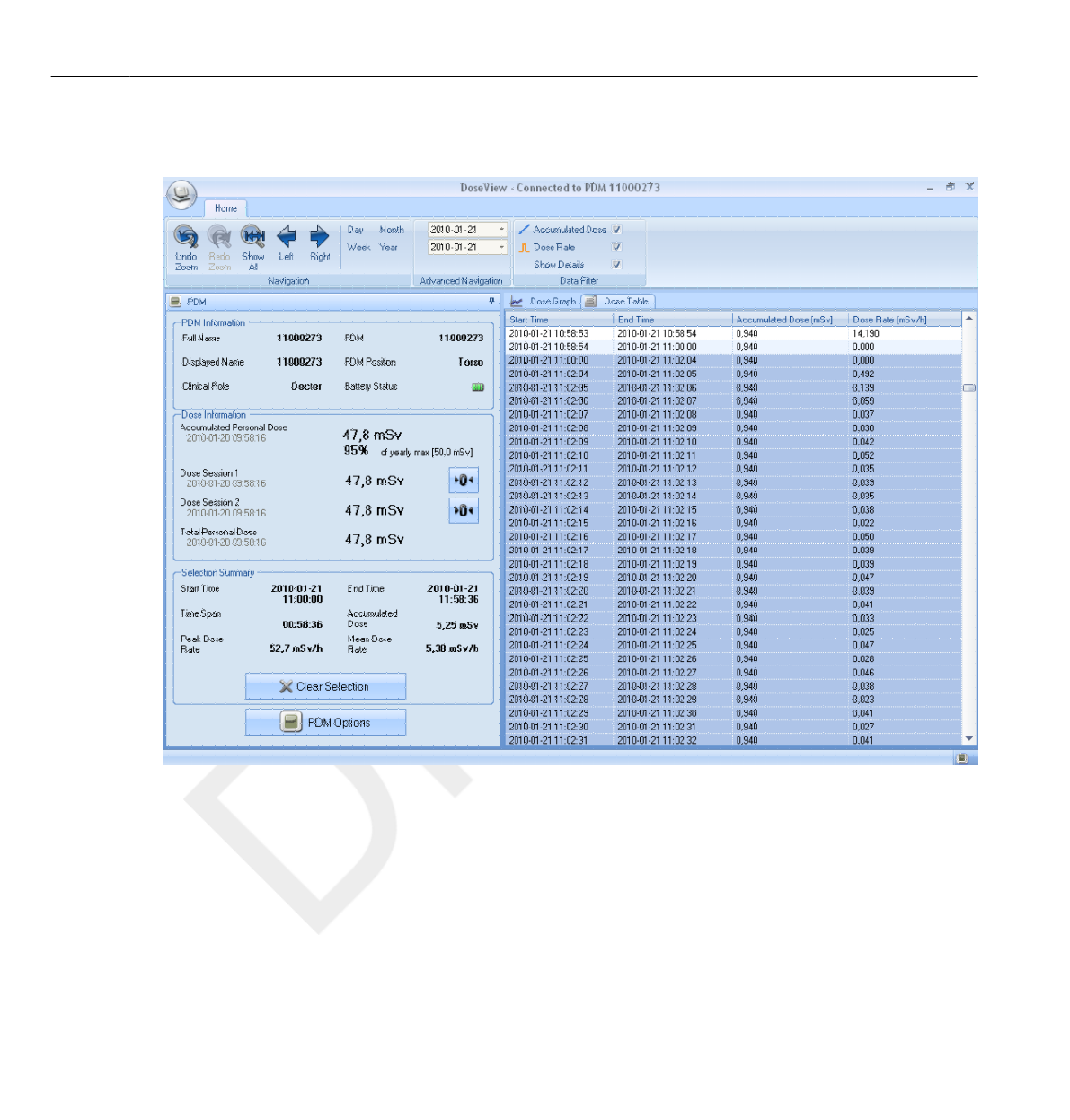
View dose table
Figure 4.9 Dose table with selection
In the Dose Table tab (see figure above) you can view a table of:
•Accumulated Dose values.
• Dose Rate values.
The tables are covering a time span that you choose either from the:
• Navigation panel.
• Or the Advanced Navigation panel.
4.6
4.6 View dose table
4-14 Using DoseView DoseAware Base Station Package Document version 1.2
Philips Healthcare 9896 002 16623 0900a44780045a3a
1
2
3
4
5
6
7
8
9
10
11
12
13
14
15
16
17
18
19
20
21
22
23
24
25
26
27
28
29
30
31
32
33
34
35
36
37
38
39
40
41
42
43
44
45
46
47
48
49
50
51
52
53
54
55
56
57
58
59
60
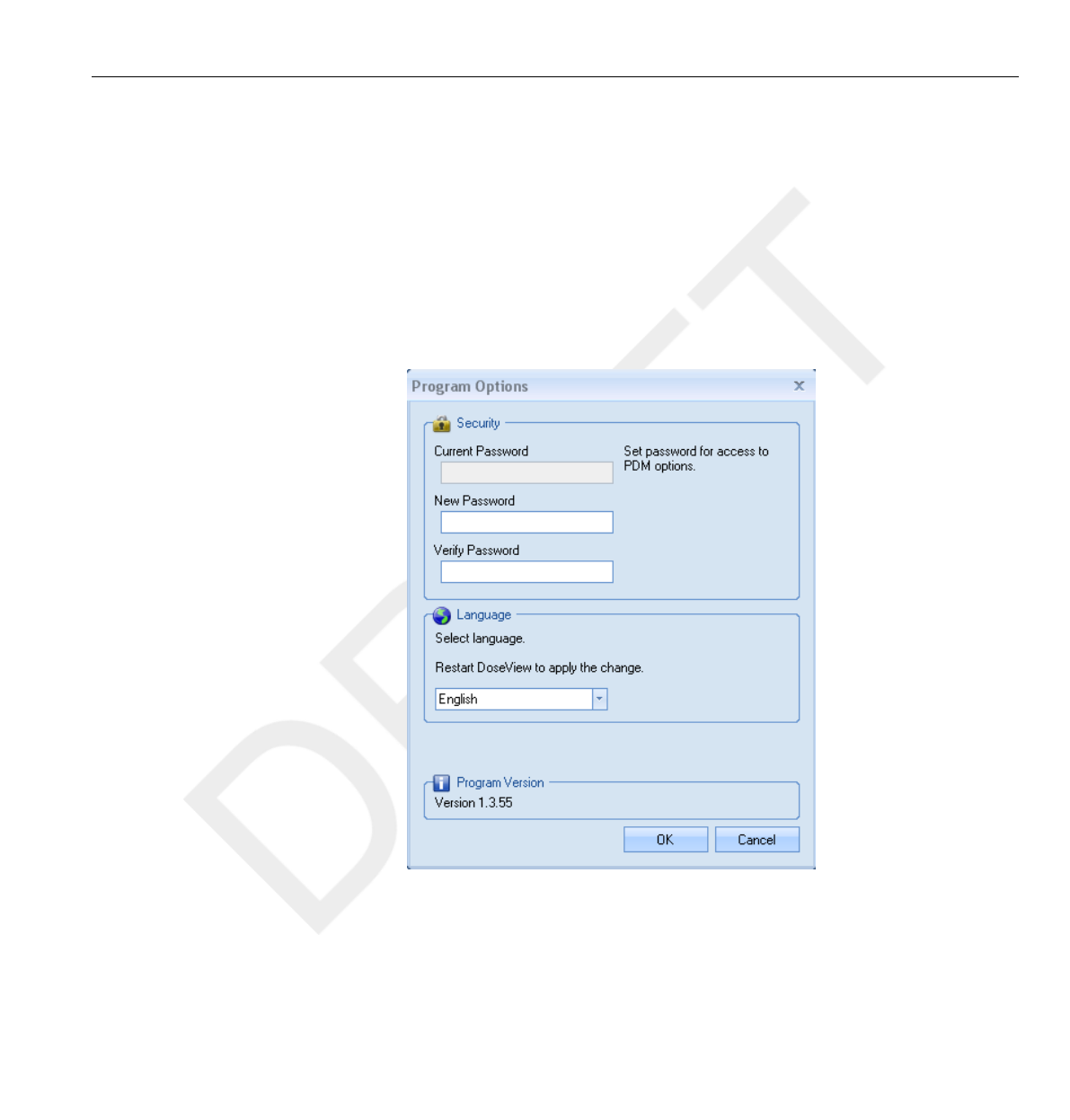
You can also select one or several rows to be summarized in the Selection
Summary field of the PDM panel. The Selection Summary field will
provide information about start time, end time, time span, accumulated
dose and mean dose rate.
With the Show details check box checked, the table will list second data,
where such data is available.
Specify password and language
Figure 4.10 Program Options dialog box
4.7
Specify password and language 4.7
DoseAware Base Station Package Document version 1.2 Using DoseView 4-15
Philips Healthcare 9896 002 16623
1
2
3
4
5
6
7
8
9
10
11
12
13
14
15
16
17
18
19
20
21
22
23
24
25
26
27
28
29
30
31
32
33
34
35
36
37
38
39
40
41
42
43
44
45
46
47
48
49
50
51
52
53
54
55
56
57
58
59
60

In the Application Menu -> Program Options dialog box (see figure above)
you can:
•Specify a password to protect the access to the PDM options dialog. The
password is only used when you are making PDM options changes.
Others can still view the PDM data.
• Change application language.
• View the DoseView program version.
•Contact your local administrator for password guidelines.
•If you have lost your password, contact your local administrator, who will have to re-
install the software
NOTES
4.7 Specify password and language
4-16 Using DoseView DoseAware Base Station Package Document version 1.2
Philips Healthcare 9896 002 16623 0900a44780045a3a
1
2
3
4
5
6
7
8
9
10
11
12
13
14
15
16
17
18
19
20
21
22
23
24
25
26
27
28
29
30
31
32
33
34
35
36
37
38
39
40
41
42
43
44
45
46
47
48
49
50
51
52
53
54
55
56
57
58
59
60
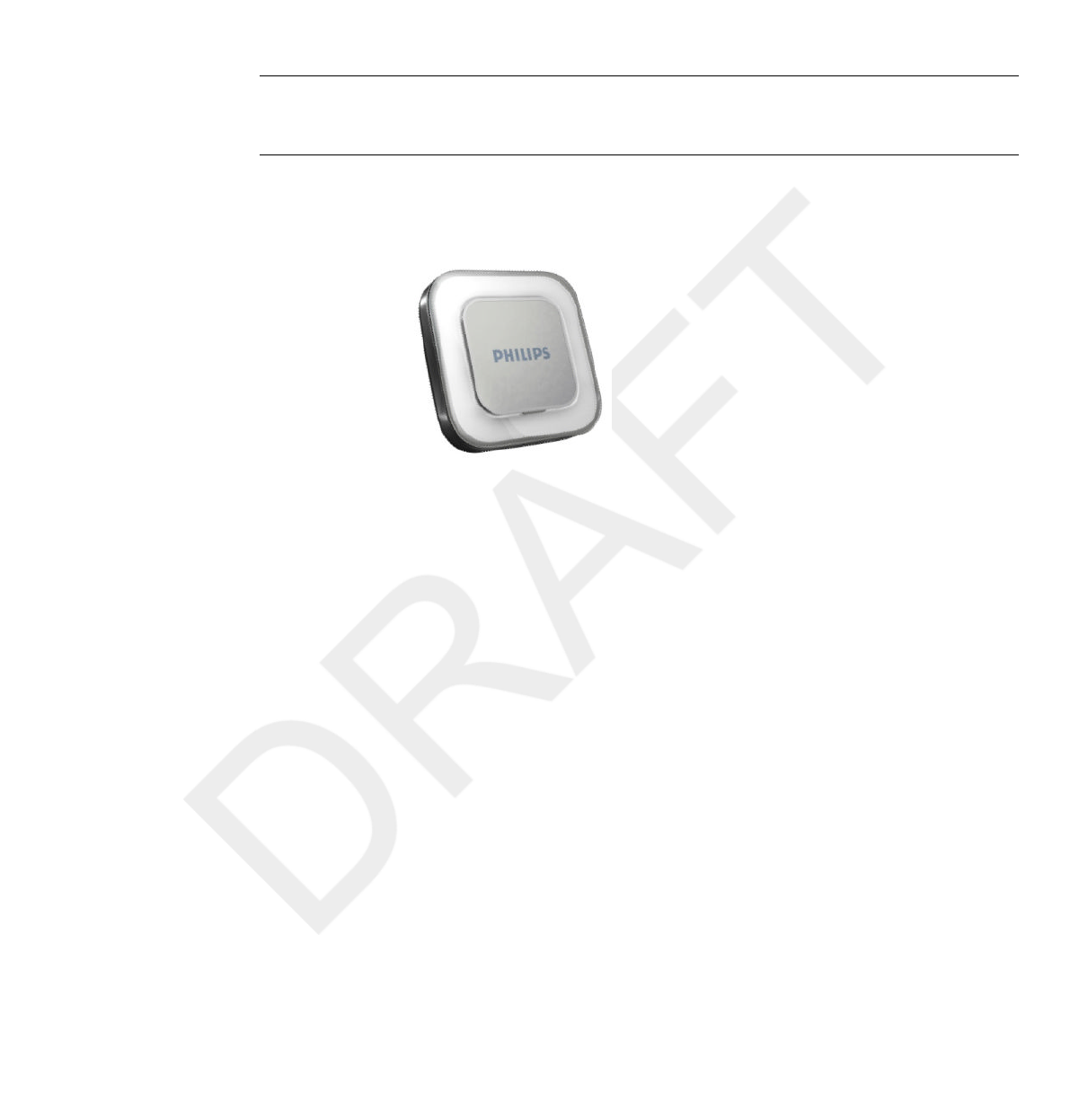
Using the PDM
Introduction
Figure 5.1 The PDM
The PDM is an active dose meter designed for maintenance-free usage
throughout its lifetime.
You can personalize the PDM’s appearance by attaching one of
the 8 inlays of different color, which are delivered together with the PDM
(see the PDM Quick Guide).
The PDM measures staff dose. The optimal usage for the PDM to measure
dose is to use it unshielded from any X-ray protection devices.
Getting started
Follow the instructions below to start using your PDM:
1Make sure that the PDM’s power mode is set to section “Change PDM
options” on page 4-7.
2Attach the PDM on your clothes using the metallic clip, which is located on
the back of the PDM, or the lanyard holder that is provided with the PDM.
5
5.1
5.2
DoseAware Base Station Package Document version 1.2 Using the PDM 5-1
Philips Healthcare 9896 002 16623
1
2
3
4
5
6
7
8
9
10
11
12
13
14
15
16
17
18
19
20
21
22
23
24
25
26
27
28
29
30
31
32
33
34
35
36
37
38
39
40
41
42
43
44
45
46
47
48
49
50
51
52
53
54
55
56
57
58
59
60

The PDM now records dose values and transmits them to Base Stations
within range. You can also read out the recorded dose values
by using DoseView via the Cradle (see section “Getting started with
DoseView” on page 4-2).
See the “Technical Data” chapter to learn more about PDM
memory and data transfer between PDM and Base Stations.
5.2 Getting started
5-2 Using the PDM DoseAware Base Station Package Document version 1.2
Philips Healthcare 9896 002 16623 0900a44780045a3a
1
2
3
4
5
6
7
8
9
10
11
12
13
14
15
16
17
18
19
20
21
22
23
24
25
26
27
28
29
30
31
32
33
34
35
36
37
38
39
40
41
42
43
44
45
46
47
48
49
50
51
52
53
54
55
56
57
58
59
60
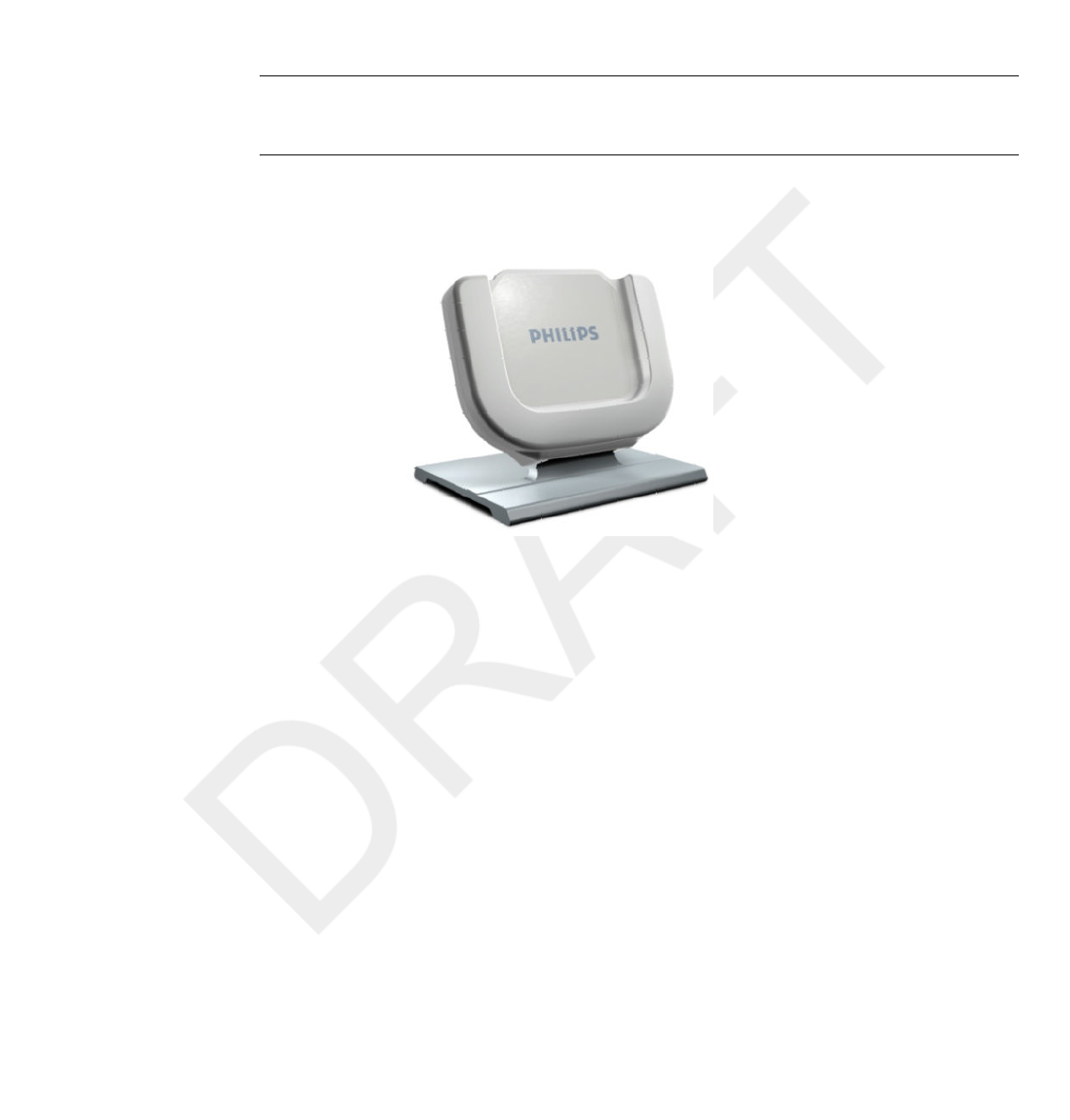
Using the Cradle
Introduction
Figure 6.1 The Cradle
The Cradle is a dock station that lets you connect a PDM to a computer for
data read out as well as PDM Options writing into the PDM. Use
the Cradle in combination with the DoseView and/or Dose Manager
applications.
6
6.1
DoseAware Base Station Package Document version 1.2 Using the Cradle 6-1
Philips Healthcare 9896 002 16623
1
2
3
4
5
6
7
8
9
10
11
12
13
14
15
16
17
18
19
20
21
22
23
24
25
26
27
28
29
30
31
32
33
34
35
36
37
38
39
40
41
42
43
44
45
46
47
48
49
50
51
52
53
54
55
56
57
58
59
60

Getting started
Do not connect the Cradle to the computer unless DoseView and the Cradle driver
are installed on the computer.
1Start the DoseView application.
2Connect a Cradle to your computer’s USB port.
3Put a PDM in the Cradle.
Within a few seconds, DoseView will detect the PDM. This is indicated at
the top of the DoseView window by a note “Connected to PDM
100001158”, where PDM 100001158 is an example of a PDM ID.
DoseView will start loading the PDM dose history. This may take up to
a few minutes. You can follow the progress on the progress bar at the
bottom of the DoseView window.
6.2
NOTE
6.2 Getting started
6-2 Using the Cradle DoseAware Base Station Package Document version 1.2
Philips Healthcare 9896 002 16623 0900a44780045a3a
1
2
3
4
5
6
7
8
9
10
11
12
13
14
15
16
17
18
19
20
21
22
23
24
25
26
27
28
29
30
31
32
33
34
35
36
37
38
39
40
41
42
43
44
45
46
47
48
49
50
51
52
53
54
55
56
57
58
59
60

Maintenance
Calibrating the Base Station screen
If the touch screen does not respond correctly to user interaction, a touch
screen re-calibration may be needed.
Follow the instructions below to perform a re-calibration:
1Tap and hold on the Philips start up screen that appears during Base Station
startup until the Setup view appears.
2Follow the instruction on the bottom of the screen and the subsequent
instructions in the next views.
Cleaning and disinfection
Cleaning and disinfection of this product is required periodically.
Guidelines for each are given below.
Always isolate the equipment from the mains electrical supply before cleaning,
disinfecting or sterilizing to prevent electric shocks.
Never allow water or other liquids to leak into the equipment as this may cause
electrical short-circuits or metal corrosion.
Cleaning and disinfection techniques for both the product and the room
must comply with all applicable local laws and regulations.
Cleaning
Enameled parts and aluminum surfaces should only be wiped clean with a
damp cloth and a mild detergent, and then rubbed down with a dry woolen
cloth. Never use corrosive cleaning agents, solvents, abrasive detergents or
abrasive polishes. If you are not sure about the properties of a cleaning
agent, do not use it.
7
7.1
7.2
WARNING
CAUTION
7.2.1
DoseAware Base Station Package Document version 1.2 Maintenance 7-1
Philips Healthcare 9896 002 16623
1
2
3
4
5
6
7
8
9
10
11
12
13
14
15
16
17
18
19
20
21
22
23
24
25
26
27
28
29
30
31
32
33
34
35
36
37
38
39
40
41
42
43
44
45
46
47
48
49
50
51
52
53
54
55
56
57
58
59
60

Chrome parts should only be cleaned by rubbing down with a dry woolen
cloth. Do not use abrasive polishes. To preserve the finish, use non-abrasive
wax.
Disinfection
Those parts of the product that are suitable for such treatment, including
accessories and connecting cables, can be disinfected by wiping with a cloth
dampened with a suitable agent. Never use corrosive or solvent disinfectants
or sterilizing agents. If you are not sure about the properties of a disinfectant
or sterilizing agent, do not use it.
Do not use flammable or potentially explosive disinfecting sprays. Such sprays create
vapors, which can ignite, causing fatal or other serious personal injury.
Disinfecting a medical product room by means of sprays is not recommended, since
the vapor could penetrate the product, causing electrical short-circuits, metal
corrosion or other damage to the product.
If non-flammable, non-explosive spray disinfectants are to be used, the
equipment must first be switched off and allowed to cool. This prevents
convection currents from drawing spray mist into the product. Plastic
sheeting must be used to cover the product thoroughly, after which spraying
can begin.
Once all traces of the disinfectant vapor have dispersed, the plastic sheeting
can be removed and the equipment itself can be disinfected in the
recommended way.
If a spray was used, you must be satisfied that all traces of the vapor have
dispersed before switching the product on again.
7.2.2
WARNING
CAUTION
7.2 Cleaning and disinfection
7-2 Maintenance DoseAware Base Station Package Document version 1.2
Philips Healthcare 9896 002 16623 0900a44780045a3a
1
2
3
4
5
6
7
8
9
10
11
12
13
14
15
16
17
18
19
20
21
22
23
24
25
26
27
28
29
30
31
32
33
34
35
36
37
38
39
40
41
42
43
44
45
46
47
48
49
50
51
52
53
54
55
56
57
58
59
60

Troubleshooting
Base Station
Table 8.1 Base Station troubleshooting
Problem Solution
The PDM does not appear in the Online
View.
Use DoseView or Dose Manager to check
that the PDM’s:
•Battery Status is OK (see section
“Change PDM options” on page 4-7).
•Power Mode is set to ‘On’ (see section
“Change PDM options” on page 4-7).
•Base Station Mode is set to ‘Show’ (see
section “Change PDM options” on page
4-7).
DoseView and Cradle
Table 8.2 DoseView and Cradle troubleshooting
Problem Solution
The PDM does not appear in DoseView Check that the PDM is correctly fitted into
the Cradle
DoseView does not detect the Cradle •Check the USB connection between the
Cradle and the computer.
•Install the Cradle driver manually. All the
driver files are located on the installation
CD in the folder “CradleDriver”. These
files are also copied to the application
installation folder when DoseView is
installed. When Windows detect a
connected Cradle and the dialog about
driver installation is displayed, select to
use the driver files located on the CD or
in the application installation folder.
I have forgotten my password Contact your local administrator, who will
have to re-install the software
8
8.1
8.2
DoseAware Base Station Package Document version 1.2 Troubleshooting 8-1
Philips Healthcare 9896 002 16623
1
2
3
4
5
6
7
8
9
10
11
12
13
14
15
16
17
18
19
20
21
22
23
24
25
26
27
28
29
30
31
32
33
34
35
36
37
38
39
40
41
42
43
44
45
46
47
48
49
50
51
52
53
54
55
56
57
58
59
60

8.2 DoseView and Cradle
8-2 Troubleshooting DoseAware Base Station Package Document version 1.2
Philips Healthcare 9896 002 16623 0900a44780045a3a
1
2
3
4
5
6
7
8
9
10
11
12
13
14
15
16
17
18
19
20
21
22
23
24
25
26
27
28
29
30
31
32
33
34
35
36
37
38
39
40
41
42
43
44
45
46
47
48
49
50
51
52
53
54
55
56
57
58
59
60

Product disposal
Introduction
Philips Medical Systems is concerned to help protect the natural
environment, and to help ensure continued safe and effective use of this
product, through proper support, maintenance and training.
Therefore Philips products are designed and manufactured to comply with
relevant guidelines for environmental protection. As long as the product is
properly operated and maintained, it presents no environmental risks.
However, the product may contain material, which could be harmful to the
environment if disposed of incorrectly. Use of such material is essential to
performing the functions of the product, and to meeting statutory and other
requirements.
This section of these Instructions for Use is directed mainly at the user/
owner of the product.
Passing the system on to another user
If this product passes to another user, it must be in its complete state,
including all product support documentation.
Make the new user aware of the support services that Philips Medical
Systems provides for installing, commissioning and maintaining the product.
Before passing on the product or taking it out of service, all data must be
(backed up elsewhere if necessary, and) unrecoverable be deleted on the
product.
It must be remembered by all existing users that passing on electrical
products to new users may create serious technical, medical and legal (e.g.
on privacy) risks. Such risks can arise even if the product is given away.
9
9.1
9.2
DoseAware Base Station Package Document version 1.2 Product disposal 9-1
Philips Healthcare 9896 002 16623
1
2
3
4
5
6
7
8
9
10
11
12
13
14
15
16
17
18
19
20
21
22
23
24
25
26
27
28
29
30
31
32
33
34
35
36
37
38
39
40
41
42
43
44
45
46
47
48
49
50
51
52
53
54
55
56
57
58
59
60

Existing users are strongly advised to seek advice from their local Philips
Medical Systems representative before committing themselves to passing on
any product. Alternatively, contact the manufacturer.
Once the product has been passed on to a new user, a previous user may still
receive important safety-related information, such as bulletins and field
change orders. In many jurisdictions, there is a clear duty on the previous
user to communicate such safety-related information to new users. Previous
users who are not able or prepared to do this should inform Philips Medical
Systems about the new user, so that Philips Medical Systems can provide the
new user with safety-related information.
Final disposal of the system
Final disposal is when the user disposes of the product in such a way that it
can no longer be used for its intended purpose(s).
In the European Union (the WEEE directive), this label indicates that this
product should not be disposed of with household waste.
This product should be disposed of at an appropriate facility to enable
recovery and recycling.
Philips supports users in:
•Recovering reusable parts.
• Recycling of useful materials by competent disposal companies.
• Safe and effective disposal of product.
9.3
9.3 Final disposal of the system
9-2 Product disposal DoseAware Base Station Package Document version 1.2
Philips Healthcare 9896 002 16623 0900a44780045a3a
1
2
3
4
5
6
7
8
9
10
11
12
13
14
15
16
17
18
19
20
21
22
23
24
25
26
27
28
29
30
31
32
33
34
35
36
37
38
39
40
41
42
43
44
45
46
47
48
49
50
51
52
53
54
55
56
57
58
59
60

For advice and information, contact your Philips Service Organization first,
or otherwise the manufacturer.
Fitting, removing, and disposing of batteries
Batteries harm the environment; dispose of the old batteries in an environmentally
sound way.
For information about disposal of the product, batteries, and hazardous
materials, see the Philips Medical Systems product sustainability website at:
http://www.healthcare.philips.com/main/about/Sustainability/Recycling/
9.4
NOTE
Fitting, removing, and disposing of batteries 9.4
DoseAware Base Station Package Document version 1.2 Product disposal 9-3
Philips Healthcare 9896 002 16623
1
2
3
4
5
6
7
8
9
10
11
12
13
14
15
16
17
18
19
20
21
22
23
24
25
26
27
28
29
30
31
32
33
34
35
36
37
38
39
40
41
42
43
44
45
46
47
48
49
50
51
52
53
54
55
56
57
58
59
60

9.4 Fitting, removing, and disposing of batteries
9-4 Product disposal DoseAware Base Station Package Document version 1.2
Philips Healthcare 9896 002 16623 0900a44780045a3a
1
2
3
4
5
6
7
8
9
10
11
12
13
14
15
16
17
18
19
20
21
22
23
24
25
26
27
28
29
30
31
32
33
34
35
36
37
38
39
40
41
42
43
44
45
46
47
48
49
50
51
52
53
54
55
56
57
58
59
60

Technical data
PDM radiology
Table 10.1 PDM radiology technical data
Characteristic Measure
Operational Quantity* Hp(10)
Reproducibility 10% or 1 µSv, whatever is greatest
Dose Rate Range 40 µSv/h – 500 mSv/h
Energy dependence X-/g-rays +/- 30% within N40 – N120
Angular dependence +/- 5% within +/- 5°
+/- 30% within +/- 50°
+200%/-100% within +/- 90°
Temperature dependence +/- 5% within 20-26°C
+/- 25% within 15-35°C
Battery voltage dependence +/- 2% from fully charged until low battery
shutdown
Response time Less than 1s above 100µSv/h, less than 5s
otherwise
Position on body** On torso outside lead apron
*) Hp(10): Personal dose equivalent at a depth of 10 mm according to ISO 4037.
**) Position on body: The Hp(10) measurement is only valid for a position on the torso
outside any lead apron or other protection. (To estimate effective dose to a user, one
must use other means to estimate things like the environmental radiation situation and the
effectiveness of protection.)
10
10.1
DoseAware Base Station Package Document version 1.2 Technical data 10-1
Philips Healthcare 9896 002 16623
1
2
3
4
5
6
7
8
9
10
11
12
13
14
15
16
17
18
19
20
21
22
23
24
25
26
27
28
29
30
31
32
33
34
35
36
37
38
39
40
41
42
43
44
45
46
47
48
49
50
51
52
53
54
55
56
57
58
59
60

PDM memory
The PDM has two dose data memories:
•The accumulated dose memory, where the PDM stores accumulated dose
values every hour for the entire lifetime of the PDM.
• The dose rate memory, where the PDM stores dose rate samples. When
the radiation exceeds 40 µSv/h, the PDM stores one sample per
second. This memory is limited to 3600 second-samples.
When the dose rate memory is full, the oldest data will be overwritten with newer data.
Base Station memory
The Base Station stores dose information and PDM Info for PDMs that
have been connected to it.
As the Base Station does not have a limitation of 3600 s for the dose rate
memory, the information transmitted from the PDM will be more detailed.
When a PDM is connected to a Base Station, it continuously transmits its
measured dose exposures.
When the Base Station memory is full, the oldest data will be overwritten.
The capacity of the Base Station depends on the number of PDMs that have
been On-Line and the number of dose rate samples. Storage capacity example:
• 290 hours of dose exposure for 50 PDMs each.
Dose data transfer from PDM to Base Station
When a PDM gets within range of a Base Station, it will transfer data to the
Base Station (the accumulated dose values the PDM has collected since last
time it was within range). If a PDM is within range of a Base
Station when it is exposed to radiation, the PDM will also start sending dose
rate samples to the Base Station each second.
10.2
NOTE
10.3
NOTE
10.4
10.2 PDM memory
10-2 Technical data DoseAware Base Station Package Document version 1.2
Philips Healthcare 9896 002 16623 0900a44780045a3a
1
2
3
4
5
6
7
8
9
10
11
12
13
14
15
16
17
18
19
20
21
22
23
24
25
26
27
28
29
30
31
32
33
34
35
36
37
38
39
40
41
42
43
44
45
46
47
48
49
50
51
52
53
54
55
56
57
58
59
60
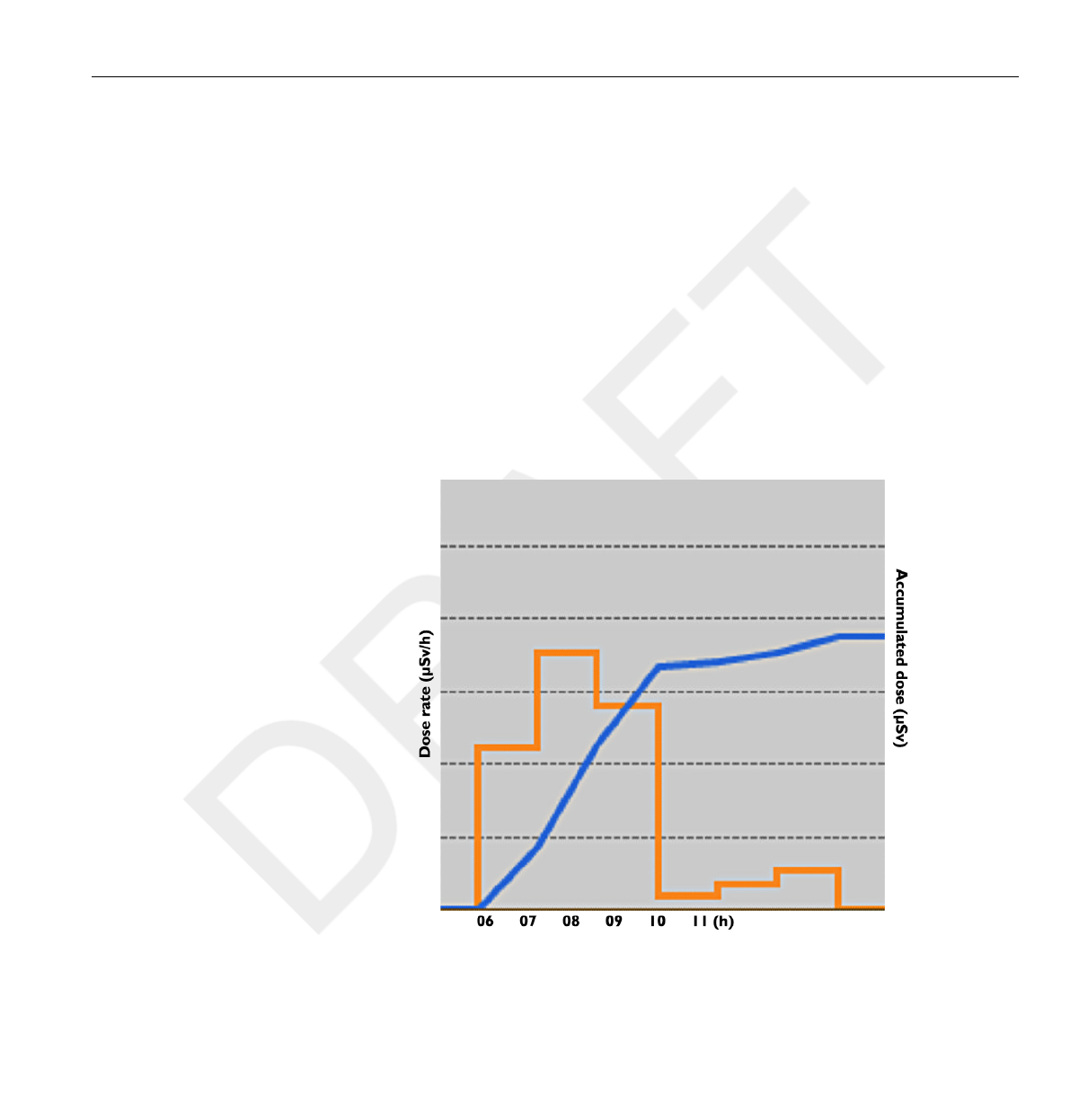
PDM and Base Station/DoseView memories
Dose rate samples that have been overwritten in the PDM’s dose rate
memory may still be available in the Base Station.
If there are no dose rate samples neither in the Base Station, nor in the
PDM dose rate memory, the Base Station and DoseView will instead display
mean dose rate values based on accumulated dose values (see figure below).
Lack of dose rate samples in the Base Station and/or DoseView memories
occurs when the:
•PDM is not within range of the Base Station when it is exposed to radiation.
•Dose rate samples in the PDM dose rate memory are overwritten.
Figure 10.1 DoseView chart. In lack of dose rate samples, the yellow curve displays mean
dose rate values per hour calculated from the accumulated dose (blue curve).
The same effect as illustrated in the figure above is also obtained by un-checking the
Show details check box in the Data filter panel (see section “View dose graph” on
page 4-12 ).
10.5
NOTE
PDM and Base Station/DoseView memories 10.5
DoseAware Base Station Package Document version 1.2 Technical data 10-3
Philips Healthcare 9896 002 16623
1
2
3
4
5
6
7
8
9
10
11
12
13
14
15
16
17
18
19
20
21
22
23
24
25
26
27
28
29
30
31
32
33
34
35
36
37
38
39
40
41
42
43
44
45
46
47
48
49
50
51
52
53
54
55
56
57
58
59
60

Time management
The PDM logs dose history in local time with no daylight saving time
adjustments. Daylight saving time adjustment is done in the Base Station,
DoseView or Dose Manager when the dose history is presented.
The following happens when the daylight saving time is changed:
•When going to summertime, one extra hour with no dose data will be
added to the dose log.
• When going to wintertime, two hours of dose data will be merged into
one hour. This hour contains no dose rate details. When changing
from summertime to wintertime, dose date details in the two merged
hours will not be displayed.
Technical Specifications
Radio communication
• The communication range between a PDM facing a Base Station and the
Base Station is at least 10 meters in open air inside an operating room.
• Communication radio, Europe, complies with 1995/5/EC Radio and
Telecommunications Terminal Equipment (R & TTE).
•Communication radio, US, complies with FCC Declaration of Conformity.
Base Station
Table 10.2 Base Station technical specifications
Characteristic Measure
Weight 1.45 kg (3,2 lb)
Dimensions 297x243x51 mm (WxHxD)
Display 10.4” touch screen, 640x480 pixels, 65 000
colors
Power supply 12 V, 2 A
Memory 512 Mb
Storage Approximately 290 hours of dose history
for each of 50 PDMs
10.6
10.7
10.7.1
10.7.2
10.6 Time management
10-4 Technical data DoseAware Base Station Package Document version 1.2
Philips Healthcare 9896 002 16623 0900a44780045a3a
1
2
3
4
5
6
7
8
9
10
11
12
13
14
15
16
17
18
19
20
21
22
23
24
25
26
27
28
29
30
31
32
33
34
35
36
37
38
39
40
41
42
43
44
45
46
47
48
49
50
51
52
53
54
55
56
57
58
59
60

Characteristic Measure
Backlight life time Approximately 50000 hours
Maximum heat dissipation 25 W
Network Ethernet 10/100
USB 1.1 host for USB Mass Storage Device
PDM
Table 10.3 PDM technical specifications
Characteristic Measure
Weight 30 g (1 oz)
Dimensions 44x45x10 mm (WxHxD)
Fastening Metallic clip and lanyard holder
Log memory 1 5 years Accumulated Dose with 1 hour
resolution, cyclically overridden
Log memory 2 3600 Dose Rate samples with one-second
resolution, cyclically overridden. Dose Rate
is only measured above a 40µSv/h threshold
limit
Time resolution 1 second
Time accuracy Maximum error 2 seconds/24 hrs
Power supply via the Cradle when connected to a
computer via USB
Expected battery life At least 4 years based on “normal use”,
which is defined as the operating conditions
under normal use are 8 hours per day, 5
days a week and 52 weeks per year at an
ambient temperature of 20°C.
Cradle
Table 10.4 Cradle technical specifications
Characteristic Measure
Weight 50 g
Dimensions 64x61x59 mm (WxHxD)
Cable length 1,5 M
10.7.3
10.7.4
Technical Specifications 10.7
DoseAware Base Station Package Document version 1.2 Technical data 10-5
Philips Healthcare 9896 002 16623
1
2
3
4
5
6
7
8
9
10
11
12
13
14
15
16
17
18
19
20
21
22
23
24
25
26
27
28
29
30
31
32
33
34
35
36
37
38
39
40
41
42
43
44
45
46
47
48
49
50
51
52
53
54
55
56
57
58
59
60

Characteristic Measure
Power via USB
Communication with computer USB 2.0
Security and privacy requirements
Antivirus
An AVS solution is not installed on this Windows CE device because of the
security measures taken to reduce the attack surface.
Network ports
The following ports and protocols are open on the Base Station for
communication with the Dose Manager:
TCP/UDP Port
number
Protocol Additional note
TCP 8070 gSOAP httpd 2.7 Used for regular (bidirectional)
communication between Base Station
and Dose Manager
UDP 8060 Proprietary discovery
protocol
Protocol (bidirectional) used for Base
Station discovery
Encryption
DoseAware data is encrypted during transmission, at rest on the Base
Station and is stored in an encrypted Dose Manager database.
10.8
10.8 Security and privacy requirements
10-6 Technical data DoseAware Base Station Package Document version 1.2
Philips Healthcare 9896 002 16623 0900a44780045a3a
1
2
3
4
5
6
7
8
9
10
11
12
13
14
15
16
17
18
19
20
21
22
23
24
25
26
27
28
29
30
31
32
33
34
35
36
37
38
39
40
41
42
43
44
45
46
47
48
49
50
51
52
53
54
55
56
57
58
59
60