Unfors RaySafe 8603022 DoseAware Base Station User Manual

Unfors RaySafe AB DoseAware Base Station

Contents

user manual

DoseAware Base StationPackageINSTRUCTIONS FOR USEDocument version 1.2EnglishPhilips Healthcare 9896 002 16623 1 2 3 4 5 6 7 8 9 10 11 12 13 14 15 16 17 18 19 20 21 22 23 24 25 26 27 28 29 30 31 32 33 34 35 36 37 38 39 40 41 42 43 44 45 46 47 48 49 50 51 52 53 54 55 56 57 58 59 60
Published by Philips Medical Systems Nederland B.V.Philips Medical Systems Nederland B.V. reserves the right tomake changes to both this document and to the product itdescribes. Product specifications are subject to change withoutnotice. Nothing contained within this document is intended asany offer, warranty, promise or contractual condition, and mustnot be taken as such.© Koninklijke Philips Electronics N.V. 2009All Rights are reserved. Reproduction in whole or in part in anyform or by any means, electrical, mechanical or otherwise isprohibited without the written consent of the copyright holder.Issue Number 9896 002 16623Philips Medical Systems Nederland B.V.Veenpluis 4-65684 PC BestThe NetherlandsUnauthorized copying of this publication may not only infringecopyright but also reduce the ability of Philips Medical Systemsto provide accurate and up-to-date information to users.Non-Philips product names may be trademarks of theirrespective owners.Published in The Netherlands.0-2 DoseAware Base Station Package Document version 1.2Philips Healthcare 9896 002 16623 0900a44780045a3a 1 2 3 4 5 6 7 8 9 10 11 12 13 14 15 16 17 18 19 20 21 22 23 24 25 26 27 28 29 30 31 32 33 34 35 36 37 38 39 40 41 42 43 44 45 46 47 48 49 50 51 52 53 54 55 56 57 58 59 60
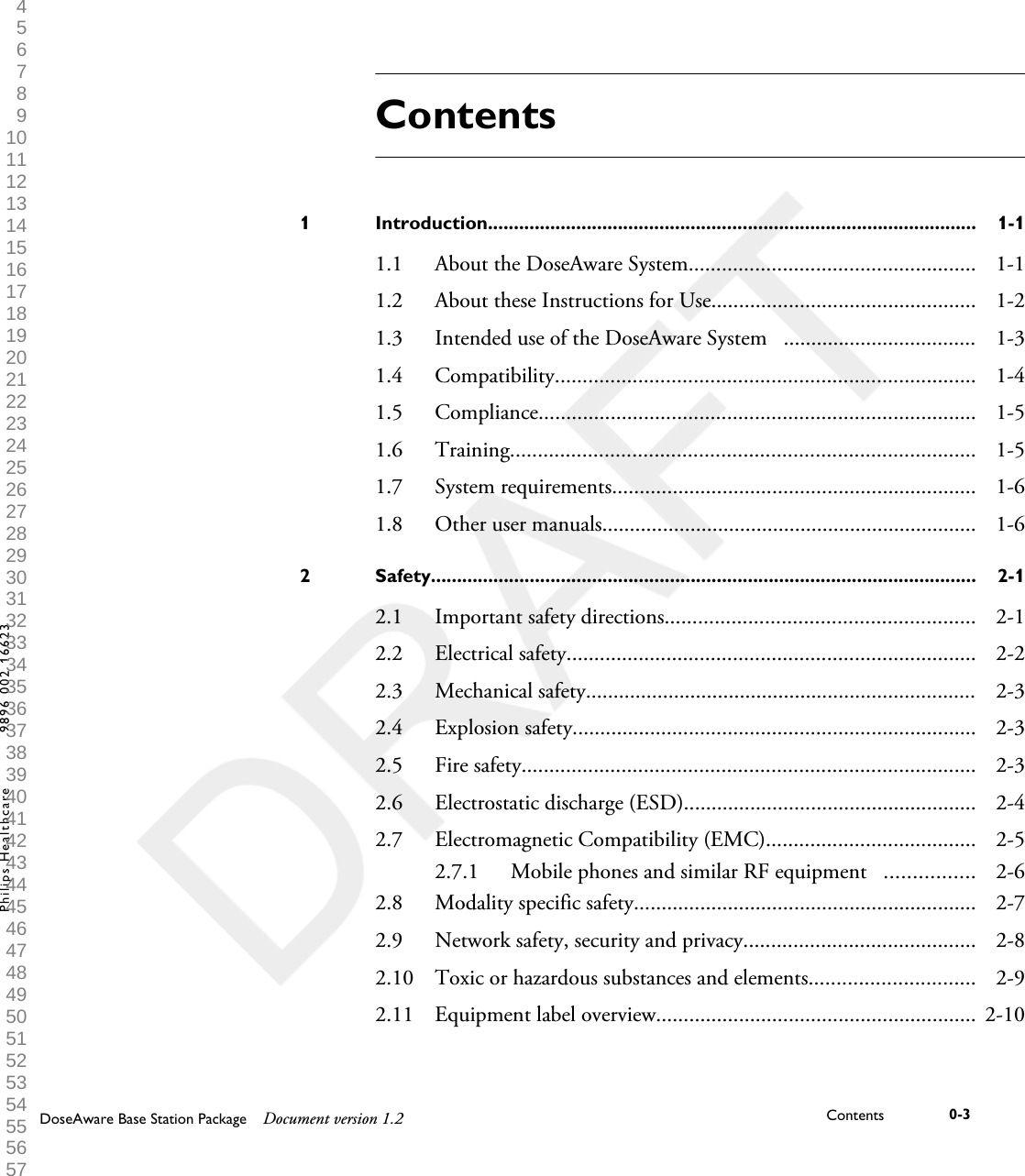
ContentsIntroduction..............................................................................................1 1-11.1 About the DoseAware System.................................................... 1-11.2 About these Instructions for Use................................................ 1-21.3 Intended use of the DoseAware System   ................................... 1-31.4 Compatibility............................................................................ 1-41.5 Compliance............................................................................... 1-51.6 Training.................................................................................... 1-51.7 System requirements.................................................................. 1-61.8 Other user manuals.................................................................... 1-6Safety.........................................................................................................2 2-12.1 Important safety directions........................................................ 2-12.2 Electrical safety.......................................................................... 2-22.3 Mechanical safety....................................................................... 2-32.4 Explosion safety......................................................................... 2-32.5 Fire safety.................................................................................. 2-32.6 Electrostatic discharge (ESD)..................................................... 2-42.7 Electromagnetic Compatibility (EMC)...................................... 2-52.7.1 Mobile phones and similar RF equipment   ................ 2-62.8 Modality specific safety.............................................................. 2-72.9 Network safety, security and privacy.......................................... 2-82.10 Toxic or hazardous substances and elements.............................. 2-92.11 Equipment label overview.......................................................... 2-10DoseAware Base Station Package Document version 1.2 Contents 0-3Philips Healthcare 9896 002 16623 1 2 3 4 5 6 7 8 9 10 11 12 13 14 15 16 17 18 19 20 21 22 23 24 25 26 27 28 29 30 31 32 33 34 35 36 37 38 39 40 41 42 43 44 45 46 47 48 49 50 51 52 53 54 55 56 57 58 59 60
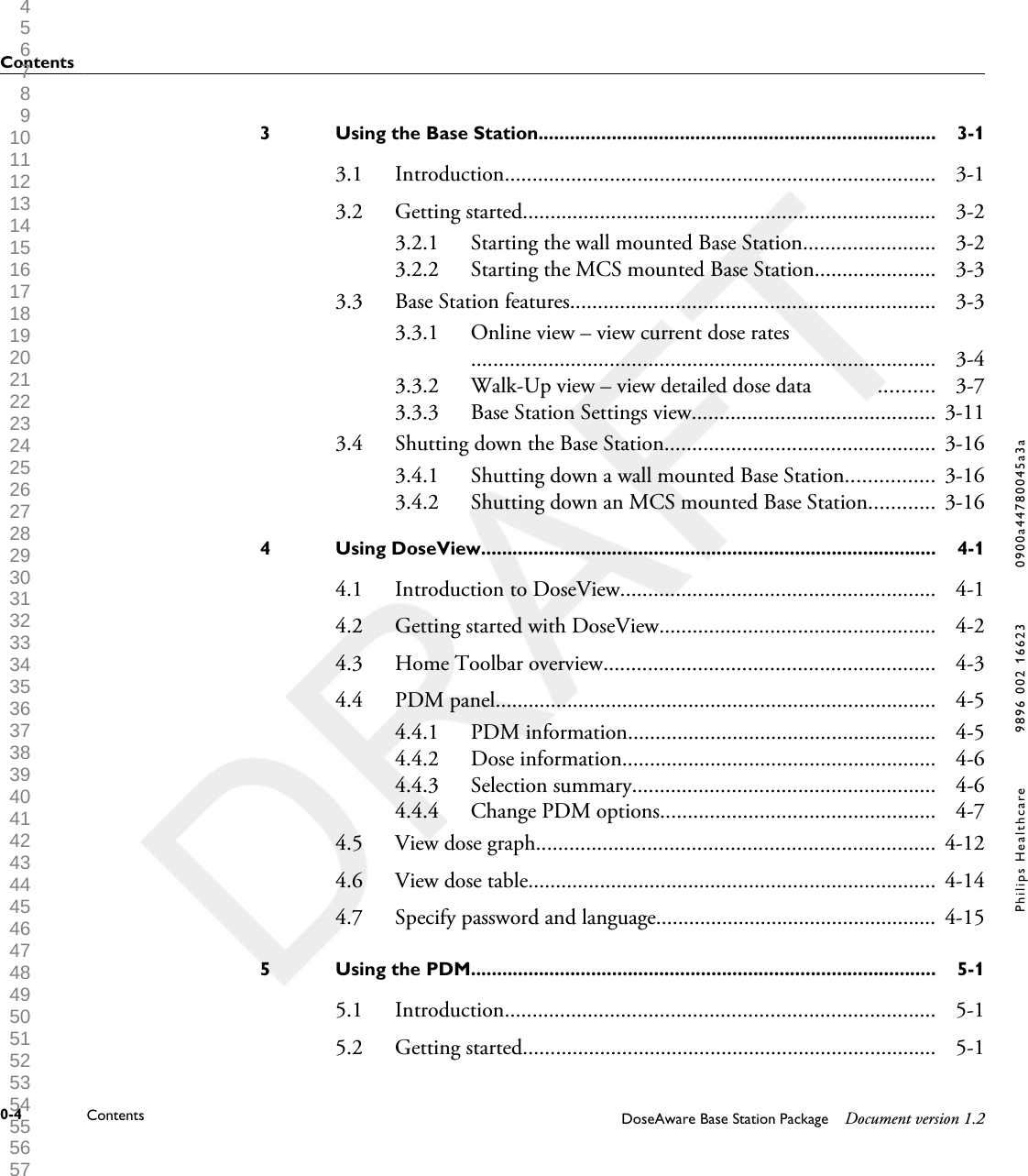
Using the Base Station............................................................................3 3-13.1 Introduction.............................................................................. 3-13.2 Getting started........................................................................... 3-23.2.1 Starting the wall mounted Base Station........................ 3-23.2.2 Starting the MCS mounted Base Station...................... 3-33.3 Base Station features.................................................................. 3-33.3.1 Online view – view current dose rates                           .................................................................................... 3-43.3.2 Walk-Up view – view detailed dose data            .......... 3-73.3.3 Base Station Settings view............................................ 3-113.4 Shutting down the Base Station................................................. 3-163.4.1 Shutting down a wall mounted Base Station................ 3-163.4.2 Shutting down an MCS mounted Base Station............ 3-16Using DoseView.......................................................................................4 4-14.1 Introduction to DoseView......................................................... 4-14.2 Getting started with DoseView.................................................. 4-24.3 Home Toolbar overview............................................................ 4-34.4 PDM panel................................................................................ 4-54.4.1 PDM information........................................................ 4-54.4.2 Dose information......................................................... 4-64.4.3 Selection summary....................................................... 4-64.4.4 Change PDM options.................................................. 4-74.5 View dose graph........................................................................ 4-124.6 View dose table.......................................................................... 4-144.7 Specify password and language................................................... 4-15Using the PDM.........................................................................................5 5-15.1 Introduction.............................................................................. 5-15.2 Getting started........................................................................... 5-1Contents0-4 Contents DoseAware Base Station Package Document version 1.2Philips Healthcare 9896 002 16623 0900a44780045a3a 1 2 3 4 5 6 7 8 9 10 11 12 13 14 15 16 17 18 19 20 21 22 23 24 25 26 27 28 29 30 31 32 33 34 35 36 37 38 39 40 41 42 43 44 45 46 47 48 49 50 51 52 53 54 55 56 57 58 59 60
Using the Cradle......................................................................................6 6-16.1 Introduction.............................................................................. 6-16.2 Getting started........................................................................... 6-2Maintenance..............................................................................................7 7-17.1 Calibrating the Base Station screen............................................ 7-17.2 Cleaning and disinfection.......................................................... 7-17.2.1 Cleaning...................................................................... 7-17.2.2 Disinfection................................................................. 7-2Troubleshooting.......................................................................................8 8-18.1 Base Station............................................................................... 8-18.2 DoseView and Cradle................................................................ 8-1Product disposal.......................................................................................9 9-19.1 Introduction.............................................................................. 9-19.2 Passing the system on to another user........................................ 9-19.3 Final disposal of the system........................................................ 9-29.4 Fitting, removing, and disposing of batteries.............................. 9-3Technical data..........................................................................................10 10-110.1 PDM radiology  ........................................................................ 10-110.2 PDM memory........................................................................... 10-210.3 Base Station memory................................................................. 10-210.4 Dose data transfer from PDM to Base Station........................... 10-210.5 PDM and Base Station/DoseView memories............................. 10-310.6  Time management.................................................................... 10-4ContentsDoseAware Base Station Package Document version 1.2 Contents 0-5Philips Healthcare 9896 002 16623 1 2 3 4 5 6 7 8 9 10 11 12 13 14 15 16 17 18 19 20 21 22 23 24 25 26 27 28 29 30 31 32 33 34 35 36 37 38 39 40 41 42 43 44 45 46 47 48 49 50 51 52 53 54 55 56 57 58 59 60
10.7 Technical Specifications............................................................. 10-410.7.1 Radio communication.................................................. 10-410.7.2  Base Station................................................................ 10-410.7.3 PDM........................................................................... 10-510.7.4 Cradle.......................................................................... 10-510.8 Security and privacy requirements.............................................. 10-6Contents0-6 Contents DoseAware Base Station Package Document version 1.2Philips Healthcare 9896 002 16623 0900a44780045a3a 1 2 3 4 5 6 7 8 9 10 11 12 13 14 15 16 17 18 19 20 21 22 23 24 25 26 27 28 29 30 31 32 33 34 35 36 37 38 39 40 41 42 43 44 45 46 47 48 49 50 51 52 53 54 55 56 57 58 59 60
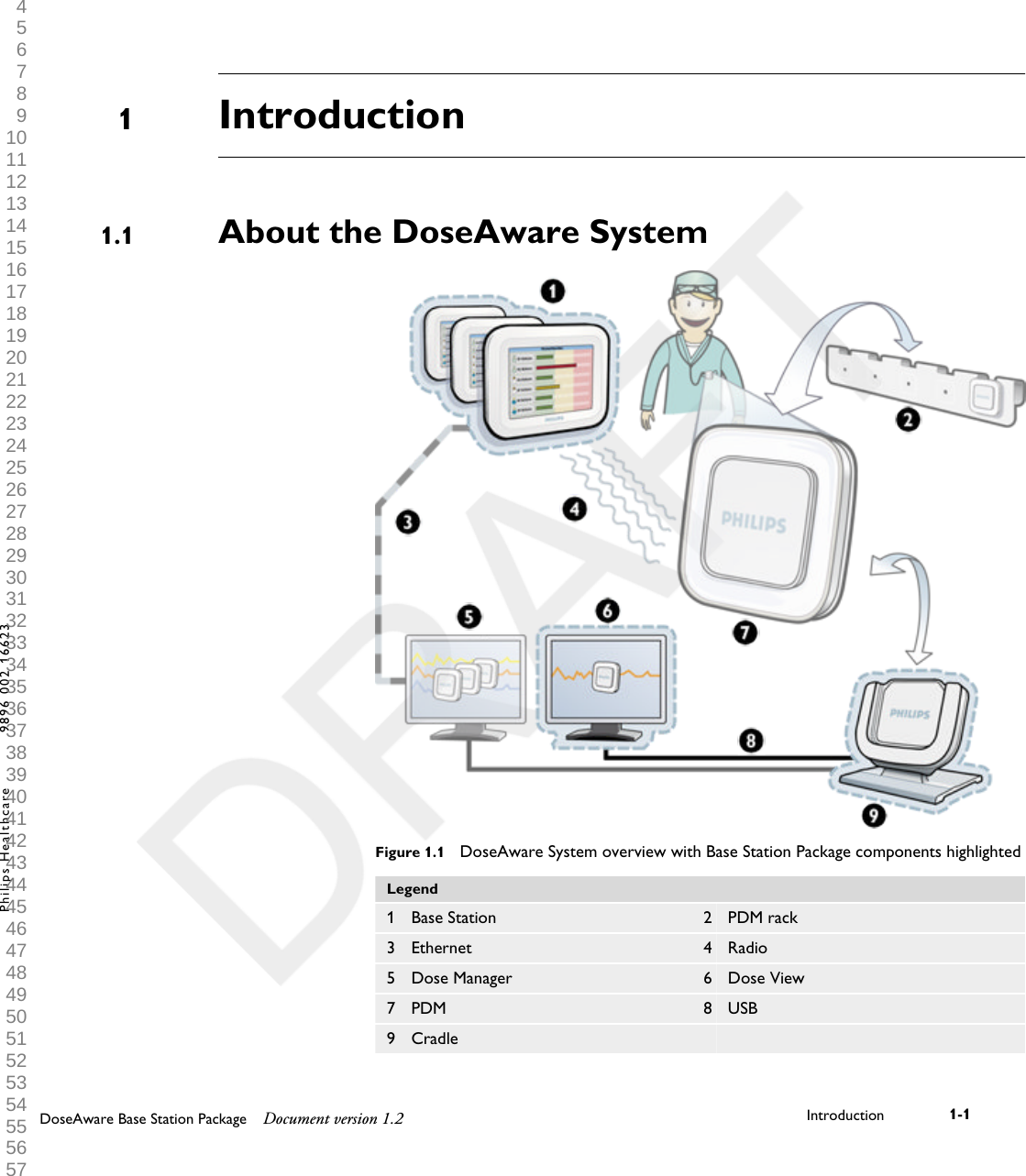
IntroductionAbout the DoseAware SystemFigure 1.1  DoseAware System overview with Base Station Package components highlightedLegend1 Base Station 2 PDM rack3 Ethernet 4 Radio5 Dose Manager 6 Dose View7 PDM 8 USB9 Cradle    11.1DoseAware Base Station Package Document version 1.2 Introduction 1-1Philips Healthcare 9896 002 16623 1 2 3 4 5 6 7 8 9 10 11 12 13 14 15 16 17 18 19 20 21 22 23 24 25 26 27 28 29 30 31 32 33 34 35 36 37 38 39 40 41 42 43 44 45 46 47 48 49 50 51 52 53 54 55 56 57 58 59 60
The DoseAware System can contain the following components:•Personal Dose Meter (PDM)• Base Stations (display unit)• DoseView (computer software)• Dose Manager (computer software)• Cradle (dock station used to connect PDMs and computer)• PDM Rack (PDM storage)The Base Station Package consists of:• Base Station, power adaptor, MCS bracket and wall mount kit• DoseView (CD)• User manual (CD)• Cradle, USB cableAbout these Instructions for UseThese Instructions for Use are intended to assist users in the safe andeffective operation of the product described.Before attempting to operate the product, you must read these Instructionsfor Use, noting and strictly observing all WARNINGS and CAUTIONnotices.Pay special attention to all the information given and procedures describedin the Safety section.A WARNING alerts you to a potential serious outcome, adverse event or safetyhazard. Failure to observe a warning may result in death or serious injury to theoperator or patient.A CAUTION alerts you to where special care is necessary for the safe and effectiveuse of the product. Failure to observe a caution may result in minor or moderatepersonal injury or damage to the product or other property, and possibly in a remoterisk of more serious injury, and/or cause environmental pollution.Notes highlight unusual points as an aid to an operator.1.2WARNINGCAUTIONNOTE1.2 About these Instructions for Use1-2 Introduction DoseAware Base Station Package Document version 1.2Philips Healthcare 9896 002 16623 0900a44780045a3a 1 2 3 4 5 6 7 8 9 10 11 12 13 14 15 16 17 18 19 20 21 22 23 24 25 26 27 28 29 30 31 32 33 34 35 36 37 38 39 40 41 42 43 44 45 46 47 48 49 50 51 52 53 54 55 56 57 58 59 60
These Instructions for Use describe the most extensive configuration of theproduct, with the maximum number of options and accessories. Not everyfunction described may be available on your product.These Instructions for Use describe the Base Station Package. In order to getan immediate hands-on experience of the Base StationPackage, we recommended that you interact with the Base Station,DoseView, and Cradle in parallel to reading these Instructions for Use.Intended use of the DoseAware System   This Philips product is intended to be installed, used and operated only inaccordance with the safety procedures and operating instructions given inthese Instructions for Use for the purpose for which it was designed. Thepurpose for which the product is intended is given below. However, nothingstated in these Instructions for Use reduces users’ responsibilities for soundclinical judgment and best clinical procedure.The DoseAware System is an electronic X-ray dose monitoring system. Theintended use is to improve the awareness of people who work with or are inthe presence of X-Ray imaging equipment, about their occupational dose(also known as staff dose).The awareness focuses on:•a graphical visualization of the real-time staff dose rate while workingwith X-Ray equipment in examination rooms during medical procedures;• instant access to historical staff dose for reporting and analysis purposes.The benefits of the DoseAware System are to:• make people aware of their received staff dose during clinical work withX-ray imaging equipment;• instantly visualize the result of reducing measures of occupationaldose by, for example, changing a person’s position in the examination room.1.3Intended use of the DoseAware System    1.3DoseAware Base Station Package Document version 1.2 Introduction 1-3Philips Healthcare 9896 002 16623 1 2 3 4 5 6 7 8 9 10 11 12 13 14 15 16 17 18 19 20 21 22 23 24 25 26 27 28 29 30 31 32 33 34 35 36 37 38 39 40 41 42 43 44 45 46 47 48 49 50 51 52 53 54 55 56 57 58 59 60
The DoseAware System may not be used as a legal staff dose recordingsolution. The DoseAware System is not intended for patient use.•Do not expose the PDMs in direct X-ray beam. They are designed to be exposed toscattered radiation only.•The Dose Manager, DoseView, Cradle and PDM Rack are not intended to be usedinside examination rooms.•The DoseAware product is not a replacement for a TLD (ThermoLuminescentDosimeter) or similar product.Installation, use and operation of this DoseAware System is subject to thelaw in the jurisdiction(s) in which the DoseAware System is being used.Operators must only install, use and operate the DoseAware System in suchways as do not conflict with applicable laws, or regulations, which have theforce of law.Uses of the Allura CV20 for purposes other than those intended and Uses ofthe DoseAware System for purposes other than those intended and expresslystated by the manufacturer, as well as incorrect use or operation, may relievethe manufacturer (or his agent) from all or some responsibility for resultantnon-compliance, damage or injury.CompatibilityThe product described in this manual should not be used in combinationwith other products or components unless such other products orcomponents are expressly recognized as compatible by Philips Healthcare.(A list of such products and components is available from the manufacturer.)NOTES1.41.4 Compatibility1-4 Introduction DoseAware Base Station Package Document version 1.2Philips Healthcare 9896 002 16623 0900a44780045a3a 1 2 3 4 5 6 7 8 9 10 11 12 13 14 15 16 17 18 19 20 21 22 23 24 25 26 27 28 29 30 31 32 33 34 35 36 37 38 39 40 41 42 43 44 45 46 47 48 49 50 51 52 53 54 55 56 57 58 59 60
Changes and/or additions to the product should only be carried out byPhilips Medical Systems or by third parties expressly authorized by PhilipsMedical Systems to do so. Such changes and/or additions must comply withall applicable laws and regulations that have the force of law within thejurisdiction(s) concerned, and with best engineering practice.Changes and/or additions to the product that are carried out by persons without theappropriate training and/or using unapproved spare parts may lead to the PhilipsMedical Systems warranty being voided. As with all complex technical products,maintenance by persons not appropriately qualified and/or using unapproved spareparts carries serious risks of damage to the product and of personal injury.ComplianceThe Philips DoseAware System complies with relevant international andnational standards and laws. Information on compliance will be supplied onrequest by your local Philips Medical Systems representative, or by themanufacturer.TrainingUsers of this product must have received adequate training on its safe andeffective use before attempting to operate the product described in theseInstructions for Use. Training requirements for this type of device will varyfrom country to country. Users must make sure they receive adequatetraining in accordance with local laws or regulations.If you require further information about training in the use of this product,please contact your local Philips Medical Systems representative.Alternatively, contact the manufacturer.WARNING1.51.6Compliance 1.5DoseAware Base Station Package Document version 1.2 Introduction 1-5Philips Healthcare 9896 002 16623 1 2 3 4 5 6 7 8 9 10 11 12 13 14 15 16 17 18 19 20 21 22 23 24 25 26 27 28 29 30 31 32 33 34 35 36 37 38 39 40 41 42 43 44 45 46 47 48 49 50 51 52 53 54 55 56 57 58 59 60
System requirementsDoseView has the following system requirements:•Operating systems: Windows Vista or Windows XP• .NET 3.0• At least one USB port available• At least 1 GB of system memory available• At least 40 GB hard drive with at least 15 GB of memory available• Recommended screen resolution at least 1024 x 768Other user manuals• Dose Manager is described in a separate user manual, which can be foundon the CD delivered in the box together with the Dose Manager package.• The PDMs are described in the PDM Quick Guide, a leaflet that isdelivered in the box together with the PDM.1.71.81.7 System requirements1-6 Introduction DoseAware Base Station Package Document version 1.2Philips Healthcare 9896 002 16623 0900a44780045a3a 1 2 3 4 5 6 7 8 9 10 11 12 13 14 15 16 17 18 19 20 21 22 23 24 25 26 27 28 29 30 31 32 33 34 35 36 37 38 39 40 41 42 43 44 45 46 47 48 49 50 51 52 53 54 55 56 57 58 59 60
SafetyImportant safety directionsIf the DoseAware system is not functioning correct or damage is visible,inform a Philips service engineer, which will take appropriate actions inorder not to harm personnel or patients.Handle the hardware and software with care. Make sure that the hardwareand software is used and stored in a secured environment to preventunauthorized access.Maintenance & faultsDo not use the product for any application until you are sure that the user routine-checks have been satisfactorily completed, and that the periodic maintenance of theproduct is up to date. If any part of the product is known (or suspected) to bedefective or wrongly adjusted, DO NOT USE the product until a repair has beenmade. Operation of the product with defective or wrongly adjusted components couldexpose the user or the patient to radiation or other safety hazards. This could lead tofatal or other serious personal injury, or to clinical misdiagnosis/clinical mistreatment.Safety awarenessDo not use the product for any application until you have read, understood and knowall the safety information, safety procedures and emergency procedures contained inthis Safety section. Operation of the product without a proper awareness of how touse it safely could lead to fatal or other serious personal injury. It could also lead toclinical misdiagnosis/clinical mistreatment.22.1WARNINGWARNINGDoseAware Base Station Package Document version 1.2 Safety 2-1Philips Healthcare 9896 002 16623 1 2 3 4 5 6 7 8 9 10 11 12 13 14 15 16 17 18 19 20 21 22 23 24 25 26 27 28 29 30 31 32 33 34 35 36 37 38 39 40 41 42 43 44 45 46 47 48 49 50 51 52 53 54 55 56 57 58 59 60
Adequate training•Do not use the product for any application until you have received adequate andproper training in its safe and effective operation. If you are unsure of your abilityto operate this product safely and effectively, DO NOT USE IT. Operation of thisproduct without proper and adequate training could lead to fatal or other seriouspersonal injury. It could also lead to clinical misdiagnosis/clinical mistreatment.•Do not operate the product with patients unless you have an adequateunderstanding of its capabilities and functions. Using this product without such anunderstanding may compromise its effectiveness and/or reduce the safety of thepatient, you and others.Safety devicesNever attempt to remove, modify, override or frustrate any safety device on theproduct. Interfering with safety devices could lead to fatal or other serious personalinjury.Intended use and compatibilityDo not use the product for any purpose other than those for which it is intended. Donot use the product with products other than that which Philips Medical Systemsrecognizes as compatible. Operation of the product for unintended purposes, or withincompatible products, could lead to fatal or other serious injury. It could also lead toclinical misdiagnosis/clinical mistreatment.Electrical safety Do not remove covers or cables from this product. Dangerous electrical voltages arepresent within this product. Removing covers or cables could lead to serious or fatalpersonal injury.WARNINGSWARNINGWARNING2.2WARNING2.2 Electrical safety2-2 Safety DoseAware Base Station Package Document version 1.2Philips Healthcare 9896 002 16623 0900a44780045a3a 1 2 3 4 5 6 7 8 9 10 11 12 13 14 15 16 17 18 19 20 21 22 23 24 25 26 27 28 29 30 31 32 33 34 35 36 37 38 39 40 41 42 43 44 45 46 47 48 49 50 51 52 53 54 55 56 57 58 59 60
Covers or cables should only be removed by qualified and authorized servicepersonnel. Use this product in rooms or areas that comply with allapplicable laws (or regulations having the force of law) concerning electricalsafety for this type of product.Electrically isolate this product from the mains electrical supply beforecleaning, disinfecting or sterilizing it.Mechanical safetyDo not remove covers from this product. Removing covers could lead to serious orfatal personal injury.Covers should only be removed by qualified and authorized servicepersonnel. In this context, qualified means those legally permitted to workon this type of medical electrical product in the jurisdiction(s) in which theproduct is being used, and authorized means those authorized by the user ofthe product.Explosion safety•Do not use this product in the presence of explosive gases or vapors, such ascertain anesthetic gases.•Do not use flammable or potentially explosive disinfecting sprays.•Use of this product in an environment for which it was not designed can lead tofire or explosion.Fire safetyUse of electrical product in an environment for which it was notdesigned can lead to fire or explosion.2.3WARNING2.4WARNINGS2.5Mechanical safety 2.3DoseAware Base Station Package Document version 1.2 Safety 2-3Philips Healthcare 9896 002 16623 1 2 3 4 5 6 7 8 9 10 11 12 13 14 15 16 17 18 19 20 21 22 23 24 25 26 27 28 29 30 31 32 33 34 35 36 37 38 39 40 41 42 43 44 45 46 47 48 49 50 51 52 53 54 55 56 57 58 59 60
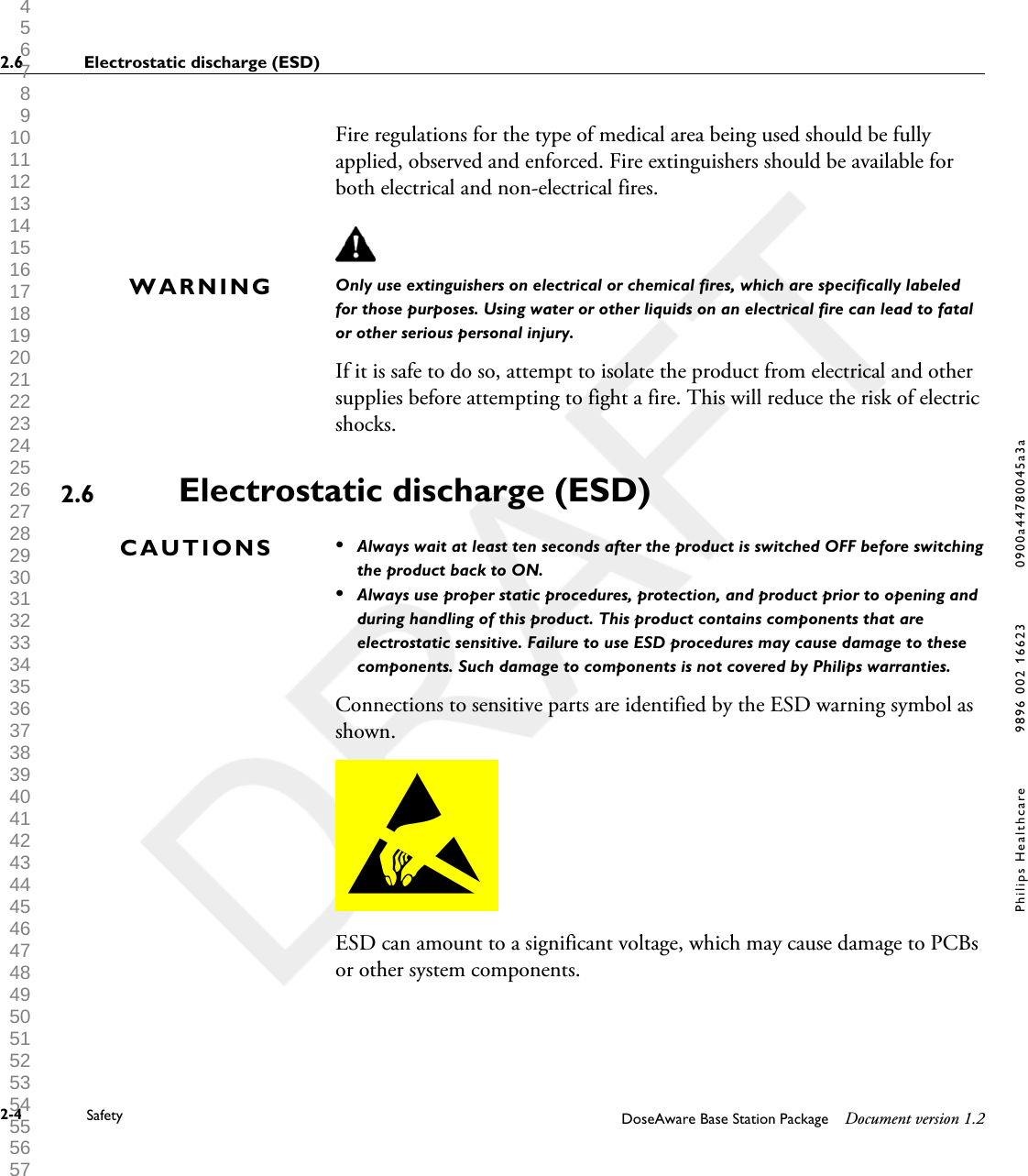
Fire regulations for the type of medical area being used should be fullyapplied, observed and enforced. Fire extinguishers should be available forboth electrical and non-electrical fires.Only use extinguishers on electrical or chemical fires, which are specifically labeledfor those purposes. Using water or other liquids on an electrical fire can lead to fatalor other serious personal injury.If it is safe to do so, attempt to isolate the product from electrical and othersupplies before attempting to fight a fire. This will reduce the risk of electricshocks.Electrostatic discharge (ESD)•Always wait at least ten seconds after the product is switched OFF before switchingthe product back to ON.•Always use proper static procedures, protection, and product prior to opening andduring handling of this product. This product contains components that areelectrostatic sensitive. Failure to use ESD procedures may cause damage to thesecomponents. Such damage to components is not covered by Philips warranties.Connections to sensitive parts are identified by the ESD warning symbol asshown.ESD can amount to a significant voltage, which may cause damage to PCBsor other system components.WARNING2.6CAUTIONS2.6 Electrostatic discharge (ESD)2-4 Safety DoseAware Base Station Package Document version 1.2Philips Healthcare 9896 002 16623 0900a44780045a3a 1 2 3 4 5 6 7 8 9 10 11 12 13 14 15 16 17 18 19 20 21 22 23 24 25 26 27 28 29 30 31 32 33 34 35 36 37 38 39 40 41 42 43 44 45 46 47 48 49 50 51 52 53 54 55 56 57 58 59 60
ESD damage is cumulative and may not be apparent at first, as indicated bya hard failure, but can cause degraded performance. Therefore, always useproper ESD handling procedures. ESD can result from low humidityconditions, use of electrical equipment on carpeting, linens, and clothing.Electromagnetic Compatibility (EMC)This Philips product complies with relevant international and national lawsand standards on EMC (electromagnetic compatibility) for this type ofproduct when used as intended. Such laws and standards define both thepermissible electromagnetic emission levels from equipment and its requiredimmunity to electromagnetic interference from external sources.Other electronic products exceeding the limits defined in such EMCstandards could, under unusual circumstances, affect the operation of theproduct.•Medical electrical products need special precautions regarding EMC, andneed to be installed and put into service according to EMC informationprovided in the accompanying documents.• The use of accessories and cables other than those specified may result inincreased emission or decreased immunity levels.• The product should not be used adjacent to or stacked with otherproducts and that if adjacent or stacked use is necessary, it should beobserved to verify normal operation.This equipment is intended for use in a hospital environment. Operation inother than hospital environments may compromise electromagneticcompatibility.The Base Station and PDM comply with part 15 of the FCC Rules.Operation is subject to the following conditions: (1) This device may notcause harmful interference, and (2) this device must accept any interferencereceived, including interference that may cause undesired operation.Changes or modifications to the equipment not expressly approved by theparty responsible for compliance could void the user’s authority to operatethe equipment.2.7Electromagnetic Compatibility (EMC) 2.7DoseAware Base Station Package Document version 1.2 Safety 2-5Philips Healthcare 9896 002 16623 1 2 3 4 5 6 7 8 9 10 11 12 13 14 15 16 17 18 19 20 21 22 23 24 25 26 27 28 29 30 31 32 33 34 35 36 37 38 39 40 41 42 43 44 45 46 47 48 49 50 51 52 53 54 55 56 57 58 59 60
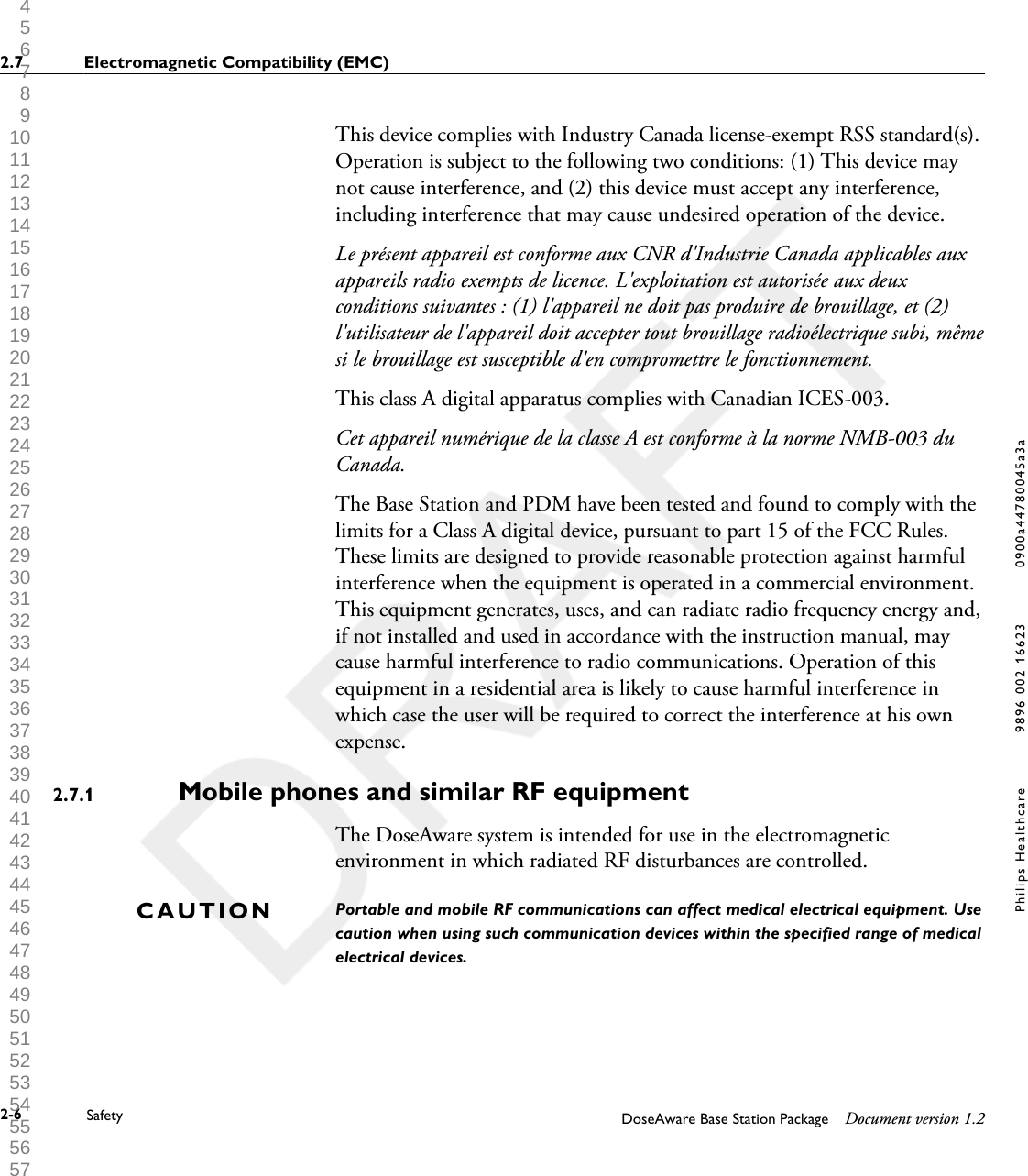
This device complies with Industry Canada license-exempt RSS standard(s).Operation is subject to the following two conditions: (1) This device maynot cause interference, and (2) this device must accept any interference,including interference that may cause undesired operation of the device.Le présent appareil est conforme aux CNR d'Industrie Canada applicables auxappareils radio exempts de licence. L'exploitation est autorisée aux deuxconditions suivantes : (1) l'appareil ne doit pas produire de brouillage, et (2)l'utilisateur de l'appareil doit accepter tout brouillage radioélectrique subi, mêmesi le brouillage est susceptible d'en compromettre le fonctionnement.This class A digital apparatus complies with Canadian ICES-003.Cet appareil numérique de la classe A est conforme à la norme NMB-003 duCanada.The Base Station and PDM have been tested and found to comply with thelimits for a Class A digital device, pursuant to part 15 of the FCC Rules.These limits are designed to provide reasonable protection against harmfulinterference when the equipment is operated in a commercial environment.This equipment generates, uses, and can radiate radio frequency energy and,if not installed and used in accordance with the instruction manual, maycause harmful interference to radio communications. Operation of thisequipment in a residential area is likely to cause harmful interference inwhich case the user will be required to correct the interference at his ownexpense.Mobile phones and similar RF equipment   The DoseAware system is intended for use in the electromagneticenvironment in which radiated RF disturbances are controlled.Portable and mobile RF communications can affect medical electrical equipment. Usecaution when using such communication devices within the specified range of medicalelectrical devices.2.7.1CAUTION2.7 Electromagnetic Compatibility (EMC)2-6 Safety DoseAware Base Station Package Document version 1.2Philips Healthcare 9896 002 16623 0900a44780045a3a 1 2 3 4 5 6 7 8 9 10 11 12 13 14 15 16 17 18 19 20 21 22 23 24 25 26 27 28 29 30 31 32 33 34 35 36 37 38 39 40 41 42 43 44 45 46 47 48 49 50 51 52 53 54 55 56 57 58 59 60
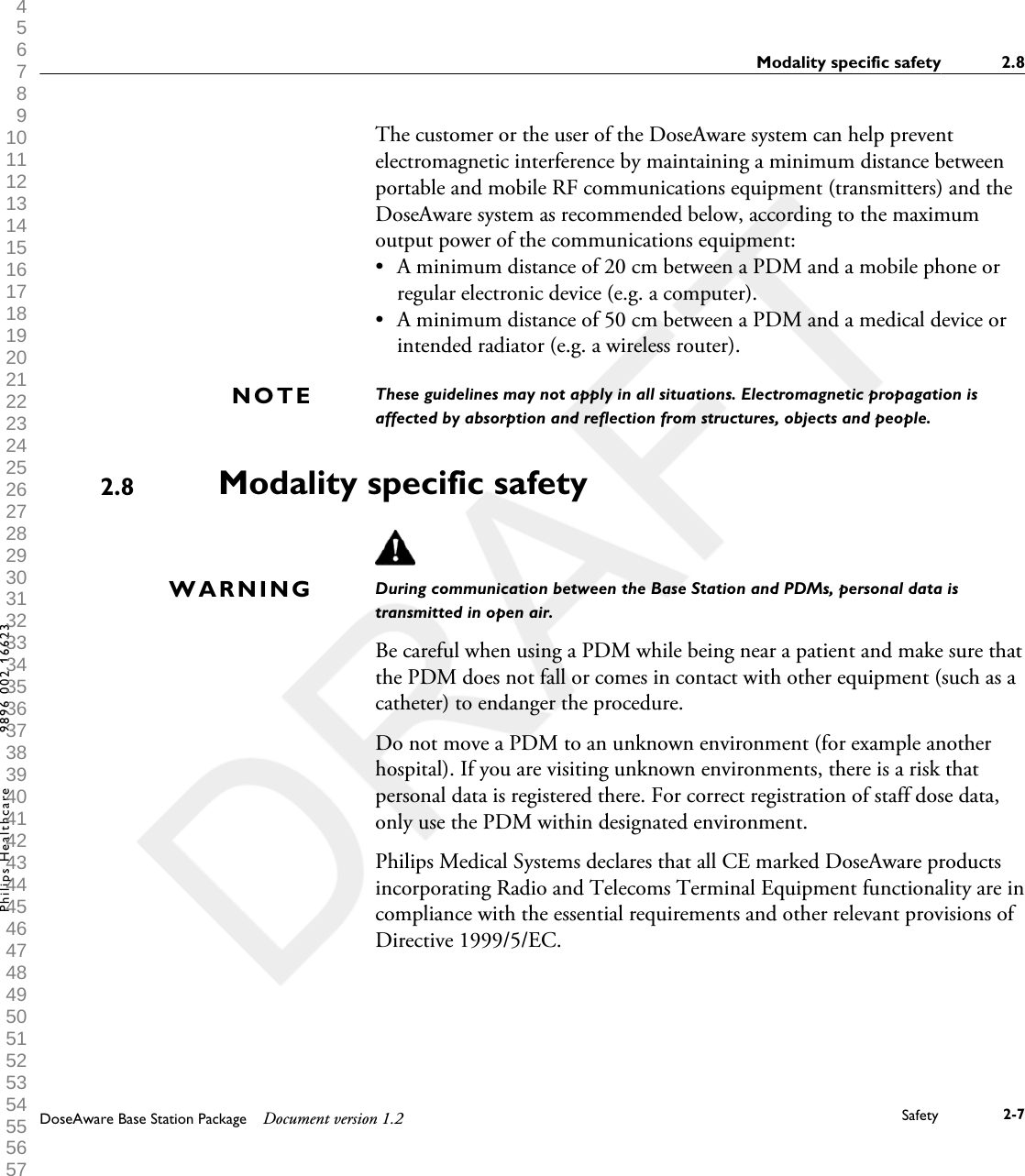
The customer or the user of the DoseAware system can help preventelectromagnetic interference by maintaining a minimum distance betweenportable and mobile RF communications equipment (transmitters) and theDoseAware system as recommended below, according to the maximumoutput power of the communications equipment:•A minimum distance of 20 cm between a PDM and a mobile phone orregular electronic device (e.g. a computer).• A minimum distance of 50 cm between a PDM and a medical device orintended radiator (e.g. a wireless router).These guidelines may not apply in all situations. Electromagnetic propagation isaffected by absorption and reflection from structures, objects and people.Modality specific safetyDuring communication between the Base Station and PDMs, personal data istransmitted in open air.Be careful when using a PDM while being near a patient and make sure thatthe PDM does not fall or comes in contact with other equipment (such as acatheter) to endanger the procedure.Do not move a PDM to an unknown environment (for example anotherhospital). If you are visiting unknown environments, there is a risk thatpersonal data is registered there. For correct registration of staff dose data,only use the PDM within designated environment.Philips Medical Systems declares that all CE marked DoseAware productsincorporating Radio and Telecoms Terminal Equipment functionality are incompliance with the essential requirements and other relevant provisions ofDirective 1999/5/EC.NOTE2.8WARNINGModality specific safety 2.8DoseAware Base Station Package Document version 1.2 Safety 2-7Philips Healthcare 9896 002 16623 1 2 3 4 5 6 7 8 9 10 11 12 13 14 15 16 17 18 19 20 21 22 23 24 25 26 27 28 29 30 31 32 33 34 35 36 37 38 39 40 41 42 43 44 45 46 47 48 49 50 51 52 53 54 55 56 57 58 59 60
Network safety, security and privacyCustomer Role in the Product Security PartnershipWe recognize that the security of Philips Medical Systems products is animportant part of your facility's security-in depth strategy. However, thesebenefits can only be realized if you implement a comprehensive, multi-layered strategy (including policies, processes, and technologies) to protectinformation and systems from external and internal threats.Following industry-standard practice, your strategy should address physicalsecurity, operational security, procedural security, risk management, securitypolicies, and contingency planning. The practical implementation oftechnical security elements varies by site and may employ a number oftechnologies, including firewalls, virus-scanning software, authenticationtechnologies, etc.As with any computer-based system, protection must be provided such thatfirewalls and/or other security devices are in place between the medicalsystem and any externally accessible systems.The USA Veterans Administration has developed a widely used MedicalDevice Isolation Architecture for this purpose. Such perimeter and networkdefenses are essential elements in a comprehensive medical device securitystrategy.For our product security policy statement and additional information, seethe Philips Medical Systems product security website at:2.92.9 Network safety, security and privacy2-8 Safety DoseAware Base Station Package Document version 1.2Philips Healthcare 9896 002 16623 0900a44780045a3a 1 2 3 4 5 6 7 8 9 10 11 12 13 14 15 16 17 18 19 20 21 22 23 24 25 26 27 28 29 30 31 32 33 34 35 36 37 38 39 40 41 42 43 44 45 46 47 48 49 50 51 52 53 54 55 56 57 58 59 60
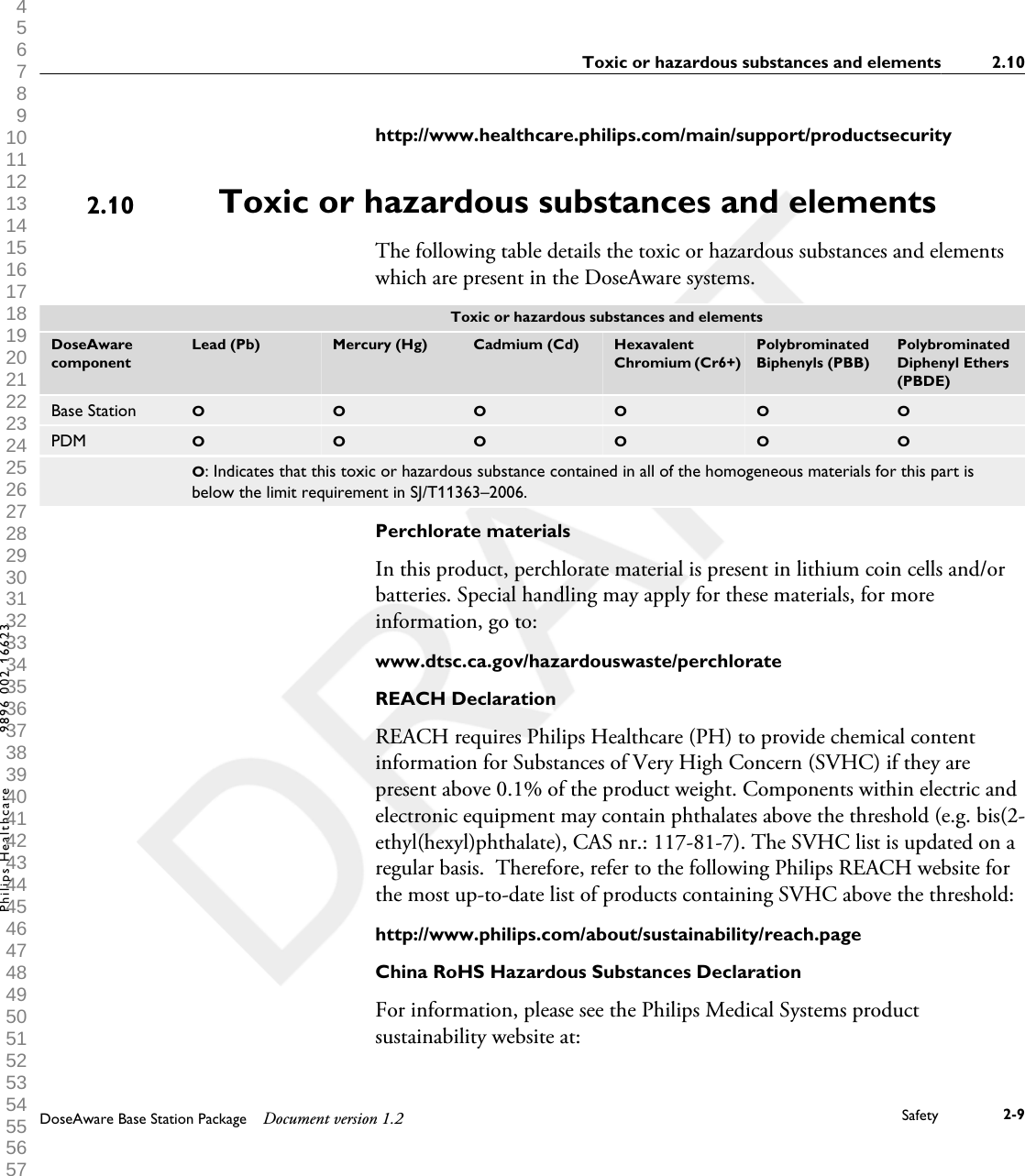
http://www.healthcare.philips.com/main/support/productsecurityToxic or hazardous substances and elementsThe following table details the toxic or hazardous substances and elementswhich are present in the DoseAware systems.  Toxic or hazardous substances and elementsDoseAwarecomponentLead (Pb) Mercury (Hg) Cadmium (Cd) HexavalentChromium (Cr6+)PolybrominatedBiphenyls (PBB)PolybrominatedDiphenyl Ethers(PBDE)Base Station O O O O O OPDM O O O O O O O: Indicates that this toxic or hazardous substance contained in all of the homogeneous materials for this part isbelow the limit requirement in SJ/T11363–2006.Perchlorate materialsIn this product, perchlorate material is present in lithium coin cells and/orbatteries. Special handling may apply for these materials, for moreinformation, go to:www.dtsc.ca.gov/hazardouswaste/perchlorateREACH DeclarationREACH requires Philips Healthcare (PH) to provide chemical contentinformation for Substances of Very High Concern (SVHC) if they arepresent above 0.1% of the product weight. Components within electric andelectronic equipment may contain phthalates above the threshold (e.g. bis(2-ethyl(hexyl)phthalate), CAS nr.: 117-81-7). The SVHC list is updated on aregular basis.  Therefore, refer to the following Philips REACH website forthe most up-to-date list of products containing SVHC above the threshold:http://www.philips.com/about/sustainability/reach.pageChina RoHS Hazardous Substances DeclarationFor information, please see the Philips Medical Systems productsustainability website at:2.10Toxic or hazardous substances and elements 2.10DoseAware Base Station Package Document version 1.2 Safety 2-9Philips Healthcare 9896 002 16623 1 2 3 4 5 6 7 8 9 10 11 12 13 14 15 16 17 18 19 20 21 22 23 24 25 26 27 28 29 30 31 32 33 34 35 36 37 38 39 40 41 42 43 44 45 46 47 48 49 50 51 52 53 54 55 56 57 58 59 60
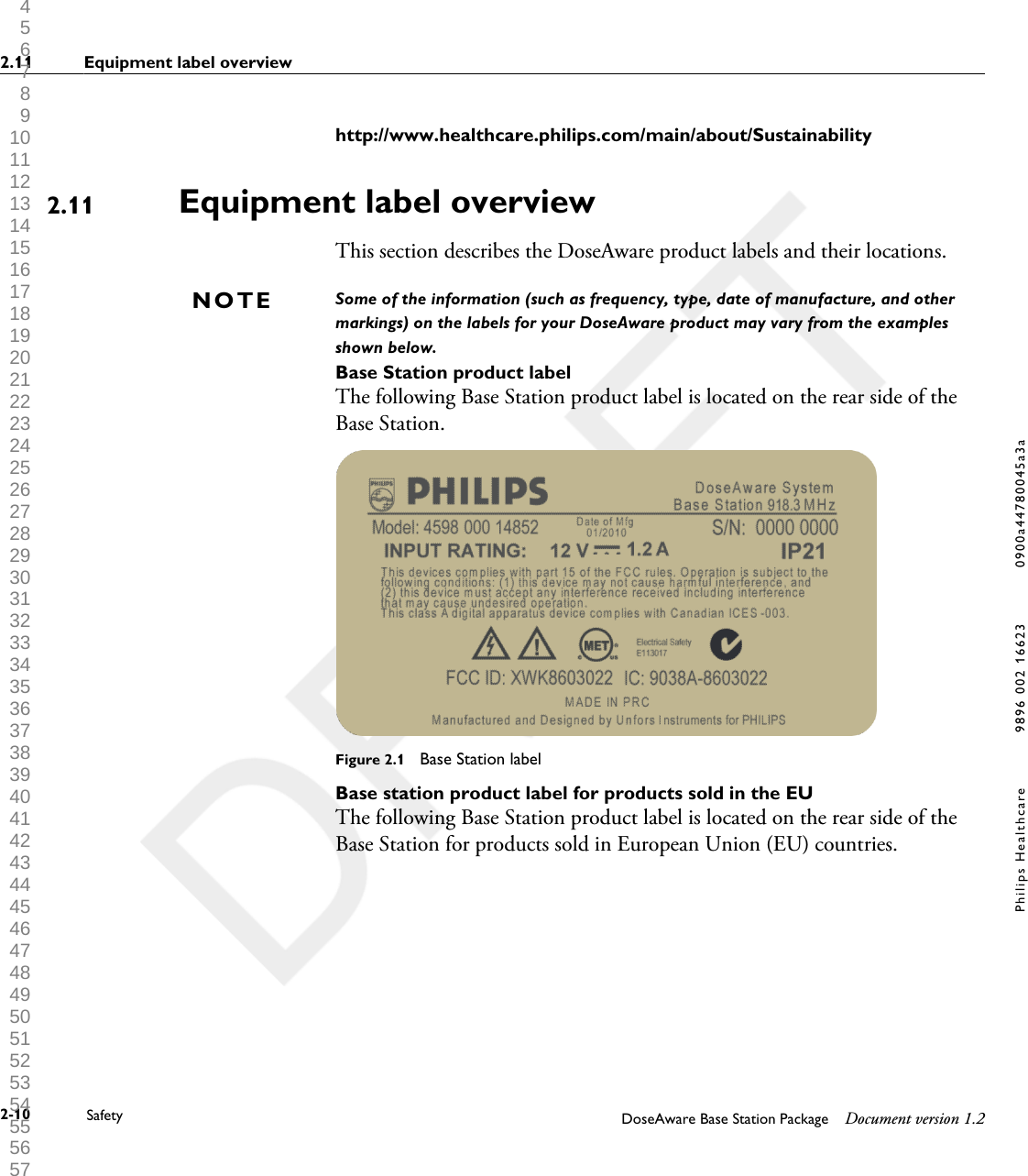
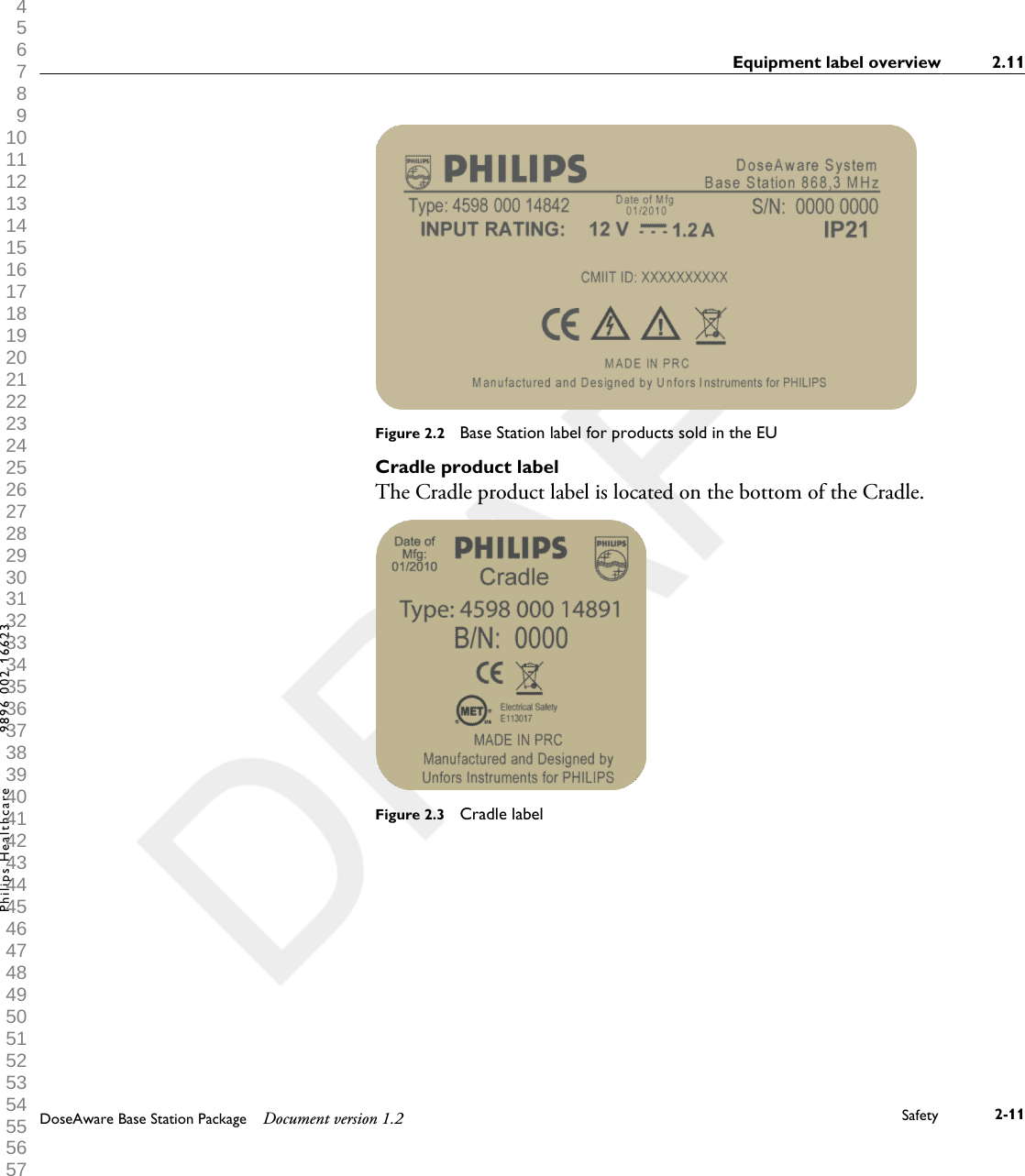
http://www.healthcare.philips.com/main/about/SustainabilityEquipment label overviewThis section describes the DoseAware product labels and their locations.Some of the information (such as frequency, type, date of manufacture, and othermarkings) on the labels for your DoseAware product may vary from the examplesshown below.Base Station product labelThe following Base Station product label is located on the rear side of theBase Station.Figure 2.1  Base Station labelBase station product label for products sold in the EUThe following Base Station product label is located on the rear side of theBase Station for products sold in European Union (EU) countries.2.11NOTE2.11 Equipment label overview2-10 Safety DoseAware Base Station Package Document version 1.2Philips Healthcare 9896 002 16623 0900a44780045a3a 1 2 3 4 5 6 7 8 9 10 11 12 13 14 15 16 17 18 19 20 21 22 23 24 25 26 27 28 29 30 31 32 33 34 35 36 37 38 39 40 41 42 43 44 45 46 47 48 49 50 51 52 53 54 55 56 57 58 59 60
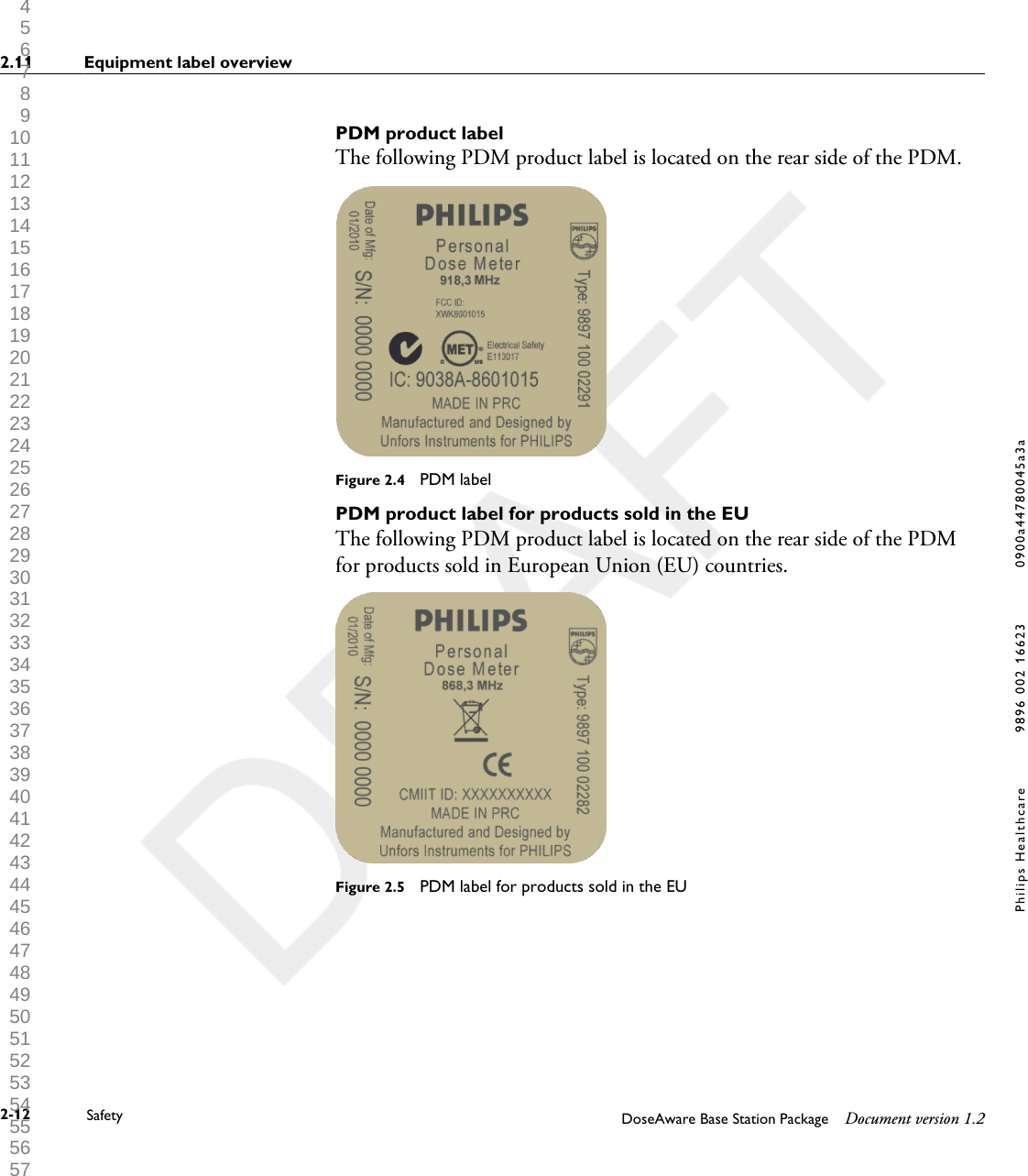
Figure 2.2  Base Station label for products sold in the EUCradle product labelThe Cradle product label is located on the bottom of the Cradle.Figure 2.3  Cradle labelEquipment label overview 2.11DoseAware Base Station Package Document version 1.2 Safety 2-11Philips Healthcare 9896 002 16623 1 2 3 4 5 6 7 8 9 10 11 12 13 14 15 16 17 18 19 20 21 22 23 24 25 26 27 28 29 30 31 32 33 34 35 36 37 38 39 40 41 42 43 44 45 46 47 48 49 50 51 52 53 54 55 56 57 58 59 60
PDM product labelThe following PDM product label is located on the rear side of the PDM.Figure 2.4  PDM labelPDM product label for products sold in the EUThe following PDM product label is located on the rear side of the PDMfor products sold in European Union (EU) countries.Figure 2.5  PDM label for products sold in the EU2.11 Equipment label overview2-12 Safety DoseAware Base Station Package Document version 1.2Philips Healthcare 9896 002 16623 0900a44780045a3a 1 2 3 4 5 6 7 8 9 10 11 12 13 14 15 16 17 18 19 20 21 22 23 24 25 26 27 28 29 30 31 32 33 34 35 36 37 38 39 40 41 42 43 44 45 46 47 48 49 50 51 52 53 54 55 56 57 58 59 60
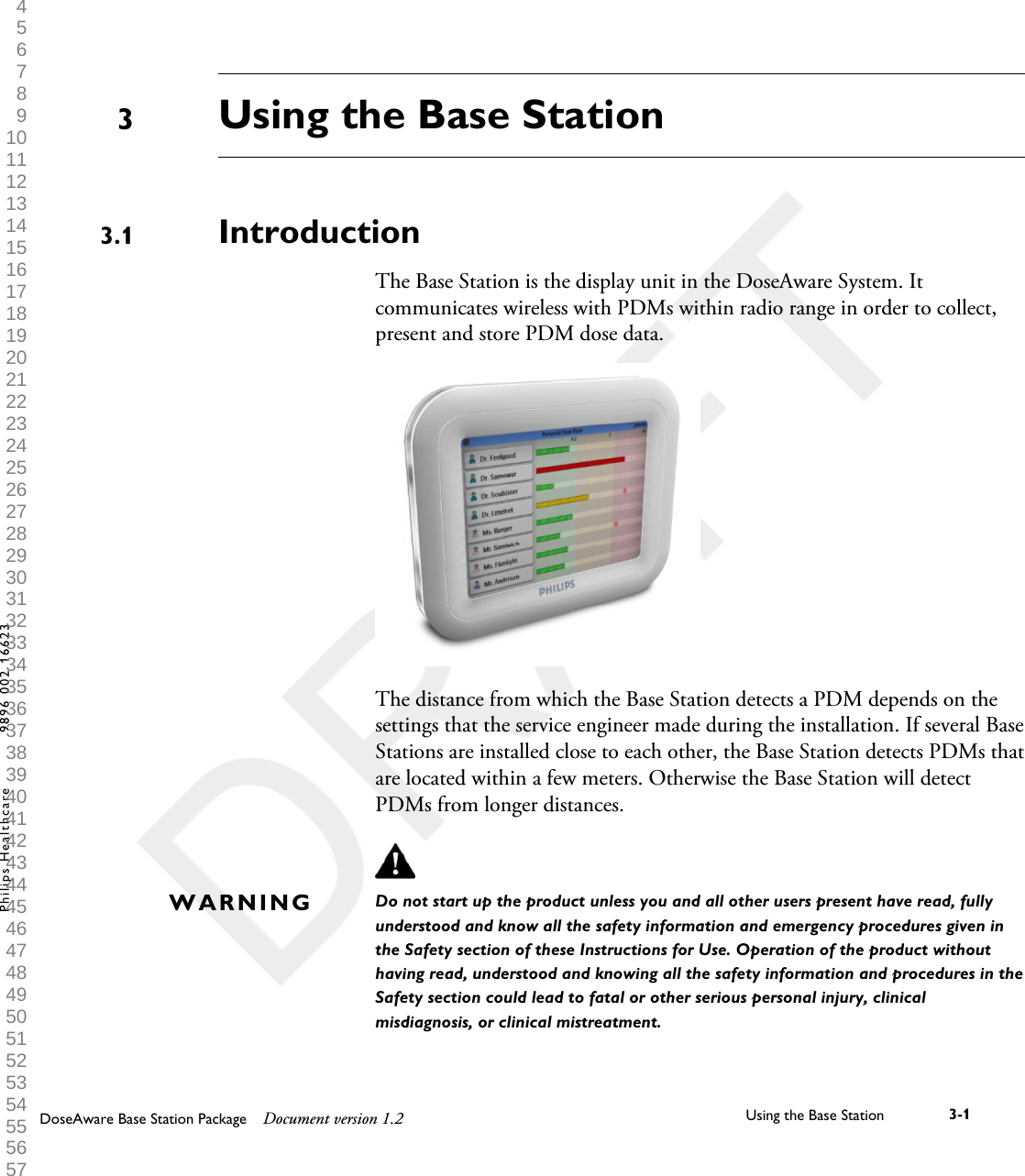
Using the Base StationIntroductionThe Base Station is the display unit in the DoseAware System. Itcommunicates wireless with PDMs within radio range in order to collect,present and store PDM dose data.The distance from which the Base Station detects a PDM depends on thesettings that the service engineer made during the installation. If several BaseStations are installed close to each other, the Base Station detects PDMs thatare located within a few meters. Otherwise the Base Station will detectPDMs from longer distances.Do not start up the product unless you and all other users present have read, fullyunderstood and know all the safety information and emergency procedures given inthe Safety section of these Instructions for Use. Operation of the product withouthaving read, understood and knowing all the safety information and procedures in theSafety section could lead to fatal or other serious personal injury, clinicalmisdiagnosis, or clinical mistreatment.33.1WARNINGDoseAware Base Station Package Document version 1.2 Using the Base Station 3-1Philips Healthcare 9896 002 16623 1 2 3 4 5 6 7 8 9 10 11 12 13 14 15 16 17 18 19 20 21 22 23 24 25 26 27 28 29 30 31 32 33 34 35 36 37 38 39 40 41 42 43 44 45 46 47 48 49 50 51 52 53 54 55 56 57 58 59 60
Getting startedStarting the wall mounted Base Station1Connect the output connector of the power adaptor to the back of the BaseStation, if needed.2Connect the input connector to an AC electrical outlet socket. This will switch on the Base Station. First a Philips start up screen will be displayed for a few seconds and after 30seconds the system is ready to use. The Online View will display amaximum of 8 PDMs at a time. Only PDMs that are in range of the BaseStation will be displayed.The Base Station screen is a touch screen. Operate the Base Station bytapping buttons and graphs on the screen.PDMs are shown on a first come first serve principle (see “reserved slots menu” insection “Admin Settings menu” on page 3-12). PDMs that are not shown in theOnline View still measure and store dose data.•Do not cover the Base Station to prevent excessive temperatures.•Be careful when moving other equipment in the vicinity of the Base Station.3.23.2.1NOTEWARNINGS3.2 Getting started3-2 Using the Base Station DoseAware Base Station Package Document version 1.2Philips Healthcare 9896 002 16623 0900a44780045a3a 1 2 3 4 5 6 7 8 9 10 11 12 13 14 15 16 17 18 19 20 21 22 23 24 25 26 27 28 29 30 31 32 33 34 35 36 37 38 39 40 41 42 43 44 45 46 47 48 49 50 51 52 53 54 55 56 57 58 59 60
Starting the MCS mounted Base Station1Switch on the X-ray system and the Base Station will automatically switch on. First a Philips start up screen will be displayed for a few seconds and after 30seconds the system is ready to use.The Online View will display a maximum of 8 PDMs at a time. OnlyPDMs that are in range of the Base Station will be displayed.The Base Station screen is a touch screen. Operate the Base Station bytapping buttons and graphs on the screen.PDMs are shown on a first come first serve principle (see “reserved slots menu” insection “Admin Settings menu” on page 3-12. PDMs that are not shown in the OnlineView still measure and store dose data.2Position the Base Station similar to the other monitors in the MCS as muchas possible.•Do not cover the Base Station to prevent excessive temperatures.•Be careful when moving the MCS or other equipment because the BaseStation may stick out and can be hit.Base Station featuresThe Base Station offers:•An Online View (see section “Online view– view current dose rates                           ” on page 3-4 where you can:• view current Personal Dose Rate information for several PDMs at atime.• access the Walk-Up View by tapping the |Displayed Name| tagbutton of that PDM in the Online View.3.2.2NOTEWARNINGS3.3Base Station features 3.3DoseAware Base Station Package Document version 1.2 Using the Base Station 3-3Philips Healthcare 9896 002 16623 1 2 3 4 5 6 7 8 9 10 11 12 13 14 15 16 17 18 19 20 21 22 23 24 25 26 27 28 29 30 31 32 33 34 35 36 37 38 39 40 41 42 43 44 45 46 47 48 49 50 51 52 53 54 55 56 57 58 59 60
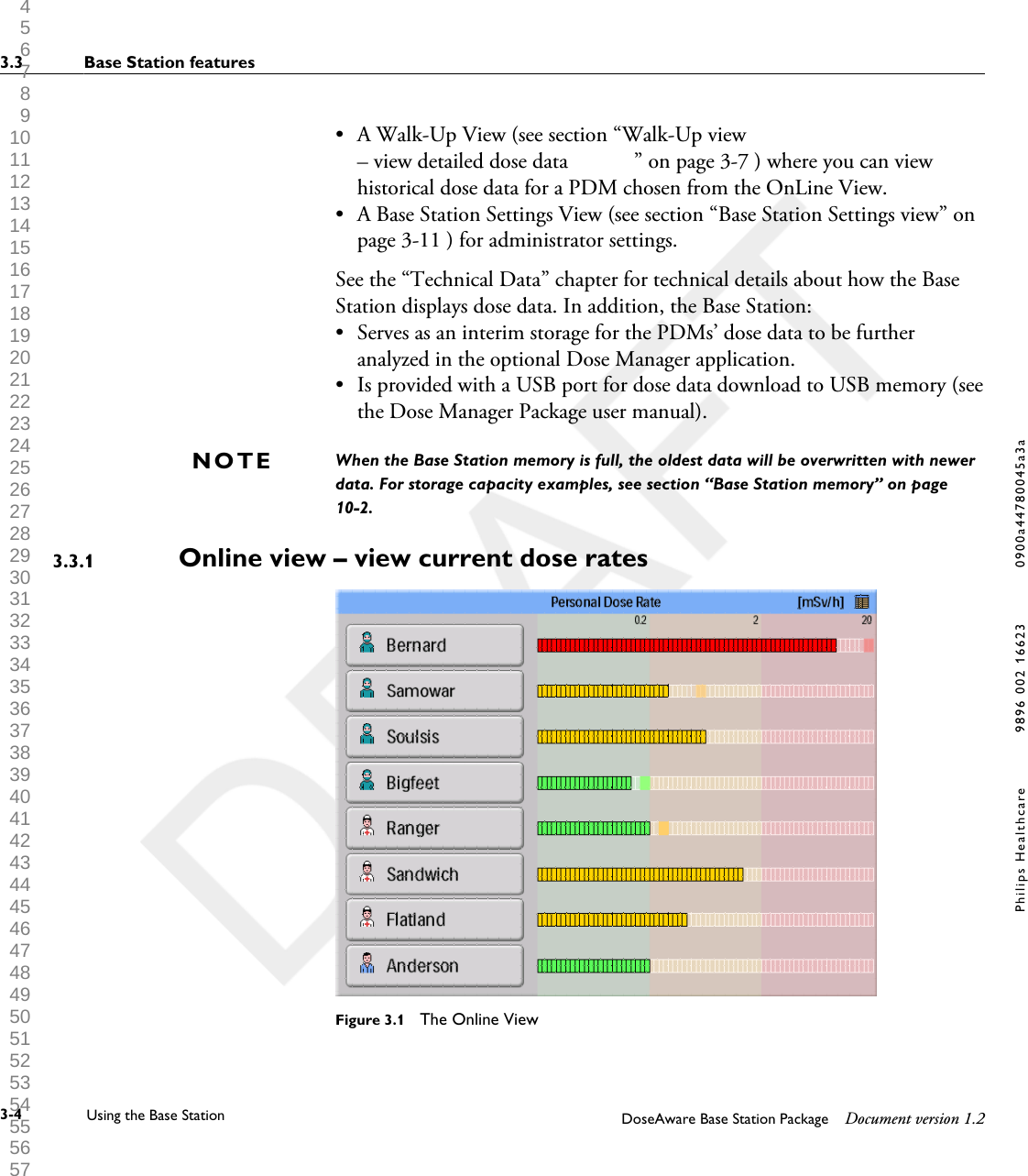
• A Walk-Up View (see section “Walk-Up view– view detailed dose data            ” on page 3-7 ) where you can viewhistorical dose data for a PDM chosen from the OnLine View.•A Base Station Settings View (see section “Base Station Settings view” onpage 3-11 ) for administrator settings.See the “Technical Data” chapter for technical details about how the BaseStation displays dose data. In addition, the Base Station:• Serves as an interim storage for the PDMs’ dose data to be furtheranalyzed in the optional Dose Manager application.• Is provided with a USB port for dose data download to USB memory (seethe Dose Manager Package user manual).When the Base Station memory is full, the oldest data will be overwritten with newerdata. For storage capacity examples, see section “Base Station memory” on page10-2.Online view – view current dose rates                           Figure 3.1  The Online ViewNOTE3.3.13.3 Base Station features3-4 Using the Base Station DoseAware Base Station Package Document version 1.2Philips Healthcare 9896 002 16623 0900a44780045a3a 1 2 3 4 5 6 7 8 9 10 11 12 13 14 15 16 17 18 19 20 21 22 23 24 25 26 27 28 29 30 31 32 33 34 35 36 37 38 39 40 41 42 43 44 45 46 47 48 49 50 51 52 53 54 55 56 57 58 59 60
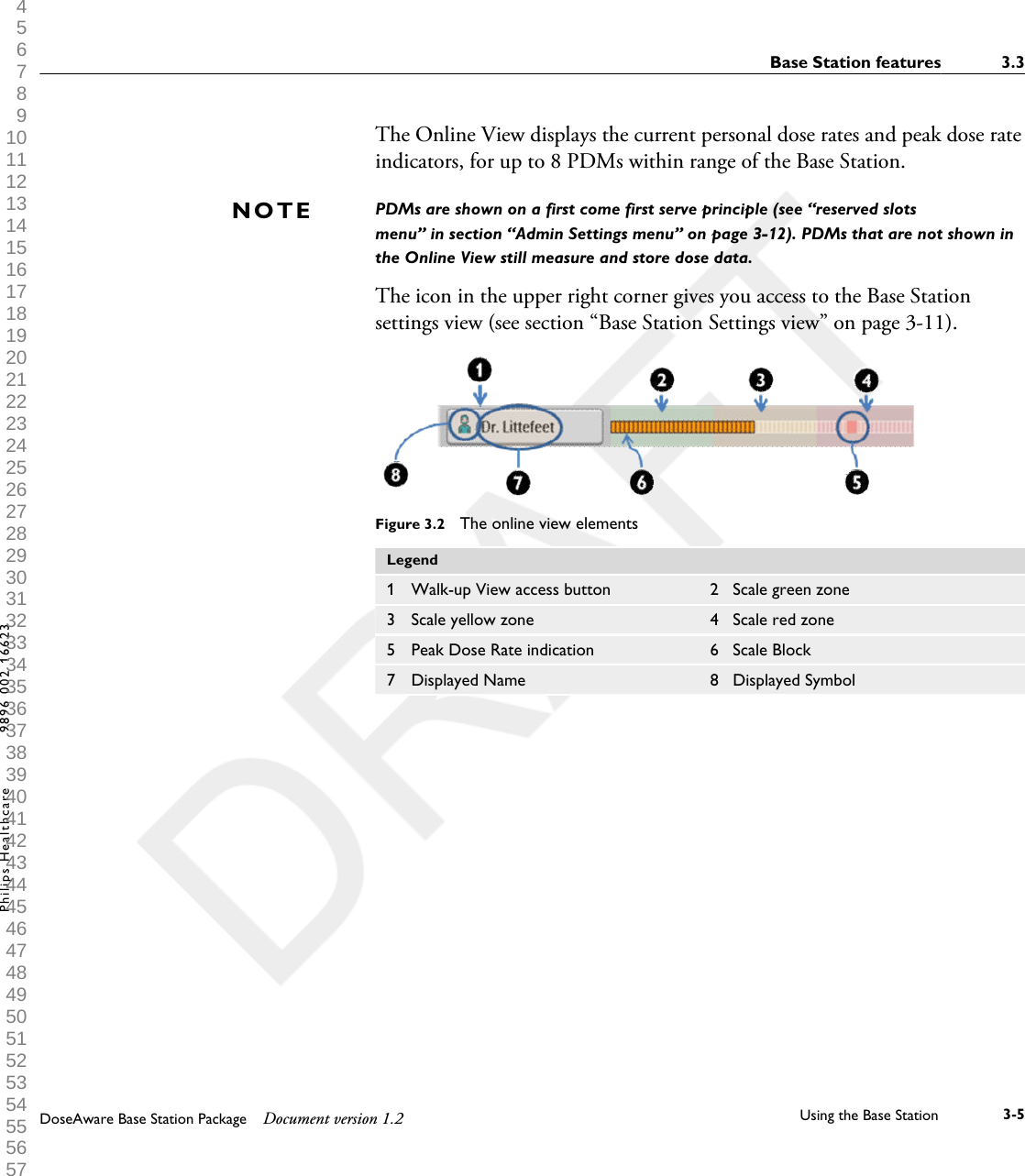
The Online View displays the current personal dose rates and peak dose rateindicators, for up to 8 PDMs within range of the Base Station.PDMs are shown on a first come first serve principle (see “reserved slotsmenu” in section “Admin Settings menu” on page 3-12). PDMs that are not shown inthe Online View still measure and store dose data.The icon in the upper right corner gives you access to the Base Stationsettings view (see section “Base Station Settings view” on page 3-11).Figure 3.2  The online view elementsLegend1 Walk-up View access button 2 Scale green zone3 Scale yellow zone 4 Scale red zone5 Peak Dose Rate indication 6 Scale Block7 Displayed Name 8 Displayed SymbolNOTEBase Station features 3.3DoseAware Base Station Package Document version 1.2 Using the Base Station 3-5Philips Healthcare 9896 002 16623 1 2 3 4 5 6 7 8 9 10 11 12 13 14 15 16 17 18 19 20 21 22 23 24 25 26 27 28 29 30 31 32 33 34 35 36 37 38 39 40 41 42 43 44 45 46 47 48 49 50 51 52 53 54 55 56 57 58 59 60
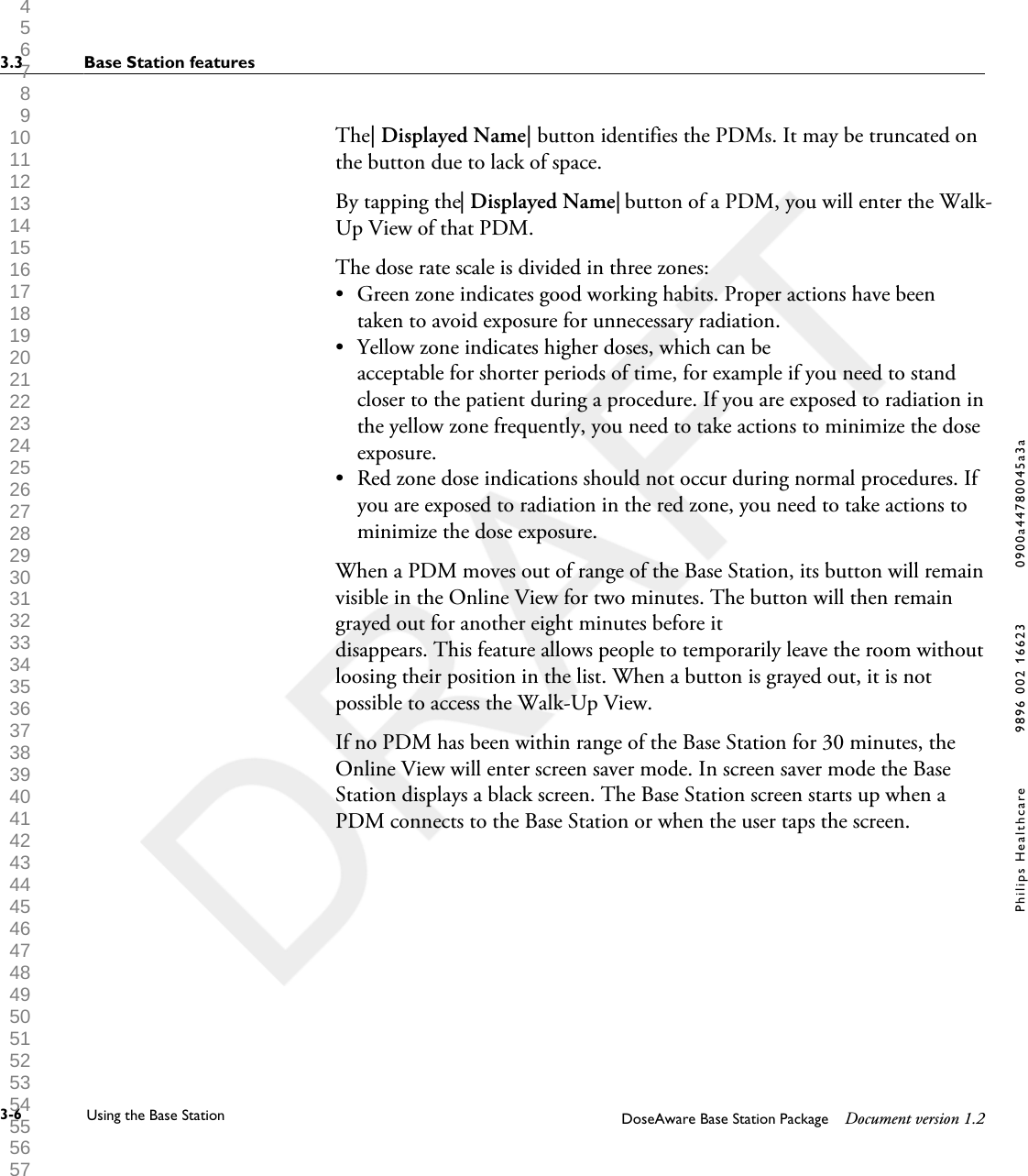
The| Displayed Name| button identifies the PDMs. It may be truncated onthe button due to lack of space.By tapping the| Displayed Name| button of a PDM, you will enter the Walk-Up View of that PDM.The dose rate scale is divided in three zones:•Green zone indicates good working habits. Proper actions have beentaken to avoid exposure for unnecessary radiation.• Yellow zone indicates higher doses, which can beacceptable for shorter periods of time, for example if you need to standcloser to the patient during a procedure. If you are exposed to radiation inthe yellow zone frequently, you need to take actions to minimize the doseexposure.• Red zone dose indications should not occur during normal procedures. Ifyou are exposed to radiation in the red zone, you need to take actions tominimize the dose exposure.When a PDM moves out of range of the Base Station, its button will remainvisible in the Online View for two minutes. The button will then remaingrayed out for another eight minutes before itdisappears. This feature allows people to temporarily leave the room withoutloosing their position in the list. When a button is grayed out, it is notpossible to access the Walk-Up View.If no PDM has been within range of the Base Station for 30 minutes, theOnline View will enter screen saver mode. In screen saver mode the BaseStation displays a black screen. The Base Station screen starts up when aPDM connects to the Base Station or when the user taps the screen.3.3 Base Station features3-6 Using the Base Station DoseAware Base Station Package Document version 1.2Philips Healthcare 9896 002 16623 0900a44780045a3a 1 2 3 4 5 6 7 8 9 10 11 12 13 14 15 16 17 18 19 20 21 22 23 24 25 26 27 28 29 30 31 32 33 34 35 36 37 38 39 40 41 42 43 44 45 46 47 48 49 50 51 52 53 54 55 56 57 58 59 60
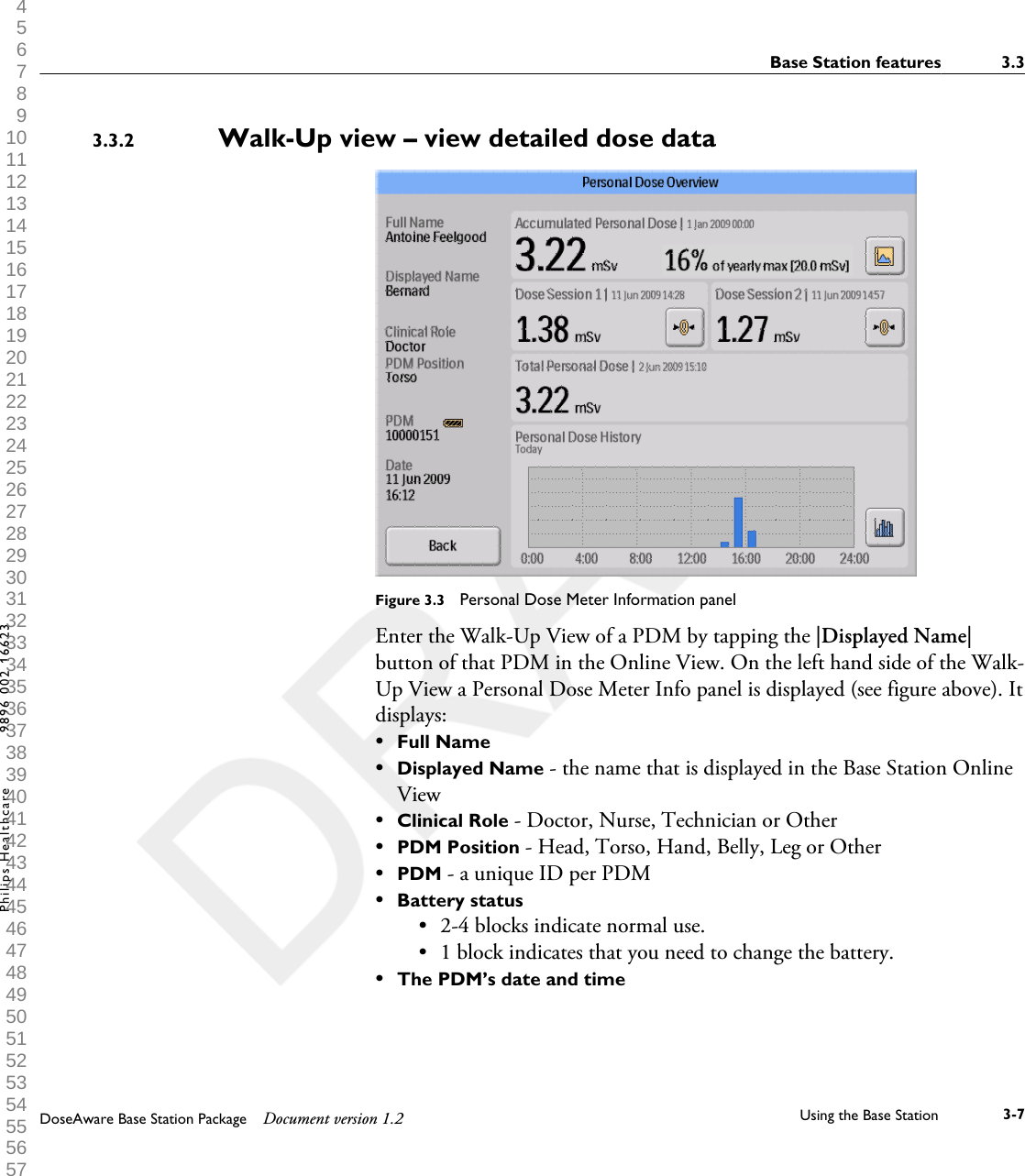
Walk-Up view – view detailed dose data            Figure 3.3  Personal Dose Meter Information panelEnter the Walk-Up View of a PDM by tapping the |Displayed Name|button of that PDM in the Online View. On the left hand side of the Walk-Up View a Personal Dose Meter Info panel is displayed (see figure above). Itdisplays:•Full Name•Displayed Name - the name that is displayed in the Base Station OnlineView•Clinical Role - Doctor, Nurse, Technician or Other•PDM Position - Head, Torso, Hand, Belly, Leg or Other•PDM - a unique ID per PDM•Battery status•2-4 blocks indicate normal use.• 1 block indicates that you need to change the battery.•The PDM’s date and time3.3.2Base Station features 3.3DoseAware Base Station Package Document version 1.2 Using the Base Station 3-7Philips Healthcare 9896 002 16623 1 2 3 4 5 6 7 8 9 10 11 12 13 14 15 16 17 18 19 20 21 22 23 24 25 26 27 28 29 30 31 32 33 34 35 36 37 38 39 40 41 42 43 44 45 46 47 48 49 50 51 52 53 54 55 56 57 58 59 60
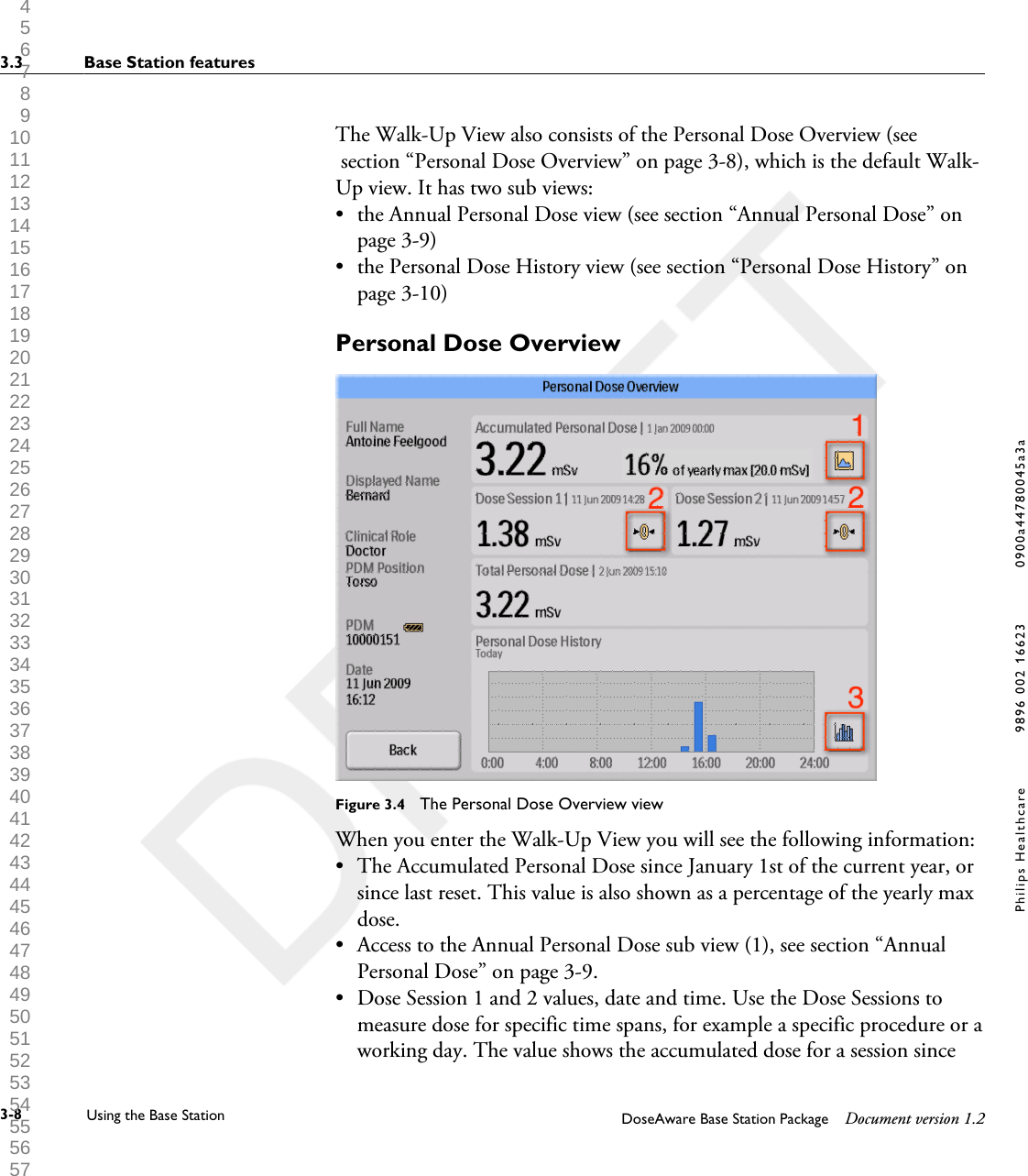
The Walk-Up View also consists of the Personal Dose Overview (see section “Personal Dose Overview” on page 3-8), which is the default Walk-Up view. It has two sub views:•the Annual Personal Dose view (see section “Annual Personal Dose” onpage 3-9)• the Personal Dose History view (see section “Personal Dose History” onpage 3-10)Personal Dose OverviewFigure 3.4  The Personal Dose Overview viewWhen you enter the Walk-Up View you will see the following information:•The Accumulated Personal Dose since January 1st of the current year, orsince last reset. This value is also shown as a percentage of the yearly maxdose.• Access to the Annual Personal Dose sub view (1), see section “AnnualPersonal Dose” on page 3-9.• Dose Session 1 and 2 values, date and time. Use the Dose Sessions tomeasure dose for specific time spans, for example a specific procedure or aworking day. The value shows the accumulated dose for a session since3.3 Base Station features3-8 Using the Base Station DoseAware Base Station Package Document version 1.2Philips Healthcare 9896 002 16623 0900a44780045a3a 1 2 3 4 5 6 7 8 9 10 11 12 13 14 15 16 17 18 19 20 21 22 23 24 25 26 27 28 29 30 31 32 33 34 35 36 37 38 39 40 41 42 43 44 45 46 47 48 49 50 51 52 53 54 55 56 57 58 59 60
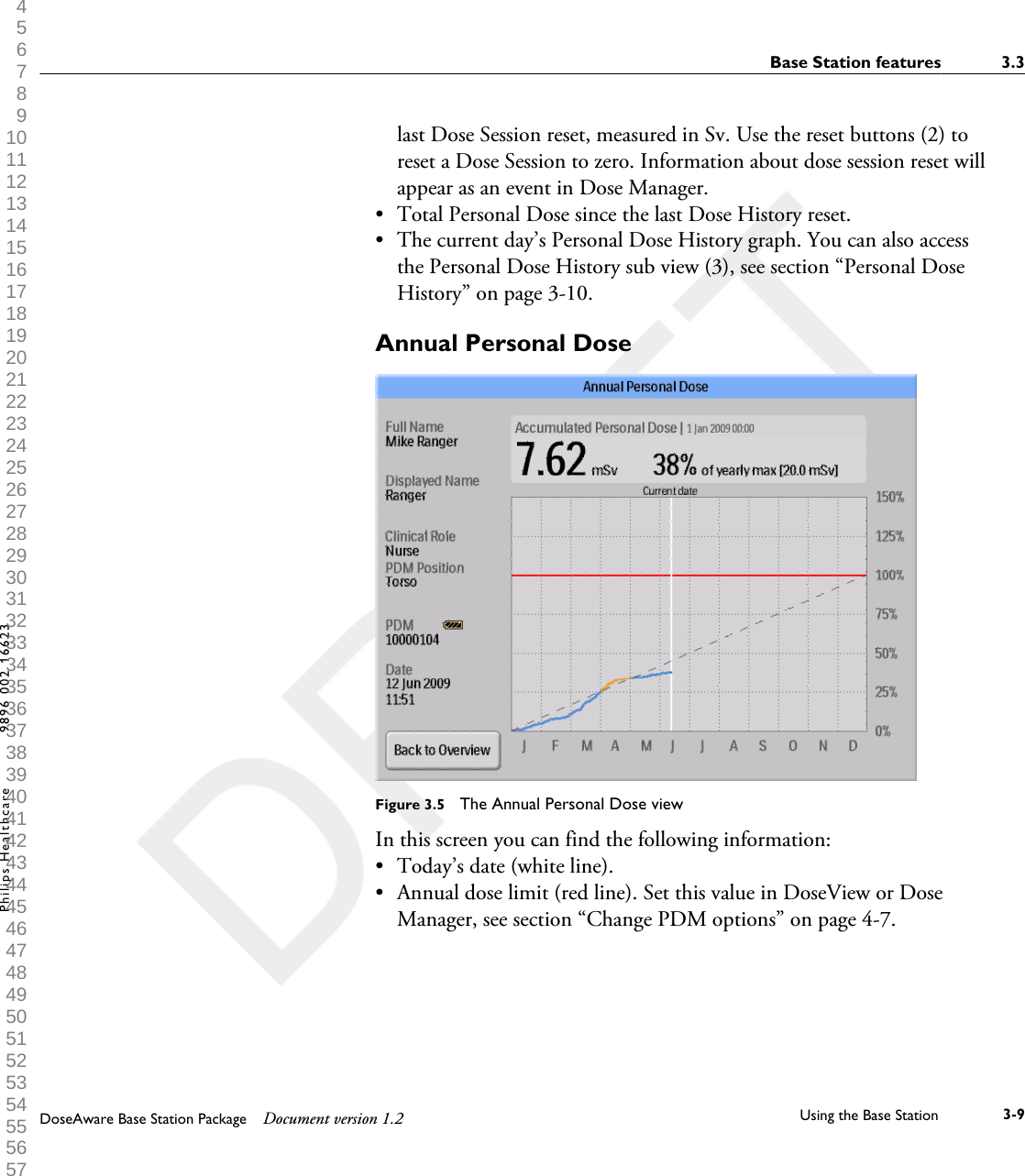
last Dose Session reset, measured in Sv. Use the reset buttons (2) toreset a Dose Session to zero. Information about dose session reset willappear as an event in Dose Manager.•Total Personal Dose since the last Dose History reset.• The current day’s Personal Dose History graph. You can also accessthe Personal Dose History sub view (3), see section “Personal DoseHistory” on page 3-10.Annual Personal DoseFigure 3.5  The Annual Personal Dose viewIn this screen you can find the following information:•Today’s date (white line).• Annual dose limit (red line). Set this value in DoseView or DoseManager, see section “Change PDM options” on page 4-7.Base Station features 3.3DoseAware Base Station Package Document version 1.2 Using the Base Station 3-9Philips Healthcare 9896 002 16623 1 2 3 4 5 6 7 8 9 10 11 12 13 14 15 16 17 18 19 20 21 22 23 24 25 26 27 28 29 30 31 32 33 34 35 36 37 38 39 40 41 42 43 44 45 46 47 48 49 50 51 52 53 54 55 56 57 58 59 60
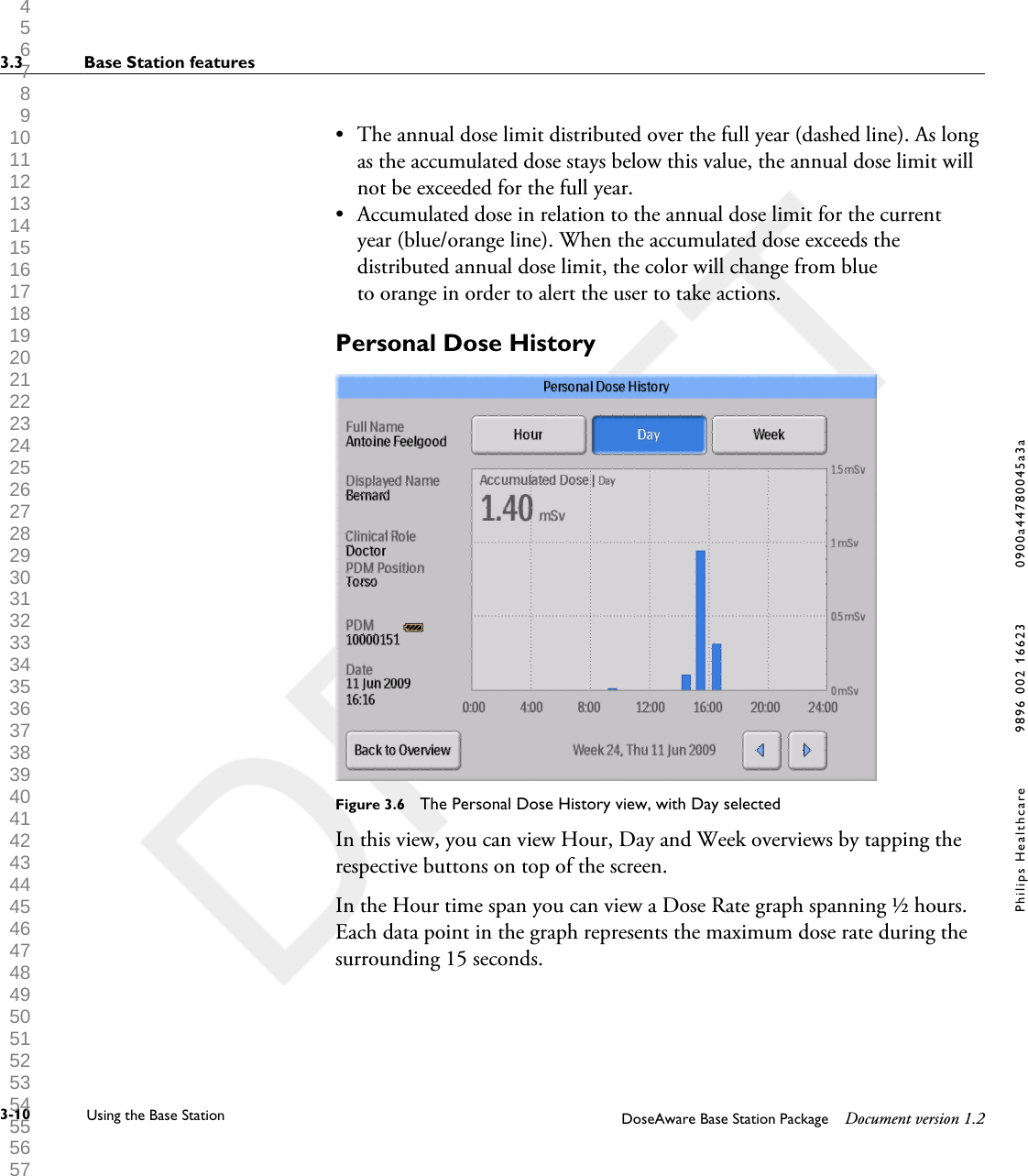
• The annual dose limit distributed over the full year (dashed line). As longas the accumulated dose stays below this value, the annual dose limit willnot be exceeded for the full year.•Accumulated dose in relation to the annual dose limit for the currentyear (blue/orange line). When the accumulated dose exceeds thedistributed annual dose limit, the color will change from blueto orange in order to alert the user to take actions.Personal Dose HistoryFigure 3.6  The Personal Dose History view, with Day selectedIn this view, you can view Hour, Day and Week overviews by tapping therespective buttons on top of the screen.In the Hour time span you can view a Dose Rate graph spanning ½ hours.Each data point in the graph represents the maximum dose rate during thesurrounding 15 seconds.3.3 Base Station features3-10 Using the Base Station DoseAware Base Station Package Document version 1.2Philips Healthcare 9896 002 16623 0900a44780045a3a 1 2 3 4 5 6 7 8 9 10 11 12 13 14 15 16 17 18 19 20 21 22 23 24 25 26 27 28 29 30 31 32 33 34 35 36 37 38 39 40 41 42 43 44 45 46 47 48 49 50 51 52 53 54 55 56 57 58 59 60
In the Day/Week time spans you can view accumulated dose value bars.Each bar represents the accumulated dose during one/four hours,respectively. Within the Day and Week time spans, tapping a dose bar inthe diagram will zoom into the larger underlying time scale (that is Week ->Day and Day -> Hour).Within each time span (Hour/Day/Week) you can step forward andbackward in time with the arrow buttons on the bottom of the screen. Bypressing and holding the arrow buttons you will scroll along the time axiswithin the chosen zoom level. Switching between Hour, Day and Week will set the view to the current date and time.In the upper left corner of the chart, the value of the Accumulated Doseduring the chosen time span is visible.Base Station Settings viewThe Base Station Settings View is where administrators configure the BaseStation. Follow the instructions below to enter the Base Station Settings View:1Tap the| Settings| menu symbol in the upper right corner of the Online View.2Enter configuration values by tapping the buttons in the respective menusIn the lower part of Base Station Settings, the Base Station ID/serial numberand the software version is displayed. This information can be used asassistance for support issuesNOTE3.3.3Base Station features 3.3DoseAware Base Station Package Document version 1.2 Using the Base Station 3-11Philips Healthcare 9896 002 16623 1 2 3 4 5 6 7 8 9 10 11 12 13 14 15 16 17 18 19 20 21 22 23 24 25 26 27 28 29 30 31 32 33 34 35 36 37 38 39 40 41 42 43 44 45 46 47 48 49 50 51 52 53 54 55 56 57 58 59 60
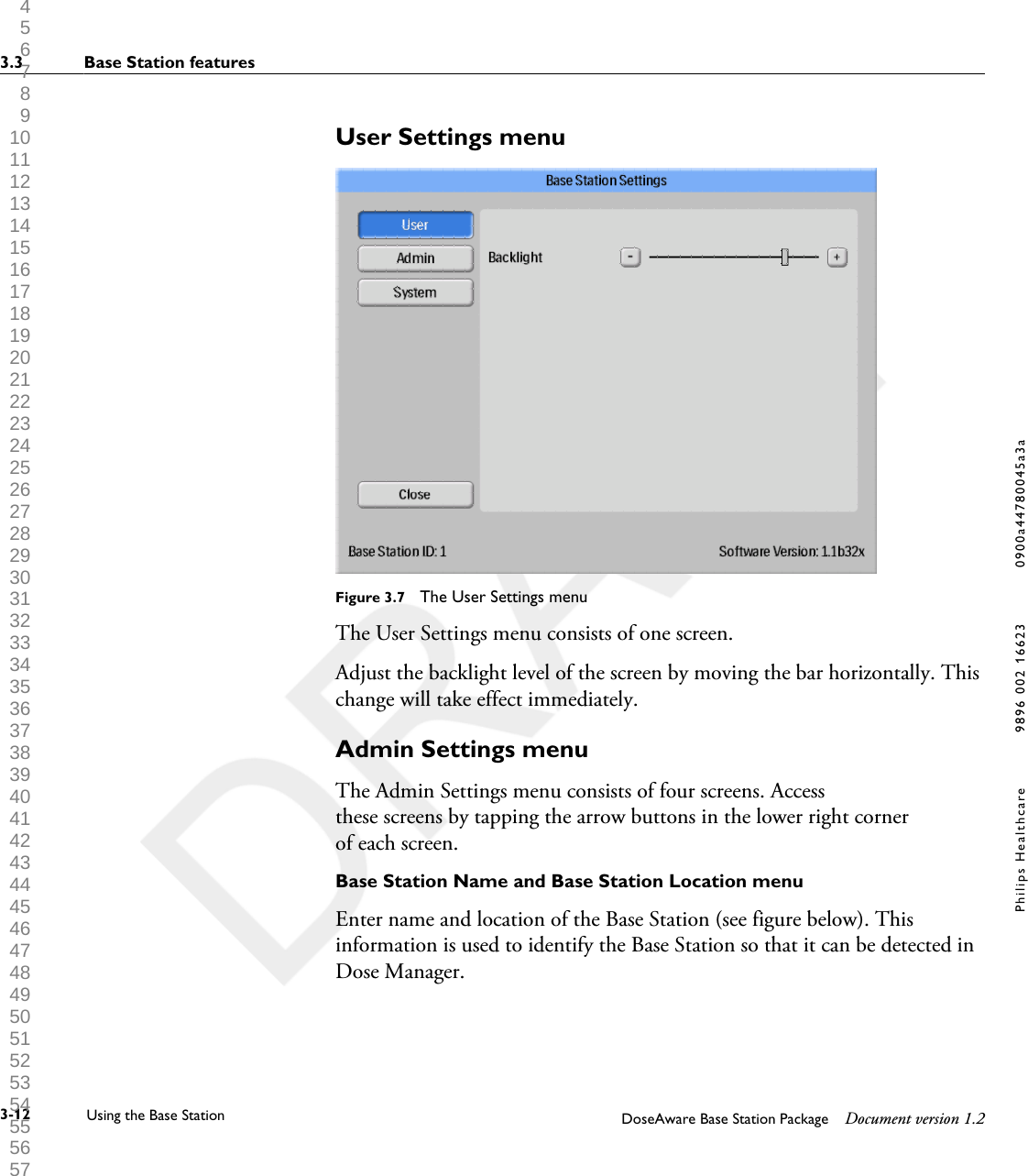
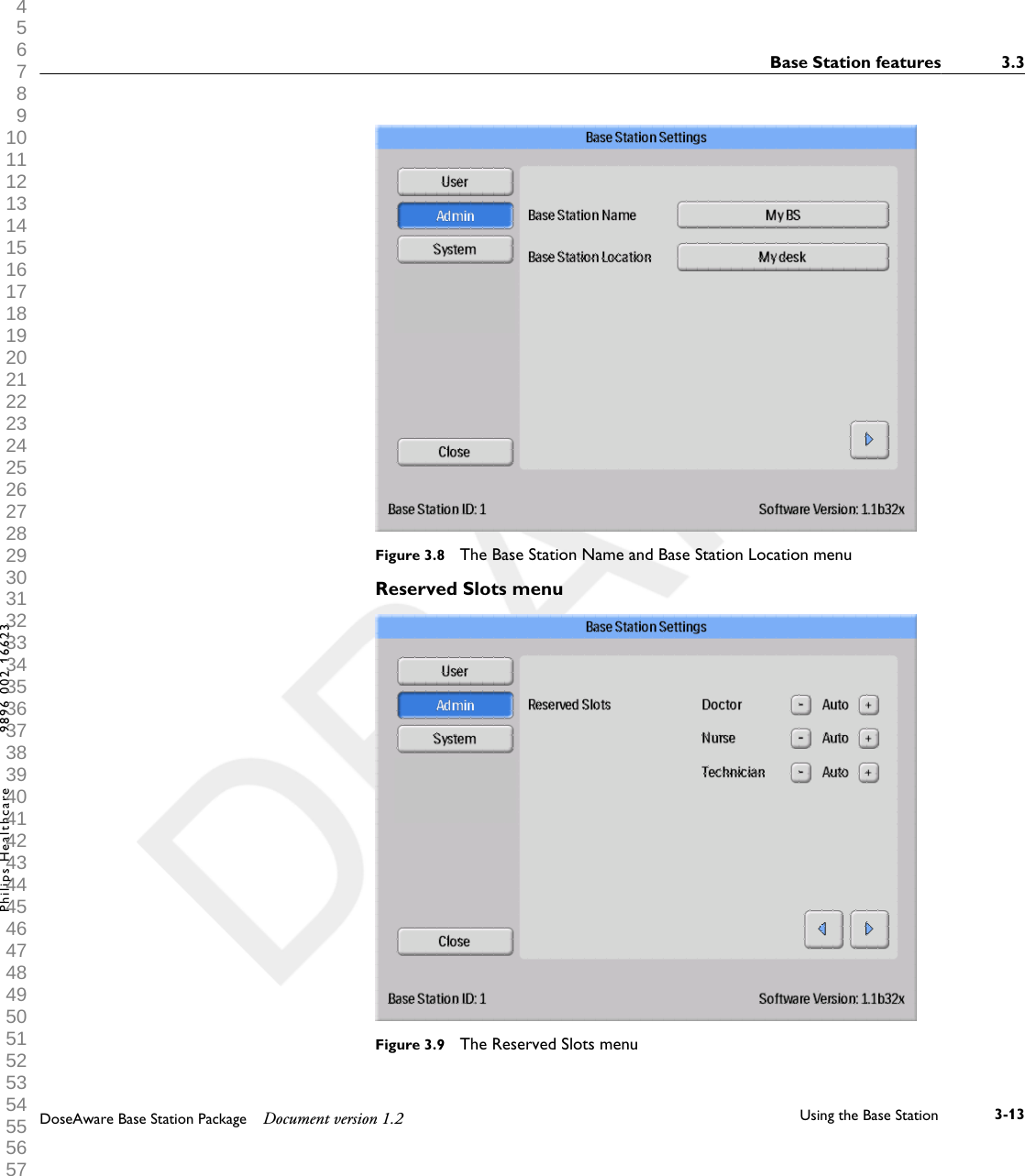
User Settings menuFigure 3.7  The User Settings menuThe User Settings menu consists of one screen.Adjust the backlight level of the screen by moving the bar horizontally. Thischange will take effect immediately.Admin Settings menuThe Admin Settings menu consists of four screens. Accessthese screens by tapping the arrow buttons in the lower right cornerof each screen.Base Station Name and Base Station Location menuEnter name and location of the Base Station (see figure below). Thisinformation is used to identify the Base Station so that it can be detected inDose Manager.3.3 Base Station features3-12 Using the Base Station DoseAware Base Station Package Document version 1.2Philips Healthcare 9896 002 16623 0900a44780045a3a 1 2 3 4 5 6 7 8 9 10 11 12 13 14 15 16 17 18 19 20 21 22 23 24 25 26 27 28 29 30 31 32 33 34 35 36 37 38 39 40 41 42 43 44 45 46 47 48 49 50 51 52 53 54 55 56 57 58 59 60
Figure 3.8  The Base Station Name and Base Station Location menuReserved Slots menuFigure 3.9  The Reserved Slots menuBase Station features 3.3DoseAware Base Station Package Document version 1.2 Using the Base Station 3-13Philips Healthcare 9896 002 16623 1 2 3 4 5 6 7 8 9 10 11 12 13 14 15 16 17 18 19 20 21 22 23 24 25 26 27 28 29 30 31 32 33 34 35 36 37 38 39 40 41 42 43 44 45 46 47 48 49 50 51 52 53 54 55 56 57 58 59 60
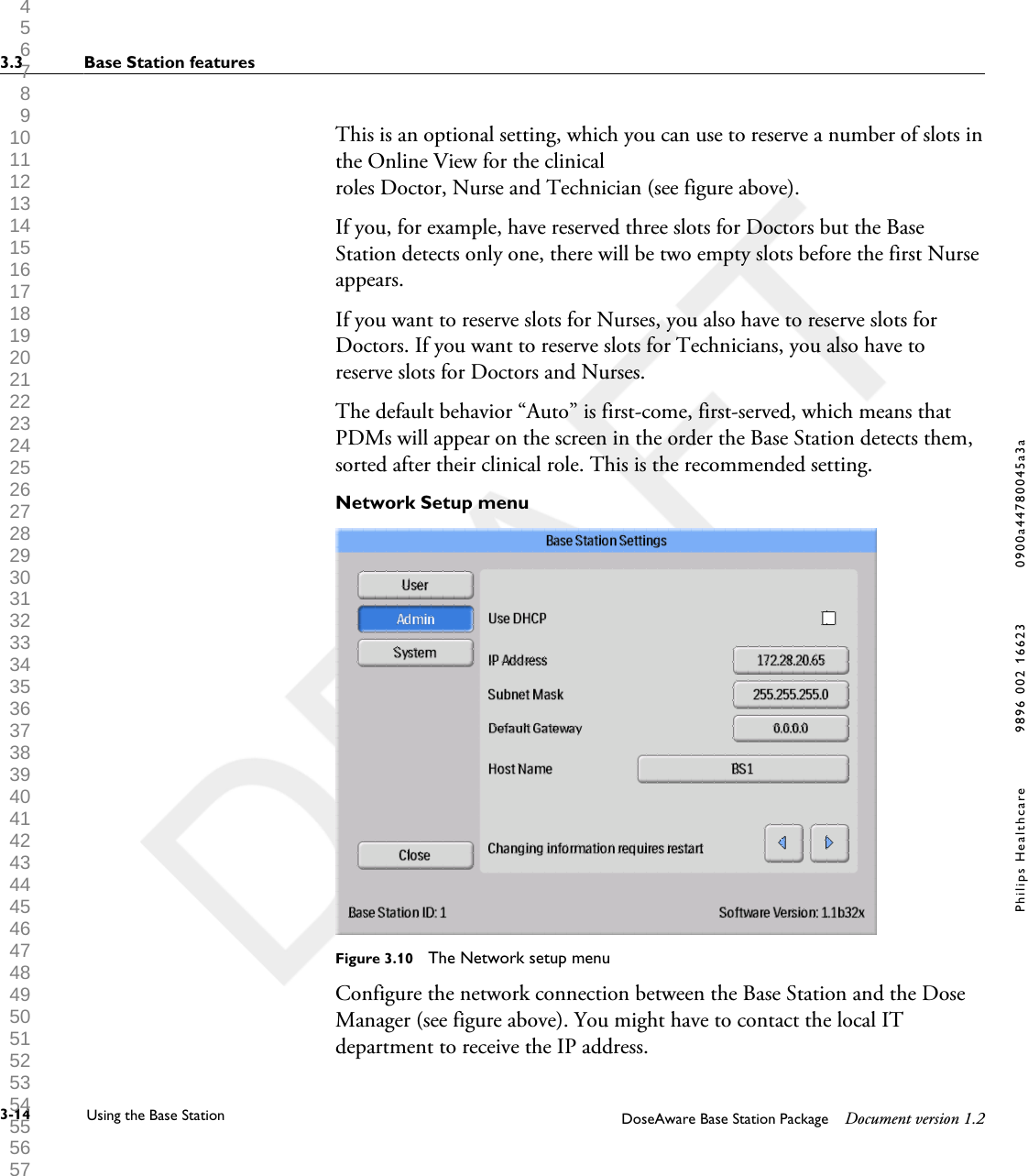
This is an optional setting, which you can use to reserve a number of slots inthe Online View for the clinicalroles Doctor, Nurse and Technician (see figure above).If you, for example, have reserved three slots for Doctors but the BaseStation detects only one, there will be two empty slots before the first Nurseappears.If you want to reserve slots for Nurses, you also have to reserve slots forDoctors. If you want to reserve slots for Technicians, you also have toreserve slots for Doctors and Nurses.The default behavior “Auto” is first-come, first-served, which means thatPDMs will appear on the screen in the order the Base Station detects them,sorted after their clinical role. This is the recommended setting.Network Setup menuFigure 3.10  The Network setup menuConfigure the network connection between the Base Station and the DoseManager (see figure above). You might have to contact the local ITdepartment to receive the IP address.3.3 Base Station features3-14 Using the Base Station DoseAware Base Station Package Document version 1.2Philips Healthcare 9896 002 16623 0900a44780045a3a 1 2 3 4 5 6 7 8 9 10 11 12 13 14 15 16 17 18 19 20 21 22 23 24 25 26 27 28 29 30 31 32 33 34 35 36 37 38 39 40 41 42 43 44 45 46 47 48 49 50 51 52 53 54 55 56 57 58 59 60
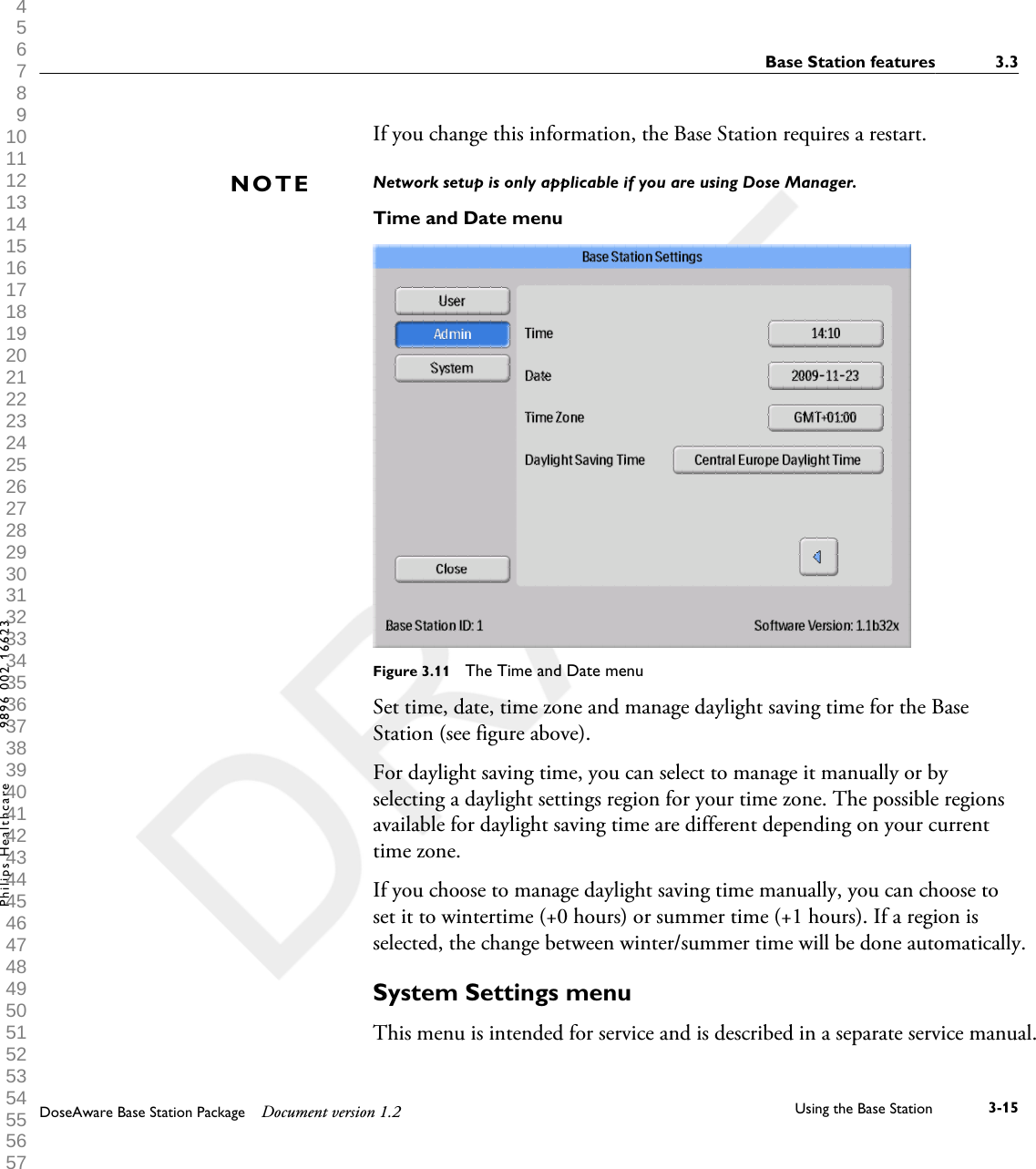
If you change this information, the Base Station requires a restart. Network setup is only applicable if you are using Dose Manager.Time and Date menuFigure 3.11  The Time and Date menuSet time, date, time zone and manage daylight saving time for the BaseStation (see figure above).For daylight saving time, you can select to manage it manually or byselecting a daylight settings region for your time zone. The possible regionsavailable for daylight saving time are different depending on your currenttime zone.If you choose to manage daylight saving time manually, you can choose toset it to wintertime (+0 hours) or summer time (+1 hours). If a region isselected, the change between winter/summer time will be done automatically.System Settings menuThis menu is intended for service and is described in a separate service manual.NOTEBase Station features 3.3DoseAware Base Station Package Document version 1.2 Using the Base Station 3-15Philips Healthcare 9896 002 16623 1 2 3 4 5 6 7 8 9 10 11 12 13 14 15 16 17 18 19 20 21 22 23 24 25 26 27 28 29 30 31 32 33 34 35 36 37 38 39 40 41 42 43 44 45 46 47 48 49 50 51 52 53 54 55 56 57 58 59 60
Shutting down the Base StationShutting down a wall mounted Base Station•Unplug the power adaptor.Shutting down an MCS mounted Base Station• Switch off the X-ray system and the Base Station will be switched off.3.43.4.13.4.23.4 Shutting down the Base Station3-16 Using the Base Station DoseAware Base Station Package Document version 1.2Philips Healthcare 9896 002 16623 0900a44780045a3a 1 2 3 4 5 6 7 8 9 10 11 12 13 14 15 16 17 18 19 20 21 22 23 24 25 26 27 28 29 30 31 32 33 34 35 36 37 38 39 40 41 42 43 44 45 46 47 48 49 50 51 52 53 54 55 56 57 58 59 60
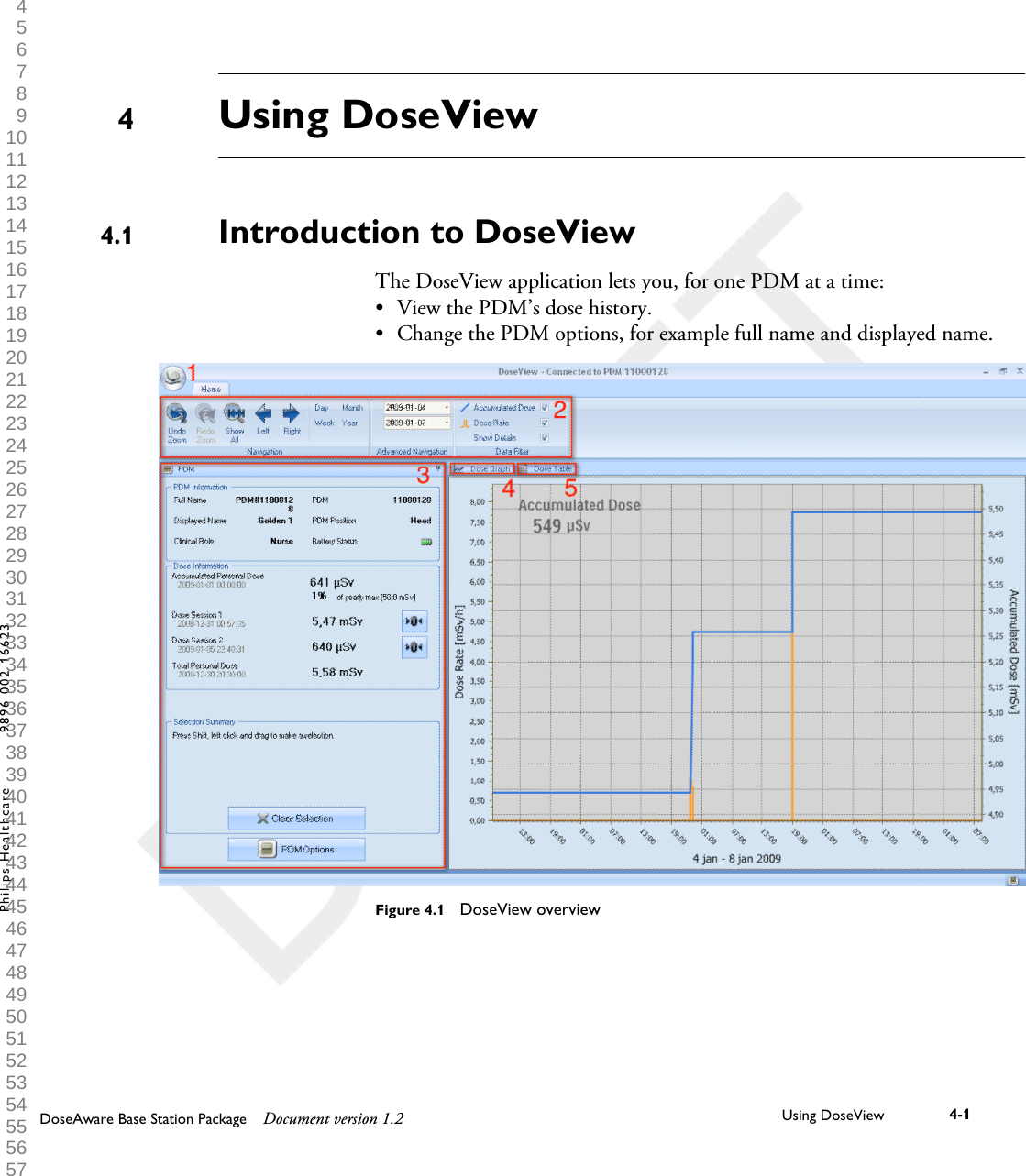
Using DoseViewIntroduction to DoseViewThe DoseView application lets you, for one PDM at a time:•View the PDM’s dose history.• Change the PDM options, for example full name and displayed name.Figure 4.1  DoseView overview44.1DoseAware Base Station Package Document version 1.2 Using DoseView 4-1Philips Healthcare 9896 002 16623 1 2 3 4 5 6 7 8 9 10 11 12 13 14 15 16 17 18 19 20 21 22 23 24 25 26 27 28 29 30 31 32 33 34 35 36 37 38 39 40 41 42 43 44 45 46 47 48 49 50 51 52 53 54 55 56 57 58 59 60
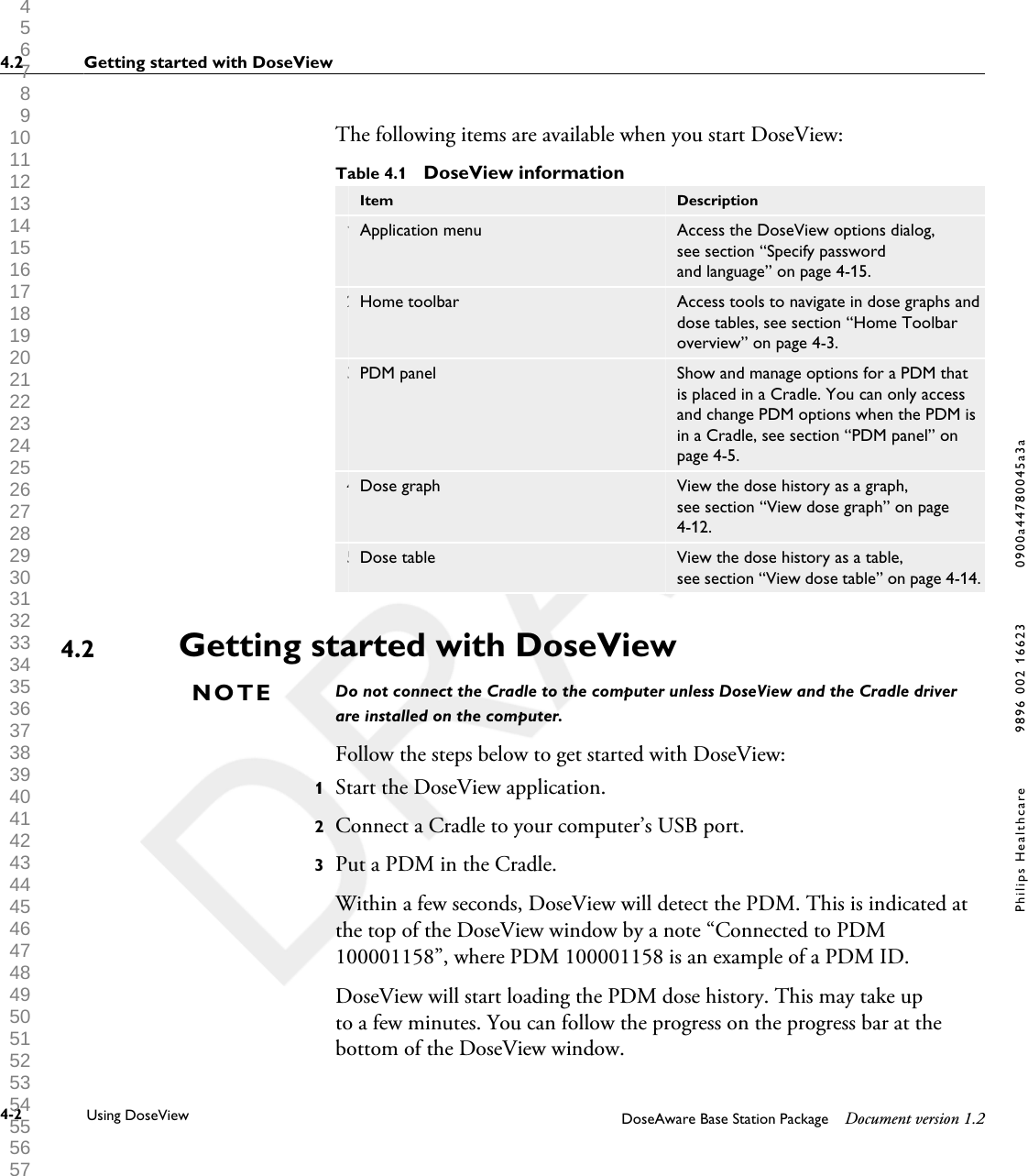
The following items are available when you start DoseView:Table 4.1  DoseView information Item Description1 Application menu Access the DoseView options dialog,see section “Specify passwordand language” on page 4-15.2 Home toolbar Access tools to navigate in dose graphs anddose tables, see section “Home Toolbaroverview” on page 4-3.3 PDM panel Show and manage options for a PDM thatis placed in a Cradle. You can only accessand change PDM options when the PDM isin a Cradle, see section “PDM panel” onpage 4-5.4 Dose graph View the dose history as a graph,see section “View dose graph” on page4-12.5 Dose table View the dose history as a table,see section “View dose table” on page 4-14.Getting started with DoseViewDo not connect the Cradle to the computer unless DoseView and the Cradle driverare installed on the computer.Follow the steps below to get started with DoseView:1Start the DoseView application.2Connect a Cradle to your computer’s USB port.3Put a PDM in the Cradle.Within a few seconds, DoseView will detect the PDM. This is indicated atthe top of the DoseView window by a note “Connected to PDM100001158”, where PDM 100001158 is an example of a PDM ID.DoseView will start loading the PDM dose history. This may take upto a few minutes. You can follow the progress on the progress bar at thebottom of the DoseView window.4.2NOTE4.2 Getting started with DoseView4-2 Using DoseView DoseAware Base Station Package Document version 1.2Philips Healthcare 9896 002 16623 0900a44780045a3a 1 2 3 4 5 6 7 8 9 10 11 12 13 14 15 16 17 18 19 20 21 22 23 24 25 26 27 28 29 30 31 32 33 34 35 36 37 38 39 40 41 42 43 44 45 46 47 48 49 50 51 52 53 54 55 56 57 58 59 60
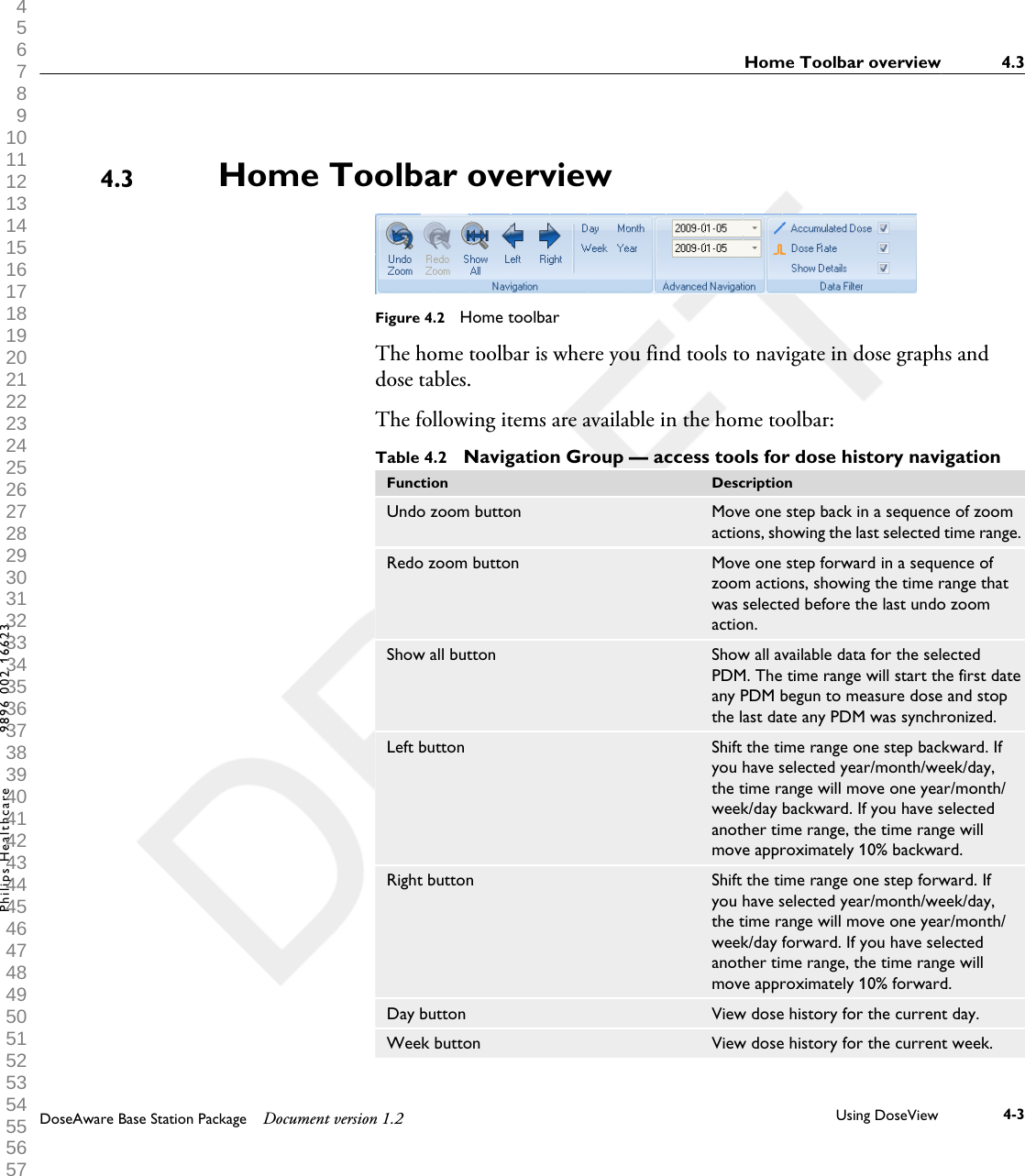
Home Toolbar overviewFigure 4.2  Home toolbarThe home toolbar is where you find tools to navigate in dose graphs anddose tables. The following items are available in the home toolbar:Table 4.2  Navigation Group — access tools for dose history navigationFunction DescriptionUndo zoom button Move one step back in a sequence of zoomactions, showing the last selected time range.Redo zoom button Move one step forward in a sequence ofzoom actions, showing the time range thatwas selected before the last undo zoomaction.Show all button Show all available data for the selectedPDM. The time range will start the first dateany PDM begun to measure dose and stopthe last date any PDM was synchronized.Left button Shift the time range one step backward. Ifyou have selected year/month/week/day,the time range will move one year/month/week/day backward. If you have selectedanother time range, the time range willmove approximately 10% backward.Right button Shift the time range one step forward. Ifyou have selected year/month/week/day,the time range will move one year/month/week/day forward. If you have selectedanother time range, the time range willmove approximately 10% forward.Day button View dose history for the current day.Week button View dose history for the current week.4.3Home Toolbar overview 4.3DoseAware Base Station Package Document version 1.2 Using DoseView 4-3Philips Healthcare 9896 002 16623 1 2 3 4 5 6 7 8 9 10 11 12 13 14 15 16 17 18 19 20 21 22 23 24 25 26 27 28 29 30 31 32 33 34 35 36 37 38 39 40 41 42 43 44 45 46 47 48 49 50 51 52 53 54 55 56 57 58 59 60
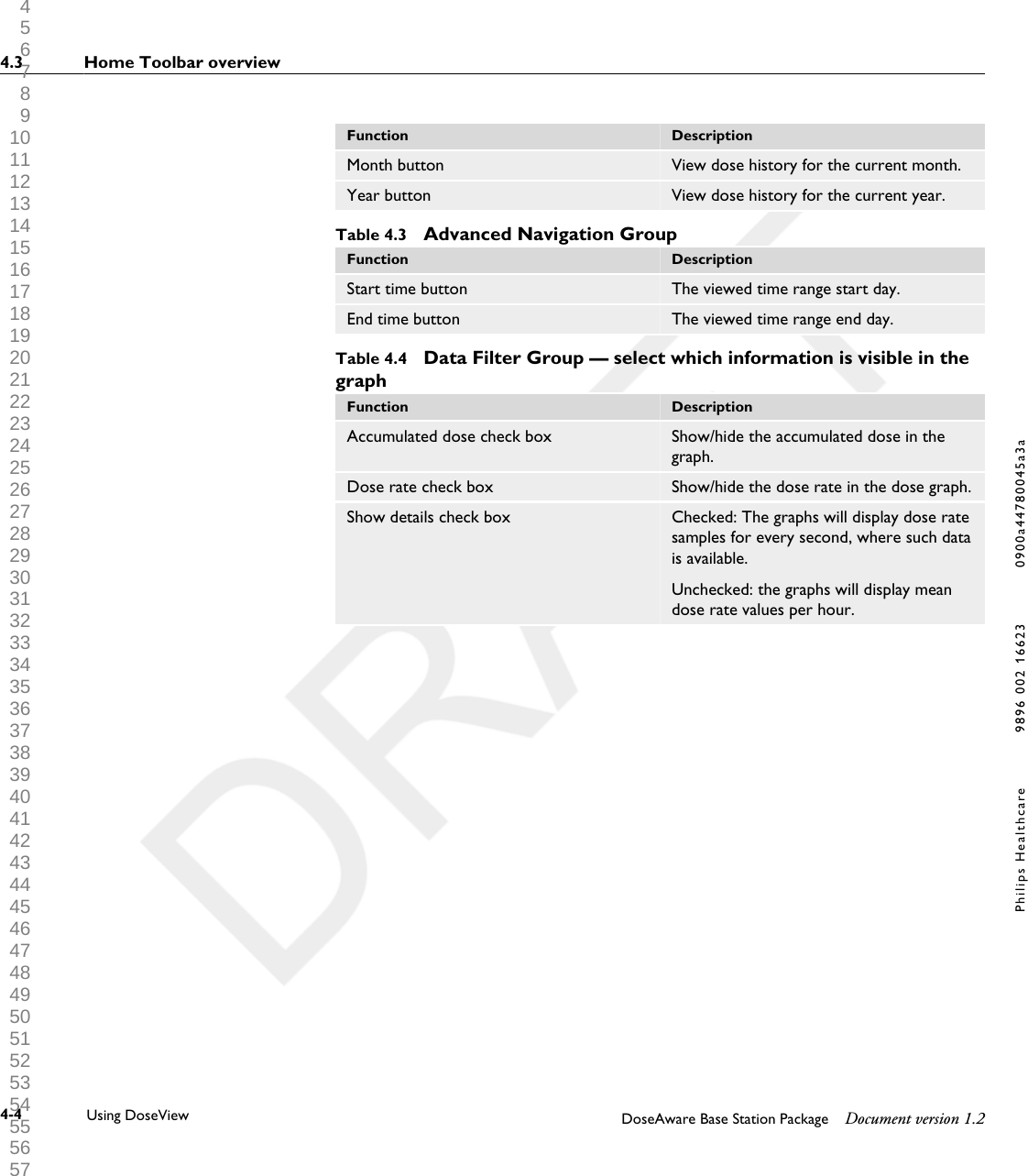
Function DescriptionMonth button View dose history for the current month.Year button View dose history for the current year.Table 4.3  Advanced Navigation GroupFunction DescriptionStart time button The viewed time range start day.End time button The viewed time range end day.Table 4.4  Data Filter Group — select which information is visible in thegraphFunction DescriptionAccumulated dose check box Show/hide the accumulated dose in thegraph.Dose rate check box Show/hide the dose rate in the dose graph.Show details check box Checked: The graphs will display dose ratesamples for every second, where such datais available.Unchecked: the graphs will display meandose rate values per hour.4.3 Home Toolbar overview4-4 Using DoseView DoseAware Base Station Package Document version 1.2Philips Healthcare 9896 002 16623 0900a44780045a3a 1 2 3 4 5 6 7 8 9 10 11 12 13 14 15 16 17 18 19 20 21 22 23 24 25 26 27 28 29 30 31 32 33 34 35 36 37 38 39 40 41 42 43 44 45 46 47 48 49 50 51 52 53 54 55 56 57 58 59 60
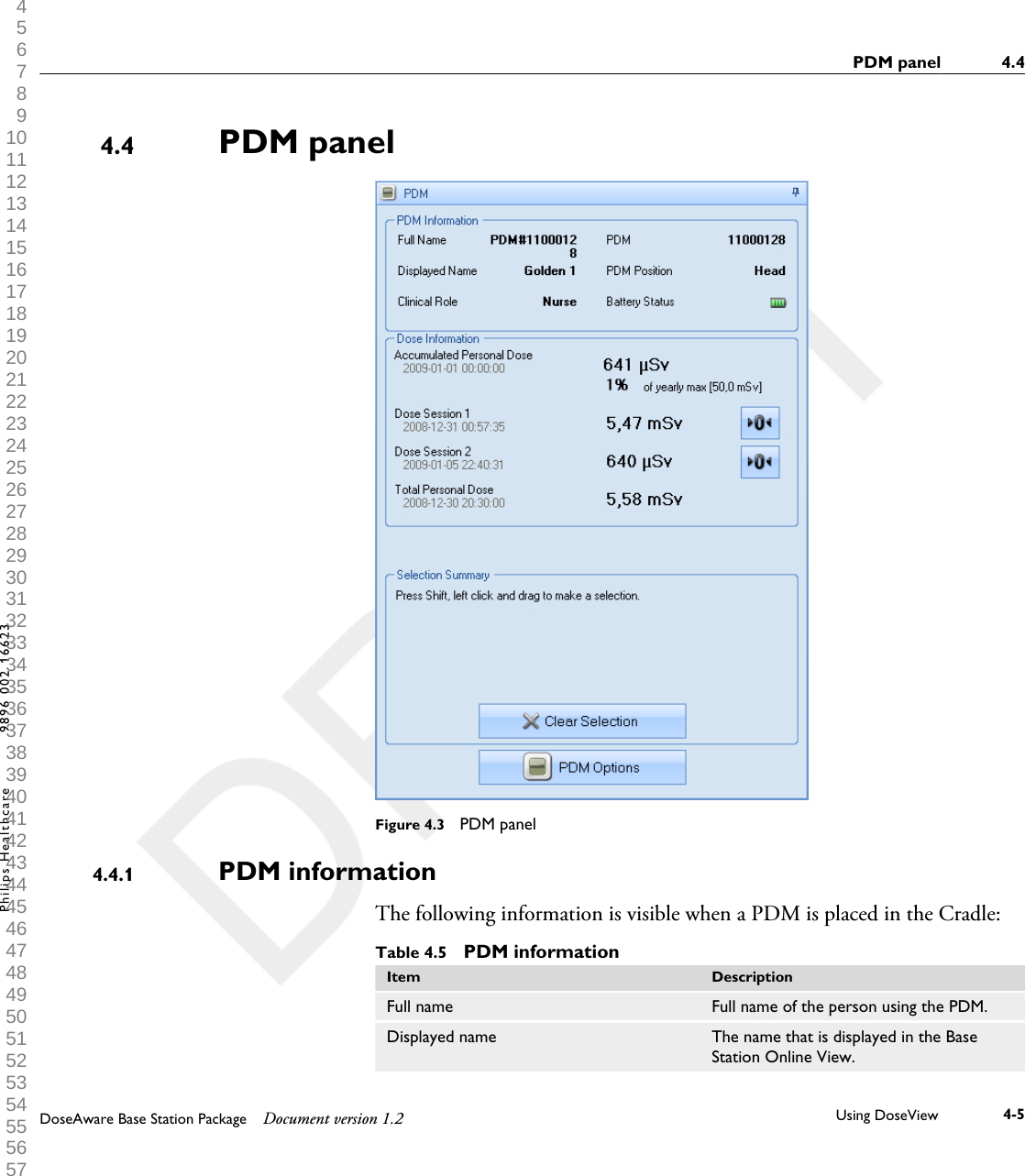
PDM panelFigure 4.3  PDM panelPDM informationThe following information is visible when a PDM is placed in the Cradle:Table 4.5  PDM informationItem DescriptionFull name Full name of the person using the PDM.Displayed name The name that is displayed in the BaseStation Online View.4.44.4.1PDM panel 4.4DoseAware Base Station Package Document version 1.2 Using DoseView 4-5Philips Healthcare 9896 002 16623 1 2 3 4 5 6 7 8 9 10 11 12 13 14 15 16 17 18 19 20 21 22 23 24 25 26 27 28 29 30 31 32 33 34 35 36 37 38 39 40 41 42 43 44 45 46 47 48 49 50 51 52 53 54 55 56 57 58 59 60
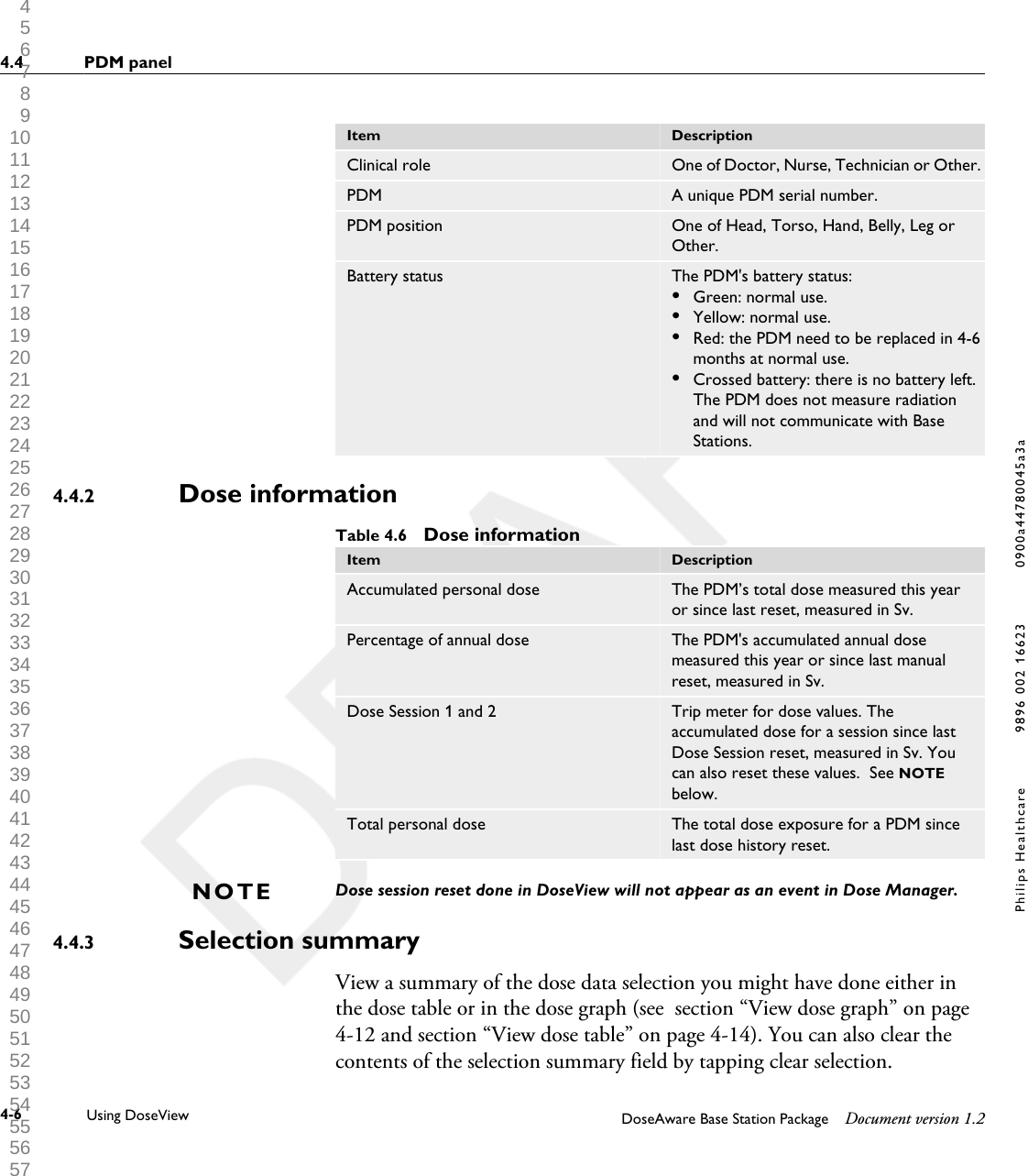
Item DescriptionClinical role One of Doctor, Nurse, Technician or Other.PDM A unique PDM serial number.PDM position One of Head, Torso, Hand, Belly, Leg orOther.Battery status The PDM's battery status:•Green: normal use.•Yellow: normal use.•Red: the PDM need to be replaced in 4-6months at normal use.•Crossed battery: there is no battery left.The PDM does not measure radiationand will not communicate with BaseStations.Dose informationTable 4.6  Dose informationItem DescriptionAccumulated personal dose The PDM’s total dose measured this yearor since last reset, measured in Sv.Percentage of annual dose The PDM's accumulated annual dosemeasured this year or since last manualreset, measured in Sv.Dose Session 1 and 2 Trip meter for dose values. Theaccumulated dose for a session since lastDose Session reset, measured in Sv. Youcan also reset these values.  See NOTEbelow.Total personal dose The total dose exposure for a PDM sincelast dose history reset.Dose session reset done in DoseView will not appear as an event in Dose Manager.Selection summaryView a summary of the dose data selection you might have done either inthe dose table or in the dose graph (see  section “View dose graph” on page4-12 and section “View dose table” on page 4-14). You can also clear thecontents of the selection summary field by tapping clear selection.4.4.2NOTE4.4.34.4 PDM panel4-6 Using DoseView DoseAware Base Station Package Document version 1.2Philips Healthcare 9896 002 16623 0900a44780045a3a 1 2 3 4 5 6 7 8 9 10 11 12 13 14 15 16 17 18 19 20 21 22 23 24 25 26 27 28 29 30 31 32 33 34 35 36 37 38 39 40 41 42 43 44 45 46 47 48 49 50 51 52 53 54 55 56 57 58 59 60
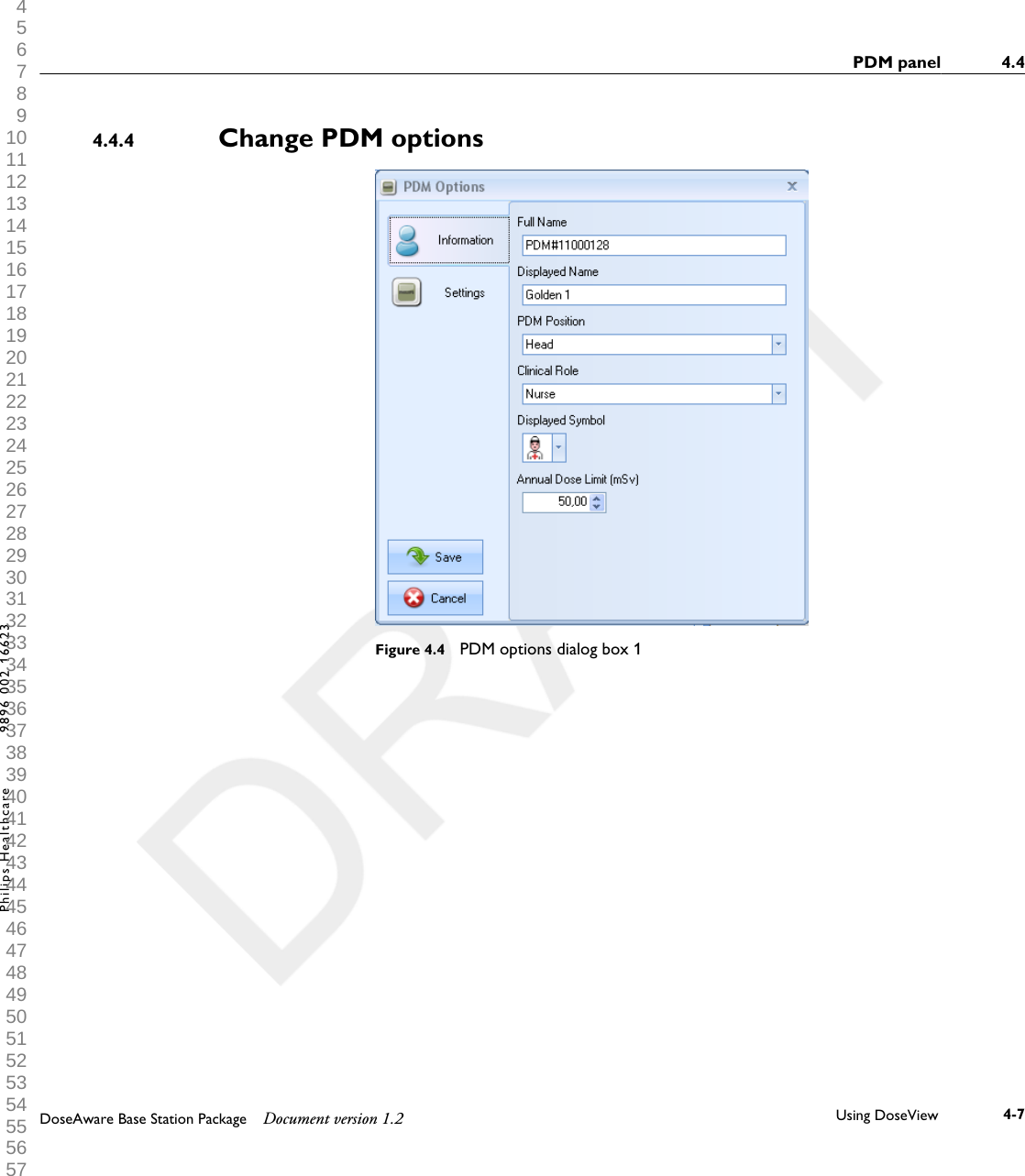
Change PDM optionsFigure 4.4  PDM options dialog box 14.4.4PDM panel 4.4DoseAware Base Station Package Document version 1.2 Using DoseView 4-7Philips Healthcare 9896 002 16623 1 2 3 4 5 6 7 8 9 10 11 12 13 14 15 16 17 18 19 20 21 22 23 24 25 26 27 28 29 30 31 32 33 34 35 36 37 38 39 40 41 42 43 44 45 46 47 48 49 50 51 52 53 54 55 56 57 58 59 60
Figure 4.5  PDM options dialog box 2Follow the instructions below to change PDM options:1Make sure that a Cradle is connected to your computer’s USB port.2Insert a PDM in the Cradle.The computer will detect the PDM automatically and thePDM information will appear in DoseView.3Access the PDM options dialog by clicking the| PDM options| (see figureabove). The PDM options dialog consists of two tabs as shown below.  If a password has been set (seesection “Specify password and language” on page4-15 ), access to the PDM options dialog box will be password protected.NOTE4.4 PDM panel4-8 Using DoseView DoseAware Base Station Package Document version 1.2Philips Healthcare 9896 002 16623 0900a44780045a3a 1 2 3 4 5 6 7 8 9 10 11 12 13 14 15 16 17 18 19 20 21 22 23 24 25 26 27 28 29 30 31 32 33 34 35 36 37 38 39 40 41 42 43 44 45 46 47 48 49 50 51 52 53 54 55 56 57 58 59 60
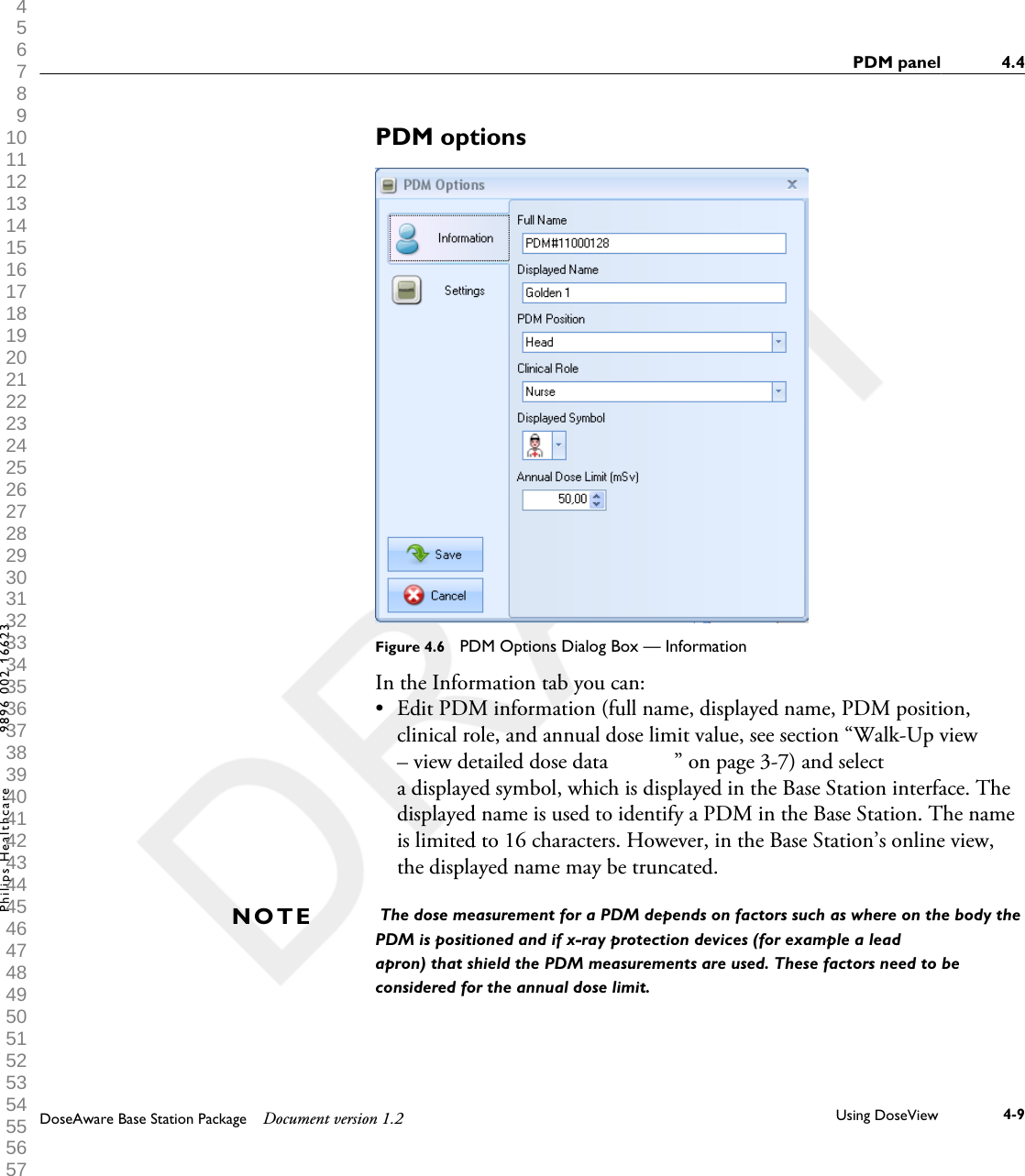
PDM optionsFigure 4.6  PDM Options Dialog Box — InformationIn the Information tab you can:•Edit PDM information (full name, displayed name, PDM position,clinical role, and annual dose limit value, see section “Walk-Up view– view detailed dose data            ” on page 3-7) and selecta displayed symbol, which is displayed in the Base Station interface. Thedisplayed name is used to identify a PDM in the Base Station. The nameis limited to 16 characters. However, in the Base Station’s online view,the displayed name may be truncated. The dose measurement for a PDM depends on factors such as where on the body thePDM is positioned and if x-ray protection devices (for example a leadapron) that shield the PDM measurements are used. These factors need to beconsidered for the annual dose limit.NOTEPDM panel 4.4DoseAware Base Station Package Document version 1.2 Using DoseView 4-9Philips Healthcare 9896 002 16623 1 2 3 4 5 6 7 8 9 10 11 12 13 14 15 16 17 18 19 20 21 22 23 24 25 26 27 28 29 30 31 32 33 34 35 36 37 38 39 40 41 42 43 44 45 46 47 48 49 50 51 52 53 54 55 56 57 58 59 60
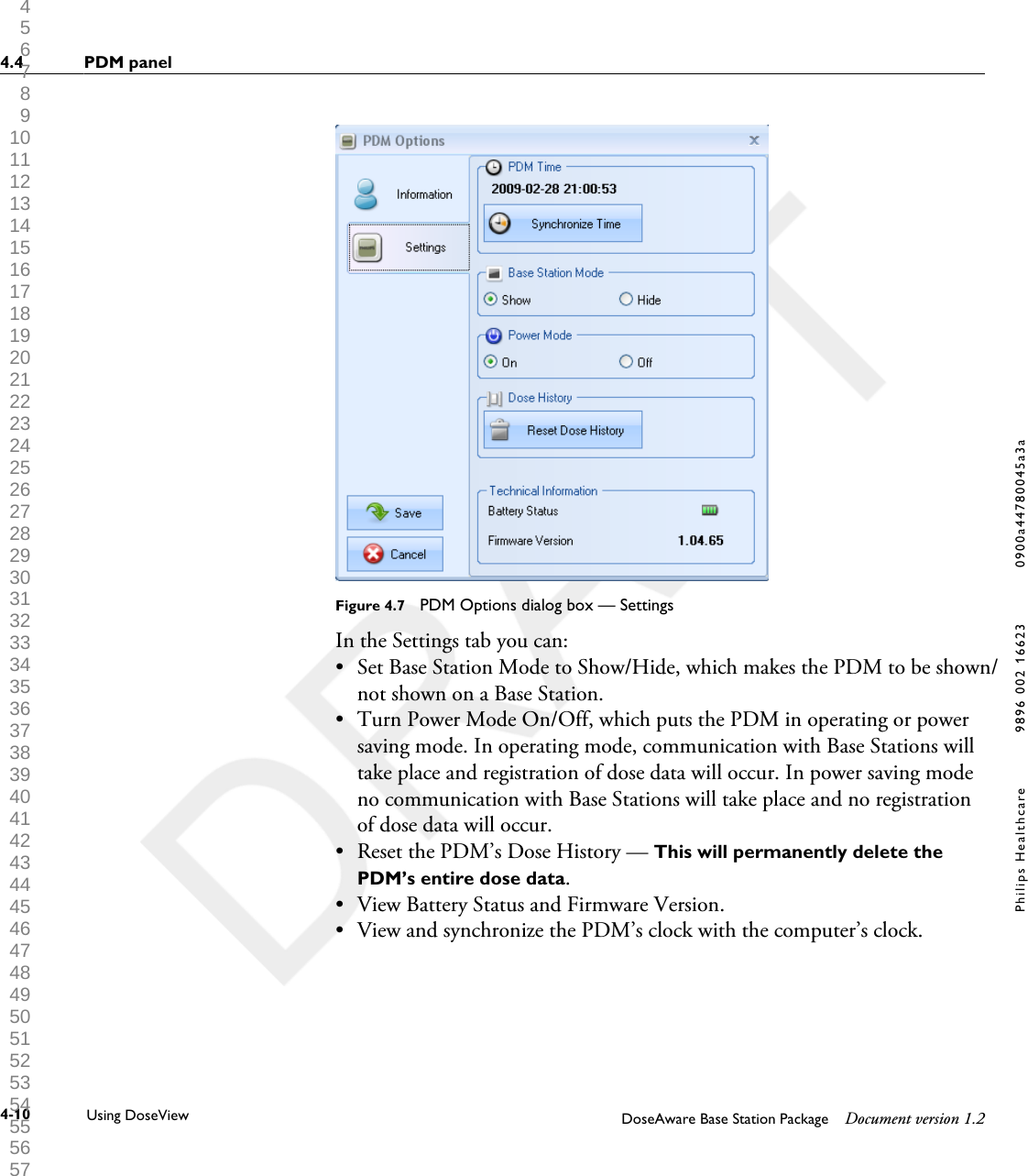
Figure 4.7  PDM Options dialog box — SettingsIn the Settings tab you can:•Set Base Station Mode to Show/Hide, which makes the PDM to be shown/not shown on a Base Station.•Turn Power Mode On/Off, which puts the PDM in operating or powersaving mode. In operating mode, communication with Base Stations willtake place and registration of dose data will occur. In power saving modeno communication with Base Stations will take place and no registrationof dose data will occur.• Reset the PDM’s Dose History — This will permanently delete thePDM’s entire dose data.• View Battery Status and Firmware Version.• View and synchronize the PDM’s clock with the computer’s clock.4.4 PDM panel4-10 Using DoseView DoseAware Base Station Package Document version 1.2Philips Healthcare 9896 002 16623 0900a44780045a3a 1 2 3 4 5 6 7 8 9 10 11 12 13 14 15 16 17 18 19 20 21 22 23 24 25 26 27 28 29 30 31 32 33 34 35 36 37 38 39 40 41 42 43 44 45 46 47 48 49 50 51 52 53 54 55 56 57 58 59 60
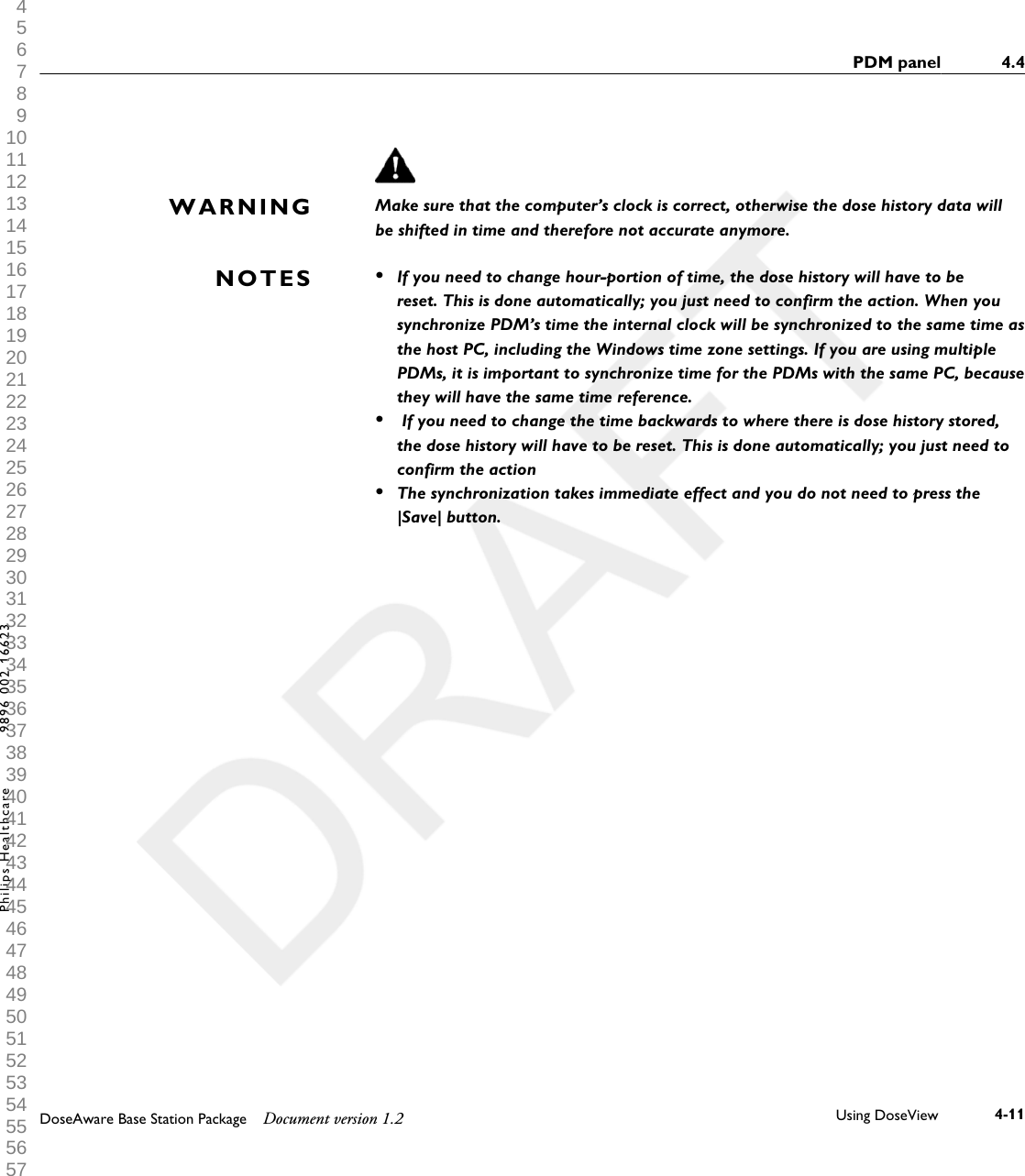
Make sure that the computer’s clock is correct, otherwise the dose history data willbe shifted in time and therefore not accurate anymore.•If you need to change hour-portion of time, the dose history will have to bereset. This is done automatically; you just need to confirm the action. When yousynchronize PDM’s time the internal clock will be synchronized to the same time asthe host PC, including the Windows time zone settings. If you are using multiplePDMs, it is important to synchronize time for the PDMs with the same PC, becausethey will have the same time reference.• If you need to change the time backwards to where there is dose history stored,the dose history will have to be reset. This is done automatically; you just need toconfirm the action•The synchronization takes immediate effect and you do not need to press the|Save| button.WARNINGNOTESPDM panel 4.4DoseAware Base Station Package Document version 1.2 Using DoseView 4-11Philips Healthcare 9896 002 16623 1 2 3 4 5 6 7 8 9 10 11 12 13 14 15 16 17 18 19 20 21 22 23 24 25 26 27 28 29 30 31 32 33 34 35 36 37 38 39 40 41 42 43 44 45 46 47 48 49 50 51 52 53 54 55 56 57 58 59 60
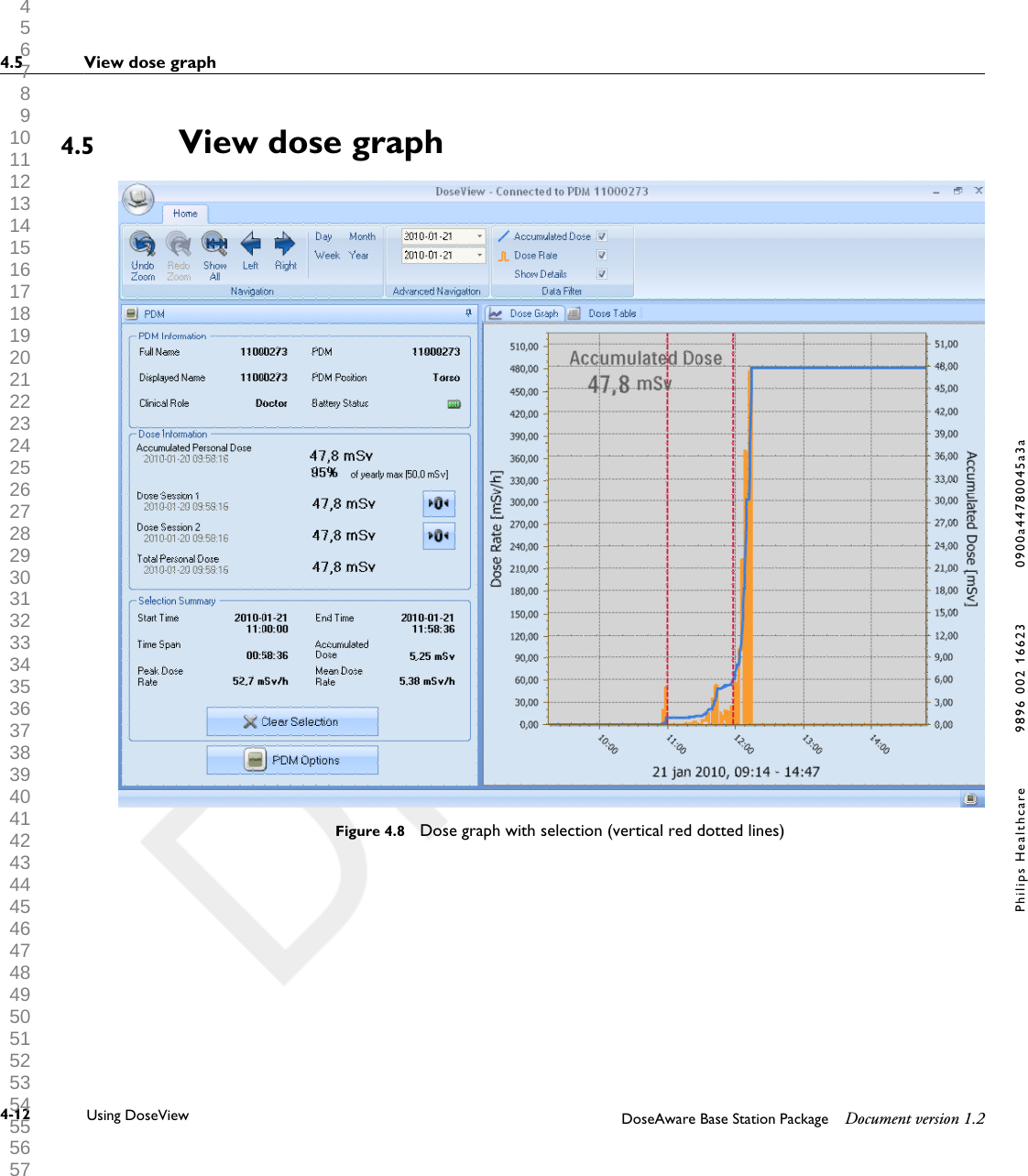
View dose graphFigure 4.8  Dose graph with selection (vertical red dotted lines)4.54.5 View dose graph4-12 Using DoseView DoseAware Base Station Package Document version 1.2Philips Healthcare 9896 002 16623 0900a44780045a3a 1 2 3 4 5 6 7 8 9 10 11 12 13 14 15 16 17 18 19 20 21 22 23 24 25 26 27 28 29 30 31 32 33 34 35 36 37 38 39 40 41 42 43 44 45 46 47 48 49 50 51 52 53 54 55 56 57 58 59 60
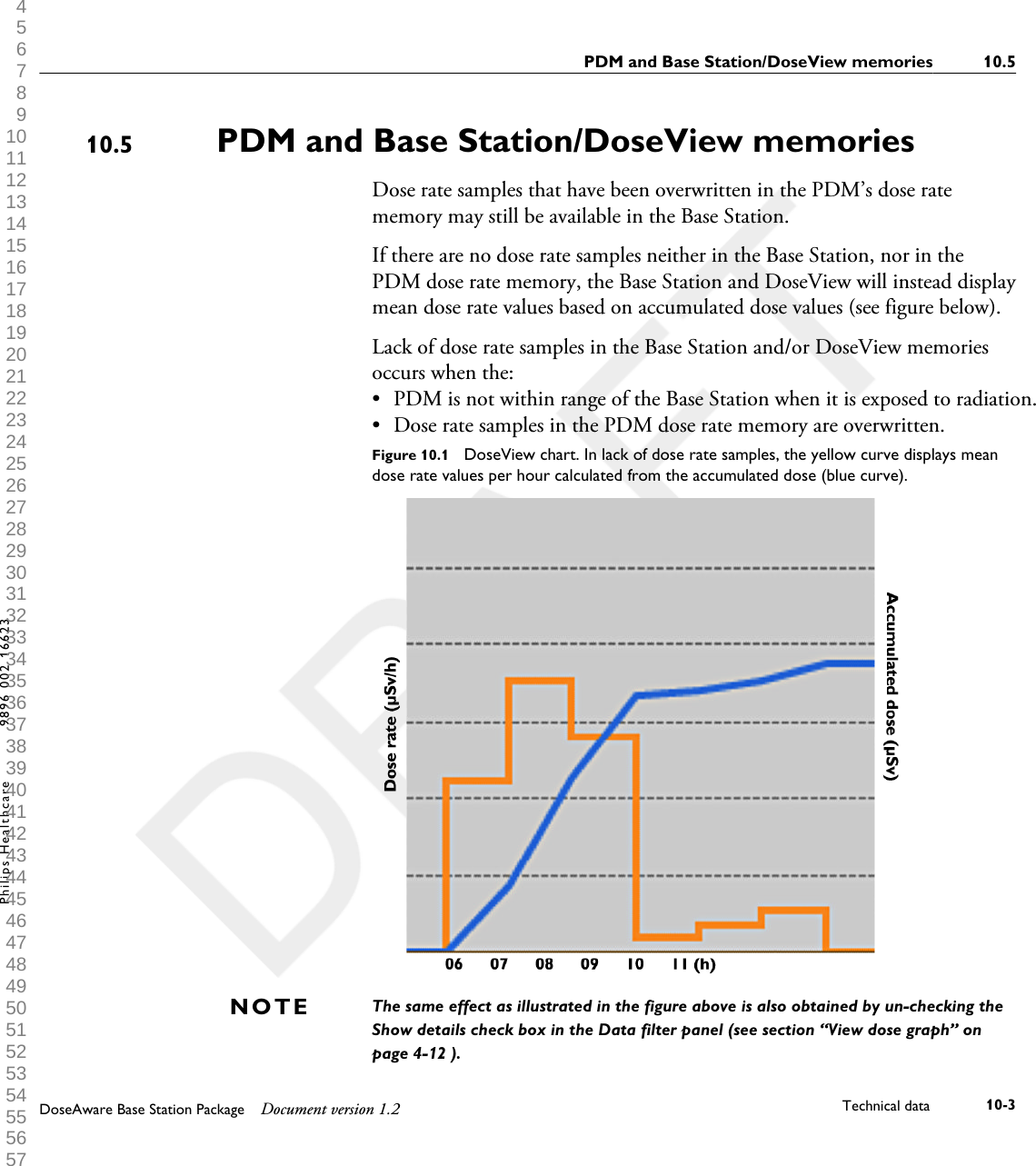
Use the data filter panel in the home menu toolbar to select whichinformation to be visible in the graph: •Accumulated Dose graph – blue graph• Dose Rate graph – orange graph, displays dose rate samples for everysecond, where such data is available• Show details• Checked: The graphs will display dose rate samples for every second,where such data is available.• Unchecked: the graphs will display mean dose rate values per hourThe graphs are covering a time span that you choose, either:• From the Advanced Navigation panel.• From the Navigation panel.• Or by left-clicking and dragging in the graph (zooming).You can also select a time span to be summarized in the Selection Summaryfield of the PDM panel. Make a selection by shift-left-clicking and draggingin the graph. Two red, dotted vertical lines in the graph will indicate theselected time span. The Selection Summary field will provide informationabout start time, end time, time span, accumulated dose, peak dose rate andmean dose rate.View dose graph 4.5DoseAware Base Station Package Document version 1.2 Using DoseView 4-13Philips Healthcare 9896 002 16623 1 2 3 4 5 6 7 8 9 10 11 12 13 14 15 16 17 18 19 20 21 22 23 24 25 26 27 28 29 30 31 32 33 34 35 36 37 38 39 40 41 42 43 44 45 46 47 48 49 50 51 52 53 54 55 56 57 58 59 60
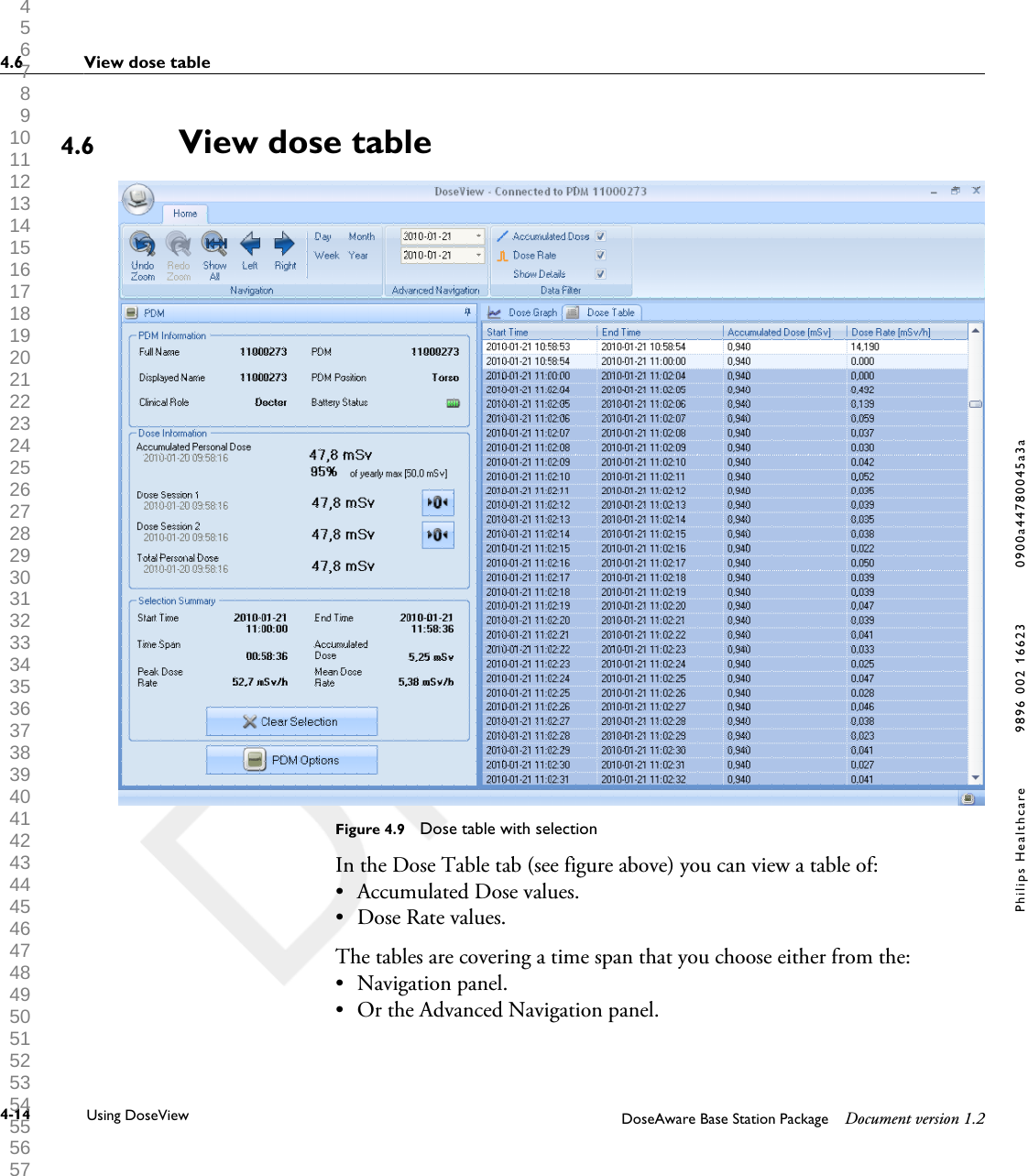
View dose tableFigure 4.9  Dose table with selectionIn the Dose Table tab (see figure above) you can view a table of:•Accumulated Dose values.• Dose Rate values.The tables are covering a time span that you choose either from the:• Navigation panel.• Or the Advanced Navigation panel.4.64.6 View dose table4-14 Using DoseView DoseAware Base Station Package Document version 1.2Philips Healthcare 9896 002 16623 0900a44780045a3a 1 2 3 4 5 6 7 8 9 10 11 12 13 14 15 16 17 18 19 20 21 22 23 24 25 26 27 28 29 30 31 32 33 34 35 36 37 38 39 40 41 42 43 44 45 46 47 48 49 50 51 52 53 54 55 56 57 58 59 60
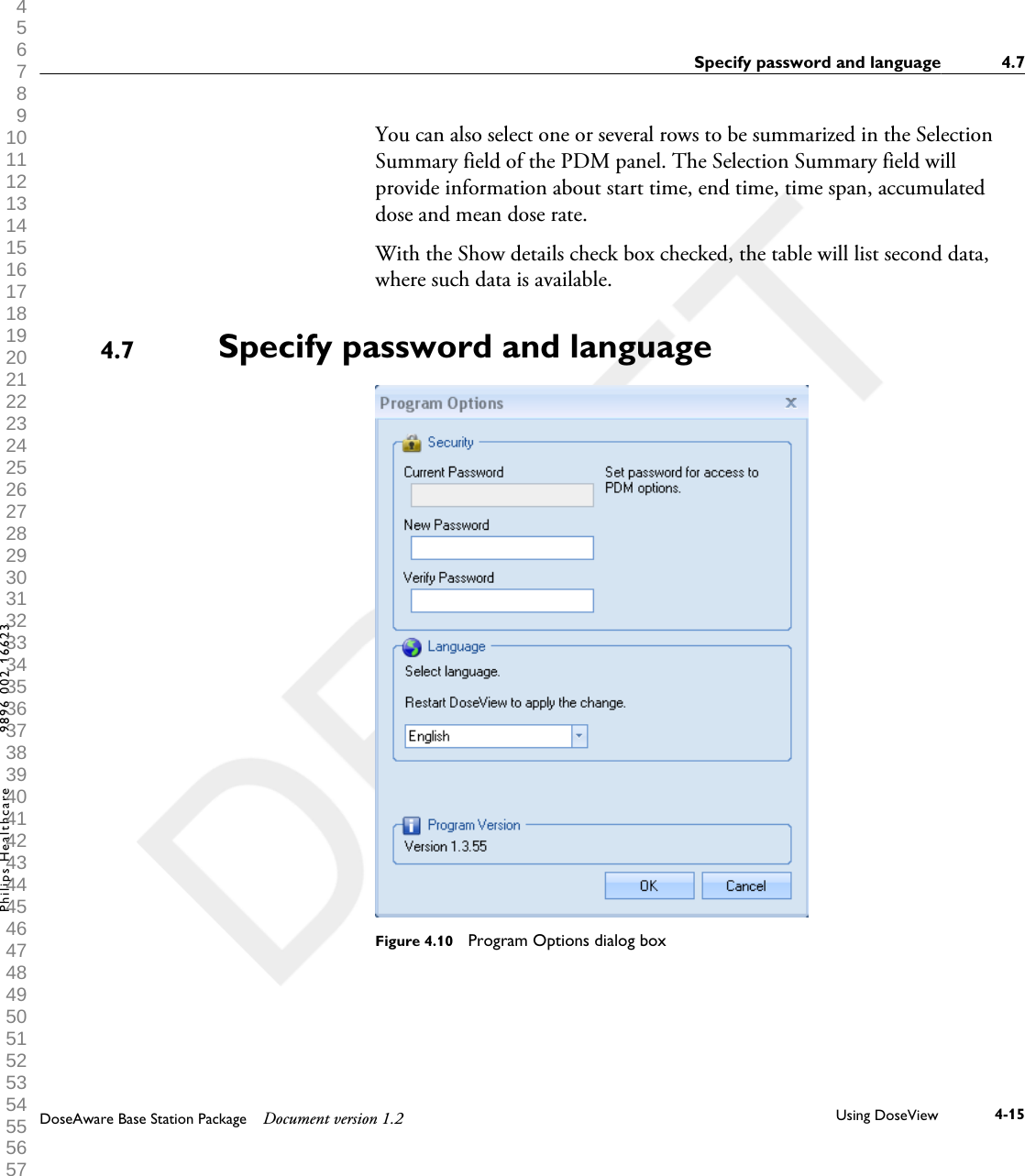
You can also select one or several rows to be summarized in the SelectionSummary field of the PDM panel. The Selection Summary field willprovide information about start time, end time, time span, accumulateddose and mean dose rate.With the Show details check box checked, the table will list second data,where such data is available.Specify password and languageFigure 4.10  Program Options dialog box4.7Specify password and language 4.7DoseAware Base Station Package Document version 1.2 Using DoseView 4-15Philips Healthcare 9896 002 16623 1 2 3 4 5 6 7 8 9 10 11 12 13 14 15 16 17 18 19 20 21 22 23 24 25 26 27 28 29 30 31 32 33 34 35 36 37 38 39 40 41 42 43 44 45 46 47 48 49 50 51 52 53 54 55 56 57 58 59 60
In the Application Menu -> Program Options dialog box (see figure above)you can: •Specify a password to protect the access to the PDM options dialog. Thepassword is only used when you are making PDM options changes.Others can still view the PDM data.• Change application language.• View the DoseView program version.•Contact your local administrator for password guidelines.•If you have lost your password, contact your local administrator, who will have to re-install the softwareNOTES4.7 Specify password and language4-16 Using DoseView DoseAware Base Station Package Document version 1.2Philips Healthcare 9896 002 16623 0900a44780045a3a 1 2 3 4 5 6 7 8 9 10 11 12 13 14 15 16 17 18 19 20 21 22 23 24 25 26 27 28 29 30 31 32 33 34 35 36 37 38 39 40 41 42 43 44 45 46 47 48 49 50 51 52 53 54 55 56 57 58 59 60
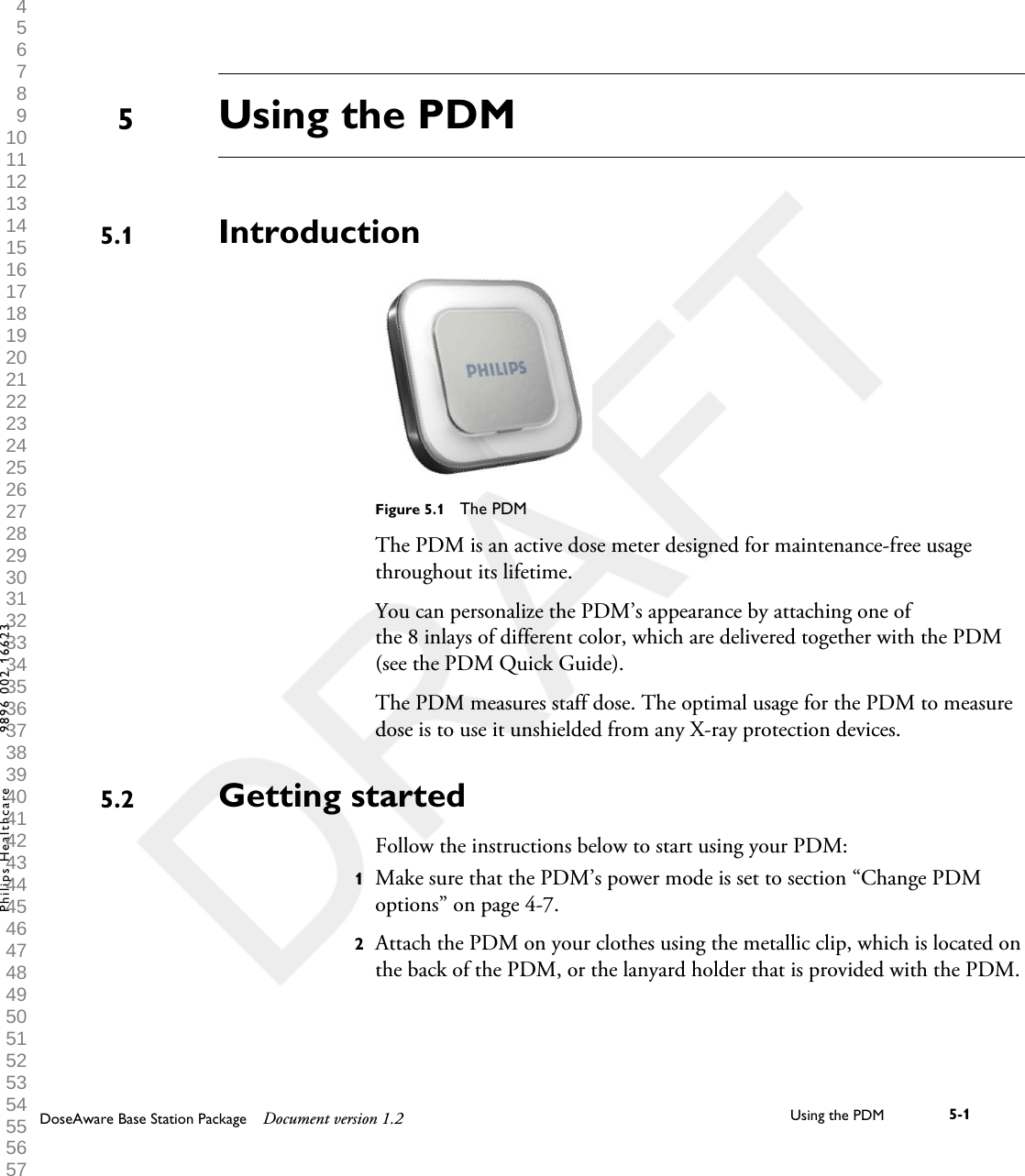
Using the PDMIntroductionFigure 5.1  The PDMThe PDM is an active dose meter designed for maintenance-free usagethroughout its lifetime.You can personalize the PDM’s appearance by attaching one ofthe 8 inlays of different color, which are delivered together with the PDM(see the PDM Quick Guide).The PDM measures staff dose. The optimal usage for the PDM to measuredose is to use it unshielded from any X-ray protection devices.Getting startedFollow the instructions below to start using your PDM:1Make sure that the PDM’s power mode is set to section “Change PDMoptions” on page 4-7.2Attach the PDM on your clothes using the metallic clip, which is located onthe back of the PDM, or the lanyard holder that is provided with the PDM.55.15.2DoseAware Base Station Package Document version 1.2 Using the PDM 5-1Philips Healthcare 9896 002 16623 1 2 3 4 5 6 7 8 9 10 11 12 13 14 15 16 17 18 19 20 21 22 23 24 25 26 27 28 29 30 31 32 33 34 35 36 37 38 39 40 41 42 43 44 45 46 47 48 49 50 51 52 53 54 55 56 57 58 59 60
The PDM now records dose values and transmits them to Base Stationswithin range. You can also read out the recorded dose valuesby using DoseView via the Cradle (see section “Getting started withDoseView” on page 4-2).See the “Technical Data” chapter to learn more about PDMmemory and data transfer between PDM and Base Stations.5.2 Getting started5-2 Using the PDM DoseAware Base Station Package Document version 1.2Philips Healthcare 9896 002 16623 0900a44780045a3a 1 2 3 4 5 6 7 8 9 10 11 12 13 14 15 16 17 18 19 20 21 22 23 24 25 26 27 28 29 30 31 32 33 34 35 36 37 38 39 40 41 42 43 44 45 46 47 48 49 50 51 52 53 54 55 56 57 58 59 60
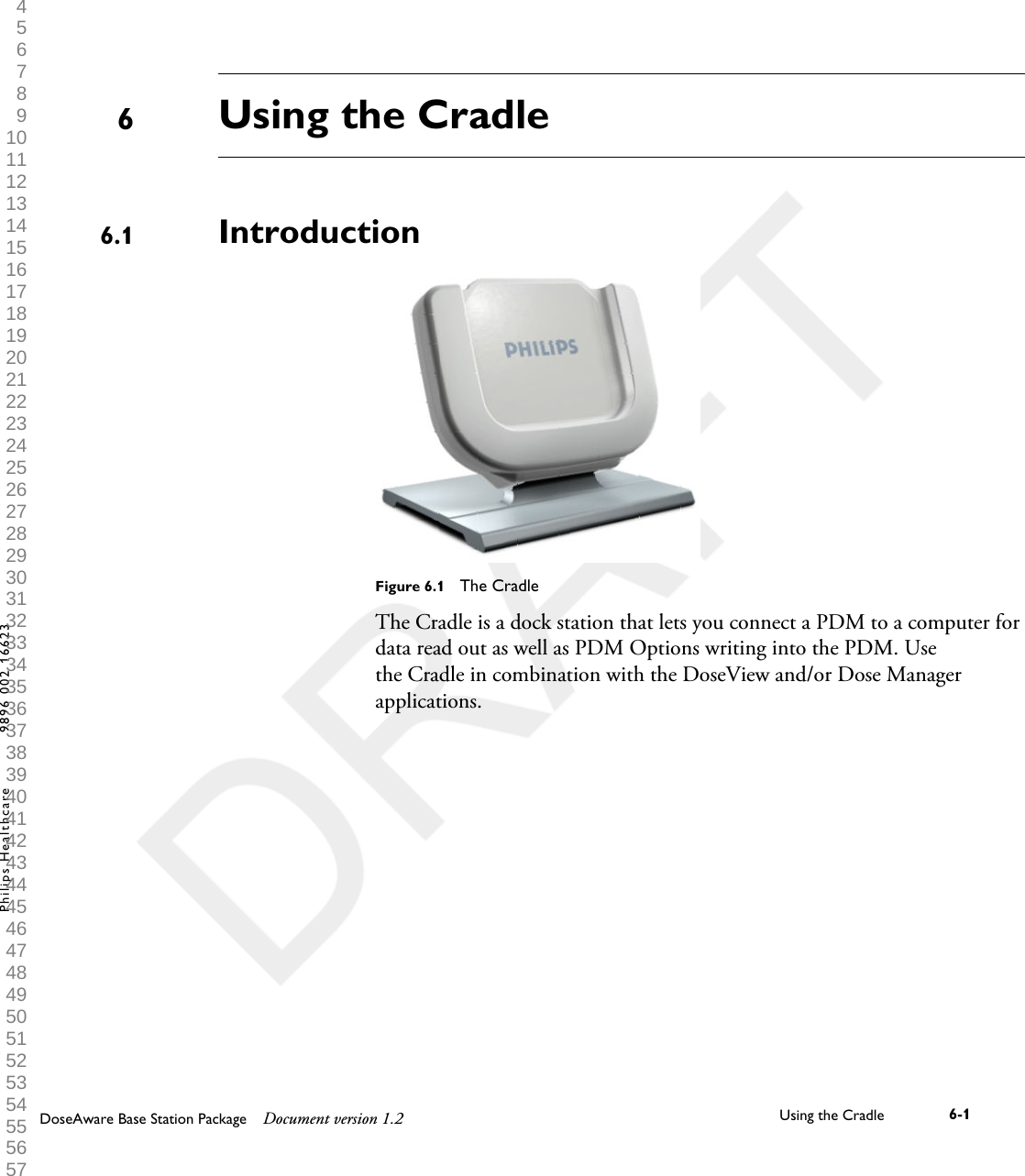
Using the CradleIntroductionFigure 6.1  The CradleThe Cradle is a dock station that lets you connect a PDM to a computer fordata read out as well as PDM Options writing into the PDM. Usethe Cradle in combination with the DoseView and/or Dose Managerapplications. 66.1DoseAware Base Station Package Document version 1.2 Using the Cradle 6-1Philips Healthcare 9896 002 16623 1 2 3 4 5 6 7 8 9 10 11 12 13 14 15 16 17 18 19 20 21 22 23 24 25 26 27 28 29 30 31 32 33 34 35 36 37 38 39 40 41 42 43 44 45 46 47 48 49 50 51 52 53 54 55 56 57 58 59 60
Getting startedDo not connect the Cradle to the computer unless DoseView and the Cradle driverare installed on the computer.1Start the DoseView application.2Connect a Cradle to your computer’s USB port.3Put a PDM in the Cradle.Within a few seconds, DoseView will detect the PDM. This is indicated atthe top of the DoseView window by a note “Connected to PDM100001158”, where PDM 100001158 is an example of a PDM ID.DoseView will start loading the PDM dose history. This may take up toa few minutes. You can follow the progress on the progress bar at thebottom of the DoseView window.6.2NOTE6.2 Getting started6-2 Using the Cradle DoseAware Base Station Package Document version 1.2Philips Healthcare 9896 002 16623 0900a44780045a3a 1 2 3 4 5 6 7 8 9 10 11 12 13 14 15 16 17 18 19 20 21 22 23 24 25 26 27 28 29 30 31 32 33 34 35 36 37 38 39 40 41 42 43 44 45 46 47 48 49 50 51 52 53 54 55 56 57 58 59 60
MaintenanceCalibrating the Base Station screenIf the touch screen does not respond correctly to user interaction, a touchscreen re-calibration may be needed.Follow the instructions below to perform a re-calibration:1Tap and hold on the Philips start up screen that appears during Base Stationstartup until the Setup view appears.2Follow the instruction on the bottom of the screen and the subsequentinstructions in the next views.Cleaning and disinfectionCleaning and disinfection of this product is required periodically.Guidelines for each are given below.Always isolate the equipment from the mains electrical supply before cleaning,disinfecting or sterilizing to prevent electric shocks.Never allow water or other liquids to leak into the equipment as this may causeelectrical short-circuits or metal corrosion.Cleaning and disinfection techniques for both the product and the roommust comply with all applicable local laws and regulations.CleaningEnameled parts and aluminum surfaces should only be wiped clean with adamp cloth and a mild detergent, and then rubbed down with a dry woolencloth. Never use corrosive cleaning agents, solvents, abrasive detergents orabrasive polishes. If you are not sure about the properties of a cleaningagent, do not use it.77.17.2WARNINGCAUTION7.2.1DoseAware Base Station Package Document version 1.2 Maintenance 7-1Philips Healthcare 9896 002 16623 1 2 3 4 5 6 7 8 9 10 11 12 13 14 15 16 17 18 19 20 21 22 23 24 25 26 27 28 29 30 31 32 33 34 35 36 37 38 39 40 41 42 43 44 45 46 47 48 49 50 51 52 53 54 55 56 57 58 59 60
Chrome parts should only be cleaned by rubbing down with a dry woolencloth. Do not use abrasive polishes. To preserve the finish, use non-abrasivewax.DisinfectionThose parts of the product that are suitable for such treatment, includingaccessories and connecting cables, can be disinfected by wiping with a clothdampened with a suitable agent. Never use corrosive or solvent disinfectantsor sterilizing agents. If you are not sure about the properties of a disinfectantor sterilizing agent, do not use it.Do not use flammable or potentially explosive disinfecting sprays. Such sprays createvapors, which can ignite, causing fatal or other serious personal injury.Disinfecting a medical product room by means of sprays is not recommended, sincethe vapor could penetrate the product, causing electrical short-circuits, metalcorrosion or other damage to the product.If non-flammable, non-explosive spray disinfectants are to be used, theequipment must first be switched off and allowed to cool. This preventsconvection currents from drawing spray mist into the product. Plasticsheeting must be used to cover the product thoroughly, after which sprayingcan begin.Once all traces of the disinfectant vapor have dispersed, the plastic sheetingcan be removed and the equipment itself can be disinfected in therecommended way.If a spray was used, you must be satisfied that all traces of the vapor havedispersed before switching the product on again.7.2.2WARNINGCAUTION7.2 Cleaning and disinfection7-2 Maintenance DoseAware Base Station Package Document version 1.2Philips Healthcare 9896 002 16623 0900a44780045a3a 1 2 3 4 5 6 7 8 9 10 11 12 13 14 15 16 17 18 19 20 21 22 23 24 25 26 27 28 29 30 31 32 33 34 35 36 37 38 39 40 41 42 43 44 45 46 47 48 49 50 51 52 53 54 55 56 57 58 59 60
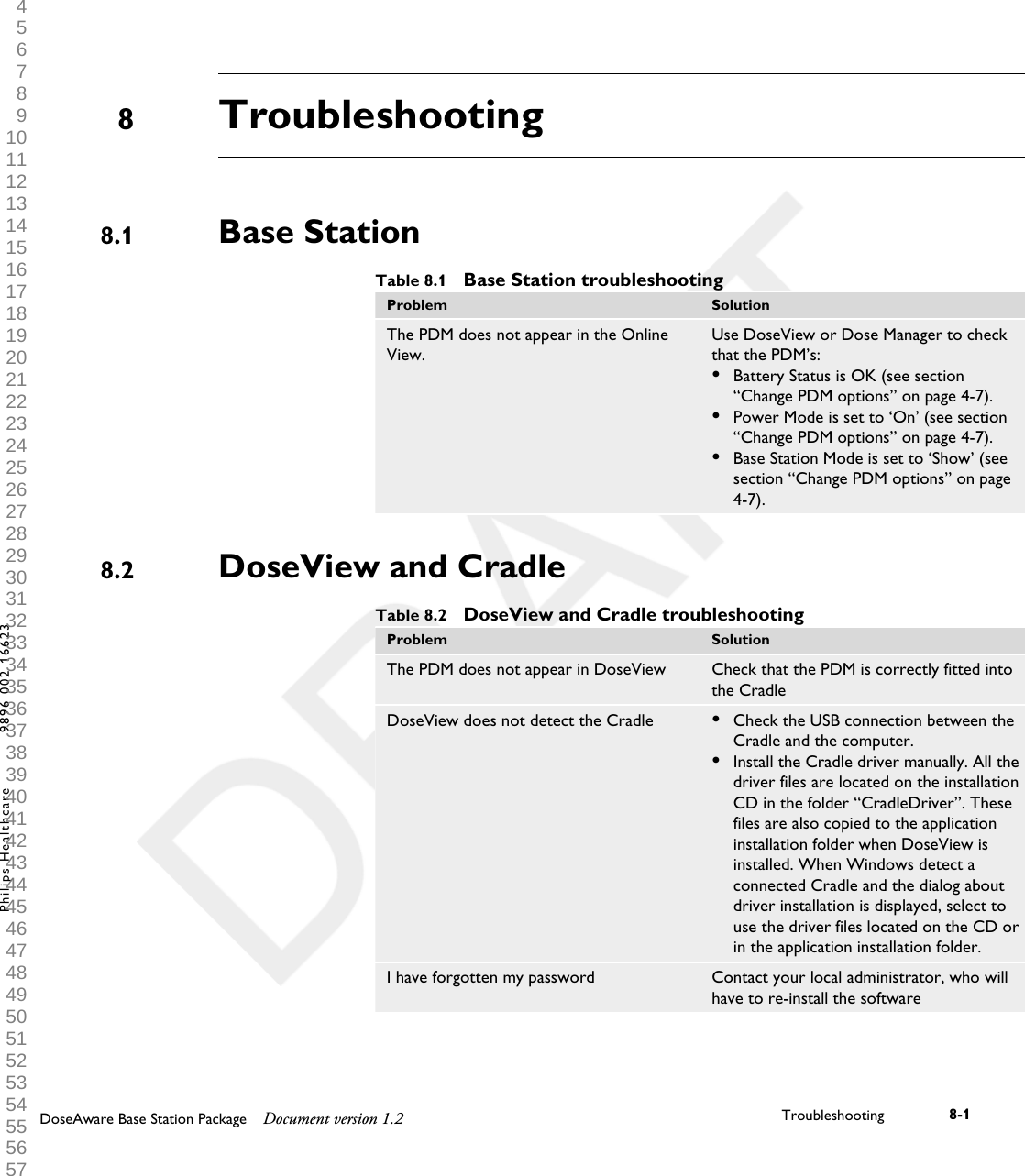
TroubleshootingBase StationTable 8.1  Base Station troubleshootingProblem SolutionThe PDM does not appear in the OnlineView.Use DoseView or Dose Manager to checkthat the PDM’s:•Battery Status is OK (see section“Change PDM options” on page 4-7).•Power Mode is set to ‘On’ (see section“Change PDM options” on page 4-7).•Base Station Mode is set to ‘Show’ (seesection “Change PDM options” on page4-7).DoseView and CradleTable 8.2  DoseView and Cradle troubleshootingProblem SolutionThe PDM does not appear in DoseView Check that the PDM is correctly fitted intothe CradleDoseView does not detect the Cradle •Check the USB connection between theCradle and the computer.•Install the Cradle driver manually. All thedriver files are located on the installationCD in the folder “CradleDriver”. Thesefiles are also copied to the applicationinstallation folder when DoseView isinstalled. When Windows detect aconnected Cradle and the dialog aboutdriver installation is displayed, select touse the driver files located on the CD orin the application installation folder.I have forgotten my password Contact your local administrator, who willhave to re-install the software88.18.2DoseAware Base Station Package Document version 1.2 Troubleshooting 8-1Philips Healthcare 9896 002 16623 1 2 3 4 5 6 7 8 9 10 11 12 13 14 15 16 17 18 19 20 21 22 23 24 25 26 27 28 29 30 31 32 33 34 35 36 37 38 39 40 41 42 43 44 45 46 47 48 49 50 51 52 53 54 55 56 57 58 59 60
8.2 DoseView and Cradle8-2 Troubleshooting DoseAware Base Station Package Document version 1.2Philips Healthcare 9896 002 16623 0900a44780045a3a 1 2 3 4 5 6 7 8 9 10 11 12 13 14 15 16 17 18 19 20 21 22 23 24 25 26 27 28 29 30 31 32 33 34 35 36 37 38 39 40 41 42 43 44 45 46 47 48 49 50 51 52 53 54 55 56 57 58 59 60
Product disposalIntroductionPhilips Medical Systems is concerned to help protect the naturalenvironment, and to help ensure continued safe and effective use of thisproduct, through proper support, maintenance and training.Therefore Philips products are designed and manufactured to comply withrelevant guidelines for environmental protection. As long as the product isproperly operated and maintained, it presents no environmental risks.However, the product may contain material, which could be harmful to theenvironment if disposed of incorrectly. Use of such material is essential toperforming the functions of the product, and to meeting statutory and otherrequirements.This section of these Instructions for Use is directed mainly at the user/owner of the product.Passing the system on to another userIf this product passes to another user, it must be in its complete state,including all product support documentation.Make the new user aware of the support services that Philips MedicalSystems provides for installing, commissioning and maintaining the product.Before passing on the product or taking it out of service, all data must be(backed up elsewhere if necessary, and) unrecoverable be deleted on theproduct.It must be remembered by all existing users that passing on electricalproducts to new users may create serious technical, medical and legal (e.g.on privacy) risks. Such risks can arise even if the product is given away.99.19.2DoseAware Base Station Package Document version 1.2 Product disposal 9-1Philips Healthcare 9896 002 16623 1 2 3 4 5 6 7 8 9 10 11 12 13 14 15 16 17 18 19 20 21 22 23 24 25 26 27 28 29 30 31 32 33 34 35 36 37 38 39 40 41 42 43 44 45 46 47 48 49 50 51 52 53 54 55 56 57 58 59 60
Existing users are strongly advised to seek advice from their local PhilipsMedical Systems representative before committing themselves to passing onany product. Alternatively, contact the manufacturer.Once the product has been passed on to a new user, a previous user may stillreceive important safety-related information, such as bulletins and fieldchange orders. In many jurisdictions, there is a clear duty on the previoususer to communicate such safety-related information to new users. Previoususers who are not able or prepared to do this should inform Philips MedicalSystems about the new user, so that Philips Medical Systems can provide thenew user with safety-related information.Final disposal of the systemFinal disposal is when the user disposes of the product in such a way that itcan no longer be used for its intended purpose(s).In the European Union (the WEEE directive), this label indicates that thisproduct should not be disposed of with household waste.This product should be disposed of at an appropriate facility to enablerecovery and recycling.Philips supports users in:•Recovering reusable parts.• Recycling of useful materials by competent disposal companies.• Safe and effective disposal of product.9.39.3 Final disposal of the system9-2 Product disposal DoseAware Base Station Package Document version 1.2Philips Healthcare 9896 002 16623 0900a44780045a3a 1 2 3 4 5 6 7 8 9 10 11 12 13 14 15 16 17 18 19 20 21 22 23 24 25 26 27 28 29 30 31 32 33 34 35 36 37 38 39 40 41 42 43 44 45 46 47 48 49 50 51 52 53 54 55 56 57 58 59 60
For advice and information, contact your Philips Service Organization first,or otherwise the manufacturer.Fitting, removing, and disposing of batteriesBatteries harm the environment; dispose of the old batteries in an environmentallysound way.For information about disposal of the product, batteries, and hazardousmaterials, see the Philips Medical Systems product sustainability website at:http://www.healthcare.philips.com/main/about/Sustainability/Recycling/9.4NOTEFitting, removing, and disposing of batteries 9.4DoseAware Base Station Package Document version 1.2 Product disposal 9-3Philips Healthcare 9896 002 16623 1 2 3 4 5 6 7 8 9 10 11 12 13 14 15 16 17 18 19 20 21 22 23 24 25 26 27 28 29 30 31 32 33 34 35 36 37 38 39 40 41 42 43 44 45 46 47 48 49 50 51 52 53 54 55 56 57 58 59 60
9.4 Fitting, removing, and disposing of batteries9-4 Product disposal DoseAware Base Station Package Document version 1.2Philips Healthcare 9896 002 16623 0900a44780045a3a 1 2 3 4 5 6 7 8 9 10 11 12 13 14 15 16 17 18 19 20 21 22 23 24 25 26 27 28 29 30 31 32 33 34 35 36 37 38 39 40 41 42 43 44 45 46 47 48 49 50 51 52 53 54 55 56 57 58 59 60
Technical dataPDM radiology  Table 10.1  PDM radiology technical dataCharacteristic MeasureOperational Quantity* Hp(10)Reproducibility 10% or 1 µSv, whatever is greatestDose Rate Range 40 µSv/h – 500 mSv/hEnergy dependence X-/g-rays +/- 30% within N40 – N120Angular dependence +/- 5% within +/- 5°+/- 30% within +/- 50°+200%/-100% within +/- 90°Temperature dependence +/- 5% within 20-26°C+/- 25% within 15-35°CBattery voltage dependence +/- 2% from fully charged until low batteryshutdownResponse time Less than 1s above 100µSv/h, less than 5sotherwisePosition on body** On torso outside lead apron*) Hp(10): Personal dose equivalent at a depth of 10 mm according to ISO 4037.**) Position on body: The Hp(10) measurement is only valid for a position on the torsooutside any lead apron or other protection. (To estimate effective dose to a user, onemust use other means to estimate things like the environmental radiation situation and theeffectiveness of protection.)1010.1DoseAware Base Station Package Document version 1.2 Technical data 10-1Philips Healthcare 9896 002 16623 1 2 3 4 5 6 7 8 9 10 11 12 13 14 15 16 17 18 19 20 21 22 23 24 25 26 27 28 29 30 31 32 33 34 35 36 37 38 39 40 41 42 43 44 45 46 47 48 49 50 51 52 53 54 55 56 57 58 59 60
PDM memoryThe PDM has two dose data memories:•The accumulated dose memory, where the PDM stores accumulated dosevalues every hour for the entire lifetime of the PDM.• The dose rate memory, where the PDM stores dose rate samples. Whenthe radiation exceeds 40 µSv/h, the PDM stores one sample persecond. This memory is limited to 3600 second-samples.When the dose rate memory is full, the oldest data will be overwritten with newer data.Base Station memoryThe Base Station stores dose information and PDM Info for PDMs thathave been connected to it.As the Base Station does not have a limitation of 3600 s for the dose ratememory, the information transmitted from the PDM will be more detailed.When a PDM is connected to a Base Station, it continuously transmits itsmeasured dose exposures.When the Base Station memory is full, the oldest data will be overwritten.The capacity of the Base Station depends on the number of PDMs that havebeen On-Line and the number of dose rate samples. Storage capacity example: • 290 hours of dose exposure for 50 PDMs each.Dose data transfer from PDM to Base StationWhen a PDM gets within range of a Base Station, it will transfer data to theBase Station (the accumulated dose values the PDM has collected since lasttime it was within range). If a PDM is within range of a BaseStation when it is exposed to radiation, the PDM will also start sending doserate samples to the Base Station each second.10.2NOTE10.3NOTE10.410.2 PDM memory10-2 Technical data DoseAware Base Station Package Document version 1.2Philips Healthcare 9896 002 16623 0900a44780045a3a 1 2 3 4 5 6 7 8 9 10 11 12 13 14 15 16 17 18 19 20 21 22 23 24 25 26 27 28 29 30 31 32 33 34 35 36 37 38 39 40 41 42 43 44 45 46 47 48 49 50 51 52 53 54 55 56 57 58 59 60
PDM and Base Station/DoseView memoriesDose rate samples that have been overwritten in the PDM’s dose ratememory may still be available in the Base Station.If there are no dose rate samples neither in the Base Station, nor in thePDM dose rate memory, the Base Station and DoseView will instead displaymean dose rate values based on accumulated dose values (see figure below).Lack of dose rate samples in the Base Station and/or DoseView memoriesoccurs when the:•PDM is not within range of the Base Station when it is exposed to radiation.•Dose rate samples in the PDM dose rate memory are overwritten.Figure 10.1  DoseView chart. In lack of dose rate samples, the yellow curve displays meandose rate values per hour calculated from the accumulated dose (blue curve).The same effect as illustrated in the figure above is also obtained by un-checking theShow details check box in the Data filter panel (see section “View dose graph” onpage 4-12 ). 10.5NOTEPDM and Base Station/DoseView memories 10.5DoseAware Base Station Package Document version 1.2 Technical data 10-3Philips Healthcare 9896 002 16623 1 2 3 4 5 6 7 8 9 10 11 12 13 14 15 16 17 18 19 20 21 22 23 24 25 26 27 28 29 30 31 32 33 34 35 36 37 38 39 40 41 42 43 44 45 46 47 48 49 50 51 52 53 54 55 56 57 58 59 60
 Time managementThe PDM logs dose history in local time with no daylight saving timeadjustments. Daylight saving time adjustment is done in the Base Station,DoseView or Dose Manager when the dose history is presented.The following happens when the daylight saving time is changed:•When going to summertime, one extra hour with no dose data will beadded to the dose log.• When going to wintertime, two hours of dose data will be merged intoone hour. This hour contains no dose rate details. When changingfrom summertime to wintertime, dose date details in the two mergedhours will not be displayed.Technical SpecificationsRadio communication• The communication range between a PDM facing a Base Station and theBase Station is at least 10 meters in open air inside an operating room.• Communication radio, Europe, complies with 1995/5/EC Radio andTelecommunications Terminal Equipment (R & TTE).•Communication radio, US, complies with FCC Declaration of Conformity. Base StationTable 10.2  Base Station technical specificationsCharacteristic MeasureWeight 1.45 kg (3,2 lb)Dimensions 297x243x51 mm (WxHxD)Display 10.4” touch screen, 640x480 pixels, 65 000colorsPower supply 12 V, 2 AMemory 512 MbStorage Approximately 290 hours of dose historyfor each of 50 PDMs10.610.710.7.110.7.210.6  Time management10-4 Technical data DoseAware Base Station Package Document version 1.2Philips Healthcare 9896 002 16623 0900a44780045a3a 1 2 3 4 5 6 7 8 9 10 11 12 13 14 15 16 17 18 19 20 21 22 23 24 25 26 27 28 29 30 31 32 33 34 35 36 37 38 39 40 41 42 43 44 45 46 47 48 49 50 51 52 53 54 55 56 57 58 59 60
Characteristic MeasureBacklight life time Approximately 50000 hoursMaximum heat dissipation 25 WNetwork Ethernet 10/100USB 1.1 host for USB Mass Storage DevicePDMTable 10.3  PDM technical specificationsCharacteristic MeasureWeight 30 g (1 oz)Dimensions 44x45x10 mm (WxHxD)Fastening Metallic clip and lanyard holderLog memory 1 5 years Accumulated Dose with 1 hourresolution, cyclically overriddenLog memory 2 3600 Dose Rate samples with one-secondresolution, cyclically overridden. Dose Rateis only measured above a 40µSv/h thresholdlimitTime resolution 1 secondTime accuracy Maximum error 2 seconds/24 hrsPower supply via the Cradle when connected to acomputer via USBExpected battery life At least 4 years based on “normal use”,which is defined as the operating conditionsunder normal use are 8 hours per day, 5days a week and 52 weeks per year at anambient temperature of 20°C.CradleTable 10.4  Cradle technical specificationsCharacteristic MeasureWeight 50 gDimensions 64x61x59 mm (WxHxD)Cable length 1,5 M10.7.310.7.4Technical Specifications 10.7DoseAware Base Station Package Document version 1.2 Technical data 10-5Philips Healthcare 9896 002 16623 1 2 3 4 5 6 7 8 9 10 11 12 13 14 15 16 17 18 19 20 21 22 23 24 25 26 27 28 29 30 31 32 33 34 35 36 37 38 39 40 41 42 43 44 45 46 47 48 49 50 51 52 53 54 55 56 57 58 59 60
Characteristic MeasurePower via USBCommunication with computer USB 2.0Security and privacy requirementsAntivirusAn AVS solution is not installed on this Windows CE device because of thesecurity measures taken to reduce the attack surface.Network portsThe following ports and protocols are open on the Base Station forcommunication with the Dose Manager:TCP/UDP PortnumberProtocol Additional noteTCP 8070 gSOAP httpd 2.7 Used for regular (bidirectional)communication between Base Stationand Dose ManagerUDP 8060 Proprietary discoveryprotocolProtocol (bidirectional) used for BaseStation discoveryEncryptionDoseAware data is encrypted during transmission, at rest on the BaseStation and is stored in an encrypted Dose Manager database.10.810.8 Security and privacy requirements10-6 Technical data DoseAware Base Station Package Document version 1.2Philips Healthcare 9896 002 16623 0900a44780045a3a 1 2 3 4 5 6 7 8 9 10 11 12 13 14 15 16 17 18 19 20 21 22 23 24 25 26 27 28 29 30 31 32 33 34 35 36 37 38 39 40 41 42 43 44 45 46 47 48 49 50 51 52 53 54 55 56 57 58 59 60

Navigation menu