Valentine Research V18A V1 RADAR LOCATOR User Manual ManualInternal 2005 i4 final

Valentine Research, Inc. V1 RADAR LOCATOR ManualInternal 2005 i4 final

USERS MANUAL

With exclusive computer modes:• All-Bogeys®• Logic®• Advanced-Logic®OWNER’S MANUALThe only one with Full Coverage®
Contents pageWelcome to Full CoverageFull Coverage........................................1-2What’s Included .....................................3Starting up ..........................................3What you should know about radar .....................4-6Finding radar — On-the-road situations..................7-10Laser Warning .......................................11What you should know about laser .....................12Finding Laser ........................................13Controls & Functions. .................................14-16Mounting — Where & How. ...........................17-18Installation — Direct-wire Power Adapter ................19Changing the fuse ....................................19, 22Power Cords ........................................20Installation — Concealed Display.......................21Installation — Lighter Adapter, fuse......................22-23Remote Audio Adapter ................................24-25POP................................................26Troubleshooting .....................................27-28Doubts — Maybe it’s not working right ..................29Service .............................................30Specifications........................................31Parts & Accessories ...................................31Warranty ...........................................32A few things to remember
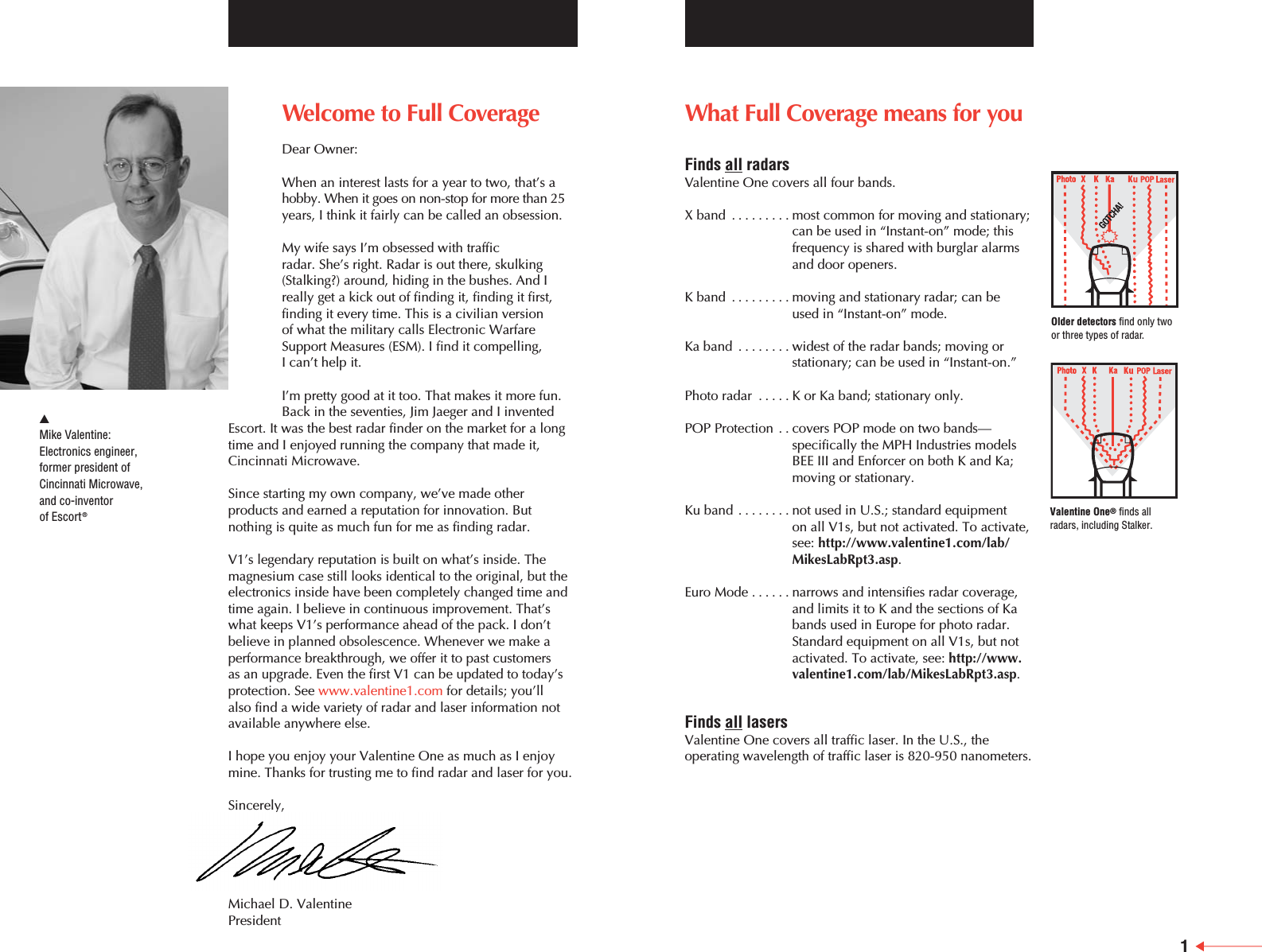
What Full Coverage means for youFinds all radarsValentine One covers all four bands.X band .........most common for moving and stationary;can be used in “Instant-on” mode; thisfrequency is shared with burglar alarms and door openers.K band .........moving and stationary radar; can be used in “Instant-on” mode.Ka band ........widest of the radar bands; moving orstationary; can be used in “Instant-on.” Photo radar .....K or Ka band; stationary only.POP Protection . . covers POP mode on two bands—specifically the MPH Industries modelsBEE III and Enforcer on both K and Ka;moving or stationary.Ku band ........not used in U.S.; standard equipment on all V1s, but not activated. To activate,see: http://www.valentine1.com/lab/MikesLabRpt3.asp.Euro Mode ......narrows and intensifies radar coverage,and limits it to K and the sections of Kabands used in Europe for photo radar.Standard equipment on all V1s, but notactivated. To activate, see: http://www.valentine1.com/lab/MikesLabRpt3.asp.Finds all lasersValentine One covers all traffic laser. In the U.S., theoperating wavelength of traffic laser is 820-950 nanometers.Welcome to Full CoverageDear Owner:When an interest lasts for a year to two, that’s ahobby. When it goes on non-stop for more than 25years, I think it fairly can be called an obsession.My wife says I’m obsessed with traffic radar. She’s right. Radar is out there, skulking(Stalking?) around, hiding in the bushes. And Ireally get a kick out of finding it, finding it first,finding it every time. This is a civilian version of what the military calls Electronic WarfareSupport Measures (ESM). I find it compelling, I can’t help it.I’m pretty good at it too. That makes it more fun.Back in the seventies, Jim Jaeger and I inventedEscort. It was the best radar finder on the market for a longtime and I enjoyed running the company that made it,Cincinnati Microwave.Since starting my own company, we’ve made otherproducts and earned a reputation for innovation. Butnothing is quite as much fun for me as finding radar. V1’s legendary reputation is built on what’s inside. Themagnesium case still looks identical to the original, but theelectronics inside have been completely changed time andtime again. I believe in continuous improvement. That’swhat keeps V1’s performance ahead of the pack. I don’tbelieve in planned obsolescence. Whenever we make aperformance breakthrough, we offer it to past customers as an upgrade. Even the first V1 can be updated to today’sprotection. See www.valentine1.com for details; you’ll also find a wide variety of radar and laser information notavailable anywhere else.I hope you enjoy your Valentine One as much as I enjoymine. Thanks for trusting me to find radar and laser for you.Sincerely,Michael D. ValentinePresident왖Mike Valentine:Electronics engineer, former president ofCincinnati Microwave,and co-inventorof Escort®1Older detectors find only twoor three types of radar.Valentine One®finds allradars, including Stalker.
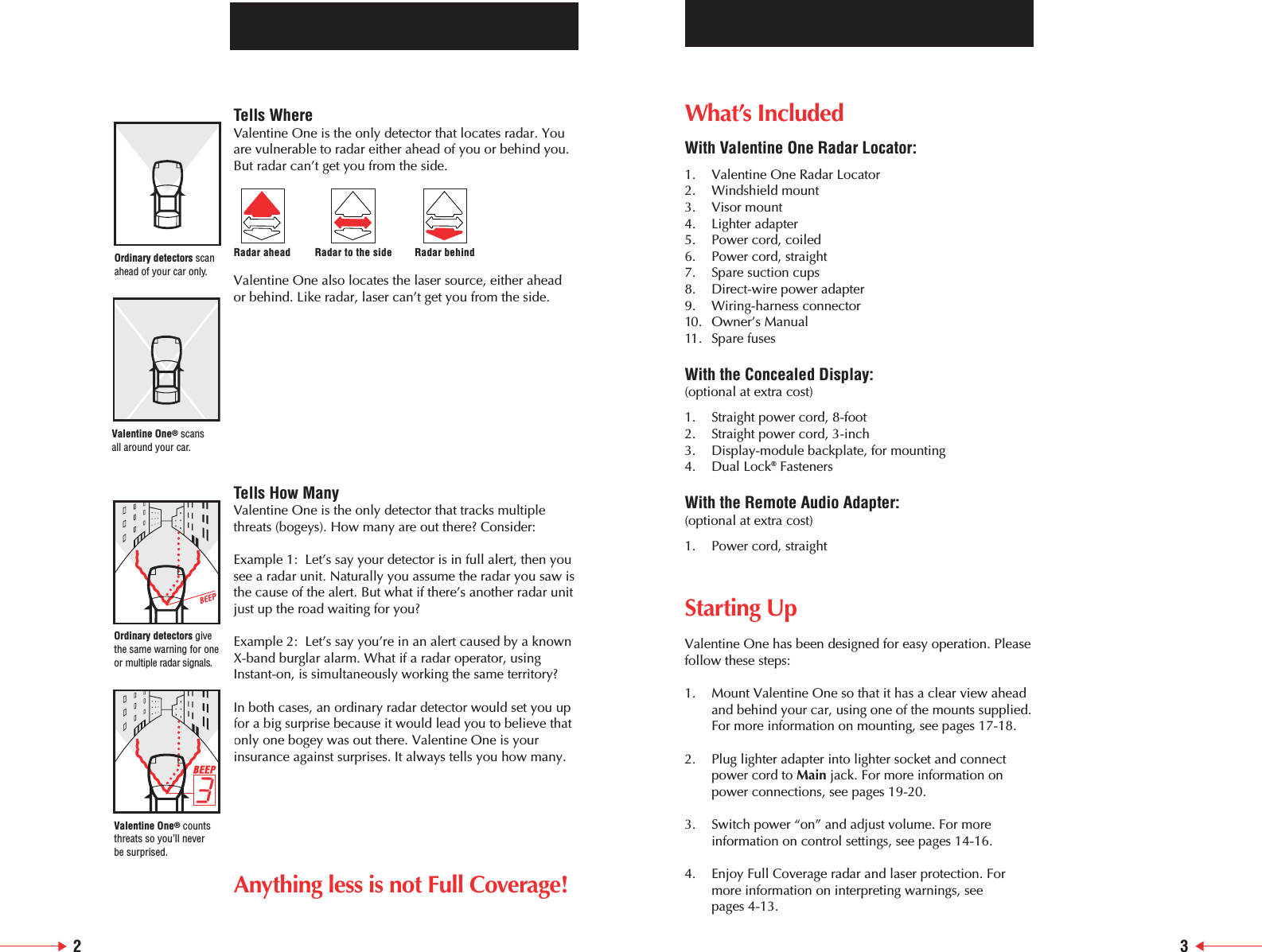
What’s IncludedWith Valentine One Radar Locator:1. Valentine One Radar Locator2. Windshield mount3. Visor mount4. Lighter adapter5. Power cord, coiled6. Power cord, straight7. Spare suction cups8. Direct-wire power adapter9. Wiring-harness connector10. Owner’s Manual11. Spare fusesWith the Concealed Display: (optional at extra cost)1. Straight power cord, 8-foot2. Straight power cord, 3-inch3. Display-module backplate, for mounting4. Dual Lock®FastenersWith the Remote Audio Adapter: (optional at extra cost)1. Power cord, straightStarting UpValentine One has been designed for easy operation. Pleasefollow these steps:1. Mount Valentine One so that it has a clear view ahead and behind your car, using one of the mounts supplied.For more information on mounting, see pages 17-18.2. Plug lighter adapter into lighter socket and connect power cord to Main jack. For more information on power connections, see pages 19-20.3. Switch power “on” and adjust volume. For more information on control settings, see pages 14-16.4. Enjoy Full Coverage radar and laser protection. Formore information on interpreting warnings, see pages 4-13.23Tells WhereValentine One is the only detector that locates radar. Youare vulnerable to radar either ahead of you or behind you.But radar can’t get you from the side.Valentine One also locates the laser source, either ahead or behind. Like radar, laser can’t get you from the side.Tells How ManyValentine One is the only detector that tracks multiplethreats (bogeys). How many are out there? Consider:Example 1:  Let’s say your detector is in full alert, then yousee a radar unit. Naturally you assume the radar you saw isthe cause of the alert. But what if there’s another radar unitjust up the road waiting for you?Example 2:  Let’s say you’re in an alert caused by a knownX-band burglar alarm. What if a radar operator, usingInstant-on, is simultaneously working the same territory?In both cases, an ordinary radar detector would set you upfor a big surprise because it would lead you to believe thatonly one bogey was out there. Valentine One is yourinsurance against surprises. It always tells you how many.Anything less is not Full Coverage!Radar ahead Radar to the side Radar behindOrdinary detectors scanahead of your car only.Ordinary detectors givethe same warning for oneor multiple radar signals.Valentine One®scans all around your car.Valentine One®countsthreats so you’ll never be surprised.
What you should know about radarHow Traffic Radar WorksTraffic radar uses a radar beam to measure speed. Think of the beam as a searchlight. It’s invisible because it’s made of microwaves instead of light, but otherwise it acts verymuch like a light beam. It travels in straight lines. It’s easilyreflected. It scatters as it is passed through dust andmoisture in the air. And — this is essential — it has to hit your car before it can determine your speed.Radar can’t see around corners or through hills. It can’t see you when you are behind another vehicle. When in the clear, how strongly your vehicle reflects determineshow far the radar can read your speed. Generally, largervehicles reflect more strongly than smaller vehicles. Truck are “visible” on radar farther away than cars.The principle on which radar operates is absolutelyreliable. Radar equipment, on the other hand, is only asgood as the quality of its design and manufacture. Trafficradars tend to be unreliable. They’re cheaply made andtherefore vulnerable to many interferences that cause falsereadings. And, compared to the military and weather radarwhich have rotating antennas, traffic radars are vastlysimplified. This simplification means that traffic radarcannot tell one car from another. The operator has to dothat, and since the operator can’t see an invisible beam anybetter than you can, he frequently doesn’t know whichvehicle’s speed is being read. This is a source of manyundeserved tickets.How Radar Detectors WorkA radar detector works like a radio tuned to microwavefrequencies. Valentine One is an extremely sensitive radio,and it’s tuned exactly to the frequency bands used by alltraffic radar in the U.S. — X band, K band, Ka Band, whichincludes photo. Moreover, it has two antennas, one aimedforward and one rearward, so that it can locate the radar.Because Valentine One is so sensitive, it can easily findradar from the scattering of the beam, and it can find thesescatters a long time before the actual beam hits your car.The only exception is Instant-on radar.How Instant-on (Pulse) Radar WorksAs a defense against detectors, many radar units can beoperated in the Instant-on mode, also called the Pulsemode. This means the radar is in position, but it is not transmitting a beam. So it cannot be detected. When the target is within range, the radar operator switches on thebeam and the radar calculates the speed, usually in lessthan a second. This calculation happens too quickly for the target (you) to respond in time.Still, you can defend against Instant-on by recognizing itwhen the operator zaps traffic ahead of you. ValentineOne’s great sensitivity — and your attention to the nuancesof its warnings — gives you at least a sporting chance.The Difference Between X Band and the K BandsX-band alerts (“Beep”) are often found at long distances. K and Ka bands are usually detected at closer range, andalerts on those frequencies are much more likely to beradar. So Valentine One makes a different sound (“Brap”) to warn you of these more urgent threats (bogeys).What are False AlarmsSince all radar detectors are simply radios tuned to the microwave frequencies used by traffic radar, theyautomatically sound their alert whenever they encountersignals on those frequencies. The problem is, other devices that are not radar are alsooperating on radar frequencies. A detecting radio mustrespond to them too. Every response indicates a threat, abogey. How can you tell the difference between radar andwhat people commonly refer to as false alarms? Yourjudgment is the only way. But here are the basics:•X band: A catch-all band, still used regularly in someareas by traffic radar, but heavily populated by sensorsfor supermarket automatic doors and other nuisancesignals. In shopping areas, expect door sensors. Butknow the territory. Unless you’re sure that X band isnot used locally for radar, stay alert until you’veidentified the bogey.•K band: Maybe radar, maybe not. Supermarket door sensors operating on K have recently begun corruptingthis formerly reliable warning of radar. Another non-radar source — cheapie radar detectors that pollute bytransmitting on K.4 5
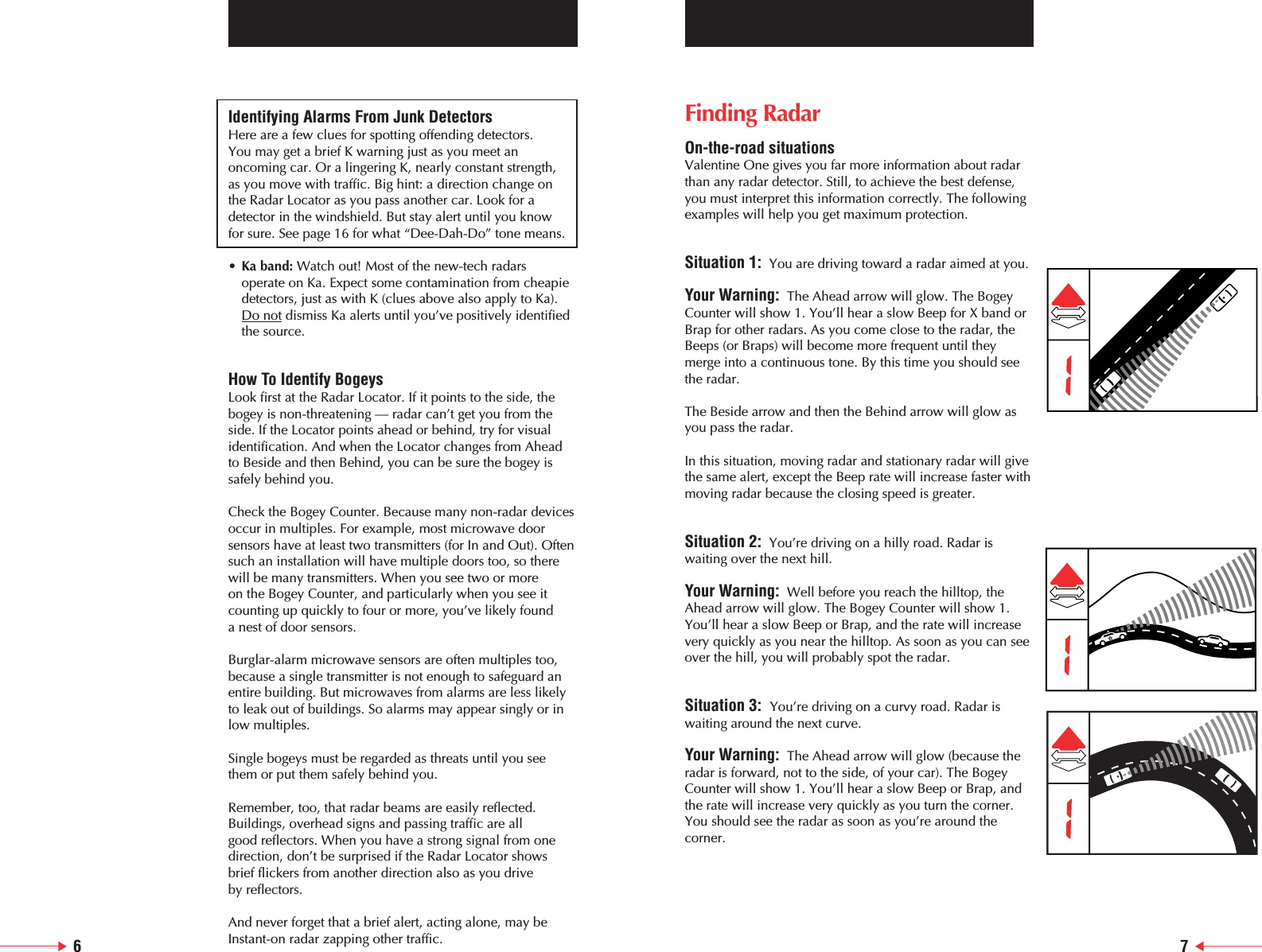
Identifying Alarms From Junk DetectorsHere are a few clues for spotting offending detectors. You may get a brief K warning just as you meet anoncoming car. Or a lingering K, nearly constant strength, as you move with traffic. Big hint: a direction change on the Radar Locator as you pass another car. Look for adetector in the windshield. But stay alert until you know for sure. See page 16 for what “Dee-Dah-Do” tone means. •Ka band: Watch out! Most of the new-tech radars operate on Ka. Expect some contamination from cheapie detectors, just as with K (clues above also apply to Ka). Do not dismiss Ka alerts until you’ve positively identified the source.How To Identify BogeysLook first at the Radar Locator. If it points to the side, thebogey is non-threatening — radar can’t get you from the side. If the Locator points ahead or behind, try for visualidentification. And when the Locator changes from Aheadto Beside and then Behind, you can be sure the bogey issafely behind you.Check the Bogey Counter. Because many non-radar devicesoccur in multiples. For example, most microwave doorsensors have at least two transmitters (for In and Out). Oftensuch an installation will have multiple doors too, so therewill be many transmitters. When you see two or more on the Bogey Counter, and particularly when you see itcounting up quickly to four or more, you’ve likely found a nest of door sensors.Burglar-alarm microwave sensors are often multiples too,because a single transmitter is not enough to safeguard anentire building. But microwaves from alarms are less likelyto leak out of buildings. So alarms may appear singly or inlow multiples.Single bogeys must be regarded as threats until you seethem or put them safely behind you.Remember, too, that radar beams are easily reflected.Buildings, overhead signs and passing traffic are all good reflectors. When you have a strong signal from onedirection, don’t be surprised if the Radar Locator showsbrief flickers from another direction also as you drive by reflectors.And never forget that a brief alert, acting alone, may beInstant-on radar zapping other traffic.Finding RadarOn-the-road situationsValentine One gives you far more information about radarthan any radar detector. Still, to achieve the best defense,you must interpret this information correctly. The followingexamples will help you get maximum protection.Situation 1: You are driving toward a radar aimed at you.Your Warning: The Ahead arrow will glow. The BogeyCounter will show 1. You’ll hear a slow Beep for X band orBrap for other radars. As you come close to the radar, theBeeps (or Braps) will become more frequent until theymerge into a continuous tone. By this time you should seethe radar.The Beside arrow and then the Behind arrow will glow asyou pass the radar.In this situation, moving radar and stationary radar will givethe same alert, except the Beep rate will increase faster withmoving radar because the closing speed is greater.Situation 2: You’re driving on a hilly road. Radar iswaiting over the next hill.Your Warning: Well before you reach the hilltop, theAhead arrow will glow. The Bogey Counter will show 1.You’ll hear a slow Beep or Brap, and the rate will increasevery quickly as you near the hilltop. As soon as you can seeover the hill, you will probably spot the radar.    Situation 3:  You’re driving on a curvy road. Radar iswaiting around the next curve.Your Warning: The Ahead arrow will glow (because theradar is forward, not to the side, of your car). The BogeyCounter will show 1. You’ll hear a slow Beep or Brap, andthe rate will increase very quickly as you turn the corner.You should see the radar as soon as you’re around thecorner.6 7
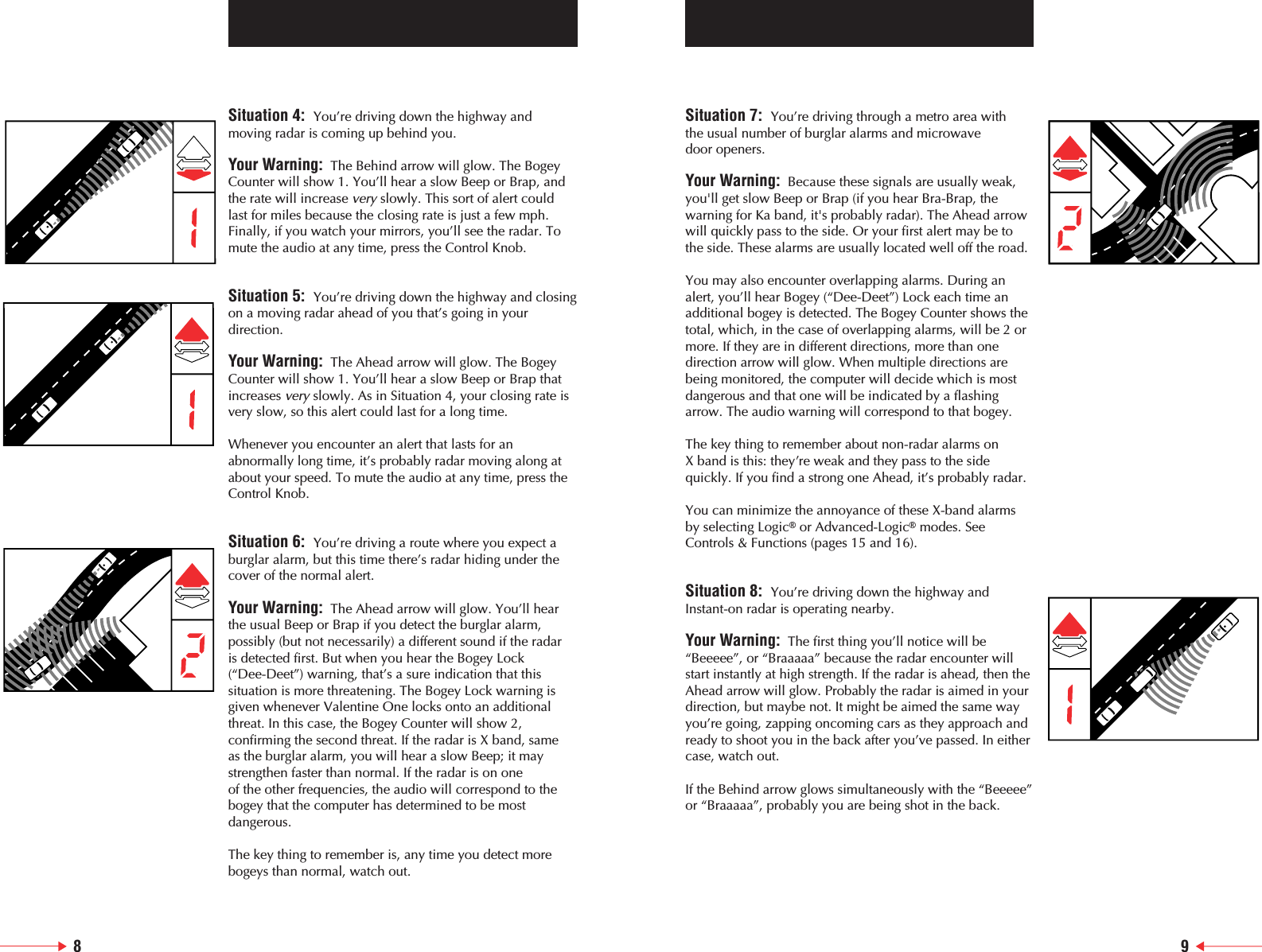
Situation 7:  You’re driving through a metro area with the usual number of burglar alarms and microwave door openers.Your Warning: Because these signals are usually weak,you'll get slow Beep or Brap (if you hear Bra-Brap, thewarning for Ka band, it's probably radar). The Ahead arrowwill quickly pass to the side. Or your first alert may be tothe side. These alarms are usually located well off the road.You may also encounter overlapping alarms. During analert, you’ll hear Bogey (“Dee-Deet”) Lock each time anadditional bogey is detected. The Bogey Counter shows thetotal, which, in the case of overlapping alarms, will be 2 ormore. If they are in different directions, more than onedirection arrow will glow. When multiple directions arebeing monitored, the computer will decide which is mostdangerous and that one will be indicated by a flashingarrow. The audio warning will correspond to that bogey.The key thing to remember about non-radar alarms on X band is this: they’re weak and they pass to the sidequickly. If you find a strong one Ahead, it’s probably radar.You can minimize the annoyance of these X-band alarms by selecting Logic®or Advanced-Logic®modes. SeeControls & Functions (pages 15 and 16).     Situation 8:  You’re driving down the highway and Instant-on radar is operating nearby.Your Warning: The first thing you’ll notice will be“Beeeee”, or “Braaaaa” because the radar encounter willstart instantly at high strength. If the radar is ahead, then theAhead arrow will glow. Probably the radar is aimed in yourdirection, but maybe not. It might be aimed the same wayyou’re going, zapping oncoming cars as they approach andready to shoot you in the back after you’ve passed. In eithercase, watch out.If the Behind arrow glows simultaneously with the “Beeeee”or “Braaaaa”, probably you are being shot in the back.            Situation 4:  You’re driving down the highway andmoving radar is coming up behind you.Your Warning: The Behind arrow will glow. The BogeyCounter will show 1. You’ll hear a slow Beep or Brap, andthe rate will increase veryslowly. This sort of alert couldlast for miles because the closing rate is just a few mph.Finally, if you watch your mirrors, you’ll see the radar. Tomute the audio at any time, press the Control Knob.Situation 5:  You’re driving down the highway and closingon a moving radar ahead of you that’s going in yourdirection.Your Warning: The Ahead arrow will glow. The BogeyCounter will show 1. You’ll hear a slow Beep or Brap thatincreases veryslowly. As in Situation 4, your closing rate isvery slow, so this alert could last for a long time.Whenever you encounter an alert that lasts for anabnormally long time, it’s probably radar moving along atabout your speed. To mute the audio at any time, press theControl Knob.Situation 6:  You’re driving a route where you expect aburglar alarm, but this time there’s radar hiding under thecover of the normal alert.Your Warning: The Ahead arrow will glow. You’ll hearthe usual Beep or Brap if you detect the burglar alarm,possibly (but not necessarily) a different sound if the radar is detected first. But when you hear the Bogey Lock (“Dee-Deet”) warning, that’s a sure indication that thissituation is more threatening. The Bogey Lock warning isgiven whenever Valentine One locks onto an additionalthreat. In this case, the Bogey Counter will show 2,confirming the second threat. If the radar is X band, same as the burglar alarm, you will hear a slow Beep; it maystrengthen faster than normal. If the radar is on one of the other frequencies, the audio will correspond to thebogey that the computer has determined to be mostdangerous.The key thing to remember is, any time you detect morebogeys than normal, watch out.                                8 9
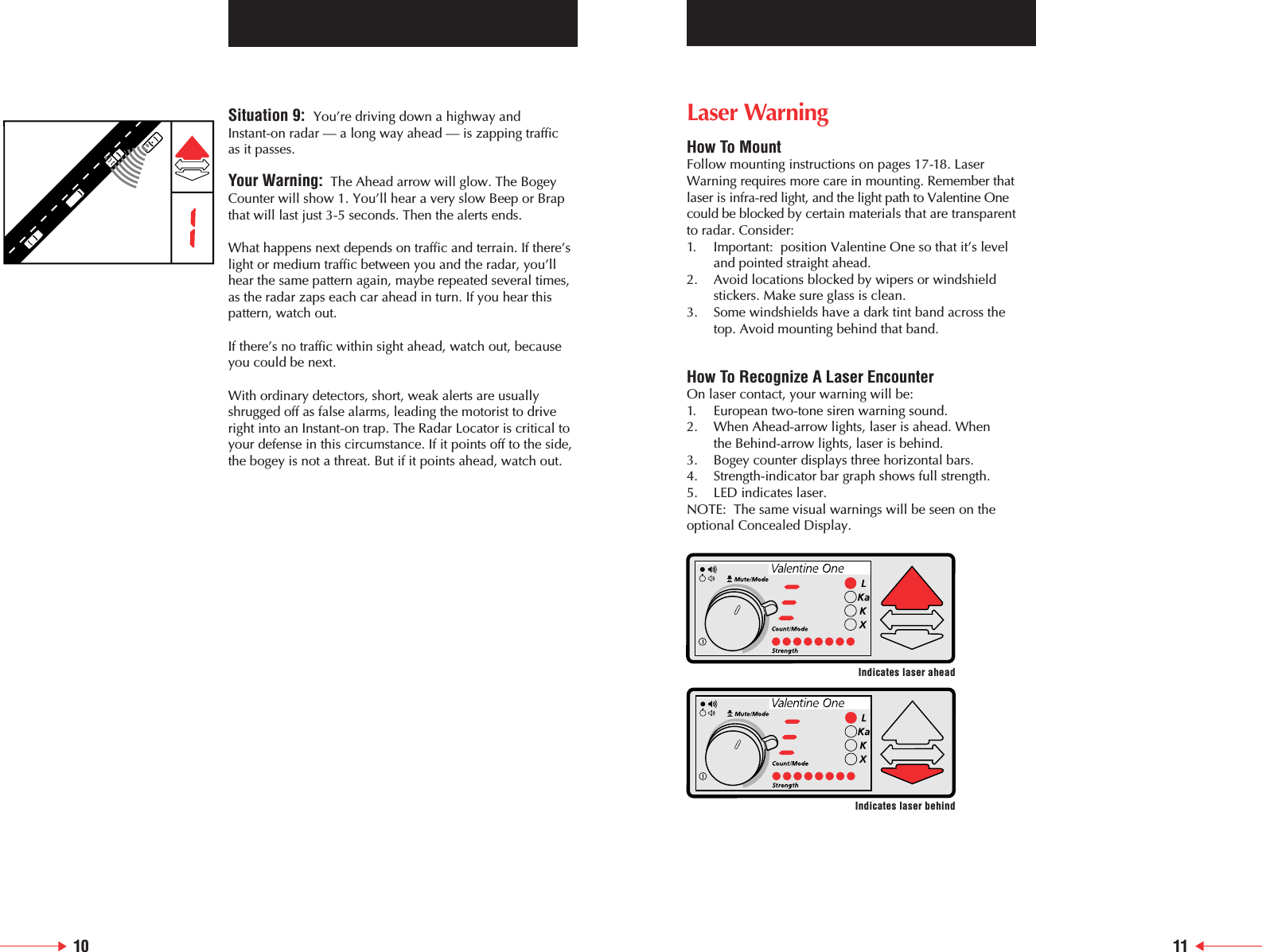
Situation 9:  You’re driving down a highway and Instant-on radar — a long way ahead — is zapping traffic as it passes.Your Warning: The Ahead arrow will glow. The BogeyCounter will show 1. You’ll hear a very slow Beep or Brapthat will last just 3-5 seconds. Then the alerts ends.What happens next depends on traffic and terrain. If there’slight or medium traffic between you and the radar, you’llhear the same pattern again, maybe repeated several times,as the radar zaps each car ahead in turn. If you hear thispattern, watch out.If there’s no traffic within sight ahead, watch out, becauseyou could be next.With ordinary detectors, short, weak alerts are usuallyshrugged off as false alarms, leading the motorist to driveright into an Instant-on trap. The Radar Locator is critical toyour defense in this circumstance. If it points off to the side,the bogey is not a threat. But if it points ahead, watch out.10 11Laser WarningHow To MountFollow mounting instructions on pages 17-18. LaserWarning requires more care in mounting. Remember thatlaser is infra-red light, and the light path to Valentine Onecould be blocked by certain materials that are transparent to radar. Consider:1. Important:  position Valentine One so that it’s level and pointed straight ahead.2. Avoid locations blocked by wipers or windshield stickers. Make sure glass is clean.3. Some windshields have a dark tint band across the top. Avoid mounting behind that band.How To Recognize A Laser EncounterOn laser contact, your warning will be:1. European two-tone siren warning sound.2. When Ahead-arrow lights, laser is ahead. When the Behind-arrow lights, laser is behind.3. Bogey counter displays three horizontal bars.4. Strength-indicator bar graph shows full strength.5.  LED indicates laser.NOTE:  The same visual warnings will be seen on theoptional Concealed Display.Indicates laser aheadIndicates laser behind
12 13What you should know about laserHow Traffic Laser WorksTo measure speed, traffic laser sends out a beam of pulsedinfrared light. The beam is tightly focused:  at a range of1000 feet, it’s only about four feet wide.Infrared is invisible to the naked eye — the operator can’tsee it and neither can you. But it is light and it behavesaccordingly. It travels in straight lines. And it’s easilyreflected.Traffic laser works as a rangefinder. It sends a pulse, thenwaits for the reflection from the target car. From the timeneeded for the pulse to go out and back, and from the speedof light, it calculates distances to the car. These pulses aresent frequently, up to 500 times a second. The changingdistance to the target over time is speed.Laser can’t see over hills or through opaque objects. Thelaser beam must hit your car directly, line-of-sight from thelaser gun, to measure speed. Under ideal conditions, it canread speed in less than one second.The pencil beam means that, in operation, laser is verydifferent from radar. Radar cannot single out one vehicle ina pack, so the speed reading is usually attributed to theleader. The narrow laser beam reads only the vehicle itstrikes.How Laser Detectors WorkA laser detector is an electronic sensor calibrated for theinfrared wavelength used by traffic laser. It is extremelysensitive. And it responds in as little as .006 seconds.It should be mounted inside the car with the sensor facingthrough the glass toward the laser. When the beam, orscatter from the beam, strikes the detector, it warnsinstantly.Finding LaserHow It OperatesLaser’s narrow beam imposes significant limits on its use. It must be deliberately and carefully aimed. The operatorcan’t be moving. He must have a clear shot, preferably notthrough glass.So laser traps are always ambushes. The operator lies inwait. As with radar, he can’t read speed from the side. Hemust have oncoming and departing traffic. Look for acruiser angled to the road, or broadside. Watch overpassesand entrance ramps. He will likely rest the laser gun on apartially-down side window to steady his aim. He will pickoff traffic as it comes. Or goes.Our breakthrough Compound Parabolic Concentratorenables Valentine One to achieve both wide-anglecoverage and unmatched sensitivity. Even so, the over-hillsand around-curves warning you expect from a radardetector is not possible with laser. A laser warning requiresimmediate response.Details To Remember About Laser1. There is no moving laser.2. All laser encounters are like Instant-on radar; virtually no advanced warning.3. Laser alarms are rare with the Valentine One, so be prepared to respond.Laser False Alarms1.  Red neon, from stores and occasionally from brake lights of other cars (example: Chevy TrailBlazer, GMC Envoy, Olds Bravada and Buick Rainier), can imitate the characteristics of speed laser. Solution:  Move away from source.2.  The electrical systems of some cars generate electromagnetic interferences, triggering laser alerts. How to test:  Try V1 in a different car. Possible solution:  Try relocating detector within the interfering car; also, your dealer may have a factory fix.3. Adaptive cruise control systems using laser may cause laser alerts.Solution:  Switch to normal cruise control.
14Controls & FunctionsHow Valentine One WorksEverybody wants Full Coverage against radar; nobody wants to go to college to learn how to use his new radardetector. So I’ve worked extra hard to make Valentine Onelogical. It’s far easier to operate than many ordinarydetectors, yet it tells you far more about radar.A New Way to Set LoudnessValentine One has two controls for loudness so you cantake complete control of sound. The Control Knob sets what I call “initial” volume. This is the loudness you willnormally hear on initial radar contact. Once you’re awareof the threat, you can drop to a quieter, reminder soundwhich I call “muted” volume. Just press the Control Knob.This muted volume is adjusted by the lever behind theknob. How loud do you like your reminder? The choice is yours.Push To MuteDuring any alert, press the Control Knob. Audio volume will drop to the muted level.What Long-Gradient audio does for youValentine One’s audio warning indicates radar strength.It gives a very slow Beep for X band (Brap for K band,Brap-brap for Ka band) when it encounters weak radar,then quickens as radar strength increases, and becomes acontinuous tone about the time you’re in range. This longgradient, from slow Beep to continuous tone, makes it easyto estimate radar proximity, which is very important duringbrief Instant-on encounters. In the case of multiple bogeys,the audio warning will always monitor the greatest threat.What the Bogey Counter does for youEvery alert, until you’ve positively identified the source, is an unknown, a bogey. But an alert may consist of morethan one bogey. There could be many. Let’s say you driveby a burglar alarm on the way to work every day that causes an alert. Then one day you pick up an additionalbogey. This new bogey could be radar hiding under coverof the burglar alarm, picking off the unwary. You mustassume each alert is radar until you’ve identified the bogey.For more information see pages 5-6.Control LeverSets volume after mute takes place; clockwise is louder. Full clockwise makes muted volume same as initial volumeRadar LocatorRadar ahead Radar to the side Radar behindNote:  In the case of multiple bogeysfrom different directions, an arrow willglow for each direction. The strongestthreat will be indicated by a blinkingarrow. The audio warning will correspond to the blinking arrowControl KnobOn – Turn clockwiseVolume – Turn to adjustOff – Turn counter-clockwise past detentMute – Press during radar alertModes  – Press and hold to changeBrightness – Automatically matched to ambientlighting; no manual adjustment(Unit powers up in the last mode selected)Bogey Counterblank – power off– power on, All-Bogeys®mode– power on, Logic®mode– power on, Advanced-Logic®mode– one bogeyetc. – number of bogeys being tracked– laser warning–  alert terminated; not radarFront Antenna, Radar and LaserNeeds unobstructed view aheadRear AntennaNeeds unobstructed view behindRear Laser SensorNeeds unobstructed view behindRadar-strength IndicatorMore LEDs glow as radar gets strongerSpeakerModular JackComputer Modes:  A new way to interpret alarmsIn the All-Bogeys® (    ) mode, all bogeys will be reported as soon as they are detected. Use your judgment to decidewhether or not they are threats.In the Logic®(   ) and Advanced-Logic®(   ) modes, you aredeferring to the internal computer which will use its ownlogic to screen bogeys before reporting them to you.In Logic, X-band bogeys the computer judges to be non-threatening will be reported at the “muted” volume. Ifthey become threatening, the audio warning will upgrade to the “initial” volume before you are within radar range.In Advanced-Logic, X-band bogeys that the computer hasreason to believe aren’t radar will not be reported at all.One exception:  To be failsafe, the computer will alwayspass extremely strong signals along for your judgment. This mode is particularly useful in metro areas.The computer is smart:  It never operates the receiving circuits at less than maximum sensitivity and it knows thatInstant-on is a greater threat than ordinary radar. So it willalways warn you immediately at the “initial” volume whenthose radars are detected, no matter what mode you’veselected.To change modes, press and hold the Control Knob for one second.What the Bogey Lock tone meansValentine One is designed to track multiple threats. Duringan alert, when Valentine One locks on to an additionalbogey, it notifies you with the Bogey Lock tone (“Dee-Deet”). This sound will never be heard at any other time,not even during the power-on ritual. Whenever you hearthis sound, it means that another bogey has been detectedand is being tracked. The bogey counter shows the numberof bogeys being tracked at that time.What the “Dee-Dah-Doo” Tone meansValentine One is designed to recognize — and ignore —phony radar signals from poorly-designed detectors.Occasionally a false alarm will be started before verificationis certain. If it then determines the source is a junk detector,it will notify you it is retracting that alert with a “Dee-Dah-Doo” sound. A flashing J (    ) indicating “junk” will appearin the Bogey Counter. 15Band IdentificationNote:  In the case of multiplebogeys on different bands, ablinking LED will indicate thestrongest threat.16For Laser WarningSee page 11.
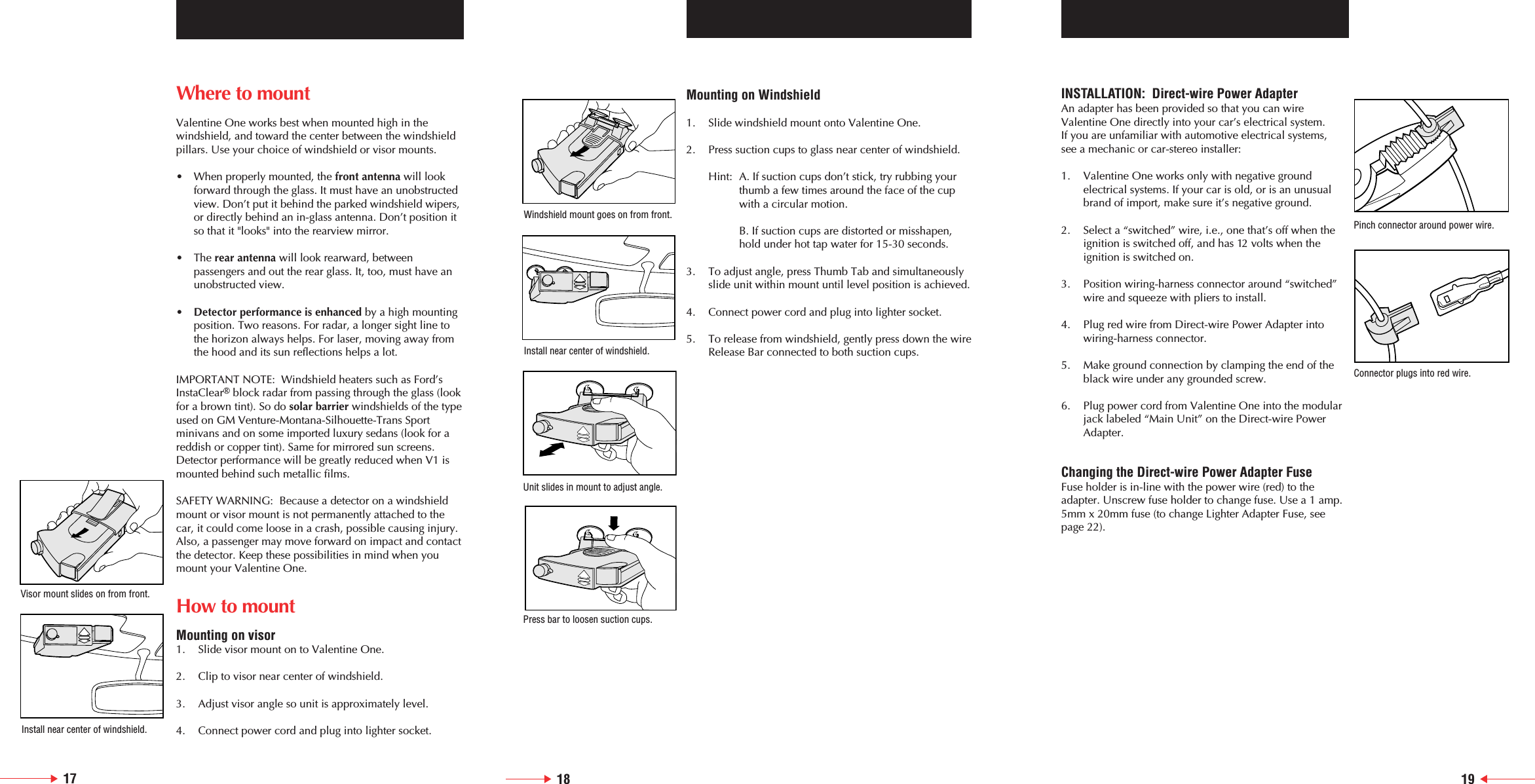
18 19Where to mountValentine One works best when mounted high in the windshield, and toward the center between the windshieldpillars. Use your choice of windshield or visor mounts.•  When properly mounted, the front antenna will look forward through the glass. It must have an unobstructedview. Don’t put it behind the parked windshield wipers,or directly behind an in-glass antenna. Don’t position it so that it "looks" into the rearview mirror.• The rear antenna will look rearward, between passengers and out the rear glass. It, too, must have an unobstructed view.•Detector performance is enhanced by a high mounting position. Two reasons. For radar, a longer sight line to the horizon always helps. For laser, moving away from the hood and its sun reflections helps a lot.IMPORTANT NOTE:  Windshield heaters such as Ford’sInstaClear®block radar from passing through the glass (lookfor a brown tint). So do solar barrier windshields of the typeused on GM Venture-Montana-Silhouette-Trans Sport minivans and on some imported luxury sedans (look for areddish or copper tint). Same for mirrored sun screens.Detector performance will be greatly reduced when V1 ismounted behind such metallic films.SAFETY WARNING:  Because a detector on a windshieldmount or visor mount is not permanently attached to thecar, it could come loose in a crash, possible causing injury.Also, a passenger may move forward on impact and contactthe detector. Keep these possibilities in mind when youmount your Valentine One.How to mountMounting on visor1. Slide visor mount on to Valentine One.2. Clip to visor near center of windshield.3. Adjust visor angle so unit is approximately level.4. Connect power cord and plug into lighter socket.Mounting on Windshield1. Slide windshield mount onto Valentine One.2. Press suction cups to glass near center of windshield.Hint: A. If suction cups don’t stick, try rubbing your thumb a few times around the face of the cup with a circular motion.B. If suction cups are distorted or misshapen,hold under hot tap water for 15-30 seconds.3. To adjust angle, press Thumb Tab and simultaneously slide unit within mount until level position is achieved.4. Connect power cord and plug into lighter socket.5. To release from windshield, gently press down the wireRelease Bar connected to both suction cups.17INSTALLATION:  Direct-wire Power AdapterAn adapter has been provided so that you can wireValentine One directly into your car’s electrical system. If you are unfamiliar with automotive electrical systems, see a mechanic or car-stereo installer:1. Valentine One works only with negative ground electrical systems. If your car is old, or is an unusual brand of import, make sure it’s negative ground.2. Select a “switched” wire, i.e., one that’s off when the ignition is switched off, and has 12 volts when the ignition is switched on.3. Position wiring-harness connector around “switched” wire and squeeze with pliers to install.4. Plug red wire from Direct-wire Power Adapter into wiring-harness connector.5. Make ground connection by clamping the end of the black wire under any grounded screw.6. Plug power cord from Valentine One into the modular jack labeled “Main Unit” on the Direct-wire Power Adapter.Changing the Direct-wire Power Adapter FuseFuse holder is in-line with the power wire (red) to theadapter. Unscrew fuse holder to change fuse. Use a 1 amp.5mm x 20mm fuse (to change Lighter Adapter Fuse, seepage 22).Windshield mount goes on from front.Install near center of windshield.Unit slides in mount to adjust angle.Press bar to loosen suction cups.Pinch connector around power wire.Connector plugs into red wire.Visor mount slides on from front.Install near center of windshield.
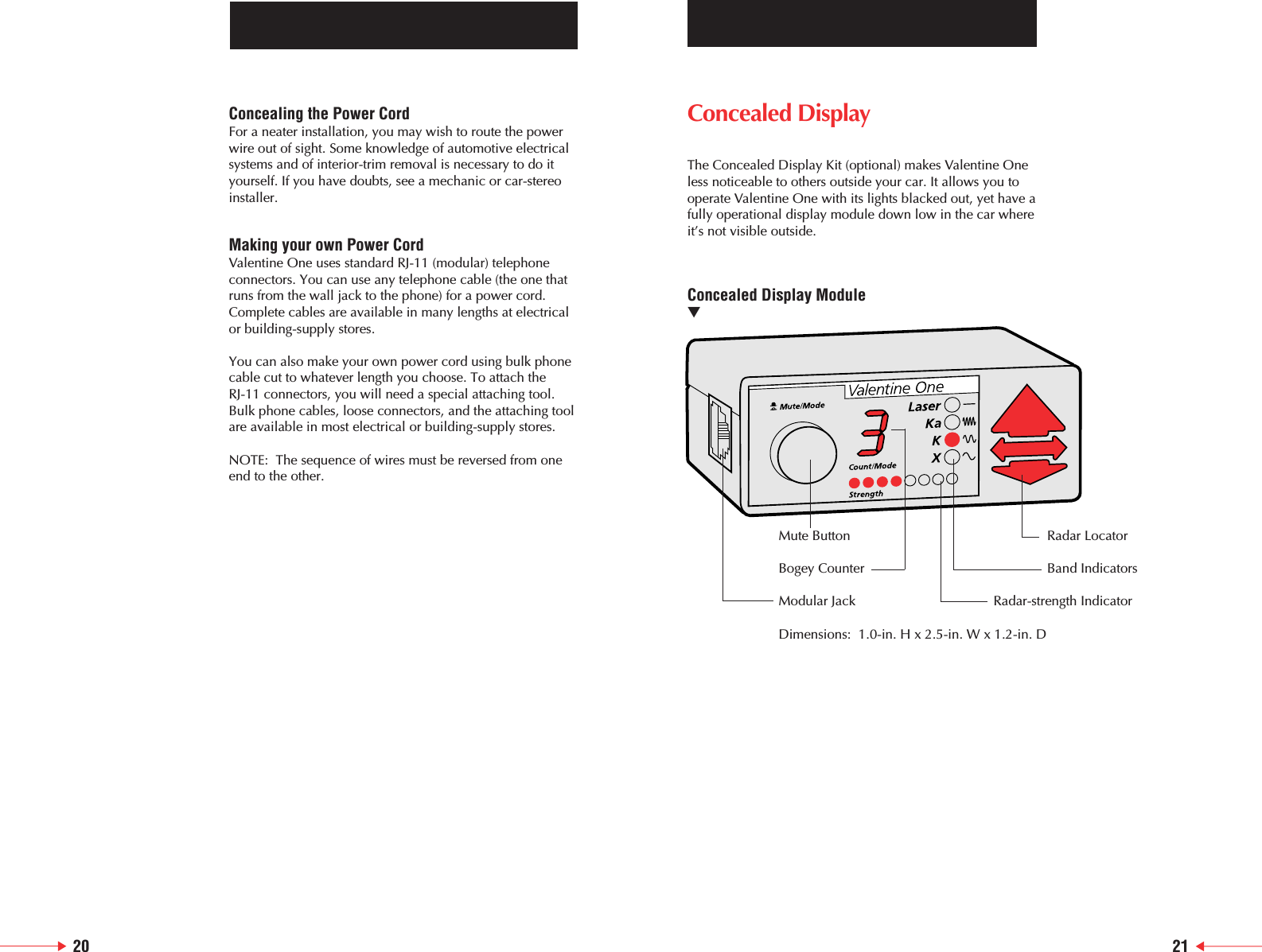
20 21Concealed Display The Concealed Display Kit (optional) makes Valentine Oneless noticeable to others outside your car. It allows you tooperate Valentine One with its lights blacked out, yet have afully operational display module down low in the car whereit’s not visible outside.Concealed Display Module▼Mute Button Radar LocatorBogey Counter Band IndicatorsModular Jack Radar-strength IndicatorDimensions:  1.0-in. H x 2.5-in. W x 1.2-in. DConcealing the Power CordFor a neater installation, you may wish to route the powerwire out of sight. Some knowledge of automotive electricalsystems and of interior-trim removal is necessary to do ityourself. If you have doubts, see a mechanic or car-stereoinstaller.Making your own Power CordValentine One uses standard RJ-11 (modular) telephoneconnectors. You can use any telephone cable (the one thatruns from the wall jack to the phone) for a power cord.Complete cables are available in many lengths at electricalor building-supply stores.You can also make your own power cord using bulk phonecable cut to whatever length you choose. To attach theRJ-11 connectors, you will need a special attaching tool.Bulk phone cables, loose connectors, and the attaching toolare available in most electrical or building-supply stores.NOTE:  The sequence of wires must be reversed from oneend to the other.
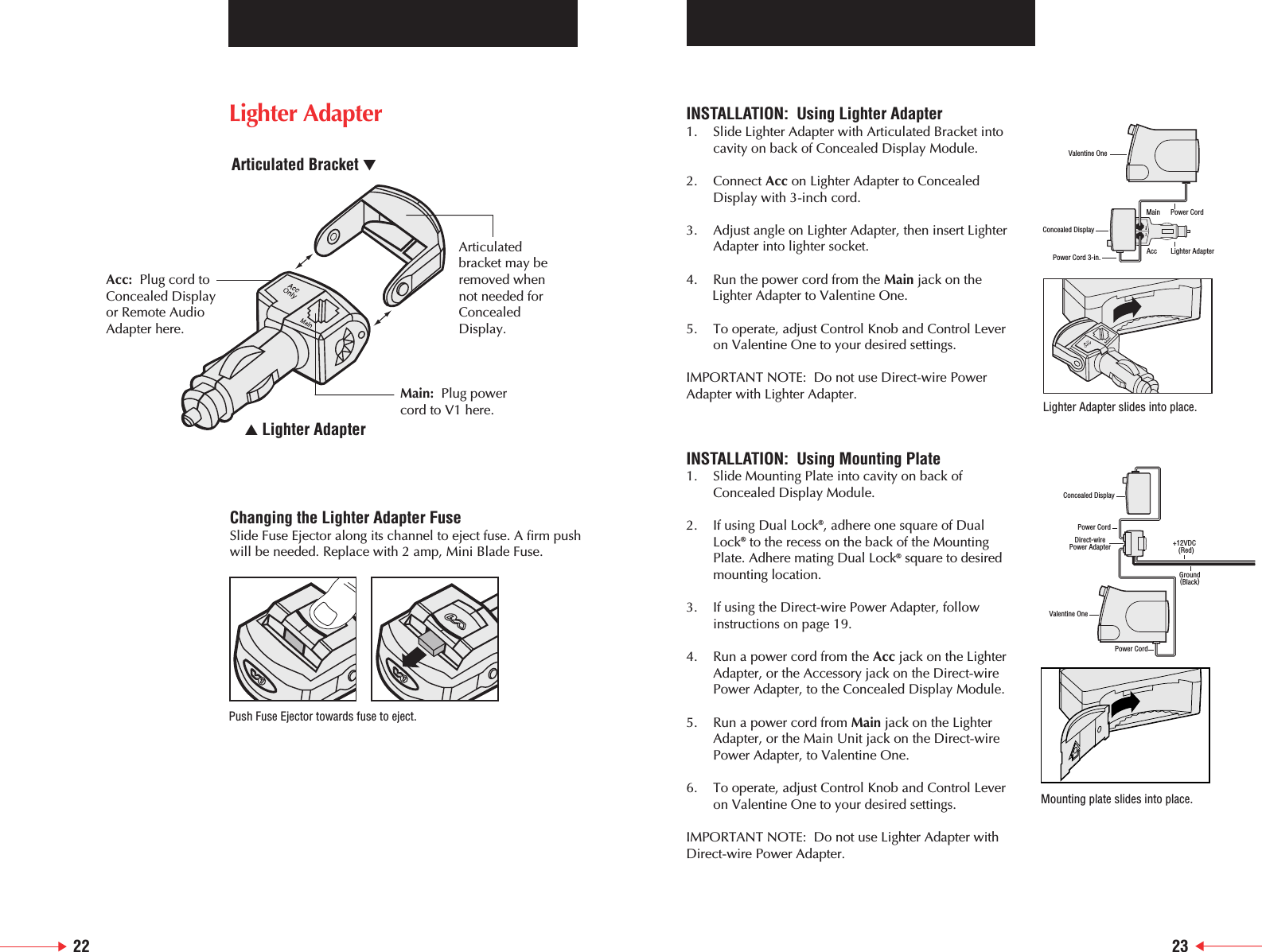
22 23Changing the Lighter Adapter FuseSlide Fuse Ejector along its channel to eject fuse. A firm pushwill be needed. Replace with 2 amp, Mini Blade Fuse.Push Fuse Ejector towards fuse to eject.INSTALLATION:  Using Lighter Adapter1. Slide Lighter Adapter with Articulated Bracket intocavity on back of Concealed Display Module.2. Connect Acc on Lighter Adapter to Concealed    Display with 3-inch cord.3. Adjust angle on Lighter Adapter, then insert Lighter    Adapter into lighter socket.4. Run the power cord from the Main jack on the Lighter Adapter to Valentine One.5. To operate, adjust Control Knob and Control Lever on Valentine One to your desired settings.IMPORTANT NOTE:  Do not use Direct-wire Power Adapter with Lighter Adapter.INSTALLATION:  Using Mounting Plate1. Slide Mounting Plate into cavity on back of Concealed Display Module.2. If using Dual Lock®, adhere one square of Dual Lock®to the recess on the back of the Mounting Plate. Adhere mating Dual Lock®square to desired mounting location.3. If using the Direct-wire Power Adapter, follow instructions on page 19.4. Run a power cord from the Acc jack on the Lighter Adapter, or the Accessory jack on the Direct-wire Power Adapter, to the Concealed Display Module.5. Run a power cord from Main jack on the Lighter Adapter, or the Main Unit jack on the Direct-wire Power Adapter, to Valentine One.6. To operate, adjust Control Knob and Control Lever on Valentine One to your desired settings.IMPORTANT NOTE:  Do not use Lighter Adapter withDirect-wire Power Adapter.Valentine OnePower Cord 3-in.Concealed DisplayLighter AdapterPower CordAccMainValentine OnePower CordDirect-wirePower AdapterPower CordConcealed DisplayGround(Black)+12VDC  (Red)Lighter Adapter slides into place.Mounting plate slides into place.Acc: Plug cord toConcealed Display or Remote Audio Adapter here.Articulatedbracket may beremoved whennot needed forConcealedDisplay.Main: Plug power cord to V1 here.▲ Lighter AdapterArticulated Bracket ▼Lighter Adapter
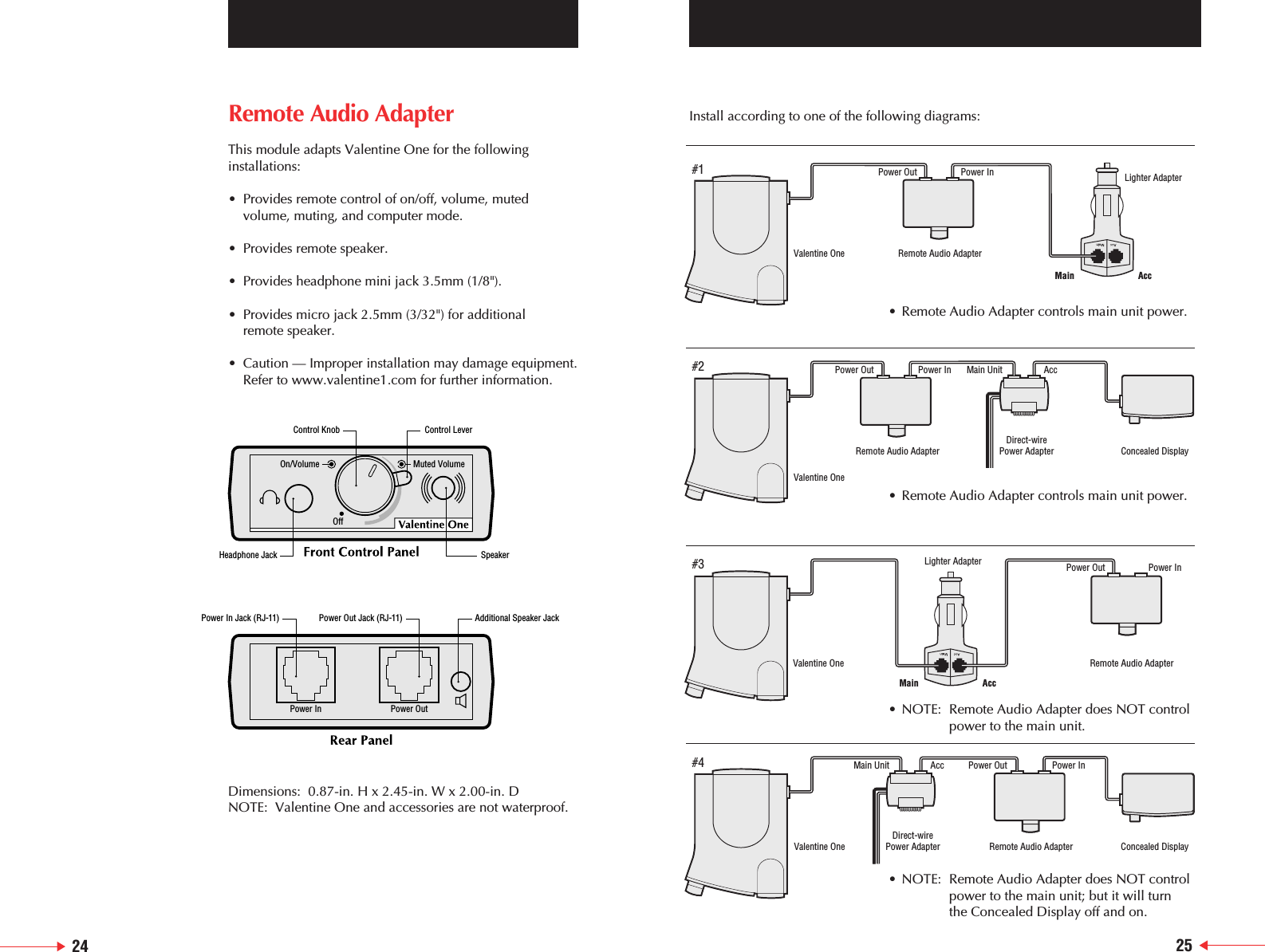
Remote Audio AdapterThis module adapts Valentine One for the followinginstallations:• Provides remote control of on/off, volume, muted volume, muting, and computer mode.• Provides remote speaker.• Provides headphone mini jack 3.5mm (1/8").• Provides micro jack 2.5mm (3/32") for additional remote speaker.• Caution — Improper installation may damage equipment.Refer to www.valentine1.com for further information.Dimensions:  0.87-in. H x 2.45-in. W x 2.00-in. DNOTE:  Valentine One and accessories are not waterproof.On/VolumeOffMuted VolumePower In Power OutControl Knob Control LeverHeadphone Jack SpeakerPower In Jack (RJ-11) Power Out Jack (RJ-11) Additional Speaker JackInstall according to one of the following diagrams:Valentine OneRemote Audio AdapterLighter AdapterValentine OneValentine OneDirect-wirePower Adapter Remote Audio AdapterPower Out Power InConcealed DisplayDirect-wirePower AdapterRemote Audio Adapter Concealed DisplayValentine One Remote Audio AdapterLighter AdapterPower Out Power InMain AccMain AccPower Out Power In Main Unit AccPower Out Power InMain Unit Acc#1#2#3#4• Remote Audio Adapter controls main unit power.• NOTE: Remote Audio Adapter does NOT controlpower to the main unit.• NOTE: Remote Audio Adapter does NOT controlpower to the main unit; but it will turn the Concealed Display off and on.• Remote Audio Adapter controls main unit power.24 25
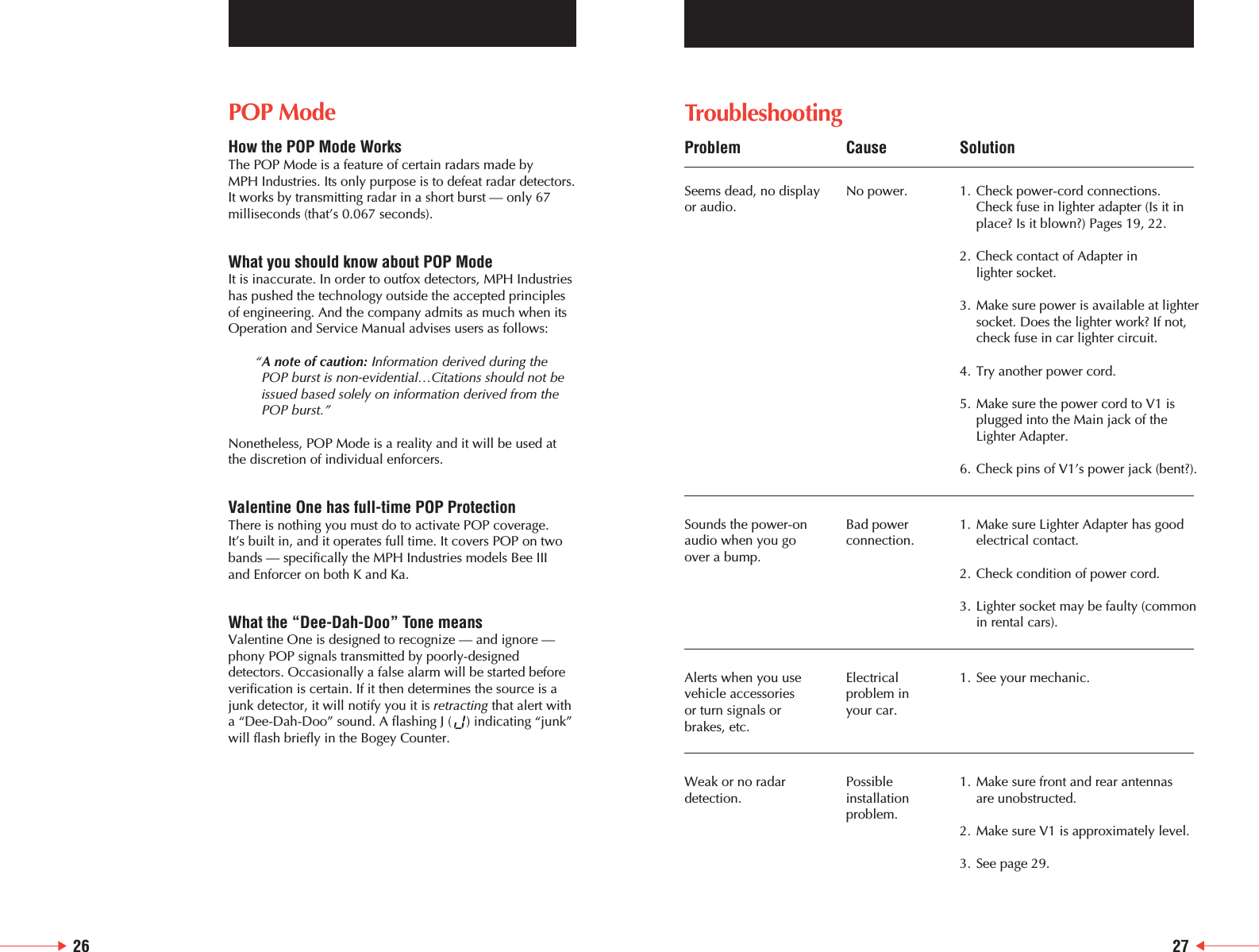
26TroubleshootingProblem Cause SolutionSeems dead, no display  No power. 1. Check power-cord connections.or audio. Check fuse in lighter adapter (Is it inplace? Is it blown?) Pages 19, 22.2. Check contact of Adapter in lighter socket.3. Make sure power is available at lightersocket. Does the lighter work? If not, check fuse in car lighter circuit.4. Try another power cord.5. Make sure the power cord to V1 isplugged into the Main jack of the Lighter Adapter.6. Check pins of V1’s power jack (bent?).Sounds the power-on Bad power 1. Make sure Lighter Adapter has good audio when you go connection. electrical contact.over a bump.2. Check condition of power cord.3. Lighter socket may be faulty (common in rental cars).Alerts when you use  Electrical  1. See your mechanic. vehicle accessories  problem in or turn signals or  your car.brakes, etc.Weak or no radar  Possible  1. Make sure front and rear antennas detection. installation are unobstructed.problem.2. Make sure V1 is approximately level.3. See page 29.27POP ModeHow the POP Mode WorksThe POP Mode is a feature of certain radars made by MPH Industries. Its only purpose is to defeat radar detectors.It works by transmitting radar in a short burst — only 67milliseconds (that’s 0.067 seconds). What you should know about POP ModeIt is inaccurate. In order to outfox detectors, MPH Industrieshas pushed the technology outside the accepted principlesof engineering. And the company admits as much when itsOperation and Service Manual advises users as follows: “A note of caution: Information derived during thePOP burst is non-evidential…Citations should not beissued based solely on information derived from thePOP burst.”Nonetheless, POP Mode is a reality and it will be used atthe discretion of individual enforcers.Valentine One has full-time POP ProtectionThere is nothing you must do to activate POP coverage. It’s built in, and it operates full time. It covers POP on twobands — specifically the MPH Industries models Bee III and Enforcer on both K and Ka.What the “Dee-Dah-Doo” Tone meansValentine One is designed to recognize — and ignore —phony POP signals transmitted by poorly-designeddetectors. Occasionally a false alarm will be started beforeverification is certain. If it then determines the source is ajunk detector, it will notify you it is retracting that alert witha “Dee-Dah-Doo” sound. A flashing J (    ) indicating “junk”will flash briefly in the Bogey Counter.
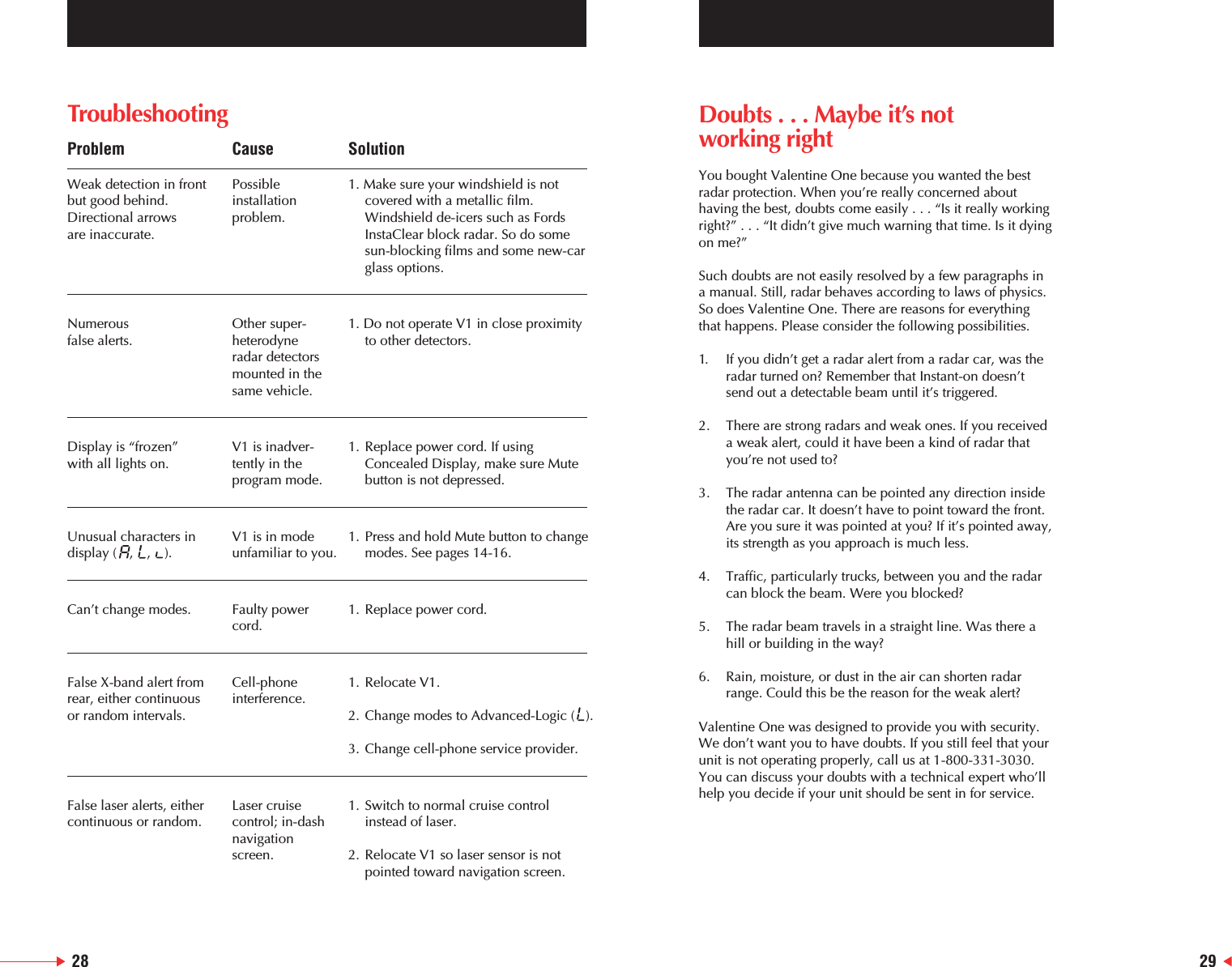
TroubleshootingProblem Cause SolutionWeak detection in front Possible  1. Make sure your windshield is not but good behind.  installation   covered with a metallic film.  Directional arrows  problem. Windshield de-icers such as Fords are inaccurate. InstaClear block radar. So do some sun-blocking films and some new-car glass options.Numerous   Other super- 1. Do not operate V1 in close proximity false alerts. heterodyne   to other detectors.radar detectors  mounted in thesame vehicle.Display is “frozen” V1 is inadver- 1. Replace power cord. If using with all lights on. tently in the   Concealed Display, make sure Mute program mode. button is not depressed.Unusual characters in  V1 is in mode  1. Press and hold Mute button to changedisplay (   ,    ,    ). unfamiliar to you. modes. See pages 14-16.Can’t change modes. Faulty power 1. Replace power cord.cord.False X-band alert from  Cell-phone  1. Relocate V1.rear, either continuous interference.or random intervals. 2. Change modes to Advanced-Logic (  ).3. Change cell-phone service provider.False laser alerts, either  Laser cruise  1. Switch to normal cruise control continuous or random. control; in-dash  instead of laser.navigation screen. 2. Relocate V1 so laser sensor is not pointed toward navigation screen.Doubts . . . Maybe it’s notworking rightYou bought Valentine One because you wanted the bestradar protection. When you’re really concerned abouthaving the best, doubts come easily . . . “Is it really workingright?” . . . “It didn’t give much warning that time. Is it dyingon me?”Such doubts are not easily resolved by a few paragraphs ina manual. Still, radar behaves according to laws of physics.So does Valentine One. There are reasons for everythingthat happens. Please consider the following possibilities.1. If you didn’t get a radar alert from a radar car, was the radar turned on? Remember that Instant-on doesn’t send out a detectable beam until it’s triggered.2. There are strong radars and weak ones. If you received a weak alert, could it have been a kind of radar that you’re not used to?3. The radar antenna can be pointed any direction inside the radar car. It doesn’t have to point toward the front. Are you sure it was pointed at you? If it’s pointed away,its strength as you approach is much less.4. Traffic, particularly trucks, between you and the radar can block the beam. Were you blocked?5. The radar beam travels in a straight line. Was there a hill or building in the way?6. Rain, moisture, or dust in the air can shorten radar range. Could this be the reason for the weak alert?Valentine One was designed to provide you with security.We don’t want you to have doubts. If you still feel that yourunit is not operating properly, call us at 1-800-331-3030.You can discuss your doubts with a technical expert who’llhelp you decide if your unit should be sent in for service.28 29
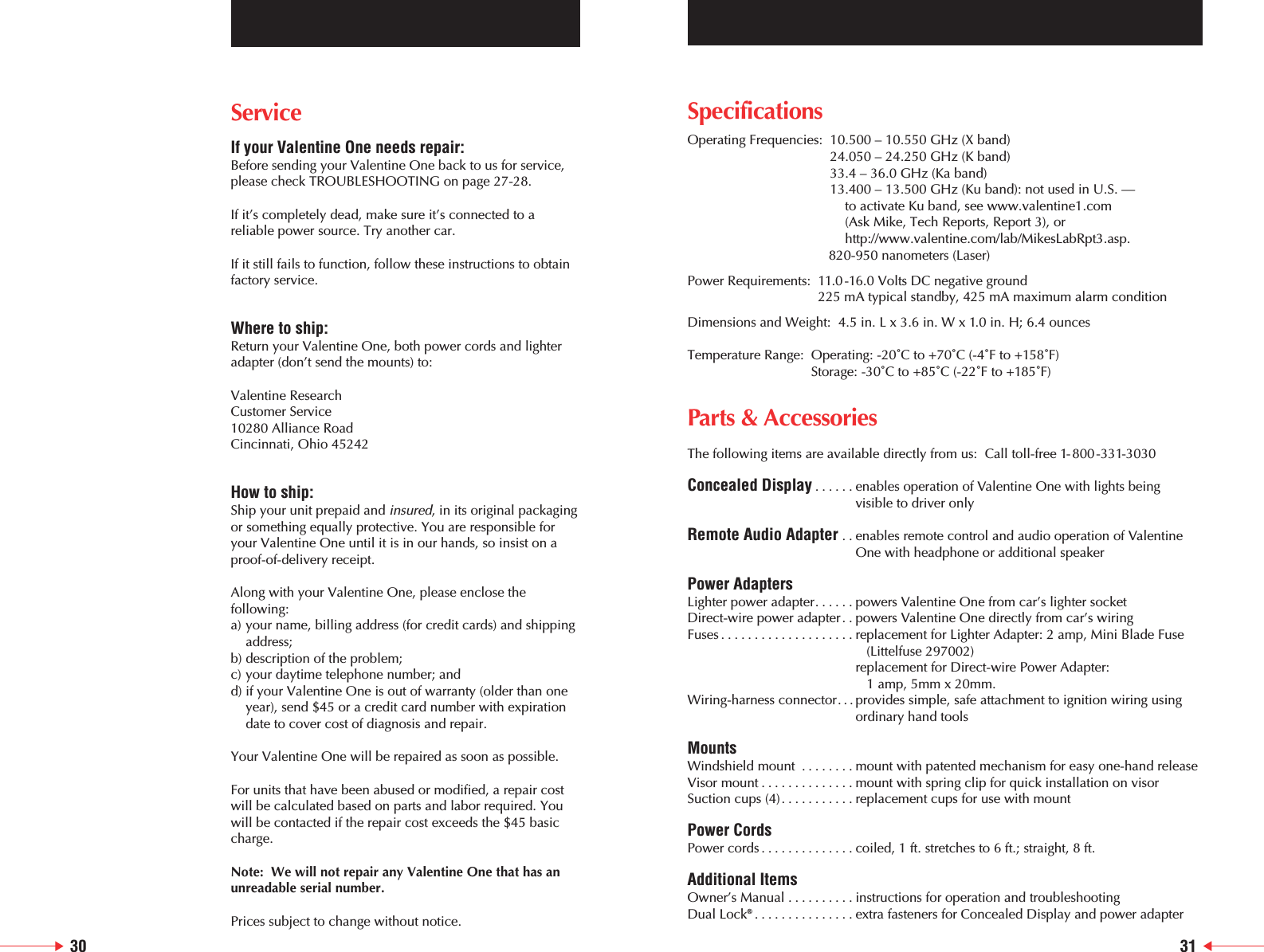
ServiceIf your Valentine One needs repair:Before sending your Valentine One back to us for service,please check TROUBLESHOOTING on page 27-28.If it’s completely dead, make sure it’s connected to areliable power source. Try another car.If it still fails to function, follow these instructions to obtainfactory service.Where to ship:Return your Valentine One, both power cords and lighteradapter (don’t send the mounts) to:Valentine ResearchCustomer Service10280 Alliance RoadCincinnati, Ohio 45242How to ship:Ship your unit prepaid and insured, in its original packagingor something equally protective. You are responsible foryour Valentine One until it is in our hands, so insist on aproof-of-delivery receipt.Along with your Valentine One, please enclose thefollowing:a) your name, billing address (for credit cards) and shipping address;b) description of the problem;c) your daytime telephone number; andd) if your Valentine One is out of warranty (older than one year), send $45 or a credit card number with expiration date to cover cost of diagnosis and repair.Your Valentine One will be repaired as soon as possible.For units that have been abused or modified, a repair costwill be calculated based on parts and labor required. Youwill be contacted if the repair cost exceeds the $45 basiccharge.Note:  We will not repair any Valentine One that has anunreadable serial number.Prices subject to change without notice.SpecificationsOperating Frequencies:  10.500 – 10.550 GHz (X band)24.050 – 24.250 GHz (K band) 33.4 – 36.0 GHz (Ka band)13.400 – 13.500 GHz (Ku band): not used in U.S. — to activate Ku band, see www.valentine1.com (Ask Mike, Tech Reports, Report 3), orhttp://www.valentine.com/lab/MikesLabRpt3.asp.820-950 nanometers (Laser)Power Requirements:  11.0 -16.0 Volts DC negative ground225 mA typical standby, 425 mA maximum alarm conditionDimensions and Weight:  4.5 in. L x 3.6 in. W x 1.0 in. H; 6.4 ouncesTemperature Range:  Operating: -20˚C to +70˚C (-4˚F to +158˚F)Storage: -30˚C to +85˚C (-22˚F to +185˚F)Parts & AccessoriesThe following items are available directly from us:  Call toll-free 1-800-331-3030Concealed Display ......enables operation of Valentine One with lights beingvisible to driver onlyRemote Audio Adapter . . enables remote control and audio operation of ValentineOne with headphone or additional speakerPower AdaptersLighter power adapter......powers Valentine One from car’s lighter socketDirect-wire power adapter. . powers Valentine One directly from car’s wiringFuses ....................replacement for Lighter Adapter: 2 amp, Mini Blade Fuse(Littelfuse 297002) replacement for Direct-wire Power Adapter: 1 amp, 5mm x 20mm.Wiring-harness connector. . . provides simple, safe attachment to ignition wiring usingordinary hand toolsMountsWindshield mount ........mount with patented mechanism for easy one-hand releaseVisor mount ..............mount with spring clip for quick installation on visorSuction cups (4)...........replacement cups for use with mountPower CordsPower cords ..............coiled, 1 ft. stretches to 6 ft.; straight, 8 ft.  Additional ItemsOwner’s Manual ..........instructions for operation and troubleshooting Dual Lock®...............extra fasteners for Concealed Display and power adapter30 31
Limited WarrantyValentine Research, Inc. warrants the Valentine One RadarLocator™against all defects in materials and workmanshipfor a period of one year from the date of the originalpurchase, subject to the following terms and conditions.This warranty is limited to the original owner, and is Non-Transferable.This warranty does not apply if the serial number or housingof the product has been removed, or if the product has beensubjected to physical abuse, improper installation, ormodification.To obtain warranty service, the product must be returned,insured and shipping prepaid, to Valentine Research, Inc.,at the address below, in its original packaging or a suitableequivalent, along with a written description of the problem.Valentine Research, Inc.’s responsibility under this warrantyis limited to repair or replacement of the product or refundof its purchase price, at the sole discretion of ValentineResearch, Inc.Valentine Research, Inc. disclaims all other warranties,expressed or implied, including warranties of merchant-ability and fitness for any particular purposes whatsoever,and no other remedy shall be available, including withoutlimitation, incidental or consequential damages. In no eventshall Valentine Research, Inc.’s liability exceed thepurchase price of the product in question.Some states do not allow the exclusion or limitation ofincidental or consequential damages of how long animplied warranty lasts, so the above limitations orexclusions may not apply to you.This warranty gives you specific rights. You may have otherlegal rights which vary from state to state.Valentine Research, Inc. wants you to be satisfied with itsproducts. Should you have any difficulties with theoperation or performance of your Valentine One RadarLocator, please contact:Valentine ResearchCustomer Service10280 Alliance RoadCincinnati, Ohio 452421-800-331-3030 ©2005-i432
A Few Things to Remember1. Valentine One is defined as a radio by the FCC. It receives only. It’s a passive device that in no way inter-feres with the communications or business of others.2. The Federal Communication Act of 1934 guarantees the right to receive radio transmissions of all types on all frequencies. Traffic radar is not privileged commu-nication:  in fact, it’s not communication of any sort because no information is conveyed to another party. It is surveillance by radio waves, and that is not protected by any laws. 3. Some states and municipalities have laws prohibiting the use, or the possession, or both, of radar detectors. Please check local regulations before using your Valentine One.4. Leaving your Valentine One in plain sight in an unattended car is asking for a break-in.We appreciate your confidence in Valentine Research.Please drive safely.For Your RecordsSerial No.Purchase DateManufactured under one or more of the following U.S. patents:  Other U.S. patents pendingHereby, Valentine Research, Inc., declares that this radardetector is in compliance with the essential requirementsand other relevant provisions of Directive 1999/5/EC.Refer to http://www.valentine1.com/standards for theDocument of Conformity.This device complies with Part 15 of the FCC Rules.Operation is subject to the following two conditions: (1) this device may not cause harmful interference, and (2) this device must accept any interferencereceived, including interference that may cause undesired operation.NOTE: The manufacturer is not responsible for any radio or TV interference caused by unauthorized modifications to thisequipment. Such modifications could void the user’s authority to operate the equipment.©2003-c16175324 59174415900832 5856801 5852417 5300932  5250951520665151647295151701 5146226 5125110 5116248 5083129 5068663  502075449947754973925 48780614631542D338841
10280 Alliance RoadCincinnati, Ohio 45242513-984-89001-800-331-3030www.valentine1.com

Navigation menu