Viatom Technology 6600 Health Monitor User Manual

Shenzhen Viatom Technology Co., Ltd. Health Monitor

User Manual

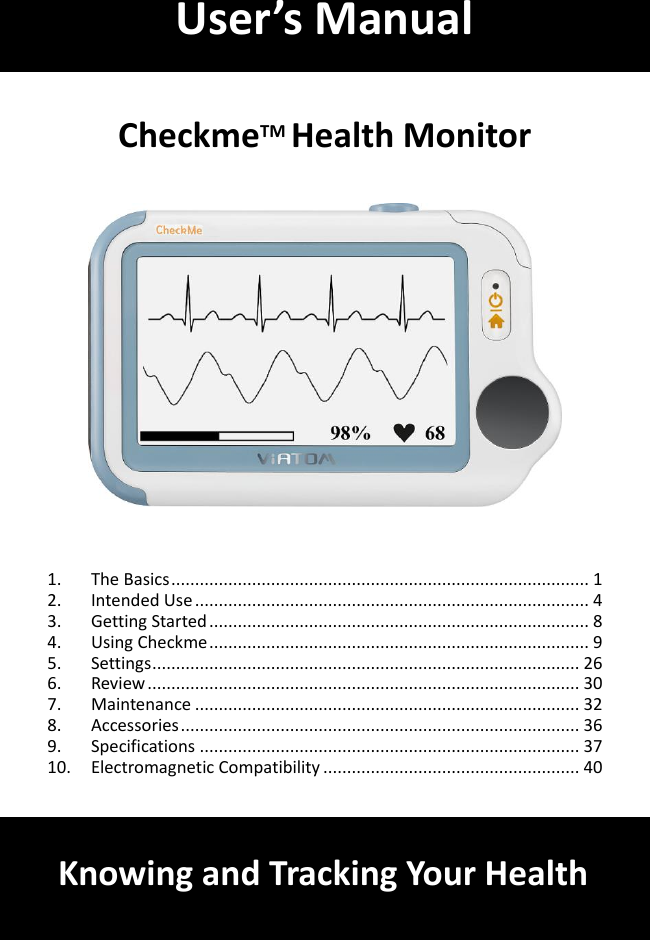
        CheckmeTM Health Monitor       1. The Basics ........................................................................................ 1 2. Intended Use ................................................................................... 4 3. Getting Started ................................................................................ 8 4. Using Checkme ................................................................................ 9 5. Settings .......................................................................................... 26 6. Review ........................................................................................... 30 7. Maintenance ................................................................................. 32 8. Accessories .................................................................................... 36 9. Specifications ................................................................................ 37 10. Electromagnetic Compatibility ...................................................... 40    User’s Manual Knowing and Tracking Your Health
1 1. The Basics This manual contains the instructions necessary to  operate the product safely and in accordance with its function and intended use. Observance of  this  manual  is  a  prerequisite  for  proper  product  performance  and correct operation and ensures patient and operator safety.    This  manual  is  based  on  the  maximum  configuration  of  Checkme  Pro health monitor. Some functions may be not available on your model.    1.1 Safety   Warnings and Cautionary Advices  Before  using  the  device,  please  ensure  that  you  have  read  this manual thoroughly and fully understand corresponding precautions and risks.    This  device  has  been  designed  for  practical  use,  but  is  not  a substitute for a visit to the doctor.  The data and results displayed on the device are for reference only and  cannot  be  directly  used  for  diagnostic  interpretation  or treatment.  We recommend not to use this device if you have a pacemaker or other implanted devices. Follow the advice given by your doctor, if applicable.    Do not use this device with a defibrillator.  Do not use this device during MRI examination.  Do not use the device in a combustible environment (i.e., oxygen-enriched environment).  Never submerge the device in water or other liquids. Do not clean the device with acetone or other volatile solutions.    Do not drop this device or subject it to strong impact.  Do not place this device in pressure vessels or gas sterilization device.  Do  not  dismantle  the  device,  as  this  could  cause  damage  or malfunctions or impede the operation of the device.  This  device  is  not  intended for use  by people  (including  children) with  restricted  physical,  sensory  or  mental  skills  or  a  lack  of
2 experience and/or a lack of knowledge, unless they are supervised by a person who has responsibility for their safety or they receive instructions  from  this  person on  how  to  use  the  device.  Children should be supervised around the device to ensure they do not play with it.  Do not allow the electrodes of the device to come into contact with other conductive parts (including earth).  Do not use the device with persons with sensitive skin or allergies.  Do not store the device in the following locations: locations in which the device is exposed to direct sunlight, high temperatures or levels of moisture,  or heavy contamination; locations near to sources of water or fire; or locations that are subject to strong electromagnetic influences.  Do not swing the device with the strip, which may result in injury.  This  device  displays  changes  in  the  heart  rhythm  and  blood oxygenation  etc.  which  may  have  various  different  causes.  These may be harmless, but may also be triggered by illnesses or diseases of differing degree of severity. Please consult a medical specialist if you believe you may have an illness or disease.    Vital  signs  measurements,  such  as  those  taken  with  this  device, cannot identify all diseases. Regardless of the measurement taken using this device, you should consult your doctor immediately if you experience symptoms that could indicate acute disease.    Do  not  self-diagnose  or  self-medicate  on  the  basis  of  this  device without consulting your doctor. In particular, do not start taking any new medication or change the type and/or dosage of any existing medication without prior approval.    This  device  is  not  a  substitute  for a  medical  examination  or  your heart  or  other  organ  function,  or  for  medical  electrocardiogram recordings, which require more complex measurements.  It is not possible to use this device to diagnose illness or diseases. This is exclusively the responsibility of your doctor.    We  recommend  that  you  record  the  ECG  curves  and  other measurements and provide them to your doctor if required.  Changes or modifications to this unit not expressly approved by the party responsible for compliance could void the user’s authority to operate the equipment.
3 NOTE:   This equipment has been  tested and found to comply with the limits for a Class B digital device, pursuant to Part 15 of the FCC Rules.   These limits are designed to provide reasonable protection  against  harmful  interference  in  a  residential installation.   This  equipment  generates,  uses  and  can  radiate radio  frequency  energy  and,  if  not  installed  and  used  in accordance  with  the  instructions,  may  cause  harmful interference to radio communications. However, there is no guarantee that interference will not occur in  a  particular  installation.   If  this  equipment  does  cause harmful interference to radio or television reception, which can be determined by turning the equipment off and on, the user is encouraged to try to correct the interference by one or more of the following measures:  Reorient or relocate the receiving antenna.  Increase the separation between the equipment and receiver.  Connect the equipment into an outlet on a circuit different from that to which the         receiver is connected.  Consult the dealer or an experienced radio/TV technician for help.  This device complies with Part 15 of the FCC Rules. Operation is subject to the following two conditions:             (1) this device may not cause harmful interference, and              (2)  this  device  must  accept  any  interference  received,  including interference that may cause undesired operation.  USB charging cable(540-00194-00) must be  used  with  this  unit to ensure compliance with the Class B FCC limits.
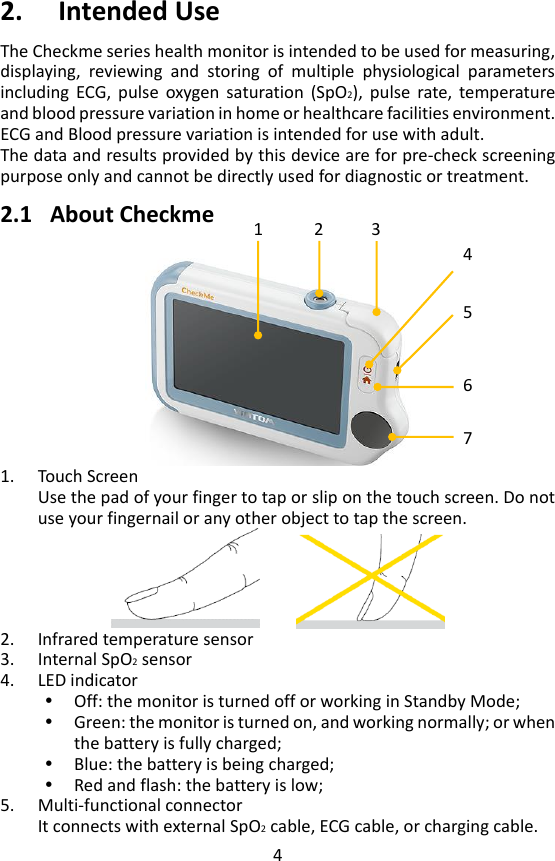
4 2. Intended Use   The Checkme series health monitor is intended to be used for measuring, displaying,  reviewing  and  storing  of  multiple  physiological  parameters including  ECG,  pulse  oxygen  saturation  (SpO2),  pulse  rate,  temperature and blood pressure variation in home or healthcare facilities environment.   ECG and Blood pressure variation is intended for use with adult. The data and results provided by this device are for pre-check screening purpose only and cannot be directly used for diagnostic or treatment.  2.1 About Checkme     1. Touch Screen   Use the pad of your finger to tap or slip on the touch screen. Do not use your fingernail or any other object to tap the screen.         2. Infrared temperature sensor   3. Internal SpO2 sensor   4. LED indicator  Off: the monitor is turned off or working in Standby Mode;  Green: the monitor is turned on, and working normally; or when the battery is fully charged;  Blue: the battery is being charged;    Red and flash: the battery is low;   5. Multi-functional connector It connects with external SpO2 cable, ECG cable, or charging cable. 5 6 7 2 1 3 4
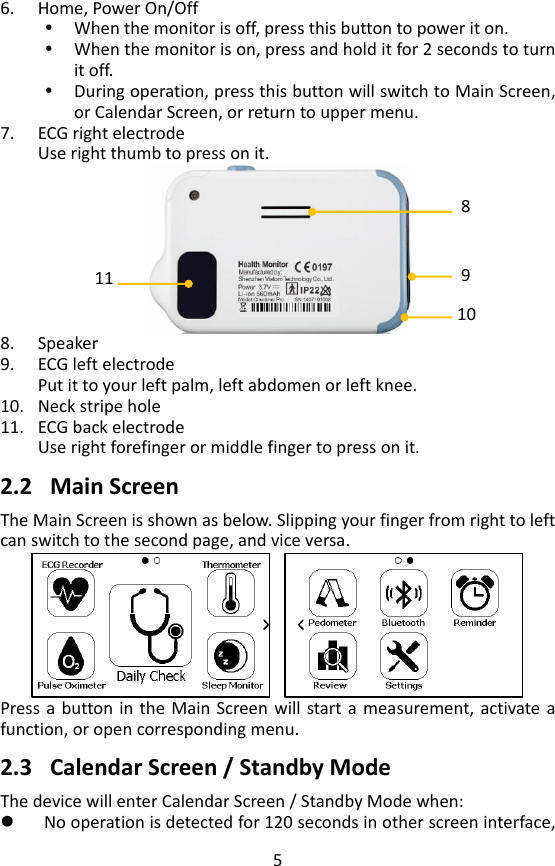
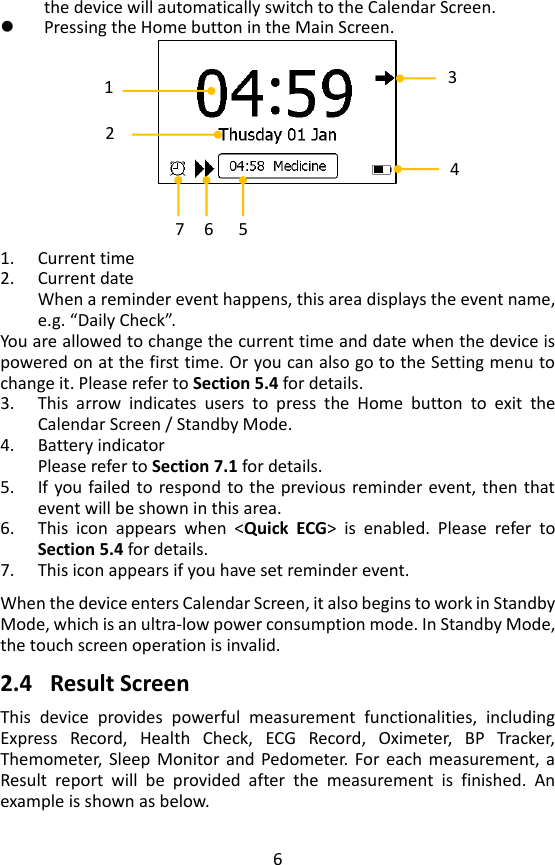
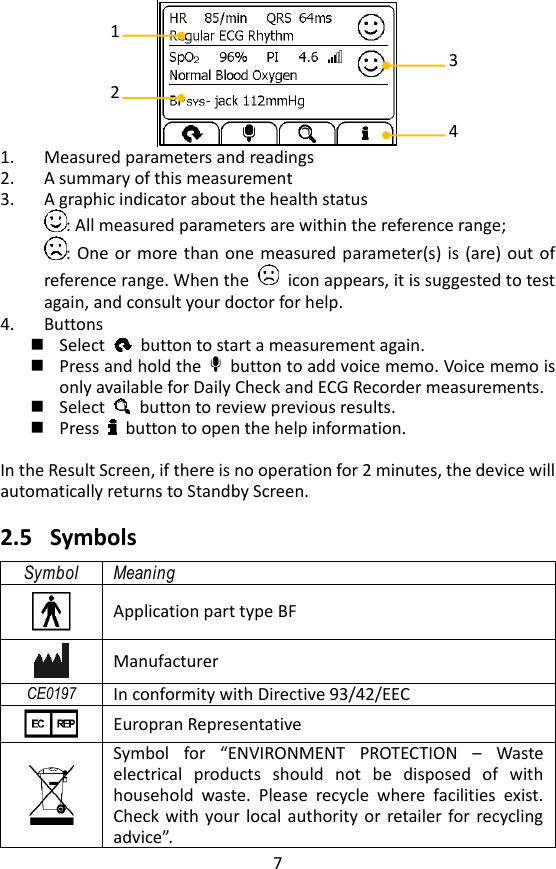
5 6. Home, Power On/Off    When the monitor is off, press this button to power it on.  When the monitor is on, press and hold it for 2 seconds to turn it off.  During operation, press this button will switch to Main Screen, or Calendar Screen, or return to upper menu. 7. ECG right electrode   Use right thumb to press on it.    8. Speaker   9. ECG left electrode   Put it to your left palm, left abdomen or left knee.   10. Neck stripe hole 11. ECG back electrode Use right forefinger or middle finger to press on it.    2.2 Main Screen   The Main Screen is shown as below. Slipping your finger from right to left can switch to the second page, and vice versa.      Press a button in  the  Main Screen will start a  measurement, activate  a function, or open corresponding menu.      2.3 Calendar Screen / Standby Mode The device will enter Calendar Screen / Standby Mode when:  No operation is detected for 120 seconds in other screen interface, 9 11 8 10
6 the device will automatically switch to the Calendar Screen.  Pressing the Home button in the Main Screen.       1. Current time 2. Current date When a reminder event happens, this area displays the event name, e.g. “Daily Check”.   You are allowed to change the current time and date when the device is powered on at the first time. Or you can also go to the Setting menu to change it. Please refer to Section 5.4 for details. 3. This  arrow  indicates  users  to  press  the  Home  button  to  exit  the Calendar Screen / Standby Mode.   4. Battery indicator Please refer to Section 7.1 for details. 5. If you failed to respond to the  previous reminder event, then that event will be shown in this area.   6. This  icon  appears  when  <Quick  ECG>  is  enabled.  Please  refer  to Section 5.4 for details.   7. This icon appears if you have set reminder event.    When the device enters Calendar Screen, it also begins to work in Standby Mode, which is an ultra-low power consumption mode. In Standby Mode, the touch screen operation is invalid.    2.4 Result Screen   This  device  provides  powerful  measurement  functionalities,  including Express  Record,  Health  Check,  ECG  Record,  Oximeter,  BP  Tracker, Themometer, Sleep  Monitor and  Pedometer. For each  measurement,  a Result  report  will  be  provided  after  the  measurement  is  finished.  An example is shown as below.   1 2 3 4 6 7 5
7   1. Measured parameters and readings   2. A summary of this measurement   3. A graphic indicator about the health status   : All measured parameters are within the reference range; : One or more than one measured parameter(s) is (are) out of reference range. When the    icon appears, it is suggested to test again, and consult your doctor for help.   4. Buttons  Select    button to start a measurement again.    Press and hold the    button to add voice memo. Voice memo is only available for Daily Check and ECG Recorder measurements.  Select    button to review previous results.    Press    button to open the help information.  In the Result Screen, if there is no operation for 2 minutes, the device will automatically returns to Standby Screen.    2.5 Symbols   Symbol Meaning  Application part type BF  Manufacturer CE0197 In conformity with Directive 93/42/EEC    Europran Representative  Symbol  for  “ENVIRONMENT  PROTECTION  –  Waste electrical  products  should  not  be  disposed  of  with household  waste.  Please  recycle  where  facilities  exist. Check with your  local authority  or  retailer  for recycling advice”. 1 2 3 4
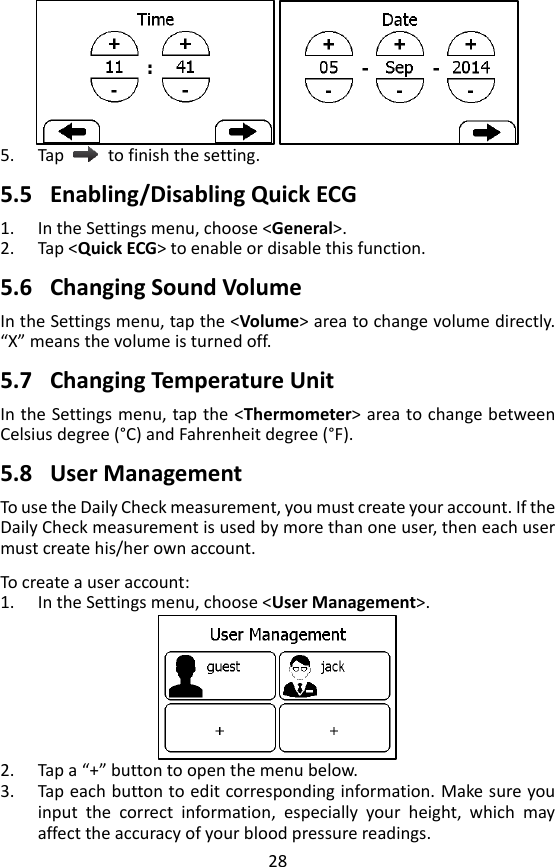
8 IP22 Against ingress of solid foregin objects ≥12.5mm dimeter, Against dripping(15° tilted)     Follow operating instructions       No alarm system.  3. Getting Started   3.1 Unpacking   Before unpacking, examine the packing case carefully for signs of damage. If any damage is detected, contact the carrier or us. If the packing case is intact,  open  the  package  and  remove  the  equipment  and  accessories carefully.  Check  all  materials against the  packing  list  and  check  for  any mechanical damage. Contact us in case of any problem.    Warnings and Cautionary Advices  Save the packing case and packaging material as they can be used if the device must be reshipped.  Keep  the  warranty  card,  which  is  useful  within  the  period  of warranty.  When disposing of the packaging material, be sure to observe the applicable  waste  control  regulations  and  keep  it  out  of  children’s reach.  The equipment might be contaminated during storage and transport. Before use, please verify whether the packages are intact, especially the packages of single use accessories. In case of any damage, do not apply it to patients.  3.2 Power On/Off Press the Power On/Off button to power on the device.  Press and hold Power On/Off button for 2 seconds to power off the device.    3.3 Initial Settings   The first time when the Checkme is powered on, you can follow the steps as below to set up your Checkme monitor.
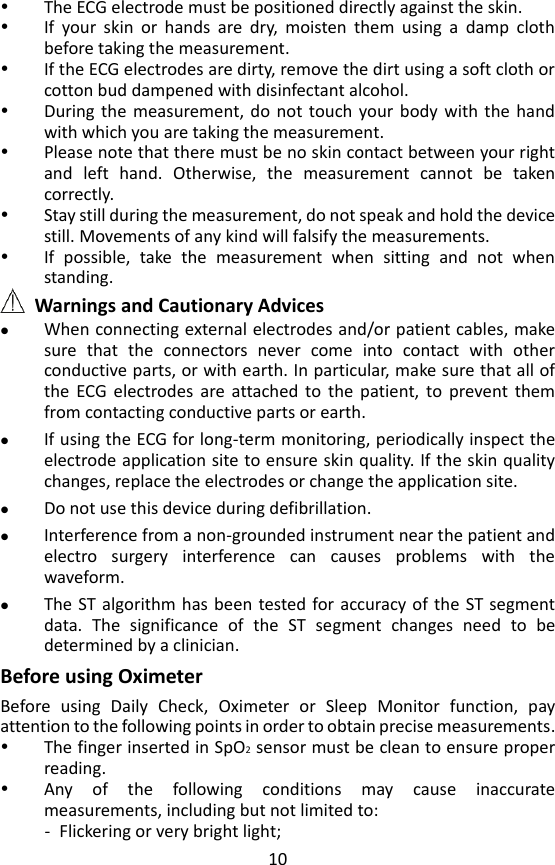
9  Step User Interface Action 1  Tap the language you want the device to use.   Then tap  .   2  Tap the “+” or “-” button to change the date, month and year.   Then tap  . 3  Tap the “+” or “-” button to change the time.   Then tap  . 4  The Main Screen shows when you finish those steps as above.      4. Using Checkme 4.1 Prior to Use  Warnings and Cautionary Advices  Use only cables, electrodes, sensors and other accessories specified in this manual.    The device has no alarms and will not  sound if the measurement reading is too low or too high.   Before using ECG Before using Daily Check or ECG Recorder function, pay attention to the following points in order to obtain precise measurements.
10  The ECG electrode must be positioned directly against the skin.  If  your  skin  or  hands  are  dry,  moisten  them  using  a  damp  cloth before taking the measurement.  If the ECG electrodes are dirty, remove the dirt using a soft cloth or cotton bud dampened with disinfectant alcohol.  During the  measurement, do  not  touch  your body  with  the  hand with which you are taking the measurement.  Please note that there must be no skin contact between your right and  left  hand.  Otherwise,  the  measurement  cannot  be  taken correctly.  Stay still during the measurement, do not speak and hold the device still. Movements of any kind will falsify the measurements.  If  possible,  take  the  measurement  when  sitting  and  not  when standing.  Warnings and Cautionary Advices  When connecting external electrodes and/or patient cables, make sure  that  the  connectors  never  come  into  contact  with  other conductive parts, or with earth. In particular, make sure that all of the  ECG  electrodes  are  attached  to  the  patient,  to  prevent  them from contacting conductive parts or earth.  If using the ECG for long-term monitoring, periodically inspect the electrode application site to ensure skin quality. If the skin quality changes, replace the electrodes or change the application site.  Do not use this device during defibrillation.  Interference from a non-grounded instrument near the patient and electro  surgery  interference  can  causes  problems  with  the waveform.  The ST algorithm has been  tested for accuracy of the ST segment data.  The  significance  of  the  ST  segment  changes  need  to  be determined by a clinician.  Before using Oximeter Before  using  Daily  Check,  Oximeter  or  Sleep  Monitor  function,  pay attention to the following points in order to obtain precise measurements.  The finger inserted in SpO2 sensor must be clean to ensure proper reading.  Any  of  the  following  conditions  may  cause  inaccurate measurements, including but not limited to: - Flickering or very bright light;
11 - Poor blood circulation; - Low hemoglobin; - Hypotension,  severe  vasoconstriction,  severe  anemia  or hypothermia; - Nail polish, and/or artificial nails; - Any tests recently performed on you that required an injection of intravascular dyes.  The Oximeter may not work if you have poor circulation. Rub your finger to increase circulation, or place the SpO2 sensor on another finger.  The Oximeter measures oxygen saturation of functional hemoglobin. High  levels  of  dysfunctional  hemoglobin  (caused  by  sickle  cell anemia,  carbon  monoxide,  etc.)  could  affect  the  accuracy  of  the measurements.  Field  strengths  from  fixed  transmitters,  such  as  base  stations  for radio  (cellular/cordless)  telephones  and  land  mobile  radios, amateur  radio,  AM  and  FM  radio  broadcast  towers,  and  TV broadcast towers may affect accuracy.    The pleth waveform displayed on the device is normalized.  Warnings and Cautionary Advices  Limit finger movement as  much  as  possible  when  using the  Daily Check  or  Oximeter,  which  might  result  in  incorrect  reading  or analysis.  Do not use the Oximeter on the same hand/arm when using a blood pressure cuff or monitor.    Do not use the Oximeter outside the specified operating and storage temperature ranges.  Do not use this device during MRI (magnetic resonance imaging). Induced current could potentially cause burns. The SpO2 sensor may affect the MRI image, and the MRI unit may affect the accuracy of the oximetry measurements.    Prolonged  continuous  SpO2  monitoring  or  sleep  monitoring  may increase the risk of undesirable changes in skin characteristics, such as irritation, reddening, blistering or burns.    Check the SpO2 sensor application site every 6-8 hours to determine the positioning of the sensor and the circulation and skin sensitivity of the patient. Patient sensitivity varies depending on medical status or skin condition. For patients with poor peripheral blood circulation
12 or sensitive skin, inspect the sensor site more frequently.  4.2 Daily Check About Daily Check  Warnings and Cautionary Advices  Before using this function, please read the Section 4.1.  When  using  Daily  Check,  please  ensure  you  select  the  right  user. Wrong user will result in incorrect blood pressure readings.  To  ensure  better  tracking  of  your  health  status,  it  is  strongly suggested that every Daily Check measurement is made at the same time period when your body is in the relative same situation. E.g., every morning when get up, or every night before go to bed.    Daily Check measurement is a function that combines the measuring of ECG  (Electrocardiograph)  waveform,  HR  (heart  rate),  Pleth  waveform, SpO2 (blood oxygenation), PI (Pulse Index) and systolic blood pressure. It takes  only  20  seconds  to collect  your  vital  signs  before giving  you  vital signs readings and your health evaluation.   For each individual, the correlation among those parameters measured by Daily Check is different, so when Daily Check function is used by more than one user, you need to create the user profile for each user. Before using Daily Check measurement or reviewing the Daily Check data, ensure that the correct user is selected. Please refer to Section 5.8 to know how to manage users.   Setting Daily Check Reminder To  better  manage  your  health  status,  it  is  recommended  to  take  Daily Check measurement at a regular interval, like once every day or once a week. To ensure that you never forget to take a Daily Check measurement, you can set a Daily Check reminder. When this Daily Check reminder event is triggered, the device gives audio alarm prompt, which will last for one minute if you don’t cancel it manually.   To set the Daily Check reminder event, please refer to Section 4.8.   Using Daily Check   To start a Daily Check, follow the steps as below.   1. If  you  have not  created user,  then  please  follow the  instruction  in Section 5.8 to add your user account.
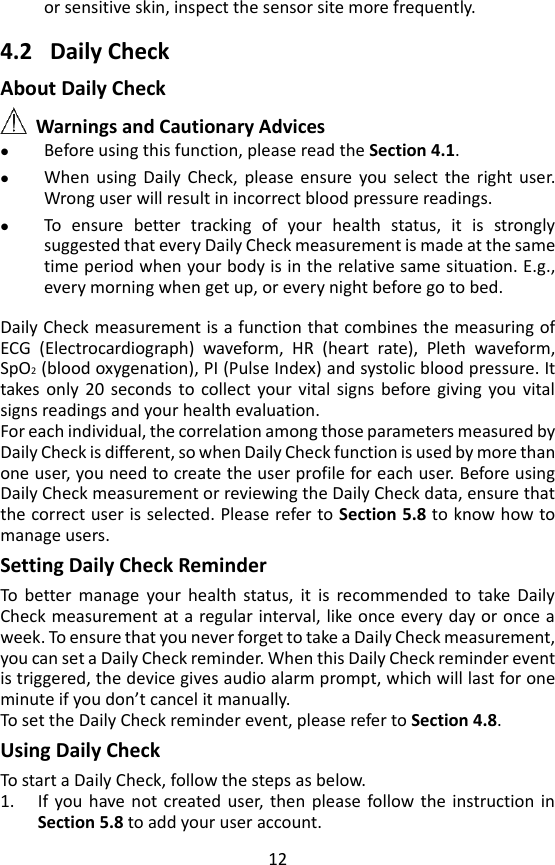
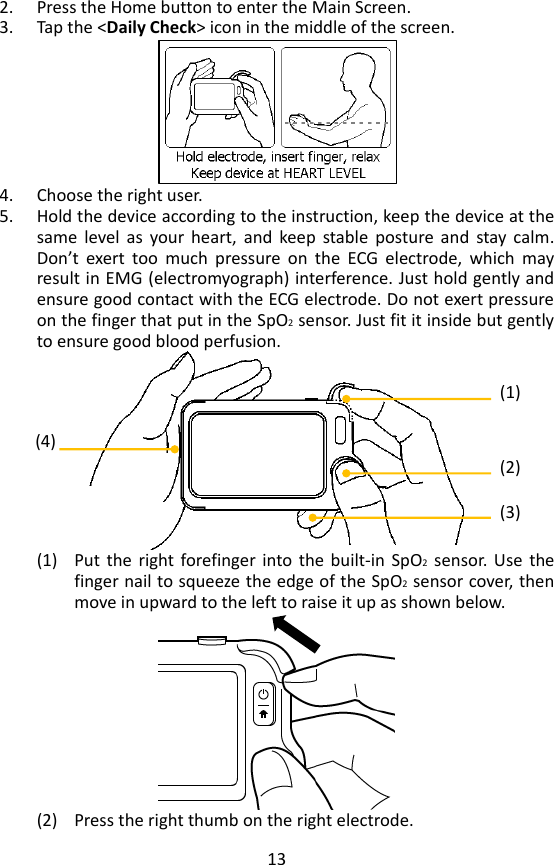
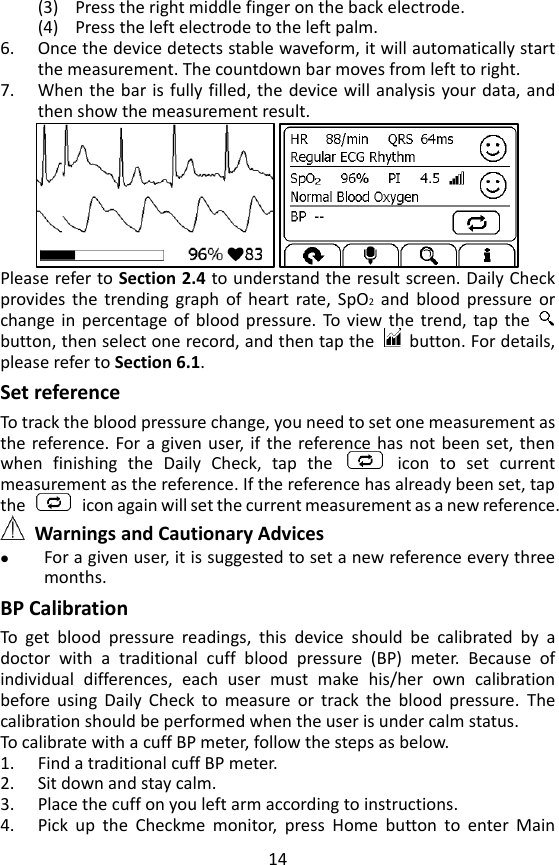
13 2. Press the Home button to enter the Main Screen.   3. Tap the <Daily Check> icon in the middle of the screen.    4. Choose the right user.   5. Hold the device according to the instruction, keep the device at the same  level  as  your  heart,  and  keep  stable  posture  and  stay  calm. Don’t  exert  too  much  pressure  on  the  ECG  electrode,  which  may result in EMG (electromyograph) interference. Just hold gently and ensure good contact with the ECG electrode. Do not exert pressure on the finger that put in the SpO2 sensor. Just fit it inside but gently to ensure good blood perfusion.    (1) Put  the  right  forefinger into the  built-in  SpO2  sensor.  Use  the finger nail to squeeze the edge of the SpO2 sensor cover, then move in upward to the left to raise it up as shown below.    (2) Press the right thumb on the right electrode. (1) (2) (3) (4)
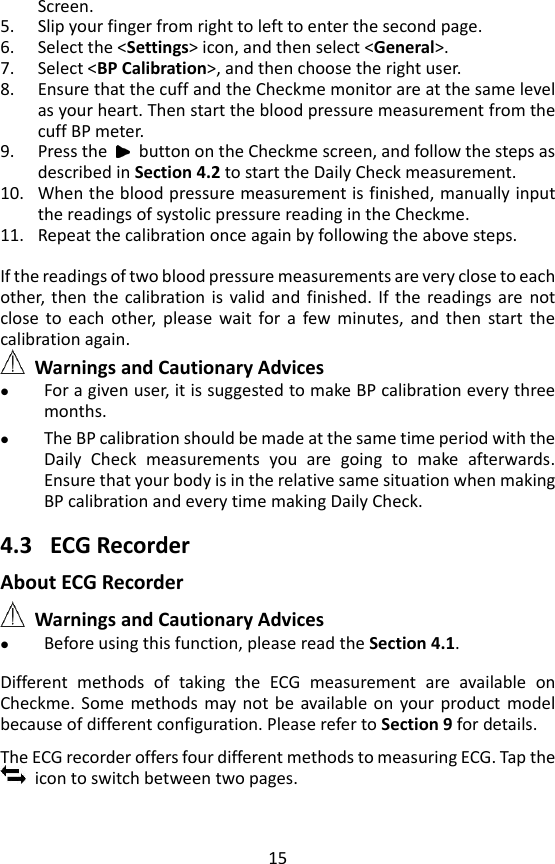
14 (3) Press the right middle finger on the back electrode. (4) Press the left electrode to the left palm.   6. Once the device detects stable waveform, it will automatically start the measurement. The countdown bar moves from left to right. 7. When the bar is fully filled,  the  device will analysis your data, and then show the measurement result.    Please refer to Section 2.4 to understand the result screen. Daily Check provides  the  trending  graph  of  heart  rate,  SpO2 and  blood  pressure  or change in  percentage  of  blood pressure.  To  view  the  trend,  tap  the   button, then select one record, and then tap the    button. For details, please refer to Section 6.1.   Set reference To track the blood pressure change, you need to set one measurement as the reference. For a  given  user, if the reference has not been  set, then when  finishing  the  Daily  Check,  tap  the    icon  to  set  current measurement as the reference. If the reference has already been set, tap the    icon again will set the current measurement as a new reference.    Warnings and Cautionary Advices  For a given user, it is suggested to set a new reference every three months. BP Calibration   To  get  blood  pressure  readings,  this  device  should  be  calibrated  by  a doctor  with  a  traditional  cuff  blood  pressure  (BP)  meter.  Because  of individual  differences,  each  user  must  make  his/her  own  calibration before  using  Daily  Check  to  measure  or  track  the  blood  pressure.  The calibration should be performed when the user is under calm status.   To calibrate with a cuff BP meter, follow the steps as below. 1. Find a traditional cuff BP meter. 2. Sit down and stay calm.   3. Place the cuff on you left arm according to instructions. 4. Pick  up  the  Checkme  monitor,  press  Home  button  to  enter  Main
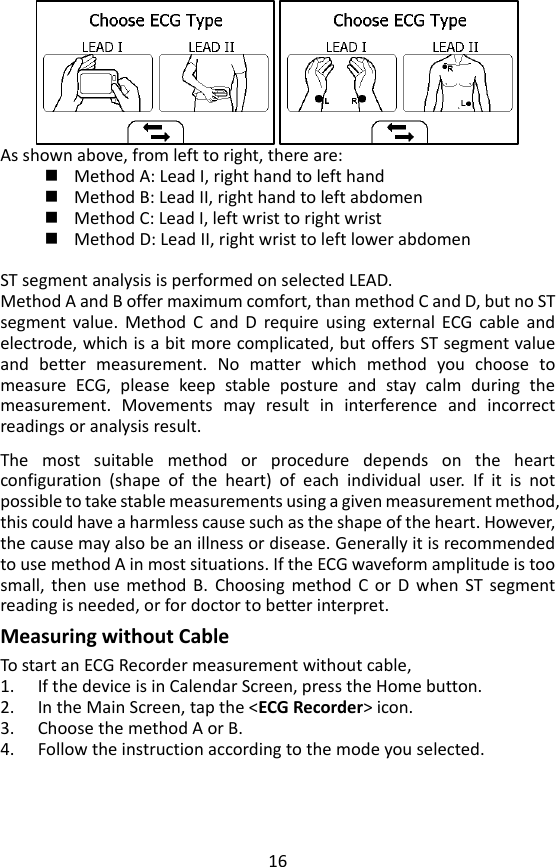
15 Screen. 5. Slip your finger from right to left to enter the second page.   6. Select the <Settings> icon, and then select <General>. 7. Select <BP Calibration>, and then choose the right user.   8. Ensure that the cuff and the Checkme monitor are at the same level as your heart. Then start the blood pressure measurement from the cuff BP meter. 9. Press the    button on the Checkme screen, and follow the steps as described in Section 4.2 to start the Daily Check measurement. 10. When the blood pressure measurement is finished, manually input the readings of systolic pressure reading in the Checkme. 11. Repeat the calibration once again by following the above steps.  If the readings of two blood pressure measurements are very close to each other,  then  the  calibration is  valid  and  finished.  If  the  readings are  not close  to  each  other,  please  wait  for  a  few  minutes,  and  then  start  the calibration again.      Warnings and Cautionary Advices  For a given user, it is suggested to make BP calibration every three months.  The BP calibration should be made at the same time period with the Daily  Check  measurements  you  are  going  to  make  afterwards. Ensure that your body is in the relative same situation when making BP calibration and every time making Daily Check.  4.3 ECG Recorder About ECG Recorder  Warnings and Cautionary Advices  Before using this function, please read the Section 4.1.  Different  methods  of  taking  the  ECG  measurement  are  available  on Checkme.  Some  methods  may not be  available on  your  product  model because of different configuration. Please refer to Section 9 for details.    The ECG recorder offers four different methods to measuring ECG. Tap the   icon to switch between two pages.
16  As shown above, from left to right, there are:  Method A: Lead I, right hand to left hand  Method B: Lead II, right hand to left abdomen    Method C: Lead I, left wrist to right wrist    Method D: Lead II, right wrist to left lower abdomen    ST segment analysis is performed on selected LEAD. Method A and B offer maximum comfort, than method C and D, but no ST segment  value.  Method  C  and  D  require  using  external  ECG  cable  and electrode, which is a bit more complicated, but offers ST segment value and  better  measurement.  No  matter  which  method  you  choose  to measure  ECG,  please  keep  stable  posture  and  stay  calm  during  the measurement.  Movements  may  result  in  interference  and  incorrect readings or analysis result.    The  most  suitable  method  or  procedure  depends  on  the  heart configuration  (shape  of  the  heart)  of  each  individual  user.  If  it  is  not possible to take stable measurements using a given measurement method, this could have a harmless cause such as the shape of the heart. However, the cause may also be an illness or disease. Generally it is recommended to use method A in most situations. If the ECG waveform amplitude is too small,  then  use  method  B.  Choosing  method  C  or  D  when  ST  segment reading is needed, or for doctor to better interpret.   Measuring without Cable To start an ECG Recorder measurement without cable,   1. If the device is in Calendar Screen, press the Home button.   2. In the Main Screen, tap the <ECG Recorder> icon.   3. Choose the method A or B.   4. Follow the instruction according to the mode you selected.
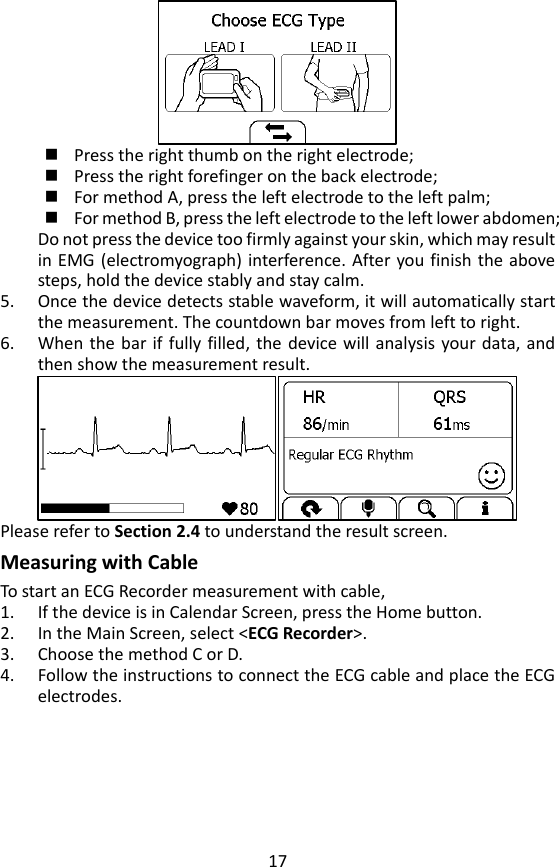
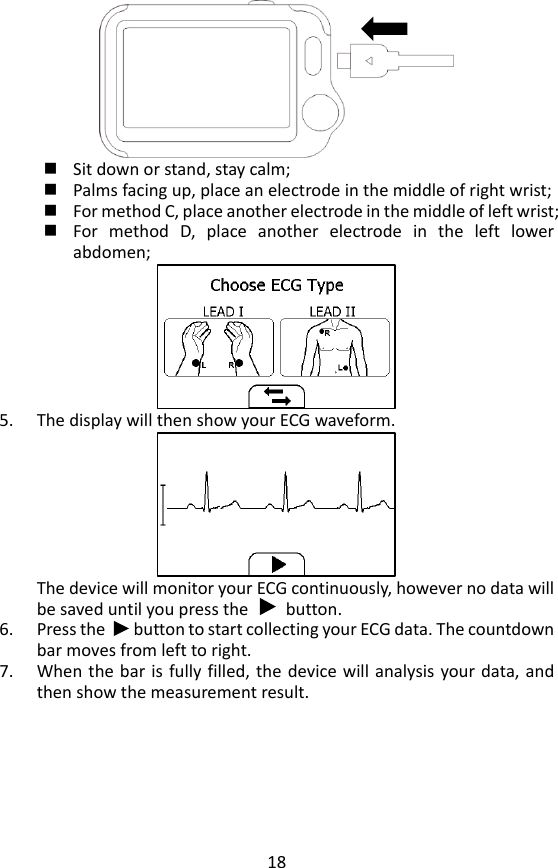
17   Press the right thumb on the right electrode;  Press the right forefinger on the back electrode;    For method A, press the left electrode to the left palm;    For method B, press the left electrode to the left lower abdomen;   Do not press the device too firmly against your skin, which may result in EMG (electromyograph)  interference. After you finish the above steps, hold the device stably and stay calm.   5. Once the device detects stable waveform, it will automatically start the measurement. The countdown bar moves from left to right.   6. When the bar if fully filled,  the  device  will  analysis  your data, and then show the measurement result.    Please refer to Section 2.4 to understand the result screen. Measuring with Cable To start an ECG Recorder measurement with cable,   1. If the device is in Calendar Screen, press the Home button.   2. In the Main Screen, select <ECG Recorder>.   3. Choose the method C or D.   4. Follow the instructions to connect the ECG cable and place the ECG electrodes.
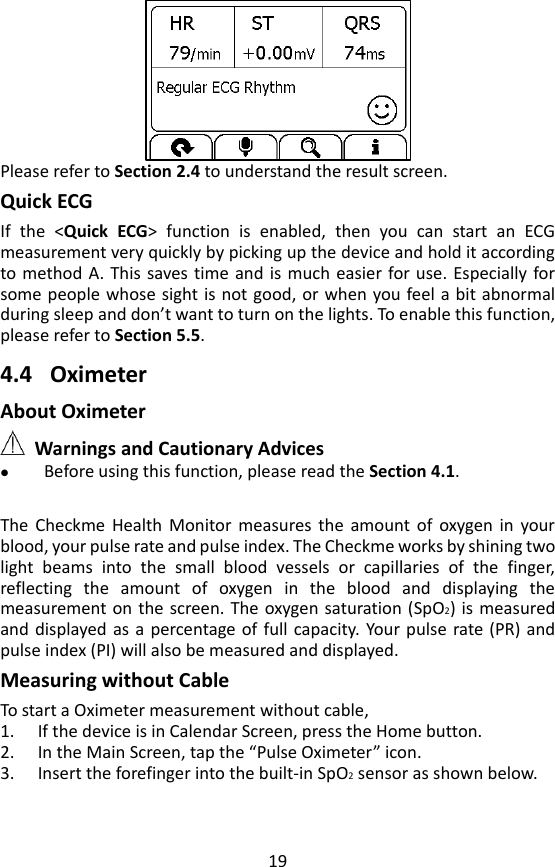
18   Sit down or stand, stay calm;    Palms facing up, place an electrode in the middle of right wrist;    For method C, place another electrode in the middle of left wrist;  For  method  D,  place  another  electrode  in  the  left  lower abdomen;  5. The display will then show your ECG waveform.  The device will monitor your ECG continuously, however no data will be saved until you press the        button.   6. Press the      button to start collecting your ECG data. The countdown bar moves from left to right. 7. When the bar is fully filled,  the  device will analysis your data, and then show the measurement result.
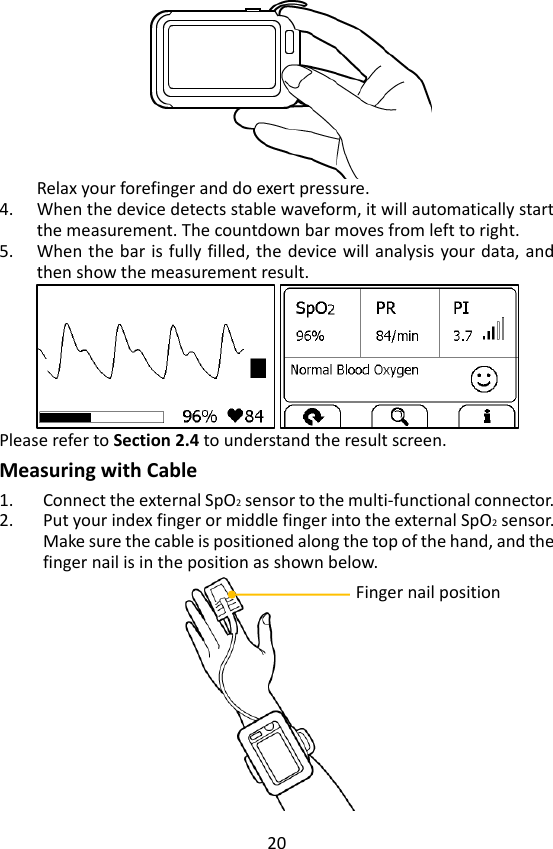
19  Please refer to Section 2.4 to understand the result screen. Quick ECG If  the  <Quick  ECG>  function  is  enabled,  then  you  can  start  an  ECG measurement very quickly by picking up the device and hold it according to method A. This saves time and is much easier for use.  Especially for some people whose sight is not good, or when you feel a bit abnormal during sleep and don’t want to turn on the lights. To enable this function, please refer to Section 5.5.      4.4 Oximeter   About Oximeter  Warnings and Cautionary Advices  Before using this function, please read the Section 4.1.    The  Checkme  Health  Monitor  measures  the  amount  of  oxygen in  your blood, your pulse rate and pulse index. The Checkme works by shining two light  beams  into  the  small  blood  vessels  or  capillaries  of  the  finger, reflecting  the  amount  of  oxygen  in  the  blood  and  displaying  the measurement on the screen. The oxygen saturation (SpO2) is  measured and displayed as a percentage of  full capacity.  Your pulse rate  (PR)  and pulse index (PI) will also be measured and displayed.   Measuring without Cable To start a Oximeter measurement without cable,   1. If the device is in Calendar Screen, press the Home button.   2. In the Main Screen, tap the “Pulse Oximeter” icon.   3. Insert the forefinger into the built-in SpO2 sensor as shown below.
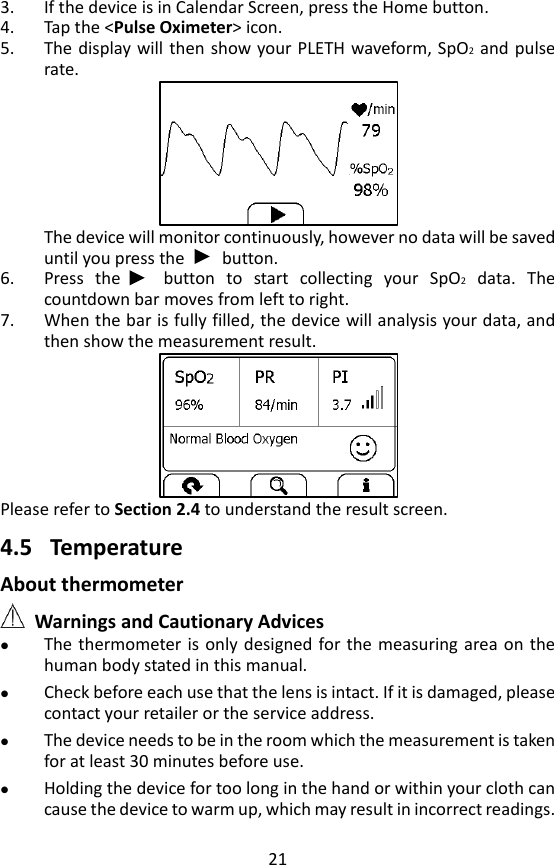
20  Relax your forefinger and do exert pressure.   4. When the device detects stable waveform, it will automatically start the measurement. The countdown bar moves from left to right. 5. When the bar is  fully filled,  the  device will analysis your data, and then show the measurement result.    Please refer to Section 2.4 to understand the result screen. Measuring with Cable 1. Connect the external SpO2 sensor to the multi-functional connector.   2. Put your index finger or middle finger into the external SpO2 sensor. Make sure the cable is positioned along the top of the hand, and the finger nail is in the position as shown below.    Finger nail position
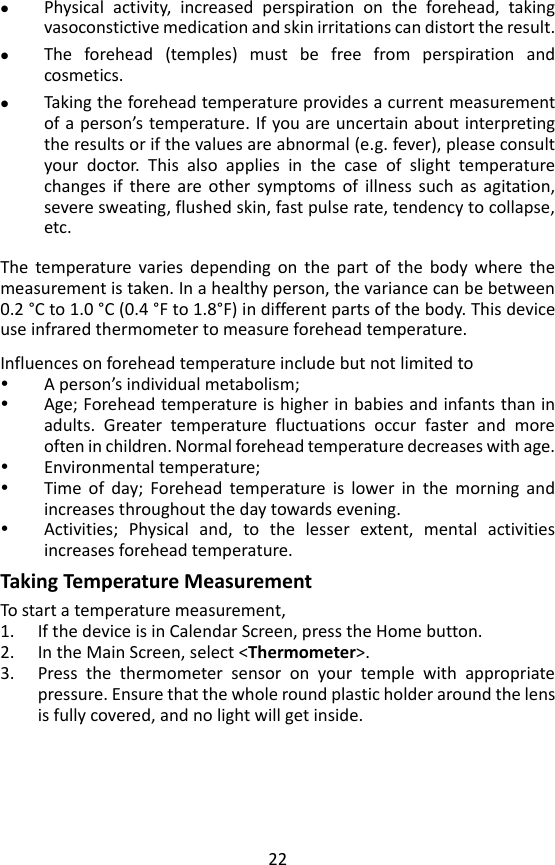
21 3. If the device is in Calendar Screen, press the Home button.   4. Tap the <Pulse Oximeter> icon. 5. The display will then show your PLETH waveform, SpO2 and pulse rate.  The device will monitor continuously, however no data will be saved until you press the        button.   6. Press  the      button  to  start  collecting  your  SpO2  data.  The countdown bar moves from left to right. 7. When the bar is fully filled, the device will analysis your data, and then show the measurement result.    Please refer to Section 2.4 to understand the result screen.  4.5 Temperature About thermometer  Warnings and Cautionary Advices  The thermometer is  only  designed  for the measuring area on  the human body stated in this manual.  Check before each use that the lens is intact. If it is damaged, please contact your retailer or the service address.    The device needs to be in the room which the measurement is taken for at least 30 minutes before use.    Holding the device for too long in the hand or within your cloth can cause the device to warm up, which may result in incorrect readings.
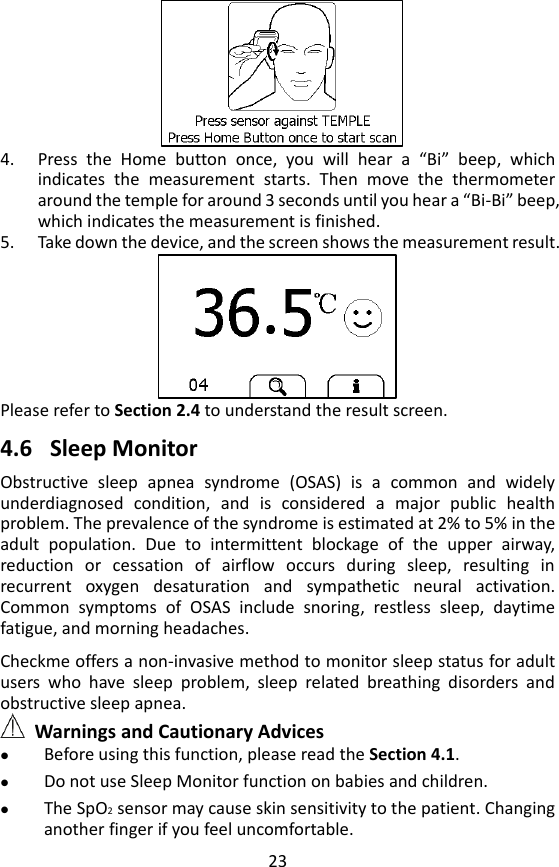
22  Physical  activity,  increased  perspiration  on  the  forehead,  taking vasoconstictive medication and skin irritations can distort the result.  The  forehead  (temples)  must  be  free  from  perspiration  and cosmetics.  Taking the forehead temperature provides a current measurement of a person’s temperature. If you are uncertain about interpreting the results or if the values are abnormal (e.g. fever), please consult your  doctor.  This  also  applies  in  the  case  of  slight  temperature changes  if  there  are  other  symptoms  of  illness  such  as  agitation, severe sweating, flushed skin, fast pulse rate, tendency to collapse, etc.  The  temperature  varies  depending  on  the  part  of  the  body  where  the measurement is taken. In a healthy person, the variance can be between 0.2 °C to 1.0 °C  (0.4 °F to 1.8°F) in different parts of the body. This device use infrared thermometer to measure forehead temperature.  Influences on forehead temperature include but not limited to  A person’s individual metabolism;  Age; Forehead temperature is higher in babies and infants than in adults.  Greater  temperature  fluctuations  occur  faster  and  more often in children. Normal forehead temperature decreases with age.  Environmental temperature;    Time  of  day;  Forehead  temperature  is  lower  in  the  morning  and increases throughout the day towards evening.  Activities;  Physical  and,  to  the  lesser  extent,  mental  activities increases forehead temperature. Taking Temperature Measurement To start a temperature measurement,   1. If the device is in Calendar Screen, press the Home button.   2. In the Main Screen, select <Thermometer>.   3. Press  the  thermometer  sensor  on  your  temple  with  appropriate pressure. Ensure that the whole round plastic holder around the lens is fully covered, and no light will get inside.
23    4. Press  the  Home  button  once,  you  will  hear  a  “Bi”  beep,  which indicates  the  measurement  starts.  Then  move  the  thermometer around the temple for around 3 seconds until you hear a “Bi-Bi” beep, which indicates the measurement is finished.   5. Take down the device, and the screen shows the measurement result.    Please refer to Section 2.4 to understand the result screen.  4.6 Sleep Monitor Obstructive  sleep  apnea  syndrome  (OSAS)  is  a  common  and  widely underdiagnosed  condition,  and  is  considered  a  major  public  health problem. The prevalence of the syndrome is estimated at 2% to 5% in the adult  population.  Due  to  intermittent  blockage  of  the  upper  airway, reduction  or  cessation  of  airflow  occurs  during  sleep,  resulting  in recurrent  oxygen  desaturation  and  sympathetic  neural  activation. Common  symptoms  of  OSAS  include  snoring,  restless  sleep,  daytime fatigue, and morning headaches.    Checkme offers a non-invasive method to monitor sleep status for adult users  who  have  sleep  problem,  sleep  related  breathing  disorders  and obstructive sleep apnea.  Warnings and Cautionary Advices  Before using this function, please read the Section 4.1.    Do not use Sleep Monitor function on babies and children.  The SpO2 sensor may cause skin sensitivity to the patient. Changing another finger if you feel uncomfortable.
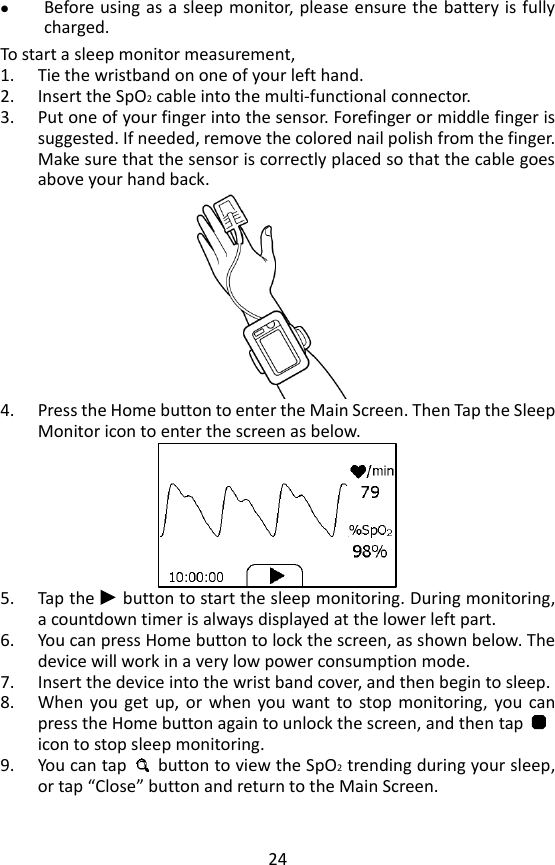
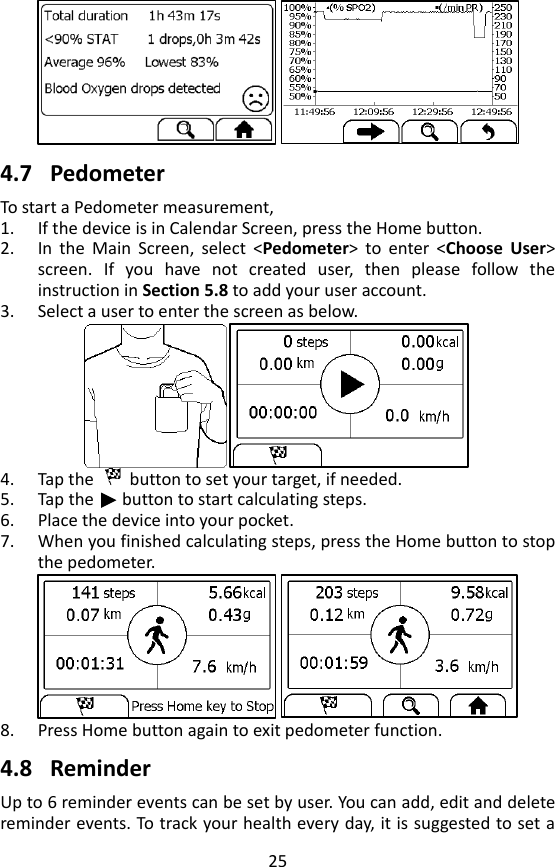
24  Before using as a sleep monitor, please ensure the battery is fully charged. To start a sleep monitor measurement,   1. Tie the wristband on one of your left hand. 2. Insert the SpO2 cable into the multi-functional connector. 3. Put one of your finger into the sensor. Forefinger or middle finger is suggested. If needed, remove the colored nail polish from the finger. Make sure that the sensor is correctly placed so that the cable goes above your hand back.    4. Press the Home button to enter the Main Screen. Then Tap the Sleep Monitor icon to enter the screen as below.      5. Tap the   button to start the sleep monitoring. During monitoring, a countdown timer is always displayed at the lower left part.   6. You can press Home button to lock the screen, as shown below. The device will work in a very low power consumption mode.   7. Insert the device into the wrist band cover, and then begin to sleep.     8. When  you  get  up,  or  when  you want to  stop  monitoring,  you  can press the Home button again to unlock the screen, and then tap       icon to stop sleep monitoring.               9. You can tap    button to view the SpO2 trending during your sleep, or tap “Close” button and return to the Main Screen.
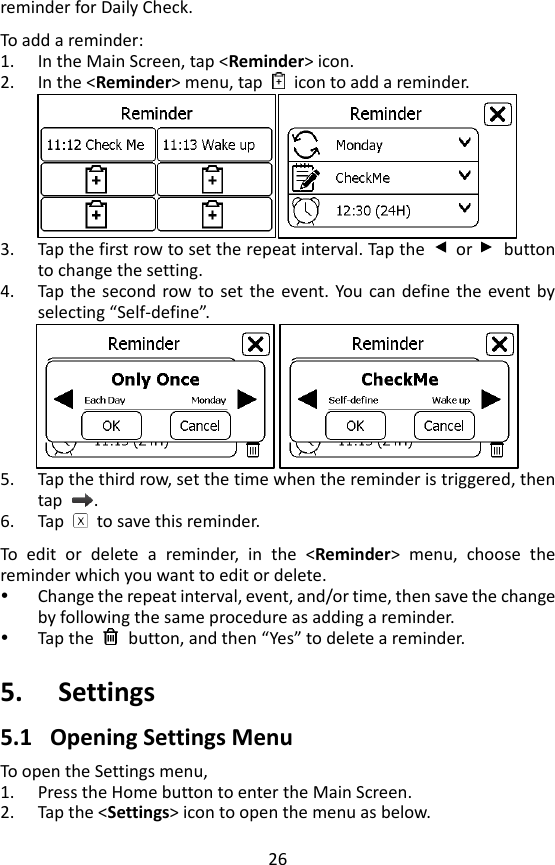
25   4.7 Pedometer To start a Pedometer measurement,   1. If the device is in Calendar Screen, press the Home button.   2. In  the  Main  Screen,  select  <Pedometer>  to  enter  <Choose  User> screen.  If  you  have  not  created  user,  then  please  follow  the instruction in Section 5.8 to add your user account. 3. Select a user to enter the screen as below.  4. Tap the    button to set your target, if needed.   5. Tap the      button to start calculating steps. 6. Place the device into your pocket. 7. When you finished calculating steps, press the Home button to stop the pedometer.  8. Press Home button again to exit pedometer function.    4.8 Reminder Up to 6 reminder events can be set by user. You can add, edit and delete reminder events. To track your health every day, it is suggested to set a
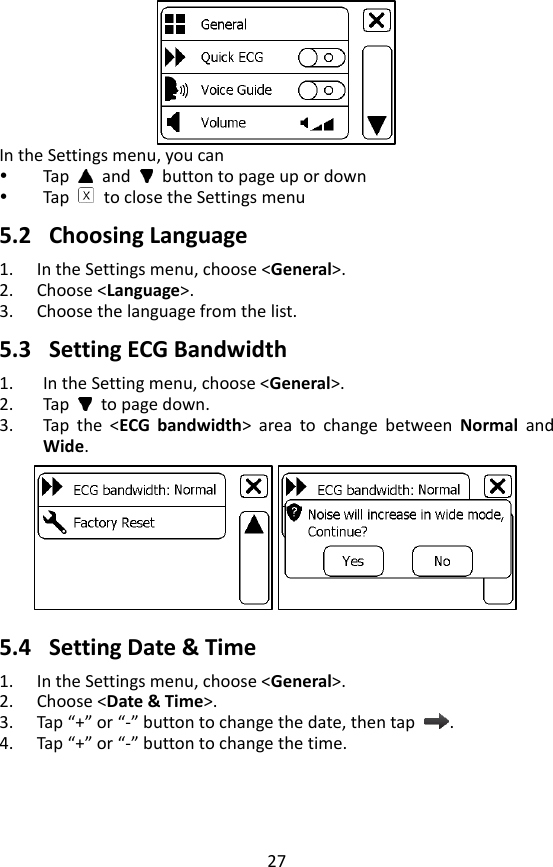
26 reminder for Daily Check.    To add a reminder: 1. In the Main Screen, tap <Reminder> icon.   2. In the <Reminder> menu, tap    icon to add a reminder.  3. Tap the first row to set the repeat interval. Tap the    or    button to change the setting. 4. Tap  the  second row to  set  the  event.  You can define the  event by selecting “Self-define”.  5. Tap the third row, set the time when the reminder is triggered, then tap  .   6. Tap    to save this reminder.    To  edit  or  delete  a  reminder,  in  the  <Reminder>  menu,  choose  the reminder which you want to edit or delete.    Change the repeat interval, event, and/or time, then save the change by following the same procedure as adding a reminder.      Tap the    button, and then “Yes” to delete a reminder.    5. Settings 5.1 Opening Settings Menu To open the Settings menu,   1. Press the Home button to enter the Main Screen. 2. Tap the <Settings> icon to open the menu as below.
27    In the Settings menu, you can  Tap   and    button to page up or down  Tap    to close the Settings menu  5.2 Choosing Language 1. In the Settings menu, choose <General>. 2. Choose <Language>. 3. Choose the language from the list.    5.3 Setting ECG Bandwidth 1. In the Setting menu, choose <General>. 2. Tap    to page down. 3. Tap  the  <ECG  bandwidth>  area  to  change  between  Normal  and Wide.  5.4 Setting Date & Time 1. In the Settings menu, choose <General>.   2. Choose <Date & Time>. 3. Tap “+” or “-” button to change the date, then tap  . 4. Tap “+” or “-” button to change the time.
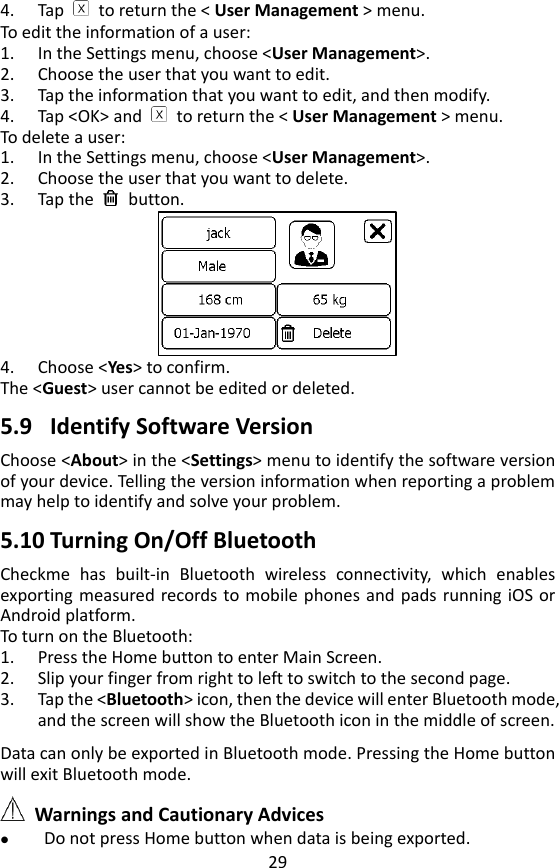
28  5. Tap    to finish the setting.    5.5 Enabling/Disabling Quick ECG 1. In the Settings menu, choose <General>.   2. Tap <Quick ECG> to enable or disable this function.  5.6 Changing Sound Volume In the Settings menu, tap the <Volume> area to change volume directly. “X” means the volume is turned off.  5.7 Changing Temperature Unit In the Settings menu, tap the <Thermometer> area to change between Celsius degree (°C ) and Fahrenheit degree (°F).  5.8 User Management To use the Daily Check measurement, you must create your account. If the Daily Check measurement is used by more than one user, then each user must create his/her own account.    To create a user account: 1. In the Settings menu, choose <User Management>.    2. Tap a “+” button to open the menu below. 3. Tap each button to edit corresponding information. Make sure you input  the  correct  information,  especially  your  height,  which  may affect the accuracy of your blood pressure readings.
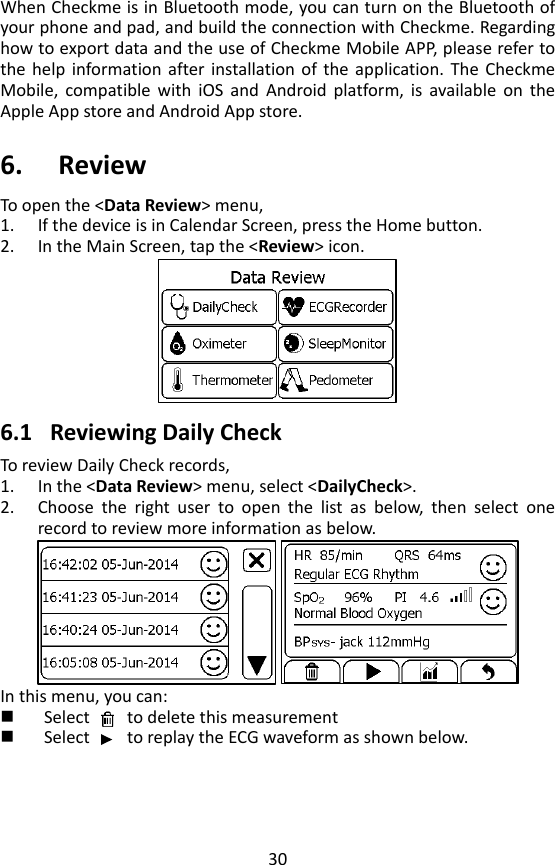
29 4. Tap    to return the < User Management > menu. To edit the information of a user: 1. In the Settings menu, choose <User Management>.   2. Choose the user that you want to edit. 3. Tap the information that you want to edit, and then modify. 4. Tap <OK> and    to return the < User Management > menu. To delete a user: 1. In the Settings menu, choose <User Management>.   2. Choose the user that you want to delete. 3. Tap the    button.    4. Choose <Yes> to confirm.   The <Guest> user cannot be edited or deleted.    5.9 Identify Software Version Choose <About> in the <Settings> menu to identify the software version of your device. Telling the version information when reporting a problem may help to identify and solve your problem.    5.10 Turning On/Off Bluetooth   Checkme  has  built-in  Bluetooth  wireless  connectivity,  which  enables exporting measured records to mobile phones and  pads  running iOS or Android platform.   To turn on the Bluetooth: 1. Press the Home button to enter Main Screen.   2. Slip your finger from right to left to switch to the second page. 3. Tap the <Bluetooth> icon, then the device will enter Bluetooth mode, and the screen will show the Bluetooth icon in the middle of screen.  Data can only be exported in Bluetooth mode. Pressing the Home button will exit Bluetooth mode.     Warnings and Cautionary Advices  Do not press Home button when data is being exported.
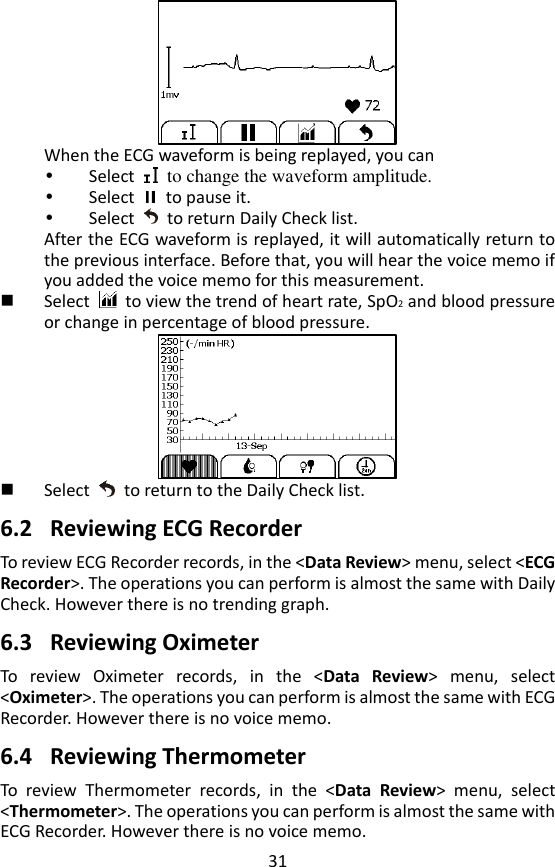
30 When Checkme is in Bluetooth mode, you can turn on the Bluetooth of your phone and pad, and build the connection with Checkme. Regarding how to export data and the use of Checkme Mobile APP, please refer to the  help  information after installation of  the  application. The  Checkme Mobile,  compatible  with  iOS  and  Android  platform,  is  available  on  the Apple App store and Android App store.    6. Review To open the <Data Review> menu,   1. If the device is in Calendar Screen, press the Home button.   2. In the Main Screen, tap the <Review> icon.     6.1 Reviewing Daily Check To review Daily Check records,   1. In the <Data Review> menu, select <DailyCheck>. 2. Choose  the  right  user  to  open  the  list  as  below,  then  select  one record to review more information as below.    In this menu, you can:  Select        to delete this measurement  Select        to replay the ECG waveform as shown below.
31  When the ECG waveform is being replayed, you can    Select    to change the waveform amplitude.    Select    to pause it.  Select    to return Daily Check list.     After the ECG waveform is replayed, it will automatically return to the previous interface. Before that, you will hear the voice memo if you added the voice memo for this measurement.    Select    to view the trend of heart rate, SpO2 and blood pressure or change in percentage of blood pressure.     Select    to return to the Daily Check list.  6.2 Reviewing ECG Recorder To review ECG Recorder records, in the <Data Review> menu, select <ECG Recorder>. The operations you can perform is almost the same with Daily Check. However there is no trending graph.    6.3 Reviewing Oximeter To  review  Oximeter  records,  in  the  <Data  Review>  menu,  select <Oximeter>. The operations you can perform is almost the same with ECG Recorder. However there is no voice memo.    6.4 Reviewing Thermometer To  review  Thermometer  records,  in  the  <Data  Review>  menu,  select <Thermometer>. The operations you can perform is almost the same with ECG Recorder. However there is no voice memo.
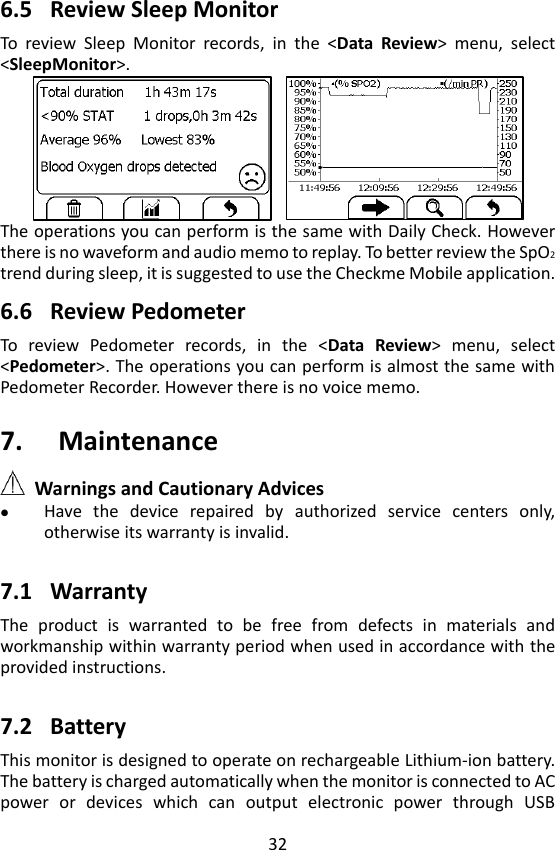
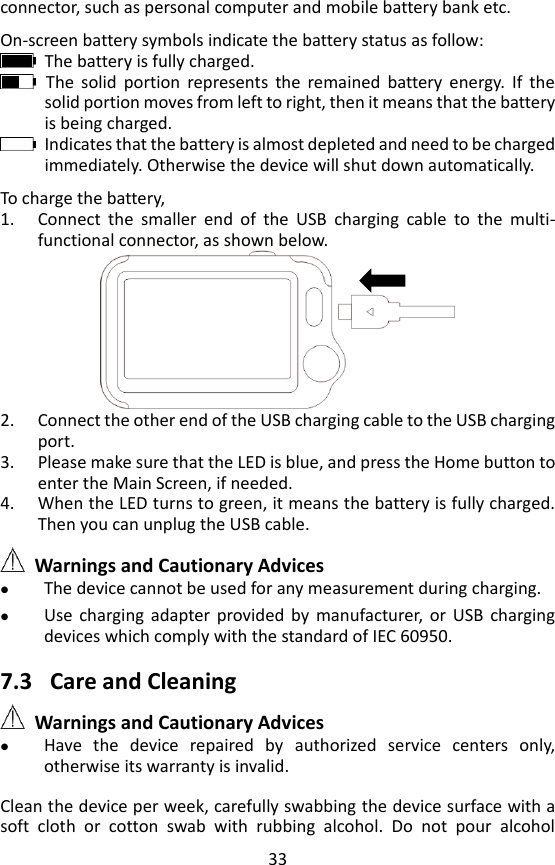
32  6.5 Review Sleep Monitor To  review  Sleep  Monitor  records,  in  the  <Data  Review>  menu,  select <SleepMonitor>.    The operations you can perform is the same with Daily Check. However there is no waveform and audio memo to replay. To better review the SpO2 trend during sleep, it is suggested to use the Checkme Mobile application.  6.6 Review Pedometer To  review  Pedometer  records,  in  the  <Data  Review>  menu,  select <Pedometer>. The operations you can perform is almost the same with Pedometer Recorder. However there is no voice memo.  7. Maintenance  Warnings and Cautionary Advices  Have  the  device  repaired  by  authorized  service  centers  only, otherwise its warranty is invalid.    7.1 Warranty The  product  is  warranted  to  be  free  from  defects  in  materials  and workmanship within warranty period when used in accordance with the provided instructions.    7.2 Battery This monitor is designed to operate on rechargeable Lithium-ion battery. The battery is charged automatically when the monitor is connected to AC power  or  devices  which  can  output  electronic  power  through  USB
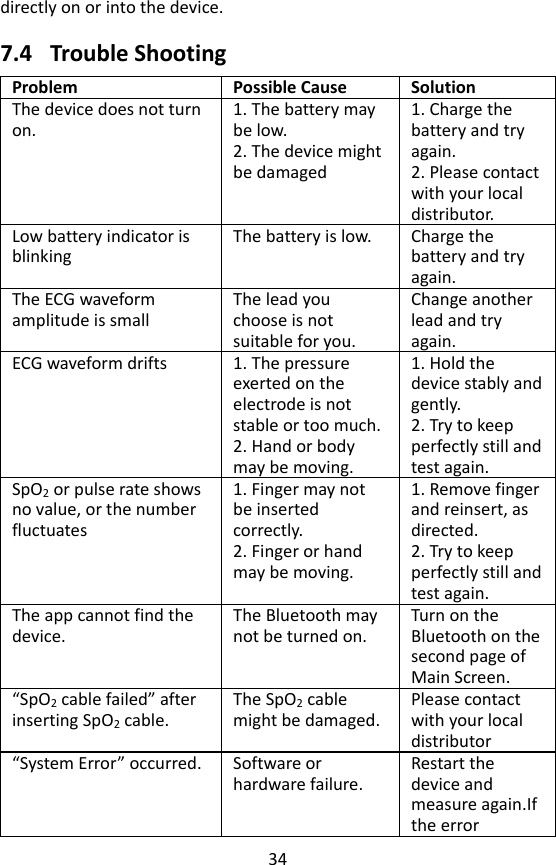
33 connector, such as personal computer and mobile battery bank etc.    On-screen battery symbols indicate the battery status as follow:   The battery is fully charged.   The  solid  portion  represents  the  remained  battery  energy.  If  the solid portion moves from left to right, then it means that the battery is being charged.   Indicates that the battery is almost depleted and need to be charged immediately. Otherwise the device will shut down automatically.    To charge the battery,   1. Connect  the  smaller  end  of  the  USB  charging  cable  to  the  multi-functional connector, as shown below.  2. Connect the other end of the USB charging cable to the USB charging port. 3. Please make sure that the LED is blue, and press the Home button to enter the Main Screen, if needed.   4. When the LED turns to green, it means the battery is fully charged. Then you can unplug the USB cable.   Warnings and Cautionary Advices  The device cannot be used for any measurement during charging.  Use  charging  adapter  provided  by  manufacturer,  or  USB  charging devices which comply with the standard of IEC 60950.      7.3 Care and Cleaning  Warnings and Cautionary Advices  Have  the  device  repaired  by  authorized  service  centers  only, otherwise its warranty is invalid.    Clean the device per week, carefully swabbing the device surface with a soft  cloth  or  cotton  swab  with  rubbing  alcohol.  Do  not  pour  alcohol
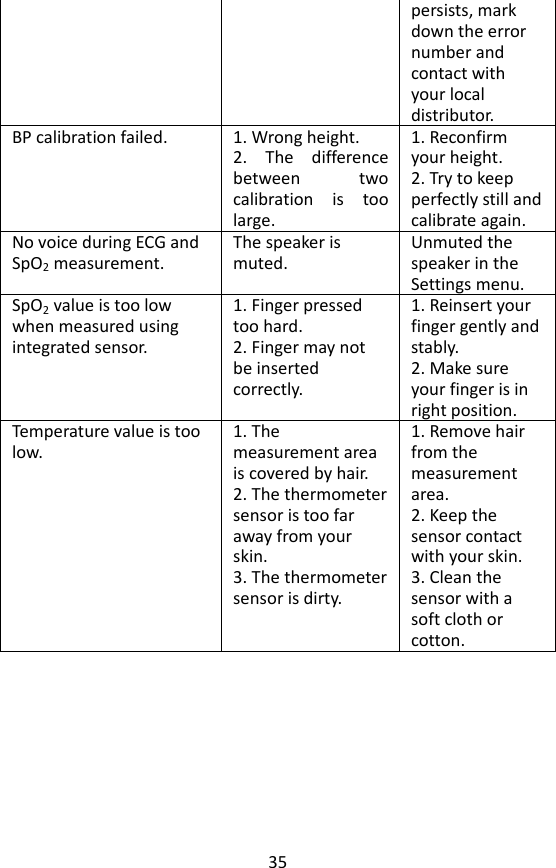
34 directly on or into the device.  7.4 Trouble Shooting Problem Possible Cause Solution The device does not turn on. 1. The battery may be low. 2. The device might be damaged 1. Charge the battery and try again. 2. Please contact with your local distributor. Low battery indicator is blinking The battery is low.   Charge the battery and try again. The ECG waveform amplitude is small The lead you choose is not suitable for you. Change another lead and try again.   ECG waveform drifts 1. The pressure exerted on the electrode is not stable or too much. 2. Hand or body may be moving. 1. Hold the device stably and gently. 2. Try to keep perfectly still and test again. SpO2 or pulse rate shows no value, or the number fluctuates 1. Finger may not be inserted correctly. 2. Finger or hand may be moving. 1. Remove finger and reinsert, as directed.   2. Try to keep perfectly still and test again.   The app cannot find the device. The Bluetooth may not be turned on. Turn on the Bluetooth on the second page of Main Screen. “SpO2 cable failed” after inserting SpO2 cable. The SpO2 cable might be damaged. Please contact with your local distributor “System Error” occurred. Software or hardware failure. Restart the device and measure again.If the error
35 persists, mark down the error number and contact with your local distributor. BP calibration failed. 1. Wrong height.   2.  The  difference between  two calibration  is  too large. 1. Reconfirm your height.   2. Try to keep perfectly still and calibrate again. No voice during ECG and SpO2 measurement. The speaker is muted. Unmuted the speaker in the Settings menu. SpO2 value is too low when measured using integrated sensor. 1. Finger pressed too hard. 2. Finger may not be inserted correctly.   1. Reinsert your finger gently and stably. 2. Make sure your finger is in right position. Temperature value is too low. 1. The measurement area is covered by hair. 2. The thermometer sensor is too far away from your skin. 3. The thermometer sensor is dirty. 1. Remove hair from the measurement area. 2. Keep the sensor contact with your skin. 3. Clean the sensor with a soft cloth or cotton.
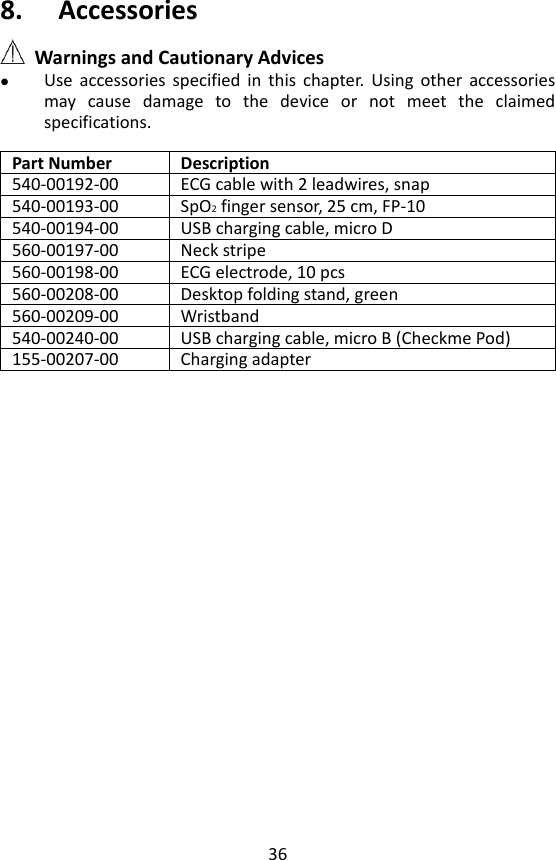
36 8. Accessories  Warnings and Cautionary Advices  Use  accessories  specified  in  this  chapter.  Using  other  accessories may  cause  damage  to  the  device  or  not  meet  the  claimed specifications.    Part Number Description 540-00192-00 ECG cable with 2 leadwires, snap 540-00193-00 SpO2 finger sensor, 25 cm, FP-10 540-00194-00 USB charging cable, micro D 560-00197-00 Neck stripe 560-00198-00 ECG electrode, 10 pcs 560-00208-00 Desktop folding stand, green 560-00209-00 Wristband 540-00240-00 USB charging cable, micro B (Checkme Pod) 155-00207-00 Charging adapter
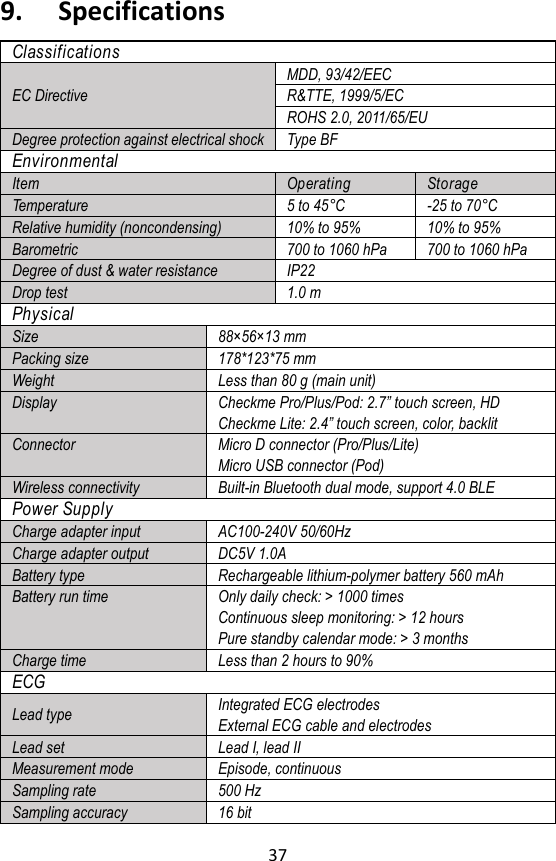
37 9. Specifications Classifications EC Directive MDD, 93/42/EEC R&TTE, 1999/5/EC ROHS 2.0, 2011/65/EU Degree protection against electrical shock Type BF Environmental Item Operating Storage Temperature 5 to 45° C -25 to 70° C Relative humidity (noncondensing) 10% to 95% 10% to 95% Barometric 700 to 1060 hPa 700 to 1060 hPa Degree of dust & water resistance IP22 Drop test 1.0 m Physical Size 88× 56× 13 mm Packing size 178*123*75 mm Weight Less than 80 g (main unit) Display Checkme Pro/Plus/Pod: 2.7” touch screen, HD Checkme Lite: 2.4” touch screen, color, backlit Connector Micro D connector (Pro/Plus/Lite) Micro USB connector (Pod) Wireless connectivity Built-in Bluetooth dual mode, support 4.0 BLE Power Supply Charge adapter input AC100-240V 50/60Hz Charge adapter output DC5V 1.0A Battery type Rechargeable lithium-polymer battery 560 mAh Battery run time Only daily check: > 1000 times Continuous sleep monitoring: > 12 hours Pure standby calendar mode: > 3 months Charge time Less than 2 hours to 90% ECG Lead type Integrated ECG electrodes External ECG cable and electrodes Lead set Lead I, lead II Measurement mode Episode, continuous Sampling rate 500 Hz Sampling accuracy 16 bit
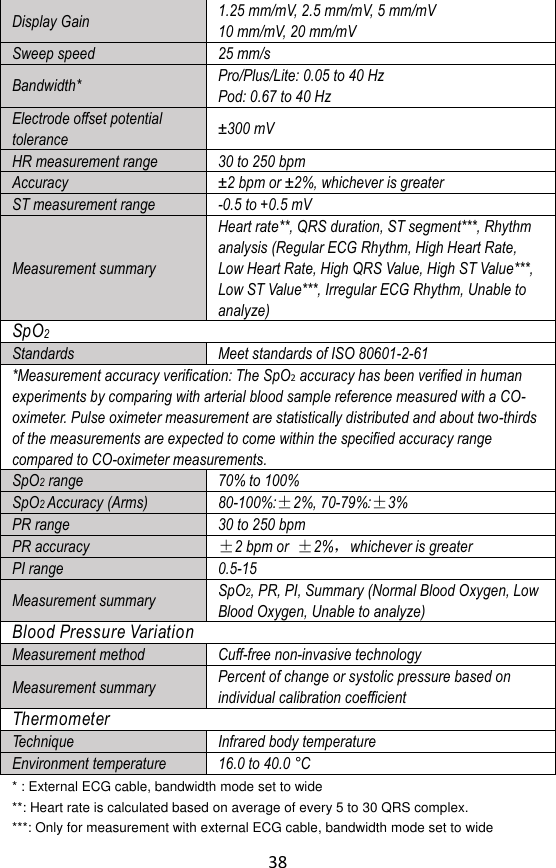
38 Display Gain 1.25 mm/mV, 2.5 mm/mV, 5 mm/mV 10 mm/mV, 20 mm/mV Sweep speed 25 mm/s Bandwidth* Pro/Plus/Lite: 0.05 to 40 Hz   Pod: 0.67 to 40 Hz Electrode offset potential tolerance ± 300 mV HR measurement range 30 to 250 bpm Accuracy ± 2 bpm or ± 2%, whichever is greater ST measurement range -0.5 to +0.5 mV Measurement summary Heart rate**, QRS duration, ST segment***, Rhythm analysis (Regular ECG Rhythm, High Heart Rate, Low Heart Rate, High QRS Value, High ST Value***, Low ST Value***, Irregular ECG Rhythm, Unable to analyze) SpO2 Standards Meet standards of ISO 80601-2-61 *Measurement accuracy verification: The SpO2 accuracy has been verified in human experiments by comparing with arterial blood sample reference measured with a CO-oximeter. Pulse oximeter measurement are statistically distributed and about two-thirds of the measurements are expected to come within the specified accuracy range compared to CO-oximeter measurements.   SpO2 range 70% to 100% SpO2 Accuracy (Arms) 80-100%:±2%, 70-79%:±3% PR range 30 to 250 bpm PR accuracy   ±2 bpm or ±2%,whichever is greater PI range 0.5-15 Measurement summary SpO2, PR, PI, Summary (Normal Blood Oxygen, Low Blood Oxygen, Unable to analyze) Blood Pressure Variation Measurement method Cuff-free non-invasive technology Measurement summary Percent of change or systolic pressure based on individual calibration coefficient Thermometer Technique Infrared body temperature Environment temperature 16.0 to 40.0 °C * : External ECG cable, bandwidth mode set to wide **: Heart rate is calculated based on average of every 5 to 30 QRS complex. ***: Only for measurement with external ECG cable, bandwidth mode set to wide
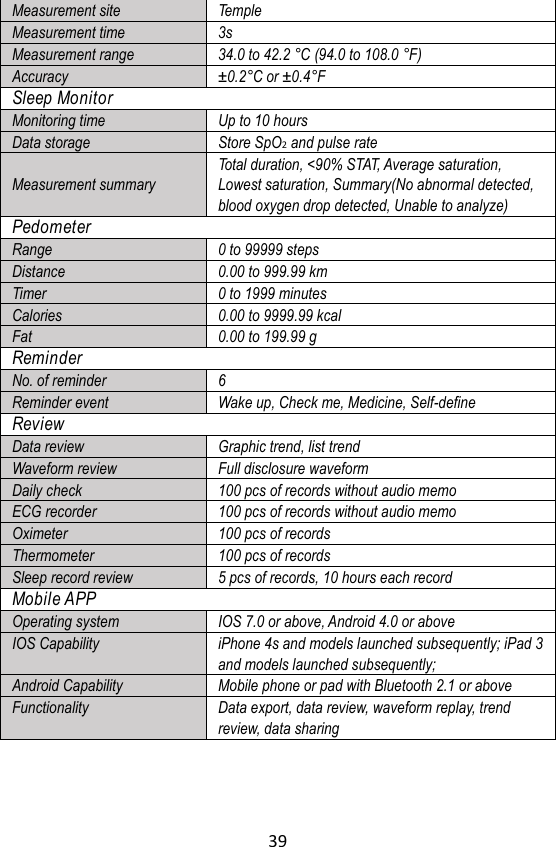
39  Measurement site Temple Measurement time 3s Measurement range 34.0 to 42.2 ° C (94.0 to 108.0 ° F) Accuracy ± 0.2° C or ± 0.4° F Sleep Monitor Monitoring time Up to 10 hours Data storage Store SpO2 and pulse rate   Measurement summary Total duration, <90% STAT, Average saturation, Lowest saturation, Summary(No abnormal detected, blood oxygen drop detected, Unable to analyze) Pedometer Range 0 to 99999 steps Distance 0.00 to 999.99 km Timer 0 to 1999 minutes Calories 0.00 to 9999.99 kcal Fat 0.00 to 199.99 g Reminder No. of reminder 6 Reminder event Wake up, Check me, Medicine, Self-define Review Data review Graphic trend, list trend Waveform review Full disclosure waveform Daily check 100 pcs of records without audio memo ECG recorder 100 pcs of records without audio memo Oximeter 100 pcs of records Thermometer 100 pcs of records Sleep record review 5 pcs of records, 10 hours each record   Mobile APP Operating system IOS 7.0 or above, Android 4.0 or above IOS Capability iPhone 4s and models launched subsequently; iPad 3 and models launched subsequently; Android Capability Mobile phone or pad with Bluetooth 2.1 or above Functionality Data export, data review, waveform replay, trend review, data sharing
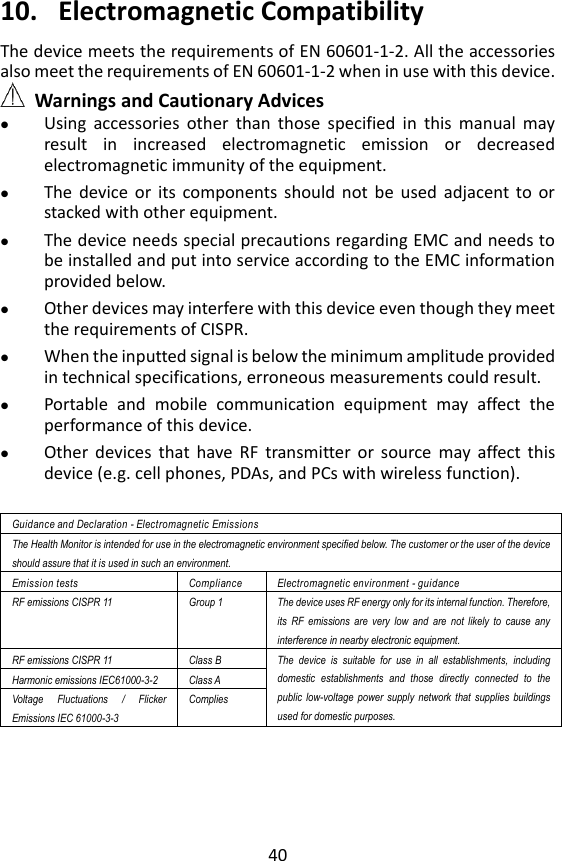
40 10. Electromagnetic Compatibility The device meets the requirements of EN 60601-1-2. All the accessories also meet the requirements of EN 60601-1-2 when in use with this device.  Warnings and Cautionary Advices  Using  accessories  other  than  those  specified  in  this  manual  may result  in  increased  electromagnetic  emission  or  decreased electromagnetic immunity of the equipment.  The  device  or  its  components  should  not  be  used  adjacent  to  or stacked with other equipment.    The device needs special precautions regarding EMC and needs to be installed and put into service according to the EMC information provided below.    Other devices may interfere with this device even though they meet the requirements of CISPR.  When the inputted signal is below the minimum amplitude provided in technical specifications, erroneous measurements could result.  Portable  and  mobile  communication  equipment  may  affect  the performance of this device.    Other  devices  that  have  RF  transmitter  or  source  may  affect  this device (e.g. cell phones, PDAs, and PCs with wireless function).    Guidance and Declaration - Electromagnetic Emissions The Health Monitor is intended for use in the electromagnetic environment specified below. The customer or the user of the device should assure that it is used in such an environment. Emission tests Compliance Electromagnetic environment - guidance RF emissions CISPR 11 Group 1 The device uses RF energy only for its internal function. Therefore, its  RF  emissions  are  very  low  and  are  not  likely  to  cause  any interference in nearby electronic equipment. RF emissions CISPR 11 Class B The  device  is  suitable  for  use  in  all  establishments,  including domestic  establishments  and  those  directly  connected  to  the public low-voltage  power  supply  network that  supplies buildings used for domestic purposes. Harmonic emissions IEC61000-3-2 Class A Voltage  Fluctuations  /  Flicker Emissions IEC 61000-3-3 Complies
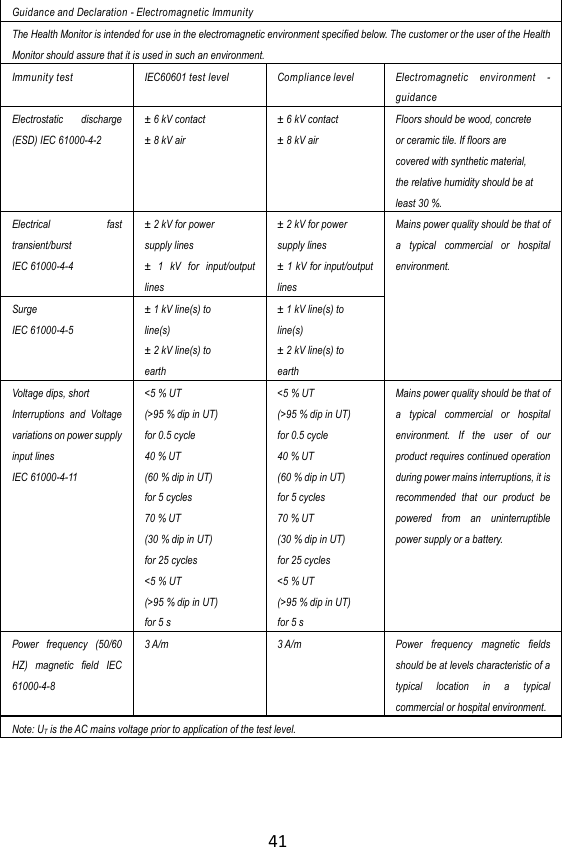
41  Guidance and Declaration - Electromagnetic Immunity The Health Monitor is intended for use in the electromagnetic environment specified below. The customer or the user of the Health Monitor should assure that it is used in such an environment. Immunity test IEC60601 test level   Compliance level Electromagnetic  environment  - guidance Electrostatic  discharge (ESD) IEC 61000-4-2 ±  6 kV contact ±  8 kV air ±  6 kV contact ±  8 kV air Floors should be wood, concrete or ceramic tile. If floors are covered with synthetic material, the relative humidity should be at least 30 %. Electrical  fast transient/burst   IEC 61000-4-4 ±  2 kV for power supply lines ±   1  kV  for  input/output lines ±  2 kV for power supply lines ±  1 kV for input/output lines Mains power quality should be that of a  typical  commercial  or  hospital environment.  Surge IEC 61000-4-5 ±  1 kV line(s) to line(s) ±  2 kV line(s) to earth ±  1 kV line(s) to line(s) ±  2 kV line(s) to earth Voltage dips, short Interruptions  and  Voltage variations on power supply input lines   IEC 61000-4-11 <5 % UT (>95 % dip in UT) for 0.5 cycle 40 % UT (60 % dip in UT) for 5 cycles 70 % UT (30 % dip in UT) for 25 cycles <5 % UT (>95 % dip in UT) for 5 s <5 % UT (>95 % dip in UT) for 0.5 cycle 40 % UT (60 % dip in UT) for 5 cycles 70 % UT (30 % dip in UT) for 25 cycles <5 % UT (>95 % dip in UT) for 5 s Mains power quality should be that of a  typical  commercial  or  hospital environment.  If  the  user  of  our product requires continued operation during power mains interruptions, it is recommended  that  our  product  be powered  from  an  uninterruptible power supply or a battery. Power  frequency  (50/60 HZ)  magnetic  field  IEC 61000-4-8 3 A/m 3 A/m Power  frequency  magnetic  fields should be at levels characteristic of a typical  location  in  a  typical commercial or hospital environment. Note: UT is the AC mains voltage prior to application of the test level.
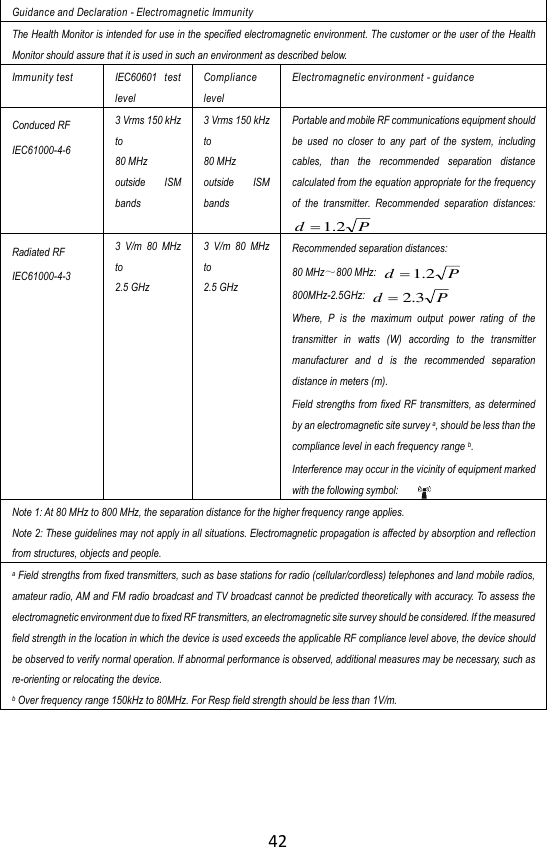
42  Guidance and Declaration - Electromagnetic Immunity The Health Monitor is intended for use in the specified electromagnetic environment. The customer or the user of the Health Monitor should assure that it is used in such an environment as described below. Immunity test IEC60601  test level Compliance level Electromagnetic environment - guidance Conduced RF IEC61000-4-6 3 Vrms 150 kHz to 80 MHz outside  ISM bands 3 Vrms 150 kHz to 80 MHz outside  ISM bands Portable and mobile RF communications equipment should be  used  no  closer  to  any  part  of  the  system,  including cables,  than  the  recommended  separation  distance calculated from the equation appropriate for the frequency of  the  transmitter.  Recommended  separation  distances:Pd 2.1 Radiated RF IEC61000-4-3 3  V/m  80  MHz to 2.5 GHz 3  V/m  80  MHz to 2.5 GHz Recommended separation distances: 80 MHz~800 MHz: Pd 2.1 800MHz-2.5GHz: Pd 3.2 Where,  P  is  the  maximum  output  power  rating  of  the transmitter  in  watts  (W)  according  to  the  transmitter manufacturer  and  d  is  the  recommended  separation distance in meters (m). Field strengths from fixed RF transmitters, as determined by an electromagnetic site survey a, should be less than the compliance level in each frequency range b. Interference may occur in the vicinity of equipment marked with the following symbol:   Note 1: At 80 MHz to 800 MHz, the separation distance for the higher frequency range applies. Note 2: These guidelines may not apply in all situations. Electromagnetic propagation is affected by absorption and reflection from structures, objects and people. a Field strengths from fixed transmitters, such as base stations for radio (cellular/cordless) telephones and land mobile radios, amateur radio, AM and FM radio broadcast and TV broadcast cannot be predicted theoretically with accuracy. To assess the electromagnetic environment due to fixed RF transmitters, an electromagnetic site survey should be considered. If the measured field strength in the location in which the device is used exceeds the applicable RF compliance level above, the device should be observed to verify normal operation. If abnormal performance is observed, additional measures may be necessary, such as re-orienting or relocating the device. b Over frequency range 150kHz to 80MHz. For Resp field strength should be less than 1V/m.
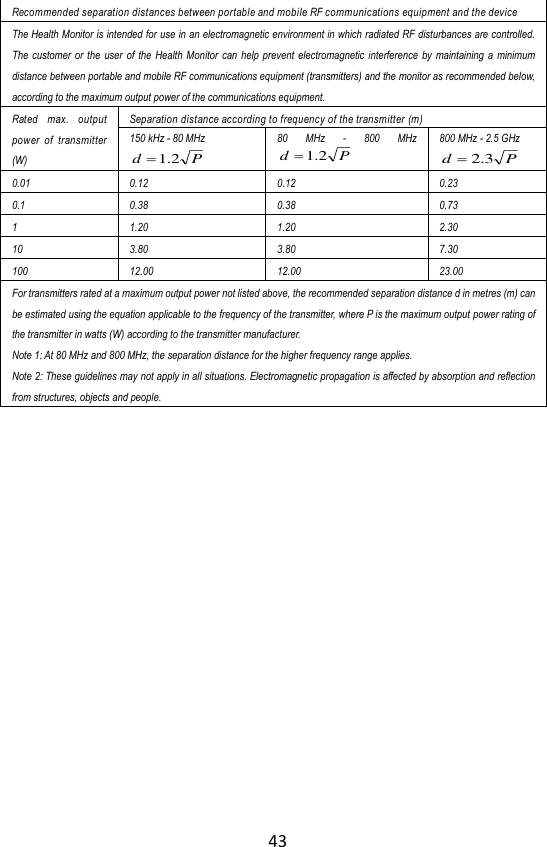
43  Recommended separation distances between portable and mobile RF communications equipment and the device The Health Monitor is intended for use in an electromagnetic environment in which radiated RF disturbances are controlled. The  customer  or  the  user of  the  Health  Monitor can  help  prevent  electromagnetic  interference  by  maintaining a  minimum distance between portable and mobile RF communications equipment (transmitters) and the monitor as recommended below, according to the maximum output power of the communications equipment. Rated  max.  output power  of  transmitter (W) Separation distance according to frequency of the transmitter (m) 150 kHz - 80 MHz Pd 2.1 80  MHz  -  800  MHzPd 2.1 800 MHz - 2.5 GHz Pd 3.2 0.01 0.12 0.12 0.23 0.1 0.38 0.38 0.73 1 1.20 1.20 2.30 10 3.80 3.80 7.30 100 12.00 12.00 23.00 For transmitters rated at a maximum output power not listed above, the recommended separation distance d in metres (m) can be estimated using the equation applicable to the frequency of the transmitter, where P is the maximum output power rating of the transmitter in watts (W) according to the transmitter manufacturer. Note 1: At 80 MHz and 800 MHz, the separation distance for the higher frequency range applies. Note 2: These guidelines may not apply in all situations. Electromagnetic propagation is affected by absorption and reflection from structures, objects and people.
        Shenzhen Viatom Technology Co., Ltd (Hereinafter called Viatom) owns the intellectual property rights to this Viatom product and this manual. This manual may refer to information protected by copyrights or patents and does not convey any license under the patent rights of Viatom, nor the  rights  of  others.  Viatom  intends  to  maintain  the  contents  of  this manual as confidential information. Disclosure of the information in this manual  in  any  manner  whatsoever  without  the  written  permission  of Viatom is strictly forbidden.    Contents of this manual are subject to changes without prior notice. All information  contained  in  this  manual  is  believed to  be  correct.  Viatom shall  not  be  liable  for  errors  contained  herein  nor  for  incidental  or consequential damages in connection with the furnishing, performance, or use of this manual.     © Copyright 2014 Shenzhen Viatom Technology Co., Ltd. All right reserved.     PN:255-00157-00    Version: A    July, 2014    Shenzhen Viatom Technology Co., Ltd. C607, Languang Technology Park, No.7 Xinxi Road, Hi-Tech Park North, Nanshan, Shenzhen, 518057, P.R. China      MedNet GmbH Borkstrasse 10 · 48163 Muenster · Germany TEL: +49 251 32266-0 FAX: +49 251 32266-22   CheckmeTM Health Monitor Knowing and Tracking Your Health

Navigation menu