Vita Course Technologies DISCOVERY Non-invasive Hemodynamic Blood Pressure Monitor User Manual

Vita-Course Technologies Co., Ltd. Non-invasive Hemodynamic Blood Pressure Monitor

User Manual

            Non-invasive Hemodynamic Blood Pressure Monitor Discovery 1 User Manual                     Vita-Course Technologies Co., Ltd.
User Notes: Thank you for using the Non-invasive Hemodynamic Blood Pressure Monitor. Please read the instruction manual carefully before using the product. Vita-Course shall not take corresponding responsibility for any abnormality or any personal or machine  damage  caused  by  the  irregular  use,  maintenance  and  reposition  without  the guidance of the instruction, and shall not provide free maintenance for such failures.    This manual is only applicable to Discovery 1 type Non-invasive Hemodynamic Blood Pressure Monitor (hereinafter referred to as "equipment")  Contraindications: unclear
Copyright and Disclaimer The  copyright  of  the  instruction  belongs  to  Vita-Course  Technologies  Co.,  Ltd.  (hereafter referred to as “Vita-Course Technologies”). All rights reserved. No unit or individual could copy or disseminate any part or all of the instruction without prior written permission in any form or by any means. Otherwise, the legal liability will be held accountable. Vita-Course Technologies has the final interpretation of the instruction and reserves the right to upgrade and alter specifications as well as contents of the products. If there are upgrade and change, we won’t track users’ upgrade. Vita-Course Technologies tries its best to make contents of the instruction be complete  and accurate, but cannot guarantee that the instruction is free from any errors or omissions. Vita-Course Technologies shall not bear any responsibility for any consequences arising from the irregular execution of the contents of this instruction. All the copyrights, trademarks, patent applications and patent rights that may arise from the instruction  or  relate to  the  products  of  Vita-Course  Technologies  are owned  by  Vita-Course Technologies. Without the written permission agreement, this instruction does not grant any license  of  any  of  the  above  rights  and  the  instruction  itself  cannot  be  used  as  a  license agreement to authorize any of the above rights. If other units or individuals, without the written permission, use or disseminate the contents of the instruction without authorization, which accordingly affects the interests of themselves or the third parties, Vita-Course Technologies shall not shoulder any responsibility        File Updating This instruction was finally revised by Vita-Course Technologies on February 22, 2017.
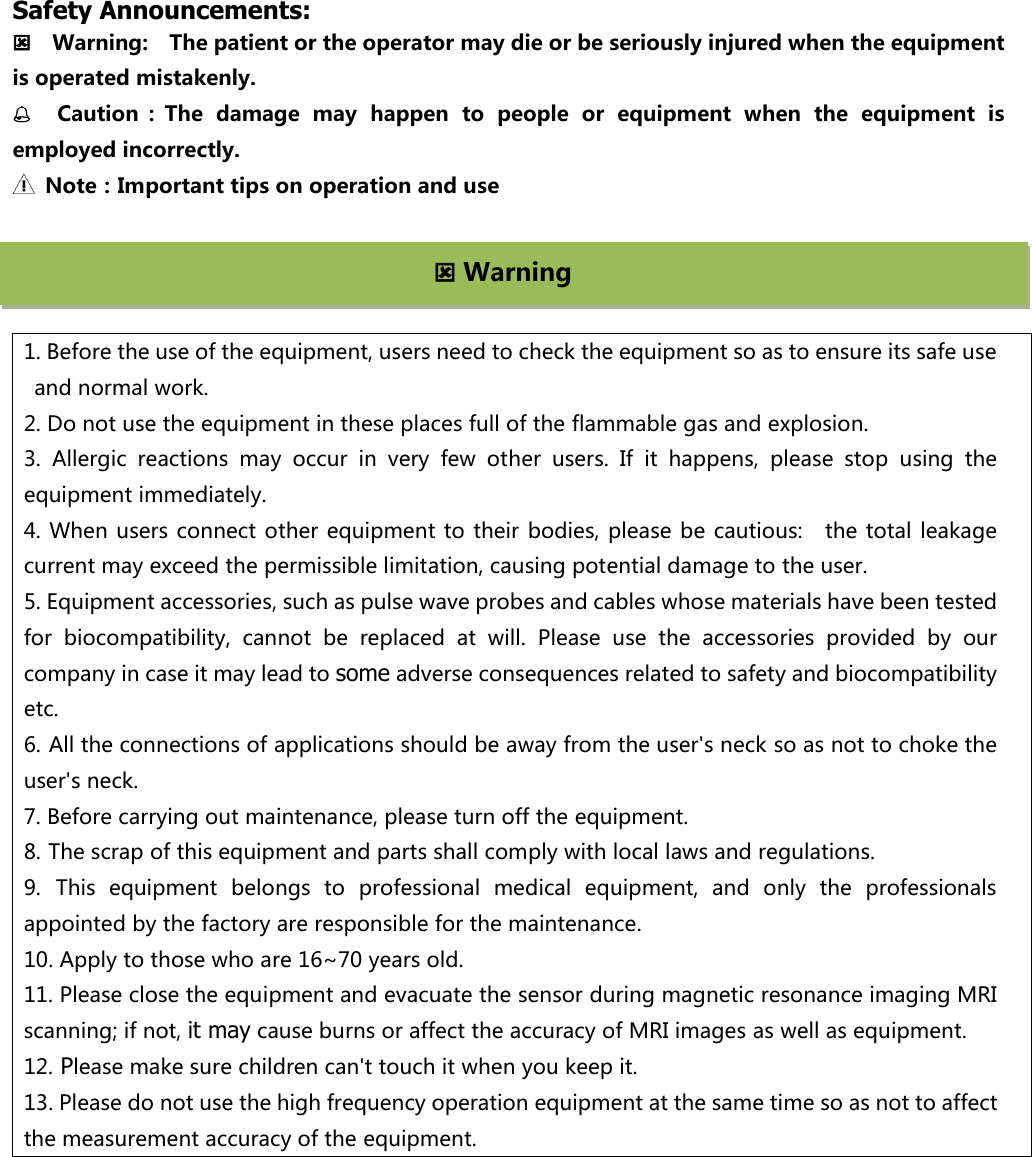
      Safety Announcements:     Warning:    The patient or the operator may die or be seriously injured when the equipment is operated mistakenly.   Caution :The  damage  may  happen  to  people  or  equipment  when  the  equipment  is employed incorrectly.     Note:Important tips on operation and use       1. Before the use of the equipment, users need to check the equipment so as to ensure its safe use and normal work.   2. Do not use the equipment in these places full of the flammable gas and explosion.   3.  Allergic  reactions  may  occur  in  very  few  other  users.  If  it  happens,  please  stop  using  the equipment immediately. 4. When users connect other equipment to their bodies, please be cautious:   the total  leakage current may exceed the permissible limitation, causing potential damage to the user. 5. Equipment accessories, such as pulse wave probes and cables whose materials have been tested for  biocompatibility,  cannot  be  replaced  at  will.  Please  use  the  accessories  provided  by  our company in case it may lead to some adverse consequences related to safety and biocompatibility etc. 6. All the connections of applications should be away from the user's neck so as not to choke the user's neck. 7. Before carrying out maintenance, please turn off the equipment. 8. The scrap of this equipment and parts shall comply with local laws and regulations. 9. This  equipment  belongs  to  professional  medical  equipment,  and  only  the  professionals appointed by the factory are responsible for the maintenance.   10. Apply to those who are 16~70 years old. 11. Please close the equipment and evacuate the sensor during magnetic resonance imaging MRI scanning; if not, it may cause burns or affect the accuracy of MRI images as well as equipment.   12. Please make sure children can't touch it when you keep it. 13. Please do not use the high frequency operation equipment at the same time so as not to affect the measurement accuracy of the equipment.  Warning
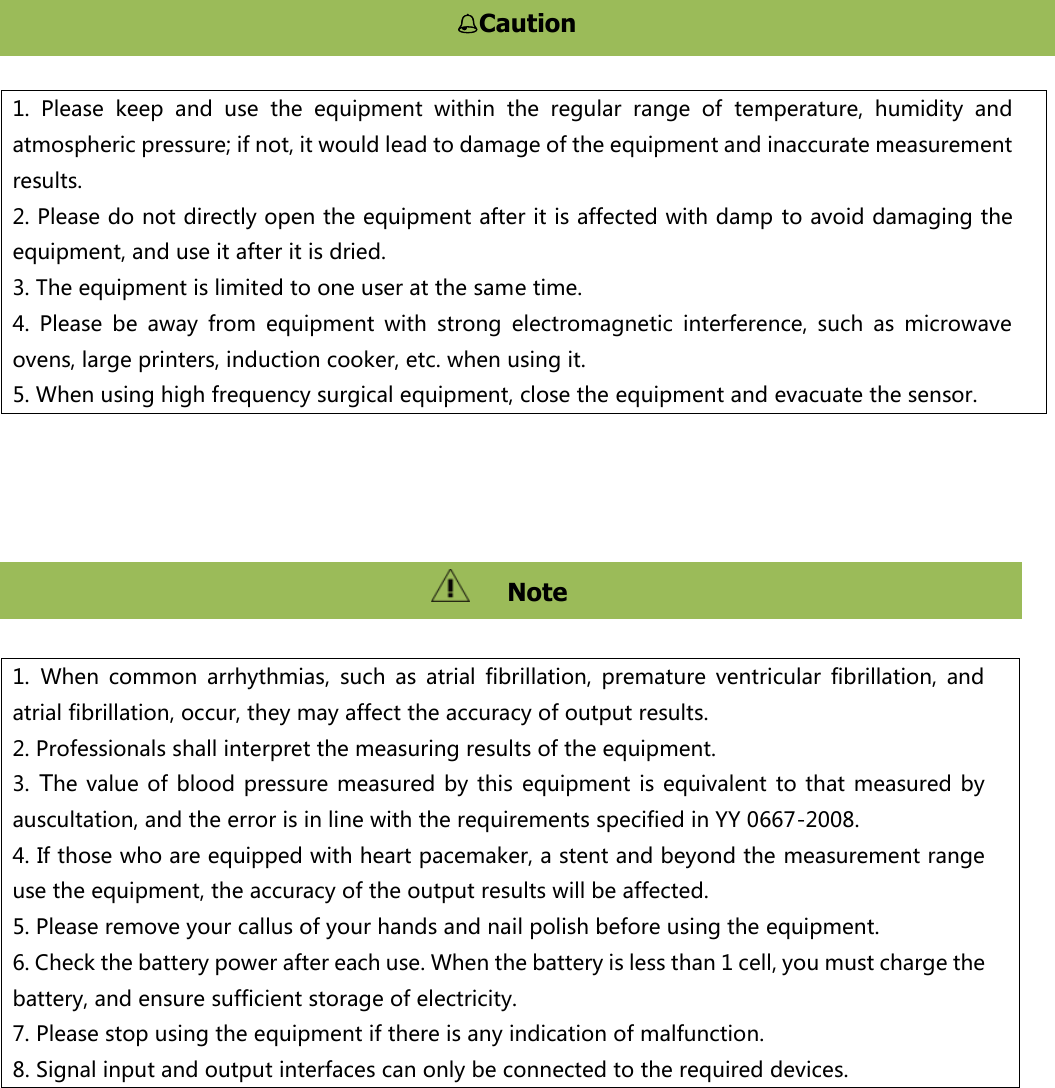
           1.  Please  keep  and  use  the  equipment  within  the  regular  range  of  temperature,  humidity  and atmospheric pressure; if not, it would lead to damage of the equipment and inaccurate measurement results. 2. Please do not directly open the equipment after it is affected with damp to avoid damaging the equipment, and use it after it is dried. 3. The equipment is limited to one user at the same time.   4.  Please  be  away  from  equipment  with  strong  electromagnetic  interference,  such  as  microwave ovens, large printers, induction cooker, etc. when using it. 5. When using high frequency surgical equipment, close the equipment and evacuate the sensor. 1. When  common  arrhythmias,  such  as  atrial  fibrillation,  premature  ventricular  fibrillation,  and atrial fibrillation, occur, they may affect the accuracy of output results. 2. Professionals shall interpret the measuring results of the equipment.   3. The value  of blood pressure measured  by  this  equipment is equivalent to  that  measured by auscultation, and the error is in line with the requirements specified in YY 0667-2008. 4. If those who are equipped with heart pacemaker, a stent and beyond the measurement range use the equipment, the accuracy of the output results will be affected. 5. Please remove your callus of your hands and nail polish before using the equipment.   6. Check the battery power after each use. When the battery is less than 1 cell, you must charge the battery, and ensure sufficient storage of electricity. 7. Please stop using the equipment if there is any indication of malfunction. 8. Signal input and output interfaces can only be connected to the required devices. Caution 注意   Note
Table of Content  Chapter 1      Summary ......................................................................................................................................... 1 1.1 Characteristics of products .................................................................................................................................................... 1 1.2 Intended Use/Instruction for use .......................................................................................................................................... 1 1.3 The scope of products ........................................................................................................................................................... 1 1.4 Structure ............................................................................................................................................................................... 1 1.5 Product classification ............................................................................................................................................................ 1 1.6 Operating environment ......................................................................................................................................................... 2 1.7 Safety .................................................................................................................................................................................... 2 Chapter 2 Wearing and Connecting ...................................................................................................................... 3 2.1 Out of box audit .................................................................................................................................................................... 3 2.2 Appearance presentation ...................................................................................................................................................... 3 2.3 Marks .................................................................................................................................................................................... 4 2.4 Wearing ................................................................................................................................................................................. 4 Chapter 3 Interface Introduction and Operation .................................................................................................. 7 3.1 Boot ....................................................................................................................................................................................... 7 3.2 Connecting APP ..................................................................................................................................................................... 7 3.3 Calibration ............................................................................................................................................................................. 8 3.4 Measurement ........................................................................................................................................................................ 9 3.5 Measuring result ................................................................................................................................................................... 9 3.6 Prompt in measurement ..................................................................................................................................................... 10 3.7 Battery level ........................................................................................................................................................................ 11 Chapter 4 Structural Features and Working Principle .......................................................................................... 13 4.1. Overall structure framework chart ..................................................................................................................................... 13 4.2 Principle of blood pressure measurement .......................................................................................................................... 13 Chapter 5 Technical Characteristics ..................................................................................................................... 14 5.1 Blood pressure .................................................................................................................................................................... 14 5.2 Pulse wave ........................................................................................................................................................................... 14 5.3 Size and weight ................................................................................................................................................................... 14 Chapter 6 Maintenance, Preservation, Storage and Transportation .................................................................... 15 6.1. Cleaning of equipment ....................................................................................................................................................... 15 6.2 Cleaning of accessories ....................................................................................................................................................... 15 6.3. Maintenance test ............................................................................................................................................................... 16 Chapter 7 Storage and Transportation of Equipment .......................................................................................... 17 7.1 Storage ................................................................................................................................................................................ 17 7.2 Transportation..................................................................................................................................................................... 17 Chapter 8 Troubleshooting .................................................................................................................................. 18 8.1 Check the equipment and accessories ................................................................................................................................ 18 8.2 Check cable and charging line ............................................................................................................................................. 18 8.3 Troubleshooting .................................................................................................................................................................. 18 8.4 Disposal of equipment ........................................................................................................................................................ 19 Chapter 9 Appendix ............................................................................................................................................. 20 The warranty ordinance of the product ............................................................................................................... 25
Chapter 1   Summary   1.1 Characteristics of products    Noninvasive and cuff-less equipment  The  self-contained  screen  to  monitor  blood  pressure  measurement  data;  real-time  clock  to display the time.  Rapid measurement of blood pressure and pulse rate.  Automatic measurement.  Dynamic continuous measurement can keep 24 hours.    Real-time power display, low battery alert and auto sleep for power save.    Wireless connection via display terminal, such as Bluetooth and intelligent mobile phone, etc. 1.2 Intended Use/Instruction for use The Discovery 1  - Non-invasive  blood pressure  trending device  is a small,  lightweight, handheld, device intended for measuring and display of Blood Pressure trending (systolic and diastolic) and spot-check  of  Peripheral  pulse  rate  (PPR)  and  Peripheral  pulse  wave  (PPW).  Measurement  is performing on capillary fingertip tissue (other than the thumb). The ring finger is the recommended site. The results of each measurement are stored in the system memory. It is intended to be used by any person aged above 18 years old. 1.3 The scope of products Apply to medical institutions or families to monitor the blood pressure and pulse rate of the human body. 1.4 Structure The cuff-less equipment consists of a host, mobile APP software and accessories. Accessories  include :Pulse  wave  probe  and  cable,  arm  band  (optional),  power  adapter,  data transmission line / charging line. 1.5 Product classification According to the classification of medical device management categories: Class II
According to the type of protection against electric shock: class II internal power supply equipment According to the degree of protection against electric shock: BF-type equipment According to the degree of protection against harmful liquid into: ordinary equipment (the closed equipment that cannot stop the liquid into) According  to  the  safety  degree  related  to  a  mixture  of  flammable  anesthetizing  gas  and  air  or oxygen or Nitrous Oxide: not applicable in the place existing flammable anesthetizing gas. According to the work system: continuous operation of equipment 1.6 Operating environment 1.Operating temperature:5 ℃~45 ℃; Relative humidity:10%~95%( non-condensing); Atmospheric pressure:70.0 kPa~106.0 kPa; 2.Working mode: internal power supply: DC 3.7, V/2200, mAh; Charging mode: power adapter input voltage: 220 V, 50Hz. 1.7 Safety 1. Comply with IEC 60601-1:2012 “Medical electrical equipment; Part 1: General requirements for safety” 2. Comply with IEC 60601-1-2:2014 “Medical electrical equipment – Part 1-2: General requirements for  basic  safety  and  essential  performance  –  Collateral  Standard:  Electromagnetic  disturbances  – Requirements and tests” 3.  Comply  with  ISO  80601-2-61 “Particular  requirements  for  basic  safety  and  essential performance of pulse oximeter equipment”
 Chapter 2 Wearing and Connecting 2.1 Out of box audit  1、Open the packing box and take out the equipment and accessories. 2、Open the random file and check accessories according to the packing list: 1) Check whether the equipment has any mechanical damage. 2) Check whether all accessories including plug, wires and sensor have scoring or shortness.   3) Before using the equipment, check whether the equipment and accessories are in danger or have abnormality; if it has abnormality (such as patients’ cable rupture, shell cracking, etc.), do not carry out measurement.) If  you  have  any  questions,  please  contact  the  seller  or  contact  us.  We  will  provide  you  with satisfactory service in time. 2.2 Appearance presentation  Figure 2.1 product drawing Content     Description   Non-invasive Hemodynamic Blood Pressure Monitor Non-invasive Hemodynamic Blood Pressure Monitor Pulse wave probe Pulse wave probe interface Screen On/off    key Charging interface USB connection port
 On/off key Press the power on / off button for 1 second to turn on the equipment Press the power on / off button for 4 seconds to turn off the battery Screen  Display interface content USB connection port Connect    line  USB  to  charge        upgrade  the  program  and  export data Pulse  wave  probe interface Connect pulse wave probe   2.3 Marks Content   Description    Be careful!Consult the random file  USB connection port   PPG Pulse wave probe  BF applied part      On /off button   Non-Ionizing Radiation  2.4 Wearing Please wear arm belt as shown in Figure 2.2   Figure 2.2 wearing arm belt
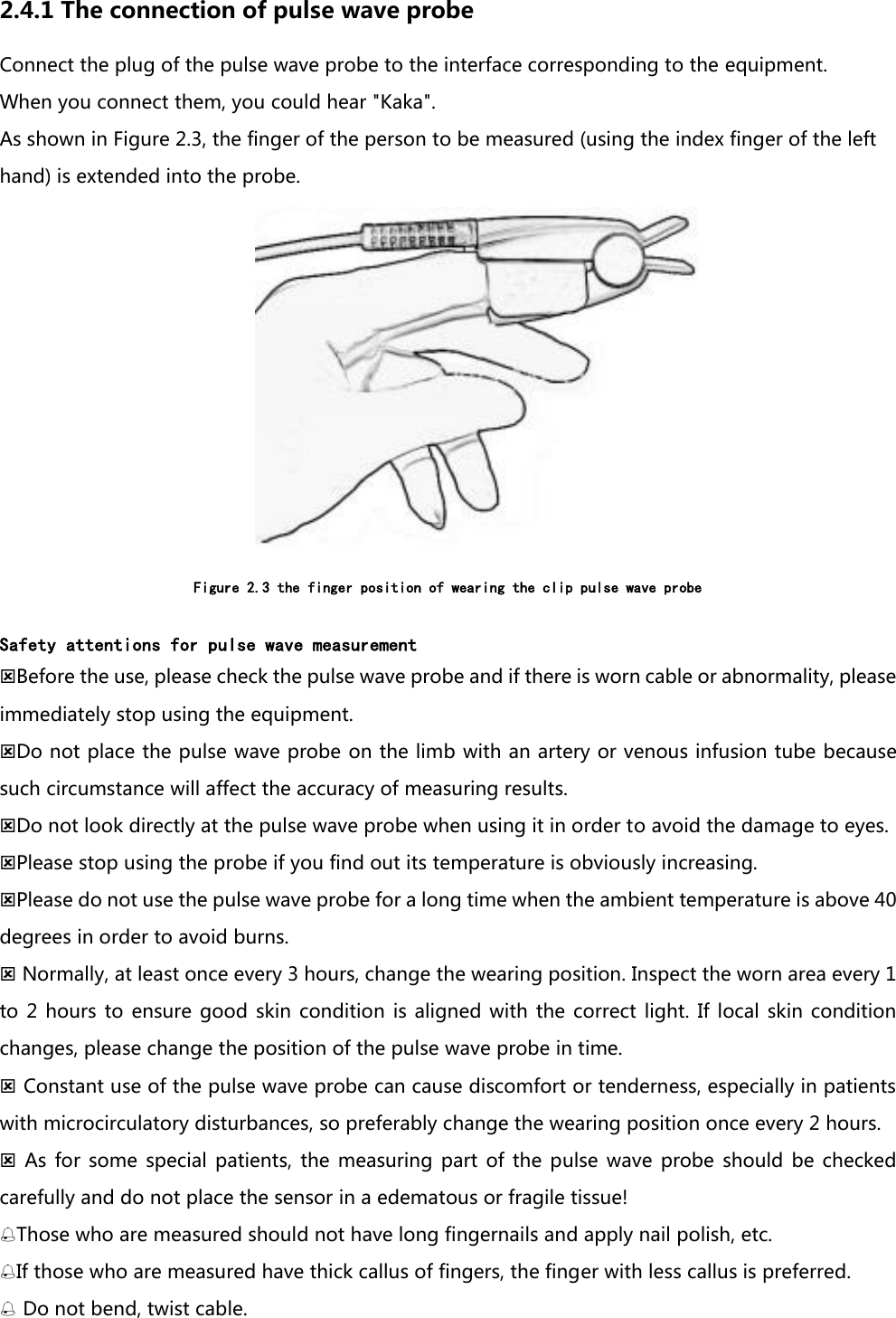
2.4.1 The connection of pulse wave probe Connect the plug of the pulse wave probe to the interface corresponding to the equipment. When you connect them, you could hear "Kaka". As shown in Figure 2.3, the finger of the person to be measured (using the index finger of the left hand) is extended into the probe.  Figure 2.3 the finger position of wearing the clip pulse wave probe  Safety attentions for pulse wave measurement Before the use, please check the pulse wave probe and if there is worn cable or abnormality, please immediately stop using the equipment. Do not place the pulse wave probe on the limb with an artery or venous infusion tube because such circumstance will affect the accuracy of measuring results.   Do not look directly at the pulse wave probe when using it in order to avoid the damage to eyes. Please stop using the probe if you find out its temperature is obviously increasing. Please do not use the pulse wave probe for a long time when the ambient temperature is above 40 degrees in order to avoid burns.  Normally, at least once every 3 hours, change the wearing position. Inspect the worn area every 1 to  2  hours to  ensure  good  skin condition  is aligned  with the  correct  light.  If local  skin condition changes, please change the position of the pulse wave probe in time.  Constant use of the pulse wave probe can cause discomfort or tenderness, especially in patients with microcirculatory disturbances, so preferably change the wearing position once every 2 hours.   As for  some  special patients,  the  measuring  part  of the  pulse  wave  probe should  be  checked carefully and do not place the sensor in a edematous or fragile tissue! Those who are measured should not have long fingernails and apply nail polish, etc. If those who are measured have thick callus of fingers, the finger with less callus is preferred.  Do not bend, twist cable.
 The blood pressure cuff and pulse wave sensor that need to be pressurized cannot be used on the same limb because measuring the blood pressure on the same limb will affect the monitor of pulse wav. Do not use the broken pulse wave probe. Do not completely put the probe into the water, solution or cleaning agent because the probe is lack of waterproof function.   Please hold the forepart of the plug to pull the plug. The pulse wave probe can be used repeatedly. Before that, the probe needs cleaning. The specific methods are described in a chapter related to maintenance. In  order to  ensure  the safety  and effectiveness,  it’s  necessary to  use  the pulse  wave probe provided by our company and stop the interface of the pulse wave probe from being connected to other things.
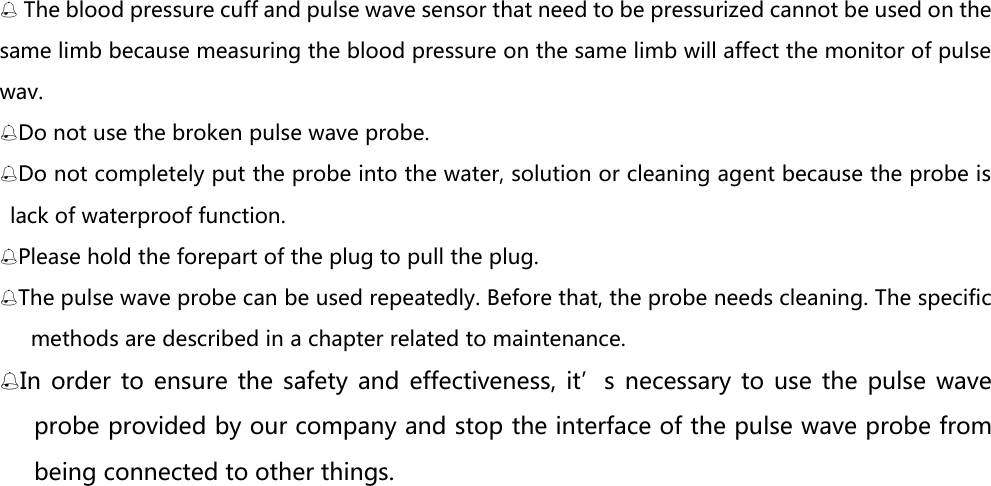
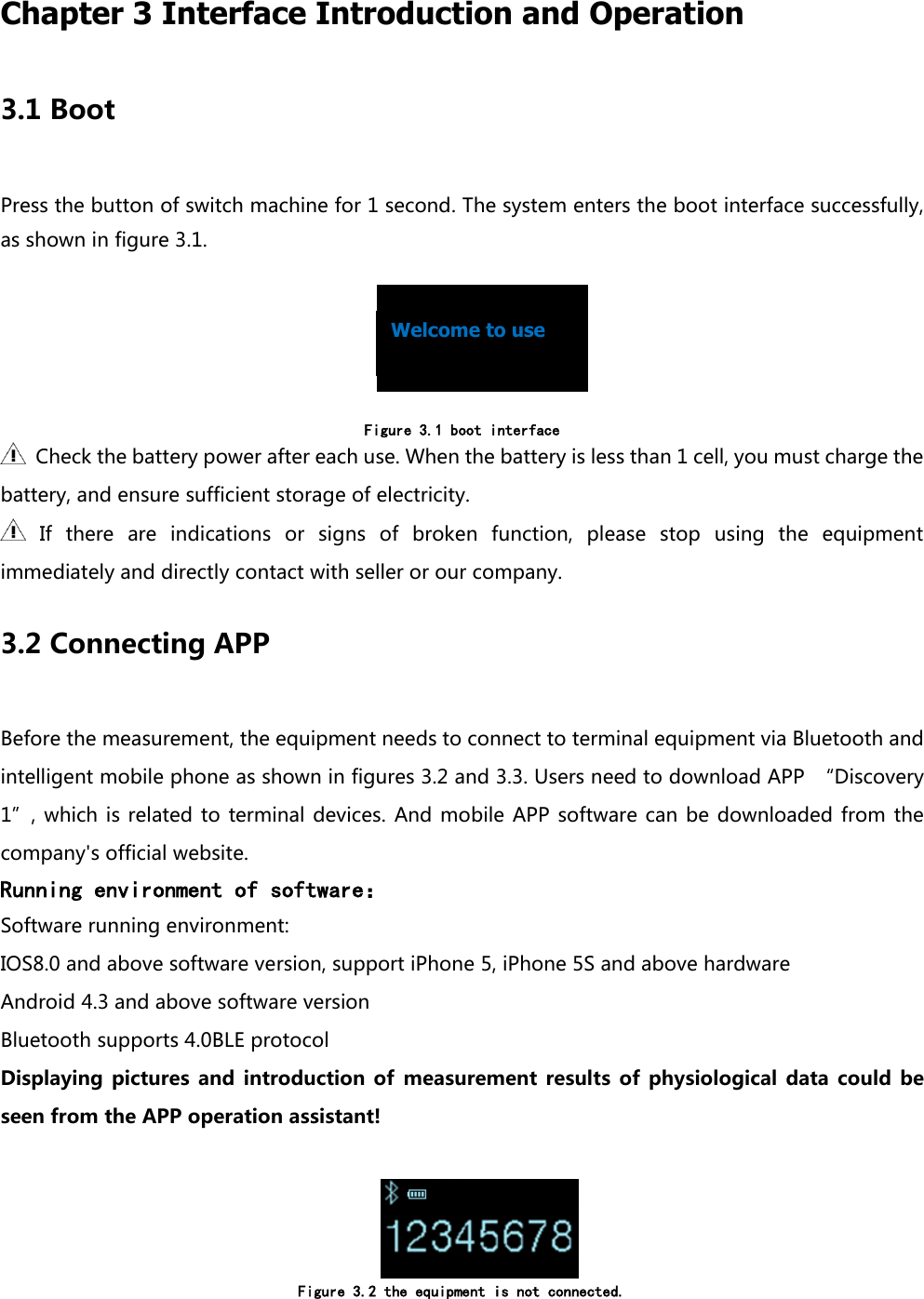
 Chapter 3 Interface Introduction and Operation 3.1 Boot Press the button of switch machine for 1 second. The system enters the boot interface successfully, as shown in figure 3.1.                                                                            Figure 3.1 boot interface   Check the battery power after each use. When the battery is less than 1 cell, you must charge the battery, and ensure sufficient storage of electricity.   If  there  are  indications  or  signs  of  broken  function,  please  stop  using  the  equipment immediately and directly contact with seller or our company.   3.2 Connecting APP Before the measurement, the equipment needs to connect to terminal equipment via Bluetooth and intelligent mobile phone as shown in figures 3.2 and 3.3. Users need to download APP  “Discovery 1”, which  is  related to terminal devices.  And mobile  APP  software can be  downloaded  from the company's official website. Running environment of software: Software running environment: IOS8.0 and above software version, support iPhone 5, iPhone 5S and above hardware Android 4.3 and above software version Bluetooth supports 4.0BLE protocol Displaying  pictures  and  introduction  of  measurement  results  of  physiological  data  could  be seen from the APP operation assistant!      Figure 3.2 the equipment is not connected.  Welcome to use
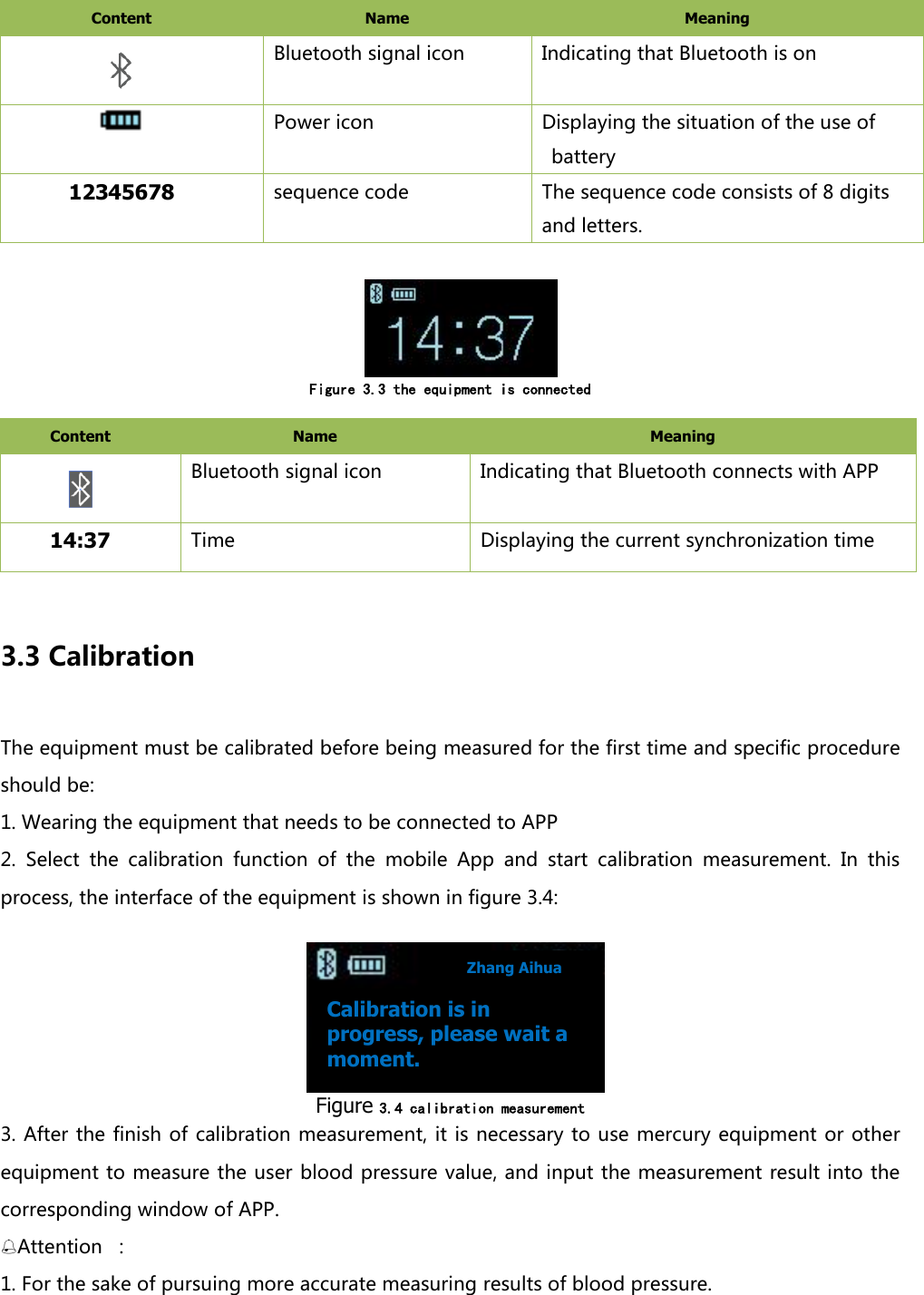
Content   Name   Meaning    Bluetooth signal icon Indicating that Bluetooth is on  Power icon Displaying the situation of the use of battery 12345678 sequence code The sequence code consists of 8 digits and letters.      Figure 3.3 the equipment is connected  Content   Name   Meaning    Bluetooth signal icon Indicating that Bluetooth connects with APP 14:37 Time Displaying the current synchronization time  3.3 Calibration The equipment must be calibrated before being measured for the first time and specific procedure should be:   1. Wearing the equipment that needs to be connected to APP 2.  Select  the  calibration  function  of  the  mobile  App  and  start  calibration  measurement.  In  this process, the interface of the equipment is shown in figure 3.4:     Figure 3.4 calibration measurement  3. After the finish of calibration measurement, it is necessary to use mercury  equipment or other equipment to measure the user blood pressure value, and input the measurement result into the corresponding window of APP.   Attention  : 1. For the sake of pursuing more accurate measuring results of blood pressure.   Calibration is in progress, please wait a moment. Zhang Aihua
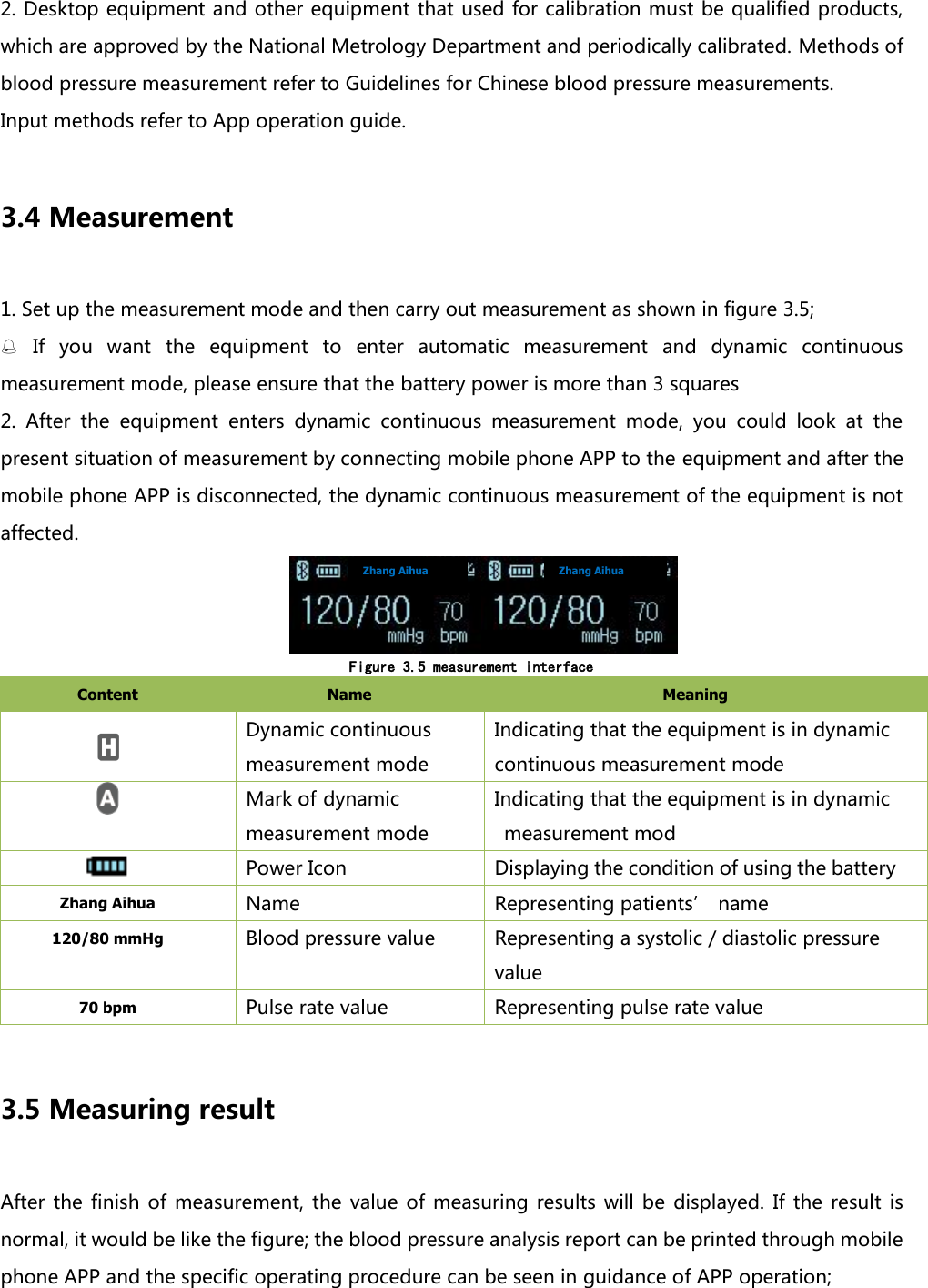
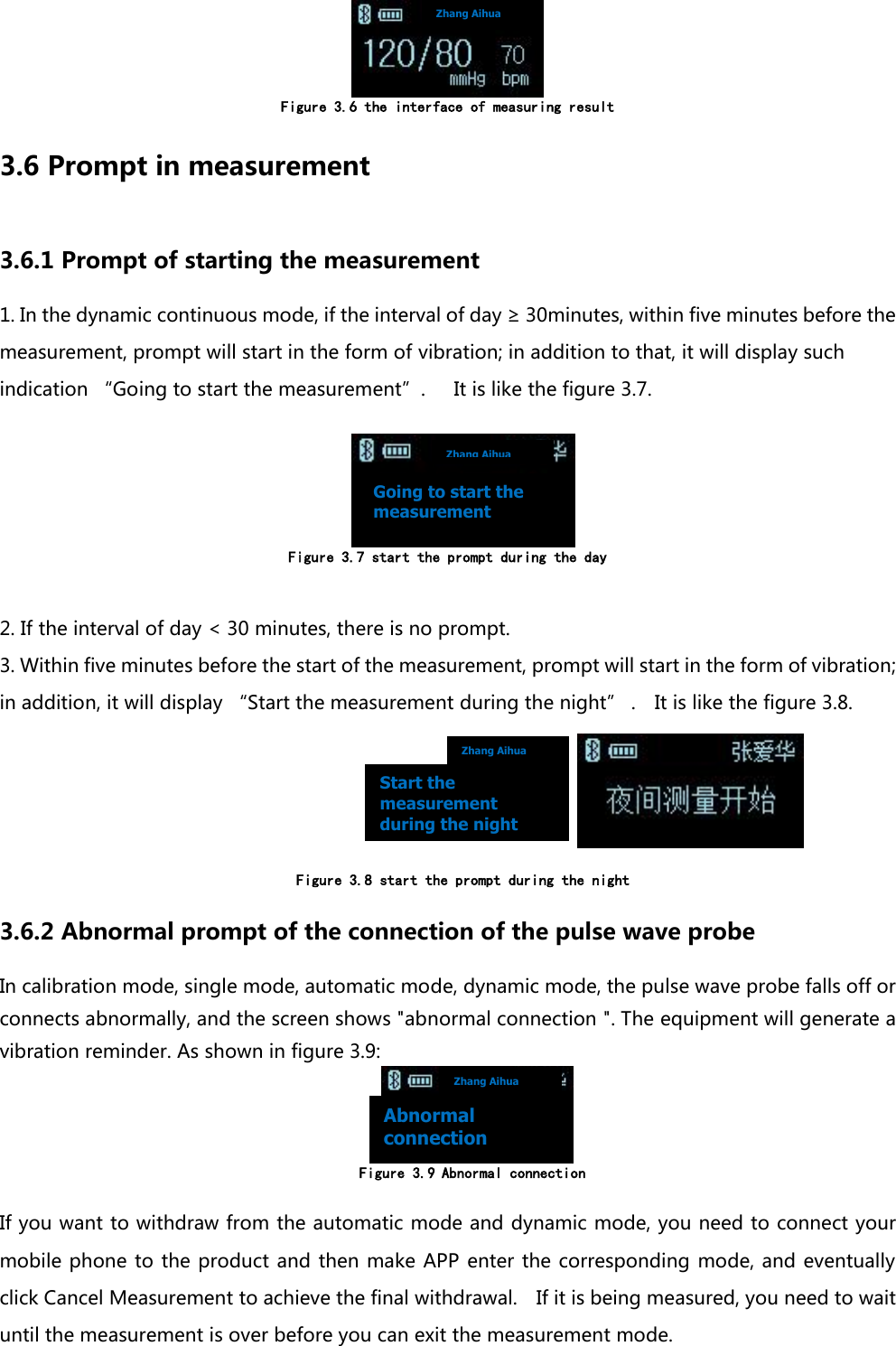
2. Desktop equipment and other equipment that used for calibration must be qualified products, which are approved by the National Metrology Department and periodically calibrated. Methods of blood pressure measurement refer to Guidelines for Chinese blood pressure measurements. Input methods refer to App operation guide.    3.4 Measurement 1. Set up the measurement mode and then carry out measurement as shown in figure 3.5;  If  you  want  the  equipment  to  enter  automatic  measurement  and  dynamic  continuous measurement mode, please ensure that the battery power is more than 3 squares 2.  After  the  equipment  enters  dynamic  continuous  measurement  mode,  you  could  look  at  the present situation of measurement by connecting mobile phone APP to the equipment and after the mobile phone APP is disconnected, the dynamic continuous measurement of the equipment is not affected.               Figure 3.5 measurement interface Content   Name   Meaning    Dynamic continuous measurement mode Indicating that the equipment is in dynamic continuous measurement mode  Mark of dynamic measurement mode Indicating that the equipment is in dynamic measurement mod  Power Icon Displaying the condition of using the battery Zhang Aihua Name   Representing patients’ name 120/80 mmHg Blood pressure value Representing a systolic / diastolic pressure value 70 bpm Pulse rate value Representing pulse rate value  3.5 Measuring result After  the  finish  of measurement, the  value  of  measuring  results will  be  displayed.  If  the result  is normal, it would be like the figure; the blood pressure analysis report can be printed through mobile phone APP and the specific operating procedure can be seen in guidance of APP operation;     Zhang Aihua Zhang Aihua
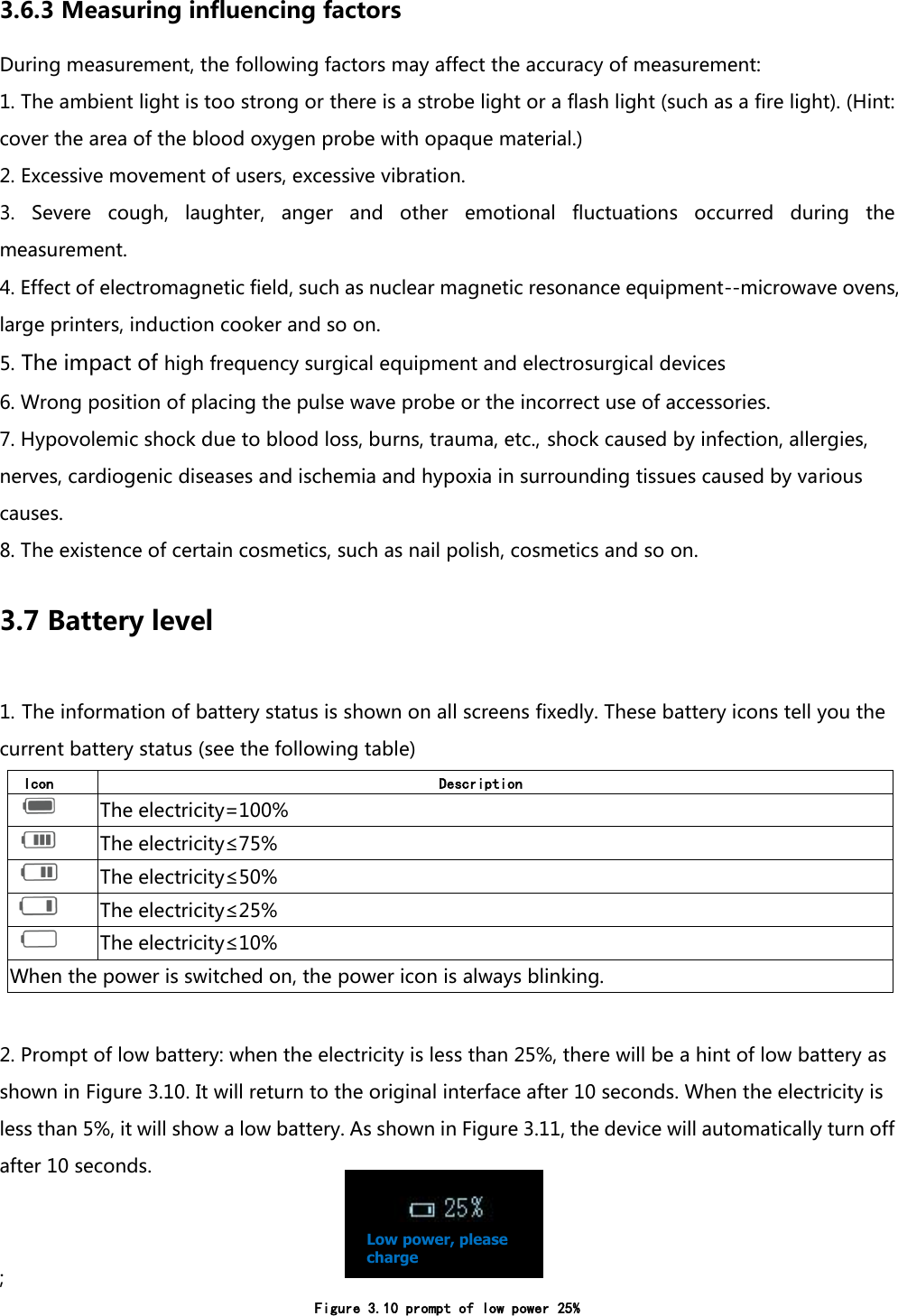
 Figure 3.6 the interface of measuring result 3.6 Prompt in measurement 3.6.1 Prompt of starting the measurement   1. In the dynamic continuous mode, if the interval of day ≥ 30minutes, within five minutes before the measurement, prompt will start in the form of vibration; in addition to that, it will display such indication “Going to start the measurement”.      It is like the figure 3.7.         Figure 3.7 start the prompt during the day  2. If the interval of day < 30 minutes, there is no prompt. 3. Within five minutes before the start of the measurement, prompt will start in the form of vibration; in addition, it will display “Start the measurement during the night” .    It is like the figure 3.8.                                                                             Figure 3.8 start the prompt during the night   3.6.2 Abnormal prompt of the connection of the pulse wave probe In calibration mode, single mode, automatic mode, dynamic mode, the pulse wave probe falls off or connects abnormally, and the screen shows "abnormal connection ". The equipment will generate a vibration reminder. As shown in figure 3.9:              Figure 3.9 Abnormal connection  If you want to withdraw from the automatic mode and dynamic mode, you need to connect your mobile phone to the product and then make APP enter the corresponding  mode, and eventually click Cancel Measurement to achieve the final withdrawal.    If it is being measured, you need to wait until the measurement is over before you can exit the measurement mode. Zhang Aihua Zhang Aihua Zhang Aihua Zhang Aihua Going to start the measurement Start the measurement during the night Abnormal connection
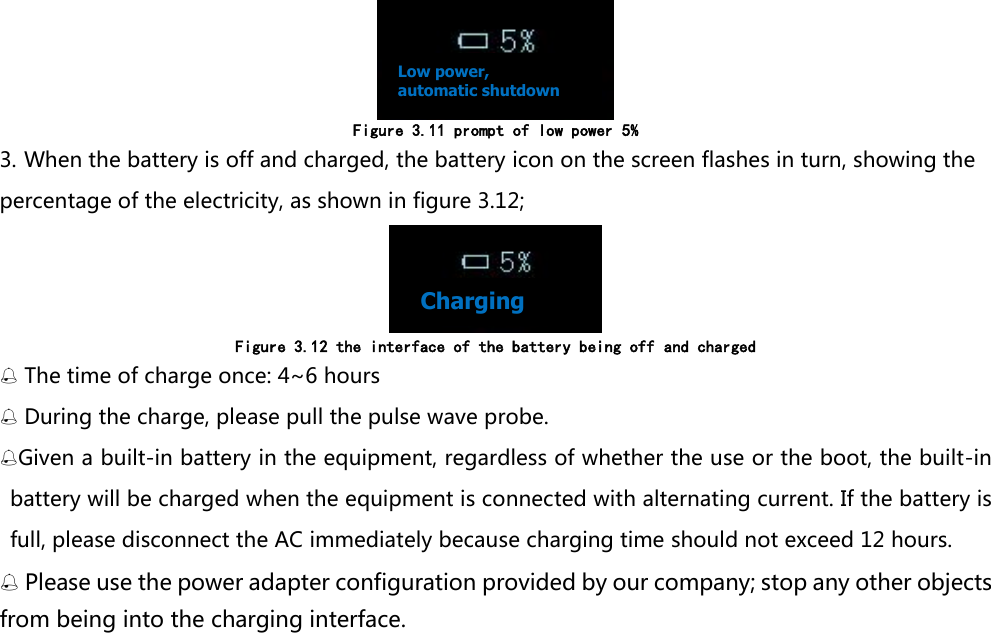
3.6.3 Measuring influencing factors During measurement, the following factors may affect the accuracy of measurement: 1. The ambient light is too strong or there is a strobe light or a flash light (such as a fire light). (Hint: cover the area of the blood oxygen probe with opaque material.) 2. Excessive movement of users, excessive vibration. 3.  Severe  cough,  laughter,  anger  and  other  emotional  fluctuations  occurred  during  the measurement. 4. Effect of electromagnetic field, such as nuclear magnetic resonance equipment--microwave ovens, large printers, induction cooker and so on. 5. The impact of high frequency surgical equipment and electrosurgical devices   6. Wrong position of placing the pulse wave probe or the incorrect use of accessories. 7. Hypovolemic shock due to blood loss, burns, trauma, etc., shock caused by infection, allergies, nerves, cardiogenic diseases and ischemia and hypoxia in surrounding tissues caused by various causes.   8. The existence of certain cosmetics, such as nail polish, cosmetics and so on. 3.7 Battery level 1. The information of battery status is shown on all screens fixedly. These battery icons tell you the current battery status (see the following table) Icon  Description   The electricity=100%  The electricity≤75%  The electricity≤50%  The electricity≤25%  The electricity≤10% When the power is switched on, the power icon is always blinking.  2. Prompt of low battery: when the electricity is less than 25%, there will be a hint of low battery as shown in Figure 3.10. It will return to the original interface after 10 seconds. When the electricity is less than 5%, it will show a low battery. As shown in Figure 3.11, the device will automatically turn off after 10 seconds.   ; Figure 3.10 prompt of low power 25%   Low power, please charge
 Figure 3.11 prompt of low power 5% 3. When the battery is off and charged, the battery icon on the screen flashes in turn, showing the percentage of the electricity, as shown in figure 3.12;  Figure 3.12 the interface of the battery being off and charged  The time of charge once: 4~6 hours  During the charge, please pull the pulse wave probe. Given a built-in battery in the equipment, regardless of whether the use or the boot, the built-in battery will be charged when the equipment is connected with alternating current. If the battery is full, please disconnect the AC immediately because charging time should not exceed 12 hours.  Please use the power adapter configuration provided by our company; stop any other objects from being into the charging interface.Low power, automatic shutdown Charging
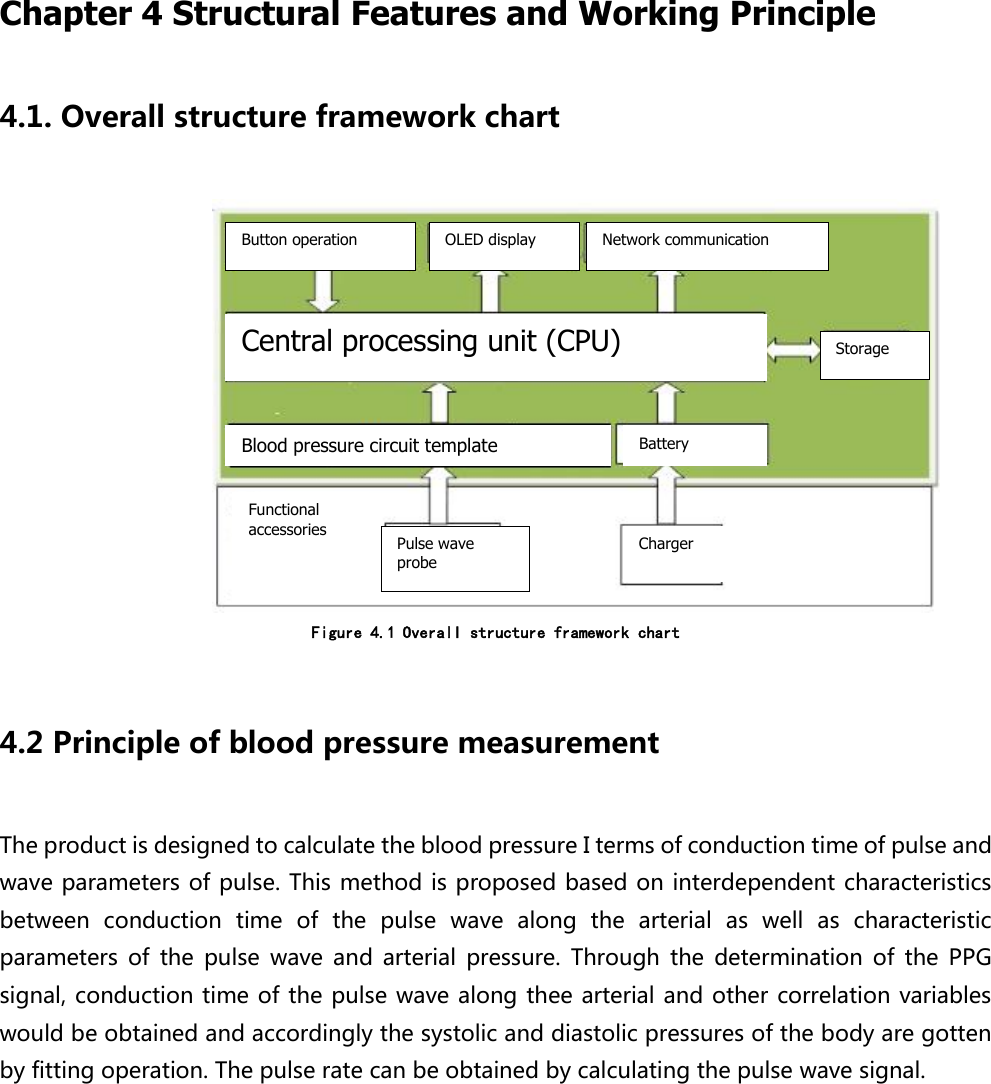
 Chapter 4 Structural Features and Working Principle 4.1. Overall structure framework chart                 Figure 4.1 Overall structure framework chart  4.2 Principle of blood pressure measurement   The product is designed to calculate the blood pressure I terms of conduction time of pulse and wave parameters of pulse. This method is proposed based on interdependent characteristics between  conduction  time  of  the  pulse  wave  along  the  arterial  as  well  as  characteristic parameters  of  the  pulse  wave  and  arterial  pressure.  Through  the  determination  of  the  PPG signal, conduction time of the pulse wave along thee arterial and other correlation variables would be obtained and accordingly the systolic and diastolic pressures of the body are gotten by fitting operation. The pulse rate can be obtained by calculating the pulse wave signal.Button operation OLED display Network communication Central processing unit (CPU) Storage Blood pressure circuit template Battery   Functional accessories Pulse wave probe Charger
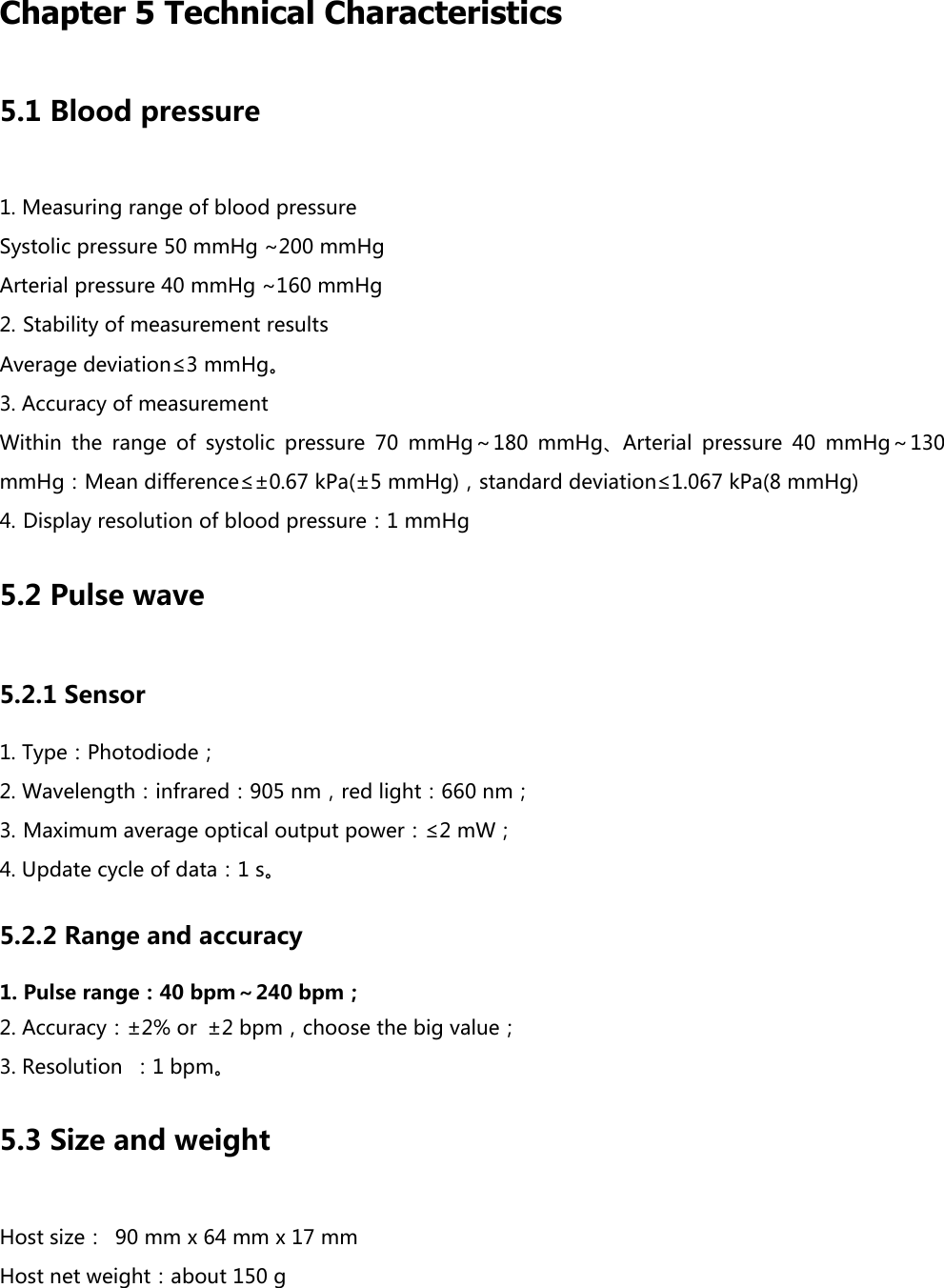
 Chapter 5 Technical Characteristics 5.1 Blood pressure 1. Measuring range of blood pressure Systolic pressure 50 mmHg ~200 mmHg Arterial pressure 40 mmHg ~160 mmHg 2. Stability of measurement results Average deviation≤3 mmHg。 3. Accuracy of measurement Within  the  range  of  systolic  pressure  70  mmHg~180  mmHg、Arterial  pressure  40  mmHg~130 mmHg:Mean difference≤±0.67 kPa(±5 mmHg),standard deviation≤1.067 kPa(8 mmHg) 4. Display resolution of blood pressure:1 mmHg 5.2 Pulse wave 5.2.1 Sensor 1. Type:Photodiode; 2. Wavelength:infrared:905 nm,red light:660 nm; 3. Maximum average optical output power:≤2 mW; 4. Update cycle of data:1 s。 5.2.2 Range and accuracy 1. Pulse range:40 bpm~240 bpm; 2. Accuracy:±2% or  ±2 bpm,choose the big value; 3. Resolution  :1 bpm。 5.3 Size and weight Host size: 90 mm x 64 mm x 17 mm Host net weight:about 150 g
Chapter 6 Maintenance, Preservation, Storage and Transportation In  order  to  ensure  the  equipment  will  run  normally  and  extend  its  life  in  use,  maintenance  and preservation of equipment should not be neglected.    The warranty period of this equipment and fittings could be seen in the detailed provisions of the contract of sale. If  the  responsible  hospital  or  unit  using  the  equipment  fails  to  realize  maintenance  and preservation, unexpected equipment malfunction may occur and then bring the damage to health.   If  you  find  any  problems  of  equipment  and  need  to  get  circuit  diagrams,  drawings,  notes,  or technical  support,  please  contact  with  maintenance  personnel,  Vita-Course  Technologies  or  your authorized supplier.    6.1. Cleaning of equipment The  equipment  should  be  kept  clean.  It  is  recommended  to  clean  the  outer  surface  and  display screen regularly and in a timely manner using non erosion cleaning liquid, such as clean water. The surface of the equipment and sensors can be cleaned by medical alcohol, dried naturally or cleaned with dry cloth  You must turn off the power before cleaning equipment. Do not let the cleaning liquid be into connecting socket of the equipment in order to avoid damaging the equipment. Do not let any part of the equipment be soaked in the liquid. After the use, please keep it clean and put it away. Do not use such things that have strong friction (such as steel wool and sandpaper) to clean the equipment. Do not use such things that have strong corrosiveness such as bleaching powder to clean the equipment and accessories.      6.2 Cleaning of accessories After the use of accessories, you could immerse the clean and dry gauze in medical alcohol with the concentration of 75% or in isopropanol solution with the concentration of 70% and then use this gauze to clean the surface of the used accessory (including sensor and plug).
 Do not fully immerse accessories of the equipment in water solution, accessories or detergents.  6.3. Maintenance test 6.3.1 Routine test Before using the equipment, you need to carry out the following inspection:    Check whether the host has any mechanical damage;  Check  whether  the  structure  performance  of  all  accessories  (including  plug  and  sensor)  is complete;    Check all available measurement function to make sure that the equipment can work well; If  there  is  any  obvious  indication  of  the  damage  of  the  equipment,  please  stop  using  it  and contact with supplier.   6.3.2 Periodic test Every year or after the maintenance every time, a thorough inspection, including function and safety, of the equipment must be carried out by qualified personnel.  If y the hospital using the equipment cannot implement a satisfactory maintenance project, it will result in equipment failure, and may endanger the health of human body.  If the pulse wave sensor and the cable are damaged or deteriorated, stop using it and replace new cables.   6.3.3 Battery maintenance  This equipment adopts the built-in battery, which cannot be arbitrarily removed from it;    Does not charge the battery using other power device, so as not to damage the battery;  The aging battery cannot be thrown away in the fire, so as to avoid the explosion;  Do not use the battery to supply power for other electronic devices;  Destruction of battery should comply with local laws and regulations; In order to extend the useful life of battery, please use battery properly and regularly carry out the maintenance and preservation. The equipment should be charged regularly for maintenance though it is not used for a long time. Generally, it should be charged once a month and 4~6 hours each time; Please contact with our company directly if battery is already broken;    This equipment is equipped with a built-in battery. Regardless of whether the boot for the use, as long as alternating current (AC) is connected with the equipment, the process of charging is working. When  the  battery  is  full,  please  disconnect  the  AC  because  charging  time  should  not  exceed  12 hours;  Please use the power adapter configuration provided by our company.
  Chapter 7 Storage and Transportation of Equipment   7.1 Storage If the equipment is not used for a long time, it should be cleaned, put into the packing box and stored in a dry, dust-free, and well ventilated room without corrosive gas. 7.2 Transportation It can be transported by car, train or plane. Take care to handle gently during transit. Environment of transportation and storage: Temperature: -20 ~ 55 DEG c; Relative range of humidity: 10%~ 95% (non condensing); Range of atmospheric pressure: 53 kPa to 106 kPa.
 Chapter 8 Troubleshooting   8.1 Check the equipment and accessories A visual inspection should be carried out before each use when the power is disconnected: 1. Check the outside of the equipment to see if it is clean and the general physical condition. Make sure the outer skin is not broken, all parts are in place, and there is no dumping of liquid as well as no signs of abuse.   2. Check whether all accessories (such as cables, sensors, sensory unit, etc.)    are in good condition. If there is any sign of damage, please stop using it.   8.2 Check cable and charging line 1. Check whether the power plug and the power cord are damaged, and make sure the plug is fixed and not moved in the outer skin. If there is any damage, please contact the maintenance personnel, Vita-Course Technologies or your authorized supplier. 2. Check the user's cable and its corresponding stress relief  device in general to confirm that the insulating layer is undamaged and that both ends of the connector are firmly connected to prevent rotation or other stresses. 3.    Clamp the pulse wave sensor on the user's finger and open the equipment and gently pull the cable line near the ends of the cable to make sure there is no interruption.   8.3 Troubleshooting If you suspect a measurement results, please read the instruction manual and confirm several times that the measurement is properly set. If you have any problems with the equipment, please call the maintenance staff. Phenomenon  Possible reason  Solution  The equipment is power-off. Depletion of internal lithium battery   Plug in the power adapter to charge the battery. Possible damage Send the product to the designated repair shop or sales shop for repairs No reaction when pushing Work abnormally The equipment turns off if you push button no less than 10 seconds; it will
the button turn on if you push button about 1 second. Figure 8.3 analysis of common fault  8.4 Disposal of equipment In  order  to  avoid  the  pollution  and  infecting  others,  other  equipment  and  environment,  the equipment should be cleaned before the disposal of equipment and according to local regulation (regulations on disposal of electronic and electrical components and equipment) it can be disposed. If there is no related regulation, please dispose of it in accordance with the rules of the disposal of waste in the local hospital. Do not throw away battery randomly and knock it down, and then contact with the local supplier. This product must be recycled and processed in accordance with local law.  Please do not treat obsolete electrical or electronic equipment as unclassified municipal waste. Collected separately, the equipment can be safely, properly reused, treated, and recycled.
  Chapter 9 Appendix Appendix    EMC manufacturer's statement and guidance Electromagnetic compatibility Note:  The  equipment  complies  with  IEC  60601-1-2:2014  standard  and  electromagnetic compatibility requirements  The  user shall  install  and  use  the equipment  according  to  the  electromagnetic  compatibility information provided by the random files.  Portable and mobile RF communications devices may affect device performance, so in order to avoid  strong  electromagnetic  interference,  please  keep  away  mobile  phones  and  microwave ovens.    The guide and detailed manufacturer's statement are in the appendix.      This  device  is  bound  by  Bluetooth  and  APP  software.  Bluetooth  operating  frequency: 2.400~2.4835 GHz, radiation power: -20~4 dBm. Pay attention to the effect on the equipment that is sensitive to. Warning:  Equipment or systems shall not be accessible or stacked for use with other equipment. If it must be approached or folded for use, it shall be observed and verified to be in operation under the configuration used.    In addition to the regulated transducer and cable, the use of specified accessories, transducers, and  cables  may  result  in  an  increase  in  equipment  or  system  emissions  or  a  decrease  in immunity.    The  use  of  specified  accessories,  transducers,  or  cables  in  conjunction  with  equipment  and systems may result in an increase in equipment or system emissions, or a decrease in immunity.  Using the value that is below the minimum amplitude or minimum specified in this specification may lead to inaccurate results.
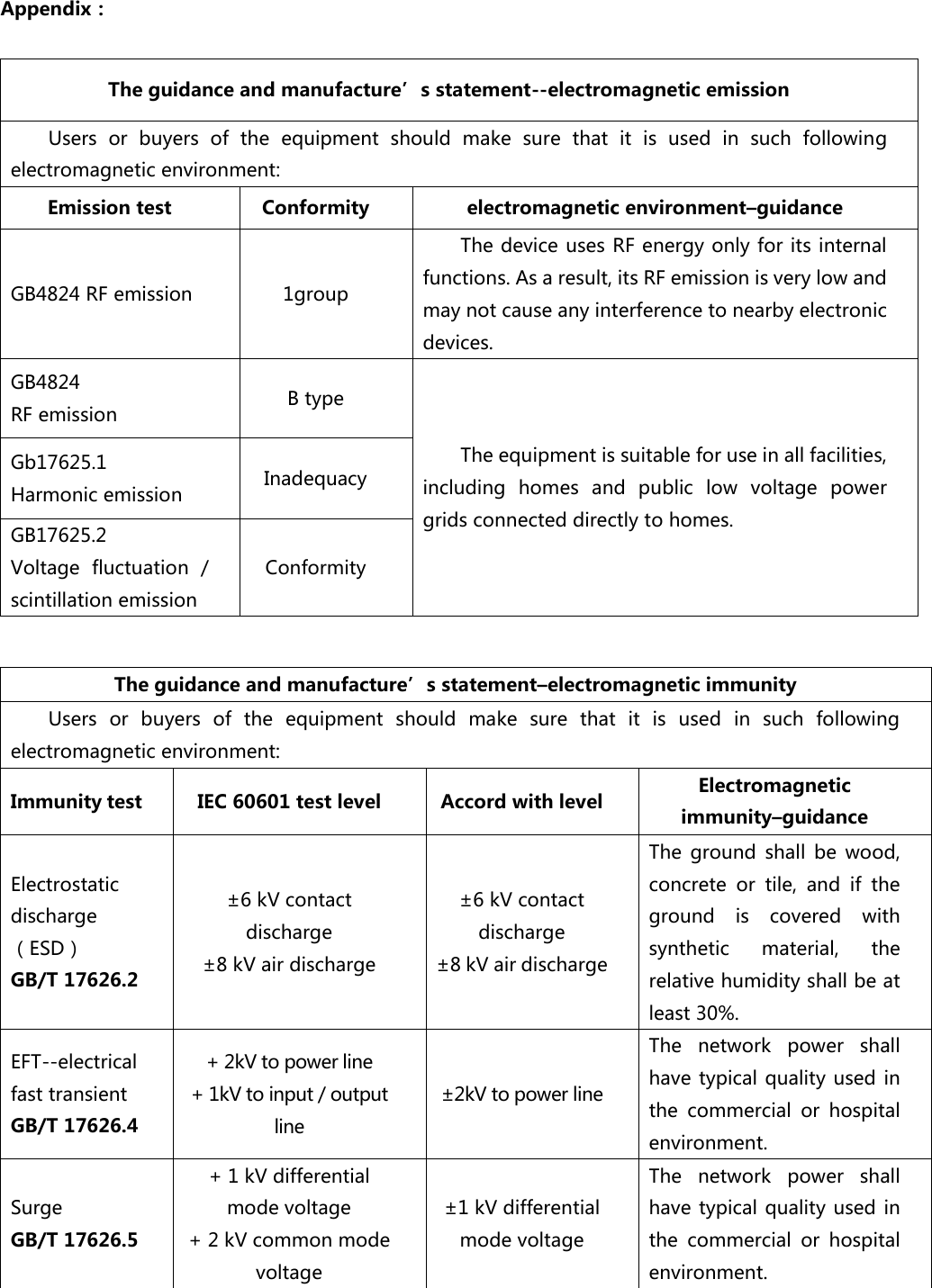
Appendix:  The guidance and manufacture’s statement--electromagnetic emission Users  or  buyers  of  the  equipment  should  make  sure  that  it  is  used  in  such  following electromagnetic environment: Emission test Conformity electromagnetic environment–guidance GB4824 RF emission 1group The device uses RF energy only for its internal functions. As a result, its RF emission is very low and may not cause any interference to nearby electronic devices. GB4824 RF emission B type The equipment is suitable for use in all facilities, including  homes  and  public  low  voltage  power grids connected directly to homes. Gb17625.1 Harmonic emission Inadequacy GB17625.2 Voltage  fluctuation  / scintillation emission Conformity  The guidance and manufacture’s statement–electromagnetic immunity Users  or  buyers  of  the  equipment  should  make  sure  that  it  is  used  in  such  following electromagnetic environment: Immunity test IEC 60601 test level Accord with level Electromagnetic immunity–guidance Electrostatic discharge(ESD) GB/T 17626.2 ±6 kV contact discharge ±8 kV air discharge ±6 kV contact discharge ±8 kV air discharge The  ground  shall  be  wood, concrete  or  tile,  and  if  the ground  is  covered  with synthetic  material,  the relative humidity shall be at least 30%. EFT--electrical fast transient GB/T 17626.4 + 2kV to power line + 1kV to input / output line ±2kV to power line The  network  power  shall have typical quality used in the  commercial  or  hospital environment. Surge   GB/T 17626.5 + 1 kV differential mode voltage + 2 kV common mode voltage ±1 kV differential mode voltage The  network  power  shall have typical quality used in the  commercial  or  hospital environment.
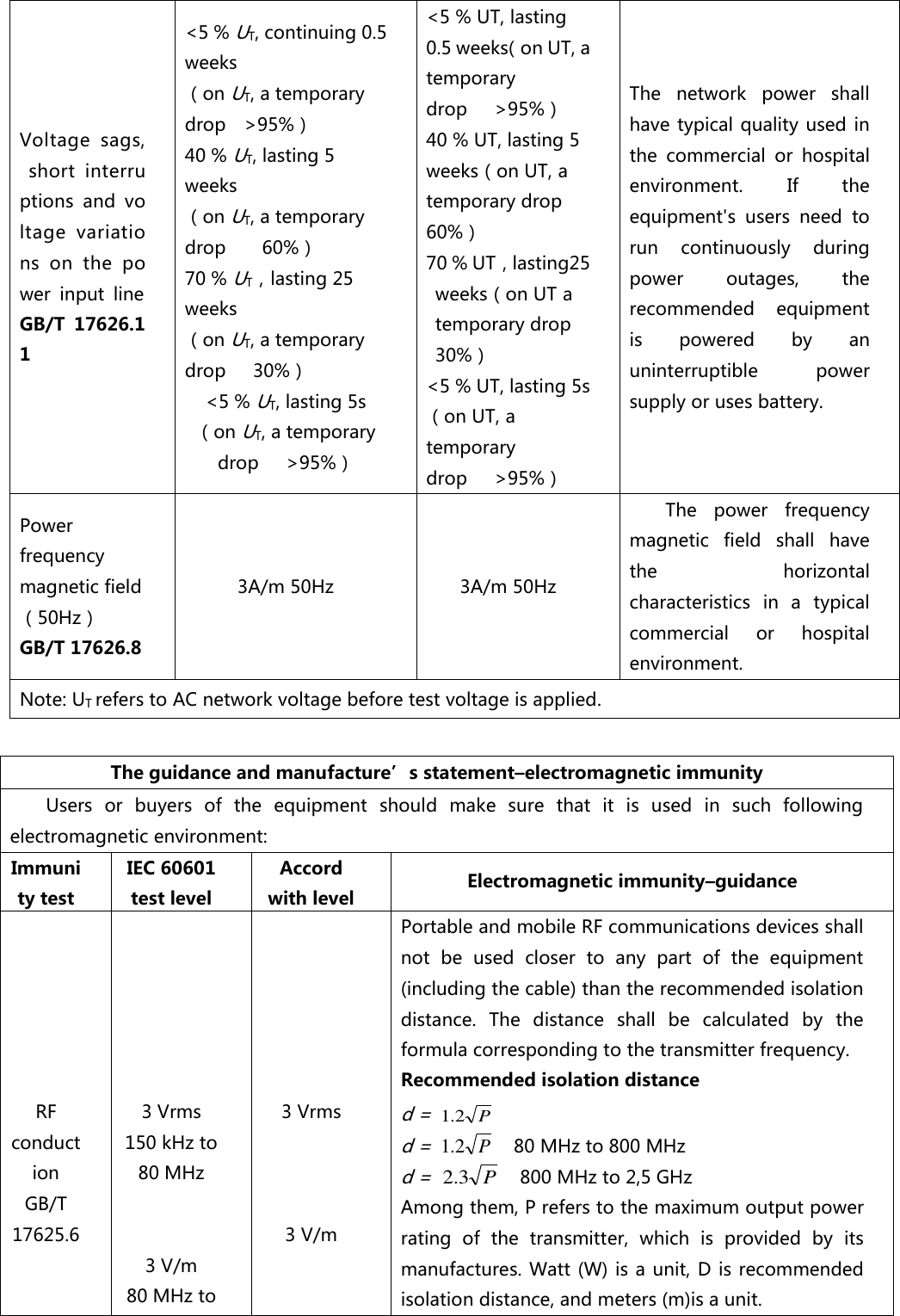
Voltage  sags,  short  interruptions  and  voltage  variations  on  the  power  input  line GB/T  17626.11 <5 % UT, continuing 0.5 weeks (on UT, a temporary drop  >95%) 40 % UT, lasting 5 weeks (on UT, a temporary drop    60%) 70 % UT,lasting 25 weeks (on UT, a temporary drop   30%) <5 % UT, lasting 5s (on UT, a temporary drop   >95%) <5 % UT, lasting 0.5 weeks(on UT, a temporary drop    >95%) 40 % UT, lasting 5 weeks(on UT, a temporary drop    60%) 70 % UT,lasting25 weeks(on UT a temporary drop      30%) <5 % UT, lasting 5s(on UT, a temporary drop   >95%) The  network  power  shall have typical quality used in the  commercial  or  hospital environment. If  the equipment's  users  need  to run  continuously  during power  outages,  the recommended  equipment is  powered  by  an uninterruptible  power supply or uses battery. Power frequency magnetic field(50Hz) GB/T 17626.8 3A/m 50Hz 3A/m 50Hz The  power  frequency magnetic  field  shall  have the  horizontal characteristics  in  a  typical commercial  or  hospital environment. Note: UT refers to AC network voltage before test voltage is applied.  The guidance and manufacture’s statement–electromagnetic immunity Users  or  buyers  of  the  equipment  should  make  sure  that  it  is  used  in  such  following electromagnetic environment: Immunity test IEC 60601 test level Accord with level Electromagnetic immunity–guidance       RF  conduction GB/T 17625.6         3 Vrms 150 kHz to 80 MHz   3 V/m 80 MHz to       3 Vrms    3 V/m Portable and mobile RF communications devices shall not  be  used  closer  to  any  part  of  the  equipment (including the cable) than the recommended isolation distance.  The  distance  shall  be  calculated  by  the formula corresponding to the transmitter frequency. Recommended isolation distance d = P2.1 d = P2.1  80 MHz to 800 MHz d = P3.2  800 MHz to 2,5 GHz Among them, P refers to the maximum output power rating  of  the  transmitter,  which  is  provided  by  its manufactures.  Watt (W) is a unit, D is recommended isolation distance, and meters (m)is a unit.
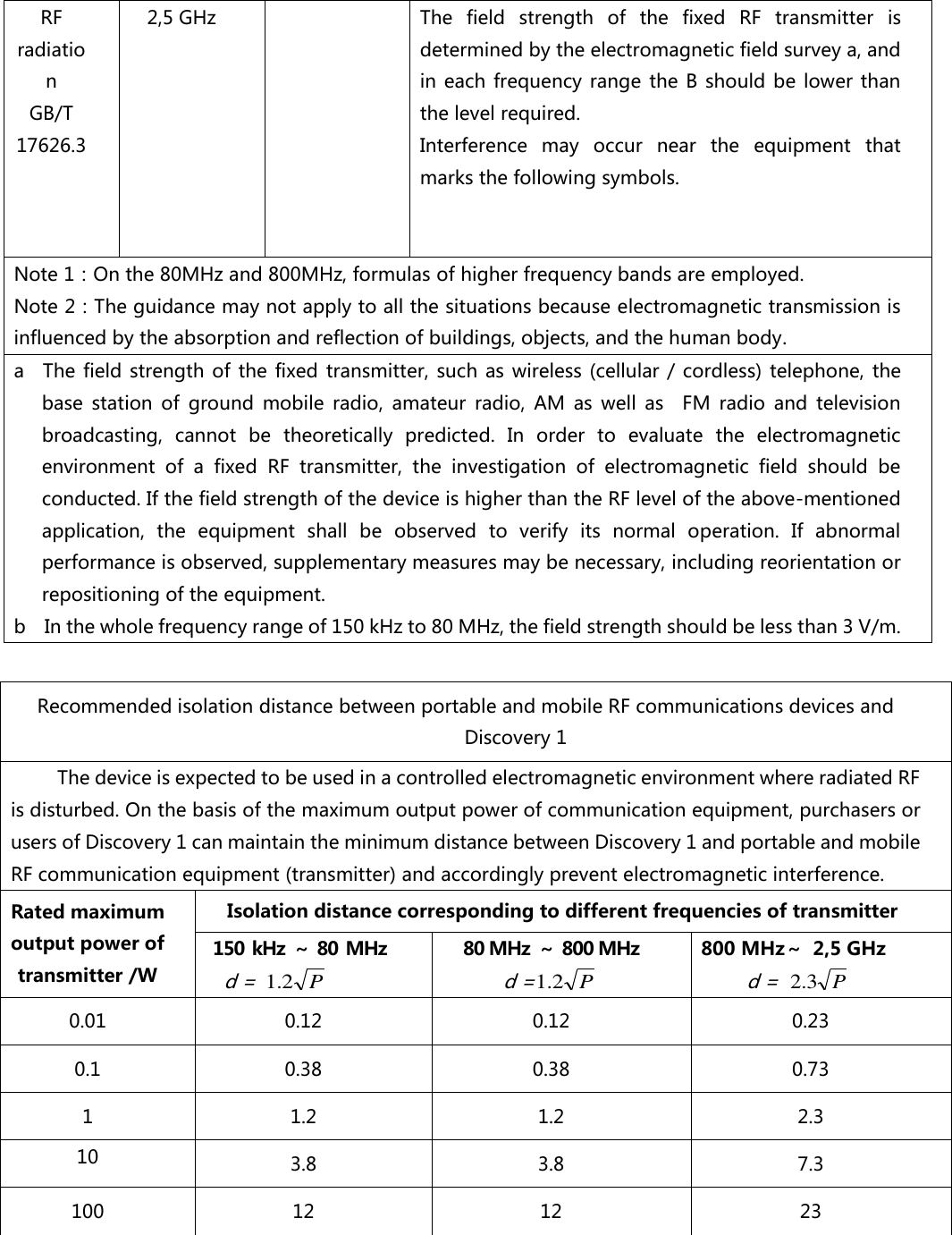
RF radiation     GB/T 17626.3 2,5 GHz The  field  strength  of  the  fixed  RF  transmitter  is determined by the electromagnetic field survey a, and in each  frequency range the B  should be  lower than the level required. Interference  may  occur  near  the  equipment  that marks the following symbols.   Note 1:On the 80MHz and 800MHz, formulas of higher frequency bands are employed. Note 2:The guidance may not apply to all the situations because electromagnetic transmission is influenced by the absorption and reflection of buildings, objects, and the human body. a    The field strength of  the fixed transmitter,  such as wireless  (cellular / cordless) telephone,  the base  station  of  ground  mobile  radio,  amateur  radio,  AM  as  well  as    FM  radio  and  television broadcasting,  cannot  be  theoretically  predicted.  In  order  to  evaluate  the  electromagnetic environment  of  a  fixed  RF  transmitter,  the  investigation  of  electromagnetic  field  should  be conducted. If the field strength of the device is higher than the RF level of the above-mentioned application,  the  equipment  shall  be  observed  to  verify  its  normal  operation.  If  abnormal performance is observed, supplementary measures may be necessary, including reorientation or repositioning of the equipment. b    In the whole frequency range of 150 kHz to 80 MHz, the field strength should be less than 3 V/m.  Recommended isolation distance between portable and mobile RF communications devices and Discovery 1 The device is expected to be used in a controlled electromagnetic environment where radiated RF is disturbed. On the basis of the maximum output power of communication equipment, purchasers or users of Discovery 1 can maintain the minimum distance between Discovery 1 and portable and mobile RF communication equipment (transmitter) and accordingly prevent electromagnetic interference. Rated maximum output power of transmitter /W Isolation distance corresponding to different frequencies of transmitter 150 kHz ~ 80 MHz  d = P2.1 80 MHz ~ 800 MHz d =P2.1 800 MHz~  2,5 GHz d = P3.2 0.01 0.12 0.12 0.23 0.1 0.38 0.38 0.73 1 1.2 1.2 2.3 10 3.8 3.8 7.3 100 12 12 23
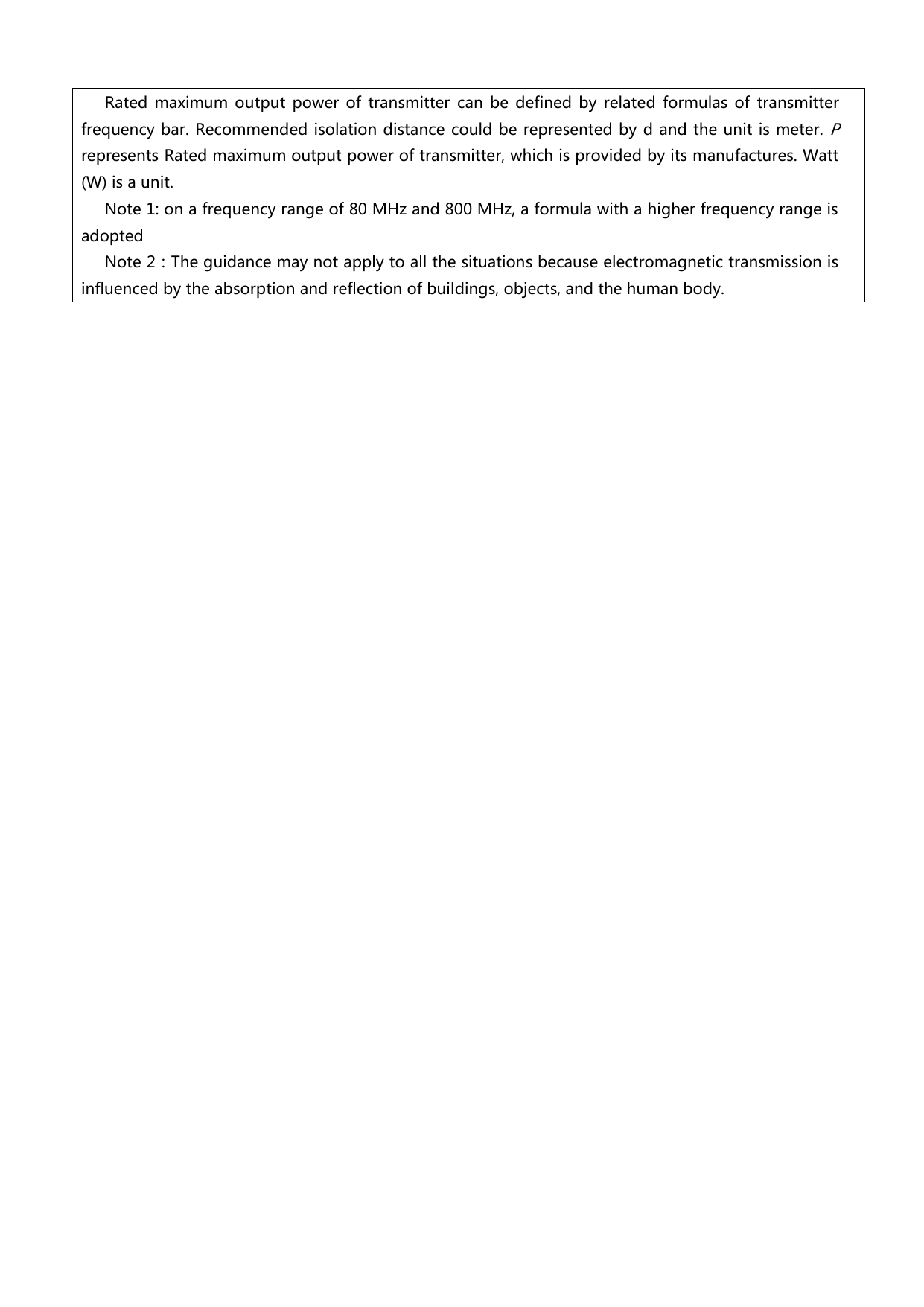
   Rated  maximum  output  power  of  transmitter  can  be  defined  by related  formulas  of  transmitter frequency bar. Recommended isolation distance could be represented by d and the unit is meter. P represents Rated maximum output power of transmitter, which is provided by its manufactures. Watt (W) is a unit.   Note 1: on a frequency range of 80 MHz and 800 MHz, a formula with a higher frequency range is adopted Note 2:The guidance may not apply to all the situations because electromagnetic transmission is influenced by the absorption and reflection of buildings, objects, and the human body.
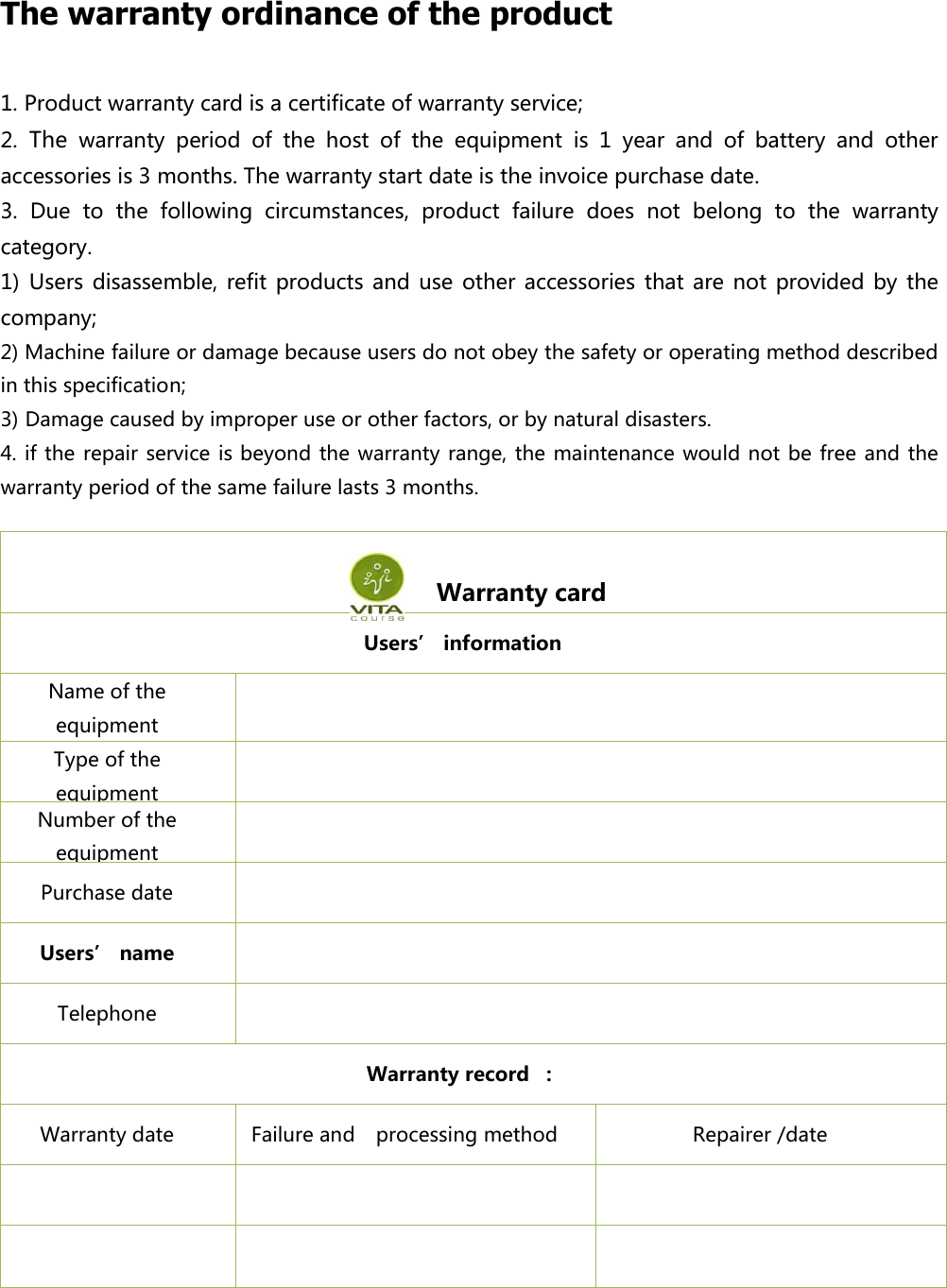
 The warranty ordinance of the product 1. Product warranty card is a certificate of warranty service; 2. The warranty  period  of  the  host  of  the  equipment  is  1  year  and  of  battery  and  other accessories is 3 months. The warranty start date is the invoice purchase date. 3.  Due  to  the  following  circumstances,  product  failure  does  not  belong  to  the  warranty category. 1) Users disassemble, refit products and  use other  accessories that are  not provided  by  the company; 2) Machine failure or damage because users do not obey the safety or operating method described in this specification; 3) Damage caused by improper use or other factors, or by natural disasters. 4. if the  repair service is beyond the warranty range, the maintenance would not be free and the warranty period of the same failure lasts 3 months.                   Warranty card Users’ information Name of the equipment  Type of the equipment  Number of the equipment  Purchase date  Users’ name  Telephone    Warranty record  : Warranty date   Failure and   processing method Repairer /date
 FCC Caution This device complies with part 15 of the FCC Rules. Operation is subject to the following two conditions: (1)  This device  may  not  cause harmful interference, and (2)  this  device must accept any interference received, including interference that may cause undesired operation. Note: This equipment has been tested and found to comply with the limits for a Class B digital device, pursuant to part 15 of the FCC Rules. These limits are designed to provide reasonable  protection  against  harmful  interference  in  a  residential  installation.  This equipment generates uses and can radiate radio frequency energy and, if not installed and used  in  accordance  with  the  instructions,  may  cause  harmful  interference  to  radio communications.  However,  there  is  no  guarantee  that  interference  will  not  occur  in  a particular  installation.  If  this  equipment  does  cause  harmful  interference  to  radio  or television reception, which can be determined by turning the equipment off and on, the user  is  encouraged  to  try  to  correct  the  interference  by  one  or  more  of  the  following measures: -Reorient or relocate the receiving antenna. -Increase the separation between the equipment and receiver. -Connect  the  equipment  into  an  outlet  on  a  circuit  different  from  that  to  which  the receiver is connected. -Consult the dealer or an experienced radio/TV technician for help.  Any  Changes  or  modifications  not  expressly  approved  by  the  party  responsible  for compliance could void the user's authority to operate the equipment.  This equipment complies with FCC radiation exposure limits set forth for an uncontrolled  Environment and can be use without any restrictions.
                   Contact information Manufacturer: Vita-Course Technologies (Hainan) Co., Ltd. Registered  address:A5002,  A1, Fuxing District, 32  Binhai  Avenue, Longhua District, Hainan, Haikou Province   Production  address:The  first  floor  of  the  East  of  the  office  building  of  Hainan  Newway Pharmaceutical Co., Ltd., Nanhai Road, Hainan City     Phone: 0898-66701808   Fax:    0898-66707808 E-mail:  vita@vita-course.com WeChat public number:维他驿站     Registration number / technical requirement number: Production license number: Product life: 3 years Production date: detailed information in the host nameplate

Navigation menu