Vtech Touch And Teach Busy Books Owners Manual &
2014-11-12
: Vtech Vtech-Touch-And-Teach-Busy-Books-Owners-Manual-109789 vtech-touch-and-teach-busy-books-owners-manual-109789 vtech pdf
Open the PDF directly: View PDF  .
.
Page Count: 10
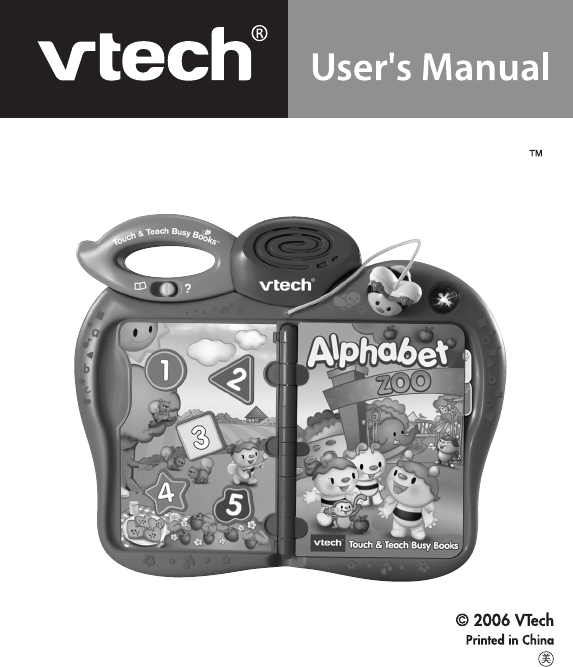
Touch & Teach Busy Books
91-02189-000-000

Dear Parent:
Ever notice the look on your baby’s face when they learn something
new through their own discovery? These self-accomplished moments
are a parent’s greatest reward. To help fulll them, VTech
®
created
the Infant Learning series of toys.
These unique interactive learning toys directly respond to what
children do naturally – play! Using innovative technology, these
toys react to baby’s interactions, making each play experience fun
and unique as they learn age-appropriate concepts like rst words,
numbers, shapes, colors and music. More importantly, VTech
®
’s
Infant Learning toys develop baby’s mental and physical abilities
by inspiring, engaging and teaching.
At VTech
®
, we know that a child has the ability to do great things.
That’s why all of our electronic learning products are uniquely
designed to develop a child’s mind and allow them to learn to the
best of their ability. We thank you for trusting VTech
®
with the
important job of helping your child learn and grow!
Sincerely,
Your Friends at VTech
®
To learn more about Infant Learning and other VTech
®
toys, visit
www.vtechkids.com
2
Introduction
INTRODUCTION
Thank you for purchasing the VTech® Touch & Teach Busy Books™
learning toy!
With one touch, your baby becomes part of an enchanting story! The
Touch & Teach Busy Books™ include four interchangeable stories and
a magical bee pointer. On each page, baby will discover touch-sensitive
words and colorful pictures. Two modes of play keep baby entertained
while learning animals, letters, colors, sounds and shapes.
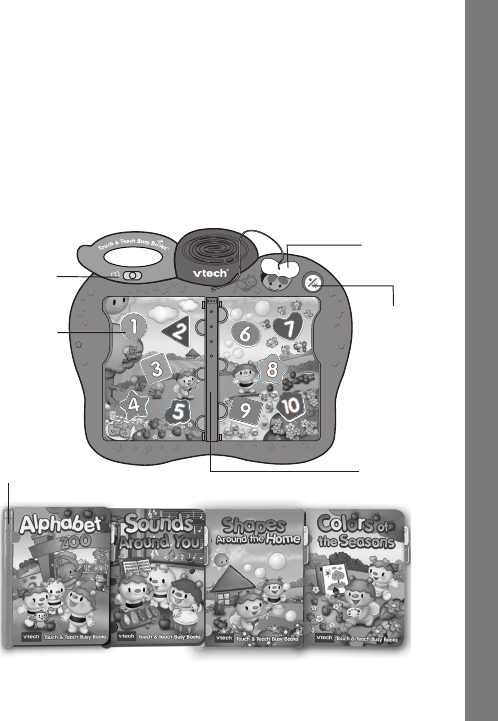
MODE
SELECTOR
SWITCH
TEN
NUMBER
BUTTONS
ON/OFF
BUTTON
MAGIC
BEE
POINTER
FOUR ACTIVITY BOOKS
BOOK HINGE
?
a
b
c
a
b
c
a
b
c
a
b
c
ACTIVITY
BOOKS
SLOT

3
INCLUDED IN THIS PACKAGE
• One VTech® Touch & Teach Busy Books™ learning toy
• Four activity books - Alphabet, Sounds, Colors & Shapes
• One instruction manual
WARNING: All packing materials, such as tape, plastic sheets,
wire ties and tags are not part of this toy, and should
be discarded for your child’s safety.
GETTING STARTED
BATTERY INSTALLATION
1. Make sure the unit is turned OFF.
2. Locate the battery cover on the back of
the unit. Use a coin or screwdriver to
loosen the screw.
3. Install2new‘AA’(UM-3/LR6)batteries
following the diagram inside the
batterybox.(Theuseofnewalkaline
batteries is recommended for maximum
performance.)
4. Replacethebatterycoverandtighten
the screw to secure the battery cover.
Instructions & Activities

4
BATTERY NOTICE
• Installbatteriescorrectlyobservingthepolarity(+,-)signstoavoid
leakage.
• Do not mix old and new batteries.
• Donotmixbatteriesofdifferenttypes:alkaline,standard(carbon-
zinc)orrechargeable(nickel-cadmium).
• Removethebatteriesfromtheequipmentwhentheunitwillnotbe
used for an extended period of time.
• Alwaysremoveexhaustedbatteriesfromtheequipment.
• Donotdisposeofbatteriesinre.
• Do not attempt to recharge ordinary batteries.
• The supply terminals are not to be short-circuited.
• Onlybatteriesofthesameandequivalenttypeasrecommended
are to be used.
WE DO NOT RECOMMEND THE USE OF RECHARGEABLE
BATTERIES.
PRODUCT FEATURES
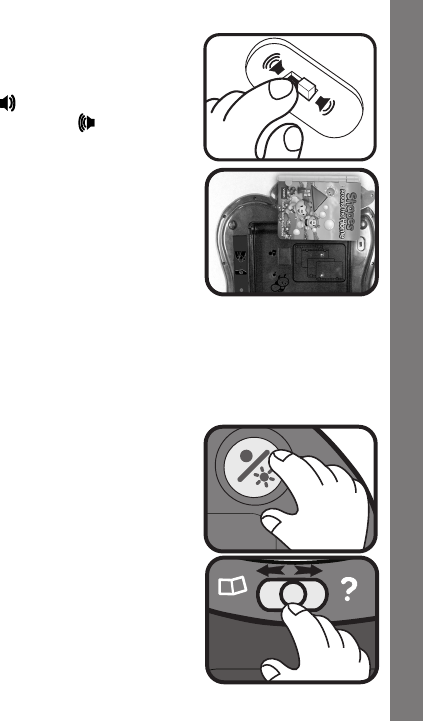
1. ON/OFF BUTTON
To turn the unit ON, press the ON/OFF
BUTTON( ).ToturntheunitOFF,
press the ON/OFF BUTTON again.
Instructions & Activities
5
2. VOLUME CONTROL SWITCH
To adjust the volume, slide the VOLUME
CONTROL SWITCH at the back of the
unittolow( )forLOW volume or to
high for HIGHvolume( ).
3. ACTIVITY BOOK STORAGE
For convenience, a storage compartment
for all four activity books is located at the
back of the product.
4. AUTOMATIC SHUT-OFF
To preserve battery life, the Touch & Teach Busy Books™ will
automatically power-down after approximately two minutes without
input.Theunit can beturned on again by pressingthe on/off
button.
ACTIVITIES
1. Press the on/off button. You will hear an
opening song followed by a fun phrase.
2. Choose a mode of play by sliding the
mode selector switch to either the
DiscoveryMode or theHide ‘n Seek
Mode.
Instructions & Activities
6
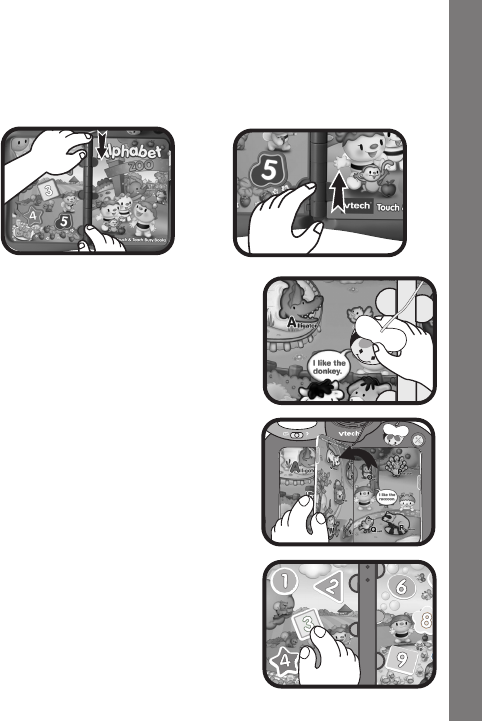
3. Align the hinge and lock the four activity books into the slot to learn
aspeciccurriculum.Youcanchoosefromthealphabet,sounds,
colors or shapes. To remove the books, lift the bottom end of the
book up.
4. Use your magic bee pointer to touch
the images with words on each page.
Thereareatotalofvetouch-sensitive
images on each page. As you touch
them, you will hear them identified.
5. As you turn each page of the book,
it will magically be recognized!
6. When an activity book is not inserted,
press the number buttons to hear
numbersandrelatedphrasesidentied.
Instructions & Activities

7
CARE & MAINTENANCE
1. Keep the unit clean by wiping it with a slightly damp cloth.
2. Keep the unit out of direct sunlight and away from any direct heat
source.
3. Removethebatterieswhentheunitisnotinuseforanextended
period of time.
4. Do not drop the unit on hard surfaces and do not expose the unit to
moisture or water.
TROUBLESHOOTING
Ifforsomereasontheprogram/activitystopsworkingormalfunctions,
please follow these steps:
1. Please turn the unit OFF.
2. Interrupt the power supply by removing the batteries.
3. Let the unit stand for a few minutes, then replace the batteries.
4. Turn the unit ON. The unit should now be ready to play again.
5. If the product still does not work, replace with a new set of
batteries.
If the problem persists, please call our Consumer Services Department
at1-800-521-2010intheU.S.or1-877-352-8697 in Canada,anda
service representative will be happy to help you.
Care & Maintenance/Troubleshooting

8
IMPORTANT NOTE:
Creating and developing Infant Learning products is accompanied
by a responsibility that we at VTech® take very seriously. We make
every effort to ensure the accuracy of the information which forms
the value of our products. However, errors sometimes can occur.
It is important for you to know that we stand behind our products
and encourage you to call our Consumer Services Department at
1-800-521-2010intheU.S.or1-877-352-8697inCanada,with
anyproblemsand/orsuggestionsthatyoumighthave.Aservice
representative will be happy to help you.
Note:
Thisequipmenthasbeentestedandfoundtocomplywiththelimits
foraClassBdigitaldevice,pursuanttoPart15oftheFCCRules.
These limits are designed to provide reasonable protection against
harmfulinterference ina residentialinstallation.This equipment
generates,usesandcanradiateradiofrequencyenergyand,ifnot
installed and used in accordance with the instructions, may cause
harmful interference to radio communications. However, there is no
guarantee that interference will not occur in a particular installation. If
thisequipmentdoescauseharmfulinterferencetoradioortelevision
reception,whichcanbedeterminedbyturningtheequipmentoffand
on, the user is encouraged to try to correct the interference by one or
more of the following measures:
• Reorientorrelocatethereceivingantenna
• Increasetheseparationbetweentheequipmentandreceiver
• Connecttheequipmentintoanoutletonacircuitdifferentfromthat
to which the receiver is connected
• Consultthedealeroranexperiencedradio/TVtechnicianforhelp
Other Info

9
Caution : Changes or modications not expressly approved by the
partyresponsible for compliance could void the user’sauthority to
operatetheequipment.
THISDEVICE COMPLIESWITH PART15 OFTHEFCC
RULES.OPERATION ISSUBJECTTOTHEFOLLOWING
TWOCONDITIONS: (1)THISDEVICE MAY NOT CAUSE
HARMFULINTERFERENCE,AND(2)THISDEVICEMUST
ACCEPTANYINTERFERENCERECEIVED, INCLUDING
INTERFERENCE THAT MAY CAUSE UNDESIRED
OPERATION.
THISCLASS B DIGITALAPPARATUS COMPLIESWITH
CANADIANICES-003.
CETAPPAREIL NUMÉRIQUE DE LA CLASSE B EST
CONFORMEÀLANORMENMB-003DUCANADA.
Other Info
