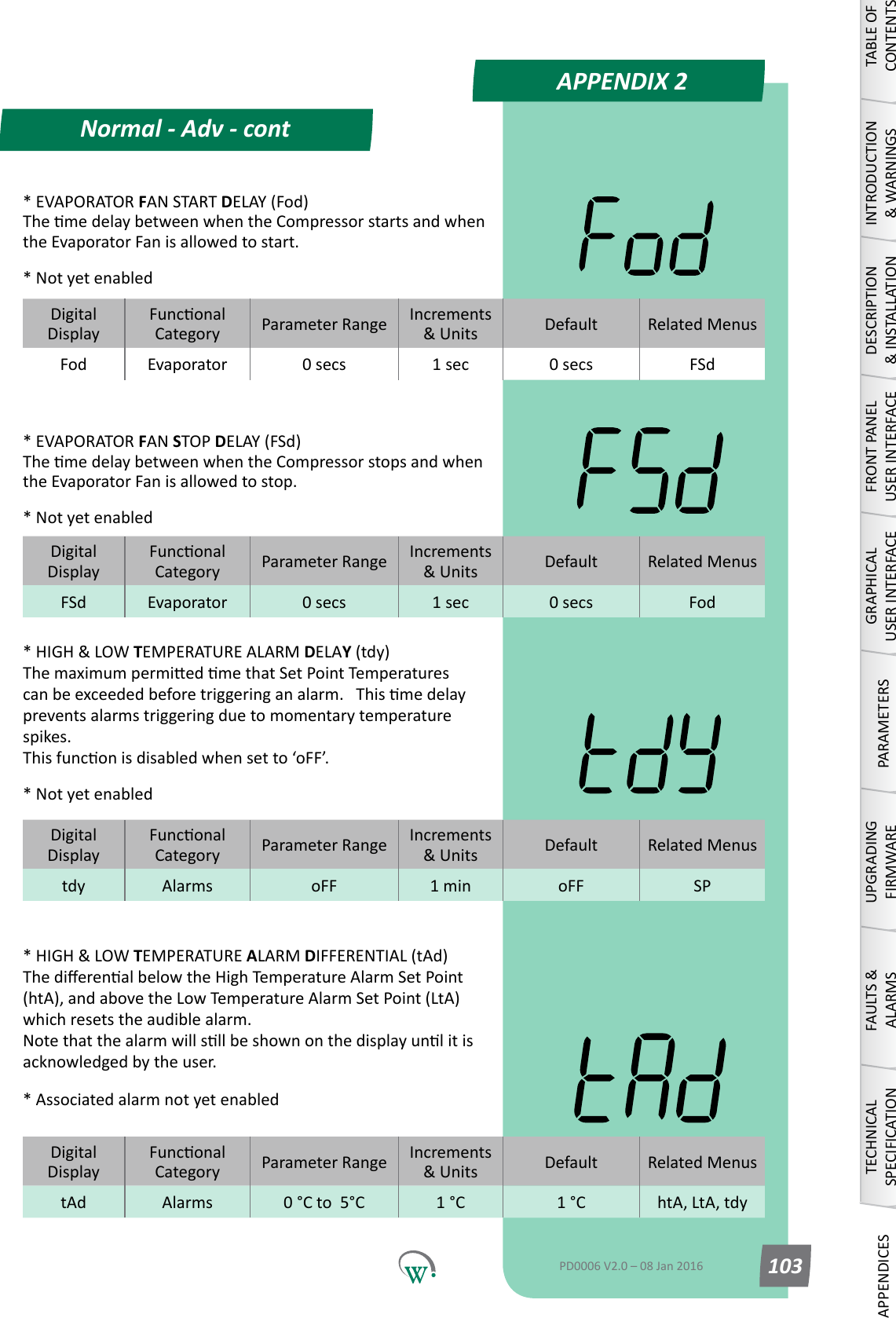
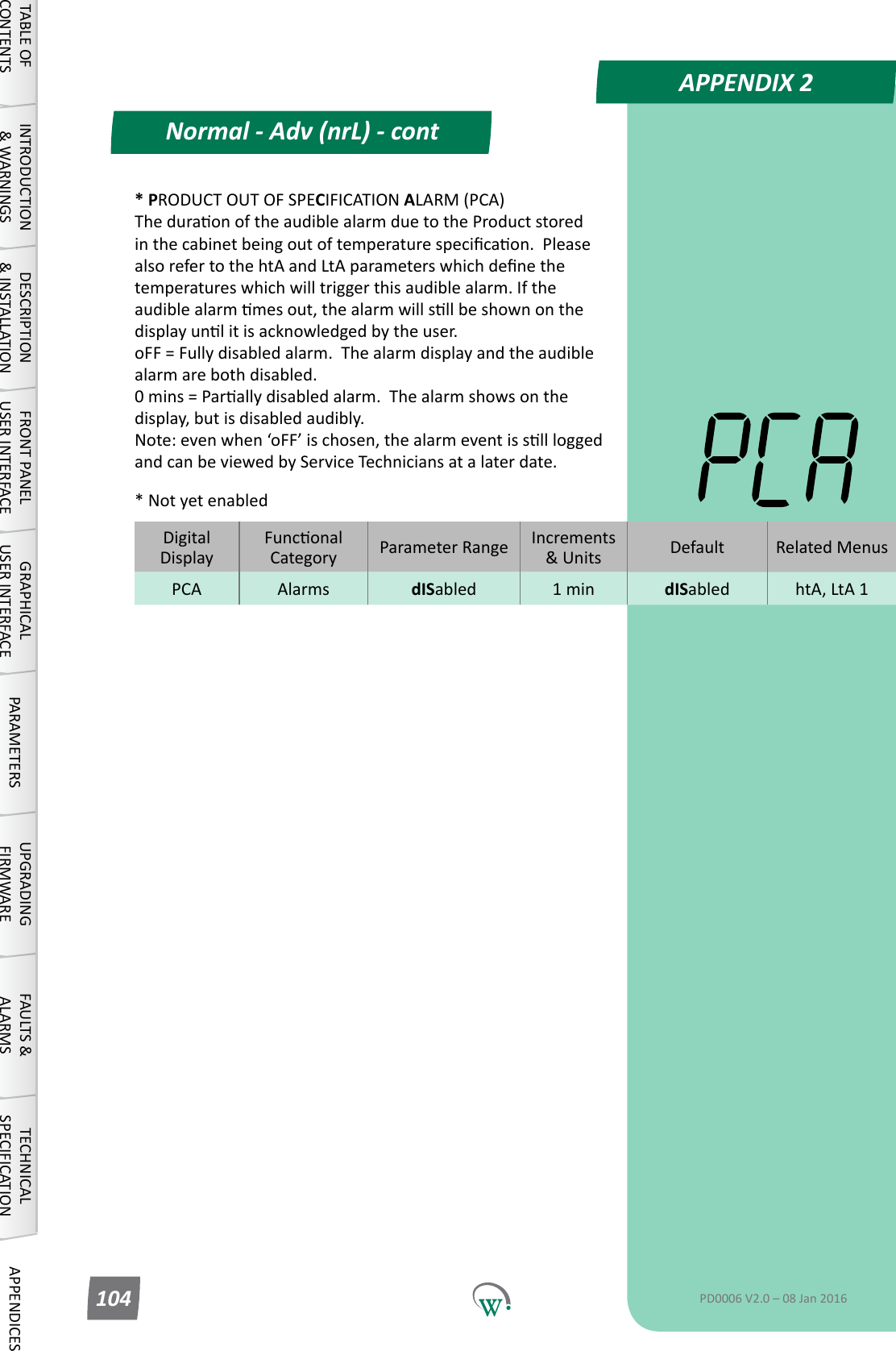
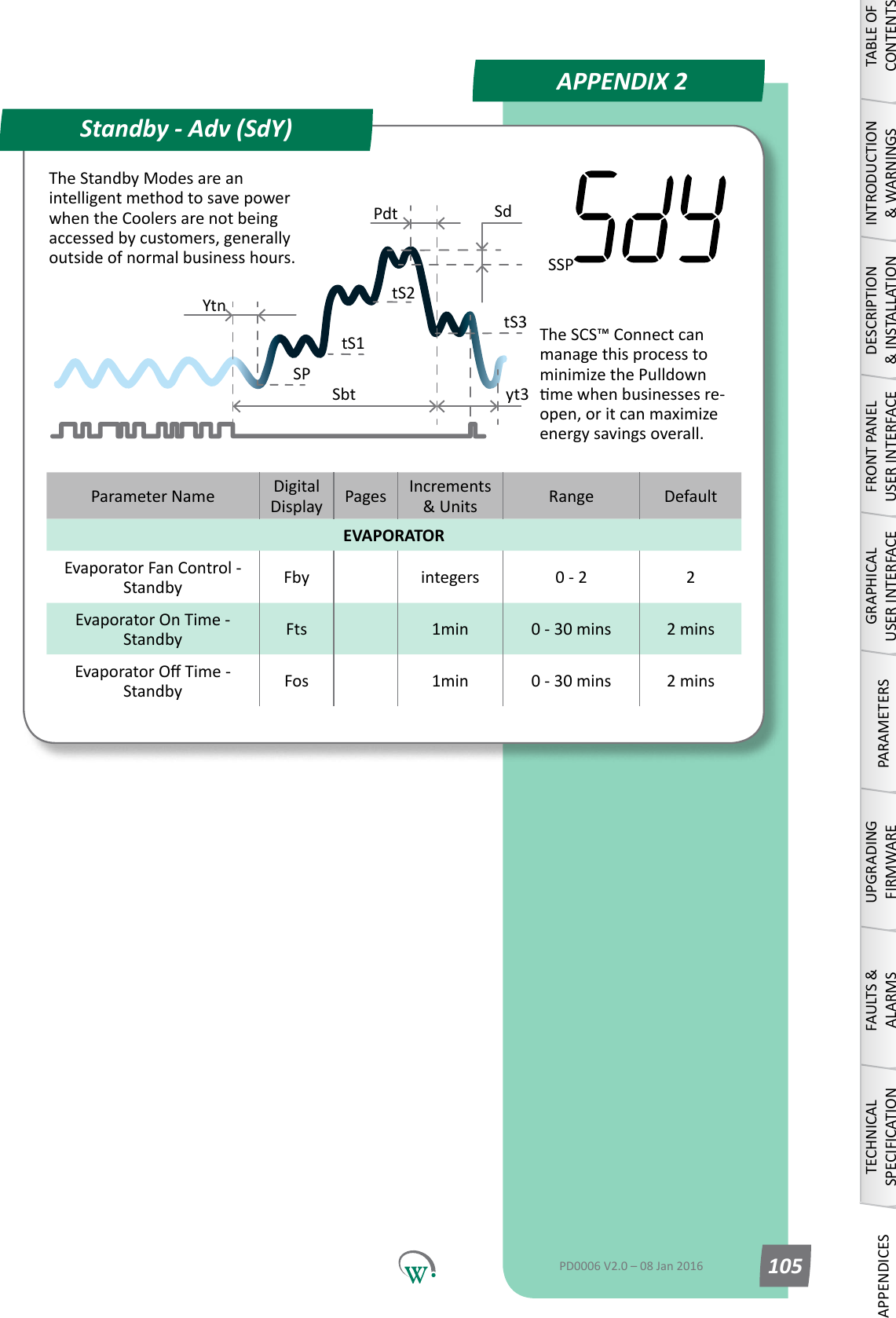
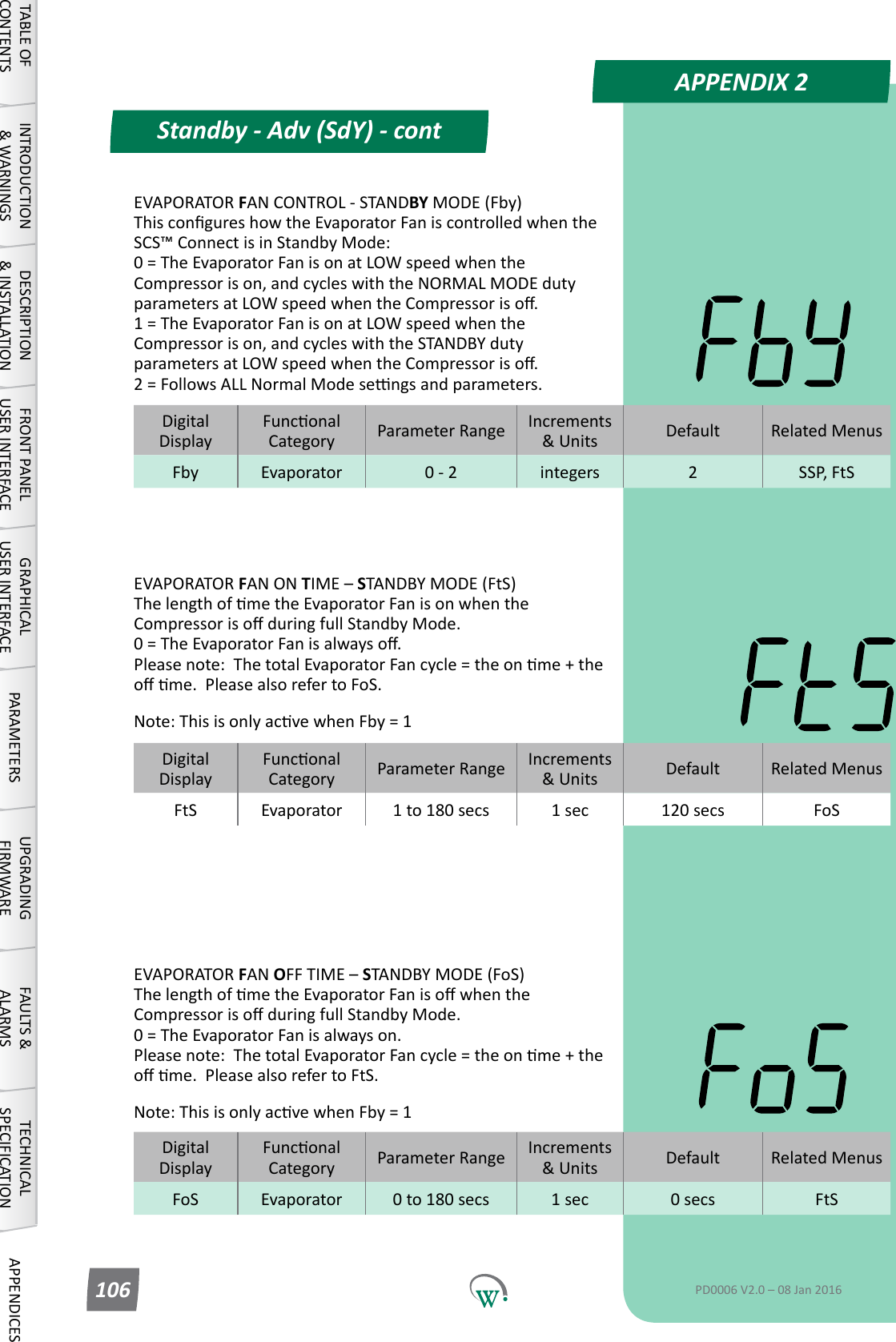
Wellington Drive Technologies SCS1 SCS Connect User Manual

Wellington Drive Technologies Ltd SCS Connect Users Manual

Users Manual

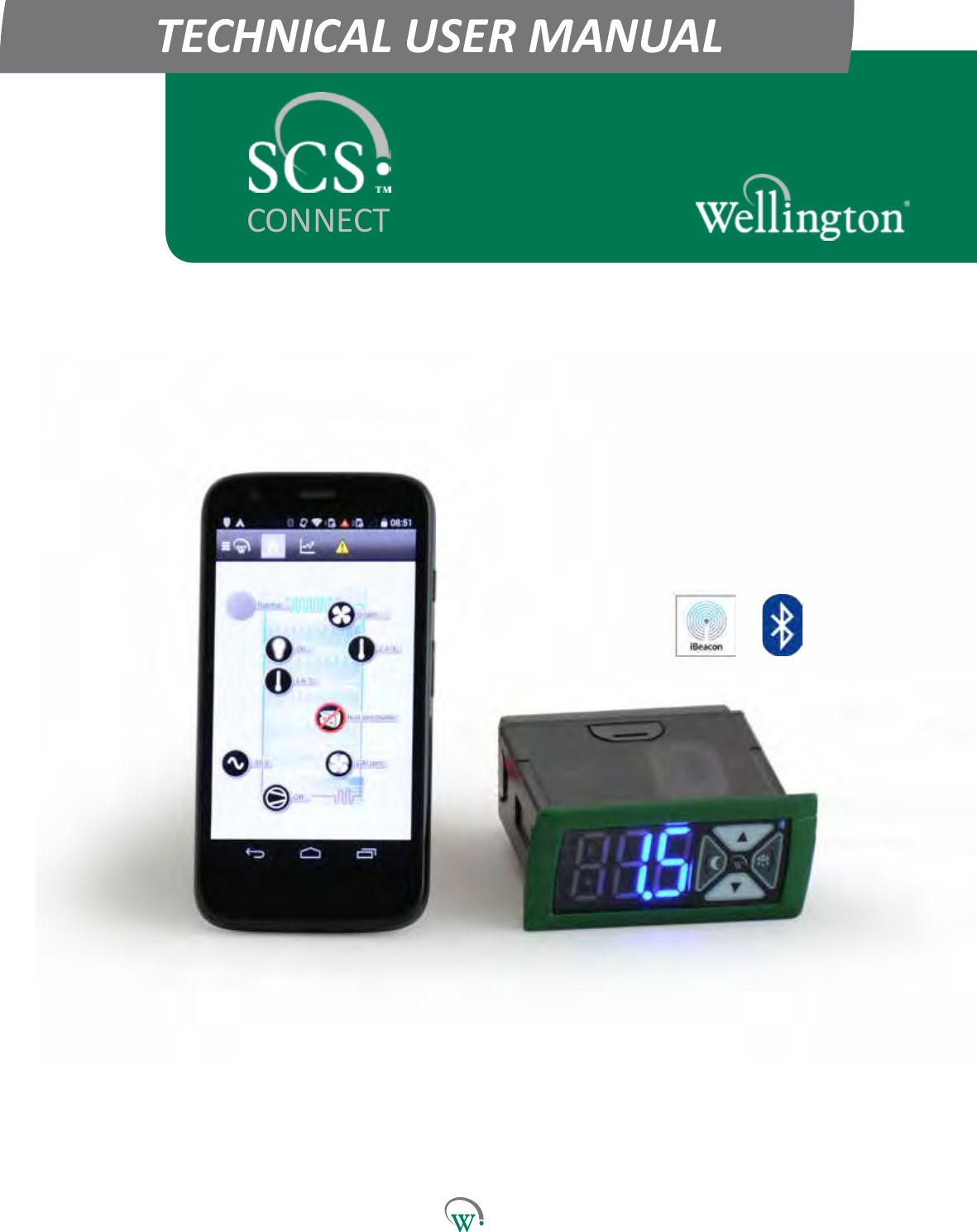
TECHNICAL USER MANUALCONNECT
 © 2016 Wellington Drive Technologies Limited Saving Generaon for the Next Generaon21 Arrenway Drive, Rosedale, Auckland 0632, New Zealand PO Box 302-533, North Harbour, Auckland 0751, New ZealandPhone:    + 64 9 477 4500,  Fax:   + 64 9 479 5540, Email: info@wdtl.com  Website: www.wdtl.com
1  TECHNICAL USER MANUAL3  TABLE OF CONTENTS4 WARNINGS!7 INTRODUCTION8  PRODUCT DESCRIPTION8    Front Display Panel9    Rear Connector Panel10  InstallaonDiagrams12  WiringDiagrams13  OperangCycle17  START UP SEQUENCE18  FRONT PANEL USER INTERFACE18    User Mode19    Service Mode22  GRAPHICAL USER INTERFACES23  Authencaon24  ConnecngtoaDevice25  ParameterEding27 PARAMETERS27    Normal Mode (nrL)33  Transion1Mode(tn1)36  Transion2Mode(tn2)39    Standby Mode (SdY)44  Transion3Mode(tn3)47    Defrost Mode (dEF)51    Door Menu (dor)54    Compressor Menu (CoP)56    Supply Menu (nrG)57    Display Menu (dSP)59    Hardware Set Up Menu (HSu)73  LoggingMenu(LoG)74  UPGRADING FIRMWARE76  TECHNICAL SPECIFICATIONS80 GLOSSARY85  FAULTS AND ALARMS96  APPENDIX 196    Full Parameter ListQuick ReadTABLE OF CONTENTSTABLE OF CONTENTSINTRODUCTION & WARNINGSDESCRIPTION & INSTALLATIONFRONT PANEL USER INTERFACEGRAPHICAL USER INTERFACEPARAMETERSUPGRADING FIRMWAREFAULTS & ALARMSTECHNICAL SPECIFICATIONAPPENDICESPD0006 V2.0 – 08 Jan 2016 3
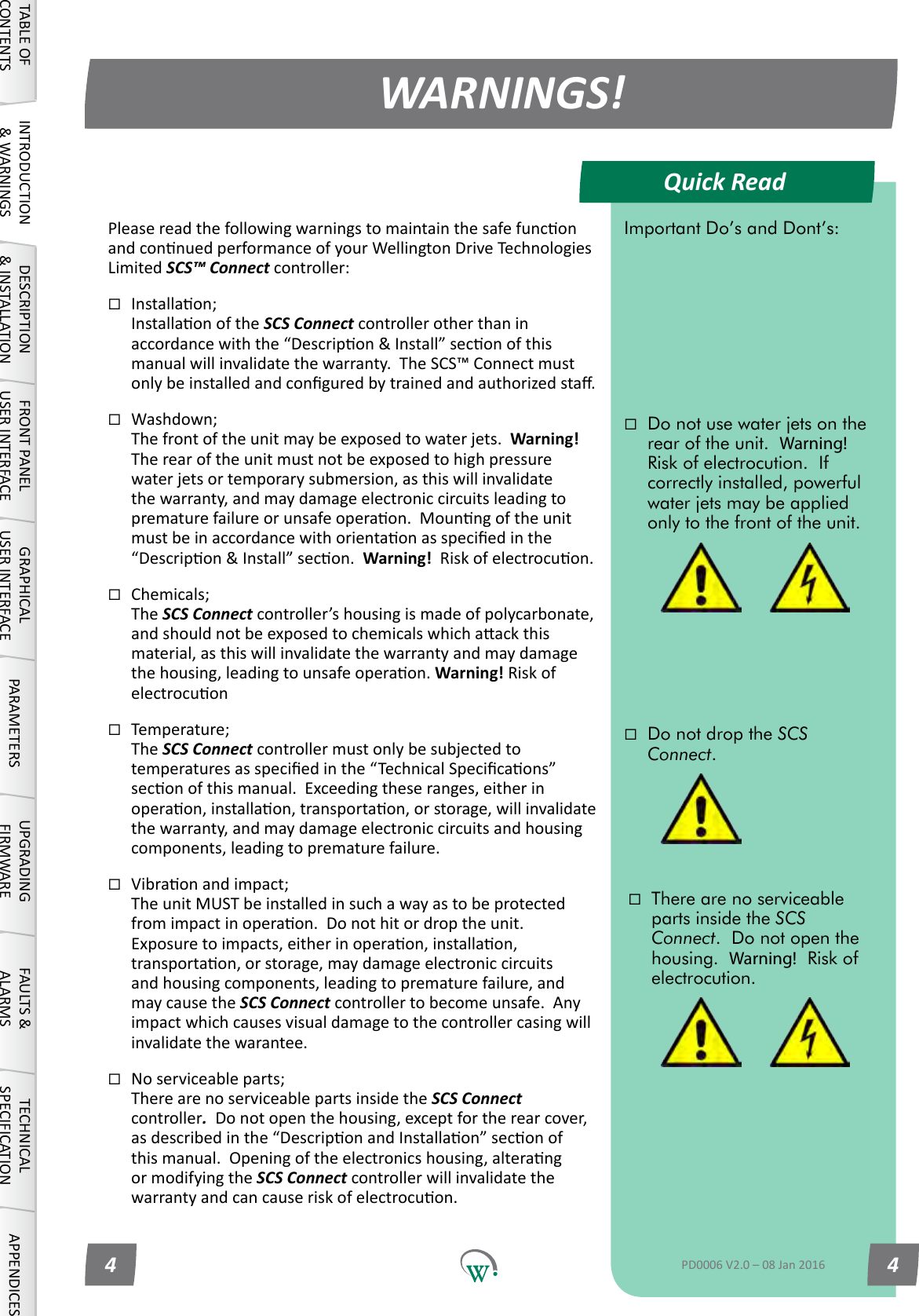
Quick ReadWARNINGS!TABLE OF CONTENTSINTRODUCTION & WARNINGSDESCRIPTION & INSTALLATIONFRONT PANEL USER INTERFACEGRAPHICAL USER INTERFACE PARAMETERS UPGRADING FIRMWAREFAULTS & ALARMSTECHNICAL SPECIFICATION APPENDICESImportant Do’s and Dont’s:Do not use water jets on the rear of the unit.  Warning!  Risk of electrocution.  If correctly installed, powerful water jets may be applied only to the front of the unit.Do not drop the SCS Connect.There are no serviceable parts inside the SCS Connect.  Do not open the housing.  Warning!  Risk of electrocution.PD0006 V2.0 – 08 Jan 20164 4PleasereadthefollowingwarningstomaintainthesafefunconandconnuedperformanceofyourWellingtonDriveTechnologiesLimited SCS™ Connect controller:Installaon; InstallaonoftheSCS Connect controller other than in accordancewiththe“Descripon&Install”seconofthismanual will invalidate the warranty.  The SCS™ Connect must onlybeinstalledandconguredbytrainedandauthorizedsta.Washdown; The front of the unit may be exposed to water jets.  Warning! Therearoftheunitmustnotbeexposedtohighpressurewater jets or temporary submersion, as this will invalidate thewarranty,andmaydamageelectroniccircuitsleadingtoprematurefailureorunsafeoperaon.Mounngoftheunitmustbeinaccordancewithorientaonasspeciedinthe“Descripon&Install”secon.Warning!Riskofelectrocuon.Chemicals; The SCS Connectcontroller’shousingismadeofpolycarbonate,andshouldnotbeexposedtochemicalswhichaackthismaterial,asthiswillinvalidatethewarrantyandmaydamagethehousing,leadingtounsafeoperaon.Warning! Risk of electrocuonTemperature; The SCS Connect controller must only be subjected to temperaturesasspeciedinthe“TechnicalSpecicaons”seconofthismanual.Exceedingtheseranges,eitherinoperaon,installaon,transportaon,orstorage,willinvalidatethewarranty,andmaydamageelectroniccircuitsandhousingcomponents,leadingtoprematurefailure.Vibraonandimpact; The unit MUST be installed in such a way as to be protected fromimpactinoperaon.Donothitordroptheunit.Exposuretoimpacts,eitherinoperaon,installaon,transportaon,orstorage,maydamageelectroniccircuitsandhousingcomponents,leadingtoprematurefailure,andmay cause the SCS Connect controller to become unsafe.  Any impactwhichcausesvisualdamagetothecontrollercasingwillinvalidate the warantee.Noserviceableparts; There are no serviceable parts inside the SCS Connect controller.Donotopenthehousing,exceptfortherearcover,asdescribedinthe“DescriponandInstallaon”seconofthismanual.Openingoftheelectronicshousing,alterangormodifyingtheSCS Connect controller will invalidate the warrantyandcancauseriskofelectrocuon.
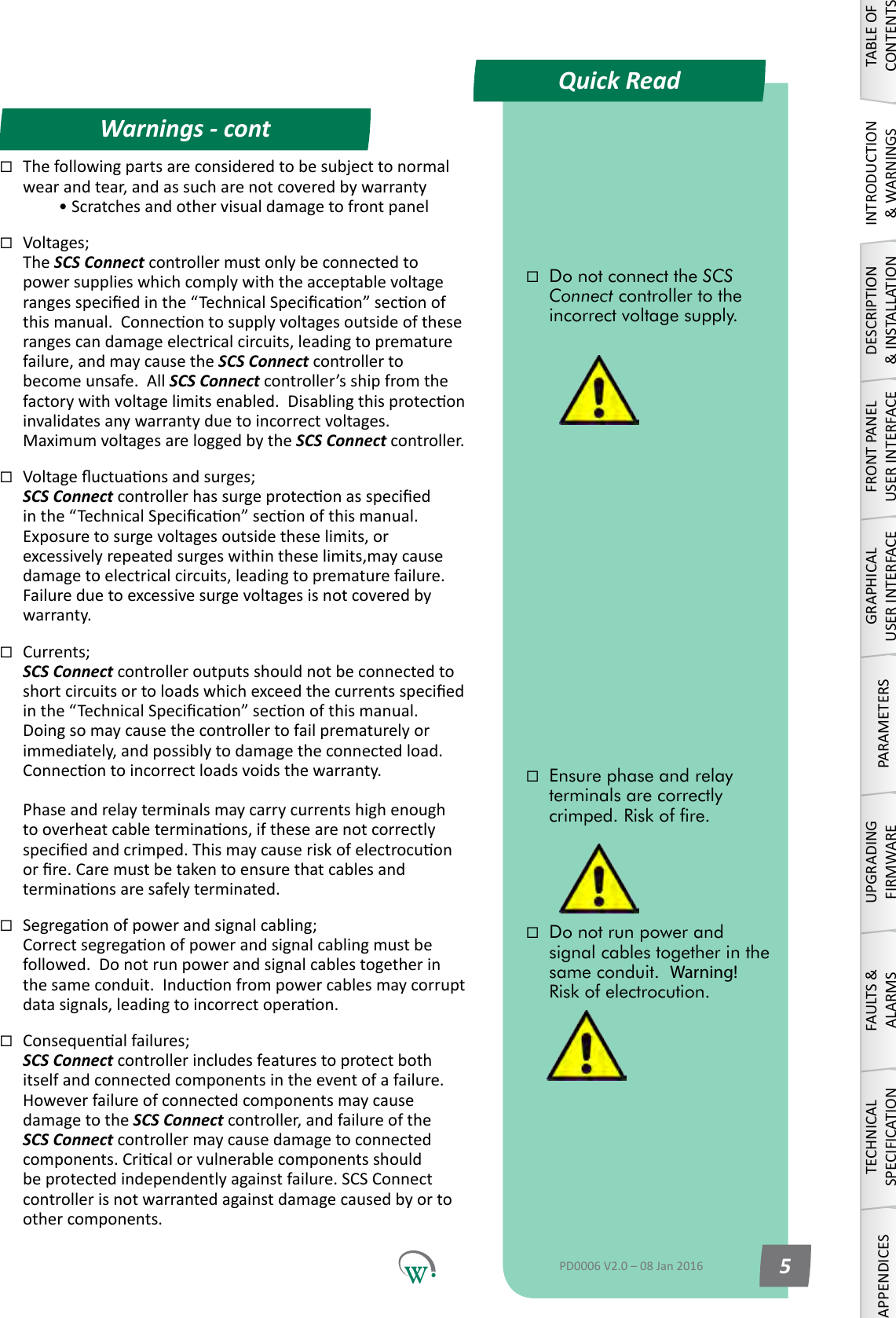
Quick ReadWarnings - contTABLE OF CONTENTSINTRODUCTION & WARNINGSDESCRIPTION & INSTALLATIONFRONT PANEL USER INTERFACEGRAPHICAL USER INTERFACEPARAMETERSUPGRADING FIRMWAREFAULTS & ALARMSTECHNICAL SPECIFICATIONAPPENDICESDo not run power and signal cables together in the same conduit.  Warning!  Risk of electrocution.Do not connect the SCS Connect controller to the incorrect voltage supply. Ensure phase and relay terminals are correctly crimped. Risk of re.PD0006 V2.0 – 08 Jan 2016 5Thefollowingpartsareconsideredtobesubjecttonormalwear and tear, and as such are not covered by warranty  •ScratchesandothervisualdamagetofrontpanelVoltages; The SCS Connect controller must only be connected to powersupplieswhichcomplywiththeacceptablevoltagerangesspeciedinthe“TechnicalSpecicaon”seconofthismanual.Connecontosupplyvoltagesoutsideoftheserangescandamageelectricalcircuits,leadingtoprematurefailure, and may cause the SCS Connect controller to become unsafe.  All SCS Connect controller’s ship from the factorywithvoltagelimitsenabled.Disablingthisproteconinvalidatesanywarrantyduetoincorrectvoltages.MaximumvoltagesareloggedbytheSCS Connect controller. Voltageuctuaonsandsurges; SCS Connectcontrollerhassurgeproteconasspeciedinthe“TechnicalSpecicaon”seconofthismanual.Exposuretosurgevoltagesoutsidetheselimits,orexcessivelyrepeatedsurgeswithintheselimits,maycausedamagetoelectricalcircuits,leadingtoprematurefailure.Failureduetoexcessivesurgevoltagesisnotcoveredbywarranty.Currents; SCS Connect controller outputs should not be connected to shortcircuitsortoloadswhichexceedthecurrentsspeciedinthe“TechnicalSpecicaon”seconofthismanual.Doingsomaycausethecontrollertofailprematurelyorimmediately,andpossiblytodamagetheconnectedload.Connecontoincorrectloadsvoidsthewarranty.  Phaseandrelayterminalsmaycarrycurrentshighenoughtooverheatcableterminaons,ifthesearenotcorrectlyspeciedandcrimped.Thismaycauseriskofelectrocuonorre.Caremustbetakentoensurethatcablesandterminaonsaresafelyterminated.Segregaonofpowerandsignalcabling; Correctsegregaonofpowerandsignalcablingmustbefollowed.Donotrunpowerandsignalcablestogetherinthesameconduit.Induconfrompowercablesmaycorruptdatasignals,leadingtoincorrectoperaon.Consequenalfailures; SCS Connect controller includes features to protect both itself and connected components in the event of a failure. However failure of connected components may cause damagetotheSCS Connect controller, and failure of the SCS Connectcontrollermaycausedamagetoconnectedcomponents.Cricalorvulnerablecomponentsshouldbeprotectedindependentlyagainstfailure.SCSConnectcontrollerisnotwarrantedagainstdamagecausedbyortoother components.
Quick ReadWarnings - contTABLE OF CONTENTSINTRODUCTION & WARNINGSDESCRIPTION & INSTALLATIONFRONT PANEL USER INTERFACEGRAPHICAL USER INTERFACE PARAMETERS UPGRADING FIRMWAREFAULTS & ALARMSTECHNICAL SPECIFICATION APPENDICESThe SCS Connect controller must only be used for the purposes described in this manual.The SCS Connect controller must not be disposed off in municipal collections; it must be disposed off through an approved e-waste collection point.The design and specication of the SCS Connect controller is subject to change without warning.PD0006 V2.0 – 08 Jan 20166Fitforpurpose; The SCS Connect controller must only be used for the purposeandfunconsdescribedinthismanual.WhileWellingtonDriveTechnologiesLimitedmayprovidetechnicalsupportonsuitableapplicaonsandconguraonof the SCS Connectcontroller(wheresucharelaonshipmay exist), no liability, responsibility or risk is accepted in determiningiftheSCS Connectcontrolleristforpurposeforanyparcularapplicaon.Aseachdierentapplicaonrequiresadierentconguraonofcontrollingparameters,noliability,responsibilityorriskisacceptedbyWellingtonDriveTechnologiesLimitedforthecorrectoperaonalfunconofanyparcularinstallaonorconguraon.Connuousdevelopment; WellingtonDriveTechnologiesLimitedundertakestoconnuouslydevelopandimproveproductsandservices.ThedesignandspecicaonfortheSCS Connect controller issubjecttochangewithoutwarning.Thecontentsofthismanualaresubjecttochangewithoutwarning.Whileeveryendeavourismadetoensurethatallspecicaonsanddocumentsarecurrentandcomplete,WellingtonDriveTechnologiesLimitedacceptsnoliability,responsibilityorriskduetoomissionsorchangescausedbyconnuousimprovementanddesignchanges.Usersofthismanualshould verify that they have the current released version (publishedontheWellingtonDriveTechnologieswebsitewww.wdtl.com)beforeproceeding.Correctdisposal; The SCS ConnectcontrollerissubjecttoEUDirecve2002/96/EC (WEEE) for e-waste.  It may also be subject to othernaonallegislaonforthesafedisposalofe-waste.The SCS Connectcontrollermustnotbedisposedoinmunicipalcollecons;itmustbedisposedothroughanapprovedWEEEcolleconpoint.Alternavely,theSCS ConnectcontrollermaybereturnedtoanauthorizedWellingtonDriveTechnologiesLimiteddistributorattheendofitsworkinglife.Penalesmaybeapplicableforincorrectdisposal,asspeciedbynaonallegislaon.Thecircuitboardmaycontainhazardoussubstanceswhichcouldaecthealthandtheenvironmentifdisposedoincorrectly.TheSCS ConnectcontrollercomplieswithEUDirecve2002/95/EC (RoHS).
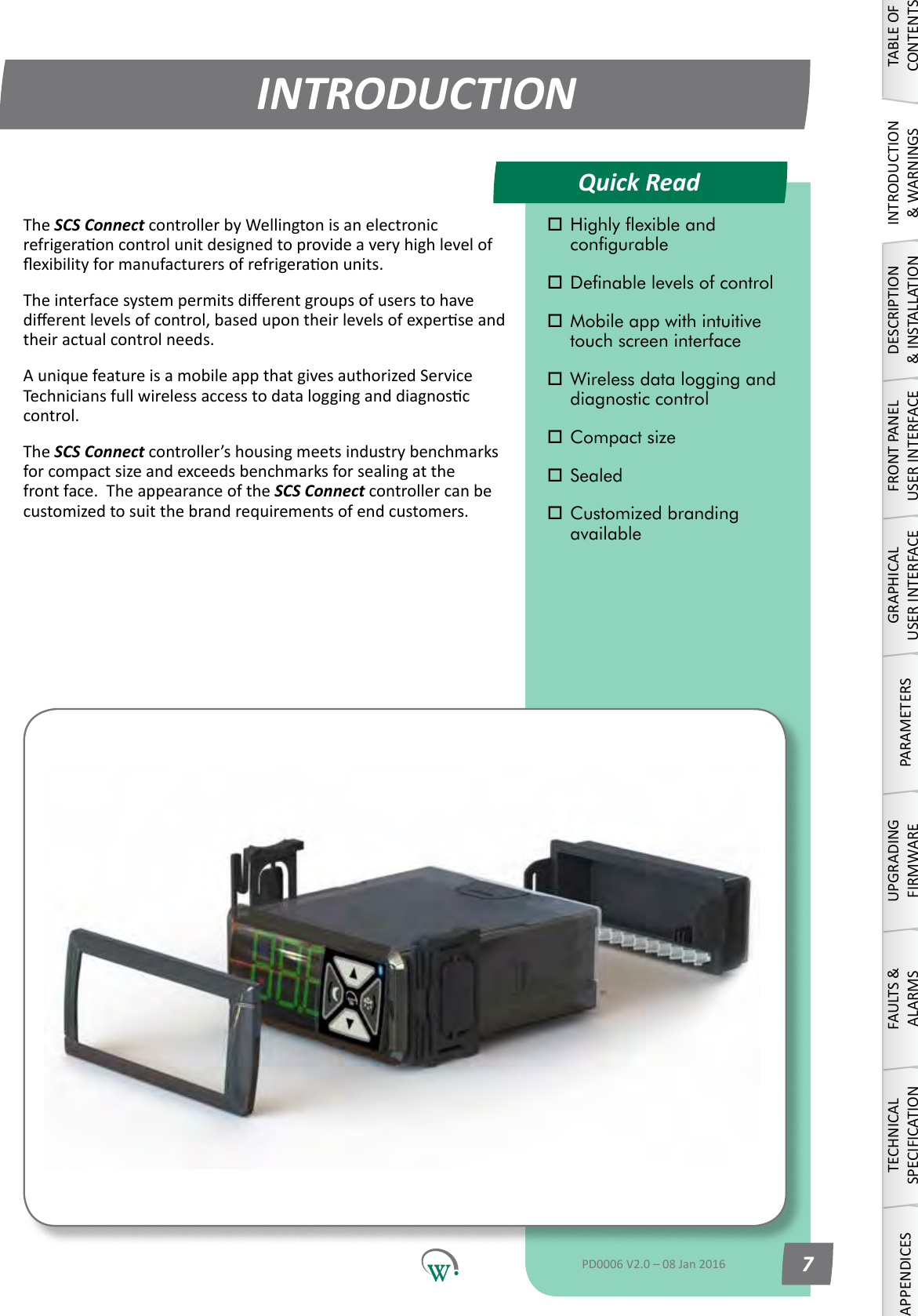
Quick ReadINTRODUCTIONTABLE OF CONTENTSINTRODUCTION & WARNINGSDESCRIPTION & INSTALLATIONFRONT PANEL USER INTERFACEGRAPHICAL USER INTERFACEPARAMETERSUPGRADING FIRMWAREFAULTS & ALARMSTECHNICAL SPECIFICATIONAPPENDICES Highly exible and      congurable Denable levels of control Mobile app with intuitive    touch screen interface Wireless data logging and    diagnostic control Compact size Sealed Customized branding     availablePD0006 V2.0 – 08 Jan 2016 7The SCS ConnectcontrollerbyWellingtonisanelectronicrefrigeraoncontrolunitdesignedtoprovideaveryhighlevelofexibilityformanufacturersofrefrigeraonunits.Theinterfacesystempermitsdierentgroupsofuserstohavedierentlevelsofcontrol,basedupontheirlevelsofexperseandtheir actual control needs.AuniquefeatureisamobileappthatgivesauthorizedServiceTechniciansfullwirelessaccesstodatalogginganddiagnosccontrol.The SCS Connectcontroller’shousingmeetsindustrybenchmarksforcompactsizeandexceedsbenchmarksforsealingatthefront face.  The appearance of the SCS Connect controller can be customizedtosuitthebrandrequirementsofendcustomers.
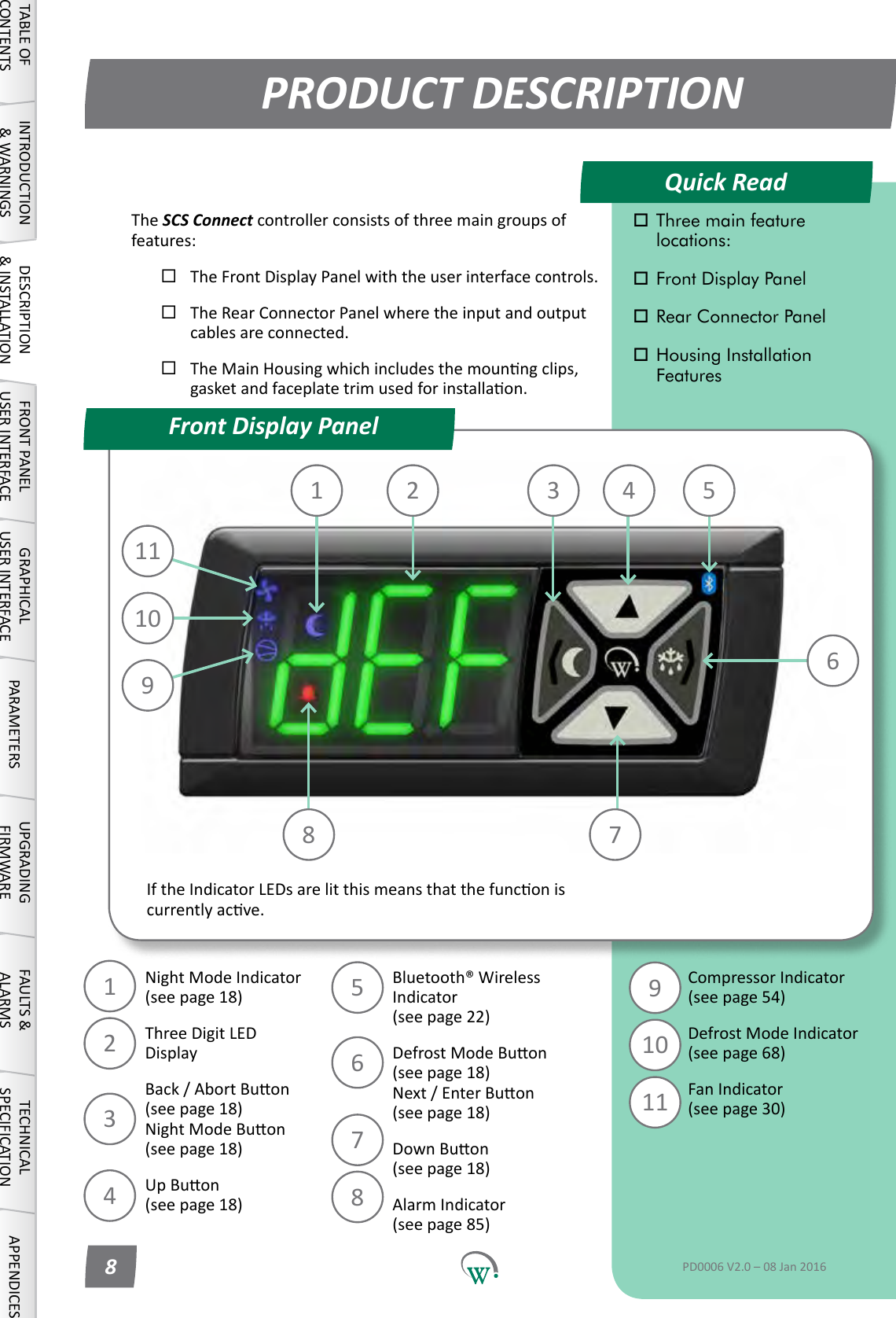
10111 2 3 4 567891011123456789Quick ReadPRODUCT DESCRIPTIONFront Display PanelTABLE OF CONTENTSINTRODUCTION & WARNINGSDESCRIPTION & INSTALLATIONFRONT PANEL USER INTERFACEGRAPHICAL USER INTERFACE PARAMETERS UPGRADING FIRMWAREFAULTS & ALARMSTECHNICAL SPECIFICATION APPENDICES Three main feature     locations: Front Display Panel Rear Connector Panel Housing Installation     FeaturesPD0006 V2.0 – 08 Jan 20168NightModeIndicator (seepage18)ThreeDigitLED DisplayBack/AbortBuon (seepage18) NightModeBuon (seepage18)UpBuon (seepage18)Bluetooth® Wireless Indicator (seepage22)DefrostModeBuon (seepage18) Next/EnterBuon (seepage18)DownBuon (seepage18)Alarm Indicator (seepage85)Compressor Indicator (seepage54)Defrost Mode Indicator (seepage68)Fan Indicator (seepage30)The SCS Connectcontrollerconsistsofthreemaingroupsoffeatures:The Front Display Panel with the user interface controls.The Rear Connector Panel where the input and output cables are connected.TheMainHousingwhichincludesthemounngclips,gasketandfaceplatetrimusedforinstallaon.IftheIndicatorLEDsarelitthismeansthatthefunconiscurrentlyacve.
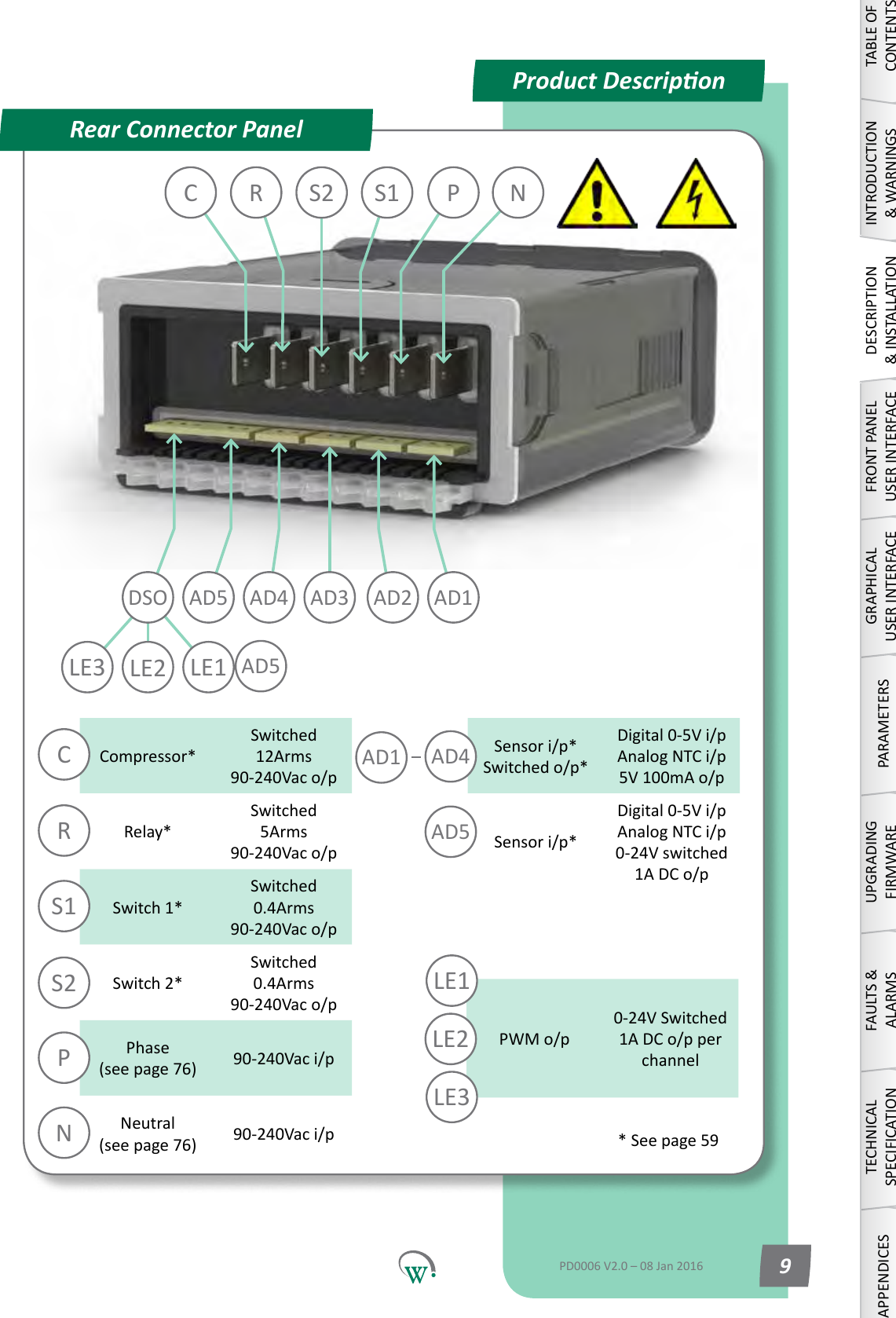
AD5Compressor*Switched 12Arms 90-240Vac o/pRelay*Switched 5Arms 90-240Vac o/pSwitch 1*Switched 0.4Arms 90-240Vac o/pSwitch 2*Switched 0.4Arms 90-240Vac o/pPhase (seepage76) 90-240Vac i/pNeutral (seepage76) 90-240Vac i/pSensor i/p* Switched o/p*Digital0-5Vi/p AnalogNTCi/p 5V 100mA o/pSensor i/p*Digital0-5Vi/p AnalogNTCi/p 0-24V switched 1A DC o/pPWM o/p0-24V  Switched  1A DC o/p per channelRPCS1S2NAD4AD5LE1AD1LE2LE3 LE2 LE1C R S1 P NS2AD3DSO AD5 AD4 AD2 AD1LE3Product DescriponRear Connector PanelTABLE OF CONTENTSINTRODUCTION & WARNINGSDESCRIPTION & INSTALLATIONFRONT PANEL USER INTERFACEGRAPHICAL USER INTERFACEPARAMETERSUPGRADING FIRMWAREFAULTS & ALARMSTECHNICAL SPECIFICATIONAPPENDICESPD0006 V2.0 – 08 Jan 2016 9*Seepage59
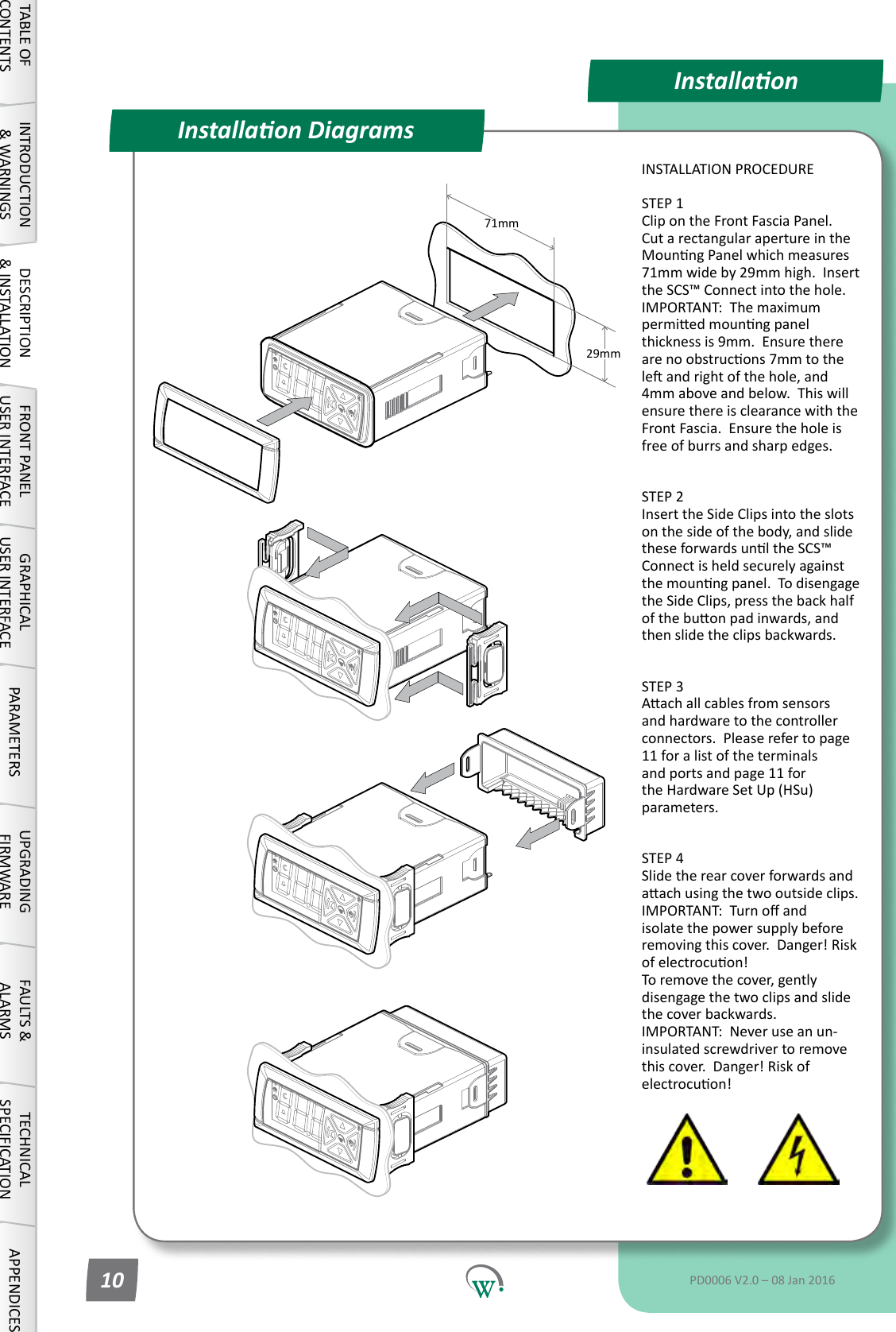
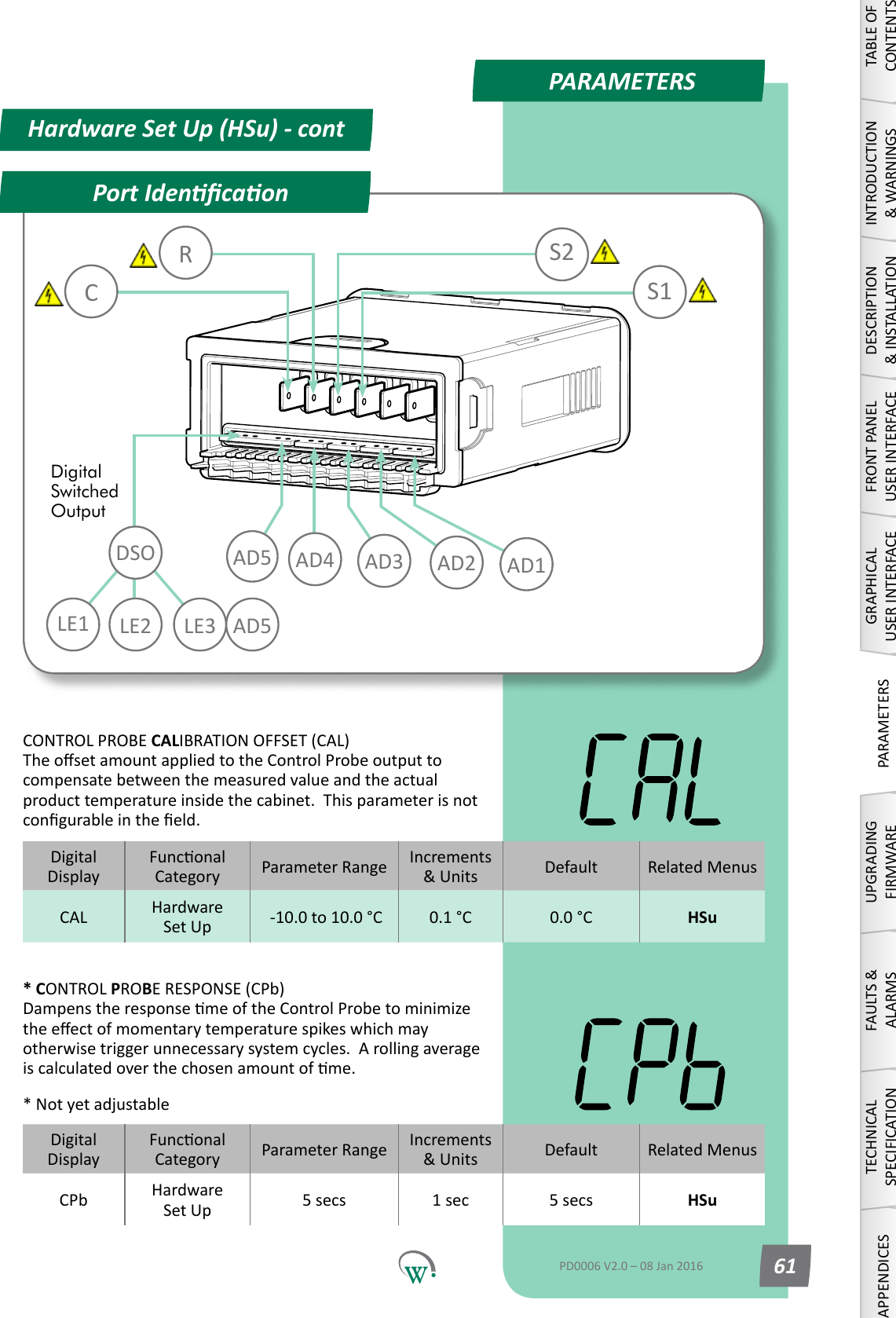
71mm29mmInstallaonInstallaon DiagramsINSTALLATION PROCEDURESTEP 1 Clip on the Front Fascia Panel.  CutarectangularapertureintheMounngPanelwhichmeasures71mmwideby29mmhigh.Insertthe SCS™ Connect into the hole.  IMPORTANT:  The maximum permiedmounngpanelthickness is 9mm.  Ensure there arenoobstrucons7mmtotheleandrightofthehole,and4mm above and below.  This will ensure there is clearance with the Front Fascia.  Ensure the hole is freeofburrsandsharpedges. STEP 2 Insert the Side Clips into the slots on the side of the body, and slide theseforwardsunltheSCS™Connectisheldsecurelyagainstthemounngpanel.Todisengagethe Side Clips, press the back half ofthebuonpadinwards,andthen slide the clips backwards. STEP 3 Aachallcablesfromsensorsand hardware to the controller connectors.Pleaserefertopage11 for a list of the terminals andportsandpage11forthe Hardware Set Up (HSu) parameters. STEP 4 Slide the rear cover forwards and aachusingthetwooutsideclips. IMPORTANT:Turnoandisolate the power supply before removingthiscover.Danger!Riskofelectrocuon! Toremovethecover,gentlydisengagethetwoclipsandslidethe cover backwards. IMPORTANT:  Never use an un-insulated screwdriver to remove thiscover.Danger!Riskofelectrocuon!TABLE OF CONTENTSINTRODUCTION & WARNINGSDESCRIPTION & INSTALLATIONFRONT PANEL USER INTERFACEGRAPHICAL USER INTERFACE PARAMETERS UPGRADING FIRMWAREFAULTS & ALARMSTECHNICAL SPECIFICATION APPENDICESPD0006 V2.0 – 08 Jan 201610
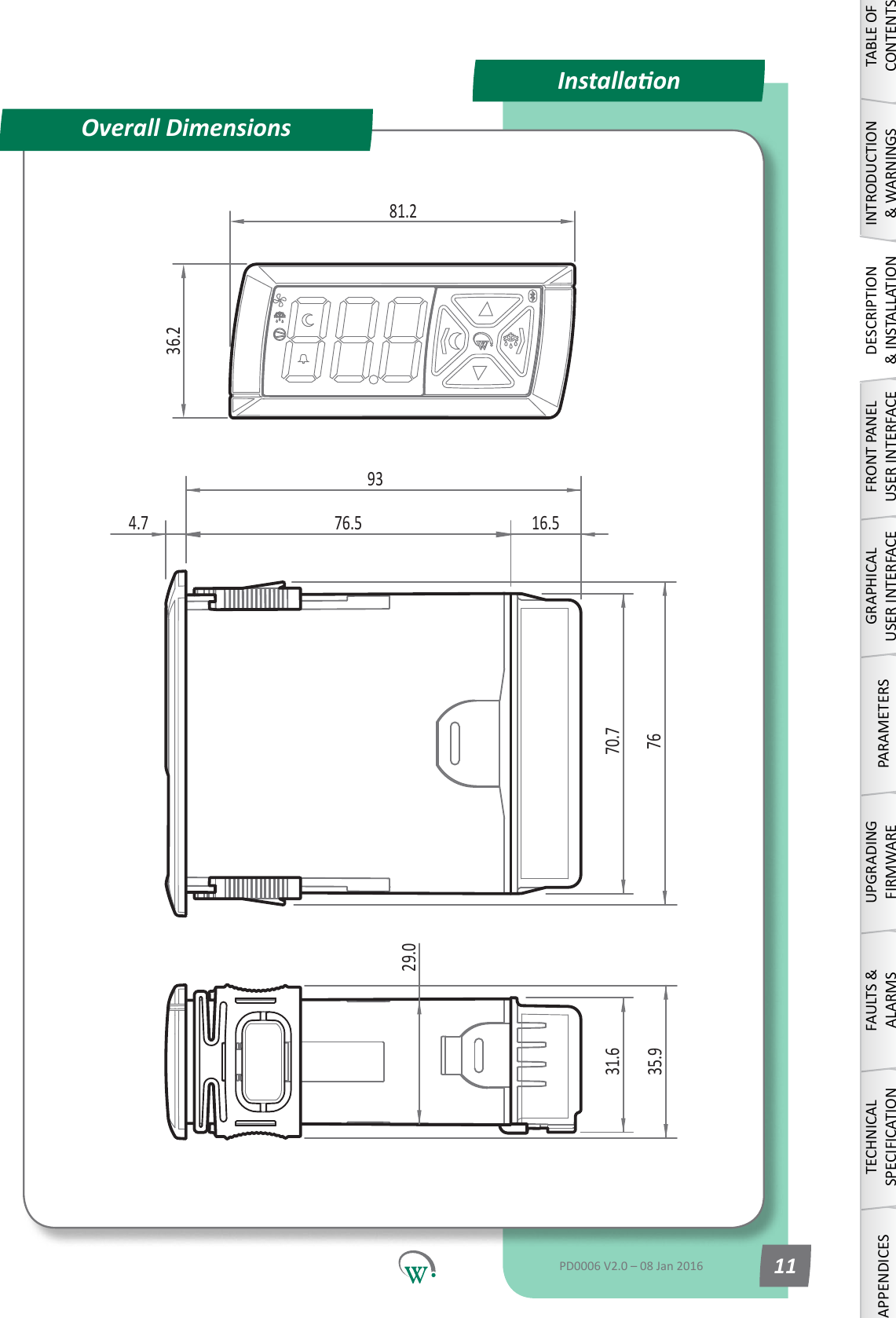
36.231.635.94.7 76.5 16.59370.77681.229.0InstallaonOverall DimensionsTABLE OF CONTENTSINTRODUCTION & WARNINGSDESCRIPTION & INSTALLATIONFRONT PANEL USER INTERFACEGRAPHICAL USER INTERFACEPARAMETERSUPGRADING FIRMWAREFAULTS & ALARMSTECHNICAL SPECIFICATIONAPPENDICESPD0006 V2.0 – 08 Jan 2016 11
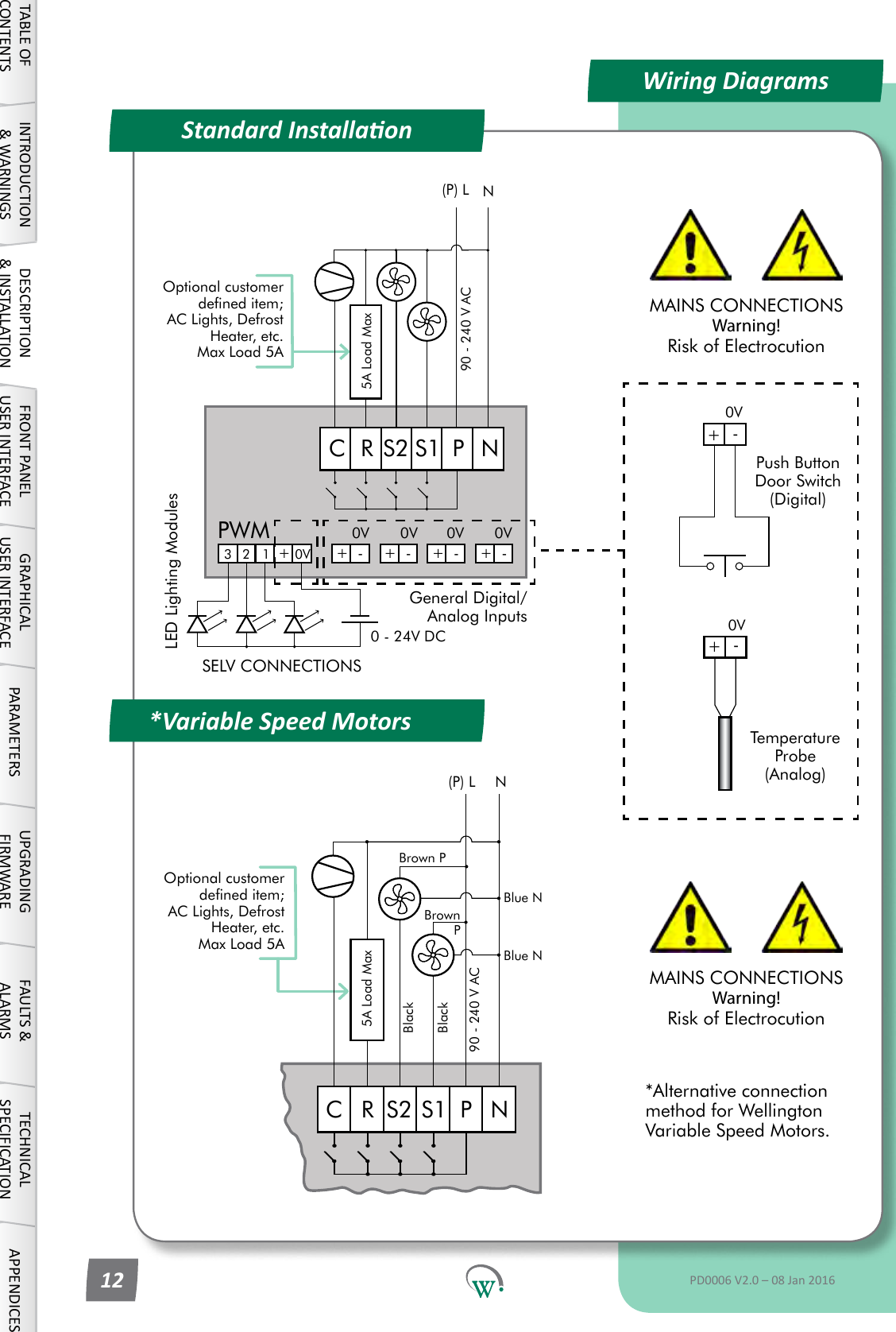
Wiring DiagramsStandard Installaon*Variable Speed MotorsPush Button Door Switch (Digital)Temperature Probe (Analog)MAINS CONNECTIONS Warning! Risk of ElectrocutionOptional customer dened item; AC Lights, Defrost Heater, etc. Max Load 5A90 - 240 V ACN5A Load Max(P) LNPC R S1S2+++++ ----12 0V0V0V0V0V0 - 24V DCLED Lighting ModulesPWMSELV CONNECTIONSGeneral Digital/Analog Inputs90 - 240 V AC5A Load MaxOptional customer dened item; AC Lights, Defrost Heater, etc. Max Load 5ANPC R S1S2N(P) LBlackBlackBrown PBrown PBlue NBlue N+-0V+-0VMAINS CONNECTIONS Warning! Risk of Electrocution*Alternative connection method for Wellington Variable Speed Motors.3TABLE OF CONTENTSINTRODUCTION & WARNINGSDESCRIPTION & INSTALLATIONFRONT PANEL USER INTERFACEGRAPHICAL USER INTERFACE PARAMETERS UPGRADING FIRMWAREFAULTS & ALARMSTECHNICAL SPECIFICATION APPENDICESPD0006 V2.0 – 08 Jan 201612
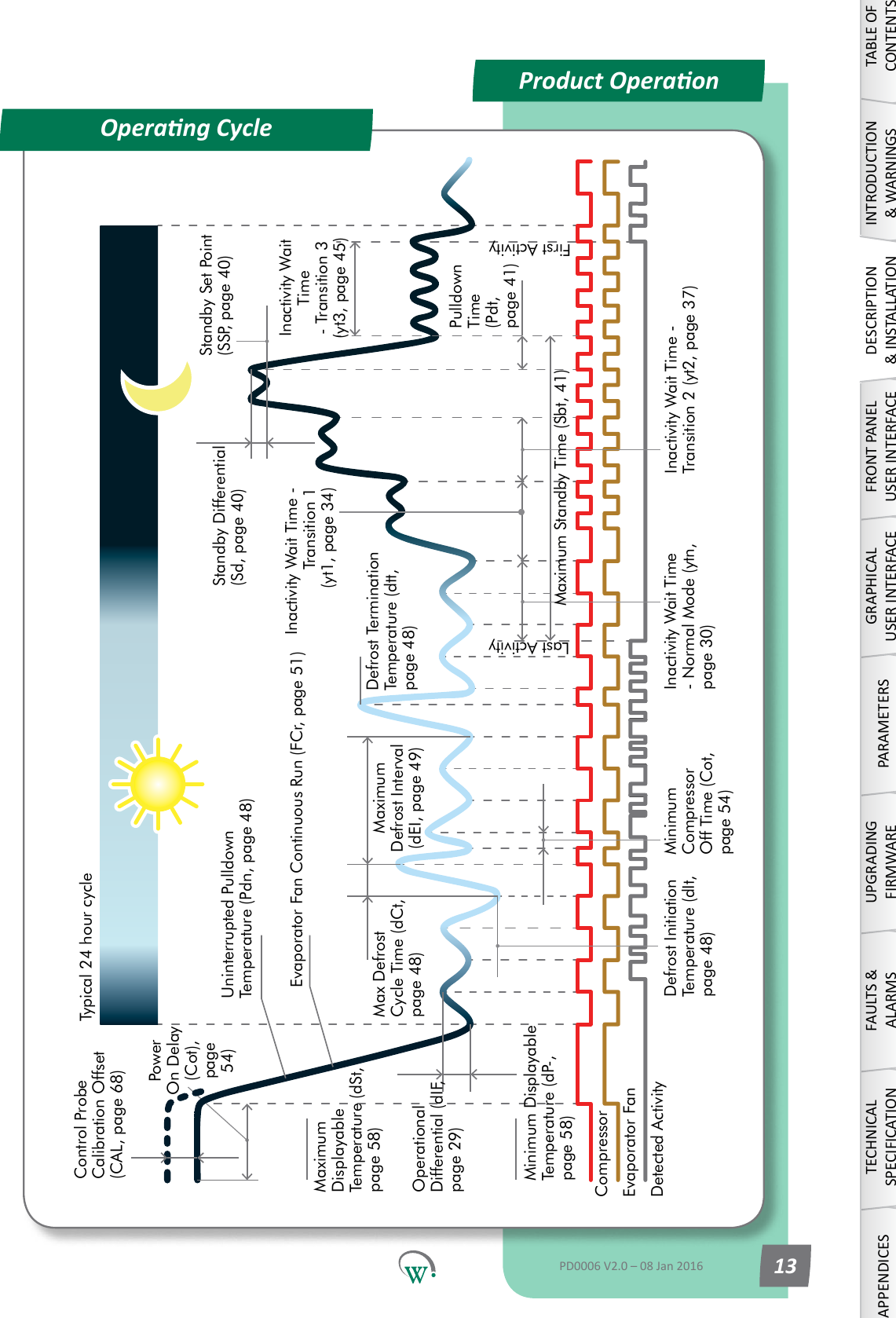
Product OperaonOperang CycleControl Probe Calibration Offset (CAL, page 68)Typical 24 hour cyclePower On Delay (Cot), page 54) Uninterrupted Pulldown Temperature (Pdn, page 48)Evaporator Fan Continuous Run (FCr, page 51)Maximum Displayable Temperature (dSt, page 58)Operational Differential (dIF, page 29)Minimum Displayable Temperature (dP-, page 58)Defrost Initiation Temperature (dIt, page 48)Max Defrost Cycle Time (dCt, page 48)Minimum Compressor Off Time (Cot, page 54)Maximum Defrost Interval (dEI, page 49)Defrost Termination Temperature (dtt, page 48)Inactivity Wait Time - Normal Mode (ytn, page 30)Last ActivityInactivity Wait Time - Transition 1 (yt1, page 34)Inactivity Wait Time - Transition 2 (yt2, page 37)Standby Differential (Sd, page 40)Standby Set Point (SSP, page 40)Maximum Standby Time (Sbt, 41)Pulldown Time (Pdt, page 41)Evaporator FanCompressorDetected ActivityInactivity Wait Time - Transition 3 (yt3, page 45)First ActivityTABLE OF CONTENTSINTRODUCTION & WARNINGSDESCRIPTION & INSTALLATIONFRONT PANEL USER INTERFACEGRAPHICAL USER INTERFACEPARAMETERSUPGRADING FIRMWAREFAULTS & ALARMSTECHNICAL SPECIFICATIONAPPENDICESPD0006 V2.0 – 08 Jan 2016 13
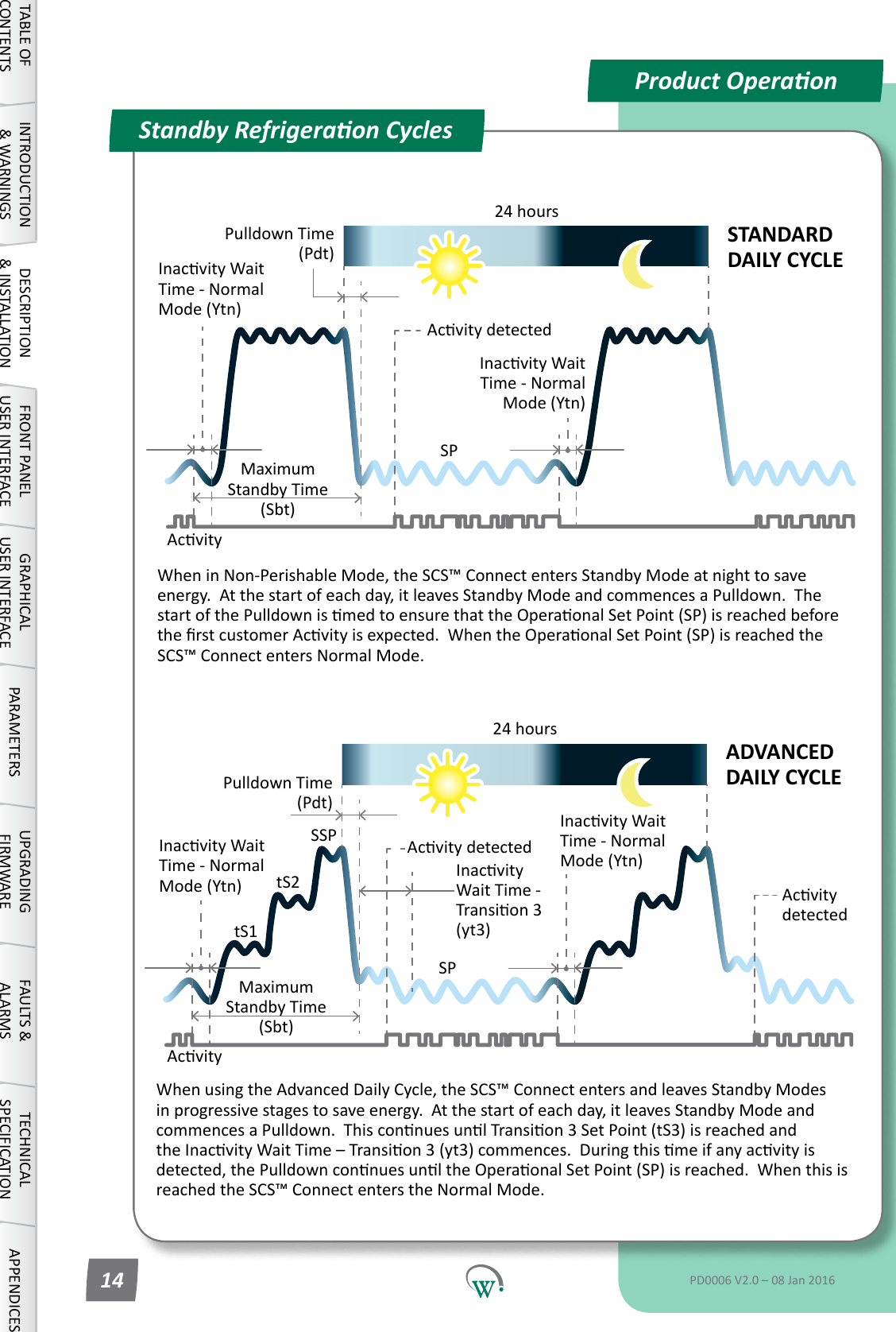
Product OperaonStandby Refrigeraon CyclesInacvityWaitTime - Normal Mode (Ytn)SPSSPPulldown Time (Pdt)InacvityWait Time - Transion3(yt3)AcvitydetectedInacvityWaitTime - Normal Mode (Ytn)Maximum Standby Time (Sbt)24 hourstS1tS2AcvitydetectedADVANCED DAILY CYCLEWhenusingtheAdvancedDailyCycle,theSCS™ConnectentersandleavesStandbyModesinprogressivestagestosaveenergy.Atthestartofeachday,itleavesStandbyModeandcommencesaPulldown.ThisconnuesunlTransion3SetPoint(tS3)isreachedandtheInacvityWaitTime–Transion3(yt3)commences.Duringthismeifanyacvityisdetected,thePulldownconnuesunltheOperaonalSetPoint(SP)isreached.Whenthisisreached the SCS™ Connect enters the Normal Mode.WheninNon-PerishableMode,theSCS™ConnectentersStandbyModeatnighttosaveenergy.Atthestartofeachday,itleavesStandbyModeandcommencesaPulldown.ThestartofthePulldownismedtoensurethattheOperaonalSetPoint(SP)isreachedbeforetherstcustomerAcvityisexpected.WhentheOperaonalSetPoint(SP)isreachedthe SCS™ Connect enters Normal Mode.InacvityWaitTime - Normal Mode (Ytn)SPPulldown Time (Pdt)InacvityWaitTime - Normal Mode (Ytn)Maximum Standby Time (Sbt)24 hoursAcvitydetectedSTANDARD DAILY CYCLEAcvityAcvityTABLE OF CONTENTSINTRODUCTION & WARNINGSDESCRIPTION & INSTALLATIONFRONT PANEL USER INTERFACEGRAPHICAL USER INTERFACE PARAMETERS UPGRADING FIRMWAREFAULTS & ALARMSTECHNICAL SPECIFICATION APPENDICESPD0006 V2.0 – 08 Jan 201614
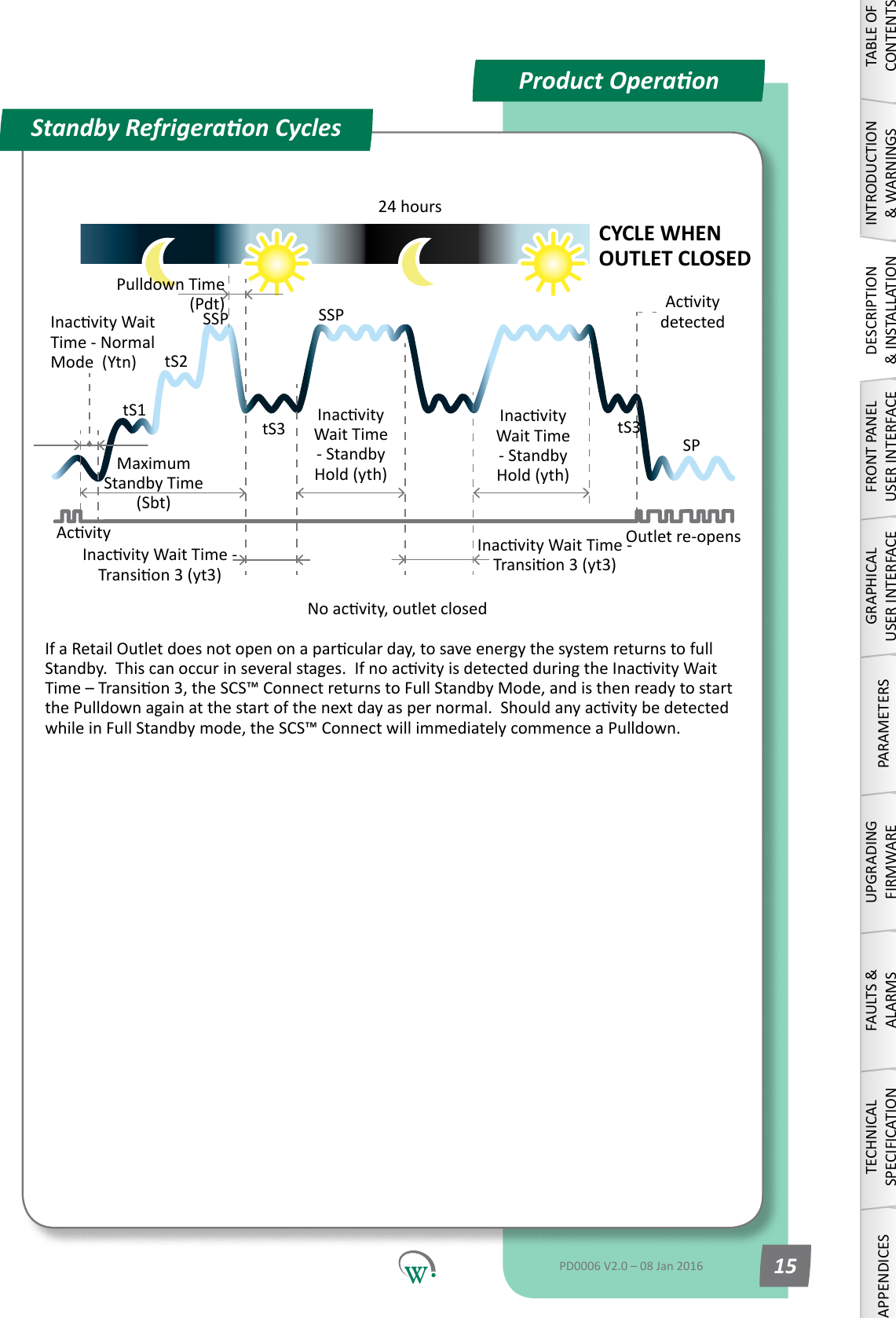
Product OperaonRefrigeraon CycleAcvityProduct OperaonStandby Refrigeraon CyclesMaximum Standby Time (Sbt)24 hoursPulldown Time (Pdt)InacvityWaitTime - Normal Mode  (Ytn)InacvityWaitTime-Transion3(yt3)SPSSPtS1tS2tS3SSPtS3AcvitydetectedCYCLE WHEN OUTLET CLOSEDNoacvity,outletclosedOutlet re-opensIfaRetailOutletdoesnotopenonaparcularday,tosaveenergythesystemreturnstofullStandby.Thiscanoccurinseveralstages.IfnoacvityisdetectedduringtheInacvityWaitTime–Transion3,theSCS™ConnectreturnstoFullStandbyMode,andisthenreadytostartthePulldownagainatthestartofthenextdayaspernormal.Shouldanyacvitybedetectedwhile in Full Standby mode, the SCS™ Connect will immediately commence a Pulldown.InacvityWait Time - Standby Hold (yth)InacvityWait Time - Standby Hold (yth)InacvityWaitTime-Transion3(yt3)TABLE OF CONTENTSINTRODUCTION & WARNINGSDESCRIPTION & INSTALLATIONFRONT PANEL USER INTERFACEGRAPHICAL USER INTERFACEPARAMETERSUPGRADING FIRMWAREFAULTS & ALARMSTECHNICAL SPECIFICATIONAPPENDICESPD0006 V2.0 – 08 Jan 2016 15
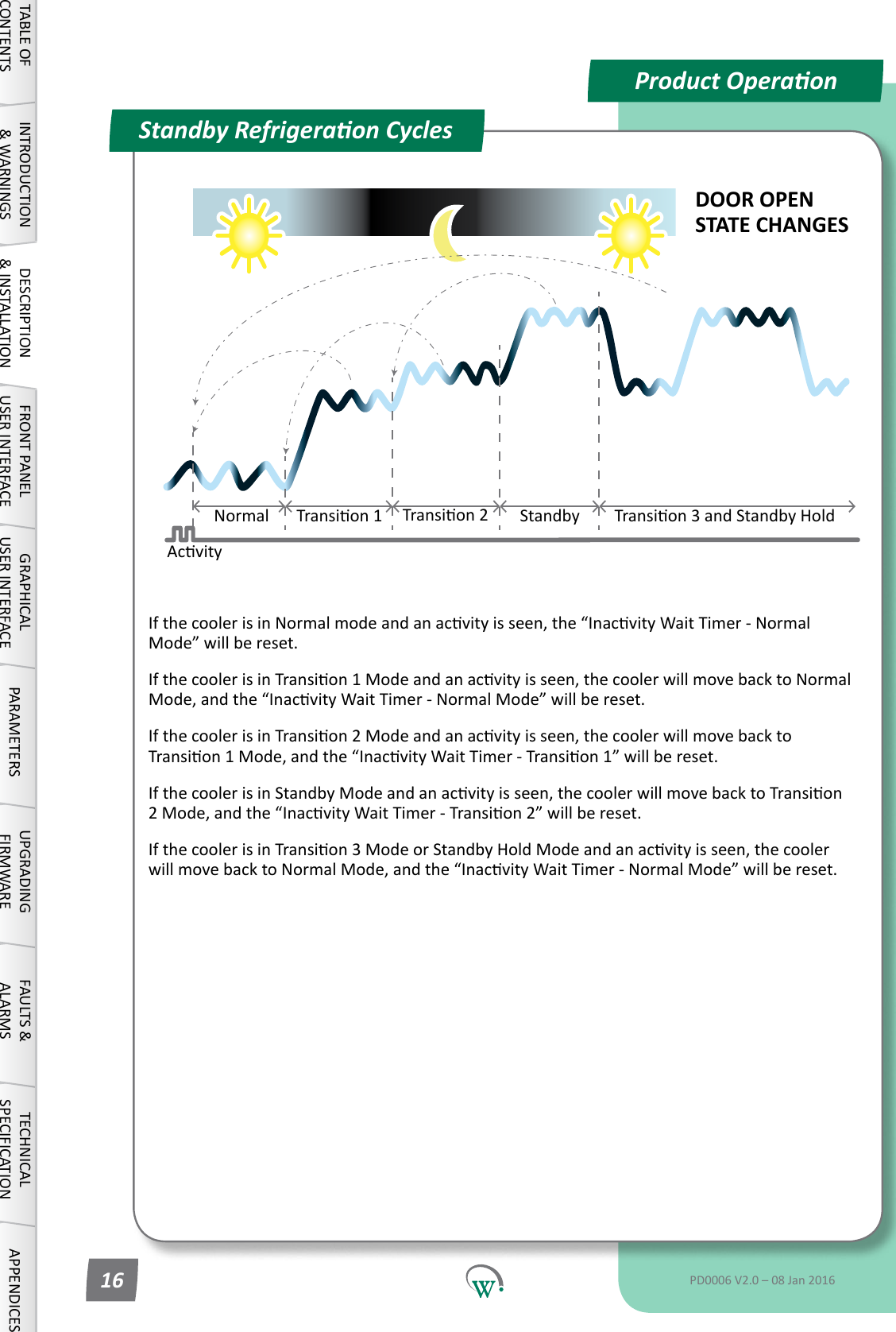
IfthecoolerisinNormalmodeandanacvityisseen,the“InacvityWaitTimer-NormalMode”willbereset.IfthecoolerisinTransion1Modeandanacvityisseen,thecoolerwillmovebacktoNormalMode,andthe“InacvityWaitTimer-NormalMode”willbereset.IfthecoolerisinTransion2Modeandanacvityisseen,thecoolerwillmovebacktoTransion1Mode,andthe“InacvityWaitTimer-Transion1”willbereset.IfthecoolerisinStandbyModeandanacvityisseen,thecoolerwillmovebacktoTransion2Mode,andthe“InacvityWaitTimer-Transion2”willbereset.IfthecoolerisinTransion3ModeorStandbyHoldModeandanacvityisseen,thecoolerwillmovebacktoNormalMode,andthe“InacvityWaitTimer-NormalMode”willbereset.AcvityProduct OperaonStandby Refrigeraon CyclesDOOR OPEN STATE CHANGESNormal Transion1 Transion2 Standby Transion3andStandbyHoldTABLE OF CONTENTSINTRODUCTION & WARNINGSDESCRIPTION & INSTALLATIONFRONT PANEL USER INTERFACEGRAPHICAL USER INTERFACE PARAMETERS UPGRADING FIRMWAREFAULTS & ALARMSTECHNICAL SPECIFICATION APPENDICESPD0006 V2.0 – 08 Jan 201616
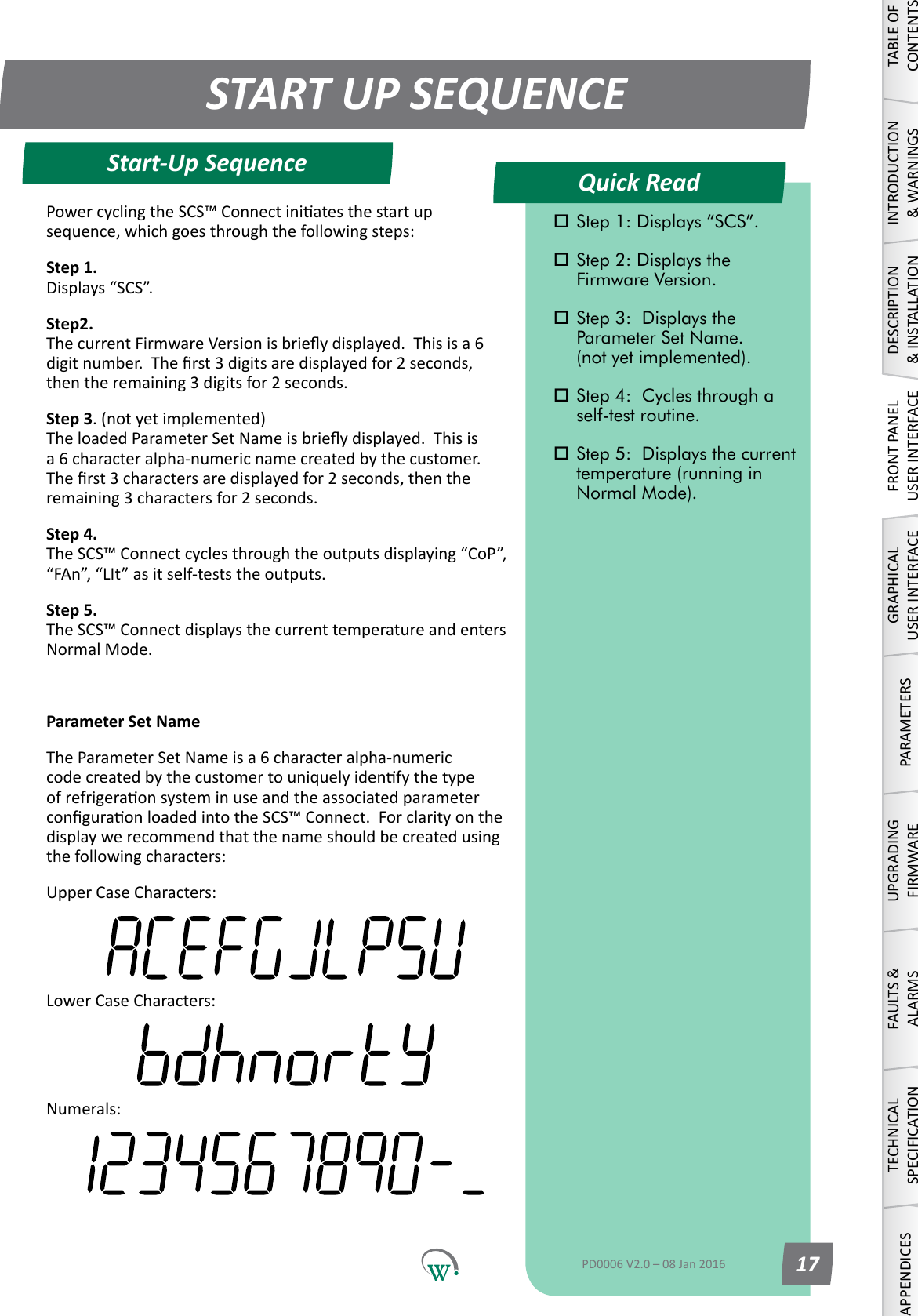
Quick ReadSTART UP SEQUENCEStart-Up SequenceTABLE OF CONTENTSINTRODUCTION & WARNINGSDESCRIPTION & INSTALLATIONFRONT PANEL USER INTERFACEGRAPHICAL USER INTERFACEPARAMETERSUPGRADING FIRMWAREFAULTS & ALARMSTECHNICAL SPECIFICATIONAPPENDICES Step 1: Displays “SCS”. Step 2: Displays the      Firmware Version. Step 3:  Displays the      Parameter Set Name.   (not yet implemented). Step 4:  Cycles through a    self-test routine. Step 5:  Displays the current    temperature (running in    Normal Mode).PD0006 V2.0 – 08 Jan 2016 17PowercyclingtheSCS™Connectiniatesthestartupsequence,whichgoesthroughthefollowingsteps:Step 1. Displays“SCS”.Step2. ThecurrentFirmwareVersionisbrieydisplayed.Thisisa6digitnumber.Therst3digitsaredisplayedfor2seconds,thentheremaining3digitsfor2seconds.Step 3. (not yet implemented) TheloadedParameterSetNameisbrieydisplayed.Thisisa 6 character alpha-numeric name created by the customer.  Therst3charactersaredisplayedfor2seconds,thentheremaining3charactersfor2seconds.Step 4. TheSCS™Connectcyclesthroughtheoutputsdisplaying“CoP”,“FAn”,“LIt”asitself-teststheoutputs.Step 5. The SCS™ Connect displays the current temperature and enters Normal Mode.Parameter Set NameThe Parameter Set Name is a 6 character alpha-numeric codecreatedbythecustomertouniquelyidenfythetypeofrefrigeraonsysteminuseandtheassociatedparameterconguraonloadedintotheSCS™Connect.Forclarityonthedisplaywerecommendthatthenameshouldbecreatedusingthefollowingcharacters:Upper Case Characters:Lower Case Characters:Numerals:
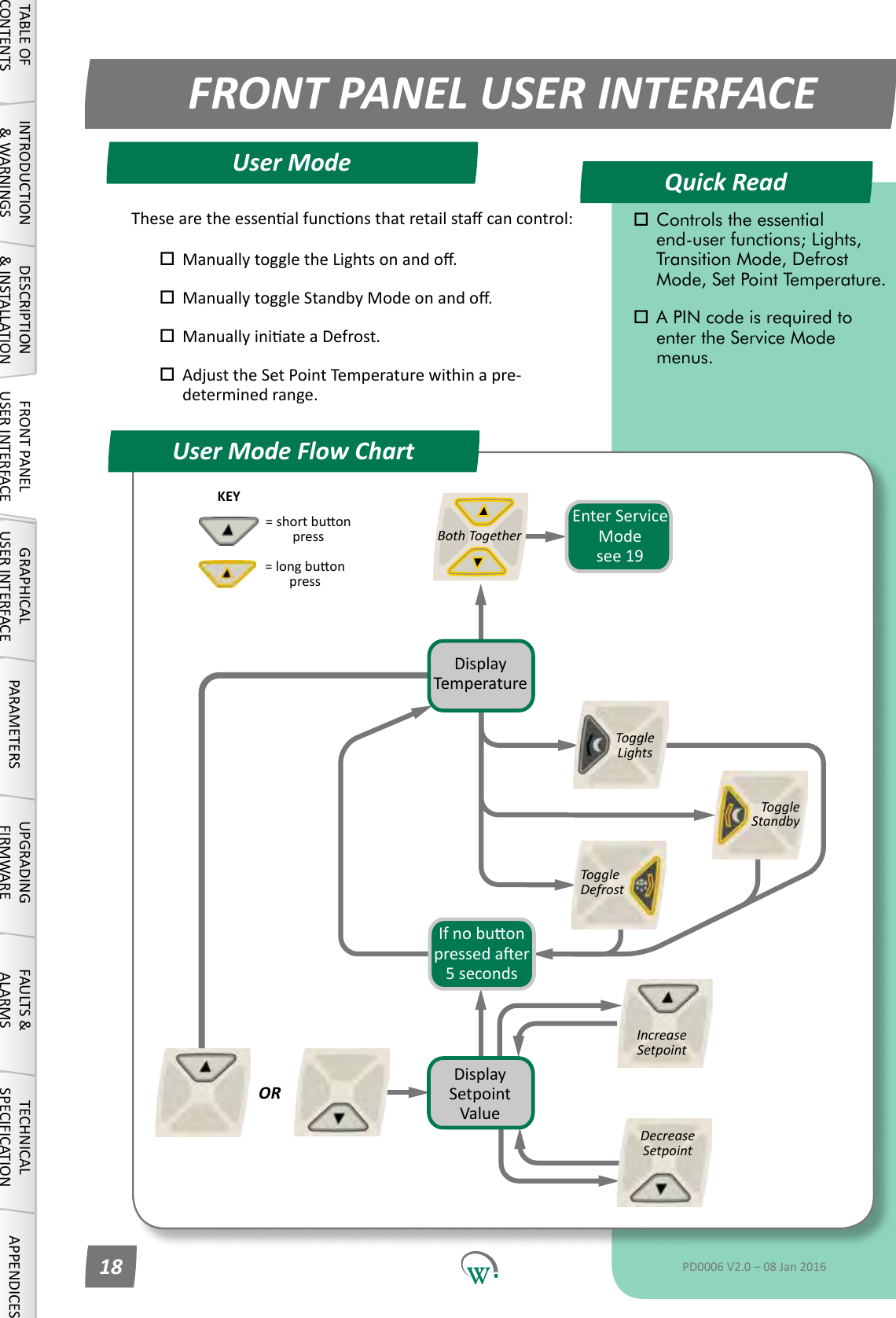
Quick ReadFRONT PANEL USER INTERFACEUser Mode Flow ChartUser ModeORDisplay TemperatureEnter Service Mode see 19Toggle LightsBoth TogetherKEY=shortbuonpress=longbuonpressDisplay Setpoint ValueIncrease SetpointDecrease SetpointIfnobuonpressedaer5 secondsToggle DefrostToggle StandbyTABLE OF CONTENTSINTRODUCTION & WARNINGSDESCRIPTION & INSTALLATIONFRONT PANEL USER INTERFACEGRAPHICAL USER INTERFACE PARAMETERS UPGRADING FIRMWAREFAULTS & ALARMSTECHNICAL SPECIFICATION APPENDICES Controls the essential      end-user functions; Lights,    Transition Mode, Defrost    Mode, Set Point Temperature. A PIN code is required to    enter the Service Mode    menus.PD0006 V2.0 – 08 Jan 201618Thesearetheessenalfunconsthatretailstacancontrol: ManuallytoggletheLightsonando. ManuallytoggleStandbyModeonando. ManuallyiniateaDefrost. Adjust the Set Point Temperature within a pre-    determinedrange.
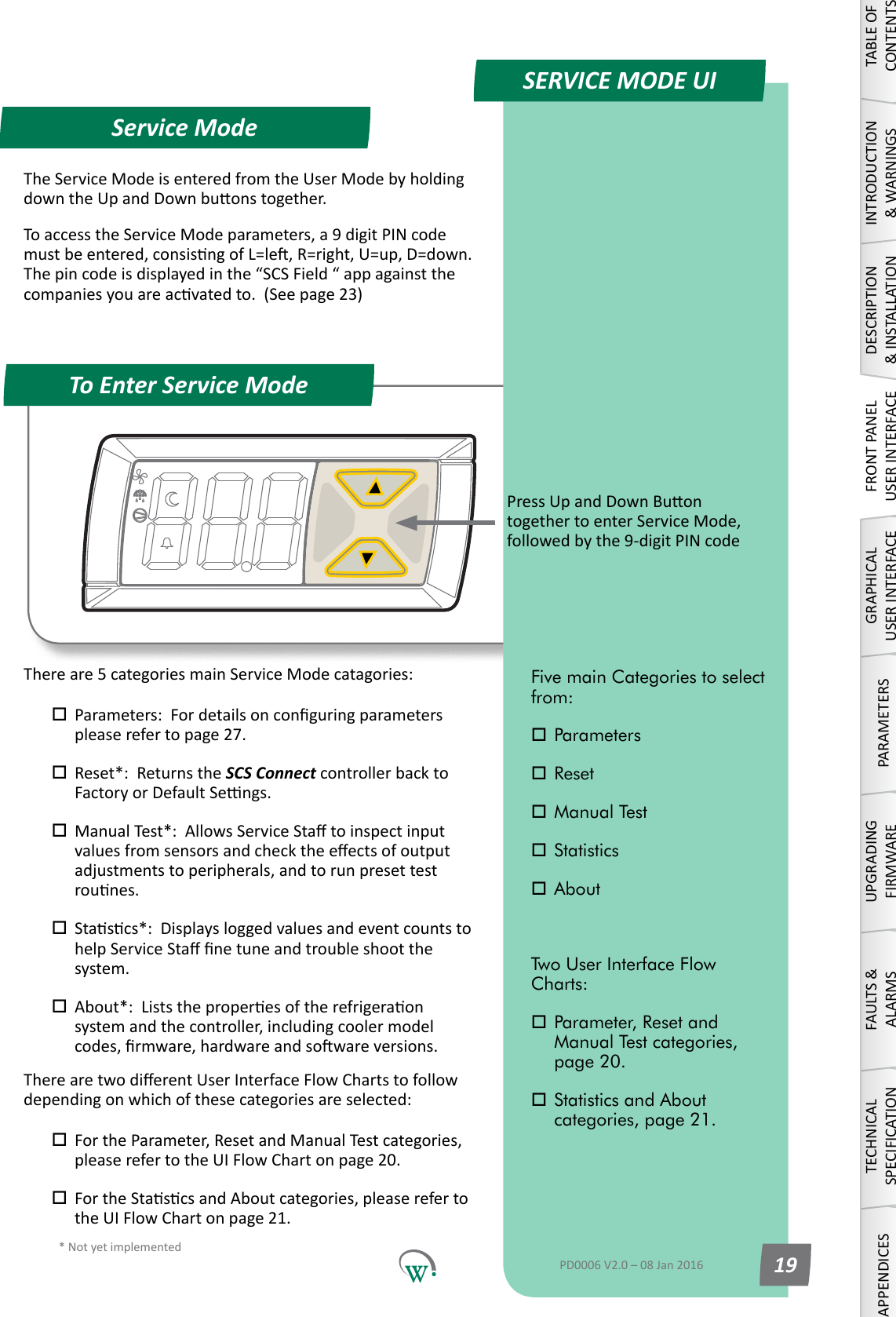
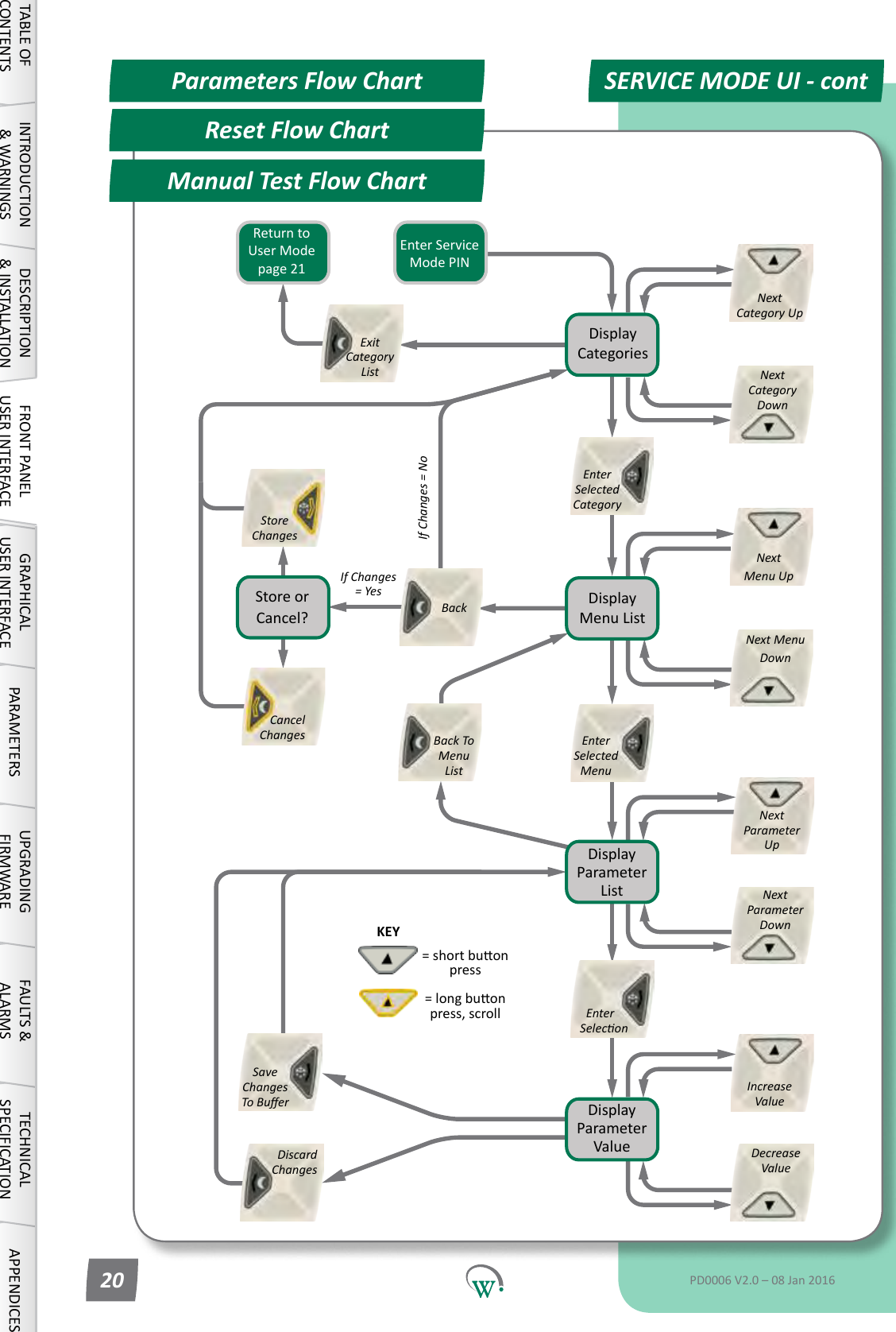
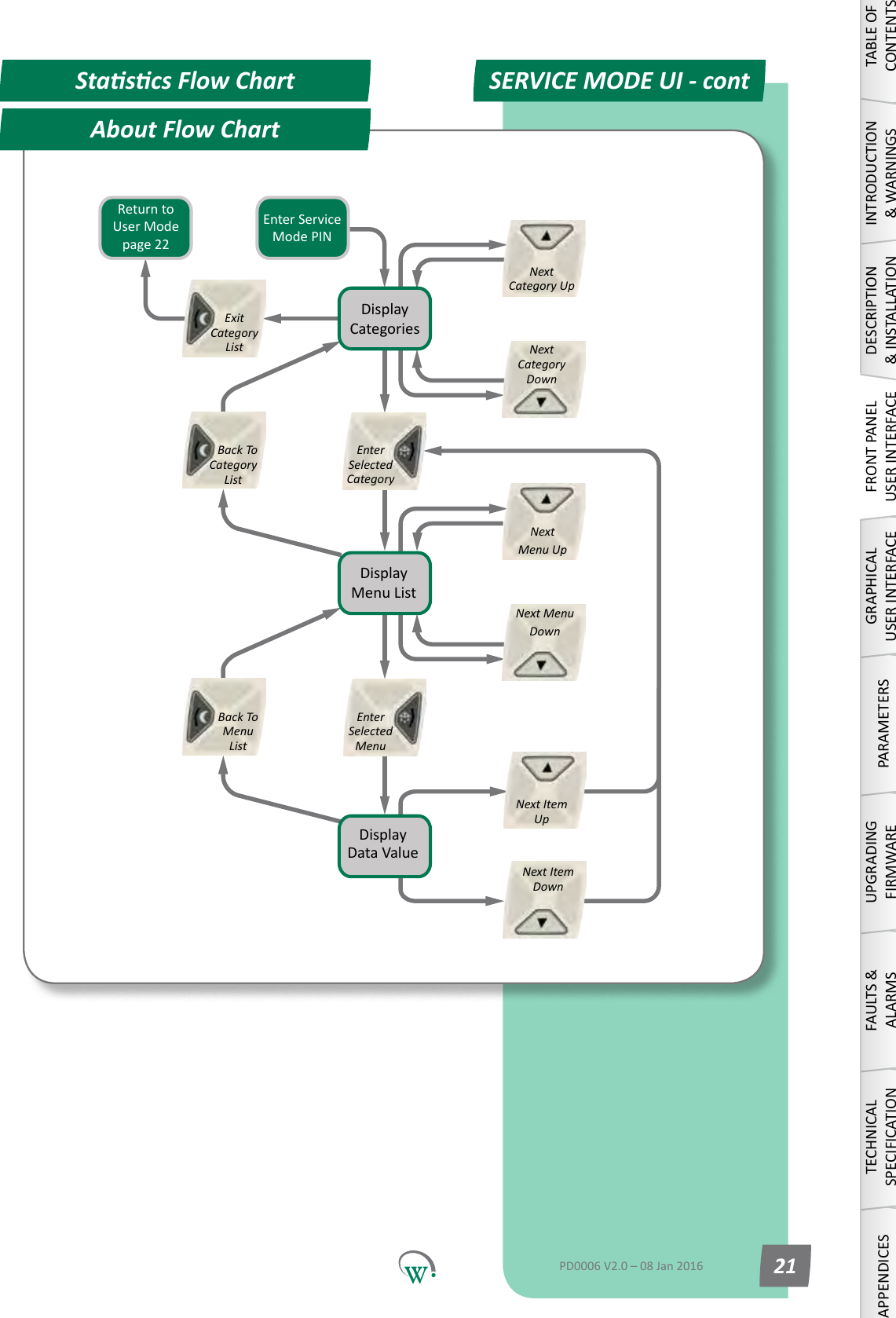
* Not yet implementedQuick ReadService ModeTo Enter Service ModeSERVICE MODE UIPressUpandDownBuontogethertoenterServiceMode,followedbythe9-digitPINcodeTABLE OF CONTENTSINTRODUCTION & WARNINGSDESCRIPTION & INSTALLATIONFRONT PANEL USER INTERFACEGRAPHICAL USER INTERFACEPARAMETERSUPGRADING FIRMWAREFAULTS & ALARMSTECHNICAL SPECIFICATIONAPPENDICESFive main Categories to select from: Parameters Reset Manual Test Statistics AboutTwo User Interface Flow Charts: Parameter, Reset and      Manual Test categories,    page 20. Statistics and About      categories, page 21.PD0006 V2.0 – 08 Jan 2016 19TheServiceModeisenteredfromtheUserModebyholdingdowntheUpandDownbuonstogether.ToaccesstheServiceModeparameters,a9digitPINcodemustbeentered,consisngofL=le,R=right,U=up,D=down.Thepincodeisdisplayedinthe“SCSField“appagainstthecompaniesyouareacvatedto.(Seepage23)Thereare5categoriesmainServiceModecatagories: Parameters:Fordetailsonconguringparameters pleaserefertopage27. Reset*:  Returns the SCS Connect controller back to   FactoryorDefaultSengs. ManualTest*:AllowsServiceStatoinspectinput valuesfromsensorsandchecktheeectsofoutput  adjustments to peripherals, and to run preset test   rounes. Stascs*:Displaysloggedvaluesandeventcountsto helpServiceStanetuneandtroubleshootthe system. About*:Liststheproperesoftherefrigeraon  systemandthecontroller,includingcoolermodel codes,rmware,hardwareandsowareversions.TherearetwodierentUserInterfaceFlowChartstofollowdependingonwhichofthesecategoriesareselected: FortheParameter,ResetandManualTestcategories, pleaserefertotheUIFlowChartonpage20. FortheStascsandAboutcategories,pleasereferto theUIFlowChartonpage21.
Reset Flow ChartSERVICE MODE UI - contParameters Flow ChartManual Test Flow ChartDisplay CategoriesDisplay Menu ListDisplay Parameter ListDisplay Parameter ValueStore ChangesCancel ChangesNext Menu UpNext Menu DownEnter Selected MenuBack To Menu ListNext Parameter  UpNext Parameter  Down  Enter SeleconDiscard ChangesSave Changes To BuerIncrease ValueDecrease ValueKEY=shortbuonpress=longbuonpress, scrollReturn to User Mode page21Store or Cancel?Enter Service Mode PINIf Changes = No  Back  Next Category UpNext Category DownExit Category ListIf Changes = YesEnter Selected Category  TABLE OF CONTENTSINTRODUCTION & WARNINGSDESCRIPTION & INSTALLATIONFRONT PANEL USER INTERFACEGRAPHICAL USER INTERFACE PARAMETERS UPGRADING FIRMWAREFAULTS & ALARMSTECHNICAL SPECIFICATION APPENDICESPD0006 V2.0 – 08 Jan 201620
   Back To Category ListAbout Flow ChartSERVICE MODE UI - contStascs Flow ChartDisplay CategoriesDisplay Menu ListDisplay Data ValueNext Menu UpNext Menu DownEnter Selected MenuBack To Menu ListNext Item  UpNext Item  DownReturn to User Mode page22Enter Service Mode PINNext Category UpNext Category DownExit Category ListEnter Selected Category  TABLE OF CONTENTSINTRODUCTION & WARNINGSDESCRIPTION & INSTALLATIONFRONT PANEL USER INTERFACEGRAPHICAL USER INTERFACEPARAMETERSUPGRADING FIRMWAREFAULTS & ALARMSTECHNICAL SPECIFICATIONAPPENDICESPD0006 V2.0 – 08 Jan 2016 21
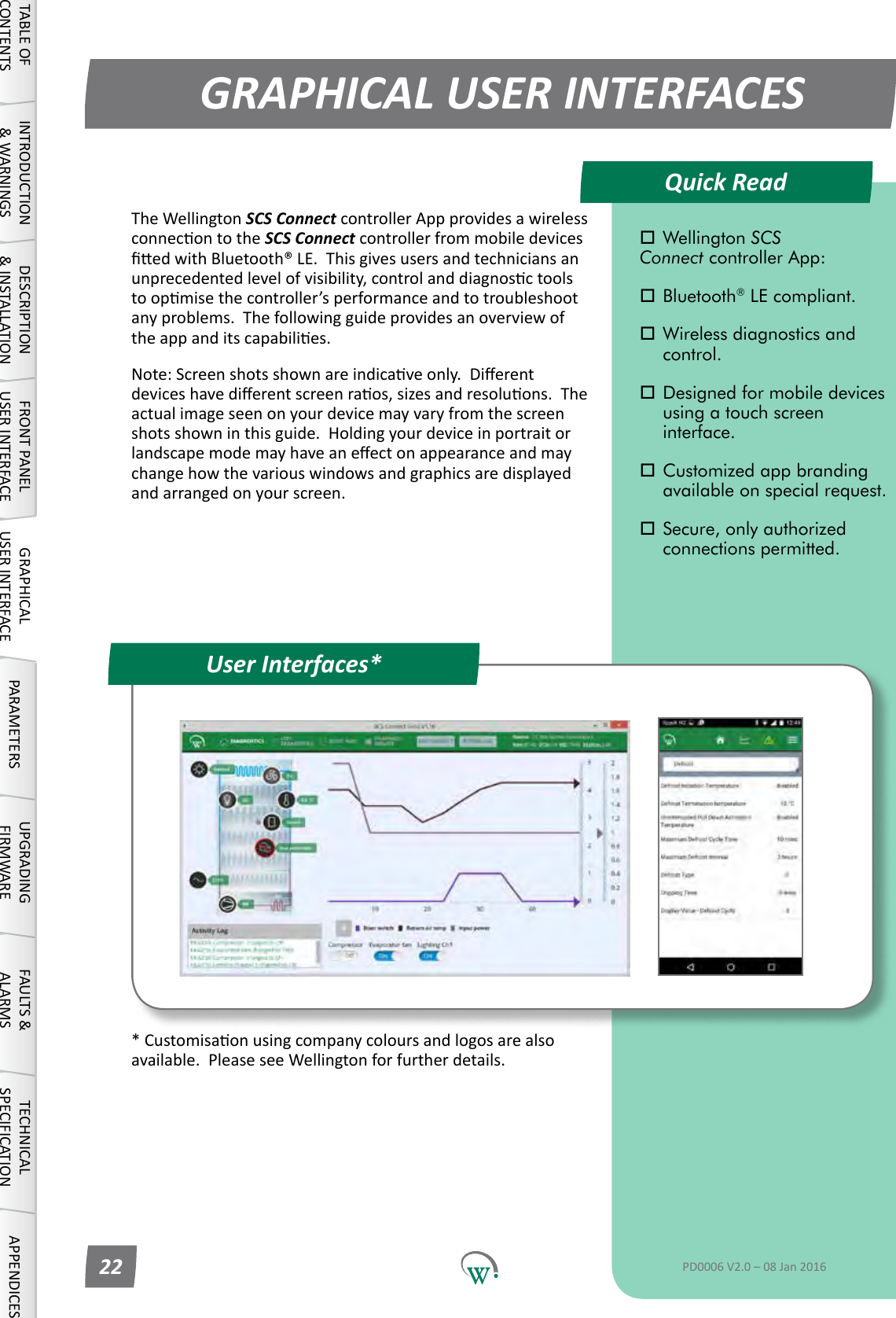
*Customisaonusingcompanycoloursandlogosarealsoavailable.PleaseseeWellingtonforfurtherdetails.Quick ReadGRAPHICAL USER INTERFACESUser Interfaces*TABLE OF CONTENTSINTRODUCTION & WARNINGSDESCRIPTION & INSTALLATIONFRONT PANEL USER INTERFACEGRAPHICAL USER INTERFACE PARAMETERS UPGRADING FIRMWAREFAULTS & ALARMSTECHNICAL SPECIFICATION APPENDICES Wellington SCS  Connect controller App: Bluetooth® LE compliant. Wireless diagnostics and   control. Designed for mobile devices    using a touch screen     interface. Customized app branding    available on special request. Secure, only authorized    connections permitted.PD0006 V2.0 – 08 Jan 201622TheWellingtonSCS Connect controller App provides a wireless connecontotheSCS Connect controller from mobile devices edwithBluetooth®LE.Thisgivesusersandtechniciansanunprecedentedlevelofvisibility,controlanddiagnosctoolstoopmisethecontroller’sperformanceandtotroubleshootanyproblems.Thefollowingguideprovidesanoverviewoftheappanditscapabilies.Note:Screenshotsshownareindicaveonly.Dierentdeviceshavedierentscreenraos,sizesandresoluons.Theactualimageseenonyourdevicemayvaryfromthescreenshotsshowninthisguide.Holdingyourdeviceinportraitorlandscapemodemayhaveaneectonappearanceandmaychangehowthevariouswindowsandgraphicsaredisplayedandarrangedonyourscreen.
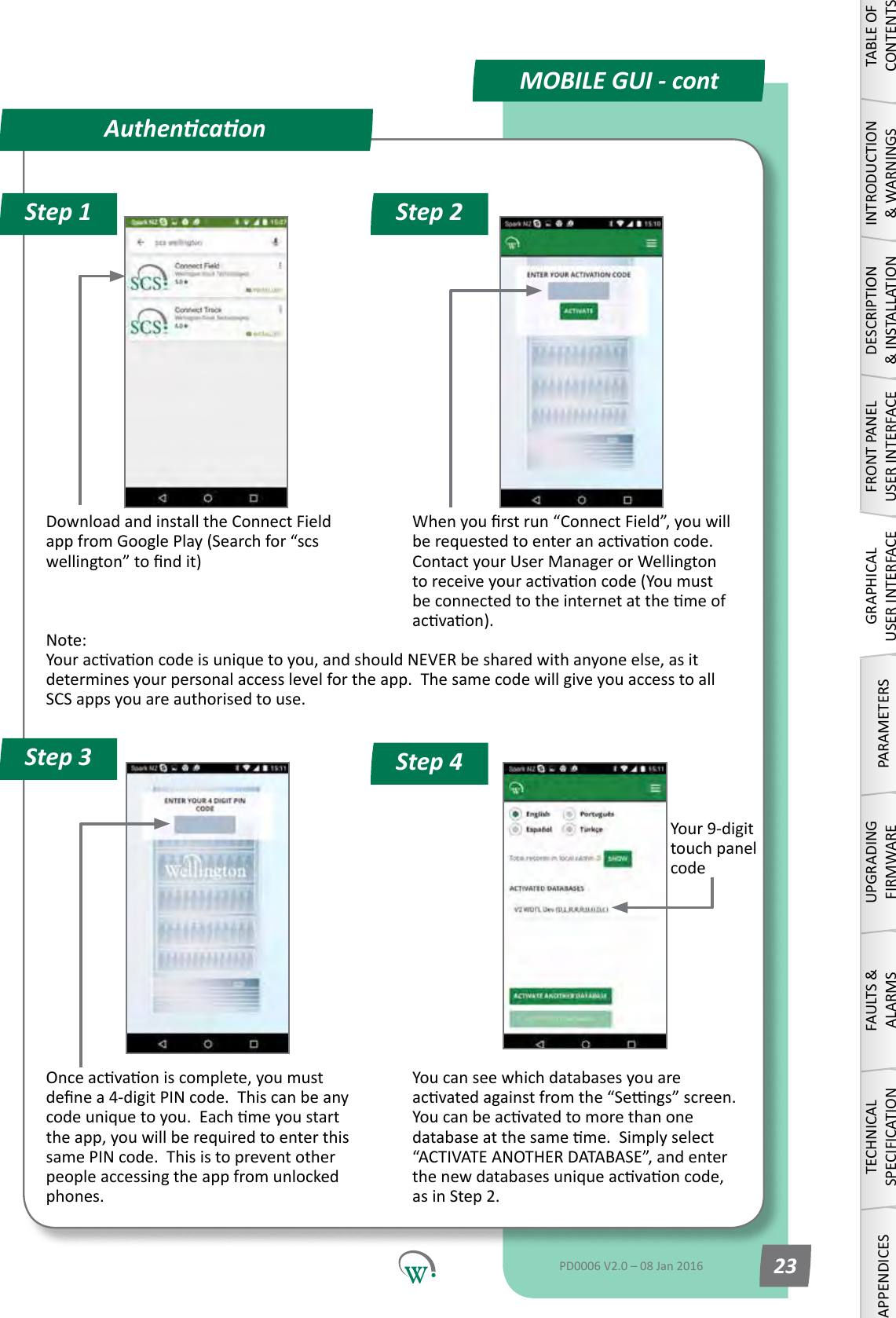
Your9-digittouch panel codeDownload and install the Connect Field appfromGooglePlay(Searchfor“scswellington”tondit)Whenyourstrun“ConnectField”,youwillberequestedtoenteranacvaoncode.ContactyourUserManagerorWellingtontoreceiveyouracvaoncode(Youmustbeconnectedtotheinternetatthemeofacvaon).Note: Youracvaoncodeisuniquetoyou,andshouldNEVERbesharedwithanyoneelse,asitdeterminesyourpersonalaccesslevelfortheapp.ThesamecodewillgiveyouaccesstoallSCS apps you are authorised to use.Onceacvaoniscomplete,youmustdenea4-digitPINcode.Thiscanbeanycodeuniquetoyou.Eachmeyoustartthe app, you will be required to enter this same PIN code.  This is to prevent other peopleaccessingtheappfromunlockedphones. You can see which databases you are acvatedagainstfromthe“Sengs”screen.Youcanbeacvatedtomorethanonedatabaseatthesameme.Simplyselect“ACTIVATEANOTHERDATABASE”,andenterthenewdatabasesuniqueacvaoncode,as in Step 2.AuthencaonStep 1 Step 2Step 4Step 3MOBILE GUI - contTABLE OF CONTENTSINTRODUCTION & WARNINGSDESCRIPTION & INSTALLATIONFRONT PANEL USER INTERFACEGRAPHICAL USER INTERFACEPARAMETERSUPGRADING FIRMWAREFAULTS & ALARMSTECHNICAL SPECIFICATIONAPPENDICESPD0006 V2.0 – 08 Jan 2016 23
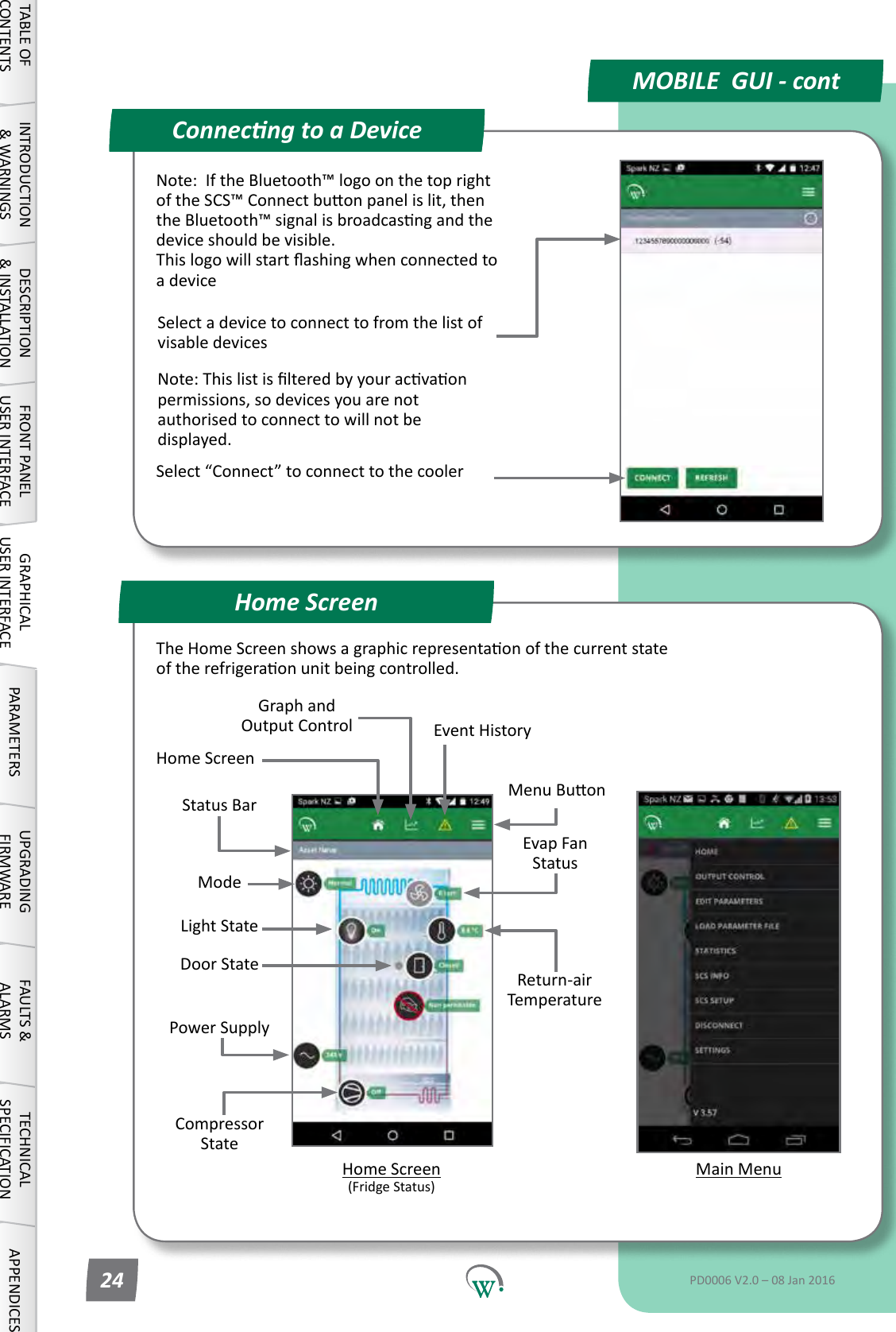
Compressor StatePower SupplyEvap Fan StatusMain MenuStatus BarReturn-air TemperatureModeConnecng to a DeviceHome ScreenMOBILE  GUI - contTABLE OF CONTENTSINTRODUCTION & WARNINGSDESCRIPTION & INSTALLATIONFRONT PANEL USER INTERFACEGRAPHICAL USER INTERFACE PARAMETERS UPGRADING FIRMWAREFAULTS & ALARMSTECHNICAL SPECIFICATION APPENDICESPD0006 V2.0 – 08 Jan 201624Note:IftheBluetooth™logoonthetoprightoftheSCS™Connectbuonpanelislit,thentheBluetooth™signalisbroadcasngandthedevice should be visible. Thislogowillstartashingwhenconnectedtoa deviceSelect a device to connect to from the list of visable devicesNote:Thislistislteredbyyouracvaonpermissions, so devices you are not authorised to connect to will not be displayed.Select“Connect”toconnecttothecoolerMenuBuonGraph and Output Control Event History Home Screen (FridgeStatus)Door StateLightStateHome ScreenTheHomeScreenshowsagraphicrepresentaonofthecurrentstateoftherefrigeraonunitbeingcontrolled.
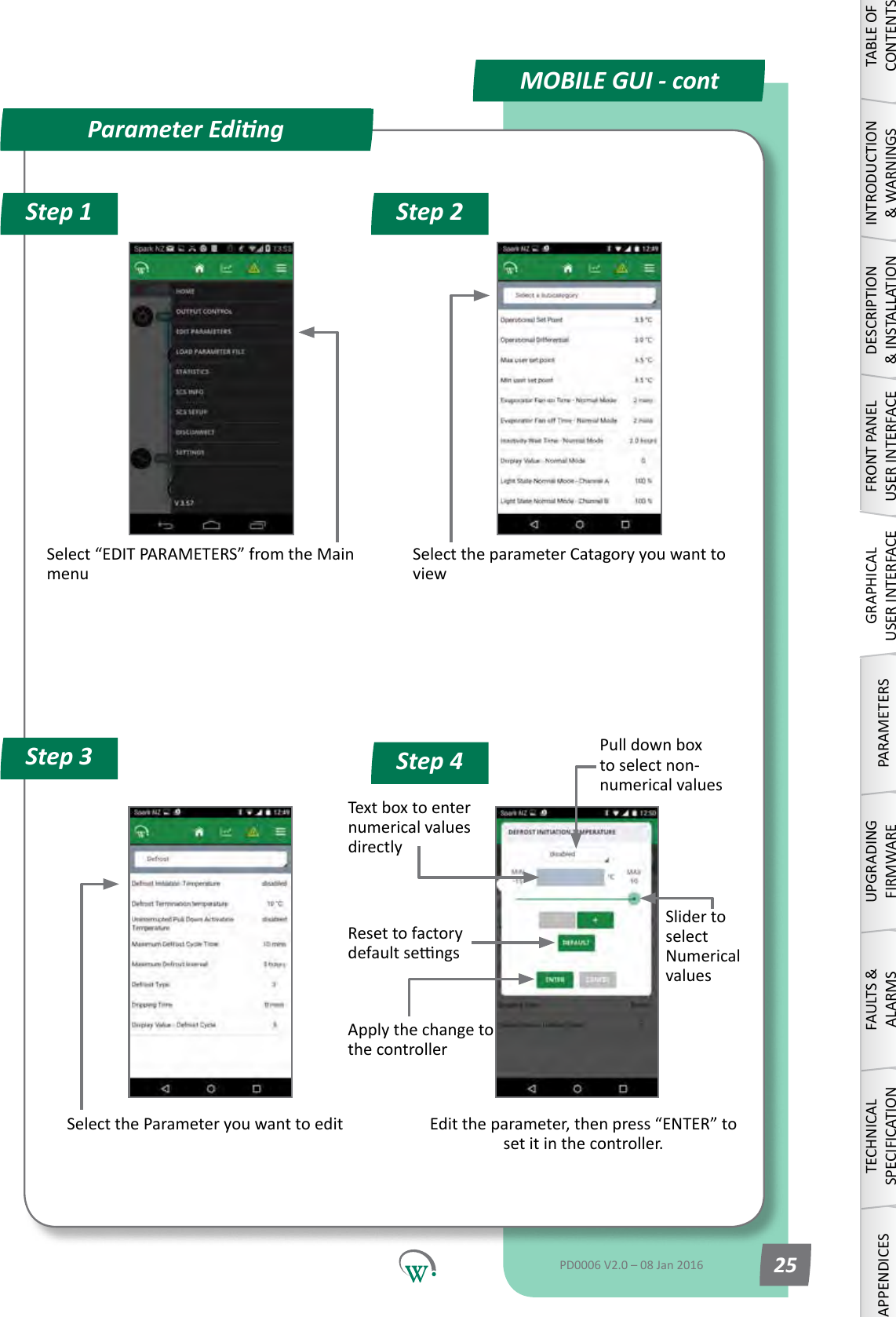
Step 1 Step 2Step 4Step 3Select“EDITPARAMETERS”fromtheMainmenuSelecttheparameterCatagoryyouwanttoviewSelect the Parameter you want to editPull down box to select non-numerical valuesText box to enter numerical values directlyEdittheparameter,thenpress“ENTER”toset it in the controller.Slider to select Numerical valuesReset to factory defaultsengsApplythechangetothe controllerParameter EdingMOBILE GUI - contTABLE OF CONTENTSINTRODUCTION & WARNINGSDESCRIPTION & INSTALLATIONFRONT PANEL USER INTERFACEGRAPHICAL USER INTERFACEPARAMETERSUPGRADING FIRMWAREFAULTS & ALARMSTECHNICAL SPECIFICATIONAPPENDICESPD0006 V2.0 – 08 Jan 2016 25
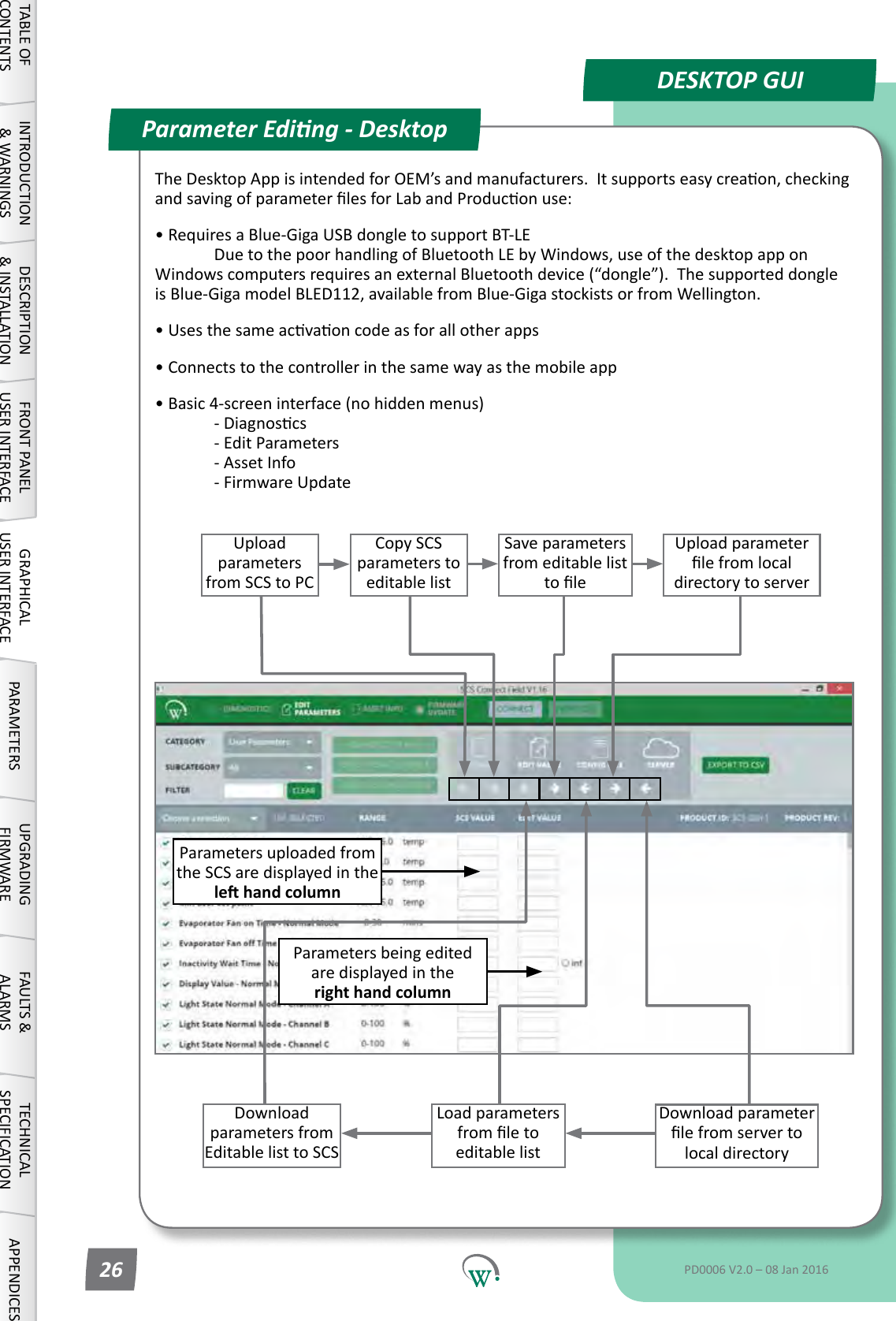
Upload parameters from SCS to PCCopy SCS parameters to editable listUpload parameter lefromlocaldirectory to serverDownload parameters from Editable list to SCSSave parameters from editable list toleLoad parameters fromletoeditable listDownload parameter lefromservertolocal directoryParameters uploaded from the SCS are displayed in the le hand columnParametersbeingeditedare displayed in the right hand columnTheDesktopAppisintendedforOEM’sandmanufacturers.Itsupportseasycreaon,checkingandsavingofparameterlesforLabandProduconuse:•RequiresaBlue-GigaUSBdongletosupportBT-LE  DuetothepoorhandlingofBluetoothLEbyWindows,useofthedesktopapponWindowscomputersrequiresanexternalBluetoothdevice(“dongle”).ThesupporteddongleisBlue-GigamodelBLED112,availablefromBlue-GigastockistsorfromWellington.•Usesthesameacvaoncodeasforallotherapps• Connects to the controller in the same way as the mobile app• Basic 4-screen interface (no hidden menus)  -Diagnoscs   - Edit Parameters   - Asset Info   - Firmware UpdateParameter Eding - DesktopDESKTOP GUITABLE OF CONTENTSINTRODUCTION & WARNINGSDESCRIPTION & INSTALLATIONFRONT PANEL USER INTERFACEGRAPHICAL USER INTERFACE PARAMETERS UPGRADING FIRMWAREFAULTS & ALARMSTECHNICAL SPECIFICATION APPENDICESPD0006 V2.0 – 08 Jan 201626
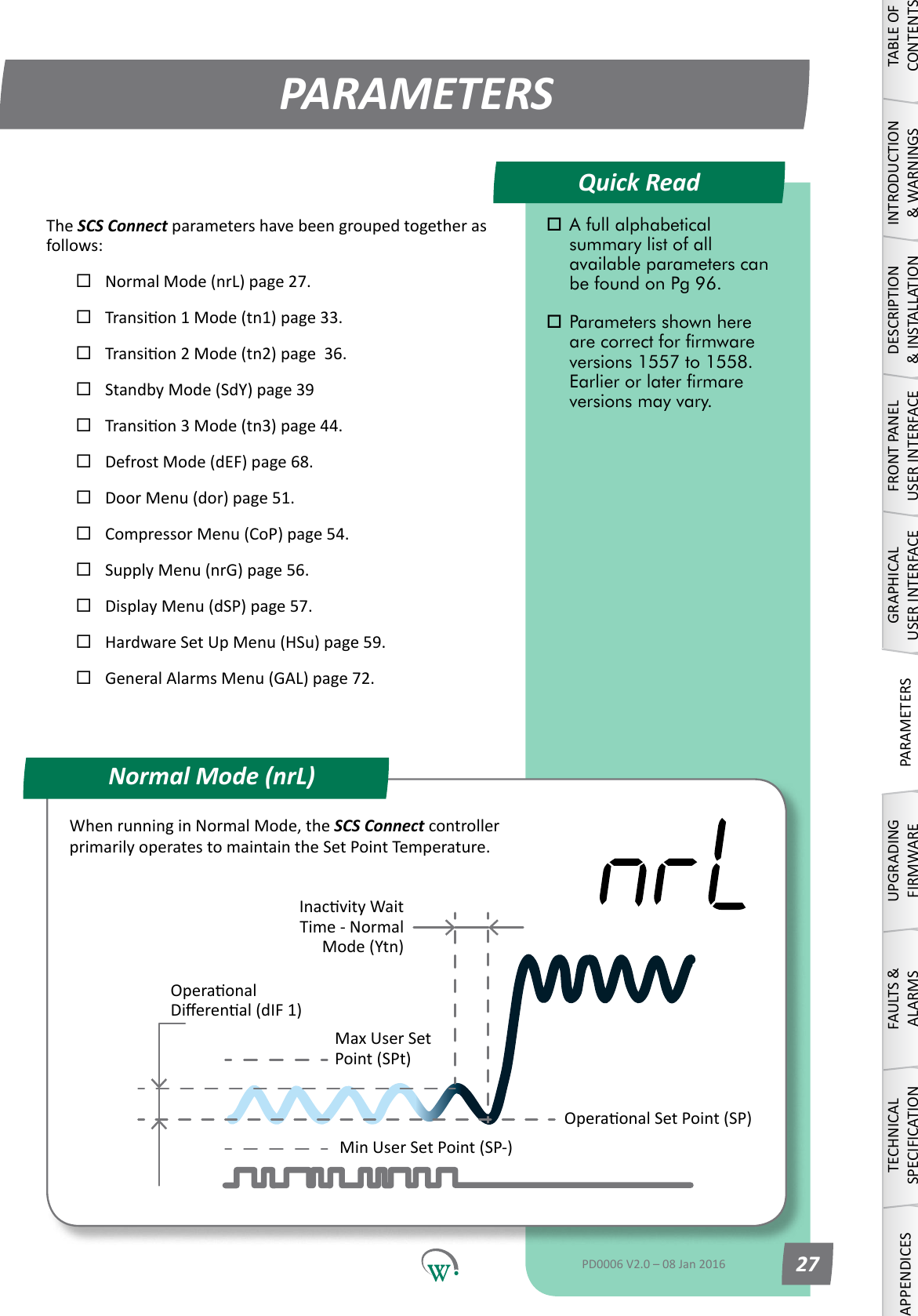
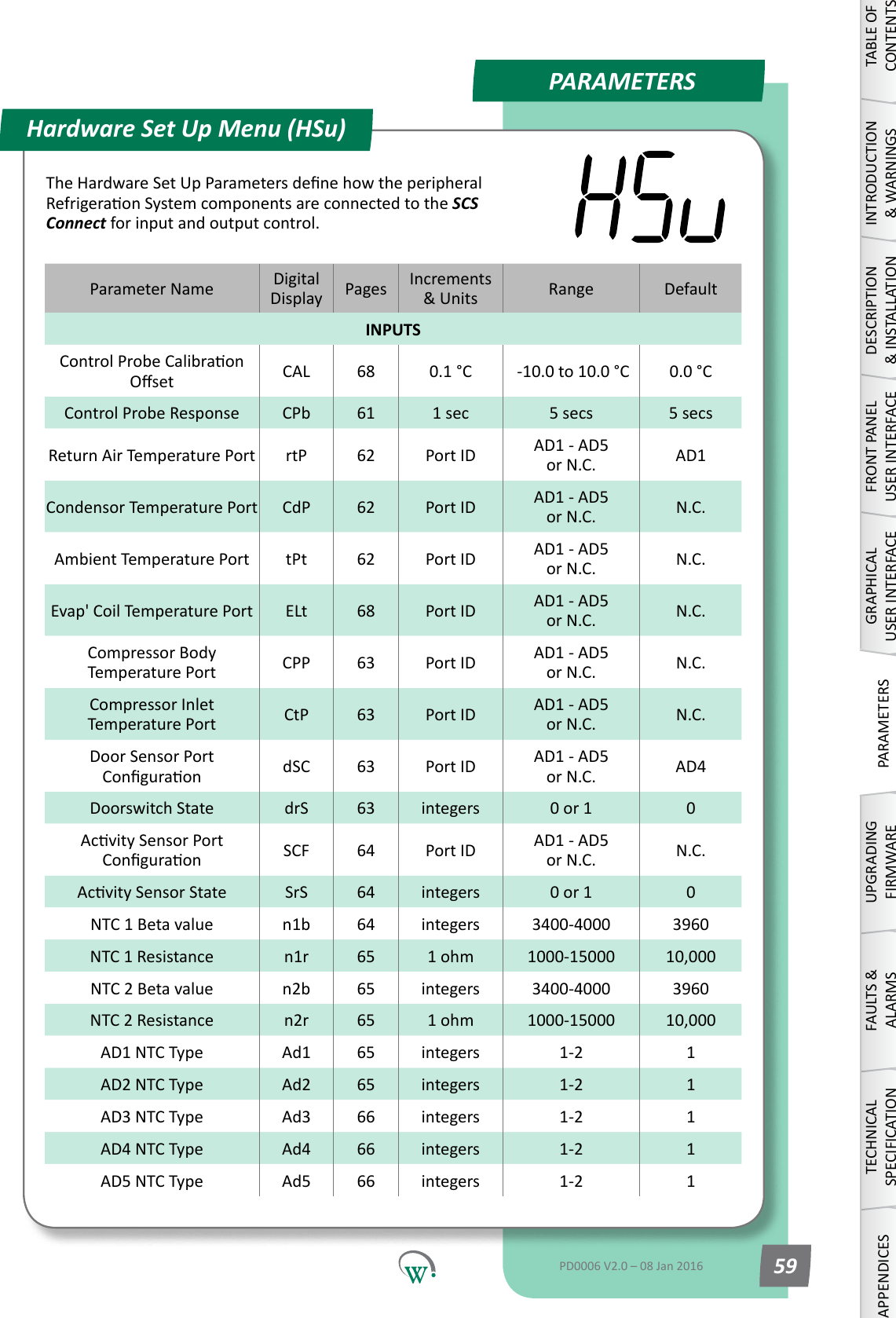
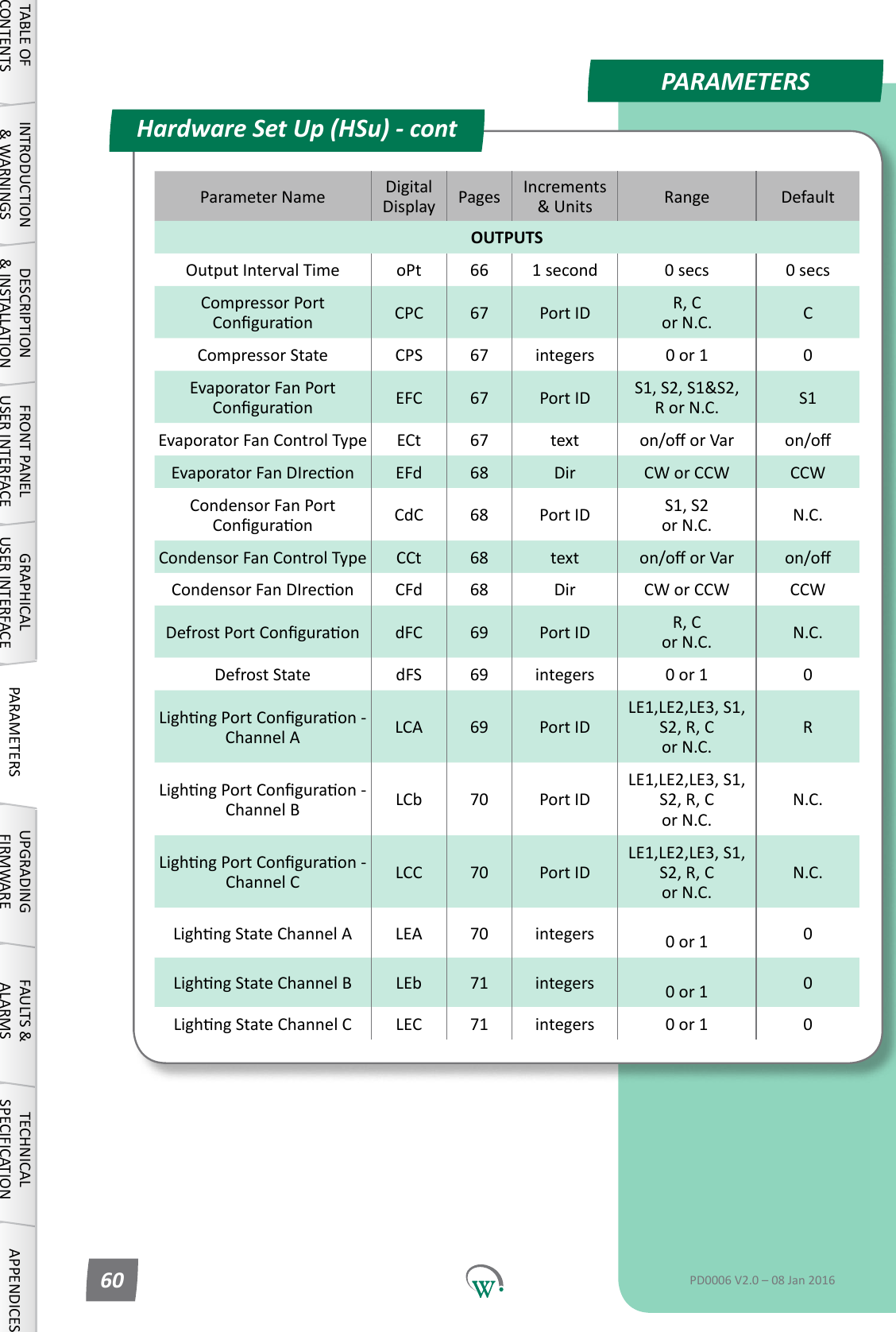
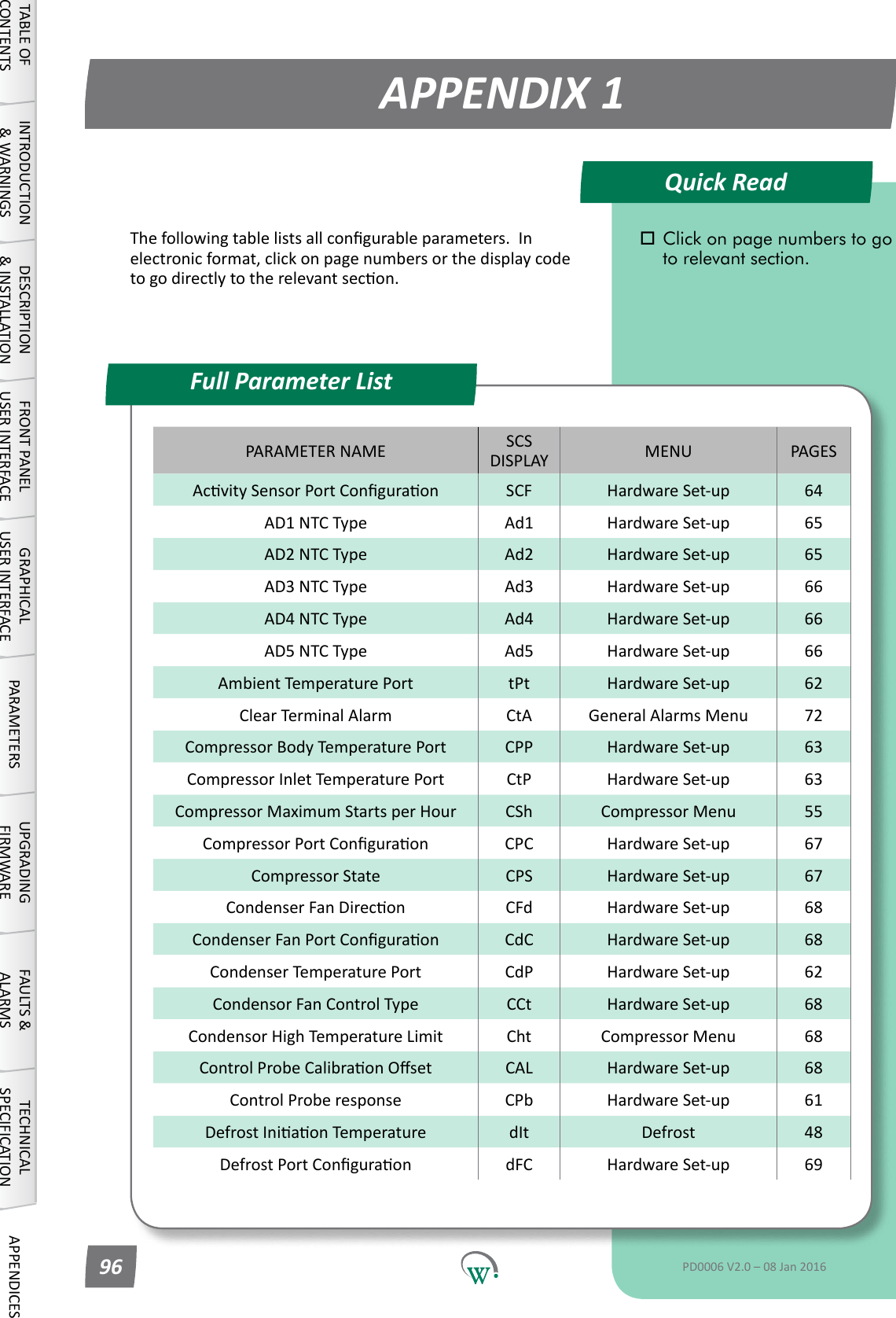
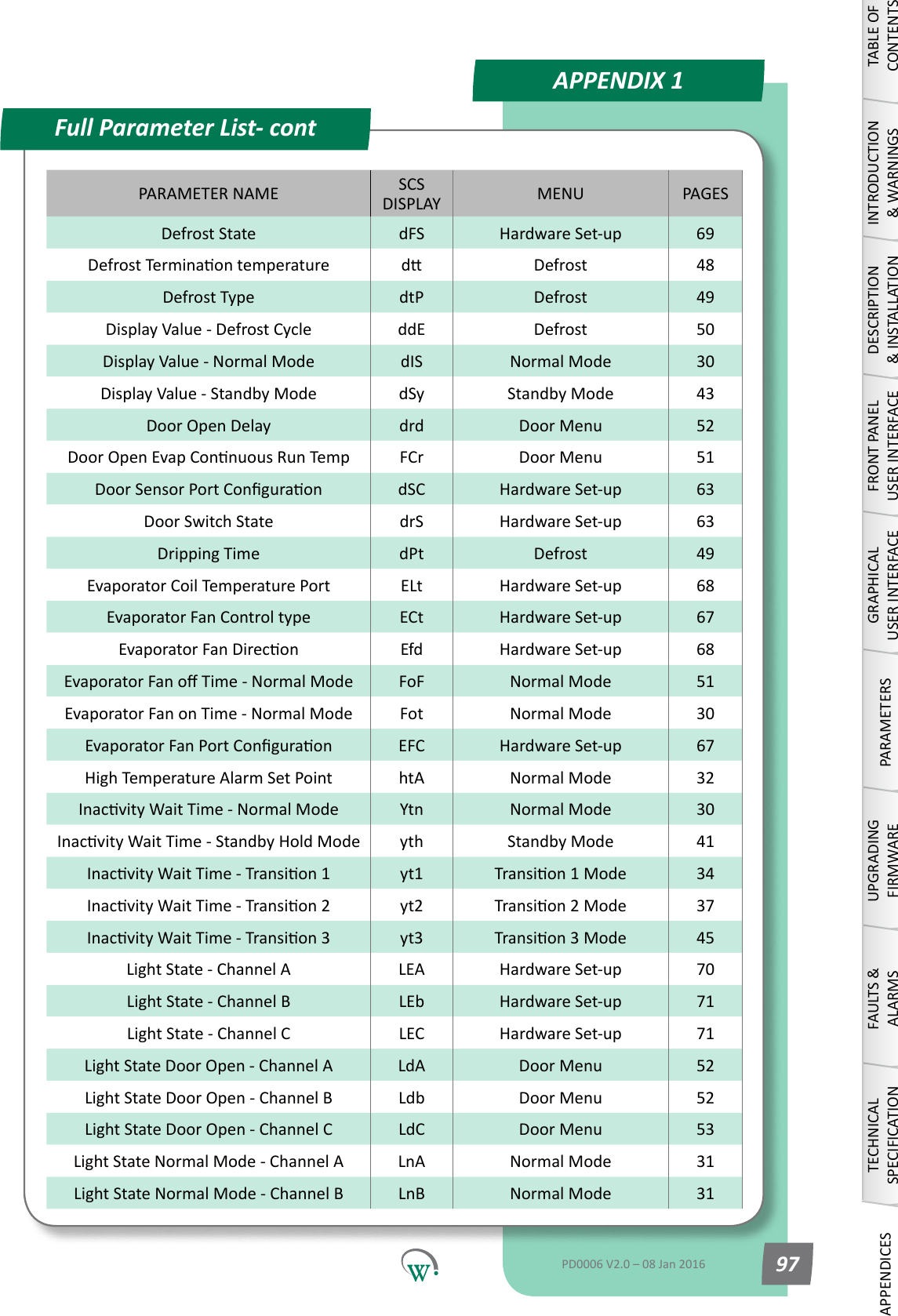
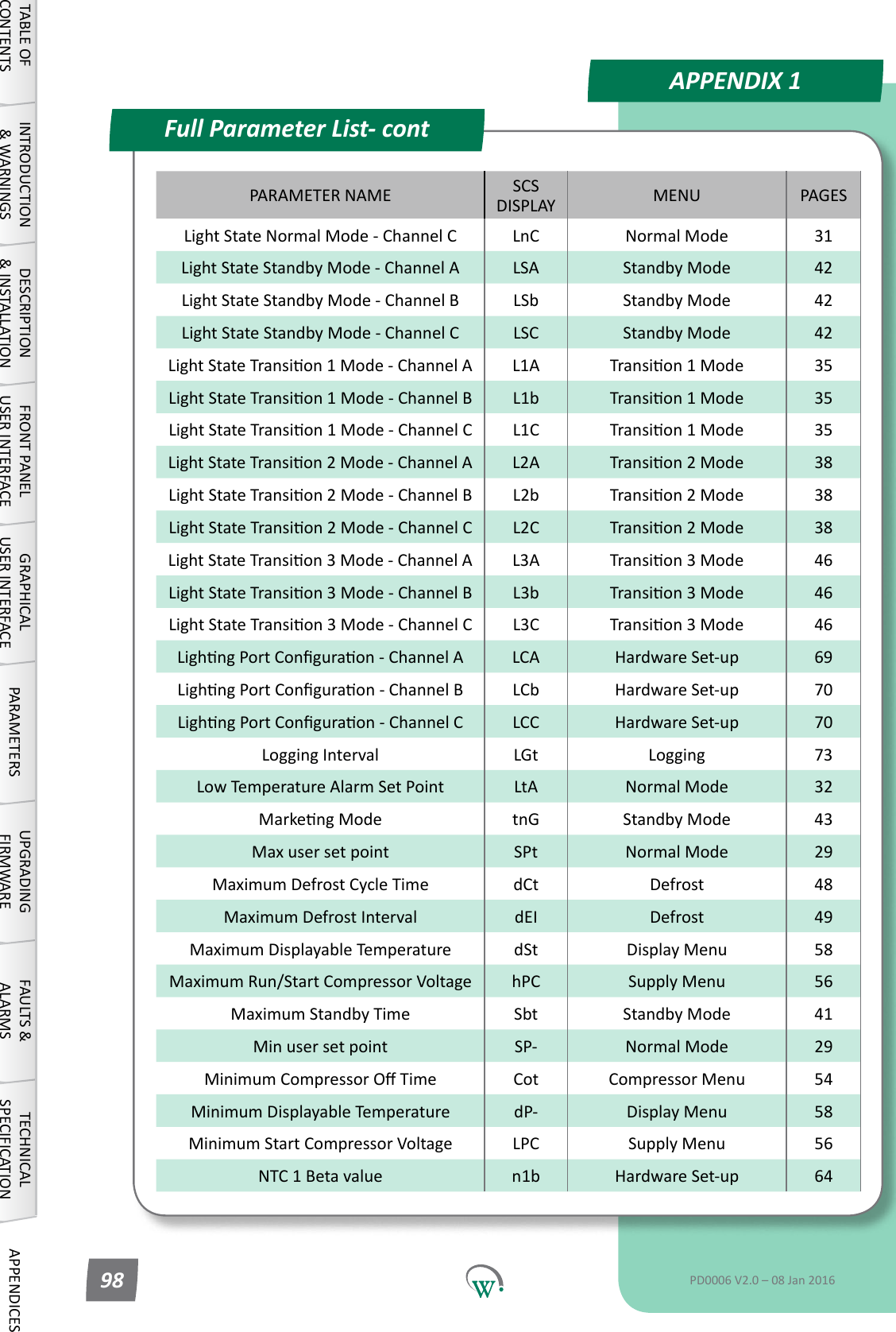
Quick ReadPARAMETERSNormal Mode (nrL)OperaonalDierenal(dIF1)Max User Set Point (SPt)Min User Set Point (SP-)OperaonalSetPoint(SP)InacvityWaitTime - Normal Mode (Ytn)TABLE OF CONTENTSINTRODUCTION & WARNINGSDESCRIPTION & INSTALLATIONFRONT PANEL USER INTERFACEGRAPHICAL USER INTERFACEPARAMETERSUPGRADING FIRMWAREFAULTS & ALARMSTECHNICAL SPECIFICATIONAPPENDICES A full alphabetical      summary list of all      available parameters can    be found on Pg 96. Parameters shown here   are correct for rmware    versions 1557 to 1558.   Earlier or later rmare     versions may vary.PD0006 V2.0 – 08 Jan 2016 27The SCS Connectparametershavebeengroupedtogetherasfollows:NormalMode(nrL)page27.Transion1Mode(tn1)page33.Transion2Mode(tn2)page36.StandbyMode(SdY)page39Transion3Mode(tn3)page44.DefrostMode(dEF)page68.DoorMenu(dor)page51.CompressorMenu(CoP)page54.SupplyMenu(nrG)page56.DisplayMenu(dSP)page57.HardwareSetUpMenu(HSu)page59.GeneralAlarmsMenu(GAL)page72.WhenrunninginNormalMode,theSCS Connect controller primarily operates to maintain the Set Point Temperature.
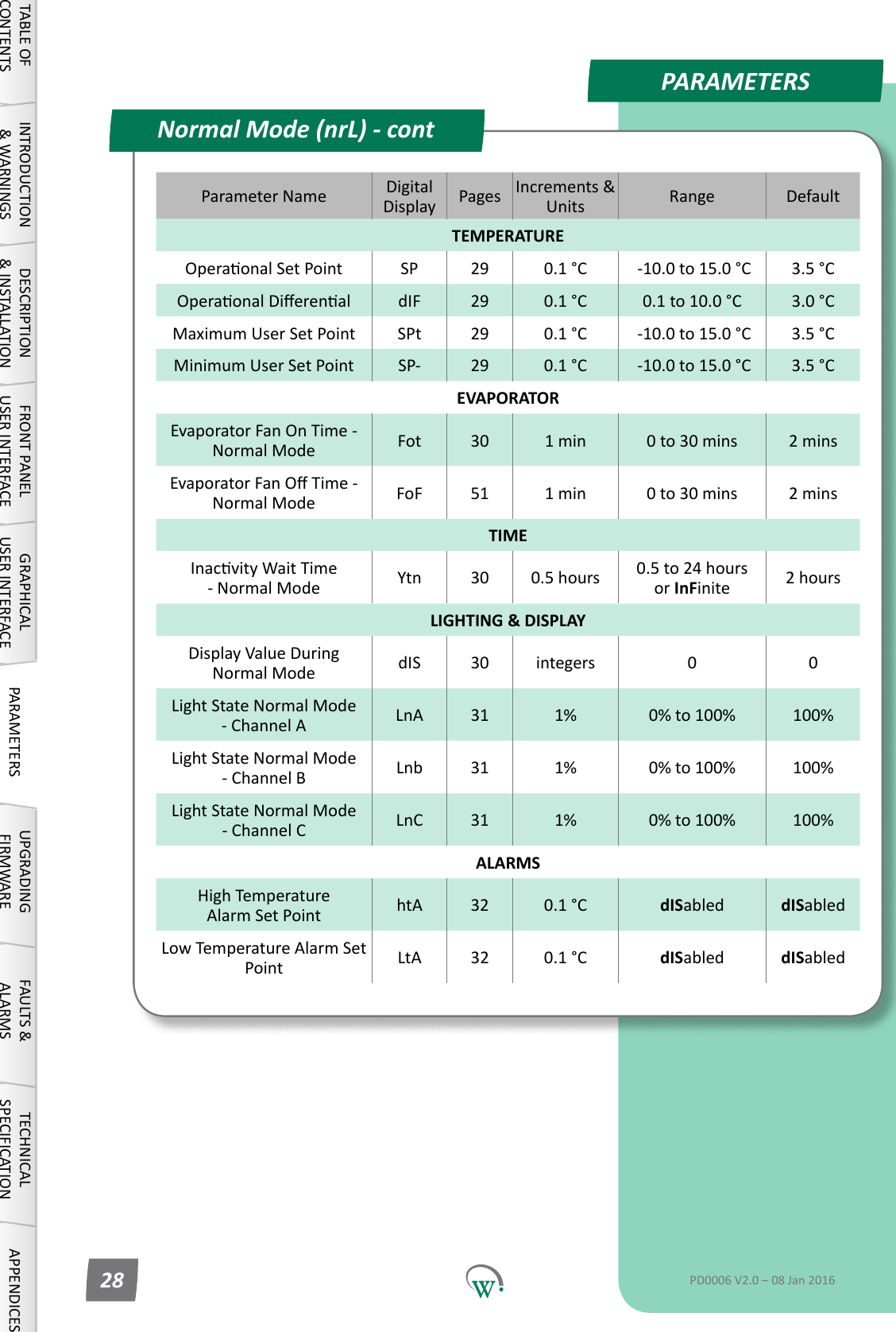
PARAMETERSParameter Name DigitalDisplay Pages Increments&Units Range DefaultTEMPERATUREOperaonalSetPoint SP 29 0.1 °C  -10.0 to 15.0 °C 3.5 °COperaonalDierenal dIF 29 0.1 °C 0.1 to 10.0 °C 3.0 °CMaximum User Set Point SPt 29 0.1 °C  -10.0 to 15.0 °C 3.5 °CMinimum User Set Point SP- 29 0.1 °C  -10.0 to 15.0 °C 3.5 °CEVAPORATOREvaporator Fan On Time - Normal Mode Fot 30 1 min 0 to 30 mins 2 minsEvaporatorFanOTime-Normal Mode FoF 51 1 min 0 to 30 mins 2 minsTIMEInacvityWaitTime - Normal Mode Ytn 30 0.5 hours 0.5 to 24 hours or InFinite 2 hoursLIGHTING & DISPLAYDisplayValueDuring Normal Mode dIS 30 integers 0 0LightStateNormalMode - Channel A LnA 31 1% 0% to 100% 100%LightStateNormalMode - Channel B Lnb 31 1% 0% to 100% 100%LightStateNormalMode - Channel C LnC 31 1% 0% to 100% 100%ALARMSHighTemperature Alarm Set Point htA 32 0.1 °C dISabled dISabledLow Temperature Alarm Set Point LtA 32 0.1 °C dISabled dISabledNormal Mode (nrL) - contTABLE OF CONTENTSINTRODUCTION & WARNINGSDESCRIPTION & INSTALLATIONFRONT PANEL USER INTERFACEGRAPHICAL USER INTERFACE PARAMETERS UPGRADING FIRMWAREFAULTS & ALARMSTECHNICAL SPECIFICATION APPENDICESPD0006 V2.0 – 08 Jan 201628
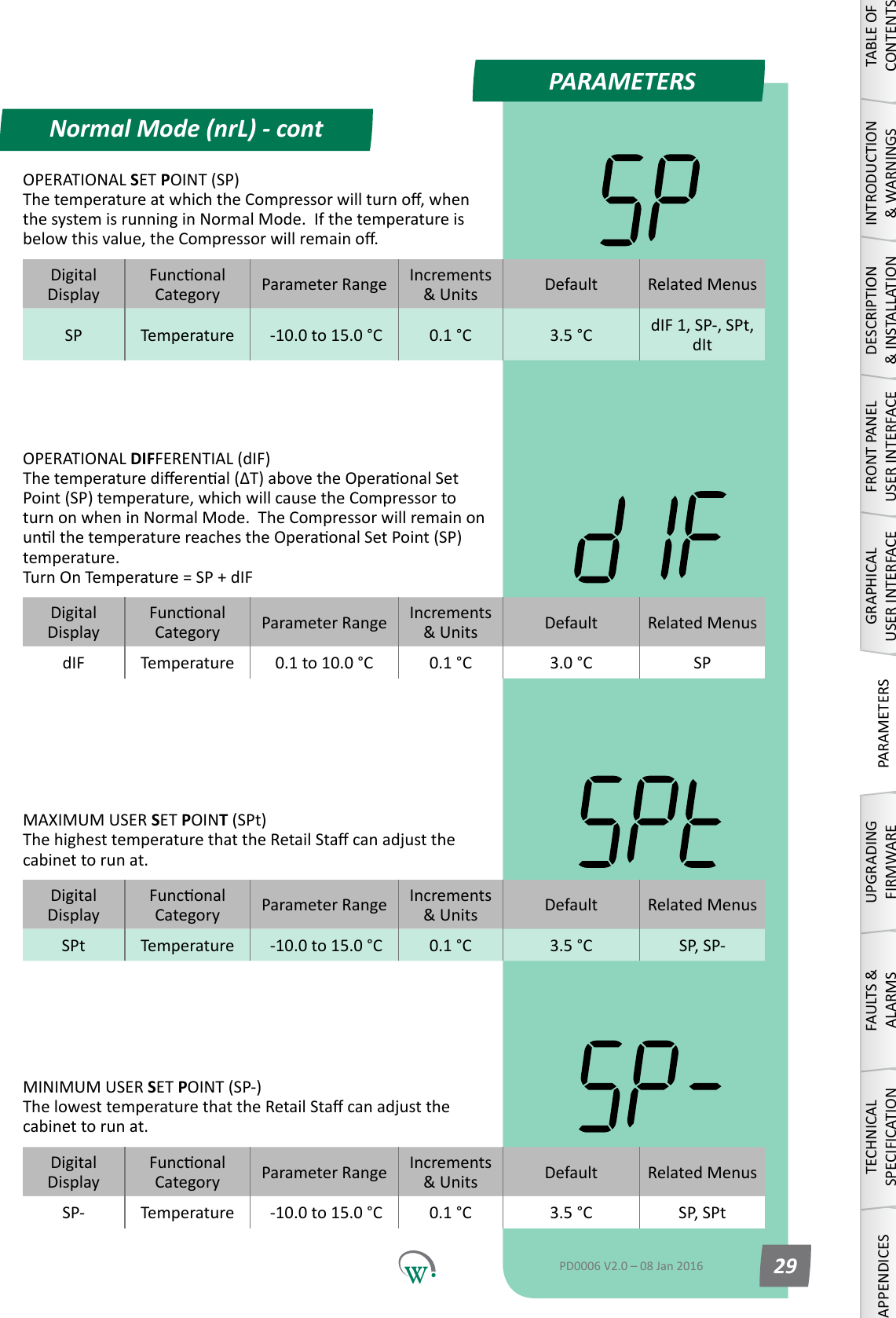
PARAMETERSNormal Mode (nrL) - contTABLE OF CONTENTSINTRODUCTION & WARNINGSDESCRIPTION & INSTALLATIONFRONT PANEL USER INTERFACEGRAPHICAL USER INTERFACEPARAMETERSUPGRADING FIRMWAREFAULTS & ALARMSTECHNICAL SPECIFICATIONAPPENDICESPD0006 V2.0 – 08 Jan 2016 29DigitalDisplayFunconalCategory ParameterRange Increments &Units Default Related MenusdIF Temperature 0.1 to 10.0 °C 0.1 °C 3.0 °C SPOPERATIONAL DIFFERENTIAL (dIF) Thetemperaturedierenal(ΔT)abovetheOperaonalSetPoint (SP) temperature, which will cause the Compressor to turn on when in Normal Mode.  The Compressor will remain on unlthetemperaturereachestheOperaonalSetPoint(SP)temperature. Turn On Temperature = SP + dIFDigitalDisplayFunconalCategory ParameterRange Increments &Units Default Related MenusSPt Temperature  -10.0 to 15.0 °C 0.1 °C 3.5 °C SP, SP-MAXIMUM USER SET POINT (SPt) ThehighesttemperaturethattheRetailStacanadjustthecabinet to run at.DigitalDisplayFunconalCategory ParameterRange Increments &Units Default Related MenusSP- Temperature  -10.0 to 15.0 °C 0.1 °C 3.5 °C SP, SPtMINIMUM USER SET POINT (SP-) ThelowesttemperaturethattheRetailStacanadjustthecabinet to run at.DigitalDisplayFunconalCategory ParameterRange Increments &Units Default Related MenusSP Temperature  -10.0 to 15.0 °C 0.1 °C 3.5 °C dIF 1, SP-, SPt, dItOPERATIONAL SET POINT (SP) ThetemperatureatwhichtheCompressorwillturno,whenthesystemisrunninginNormalMode.Ifthetemperatureisbelowthisvalue,theCompressorwillremaino.
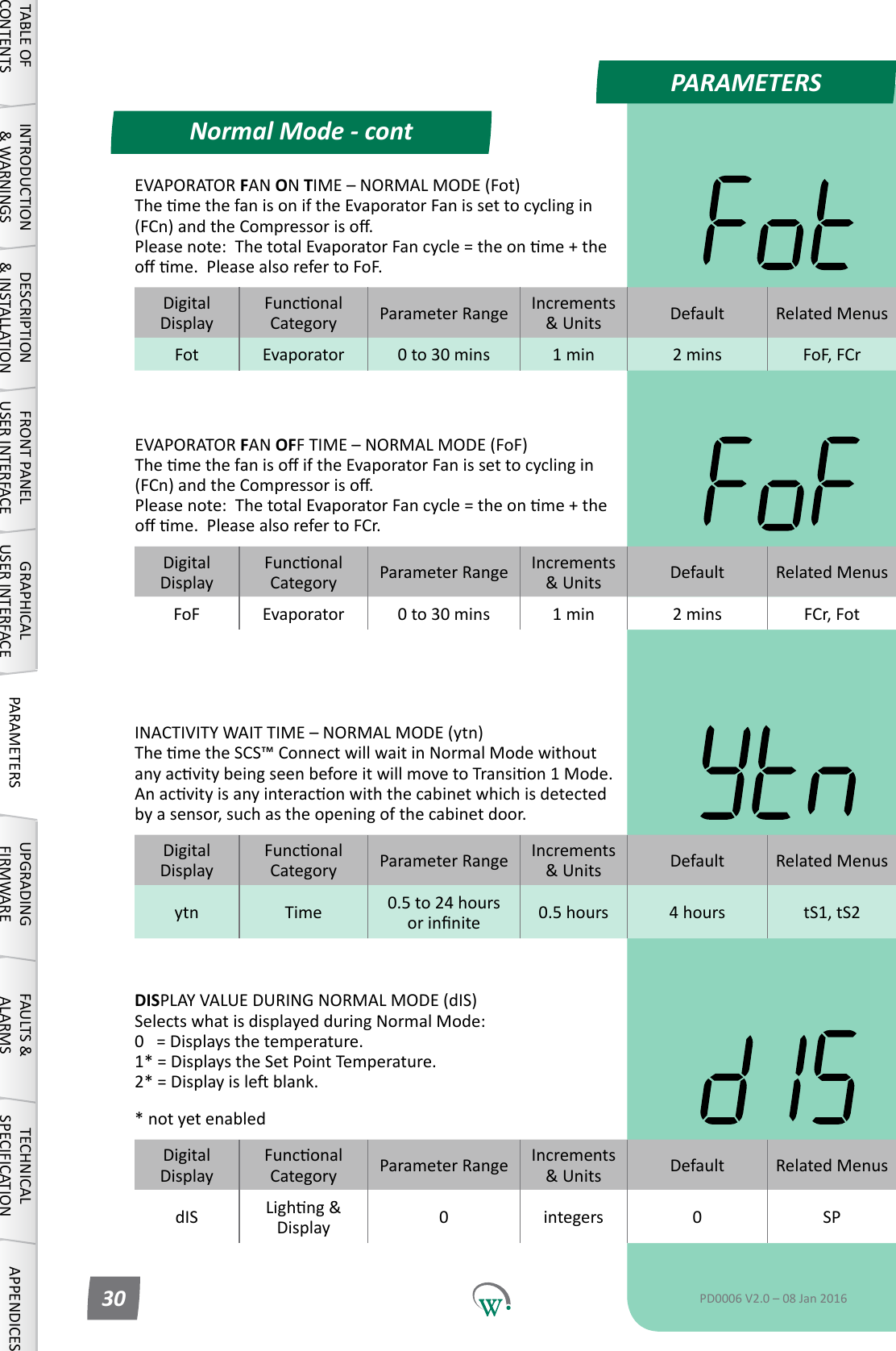
PARAMETERSNormal Mode - contTABLE OF CONTENTSINTRODUCTION & WARNINGSDESCRIPTION & INSTALLATIONFRONT PANEL USER INTERFACEGRAPHICAL USER INTERFACE PARAMETERS UPGRADING FIRMWAREFAULTS & ALARMSTECHNICAL SPECIFICATION APPENDICESPD0006 V2.0 – 08 Jan 201630DigitalDisplayFunconalCategory ParameterRange Increments &Units Default Related MenusFot Evaporator 0 to 30 mins 1 min 2 mins FoF, FCrEVAPORATOR FAN ON TIME–NORMALMODE(Fot) ThemethefanisoniftheEvaporatorFanissettocyclingin(FCn)andtheCompressoriso. Pleasenote:ThetotalEvaporatorFancycle=theonme+theome.PleasealsorefertoFoF.DigitalDisplayFunconalCategory ParameterRange Increments &Units Default Related MenusFoF Evaporator 0 to 30 mins 1 min 2 mins FCr, FotEVAPORATOR FAN OFFTIME–NORMALMODE(FoF) ThemethefanisoiftheEvaporatorFanissettocyclingin(FCn)andtheCompressoriso. Pleasenote:ThetotalEvaporatorFancycle=theonme+theome.PleasealsorefertoFCr.DigitalDisplayFunconalCategory ParameterRange Increments &Units Default Related Menusytn Time 0.5 to 24 hours orinnite 0.5 hours 4 hours tS1, tS2INACTIVITYWAITTIME–NORMALMODE(ytn) ThemetheSCS™ConnectwillwaitinNormalModewithoutanyacvitybeingseenbeforeitwillmovetoTransion1Mode. Anacvityisanyinteraconwiththecabinetwhichisdetectedbyasensor,suchastheopeningofthecabinetdoor.DigitalDisplayFunconalCategory ParameterRange Increments &Units Default Related MenusdIS Lighng&Display 0integers 0 SPDISPLAY VALUE DURING NORMAL MODE (dIS) SelectswhatisdisplayedduringNormalMode: 0   = Displays the temperature. 1* = Displays the Set Point Temperature. 2*=Displayisleblank.* not yet enabled
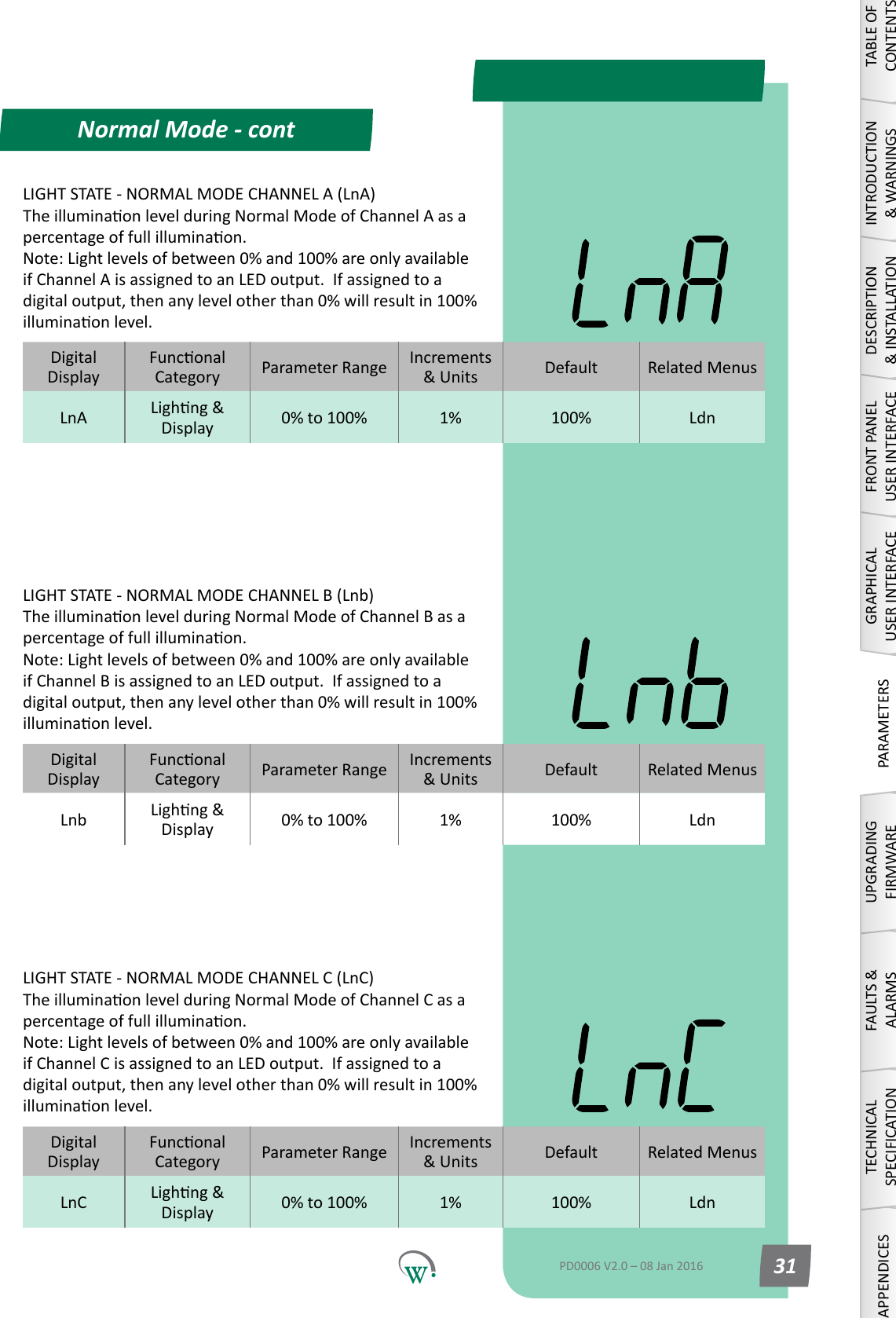
Normal Mode - contTABLE OF CONTENTSINTRODUCTION & WARNINGSDESCRIPTION & INSTALLATIONFRONT PANEL USER INTERFACEGRAPHICAL USER INTERFACEPARAMETERSUPGRADING FIRMWAREFAULTS & ALARMSTECHNICAL SPECIFICATIONAPPENDICESPD0006 V2.0 – 08 Jan 2016 31DigitalDisplayFunconalCategory ParameterRange Increments &Units Default Related MenusLnA Lighng&Display 0% to 100% 1% 100% LdnLIGHT STATE - NORMAL MODE CHANNEL A (LnA) TheilluminaonlevelduringNormalModeofChannelAasapercentageoffullilluminaon. Note:Lightlevelsofbetween0%and100%areonlyavailableifChannelAisassignedtoanLEDoutput.Ifassignedtoadigitaloutput,thenanylevelotherthan0%willresultin100%illuminaonlevel.LIGHT STATE - NORMAL MODE CHANNEL B (Lnb) TheilluminaonlevelduringNormalModeofChannelBasapercentageoffullilluminaon. Note:Lightlevelsofbetween0%and100%areonlyavailableifChannelBisassignedtoanLEDoutput.Ifassignedtoadigitaloutput,thenanylevelotherthan0%willresultin100%illuminaonlevel.LIGHT STATE - NORMAL MODE CHANNEL C (LnC) TheilluminaonlevelduringNormalModeofChannelCasapercentageoffullilluminaon. Note:Lightlevelsofbetween0%and100%areonlyavailableifChannelCisassignedtoanLEDoutput.Ifassignedtoadigitaloutput,thenanylevelotherthan0%willresultin100%illuminaonlevel.DigitalDisplayFunconalCategory ParameterRange Increments &Units Default Related MenusLnb Lighng&Display 0% to 100% 1% 100% LdnDigitalDisplayFunconalCategory ParameterRange Increments &Units Default Related MenusLnC Lighng&Display 0% to 100% 1% 100% Ldn
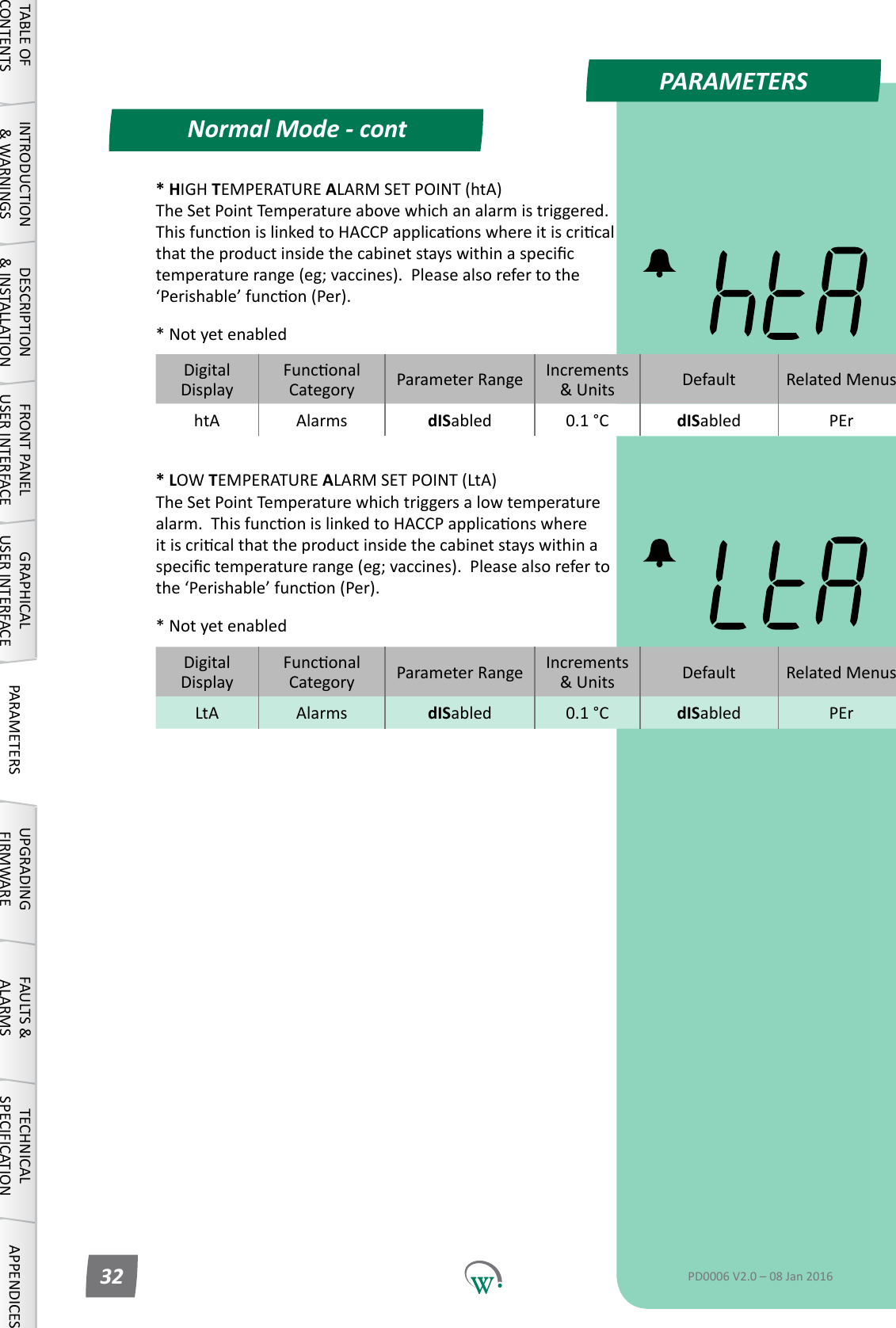
PARAMETERSNormal Mode - contTABLE OF CONTENTSINTRODUCTION & WARNINGSDESCRIPTION & INSTALLATIONFRONT PANEL USER INTERFACEGRAPHICAL USER INTERFACE PARAMETERS UPGRADING FIRMWAREFAULTS & ALARMSTECHNICAL SPECIFICATION APPENDICESPD0006 V2.0 – 08 Jan 201632* HIGH TEMPERATURE ALARM SET POINT (htA) TheSetPointTemperatureabovewhichanalarmistriggered.ThisfunconislinkedtoHACCPapplicaonswhereitiscricalthattheproductinsidethecabinetstayswithinaspecictemperaturerange(eg;vaccines).Pleasealsorefertothe‘Perishable’funcon(Per).* Not yet enabled* LOW TEMPERATURE ALARM SET POINT (LtA) TheSetPointTemperaturewhichtriggersalowtemperaturealarm.ThisfunconislinkedtoHACCPapplicaonswhereitiscricalthattheproductinsidethecabinetstayswithinaspecictemperaturerange(eg;vaccines).Pleasealsorefertothe‘Perishable’funcon(Per).* Not yet enabledDigitalDisplayFunconalCategory ParameterRange Increments &Units Default Related MenushtA Alarms dISabled 0.1 °C dISabled PErDigitalDisplayFunconalCategory ParameterRange Increments &Units Default Related MenusLtA Alarms dISabled 0.1 °C dISabled PEr
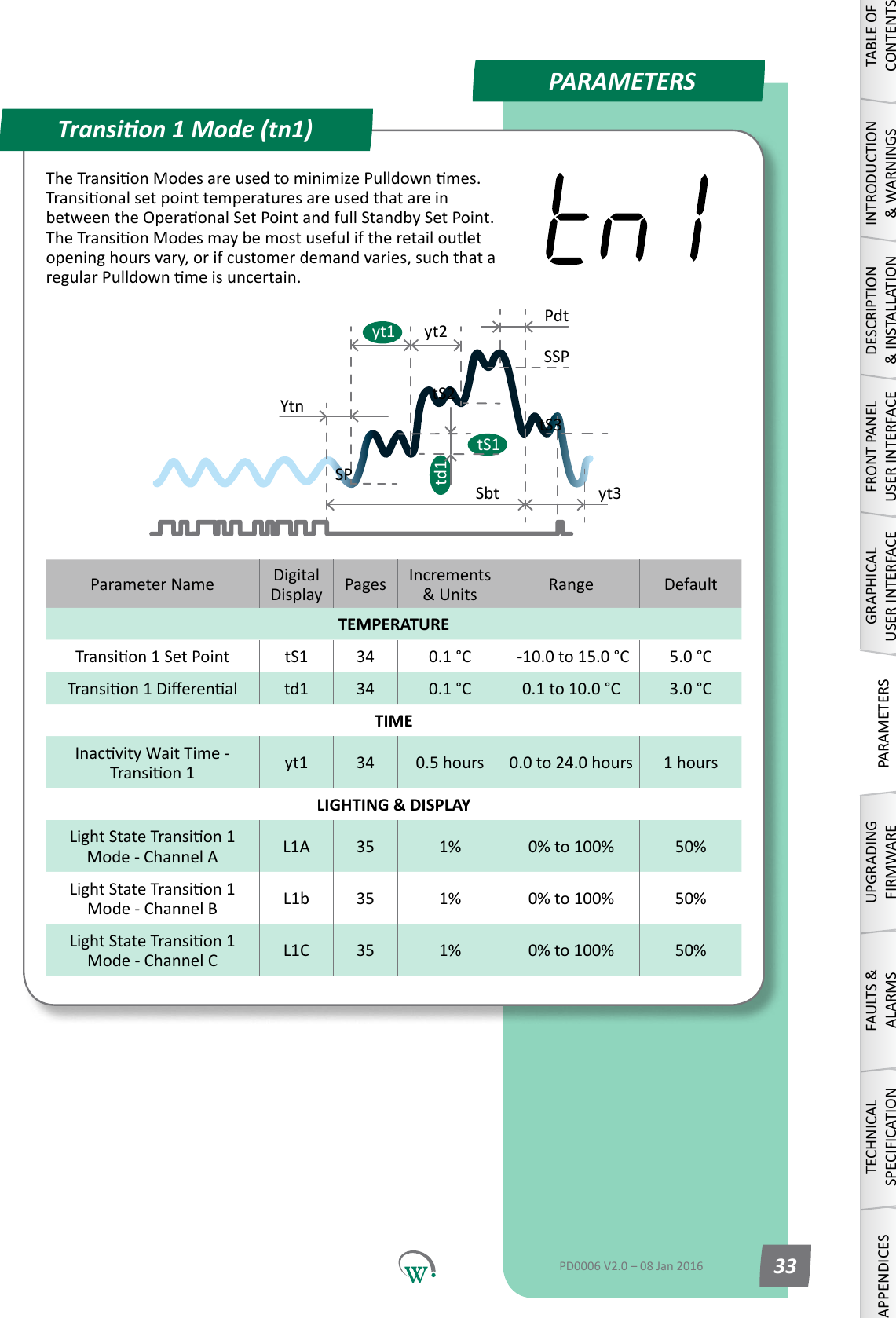
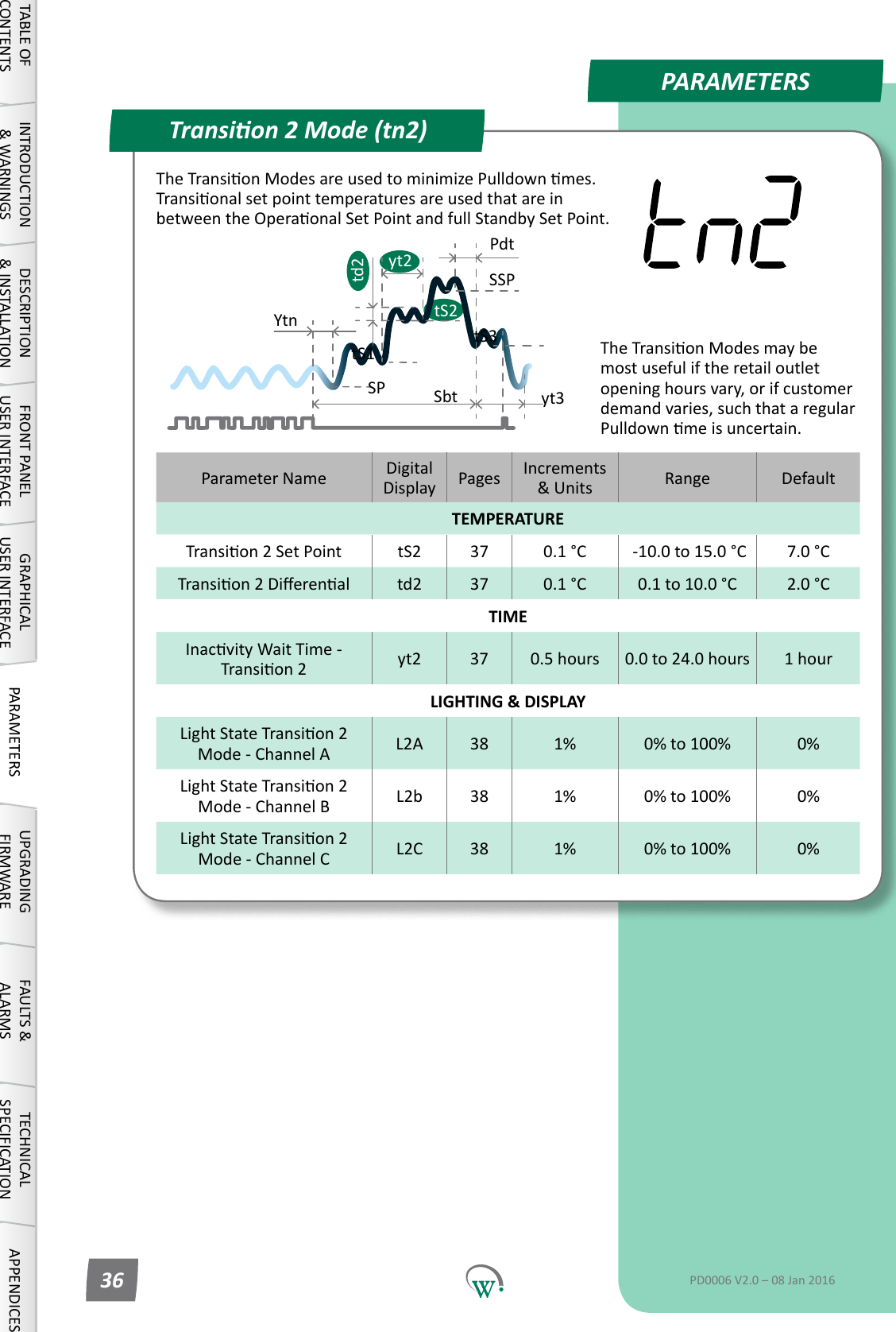
PARAMETERSParameter Name DigitalDisplay Pages Increments &Units Range DefaultTEMPERATURETransion1SetPoint tS1 34 0.1 °C  -10.0 to 15.0 °C 5.0 °CTransion1Dierenal td1 34 0.1 °C 0.1 to 10.0 °C 3.0 °CTIMEInacvityWaitTime-Transion1 yt1 34 0.5 hours 0.0 to 24.0 hours 1 hoursLIGHTING & DISPLAYLightStateTransion1 Mode - Channel A L1A 35 1% 0% to 100% 50%LightStateTransion1 Mode - Channel B L1b 35 1% 0% to 100% 50%LightStateTransion1 Mode - Channel C L1C 35 1% 0% to 100% 50%Transion 1 Mode (tn1)SPtS1SbttS2YtnSSPPdtyt3td1tS3yt1 yt2TABLE OF CONTENTSINTRODUCTION & WARNINGSDESCRIPTION & INSTALLATIONFRONT PANEL USER INTERFACEGRAPHICAL USER INTERFACEPARAMETERSUPGRADING FIRMWAREFAULTS & ALARMSTECHNICAL SPECIFICATIONAPPENDICESPD0006 V2.0 – 08 Jan 2016 33TheTransionModesareusedtominimizePulldownmes.TransionalsetpointtemperaturesareusedthatareinbetweentheOperaonalSetPointandfullStandbySetPoint.TheTransionModesmaybemostusefuliftheretailoutletopeninghoursvary,orifcustomerdemandvaries,suchthataregularPulldownmeisuncertain.
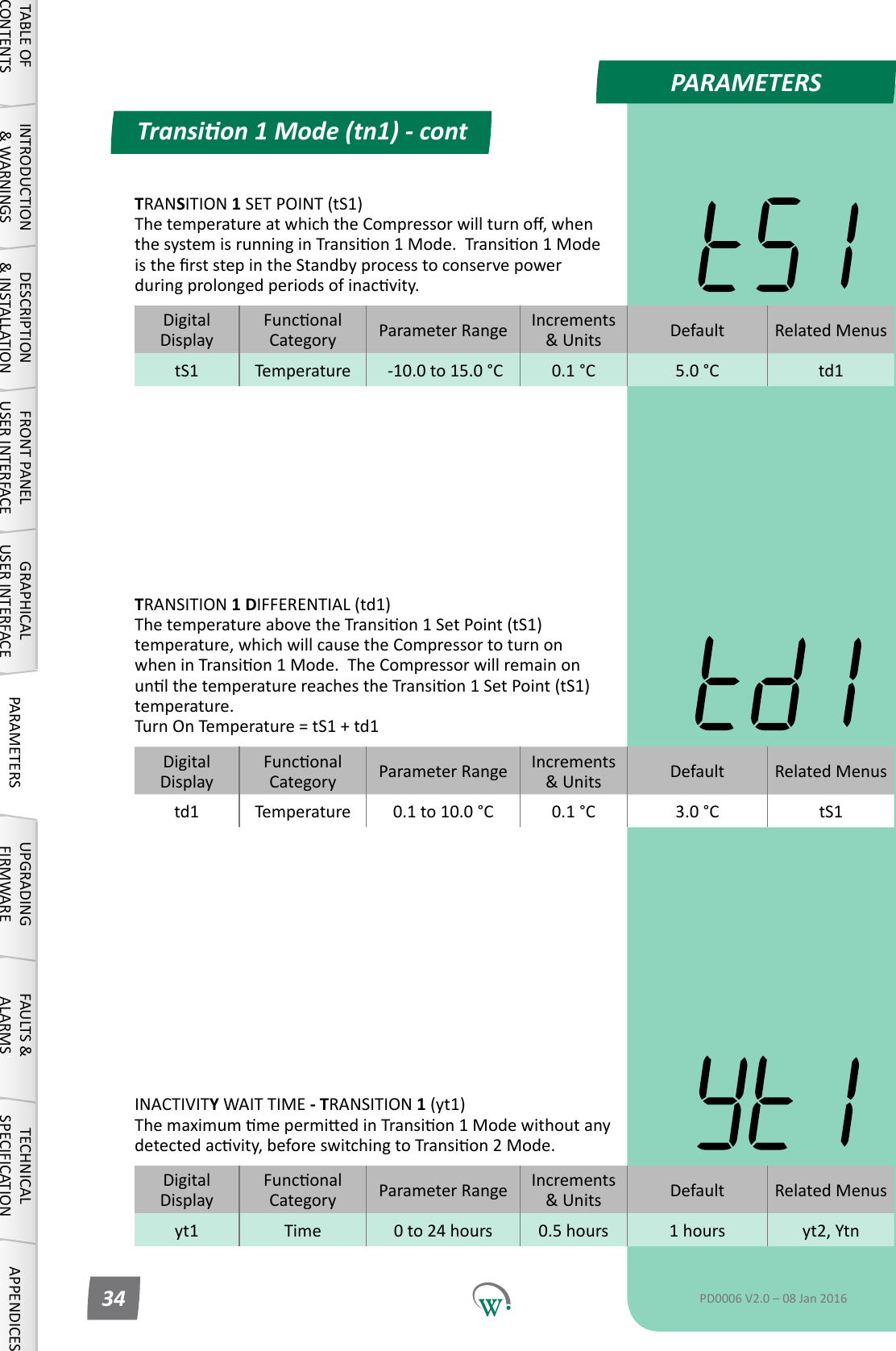
PARAMETERSDigitalDisplayFunconalCategory ParameterRange Increments &Units Default Related Menustd1 Temperature 0.1 to 10.0 °C 0.1 °C 3.0 °C tS1DigitalDisplayFunconalCategory ParameterRange Increments &Units Default Related Menusyt1 Time 0 to 24 hours 0.5 hours 1 hours yt2, YtnDigitalDisplayFunconalCategory ParameterRange Increments &Units Default Related MenustS1 Temperature  -10.0 to 15.0 °C 0.1 °C 5.0 °C td1Transion 1 Mode (tn1) - contTABLE OF CONTENTSINTRODUCTION & WARNINGSDESCRIPTION & INSTALLATIONFRONT PANEL USER INTERFACEGRAPHICAL USER INTERFACE PARAMETERS UPGRADING FIRMWAREFAULTS & ALARMSTECHNICAL SPECIFICATION APPENDICESPD0006 V2.0 – 08 Jan 201634INACTIVITY WAIT TIME - TRANSITION 1 (yt1) ThemaximummepermiedinTransion1Modewithoutanydetectedacvity,beforeswitchingtoTransion2Mode.TRANSITION 1 DIFFERENTIAL (td1) ThetemperatureabovetheTransion1SetPoint(tS1)temperature, which will cause the Compressor to turn on wheninTransion1Mode.TheCompressorwillremainonunlthetemperaturereachestheTransion1SetPoint(tS1)temperature. Turn On Temperature = tS1 + td1TRANSITION 1 SET POINT (tS1) ThetemperatureatwhichtheCompressorwillturno,whenthesystemisrunninginTransion1Mode.Transion1ModeistherststepintheStandbyprocesstoconservepowerduringprolongedperiodsofinacvity.
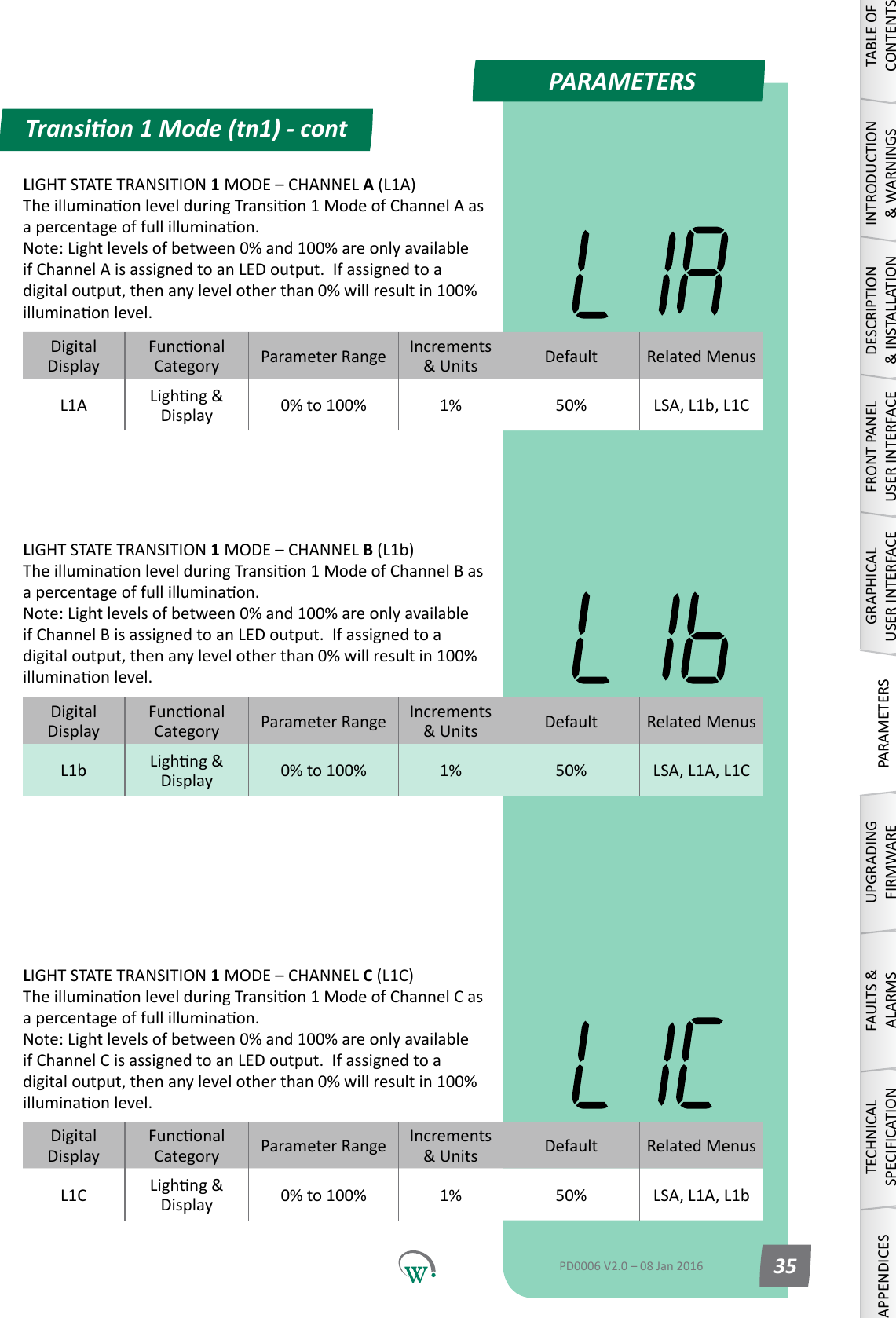
PARAMETERSDigitalDisplayFunconalCategory ParameterRange Increments &Units Default Related MenusL1A Lighng&Display 0% to 100% 1% 50% LSA, L1b, L1CLIGHT STATE TRANSITION 1MODE–CHANNELB (L1b) TheilluminaonlevelduringTransion1ModeofChannelBasapercentageoffullilluminaon. Note:Lightlevelsofbetween0%and100%areonlyavailableifChannelBisassignedtoanLEDoutput.Ifassignedtoadigitaloutput,thenanylevelotherthan0%willresultin100%illuminaonlevel.LIGHT STATE TRANSITION 1MODE–CHANNELC (L1C) TheilluminaonlevelduringTransion1ModeofChannelCasapercentageoffullilluminaon. Note:Lightlevelsofbetween0%and100%areonlyavailableifChannelCisassignedtoanLEDoutput.Ifassignedtoadigitaloutput,thenanylevelotherthan0%willresultin100%illuminaonlevel.DigitalDisplayFunconalCategory ParameterRange Increments &Units Default Related MenusL1b Lighng&Display 0% to 100% 1% 50% LSA, L1A, L1CDigitalDisplayFunconalCategory ParameterRange Increments &Units Default Related MenusL1C Lighng&Display 0% to 100% 1% 50% LSA, L1A, L1bTransion 1 Mode (tn1) - contTABLE OF CONTENTSINTRODUCTION & WARNINGSDESCRIPTION & INSTALLATIONFRONT PANEL USER INTERFACEGRAPHICAL USER INTERFACEPARAMETERSUPGRADING FIRMWAREFAULTS & ALARMSTECHNICAL SPECIFICATIONAPPENDICESPD0006 V2.0 – 08 Jan 2016 35LIGHT STATE TRANSITION 1MODE–CHANNELA (L1A) TheilluminaonlevelduringTransion1ModeofChannelAasapercentageoffullilluminaon. Note:Lightlevelsofbetween0%and100%areonlyavailableifChannelAisassignedtoanLEDoutput.Ifassignedtoadigitaloutput,thenanylevelotherthan0%willresultin100%illuminaonlevel.
PARAMETERSParameter Name DigitalDisplay Pages Increments &Units Range DefaultTEMPERATURETransion2SetPoint tS2 37 0.1 °C  -10.0 to 15.0 °C 7.0 °CTransion2Dierenal td2 37 0.1 °C 0.1 to 10.0 °C 2.0 °CTIMEInacvityWaitTime-Transion2 yt2 37 0.5 hours 0.0 to 24.0 hours 1 hourLIGHTING & DISPLAYLightStateTransion2 Mode - Channel A L2A 38 1% 0% to 100% 0%LightStateTransion2 Mode - Channel B L2b 38 1% 0% to 100% 0%LightStateTransion2 Mode - Channel C L2C 38 1% 0% to 100% 0%Transion 2 Mode (tn2)SPtS1SbttS2YtnSSPPdtyt3td2tS3yt2TABLE OF CONTENTSINTRODUCTION & WARNINGSDESCRIPTION & INSTALLATIONFRONT PANEL USER INTERFACEGRAPHICAL USER INTERFACE PARAMETERS UPGRADING FIRMWAREFAULTS & ALARMSTECHNICAL SPECIFICATION APPENDICESPD0006 V2.0 – 08 Jan 201636TheTransionModesareusedtominimizePulldownmes.TransionalsetpointtemperaturesareusedthatareinbetweentheOperaonalSetPointandfullStandbySetPoint.TheTransionModesmaybemost useful if the retail outlet openinghoursvary,orifcustomerdemandvaries,suchthataregularPulldownmeisuncertain.
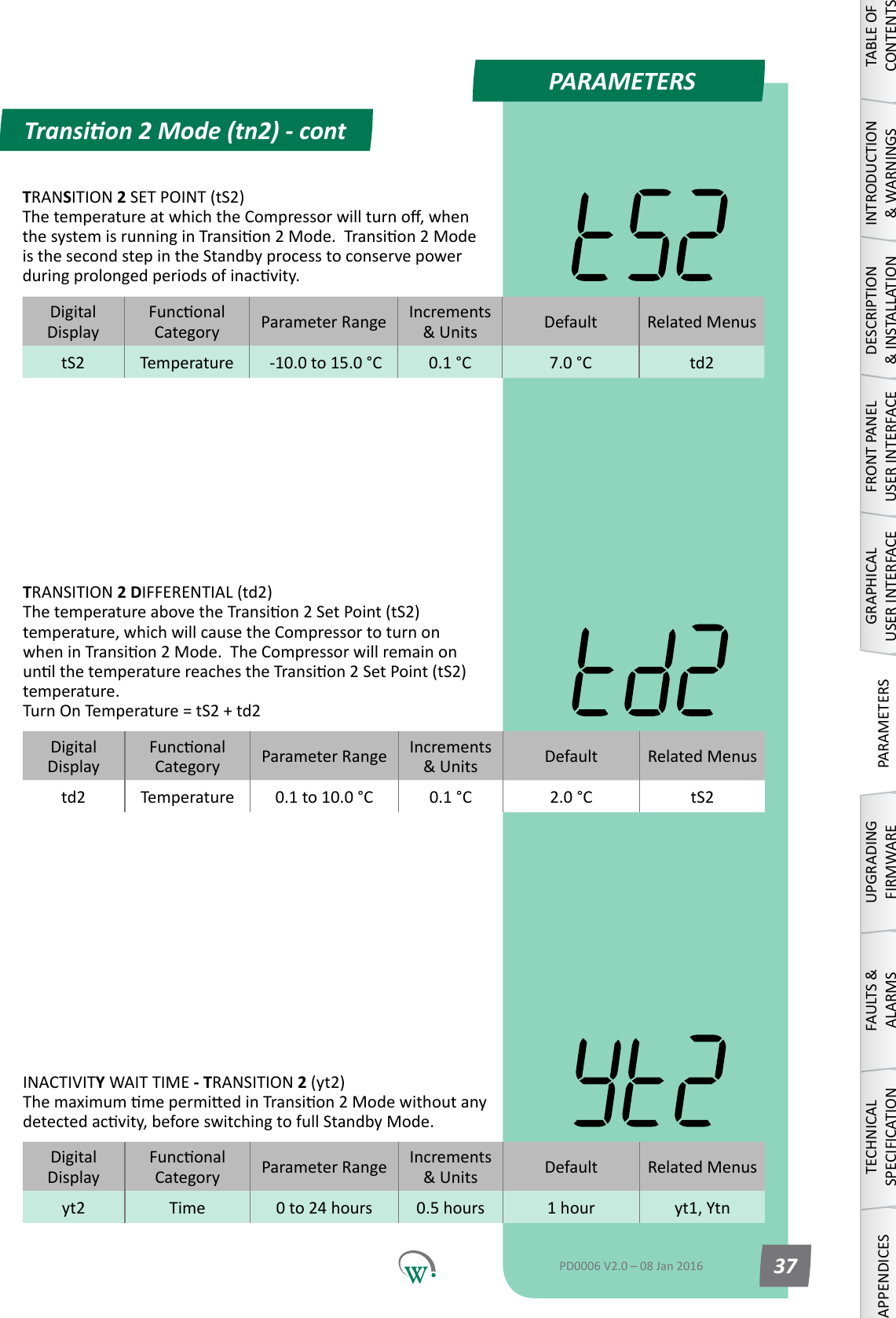
PARAMETERSDigitalDisplayFunconalCategory ParameterRange Increments &Units Default Related MenustS2 Temperature  -10.0 to 15.0 °C 0.1 °C 7.0 °C td2DigitalDisplayFunconalCategory ParameterRange Increments &Units Default Related Menustd2 Temperature 0.1 to 10.0 °C 0.1 °C 2.0 °C tS2DigitalDisplayFunconalCategory ParameterRange Increments &Units Default Related Menusyt2 Time 0 to 24 hours 0.5 hours 1 hour yt1, YtnTransion 2 Mode (tn2) - contTABLE OF CONTENTSINTRODUCTION & WARNINGSDESCRIPTION & INSTALLATIONFRONT PANEL USER INTERFACEGRAPHICAL USER INTERFACEPARAMETERSUPGRADING FIRMWAREFAULTS & ALARMSTECHNICAL SPECIFICATIONAPPENDICESPD0006 V2.0 – 08 Jan 2016 37TRANSITION 2 SET POINT (tS2) ThetemperatureatwhichtheCompressorwillturno,whenthesystemisrunninginTransion2Mode.Transion2Modeis the second step in the Standby process to conserve power duringprolongedperiodsofinacvity.TRANSITION 2 DIFFERENTIAL (td2) ThetemperatureabovetheTransion2SetPoint(tS2)temperature, which will cause the Compressor to turn on wheninTransion2Mode.TheCompressorwillremainonunlthetemperaturereachestheTransion2SetPoint(tS2)temperature. Turn On Temperature = tS2 + td2INACTIVITY WAIT TIME - TRANSITION 2 (yt2) ThemaximummepermiedinTransion2Modewithoutanydetectedacvity,beforeswitchingtofullStandbyMode.
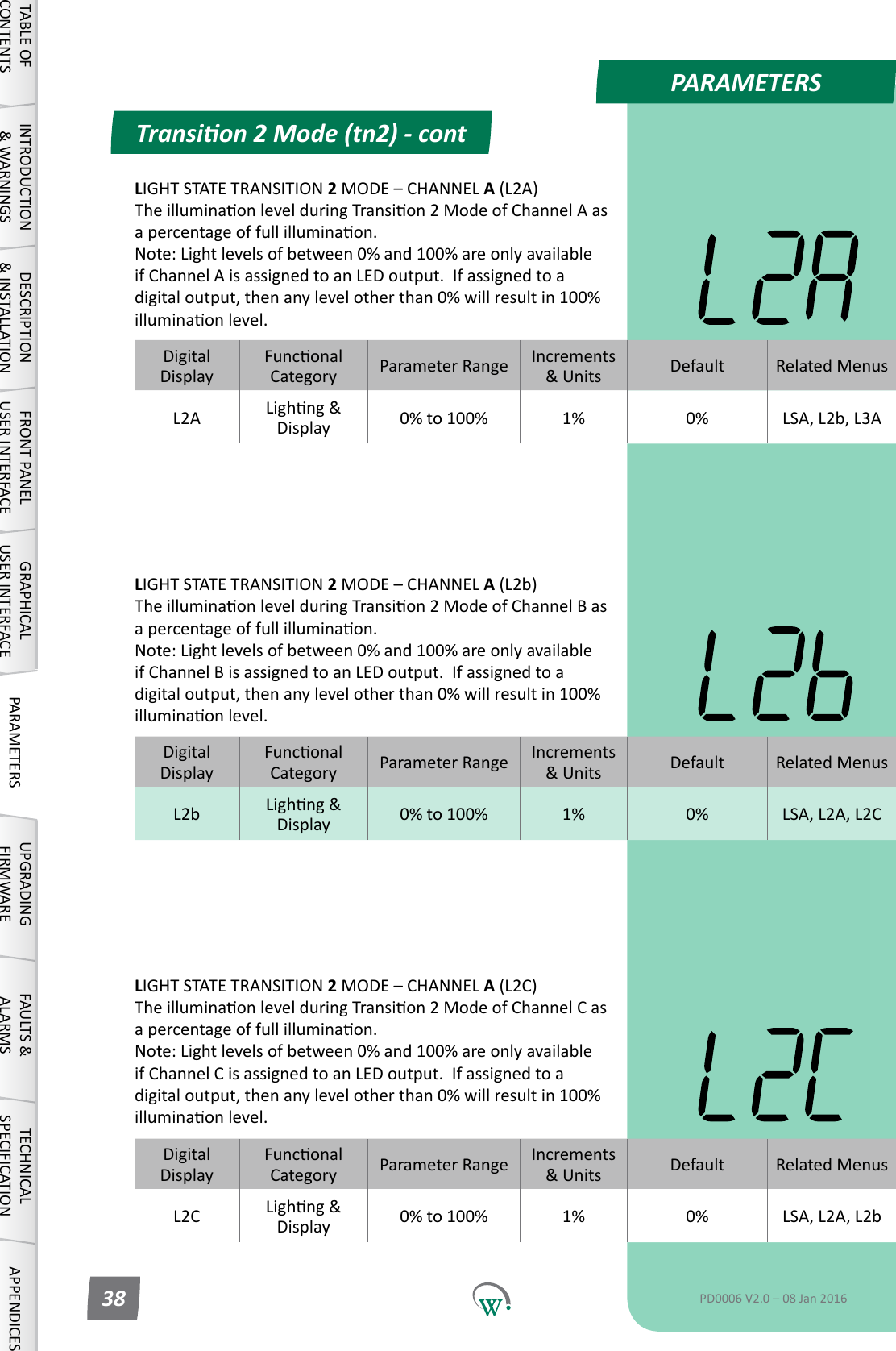
PARAMETERSDigitalDisplayFunconalCategory ParameterRange Increments &Units Default Related MenusL2A Lighng&Display 0% to 100% 1% 0% LSA, L2b, L3ADigitalDisplayFunconalCategory ParameterRange Increments &Units Default Related MenusL2b Lighng&Display 0% to 100% 1% 0% LSA, L2A, L2CDigitalDisplayFunconalCategory ParameterRange Increments &Units Default Related MenusL2C Lighng&Display 0% to 100% 1% 0% LSA, L2A, L2bLIGHT STATE TRANSITION 2MODE–CHANNELA (L2b) TheilluminaonlevelduringTransion2ModeofChannelBasapercentageoffullilluminaon. Note:Lightlevelsofbetween0%and100%areonlyavailableifChannelBisassignedtoanLEDoutput.Ifassignedtoadigitaloutput,thenanylevelotherthan0%willresultin100%illuminaonlevel.LIGHT STATE TRANSITION 2MODE–CHANNELA (L2C) TheilluminaonlevelduringTransion2ModeofChannelCasapercentageoffullilluminaon. Note:Lightlevelsofbetween0%and100%areonlyavailableifChannelCisassignedtoanLEDoutput.Ifassignedtoadigitaloutput,thenanylevelotherthan0%willresultin100%illuminaonlevel.Transion 2 Mode (tn2) - contTABLE OF CONTENTSINTRODUCTION & WARNINGSDESCRIPTION & INSTALLATIONFRONT PANEL USER INTERFACEGRAPHICAL USER INTERFACE PARAMETERS UPGRADING FIRMWAREFAULTS & ALARMSTECHNICAL SPECIFICATION APPENDICESPD0006 V2.0 – 08 Jan 201638LIGHT STATE TRANSITION 2MODE–CHANNELA (L2A) TheilluminaonlevelduringTransion2ModeofChannelAasapercentageoffullilluminaon. Note:Lightlevelsofbetween0%and100%areonlyavailableifChannelAisassignedtoanLEDoutput.Ifassignedtoadigitaloutput,thenanylevelotherthan0%willresultin100%illuminaonlevel.
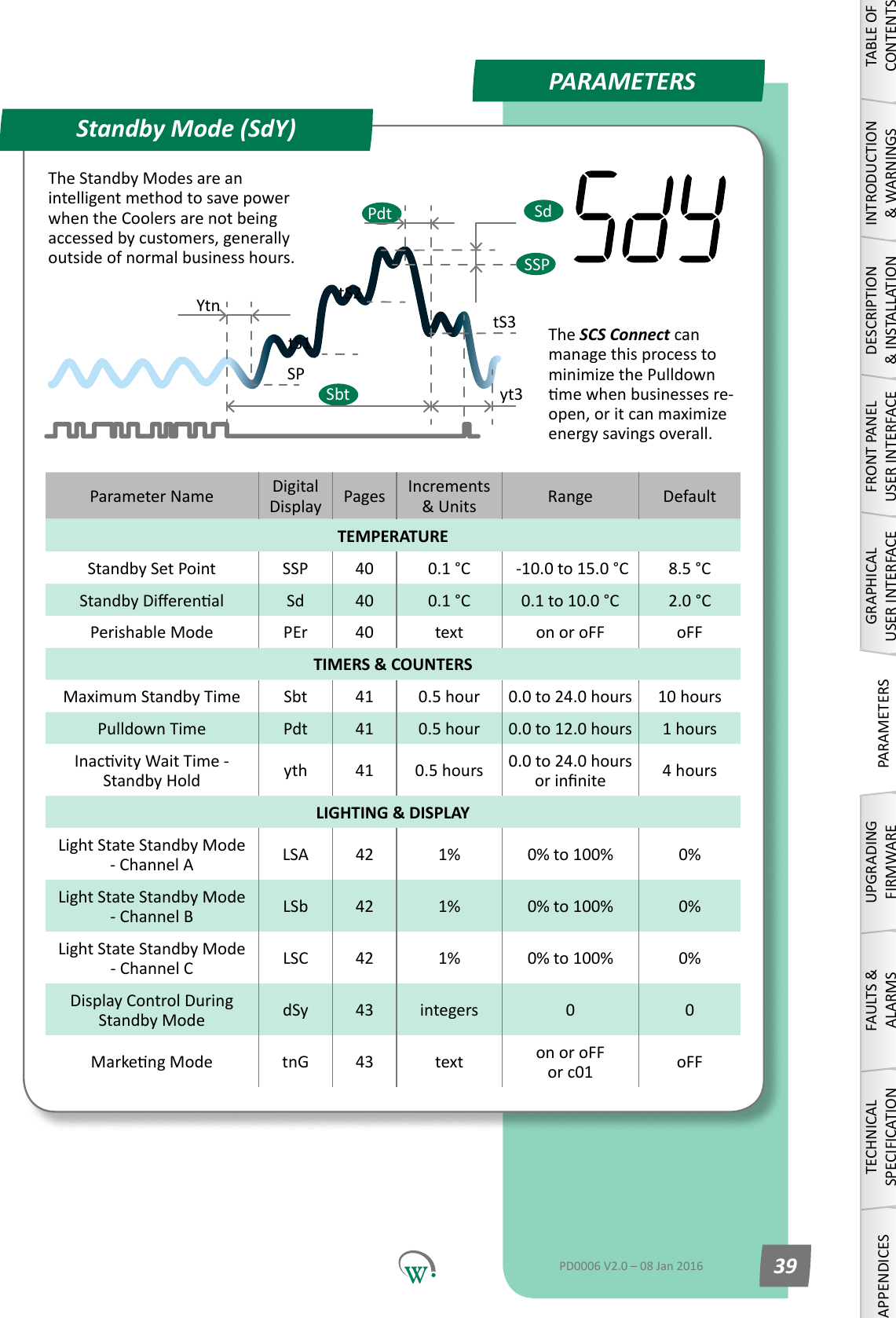
PARAMETERSParameter Name DigitalDisplay Pages Increments &Units Range DefaultTEMPERATUREStandby Set Point SSP 40 0.1 °C  -10.0 to 15.0 °C 8.5 °CStandbyDierenal Sd 40 0.1 °C 0.1 to 10.0 °C 2.0 °CPerishable Mode PEr 40 text on or oFF oFFTIMERS & COUNTERSMaximum Standby Time Sbt 41 0.5 hour 0.0 to 24.0 hours 10 hoursPulldown Time Pdt 41 0.5 hour 0.0 to 12.0 hours 1 hoursInacvityWaitTime-Standby Hold yth 41 0.5 hours 0.0 to 24.0 hours orinnite 4 hoursLIGHTING & DISPLAYLightStateStandbyMode - Channel A LSA 42 1% 0% to 100% 0%LightStateStandbyMode - Channel B LSb 42 1% 0% to 100% 0%LightStateStandbyMode - Channel C LSC 42 1% 0% to 100% 0%DisplayControlDuringStandby Mode dSy 43 integers 0 0MarkengMode tnG 43 text on or oFF or c01 oFFStandby Mode (SdY)SPtS1SbttS2YtnSSPSdPdtyt3tS3TABLE OF CONTENTSINTRODUCTION & WARNINGSDESCRIPTION & INSTALLATIONFRONT PANEL USER INTERFACEGRAPHICAL USER INTERFACEPARAMETERSUPGRADING FIRMWAREFAULTS & ALARMSTECHNICAL SPECIFICATIONAPPENDICESPD0006 V2.0 – 08 Jan 2016 39The Standby Modes are an intelligentmethodtosavepowerwhentheCoolersarenotbeingaccessedbycustomers,generallyoutside of normal business hours.  The SCS Connect can managethisprocesstominimizethePulldownmewhenbusinessesre-open,oritcanmaximizeenergysavingsoverall.
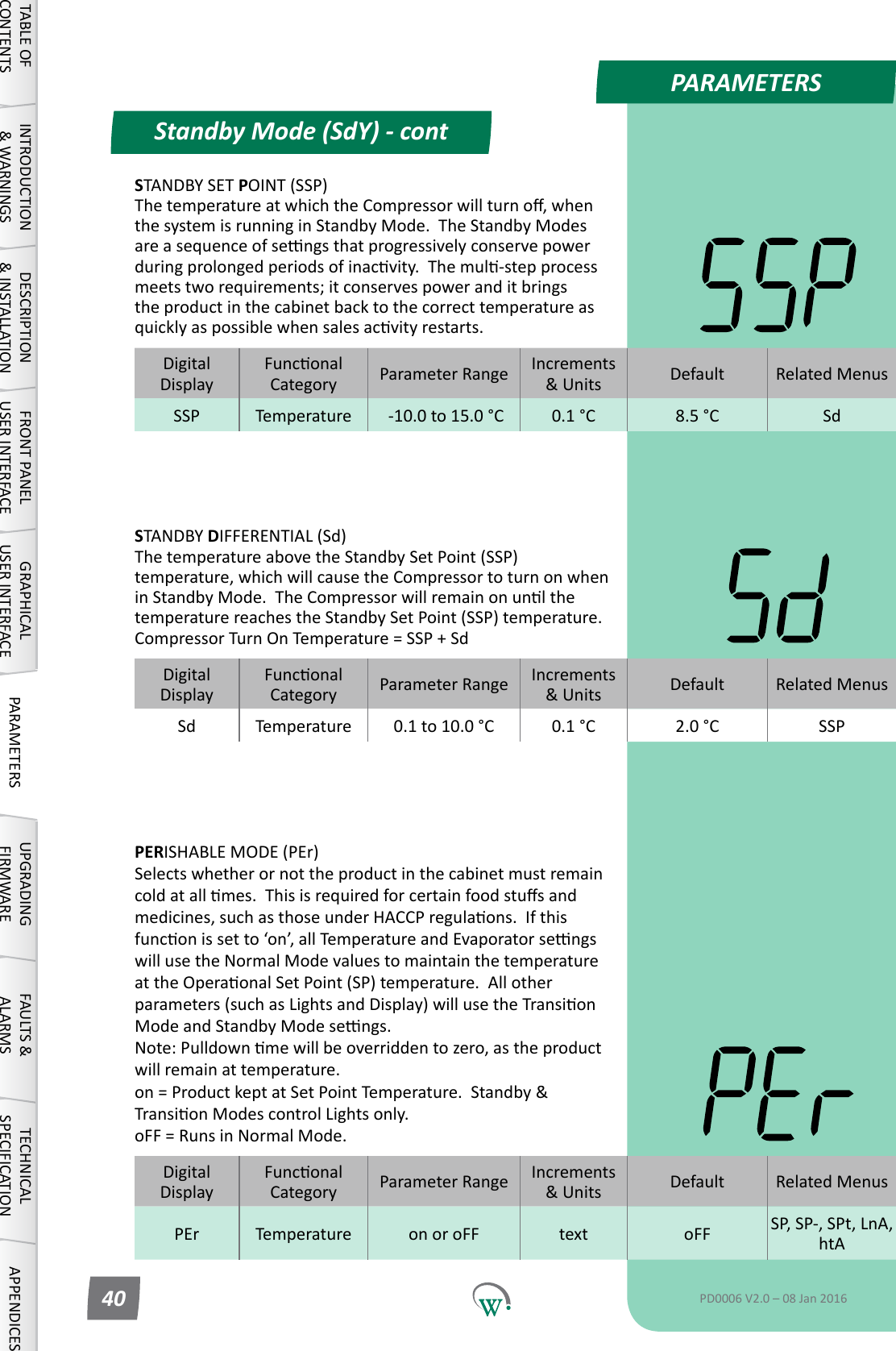
PARAMETERSDigitalDisplayFunconalCategory ParameterRange Increments &Units Default Related MenusSSP Temperature  -10.0 to 15.0 °C 0.1 °C 8.5 °C SdDigitalDisplayFunconalCategory ParameterRange Increments &Units Default Related MenusSd Temperature 0.1 to 10.0 °C 0.1 °C 2.0 °C SSPDigitalDisplayFunconalCategory ParameterRange Increments &Units Default Related MenusPEr Temperature on or oFF text oFF SP, SP-, SPt, LnA, htAStandby Mode (SdY) - contTABLE OF CONTENTSINTRODUCTION & WARNINGSDESCRIPTION & INSTALLATIONFRONT PANEL USER INTERFACEGRAPHICAL USER INTERFACE PARAMETERS UPGRADING FIRMWAREFAULTS & ALARMSTECHNICAL SPECIFICATION APPENDICESPD0006 V2.0 – 08 Jan 201640STANDBY SET POINT (SSP) ThetemperatureatwhichtheCompressorwillturno,whenthesystemisrunninginStandbyMode.TheStandbyModesareasequenceofsengsthatprogressivelyconservepowerduringprolongedperiodsofinacvity.Themul-stepprocessmeetstworequirements;itconservespoweranditbringsthe product in the cabinet back to the correct temperature as quicklyaspossiblewhensalesacvityrestarts.STANDBY DIFFERENTIAL (Sd) The temperature above the Standby Set Point (SSP) temperature, which will cause the Compressor to turn on when inStandbyMode.TheCompressorwillremainonunlthetemperature reaches the Standby Set Point (SSP) temperature. Compressor Turn On Temperature = SSP + SdPERISHABLE MODE (PEr) Selects whether or not the product in the cabinet must remain coldatallmes.Thisisrequiredforcertainfoodstusandmedicines,suchasthoseunderHACCPregulaons.Ifthisfunconissetto‘on’,allTemperatureandEvaporatorsengswill use the Normal Mode values to maintain the temperature attheOperaonalSetPoint(SP)temperature.Allotherparameters(suchasLightsandDisplay)willusetheTransionModeandStandbyModesengs. Note:Pulldownmewillbeoverriddentozero,astheproductwill remain at temperature. on=ProductkeptatSetPointTemperature.Standby&TransionModescontrolLightsonly. oFF = Runs in Normal Mode.
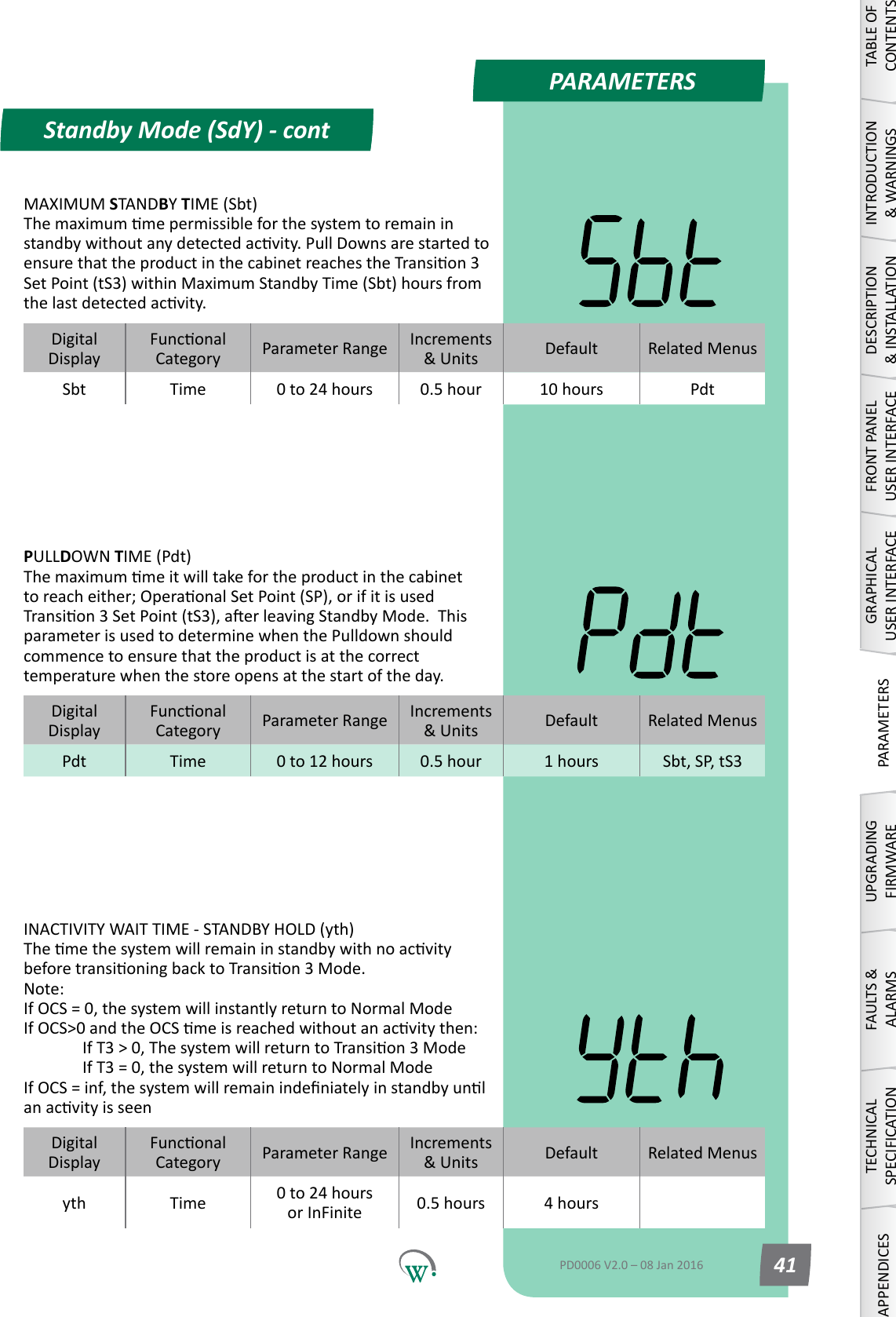
PARAMETERSDigitalDisplayFunconalCategory ParameterRange Increments &Units Default Related MenusPdt Time 0 to 12 hours 0.5 hour 1 hours Sbt, SP, tS3DigitalDisplayFunconalCategory ParameterRange Increments &Units Default Related MenusSbt Time 0 to 24 hours 0.5 hour 10 hours PdtDigitalDisplayFunconalCategory ParameterRange Increments &Units Default Related Menusyth Time 0 to 24 hours or InFinite 0.5 hours 4 hoursINACTIVITY WAIT TIME - STANDBY HOLD (yth) ThemethesystemwillremaininstandbywithnoacvitybeforetransioningbacktoTransion3Mode. Note: If OCS = 0, the system will instantly return to Normal Mode IfOCS>0andtheOCSmeisreachedwithoutanacvitythen:  IfT3>0,ThesystemwillreturntoTransion3Mode   If T3 = 0, the system will return to Normal Mode IfOCS=inf,thesystemwillremainindeniatelyinstandbyunlanacvityisseenStandby Mode (SdY) - contTABLE OF CONTENTSINTRODUCTION & WARNINGSDESCRIPTION & INSTALLATIONFRONT PANEL USER INTERFACEGRAPHICAL USER INTERFACEPARAMETERSUPGRADING FIRMWAREFAULTS & ALARMSTECHNICAL SPECIFICATIONAPPENDICESPD0006 V2.0 – 08 Jan 2016 41MAXIMUM STANDBY TIME (Sbt) Themaximummepermissibleforthesystemtoremaininstandbywithoutanydetectedacvity.PullDownsarestartedtoensurethattheproductinthecabinetreachestheTransion3Set Point (tS3) within Maximum Standby Time (Sbt) hours from thelastdetectedacvity.PULLDOWN TIME (Pdt) Themaximummeitwilltakefortheproductinthecabinettoreacheither;OperaonalSetPoint(SP),orifitisusedTransion3SetPoint(tS3),aerleavingStandbyMode.Thisparameter is used to determine when the Pulldown should commence to ensure that the product is at the correct temperature when the store opens at the start of the day.
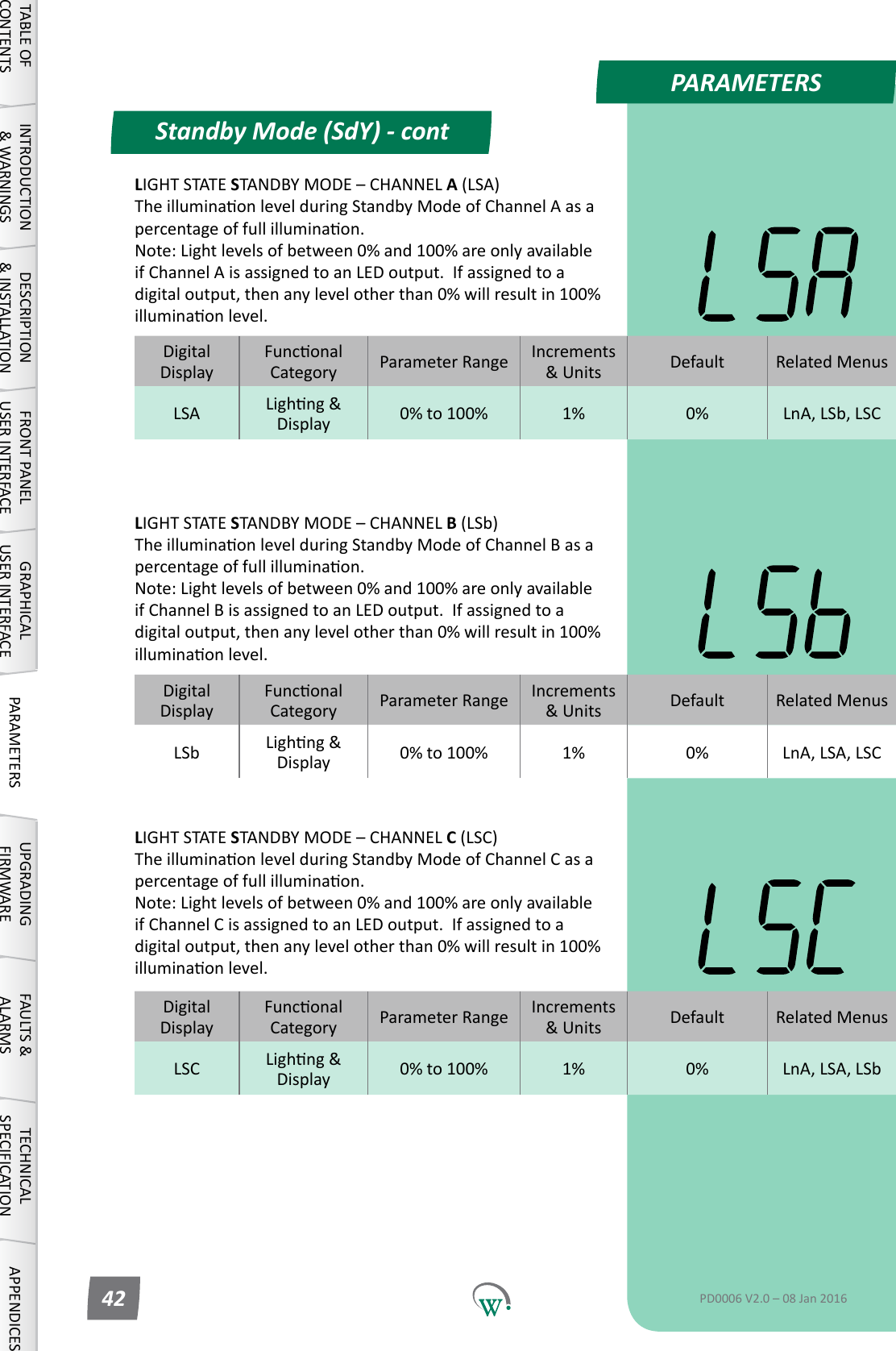
PARAMETERSDigitalDisplayFunconalCategory ParameterRange Increments &Units Default Related MenusLSA Lighng&Display 0% to 100% 1% 0% LnA, LSb, LSCDigitalDisplayFunconalCategory ParameterRange Increments &Units Default Related MenusLSb Lighng&Display 0% to 100% 1% 0% LnA, LSA, LSCDigitalDisplayFunconalCategory ParameterRange Increments &Units Default Related MenusLSC Lighng&Display 0% to 100% 1% 0% LnA, LSA, LSbLIGHT STATE STANDBYMODE–CHANNELB (LSb) TheilluminaonlevelduringStandbyModeofChannelBasapercentageoffullilluminaon. Note:Lightlevelsofbetween0%and100%areonlyavailableifChannelBisassignedtoanLEDoutput.Ifassignedtoadigitaloutput,thenanylevelotherthan0%willresultin100%illuminaonlevel.LIGHT STATE STANDBYMODE–CHANNELC (LSC) TheilluminaonlevelduringStandbyModeofChannelCasapercentageoffullilluminaon. Note:Lightlevelsofbetween0%and100%areonlyavailableifChannelCisassignedtoanLEDoutput.Ifassignedtoadigitaloutput,thenanylevelotherthan0%willresultin100%illuminaonlevel.Standby Mode (SdY) - contTABLE OF CONTENTSINTRODUCTION & WARNINGSDESCRIPTION & INSTALLATIONFRONT PANEL USER INTERFACEGRAPHICAL USER INTERFACE PARAMETERS UPGRADING FIRMWAREFAULTS & ALARMSTECHNICAL SPECIFICATION APPENDICESPD0006 V2.0 – 08 Jan 201642LIGHT STATE STANDBYMODE–CHANNELA (LSA) TheilluminaonlevelduringStandbyModeofChannelAasapercentageoffullilluminaon. Note:Lightlevelsofbetween0%and100%areonlyavailableifChannelAisassignedtoanLEDoutput.Ifassignedtoadigitaloutput,thenanylevelotherthan0%willresultin100%illuminaonlevel.
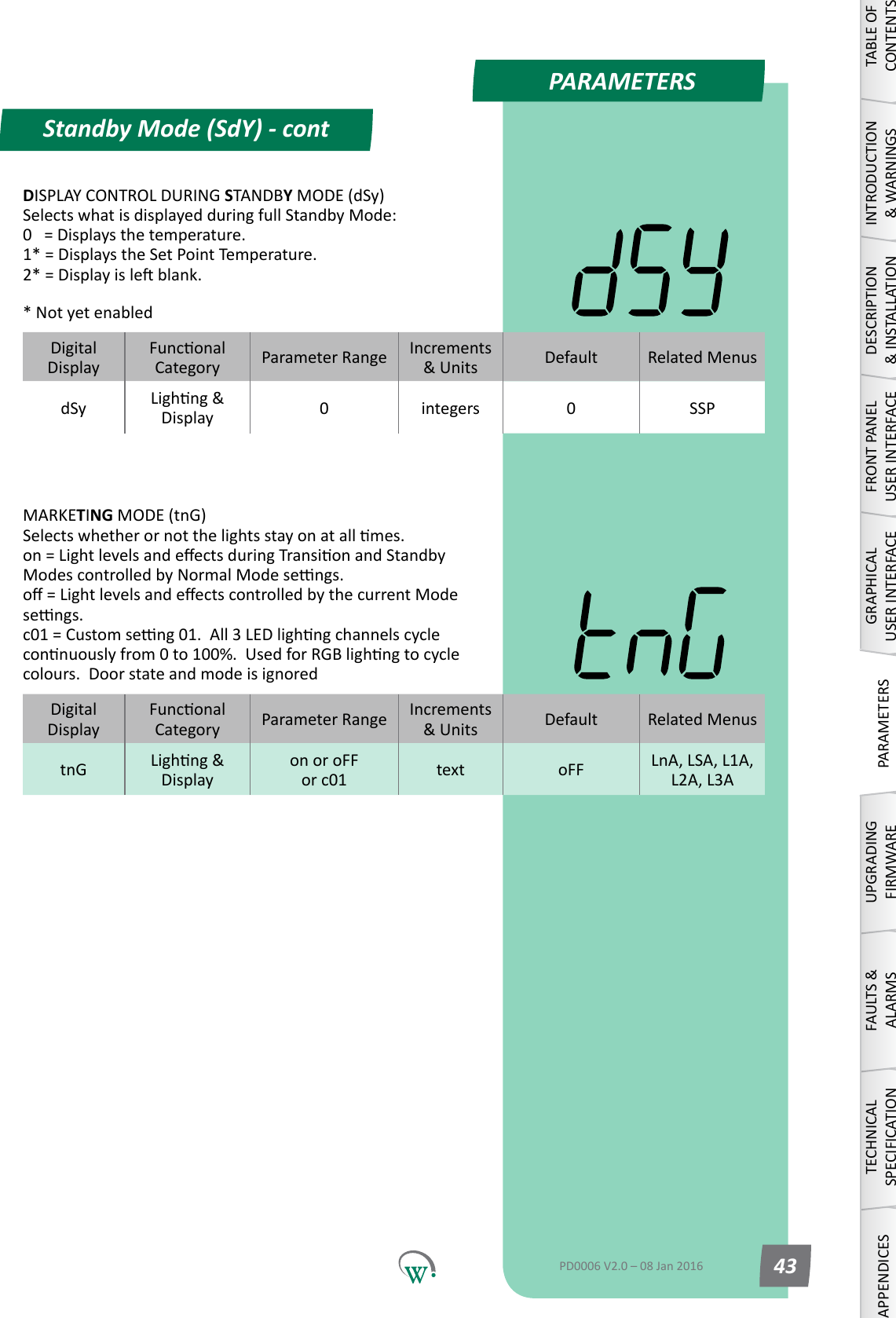
PARAMETERSDigitalDisplayFunconalCategory ParameterRange Increments &Units Default Related MenusdSy Lighng&Display 0integers 0 SSPDigitalDisplayFunconalCategory ParameterRange Increments &Units Default Related MenustnG Lighng&Displayon or oFF or c01  text oFF LnA, LSA, L1A, L2A, L3AStandby Mode (SdY) - contTABLE OF CONTENTSINTRODUCTION & WARNINGSDESCRIPTION & INSTALLATIONFRONT PANEL USER INTERFACEGRAPHICAL USER INTERFACEPARAMETERSUPGRADING FIRMWAREFAULTS & ALARMSTECHNICAL SPECIFICATIONAPPENDICESPD0006 V2.0 – 08 Jan 2016 43DISPLAY CONTROL DURING STANDBY MODE (dSy) SelectswhatisdisplayedduringfullStandbyMode: 0   = Displays the temperature. 1* = Displays the Set Point Temperature. 2*=Displayisleblank.* Not yet enabledMARKETING MODE (tnG) Selectswhetherornotthelightsstayonatallmes. on=LightlevelsandeectsduringTransionandStandbyModescontrolledbyNormalModesengs. o=LightlevelsandeectscontrolledbythecurrentModesengs. c01=Customseng01.All3LEDlighngchannelscycleconnuouslyfrom0to100%.UsedforRGBlighngtocyclecolours.Doorstateandmodeisignored
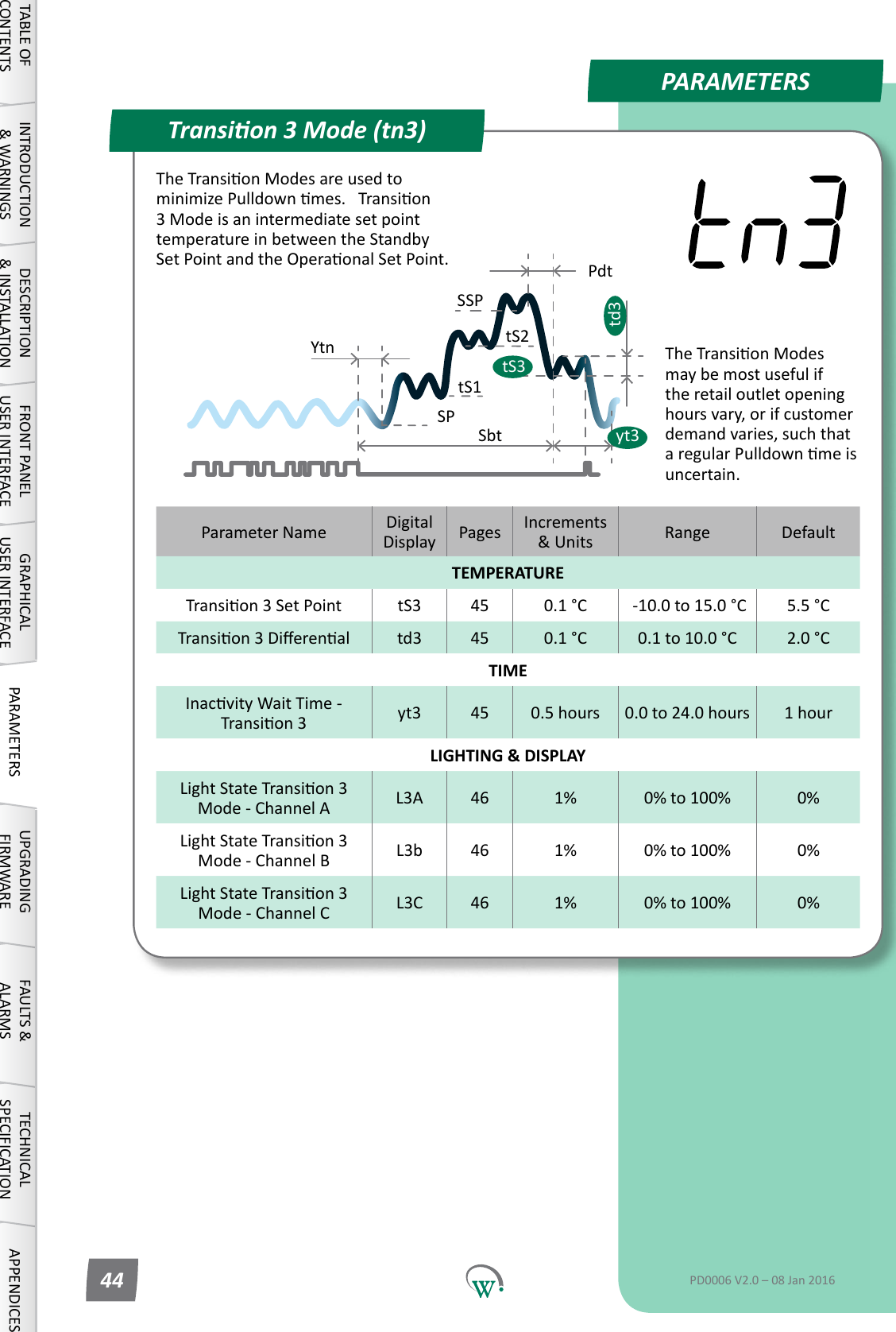
PARAMETERSParameter Name DigitalDisplay Pages Increments &Units Range DefaultTEMPERATURETransion3SetPoint tS3 45 0.1 °C  -10.0 to 15.0 °C 5.5 °CTransion3Dierenal td3 45 0.1 °C 0.1 to 10.0 °C 2.0 °CTIMEInacvityWaitTime-Transion3 yt3 45 0.5 hours 0.0 to 24.0 hours 1 hourLIGHTING & DISPLAYLightStateTransion3 Mode - Channel A L3A 46 1% 0% to 100% 0%LightStateTransion3 Mode - Channel B L3b 46 1% 0% to 100% 0%LightStateTransion3 Mode - Channel C L3C 46 1% 0% to 100% 0%Transion 3 Mode (tn3)SPtS1SbttS2YtnSSPPdtyt3td3tS3TABLE OF CONTENTSINTRODUCTION & WARNINGSDESCRIPTION & INSTALLATIONFRONT PANEL USER INTERFACEGRAPHICAL USER INTERFACE PARAMETERS UPGRADING FIRMWAREFAULTS & ALARMSTECHNICAL SPECIFICATION APPENDICESPD0006 V2.0 – 08 Jan 201644TheTransionModesareusedtominimizePulldownmes.Transion3 Mode is an intermediate set point temperature in between the Standby SetPointandtheOperaonalSetPoint.TheTransionModesmay be most useful if theretailoutletopeninghours vary, or if customer demand varies, such that aregularPulldownmeisuncertain.
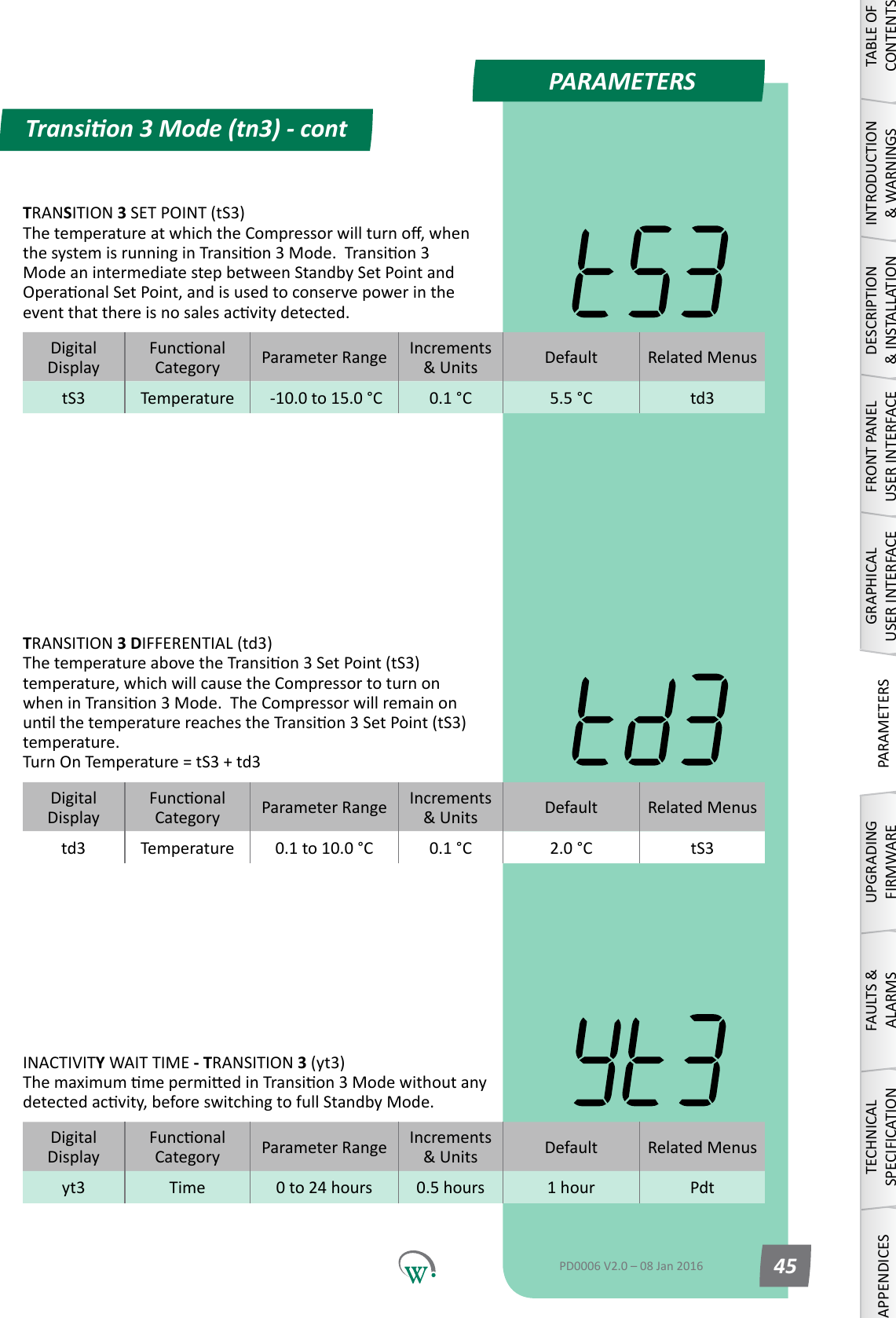
PARAMETERSDigitalDisplayFunconalCategory ParameterRange Increments &Units Default Related Menustd3 Temperature 0.1 to 10.0 °C 0.1 °C 2.0 °C tS3DigitalDisplayFunconalCategory ParameterRange Increments &Units Default Related Menusyt3 Time 0 to 24 hours 0.5 hours 1 hour PdtDigitalDisplayFunconalCategory ParameterRange Increments &Units Default Related MenustS3 Temperature  -10.0 to 15.0 °C 0.1 °C 5.5 °C td3Transion 3 Mode (tn3) - contTABLE OF CONTENTSINTRODUCTION & WARNINGSDESCRIPTION & INSTALLATIONFRONT PANEL USER INTERFACEGRAPHICAL USER INTERFACEPARAMETERSUPGRADING FIRMWAREFAULTS & ALARMSTECHNICAL SPECIFICATIONAPPENDICESPD0006 V2.0 – 08 Jan 2016 45TRANSITION 3 DIFFERENTIAL (td3) ThetemperatureabovetheTransion3SetPoint(tS3)temperature, which will cause the Compressor to turn on wheninTransion3Mode.TheCompressorwillremainonunlthetemperaturereachestheTransion3SetPoint(tS3)temperature. Turn On Temperature = tS3 + td3INACTIVITY WAIT TIME - TRANSITION 3 (yt3) ThemaximummepermiedinTransion3Modewithoutanydetectedacvity,beforeswitchingtofullStandbyMode.TRANSITION 3 SET POINT (tS3) ThetemperatureatwhichtheCompressorwillturno,whenthesystemisrunninginTransion3Mode.Transion3Mode an intermediate step between Standby Set Point and OperaonalSetPoint,andisusedtoconservepowerintheeventthatthereisnosalesacvitydetected.
PARAMETERSDigitalDisplayFunconalCategory ParameterRange Increments &Units Default Related MenusL3A Lighng&Display 0% to 100% 1% 0% LSA, L3b, L3CDigitalDisplayFunconalCategory ParameterRange Increments &Units Default Related MenusL3b Lighng&Display 0% to 100% 1% 0% LSA, L3A, L3CDigitalDisplayFunconalCategory ParameterRange Increments &Units Default Related MenusL3C Lighng&Display 0% to 100% 1% 0% LSA, L3A, L3bLIGHT STATE TRANSITION 3MODE–CHANNELB (L3b) TheilluminaonlevelduringTransion3ModeofChannelBasapercentageoffullilluminaon. Note:Lightlevelsofbetween0%and100%areonlyavailableifChannelBisassignedtoanLEDoutput.Ifassignedtoadigitaloutput,thenanylevelotherthan0%willresultin100%illuminaonlevel.LIGHT STATE TRANSITION 3MODE–CHANNELC (L3C) TheilluminaonlevelduringTransion3ModeofChannelCasapercentageoffullilluminaon. Note:Lightlevelsofbetween0%and100%areonlyavailableifChannelCisassignedtoanLEDoutput.Ifassignedtoadigitaloutput,thenanylevelotherthan0%willresultin100%illuminaonlevel.Transion 3 Mode (tn3) - contTABLE OF CONTENTSINTRODUCTION & WARNINGSDESCRIPTION & INSTALLATIONFRONT PANEL USER INTERFACEGRAPHICAL USER INTERFACE PARAMETERS UPGRADING FIRMWAREFAULTS & ALARMSTECHNICAL SPECIFICATION APPENDICESPD0006 V2.0 – 08 Jan 201646LIGHT STATE TRANSITION 3MODE–CHANNELA (L3A) TheilluminaonlevelduringTransion3ModeofChannelAasapercentageoffullilluminaon. Note:Lightlevelsofbetween0%and100%areonlyavailableifChannelAisassignedtoanLEDoutput.Ifassignedtoadigitaloutput,thenanylevelotherthan0%willresultin100%illuminaonlevel.
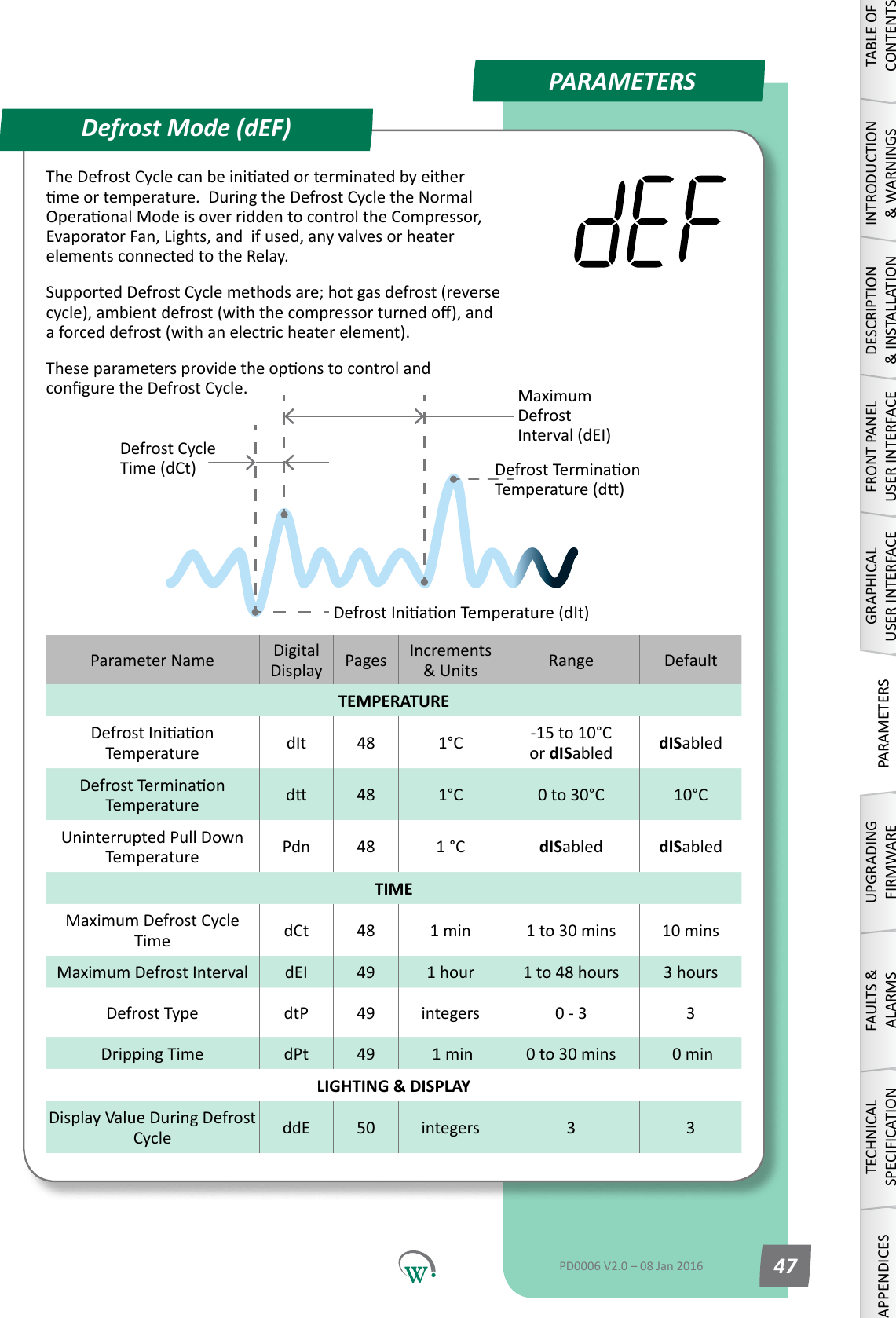
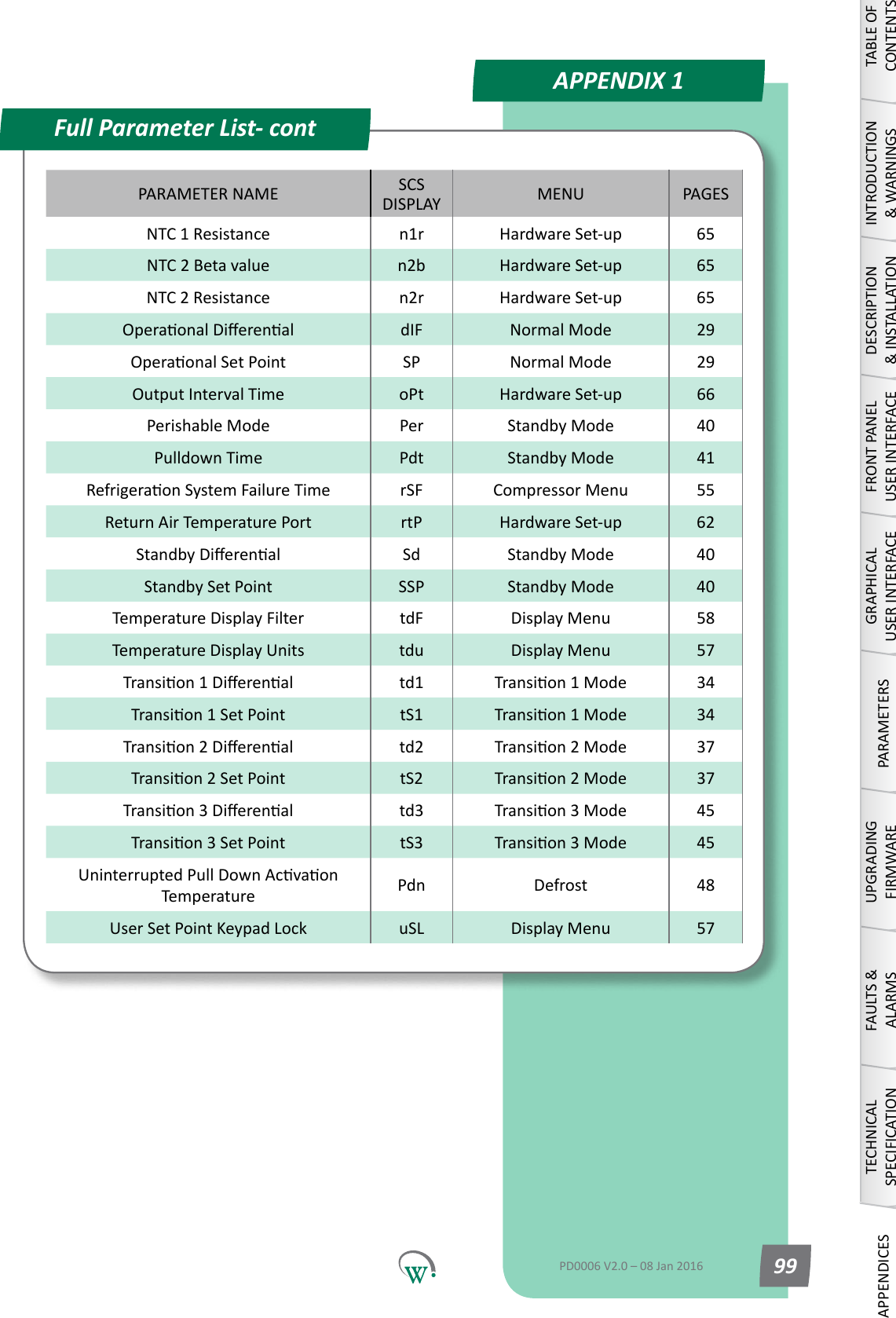
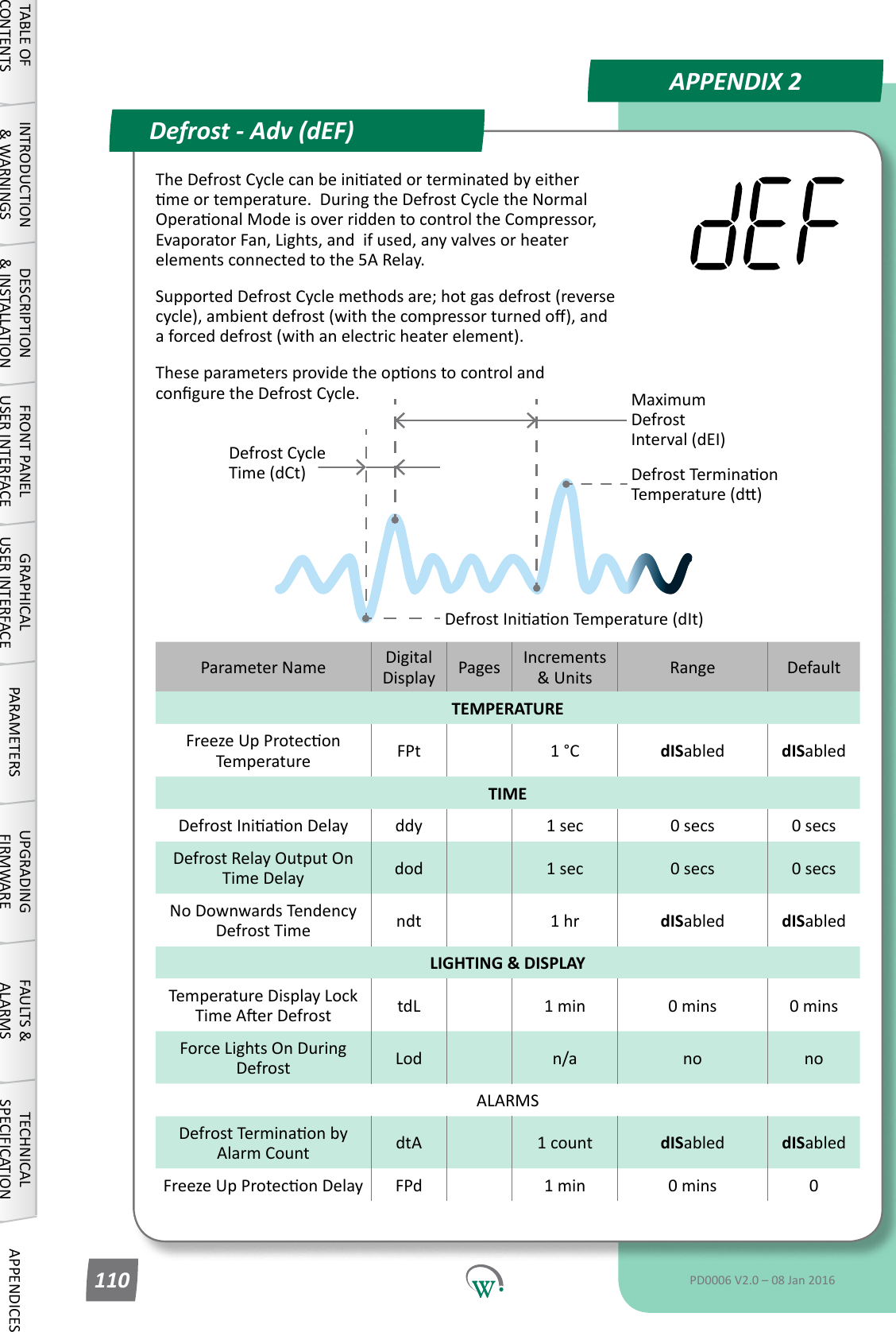
PARAMETERSParameter Name DigitalDisplay Pages Increments &Units Range DefaultTEMPERATUREDefrostIniaonTemperature dIt 48 1°C -15 to 10°C or dISabled dISabledDefrostTerminaonTemperature d 48 1°C 0 to 30°C 10°CUninterrupted Pull Down Temperature Pdn 48 1 °C dISabled dISabledTIMEMaximum Defrost Cycle Time dCt 48 1 min 1 to 30 mins 10 minsMaximum Defrost Interval dEI 49 1 hour 1 to 48 hours 3 hoursDefrost Type dtP 49 integers 0 - 3 3DrippingTime dPt 49  1 min 0 to 30 mins  0 minLIGHTING & DISPLAYDisplayValueDuringDefrostCycle ddE 50 integers 3 3Defrost Mode (dEF)DefrostIniaonTemperature(dIt)Defrost Cycle Time (dCt)Maximum Defrost Interval (dEI)DefrostTerminaonTemperature(d)TABLE OF CONTENTSINTRODUCTION & WARNINGSDESCRIPTION & INSTALLATIONFRONT PANEL USER INTERFACEGRAPHICAL USER INTERFACEPARAMETERSUPGRADING FIRMWAREFAULTS & ALARMSTECHNICAL SPECIFICATIONAPPENDICESPD0006 V2.0 – 08 Jan 2016 47TheDefrostCyclecanbeiniatedorterminatedbyeithermeortemperature.DuringtheDefrostCycletheNormalOperaonalModeisoverriddentocontroltheCompressor,EvaporatorFan,Lights,andifused,anyvalvesorheaterelements connected to the Relay.SupportedDefrostCyclemethodsare;hotgasdefrost(reversecycle),ambientdefrost(withthecompressorturnedo),anda forced defrost (with an electric heater element).TheseparametersprovidetheoponstocontrolandconguretheDefrostCycle.
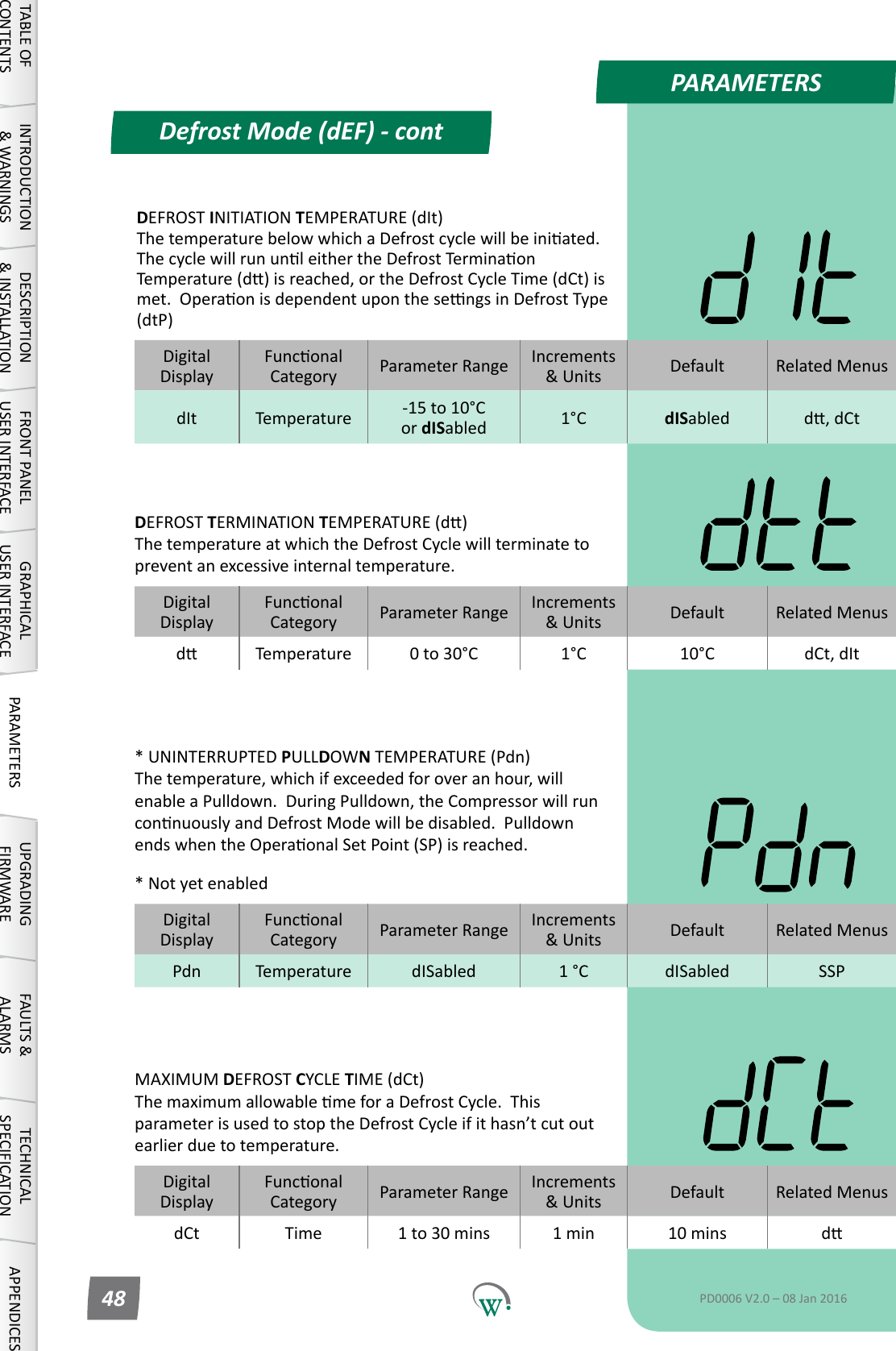
PARAMETERSDefrost Mode (dEF) - contTABLE OF CONTENTSINTRODUCTION & WARNINGSDESCRIPTION & INSTALLATIONFRONT PANEL USER INTERFACEGRAPHICAL USER INTERFACE PARAMETERS UPGRADING FIRMWAREFAULTS & ALARMSTECHNICAL SPECIFICATION APPENDICESPD0006 V2.0 – 08 Jan 201648DigitalDisplayFunconalCategory ParameterRange Increments &Units Default Related MenusdIt Temperature -15 to 10°C or dISabled 1°C dISabled d,dCtDEFROST INITIATION TEMPERATURE (dIt) ThetemperaturebelowwhichaDefrostcyclewillbeiniated.ThecyclewillrununleithertheDefrostTerminaonTemperature(d)isreached,ortheDefrostCycleTime(dCt)ismet.OperaonisdependentuponthesengsinDefrostType(dtP)DigitalDisplayFunconalCategory ParameterRange Increments &Units Default Related Menusd Temperature 0 to 30°C 1°C 10°C dCt, dItDEFROST TERMINATION TEMPERATURE(d) The temperature at which the Defrost Cycle will terminate to prevent an excessive internal temperature.DigitalDisplayFunconalCategory ParameterRange Increments &Units Default Related MenusPdn Temperature dISabled 1 °C dISabled SSP* UNINTERRUPTED PULLDOWN TEMPERATURE (Pdn) The temperature, which if exceeded for over an hour, will enableaPulldown.DuringPulldown,theCompressorwillrunconnuouslyandDefrostModewillbedisabled.PulldownendswhentheOperaonalSetPoint(SP)isreached.* Not yet enabledDigitalDisplayFunconalCategory ParameterRange Increments &Units Default Related MenusdCt Time 1 to 30 mins 1 min 10 mins dMAXIMUM DEFROST CYCLE TIME (dCt) ThemaximumallowablemeforaDefrostCycle.Thisparameter is used to stop the Defrost Cycle if it hasn’t cut out earlier due to temperature.
PARAMETERSDefrost Mode (dEF) - contTABLE OF CONTENTSINTRODUCTION & WARNINGSDESCRIPTION & INSTALLATIONFRONT PANEL USER INTERFACEGRAPHICAL USER INTERFACEPARAMETERSUPGRADING FIRMWAREFAULTS & ALARMSTECHNICAL SPECIFICATIONAPPENDICESPD0006 V2.0 – 08 Jan 2016 49DigitalDisplayFunconalCategory ParameterRange Increments &Units Default Related MenusdEI Time 1 to 48 hours 1 hour 3 hours dCt, dItMAXIMUM DEFROST INTERVAL (dEI) ThemaximumpermiedmebetweenthenishofaDefrostCycle and the start of the next one.  This parameter is used to start the Defrost Cycle if it hasn’t started earlier due to temperature.DigitalDisplayFunconalCategory ParameterRange Increments &Units Default Related MenusdtP Time 0 - 3 integers 3 dPt, dFSDEFROST TYPE (dtP) Selects which defrost method is to be used: 0 = Disabled. 1=DefrostCycleusinganelectricheater.        [Defrost ON - Evap OFF - Comp/Cond ON] 2*=DefrostCycleusinghotgas(ReverseCycle). 3=DefrostCyclebyturningotheCompressor(AmbientDefrost).        [Defrost OFF - Evap ON - Comp/Cond OFF]* Not yet enabledDigitalDisplayFunconalCategory ParameterRange Increments &Units Default Related MenusdPt Time 0 to 30 mins  1 min  0 min dtPDRIPPING TIME (dPt) ThemeneededforexcessmoisturetodripotheEvaporator,tohelppreventfreezeup.Usedforhotgasandelectricheaterdefrostsonly.ThiswaitmeoccursaertheDefrosthasbeenterminatedbyeithermeortemperature,butbeforeexingtheDefrostCycleandreturningtothenon-defrostoperaonalstate.Duringthisme,theEvaporatorFan,CondenserFanandCompressorremaino. 0 = Disabled.
PARAMETERSDefrost Mode (dEF) - contTABLE OF CONTENTSINTRODUCTION & WARNINGSDESCRIPTION & INSTALLATIONFRONT PANEL USER INTERFACEGRAPHICAL USER INTERFACE PARAMETERS UPGRADING FIRMWAREFAULTS & ALARMSTECHNICAL SPECIFICATION APPENDICESPD0006 V2.0 – 08 Jan 201650DigitalDisplayFunconalCategory ParameterRange Increments &Units Default Related MenusddE Lighng&Display 0 to 4 integers 3 SPDISPLAY VALUE DURING DEFROST CYCLE (ddE) SelectswhatisdisplayedduringtheDefrostCycle: 0* = Displays the temperature. 1* = Displays the Set Point Temperature. 2*=Displayisleblank. 3   = Display shows ‘dEF’. 4*=Displayshows‘dEF’,blinkingintermiently.* Not yet enabled
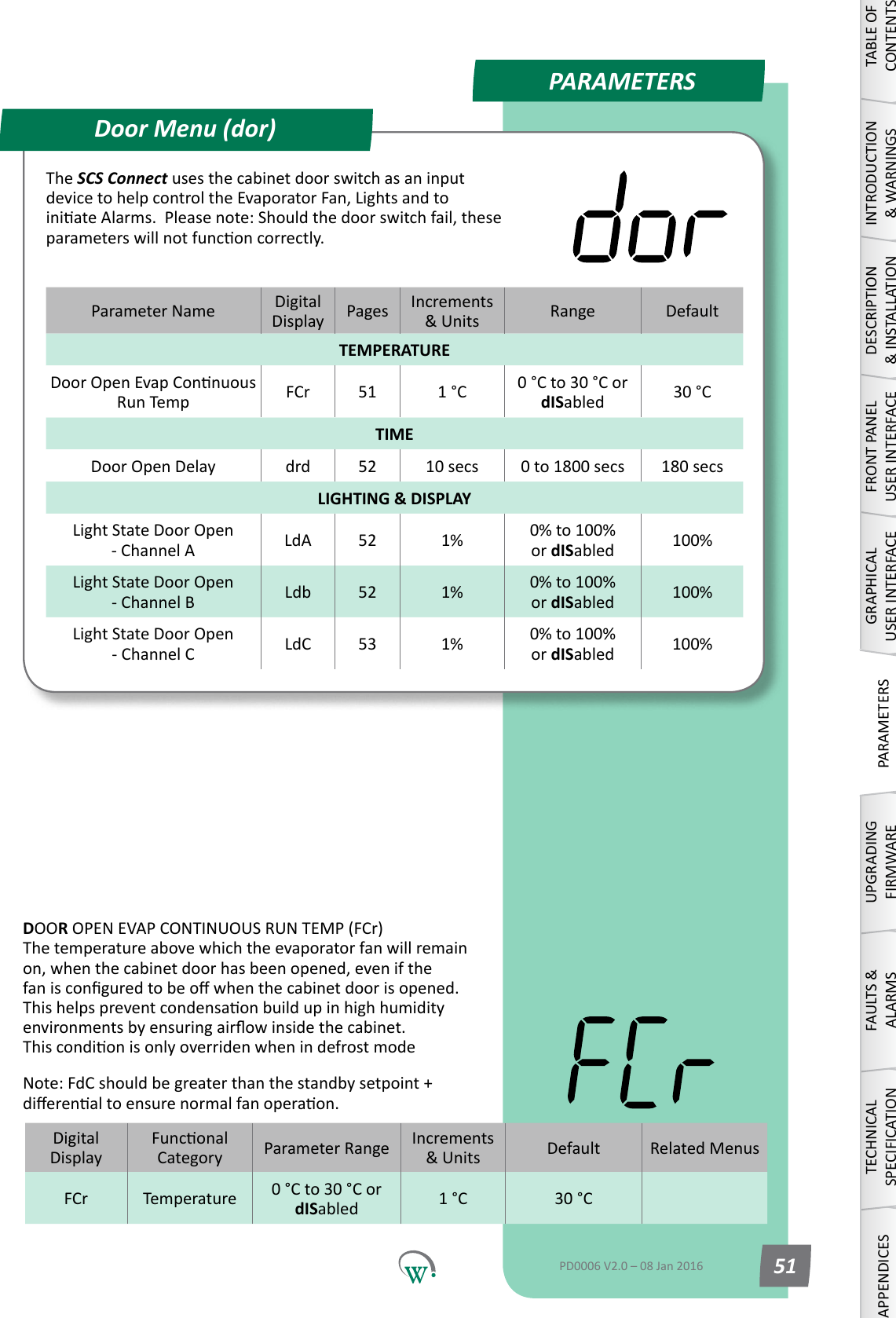
PARAMETERSParameter Name DigitalDisplay Pages Increments &Units Range DefaultTEMPERATUREDoorOpenEvapConnuousRun Temp FCr 51 1 °C 0 °C to 30 °C or dISabled 30 °CTIMEDoor Open Delay drd 52 10 secs 0 to 1800 secs 180 secsLIGHTING & DISPLAYLightStateDoorOpen - Channel A LdA 52 1% 0% to 100%         or dISabled 100%LightStateDoorOpen - Channel B Ldb 52 1% 0% to 100%         or dISabled 100%LightStateDoorOpen - Channel C LdC 53 1% 0% to 100%         or dISabled 100%Door Menu (dor)TABLE OF CONTENTSINTRODUCTION & WARNINGSDESCRIPTION & INSTALLATIONFRONT PANEL USER INTERFACEGRAPHICAL USER INTERFACEPARAMETERSUPGRADING FIRMWAREFAULTS & ALARMSTECHNICAL SPECIFICATIONAPPENDICESPD0006 V2.0 – 08 Jan 2016 51The SCS Connect uses the cabinet door switch as an input devicetohelpcontroltheEvaporatorFan,LightsandtoiniateAlarms.Pleasenote:Shouldthedoorswitchfail,theseparameterswillnotfunconcorrectly.DigitalDisplayFunconalCategory ParameterRange Increments &Units Default Related MenusFCr Temperature 0 °C to 30 °C or dISabled 1 °C 30 °CDOOR OPEN EVAP CONTINUOUS RUN TEMP (FCr) The temperature above which the evaporator fan will remain on, when the cabinet door has been opened, even if the fanisconguredtobeowhenthecabinetdoorisopened.Thishelpspreventcondensaonbuildupinhighhumidityenvironmentsbyensuringairowinsidethecabinet. ThiscondionisonlyoverridenwhenindefrostmodeNote:FdCshouldbegreaterthanthestandbysetpoint+dierenaltoensurenormalfanoperaon.
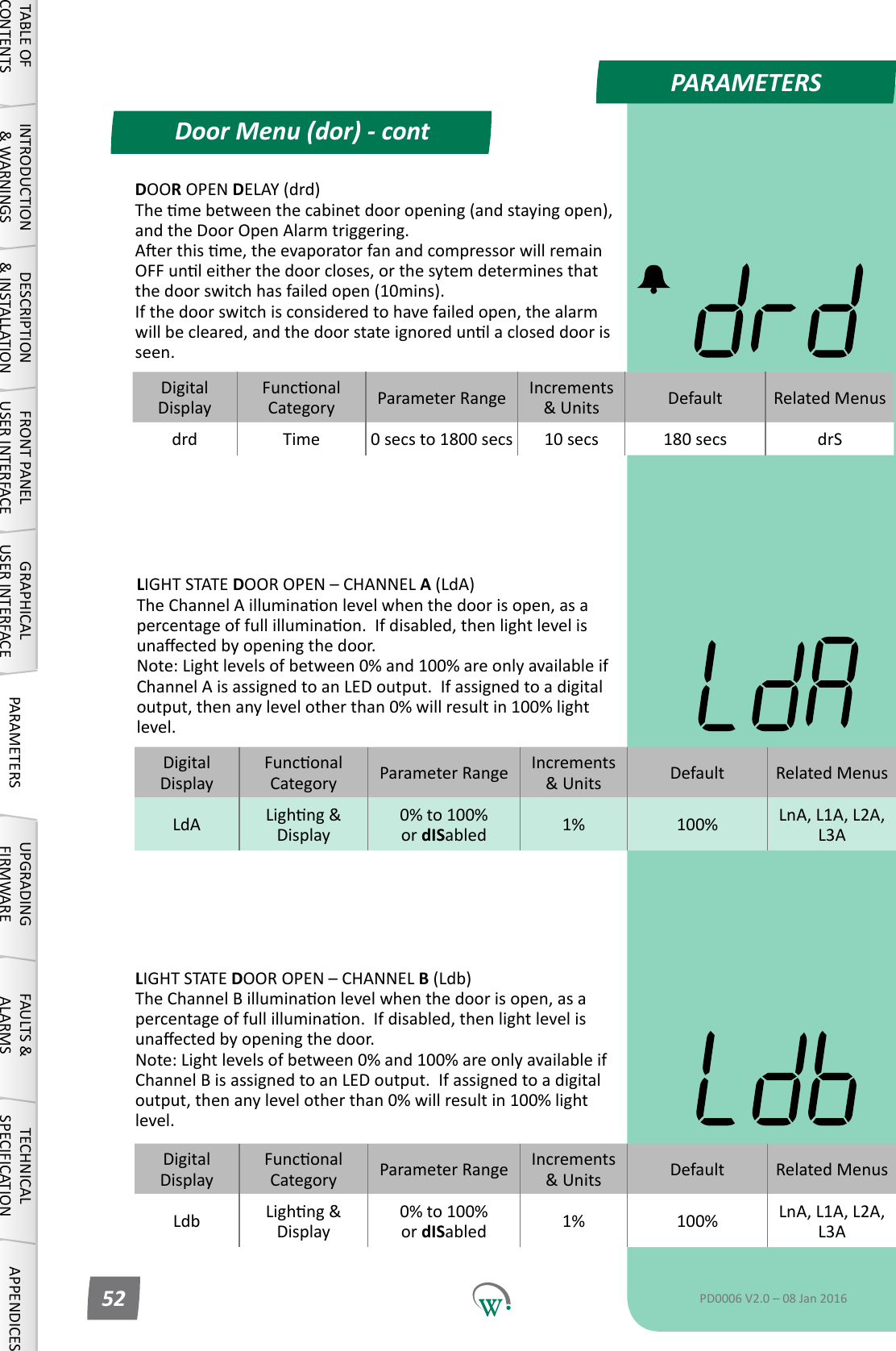
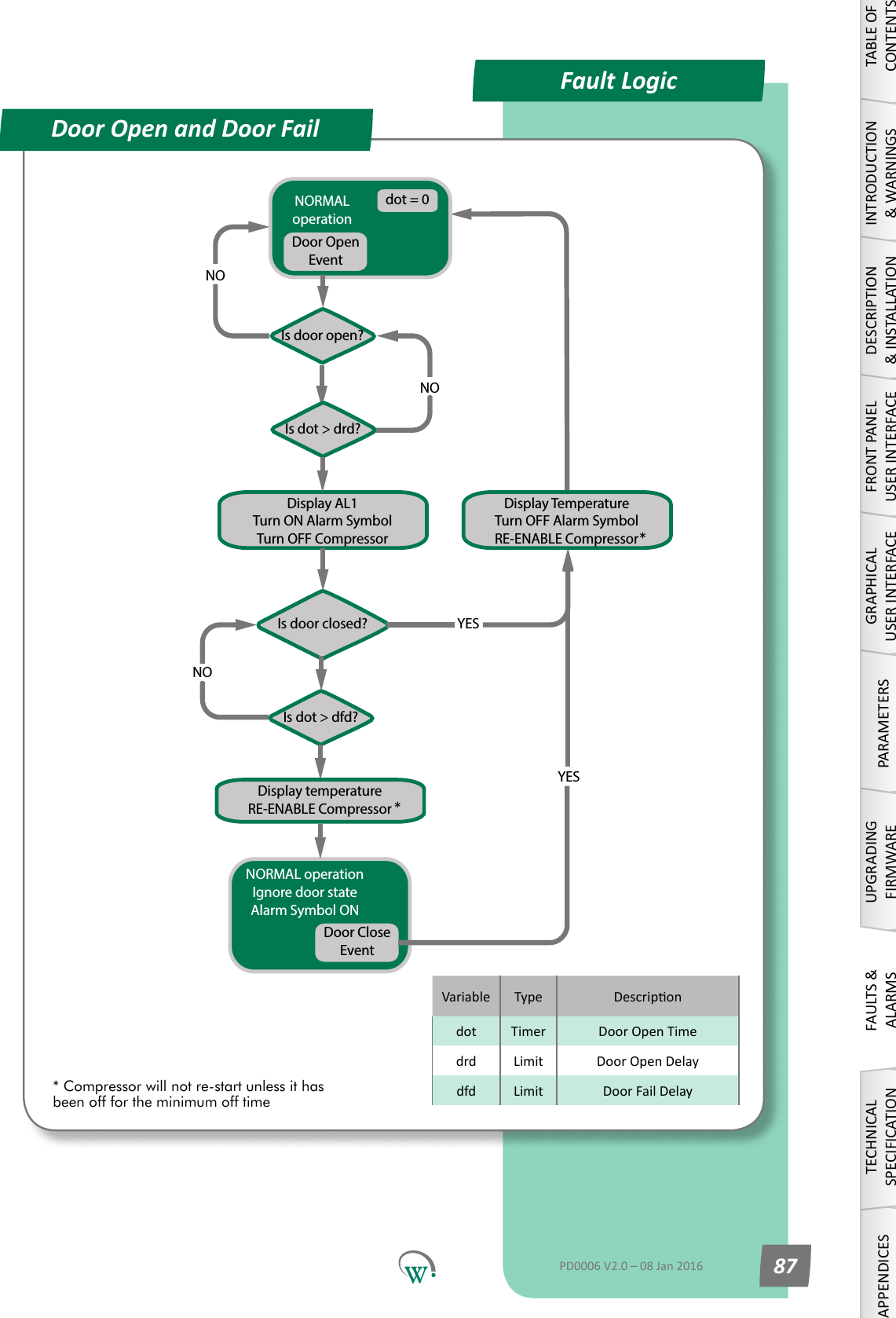
PARAMETERSDoor Menu (dor) - contTABLE OF CONTENTSINTRODUCTION & WARNINGSDESCRIPTION & INSTALLATIONFRONT PANEL USER INTERFACEGRAPHICAL USER INTERFACE PARAMETERS UPGRADING FIRMWAREFAULTS & ALARMSTECHNICAL SPECIFICATION APPENDICESPD0006 V2.0 – 08 Jan 201652LIGHT STATE DOOROPEN–CHANNELB (Ldb) TheChannelBilluminaonlevelwhenthedoorisopen,asapercentageoffullilluminaon.Ifdisabled,thenlightlevelisunaectedbyopeningthedoor. Note:Lightlevelsofbetween0%and100%areonlyavailableifChannelBisassignedtoanLEDoutput.Ifassignedtoadigitaloutput,thenanylevelotherthan0%willresultin100%lightlevel.DigitalDisplayFunconalCategory ParameterRange Increments &Units Default Related MenusLdb Lighng&Display0% to 100%            or dISabled 1% 100% LnA, L1A, L2A, L3ADigitalDisplayFunconalCategory ParameterRange Increments &Units Default Related MenusLdA Lighng&Display0% to 100%            or dISabled 1% 100% LnA, L1A, L2A, L3ALIGHT STATE DOOROPEN–CHANNELA (LdA) TheChannelAilluminaonlevelwhenthedoorisopen,asapercentageoffullilluminaon.Ifdisabled,thenlightlevelisunaectedbyopeningthedoor. Note:Lightlevelsofbetween0%and100%areonlyavailableifChannelAisassignedtoanLEDoutput.Ifassignedtoadigitaloutput,thenanylevelotherthan0%willresultin100%lightlevel.DOOR OPEN DELAY (drd) Themebetweenthecabinetdooropening(andstayingopen),andtheDoorOpenAlarmtriggering. Aerthisme,theevaporatorfanandcompressorwillremainOFFunleitherthedoorcloses,orthesytemdeterminesthatthe door switch has failed open (10mins).  If the door switch is considered to have failed open, the alarm willbecleared,andthedoorstateignoredunlacloseddoorisseen.DigitalDisplayFunconalCategory ParameterRange Increments &Units Default Related Menusdrd Time 0 secs to 1800 secs 10 secs 180 secs drS
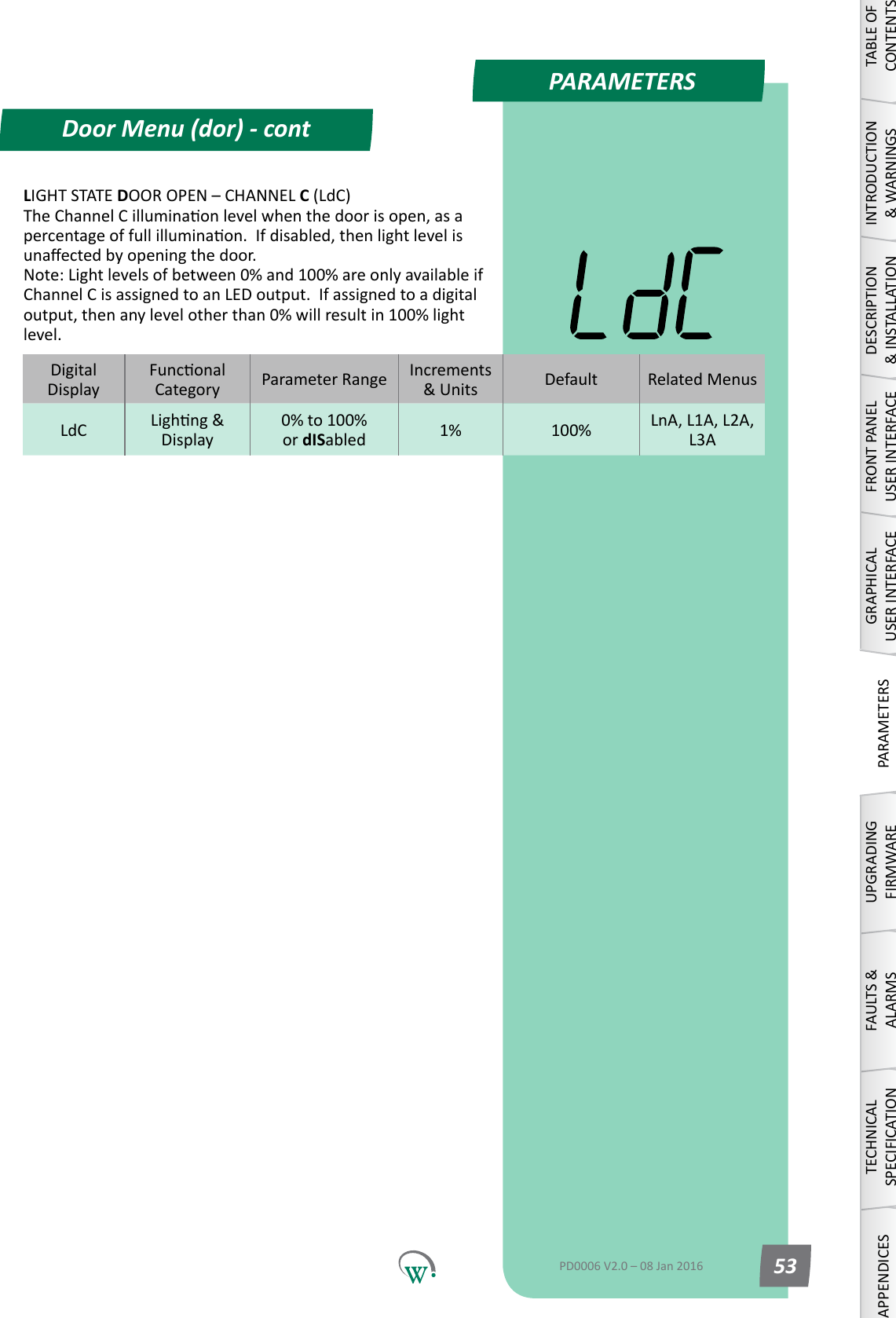
PARAMETERSDoor Menu (dor) - contTABLE OF CONTENTSINTRODUCTION & WARNINGSDESCRIPTION & INSTALLATIONFRONT PANEL USER INTERFACEGRAPHICAL USER INTERFACEPARAMETERSUPGRADING FIRMWAREFAULTS & ALARMSTECHNICAL SPECIFICATIONAPPENDICESPD0006 V2.0 – 08 Jan 2016 53LIGHT STATE DOOROPEN–CHANNELC (LdC) TheChannelCilluminaonlevelwhenthedoorisopen,asapercentageoffullilluminaon.Ifdisabled,thenlightlevelisunaectedbyopeningthedoor. Note:Lightlevelsofbetween0%and100%areonlyavailableifChannelCisassignedtoanLEDoutput.Ifassignedtoadigitaloutput,thenanylevelotherthan0%willresultin100%lightlevel.DigitalDisplayFunconalCategory ParameterRange Increments &Units Default Related MenusLdC Lighng&Display0% to 100%            or dISabled 1% 100% LnA, L1A, L2A, L3A
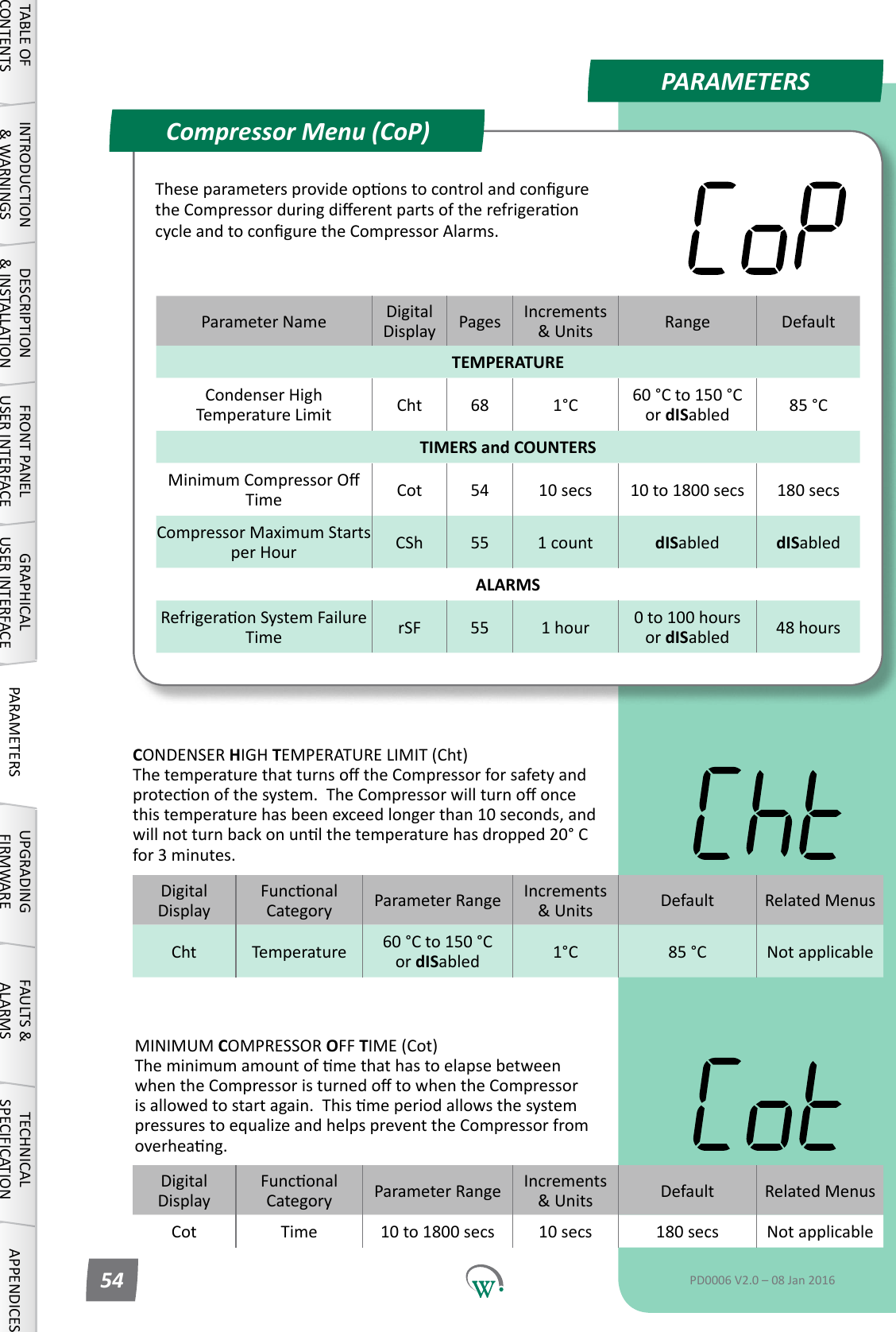
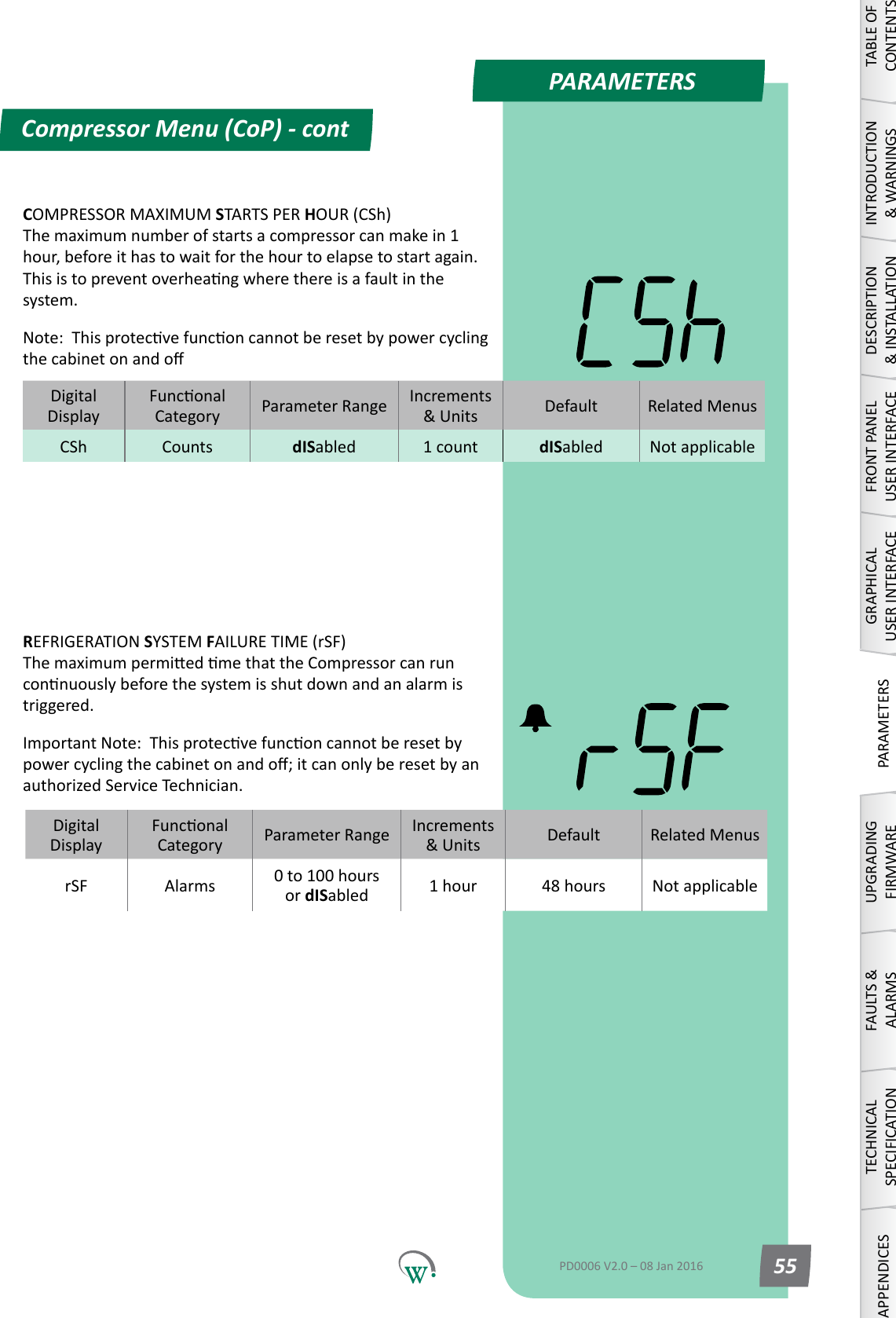
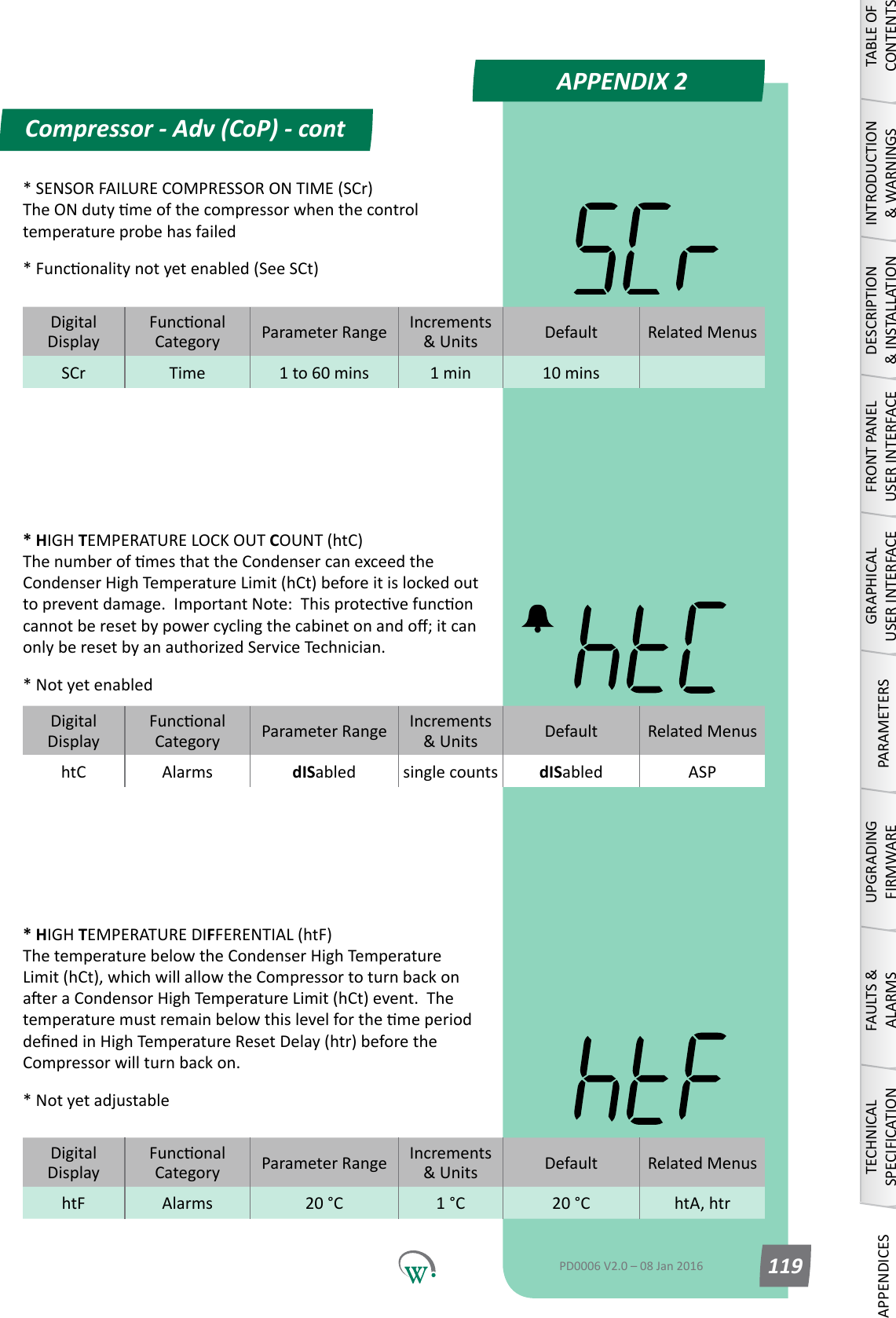
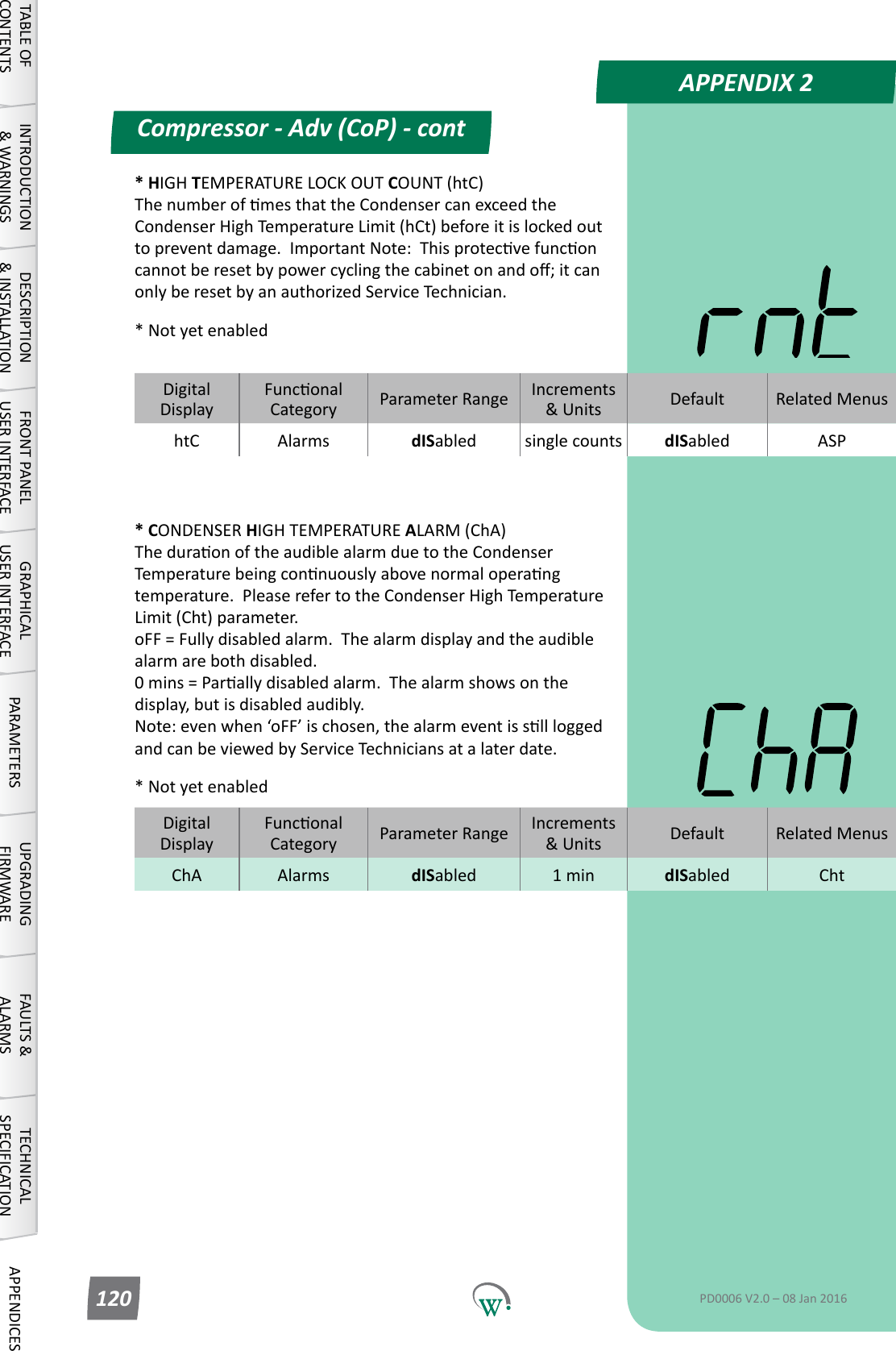
PARAMETERSParameter Name DigitalDisplay Pages Increments &Units Range DefaultTEMPERATURECondenserHighTemperature Limit Cht 68 1°C 60 °C to 150 °C or dISabled 85 °CTIMERS and COUNTERSMinimumCompressorOTime Cot 54 10 secs 10 to 1800 secs 180 secsCompressor Maximum Starts per Hour CSh 55 1 count dISabled dISabledALARMSRefrigeraonSystemFailureTime rSF 55 1 hour 0 to 100 hours or dISabled 48 hoursCompressor Menu (CoP)TABLE OF CONTENTSINTRODUCTION & WARNINGSDESCRIPTION & INSTALLATIONFRONT PANEL USER INTERFACEGRAPHICAL USER INTERFACE PARAMETERS UPGRADING FIRMWAREFAULTS & ALARMSTECHNICAL SPECIFICATION APPENDICESPD0006 V2.0 – 08 Jan 201654TheseparametersprovideoponstocontrolandconguretheCompressorduringdierentpartsoftherefrigeraoncycleandtoconguretheCompressorAlarms.DigitalDisplayFunconalCategory ParameterRange Increments &Units Default Related MenusCht Temperature 60 °C to 150 °C or dISabled 1°C 85 °C Not applicableCONDENSER HIGH TEMPERATURE LIMIT (Cht) ThetemperaturethatturnsotheCompressorforsafetyandproteconofthesystem.TheCompressorwillturnooncethistemperaturehasbeenexceedlongerthan10seconds,andwillnotturnbackonunlthetemperaturehasdropped20°Cfor 3 minutes.DigitalDisplayFunconalCategory ParameterRange Increments &Units Default Related MenusCot Time 10 to 1800 secs 10 secs 180 secs Not applicableMINIMUM COMPRESSOR OFF TIME (Cot) TheminimumamountofmethathastoelapsebetweenwhentheCompressoristurnedotowhentheCompressorisallowedtostartagain.ThismeperiodallowsthesystempressurestoequalizeandhelpspreventtheCompressorfromoverheang.
PARAMETERSCompressor Menu (CoP) - contTABLE OF CONTENTSINTRODUCTION & WARNINGSDESCRIPTION & INSTALLATIONFRONT PANEL USER INTERFACEGRAPHICAL USER INTERFACEPARAMETERSUPGRADING FIRMWAREFAULTS & ALARMSTECHNICAL SPECIFICATIONAPPENDICESPD0006 V2.0 – 08 Jan 2016 55DigitalDisplayFunconalCategory ParameterRange Increments &Units Default Related MenusrSF Alarms 0 to 100 hours or dISabled 1 hour 48 hours Not applicableREFRIGERATION SYSTEM FAILURE TIME (rSF) ThemaximumpermiedmethattheCompressorcanrunconnuouslybeforethesystemisshutdownandanalarmistriggered.ImportantNote:Thisprotecvefunconcannotberesetbypowercyclingthecabinetonando;itcanonlyberesetbyanauthorizedServiceTechnician.COMPRESSOR MAXIMUM STARTS PER HOUR (CSh) The maximum number of starts a compressor can make in 1 hour,beforeithastowaitforthehourtoelapsetostartagain.Thisistopreventoverheangwherethereisafaultinthesystem.Note:ThisprotecvefunconcannotberesetbypowercyclingthecabinetonandoDigitalDisplayFunconalCategory ParameterRange Increments &Units Default Related MenusCSh Counts dISabled 1 count dISabled Not applicable
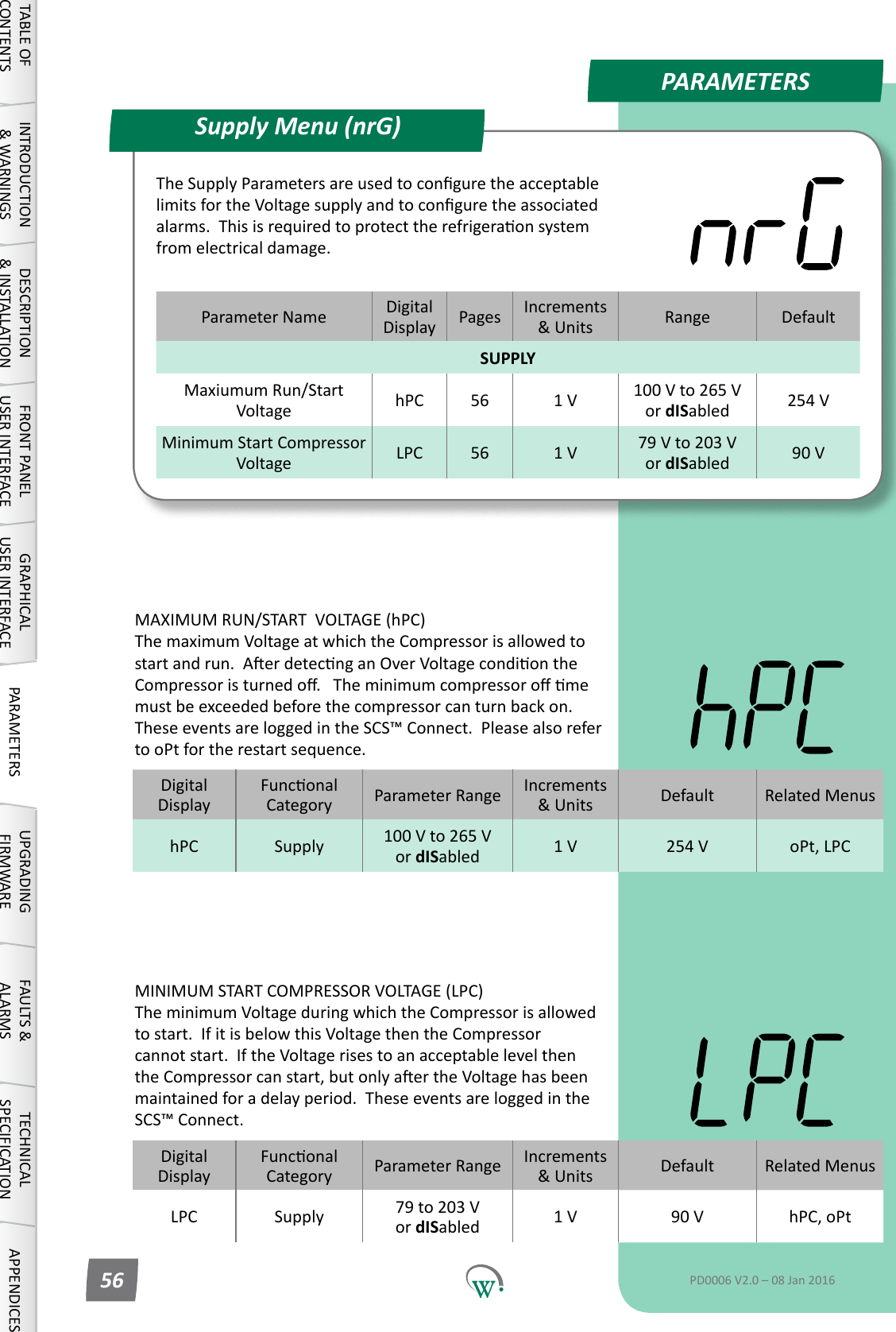
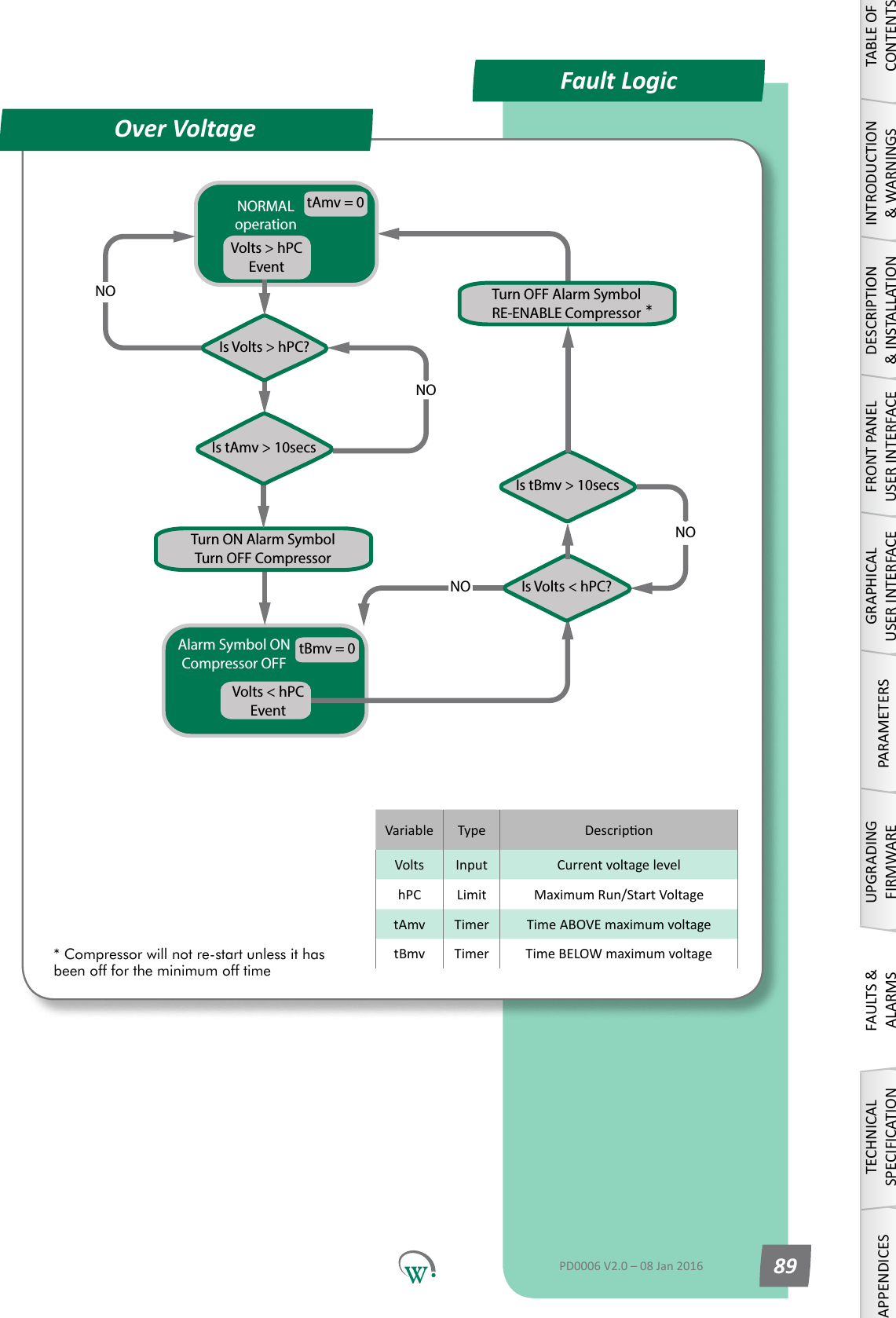
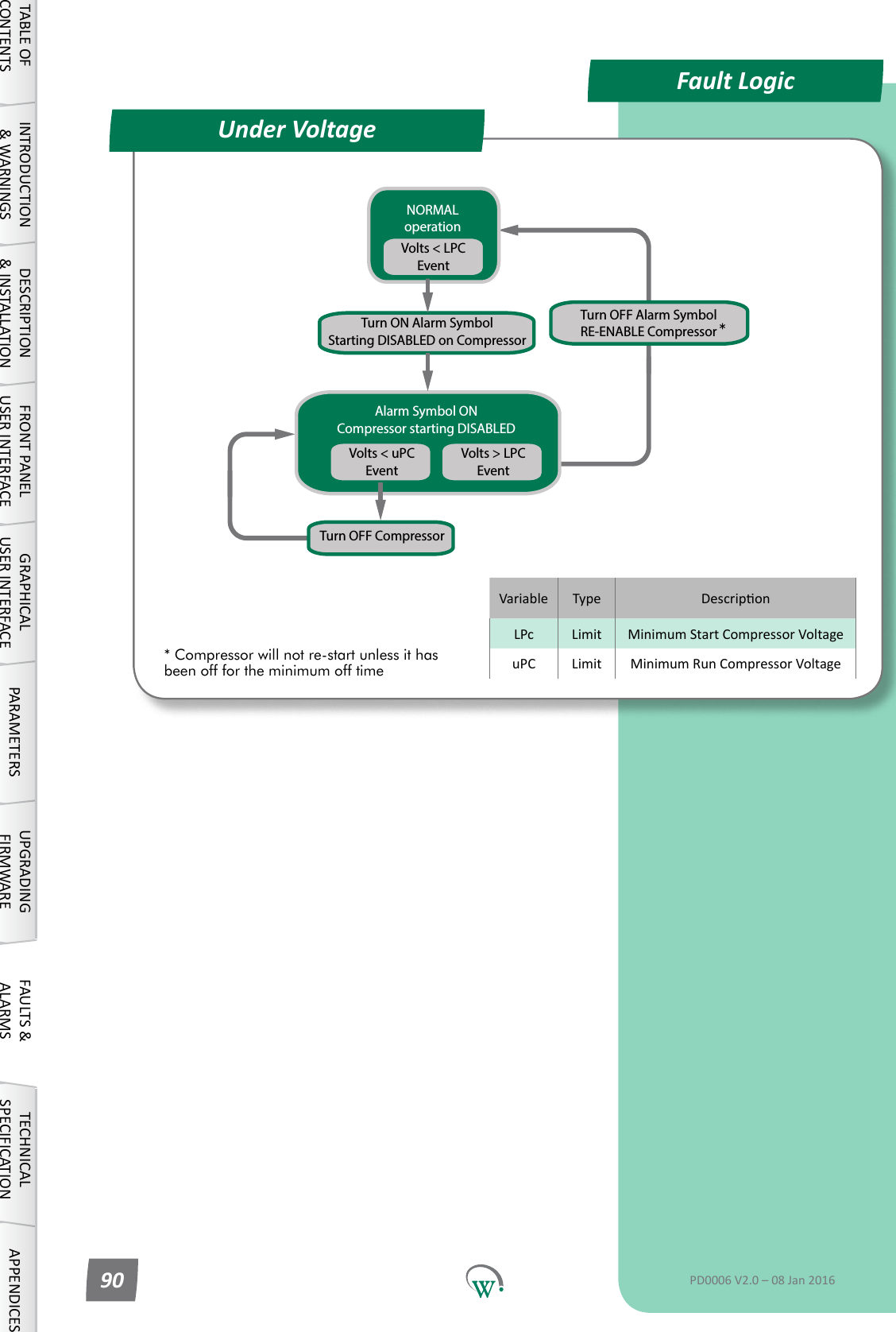
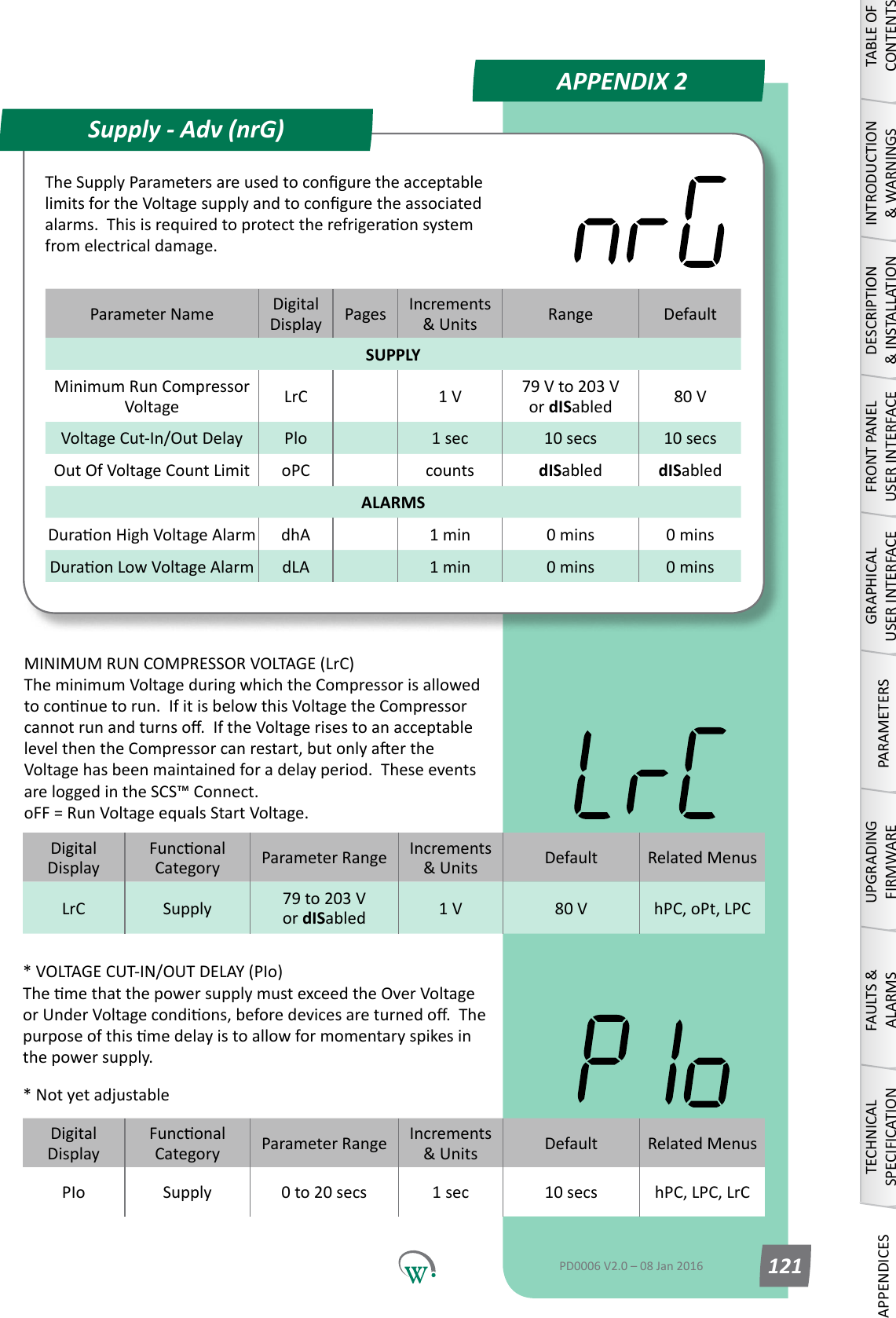
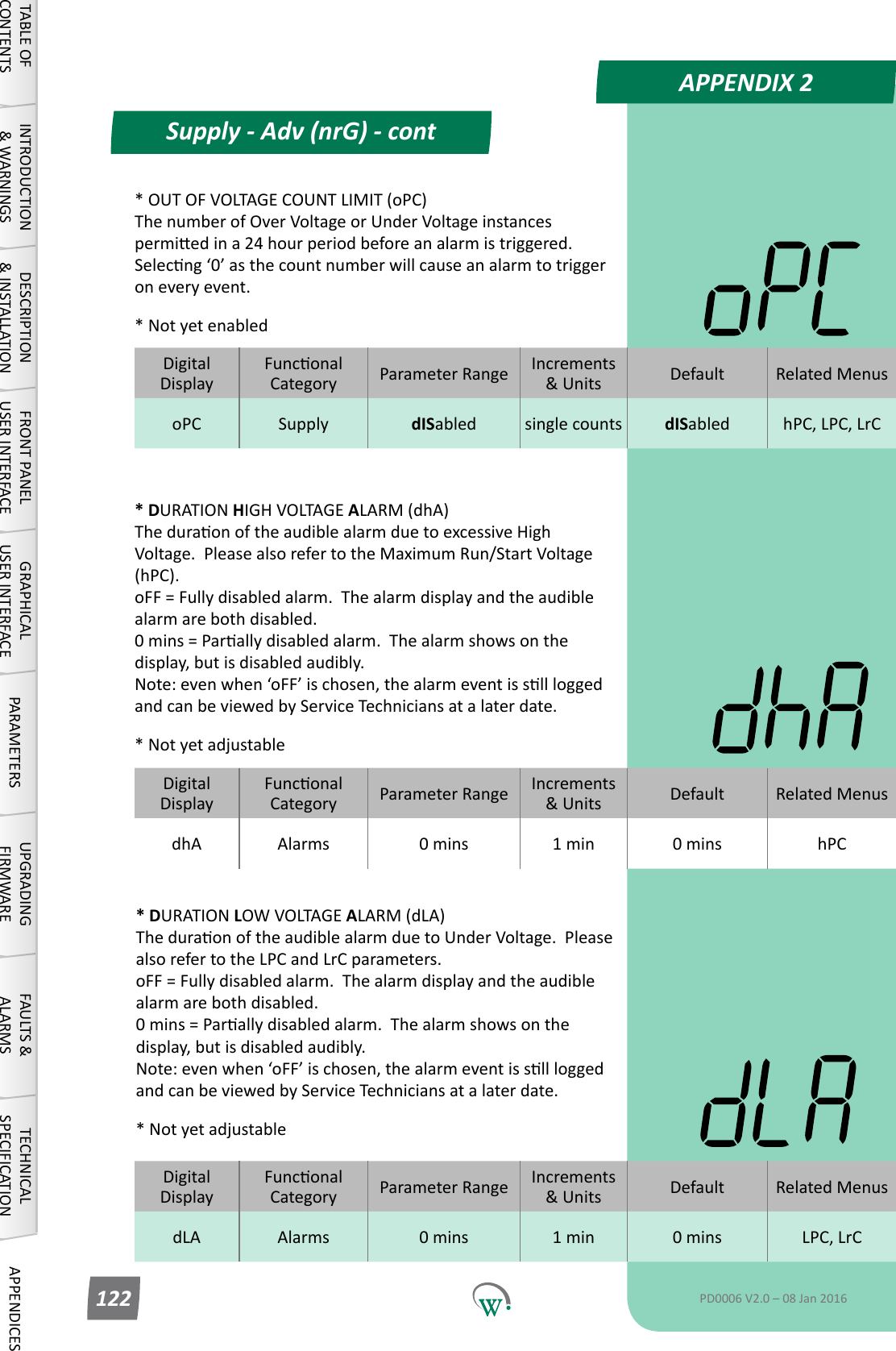
PARAMETERSParameter Name DigitalDisplay Pages Increments &Units Range DefaultSUPPLYMaxiumum Run/Start Voltage hPC 56 1 V 100 V to 265 V or dISabled 254 VMinimum Start Compressor Voltage LPC 56 1 V 79 V to 203 V or dISabled 90 VSupply Menu (nrG)TABLE OF CONTENTSINTRODUCTION & WARNINGSDESCRIPTION & INSTALLATIONFRONT PANEL USER INTERFACEGRAPHICAL USER INTERFACE PARAMETERS UPGRADING FIRMWAREFAULTS & ALARMSTECHNICAL SPECIFICATION APPENDICESPD0006 V2.0 – 08 Jan 201656TheSupplyParametersareusedtoconguretheacceptablelimitsfortheVoltagesupplyandtoconguretheassociatedalarms.Thisisrequiredtoprotecttherefrigeraonsystemfromelectricaldamage.DigitalDisplayFunconalCategory ParameterRange Increments &Units Default Related MenushPC Supply 100 V to 265 V or dISabled 1 V 254 V oPt, LPCMAXIMUM RUN/START  VOLTAGE (hPC) ThemaximumVoltageatwhichtheCompressorisallowedtostart and run. AerdetecnganOverVoltagecondiontheCompressoristurnedo.Theminimumcompressoromemust be exceeded before the compressor can turn back on.  TheseeventsareloggedintheSCS™Connect.  Please also refer to oPt for the restart sequence.DigitalDisplayFunconalCategory ParameterRange Increments &Units Default Related MenusLPC Supply 79 to 203 V or dISabled 1 V 90 V hPC, oPtMINIMUM START COMPRESSOR VOLTAGE (LPC) TheminimumVoltageduringwhichtheCompressorisallowedtostart.IfitisbelowthisVoltagethentheCompressorcannotstart.IftheVoltagerisestoanacceptablelevelthentheCompressorcanstart,butonlyaertheVoltagehasbeenmaintainedforadelayperiod.TheseeventsareloggedintheSCS™ Connect.
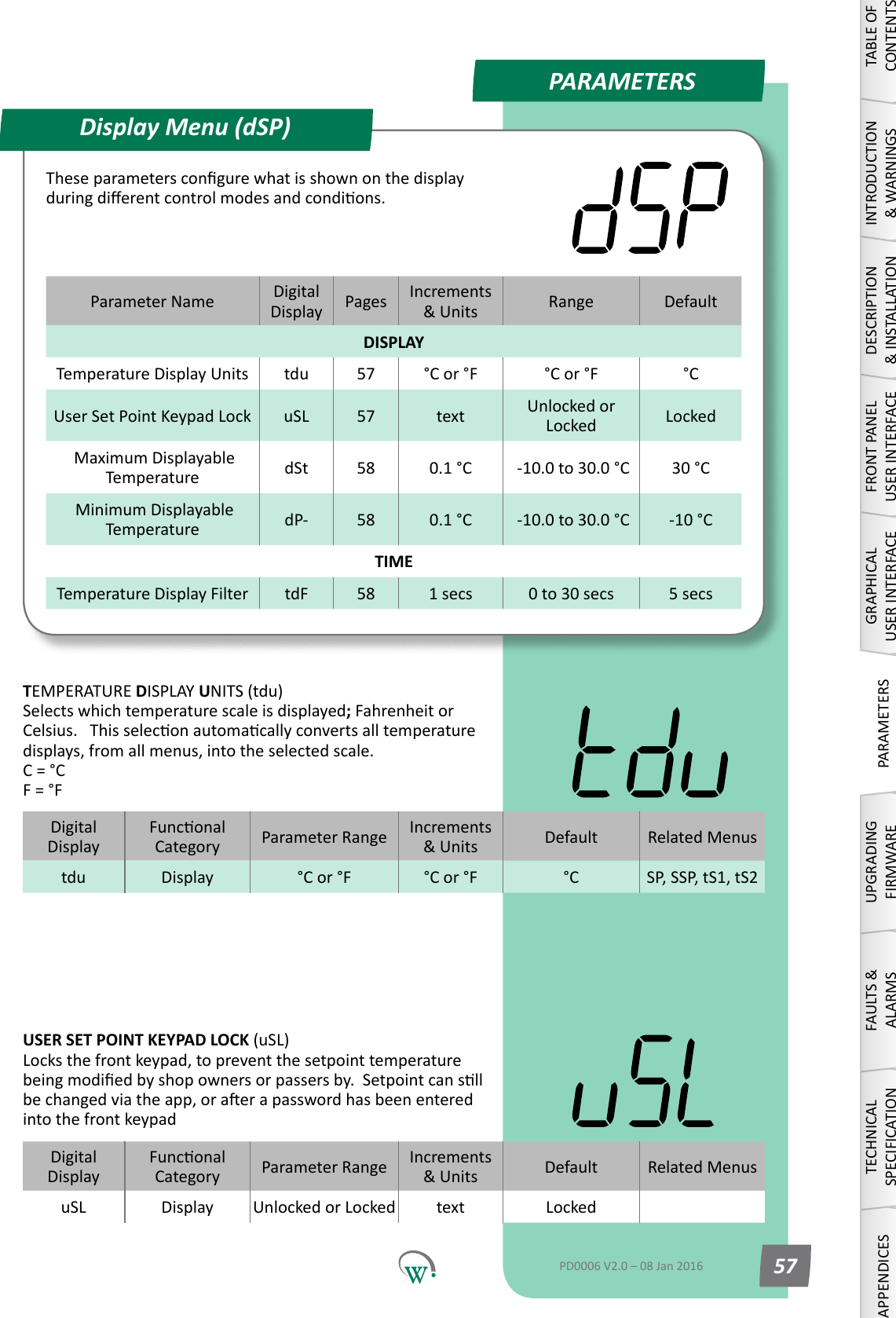
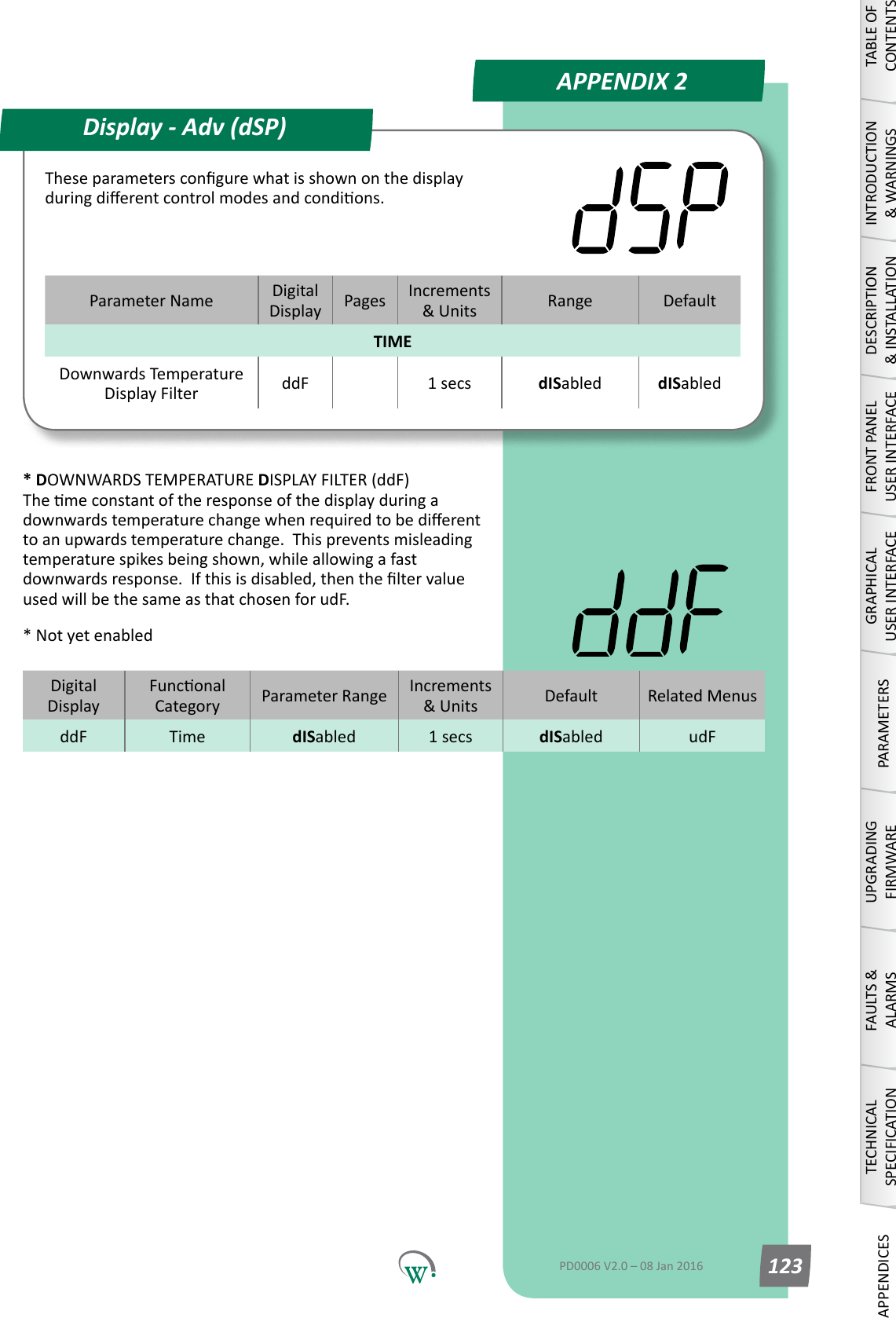
PARAMETERSParameter Name DigitalDisplay Pages Increments &Units Range DefaultDISPLAYTemperature Display Units tdu 57 °C or °F °C or °F °CUser Set Point Keypad Lock uSL 57 text Unlocked or Locked Locked Maximum Displayable Temperature dSt 58 0.1 °C  -10.0 to 30.0 °C 30 °C Minimum Displayable Temperature dP- 58 0.1 °C  -10.0 to 30.0 °C -10 °CTIMETemperature Display Filter tdF 58 1 secs 0 to 30 secs 5 secsDisplay Menu (dSP)TABLE OF CONTENTSINTRODUCTION & WARNINGSDESCRIPTION & INSTALLATIONFRONT PANEL USER INTERFACEGRAPHICAL USER INTERFACEPARAMETERSUPGRADING FIRMWAREFAULTS & ALARMSTECHNICAL SPECIFICATIONAPPENDICESPD0006 V2.0 – 08 Jan 2016 57Theseparameterscongurewhatisshownonthedisplayduringdierentcontrolmodesandcondions.DigitalDisplayFunconalCategory ParameterRange Increments &Units Default Related Menustdu Display °C or °F °C or °F °C SP, SSP, tS1, tS2TEMPERATURE DISPLAY UNITS (tdu) Selects which temperature scale is displayed; Fahrenheit or Celsius.Thisseleconautomacallyconvertsalltemperaturedisplays, from all menus, into the selected scale. C = °C F = °FDigitalDisplayFunconalCategory ParameterRange Increments &Units Default Related MenusuSL Display Unlocked or Locked text LockedUSER SET POINT KEYPAD LOCK (uSL) Locks the front keypad, to prevent the setpoint temperature beingmodiedbyshopownersorpassersby.Setpointcansllbechangedviatheapp,oraerapasswordhasbeenenteredinto the front keypad
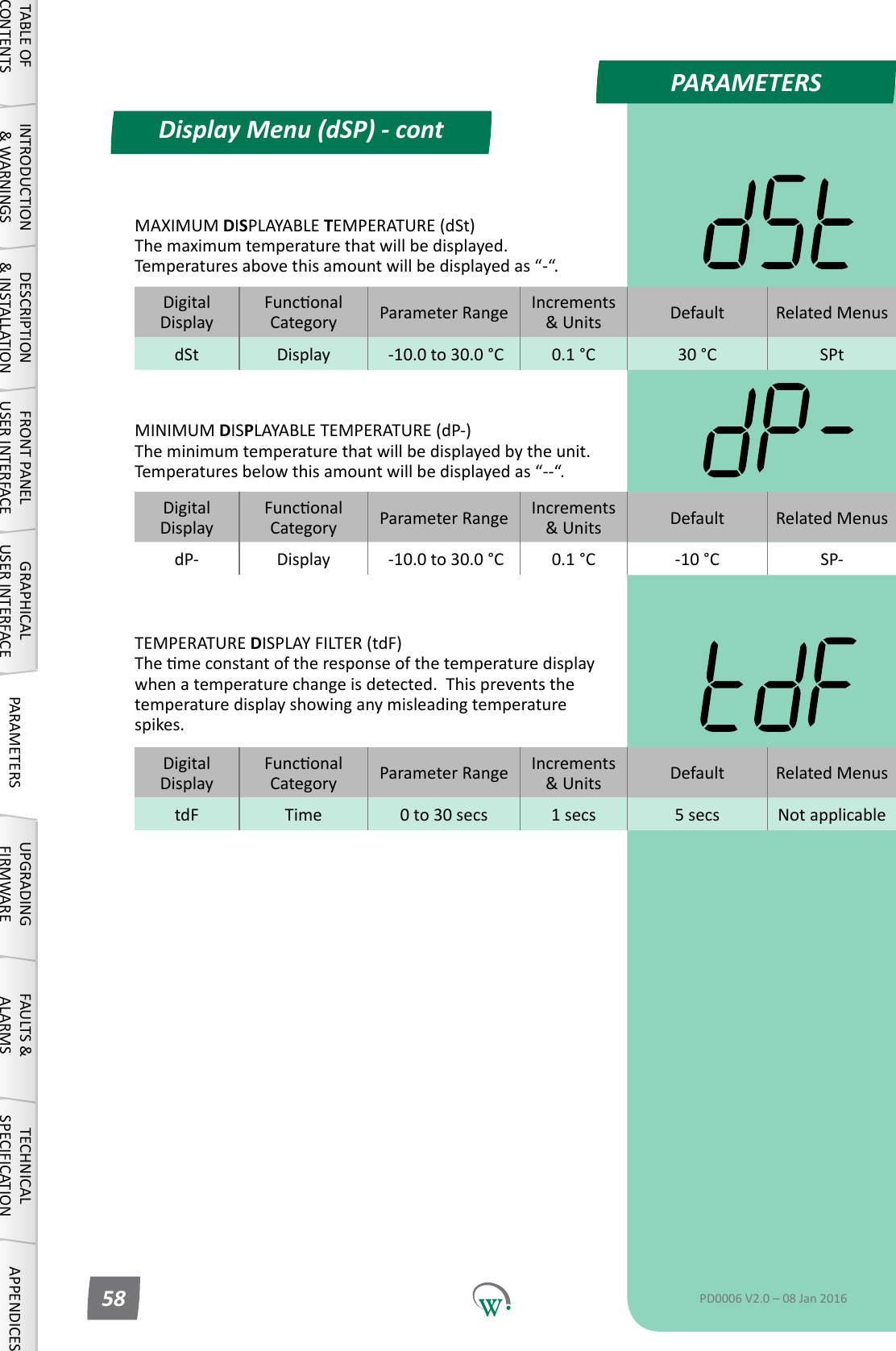
Display Menu (dSP) - contPARAMETERSDisplay Menu (dSP) - contTABLE OF CONTENTSINTRODUCTION & WARNINGSDESCRIPTION & INSTALLATIONFRONT PANEL USER INTERFACEGRAPHICAL USER INTERFACE PARAMETERS UPGRADING FIRMWAREFAULTS & ALARMSTECHNICAL SPECIFICATION APPENDICESPD0006 V2.0 – 08 Jan 201658DigitalDisplayFunconalCategory ParameterRange Increments &Units Default Related MenustdF Time 0 to 30 secs 1 secs 5 secs Not applicableTEMPERATURE DISPLAY FILTER (tdF) Themeconstantoftheresponseofthetemperaturedisplaywhenatemperaturechangeisdetected.Thispreventsthetemperaturedisplayshowinganymisleadingtemperaturespikes.DigitalDisplayFunconalCategory ParameterRange Increments &Units Default Related MenusdSt Display  -10.0 to 30.0 °C 0.1 °C 30 °C SPtMAXIMUM DISPLAYABLE TEMPERATURE (dSt) The maximum temperature that will be displayed.  Temperatures above this amount will be displayed as “-“.DigitalDisplayFunconalCategory ParameterRange Increments &Units Default Related MenusdP- Display  -10.0 to 30.0 °C 0.1 °C -10 °C SP-MINIMUM DISPLAYABLE TEMPERATURE (dP-) The minimum temperature that will be displayed by the unit.  Temperatures below this amount will be displayed as “--“.
PARAMETERSParameter Name DigitalDisplay Pages Increments &Units Range DefaultINPUTSControlProbeCalibraonOset CAL 68 0.1 °C  -10.0 to 10.0 °C 0.0 °CControl Probe Response CPb 61 1 sec 5 secs 5 secsReturn Air Temperature Port rtP 62 Port ID AD1 - AD5 or N.C. AD1Condensor Temperature Port CdP 62 Port ID AD1 - AD5 or N.C. N.C.Ambient Temperature Port tPt 62 Port ID AD1 - AD5 or N.C. N.C.Evap' Coil Temperature Port ELt 68 Port ID AD1 - AD5 or N.C. N.C.Compressor Body Temperature Port CPP 63 Port ID AD1 - AD5 or N.C. N.C.Compressor Inlet Temperature Port CtP 63 Port ID AD1 - AD5 or N.C. N.C.Door Sensor Port Conguraon dSC 63 Port ID AD1 - AD5 or N.C. AD4Doorswitch State drS 63 integers 0 or 1 0AcvitySensorPortConguraon SCF 64 Port ID AD1 - AD5 or N.C. N.C.AcvitySensorState SrS 64 integers 0 or 1 0NTC 1 Beta value n1b 64 integers 3400-4000 3960NTC 1 Resistance n1r 65 1 ohm 1000-15000 10,000NTC 2 Beta value n2b 65 integers 3400-4000 3960NTC 2 Resistance n2r 65 1 ohm 1000-15000 10,000AD1 NTC Type Ad1 65 integers 1-2 1AD2 NTC Type Ad2 65 integers 1-2 1AD3 NTC Type Ad3 66 integers 1-2 1AD4 NTC Type Ad4 66 integers 1-2 1AD5 NTC Type Ad5 66 integers 1-2 1Hardware Set Up Menu (HSu)TABLE OF CONTENTSINTRODUCTION & WARNINGSDESCRIPTION & INSTALLATIONFRONT PANEL USER INTERFACEGRAPHICAL USER INTERFACEPARAMETERSUPGRADING FIRMWAREFAULTS & ALARMSTECHNICAL SPECIFICATIONAPPENDICESPD0006 V2.0 – 08 Jan 2016 59TheHardwareSetUpParametersdenehowtheperipheralRefrigeraonSystemcomponentsareconnectedtotheSCS Connect for input and output control.
PARAMETERSParameter Name DigitalDisplay Pages Increments &Units Range DefaultOUTPUTSOutput Interval Time oPt 66 1 second 0 secs 0 secsCompressor Port Conguraon CPC 67 Port ID R, C or N.C. CCompressor State CPS 67 integers 0 or 1 0Evaporator Fan Port Conguraon EFC 67 Port ID S1,S2,S1&S2, R or N.C. S1Evaporator Fan Control Type ECt 67 text on/oorVar on/oEvaporatorFanDIrecon EFd 68 Dir CW or CCW CCWCondensor Fan Port Conguraon CdC 68 Port ID S1, S2 or N.C. N.C.Condensor Fan Control Type CCt 68 text on/oorVar on/oCondensorFanDIrecon CFd 68 Dir CW or CCW CCWDefrostPortConguraon dFC 69 Port ID R, C or N.C. N.C.Defrost State dFS 69 integers 0 or 1 0LighngPortConguraon-Channel A LCA 69 Port IDLE1,LE2,LE3, S1, S2, R, C or N.C.RLighngPortConguraon-Channel B LCb 70 Port IDLE1,LE2,LE3, S1, S2, R, C or N.C.N.C.LighngPortConguraon-Channel C LCC 70 Port IDLE1,LE2,LE3, S1, S2, R, C or N.C.N.C.LighngStateChannelA LEA 70 integers 0 or 1 0LighngStateChannelB LEb 71 integers 0 or 1 0LighngStateChannelC LEC 71 integers 0 or 1 0Hardware Set Up (HSu) - contTABLE OF CONTENTSINTRODUCTION & WARNINGSDESCRIPTION & INSTALLATIONFRONT PANEL USER INTERFACEGRAPHICAL USER INTERFACE PARAMETERS UPGRADING FIRMWAREFAULTS & ALARMSTECHNICAL SPECIFICATION APPENDICESPD0006 V2.0 – 08 Jan 201660
PARAMETERSDigitalDisplayFunconalCategory ParameterRange Increments &Units Default Related MenusCAL Hardware Set Up  -10.0 to 10.0 °C 0.1 °C 0.0 °C HSuDigitalDisplayFunconalCategory ParameterRange Increments &Units Default Related MenusCPb Hardware Set Up 5 secs 1 sec 5 secs HSuHardware Set Up (HSu) - contLE2 AD5AD4 AD3RCS2S1LE3LE1DSO AD2 AD1Port IdencaonDigital Switched OutputAD5TABLE OF CONTENTSINTRODUCTION & WARNINGSDESCRIPTION & INSTALLATIONFRONT PANEL USER INTERFACEGRAPHICAL USER INTERFACEPARAMETERSUPGRADING FIRMWAREFAULTS & ALARMSTECHNICAL SPECIFICATIONAPPENDICESPD0006 V2.0 – 08 Jan 2016 61* CONTROL PROBE RESPONSE (CPb) DampenstheresponsemeoftheControlProbetominimizetheeectofmomentarytemperaturespikeswhichmayotherwisetriggerunnecessarysystemcycles.Arollingaverageiscalculatedoverthechosenamountofme.* Not yet adjustableCONTROL PROBE CALIBRATION OFFSET (CAL) TheosetamountappliedtotheControlProbeoutputtocompensate between the measured value and the actual product temperature inside the cabinet.  This parameter is not congurableintheeld.
PARAMETERSDigitalDisplayFunconalCategory ParameterRange Increments &Units Default Related MenusCdP Hardware Set UpAD1 - AD5 or N.C. Port ID N.C. ChtDigitalDisplayFunconalCategory ParameterRange Increments &Units Default Related MenustPt Hardware Set UpAD1 - AD5 or N.C. Port ID N.C. SP, SSP, tS1, tS2, dEFDigitalDisplayFunconalCategory ParameterRange Increments &Units Default Related MenusELt Hardware Set UpAD1 - AD5 or N.C. Port ID N.C. EFCDigitalDisplayFunconalCategory ParameterRange Increments &Units Default Related MenusrtP Hardware Set UpAD1 - AD5 or N.C. Port ID AD1 CAL, SP, SSP, tS1, tS2Hardware Set Up (HSu) - contTABLE OF CONTENTSINTRODUCTION & WARNINGSDESCRIPTION & INSTALLATIONFRONT PANEL USER INTERFACEGRAPHICAL USER INTERFACE PARAMETERS UPGRADING FIRMWAREFAULTS & ALARMSTECHNICAL SPECIFICATION APPENDICESPD0006 V2.0 – 08 Jan 201662EVAPORATOR COIL TEMPERATURE PORT (ELt) SelectstheEvaporatorCoilTemperatureProbeconneconport: N.C. = Not Connected AD1–AD5=AnalogorDigitali/pCONDENSER TEMPERATURE PORT (CdP) SelectstheCondenserTemperatureProbeconneconport.This may also be called the Gas Cooler Probe in CO2 systems: N.C. = Not Connected AD1–AD5=AnalogorDigitali/pAMBIENT TEMPERATURE PORT (tPt) SelectstheAmbientTemperatureProbeconneconport. N.C. = Not Connected AD1–AD5=AnalogorDigitali/pRETURN AIR TEMPERATURE PORT (rtP) SelectstheReturnAirTemperatureProbeconneconport: N.C. = Not Connected AD1–AD5=AnalogorDigitali/p
PARAMETERSDigitalDisplayFunconalCategory ParameterRange Increments &Units Default Related MenusCPP Hardware Set UpAD1 - AD5 or N.C. Port ID N.C. CPS, CtPDigitalDisplayFunconalCategory ParameterRange Increments &Units Default Related MenusCtP Hardware Set UpAD1 - AD5 or N.C. Port ID N.C. CPP, CPSDigitalDisplayFunconalCategory ParameterRange Increments &Units Default Related MenusdSC Hardware Set UpAD1 - AD5 or N.C. Port ID AD4 drSDigitalDisplayFunconalCategory ParameterRange Increments &Units Default Related MenusdrS Hardware Set Up 0 or 1 integers 0 dSCTABLE OF CONTENTSINTRODUCTION & WARNINGSDESCRIPTION & INSTALLATIONFRONT PANEL USER INTERFACEGRAPHICAL USER INTERFACEPARAMETERSUPGRADING FIRMWAREFAULTS & ALARMSTECHNICAL SPECIFICATIONAPPENDICESPD0006 V2.0 – 08 Jan 2016 63Hardware Set Up (HSu) - contCOMPRESSOR BODY TEMPERATURE PORT (CPP) SelectstheCompressorBodyTemperatureProbeconneconport. N.C. = Not Connected AD1–AD5=AnalogorDigitali/pCOMPRESSOR INLET TEMPERATURE PORT (CtP) SelectstheCompressorInletTemperatureProbeconneconport: N.C. = Not Connected AD1–AD5=AnalogorDigitali/pDOOR SENSOR PORT CONFIGURATION (dSC) SelectstheDoorSensorconneconport.Pleasealsoreferto‘Door Switch State’ (drS). N.C. = Not Connected AD1–AD5=AnalogorDigitali/pDOOR SWITCH STATE (drS) Selects the sensor state when the cabinet door is open.  Please alsoreferto‘DoorSensorPortConguraon’(dSC). 0=Thecabinetdoorisopenwhenthei/phashighimpedance. 1 = The cabinet door is open when the i/p has low impedance.
PARAMETERSDigitalDisplayFunconalCategory ParameterRange Increments &Units Default Related MenusSCF Hardware Set UpAD1 - AD5 or N.C. Port ID N.C. SrSDigitalDisplayFunconalCategory ParameterRange Increments &Units Default Related MenusSrS Hardware Set Up 0 or 1 integers 0 SCFDigitalDisplayFunconalCategory ParameterRange Increments &Units Default Related Menusn1b Hardware Set Up 3400-4000 integers 3960 n1rDigitalDisplayFunconalCategory ParameterRange Increments &Units Default Related Menusn1r Hardware Set Up 1000-15000 1 ohm 10000 n1bHardware Set Up (HSu) - contTABLE OF CONTENTSINTRODUCTION & WARNINGSDESCRIPTION & INSTALLATIONFRONT PANEL USER INTERFACEGRAPHICAL USER INTERFACE PARAMETERS UPGRADING FIRMWAREFAULTS & ALARMSTECHNICAL SPECIFICATION APPENDICESPD0006 V2.0 – 08 Jan 201664ACTIVITY SENSOR PORT CONFIGURATION (SCF) SelectstheAcvitySensorconnectorport.Pleasealsoreferto‘AcvitySensorState’(SrS). N.C. = Not Connected AD1–AD5=AnalogorDigitali/pACTIVITY SENSOR STATE (SrS) SelectswhichstatetheRelayisinwhentheAcvitySensordetectsacvity.Pleasealsoreferto‘AcvitySensorPortConguraon’(SCF). 0=TheAcvitySensordetectsacvitywhenthei/phashighimpedance. 1=TheAcvitySensordetectsacvitywhenthei/phaslowimpedance.NTC 1 BETA VALUE (n1b) ThebetavalueuseforNTCtype1.TwodierentNTCtypescanbe used simultaneously.NTC 1 RESISTANCE (n1r) The resistance at 25°CforNTCtype1.TwodierentNTCtypescan be used simultaneously.
PARAMETERSDigitalDisplayFunconalCategory ParameterRange Increments &Units Default Related Menusn2b Hardware Set Up 3400-4000 integers 3960 n2rDigitalDisplayFunconalCategory ParameterRange Increments &Units Default Related Menusn2r Hardware Set Up 100-15000 1 ohm 10000 n2bDigitalDisplayFunconalCategory ParameterRange Increments &Units Default Related MenusAd1 Hardware Set Up 1-2 integers 1n1b,n1r, n2b,n2rDigitalDisplayFunconalCategory ParameterRange Increments &Units Default Related MenusAd2 Hardware Set Up 1-2 integers 1n1b,n1r, n2b,n2rHardware Set Up (HSu) - contTABLE OF CONTENTSINTRODUCTION & WARNINGSDESCRIPTION & INSTALLATIONFRONT PANEL USER INTERFACEGRAPHICAL USER INTERFACEPARAMETERSUPGRADING FIRMWAREFAULTS & ALARMSTECHNICAL SPECIFICATIONAPPENDICESPD0006 V2.0 – 08 Jan 2016 65NTC 2 BETA VALUE (n2b) ThebetavalueuseforNTCtype2.TwodierentNTCtypescanbe used simultaneously.NTC 2 RESISTANCE (n2r) The resistance at 25°CforNTCtype2.TwodierentNTCtypescan be used simultaneously.AD1 NTC TYPE (Ad1) Determines which NTC type is connected to AD1.  The NTC type isdenedbybetavalueandresistance.AD1 NTC TYPE (Ad2) Determines which NTC type is connected to AD2.  The NTC type isdenedbybetavalueandresistance.
PARAMETERSDigitalDisplayFunconalCategory ParameterRange Increments &Units Default Related MenusoPt Hardware Set Up 0 secs 1 second 0 secs hPCDigitalDisplayFunconalCategory ParameterRange Increments &Units Default Related MenusAd3 Hardware Set Up 1-2 integers 1n1b,n1r, n2b,n2rDigitalDisplayFunconalCategory ParameterRange Increments &Units Default Related MenusAd4 Hardware Set Up 1-2 integers 1n1b,n1r, n2b,n2rDigitalDisplayFunconalCategory ParameterRange Increments &Units Default Related MenusAd5 Hardware Set Up 1-2 integers 1n1b,n1r, n2b,n2rHardware Set Up (HSu) - contTABLE OF CONTENTSINTRODUCTION & WARNINGSDESCRIPTION & INSTALLATIONFRONT PANEL USER INTERFACEGRAPHICAL USER INTERFACE PARAMETERS UPGRADING FIRMWAREFAULTS & ALARMSTECHNICAL SPECIFICATION APPENDICESPD0006 V2.0 – 08 Jan 201666* OUPUT INTERVAL TIME (oPt) Themedelaybetweenanytwodevicesturningontopreventoverloading.Thestartupsequenceforconnecteddevicesisasfollows: 1.Lights 2.  Evaporator Fan 3.  Compressor 4.  Condenser Fan* Not yet adjustableAD1 NTC TYPE (Ad3) Determines which NTC type is connected to AD3.  The NTC type isdenedbybetavalueandresistance.AD1 NTC TYPE (Ad4) Determines which NTC type is connected to AD4.  The NTC type isdenedbybetavalueandresistance.AD1 NTC TYPE (Ad5) Determines which NTC type is connected to AD5.  The NTC type isdenedbybetavalueandresistance.
PARAMETERSDigitalDisplayFunconalCategory ParameterRange Increments &Units Default Related MenusCPC Hardware Set UpR, C or N.C. Port ID C hPC, LPCDigitalDisplayFunconalCategory ParameterRange Increments &Units Default Related MenusCPS Hardware Set Up 0 or 1 integers 0 CPP, CtPDigitalDisplayFunconalCategory ParameterRange Increments &Units Default Related MenusEFC Hardware Set UpS1,S2,S1&S2 R or N.C. Port ID S1 ECtDigitalDisplayFunconalCategory ParameterRange Increments &Units Default Related MenusECt Hardware Set Up on/oorvar text on/oHardware Set Up (HSu) - contTABLE OF CONTENTSINTRODUCTION & WARNINGSDESCRIPTION & INSTALLATIONFRONT PANEL USER INTERFACEGRAPHICAL USER INTERFACEPARAMETERSUPGRADING FIRMWAREFAULTS & ALARMSTECHNICAL SPECIFICATIONAPPENDICESPD0006 V2.0 – 08 Jan 2016 67COMPRESSOR PORT CONFIGURATION (CPC) SelectstheCompressorconneconport: N.C. = Not Connected R = 5A Relay o/p C = 12A Relay o/pCOMPRESSOR STATE (CPS) Selects the Relay state when the Compressor is on.  This funconisonlyusedwhenanExternalRelayisedtotheCompressor. 0 = Normally open (Relay contact open when Compressor is o).Default. 1 = Normally closed (Relay contact closed when Compressor is o).EVAPORATOR FAN CONTROL TYPE (ECt) Selects whether the Evaporator Fan Port operates as an ON/OFF switch or as a variable speed fan control output. 0 = Normal Switch 1 = Variable Speed Fan ControlEVAPORATOR FAN PORT CONFIGURATION (EFC) SelectstheEvaporatorFanconneconport. N.C. = Not Connected S1&S2=0.4/0.6ASolidStateRelayo/p
PARAMETERSDigitalDisplayFunconalCategory ParameterRange Increments &Units Default Related MenusEFd Hardware Set Up CW or CCW text CCWDigitalDisplayFunconalCategory ParameterRange Increments &Units Default Related MenusCdC Hardware Set UpS1, S2 or N.C. Port ID N.C. ChtDigitalDisplayFunconalCategory ParameterRange Increments &Units Default Related MenusCCt Hardware Set Up on/oorvar text on/oDigitalDisplayFunconalCategory ParameterRange Increments &Units Default Related MenusCFd Hardware Set Up CW or CCW text CCWHardware Set Up (HSu) - contTABLE OF CONTENTSINTRODUCTION & WARNINGSDESCRIPTION & INSTALLATIONFRONT PANEL USER INTERFACEGRAPHICAL USER INTERFACE PARAMETERS UPGRADING FIRMWAREFAULTS & ALARMSTECHNICAL SPECIFICATION APPENDICESPD0006 V2.0 – 08 Jan 201668CONDENSER FAN PORT CONFIGURATION (CdC) SelectstheCondenserFanconneconport: N.C. = Not Connected S1&S2=0.4/0.6ASolidStateRelayo/pCONDENSER FAN CONTROL TYPE (CCt) Selects whether the Condenser Fan Port operates as an ON/OFF switch or as a variable speed fan control output. 0 = Normal Switch 1 = Variable Speed Fan ControlEVAPORATOR FAN DIRECTION (EFd) SelectsthedireconoftheevaporatorfanrotaonCONDENSOR FAN DIRECTION (CFd) Selectsthedireconofthecondensorfanrotaon
PARAMETERSDigitalDisplayFunconalCategory ParameterRange Increments &Units Default Related MenusdFC Hardware Set UpR, C or N.C. Port ID N.C. dFS, dtPDigitalDisplayFunconalCategory ParameterRange Increments &Units Default Related MenusdFS Hardware Set Up 0 or 1 integers 0dFCDigitalDisplayFunconalCategory ParameterRange Increments &Units Default Related MenusLCA Hardware Set UpLE1,LE2,LE3, S1, S2, R, C or N.C.Port ID R LEA, LEb, LECHardware Set Up (HSu) - contTABLE OF CONTENTSINTRODUCTION & WARNINGSDESCRIPTION & INSTALLATIONFRONT PANEL USER INTERFACEGRAPHICAL USER INTERFACEPARAMETERSUPGRADING FIRMWAREFAULTS & ALARMSTECHNICAL SPECIFICATIONAPPENDICESPD0006 V2.0 – 08 Jan 2016 69DEFROST PORT CONFIGURATION (dFC) SelectstheDefrostCoilconneconport.Thisfunconisonlyused with a Heated Defrost Cycle.  Please also refer to ‘Defrost State’ (dFS). N.C. = Not Connected R = 5A Relay o/p C = 12A Relay o/pLIGHTING PORT CONFIGURATION–CHANNELA (LCA) SelectsthelighngconneconPort.PleasealsorefertoLighngStateChannelA(LEA). N.C. = Not Connected R = 5A Relay o/p C = 12A Relay o/p S1, S2 = 0.4/0.6A Solid State Relay o/p LE1–LE3=Switched24Vo/pDEFROST STATE (dFS) SelectstheRelaystatewhentheDefrostCycleiso.Pleasealsoreferto‘DefrostPortConguraon’(dFC). 0 = Normally open (Relay contact open when Defrost Cycle not running).Default. 1 = Normally closed (Relay contact closed when Defrost Cycle notrunning).
PARAMETERSDigitalDisplayFunconalCategory ParameterRange Increments &Units Default Related MenusLCb Hardware Set UpLE1,LE2,LE3, S1, S2, R, C or N.C.Port ID N.C. LEA, LEb, LECDigitalDisplayFunconalCategory ParameterRange Increments &Units Default Related MenusLCC Hardware Set UpLE1,LE2,LE3, S1, S2, R, C or N.C.Port ID N.C. LEA, LEb, LECDigitalDisplayFunconalCategory ParameterRange Increments &Units Default Related MenusLEA Hardware Set Up 0 or 1 integers 0 LCA, LCb, LCCHardware Set Up (HSu) - contTABLE OF CONTENTSINTRODUCTION & WARNINGSDESCRIPTION & INSTALLATIONFRONT PANEL USER INTERFACEGRAPHICAL USER INTERFACE PARAMETERS UPGRADING FIRMWAREFAULTS & ALARMSTECHNICAL SPECIFICATION APPENDICESPD0006 V2.0 – 08 Jan 201670LIGHTING PORT CONFIGURATION–CHANNELB (LCb) SelectsthelighngconneconPort.PleasealsorefertoLighngStateChannelB(LEb). N.C. = Not Connected R = 5A Relay o/p C = 12A Relay o/p S1, S2 = 0.4/0.6A Solid State Relay o/p LE1–LE3=Switched24Vo/pLIGHTING PORT CONFIGURATION–CHANNELC (LCC) SelectsthelighngconneconPort.PleasealsorefertoLighngStateChannelC(LEC). N.C. = Not Connected R = 5A Relay o/p C = 12A Relay o/p S1, S2 = 0.4/0.6A Solid State Relay o/p LE1–LE3=Switched24Vo/pLIGHTING STATE CHANNEL A (LEA) Selectsthestatewhenthelighngiso.PleasealsorefertotheLighngPortConguraon–ChannelA(LCA). 0=NormallyOpen(Relaycontactopenwhenlightsareo) (Switched24Vopenwhenlightsareo) 1=NormallyClosed(Relaycontactclosedwhenlightsareo) (Switched24Vclosedwhenlightsareo)
PARAMETERSDigitalDisplayFunconalCategory ParameterRange Increments &Units Default Related MenusLEb Hardware Set Up 0 or 1 integers 0 LCA, LCb, LCCDigitalDisplayFunconalCategory ParameterRange Increments &Units Default Related MenusLEC Hardware Set Up 0 or 1 integers 0 LCA, LCb, LCCHardware Set Up (HSu) - contTABLE OF CONTENTSINTRODUCTION & WARNINGSDESCRIPTION & INSTALLATIONFRONT PANEL USER INTERFACEGRAPHICAL USER INTERFACEPARAMETERSUPGRADING FIRMWAREFAULTS & ALARMSTECHNICAL SPECIFICATIONAPPENDICESPD0006 V2.0 – 08 Jan 2016 71LIGHTING STATE CHANNEL B (LEb) Selectsthestatewhenthelighngiso.PleasealsorefertotheLighngPortConguraon–ChannelB(LCb). 0=NormallyOpen(Relaycontactopenwhenlightsareo) (Switched24Vopenwhenlightsareo) 1=NormallyClosed(Relaycontactclosedwhenlightsareo) (Switched24Vclosedwhenlightsareo)LIGHTING STATE CHANNEL C (LEC) Selectsthestatewhenthelighngiso.PleasealsorefertotheLighngPortConguraon–ChannelC(LCC). 0=NormallyOpen(Relaycontactopenwhenlightsareo) (Switched24Vopenwhenlightsareo) 1=NormallyClosed(Relaycontactclosedwhenlightsareo) (Switched24Vclosedwhenlightsareo)
PleasePPARAMETERSParameter Name DigitalDisplay Pages Increments &Units Range DefaultALARMSClear Terminal Alarm CtA 72 n/a yES or no noDigitalDisplayFunconalCategory ParameterRange Increments &Units Default Related MenusCtA Alarms yES or no text no rSFGeneral Alarms Menu (GAL)TABLE OF CONTENTSINTRODUCTION & WARNINGSDESCRIPTION & INSTALLATIONFRONT PANEL USER INTERFACEGRAPHICAL USER INTERFACE PARAMETERS UPGRADING FIRMWAREFAULTS & ALARMSTECHNICAL SPECIFICATION APPENDICESPD0006 V2.0 – 08 Jan 201672TheGeneralAlarmParametersareglobalparameterswhichapplyacrossallFunconalCategories.CLEAR TERMINAL ALARM (CtA) Clears all terminal system alarms and resets all terminal alarm countersbacktozero.Tocleartheterminalalarmsthevaluemustbemanuallychangedtothe‘yES’oponandentered.Aerthishasbeendoneandtheterminalalarmshavebeensuccessfully cleared, the display will revert back to the default ‘no’.
PleasePPARAMETERSParameter Name DigitalDisplay Pages Increments &Units Range DefaultTimers and CounterLoggingInterval LGt 73 mins 30 to 1440 30DigitalDisplayFunconalCategory ParameterRange Increments &Units Default Related MenusLGt Logging 30 to 1440 mins 1 min 30 mins not applicableLogging Menu (LoG)TABLE OF CONTENTSINTRODUCTION & WARNINGSDESCRIPTION & INSTALLATIONFRONT PANEL USER INTERFACEGRAPHICAL USER INTERFACEPARAMETERSUPGRADING FIRMWAREFAULTS & ALARMSTECHNICAL SPECIFICATIONAPPENDICESPD0006 V2.0 – 08 Jan 2016 73TheLoggingParametersdenehowdataisloggedandsentto the cloudLOGGING INTERVAL (LGt) Setsthemeinminsbetweenloggingofstascs.Stascsareuploadedviatheassettrackingapplicaontothecloudforviewingofhistoricalstascs.
Navigatestothis ScreenScreenforseleconof Cloud stored Firmware FilesScreen for managementof locally stored Firmware FilesIniatestheSCSscanningprocess Stops the SCS scanningprocessWindowshowingvisible SCSs Forseleconofrmwareletobere-ashedontoSCSToiniatethereashingprocessReashingStatusbarTo terminate thereashingprocessUPGRADING FIRMWAREQuick ReadFIRMWARE UPDATE ScreenSCS Programming StepsTABLE OF CONTENTSINTRODUCTION & WARNINGSDESCRIPTION & INSTALLATIONFRONT PANEL USER INTERFACEGRAPHICAL USER INTERFACE PARAMETERS UPGRADING FIRMWAREFAULTS & ALARMSTECHNICAL SPECIFICATION APPENDICESStep 1: Select controller.Step 2: Select Bin File.Step 3:  Connect.Step4:VerifyandProgram.PD0006 V2.0 – 08 Jan 201674Firmware can be updated from either the mobile or desktop app.  The steps are the same for both.  Screenshots used are from the mobile app, but look the same on the desktop appThe SCS contains two microprocessors.• Hi-side micro  Responsibleforallvoltage,powerandcurrent  monitoringandS1andS2switching• Main micro  Responsibleforallcontrolalgorithms
Note: Ifyouchoose“MainMicro”,theSCSwillresetitself,anddisplay“OtA”,whichmeansitisreadytoupgradethemainmicro.*Forhi-sideupgrades,earlyversionsofcoderequireanaddionalstepnotdocumentedhere.PleasecontactWellingtonforfurtherdetailsTABLE OF CONTENTSINTRODUCTION & WARNINGSDESCRIPTION & INSTALLATIONFRONT PANEL USER INTERFACEGRAPHICAL USER INTERFACEPARAMETERSUPGRADING FIRMWAREFAULTS & ALARMSTECHNICAL SPECIFICATIONAPPENDICESPD0006 V2.0 – 08 Jan 2016 75Step 2a: Selecttheleyou want to useNote: SCS_OTAareMainmicroles SCS_HSareHi-sidemicrolesUPDATE PROCESSStep 1 Step 2Step 4Step 3Step 1: Select Cloud Stored Firmware FilesStep 3a: StartscanningforSCStoupgradeStep 3b: SelectSCStoUpgrade (Bluetooth Indicator will ashonselectedSCSoncesuccessfully connected)Step 3c: Choose which micro*toupgradeStep 2b: Choose DOWNLOADStep 4c: Ensure“FirmwareUpdateComplete”isdisplayedaerprogramming.Otherwise,youwillneedtotryagain.Step 4a: Select Locally Stored Firmware leforUpgradeStep 4b: Starttheupgrade
POWERPower Supply 90 - 240Vac +10/-15% 50/60HzInput Connectors 6.08mm x 0.81mm QC tabs Maximum  rated current per terminal 12APower Consumption 3.5W maximumVoltage Protection Compressor Over Voltage Protection Compressor Under Voltage ProtectionHV OUTPUTSOutput RatingsC:  Switched 12Arms* R:   Switched 5Arms* S1: Switched 0.4Arms* (Switched 0.6Arms)** S2: Switched 0.4Arms* (Switched 0.6Arms)** Maximum  total rated current 12ARelay Operating Cycles EN60730-1: 30,000 operations UL: 30,000 operationsOutput Connectors 6.08mm x 0.81mm QC tabs Maximum cable length: 10mLV INPUTS/OUTPUTSSensor Temperature Range -50°C to 90°C @ 0.1°C (-50°C to 300°C measurement range, limited only by NTC capability)RatingsSELV Digital 0 - 5V i/p Analog NTC i/p 5V, 100mA o/p (AD4 only)LV Connectors 2-way Stocko 7234-202-000-960-000-00-G 5-way Stocko 7234-005-000-960-000-00-G Maximum cable length: 10m***Supported Temperature Sensors NTC - 1k to 15k @ 25°C, Beta Value 3400 to 4000Supported Digital Inputs High impedence voltage inputPWM outputs 0 - 24Vdc, PWM, 1A (x4)UART Half duplex and Full duplexTECHNICAL SPECIFICATIONSTechnical Specicaon TableTABLE OF CONTENTSINTRODUCTION & WARNINGSDESCRIPTION & INSTALLATIONFRONT PANEL USER INTERFACEGRAPHICAL USER INTERFACE PARAMETERS UPGRADING FIRMWAREFAULTS & ALARMSTECHNICAL SPECIFICATION APPENDICESPD0006 V2.0 – 08 Jan 201676* At 55°C with 105°C wire or at 42°C with 90°C wire **At 42°C with 105°C wire *** 2m when not installed in a cabinet (EN55014-1)
Specicaons Table - contSPECIFICATIONS ENVIRONMENTALOperational Temperature Range -20°C to +55°C <90% RH non-condensingStorage Conditions -40°C to +80°C <90% RH non-condensingCONNECTIVITYBluetooth™ Capability Bluetooth™ LESupported Windows O/S for GUI moduleWindows XP SP 2 Windows Vista Windows 7 Windows 8 Windows 8.1Supported Mobile App DevicesAndroid with BT 4.0 and OS 4.4.3 or above iPhone 4S or later iPAD 3rd Gen or later iPAD miniPHYSICALDimensionsSCS Overall Dimensions: 36.2mm (H) x 81.2mm (W) x 97.7mm (D) Aperture Dimensions: 29mm (H) x 71mm (W) Maximum Mounting Panel Thickness: 9mm Clearance Required for Escutcheon: 4mm above and below and 7mm to the left and right of aperture hole.Display 3 Digit LED Display, Digits 20mm high Minimum Resolution: 0.1°C Colours: Green, Blue, RedActivity Indicators Fan Indicator  Defrost Mode Indicator  Compressor Indicator  Night Mode Indicator  Alarm Indicator  Bluetooth™ IndicatorInterface  4 capacitive touch buttonsHousing MaterialsEscutcheon:  ABS, Color: Please enquire Main Housing:  PC, Color: Grey tinted clear Seals:  Silicone, Color: Black Rear Cover:  PC, Color: Gray tinted clear Retaining Clips: POM, Color: BlackCleaning Use only a damp cloth with neutral detergentsTABLE OF CONTENTSINTRODUCTION & WARNINGSDESCRIPTION & INSTALLATIONFRONT PANEL USER INTERFACEGRAPHICAL USER INTERFACEPARAMETERSUPGRADING FIRMWAREFAULTS & ALARMSTECHNICAL SPECIFICATIONAPPENDICESPD0006 V2.0 – 08 Jan 2016 77
COMPLIANCE AND APPROVALSFire Rating UL94-V0Electrical Insulation Rating Class II (when correctly installed)Immunity against Voltage Surges 4000V (per EN61000-6-2)Software Classication Class ASafety ComplianceIEC-60335 IEC-60730* UL-60730* cUL*Ingress Protection Front Panel: IP 68 Rear (Connectors enclosure): IP x5Explosive Environments ATEX*, HC Compatible*EMCImmunity: EN6100-6-2, EN 301 489-1, EN301 489-17 Emmissions: EN55014-1 , EN301 489-17 , EN300 328 V1.8.1 EN50371 FCC Part 15B and 15C EN 300 328 ICES-001, RSS-247, RSS-102 AS/NZS 4268, AS/NZS CISPR 22European Directive: Restriction of Hazardous Substances EU Directive 2002/95/EC (RoHS)European Directive: Waste Electrical and Electronic Equipment EU Directive 2002/96/EC (WEEE)*PendingSpecicaons Table - contSPECIFICATIONS TABLE OF CONTENTSINTRODUCTION & WARNINGSDESCRIPTION & INSTALLATIONFRONT PANEL USER INTERFACEGRAPHICAL USER INTERFACE PARAMETERS UPGRADING FIRMWAREFAULTS & ALARMSTECHNICAL SPECIFICATION APPENDICESPD0006 V2.0 – 08 Jan 201678
FCC DeclaraonSPECIFICATIONS TABLE OF CONTENTSINTRODUCTION & WARNINGSDESCRIPTION & INSTALLATIONFRONT PANEL USER INTERFACEGRAPHICAL USER INTERFACEPARAMETERSUPGRADING FIRMWAREFAULTS & ALARMSTECHNICAL SPECIFICATIONAPPENDICESPD0006 V2.0 – 08 Jan 2016 79Information to the user (FCC Part 15.105) CLASS B DEVICEThis equipment has been tested and found to comply with the limits for a Class B digital device, pursuant to Part 15 of the FCC Rules.  These limits are designed to provide reasonable protection against harmful interference in a residential installation.  This equipment generates, uses and can radiate radio frequency energy and, if not installed and used in accordance with the instructions, may cause harmful interference to radio communications.  However, there is no guarantee that interference will not occur in a particular installation.  If this equipment does cause harmful interference to radio or television reception, which can be determined by turning the equipment off and on, the user is encourage to try to correct the interference by one or more of the following measures:• Reorient or relocate the receiving antenna• Increase the separation between the equipment and receiver• Connect the equipment into an outlet on a circuit different from that to which the receiver is connected• Consult the dealer or an experienced radio/TV technician for helpThis device complies with Innovation, Science and Economic Development (ISED) Canada’s licence-exempt RSS standards. Operation is subject to the following two conditions:1. This device may not cause interference; and 2. This device must accept any interference, including interference that may cause undesired operation of the device.DÉCLARATION DE CONFORMITÉ À LA FCC/IC  Cet appareil est conforme avec Innovation, Sciences et Developpement economic Canada  RSS standard exempts de licence(s). Son utilisation est soumise à Les deux conditions suivantes:1. cet appareil ne peut pas provoquer d’interférences et2.  cet appareil doit accepter Toute interférence, y compris les interférences qui peuvent causer un mauvais fonctionnement du dispositifCAN ICES-3 (B)/NMB-3(B)Warning:AnychangesormodicaonsnotexpressivelyapprovedbyWellingtonDriveTechnologiesLtdcouldvoidtheuser’sauthoritytooperatethisequipment
AC AlternangCurrent. Acvity Anacvityisdenedasahumaninteraconwiththecabinet,suchasopeningthecabinetdoortoaccesstheproductinside. AcvitySensorState Usinginputsensorstodetermineiftherehasbeenanyacvityorinteraconwiththecoolerunit. Alarm Anaudibleorvisualsignalfromthecontrollerwhichwarnsthatone or more parameters are outside of requirements. Ambient Temperature Theaverageairtemperatureoutsideofthecoolerunit. ATEX Mark TheATEXMarksigniesthattheproductconformstotherelevantcategorystandardsfordeviceslocatedinpotenallyexplosive environments, required by the European Economic Area (EEA). CCC Mark TheCCCMarksigniesthattheproductconformstotherelevant product standards required by China. CE Mark ConformitéEuropéenne.TheCEmarksigniesthattheproductconformstoallapplicableEuropeanDirecvesrequiredbytheEuropean Economic Area (EEA). Compressor Adeviceforcompressingtherefrigerantmediumtochangeitfrom vapour to liquid in the condenser coil. Compressor Inlet Temperature The temperature detected on the outside of the compressor inlet. Condenser Thepartoftherefrigeraonsystemwheretherefrigeraonmediumchangesphasefromvapourtoliquidthroughexternalcooling. Conguraon AconguraonofagivenparameteriswhereaparcularsengorvalueofaparameterhasbeensavedintotheSCS Connectcontroller.Theparameteristhensaidtobecongured. GLOSSARYDenionTerm UsedTABLE OF CONTENTSINTRODUCTION & WARNINGSDESCRIPTION & INSTALLATIONFRONT PANEL USER INTERFACEGRAPHICAL USER INTERFACE PARAMETERS UPGRADING FIRMWAREFAULTS & ALARMSTECHNICAL SPECIFICATION APPENDICESPD0006 V2.0 – 08 Jan 201680
Control Probe An input device which provides data about a parameter. Cooler Unit Theunitcontainingtherefrigeraonsystemandaninsulatedspaceforstoringanddisplayingproduct. Counts Countsarethenumberofrecordedinstancesofaparcularevent, most usually associated with Alarm Parameters. cUL Mark ThecULMarksigniesthattheproductconformstotherelevant safety compliance required by the USA and Canada. DC Direct Current. Defrost Cycle Amodewheretherefrigeraonsystemswitchesothecompressor to defrost the evaporator coil.  This may be assisted byheangandbytheevaporatorfanblowingairacrosstheevaporator coil. Diagnoscs Theprocessofanalyzingdatafromthecontrollertodeterminethecurrentfunconoftheunit,parcularlyforinialsetupandfaultnding. Dierenal Usedtomoderate,modifyorcalibrateagivenparameter,aDierenalisanosetdierencebetweentheusualupperandlowervaluesoftheparameterandthepointwheresomethingistriggered. Duty Cycle TheraoofCompressoronmetoome. EnergyManagement Acategoryofparametersconcernedwithenergyeciency. EUDirecve2002/95/EC(RoHS) TheEUDirecvewhichgovernstheRestriconofHazardousSubstances(RoHS)ingoods.ThisdirecveiscloselylinkedwiththeWasteElectricalandElectronicEquipmentdirecve(WEEE). EUDirecve2002/96/EC(WEEE) TheWasteElectricalandElectronicEquipmentdirecve(WEEE),whichgovernsthecollecon,recyclinganddisposalofelectricalandelectronicgoods.ThisdirecveiscloselylinkedwiththeRestriconofHazardousSubstancesdirecve(RoHS). Evaporator Fan The fan which is used to blow internal air over the evaporator coil.Theevaporatorcoiltakesheatawayfromtheair,coolingthe air down. DenionTerm UsedTABLE OF CONTENTSINTRODUCTION & WARNINGSDESCRIPTION & INSTALLATIONFRONT PANEL USER INTERFACEGRAPHICAL USER INTERFACEPARAMETERSUPGRADING FIRMWAREFAULTS & ALARMSTECHNICAL SPECIFICATIONAPPENDICESPD0006 V2.0 – 08 Jan 2016 81
Evaporator Temperature The temperature detected on the outside of the evaporator coil. GUI Graphical User Interface.  HACCP HazardAnalysis&CricalControlPointsisaprevenveapproachtofoodsafetyandstorageofmedicines,whererefrigeraoncontrolisrecognizedasacricalcontrolpoint. HCCompable SuitableforusewithammablerefrigerantsinrefrigeratorscomplyingwithIEC60335-2-89. HighVoltage Anypartoftherefrigeraonsystemwhichoperatesonvoltagesthatarehazardous. Impedence Theopposiontotheowofelectricalcurrentinanelectricalcircuitwhenavoltageisapplied. Input Ports (i/p) These are the connector ports on the back of the controller unit forinboundcontrolsignals. Internal Temperature The temperature detected inside the cooler unit where the product is placed. IRAM Mark TheIRAMMarksigniesthattheproductconformstotherelevantproductstandardsrequiredbyArgenna. LED LightEmingDiode.  N.C. NotConnected',inrelaontotheHardwareSetUpparameters.  Normal Mode Thestandardautomacrunningmode. NSF Mark TheNSFMarksigniesthattheproductconformstotherelevantfoodsafetyregulaonsfromtheindependentNSForganisaon. OEM OriginalEquipmentManufacturer.  DenionTerm UsedTABLE OF CONTENTSINTRODUCTION & WARNINGSDESCRIPTION & INSTALLATIONFRONT PANEL USER INTERFACEGRAPHICAL USER INTERFACE PARAMETERS UPGRADING FIRMWAREFAULTS & ALARMSTECHNICAL SPECIFICATION APPENDICESPD0006 V2.0 – 08 Jan 201682
Output Ports (o/p) These are the connector ports on the back of the controller unit foroutboundsignalstocontrolleddevices.  OverVoltage Astatewherethesupplypowervoltageishigherthanthedesignlimitsoftheequipment. Parameter Aquanablemeasureofsomekind.Parametersareusedtocontroltherefrigeraonsystem.Examplesofparametersaretemperatureandme. Perishable Mode Themodeusedwhenthegoodsbeingstoredcanbedamagedifnotkeptconnuouslycool,forexamplemedicinesanddairyproducts.Standbymodesaredisabled.ThisfunconcomplieswithrulesandregulaonsunderHACCP. Probes Probesaredeviceswhichgenerateasignalusedtocontroldevicesasaresultofadetectedenvironmentalchange.Probesareakindofsensor,andthetwotermsareoenusedinterchangibly. Products Productsaretheitemsbeingstoredinsidetherefrigeratedcabinet, for example chilled drinks. Pulldown Time Themetakenbetweenwhenthecompressorandevaporatorfanstartsworkingandwhenthecooledproductreachestherequired temperature. PWM PulseWidthModulaon,amethodofcontrollingsuppliedpowerusinghighfrequencyswitching. RefrigeraonSystem Thecomponentscomprisingthecompleterefrigeraoncircuit,includingcontroller,evaporator,expansionvalve,condenser,compressor and evaporator fan. Relays ThesearethehighvoltageswitchedconnectorsonthebackofthecontrollerunitforcontrollinghighvoltageACdevices,suchas the compressor and evaporator fan. SELV SafetyExtraLowVoltage.Anelectricalsysteminwhichthevoltagecannoytexceed50Vrmsundernormalcondions,andundersingle-faultcondions. DenionTerm UsedTABLE OF CONTENTSINTRODUCTION & WARNINGSDESCRIPTION & INSTALLATIONFRONT PANEL USER INTERFACEGRAPHICAL USER INTERFACEPARAMETERSUPGRADING FIRMWAREFAULTS & ALARMSTECHNICAL SPECIFICATIONAPPENDICESPD0006 V2.0 – 08 Jan 2016 83
Sensor Sensorsaredeviceswhichgenerateasignalusedtocontroldevicesasaresultofadetectedenvironmentalchange.Probesareakindofsensor,andthetwotermsareoenusedinterchangibly. Setpoint Thepreferredtargetvalueforagivenparameter.    SoStart Acontrolledmedelaybetweenwhenthepowercomesonandwhen the compressor is allowed to start. Standby Modes Asequenceofcontrolmodesusedtosaveenergyduringperiods of lower use. States Thestateofadevice(eg;'on'or'oFF')isusedbytheSCS Connectcontrolertomakelogicdecisionswhencontrollingthedevice. Terminal Alarm ATerminalAlarmiscausedbyasignicantfault.IftheTerminal Alarm fault count exceeds a certain number, then the refrigeraonsystemisshutdowntoprotectitagainstdamage. Thermostat Aswitchorsignaldevice,acvatedbychangesintemperature.  TransionModes Aseriesof“inbetween”modesthatcanbeusedtoadjustset-pointandlighnglevels,withoutfullychangingbetweenNormal and Standby mode.UL Mark TheULMarksigniesthattheproductconformstotherelevant safety compliance standard published by Underwriters Laboratories Inc. UnderVoltage Astatewherethesupplypowervoltageislowerthantherequirements of the equipment. VDE Mark TheVDEMarksigniesthattheproductconformstotherelevantelectricalequipmentsafetyregulaonsfromtheindependentVDEorganisaon. DenionTerm UsedTABLE OF CONTENTSINTRODUCTION & WARNINGSDESCRIPTION & INSTALLATIONFRONT PANEL USER INTERFACEGRAPHICAL USER INTERFACE PARAMETERS UPGRADING FIRMWAREFAULTS & ALARMSTECHNICAL SPECIFICATION APPENDICESPD0006 V2.0 – 08 Jan 201684
Quick ReadFAULTS AND ALARMSTABLE OF CONTENTSINTRODUCTION & WARNINGSDESCRIPTION & INSTALLATIONFRONT PANEL USER INTERFACEGRAPHICAL USER INTERFACEPARAMETERSUPGRADING FIRMWAREFAULTS & ALARMSTECHNICAL SPECIFICATIONAPPENDICESPD0006 V2.0 – 08 Jan 2016 85The SCS Connectcontainsthefollowingfaultproteconmechanisms:FAULTS (Displays Alarm Symbol)Door FailExcessive Door Open CountsOverVoltageUnderVoltageCondenser OvertempMaximum Compressor Starts in 1hr *ALARMS (Displays Alarm Symbol and Alarm Code)DoorLeOpenAlarm(AL1)Excessive Condenser Overtemp (AL15) *NTC Failure (AL17)RefrigeraonFail(AL19)Return Air Under Temp (AL20)Triac Overcurrent (AL22 , AL23)FAULTSarelogged,butdonotaectproducttemperature,andrequirenoaconbytheShopOwner.ALARMSarelogged,buttheycanresultinwarmproduct.Some faults can be cleared by the store owner, but others can only be cleared by a service technician.* Not yet implemented
Fault Code Fault PossibleCausesandAcons1Door Open ThedoorhasbeenleopenClosingthedoorwillclearthisfault.Thedoormaynotbecloseproperlyduetosagging,andmayrequireadjustment.15Excessive Condenser Overtemp Thecondenserhasseenmulpleovertemperaturecondionsinashortspaceofme.Checkthatnothingisblockingthecondensere.g.boxes,andthenresetbypowercycling.Ifthisfaultconnuestohappen,checkthatthecondenserfanisfunconingcorrectly.17NTC Failure Either the main temperature sensor probe or thecondensertemperatureprobe(ifed)has failed.Thetemperatureprobeneedsreplacing.Thesystemwillnotrun while this fault is present.19Refrigeraon Failure ThecompressorhasrunconnuouslyfortheconguredmewithoutreachingthesetpinttemperatureMulplepossibilies,prevenngthesystemfromacheivingtemperature.   Thesystemwillnotresetbypowercycling,onlybywringtothe“ClearTerminalAlarm”parameter(seepage72)20Return Air Under Temp The temperature has dropped below the normalmodesetpointbyaspeciedamountTheproducttemperaturekeepsgengcolder,evenwhenthecompressoristurnedo.Checkthecompressoriscorrectlywired,andthatthe“CompressorState”parameteris set correctly.  Can also be due to an external secondary compressorrelayfailure.(Seepage67)21 Triac S1 Overcurrent TheloadingonS1drawstoomuchcurrentAhighcurrentcomponents,suchasthecompressor,hasincorrectly been connected to the S1 output.  Check the wiring.22 Triac S2 Overcurrent TheloadingonS1drawstoomuchcurrentAhighcurrentcomponents,suchasthecompressor,hasincorrectly been connected to the S1 output.  Check the wiring.AlarmsAlarm CodesTABLE OF CONTENTSINTRODUCTION & WARNINGSDESCRIPTION & INSTALLATIONFRONT PANEL USER INTERFACEGRAPHICAL USER INTERFACE PARAMETERS UPGRADING FIRMWAREFAULTS & ALARMSTECHNICAL SPECIFICATION APPENDICESPD0006 V2.0 – 08 Jan 201686Repornganalarmearlywillminimisethedownmeofthe cooler.  An alarm code should always be supplied when repornganalarm.
NORMALoperationdot = 0Is dot > drd?Is door closed?Display AL1Turn ON Alarm SymbolTurn OFF CompressorNOYESIs dot > dfd?NOYESIs door open?NODoor OpenEventNORMAL operationIgnore door stateAlarm Symbol ONDoor CloseEventDisplay temperatureRE-ENABLE CompressorDisplay TemperatureTurn OFF Alarm SymbolRE-ENABLE CompressorVariable Type Descripondot Timer Door Open Timedrd Limit Door Open Delaydfd Limit Door Fail DelayFault LogicDoor Open and Door FailTABLE OF CONTENTSINTRODUCTION & WARNINGSDESCRIPTION & INSTALLATIONFRONT PANEL USER INTERFACEGRAPHICAL USER INTERFACEPARAMETERSUPGRADING FIRMWAREFAULTS & ALARMSTECHNICAL SPECIFICATIONAPPENDICESPD0006 V2.0 – 08 Jan 2016 87** Compressor will not re-start unless it has been off for the minimum off time*
Normal RunningdoC = doC + 60YESIs doC > 1800?NODoor OpenEventNormal RunningDoor Switch IgnoredAlarm Symbol DisplayeddoC = doC + 60NODoor OpenEventdoC decrementsevery 1 sec while > 0Is doC = 0doC decrementsevery 1 sec while > 0Is doC > 1800?doC = doC + 60Turn OFF Alarm SymbolTurn ON Alarm SymbolVariable Type Descripondoc Limit Door Open CountFault LogicExcessive Door OpeningsTABLE OF CONTENTSINTRODUCTION & WARNINGSDESCRIPTION & INSTALLATIONFRONT PANEL USER INTERFACEGRAPHICAL USER INTERFACE PARAMETERS UPGRADING FIRMWAREFAULTS & ALARMSTECHNICAL SPECIFICATION APPENDICESPD0006 V2.0 – 08 Jan 201688
Alarm Symbol ONCompressor OFFVolts < hPCEventNORMALoperationTurn ON Alarm SymbolTurn OFF CompressorTurn OFF Alarm SymbolRE-ENABLE CompressorIs Volts > hPC?Is tAmv > 10secsNONOIs Volts < hPC?Is tBmv > 10secsNONOtAmv = 0tBmv = 0Volts > hPCEventVariable Type DescriponVolts Input CurrentvoltagelevelhPC Limit MaximumRun/StartVoltagetAmv Timer TimeABOVEmaximumvoltagetBmv Timer TimeBELOWmaximumvoltageFault LogicOver VoltageTABLE OF CONTENTSINTRODUCTION & WARNINGSDESCRIPTION & INSTALLATIONFRONT PANEL USER INTERFACEGRAPHICAL USER INTERFACEPARAMETERSUPGRADING FIRMWAREFAULTS & ALARMSTECHNICAL SPECIFICATIONAPPENDICESPD0006 V2.0 – 08 Jan 2016 89** Compressor will not re-start unless it has been off for the minimum off time
Alarm Symbol ONCompressor starting DISABLEDVolts < uPCEventVolts > LPCEventNORMALoperationTurn ON Alarm SymbolStarting DISABLED on CompressorVolts < LPCEventTurn OFF CompressorTurn OFF Alarm SymbolRE-ENABLE CompressorVariable Type DescriponLPc Limit MinimumStartCompressorVoltageuPC Limit MinimumRunCompressorVoltageFault LogicUnder VoltageTABLE OF CONTENTSINTRODUCTION & WARNINGSDESCRIPTION & INSTALLATIONFRONT PANEL USER INTERFACEGRAPHICAL USER INTERFACE PARAMETERS UPGRADING FIRMWAREFAULTS & ALARMSTECHNICAL SPECIFICATION APPENDICESPD0006 V2.0 – 08 Jan 201690** Compressor will not re-start unless it has been off for the minimum off time
Is CT > Cht?Is Ott > htdTurn ON Alarm SymbolTurn OFF CompressorNONOWait 3 minsNormalRunningCT > ChtEventOtt = 0Compressor OFFAlarm Symbol ONCT < Cht-htFEvent YESTurn OFF Alarm SymbolRE-ENABLE CompressorVariable Type DescriponCht Limit CondenserHighTemperatureLimithtd Limit HighTemperatureDelayhtF Limit HighTemperatureDierenalVariable Type DescriponCT Input Condenser Temperatureo Timer Over Temperature TimerFault LogicCondenser Over TempTABLE OF CONTENTSINTRODUCTION & WARNINGSDESCRIPTION & INSTALLATIONFRONT PANEL USER INTERFACEGRAPHICAL USER INTERFACEPARAMETERSUPGRADING FIRMWAREFAULTS & ALARMSTECHNICAL SPECIFICATIONAPPENDICESPD0006 V2.0 – 08 Jan 2016 91
Variable Type DescriponsPH Limit Compressor Starts per HourCST Timer Compressor Starts TimerNormal RunningCST = CST + 3600/sPhYESIs CST > (3600-(3600/sPh))?NOCompressor StartEventAlarm Code DisplayedAlarm Symbol ONCompressor OFFCST decrementsevery 1 sec while > 0CST decrementsevery 1 sec while > 0Turn OFF Alarm SymbolRE-ENABLE CompressorTurn ON Alarm SymbolTurn OFF CompressorIs CST < (3600-(3600/sPh))?Fault LogicMax Compressor Starts in 1 hrTABLE OF CONTENTSINTRODUCTION & WARNINGSDESCRIPTION & INSTALLATIONFRONT PANEL USER INTERFACEGRAPHICAL USER INTERFACE PARAMETERS UPGRADING FIRMWAREFAULTS & ALARMSTECHNICAL SPECIFICATION APPENDICESPD0006 V2.0 – 08 Jan 201692
NORMALoperationdot = 0Is dot > drd?Display AL1Turn ON Alarm SymbolTurn OFF CompressorNOIs door open?NODoor OpenEventDisplay AL1Alarm Symbol ONCompressor OFFDoor CloseEventDisplay TemperatureTurn OFF Alarm SymbolRE-ENABLE CompressorVariable Type Descripondot Timer Door Open Timedrd Limit Door Open Delay** Compressor will not re-start unless it has been off for the minimum off timeDoor Le OpenAlarm LogicTABLE OF CONTENTSINTRODUCTION & WARNINGSDESCRIPTION & INSTALLATIONFRONT PANEL USER INTERFACEGRAPHICAL USER INTERFACEPARAMETERSUPGRADING FIRMWAREFAULTS & ALARMSTECHNICAL SPECIFICATIONAPPENDICESPD0006 V2.0 – 08 Jan 2016 93
Normal RunningYESNTC OC or SCEventAlarm Symbol DisplayedAlarm Code ONCompressor OFFDisplay TemperatureTurn OFF Alarm SymbolRE-ENABLE CompressorDisplay AL17Turn ON Alarm SymbolCompressor OFFIs NTCReading correctly?NTC FailureNormal RunningCot = Cot + 60YESIs Cot > 3600?NOCondenser OvertempEventAlarm Code DisplayedAlarm Symbol ONCompressor OFFPower CycleEventCot decrementsevery 1 sec while > 0Display TemperatureTurn OFF Alarm SymbolRE-ENABLE CompressorCot = 0Display AL15Tunr ON Alarm SymbolTurn OFF compressorVariable Type DescriponSP Limit Current Mode Set-pointCot Timer Compressor Overtemp Timer** Compressor will not re-start unless it has been off for the minimum off timeAlarm LogicExcessive Condensor Over TempTABLE OF CONTENTSINTRODUCTION & WARNINGSDESCRIPTION & INSTALLATIONFRONT PANEL USER INTERFACEGRAPHICAL USER INTERFACE PARAMETERS UPGRADING FIRMWAREFAULTS & ALARMSTECHNICAL SPECIFICATION APPENDICESPD0006 V2.0 – 08 Jan 201694
NORMALoperationIs Temp > SP + dIF?Display AL20Turn ON Alarm SymbolTurn OFF all outputsYESNOTemp < SP - rudEventDisplay TemperatureTurn OFF Alarm SymbolRE-ENABLE all outputsVariable Type DescriponSP Limit Current Mode Set-pointdi Limit Currentmodedierenalrud Limit Return-AirUndertempDierenalNormal RunningYESIs AL19?NOCompressor Run for > rsF hrs without reaching setpointEventRefrigeration FailureAlarm Code AL19 DisplayedAlarm Symbol DisplayedALL outputs OFFClear Terminal Alarm set to 1EventDisplay AL19Turn ON Alarm SymbolTurn OFF all outputsPower CycleYESDisplay TemperatureTurn OFF Alarm SymbolRE-ENABLE all outputsVariable Type DescriponrsF Limit RefrigeraonSystemFailureTimeRefrigeraon FailureAlarm LogicReturn Air Under Temp TABLE OF CONTENTSINTRODUCTION & WARNINGSDESCRIPTION & INSTALLATIONFRONT PANEL USER INTERFACEGRAPHICAL USER INTERFACEPARAMETERSUPGRADING FIRMWAREFAULTS & ALARMSTECHNICAL SPECIFICATIONAPPENDICESPD0006 V2.0 – 08 Jan 2016 95** Compressor will not re-start unless it has been off for the minimum off time
PARAMETER NAME SCS DISPLAY MENU PAGESAcvitySensorPortConguraon SCF Hardware Set-up 64AD1 NTC Type Ad1 Hardware Set-up 65AD2 NTC Type Ad2 Hardware Set-up 65AD3 NTC Type Ad3 Hardware Set-up 66AD4 NTC Type Ad4 Hardware Set-up 66AD5 NTC Type Ad5 Hardware Set-up 66Ambient Temperature Port tPt Hardware Set-up 62Clear Terminal Alarm CtA General Alarms Menu 72Compressor Body Temperature Port CPP Hardware Set-up 63Compressor Inlet Temperature Port CtP Hardware Set-up 63Compressor Maximum Starts per Hour CSh Compressor Menu 55CompressorPortConguraon CPC Hardware Set-up 67Compressor State CPS Hardware Set-up 67CondenserFanDirecon CFd Hardware Set-up 68CondenserFanPortConguraon CdC Hardware Set-up 68Condenser Temperature Port CdP Hardware Set-up 62Condensor Fan Control Type CCt Hardware Set-up 68CondensorHighTemperatureLimit Cht Compressor Menu 68ControlProbeCalibraonOset CAL Hardware Set-up 68Control Probe response CPb Hardware Set-up 61DefrostIniaonTemperature dIt Defrost 48DefrostPortConguraon dFC Hardware Set-up 69Quick ReadAPPENDIX 1Full Parameter ListTABLE OF CONTENTSINTRODUCTION & WARNINGSDESCRIPTION & INSTALLATIONFRONT PANEL USER INTERFACEGRAPHICAL USER INTERFACE PARAMETERS UPGRADING FIRMWAREFAULTS & ALARMSTECHNICAL SPECIFICATION APPENDICES Click on page numbers to go    to relevant section.PD0006 V2.0 – 08 Jan 201696Thefollowingtablelistsallcongurableparameters.Inelectronicformat,clickonpagenumbersorthedisplaycodetogodirectlytotherelevantsecon.
PARAMETER NAME SCS DISPLAY MENU PAGESDefrost State dFS Hardware Set-up 69DefrostTerminaontemperature d Defrost 48Defrost Type dtP Defrost 49Display Value - Defrost Cycle ddE Defrost 50Display Value - Normal Mode dIS Normal Mode 30Display Value - Standby Mode dSy Standby Mode 43Door Open Delay drd Door Menu 52DoorOpenEvapConnuousRunTemp FCr Door Menu 51DoorSensorPortConguraon dSC Hardware Set-up 63Door Switch State drS Hardware Set-up 63DrippingTime dPt Defrost 49Evaporator Coil Temperature Port ELt Hardware Set-up 68Evaporator Fan Control type ECt Hardware Set-up 67EvaporatorFanDirecon Efd Hardware Set-up 68EvaporatorFanoTime-NormalMode FoF Normal Mode 51Evaporator Fan on Time - Normal Mode Fot Normal Mode 30EvaporatorFanPortConguraon EFC Hardware Set-up 67HighTemperatureAlarmSetPoint htA Normal Mode 32InacvityWaitTime-NormalMode Ytn Normal Mode 30InacvityWaitTime-StandbyHoldMode yth Standby Mode 41InacvityWaitTime-Transion1 yt1 Transion1Mode 34InacvityWaitTime-Transion2 yt2 Transion2Mode 37InacvityWaitTime-Transion3 yt3 Transion3Mode 45LightState-ChannelA LEA Hardware Set-up 70LightState-ChannelB LEb Hardware Set-up 71LightState-ChannelC LEC Hardware Set-up 71LightStateDoorOpen-ChannelA LdA Door Menu 52LightStateDoorOpen-ChannelB Ldb Door Menu 52LightStateDoorOpen-ChannelC LdC Door Menu 53LightStateNormalMode-ChannelA LnA Normal Mode 31LightStateNormalMode-ChannelB LnB Normal Mode 31Full Parameter List- contAPPENDIX 1TABLE OF CONTENTSINTRODUCTION & WARNINGSDESCRIPTION & INSTALLATIONFRONT PANEL USER INTERFACEGRAPHICAL USER INTERFACEPARAMETERSUPGRADING FIRMWAREFAULTS & ALARMSTECHNICAL SPECIFICATIONAPPENDICESPD0006 V2.0 – 08 Jan 2016 97
PARAMETER NAME SCS DISPLAY MENU PAGESLightStateNormalMode-ChannelC LnC Normal Mode 31LightStateStandbyMode-ChannelA LSA Standby Mode 42LightStateStandbyMode-ChannelB LSb Standby Mode 42LightStateStandbyMode-ChannelC LSC Standby Mode 42LightStateTransion1Mode-ChannelA L1A Transion1Mode 35LightStateTransion1Mode-ChannelB L1b Transion1Mode 35LightStateTransion1Mode-ChannelC L1C Transion1Mode 35LightStateTransion2Mode-ChannelA L2A Transion2Mode 38LightStateTransion2Mode-ChannelB L2b Transion2Mode 38LightStateTransion2Mode-ChannelC L2C Transion2Mode 38LightStateTransion3Mode-ChannelA L3A Transion3Mode 46LightStateTransion3Mode-ChannelB L3b Transion3Mode 46LightStateTransion3Mode-ChannelC L3C Transion3Mode 46LighngPortConguraon-ChannelA LCA Hardware Set-up 69LighngPortConguraon-ChannelB LCb Hardware Set-up 70LighngPortConguraon-ChannelC LCC Hardware Set-up 70LoggingInterval LGt Logging 73Low Temperature Alarm Set Point LtA Normal Mode 32MarkengMode tnG Standby Mode 43Max user set point SPt Normal Mode 29Maximum Defrost Cycle Time dCt Defrost 48Maximum Defrost Interval dEI Defrost 49Maximum Displayable Temperature dSt Display Menu 58MaximumRun/StartCompressorVoltage hPC Supply Menu 56Maximum Standby Time Sbt Standby Mode 41Min user set point SP- Normal Mode 29MinimumCompressorOTime Cot Compressor Menu 54Minimum Displayable Temperature dP- Display Menu 58MinimumStartCompressorVoltage LPC Supply Menu 56NTC 1 Beta value n1b Hardware Set-up 64Full Parameter List- contAPPENDIX 1TABLE OF CONTENTSINTRODUCTION & WARNINGSDESCRIPTION & INSTALLATIONFRONT PANEL USER INTERFACEGRAPHICAL USER INTERFACE PARAMETERS UPGRADING FIRMWAREFAULTS & ALARMSTECHNICAL SPECIFICATION APPENDICESPD0006 V2.0 – 08 Jan 201698
PARAMETER NAME SCS DISPLAY MENU PAGESNTC 1 Resistance n1r Hardware Set-up 65NTC 2 Beta value n2b Hardware Set-up 65NTC 2 Resistance n2r Hardware Set-up 65OperaonalDierenal dIF Normal Mode 29OperaonalSetPoint SP Normal Mode 29Output Interval Time oPt Hardware Set-up 66Perishable Mode Per Standby Mode 40Pulldown Time Pdt Standby Mode 41RefrigeraonSystemFailureTime rSF Compressor Menu 55Return Air Temperature Port rtP Hardware Set-up 62StandbyDierenal Sd Standby Mode 40Standby Set Point SSP Standby Mode 40Temperature Display Filter tdF Display Menu 58Temperature Display Units tdu Display Menu 57Transion1Dierenal td1 Transion1Mode 34Transion1SetPoint tS1 Transion1Mode 34Transion2Dierenal td2 Transion2Mode 37Transion2SetPoint tS2 Transion2Mode 37Transion3Dierenal td3 Transion3Mode 45Transion3SetPoint tS3 Transion3Mode 45UninterruptedPullDownAcvaonTemperature Pdn Defrost 48User Set Point Keypad Lock uSL Display Menu 57Full Parameter List- contAPPENDIX 1TABLE OF CONTENTSINTRODUCTION & WARNINGSDESCRIPTION & INSTALLATIONFRONT PANEL USER INTERFACEGRAPHICAL USER INTERFACEPARAMETERSUPGRADING FIRMWAREFAULTS & ALARMSTECHNICAL SPECIFICATIONAPPENDICESPD0006 V2.0 – 08 Jan 2016 99
SERVICE CENTER CONTACT ADDRESSESSouth AmericaNorth AmericaAustralasiaAsiaEuropeNorth AmericaAustralasiaAsiaEurope © 2016 Wellington Drive Technologies Limited Saving Generaon for the Next Generaon21 Arrenway Drive, Rosedale, Auckland 0632, New Zealand PO Box 302-533, North Harbour, Auckland 0751, New ZealandPhone:    + 64 9 477 4500,  Fax:   + 64 9 479 5540, Email: info@wdtl.com  Website: www.wdtl.com
Parameter Name DigitalDisplay Pages Increments&Units Range DefaultEVAPORATOREvaporator Fan Control - Normal Mode FCn integers 0 - 4 0Evaporator Fan Setpoint - Normal Mode FSP 0.1 °C -10 to 15 °C 3.5 °CEvaporatorFanDIerenal-Normal Mode Fnd 0.1 °C 0.1 to 10 °C 3 °CEvaporator Fan Start Delay Fod 1 sec 0 secs 0 secsEvaporator Fan Stop Delay FSd 1 sec 0 secs 0 secsALARMSHighandLowTemperature Alarm Delay tdy 1 min 0 to 15 mins 0HighandLowTemperature AlarmDierenal tAd 0.1 °C 0.1 °C to 5 °C 1 °CProductOutOfSpecicaonAlarm PCA 1 min dISabled dISabledQuick ReadAPPENDIX 2Normal - Adv (nrL)TABLE OF CONTENTSINTRODUCTION & WARNINGSDESCRIPTION & INSTALLATIONFRONT PANEL USER INTERFACEGRAPHICAL USER INTERFACEPARAMETERSUPGRADING FIRMWAREFAULTS & ALARMSTECHNICAL SPECIFICATIONAPPENDICES Advanced parametersPD0006 V2.0 – 08 Jan 2016 101
DigitalDisplayFunconalCategory ParameterRange Increments &Units Default Related MenusFCn Evaporator 0 - 3 integers 0 SP, dIt, SSPDigitalDisplayFunconalCategory ParameterRange Increments &Units Default Related MenusFSP Evaporator -10  to 10 °C 1 °C 3.5 °C EFt, FCnDigitalDisplayFunconalCategory ParameterRange Increments &Units Default Related MenusFnd Evaporator 0.1 to 10 °C 1 °C 3 °C FCnAPPENDIX 2Normal - Adv (nrL) - contTABLE OF CONTENTSINTRODUCTION & WARNINGSDESCRIPTION & INSTALLATIONFRONT PANEL USER INTERFACEGRAPHICAL USER INTERFACE PARAMETERS UPGRADING FIRMWAREFAULTS & ALARMSTECHNICAL SPECIFICATION APPENDICESPD0006 V2.0 – 08 Jan 2016102EVAPORATOR FAN CONTROL - NORMAL MODE (FCn) Selects how the Evaporator Fan is controlled in Normal Mode: 0 = The Evaporator Fan is on at DEFAULT speed when the Compressor is on, and cycles at DEFAULT speed with the duty parameterswhentheCompressoriso. 1 = The Evaporator Fan is on at DEFAULT speed when the Compressor is on, and cycles at LOW speed with the duty parameterswhentheCompressoriso. 2=TheEvaporatorFanisonoroatDEFAULTspeeddependingon the Evaporator Fan temperature.  This is independent of the Compressor state. 3=TheEvaporatorFanisonoroatDEAFULTspeeddependingon the Evaporator Fan temperature when the Compressor is ON, and cycles with the duty parameters at DEAFULT speed when the Compressor is OFF. 4 = The Evaporator fan speed is variably linearly controlled from Low Speed at the current modes setpoint to Default Speed atVariable-Evap-Fan-Temp-RangeABOVEthecurrentmodessetpointEVAPORATOR FAN SET POINT (°C) (FSP) The Set Point Temperature when the Evaporator Fan is in Temperature Control Mode.  This is used to control the Evaporator Fan by Fan temperature rather than Compressor cycles or duty cycles.  Please also refer to FCn.NOte:ThisfunconisonlyusedwhentheEvaporatorFanissetto temperature control in the FCn Menu (1 or 2). EVAPORATOR FAN DIFFERENTIAL (°C) (Fnd) ThetemperaturedierenalwhentheEvaporatorFan is in Temperature Control  Mode.   This is used to control the Evaporator Fan by Fan temperature rather than Compressor cycles or duty cycles.  Please also refer to FCn.Note:ThisfunconisonlyusedwhentheEvaporatorFanissetto temperature control in the FCn Menu (1 or 2).
DigitalDisplayFunconalCategory ParameterRange Increments &Units Default Related MenusFSd Evaporator 0 secs 1 sec 0 secs FodDigitalDisplayFunconalCategory ParameterRange Increments &Units Default Related MenusFod Evaporator 0 secs 1 sec 0 secs FSdDigitalDisplayFunconalCategory ParameterRange Increments &Units Default Related Menustdy Alarms oFF 1 min oFF SPDigitalDisplayFunconalCategory ParameterRange Increments &Units Default Related MenustAd Alarms 0 °C to  5°C 1 °C 1 °C htA, LtA, tdyAPPENDIX 2Normal - Adv - contTABLE OF CONTENTSINTRODUCTION & WARNINGSDESCRIPTION & INSTALLATIONFRONT PANEL USER INTERFACEGRAPHICAL USER INTERFACEPARAMETERSUPGRADING FIRMWAREFAULTS & ALARMSTECHNICAL SPECIFICATIONAPPENDICESPD0006 V2.0 – 08 Jan 2016 103* EVAPORATOR FAN STOP DELAY (FSd) ThemedelaybetweenwhentheCompressorstopsandwhenthe Evaporator Fan is allowed to stop.* Not yet enabled* EVAPORATOR FAN START DELAY (Fod) ThemedelaybetweenwhentheCompressorstartsandwhenthe Evaporator Fan is allowed to start.* Not yet enabled*HIGH&LOWTEMPERATURE ALARM DELAY (tdy)   ThemaximumpermiedmethatSetPointTemperaturescanbeexceededbeforetriggeringanalarm.Thismedelaypreventsalarmstriggeringduetomomentarytemperaturespikes. Thisfunconisdisabledwhensetto‘oFF’.* Not yet enabled*HIGH&LOWTEMPERATURE ALARM DIFFERENTIAL (tAd) ThedierenalbelowtheHighTemperatureAlarmSetPoint(htA), and above the Low Temperature Alarm Set Point (LtA) which resets the audible alarm. Notethatthealarmwillsllbeshownonthedisplayunlitisacknowledgedbytheuser.* Associated alarm not yet enabled
APPENDIX 2Normal - Adv (nrL) - contTABLE OF CONTENTSINTRODUCTION & WARNINGSDESCRIPTION & INSTALLATIONFRONT PANEL USER INTERFACEGRAPHICAL USER INTERFACE PARAMETERS UPGRADING FIRMWAREFAULTS & ALARMSTECHNICAL SPECIFICATION APPENDICESPD0006 V2.0 – 08 Jan 2016104DigitalDisplayFunconalCategory ParameterRange Increments &Units Default Related MenusPCA Alarms dISabled 1 min dISabled htA, LtA 1* PRODUCT OUT OF SPECIFICATION ALARM (PCA) TheduraonoftheaudiblealarmduetotheProductstoredinthecabinetbeingoutoftemperaturespecicaon.PleasealsorefertothehtAandLtAparameterswhichdenethetemperatureswhichwilltriggerthisaudiblealarm.Iftheaudiblealarmmesout,thealarmwillsllbeshownonthedisplayunlitisacknowledgedbytheuser. oFF = Fully disabled alarm.  The alarm display and the audible alarm are both disabled. 0mins=Parallydisabledalarm.Thealarmshowsonthedisplay, but is disabled audibly. Note:evenwhen‘oFF’ischosen,thealarmeventissllloggedand can be viewed by Service Technicians at a later date.* Not yet enabled
Parameter Name DigitalDisplay Pages Increments &Units Range DefaultEVAPORATOREvaporator Fan Control - Standby Fby integers 0 - 2 2Evaporator On Time - Standby Fts 1min 0 - 30 mins 2 minsEvaporatorOTime-Standby Fos 1min 0 - 30 mins 2 minsAPPENDIX 2Standby - Adv (SdY)SPtS1SbttS2YtnSSPSdPdtyt3tS3TABLE OF CONTENTSINTRODUCTION & WARNINGSDESCRIPTION & INSTALLATIONFRONT PANEL USER INTERFACEGRAPHICAL USER INTERFACEPARAMETERSUPGRADING FIRMWAREFAULTS & ALARMSTECHNICAL SPECIFICATIONAPPENDICESPD0006 V2.0 – 08 Jan 2016 105The Standby Modes are an intelligentmethodtosavepowerwhentheCoolersarenotbeingaccessedbycustomers,generallyoutside of normal business hours.  The SCS™ Connect can managethisprocesstominimizethePulldownmewhenbusinessesre-open,oritcanmaximizeenergysavingsoverall.
DigitalDisplayFunconalCategory ParameterRange Increments &Units Default Related MenusFby Evaporator 0 - 2 integers 2 SSP, FtSDigitalDisplayFunconalCategory ParameterRange Increments &Units Default Related MenusFtS Evaporator 1 to 180 secs 1 sec 120 secs FoSDigitalDisplayFunconalCategory ParameterRange Increments &Units Default Related MenusFoS Evaporator 0 to 180 secs 1 sec 0 secs FtSAPPENDIX 2Standby - Adv (SdY) - contTABLE OF CONTENTSINTRODUCTION & WARNINGSDESCRIPTION & INSTALLATIONFRONT PANEL USER INTERFACEGRAPHICAL USER INTERFACE PARAMETERS UPGRADING FIRMWAREFAULTS & ALARMSTECHNICAL SPECIFICATION APPENDICESPD0006 V2.0 – 08 Jan 2016106EVAPORATOR FAN CONTROL - STANDBY MODE (Fby) ThiscongureshowtheEvaporatorFaniscontrolledwhentheSCS™ Connect is in Standby Mode: 0 = The Evaporator Fan is on at LOW speed when the Compressor is on, and cycles with the NORMAL MODE duty parametersatLOWspeedwhentheCompressoriso. 1 = The Evaporator Fan is on at LOW speed when the Compressor is on, and cycles with the STANDBY duty parametersatLOWspeedwhentheCompressoriso. 2=FollowsALLNormalModesengsandparameters.EVAPORATOR FAN ON TIME–STANDBY MODE (FtS) ThelengthofmetheEvaporatorFanisonwhentheCompressorisoduringfullStandbyMode. 0=TheEvaporatorFanisalwayso. Pleasenote:ThetotalEvaporatorFancycle=theonme+theome.PleasealsorefertoFoS.Note:ThisisonlyacvewhenFby=1EVAPORATOR FAN OFFTIME–STANDBY MODE (FoS) ThelengthofmetheEvaporatorFanisowhentheCompressorisoduringfullStandbyMode. 0 = The Evaporator Fan is always on. Pleasenote:ThetotalEvaporatorFancycle=theonme+theome.PleasealsorefertoFtS.Note:ThisisonlyacvewhenFby=1
PARAMETERSTABLE OF CONTENTSINTRODUCTION & WARNINGSDESCRIPTION & INSTALLATIONFRONT PANEL USER INTERFACEGRAPHICAL USER INTERFACEPARAMETERSUPGRADING FIRMWAREFAULTS & ALARMSTECHNICAL SPECIFICATIONAPPENDICESPD0006 V2.0 – 08 Jan 2016 107Parameter Name DigitalDisplay Pages Increments &Units Range DefaultTEMPERATUREVariable Evap Fan TemperatureRange Etr 106 0.1 °C  5.0 to 50 °C 5.0 °CSPEEDVariable Evap Fan Speed - Default ESd 106 10rpm 500 to 2300 1800 rpmVariable Evap Fan Speed - Low ESL 106 10rpm 500 to 2300 1300 rpmVariable Cond Fan Speed - Default CSd 106 10rpm 500 to 2300 1800 rpmVariable Cond Fan Speed - Low CSL 106 10rpm 500 to 2300 1300 rpmTIMEVariable Cond Fan Reverse Time CRt 106 1 min 0 to 15 0 minsVariable Speeds - Adv (???)TheVariableSpeedsengsareusedtosetdierentspeedswhenrunninginvariablespeedmode.IftheevaporatorandCondensorfanarebothsettoon/omode,theseparametershavenoeect.
PARAMETERSTABLE OF CONTENTSINTRODUCTION & WARNINGSDESCRIPTION & INSTALLATIONFRONT PANEL USER INTERFACEGRAPHICAL USER INTERFACE PARAMETERS UPGRADING FIRMWAREFAULTS & ALARMSTECHNICAL SPECIFICATION APPENDICESPD0006 V2.0 – 08 Jan 2016108DigitalDisplayFunconalCategory ParameterRange Increments &Units Default Related MenusEtr Temperature  5.0 to 50.0 °C 0.1 °C 5.0 °CVARIABLE EVAP FAN TEMPERATURE RANGE (Etr) The temperature ABOVE the current modes setpoint, at which the evap fan will run at the Variable Evap Fan Speed - Default.  Speed increases linearly with temperature from Variable Evap Fan Speed - Default when control temperature equals setpoint temperatureNote:OnlyacvewhenFCn=4VARIABLE EVAP FAN SPEED - DEFAULT (ESd) Thespeedusedforallbasicevaporatorfanoperaonwhenusingaspeedcontrolledmotor.Ifanon-speedcontrolledmotorisbeingused,thisparameterisignoredVARIABLE EVAP FAN SPEED - LOW (ESL) The speed used as the evaporator fan slower speed if required basedonconguraonVARIABLE COND FAN SPEED - DEFAULT (CSd) ThespeedusedforallbasiccondensorfanoperaonDigitalDisplayFunconalCategory ParameterRange Increments &Units Default Related MenusESd Speed  500 to 2300rpm 10 rpm 1800 rpmDigitalDisplayFunconalCategory ParameterRange Increments &Units Default Related MenusESL Speed  500 to 2300rpm 10 rpm 1300 rpmDigitalDisplayFunconalCategory ParameterRange Increments &Units Default Related MenusCSd Speed  500 to 2300rpm 10 rpm 1800 rpmVariable Speeds - Adv (???) - cont
PARAMETERSTABLE OF CONTENTSINTRODUCTION & WARNINGSDESCRIPTION & INSTALLATIONFRONT PANEL USER INTERFACEGRAPHICAL USER INTERFACEPARAMETERSUPGRADING FIRMWAREFAULTS & ALARMSTECHNICAL SPECIFICATIONAPPENDICESPD0006 V2.0 – 08 Jan 2016 109VARIABLE COND FAN SPEED - LOW (CSL) The speed used as the condensor fan slower speed if required basedonconguraonVARIABLE COND FAN REVERSE TIME (Crt) Themewhichthecondensorfanwillruninreverseatthelowspeed,beforestopping,aerthecompressorhasjustbeenturnedo.Onlyacvewithaspeedcontrolledmotor.Ifanon-speedcontrolledmotorisbeingused,thisparameterisignoredDigitalDisplayFunconalCategory ParameterRange Increments &Units Default Related MenusCSL Speed  500 to 2300rpm 10 rpm 1300 rpmDigitalDisplayFunconalCategory ParameterRange Increments &Units Default Related MenusCrt Time  0 to 15 mins 1 min 0 minsVariable Speeds - Adv (???) - cont
Parameter Name DigitalDisplay Pages Increments &Units Range DefaultTEMPERATUREFreezeUpProteconTemperature FPt 1 °C dISabled dISabledTIMEDefrostIniaonDelay ddy 1 sec 0 secs 0 secsDefrost Relay Output On Time Delay dod 1 sec 0 secs 0 secsNo Downwards Tendency Defrost Time ndt 1 hr dISabled dISabledLIGHTING & DISPLAYTemperature Display Lock TimeAerDefrost tdL 1 min 0 mins 0 minsForceLightsOnDuringDefrost Lod n/a no noALARMSDefrostTerminaonbyAlarm Count dtA 1 count dISabled dISabledFreezeUpProteconDelay FPd 1 min 0 mins 0APPENDIX 2Defrost - Adv (dEF)DefrostIniaonTemperature(dIt)Defrost Cycle Time (dCt)Maximum Defrost Interval (dEI)DefrostTerminaonTemperature(d)TABLE OF CONTENTSINTRODUCTION & WARNINGSDESCRIPTION & INSTALLATIONFRONT PANEL USER INTERFACEGRAPHICAL USER INTERFACE PARAMETERS UPGRADING FIRMWAREFAULTS & ALARMSTECHNICAL SPECIFICATION APPENDICESPD0006 V2.0 – 08 Jan 2016110TheDefrostCyclecanbeiniatedorterminatedbyeithermeortemperature.DuringtheDefrostCycletheNormalOperaonalModeisoverriddentocontroltheCompressor,EvaporatorFan,Lights,andifused,anyvalvesorheaterelements connected to the 5A Relay.SupportedDefrostCyclemethodsare;hotgasdefrost(reversecycle),ambientdefrost(withthecompressorturnedo),anda forced defrost (with an electric heater element).TheseparametersprovidetheoponstocontrolandconguretheDefrostCycle.
DigitalDisplayFunconalCategory ParameterRange Increments &Units Default Related MenusFPt Temperature dISabled 1 °C dISabled dli,dDigitalDisplayFunconalCategory ParameterRange Increments &Units Default Related Menusdod Time 0 secs 1 sec 0 secs dtP, dFSDigitalDisplayFunconalCategory ParameterRange Increments &Units Default Related Menusddy Time 0 secs 1 sec 0 secs dItAPPENDIX 2Defrost - Adv (dEF) - contTABLE OF CONTENTSINTRODUCTION & WARNINGSDESCRIPTION & INSTALLATIONFRONT PANEL USER INTERFACEGRAPHICAL USER INTERFACEPARAMETERSUPGRADING FIRMWAREFAULTS & ALARMSTECHNICAL SPECIFICATIONAPPENDICESPD0006 V2.0 – 08 Jan 2016 111* DEFROST INITIATION DELAY (ddy) ThemethecontroltemperaturemustbebelowtheDefrostIniaonTemperature(dIt)beforeDefrostwillbeacvated.Please note: If the control temperature rises above the Defrost IniaonTemperature(dIt),theDefrostIniaonDelay(ddy)counter will be reset.* Not yet enabled* DEFROST RELAY OUTPUT ON TIME DELAY (dod) Themeneededtobuildupsucienthotgasforahotgastypedefrost.ThisfunconisonlyusedforhotgastypeDefrostCycles.ItisdenedastheamountofmetheCompressorkeepsrunningaeraDefrostCycleistriggered,whiletheDefrostCycleRelayremainso.AerthismehaselapsedtheCompressorturnsoandtheDefrostCycleRelayturnson.Thisparameter is only used when dtP is set to 2.* Not yet enabled* FREEZE UP PROTECTION TEMPERATURE (FPt) The Evaporator Coil temperature below which the Compressor willturnoandtheEvaporatorFanwillturnon.Thisistoprovidesmartfreezeupproteconoftheevapcoil.EvaporatorFanon/omerswillbesuspendedunlthetemperaturehasrisenabovetheFreeze-upprotecontemperature,andnormalcontrol has resumed. Note: Only applicable when Evaporator Fan Coil sensor is allocated* Not yet enabled
DigitalDisplayFunconalCategory ParameterRange Increments &Units Default Related MenusLod Lighng&Display no n/a no LSyDigitalDisplayFunconalCategory ParameterRange Increments &Units Default Related MenustdL Lighng&Display 0 mins 1 min 0 mins ddE, dIS, SPDigitalDisplayFunconalCategory ParameterRange Increments &Units Default Related Menusndt Time dISabled 1 sec 0 secs dtP, dFSAPPENDIX 2Defrost - Adv (dEF) - contTABLE OF CONTENTSINTRODUCTION & WARNINGSDESCRIPTION & INSTALLATIONFRONT PANEL USER INTERFACEGRAPHICAL USER INTERFACE PARAMETERS UPGRADING FIRMWAREFAULTS & ALARMSTECHNICAL SPECIFICATION APPENDICESPD0006 V2.0 – 08 Jan 2016112* TEMPERATURE DISPLAY LOCK TIME AFTER DEFROST (tdL) ThemethedisplaywillconnuetoshowthevalueasdenedbyDisplayValueDuringDefrostCycle(ddE)oncetheDefrostCyclehasnished.Thisdelayallowstheinternalcabinettemperaturetore-stabilizebeforedisplayingtheactual temperature.  If the cabinet temperature reaches the OperaonalSetPointTemperature(SP)beforetheLockTime(tdL) has elapsed, the display will revert to Normal Display Mode (dIS).* Not yet enabled* FORCE LIGHTS ON DURING DEFROST (Lod) ForcesthecabinetlightstocomeonduringaDefrost,shouldthelightsbeturnedo.Thishelpswarmupthecabinet.Thisfunconisofmostusewhenuorescentlampsareed.* Not yet enabled* NO DOWNWARDS TENDENCY DEFROST TIME (ndt) Themeallowedwhilethecompressorisonwithoutthetemperaturereducing,beforeadefrostcycleisforced.* Not yet enabled
DigitalDisplayFunconalCategory ParameterRange Increments &Units Default Related MenusdtA Alarms dISabled 1 count dISabledDigitalDisplayFunconalCategory ParameterRange Increments &Units Default Related MenusFPd Alarms 0 mins 1 min 0APPENDIX 2TABLE OF CONTENTSINTRODUCTION & WARNINGSDESCRIPTION & INSTALLATIONFRONT PANEL USER INTERFACEGRAPHICAL USER INTERFACEPARAMETERSUPGRADING FIRMWAREFAULTS & ALARMSTECHNICAL SPECIFICATIONAPPENDICESPD0006 V2.0 – 08 Jan 2016 113* DEFROST TERMINATION BY TIME ALARM COUNT (dtA) Thenumberofdefrostterminaonbymeinstancesthatcanoccurbeforeanalarmistriggered.Usedwheredefrostterminaonbytemperatureistheexpectednorm.* Not yet enabled* FREEZE UP PROTECTION DELAY (FPd) Temperaturebelowwhichthecompressorwillturnoandtheevaporatorfanwillturnon,overidinganyothersengs.Thisistopreventtehevaporatorcoilsfromfreezingupinthecaseofalow temperature overshoot.* Not yet enabled
Parameter Name DigitalDisplay Pages Increments &Units Range DefaultTEMPERATURESensorless Door Threshold sdt 0.01 °C 0 .10°C to 1.00 °C 0.5 °CEVAPORATOREvaporator Fan Control When Door Open Fdo integer 0 - 3 0TIMEDoor Switch Fail Delay dFd 1 min 5 mins to 15 mins 10 minsDigitalDisplayFunconalCategory ParameterRange Increments &Units Default Related Menussdt Temperature 0.10 °C to 1.00 °C 0.01 °C 5.00 °CSENSORLESS DOOR THRESHOLD (sdt) Thesensivitytoatemperaturechangefordeterminingasensorlessdooropening.DigitalDisplayFunconalCategory ParameterRange Increments &Units Default Related MenusFdo Evaporator on or oFF text oFF Fby, FCnAPPENDIX 2Door - Adv (dor)TABLE OF CONTENTSINTRODUCTION & WARNINGSDESCRIPTION & INSTALLATIONFRONT PANEL USER INTERFACEGRAPHICAL USER INTERFACE PARAMETERS UPGRADING FIRMWAREFAULTS & ALARMSTECHNICAL SPECIFICATION APPENDICESPD0006 V2.0 – 08 Jan 2016114The SCS™ Connect uses the cabinet door switch as an input devicetohelpcontroltheEvaporatorFan,LightsandtoiniateAlarms.Pleasenote:Shouldthedoorswitchfail,theseparameterswillnotfunconcorrectly.EVAPORATOR FAN CONTROL WHEN CABINET DOOR OPEN (Fdo) Selects how the Evaporator Fan is controlled when the door is open.Thisistoallowthefantoconnuouslyrun,whichcanbebenecialbymaintaininganaircurtain. 0=TheEvaporatorFanisturnedowhilethedoorisopen. 1 = The Evaporator Fan is turned on at DEAFULT speed while the door is open. 2 = The Evaporator Fan is turned on at LOW speed while the door is open. 3 = The Evaporator Fan is controlled as if the door was not open.
DigitalDisplayFunconalCategory ParameterRange Increments &Units Default Related MenusdFd Time 5 mins to 15 mins 1 min 10 minsDOOR SWITCH FAIL DELAY (dFd) Themeaeradoorisseenasopen,beforethesystemdeterminestehdoorswitchhasfailed.Aerthsme,thesystemwillignorethedoorswitchandrunnormally,unladoorclosedstateisseen,whichresetsthemer.APPENDIX 2Door - Adv (dor) - contTABLE OF CONTENTSINTRODUCTION & WARNINGSDESCRIPTION & INSTALLATIONFRONT PANEL USER INTERFACEGRAPHICAL USER INTERFACEPARAMETERSUPGRADING FIRMWAREFAULTS & ALARMSTECHNICAL SPECIFICATIONAPPENDICESPD0006 V2.0 – 08 Jan 2016 115
Parameter Name DigitalDisplay Pages Increments &Units Range DefaultTEMPERATUREReturn Air Under Temp Dierenal rud 0.1 °C 0.1 °C to 15.0 °C 3 °CTIMEMinimum Run Time rnt 10 sec 0secs 0 secsSensor Failure Compressor Override Time SCt 1 hour dISabled dISabledSensor Failure Compressor OTime SCo 1 min 1 to 60 mins 30 minsSensor Failure Compressor On Time SCr 1 min 1 to 60 mins 10 minsALARMSHighTemperatureDelay htd 1 sec 10 secs 10 secsHighTemperatureDierenal htF 1 °C 20 °C 20 °CHighTemperatureLockoutCount htC counts dISabled dISabledCondenserHighTemperature Alarm ChA 1 min dISabled dISabledAPPENDIX 2Compressor - Adv (CoP)TABLE OF CONTENTSINTRODUCTION & WARNINGSDESCRIPTION & INSTALLATIONFRONT PANEL USER INTERFACEGRAPHICAL USER INTERFACE PARAMETERS UPGRADING FIRMWAREFAULTS & ALARMSTECHNICAL SPECIFICATION APPENDICESPD0006 V2.0 – 08 Jan 2016116TheseparametersprovideoponstocontrolandconguretheCompressorduringdierentpartsoftherefrigeraoncycleandtoconguretheCompressorAlarms.
DigitalDisplayFunconalCategory ParameterRange Increments &Units Default Related Menusrud Temperatue 0.1 °C to 15.0 °C 0.1 °C 3 °CDigitalDisplayFunconalCategory ParameterRange Increments &Units Default Related MenusSCt Time dISabled 1 hour dISabledDigitalDisplayFunconalCategory ParameterRange Increments &Units Default Related MenusSCo Time 1 to 60 mins 1 min 30 minsDigitalDisplayFunconalCategory ParameterRange Increments &Units Default Related Menusrnt Time 0 secs 10 secs 0 secs Pod, CotAPPENDIX 2Compressor - Adv (CoP) - contTABLE OF CONTENTSINTRODUCTION & WARNINGSDESCRIPTION & INSTALLATIONFRONT PANEL USER INTERFACEGRAPHICAL USER INTERFACEPARAMETERSUPGRADING FIRMWAREFAULTS & ALARMSTECHNICAL SPECIFICATIONAPPENDICESPD0006 V2.0 – 08 Jan 2016 117RETURN AIR UNDER TEMP DIFFERENTIUAL (rud) The temperature below the normal mode setpoint at which all outputswillbeturnedo.Thisistocompensateforincorrectwiring,wherethecompressormaybewiredtoadierentoutput,resulnginconnuouscompressorrunning,eventhoughthecontrollerthinksthecompressoriso.Normaloperaonwillresumeoncethesetpoint+dierenalofthecurrent mode is reached.* SENSOR FAILURE COMPRESSOR OVERIDE TIME (SCt) Timeaerthecontroltemperaturesensorhasfailed,inwhichthecompressorwillrunusingtheON/OFFmes,beforethecompressor will shut down.* Not yet enabled* SENSOR FAILURE COMPRESSOR OFF TIME(SCo) TheOFFdutymeofthecompressor,whenthecontroltemperature probe has failed*Funconalitynotyetenabled(SeeSCt)* MINIMUM RUN TIME (rnt) TheminimummethattheCompressorwillrun,unlessaprotecvecontrollimitstopsit.Thisfunconisusedtoreduce the number of Compressor starts per hour to improve eciency.* Not yet adjustable
DigitalDisplayFunconalCategory ParameterRange Increments &Units Default Related MenusEEC Outputs N.C. Port ID N.C.APPENDIX 2Hardware - Adv (dSP) - contTABLE OF CONTENTSINTRODUCTION & WARNINGSDESCRIPTION & INSTALLATIONFRONT PANEL USER INTERFACEGRAPHICAL USER INTERFACE PARAMETERS UPGRADING FIRMWAREFAULTS & ALARMSTECHNICAL SPECIFICATION APPENDICESPD0006 V2.0 – 08 Jan 2016118ELECTRONIC EXPANSION VALVE PORT CONFIGURATION (EEC) Selects the Electronic Expansion Valve Port.   N.C. = Not Connected DSO*=DigitalSwitchedOutput: AD5=Digital0–5Vi/p,AnalogNTCi/p,5V300mAo/p LE1–LE3=PWM0V2ADCperchannel* Not yet enabled
DigitalDisplayFunconalCategory ParameterRange Increments &Units Default Related MenusSCr Time 1 to 60 mins 1 min 10 minsDigitalDisplayFunconalCategory ParameterRange Increments &Units Default Related MenushtC Alarms dISabled singlecounts dISabled ASPDigitalDisplayFunconalCategory ParameterRange Increments &Units Default Related MenushtF Alarms 20 °C 1 °C 20 °C htA, htrCompressor - Adv (CoP) - contAPPENDIX 2TABLE OF CONTENTSINTRODUCTION & WARNINGSDESCRIPTION & INSTALLATIONFRONT PANEL USER INTERFACEGRAPHICAL USER INTERFACEPARAMETERSUPGRADING FIRMWAREFAULTS & ALARMSTECHNICAL SPECIFICATIONAPPENDICESPD0006 V2.0 – 08 Jan 2016 119* HIGH TEMPERATURE DIFFERENTIAL (htF) ThetemperaturebelowtheCondenserHighTemperatureLimit (hCt), which will allow the Compressor to turn back on aeraCondensorHighTemperatureLimit(hCt)event.ThetemperaturemustremainbelowthislevelforthemeperioddenedinHighTemperatureResetDelay(htr)beforetheCompressor will turn back on.* Not yet adjustable* HIGH TEMPERATURE LOCK OUT COUNT (htC) ThenumberofmesthattheCondensercanexceedtheCondenserHighTemperatureLimit(hCt)beforeitislockedouttopreventdamage.ImportantNote:Thisprotecvefunconcannotberesetbypowercyclingthecabinetonando;itcanonlyberesetbyanauthorizedServiceTechnician.* Not yet enabled* SENSOR FAILURE COMPRESSOR ON TIME (SCr) TheONdutymeofthecompressorwhenthecontroltemperature probe has failed*Funconalitynotyetenabled(SeeSCt)
DigitalDisplayFunconalCategory ParameterRange Increments &Units Default Related MenushtC Alarms dISabled singlecounts dISabled ASPDigitalDisplayFunconalCategory ParameterRange Increments &Units Default Related MenusChA Alarms dISabled 1 min dISabled ChtCompressor - Adv (CoP) - contAPPENDIX 2TABLE OF CONTENTSINTRODUCTION & WARNINGSDESCRIPTION & INSTALLATIONFRONT PANEL USER INTERFACEGRAPHICAL USER INTERFACE PARAMETERS UPGRADING FIRMWAREFAULTS & ALARMSTECHNICAL SPECIFICATION APPENDICESPD0006 V2.0 – 08 Jan 2016120* HIGH TEMPERATURE LOCK OUT COUNT (htC) ThenumberofmesthattheCondensercanexceedtheCondenserHighTemperatureLimit(hCt)beforeitislockedouttopreventdamage.ImportantNote:Thisprotecvefunconcannotberesetbypowercyclingthecabinetonando;itcanonlyberesetbyanauthorizedServiceTechnician.* Not yet enabled* CONDENSER HIGH TEMPERATURE ALARM (ChA) TheduraonoftheaudiblealarmduetotheCondenserTemperaturebeingconnuouslyabovenormaloperangtemperature.PleaserefertotheCondenserHighTemperatureLimit (Cht) parameter. oFF = Fully disabled alarm.  The alarm display and the audible alarm are both disabled. 0mins=Parallydisabledalarm.Thealarmshowsonthedisplay, but is disabled audibly. Note:evenwhen‘oFF’ischosen,thealarmeventissllloggedand can be viewed by Service Technicians at a later date.* Not yet enabled
Parameter Name DigitalDisplay Pages Increments &Units Range DefaultSUPPLYMinimum Run Compressor Voltage LrC 1 V 79 V to 203 V or dISabled 80 VVoltageCut-In/OutDelay Plo 1 sec 10 secs 10 secsOutOfVoltageCountLimit oPC counts dISabled dISabledALARMSDuraonHighVoltageAlarm dhA 1 min 0 mins 0 minsDuraonLowVoltageAlarm dLA 1 min 0 mins 0 minsDigitalDisplayFunconalCategory ParameterRange Increments &Units Default Related MenusLrC Supply 79 to 203 V or dISabled 1 V 80 V hPC, oPt, LPCDigitalDisplayFunconalCategory ParameterRange Increments &Units Default Related MenusPIo Supply 0 to 20 secs 1 sec 10 secs hPC, LPC, LrCAPPENDIX 2Supply - Adv (nrG)TABLE OF CONTENTSINTRODUCTION & WARNINGSDESCRIPTION & INSTALLATIONFRONT PANEL USER INTERFACEGRAPHICAL USER INTERFACEPARAMETERSUPGRADING FIRMWAREFAULTS & ALARMSTECHNICAL SPECIFICATIONAPPENDICESPD0006 V2.0 – 08 Jan 2016 121TheSupplyParametersareusedtoconguretheacceptablelimitsfortheVoltagesupplyandtoconguretheassociatedalarms.Thisisrequiredtoprotecttherefrigeraonsystemfromelectricaldamage.MINIMUM RUN COMPRESSOR VOLTAGE (LrC) TheminimumVoltageduringwhichtheCompressorisallowedtoconnuetorun.IfitisbelowthisVoltagetheCompressorcannotrunandturnso.IftheVoltagerisestoanacceptablelevelthentheCompressorcanrestart,butonlyaertheVoltagehasbeenmaintainedforadelayperiod.TheseeventsareloggedintheSCS™Connect. oFF=RunVoltageequalsStartVoltage.* VOLTAGE CUT-IN/OUT DELAY (PIo) ThemethatthepowersupplymustexceedtheOverVoltageorUnderVoltagecondions,beforedevicesareturnedo.Thepurposeofthismedelayistoallowformomentaryspikesinthe power supply.* Not yet adjustable
DigitalDisplayFunconalCategory ParameterRange Increments &Units Default Related MenusdhA Alarms 0 mins 1 min 0 mins hPCDigitalDisplayFunconalCategory ParameterRange Increments &Units Default Related MenusoPC Supply dISabled singlecounts dISabled hPC, LPC, LrCDigitalDisplayFunconalCategory ParameterRange Increments &Units Default Related MenusdLA Alarms 0 mins 1 min 0 mins LPC, LrCSupply - Adv (nrG) - contAPPENDIX 2TABLE OF CONTENTSINTRODUCTION & WARNINGSDESCRIPTION & INSTALLATIONFRONT PANEL USER INTERFACEGRAPHICAL USER INTERFACE PARAMETERS UPGRADING FIRMWAREFAULTS & ALARMSTECHNICAL SPECIFICATION APPENDICESPD0006 V2.0 – 08 Jan 2016122* OUT OF VOLTAGE COUNT LIMIT (oPC) ThenumberofOverVoltageorUnderVoltageinstancespermiedina24hourperiodbeforeanalarmistriggered. Selecng‘0’asthecountnumberwillcauseanalarmtotriggeron every event.* Not yet enabled* DURATION HIGH VOLTAGE ALARM (dhA) TheduraonoftheaudiblealarmduetoexcessiveHighVoltage.PleasealsorefertotheMaximumRun/StartVoltage(hPC). oFF = Fully disabled alarm.  The alarm display and the audible alarm are both disabled. 0mins=Parallydisabledalarm.Thealarmshowsonthedisplay, but is disabled audibly. Note:evenwhen‘oFF’ischosen,thealarmeventissllloggedand can be viewed by Service Technicians at a later date.* Not yet adjustable* DURATION LOW VOLTAGE ALARM (dLA) TheduraonoftheaudiblealarmduetoUnderVoltage.Pleasealso refer to the LPC and LrC parameters. oFF = Fully disabled alarm.  The alarm display and the audible alarm are both disabled. 0mins=Parallydisabledalarm.Thealarmshowsonthedisplay, but is disabled audibly. Note:evenwhen‘oFF’ischosen,thealarmeventissllloggedand can be viewed by Service Technicians at a later date.* Not yet adjustable
DigitalDisplayFunconalCategory ParameterRange Increments &Units Default Related MenusddF Time dISabled 1 secs dISabled udFParameter Name DigitalDisplay Pages Increments &Units Range DefaultTIMEDownwards Temperature Display Filter ddF 1 secs dISabled dISabledAPPENDIX 2Display - Adv (dSP)TABLE OF CONTENTSINTRODUCTION & WARNINGSDESCRIPTION & INSTALLATIONFRONT PANEL USER INTERFACEGRAPHICAL USER INTERFACEPARAMETERSUPGRADING FIRMWAREFAULTS & ALARMSTECHNICAL SPECIFICATIONAPPENDICESPD0006 V2.0 – 08 Jan 2016 123* DOWNWARDS TEMPERATURE DISPLAY FILTER (ddF) Themeconstantoftheresponseofthedisplayduringadownwardstemperaturechangewhenrequiredtobedierenttoanupwardstemperaturechange.Thispreventsmisleadingtemperaturespikesbeingshown,whileallowingafastdownwardsresponse.Ifthisisdisabled,thentheltervalueused will be the same as that chosen for udF.* Not yet enabledTheseparameterscongurewhatisshownonthedisplayduringdierentcontrolmodesandcondions.
DigitalDisplayFunconalCategory ParameterRange Increments &Units Default Related MenusEbC Outputs N.C. Port ID N.C.DigitalDisplayFunconalCategory ParameterRange Increments &Units Default Related MenusEbS Outputs 0 or 1 integers 0Parameter Name DigitalDisplay Pages Increments &Units Range DefaultOUTPUTSExternalBuzzerPortConguraon EbC Port ID N.C. N.C.ExternalBuzzerState EbS integers 0 or 1 0Electronic Expansion Valve PortConguraon EEC Port ID N.C. N.C.Hardware - Adv (???)Theseparameterscongurewhatisshownonthedisplayduringdierentcontrolmodesandcondions.APPENDIX 2TABLE OF CONTENTSINTRODUCTION & WARNINGSDESCRIPTION & INSTALLATIONFRONT PANEL USER INTERFACEGRAPHICAL USER INTERFACE PARAMETERS UPGRADING FIRMWAREFAULTS & ALARMSTECHNICAL SPECIFICATION APPENDICESPD0006 V2.0 – 08 Jan 2016124EXTERNAL BUZZER PORT CONFIGURATION (EbC) SelectstheExternalBuzzerPort.PleasealsorefertoExternalBuzzerState(EBS) N.C. = Not Connected AD5* = Switched 24V o/p*Not yet enabledEXTERNAL BUZZER STATE (EbS) SelectsthestatewhentheBuzzeriso.PleasealsorefertotheExternalBuzzerPortConguraon(EBC). 0=Switched24Vopenwhenbuzzero 1=Switched24Vclosedwhenbuzzero*Funconalitynotyetenabled(SeeEbC)

Navigation menu