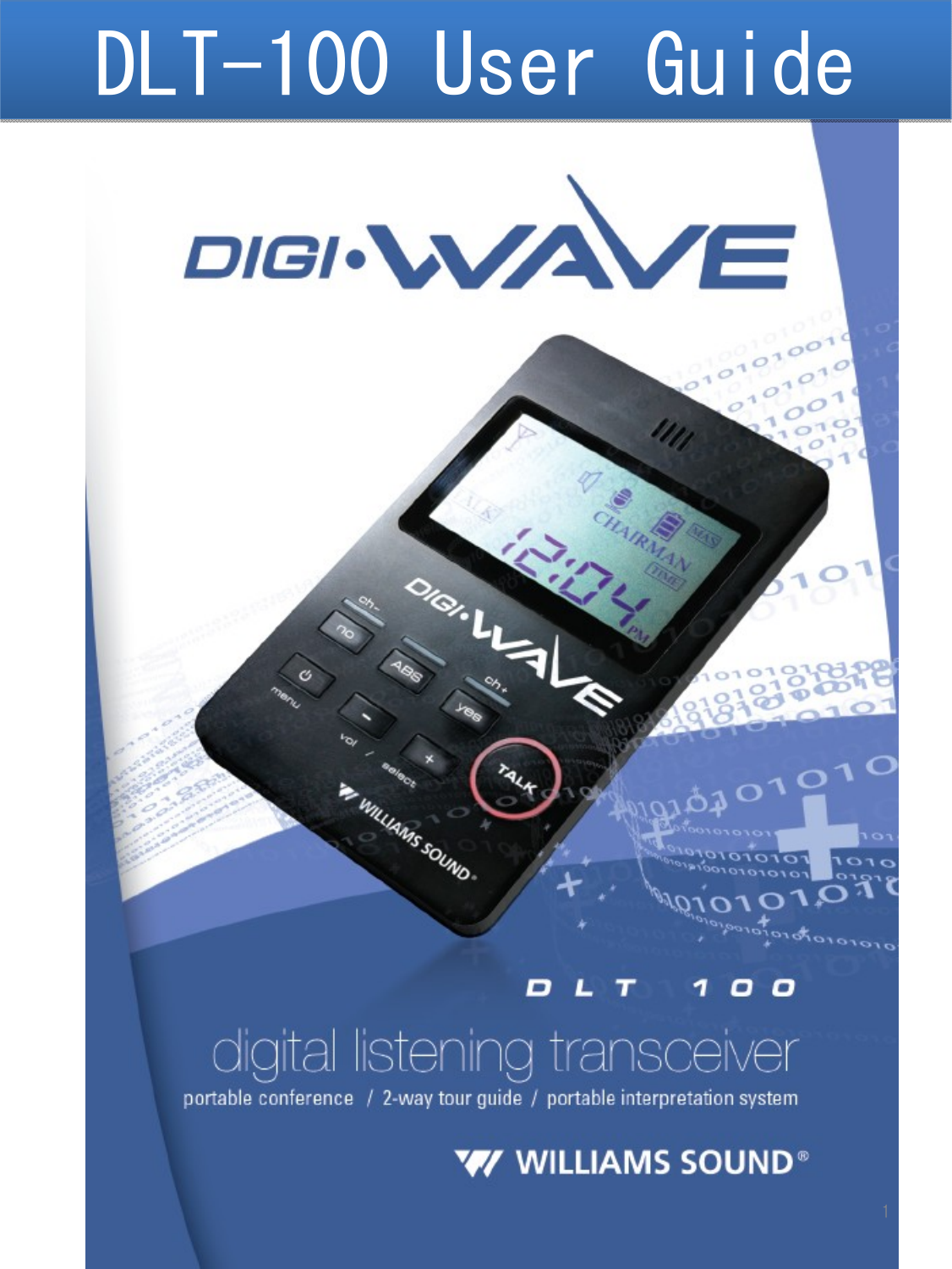
Williams Sound DLT100 Portable Conference Transmitter User Manual

Williams Sound, LLC Portable Conference Transmitter

User manual

DLT-100 User GuideDLT-100 User Guide1
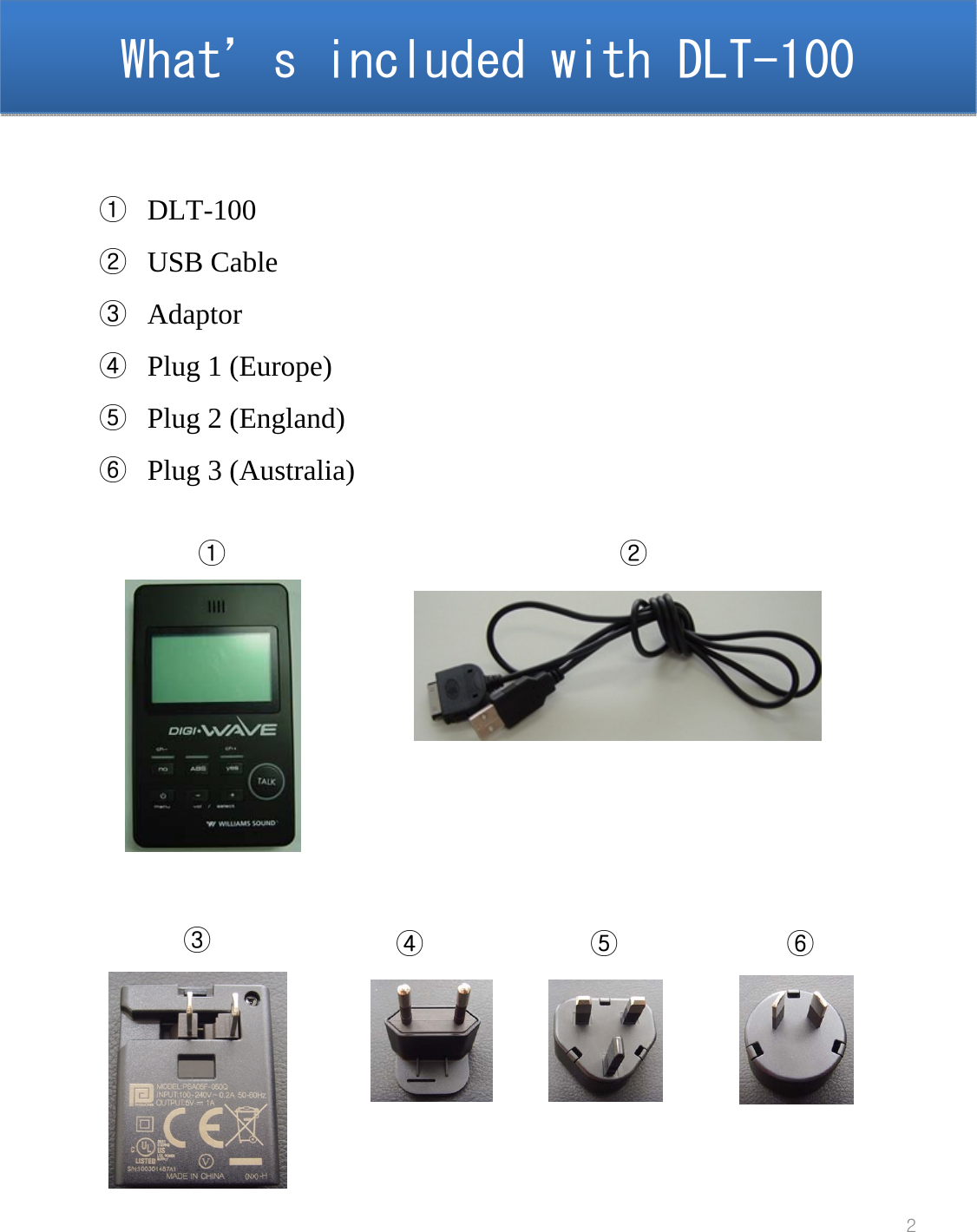
What’s included with DLT-100  What’s included with DLT-100  2①DLT-100②USB Cable③Adaptor④Plug 1 (Europe)⑤Plug 2 (England)⑥Plug 3 (Australia)①②③④⑤⑥
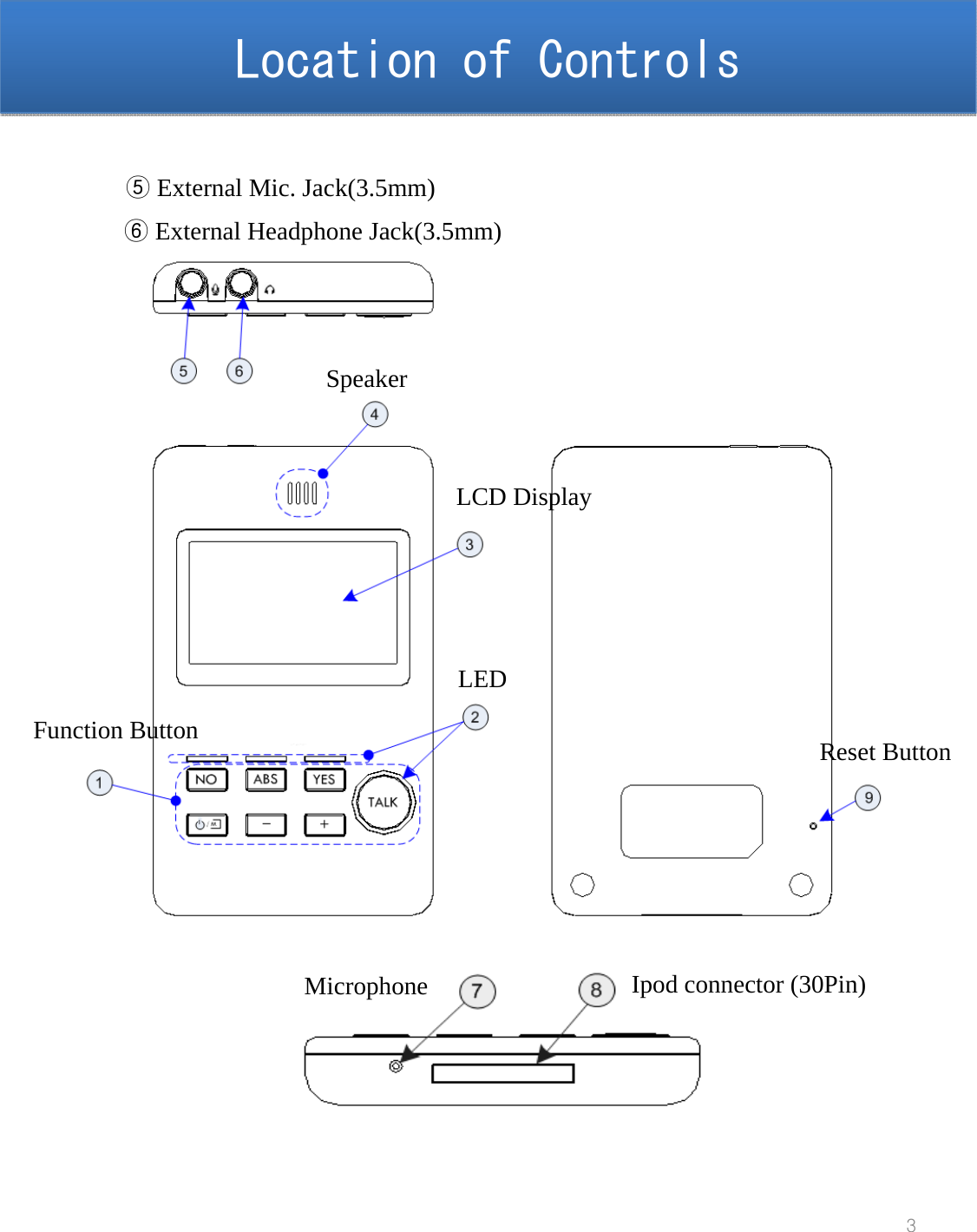
Location of ControlsLocation of Controls3Function ButtonLEDLCD DisplaySpeaker⑤External Mic. Jack(3.5mm)⑥External Headphone Jack(3.5mm)Microphone Ipod connector (30Pin)Reset Button
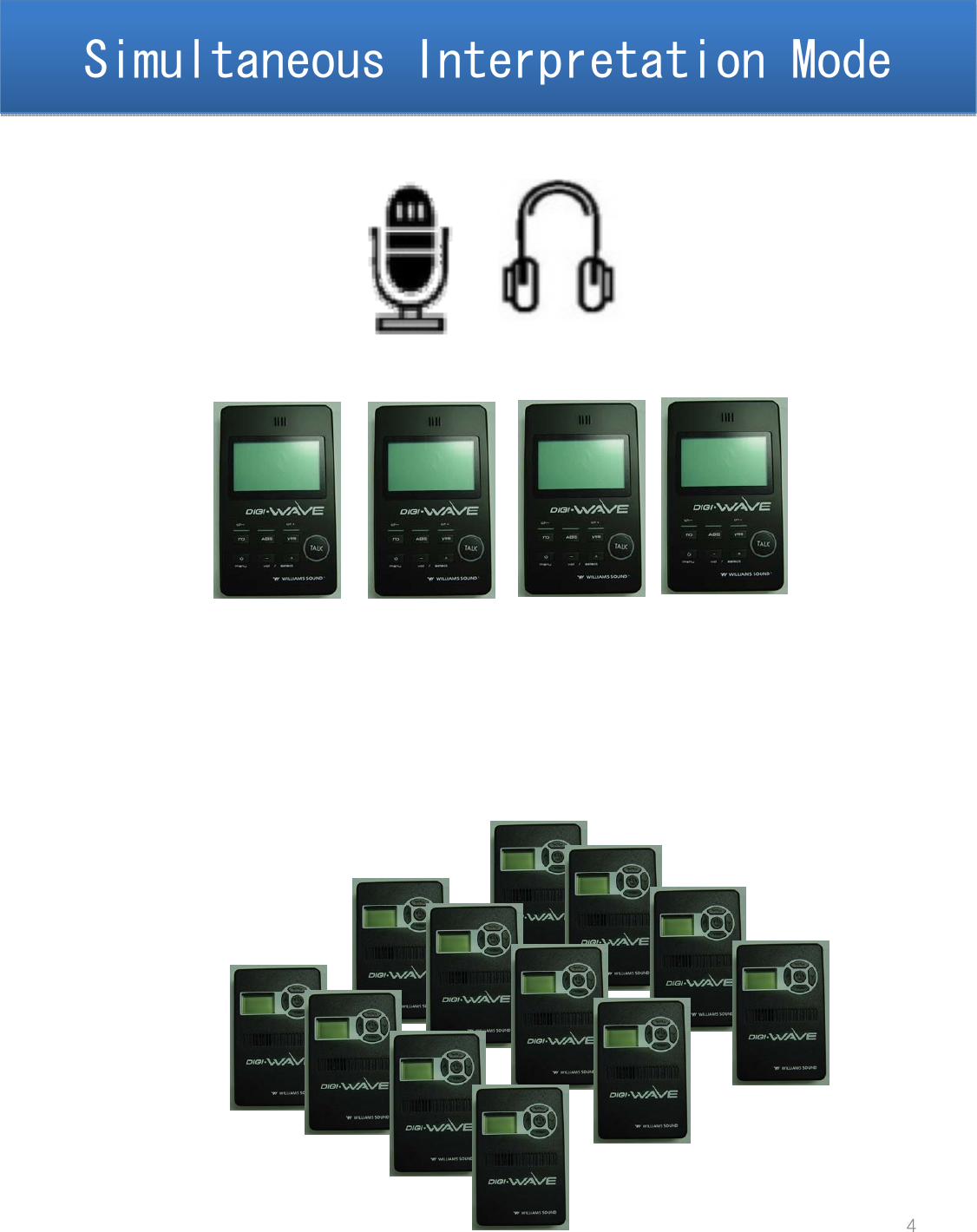
Simultaneous Interpretation ModeSimultaneous Interpretation Mode4
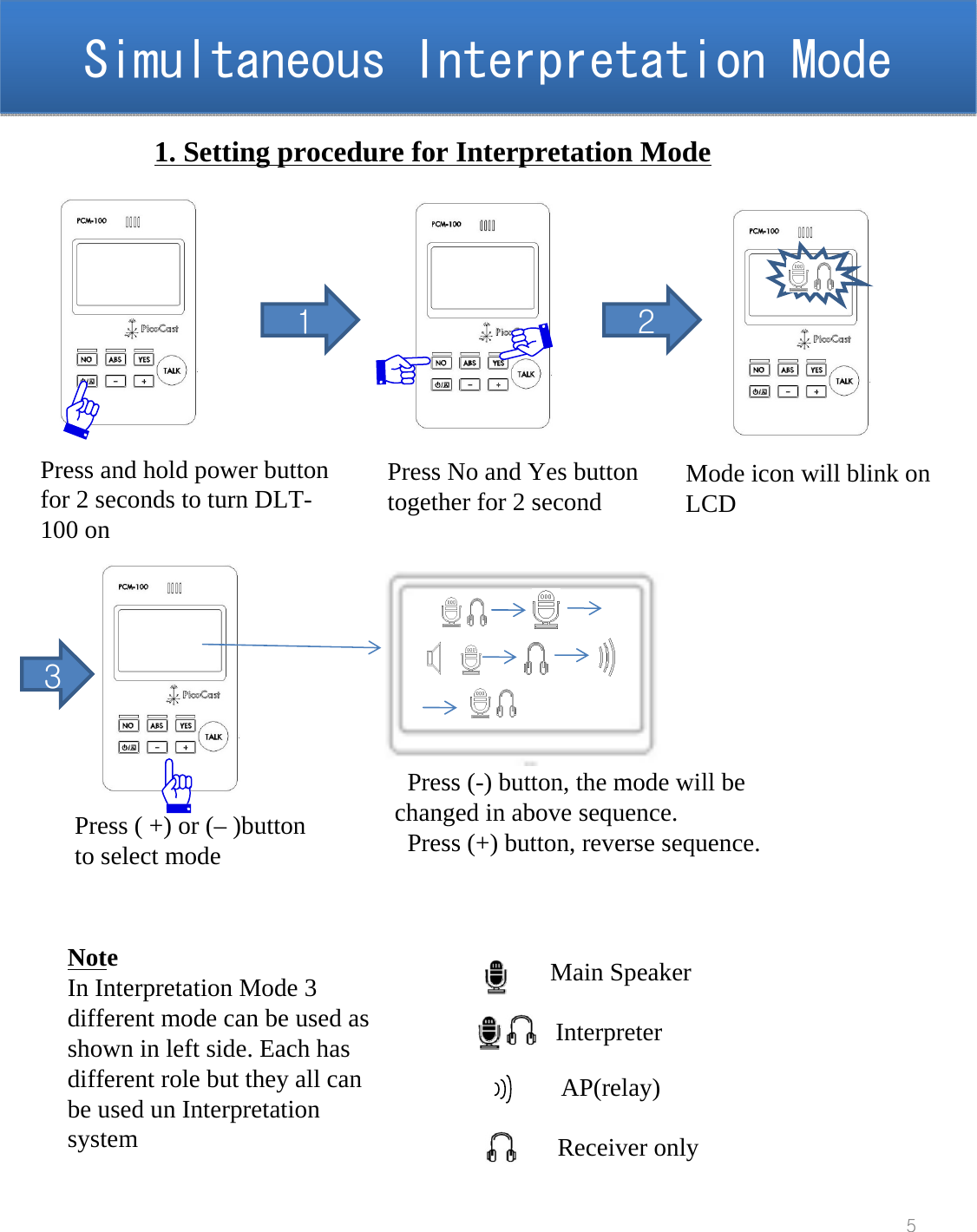
Simultaneous Interpretation ModeSimultaneous Interpretation Mode5Press and hold power button for 2 seconds to turn DLT-100 on 11. Setting procedure for Interpretation ModePress No and Yes button together for 2 second Mode icon will blink onLCD2Press ( +) or (– )button to select mode3Press (-) button, the mode will be changed in above sequence. Press (+) button, reverse sequence.Main SpeakerInterpreterAP(relay)Receiver onlyNoteIn Interpretation Mode 3 different mode can be used as shown in left side. Each has different role but they all can be used un Interpretation system
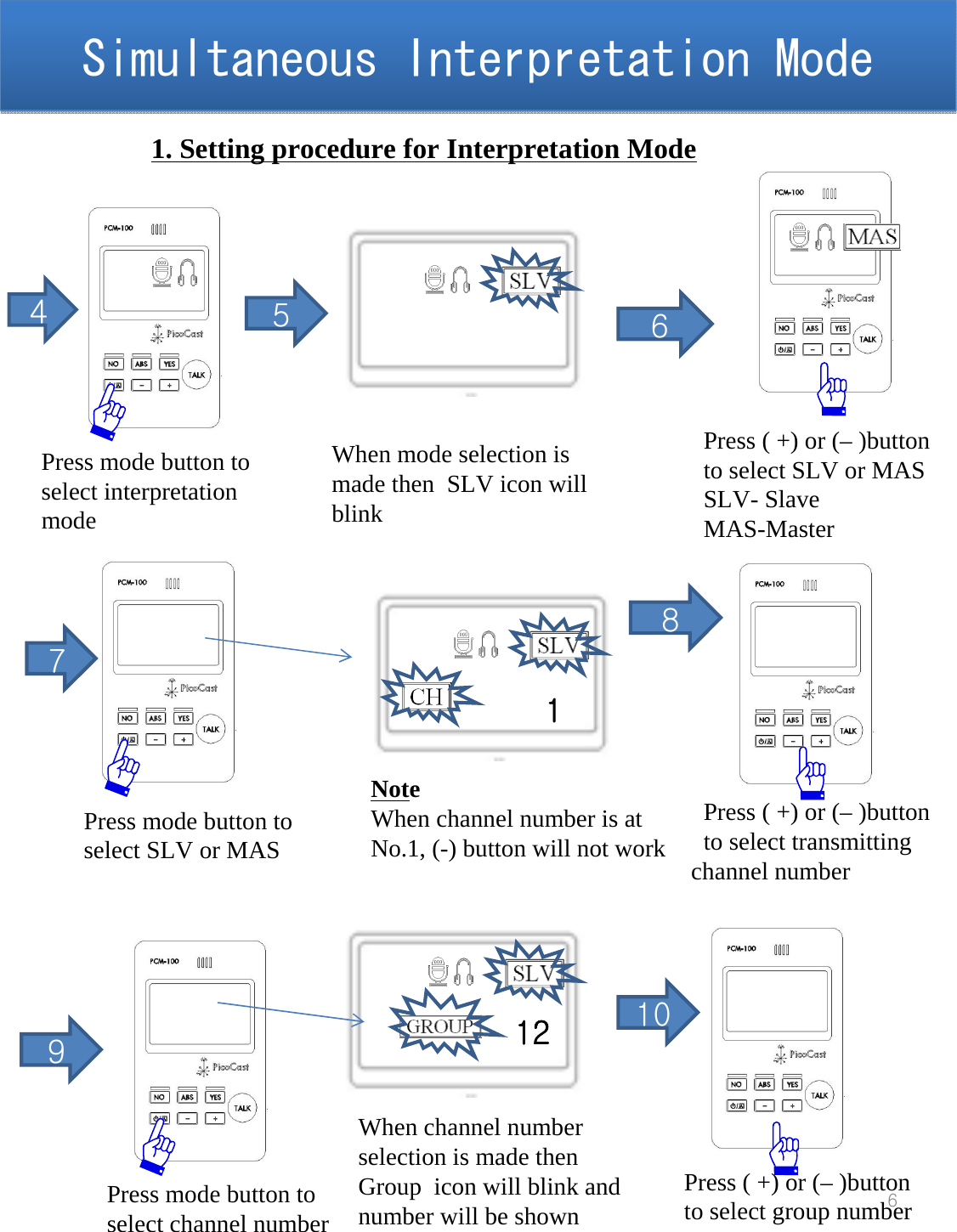
Simultaneous Interpretation ModeSimultaneous Interpretation Mode61. Setting procedure for Interpretation Mode4Press mode button toselect interpretation  mode 5When mode selection is made then  SLV icon will blink6Press ( +) or (– )button to select SLV or MASSLV- SlaveMAS-MasterPress ( +) or (– )button to select transmitting channel number87Press mode button toselect SLV or MAS 1NoteWhen channel number is at No.1, (-) button will not work9Press mode button toselect channel number10When channel number selection is made then  Group  icon will blink and number will be shown12Press ( +) or (– )button to select group number
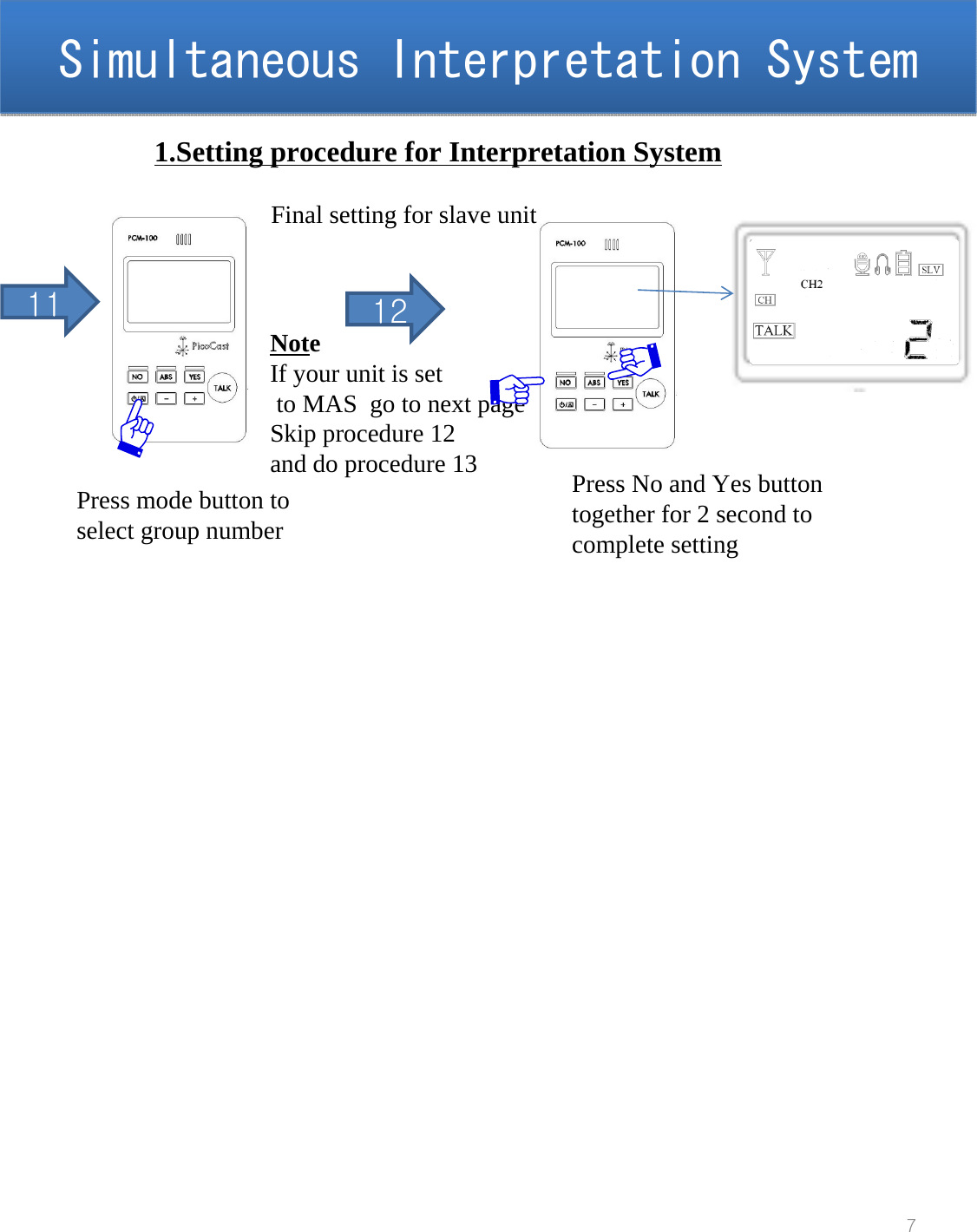
Simultaneous Interpretation SystemSimultaneous Interpretation System71.Setting procedure for Interpretation System11Press mode button toselect group numberNoteIf your unit is setto MAS  go to next pageSkip procedure 12and do procedure 13 Press No and Yes button together for 2 second to complete setting12Final setting for slave unit
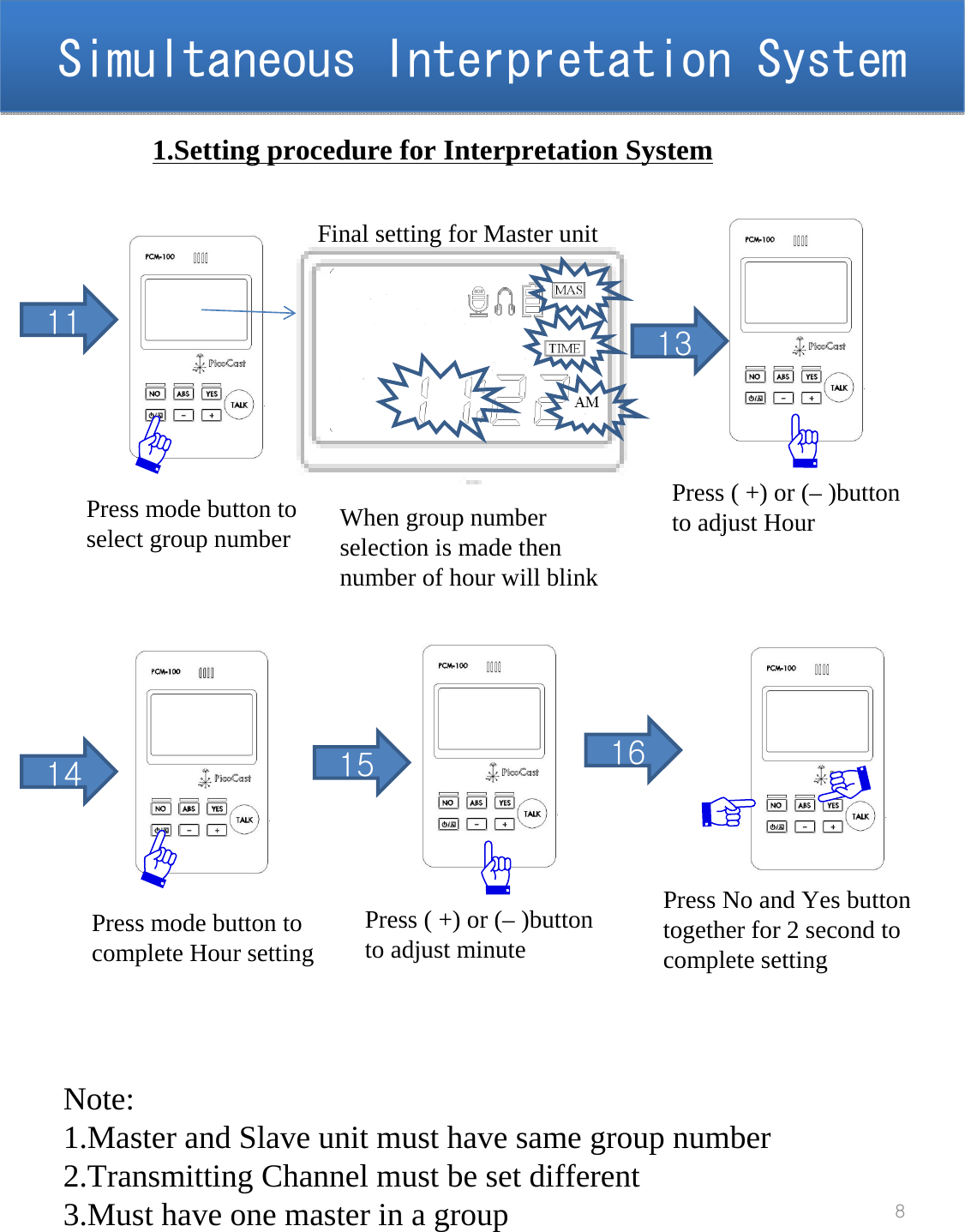
Simultaneous Interpretation SystemSimultaneous Interpretation System81.Setting procedure for Interpretation System11Press mode button toselect group numberPress No and Yes button together for 2 second to complete setting15Final setting for Master unitPress ( +) or (– )button to adjust minuteWhen group number selection is made then  number of hour will blink14Press mode button tocomplete Hour setting16Note:1.Master and Slave unit must have same group number 2.Transmitting Channel must be set different3.Must have one master in a group Press ( +) or (– )button to adjust Hour13
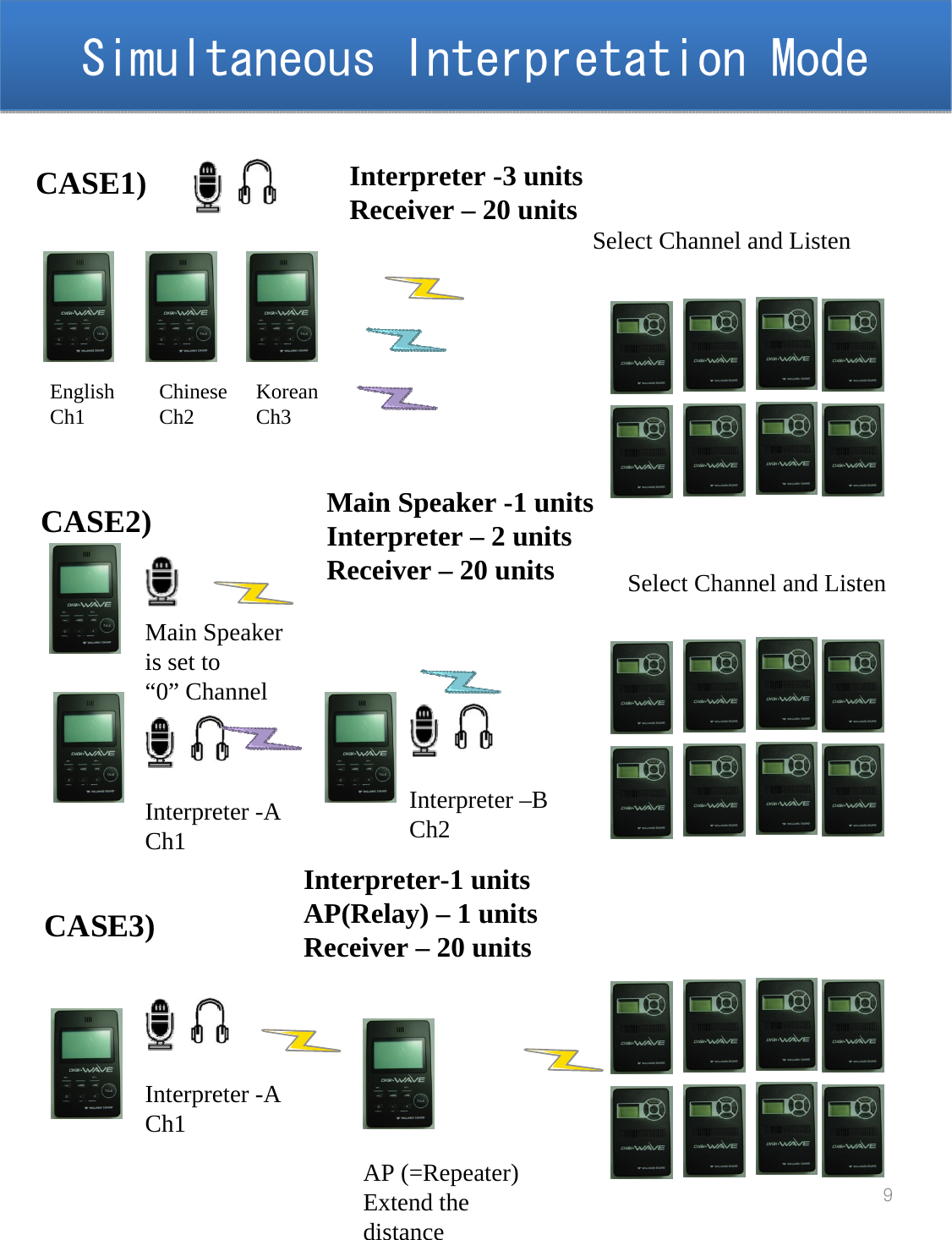
Simultaneous Interpretation ModeSimultaneous Interpretation Mode9CASE1) Interpreter -3 unitsReceiver – 20 unitsEnglishCh1 ChineseCh2 KoreanCh3Select Channel and ListenCASE2)Main Speaker is set to“0” ChannelMain Speaker -1 unitsInterpreter – 2 unitsReceiver – 20 unitsInterpreter -ACh1Interpreter –BCh2Select Channel and ListenCASE3)Interpreter-1 unitsAP(Relay) – 1 unitsReceiver – 20 unitsInterpreter -ACh1AP (=Repeater)Extend the distance
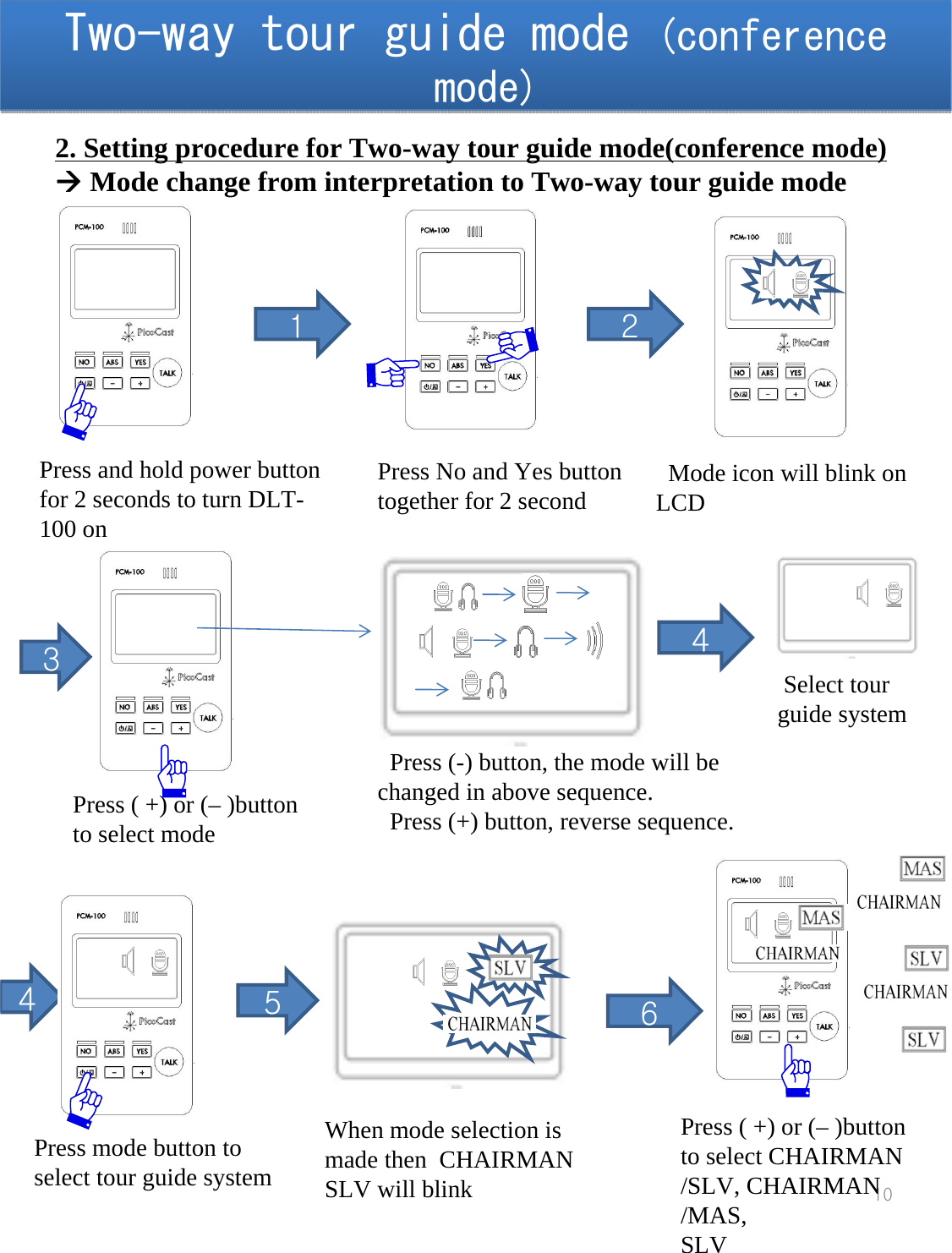
Two-way tour guide mode (conference mode)Two-way tour guide mode (conference mode)10Press and hold power button for 2 seconds to turn DLT-100 on 12. Setting procedure for Two-way tour guide mode(conference mode)ÆMode change from interpretation to Two-way tour guide modePress No and Yes button together for 2 second Mode icon will blink on LCD2Press ( +) or (– )button to select mode3Press (-) button, the mode will be changed in above sequence. Press (+) button, reverse sequence.4Press mode button toselect tour guide system5When mode selection is made then  CHAIRMAN SLV will blink6Press ( +) or (– )button to select CHAIRMAN /SLV, CHAIRMAN /MAS,SLV4Select tour guide system
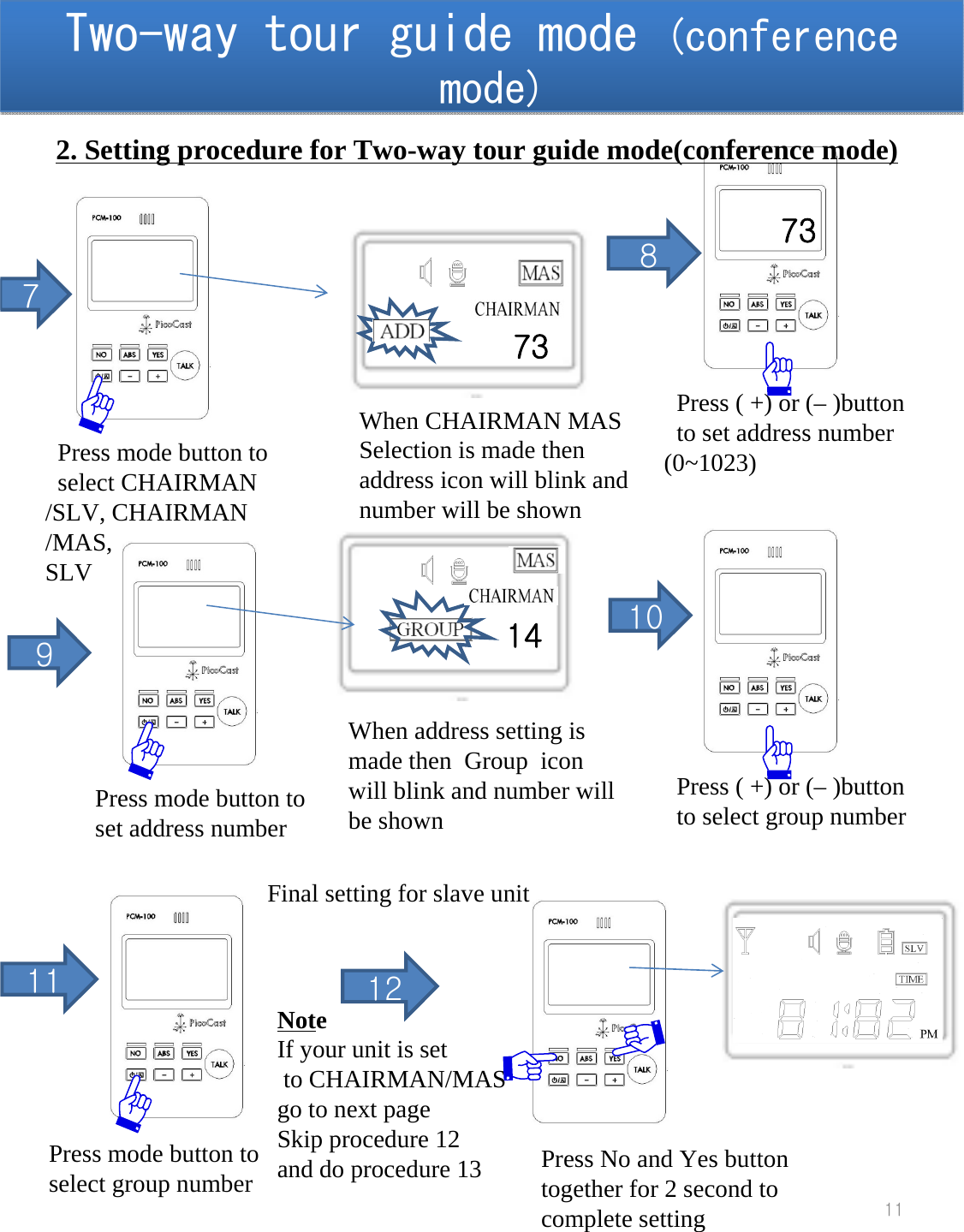
Two-way tour guide mode (conference mode)Two-way tour guide mode (conference mode)11Press ( +) or (– )button to set address number (0~1023)89Press mode button toset address number10117Press mode button toselect CHAIRMAN /SLV, CHAIRMAN /MAS,SLVWhen address setting is made then  Group  icon will blink and number will be shown73When CHAIRMAN MAS Selection is made then address icon will blink and number will be shown14Press ( +) or (– )button to select group numberPress mode button toselect group numberNoteIf your unit is setto CHAIRMAN/MAS  go to next pageSkip procedure 12and do procedure 13 Press No and Yes button together for 2 second to complete setting12Final setting for slave unit2. Setting procedure for Two-way tour guide mode(conference mode)73
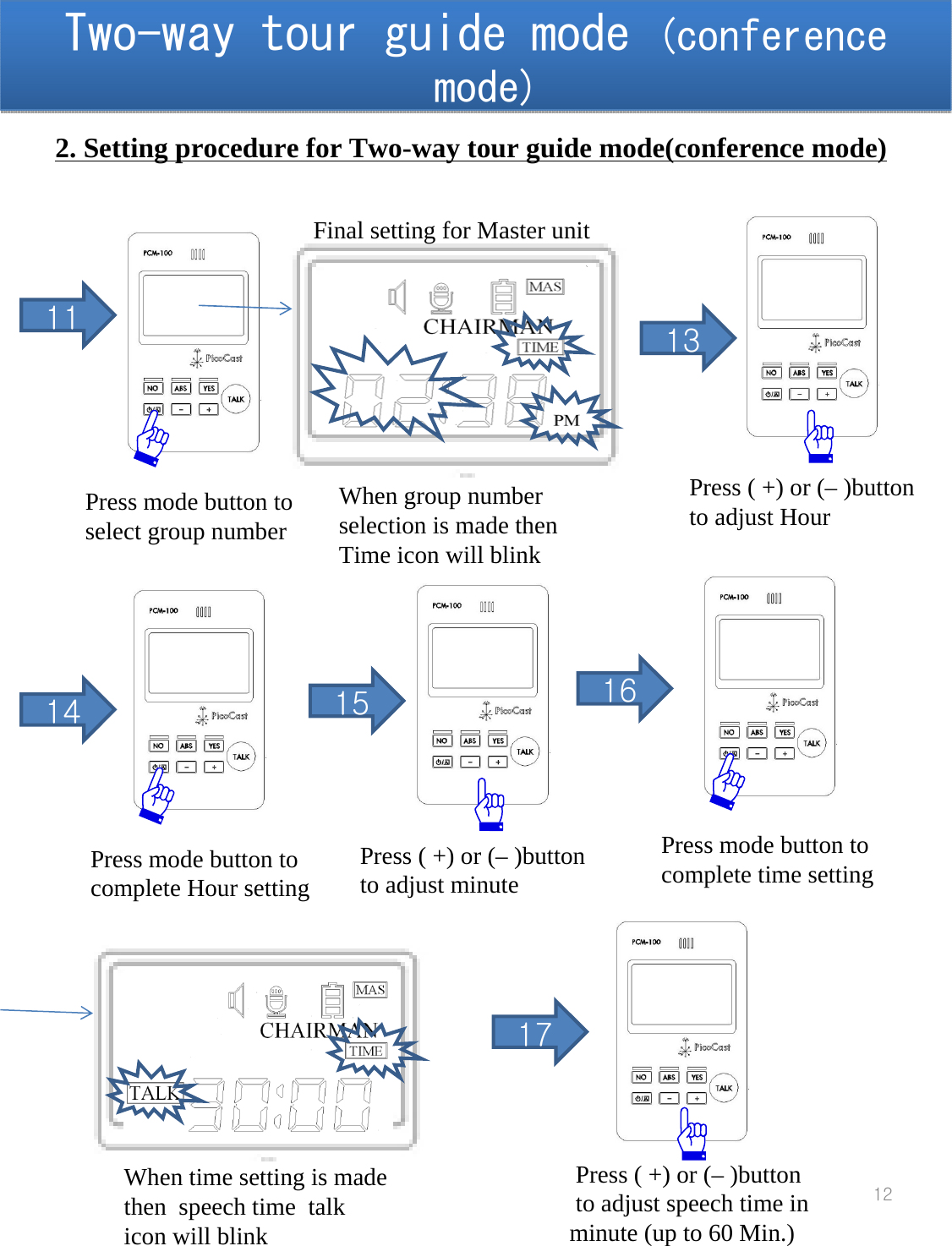
Two-way tour guide mode (conference mode)Two-way tour guide mode (conference mode)1211Press mode button toselect group number15Final setting for Master unitPress ( +) or (– )button to adjust minuteWhen group number selection is made then  Time icon will blink14Press mode button tocomplete Hour setting 162. Setting procedure for Two-way tour guide mode(conference mode)Press ( +) or (– )button to adjust Hour13Press mode button tocomplete time setting When time setting is made then  speech time  talk icon will blinkPress ( +) or (– )button to adjust speech time in minute (up to 60 Min.)17
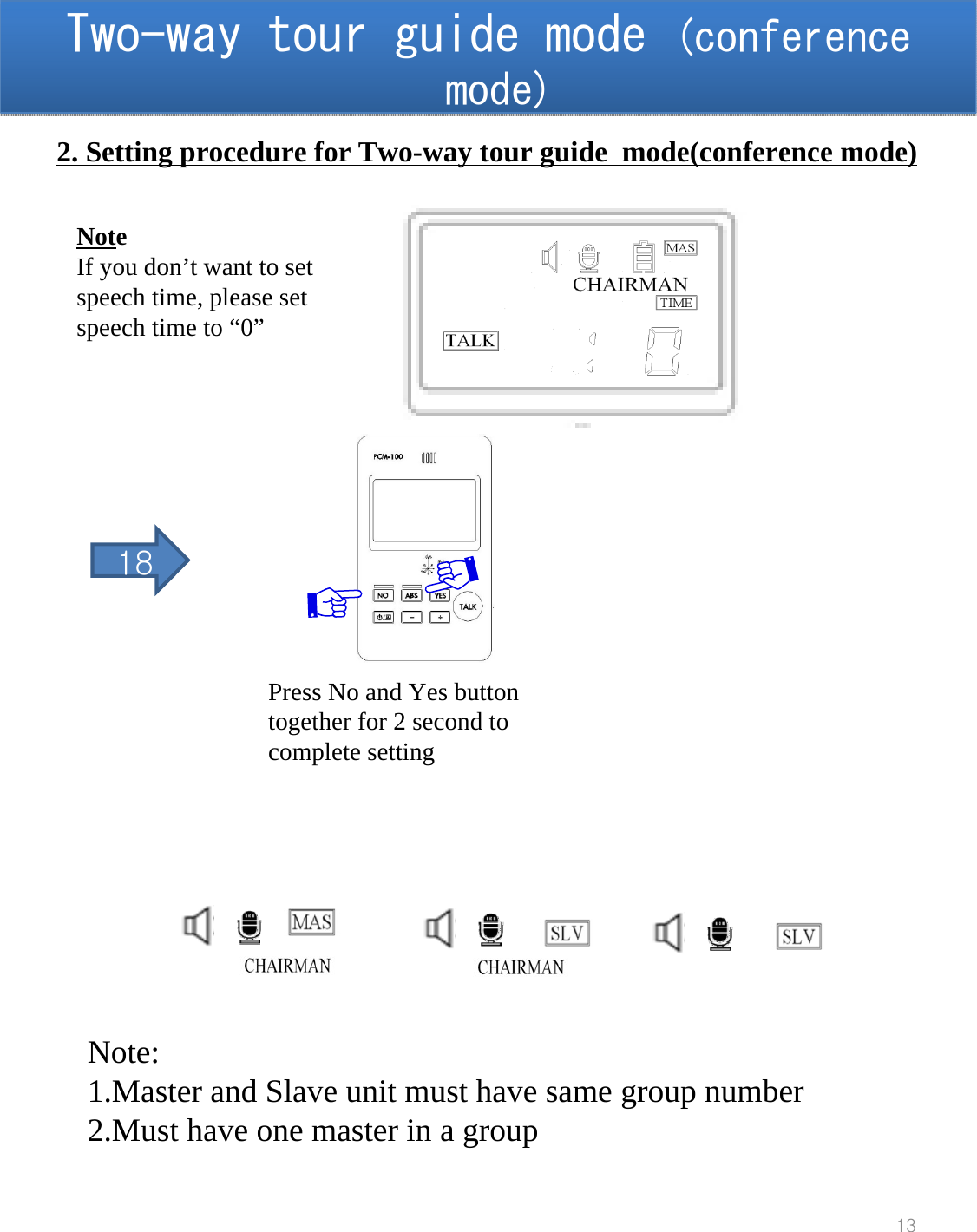
Two-way tour guide mode (conference mode)Two-way tour guide mode (conference mode)13Press No and Yes button together for 2 second to complete setting2. Setting procedure for Two-way tour guide  mode(conference mode)NoteIf you don’t want to set speech time, please set speech time to “0”18Note:1.Master and Slave unit must have same group number 2.Must have one master in a group
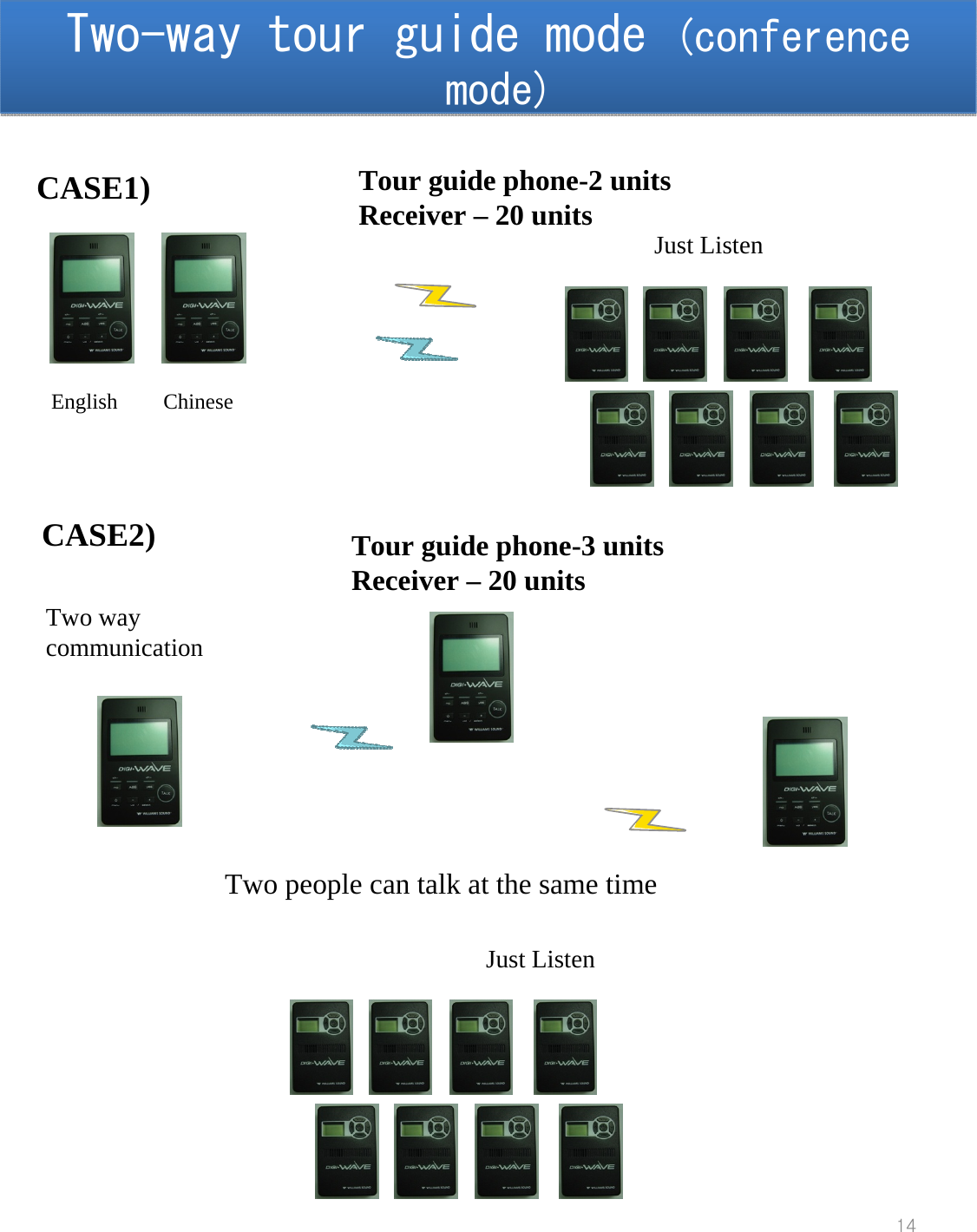
Two-way tour guide mode (conference mode)Two-way tour guide mode (conference mode)14CASE1) Tour guide phone-2 unitsReceiver – 20 unitsEnglish ChineseJust ListenCASE2) Tour guide phone-3 unitsReceiver – 20 unitsTwo people can talk at the same timeTwo way communicationJust Listen
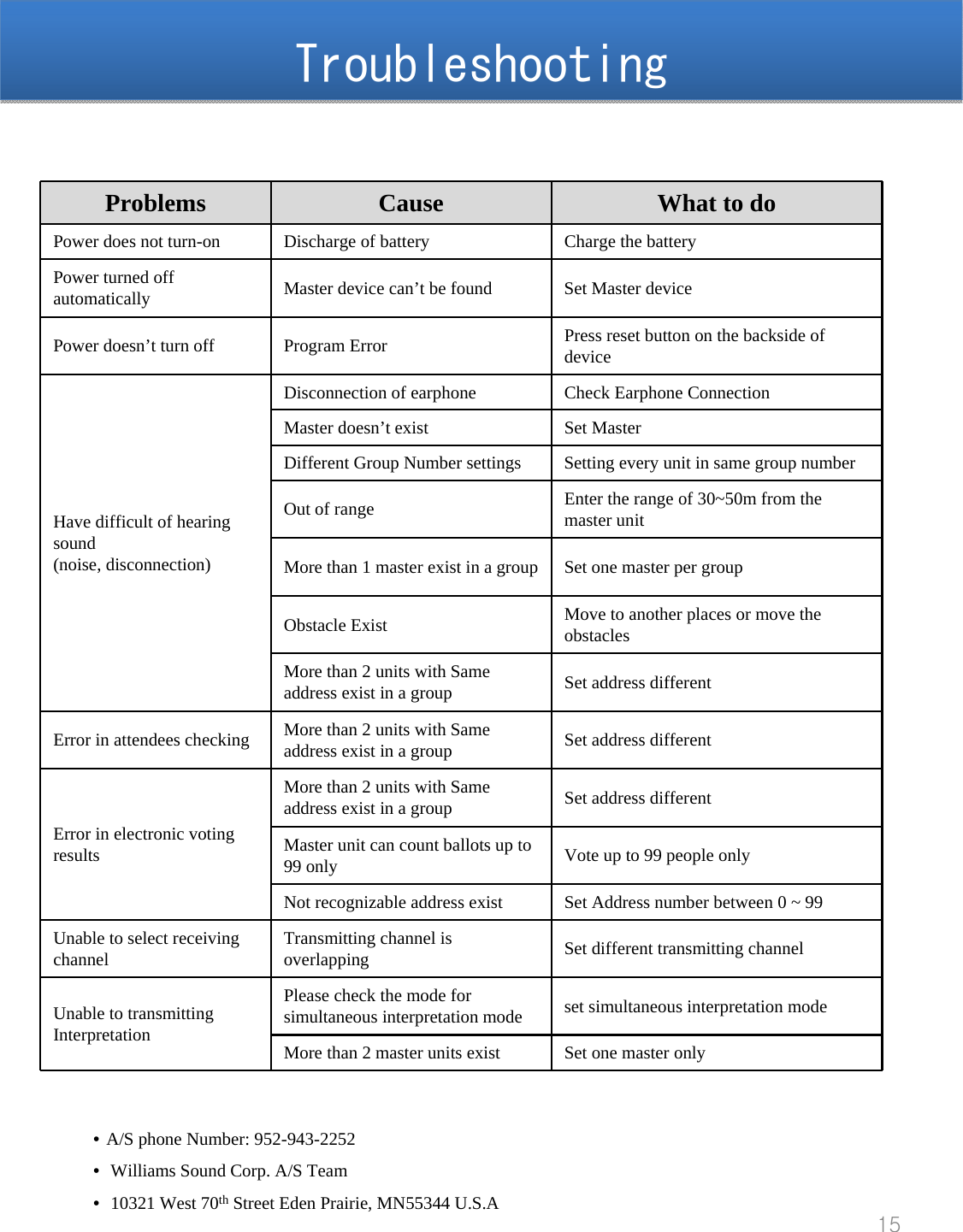
TroubleshootingTroubleshooting•A/S phone Number: 952-943-2252•Williams Sound Corp. A/S Team•10321 West 70th Street Eden Prairie, MN55344 U.S.A15Problems Cause What to doPower does not turn-on  Discharge of battery Charge the batteryPower turned off automatically Master device can’t be found Set Master device Power doesn’t turn off Program Error Press reset button on the backside of deviceHave difficult of hearing sound(noise, disconnection)Disconnection of earphone Check Earphone ConnectionMaster doesn’t exist Set Master Different Group Number settings Setting every unit in same group numberOut of range Enter the range of 30~50m from the master unit More than 1 master exist in a group Set one master per groupObstacle Exist Move to another places or move the obstaclesMore than 2 units with Same address exist in a group Set address differentError in attendees checking More than 2 units with Same address exist in a group Set address differentError in electronic voting  resultsMore than 2 units with Same address exist in a group Set address differentMaster unit can count ballots up to 99 only Vote up to 99 people only Not recognizable address exist Set Address number between 0 ~ 99 Unable to select receiving channel Transmitting channel is overlapping   Set different transmitting channelUnable to transmitting InterpretationPlease check the mode for simultaneous interpretation mode set simultaneous interpretation modeMore than 2 master units exist Set one master only
FCC Part 15.19 This device complies with part 15 of the FCC Rules. Operation is subject to The following two conditions: (1) This device may not cause harmful interference, and (2) this device must accept any interference received, including interference that may cause undesired operation. FCC Part 15.21 Any changes or modifications (including the antennas) made to this device that are not expressly approved by the manufacturer may void the user's authority to operate the equipment. FCC Part 15.105 Note : This equipment has been tested and found to comply with the limits for a Class B digital device, pursuant to part 15 of the FCC Rules. These limits are designed to provide reasonable protection against harmful interference in a residential installation This equipment generates, uses and can radiate radio frequency energy and, if not installed and used in accordance with the instructions, may cause harmful interference to radio communications, However, there is no guarantee that interference will not occur in a particular installation. If this equipment does cause harmful interference to radio or television reception, which can be determined by turning the equipment off and on, the user is encouraged to try to correct the interference by one or more of the following measures: - Reorient or relocate the receiving antenna. - Increase the separation between the equipment and receiver. - Connect the equipment into an outlet on a circuit different from that to which the receiver is connected. - Consult the dealer or an experienced radio/TV technician for help. RF Exposure Statement FCC RF Radiation Exposure Statement: This equipment complies with FCC RF Radiation exposure limits set forth for an uncontrolled environment. This device and its antenna must not be co-located or operating in conjunction with any other antenna or transmitter.  IC Number: 1360A-DLT100 RSS-GEN 7.1.5 Operation is subject to the following two conditions: (1) this device may not cause interference, and (2) this device must accept any interference, including interference that may cause undesired operation of the device. Caution: Any changes or modifications to the equipment not expressly approved by the party responsible for compliance could void user’s authority to operate the equipment.
This equipment complies with IC radiation exposure limits set forth for an uncontrolled environment. To maintain compliance with IC RC exposure compliance requirement, please avoid direct contact to the transmitting antenna during transmitting. This device and its antenna must not be co-located or operating in conjunction with any other antenna or transmitter. End users must follow this specific operating instructions for satisfying RF exposure compliance

Navigation menu