Williams Sound T36 AUDITORY ASSISTANCE DEVICE User Manual MAN142A T36

Williams Sound, LLC AUDITORY ASSISTANCE DEVICE MAN142A T36

USERS MANUAL

MAN 142A    ©2008  Williams Sound Corp.®Thank you for purchasing the T36 transmitter from Williams Sound. TheT36 is designed to operate with a wideband FM, 72–76 MHz receiver.For more information on available receivers, contact Williams Sound at800-843-3544 or 952-943-2252Transmitter Model T36, 72-76 MHzInstructions For Use and CarePACEMAKER SAFETY1. Before using this product with apacemaker or other medical device,consult your physician or the man-ufacturer of your pacemaker orother medical device. 2. If you have a pacemaker or othermedical device, make sure that youare using this product in accordancewith safety guidelines established byyour physician or the pacemakermanufacturer. BATTERY SAFETY & DISPOSALDo not attempt to recharge disposablebatteries, which may explode, releasedangerous chemicals, cause burns, orother serious harm to the user orproduct.RECYCLING INSTRUCTIONSHelp Williams Sound protect theenvironment!  Please take thetime to dispose of your equipmentproperly.Product Recycling:Please do NOT dispose of yourWilliams Sound equipment in thehousehold trash.  Please take theequipment to an electronics recy-cling center; OR, return the productto the factory for proper disposal.  Battery Recycling:Please do NOT dispose of usedbatteries in the household trash.Please take the batteries to a retailor community collection point forrecycling.05/22/08CAUTION!CAUTION!
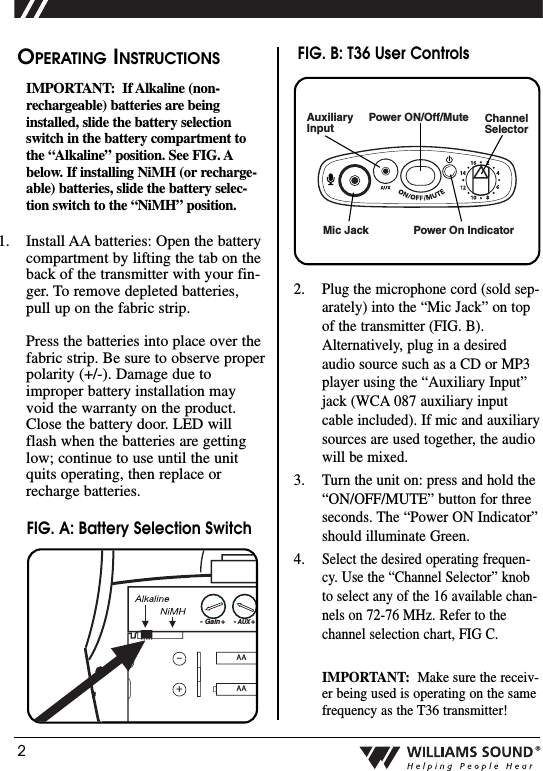
2®OPERATING INSTRUCTIONSIMPORTANT: If Alkaline (non-rechargeable) batteries are beinginstalled, slide the battery selectionswitch in the battery compartment tothe “Alkaline” position. See FIG. Abelow. If installing NiMH (or recharge-able) batteries, slide the battery selec-tion switch to the “NiMH” position.1. Install AA batteries: Open the batterycompartment by lifting the tab on theback of the transmitter with your fin-ger. To remove depleted batteries,pull up on the fabric strip.Press the batteries into place over thefabric strip. Be sure to observe properpolarity (+/-). Damage due toimproper battery installation mayvoid the warranty on the product.Close the battery door. LED willflash when the batteries are gettinglow; continue to use until the unitquits operating, then replace orrecharge batteries.Mic JackChannelSelector Power On IndicatorAuxiliaryInputPower ON/Off/Mute2. Plug the microphone cord (sold sep-arately) into the “Mic Jack” on topof the transmitter (FIG. B).Alternatively, plug in a desiredaudio source such as a CD or MP3player using the “Auxiliary Input”jack (WCA 087 auxiliary inputcable included). If mic and auxiliarysources are used together, the audiowill be mixed.3. Turn the unit on: press and hold the“ON/OFF/MUTE” button for threeseconds. The “Power ON Indicator”should illuminate Green.4.Select the desired operating frequen-cy. Use the “Channel Selector” knobto select any of the 16 available chan-nels on 72-76 MHz. Refer to thechannel selection chart, FIG C.IMPORTANT: Make sure the receiv-er being used is operating on the samefrequency as the T36 transmitter!AAAA–+- Gain +- AUX +2:11:1FIG. A: Battery Selection SwitchFIG. B: T36 User Controls
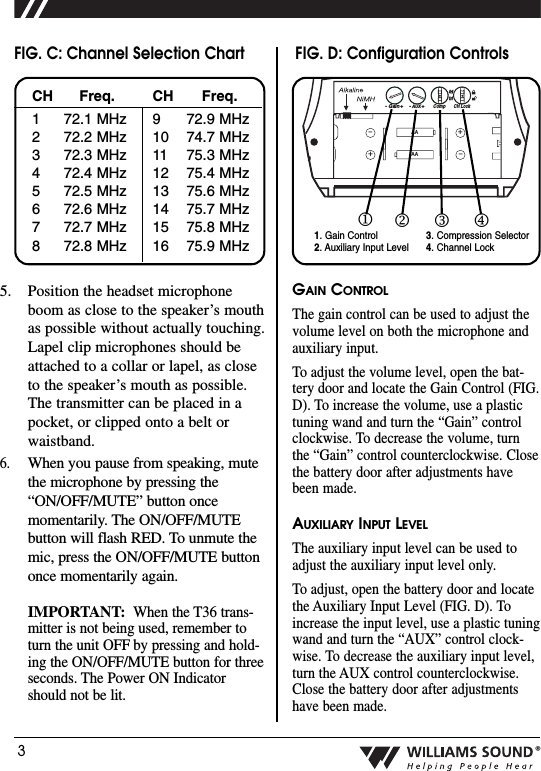
3®5. Position the headset microphoneboom as close to the speaker’s mouthas possible without actually touching.Lapel clip microphones should beattached to a collar or lapel, as closeto the speaker’s mouth as possible.The transmitter can be placed in apocket, or clipped onto a belt orwaistband.6.When you pause from speaking, mutethe microphone by pressing the“ON/OFF/MUTE” button oncemomentarily. The ON/OFF/MUTEbutton will flash RED. To unmute themic, press the ON/OFF/MUTE buttononce momentarily again.IMPORTANT:When the T36 trans-mitter is not being used, remember toturn the unit OFF by pressing and hold-ing the ON/OFF/MUTE button for threeseconds. The Power ON Indicatorshould not be lit.GAIN CONTROLThe gain control can be used to adjust thevolume level on both the microphone andauxiliary input.  To adjust the volume level, open the bat-tery door and locate the Gain Control (FIG.D). To increase the volume, use a plastictuning wand and turn the “Gain” controlclockwise. To decrease the volume, turnthe “Gain” control counterclockwise. Closethe battery door after adjustments havebeen made.AUXILIARY INPUT LEVELThe auxiliary input level can be used toadjust the auxiliary input level only. To adjust, open the battery door and locatethe Auxiliary Input Level (FIG. D). Toincrease the input level, use a plastic tuningwand and turn the “AUX” control clock-wise. To decrease the auxiliary input level,turn the AUX control counterclockwise.Close the battery door after adjustmentshave been made. AAAA–++–CompCH Lock- Gain +- AUX +22:11:11. Gain Control    2. Auxiliary Input Level 3. Compression Selector4. Channel Lock1234CH12345678Freq.72.1 MHz72.2 MHz72.3 MHz72.4 MHz72.5 MHz72.6 MHz72.7 MHz72.8 MHzCH910111213141516Freq.72.9 MHz74.7 MHz75.3 MHz75.4 MHz75.6 MHz75.7 MHz75.8 MHz75.9 MHzFIG. C: Channel Selection Chart FIG. D: Configuration Controls
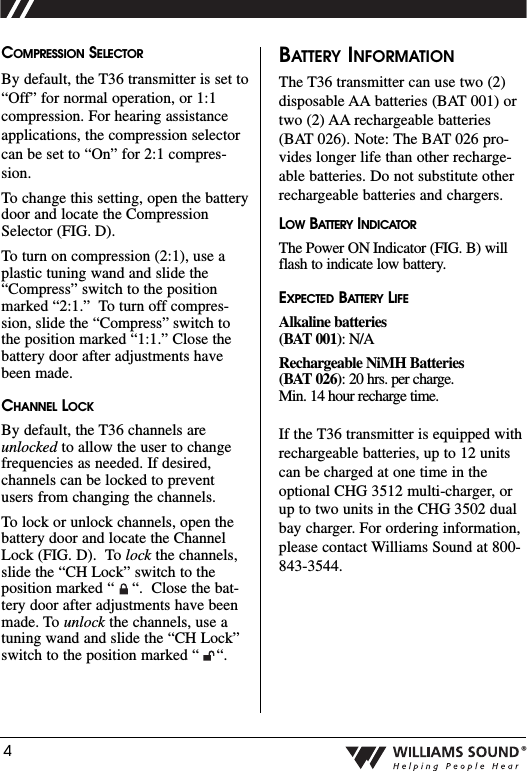
4®COMPRESSION SELECTORBy default, the T36 transmitter is set to“Off” for normal operation, or 1:1compression. For hearing assistanceapplications, the compression selectorcan be set to “On” for 2:1 compres-sion.To change this setting, open the batterydoor and locate the CompressionSelector (FIG. D).  To turn on compression (2:1), use aplastic tuning wand and slide the“Compress” switch to the positionmarked “2:1.”  To turn off compres-sion, slide the “Compress” switch tothe position marked “1:1.” Close thebattery door after adjustments havebeen made.CHANNEL LOCKBy default, the T36 channels areunlocked to allow the user to changefrequencies as needed. If desired,channels can be locked to preventusers from changing the channels.To lock or unlock channels, open thebattery door and locate the ChannelLock (FIG. D).  To lock the channels,slide the “CH Lock” switch to theposition marked “    “.  Close the bat-tery door after adjustments have beenmade. To unlock the channels, use atuning wand and slide the “CH Lock”switch to the position marked “    “.  BATTERY INFORMATIONThe T36 transmitter can use two (2)disposable AA batteries (BAT 001) ortwo (2) AA rechargeable batteries(BAT 026). Note: The BAT 026 pro-vides longer life than other recharge-able batteries. Do not substitute otherrechargeable batteries and chargers. LOW BATTERY INDICATORThe Power ON Indicator (FIG. B) willflash to indicate low battery. EXPECTED BATTERY LIFEAlkaline batteries(BAT 001): N/ARechargeable NiMH Batteries (BAT 026): 20 hrs. per charge. Min. 14 hour recharge time.If the T36 transmitter is equipped withrechargeable batteries, up to 12 unitscan be charged at one time in theoptional CHG 3512 multi-charger, orup to two units in the CHG 3502 dualbay charger. For ordering information,please contact Williams Sound at 800-843-3544.
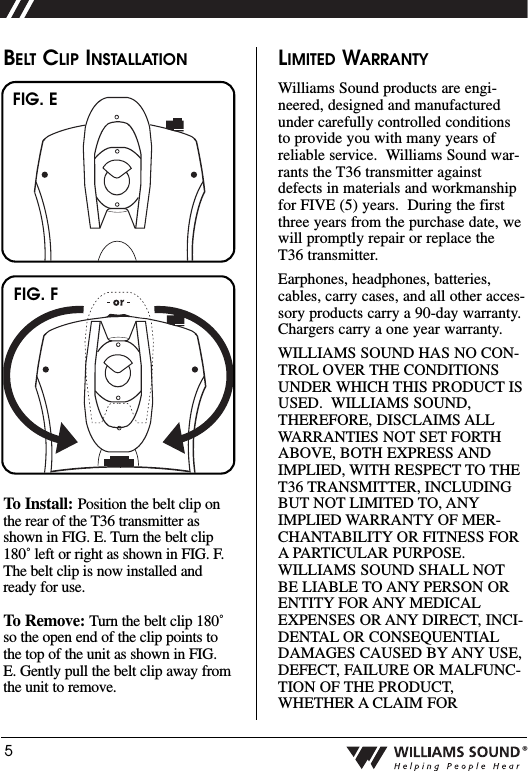
5®BELT CLIP INSTALLATIONTo Install: Position the belt clip onthe rear of the T36 transmitter asshown in FIG. E. Turn the belt clip180˚ left or right as shown in FIG. F.The belt clip is now installed andready for use.To Remove: Turn the belt clip 180˚so the open end of the clip points tothe top of the unit as shown in FIG.E. Gently pull the belt clip away fromthe unit to remove.LIMITED WARRANTYWilliams Sound products are engi-neered, designed and manufacturedunder carefully controlled conditionsto provide you with many years ofreliable service.  Williams Sound war-rants the T36 transmitter againstdefects in materials and workmanshipfor FIVE (5) years.  During the firstthree years from the purchase date, wewill promptly repair or replace theT36 transmitter.  Earphones, headphones, batteries,cables, carry cases, and all other acces-sory products carry a 90-day warranty.Chargers carry a one year warranty.WILLIAMS SOUND HAS NO CON-TROL OVER THE CONDITIONSUNDER WHICH THIS PRODUCT ISUSED.  WILLIAMS SOUND,THEREFORE, DISCLAIMS ALLWARRANTIES NOT SET FORTHABOVE, BOTH EXPRESS ANDIMPLIED, WITH RESPECT TO THET36 TRANSMITTER, INCLUDINGBUT NOT LIMITED TO, ANYIMPLIED WARRANTY OF MER-CHANTABILITY OR FITNESS FORA PARTICULAR PURPOSE.WILLIAMS SOUND SHALL NOTBE LIABLE TO ANY PERSON ORENTITY FOR ANY MEDICALEXPENSES OR ANY DIRECT, INCI-DENTAL OR CONSEQUENTIALDAMAGES CAUSED BY ANY USE,DEFECT, FAILURE OR MALFUNC-TION OF THE PRODUCT,WHETHER A CLAIM FORFIG. EFIG. F
6®SUCH DAMAGES IS BASED UPONWARRANTY, CONTRACT, TORT OROTHERWISE.  THE SOLE REMEDYFOR ANY DEFECT, FAILURE ORMALFUNCTION OF THE PRODUCTIS REPLACEMENT OF THE PROD-UCT.  NO PERSON HAS ANYAUTHORITY TO BIND WILLIAMSSOUND TO ANY REPRESENTATIONOR WARRANTY WITH RESPECT TOTHE T36 TRANSMITTER.  UNAU-THORIZED REPAIRS OR MODIFI-CATIONS WILL VOID THE WAR-RANTY.The exclusions and limitations set outabove are not intended to, and shouldnot be construed so as to contravenemandatory provisions of applicablelaw.  If any part or term of thisDisclaimer of Warranty is held to beillegal, unenforceable or in conflictwith applicable law by a court of com-petent jurisdiction, the validity of theremaining portions of this Disclaimerof Warranty shall not be affected, andall rights and obligations shall be con-strued and enforced as if this LimitedWarranty did not contain the particularpart or term held to be invalid.  NOTE:   THE MANUFACTURER IS NOT RESPONSIBLE FOR ANY RADIO OR TV INTERFERENCE CAUSED BY UNAUTHORIZED MODIFICATIONS TO THIS EQUIPMENT.   SUCH MODIFICATIONS COULD VOID THE USER'S AUTHORITY TO OPERATE THE EQUIPMENT.If you experience difficulty with yoursystem, call Toll-Free for CustomerAssistance:1-800-843-3544 (U.S.A.) or +1 952 943 2252 (Outside the U.S.A.)If it is necessary to return the system forservice, your Customer ServiceRepresentative will give you a ReturnAuthorization Number (RA) and shippinginstructions.Pack the system carefully and send it to:Williams Sound Corp.Attn: Repair Dept.10321 West 70th StreetEden Prairie, MN  55344

Navigation menu