Wintecronics CA04 2.4GHz ANT+ Wireless Bike Computer User Manual WBC 301 EN ai

Wintecronics Ltd 2.4GHz ANT+ Wireless Bike Computer WBC 301 EN ai

User manual

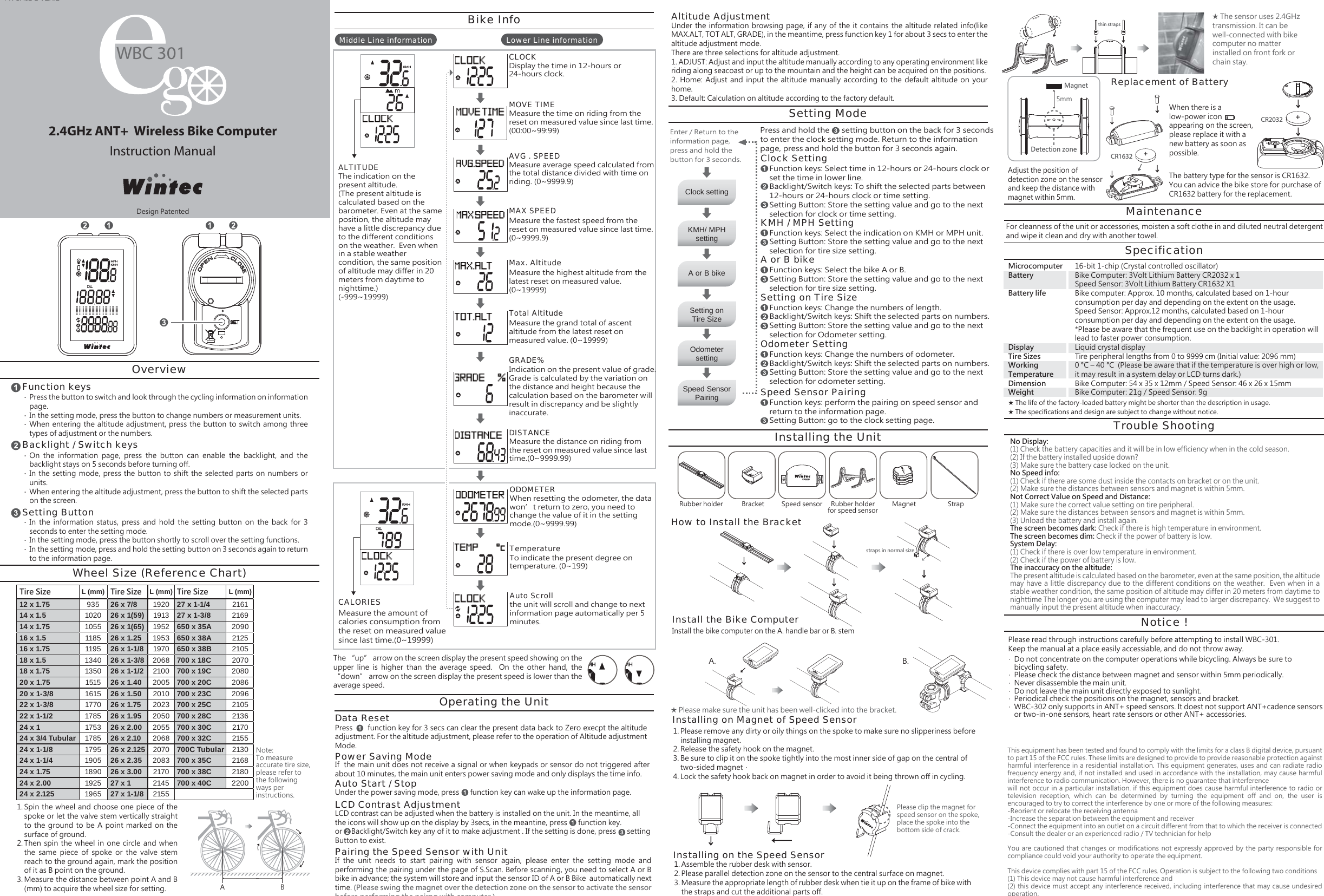
2.4GHz ANT+  Wireless Bike ComputerInstruction ManualPK CA02-2 VER.2Installing on Magnet of Speed SensorDisplay the time in 12-hours or 24-hours clock.CLOCKMeasure the time on riding from the reset on measured value since last time. (00:00~99:99)MOVE TIMEMeasure average speed calculated from the total distance divided with time on riding. (0~9999.9)AVG . SPEEDMeasure the fastest speed from the reset on measured value since last time. (0~9999.9)MAX SPEEDMeasure the highest altitude from the latest reset on measured value. (0~19999)Max. AltitudeMeasure the grand total of ascent altitude from the latest reset on measured value. (0~19999)Total AltitudeIndication on the present value of grade. Grade is calculated by the variation on the distance and height because the calculation based on the barometer will result in discrepancy and be slightly inaccurate.GRADE%Measure the distance on riding from the reset on measured value since last time.(0~9999.99)DISTANCEWhen resetting the odometer, the data won’t return to zero, you need to change the value of it in the setting mode.(0~9999.99)ODOMETERthe unit will scroll and change to next information page automatically per 5 minutes.Auto ScrollTo indicate the present degree on temperature. (0~199)TemperatureClock settingSetting onTire SizeKMH/ MPHsettingSpeed SensorPairingA or B bikeOdometersettingRubber holder Magnet StrapBracket Speed sensor Rubber holderfor speed sensorA. B.Lower Line informationMiddle Line informationWBC 301straps in normal sizethin strapsCR2032+CR1632+Setting ModePress and hold the      setting button on the back for 3 seconds to enter the clock setting mode. Return to the information page, press and hold the button for 3 seconds again.Function keys: Select time in 12-hours or 24-hours clock or set the time in lower line.Backlight/Switch keys: To shift the selected parts between 12-hours or 24-hours clock or time setting.Setting Button: Store the setting value and go to the next selection for clock or time setting.Clock SettingFunction keys: Select the indication on KMH or MPH unit.Setting Button: Store the setting value and go to the next selection for tire size setting.KMH / MPH SettingFunction keys: Select the bike A or B.Setting Button: Store the setting value and go to the next selection for tire size setting.A or B bikeFunction keys: Change the numbers of length.Backlight/Switch keys: Shift the selected parts on numbers.Setting Button: Store the setting value and go to the next selection for Odometer setting.Setting on Tire SizeFunction keys: Change the numbers of odometer.Backlight/Switch keys: Shift the selected parts on numbers.Setting Button: Store the setting value and go to the next selection for odometer setting.Odometer SettingFunction keys: perform the pairing on speed sensor and return to the information page.Setting Button: go to the clock setting page.Speed Sensor PairingSpin the wheel and choose one piece of the spoke or let the valve stem vertically straight to the  ground to  be A  point marked  on the surface of ground.Then  spin  the  wheel in  one  circle and  when the  same  piece  of  spoke  or  the  valve  stem reach to the ground again, mark the position of it as B point on the ground.Measure the distance between point A and B (mm) to acquire the wheel size for setting.Wheel Size (Reference Chart)Press the button to switch and look through the cycling information on information page. In the setting mode, press the button to change numbers or measurement units.When entering the  altitude  adjustment, press the button  to switch  among three types of adjustment or the numbers.Function keysOverviewBacklight / Switch keysSetting ButtonTire Size L (mm) Tire Size L (mm) Tire Size L (mm)27 x 1-1/427 x 1-3/8650 x 35A650 x 38A650 x 38B700 x 18C700 x 19C700 x 20C700 x 23C700 x 25C700 x 28C700 x 30C700 x 32C700C Tubular700 x 35C700 x 38C700 x 40C2161216920902125210520702080208620962105213621702155213021682180220012 x 1.7514 x 1.514 x 1.7516 x 1.516 x 1.7518 x 1.518 x 1.7520 x 1.7520 x 1-3/822 x 1-3/822 x 1-1/224 x 124 x 3/4 Tubular24 x 1-1/824 x 1-1/424 x 1.7524 x 2.0024 x 2.1259351020105511851195134013501515161517701785175317851795190518901925196526 x 7/826 x 1(59)26 x 1(65)26 x 1.2526 x 1-1/826 x 1-3/826 x 1-1/226 x 1.4026 x 1.5026 x 1.7526 x 1.9526 x 2.0026 x 2.1026 x 2.12526 x 2.3526 x 3.0027 x 127 x 1-1/8192019131952195319702068210020052010202320502055206820702083217021452155A B1.2.3.Please remove any dirty or oily things on the spoke to make sure no slipperiness before installing magnet.Release the safety hook on the magnet.Be sure to clip it on the spoke tightly into the most inner side of gap on the central of two-sided magnet. Lock the safety hook back on magnet in order to avoid it being thrown off in cycling.1.2.3.4.Installing on the Speed SensorAssemble the rubber desk with sensor.Please parallel detection zone on the sensor to the central surface on magnet.Measure the appropriate length of rubber desk when tie it up on the frame of bike with the straps and cut the additional parts off.1.2.3.‧‧‧On  the  information  page,  press  the  button  can  enable  the  backlight,  and  the backlight stays on 5 seconds before turning off.In the  setting mode,  press the  button to  shift the  selected parts  on numbers  or units.When entering the altitude adjustment, press the button to shift the selected parts on the screen.‧‧‧In  the  information  status,  press  and  hold  the  setting  button  on  the  back  for  3 seconds to enter the setting mode.In the setting mode, press the button shortly to scroll over the setting functions.In the setting mode, press and hold the setting button on 3 seconds again to return to the information page.‧‧‧Note: To measure accurate tire size, please refer to the following ways per instructions.Enter / Return to the information page, press and hold the button for 3 seconds.Bike InfoThe “up” arrow on the screen display the present speed showing on the upper  line  is  higher  than  the  average  speed.    On  the  other  hand,  the “down” arrow on the screen display the present speed is lower than the average speed.LCD contrast can be adjusted when the battery is installed on the unit. In the meantime, all the icons will show up on the display by 3secs, in the meantine, press      function key. or     Backlight/Switch key any of it to make adjustment . If the setting is done, press      setting Button to exist.Press       function key for 3 secs can clear the present data back to Zero execpt the altitude adjustment. For the altitude adjustment, please refer to the operation of Altitude adjustment Mode.Data ResetWhen there is a low-power icon        appearing on the screen, please replace it with a new battery as soon as possible.Replacement of BatteryIf  the main unit does not receive a signal or when keypads or sensor do not triggered after about 10 minutes, the main unit enters power saving mode and only displays the time info.Power Saving ModeUnder the power saving mode, press      function key can wake up the information page.Auto Start / StopLCD Contrast AdjustmentIf  the  unit  needs  to  start  pairing  with  sensor  again,  please  enter  the  setting  mode  and performing the pairing under the page of S.Scan. Before scanning, you need to select A or B bike in advance; the system will store and input the sensor ID of A or B Bike  automatically next time. (Please swing the magnet over the detection zone on the sensor to activate the sensor before performing the pairng with computer.)Pairing the Speed Sensor with UnitUnder the  information  browsing page, if  any of the  it contains the  altitude related  info(like MAX.ALT, TOT ALT, GRADE), in the meantime, press function key 1 for about 3 secs to enter the altitude adjustment mode.There are three selections for altitude adjustment.1. ADJUST: Adjust and input the altitude manually according to any operating environment like riding along seacoast or up to the mountain and the height can be acquired on the positions.2.  Home:  Adjust  and  input  the  altitude  manually  according  to  the  default  altitude on  your home.3. Default: Calculation on altitude according to the factory default.Altitude AdjustmentOperating the UnitInstalling the UnitHow to Install the BracketInstall the bike computer on the A. handle bar or B. stemInstall the Bike Computer★ Please make sure the unit has been well-clicked into the bracket.5mmDetection zoneMagnetAdjust the position of detection zone on the sensor and keep the distance with magnet within 5mm.The battery type for the sensor is CR1632. You can advice the bike store for purchase of CR1632 battery for the replacement.MaintenanceFor cleanness of the unit or accessories, moisten a soft clothe in and diluted neutral detergent and wipe it clean and dry with another towel.SpecificationMicrocomputerBatteryBattery lifeDisplayTire SizesWorking TemperatureDimensionWeight16-bit 1-chip (Crystal controlled oscillator)Bike Computer: 3Volt Lithium Battery CR2032 x 1Speed Sensor: 3Volt Lithium Battery CR1632 X1 Bike computer: Approx. 10 months, calculated based on 1-hour consumption per day and depending on the extent on the usage.Speed Sensor: Approx.12 months, calculated based on 1-hour consumption per day and depending on the extent on the usage.*Please be aware that the frequent use on the backlight in operation will lead to faster power consumption.Liquid crystal displayTire peripheral lengths from 0 to 9999 cm (Initial value: 2096 mm)0 °C – 40 °C  (Please be aware that if the temperature is over high or low, it may result in a system delay or LCD turns dark.)Bike Computer: 54 x 35 x 12mm / Speed Sensor: 46 x 26 x 15mmBike Computer: 21g / Speed Sensor: 9gTrouble ShootingNotice !No Display: (1) Check the battery capacities and it will be in low efficiency when in the cold season.  (2) If the battery installed upside down?  (3) Make sure the battery case locked on the unit.No Speed info: (1) Check if there are some dust inside the contacts on bracket or on the unit.  (2) Make sure the distances between sensors and magnet is within 5mm.Not Correct Value on Speed and Distance: (1) Make sure the correct value setting on tire peripheral.  (2) Make sure the distances between sensors and magnet is within 5mm.  (3) Unload the battery and install again.The screen becomes dark: Check if there is high temperature in environment.The screen becomes dim: Check if the power of battery is low.System Delay: (1) Check if there is over low temperature in environment.(2) Check if the power of battery is low.The inaccuracy on the altitude:The present altitude is calculated based on the barometer, even at the same position, the altitude may have a little discrepancy due to the different conditions on the weather.  Even when in a stable weather condition, the same position of altitude may differ in 20 meters from daytime to nighttime The longer you are using the computer may lead to larger discrepancy.  We suggest to manually input the present altitude when inaccuracy.Do not concentrate on the computer operations while bicycling. Always be sure tobicycling safety.Please check the distance between magnet and sensor within 5mm periodically.Never disassemble the main unit.Do not leave the main unit directly exposed to sunlight.Periodical check the positions on the magnet, sensors and bracket.WBC-302 only supports in ANT+ speed sensors. It doest not support ANT+cadence sensors or two-in-one sensors, heart rate sensors or other ANT+ accessories.‧‧‧‧‧‧Please clip the magnet for speed sensor on the spoke, place the spoke into the bottom side of crack.★ The life of the factory-loaded battery might be shorter than the description in usage.★ The specifications and design are subject to change without notice.★ The sensor uses 2.4GHz transmission. It can be well-connected with bike computer no matter installed on front fork or chain stay.Please read through instructions carefully before attempting to install WBC-301.Keep the manual at a place easily accessiable, and do not throw away.The indication on the present altitude.  (The present altitude is calculated based on the barometer. Even at the same position, the altitude may have a little discrepancy due to the different conditions on the weather.  Even when in a stable weather condition, the same position of altitude may differ in 20 meters from daytime to nighttime.)(-999~19999)ALTITUDEMeasure the amount of calories consumption from the reset on measured value since last time.(0~19999)CALORIESDesign PatentedThis equipment has been tested and found to comply with the limits for a class B digital device, pursuant to part 15 of the FCC rules. These limits are designed to provide to provide reasonable protection against harmful interference in a residential installation. This equipment generates, uses and can radiate radio frequency energy and, if not installed and used in accordance with the installation, may cause harmful interference to radio communication. However, there is no guarantee that interferencewill not occur in a particular installation. if this equipment does cause harmful interference to radio or television  reception,  which  can  be  determined  by  turning  the  equipment  off  and  on,  the  user  is encouraged to try to correct the interference by one or more of the following measures:-Reorient or relocate the receiving antenna-Increase the separation between the equipment and receiver-Connect the equipment into an outlet on a circuit different from that to which the receiver is connected-Consult the dealer or an experienced radio / TV technician for helpYou are  cautioned  that  changes  or  modifications  not  expressly  approved  by  the  party  responsible  for compliance could void your authority to operate the equipment.This device complies with part 15 of the FCC rules. Operation is subject to the following two conditions(1) This device may not cause harmful interference and (2) this device must accept any interference received, including interference that may cause undesired operation.

Navigation menu