Wintecronics TR53B Remote Control Transceiver User Manual
Wintecronics Ltd Remote Control Transceiver Users Manual
User Manual
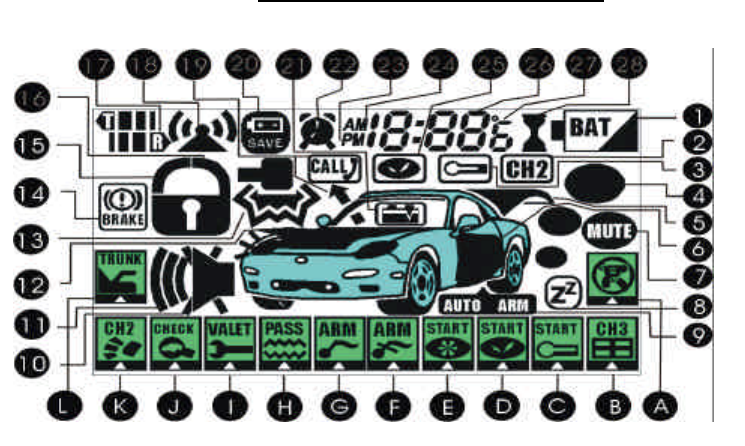
L-TR53B ICONS AND FUNCTIONS
l The alphabetical signs indicate the function modes
91.03.05
A. Remote anti-carjack mode ON/OFF
B. Remote control channel # 3 for electrical appliance
ON/OFF
C. Remote activate temp-controlled auto-start mode
ON/OFF
D. Remote activate daily auto-start time mode ON/OFF
E. Remote engine start (or) changing of run time when the
engine gets running
F. Remote activate Mute arm mode ON/OFF
G. Remote activate Audible arm mode ON/OFF
H. Remote shock sensor bypass mode ON/OFF
I. Remote activate valet mode ON/OFF
J. Remote monitor in-car temperature & status
K. Remote control channel # 2 for electrical appliance
ON/OFF
L.
Remote trunk release
l The numerical signs indicate the vehicle’s security status or other function display
1. Remote’s battery condition
2. Channel # 2 On/OFF
3. Temp-controlled auto-start mode
4. Engine run mode
5. Trunk release
6. Door open
7. Remote unit’s vibration mode
8. Valet mode
9. Auto rearm mode
10. Mute alert mode
11. Audible alert mode
12. Hood open mode
13. Impact/shock mode
14. Hand-brake disengage
15. Door lock mode
16. Door unlock mode
17. Monitor standby mode
18. Feedback confirmation (After each
command by remote unit, display of this
confirms feedback can be picked up by
remote unit . Non-display means remote
is either out-of- range or feedback is
being interfered.
19. Page out-call from car
20. Power save mode of remote(Absolute
current sleep mode of the remote, after
system is disarmed)
21. Ignition On mode
22. Alarm clock mode
23. P.M time mode
24. A.M. time mode
25. Daily auto-start time mode
26. Hour, minute, temp. display
27. Centigrade, Celsius mode
28. Count-down time mode
L-TR53B User’s manual 2 Way remote security system
l Precaution before installation
1. Read this manual carefully ahead of operation. You will find this product very versatile.
2. Park the vehicle in open space each time if the remote any of auto-engine start modes is intended .This avoids you
from being suffocated by the exhaust gas while the engine gets running.
3. For safety purpose, set your car to valet mode “ON” before sending it to workshop for serviced
4. There are many other functions .Refer to the installation manual for such extra functions that require external
accessories.
5. You are suggested to refer to the “RF Program Table” whenever you find【RF program table】in the text on the
installation manual.
l Special features:
1. Choice of function mode by cursor on screen for easiest operation ( patented features )
2. 2 Way Super-remote control /monitoring range【Effective range of approx :800-1200 m】
3. Electronic luminescent backlight
4. Hopping code for anti-grabbing
5. Main system’s memory able to learn codes from 4 different remotes
6. Remote control of lock/unlock, arm/disarm, engine start, trunk release and etc.
7. Switch-accessed Arm/disarm for emergency
8. Selectable mode for auto/manual transmission gear with safety circuit
9. Selectable mode for gasoline and diesel engine
10. Programmable for temp-controlled auto-start
11. Programmable for daily auto start time
12. Remote monitoring of car status /in-car temperature on display
13. Display of defective zones bypass when arming
14. Display of remote shock sensor bypass
15. Smart temper report by siren when disarmed
16. Remote control electrical appliances through channel # 1,#2 , #3
17. The main system temporarily by-passes shock sensor at the moment the remote trunk release is activated
18. Remote control & switch-activated anti-carjack modes
19. Remote panic
20. Remote or manual valet mode
21. Other system’s functions accessible by software program
22. LED status indicator to assist programming and anti-theft warning
Operation guide of 2 way remote unit
This is devised for easy operation just by some
fixed function
by buttons and
movable cursor means
. Users can choose the
desired function just by first popping out the cursor and then moving it on to the related function Position.
There are total 3 buttons marked with
【Ⅰ、Ⅱ、Ⅲ】
on the remote unit. The
【Ⅰ、Ⅱ】
buttons are used in alarm function
mode setting and the third 【Ⅲ】 button is used in popping out and moving of the cursor on to the desired function position.
※
Pre-assigned function modes by remote’s buttons
Remote’s button
【Ⅰ】
: Press and hold this for engine-start and shutoff
Remote’s button
【Ⅱ】
: Press and hold this for trunk release.
Remote’s button
【Ⅰ】【Ⅱ】:
Press and release both
【Ⅰ】&【Ⅱ】
simultaneously for car search.
Remote’s button
【Ⅰ】【Ⅱ】:
Press and hold both
【Ⅰ】&【Ⅱ】
simultaneously for remote panic
※ Programmed function modes by a short press of button 【Ⅰ】
Press and release this to activate self-defined function .It is generally programmed for door lock/unlock. Other functions can also
be programmed as below:
Step 1:
Press button
【Ⅲ】
twice or more times quickly to pop up the cursor. Move the cursor to the desired position by pressing
button
【Ⅲ】
a number times as necessary . For example, move the cursor on to 『 』 position, if you want to have
“Audible Arm Mode ” function activated by a short press of button
【Ⅰ】
.
Step 2:
When the cursor reaches the desired position, press and hold
【Ⅲ】
again for 6 sec till the remote unit sounds the first 2
and final 3 beeps . From then on, press and release button
【Ⅰ】
to activate the selected function.
* To re-define the function of button
【Ⅰ】
re-do the procedure from procedure step (1) & (2).The previously-defined function
mode will be substituted by the last definition.
※ Self-defined functions by a short press of button 【Ⅱ】
Press and release button【Ⅱ】to activate self-defined function .It is generally programmed to assign 『 』for Mute Arm Mode.
other functions can also be programmed as below:
Step 1:
Press button【Ⅲ】twice or more times quickly to pop up the cursor. Move the cursor to the desired position by pressing
button【Ⅲ】a number times as necessary . For example, move the cursor on to『 』, if you want to have “ Status Check”
function activated by a short press of button【Ⅱ】.
The following 2 way remote
’
s function guide is based on the current cursor setting in the above passage
1. Remote arm & door lock
(a)、Shut off the engine, get off the car making sure handbrake is depressed, hood closed and all the door closed.
(b)、Press and release button【Ⅰ】 the system will lock the door and enter arm mode with 1 siren chirp and 1 parking light flash.
l The remote unit sounds melody and displays 『 』『 』icons on its screen.
(c)、Press and release button【Ⅱ】 the system will lock the door and enter arm mode with 1 siren chirp and 1 parking light flash.
l The remote unit sounds melody and displays 『 』『『 』icons on its screen which means the system is in mute arm
mode.
(e)、Defective zone report and bypass arming:
When arming, if the system detects defective zones, the system will sound 4 siren
chirps or the remote unit sounds 4 beeps twice. The remote unit displays on its screen the defective zone ( like the door
unclosed yet).The system then will bypass the defective zone and can enter arm mode. When the defective zone is
corrected ( just by closing the door later ), the system immediately enters full arm mode.
(g) 、Arm delay time can be programmed :
( like 6 or 30 sec daily arming after door is closed) as needed.【RF program table】
2. Remote disarm & door unlock
(a)、Press and release the button【Ⅰ】 or 【Ⅱ】 the system will unlock the door and disarm itself with 2 siren chirps and 2
car light flashes. The dome light will turn on .( Refer to installation manual for doom light features that needs external
accessory )
l The remote unit sounds 2 beeps and displays『 』icon on its screen
(b)、Smart temper report : Should there be any abnormal security status while in arm mode, the siren sounds 4 chirps or the
remote sounds 4 beeps when the remote unit’s button 【Ⅰ】 is pressed. The trigged zone during arm mode is displayed on
the remote unit’s screen.
(c)、Parking light flash upon door-open:Each time the car door is opened following disarm, the parking light flashes for 10 sec
to caution other vehicles coming behind. 【RF program table】
(d)、Auto rearm: This is programmable to have your system rearm itself if the car door is not opened after 30 sec from the time
of remote disarm【RF program table】
3. Remote door lock/unlock
(a)Press and release button【Ⅰ】while driving, the system will unlock/lock with parking light flash.
l The remote unit displays 『 』for the door unlock or displays『 』for door lock.
* You can also program to have door lock/unlock upon ignition ON/OFF.【RF program table 】
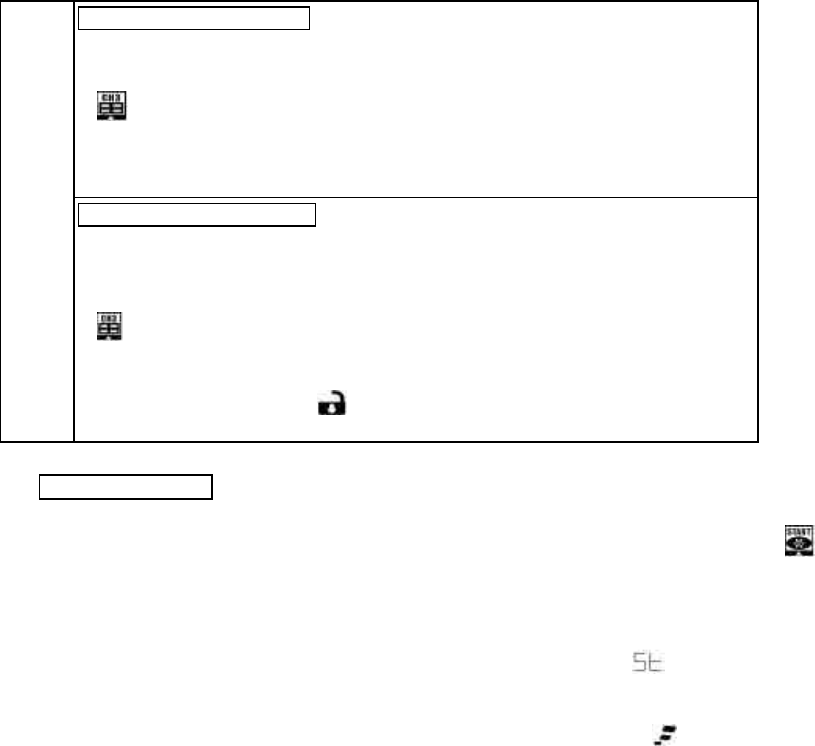
Remote control channel # 3
【RF program table 】
(a)、If the system is programmed for channel #3 mode ( an external accessory is required )
(b)、Press quickly 【Ⅲ】twice or more times to pop up cursor and then move it onto
【 】 ).
(c)、 Then press and release【Ⅱ】.The system responses in accordance with selected
function mode .The parking light flashes 3 times for confirmation.
l The remote unit displays Car Status on its screen and sounds 3 beeps
Single
Option
( Choose
only
one of
these)
2 stage door unlock , disarm
【RF program table 】
(a)、If the system is programmed channel # 3 for 2 stage door unlock mode. ( an external
accessory is required)
(b)、 Press quickly【Ⅲ】twice or more times to pop up the cursor and then move it onto
【 】)
(c)、Then press and release 【Ⅱ】to unlock all the doors. The system will unlock and
disarm with 2 siren chirps and 2 parking light flashes.
l The remote unit displays 『 』on its screen and sound 2 beeps.
※ Choose one of the above two options and program it as required.
4. Remote engine start
(Refer to item 23 for manual transmission gear mode )
(a)、The engine is in shut off state.
(b)、Press and hold 【Ⅰ】 button . Or press Ⅱ button when the active cursor is shifted onto the 【 】the column. Siren
chirps 3 times with 3 parking light flashes when the engine gets started.
l The remote unit displays 2 stages on its screen as below:
(1)、In the 1st stage: The remote unit displays the current status along with 『 』while engine is trying for engine start
and sounds .
(2)、In the 2nd stage: After the engine gets started , the remote unit displays 『 』 along with engine’s preset run time
and sounds .
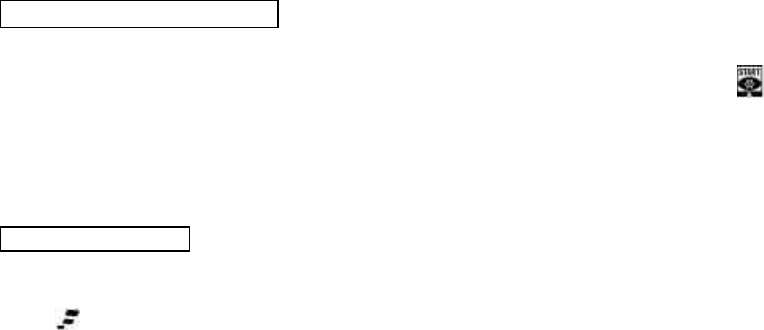
(c)、The remote start run time can be programmed as required [RF program table]. When the preset run time expires, the engine
will automatically shut off.[ The remote unit displays 『r 01』 when the last one min begins its countdown ]. The 『r 00』
displays on the remote unit at the moment of engine shut-off and then disappears.
(d)、Remote engine start cannot be done under such abnormal conditions. (1).The gear is not in its neutral position, (2) Ignition
key is turned ON , (3) Hood is opened ,(4) Hand break is depressed .Only under normal condition, the system can be
remote-started for the pre-set runtime. A maximum of 4 start efforts will be made in case of failure of engine-start in the
preceding trials. If engine gets started in any stage of trials , no second attempt will be made.
l When the system fails engine start after the 4th unsuccessful start effort, the remote unit sounds 4 beeps and its LCD
displays 『SP』 .
5.
Remote change of engine run time
(a)、After the engine gets started by the remote unit
(b) 、Press Ⅲ button quickly twice or more the to pop up the cursor and more the cursor onto the 【 】column.
(c) 、Press and release 【Ⅱ】button. Each time press on this button can add up 5 min run time and additional pressing can get
up to the maximum run time of 20 min. The LCD on the remote unit displays the current run time acquired. The 『r 15』on
the LCD means the current run time you have gained is 15 min.
Note:The function of run time change is only accessible only when the engine is running.
6. Remote engine shutoff
(a)、The engine is running by remote unit.
(b)、Press and hold 【Ⅰ】; the engine shuts off with 2 siren chirps and 2 parking light flashes.
l The 『 』disappears from the remote unit’s screen .The car’s status is displayed on the remote unit and melody is
heard .

7. Remote control temperature-controlled auto-start ON/OFF
【 intended use in frigid countries】
(a)、 Press quickly【Ⅲ】 2 or more times to pop up the cursor and move it onto
【 】.
(b)、Then press and release 【Ⅱ】.The siren chirps 3 times with 3 parking light flashes. The engine will start automatically at
pre-selected temperature and begin running and automatically shut off when the pre-set run time expires.
(c)、“OFF” mode setting of temperature-controlled auto-start,Press and release
【Ⅱ】
to turn the temperature-controlled
auto-start to “OFF” mode.
l The remote unit responses as below:
(d)、If temperature-controlled auto-start ON is activated; the remote screen shows 『
』to confirm this function is activated
and the pre-set temperature icon like 『-』 appear on the display. The transmitter unit sounds melody.【When the main
system sensed - temperature, the engine get started automatically】.
(e)、If temperature-controlled auto-start OFF is activated; the icon 『
』disappears from remote’s screen and the remote unit
sounds melody for confirmation.
(f)、The temp-controlled auto-start repeats maximum 6 cycles daily, with 2 hours interval between cycles.
l The temperature can be selected for auto- start at -5º、-10º、-20º、-30º in accordance with your requirement.
8. Daily auto-start time ON/OFF
(a)、Press quickly【Ⅲ】2 or more times to pop up the cursor and then move it onto【 】
(b)、 Press and release 【Ⅱ】. Parking light flashes 6 times with 6 siren chirps .The engine will get started
at the selected time
daily after 24 hours from the setting.
(c)、To program OFF mode of the daily auto-start time,Press and release 【Ⅱ】to set the above setting to OFF mode.
l The remote unit displays different icons for different modes following the setting.
(d)、After the daily auto-start time is set to ON mode, the remote unit displays 『
』on its screen and sound melody.
(e)、After the daily auto-start time is set to OFF mode, the 『
』 disappears from the remote unit’s screen and sound melody.
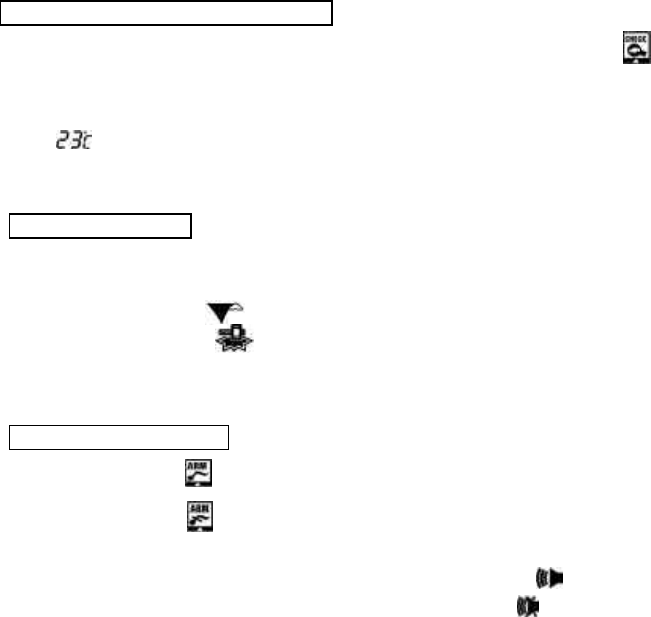
9. Remote monitor temperature/status check
(a)、Press quickly
【Ⅲ】
2 or more times to pop up the cursor and then move it onto
【 】
(b)、Press and release【Ⅱ】to monitor in-car temperature and the status of the car. Parking light flashes 3 times.
l The remote unit displays on its screen the in-car temperature with car’s security status and will sound melody. For example,
the 『 』on the LCD describes the interior temperature of the car is at 23 degree centigrade.
l The temperature modes on the LCD can be selected to show Celsius or Fahrenheit as needed.[RF program table].
10. Remote trunk release
(The car must have electric motor for trunk release )
(a)、Regardless of the main system in lock/arm or unlock/disarm modes, remote trunk release can be done .
(b)、Press and hold 【Ⅱ】for remote trunk release. Siren chirps 3 times with 3 parking light lashes.
l The remote unit displays『 』on its screen along with the current status and sounds melody.
Note: The remote LCD displays『 』when the main system bypasses the shock sensor at the moment the remote hood open is
operated by the remote unit.
11. Remote audible /mute arm
(a)、Move the cursor onto【 】,then press and release 【Ⅱ】to choose audible arm mode.
(b)、Move the cursor onto【 】,then press and release 【Ⅱ】to choose mute arm mode.
l The remote unit will response as below:
(d)、When the system enters audible arm mode , the remote unit displays『 』with melody sound.
(e)、When the system enters mute arm mode , the remote unit displays『 』with melody sound.
(f)、Even the system is mute arm mode , the siren will blurt when remote panic or remote anti-carjack is activated
(g)、Programmable for choice of Siren or Horn 【RF program table】
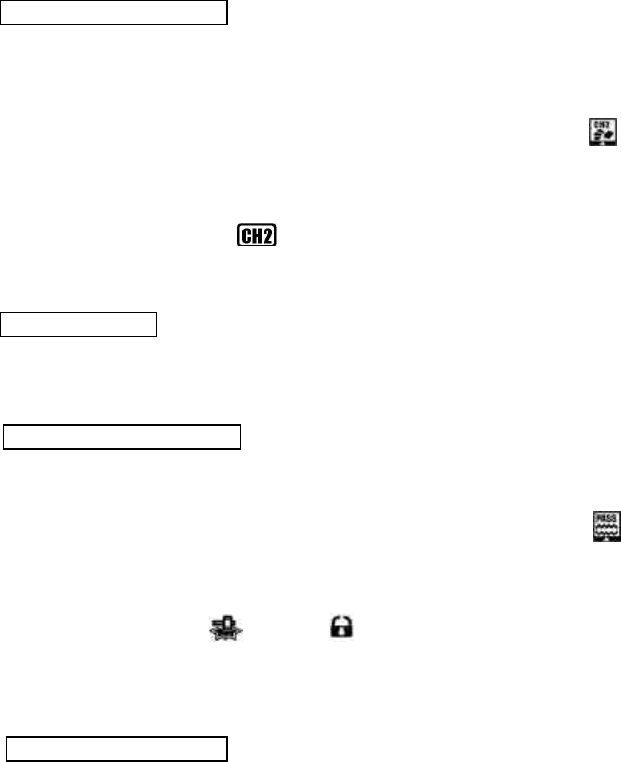
12. Remote Active channel # 2
(for example use of headlight auto turn-on )
(a)、This function can be for remotely controlled regardless of the main system in arm or disarm modes. ( an additional
accessory is required and can be programmed for any desired remote control function ). For example:to turn headlight ON
for 30 sec by remote unit and automatically turns off.
(2)、Press quickly【Ⅲ】2 or more times to pop up the cursor and move it on to【 】
(3)、Then press and release 【Ⅱ】. The parking light flashes 2 times and headlight turns on for 30 sec before automatic turn-
off.
l The remote unit displays the 『
』on its screen and sounds melody.
* This can be programmed in accordance with function you require.[RF program table]。
13. Car locator/search
(a)、Press and release both【Ⅰ+Ⅱ】 simultaneously; siren chirps 6 times with 6 parking light flashes.
l The remote unit displays the car’s current status on its screen and sounds melody.
14. Remote Shock sensor bypass
(a)、You can use this function to avoid false alarm especially when the car is parked in an area near a rail-line or where trucks
frequently passes by.
(b)、Press quickly【Ⅱ】2 or more times to pop up the cursor and move it onto 【 】
(c)、Then press and release【Ⅱ】to have remote shock sensor bypass during which shock sensor becomes ineffective but the
other security functions like lock/arm mode are still effective.
l The remote unit displays 『 』 and 『 』on its screen with one beep alert.
* If the shock sensor is triggered for 8 consecutive times during arm mode, the system will ignore shock sensor trigger and
bypass it.
15. Alarm mode & warn away
(a)、In arm mode; if the car detects any impact , the shock sensor’s first stage alert is triggered. The siren chirps 3 times with 2
parking light flashes.
l The remote unit displays 『 』on its screen with one long beep alert.
(b)、If the heavier impact is detected by the main system, the second stage alert is triggered .The siren blurts and the parking
light flashes for 15 sec duration..
l The remote displays『 』with beep alert for 15 sec.
(c)、If the system is triggered by other means like ( door-pen、 trunk、hood-open or ignition “ON” during arm mode) , the siren
blurts and the parking light flashes for 30 sec and the engine start circuit is killed.
l The remote unit displays icon showing triggered zone and keeps beeping for 30 sec.
(d)、For any triggering during arm mode, press and release 【Ⅰ】once to disable triggering. The additional of press and release
on 【Ⅰ】to make the main system enter unlock/disarm mode.
(e)、The main system will enter security mode during or after the triggered zone is closed. In case of trigged zone still unlearned ,
the system will isolate it and can still protect all other zones .
15. Remote panic
(a)、After the engine shuts off, press and hold both【Ⅰ+Ⅱ】simultaneously for remote panic . The parking light flashes 6 times
with 3 siren chirps.
l The remote unit displays the car status on its screen and sounds melody.
16. Remote anti-carjack ON/OFF
(a)、Press quickly【Ⅱ】 2 or more times to pop up the cursor and move it onto 『 』
(b)、Then press and release 【Ⅱ】 to enter anti-carjack mode. The parking light flashes for 30 sec and the system’s start circuit
is killed.
(c)、To deactivate the anti-carjack mode, press and release 【Ⅱ】again.
l The remote unit displays 『 』on its screen and sound alert.
17. Switch-controlled anti-carjack ON/OFF
(a)、While the engine is running ; press the anti-carjack to activate this function switch .The activated anti-carjack mode
undergoes 2 stages as below:
(1) In the 1st stage; the parking light flashes for 30 sec.
(2) In the 2nd stage; in the next 30 sec that follows the 1st stage ,there will be another 30 sec alert period during which 【(a) the
parking light keeps flashing, (b) siren continues blurting, (c) the engine start circuit is cutoff till active anti-carjack mode is
cleared】。
* At any of the alert stages, choose either (a) or (b) to deactivate the on-going alert.
(a)、To deactivate alert by switch , press and hold for 5 sec the anti-carjack switch (or)
(b)、To deactivate alert by remote unit, press 【Ⅲ】 2 or more times to pop up the cursor and move onto『 』on the remote
unit.
18. Remote valet ON /OFF
(a)、Press【Ⅲ】2 or more times to get the cursor and move onto【 】。
(b)、Then press and release【Ⅱ】to enter valet mode ON. The siren chirps 4 times with 4 flashes of parking light .Under the valet
ON mode, all functions are inoperative except for the remote door unlock and trunk release which are still operable.
( c)、Press and release 【Ⅱ】again to get valet mode OFF .The main system then restores all functions back to normal and
become operative.
l The remote LCD displays as below:
(d) 、While the valet mode is ON, the LCD remote displays『 』and sounds melody.
(e) 、While the Valet mode is OFF, the 『 』disappears from remote’s screen but the remote sounds melody.
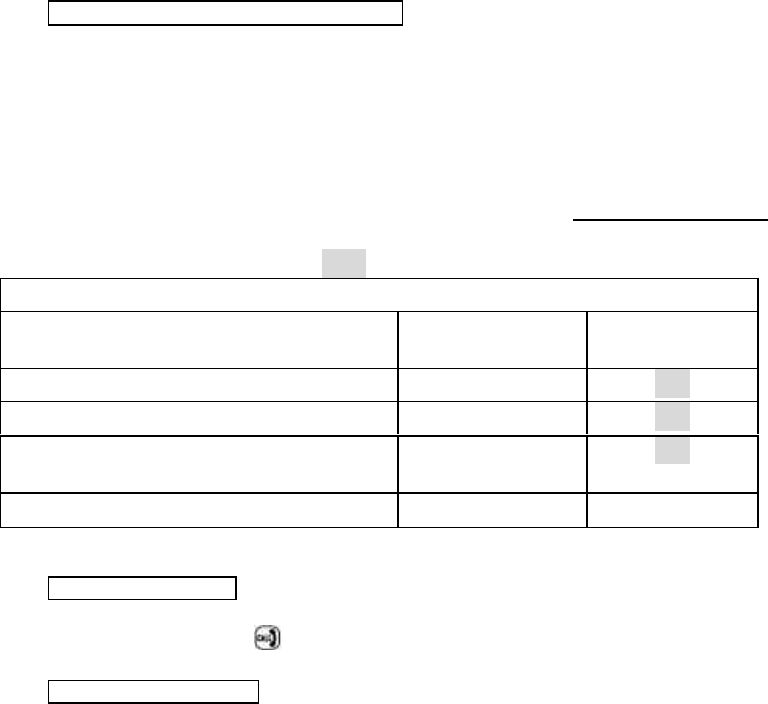
20. Programmable functions by over-ride switch
The L-TR53B model’s functions 【valet, daily auto-start time ,temperature-controlled auto start 】can be programmed for
ON/OFF modes by means of over-ride switch in the following procedure.
(a)、Turn the ignition OFF
(b)、Press and release the over-ride switch for assigned number of times to acquire desired mode settings [ 3 times for valet
change mode setting ],[ 4 times for daily auto-start time setting],[5 times for temperature-controlled auto-start setting]. The
number of siren’s chirps follow the equal number press on the over-ride switch to confirm the current mode setting .
(c)、Turn the ignition ON when the desired mode setting is reached. ( But engine must not be running)
(d)、To choose the ON and OFF in each mode, setting, press again the over-ride switch 1 or 2 times. The factory default setting
is marked with shaded description like
OFF.
Manual features program table
No of presses on over-ride switch VS active mode
setting Single press Double presses
3 times to enter valet mode setting ON OFF
4 times to enter daily auto-start time mode setting
ON{see note below } OFF
5 times to get temp-controlled auto start time mode
setting ON OFF
Siren and L E D indicator 1 2
Note: If the daily auto-start time ON is programmed, the engine will be running immediately when the ignition key is turned
OFF .( Use the remote LCD unit to shut off the engine in this case.)
19. Page-out call from car
If page-out call button on vehicle-base antenna case is pressed。
l The remote unit displays 『 』on the screen and sounds melody
21. Manual Arm and Disarm
( In case the remote transmitter is lost)
Manual Arm Mode
(a) Turn the ignition key to ON position (But engine must not be running)
(b) Press and release the over-ride switch 8 times
(d) Turn the ignition key to OFF position (siren chirps 1 time with 1 parking light flash ).After 20 sec, the main system will
enter Arm mode .

Manual Disarm Mode
(a) Turn the ignition key to ON position. (But engine must not be running)
(b) Press and release the over-ride switch 4 times
(c) Turn the ignition key to OFF position {siren chirps 2 times with 2 flashes of parking light}. The system will enter Disarm
mode.
Note:(a)Under manual Arm mode; if the system is triggered, the system will enter initial alert mode ( siren chirps 3 times with 3
parking light flashes). 20 sec later , the system enters Alarm and Warn Away Mode. [The alert triggering at this stage
can be terminated by the car owner]。
(b)Under manual Arm or Disarm modes, all the system’s features can still be operated by the remote unit.
23. Procedures of remote start for manual transmission gear
(1)、While engine is running by ignition key, pull up the hand brake.
(2)、Press and release 【Ⅰ】and try to complete steps (c) and (d) within 30 sec.
(3)、Turn the ignition OFF while the engine is still running.( Engine is running at this stage)
(4)、Open the car door, get off and re-close the door ( Engine will automatically shut off at this stage).The engine start is
operable remotely afterwards. If there is any mistake in the procedures, the engine start by remote unit is disabled.
Note:For safety purpose each time when remote engine-start on the manual transmission car is desired, definitely follow the
above procedures.
24. Procedures for Code learning of remote units
The L-TR53B main system can memorize transmitter’s coding ( from up to 4 different remote units)
(1) Turn the ignition key to “ON” (But engine must not be running)
Press and hold the over-ride switch for 6 sec and release it after the siren chirps 4 times which confirms the system has
entered active learning mode.
(2) Press and hold【Ⅰ+Ⅱ】simultaneously till the siren chirps 1 time ,confirming code learning is completed.
Follow the same step (2) with other remote transmitters ,one after another, to allow the main system learn coding of each
transmitter.( Maximum 4 remotes can be learned by the L-TR53B) .The system will automatically jump out of learning
mode if no signal is received within 6 sec. from the last signal.
* (a)The pre-memorized coding will be erased each time the learning mode is activated.
Re-do the code learning in this case.
(b) If more than one remotes are used in remote-operating the same system, the car status will be displayed on the single
remote which sends the latest signal.
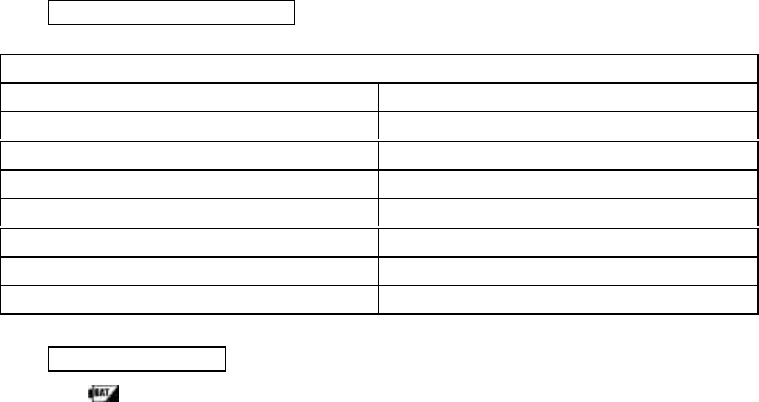
24. System status-indicator L E D
Fix the LED status indicator at the appropriate location inside the car to allow maximum visibility of it.
LED blinking pattern with various standby modes while ignition “ OFF ”
Different standby modes
Pattern of LED blinking
The remote engine being started L E D solid on
System in disarm mode No L E D
System in arm mode * * * * * * * * * *
Daily auto-start time ON ** ** ** ** ** ** ** **
Temp-controlled auto-start ON *** *** *** *** *** ***
Daily auto-start time ON + Temp- auto-start ON **** **** **** **** ****
Valet mode ON ***** ***** ***** ***** *****
25. Replacement of battery
When『 』appears on the remote LCD, its battery is about to exhaust. Replace a new battery immediately to ensure proper
function .
※ Replacement guide
1. Take off old battery
2. Press and release 【Ⅰ】once before inserting the new battery
3. Insert the new battery 【 Alkaline battery of size AAA is recommended 】
4. Replace the battery cover and then press and release【Ⅰ】to monitor the car’s current status.
25. Programming of remote control unit
The LEA-825’s LCD remote control unit has basic features of (a) EL backlight (b) most power saving circuitry (c) audible or
vibration alert mode (d) different time indication of【Real time, alarm clock, count-down timer 】and follow the procedure as
below:
Operation of keys Functions Notes
Press 【Ⅲ】 Backlight ON ( automatic turn-off
after few sec)
Press both【Ⅲ+Ⅰ】 Choice of audible/vibration alert mode
Press & hold 3 sec
【Ⅲ】 Entry/exit of adjust mode by hour,
confirmed by 2 beeps
Press【Ⅲ】1 time Minute entry ( adjust mode)
Press【Ⅲ】2 times Hour entry (to adjust Alarm clock )
Press【Ⅲ】3 times Min entry (to adjust Alarm clock )
Press【Ⅲ】4 times ON/OFF choice for alarm clock
Press【Ⅲ】5 times Hour entry (to adjust countdown
timing
Press【Ⅲ】6 times Min entry (to adjust countdown
timing)
Press【Ⅲ】7 times ON/OFF choice for countdown timing
While in each time entry mode:
Press【Ⅰ】 to choose “ON” or
adjustment upwards
Press and hold 【Ⅱ】for quick
adjustment upwards
Press【Ⅰ】 to choose “OFF” or
adjust downwards
Press and hold 【Ⅱ】for quick
adjustment downwards
Press【Ⅲ】8times ON/OFF choice for self power-saving If the remote unit is power saving
mode, its current sleeps after the
system is disarmed.
【Ⅰ+Ⅲ】 Entry/exit of alarm adjust mode
【Ⅱ+Ⅲ】 1 time Choice of 10 min countdown mode
【Ⅱ+Ⅲ】 2 times Choice of 20 min countdown mode
【Ⅱ+Ⅲ】 3 times Choice of 30 min countdown mode
【Ⅱ+Ⅲ】 4 times Choice of 60 min countdown mode
【Ⅱ+Ⅲ】 5 times Choice of 90 min countdown mode
【Ⅱ+Ⅲ】 6 times Choice of 120 min countdown mode

The Wintercronics Co., Ltd. Model: L-TR53B (referred to as the EUT in this report) is a Transceiver of car
alarm security system. It offers wireless remote control, ideal for use in vehicle security system to activate
the function of center door lock control system and car searching except the alarm system.
A major technical descriptions of EUT is described as following:
A). Fundamental Frequency: 433.92 MHz
B). Modulation : Pulse Modulation
C). Antenna Designation: Non-User Replaceable (Fixed)
D). Power Supply: DC 1.5V, Battery Operated.
E). Receiver type : Superheterodyne
Fundamental Frequency 433.92MHz
Power Source 1.5V Battery
Transmitting Time Periodic ≤ 5 seconds
Associated Receiver FCC DOC
FCC Statement
This device complies with part 15 of the FCC Rules. Operation is subject to the following two
condition.(1).this device may not cause harmful interference. (2).this device must accept any
interference received, including interference that may cause undesired operation
Warning:
Note: This equipment has been tested and found to comply with the limits for digital device,
pursuant to Part 15 of FCC Rules. These limits are designed to provide reasonable protection
against harmful interference in a residential installation. This equipment generates, used and can
radiate radio frequency energy and, if not installed and used in accordance with the instructions,
may cause harmful interference in to radiate communications. However, there is no guarantee that
interference will not occur in a particular installation. If this equipment does cause harmful
interference to radio or television reception, which can be determined by turning the equipment off
and on, the user is encouraged to try to correct the interference by one or more of the following
measures:
l Reorient or relocate the receiving antenna
l Increase the separation between the equipment and receiver.
l Connect the equipment into an outlet on a circuit different form that to which the receiver in
connected.
l Consult the dealer or an experienced radio/TV technician for help.
This device complies with part 15 of the FCC rules. Operation is subject to the following two conditions:
(1) This device may not cause harmful interference: and
(2) This device must accept any interference received: including interference that may cause
undesired operation.
THE MANUFACTURER IS NOT RESPONSIBKE FOR ANY RADIO OR TV INTERFERENCE
CAUSED BY UNAUTHORIZED MODIFICATIONS TO THIS EQUIPMENT.SUCH
ODIFICATIONS COULD VOID THE USER’S AUTHORITY TO OPERATE THE EQUIPMENT.
Note: The manufacturer is not responsible for any radio or TV interference caused by unauthorized
modification to this equipment. Such modification could void the user’s authority to operate the
equipment.