Wintecronics TR68B Remote Control Car Alarm Transceiver User Manual

Wintecronics Ltd Remote Control Car Alarm Transceiver Users Manual

User Manual

1Model No. : L-TR68B1. The L-TR68B is a 2-way security system featured with remote engine start and can beinstalled to work with any vehicle with its normal voltage of 12 volt.2. The L-TR68B’s circuit is designed to suit both the manual gear and the auto-transmissiongear car for remote engine starting.3. The L-TR68B has 2 different engine start time circuit for remote starting of both gasolineengine and diesel engine.Installation of the major components Choice of place for main control moduleInstall this behind the dashboard at the suitable position, near the ignition cylinder (within 60 cmfrom it) but far from the heat source and water tank.l  SirenChoose its location in the engine compartment [far from the heat source and water tank, and freefrom theengine’s moving parts]. Drill a hole of 1/8 in drill at the selected place and secure the siren usingthe mounting bracket, facing the siren downward or in the horizontal position.l  Hood switchWhile in arm mode or remote engine running, this helps the main control module detect thehood’s status .It must be installed on the grounded metal surface. Drill a hole of 1/4 inch at theselected place and secure the hood switch and adjust it. [The switch must have negative outputwhen the hood is opened, and becomes neutral when the hood is closed.] Dash LED Status indicatorDuring the security standby mode, this performs as a visual indicator against attempted theft andalso is the current status indicator of the system. During programming of system features, theLED’s flashing pattern provides feedback as a confirmation for different active modes beingachieved. Mount the LED at a suitable area to ensure better visibility either from inside oroutside of the vehicle. Override switchSystem’s programming can be done using override switch as in the manual entry into valet mode,manual arm/disarm. It may not require concealment because the main system itself has othermulti-security features. Then connect it with the system’s modules for valet switch.
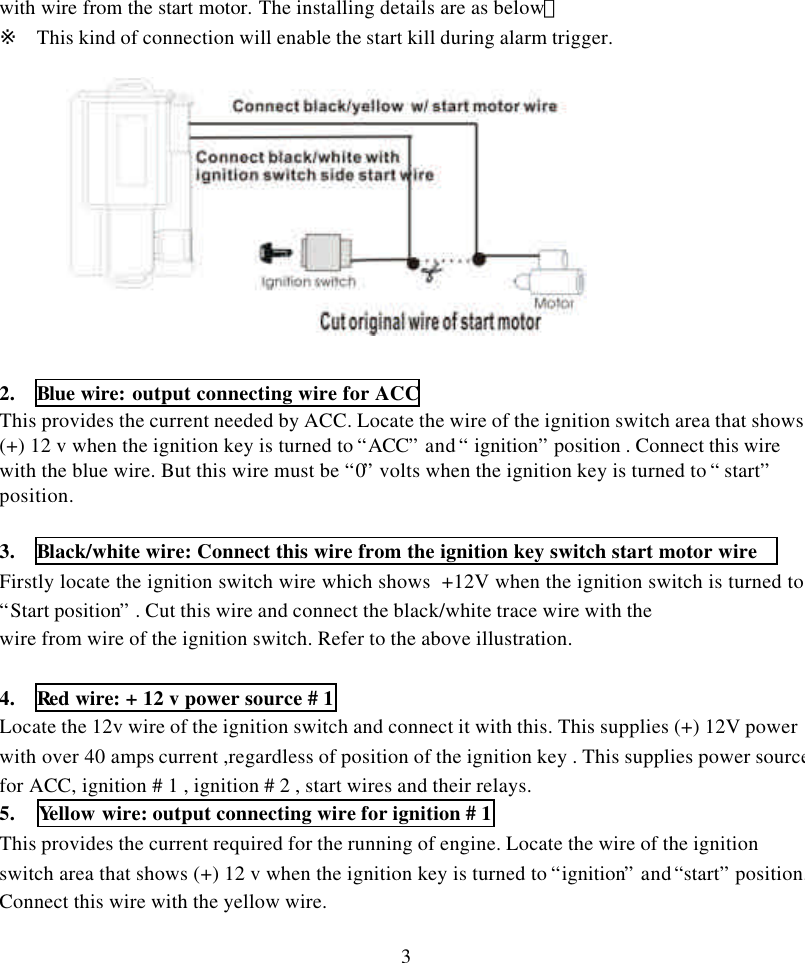
2 RF transmitter module/ call buttonThis is integral part of the main system for transmitting / receiving and paging by push button.Select its mounting place to insure the best transmission range. It is suggested to fix it on the leftor right upper area of the interior side of the windshield, using the double stick tape included. Besure not to block driver’s view. Anti –carjack switchWhile ignition “ON”, entry and exit of anti-carjack mode can be done by this switch. Select themounting place within reach of the driver but must be a concealed place Drill a 5/32 inch holefor mounting it. Connect one end of its wire to the system’s negative and the other to the anti-carjack wire from the main system.[This wire gets negative input to make the main system to enter anti-carjack mode] Shock sensorWhile in arm mode, this helps the main system detects impacts upon the vehicle. It must be fixedonto the chassis or stable metal surface.[ keeping far from heat source , water tank and vehicle’stransmitter module ] .Adjust it for the optimal sensitivity. While in arm mod twist the adjustmentpole to the (+) direction to make it more sensitive and to the (-) direction for lesser sensitivity.[Strike with your palms or shake the vehicle’s body and observe if the LED turns on in greencolor during light impact and it turns on in red color during heavy impact.]※ Wire installation guideThis is the 2-way security system with remote engine start features. While the system is action,L-TR68B’s circuit interaction during remote controlling is the same situation with an ignitionkey. As the starter circuit differs depending on the car manufacturers, the main system’s circuitmust be verified before wiring.THE 6 PIN MAIN POWER HARNESS WIRE:1.   Black/yellow trace wire: Connect this to the wire from the start motor wire   Firstly locate the ignition switch wire which shows  +12V when the ignition switch is turned to“Start position” . Cut this wire as in below illustration. Then connect the black/yellow trace wire
3with wire from the start motor. The installing details are as below:※ This kind of connection will enable the start kill during alarm trigger.2.  Blue wire: output connecting wire for ACCThis provides the current needed by ACC. Locate the wire of the ignition switch area that shows(+) 12 v when the ignition key is turned to “ACC” and “ ignition” position . Connect this wirewith the blue wire. But this wire must be “0” volts when the ignition key is turned to “ start”position.3.   Black/white wire: Connect this wire from the ignition key switch start motor wireFirstly locate the ignition switch wire which shows  +12V when the ignition switch is turned to“Start position” . Cut this wire and connect the black/white trace wire with thewire from wire of the ignition switch. Refer to the above illustration.4.  Red wire: + 12 v power source # 1Locate the 12v wire of the ignition switch and connect it with this. This supplies (+) 12V powerwith over 40 amps current ,regardless of position of the ignition key . This supplies power sourcefor ACC, ignition # 1 , ignition # 2 , start wires and their relays.5.  Yellow wire: output connecting wire for ignition # 1This provides the current required for the running of engine. Locate the wire of the ignitionswitch area that shows (+) 12 v when the ignition key is turned to “ignition” and “start” position.Connect this wire with the yellow wire.
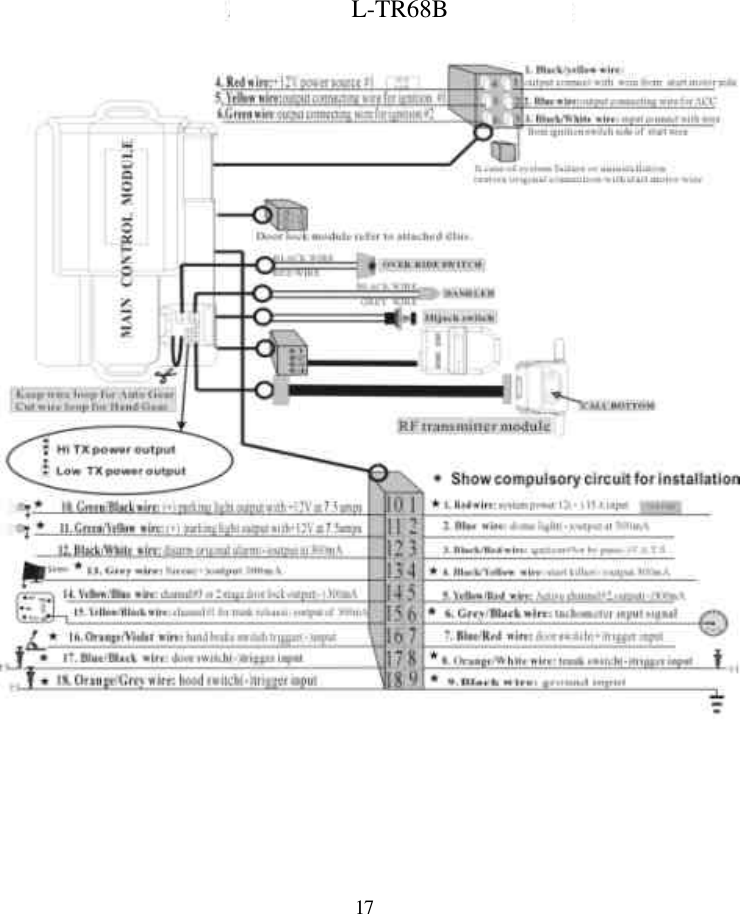
46.  Green wire: output connecting wire for ignition # 2Locate the wire of the ignition switch area that shows (+) 12 v when the ignition key is turned to“ ignition” and “start” . Connect this wire with the green wire.Note:In some vehicles, this wire shows “0” volts while the engine is starting or cranking. But insome vehicles, this provides +12 v current. Program this as required. [ Refer to RFFeatures Program Table 1, line 7th ]  。l THE 18 PIN INPUT/OUTPUT HARNESS WIRE1.  Red wire: system power 12 V (+) 15 A inputThis wire supplies power to the system main module locate the 12v wire of the ignition switchand connect it with this. This supplies (+) 12V power with over 15 amps current connect thiswire to the positive .2 Blue wire: dome light (-) output at 300maDome light trigger: While the main system from arm to disarm or “alarm run away” modes, thiswire provides (-) 300mA current to turn the dome light on through the external relay. Installationdiffers depending on the types of vehicles.A TYPE: This installation of this wire is not needed for vehicle with a dome light controlled bydoor lock/unlock action.B TYPE: An additional relay is required for vehicle with original dome light whose device iscontrolled by driver door switch trigger.  The installing details are as below. [Refer tofeature program table, item 14 with setting at 0.8 sec]
5C TYPE: For the vehicle with no dome light, an additional relay is required. The installingdetails are as below.[Refer to RF Feature Program Table, line 14th for setting at 6sec]3   Black w/ Red trace wire: ignition # 3 or bypass V.A.T.S. (-)output at 300maWhile the system is in remote engine start mode; this feeds (-) 300ma current. Some vehiclesneed this circuit for the engine running .If there is no such device, an additional relay is requiredfor the control of light.4   Black w/ Yellow trace wire: start killer (-) output 300maWhen the main system is armed and remote start engine running time this feeds (-)pulse of300ma which. If this circuit will be used to kill ignition or disrupt the gas pump, a 3 pinblack/red and 2 external relays are required .Refer to the following installation guide.  5     Yellow w/ Red trace wire: Active channel # 2 ,output (-) 300ma
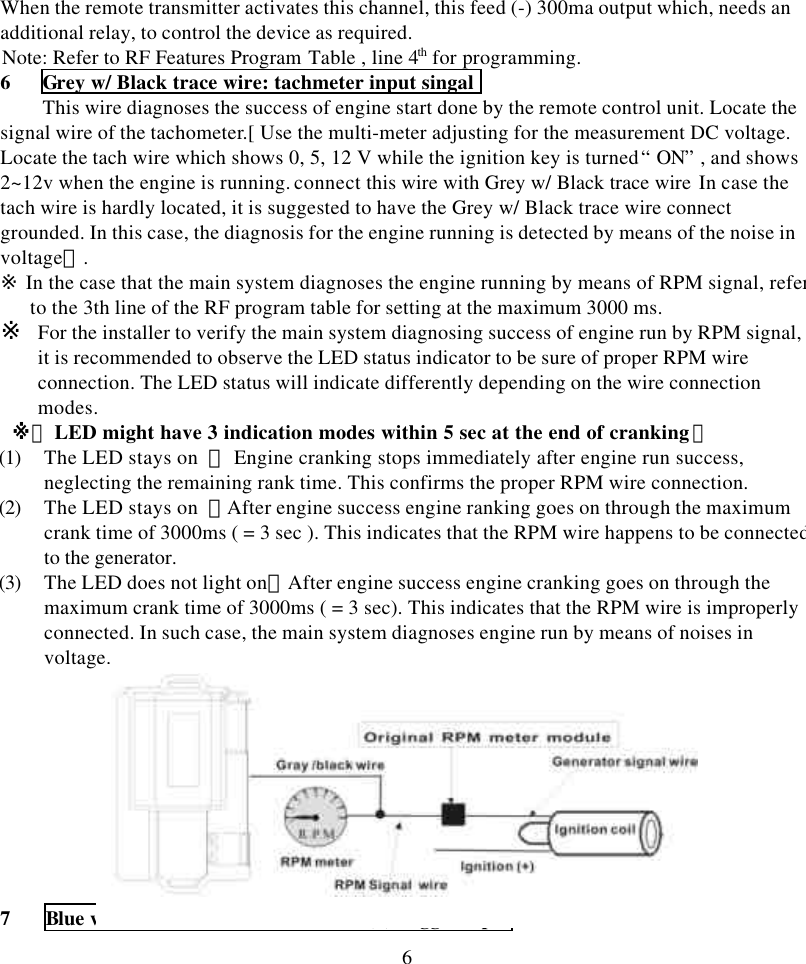
6When the remote transmitter activates this channel, this feed (-) 300ma output which, needs anadditional relay, to control the device as required.Note: Refer to RF Features Program Table , line 4th for programming.6   Grey w/ Black trace wire: tachmeter input singalThis wire diagnoses the success of engine start done by the remote control unit. Locate thesignal wire of the tachometer.[ Use the multi-meter adjusting for the measurement DC voltage.Locate the tach wire which shows 0, 5, 12 V while the ignition key is turned “ ON” , and shows2~12v when the engine is running. connect this wire with Grey w/ Black trace wire In case thetach wire is hardly located, it is suggested to have the Grey w/ Black trace wire connectgrounded. In this case, the diagnosis for the engine running is detected by means of the noise involtage】.※ In the case that the main system diagnoses the engine running by means of RPM signal, referto the 3th line of the RF program table for setting at the maximum 3000 ms.※ For the installer to verify the main system diagnosing success of engine run by RPM signal,it is recommended to observe the LED status indicator to be sure of proper RPM wireconnection. The LED status will indicate differently depending on the wire connectionmodes. ※【 LED might have 3 indication modes within 5 sec at the end of cranking】(1) The LED stays on  : Engine cranking stops immediately after engine run success,neglecting the remaining rank time. This confirms the proper RPM wire connection.(2) The LED stays on  :After engine success engine ranking goes on through the maximumcrank time of 3000ms ( = 3 sec ). This indicates that the RPM wire happens to be connectedto the generator.(3) The LED does not light on:After engine success engine cranking goes on through themaximum crank time of 3000ms ( = 3 sec). This indicates that the RPM wire is improperlyconnected. In such case, the main system diagnoses engine run by means of noises involtage.7 Blue w/ Red trace wire: door switch (+) trigger input
7If the door switch is(+)trigger, connect this with the Blue w/ Red trace wire. If the door is(-)trigger, leave the Blue w/ Red trace wire unconnected.8   Orange w/ White trace wire: trunk switch (-) trigger inputIf the trunk switch is (-)trigger, connect trunk switch pin with the orange w/ white trace wire.9 Black wire : ground(-)This wire supplies current for the main module and needs to be grounded on a stable metalsurface in the installation.※  Improper wiring can cause problem and even disable engine start.10 Green w/ Black trace wire: (+) parking light output with +12 v at 7.5 AWhile the system is in action, the main system feeds, through onboard relay, different times of (+)12 v current for lamp signal. Locate the left or right parking light wire from the directionindicator switch and connect it.※ Both wires of left and right parking light from direction indicator switch must have positiveoutput.11 Green w/ Yellow trace wire: (+) parking light output with +12 v at 7.5 AWhile the system is in action, the main system feeds, through onboard relay, different times of (+)12 v current for lamp signal. Locate the left or right parking light wire from the directionindicator switch and connect it.※ Both wires of left and right parking light from direction indicator switch must have positiveoutput.12   Black w/ White trace wire: disarm original alarm (-) output at 300maWhen the main system enters remote engine start mode, this circuit provides –300ma current for1.5 sec. [ For vehicle with chip-controlled anti-theft system, this circuit needs installation ofadditional accessory or relay to by-pass such immobilization]. This does not need installation onthe car without anti-theft chip.13  Grey wire: Siren(+)output 1.5 AFor different action by main system; the main system feeds different (+) 12v for alert signal.
8Connect this wire with the red wire of the siren or use an additional relay to connect with theoriginal horn.※ (Refer to RF Features Program Table , line 6th )14 Yellow w/ Blue trace wire: for Active channel #3 or 2 stage door lock output (-) 300maOne of the options can be chosen as required. (a) active channel # 3 and (b) 2 stage door unlock[ for 1st stage to open the driver’s door and for 2nd stage to open all other doors].(A) active channel # 3:If this option is chosen, when the remote transmitter activates this channel, it feeds (-) 300mapulse current whose pulse time can be programmed. An additional accessory is required for thecontrol of other device.Note: Refer RF Features Program Table, line 10th & 5th for pulse time programming.(B) 2 stage door unlock:If this option is chosen, when the remote transmitter activates this channel, it feeds (-) 300mapulse current whose pulse timing can be programmed. An additional relay is required for thecontrol of door lock/unlock .Note: Program it as required by referring to RF Features Program Table ,line 10th   15  Yellow w/ Black trace wire: active channel # 1 for trunk release (-) output of 300maWhen remote activates this channel it feeds 1 sec. (-) 300ma current output. An additional relayis required for the trunk release.With addition of external relay, this wire can be used for trunk release. But the vehicle must havemotor for trunk release.
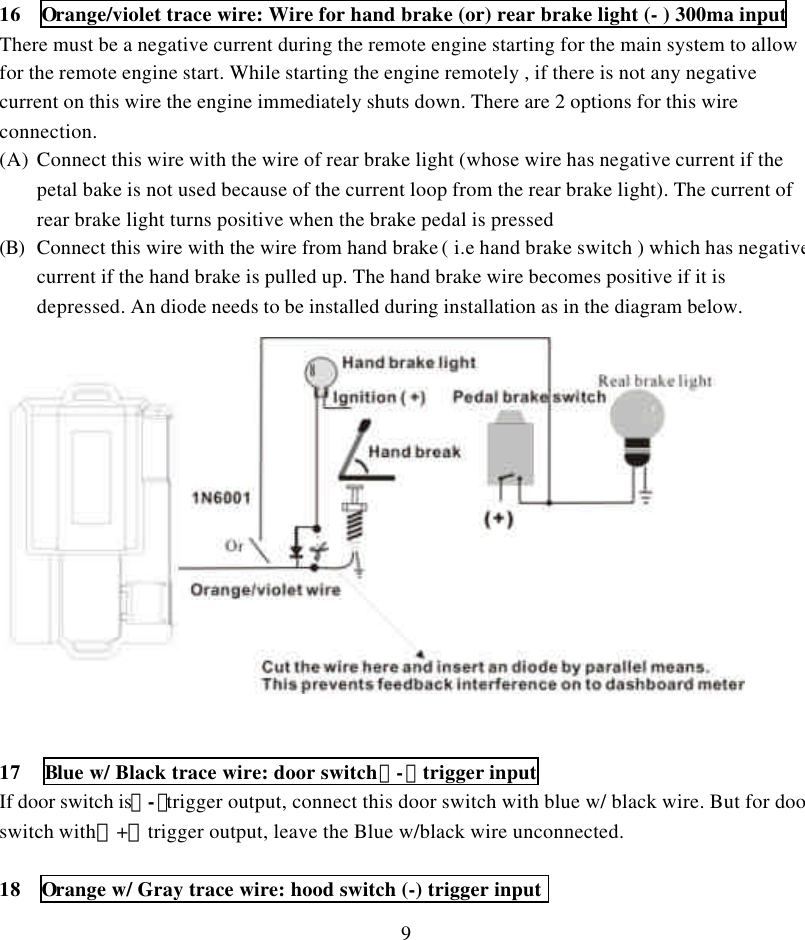
916  Orange/violet trace wire: Wire for hand brake (or) rear brake light (- ) 300ma inputThere must be a negative current during the remote engine starting for the main system to allowfor the remote engine start. While starting the engine remotely , if there is not any negativecurrent on this wire the engine immediately shuts down. There are 2 options for this wireconnection.(A) Connect this wire with the wire of rear brake light (whose wire has negative current if thepetal bake is not used because of the current loop from the rear brake light). The current ofrear brake light turns positive when the brake pedal is pressed(B) Connect this wire with the wire from hand brake ( i.e hand brake switch ) which has negativecurrent if the hand brake is pulled up. The hand brake wire becomes positive if it isdepressed. An diode needs to be installed during installation as in the diagram below.17 Blue w/ Black trace wire: door switch(-)trigger inputIf door switch is(-)trigger output, connect this door switch with blue w/ black wire. But for doorswitch with(+)trigger output, leave the Blue w/black wire unconnected.18  Orange w/ Gray trace wire: hood switch (-) trigger input
10Connect the orange w/ gray trace wire with hood switch’s output wire.When the hood is closed this wire provides “0” current and the main system allows engine start.When the hood is opened, this wire feeds (-) output. The main system will not allow enginestart。2 s black PIN for switch-controlled anti-carjack1. Violet wire: for current input for anti-carjack manual switch2. Black wire: for ground connection for anti-carjack manual switch4 S black PIN shock sensor harness1. White wire: (-) trigger wire for heavy impact2. Blue wire: (-) trigger wire for light impact3. Black wire: Neutral at normal time but feeds negative output during arm mode4. Red wire: (+) 12V current for shock sensor power source5 S white PIN RF transmitter case harness1. Black wire: (+ )5 V DC for RF transmitter power source2. Black wire: RF data input/output3. Black wire: Ground4. Black wire: (-) Output5. Black wire: temperature sensor page-out call data (-) input2 SS white PIN over switch1. Grey wire: over-ride switch input2. Black wire: override switch ground output2 S white PIN LED1. Red wire: LED (+) output2. Black wire: LED (-) output3 S black PIN for remote TX power choiceThis is for use in selection of different TX power to get different communication ranges
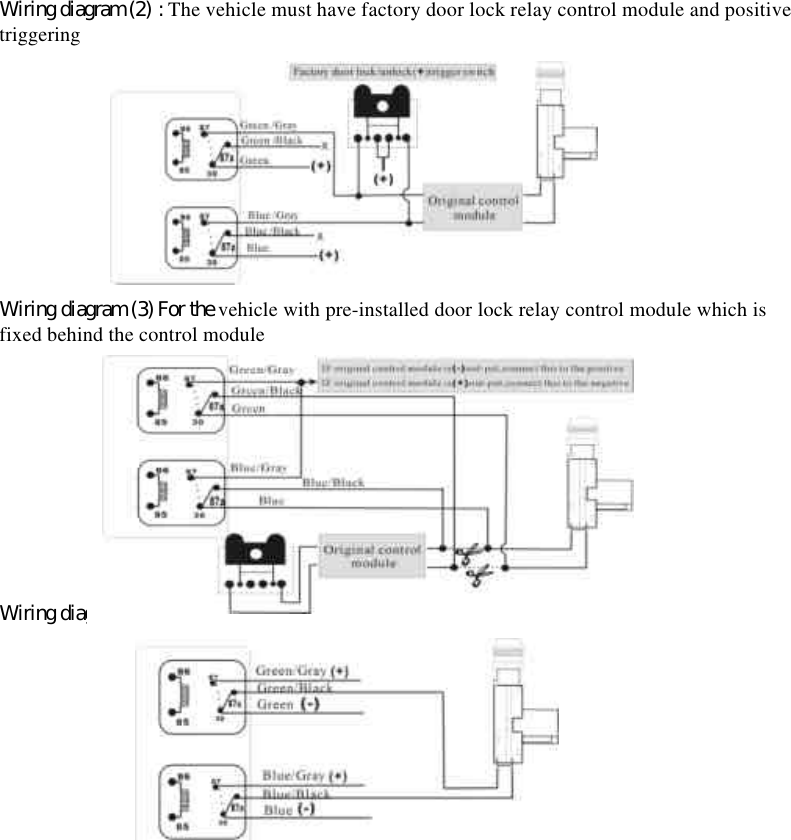
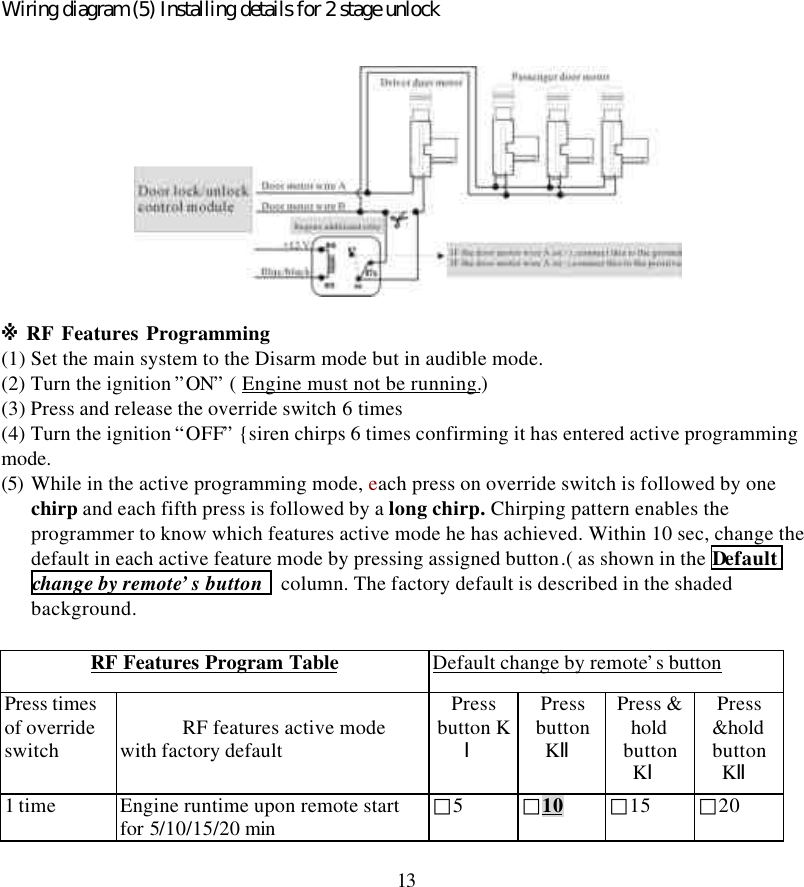
11External wire loop of main module to differentiate gear modesThis is used in selecting manual or auto transmission gear mode. For auto gear mode, keep thewire loop intact.For manual gear mode, cut this wire loop6 M PIN DOOR LOCK/UNLOCK HARNESSWhile the main system operates lock/unlock action . This harness controls internal relay“unlock ” and “lock ”.※  Program the door lock/unlock output current time as required.[Refer to RF FeaturesProgram Table ,line 9th ]* Lock relay has wire connection as below:1. PIN Blue wire is the common pin for terminal # 30 of the relay2. PIN Blue w/gray wire is the N/O pin for terminal # 87 of the relay3. PIN Blue w/black wire is the N/C pin for terminal # 87a of the relay* Unlock relay has wire connection as below:4. PIN Green wire is the common pin for terminal # 30 of the relay5. PIN Green w/gray wire is the N/O pin for terminal # 87 of the relay6. PIN Green w/black wire is the N/C pin for terminal # 87a of the relayInstallation differs depending on the car factory. Refer to one of the illus. below.Wiring diagram (1) : The vehicle must have factory door lock relay control module and negativetriggering
12Wiring diagram (2) : The vehicle must have factory door lock relay control module and positivetriggeringWiring diagram (3) For the vehicle with pre-installed door lock relay control module which isfixed behind the control moduleWiring diagram (4) For vehicle without re-installed door lock relay control
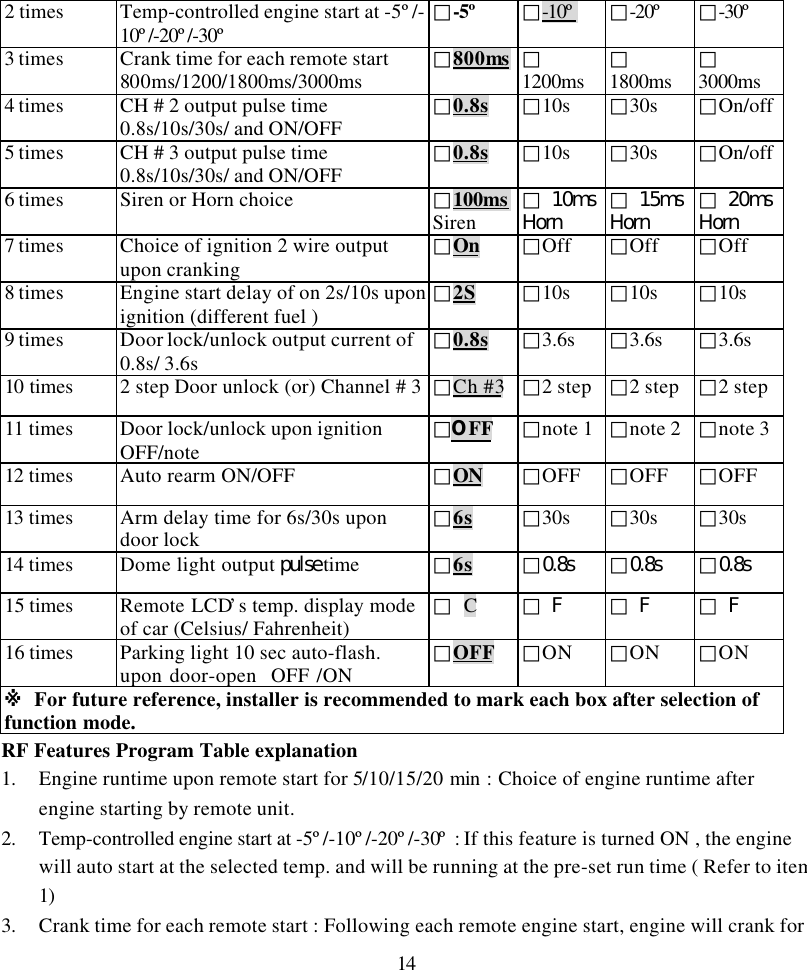
13Wiring diagram (5) Installing details for 2 stage unlock※ RF Features Programming(1) Set the main system to the Disarm mode but in audible mode.(2) Turn the ignition ”ON” ( Engine must not be running.)(3) Press and release the override switch 6 times(4) Turn the ignition “OFF” {siren chirps 6 times confirming it has entered active programmingmode.(5) While in the active programming mode, each press on override switch is followed by onechirp and each fifth press is followed by a long chirp. Chirping pattern enables theprogrammer to know which features active mode he has achieved. Within 10 sec, change thedefault in each active feature mode by pressing assigned button.( as shown in the Defaultchange by remote’s button  column. The factory default is described in the shadedbackground.RF Features Program Table Default change by remote’s buttonPress timesof overrideswitch RF features active modewith factory defaultPressbutton KⅠPressbuttonKⅡPress &holdbuttonKⅠPress&holdbuttonKⅡ1 time Engine runtime upon remote startfor 5/10/15/20 min □5□10 □15 □20
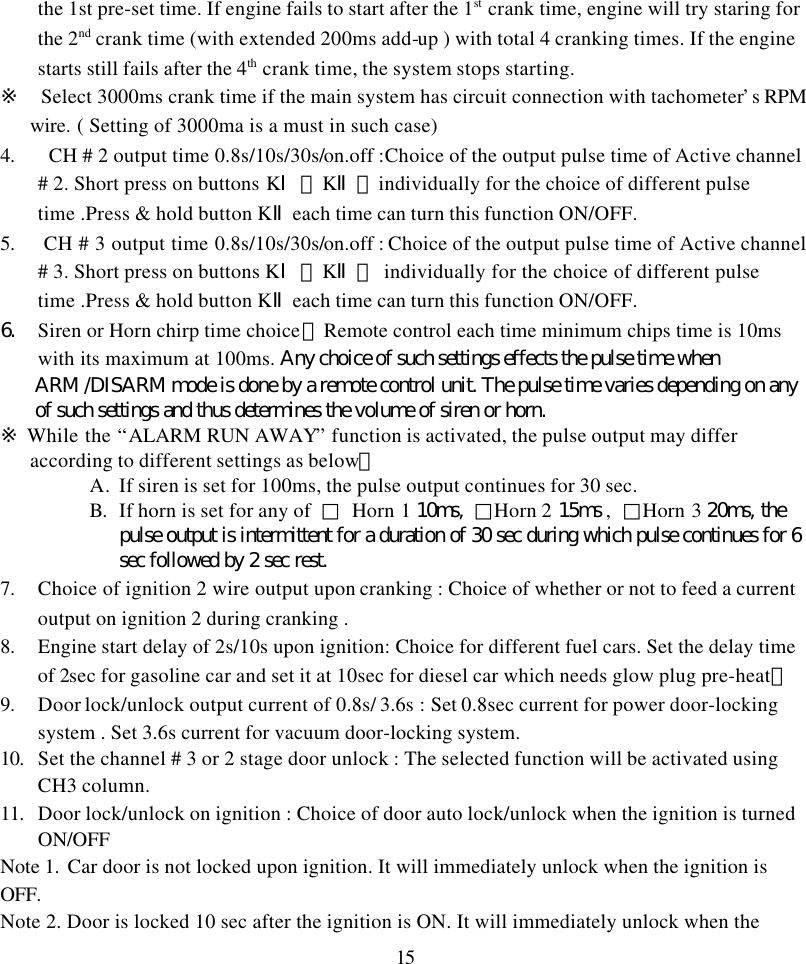
142 times Temp-controlled engine start at -5º/-10º/-20º/-30º □-5º □-10º □-20º □-30º3 times Crank time for each remote start800ms/1200/1800ms/3000ms □800ms □1200ms □1800ms □3000ms4 times CH # 2 output pulse time0.8s/10s/30s/ and ON/OFF □0.8s □10s □30s □On/off5 times CH # 3 output pulse time0.8s/10s/30s/ and ON/OFF □0.8s □10s □30s □On/off6 times Siren or Horn choice □100msSiren □ 10msHorn □ 15msHorn □ 20msHorn7 times Choice of ignition 2 wire outputupon cranking □On □Off □Off □Off8 times Engine start delay of on 2s/10s uponignition (different fuel ) □2S □10s □10s □10s9 times Door lock/unlock output current of0.8s/ 3.6s □0.8s □3.6s □3.6s □3.6s10 times 2 step Door unlock (or) Channel # 3 □Ch #3 □2 step □2 step □2 step11 times Door lock/unlock upon ignitionOFF/note □OFF □note 1 □note 2 □note 312 times Auto rearm ON/OFF □ON □OFF □OFF □OFF13 times Arm delay time for 6s/30s upondoor lock □6s □30s □30s □30s14 times Dome light output pulse time □6s □0.8s □0.8s □0.8s15 times Remote LCD’s temp. display modeof car (Celsius/ Fahrenheit) □ C□ F □ F □ F16 times Parking light 10 sec auto-flash.upon door-open  OFF /ON □OFF □ON □ON □ON※ For future reference, installer is recommended to mark each box after selection offunction mode.RF Features Program Table explanation1. Engine runtime upon remote start for 5/10/15/20 min : Choice of engine runtime afterengine starting by remote unit.2. Temp-controlled engine start at -5º/-10º/-20º/-30º : If this feature is turned ON , the enginewill auto start at the selected temp. and will be running at the pre-set run time ( Refer to item1)3. Crank time for each remote start : Following each remote engine start, engine will crank for
15the 1st pre-set time. If engine fails to start after the 1st crank time, engine will try staring forthe 2nd crank time (with extended 200ms add-up ) with total 4 cranking times. If the enginestarts still fails after the 4th crank time, the system stops starting.※  Select 3000ms crank time if the main system has circuit connection with tachometer’s RPMwire. ( Setting of 3000ma is a must in such case)4.  CH # 2 output time 0.8s/10s/30s/on.off :Choice of the output pulse time of Active channel# 2. Short press on buttons KⅠ、KⅡ、individually for the choice of different pulsetime .Press & hold button KⅡeach time can turn this function ON/OFF.5.  CH # 3 output time 0.8s/10s/30s/on.off : Choice of the output pulse time of Active channel# 3. Short press on buttons KⅠ、KⅡ、 individually for the choice of different pulsetime .Press & hold button KⅡeach time can turn this function ON/OFF.6. Siren or Horn chirp time choice:Remote control each time minimum chips time is 10mswith its maximum at 100ms. Any choice of such settings effects the pulse time whenARM /DISARM mode is done by a remote control unit. The pulse time varies depending on anyof such settings and thus determines the volume of siren or horn.※ While the “ALARM RUN AWAY” function is activated, the pulse output may differaccording to different settings as below:A. If siren is set for 100ms, the pulse output continues for 30 sec.B. If horn is set for any of  □ Horn 1 10ms,  □Horn 2 15ms ,  □Horn 3 20ms, thepulse output is intermittent for a duration of 30 sec during which pulse continues for 6sec followed by 2 sec rest.7. Choice of ignition 2 wire output upon cranking : Choice of whether or not to feed a currentoutput on ignition 2 during cranking .8. Engine start delay of 2s/10s upon ignition: Choice for different fuel cars. Set the delay timeof 2sec for gasoline car and set it at 10sec for diesel car which needs glow plug pre-heat。9. Door lock/unlock output current of 0.8s/ 3.6s : Set 0.8sec current for power door-lockingsystem . Set 3.6s current for vacuum door-locking system.10. Set the channel # 3 or 2 stage door unlock : The selected function will be activated usingCH3 column.11. Door lock/unlock on ignition : Choice of door auto lock/unlock when the ignition is turnedON/OFFNote 1. Car door is not locked upon ignition. It will immediately unlock when the ignition isOFF.Note 2. Door is locked 10 sec after the ignition is ON. It will immediately unlock when the
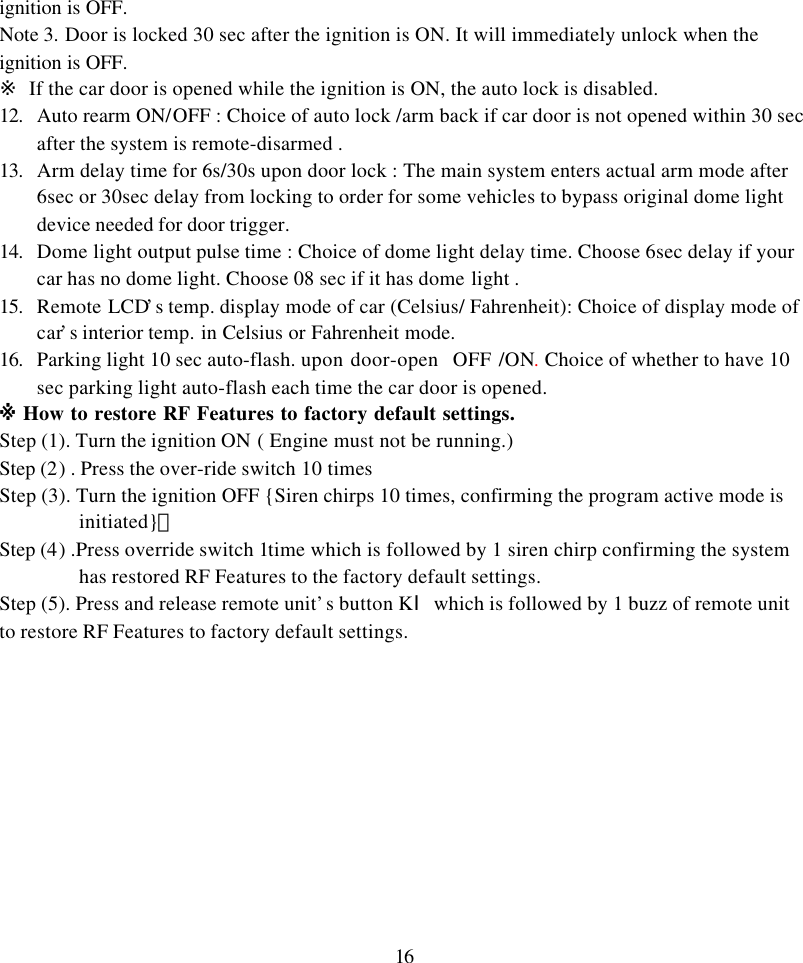
16ignition is OFF.Note 3. Door is locked 30 sec after the ignition is ON. It will immediately unlock when theignition is OFF.※ If the car door is opened while the ignition is ON, the auto lock is disabled.12. Auto rearm ON/OFF : Choice of auto lock /arm back if car door is not opened within 30 secafter the system is remote-disarmed .13. Arm delay time for 6s/30s upon door lock : The main system enters actual arm mode after6sec or 30sec delay from locking to order for some vehicles to bypass original dome lightdevice needed for door trigger.14. Dome light output pulse time : Choice of dome light delay time. Choose 6sec delay if yourcar has no dome light. Choose 08 sec if it has dome light .15. Remote LCD’s temp. display mode of car (Celsius/ Fahrenheit): Choice of display mode ofcar’s interior temp. in Celsius or Fahrenheit mode.16. Parking light 10 sec auto-flash. upon door-open  OFF /ON. Choice of whether to have 10sec parking light auto-flash each time the car door is opened.※ How to restore RF Features to factory default settings.Step (1). Turn the ignition ON ( Engine must not be running.)Step (2) . Press the over-ride switch 10 timesStep (3). Turn the ignition OFF {Siren chirps 10 times, confirming the program active mode isinitiated}。Step (4) .Press override switch 1time which is followed by 1 siren chirp confirming the systemhas restored RF Features to the factory default settings.Step (5). Press and release remote unit’s button KⅠwhich is followed by 1 buzz of remote unitto restore RF Features to factory default settings.
17L-TR68B
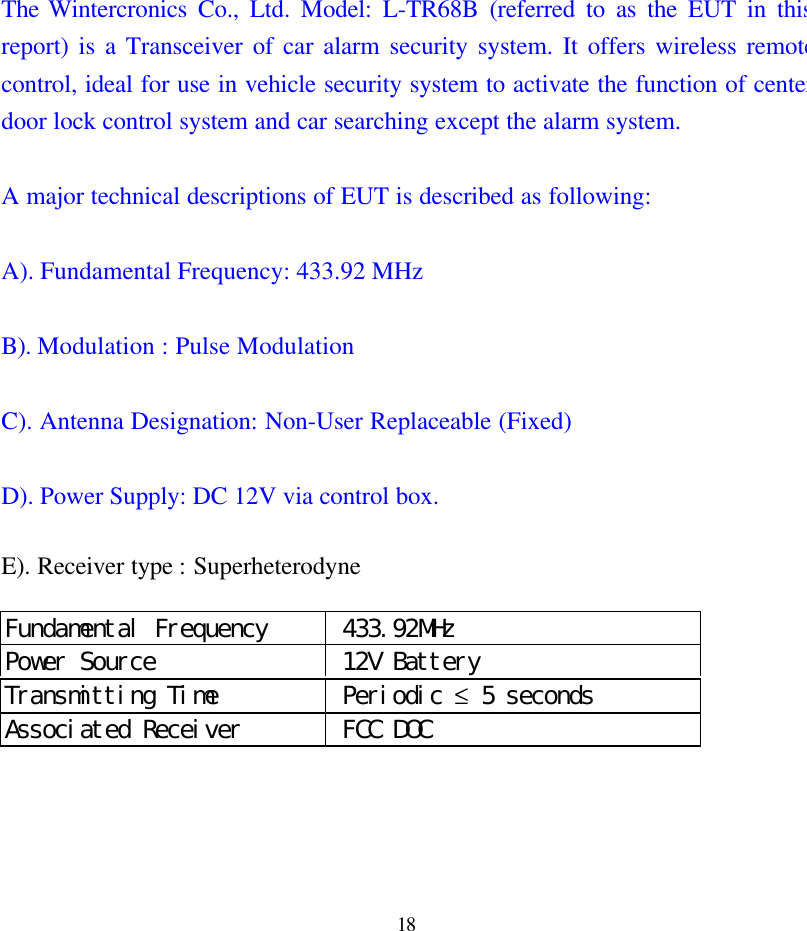
18The Wintercronics Co., Ltd. Model: L-TR68B (referred to as the EUT in thisreport) is a Transceiver of car alarm security system. It offers wireless remotecontrol, ideal for use in vehicle security system to activate the function of centerdoor lock control system and car searching except the alarm system.A major technical descriptions of EUT is described as following:A). Fundamental Frequency: 433.92 MHzB). Modulation : Pulse ModulationC). Antenna Designation: Non-User Replaceable (Fixed)D). Power Supply: DC 12V via control box.E). Receiver type : SuperheterodyneFundamental Frequency  433.92MHzPower Source  12V BatteryTransmitting Time  Periodic ≤ 5 secondsAssociated Receiver  FCC DOC
19FCC StatementThis device complies with part 15 of the FCC Rules. Operation is subject to thefollowing two condition.(1).this device may not cause harmful interference.(2).this device must accept any interference received, including interference thatmay cause undesired operationWarning:Note: This equipment has been tested and found to comply with the limits fordigital device, pursuant to Part 15 of FCC Rules. These limits are designed toprovide reasonable protection against harmful interference in a residentialinstallation. This equipment generates, used and can radiate radio frequencyenergy and, if not installed and used in accordance with the instructions, maycause harmful interference in to radiate communications. However, there is noguarantee that interference will not occur in a particular installation. If thisequipment does cause harmful interference to radio or television reception,which can be determined by turning the equipment off and on, the user isencouraged to try to correct the interference by one or more of the followingmeasures:l Reorient or relocate the receiving antennal Increase the separation between the equipment and receiver.l Connect the equipment into an outlet on a circuit different form that to whichthe receiver in connected.l Consult the dealer or an experienced radio/TV technician for help.This device complies with part 15 of the FCC rules. Operation is subject to thefollowing two conditions:   (1) This device may not cause harmful interference: and   (2) This device must accept any interference received: including interference thatmay cause      undesired operation.THE MANUFACTURER IS NOT RESPONSIBKE FOR ANY RADIO OR TVINTERFERENCE CAUSED BY UNAUTHORIZED MODIFICATIONS TOTHIS EQUIPMENT.SUCH ODIFICATIONS COULD VOID THE USER’SAUTHORITY TO OPERATE THE EQUIPMENT.Note: The manufacturer is not responsible for any radio or TV interference caused byunauthorized modification to this equipment. Such modification could void theuser’s authority to operate the equipment.

Navigation menu