Worldwide Accessories BP1747 SPEAKER User Manual H32

Worldwide Accessories SPEAKER H32

User_Manual

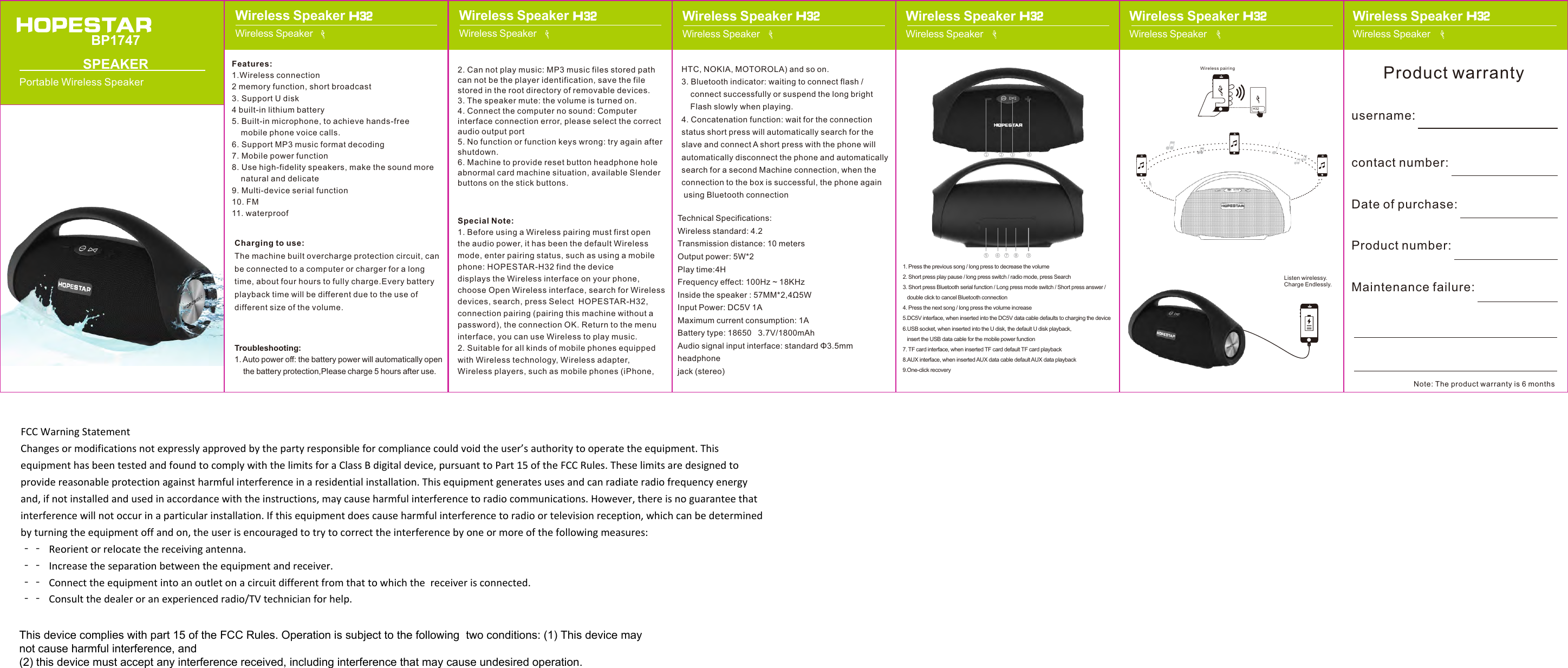
2. Can not play music: MP3 music files stored pathcan not be the player identification, save the file stored in the root directory of removable devices.3. The speaker mute: the volume is turned on.4. Connect the computer no sound: Computerinterface connection error, please select the correct audio output port5. No function or function keys wrong: try again aftershutdown.6. Machine to provide reset button headphone holeabnormal card machine situation, available Slender buttons on the stick buttons.Special Note:1. Before using a Wireless pairing must first openthe audio power, it has been the default Wireless mode, enter pairing status, such as using a mobile phone: HOPESTAR-H32 find the device displays the Wireless interface on your phone, choose Open Wireless interface, search for Wireless devices, search, press Select  HOPESTAR-H32, connection pairing (pairing this machine without a password), the connection OK. Return to the menu interface, you can use Wireless to play music.2. Suitable for all kinds of mobile phones equippedwith Wireless technology, Wireless adapter, Wireless players, such as mobile phones (iPhone, Features:1.Wireless connection2 memory function, short broadcast3. Support U disk4 built-in lithium battery5. Built-in microphone, to achieve hands-freemobile phone voice calls.6. Support MP3 music format decoding7. Mobile power function8. Use high-fidelity speakers, make the sound morenatural and delicate9. Multi-device serial function10. FM11. waterproofCharging to use:The machine built overcharge protection circuit, can be connected to a computer or charger for a long time, about four hours to fully charge.Every battery playback time will be different due to the use of different size of the volume.Troubleshooting:1. Auto power off: the battery power will automatically openthe battery protection,Please charge 5 hours after use.BP1747 SPEAKERPortable Wireless SpeakerH32Wireless pairingHTC, NOKIA, MOTOROLA) and so on.3. Bluetooth indicator: waiting to connect flash /connect successfully or suspend the long brightFlash slowly when playing.4. Concatenation function: wait for the connectionstatus short press will automatically search for the slave and connect A short press with the phone will automatically disconnect the phone and automatically search for a second Machine connection, when the connection to the box is successful, the phone again using Bluetooth connectionTechnical Specifications:Wireless standard: 4.2Transmission distance: 10 metersOutput power: 5W*2Play time:4HFrequency effect: 100Hz ~ 18KHzInside the speaker : 57MM*2,4Ω5WInput Power: DC5V 1AMaximum current consumption: 1ABattery type: 18650   3.7V/1800mAhAudio signal input interface: standard Φ3.5mm headphone jack (stereo)Listen wirelessy.Charge Endlessly.username:contact number:Date of purchase:Product number:Maintenance failure:Product warrantyNote: The product warranty is 6 monthsWireless SpeakerWireless Speaker H32Wireless SpeakerWireless Speaker H32Wireless SpeakerWireless Speaker H32Wireless SpeakerWireless Speaker H32Wireless Speaker Wireless SpeakerWireless Speaker Wireless Speaker H32 H321. Press the previous song / long press to decrease the volume2. Short press play pause / long press switch / radio mode, press Search3. Short press Bluetooth serial function / Long press mode switch / Short press answer /double click to cancel Bluetooth connection4. Press the next song / long press the volume increase5.DC5V interface, when inserted into the DC5V data cable defaults to charging the device6.USB socket, when inserted into the U disk, the default U disk playback,    insert the USB data cable for the mobile power function7. TF card interface, when inserted TF card default TF card playback8.AUX interface, when inserted AUX data cable default AUX data playback9.One-click recoveryFCCWarningStatementChangesormodificationsnotexpresslyapprovedbythepartyresponsibleforcompliancecouldvoidtheuser’sauthoritytooperatetheequipment.ThisequipmenthasbeentestedandfoundtocomplywiththelimitsforaClassBdigitaldevice,pursuanttoPart15oftheFCCRules.Theselimitsaredesignedtoprovidereasonableprotectionagainstharmfulinterferenceinaresidentialinstallation.Thisequipmentgeneratesusesandcanradiateradiofrequencyenergyand,ifnotinstalledandusedinaccordancewiththeinstructions,maycauseharmfulinterferencetoradiocommunications.However,thereisnoguaranteethatinterferencewillnotoccurinaparticularinstallation.Ifthisequipmentdoescauseharmfulinterferencetoradioortelevisionreception,whichcanbedeterminedbyturningtheequipmentoffandon,theuserisencouragedtotrytocorrecttheinterferencebyoneormoreofthefollowingmeasures:‐‐ Reorientorrelocatethereceivingantenna.‐‐ Increasetheseparationbetweentheequipmentandreceiver.‐‐ Connecttheequipmentintoanoutletonacircuitdifferentfromthattowhichthe receiveris connected. ‐‐ Consultthedealeroranexperiencedradio/TVtechnicianforhelp.This device complies with part 15 of the FCC Rules. Operation is subject to the following  two conditions: (1) This device may not cause harmful interference, and (2) this device must accept any interference received, including interference that may cause undesired operation.

Navigation menu