Wuxi iData Technology RM001 RFID Module User Manual

WUXI IDATA TECHNOLOGY COMPANY LTD. RFID Module Users Manual

User Manual

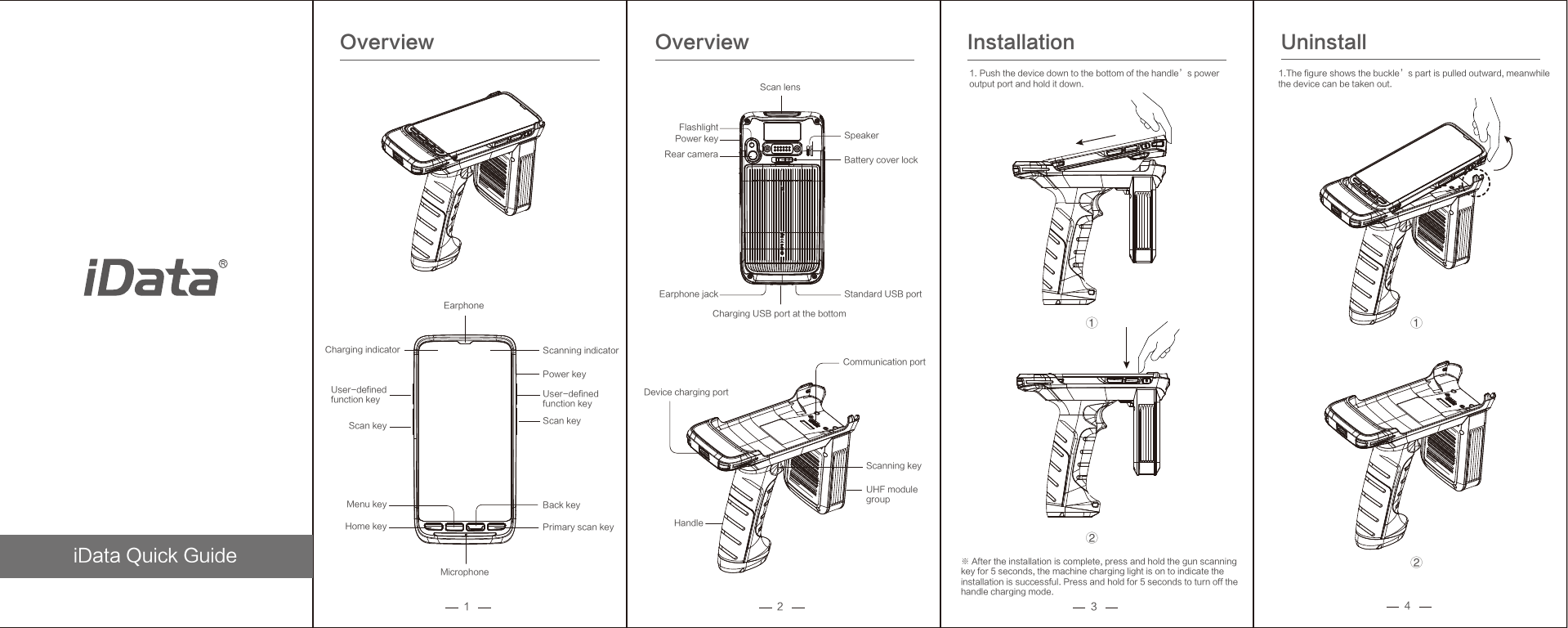
iData Quick Guide1Overview2 3Overview Installation 1.The figure shows the buckle’s part is pulled outward, meanwhilethe device can be taken out. ※ After the installation is complete, press and hold the gun scanningkey for 5 seconds, the machine charging light is on to indicate the installation is successful. Press and hold for 5 seconds to turn off the handle charging mode. 4Uninstall Charging indicatorPower key Flashlight Scan lens Rear camera Earphone jack Charging USB port at the bottom Standard USB port Battery cover lock Speaker Scanning indicator Earphone Power key User-definedfunction key Scan key Back key Primary scan key Scan key User-defined function key Menu key Home key Microphone Communication port Device charging port Scanning key UHF modulegroup Handle ②①②①1. Push the device down to the bottom of the handle’s poweroutput port and hold it down.
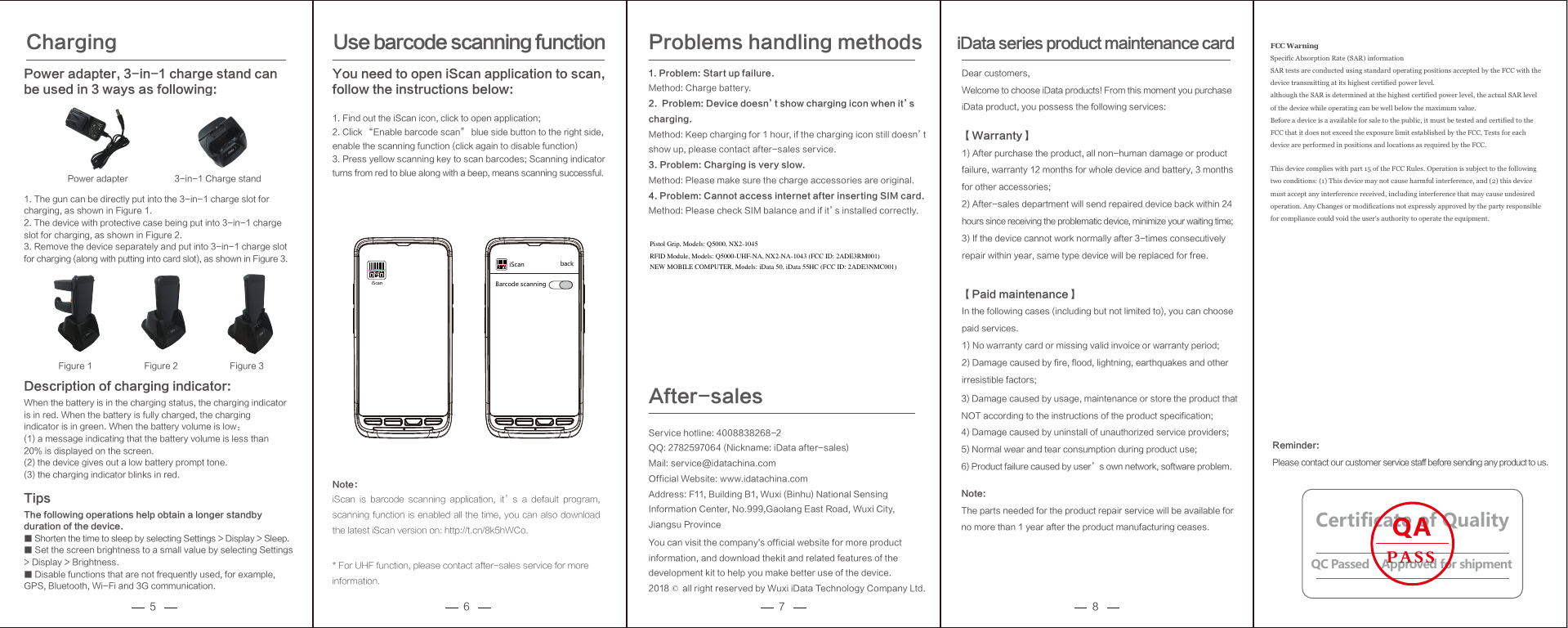
5 6 7 8Description of charging indicator: When the battery is in the charging status, the charging indicator is in red. When the battery is fully charged, the charging indicator is in green. When the battery volume is low: (1) a message indicating that the battery volume is less than 20% is displayed on the screen.  (2) the device gives out a low battery prompt tone.  (3) the charging indicator blinks in red. Tips The following operations help obtain a longer standby duration of the device. ■ Shorten the time to sleep by selecting Settings > Display > Sleep.       ■ Set the screen brightness to a small value by selecting Settings > Display > Brightness.   ■ Disable functions that are not frequently used, for example, GPS, Bluetooth, Wi-Fi and 3G communication. Charging Power adapter, 3-in-1 charge stand can be used in 3 ways as following:1. The gun can be directly put into the 3-in-1 charge slot for charging, as shown in Figure 1. 2. The device with protective case being put into 3-in-1 charge slot for charging, as shown in Figure 2. 3. Remove the device separately and put into 3-in-1 charge slot for charging (along with putting into card slot), as shown in Figure 3. Note:iScan  is  barcode  scanning  application,  it’s  a  default  program, scanning function is enabled all the time, you can also download the latest iScan version on: http://t.cn/8k5hWCo.* For UHF function, please contact after-sales service for more information.1. Problem: Start up failure.Method: Charge battery.2.  Problem: Device doesn’t show charging icon when it’s charging.Method: Keep charging for 1 hour, if the charging icon still doesn’t show up, please contact after-sales service.3. Problem: Charging is very slow.Method: Please make sure the charge accessories are original.4. Problem: Cannot access internet after inserting SIM card.Method: Please check SIM balance and if it’s installed correctly.Problems handling methodsDear customers,Welcome to choose iData products! From this moment you purchaseiData product, you possess the following services:【Warranty】1) After purchase the product, all non-human damage or product failure, warranty 12 months for whole device and battery, 3 months for other accessories;2) After-sales department will send repaired device back within 24 hours since receiving the problematic device, minimize your waiting time;3) If the device cannot work normally after 3-times consecutively repair within year, same type device will be replaced for free.【Paid maintenance】In the following cases (including but not limited to), you can choose paid services.1) No warranty card or missing valid invoice or warranty period;2) Damage caused by fire, flood, lightning, earthquakes and other irresistible factors;iData series product maintenance cardUse barcode scanning function You need to open iScan application to scan, follow the instructions below: 1. Find out the iScan icon, click to open application; 2. Click “Enable barcode scan” blue side button to the right side, enable the scanning function (click again to disable function) 3. Press yellow scanning key to scan barcodes; Scanning indicator turns from red to blue along with a beep, means scanning successful. iScaniScan backBarcode scanningReminder: Please contact our customer service staff before sending any product to us. 3-in-1 Charge stand Power adapter Figure 1 Figure 2 Figure 3Service hotline: 4008838268-2QQ: 2782597064 (Nickname: iData after-sales)Mail: service@idatachina.comOfficial Website: www.idatachina.comAddress: F11, Building B1, Wuxi (Binhu) National Sensing Information Center, No.999,Gaolang East Road, Wuxi City,Jiangsu ProvinceYou can visit the company's official website for more product information, and download thekit and related features of the development kit to help you make better use of the device.2018 © all right reserved by Wuxi iData Technology Company Ltd.After-salesCertificate of QualityQC Passed    Approved for shipmentQAPASS3) Damage caused by usage, maintenance or store the product that NOT according to the instructions of the product specification;4) Damage caused by uninstall of unauthorized service providers;5) Normal wear and tear consumption during product use;6) Product failure caused by user’s own network, software problem.Note: The parts needed for the product repair service will be available for no more than 1 year after the product manufacturing ceases. FCC Warning   Specific Absorption Rate (SAR) information SAR tests are conducted using standard operating positions accepted by the FCC with the device transmitting at its highest certified power level. although the SAR is determined at the highest certified power level, the actual SAR level of the device while operating can be well below the maximum value. Before a device is a available for sale to the public, it must be tested and certified to the FCC that it does not exceed the exposure limit established by the FCC, Tests for each device are performed in positions and locations as required by the FCC. This device complies with part 15 of the FCC Rules. Operation is subject to the following two conditions: (1) This device may not cause harmful interference, and (2) this device must accept any interference received, including interference that may cause undesired operation. Any Changes or modifications not expressly approved by the party responsible for compliance could void the user’s authority to operate the equipment.    Pistol Grip, Models: Q5000, NX2-1045RFID Module, Models: Q5000-UHF-NA, NX2-NA-1043 (FCC ID: 2ADE3RM001)NEW MOBILE COMPUTER, Models: iData 50, iData 55HC (FCC ID: 2ADE3NMC001)

Navigation menu