User Manual
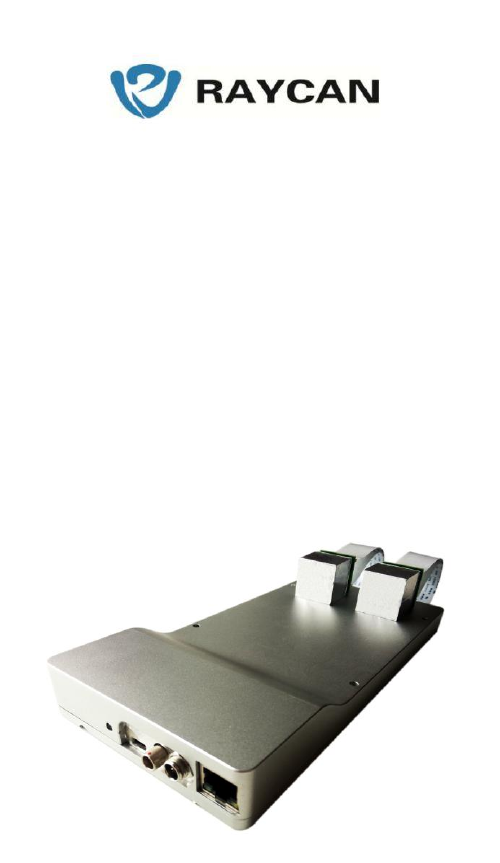
Si-BDM-2250
USER MANUAL
CONTENT
1. Introduction ........................................................................................... 3
2. Specifications ........................................................................................ 3
3. Operate Guide ....................................................................................... 5
4. Electromagnetic Compatibility ............................................................. 6
5. Safety .................................................................................................... 6
6. Trouble shooting ................................................................................... 8
7.The Package Contain ............................................................................. 9

1. Introduction
Si-BDM-2250 is an all-digital, high performance detector module which can capture
Gamma photon’s information, digitalize it and transfer output data to the host
computer. Si-BDM-2250 can be expediently applied as the basic module in design of
position-emission tomography. With its dual-head structure and prominent timing
performance, Si-BDM-2250 could also play an important role in scientific research
experiment.
2. Specifications
Detector Blocks
Constitution
LYSO crystal array + Silicon Photomultiplier (SiPM)
Crystal Pixel Size
3.8x3.8x20mm3(20mm as height)
Radiation Type
511KeV Gamma photon
Energy Resolution
15%@511KeV
Timing Resolution
550ps@[450~650] KeV
Detector module
Number of Detector
Blocks
2
Number of Channels
72
Dimension
205×99.5×14.8 mm3(The top surface designed in
camber angle, the height varies from 14.8 to 25 )
Weight
577g (189 g for Detector Blocks )
Power adapter input
voltage
100~240V /AC, 50/60Hz
Power Consumption
10.5W
Data Interface
RJ45
Operating Environment

Temperature
Room temperature
Humidity
30%~80%
Atmospheric Pressure
700hpa~1060hpa
Regulatory
FCC Part 15 compliant
3. Operate Guide
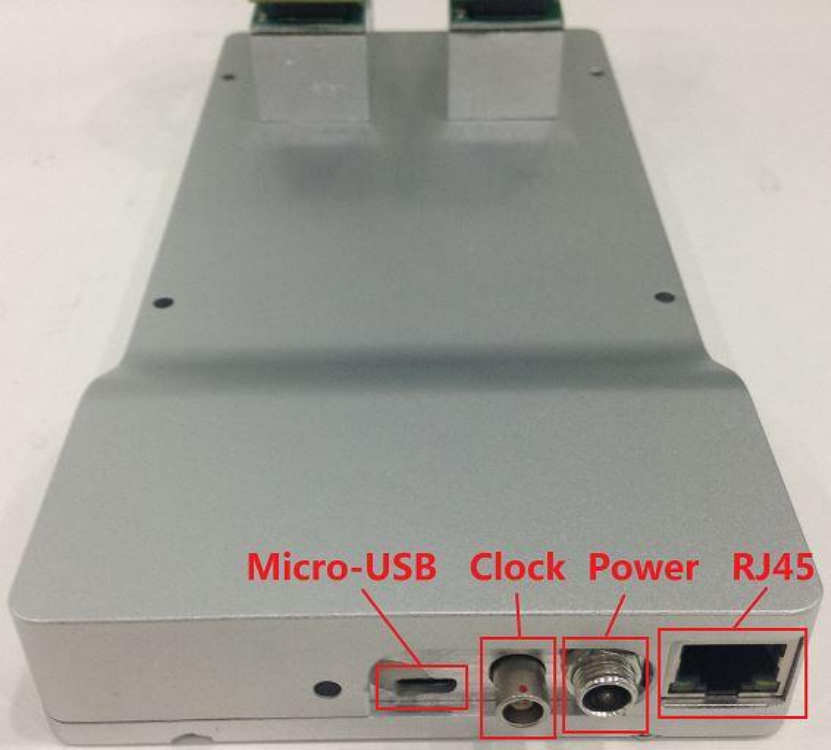
1. Plug one end of Gigabit Ethernet cable into the RJ45 interface in the detector
module, connect another end of this cable to host computer or router;
2. Connect the detector module and global clock board with an clock signal
wire ;
3. Connect the detector module and host computer with an Micro-USB to UART
wire, and this USB port was used to debug the software by professionals.
4. Connect the power adapter and tight the bolt of junction. The voltage input
ranges from 100V to 240V AC;
5. Turn on the power and configure digitalize parameters on host computer by
using the software packed;
6. Acquire the output data on host computer. During the module operation, keep
the detector blocks in light-proof situation.
4. Electromagnetic Compatibility
This product complies with relevant international and national laws and standards on
EMC (electromagnetic compatibility) for this type of product when used as intended.
Such laws and standards define both the permissible electromagnetic emission levels
from equipment and its required immunity to electromagnetic interference from
external sources. Other electronic products exceeding the limits defined in such EMC
standards could, under unusual circumstances, affect the operation of the product.
• Information Technology Equipment (ITE) need special precautions regarding EMC,
and need to be installed and put into service according to EMC information provided
in the accompanying documents.
• Please use the shielding RJ45 port which is meant to connect with PC, the use of
accessories and cables other than those specified may result in increased emission or
decreased immunity levels.
• The product should not be used adjacent to or stacked with other products and that if
adjacent or stacked use is necessary, it should be observed to verify normal operation.
This equipment is intended for use in a hospital environment. Operation in other than
hospital environments may compromise electromagnetic compatibility.
The Si-BDM-2250 complies with part 15 of the FCC Rules. Operation is subject
to the following conditions:
(1) This device may not cause harmful interference, and (2) this device must
accept any interference received, including interference that may cause
undesired operation.
Changes or modifications to the equipment not expressly approved by the party
responsible for compliance could void the user’s authority to operate the equipment.
5. Safety
Important safety directions
If the product is not functioning correct or damage is visible, please contact your
RAYCAN representative, who will take appropriate actions in order not to create
harm. Handle the product with care. Make sure that the product is used and stored in a
secured environment to prevent unauthorized access.
Maintenance & faults
WARNING Do not use the product for any application until you are sure that the user
routine ‐checks have been satisfactorily completed, and that the periodic
maintenance of the product is up to date. If any part of the product is known (or
suspected) to be defective or wrongly adjusted, DO NOT USE the product until a
repair has been made. Operation of the product with defective or wrongly adjusted
components could expose the user or the patient to radiation or other safety hazards.
This could lead to fatal or other serious personal injury.
Safety awareness
WARNING Do not use the product for any application until you have read,
understood and know all the safety information, safety procedures and emergency
procedures contained in this Safety section. Operation of the product without a proper
awareness of how to use it safely could lead to fatal or other serious personal injury.
Adequate training
WARNING Do not use the product for any application until you have received
adequate and proper training in its safe and effective operation. If you are unsure of
your ability to operate this product safely and effectively, DO NOT USE IT.
Operation of this product without proper and adequate training could lead to fatal or
other serious personal injury.
Safety devices
WARNING Never attempt to remove, modify, override or frustrate any safety device
on the product. Interfering with safety devices could lead to fatal or other serious
personal injury.
Intended use and compatibility
Warning Do not use the product for any purpose other than those for which it is
intended. Do not use the product with products other than that which RAYCAN
recognizes as compatible.
Operation of the product for unintended purposes, or with incompatible products,
could lead to fatal or other serious injury.
Electrical safety
WARNING Do not remove covers or cables from this product. Dangerous electrical
voltages are present within this product. Removing covers or cables could lead to
serious or fatal personal injury. Covers or cables should only be removed by qualified
and authorized service personnel.
Use this product in rooms or areas that comply with all applicable laws (or regulations
having the force of law) concerning electrical safety for this type of product.
Electrically isolate this product from the mains electrical supply before cleaning,
disinfecting or sterilizing it.
Mechanical safety
WARNING Do not remove covers from this product. Removing covers could lead to
serious or fatal personal injury. Covers should only be removed by qualified and
authorized service personnel. In this context, qualified means those legally permitted
to work on this type of medical electrical product in the jurisdiction(s) in which the
product is being used, and authorized means those authorized by the user of the
product.
Explosion safety
WARNING Do not use this product in the presence of explosive gases or vapors.
WARNING Do not use flammable or potentially explosive disinfecting sprays.
WARNING Use of this product in an environment for which it was not designed can
lead to fire or explosion.

Fire safety
Use of electrical product in an environment for which it was not designed can lead to
fire or explosion. Fire regulations for the type of medical area being used should be
fully applied, observed and enforced. Fire extinguishers should be available for both
electrical and non‐electrical fires.
WARNING Only use extinguishers on electrical or chemical fires, which are
specifically labeled for those purposes. Using water or other liquids on an electrical
fire can lead to fatal or other serious personal injury. If it is safe to do so, attempt to
isolate the product from electrical and other supplies before attempting to fight a fire.
This will reduce the risk of electric shocks.
Electrostatic discharge (ESD)
CAUTION Always wait at least ten seconds after the product is switched OFF before
switching the product back to ON.
CAUTION Always use proper static procedures, protection, and product prior to
opening and during handling of this product. This product contains components that
are electrostatic sensitive. Failure to use ESD procedures may cause damage to these
components. Such damage to components is not covered by RAYCAN warranties.
ESD can amount to a significant voltage, which may cause damage to PCBs or other
system components.
ESD damage is cumulative and may not be apparent at first, as indicated by a hard
failure, but can cause degraded performance. Therefore, always use proper ESD
handling procedures. ESD can result from low humidity conditions, use of electrical
equipment on carpeting, linens, and clothing.
6. Trouble shooting
Problems
Solutions
The yellow and green LEDs on RJ45
interface don’t shine
Check Gigabit Ethernet cable
connection situation
No data acquired in host computer
Confirm that detector blocks stay in
light-proof situation and reset global
clock board
* If the problem listed
above can’t be solved, please
contact us

7. The Package Contain
Name
Number
Power adaptor
1
Global clock board
1
Clock signal wire
1
Gigabit Ethernet cable
1
Configure Software
1
Micro-USB to UART wire
1
User Manual
1
Federal Communications Commission (FCC) Interference Statement
This equipment has been tested and found to comply with the limits for a Class B digital
device, pursuant to Part 15 of the FCC Rules.
These limits are designed to provide reasonable protection against harmful interference in
a residential installation. This equipment generate, uses and can radiate radio frequency
energy and, if not installed and used in accordance with the instructions, may cause
harmful interference to radio communications.
However, there is no guarantee that interference will not occur in a particular installation. If
this equipment does cause harmful interference to radio or television reception, which can
be determined by turning the equipment off and on, the user is encouraged to try to correct
the interference by one of the following measures:
Reorient or relocate the receiving antenna.
Increase the separation between the equipment and receiver.
Connect the equipment into an outlet on a circuit different from that to which the
receiver is connected.
Consult the dealer or an experienced radio/TV technician for help.
This device complies with Part 15 of the FCC Rules. Operation is subject to the following
two conditions:
(1) This device may not cause harmful interference, and (2) this device must accept any
interference received, including interference that may cause undesired operation.
FCC Caution: Any changes or modifications not expressly approved by the party
responsible for compliance could void the user’s authority to operate this equipment.
Branch Office
2440 Camino Ramon, Suite 264
San Ramon, CA 94583, USA
Headquarters
Bldg 17, 8 Jinfeng Rd, Suzhou New
District, Suzhou, 215163, China
1-925-359-6908 (T)
1-925-380-6784 (F)
Web: http://www.x-zlab.com/