XIAMEN LEELEN TECHNOLOGY L8500208 Door Station User Manual Manual

XIAMEN LEELEN TECHNOLOGY CO., LTD Door Station Manual

Manual

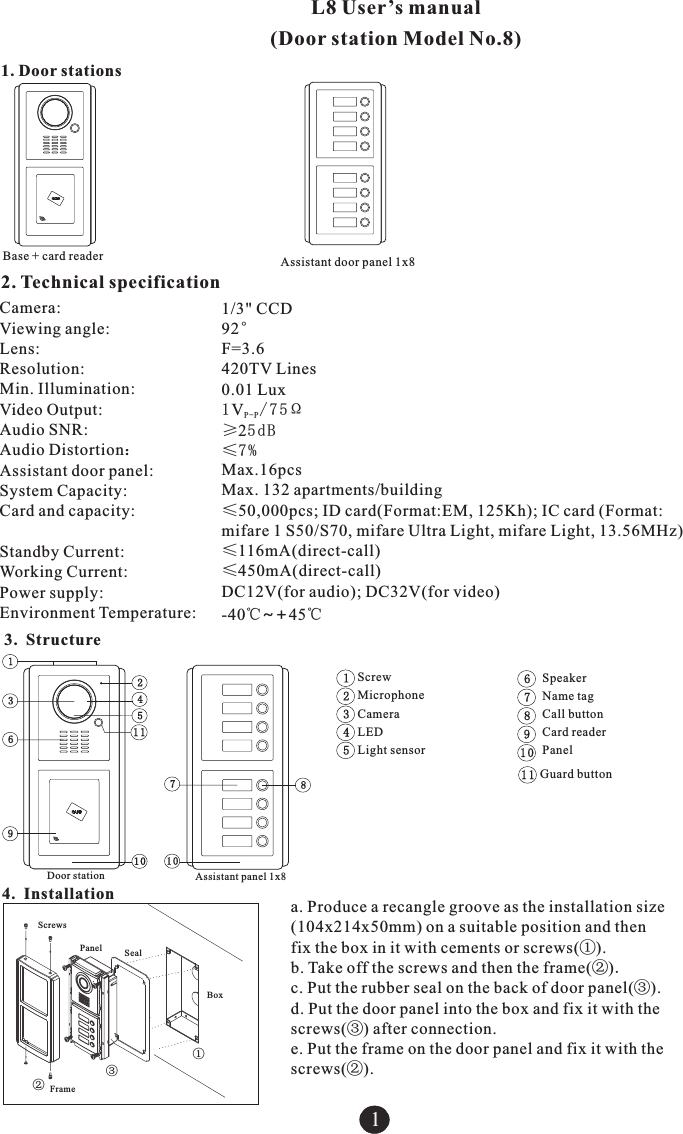
1. Door stations1Assistant door panel 1x8Base + card readerL8 User’s manual (Door station Model No.8)2. Technical specificationCamera: Viewing angle:Lens:Resolution: Min. Illumination:Video Output: Audio SNR: Audio Distortion:Assistant door panel:System Capacity: Card and capacity: Standby Current: Working Current:Power supply:Environment Temperature:1/3" CCD92°F=3.6420TV Lines0.01 Lux1V/75ΩP-P≥25dB≤7%Max.16pcs Max. 132 apartments/building≤50,000pcs; ID card(Format:EM, 125Kh); IC card (Format:mifare 1 S50/S70, mifare Ultra Light, mifare Light, 13.56MHz)≤116mA(direct-call)≤450mA(direct-call)DC12V(-40℃~+45℃for audio); DC32V(for video)3. Structure12345ScrewMicrophoneCameraLEDLight sensor678910SpeakerName tagCall buttonCard readerPanel1111Guard button1234569107810Door station Assistant panel 1x8a. Produce a recangle groove as the installation size (104x214x50mm) on a suitable position and then fix the box in it with cements or screws(①).b. Take off the screws and then the frame(②).c. Put the rubber seal on the back of door panel(③).d. Put the door panel into the box and fix it with the screws(③) after connection.e. Put the frame on the door panel and fix it with the screws(②).4. Installation ①②③FramePanel SealBoxScrews
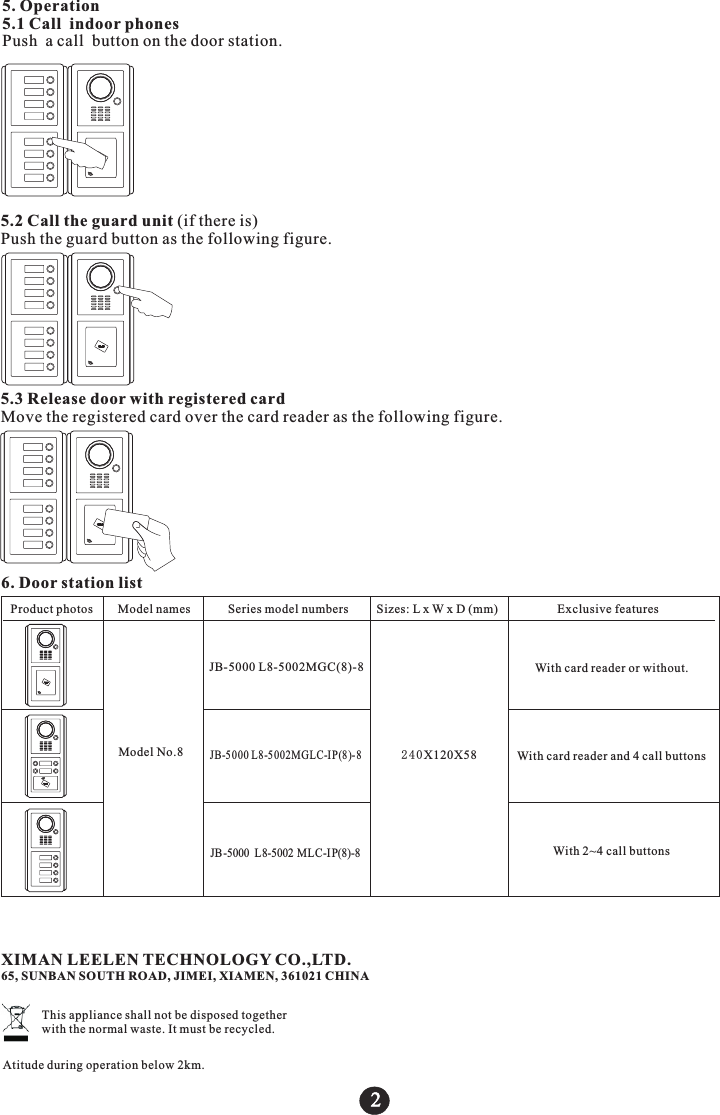
5. Operation5.1 Call indoor phonesPush a call button on the door station.5.2 Call the guard unit (if there is)Push the guard button as the following figure.5.3 Release door with registered cardMove the registered card over the card reader as the following figure.2Product p odel numbers         Sizes: L x W x D (mm)                   Exclusive featureshotos        Model names            Series mModel No.86. Door station list240X120X58JB-5 000 L8-5 002MGLC-I P(8)- 8JB-5000  L8-5002 MLC-I P(8)-8JB-5000 L8-5002MGC(8)-8 With card reader or without.With card reader and 4 call buttonsWith 2~4 call buttonsXIMAN LEELEN TECHNOLOGY CO.,LTD.65, SUNBAN SOUTH ROAD, JIMEI, XIAMEN, 361021 CHINAThis appliance shall not be disposed together with the normal waste. It must be recycled.Atitude during operation below 2km.
FCC Statement: This device complies with part 15 of the FCC Rules. Operation is subject to the following two conditions: (1) This device may not cause harmful interference, and (2) this device must accept any interference received, including interference that may cause undesired operation. This equipment has been tested and found to comply with the limits for a Class B digital device, pursuant to part 15 of the FCC Rules. These limits are designed to provide reasonable protection against harmful interference in a residential installation. This equipment generates, uses and can radiate radio frequency energy and, if not installed and used in accordance with the instructions, may cause harmful interference to radio communications. However, there is no guarantee that interference will not occur in a particular installation. If this equipment does cause harmful interference to radio or television reception, which can be determined by turning the equipment off and on, the user is encouraged to try to correct the interference by one or more of the following measures: —Reorient or relocate the receiving antenna. —Increase the separation between the equipment and receiver. —Connect the equipment into an outlet on a circuit different from that to which the receiver is connected. —Consult the dealer or an experienced radio/TV technician for help. Caution: Any changes or modifications not expressly approved by the party responsible for compliance could void the user's authority to operate the equipment.

Navigation menu