XSOUND Innovation Technologies HXHP460 Bluetooth Headphone User Manual

XSOUND Innovation Technologies Co., Ltd. Bluetooth Headphone

user manual

HX-HP460 HX-HP451-WGNQUICK START GUIDE
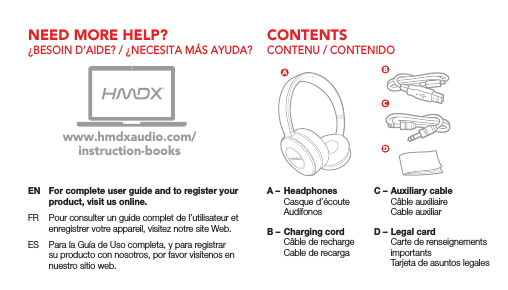
CONTENTSNEED MORE HELP?CONTENU / CONTENIDO¿BESOIN D’AIDE? / ¿NECESITA MÁS AYUDA?EN  For complete user guide and to register your product, visit us online.FR  Pour consulter un guide complet de l’utilisateur et enregistrer votre appareil, visitez notre site Web.ES  Para la Guía de Uso completa, y para registrar su producto con nosotros, por favor visítenos en nuestro sitio web.www.hmdxaudio.com/instruction-booksA –  Headphones  Casque d’écoute AudífonosB – Charging cord  Câble de recharge  Cable de recargaC – Auxiliary cable  Câble auxiliaire  Cable auxiliarD – Legal card  Carte de renseignements importants  Tarjeta de asuntos legales
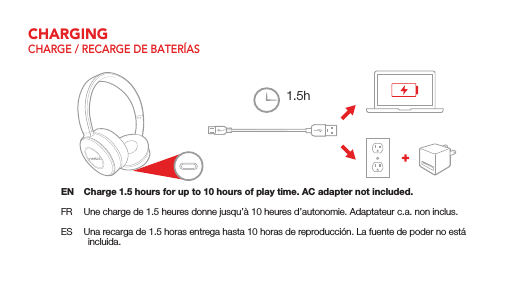
CHARGINGCHARGE / RECARGE DE BATERÍASEN  Charge 1.5 hours for up to 10 hours of play time. AC adapter not included.FR  Une charge de 1.5 heures donne jusqu’à 10 heures d’autonomie. Adaptateur c.a. non inclus.ES  Una recarga de 1.5 horas entrega hasta 10 horas de reproducción. La fuente de poder no está incluida.1.5h
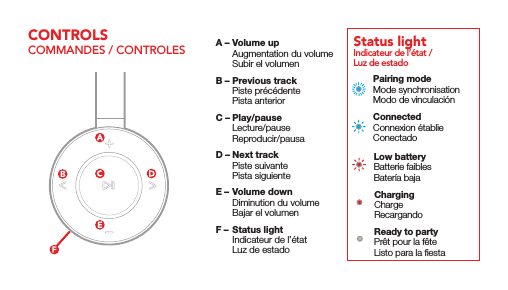
Pairing modeMode synchronisationModo de vinculaciónConnectedConnexion établieConectadoLow batteryBatterie faiblesBatería bajaChargingChargeRecargandoReady to partyPrêt pour la fêteListo para la fiestaIndicateur de l’état / Luz de estadoStatus light  A – Volume up  Augmentation du volume  Subir el volumenB – Previous track  Piste précédente  Pista anteriorC – Play/pause Lecture/pause Reproducir/pausaD – Next track  Piste suivante  Pista siguienteE – Volume down  Diminution du volume  Bajar el volumenF –  Status light  Indicateur de l’état  Luz de estadoCONTROLSCOMMANDES / CONTROLES
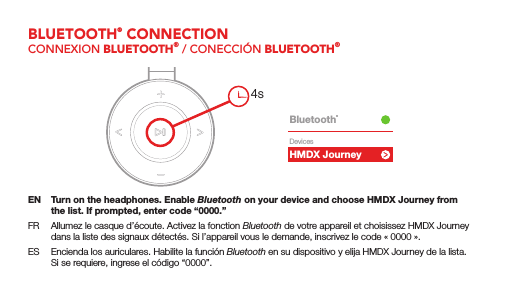
HMDX JourneyBluetooth®DevicesEN  Turn on the headphones. Enable Bluetooth on your device and choose HMDX Journey from the list. If prompted, enter code “0000.”FR  Allumez le casque d’écoute. Activez la fonction Bluetooth de votre appareil et choisissez HMDX Journey dans la liste des signaux détectés. Si l’appareil vous le demande, inscrivez le code «0000».ES  Encienda los auriculares. Habilite la función Bluetooth en su dispositivo y elija HMDX Journey de la lista. Si se requiere, ingrese el código “0000”.4sBLUETOOTH® CONNECTIONCONNEXION BLUETOOTH® / CONECCIÓN BLUETOOTH®
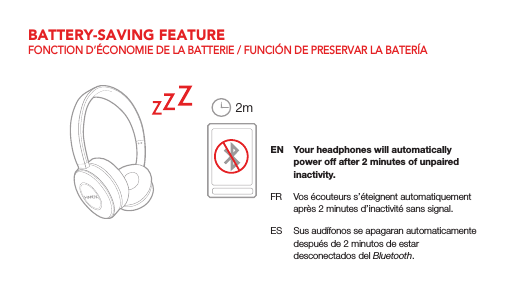
EN  Your headphones will automatically power off after 2 minutes of unpaired inactivity.FR  Vos écouteurs s’éteignent automatiquement après 2 minutes d’inactivité sans signal.ES  Sus audífonos se apagaran automaticamente después de 2 minutos de estar desconectados del Bluetooth.2mBATTERY-SAVING FEATUREFONCTION D’ÉCONOMIE DE LA BATTERIE / FUNCIÓN DE PRESERVAR LA BATERÍA
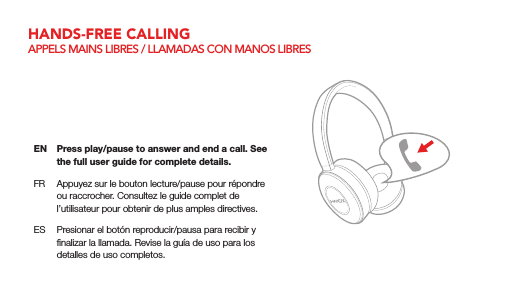
EN  Press play/pause to answer and end a call. See the full user guide for complete details.FR  Appuyez sur le bouton lecture/pause pour répondre ou raccrocher. Consultez le guide complet de l’utilisateur pour obtenir de plus amples directives.ES  Presionar el botón reproducir/pausa para recibir y finalizar la llamada. Revise la guía de uso para los detalles de uso completos.HANDS-FREE CALLINGAPPELS MAINS LIBRES / LLAMADAS CON MANOS LIBRES
QS-HXHP460/HXHP451WGN  ©2017 HMDX All Rights Reserved / Tous droits réservés / Todos derechos reservadosUSAcservice@hmdxaudio.com1.800.753.30008:30am–7:00pm  EST  M–F / L–VCANADAcservice@homedicsgroup.ca1.888.225.73788:30am–5:00pm  EST  M–F / L–VCONTACT US CONTACTEZ-NOUS / COMUNÍCATE CON NOSOTROS
NOTE: This equipment has been tested and found to comply with the limits for a Class B digital device, pursuant to part 15 of the FCC Rules. These limits are designed to provide reasonable protection against harmful interference in a residential installation. This equipment generates uses and can radiate radio frequency energy and, if not installed and used in accordance with the instructions, may cause harmful interference to radio communications. However, there is no guarantee that interference will not occur in a particular installation. If this equipment does cause harmful interference to radio or television reception, which can be determined by turning the equipment off and on, the user is encouraged to try to correct the interference by one or more of the following measures:   - Reorient or relocate the receiving antenna. - Increase the separation between the equipment and receiver. -Connect the equipment into an outlet on a circuit different from that to which the receiver is connected. -Consult the dealer or an experienced radio/TV technician for help  Changes or modifications not expressly approved by the party responsible for compliance  could void the user's authority to operate the equipment.   This device complies with Part 15 of the FCC Rules.  Operation is subject to the following two conditions:  (1) this device may not cause harmful interference, and  (2) this device must accept any interference received,  including interference that may cause undesired operation.
 This device complies with Industry Canada licence-exempt RSS standard(s).   Operation is subject to the following two conditions:   (1)  this device may not cause interference (2)  this  device must  accept any interference, including interference  that may cause undesired operation of the device.              Le  présent appareil  est  conforme  aux CNR d'Industrie  Canada applicables auxappareils  radio exempts de licence. L'exploitation est autorisée aux deux conditions suivantes : (1) l'appareil ne doit pas produire de brouillage, et (2) l'utilisateur de l'appareil doit accepter tout brouillage radioélectrique subi, même si le brouillage est susceptible d'en compromettre lefonctionnement.

Navigation menu