Xi Long Electronics XSJ-87L WIRELESS SMART DOOR/WINDOW SENSOR User Manual of XSJ 87L
Shenzhen Xi Long Electronics Co., Ltd. WIRELESS SMART DOOR/WINDOW SENSOR of XSJ 87L
Users Manual
Wireless Smart Door Sensor
Functions/Features:
Mainly detect open/close states of doors and windows, generally set as a 1st Defense Line or perimeters.
If any doors or windows are opened, it will transmit the alarm signal to notify the alarm host.
Automatically detect the open/close of the doors and windows and send state signal to the host.
Specifications:
Operating power: 23A 12V Battery (Recommended: alkaline battery)
Wireless transmitting: distance: ≥450ft (in open area
Service life: ≤2 years
Alarm distance:
<
4cm.
Installation and Usage:
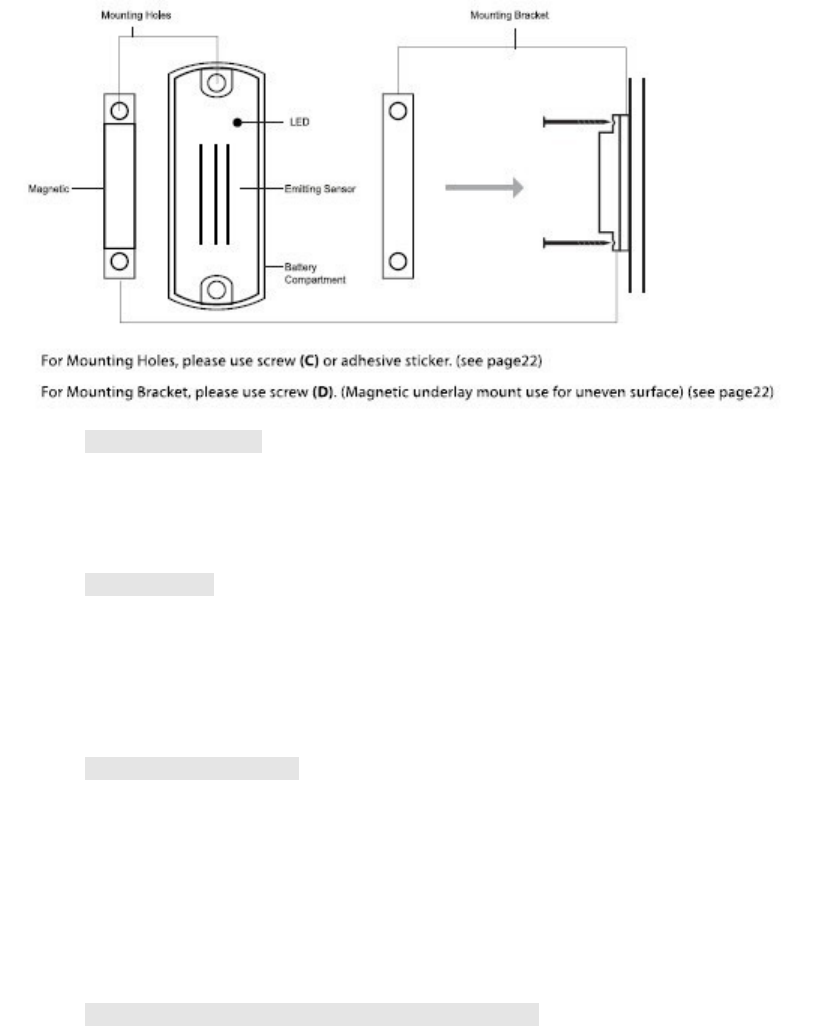
Mount the magnet or smaller piece onto the door in a position of about 5~6ft above the ground to prevent any
child(ren) to pampering. Use the included mounting bracket if the door and the door frame are un-even or not flush.
Mount the emitting or larger piece onto the door frame, ensure the magnet piece and the emitting piece are even or
flush.
The spaces between the two should be less than 10mm in gap.
Replace the batteries if the blue LED light flashes frequently.
Adding and Cancelling Smart Door/Window Sensor
A. Add
Press _Set + Password + ENT _ then.
_70 + ENT + XX + ENT -------The “Learn” light will appear solid red.
Note: The XX indicates group number of the defense zones, including zone 06 through 10.
Press the smart door/window sensor twice consecutively, if you hear “Di----” form the alarm host and
see the “Learn” light flashes five times and off, it indicates successfully added.
B. To Cancel:
Press _Set + Password + ENT _ then.
_71 + ENT + XX + ENT -------The alarm host will beep twice then the “Learn” light will flash once and
then turns off to indicate the doorbell button has been successfully cancelled.
Note: The alarm host can only learn 1 wireless device (Wireless S
mart Door/Window Sensor
) at one
time, a total of 4 wireless Devices (Wireless S
mart Door/Window Sensors
) to a zone/group can be

added. For example, if 4 sensors were to be added to zone/group 01 through zone/group 15, it total 60
sensors in all. If 1 device is removed from a group that has 4 devices, then all 4 devices in the group will
be automatically removed, and each device(s) will have to be added again to the alarm host.
Enabling and Activating Smart Zone Function (After adding smart door/window sensor successfully)
Press _Set + Password + ENT _ then.
_91 + ENT + XX + ENT -------The alarm host will beep twice to indicate the smart zone function has been
enabled.( Note: The XX indicates group number of the defense zones, including zone 06 through 10.)
To activate smart zone function by putting the
magnet (or smaller piece) and the emitting (or larger piece)
together to get closed when the host is in working status.
Note: 1. When arming the host, if the door/window with the smart door/window sensor installed is on, the
LED light of the corresponding zone will appear solid red, at the same time the host will beep
every 2 seconds within 30 seconds.
2. You can arm again to make a force arm.
3. If press “ESC” or wait the host to get out of arm operation automatically in 30 seconds. LED
light turns off to indicate unsuccessful arm.
4. If the smart zone function is not enabled and activated, it can only work as a general
door/window sensor.
FCC Statement
This device complies with Part 15 of the FCC Rules.
Operation is subject to the following two conditions:
(1) This device may not cause harmful interference, and
(2) This device must accept any interference received, including interference that may cause undesired operation.
Note: The manufacturer is not responsible for ANY interference, for example RADIO or TV interference, caused by
unauthorized modifications to this equipment. Such modifications could void the user’s authority to operate the equipment.