Xinwei Electronic Quanzhou HSC926 Bluetooth CAR KIT User Manual

Xinwei Electronic Co., Ltd., Quanzhou Bluetooth CAR KIT Users Manual

User manual

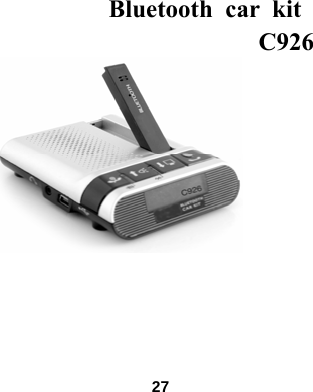
 Bluetooth car kit  C926             27
Content                           Content………………………………………………….27-29 Welcome to use C926……………………………….............30 Bluetooth hands-free car kit illustration……………….....…31 Using guide Introduction………………………………………………..…32 Charging..……………………………....................................33 How to charge……………………………………………..…34 How to turn On/Off…………………………….................…35 Pair the Bluetooth hands-free car kit with Mobile phone...36-39 Pair with additional Bluetooth devices………………………40  28
How to use the car kit..............……………………………41-47 Assemble the backside clip………………….……….....……..48 Fit the car kit to the sun visor……………………………..48-50 Indicator……………………………………………………. .51 Troubleshooting.........……………………………...………52-53 Care and Maintenance.........……………………………......54-55         29
Welcome to use Bluetooth hands-free car kit                                         C926 car kit is specially designed for using in a car which offers safe and convenient way while making or answering a call. C926 is a wireless device that can be also used at home or in the office. the surrounding noise can be reduced while communicating because of high-powered circuit design and free-echo, it makes the voice more clear, loud and vivid. The characteristic appearance and constitution design would not need installing, it lets your hands free and easy to communicate, moreover, it is more safe while you are driving and communicating.   Please read this manual carefully before using, also read the manual of your mobile phone which offers important safe and maintenance information.   30
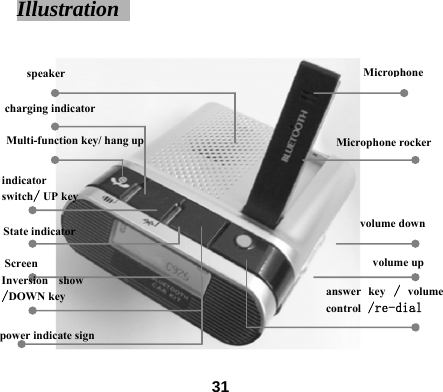
Illustration   Microphone  speaker         Multi-function key/ hang up charging indicator Screen Inversion show/DOWN key power indicate signMicrophone rocker indicator switch/ UP key State indicator volume down volume up answer key / volume control /re-dial  31
Introduction   First time to use 1.For the first time you use the car kit with the mobile phone together, you should make sure:   The car kit has been charged for 4 hours.   The car kit has been turned on.   The function of Bluetooth has been turned on. The car kit has been paired with the mobile phone, (please see the 37th page for reference)   Pairing with the car kit   Once the device has been turned on and in the available range for the mobile phone, it can be connected to the mobile phone automatically after pairing.   32
Charging                                               z When to charge 1.Before using the Bluetooth car kit for the first time, please charge more than 4 hours.   2.While communicating, if you hear the fast warming tone sounds 5 times and repeats every 20 seconds, it means your device need charging.   Note: When the battery is fully charged, it offers:   * Talking time: about 8 hours                 * Standby time: about 200 hours                    33
z How to charge 1.Turn off the power 2.When you are in the car, you can use the original USB car charger to charge the device.   *.Charge it until the red indicator of the car kit goes out. *.Fully charged will cost about 3-4 hours.   Tip: Without using the device in a car, you can charge the device with these two ways below:   1. Use the suitable wall charger to charge the device (Standard DC5V/500mA charger which sells in the market) 2. Use the original USB cable to charge it by computer. Note:①.Do not dispose of the battery into fire in case of explosion.    ②.Please charge the device at proper time when you haven’t used it for a long time, in case that the discharge would shorten the using time of the battery.    34
How to turn on/off the Bluetooth hands-free car kit   Turn on the car kit   Hold the Multi-function key for about 5 seconds, the blue indicator will flash rapidly for three times , when you hear “Di” from the speaker, the screen will be bright and shows “C926”,it means the power has been turned on, it will come into the pairing mode and search the paired device.  Turn off the car kit Hold the Multi-function key until the screen shows “GOOD BYE”, then release it, the background light will go out, it shows that the power has been turned off.    35
Pair with the mobile phone       Note:You should pair the Bluetooth hands-free car kit with the mobile phone before using.   (“Pairing” creates a link between Bluetooth devices, and allows the mobile phone to store the car kit’s unique ID. When your car kit and Mobile phone are paired, the car kit automatically connects to your phone.)      36
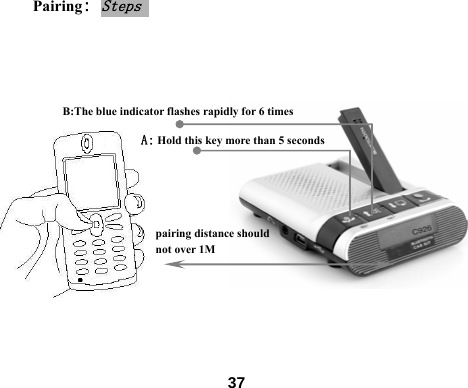
Pairing: Steps     B:The blue indicator flashes rapidly for 6 times A: Hold this key more than 5 seconds    pairing distance should not over 1M                            37
Pair with one mobile phone: 1、Place the car kit and the mobile phone together, when the car kit from off state, hold the Multi-function key until the blue indicator keep showing and after hear a “di” sound from the speaker , the car kit will come into the pair mode.   2、Startup the searching function of your mobile phone, about this function, please see the user manual of Mobile phone for reference, after searching, the mobile phone shows all the devices that have been searched.       3、Select the logo C926 from the devices list and confirm following the on screen prompts. 4,When prompted by the phone, enter the password 0000 and confirm to pair the car kit with the mobile phone. The device ID will be stored in the phone’s memory. While the car kit shows “Pair OK” means they have been paired successfully.   38
Pair with two mobile phones: This device can be paired with two mobile phones, the one which incomes the call first, it will use the car kit first. The second mobile phone can be paired with the same way as the first one, just repeat the steps like the pairing way of the first one is available.   Import note:1. After pairing successfully, the indicator flashes every 3 seconds. If it fails, please pair again.                              39
Pair with additional Bluetooth wireless device   1. The car kit can store pairing information for up to eight devices through Bluetooth technology. Devices are stored in a “Paired Device List” in order. When an attempt to pair with more than eight devices, the initial paired device will be removed from the list.  2. Any of the eight paired devices can initiate a connection to the car kit.    3. The car kit will only automatically initiate a connection with the last two paired devices. If you want to connect the car kit with other device in the paired device list. You must initiate the connection from that device. Whichever of the eight devices initiates a connection to the car kit lately, that device then becomes the “last connected” device.        40
Using the Bluetooth car kit     Note:If you haven’t paired your car kit with the mobile phone within 10 minutes, your car kit will be turned off automatically to save power.    Making a call                                               You can use the mobile phone or the voice to dial the number,then use the Bluetooth hands-free car kit to re-dial easily.   Tip:After pairing with two mobile phones, when one mobile phone is working, the other one attempt to join the operation(such as incoming call, press keys, answer a call ),The car kit will disconnect with the second one, and the screen shows “Lost Connect”, while the previous mobile phone hangs up,The disconnected mobile phone will be connected automatically.     41
Use the mobile phone to make a call     You can dial a number by the keyboard or the address list of the mobile phone.  Voice dialing   Note:Please startup voice dialing function and record voice order before activating it, you can view the using guide of the mobile phone for reference.  1.Press the volume control key, the screen will show “Voice Dial”. 2.After hearing the sound, activate voice dialing by normal way.       42
Re-dial   1. Press keys of the mobile phone or activate voice dialing, then you can use the car kit to re-dial easily.   2.Hold the re-dial key for 2 seconds until the screen shows “Redial Last”, then you can re-dial the number.    Answer or reject a call     1.Press the answer key to pick up a call after it rings. 2.Press the Multi-function key to reject a call after it rings.    43
Turn on/off the microphone   When you are on a call, lay down the microphone rocker, then the screen shows “MIC MUTE” means the microphone has been turned off. At this moment, the other person can not hear your voice. If you want to come back to the communication state, open up the microphone rocker, then the screen shows “MIC RELEASE” means you can go on to communicate, and the other person can hear you.  Over the conversation   Just press the End key to over the conversation.   Adjust the volume  Press the Volume control key to increase or decrease volume during communication.   44
Check the power At the top right corner, there is a prompt sign shows battery power, when it shows no power, please charge in time, or the device will be turned off automatically.   Drive at night   You’d better turn off the state indicator in case the flashing light affect your attention while driving at night.  Press the indicator switch key to change the display state and turn on/off the indicator. When the screen shows ”LED DISABLE” means the indicator is turned off, When the screen shows ”LED ENABLE” means the indicator is turned on. Inversion display function   The display direction is different as different placement, according to your requirement, you can press the inversion display key to change the visual angle, 180 degree will be overturned.       45
Check the telephone number    Note:This function is up to the relative function of your mobile phone, some mobile phones do not support this function, it means they are not compatible with the car kit, but not that the device doesn’t work. 1:Check the answered call After connecting the mobile phone with the car kit ,Press the Multi-function key and then press the UP or DOWN key ,until the screen shows “Received Num”, press the Multi-function key again, the screen shows the last answered number, you can search all the answered call by pressing UP or Down key.   2:Check the dialed number After connecting the mobile phone with the car kit ,Press the Multi-function key and then press the UP or DOWN key ,until the screen shows“Dialed Num”, press the Multi-function key again, the screen shows the last dialed number, you can search all the dialed call by pressing UP or Down key.    46
3:Check the missed number After connecting the mobile phone with the car kit ,Press the Multi-function key and then press the UP or DOWN key , until the screen shows“Missed Num”, press the Multi-function key again, the screen shows the last missed number. 4:Re-dial the checked telephone number   You can press the answer key to re-dial the number which has been checked by these three ways above. 5:Exit number checking state   After connecting the mobile phone with the car kit ,Press the Multi-function key 3 times then the screen shows “Quit” , it exit number checking state after several seconds.        47
Assemble the backside clip   Way 1:         Way 2:    Fit the Bluetooth hands-free car kit to the sun visor    48
You can fit the car kit to the front or side of the sun visor, but you should make sure the microphone towards to your face. Firstly, you can clip the car kit to sun visor firmly, then unfold the microphone rocker until the screen shows  “MIC RELEASE”. Pay attention to the position of the screen and the sight for the driver, it is important for checking the incoming call.       Note:Make sure the car kit has been fitted to the sun visor correctly to avoid affect the driver’s sight. For the suggestion of emplace the car kit, please contact with the car manufacturer.   Steps  1. Slip the clip to the slot of the bottom housing as the way mentioned above if you need.   2. Clip the car kit to the sun visor over your head. 3. Make the microphone of the car kit towards to the direction of your mouth.  49
Note:If the disconnection always happens (for example: out of service), the car kit will try to connect again, please do the pair operation if necessary.   Using guide for earphone-line                    Sometimes you want to keep your conversation secret, you can use the original afforded outer earphone, when the earphone is plugged in, the hands-free speaker mutes automatically.          50
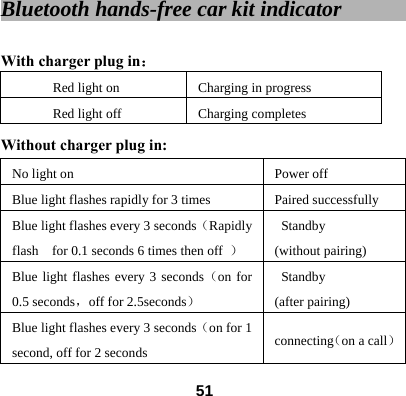
Bluetooth hands-free car kit indicator              With charger plug in: Red light on Charging in progress Red light off Charging completes Without charger plug in:   No light on Power off Blue light flashes rapidly for 3 times    Paired successfully Blue light flashes every 3 seconds(Rapidly flash    for 0.1 seconds 6 times then off  ) Standby (without pairing) Blue light flashes every 3 seconds(on for 0.5 seconds,off for 2.5seconds) Standby (after pairing) Blue light flashes every 3 seconds(on for 1 second, off for 2 seconds  connecting(on a call)  51
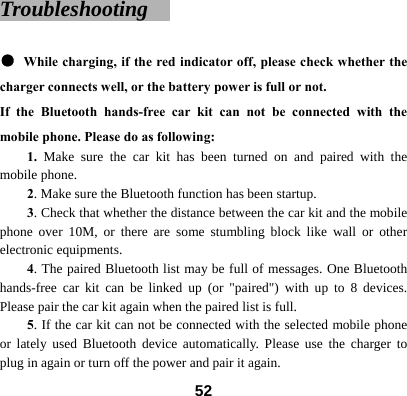
Troubleshooting    ● While charging, if the red indicator off, please check whether the charger connects well, or the battery power is full or not. If the Bluetooth hands-free car kit can not be connected with the mobile phone. Please do as following:   1. Make sure the car kit has been turned on and paired with the mobile phone.   2. Make sure the Bluetooth function has been startup. 3. Check that whether the distance between the car kit and the mobile phone over 10M, or there are some stumbling block like wall or other electronic equipments. 4. The paired Bluetooth list may be full of messages. One Bluetooth hands-free car kit can be linked up (or "paired") with up to 8 devices. Please pair the car kit again when the paired list is full. 5. If the car kit can not be connected with the selected mobile phone or lately used Bluetooth device automatically. Please use the charger to plug in again or turn off the power and pair it again.    52
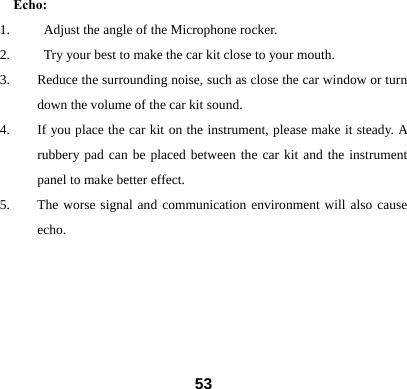
Echo: 1.     Adjust the angle of the Microphone rocker. 2.          Try your best to make the car kit close to your mouth. 3. Reduce the surrounding noise, such as close the car window or turn down the volume of the car kit sound. 4. If you place the car kit on the instrument, please make it steady. A rubbery pad can be placed between the car kit and the instrument panel to make better effect.   5. The worse signal and communication environment will also cause echo.        53
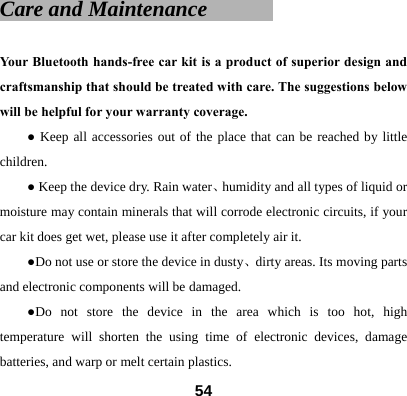
Care and Maintenance        Your Bluetooth hands-free car kit is a product of superior design and craftsmanship that should be treated with care. The suggestions below will be helpful for your warranty coverage.   ● Keep all accessories out of the place that can be reached by little children. ● Keep the device dry. Rain water、humidity and all types of liquid or moisture may contain minerals that will corrode electronic circuits, if your car kit does get wet, please use it after completely air it. ●Do not use or store the device in dusty、dirty areas. Its moving parts and electronic components will be damaged. ●Do not store the device in the area which is too hot, high temperature will shorten the using time of electronic devices, damage batteries, and warp or melt certain plastics.    54
●Do not store the device in the area which is too cold, when the device returns to its normal temperature, moisture will be formed inside the device and damage the electronic circuit board. ●Do not attempt to drop  、knock or shake the device, Rough handling will damage the inside circuit board and the precise structure. ●Do not use the harsh chemicals、cleaning solvents or strong detergents to clean the device.   ●Do not paint the device, painting may clog the moving parts and prevent proper operation.    All the above suggestions are also suit for your Bluetooth hands-free car kit battery、charger, or any spare part. If any device doesn’t work properly, take it to the nearest authorized service institution for service.   55
Warning:  This device complies with part 15 of the FCC Rules. Operation is subject   to the following two conditions:   (1) This device may not cause harmful interference, and (2) this device must accept any interference received, including interference that may cause undesired operation.  Changes or modifications to this unit not expressly approved by the   party responsible for compliance will void the user’s authority to   operate the equipment. Any change to the equipment will void FCC grant.  This equipment has been tested and found to comply with the limits   for a Class B digital device,pursuant to part 15 of the FCC Rules. These   limits are designed to provide reasonable protection against harmful   interference in a residential installation. This equipment generates,   uses and can radiate radio frequency energy and, if not installed used in accordance with the instructions, may cause harmful interference     to radio communications. However, there is no guarantee that   interference will not occur in a particular installation. If this equipment   does cause harmful interference to radio or television reception, which     can be determined by turning the equipment off and on, the user is   encouraged to try to correct the interference by one or more of the   following measures: --Reorient or relocate the receiving antenna. --Increase the separation between the equipment and receiver. --Connect the equipment into an outlet on a circuit different from that to which the receiver is connected. --Consult the dealer or an experienced radio/TV technician for help.  The equipment compliance with FCC radiation exposure limit set forth for uncontrolled Environment

Navigation menu