Xinwei Electronic Quanzhou NF173 Transceiver User Manual 173 mdi

Xinwei Electronic Co., Ltd., Quanzhou Transceiver 173 mdi

User manual

Introduction………………………………1 Unpacking and check devices……………2 Accessory List………………………………2 Main Features………………………3 Technical information………………………4 Identification…………………………………6 Preparation for Using………………………7 PC Software Programming Setting……12 Operation Guide……………………………18 Maintenance…………………………21 Troubleshooting……………………………22 Appendix: CTCSS QT and DCS DQT
Chart ………24
 - 1 -  Introduction Thanks for purchasing NANFONE NF-173. Please read this manual carefully to learn its functions and operations before using. With mini compact size, stable performance, and easy-to-use feature, transceiver NF-370 is developed for wide using. It offers you a normal communication when you are in the rural area, forest zone, pasturing area or sea area. The fine appearance of NF-370 meets your needs of personality.
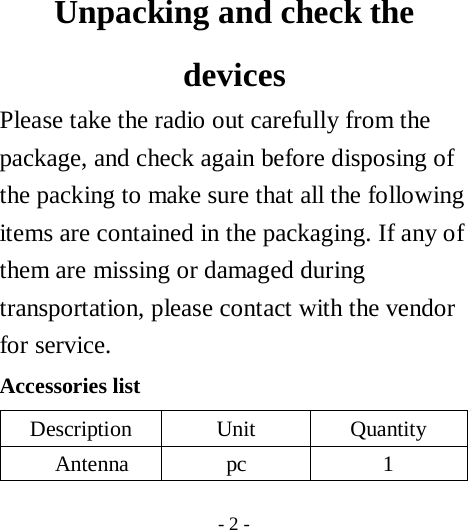
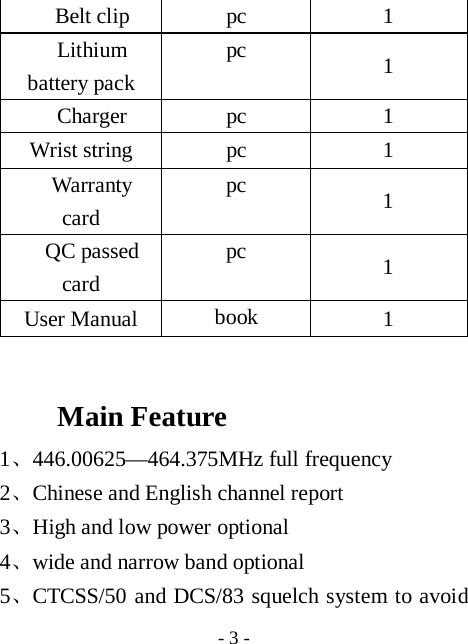
 - 2 -    Unpacking and check the devices  Please take the radio out carefully from the package, and check again before disposing of the packing to make sure that all the following items are contained in the packaging. If any of them are missing or damaged during transportation, please contact with the vendor for service.   Accessories list Description Unit  Quantity Antenna pc  1
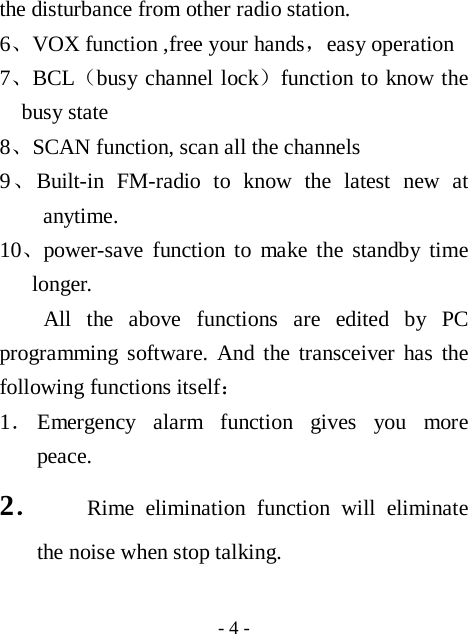
 - 3 - Belt clip  pc  1 Lithium battery pack pc  1 Charger pc  1 Wrist string  pc  1 Warranty card pc  1 QC passed card pc  1 User Manual  book  1  Main Feature  1、446.00625—464.375MHz full frequency 2、Chinese and English channel report 3、High and low power optional 4、wide and narrow band optional 5、CTCSS/50 and DCS/83 squelch system to avoid
 - 4 - the disturbance from other radio station. 6、VOX function ,free your hands,easy operation 7、BCL(busy channel lock)function to know the busy state 8、SCAN function, scan all the channels 9、Built-in FM-radio to know the latest new at anytime. 10、power-save function to make the standby time longer. All the above functions are edited by PC programming software. And the transceiver has the following functions itself: 1. Emergency alarm function gives you more peace. 2. Rime elimination function will eliminate the noise when stop talking.
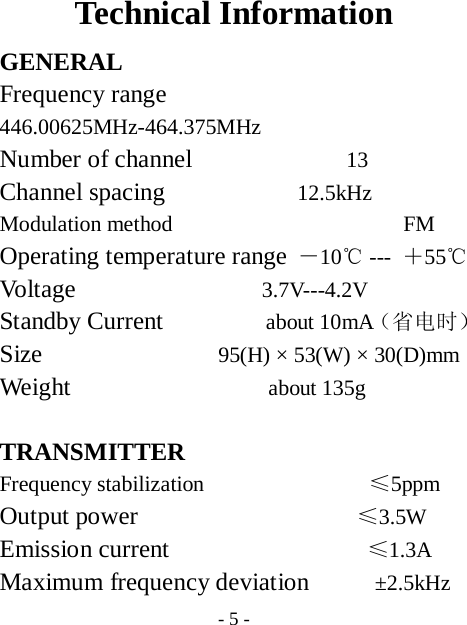
 - 5 - Technical Information GENERAL Frequency range        446.00625MHz-464.375MHz  Number of channel              13 Channel spacing            12.5kHz  Modulation method                     FM Operating temperature range -10℃ ---  +55℃ Volt age                 3.7V---4.2V Standby Current          about 10mA(省电时) Size                95(H) × 53(W) × 30(D)mm Weight                  about 135g  TRANSMITTER Frequency stabilization               ≤5ppm Output power                    ≤3.5W Emission current                  ≤1.3A  Maximum frequency deviation      ±2.5kHz
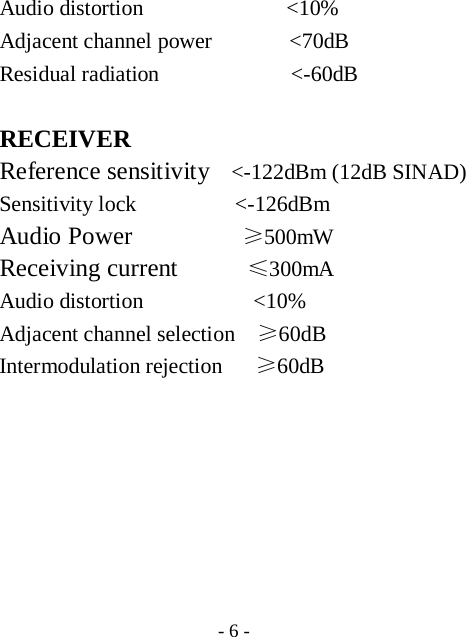
 - 6 - Audio distortion             <10% Adjacent channel power       <70dB Residual radiation            <-60dB  RECEIVER Reference sensitivity    <-122dBm (12dB SINAD) Sensitivity lock         <-126dBm Audio Power          ≥500mW Receiving current       ≤300mA Audio distortion          <10% Adjacent channel selection    ≥60dB Intermodulation rejection   ≥60dB
 - 7 -  Identification
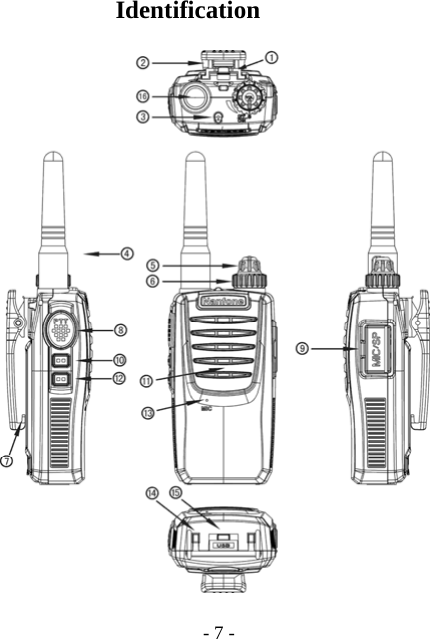
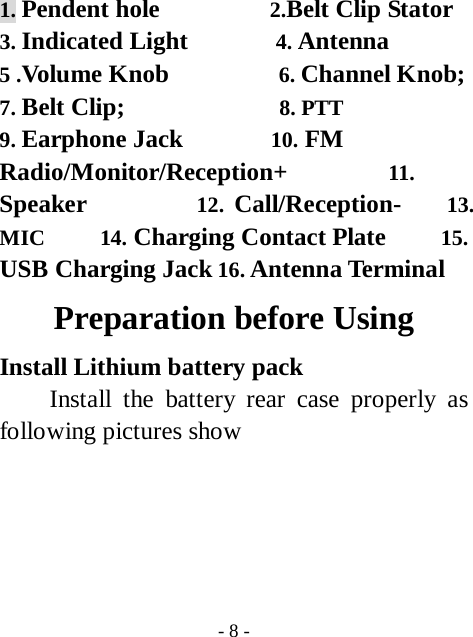
 - 8 - 1. Pendent hole          2.Belt Clip Stator 3. Indicated Light        4. Antenna  5 .Volume Knob          6. Channel Knob;  7. Belt Clip;              8. PTT           9. Earphone Jack        10. FM Radio/Monitor/Reception+         11. Speaker          12. Call/Reception-    13. MIC     14. Charging Contact Plate     15. USB Charging Jack 16. Antenna Terminal Preparation before Using Install Lithium battery pack   Install the battery rear case properly as following pictures show
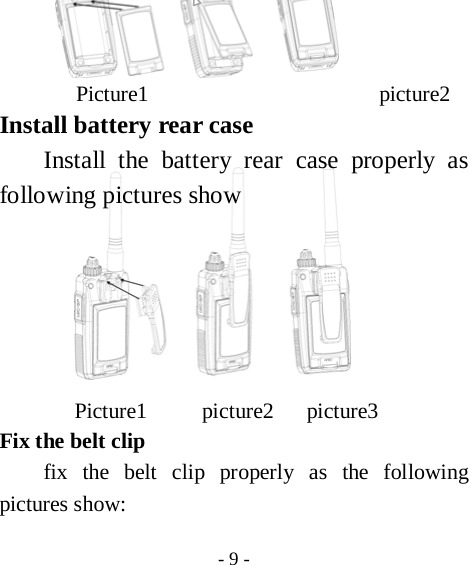
 - 9 -      Picture1                     picture2 Install battery rear case Install the battery rear case properly as following pictures show                                              Picture1     picture2   picture3 Fix the belt clip   fix the belt clip properly as the following pictures show:
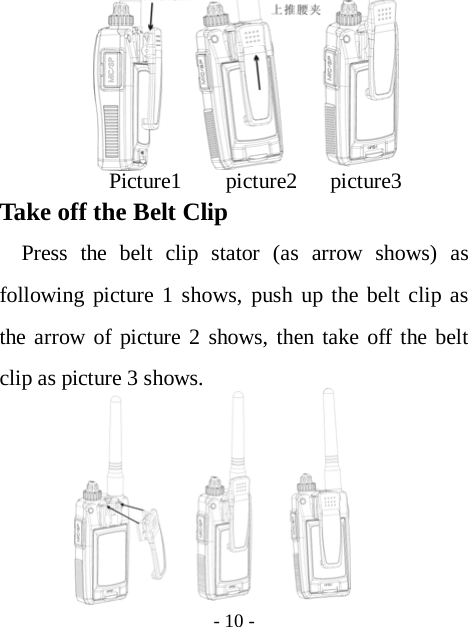
 - 10 -                                                                                              Picture1    picture2   picture3 Take off the Belt Clip   Press the belt clip stator (as arrow shows) as following picture 1 shows, push up the belt clip as the arrow of picture 2 shows, then take off the belt clip as picture 3 shows.
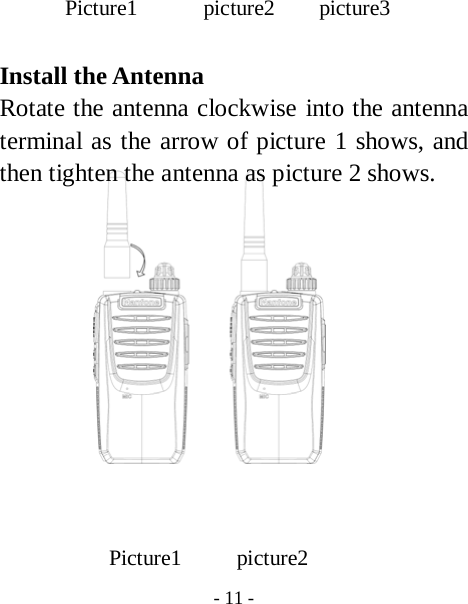
 - 11 -  Picture1      picture2    picture3  Install the Antenna Rotate the antenna clockwise into the antenna terminal as the arrow of picture 1 shows, and then tighten the antenna as picture 2 shows.              Picture1     picture2
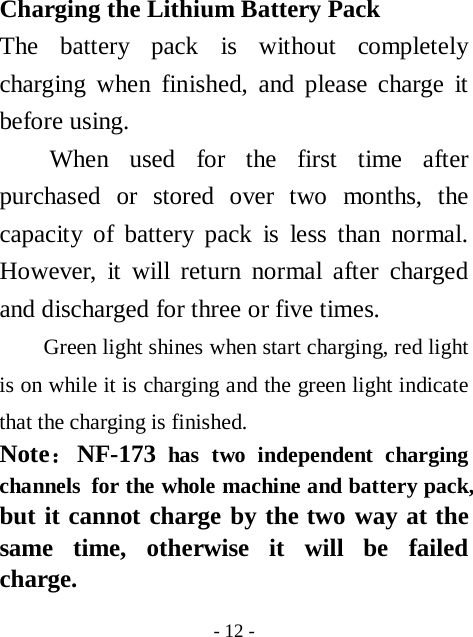
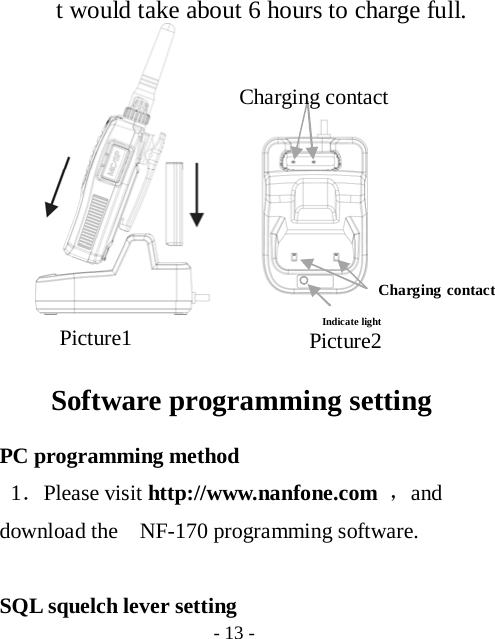
 - 12 - Charging the Lithium Battery Pack The battery pack is without completely charging when finished, and please charge it before using. When used for the first time after purchased or stored over two months, the capacity of battery pack is less than normal. However, it will return normal after charged and discharged for three or five times. Green light shines when start charging, red light is on while it is charging and the green light indicate that the charging is finished.   Note:NF-173 has two independent charging channels  for the whole machine and battery pack, but it cannot charge by the two way at the same time, otherwise it will be failed charge.
 - 13 -   t would take about 6 hours to charge full.                                                                 Software programming setting PC programming method 1.Please visit http://www.nanfone.com ,and download the    NF-170 programming software.  SQL squelch lever setting Picture2 Picture1 Indicate light Charging contact Charging contact
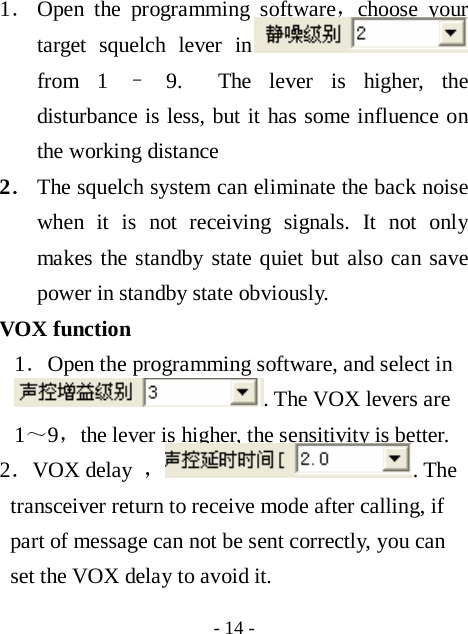
 - 14 - 1. Open the programming software,choose your target squelch lever in  from 1 – 9.  The lever is higher, the disturbance is less, but it has some influence on the working distance 2. The squelch system can eliminate the back noise when it is not receiving signals. It not only makes the standby state quiet but also can save power in standby state obviously. VOX function 1.Open the programming software, and select in . The VOX levers are 1~9,the lever is higher, the sensitivity is better. 2.VOX delay  ,. The transceiver return to receive mode after calling, if part of message can not be sent correctly, you can set the VOX delay to avoid it.
 - 15 - Time-out timer  1. Open the programming software, and choose the target time in . The aim of the time-out timer is to avoid any caller occupying the frequency too long and damages by long- time launch.  2.You can set the time-out timer by programming software from”closed,30s,60s,90s,120s,150s,180s,...600s”. If you continually launch longer than the set time, the transceiver will stop launching and “bibi: sound appeared. You can lose the 【PTT】 and hold it again to resume.  Channel report   Open the programming software to chose the sound language in . The selections
 - 16 - are: closed, Chinese and English. If you choose the Chinese/ English, to turn the channel snob when the transceiver is power-on, it will report the current channel; if you choose the closed, the transceiver won’t report the channel. Scan  The distributor and manufacturer can set the scan function by PC software, the option on the software is “Scan”. When scan function is ON, there’re scan function options behind each channel number. When the scan function is set to be ON, the channel can be scanned automatically in standby state, and you can talk on this channel while there’s signal. Rotate the channel selector to channel 16 to activate the scan function, and then those channels which set automatic scan will be
 - 17 - activated by itself. For instance, if the scan function of channel 3,5,7 was activated by PC software programming, when you rotate the channel selector to channel 16, the transceiver will scan channel 3,5,7,16, when receive signal from one of these four channels, it will stop scanning, and talk on this channel. It’s normal that it will be delayed when you open the speaker after activating the scan function, the delay time is related to the number of channels which set scan function.   1. It can be set in , after setting, it can monitor the prior channel even the transceiver is not using the prior channel. When there is signal in prior channel, it will turn to the prior
 - 18 - channel at once. Busy channel lock   1.Open the programming software to choose the function in  There are close, CTCSS and carrier as choices. Only when the channel has set the CTCSS, it allows choosing CTCSS busy channel lock 2.CTCSS busy lock: it won’t stop transmitting when there is SQ and no QT/DQT.    When receive both SQ and QT/DQT, it will stop transmitting. Carrier busy lock: It stop transmitting when receiving SQ. Power-save function 1.Open the software to select if open the power-save function in . when choosing the “√”,it means open the function。
 - 19 - FM-radio control Open the software to select if using the FM-radio function in . when it choose “ √ ”,  it means open the function. FM-radio automatically returns when receiving signal 1.Open the software to select if use the function in . Choosing “√”means open the function. The FM-radio automatically exit when receiving signal if don’t do any choice. High and low power selection 1.Open the programming software and select the “transmitting power to choose the power which is suitable for your using channel. Wide and narrow band selection 1 Open the programming software and click
 - 20 - “wide/narrow” to choose the suitable band for the current channel. CTCSS QT/ DCS DQT 1.Open the programming software,click the “receive dicate” and “transmit dicate” to choose the CTCSS QT/ DCS DQT for the current channel or close 2.If some channel has set the CTCSS/DCS signal, it can open the squelch only when using the same CTCSS or DCS signals. In the same way,it can receive your signal only when the QT/DQT signal mode is the same to yours. If people use different QT/DQT but the same channel to call you, the squelch cannot be open, only the green light to indicate.
 - 21 -  Operation Guide Transmit  1.Hold  【PTT】after the red light is on to talk and lose the button to stop. Monitor  1. Short-press  【Radio/Monitor/Reception+】 按to open noise in force and press it again to exit. Audio call   1.Press  【PTT】to transmit and then 【Radio/Monitor/Reception+】to open audio call function(1750KHz),the transceiver emits 1750KHzaudio frequency,lose【Radio/Monitor/Reception+】to exit. FM-radio function operation 1.Press 【Radio/Monitor/Reception+】功in 2s
 - 22 - when heard ”di” to open FM-radio.    Press 【Radio/Monitor/Reception+】or【Call/Reception-  】  to scan automatically, and it will stop when coming to the radio which has signals. For other radio station, please press【Radio/Monitor/Reception+】or【Call/Reception-】。 Emergency alarm   1. press【Call/Reception-】in 2s to open the emergency alarm function. Here the red light of the station is on and the acoustic alarm is heard and sent to the same frequency transceiver; Press【PTT】to stop the function. The transceiver will remain at channel 01 when you operate the Emergency Call Function, until rotate the channel selector to your desired channel. The green indicated light will flash if you didn’t rotate
 - 23 - the channel selector after operating the Emergency Call Function.  Low Power Detection 1. The device works properly, when the voltage is higher than 3.6V; 2. When the voltage is among 3.4V to 3.5V, the transceiver receives normally but with alerts and “dididi” indication every 20secs, and launches normally, but the light flashes red while launching.  3. When the voltage is below 3.3V, then the transceiver will power off by itself. Wired Cloning (Mutual clone between two transceivers) 1. Well connected the transmission lines to the both transceivers, and then power on the subsidiary transceiver.
 - 24 - 2. Rotate the channel selector on the base transceiver to channel 8, then hold and Press “Radio/Monitor/Reception+” key to power on, (3 seconds later) until the   orange light (red light and yellow light flash simultaneously) flashes which indicates the base transceiver is in cloning state, then release the button 3. When the orange light on the base transceiver flashes, press the PTT key, the red light on base transceiver flashes, and the yellow light on subsidiary transceiver flashes, which indicates the base transceiver is in cloning state. The mutual clone is successful when the light on base transceiver flashes orange again。 4. If the indicator lights of both two transceivers flashes abnormally in the
 - 25 - process of data transmit, it means replication fail. In that case, please check and make sure the transmission line is well connected. And please press the PTT button again to resume cloning when the indicator light of the base transceiver shines orange。 5. If need to clone with more than one transceiver, please turn off the subsidiary device after cloning finished and then pull out the transmission cable. And then clone to next transceiver following steps b above。 6. Please reboot the transceiver to make it work properly after cloning。 Maintenance  Transceiver NF-173 you purchased is an
 - 26 - exactitude design electronic products and please use it carefully. Following maintenance ways may help extend its lifetime.  1、lease don’t try to disassemble the transceiver because non-technicians’ processing may cause damage to the device. 2、Don’t use or charge the transceiver in explosive condition(The air contains a lot of fine sand, dust, and a place where a large number of chemicals)  3、Turn off the transceiver when you are in gas station. 4、Please don’t put the transceiver in sun or hot place for long time, because the high temperature will shorten use life of
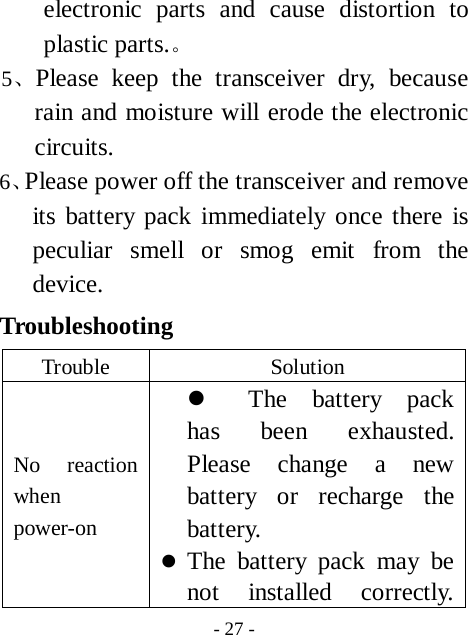
 - 27 - electronic parts and cause distortion to plastic parts.。 5、Please keep the transceiver dry, because rain and moisture will erode the electronic circuits. 6、Please power off the transceiver and remove its battery pack immediately once there is peculiar smell or smog emit from the device. Troubleshooting  Trouble Solution No reaction when power-on z The battery pack has been exhausted. Please change a new battery or recharge the battery. z The battery pack may be not installed correctly.
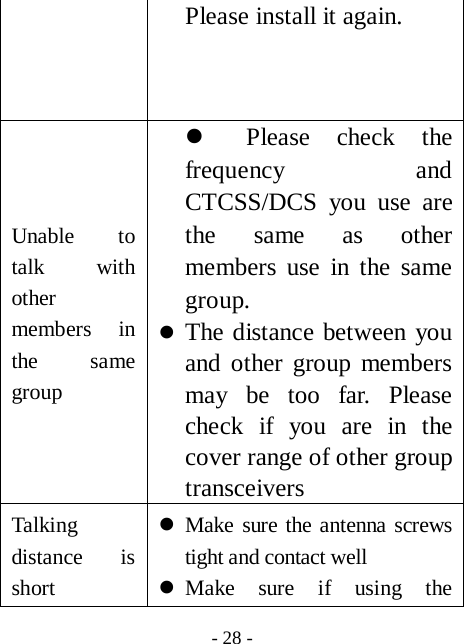
 - 28 - Please install it again. Unable to talk with other members in the same group z Please check the frequency and CTCSS/DCS you use are the same as other members use in the same group. z The distance between you and other group members may be too far. Please check if you are in the cover range of other group transceivers Talking distance is short      z Make sure the antenna screws tight and contact well z Make sure if using the
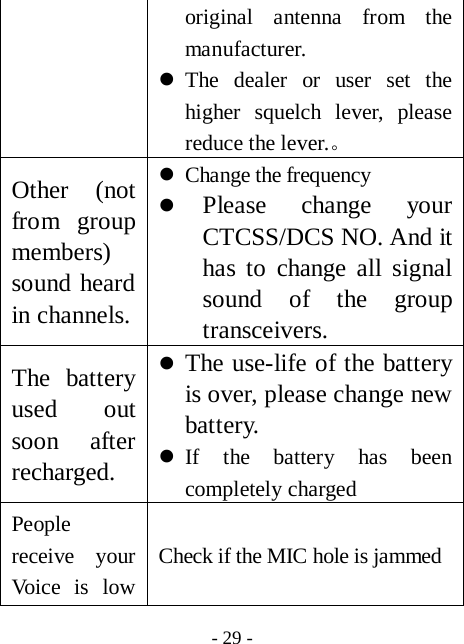
 - 29 - original antenna from the manufacturer. z The dealer or user set the higher squelch lever, please reduce the lever.。    Other (not from group members) sound heard in channels. z Change the frequency z Please change your CTCSS/DCS NO. And it has to change all signal sound of the group transceivers. The battery used out soon after recharged. z The use-life of the battery is over, please change new battery. z If the battery has been completely charged People receive your Voice is low Check if the MIC hole is jammed
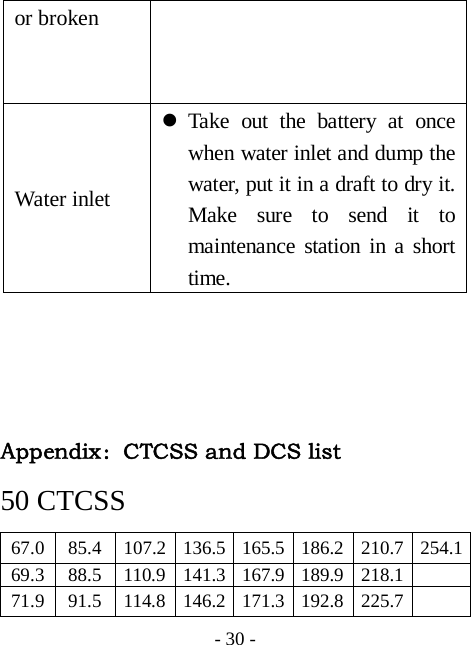
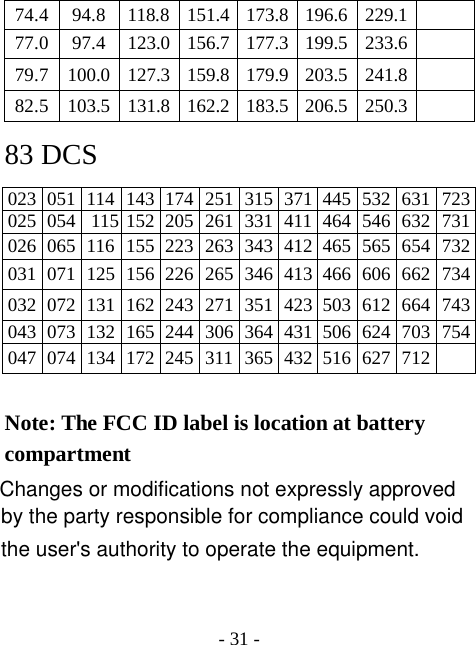
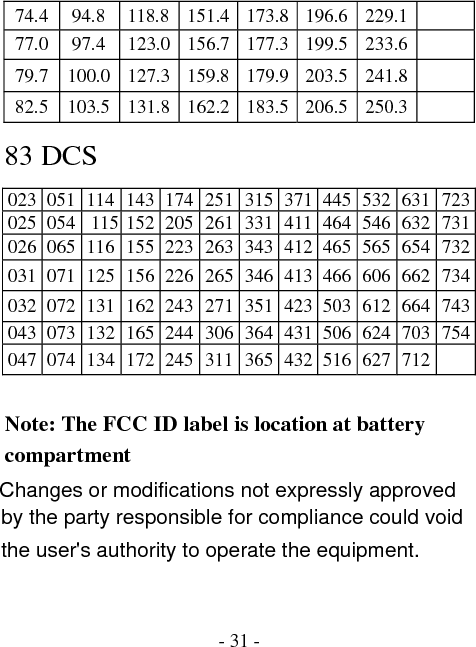
 - 30 - or broken Water inlet z Take out the battery at once when water inlet and dump the water, put it in a draft to dry it. Make sure to send it to maintenance station in a short time.      Appendix:CTCSS and DCS list  50 CTCSS 67.0  85.4  107.2 136.5 165.5 186.2 210.7 254.169.3  88.5  110.9 141.3 167.9 189.9 218.1   71.9  91.5  114.8 146.2 171.3 192.8 225.7
 - 31 - 74.4  94.8  118.8 151.4 173.8 196.6 229.1   77.0  97.4  123.0 156.7 177.3 199.5 233.6   79.7  100.0 127.3 159.8 179.9 203.5 241.8   82.5  103.5 131.8 162.2 183.5 206.5 250.3   83 DCS 023 051 114 143 174 251 315 371 445 532 631 723025 054  115 152 205 261 331 411 464 546 632 731026 065 116 155 223 263 343 412 465 565 654 732031 071 125 156 226 265 346 413 466 606 662 734032 072 131 162 243 271 351 423 503 612 664 743043 073 132 165 244 306 364 431 506 624 703 754047 074 134 172 245 311 365 432 516 627 712    Note: The FCC ID label is location at battery compartment Changes or modifications not expressly approved by the party responsible for compliance could void the user's authority to operate the equipment.
This device complies with Part 15 of the FCC rules. Operation is subject to the following two conditions: (1) This device may not cause harmful interference, and (2) this device must except any interference received,    including interference that may cause undesired operation.
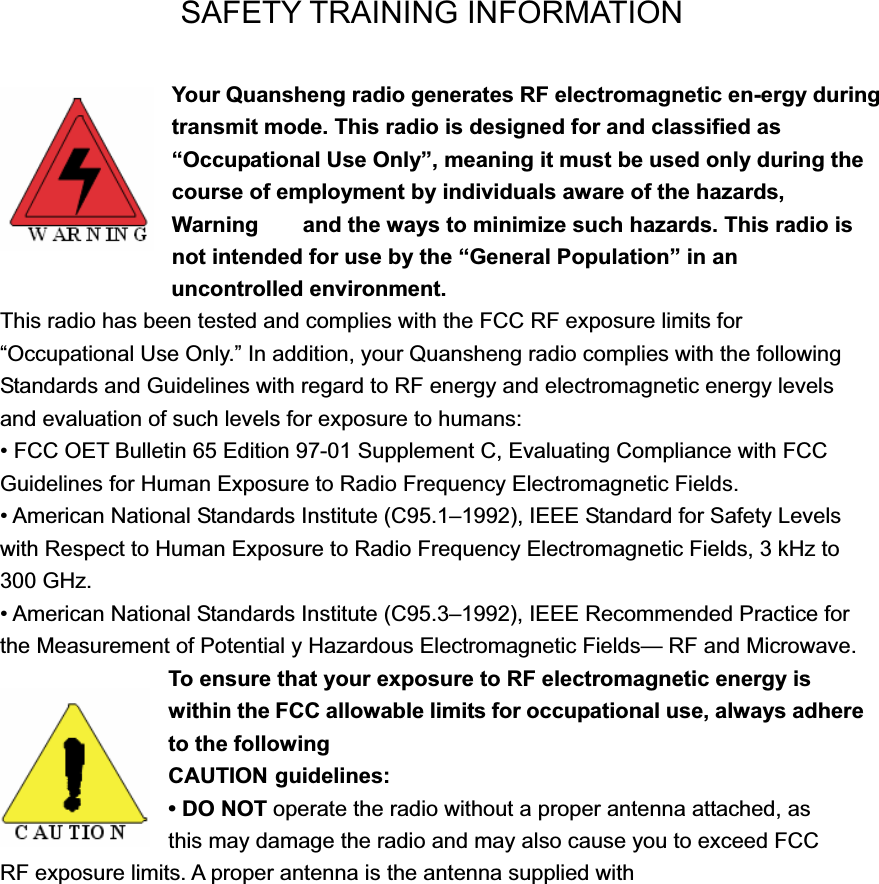
SAFETY TRAINING INFORMATION Your Quansheng radio generates RF electromagnetic en-ergy during transmit mode. This radio is designed for and classified as “Occupational Use Only”, meaning it must be used only during the course of employment by individuals aware of the hazards, Warning    and the ways to minimize such hazards. This radio is not intended for use by the “General Population” in an                    uncontrolled environment. This radio has been tested and complies with the FCC RF exposure limits for “Occupational Use Only.” In addition, your Quansheng radio complies with the following Standards and Guidelines with regard to RF energy and electromagnetic energy levels and evaluation of such levels for exposure to humans: • FCC OET Bulletin 65 Edition 97-01 Supplement C, Evaluating Compliance with FCC Guidelines for Human Exposure to Radio Frequency Electromagnetic Fields. • American National Standards Institute (C95.1–1992), IEEE Standard for Safety Levels with Respect to Human Exposure to Radio Frequency Electromagnetic Fields, 3 kHz to 300 GHz. • American National Standards Institute (C95.3–1992), IEEE Recommended Practice for the Measurement of Potential y Hazardous Electromagnetic Fields— RF and Microwave. To ensure that your exposure to RF electromagnetic energy is within the FCC allowable limits for occupational use, always adhere to the following CAUTION guidelines: • DO NOT operate the radio without a proper antenna attached, as   this may damage the radio and may also cause you to exceed FCC   RF exposure limits. A proper antenna is the antenna supplied with
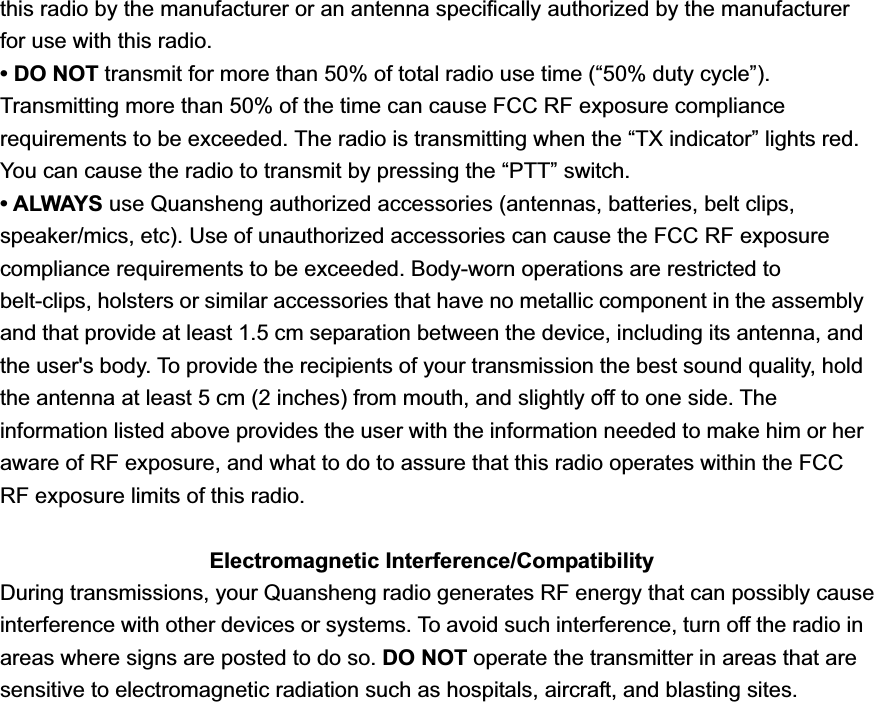
this radio by the manufacturer or an antenna specifically authorized by the manufacturer for use with this radio. • DO NOT transmit for more than 50% of total radio use time (“50% duty cycle”). Transmitting more than 50% of the time can cause FCC RF exposure compliance requirements to be exceeded. The radio is transmitting when the “TX indicator” lights red. You can cause the radio to transmit by pressing the “PTT” switch. • ALWAYS use Quansheng authorized accessories (antennas, batteries, belt clips, speaker/mics, etc). Use of unauthorized accessories can cause the FCC RF exposure compliance requirements to be exceeded. Body-worn operations are restricted to belt-clips, holsters or similar accessories that have no metallic component in the assembly and that provide at least 1.5 cm separation between the device, including its antenna, and the user's body. To provide the recipients of your transmission the best sound quality, hold the antenna at least 5 cm (2 inches) from mouth, and slightly off to one side. The information listed above provides the user with the information needed to make him or her aware of RF exposure, and what to do to assure that this radio operates within the FCC RF exposure limits of this radio. Electromagnetic Interference/Compatibility During transmissions, your Quansheng radio generates RF energy that can possibly cause interference with other devices or systems. To avoid such interference, turn off the radio in areas where signs are posted to do so. DO NOT operate the transmitter in areas that are   sensitive to electromagnetic radiation such as hospitals, aircraft, and blasting sites.
FOREWORDThank you for purchasing the TG-UV transceiver. READ ALL INSTRUCTIONS carefully and completely before using the transceiver. SAVE THIS INSTRUCTION MANUAL–This instruction manual contains important operating instructions for the transceiver. INSTALLATION NOTES • Body-worn operations are restricted to belt-clips, holsters or similar accessories that have no metallic component in the assembly and that provide at least 1.5 cm separation between the device, including its antenna, and the user's body • If you wear a portable two-way radio on your body, ensure that the antenna is at least 2.5 centimeters (1 in.) from your body when transmitting. IMPORTANTRF CAUTION! NEVER hold the transceiver so that the antenna is very close to, or touching exposed parts of the body, especially the face or eyes, while transmitting. The transceiver will perform best if the microphone is 2 to 4 in. (5 to 10 cm) away from the lips and the transceiver is vertical. RF CAUTION! NEVER operate the transceiver with a headset or other audio accessories at high volume levels. RF CAUTION! NEVER short the terminals of the battery pack. DO NOT push the PTT when not actually desiring to transmit. AVOID using or placing the transceiver in direct sunlight or in areas with temperatures below +14°F (–10°C) or above +122°F (+50°C). The basic operations, transmission and reception of the transceiver, are guaranteed within the specified operating temperature range (depending on version). However, the LCD display may not be operate correctly, or show an indication in the case of long hours of operation, or after being placed in extremely cold areas. DO NOT modify the transceiver for any reason. KEEP the transceiver from the heavy rain, and never immerse it in the water. The transceiver construction is water resistant, not waterproof. The use of non Quansheng battery packs/chargers may impair transceiver performance and invalidate the warranty.
FCC INFORMATION This device complies with Part 15 and Part 90 of the FCC rules. Operation is subject to the following two conditions: (1) This device may not cause harmful interference, and (2) This device must accept any interference received, including interference that may cause undesired operation. FCC ID: UUPNF173

Navigation menu