Y Soft a s 0YX0ME01016 External reader module ASK FSK User Manual

Y Soft Corporation, a.s. External reader module ASK FSK

User Manual

CONFIDENTIALmaking the MFDs think™Network Card ReaderOctober 13, 2014
October 13, 2014Network Card Reader CONFIDENTIAL 2TABLE OF CONTENTS1 FCC statements  . . . . . . . . . . . . . . . . . . . . . . . . . . . . . . . . . . . . . . . . . . . . . . . . . . . . . . . . . . . . . . . . . . . .  42 Network Card Reader overview  . . . . . . . . . . . . . . . . . . . . . . . . . . . . . . . . . . . . . . . . . . . . . . . . . . . . . . . .  52.1 System Overview  . . . . . . . . . . . . . . . . . . . . . . . . . . . . . . . . . . . . . . . . . . . . . . . . . . . . . . . . . . . . . . .  62.2 Ethernet Reader specification  . . . . . . . . . . . . . . . . . . . . . . . . . . . . . . . . . . . . . . . . . . . . . . . . . . . . . .  73 Terminal's configuration  . . . . . . . . . . . . . . . . . . . . . . . . . . . . . . . . . . . . . . . . . . . . . . . . . . . . . . . . . . . . . .  84 SafeQ server configuration  . . . . . . . . . . . . . . . . . . . . . . . . . . . . . . . . . . . . . . . . . . . . . . . . . . . . . . . . . . . .  95 Ethernet Reader Service procedures  . . . . . . . . . . . . . . . . . . . . . . . . . . . . . . . . . . . . . . . . . . . . . . . . . . .  115.1 Service procedures  . . . . . . . . . . . . . . . . . . . . . . . . . . . . . . . . . . . . . . . . . . . . . . . . . . . . . . . . . . . . .  115.2 Service firmware  . . . . . . . . . . . . . . . . . . . . . . . . . . . . . . . . . . . . . . . . . . . . . . . . . . . . . . . . . . . . . . .  115.3 Reader firmware  . . . . . . . . . . . . . . . . . . . . . . . . . . . . . . . . . . . . . . . . . . . . . . . . . . . . . . . . . . . . . . .  11
October 13, 2014Network Card Reader CONFIDENTIAL 3DOCUMENT DESCRIPTIONAt a GlanceFCC statementsNetwork Card Reader overviewSystem OverviewEthernet Reader specificationTerminal's configurationSafeQ server configurationEthernet Reader Service proceduresService proceduresService firmwareReader firmware
October 13, 2014Network Card Reader CONFIDENTIAL 41   FCC STATEMENTS§ 15.21 Information to userThe user's manual or instruction manual for an intentional or unintentional radiator shall caution the user thatchanges or modifications not expressly approved by the party responsible for compliance could void theuser's authority to operate the equipment. In cases where the manual is provided only in a form other thanpaper, such as on a computer disk or over the Internet, the information required by this section may beincluded in the manual in that alternative form, provided the user can reasonably be expected to have thecapability to access information in that form.§ 15.105 Information to the userThis equipment has been tested and found to comply with the limits for a Class A digital device, pursuant topart 15 of the FCC Rules. These limits are designed to provide reasonable protection against harmfulinterference when the equipment is operated in a commercial environment. This equipment generates, uses,and can radiate radio frequency energy and, if not installed and used in accordance with the instructionmanual, may cause harmful interference to radio communications. Operation of this equipment in aresidential area is likely to cause harmful interference in which case the user will be required to correct theinterference at his own expense.
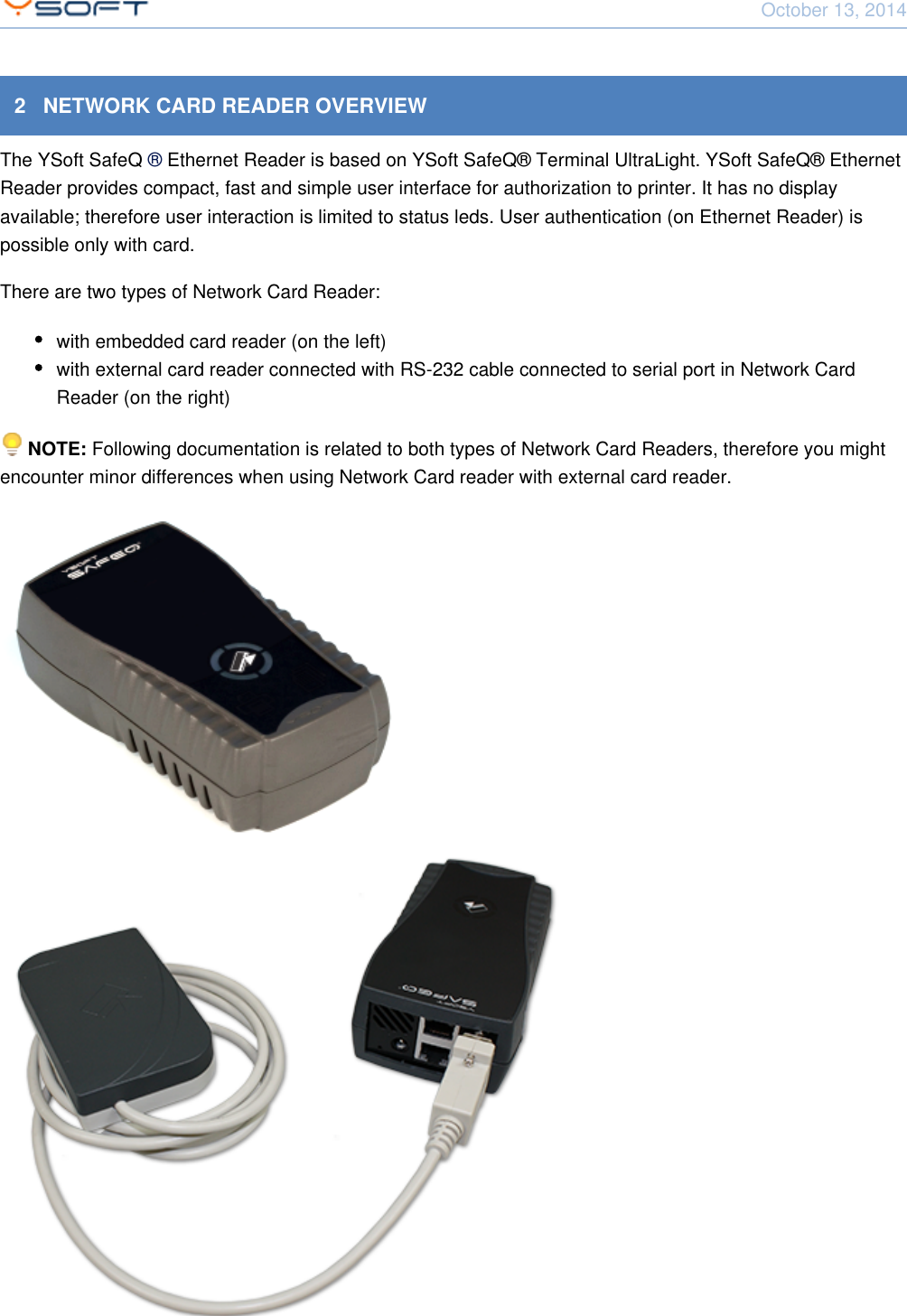
October 13, 2014Network Card Reader CONFIDENTIAL 52   NETWORK CARD READER OVERVIEWThe YSoft SafeQ  Ethernet Reader is based on YSoft SafeQ® Terminal UltraLight. YSoft SafeQ® Ethernet® Reader provides compact, fast and simple user interface for authorization to printer. It has no displayavailable; therefore user interaction is limited to status leds. User authentication (on Ethernet Reader) ispossible only with card.There are two types of Network Card Reader:with embedded card reader (on the left)with external card reader connected with RS-232 cable connected to serial port in Network CardReader (on the right)  Following documentation is related to both types of Network Card Readers, therefore you mightNOTE: encounter minor differences when using Network Card reader with external card reader.
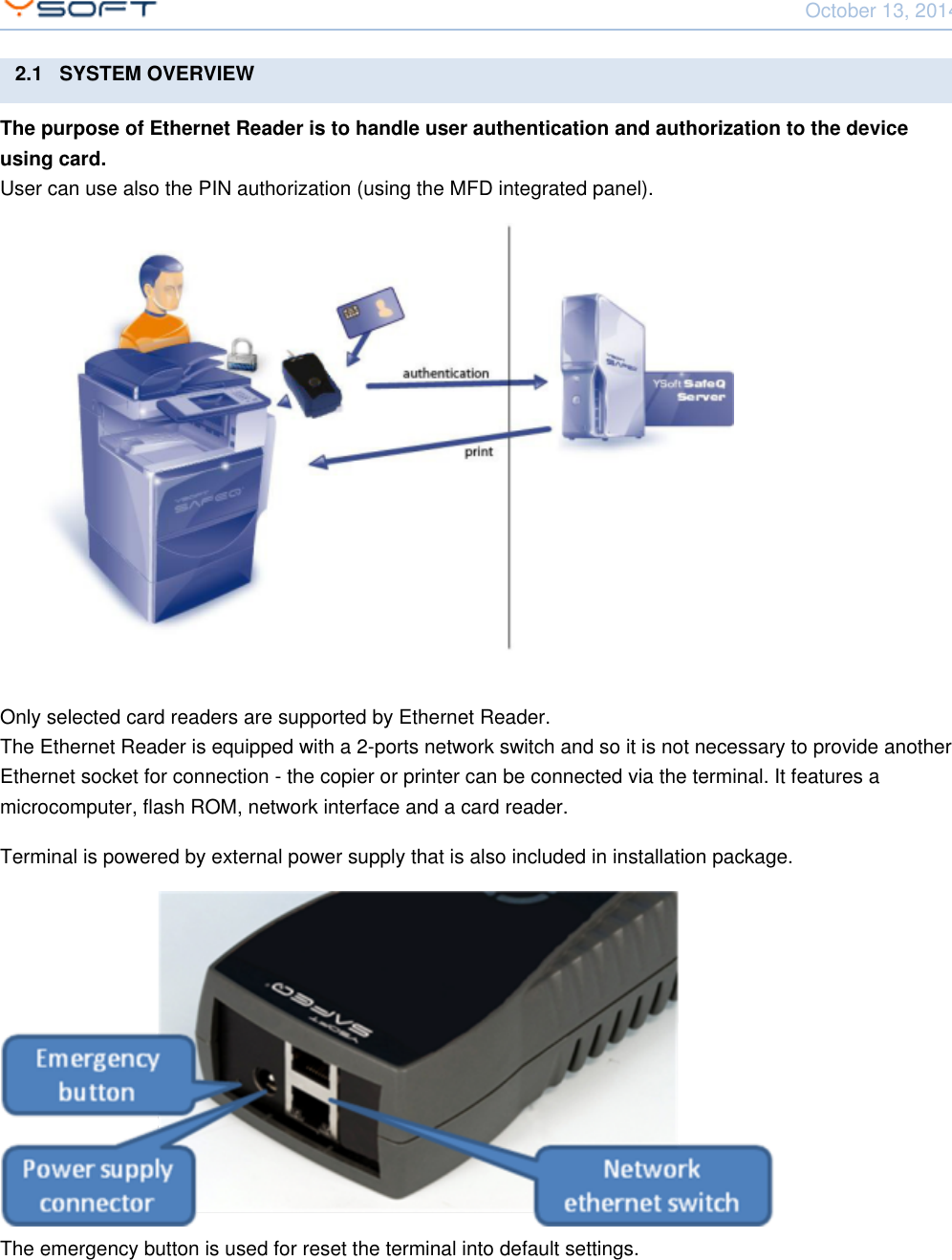
October 13, 2014Network Card Reader CONFIDENTIAL 62.1   SYSTEM OVERVIEWThe purpose of Ethernet Reader is to handle user authentication and authorization to the deviceusing card.User can use also the PIN authorization (using the MFD integrated panel).Only selected card readers are supported by Ethernet Reader.The Ethernet Reader is equipped with a 2-ports network switch and so it is not necessary to provide anotherEthernet socket for connection - the copier or printer can be connected via the terminal. It features amicrocomputer, flash ROM, network interface and a card reader.Terminal is powered by external power supply that is also included in installation package.The emergency button is used for reset the terminal into default settings.
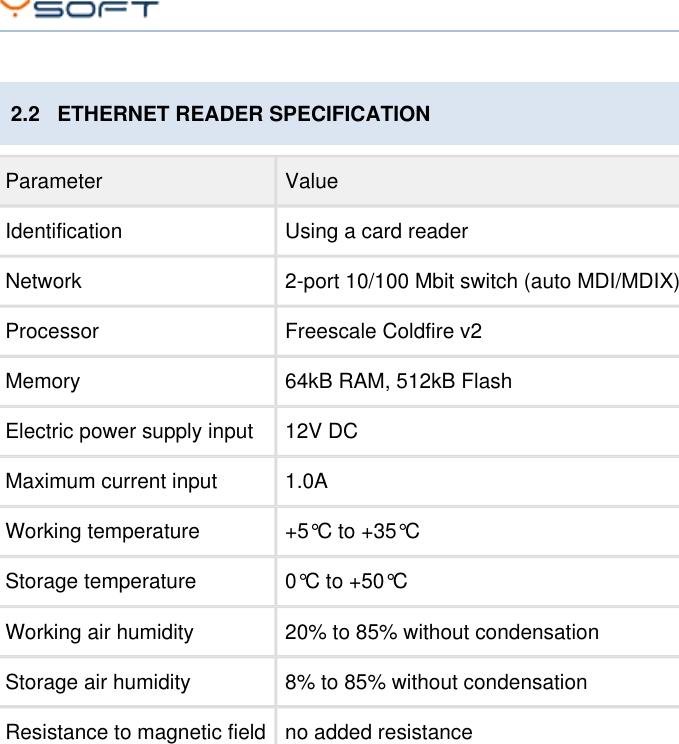
October 13, 2014Network Card Reader CONFIDENTIAL 72.2   ETHERNET READER SPECIFICATIONParameter ValueIdentification Using a card readerNetwork 2-port 10/100 Mbit switch (auto MDI/MDIX)Processor Freescale Coldfire v2Memory 64kB RAM, 512kB FlashElectric power supply input 12V DCMaximum current input 1.0AWorking temperature +5°C to +35°CStorage temperature 0°C to +50°CWorking air humidity 20% to 85% without condensationStorage air humidity 8% to 85% without condensationResistance to magnetic field no added resistance
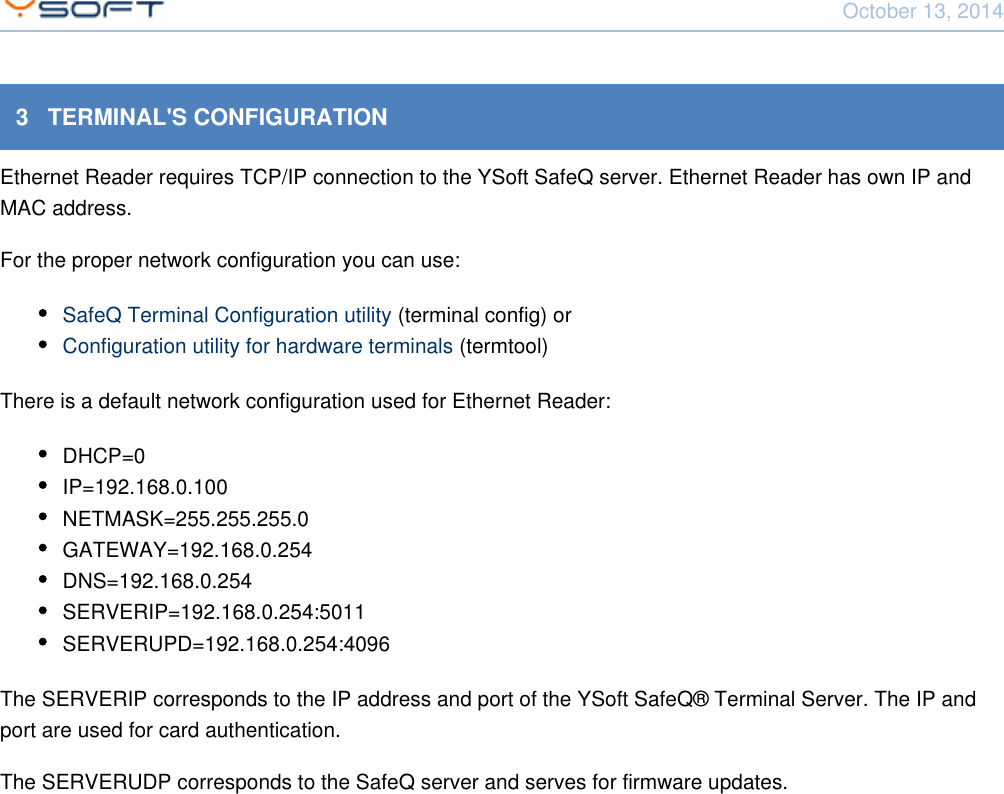
October 13, 2014Network Card Reader CONFIDENTIAL 83   TERMINAL'S CONFIGURATIONEthernet Reader requires TCP/IP connection to the YSoft SafeQ server. Ethernet Reader has own IP andMAC address.For the proper network configuration you can use:SafeQ Terminal Configuration utility (terminal config) orConfiguration utility for hardware terminals (termtool)There is a default network configuration used for Ethernet Reader:DHCP=0IP=192.168.0.100NETMASK=255.255.255.0GATEWAY=192.168.0.254DNS=192.168.0.254SERVERIP=192.168.0.254:5011SERVERUPD=192.168.0.254:4096The SERVERIP corresponds to the IP address and port of the YSoft SafeQ® Terminal Server. The IP andport are used for card authentication.The SERVERUDP corresponds to the SafeQ server and serves for firmware updates.
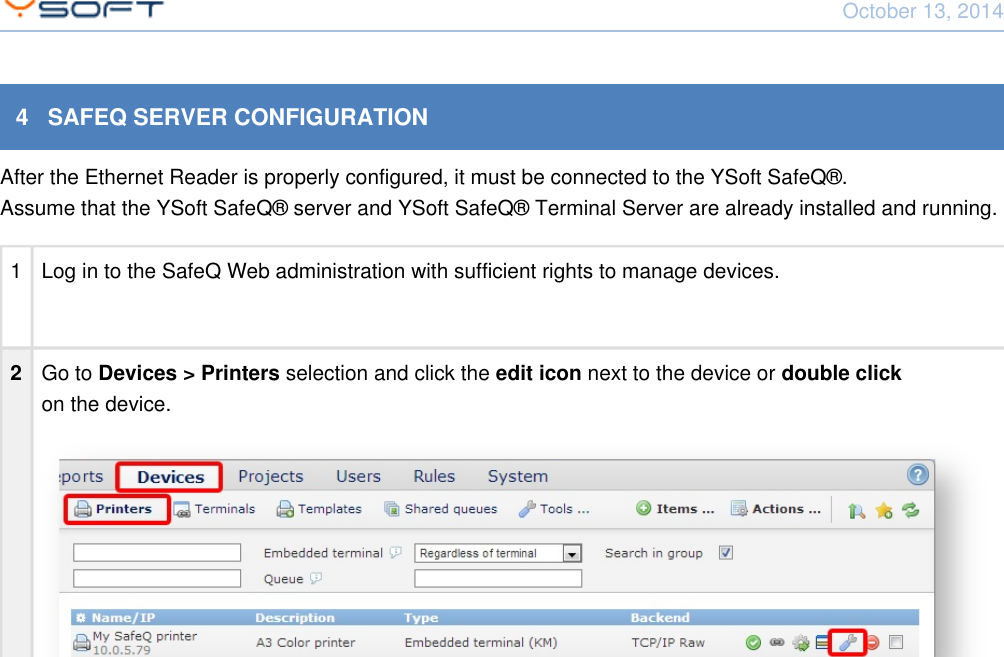
October 13, 2014Network Card Reader CONFIDENTIAL 94   SAFEQ SERVER CONFIGURATIONAfter the Ethernet Reader is properly configured, it must be connected to the YSoft SafeQ®.Assume that the YSoft SafeQ® server and YSoft SafeQ® Terminal Server are already installed and running.1 Log in to the SafeQ Web administration with sufficient rights to manage devices.2Go to     selection and click the     next to the device or Devices > Printers edit icon double click on the device.
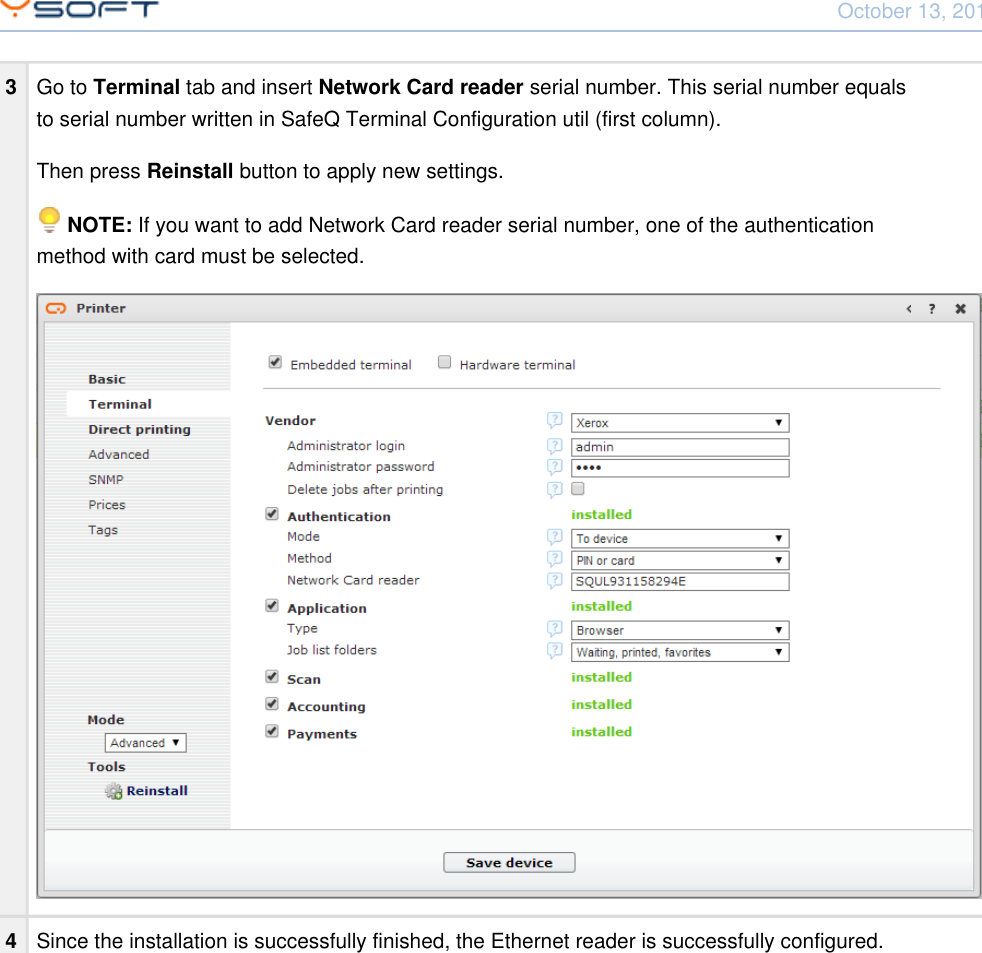
October 13, 2014Network Card Reader CONFIDENTIAL 103Go to   tab and insert   serial number. This serial number equalsTerminal Network Card readerto serial number written in SafeQ Terminal Configuration util (first column).Then press  button to apply new settings.Reinstall   If you want to add Network Card reader serial number, one of the authenticationNOTE: method with card must be selected.4Since the installation is successfully finished, the Ethernet reader is successfully configured.
October 13, 2014Network Card Reader CONFIDENTIAL 115   ETHERNET READER SERVICE PROCEDURES5.1   SERVICE PROCEDURESFor more info about all service procedures, please visit: Performing service procedures of TerminalUltraLight and Network Card Reader5.2   SERVICE FIRMWAREService firmware is the most important part of the reader firmware. Right after power-up it will check theemergency button if any action is required. Then it will check the normal firmware for integrity. If the normalfirmware is not valid then the emergency firmware will connect to server in emergency mode and downloadthe firmware. If the normal firmware integrity is ok, then it is started.5.3   READER FIRMWAREEthernet Reader firmware is the main part of the firmware. It initializes network, autodetects readers andsends the card number to the server when card is placed. By default the firmware starts UDP locator serverwhich will help detecting available readers on the local network. Also the TCP configuration server is started.

Navigation menu