YUXINXIN ELECTRONICS 20180805 2-in-1 Audio Adapter User Manual
SHENZHEN YUXINXIN ELECTRONICS CO.,LTD 2-in-1 Audio Adapter Users Manual
User manual
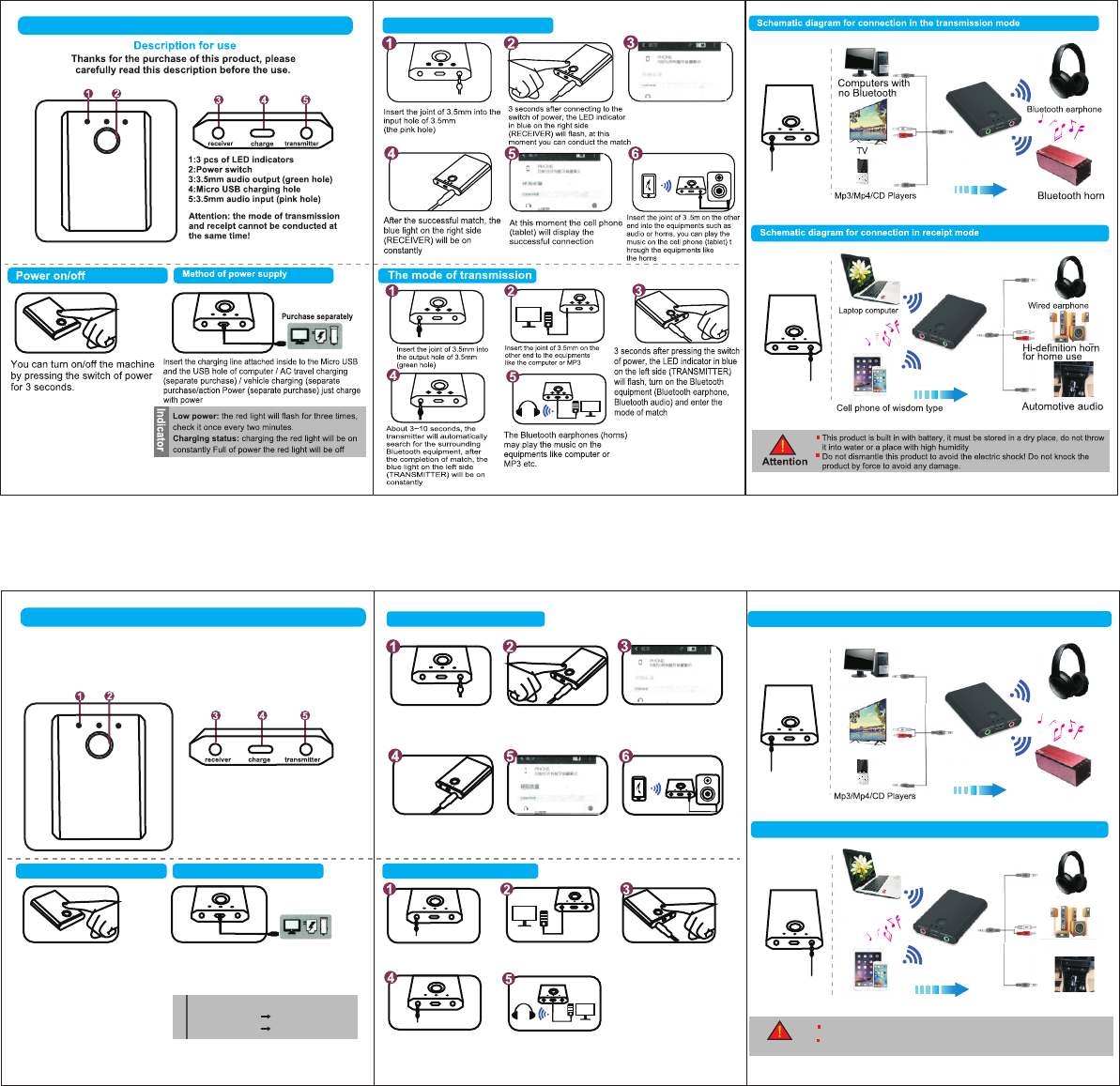
RECEIVER
TRANSMITTER
BLS-TX7 2-in-1 Audio Adapter
The mode fo receiver
感谢你购买本产品,使用前请详阅使用说明书
1.3颗LED指示灯 4.Micro USB 充电孔
2.电源开关 5.3.5mm音频输入
3.3.5mm音频输出
注意:发射和接收模式不能同时进行!
按电源开关键越3秒即可
开/关机
开/关机 供电方式
另购
将内附充电线分别插入商品Micro USB及电脑
USB孔/AC旅冲(另购)/车充(另购)/移动电源(另购)
充电即可
接收模式
将3.5mm接头插入3.5mm
输入孔(粉红孔位)
按电源开关键约3秒后,右
侧(RECEIVER)的LED指
示灯蓝灯闪烁,此时即可进
行配对
开启手机(平板)蓝牙模式,
搜索可配对装置,列表中选
择,点选”BLS-TX7"配对
配对成功后,右侧
(RECEIVER)蓝灯常亮
此时手机(平板)显示
已连接
将另一端3.5mm接头插入音响
或者喇叭等设备,即可由喇叭
等设备播放手机(平板)的音乐
发射模式
将3.5mm接头插入3.5mm
输出孔(绿色孔位)
另一端3.5mm接头插入
电脑或者MP3等设备 按电源开关键3秒后,左侧
(TRANSMITTER)的LED指示
灯蓝灯闪烁,开启蓝牙设备
(蓝牙耳机,蓝色音响)并进入
配对模式
约3~10秒,发射器自动搜
索周边蓝牙设备,配对完
成后,左侧(TRANSMITTER)
侧蓝色灯常亮
即可由蓝牙耳机(音响)等播放
电脑或者MP3等设备的音乐
接收模式连接示意图
发射模式连接示意图
注意事项
本产品内置电池,所以必须在干燥的地方存放,不可以丢进水里或太潮湿的地方
不可以拆卸本产品,以免触电!不可用力敲打以免损坏
使用说明书
BLS-TX7 二合一音频适配器
发射
蓝牙耳机
蓝牙音响
电视
台式机电脑
家用立体音响
接收
智能手机(平板)
有线耳机
笔记本电脑
汽车音响
指示燈
低 电 量 :
红灯连闪三下,两分钟检测一次
充电状态:
充电中 红灯常亮
满 电 红灯熄灭
BLS -TX 7
BLS -TX 7
BLS -TX 7
BLS -TX 7
Turn on the Bluetooth mode of the
cell phone (tablet), search for the
devices that can be matched,
select from the list, point and
select “BLS-TX7” for the match
FCC Statement
Changes or modifications not expressly approved by the party
responsible for compliance could void the user's authority to operate
the equipment.
This equipment has been tested and found to comply with the limits
for a Class B digital device, pursuant to Part 15 of the FCC Rules. These
limits are designed to provide reasonable protection against harmful
interference in a residential installation. This equipment generates uses
and can radiate radio frequency energy and, if not installed and used
in accordance with the instructions, may cause harmful interference to
radio communications. However, there is no guarantee that
interference will not occur in a particular installation. If this equipment
does cause harmful interference to radio or television reception, which
can be determined by turning the equipment off and on, the user is
encouraged to try to correct the interference by one or more of the
following measures:
-- Reorient or relocate the receiving antenna.
-- Increase the separation between the equipment and receiver.
-- Connect the equipment into an outlet on a circuit different from
that to which the receiver is connected.
-- Consult the dealer or an experienced radio/TV technician for help
This device complies with part 15 of the FCC rules. Operation is subject
to the following two conditions (1)this device may not cause harmful
interference, and (2) this device must accept any interference received,
including interference that may cause undesired operation.
This equipment complies with FCC radiation exposure limits set forth
for an uncontrolled environment.