ZEITBIKE R3STS 112 kHz heart rate and speed transmitter User Manual
Sigma Sport USA 112 kHz heart rate and speed transmitter Users Manual
ZEITBIKE >
Contents
- 1. Users Manual
- 2. user manual
Users Manual

138 www.sigmasport.com
1 Foreword 140
2 Package contents 140
3 Safety guidelines 141
4 Overview 141
4.1 Attaching R3 transmitter 141
4.1.1 Chest belt application 142
4.1.2 HipClip application 142
4.2 Before the first training 143
4.3 Pressing the button briefly and holding 144
4.4 Overview of modes and functions 145
4.4.1 Sleep mode 146
4.4.2 Training mode 146
4.4.3 Setting mode 147
5 Setting mode 148
5.1 Opening the setting mode 148
5.2 Display setup 148
5.3 Button assignment in setting 148
5.4 Brief guide to device settings 149
5.5 Making device settings 149
5.5.1 Setting language 149
5.5.2 Setting the scale unit 149
5.5.3 Calibration 149
5.5.4 Correction factor 149
5.5.5 Setting the date 150
5.5.6 Setting the time 151
5.5.7 Setting the gender 152
5.5.8 Setting the birth date 152
5.5.9 Setting the weight 152
5.5.10 Setting the max. HR 152
5.5.11 Setting the training zone 153
5.5.12 Training with training zones 154
5.5.13 Setting up the individual training zone 154
CONTENTS

139
GB / US
5.5.14 Setting the total distance 156
5.5.15 Setting the total running time 157
5.5.16 Setting total calories 157
5.5.17 Setting the contrast 157
5.5.18 Setting the button tones 157
5.5.19 Turning the zone alarm on and off 157
6 Calibration and correction factor 158
6.1 Why calibrate? 158
6.2 Calibration function 158
6.3 Activating calibration 159
6.4 Calibrating 159
6.4.1 Preparing for calibration 160
6.4.2 Carrying out calibration runs 160
6.5 Correction factor 161
7 Training mode 162
7.1 Opening training mode 162
7.2 Display setup 162
7.3 Button assignment in the training mode 163
7.4 Functions during the training 164
7.5 Radio link with the R3 transmitter 164
7.6 Starting the training 165
7.7 Interrupting the training 166
7.8 Exiting the training 166
7.9 Training values after the training 167
7.10 Resetting the training values 167
8 Maintenance and cleaning 168
8.1 Changing the battery 168
8.2 Washing the COMFORTEX+ textile chest belt 169
8.3 Spare parts 169
8.4 Disposal 170
9 Technical data 170
CONTENTS
140 www.sigmasport.com
1 FOREWORD
Congratulations and thank you for purchasing a SIGMA SPORT®
Running Computer. Your new running computer will be a faithful training
partner for many years to come. You can use your running computer for:
Running k
Walking and Nordic Walking k
Hiking k
Swimming (HR only) k
The running computer RC 1209 is a technically advanced instrument
that measures speed, distance, and heart rate. Please read these
instructions carefully to become familiar with the functions and features
of this product.
SIGMA SPORT® wishes you lots of fun while using your running computer.
2 PACKAGE CONTENTS
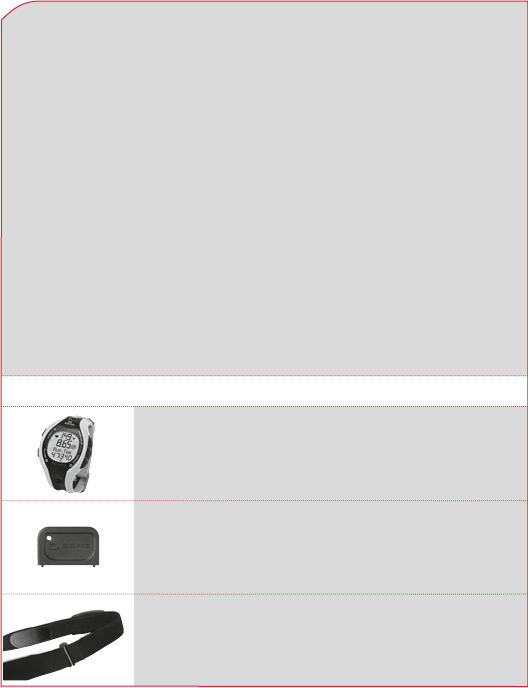
Running computer RC 1209 incl. battery
Battery compartment door tool to activate
and to change the battery
Tip: If you lose this tool, a ball point pen can be used
to open the battery compartment.
COMFORTEX+ chest belt for heart rate and distance
measurement and for fixing the R3 transmitter
141
GB / US
2 PACKAGE CONTENTS
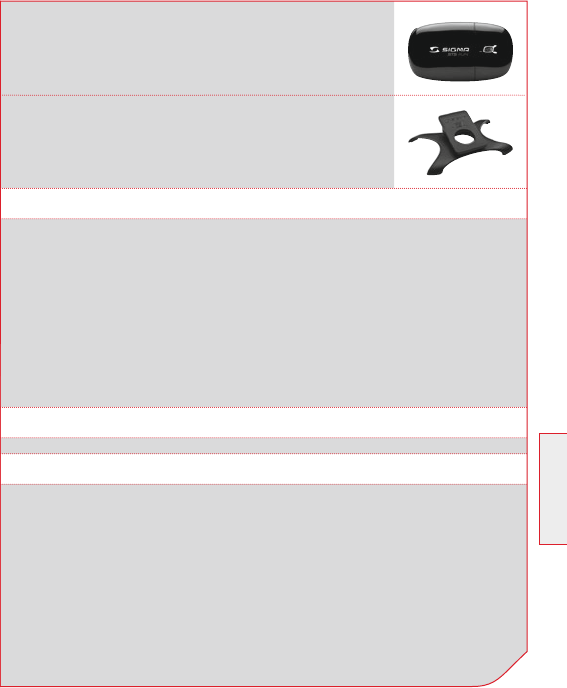
R3 transmitter incl. battery for measuring speed,
heart rate and distance. The R3 transmitter sends
coded digital signals to your RC 1209.
HipClip for R3 transmitter to train without heart rate,
but with speed and distance.
3 SAFETY GUIDELINES
4 OVERVIEW
Consult your doctor before starting training in order to avoid k
health risks. This is particularly applicable if you have any
cardiovascular diseases or have not done any sport for a long time.
Please do not use the running computer for diving, it is only k
suitable for swimming.
None of the buttons can be operated under water. k
You can wear the R3 transmitter either on the chest belt or the HipClip.
Worn on chest belt k
It measures the heart rate, speed and distance.
Worn on HipClip k
It measures the speed and distance, but not the heart rate.
4.1 ATTACHING R3 TRANSMITTER
142 www.sigmasport.com
4 OVERVIEW
4.1.1 CHEST BELT APPLICATION
4.1.2 HIPCLIP APPLICATION
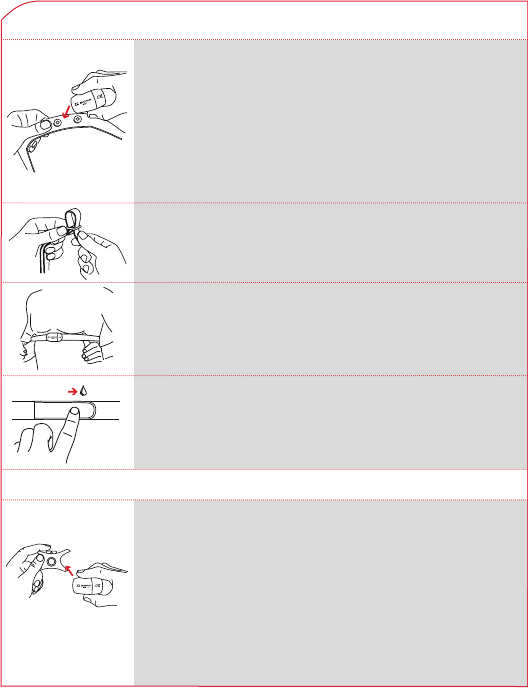
Press the R3 transmitter into the snaps of the chest
belt.
Important: Detach the R3 transmitter from the belt
after training in order to save the battery. The transmitter
always becomes active if a current flows between the
two contacts. This is the case when the chest belt is
worn on the skin, or if the chest strap and/or the R3
transmitter lies, for instance, on a wet towel. When the
LED flashes, the R3 transmitter is on.
Snap the R3 transmitter into the HipClip.
Important: Detach the R3 transmitter from the HipClip
after training in order to save the battery. The transmitter
becomes active when it is clipped on the HipClip or if
current can flow between the contacts (press buttons).
When the LED flashes, the R3 transmitter is on.
Note: The R3 transmitter can be used only in one
direction.
Place the belt below the chest muscle or breasts.
Important: The R3 transmitter faces forward.
Adjust the length of the belt.
Important: The belt should fit snug, but not too tight.
Wet the surface of the sensor, which rests on the skin.
Important: The heart rate measurement is reliable only
if the sensor surface is moist.
Note: sensors are the two silicone pads to the left and
right of the removable R3 transmitter.
143
GB / US
4 OVERVIEW
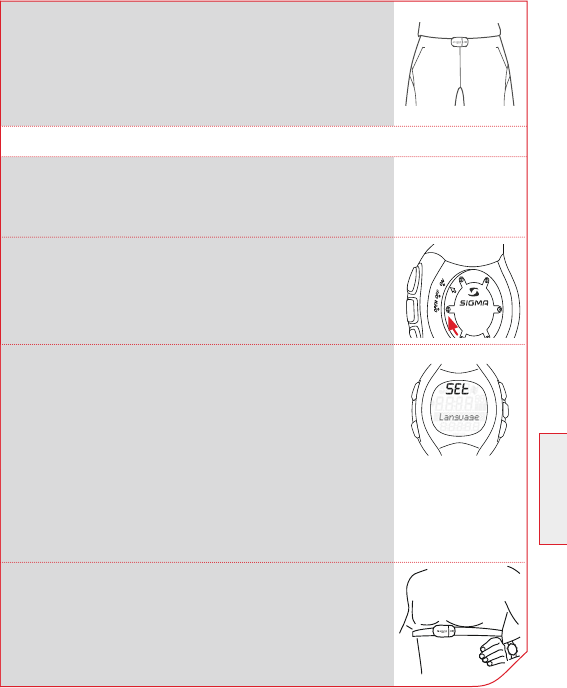
Attach the HipClip centered on your pants.
Important: Speed and distance are measured
correctly only if you wear the HipClip on the front
center.
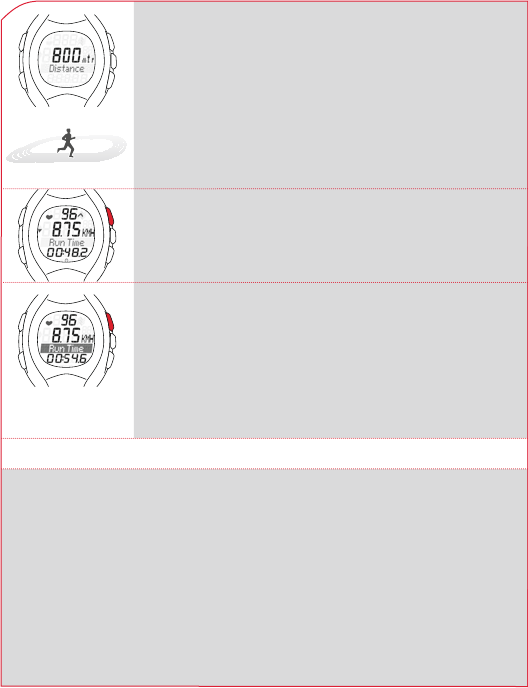
Before you can start with the first training,
you need to prepare the running computer
in the following manner:
4.2 BEFORE THE FIRST TRAINING
1. Set the battery compartment cover
to ON with the appropriate tool.
2. The device automatically switches to the setting
mode. Scroll through the basic settings with the
buttons SPEED (+) and PULSE (-). Confirm the
settings with the SET button. Make the basic
settings such as language, unit, date, time, etc.
Note: Be sure to include your gender, birth date
and weight, because it is from this data that the
running the computer calculates the maximum
heart rate (HR max.).
For details see section 5 “Setting mode”
3. Put on the chest belt or HipClip and RC 1209.
144 www.sigmasport.com
4 OVERVIEW
4. Calibrating
For the running computer to display the optimal
results, you need to calibrate it (for details see
section 6 “Calibration”. In the setting mode scroll
to “Calibration & Correction Factor”. Press the SET
button. The running computer guides you through
the calibration. After calibration, you can leave the
setting mode by pressing and holding the
SET button.
6. If you want to end the training, you can press the
START/STOP. The stopwatch stops.
To reset the values to zero, press and hold the
START/STOP button. To exit the training mode,
press and hold the PULSE (-) button. Detailed
descriptions of the five steps can be found on the
following pages.
5. Starting the training.
Start your first training with the START/STOP
button.
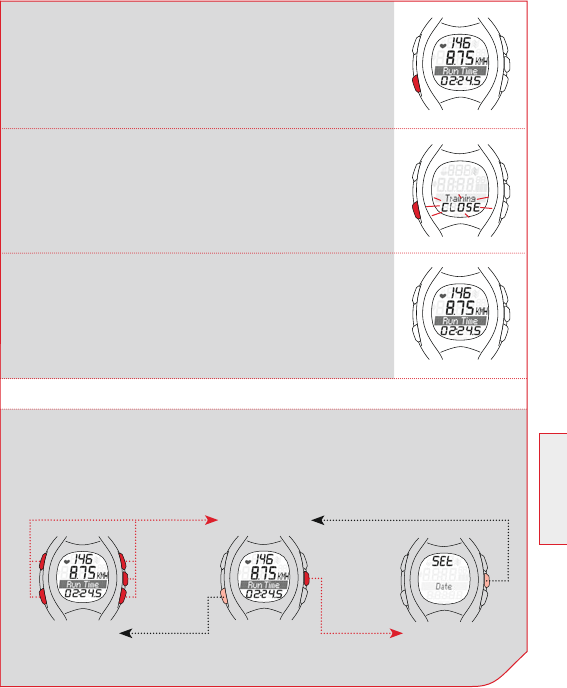
4.3 PRESSING THE BUTTON BRIEFLY AND HOLDING
The buttons on the running computer perform different actions depend-
ing on how long you press them:
Press button briefly k
Activate functions or scroll through functions
Press and hold to k
Switch to another mode, reset training values,
or synchronize the R3 transmitter manually.
Example: You have completed the training and want to enter the
sleep mode.
145
GB / US
4 OVERVIEW
4.4 OVERVIEW OF MODES AND FUNCTIONS
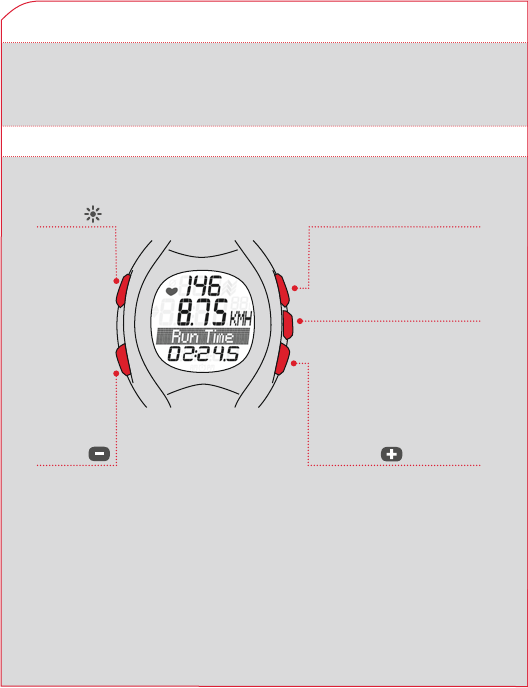
There are three main modes to the Running Computer. (Sleep mode,
training mode, setting mode). Switching between these modes requires
that you press and hold a button for 3 seconds.
Sleep mode Setting mode
Press and hold one of the buttons Press and hold
Training mode
Press and
hold
Press and
hold
Press and hold the PULSE (-) button down.
The display will flash twice, indicating that
the training mode is closed.
Press and hold the PULSE (-) button.
The sleep mode is displayed.
Release the PULSE (-) button.
146 www.sigmasport.com
4 OVERVIEW
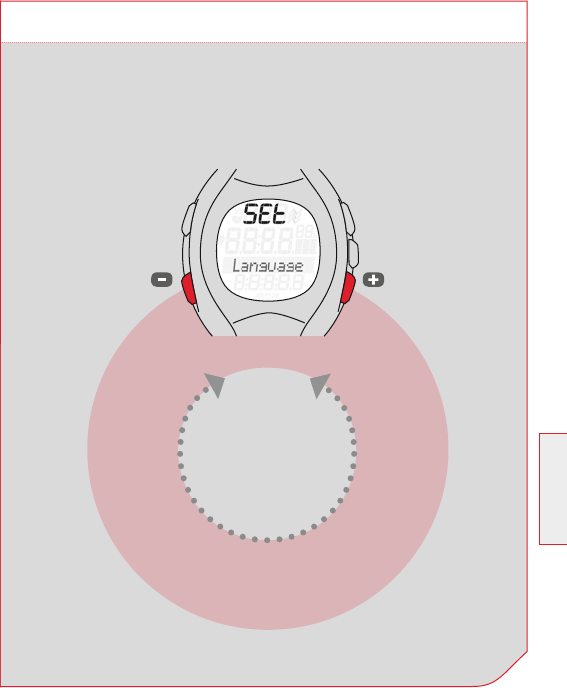
You will train in this mode.
*Note: Total values are
displayed only if the
stopwatch is not running.
PULSE
Average heart rate k
Maximum heart rate k
Calories k
Total Kcal* k
SET
Distance (in km or mi) k
Speed k
(in km/h or min/km)
START/STOP
Stopwatch k
LIGHT
SPEED
Running time k
Average speed k
Maximum speed k
Clock k
Total distance* k
Total running time* k
4.4.1 SLEEP MODE
4.4.2 TRAINING MODE
In sleep mode, only the time and date are displayed. Switch from
sleep mode to training mode by pressing and holding any button
for 3 seconds.
147
GB / US
Language
(ES, FR, IT, GB, DE)
Zone alarm
(On, Off)
Button tones
(On, Off)
Unit
(km/h, mph, min/km, min/mile)
Contrast
(5 levels)
Calibration
(running/walking required)
Total Kcal
(enter)
Date
(enter, format)
Correction factor
(enter, format)
Total running time
(enter)
Clock
(enter, + 12 h, 24 h)
Total distance
(enter)
Gender
(male, female)
Training zone
(fat burning, fit zone, individual)
Birth date
(enter)
Max. heart rate
(Calculated from gender,
age and weight.
Correction possible) Weight
(enter)
4.4.3 SETTING MODE
In this mode you can adjust the device settings.
With the SPEED (+) button you can scroll forward, k
from language to zone alarm.
With the PULSE (-) button you can scroll backward, k
from zone alarm to language.
4 OVERVIEW
148 www.sigmasport.com
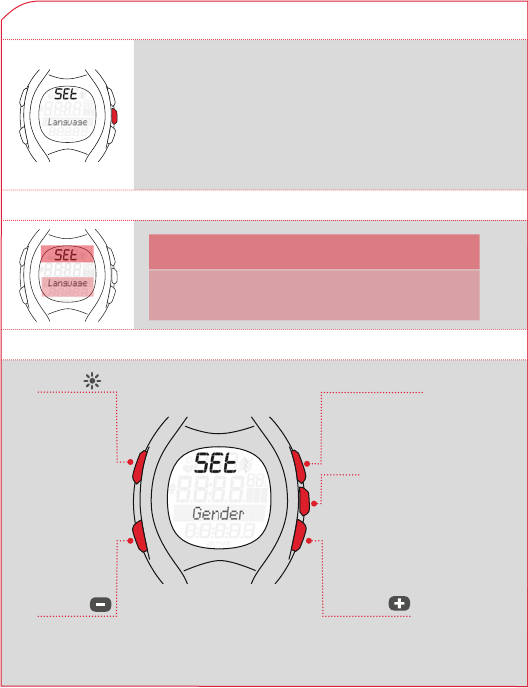
5.1 OPENING THE SETTING MODE
Prerequisite: your running computer must first be
in training mode (see section 4.3 “Overview of modes
and functions”).
Press and hold the SET button for 3 seconds. When
the display flashes twice, the setting mode is open.
5 SETTING MODE
5.2 DISPLAY SETUP
5.3 BUTTON ASSIGNMENT IN SETTING
1st line SET indicates that the setting mode
is open.
3rd line/ Submenu or the setting to be
4th line changed.
START/STOP
Press: In calibration
mode, start and stop
the measurement
SET
Press: Select function
Save value
Press and hold: Quit setting
mode (in the calibration
mode, quit calibration)
LIGHT
Press:
Light on
PULSE
Press: Scroll backward
Press and hold:
Scroll continuously
SPEED
Press: Scroll forward
Press and hold: Scroll
continuously
149
GB / US
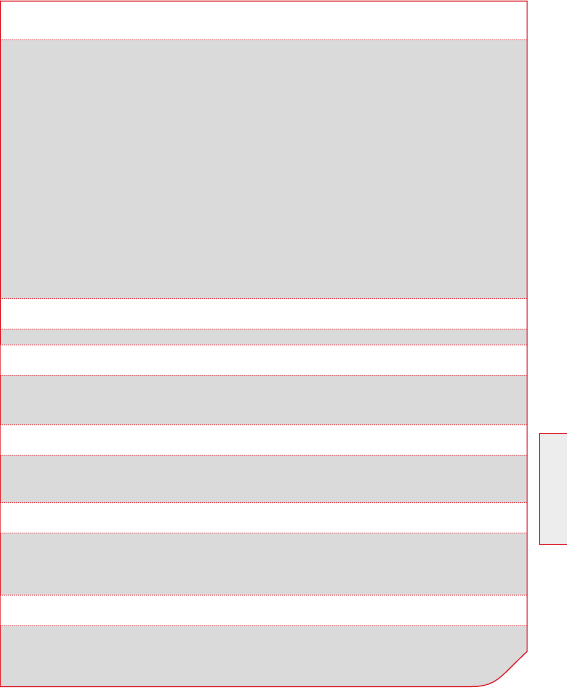
5.4 BRIEF GUIDE TO DEVICE SETTINGS
Your device settings such as language, unit, correction factor, gender, birth
date, weight, HR max., contrast, button tones and zone alarm are all set in
the same manner: Select the device setting, change the value and save the
modified setting.
Prerequisite: Your running computer must be in the setting mode (to enter
the setting mode, press and hold the set button for 3 sec.).
1 Press the PULSE (-) or SPEED (+) button repeatedly until you get to the
desired device setting.
2 Press the SET button, the value of the device setting flashes.
3 Press the PULSE (-) or SPEED (+) button repeatedly until the desired
value is shown.
4 Press the SET button to save the device setting.
Now you can scroll to another device setting and repeat steps 1-4.
5 SETTING MODE
5.5 MAKING DEVICE SETTINGS
5.5.1 SETTING LANGUAGE
5.5.2 SETTING UNIT
5.5.4 CORRECTION FACTOR
5.5.3 CALIBRATION
Follow steps 1-4 as described in section 5.4 “Brief guide to device settings”
Follow steps 1-4 as described in section 5.4 “Brief guide to device settings”
The correction factor is described in a separate section, see section 6
“Calibration & correction factor”.
The calibration is described in a separate section, see section 6
“Calibration & correction factor”.
150 www.sigmasport.com
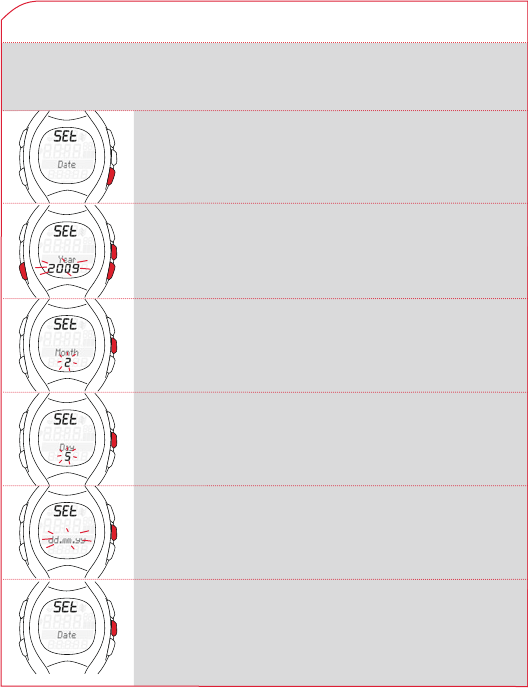
5.5.5 SETTING DATE
5 SETTING MODE
Prerequisite: Your running computer is in the setting mode.
Press SPEED (+) button repeatedly until “Date”
appears on the display.
Press SET button. “Year” is displayed, below it the
preset year flashes. Now you can set the year with
the SPEED (+) or PULSE (-) key.
Press SET button. “Month” is displayed.
Now you can set the month with the SPEED (+)
or PULSE (-) button.
Press SET button. “Day” is displayed.
Now you can set the day with the SPEED (+)
or PULSE (-) button.
Press SET button. A date format is displayed.
With the SPEED (+) or PULSE (-) button you can
choose another date format.
Press SET button. The date setting is saved.
151
GB / US
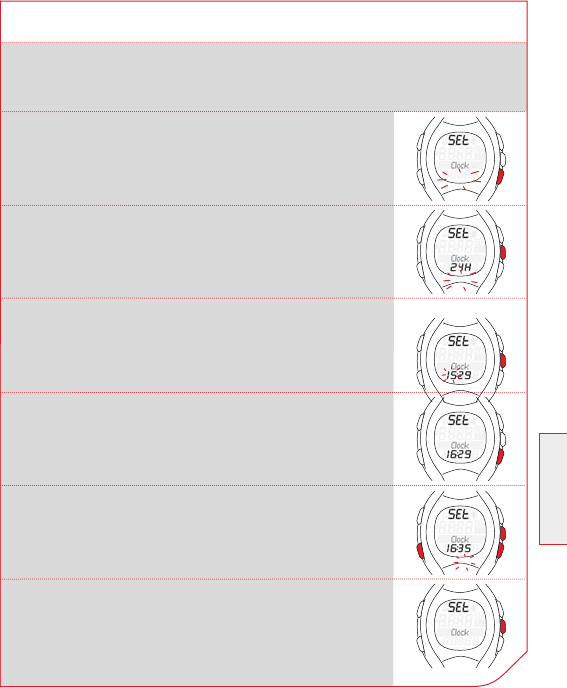
Press SPEED (+) button repeatedly until “Clock”
appears on the display.
Press SET button. “24H” appears and flashes.
With the SPEED (+) or PULSE (-) button choose
between a 12-hour or 24-hour display.
Press SET button. The time is displayed.
The hours entry flashes.
Press SPEED (+) or PULSE (-) to change the hour.
Press SET button, the minute entry flashes, and then
it can be set with the PULSE (-) or SPEED (+) button.
Press SET button. The newly set time is saved.
5.5.6 SETTING TIME
Prerequisite: Your running computer is in the setting mode.
5 SETTING MODE

152 www.sigmasport.com
5.5.7 SETTING GENDER
Follow steps 1-4 as described in section 5.4 “Brief guide to device settings”
This device setting is included in the calculation of the maximum heart
rate and the calories. So, set the value correctly.
5 SETTING MODE
5.5.8 SETTING BIRTH DATE
5.5.9 SETTING WEIGHT
5.5.10 SETTING HR MAX.
Follow steps 1-4 as described in section 5.4 “Brief guide to device settings”
This device setting is included in the calculation of the maximum heart
rate and the calories. So, set the value correctly.
Follow steps 1-4 as described in section 5.4 “Brief guide to device settings”
This device setting is included in the calculation of the maximum heart
rate and the calories. So, set the value correctly.
The maximum heart rate (HR max.) is determined by the running
computer from gender, weight and birth date.
Attention: You can also change the training zones with this value.
Change the HR max. value only when it has been determined by a safe
test, such as performance diagnostics, HR max. test, etc.
Follow steps 1-4 as described in section 5.4 “Brief guide to device
settings”
153
GB / US
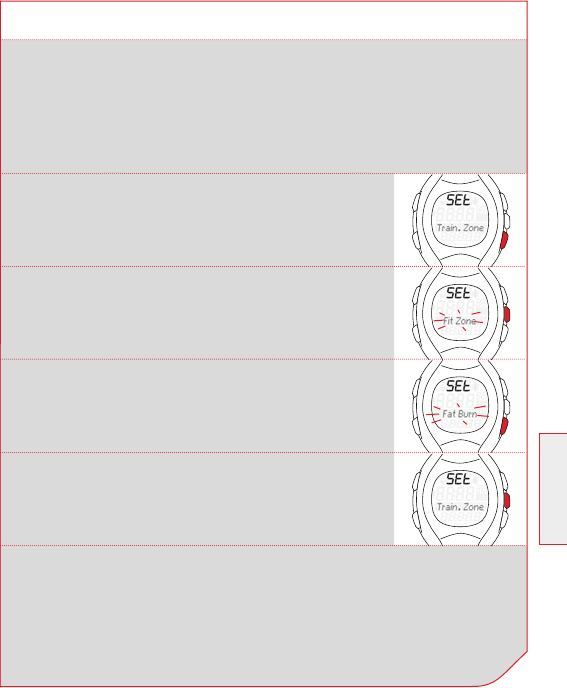
5.5.11 SETTING TRAINING ZONE
You can choose from three training zones. The upper and lower limits
for the zone alarm are determined by the zone that you select.
Example: You want to lose weight. Select the “Fat Burning” zone.
Prerequisite: Your running computer is in the setting mode.
5 SETTING MODE
Press PULSE (-) button repeatedly until “Train. Zone”
appears on the display.
Press SET button. The selected training zone is
displayed.
Scroll with the SPEED (+) button to “Fat Burn”.
Press SET button. The training zone is set for all
future training.
Tip: To exit set mode, press and hold the SET button for 3 seconds to go
back to the training mode.

154 www.sigmasport.com
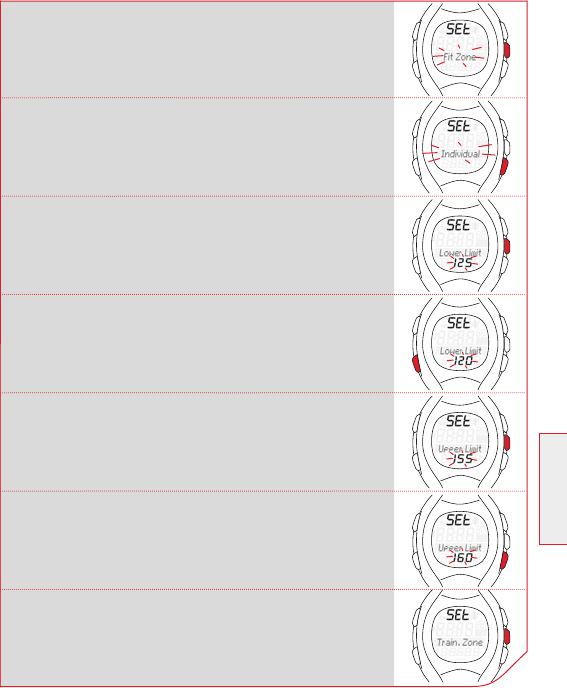
Scroll with the SPEED (+) button until “Train. Zone”
appears on the display.
5.5.13 SETTING UP THE INDIVIDUAL TRAINING ZONE
5 SETTING MODE
Example: You would like to train in an individual training zone for a run
with change of pace. The pulse range should lie between 120 and 160.
Prerequisite: Your running computer is in the setting mode.
5.5.12 TRAINING WITH TRAINING ZONES
Your running computer has three training zones. The preset training
zones “Fat Burning” and “Fit Zone” are calculated from the maximum
heart rate. Each training zone has an upper heart rate limit and a lower
heart rate limit.
Fat Burning k
This training is for aerobic energy metabolism. For long duration and
low intensity more fat than carbohydrates are burned or converted
into energy. The training in this zone will help you lose weight.
Fit Zone k
The training is more intensive in the fitness zone.
The training in this zone enhances the basic endurance levels and
improve cardiovascular fitness.
Individual Training Zone k
This zone is set up by yourself to meet your specific training goals.
The procedure to select the “Training zone” is described in section
5.5.11 “Setting training zone”.
155
GB / US
Press SET button. “Upper Limit” is displayed.
The registered value flashes.
Press the SPEED (+) button repeatedly until
the value is 160
Press SET button. The upper and lower limits
are set.
Press SET button. The selected training zone is
displayed.
5 SETTING MODE
Scroll with the SPEED (+) button to “Individual”.
Press SET button. “Lower Limit” is displayed.
The registered value flashes.
Press the PULSE (-) button repeatedly till the value
is 120.
156 www.sigmasport.com
5.5.14 SETTING THE TOTAL DISTANCE
5 SETTING MODE
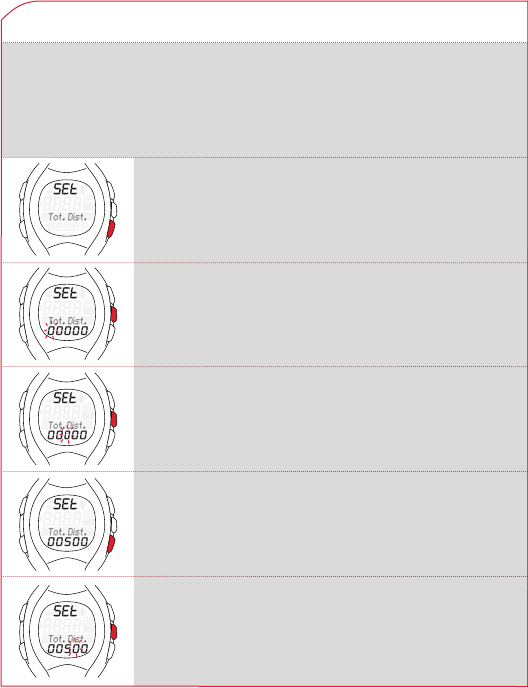
Example: You bought a running computer and want to take the total
distance of 560 kilometers from your training diary.
Prerequisite: Your running computer displays the setting mode.
Scroll with the SPEED (+) button until “Total Dist.”
appears on the display.
Press SET button. You will see zeros below the total
distance. The first digit flashes.
Press the SET button twice. The digit for the
hundreds flashes.
Press SPEED (+) button five times until 5 is displayed.
Press SET button. The 5 is set and the tens flashes.
157
GB / US
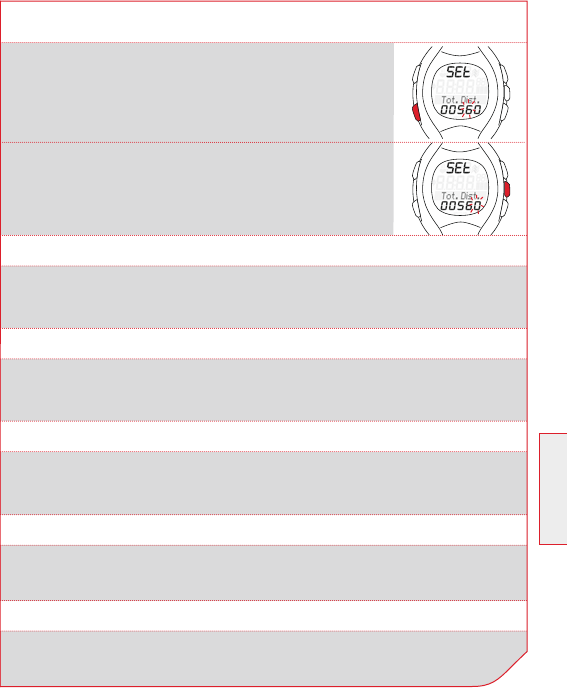
Press the PULSE (-) button repeatedly till 6 displayed.
Press SET button. The 6 is set and the digit flashes.
Press SET button. The setting is saved.
5.5.14 SETTING THE TOTAL DISTANCE
5 SETTING MODE
5.5.15 SETTING TOTAL RUNNING TIME
5.5.16 SETTING TOTAL CALORIES
5.5.17 SETTING CONTRAST
5.5.18 SETTING BUTTON TONES
5.5.19 TURNING THE ZONE ALARM ON AND OFF
Follow steps 1-4 as described in section 5.5.14 “Setting total distance”.
Follow steps 1-4 as described in section 5.5.14 “Setting total distance”.
As described in section 5.5 “Making device settings”.
Note: The contrast changes immediately.
Follow steps 1-4 as described in section 5.4 “Brief guide to device settings”.
Follow steps 1-4 as described in section 5.4 “Brief guide to device settings”.

158 www.sigmasport.com
6 CALIBRATION & CORRECTION FACTOR
6.1 WHY CALIBRATE?
6.2 CALIBRATION FUNCTION
Everyone has a different walking and running style, which affects the
measurement. Therefore, you should set up (calibrate) the R3
transmitter for your running and walking style. If you use the factory
presets, the running computer may or may not provide you with
accurate data. Calibrating the sensor makes the measuring much more
precise.
The running computer has a calibration function. For the calibration, wear
the R3 transmitter and the running computer and run a distance that
is known to you. You can measure a distance in advance with a bike
computer, or run on a 400-meter track. After you have run the distance,
adjust the measured value to the actual distance run.
As your running or walking styles change as you change speed, the
calibration is carried out in the slow and fast speed respectively.
For the sensor positions chest and hips, you can perform two
calibrations:
Walking k
Running k
Important: To properly calibrate your computer, you must perform the
test twice at a minimum distance of 800 m.
159
GB / US
6.3 ACTIVATING CALIBRATION
Prerequisite: The device is in training mode.
You are wearing both the R3 transmitter and the running computer.
6 CALIBRATION & CORRECTION FACTOR
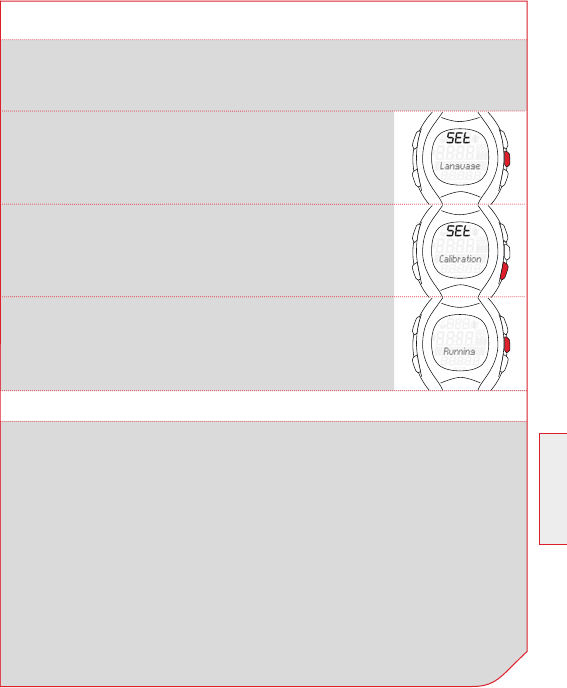
Press and hold the SET button until the setting mode
is open.
Press the SPEED (+) button repeatedly until the
function “Calibration” appears.
Press the SET button. The RC 1209 determines the
position of the R3 sensor (chest or hips) and starts
the calibration function. The RC 1209 guides you
through the calibration.
6.4 CALIBRATING
Calibration is carried out for two speeds:
Slow running or slow walking k
Run here as slow as you would run in the slowest training.
Fast running or fast walking k
Run here at the fastest pace that you would run in an endurance run
or a long tempo run (over 3000 m). It is recommended that the two
speeds differ by 30 %.
Tip: If you use the device only for running and with heart rate
measurement (chest position) and therefore never wear on the hip, you
need calibrate only for the sensor position “Chest” and for “Running”.

160 www.sigmasport.com
6.4.1 PREPARING FOR CALIBRATION
1 Put on the chest belt or attach the HipClip.
2 Go to a measured distance of at least 800 meters long.
Tip: The inside lane of a track is 400 meters.
3 Select “calibration” in the setting mode.
4 Press the SET button. The running computer detects whether you
carry the HipClip or the chest belt. The function “Running”
is displayed.
Tip: If you want to calibrate the RC 1209 for “Walking”, select
the function “Walking” with the SPEED (+) button.
5 Press the SET button. The running computer shows on the display
what you have to do.
6 CALIBRATION & CORRECTION FACTOR
6.4.2 CARRYING OUT CALIBRATION RUNS
1 Always start 20 meters from the starting line of the measured
distance (flying start).
2 Once you cross the starting line, press the START/STOP button.
The measurement begins.
3 After you have run the measured distance, press the START/STOP
button.
4 Now adjust the displayed value by pressing the PULSE (-)
or SPEED (+) button to the actual distance run.
5 Press the SET button. The slow calibration run is saved.
6 In the display now you can see the prompt “Run (walk) fast/
press Start” alternately. Follow steps 1 - 5 again to calibrate the
fast run.
Note: After you have performed the first calibration, the calibration
menu will change. If you redo it, you have the opportunity at the
beginning to distinguish between the following options: ON, OFF and
NEW. Select ON, then run in training mode with calibrated values.
Select OFF, then run with an uncalibrated RC 1209. Select NEW, then
re-calibrate the RC 1209.
161
GB / US
6.5 CORRECTION FACTOR
If you get good values with or without calibration, which vary only
minimally in one direction, you have the option to manually correct
these values by the correction factor.
Example:
You know that you have run exactly 2000 m, but the running computer
always shows a little more, e.g. 2037 m.
The factory setting of the correction factor is 1.000 and does not effect
a change.
Please calculate the correction factor as follows:
New correction factor = k1.000 x 2000 / 2037
New correction factor = k0.982
Follow steps 1-4 as described in section 5.4 “Brief guide to device
settings”
6 CALIBRATION & CORRECTION FACTOR
Age correction factor (1.000) x actual distance (2000)
displayed distance (2037)
162 www.sigmasport.com
7.1 OPENING THE TRAINING MODE
To go into training mode:
From sleep mode k
Press and hold any button for 3 seconds.
From setting mode k
Press and hold SET button for 3 seconds.
7 TRAINING MODE
7.2 DISPLAY SETUP
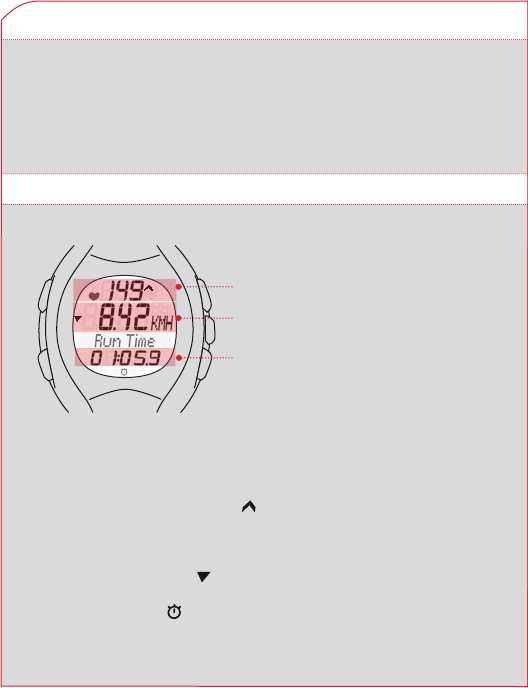
Arrow next to pulse display k
In the example, the heart rate is below the selected training zone
and should be increased. If the heart rate is too high, the arrow
points down.
Arrow next to speed k
In the example, the speed is below the current training average.
Stopwatch icon k
The training has started, the stopwatch is running.
Current heart rate k
Speed or distance k
Shows functions of SPEED (+) k
or PULSE (-) - ex. the Run Time
SPEED (+) button: k
Distance or time values
PULSE (-) button: k
Heart rate or calories burned
163
GB / US
7 TRAINING MODE
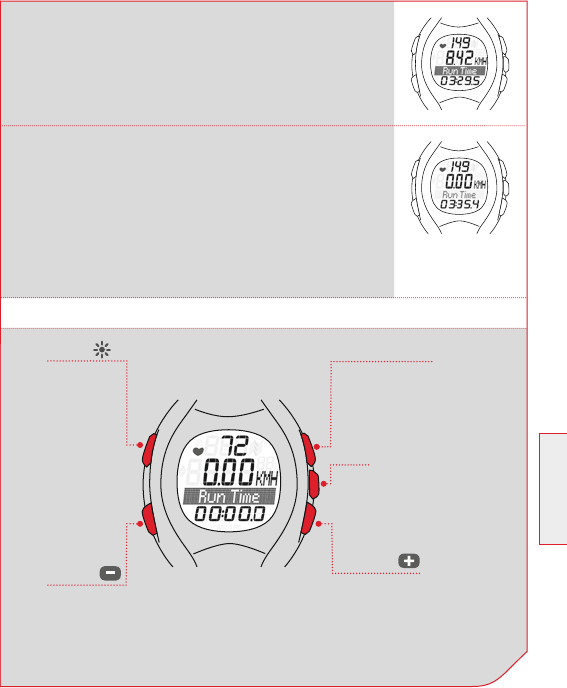
7.3 BUTTON ASSIGNMENT IN THE TRAINING MODE
START/STOP
Press: Starts/stops
stopwatch
Press and hold: Set training
values to zero (reset)
SET
Press: Displays speed or
distance
Press and hold: Opens the
setting mode
LIGHT
Press:
Light on
PULSE
Press: Displays HR functions
Press and hold: Opens sleep
mode; quits training mode
SPEED
Press: Displays speed
functions.
Press and hold: Reconnect
R3 transmitter with
RC 1209 (synchronize)
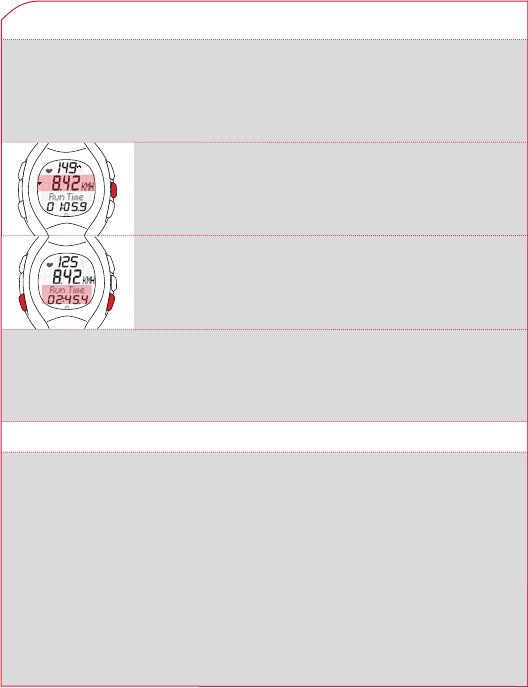
Stopwatch stopped - correct sync k
The stopwatch icon is gone. If the function is
highlighted in grey, the R3 transmitter and
RC 1209 are synchronized and the stopwatch
has stopped.
Stopwatch stopped – no sync with RC 1209 k
The stopwatch icon is gone.
If the function has a light background, the R3
transmitter and RC 1209 are not synchronized
anymore.
Please synchronize by pressing and holding
the SPEED (+) button long.
164 www.sigmasport.com
7.4 FUNCTIONS DURING THE TRAINING
The Running Computer measures many different training statistics, but
it cannot display them all at once. You can view any function with just a
press of a button.
7 TRAINING MODE
7.5 RADIO LINK WITH THE R3 TRANSMITTER
The RC 1209 receives the heart rate, speed and distance from the
R3 transmitter. This is a coded digital transmission. The coding ensures
that other signals from other transmitters are ignored and only the
signals from your chest are received.
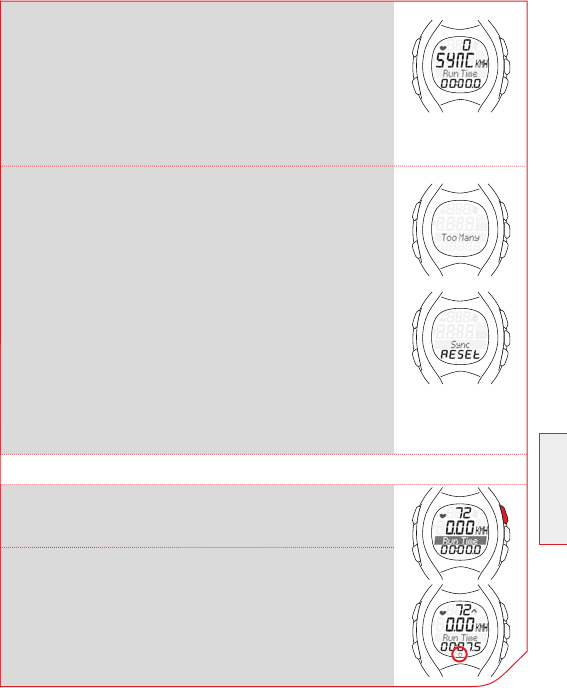
With the SET button you can switch between speed
and distance in the middle line.
With the PULSE (-) or SPEED (+) button you can
choose the function you want to see in the lower
display area.
Note: Calories, distance, average and maximum values require a time
component and therefore can only be calculated when the stopwatch
is running.
165
GB / US
7 TRAINING MODE
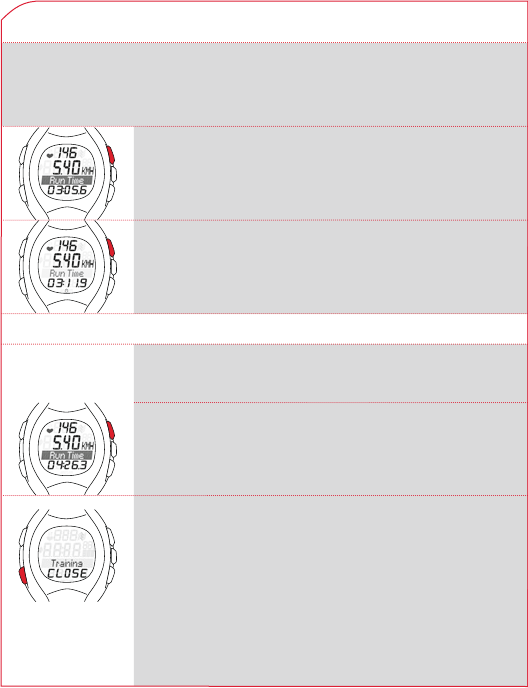
Synchronization
Start the training mode, reset the RC1209 to
zero, your R3 transmitter will synchronize. During
synchronization the word “SYNC” is displayed. The
synchronization is complete, when “SYNC” is no
longer seen in the display.
Message “Too many signals”
This message appears when there are too many
transmitters in the vicinity. In order to resynchronize,
proceed as follows:
1 Move about 10 m away from possible sources of
interference, such as other heart rate monitors,
power lines and antennas.
2 Press any button to remove the message.
3 Press and hold SPEED (+) button until the
training mode is back to normal.
R3 transmitter and RC 1209 are again
synchronized.
Note: The RC 1209 cannot be disturbed after
a successful synchronization.
Press START/STOP button. The running time begins
to run. At the bottom of the display you will see a
stopwatch icon and the measured value title with
light background.
Prerequisite: Your running computer displays the
Training Mode.
7.6 STARTING THE TRAINING
166 www.sigmasport.com
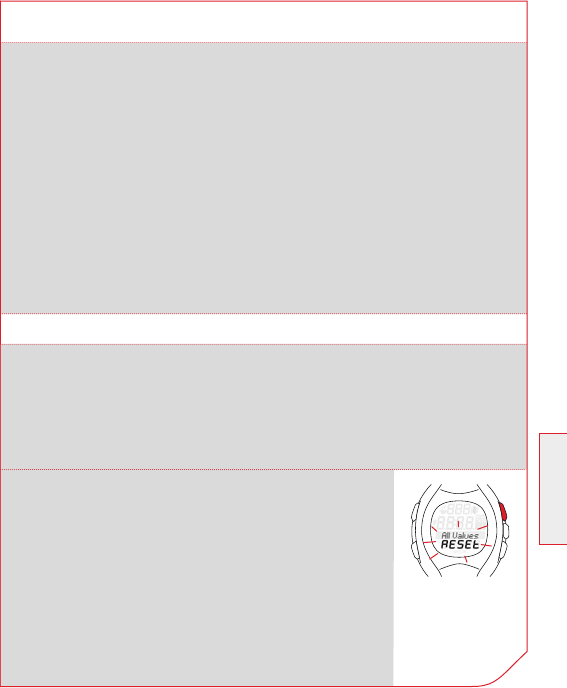
Press START/STOP button. The stopwatch icon
disappears. The stopwatch has stopped.
Press START/STOP button again. The stopwatch
icon is displayed again. The stopwatch continues
to run.
Press START/STOP button immediately. There by
prevent the average values or the running time from
being distorted.
Press and hold the PULSE (-) button. You go into
sleep mode. You see only the time and date and save
battery. The current training values remain saved.
Note: If you have stopped the training, your
running computer goes into the sleep mode after
five minutes.
You have finished your training run and want to end
the training in the running computer.
7.7 INTERRUPTING THE TRAINING
You can stop the training any time and continue afterward.
7 TRAINING MODE
7.8 EXITING THE TRAINING
167
GB / US
7 TRAINING MODE
7.9 TRAINING VALUES AFTER THE TRAINING
Prerequisite: You are in the training mode.
After training, you can view the measured values in the training mode
in peace. With the SET, PULSE (-) and SPEED (+) buttons you can scroll
between each values. In addition to the current training values, the
running computer also shows summed values such as:
Total running time k
Total distance k
Total calories k
Note: Total values are available only when the stopwatch is stopped.
7.10 RESETTING THE TRAINING VALUES
Before you begin a new training, you should set the training values to
zero. Otherwise, the running computer counts the values further.
The summed total values for distance, time and calories remain saved.
Prerequisite: You are in the training mode.
Press and hold the START/STOP button. The display
flashes twice and all values are reset. Then you see
the training mode again.
168 www.sigmasport.com
8 MAINTENANCE AND CLEANING
8.1 CHANGING THE BATTERY
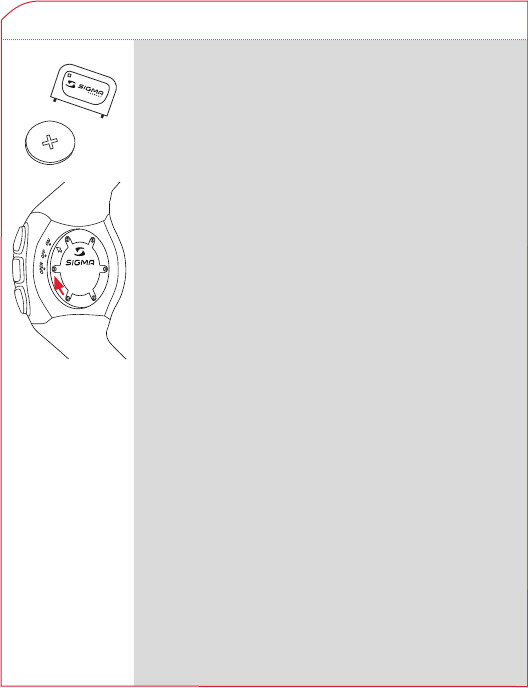
The battery CR2032 (Ref. No. 00342) is used
in the running computer and battery CR2450
(Ref. No. 20316) in the R3 transmitter.
Prerequisite: You have a new battery and the battery
compartment cover tool.
1 Turn the cover of the battery compartment
with the tool counterclockwise till the arrow
points to OPEN. Alternatively, you can also use a
ballpoint pen
2 Remove the cover.
3 Remove the battery.
4 Insert the new battery. The plus sign facing up.
Important: Pay attention to polarity! Make sure
that the protective film is back on the battery.
5 Replace the cover. The arrow points to OPEN.
6 Turn the cover of the battery compartment
with the tool clockwise till the arrow points
to ON (to Close in R3 transmitter).
7 Correct time and date.
Important: Dispose of old battery properly
(see section 8.4).
169
GB / US
8 MAINTENANCE AND CLEANING
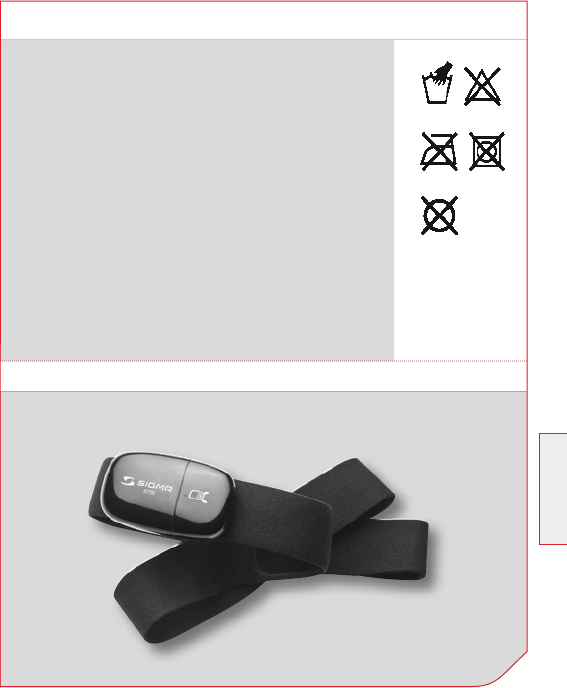
8.2 WASHING THE COMFORTEX+ TEXTILE CHEST BELT
The COMFORTEX+ textile chest belt can be washed
in the washing machine at +40°C/104°F hand wash.
Standard detergents may be used, but please do not
use bleaching agents or detergents with bleach
additives.
Do not use soap or fabric softener. k
Do not dry clean k
Do not put in dryer k
Lay flat, do not wring out, stretch, or hang k
when wet.
The kCOMFORTEX+ must not be ironed!
8.3 SPARE PARTS
COMFORTEX+ textile chest belt
170 www.sigmasport.com
LI =
Lithium Ionen
8 MAINTENANCE AND CLEANING
8.4 DISPOSAL
9 TECHNICAL DATA
Electronic devices must not be disposed of with
household waste. Please give the device to a designated
disposal agency.
Batteries must not be disposed of with the household
waste (Battery Law). Please give the batteries to a
designated delivery station for the disposal.
RC 1209
Battery type: CR2032 k
Battery life: Average of 1 year k
Accuracy of the clock: Higher than ± 0.4 seconds/day k
at an ambient temperature of 20°C.
Heart rate range: 40-240 k
R3 transmitter
Battery type: CR2450 k
Battery life: Average of 2 years k
Distance accuracy: Most of the runners achieve at least 90 % k
in the factory setting. Up to +/- 3 % are possible in the calibrated
state. The specification of accuracy requires constant conditions and
at least a distance of 3 km.
COMFORTEX+ textile chest belt
Belt material: Polyamide with elastane k

171
GB / US
NOTES
FCC Caution: Any changes or modifications not expressly approved
by the party responsible for compliance could void the user's authority
to operate this equipment.
This device complies with Part 15 of the FCC Rules. Operation is
subject to the following two conditions: (1) This device may not cause
harmful interference, and (2) this device must accept any interference
received, including interference that may cause undesired operation.
This device and its antenna(s) must not be co-located or operating in
conjunction with any other antenna or
transmitter.

www.sigmasport.com
RuNNINg COMPuTER
SIGMA Elektro GmbH
Dr.-Julius-Leber-Straße 15
D-67433 Neustadt/Weinstraße
Tel. + 49 (0) 63 21-9120-0
Fax. + 49 (0) 63 21-9120-34
E-mail: info@sigmasport.com
SIGMA SPORT ASIA
Asia, Australia, South America, Africa
10F, No.192, Zhonggong 2nd Rd.,
Xitun Dist., Taichung City 407, Taiwan
Tel. +886-4- 2358 3070
Fax. +886-4- 2358 7830
SIGMA SPORT USA
North America
1067 Kingsland Drive
Batavia, IL 60510, U.S.A.
Tel. +1 630 - 761-1106
Fax. +1 630 - 761-1107
Service-Tel. 888-744-6277
285100/1
RC 1209