ZHIBOTONG ELECTRONICS RP102 wifi repeater User Manual

SHENZHEN ZHIBOTONG ELECTRONICS CO.,LTD. wifi repeater Users Manual

Users Manual

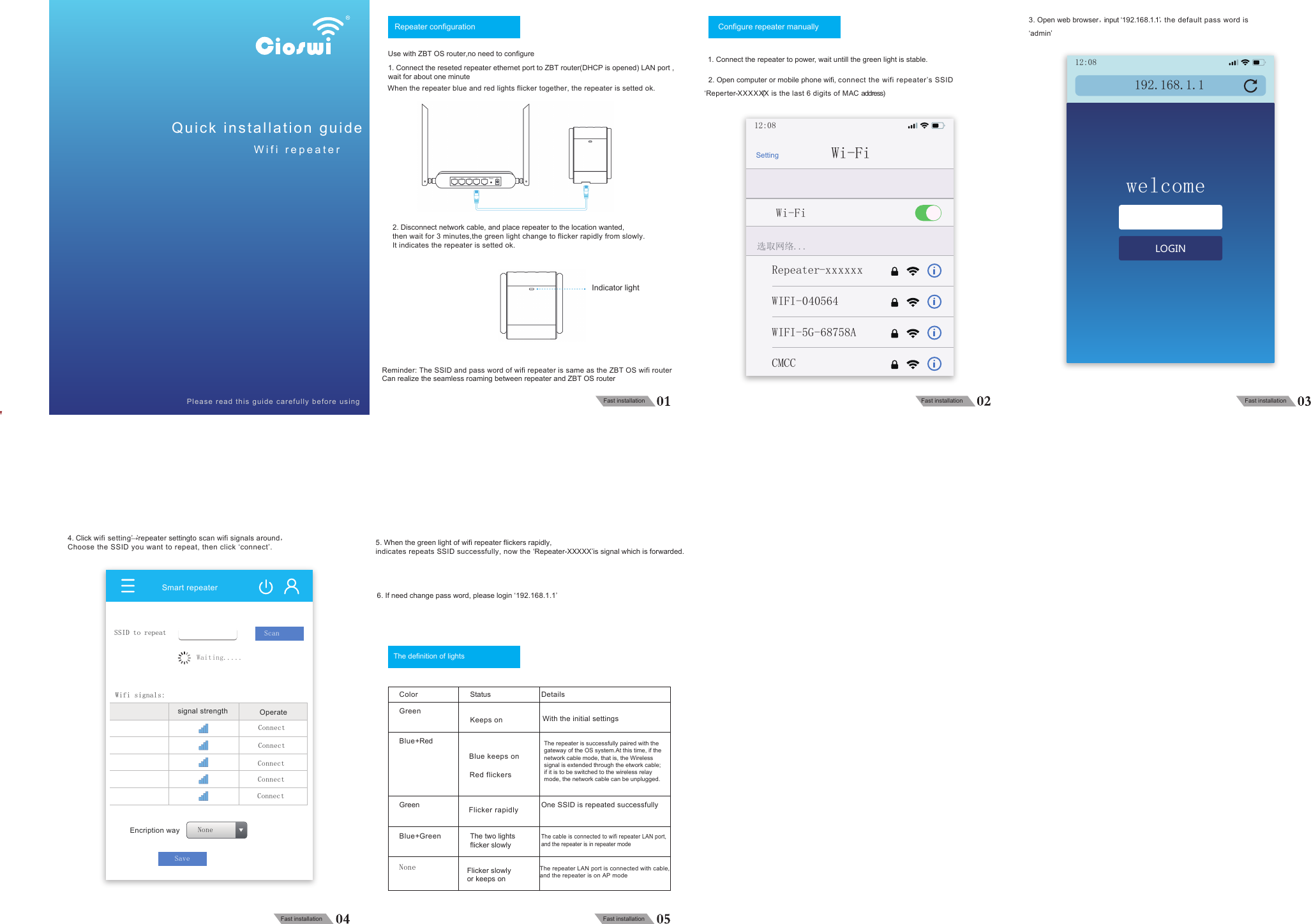
4折页    风琴折105G铜版纸1IT000728154-10000000172A-02018.12.06Repeater configurationUse with ZBT OS router,no need to configureConfigure repeater manuallyThe definition of lightsIndicator light1. Connect the reseted repeater ethernet port to ZBT router(DHCP is opened) LAN port , wait for about one minuteWhen the repeater blue and red lights flicker together, the repeater is setted ok. 2. Open computer or mobile phone wifi, connect the wifi repeater’s SSID  ‘Reperter-XXXXX’(X is the last 6 digits of MAC address)3. Open web browser,input ‘192.168.1.1’,the default pass word is‘admin’4. Click wifi setting’→’repeater setting’to scan wifi signals around,Choose the SSID you want to repeat, then click ‘connect’. 5. When the green light of wifi repeater flickers rapidly, indicates repeats SSID successfully, now the ‘Repeater-XXXXX’is signal which is forwarded.6. If need change pass word, please login ‘192.168.1.1’2. Disconnect network cable, and place repeater to the location wanted, then wait for 3 minutes,the green light change to flicker rapidly from slowly.It indicates the repeater is setted ok. Reminder: The SSID and pass word of wifi repeater is same as the ZBT OS wifi routerCan realize the seamless roaming between repeater and ZBT OS routerFast installation Fast installation Fast installationFast installation Fast installationWith the initial settingsOne SSID is repeated successfullyThe cable is connected to wifi repeater LAN port, and the repeater is in repeater modeColorGreenBlue+RedGreenBlue+GreenStatusKeeps onBlue keeps onRed flickersFlicker rapidlyThe two lights flicker slowlyThe repeater LAN port is connected with cable, and the repeater is on AP modeNone Flicker slowly or keeps onDetailsQuick installation guideWifi repeaterPlease read this guide carefully before usingLAN4 LAN3 LAN2 LAN1 WAN Reset DC12:08192.168.1.1welcomeLOGIN12:08Wi-FiRepeater-xxxxxxWi-Fi选取网络...SettingWIFI-040564WIFI-5G-68758ACMCCSmart repeaterSSID to repeatEncription wayWaiting.....Wifi signals:ScanSaveNonesignal strength OperateConnect1. Connect the repeater to power, wait untill the green light is stable.ConnectConnectConnectConnectThe repeater is successfully paired with the gateway of the OS system.At this time, if the network cable mode, that is, the Wireless signal is extended through the etwork cable; if it is to be switched to the wireless relay mode, the network cable can be unplugged.
FCC WARNING This device complies with part 15 of the FCC Rules. Operation is subject to the following two conditions: (1) this device may not cause harmful interference, and (2) this device must accept any interference received, including interference that may cause undesired operation. Any changes or modifications not expressly approved by the party responsible for compliance could void the user's authority to operate the equipment. NOTE: This equipment has been tested and found to comply with the limits for a Class B digital device, pursuant to Part 15 of the FCC Rules. These limits are designed to provide reasonable protection against harmful interference in a residential installation. This equipment generates, uses and can radiate radio frequency energy and, if not installed and used in accordance with the instructions, may cause harmful interference to radio communications. However, there is no guarantee that interference will not occur in a particular installation. If this equipment does cause harmful interference to radio or television reception, which can be determined by turning the equipment off and on, the user is encouraged to try to correct the interference by one or more of the following measures: -- Reorient or relocate the receiving antenna. -- Increase the separation between the equipment and receiver. -- Connect the equipment into an outlet on a circuit different from that to which the receiver is connected. -- Consult the dealer or an experienced radio/TV technician for help. To maintain  compliance with FCC’s RF Exposure guidelines, This equipment should be installed and operated with minimum 20cm distance  between the radiator your body: Use only the supplied antenna.

Navigation menu