ZIF LATINOAMERICA Z18 1.77 inch feature phone User Manual Z18
ZIF LATINOAMERICA S.A. 1.77 inch feature phone Z18
UserMan

1
User Manual Z18
Dear Customer,
Thank you for purchasing Z18.Kindly read this user
manual carefully to learn about key functional
characteristics and operational methods of this mobile
phone.
Contents
I Safety and
precautions ....................................................................2
II Operation of menu function...................................4
III Application of USB storage function.....................5
IV Troubleshooting ....................................................6
2
I. Safety and Precautions:
To use your Z18 phone safely and effectively, please read
the following information before use:
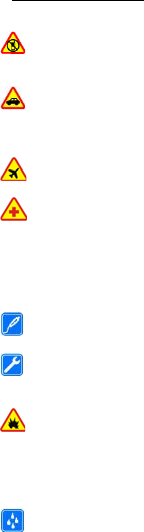
Please turn off your phone when you are near a
chemical plant, a gas station, an oil depot or other
explosives.
To ensure safety, please use earphone during driving;
Otherwise, unless emergency, make a call after parking
your car by the roadside. DO NOT use the phone during
driving at high speed.
Do not use your cell phone while in a plane. Please
check whether Flight mode is set or not before boarding.
Do not use your cell phone in a hospital to avoid
interference with the normal operation of medical
equipment which may result in a medical accident. If the
cell phone is used near a pacemaker, audiphones and some
medical electronic equipment, you should pay special
attention that the cell phone may interfere with these
devices.
Auxiliaries and accessories not provided by us are
excluded from the guarantee.
Do not dismantle your cell phone by yourself. In case
of a failure, please contact the service station specified by
us. Only qualified person may install or repair this product.
The phone should be charged in the environment
which is well-ventilated, and should be kept away from
inflammable substances and explosives.
To avoid demagnetization, please keep your phone away
from magnetic substances, such as magnetic disk, credit
card, etc.
Please be sure the phone isn't exposed to any liquid. In

3
Case this situation occurs, please remove the battery and
contact the service station specified by us.
Please use your phone in the environment which is neither
too hot nor too cold, do not expose your phone in strong
sunlight and in high-humidity environment.
All wireless devices may be susceptible to
interference, which could affect performance.
Your cell phone has photo and record functions, please
use these functions following the related laws and
regulations. You may violate the laws and regulations if
you take photos and record without authorization.
Do not dispose the worn battery as common domestic
rubbish. Please dispose the worn battery according to the
specified instructions where the disposal of a worn battery
is clearly specified.
Note: The Company will not undertake any responsibility
for any consequences caused by failure to observe the
above-mentioned suggestions or improper applications.
If any content described in this manual goes against that of
your cell phone, it is subject to the real cell phone.
4
II. Operation of menu functions:
In the standby mode, select Menu and the desired menu
and submenu. Select Exit or Back to exit the current level
of menu. Press the end key to return to the standby mode
directly.
1. Messages:
The SMS function is a network service. You may need
to apply to the network operator first before you can
send and receive a message.
2. Phonebook:
You can add the new contact by selecting menu “Add
new contact”.
You can save the contacts in the mobile phone and SIM
card, it depends on the SIM card memory capacity.
3. Call History:
You can view the call history (Missed, dialled, received
calls) through this option.
4. Settings:
This menu option lets you view and edit your phone
settings, call, display, network and security settings
The default password for Phone lock, Privacy &
Restore factory settings is “1234” you can personalize
the password.
5. Multimedia:
In this menu option you can access your camera, video
recorder/player, audio player and sound recorder. You
can view the clicked images in image viewer.
6. File manager:
This menu enables you to access the File Manager,
where folders or files in the memory card can be managed
Caution: You will lose all the data stored in the
memory card after format.
7. FM radio:
A compatible headset needs to be attached to the device
for the FM radio to function
8. Organizer:
This menu option enables you to use your phone’s alarm,
5
calendar, calculator, Sound recorder, Alarm, STK and Torch
etc.
9.Userprofiles:
You could set different scene modes.
--Normal
--Silent
--Meeting
--Indoor
--Outdoor
--Flight Mode
You could active, settings, rename or enhance ring.
10. Services:
Phone supports STK function (But it requires support
from SIM card service provider)
11. Games:
Fun & Games option lets you play games provided in
the phone.
**
The language converter/software may not produce the
accurate translation as desired by the user and hence
company disowns any results/liability arising therefrom.
III. Application of USB storage function:
Note: The phone can use USB function (like charging)
under switched off mode.
In switch off mode, when you plug in the USB cable,
you need not select function; the phone can be connected to
the PC and used as a USB Flash Disk. You can also use the
USB cable as a charger.
In switch on mode, when you plug in the USB cable,
you need to select the “Mass storage” function; the phone
can be connected to the PC and used as a USB Flash Disk.
You can also use the USB cable as a charger.
6
IV. Troubleshooting:
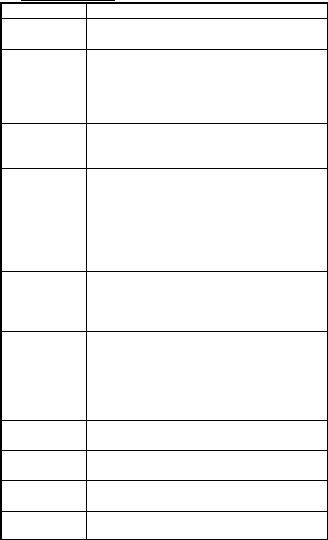
FailureSolution
ThePhonefails
topoweron
1.Checkthatthebatteryischarged;
2.Checkthatthebatteryisinstalledcorrectly.
InsertSIMcard
error
1.CheckwhethertheSIMcardisdirty,ifcardis
dirty,cleanit;
2.ReinstalltheSIMcard;
3.IftheSIMcardisdamagedreplacetheSIM
card.
LowNetwork
Checkthesignalstrengthindicatoronthe
screen.4barsindicatesstrongsignaland2bars
orlessindicatepoorsignal.
Callregistration
fails
1.YoumighthavesettheHideCallerIDbutthe
networkoperatordoesnotsupportthisservice;
2.Theremaybestrongsignalinterference;
3.YoumighthaveactivatedtheCallBarring
function;
4.YoumighthaveactivatedLine2butthe
networkoperatormaynotsupportthisservice.
Batteryfailsto
charge
1.Thebatterymayhaveexcessivelydischarged
Tochargethebatteryitisnecessarytoconnect
ittoachargerforcertainperiodoftime;
2.Thebatterymayhavebeendeteriorated.
Cannotconnect
tothenetwork
1.Checkwhethersignalistooweakorwireless
interferenceexistsaround;
2.CheckwhethertheSIMcardisinstalled
correctly,poorconnectionexistsortheSIM
cardisdamaged.IftheSIMcardisdamaged
pleasecontactthenetworkoperator.
Photosshotare
toodark
1.Thebrightnessissettoolow;
2.Theambientlightistoodark.
Photosshotare
tooblurred
1.Theobjectshotismoving;
2.Yourhandshakeswhenshutterispressed.
Photosshotare
distortedTheobjectshotistooclosetothelens.
Cannotaccess
theservicemenu TheSIMcardmaynotsupporttheservice.

7
Specific Absorption rate (Safety Precautions) :-
a) Use A wireless hands-free system (headphone,
headset) with a low power emitter.
b) Keep your calls short or send a text message(SMS)
instead. This advice applies especially to
children ,adolescents and pregnant women.
c) Use cell phone when the signal quality is good.
d) People having active medical implants should
preferably keep the cell phone at least 15cm away from the
implant.
Warning:
This device complies with part 15 of the FCC Rules. Operation
is subject to the following two conditions: (1) This device may
not cause harmful interference, and (2) this device must accept
any interference received, including interference that may cause
undesired operation.
Any Changes or modifications not expressly approved by the
party responsible for compliance could void the user's authority
to operate the equipment.
Note: This equipment has been tested and found to comply with
the limits for a Class B digital device, pursuant to part 15 of the
FCC Rules. These limits are designed to provide reasonable
protection against harmful interference in a residential
installation. This equipment generates uses and can radiate radio
frequency energy and, if not installed and used in accordance
with the instructions, may cause harmful interference to radio
communications. However, there is no guarantee that
interference will not occur in a particular installation. If this
equipment does cause harmful interference to radio or television
reception, which can be determined by turning the equipment off
and on, the user is encouraged to try to correct the interference
by one or more of the following measures:
-Reorient or relocate the receiving antenna.
-Increase the separation between the equipment and receiver.
8
-Connect the equipment into an outlet on a circuit different from
that to which the receiver is connected.
-Consult the dealer or an experienced radio/TV technician for
help.
The SAR limit of USA (FCC) is 1.6 W/kg averaged over one gra
m of tissue.
Device types Z18 (FCC ID: 2AE58Z18) has also been tested
against this SAR limit. The highest reported SAR values for
head, body-worn
accessory, and product specific are 0.14 W/kg, 0.99 W/kg respec
tively. This device was tested for typical body-
worn operations with the back of the handset
kept 15mm from the body. To maintain compliance with FCC
RF exposure requirements, use accessories that maintain a 15mm
separation distance between the user's body and the back of the
handset. The use of belt clips, holsters and similar accessories
should not contain metallic components in its assembly. The use
of accessories that do not satisfy these requirements may not
comply with FCC RF exposure requirements, and should be
avoided.