ZINK Imaging 311011 hAppy Print User Manual QSG hAppy FCC

ZINK Imaging Inc. hAppy Print QSG hAppy FCC

Contents

User Manual.pdf

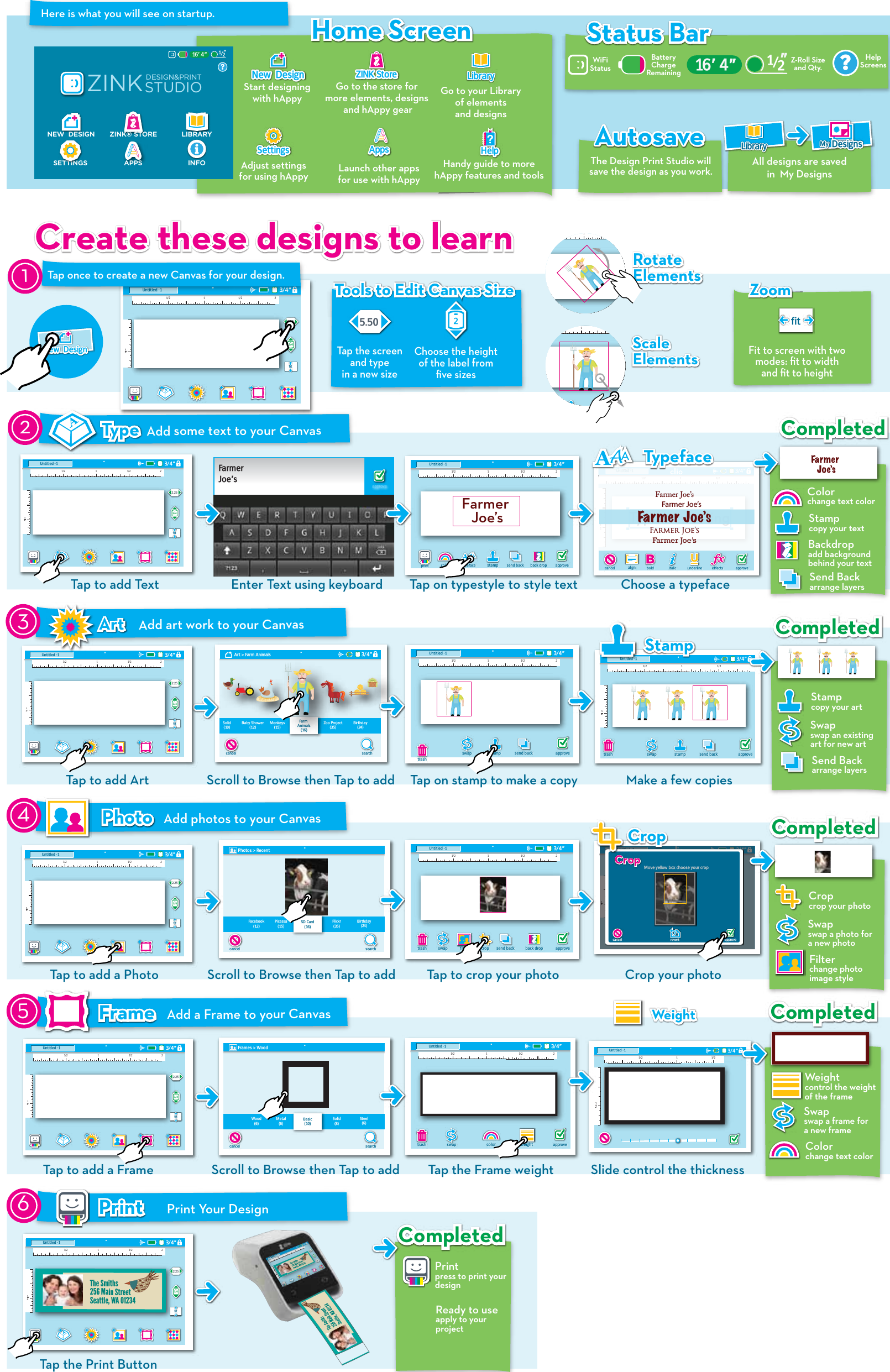
Here is what you will see on startup.Tap the screenand typein a new size5.50Tools to Edit Canvas SizeTools to Edit Canvas SizeChoose the height of the label from five sizes2Z-Roll Sizeand Qty.HelpScreensStatus BarStatus BarWiFi StatusCreate these designs to learnCreate these designs to learn Rotate ElementsRotate ElementsScaleElementsScaleElements12trash121/2 1 1/23/4”bold italic underline approvecancel effectsUntitled -1Type somethingFarmer Joe’sFarmer Joe’sFarmer JoeʻsFarmer Joe’sFarmer Joe’sTypefaceTypefaceAdd some text to your CanvasTypeType1/2 1 1/23/4”2Untitled -1approvecolor typeface send back alignback dropFarmer Joe’sPhotos > RecentsearchcancelFacebook(12)Picassa(15)Flickr(35)Birthday(24)SD Card(16)Add photos to your CanvasPhotoPhoto1/2 1 1/23/4”122Untitled -1CropCrop Move yellow box choose your croprevertcancel approveCropCrop121/2 1 1/23/4”Untitled -1StampStamp12searchArt > Farm Animals 3/4”cancelSolid(10)Baby Shower(12)Monkeys(15)Zoo Project(35)Birthday(24)Farm Animals(16)trash1/2 1 1/23/4”2Untitled -1swap stamptrashapprovesend backWeightWeight1/2 1 1/23/4”Untitled -11212trash1/2 1 1/23/4”2Untitled -1swaptrash approveAdd a Frame to your CanvasFrameFrameweightcolorFrames > WoodsearchcancelWood(6)Metal(6)Solid(8)Steel(6)Basic(10)245trash1/2 1 1/23/4”2Untitled -1swap stamptrash approvesend back back droptrash1/2 1 1/23/4”2Untitled -1swap stamptrash approvesend back back dropapproveFarmerJoe’s12trash1/2 1 1/23/4”2Untitled -1swaptrash approvesend back back dropfilter cropNew  DesignNew  DesignGo to the store for more elements, designs and hAppy gearZINK StoreZINK StoreAdjust settings for using hAppySettingsSettingsLaunch other apps for use with hAppyAppsApps  Handy guide to morehAppy features and toolsHelpHelpHome ScreenHome ScreenStart designingwith hAppyNew  DesignNew  Design1/2 1 1/23/4”122Untitled -12.253/4fit1/2 1 1/23/4”122Untitled -12.253/4fitAutosaveAutosaveThe Design Print Studio will save the design as you work. Go to your Library of elements and designsLibraryLibrary1/2 1 1/23/4”122Untitled -12.253/4fitTap once to create a new Canvas for your design.1printfitFit to screen with two modes: fit to width and fit to heightZoomZoomFa r m e r Jo eʻsCompletedCompletedCompletedCompletedCompletedCompletedCompletedCompletedstampTap to add Text  Enter Text using keyboardswap stamptrash approvesend backChoose a typeface Tap on typestyle to style textColorchange text colorStampcopy your textBackdropadd background behind your textSend Backarrange layersAdd art work to your CanvasArtArt3Tap to add Art Scroll to Browse then Tap to add Tap on stamp to make a copy Make a few copiesStampcopy your artSwapswap an existing art for new artSend Backarrange layersCropcrop your photoSwapswap a photo fora new photoFilterchange photoimage styleWeightcontrol the weight of the frameSwapswap a frame fora new frameColorchange text color1/2 1 1/23/4”122Untitled -12.253/4fit1/2 1 1/23/4”122Untitled -12.253/4fitTap to add a PhotoTap to add a FrameScroll to Browse then Tap to add Tap to crop your photo Crop your photoScroll to Browse then Tap to add Slide control the thicknessTap the Frame weightPrint Your DesignPrintPrint6Printpress to print yourdesignReady to useapply to yourproject1/2 1 1/23/4”122Untitled -12.253/4fitTap the Print ButtonAll designs are saved in  My DesignsMyMy DesignsDesignsLibraryLibrary16’ 4”ZINK® STORE LIBRARYAPPSZINKSTUDIODESIGN&PRINTNEW  DESIGNSETTINGS?INFO/12”?16’ 4” /12”BatteryChargeRemainingThe Smiths256 Main StreetSeattle, WA 01234CompletedCompleted
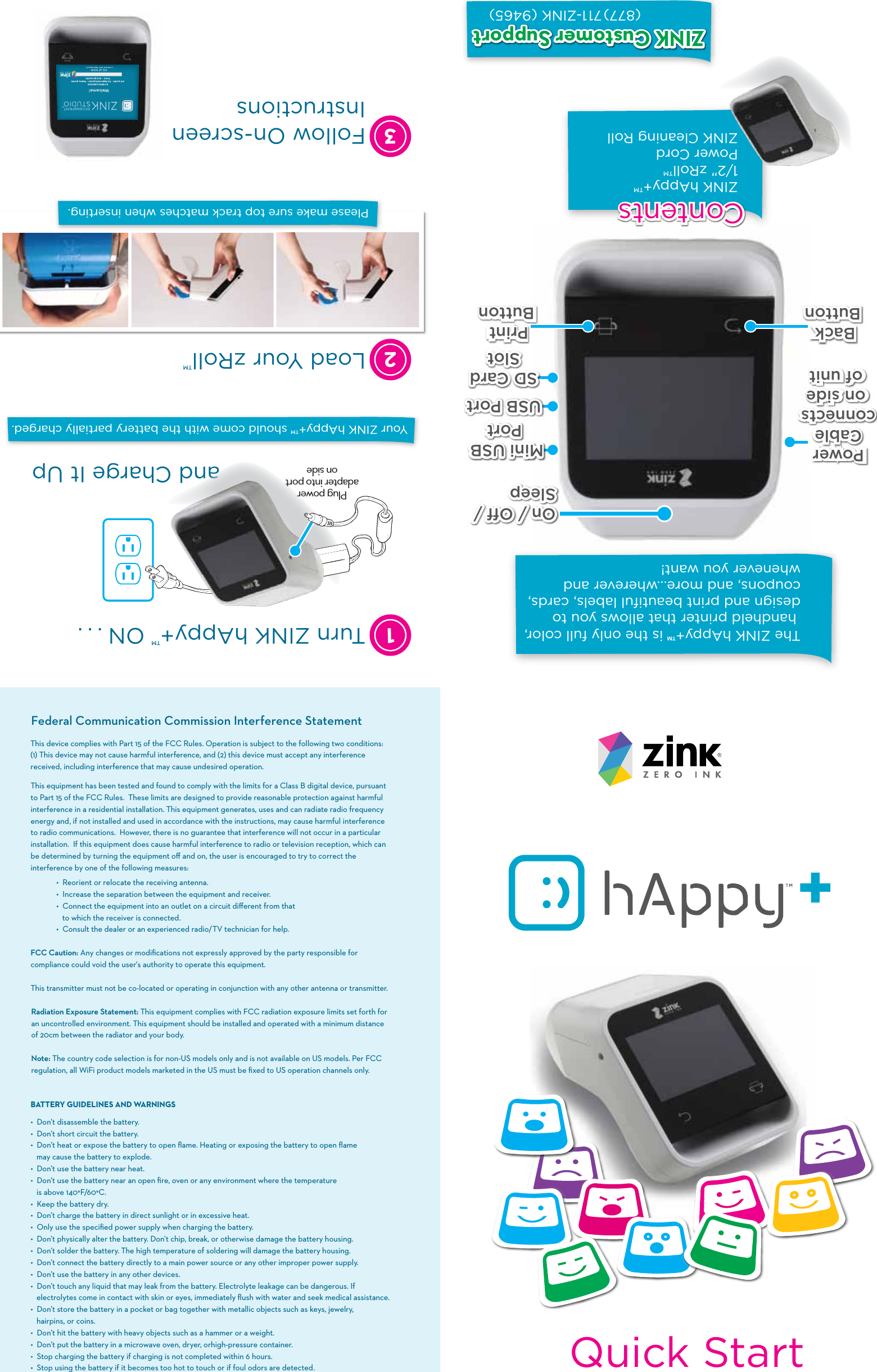
Quick StartThe ZINK hAppy+™ is the only full color, handheld printer that allows you to design and print beautiful labels, cards, coupons, and more…wherever and whenever you want!On / Off / SleepOn / Off / Sleep USB PortUSB PortMini USB PortMini USB PortSD CardSlotSD CardSlotZINK hAppy+™1/2” zRoll™Power CordZINK Cleaning Roll(877)711-ZINK (9465)ContentsContentsPower Cableconnectson sideof unitPower Cable connects on sideof unitBack ButtonBack ButtonPrintButtonPrint ButtonZINK Customer SupportZINK Customer SupportThis equipment has been tested and found to comply with the limits for a Class B digital device, pursuant to Part 15 of the FCC Rules.  These limits are designed to provide reasonable protection against harmful interference in a residential installation. This equipment generates, uses and can radiate radio frequency energy and, if not installed and used in accordance with the instructions, may cause harmful interference to radio communications.  However, there is no guarantee that interference will not occur in a particular installation.  If this equipment does cause harmful interference to radio or television reception, which can be determined by turning the equipment off and on, the user is encouraged to try to correct the interference by one of the following measures:  •  Reorient or relocate the receiving antenna.  •  Increase the separation between the equipment and receiver.  •  Connect the equipment into an outlet on a circuit different from that          to which the receiver is connected.  •  Consult the dealer or an experienced radio/TV technician for help. FCC Caution: Any changes or modifications not expressly approved by the party responsible for compliance could void the user's authority to operate this equipment. This transmitter must not be co-located or operating in conjunction with any other antenna or transmitter.Radiation Exposure Statement: This equipment complies with FCC radiation exposure limits set forth for an uncontrolled environment. This equipment should be installed and operated with a minimum distance of 20cm between the radiator and your body.Note: The country code selection is for non-US models only and is not available on US models. Per FCC regulation, all WiFi product models marketed in the US must be fixed to US operation channels only.BATTERYGUIDELINESANDWARNINGS• �Don’t disassemble the battery. • �Don’t short circuit the battery. •  Don’t heat or expose the battery to open flame. Heating or exposing the battery to open flame    may cause the battery to explode.• �Don’t use the battery near heat. • �Don’t use the battery near an open fire, oven or any environment where the temperature    is above 140°F/60°C.• �Keep the battery dry.• �Don’t charge the battery in direct sunlight or in excessive heat.• �Only use the specified power supply when charging the battery.• �Don’t physically alter the battery. Don’t chip, break, or otherwise damage the battery housing.• �Don’t solder the battery. The high temperature of soldering will damage the battery housing. • �Don’t connect the battery directly to a main power source or any other improper power supply.• �Don’t use the battery in any other devices. • �Don’t touch any liquid that may leak from the battery. Electrolyte leakage can be dangerous. If   electrolytes come in contact with skin or eyes, immediately flush with water and seek medical assistance.• �Don’t store the battery in a pocket or bag together with metallic objects such as keys, jewelry,    hairpins, or coins.• �Don’t hit the battery with heavy objects such as a hammer or a weight.• �Don’t put the battery in a microwave oven, dryer, orhigh-pressure container.• �Stop charging the battery if charging is not completed within 6 hours.• �Stop using the battery if it becomes too hot to touch or if foul odors are detected.Federal Communication Commission Interference StatementThis device complies with Part 15 of the FCC Rules. Operation is subject to the following two conditions: (1) This device may not cause harmful interference, and (2) this device must accept any interference received, including interference that may cause undesired operation.Your ZINK hAppy+™ should come with the battery partially charged.13Follow On-screen InstructionsTurn ZINK hAppy+™ ON . . .and Charge It Up2Load Your zRoll™ Please make sure top track matches when inserting.Plug power adapter into port on side

Navigation menu